Tag Archives: SNMP traps

Sending SNMP Traps from One Source to Multiple Zabbix Hosts

Post Syndicated from Nathan Liefting original https://blog.zabbix.com/sending-snmp-traps-from-one-source-to-multiple-zabbix-hosts/31281/

Let’s say you are working in an environment with hundreds or thousands of devices. All of these devices are managed from a nice simple management server, ready for you to configure.

However, you want to start monitoring this stack of devices as well. That could mean hundreds or even thousands of devices to configure.

Not only that, these management servers and associated platforms (usually found on DAS or other Network equipment) often include monitoring tools such as API to discover resources and SNMP to receive traps.

How to

Let’s paint a picture here, as it speaks more than words in these technical setups.
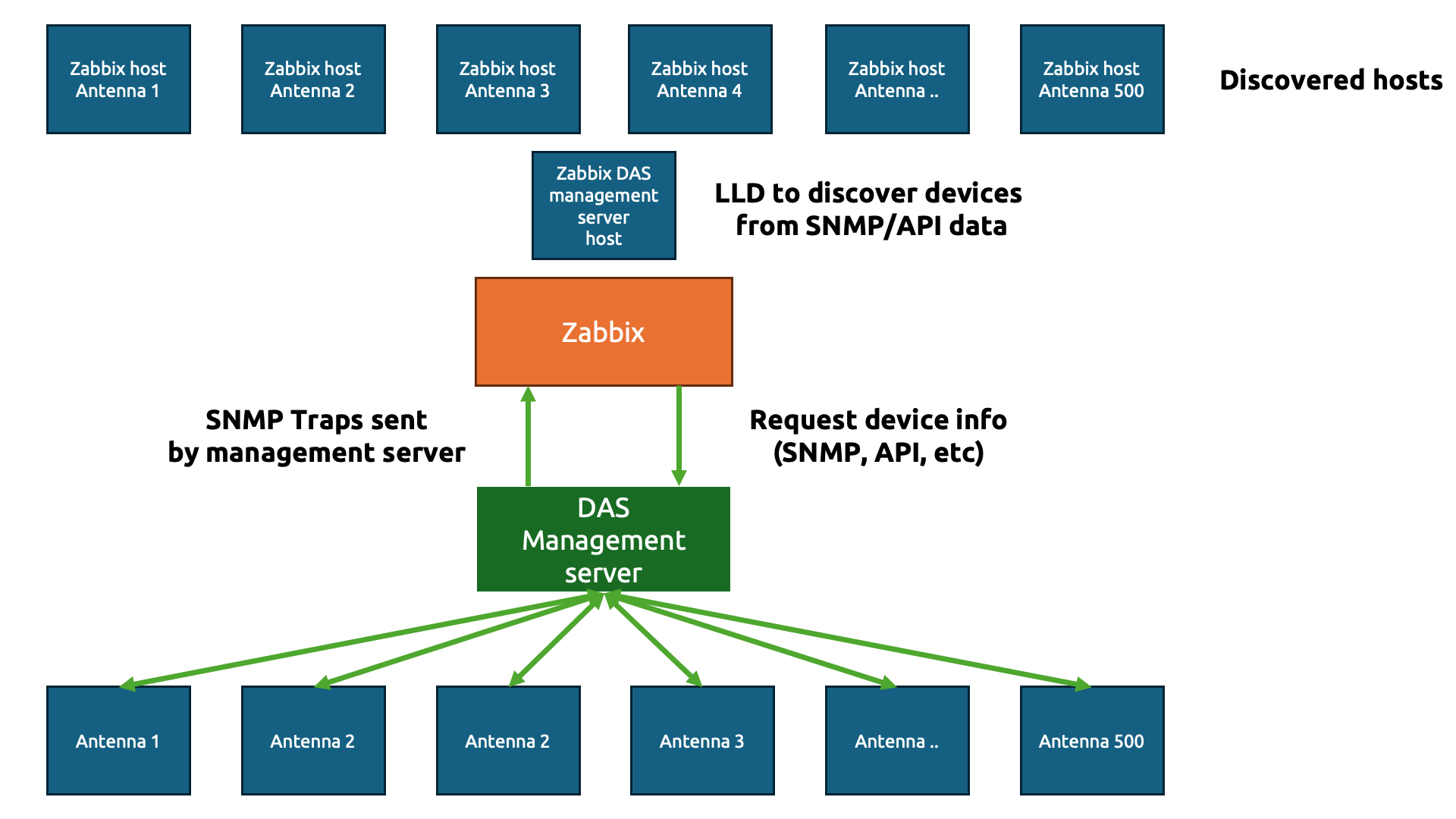
The goal here is simple – we are going to do the usual IT engineer trick and be as lazy as possible to get to the simplest solution (please tell me that isn’t just me!)

We only want to create a simple template (technically two) to gather data from those hundreds or thousands of physical devices. In Zabbix, we start with a template to gather the information about the devices. Let’s say we gather the antenna details using an API and the JSON output looks something like this:

{
"data": [
{
"device_name": "Antenna 1",
"model": "AX-900",
"location": "Roof Sector A",
"serial_number": "SN-A1-001"
},
{
"device_name": "Antenna 2",
"model": "AX-900",
"location": "Roof Sector B",
"serial_number": "SN-A2-002"
},
{
"device_name": "Antenna 3",
"model": "BX-450",
"location": "Basement Level 1",
"serial_number": "SN-A3-003"
}
]
}

Perfect JSON for us to parse through in Zabbix. Now, we need to create our host to collect the DAS management server data first.
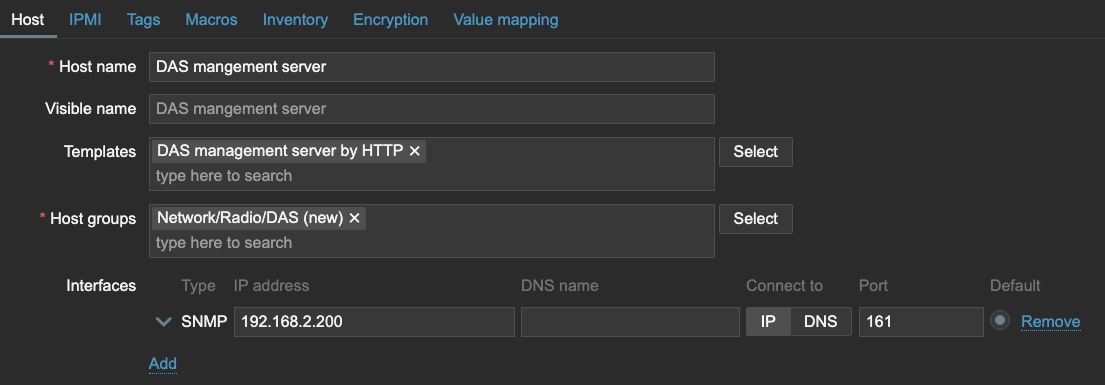
We can use that host to get the data with an item in Zabbix and then send it straight over to Low-Level Discovery.
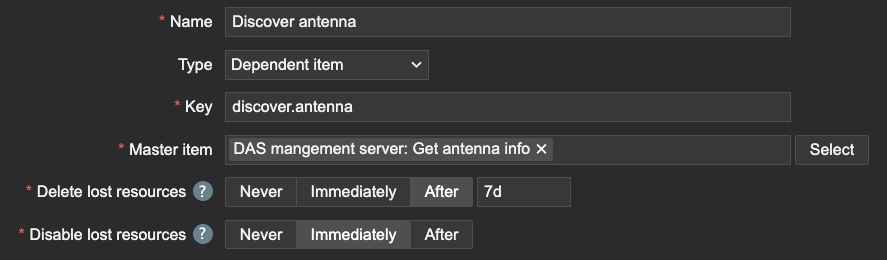
Of course, we need to make sure to capture the name of the antenna devices using JSONPath.

Within this Low-Level Discovery rule, we can then create our Host prototype. Interestingly, since the DAS management server will be sending over all of the data, we should inherit the SNMP interface. All of the Antenna devices will have the same IP address as the DAS management server on this interface, but this will be important later for our SNMP traps.
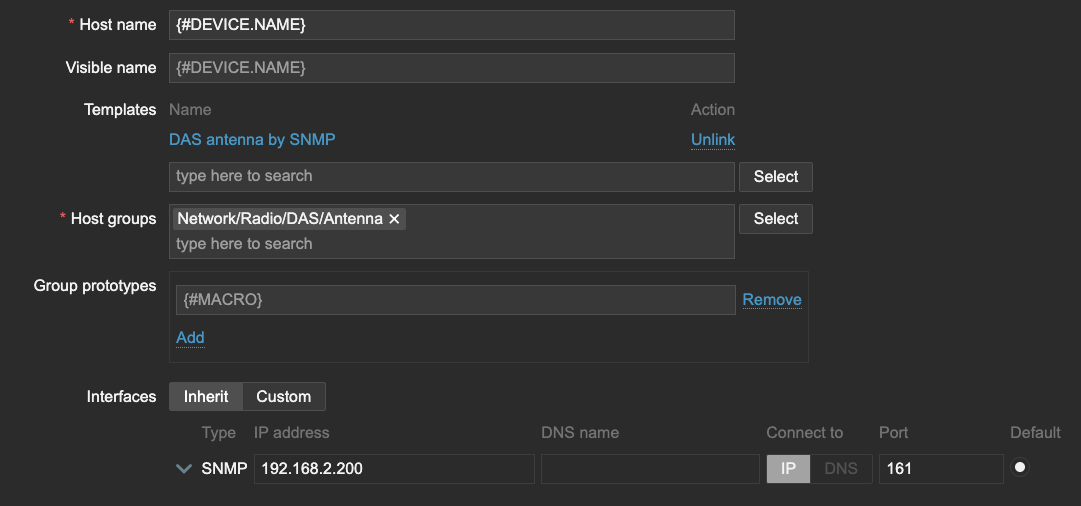
I also want to store the LLD macro {#DEVICE.NAME} as a User macro {$DEVICE.NAME}, which will be important when we create our Antenna template.

Now, let’s see what happens when LLD runs. All of the Antenna are discovered and added to our Zabbix environment. The template DAS Antenna by SNMP is hooked up to the host and all of them have the SNMP interface, just like the DAS management server.

On the template DAS antenna by SNMP, let’s create the SNMP trap item.
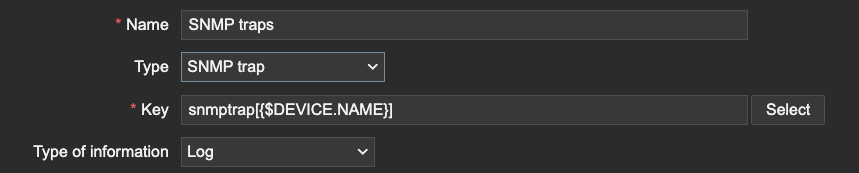
This is where we need the macro we used earlier. The macro will serve as a (part of) the snmptrap item key. Since the SNMP trap items use REGEX to match traps, we can filter only the traps that are related to our device information. We can even extend this further by matching specific OIDs, but only if our Macro is also present after the OID or somewhere else in the trap for example.

Conclusion

The trick here is quite simple. Zabbix matches SNMP trap information based on the IP address.

2025-01-30 10:04:23 2024-01-30 
10:04:21 2025-01-30T10:04:21+0200 UDP: [192.168.2.200]:56585->[192.168.2.41]:162
DISMAN-EVENT-MIB::1.3.6.1.5.1.51.1.1 = Antenna 1

As long as the host SNMP IP address matches the IP address within the trap and the REGEX in your SNMP trap item, Zabbix will process the trap, even if it is across 500 hosts. Be careful however, as this also means that you could be duplicating traps if your SNMP trap item REGEX isn’t strict enough.

Another thing is to be mindful of the amount of traps being processed in combination with complex regular expressions. The SNMP trap process within Zabbix server and proxy is a single threaded process. A ticket for improvement is open here.

I hope you enjoyed reading this short example! If you have any questions or need help configuring anything on your Zabbix setup feel free to contact me and the team at Opensource ICT Solutions.

Nathan Liefting

https://oicts.com

A close up of a logo Description automatically generated


The post Sending SNMP Traps from One Source to Multiple Zabbix Hosts appeared first on Zabbix Blog.
Proxy Group Load Balancing with SNMP Traps

Post Syndicated from Nathan Liefting original https://blog.zabbix.com/proxy-group-load-balancing-with-snmp-traps/31042/

The new Zabbix proxy groups provide us with a method to provide both redundancy and load balancing in our Zabbix proxy setups. However, one major limitation arises when we want to use SNMP traps with these new proxy groups – it isn’t natively supported at the moment. One of our customers asked me to find a solution to that problem, so here’s how I went about it.

Getting to grips with the problem

As mentioned, many of us are now facing a problem. Either we use proxy groups and we don’t use SNMP traps, or we use proxy groups and move SNMP traps to a single proxy. Unfortunately, this is unacceptable for many environments where SNMP traps might be an essential part of monitoring. The problem, however, stems from how snmptrapd works in combination with Zabbix reading the trapper file. Improvements have already been made to provide for more room when creating our own solutions like this.

Other Zabbix users have also been proposing solutions and I’m sure Zabbix is looking into improvements. Here’s an example case to vote on.

However, that doesn’t solve many of our issues now. The problem starts when we are sending SNMP traps to a single proxy (Proxy 1 for example) and a Zabbix host (let’s say Zabbix host 2) is assigned to another proxy in the proxy group (Proxy 2 for example). In this situation, the trap is coming in on an incorrect monitoring proxy and Zabbix won’t be able to read the trap. It will simply not add it to the Zabbix database and ignore it.

The solution here is simple – we can configure our monitoring target like a switch or a router to send the SNMP trap to multiple sources. However, this will cause our trap to be sent over the network multiple times, increasing the load on our network. This is acceptable for smaller setups, but we were dealing with a setup that is sending hundreds of traps every second.

Finding a solution

With the problem laid out for us, we came up with a simple duplication setup that included these requirements:

  1. Simple and easy to maintain/troubleshoot
  2. Traps could only be sent over the network once
  3. Works fast between failovers
  4. Works with both redundancy and load balancing
  5. Minimal extra packages
  6. No easily corruptible shared file systems

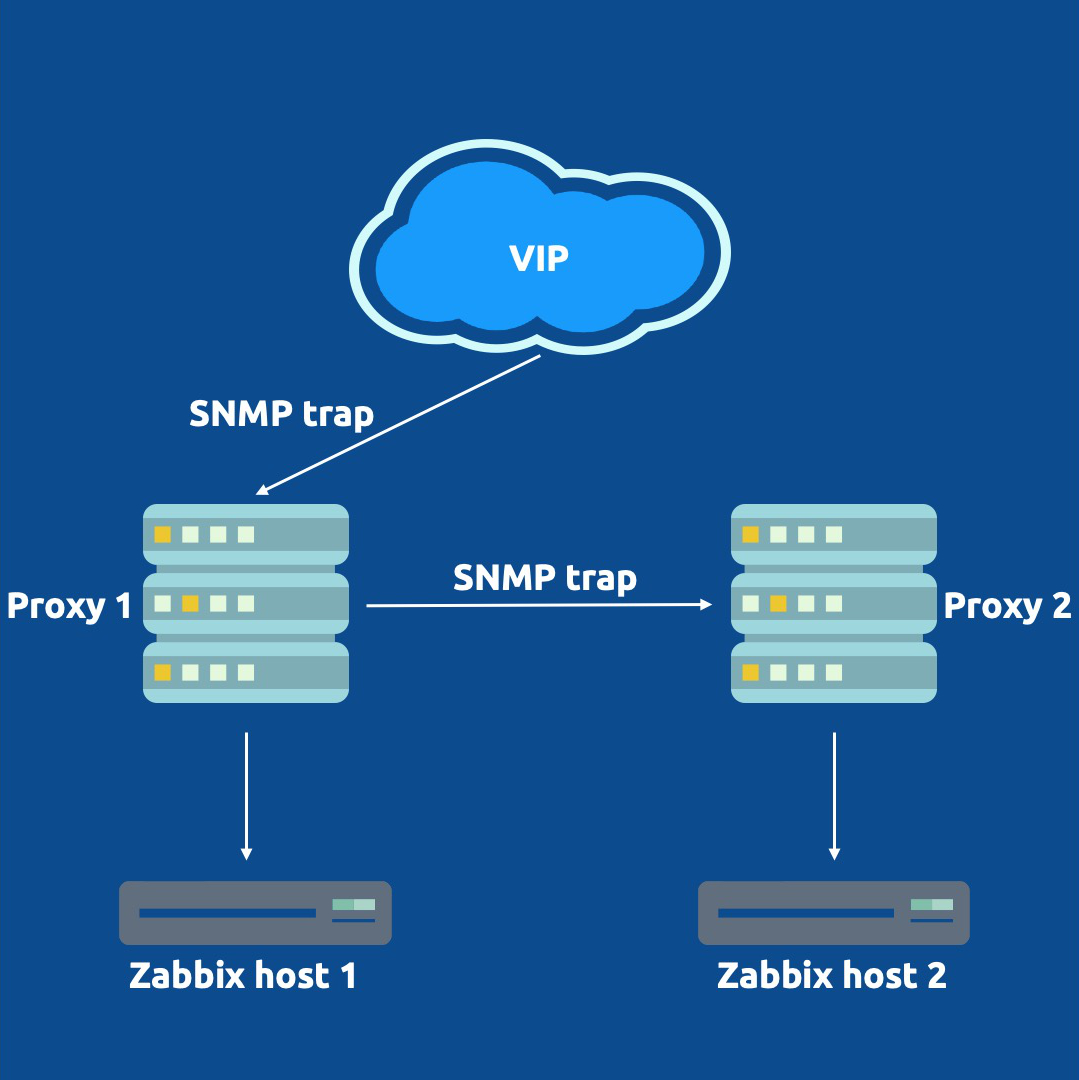
What we came up with in the end is visible in the image below:


It’s a simple setup that requires us to install 2 extra packages and a container.

First, we added a VIP to our proxy setup using keepalived, to provide our monitoring targets with a single SNMP trap destination. The VIP will be available on one proxy at the time, regardless of whether there are 2, 10 or more proxies in the proxy group. Our switches, routers, or any other SNMP trap host can now be configured to send traps to this VIP.

Second, we needed a way to duplicate our traps. Since only one proxy is going to be receiving traps, the other proxies still need to be able to receive the traps. Without the duplication and the VIP being present on Proxy 1, Zabbix host 2 still would not receive its trap. We installed Docker and created a tiny, lightweight container on our hosts to duplicate the SNMP trap from one proxy to all other proxies in the group. Admittedly this does slightly go against requirement number 2, as we are now sending the trap over the network between proxies. This is, however, all within our own more localized infrastructure instead of over a longer network.

That’s it! Whenever Proxy 1 receives a trap, it will now duplicate it to Proxy 2. The proxy with the host being monitoring will parse the trap correctly to Zabbix and the other proxies will ignore the trap. Even if the proxy restarts, fails over, or suddenly goes down, it will not read the trap twice.

The only thing to keep in mind is that it can take some time for keepalived to fail over the VIP. With SNMP traps being UDP-based, this means that any traps sent to the VIP while snmptrapd is down won’t be parsed. However, it’s definitely better to lose some in case of failover, than to lose all upon outage!

The post Proxy Group Load Balancing with SNMP Traps appeared first on Zabbix Blog.