Tag Archives: HTTP agent items

Sending SNMP Traps from One Source to Multiple Zabbix Hosts

Post Syndicated from Nathan Liefting original https://blog.zabbix.com/sending-snmp-traps-from-one-source-to-multiple-zabbix-hosts/31281/

Let’s say you are working in an environment with hundreds or thousands of devices. All of these devices are managed from a nice simple management server, ready for you to configure.

However, you want to start monitoring this stack of devices as well. That could mean hundreds or even thousands of devices to configure.

Not only that, these management servers and associated platforms (usually found on DAS or other Network equipment) often include monitoring tools such as API to discover resources and SNMP to receive traps.

How to

Let’s paint a picture here, as it speaks more than words in these technical setups.
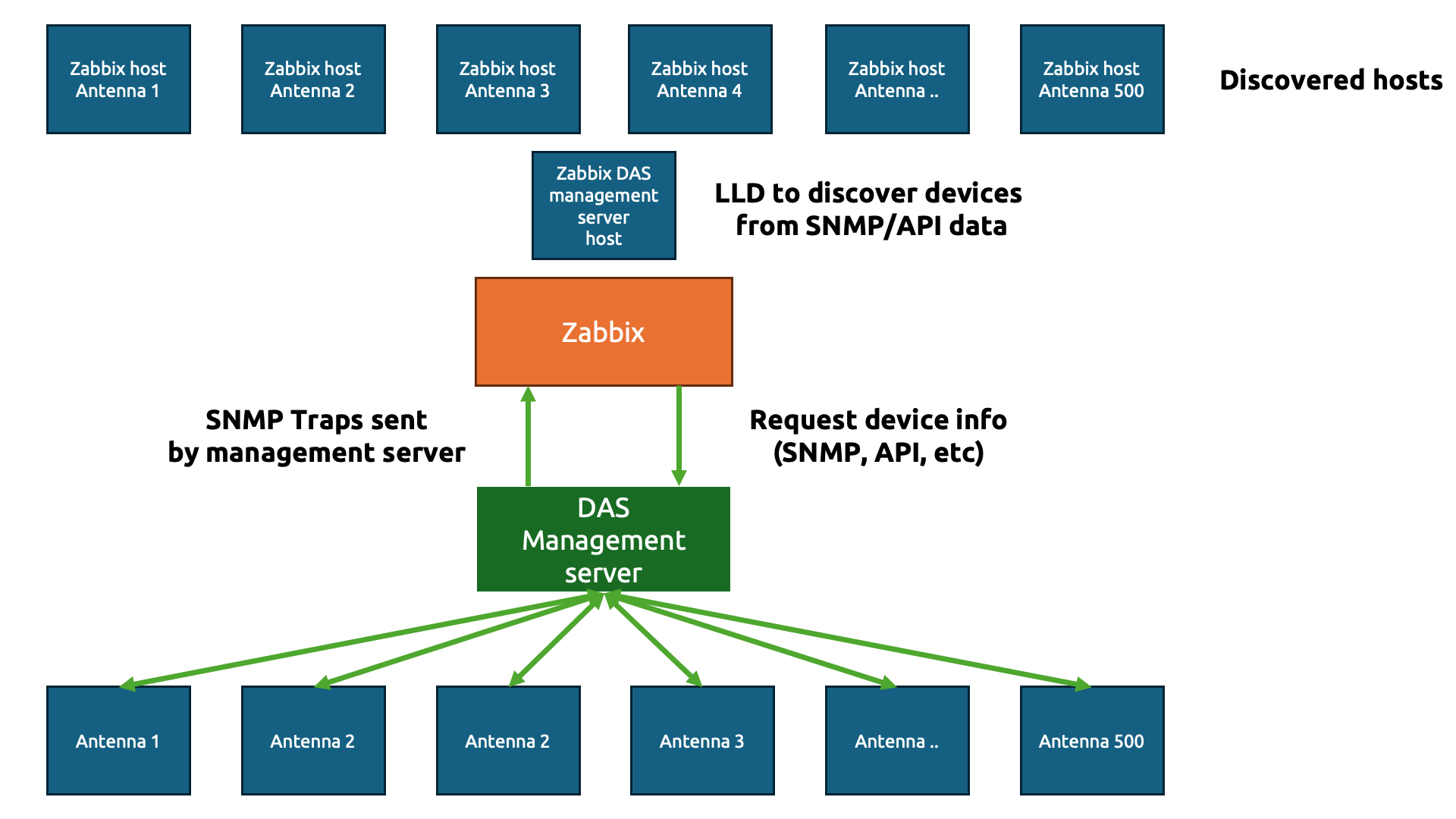
The goal here is simple – we are going to do the usual IT engineer trick and be as lazy as possible to get to the simplest solution (please tell me that isn’t just me!)

We only want to create a simple template (technically two) to gather data from those hundreds or thousands of physical devices. In Zabbix, we start with a template to gather the information about the devices. Let’s say we gather the antenna details using an API and the JSON output looks something like this:

{
"data": [
{
"device_name": "Antenna 1",
"model": "AX-900",
"location": "Roof Sector A",
"serial_number": "SN-A1-001"
},
{
"device_name": "Antenna 2",
"model": "AX-900",
"location": "Roof Sector B",
"serial_number": "SN-A2-002"
},
{
"device_name": "Antenna 3",
"model": "BX-450",
"location": "Basement Level 1",
"serial_number": "SN-A3-003"
}
]
}

Perfect JSON for us to parse through in Zabbix. Now, we need to create our host to collect the DAS management server data first.
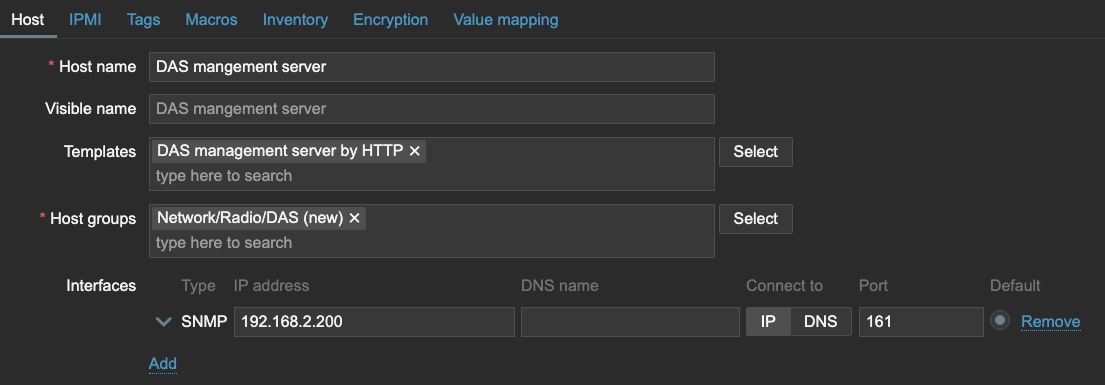
We can use that host to get the data with an item in Zabbix and then send it straight over to Low-Level Discovery.
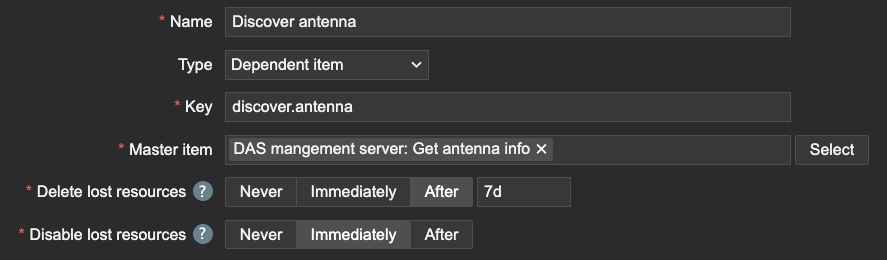
Of course, we need to make sure to capture the name of the antenna devices using JSONPath.

Within this Low-Level Discovery rule, we can then create our Host prototype. Interestingly, since the DAS management server will be sending over all of the data, we should inherit the SNMP interface. All of the Antenna devices will have the same IP address as the DAS management server on this interface, but this will be important later for our SNMP traps.
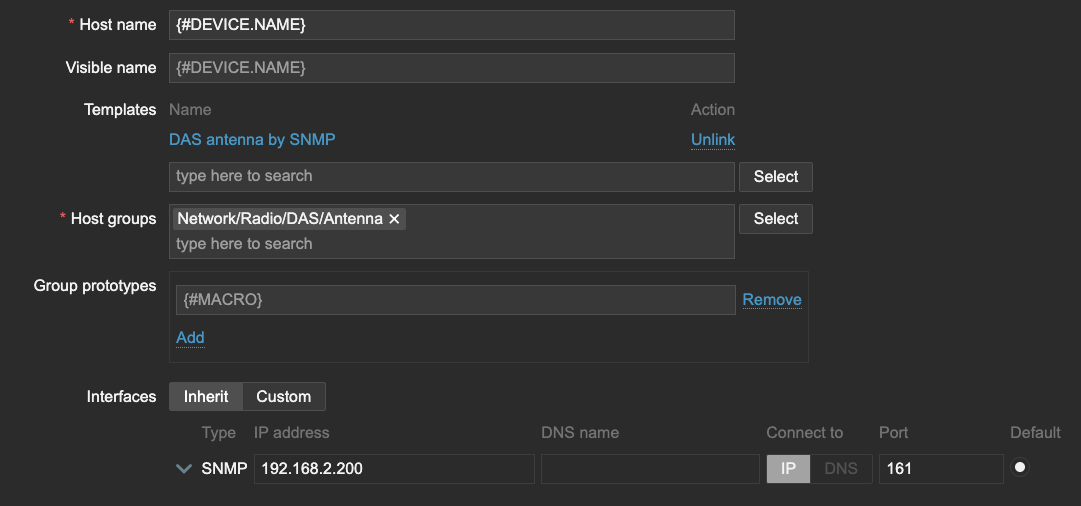
I also want to store the LLD macro {#DEVICE.NAME} as a User macro {$DEVICE.NAME}, which will be important when we create our Antenna template.

Now, let’s see what happens when LLD runs. All of the Antenna are discovered and added to our Zabbix environment. The template DAS Antenna by SNMP is hooked up to the host and all of them have the SNMP interface, just like the DAS management server.

On the template DAS antenna by SNMP, let’s create the SNMP trap item.
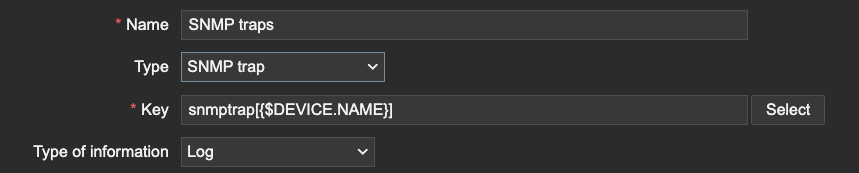
This is where we need the macro we used earlier. The macro will serve as a (part of) the snmptrap item key. Since the SNMP trap items use REGEX to match traps, we can filter only the traps that are related to our device information. We can even extend this further by matching specific OIDs, but only if our Macro is also present after the OID or somewhere else in the trap for example.

Conclusion

The trick here is quite simple. Zabbix matches SNMP trap information based on the IP address.

2025-01-30 10:04:23 2024-01-30 
10:04:21 2025-01-30T10:04:21+0200 UDP: [192.168.2.200]:56585->[192.168.2.41]:162
DISMAN-EVENT-MIB::1.3.6.1.5.1.51.1.1 = Antenna 1

As long as the host SNMP IP address matches the IP address within the trap and the REGEX in your SNMP trap item, Zabbix will process the trap, even if it is across 500 hosts. Be careful however, as this also means that you could be duplicating traps if your SNMP trap item REGEX isn’t strict enough.

Another thing is to be mindful of the amount of traps being processed in combination with complex regular expressions. The SNMP trap process within Zabbix server and proxy is a single threaded process. A ticket for improvement is open here.

I hope you enjoyed reading this short example! If you have any questions or need help configuring anything on your Zabbix setup feel free to contact me and the team at Opensource ICT Solutions.

Nathan Liefting

https://oicts.com

A close up of a logo Description automatically generated


The post Sending SNMP Traps from One Source to Multiple Zabbix Hosts appeared first on Zabbix Blog.

What’s Up, Home? – Measure Real-Time Power Consumption

Post Syndicated from Janne Pikkarainen original https://blog.zabbix.com/whats-up-home-measure-real-time-power-consumption/24479/

Can you monitor Finland’s total real-time power consumption with Zabbix? Of course, you can! By day, I am a monitoring tech lead in a global cyber security company. By night, I monitor my home with Zabbix & Grafana and do some weird experiments with them. Welcome to my blog about this project.

After my speech at the Zabbix Summit 2022, someone asked how deeply my wife is involved with this home monitoring project, and I responded back that she usually gives me ideas by accident. You know, she’s a funny and talkative person up to the point that I call her the comment track or the voice-over of my life, so even as a non-techie, she will for sure give me new ideas.

Well, this time she gave the idea for this post on purpose — now that winter and the dark days & nights are approaching fast, she asked if Zabbix could turn our decorative seasonal lights on and off based on the current electricity price.

Of course, it can! I am anyway already monitoring the current electricity price. But let’s take it further — using Zabbix, we can also check Finland’s current real-time power consumption. It would be kind NOT to turn on the lights even during the cheap hours if our power grid would be near its maximum limit.

Hello, Fingrid

Our electricity network Fingrid offers open data for all kinds of details about our power grid, one of them being the current electricity consumption. Using their services is free, all you need is to create an account to get an API key, so I tried if I can use the API with Zabbix. Well, Zabbix integration was easy, though, due to the time constraints set by our now-10-weeks-old-baby, this current version is a bit of a kludge and not yet finished. But hey, I have this blog to write!

So, after getting my API key, I created a new HTTP agent item to my Zabbix and did parse it with Zabbix JSONPath for the value.

No alt text provided for this image

Why the regular expression? The value was not returned in pure numeric format, and I know it must be just my JSONPath expression that has something wrong, but to get this working today, I just brute-forced the extra characters away. I’ll fix that one day. Maybe. The most important for now is that this works; the values shown are in megawatts.

No alt text provided for this image
What’s next?

Now that the groundwork has been done, albeit in an ugly way, in the near future (when we actually install the seasonal lights), I can start controlling them via smart power sockets and smart lights. Thanks to the total flexibility of Zabbix, I can then create triggers such as turn on seasonal lights if electricity cost is maximum of X EUR/kWh AND Finland’s power grid total consumption is not more than Y MWh AND time of day is something when we would be awake (we would turn the lights off during the graveyard hours in any case).

I have some additional research to do; I’m sure I can find out Finland’s total power grid capacity from somewhere, maybe even via Fingrid API (I first tried it about one hour ago). But, as this winter is going to be totally different than our usual winters, Zabbix can help you in this area, too.

I have been working at Forcepoint since 2014 and just like a small part of Forcepoint’s logo, I’m trying to be green as well. — Janne Pikkarainen

This post was originally published on the author’s LinkedIn account.

The post What’s Up, Home? – Measure Real-Time Power Consumption appeared first on Zabbix Blog.

Handy Tips #37: Collecting metrics from HTTP endpoints with HTTP agent items

Post Syndicated from Arturs Lontons original https://blog.zabbix.com/handy-tips-37-collecting-metrics-from-http-endpoints-with-http-agent-items/23160/

Collect metrics from HTTP endpoints such as web application APIs by defining HTTP agent items.

Collecting metrics from web services and applications is a complex affair usually done by scripting around CLIs and APIs. Organizations require an efficient way to monitor such and endpoints and react to collected data.

Collect and react to data from web services and applications with Zabbix HTTP agent items:

  • Collect metrics agentlessly using HTTP/HTTPS protocols
  • Collect metrics in bulk to reduce the number of outgoing requests

  • Zabbix preprocessing can be utilized to extract the required metrics from the response
  • Select from multiple HTTP authentication types

Check out the video to learn how to define HTTP items and collect metrics from HTTP endpoints.

Define HTTP items and collect metrics from HTTP endpoints:

  1. Navigate to ConfigurationHosts and find your host
  2. Open the Items section and press the Create item button
  3. Select TypeHTTP agent
  4. Provide the item key, name and URL
  5. For now, set the Type of information to Text
  6. Optionally, provide the request body and required status codes
  7. Press the Test button and then press Get value and test
  8. Save the resulting value to help you define the preprocessing steps
  9. Navigate to the Preprocessing tab
  10. Define a JSONPath preprocessing step to extract a value from the previous test result
  11. Navigate to the Item section
  12. Change the Type of information to Numeric (float)
  13. Perform the item test one more time
  14. Press Add to add the item

Tips and best practices
  • HTTP item check is executed by Zabbix server or Zabbix proxy
  • Zabbix will follow redirects if the Follow redirects option is checked
  • HTTP items have their own Timeout parameter defined in the item configuration
  • Receiving a status code not listed in the Required status codes field will result in the item becoming unsupported

Learn how to automate your Zabbix configuration workflows and integrate Zabbix with external systems by signing up for the Automation and Integration with Zabbix API course. During the course, students will learn how to use the Zabbix API by implementing different use cases under the guidance of a Zabbix certified trainer.

The post Handy Tips #37: Collecting metrics from HTTP endpoints with HTTP agent items appeared first on Zabbix Blog.