Tag Archives: Velociraptor

CVE-2022-35629..35632 Velociraptor Multiple Vulnerabilities (FIXED)

Post Syndicated from Mike Cohen original https://blog.rapid7.com/2022/07/26/cve-2022-35629-35632-velociraptor-multiple-vulnerabilities-fixed/

CVE-2022-35629..35632 Velociraptor Multiple Vulnerabilities (FIXED)

This advisory covers a number of issues identified in Velociraptor and disclosed by a security code review performed by Tim Goddard from CyberCX. We also thank Rhys Jenkins for working with the Velociraptor team to identify and rectify these issues. All of these identified issues have been fixed as of Version 0.6.5-2, released July 26, 2022.

CVE-2022-35629: Velociraptor client ID spoofing

Velociraptor uses client IDs to identify each client uniquely. The client IDs are derived from the client’s own cryptographic key and so usually require this key to be compromised in order to spoof another client.

Due to a bug in the handling of the communication between the client and server, it was possible for one client, already registered with their own client ID, to send messages to the server claiming to come from another client ID. This may allow a malicious client to attribute messages to another victim client ID (for example, claiming the other client contained some indicator or other data).

The impact of this issue is low because a successful exploitation would require:

  1. The malicious client to identify a specific host’s client ID – since client IDs are random, it is unlikely that an attacker could guess a valid client ID. Client IDs are also not present in network communications, so without access to the Velociraptor server, or indeed the host’s Velociraptor client writeback file, it is difficult to discover the client ID.
  2. Each collection of new artifacts from the client contains a unique random “flow ID.” In order to insert new data into a valid collection, the malicious client will need to guess the flow ID for a valid current flow. Therefore, this issue is most likely to affect client event monitoring feeds, which do not contain random flow IDs.

CVE-2022-35630: Unsafe HTML injection in artifact collection report

Velociraptor allows the user to export a “collection report” in HTML. This is a standalone HTML file containing a summary of the collection. The server will generate the HTML file, and the user’s browser will download it. Users then open the HTML file from their local disk.

A cross-site scripting (XSS) issue in generating this report made it possible for malicious clients to inject JavaScript code into the static HTML file.

The impact of this issue is considered low because the file is served locally (i.e. from a file:// URL) and so does not have access to server cookies or other information (although it may facilitate phishing attacks). This feature is also not used very often.

CVE-2022-35631: Filesystem race on temporary files

The Velociraptor client uses a local buffer file to store data it is unable to deliver to the server quickly enough. Although the file is created with restricted permissions, the filename is predictable (and stored in the client’s configuration file).

On MacOS and Linux, it may be possible to perform a symlink attack by replacing this predictable file name with a symlink to another file and have the Velociraptor client overwrite the other file.

This issue can be mitigated by using an in-memory buffer mechanism instead, or specifying that the buffer file should be created in a directory only writable by root. Set the Client.local_buffer.filename_linux to an empty string, or a directory only writable by root.

By default, on Windows, the buffer file is stored in C:\Program Files\Velociraptor\Tools, which is created with restricted permissions only writable by Administrators. Therefore, Windows clients in the default configuration are not affected by this issue.

CVE-2022-35632: XSS in user interface

The Velociraptor GUI contains an editor suggestion feature that can be used to offer help on various functions. It can also display the description field of a VQL function, plugin or artifact. This field was not properly sanitized and can lead to cross-site scripting (XSS).

Prior to the 0.6.5 release, the artifact description was also sent to this function, but after 0.6.5, this is no longer the case for performance reasons.

On servers older than 0.6.5, an authenticated attacker with the ARTIFACT_WRITER permission (usually only given to administrators) could create an artifact with raw HTML in the description field and trigger this XSS. Servers with version 0.6.5 or newer are not affected by this issue.

Remediation

To remediate these vulnerabilities, Velociraptor users should upgrade their servers.

Disclosure timeline

July, 2022: Issues discovered by Tim Goddard from CyberCX

July 11, 2022: Vulnerabilities disclosed by CyberCX

July 12, 2022: Validated by Rapid7/Velocidex

July 26, 2022: Fixes released in version 0.6.5-2

July 26, 2022: Rapid7 publishes this advisory

NEVER MISS A BLOG

Get the latest stories, expertise, and news about security today.

Velociraptor Version 0.6.5: Table Transformations, Multi-Lingual Support, and Better VQL Error-Handling Let You Dig Deeper Than Ever

Post Syndicated from Carlos Canto original https://blog.rapid7.com/2022/06/24/velociraptor-version-0-6-5-table-transformations-multi-lingual-support-and-better-vql-error-handling-let-you-dig-deeper-than-ever/

Velociraptor Version 0.6.5: Table Transformations, Multi-Lingual Support, and Better VQL Error-Handling Let You Dig Deeper Than Ever

Rapid7 is pleased to announce the release of Velociraptor version 0.6.5 – an advanced, open-source digital forensics and incident response (DFIR) tool that enhances visibility into your organization’s endpoints.  This release has been in development and testing for several months now, and we are excited to share its new features and improvements.

Table transformations

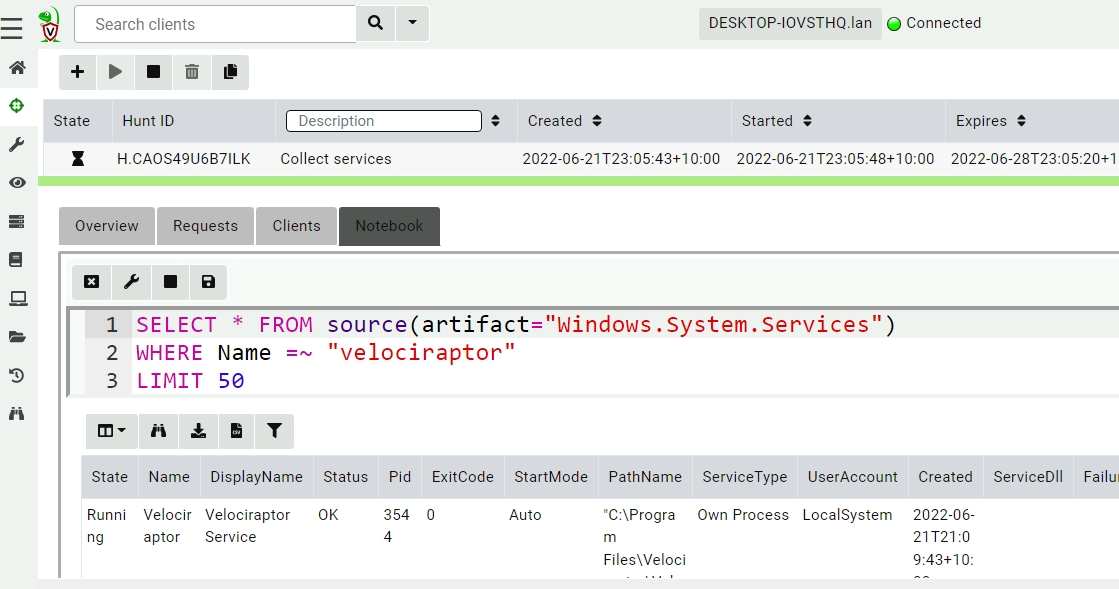
Velociraptor collections or hunts are usually post-processed or filtered in Notebooks. This allows users to refine and post-process the data in complex ways. For example, to view only the Velociraptor service from a hunt collecting all services (Windows.System.Services), one would click on the Notebook tab and modify the query by adding a WHERE statement.

Velociraptor Version 0.6.5: Table Transformations, Multi-Lingual Support, and Better VQL Error-Handling Let You Dig Deeper Than Ever
Filtering rows with VQL

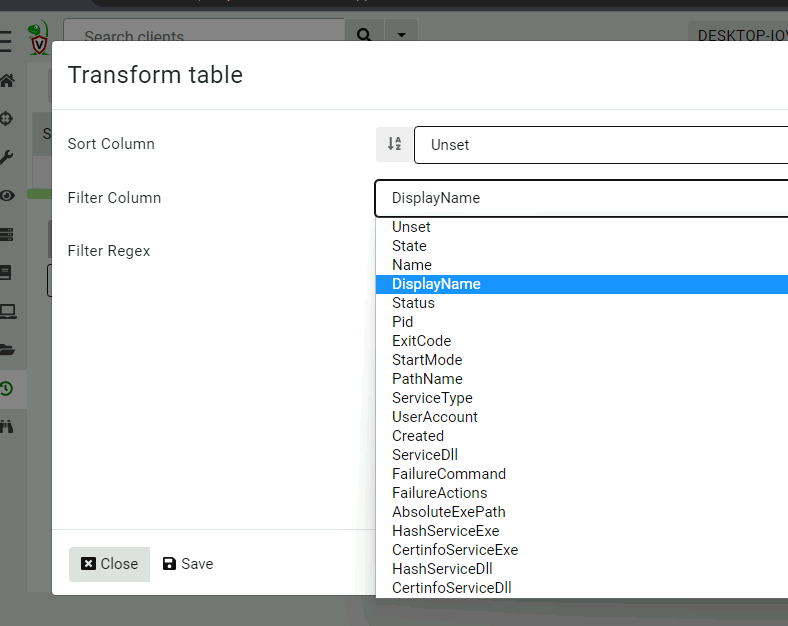
In our experience, this ability to quickly filter or sort a table is very common, and sometimes we don’t really need the full power of VQL. In 0.6.5, we introduced table transformations — simple filtering/sorting operations on every table in the GUI.

Velociraptor Version 0.6.5: Table Transformations, Multi-Lingual Support, and Better VQL Error-Handling Let You Dig Deeper Than Ever
Setting simple table transformations

Multi-lingual support

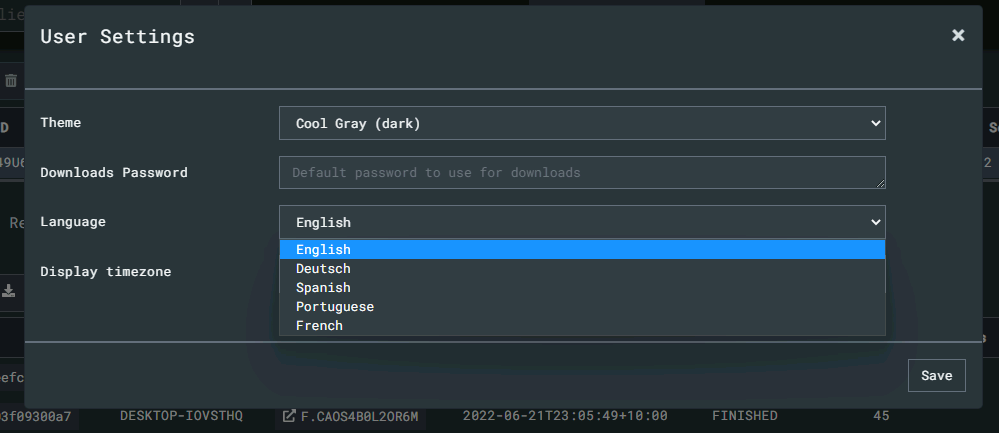
Velociraptor’s community of DFIR professionals is global! We have users from all over the world, and although most users are fluent in English, we wanted to acknowledge our truly international user base by adding internationalization into the GUI. You can now select from a number of popular languages. (Don’t see your language here? We would love additional contributions!)

Velociraptor Version 0.6.5: Table Transformations, Multi-Lingual Support, and Better VQL Error-Handling Let You Dig Deeper Than Ever
Select from a number of popular languages

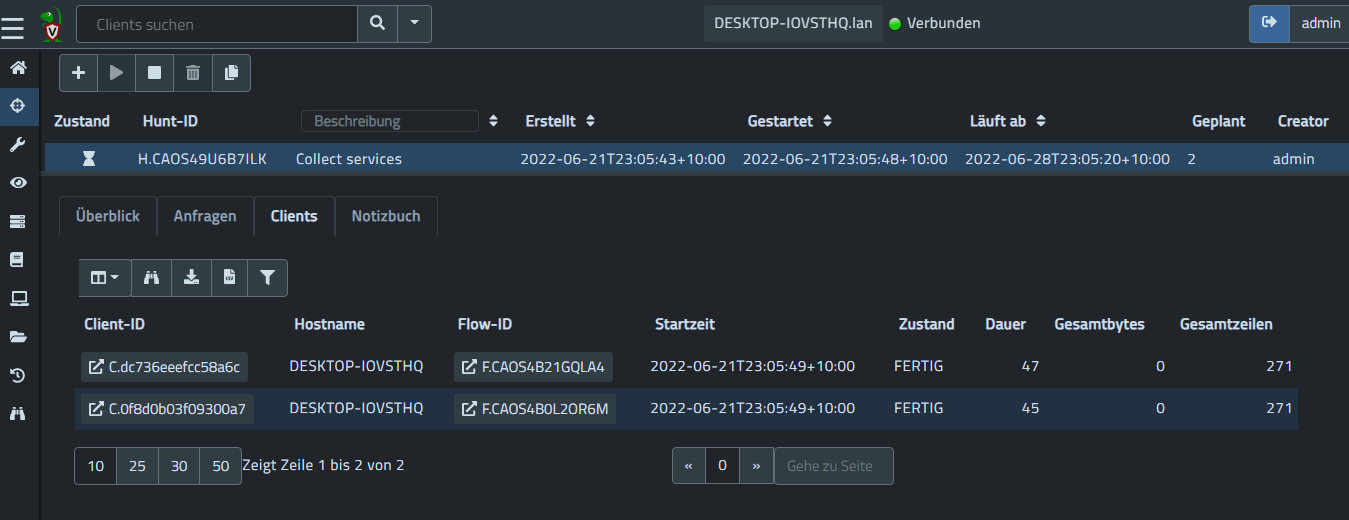
Here is a screenshot showing our German translations:

Velociraptor Version 0.6.5: Table Transformations, Multi-Lingual Support, and Better VQL Error-Handling Let You Dig Deeper Than Ever
The Velociraptor interface in German

New interface themes

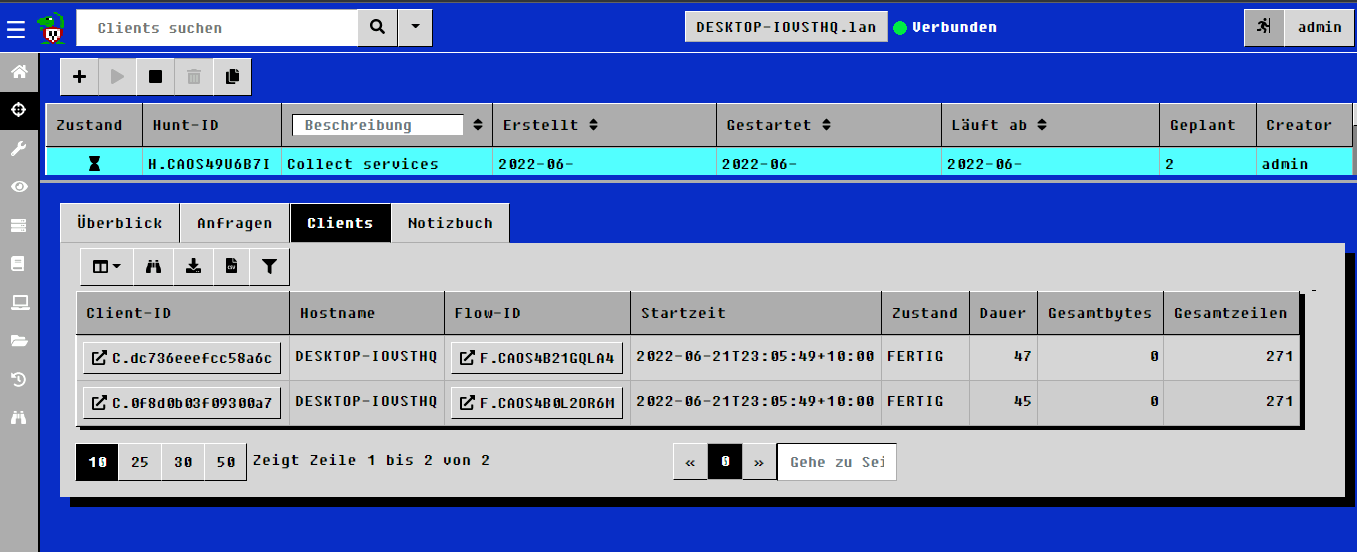
The 0.6.5 release expanded our previous offering of 3 themes into 7, with a selection of light and dark themes. We even have a retro feel ncurses theme that looks like a familiar terminal…

Velociraptor Version 0.6.5: Table Transformations, Multi-Lingual Support, and Better VQL Error-Handling Let You Dig Deeper Than Ever
A stunning retro ‘ncurses’ theme

Error-handling in VQL

Velociraptor is simply a VQL engine – users write VQL artifacts and run these queries on the endpoint.

Previously, it was difficult to tell when VQL encountered an error. Sometimes a missing file is expected, and other times it means something went wrong. From Velociraptor’s point of view, as long as the VQL query ran successfully on the endpoint, the collection was a success. The VQL query can generate logs to provide more information, but the user had to actually look at the logs to determine if there was a problem.

For example, in a hunt parsing a file on the endpoints, it was difficult to tell which of the thousands of machines failed to parse a file. Previously, Velociraptor marked the collection as successful if the VQL query ran – even if it returned no rows because the file failed to parse.

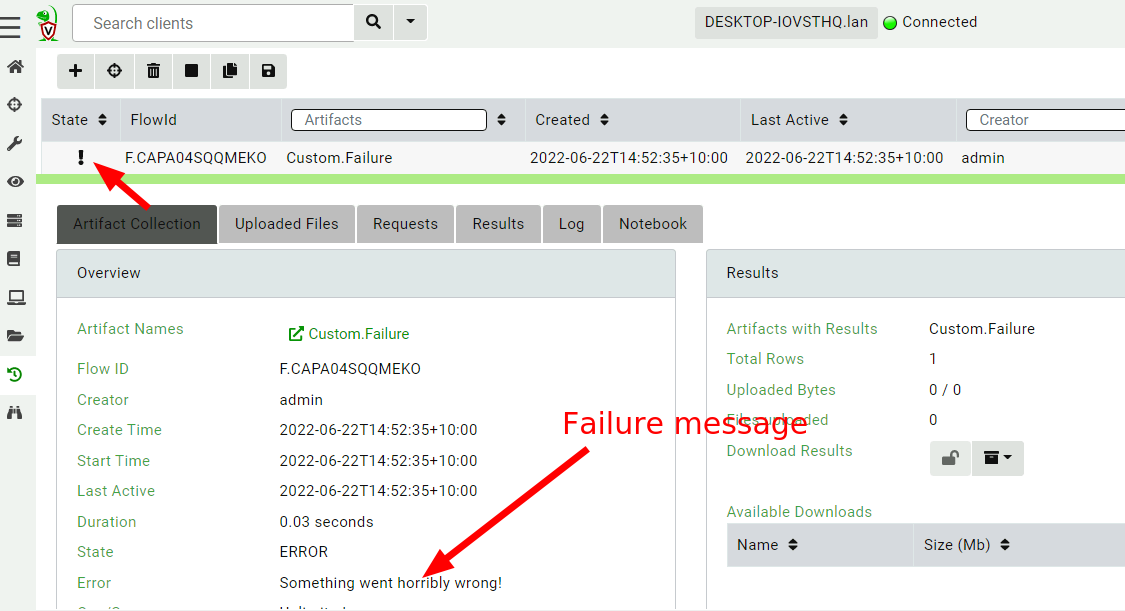
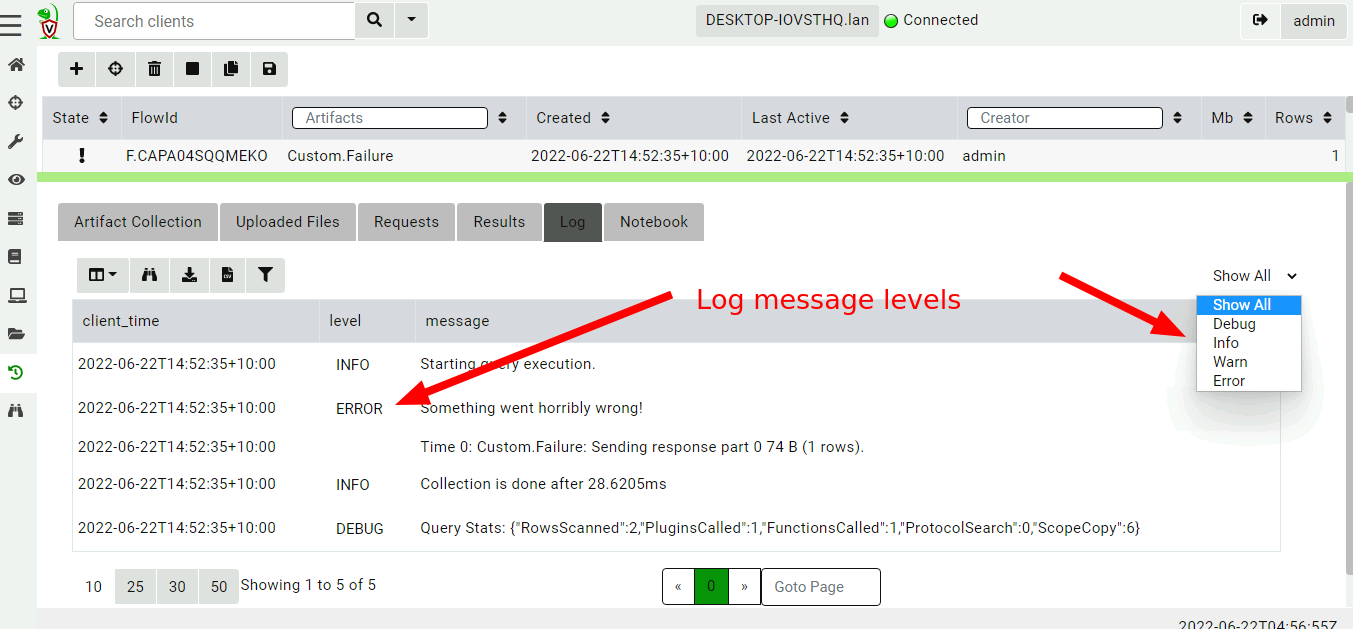
In 0.6.5, there is a mechanism for VQL authors to convey more nuanced information to the user by way of error levels. The VQL log() function was expanded to take a level parameter. When the level is ERROR the collection will be marked as failed in the GUI.

Velociraptor Version 0.6.5: Table Transformations, Multi-Lingual Support, and Better VQL Error-Handling Let You Dig Deeper Than Ever
A failed VQL query

Velociraptor Version 0.6.5: Table Transformations, Multi-Lingual Support, and Better VQL Error-Handling Let You Dig Deeper Than Ever
Query Log messages have their own log level

Custom time zone support

Timestamps are a central part of most DFIR work. Although it is best practice to always work in UTC times, it can be a real pain to have to convert from UTC to local time in your head! Since Velociraptor always uses RFC3389 to represent times unambiguously but for human consumption, it is convenient to represent these times in different local times.

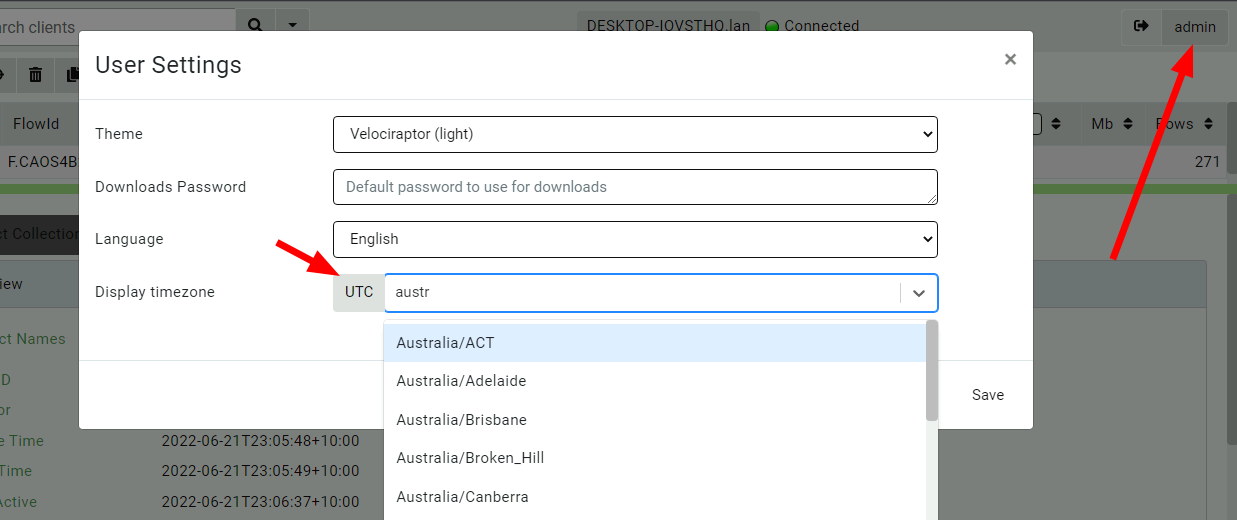
You can now select a more convenient time zone in the GUI by clicking your user preferences and setting the relevant timezone.

Velociraptor Version 0.6.5: Table Transformations, Multi-Lingual Support, and Better VQL Error-Handling Let You Dig Deeper Than Ever
Selecting a custom timezone

The preferred time will be shown in most instances in the UI:

Velociraptor Version 0.6.5: Table Transformations, Multi-Lingual Support, and Better VQL Error-Handling Let You Dig Deeper Than Ever
Time zone selection influences how times are shown

A new MUSL build target

On Linux Go binaries are mostly static but always link to Glibc, which is shipped with the Linux distribution. This means that traditionally Velociraptor had problems running on very old Linux machines (previous to Ubuntu 18.04). We used to build a more compatible version on an old Centos VM, but this was manual and did not support the latest Go compiler.

In 0.6.5, we added a new build target using MUSL – a lightweight Glibc replacement. The produced binary is completely static and should run on a much wider range of Linux versions. This is still considered experimental but should improve the experience on older Linux machines.

Try it out!

If you’re interested in the new features, take Velociraptor for a spin by downloading it from our release page. It’s available for free on GitHub under an open source license.

As always, please file bugs on the GitHub issue tracker or submit questions to our mailing list by emailing [email protected]. You can also chat with us directly on our Discord server.

Learn more about Velociraptor by visiting any of our web and social media channels below:

Additional reading:

NEVER MISS A BLOG

Get the latest stories, expertise, and news about security today.

Velociraptor Version 0.6.4: Dead Disk Forensics and Better Path Handling Let You Dig Deeper

Post Syndicated from Carlos Canto original https://blog.rapid7.com/2022/04/25/velociraptor-version-0-6-4-dead-disk-forensics-and-better-path-handling-let-you-dig-deeper-2/

Velociraptor Version 0.6.4: Dead Disk Forensics and Better Path Handling Let You Dig Deeper

Rapid7 is pleased to announce the release of Velociraptor version 0.6.4 – an advanced, open-source digital forensics and incident response (DFIR) tool that enhances visibility into your organization’s endpoints. This release has been in development and testing for several months now and has a lot of new features and improvements.

The main focus of this release is in improving path handling in VQL to allow for more efficient path manipulation. This leads to the ability to analyze dead disk images, which depends on accurate path handling.

Path handling

A path is a simple concept – it’s a string similar to /bin/ls that can be used to pass to an OS API and have it operate on the file in the filesystem (e.g. read/write it).

However, it turns out that paths are much more complex than they first seem. For one thing, paths have an OS-dependent separator (usually / or \). Some filesystems support path separators inside a filename too! To read about the details, check out Paths and Filesystem Accessors, but one of the most interesting things with the new handling is that stacking filesystem accessors is now possible. For example, it’s possible to open a docx file inside a zip file inside an ntfs drive inside a partition.

Dead disk analysis

Velociraptor offers top-notch forensic analysis capability, but it’s been primarily used as a live response agent. Many users have asked if Velociraptor can be used on dead disk images. Although dead disk images are rarely used in practice, sometimes we do encounter these in the field (e.g. in cloud investigations).

Previously, Velociraptor couldn’t be used easily on dead disk images without having to carefully tailor and modify each artifact. In the 0.6.4 release, we now have the ability to emulate a live client from dead disk images. We can use this feature to run the exact same VQL artifacts that we normally do on live systems, but against a dead disk image. If you’d like to read more about this new feature, check out Dead Disk Forensics.

Resource control

When collecting artifacts from endpoints, we need to be mindful of the overall load that collection will cost on endpoints. For performance-sensitive servers, our collection can cause operational disruption. For example, running a yara scan over the entire disk would utilize a lot of IO operations and may use a lot of CPU resources. Velociraptor will then compete for these resources with the legitimate server functionality and may cause degraded performance.

Previously, Velociraptor had a setting called Ops Per Second, which could be used to run the collection “low and slow” by limiting the rate at which notional “ops” were utilized. In reality, this setting was only ever used for Yara scans because it was hard to calculate an appropriate setting: Notional ops didn’t correspond to anything measurable like CPU utilization.

In 0.6.4, we’ve implemented a feedback-based throttler that can control VQL queries to a target average CPU utilization. Since CPU utilization is easy to measure, it’s a more meaningful control. The throttler actively measures the Velociraptor process’s CPU utilization, and when the simple moving average (SMA) rises above the limit, the query is paused until the SMA drops below the limit.

Velociraptor Version 0.6.4: Dead Disk Forensics and Better Path Handling Let You Dig Deeper
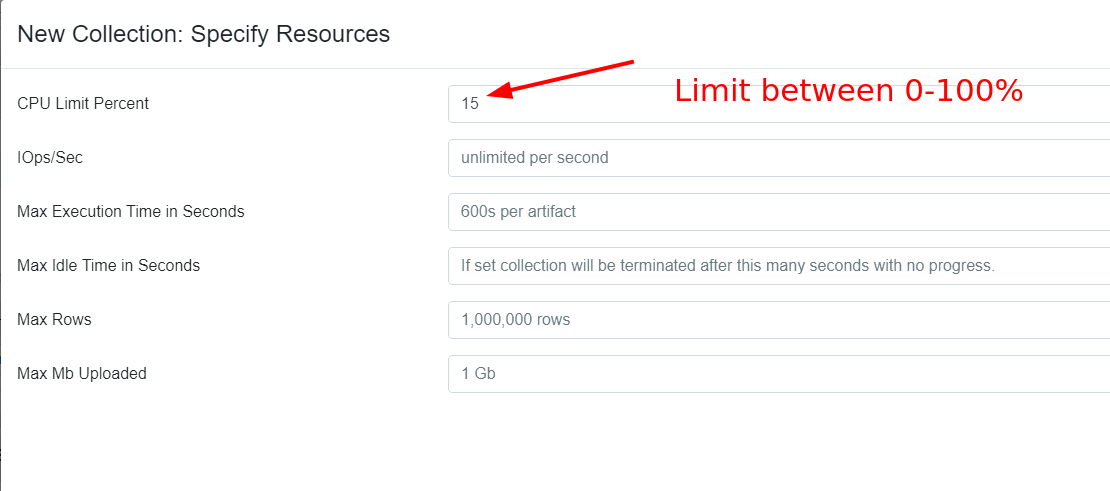
Selecting resource controls for collections

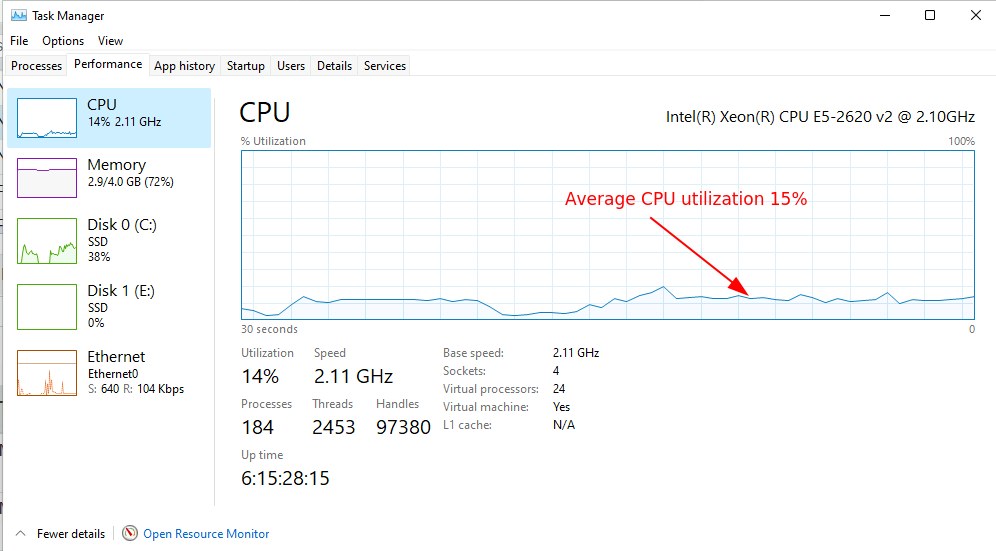
The above screenshot shows the latest resource controls dialog. You can now set a target CPU utilization between 0 and 100%. The image below shows how that looks in the Windows task manager.

Velociraptor Version 0.6.4: Dead Disk Forensics and Better Path Handling Let You Dig Deeper
CPU control keeps Velociraptor at 15%

By reducing the allowed CPU utilization, Velociraptor will be slowed down, so collections will take longer. You may need to increase the collection timeout to correspond with the extra time it takes.

Note that the CPU limit refers to a percentage of the total CPU resources available on the endpoint. So for example, if the endpoint is a 2 core cloud instance a 50% utilization refers to 1 full core. But on a 32 core server, a 50% utilization is allowed to use 16 cores!

IOPS limits

On some cloud resources, IO operations per second (IOPS) are more important than CPU loading since cloud platforms tend to rate limit IOPS. So if Velociraptor uses many IOPS (e.g. in Yara scanning), it may affect the legitimate workload.

Velociraptor now offers limits on IOPS which may be useful for some scenarios. See for example here and here for a discussion of these limits.

The offline collector resource controls

Many people use the Velociraptor offline collector to collect artifacts from endpoints that they’re unable to install a proper client/server architecture on. In previous versions, there was no resource control or time limit imposed on the offline collector, because it was assumed that it would be used interactively by a user.

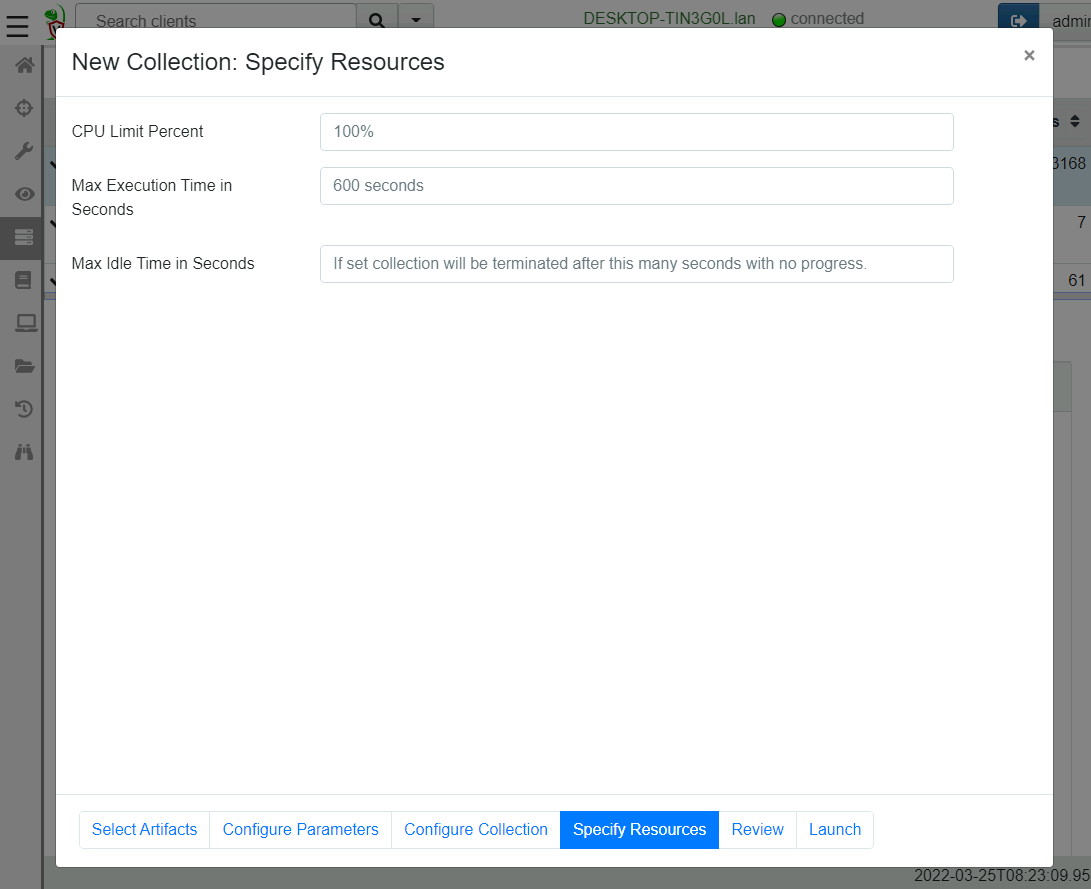
However, experience shows that many users use automated tools to push the offline collector to the endpoint (e.g. an EDR or another endpoint agent), and therefore it would be useful to provide resource controls and timeouts to control Velociraptor acquisitions. The below screenshot shows the new resource control page in the offline collector wizard.

Velociraptor Version 0.6.4: Dead Disk Forensics and Better Path Handling Let You Dig Deeper
Configuring offline collector resource controls

GUI changes

Version 0.6.4 brings a lot of useful GUI improvements.

Notebook suggestions

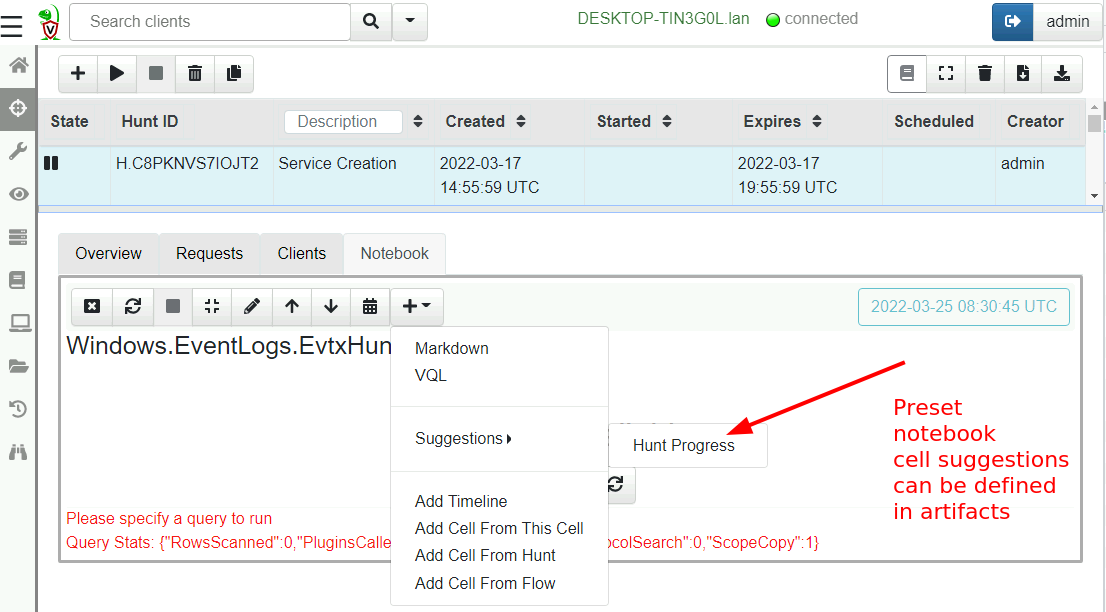
Notebooks are an excellent tool for post processing and analyzing the collected results from various artifacts. Most of the time, similar post processing queries are used for the same artifacts, so it makes sense to allow notebook templates to be defined in the artifact definition. In this release, you can define an optional suggestion in the artifact yaml to allow a user to include certain cells when needed.

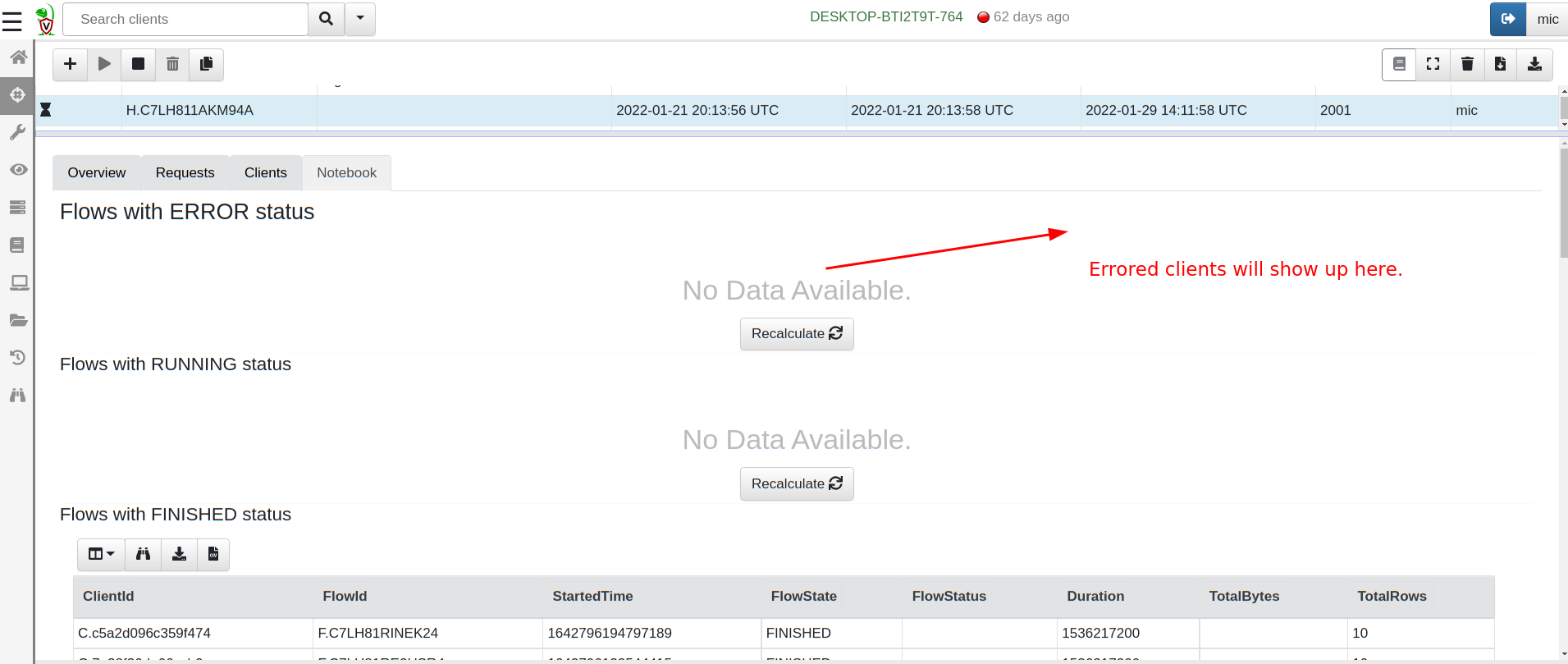
The following screenshot shows the default suggestion for all hunt notebooks: Hunt Progress. This cell queries all clients in a hunt and shows the ones with errors, running and completed.

Velociraptor Version 0.6.4: Dead Disk Forensics and Better Path Handling Let You Dig Deeper
Hunt notebooks offer a hunt status cell

Velociraptor Version 0.6.4: Dead Disk Forensics and Better Path Handling Let You Dig Deeper
Hunt notebooks offer a hunt status cell

Multiple OAuth2 authenticators

Velociraptor has always had SSO support to allow strong two-factor authentication for access to the GUI. Previously, however, Velociraptor only supported one OAuth2 provider at a time. Users had to choose between Google, Github, Azure, or OIDC (e.g. Okta) for the authentication provider.

This limitation is problematic for some organizations that need to share access to the Velociraptor console with third parties (e.g. consultants need to provide read-only access to customers).

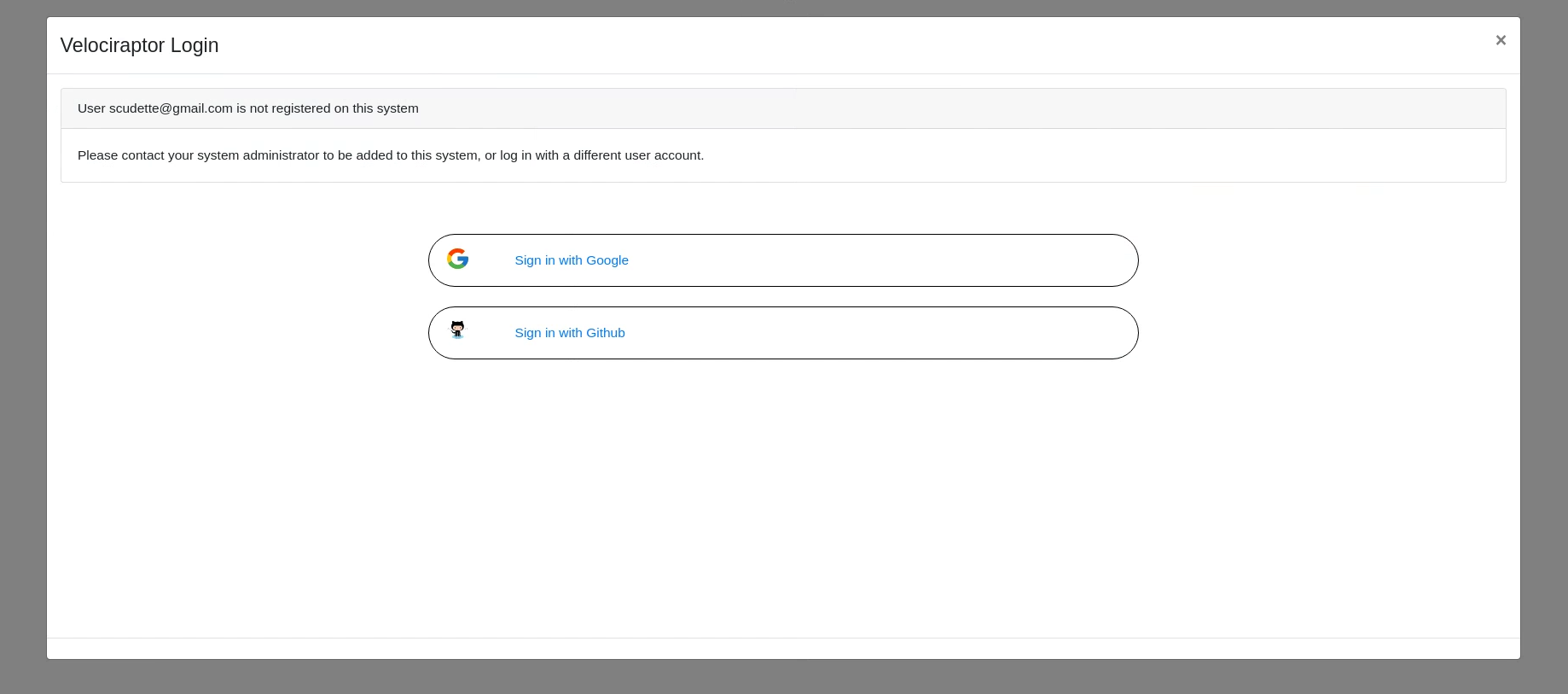
In 0.6.4, Velociraptor can be configured to support multiple SSO providers at the same time. So an organization can provide access through Okta for their own team members at the same time as Azure or Google for their customers.

Velociraptor Version 0.6.4: Dead Disk Forensics and Better Path Handling Let You Dig Deeper
The Velociraptor login screen supports multiple providers

The Velociraptor knowledge base

Velociraptor is a very powerful tool. Its flexibility means that it can do things that you might have never realized it can! For a while now, we’ve been thinking about ways to make this knowledge more discoverable and easily available.

Many people ask questions on the Discord channel and learn new capabilities in Velociraptor. We want to try a similar format to help people discover what Velociraptor can do.

The Velociraptor Knowledge Base is a new area on the documentation site that allows anyone to submit small (1-2 paragraphs) tips about how to do a particular task. Knowledge base tips are phrased as questions to help people search for them. Provided tips and solutions are short, but they may refer users to more detailed information.

If you learned something about Velociraptor that you didn’t know before and would like to share your experience to make the next user’s journey a little bit easier, please feel free to contribute a small note to the knowledge base.

Importing previous artifacts

Updating the VQL path handling in 0.6.4 introduces a new column called OSPath (replacing the old FullPath column), which wasn’t present in previous versions. While we attempt to ensure that older artifacts should continue to work on 0.6.4 clients, it’s possible that the new VQL artifacts built into 0.6.4 won’t work correctly on older versions.

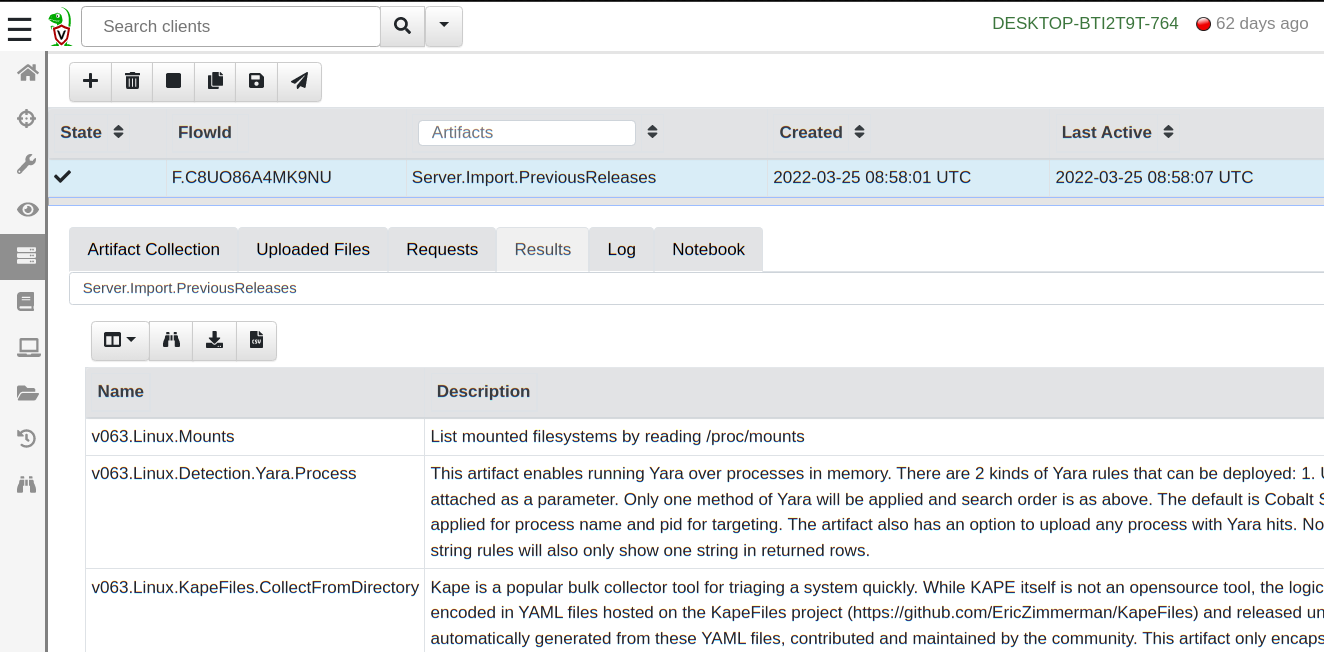
To make migration easier, 0.6.4 comes built in with the Server.Import.PreviousReleases artifact. This server artifact will load all the artifacts from a previous release into the server, allowing you to use those older versions with older clients.

Velociraptor Version 0.6.4: Dead Disk Forensics and Better Path Handling Let You Dig Deeper
Importing previous versions of core artifacts

Try it out!

If you’re interested in the new features, take Velociraptor for a spin by downloading it from our release page. It’s available for free on GitHub under an open source license.

As always, please file bugs on the GitHub issue tracker or submit questions to our mailing list by emailing [email protected]. You can also chat with us directly on our discord server.

Learn more about Velociraptor by visiting any of our web and social media channels below:

NEVER MISS A BLOG

Get the latest stories, expertise, and news about security today.

Velociraptor Version 0.6.3: Dig Deeper With More Speed and Scalability

Post Syndicated from Carlos Canto original https://blog.rapid7.com/2022/02/03/velociraptor-version-0-6-3-dig-deeper-with-more-speed-and-scalability/

Velociraptor Version 0.6.3: Dig Deeper With More Speed and Scalability

Rapid7 is very excited to announce the latest Velociraptor release 0.6.3. This release has been in the making for a few months now and has several exciting new features.

Scalability and speed have been the main focus of development since our previous release. Working with some of our larger partners on scaling Velociraptor to a large number of endpoints, we’ve addressed a number of challenges that we believe have improved Velociraptor for everyone at any level of scale.

Performance running on EFS

Running on a distributed filesystem such as EFS presents many advantages, not the least of which is removing the risk that disk space will run out. Many users previously faced disk full errors when running large hunts and accidentally collecting too much data from endpoints. Since Velociraptor is so fast, it’s quite easy to do a hunt collecting a large number of files, but before you know it, the disk may be full.

Using EFS removed this risk, since storage is essentially infinite (but not free). So there is a definite advantage to running the data store on EFS even when not running multiple frontends. When scaling to multiple frontends, EFS use is essential to facilitate a shared distributed filesystem among all the servers.

However, EFS presents some challenges. Although conceptually EFS behaves as a transparent filesystem, in reality the added network latency of EFS IO has caused unacceptable performance issues.

In this release, we employed a number of strategies to improve performance on EFS — and potentially other distributed filesystems, such as NFS. You can read all about the new changes here, but the gist is that added caching and delayed writing strategies help isolate the GUI performance from the underlying EFS latency, making the GUI snappy and quick even with slow filesystems.

We encourage everyone to test the new release on an EFS backend, to assess the performance on this setup — there are many advantages to this configuration. While this configuration is still considered experimental, it’s running successfully in a number of environments.

Searching and indexing

More as a side effect of the EFS work, Velociraptor 0.6.3 moves the client index into memory. This means that searching for clients by DNS name or labels is almost instant, significantly improving the performance of these operations over previous versions.

VQL queries that walk over all clients are now very fast as well. For example, the following query iterates over all clients (maybe thousands!) and checks if their last IP came from a particular subnet:

SELECT * , split(sep=":", string=last_ip)[0] AS LastIp
FROM clients()
WHERE cidr_contains(ip=LastIp, ranges="192.168.1.0/16")

This query will complete in a few seconds even with a large number of clients.

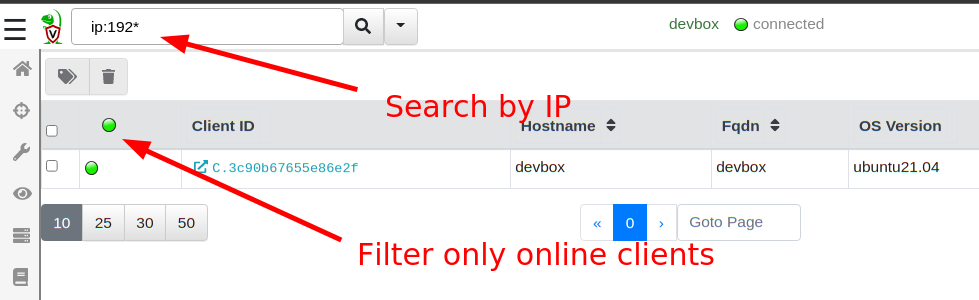
The GUI search bar can now search for IP addresses (e.g. ip:192.168*), and the online only filter is much faster as a result.

Velociraptor Version 0.6.3: Dig Deeper With More Speed and Scalability
Searching is much faster

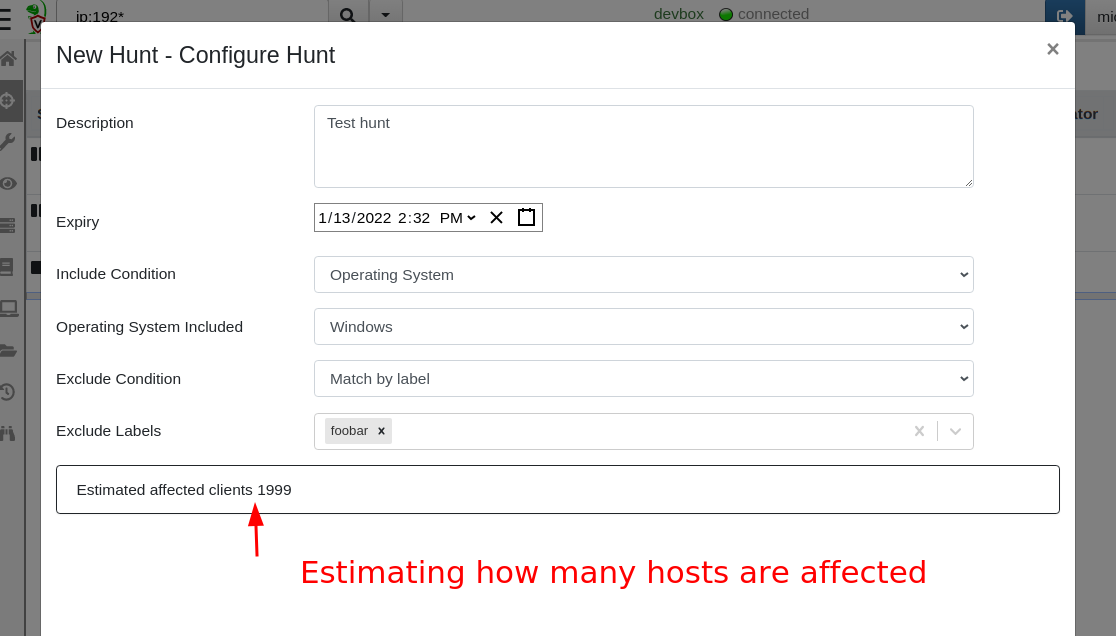
Another benefit of rapid index searching is that we can now quickly estimate how many hosts will be affected by a hunt (calculated based on how many hosts are included and how many are excluded from the hunt). When users have multiple label groups, this helps to quickly understand how targeted a specific hunt is.

Velociraptor Version 0.6.3: Dig Deeper With More Speed and Scalability
Estimating hunt scope

Regular expressions and Yara rules

Velociraptor artifacts are just a way of wrapping a VQL query inside a YAML file for ease of use. Artifacts accept parameters that are passed to the VQL itself, controlling how it runs.

Velociraptor artifacts accept a number of parameters of different types. Sometimes, they accept a windows path — for example, the Windows.EventLogs.EvtxHunter artifact accepts a Windows glob path like %SystemRoot%\System32\Winevt\Logs\*.evtx. In the same artifact, we also can provide a PathRegex, which is a regular expression.

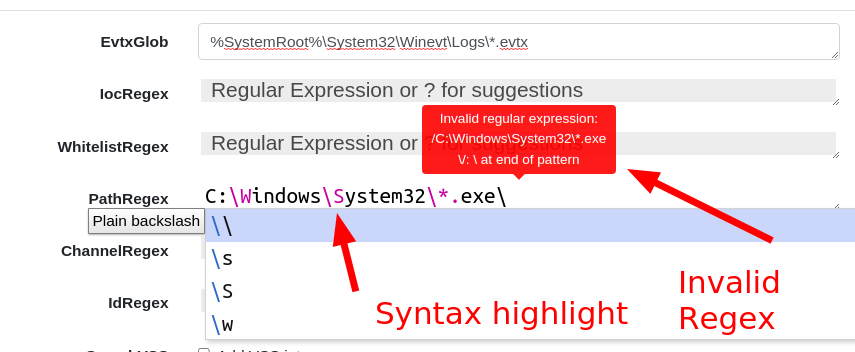
A regular expression is not the same thing as a path at all. In fact, when users get mixed up providing something like C:\Windows\System32 to a regular expression field, this is an invalid expression — backslashes have a specific meaning in a regular expression.

In 0.6.3, there are now dedicated GUI elements for Regular Expression inputs. Special regex patterns, such as backslash sequences, are visually distinct. Additionally, the GUI verifies that the regex is syntactically correct and offers suggestions. Users can type ? to receive further regular expression suggestions and help them build their regex.

Velociraptor Version 0.6.3: Dig Deeper With More Speed and Scalability
Entering regex in the GUI

To receive a RegEx GUI selector in your custom artifacts, simply denote the parameter’s type as regex.

Similarly, other artifacts require the user to enter a Yara rule to use the yara() VQL plugin. The Yara domain specific language (DSL) is rather verbose, so even for very simple search terms (e.g. a simple keyword search) a full rule needs to be constructed.

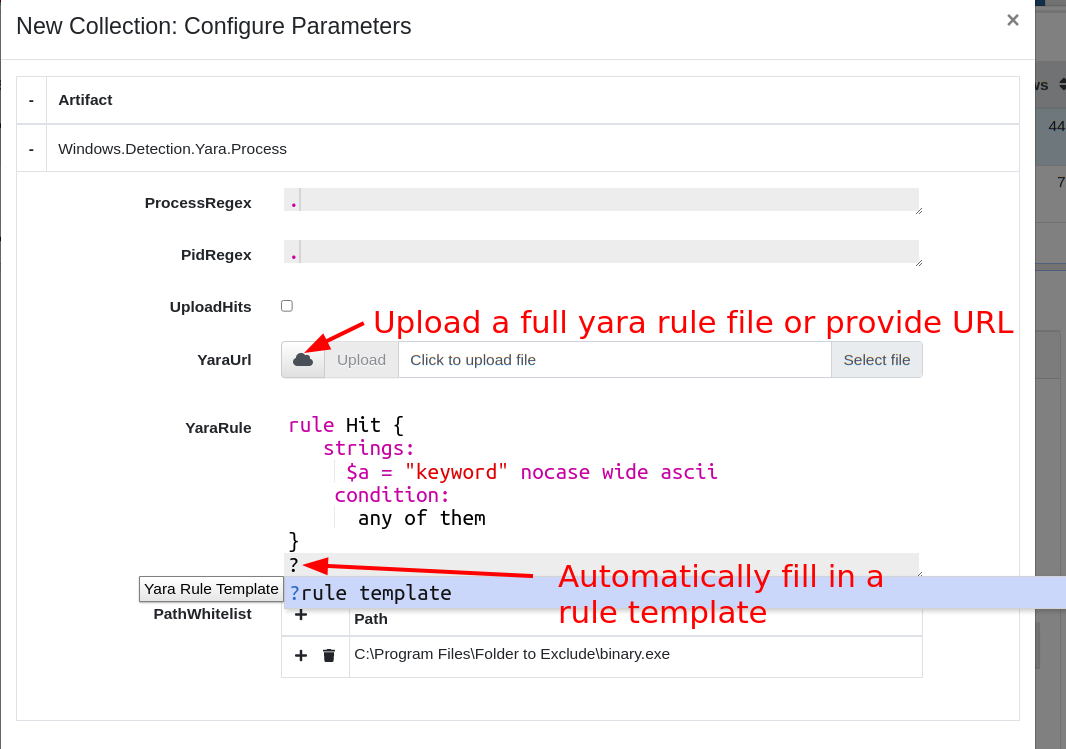
To help with this task, the GUI now presents a specific Yara GUI element. Users can press ? to automatically fill in a skeleton Yara rule suitable for a simple keyword match. Additionally, syntax highlighting gives visual feedback to the validity of the yara syntax.

Velociraptor Version 0.6.3: Dig Deeper With More Speed and Scalability
Entering Yara Rules in the GUI

Some artifacts allow file upload as a parameter to the artifact. This allows users to upload larger inputs, for example a large Yara rule-set. The content of the file will be made available to the VQL running on the client transparently.

To receive a RegEx GUI selector in your custom artifacts, simply denote the parameter’s type as yara. To allow uploads in your artifact parameters simply denote the parameter as an upload type. Within the VQL, the content of the uploaded file will be available as that parameter.

Overriding Generic.Client.Info

When a new client connects to the Velociraptor server, the server performs an Interrogation flow by scheduling the Generic.Client.Info artifact on it. This artifact collects basic metadata about the client, such as the type of OS it is, the hostname, and the version of Velociraptor. This information is used to feed the search index and is also displayed in the “VQL drilldown” page of the Host Information screen.

In the latest release, it’s possible to customize the Generic.Client.Info artifact, and Velociraptor will use the customized version instead to interrogate new clients. This allows users to add more deployment specific collections to the interrogate flow and customize the “VQL drilldown” page. Simply search for Generic.Client.Info in the View Artifact screen, and customize as needed.

Root certificates are now embedded

By default, Golang searches for root certificates from the running system so it can verify TLS connections. This behavior caused problems when running Velociraptor on very old unpatched systems that did not receive the latest Let’s Encrypt Root Certificate update. We decided it was safer to just include the root certs in the binary so we don’t need to rely on the OS itself.

Additionally, Velociraptor will now accept additional root certs embedded in its config file — just add all the certs in PEM format under the Client.Crypto.root_certs key in the config file. This helps deployments that must use a MITM proxy or traffic inspection proxies.

When adding a Root Certificate to the configuration file, Velociraptor will treat that certificate as part of the public PKI roots — therefore, you’ll need to have Client.use_self_signed_ssl as false.

This allows Velociraptor to trust the TLS connection — however, bear in mind that Velociraptor’s internal encryption channel is still present. The MITM proxy won’t be able to actually decode the data or interfere with the communications by injecting or modifying data. Only the outer layer of TLS encryption can be stripped by the MITM proxy.

VQL changes

Glob plugin improvements

The glob plugin now has a new option: recursion_callback. This allows much finer control over which directories to visit making file searches much more efficient and targeted. To learn more about it, read our previous Velociraptor blog post “Searching for Files.”

Notable new artifacts

Many people use Velociraptor to collect and hunt for data from endpoints. Once the data is inspected and analyzed, often the data is no longer needed.

To help with the task of expiring old data, the latest release incorporates the Server.Utils.DeleteManyFlows and Server.Utils.DeleteMonitoringData artifacts that allow users to remove older collections. This helps manage disk usage and reduce ongoing costs.

Try it out!

If you’re interested in the new features, take Velociraptor for a spin by downloading it from our release page. It’s available for free on GitHub under an open source license.

As always, please file bugs on the GitHub issue tracker or submit questions to our mailing list by emailing [email protected]. You can also chat with us directly on our discord server.

Learn more about Velociraptor by visiting any of our web and social media channels below:

Dig Deeper!

Additional reading:

NEVER MISS A BLOG

Get the latest stories, expertise, and news about security today.