All posts by Alex Bocharov

Advancing Threat Intelligence: JA4 fingerprints and inter-request signals

Post Syndicated from Alex Bocharov original https://blog.cloudflare.com/ja4-signals


For many years, Cloudflare has used advanced fingerprinting techniques to help block online threats, in products like our DDoS engine, our WAF, and Bot Management. For the purposes of Bot Management, fingerprinting characteristic elements of client software help us quickly identify what kind of software is making an HTTP request. It’s an efficient and accurate way to differentiate a browser from a Python script, while preserving user privacy. These fingerprints are used on their own for simple rules, and they underpin complex machine learning models as well. 

Making sure our fingerprints keep pace with the pace of change on the Internet is a constant and critical task. Bots will always adapt to try and look more browser-like. Less frequently, browsers will introduce major changes to their behavior and affect the entire Internet landscape. Last year, Google did exactly that, making older TLS fingerprints almost useless for identifying the latest version of Chrome.

JA3 Fingerprint 

JA3 fingerprint introduced by Salesforce researchers in 2017 and later adopted by Cloudflare, involves creating a hash of the TLS ClientHello message. This hash includes the ordered list of TLS cipher suites, extensions, and other parameters, providing a unique identifier for each client. Cloudflare customers can use JA3 to build detection rules and gain insight into their network traffic.

In early 2023, Google implemented a change in Chromium-based browsers to shuffle the order of TLS extensions – a strategy aimed at disrupting the detection capabilities of JA3 and enhancing the robustness of the TLS ecosystem. This modification was prompted by concerns that fixed fingerprint patterns could lead to rigid server implementations, potentially causing complications each time Chrome updates were rolled out. Over time, JA3 became less useful due to the following reasons:

  • Randomization of TLS extensions: Browsers began randomizing the order of TLS extensions in their ClientHello messages. This change meant that the JA3 fingerprints, which relied on the sequential order of these extensions, would vary with each connection, making it unreliable for identifying unique clients​. (Further information can be found at Stamus Networks.)​

  • Inconsistencies across tools: Different tools and databases that implemented JA3 fingerprinting often produced varying results due to discrepancies in how they handled TLS extensions and other protocol elements. This inconsistency hindered the effectiveness of JA3 fingerprints for reliable cross-organization sharing and threat intelligence.​ (Further information can be found at Fingerprint.)​

  • Limited scope and lack of adaptability: JA3 focused solely on elements within the TLS ClientHello packet, covering only a narrow portion of the OSI model’s layers. This limited scope often missed crucial context about a client’s environment. Additionally, as newer transport layer protocols like QUIC became popular, JA3’s methodology – originally designed for older client implementations of TLS and not including modern protocols – proved ineffective.

Enter JA4 fingerprint

In response to these challenges, FoxIO developed JA4, a successor to JA3 that offers a more robust, adaptable, and reliable method for fingerprinting TLS clients across various protocols, including emerging standards like QUIC. Officially launched in September 2023, JA4 is part of the broader JA4+ suite that includes fingerprints for multiple protocols such as TLS, HTTP, and SSH. This suite is designed to be interpretable by both humans and machines, thereby enhancing threat detection and security analysis capabilities.

JA4 fingerprint is resistant to the randomization of TLS extensions and incorporates additional useful dimensions, such as Application Layer Protocol Negotiation (ALPN), which were not part of JA3. The introduction of JA4 has been met with positive reception in the cybersecurity community, with several open-source tools and commercial products beginning to incorporate it into their systems, including Cloudflare. The JA4 fingerprint is available under the BSD 3-Clause license, promoting seamless upgrades from JA3. Other fingerprints within the suite, such as JA4S (TLS Server Response) and JA4H (HTTP Client Fingerprinting), are licensed under the proprietary FoxIO License, which is designed for broader use but requires specific arrangements for commercial monetization.

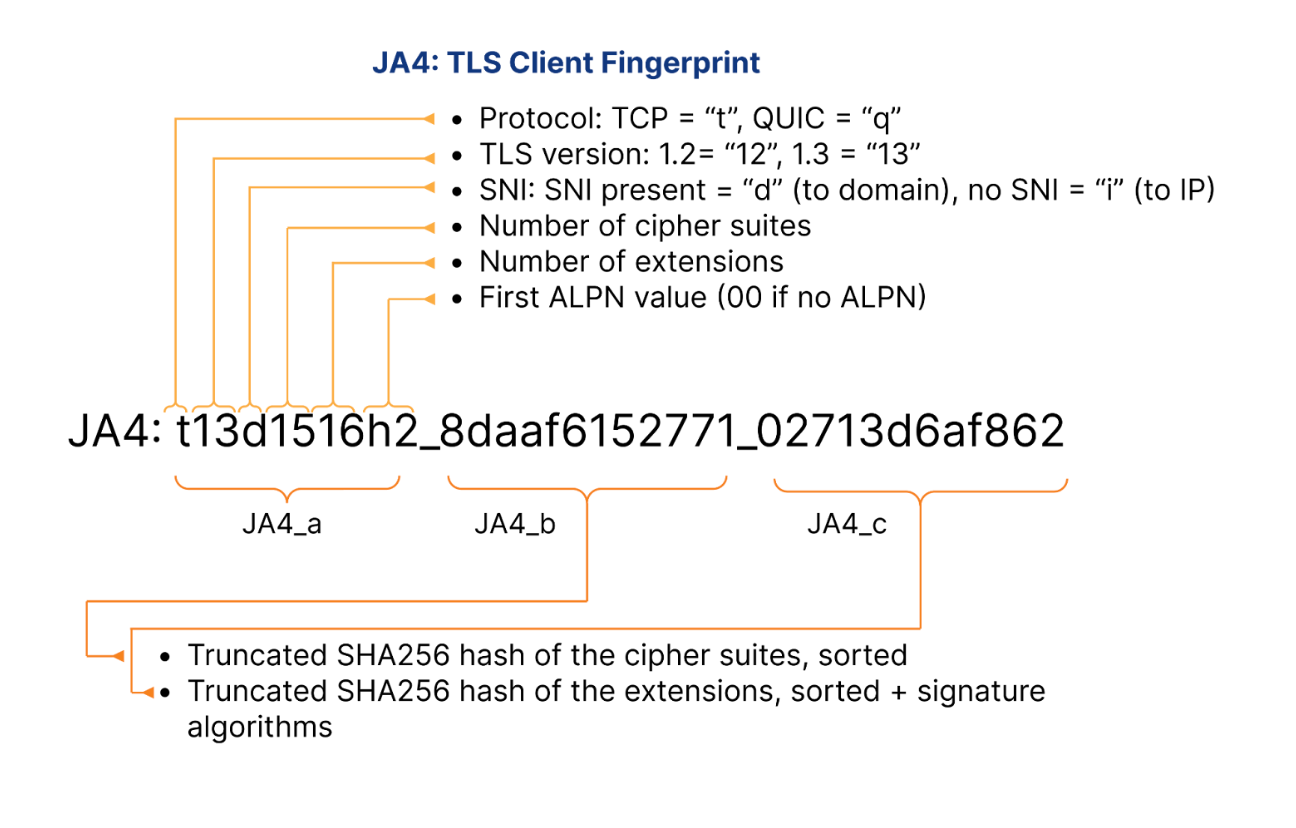
Let’s take a look at specific JA4 fingerprint example, representing the latest version of Google Chrome on Linux:

  1. Protocol Identifier (t): Indicates the use of TLS over TCP. This identifier is crucial for determining the underlying protocol, distinguishing it from q for QUIC or d for DTLS.

  2. TLS Version (13): Represents TLS version 1.3, confirming that the client is using one of the latest secure protocols. The version number is derived from analyzing the highest version supported in the ClientHello, excluding any GREASE values.

  3. SNI Presence (d): The presence of a domain name in the Server Name Indication. This indicates that the client specifies a domain (d), rather than an IP address (i would indicate the absence of SNI).

  4. Cipher Suites Count (15): Reflects the total number of cipher suites included in the ClientHello, excluding any GREASE values. It provides insight into the cryptographic options the client is willing to use.

  5. Extensions Count (16): Indicates the count of distinct extensions presented by the client in the ClientHello. This measure helps identify the range of functionalities or customizations the client supports.

  6. ALPN Values (h2): Represents the Application-Layer Protocol Negotiation protocol, in this case, HTTP/2, which indicates the protocol preferences of the client for optimized web performance.

  7. Cipher Hash (8daaf6152771): A truncated SHA256 hash of the list of cipher suites, sorted in hexadecimal order. This unique hash serves as a compact identifier for the client’s cipher suite preferences.

  8. Extension Hash (02713d6af862): A truncated SHA256 hash of the sorted list of extensions combined with the list of signature algorithms. This hash provides a unique identifier that helps differentiate clients based on the extensions and signature algorithms they support.

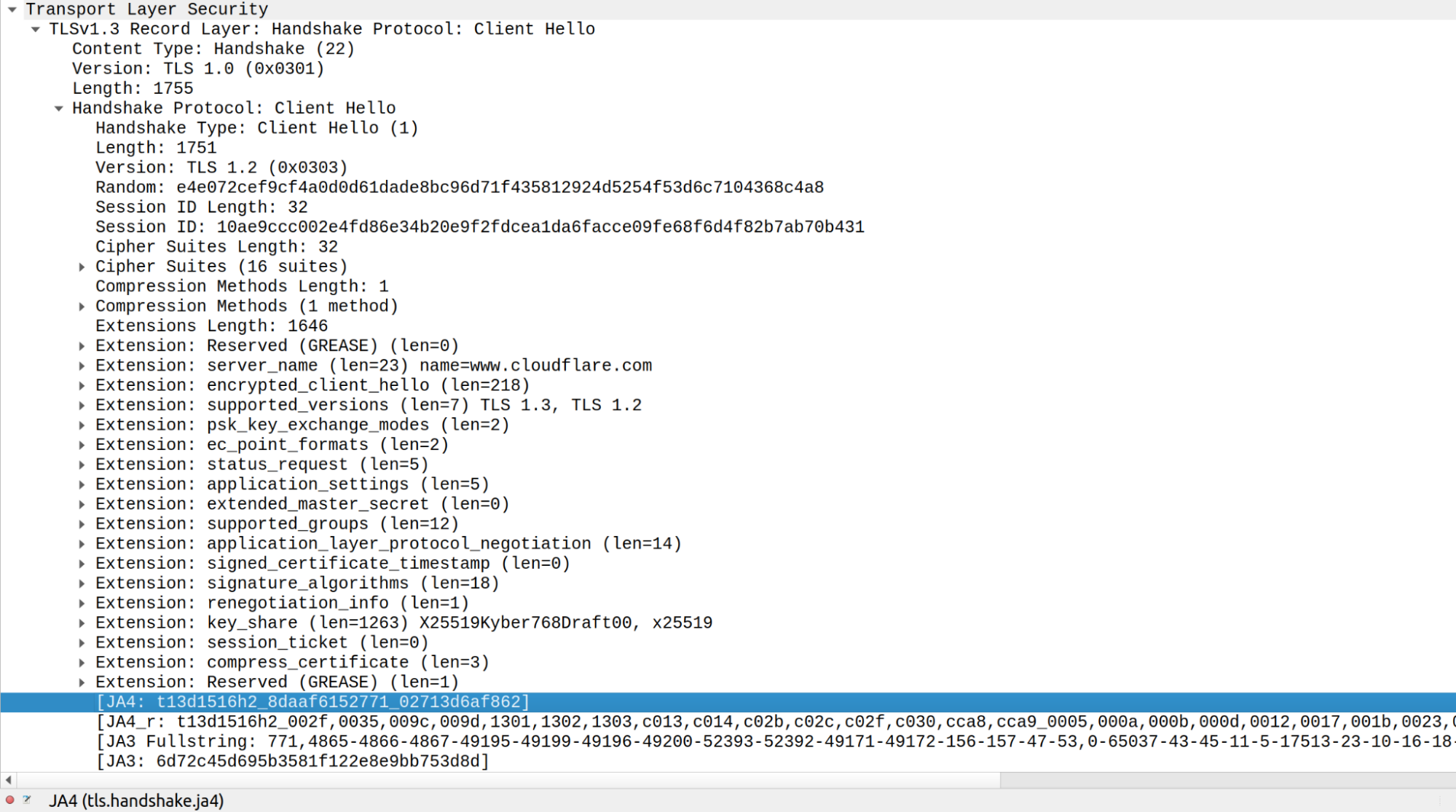
Here is a Wireshark example of TLS ClientHello from the latest Chrome on Linux querying https://www.cloudflare.com:

Integrating JA4 support into Cloudflare required rethinking our approach to parsing TLS ClientHello messages, which were previously handled in separate implementations across C, Lua, and Go. Recognizing the need to boost performance and ensure memory safety, we developed a new Rust-based crate, client-hello-parser. This unified parser not only simplifies modifications by centralizing all related logic but also prepares us for future transitions, such as replacing nginx with an upcoming Rust-based service. Additionally, this streamlined parser facilitates the exposure of JA4 fingerprints across our platform, improving the integration with Cloudflare’s firewall rules, Workers, and analytics systems.

Parsing ClientHello

client-hello-parser is an internal Rust crate designed for parsing TLS ClientHello messages. It aims to simplify the process of analyzing TLS traffic by providing a straightforward way to decode and inspect the initial handshake messages sent by clients when establishing TLS connections. This crate efficiently populates a ClientHelloParsed struct with relevant parsed fields, including version 1 and version 2 fingerprints, and JA3 and JA4 hashes, which are essential for network traffic analysis and fingerprinting.

Key benefits of the client-hello-parser library include:

  • Optimized memory usage: The library achieves amortized zero heap allocations, verified through extensive testing with the dhat crate to track memory allocations. Utilizing the tiny_vec crate, it begins with stack allocations for small vectors backed by fixed-size arrays, resorting to heap allocations only when these vectors exceed their initial size. This method ensures efficient reuse of all vectors, maintaining amortized zero heap allocations.

  • Memory safety: Reinforced by Rust’s robust borrow checker and complemented by extensive fuzzing, which has helped identify and resolve potential security vulnerabilities previously undetected in C implementations.

  • Ultra-low latency: The parser benefits from using faster_hex for efficient hex encoding/decoding, which utilizes SIMD instructions to speed up processing. The use of Rust iterators also helps in optimizing performance, often allowing the compiler to generate SIMD-optimized assembly code. This efficiency is further enhanced through the use of BigEndianIterator, which allows for efficient streaming-like processing of TLS ClientHello bytes in a single pass.

Parser benchmark results:

client_hello_benchmark/parse/parse-short-502
                        time:   [497.15 ns 497.23 ns 497.33 ns]
                        thrpt:  [2.0107 Melem/s 2.0111 Melem/s 2.0115 Melem/s]
client_hello_benchmark/parse/parse-long-1434
                        time:   [992.82 ns 993.55 ns 994.99 ns]
                        thrpt:  [1.0050 Melem/s 1.0065 Melem/s 1.0072 Melem/s]

The benchmark results demonstrate that the parser efficiently handles different sizes of ClientHello messages, with shorter messages being processed at a rate of approximately 2 million elements per second, and longer messages at around 1 million elements per second, showcasing the effectiveness of SIMD optimizations and Rust’s iterator performance in real-world applications.

Robust testing suite: Includes dozens of real-life TLS ClientHello message examples, with parsed components verified against Wireshark with JA3 and JA4 plugins. Additionally, Cargo fuzzer with memory sanitizer ensures no memory leaks or edge cases leading to core dumps. Backward compatibility tests with the legacy C parser, imported as a dependency and called via FFI, confirm that both parsers yield equivalent results.

Seamless integration with nginx: The crate, compiled as a dynamic library, is linked to the nginx binary, ensuring a smooth transition from the legacy parser to the new Rust-based parser through backwards compatibility tests.

The transition to a new Rust-based parser has enabled the retirement of multiple implementations across different languages (C, Lua, and Go), significantly enhancing performance and parser robustness against edge cases. This shift also facilitates the easier integration of new features and business logic for parsing TLS ClientHello messages, streamlining future expansions and security updates.

With Cloudflare JA4 fingerprints implemented on our network, we were left with another problem to solve. When JA3 was released, we saw some scenarios where customers were surprised by traffic from a new JA3 fingerprint and blocked it, only to find the fingerprint was a new browser release, or an OS update had caused a change in the fingerprint used by their mobile device. By giving customers just a hash, customers still lack context. We wanted to give our customers the necessary context to help them make informed decisions about the safety of a fingerprint, so they can act quickly and confidently on it. As more of our customers embrace AI, we’ve heard more demand from our customers to break out the signals that power our bot detection. These customers want to run complex models on proprietary data that has to stay in their control, but they want to have Cloudflare’s unique perspective on Internet traffic when they do it. To us, both use cases sounded like the same problem. 

Enter JA4 Signals 

In the ever-evolving landscape of web security, traditional fingerprinting techniques like JA3 and JA4 have proven invaluable for identifying and managing web traffic. However, these methods alone are not sufficient to address the sophisticated tactics employed by malicious agents. Fingerprints can be easily spoofed, they change frequently, and traffic patterns and behaviors are constantly evolving. This is where JA4 Signals come into play, providing a robust and comprehensive approach to traffic analysis.

JA4 Signals are inter-request features computed based on the last hour of all traffic that Cloudflare sees globally. On a daily basis, we analyze over 15 million unique JA4 fingerprints generated from more than 500 million user agents and billions of IP addresses. This breadth of data enables JA4 Signals to provide aggregated statistics that offer deeper insights into global traffic patterns – far beyond what single-request or connection fingerprinting can achieve. These signals are crucial for enhancing security measures, whether through simple firewall rules, Workers scripts, or advanced machine learning models.

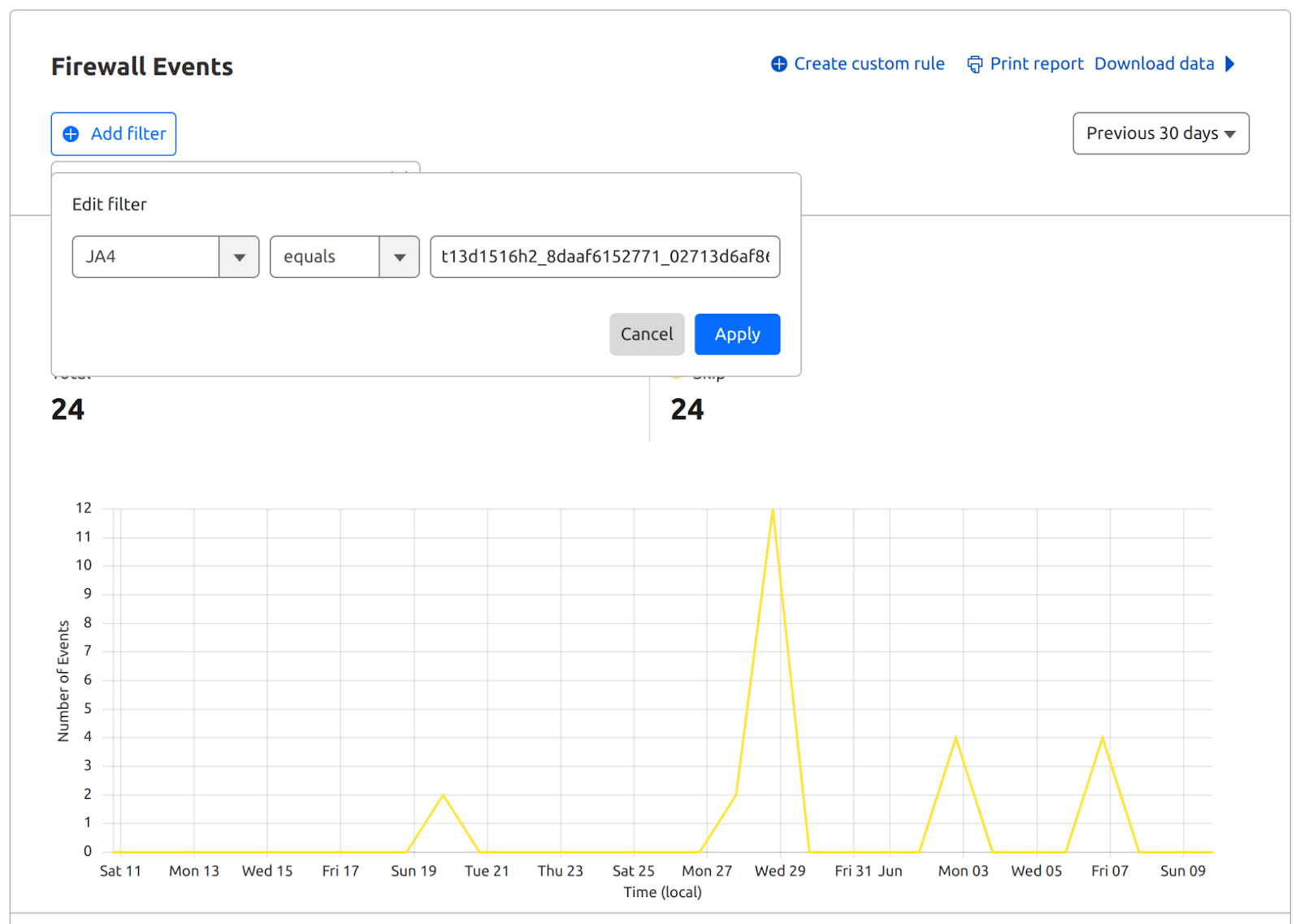
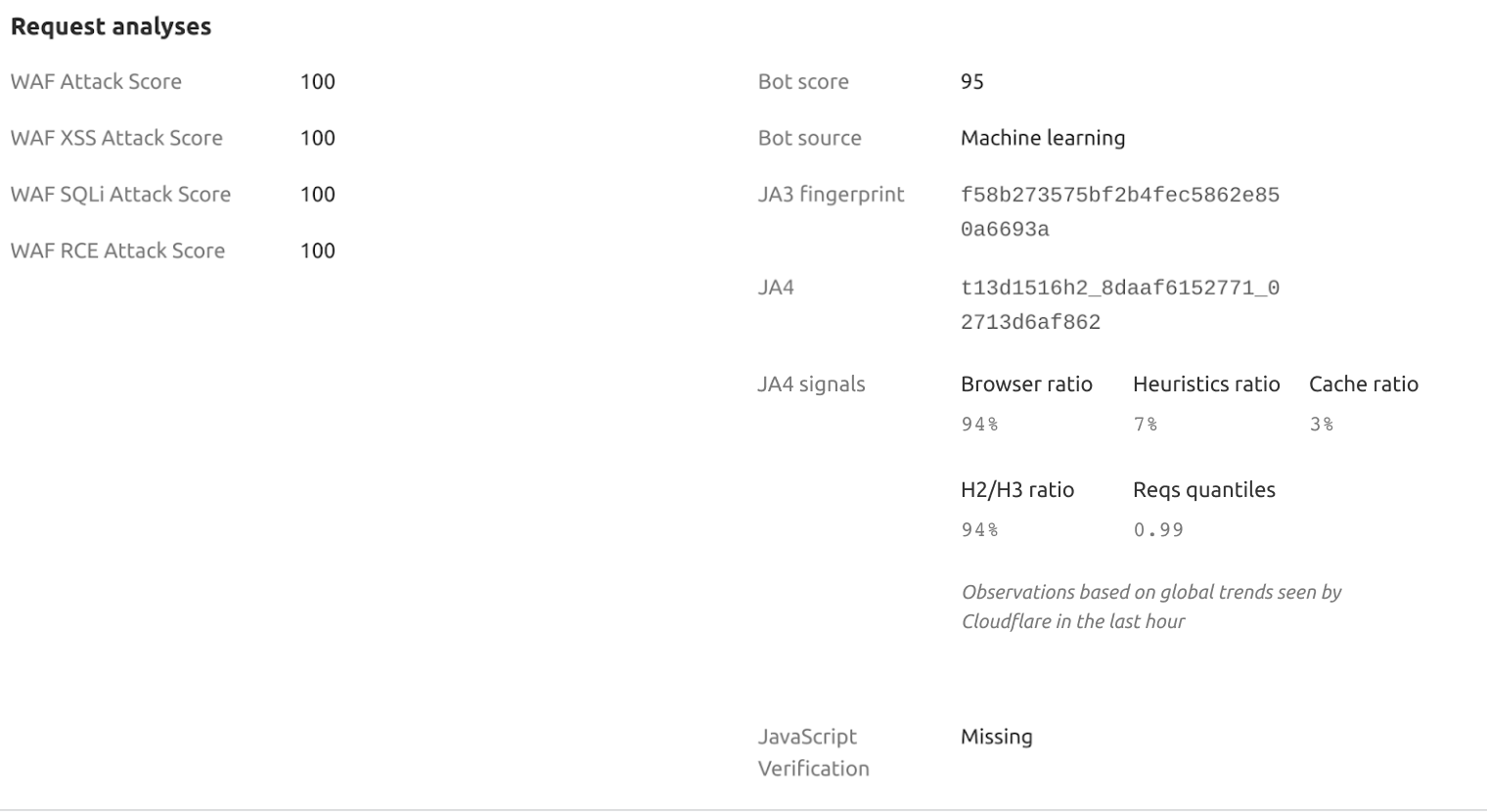
Let’s consider a specific example of JA4 Signals from a Firewall events activity log, which involves the latest version of Chrome:

This example highlights that a particular HTTP request received a Bot Score of 95, suggesting it likely originated from a human user operating a browser rather than an automated program or a bot. Analyzing JA4 Signals in this context provides deeper insight into the behavior of this client (latest Linux Chrome) in comparison to other network clients and their respective JA4 fingerprints. Here are a few examples of the signals our customers can see on any request:

JA4 Signal

Description

Value example

Interpretation

browser_ratio_1h

The ratio of requests originating from browser-based user agents for the JA4 fingerprint in the last hour. Higher values suggest a higher proportion of browser-based requests.

0.942

Indicates a 94.2% browser-based request rate for this JA4.

cache_ratio_1h

The ratio of cacheable responses for the JA4 fingerprint in the last hour. Higher values suggest a higher proportion of responses that can be cached.

0.534

Shows a 53.4% cacheable response rate for this JA4.

h2h3_ratio_1h

The ratio of HTTP/2 and HTTP/3 requests combined with the total number of requests for the JA4 fingerprint in the last hour. Higher values indicate a higher proportion of HTTP/2 and HTTP/3 requests compared to other protocol versions.

0.987

Reflects a 98.7% rate of HTTP/2 and HTTP/3 requests.

reqs_quantile_1h

The quantile position of the JA4 fingerprint based on the number of requests across all fingerprints in the last hour. Higher values indicate a relatively higher number of requests compared to other fingerprints.

1

High volume of requests compared to other JA4s.

The JA4 fingerprint and JA4 Signals are now available in the Firewall Rules UI, Bot Analytics and Workers. Customers can now use these fields to write custom rules, rate-limiting rules, transform rules, or Workers logic using JA4 fingerprint and JA4 Signals. 

Let’s demonstrate how to use JA4 Signals with the following Worker example. This script processes incoming requests by parsing and categorizing JA4 Signals, providing a clear structure for further analysis or rule application within Cloudflare Workers:

/**
 * Event listener for 'fetch' events. This triggers on every request to the worker.
 */
addEventListener('fetch', event => {
  event.respondWith(handleRequest(event.request))
})

/**
 * Main handler for incoming requests.
 * @param {Request} request - The incoming request object from the fetch event.
 * @returns {Response} A response object with JA4 Signals in JSON format.
 */
async function handleRequest(request) {
  // Safely access the ja4Signals object using optional chaining, which prevents errors if properties are undefined.
  const ja4Signals = request.cf?.botManagement?.ja4Signals || {};

  // Construct the response content, including both the original ja4Signals and the parsed signals.
  const responseContent = {
    ja4Signals: ja4Signals,
    jaSignalsParsed: parseJA4Signals(ja4Signals)
  };

  // Return a JSON response with appropriate headers.
  return new Response(JSON.stringify(responseContent), {
    status: 200,
    headers: {
      "content-type": "application/json;charset=UTF-8"
    }
  })
}

/**
 * Parses the JA4 Signals into categorized groups based on their names.
 * @param {Object} ja4Signals - The JA4 Signals object that may contain various metrics.
 * @returns {Object} An object with categorized JA4 Signals: ratios, ranks, and quantiles.
 */
function parseJA4Signals(ja4Signals) {
  // Define the keys for each category of signals.
  const ratios = ['h2h3_ratio_1h', 'heuristic_ratio_1h', 'browser_ratio_1h', 'cache_ratio_1h'];
  const ranks = ['uas_rank_1h', 'paths_rank_1h', 'reqs_rank_1h', 'ips_rank_1h'];
  const quantiles = ['reqs_quantile_1h', 'ips_quantile_1h'];

  // Return an object with each category containing only the signals that are present.
  return {
    ratios: filterKeys(ja4Signals, ratios),
    ranks: filterKeys(ja4Signals, ranks),
    quantiles: filterKeys(ja4Signals, quantiles)
  };
}

/**
 * Filters the keys in the ja4Signals object that match the list of specified keys and are not undefined.
 * @param {Object} ja4Signals - The JA4 Signals object.
 * @param {Array} keys - An array of keys to filter from the ja4Signals object.
 * @returns {Object} A filtered object containing only the specified keys that are present in ja4Signals.
 */
function filterKeys(ja4Signals, keys) {
  const filtered = {};
  // Iterate over the specified keys and add them to the filtered object if they exist in ja4Signals.
  keys.forEach(key => {
    // Check if the key exists and is not undefined to handle optional presence of each signal.
    if (ja4Signals && ja4Signals[key] !== undefined) {
      filtered[key] = ja4Signals[key];
    }
  });
  return filtered;
}

Benefits of JA4 Signals

  • Comprehensive traffic analysis: JA4 Signals aggregate data over an hour to provide a holistic view of traffic patterns. This method enhances the ability to identify emerging threats and abnormal behaviors by analyzing changes over time rather than in isolation.

  • Precision in anomaly detection: Leveraging detailed inter-request features, JA4 Signals enable the precise detection of anomalies that may be overlooked by single-request fingerprinting. This leads to more accurate identification of sophisticated cyber threats.

  • Globally scalable insights: By synthesizing data at a global scale, JA4 Signals harness the strength of Cloudflare’s network intelligence. This extensive analysis makes the system less susceptible to manipulation and provides a resilient foundation for security protocols.

  • Dynamic security enforcement: JA4 Signals can dynamically inform security rules, from simple firewall configurations to complex machine learning algorithms. This adaptability ensures that security measures evolve in tandem with changing traffic patterns and emerging threats.

  • Reduction in false positives and negatives: With the detailed insights provided by JA4 Signals, security systems can distinguish between legitimate and malicious traffic more effectively, reducing the occurrence of false positives and negatives and improving overall system reliability.

Conclusion

The introduction of JA4 fingerprint and JA4 Signals marks a significant milestone in advancing Cloudflare’s security offerings, including Bot Management and DDoS protection. These tools not only enhance the robustness of our traffic analysis but also showcase the continuous evolution of our network fingerprinting techniques. The efficiency of computing JA4 fingerprints enables real-time detection and response to emerging threats. Similarly, by leveraging aggregated statistics and inter-request features, JA4 Signals provide deep insights into traffic patterns at speeds measured in microseconds, ensuring that no detail is too small to be captured and analyzed.

These security features are underpinned by the scalable techniques and open-sourced libraries outlined in “Every request, every microsecond: scalable machine learning at Cloudflare”. This discussion highlights how Cloudflare’s innovations not only analyze vast amounts of data but also transform this analysis into actionable, reliable, and dynamically adaptable security measures.

Any Enterprise business with a bot problem will benefit from Cloudflare’s unique JA4 implementation and our perspective on bot traffic, but customers who run their own internal threat models will also benefit from access to data insights from a network that processes over 50 million requests per second. Please get in touch with us to learn more about our Bot Management offering.

Advancing Threat Intelligence: JA4 fingerprints and inter-request signals

Post Syndicated from Alex Bocharov original https://blog.cloudflare.com/ja4-signals


For many years, Cloudflare has used advanced fingerprinting techniques to help block online threats, in products like our DDoS engine, our WAF, and Bot Management. For the purposes of Bot Management, fingerprinting characteristic elements of client software help us quickly identify what kind of software is making an HTTP request. It’s an efficient and accurate way to differentiate a browser from a Python script, while preserving user privacy. These fingerprints are used on their own for simple rules, and they underpin complex machine learning models as well.

Making sure our fingerprints keep pace with the pace of change on the Internet is a constant and critical task. Bots will always adapt to try and look more browser-like. Less frequently, browsers will introduce major changes to their behavior and affect the entire Internet landscape. Last year, Google did exactly that, making older TLS fingerprints almost useless for identifying the latest version of Chrome.

Cloudflare network fingerprinting techniques

These methods are instrumental in accurately scoring and classifying bots, enhancing security measures, and enriching data analytics capabilities. Below are some examples of the fingerprinting techniques we have implemented over the years:

HTTP Signature: The HTTP Signature technique involves analyzing HTTP headers and other request attributes to create a unique signature for each client. This method is particularly useful for identifying and managing bot traffic, as it can detect inconsistencies between the HTTP signature and the claimed user-agent.

ClientHello fingerprint (v1 & v2): The ClientHello fingerprint technique involves analyzing the ClientHello message during the TLS handshake. This message contains various parameters, such as cipher suites, extensions, and supported groups, which can be used to create a unique fingerprint for each client. The first version of ClientHello fingerprint was introduced as part of Cloudflare’s broader TLS fingerprinting efforts, with subsequent improvements leading to version 2. These fingerprints help in identifying the client software and its configuration, providing a static identifier that can be used to detect anomalies and potential threats.

HTTP/2 fingerprint: HTTP/2 fingerprinting focuses on the unique characteristics of the HTTP/2 protocol, such as the settings frame, stream priority information, and the order of pseudo-header fields. Supported by all major browsers, this method was introduced to leverage the protocol’s binary framing layer, which provides a rich set of attributes for creating unique client fingerprints.

HTTP/3 and QUIC fingerprints: As HTTP/3 and the QUIC protocol gain popularity, Cloudflare has developed fingerprinting techniques tailored to these advanced protocols. Running over QUIC, HTTP/3 uses UDP and introduces unique handshake mechanisms, distinct from TCP-based protocols. Cloudflare’s techniques focus on specific attributes like QUIC version and transport parameters to generate precise fingerprints. These are vital for managing and identifying traffic, particularly in environments that heavily use Google products.

JA3 fingerprint: This TLS fingerprinting technique, introduced by Salesforce researchers in 2017 and later adopted by Cloudflare, involves creating a hash of the TLS ClientHello message. This hash includes the ordered list of TLS cipher suites, extensions, and other parameters, providing a unique identifier for each client. While JA3 is broadly utilized for detecting malicious activity and pinpointing specific client software, it shares similarities with Cloudflare’s proprietary ClientHello fingerprints (v1 & v2). However, the latter distinguish themselves by utilizing different components of the ClientHello message and employing alternative encoding schemes.

These fingerprinting techniques power Cloudflare’s Heuristic engine and machine learning models, both of which compute a Bot Score. This score assesses the likelihood — on a scale from 0 to 100 — of whether a request originated from an automated program (low score) or a human (high score). Additionally, these models leverage aggregated traffic statistics from all fingerprint types, and other dimensions, and integrate features throughout the OSI model’s layers (L1 to L7), enabling them to analyze every request for all customers. They provide sophisticated, real-time security analysis with inferences delivered at microsecond latency, providing prompt and precise responses to potential threats.

Limitations of JA3 fingerprint

In early 2023, Google implemented a change in Chromium-based browsers to shuffle the order of TLS extensions – a strategy aimed at disrupting the detection capabilities of JA3 and enhancing the robustness of the TLS ecosystem. This modification was prompted by concerns that fixed fingerprint patterns could lead to rigid server implementations, potentially causing complications each time Chrome updates were rolled out. Over time, JA3 became less useful due to the following reasons:

Randomization of TLS extensions: Browsers began randomizing the order of TLS extensions in their ClientHello messages. This change meant that the JA3 fingerprints, which relied on the sequential order of these extensions, would vary with each connection, making it unreliable for identifying unique clients​. (Further information can be found at Stamus Networks.)​

Inconsistencies across tools: Different tools and databases that implemented JA3 fingerprinting often produced varying results due to discrepancies in how they handled TLS extensions and other protocol elements. This inconsistency hindered the effectiveness of JA3 fingerprints for reliable cross-organization sharing and threat intelligence.​ (Further information can be found at Fingerprint.)​

Vulnerability to evasion: While the static and simplistic nature of JA3 made it vulnerable to evasion, Cloudflare’s proprietary ClientHello fingerprint v2 (CHFPv2) addressed this challenge by accounting for the randomization of TLS extensions. In our internal implementations, TLS extensions are sorted before being incorporated into the fingerprint, effectively mitigating the impact of randomization for Cloudflare customers.

Limited scope and lack of adaptability: JA3 focused solely on elements within the TLS ClientHello packet, covering only a narrow portion of the OSI model’s layers. This limited scope often missed crucial context about a client’s environment. Additionally, as newer transport layer protocols like QUIC became popular, JA3’s methodology – originally designed for older versions of TLS and excluding modern protocols – proved ineffective.

Enter JA4 fingerprint

In response to these challenges, FoxIO developed JA4, a successor to JA3 that offers a more robust, adaptable, and reliable method for fingerprinting TLS clients across various protocols, including emerging standards like QUIC. Officially launched in September 2023, JA4 is part of the broader JA4+ suite that includes fingerprints for multiple protocols such as TLS, HTTP, and SSH. This suite is designed to be interpretable by both humans and machines, thereby enhancing threat detection and security analysis capabilities.

JA4 fingerprint is resistant to the randomization of TLS extensions and incorporates additional useful dimensions, such as Application Layer Protocol Negotiation (ALPN), which were not part of JA3. The introduction of JA4 has been met with positive reception in the cybersecurity community, with several open-source tools and commercial products beginning to incorporate it into their systems, including Cloudflare. The JA4 fingerprint is available under the BSD 3-Clause license, promoting seamless upgrades from JA3. Other fingerprints within the suite, such as JA4S (TLS Server Response) and JA4H (HTTP Client Fingerprinting), are licensed under the proprietary FoxIO License, which is designed for broader use but requires specific arrangements for commercial monetization.

Let’s take a look at specific JA4 fingerprint example, representing the latest version of Google Chrome on Linux:

  1. Protocol Identifier (t): Indicates the use of TLS over TCP. This identifier is crucial for determining the underlying protocol, distinguishing it from q for QUIC or d for DTLS.
  2. TLS Version (13): Represents TLS version 1.3, confirming that the client is using one of the latest secure protocols. The version number is derived from analyzing the highest version supported in the ClientHello, excluding any GREASE values.
  3. SNI Presence (d): The presence of a domain name in the Server Name Indication. This indicates that the client specifies a domain (d), rather than an IP address (it would indicate the absence of SNI).
  4. Cipher Suites Count (15): Reflects the total number of cipher suites included in the ClientHello, excluding any GREASE values. It provides insight into the cryptographic options the client is willing to use.
  5. Extensions Count (16): Indicates the count of distinct extensions presented by the client in the ClientHello. This measure helps identify the range of functionalities or customizations the client supports.
  6. ALPN Values (h2): Represents the Application-Layer Protocol Negotiation protocol, in this case, HTTP/2, which indicates the protocol preferences of the client for optimized web performance.
  7. Cipher Hash (8daaf6152771): A truncated SHA256 hash of the list of cipher suites, sorted in hexadecimal order. This unique hash serves as a compact identifier for the client’s cipher suite preferences.
  8. Extension Hash (02713d6af862): A truncated SHA256 hash of the sorted list of extensions combined with the list of signature algorithms. This hash provides a unique identifier that helps differentiate clients based on the extensions and signature algorithms they support.

Here is a Wireshark example of TLS ClientHello from the latest Chrome on Linux querying https://www.cloudflare.com:

Integrating JA4 support into Cloudflare required rethinking our approach to parsing TLS ClientHello messages, which were previously handled in separate implementations across C, Lua, and Go. Recognizing the need to boost performance and ensure memory safety, we developed a new Rust-based crate, client-hello-parser. This unified parser not only simplifies modifications by centralizing all related logic but also prepares us for future transitions, such as replacing nginx with an upcoming Rust-based service. Additionally, this streamlined parser facilitates the exposure of JA4 fingerprints across our platform, improving the integration with Cloudflare’s firewall rules, Workers, and analytics systems.

Parsing ClientHello

client-hello-parser is an internal Rust crate designed for parsing TLS ClientHello messages. It aims to simplify the process of analyzing TLS traffic by providing a straightforward way to decode and inspect the initial handshake messages sent by clients when establishing TLS connections. This crate efficiently populates a ClientHelloParsed struct with relevant parsed fields, including version 1 and version 2 fingerprints, and JA3 and JA4 hashes, which are essential for network traffic analysis and fingerprinting.

Key benefits of the client-hello-parser library include:

Optimized memory usage: The library achieves amortized zero heap allocations, verified through extensive testing with the dhat crate to track memory allocations. Utilizing the tiny_vec crate, it begins with stack allocations for small vectors backed by fixed-size arrays, resorting to heap allocations only when these vectors exceed their initial size. This method ensures efficient reuse of all vectors, maintaining amortized zero heap allocations.

Memory safety: Reinforced by Rust’s robust borrow checker and complemented by extensive fuzzing, which has helped identify and resolve potential security vulnerabilities previously undetected in C implementations.

Ultra-low latency: The parser benefits from using faster_hex for efficient hex encoding/decoding, which utilizes SIMD instructions to speed up processing. The use of Rust iterators also helps in optimizing performance, often allowing the compiler to generate SIMD-optimized assembly code. This efficiency is further enhanced through the use of BigEndianIterator, which allows for efficient streaming-like processing of TLS ClientHello bytes in a single pass.

Parser benchmark results:

client_hello_benchmark/parse/parse-short-502
                        time:   [497.15 ns 497.23 ns 497.33 ns]
                        thrpt:  [2.0107 Melem/s 2.0111 Melem/s 2.0115 Melem/s]
client_hello_benchmark/parse/parse-long-1434
                        time:   [992.82 ns 993.55 ns 994.99 ns]
                        thrpt:  [1.0050 Melem/s 1.0065 Melem/s 1.0072 Melem/s]

The benchmark results demonstrate that the parser efficiently handles different sizes of ClientHello messages, with shorter messages being processed at a rate of approximately 2 million elements per second, and longer messages at around 1 million elements per second, showcasing the effectiveness of SIMD optimizations and Rust’s iterator performance in real-world applications.

Robust testing suite: Includes dozens of real-life TLS ClientHello message examples, with parsed components verified against Wireshark with JA3 and JA4 plugins. Additionally, Cargo fuzzer with memory sanitizer ensures no memory leaks or edge cases leading to core dumps. Backward compatibility tests with the legacy C parser, imported as a dependency and called via FFI, confirm that both parsers yield equivalent results.

Seamless integration with nginx: The crate, compiled as a dynamic library, is linked to the nginx binary, ensuring a smooth transition from the legacy parser to the new Rust-based parser through backwards compatibility tests.

The transition to a new Rust-based parser has enabled the retirement of multiple implementations across different languages (C, Lua, and Go), significantly enhancing performance and parser robustness against edge cases. This shift also facilitates the easier integration of new features and business logic for parsing TLS ClientHello messages, streamlining future expansions and security updates.

With Cloudflare JA4 fingerprints implemented on our network, we were left with another problem to solve. When JA3 was released, we saw some scenarios where customers were surprised by traffic from a new JA3 fingerprint and blocked it, only to find the fingerprint was a new browser release, or an OS update had caused a change in the fingerprint used by their mobile device. By giving customers just a hash, customers still lack context. We wanted to give our customers the necessary context to help them make informed decisions about the safety of a fingerprint, so they can act quickly and confidently on it. As more of our customers embrace AI, we’ve heard more demand from our customers to break out the signals that power our bot detection. These customers want to run complex models on proprietary data that has to stay in their control, but they want to have Cloudflare’s unique perspective on Internet traffic when they do it. To us, both use cases sounded like the same problem.

Enter JA4 Signals

In the ever-evolving landscape of web security, traditional fingerprinting techniques like JA3 and JA4 have proven invaluable for identifying and managing web traffic. However, these methods alone are not sufficient to address the sophisticated tactics employed by malicious agents. Fingerprints can be easily spoofed, they change frequently, and traffic patterns and behaviors are constantly evolving. This is where JA4 Signals come into play, providing a robust and comprehensive approach to traffic analysis.

JA4 Signals are inter-request features computed based on the last hour of all traffic that Cloudflare sees globally. On a daily basis, we analyze over 15 million unique JA4 fingerprints generated from more than 500 million user agents and billions of IP addresses. This breadth of data enables JA4 Signals to provide aggregated statistics that offer deeper insights into global traffic patterns – far beyond what single-request or connection fingerprinting can achieve. These signals are crucial for enhancing security measures, whether through simple firewall rules, Workers scripts, or advanced machine learning models.

Let’s consider a specific example of JA4 Signals from a Firewall events activity log, which involves the latest version of Chrome:

This example highlights that a particular HTTP request received a Bot Score of 95, suggesting it likely originated from a human user operating a browser rather than an automated program or a bot. Please note that ratio and quantile-based signal values fall within the range of [0.0 to 1.0], whereas rank-based signal values are integer values within the range of [1 to N]. Analyzing JA4 Signals in this context provides deeper insight into the behavior of this client (latest Linux Chrome) in comparison to other network clients and their respective JA4 fingerprints:

JA4 Signal Description Value example Interpretation
browser_ratio_1h The ratio of requests originating from browser-based user agents for the JA4 fingerprint in the last hour. Higher values suggest a higher proportion of browser-based requests. 0.942 Indicates a 94.2% browser-based request rate for this JA4.
cache_ratio_1h The ratio of cacheable responses for the JA4 fingerprint in the last hour. Higher values suggest a higher proportion of responses that can be cached. 0.534 Shows a 53.4% cacheable response rate for this JA4.
h2h3_ratio_1h The ratio of HTTP/2 and HTTP/3 requests combined with the total number of requests for the JA4 fingerprint in the last hour. Higher values indicate a higher proportion of HTTP/2 and HTTP/3 requests compared to other protocol versions. 0.987 Reflects a 98.7% rate of HTTP/2 and HTTP/3 requests.
heuristic_ratio_1h The ratio of requests with a scoreSrc value of “heuristics” for the JA4 fingerprint in the last hour. Higher values suggest a larger proportion of requests being flagged by heuristic-based scoring. 0.007 Suggests a 0.7% rate of heuristic-based scoring for requests.
ips_quantile_1h The quantile position of the JA4 fingerprint based on the number of unique client IP addresses across all fingerprints in the last hour. Higher values indicate a relatively higher number of distinct client IPs compared to other fingerprints. 1 Indicates a high diversity of client IPs for this JA4.
ips_rank_1h The rank of the JA4 fingerprint based on the number of unique client IP addresses across all fingerprints in the last hour. Lower values indicate a higher number of distinct client IPs associated with the fingerprint. 2 High volume of IPs compared to other JA4s.
paths_rank_1h The rank of the JA4 fingerprint based on the number of unique request paths across all fingerprints in the last hour. Lower values indicate a higher diversity of request paths associated with the fingerprint. 2 High diversity of request paths.
reqs_quantile_1h The quantile position of the JA4 fingerprint based on the number of requests across all fingerprints in the last hour. Higher values indicate a relatively higher number of requests compared to other fingerprints. 1 High volume of requests compared to other JA4s.
reqs_rank_1h The rank of the JA4 fingerprint based on the number of requests across all fingerprints in the last hour. Lower values indicate a higher number of requests associated with the fingerprint. 2 High request count for this JA4.
uas_rank_1h The rank of the JA4 fingerprint based on the number of distinct user agents across all fingerprints in the last hour. Lower values indicate a higher diversity of user agents associated with the fingerprint. 1 Highest diversity of user agents for this JA4.

The JA4 fingerprint and JA4 Signals are now available in the Firewall Rules UI, Bot Analytics and Workers. Customers can now use these fields to write custom rules, rate-limiting rules, transform rules, or Workers logic using JA4 fingerprint and JA4 Signals.

Let’s demonstrate how to use JA4 Signals with the following Worker example. This script processes incoming requests by parsing and categorizing JA4 Signals, providing a clear structure for further analysis or rule application within Cloudflare Workers:

/**
 * Event listener for 'fetch' events. This triggers on every request to the worker.
 */
addEventListener('fetch', event => {
  event.respondWith(handleRequest(event.request))
})

/**
 * Main handler for incoming requests.
 * @param {Request} request - The incoming request object from the fetch event.
 * @returns {Response} A response object with JA4 Signals in JSON format.
 */
async function handleRequest(request) {
  // Safely access the ja4Signals object using optional chaining, which prevents errors if properties are undefined.
  const ja4Signals = request.cf?.botManagement?.ja4Signals || {};

  // Construct the response content, including both the original ja4Signals and the parsed signals.
  const responseContent = {
    ja4Signals: ja4Signals,
    jaSignalsParsed: parseJA4Signals(ja4Signals)
  };

  // Return a JSON response with appropriate headers.
  return new Response(JSON.stringify(responseContent), {
    status: 200,
    headers: {
      "content-type": "application/json;charset=UTF-8"
    }
  })
}

/**
 * Parses the JA4 Signals into categorized groups based on their names.
 * @param {Object} ja4Signals - The JA4 Signals object that may contain various metrics.
 * @returns {Object} An object with categorized JA4 Signals: ratios, ranks, and quantiles.
 */
function parseJA4Signals(ja4Signals) {
  // Define the keys for each category of signals.
  const ratios = ['h2h3_ratio_1h', 'heuristic_ratio_1h', 'browser_ratio_1h', 'cache_ratio_1h'];
  const ranks = ['uas_rank_1h', 'paths_rank_1h', 'reqs_rank_1h', 'ips_rank_1h'];
  const quantiles = ['reqs_quantile_1h', 'ips_quantile_1h'];

  // Return an object with each category containing only the signals that are present.
  return {
    ratios: filterKeys(ja4Signals, ratios),
    ranks: filterKeys(ja4Signals, ranks),
    quantiles: filterKeys(ja4Signals, quantiles)
  };
}

/**
 * Filters the keys in the ja4Signals object that match the list of specified keys and are not undefined.
 * @param {Object} ja4Signals - The JA4 Signals object.
 * @param {Array<string>} keys - An array of keys to filter from the ja4Signals object.
 * @returns {Object} A filtered object containing only the specified keys that are present in ja4Signals.
 */
function filterKeys(ja4Signals, keys) {
  const filtered = {};
  // Iterate over the specified keys and add them to the filtered object if they exist in ja4Signals.
  keys.forEach(key => {
    // Check if the key exists and is not undefined to handle optional presence of each signal.
    if (ja4Signals && ja4Signals[key] !== undefined) {
      filtered[key] = ja4Signals[key];
    }
  });
  return filtered;
}

When JA4 Signals are present, the output from the Worker might look like this:

{
  "ja4Signals": {
    "h2h3_ratio_1h": 0.98826485872269,
    "heuristic_ratio_1h": 7.288895722013e-05,
    "reqs_quantile_1h": 0.99905741214752,
    "uas_rank_1h": 901,
    "browser_ratio_1h": 0.93640440702438,
    "paths_rank_1h": 655,
    "reqs_rank_1h": 850,
    "cache_ratio_1h": 0.18918327987194,
    "ips_rank_1h": 662,
    "ips_quantile_1h": 0.99926590919495
  },
  "jaSignalsParsed": {
    "ratios": {
      "h2h3_ratio_1h": 0.98826485872269,
      "heuristic_ratio_1h": 7.288895722013e-05,
      "browser_ratio_1h": 0.93640440702438,
      "cache_ratio_1h": 0.18918327987194
    },
    "ranks": {
      "uas_rank_1h": 901,
      "paths_rank_1h": 655,
      "reqs_rank_1h": 850,
      "ips_rank_1h": 662
    },
    "quantiles": {
      "reqs_quantile_1h": 0.99905741214752,
      "ips_quantile_1h": 0.99926590919495
    }
  }
}

And when JA4 Signals are missing, the output appears as follows:

{
  "ja4Signals": {},
  "jaSignalsParsed": {
    "ratios": {},
    "ranks": {},
    "quantiles": {}
  }
}

Benefits of JA4 Signals

  • Comprehensive traffic analysis: JA4 Signals aggregate data over an hour to provide a holistic view of traffic patterns. This method enhances the ability to identify emerging threats and abnormal behaviors by analyzing changes over time rather than in isolation.
  • Precision in anomaly detection: Leveraging detailed inter-request features, JA4 Signals enable the precise detection of anomalies that may be overlooked by single-request fingerprinting. This leads to more accurate identification of sophisticated cyber threats.
  • Globally scalable insights: By synthesizing data at a global scale, JA4 Signals harness the strength of Cloudflare’s network intelligence. This extensive analysis makes the system less susceptible to manipulation and provides a resilient foundation for security protocols.
  • Dynamic security enforcement: JA4 Signals can dynamically inform security rules, from simple firewall configurations to complex machine learning algorithms. This adaptability ensures that security measures evolve in tandem with changing traffic patterns and emerging threats.
  • Reduction in false positives and negatives: With the detailed insights provided by JA4 Signals, security systems can distinguish between legitimate and malicious traffic more effectively, reducing the occurrence of false positives and negatives and improving overall system reliability.

Conclusion

The introduction of JA4 fingerprint and JA4 Signals marks a significant milestone in advancing Cloudflare’s security offerings, including Bot Management and DDoS protection. These tools not only enhance the robustness of our traffic analysis but also showcase the continuous evolution of our network fingerprinting techniques. The efficiency of computing JA4 fingerprints enables real-time detection and response to emerging threats. Similarly, by leveraging aggregated statistics and inter-request features, JA4 Signals provide deep insights into traffic patterns at speeds measured in microseconds, ensuring that no detail is too small to be captured and analyzed.

These security features are underpinned by the scalable techniques and open-sourced libraries outlined in “Every request, every microsecond: scalable machine learning at Cloudflare”. This discussion highlights how Cloudflare’s innovations not only analyze vast amounts of data but also transform this analysis into actionable, reliable, and dynamically adaptable security measures.

Any Enterprise business with a bot problem will benefit from Cloudflare’s unique JA4 implementation and our perspective on bot traffic, but customers who run their own internal threat models will also benefit from access to data insights from a network that processes over 50 million requests per second. Please get in touch with us to learn more about our Bot Management offering.
Making WAF ML models go brrr: saving decades of processing time

Post Syndicated from Alex Bocharov original https://blog.cloudflare.com/making-waf-ai-models-go-brr


We made our WAF Machine Learning models 5.5x faster, reducing execution time by approximately 82%, from 1519 to 275 microseconds! Read on to find out how we achieved this remarkable improvement.

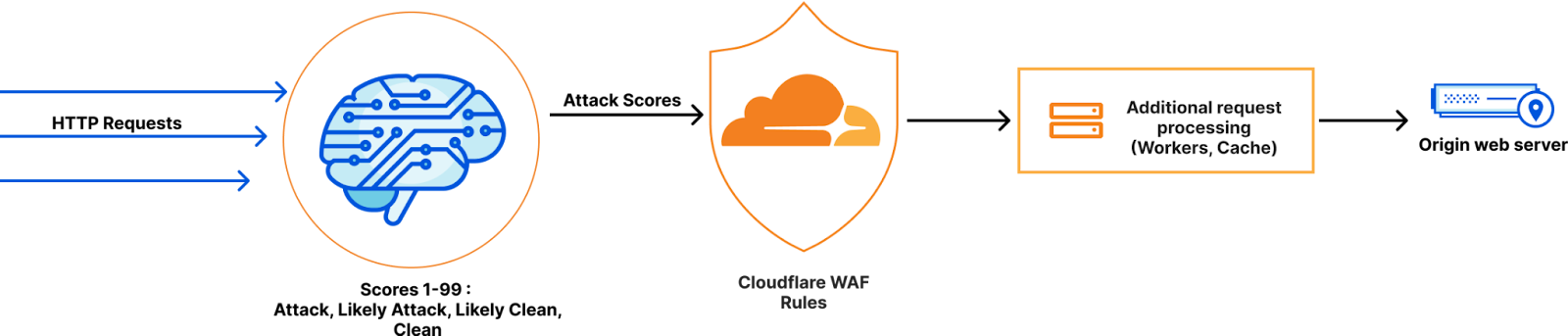
WAF Attack Score is Cloudflare’s machine learning (ML)-powered layer built on top of our Web Application Firewall (WAF). Its goal is to complement the WAF and detect attack bypasses that we haven’t encountered before. This has proven invaluable in catching zero-day vulnerabilities, like the one detected in Ivanti Connect Secure, before they are publicly disclosed and enhancing our customers’ protection against emerging and unknown threats.

Since its launch in 2022, WAF attack score adoption has grown exponentially, now protecting millions of Internet properties and running real-time inference on tens of millions of requests per second. The feature’s popularity has driven us to seek performance improvements, enabling even broader customer use and enhancing Internet security.

In this post, we will discuss the performance optimizations we’ve implemented for our WAF ML product. We’ll guide you through specific code examples and benchmark numbers, demonstrating how these enhancements have significantly improved our system’s efficiency. Additionally, we’ll share the impressive latency reduction numbers observed after the rollout.

Before diving into the optimizations, let’s take a moment to review the inner workings of the WAF Attack Score, which powers our WAF ML product.

WAF Attack Score system design

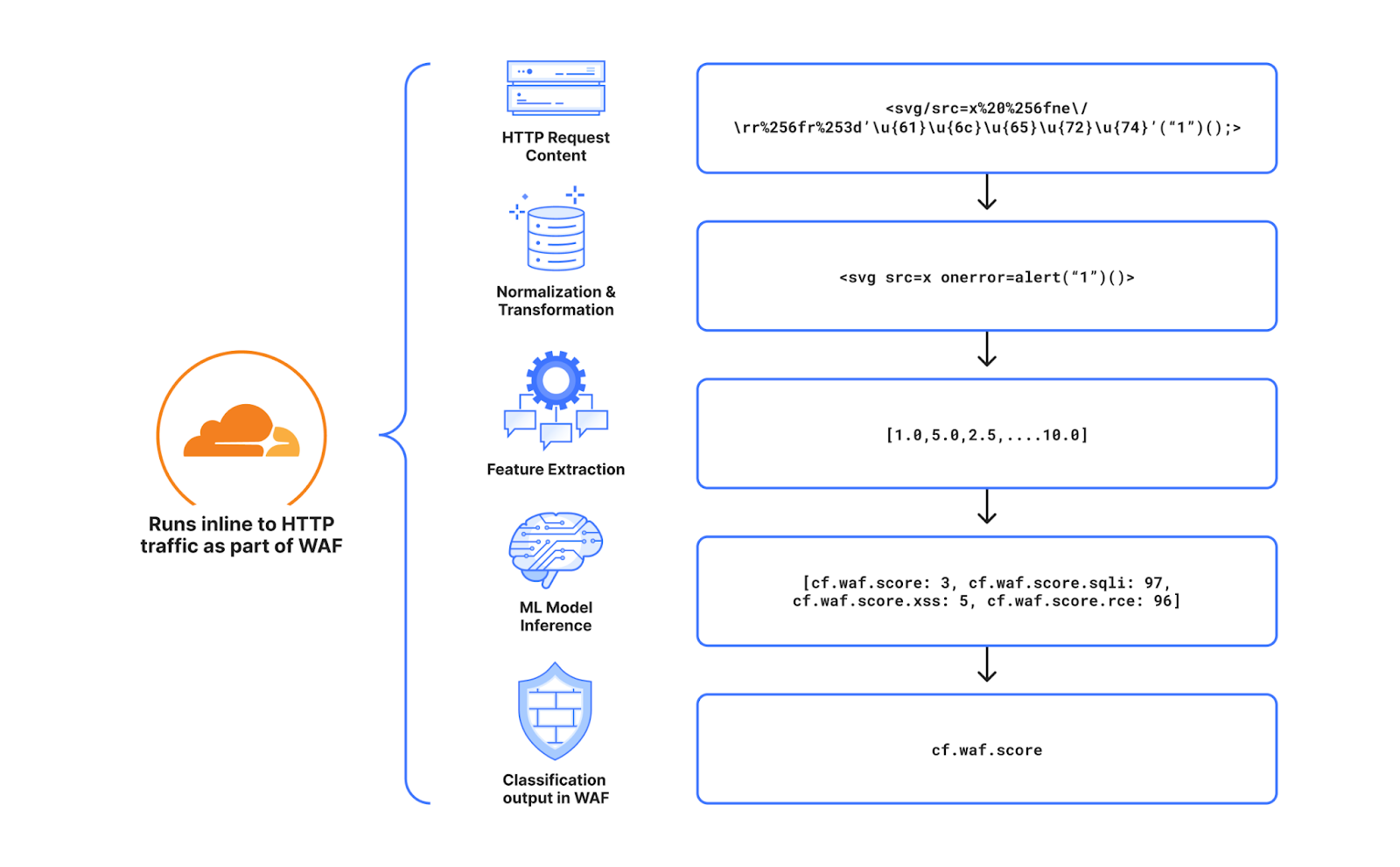
Cloudflare’s WAF attack score identifies various traffic types and attack vectors (SQLi, XSS, Command Injection, etc.) based on structural or statistical content properties. Here’s how it works during inference:

  1. HTTP Request Content: Start with raw HTTP input.
  2. Normalization & Transformation: Standardize and clean the data, applying normalization, content substitutions, and de-duplication.
  3. Feature Extraction: Tokenize the transformed content to generate statistical and structural data.
  4. Machine Learning Model Inference: Analyze the extracted features with pre-trained models, mapping content representations to classes (e.g., XSS, SQLi or RCE) or scores.
  5. Classification Output in WAF: Assign a score to the input, ranging from 1 (likely malicious) to 99 (likely clean), guiding security actions.

Next, we will explore feature extraction and inference optimizations.

Feature extraction optimizations

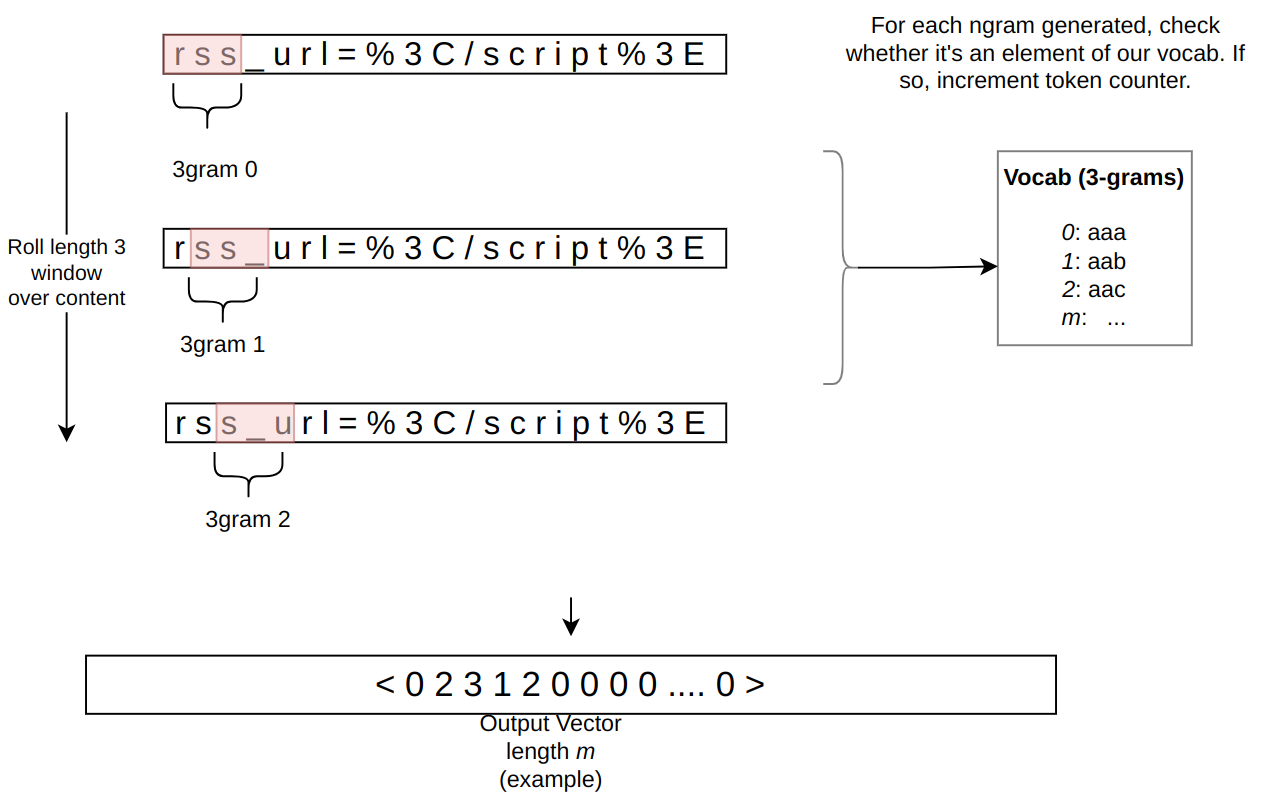
In the context of the WAF Attack Score ML model, feature extraction or pre-processing is essentially a process of tokenizing the given input and producing a float tensor of 1 x m size:

In our initial pre-processing implementation, this is achieved via a sliding window of 3 bytes over the input with the help of Rust’s std::collections::HashMap to look up the tensor index for a given ngram.

Initial benchmarks

To establish performance baselines, we’ve set up four benchmark cases representing example inputs of various lengths, ranging from 44 to 9482 bytes. Each case exemplifies typical input sizes, including those for a request body, user agent, and URI. We run benchmarks using the Criterion.rs statistics-driven micro-benchmarking tool:

RUSTFLAGS="-C opt-level=3 -C target-cpu=native" cargo criterion

Here are initial numbers for these benchmarks executed on a Linux laptop with a 13th Gen Intel® Core™ i7-13800H processor:

Benchmark case Pre-processing time, μs Throughput, MiB/s
preprocessing/long-body-9482 248.46 36.40
preprocessing/avg-body-1000 28.19 33.83
preprocessing/avg-url-44 1.45 28.94
preprocessing/avg-ua-91 2.87 30.24

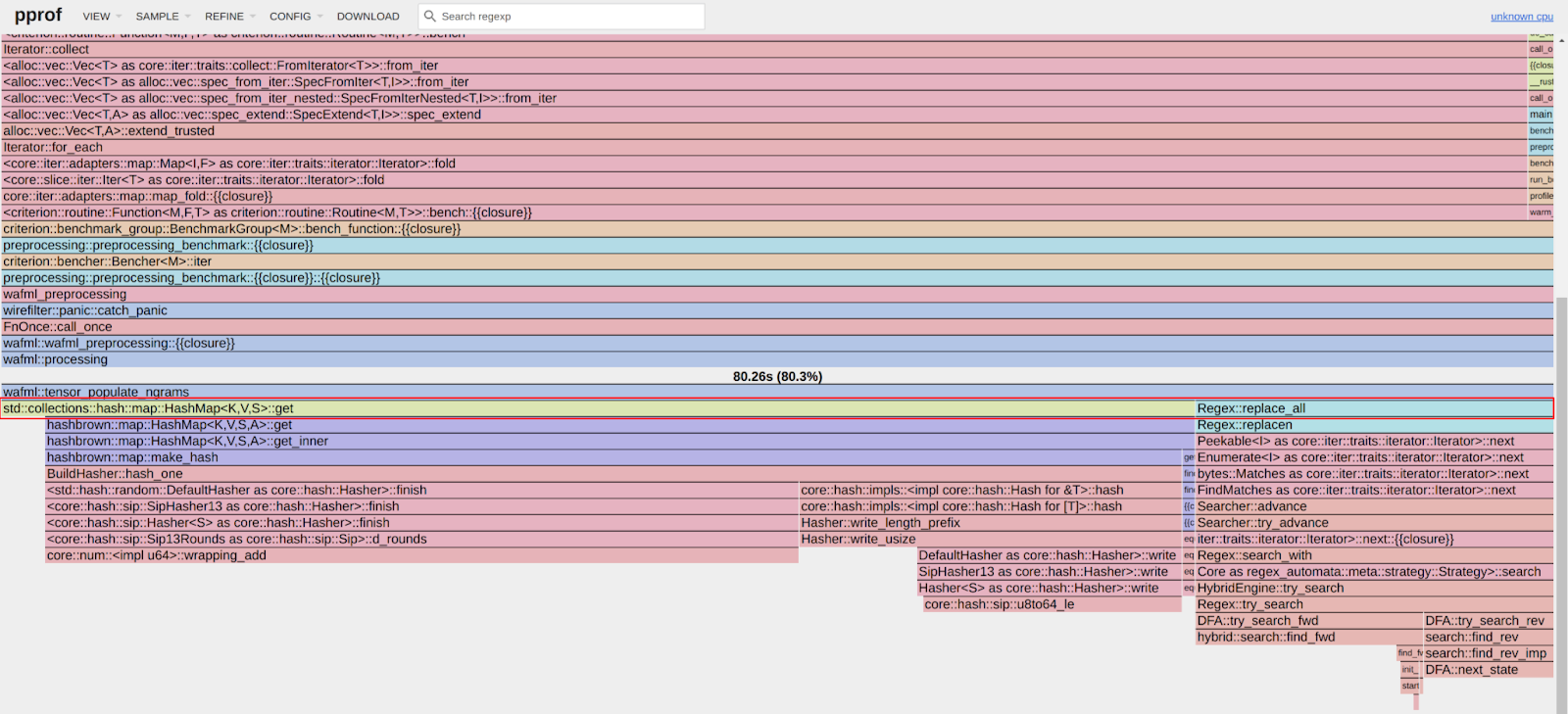
An important observation from these results is that pre-processing time correlates with the length of the input string, with throughput ranging from 28 MiB/s to 36 MiB/s. This suggests that considerable time is spent iterating over longer input strings. Optimizing this part of the process could significantly enhance performance. The dependency of processing time on input size highlights a key area for performance optimization. To validate this, we should examine where the processing time is spent by analyzing flamegraphs created from a 100-second profiling session visualized using pprof:

RUSTFLAGS="-C opt-level=3 -C target-cpu=native" cargo criterion -- --profile-time 100
 
go tool pprof -http=: target/criterion/profile/preprocessing/avg-body-1000/profile.pb

Looking at the pre-processing flamegraph above, it’s clear that most of the time was spent on the following two operations:

Function name % Time spent
std::collections::hash::map::HashMap<K,V,S>::get 61.8%
regex::regex::bytes::Regex::replace_all 18.5%

Let’s tackle the HashMap lookups first. Lookups are happening inside the tensor_populate_ngrams function, where input is split into windows of 3 bytes representing ngram and then lookup inside two hash maps:

fn tensor_populate_ngrams(tensor: &mut [f32], input: &[u8]) {   
   // Populate the NORM ngrams
   let mut unknown_norm_ngrams = 0;
   let norm_offset = 1;
 
   for s in input.windows(3) {
       match NORM_VOCAB.get(s) {
           Some(pos) => {
               tensor[*pos as usize + norm_offset] += 1.0f32;
           }
           None => {
               unknown_norm_ngrams += 1;
           }
       };
   }
 
   // Populate the SIG ngrams
   let mut unknown_sig_ngrams = 0;
   let sig_offset = norm_offset + NORM_VOCAB.len();
 
   let res = SIG_REGEX.replace_all(&input, b"#");
 
   for s in res.windows(3) {
       match SIG_VOCAB.get(s) {
           Some(pos) => {
               // adding +1 here as the first position will be the unknown_sig_ngrams
               tensor[*pos as usize + sig_offset + 1] += 1.0f32;
           }
           None => {
               unknown_sig_ngrams += 1;
           }
       }
   }
}

So essentially the pre-processing function performs a ton of hash map lookups, the volume of which depends on the size of the input string, e.g. 1469 lookups for the given benchmark case avg-body-1000.

Optimization attempt #1: HashMap → Aho-Corasick

Rust hash maps are generally quite fast. However, when that many lookups are being performed, it’s not very cache friendly.

So can we do better than hash maps, and what should we try first? The answer is the Aho-Corasick library.

This library provides multiple pattern search principally through an implementation of the Aho-Corasick algorithm, which builds a fast finite state machine for executing searches in linear time.

We can also tune Aho-Corasick settings based on this recommendation:

“You might want to use AhoCorasickBuilder::kind to set your searcher to always use AhoCorasickKind::DFA if search speed is critical and memory usage isn’t a concern.”

static ref NORM_VOCAB_AC: AhoCorasick = AhoCorasick::builder().kind(Some(AhoCorasickKind::DFA)).build(&[    
    "abc",
    "def",
    "wuq",
    "ijf",
    "iru",
    "piw",
    "mjw",
    "isn",
    "od ",
    "pro",
    ...
]).unwrap();

Then we use the constructed AhoCorasick dictionary to lookup ngrams using its find_overlapping_iter method:

for mat in NORM_VOCAB_AC.find_overlapping_iter(&input) {
    tensor_input_data[mat.pattern().as_usize() + 1] += 1.0;
}

We ran benchmarks and compared them against the baseline times shown above:

Benchmark case Baseline time, μs Aho-Corasick time, μs Optimization
preprocessing/long-body-9482 248.46 129.59 -47.84% or 1.64x
preprocessing/avg-body-1000 28.19 16.47 -41.56% or 1.71x
preprocessing/avg-url-44 1.45 1.01 -30.38% or 1.44x
preprocessing/avg-ua-91 2.87 1.90 -33.60% or 1.51x

That’s substantially better – Aho-Corasick DFA does wonders.

Optimization attempt #2: Aho-Corasick → match

One would think optimization with Aho-Corasick DFA is enough and that it seems unlikely that anything else can beat it. Yet, we can throw Aho-Corasick away and simply use the Rust match statement and let the compiler do the optimization for us!

#[inline]
const fn norm_vocab_lookup(ngram: &[u8; 3]) -> usize {     
    match ngram {
        b"abc" => 1,
        b"def" => 2,
        b"wuq" => 3,
        b"ijf" => 4,
        b"iru" => 5,
        b"piw" => 6,
        b"mjw" => 7,
        b"isn" => 8,
        b"od " => 9,
        b"pro" => 10,
        ...
        _ => 0,
    }
}```

Here’s how it performs in practice, based on the assembly generated by the Godbolt compiler explorer. The corresponding assembly code efficiently implements this lookup by employing a jump table and byte-wise comparisons to determine the return value based on input sequences, optimizing for quick decisions and minimal branching. Although the example only includes ten ngrams, it’s important to note that in applications like our WAF Attack Score ML models, we deal with thousands of ngrams. This simple match-based approach outshines both HashMap lookups and the Aho-Corasick method.

Benchmark case Baseline time, μs Match time, μs Optimization
preprocessing/long-body-9482 248.46 112.96 -54.54% or 2.20x
preprocessing/avg-body-1000 28.19 13.12 -53.45% or 2.15x
preprocessing/avg-url-44 1.45 0.75 -48.37% or 1.94x
preprocessing/avg-ua-91 2.87 1.4076 -50.91% or 2.04x

Switching to match gave us another 7-18% drop in latency, depending on the case.

Optimization attempt #3: Regex → WindowedReplacer

So, what exactly is the purpose of Regex::replace_all in pre-processing? Regex is defined and used like this:

pub static SIG_REGEX: Lazy<Regex> =
    Lazy::new(|| RegexBuilder::new("[a-z]+").unicode(false).build().unwrap());
    ... 
    let res = SIG_REGEX.replace_all(&input, b"#");
    for s in res.windows(3) {
        tensor[sig_vocab_lookup(s.try_into().unwrap())] += 1.0;
    }

Essentially, all we need is to:

  1. Replace every sequence of lowercase letters in the input with a single byte “#”.
  2. Iterate over replaced bytes in a windowed fashion with a step of 3 bytes representing an ngram.
  3. Look up the ngram index and increment it in the tensor.

This logic seems simple enough that we could implement it more efficiently with a single pass over the input and without any allocations:

type Window = [u8; 3];
type Iter<'a> = Peekable<std::slice::Iter<'a, u8>>;

pub struct WindowedReplacer<'a> {
    window: Window,
    input_iter: Iter<'a>,
}

#[inline]
fn is_replaceable(byte: u8) -> bool {
    matches!(byte, b'a'..=b'z')
}

#[inline]
fn next_byte(iter: &mut Iter) -> Option<u8> {
    let byte = iter.next().copied()?;
    if is_replaceable(byte) {
        while iter.next_if(|b| is_replaceable(**b)).is_some() {}
        Some(b'#')
    } else {
        Some(byte)
    }
}

impl<'a> WindowedReplacer<'a> {
    pub fn new(input: &'a [u8]) -> Option<Self> {
        let mut window: Window = Default::default();
        let mut iter = input.iter().peekable();
        for byte in window.iter_mut().skip(1) {
            *byte = next_byte(&mut iter)?;
        }
        Some(WindowedReplacer {
            window,
            input_iter: iter,
        })
    }
}

impl<'a> Iterator for WindowedReplacer<'a> {
    type Item = Window;

    #[inline]
    fn next(&mut self) -> Option<Self::Item> {
        for i in 0..2 {
            self.window[i] = self.window[i + 1];
        }
        let byte = next_byte(&mut self.input_iter)?;
        self.window[2] = byte;
        Some(self.window)
    }
}

By utilizing the WindowedReplacer, we simplify the replacement logic:

if let Some(replacer) = WindowedReplacer::new(&input) {                
    for ngram in replacer.windows(3) {
        tensor[sig_vocab_lookup(ngram.try_into().unwrap())] += 1.0;
    }
}

This new approach not only eliminates the need for allocating additional buffers to store replaced content, but also leverages Rust’s iterator optimizations, which the compiler can more effectively optimize. You can view an example of the assembly output for this new iterator at the provided Godbolt link.

Now let’s benchmark this and compare against the original implementation:

Benchmark case Baseline time, μs Match time, μs Optimization
preprocessing/long-body-9482 248.46 51.00 -79.47% or 4.87x
preprocessing/avg-body-1000 28.19 5.53 -80.36% or 5.09x
preprocessing/avg-url-44 1.45 0.40 -72.11% or 3.59x
preprocessing/avg-ua-91 2.87 0.69 -76.07% or 4.18x

The new letters replacement implementation has doubled the preprocessing speed compared to the previously optimized version using match statements, and it is four to five times faster than the original version!

Optimization attempt #4: Going nuclear with branchless ngram lookups

At this point, 4-5x improvement might seem like a lot and there is no point pursuing any further optimizations. After all, using an ngram lookup with a match statement has beaten the following methods, with benchmarks omitted for brevity:

Lookup method Description
std::collections::HashMap Uses Google’s SwissTable design with SIMD lookups to scan multiple hash entries in parallel.
Aho-Corasick matcher with and without DFA Also utilizes SIMD instructions in some cases.
phf crate A library to generate efficient lookup tables at compile time using perfect hash functions.
ph crate Another Rust library of data structures based on perfect hashing.
quickphf crate A Rust crate that allows you to use static compile-time generated hash maps and hash sets using PTHash perfect hash functions.

However, if we look again at the assembly of the norm_vocab_lookup function, it is clear that the execution flow has to perform a bunch of comparisons using cmp instructions. This creates many branches for the CPU to handle, which can lead to branch mispredictions. Branch mispredictions occur when the CPU incorrectly guesses the path of execution, causing delays as it discards partially completed instructions and fetches the correct ones. By reducing or eliminating these branches, we can avoid these mispredictions and improve the efficiency of the lookup process. How can we get rid of those branches when there is a need to look up thousands of unique ngrams?

Since there are only 3 bytes in each ngram, we can build two lookup tables of 256 x 256 x 256 size, storing the ngram tensor index. With this naive approach, our memory requirements will be: 256 x 256 x 256 x 2 x 2 = 64 MB, which seems like a lot.

However, given that we only care about ASCII bytes 0..127, then memory requirements can be lower: 128 x 128 x 128 x 2 x 2 = 8 MB, which is better. However, we will need to check for bytes >= 128, which will introduce a branch again.

So can we do better? Considering that the actual number of distinct byte values used in the ngrams is significantly less than the total possible 256 values, we can reduce memory requirements further by employing the following technique:

1. To avoid the branching caused by comparisons, we use precomputed offset lookup tables. This means instead of comparing each byte of the ngram during each lookup, we precompute the positions of each possible byte in a lookup table. This way, we replace the comparison operations with direct memory accesses, which are much faster and do not involve branching. We build an ngram bytes offsets lookup const array, storing each unique ngram byte offset position multiplied by the number of unique ngram bytes:

const NGRAM_OFFSETS: [[u32; 256]; 3] = [
    [
        // offsets of first byte in ngram
    ],
    [
        // offsets of second byte in ngram
    ],
    [
        // offsets of third byte in ngram
    ],
];

2. Then to obtain the ngram index, we can use this simple const function:

#[inline]
const fn ngram_index(ngram: [u8; 3]) -> usize {
    (NGRAM_OFFSETS[0][ngram[0] as usize]
        + NGRAM_OFFSETS[1][ngram[1] as usize]
        + NGRAM_OFFSETS[2][ngram[2] as usize]) as usize
}

3. To look up the tensor index based on the ngram index, we construct another const array at compile time using a list of all ngrams, where N is the number of unique ngram bytes:

const NGRAM_TENSOR_IDX: [u16; N * N * N] = {
    let mut arr = [0; N * N * N];
    arr[ngram_index(*b"abc")] = 1;
    arr[ngram_index(*b"def")] = 2;
    arr[ngram_index(*b"wuq")] = 3;
    arr[ngram_index(*b"ijf")] = 4;
    arr[ngram_index(*b"iru")] = 5;
    arr[ngram_index(*b"piw")] = 6;
    arr[ngram_index(*b"mjw")] = 7;
    arr[ngram_index(*b"isn")] = 8;
    arr[ngram_index(*b"od ")] = 9;
    ...
    arr
};

4. Finally, to update the tensor based on given ngram, we lookup the ngram index, then the tensor index, and then increment it with help of get_unchecked_mut, which avoids unnecessary (in this case) boundary checks and eliminates another source of branching:

#[inline]
fn update_tensor_with_ngram(tensor: &mut [f32], ngram: [u8; 3]) {
    let ngram_idx = ngram_index(ngram);
    debug_assert!(ngram_idx < NGRAM_TENSOR_IDX.len());
    unsafe {
        let tensor_idx = *NGRAM_TENSOR_IDX.get_unchecked(ngram_idx) as usize;
        debug_assert!(tensor_idx < tensor.len());
        *tensor.get_unchecked_mut(tensor_idx) += 1.0;
    }
}

This logic works effectively, passes correctness tests, and most importantly, it’s completely branchless! Moreover, the memory footprint of used lookup arrays is tiny – just ~500 KiB of memory – which easily fits into modern CPU L2/L3 caches, ensuring that expensive cache misses are rare and performance is optimal.

The last trick we will employ is loop unrolling for ngrams processing. By taking 6 ngrams (corresponding to 8 bytes of the input array) at a time, the compiler can unroll the second loop and auto-vectorize it, leveraging parallel execution to improve performance:

const CHUNK_SIZE: usize = 6;

let chunks_max_offset =
    ((input.len().saturating_sub(2)) / CHUNK_SIZE) * CHUNK_SIZE;
for i in (0..chunks_max_offset).step_by(CHUNK_SIZE) {
    for ngram in input[i..i + CHUNK_SIZE + 2].windows(3) {
        update_tensor_with_ngram(tensor, ngram.try_into().unwrap());
    }
}

Tying up everything together, our final pre-processing benchmarks show the following:

Benchmark case Baseline time, μs Branchless time, μs Optimization
preprocessing/long-body-9482 248.46 21.53 -91.33% or 11.54x
preprocessing/avg-body-1000 28.19 2.33 -91.73% or 12.09x
preprocessing/avg-url-44 1.45 0.26 -82.34% or 5.66x
preprocessing/avg-ua-91 2.87 0.43 -84.92% or 6.63x

The longer input is, the higher the latency drop will be due to branchless ngram lookups and loop unrolling, ranging from six to twelve times faster than baseline implementation.

After trying various optimizations, the final version of pre-processing retains optimization attempts 3 and 4, using branchless ngram lookup with offset tables and a single-pass non-allocating replacement iterator.

There are potentially more CPU cycles left on the table, and techniques like memory pre-fetching and manual SIMD intrinsics could speed this up a bit further. However, let’s now switch gears into looking at inference latency a bit closer.

Model inference optimizations

Initial benchmarks

Let’s have a look at original performance numbers of the WAF Attack Score ML model, which uses TensorFlow Lite 2.6.0:

Benchmark case Inference time, μs
inference/long-body-9482 247.31
inference/avg-body-1000 246.31
inference/avg-url-44 246.40
inference/avg-ua-91 246.88

Model inference is actually independent of the original input length, as inputs are transformed into tensors of predetermined size during the pre-processing phase, which we optimized above. From now on, we will refer to a singular inference time when benchmarking our optimizations.

Digging deeper with profiler, we observed that most of the time is spent on the following operations:

Function name % Time spent
tflite::tensor_utils::PortableMatrixBatchVectorMultiplyAccumulate 42.46%
tflite::tensor_utils::PortableAsymmetricQuantizeFloats 30.59%
tflite::optimized_ops::SoftmaxImpl 12.02%
tflite::reference_ops::MaximumMinimumBroadcastSlow 5.35%
tflite::ops::builtin::elementwise::LogEval 4.13%

The most expensive operation is matrix multiplication, which boils down to iteration within three nested loops:

void PortableMatrixBatchVectorMultiplyAccumulate(const float* matrix,
                                                 int m_rows, int m_cols,
                                                 const float* vector,
                                                 int n_batch, float* result) {
  float* result_in_batch = result;
  for (int b = 0; b < n_batch; b++) {
    const float* matrix_ptr = matrix;
    for (int r = 0; r < m_rows; r++) {
      float dot_prod = 0.0f;
      const float* vector_in_batch = vector + b * m_cols;
      for (int c = 0; c < m_cols; c++) {
        dot_prod += *matrix_ptr++ * *vector_in_batch++;
      }
      *result_in_batch += dot_prod;
     ++result_in_batch;
    }
  }
}

This doesn’t look very efficient and many blogs and research papers have been written on how matrix multiplication can be optimized, which basically boils down to:

  • Blocking: Divide matrices into smaller blocks that fit into the cache, improving cache reuse and reducing memory access latency.
  • Vectorization: Use SIMD instructions to process multiple data points in parallel, enhancing efficiency with vector registers.
  • Loop Unrolling: Reduce loop control overhead and increase parallelism by executing multiple loop iterations simultaneously.

To gain a better understanding of how these techniques work, we recommend watching this video, which brilliantly depicts the process of matrix multiplication:

Tensorflow Lite with AVX2

TensorFlow Lite does, in fact, support SIMD matrix multiplication – we just need to enable it and re-compile the TensorFlow Lite library:

if [[ "$(uname -m)" == x86_64* ]]; then
    # On x86_64 target x86-64-v3 CPU to enable AVX2 and FMA.
    arguments+=("--copt=-march=x86-64-v3")
fi

After running profiler again using the SIMD-optimized TensorFlow Lite library:

Top operations as per profiler output:

Function name % Time spent
tflite::tensor_utils::SseMatrixBatchVectorMultiplyAccumulateImpl 43.01%
tflite::tensor_utils::NeonAsymmetricQuantizeFloats 22.46%
tflite::reference_ops::MaximumMinimumBroadcastSlow 7.82%
tflite::optimized_ops::SoftmaxImpl 6.61%
tflite::ops::builtin::elementwise::LogEval 4.63%

Matrix multiplication now uses AVX2 instructions, which uses blocks of 8×8 to multiply and accumulate the multiplication result.

Proportionally, matrix multiplication and quantization operations take a similar time share when compared to non-SIMD version, however in absolute numbers, it’s almost twice as fast when SIMD optimizations are enabled:

Benchmark case Baseline time, μs SIMD time, μs Optimization
inference/avg-body-1000 246.31 130.07 -47.19% or 1.89x

Quite a nice performance boost just from a few lines of build config change!

Tensorflow Lite with XNNPACK

Tensorflow Lite comes with a useful benchmarking tool called benchmark_model, which also has a built-in profiler.

The tool can be built locally using the command:

bazel build -j 4 --copt=-march=native -c opt tensorflow/lite/tools/benchmark:benchmark_model

After building, benchmarks were run with different settings:

Benchmark run Inference time, μs
benchmark_model –graph=model.tflite –num_runs=100000 –use_xnnpack=false 105.61
benchmark_model –graph=model.tflite –num_runs=100000 –use_xnnpack=true –xnnpack_force_fp16=true 111.95
benchmark_model –graph=model.tflite –num_runs=100000 –use_xnnpack=true 49.05

Tensorflow Lite with XNNPACK enabled emerges as a leader, achieving ~50% latency reduction, when compared to the original Tensorflow Lite implementation.

More technical details about XNNPACK can be found in these blog posts:

Re-running benchmarks with XNNPack enabled, we get the following results:

Benchmark case Baseline time, μs
TFLite 2.6.0
SIMD time, μs
TFLite 2.6.0
SIMD time, μs
TFLite 2.16.1
SIMD + XNNPack time, μs
TFLite 2.16.1
Optimization
inference/avg-body-1000 246.31 130.07 115.17 56.22 -77.17% or 4.38x

By upgrading TensorFlow Lite from 2.6.0 to 2.16.1 and enabling SIMD optimizations along with the XNNPack, we were able to decrease WAF ML model inference time more than four-fold, achieving a 77.17% reduction.

Caching inference result

While making code faster through pre-processing and inference optimizations is great, it’s even better when code doesn’t need to run at all. This is where caching comes in. Amdahl’s Law suggests that optimizing only parts of a program has diminishing returns. By avoiding redundant executions with caching, we can achieve significant performance gains beyond the limitations of traditional code optimization.

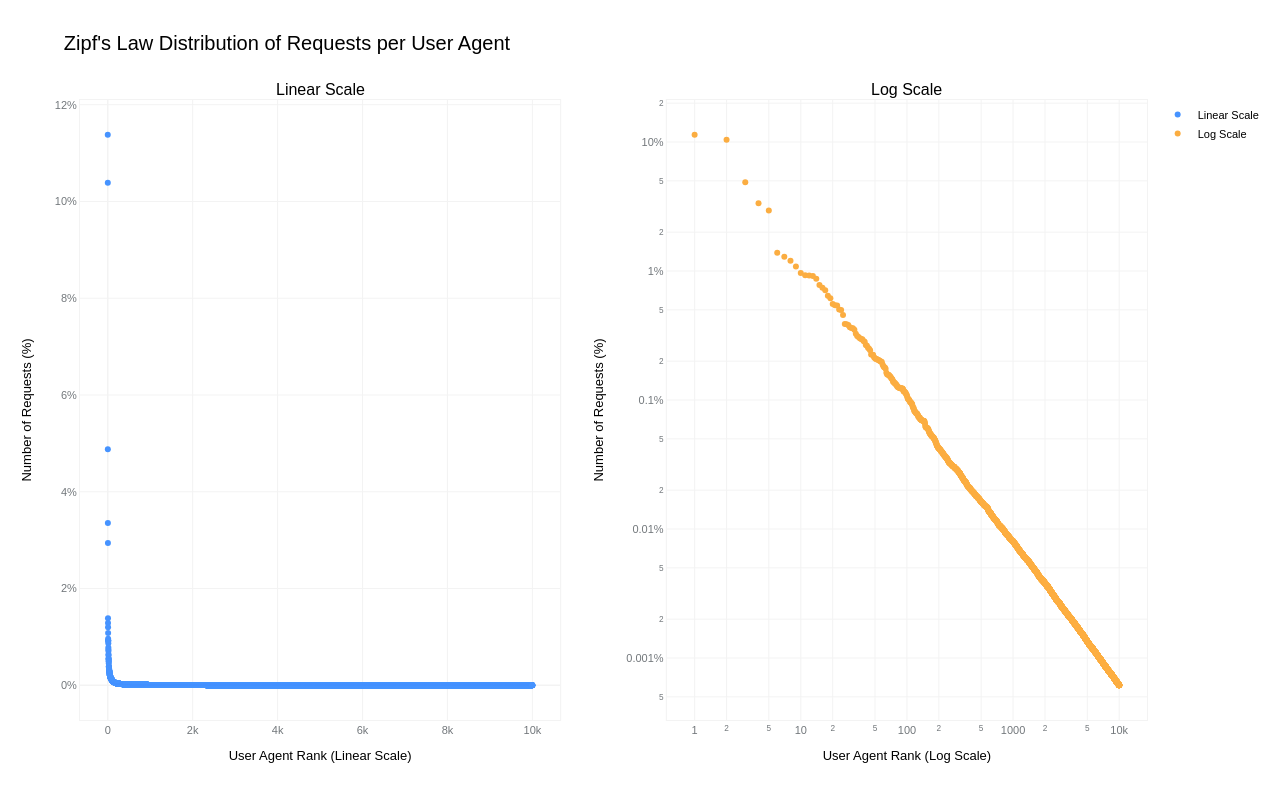
A simple key-value cache would quickly occupy all available memory on the server due to the high cardinality of URLs, HTTP headers, and HTTP bodies. However, because “everything on the Internet has an L-shape” or more specifically, follows a Zipf’s law distribution, we can optimize our caching strategy.

Zipfs law states that in many natural datasets, the frequency of any item is inversely proportional to its rank in the frequency table. In other words, a few items are extremely common, while the majority are rare. By analyzing our request data, we found that URLs, HTTP headers, and even HTTP bodies follow this distribution. For example, here is the user agent header frequency distribution against its rank:

By caching the top-N most frequently occurring inputs and their corresponding inference results, we can ensure that both pre-processing and inference are skipped for the majority of requests. This is where the Least Recently Used (LRU) cache comes in – frequently used items stay hot in the cache, while the least recently used ones are evicted.

We use lua-resty-mlcache as our caching solution, allowing us to share cached inference results between different Nginx workers via a shared memory dictionary. The LRU cache effectively exploits the space-time trade-off, where we trade a small amount of memory for significant CPU time savings.

This approach enables us to achieve a ~70% cache hit ratio, significantly reducing latency further, as we will analyze in the final section below.

Optimization results

The optimizations discussed in this post were rolled out in several phases to ensure system correctness and stability.

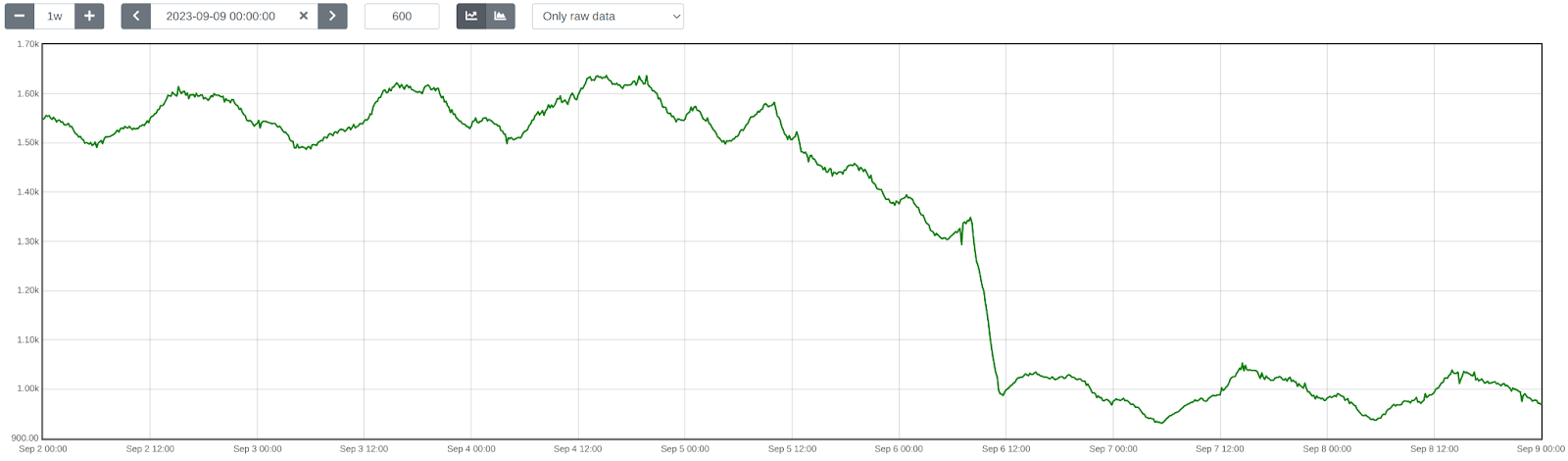
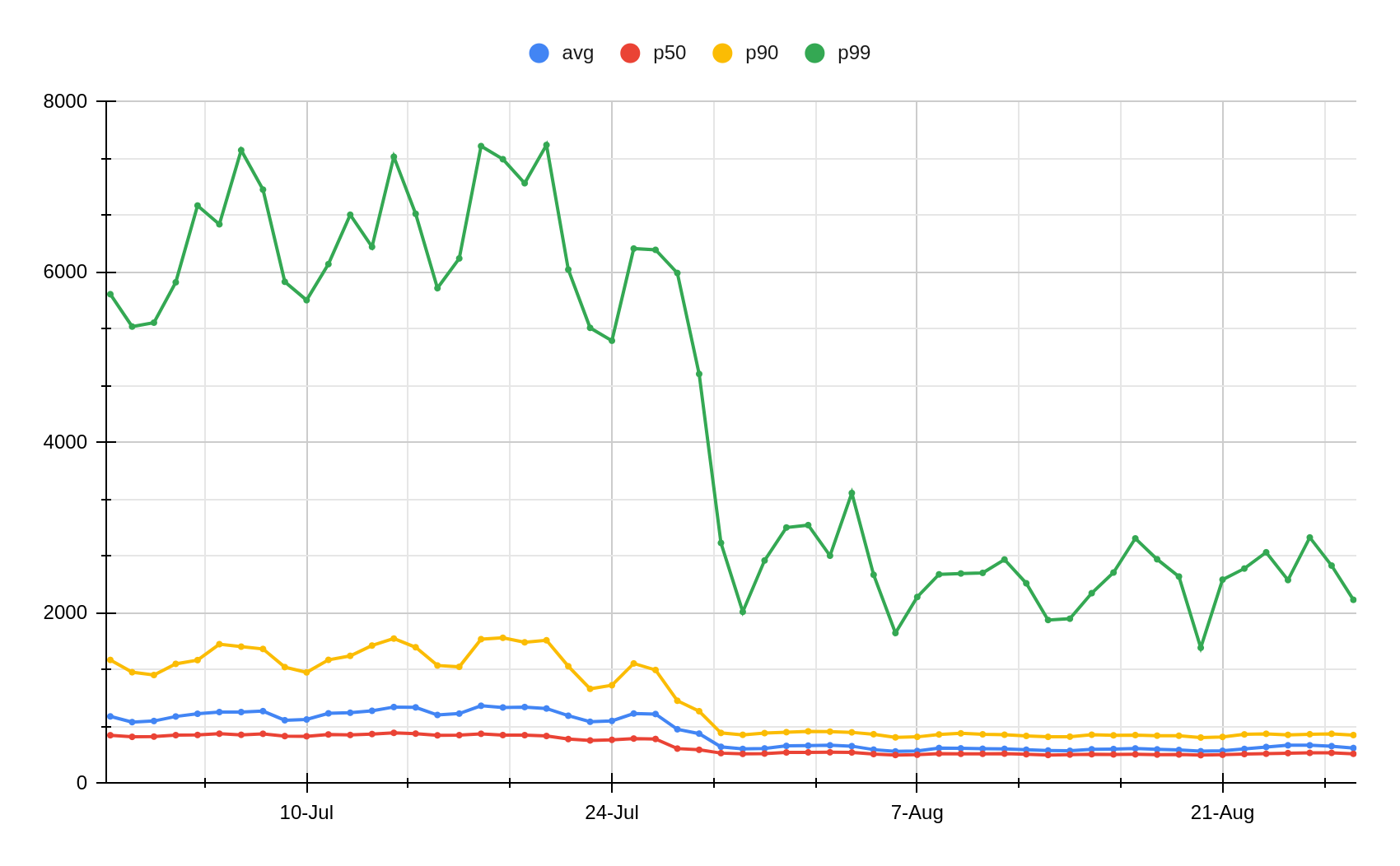
First, we enabled SIMD optimizations for TensorFlow Lite, which reduced WAF ML total execution time by approximately 41.80%, decreasing from 1519 884 μs on average.

Next, we upgraded TensorFlow Lite from version 2.6.0 to 2.16.1, enabled XNNPack, and implemented pre-processing optimizations. This further reduced WAF ML total execution time by ~40.77%, bringing it down from 932552 μs on average. The initial average time of 932 μs was slightly higher than the previous 884 μs due to the increased number of customers using this feature and the months that passed between changes.

Lastly, we introduced LRU caching, which led to an additional reduction in WAF ML total execution time by ~50.18%, from 552275 μs on average.

Overall, we cut WAF ML execution time by ~81.90%, decreasing from 1519275 μs, or 5.5x faster!

To illustrate the significance of this: with Cloudflare’s average rate of 9.5 million requests per second passing through WAF ML, saving 1244 microseconds per request equates to saving ~32 years of processing time every single day! That’s in addition to the savings of 523 microseconds per request or 65 years of processing time per day demonstrated last year in our Every request, every microsecond: scalable machine learning at Cloudflare post about our Bot Management product.

Conclusion

We hope you enjoyed reading about how we made our WAF ML models go brrr, just as much as we enjoyed implementing these optimizations to bring scalable WAF ML to more customers on a truly global scale.

Looking ahead, we are developing even more sophisticated ML security models. These advancements aim to bring our WAF and Bot Management products to the next level, making them even more useful and effective for our customers.

Making WAF ML models go brrr: saving decades of processing time

Post Syndicated from Alex Bocharov original https://blog.cloudflare.com/making-waf-ai-models-go-brr


We made our WAF Machine Learning models 5.5x faster, reducing execution time by approximately 82%, from 1519 to 275 microseconds! Read on to find out how we achieved this remarkable improvement.

WAF Attack Score is Cloudflare’s machine learning (ML)-powered layer built on top of our Web Application Firewall (WAF). Its goal is to complement the WAF and detect attack bypasses that we haven’t encountered before. This has proven invaluable in catching zero-day vulnerabilities, like the one detected in Ivanti Connect Secure, before they are publicly disclosed and enhancing our customers’ protection against emerging and unknown threats.

Since its launch in 2022, WAF attack score adoption has grown exponentially, now protecting millions of Internet properties and running real-time inference on tens of millions of requests per second. The feature’s popularity has driven us to seek performance improvements, enabling even broader customer use and enhancing Internet security.

In this post, we will discuss the performance optimizations we’ve implemented for our WAF ML product. We’ll guide you through specific code examples and benchmark numbers, demonstrating how these enhancements have significantly improved our system’s efficiency. Additionally, we’ll share the impressive latency reduction numbers observed after the rollout.

Before diving into the optimizations, let’s take a moment to review the inner workings of the WAF Attack Score, which powers our WAF ML product.

WAF Attack Score system design

Cloudflare’s WAF attack score identifies various traffic types and attack vectors (SQLi, XSS, Command Injection, etc.) based on structural or statistical content properties. Here’s how it works during inference:

  1. HTTP Request Content: Start with raw HTTP input.

  2. Normalization & Transformation: Standardize and clean the data, applying normalization, content substitutions, and de-duplication.

  3. Feature Extraction: Tokenize the transformed content to generate statistical and structural data.

  4. Machine Learning Model Inference: Analyze the extracted features with pre-trained models, mapping content representations to classes (e.g., XSS, SQLi or RCE) or scores.

  5. Classification Output in WAF: Assign a score to the input, ranging from 1 (likely malicious) to 99 (likely clean), guiding security actions.

Next, we will explore feature extraction and inference optimizations.

Feature extraction optimizations

In the context of the WAF Attack Score ML model, feature extraction or pre-processing is essentially a process of tokenizing the given input and producing a float tensor of 1 x m size:

In our initial pre-processing implementation, this is achieved via a sliding window of 3 bytes over the input with the help of Rust’s std::collections::HashMap to look up the tensor index for a given ngram.

Initial benchmarks

To establish performance baselines, we’ve set up four benchmark cases representing example inputs of various lengths, ranging from 44 to 9482 bytes. Each case exemplifies typical input sizes, including those for a request body, user agent, and URI. We run benchmarks using the Criterion.rs statistics-driven micro-benchmarking tool:

RUSTFLAGS="-C opt-level=3 -C target-cpu=native" cargo criterion

Here are initial numbers for these benchmarks executed on a Linux laptop with a 13th Gen Intel® Core™ i7-13800H processor:

Benchmark case Pre-processing time, μs Throughput, MiB/s
preprocessing/long-body-9482 248.46 36.40
preprocessing/avg-body-1000 28.19 33.83
preprocessing/avg-url-44 1.45 28.94
preprocessing/avg-ua-91 2.87 30.24

An important observation from these results is that pre-processing time correlates with the length of the input string, with throughput ranging from 28 MiB/s to 36 MiB/s. This suggests that considerable time is spent iterating over longer input strings. Optimizing this part of the process could significantly enhance performance. The dependency of processing time on input size highlights a key area for performance optimization. To validate this, we should examine where the processing time is spent by analyzing flamegraphs created from a 100-second profiling session visualized using pprof:

RUSTFLAGS="-C opt-level=3 -C target-cpu=native" cargo criterion -- --profile-time 100
 
go tool pprof -http=: target/criterion/profile/preprocessing/avg-body-1000/profile.pb

Looking at the pre-processing flamegraph above, it’s clear that most of the time was spent on the following two operations:

Function name % Time spent
std::collections::hash::map::HashMap<K,V,S>::get 61.8%
regex::regex::bytes::Regex::replace_all 18.5%

Let’s tackle the HashMap lookups first. Lookups are happening inside the tensor_populate_ngrams function, where input is split into windows of 3 bytes representing ngram and then lookup inside two hash maps:

fn tensor_populate_ngrams(tensor: &mut [f32], input: &[u8]) {   
   // Populate the NORM ngrams
   let mut unknown_norm_ngrams = 0;
   let norm_offset = 1;
 
   for s in input.windows(3) {
       match NORM_VOCAB.get(s) {
           Some(pos) => {
               tensor[*pos as usize + norm_offset] += 1.0f32;
           }
           None => {
               unknown_norm_ngrams += 1;
           }
       };
   }
 
   // Populate the SIG ngrams
   let mut unknown_sig_ngrams = 0;
   let sig_offset = norm_offset + NORM_VOCAB.len();
 
   let res = SIG_REGEX.replace_all(&input, b"#");
 
   for s in res.windows(3) {
       match SIG_VOCAB.get(s) {
           Some(pos) => {
               // adding +1 here as the first position will be the unknown_sig_ngrams
               tensor[*pos as usize + sig_offset + 1] += 1.0f32;
           }
           None => {
               unknown_sig_ngrams += 1;
           }
       }
   }
}

So essentially the pre-processing function performs a ton of hash map lookups, the volume of which depends on the size of the input string, e.g. 1469 lookups for the given benchmark case avg-body-1000.

Optimization attempt #1: HashMap → Aho-Corasick

Rust hash maps are generally quite fast. However, when that many lookups are being performed, it’s not very cache friendly.

So can we do better than hash maps, and what should we try first? The answer is the Aho-Corasick library.

This library provides multiple pattern search principally through an implementation of the Aho-Corasick algorithm, which builds a fast finite state machine for executing searches in linear time.

We can also tune Aho-Corasick settings based on this recommendation:

“You might want to use AhoCorasickBuilder::kind to set your searcher to always use AhoCorasickKind::DFA if search speed is critical and memory usage isn’t a concern.”

static ref NORM_VOCAB_AC: AhoCorasick = AhoCorasick::builder().kind(Some(AhoCorasickKind::DFA)).build(&[    
    "abc",
    "def",
    "wuq",
    "ijf",
    "iru",
    "piw",
    "mjw",
    "isn",
    "od ",
    "pro",
    ...
]).unwrap();

Then we use the constructed AhoCorasick dictionary to lookup ngrams using its find_overlapping_iter method:

for mat in NORM_VOCAB_AC.find_overlapping_iter(&input) {
    tensor_input_data[mat.pattern().as_usize() + 1] += 1.0;
}

We ran benchmarks and compared them against the baseline times shown above:

Benchmark case Baseline time, μs Aho-Corasick time, μs Optimization
preprocessing/long-body-9482 248.46 129.59 -47.84% or 1.64x
preprocessing/avg-body-1000 28.19 16.47 -41.56% or 1.71x
preprocessing/avg-url-44 1.45 1.01 -30.38% or 1.44x
preprocessing/avg-ua-91 2.87 1.90 -33.60% or 1.51x

That’s substantially better – Aho-Corasick DFA does wonders.

Optimization attempt #2: Aho-Corasick → match

One would think optimization with Aho-Corasick DFA is enough and that it seems unlikely that anything else can beat it. Yet, we can throw Aho-Corasick away and simply use the Rust match statement and let the compiler do the optimization for us!

#[inline]
const fn norm_vocab_lookup(ngram: &[u8; 3]) -> usize {     
    match ngram {
        b"abc" => 1,
        b"def" => 2,
        b"wuq" => 3,
        b"ijf" => 4,
        b"iru" => 5,
        b"piw" => 6,
        b"mjw" => 7,
        b"isn" => 8,
        b"od " => 9,
        b"pro" => 10,
        ...
        _ => 0,
    }
}```

Here’s how it performs in practice, based on the assembly generated by the Godbolt compiler explorer. The corresponding assembly code efficiently implements this lookup by employing a jump table and byte-wise comparisons to determine the return value based on input sequences, optimizing for quick decisions and minimal branching. Although the example only includes ten ngrams, it’s important to note that in applications like our WAF Attack Score ML models, we deal with thousands of ngrams. This simple match-based approach outshines both HashMap lookups and the Aho-Corasick method.

Benchmark case Baseline time, μs Match time, μs Optimization
preprocessing/long-body-9482 248.46 112.96 -54.54% or 2.20x
preprocessing/avg-body-1000 28.19 13.12 -53.45% or 2.15x
preprocessing/avg-url-44 1.45 0.75 -48.37% or 1.94x
preprocessing/avg-ua-91 2.87 1.4076 -50.91% or 2.04x

Switching to match gave us another 7-18% drop in latency, depending on the case.

Optimization attempt #3: Regex → WindowedReplacer

So, what exactly is the purpose of Regex::replace_all in pre-processing? Regex is defined and used like this:

pub static SIG_REGEX: Lazy =
    Lazy::new(|| RegexBuilder::new("[a-z]+").unicode(false).build().unwrap());
    ... 
    let res = SIG_REGEX.replace_all(&input, b"#");
    for s in res.windows(3) {
        tensor[sig_vocab_lookup(s.try_into().unwrap())] += 1.0;
    }

Essentially, all we need is to:

  1. Replace every sequence of lowercase letters in the input with a single byte “#”.

  2. Iterate over replaced bytes in a windowed fashion with a step of 3 bytes representing an ngram.

  3. Look up the ngram index and increment it in the tensor.

This logic seems simple enough that we could implement it more efficiently with a single pass over the input and without any allocations:

type Window = [u8; 3];
type Iter<'a> = Peekable>;

pub struct WindowedReplacer<'a> {
    window: Window,
    input_iter: Iter<'a>,
}

#[inline]
fn is_replaceable(byte: u8) -> bool {
    matches!(byte, b'a'..=b'z')
}

#[inline]
fn next_byte(iter: &mut Iter) -> Option {
    let byte = iter.next().copied()?;
    if is_replaceable(byte) {
        while iter.next_if(|b| is_replaceable(**b)).is_some() {}
        Some(b'#')
    } else {
        Some(byte)
    }
}

impl<'a> WindowedReplacer<'a> {
    pub fn new(input: &'a [u8]) -> Option {
        let mut window: Window = Default::default();
        let mut iter = input.iter().peekable();
        for byte in window.iter_mut().skip(1) {
            *byte = next_byte(&mut iter)?;
        }
        Some(WindowedReplacer {
            window,
            input_iter: iter,
        })
    }
}

impl<'a> Iterator for WindowedReplacer<'a> {
    type Item = Window;

    #[inline]
    fn next(&mut self) -> Option {
        for i in 0..2 {
            self.window[i] = self.window[i + 1];
        }
        let byte = next_byte(&mut self.input_iter)?;
        self.window[2] = byte;
        Some(self.window)
    }
}

By utilizing the WindowedReplacer, we simplify the replacement logic:

if let Some(replacer) = WindowedReplacer::new(&input) {                
    for ngram in replacer.windows(3) {
        tensor[sig_vocab_lookup(ngram.try_into().unwrap())] += 1.0;
    }
}

This new approach not only eliminates the need for allocating additional buffers to store replaced content, but also leverages Rust’s iterator optimizations, which the compiler can more effectively optimize. You can view an example of the assembly output for this new iterator at the provided Godbolt link.

Now let’s benchmark this and compare against the original implementation:

Benchmark case Baseline time, μs Match time, μs Optimization
preprocessing/long-body-9482 248.46 51.00 -79.47% or 4.87x
preprocessing/avg-body-1000 28.19 5.53 -80.36% or 5.09x
preprocessing/avg-url-44 1.45 0.40 -72.11% or 3.59x
preprocessing/avg-ua-91 2.87 0.69 -76.07% or 4.18x

The new letters replacement implementation has doubled the preprocessing speed compared to the previously optimized version using match statements, and it is four to five times faster than the original version!

Optimization attempt #4: Going nuclear with branchless ngram lookups

At this point, 4-5x improvement might seem like a lot and there is no point pursuing any further optimizations. After all, using an ngram lookup with a match statement has beaten the following methods, with benchmarks omitted for brevity:

Lookup method Description
std::collections::HashMap Uses Google’s SwissTable design with SIMD lookups to scan multiple hash entries in parallel.
Aho-Corasick matcher with and without DFA Also utilizes SIMD instructions in some cases.
phf crate A library to generate efficient lookup tables at compile time using perfect hash functions.
ph crate Another Rust library of data structures based on perfect hashing.
quickphf crate A Rust crate that allows you to use static compile-time generated hash maps and hash sets using PTHash perfect hash functions.

However, if we look again at the assembly of the norm_vocab_lookup function, it is clear that the execution flow has to perform a bunch of comparisons using cmp instructions. This creates many branches for the CPU to handle, which can lead to branch mispredictions. Branch mispredictions occur when the CPU incorrectly guesses the path of execution, causing delays as it discards partially completed instructions and fetches the correct ones. By reducing or eliminating these branches, we can avoid these mispredictions and improve the efficiency of the lookup process. How can we get rid of those branches when there is a need to look up thousands of unique ngrams?

Since there are only 3 bytes in each ngram, we can build two lookup tables of 256 x 256 x 256 size, storing the ngram tensor index. With this naive approach, our memory requirements will be: 256 x 256 x 256 x 2 x 2 = 64 MB, which seems like a lot.

However, given that we only care about ASCII bytes 0..127, then memory requirements can be lower: 128 x 128 x 128 x 2 x 2 = 8 MB, which is better. However, we will need to check for bytes >= 128, which will introduce a branch again.

So can we do better? Considering that the actual number of distinct byte values used in the ngrams is significantly less than the total possible 256 values, we can reduce memory requirements further by employing the following technique:

1. To avoid the branching caused by comparisons, we use precomputed offset lookup tables. This means instead of comparing each byte of the ngram during each lookup, we precompute the positions of each possible byte in a lookup table. This way, we replace the comparison operations with direct memory accesses, which are much faster and do not involve branching. We build an ngram bytes offsets lookup const array, storing each unique ngram byte offset position multiplied by the number of unique ngram bytes:

const NGRAM_OFFSETS: [[u32; 256]; 3] = [
    [
        // offsets of first byte in ngram
    ],
    [
        // offsets of second byte in ngram
    ],
    [
        // offsets of third byte in ngram
    ],
];

2. Then to obtain the ngram index, we can use this simple const function:

#[inline]
const fn ngram_index(ngram: [u8; 3]) -> usize {
    (NGRAM_OFFSETS[0][ngram[0] as usize]
        + NGRAM_OFFSETS[1][ngram[1] as usize]
        + NGRAM_OFFSETS[2][ngram[2] as usize]) as usize
}

3. To look up the tensor index based on the ngram index, we construct another const array at compile time using a list of all ngrams, where N is the number of unique ngram bytes:

const NGRAM_TENSOR_IDX: [u16; N * N * N] = {
    let mut arr = [0; N * N * N];
    arr[ngram_index(*b"abc")] = 1;
    arr[ngram_index(*b"def")] = 2;
    arr[ngram_index(*b"wuq")] = 3;
    arr[ngram_index(*b"ijf")] = 4;
    arr[ngram_index(*b"iru")] = 5;
    arr[ngram_index(*b"piw")] = 6;
    arr[ngram_index(*b"mjw")] = 7;
    arr[ngram_index(*b"isn")] = 8;
    arr[ngram_index(*b"od ")] = 9;
    ...
    arr
};

4. Finally, to update the tensor based on given ngram, we lookup the ngram index, then the tensor index, and then increment it with help of get_unchecked_mut, which avoids unnecessary (in this case) boundary checks and eliminates another source of branching:

#[inline]
fn update_tensor_with_ngram(tensor: &mut [f32], ngram: [u8; 3]) {
    let ngram_idx = ngram_index(ngram);
    debug_assert!(ngram_idx < NGRAM_TENSOR_IDX.len());
    unsafe {
        let tensor_idx = *NGRAM_TENSOR_IDX.get_unchecked(ngram_idx) as usize;
        debug_assert!(tensor_idx < tensor.len());
        *tensor.get_unchecked_mut(tensor_idx) += 1.0;
    }
}

This logic works effectively, passes correctness tests, and most importantly, it’s completely branchless! Moreover, the memory footprint of used lookup arrays is tiny – just ~500 KiB of memory – which easily fits into modern CPU L2/L3 caches, ensuring that expensive cache misses are rare and performance is optimal.

The last trick we will employ is loop unrolling for ngrams processing. By taking 6 ngrams (corresponding to 8 bytes of the input array) at a time, the compiler can unroll the second loop and auto-vectorize it, leveraging parallel execution to improve performance:

const CHUNK_SIZE: usize = 6;

let chunks_max_offset =
    ((input.len().saturating_sub(2)) / CHUNK_SIZE) * CHUNK_SIZE;
for i in (0..chunks_max_offset).step_by(CHUNK_SIZE) {
    for ngram in input[i..i + CHUNK_SIZE + 2].windows(3) {
        update_tensor_with_ngram(tensor, ngram.try_into().unwrap());
    }
}

Tying up everything together, our final pre-processing benchmarks show the following:

Benchmark case Baseline time, μs Branchless time, μs Optimization
preprocessing/long-body-9482 248.46 21.53 -91.33% or 11.54x
preprocessing/avg-body-1000 28.19 2.33 -91.73% or 12.09x
preprocessing/avg-url-44 1.45 0.26 -82.34% or 5.66x
preprocessing/avg-ua-91 2.87 0.43 -84.92% or 6.63x

The longer input is, the higher the latency drop will be due to branchless ngram lookups and loop unrolling, ranging from six to twelve times faster than baseline implementation.

After trying various optimizations, the final version of pre-processing retains optimization attempts 3 and 4, using branchless ngram lookup with offset tables and a single-pass non-allocating replacement iterator.

There are potentially more CPU cycles left on the table, and techniques like memory pre-fetching and manual SIMD intrinsics could speed this up a bit further. However, let’s now switch gears into looking at inference latency a bit closer.

Model inference optimizations

Initial benchmarks

Let’s have a look at original performance numbers of the WAF Attack Score ML model, which uses TensorFlow Lite 2.6.0:

Benchmark case Inference time, μs
inference/long-body-9482 247.31
inference/avg-body-1000 246.31
inference/avg-url-44 246.40
inference/avg-ua-91 246.88

Model inference is actually independent of the original input length, as inputs are transformed into tensors of predetermined size during the pre-processing phase, which we optimized above. From now on, we will refer to a singular inference time when benchmarking our optimizations.

Digging deeper with profiler, we observed that most of the time is spent on the following operations:

Function name % Time spent
tflite::tensor_utils::PortableMatrixBatchVectorMultiplyAccumulate 42.46%
tflite::tensor_utils::PortableAsymmetricQuantizeFloats 30.59%
tflite::optimized_ops::SoftmaxImpl 12.02%
tflite::reference_ops::MaximumMinimumBroadcastSlow 5.35%
tflite::ops::builtin::elementwise::LogEval 4.13%

The most expensive operation is matrix multiplication, which boils down to iteration within three nested loops:

void PortableMatrixBatchVectorMultiplyAccumulate(const float* matrix,
                                                 int m_rows, int m_cols,
                                                 const float* vector,
                                                 int n_batch, float* result) {
  float* result_in_batch = result;
  for (int b = 0; b < n_batch; b++) {
    const float* matrix_ptr = matrix;
    for (int r = 0; r < m_rows; r++) {
      float dot_prod = 0.0f;
      const float* vector_in_batch = vector + b * m_cols;
      for (int c = 0; c < m_cols; c++) {
        dot_prod += *matrix_ptr++ * *vector_in_batch++;
      }
      *result_in_batch += dot_prod;
     ++result_in_batch;
    }
  }
}

This doesn’t look very efficient and many blogs and research papers have been written on how matrix multiplication can be optimized, which basically boils down to:

  • Blocking: Divide matrices into smaller blocks that fit into the cache, improving cache reuse and reducing memory access latency.

  • Vectorization: Use SIMD instructions to process multiple data points in parallel, enhancing efficiency with vector registers.

  • Loop Unrolling: Reduce loop control overhead and increase parallelism by executing multiple loop iterations simultaneously.

To gain a better understanding of how these techniques work, we recommend watching this video, which brilliantly depicts the process of matrix multiplication:

Tensorflow Lite with AVX2

TensorFlow Lite does, in fact, support SIMD matrix multiplication – we just need to enable it and re-compile the TensorFlow Lite library:

if [[ "$(uname -m)" == x86_64* ]]; then
    # On x86_64 target x86-64-v3 CPU to enable AVX2 and FMA.
    arguments+=("--copt=-march=x86-64-v3")
fi

After running profiler again using the SIMD-optimized TensorFlow Lite library:

Top operations as per profiler output:

Function name % Time spent
tflite::tensor_utils::SseMatrixBatchVectorMultiplyAccumulateImpl 43.01%
tflite::tensor_utils::NeonAsymmetricQuantizeFloats 22.46%
tflite::reference_ops::MaximumMinimumBroadcastSlow 7.82%
tflite::optimized_ops::SoftmaxImpl 6.61%
tflite::ops::builtin::elementwise::LogEval 4.63%

Matrix multiplication now uses AVX2 instructions, which uses blocks of 8×8 to multiply and accumulate the multiplication result.

Proportionally, matrix multiplication and quantization operations take a similar time share when compared to non-SIMD version, however in absolute numbers, it’s almost twice as fast when SIMD optimizations are enabled:

Benchmark case Baseline time, μs SIMD time, μs Optimization
inference/avg-body-1000 246.31 130.07 -47.19% or 1.89x

Quite a nice performance boost just from a few lines of build config change!

Tensorflow Lite with XNNPACK

Tensorflow Lite comes with a useful benchmarking tool called benchmark_model, which also has a built-in profiler.

The tool can be built locally using the command:

bazel build -j 4 --copt=-march=native -c opt tensorflow/lite/tools/benchmark:benchmark_model

After building, benchmarks were run with different settings:

Benchmark run Inference time, μs
benchmark_model –graph=model.tflite –num_runs=100000 –use_xnnpack=false 105.61
benchmark_model –graph=model.tflite –num_runs=100000 –use_xnnpack=true –xnnpack_force_fp16=true 111.95
benchmark_model –graph=model.tflite –num_runs=100000 –use_xnnpack=true 49.05

Tensorflow Lite with XNNPACK enabled emerges as a leader, achieving ~50% latency reduction, when compared to the original Tensorflow Lite implementation.

More technical details about XNNPACK can be found in these blog posts:

Re-running benchmarks with XNNPack enabled, we get the following results:

Benchmark case Baseline time, μs
TFLite 2.6.0
SIMD time, μs
TFLite 2.6.0
SIMD time, μs
TFLite 2.16.1
SIMD + XNNPack time, μs
TFLite 2.16.1
Optimization
inference/avg-body-1000 246.31 130.07 115.17 56.22 -77.17% or 4.38x

By upgrading TensorFlow Lite from 2.6.0 to 2.16.1 and enabling SIMD optimizations along with the XNNPack, we were able to decrease WAF ML model inference time more than four-fold, achieving a 77.17% reduction.

Caching inference result

While making code faster through pre-processing and inference optimizations is great, it’s even better when code doesn’t need to run at all. This is where caching comes in. Amdahl’s Law suggests that optimizing only parts of a program has diminishing returns. By avoiding redundant executions with caching, we can achieve significant performance gains beyond the limitations of traditional code optimization.

A simple key-value cache would quickly occupy all available memory on the server due to the high cardinality of URLs, HTTP headers, and HTTP bodies. However, because “everything on the Internet has an L-shape” or more specifically, follows a Zipf’s law distribution, we can optimize our caching strategy.

Zipfs law states that in many natural datasets, the frequency of any item is inversely proportional to its rank in the frequency table. In other words, a few items are extremely common, while the majority are rare. By analyzing our request data, we found that URLs, HTTP headers, and even HTTP bodies follow this distribution. For example, here is the user agent header frequency distribution against its rank:

By caching the top-N most frequently occurring inputs and their corresponding inference results, we can ensure that both pre-processing and inference are skipped for the majority of requests. This is where the Least Recently Used (LRU) cache comes in – frequently used items stay hot in the cache, while the least recently used ones are evicted.

We use lua-resty-mlcache as our caching solution, allowing us to share cached inference results between different Nginx workers via a shared memory dictionary. The LRU cache effectively exploits the space-time trade-off, where we trade a small amount of memory for significant CPU time savings.

This approach enables us to achieve a ~70% cache hit ratio, significantly reducing latency further, as we will analyze in the final section below.

Optimization results

The optimizations discussed in this post were rolled out in several phases to ensure system correctness and stability.

First, we enabled SIMD optimizations for TensorFlow Lite, which reduced WAF ML total execution time by approximately 41.80%, decreasing from 1519884 μs on average.

Next, we upgraded TensorFlow Lite from version 2.6.0 to 2.16.1, enabled XNNPack, and implemented pre-processing optimizations. This further reduced WAF ML total execution time by ~40.77%, bringing it down from 932552 μs on average. The initial average time of 932 μs was slightly higher than the previous 884 μs due to the increased number of customers using this feature and the months that passed between changes.

Lastly, we introduced LRU caching, which led to an additional reduction in WAF ML total execution time by ~50.18%, from 552275 μs on average.

Overall, we cut WAF ML execution time by ~81.90%, decreasing from 1519275 μs, or 5.5x faster!

To illustrate the significance of this: with Cloudflare’s average rate of 9.5 million requests per second passing through WAF ML, saving 1244 microseconds per request equates to saving ~32 years of processing time every single day! That’s in addition to the savings of 523 microseconds per request or 65 years of processing time per day demonstrated last year in our Every request, every microsecond: scalable machine learning at Cloudflare post about our Bot Management product.

Conclusion

We hope you enjoyed reading about how we made our WAF ML models go brrr, just as much as we enjoyed implementing these optimizations to bring scalable WAF ML to more customers on a truly global scale.

Looking ahead, we are developing even more sophisticated ML security models. These advancements aim to bring our WAF and Bot Management products to the next level, making them even more useful and effective for our customers.

Declaring your AIndependence: block AI bots, scrapers and crawlers with a single click

Post Syndicated from Alex Bocharov original https://blog.cloudflare.com/declaring-your-aindependence-block-ai-bots-scrapers-and-crawlers-with-a-single-click


To help preserve a safe Internet for content creators, we’ve just launched a brand new “easy button” to block all AI bots. It’s available for all customers, including those on our free tier.

The popularity of generative AI has made the demand for content used to train models or run inference on skyrocket, and, although some AI companies clearly identify their web scraping bots, not all AI companies are being transparent. Google reportedly paid $60 million a year to license Reddit’s user generated content, Scarlett Johansson alleged OpenAI used her voice for their new personal assistant without her consent, and most recently, Perplexity has been accused of impersonating legitimate visitors in order to scrape content from websites. The value of original content in bulk has never been higher.
Last year, Cloudflare announced the ability for customers to easily block AI bots that behave well. These bots follow robots.txt, and don’t use unlicensed content to train their models or run inference for RAG applications using website data. Even though these AI bots follow the rules, Cloudflare customers overwhelmingly opt to block them.

We hear clearly that customers don’t want AI bots visiting their websites, and especially those that do so dishonestly. To help, we’ve added a brand new one-click to block all AI bots. It’s available for all customers, including those on the free tier. To enable it, simply navigate to the Security > Bots section of the Cloudflare dashboard, and click the toggle labeled AI Scrapers and Crawlers.

This feature will automatically be updated over time as we see new fingerprints of offending bots we identify as widely scraping the web for model training. To ensure we have a comprehensive understanding of all AI crawler activity, we surveyed traffic across our network.

AI bot activity today

The graph below illustrates the most popular AI bots seen on Cloudflare’s network in terms of their request volume. We looked at common AI crawler user agents and aggregated the number of requests on our platform from these AI user agents over the last year:

When looking at the number of requests made to Cloudflare sites, we see that Bytespider, Amazonbot, ClaudeBot, and GPTBot are the top four AI crawlers. Operated by ByteDance, the Chinese company that owns TikTok, Bytespider is reportedly used to gather training data for its large language models (LLMs), including those that support its ChatGPT rival, Doubao. Amazonbot and ClaudeBot follow Bytespider in request volume. Amazonbot, reportedly used to index content for Alexa’s question-answering, sent the second-most number of requests and ClaudeBot, used to train the Claude chat bot, has recently increased in request volume.

Among the top AI bots that we see, Bytespider not only leads in terms of number of requests but also in both the extent of its Internet property crawling and the frequency with which it is blocked. Following closely is GPTBot, which ranks second in both crawling and being blocked. GPTBot, managed by OpenAI, collects training data for its LLMs, which underpin AI-driven products such as ChatGPT. In the table below, “Share of websites accessed” refers to the proportion of websites protected by Cloudflare that were accessed by the named AI bot.

AI Bot Share of Websites Accessed
Bytespider 40.40%
GPTBot 35.46%
ClaudeBot 11.17%
ImagesiftBot 8.75%
CCBot 2.14%
ChatGPT-User 1.84%
omgili 0.10%
Diffbot 0.08%
Claude-Web 0.04%
PerplexityBot 0.01%

While our analysis identified the most popular crawlers in terms of request volume and number of Internet properties accessed, many customers are likely not aware of the more popular AI crawlers actively crawling their sites. Our Radar team performed an analysis of the top robots.txt entries across the top 10,000 Internet domains to identify the most commonly actioned AI bots, then looked at how frequently we saw these bots on sites protected by Cloudflare.

In the graph below, which looks at disallowed crawlers for these sites, we see that customers most often reference GPTBot, CCBot, and Google in robots.txt, but do not specifically disallow popular AI crawlers like Bytespider and ClaudeBot.

With the Internet now flooded with these AI bots, we were curious to see how website operators have already responded. In June, AI bots accessed around 39% of the top one million Internet properties using Cloudflare, but only 2.98% of these properties took measures to block or challenge those requests. Moreover, the higher-ranked (more popular) an Internet property is, the more likely it is to be targeted by AI bots, and correspondingly, the more likely it is to block such requests.

Top N Internet properties by number of visitors seen by Cloudflare % accessed by AI bots % blocking AI bots
10 80.0% 40.0%
100 63.0% 16.0%
1,000 53.2% 8.8%
10,000 47.99% 8.92%
100,000 44.53% 6.36%
1,000,000 38.73% 2.98%

We see website operators completely block access to these AI crawlers using robots.txt. However, these blocks are reliant on the bot operator respecting robots.txt and adhering to RFC9309 (ensuring variations on user against all match the product token) to honestly identify who they are when they visit an Internet property, but user agents are trivial for bot operators to change.

How we find AI bots pretending to be real web browsers

Sadly, we’ve observed bot operators attempt to appear as though they are a real browser by using a spoofed user agent. We’ve monitored this activity over time, and we’re proud to say that our global machine learning model has always recognized this activity as a bot, even when operators lie about their user agent.

Take one example of a specific bot that others observed to be hiding their activity. We ran an analysis to see how our machine learning models scored traffic from this bot. In the diagram below, you can see that all bot scores are firmly below 30, indicating that our scoring thinks this activity is likely to be coming from a bot.

The diagram reflects scoring of the requests using our newest model, where “hotter” colors indicate more requests falling in that band, and “cooler” colors meaning fewer requests did. We can see the vast majority of requests fell into the bottom two bands, showing that Cloudflare’s model gave the offending bot a score of 9 or less. The user agent changes have no effect on the score, because this is the very first thing we expect bot operators to do.

Any customer with an existing WAF rule set to challenge visitors with a bot score below 30 (our recommendation) automatically blocked all of this AI bot traffic with no new action on their part. The same will be true for future AI bots that use similar techniques to hide their activity.

We leverage Cloudflare global signals to calculate our Bot Score, which for AI bots like the one above, reflects that we correctly identify and score them as a “likely bot.”

When bad actors attempt to crawl websites at scale, they generally use tools and frameworks that we are able to fingerprint. For every fingerprint we see, we use Cloudflare’s network, which sees over 57 million requests per second on average, to understand how much we should trust this fingerprint. To power our models, we compute global aggregates across many signals. Based on these signals, our models were able to appropriately flag traffic from evasive AI bots, like the example mentioned above, as bots.

The upshot of this globally aggregated data is that we can immediately detect new scraping tools and their behavior without needing to manually fingerprint the bot, ensuring that customers stay protected from the newest waves of bot activity.

If you have a tip on an AI bot that’s not behaving, we’d love to investigate. There are two options you can use to report misbehaving AI crawlers:

1. Enterprise Bot Management customers can submit a False Negative Feedback Loop report via Bot Analytics by simply selecting the segment of traffic where they noticed misbehavior:

2. We’ve also set up a reporting tool where any Cloudflare customer can submit reports of an AI bot scraping your website without permission.

We fear that some AI companies intent on circumventing rules to access content will persistently adapt to evade bot detection. We will continue to keep watch and add more bot blocks to our AI Scrapers and Crawlers rule and evolve our machine learning models to help keep the Internet a place where content creators can thrive and keep full control over which models their content is used to train or run inference on.

Every request, every microsecond: scalable machine learning at Cloudflare

Post Syndicated from Alex Bocharov original http://blog.cloudflare.com/scalable-machine-learning-at-cloudflare/

Every request, every microsecond: scalable machine learning at Cloudflare

Every request, every microsecond: scalable machine learning at Cloudflare

In this post, we will take you through the advancements we've made in our machine learning capabilities. We'll describe the technical strategies that have enabled us to expand the number of machine learning features and models, all while substantially reducing the processing time for each HTTP request on our network. Let's begin.

Background

For a comprehensive understanding of our evolved approach, it's important to grasp the context within which our machine learning detections operate. Cloudflare, on average, serves over 46 million HTTP requests per second, surging to more than 63 million requests per second during peak times.

Machine learning detection plays a crucial role in ensuring the security and integrity of this vast network. In fact, it classifies the largest volume of requests among all our detection mechanisms, providing the final Bot Score decision for over 72% of all HTTP requests. Going beyond, we run several machine learning models in shadow mode for every HTTP request.

At the heart of our machine learning infrastructure lies our reliable ally, CatBoost. It enables ultra low-latency model inference and ensures high-quality predictions to detect novel threats such as stopping bots targeting our customers' mobile apps. However, it's worth noting that machine learning model inference is just one component of the overall latency equation. Other critical components include machine learning feature extraction and preparation. In our quest for optimal performance, we've continuously optimized each aspect contributing to the overall latency of our system.

Initially, our machine learning models relied on single-request features, such as presence or value of certain headers. However, given the ease of spoofing these attributes, we evolved our approach. We turned to inter-request features that leverage aggregated information across multiple dimensions of a request in a sliding time window. For example, we now consider factors like the number of unique user agents associated with certain request attributes.

The extraction and preparation of inter-request features were handled by Gagarin, a Go-based feature serving platform we developed. As a request arrived at Cloudflare, we extracted dimension keys from the request attributes. We then looked up the corresponding machine learning features in the multi-layered cache. If the desired machine learning features were not found in the cache, a memcached "get" request was made to Gagarin to fetch those. Then machine learning features were plugged into CatBoost models to produce detections, which were then surfaced to the customers via Firewall and Workers fields and internally through our logging pipeline to ClickHouse. This allowed our data scientists to run further experiments, producing more features and models.

Every request, every microsecond: scalable machine learning at Cloudflare
Previous system design for serving machine learning features over Unix socket using Gagarin.

Initially, Gagarin exhibited decent latency, with a median latency around 200 microseconds to serve all machine learning features for given keys. However, as our system evolved and we introduced more features and dimension keys, coupled with increased traffic, the cache hit ratio began to wane. The median latency had increased to 500 microseconds and during peak times, the latency worsened significantly, with the p99 latency soaring to roughly 10 milliseconds. Gagarin underwent extensive low-level tuning, optimization, profiling, and benchmarking. Despite these efforts, we encountered the limits of inter-process communication (IPC) using Unix Domain Socket (UDS), among other challenges, explored below.

Problem definition

In summary, the previous solution had its drawbacks, including:

  • High tail latency: during the peak time, a portion of requests experienced increased  latency caused by CPU contention on the Unix socket and Lua garbage collector.
  • Suboptimal resource utilization: CPU and RAM utilization was not optimized to the full potential, leaving less resources for other services running on the server.
  • Machine learning features availability: decreased due to memcached timeouts, which resulted in a higher likelihood of false positives or false negatives for a subset of the requests.
  • Scalability constraints: as we added more machine learning features, we approached the scalability limit of our infrastructure.

Equipped with a comprehensive understanding of the challenges and armed with quantifiable metrics, we ventured into the next phase: seeking a more efficient way to fetch and serve machine learning features.

Exploring solutions

In our quest for more efficient methods of fetching and serving machine learning features, we evaluated several alternatives. The key approaches included:

Further optimizing Gagarin: as we pushed our Go-based memcached server to its limits, we encountered a lower bound on latency reductions. This arose from IPC over UDS synchronization overhead and multiple data copies, the serialization/deserialization overheads, as well as the inherent latency of garbage collector and the performance of hashmap lookups in Go.

Considering Quicksilver: we contemplated using Quicksilver, but the volume and update frequency of machine learning features posed capacity concerns and potential negative impacts on other use cases. Moreover, it uses a Unix socket with the memcached protocol, reproducing the same limitations previously encountered.

Increasing multi-layered cache size: we investigated expanding cache size to accommodate tens of millions of dimension keys. However, the associated memory consumption, due to duplication of these keys and their machine learning features across worker threads, rendered this approach untenable.

Sharding the Unix socket: we considered sharding the Unix socket to alleviate contention and improve performance. Despite showing potential, this approach only partially solved the problem and introduced more system complexity.

Switching to RPC: we explored the option of using RPC for communication between our front line server and Gagarin. However, since RPC still requires some form of communication bus (such as TCP, UDP, or UDS), it would not significantly change the performance compared to the memcached protocol over UDS, which was already simple and minimalistic.

After considering these approaches, we shifted our focus towards investigating alternative Inter-Process Communication (IPC) mechanisms.

IPC mechanisms

Adopting a first principles design approach, we questioned: "What is the most efficient low-level method for data transfer between two processes provided by the operating system?" Our goal was to find a solution that would enable the direct serving of machine learning features from memory for corresponding HTTP requests. By eliminating the need to traverse the Unix socket, we aimed to reduce CPU contention, improve latency, and minimize data copying.

To identify the most efficient IPC mechanism, we evaluated various options available within the Linux ecosystem. We used ipc-bench, an open-source benchmarking tool specifically designed for this purpose, to measure the latencies of different IPC methods in our test environment. The measurements were based on sending one million 1,024-byte messages forth and back (i.e., ping pong) between two processes.

IPC method Avg duration, μs Avg throughput, msg/s
eventfd (bi-directional) 9.456 105,533
TCP sockets 8.74 114,143
Unix domain sockets 5.609 177,573
FIFOs (named pipes) 5.432 183,388
Pipe 4.733 210,369
Message Queue 4.396 226,421
Unix Signals 2.45 404,844
Shared Memory 0.598 1,616,014
Memory-Mapped Files 0.503 1,908,613

Based on our evaluation, we found that Unix sockets, while taking care of synchronization, were not the fastest IPC method available. The two fastest IPC mechanisms were shared memory and memory-mapped files. Both approaches offered similar performance, with the former using a specific tmpfs volume in /dev/shm and dedicated system calls, while the latter could be stored in any volume, including tmpfs or HDD/SDD.

Missing ingredients

In light of these findings, we decided to employ memory-mapped files as the IPC mechanism for serving machine learning features. This choice promised reduced latency, decreased CPU contention, and minimal data copying. However, it did not inherently offer data synchronization capabilities like Unix sockets. Unlike Unix sockets, memory-mapped files are simply files in a Linux volume that can be mapped into memory of the process. This sparked several critical questions:

  1. How could we efficiently fetch an array of hundreds of float features for given dimension keys when dealing with a file?
  2. How could we ensure safe, concurrent and frequent updates for tens of millions of keys?
  3. How could we avert the CPU contention previously encountered with Unix sockets?
  4. How could we effectively support the addition of more dimensions and features in the future?

To address these challenges we needed to further evolve this new approach by adding a few key ingredients to the recipe.

Augmenting the Idea

To realize our vision of memory-mapped files as a method for serving machine learning features, we needed to employ several key strategies, touching upon aspects like data synchronization, data structure, and deserialization.

Wait-free synchronization

When dealing with concurrent data, ensuring safe, concurrent, and frequent updates is paramount. Traditional locks are often not the most efficient solution, especially when dealing with high concurrency environments. Here's a rundown on three different synchronization techniques:

With-lock synchronization: a common approach using mechanisms like mutexes or spinlocks. It ensures only one thread can access the resource at a given time, but can suffer from contention, blocking, and priority inversion, just as evident with Unix sockets.

Lock-free synchronization: this non-blocking approach employs atomic operations to ensure at least one thread always progresses. It eliminates traditional locks but requires careful handling of edge cases and race conditions.

Wait-free synchronization: a more advanced technique that guarantees every thread makes progress and completes its operation without being blocked by other threads. It provides stronger progress guarantees compared to lock-free synchronization, ensuring that each thread completes its operation within a finite number of steps.

Disjoint Access Parallelism Starvation Freedom Finite Execution Time
With lock Every request, every microsecond: scalable machine learning at Cloudflare Every request, every microsecond: scalable machine learning at Cloudflare Every request, every microsecond: scalable machine learning at Cloudflare
Lock-free Every request, every microsecond: scalable machine learning at Cloudflare Every request, every microsecond: scalable machine learning at Cloudflare Every request, every microsecond: scalable machine learning at Cloudflare
Wait-free Every request, every microsecond: scalable machine learning at Cloudflare Every request, every microsecond: scalable machine learning at Cloudflare Every request, every microsecond: scalable machine learning at Cloudflare

Our wait-free data access pattern draws inspiration from Linux kernel's Read-Copy-Update (RCU) pattern and the Left-Right concurrency control technique. In our solution, we maintain two copies of the data in separate memory-mapped files. Write access to this data is managed by a single writer, with multiple readers able to access the data concurrently.

We store the synchronization state, which coordinates access to these data copies, in a third memory-mapped file, referred to as "state". This file contains an atomic 64-bit integer, which represents an InstanceVersion and a pair of additional atomic 32-bit variables, tracking the number of active readers for each data copy. The InstanceVersion consists of the currently active data file index (1 bit), the data size (39 bits, accommodating data sizes up to 549 GB), and a data checksum (24 bits).

Zero-copy deserialization

To efficiently store and fetch machine learning features, we needed to address the challenge of deserialization latency. Here, zero-copy deserialization provides an answer. This technique reduces the time and memory required to access and use data by directly referencing bytes in the serialized form.

We turned to rkyv, a zero-copy deserialization framework in Rust, to help us with this task. rkyv implements total zero-copy deserialization, meaning no data is copied during deserialization and no work is done to deserialize data. It achieves this by structuring its encoded representation to match the in-memory representation of the source type.

One of the key features of rkyv that our solution relies on is its ability to access HashMap data structures in a zero-copy fashion. This is a unique capability among Rust serialization libraries and one of the main reasons we chose rkyv for our implementation. It also has a vibrant Discord community, eager to offer best-practice advice and accommodate feature requests.

Every request, every microsecond: scalable machine learning at Cloudflare
Feature comparison: rkyv vs FlatBuffers and Cap'n Proto

Enter mmap-sync crate

Leveraging the benefits of memory-mapped files, wait-free synchronization and zero-copy deserialization, we've crafted a unique and powerful tool for managing high-performance, concurrent data access between processes. We've packaged these concepts into a Rust crate named mmap-sync, which we're thrilled to open-source for the wider community.

At the core of the mmap-sync package is a structure named Synchronizer. It offers an avenue to read and write any data expressible as a Rust struct. Users simply have to implement or derive a specific Rust trait surrounding struct definition – a task requiring just a single line of code. The Synchronizer presents an elegantly simple interface, equipped with "write" and "read" methods.

impl Synchronizer {
    /// Write a given `entity` into the next available memory mapped file.
    pub fn write<T>(&mut self, entity: &T, grace_duration: Duration) -> Result<(usize, bool), SynchronizerError> {
        …
    }

    /// Reads and returns `entity` struct from mapped memory wrapped in `ReadResult`
    pub fn read<T>(&mut self) -> Result<ReadResult<T>, SynchronizerError> {
        …
    }
}

/// FeaturesMetadata stores features along with their metadata
#[derive(Archive, Deserialize, Serialize, Debug, PartialEq)]
#[archive_attr(derive(CheckBytes))]
pub struct FeaturesMetadata {
    /// Features version
    pub version: u32,
    /// Features creation Unix timestamp
    pub created_at: u32,
    /// Features represented by vector of hash maps
    pub features: Vec<HashMap<u64, Vec<f32>>>,
}

A read operation through the Synchronizer performs zero-copy deserialization and returns a "guarded" Result encapsulating a reference to the Rust struct using RAII design pattern. This operation also increments the atomic counter of active readers using the struct. Once the Result is out of scope, the Synchronizer decrements the number of readers.

The synchronization mechanism used in mmap-sync is not only "lock-free" but also "wait-free". This ensures an upper bound on the number of steps an operation will take before it completes, thus providing a performance guarantee.

The data is stored in shared mapped memory, which allows the Synchronizer to “write” to it and “read” from it concurrently. This design makes mmap-sync a highly efficient and flexible tool for managing shared, concurrent data access.

Now, with an understanding of the underlying mechanics of mmap-sync, let's explore how this package plays a key role in the broader context of our Bot Management platform, particularly within the newly developed components: the bliss service and library.

System design overhaul

Transitioning from a Lua-based module that made memcached requests over Unix socket to Gagarin in Go to fetch machine learning features, our new design represents a significant evolution. This change pivots around the introduction of mmap-sync, our newly developed Rust package, laying the groundwork for a substantial performance upgrade. This development led to a comprehensive system redesign and introduced two new components that form the backbone of our Bots Liquidation Intelligent Security System – or BLISS, in short: the bliss service and the bliss library.

Every request, every microsecond: scalable machine learning at Cloudflare

Bliss service

The bliss service operates as a Rust-based, multi-threaded sidecar daemon. It has been designed for optimal batch processing of vast data quantities and extensive I/O operations. Among its key functions, it fetches, parses, and stores machine learning features and dimensions for effortless data access and manipulation. This has been made possible through the incorporation of the Tokio event-driven platform, which allows for efficient, non-blocking I/O operations.

Bliss library

Operating as a single-threaded dynamic library, the bliss library seamlessly integrates into each worker thread using the Foreign Function Interface (FFI) via a Lua module. Optimized for minimal resource usage and ultra-low latency, this lightweight library performs tasks without the need for heavy I/O operations. It efficiently serves machine learning features and generates corresponding detections.

In addition to leveraging the mmap-sync package for efficient machine learning feature access, our new design includes several other performance enhancements:

  • Allocations-free operation: bliss library re-uses pre-allocated data structures and performs no heap allocations, only low-cost stack allocations. To enforce our zero-allocation policy, we run integration tests using the dhat heap profiler.
  • SIMD optimizations: wherever possible, the bliss library employs vectorized CPU instructions. For instance, AVX2 and SSE4 instruction sets are used to expedite hex-decoding of certain request attributes, enhancing speed by tenfold.
  • Compiler tuning: We compile both the bliss service and library with the following flags for superior performance:

[profile.release]
codegen-units = 1
debug = true
lto = "fat"
opt-level = 3

  • Benchmarking & profiling: We use Criterion for benchmarking every major feature or component within bliss. Moreover, we are also able to use the Go pprof profiler on Criterion benchmarks to view flame graphs and more:

cargo bench -p integration -- --verbose --profile-time 100

go tool pprof -http=: ./target/criterion/process_benchmark/process/profile/profile.pb

This comprehensive overhaul of our system has not only streamlined our operations but also has been instrumental in enhancing the overall performance of our Bot Management platform. Stay tuned to witness the remarkable changes brought about by this new architecture in the next section.

Rollout results

Our system redesign has brought some truly "blissful" dividends. Above all, our commitment to a seamless user experience and the trust of our customers have guided our innovations. We ensured that the transition to the new design was seamless, maintaining full backward compatibility, with no customer-reported false positives or negatives encountered. This is a testament to the robustness of the new system.

As the old adage goes, the proof of the pudding is in the eating. This couldn't be truer when examining the dramatic latency improvements achieved by the redesign. Our overall processing latency for HTTP requests at Cloudflare improved by an average of 12.5% compared to the previous system.

This improvement is even more significant in the Bot Management module, where latency improved by an average of 55.93%.

Every request, every microsecond: scalable machine learning at Cloudflare
Bot Management module latency, in microseconds.

More specifically, our machine learning features fetch latency has improved by several orders of magnitude:

Latency metric Before (μs) After (μs) Change
p50 532 9 -98.30% or x59
p99 9510 18 -99.81% or x528
p999 16000 29 -99.82% or x551

To truly grasp this impact, consider this: with Cloudflare’s average rate of 46 million requests per second, a saving of 523 microseconds per request equates to saving over 24,000 days or 65 years of processing time every single day!

In addition to latency improvements, we also reaped other benefits from the rollout:

  • Enhanced feature availability: thanks to eliminating Unix socket timeouts, machine learning feature availability is now a robust 100%, resulting in fewer false positives and negatives in detections.
  • Improved resource utilization: our system overhaul liberated resources equivalent to thousands of CPU cores and hundreds of gigabytes of RAM – a substantial enhancement of our server fleet's efficiency.
  • Code cleanup: another positive spin-off has been in our Lua and Go code. Thousands of lines of less performant and less memory-safe code have been weeded out, reducing technical debt.
  • Upscaled machine learning capabilities: last but certainly not least, we've significantly expanded our machine learning features, dimensions, and models. This upgrade empowers our machine learning inference to handle hundreds of machine learning features and dozens of dimensions and models.

Conclusion

In the wake of our redesign, we've constructed a powerful and efficient system that truly embodies the essence of 'bliss'. Harnessing the advantages of memory-mapped files, wait-free synchronization, allocation-free operations, and zero-copy deserialization, we've established a robust infrastructure that maintains peak performance while achieving remarkable reductions in latency. As we navigate towards the future, we're committed to leveraging this platform to further improve our Security machine learning products and cultivate innovative features. Additionally, we're excited to share parts of this technology through an open-sourced Rust package mmap-sync.

As we leap into the future, we are building upon our platform's impressive capabilities, exploring new avenues to amplify the power of machine learning. We are deploying a new machine learning model built on BLISS with select customers. If you are a Bot Management subscriber and want to test the new model, please reach out to your account team.

Separately, we are on the lookout for more Cloudflare customers who want to run their own machine learning models at the edge today. If you’re a developer considering making the switch to Workers for your application, sign up for our Constellation AI closed beta. If you’re a Bot Management customer and looking to run an already trained, lightweight model at the edge, we would love to hear from you. Let's embark on this path to bliss together.