All posts by Aritra Nag

Build priority-based message processing with Amazon MQ and AWS App Runner

Post Syndicated from Aritra Nag original https://aws.amazon.com/blogs/architecture/build-priority-based-message-processing-with-amazon-mq-and-aws-app-runner/

Organizations need message processing systems that can prioritize critical business operations while handling routine tasks efficiently. When handling time-sensitive tasks like rush orders from key customers, critical system alerts, or multi-step business processes, you need to prioritize urgent messages while making sure other routine requests are processed reliably.

In this post, we show you how to build a priority-based message processing system using Amazon MQ for priority queuing, Amazon DynamoDB for data persistence, and AWS App Runner for serverless compute. We demonstrate how to implement application-level delays that high-priority messages can bypass, create real-time UIs with WebSocket connections, and configure dual-layer retry mechanisms for maximum reliability.

This solution addresses three critical challenges in modern data processing systems:

  • Implementing configurable delay processing at the application level
  • Supporting priority-based message routing that respects business requirements
  • Providing real-time feedback to users through WebSocket connections

The use of AWS managed services reduces operational complexity, so teams can focus on business logic rather than infrastructure management. Message handling with priority-based processing makes sure operations receive attention while routine tasks are processed in the background. Users will experience status updates that provide visibility into their requests, while retry mechanisms provide reliability during failures. The infrastructure as code (IaC) approach supports deployments across different environments, from development through production.

Solution overview

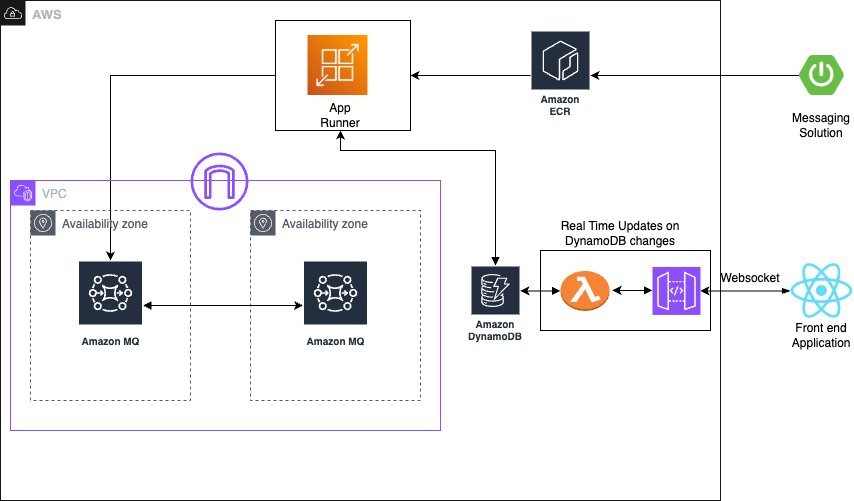
The solution consists of several AWS managed services to create a serverless, priority-based message processing system with real-time user feedback. The architecture implements intelligent routing based on three message priority levels, to make sure critical messages receive immediate processing:

  • High-priority path – Messages bypass delays and queue immediately with JMS priority 9
  • Standard-priority path – Messages undergo configured delays before queuing with JMS priority 4
  • Low-priority path – Messages process after all higher priority messages with JMS priority 0

The following diagram illustrates this architecture.

The solution uses the following AWS managed services to deliver a scalable, serverless architecture:

  • AWS App Runner is a fully managed container application service that automatically builds, deploys, and scales containerized applications. It provides automatic scaling based on traffic, built-in load balancing and HTTPS, seamless integration with container registries, and zero infrastructure management overhead.
  • Amazon MQ is a managed message broker service for Apache ActiveMQ that offers priority-based message queuing, automatic failover for high availability, message persistence and durability, and JMS protocol support for enterprise applications.
  • Amazon DynamoDB is a fully managed NoSQL database service providing single-digit millisecond performance at any scale, automatic scaling with on-demand pricing, built-in security and backup capabilities, and global tables for multi-Region deployments.

The system uses JMS priority levels with High=9, Medium=4, and Low=0 for automatic ordering, combined with conditional delay processing based on priority classification. Amazon MQ provides reliable message delivery and persistence with dead-letter queue (DLQ) configuration for failed message handling.

Asynchronous delay processing uses CompletableFuture implementation for non-blocking delays, thread pool management for concurrent processing, graceful error handling with retry mechanisms, and configurable delay periods per message type to optimize resource utilization. For real-time status updates, the solution provides WebSocket connections for bidirectional communication, Amazon DynamoDB Streams for change data capture (CDC), comprehensive status tracking throughout the processing lifecycle, and a React frontend integration for live updates, so users have complete visibility into their message processing status.

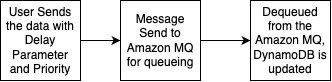
The standard priority messaging flow (shown in the following diagram) handles messages with configurable delays using JMS asynchronous processing capabilities. Messages wait for their specified delay period before entering the Amazon MQ queue, where they’re processed.

The high-priority messaging flow (shown in the following diagram) provides an express lane for critical messages. These messages skip the delay mechanism entirely and proceed directly to the queue, providing immediate processing for time-sensitive operations.

To make it even more straightforward to get started, we’ve prepared an example application that you can use to observe the Amazon MQ behavior with varying message volumes. You can find the source code repository, IaC implementation, and instructions to run the sample on GitHub.

In the following sections, we walk you through deploying the complete processing system.

Prerequisites

Make sure you have the following tools, permissions, and knowledge to successfully deploy the priority-based message processing system. You must have an active AWS account with the following configurations:

# JSON
{
  "Version": "2012-10-17",
  "Statement": [
    {
      "Effect": "Allow",
      "Action": [
"apprunner:CreateService",
"apprunner:UpdateService",
"apprunner:DeleteService"
      ],
      "Resource": "arn:aws:apprunner:*:*:service/reactive-demo-*"
    },
    {
      "Effect": "Allow",
      "Action": [
"mq:SendMessage",
"mq:ReceiveMessage",
"mq:DeleteMessage"
      ],
      "Resource": "arn:aws:mq:*:*:broker/reactive-demo-broker/*"
    },
    {
      "Effect": "Allow",
      "Action": [
"dynamodb:PutItem",
"dynamodb:GetItem",
"dynamodb:UpdateItem",
"dynamodb:Query"
      ],
      "Resource": "arn:aws:dynamodb:*:*:table/reactive-items*"
    }
  ]
}

Install and configure the following development tools on your local machine:

To successfully implement this solution, you should have basic familiarity with the following:

  • Spring Boot applications
  • Message queue concepts
  • WebSocket protocols
  • React development

Configure the infrastructure stack

This step involves creating the core AWS services using the AWS Cloud Development Kit (AWS CDK). This modular approach enables independent stack management and environment-specific configurations.

  1. Create a new AWS CDK project:
# Bash
mkdir priority-processing && cd priority-processing
cdk init app --language python
pip install aws-cdk-lib constructs
  1. Create the infrastructure stack:
# Python
from aws_cdk import (
    Stack,
    aws_dynamodb as dynamodb,
    aws_amazonmq as mq,
    aws_kms as kms,
    Duration,
    RemovalPolicy,
    CfnOutput
)
from constructs import Construct

class MessageProcessingStack(Stack):
    def __init__(self, scope: Construct, construct_id: str, **kwargs) -> None:
super().__init__(scope, construct_id, **kwargs)

# Create KMS key for encryption
self.kms_key = kms.Key(
    self, "ProcessingKey",
    description="Key for message processing encryption",
    enable_key_rotation=True
)

# DynamoDB table with comprehensive configuration
self.items_table = dynamodb.Table(
    self, "ItemsTable",
    table_name="reactive-items",
    partition_key=dynamodb.Attribute(
name="id",
type=dynamodb.AttributeType.STRING
    ),
    stream=dynamodb.StreamViewType.NEW_AND_OLD_IMAGES,
    billing_mode=dynamodb.BillingMode.ON_DEMAND,
    encryption=dynamodb.TableEncryption.CUSTOMER_MANAGED,
    encryption_key=self.kms_key,
    point_in_time_recovery=True,
    removal_policy=RemovalPolicy.DESTROY
)

# Add Global Secondary Index for status queries
self.items_table.add_global_secondary_index(
    index_name="StatusIndex",
    partition_key=dynamodb.Attribute(
name="status",
type=dynamodb.AttributeType.STRING
    ),
    sort_key=dynamodb.Attribute(
name="createdAt",
type=dynamodb.AttributeType.STRING
    )
)

# Amazon MQ broker configuration
self.mq_broker = mq.CfnBroker(
    self, "MessageBroker",
    broker_name="reactive-demo-broker",
    engine_type="ACTIVEMQ",
    engine_version="5.18",
    host_instance_type="mq.t3.micro",
    deployment_mode="SINGLE_INSTANCE",
    publicly_accessible=False,
    logs=mq.CfnBroker.LogListProperty(
audit=True,
general=True
    ),
    encryption_options=mq.CfnBroker.EncryptionOptionsProperty(
use_aws_owned_key=False,
kms_key_id=self.kms_key.key_id
    ),
    users=[mq.CfnBroker.UserProperty(
username="admin",
password="SecurePassword123!",
console_access=True
    )]
)

# Output values for application configuration
CfnOutput(self, "TableName", 
    value=self.items_table.table_name,
    description="DynamoDB table name")
CfnOutput(self, "MQBrokerEndpoint",
    value=self.mq_broker.attr_amqp_endpoints[0],
    description="Amazon MQ broker endpoint")
  1. Run the following commands to deploy the stack:
# Bash
cdk bootstrap
cdk deploy MessageProcessingStack

You can verify the infrastructure on the AWS Management Console.

Configure the message processing application

In this step, we create the Spring Boot application with priority-based message processing capabilities. First, we configure the application.properties file to incorporate environment variables, including AWS credentials, AWS Regions, and other configuration parameters such as log levels into the application and business logic implementation. Next, we implement the message service using a JMS template with comprehensive error handling, followed by enhancing the JMS configuration with connection pooling for improved performance.

The following code illustrates an example message service implementation:

// Example message service implementation
@Service
public class MessageService {
    @Autowired
    private JmsTemplate jmsTemplate;
    
    public void sendPriorityMessage(Message message) {
jmsTemplate.send(session -> {
    Message jmsMessage = session.createTextMessage(message.getContent());
    jmsMessage.setJMSPriority(message.getPriority());
    return jmsMessage;
});
    }
}

For proper timestamp update implementation, we integrate the DynamoDB SDK service with caching capabilities. Finally, after implementing the REST controller for the API with asynchronous processing support, we can deploy the message processing application. This implementation includes Java code application-level delay processing for demonstration purposes. Although this approach effectively showcases the priority-based message routing capabilities and real-time WebSocket updates in our demo environment, AWS recommends using Amazon MQ delay processing features for production workloads. For production implementations, use Amazon MQ delay and scheduling capabilities instead of application-level delays through features like Amazon MQ delay queues, ActiveMQ scheduling features, and appropriate message Time-to-Live (TTL) configurations.

The following code is an example snippet showcasing the Amazon MQ feature:

// Create connection factory with Amazon MQ endpoint
ActiveMQConnectionFactory factory = new ActiveMQConnectionFactory(brokerUrl);
factory.setUserName("admin");
factory.setPassword("your-password");
try (Connection connection = factory.createConnection();
     Session session = connection.createSession(false, Session.AUTO_ACKNOWLEDGE)) {
    
    // Create destination and producer
    Destination destination = session.createQueue(queueName);
    MessageProducer producer = session.createProducer(destination);
    
    // Create message
    TextMessage message = session.createTextMessage(messageContent);
    
    // Set native delay using ActiveMQ scheduled delivery
    message.setLongProperty(ScheduledMessage.AMQ_SCHEDULED_DELAY, delayMillis);
    
    // Optionally set priority for delayed message
    message.setJMSPriority(4);
    
    // Send the message - it will be delivered after the specified delay
    producer.send(message);
}

Build and deploy the Spring Boot application to App Runner

In this step, we push the application to Amazon Elastic Container Registry (Amazon ECR) to run it in App Runner:

  1. Build and push the Docker image to Amazon ECR:
# Bash

# Build the Docker image
docker build -t reactive-demo .

# Create ECR repository
aws ecr create-repository --repository-name reactive-demo --region us-east-1

# Get login token and login to ECR
aws ecr get-login-password --region us-east-1 | docker login --username AWS --password-stdin $ECR_URI

# Tag and push image
ECR_URI=$(aws ecr describe-repositories --repository-names reactive-demo --query 'repositories[0].repositoryUri' --output text)
docker tag reactive-demo:latest $ECR_URI:latest
docker push $ECR_URI:latest
  1. Create the App Runner service with environment variables for the DynamoDB table and Amazon MQ broker endpoint:
# Python

from aws_cdk import (
    aws_apprunner as apprunner,
    aws_iam as iam
)

class AppRunnerStack(Stack):
    def __init__(self, scope: Construct, id: str, 
 table_name: str, mq_endpoint: str, **kwargs):
super().__init__(scope, id, **kwargs)

# Create IAM role for App Runner
app_runner_role = iam.Role(
    self, "AppRunnerRole",
    assumed_by=iam.ServicePrincipal("tasks.apprunner.amazonaws.com"),
    managed_policies=[
iam.ManagedPolicy.from_aws_managed_policy_name(
    "AmazonDynamoDBFullAccess"
),
iam.ManagedPolicy.from_aws_managed_policy_name(
    "AmazonMQFullAccess"
)
    ]
)

# Create App Runner service
self.service = apprunner.CfnService(
    self, "ReactiveProcessingService",
    service_name="reactive-processing-service",
    source_configuration=apprunner.CfnService.SourceConfigurationProperty(
authentication_configuration=apprunner.CfnService.AuthenticationConfigurationProperty(
    access_role_arn=app_runner_role.role_arn
),
image_repository=apprunner.CfnService.ImageRepositoryProperty(
    image_identifier=f"{ECR_URI}:latest",
    image_configuration=apprunner.CfnService.ImageConfigurationProperty(
port="8080",
runtime_environment_variables=[
    {"name": "DYNAMODB_TABLE_NAME", "value": table_name},
    {"name": "MQ_BROKER_URL", "value": mq_endpoint}
]
    ),
    image_repository_type="ECR"
)
    ),
    health_check_configuration=apprunner.CfnService.HealthCheckConfigurationProperty(
path="/actuator/health",
protocol="HTTP",
interval=10,
timeout=5,
healthy_threshold=1,
unhealthy_threshold=5
    ),
    instance_configuration=apprunner.CfnService.InstanceConfigurationProperty(
cpu="0.5 vCPU",
memory="1 GB"
    )
)

Set up real-time updates

For this step, we implement WebSocket support for real-time status updates using AWS Lambda to process DynamoDB streams and send updates to connected clients using Amazon API Gateway WebSocket connections. You can find the code snippet for this in this link

Deploy the React application to Amazon S3 and Amazon CloudFront

In this step, we create a frontend application to enable the WebSocket connection for seeing the messaging getting updated in the DynamoDB and API Gateway WebSocket connections.

Similar to the above section, here is the AWS cdk code for building the frontend for proceeding towards the validation of the solution

Validate the solution

This section provides comprehensive testing procedures to validate the priority-based message processing system.

Automated testing script

After you have completed the preceding steps, you can initiate a comprehensive testing script to validate priority processing and delay behavior:

# Bash
#!/bin/bash
curl -X POST "$API_URL/api/items" \
  -H "Content-Type: application/json" \
  -d '{
    "title": "High Priority Task",
    "priority": "High",
    "delay": 10
  }'

Validation through the web interface

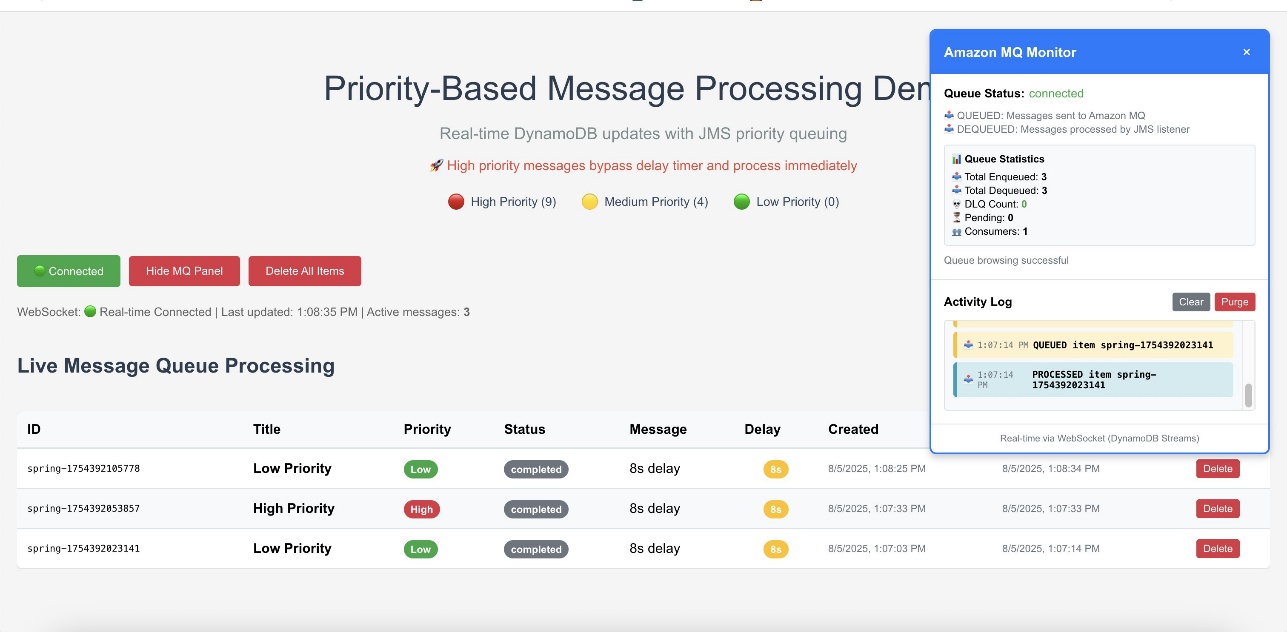
The following screenshot of the UI illustrates how the queueing mechanism can work with the real-time updates using WebSockets.

The web interface provides validation of the priority-based message processing system. Access the Amazon CloudFront URL to view the following information:

  • Real-time message processing with live status updates
  • Queue statistics showing message distribution by priority
  • Processing timeline demonstrating priority bypass behavior
  • WebSocket connection status indicating real-time connectivity

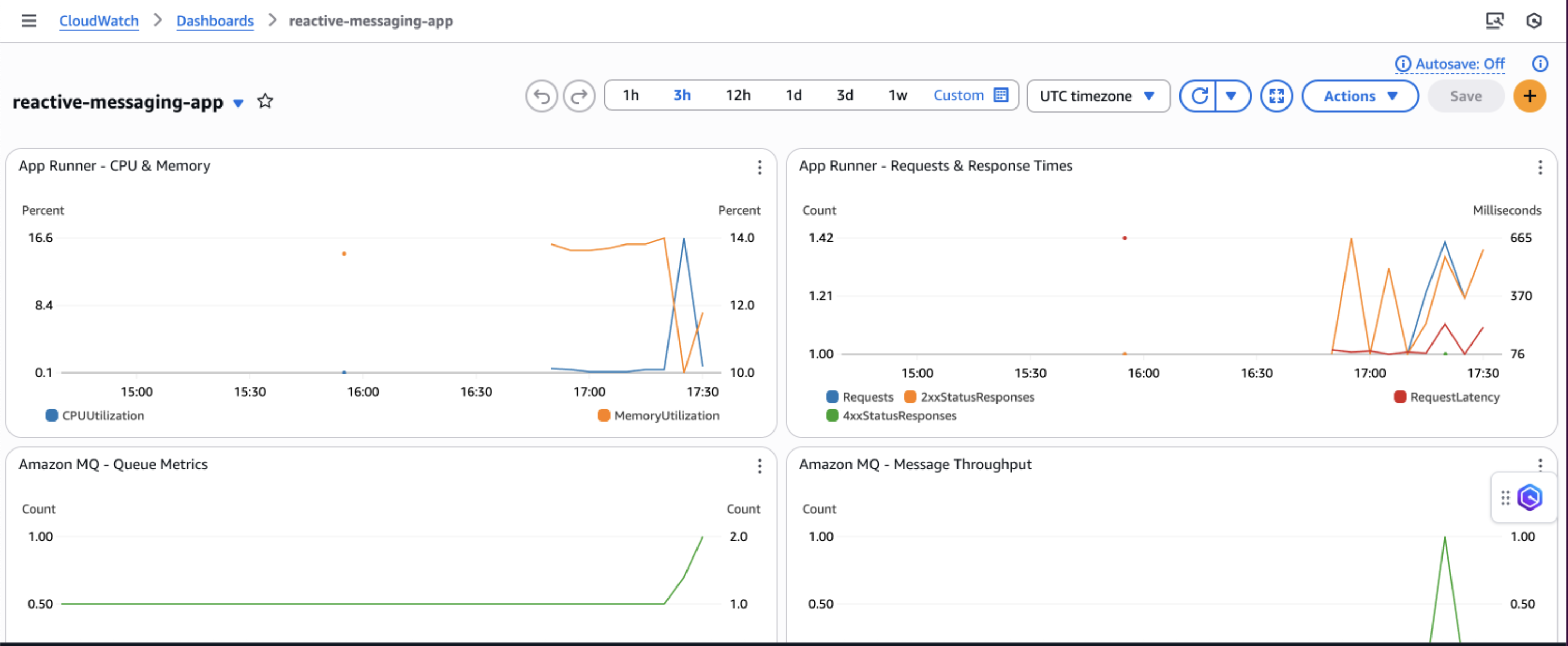
Amazon CloudWatch dashboards and alarms

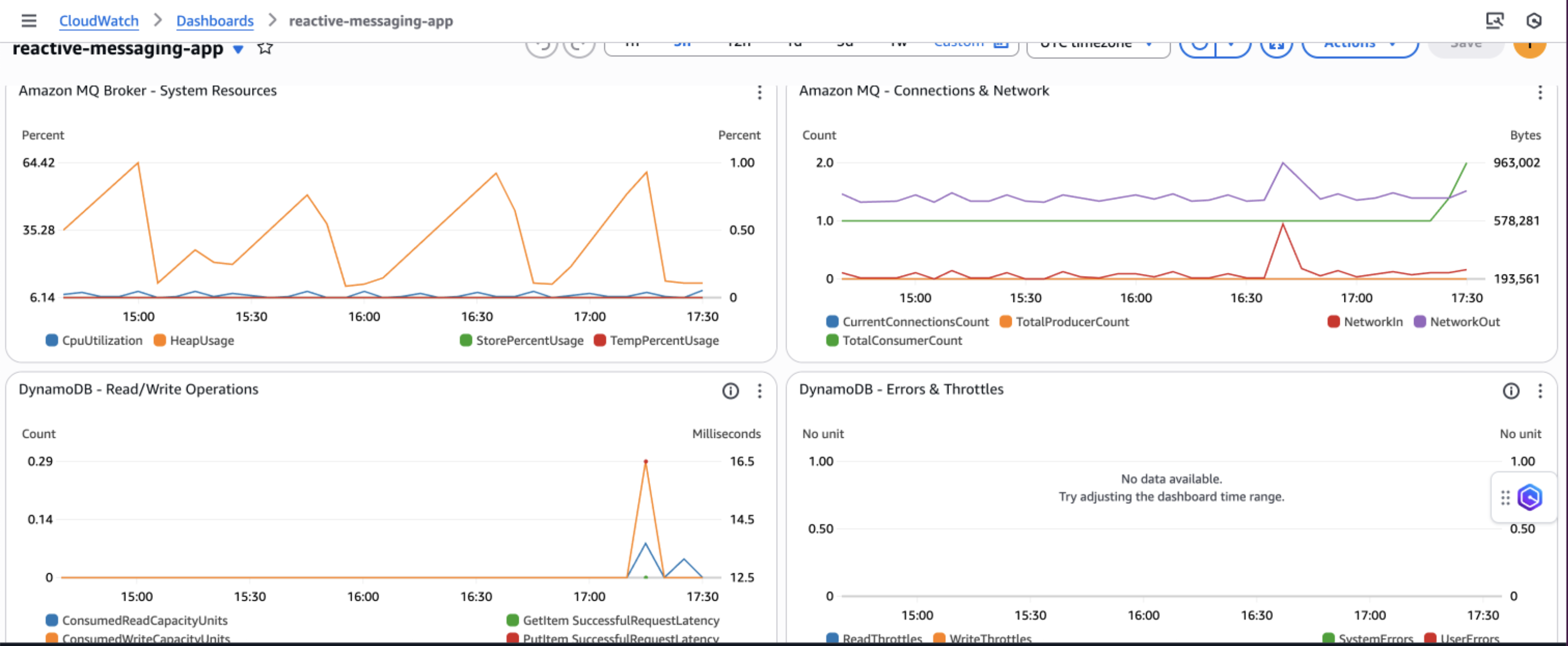
AWS recommends creating Amazon CloudWatch dashboards to track your priority-based message processing system’s performance across multiple dimensions. Monitor message processing by priority levels to make sure high-priority messages are processed first and identify any bottlenecks in your priority routing logic. The following screenshot shows an example dashboard.

You can track queue depth and processing times to understand system load and latency patterns, helping you optimize resource allocation and identify when scaling is needed. Observe DynamoDB performance metrics including read/write capacity consumption, throttling events, and latency to make sure your database layer maintains optimal performance under varying loads.

Additionally, implement application-specific custom metrics such as message processing success rates, retry counts, and business-specific KPIs to gain deeper insights into your application’s behavior and make data-driven decisions for continuous improvement.

Security considerations

AWS recommends implementing comprehensive security measures to safeguard your message processing system. Start by implementing least privilege IAM policies that grant only the minimum permissions required for each component to function, making sure services like App Runner can only access the specific DynamoDB tables and Amazon MQ queues they need. Configure your network architecture using a virtual private cloud (VPC) with private subnets for Amazon MQ, isolating your message broker from direct internet access while maintaining connectivity through NAT gateways for necessary outbound connections.

Enable encryption at rest using AWS Key Management Service (AWS KMS) for DynamoDB tables and Amazon MQ data and enforce encryption in transit by configuring SSL/TLS connections for all service communications, particularly for ActiveMQ broker connections. Finally, configure security groups with minimal access rules that explicitly define allowed traffic between components, restricting inbound connections to only the ports and protocols required for your application to function, such as port 61617 for ActiveMQ SSL connections from App Runner instances.

Cost considerations

The following table contains cost estimates based on the US East (N. Virginia) Region. Actual costs might vary based on your Region, usage patterns, and pricing changes.

Service Small (1,000 msg/day) Medium (10,000 msg/day) Large (100,000 msg/day)
Amazon DynamoDB $5–10 $25–50 $200–400
Amazon MQ $15 (t3.micro) $30 (m5.large) $120 (m5.xlarge)
AWS App Runner $20–40 $50–150 $400–800
Amazon API Gateway WebSocket $3–5 $10–25 $50–100
Amazon CloudWatch Logs $5–10 $10–20 $30–50
Data Transfer $5 $10-20 $50-100
Total Estimated Cost $53–95 $135–295 $850–1,570

Troubleshooting

The following are common issues and their solutions when implementing the priority-based message processing system:

  • Messages not processing in priority order:
    • Verify JMS priority is configured correctly: message.setJMSPriority(priority)
    • Check ActiveMQ broker configuration for priority queue support
    • Confirm CLIENT_ACKNOWLEDGE mode is properly configured
    • Review queue consumer concurrency settings
  • WebSocket updates not working:
    • Verify DynamoDB Streams is enabled on the table
    • Check the Lambda function is triggered by stream events
    • Validate API Gateway WebSocket configuration and IAM permissions
    • Test the WebSocket connection using browser developer tools
  • Application scaling issues:
    • Monitor App Runner metrics in CloudWatch
    • Adjust auto scaling configuration based on traffic patterns
    • Consider Amazon MQ broker capacity and upgrade if needed
    • Review DynamoDB capacity settings and enable auto scaling

Clean up

To avoid incurring ongoing AWS charges, delete the resources you created in this walkthrough:

  1. Delete the CDK stacks:
cdk destroy MessageProcessingStack
cdk destroy FrontendStack
  1. Remove the App Runner service:
aws apprunner delete-service --service-arn <your-service-arn>
  1. Delete the ECR repositories and container images.
  2. Remove CloudWatch log groups if not set to auto-delete.
  3. Delete S3 buckets used for frontend hosting.

Next steps

To extend this solution and add additional capabilities, consider the following enhancements:

Conclusion

This solution demonstrates how to build a production-ready priority-based message processing system using AWS managed services. By combining Amazon MQ priority queuing with DynamoDB real-time streams and App Runner serverless compute, you create a resilient architecture that intelligently handles messages based on business priorities.The implementation of application-level delays with priority bypass makes sure critical messages receive immediate attention, and the dual-layer retry mechanism provides maximum reliability. Real-time WebSocket updates keep users informed of processing status, creating a responsive and transparent system.To learn more about the services and patterns used in this solution, explore the following resources:


About the authors

Implement monitoring for Amazon EKS with managed services

Post Syndicated from Aritra Nag original https://aws.amazon.com/blogs/architecture/implement-monitoring-for-amazon-eks-with-managed-services/

In this post, we show you how to implement comprehensive monitoring for Amazon Elastic Kubernetes Service (Amazon EKS) workloads using AWS managed services. Amazon EKS offers compelling solutions with EKS Auto Mode and AWS Fargate, each designed for different use cases. This solution demonstrates building an EKS platform that combines flexible compute options with enterprise-grade observability using AWS native services and OpenTelemetry.

Modern containerized environments require observability that goes beyond basic CPU and memory metrics. Our approach addresses three critical challenges: reducing compute management complexity, closing observability gaps, and enabling metrics-driven automatic scaling that responds to real application demand rather than infrastructure utilization alone.

Architecture components

Amazon Managed Service for Prometheus is a fully managed Prometheus-compatible service that alleviates the operational overhead of running Prometheus infrastructure while providing automatic scaling to handle billions of metrics, built-in high availability across multiple Availability Zones, 150 days of metrics retention by default, and native integration with Grafana and other visualization tools.

AWS Distro for OpenTelemetry (ADOT) is a secure, enterprise-grade distribution of OpenTelemetry that provides standardized metrics, traces, and logs collection, native AWS service integration, automatic instrumentation for popular frameworks, and efficient data processing and export.

Amazon CloudWatch is a centralized logging and monitoring service offering structured log aggregation and search, custom metrics and alarms, integration with AWS services, and long-term log retention and analysis.

Solution overview

This section outlines the comprehensive monitoring solution architecture and its key components. We explore how the different AWS services work together to provide complete observability for your Amazon EKS workloads.

Our solution addresses key challenges through a comprehensive observability pipeline using Amazon Managed Service for Prometheus, AWS X-Ray, and Amazon CloudWatch; real metrics-based automatic scaling using custom Prometheus metrics instead of basic resource utilization; and cost optimization through strategic virtual private cloud (VPC) endpoints and compute mode selection.

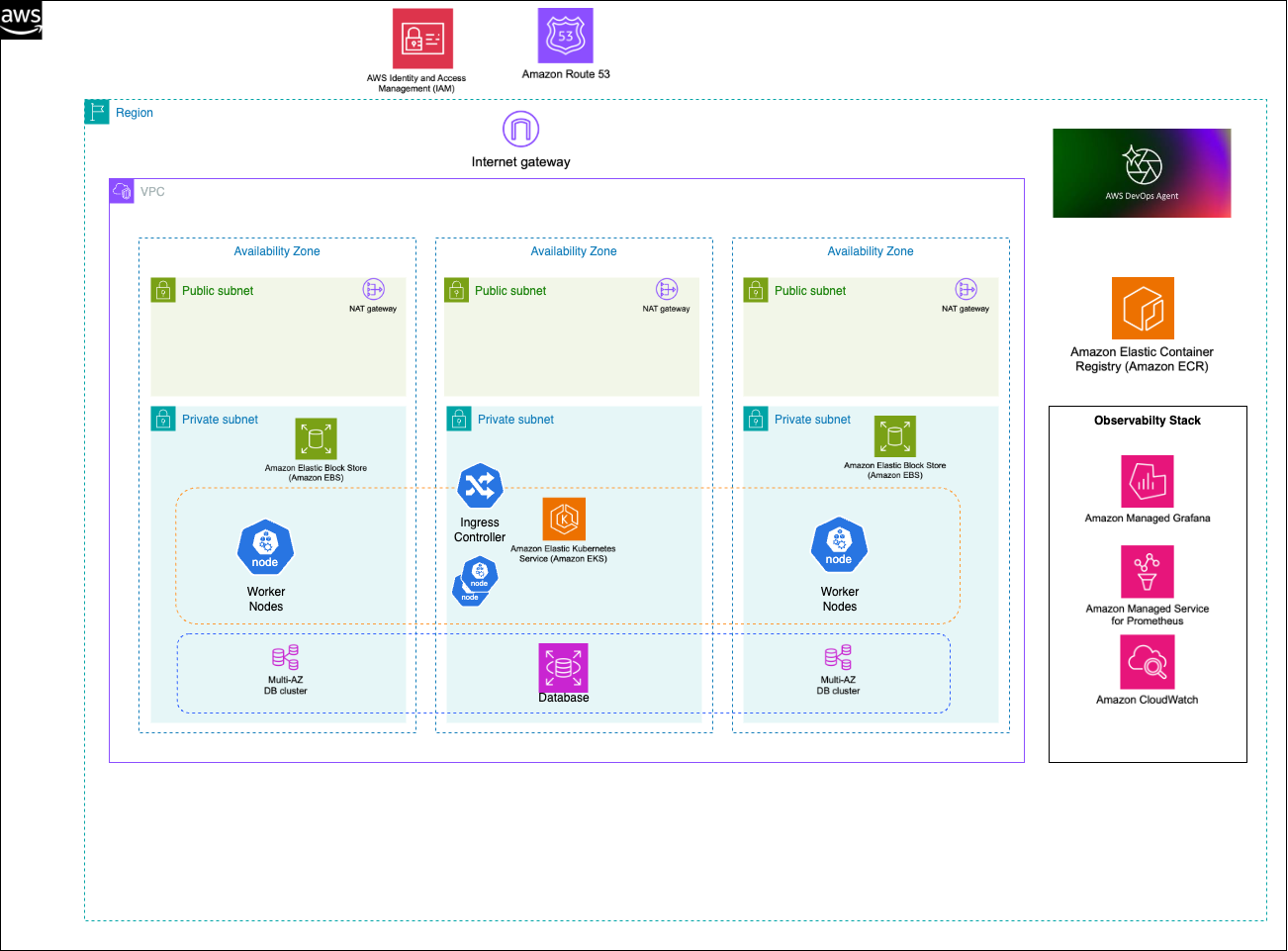
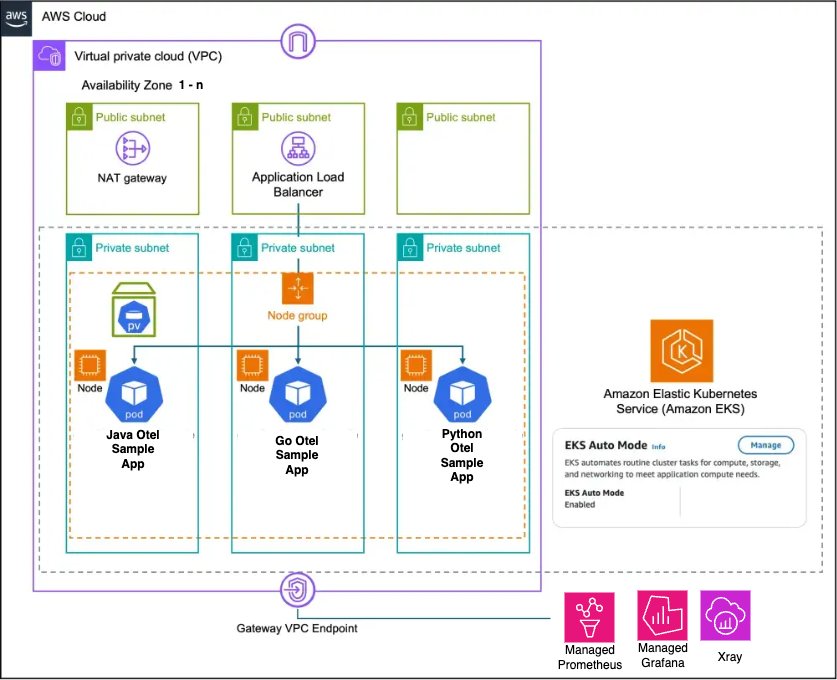
The architecture showcases a Kubernetes environment with two distinct compute modes, each optimized for different use cases. EKS Auto Mode represents AWS’s latest approach to managed Kubernetes compute. It eliminates the need for node management by removing the requirement to configure node groups or instance types. The platform automatically scales compute resources based on your actual workload demands, ensuring you pay only for the resources your applications consume. It comes with integrated services including automatic configuration of VPC CNI, EBS CSI driver, and load balancer integration, making it ideal for general workloads and cost-optimized deployments. The Amazon EKS Auto Mode architecture (shown in the following diagram) provides zero node management with automatic scaling based on workload demands. This mode includes integrated networking, storage, and load balancing capabilities, making it ideal for general workloads and cost-optimized deployments.

Amazon EKS Auto Mode Architecture

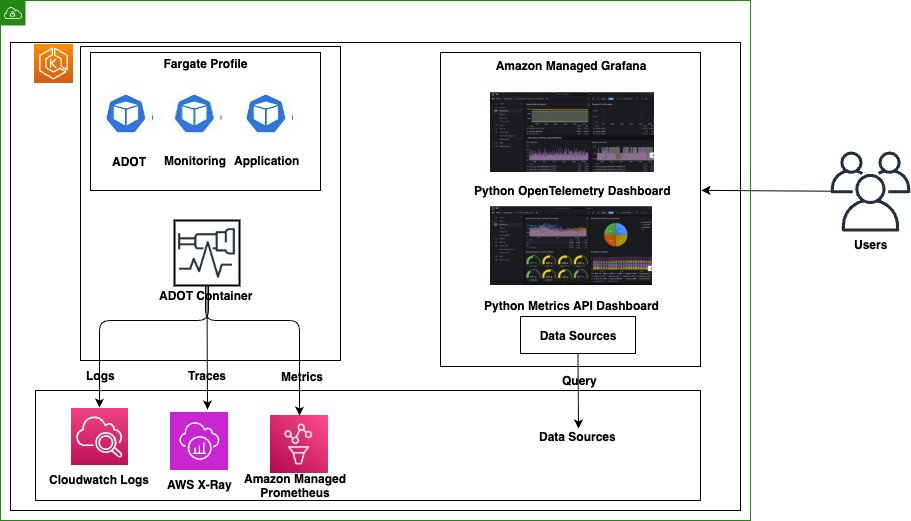
AWS Fargate takes a different approach by providing true serverless container execution. With Fargate, you don’t need to manage any Amazon EC2 instances, as each pod runs in its own isolated compute environment. This isolation extends to billing, where costs are tracked at the individual pod level, providing granular control over your expenses. Pods can scale independently without requiring capacity planning, making Fargate particularly well-suited for security-sensitive workloads and applications requiring strict resource isolation.The Amazon EKS Fargate architecture (shown in the following diagram) offers serverless container execution with strong isolation, where each pod runs in its own compute environment. This approach works best for security-sensitive workloads and applications requiring granular cost control.

Amazon EKS Fargate Architecture

The key architectural difference lies in networking and scaling behavior. Auto Mode uses shared node networking with cluster-wide scaling decisions, whereas Fargate provides isolated pod networking with individual pod scaling.

Comprehensive observability pipeline

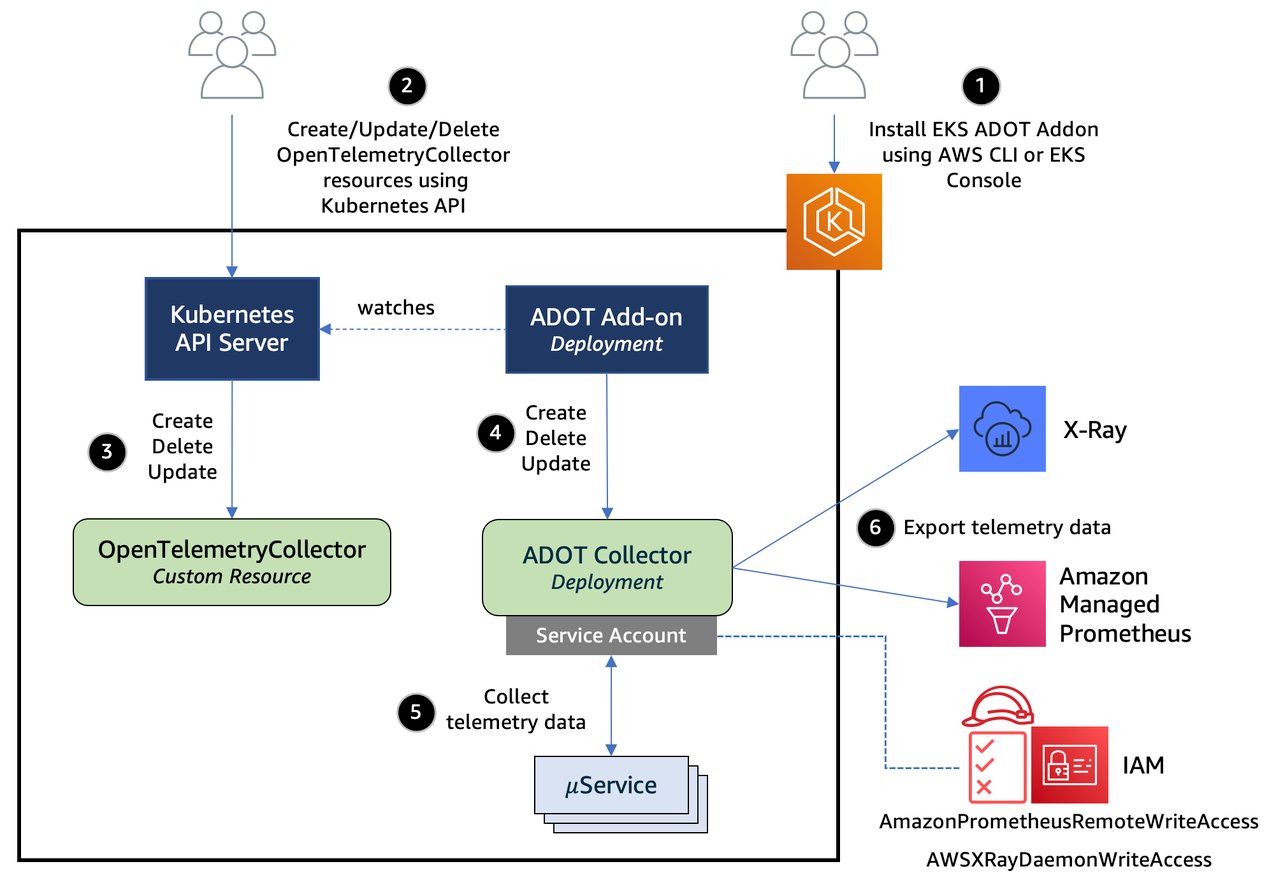
The following diagram illustrates the workflow of the observability pipeline.

Open Telemetry Collector Agent

The observability architecture implements the three pillars of observability using AWS native services:

  • Metrics collection and storage:
    • Dual collection strategy combining direct Prometheus scraping and OpenTelemetry SDK
    • Local Prometheus server for Horizontal Pod Autoscaler (HPA) metrics and Prometheus Adapter integration
    • Amazon Managed Service for Prometheus for long-term storage and querying
    • Custom metrics exposed through Kubernetes custom metrics API
  • Distributed tracing:
    • OpenTelemetry SDK integration for automatic trace collection
    • AWS Distro for OpenTelemetry (ADOT) collector for data processing
    • AWS X-Ray for trace storage and service map visualization
    • End-to-end transaction monitoring across microservices
  • Centralized logging:
    • OpenTelemetry SDK for structured application logging
    • FluentBit for container log collection
    • CloudWatch Logs with proper retention policies
    • Log correlation with traces and metrics for comprehensive debugging

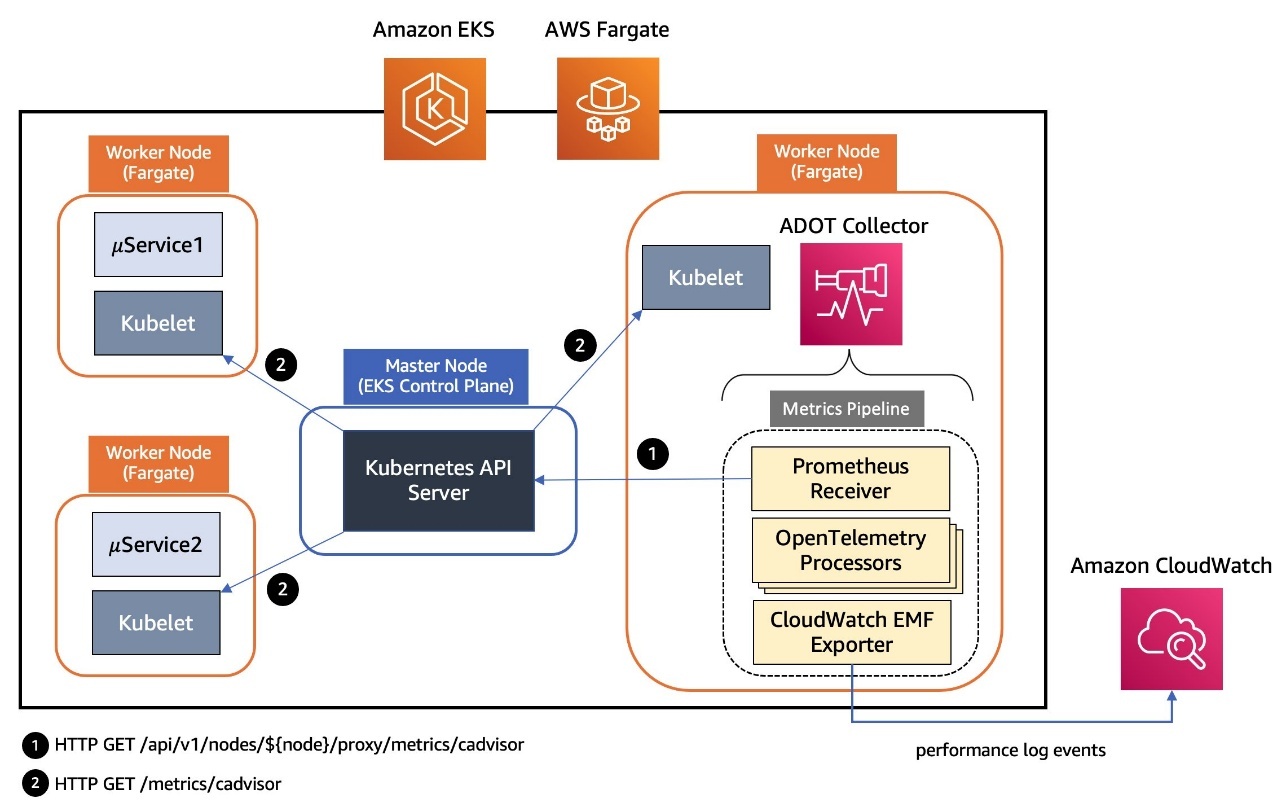
The below diagram demonstrates a modern cloud-native monitoring solution that collects and analyzes performance data from containerized applications, with data flowing from the Kubernetes workloads through the metrics pipeline to CloudWatch for centralized monitoring and observability.

Amazon EKS Fargate and Auto Mode Telemetry Collection

In the following sections, we walk you through deploying the complete observability stack. We start with the foundational AWS services, then configure the collection agents, and finally instrument your applications.

Prerequisites

Before implementing this solution, you must have the following:

Create the observability stack

The first step to implement the observability stack involves creating the core AWS services that will store and process your observability data using the AWS CDK:

from aws_cdk import (
    Stack,
    aws_logs as logs,
    aws_aps as aps,
    aws_iam as iam,
    RemovalPolicy,
    CfnOutput
)

class ObservabilityStack(Stack):
    def __init__(self, scope: Construct, construct_id: str, **kwargs) -> None:
        super().__init__(scope, construct_id, **kwargs)

       # Create workspace for storing Prometheus metrics
        self.prometheus_workspace = aps.CfnWorkspace(
            self, "AmpWorkspace",
            alias="eks-observability-platform"
        )

        # Create CloudWatch Log Groups for storing Application Logs
        self.app_log_group = logs.LogGroup(
            self, "ApplicationLogGroup",
            log_group_name="/aws/eks/observability/applications",
            removal_policy=RemovalPolicy.DESTROY,
            retention=logs.RetentionDays.ONE_WEEK
        )
        
        # Create Otel Log Group for OpenTelemetry Logs
        self.otel_log_group = logs.LogGroup(
            self, "OtelLogGroup",
            log_group_name="/aws/eks/observability/otel",
            removal_policy=RemovalPolicy.DESTROY,
            retention=logs.RetentionDays.ONE_WEEK
        )

Deploy the infrastructure stack using the following commands:

pip install aws-cdk-lib constructs
cdk deploy ObservabilityStack

Deploy local Prometheus for HPA

This step configures Prometheus for service discovery and remote write to Amazon Managed Service for Prometheus. The local Prometheus instance enables the HPA to access custom metrics:

prometheus_config = {
    "apiVersion": "v1",
    "kind": "ConfigMap",
    "metadata": {
        "name": "prometheus-config",
        "namespace": "monitoring"
    },
    "data": {
        "prometheus.yml": f"""
global:
  scrape_interval: 15s
  evaluation_interval: 15s

remote_write:
  - url: https://aps-workspaces.{region}.amazonaws.com/workspaces/{workspace_id}/api/v1/remote_write
    queue_config:
      max_samples_per_send: 1000
      max_shards: 200
      capacity: 2500
    sigv4:
      region: {region}

scrape_configs:
  - job_name: 'kubernetes-pods'
    kubernetes_sd_configs:
      - role: pod
    relabel_configs:
      - source_labels: [__meta_kubernetes_pod_annotation_prometheus_io_scrape]
        action: keep
        regex: true
      - source_labels: [__meta_kubernetes_pod_annotation_prometheus_io_path]
        action: replace
        target_label: __metrics_path__
        regex: (.+)
      - source_labels: [__address__, __meta_kubernetes_pod_annotation_prometheus_io_port]
        action: replace
        regex: ([^:]+)(?::\d+)?;(\d+)
        replacement: $1:$2
        target_label: __address__
"""
    }
}

Apply the configuration to your cluster:

kubectl apply -f prometheus-config.yaml

Configure the ADOT Collector

Deploy the ADOT Collector with proper AWS service integration. This collector processes telemetry data from your applications and exports it to AWS services:

apiVersion: opentelemetry.io/v1alpha1
kind: OpenTelemetryCollector
metadata:
  name: otel-collector
  namespace: opentelemetry
spec:
  config: |
    receivers:
      otlp:
        protocols:
          grpc:
            endpoint: 0.0.0.0:4317
          http:
            endpoint: 0.0.0.0:4318
      prometheus:
        config:
          scrape_configs:
            - job_name: 'kubernetes-pods'
              kubernetes_sd_configs:
                - role: pod

    processors:
      batch:
        timeout: 1s
        send_batch_size: 1024
      resource:
        attributes:
          - key: ClusterName
            value: ${CLUSTER_NAME}
            action: upsert

    exporters:
      awsxray:
        region: ${AWS_REGION}
      awscloudwatchlogs:
        region: ${AWS_REGION}
        log_group_name: "/aws/eks/observability/otel"
      prometheusremotewrite:
        endpoint: https://aps-workspaces.${AWS_REGION}.amazonaws.com/workspaces/${PROMETHEUS_WORKSPACE_ID}/api/v1/remote_write
        auth:
          authenticator: sigv4auth

    extensions:
      sigv4auth:
        region: ${AWS_REGION}

    service:
      extensions: [sigv4auth]
      pipelines:
        traces:
          receivers: [otlp]
          processors: [resource, batch]
          exporters: [awsxray]
        metrics:
          receivers: [otlp, prometheus]
          processors: [resource, batch]
          exporters: [prometheusremotewrite]
        logs:
          receivers: [otlp]
          processors: [resource, batch]
          exporters: [awscloudwatchlogs]

Deploy the collector:

kubectl apply -f adot-collector.yaml

Instrument your applications

This section shows how to instrument your applications to emit telemetry data. We cover both Python and Java applications.

Instrument a Python Flask application

The following code demonstrates how to add OpenTelemetry instrumentation to a Python Flask application:

from opentelemetry import trace, metrics
from opentelemetry.sdk.trace import TracerProvider
from opentelemetry.sdk.metrics import MeterProvider
from opentelemetry.sdk.resources import Resource
from opentelemetry.exporter.otlp.proto.grpc.trace_exporter import OTLPSpanExporter
from opentelemetry.exporter.otlp.proto.grpc.metric_exporter import OTLPMetricExporter
from opentelemetry.sdk.trace.export import BatchSpanProcessor
from opentelemetry.sdk.metrics.export import PeriodicExportingMetricReader

# Configure OpenTelemetry
resource = Resource.create({
    "service.name": "flask-app",
    "service.version": "1.0.0",
    "deployment.environment": "production"
})

# Setup tracing
trace_provider = TracerProvider(resource=resource)
otlp_trace_exporter = OTLPSpanExporter(endpoint="http://otel-collector.opentelemetry:4317")
trace_provider.add_span_processor(BatchSpanProcessor(otlp_trace_exporter))
trace.set_tracer_provider(trace_provider)
tracer = trace.get_tracer(__name__)

# Setup metrics
metric_provider = MeterProvider(resource=resource)
otlp_metric_exporter = OTLPMetricExporter(endpoint="http://otel-collector.opentelemetry:4317")
metric_provider.add_metric_reader(PeriodicExportingMetricReader(otlp_metric_exporter))
metrics.set_meter_provider(metric_provider)
meter = metrics.get_meter(__name__)

# Create application metrics
request_counter = meter.create_counter(
    name="http_requests_total",
    description="Total HTTP requests",
    unit="1"
)

@app.route('/api/users')
def users():
    with tracer.start_as_current_span("get_users") as span:
        span.set_attribute("endpoint", "api_users")
        # Record metrics
        request_counter.add(1, {"endpoint": "api_users", "status": "success"})
        return jsonify({"users": ["user1", "user2", "user3"]})

Instrument a Java application

For Java applications using Spring Boot, add the following instrumentation:

@RestController
public class ApiController {
    private final Counter httpRequestsTotal;

    public ApiController(MeterRegistry meterRegistry) {
        this.httpRequestsTotal = Counter.builder("http_requests_total")
            .description("Total HTTP requests")
            .register(meterRegistry);
    }

    @GetMapping("/api/users")
    public Map<String, Object> getUsers() {
        httpRequestsTotal.increment();
        Map<String, Object> response = new HashMap<>();
        response.put("users", Arrays.asList("user1", "user2", "user3"));
        return response;
    }
}

Build and deploy your instrumented applications to the EKS cluster with the appropriate annotations for Prometheus scraping.

Configure the Prometheus Adapter for custom metrics

The Prometheus Adapter exposes custom metrics from Prometheus to the Kubernetes custom metrics API, enabling the HPA to use application-specific metrics:

prometheus_adapter_config = """
rules:
- seriesQuery: 'http_requests_total{app="flask-app"}'
  resources:
    overrides:
      kubernetes_namespace: {resource: "namespace"}
      kubernetes_pod_name: {resource: "pod"}
  name:
    as: "flask_app_requests_rate"
  metricsQuery: 'rate(http_requests_total{app="flask-app",<<.LabelMatchers>>}[1m]) * 60'
"""

# Deploy Prometheus Adapter
prometheus_adapter_deployment = {
    "apiVersion": "apps/v1",
    "kind": "Deployment",
    "metadata": {
        "name": "prometheus-adapter",
        "namespace": "monitoring"
    },
    "spec": {
        "replicas": 1,
        "selector": {"matchLabels": {"app": "prometheus-adapter"}},
        "template": {
            "metadata": {"labels": {"app": "prometheus-adapter"}},
            "spec": {
                "containers": [{
                    "name": "prometheus-adapter",
                    "image": "k8s.gcr.io/prometheus-adapter/prometheus-adapter:v0.12.0",
                    "args": [
                        "--prometheus-url=http://prometheus-service.monitoring:9090",
                        "--config=/etc/adapter/config.yaml"
                    ]
                }]
            }
        }
    }
}

Deploy the Prometheus Adapter:

kubectl apply -f prometheus-adapter.yaml

Configure HPAs with custom metrics

Create HPAs that use custom metrics instead of basic resource utilization:

apiVersion: autoscaling/v2
kind: HorizontalPodAutoscaler
metadata:
  name: flask-app-hpa
  namespace: default
spec:
  scaleTargetRef:
    apiVersion: apps/v1
    kind: Deployment
    name: flask-app
  minReplicas: 2
  maxReplicas: 10
  metrics:
  - type: Pods
    pods:
      metric:
        name: flask_app_requests_rate
      target:
        type: AverageValue
        averageValue: "10"
  behavior:
    scaleUp:
      stabilizationWindowSeconds: 60
      policies:
      - type: Percent
        value: 100
        periodSeconds: 15
    scaleDown:
      stabilizationWindowSeconds: 300
      policies:
      - type: Percent
        value: 10
        periodSeconds: 60

Apply the HPA configuration:

kubectl apply -f hpa-custom-metrics.yaml

Monitoring and visualization

After implementing this solution, you can create custom dashboards in Amazon Managed Grafana to monitor the following:

  • Application performance metrics
  • Request rates and latencies
  • Resource utilization
  • Error rates

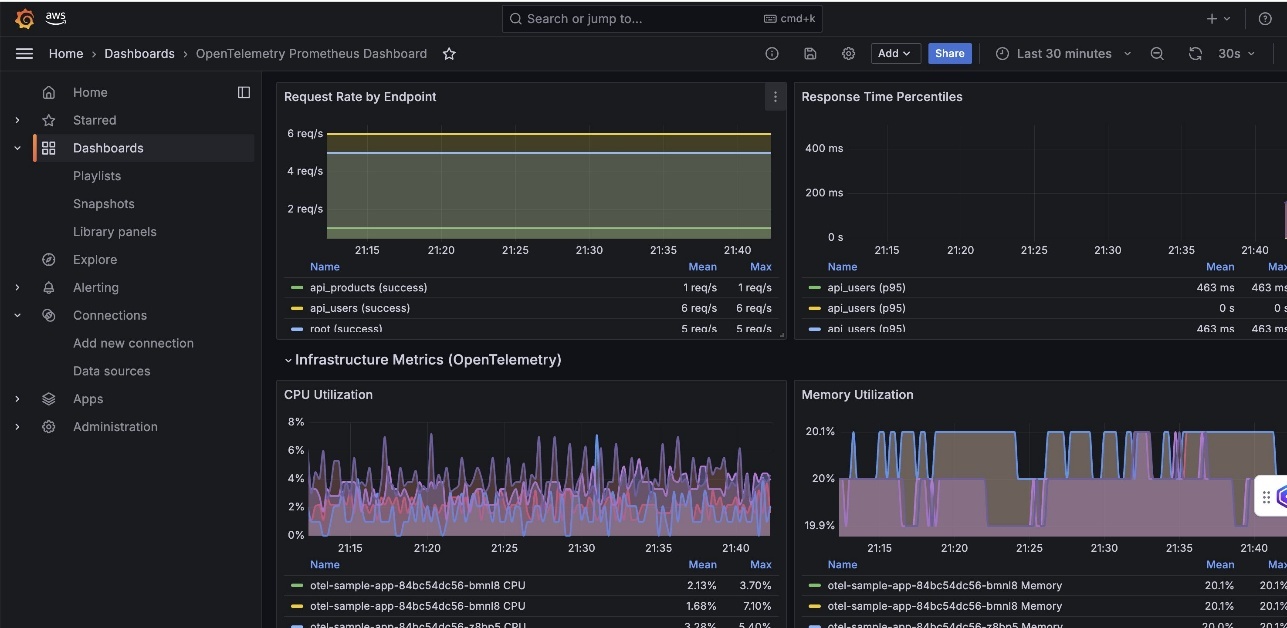
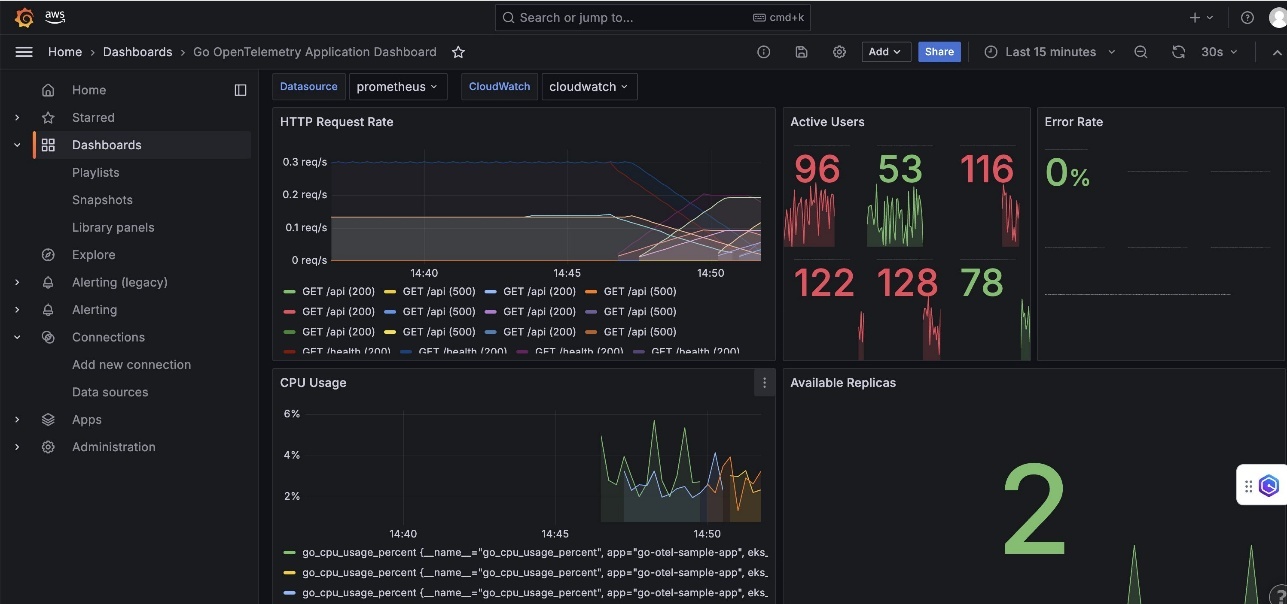
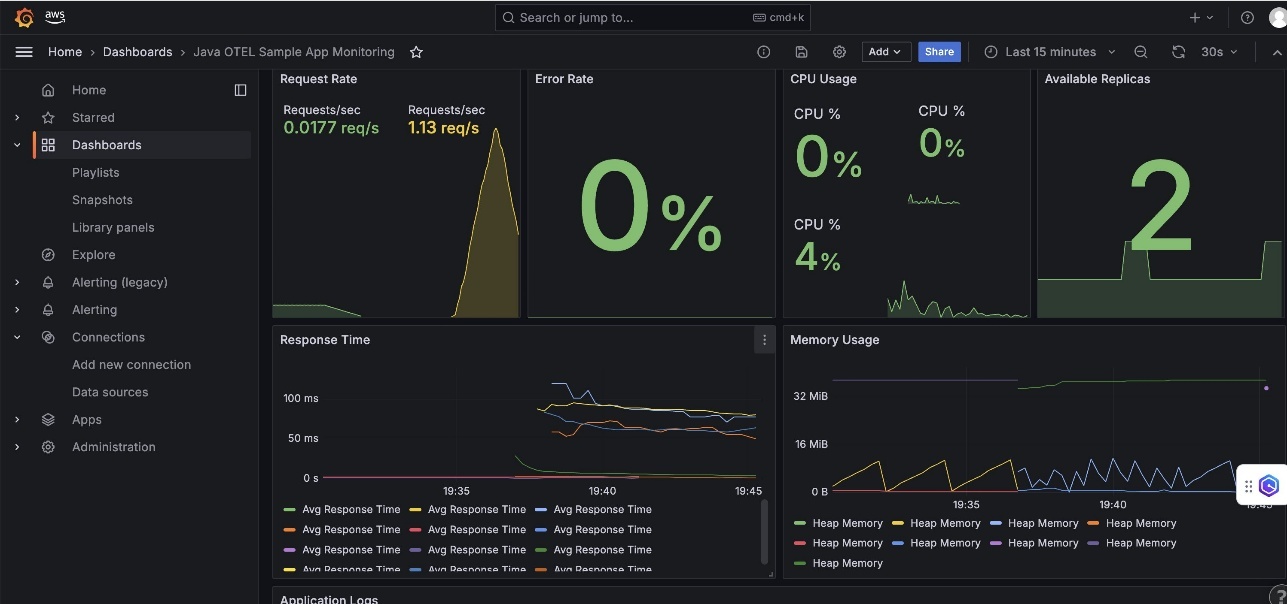
For dashboard examples and templates, refer to the Amazon Managed Grafana documentation. The following screenshots are examples of some of the dashboards you can build:

  • OpenTelemetry Prometheus Dashboard – This dashboard displays Python application performance with request rate by endpoints, response time percentiles (P50, P95, P99), CPU utilization trends, memory usage patterns, and error rates segmented by HTTP status codes.

Python App OpenTelemetry Prometheus Dashboard

  • Go OpenTelemetry Application Dashboard – This dashboard focuses on Go-specific metrics including HTTP request rate, active concurrent users, goroutine counts, CPU usage, and memory allocation patterns with garbage collection insights.

Go App OpenTelemetry Prometheus Dashboard

  • Java OTEL Sample App Monitoring – This dashboard shows JVM-specific metrics like heap memory utilization, alongside application-level metrics such as requests per second, garbage collection insights, and thread pool utilization.

Java App OpenTelemetry Prometheus Dashboard

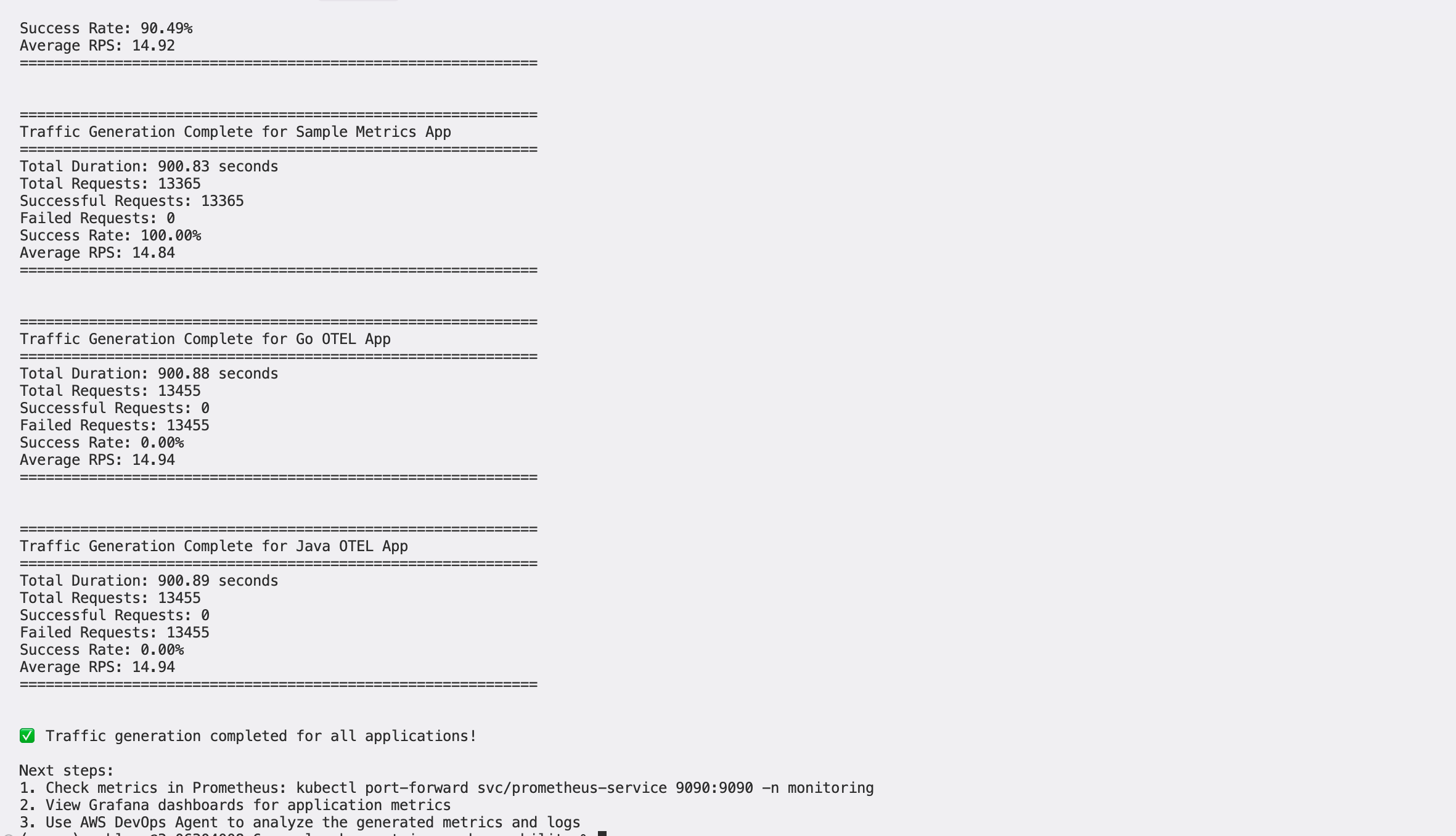
The dashboards enable real-time application performance monitoring, infrastructure resource utilization tracking, error rate monitoring and alerting, and automatic scaling visualization and trends.

Best practices and recommendations

Choose Amazon EKS Auto Mode for the following use cases and features:

  • You’re building general-purpose applications that benefit from cost optimization and operational simplicity
  • You’re managing mixed workload types and want to use integrated AWS service features
  • Teams want to avoid the complexity of node management
  • Cost-efficiency and ease of operations are priorities for production workloads

Choose Amazon EKS with Fargate in the following scenarios:

  • Security isolation is paramount for your applications
  • You’re running batch or event-driven workloads that require strong container isolation
  • Your organization requires granular cost attribution at the pod level
  • Compliance mandates dictate complete container isolation from the underlying infrastructure

For your observability strategy, consider the following monitoring approach:

  • Use business metrics for HPA scaling decisions
  • Implement proper metric labeling for filtering and aggregation
  • Monitor both application and infrastructure metrics
  • Set up alerting based on Service Level Indicator (SLI) and Service Level Objective (SLO) definitions

Additionally, implement the following tracing approach:

  • Instrument critical code paths with OpenTelemetry
  • Use consistent trace context propagation
  • Monitor service dependencies through AWS X-Ray service maps
  • Implement proper error handling and trace sampling

Benefits of the solution

Instead of relying on basic CPU and memory metrics, this solution configures the Prometheus Adapter to expose custom metrics to the Kubernetes HPA. The HPA configuration shown in this post enables more intelligent scaling decisions based on actual application load, resulting in better resource efficiency and improved application performance. This approach allows your applications to scale based on business-relevant metrics such as request rate, queue length, or custom application metrics rather than generic infrastructure utilization. This solution offers reduced management overhead through the following features:

  • Fully managed – Amazon Managed Service for Prometheus eliminates infrastructure management
  • Automatic scaling – Built-in high availability and scaling
  • Integrated security – Native IAM integration
  • Cost-effective – Pay only for metrics ingested and stored

You also benefit from enhanced observability:

  • Three pillars – Complete metrics, traces, and logs coverage
  • Real-time monitoring – Custom metrics for intelligent automatic scaling
  • Correlation – Trace IDs link logs, metrics, and traces
  • Business metrics – Scale based on application behavior, not just infrastructure

Troubleshooting

If the ADOT Collector isn’t receiving data, troubleshoot as follows:

  • Verify the collector service is running: $ kubectl get pods -n opentelemetry
  • Check application configuration for correct endpoint URLs
  • Verify IAM roles have proper permissions for AWS services

If the custom metrics aren’t available in the HPA, check the following:

  • Confirm the Prometheus Adapter is deployed and running
  • Verify metrics are being scraped by Prometheus: $ kubectl port-forward svc/prometheus 9090:9090
  • Check the Prometheus Adapter configuration for correct metric queries

Deployment cost considerations

In this section, we provide an estimate of the cost that will incur with the preceding solutions:

  • Amazon Managed Service for Prometheus – $0.90 per million samples ingested + $0.03 per GB-month storage
  • AWS X-Ray – $5.00 per million traces recorded
  • Amazon CloudWatch Logs – $0.50 per GB ingested + $0.03 per GB-month storage
  • Amazon EKS – $73/month control plane + compute costs (Auto Mode/Fargate variable)

For a medium-scale application (5 microservices, 2 million samples/hour, 100,000 traces/day, 10 GB logs/day), the costs are as follows:|

Service Cost
Amazon Managed Prometheus ~$80
AWS X-Ray ~$45
CloudWatch Logs ~$165
EKS Control Plane ~$73
Compute costs ~$200-400
Total ~$563-763/month

Costs are estimates based on US East (N. Virginia) pricing as of 2025 and might vary based on AWS Region, usage patterns, and AWS pricing changes. Consider the following cost optimization methods:

  • Sampling – Implement intelligent sampling for high-cardinality metrics
  • Retention – Set appropriate log retention (7–30 days for debug logs)
  • Monitoring – Use CloudWatch billing alarms to track spending
  • Regional – Deploy in single Region to minimize data transfer costs

Clean up

To avoid ongoing charges, delete the resources created in this walkthrough:

  1. Remove IAM roles and policies created for this solution through the IAM console or AWS CLI.
  2. Delete the AWS CDK stack:
cdk destroy ObservabilityStack

Conclusion

This solution demonstrates how organizations can achieve enterprise-grade Kubernetes deployments that balance flexibility, observability, and cost optimization. By combining Amazon EKS Auto Mode or Fargate with comprehensive AWS native observability services, teams can focus on application development while maintaining deep visibility into system performance. The real metrics-based automatic scaling approach represents a significant improvement over traditional resource-based scaling, enabling more intelligent infrastructure decisions that align with actual application behavior. Combined with the flexible compute options and modular architecture, this platform provides a robust foundation for modern containerized applications at scale. Key takeaways include:

  • Use AWS managed services – Reduce operational overhead with Amazon Managed Service for Prometheus and CloudWatch
  • Implement OpenTelemetry – Standardize observability across all applications
  • Custom metrics for HPA – Scale based on business metrics, not just CPU/memory
  • Structured logging – Enable better debugging and correlation
  • Security first – Implement proper IAM roles and network isolation

Organizations implementing this solution can expect reduced operational complexity, improved cost-efficiency, and enhanced visibility into their containerized applications, enabling faster development cycles and more reliable production deployments.


About the author