All posts by Brian Terry

Introducing AWS CloudFormation Stack Refactoring Console Experience: Reorganize Your Infrastructure Without Disruption

Post Syndicated from Brian Terry original https://aws.amazon.com/blogs/devops/introducing-aws-cloudformation-stack-refactoring-reorganize-your-infrastructure-without-disruption/

AWS CloudFormation models and provisions cloud infrastructure as code, letting you manage entire lifecycle operations through declarative templates. Stack Refactoring console experience, announced today, extends the AWS CLI experience launched earlier. Now, you move resources between stacks, rename logical IDs, and decompose monolithic templates into focused components without touching the underlying infrastructure using the CloudFormation console. Your resources maintain stability and operational state throughout the reorganization. Whether you’re modernizing legacy stacks, aligning infrastructure with evolving architectural patterns, or improving long-term maintainability, Stack Refactoring adapts your CloudFormation stacks organization to changing requirements without forcing disruptive workarounds.

Stack Refactoring enables you to move resources between stacks, rename logical resource IDs, and split monolithic stacks into smaller, more manageable components—all while maintaining resource stability and preserving your infrastructure’s operational state. If you’re modernizing legacy infrastructure, aligning stack organization with evolving architectural patterns, or improving maintainability across your cloud resources, Stack Refactoring provides the flexibility you need to adapt your CloudFormation organization to changing

How It Works

Stack Refactoring operates through a controlled, multi-phase process designed around resource safety. When you initiate a refactor operation, CloudFormation analyzes both source and destination templates, constructs a detailed execution plan, then orchestrates resource movement without disrupting running infrastructure. Resource mappings define how assets transfer between stacks and how logical IDs should change. CloudFormation handles the orchestration complexity automatically – moving resources from source stacks, updating or creating destination stacks, and preserving all dependency relationships through exports and imports.

Each refactor operation receives a unique Stack Refactor ID for tracking progress, reviewing planned actions before execution, and monitoring the operation from initiation through completion. This preview-then-execute model gives you confidence in complex refactoring scenarios where dependencies span multiple stacks or templates.

Compared to the CLI, the console experience provides an easier way to view refactor actions, get automatic resource mapping, and easily rename logical IDs.

Example Scenario

Scenario 1: Splitting a Monolithic Stack

In this scenario, you have an Amazon Simple Notification Service (SNS) and AWS Lambda Function subscribed to it. As usage patterns evolve, you want to separate the subscriptions into a different stack for better organizational boundaries. You can also rename a resource’s logical ID to improve template clarity or align with naming conventions. Stack Refactoring handles this without recreating the underlying resource.

  1. Create a new template MySNS.yaml using the following :
    # Original stack: MySns
    AWSTemplateFormatVersion: "2010-09-09"
    
    Resources:
      Topic:
        Type: AWS::SNS::Topic
    
      MyFunction:
        Type: AWS::Lambda::Function
        Properties:
          FunctionName: my-function
          Handler: index.handler
          Runtime: python3.12
          Code:
            ZipFile: |
              import json
              def handler(event, context):
                print(json.dumps(event))
                return event
          Role: !GetAtt FunctionRole.Arn
          Timeout: 30
    
      Subscription:
        Type: AWS::SNS::Subscription
        Properties:
          Endpoint: !GetAtt MyFunction.Arn
          Protocol: lambda
          TopicArn: !Ref Topic
    
      FunctionInvokePermission:
        Type: AWS::Lambda::Permission
        Properties:
          Action: lambda:InvokeFunction
          Principal: sns.amazonaws.com
          FunctionName: !GetAtt MyFunction.Arn
          SourceArn: !Ref Topic
    
      FunctionRole:
        Type: AWS::IAM::Role
        Properties:
          AssumeRolePolicyDocument:
            Version: "2012-10-17"
            Statement:
              - Action:
                  - sts:AssumeRole
                Effect: Allow
                Principal:
                  Service:
                    - lambda.amazonaws.com
                Condition:
                  StringEquals:
                    aws:SourceAccount: !Ref AWS::AccountId
                  ArnLike:
                    aws:SourceArn: !Sub "arn:${AWS::Partition}:lambda:${AWS::Region}:${AWS::AccountId}:function:my-function"
          Policies:
            - PolicyName: LambdaPolicy
              PolicyDocument:
                Version: "2012-10-17"
                Statement:
                  - Action:
                      - logs:CreateLogGroup
                      - logs:CreateLogStream
                      - logs:PutLogEvents
                    Resource:
                      - arn:aws:logs:*:*:*
                    Effect: Allow
  2. Create a new stack using this MySNS.yaml template:
    aws cloudformation create-stack --stack-name MySns --template-body file://MySNS.yaml --capabilities CAPABILITY_IAM
  3. Create a new template called afterSns.yaml with the content below. This template has your SNS topic in it and has a new export in it that will export the SNS topic ARN. This export will be used by your other templates to get the required SNS topic ARN.
    # afterSns.yaml - Focused SNS stack
    Resources:
      Topic:
        Type: AWS::SNS::Topic
    Outputs:
      TopicArn:
        Value: !Ref Topic
        Export:
          Name: TopicArn
  4. Create a new template afterLambda.yaml with the following content. This template includes all the resources to create a Lambda subscription to your SNS topic. This template switched the !Ref Topic to use the exported valued by using !ImportValue TopicArn. We are also updating the Logical Resource Id of Lambda function from MyFunction to Function

    AWSTemplateFormatVersion: "2010-09-09"
    Resources:
      Function:
        Type: AWS::Lambda::Function
        Properties:
          FunctionName: my-function
          Handler: index.handler
          Runtime: python3.12
          Code:
            ZipFile: |
              import json
              def handler(event, context):
                print(json.dumps(event))
                return event
          Role: !GetAtt FunctionRole.Arn
          Timeout: 30
      Subscription:
        Type: AWS::SNS::Subscription
        Properties:
          Endpoint: !GetAtt Function.Arn
          Protocol: lambda
          TopicArn: !ImportValue TopicArn
      FunctionInvokePermission:
        Type: AWS::Lambda::Permission
        Properties:
          Action: lambda:InvokeFunction
          Principal: sns.amazonaws.com
          FunctionName: !GetAtt Function.Arn
          SourceArn: !ImportValue TopicArn
      FunctionRole:
        Type: AWS::IAM::Role
        Properties:
          AssumeRolePolicyDocument:
            Version: "2012-10-17"
            Statement:
              - Action:
                  - sts:AssumeRole
                Effect: Allow
                Principal:
                  Service:
                    - lambda.amazonaws.com
                Condition:
                  StringEquals:
                    aws:SourceAccount: !Ref AWS::AccountId
                  ArnLike:
                    aws:SourceArn: !Sub "arn:${AWS::Partition}:lambda:${AWS::Region}:${AWS::AccountId}:function:my-function"
          Policies:
            - PolicyName: LambdaPolicy
              PolicyDocument:
                Version: "2012-10-17"
                Statement:
                  - Action:
                      - logs:CreateLogGroup
                      - logs:CreateLogStream
                      - logs:PutLogEvents
                    Resource:
                      - arn:aws:logs:*:*:*
                    Effect: Allow


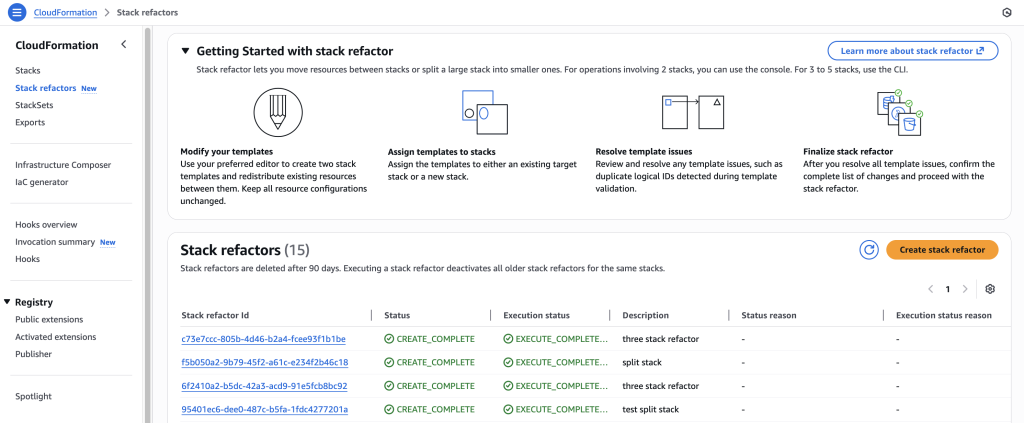
  5. Go to stack refactor home page, click on ‘create stack refactor’
    Go to stack refactor home page, click on ‘create stack refactor’
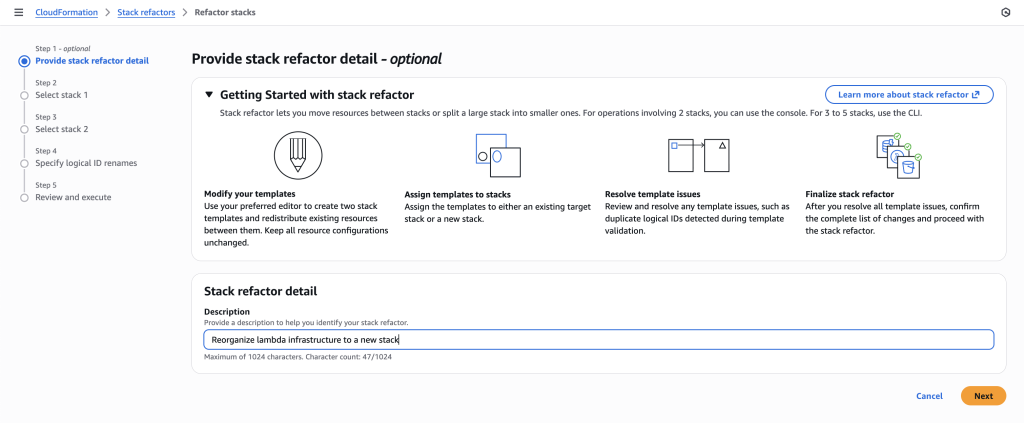
  6. Provide a description to help you identify your stack refactor.
    Provide a description to help you identify your stack refactor.
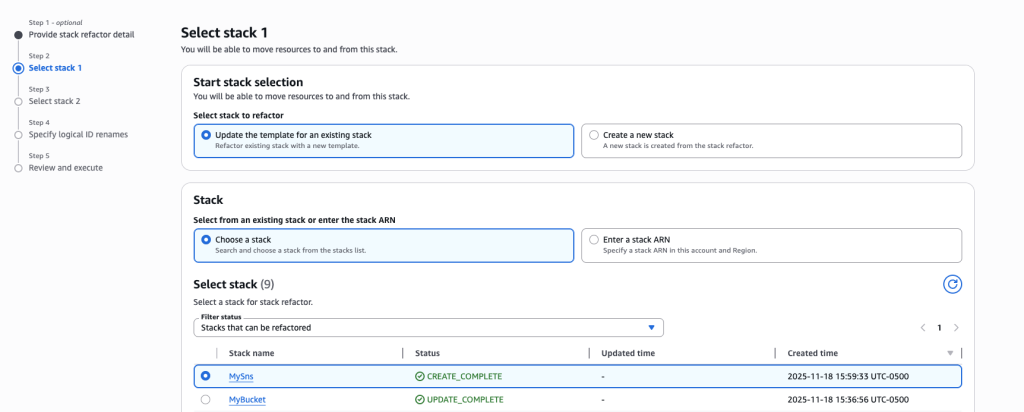
  7. For this scenario, we are splitting a monolithic stack so select ‘Update the template for an existing stack’ and ‘Choose a stack’ options.
  8. Search and choose the stack MySns that was created in Step 1.
    Search and choose the stack MySns that was created in Step 1.
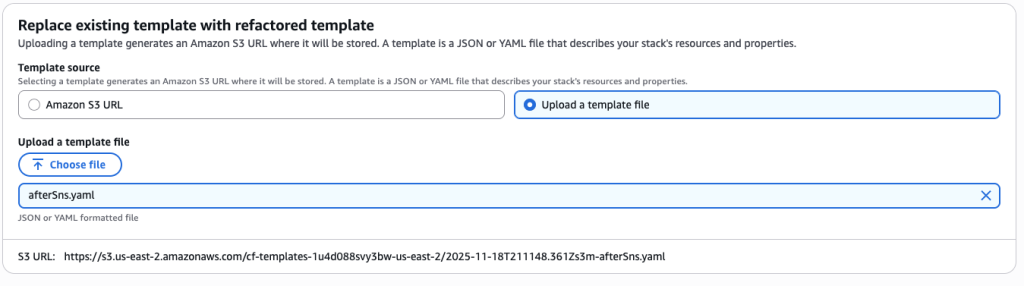
  9. Upload the afterSns.yaml file
    Upload the afterSns.yaml file
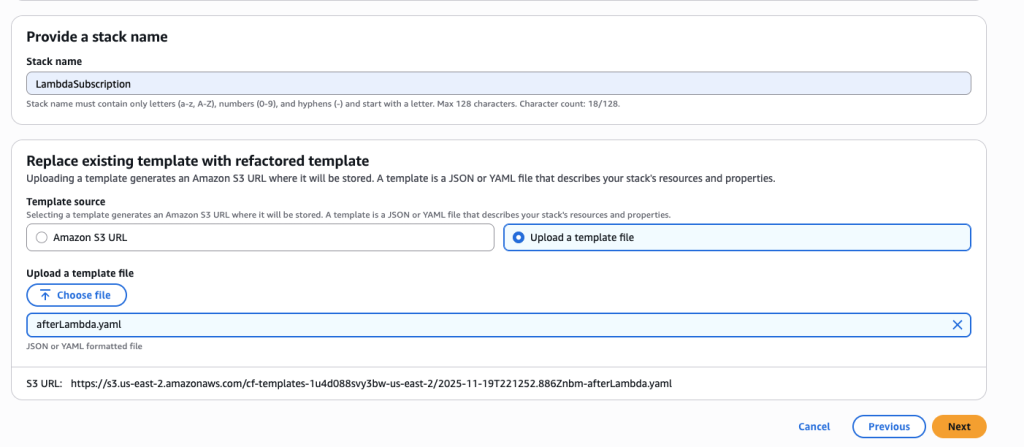
  10. You want to create a new stack to manage the Lambda function and SNS subscription resources. Choose ‘Create a new stack’ and name it ‘LambdaSubscription’.
  11. Upload afterLambda.yaml template file
    Upload afterLambda.yaml template fileIn some scenarios, CloudFormation console can automatically detect logical resource ID renames and pre-fill the mapping for you. The resource mapping is required when there are logical resource ID changes between the original stack and refactored template. Ensure that the mappings are correct before proceeding to the next step.
    In some scenarios, CloudFormation console can automatically detect logical resource ID renames
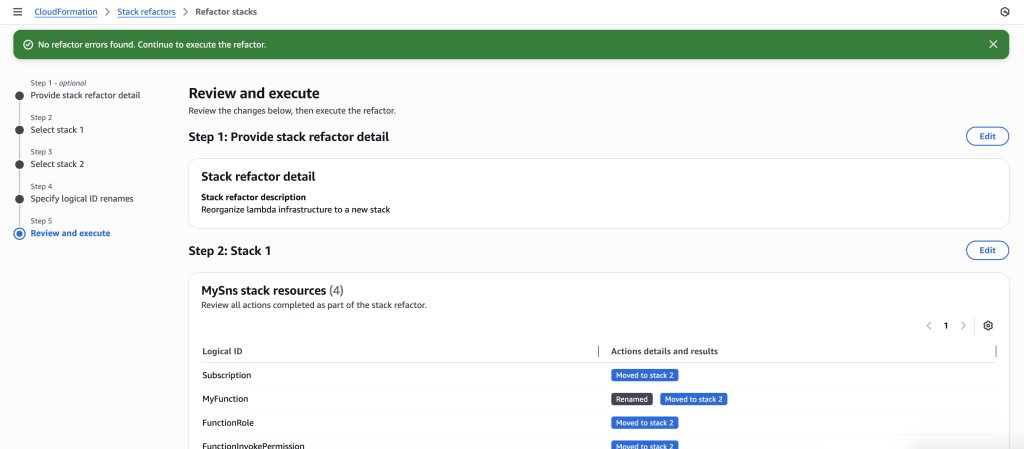
  12. The stack refactor preview will start generating. Wait for the preview to complete. You can verify actions under Stack 1 and Stack 2. It will show you the action for each resource.
    The stack refactor preview will start generating. Wait for the preview to complete. You can verify actions under Stack 1 and Stack 2. It will show you the action for each resource.
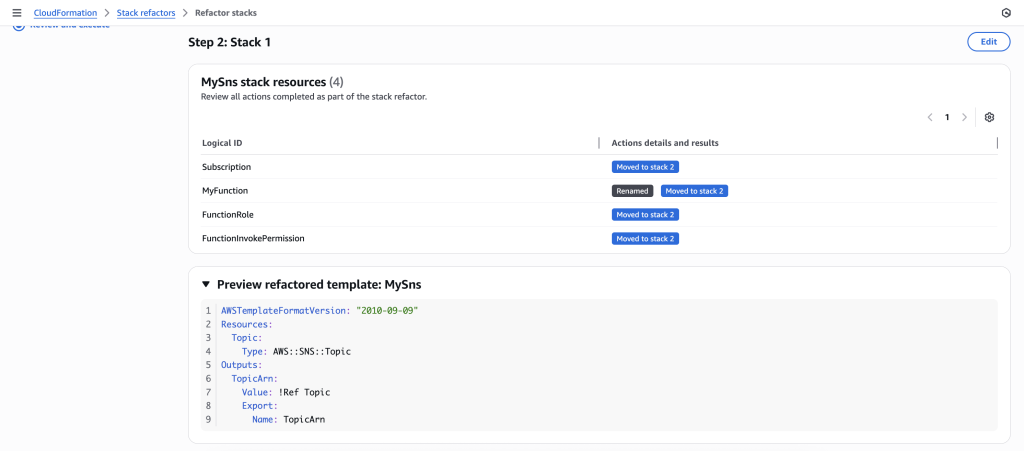
  13. You can also preview the new Stack refactored templates
    You can also preview the new Stack refactored templates
  14. Once you verify the details, go ahead and Execute Refactor. You should be redirected to the stack refactor details.
  15. Once the Stack refactor execution is complete you can view the actions and templates for each of the stacks in your stack refactor.
    Once the Stack refactor execution is complete you can view the actions and templates for each of the stacks in your stack refactor.

Scenario 2: Move resources across multiple stacks.

This scenario demonstrates how to refactor resources across three stacks using the AWS CLI, then review and execute the operation in the CloudFormation console.

  1. Create a new template many-stacks-original.yaml and create a new stack named ‘RefactorManyStacks’ using AWS CLI. This template contains SNS topic (IngestTopic),Lambda function(IngestFunction) and SNS subscription.
    AWSTemplateFormatVersion: "2010-09-09"
    
    Resources:
      IngestTopic:
        Type: AWS::SNS::Topic
    
      IngestFunction:
        Type: AWS::Lambda::Function
        Properties:
          FunctionName: many-stack-my-function
          Handler: index.handler
          Runtime: python3.12
          Code:
            ZipFile: |
              import json
              def handler(event, context):
                print(json.dumps(event))
                return event
          Role: !GetAtt IngestFunctionRole.Arn
          Timeout: 30
    
      IngestSubscription:
        Type: AWS::SNS::Subscription
        Properties:
          Endpoint: !GetAtt IngestFunction.Arn
          Protocol: lambda
          TopicArn: !Ref IngestTopic
    
      IngestFunctionInvokePermission:
        Type: AWS::Lambda::Permission
        Properties:
          Action: lambda:InvokeFunction
          Principal: sns.amazonaws.com
          FunctionName: !GetAtt IngestFunction.Arn
          SourceArn: !Ref IngestTopic
    
      IngestFunctionRole:
        Type: AWS::IAM::Role
        Properties:
          AssumeRolePolicyDocument:
            Version: "2012-10-17"
            Statement:
              - Action:
                  - sts:AssumeRole
                Effect: Allow
                Principal:
                  Service:
                    - lambda.amazonaws.com
                Condition:
                  StringEquals:
                    aws:SourceAccount: !Ref AWS::AccountId
                  ArnLike:
                    aws:SourceArn: !Sub "arn:${AWS::Partition}:lambda:${AWS::Region}:${AWS::AccountId}:function:many-stack-my-function"
          Policies:
            - PolicyName: LambdaPolicy
              PolicyDocument:
                Version: "2012-10-17"
                Statement:
                  - Action:
                      - logs:CreateLogGroup
                      - logs:CreateLogStream
                      - logs:PutLogEvents
                    Resource:
                      - arn:aws:logs:*:*:*
                    Effect: Allow
  2. Create another template many-stacks-original-1.yaml and run the AWS CLI command to create a new stack ‘RefactorManyStacks1’. This template creates another SNS topic (UserTopic), Lambda function (UserFunction) and SNS subscription.
    aws cloudformation create-stack --stack-name RefactorManyStacks --template-body file://many-stacks-original.yaml --capabilities CAPABILITY_IAM
  3. Create a new template many-stacks-original-2.yaml and run the AWS CLI command to create the stack RefactorManyStacks2. This template will also create SNS topic (ConsumerTopic), Lambda function (ConsumerFunction) and SNS subscription to lambda function.
    AWSTemplateFormatVersion: "2010-09-09"
    
    Resources:
      ConsumerTopic:
        Type: AWS::SNS::Topic
    
      ConsumerFunction:
        Type: AWS::Lambda::Function
        Properties:
          FunctionName: many-stack-my-function-2
          Handler: index.handler
          Runtime: python3.12
          Code:
            ZipFile: |
              import json
              def handler(event, context):
                print(json.dumps(event))
                return event
          Role: !GetAtt ConsumerFunctionRole.Arn
          Timeout: 30
    
      ConsumerSubscription:
        Type: AWS::SNS::Subscription
        Properties:
          Endpoint: !GetAtt ConsumerFunction.Arn
          Protocol: lambda
          TopicArn: !Ref ConsumerTopic
    
      ConsumerFunctionInvokePermission:
        Type: AWS::Lambda::Permission
        Properties:
          Action: lambda:InvokeFunction
          Principal: sns.amazonaws.com
          FunctionName: !GetAtt ConsumerFunction.Arn
          SourceArn: !Ref ConsumerTopic
    
      ConsumerFunctionRole:
        Type: AWS::IAM::Role
        Properties:
          AssumeRolePolicyDocument:
            Version: "2012-10-17"
            Statement:
              - Action:
                  - sts:AssumeRole
                Effect: Allow
                Principal:
                  Service:
                    - lambda.amazonaws.com
                Condition:
                  StringEquals:
                    aws:SourceAccount: !Ref AWS::AccountId
                  ArnLike:
                    aws:SourceArn: !Sub "arn:${AWS::Partition}:lambda:${AWS::Region}:${AWS::AccountId}:function:many-stack-my-function-2"
          Policies:
            - PolicyName: LambdaPolicy
              PolicyDocument:
                Version: "2012-10-17"
                Statement:
                  - Action:
                      - logs:CreateLogGroup
                      - logs:CreateLogStream
                      - logs:PutLogEvents
                    Resource:
                      - arn:aws:logs:*:*:*
                    Effect: Allow
    aws cloudformation create-stack --stack-name RefactorManyStacks2 --template-body file://many-stacks-original-2.yaml --capabilities CAPABILITY_IAM

Once all 3 stacks have been created successfully. Create refactored templates.

  1. Create new template many-stacks-refactored.yaml This refactored template only contains SNS topic named IngestTopic and has a new export in it that will export the SNS topic ARN. This export will be used by your other templates to get the required SNS topic ARN.
    AWSTemplateFormatVersion: "2010-09-09"
    
    Resources:
      IngestTopic:
        Type: AWS::SNS::Topic
    Outputs:
      IngestTopicArn:
        Value: !Ref IngestTopic
        Export:
          Name: IngestTopicArn
  2. Create another template many-stacks-refactored-1.yaml. This template **** has the SNS topic UserTopic and contains the IngestFunction and IngestSubscription and required IAM resources from ‘RefactorManyStacks’. This template switched the !Ref IngestTopic to use the exported valued by using !ImportValue IngestTopicArn. This refactored template also a new export in it that will export the UserTopic ARN.
    AWSTemplateFormatVersion: "2010-09-09"
    
    Resources:
      UserTopic:
        Type: AWS::SNS::Topic
      IngestFunction:
        Type: AWS::Lambda::Function
        Properties:
          FunctionName: many-stack-my-function
          Handler: index.handler
          Runtime: python3.12
          Code:
            ZipFile: |
              import json
              def handler(event, context):
                print(json.dumps(event))
                return event
          Role: !GetAtt IngestFunctionRole.Arn
          Timeout: 30
    
      IngestSubscription:
        Type: AWS::SNS::Subscription
        Properties:
          Endpoint: !GetAtt IngestFunction.Arn
          Protocol: lambda
          TopicArn: !ImportValue IngestTopicArn
    
      IngestFunctionInvokePermission:
        Type: AWS::Lambda::Permission
        Properties:
          Action: lambda:InvokeFunction
          Principal: sns.amazonaws.com
          FunctionName: !GetAtt IngestFunction.Arn
          SourceArn: !ImportValue IngestTopicArn
    
      IngestFunctionRole:
        Type: AWS::IAM::Role
        Properties:
          AssumeRolePolicyDocument:
            Version: "2012-10-17"
            Statement:
              - Action:
                  - sts:AssumeRole
                Effect: Allow
                Principal:
                  Service:
                    - lambda.amazonaws.com
                Condition:
                  StringEquals:
                    aws:SourceAccount: !Ref AWS::AccountId
                  ArnLike:
                    aws:SourceArn: !Sub "arn:${AWS::Partition}:lambda:${AWS::Region}:${AWS::AccountId}:function:many-stack-my-function"
          Policies:
            - PolicyName: LambdaPolicy
              PolicyDocument:
                Version: "2012-10-17"
                Statement:
                  - Action:
                      - logs:CreateLogGroup
                      - logs:CreateLogStream
                      - logs:PutLogEvents
                    Resource:
                      - arn:aws:logs:*:*:*
                    Effect: Allow
    Outputs:
      UserTopicArn:
        Value: !Ref UserTopic
        Export:
          Name: UserTopicArn
  3. Create another template many-stacks-refactored-2.yaml. This template has the Consumer* resources along with Lambda function (UserFunction) and SNS subscription (UserSubscription). The template is using exported value from many-stacks-refactored-1.yaml by using !ImportValue UserTopicArn

    AWSTemplateFormatVersion: "2010-09-09"
    
    Resources:
      ConsumerTopic:
        Type: AWS::SNS::Topic
    
      ConsumerFunction:
        Type: AWS::Lambda::Function
        Properties:
          FunctionName: many-stack-my-function-2
          Handler: index.handler
          Runtime: python3.12
          Code:
            ZipFile: |
              import json
              def handler(event, context):
                print(json.dumps(event))
                return event
          Role: !GetAtt ConsumerFunctionRole.Arn
          Timeout: 30
    
      ConsumerSubscription:
        Type: AWS::SNS::Subscription
        Properties:
          Endpoint: !GetAtt ConsumerFunction.Arn
          Protocol: lambda
          TopicArn: !Ref ConsumerTopic
    
      ConsumerFunctionInvokePermission:
        Type: AWS::Lambda::Permission
        Properties:
          Action: lambda:InvokeFunction
          Principal: sns.amazonaws.com
          FunctionName: !GetAtt ConsumerFunction.Arn
          SourceArn: !Ref ConsumerTopic
    
      ConsumerFunctionRole:
        Type: AWS::IAM::Role
        Properties:
          AssumeRolePolicyDocument:
            Version: "2012-10-17"
            Statement:
              - Action:
                  - sts:AssumeRole
                Effect: Allow
                Principal:
                  Service:
                    - lambda.amazonaws.com
                Condition:
                  StringEquals:
                    aws:SourceAccount: !Ref AWS::AccountId
                  ArnLike:
                    aws:SourceArn: !Sub "arn:${AWS::Partition}:lambda:${AWS::Region}:${AWS::AccountId}:function:many-stack-my-function-2"
          Policies:
            - PolicyName: LambdaPolicy
              PolicyDocument:
                Version: "2012-10-17"
                Statement:
                  - Action:
                      - logs:CreateLogGroup
                      - logs:CreateLogStream
                      - logs:PutLogEvents
                    Resource:
                      - arn:aws:logs:*:*:*
                    Effect: Allow
      UserFunction:
        Type: AWS::Lambda::Function
        Properties:
          FunctionName: many-stack-my-function-1
          Handler: index.handler
          Runtime: python3.12
          Code:
            ZipFile: |
              import json
              def handler(event, context):
                print(json.dumps(event))
                return event
          Role: !GetAtt UserFunctionRole.Arn
          Timeout: 30
    
      UserSubscription:
        Type: AWS::SNS::Subscription
        Properties:
          Endpoint: !GetAtt UserFunction.Arn
          Protocol: lambda
          TopicArn: !ImportValue UserTopicArn
    
      UserFunctionInvokePermission:
        Type: AWS::Lambda::Permission
        Properties:
          Action: lambda:InvokeFunction
          Principal: sns.amazonaws.com
          FunctionName: !GetAtt UserFunction.Arn
          SourceArn: !ImportValue UserTopicArn
    
      UserFunctionRole:
        Type: AWS::IAM::Role
        Properties:
          AssumeRolePolicyDocument:
            Version: "2012-10-17"
            Statement:
              - Action:
                  - sts:AssumeRole
                Effect: Allow
                Principal:
                  Service:
                    - lambda.amazonaws.com
                Condition:
                  StringEquals:
                    aws:SourceAccount: !Ref AWS::AccountId
                  ArnLike:
                    aws:SourceArn: !Sub "arn:${AWS::Partition}:lambda:${AWS::Region}:${AWS::AccountId}:function:many-stack-my-function-1"
          Policies:
            - PolicyName: LambdaPolicy
              PolicyDocument:
                Version: "2012-10-17"
                Statement:
                  - Action:
                      - logs:CreateLogGroup
                      - logs:CreateLogStream
                      - logs:PutLogEvents
                    Resource:
                      - arn:aws:logs:*:*:*
                    Effect: Allow


  4. Start the stack refactor using AWS CLI.
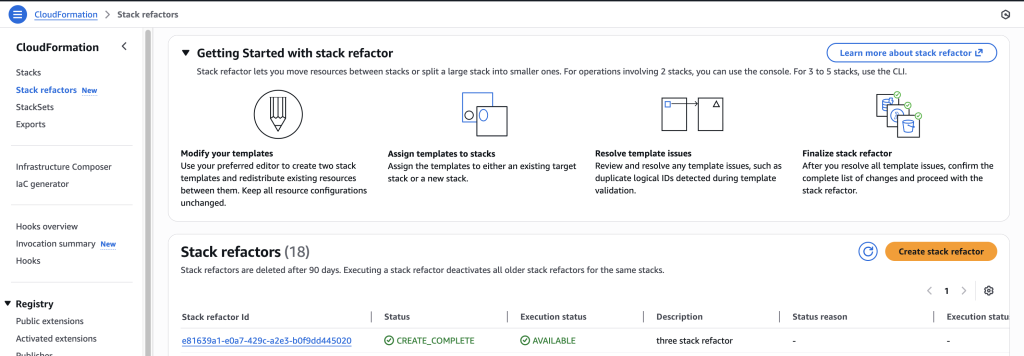
    aws cloudformation create-stack-refactor --stack-definitions StackName=RefactorManyStacks,TemplateBody@=file://many-stacks-refactored.yaml StackName=RefactorManyStacks1,TemplateBody@=file://many-stacks-refactored-1.yaml StackName=RefactorManyStacks2,TemplateBody@=file://many-stacks-refactored-2.yaml --description "three stack refactor"
  5. Go to stack CloudFormation console and go to ‘Stack refactor’ homepage, click on the stack refactor you just created.
    Go to stack CloudFormation console and go to ‘Stack refactor’ homepage, click on the stack refactor you just created.
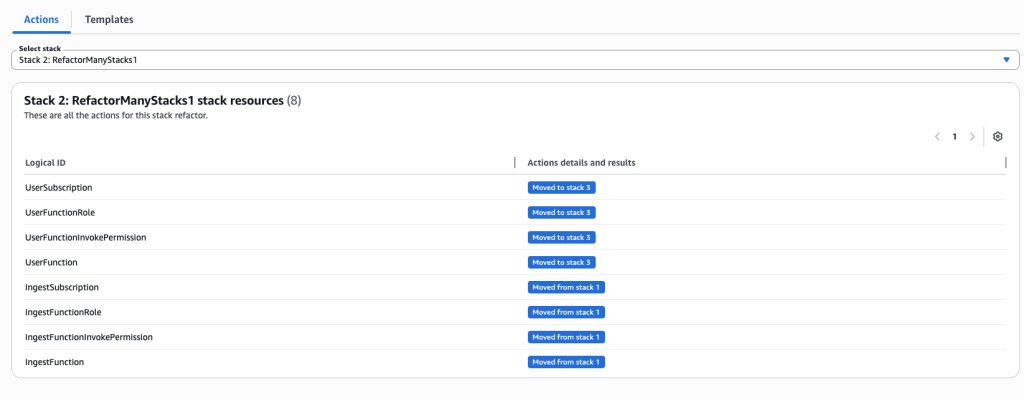
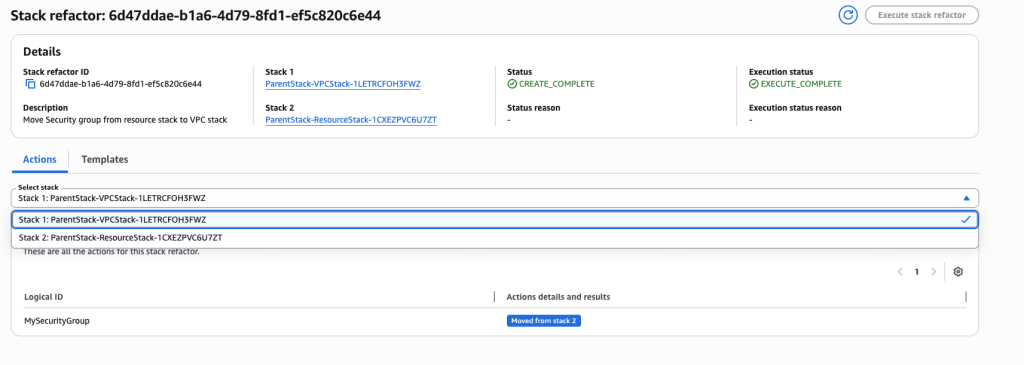
  6. Review actions for each resource and each stack. You can choose individual stacks from drop down.
    Review actions for each resource and each stack. You can choose individual stacks from drop down.
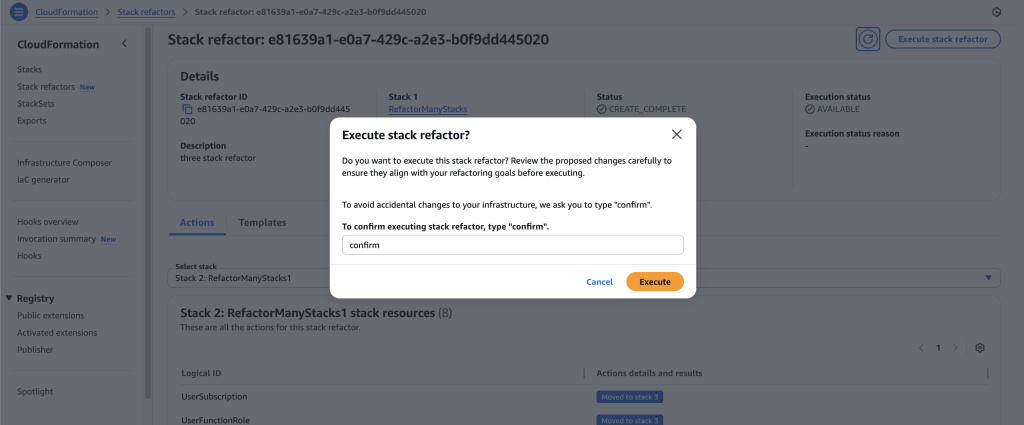
  7. Once you’re ready to execute the stack refactor, click on ‘Execute stack refactor’ and input the confirmation text.
    Once you’re ready to execute the stack refactor, click on ‘Execute stack refactor’ and input the confirmation text.
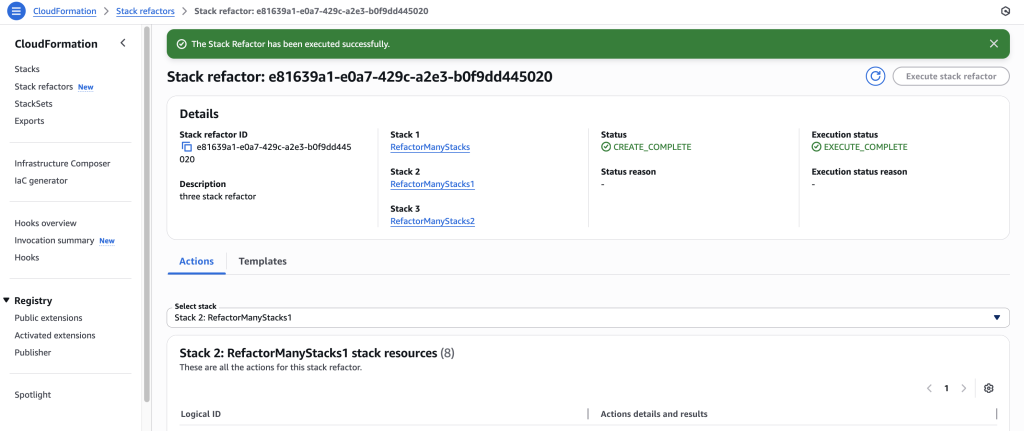
  8. Wait for stack refactor execution to finish.
    Wait for stack refactor execution to finish.
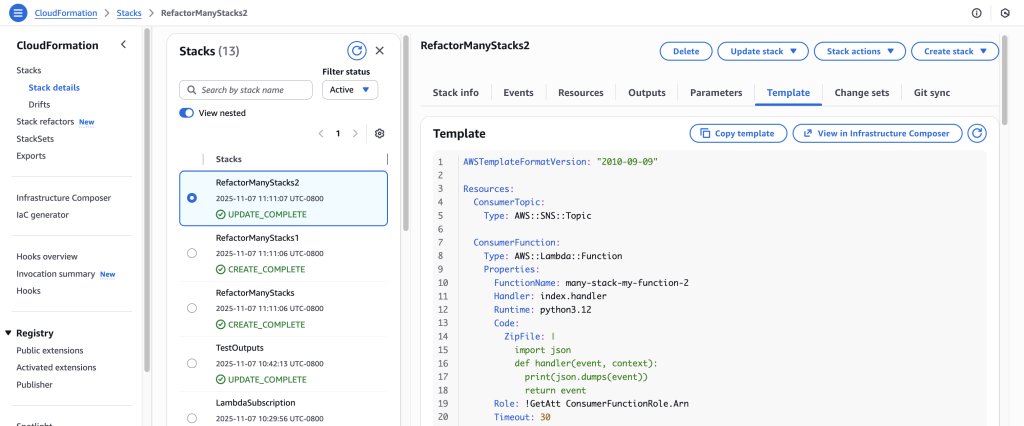
  9. Click on the stack in the details to navigate to the stack details. You can verify the refactor changes here.
    Click on the stack in the details to navigate to the stack details. You can verify the refactor changes here.

Scenario 3: Move stacks between 2 nested child stacks stacks

This scenario demonstrates how to move resources between child stacks in a nested stack architecture. Upload child stack templates toAmazon Simple Storage Service (Amazon S3), create a parent stack that references them, then use Stack Refactoring to move resources (like a security group) from one child stack to another. The key is to work directly with the child stack names (which CloudFormation auto-generates based on parent stack name and logical IDs) rather than the parent stack itself. After refactoring, update the parent stack to reference the new child template versions in S3.

This approach lets you reorganize nested stack architectures while maintaining the parent-child relationship structure.

  1. Create first child stack template vpc.yaml. This template creates a new Virtual Private Cloud(VPC). Upload this new template file to S3 bucket
    AWSTemplateFormatVersion: '2010-09-09'
    Description: 'VPC Stack - Contains only VPC'
    
    Resources:
      MyVPC:
        Type: AWS::EC2::VPC
        Properties:
          CidrBlock: 10.0.0.0/16
    
    Outputs:
      VPCId:
        Value: !Ref MyVPC
  2. Create second child stack template resource.yaml . This template will create S3 bucket and EC2 Security Group. Once you create this template file, upload it to an S3 bucket
    AWSTemplateFormatVersion: '2010-09-09'
    Description: ' Contains security group and S3 bucket'
    
    Resources:
      MySecurityGroup:
        Type: AWS::EC2::SecurityGroup
        Properties:
          GroupDescription: Security group for testing
          SecurityGroupIngress:
            - IpProtocol: tcp
              FromPort: 80
              ToPort: 80
              CidrIp: 0.0.0.0/0
    
      MyS3Bucket:
        Type: AWS::S3::Bucket
    
    Outputs:
      SecurityGroupId:
        Value: !Ref MySecurityGroup
      S3BucketName:
        Value: !Ref MyS3Bucket
  3. Create parent stack template file parent.yaml. Make sure to edit the TemplateURL with your S3 Object URL

    AWSTemplateFormatVersion: '2010-09-09'
    Description: 'Parent stack for test'
    
    Resources:
      VPCStack:
        Type: AWS::CloudFormation::Stack
        Properties:
          TemplateURL: https://s3.amazonaws.com/<Bucket-Name>/vpc.yaml
    
      ResourceStack:
        Type: AWS::CloudFormation::Stack
        Properties:
          TemplateURL: https://s3.amazonaws.com/<Bucket-Name>/resource.yaml
    
    Outputs:
      VPCStackName:
        Value: !Ref VPCStack
      ResourceStackName:
        Value: !Ref ResourceStack


  4. Create this new Parent stack using AWS CLI :
    aws cloudformation create-stack --stack-name ParentStack --template-body file://parent.yaml --capabilities CAPABILITY_IAM
  5. We will use stack refactor to move EC2 Security group from ResourceStack to VPCStack.
  6. Create new template file VPCStackAfter.yaml. This template now has VPC and EC2 Security group resources. Upload this template to S3 bucket
    AWSTemplateFormatVersion: '2010-09-09'
    Description: ' VPC Stack AFTER - Contains VPC and security group'
    
    Resources:
      MyVPC:
        Type: AWS::EC2::VPC
        Properties:
          CidrBlock: 10.0.0.0/16
    
      MySecurityGroup:
        Type: AWS::EC2::SecurityGroup
        Properties:
          GroupDescription: Security group for testing
          SecurityGroupIngress:
            - IpProtocol: tcp
              FromPort: 80
              ToPort: 80
              CidrIp: 0.0.0.0/0
    
    Outputs:
      VPCId:
        Value: !Ref MyVPC
      SecurityGroupId:
        Value: !Ref MySecurityGroup
  7. Create ResourceStackAfter.yaml The resource stack will only contain s3 bucket resource. Upload this template to S3 bucket
    AWSTemplateFormatVersion: '2010-09-09'
    Description: 'Resource Stack AFTER - Contains only S3 bucket'
    
    Resources:
      MyS3Bucket:
        Type: AWS::S3::Bucket
    
    Outputs:
      S3BucketName:
        Value: !Ref MyS3Bucket
  8. Navigate to CloudFormation Console and select Start stack refactor
  9. Add a description for Stack refactor:
    Add a description for Stack refactor:
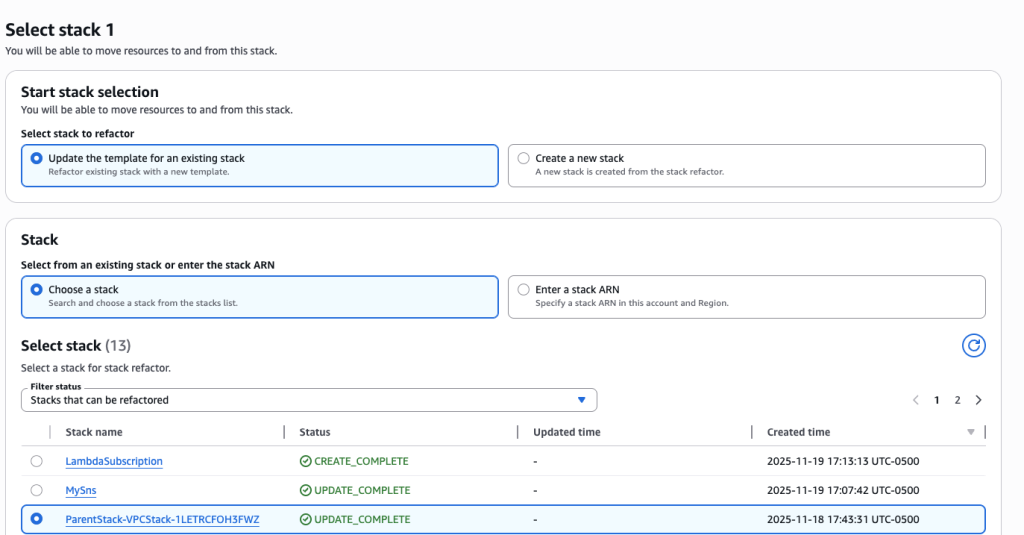
  10. Choose “Update the template for an existing stack” and select child stack “ParentStack-VPCStack-12345”. Make sure to choose the child stack and not the Root/Parent stack.
    Choose “Update the template for an existing stack” and select child stack “ParentStack-VPCStack-12345”. Make sure to choose the child stack and not the Root/Parent stack.
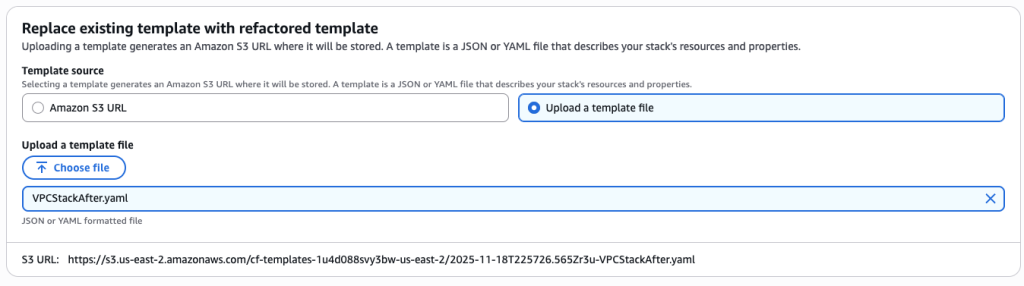
  11. Upload the new template VPCStackAfter.yaml
    Upload the new template VPCStackAfter.yaml
  12. For Stack2, again select ‘Update the template for an existing stack’ and select to 2nd child stack “ParentStack-ResourceStack-12345”
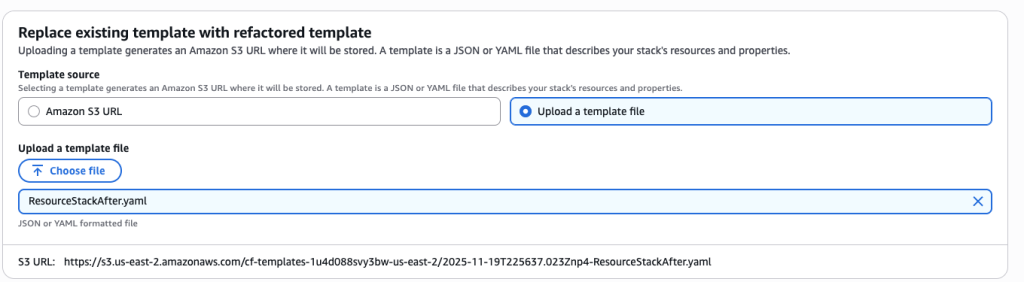
  13. Upload the template ResourceStackAfter.yaml
    Upload the template ResourceStackAfter.yaml
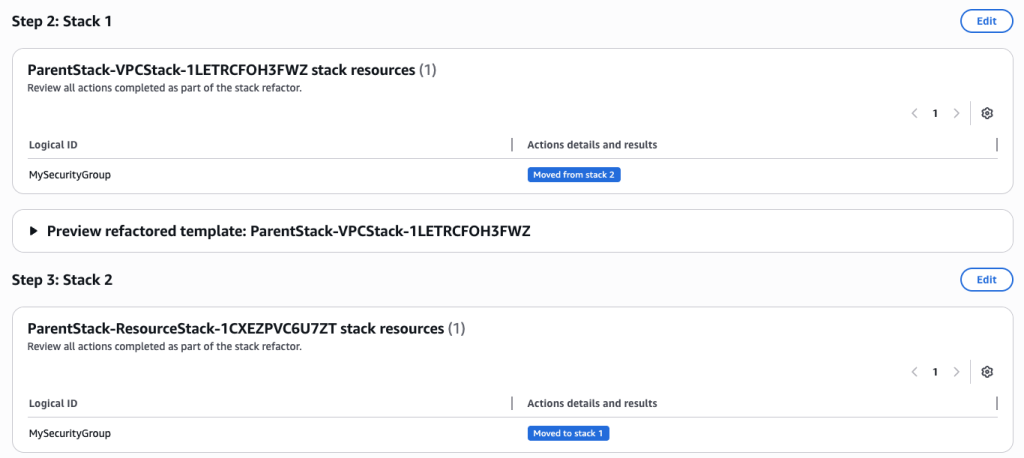
  14. Review the Stack refactor. Once you have verified all the actions and details choose ‘Execute Refactor’
    Review the Stack refactor. Once you have verified all the actions and details choose ‘Execute Refactor
  15. You can verify the refactor templates.
    stack Console
  16. Lastly, update your ParentStack.yaml to reference the new child template versions in S3 bucket.
    AWSTemplateFormatVersion: '2010-09-09'
    Description: 'Parent stack for test'
    
    Resources:
      VPCStack:
        Type: AWS::CloudFormation::Stack
        Properties:
          TemplateURL: https://s3.amazonaws.com/<Bucket-Name>/VPCStackAfter.yaml
    
      ResourceStack:
        Type: AWS::CloudFormation::Stack
        Properties:
          TemplateURL: https://s3.amazonaws.com/<Bucket-Name>/ResourceStackAfter.yaml
    
    Outputs:
      VPCStackName:
        Value: !Ref VPCStack
      ResourceStackName:
        Value: !Ref ResourceStack

Best Practices

Stack Refactoring offers powerful flexibility, but a few strategic considerations will help ensure smooth operations. Test your refactoring plans in non-production environments first, particularly when working with complex dependency chains or resources that have strict ordering requirements. The preview phase becomes your primary safety mechanism—treat it as a thorough code review, examining each planned action before execution. When moving resources between stacks, pay close attention to cross-stack references. Converting direct references to export/import patterns maintains loose coupling and prevents circular dependencies. CloudFormation will automatically manage these conversions during refactoring, but understanding the resulting architecture helps you avoid introducing fragility into your infrastructure.

For scenarios where you’re emptying a source stack entirely, remember that CloudFormation requires at least one resource per stack. This makes placeholder resources like AWS::CloudFormation::WaitConditionHandle a useful temporary measure—they consume no actual AWS resources and can be safely deleted along with the stack once the refactoring completes.

Document your refactoring decisions alongside the templates themselves. Future maintainers (including yourself in six months) will appreciate understanding why resources were organized in particular ways. Include comments in your templates explaining the reasoning behind stack boundaries and resource groupings.

Consider the operational impact of your refactoring. While resources themselves remain stable, monitoring dashboards, automation scripts, or other tooling that references stack names or logical IDs may need updates. Plan these ancillary changes as part of your refactoring workflow rather than discovering them afterward.

Finally, leverage refactoring as an opportunity to improve template quality more broadly. If you’re already reorganizing resources, consider also updating documentation, standardizing naming conventions, or adding tags for better resource management.

Conclusion

CloudFormation Stack Refactoring transforms how you organize and maintain infrastructure as code, enabling stack architecture to evolve alongside applications and organizational needs. This capability provides the flexibility to restructure without the risk and complexity of traditional resource recreation approaches. Whether you’re breaking apart monolithic stacks, consolidating fragmented infrastructure, or simply renaming resources to match current conventions, Stack Refactoring lets you adapt CloudFormation organization to changing requirements without operational disruption.

To get started, visit the CloudFormation console or explore the AWS CloudFormation API reference for programmatic access patterns. Stack Refactoring is available today in all commercial AWS regions.

Brian Terry

Brian Terry

Brian Terry, Senior WW Data & AI PSA, is an innovation leader with 20+ years of experience in technology and engineering. Pursuing a Ph.D. in Computer Science at the University of North Dakota. Brian has spearheaded generative AI projects, optimized infrastructure scalability, and driven partner integration strategies. He is passionate about leveraging technology to deliver scalable, resilient solutions that foster business growth and innovation

Idriss Louali Abdou

Idriss Laouali Abdou

Idriss Laouali Abdou is a Sr. Product Manager Technical on the AWS Infrastructure-as-Code team based in Seattle. He focuses on improving developer productivity through AWS CloudFormation and StackSets Infrastructure provisioning experiences. Outside of work, you can find him creating educational content for thousands of students, cooking, or dancing.

Sanchi Halikar

Sanchi Halikar

Sanchi is a Solutions Architect supporting Enterprise customers at AWS. She helps customers design and implement cloud solutions with a focus on DevOps strategies. She specializes in Infrastructure as Code and is passionate about leveraging generative AI in software development

Jamie, AWS IaC console Front-end engineer

Jamie To

Jamie is a Front End Engineer and has been delivering console features to AWS IaC customers for the last 3 years. Outside of work, Jamie enjoys drawing and playing foosball.

Introducing a managed hook for Guard

Post Syndicated from Brian Terry original https://aws.amazon.com/blogs/devops/introducing-a-managed-hook-for-guard/

In today’s cloud-driven world, maintaining compliance and enforcing organizational policies across your infrastructure is more critical than ever. AWS CloudFormation, a service that enables you to model, provision, and manage AWS and third-party resources through Infrastructure as Code (IaC), has been a cornerstone for automating cloud deployments. While CloudFormation simplifies resource management, ensuring compliance with internal and external standards requires robust tools and strategies to align with organizational and regulatory requirements.

Enter the new managed hook for Guard, a new hook designed to seamlessly integrate compliance into your AWS CloudFormation workflows. AWS CloudFormation Hooks are a powerful tool that allow you to validate and enforce policies during the provisioning and management of resources in your CloudFormation stacks. With a Guard hook, you can now bring your AWS CloudFormation Guard rules directly into your CloudFormation stacks, change sets, and individual resources. This feature eliminates the need to incorporate the Guard runtime into custom hooks, simplifying compliance enforcement and enhancing your security posture.

What is a Guard hook?

A Guard hook is a service-managed CloudFormation Hook that integrates AWS CloudFormation Guard—a policy-as-code tool—directly into your CloudFormation deployment process. AWS CloudFormation Guard uses a domain-specific language (DSL) to define compliance rules in an easily readable and reusable format, enabling you to codify and enforce organizational policies. This hook allows you to automatically validate your CloudFormation templates against these established compliance rules, enforcing policies seamlessly without the need to manage custom Lambda functions or Guard runtimes. By identifying non-compliant resources early, it helps streamline deployments and ensures that your infrastructure aligns with organizational standards right from the start.

Benefits of Using a Guard hook

Guard hooks provide unique advantages by combining the flexibility of CloudFormation Hooks with the expressiveness of the Guard Domain Specific Language (DSL), giving you a powerful tool for infrastructure compliance and security. As a fully managed CloudFormation hook, Guard hooks eliminate the need for a custom hook implementation and management, allowing you to leverage AWS’s service-driven infrastructure to streamline policy enforcement.With a Guard hook, you can express compliance rules and configurations directly in the Guard DSL.

Guard hooks specifically add value by enabling these Guard-based compliance policies to be applied automatically during stack operations. This helps validate that your infrastructure consistently aligns with security and compliance standards, reducing the risks of misconfiguration and non-compliance. Additionally, Guard hooks allow you to take advantage of CloudFormation’s native stack-level and resource-level hooks, adding depth to your compliance by enforcing policies across entire stacks and individual resources alike.

Use Cases

Guard hooks can be applied in various scenarios to enhance compliance and security. In security compliance, for instance, it can ensure that all databases and storage services have encryption enabled or prevent security groups from allowing unrestricted inbound traffic. Regarding resource configuration, it can enforce the use of approved EC2 instance types or require specific tags on all resources for cost tracking and management.

For operational governance, Guard hooks can validate that resources do not exceed predefined thresholds, such as storage size, ensuring that resources are provisioned within acceptable limits. It can also enforce network policies by ensuring the use of approved VPCs and subnets, maintaining network security and compliance with organizational standards.

A resource hook in CloudFormation targets individual resources within a template, such as EC2 instances, S3 buckets, or IAM roles. It is particularly useful for enforcing specific standards or compliance requirements on individual resources, thereby helping customers ensure each one meets defined criteria. For instance, you could use a resource-level hook to enforce that every S3 bucket created through CloudFormation has server-side encryption enabled. In contrast, a stack or change set hook targets the entire CloudFormation stack as a single entity, allowing for the application of guardrails or validation requirements across all resources within the stack collectively. This helps to ensure that the entire stack, not just individual resources, aligns with set policies before the stack is created or updated. For example, a stack-level hook could be used to prevent a stack from containing certain types of resources or to ensure that a specific number of resources are created in each stack. Together, these hooks provide different layers of validation to enforce compliance and configuration standards at both the resource and stack levels.

Getting Started

Getting started with a Guard hook involves configuring the hook, uploading your Guard rules to Amazon S3, activating the hook, and enabling it to run against your CloudFormation stacks. Below are the detailed steps to help you set up and start using Guard Hook effectively.

Pre-requisites Create an Amazon S3 Bucket

If you do not have one already, you will need to create an S3 bucket in your region. This bucket will hold your Guard policy files and optionally the full Guard evaluation output if so desired.

Configuring a Guard hook Create your rule

In this section, you will provide an example of AWS CloudFormation Guard rules that help enforce best practices for Amazon S3 buckets. Please create a file called safebucket.guard and include the following rules:

# Rule Identifier:
#    S3_BUCKET_PUBLIC_WRITE_PROHIBITED
#
# Select all S3 resources from the incoming template (payload)
#
let s3_buckets_public_write_prohibited = Resources.*[ Type == 'AWS::S3::Bucket' ]

rule S3_BUCKET_PUBLIC_WRITE_PROHIBITED when %s3_buckets_public_write_prohibited !empty {
  %s3_buckets_public_write_prohibited.Properties.PublicAccessBlockConfiguration exists
  %s3_buckets_public_write_prohibited.Properties.PublicAccessBlockConfiguration.BlockPublicAcls == true
  %s3_buckets_public_write_prohibited.Properties.PublicAccessBlockConfiguration.BlockPublicPolicy == true
  %s3_buckets_public_write_prohibited.Properties.PublicAccessBlockConfiguration.IgnorePublicAcls == true
  %s3_buckets_public_write_prohibited.Properties.PublicAccessBlockConfiguration.RestrictPublicBuckets == true
  <<
    Violation: S3 Bucket public write access must be restricted.
    Fix: Set the S3 Bucket PublicAccessBlockConfiguration properties—BlockPublicAcls, BlockPublicPolicy, IgnorePublicAcls, RestrictPublicBuckets—to true.
  >>
}

# Rule Identifier:
#    S3_BUCKET_VERSIONING_ENABLED
#
# Select all S3 resources from the incoming template (payload)
#
let s3_buckets_versioning_enabled = Resources.*[ Type == 'AWS::S3::Bucket' ]

rule S3_BUCKET_VERSIONING_ENABLED when %s3_buckets_versioning_enabled !empty {
  %s3_buckets_versioning_enabled.Properties.VersioningConfiguration exists
  %s3_buckets_versioning_enabled.Properties.VersioningConfiguration.Status == 'Enabled'
  <<
    Violation: S3 Bucket versioning must be enabled.
    Fix: Set the S3 Bucket property VersioningConfiguration.Status to 'Enabled'.
  >>
}

In this file, you can define rules to prevent public write access and require versioning on all S3 buckets. Here’s what the two rules in this example do:

  • S3_BUCKET_PUBLIC_WRITE_PROHIBITED:
    • This rule identifies S3 buckets within a CloudFormation template and checks if the public write access is restricted. It ensures that each S3 bucket has PublicAccessBlockConfiguration properties enabled to block public ACLs, block public policies, ignore public ACLs, and restrict public buckets. If a bucket does not meet these criteria, a violation message is triggered, instructing the user to set these properties to true.
  • S3_BUCKET_VERSIONING_ENABLED:
    • This rule targets S3 buckets and verifies that versioning is enabled. The rule checks if the VersioningConfiguration property exists and has its Status set to 'Enabled'. If this configuration is missing or set incorrectly, it alerts the user to enable versioning on the S3 bucket, providing an additional layer of data protection.

These rules help you maintain strict security and operational best practices by ensuring that S3 buckets are configured according to compliance requirements. Place these rules in safebucket.guard, and you’re ready to start applying them to your CloudFormation templates using Guard Hook to enforce policies without any manual intervention.

Upload your rules to S3

The Guard hook expects your policy files to be uploaded to an S3 bucket to then be pulled down during hook execution time. The hook expects your rules to be either a single .guard file, or multiple .guard files uploaded as a .zip or .tar.gz

Once you have uploaded your Guard rule or Guard rules bundle to S3, take note of the S3 URI of the uploaded object, as you will need this later to configure the Guard hook. Example: s3://your-bucket-name/safebucket.guard

You can also get the S3 URI by copy-pasting it from the console

Screenshot of an Amazon S3 object properties page displaying details for the file safebucket.guard in the safes3rules bucket.

Authoring the Hook

You can author and activate a Guard hook from the console, CLI, and using the AWS::CloudFormation::GuardHook CloudFormation resource.

Console

You can use the new console flow to define and activate your hook. Click on Create a Hook and choose With Guard.

  1. You can type in your Guard rules S3 URI from the step before, or you can browse your S3 bucket using the console button.Screenshot of the AWS CloudFormation interface showing the 'Provide your Guard rules' step in the 'Create a Hook with Guard' workflow.
  2. You can configure the hook by performing the following steps:
    1. In the Hook Name field, enter My::Company::GuardHook.
    2. Under Hook Targets, select both Stacks and Resources. By selecting both Stacks and Resources under Hook Targets, you’re instructing CloudFormation to apply your hook validations at both levels. This ensures that individual resources and the overall stack comply with your defined policies, providing a comprehensive safeguard across deployments.
    3. For Hook Mode, choose Fail.
    4. In Execution Role, select New execution role and enter my-guard-hook-role for the name if you want CloudFormation to create the necessary role and permissions. Alternatively, an IAM role ARN you created manually (learn more here).Screenshot of the AWS CloudFormation interface showing the 'Hook details and settings' step in the 'Create a Hook with Guard' workflow.
  3. While we didn’t include a filter in this example, you can limit the executions of the hook to the intended resource types by using a filter. For more information about filters view our documentation page. You can skip to the next step if you do not have anything to filter.Screenshot of the AWS CloudFormation interface showing the 'Apply Hook filters (optional)' step in the 'Create a Hook with Guard' workflow.
  4. Review the hook details and then click the Activate Hook button.

Screenshot of the AWS CloudFormation interface showing the 'Hook details and settings' step in the 'Create a Hook with Guard' workflow.

CLI

export AWS_ACCOUNT_ID=<Your_Account_Id>

aws cloudformation activate-type --type HOOK \
--type-name AWS::Hooks::GuardHook \
--publisher-id aws-hooks \
--type-name-alias MyCompany::Hooks::GuardHook \
--execution-role arn:aws:iam::${AWS_ACCOUNT_ID}:role/<Your_ExecutionRole_Name> \
--region eu-central-1

Note: You can create your own type-name-alias → MyCompany::Hooks::GuardHook is just an example

Using the CloudFormation resource

Using the AWS::CloudFormation::GuardHook resource in a CloudFormation template allows you to enforce compliance checks and validations on your AWS resources before creating, modifying, or deleting them within a stack. By specifying Guard rules using the Guard domain-specific language (DSL), you can define policies to assess resource configurations and security standards. When integrated into a CloudFormation template, AWS::CloudFormation::GuardHook evaluates the resources during stack operations and can either block non-compliant actions or provide warnings, depending on the configuration. This tool benefits organizations by automating governance, enhancing security, and reducing manual intervention, which help ensure that deployments adhere to best practices and compliance requirements consistently across environments.

Here is an example of how to create a Guard hook with the AWS::CloudFormation::GuardHook resource in a YAML file.

AWSTemplateFormatVersion: '2010-09-09'
Resources:
  GuardHookRole:
    Type: AWS::IAM::Role
    Properties:
      RoleName: GuardHookExecutionRole
      AssumeRolePolicyDocument:
        Version: '2012-10-17'
        Statement:
          - Effect: Allow
            Principal:
              Service: hooks.cloudformation.amazonaws.com
            Action: sts:AssumeRole
      Policies:
        - PolicyName: S3AccessPolicy
          PolicyDocument:
            Version: '2012-10-17'
            Statement:
              - Effect: Allow
                Action:
                  - s3:GetObject
                  - s3:GetObjectVersion
                  - s3:PutObject
                  - s3:ListBucket
                Resource: 
                  - arn:aws:s3:::<YourBucket>/*
                  - arn:aws:s3:::<YourBucket>

  MyGuardHook:
    Type: AWS::CloudFormation::GuardHook
    Properties:
      Alias: "my::guard::hook"
      ExecutionRole: !GetAtt GuardHookRole.Arn
      FailureMode: FAIL
      HookStatus: ENABLED
      LogBucket: "mysafebucket"
      RuleLocation:
        Uri: "s3://<YourBucket>/safebucket.guard"
      TargetOperations:
        - STACK
        - RESOURCE

For more about AWS::CloudFormation::GuardHook , see our docs.

Testing your hook (non-compliant stack)

Now at this point, the Guard Hook should be running against all S3 buckets deployed via CloudFormation stacks in your account. We can confirm this by creating a new stack, from the CLI.

To do so, create a file named s3-fail.yaml and add the following content:

AWSTemplateFormatVersion: "2010-09-09"
Description: This template creates a simple s3 bucket
   
Resources:
  DemoBucket:
   Type: AWS::S3::Bucket

Create a stack, and specify your template in the AWS Command Line Interface (AWS CLI). In the following example, specify the stack name as my-fail-stack and the template name as s3-fail.yaml.

aws cloudformation create-stack --stack-name my-fail-stack --template-body file://s3-fail.yaml

View Hook Invocations

Console

  1. From Stack Events tab, enable Hook Invocations field
    Screenshot of an AWS CloudFormation interface showing how to enable Hook invocations output.
  2. You can see the completed assessment and the result in summarized view (how many rules compliant vs. not) and Stack status based on your hook mode:Screenshot of the 'Hook invocation details' dialog in AWS CloudFormation. The dialog displays the Hook name as 'My::Company::GuardHook,' shown as a clickable link. The Hook status is 'HOOK_COMPLETE_FAILED,' highlighted in red with an error icon. The failure mode is set to 'Fail,' and the invocation point is 'PRE_PROVISION.' The status reason explains that the Hook failed validation due to the following rules being violated: 'S3_BUCKET_PUBLIC_WRITE_PROHIBITED' and 'S3_BUCKET_VERSIONING_ENABLED.

CLI

  1. View stack events by running below command:
    aws cloudformation describe-stack-events --stack-name my-fail-stack
  2. You can see the completed assessment and the result (how many rules compliant vs. not compliant as part of describe-stack-events. As the Hook Failure Mode is set to Fail, you can see the stack status: CREATE_FAILED due to Hook failure.
                ...
                "EventId": "my-fail-stack-d7943992-9366-4d3a-8bad-9695a5f6b310",
                "StackName": "my-fail-stack",
                "LogicalResourceId": "my-fail-stack",
                "PhysicalResourceId": "",
                "ResourceType": "STACK",
                "Timestamp": "2024-11-12T15:54:29.582000+00:00",
                "ResourceStatus": "CREATE_IN_PROGRESS",
                "HookType": "My::Company::GuardHook",
                "HookStatus": "HOOK_COMPLETE_FAILED",
                "HookStatusReason": "Hook failed with message: Template failed validation, the following rule(s) failed: S3_BUCKET_PUBLIC_WRITE_PROHIBITED, S3_BUCKET_VERSIONING_ENABLED.",
                "HookInvocationPoint": "PRE_PROVISION",
                "HookFailureMode": "FAIL"
            }

Viewing Guard hooks output from Log Bucket

If you specified the logging bucket, now you can view the Guard hook invocation json and evaluate the output stored in your S3 bucket.

Console

Screenshot of an Amazon S3 interface showing the list of Guard Hook log files.

CLI

You can download the log file by running the command below:

aws s3api get-object --bucket <Your log bucket> --key <insert_the-cfn-guard-validate-report-key.json> <Your_Outfile_DirectoryandName>

For more information about downloading S3 Object, see our docs.

Testing your hook (compliant stack)

To do so, create a file named s3-pass.yaml and add the following content:

AWSTemplateFormatVersion: "2010-09-09"
Description: This template creates a simple S3 bucket with versioning enabled and public write access disabled

Resources:
  DemoBucket:
   Type: AWS::S3::Bucket
   Properties:
      VersioningConfiguration:
        Status: Enabled
      PublicAccessBlockConfiguration:
        BlockPublicAcls: true
        IgnorePublicAcls: true
        BlockPublicPolicy: true
        RestrictPublicBuckets: true

Notice in the template, our bucket now does not allow public write access and enables versioning.

Create a stack, and specify your template in the AWS Command Line Interface (AWS CLI). In the following example, specify the stack name as my-pass-stack and the template name as s3-pass.yaml.

aws cloudformation create-stack --stack-name my-pass-stack --template-body file://s3-pass.yaml

View Hook Invocations

Console

  1. You can see the completed assessment and the the bucket was created.Screenshot of the 'Hook invocation details' dialog in AWS CloudFormation. The dialog displays the Hook name as 'My::Company::GuardHook,' shown as a clickable link. The Hook status is 'HOOK_COMPLETE_SUCCEEDED,' highlighted in green with a success icon. The failure mode is set to 'Fail,' and the invocation point is 'PRE_PROVISION.' The status reason indicates success with the message: 'Hook succeeded with message: Successful validation.
    Screenshot of the AWS CloudFormation 'Events' tab for a stack named "my-pass-stack." The CloudFormation stack shows successful deployment.

CLI

  1. View stack events by running below command:
    aws cloudformation describe-stack-events --stack-name my-pass-stack
  2. You can see the completed assessment and the result (how many rules compliant vs. not compliant as part of describe-stack-event
               ...
                "StackName": "my-pass-stack",
                "LogicalResourceId": "DemoBucket",
                "PhysicalResourceId": "my-pass-stack-demobucket-rmm9cngo70xq",
                "ResourceType": "AWS::S3::Bucket",
                "Timestamp": "2024-11-12T17:01:41.898000+00:00",
                "ResourceStatus": "CREATE_COMPLETE",
                "ResourceProperties": "{\"PublicAccessBlockConfiguration\":{\"RestrictPublicBuckets\":\"true\",\"BlockPublicPolicy\":\"true\",\"BlockPublicAcls\":\"true\",\"IgnorePublicAcls\":\"true\"},\"VersioningConfiguration\":{\"Status\":\"Enabled\"}}",
                "ClientRequestToken": "Console-CreateStack-46ec0d77-5d2b-3e2a-9c82-fcce5e60a2f5"
            },

Guard hooks revolutionize the way you enforce compliance and security policies within your AWS infrastructure. By leveraging a service-managed hook, you can seamlessly integrate policy validation into your CloudFormation deployments without additional operational overhead.

Take advantage of Guard hooks today to:

  • Simplify compliance enforcement.
  • Enhance your security posture.
  • Streamline your deployment workflows.
  • Focus on innovation rather than infrastructure management.

Ready to enhance your cloud compliance and security? Start integrating Guard hooks into your CloudFormation templates and experience a new level of simplicity and efficiency in policy enforcement.

Additional Resources

Brian Terry

Brian Terry, Senior WW Data & AI PSA, is an innovation leader with 20+ years of experience in technology and engineering. Pursuing a Ph.D. in Computer Science at the University of North Dakota. Brian has spearheaded generative AI projects, optimized infrastructure scalability, and driven partner integration strategies. He is passionate about leveraging technology to deliver scalable, resilient solutions that foster business growth and innovation

Delon Crammer

Delon Crammer

Delon Crammer is a Cloud Architect with expertise in Infrastructure and DevOps. He specializes in designing scalable, secure cloud architectures and delivering innovative, high-performing solutions tailored to complex technical needs.