All posts by Dina Kozlov

A new, configurable and scalable version of Geo Key Manager, now available in Closed Beta

Post Syndicated from Dina Kozlov original https://blog.cloudflare.com/configurable-and-scalable-geo-key-manager-closed-beta/

A new, configurable and scalable version of Geo Key Manager, now available in Closed Beta

A new, configurable and scalable version of Geo Key Manager, now available in Closed Beta

Today, traffic on the Internet stays encrypted through the use of public and private keys that encrypt the data as it’s being transmitted. Cloudflare helps secure millions of websites by managing the encryption keys that keep this data protected. To provide lightning fast services, Cloudflare stores these keys on our fleet of data centers that spans more than 150 countries. However, some compliance regulations require that private keys are only stored in specific geographic locations.

In 2017, we introduced Geo Key Manager, a product that allows customers to store and manage the encryption keys for their domains in different geographic locations so that compliance regulations are met and that data remains secure. We launched the product a few months before General Data Protection Regulation (GDPR) went into effect and built it to support three regions: the US, the European Union (EU), and a set of our top tier data centers that employ the highest security measures. Since then, GDPR-like laws have quickly expanded and now, more than 15 countries have comparable data protection laws or regulations that include restrictions on data transfer across and/or data localization within a certain boundary.

At Cloudflare, we like to be prepared for the future. We want to give our customers tools that allow them to maintain compliance in this ever-changing environment. That’s why we’re excited to announce a new version of Geo Key Manager — one that allows customers to define boundaries by country, ”only store my private keys in India”, by a region ”only store my private keys in the European Union”, or by a standard, such as “only store my private keys in FIPS compliant data centers” — now available in Closed Beta, sign up here!
Learnings from Geo Key Manager v1

Geo Key Manager has been around for a few years now, and we’ve used this time to gather feedback from our customers. As the demand for a more flexible system grew, we decided to go back to the drawing board and create a new version of Geo Key Manager that would better meet our customers’ needs.

We initially launched Geo Key Manager with support for US, EU, and Highest Security Data centers. Those regions were sufficient at the time, but customers wrestling with data localization obligations in other jurisdictions need more flexibility when it comes to selecting countries and regions. Some customers want to be able to set restrictions to maintain their private keys in one country, some want the keys stored everywhere except in certain countries, and some may want to mix and match rules and say “store them in X and Y, but not in Z”. What we learned from our customers is that they need flexibility, something that will allow them to keep up with the ever-changing rules and policies — and that’s what we set out to build out.

The next issue we faced was scalability.  When we built the initial regions, we included a hard-coded list of data centers that met our criteria for the US, EU, “high security” data center regions.  However, this list was static because the underlying cryptography did not support dynamic changes to our list of data centers. In order to distribute private keys to new data centers that met our criteria, we would have had to completely overhaul the system. In addition to that, our network significantly expands every year, with more than 100 new data centers since the initial launch. That means that any new potential locations that could be used to store private keys are currently not in use, degrading the performance and reliability of customers using this feature.

With our current scale, automation and expansion is a must-have. Our new system needs to dynamically scale every time we onboard or remove a data center from our Network, without any human intervention or large overhaul.

Finally, one of our biggest learnings was that customers make mistakes, such as defining a region that’s so small that availability becomes a concern. Our job is to prevent our customers from making changes that we know will negatively impact them.

Define your own geo-restrictions with the new version of Geo Key Manager

A new, configurable and scalable version of Geo Key Manager, now available in Closed Beta

Cloudflare has significantly grown in the last few years and so has our international customer base. Customers need to keep their traffic regionalized. This region can be as broad as a continent — Asia, for example. Or, it can be a specific country, like Japan.

From our conversations with our customers, we’ve heard that they want to be able to define these regions themselves. This is why today we’re excited to announce that customers will be able to use Geo Key Manager to create what we call “policies”.

A policy can be a single country, defined by two-letter (ISO 3166) country code. It can be a region, such as “EU” for the European Union or Oceania. It can be a mix and match of the two, “country:US or region: EU”.

Our new policy based Geo Key Manager allows you to create allowlist or blocklists of countries and supported regions, giving you control over the boundary in which your private key will be stored. If you’d like to store your private keys globally and omit a few countries, you can do that.

If you would like to store your private keys in the EU and US, you would make the following API call:

curl -X POST "https://api.cloudflare.com/client/v4/zones/zone_id/custom_certificates" \
     -H "X-Auth-Email: [email protected]" \
     -H "X-Auth-Key: auth-key" \
     -H "Content-Type: application/json" \
     --data '{"certificate":"certificate","private_key":"private_key","policy":"(country: US) or (region: EU)", "type": "sni_custom"}'

If you would like to store your private keys in the EU, but not in France, here is how you can define that:

curl -X POST "https://api.cloudflare.com/client/v4/zones/zone_id/custom_certificates" \
     -H "X-Auth-Email: [email protected]" \
     -H "X-Auth-Key: auth-key" \
     -H "Content-Type: application/json" \
     --data '{"certificate":"certificate","private_key":"private_key","policy": "region: EU and (not country: FR)", "type": "sni_custom"}'

Geo Key Manager can now support more than 30 countries and regions. But that’s not all! The superpower of our Geo Key Manager technology is that it doesn’t actually have to be “geo” based, but instead, it’s attribute based. In the future, we’ll have a policy that will allow our customers to define where their private keys are stored based on a compliance standard like FedRAMP or ISO 27001.

Reliability, resiliency, and redundancy

By giving our customers the remote control for Geo Key Manager, we want to make sure that customers understand the impact of their changes on both redundancy and latency.

On the redundancy side, one of our biggest concerns is allowing customers to choose a region small enough that if a data center is removed for maintenance, for example, then availability is drastically impacted. To protect our customers, we’ve added redundancy restrictions. These prevent our customers from setting regions with too few data centers, ensuring that all the data centers within a policy can offer high availability and redundancy.

Not just that, but in the last few years, we’ve significantly improved the underlying networking that powers Geo Key Manager. For more information on how we did that, keep an eye out for a technical deep dive inside Geo Key Manager.

Performance matters

A new, configurable and scalable version of Geo Key Manager, now available in Closed Beta

With the original regions (US, EU, and Highest Security Data Centers), we learned customers may overlook possible latency impacts that occur when defining the key manager to a certain region. Imagine your keys are stored in the US. For your Asia-based customers, there’s going to be some latency impact for the requests that go around the world. Now, with customers being able to define more granular regions, we want to make sure that before customers make that change, they see the impact of it.

If you’re an E-Commerce platform then performance is always top-of-mind. One thing that we’re working on right now is performance metrics for Geo Key Manager policies both from a regional point of view — “what’s the latency impact for Asia based customers?” and from a global point of view — “for anyone in the world, what is the average impact of this policy?”.

By seeing the latency impact, if you see that the impact is unacceptable, you may want to create a separate domain for your service that’s specific to the region that it’s serving.

Closed Beta, now available!

Interested in trying out the latest version of Geo Key Manager? Fill out this form.

Coming soon!

Geo Key Manager is only available via API at the moment. But, we are working on creating an easy-to-use UI for it, so that customers can easily manage their policies and regions. In addition, we’ll surface performance measurements and warnings when we see any degraded impact in terms of performance or redundancy to ensure that customers are mindful when setting policies.

We’re also excited to extend our Geo Key Manager product beyond custom uploaded certificates. In the future, certificates issued through Advanced Certificate Manager or SSL for SaaS will be allowed to add policy based restrictions for the key storage.

Finally, we’re looking to add more default regions to make the selection process simple for our customers. If you have any regions that you’d like us to support, or just general feedback or feature requests related to Geo Key Manager, make a note of it on the form. We love hearing from our customers!

Bringing authentication and identification to Workers through Mutual TLS

Post Syndicated from Dina Kozlov original https://blog.cloudflare.com/mutual-tls-for-workers/

Bringing authentication and identification to Workers through Mutual TLS

Bringing authentication and identification to Workers through Mutual TLS

We’re excited to announce that Workers will soon be able to send outbound requests through a mutually authenticated channel via mutual TLS authentication!

When making outbound requests from a Worker, TLS is always used on the server side, so that the client can validate that the information is being sent to the right destination. But in the same way, the server may want to authenticate the client to ensure that the request is coming from an authorized client. This two-way street of authentication is called Mutual TLS. In this blog, we’re going to talk through the importance of mutual TLS authentication, what it means to use mutual TLS within Workers, and how in a few months you’ll be able to use it to send information through an authenticated channel — adding a layer of security to your application!

mTLS between Cloudflare and an Origin

Mutual TLS authentication works by having a server validate the client certificate against a CA. If the validation passes then the server knows that it’s the right client and will let the request go through. If the validation fails or if a client certificate is not presented then the server can choose to drop the request.

Today, customers use mTLS to secure connections between Cloudflare and an origin — this is done through a product called Authenticated Origin Pull. Once a customer enables it, Cloudflare starts serving a client certificate on all outgoing requests. This is either a Cloudflare managed client certificate or it can be one uploaded by the customer. When enabled, Cloudflare will present this certificate when connecting to an origin. The origin should then check the client certificate to see if it’s the one that it expects to see. If it is then the request will go through. If it’s the wrong client certificate or is not included then the origin can choose to drop the request.

Doing this brings a big security boost because it allows the origin to only accept traffic from Cloudflare and drop any unexpected external traffic.

Digging up problems with dogfooding

Today, many Cloudflare services are built on Cloudflare Workers — it’s the secret sauce we use to continuously ship fast, reliable products to our customers. Internally, we might have one Cloudflare account that runs multiple services, with each service deployed on an individual Worker.

Whenever one service needs to talk to another, the fetch() function is used to request or send information. This can be object data that we send to upstream providers, it can be a read or write to a database, or service to service communication. In most regards, the information that’s going to the origin is sensitive and requires a layer of authentication. Without proper authentication, any client would be able to access the data, removing a layer of security.

Implementing service to service authentication

Today, there are a few ways that you can set up service to service authentication, if you’re building on Workers.

One way to set up service authentication is to use Authenticated Origin Pull. Authenticated Origin Pull allows customers to implement mutual TLS between Cloudflare and an origin by attaching a client certificate and private key to a domain or hostname, so that all outbound requests include a client certificate. The origin can then check this certificate to see whether the request came from Cloudflare. If there’s a valid certificate, then the origin can let the request through and if there’s an invalid certificate or no certificate then the origin can choose to drop the request. However, Authenticated Origin Pull has its limitations and isn’t ideal for some use-cases.

The first limitation is that an Authenticated Origin Pull certificate is tied to a publicly hosted hostname or domain. Some services that are built on Workers don’t necessarily need to be exposed to the public Internet. Therefore, tying it to a domain doesn’t really make sense.

The next limitation is that if you have multiple Workers services that are each writing to the same database, you may want to be able to distinguish them. What if at some point, you need to take the “write” power away from the Worker? Or, what if only Workers A and B are allowed to make writes but Worker C should only make “read” requests?

Today, if you use Authenticated Origin Pulls with Cloudflare’s client certificate then all requests will be accepted as valid. This is because for all outbound requests, we attach the same client certificate. So even though you’re restricting your traffic to “Cloudflare-Only”, there’s no Worker-level granularity.

Now, there’s another solution that you can use. You can make use of Access and set up Token Authentication by using a pre-shared key and configuring your Worker to allow or deny access based on the pre-shared key, presented in the header. While this does allow you to lock down authentication on a per-Worker or per-service basis, the feedback that we’ve gotten from our internal teams who have implemented this is that it’s 1) cumbersome to manage and 2) requires the two service to speak over HTTP, and 3) doesn’t expose the client’s identity. And so, with these limitations in mind, we’re excited to bring mutual TLS authentication to Workers — an easy, scalable way to manage authentication and identity for anyone building on Workers.

Coming soon: Mutual TLS for Workers

We’re excited to announce that in the next few months, we’re going to be bringing mutual TLS support to Workers. Customers will be able to upload client certificates to Cloudflare and attach them in the fetch() requests within a Worker. That way, you can have per-Worker or even per-request level of granularity when it comes to authentication and identification.

When sending out the subrequest, Cloudflare will present the client certificate and the receiving server will be able to check:

1) Is this client presenting a valid certificate?
2) Within Cloudflare, what service or Worker is this request coming from?

This is one of our most highly requested features, both from customers and from internal teams, and we’re excited to launch it and make it a no-brainer for any developer to use Cloudflare as their platform for anything they want to build!

Total TLS: one-click TLS for every hostname you have

Post Syndicated from Dina Kozlov original https://blog.cloudflare.com/total-tls-one-click-tls-for-every-hostname/

Total TLS: one-click TLS for every hostname you have

Total TLS: one-click TLS for every hostname you have

Today, we’re excited to announce Total TLS — a one-click feature that will issue individual TLS certificates for every subdomain in our customer’s domains.

By default, all Cloudflare customers get a free, TLS certificate that covers the apex and wildcard (example.com, *.example.com) of their domain. Now, with Total TLS, customers can get additional coverage for all of their subdomains with just one-click! Once enabled, customers will no longer have to worry about insecure connection errors to subdomains not covered by their default TLS certificate because Total TLS will keep all the traffic bound to the subdomains encrypted.

A primer on Cloudflare’s TLS certificate offerings

Universal SSL — the “easy” option

In 2014, we announced Universal SSL — a free TLS certificate for every Cloudflare customer. Universal SSL was built to be a simple “one-size-fits-all” solution. For customers that use Cloudflare as their authoritative DNS provider, this certificate covers the apex and a wildcard e.g. example.com and *.example.com. While a Universal SSL certificate provides sufficient coverage for most, some customers have deeper subdomains like a.b.example.com for which they’d like TLS coverage. For those customers, we built Advanced Certificate Manager — a customizable platform for certificate issuance that allows customers to issue certificates with the hostnames of their choice.

Advanced certificates — the “customizable” option

For customers that want flexibility and choice, we build Advanced certificates which are available as a part of Advanced Certificate Manager. With Advanced certificates, customers can specify the exact hostnames that will be included on the certificate.

That means that if my Universal SSL certificate is insufficient, I can use the Advanced certificates UI or API to request a certificate that covers “a.b.example.com” and “a.b.c.example.com”. Today, we allow customers to place up to 50 hostnames on an Advanced certificate. The only caveat — customers have to tell us which hostnames to protect.

This may seem trivial, but some of our customers have thousands of subdomains that they want to keep protected. We have customers with subdomains that range from a.b.example.com to a.b.c.d.e.f.example.com and for those to be covered, customers have to use the Advanced certificates API to tell us the hostname that they’d like us to protect. A process like this is error-prone, not easy to scale, and has been rejected as a solution by some of our largest customers.

Instead, customers want Cloudflare to issue the certificates for them. If Cloudflare is the DNS provider then Cloudflare should know what subdomains need protection. Ideally, Cloudflare would issue a TLS certificate for every subdomain that’s proxying its traffic through the Cloudflare Network… and that’s where Total TLS comes in.

Enter Total TLS: easy, customizable, and scalable

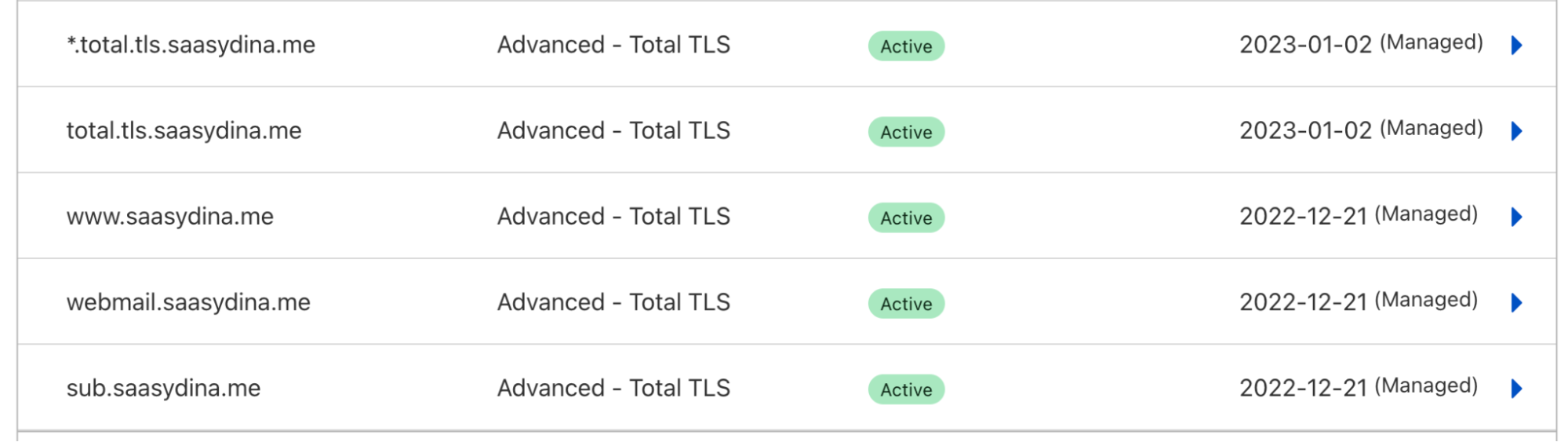
Total TLS is a one-click button that signals Cloudflare to automatically issue TLS certificates for every proxied DNS record in your domain. Once enabled, Cloudflare will issue individual certificates for every proxied hostname. This way, you can add as many DNS records and subdomains as you need to, without worrying about whether they’ll be covered by a TLS certificate.

If you have a DNS record for a.b.example.com, we’ll issue a TLS certificate with the hostname a.b.example.com. If you have a wildcard record for *.a.b.example.com then we’ll issue a TLS certificate for “*.a.b.example.com”. Here’s an example of what this will look like in the Edge Certificates table of the dashboard:

Total TLS: one-click TLS for every hostname you have

Available now

Total TLS is now available to use as a part of Advanced Certificate Manager for domains that use Cloudflare as an Authoritative DNS provider. One of the superpowers of having Cloudflare as your DNS provider is that we’ll always add the proper Domain Control Validation (DCV) records on your behalf to ensure successful certificate issuance and renewal.

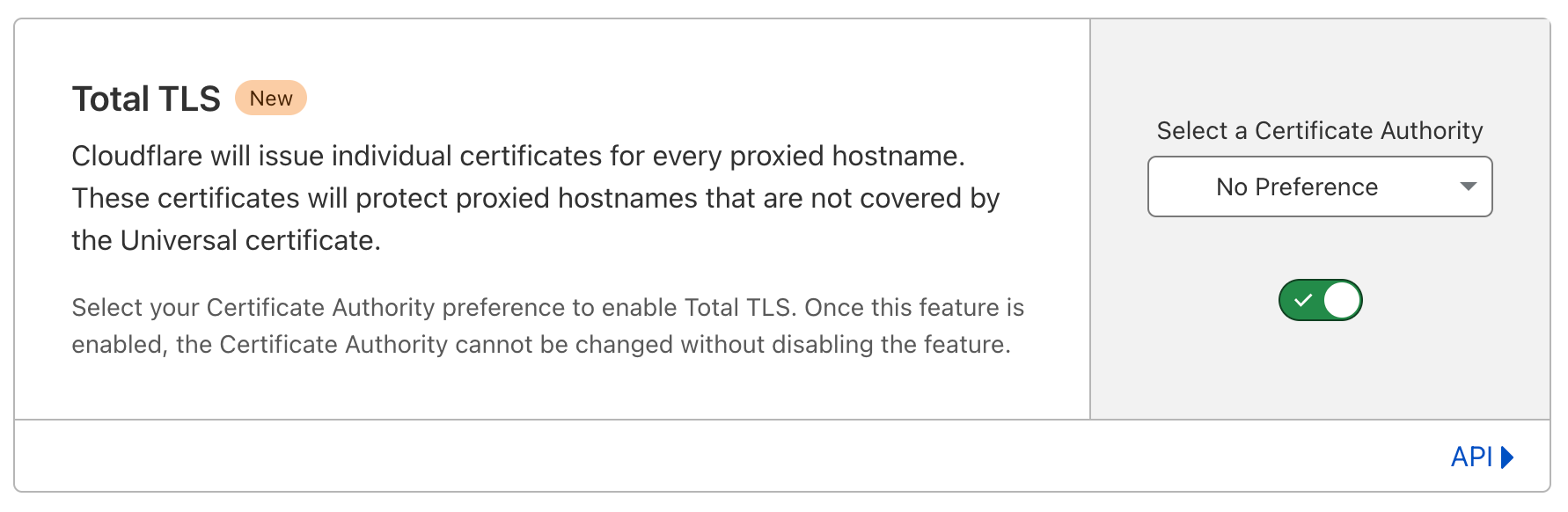
Enabling Total TLS is easy — you can do it through the Cloudflare dashboard or via API. In the SSL/TLS tab of the Cloudflare dashboard, navigate to Total TLS. There, choose the issuing CA — Let’s Encrypt, Google Trust Services, or No Preference, if you’d like Cloudflare to select the CA on your behalf then click on the toggle to enable the feature.

Total TLS: one-click TLS for every hostname you have

But that’s not all…

One pain point that we wanted to address for all customers was visibility. From looking at support tickets and talking to customers, one of the things that we realized was that customers don’t always know whether their domain is covered by a TLS certificate —  a simple oversight that can result in downtime or errors.

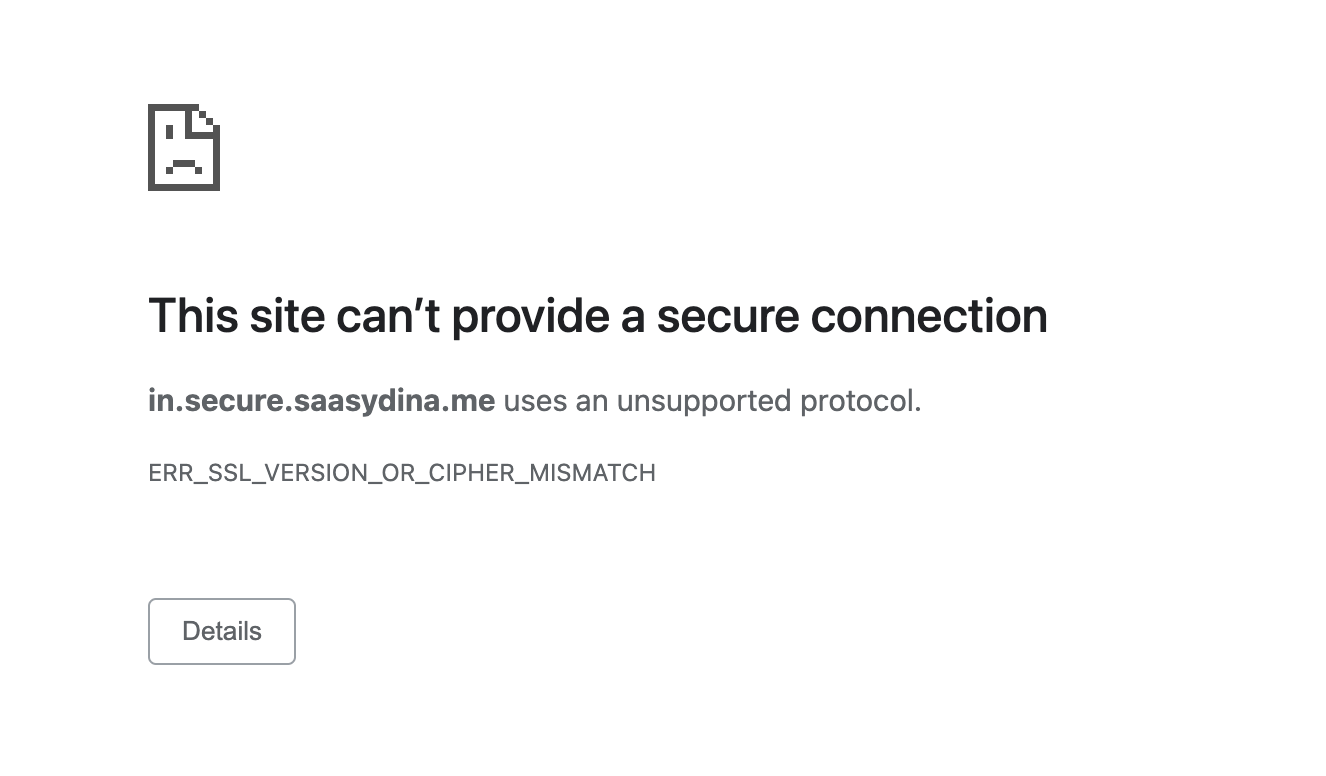
To prevent this from happening, we are now going to warn every customer if we see that the proxied DNS record that they’re creating, viewing, or editing doesn’t have a TLS certificate covering it. This way, our customers can get a TLS certificate issued before the hostname becomes publicly available, preventing visitors from encountering this error:

Total TLS: one-click TLS for every hostname you have

Join the mission

At Cloudflare, we love building products that help secure all Internet properties. Interested in achieving this mission with us? Join the team!

Zero Trust for SaaS: Deploying mTLS on custom hostnames

Post Syndicated from Dina Kozlov original https://blog.cloudflare.com/zero-trust-for-saas-deploying-mtls-on-custom-hostnames/

Zero Trust for SaaS: Deploying mTLS on custom hostnames

Cloudflare has a large base of Software-as-a-Service (SaaS) customers who manage thousands or millions of their customers’ domains that use their SaaS service. We have helped those SaaS providers grow by extending our infrastructure and services to their customer’s domains through a product called Cloudflare for SaaS. Today, we’re excited to give our SaaS providers a new tool that will help their customers add an extra layer of security: they can now enable mutual TLS authentication on their customer’s domains through our Access product.

Primer on Mutual TLS

When you connect to a website, you should see a lock icon in the address bar — that’s your browser telling you that you’re connecting to a website over a secure connection and that the website has a valid public TLS certificate. TLS certificates keep Internet traffic encrypted using a public/private key pair to encrypt and decrypt traffic. They also provide authentication, proving to clients that they are connecting to the correct server.

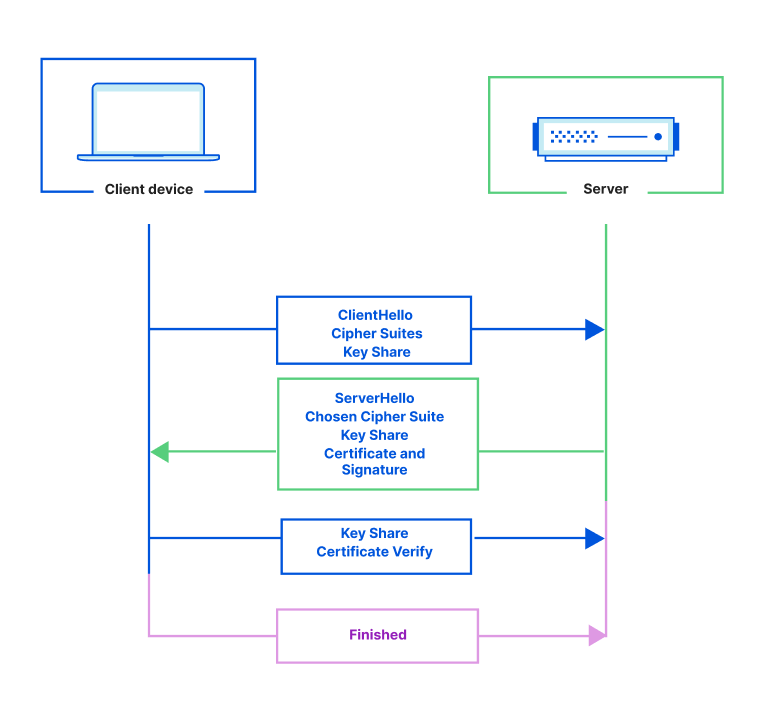
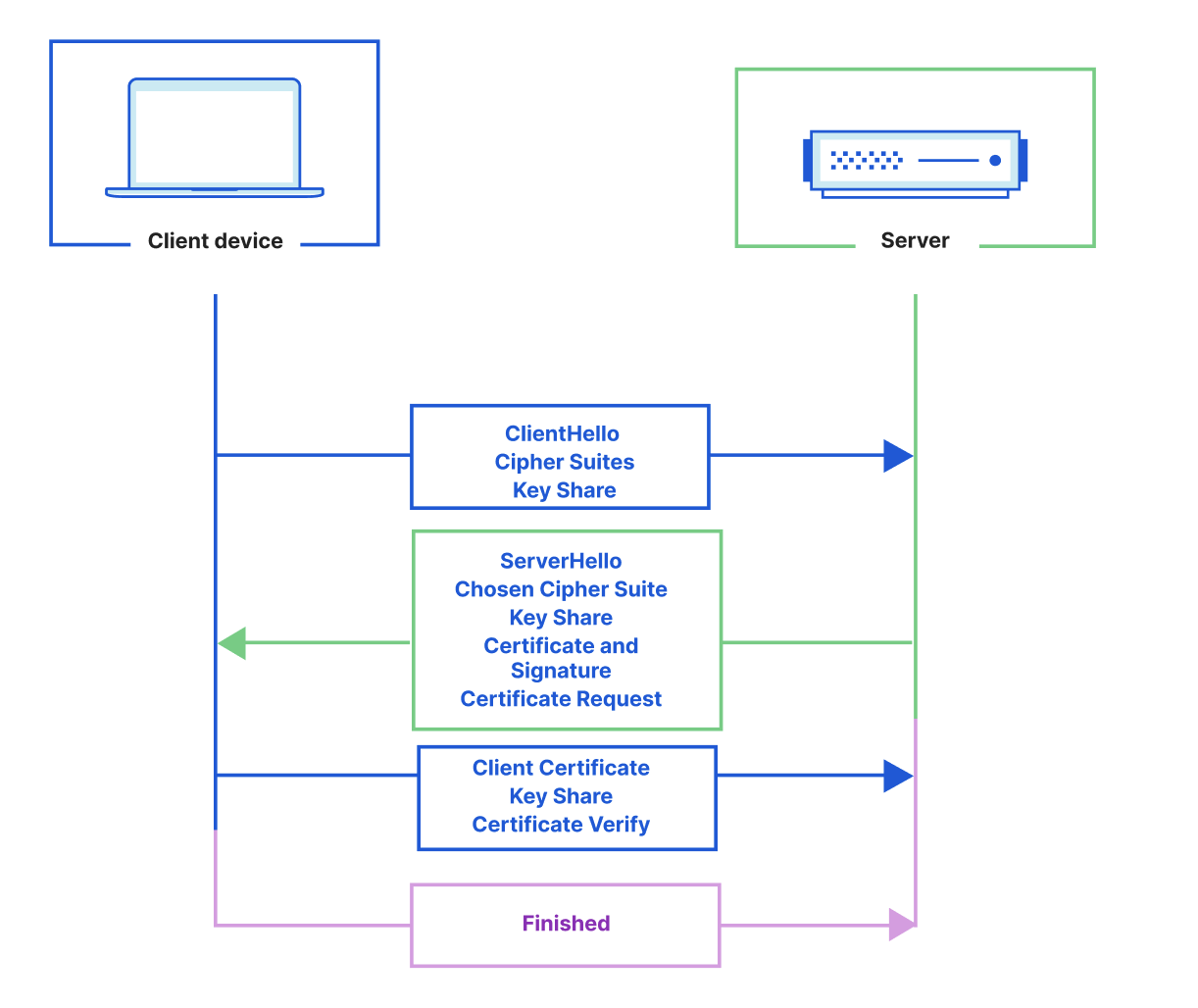
To make a secure connection, a TLS handshake needs to take place. During the handshake, the client and the server exchange cryptographic keys, the client authenticates the identity of the server, and both the client and the server generate session keys that are later used to encrypt traffic.

A TLS handshake looks like this:

Zero Trust for SaaS: Deploying mTLS on custom hostnames

In a TLS handshake, the client always validates the certificate that is served by the server to make sure that it’s sending requests to the right destination. In the same way that the client needs to authenticate the identity of the server, sometimes the server needs to authenticate the client — to ensure that only authorized clients are sending requests to the server.

Let’s say that you’re managing a few services: service A writes information to a database. This database is absolutely crucial and should only have entries submitted by service A. Now, what if you have a bug in your system and service B accidentally makes a write call to the database?

You need something that checks whether a service is authorized to make calls to your database — like a bouncer. A bouncer has a VIP list — they can check people’s IDs against the list to see whether they’re allowed to enter a venue. Servers can use a similar model, one that uses TLS certificates as a form of ID.

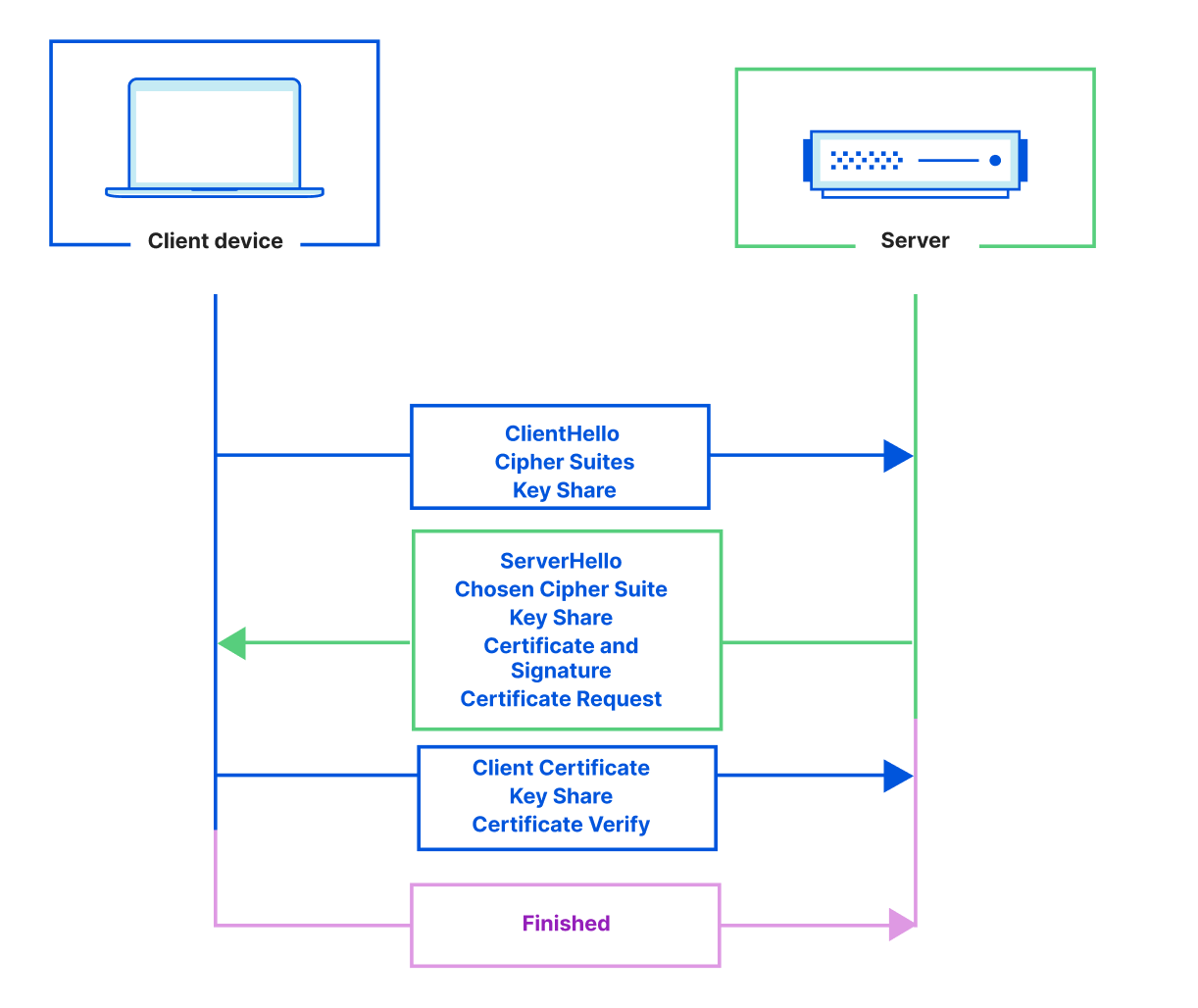
In the same way that a bouncer has a VIP list, a server can have a Certificate Authority (CA) Root from which they issue certificates. Certificates issued from the CA Root are then provisioned onto clients. These client certificates can then be used to identify and authorize the client. As long as a client presents a valid certificate — one that the server can validate against the Root CA, it’s allowed to make requests. If a client doesn’t present a client certificate (isn’t on the VIP list) or presents an unauthorized client certificate, then the server can choose to reject the request. This process of validating client and server certificates is called mutual TLS authentication (mTLS) and is done during the TLS handshake.

When mTLS isn’t used, only the server is responsible for presenting a certificate, which the client verifies. With mTLS, both the client and the server present and validate one another’s certificates, pictured below.

Zero Trust for SaaS: Deploying mTLS on custom hostnames

mTLS + Access = Zero Trust

A few years ago, we added mTLS support to our Access product, allowing customers to enable a Zero Trust policy on their applications. Access customers can deploy a policy that dictates that all clients must present a valid certificate when making a request. That means that requests made without a valid certificate — usually from unauthorized clients — will be blocked, adding an extra layer of protection. Cloudflare has allowed customers to configure mTLS on their Cloudflare domains by setting up Access policies. The only caveat was that to use this feature, you had to be the owner of the domain. Now, what if you’re not the owner of a domain, but you do manage that domain’s origin? This is the case for a large base of our customers, the SaaS providers that extend their services to their customers’ domains that they do not own.

Extending Cloudflare benefits through SaaS providers

Cloudflare for SaaS enables SaaS providers to extend the benefits of the Cloudflare network to their customers’ domains. These domains are not owned by the SaaS provider, but they do use the SaaS provider’s service, routing traffic back to the SaaS provider’s origin.

By doing this, SaaS providers take on the responsibility of providing their customers with the highest uptime, lightning fast performance, and unparalleled security — something they can easily extend to their customers through Cloudflare.

Cloudflare for SaaS actually started out as SSL for SaaS. We built SSL for SaaS to give SaaS providers the ability to issue TLS certificates for their customers, keeping the SaaS provider’s customers safe and secure.

Since then, our SaaS customers have come to us with a new request: extend the mTLS support that we built out for our direct customers, but to their customers.

Why would SaaS providers want to use mTLS?

As a SaaS provider, there’s a wide range of services that you can provide. Some of these services require higher security controls than others.

Let’s say that the SaaS solution that you’re building is a payment processor. Each customer gets its own API endpoint that their users send requests to, for example, pay.<business_name>.com. As a payment processor, you don’t want any client or device to make requests to your service, instead you only want authorized devices to do so — mTLS does exactly that.

As the SaaS provider, you can configure a Root CA for each of your customers’ API endpoints. Then, have each Root CA issue client certificates that will be installed on authorized devices. Once the client certificates have been installed, all that is left is enforcing a check for valid certificates.

To recap, by doing this, as a SaaS provider, your customers can now ensure that requests bound for their payment processing API endpoint only come from valid devices. In addition, by deploying individual Root CAs for each customer, you also prevent clients that are authorized to make requests to one customers’ API endpoint from making requests to another customers’ API endpoint when they are not authorized to do so.

How can you set this up with Cloudflare?

As a SaaS provider, configure Cloudflare for SaaS and add your customer’s domains as Custom Hostnames. Then, in the Cloudflare for Teams dashboard, add mTLS authentication with a few clicks.

This feature is currently in Beta and is available for Enterprise customers to use. If you have any feedback, please let your Account Team know.

Security for SaaS providers

Post Syndicated from Dina Kozlov original https://blog.cloudflare.com/waf-for-saas/

Security for SaaS providers

Security for SaaS providers

Some of the largest Software-as-a-Service (SaaS) providers use Cloudflare as the underlying infrastructure to provide their customers with fast loading times, unparalleled redundancy, and the strongest security — all through our Cloudflare for SaaS product. Today, we’re excited to give our SaaS providers new tools that will help them enhance the security of their customers’ applications.

For our Enterprise customers, we’re bringing WAF for SaaS — the ability for SaaS providers to easily create and deploy different sets of WAF rules for their customers. This gives SaaS providers the ability to segment customers into different groups based on their security requirements.

For developers who are getting their application off the ground, we’re thrilled to announce a Free tier of Cloudflare for SaaS for the Free, Pro, and Biz plans, giving our customers 100 custom hostnames free of charge to provision and test across their account. In addition to that, we want to make it easier for developers to scale their applications, so we’re happy to announce that we are lowering our custom hostname price from \$2 to \$0.10 a month.

But that’s not all! At Cloudflare, we believe security should be available for all. That’s why we’re extending a new selection of WAF rules to Free customers — giving all customers the ability to secure both their applications and their customers’.

Making SaaS infrastructure available to all

At Cloudflare, we take pride in our Free tier which gives any customer the ability to make use of our Network to stay secure and online. We are eager to extend the same support to customers looking to build a new SaaS offering, giving them a Free tier of Cloudflare for SaaS and allowing them to onboard 100 custom hostnames at no charge. The 100 custom hostnames will be automatically allocated to new and existing Cloudflare for SaaS customers. Beyond that, we are also dropping the custom hostname price from \$2 to \$0.10 a month, giving SaaS providers the power to onboard and scale their application. Existing Cloudflare for SaaS customers will see the updated custom hostname pricing reflected in their next billing cycle.

Cloudflare for SaaS started as a TLS certificate issuance product for SaaS providers. Now, we’re helping our customers go a step further in keeping their customers safe and secure.

Introducing WAF for SaaS

SaaS providers may have varying customer bases — from mom-and-pop shops to well established banks. No matter the customer, it’s important that as a SaaS provider you’re able to extend the best protection for your customers, regardless of their size.

At Cloudflare, we have spent years building out the best Web Application Firewall for our customers. From managed rules that offer advanced zero-day vulnerability protections to OWASP rules that block popular attack techniques, we have given our customers the best tools to keep themselves protected. Now, we want to hand off the tools to our SaaS providers who are responsible for keeping their customer base safe and secure.

One of the benefits of Cloudflare for SaaS is that SaaS providers can configure security rules and settings on their SaaS zone which their customers automatically inherit. But one size does not fit all, which is why we are excited to give Enterprise customers the power to create various sets of WAF rules that they can then extend as different security packages to their customers — giving end users differing levels of protection depending on their needs.

Getting Started

WAF for SaaS can be easily set up. We have an example below that shows how you can configure different buckets of WAF rules to your various customers.

There’s no limit to the number of rulesets that you can create, so feel free to create a handful of configurations for your customers, or deploy one ruleset per customer — whatever works for you!

End-to-end example

Step 1 – Define custom hostname

Cloudflare for SaaS customers define their customer’s domains by creating custom hostnames. Custom hostnames indicate which domains need to be routed to the SaaS provider’s origin. Custom hostnames can define specific domains, like example.com, or they can extend to wildcards like *.example.com which allows subdomains under example.com to get routed to the SaaS service. WAF for SaaS supports both types of custom hostnames, so that SaaS providers have flexibility in choosing the scope of their protection.

The first step is to create a custom hostname to define your customer’s domain. This can be done through the dashboard or the API.

curl -X POST "https://api.cloudflare.com/client/v4/zones/{zone:id}/custom_hostnames" \
     -H "X-Auth-Email: {email}" -H "X-Auth-Key: {key}"\
     -H "Content-Type: application/json" \
     --data '{

"Hostname":{“example.com”},
"Ssl":{wildcard: true}
}'

Step 2 – Associate custom metadata to a custom hostname

Next, create an association between the custom hostnames — your customer’s domain — and the firewall ruleset that you’d like to attach to it.

This is done by associating a JSON blob to a custom hostname. Our product, Custom Metadata allows customers to easily do this via API.

In the example below, a JSON blob with two fields (“customer_id” and “security_level”) will be associated to each request for *.example.com and example.com.

There is no predetermined schema for custom metadata. Field names and structure are fully customisable based on our customer’s needs. In this example, we have chosen the tag “security_level” to which we expect to assign three values (low, medium or high). These will, in turn, trigger three different sets of rules.

curl -sXPATCH "https://api.cloudflare.com/client/v4/zones/{zone:id}/custom_hostnames/{custom_hostname:id}"\
    -H "X-Auth-Email: {email}" -H "X-Auth-Key: {key}"\
    -H "Content-Type: application/json"\
    -d '{
"Custom_metadata":{
"customer_id":"12345",
“security_level”: “low”
}
}'

Step 3 – Trigger security products based on tags

Finally, you can trigger a rule based on the custom hostname. The custom metadata field e.g. “security_level” is available in the Ruleset Engine where the WAF runs. In this example, “security_level” can be used to trigger different configurations of products such as WAF, Firewall Rules, Advanced Rate Limiting and Transform Rules.

Rules can be built through the dashboard or via the API, as shown below. Here, a rate limiting rule is triggered on traffic with “security_level” set to low.

curl -X PUT "https://api.cloudflare.com/client/v4/zones/{zone:id}/rulesets/phases/http_ratelimit/entrypoint" \
    -H "X-Auth-Email: {email}" -H "X-Auth-Key: {key}"\
    -H "Content-Type: application/json"\
    -d '{

"rules": [
              {
                "action": "block",
                "ratelimit": {
                  "characteristics": [
                    "cf.colo.id",
                    "ip.src"
                  ],
                  "period": 10,
                  "requests_per_period": 2,
                  "mitigation_timeout": 60
                },
                "expression": "lookup_json_string(cf.hostname.metadata, \"security_level\") eq \"low\" and http.request.uri contains \"login\""
              }
            ]
          }}'

If you’d like to learn more about our Advanced Rate Limiting rules, check out our documentation.

Security for SaaS providers

Conclusion

We’re excited to be the provider for our SaaS customers’ infrastructure needs. From custom domains to TLS certificates to Web Application Firewall, we’re here to help. Sign up for Cloudflare for SaaS today, or if you’re an Enterprise customer, reach out to your account team to get started with WAF for SaaS.

Introducing: Backup Certificates

Post Syndicated from Dina Kozlov original https://blog.cloudflare.com/introducing-backup-certificates/

Introducing: Backup Certificates

At Cloudflare, we pride ourselves in giving every customer the ability to provision a TLS certificate for their Internet application — for free. Today, we are responsible for managing the certificate lifecycle for almost 45 million certificates from issuance to deployment to renewal. As we build out the most resilient, robust platform, we want it to be “future-proof” and resilient against events we can’t predict.

Events that cause us to re-issue certificates for our customers, like key compromises, vulnerabilities, and mass revocations require immediate action. Otherwise, customers can be left insecure or offline. When one of these events happens, we want to be ready to mitigate impact immediately. But how?

By having a backup certificate ready to deploy — wrapped with a different private key and issued from a different Certificate Authority than the primary certificate that we serve.

Introducing: Backup Certificates

Events that lead to certificate re-issuance

Cloudflare re-issues certificates every day — we call this a certificate renewal. Because certificates come with an expiration date, when Cloudflare sees that a certificate is expiring soon, we initiate a new certificate renewal order. This way, by the time the certificate expires, we already have an updated certificate deployed and ready to use for TLS termination.

Unfortunately, not all certificate renewals are initiated by the expiration date. Sometimes, unforeseeable events like key compromises can lead to certificate renewals. This is because a new key needs to be issued, and therefore a corresponding certificate does as well.

Key Compromises

A key compromise is when an unauthorized person or system obtains the private key that is used to encrypt and decrypt secret information — security personnel’s worst nightmare. Key compromises can be the result of a vulnerability, such as Heartbleed, where a bug in a system can cause the private key to be leaked. They can also be the result of malicious actions, such as a rogue employee accessing unauthorized information. In the event of a key compromise, it’s crucial that (1) new private keys are immediately issued, (2) new certificates are deployed, and (3) the old certificates are revoked.

The Heartbleed Vulnerability

In 2014, the Heartbleed vulnerability was exposed. It allowed attackers to extract the TLS certificate private key for any server that was running the affected version of OpenSSL, a popular encryption library. We patched the bug and then as a precaution, quickly reissued private keys and TLS certificates belonging to all of our customers, even though none of our keys were leaked. Cloudflare’s ability to act quickly protected our customers’ data from being exposed.

Heartbleed was a wake-up call. At the time, Cloudflare’s scale was a magnitude smaller. A similar vulnerability at today’s scale would take us weeks, not hours to re-issue all of our customers certificates.

Now, with backup certificates, we don’t need to worry about initiating a mass re-issuance in a small time frame. Instead, customers will already have a certificate that we’ll be able to instantly deploy. Not just that, but the backup certificate will also be wrapped with a different key than the primary certificate, preventing it from being impacted by a key compromise.

Key compromises are one of the main reasons certificates need to be re-issued at scale. But other events can prompt re-issuance as well, including mass revocations by Certificate Authorities.

Mass Revocations from CAs

Today, the Certificate Authority/Browser Forum (CA/B Forum) is the governing body that sets the rules and standards for certificates. One of the Baseline Requirements set by the CA/B Forum states that Certificate Authorities are required to revoke certificates whose keys are at risk of being compromised within 24 hours. For less immediate issues, such as certificate misuse or violation of a CA’s Certificate Policy, certificates need to be revoked within five days. In both scenarios, certificates will be revoked by the CA in a short timeframe and immediate re-issuance of certificates is required.

While mass revocations aren’t commonly initiated by CAs, there have been a few occurrences throughout the last few years. Recently, Let’s Encrypt had to revoke roughly 2.7 million certificates when they found a non-compliance in their implementation of a DCV challenge. In this case, Cloudflare customers were unaffected.

Another time, one of the Certificate Authorities that we use found that they were renewing certificates based on validation tokens that did not comply with the CA/B Forum standards. This caused them to invoke a mass revocation, impacting about five thousand Cloudflare-managed domains. We worked with our customers and the CA to issue new certificates before the revocation, resulting in minimal impact.

We understand that mistakes happen, and we have been lucky enough that as these issues have come up, our engineering teams were able to mitigate quickly so that no customers were impacted. But that’s not enough: our systems need to be future-proof so that a revocation of 45 million certificates will have no impact on our customers. With backup certificates, we’ll be ready for a mass re-issuance, no matter the scale.

To be resilient against mass revocations initiated by our CAs, we are going to issue every backup certificate from a different CA than the primary certificate. This will add a layer of protection if one of our CAs will have to invoke a mass revocation — something that when initiated, is a ticking time bomb.

Challenges when Renewing Certificates

Scale: With great power, comes great responsibility

When the Heartbleed vulnerability was exposed, we had to re-issue about 100,000 certificates. At the time, this wasn’t a challenge for Cloudflare. Now, we are responsible for tens of millions of certificates. Even if our systems are able to handle this scale, we rely on our Certificate Authority partners to be able to handle it as well. In the case of an emergency, we don’t want to rely on systems that we do not control. That’s why it’s important for us to issue the certificates ahead of time, so that during a disaster, all we need to worry about is getting the backup certificates deployed.

Manual intervention for completing DCV

Another challenge that comes with re-issuing certificates is Domain Control Validation (DCV). DCV is a check used to validate the ownership of a domain before a Certificate Authority can issue a certificate for it. When customers onboard to Cloudflare, they can either delegate Cloudflare to be their DNS provider, or they can choose to use Cloudflare as a proxy while maintaining their current DNS provider.

When Cloudflare acts as the DNS provider for a domain, we can add Domain Control Validation (DCV) records on our customer’s behalf. This makes the certificate issuance and renewal process much simpler.

Domains that don’t use Cloudflare as their DNS provider — we call them partial zones — have to rely on other methods for completing DCV. When those domains proxy their traffic through us, we can complete HTTP DCV on their behalf, serving the HTTP DCV token from our Edge. However, customers that want their certificate issued before proxying their traffic need to manually complete DCV. In an event where Cloudflare has to re-issue thousands or millions of certificates, but cannot complete DCV on behalf of the customer, manual intervention will be required. While completing DCV is not an arduous task, it’s not something that we should rely on our customers to do in an emergency, when they have a small time frame, with high risk involved.

This is where backup certificates come into play. From now on, every certificate issuance will fire two orders: one for a certificate from the primary CA and one for the backup certificate. When we can complete the DCV on behalf of the customer, we will do so for both CAs.

Today, we’re only issuing backup certificates for domains that use Cloudflare as an Authoritative DNS provider. In the future, we’ll order backup certificates for partial zones. That means that for backup certificates for which we are unable to complete DCV, we will give customers the corresponding DCV records to get the certificate issued.

Backup Certificates Deployment Plan

We are happy to announce that Cloudflare has started deploying backup certificates on Universal Certificate orders for Free customers that use Cloudflare as an Authoritative DNS provider. We have been slowly ramping up the number of backup certificate orders and in the next few weeks, we expect every new Universal certificate pack order initiated on a Free, Pro, or Biz account to include a backup certificate, wrapped with a different key and issued from a different CA than the primary certificate.

At the end of April we will start issuing backup certificates for our Enterprise customers. If you’re an Enterprise customer and have any questions about backup certificates, please reach out to your Account Team.

Next Up: Backup Certificates for All

Today, Universal certificates make up 72% of the certificates in our pipeline. But we want full coverage! That’s why our team will continue building out our backup certificates pipeline to support Advanced Certificates and SSL for SaaS certificates. In the future, we will also issue backup certificates for certificates that our customers upload themselves, so they can have a backup they can rely on.

In addition, we will continue to improve our pipeline to make the deployment of backup certificates instantaneous — leaving our customers secure and online in an emergency.

At Cloudflare, our mission is to help build a better Internet. With backup certificates, we’re helping build a secure, reliable Internet that’s ready for any disaster. Interested in helping us out? We’re hiring.

Cloudflare for SaaS for All, now Generally Available!

Post Syndicated from Dina Kozlov original https://blog.cloudflare.com/cloudflare-for-saas-for-all-now-generally-available/

Cloudflare for SaaS for All, now Generally Available!

Cloudflare for SaaS for All, now Generally Available!

During Developer Week a few months ago, we opened up the Beta for Cloudflare for SaaS: a one-stop shop for SaaS providers looking to provide fast load times, unparalleled redundancy, and the strongest security to their customers.

Since then, we’ve seen numerous developers integrate with our technology, allowing them to spend their time building out their solution instead of focusing on the burdens of running a fast, secure, and scalable infrastructure — after all, that’s what we’re here for.

Today, we are very excited to announce that Cloudflare for SaaS is generally available, so that every customer, big and small, can use Cloudflare for SaaS to continue scaling and building their SaaS business.

What is Cloudflare for SaaS?

If you’re running a SaaS company, you have customers that are fully reliant on you for your service. That means you’re responsible for keeping their domain fast, secure, and protected. But this isn’t simple. There’s a long checklist you need to get through to put a solution in your customers’ hands:

  • Set up an origin server
  • Encrypt your customers’ traffic
  • Keep your customers online
  • Boost the performance of global customers
  • Support vanity domains
  • Protect against attacks and bots
  • Scale for growth
  • Provide insights and analytics

And on top of that, you need to also focus on building out your solution and your business. As a developer or startup with limited resources, this can delay your product launch by weeks or months.

That’s what we’re here to help with! We have numerous engineering teams whose sole focus is to work on products that take care of each one of these tasks, so you don’t have to!

The Cloudflare solution:

  • Set up an origin server  → Workers
  • Encrypt your customers’ traffic →  SSL for SaaS
  • Keep your customers online → Cloudflare’s global Anycast network
  • Boost the performance of global customers → Argo Smart Routing/Cache
  • Support vanity domains → Custom Hostnames
  • Protect against attacks and bots → WAF and Bot Management
  • Scale for growth → Workers
  • Provide insights and analytics → Custom Hostname Analytics

Pricing, Made for Developers

Starting today, Cloudflare for SaaS is available to purchase on Free, Pro, and Business plans. We wanted to make sure that the pricing made sense for developers. At the time of building, you don’t know how many customers you’ll have, so we wanted to offer flexibility by keeping the pricing as simple as possible: only pay for the customers you use.

Each customer domain using the service is called a Custom Hostname. For each Custom Hostname, we automatically provision a TLS certificate. But not just that!  Beyond the TLS certificate, each of your Custom Hostnames inherits the full suite of Cloudflare products that you set up on your SaaS zone. From Bot Management to Argo Smart Routing, you can extend these add-ons that protect and accelerate your domain to your customers.

Custom Hostnames cost two dollars per month. We will only charge you after each Custom Hostname has been onboarded, adjusted according to when you created it. That means that if you created 10 Custom Hostnames at the start of the month and 10 Custom Hostnames halfway through, at the end of the month you will be billed $30.

This way, you’re only charged for the Custom Hostnames that you provision. It’s also a great incentive to make sure you clean up after your churned customers.

If you’re an Enterprise customer and want to learn more about the benefits that you can from Cloudflare for SaaS, make sure you check out our blog post about the latest developments.

Show us what you’re building!

During the beta alone, we’ve seen incredible projects built out on the platform. We wanted to showcase these developers to show you what’s possible. And even better, some of these have been built on our Workers platform! We’d love to see what you’re working on. Join our Discord channel and showcase your work! Have feature requests for us? Let us know!

mmm.page: Simple Personal Websites

Cloudflare for SaaS for All, now Generally Available!

mmm.page is a drag-and-drop website builder that makes it dead simple to create auto-responsive, collage-like websites: websites with overlapping text, images, GIFs, YouTube videos, Spotify embeds, and (a lot) more. To make it easier, all the standard website tedium — uptime, usability, performance, reliability, responsiveness, SEO, etc. — are handled under the hood so all you have to worry about is adding content and arranging it how you want.

Under their hood is Cloudflare. Cloudflare’s CDN allows both the flexibility of server-side pages as well as the instant loading times of static pages — not to mention an 80% reduction in server costs. Custom Hostnames alone saved months of development time by handling domain names and SSL management (which are otherwise tricky to get perfect and reliable).

They’ve used Workers for increasingly more tasks that would’ve otherwise taken an order of magnitude more time if implemented with their current backend monolith — the ease of deployment and comparatively low cost of Workers is something that keeps them coming back.

The longer-term hope is for pages to be used as a sort of beacon signal, an easy-to-make yet unbounded way to express to others the things you’re interested in, especially for things that aren’t so easily describable or captured in words. They look forward to a world of a ton more DIY micro-sites. Cloudflare has been crucial in taking care of much of the difficult technical plumbing and giving them more time to work on designs and features that get them closer to this hope.

Lightfunnels

Cloudflare for SaaS for All, now Generally Available!

Lightfunnels is a performance driven e-commerce and lead generation platform. It focuses on delivering fast, reliable, and highly converting sales funnels to its users and their customers.

With Cloudflare for SaaS, Lightfunnels allows users to preserve their brand by easily connecting their own domain names with SSL to use on their funnels.

The platform handles large e-commerce traffic volume through Cloudflare Workers. This helps Lightfunnels serve pages from the closest edge to the customer, wherever they are in the world, allowing for blazing fast page load speeds.

Workers also come with a powerful caching API that eliminates a great percentage of back-end trips and reduces the stress on their servers.

“Our aim is to build the best performing e-commerce and lead generation platform on the market. Page load speeds play a significant role in performance. Using Cloudflare for SaaS along with Cloudflare Workers made building a reliable, secure, and fast infrastructure a breeze.”
Yassir Ennazk, Co-founder & CEO at Lightfunnels

Ventrata

Ventrata is a SaaS multi-channel booking platform for large attractions and tour operators. They power booking sites and B2B booking portals for clients that run on other domains. Cloudflare for SaaS has allowed them to leverage all of Cloudflare’s tools, including Firewall, image caching, Workers, and free TLS certificates on Custom Hostnames, while allowing their clients to keep full control of their brand. Their implementation involved just 4 lines of code without any infrastructure/DevOps help required, which would have been impossible before.

Currently a part of the Beta?

If you were accepted as a part of the Cloudflare for SaaS Beta, you will get a notice next week about migrating to the paid version.  

Help build a better Internet

Want to be a part of the Cloudflare team and work on the products that power Cloudflare for SaaS? We’re hiring!

Staging TLS Certificate: Make every deployment a safe deployment

Post Syndicated from Dina Kozlov original https://blog.cloudflare.com/staging-tls-certificate-every-deployment-safe-deployment/

Staging TLS Certificate: Make every deployment a safe deployment

Staging TLS Certificate: Make every deployment a safe deployment

We are excited to announce that Enterprise customers now have the ability to test custom uploaded certificates in a staging environment before pushing them to production.

With great power comes great responsibility

If you’re running a website or the API that’s behind a popular app, you know your users have high expectations: it can’t just be up and running; it also has to be fast and secure. One of the easiest and most standardized ways to secure connections is with the TLS protocol. To do that, you need to acquire a TLS certificate for your domain.

One way to get a certificate is by using a CDN provider, like Cloudflare. We make the process really easy by issuing certificates on your behalf. Not just that, but when your certificate is getting closer to its expiration date, we are responsible for re-issuing it. But, if you don’t want Cloudflare to issue the certificate on your behalf and want to obtain the certificate yourself, you can do so. You can either keep control of your private key, or generate a Certificate Signing Request (CSR) through Cloudflare, so we maintain the private key, but you can still use the certificate authority (CA) of your choice for the certificate. Once you get your certificate, you upload it to Cloudflare and voilà — your site is secure.

One of the downsides of obtaining your own certificate is that you’re in charge of its renewal, which comes with a great deal of responsibility. You have to ensure that any renewed certificate  will not cause TLS errors, causing your property to be unreachable by your users.

Now, you’re probably wondering, why is this so risky? What could go wrong?

It’s possible that when you renew a certificate, you forget to include one of your subdomains in the certificate. Another reason why your clients might see failures when you upload the new certificate is that some of those clients are pinning the old certificate.

The problem with pinning certificates

Certificate pinning allows Internet application owners to say “trust this certificate and no other” by pinning the certificate or public key to their service, or even to client devices. While this was originally intended to tighten security, certificate pinning has created many problems. We have seen customers shoot themselves in the foot with certificate pinning numerous times. There are a lot of things that could go wrong: you could pin the wrong certificate, or configure the wrong settings, which will bring your service down. It’s possible that you rely on a CDN for your certificate renewal and forgot to update your pin — again, blocking access to your service in the process. Alternatively, you can pin certificates to clients so that they refuse connections from servers that don’t have the same certificate. But when it comes to renewing that certificate, you have to make sure that your clients have the updated certificate, or they won’t be able to access your server. Instead, you can use tools like Cloudflare’s Certificate Transparency Monitoring which notifies you when certificates are being issued for your domain.

But, some of our customers do rely on this behavior. So for them, switching to a new certificate is a big change — one that can bring down their whole application. For this reason, they need to be able to test the new certificate to identify any problems that may occur before their customers see it.

A staging environment for certificate deployments

When it comes to your traffic, there are things you can’t predict. You can’t control if your customer’s browser is having a bad day, or if some ISP is having a network outage. When it comes to certificate deployment, the last thing you want is to be surprised. Imagine pushing out a new certificate, and realizing you’ve uploaded the wrong one only after customers complain they’ve lost access; or that you never updated your pin to your new certificate to begin with. Mistakes happen, but this type of outage can cause a lot of pain and lose you a lot of money and trust. The good news is that this is preventable.

We are giving customers the ability to find these problems before they’re encountered by real users. We’re doing this by giving customers the ability to test certificate deployment changes against a pair of staging IPs.

Imagine uploading a new certificate, finding any related problems, and fixing them in a way that doesn’t impact production traffic. That’s exactly what Staging Certificates allows you to do!

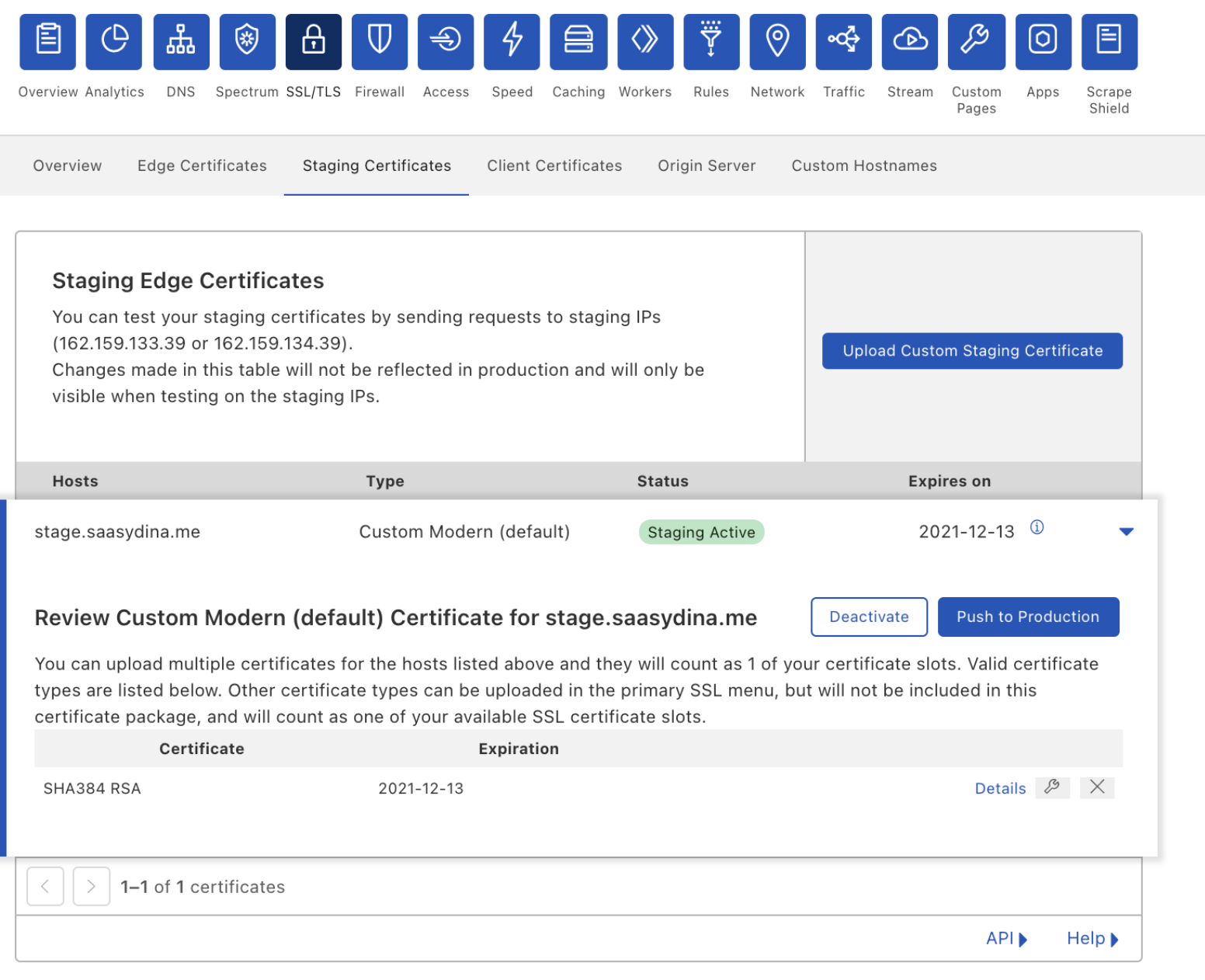
You can go to the Staging Certificates section under the SSL/TLS tab in the Cloudflare dashboard and upload a new certificate to our staging network. The staging network will replicate your production environment but will only be accessible through the Staging IPs.

Staging TLS Certificate: Make every deployment a safe deployment

Once you upload your certificate, you can make `curl` requests against the staging IPs to verify that it’s being served and that it covers all the hostnames that you need it to. If you’ve decided to pin your previous certificate, the staging environment helps you verify that your pins have been updated correctly and that TLS termination is successful.

Once you’re confident in your tests, you can push the certificate out to production.

Oh no, something went wrong

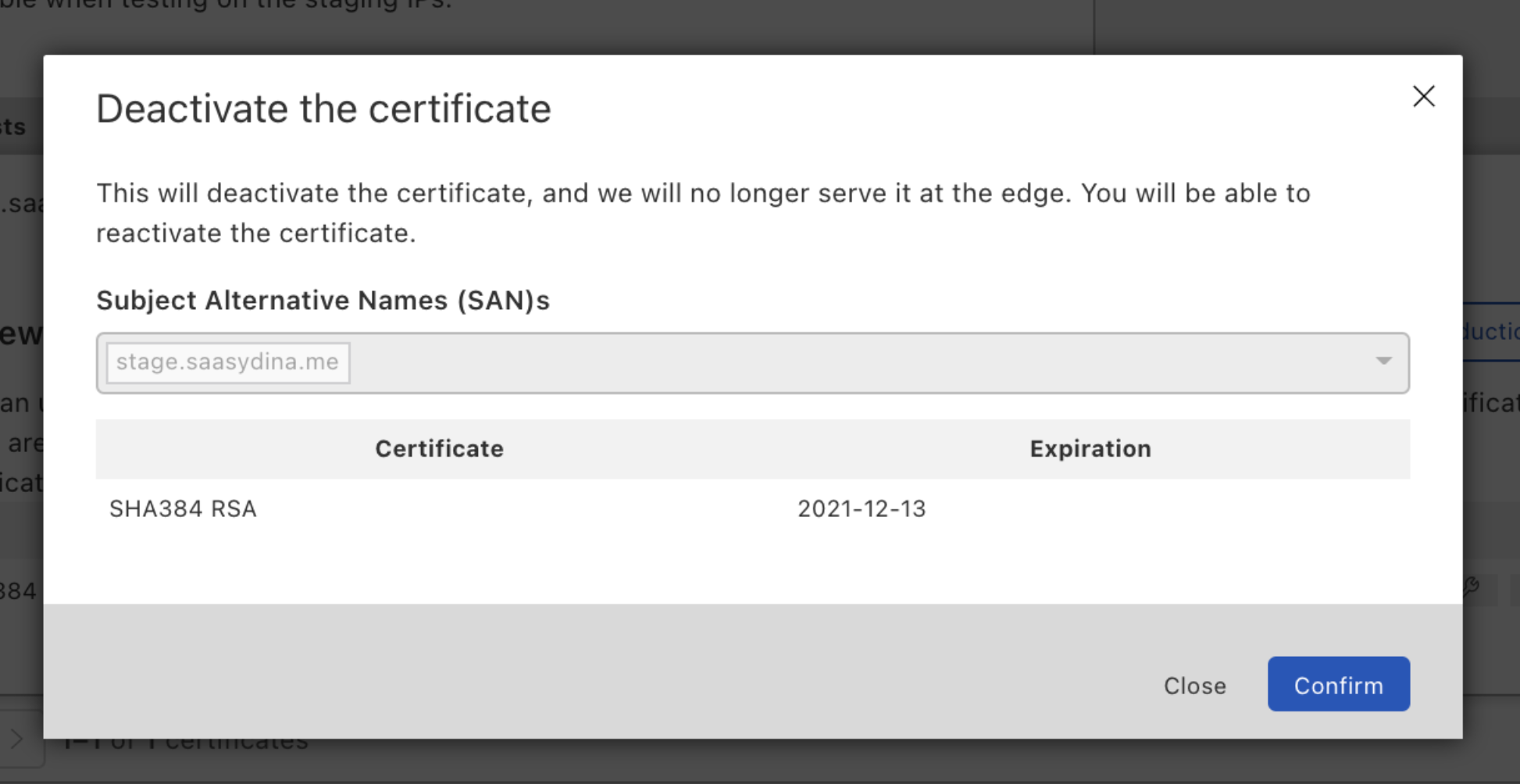
Mistakes happen. It’s possible that you found one client device whose pin you forgot to update. In that case, you can disable the certificate to quickly mitigate the problem by rolling back to the certificate that you were last serving.

Staging TLS Certificate: Make every deployment a safe deployment

What if you realize that this is a bigger issue, and you need more time to test? You can push the disabled certificate back to the staging environment, and when you’ve verified everything works correctly, push it back to production.

Staging changes: We’re just getting started

We want to de-risk every change you make. Staging your custom uploaded certificates is a start, but it doesn’t end there. In the future, we’ll allow you to stage certificate renewals for certificates issued through Cloudflare. We’re also planning to give customers the ability to test TLS configuration changes like minimum TLS or cipher suite settings.

If you’re interested in staying aware of these future developments, or you have some settings that you want to test in staging, reach out to your Account team and let them know!

Ready to test your next certificate deployment?

This feature is currently in Beta and available to Enterprise customers. If you want to use it, reach out to your Account team to get it enabled.

Introducing: Custom Hostname Analytics

Post Syndicated from Dina Kozlov original https://blog.cloudflare.com/introducing-custom-hostname-analytics/

Introducing: Custom Hostname Analytics

Introducing: Custom Hostname Analytics

In our last blog, we talked about how Cloudflare can help SaaS providers extend the benefits of our network to their customers. Today, we’re excited to announce that SaaS providers will now be able to give their customers visibility into what happens to their traffic when the customer onboards onto the SaaS provider, and inherently, onto the Cloudflare network.

As a SaaS provider, you want to see the analytics about the traffic bound for your service. Use it to see the global distribution of your customers, or to measure the success of your business. In addition to that, you want to provide the same insights to your individual customers. That’s exactly what Custom Hostname Analytics allows you to do!

The SaaS Setup

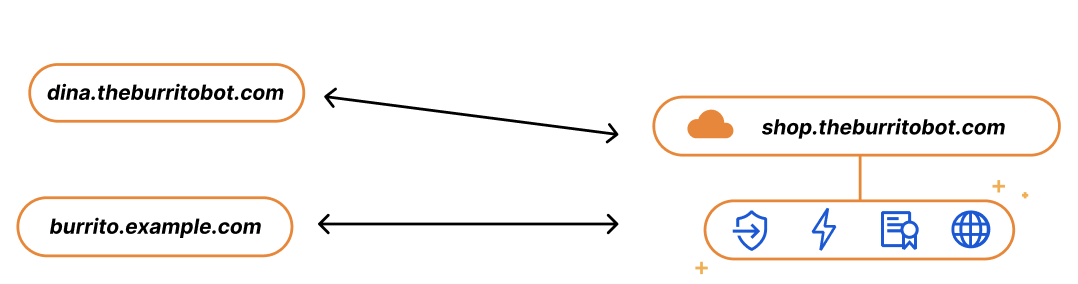
Imagine you run a SaaS service for burrito shops, called The Burrito Bot. You have your burrito service set up on shop.theburritobot.com and your customers can use your service either through a subdomain of your zone, i.e. dina.theburritobot.com, or through their own website e.g. burrito.example.com.

Introducing: Custom Hostname Analytics

When customers onboard to your burrito service, they become fully reliant on you to provide their website with the fastest load time, the best protection, and the highest uptime. Similarly, when SaaS providers onboard to Cloudflare, they expect the same — and we deliver. The easiest way that we show this to our customers is through analytics. We put ourselves in front of their website, blocking attacks and accelerating traffic. Then, through dashboards like Bot Analytics or Cache Analytics, we show insights about bad bots and low latency in real time.

In the same way that it’s our responsibility to show SaaS providers all the benefits we’re providing for their traffic, we think SaaS providers should be able to provide the same information to their customers.

Analytics for the SaaS Provider

As a SaaS provider, your infrastructure is your customers’ infrastructure, so you need to have visibility into the traffic of your service to be able to make business decisions. Being able to answer questions like “how many total requests am I getting on my service?”, “Which customer is transferring the most data?”, or “How many global customers do I have?” can help you figure out how to bill your customers or how and where to scale your infrastructure. With custom hostname analytics, you can get the full view of how customers are using your services through our Dashboard or API.

Introducing: Custom Hostname Analytics

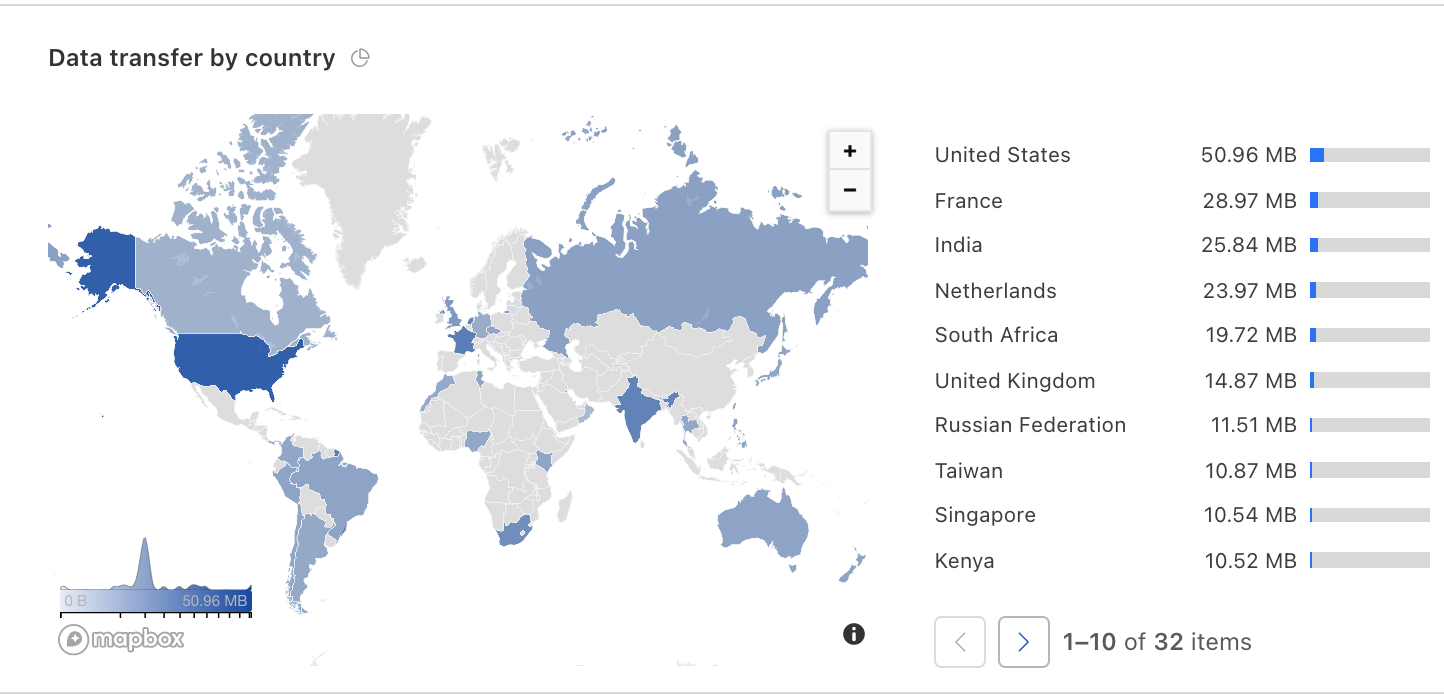
Here you can see that one custom hostname is using significantly more data transfer than the others, and you might want to charge them accordingly. Alternatively, you can look at the geographic breakdown of your customers. If it looks like burrito shops are growing in Europe, you might want to think about expanding your business there and adding new origins to serve that traffic.

Introducing: Custom Hostname Analytics

Analytics for your customers

In the same way that you want to see the breakdown of traffic bound for your service, your customers want to see the same information about their website.  They want to know how many page views they’re getting, if they’re having any bots ordering fake burritos, or how fast their website is. With custom hostname analytics, we’re giving SaaS providers the resources they need to present this data to their customers.

Build your own dashboards!

The most powerful way to use our technology would be to use our GraphQL Analytics API with the clientRequestHTTPHost field to get analytics for each of your customers’ domains. This will allow you to build your own dashboards and display the information that you feel is important to your customers.

Show your customer the bad traffic you’re blocking

Let’s say you’re using Cloudflare for SaaS and are extending Bot Management to your thousands of customers — wouldn’t you want to show them how much malicious traffic you’re keeping away from them?

You can do that!

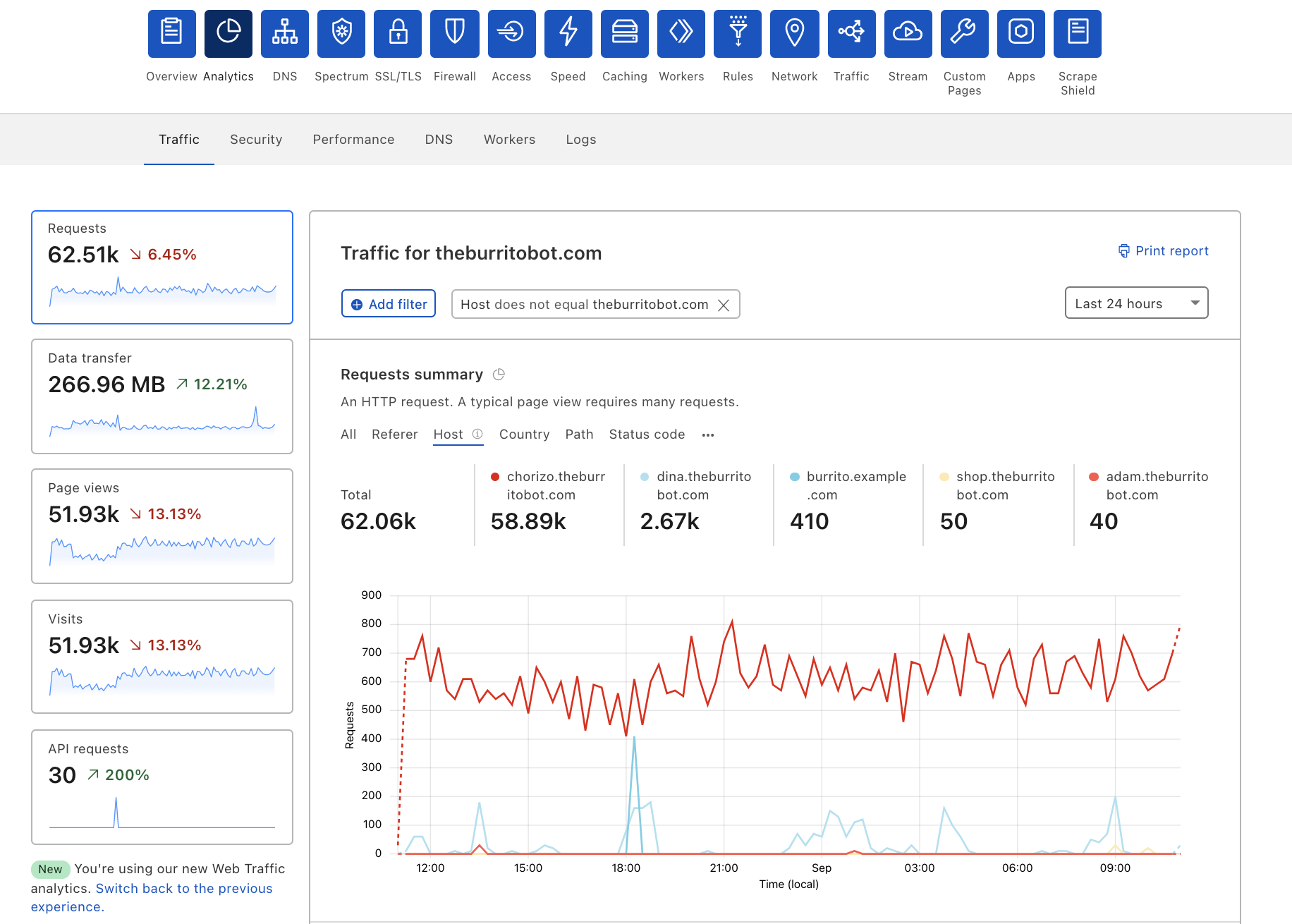
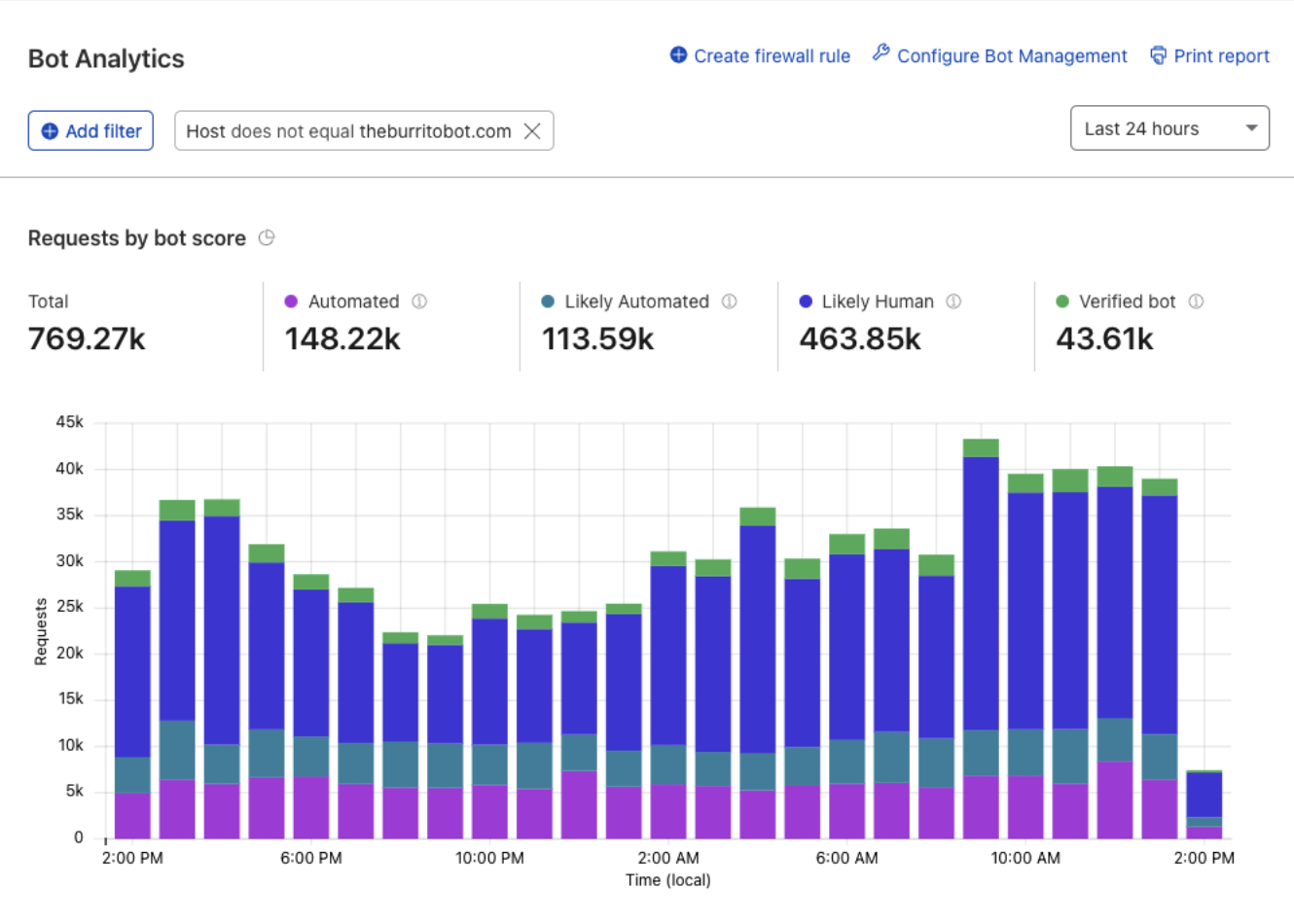
One way to see the analytics for your custom hostnames is in the Dashboard. You can either look up the total requests for an individual hostname or — by adding the filter Host does not equal theburritobot.com — total requests for all your custom hostnames.

Introducing: Custom Hostname Analytics

What else can I see?

You can use Custom Hostname analytics for just about everything that you can see for your own domain. From your firewall to bot protection, you can use any dataset with a clientRequestHTTPHost field for your custom hostname analytics.

Interested in trying this out?

Sign up for our Cloudflare for SaaS Beta. We are continuing to accept applicants and are excited to announce that General Availability is not too far away.

Share what you build

We’d love to see what kind of dashboards you build with our Analytics API. If you want to share what you’ve built, tweet at @Cloudflare and send us a screenshot!

What’s new with Cloudflare for SaaS?

Post Syndicated from Dina Kozlov original https://blog.cloudflare.com/whats-new-with-cloudflare-for-saas/

What’s new with Cloudflare for SaaS?

What’s new with Cloudflare for SaaS?

This past April, we announced the Cloudflare for SaaS Beta which makes our SSL for SaaS product available to everyone. This allows any customer — from first-time developers to large enterprises — to use Cloudflare for SaaS to extend our full product suite to their own customers. SSL for SaaS is the subset of Cloudflare for SaaS features that focus on a customer’s Public Key Infrastructure (PKI) needs.

Today, we’re excited to announce all the customizations that our team has been working on for our Enterprise customers — for both Cloudflare for SaaS and SSL for SaaS.

Let’s start with the basics — the common SaaS setup

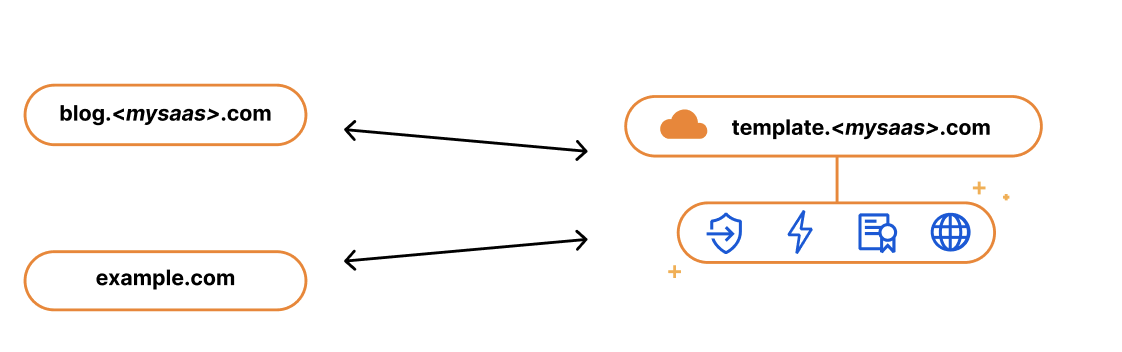
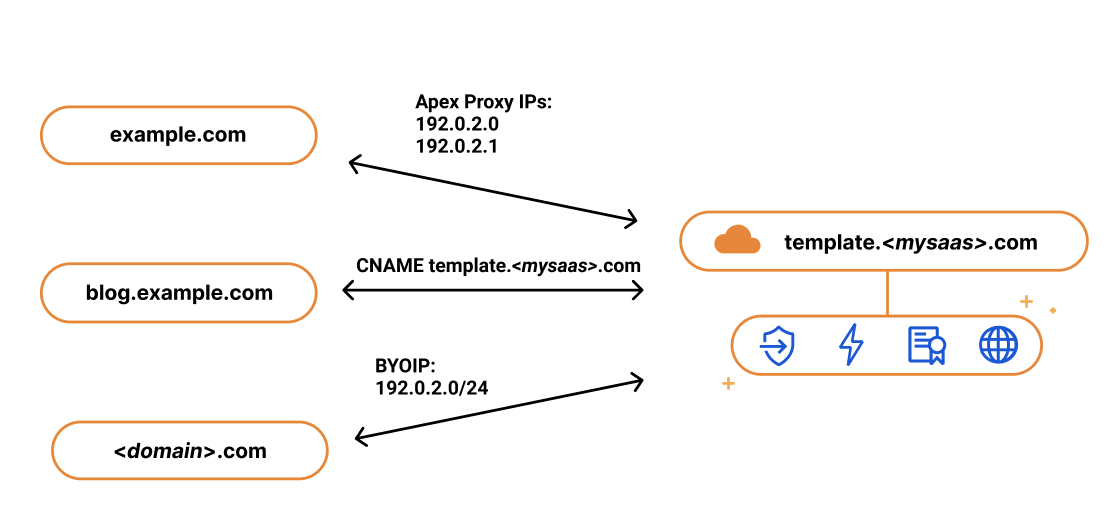
If you’re running a SaaS company, your solution might exist as a subdomain of your SaaS website, e.g. template.<mysaas>.com, but ideally, your solution would allow the customer to use their own vanity hostname for it, such as example.com.

The most common way to begin using a SaaS company’s service is to point a CNAME DNS record to the subdomain that the SaaS provider has created for your application. This ensures traffic gets to the right place, and it allows the SaaS provider to make infrastructure changes without involving your end customers.

What’s new with Cloudflare for SaaS?

We kept this in mind when we built our SSL for SaaS a few years ago. SSL for SaaS takes away the burden of certificate issuance and management from the SaaS provider by proxying traffic through Cloudflare’s edge. All the SaaS provider needs to do is onboard their zone to Cloudflare and ask their end customers to create a CNAME to the SaaS zone — something they were already doing.

The big benefit of giving your customers a CNAME record (instead of a fixed IP address) is that it gives you, the SaaS provider, more flexibility and control. It allows you to seamlessly change the IP address of your server in the background. For example, if your IP gets blocked by ISP providers, you can update that address on your customers’ behalf with a CNAME record. With a fixed A record, you rely on each of your customers to make a change.

While the CNAME record works great for most customers, some came back and wanted to bypass the limitation that CNAME records present. RFC 1912 states that CNAME records cannot coexist with other DNS records, so in most cases, you cannot have a CNAME at the root of your domain, e.g. example.com. Instead, the CNAME needs to exist at the subdomain level, i.e. www.example.com. Some DNS providers (including Cloudflare) bypass this restriction through a method called CNAME flattening.

Since SaaS providers have no control over the DNS provider that their customers are using, the feedback they got from their customers was that they wanted to use the apex of their zone and not the subdomain. So when our SaaS customers came back asking us for a solution, we delivered. We call it Apex Proxying.

Apex Proxying

For our SaaS customers who want to allow their customers to proxy their apex to their zone, regardless of which DNS provider they are using, we give them the option of Apex Proxying. Apex Proxying is an SSL for SaaS feature that gives SaaS providers a pair of IP addresses to provide to their customers when CNAME records do not work for them.

Cloudflare starts by allocating a dedicated set of IPs for the SaaS provider. The SaaS provider then gives their customers these IPs that they can add as A or AAAA DNS records, allowing them to proxy traffic directly from the apex of their zone.

While this works for most, some of our customers want more flexibility. They want to have multiple IPs that they can change, or they want to assign different sets of customers to different buckets of IPs. For those customers, we give them the option to bring their own IP range, so they control the IP allocation for their application.

What’s new with Cloudflare for SaaS?

Bring Your Own IPs

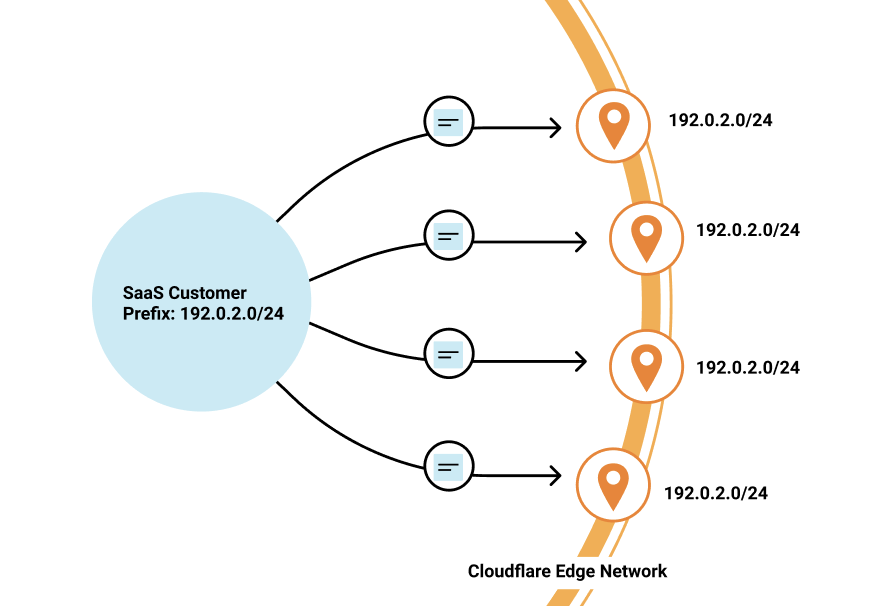
Last year, we announced Bring Your Own IP (BYOIP), which allows customers to bring their own IP range for Cloudflare to announce at our edge. One of the benefits of BYOIP is that it allows SaaS customers to allocate that range to their account and then, instead of having a few IPs that their customers can point to, they can distribute all the IPs in their range.

What’s new with Cloudflare for SaaS?

SaaS customers often require granular control of how their IPs are allocated to different zones that belong to different customers. With 256 IPs to use, you have the flexibility to either group customers together or to give them dedicated IPs. It’s up to you!

While we’re on the topic of grouping customers, let’s talk about how you might want to do this when sending traffic to your origin.

Custom Origin Support

When setting up Cloudflare for SaaS, you indicate your fallback origin, which defines the origin that all of your Custom Hostnames are routed to. This origin can be defined by an IP address or point to a load balancer defined in the zone. However, you might not want to route all customers to the same origin. Instead, you want to route different customers (or custom hostnames) to different origins — either because you want to group customers together or to help you scale the origins supporting your application.

Our Enterprise customers can now choose a custom origin that is not the default fallback origin for any of their Custom Hostnames. Traditionally, this has been done by emailing your account manager and requesting custom logic at Cloudflare’s edge, a very cumbersome and outdated practice. But now, customers can easily indicate this in the UI or in their API requests.

Wildcard Support

Oftentimes, SaaS providers have customers that don’t just want their domain to stay protected and encrypted, but also the subdomains that fall under it.

We wanted to give our Enterprise customers the flexibility to extend this benefit to their end customers by offering wildcard support for Custom Hostnames.

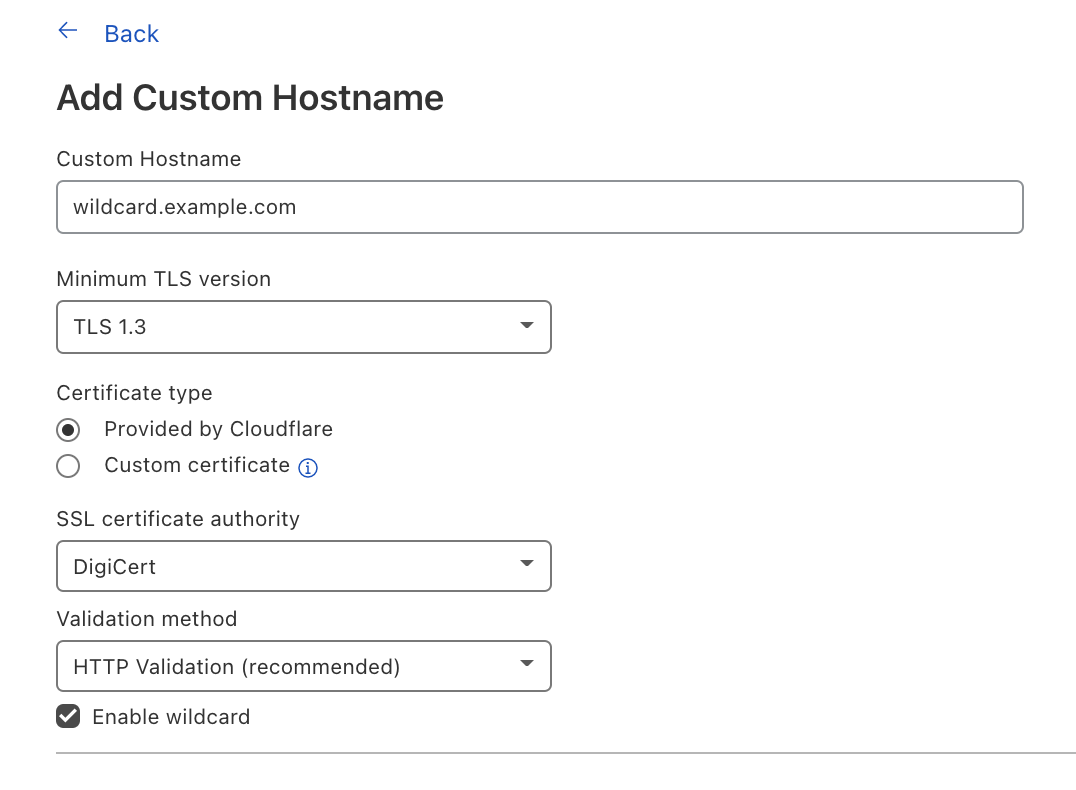
Wildcard Custom Hostnames extend the Custom Hostname’s configuration from a specific hostname — e.g. “blog.example.com” — to the next level of subdomains of that hostname, e.g. “*.blog.example.com”.

To create a Custom Hostname with a wildcard, you can either indicate Enable wildcard support when creating a Custom Hostname in the Cloudflare dashboard or when you’re creating a Custom Hostname through the API, indicate wildcard: “true”.

What’s new with Cloudflare for SaaS?

Now let’s switch gears to TLS certificate management and the improvements our team has been working on.

TLS Management for All

SSL for SaaS was built to reduce the burden of certificate management for SaaS providers. The initial functionality was meant to serve most customers and their need to issue, maintain, and renew certificates on their customers’ behalf. But one size does not fit all, and some of our customers have more specific needs for their certificate management — and we want to make sure we accommodate them.

CSR Support/Custom certs

One of the superpowers of SSL for SaaS is that it allows Cloudflare to manage all the certificate issuance and renewals on behalf of our customers and their customers. However, some customers want to allow their end customers to upload their own certificates.

For example, a bank may only trust certain certificate authorities (CAs) for their certificate issuance. Alternatively, the SaaS provider may have initially built out TLS support for their customers and now their customers expect that functionality to be available. Regardless of the reasoning, we have given our customers a few options that satisfy these requirements.

For customers who want to maintain control over their TLS private keys or give their customers the flexibility to use their certification authority (CA) of choice, we allow the SaaS provider to upload their customer’s certificate.

If you are a SaaS provider and one of your customers does not allow third parties to generate keys on their behalf, then you want to allow that customer to upload their own certificate. Cloudflare allows SaaS providers to upload their customers’ certificates to any of their custom hostnames — in just one API call!

Some SaaS providers never want a person to see private key material, but want to be able to use the CA of their choice. They can do so by generating a Certificate Signing Request (CSR) for their Custom Hostnames, and then either use those CSRs themselves to order certificates for their customers or relay the CSRs to their customers so that they can provision their own certificates. In either case, the SaaS provider is able to then upload the certificate for the Custom Hostname after the certificate has been issued from their customer’s CA for use at Cloudflare’s edge.

Custom Metadata

For our customers who need to customize their configuration to handle specific rules for their customer’s domains, they can do so by using Custom Metadata and Workers.

By adding metadata to an individual custom hostname and then deploying a Worker to read the data, you can use the Worker to customize per-hostname behavior.

Some customers use this functionality to add a customer_id field to each custom hostname that they then send in a request header to their origin. Another way to use this is to set headers like HTTP Strict Transport Security (HSTS) on a per-customer basis.

Saving the best for last: Analytics!

Tomorrow, we have a very special announcement about how you can now get more visibility into your customers’ traffic and — more importantly —  how you can share this information back to them.

Interested? Reach out!

If you’re an Enterprise customer, and you’re interested in any of these features, reach out to your account team to get access today!