All posts by Dr. Rahul Sharad Gaikwad

How to enhance your application resiliency using Amazon Q Developer

Post Syndicated from Dr. Rahul Sharad Gaikwad original https://aws.amazon.com/blogs/devops/how-to-enhance-your-application-resiliency-using-amazon-q-developer/

“Everything fails, all the time” – Werner Vogels, Amazon.com CTO

In today’s digital landscape, designing applications with resilience in mind is crucial. Resiliency is the ability of applications to handle failures gracefully, adapt to changing conditions, and recover swiftly from disruptions. By integrating resilience into your application architecture, you can minimize downtime, mitigate the impact of failures, and ensure continuous availability and performance for end-users.

Amazon Q Developer, a generative AI-powered assistant for software development lifecycle (SDLC), helps design resilient architectures and enhance application availability. It recommends best practices, analyzes code, and identifies potential failure points, serving as an expert companion to strengthen application architecture and boost system availability through the following key resiliency practices.

  • Resilient design pattern recommendations: Access tailored design patterns like distributed systems, microservices, and serverless architectures. Amazon Q offers recommendations across redundancy, robust failovers, and circuit breakers to boost resilience in your environment.
  • Disaster Recovery planning: Amazon Q offers expert guidance on comprehensive disaster recovery (DR), including efficient backups, systematic restorations, strategic data replication, and seamless failovers to ensure rapid recovery from disruptions with minimal impact.
  • Customized Resiliency testing frameworks: Create custom templates to simulate diverse failure scenarios, such as network degradation and infrastructure outages. This streamlines thorough resilience verification across your systems.
  • Failure mode evaluation: Use Amazon Q to conduct comprehensive Failure Mode and Effects Analysis (FMEA) identifying infrastructure vulnerabilities and assessing their impact. Amazon Q then ranks these issues by severity, enabling you to prioritize and address the most critical risks to protect your production environment.

In the following sections, we will demonstrate how Amazon Q improves the resiliency of a foundational application architecture.

Prerequisites

To begin using Amazon Q, the following are required:

Application Overview

We have a three-tier web application shown below that is running on AWS in a single Availability Zone (AZ). The architecture consists of Application Layer hosted on Amazon Elastic Kubernetes Service (Amazon EKS) cluster with two Amazon Elastic Compute Cloud (Amazon EC2) nodes in a single-AZ and the Data Layer uses Amazon Relational Database Service (Amazon RDS) instance deployed in single-AZ configuration. The architecture is functional but has several limitations. It poses a single point of failure and offers limited application availability with no fault tolerance. High response times may occur because there is no caching layer in front of the database. Additionally, the lack of auto-scaling can lead to resource contention.

A three-tier web application basic architecture running on AWS in a single Availability Zone.

Basic Application Overview

Enhance Application Resiliency

Let’s explore how Amazon Q helps incorporate resiliency best practices that enhance system availability in our basic application architecture.

Resilient architecture recommendations

The initial architecture faced challenges with reliability, performance and scalability, largely due to its single-point of failure and lacked redundancy. To address this, we described the existing application design and its challenges to Amazon Q using a natural language prompt to seek resiliency recommendations.

Prompt for improving the architecture design:

I have manually setup an application that runs within an EKS cluster on two EC2 nodes in single AZ. My application is not highly available and scalable. It talks to an RDS database which is single AZ. However, there is high response times from database. Provide me only the recommendations to re-design this application architecture at each layer that will addresses all these issues.

Amazon Q offering resiliency architecture recommendations

Amazon Q offering resiliency architecture recommendations

Amazon Q analyzed the provided context and recommended improvements such as introducing Multi-AZ deployments for high availability, adding auto-scaling groups for elasticity, and incorporating caching layers to enhance performance. These targeted recommendations helped redesign the architecture to be more resilient and scalable, directly addressing the initial shortcomings.

Disaster Recovery (DR) recommendations to improve the architecture

To further enhance resiliency, we prompted Amazon Q for disaster recovery (DR) recommendations. We asked for guidance aligned with the AWS Well-Architected Framework. This built upon the previously improved architecture design.

Prompt for recommendations on Disaster Recovery (DR) and architecture based on RTO/RPO

Based on the above improvements on AWS architecture design, share recommendations for Disaster Recovery (DR) based on AWS Well Architected Framework

Optionally, we can use advanced prompts like the below with additional context:

Please provide a recommendations to redesign my application that is running on an EKS cluster with two EC2 nodes and a single-AZ RDS database, addressing high database latency, low availability, and scalability issues. Suggest improvements across all architectural layers including presentation tier, application tier and data tier to enhance performance, resiliency, and scalability. Also, recommend DR strategies aligned with the AWS Well-Architected Framework focusing on resilience, data protection, and recovery.

Amazon Q tailoring recommendations based on business requirements using  AWS Well-Architected Framework

Amazon Q tailoring recommendations based on business requirements using AWS Well-Architected Framework

Amazon Q provided detailed DR strategies. These included multi-region configuration, backup and restore procedures, and best practices for meeting specific Recovery Time Objective (RTO) and Recovery Point Objective (RPO) requirements.

Prepare DR strategy based on RTO and RPO requirements:

Diving further, asking for a specific disaster recovery strategy that meets the application RTO requirements of 2 hours and RPO requirements of 30 minutes.

Prompt for DR strategy based on RTO/RPO values

Which DR strategy should I use if my RTO is less than 2 hours and RPO is less than 30 minutes?

Amazon Q recommending disaster recovery strategy

Amazon Q recommending disaster recovery strategy

Amazon Q recommended a Pilot light approach, detailing the setup and components needed to achieve the specified disaster recovery objectives.

Define resiliency testing workflow, identify key metrics and tools

As we incorporate resiliency best practices into the application architecture, its is important to employ a resiliency test workflow to ensure application’s resiliency requirements are met. To do this, we are asking for guidance to define an end-to-end resiliency testing process workflow. We also want to identify the key metrics and tools needed to test the resilience of each AWS service involved in the architecture.

Prompt for defining the resiliency testing workflow:

Define the end-to-end resiliency testing process workflow. Also, identify the key metrics and tools that should be used to test the resilience of each AWS service involved in the improved architecture design.

Amazon Q offering resiliency testing best practices and tools

Amazon Q offering resiliency testing best practices and tools

Amazon Q offers a step-by-step approach to define resiliency testing experiments and prepare the environment for testing.

Failure mode evaluation to prioritize resiliency tests

Failure Mode and Effects Analysis (FMEA) can further assist with designing the resiliency tests. It is a proactive method to identify potential failures in processes or systems, assess their impact, and prioritize critical issues. It evaluates failure modes across hardware, software, human factors, and external events, enabling teams to develop strategies for prevention, detection, and mitigation, ultimately enhancing system resilience.

Leveraging Amazon Q, we requested a comprehensive FMEA report that includes components, cause, effect and their respective Risk Priority Numbers (RPN). RPNs are calculated by multiplying three key factors: Severity (S), Occurrence (O), and Detection (D). It helps organizations understand and prioritize which risks to address first.

Prompt for designing the FMEA template and scoring:

Create the FMEA in tabular format with scoring for improved architecture design above keeping in mind the RTO/RPO values and provide the steps for execution as well.

Amazon Q assisting with systematic risk assessment and FMEA report

Amazon Q assisting with systematic risk assessment and FMEA report

Amazon Q intelligently incorporated previously defined RTO and RPO requirements to identify critical failure scenarios and calculated RPN for each potential incident.

Enhanced Architecture Implementing Resiliency Best Practices

After identifying the key pain points in our original architecture such as single points of failure, limited scalability, and lack of automated recovery, we leveraged Amazon Q to analyze our architecture to get targeted recommendations to elevate the resiliency. By describing our requirements and challenges to Amazon Q, we received actionable guidance on AWS best practices and service configurations, which we then implemented to transform our infrastructure for high resilience and availability.

Resilient Application Architecture

Resilient Application Architecture

The original Application Layer was running in a single Availability Zone without auto-scaling, leading to potential downtime and performance bottlenecks. Amazon Q recommended distributing Amazon EKS worker nodes across multiple Availability Zones and enabling the Cluster Autoscaler to dynamically adjust node capacity based on traffic patterns. Additionally, it suggested implementing horizontal pod autoscaling within Amazon EKS to automatically scale application resources according to CPU utilization and custom metrics. Following these recommendations, we deployed Amazon EKS worker nodes across three Availability Zones, configured Cluster Autoscaler and horizontal pod autoscaling, and integrated an Application Load Balancer, to intelligently distribute incoming traffic. These changes significantly improved scalability, fault tolerance, and performance.

The Data Layer initially relied on a single-instance Amazon RDS deployment, which posed a risk of downtime and limited read performance. Upon review, Amazon Q advised implementing a Multi-AZ Amazon RDS configuration to enable automated failover and improve availability. It also recommended deploying read replicas to offload read-heavy workloads and enhance performance. Furthermore, Amazon Q suggested adding a Multi-AZ Amazon ElastiCache for Redis to reduce database load and speed up data access. We incorporated these recommendations, resulting in a more resilient and performant data layer capable of handling failover scenarios and scaling read operations efficiently.

The Presentation Layer lacked an optimized content delivery mechanism and comprehensive security controls. Amazon Q recommended integrating Amazon CloudFront as a content delivery network to accelerate the delivery of static content and reduce load on application servers. It also suggested deploying AWS WAF to protect against common web exploits. To improve operational visibility, Amazon Q emphasized the importance of comprehensive monitoring using Amazon CloudWatch, combining logs, metrics, and traces for rapid issue detection and resolution. Implementing these recommendations enhanced both the performance and security posture of the presentation layer.

Conclusion

Amazon Q Developer transforms how teams build resilient applications by serving as your expert companion throughout the development journey. Its guidance helps create systems that excel in resilience, scalability, and availability—critical factors for today’s demanding digital landscape. Amazon Q goes beyond theoretical advice by providing practical, step-by-step implementation guidance. In the above, we’ve witnessed how Amazon Q’s expertise can transform basic architectures into robust, failure-resistant systems. Its recommendations such as Multi-AZ redundancy, elastic scaling, strategic caching, and proactive resilience testing create applications that maintain performance and availability even during significant disruptions.

Ready to strengthen your applications against unexpected challenges? Harness Amazon Q’s capabilities to create resilient infrastructure that consistently delivers for your customers, regardless of conditions. Unlock the full potential of your AWS infrastructure and deliver uninterrupted service to your customers, today. To learn more about Amazon Q refer to the documentation.

About the authors:

Dr. Rahul Sharad Gaikwad

Dr. Rahul is a Solutions Architect at AWS, driving cloud innovation through migration and modernization of customer workloads. A Generative AI and DevOps enthusiast, he architects cutting-edge solutions and is recognized as an APJC HashiCorp Ambassador. He earned his Ph.D. in AIOps and he is recipient of the Man of Excellence Award , Indian Achievers’ Award , Best PhD Thesis Award, Research Scholar of the Year Award and Young Researcher Award.

Janardhan Molumuri

Janardhan Molumuri is a Principal Technical Leader at AWS, comes with over two decades of Engineering leadership experience, advising customers on Cloud Adoption strategies and emerging technologies including generative AI. He has passion for thought leadership, speaking, writing, and enjoys exploring technology trends to solve problems at scale.

Migrating a CDK v1 Application to CDK v2 with Amazon Q Developer

Post Syndicated from Dr. Rahul Sharad Gaikwad original https://aws.amazon.com/blogs/devops/migrating-a-cdk-v1-application-to-cdk-v2-with-amazon-q-developer/

Introduction:

AWS Cloud Development Kit (AWS CDK) is an open-source software development framework for defining cloud infrastructure in code and provisioning it through AWS CloudFormation. As of June 1, 2023, AWS CDK version 1 is no longer supported. To avoid the potential issues that come with using an outdated version and to take advantage of the latest features and improvements, we highly recommend upgrading to AWS CDK version 2.

Amazon Q Developer, a generative AI-powered assistant for software development, enhances the efficiency of software development teams. It facilitates the creation of deployment-ready infrastructure as code (IaC) for AWS CloudFormation, AWS CDK, and Terraform. By using Amazon Q, developers can accelerate IaC development, enhance code quality, and decrease the likelihood of configuration errors.

This post demonstrates how Amazon Q Developer helps in upgrading the existing AWS CDK v1 application to AWS CDK v2.

Prerequisites

Planning

In this blog post, I will explore a code example where I have created a VPC, Subnets, and an ECS Fargate cluster using AWS CDK version 1. I will then explain how you can use Amazon Q to transform the code from CDK v1 to CDK v2.

1. In order to initiate this process, I have begun by asking Amazon Q Developer for the necessary steps to migrate from CDK version 1 to version 2, which are outlined below.

Can you provide the steps to migrate from cdk version 1 to version 2?

Amazon Q Developer outlining the comprehensive process to upgrade AWS CDK applications from version 1 to version 2.

2. In the above screenshot Amazon Q Developer outlined several steps we can take to make the necessary changes. The first step is to update the dependencies. If I need guidance on how to update the dependencies, I can ask the Amazon Q Developer again for help by asking the steps regarding updating dependencies as below .

Can you provide the steps to update dependencies?

Amazon Q Developer offering detailed, AI-powered guidance to upgrade project dependencies by analyzing the existing codebase, identifying outdated or deprecated libraries and frameworks, and recommending precise updates to ensure compatibility with newer language versions.

3. After updating the dependencies, the next step is to update the import statements. To get guidance on how to update the import statements, I can ask the Amazon Q Developer assistant again for help by asking the steps regarding how to import statements as shown below.

@workspace Can you provide the steps to update import statements?

Amazon Q Developer advises on updating import statements by analyzing the current code context and guiding developers to replace legacy or outdated import paths with the latest.

In the above screenshot if you have noticed I have added @workspace before the question which automatically includes the most relevant chunks of my workspace code as context.

4. If any errors occur while updating the code as recommended by Amazon Q Developer, I can use Amazon Q Developer to debug the issue and provide the needed inputs to resolve it.

Amazon Q Developer diagnosing issues by analyzing error messages and AWS resource states, providing natural language explanations of root causes such as permission errors and misconfigurations.

5. Once I have finished the required steps, I can deploy the application using version 2 of the AWS CDK by running the cdk deploy command.

Deployment of the updated AWS CDK version 2 application, involving synthesizing CDK stacks to generate CloudFormation templates and deployment artifacts, bootstrapping the AWS environment to provision necessary resources.

6. In addition to its other capabilities, Amazon Q offers code review functionality. To initiate a code review, simply select Amazon Q and use the /review command. I’ll then have the option to review either the active files or the entire open workspace. Select your preference, and Amazon Q will analyze your project and provide comprehensive review results.

Amazon Q Developer performs comprehensive code analysis by reviewing your entire codebase or real-time code as you write, identifying security vulnerabilities, code quality issues, and deployment risks.

7. Amazon Q Developer can also generate documentation, including README files. To create documentation, select Amazon Q and enter the /doc command. Amazon Q will automatically generate a README file for your project. I can then review the generated documentation, accept the changes, or provide specific instructions for further modifications.

Amazon Q Developer automatically generates a comprehensive README file for the entire project by analyzing the codebase, project structure, and dependencies within the selected folder in the IDE.

Conclusion

In this blog, I demonstrated how Amazon Q Developer can simplify and accelerate the upgrade process from AWS CDK version 1 to version 2, ensuring your cloud infrastructure remains secure, efficient, and aligned with the latest AWS innovations. AWS CDK v2 offers a streamlined, consolidated library with improved performance and ongoing support, making infrastructure management easier and more reliable.

By leveraging Amazon Q Developer, a generative AI-powered assistant, teams can automate Infrastructure as Code development, enhance code quality, and minimize configuration errors. Together, these tools empower development teams to confidently modernize and scale their AWS environments, turning the upgrade process into a seamless opportunity for innovation and growth.

Resources

To learn more about Amazon Q Developer, see the following resources:

To learn more about the AWS CDK, see the following resources:

About the authors:

Dr. Rahul Sharad Gaikwad

Dr. Rahul is a Solutions Architect at AWS, driving cloud innovation through migration and modernization of customer workloads. A Generative AI and DevOps enthusiast, he architects cutting-edge solutions and is recognized as an APJC HashiCorp Ambassador. He earned his Ph.D. in AIOps and he is recipient of the Man of Excellence Award , Indian Achievers’ Award , Best PhD Thesis Award, Research Scholar of the Year Award and Young Researcher Award.

Vinodkumar Mandalapu

Vinodkumar is a Devops Consultant at AWS, specializing in designing and implementing cloud-based infrastructure and deployment pipelines on AWS. With extensive experience in automating and streamlining software delivery, he has helped organizations of all sizes leverage the power of the cloud to drive innovation, improve scalability, and enhance operational efficiency. In his leisure time, he enjoys traveling and spending quality time with his son.

Tamilselvan P

Tamilselvan is a Devops Consultant at AWS, focusing on architecting and deploying cloud-native systems and continuous delivery within the ecosystem. Leveraging his comprehensive expertise in orchestrating and refining software release processes, he has assisted customers across various industries and scales in harnessing cloud technology to faster innovation, boost scalability, and elevate operational performance. During his free time, he enjoys playing cricket.

Accelerate your Terraform development with Amazon Q Developer

Post Syndicated from Dr. Rahul Sharad Gaikwad original https://aws.amazon.com/blogs/devops/accelerate-your-terraform-development-with-amazon-q-developer/

This post demonstrates how Amazon Q Developer, a generative AI-powered assistant for software development, helps create Terraform templates. Terraform is an infrastructure as code (IaC) tool that provisions and manages infrastructure on AWS safely and predictably. When used in an integrated development environment (IDE), Amazon Q Developer assists with software development, including code generation, explanation, and improvements. This blog highlights the 5 most used cases to show how Amazon Q Developer can generate Terraform code snippets:

  1. Secure Networking Deployment: Generate Terraform code snippet to create an Amazon Virtual Private Cloud (VPC) with subnets, route tables, and security groups.
  2. Multi-Account CI/CD Pipelines with AWS CodePipeline: Generate Terraform code snippet for setting up continuous integration and continuous delivery (CI/CD) pipelines using AWS CodePipeline across multiple AWS accounts.
  3. Event-Driven Architecture: Generate Terraform code snippet to set up an event-driven architecture using Amazon EventBridge, AWS Lambda, Amazon API Gateway, and other serverless services.
  4. Container Orchestration (Amazon ECS Fargate): Generate Terraform code snippet for deploying and managing container orchestration using Amazon Elastic Container Service (ECS) with Fargate.
  5. Machine Learning Workflows: Generate Terraform module for deploying machine learning workflows using AWS SageMaker.

Terraform Project Structure

First, you want to understand the best practices and requirements for setting up a multi-environment Terraform Infrastructure as Code (IaC) project. Following industry practices from the start is crucial to manage your multi-environment infrastructure and this is where Amazon Q will recommend a standard folder and file structure for organising Terraform templates and managing infrastructure deployments.

Interface showing Amazon Q Developer's recommendations for structuring a Terraform project

Amazon Q Developer recommended organising Terraform templates in separate folders for each environment, with sub-folders to group resources into modules. It provided best practices like version control, remote backend, and tagging for reusability and scalability. We can ask Amazon Q Developer to generate a sample example for better understanding.

Screenshot of the Terraform folder structure generated by Amazon Q Developer

You can see that the recommended folder structure includes a root project folder and sub-folders for environments and modules. The sub-folders manage multiple environments (like development, testing, production), reusable modules (like Virtual Private Cloud (VPC), Elastic Compute Cloud (EC2)) for various components and it demonstrates references to manage Terraform templates for individual environments and components. Let’s explore the top 5 most common use cases one by one.

1. Secure Networking Deployment

Once we setup Terraform project structure, we will ask Amazon Q Developer to give recommendations for networking services and requirements. Amazon Q Developer suggests to use Amazon Virtual Private Cloud (VPC), Subnets, Internet Gateways, Network Access Control Lists (ACLs) and Security Groups.

Amazon Q Developer interface displaying recommendations for core Amazon VPC components

Now, we can ask Amazon Q Developer to generate a Terraform template for building components like Virtual Private Cloud (VPC) and subnets. The Terraform code generated by Amazon Q Developer for a VPC, private subnet, and public subnet. It also added tags to each resource, following best practices. To leverage the suggested code snippet in your template, open the vpc.tf file and either insert it at the cursor or copy it into the file. Additionally, Amazon Q Developer created an Internet Gateway, Route Tables, and associated them with the VPC.

Generated Terraform code snippet for VPC and Subnets shown in the Amazon Q Developer interface

2. Multi-Account CI/CD Pipelines with AWS CodePipeline

Let’s discuss the second use case: a CI/CD (Continuous Integration/Continuous Deployment) pipeline using AWS CodePipeline to deploy Terraform code across multiple AWS accounts. Assume this is your first time working on this use case. Use Amazon Q Developer to understand the pipeline’s design stages and requirements for creating your pipeline across AWS accounts. I asked Amazon Q Developer about the pipeline stages and requirements to deploy across AWS accounts.

Amazon Q Developer displaying generated stages and dependencies for a CI/CD pipeline

Amazon Q Developer provided all the main stages for the CI/CD (Continuous Integration/Continuous Deployment) pipeline:

  1. Source stage pulls the Terraform code from the source code repository.
  2. Plan stage includes linting, validation, or running terraform plan to view the Terraform plan before deploying the code.
  3. Build stage performs additional testing for the infrastructure to ensure all components will be created successfully.
  4. Deploy stage runs terraform apply.

Amazon Q Developer also provided all the requirements needed before creating the CI/CD pipeline. These requirements include terraform is installed in the pipeline environment, IAM roles that will be assumed by the pipeline stages to deploy the terraform code across different accounts, an Amazon S3 bucket to store the state of the terraform code, source code repository to store our terraform files, use parameters to store sensitive data like AWS accounts IDs and AWS CodePipeline to create our CI/CD pipeline.

You will use Amazon Q Developer now to generate the terraform code for the CI/CD pipeline based on stages design proposed by the services in the previous question.

Interface showing Terraform code snippets for CI/CD pipeline stages generated by Amazon Q Developer

We would like to highlight three things here:

1. Amazon Q Developer suggested all the stages for our Continuous Integration/Continuous Deployment (CI/CD) design:

  • Source Stage: this stage pulls the code from the source code repository.
  • Build Stage: this stage will validates the infrastructure code, run a Terraform plan stage, and can automate any review.
  • Deploy Stage: this stage deploys the terraform code to the target AWS account.

2. Amazon Q Developer generated the build stage before the plan and this is expected in any CI/CD pipeline. First, we start with building the artifacts, running any tests or validation steps. If this stage is passed successfully, it will then proceed to terraform plan.
3. Amazon’s Q Developer suggests deploying to separate stages for each target account, aligning with the best practice of using different AWS accounts for development, testing, and production environments. This reduces the blast radius and allows configuring a separate stage for each environment/account.

3. Event-Driven Architecture

For the next use case, we will start by asking Amazon Q Developer to explain Event-driven architecture. As shown below, Amazon Q Developer highlights the important aspects that we need to consider when designing event-driven architecture like:

  • An event that represents an actual change in the application state like S3 object upload.
  • The event source that produces the actual event like Amazon S3.
  • An event route that routes the event between source and target.
  • An event target that consumes the event like AWS Lambda function.

Amazon Q Developer providing an explanation of event-driven architecture components

Assume you want to build a sample Event-driven architecture using Amazon SNS as a simple pub/sub. In order to build such architecture, we will need:

  • An Amazon SNS topic to publish events to an Amazon SQS queue subscriber.
  • An Amazon SQS queue which subscribe to SNS topic.

Sample architecture of Event-driven approach

Asking Amazon Q Developer to create a terraform code for the above use case, it generated a code that can get us started in seconds. The code includes:

  • Create an SNS Topic and SQS queue
  • Subscribe SQS queue to SNS topic
  • AWS IAM policy to allow SNS to write to SQS

Terraform code snippet for an event-driven application generated by Amazon Q Developer

4. Container Orchestration (Amazon ECS Fargate)

Now to our next use case, we want to build an Amazon ECS cluster with Fargate. Before we start, we will ask Amazon Q Developer about Amazon ECS and the difference between using Amazon EC2 or Fargate option.

Amazon Q Developer interface explaining Amazon ECS and its compute options

Amazon Q Developer not only provides details about Amazon ECS capabilities and well-defined description about the difference between Amazon EC2 and Fargate as compute options, and also a guide when to use what to help in decision making process.

Now, we will ask Amazon Q Developer to suggest a terraform code to create an Amazon ECS cluster with Fargate as the compute option.

Generated Terraform code snippet for deploying Amazon ECS on Fargate shown by Amazon Q Developer

Amazon Q Developer suggested the key resources in the Terraform code for the ECS cluster, the resources are:

  • An Amazon ECS Cluster.
  • A sample task definition for an Nginx container with all the required configuration for the container to run.
  • ECS service with Fargate as launch type for the container to run.

5. Secure Machine Learning Workflows

Now let us explore final use case on setting up Machine Learning workflow. Assuming I am new to ML on AWS, I will first try to understand the best practices and requirements for ML workflows. We can ask Amazon Q Developer to get the recommendations for the resources, security policies etc.

Amazon Q Developer's recommendations for best practices in secure ML workflows

Amazon Q Developer provided recommendations to provision SageMaker resources in private VPC, implement authentication and authorization using AWS IAM, encrypt data at rest and in transit using AWS KMS and setup secure CI/CD. Once I get the recommendations, I can identify the resources which I need to build MLOps workflow.

Interface showing suggested resources for building an MLOPs workflow by Amazon Q Developer

Amazon Q Developer suggested resources such as a SageMaker Studio instance, model registry, endpoints, version control, CI/CD Pipeline, CloudWatch etc. for ML model building, training and deployment using SageMaker. Now I can start building Terraform templates to deploy these resources. To get the code recommendations, I can ask Amazon Q Developer to give a Terraform snippet for all these resources.

Amazon Q Developer will generate Terraform snippets for isolated VPC, Security Group, S3 bucket and SageMaker pipeline. Now, as shown earlier, we can leverage Amazon Q Developer to generate Terraform code for each and every resource using comments.

Conclusion

In this blog post, we showed you how to use Amazon Q Developer, a generative AI–powered assistant from AWS, in your IDE to quickly improve your development experience when using an infrastructure-as-code tool like Terraform to create your AWS infrastructure. However, we would like to highlight some important points:

  • Code Validation and Testing: Always thoroughly validate and test the Terraform code generated by Amazon Q Developer in a safe environment before deploying it to production. Automated code generation tools can sometimes produce code that may need adjustments based on your specific requirements and configurations.
  • Security Considerations: Ensure that all security practices are followed, such as least privilege principles for IAM roles, proper encryption methods for sensitive data, and continuous monitoring for security compliance.
  • Limitations of Amazon Q Developer: While Amazon Q Developer provides valuable assistance, it may not cover all edge cases or specific customizations needed for your infrastructure. Always review the generated code and modify it as necessary to fit your unique use cases.
  • Updates and Maintenance: Infrastructure and services on AWS are continuously evolving. Make sure to keep your Terraform code and the use of Amazon Q Developer updated with the latest best practices and AWS service changes.
  • Real-Time Assistance: Use Amazon Q Developer in your IDE to enhance generated code as it provides real-time recommendations based on your existing code and comments. The suggestions are based on your existing code and comments, which are in this case generated by Amazon Q Developer.

To get started with Amazon Q Developer for debugging today navigate to Amazon Q Developer in IDE and simply start asking questions about debugging. Additionally, explore Amazon Q Developer workshop for additional hands-on use cases.

For any inquiries or assistance with Amazon Q Developer, please reach out to your AWS account team.

About the authors:

Dr. Rahul Sharad Gaikwad

Dr. Rahul is a Lead DevOps Consultant at AWS, specializing in migrating and modernizing customer workloads on the AWS Cloud. He is a technology enthusiast with a keen interest in Generative AI and DevOps. He received his Ph.D. in AIOps in 2022. He is recipient of the Indian Achievers’ Award (2024), Best PhD Thesis Award (2024), Research Scholar of the Year Award (2023) and Young Researcher Award (2022).

Omar Kahil

Omar is a Professional Services Senior consultant who helps customers adopt DevOps culture and best practices. He also works to simplify the adoption of AWS services by automating and implementing complex solutions.

Leveraging Amazon Q Developer for Efficient Code Debugging and Maintenance

Post Syndicated from Dr. Rahul Sharad Gaikwad original https://aws.amazon.com/blogs/devops/leveraging-amazon-q-developer-for-efficient-code-debugging-and-maintenance/

In this post, we guide you through five common components of efficient code debugging. We also show you how Amazon Q Developer can significantly reduce the time and effort required to manually identify and fix errors across numerous lines of code. With Amazon Q Developer on your side, you can focus on other aspects of software development, such as design and innovation. This leads to faster development cycles and more frequent releases, as you as a software developer can allocate less time to debugging and more time to building new features and functionality.

Debugging is a crucial part of the software development process. It involves identifying and fixing errors or bugs in the code to ensure that it runs smoothly and efficiently in the production environment. Traditionally, debugging has been a time-consuming and labor-intensive process, requiring developers to manually search through lines of code to investigate and subsequently fix errors. With Amazon Q Developer, a generative AI–powered assistant that helps you learn, plan, create, deploy, and securely manage applications faster, the debugging process becomes more efficient and streamlined. This enables you to easily understand the code, detect anomalies, fix issues and even automatically generate the test cases for your application code.

Let’s consider the following code example, which utilizes Amazon Bedrock, Amazon Polly, and Amazon Simple Storage Service (Amazon S3) to generate a speech explanation of a given prompt. A prompt is the message sent to a model in order to generate a response. It constructs a JSON payload with the prompt (for example – “explain black holes to 8th graders”) and configuration for the Claude model, and invokes the model via the Bedrock Runtime API. Amazon Polly converts the Large Language Model (LLM) response into an audio output format which is then uploaded to an Amazon S3 bucket location:

Sample Code Snippet:

import boto3
import json
# Define boto clients
brt = boto3.client(service_name='bedrock-runtime')
polly = boto3.client('polly')
s3 = boto3.client('s3')
body = json.dumps({
"prompt": "\n\nHuman: explain black holes to 8th graders\n\nAssistant:",
"max_tokens_to_sample": 300,
"temperature": 0.1,
"top_p": 0.9,
})
# Define variable
modelId = 'anthropic.claude-v2'
accept = 'application/json'
contentType = 'application/json'
response = brt.invoke_model(body=body, modelId=modelId, accept=accept, contentType=contentType)
response_body = json.loads(response.get('body').read())
# Print response
print(response_body.get('completion'))
# Send response to Polly
polly_response = polly.synthesize_speech(
Text=response_body.get('completion'),
OutputFormat='mp3',
VoiceId='Joanna'
)
# Write audio to file
with open('output.mp3', 'wb') as file:
file.write(polly_response['AudioStream'].read())
# Upload file to S3 bucket
s3.upload_file('output.mp3', '<REPLACE_WITH_YOUR_BUCKET_NAME>', 'speech.mp3')

Top common ways to debug code:

1. Code Explanation:

The first step in debugging your code is to understand what the code is doing. Very often you have to build upon code from others. Amazon Q Developer comes with an inbuilt feature that allows it to quickly explain the selected code and identify the main components and functions. This feature utilizes natural language processing (NLP) and summarization capability of LLMs, making your code easy to understand, and helping you identify potential issues. To gain deeper insights into your codebase, simply select your code, right-click and select ‘Send to Amazon Q’ option from menu. Finally, click on “Explain” option.

Image showing the interface for sending selected code to Amazon Q Developer for explanation

Amazon Q Developer generates an explanation of the code, highlighting the key components and functions. You can then use this summary to quickly identify potential issues and minimize your debugging efforts. It demonstrates how Amazon Q Developer accepts your code as input and the summarizes it for you. It explains the code in a natural language, which can help developers understand and debug the code.

If you have any follow-up question regarding the given explanation, you can also ask Amazon Q Developer for more in-depth review of a specific task. With respect to the code context, Amazon Q Developer automatically understands the existing code functionality and provides more insights. We ask Amazon Q Developer to explain how the Amazon Polly service is being used for synthesizing in the sample code snippet. It provides detailed step-by-step clarification from the retrieval to the upload process. Using this approach, you can ask any clarifying questions similar to asking a colleague to help you better understand a topic.

Amazon Q Developer explains how Polly is used to Synthesize in the given code

2. Amplify debugging with Logs

The sample code is deficient in terms of support for debugging including proper exception handling mechanisms. This makes it difficult to identify and handle issues during the execution or runtime of the application, further causing delays in the overall development process. You can instruct Amazon Q Developer to add a new code block for debugging your application against potential failures. Amazon Q Developer analyzes the existing code and then recommends to add a new code snippet to include printing and logging of debug messages and exception handling. It embeds ‘try-except’ blocks to catch potential exceptions that may occur. You use the recommended code after reviewing and modifying it. For example, you need to update the variable REPLACE_WITH_YOUR_BUCKET_NAME with your actual Amazon S3 bucket name.

With Amazon Q, you seamlessly enhance your codebase by selecting specific code segments and providing them as prompts. This enables you to explore suggestions for incorporating the required exception handling mechanisms or strategic logging statements.

Amazon Q Developer interface illustrating the addition of debugging code to the original code snippet

Logs are an essential tool for debugging your application code. They allow you to track the execution of your code and identify where errors are occurring. With Amazon Q Developer, you can view and analyze log data from your application, and identify issues and errors that may not be immediately apparent from the code. It demonstrates that the given code does not have the logging statements embedded.

You can provide a prompt to Amazon Q Developer in the chat window asking it to write a code to enable logging and add log statements. This will automatically add logging statements wherever needed. It is useful to log inputs, outputs, and errors when making API calls or invoking models. You may copy the entire recommended code to the clipboard, review it, and then modify as needed. For example, you can decide which logging level you want to use, INFO or DEBUG.

Example of logging statements inserted into the code by Amazon Q Developer for enhanced debugging

3. Anomaly Detection

Another powerful use case for Amazon Q Developer is anomaly detection in your application code. Amazon Q Developer uses machine learning algorithms to identify unusual patterns in your code and highlight potential issues. It can detect issues that may be difficult to detect, such as an array out of bounds, infinite loops, or concurrency issues. For demonstration purposes, we intentionally introduce a simple anomaly in the code. We ask Amazon Q Developer to detect the anomaly in the code when attempting to generate text from the response. A simple prompt about detecting anomalies in the given code generates a useful output. It is able to detect the anomaly in the ‘response_body’ dictionary. Additionally, Amazon Q Developer recommends best practices to check the status code and handle the errors with a code snippet.

Process of submitting selected code to Amazon Q Developer for automated bug fixing

With code anomaly detection at your fingertips, you can promptly identify issues that may be impacting the application’s performance or user experience.

4. Automated Bug Fixing

After conducting all the necessary analysis, you can use Amazon Q Developer to fix bugs and issues in the code. Amazon Q Developer’s automated bug-fixing feature saves you hours you would otherwise spend on debugging and testing the code without its help. Starting with the code example which has an anomaly, you can identify and fix the code issue by simply selecting the code and sending it to Amazon Q Developer to apply fixes.

Process of submitting selected code to Amazon Q Developer for automated bug fixing

Amazon Q Developer identifies and suggests various ways to fix common issues in your code, such as syntax errors, logical errors, and performance issues. It can also recommend optimizations and improvements to your code, helping you to deliver a better user experience and improve your application’s performance.

5. Automated Test Case Generation

Testing is an integral part of code development and debugging. Running high quality test cases improve the quality of the code. With Amazon Q Developer, you can automatically generate the test cases quickly and easily. Amazon Q Developer uses its Large Language Model core to generate test cases based on your code, identifying potential issues and ensuring that your code is comprehensive and reliable.

With automated test case generation, you save time and effort while testing your code, ensuring that it is robust and reliable. A natural language prompt is sent to Amazon Q Developer to suggest test cases for given application code. You can notice that Amazon Q Developer provides a list of possible test cases that can aid in debugging and generating further test cases.

Recommendations and solutions provided by Amazon Q Developer to address issues in the code blocks

After receiving suggestions for test cases, you can also ask Amazon Q Developer to generate code snippet for some or all of the identified test cases.

Test cases proposed by Amazon Q Developer for evaluating the example application code

Conclusion:

Amazon Q Developer revolutionizes the debugging process for developers by leveraging advanced and natural language understanding and generative AI capabilities. From explaining and summarizing code to detecting anomalies, implementing automatic bug fixes, and generating test cases, Amazon Q Developer streamlines common aspects of debugging. Developers can now spend less time manually hunting for errors and more time innovating and building features. By harnessing the power of Amazon Q, organizations can accelerate development cycles, improve code quality, and deliver superior software experiences to their customers.

To get started with Amazon Q Developer for debugging today navigate to Amazon Q Developer in IDE and simply start asking questions about debugging. Additionally, explore Amazon Q Developer workshop for additional hands-on use cases.

For any inquiries or assistance with Amazon Q Developer, please reach out to your AWS account team.

About the authors:

Dr. Rahul Sharad Gaikwad

Dr. Rahul is a Lead DevOps Consultant at AWS, specializing in migrating and modernizing customer workloads on the AWS Cloud. He is a technology enthusiast with a keen interest in Generative AI and DevOps. He received his Ph.D. in AIOps in 2022. He is recipient of the Indian Achievers’ Award (2024), Best PhD Thesis Award (2024), Research Scholar of the Year Award (2023) and Young Researcher Award (2022).

Nishant Dhiman

Nishant is a Senior Solutions Architect at AWS with an extensive background in Serverless, Generative AI, Security and Mobile platform offerings. He is a voracious reader and a passionate technologist. He loves to interact with customers and believes in giving back to community by learning and sharing. Outside of work, he likes to keep himself engaged with podcasts, calligraphy and music.

Using GitHub Actions with Amazon CodeCatalyst

Post Syndicated from Dr. Rahul Sharad Gaikwad original https://aws.amazon.com/blogs/devops/using-github-actions-with-amazon-codecatalyst/

An Amazon CodeCatalyst workflow is an automated procedure that describes how to build, test, and deploy your code as part of a continuous integration and continuous delivery (CI/CD) system. You can use GitHub Actions alongside native CodeCatalyst actions in a CodeCatalyst workflow.

Introduction:

In a prior post in this series, Using Workflows to Build, Test, and Deploy with Amazon CodeCatalyst, I discussed creating CI/CD pipelines in CodeCatalyst and how that relates to The Unicorn Project’s main protagonist, Maxine. CodeCatalyst workflows help you reliably deliver high-quality application updates frequently, quickly, and securely. CodeCatalyst allows you to quickly assemble and configure actions to compose workflows that automate your CI/CD pipeline, test reporting, and other manual processes. Workflows use provisioned compute, Lambda compute, custom container images, and a managed build infrastructure to scale execution easily without sacrificing flexibility. In this post, I will return to workflows and discuss running GitHub Actions alongside native CodeCatalyst actions.

Prerequisites

If you would like to follow along with this walkthrough, you will need to:

Walkthrough

As with the previous posts in the CodeCatalyst series, I am going to use the Modern Three-tier Web Application blueprint. Blueprints provide sample code and CI/CD workflows to help you get started easily across different combinations of programming languages and architectures. To follow along, you can re-use a project you created previously, or you can refer to a previous post that walks through creating a project using the Three-tier blueprint.

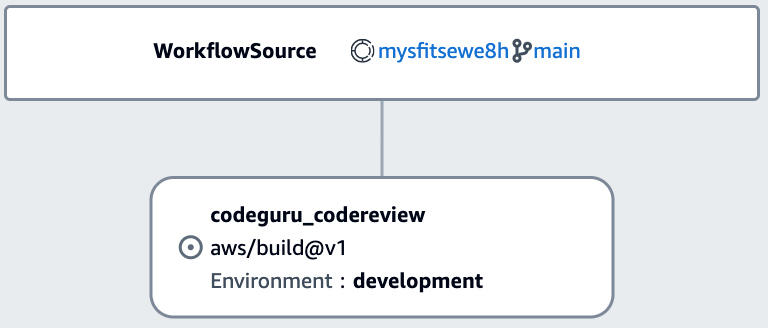
As the team has grown, I have noticed that code quality has decreased. Therefore, I would like to add a few additional tools to validate code quality when a new pull request is submitted. In addition, I would like to create a Software Bill of Materials (SBOM) for each pull request so I know what components are used by the code. In the previous post on workflows, I focused on the deployment workflow. In this post, I will focus on the OnPullRequest workflow. You can view the OnPullRequest pipeline by expanding CI/CD from the left navigation, and choosing Workflows. Next, choose OnPullRequest and you will be presented with the workflow shown in the following screenshot. This workflow runs when a new pull request is submitted and currently uses Amazon CodeGuru to perform an automated code review.

OnPullRequest Workflow with CodeGuru code review

Figure 1. OnPullRequest Workflow with CodeGuru code review

While CodeGuru provides intelligent recommendations to improve code quality, it does not check style. I would like to add a linter to ensure developers follow our coding standards. While CodeCatalyst supports a rich collection of native actions, this does not currently include a linter. Fortunately, CodeCatalyst also supports GitHub Actions. Let’s use a GitHub Action to add a linter to the workflow.

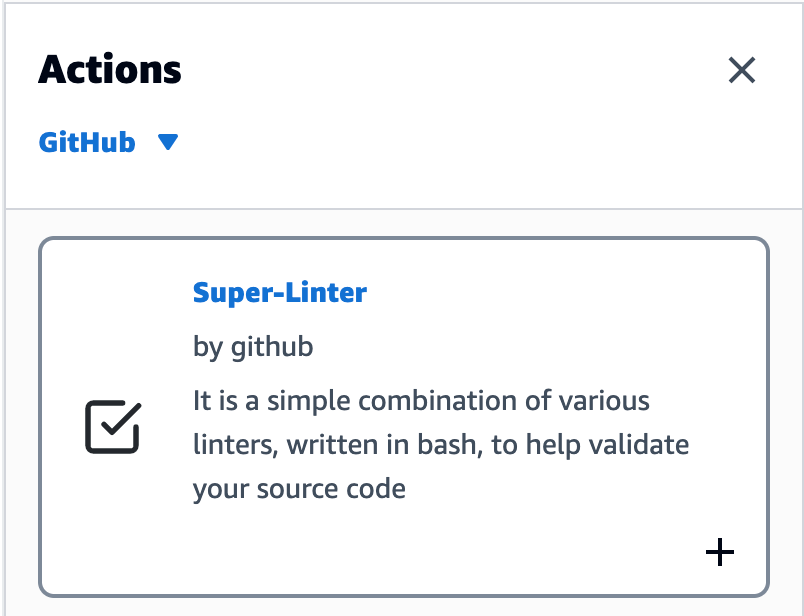
Select Edit in the top right corner of the Workflow screen. If the editor opens in YAML mode, switch to Visual mode using the toggle above the code. Next, select “+ Actions” to show the list of actions. Then, change from Amazon CodeCatalyst to GitHub using the dropdown. At the time this blog was published, CodeCatalyst includes about a dozen curated GitHub Actions. Note that you are not limited to the list of curated actions. I’ll show you how to add GitHub Actions that are not on the list later in this post. For now, I am going to use Super-Linter to check coding style in pull requests. Find Super-Linter in the curated list and click the plus icon to add it to the workflow.

Super-Linter action with add icon

Figure 2. Super-Linter action with add icon

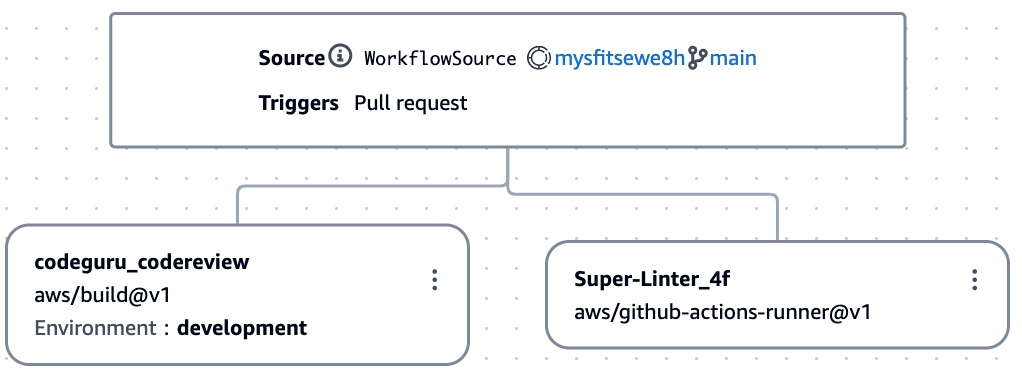
This will add a new action to the workflow and open the configuration dialog box. There is no further configuration needed, so you can simply close the configuration dialog box. The workflow should now look like this.

Workflow with the new Super-Linter action

Figure 3. Workflow with the new Super-Linter action

Notice that the actions are configured to run in parallel. In the previous post, when I discussed the deployment workflow, the steps were sequential. This made sense since each step built on the previous step. For the pull request workflow, the actions are independent, and I will allow them to run in parallel so they complete faster. I select Validate, and assuming there are no issues, I select Commit to save my changes to the repository.

While CodeCatalyst will start the workflow when a pull request is submitted, I do not have a pull request to submit. Therefore, I select Run to test the workflow. A notification at the top of the screen includes a link to view the run. As expected, Super Linter fails because it has found issues in the application code. I click on the Super Linter action and review the logs. Here are few issues that Super Linter reported regarding app.py used by the backend application. Note that the log has been modified slightly to fit on a single line.

/app.py:2:1: F401 'os' imported but unused
/app.py:2:1: F401 'time' imported but unused
/app.py:2:1: F401 'json' imported but unused
/app.py:2:10: E401 multiple imports on one line
/app.py:4:1: F401 'boto3' imported but unused
/app.py:6:9: E225 missing whitespace around operator
/app.py:8:1: E402 module level import not at top of file
/app.py:10:1: E402 module level import not at top of file
/app.py:15:35: W291 trailing whitespace
/app.py:16:5: E128 continuation line under-indented for visual indent
/app.py:17:5: E128 continuation line under-indented for visual indent
/app.py:25:5: E128 continuation line under-indented for visual indent
/app.py:26:5: E128 continuation line under-indented for visual indent
/app.py:33:12: W292 no newline at end of file

With Super-Linter working, I turn my attention to creating a Software Bill of Materials
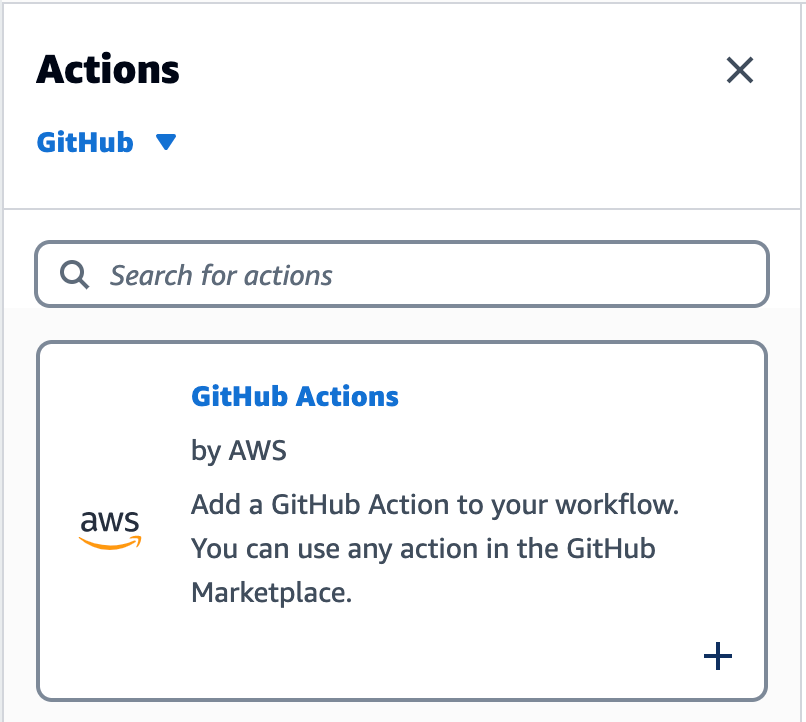
(SBOM). I am going to use OWASP CycloneDX to create the SBOM. While there is a GitHub Action for CycloneDX, at the time I am writing this post, it is not available from the list of curated GitHub Actions in CodeCatalyst. Fortunately, CodeCatalyst is not limited to the curated list. I can use most any GitHub Action in CodeCatalyst. To add a GitHub Action that is not in the curated list, I return to edit mode, find GitHub Actions in the list of curated actions, and click the plus icon to add it to the workflow.

Figure 4. GitHub Action with add icon

Figure 4. GitHub Action with add icon

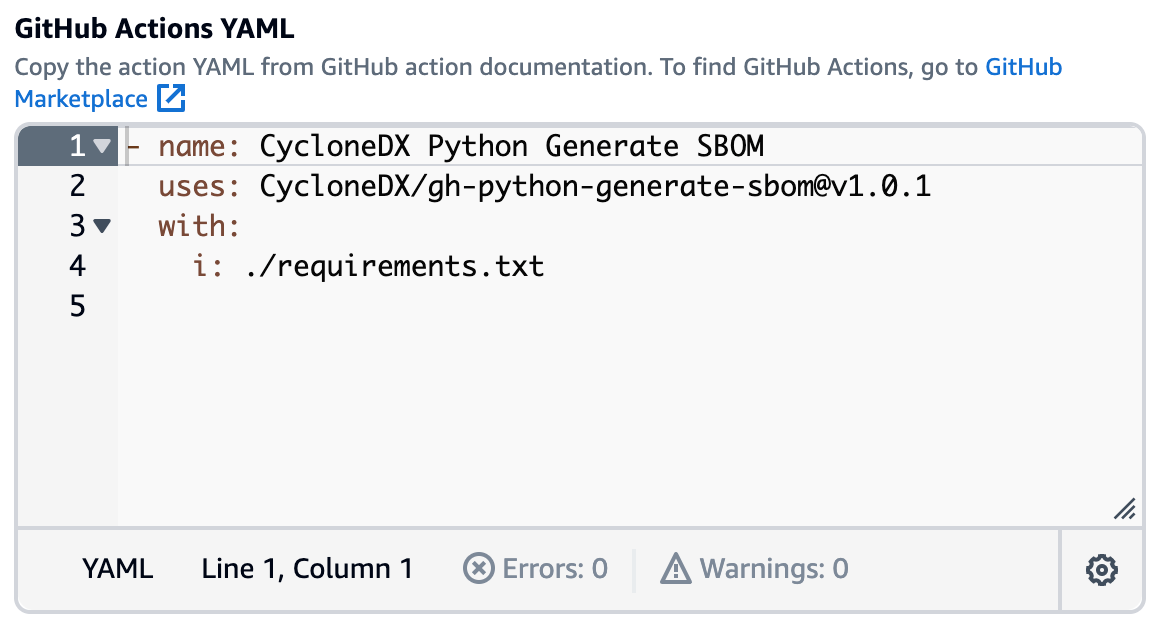
CodeCatalyst will add a new action to the workflow and open the configuration dialog box. I choose the Configuration tab and use the pencil icon to change the Action Name to Software-Bill-of-Materials. Then, I scroll down to the configuration section, and change the GitHub Action YAML. Note that you can copy the YAML from the GitHub Actions Marketplace, including the latest version number. In addition, the CycloneDX action expects you to pass the path to the Python requirements file as an input parameter.

GitHub Action YAML configuration

Figure 5. GitHub Action YAML configuration

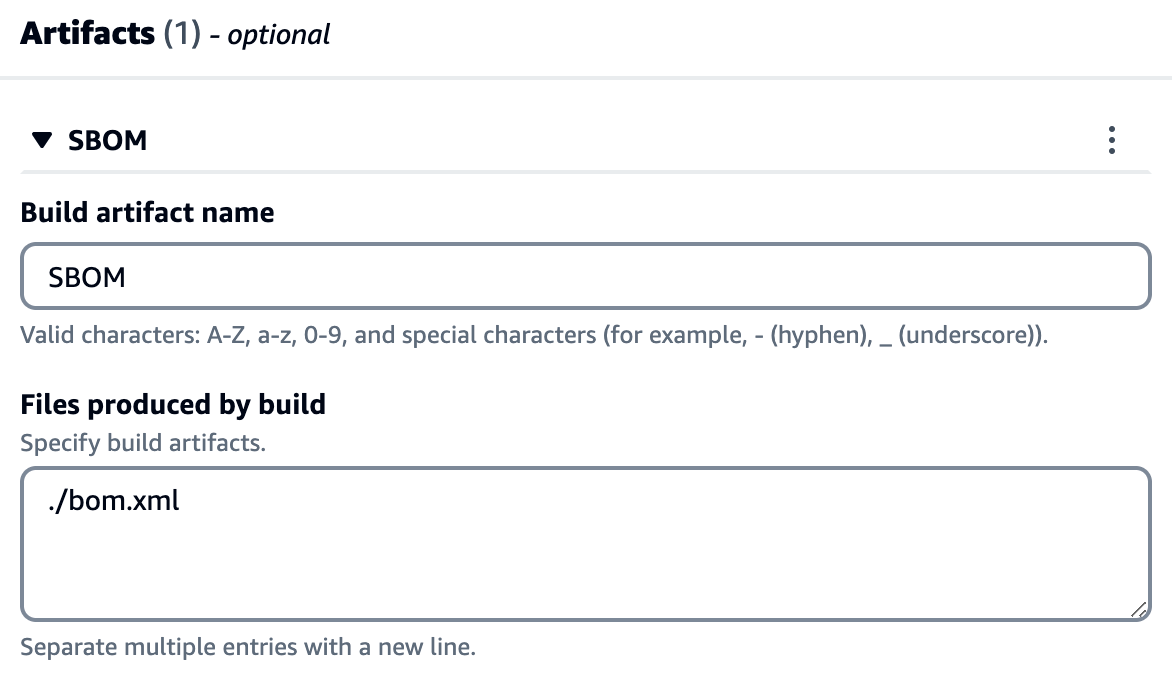
Since I am using the generic GitHub Action, I must tell CodeCatalyst which artifacts are produced by the action and should be collected after execution. CycloneDX creates an XML file called bom.xml which I configure as an artifact. Note that a CodeCatalyst artifact is the output of a workflow action, and typically consists of a folder or archive of files. You can share artifacts with subsequent actions.

Artifact configuration with the path to bom.xml

Figure 6. Artifact configuration with the path to bom.xml

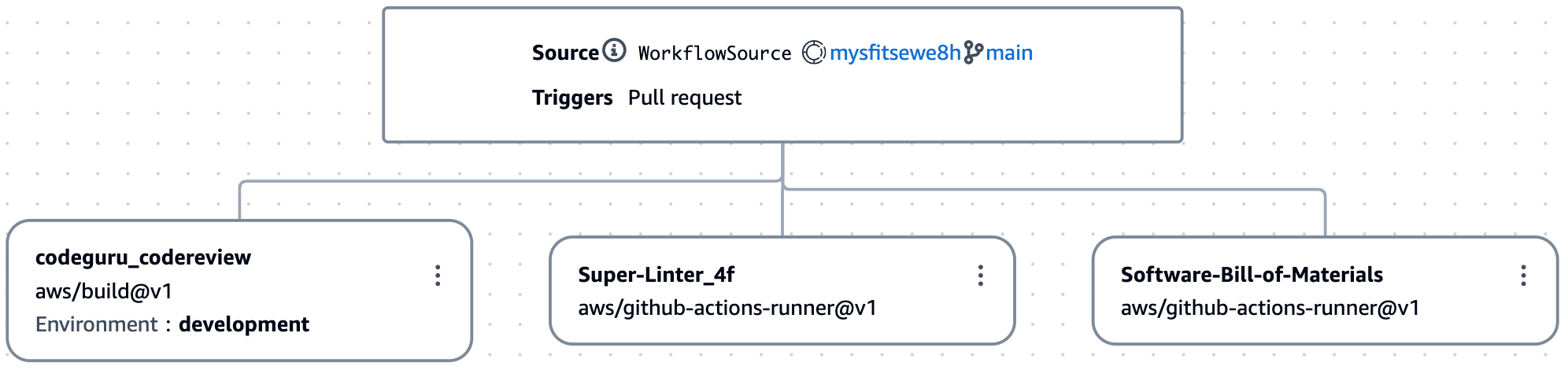
Once again, I select Validate, and assuming there are no issues, I select Commit to save my changes to the repository. I now have three actions that run in parallel when a pull request is submitted: CodeGuru, Super-Linter, and Software Bill of Materials.

Figure 7. Workflow including the software bill of materials

Figure 7. Workflow including the software bill of materials

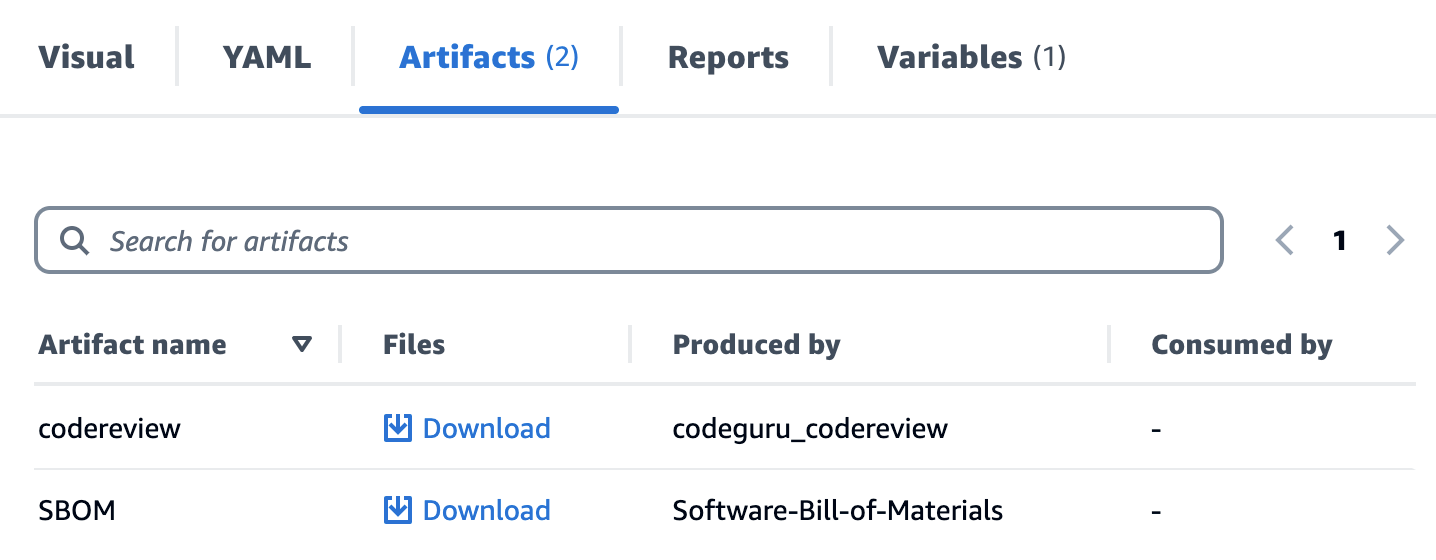
As before, I select Run to test my workflow and click the view link in the notification. As expected, the workflow fails because Super-Linter is still reporting issues. However, the new Software Bill of Materials has completed successfully. From the artifacts tab I can download the SBOM.

Figure 8. Artifacts tab listing code review and SBOM

Figure 8. Artifacts tab listing code review and SBOM

The artifact is a zip archive that includes the bom.xml created by CycloneDX. This includes, among other information, a list of components used in the backend application.

    <components>
        <component type="library" bom-ref="7474f0f6-8aa2-46db-bebf-a7648cff84e1">
            <name>Jinja2</name>
            <version>3.1.2</version>
            <purl>pkg:pypi/[email protected]</purl>
        </component>
        <component type="library" bom-ref="fad0708b-d007-4f98-a80c-056b136015df">
            <name>aws-cdk-lib</name>
            <version>2.43.0</version>
            <purl>pkg:pypi/[email protected]</purl>
        </component>
        <component type="library" bom-ref="23e3aaae-b4e1-4f3b-b026-fcd298c9cb9b">
            <name>aws-cdk.aws-apigatewayv2-alpha</name>
            <version>2.43.0a0</version>
            <purl>pkg:pypi/[email protected]</purl>
        </component>
        <component type="library" bom-ref="d283cf17-9125-422c-b55c-cabb64d18f79">
            <name>aws-cdk.aws-apigatewayv2-integrations-alpha</name>
            <version>2.43.0a0</version>
            <purl>pkg:pypi/[email protected]</purl>
        </component>
        <component type="library" bom-ref="0f095c84-c9e9-4d6c-a4ed-c4a6c7605426">
            <name>aws-cdk.aws-lambda-python-alpha</name>
            <version>2.43.0a0</version>
            <purl>pkg:pypi/[email protected]</purl>
        </component>
        <component type="library" bom-ref="b248b85b-ba27-4796-bcdf-6bd82ad47295">
            <name>constructs</name>
            <version>&gt;=10.0.0,&lt;11.0.0</version>
            <purl>pkg:pypi/constructs@%3E%3D10.0.0%2C%3C11.0.0</purl>
        </component>
        <component type="library" bom-ref="72b1da33-19c2-4b5c-bd58-7f719dafc28a">
            <name>simplejson</name>
            <version>3.17.6</version>
            <purl>pkg:pypi/[email protected]</purl>
        </component>
    </components>

The workflow is now enforcing code quality and generating a SBOM like I wanted. Note that while this is a great start, there is still room for improvement. First, I could collect reports generated by the actions in my workflow, and define success criteria for code quality. Second, I could scan the SBOM for known security vulnerabilities using a Software Composition Analysis (SCA) solution. I will be covering this in a future post in this series.

Cleanup

If you have been following along with this workflow, you should delete the resources you deployed so you do not continue to incur charges. First, delete the two stacks that CDK deployed using the AWS CloudFormation console in the AWS account you associated when you launched the blueprint. These stacks will have names like mysfitsXXXXXWebStack and mysfitsXXXXXAppStack. Second, delete the project from CodeCatalyst by navigating to Project settings and choosing Delete project.

Conclusion

In this post, you learned how to add GitHub Actions to a CodeCatalyst workflow. I used GitHub Actions alongside native CodeCatalyst actions in my workflow. I also discussed adding actions from both the curated list of actions and others not in the curated list. Read the documentation to learn more about using GitHub Actions in CodeCatalyst.

About the authors:

Dr. Rahul Gaikwad

Dr. Rahul is a DevOps Lead Consultant at AWS. He helps customers to migrate and modernize workloads to AWS Cloud with a special focus on DevOps and IaC. He is passionate about building innovative solutions using technology and enjoys collaborating with customers and peers. He contributes to open-source community projects. Outside of work, Rahul has completed Ph.D. in AIOps and he enjoys travelling and spending time with his family.

Anirudh Sharma

Anirudh is a Cloud Support Engineer 2 with an extensive background in DevOps offerings at AWS, he is also a Subject Matter Expert in AWS ElasticBeanstalk and AWS CodeDeploy services. He loves helping customers and learning new services and technologies. He also loves travelling and has a goal to visit Japan someday, is a Golden State Warriors fan and loves spending time with his family.

Navdeep Pareek

Navdeep is Lead Migration Consultant at AWS. He helps customer to migrate and modernize customer workloads to AWS Cloud and have specialisation in automation, DevOps. In his spare time, he enjoys travelling, cooking and spending time with family and friends.