All posts by Fahim Sajjad

AWS’s Well-Architected Framework Transformed by Amazon Q Developer

Post Syndicated from Fahim Sajjad original https://aws.amazon.com/blogs/devops/awss-well-architected-framework-transformed-by-amazon-q-developer/

In the rapidly evolving landscape of cloud computing, developers, and architects face unprecedented challenges. These challenges include designing, implementing, and maintaining robust cloud infrastructures. The AWS Well-Architected Framework is the gold standard for building secure, efficient, and optimized cloud solutions. Traditionally, complying with this framework required deep expertise and manual analysis.

Now, Amazon Q Developer changes this paradigm. It introduces intelligent, context-aware recommendations. This framework is built on six pillars: operational excellence, security, reliability, performance efficiency, cost optimization, and sustainability. Without careful attention to these foundational elements, organizations risk developing systems that fall short of both their business objectives and technical requirements, potentially compromising long-term scalability and performance.

In this blog, we will explore how Amazon Q Developer can help across the six pillars of the Well-Architected Framework.

Simplifying the AWS Well-Architected Framework with Amazon Q Developer

In this section, we will explore practical examples across the following pillars:

Operational Excellence pillar with Amazon Q Developer

Operational Excellence is a key pillar of the AWS Well-Architected Framework. It guides teams in running efficient workloads and monitoring systems. The pillar emphasizes continuous improvement to deliver business value. Amazon Q Developer enhances operations through AI-powered assistance for infrastructure as code, automated testing, and documentation. The service automatically creates runbooks and suggests safe infrastructure changes. It analyzes your environment and offers recommendations based on AWS best practices. Teams can implement operational excellence with reduced manual effort and fewer potential errors.

Let’s ask Amazon Q Developer in the console how it can help me improve operational excellence in my AWS Infrastructure: “How can I improve the Operational Excellence of my AWS infrastructure?”

Amazon Q Developer analyzes your prompt and generates comprehensive recommendations:

Amazon Q chat interface showing a response about best practices for improving AWS infrastructure operational excellence, with a list of recommendations including implementing IaC and automating deployments.

Figure 1: Prompting Amazon Q about Operational Excellence

Based on Amazon Q Developer’s guidance, Infrastructure as Code (IaC) is recommended for managing our AWS resources. Let’s open Visual Studio Code IDE and see how Amazon Q Developer Chat can help us implement IaC. We’ll create a CloudFormation template for a resilient web application by asking Amazon Q Developer to generate a template that includes an Application Load Balancer, EC2 instances, and an RDS database: “Generate a CloudFormation template for a highly available web application with an Application Load Balancer, EC2 instances, and an RDS database. Include best practices for operational excellence”

Amazon Q Developer generating a CloudFormation template for a highly available web application architecture.

Figure 2: Amazon Q Developer generating a CloudFormation template for a highly available web application architecture.

It also explains the template and lists the best practices for operational excellence that were followed:

Amazon Q explaining Generated template and Best Practices

Figure 3: Amazon Q explaining Generated template and Best Practices

Amazon Q Developer automates documentation to track and approve infrastructure changes effectively. It performs automatic code reviews to check quality and identify security vulnerabilities. The service detects code duplication and guides developers in making small, predictable changes. When issues arise, Amazon Q Developer quickly investigates operational problems across AWS environments. This rapid troubleshooting helps businesses maintain high application availability.

Security pillar with Amazon Q Developer

Cloud security at AWS is the highest priority. The AWS Well-Architected Framework’s Security Pillar provides a comprehensive approach to implementing robust protective measures. Even though traditionally security has been an afterthought in development often sacrificed for speed and automation, Amazon Q Developer transforms this by enabling security checks at every stage of the software development lifecycle. By embedding continuous security validation, you can significantly reduce vulnerabilities in production environments. This shifts security from reactive to proactive, ensuring your cloud applications are not just functional, but fundamentally secure.

Amazon Q Developer can streamline this process serving as an intelligent security assistant for AWS environments. It can help create robust Identity and Access Management (IAM) policies, including role-based access controls, user permissions, and multi-factor authentication. For data protection, Amazon Q Developer supports encryption strategies, key management, and secure backup procedures. Additionally, Amazon Q Developer guides users in infrastructure protection planning through secure network architectures and VPC segmentation, offering comprehensive support across critical security areas.

Amazon Q Developer enhances security beyond basic configurations. It helps set up advanced monitoring solutions using CloudWatch and CloudTrail. The service creates intelligent security alerts and automates incident response mechanisms. It protects your AWS environment against emerging threats through security scanning. Amazon Q Developer identifies potential vulnerabilities in your infrastructure. These capabilities align with AWS Well-Architected Framework security best practices. To illustrate Amazon Q Developer’s practical application in enhancing workload security, let’s consider implementing VPC flow logs for improved network monitoring in our web application CloudFormation file that we created before: “How can we implement VPC flow logs for better network monitoring?” 

Prompting Amazon Q about implementing VPC flow logs for better network monitoring.

Figure 4: Prompting Amazon Q about implementing VPC flow logs for better network monitoring

We can also ask Amazon Q Developer to check if there are any security best practices that is missing in our code. “What IAM security best practices are missing?”

Prompting Amazon Q about implementing VPC flow logs for better network monitoring

Figure 5: Prompting Amazon Q about implementing VPC flow logs for better network monitoring.

These examples demonstrates how developers can leverage Amazon Q Developer to bolster their security posture effectively.

Reliability pillar with Amazon Q Developer

Reliability is a critical pillar of the AWS Well-Architected Framework. It extends beyond maintaining system uptime. A reliable architecture must handle unexpected disruptions and recover gracefully. Amazon Q Developer brings AI-powered intelligence to reliability engineering. It helps organizations design resilient, self-healing cloud infrastructures. The service anticipates potential failures and suggests mitigation strategies before business operations are affected.

Amazon Q Developer guides users in implementing AWS reliability best practices. It helps architect resilient systems through multi-AZ deployments and auto-scaling configurations. The service assists in setting up automated recovery procedures and fault-tolerant systems. It streamlines the configuration of health checks, load balancers, and redundant components. Amazon Q Developer enables effective monitoring through CloudWatch alarms and automated failover mechanisms. It supports infrastructure as code implementation with proper testing procedures. The service helps establish cross-region redundancy and appropriate service quotas. These features ensure systems maintain high availability and recover quickly from failures.

By interacting with Amazon Q Developer in the AWS Management Console, you can receive intelligent recommendations for improving your infrastructure’s reliability by asking Amazon Q Developer: “Can you provide recommendations to eliminate single point of failures?”

Prompting Amazon Q about reliability

Figure 6: Prompting Amazon Q about reliabilityPerformance Efficiency pillar with Amazon Q Developer 

Performance can determine an application’s success in cloud computing. The Performance Efficiency pillar guides organizations in maximizing their computational resources. Amazon Q Developer enhances this pillar through AI-powered recommendations. It helps organizations design and optimize their cloud infrastructure more effectively.

Amazon Q Developer uses machine learning to deliver advanced performance insights. It recommends architectural improvements like serverless adoption and optimal service configurations. The AI assistant suggests effective caching strategies and data processing optimizations. It analyzes system metrics and infrastructure patterns to guide improvements. Development teams can enhance system performance and reduce computational overhead. Amazon Q Developer helps create adaptive architectures that respond effectively to changing workload demands.

For example, let’s say you’re an IT Professional with a monolithic three-tier web application on AWS and wanted to get recommendation on performance efficiency. The IT Professional could open a new Amazon Q Developer chat in the AWS Management Console, and enter a prompt such as: “Based on my current monolithic application on AWS, what are some things I should do as it relates to the performance efficiency pillar of the Well-Architected Framework?”

Prompting Amazon Q about performance efficiency

Figure 7: Prompting Amazon Q about performance efficiency

As shown above in figure 7, Amazon Q Developer made multiple recommendations based on the monolith application in the prompt. Amazon Q Developer makes recommendations such as using Serverless options and breaking the application into microservices, which is a design principal in the performance efficiency pillar of the Well-Architected Framework.

Cost Optimization pillar with Amazon Q Developer

Amazon Q Developer has the ability to give general recommendations for Cost Optimization based on the Well-Architected Framework. For example, let’s say an IT Professional wants to get more information about ways they can generally optimize their compute costs in AWS. The IT Professional could open a new Amazon Q chat in the AWS Management Console, and enter a prompt such as: “What are some ways I can cost optimize my compute infrastructure I have running in AWS based on the cost optimization pillar of the Well Architected Framework?”

Prompting Amazon Q about cost optimization

Figure 8: Prompting Amazon Q about cost optimization

As shown above in figure 8, Amazon Q Developer was able to make recommendations based on the Well-architected framework to help the developer cost optimize their compute through reserved instances and savings plans, auto scaling, rightsizing, and more, while also providing links to resources to help dive in further.

Additionally, Amazon Q Developer has revolutionized AWS cost analysis by introducing natural language processing capabilities directly integrated with AWS Cost Explorer. This innovative feature allows users to gain deep insights into cloud spending through simple, conversational queries, enabling professionals to understand complex cost structures, identify spending trends, and forecast future expenses with unprecedented ease. By transforming technical cost data into actionable insights, Amazon Q Developer empowers organizations to make more informed financial decisions about their cloud infrastructure.

For comprehensive details and specific use case, please refer to the full blog post: Analyzing your AWS Cost Explorer data with Amazon Q Developer: Now Generally Available. 

Sustainability pillar with Amazon Q Developer

Sustainability represents a critical emerging pillar of the AWS Well-Architected Framework, focusing on minimizing the environmental impact of cloud computing infrastructure and operations. Amazon Q Developer introduces AI-powered capabilities that help organizations optimize their cloud resources to reduce carbon footprint, improve energy efficiency, and align technological strategies with environmental responsibility.

Through intelligent analysis and context-aware recommendations, Amazon Q Developer enables teams to make more sustainable architectural decisions. The AI assistant can provide insights into resource optimization, suggesting ways to reduce unnecessary compute power, recommend more energy-efficient service configurations, and help developers understand the environmental implications of their architectural choices. By leveraging machine learning and comprehensive AWS infrastructure knowledge, Amazon Q Developer empowers organizations to not only meet their technological requirements but also contribute to broader environmental sustainability goals in cloud computing.

In the below example, you can see how you can ask Amazon Q Developer to help meet your company’s sustainability goals by asking Amazon Q: “How can I review my sustainability objectives on AWS?”

Prompting Amazon Q about sustainability

Figure 9: Prompting Amazon Q about sustainability

As you can see above Amazon Q Developer generated recommendations showing how you can review your sustainability objectives.

Now let’s take the first recommendation: Carbon Footprint tool as an example and ask Amazon Q Developer in the console to ask a follow up question We will be using the following prompt to generate response: “How do I view my carbon footprint on AWS?”

Prompting Amazon Q about carbon footprint

Figure 10: Prompting Amazon Q about carbon footprint

Conclusion

Amazon Q Developer represents a pivotal moment in cloud computing, transforming the AWS Well-Architected Framework from a static set of guidelines to a dynamic, intelligent system of continuous improvement. By integrating advanced AI capabilities across operational excellence, security, reliability, performance efficiency, cost optimization, and sustainability, this innovative tool democratizes sophisticated cloud architecture strategies for organizations of all sizes. The true power of Amazon Q Developer lies not just in its ability to provide recommendations, but in its capacity to learn, adapt, and evolve alongside your infrastructure, bridging the gap between complex technical knowledge and actionable insights. As cloud technologies continue to advance, AI-powered tools like Amazon Q Developer will become increasingly essential, signifying a fundamental shift in how we approach cloud infrastructure: proactively, intelligently, and with a holistic understanding of technological and business requirements.

To get started with Amazon Q Developer in the AWS console, check out the documentation on chatting with Amazon Q Developer in AWS Console Home.
Fahim Sajjad

Fahim is a Solutions Architect at Amazon Web Services. He helps customers transform their business by helping in designing their cloud solutions and offering technical guidance. Fahim graduated from the University of Maryland, College Park with a degree in Computer Science. He has deep interested in AI and Machine learning. Fahim enjoys reading about new advancements in technology and hiking.

Brendan Jenkins

Brendan Jenkins is a Solutions Architect at Amazon Web Services (AWS) working with Enterprise AWS customers providing them with technical guidance and helping achieve their business goals. He has an area of specialization in DevOps and Machine Learning technology.

Jacques Mcanlay

Jacques Mcanlay is a Solutions Architect at Amazon Web Services (AWS) working with Enterprise AWS customers providing them with technical guidance and helping achieve their business goals. He has an area of specialization in the Security domain.

Best Practices for working with Pull Requests in Amazon CodeCatalyst

Post Syndicated from Fahim Sajjad original https://aws.amazon.com/blogs/devops/best-practices-for-working-with-pull-requests-in-amazon-codecatalyst/

According to the Well-Architected DevOps Guidance, “A peer review process for code changes is a strategy for ensuring code quality and shared responsibility. To support separation of duties in a DevOps environment, every change should be reviewed and approved by at least one other person before merging.” Development teams often implement the peer review process in their Software Development Lifecycle (SDLC) by leveraging Pull Requests (PRs). Amazon CodeCatalyst has recently released three new features to facilitate a robust peer review process. Pull Request Approval Rules enforce a minimum number of approvals to ensure multiple peers review a proposed change prior to a progressive deployment. Amazon Q pull request summaries can automatically summarize code changes in a PR, saving time for both the creator and reviewer. Lastly, Nested Comments allows teams to organize conversations and feedback left on a PR to ensure efficient resolution.

This blog will demonstrate how a DevOps lead can leverage new features available in CodeCatalyst to accomplish the following requirements covering best practices: 1. Require at least two people to review every PR prior to deployment, and 2. Reduce the review time to merge (RTTM).

Prerequisites

If you are using CodeCatalyst for the first time, you’ll need the following to follow along with the steps outlined in the blog post:

Pull request approval rules

Approval rules can be configured for branches in a repository. When you create a PR whose destination branch has an approval rule configured for it, the requirements for the rule must be met before the PR can be merged.

In this section, you will implement approval rules on the default branch (main in this case) in the application’s repository to implement the new ask from leadership requiring that at least two people review every PR before deployment.

Step 1: Creating the application
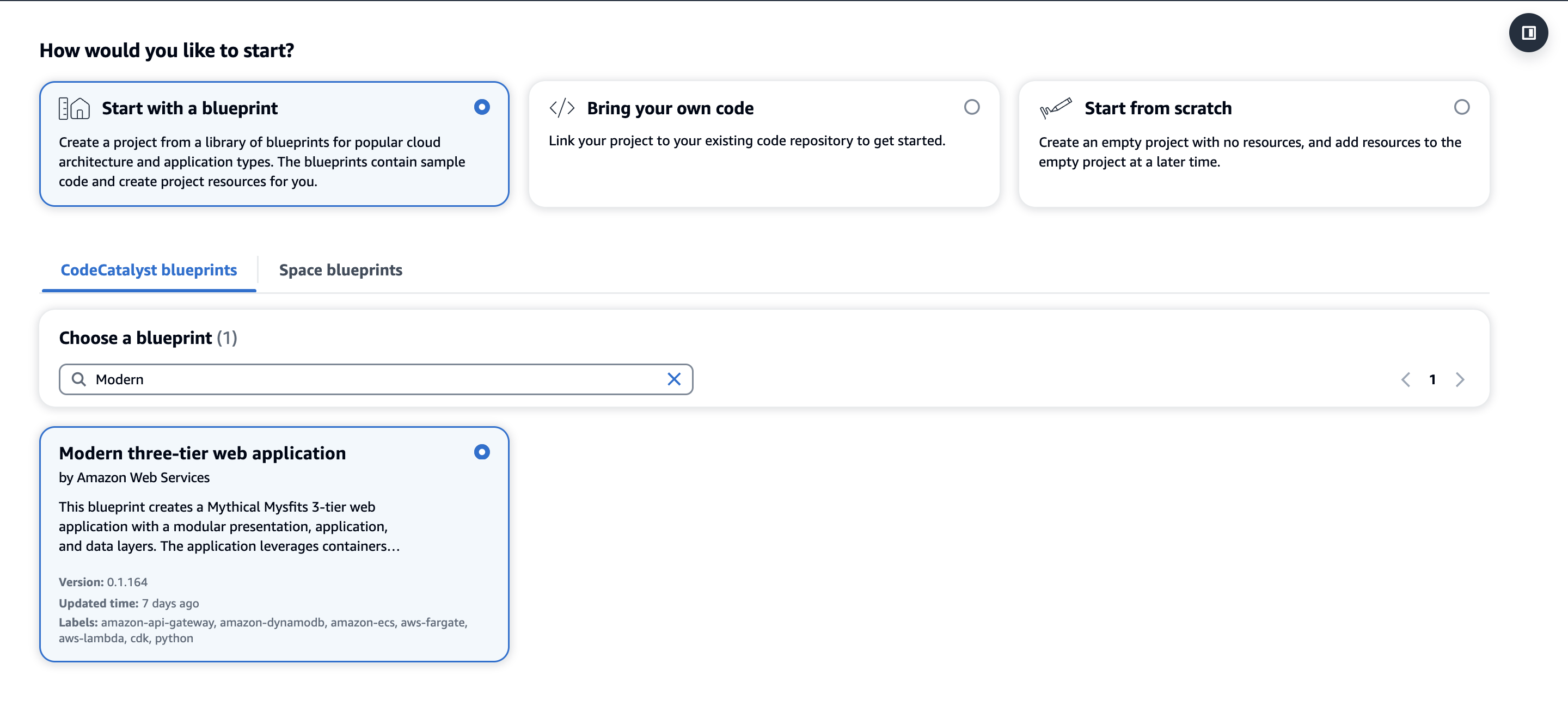
Pull Request approval rules work with every project but in this blog, we’ll leverage the Modern three-tier web application blueprint for simplicity to implement PR approval rules for merging to the main branch.

The image shows the interface of the Amazon CodeCatalyst platform, which allows users to create new projects in three different ways. The three options are "Start with a blueprint", "Bring your own code", and "Start from scratch". In the image, the "Start with a blueprint" option is selected, and the "Modern three-tier web application" blueprint is chosen.

Figure 1: Creating a new Modern three-tier application Blueprint

  1. First, within your space click “Create Project” and select the Modern three-tier web application CodeCatalyst Blueprint as shown above in Figure 1.
  2. Enter a Project name and select: Lambda for the Compute Platform and Amplify Hosting for Frontend Hosting Options. Additionally, ensure your AWS account is selected along with creating a new IAM Role.
  3. Finally, click Create Project and a new project will be created based on the Blueprint.

Once the project is successfully created, the application will deploy via a CodeCatalyst workflow, assuming the AWS account and IAM role were setup correctly. The deployed application will be similar to the Mythical Mysfits website.

Step 2: Creating an approval rule

Next, to satisfy the new requirement of ensuring at least two people review every PR before deployment, you will create the approval rule for members when they create a pull request to merge into the main branch.

  1. Navigate to the project you created in the previous step.
  2. In the navigation pane, choose Code, and then choose Source repositories.
  3. Next, choose the mysfits repository that was created as part of the Blueprint.
    1. On the overview page of the repository, choose Branches.
    2. For the main branch, click View under the Approval Rules column.
  4. In Minimum number of approvals, the number corresponds to the number of approvals required before a pull request can be merged to that branch.
  5. Now, you’ll change the approval rule to satisfy the requirement to ensure at least 2 people review every PR. Choose Manage settings. On the settings page for the source repository, in Approval rules, choose Edit.
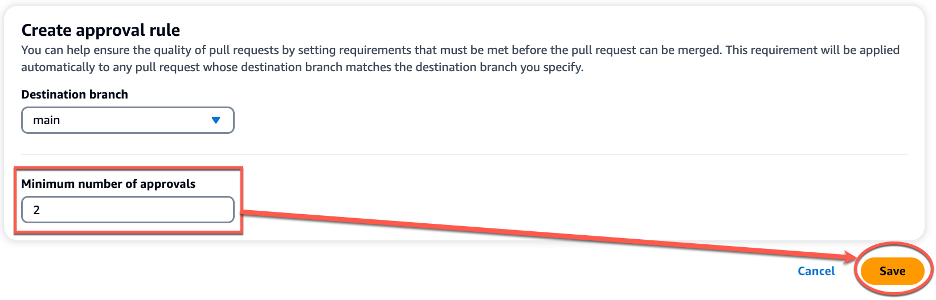
  6. In Destination Branch, from the drop-down list, choose main as the name of the branch to configure an approval rule. In Minimum number of approvals, enter 2, and then choose Save.
The image shows an interface for creating an approval rule. It allows users to specify the destination branch and the minimum number of approvals required before a pull request can be merged. In the image, 'main' is selected as the destination branch, and '2' is set as the minimum number of approvals. The interface also provides "Cancel" and "Save" buttons to either discard or commit the approval rule settings.

Figure 2: Creating a new approval rule

Note: You must have the Project administrator role to create and manage approval rules in CodeCatalyst projects. You cannot create approval rules for linked repositories.

When implementing approval rules and branch restrictions in your repositories, ensure you take into consideration the following best practices:

  • For branches deemed critical or important, ensure only highly privileged users are allowed to Push to the Branch and Delete the Branch in the branch rules. This prevents accidental deletion of critical or important branches as well as ensuring any changes introduced to the branch are reviewed before deployment.
  • Ensure Pull Request approval rules are in place for branches your team considers critical or important. While there is no specific recommended number due to varying team size and project complexity, the minimum number of approvals is recommended to be at least one and research has found the optimal number to be two.

In this section, you walked through the steps to create a new approval rule to satisfy the requirement of ensuring at least two people review every PR before deployment on your CodeCatalyst repository.

Amazon Q pull request summaries

Now, you begin exploring ways that can help development teams reduce MTTR. You begin reading about Amazon Q pull request summaries and how this feature can automatically summarize code changes and start to explore this feature in further detail.

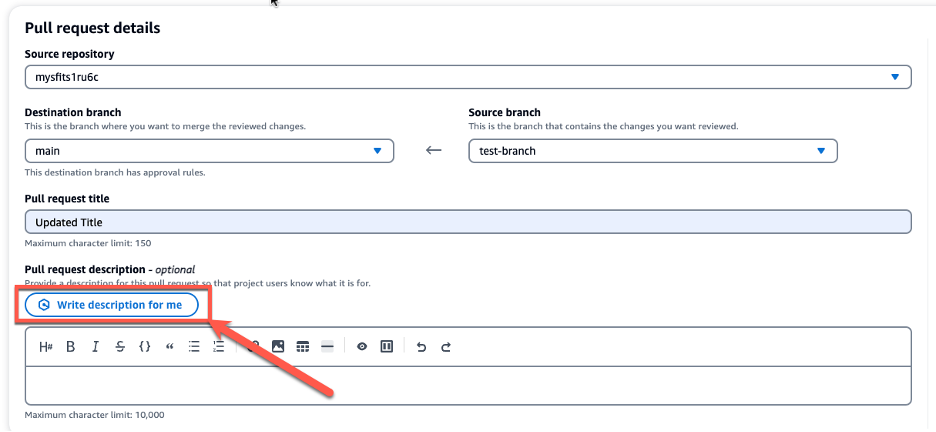
While creating a pull request, in Pull request description, you can leverage the Write description for me feature, as seen in Figure 5 below, to have Amazon Q create a description of the changes contained in the pull request.

The image displays an interface for a pull request details page. At the top, it shows the source repository where the changes being reviewed are located, which is "mysfits1ru6c". Below that, there are two dropdown menus - one for the destination branch where the changes will be merged, set to "main", and one for the source branch containing the changes, set to "test-branch". The interface also includes a field for the pull request title, which is set to "Updated Title", and an optional description field. The description field has a button labeled "Write description for me" that allows the user to have the system automatically generate a description for the pull request leveraging Amazon Q.

Figure 3: Amazon Q write description for me feature

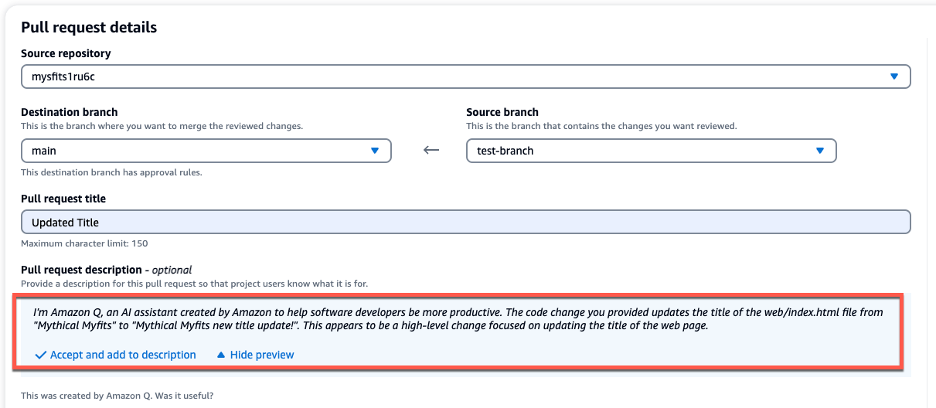
Once the description is generated, you can Accept and add to description, as seen in Figure 6 below. As a best practice, once Amazon Q has generated the initial PR summary, you should incorporate any specific organizational or team requirements into the summary before creating the PR. This allows developers to save time and reduce MTTR in generating the PR summary while ensuring all requirements are met.

The image displays an interface for a pull request details page. It shows the source repository as "mystits1ruc" and the destination branch as "main", with the source branch set to "test-branch". The interface also includes a field for the pull request title, which is set to "Updated Title". Underneath that is the optional Pull Request description, which is populated with a description generated from Amazon Q. Below the description field, there are two buttons - "Accept and add to description" and "Hide preview" - that allow the user to accept the description and add it to the pull request.

Figure 4: PR Summary generated by Amazon Q

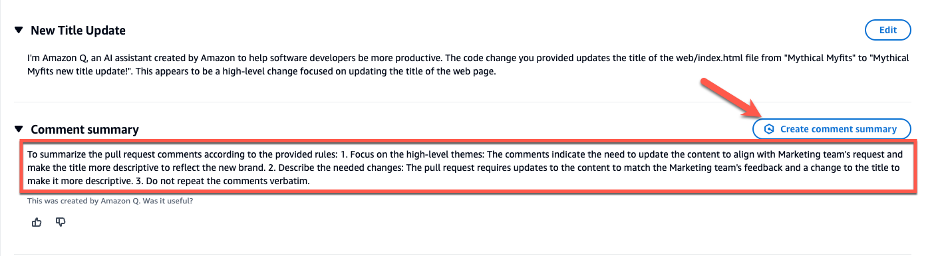
CodeCatalyst offers an Amazon Q feature that summarizes pull request comments, enabling developers to quickly grasp key points. When many comments are left by reviewers, it can be difficult to understand common themes in the feedback, or even be sure that you’ve addressed all the comments in all revisions. You can use the Create comment summary feature to have Amazon Q analyze the comments and provide a summary for you, as seen in Figure 5 below.

The image shows an interface where pull request title is set to "New Title Update," and the description provides details on the changes being made. Below the description, there is a "Comment summary" section that offers instructions for summarizing the pull request comments. Additionally, there is a "Create comment summary" button, which allows the user to generate a summary of the comments using Amazon Q.

Figure 5: Comment summary

Nested Comments

When reviewing various PRs for the development teams, you notice that feedback and subsequent conversations often happen within disparate and separate comments. This makes reviewing, understanding and addressing the feedback cumbersome and time consuming for the individual developers. Nested Comments in CodeCatalyst can organize conversations and reduce MTTR.

You’ll leverage the existing project to walkthrough how to use the Nested Comments feature:

Step 1: Creating the PR

  1. Click the mysifts repository, and on the overview page of the repository, choose More, and then choose Create branch.
  2. Open the web/index.html file
    • Edit the file to update the text in the <title> block to Mythical Mysfits new title update! and Commit the changes.
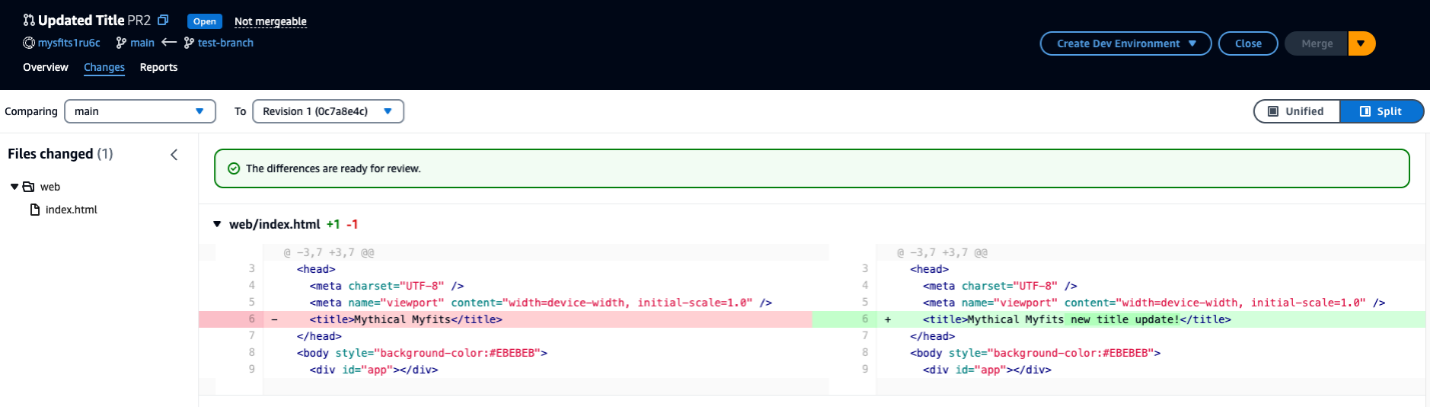
  3. Create a pull request by using test-branch as the Source branch and main as the Destination branch. Your PR should now look similar to Figure 6 below:
The image shows the Amazon CodeCatalyst interface, which is used to compare code changes between different revisions of a project. The interface displays a side-by-side view of the "web/index.html" file, highlighting the changes made between the main branch and Revision 1. The differences are ready for review, as indicated by the green message at the top.

Figure 6: Pull Request with updated Title

Step 2: Review PR and add Comments

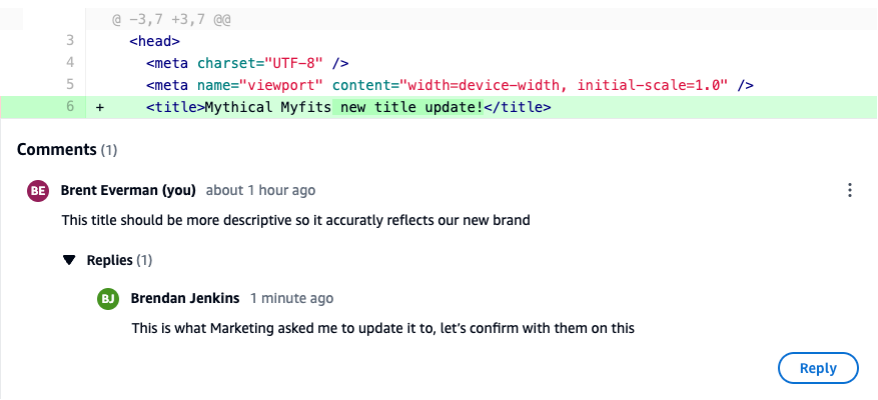
  1. Review the PR, ensure you are on the Changes tab (similar to Figure 3), click the Comment icon and leave a comment. Normally this would be done by the Reviewer but you will simulate being both the Reviewer and Developer in this walkthrough.
  2. With the comment still open, hit Reply and add another comment as a response to the initial comment. The PR should now look similar to Figure 7 below.
This image shows a pull request interface where changes have been made to the HTML title of a web page. Below the code changes, there is a section for comments related to this pull request. The comments show a nested comments between two developers where they are discussing and confirming the changes to the title.

Figure 7: PR with Nested Comments

When leaving comments on PR in CodeCatalyst, ensure you take into consideration the following best practices :

  • Feedback or conversation focused on a specific topic or piece of code should leverage the nested comments feature. This will ensure the conversation can be easily followed and that context and intent are not lost in a sea of individual comments.
  • Author of the PR should address all comments by either making updates to the code or replying to the comment. This indicates to the reviewer that each comment was reviewed and addressed accordingly.
  • Feedback should be constructive in nature on PRs. Research has found that, “destructive criticism had a negative impact on participants’ moods and motivation to continue working.”

Clean-up

As part of following the steps in this blog post, if you upgraded your space to Standard or Enterprise tier, please ensure you downgrade to the Free tier to avoid any unwanted additional charges. Additionally, delete any projects you may have created during this walkthrough.

Conclusion

In today’s fast-paced software development environment, maintaining a high standard for code changes is crucial. With its recently introduced features, including Pull Request Approval Rules, Amazon Q pull request summaries, and nested comments, CodeCatalyst empowers development teams to ensure a robust pull request review process is in place. These features streamline collaboration, automate documentation tasks, and facilitate organized discussions, enabling developers to focus on delivering high-quality code while maximizing productivity. By leveraging these powerful tools, teams can confidently merge code changes into production, knowing that they have undergone rigorous review and meet the necessary standards for reliability and performance.

About the authors

Brent Everman

Brent is a Senior Technical Account Manager with AWS, based out of Pittsburgh. He has over 17 years of experience working with enterprise and startup customers. He is passionate about improving the software development experience and specializes in AWS’ Next Generation Developer Experience services.

Brendan Jenkins

Brendan Jenkins is a Solutions Architect at Amazon Web Services (AWS) working with Enterprise AWS customers providing them with technical guidance and helping achieve their business goals. He has an area of specialization in DevOps and Machine Learning technology.

Fahim Sajjad

Fahim is a Solutions Architect at Amazon Web Services. He helps customers transform their business by helping in designing their cloud solutions and offering technical guidance. Fahim graduated from the University of Maryland, College Park with a degree in Computer Science. He has deep interested in AI and Machine learning. Fahim enjoys reading about new advancements in technology and hiking.

Abdullah Khan

Abdullah is a Solutions Architect at AWS. He attended the University of Maryland, Baltimore County where he earned a degree in Information Systems. Abdullah currently helps customers design and implement solutions on the AWS Cloud. He has a strong interest in artificial intelligence and machine learning. In his spare time, Abdullah enjoys hiking and listening to podcasts.