All posts by Javier Castro

How Cloudflare is using automation to tackle phishing head on

Post Syndicated from Javier Castro original https://blog.cloudflare.com/how-cloudflare-is-using-automation-to-tackle-phishing/

Phishing attacks have grown both in volume and in sophistication over recent years. Today’s threat isn’t just about sending out generic emails — bad actors are using advanced phishing techniques like 2 factor monster in the middle (MitM) attacks, QR codes to bypass detection rules, and using artificial intelligence (AI) to craft personalized and targeted phishing messages at scale. Industry organizations such as the Anti-Phishing Working Group (APWG) have shown that phishing incidents continue to climb year over year.

To combat both the increase in phishing attacks and the growing complexity, we have built advanced automation tooling to both detect and take action. 

In the first half of 2024, Cloudflare resolved 37% of phishing reports using automated means, and the median time to take action on hosted phishing reports was 3.4 days. In the second half of 2024, after deployment of our new tooling, we were able to expand our automated systems to resolve 78% of phishing reports with a median time to take action on hosted phishing reports of under an hour.

In this post we dig into some of the details of how we implemented these improvements.

The phishing site problem

Cloudflare has observed a similar increase in the volume of phishing activity throughout 2023 and 2024. We receive abuse reports from anyone on the Internet that may have seen potentially abusive behaviors from websites using Cloudflare services. Our Trust & Safety investigators and engineers have been tasked with responding to these complaints, and more recently have been using the data from these reports to improve our threat intelligence, brand protection, and email security product offerings.

Cloudflare has always believed in using the vast amounts of traffic that flows through our network to improve threat detection and customer security. This has been at the core of how we protect our customers from DoS attacks and other cybersecurity threats. We’ve been applying the same concepts our internal teams use to mitigate phishing to improve detection of phishing on our network and our ability to detect and notify our customers about potential risks to their brand.

Prior to last year, phishing abuse reported to Cloudflare relied on manual, human review and intervention to remediate. Trust & Safety (T&S) investigators would have to look at each complaint, the allegations made by the reporter, and the content on the reported websites to make assessments as quickly as possible about whether the website was phishing or malware.

Given the growing scale of our customer base and phishing across the Internet, this became unsustainable. By collecting a group of internal experts on abuse, we were able to tackle this problem by using insights across our network, internal data from our Email Security product, external feeds from trusted sources, and years of abuse report processing data to automatically assess risk of likely phishing and recommend appropriate action.

Turning our intelligence inward

We built our automated phishing identification on the Cloudflare Developer Platform so that we could meet our scanning demand without concern for how we might scale. This allowed us to focus more on creating a great phishing detection engine and less on the infrastructure required to meet that demand. 

Each URL submitted to our phishing detection Worker begins with an initial scan by the Cloudflare URL Scanner. The scan provides us with the rendered HTML, network requests, and attributes of the site. After scanning, we collect reputational information about the site by submitting the HTML and page resources to our in-house machine learning classifiers; meanwhile, the indicators of compromise (IOCs) are sent to our suite of threat feeds and domain categorization tools to highlight any known malicious sites or site categorizations.

Once we have all of this information collected, we expose it to a set of rules and heuristics that identify the URL as phishing or not based on how T&S investigators have traditionally responded to similar abuse reports and patterns of bad behaviors we’ve observed. Rules will suggest decisions to make against the reports, and remediations to make against harmful content. It is through this process that we were able to convert the manual reviews by T&S investigators into an automated flow of phishing identification. We also recognize that reporters make mistakes or even deliberately try to weaponize abuse processes. Our rules must therefore consider the possibility of false positives, in which reports are created against legitimate websites (intentionally or unintentionally). False positives can erode the trust of our customers and create incidents, so automation must include processes to disregard erroneous reports.

The magic of all of this was the powerful suite of tools on the Cloudflare Developer Platform. Whether it was using KV to store report summaries that could scale indefinitely or Durable Objects to keep running counters of an unlimited number of attributes that could be tracked or leveraged over time, we were able to integrate the solutions quickly allowing us easily add or remove new enrichments with little effort. We also made use of Hyperdrive to access the internal Postgres database that stores our abuse reports, Queues to manage the scanning jobs, Workers AI to run machine learning classifiers, and D1 to store detection logs for efficacy and evaluation review. To tie it all together, the team also deployed a Remix Pages UI to present all the phishing detection engine’s analysis to T&S investigators for follow-on investigations and evaluations of inconclusive results.
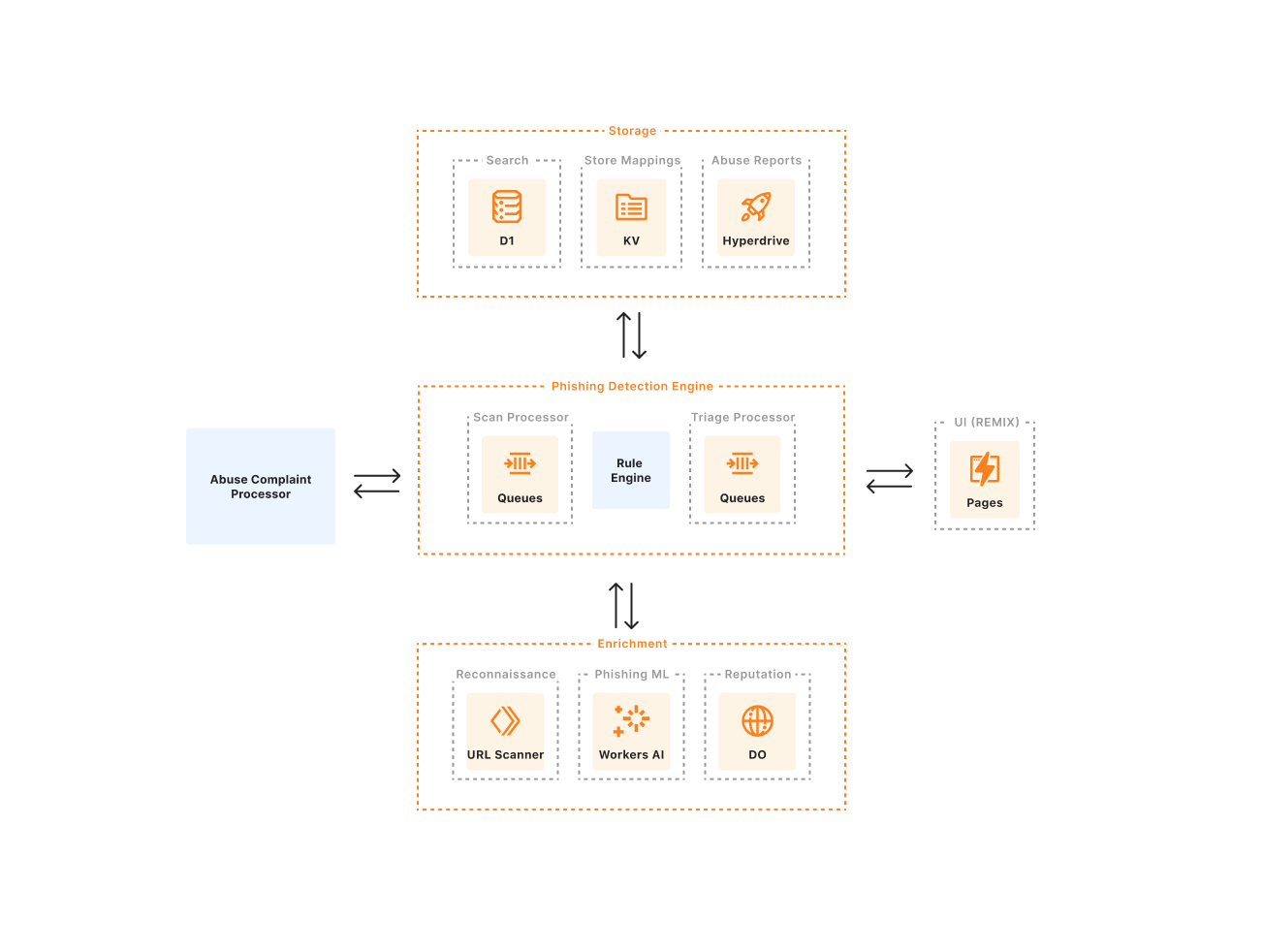

Architecture of Trust & Safety’s phishing automation detection pipeline

Moving forward

The same intelligence we’re gathering to expedite and refine abuse report processing isn’t just for abuse response; it’s also used to empower our customers. By analyzing patterns and trends of abusive behaviors — such as identifying common phrases used in phishing attempts, recognizing infrastructure used by malicious actors or spotting coordinated campaigns across multiple domains — we enhance the efficacy of our application security, email security, and threat intelligence products.

For our Brand Protection customers, this translates into a significant advantage: the ability to easily report suspected abuse directly from the Cloudflare dashboard. This feature ensures that potential phishing sites are addressed rapidly, minimizing the risk to your customers and brand reputation. Furthermore, the Trust and Safety team can use this information to take action on similar threats across the Cloudflare network, protecting all customers, even those who aren’t Brand Protection users.

Alongside our network-wide efforts, we’ve also been partnering with our customers, as well as experts outside of Cloudflare, to understand trends they are seeing in their own phishing mitigation efforts. By soliciting intelligence regarding the abuse issues that affect the attack’s targets, we can better identify and prevent abuse of Cloudflare products. We’ve been able to use these partnerships and discussions with external organizations to craft highly targeted rules that head off emerging patterns of phishing activity. 

It takes a village: if you see something, say something

If you believe you’ve identified phishing activity that is passing through Cloudflare’s network, please report it via our abuse reporting form. For technical users who might be interested in a programmatic way to report to us, please review our abuse reporting API documentation.

We invite all of our customers to join us in helping make the Internet safer:

  1. Enterprise customers should speak with their Customer Success Manager about enabling Brand Protection, included by default for all enterprise customers. 

  2. For existing users of the Brand Protection product, update your brand’s assets, so we can better identify the legitimate websites and logos of our customers vs. possible phishing activity.

  3. As a Cloudflare customer, make sure your abuse contact is up-to-date in the Cloudflare dashboard.
Introducing Requests for Information (RFIs) and Priority Intelligence Requirements (PIRs) for threat intelligence teams

Post Syndicated from Javier Castro original https://blog.cloudflare.com/threat-intel-rfi-pir


Cloudforce One is our threat operations and research team. Its primary objective: track and disrupt threat actors targeting Cloudflare and the customer systems we protect. Cloudforce One customers can engage directly with analysts on the team to help understand and stop the specific threats targeting them.

Today, we are releasing in general availability two new tools that will help Cloudforce One customers get the best value out of the service by helping us prioritize and organize the information that matters most to them: Requests for Information (RFIs) and Priority Intelligence Requirements (PIRs). We’d also like to review how we’ve used the Cloudflare Workers and Pages platform to build our internal pipeline to not only perform investigations on behalf of our customers, but conduct our own internal investigations of the threats and attackers we track.

What are Requests for Information (RFIs)?

RFIs are designed to streamline the process of accessing critical intelligence. They provide an avenue for users to submit specific queries and requests directly into Cloudforce One’s analysis queue. Essentially, they are a well-structured way for you to tell the team what to focus their research on to best support your security posture.

Each RFI filed is routed to an analyst and treated as a targeted call for information on specific threat elements. From malware analysis to DDoS attack analysis, we have a group of seasoned threat analysts who can provide deeper insight into a wide array of attacks. Those who have found RFIs invaluable typically belong to Security Operation Centers, Incident Response Teams, and Threat Research/Intelligence teams dedicated to supporting internal investigations within an organization. This approach proves instrumental in unveiling potential vulnerabilities and enhancing the understanding of the security posture, especially when confronting complex risks.

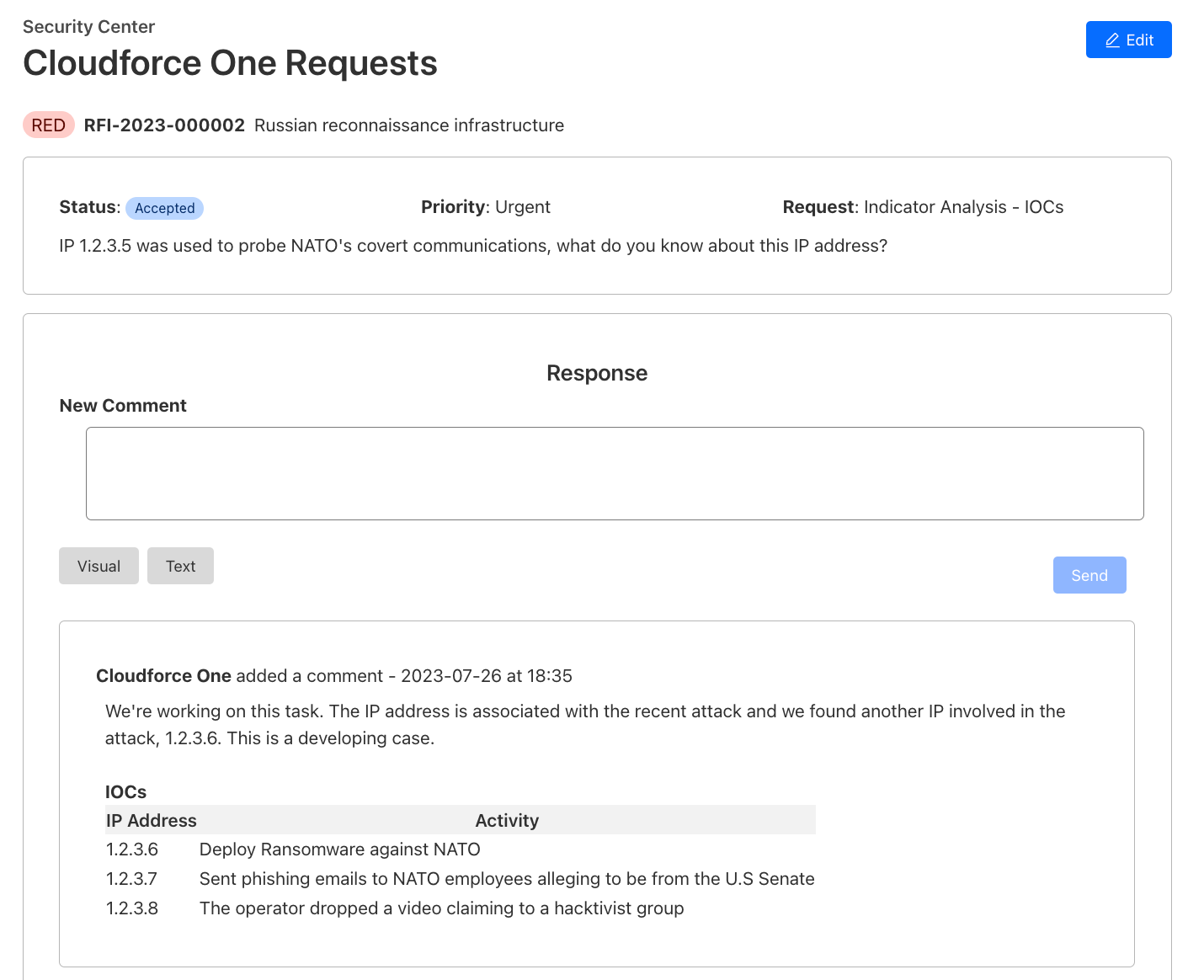
Creating an RFI is straightforward. Through the Security Center dashboard, users can create and track their RFIs:

  1. Submission: Submit requests via Cloudforce One RFI Dashboard:
    a. Threat: The threat or campaign you would like more information on
    b. Priority: routine, high or urgent
    c. Type: Binary Analysis, Indicator Analysis, Traffic Analysis, Threat Detection Signature, Passive DNS Resolution, DDoS Attack or Vulnerability
    d. Output: Malware Analysis Report, Indicators of Compromise, or Threat Research Report
  2. Tracking: Our Threat Research team begins work and the customer can track progress (open, in progress, pending, published, complete) via the RFI Dashboard. Automated alerts are sent to the customer with each status change.
  3. Delivery: Customers can access/download the RFI response via the RFI Dashboard.
Fabricated example of the detailed view of an RFI and communication with the Cloudflare Threat Research Team

Once an RFI is submitted, teams can stay informed about the progress of their requests through automated alerts. These alerts, generated when a Cloudforce One analyst has completed the request, are delivered directly to the user’s email or to a team chat channel via a webhook.

What are Priority Intelligence Requirements (PIRs)?

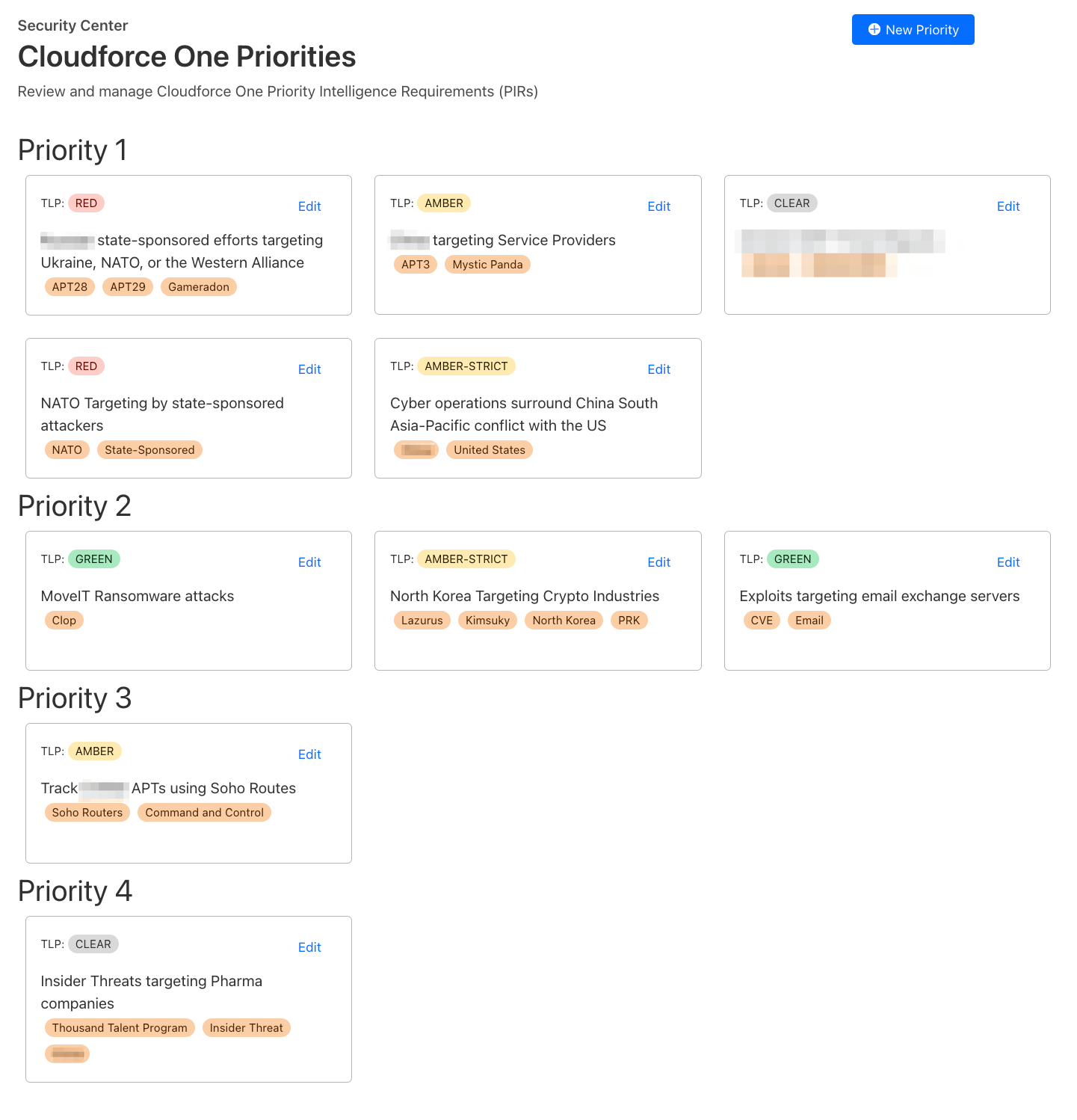
Priority Intelligence Requirements (PIRs) are a structured approach to identifying intelligence gaps, formulating precise requirements, and organizing them into categories that align with Cloudforce One’s overarching goals. For example, you can create a PIR signaling to the Cloudforce One team what topic you would like more information on.

PIR dashboard with fictitious examples of priority intelligence requirements

PIRs help target your intelligence collection efforts toward the most relevant insights, enabling you to make informed decisions and strengthen your organization’s cybersecurity posture.

While PIRs currently offer a framework for prioritizing intelligence requirements, our vision extends beyond static requirements. Looking ahead, our plan is to evolve PIRs into dynamic tools that integrate real-time intelligence from Cloudforce One. Enriching PIRs by integrating them with real-time intelligence from Cloudforce One will provide immediate insights into your Cloudflare environment, facilitating a direct and meaningful connection between ongoing threat intelligence and your predefined intelligence needs.

What drives Cloudforce One?

Since our inception, Cloudforce One has been actively collaborating with our Security Incident Response Team (SIRT) and Trust and Safety (T&S) team, aiming to provide valuable insights into attacks targeting Cloudflare and counteract the misuse of Cloudflare services. Throughout these investigations, we recognized the need for a centralized platform to capture insights from Cloudflare’s unique perspective on the Internet, aggregate data, and correlate reports.

In the past, our approach would have involved deploying a frontend UI and backend API in a core data center, leveraging common services like Postgres, Redis, and a Ceph storage solution. This conventional route would have entailed managing Docker deployments, constantly upgrading hosts for vulnerabilities, and dealing with a complex environment where we must juggle secrets, external service configurations, and maintaining availability.

Instead, we welcomed being Customer Zero for Cloudflare and fully embraced Cloudflare’s Workers and Pages platforms to construct a powerful threat investigation tool, and since then, we haven’t looked back. For anyone that has used Workers in the past, much of what we have done is not revolutionary, but almost commonplace given the ease of configuring and implementing the features in Cloudflare Workers. We routinely store file data in R2, metadata in KV, and indexed data in D1. That being said, we do have a few non-standard deployments as well, further outlined below.

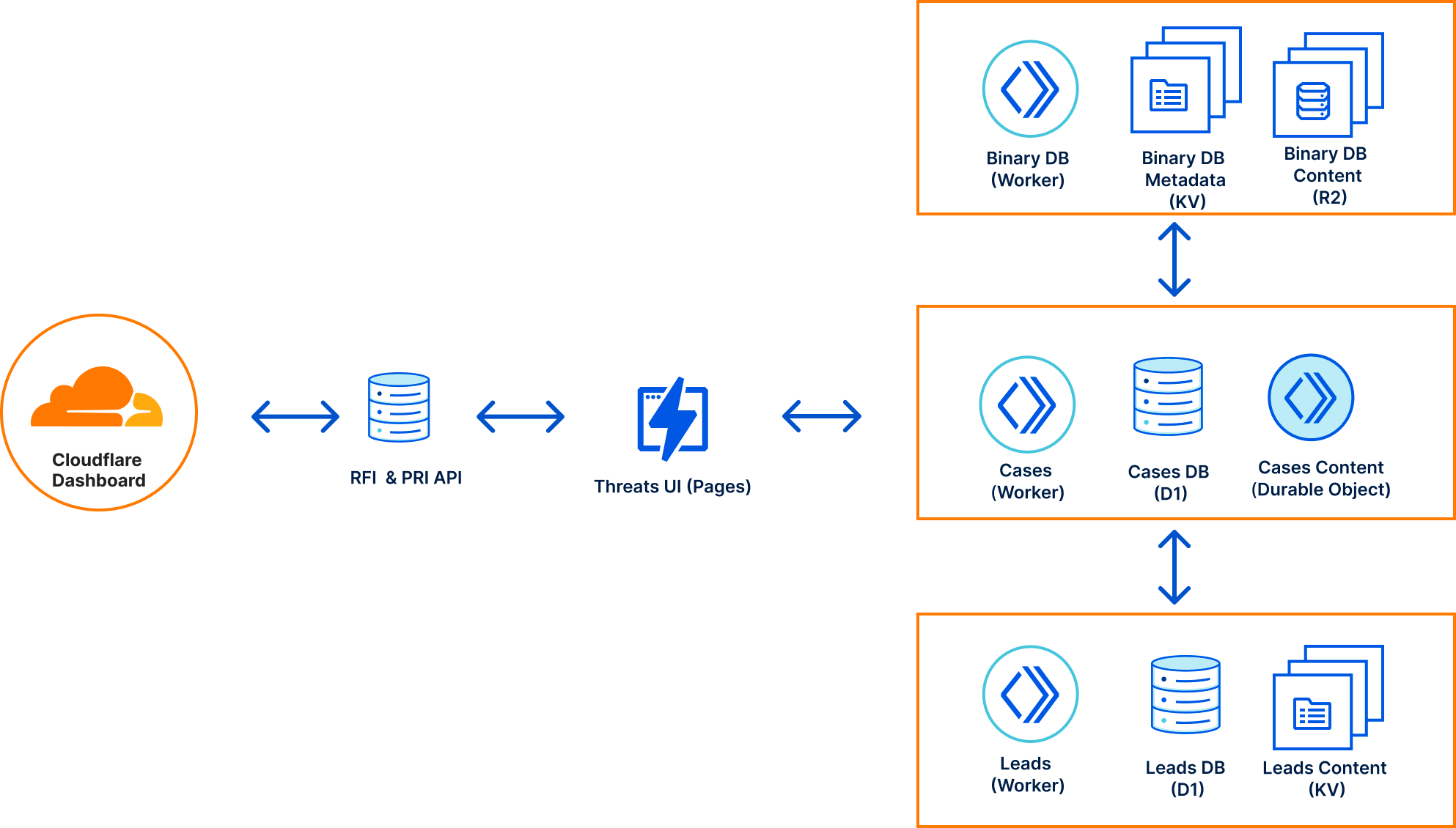
Altogether, our Threats Investigation architecture consists of five services, four of which are deployed at the edge with the other one deployed in our core data centers due to data dependency constraints.

  • RFIs & PIRs: This API manages our formal Cloudforce One requests and customer priorities submitted via the Cloudflare Dashboard.
  • Threats: Our UI, deployed via Pages, serves as the interface for interacting with all of our Cloudforce One services, Cloudflare internal services, and the RFIs and PIRs submitted by our customers.
  • Cases: A case management system that allows analysts to store notes, Indicators of Compromise (IOCs), malware samples, and data analytics related to an attack. The service provides live updates to all analysts viewing the case, facilitating real-time collaboration. Each case is a Durable Object that is connected to via a Websocket that stores “files” and “file content” in the Durable Object’s persistent storage. Metadata for the case is made searchable via D1.
  • Leads: A queue of informal internal and external requests that may be reviewed by Cloudforce One when doing threat hunting discovery. Lead content is stored into KV, while metadata and extracted IOCs are stored in D1.
  • Binary DB: A raw binary file warehouse for any file we come across during our investigation. Binary DB also serves as the repository for malware samples used in some of our machine learning training. Each file is stored in R2, with its associated metadata stored in KV.
Cloudforce One Threat Investigation Architecture

At the heart of our Threats ecosystem is our case management service built on Workers and Durable Objects. We were inspired to build this tool because we often had to jump into collaborative documents that were not designed to store forensic data, organize it, mark sections with Traffic Light Protocol (TLP) releasability codes, and relate analysis to existing RFIs or Leads.

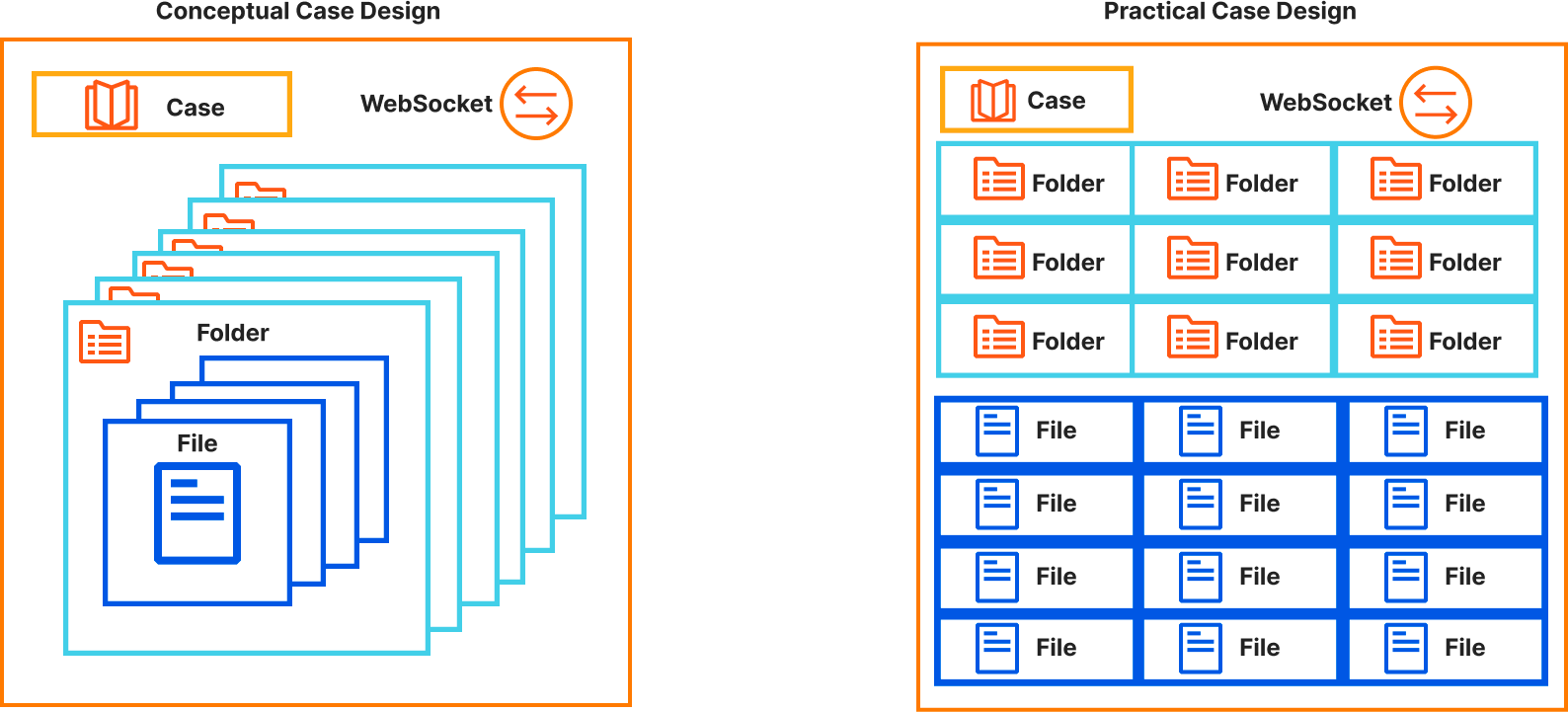
Our concept of cases is straightforward — each case is a Durable Object that can accept HTTP REST API or WebSocket connections. Upon initiating a WebSocket connection, it is seamlessly incorporated into the Durable Object’s in-memory state, allowing us to instantly broadcast real-time events to all users engaged with the case. Each case comprises distinct folders, each housing a collection of files containing content, releasability information, and file metadata.

Practically, our Durable Object leverages its persistent storage with each storage key prefixed with the value type: “case”, “folder”, or “file” followed by the UUID assigned to the file. Each case value has metadata associated with the case and a list of folders that belong to the case. Each folder has the folder’s name and a list of files that belong to it.

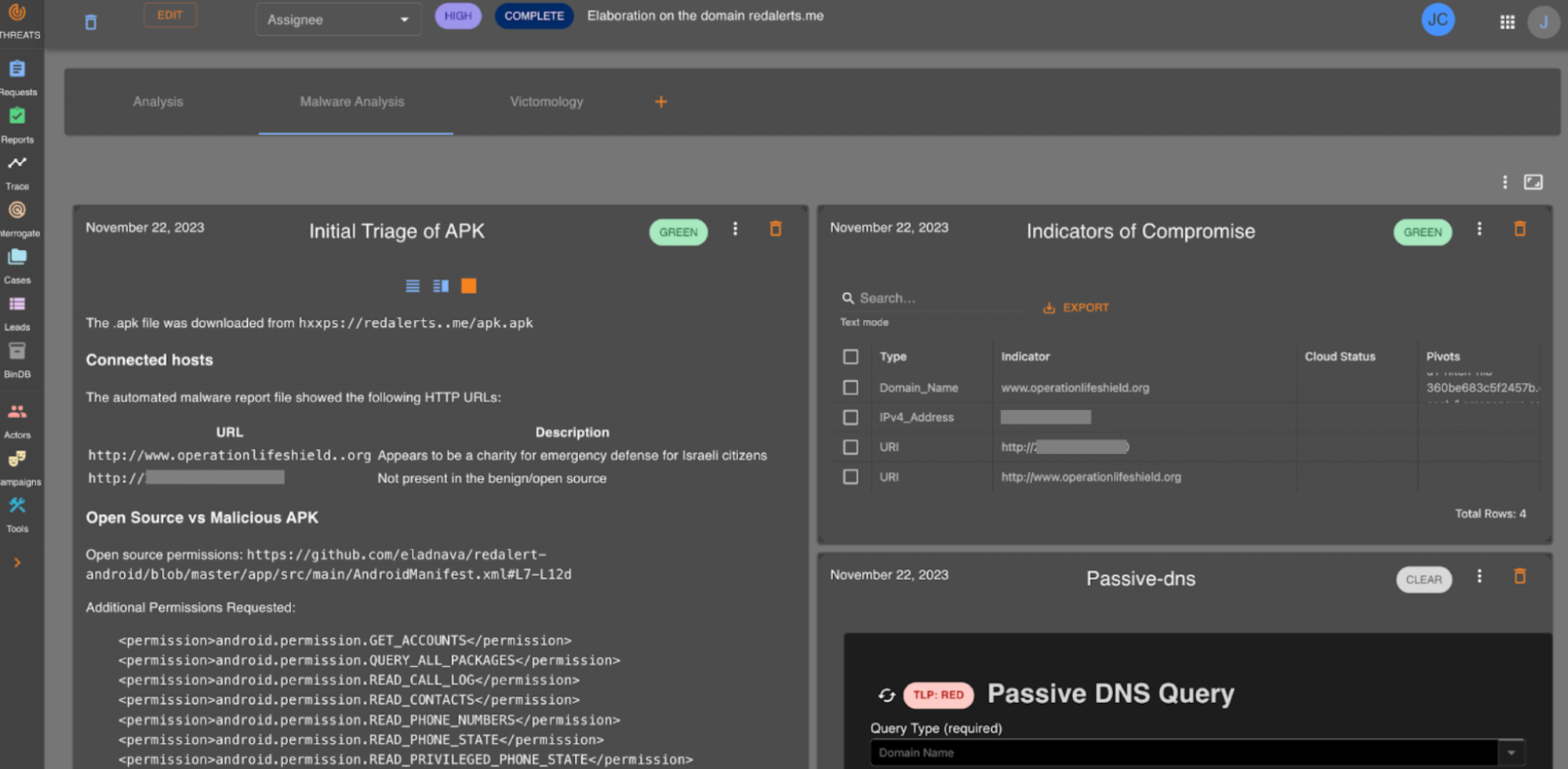
Our internal Threats UI helps us tie together the service integrations with our threat hunting analysis. It is here we do our day-to-day work which allows us to bring our unique insights into Cloudflare attacks. Below is an example of our Case Management in action where we tracked the RedAlerts attack before we formalized our analysis into the blog.

What good is all of this if we can’t search it? The Workers AI team launched Vectorize and enabled inference on the edge, so we decided to go all in on Workers and began indexing all case files as they’re being edited so that they can be searched. As each case file is being updated in the Durable Object, the content of the file is pushed to Cloudflare Queues. This data is consumed by an indexing engine consumer that does two things: extracts and indexes indicators of compromise, and embeds the content into a vector and pushes it into Vectorize. Both of the search mechanisms also pass the reference case and file identifiers so that the case may be found upon searching.

Given how easy it is to set up Workers AI, we took the final step of implementing a full Retrieval Augmented Generation (RAG) AI to allow analysts to ask questions about our previous analysis. Each question undergoes the same process as the content that is indexed. We pull out any indicators of compromise and embed the question into a vector, so we can use both results to search our indexes and Vectorize respectively, and provide the most relevant results for the request. Lastly, we send the vector data to a text-generation model using Workers AI that then returns a response to our analysts.

Using RFIs and PIRs

Imagine submitting an RFI for “Passive DNS Resolution – IOCs” and receiving real-time updates directly within the PIR, guiding your next steps.

Our workflow ensures that the intelligence you need is not only obtained but also used optimally. This approach empowers your team to tailor your intelligence gathering, strengthening your cybersecurity strategy and security posture.

Our mission for Cloudforce One is to equip organizations with the tools they need to stay one step ahead in the rapidly changing world of cybersecurity. The addition of RFIs and PIRs marks another milestone in this journey, empowering users with enhanced threat intelligence capabilities.

Getting started

Cloudforce One customers can already see the PIR and RFI Dashboard in their Security Center, and they can also use the API if they prefer that option. Click to see more documentation about our RFI and our PIR APIs.

If you’re looking to try out the new RFI and PIR capabilities within the Security Center, contact your Cloudflare account team or fill out this form and someone will be in touch. Finally, if you’re interested in joining the Cloudflare team, check out our open job postings here.