Optimizing your site for AI is of little use if AI can't find it. The answer to someone's question may already be on your website: the installation guide you spent a week writing, or a first-hand account of using a product, with the details that make the difference for whether they buy it. As more people turn to AI for help, you want those systems to find your work, represent it accurately, and send interested people your way. You also want control over how they access your site.
Cloudflare and OpenAI launched a research pilot in July 2026 with those interests in mind. We wanted to find out whether signals from Cloudflare’s network could help ChatGPT users discover new content more efficiently.
Today, we’re sharing early results. So far, the answer is a resounding yes: the pilot has brought previously unknown pages into OpenAI’s search index, giving ChatGPT more sources to draw on to help people find relevant, timely information. Along the way, we’ve learned more about what makes a page worth discovering and how AI systems use the web.
Finding more of the web
The web is full of specifics. Someone fixing a washing machine needs the manual for their exact model. Someone applying for a passport needs the current requirements and fees. Someone choosing a local restaurant needs its latest menu and opening hours. Finding the right page can be the difference between a wrong answer and one that actually helps. These pages can be valuable even if few other sites link to them.
In the previous version of the web, discoverability was getting to the top of a search result page. It was then up to the human who visited your page to determine the value of the information, book that table, apply for that passport. As people increasingly rely on AI to find information and complete tasks, discoverability matters in new ways. AI systems need to find the right sources, understand what's useful, and connect people with relevant information – whether that's through an answer, a citation, or a visit to the website itself.
Cloudflare's network provides signals that can help OpenAI’s search crawler discover more useful pages across the web to surface to ChatGPT users. OpenAI then independently evaluates and ranks how those pages appear based on how relevant and helpful they are. Together, this creates a feedback loop that can improve both discovery and the quality of information people find.
This joint pilot, which used a participating cohort of ~1% of Cloudflare’s total network, has enabled OpenAI to discover and index hundreds of millions of new web pages, helping people discover more useful content and get more questions answered through ChatGPT. By linking back to relevant sources, ChatGPT Search also gives people a way to explore the original content and discover the websites and publishers behind it.
With GPT-6 and Intelligent UI, OpenAI is also making ChatGPT an even better place to shop, learn, and find answers, with more visual, interactive experiences tailored to what people need. This work complements these advances by helping ChatGPT discover more useful, up-to-date information from across the web.
From discovery to useful answers
Finding a URL is only the start. We need to know whether it leads to a page someone can access, whether that page offers anything distinct, and what it might help someone do.
We’ve learned, for example, how easily automated traffic can make a nonexistent page look interesting. Bots repeatedly ask for files that aren’t there. Some sites redirect almost any address to their homepage. Other addresses lead to copies of the same content. Recognizing these patterns gives us a way to cut wasted work before a crawler fetches the page, and improve efficiency in a way that benefits site owners.
We're also testing signals that identify and flag potentially harmful pages, adding another layer of information to support safer, more reliable discovery. A legitimate site can have a single compromised page, such as a fake login form planted by an attacker. Flagging that one page, rather than the whole domain, keeps people safe without penalizing the site owner. Early results suggest these signals can help identify pages that should be kept out of an index.
Making discovery easier
As more people use AI to discover information, website owners have new opportunities to reach interested audiences. For those who choose to make their content available to AI systems, these improvements make discovery easier and more efficient.
Keeping up by fetching every page more often would be expensive for everyone. For a website owner, a crawler that repeatedly downloads an unchanged page adds load without bringing any benefit.
The signals above are how we avoid that. Filtering keeps crawlers away from pages that don't exist or that redirect elsewhere. Change signals tell them when a page is worth another visit, and when it isn't.
There's a balance to get right. Finding new pages can initially increase crawling as those pages are evaluated and indexed. The goal is to keep discovering and stay current while reducing the work that takes. For Cloudflare customers, that means less unnecessary load. For OpenAI, it means more of its search resources are spent on information that helps people.
Making it worthwhile to participate
The next phase will build on what we’ve learned: improve the selection of pages, test faster and more reliable change signals, and measure what happens after content is discovered.
We’re continuing to work with OpenAI to understand how better site discovery can translate into real business outcomes, and we’ll keep sharing what we learn along the way.
Domain owners’ choices matter throughout. A signal about a page doesn’t grant permission to access it. This research uses metadata about the web for search and discovery, rather than sharing page content for model training.
Cloudflare’s AI Search combines Workers AI, Vectorize, R2, and Browser Run into a fully managed index and retrieval pipeline. Since we launched AI Search over a year ago, we’ve seen developers use it to power a wide range of search use cases, from searching internal documentation to powering search for their websites. We use AI Search ourselves to power search on our own blog and developer docs.
As part of general availability, we’ll start billing for AI Search on November 1, 2026, and continue to offer a generous free tier on all Workers plans.
New: multimodal embedding and retrieval
An image is more than the sentence used to describe it. Product texture, screenshot state, chart relationships, document layout, and fine visual detail can all disappear when pixels are compressed into a caption.
AI Search now preserves both signals: it embeds image pixels directly for visual retrieval while retaining captions for textual understanding. To keep these richer representations efficient, AI Search leverages Matryoshka Representation Learning (MRL), allowing smaller embeddings to retain useful information while keeping storage manageable and search fast.
Although we originally supported retrieval over images, the implementation was naive: we would perform object detection, generate a caption, and then embed that text. This made images searchable, but only through the details captured in the caption. Now, we do both — caption-based understanding and native image retrieval.
Native multimodal retrieval is available today with the Qwen3-VL-Embedding model. At query time, AI Search checks whether your instance’s embedding model supports images. If it does, a query image is embedded directly by that model, landing in the same vector space as your indexed images and text.
If your embedding model is text-only, you can still query with an image. AI Search converts the query image to text with ToMarkdown and searches using the resulting caption. This gives every model basic multimodal support, while models with native image support get the full visual signal.
Caption-based understanding
A small bird with black-and-white markings perched among golden fruit and green leaves
Native Image Retrieval
Can match details omitted from the caption: the geometry of the bird’s white eyebrow stripe, its yellow-green plumage, the mixture of smooth and weathered fruit, the leaves’ deeply ribbed texture, and the image’s warm palette and shallow-focus composition.
The caption is a compressed interpretation of the image. Capturing every potentially useful detail requires long or specialized captions, written with the eventual search query in mind. Native image embeddings preserve visual characteristics without requiring the caption to anticipate which details matter.
This enables searches that are difficult to express precisely with words. You can describe an image you want to find, provide another image to locate visually similar results, or combine both, such as “a bird with similar markings” or “a bird perched on a leafy branch with plums.” It is useful for product discovery, screenshot matching, charts, diagrams, scanned documents, and other collections where color, texture, composition, or spatial relationships matter.
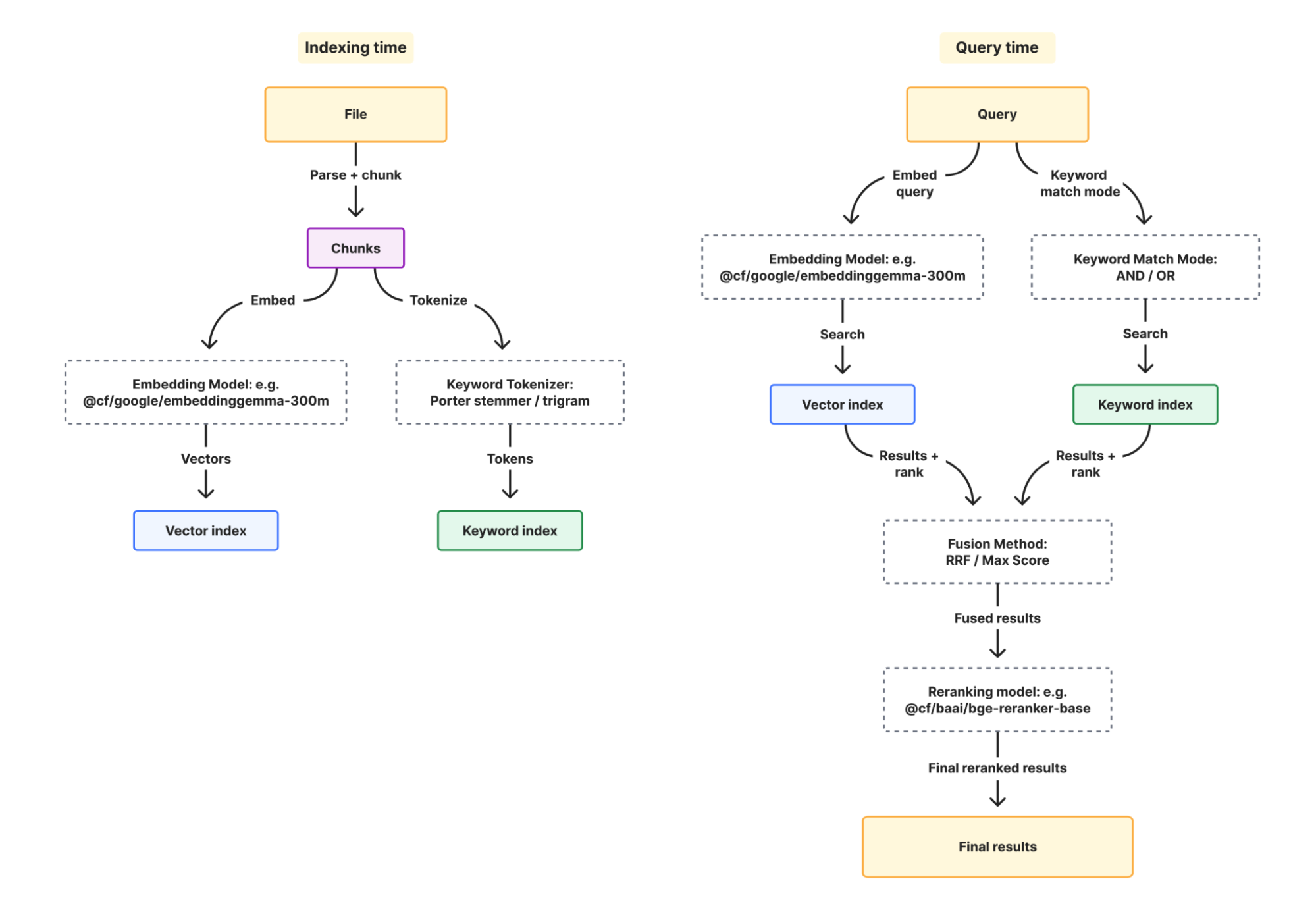
Here’s how a query moves through AI Search. First, the query is optionally rewritten, then embedded (image queries are embedded directly by multimodal models, or captioned first by text-only models). Vector and keyword search run in parallel, and results are fused and optionally reranked. The top chunks are returned, or passed to a generation model to write an answer.
Bigger files and OCR for scanned documents
AI Search now accepts your text files (Markdown, HTML, CSV, JSON and similar) and PDFs up to 10 MiB, up from 4 MiB. Many PDFs are really scanned images with no extractable text. For those, turn on OCR and AI Search reads the text from each page before chunking and embedding it. OCR is available to every account and is billed under the new AI Search pricing as image processing ingestion tokens.
Now in GA: billing and pricing for AI Search
During our August 2026 Agents Week, we announced preview pricing for AI Search. With the product going GA today, we’re announcing billing for AI Search that is going live on November 1, 2026. We’ll send a reminder email before billing is enabled.
AI Search pricing is designed, so you can estimate your bill before you index a single file. You pay for three things: the content you ingest, the data you store, and the queries you run. The work in between (parsing, chunking, embedding with Workers AI models, keyword indexing, and reranking) is included. There are no instance hours, capacity units, or monthly minimums to size up front, and small projects fit inside the free monthly allotment.
Ingestion pricing is based on one rate per token with whichever Workers AI embedding model you pick, and tokens are counted the same way for every model. Switching from a text-only embedding model to a multimodal one doesn't change what you pay to ingest, unless you are also processing images (add-on fee). Storage is priced on the size of data in your indices. Querying is priced based on the type of query (semantic vs. full-text) and how many queries you send.
Estimating your cost comes down to how much content you index, how much you store, and how many queries you expect. Here's the pricing we announced in preview, with one tweak that we’re making: on the free monthly allotment, you will receive 1,000 semantic queries and 1,000 full-text queries (instead of a shared pool of 2,000 queries).
Pricing
Free monthly allotment (all Workers plans)
Ingestion
Base Ingestion
$0.75 / 1M tokens
5M tokens †
Image processing (add-on)
+$0.50 / 1M tokens
5M tokens †
Storage
Stored data
$2.00 / GB-month
10 GB
Query
Semantic (hybrid and vector search)
$0.75 / 1k queries
1,000 queries
Full-text
$0.10 / 1k queries
1,000 queries
Embedding and Reranking
Ingestion and query
Free with select Workers AI models; third-party billed separately
N/A
† A single pool of 5M ingestion tokens per month, covering any file type currently supported (e.g., text, images).
What’s next
Multimodal embedding support is just the first step; we’re building an ingestion pipeline to support full video and audio processing to allow our customers to search their rich media assets.
We’re also refactoring the keyword search engine so that it scales better with your content requirements, particularly for when you have big data stores where the current implementation has limits.
Finally, we’re developing better and simpler ways to enable AI Search and create indexes for websites already running on Cloudflare. This ensures AI agents can discover, explore, and consume content more easily and efficiently.
Stay tuned for these follow-up announcements and more.
AI Search is now generally available to enable and use today. Get started with our new multimodal embeddings, bigger files, OCR features, and our new managed instance pricing. Check out the AI Search developer docs for more information.
AI answer engines read a publisher’s page and hand the reader a summary, so the visit, and the revenue that would come with it, never happens. Most publishers will never sign a licensing deal with the companies that use their work in AI products, and no company can negotiate with millions of sites. The web needs a way to say “yes, if you pay.” Pay Per Use is one way to say it, and it's now in beta.
In July, we outlined our plan for Pay Per Use. Since then, we’ve been working with buyers and content owners to bring it to life. The gist: A buyer offers a price for a specific use of your content. You choose whether to accept. The buyer reports each use, and Cloudflare bills the buyer and pays you. Publishers track usage and earnings in the Cloudflare dashboard. Buyers report usage through a single API.
Pay for the use, not the crawl
AI products fetch far more than they use. A search engine indexes pages it never shows. Charging for every crawl makes the buyer pay before it knows what it needs, and many buyers won't. Paying for use ties the price to the value the buyer actually gets, which we hope brings more buyers to the table and more money to publishers. Pay Per Crawl, which we launched in 2025, charges for access. Pay Per Use pays for what happens next. Publishers can choose the model that suits them.
For buyers, the case is just as simple. Some of the content your product needs is behind a block or a paywall today, and it’s the content that changes fastest: news, research, specialist trade publications. Pay Per Use lets buyers make an offer. You pay only for the content your product actually uses, you’re identified to every publisher as a verified buyer, and one API connects you to every site that says yes. You won’t need thousands of integrations or individually-negotiated contracts.
Each AI company defines the use it will pay for and sets a price. Publishers decide which offers to accept, and then can see how often their content is used and what it has earned. Cloudflare handles enrollment, usage records, billing, and payment.
How Pay Per Use works
Pay Per Use lets publishers make their content available to identified AI companies on terms that turn downstream use into revenue. Publishers choose which programs to join and retain control over crawler access and downstream uses. AI companies identify their crawling activity using Verified bots and, when permitted by the publisher’s controls, can access and index content owned by the publisher. That content can later power many experiences: a cited answer in AI search, a passage quoted in a research agent's report, a product review weighed by a shopping agent, or a recipe adapted by a cooking assistant.
Let’s show how it works!
1. Define what counts as a paid use
Each AI company sets up its program with Cloudflare. It identifies its crawler, defines the use it will pay for, sets a price, and connects a payment account.
Consider two possible offers. A search service could pay when it returns an excerpt from an enrolled page to a customer. A shopping agent could pay when an enrolled review shapes a recommendation. Under the second offer, payment follows use even if the shopper never reads the review.
The same article can create value in different products and publishers can accept different payment offers for different uses. The buyer proposes the definition of the use being paid for; Cloudflare provides the reporting and payment infrastructure.
2. Publishers choose whether to participate
Publishers review offers in the Cloudflare dashboard, under Monetize → Pay Per Use: it will show the AI company, the use it pays for, and its offer price. Publishers decide whether to accept, and can stop participating if an arrangement no longer works for them. There is no origin change or technical integration with each AI company. Each program’s terms also define what the AI company may do with the content, including any restrictions on training.
3. The buyer reports each use
The buyer fetches the list of domains that have accepted its offer, then reports each use as one line of JSON: when it happened, the URL the content came from, and an event ID.
Usage is self-reported: the program terms require complete reporting, and Cloudflare checks that each reported use maps to an enrolled publisher.
4. Cloudflare settles both sides
We aggregate reported uses, charge the buyer, and pay publishers monthly through their connected payment account. Buyers get one integration. Publishers get one place to see offers and earnings.
Payment is only half the product
Today, publishers see how often each AI company uses their content and what it has earned, by domain and over time. Business Insights already shows which crawlers visit and what they take. Pay Per Use shows what happens next: whether that content was actually used, how often, and what it earned.
Next, we’re working with AI companies to report to publishers more context about each use, such as the keywords that led to the citation, the topic of the request, or the product it powered, with no personal data being exchanged.
Our Answer Engine Optimization (AEO) tool shows how assistants answer questions about your work. Pay Per Use shows what buyers report using, and what that use earned. Together, they connect how your content is found, how it's used, and what it pays.
That helps with two kinds of decisions. Commercial ones: which content earns, which uses are worth it, and whether to keep participating. And editorial ones: what to cover, what to update, and what to make easier for agents to find.
What comes next
During the beta, we’re working directly with each buyer and with the publishers who opt in. The question is simple: do both sides want to keep going? Buyers need content that improves their products at a price that works. Publishers need a return that makes participation worthwhile, reporting they can trust, and payments that arrive on time.
Over time, we want new buyers to onboard with their own products and payment models, without rebuilding enrollment, reporting, and settlement for each publisher.
For publishers, that means one place to accept or decline offers, counter on price, and price content differently by use. Last week’s reporting may be worth more to an AI product than a ten-year-old archive page, and you should be able to charge for that.
The beta will help us determine how to make those choices simple and practical at scale.
Building an economic layer for the agentic web
Content should be able to reach new audiences and generate sustainable revenue, even when it becomes part of someone else's product: a cited search result, a shopping recommendation, an agent's report. Pay Per Use turns those uses into a commercial relationship. A buyer makes an offer, a publisher chooses whether to accept, and the use of valuable content leads to payments and records of what happened.
Not everything should be sold the same way. High-value content needs a trusted network of verified buyers who report how they use it, and that's Pay Per Use. APIs, tools, and data are frequently different, because every request is the use. For those, Monetization Gateway (also in beta as of today) lets sellers charge agents per request, using the open x402 protocol. The two run on the same foundations: identity, metering, pricing, and analytics.
Publishers shouldn't have to choose between blocking every agent and giving their work away. Pay Per Use gives them a way to say yes, on clear terms, with an account of what happened.
For most of its history, the Internet had one audience that paid the bills: people. We read the articles, saw the ads, and bought the subscriptions. Bots were always there, but they were mostly large, automated operations that didn't view ads, pay for anything, or read in any meaningful sense.
That's changing fast. At the end of 2024, Cloudflare handled an average of 63 million HTTP requests a second. Today, it's almost doubled to 115 million, with peaks above 150 million. Over the past year, daily requests from AI agents on our network grew by more than 1,700%. This year, for the first time, more than half of Internet traffic wasn't human.
The human web didn't shrink to make room. A second audience arrived alongside it: agents, software acting on behalf of people. They sit somewhere between humans and traditional bots. They don't respond to ads, but there's usually a person behind them with a job to get done. For businesses that learn to serve them and capture value from them, agents are additive. For those that don't, they're extractive.
What our customers need hasn't changed: to be discovered, to tell great stories, to build great experiences, and to sell. What's changed is that more than half your visitors are now software. Our job is to help you serve both audiences.
More traffic, less revenue
For thirty years, the web ran on one arrangement: you let search engines crawl your site, they sent you visitors, and you turned those visitors into a business. Being found and getting paid were the same thing.
AI has caused this delicate balance to break down. Now, answer engines read the page and give the reader a summary. This costs websites bandwidth without leading a human to a website where the ads or payments happen. The machines kept coming, and the audience that paid for the web stopped reaching those sites. Some of the most heavily crawled categories, like Retail, Computer Software, IT & Services, and Financial Services, have seen human traffic decline as much as 40% in less than one year.
The result is that revenue per request is falling while costs are rising. Every automated request still costs bandwidth, compute, and origin capacity, and a growing share of those requests carry no referral, no ad impression, and no subscription. Our first instinct was to block all automated traffic. Last year we recommended blocking AI training crawlers on new domains so site owners could at least say no to their content being used to build models. In Spring 2025, 22% of the crawler requests we saw were for AI training (according to the crawlers’ stated purpose). By June 2026, it was 52%. The problem is a blanket “no” is not a sufficiently nuanced approach for the Internet economy being built right now.
The opportunity is there to cater to agents. Get it right, and you are at the forefront of a new business model. Get it wrong, however, and the results will be the same as they were for generations of websites that were on the wrong side of search engine algorithm changes.
Some of that traffic is a customer
An agent booking a table, comparing insurance quotes, or buying a dataset for a researcher is a customer. It just isn't a human one.
The fastest-growing part of automated traffic is no longer crawlers. It's agents: software fetching pages on a person's behalf, often because the human asked a chatbot something. That agent traffic follows human routines, with a weekly rhythm and a dip over the summer holidays. Turn an agent away, and you may be turning away the person who sent it.
Agents also behave differently from training crawlers. A training crawler collects your pages to build a model. An agent comes back each time someone asks about that content, so this traffic grows with how many questions people ask, not how much you publish.
You can't do business with an audience you can't see, can't tell apart, can't set terms for, and can't charge. Until recently, for most of the web's non-human traffic, none of those four things were possible.
See who’s really visiting
"AI bot" no longer means anything useful. What matters is what a bot does. Cloudflare’s AI Crawl Control, Business Insights, and BotBase show site owners who is crawling, what they take, what comes back, and which of your URLs they want most.
A bot's name is only worth something if you can trust it. With Web Bot Auth, operators, including OpenAI, Google, and AWS, cryptographically sign their agents' requests, so a site can tell a real agent from an impersonator without guessing from IP addresses or user-agent strings. We see more than 500 billion verified bot requests each week.
Set your terms
In July, we replaced the single "block AI bots" switch with separate Search, Agent, and Training controls, available on every plan, including Free. The data showed why that distinction was needed. Fewer than 1% of sites on Cloudflare block search crawlers, while 17% block training. Site owners were never trying to hide. But with the rise of agentic traffic and the new ways agents use information, they suddenly had no transparency into, or choice over, how their content was being used. Being found no longer ensures they get paid, and they want to be found without being exploited.
That’s particularly difficult in the case of mixed-use crawlers. When one bot does both search and training, refusing one means refusing the other. On September 15, we shipped Disallow AI Training. It keeps you indexed for search while using crawler-specific mechanisms to instruct the operator not to use your data for training. Apple, Google, and Microsoft have committed to honor it. Cloudflare Radar also publicly tracks crawler behavior.
New domains now see recommended configurations based on how the site makes money rather than what piece of software is visiting. For ad-supported sites, you can easily disallow training and block agents on pages that carry ads, because an ad only pays when a person sees it. You can change any of these settings at any time.
Get paid
In August 2026, we described the Agentic Internet we're building as readable, discoverable, callable, and payable. The last word, payable, is the one that determines whether the open web can fund itself. The web needs a way to say ‘yes, if you pay’ instead of a binary ‘yes’ or ‘no’.
The licensing market shows both how much demand there is and where the gaps are. More than 50 publisher-AI deals have been signed since 2023. Nearly all of them are bespoke and bilateral, between large publishers and large AI companies. They prove content has value. But they don't reach most of the web, and they don't reach most buyers.
Not every asset should be sold the same way. High-value content and datasets need a trusted network, where buyers are identified and report how the work was used. Services like APIs and MCP tools don’t work like that: every request is the use.
So we're building for both.
Pay Per Use reaches the sites that direct licensing can't. Most publishers will never get a bespoke deal with each AI company, and no AI company can negotiate with millions of sites. Pay Per Use is the bridge. It doesn't charge for the crawl. It pays when content is actually used. Every buyer is a verified crawler, which is what makes this a trusted network, and each one defines what counts as use and what it will pay.
Publishers see the offer, choose whether to opt in, and are able to opt out whenever it stops working for them. The buyer reports each use, Cloudflare checks those reports, then bills the buyer and pays the publisher. The reporting matters as much as the payment. Publishers see what was used, when and what they earned, and, where the buyer reports it, information about which questions surfaced their work. Licensing deals rarely show any of that. It creates a feedback loop: publishers learn what people are actually asking for, and from that can decide what to cover, what to update, and what to make readily available to agents.
There won't be one definition of use. A search engine citing a source, a research agent quoting a passage, and a shopping agent completing a purchase create different kinds of value, and each will want its own business model. Buyers can participate via multiple business models using the same rails, with no new integration for publishers. Take a trade journal for marine engineers, with a few thousand subscribers and little prospect of an AI licensing deal. It gets paid by every participating AI company that draws on its work.
Monetization Gateway captures value that has never had a way to change hands. Accounts, API keys, and subscriptions work for customers you already know, not for an agent that wants one lookup from a service it has never used before. Our closed beta allows eligible U.S. Cloudflare customers to put a price on anything that passes through us, using the Rules language they already know. When a rule matches, we return an HTTP 402 Payment Required using the open x402 protocol, and the agent pays the seller directly.
That does more than recover lost revenue. Agents are customers in their own right: they pay for the data, APIs, and tools they use, whether the request is the whole purchase or one step in a larger task.
Monetization Gateway prices per request, per query, or per token, at fixed or capped prices. A sports statistics site built on ads can charge a fraction of a cent each time an agent asks "who leads the league in assists?" When we announced Monetization Gateway, thousands of sellers joined the waitlist, and their most common request was "charge agents, not humans." We're also our own first customer. Cloudflare's AI Gateway uses Monetization Gateway to let agents pay for inference, so we find the rough edges before our customers do.
For buyers, both products beat a block page: reliable access, and a way to reach millions of sites instead of one licensing deal or API key at a time. Every paid request leaves a receipt showing what was bought and that it was paid for.
Both Pay Per Use and Monetization Gateway are bets, built with customers on shared primitives: identity, metering, pricing, settlement, and analytics. They work together, so a publisher can disallow training, allow search, earn from AI answers, and charge agents per article from one dashboard. Pricing and discovery aren't solved yet, which is why both launch as betas, shaped by real customers and real transactions.
Make every request cheaper
Payment is the answer to falling revenue. Rising cost is a different problem, and much of it is simply waste. Most crawlers still download pages built for humans, again and again, to extract a few paragraphs of text. Too often, bots crawl sites that haven’t changed since the last attempt. That burns bandwidth for the site and compute for the crawler, and it happens before any answer is written. We’re working with our customers and the crawlers on tools that will help. Today, you can see the bandwidth consumption used per operator in our dashboard.
In July, we announced a joint research project with OpenAI, a first-of-its-kind pilot to explore how insights from Cloudflare’s global network can help AI search engines discover and index relevant content on the open web more efficiently and effectively. We’re planning to share our initial results in the next few weeks.
For our customers, we’re shipping tools and one-click experiences to make their sites optimized for this new kind of traffic.Markdown for Agents lets agents read a page without the additional styling meant for human eyes, and WebMCP lets a site expose actions directly instead of making agents guess which button to press.
Why build on Cloudflare
More than 20% of the web sits behind Cloudflare’s network, and so do nearly 80% of leading AI companies. We see both sides of this market. We build the rails for visibility, identity, controls, and settlement, and let the market work out what things are worth.
The old deal is gone, and the new one is still being written. Together we can shape what happens next.
In one version, a few companies control how agents find things, prove who they are and pay, and everyone else routes through them. In the other, those pieces are open standards anyone can implement, and a site of any size can set its terms and get paid. We prefer the latter.
That's why these rails run on open standards like x402 and Web Bot Auth, so anyone can build on them. Domain owners choose their own identity providers, their own payment processors, their own agent partners. Cloudflare is one option, not the whole stack.
For decades, the web was paid for by the people who visited it. Now the software visiting on their behalf can pay its share too.
Today, we’re excited to announce a few developer experience improvements to Cloudflare AI Search to make it easy to manage a search solution out of the box. Previously, you had to stitch together components of the Cloudflare primitives (Workers AI, AI Gateway, Vectorize, R2, Browser Run) but now, AI Search can do this automatically — and better. Our goal is to give your agents their own search engine, where they can easily find data to provide better answers for themselves and their humans.
We’re also sharing an early preview of pricing for customers of AI Search so you can learn how this scales. We modeled pricing in a way that makes it predictable and scalable: embedding and reranking are free when you use the default models, so no need to worry about predicting token count.
In AI Search, users can now:
Index a collection of data for your agent: Make structured and unstructured data easily accessible for your agent to build with, from individual files to websites you own. (Today, it must be a zone on your Cloudflare account, but with more ways to verify ownership coming soon.)
Skip the sitemap for your websites: Previously, AI Search required that websites have a sitemap to use the website integration. Now you can select the “Discover” parsing option to add a website without a sitemap as a source.
Get a single public endpoint for searching across a namespace: When you enable public URLs on your namespace, you can get a /search and /mcp endpoint that can search through multiple instances or websites at once without authentication, so you can share easily with your customers.
Put your own custom domain over public endpoints: You can now add your own domains over your public URLs, so you can brand your /search and /mcp endpoints (e.g., search.example.com/mcp). You can also add Cloudflare Access to create private search instances.
Add semantic search to your sites built on EmDash with AI Search plugin: If your site runs on EmDash, our open-source CMS, the AI Search plugin adds semantic search over your content.
Preview the new pricing model for AI Search: We want pricing to be predictable and to scale with you, so we built in the cost of embedding and reranking: they’re free when you use select models from the Workers AI catalog.
Finally, we will also share examples of how AI Search is used across our own platform including Cloudflare.com, our Developer Docs, with EmDash, in Cloudflare Dev Stack MCP — and even the blog post you’re reading right now (try cmd+K).
AI Search in action: powering the new Cloudflare Dev Stack MCP
One of the ways we use AI Search is in our new Cloudflare Dev Stack MCP, which you can try today in our AI Playground. It gives coding agents current, cited docs from across the Cloudflare developer ecosystem, so they build on the latest features and fixes instead of stale training data.
Here's how we built it using the features available today in AI Search:
1. Index each surface
We created one AI Search instance per Cloudflare-owned surface: Docs, Blog, API Docs, Community, Astro, Vite, Vitest, Hono, Replicate, OpenNext. (Each of these is Cloudflare-owned.)
They span different domains, but, because Cloudflare owns the website data, AI Search is able to treat them as a single set and ingest them all the same way. Point AI Search at a site, or set of sites, and it handles crawling, ingestion, embedding, and retrieval. Creating an instance is a single command, and for a site without a sitemap you add –parse-type discover to find pages by following links (powered by /crawl from Browser Run):
2. Combine the instances into one search
Now the interesting part: answering a single query across all 10 instances. There are two ways to do it.
Option A: in a Worker (what we did for Cloudflare Stack MCP)
We bound the namespace to a Worker to create a remote MCP server and made one multi-instance call across all 10 instances. We took this path because we're adding the stack search into Cloudflare's MCP server, so it ships as a tool alongside the Cloudflare tools agents already connect to.
The binding, in wrangler.jsonc:
Then a single tool makes one call that fans out across the instances you name:
Option B: flip on public endpoints (no code)
If you'd rather not write a Worker at all, enable public URLs on the namespace. You immediately get /search and /mcp endpoints that query every instance, with no auth and nothing to deploy.
Reach for the Worker when you're folding search into an existing app or MCP server, as we are. Or reach for the public endpoint when you just want a shareable search endpoint in one click.
3. Brand it and lock it down
Public endpoints come with a default public URL, but you can put your own custom domain over them to brand the endpoint (e.g., search.example.com/mcp).
If the search should be private, add Cloudflare Access in front of the domain. The endpoint now requires a login, so only authorized people (or agents) can query it.
Try it yourself: use the Dev Stack MCP
With the Cloudflare Dev Stack MCP Server, you can ask about any tool, or describe an app you want to build, and you'll get back current, cited answers on how best to build it on the Cloudflare stack.
The AI Playground is worth checking out, but the real magic is wiring the MCP into your coding agent, so the stack's current docs are one tool call away. That replaces the usual fallback (web search then fetching full pages), which is slow, token-heavy, and often lands on the wrong or stale source. To use with your agent of choice, drop the Dev Stack MCP URL into your MCP configuration. For example:
Powering search on our Blog, Developer Docs, and Cloudflare.com
We build with AI Search the same way our customers would: Cloudflare Blog's search already runs on it, and today Developer Docs and Cloudflare.com join it. All of it uses hybrid search, semantic and keyword together in one query, so it handles both open-ended "what does this do" questions and exact lookups of names or keywords. We recently rebuilt the Blog on EmDash, our new open-source CMS, and our new
EmDash AI Search integration is what powers that search now. You can also add it to your own EmDash site and get the same search over your content out of the box.
AI Search respects all bot policies
AI Search is powered by Browser Run /crawl in the background, but goes a step further to identify itself with its own bot identity: Cloudflare-AI-Search. Just like Browser Run, it follows robots.txt, identifies itself with an immutable, public user agent, and will respect whatever bot controls a site has in place.
Preview pricing: pricing you can predict
AI Search is currently free while in beta, and billing is not yet enabled; we'll email you with plenty of notice before it starts. As we move toward general availability, here's a preview of pricing across ingestion, storage, and queries, plus embedding and reranking (preview prices are subject to change before billing begins):
† A single pool of 5M ingestion tokens per month, covering any file type currently supported (e.g., text, images). ‡ A single pool of 2,000 queries per month, shared across both query types.
Our goal is to provide pricing you can predict, starting with the models your search leans on. Embedding turns your text into the vectors that search matches on, and reranking reorders results so the most relevant come first. Both run free with AI Search defaults or when using select models from the Workers AI catalog, so the models behind indexing and every search are not a cost you have to worry about. Answer generation and query rewriting are optional steps that run on a model you choose, billed as Workers AI usage, or you can use AI Gateway credits with any model/provider.
Example bill with preview pricing
Here's a sample monthly bill on the Workers Paid plan for creating a new AI Search instance for a 20,000-document data source (about 20M tokens of text) plus 1,000 images (assume about 1,000 tokens each), with 30,000 semantic queries a month using the default AI Search embedding and reranking model. Ingestion is chunked with roughly 10% overlap, which shows up as the × 1.1 below:
Images count toward base ingestion and also incur the image add-on cost. Storage assumes about 10 KB per document and 1 MB per image. Indexing is largely a one-time cost, so later months are mostly queries, closer to $21.
Get started today
AI Search is available to enable and use today. Point it at your site, turn on hybrid search for both semantic and keyword matching, and you have a search engine for your own data, ready for your agents. Spin one up with one command:
From there, query it, wire it into an agent over /mcp, or put a custom domain on a public /search endpoint to share it with your users. Check out the AI Search docs for more information.
Search drives most experiences on the web. It’s how we get things done, and how nearly everything on the web gets found — the creators, the merchants, the answer to whatever you just typed into a box. For nearly 30 years, that discovery journey ran on a simple bargain: let a search engine crawl your content, and it sends you visitors. You turned those visitors into a business — through ads, subscriptions, or just the audience itself. Being discoverable and getting paid were the same thing. A year ago, on the first Content Independence Day, we drew a line to defend that bargain in the AI era. But a line in the sand was only a first step. Since then, the prevalence of AI search in consumers’ lives has only accelerated as more than 50% of traffic online is non-human. The threat is no longer a handful of training crawlers you can block; it’s search itself being rebuilt around AI answers.
Today’s answer engines read your page and hand the user a summary, so the visit — and the revenue that depended on it — isn’t needed. We see it firsthand, and independent research backs it up: a 2025 Pew Research Center study found that when Google shows an AI summary, users clicked on a traditional search result link just 8% of the time (about half as often as when there’s no summary) and clicked a link inside the summary only 1% of the time. That leaves our customers in a bind: opt out of AI and be hard to find, or opt in and deliver significant value to users while seeing increasingly little in return. Our customers want to be found and compensated for the value they provide, and right now they’re forced to choose.
Today, we’ve announced new bot options to help our customers better control who can access their site and what they can do with it. But blocking was only step one: saying “no” protects content without rebuilding the business models that sustain it. So, it’s time to start building the new economic model of the Internet, starting with search.
Rebuilding the bargain
Transparency and control are the foundation, but more is needed. In 2025, we laid out our foundation via a set of responsible AI bot principles: bots should be transparent about who they are and what they’re for, respect site owners’ choices, and act in good faith. Our tools hold bots to that bar. But enforcing good bot behavior doesn’t make AI search any better for the people relying on it, and it doesn’t send a dollar back to the creator whose work made the answer possible. We can do more than help the web say “no”; we can help rebuild what it says “yes” to.
So today, we’re announcing two initiatives that move from defense to offense and start putting both halves of that old bargain back together.
Make AI search smarter: Byusing the signals we see across our global network, like what’s fresh, what’s high quality, and what’s actually changed, we can help answer engines surface the most relevant content and reduce unwanted crawling. People searching get better answers, while costs are reduced for both AI companies and site owners if webpages are only recrawled when they’ve changed.
Pay creators for the value they provide: When your work is used to answer someone’s question, you should be rewarded instead of just being scraped for free. And you should be able to see what’s being used and what people are asking. This should be a real revenue stream, and an incentive to keep producing original content worth finding.
Making search smarter
Today we’re launching a research program to make AI search smarter and stop our customers footing the bill for crawls that produce nothing new.
More than 20% of the web sits behind Cloudflare’s network, which gives us a unique perspective. We can tell which pages have genuinely changed and which ones people and agents are flocking to. Through this program, we will explore using signals our customers have chosen to share about the freshness of their content, and we will combine those with our own insight into traffic flows, both human and bot. For answer engines, that’s a roadmap to high-quality content. For our customers, it provides a view of what users are actually asking, and how their content shows up in AI results. The aim is to measure two things: how much these signals help answer engines to surface fresher, higher-quality content, and how much unnecessary crawling they cut out.
That second benefit, cutting unnecessary crawling, is bigger than it sounds. Cloudflare data suggests that more than 50% of crawl traffic from good bots goes to re-fetching pages that haven’t changed — and that number is likely to climb as crawl volumes do. A signal that just says “nothing’s changed here” lets a crawler skip the trip. That saves the answer engine compute. More importantly, it saves site owners from serving and paying for requests they never needed to.
The program is neutral by design: our goal is to make it work for every answer engine willing to play fair. It’s limited to search. We aren’t sharing any content, and nothing is used to train foundation models. We intend to publish what we learn, including the benefits to site owners such as better content discoverability and reduced server strain. We plan to make the capability broadly available later this year and reduce unnecessary crawling across our network.
From Pay Per Crawl to Pay Per Use
Last year we launched Pay Per Crawl so publishers could charge AI companies for crawling their content. It was a real start, but crawling is a crude measure of value. A single page might be crawled once and then cited in thousands of answers, or crawled over and over and never used at all. Creators want to be paid fairly for the value they provide.
So we’re starting to shape Pay Per Crawl into Pay Per Use. We’re running experiments with top AI companies, like Ceramic.ai and You.com, and the arrangement is straightforward: organizations can bring their payment models and easily scale them to content owners across the Cloudflare network.
Ceramic has built what it calls a “pay-per-query” model, so publishers who opt in can be paid when their content appears in Ceramic’s search results. This means payment is designed to follow the value the work delivers rather than the number of times a crawler happens to fetch it.
“To scale the future of AI search, we need a partner with massive reach and a shared commitment to transparency and fair compensation,” saysAnna Patterson, founder and CEO of Ceramic.ai. “Cloudflare allows us to easily and programmatically scale our operations. By bringing our pay-per-query model to their network, we ensure millions of content owners can seamlessly opt in to be compensated every single time their content appears in our search results.”
In addition to compensation, content owners participating in the Cloudflare/Ceramic program will unlock new reporting to help with answer engine optimization (AEO). Customers can finally see the top queries leading to their content appearing in search results, the specific webpage and snippet, their average search result ranking position, and more. This is the first of many products we’ll be launching to help our customers with discoverability.
This is just one emerging approach. Another comes from You.com: agents can pay on demand for a specific piece of premium content they need, without any upfront commitment. New payment models from AI providers are being tested (e.g., Pay per Query, Pay per Result, etc.) and we have the infrastructure to support them all.
We want to be honest that this is an experiment. There’s a lot to learn, including exactly how this holds up at the scale of the Internet. We’ll work that out with our partners and our customers as we go, and share what we learn. But the goal is clear: AI search companies get fresher, better-grounded answers, and the customers whose work makes the answers possible get paid when they help. Cloudflare’s job in all of this is to provide the infrastructure layer that makes this market flourish.
We think this is a more natural fit for where the economics of search are heading. The old, human web optimized search to save time — providing excerpts, ten blue links, and a click. The agentic Internet is different: an agent can read fast and search continuously. Search is becoming something an agent does dozens of times to answer a single question, closer to a utility than a destination. In that world, the unit that matters isn’t the crawl or the click. It’s the outcome. Pricing the outcome, and paying the people who made it possible, is how the web continues to thrive.
The headline we want to earn
A year ago on Content Independence Day, the headline was a default ‘no’: AI can’t crawl without compensation. This year, our focus is on giving our users more products and controls to say ‘yes’ and bring more benefits with it.
Today’s announcements are just the beginning. Cloudflare’s research project is designed to see if our signals produce better results with less crawling. Pay Per Use is a promising direction we’ll experiment with alongside partners who believe that content creators deserve fair compensation for their work. This is how the last 30 years of the web got built too: somebody runs the pilot that turns “the model is broken” into “here’s the new model,” one experiment at a time. We believe there’s value to our customers to be discoverable in this new agentic era, and to optimize their content for maximum discovery. But they should be able to do this without giving away their most valuable creative assets for free.
The web is changing, and the business models it’s relied on are changing with it. The old Internet was open, neutral, and worth contributing to. We have a rare chance to keep it that way, and to build the business models that fund it in the future. Smarter answers for humans and agents asking the questions. A fair deal for the people whose skill, creativity, and commitment makes the answers worthwhile. That’s how we pursue Cloudflare’s mission: to help build a better Internet.
Happy Content Independence Day!
Building on the open, agent-ready web? If you are interested in learning more about the Ceramic and You programs, please fill out this form. If you’re building an answer engine and want to crawl smarter, we’d love to hear from you too: [email protected].
Every agent needs search: Coding agents search millions of files across repos. Support agents search customer tickets and internal docs. Even an agent’s memory, its ability to recall past interactions, is fundamentally a search problem. The use cases are different, but the underlying problem is the same: get the right information to the model at the right time.
If you’re building search yourself, you need a vector index, an indexing pipeline that parses and chunks your documents, and something to keep the index up to date when your data changes. If you also need keyword search, that’s a separate index and fusion logic on top. And if each of your agents needs its own searchable context, you’re setting all of that up per agent.
AI Search (formerly AutoRAG) is the plug-and-play search primitive you need. You can dynamically create instances, give it your data, and search — from a Worker, the Agents SDK, or Wrangler CLI. Here’s what we’re shipping:
Hybrid search. Enable both semantic and keyword matching in the same query. Vector search and BM25 run in parallel and results are fused. (The search on our blog is now powered by AI Search. Try the magnifying glass icon to the top right.)
Built-in storage and index. New instances come with their own storage and vector index. Upload files directly to an instance via API and they’re indexed. No R2 buckets to set up, no external data sources to connect first. The new ai_search_namespaces binding lets you create and delete instances at runtime from your Worker, so you can spin up one per agent, per customer, or per language without redeployment.
You can now also attach metadata to documents and use it to boost rankings at query time, and query across multiple instances in a single call.
Now, let’s look at what this means in practice.
In action: Customer Support Agent
Let’s walk through a support agent that searches for two kinds of knowledge: shared product docs, and per-customer history like past resolutions. The product docs are too large to fit in a context window, and each customer’s history grows with every resolved issue, so the agent needs retrieval to find what’s relevant.
Here’s what that looks like with AI Search and the Agents SDK. Start by scaffolding a project:
Let’s say your shared product documentation lives in an R2 bucket called product-doc. You can create a one-off AI Search instance (named product-knowledge) backed by the bucket on the Cloudflare Dashboard within the support namespace:
That’s your shared knowledge base, the docs every agent can reference.
When a customer comes back with a new issue, knowing what’s already been tried saves everyone time. You can track this by creating an AI Search instance per customer. After each resolved issue, the agent saves a summary of what went wrong and how it was fixed. Over time, this builds up a searchable log of past resolutions. You can create instances dynamically using the namespace binding:
// create a per-customer instance when they first show up
await env.SUPPORT_KB.create({
  id: `customer-${customerId}`,
  index_method:{ keyword: true, vector: true }
});
Each instance gets its own built-in storage and vector index — powered by R2 and Vectorize. The instance starts empty and accumulates context over time. Next time the customer comes back, all of it is searchable.
Here’s what the namespace looks like after a few customers:
namespace: "support"
├── product-knowledge     (R2 as source, shared across all agents)
├── customer-abc123       (managed storage, per-customer)
├── customer-def456       (managed storage, per-customer)
└── customer-ghi789       (managed storage, per-customer)
Now the agent itself. It extends AIChatAgent from the Agents SDK and defines two tools. We’re using Kimi K2.5 as the LLM via Workers AI. The model decides when to call the tools based on the conversation:
import { AIChatAgent, type OnChatMessageOptions } from "@cloudflare/ai-chat";
import { createWorkersAI } from "workers-ai-provider";
import { streamText, convertToModelMessages, tool, stepCountIs } from "ai";
import { routeAgentRequest } from "agents";
import { z } from "zod";

export class SupportAgent extends AIChatAgent<Env> {
  async onChatMessage(_onFinish: unknown, options?: OnChatMessageOptions) {
    // the client passes customerId in the request body
    // via the Agent SDK's sendMessage({ body: { customerId } })
    const customerId = options?.body?.customerId;

    // create a per-customer instance when they first show up.
    // each instance gets its own storage and vector index.
    if (customerId) {
      try {
        await this.env.SUPPORT_KB.create({
          id: `customer-${customerId}`,
          index_method: { keyword: true, vector: true }
        });
      } catch {
        // instance already exists
      }
    }

    const workersai = createWorkersAI({ binding: this.env.AI });

    const result = streamText({
      model: workersai("@cf/moonshotai/kimi-k2.5"),
      system: `You are a support agent. Use search_knowledge_base
        to find relevant docs before answering. Search results
        include both product docs and this customer's past
        resolutions — use them to avoid repeating failed fixes
        and to recognize recurring issues. When the issue is
        resolved, call save_resolution before responding.`,
      // this.messages is the full conversation history, automatically
      // persisted by AIChatAgent across reconnects
      messages: await convertToModelMessages(this.messages),
      tools: {
        // tool 1: search across shared product docs AND this
        // customer's past resolutions in a single call
        search_knowledge_base: tool({
          description: "Search product docs and customer history",
          inputSchema: z.object({
            query: z.string().describe("The search query"),
          }),
          execute: async ({ query }) => {
            // always search product docs;
            // include customer history if available
            const instances = ["product-knowledge"];
            if (customerId) {
              instances.push(`customer-${customerId}`);
            }
            return await this.env.SUPPORT_KB.search({
              query: query,
              ai_search_options: {
                // surface recent docs over older ones
                boost_by: [
                  { field: "timestamp", direction: "desc" }
                ],
                // search across both instances at once
                instance_ids: instances
              }
            });
          }
        }),

        // tool 2: after resolving an issue, the agent saves a
        // summary so future agents have full context
        save_resolution: tool({
          description:
            "Save a resolution summary after solving a customer's issue",
          inputSchema: z.object({
            filename: z.string().describe(
              "Short descriptive filename, e.g. 'billing-fix.md'"
            ),
            content: z.string().describe(
              "What the problem was, what caused it, and how it was resolved"
            ),
          }),
          execute: async ({ filename, content }) => {
            if (!customerId) return { error: "No customer ID" };
            const instance = this.env.SUPPORT_KB.get(
              `customer-${customerId}`
            );
            // uploadAndPoll waits until indexing is complete,
            // so the resolution is searchable before the next query
            const item = await instance.items.uploadAndPoll(
              filename, content
            );
            return { saved: true, filename, status: item.status };
          }
        }),
      },
      // cap agentic tool-use loops at 10 steps
      stopWhen: stepCountIs(10),
      abortSignal: options?.abortSignal,
    });

    return result.toUIMessageStreamResponse();
  }
}

// route requests to the SupportAgent durable object
export default {
  async fetch(request: Request, env: Env) {
    return (
      (await routeAgentRequest(request, env)) ||
      new Response("Not found", { status: 404 })
    );
  }
} satisfies ExportedHandler<Env>;
With this, the model decides when to search and when to save. When it searches, it queries product-knowledge and this customer’s past resolutions together. When the issue is resolved, it saves a summary that’s immediately searchable in future conversations.
How AI Search finds what you’re looking for
Under the hood, AI Search runs a multi-step retrieval pipeline, in which every step is configurable.
Hybrid Search: search that understands intent and matches terms
Until now, AI Search only offered vector search. Vector search is great at understanding intent, but it can lose specifics. In a query “ERR_CONNECTION_REFUSED timeout,” the embedding captures the broad concept of connection failures. But the user isn’t looking for general networking docs. They’re looking for the specific document that mentions “ERR_CONNECTION_REFUSED”. Vector search might return results about troubleshooting without ever surfacing the page that contains that exact error string.
Keyword search fills that gap. AI Search now supports BM25, one of the most widely used retrieval scoring functions. BM25 scores documents by how often your query terms appear, how rare those terms are across the entire corpus, and how long the document is. It rewards matches on specific terms, penalizes common filler words, and normalizes for document length. When you search “ERR_CONNECTION_REFUSED timeout”, BM25 finds documents that actually contain “ERR_CONNECTION_REFUSED” as a term. However, BM25 may miss a page about “troubleshooting network connections” even though it may be describing the same problem. That’s where vector search shines, and why you need both.
When you enable hybrid search, it runs vector and BM25 in parallel, fuses the results, and optionally reranks them:
Let’s take a look at the new configurations for BM25, and how they come together.
Tokenizer controls how your documents are broken into matchable terms at index time. Porter stemmer (option: porter) stems words so “running” matches “run.” Trigram (option: trigram) matches character substrings so “conf” matches “configuration.” You can use porter for natural language content like docs, and trigram for code where partial matches matter.
Keyword match mode controls which documents are candidates for BM25 scoring at query time. AND requires all query terms to appear in a document, OR includes anything with at least one match.
Fusion controls how vector and keyword results are combined into the final list of results during query time. Reciprocal rank fusion (option: rrf) merges by rank position rather than score, which avoids comparing two incompatible scoring scales, whereas max fusion (option: max) takes the higher score.
(Optional) Reranking adds a cross-encoder pass that re-scores results by evaluating the query and document together as a pair. It can help catch cases where a result has the right terms but isn’t answering the question.
Every option has a sane default when omitted. You have the flexibility to configure what matters whenever you create a new instance:
Retrieval gets you relevant results, but relevance alone isn’t always enough. For example, in a news search, an article from last week and an article from three years ago might both be semantically relevant to “election results,” but most users probably want the recent one. Boosting lets you layer business logic on top of retrieval by nudging rankings based on document metadata.
You can boost on timestamp (built in on every item) or any custom metadata field you define.
In the support agent example, product documentation and customer resolution history live in separate instances by design. But when the agent is answering a question, it needs context from both places at once. Without cross-instance search, you’d make two separate calls and merge the results yourself.
The namespace binding exposes a search() method that handles this for you. Pass an array of instance names and get one ranked list back:
Results are merged and ranked across instances. The agent doesn’t need to know or care that shared docs and customer resolution history live in separate places.
How AI Search instances work
So far we’ve covered how AI Search finds the right results. Now let’s look at how you can create and manage your search instances.
If you used AI Search before this release, you know the setup: create an R2 bucket, link it to an AI Search instance, AI search generates a service API token for you, and you manage the Vectorize index that gets provisioned on your account. Uploading an object requires you to write to R2 and then wait for a sync job to run to have the object indexed.
New instances created now work differently. When you call create(), the instance comes with its own storage and vector index built-in. You can upload a file, the file is sent to index immediately, and you can poll for indexing status all with one uploadAndpoll() API. Once completed, you can search the instance immediately, and there are no external dependencies to wire together.
const instance = env.AI_SEARCH.get("my-instance");

// upload and wait for indexing to complete
const item = await instance.items.uploadAndPoll("faq.md", content, {
  metadata: { category: "onboarding" }
});
console.log(item.status); // "completed"

// immediately search after indexing is completed
const results = await instance.search({
  // alternative way to pass in users' query other than using parameter query
  messages: [{ role: "user", content: "onboarding guide" }],
});
Each instance can also connect to one external data source (an R2 bucket or a website) and run on a sync schedule. It can exist alongside the provided built-in storage. In the support agent example, product-knowledge is backed by an R2 bucket for shared documentation, while each customer’s instance uses built-in storage for context uploaded on the fly.
Namespaces: create search instances at runtime
The ai_search_namespaces is a new binding you can leverage to dynamically create search instances at runtime. It replaces the previous env.AI.autorag() API, which accessed AI Search through the AI binding. The old bindings will continue to work using Workers compatibility dates.
The namespace binding gives you APIs like create(), delete(), list(), and search() at the namespace level. If you’re creating instances dynamically (e.g. per agent, per customer, per tenant), this is the binding to use.
// create an instance
const instance = await env.AI_SEARCH.create({
  id: "my-instance"
});

// delete an instance and all its indexed data
await env.AI_SEARCH.delete("old-instance");
Pricing for new instances
New instances created as of today will get built-in storage and a vector index automatically.
These instances are free to use while AI Search is in open beta with the limits listed below. When using the website as a data source, website crawling using Browser Run (formerly Browser Rendering) is also now a built-in service, meaning that you won’t be billed for it separately. After beta, the goal is to provide unified pricing for AI Search as a single service, rather than billing separately for each underlying component. Workers AI and AI Gateway usage will continue to be billed separately.
We’ll give at least 30 days notice and communicate pricing details before any billing begins.
Limit
Workers Free
Workers Paid
AI Search instances per account
100
5,000
Files per instance
100,000
1M or 500K for hybrid search
Max file size
4MB
4MB
Queries per month
20,000
Unlimited
Maximum pages crawled per day
500
Unlimited
What about existing instances?
If you created instances before this release, they continue to work exactly as they do today. Your R2 buckets, Vectorize indexes, and Browser Run usage remain on your account and are billed as before. We’ll share migration details for existing instances soon.
Get started today
Search is one of the most fundamental things an agent can do. With AI Search, you don’t have to build the infrastructure to make it happen. Create an instance, give it your data, and let your agents search it.
Get started today by running this command to create your first instance:
Today, we’re announcing the private beta of AI Index for domains on Cloudflare, a new type of web index that gives content creators the tools to make their data discoverable by AI, and gives AI builders access to better data for fair compensation.
With AI Index enabled on your domain, we will automatically create an AI-optimized search index for your website, and expose a set of ready-to-use standard APIs and tools including an MCP server, LLMs.txt, and a search API. Our customers will own and control that index and how it’s used, and you will have the ability to monetize access through Pay per crawl and the new x402 integrations. You will be able to use it to build modern search experiences on your own site, and more importantly, interact with external AI and Agentic providers to make your content more discoverable while being fairly compensated.
For AI builders—whether developers creating agentic applications, or AI platform companies providing foundational LLM models—Cloudflare will offer a new way to discover and retrieve web content: direct pub/sub connections to individual websites with AI Index. Instead of indiscriminate crawling, builders will be able to subscribe to specific sites that have opted in for discovery, receive structured updates as soon as content changes, and pay fairly for each access. Access is always at the discretion of the site owner.
From the individual indexes, Cloudflare will also build an aggregated layer, the Open Index, that bundles together participating sites. Builders get a single place to search across collections or the broader web, while every site still retains control and can earn from participation.
Why build an AI Index?
AI platforms are quickly becoming one of the main ways people discover information online. Whether asking a chatbot to summarize a news article or find a product recommendation, the path to that answer almost always starts with crawling original content and indexing or using that data for training. However, today, that process is largely controlled by platforms: what gets crawled, how often, and whether the site owner has any input in the matter.
Although Cloudflare now offers to monitor and control how AI services respect your access policies and how they access your content, it’s still challenging to make new content visible. Content creators have no efficient way to signal to AI builders when a page is published or updated. On the other hand, for AI builders, crawling and recrawling unstructured content is costly, wastes resources, especially when you don’t know the quality and cost in advance.
We need a fairer and healthier ecosystem for content discovery and usage that bridges the gap between content creators and AI builders.
How AI Index will work
When you onboard a domain to Cloudflare, or if you have an existing domain on Cloudflare, you will have the choice to enable an AI Index. If enabled, we will automatically create an AI-optimized search index for your domain that you own and control.
As your site updates and grows, the index will evolve with it. New or updated pages will be processed in real-time using the same technology that powers Cloudflare AI Search (formerly AutoRAG) and its Website as a data source. Best of all, we will manage everything; you won’t have to worry about each individual component of compute, storage resources, databases, embeddings, chunking, or AI models. Everything will happen behind the scenes, automatically.
Importantly, you will have control over what content to include or exclude from your website’s index, and who can get access to your content via AICrawl Control, ensuring that only the data you want to expose is made searchable and accessible. You also will be able to opt out of the AI Index completely; it will all be up to you.
When your AI Index is set up, you will get a set of ready-to-use APIs:
An MCP Server: Agentic applications will be able to connect directly to your site using the Model Context Protocol (MCP), making your content discoverable to agents in a standardized way. This includes support for NLWeb tools, an open project developed by Microsoft that defines a standard protocol for natural language queries on websites.
A flexible search API: This endpoint willreturn relevant results in structured JSON.
LLMs.txt and LLMs-full.txt: Standard files that provide LLMs with a machine-readable map of your site, following emerging open standards. These will help models understand how to use your site’s content at inference time. An example of llms.txt exists in the Cloudflare Developer Documentation.
A bulk data API: An endpointfor transferring large amounts of content efficiently, available under the rules you set. Instead of querying for every document, AI providers will be able to ingest in one shot.
Pub-sub subscriptions: AI platforms will be able to subscribe to your site’s index and receive events and content updates directly from Cloudflare in a structured format in real-time, making it easy for them to stay current without re-crawling.
Discoverability directives: In robots.txt and well-known URIs to allow AI agents and crawlers visiting your site to discover and use the available API automatically.
The index will integrate directly with AI Crawl Control, so you will be able to see who’s accessing your content, set rules, and manage permissions. And with Pay per crawl and x402 integrations, you can choose to directly monetize access to your content.
A feed of the web for AI builders
As an AI builder, you will be able to discover and subscribe to high-quality, permissioned web data through individual site’s AI indexes. Instead of sending crawlers blindly across the open Internet, you will connect via a pub/sub model: participating websites will expose structured updates whenever their content changes, and you will be able to subscribe to receive those updates in real-time. With this model, your new workflow may look something like this:
Discover websites that have opted in: Browse and filter through a directory of websites that make their indexes available through Cloudflare.
Evaluate content with metadata and metrics: Get content metadata information on various metrics (e.g., uniqueness, depth, contextual relevance, popularity) before accessing it.
Pay fairly for access: When content is valuable, platforms can compensate creators directly through Pay per crawl. These payments not only enable access but also support the continued creation of original content, helping to sustain a healthier ecosystem for discovery.
Subscribe to updates: Use pub-sub subscriptions to receive events about changes made by the website, so you know when to retrieve or crawl for new content without wasting resources on constant re-crawling.
By shifting from blind crawling to a permissioned pub/sub system for the web, AI builders save time, cut costs, and gain access to cleaner, high-quality data while content creators remain in control and are fairly compensated.
The aggregated Open Index
Individual indexes provide AI platforms with the ability to access data directly from specific sites, allowing them to subscribe for updates, evaluate value, and pay for full content access on a per-site basis. But when builders need to work at a larger scale, managing dozens or hundreds of separate subscriptions can become complex. The Open Index will provide an additional option: a bundled, opt-in collection of those indexes, featuring sophisticated features such as quality, uniqueness, originality, and depth of content filters, all accessible in one place.
The Open Index is designed to make content discovery at scale easier:
Get unified access: Query and retrieve data across many participating sites simultaneously. This reduces integration overhead and enables builders to plug into a curated collection of data, or use it as a ready-made web search layer that can be accessed at query time.
Discover broader scopes: Work with topic-specific bundles (e.g., news, documentation, scientific research) or a general discovery index covering the broader web. This makes it simple to explore new content sources you may not have identified individually.
Bottom-up monetization: Results still originate from an individual site’s AI index, with monetization flowing back to that site through Pay per crawl, helping preserve fairness and sustainability at scale.
Together, per-site AI indexes and the Open Index will provide flexibility and precise control when you want full content from individual sites (i.e., for training, AI agents, or search experiences), and broad search coverage when you need a unified search across the web.
How you can participate in the shift
With AI Index and the Cloudflare Open Index, we’re creating a model where websites decide how their content is accessed, and AI builders receive structured, reliable data at scale to build a fairer and healthier ecosystem for content discovery and usage on the Internet.
We’re starting with a private beta. If you want to enroll your website into the AI Index or access the pub/sub web feed as an AI builder, you can sign up today.
The collective thoughts of the interwebz
Manage Consent
To provide the best experiences, we use technologies like cookies to store and/or access device information. Consenting to these technologies will allow us to process data such as browsing behavior or unique IDs on this site. Not consenting or withdrawing consent, may adversely affect certain features and functions.
Functional
Always active
The technical storage or access is strictly necessary for the legitimate purpose of enabling the use of a specific service explicitly requested by the subscriber or user, or for the sole purpose of carrying out the transmission of a communication over an electronic communications network.
Preferences
The technical storage or access is necessary for the legitimate purpose of storing preferences that are not requested by the subscriber or user.
Statistics
The technical storage or access that is used exclusively for statistical purposes.The technical storage or access that is used exclusively for anonymous statistical purposes. Without a subpoena, voluntary compliance on the part of your Internet Service Provider, or additional records from a third party, information stored or retrieved for this purpose alone cannot usually be used to identify you.
Marketing
The technical storage or access is required to create user profiles to send advertising, or to track the user on a website or across several websites for similar marketing purposes.