Tag Archives: Amazon Elastic Container Service

Why Deployment Requirements are Important When Making Architectural Choices

Post Syndicated from Yusuf Mayet original https://aws.amazon.com/blogs/architecture/why-deployment-requirements-are-important-when-making-architectural-choices/

Introduction

Too often, architects fall into the trap of thinking the architecture of an application is restricted to just the runtime part of the architecture. By doing this we focus on only a single customer (such as the application’s users and how they interact with the system) and we forget about other important customers like developers and DevOps teams. This means that requirements regarding deployment ease, deployment frequency, and observability are delegated to the back burner during design time and tacked on after the runtime architecture is built. This leads to increased costs and reduced ability to innovate.

In this post, I discuss the importance of key non-functional requirements, and how they can and should influence the target architecture at design time.

Architectural patterns

When building and designing new applications, we usually start by looking at the functional requirements, which will define the functionality and objective of the application. These are all the things that the users of the application expect, such as shopping online, searching for products, and ordering. We also consider aspects such as usability to ensure a great user experience (UX).

We then consider the non-functional requirements, the so-called “ilities,” which typically include requirements regarding scalability, availability, latency, etc. These are constraints around the functional requirements, like response times for placing orders or searching for products, which will define the expected latency of the system.

These requirements—both functional and non-functional together—dictate the architectural pattern we choose to build the application. These patterns include Multi-tier, event-driven architecture, microservices, and others, and each one has benefits and limitations. For example, a microservices architecture allows for a system where services can be deployed and scaled independently, but this also introduces complexity around service discovery.

Aligning the architecture to technical users’ requirements

Amazon is a customer-obsessed organization, so it’s important for us to first identify who the main customers are at each point so that we can meet their needs. The customers of the functional requirements are the application users, so we need to ensure the application meets their needs. For the most part, we will ensure that the desired product features are supported by the architecture.

But who are the users of the architecture? Not the applications’ users—they don’t care if it’s monolithic or microservices based, as long as they can shop and search for products. The main customers of the architecture are the technical teams: the developers, architects, and operations teams that build and support the application. We need to work backwards from the customers’ needs (in this case the technical team), and make sure that the architecture meets their requirements. We have therefore identified three non-functional requirements that are important to consider when designing an architecture that can equally meet the needs of the technical users:

  1. Deployability: Flow and agility to consistently deploy new features
  2. Observability: feedback about the state of the application
  3. Disposability: throwing away resources and provision new ones quickly

Together these form part of the Developer Experience (DX), which is focused on providing developers with APIs, documentation, and other technologies to make it easy to understand and use. This will ensure that we design for Day 2 operations in mind.

Deployability: Flow

There are many reasons that organizations embark on digital transformation journeys, which usually involve moving to the cloud and adopting DevOps. According to Stephen Orban, GM of AWS Data Exchange, in his book Ahead in the Cloud, faster product development is often a key motivator, meaning the most important non-functional requirement is achieving flow, the speed at which you can consistently deploy new applications, respond to competitors, and test and roll out new features. As well, the architecture needs to be designed upfront to support deployability. If the architectural pattern is a monolithic application, this will hamper the developers’ ability to quickly roll out new features to production. So we need to choose and design the architecture to support easy and automated deployments. Results from years of research prove that leaders use DevOps to achieve high levels of throughput:

Graphic - Using DevOps to achieve high levels of throughput

Decisions on the pace and frequency of deployments will dictate whether to use rolling, blue/green, or canary deployment methodologies. This will then inform the architectural pattern chosen for the application.

Using AWS, in order to achieve flow of deployability, we will use services such as AWS CodePipeline, AWS CodeBuild, AWS CodeDeploy and AWS CodeStar.

Observability: feedback

Once you have achieved a rapid and repeatable flow of features into production, you need a constant feedback loop of logs and metrics in order to detect and avoid problems. Observability is a property of the architecture that will allow us to better understand the application across the delivery pipeline and into production. This requires that we design the architecture to ensure that health reports are generated to analyze and spot trends. This includes error rates and stats from each stage of the development process, how many commits were made, build duration, and frequency of deployments. This not only allows us to measure code characteristics such as test coverage, but also developer productivity.

On AWS, we can leverage Amazon CloudWatch to gather and search through logs and metrics, AWS X-Ray for tracing, and Amazon QuickSight as an analytics tool to measure CI/CD metrics.

Disposability: automation

In his book, Cloud Strategy: A Decision-based Approach to a Successful Cloud Journey, Gregor Hohpe, Enterprise Strategist at AWS, notes that cloud and automation add a new “-ility”: disposability, which is the ability to set up and dispose of new servers in an automated and pain-free manner. Having immutable, disposable infrastructure greatly enhances your ability to achieve high levels of deployability and flow, especially when used in a CI/CD pipeline, which can create new resources and kill off the old ones.

At AWS, we can achieve disposability with serverless using AWS Lambda, or with containers running on Amazon Elastic Container Service (ECS) or Amazon Elastic Kubernetes Service (EKS), or using AWS Auto Scaling with Amazon Elastic Compute Cloud (EC2).

Three different views of the architecture

Once we have designed an architecture that caters for deployability, observability, and disposability, it exposes three lenses across which we can view the architecture:
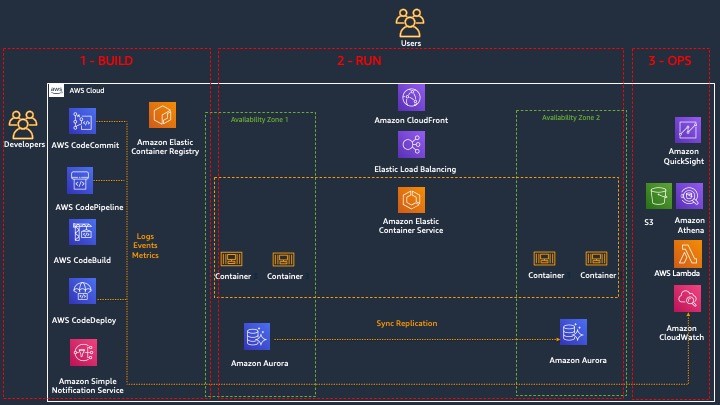
3 views of the architecture

  1. Build lens: the focus of this part of the architecture is on achieving deployability, with the objective to give the developers an easy-to-use, automated platform that builds, tests, and pushes their code into the different environments, in a repeatable way. Developers can push code changes more reliably and frequently, and the operations team can see greater stability because environments have standard configurations and rollback procedures are automated
  2. Runtime lens: the focus is on the users of the application and on maximizing their experience by making the application responsive and highly available.
  3. Operate lens: the focus is on achieving observability for the DevOps teams, allowing them to have complete visibility into each part of the architecture.

Summary

When building and designing new applications, the functional requirements (such as UX) are usually the primary drivers for choosing and defining the architecture to support those requirements. In this post I have discussed how DX characteristics like deployability, observability, and disposability are not just operational concerns that get tacked on after the architecture is chosen. Rather, they should be as important as the functional requirements when choosing the architectural pattern. This ensures that the architecture can support the needs of both the developers and users, increasing quality and our ability to innovate.
Field Notes: Serverless Container-based APIs with Amazon ECS and Amazon API Gateway

Post Syndicated from Simone Pomata original https://aws.amazon.com/blogs/architecture/field-notes-serverless-container-based-apis-with-amazon-ecs-and-amazon-api-gateway/

A growing number of organizations choose to build their APIs with Docker containers. For hosting and exposing these container-based APIs, they need a solution which supports HTTP requests routing, autoscaling, and high availability. In some cases, user authorization is also needed.

For this purpose, many organizations are orchestrating their containerized services with Amazon Elastic Container Service (Amazon ECS) or Amazon Elastic Kubernetes Service (Amazon EKS), while hosting their containers on Amazon EC2 or AWS Fargate. Then, they can add scalability and high availability with Service Auto Scaling (in Amazon ECS) or Horizontal Pod Auto Scaler (in Amazon EKS), and they expose the services through load balancers (for example, the AWS Application Load Balancer).

When you use Amazon ECS as an orchestrator (with EC2 or Fargate launch type), you also have the option to expose your services with Amazon API Gateway and AWS Cloud Map instead of a load balancer. AWS Cloud Map is used for service discovery: no matter how Amazon ECS tasks scale, AWS Cloud Map service names would point to the right set of Amazon ECS tasks. Then, API Gateway HTTP APIs can be used to define API routes and point them to the corresponding AWS Cloud Map services.

API Gateway and AWS Cloud Map could be a good fit if you want to leverage the capabilities provided by API Gateway HTTP APIs. For example, you could import/export your API as an OpenAPI definition file. You could configure the following features, either on the whole API or – more granularly – at route level: throttling, detailed metrics, or OAuth 2.0 / OIDC user authorization. You could also deploy your API at different stages over time. Or you could easily configure CORS for your API or for any route, instead of handling OPTIONS preflight requests yourself.

If you don’t need the capabilities of API Gateway HTTP APIs or if those of Elastic Load Balancing are a better fit, then you can use the latter. For example, the capabilities of the Application Load Balancer include: content-based routing (not only by path and HTTP method, but also by HTTP header, query-string parameter, source IP, etc.), redirects, fixed responses, and others. Additionally, the Network Load Balancer provides layer 4 load balancing capabilities. Ultimately, there are overlaps and differences between the features of Elastic Load Balancing and those of API Gateway HTTP APIs: so you may want to compare them to choose the right option for your use case.

This blog post guides you through the details of the option based on API Gateway and AWS Cloud Map, and how to implement it: first you learn how the different components (Amazon ECS, AWS Cloud Map, API Gateway, etc.) work together, then you launch and test a sample container-based API.

Architecture Overview

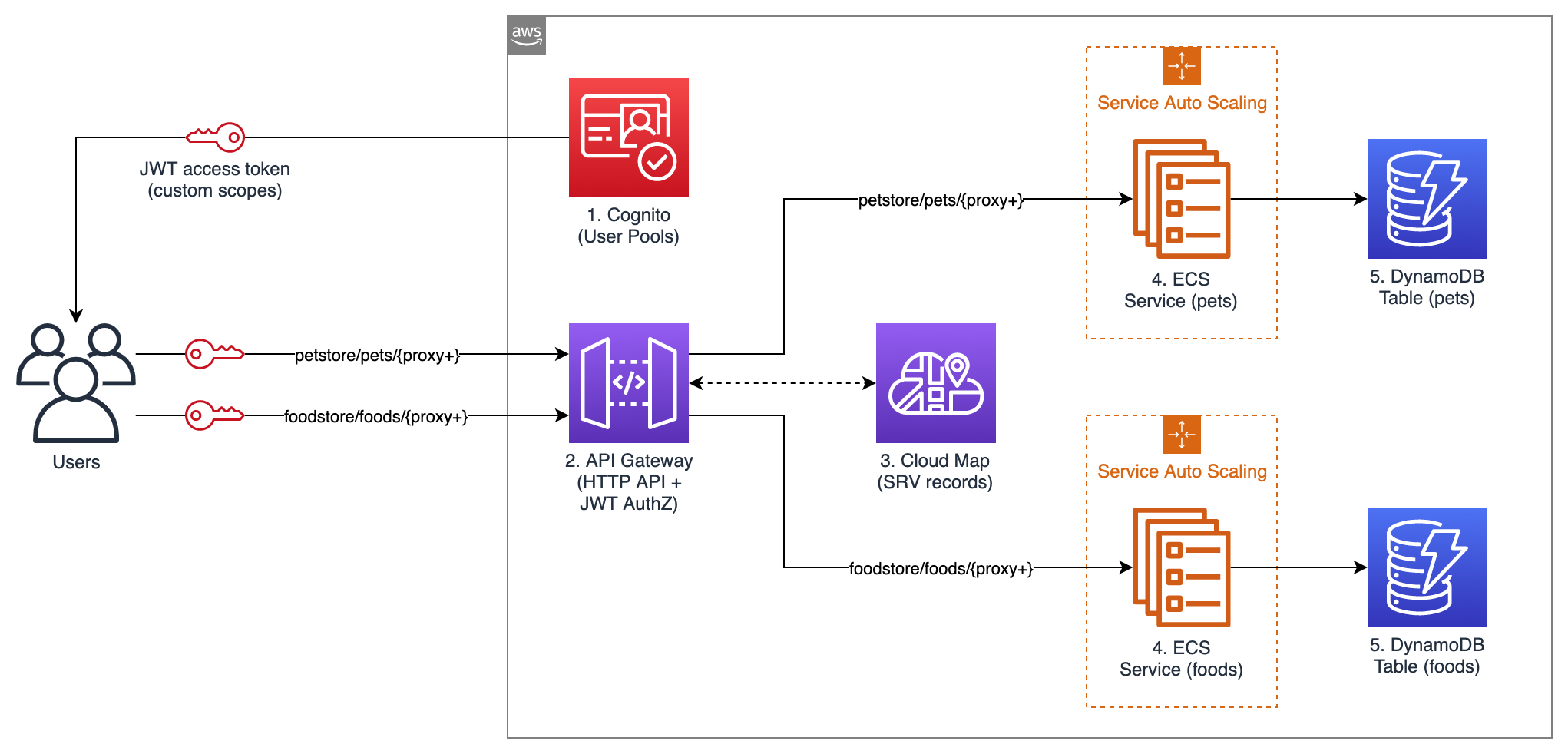
The following diagram shows the architecture of the sample API that you are going to launch.

Figure 1 - Architecture Diagram

Figure 1 – Architecture Diagram

This example API exposes two services: “Food store” to PUT and GET foods, and “Pet store” to PUT and GET pets. Unauthenticated users can only GET, while authenticated users can also PUT.

The following building blocks are used:

  1. Amazon Cognito User Pools: for user authentication. In this example API, Amazon Cognito is used for user authentication, but you could use any other OAuth 2.0 / OIDC identity provider instead. When the user authenticates with Amazon Cognito, user pool tokens are granted, including a JWT access token that is used for authorizing requests to the container APIs.
  2. API Gateway HTTP APIs: for exposing the containerized services to the user. API routes and the respective integrations are defined in API Gateway. A route is the combination of a path and a method. An integration is the backend service which is invoked by that route. In this API, private integrations point to AWS Cloud Map services, which in turn resolve to private Amazon ECS services (more about AWS Cloud Map in the next paragraph). As Amazon ECS services are private resources in a Virtual Private Cloud (VPC), API Gateway uses a VPC link to connect to them in a private way. A VPC link is a set of elastic network interfaces in the VPC, assigned to and managed by API Gateway, so that API Gateway can talk privately with other resources in the VPC. This way, Amazon ECS services can be launched in private subnets and don’t need a public IP. In this sample application, JWT authorization is configured in API Gateway for PUT routes. API Gateway performs requests authorization based on validation of the JWT Token provided, and optionally, scopes in the token. This way, you don’t need additional code in your containers for authorization.
  3. AWS Cloud Map: for service discovery of the containerized services. API Gateway needs a way to find physical addresses of the backend services, and AWS Cloud Map provides this capability. To enable this functionality, service discovery should be configured on Amazon ECS services. Amazon ECS performs periodic health checks on tasks in Amazon ECS services and registers the healthy tasks to the respective AWS Cloud Map service. AWS Cloud Map services can then be resolved either via DNS queries or by calling the DiscoverInstances API (API Gateway uses the API). AWS Cloud Map supports different DNS record types (including A, AAAA, CNAME, and SRV); at the time, of writing, API Gateway can only retrieve SRV records from AWS Cloud Map, so SRV records are used in this sample application. With SRV records, each AWS Cloud Map service returns a combination of IP addresses and port numbers of all the healthy tasks in the service. Consider that AWS Cloud Map would perform round-robin routing (with equal weighting to the targets): for this reason, to avoid hot spots, all tasks in each service should be homogeneous (in terms of container images, vCPU, memory, and other settings).
  4. Amazon ECS: for hosting the containerized services. Amazon ECS is a highly scalable and high-performance container orchestrator. In this blog post, the Fargate launch type is used, so that containers are launched on the Fargate serverless compute engine, and you don’t have to provision or manage any EC2 instances. In this sample API, service auto scaling is also enabled, so that the number of containers in each service can scale up and down automatically based on % CPU usage. Containers will be launched across multiple Availability Zones in the AWS Region, to get high availability.
  5. Amazon DynamoDB: for persisting the data. Amazon DynamoDB is a key-value and document database that provides single-millisecond performance at any scale. In a real-world scenario, you could still use DynamoDB or another data store, such as Amazon Relational Database Service (RDS).

All the code of this blog post is publicly available in this GitHub repository. You can explore the CloudFormation template used to define the sample application as code. You can view the source code of the two containerized services: Food store repository and Pet store repository. You can also explore the code of the sample web app that you’ll use to test the API (this web app has been developed with the Amplify framework). Note that the code provided is intended for testing purposes and not for production usage.

Walkthrough

In this section, you will deploy the sample application and test it.

Prerequisites

To launch the sample API, you first need an AWS user that has access to the AWS Management Console and has the IAM permissions to launch the AWS CloudFormation stack.

Deploying the sample application

Now it’s time to launch the sample API:

  1. Select Launch Stack
  2. In the page for quick stack creation, do the following:
    • Select the capability “I acknowledge that AWS CloudFormation might create IAM resources”.
    • Keep the rest as default.
    • Choose Create Stack.
  3. Wait until the status of the stack transitions to “CREATE_COMPLETE”.

Testing the sample application

In this section, you test the API from a sample web application client that I created. Open the sample web application:

  1. From the page of the stack, choose Outputs.
  2. Open the URL for the “APITestPage” output.
  3. On the opened page, choose Proceed.

The web page should state that you are not signed-in. In this sample API, any user can GET items, but only authenticated users can PUT items. Sign up to the sample web application:

  1. Choose Go To Sign In.
  2. Choose Create account.
  3. Complete the sign-up procedure (you will be asked for a valid email address, which will be registered into your Amazon Cognito User Pool).

The application should state that you are signed-in. Test the API as an authenticated user:

  1. Try to PUT an item. You would see that the operation succeeds. The item has been persisted by the containerized service to the DynamoDB table.

DynamoDB table


2.  Try to GET the same item that you previously PUT. You would see that the same JSON is returned. This JSON is retrieved by the containerized service from the DynamoDB table.

Test the API as an unauthenticated user:

  1. Choose Sign Out.
  2. Try to GET the same item that you previously PUT. You would see that the same JSON is returned. This JSON is retrieved by the containerized service from the DynamoDB table.
  3. Try to PUT any item. You would get a 401 Unauthorized error from the API. This behavior is expected because only signed-in users have a JWT token, and you configured API Gateway to only authorize PUT requests that provide a valid token.

DynamoDB table

Exploring the resources of the sample application

You can also explore the resources launched as part of the CloudFormation stack. To list all of them, from the page of your CloudFormation stack, choose Resources.

To see the Amazon ECS services, go to the Amazon ECS console, choose your cluster, and you would see that 2 services are running, one for the Foodstore and another for the Petstore, as shown in the following image.

Notice that the services use the Fargate launch type, meaning that they are running on serverless compute capacity, so you don’t have to launch or maintain any EC2 instances to run them.

Cluster demo

To see the details of a service, go to the Amazon ECS cluster page and choose a service. You land on the service page, where you can see the running tasks, the service events, and other details.

To view the service auto scaling configuration, choose Auto Scaling. You can notice that Amazon ECS is set to automatically scale the number of tasks according to the value of a metric. In this sample application, the metric is the average CPU utilization of the service (ECSServiceAverageCPUUtilization), but you could use another metric.

Auto scaling

The scaling policy of each service uses two Amazon CloudWatch Alarms, one for scaling out and one for scaling in. An alarm is triggered when the target metric deviates from the target value, which in turn is used to trigger the scaling action. To see the alarms, go to the CloudWatch Alarms console.

CloudWatch Alarms

To see the service discovery entries, go to the AWS Cloud Map console, choose your namespace (see the parameter “PrivateDNSNamespaceName” in the CloudFormation stack), and you would see that two services are defined. If you choose one of these services, you would see that multiple service instances are registered, each representing a single Amazon ECS task (in this sample application, each Amazon ECS task is a single container). If you choose one of these service instances, you would see the details about the task, including the private IP, the port, and the health status. API Gateway retrieves these entries to discover your services.

Service Instance

To see the API configuration, go to the API Gateway console and choose your API.

Then, from the left side of the screen select either Routes, Authorization, Integrations, or any other option.

Integrations

Cleaning up

To clean up the resources, simply delete the CloudFormation stack that you deployed as part of this blog post.

Conclusion

You have learned how API Gateway HTTP APIs can be used together with AWS Cloud Map to expose Amazon ECS services as APIs. You have deployed a sample API that also uses Amazon Cognito for authentication and DynamoDB for data persistence.

API Gateway HTTP APIs provides a number of features that you can leverage, such as OpenAPI import/export, throttling, OAuth 2.0 / OIDC user authorization, detailed metrics, and stages deployment. That said, API Gateway is not the only way to expose your ECS services; if you don’t need the features of API Gateway HTTP APIs or if those of Elastic Load Balancing are a better fit, then you can use the latter service. The recommended approach is to compare them to choose the most suitable for your use case.

Field Notes provides hands-on technical guidance from AWS Solutions Architects, consultants, and technical account managers, based on their experiences in the field solving real-world business problems for customers.