Tag Archives: AWS Encryption SDK

Caching KMS data keys in multi-thread environments: Per-tenant encryption for event-driven systems at scale

Post Syndicated from Maria Gutovsky original https://aws.amazon.com/blogs/security/caching-kms-data-keys-in-multi-thread-environments-per-tenant-encryption-for-event-driven-systems-at-scale/

This post assumes familiarity with envelope encryption and the AWS Encryption SDK.

When your encryption system generates millions of duplicate API calls per hour, costs spiral and performance degrades. That’s exactly the challenge NICE Actimize faced while operating their global-scale, event-driven financial crime detection platform on Amazon Web Services (AWS).

NICE Actimize, a leading provider of financial crime, risk, and compliance solutions, processes millions of encrypted messages daily across hundreds of tenants. By rethinking how they cache encryption keys, they reduced their AWS Key Management Service (AWS KMS) costs by 77% while maintaining strict security guarantees and per-tenant encryption isolation.

In this post, we explore the cache stampede problem that emerges when envelope encryption meets high-concurrency, multi-tenant architectures. We walk through two solutions: the AWS-recommended hierarchical keyring pattern and a custom caching approach that NICE Actimize built for their regulated environment. These patterns apply to multi-tenant software as a service (SaaS) environments and high-throughput systems where per-tenant encryption generates significant KMS API volume.

Why per-tenant encryption matters

Financial services systems operate under strict regulatory requirements. You must encrypt data at rest and in transit. For multi-tenant SaaS providers, this requirement might go further: each tenant’s data must be encrypted with separate keys to provide complete cryptographic isolation. If one tenant’s key is compromised, no other tenant’s data is at risk.

Consider an enterprise SaaS environment built on an event-driven architecture using Amazon Managed Streaming for Apache Kafka (Amazon MSK), with many different databases for storing data and Amazon Simple Queue Service (Amazon SQS) for messaging. Messages flow continuously between producers and consumers, and each message must be encrypted with the correct tenant-specific key. At scale with millions of messages daily across hundreds of tenants, this creates a massive volume of encryption and decryption operations.

To handle this volume efficiently, the standard approach is envelope encryption: a two-tier model where an AWS KMS key encrypts short-lived data keys, and those data keys encrypt the actual data. Your application can encrypt large volumes of data locally without calling AWS KMS for every operation, reducing latency and costs.

The cache stampede problem

Envelope encryption reduces AWS KMS calls, but it doesn’t eliminate them. Each encrypt operation still requires a data key, either generated fresh using GenerateDataKey or retrieved from a cache, and each decrypt operation must unwrap an encrypted data key (EDK) by calling Decrypt. In high-throughput systems processing millions of messages, these calls add up quickly.

The AWS Encryption SDK provides a built-in solution for this: the CachingCryptoMaterialsManager. This component caches data encryption materials (data keys) locally, so your application can reuse them across multiple operations without calling AWS KMS each time. You configure a time-to-live (TTL), a maximum message-use limit, and a local cache, and the SDK handles the rest.

This approach works well under moderate load when you partition the cache by tenant AWS KMS key Amazon Resource Name (ARN) so that each tenant’s encryption materials remain cryptographically isolated. However, a critical problem emerges as concurrency scales to hundreds of threads processing millions of encrypted messages in parallel: the cache stampede, also known as the thundering herd problem.

How the stampede occurs

The CachingCryptoMaterialsManager caches the result of the SDK’s internal getMaterialsForEncrypt and decryptMaterials calls at the materials level. The cache stampede, however, happens at the KMS API call level. When a cached data key expires or a new, previously-unseen EDK arrives, the following sequence unfolds:

  1. On encrypt – data key explosion: Multiple threads simultaneously call encrypt() for the same tenant. Each thread finds the cache entry expired and independently calls GenerateDataKey against AWS KMS. Instead of one thread generating a data key while others wait, N threads create N distinct data keys. Each new data key produces a unique EDK, which inflates the EDK cardinality across the system.
  2. On decrypt – redundant unwrap calls: Those extra unique EDKs propagate downstream. When consumers later read encrypted records, each distinct EDK is a separate cache key. Multiple threads encountering the same EDK simultaneously each trigger an independent Decrypt call to AWS KMS because the cache has no coordination mechanism to make competing threads wait for a single in-flight request.
  3. Compounding effect: The encrypt-side stampede creates excess EDK cardinality, which degrades the decrypt-side cache hit ratio, which triggers more KMS calls, which drives up costs further. In the NICE Actimize case, this produced a ratio of 30% unique data keys to data records in DynamoDB tables, meaning nearly one in three records was encrypted with a different data key.

At enterprise SaaS scale, this compounding effect can generate millions of redundant AWS KMS GenerateDataKey and Decrypt calls per hour, even with the SDK’s built-in caching enabled. The following figure shows the pattern leading to a stampede.
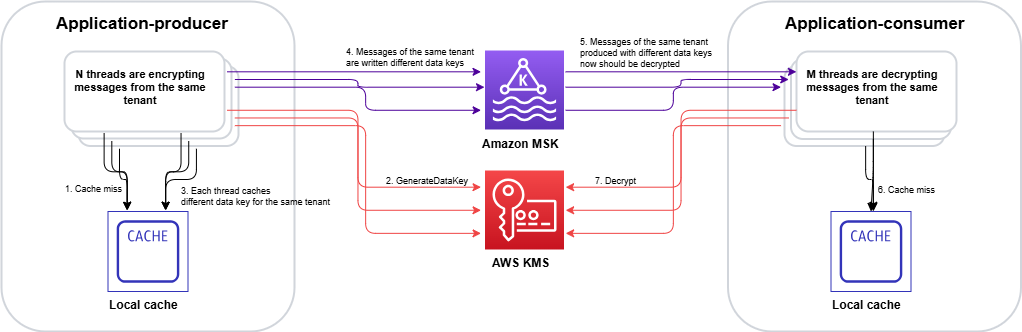
Figure 1: Cache stampede – multiple threads independently calling AWS KMS for the same encrypted data key, creating duplicate requests

Figure 1: Cache stampede – multiple threads independently calling AWS KMS for the same encrypted data key, creating duplicate requests

The stampede follows this sequence on the encrypt side:

  1. Multiple threads call encrypt() for the same tenant concurrently.
  2. Each thread checks the CachingCryptoMaterialsManager and finds the cache entry expired.
  3. With no coordination mechanism, each thread independently calls GenerateDataKey.
  4. AWS KMS returns N distinct data keys (one per thread).
  5. Each data key produces a unique EDK, inflating cardinality across the system.

On the decrypt side, the inflated EDK cardinality compounds the problem:

  1. Consumer threads encounter unique EDKs that were never cached.
  2. Multiple threads hitting the same EDK simultaneously each trigger a separate Decrypt call. AWS KMS returns the same plaintext data key N times, doing redundant work.

Two paths forward

We evaluated two approaches to solve the cache stampede problem. Each fits different architectural requirements and regulatory constraints.

Option A: Hierarchical keyring with DynamoDB (AWS-recommended)

AWS addresses the cache stampede challenge through the hierarchical keyring pattern, which introduces an additional level of key hierarchy that significantly reduces how often cache stampedes occur.

In this architecture, branch keys serve as intermediate wrapping keys stored in a DynamoDB table. This DynamoDB table acts as a shared cache layer that coordinates across all instances in your distributed fleet.
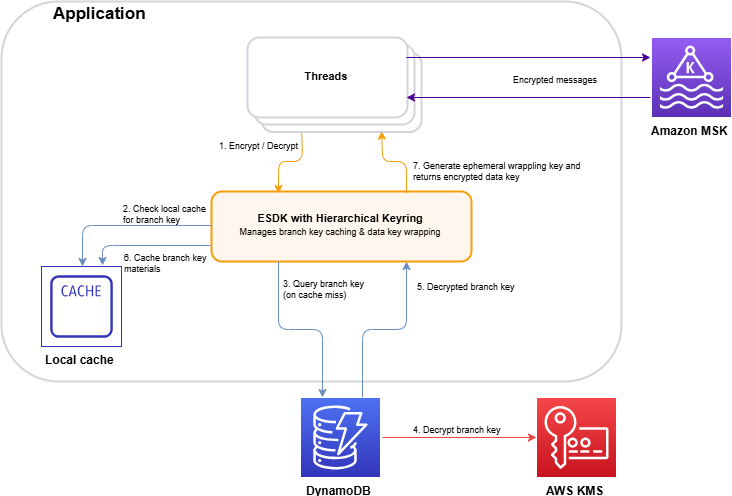
Figure 2: Hierarchical keyring architecture – branch keys in DynamoDB coordinating across distributed instances

Figure 2: Hierarchical keyring architecture – branch keys in DynamoDB coordinating across distributed instances

The architecture (shown in Figure 2) works as follows:

  1. The application requests encryption through the hierarchical keyring.
  2. The keyring checks the local cache for the tenant’s branch key.
  3. On a cache miss, it queries the DynamoDB Key Store table for the active branch key.
  4. AWS KMS decrypts the branch key (this is the only KMS call in the flow).
  5. The decrypted branch key is returned to the keyring.
  6. The keyring stores the branch key in the local cache for subsequent requests.
  7. The keyring derives a unique wrapping key from the branch key and generates the data key locally.

The key insight is that the cache is thread-aware. When the cache expires, threads coordinate to make a single request to refresh the cache. Only a single thread is used to make a call to the branch key, rather than all the threads acting independently. Additionally, by adding an additional key into the key hierarchy, branch keys don’t live within AWS KMS. This means cache misses and the stampedes they trigger interact with the branch key, and don’t make as many calls to the AWS KMS service at the top of the hierarchy:

  • Without hierarchical keyrings: Your local cache needs to store all the data encryption keys, and has constant misses as new, unique data keys arrive with each encrypted message. A miss can trigger a stampede.
  • With hierarchical keyrings: The same branch key wraps thousands or millions of data keys. A cache miss only occurs when a branch key expires or is first requested, which happens orders of magnitude less frequently than without hierarchical keyrings.

The DynamoDB table acts as a coordination point. The first thread to request a missing branch key retrieves it from AWS KMS and stores it in DynamoDB (the Key Store table). Subsequent requests from instances in the fleet retrieve the cached branch key from DynamoDB instead of making duplicate AWS KMS calls.

Beyond reducing cache miss frequency, the hierarchical keyring provides built-in stampede protection within its local cache implementation. The SDK offers multiple cache types, and the Default cache, designed for heavily multi-threaded environments, prevents multiple threads from calling AWS KMS on cache expiry by notifying a single thread that the branch key materials entry is about to expire 10 seconds in advance. That one thread refreshes the cache while all other threads continue serving requests using the still-valid entry.

This solution integrates with the AWS Encryption SDK and requires minimal code changes to existing applications. For event-driven architectures processing encrypted Kafka streams, this approach reduces KMS call volume by orders of magnitude while preserving per-tenant cryptographic isolation.

Option B: Custom KMS client caching – Solving the stampede at the API layer

While the hierarchical keyring (Option A) addresses the stampede by reducing how often cache misses occur, there’s a complementary approach: eliminating the stampede at its source by caching KMS API responses directly, using atomic, single-flight cache loading that prevents concurrent threads from issuing duplicate calls. This is the path NICE Actimize took.

The IClientSupplier extension point in AWS Encryption SDK v3

In the AWS Encryption SDK v2, decorating the AWS KMS client on a per-request basis was possible through the RegionalClientSupplier interface, but it was an advanced and undocumented use case. Without explicit guidance or a supported pattern, caching strategies typically operated above the SDK layer, making it difficult to prevent duplicate KMS calls at their source. The AWS Encryption SDK v3 introduced the IClientSupplier interface, which the AwsKmsMrkMultiKeyring accepts at construction time. This interface is called by the SDK whenever it needs a KMS client for a given AWS Region, and you control what it returns, making it possible to insert a caching layer between the SDK and AWS KMS.

Architecture: A decorated KMS client with two Caffeine caches
The solution is a CachedKmsClient—a decorator that wraps the standard AWS SDK KmsClient and interposes two Caffeine LoadingCache instances between the application and AWS KMS:

Cache Key Value Purpose
GenerateDataKey cache GenerateDataKeyRequest (tenant KMS key ARN and key spec) GenerateDataKeyResponse (EDK and plaintext data key) Ensures encrypt operations on the same node reuse the same data key for a given tenant KMS key during the cache window
Decrypt cache DecryptRequest (EDK and key ARN) DecryptResponse (plaintext data key) Ensures decrypt operations for the same EDK share a single KMS call result

Both caches are configured with refreshAfterWrite (default: 1 hour, configurable), which means:

  • During the refresh window, concurrent threads receive the cached response instantly resulting in zero KMS calls.
  • When a cache entry expires, Caffeine’s LoadingCache.get() guarantees that exactly one thread executes the loader function (the actual KMS API call), while all other concurrent threads block and wait for that single result. This is the atomic, single-flight property that eliminates the stampede.

Security consideration: Caching plaintext data keys in memory means the keys exist in process memory for the duration of the cache TTL. The TTL acts as a security control: shorter TTLs reduce the window of exposure in the event of a memory dump, while longer TTLs reduce KMS call volume. Choose a TTL that balances your security requirements with your cost and performance goals. Key rotation at the KMS key level remains unaffected by the cache, because rotated keys produce new data keys on the next cache refresh.

Integration with the AWS Encryption SDK v3

The integration is minimal. The IClientSupplier AWS Lambda function returns a CachedKmsClient singleton for each AWS Region, this singleton is passed into the AwsKmsMrkMultiKeyring at keyring construction time. From that point forward, each GenerateDataKey and Decrypt call the SDK makes flows through the caching decorator transparently, with no changes to the encrypt or decrypt call sites.

The CachedKmsClient is a singleton per Region (managed using a ConcurrentHashMap), so all tenants on the same node share the same caching layer but their data keys remain fully isolated because the cache keys include the tenant-specific AWS KMS key ARN.

Why Caffeine?

Caffeine is a high-performance, near-optimal Java caching library well-suited for this pattern for several reasons:

  • Atomic loading: LoadingCache.get() guarantees that on a cache miss, only one thread executes the loader while others wait. This is the core property that eliminates the stampede.
  • refreshAfterWrite semantics: Unlike expireAfterWrite (which blocks all threads during refresh), refreshAfterWrite allows one thread to asynchronously reload the entry while other threads continue to serve the stale-but-valid cached value. This eliminates latency spikes during key rotation.
  • Observability: Cache eviction listeners and Micrometer metric counters can be wired in to track actual KMS call volume per tenant KMS key, enabling real-time cost monitoring.

Choosing between the two options

The hierarchical keyring with DynamoDB (Option A) is a production-ready, AWS-recommended solution that reduces stampede frequency by introducing longer-lived branch keys. It’s the best choice for most organizations. Particularly when starting fresh or when the operational overhead of an additional data store is acceptable.

NICE Actimize chose the custom caching approach (Option B) for a pragmatic reason: it avoided introducing a new infrastructure dependency into the encryption critical path. Their platform already operated at scale across hundreds of tenants, and adding a DynamoDB table as a key coordination layer would have meant taking on additional operational responsibility: provisioning, monitoring, backup, access control, and ensuring high availability for a component that sits directly in the encrypt/decrypt hot path. In a regulated financial services environment, each new stateful component in the security chain requires its own resilience planning, failure-mode analysis, and compliance review. The Caffeine cache used in Option B, by contrast, is an in-process library (a JAR on the classpath). It is stateless, requires no network calls, no provisioning and no operational overhead. It makes a lighter dependency than a managed cloud resource in the critical path. There is no shared state to lose, no additional infrastructure to protect, and no new failure mode beyond what already exists with AWS KMS itself. If a node restarts, the cache rebuilds on the next KMS call.

Results

By implementing a rotation policy with the optimized caching approach, NICE Actimize achieved the following results:

  • 77% reduction in AWS KMS costs – Eliminating millions of redundant API calls translated directly into significant cost savings.
  • Maintained strict per-tenant isolation – Per-tenant encryption isolation remained fully intact, with no compromise to their security posture.
  • Improved system performance – Removing the stampede of duplicate AWS KMS calls reduced latency and freed up system resources for core processing.
  • Simplified operations – A coordinated caching layer replaced fragmented, per-thread caching, reducing operational complexity.

Conclusion and next steps

The cache stampede problem compounds in multi-tenant encryption systems: excess data key generation on the encrypt side degrades cache hit ratios on the decrypt side, creating a feedback loop of redundant KMS calls. The AWS-recommended hierarchical keyring pattern with DynamoDB provides a production-ready solution that integrates with the AWS Encryption SDK with minimal code changes. For regulated environments requiring additional control, a custom caching approach can deliver similar results.

If you operate a multi-tenant SaaS platform or a high-throughput system with per-tenant encryption requirements, consider these patterns to optimize your encryption costs and performance.

To get started, explore the following resources:

If you have questions or feedback about this post, leave a comment in the Comments section.

Maria Gutovsky

Maria Gutovsky

Maria is a Solutions Architect at AWS, based in Tel Aviv, Israel. She is part of the Database and Analytics Technical Field Community. In her free time, you will probably find her building a new character for a Dungeons and Dragons campaign.

Hemmy Yona

Hemmy Yona

Hemmy is a Solutions Architect at AWS, based in Israel. With 20 years of experience in software development and group management, Hemmy is passionate about helping customers build innovative, scalable, and cost-effective solutions. Outside of work, you’ll find Hemmy enjoying sports and traveling with family.

Contributor

Special thanks to Devora Roth Goldshmidt, Head of X-Sight Architects at NICE Actimize, who made a significant contribution to this post.

How to use AWS Database Encryption SDK for client-side encryption and perform searches on encrypted attributes in DynamoDB tables

Post Syndicated from Samit Kumbhani original https://aws.amazon.com/blogs/security/how-to-use-aws-database-encryption-sdk-for-client-side-encryption-and-perform-searches-on-encrypted-attributes-in-dynamodb-tables/

Today’s applications collect a lot of data from customers. The data often includes personally identifiable information (PII), that must be protected in compliance with data privacy laws such as the General Data Protection Regulation (GDPR) and the California Consumer Privacy Act (CCPA). Modern business applications require fast and reliable access to customer data, and Amazon DynamoDB is an ideal choice for high-performance applications at scale. While server-side encryption options exist to safeguard customer data, developers can also add client-side encryption to further enhance the security of their customer’s data.

In this blog post, we show you how the AWS Database Encryption SDK (DB-ESDK) – an upgrade to the DynamoDB Encryption Client – provides client-side encryption to protect sensitive data in transit and at rest. At its core, the DB-ESDK is a record encryptor that encrypts, signs, verifies, and decrypts the records in DynamoDB table. You can also use DB-ESDK to search on encrypted records and retrieve data, thereby alleviating the need to download and decrypt your entire dataset locally. In this blog, we demonstrate how to use DB-ESDK to build application code to perform client-side encryption of sensitive data within your application before transmitting and storing it in DynamoDB and then retrieve data by searching on encrypted fields.

Client-side encryption

For protecting data at rest, many AWS services integrate with AWS Key Management Service (AWS KMS). When you use server-side encryption, your plaintext data is encrypted in transit over an HTTPS connection, decrypted at the service endpoint, and then re-encrypted by the service before being stored. Client-side encryption is the act of encrypting your data locally to help ensure its security in transit and at rest. When using client-side encryption, you encrypt the plaintext data from the source (for example, your application) before you transmit the data to an AWS service. This verifies that only the authorized users with the right permission to the encryption key can decrypt the ciphertext data. Because data is encrypted inside an environment that you control, it is not exposed to a third party, including AWS.

While client-side encryption can be used to improve overall security posture, it introduces additional complexity on the application, including managing keys and securely executing cryptographic tasks. Furthermore, client-side encryption often results in reduced portability of the data. After data is encrypted and written to the database, it’s generally not possible to perform additional tasks such as creating index on the data or search directly on the encrypted records without first decrypting it locally. In the next section, you’ll see how you can address these issues by using the AWS Database Encryption SDK (DB-ESDK)—to implement client-side encryption in your DynamoDB workloads and perform searches.

AWS Database Encryption SDK

DB-ESDK can be used to encrypt sensitive attributes such as those containing PII attributes before storing them in your DynamoDB table. This enables your application to help protect sensitive data in transit and at rest, because data cannot be exposed unless decrypted by your application. You can also use DB-ESDK to find information by searching on encrypted attributes while your data remains securely encrypted within the database.

In regards to key management, DB-ESDK gives you direct control over the data by letting you supply your own encryption key. If you’re using AWS KMS, you can use key policies to enforce clear separation between the authorized users who can access specific encrypted data and those who cannot. If your application requires storing multiple tenant’s data in single table, DB-ESDK supports configuring distinct key for each of those tenants to ensure data protection. Follow this link to view how searchable encryption works for multiple tenant databases.

While DB-ESDK provides many features to help you encrypt data in your database, in this blog post, we focus on demonstrating the ability to search on encrypted data.

How the AWS Database Encryption SDK works with DynamoDB

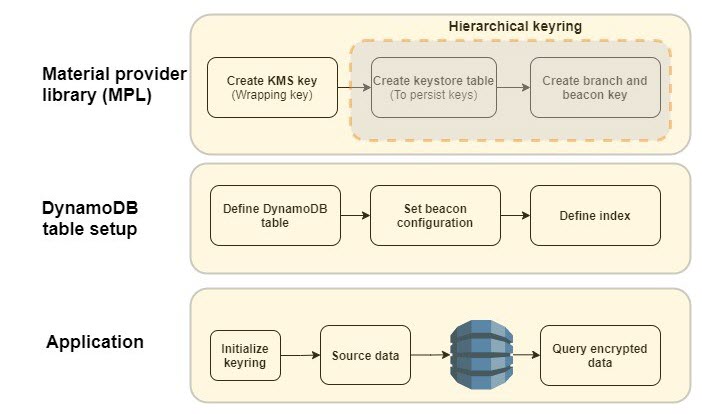
Figure 1: DB-ESDK overview

Figure 1: DB-ESDK overview

As illustrated in Figure 1, there are several steps that you must complete before you can start using the AWS Database Encryption SDK. First, you need to set up your cryptographic material provider library (MPL), which provides you with the lower level abstraction layer for managing cryptographic materials (that is, keyrings and wrapping keys) used for encryption and decryption. The MPL provides integration with AWS KMS as your keyring and allows you to use a symmetric KMS key as your wrapping key. When data needs to be encrypted, DB-ESDK uses envelope encryption and asks the keyring for encryption material. The material consists of a plaintext data key and an encrypted data key, which is encrypted with the wrapping key. DB-ESDK uses the plaintext data key to encrypt the data and stores the ciphertext data key with the encrypted data. This process is reversed for decryption.

The AWS KMS hierarchical keyring goes one step further by introducing a branch key between the wrapping keys and data keys. Because the branch key is cached, it reduces the number of network calls to AWS KMS, providing performance and cost benefits. The hierarchical keyring uses a separate DynamoDB table is referred as the keystore table that must be created in advance. The mapping of wrapping keys to branch keys to data keys is handled automatically by the MPL.

Next, you need to set up the main DynamoDB table for your application. The Java version of DB-ESDK for DynamoDB provides attribute level actions to let you define which attribute should be encrypted. To allow your application to search on encrypted attribute values, you also must configure beacons, which are truncated hashes of plaintext value that create a map between the plaintext and encrypted value and are used to perform the search. These configuration steps are done once for each DynamoDB table. When using beacons, there are tradeoffs between how efficient your queries are and how much information is indirectly revealed about the distribution of your data. You should understand the tradeoff between security and performance before deciding if beacons are right for your use case.

After the MPL and DynamoDB table are set up, you’re ready to use DB-ESDK to perform client-side encryption. To better understand the preceding steps, let’s dive deeper into an example of how this all comes together to insert data and perform searches on a DynamoDB table.

AWS Database Encryption SDK in action

Let’s review the process of setting up DB-ESDK and see it in action. For the purposes of this blog post, let’s build a simple application to add records and performs searches.

The following is a sample plaintext record that’s received by the application:

{
"order_id": "ABC-10001",
“order_time”: “1672531500”,
“email”: "[email protected]",
"first_name": "John",
"last_name": "Doe",
"last4_creditcard": "4567"
"expiry_date": 082026
}

Prerequisite: For client side encryption to work, set up the integrated development environment (IDE) of your choice or set up AWS Cloud9.

Note: To focus on DB-ESDK capabilities, the following instructions omit basic configuration details for DynamoDB and AWS KMS.

Configure DB-ESDK cryptography

As mentioned previously, you must set up the MPL. For this example, you use an AWS KMS hierarchical keyring.

  1. Create KMS key: Create the wrapping key for your keyring. To do this, create a symmetric KMS key using the AWS Management Console or the API.
  2. Create keystore table: Create a DynamoDB table to serve as a keystore to hold the branch keys. The logical keystore name is cryptographically bound to the data stored in the keystore table. The logical keystore name can be the same as your DynamoDB table name, but it doesn’t have to be.
    private static void keyStoreCreateTable(String keyStoreTableName,
                                           String logicalKeyStoreName,
                                           String kmsKeyArn) {
        
        final KeyStore keystore = KeyStore.builder().KeyStoreConfig(
                KeyStoreConfig.builder()
                        .ddbClient(DynamoDbClient.create())
                        .ddbTableName(keyStoreTableName)
                        .logicalKeyStoreName(logicalKeyStoreName)
                        .kmsClient(KmsClient.create())
                        .kmsConfiguration(KMSConfiguration.builder()
                                .kmsKeyArn(kmsKeyArn)
                                .build())
                        .build()).build();
    
        
          keystore.CreateKeyStore(CreateKeyStoreInput.builder().build());
        // It may take a couple minutes for the table to reflect ACTIVE state
    }

  3. Create keystore keys: This operation generates the active branch key and beacon key using the KMS key from step 1 and stores it in the keystore table. The branch and beacon keys will be used by DB-ESDK for encrypting attributes and generating beacons.
    private static String keyStoreCreateKey(String keyStoreTableName,
                                             String logicalKeyStoreName,
                                             String kmsKeyArn) {
       
          final KeyStore keystore = KeyStore.builder().KeyStoreConfig(
                  KeyStoreConfig.builder()
                          .ddbClient(DynamoDbClient.create())
                          .ddbTableName(keyStoreTableName)
                          .logicalKeyStoreName(logicalKeyStoreName)
                          .kmsClient(KmsClient.create())
                          .kmsConfiguration(KMSConfiguration.builder()
                              .kmsKeyArn(kmsKeyArn)
                              .build())
                          .build()).build();
        
          final String branchKeyId = keystore.CreateKey(CreateKeyInput.builder().build()).branchKeyIdentifier();
          return branchKeyId;
      }

At this point, the one-time set up to configure the cryptography material is complete.

Set up a DynamoDB table and beacons

The second step is to set up your DynamoDB table for client-side encryption. In this step, define the attributes that you want to encrypt, define beacons to enable search on encrypted data, and set up the index to query the data. For this example, use the Java client-side encryption library for DynamoDB.

  1. Define DynamoDB table: Define the table schema and the attributes to be encrypted. For this blog post, lets define the schema based on the sample record that was shared previously. To do that, create a DynamoDB table called OrderInfo with order_id as the partition key and order_time as the sort key.

    DB-ESDK provides the following options to define the sensitivity level for each field. Define sensitivity level for each of the attributes based on your use case.

    • ENCRYPT_AND_SIGN: Encrypts and signs the attributes in each record using a unique encryption key. Choose this option for attributes with data you want to encrypt.
    • SIGN_ONLY: Adds a digital signature to verify the authenticity of your data. Choose this option for attributes that you would like to protect from being altered. The partition and sort key should always be set as SIGN_ONLY.
    • DO_NOTHING: Does not encrypt or sign the contents of the field and stores the data as-is. Only choose this option if the field doesn’t contain sensitive data and doesn’t need to be authenticated with the rest of your data. In this example, the partition key and sort key will be defined as “Sign_Only” attributes. All additional table attributes will be defined as “Encrypt and Sign”: email, firstname, lastname, last4creditcard and expirydate.
      private static DynamoDbClient configDDBTable(String ddbTableName, 
                                            IKeyring kmsKeyring, 
                                            List<BeaconVersion> beaconVersions){
      
          // Partition and Sort keys must be SIGN_ONLY
           
          final Map<String, CryptoAction> attributeActionsOnEncrypt = new HashMap<>();
          attributeActionsOnEncrypt.put("order_id", CryptoAction.SIGN_ONLY);
          attributeActionsOnEncrypt.put("order_time", CryptoAction.SIGN_ONLY);
          attributeActionsOnEncrypt.put("email", CryptoAction.ENCRYPT_AND_SIGN);
          attributeActionsOnEncrypt.put("firstname", CryptoAction.ENCRYPT_AND_SIGN);
          attributeActionsOnEncrypt.put("lastname", CryptoAction.ENCRYPT_AND_SIGN);
          attributeActionsOnEncrypt.put("last4creditcard", CryptoAction.ENCRYPT_AND_SIGN);
          attributeActionsOnEncrypt.put("expirydate", CryptoAction.ENCRYPT_AND_SIGN);
      
      
          final Map<String, DynamoDbTableEncryptionConfig> tableConfigs = new HashMap<>();
          final DynamoDbTableEncryptionConfig config = DynamoDbTableEncryptionConfig.builder()
                  .logicalTableName(ddbTableName)
                  .partitionKeyName("order_id")
                  .sortKeyName("order_time")
                  .attributeActionsOnEncrypt(attributeActionsOnEncrypt)
                  .keyring(kmsKeyring)
                  .search(SearchConfig.builder()
                          .writeVersion(1) // MUST be 1
                          .versions(beaconVersions)
                          .build())
                  .build();
          tableConfigs.put(ddbTableName, config);
      
          // Create the DynamoDb Encryption Interceptor
          DynamoDbEncryptionInterceptor encryptionInterceptor = DynamoDbEncryptionInterceptor.builder()
                  .config(DynamoDbTablesEncryptionConfig.builder()
                          .tableEncryptionConfigs(tableConfigs)
                          .build())
                  .build();
      
          // Create a new AWS SDK DynamoDb client using the DynamoDb Encryption Interceptor above
          final DynamoDbClient ddb = DynamoDbClient.builder()
                  .overrideConfiguration(
                          ClientOverrideConfiguration.builder()
                                  .addExecutionInterceptor(encryptionInterceptor)
                                  .build())
                  .build();
          return ddb;
      }

  2. Configure beacons: Beacons allow searches on encrypted fields by creating a mapping between the plaintext value of a field and the encrypted value that’s stored in your database. Beacons are generated by DB-ESDK when the data is being encrypted and written by your application. Beacons are stored in your DynamoDB table along with your encrypted data in fields labelled with the prefix aws_dbe_b_.

    It’s important to note that beacons are designed to be implemented in new, unpopulated tables only. If configured on existing tables, beacons will only map to new records that are written and the older records will not have the values populated. There are two types of beacons – standard and compound. The type of beacon you configure determines the type of queries you are able to perform. You should select the type of beacon based on your queries and access patterns:

    • Standard beacons: This beacon type supports querying a single source field using equality operations such as equals and not-equals. It also allows you to query a virtual (conceptual) field by concatenating one or more source fields.
    • Compound beacons: This beacon type supports querying a combination of encrypted and signed or signed-only fields and performs complex operations such as begins with, contains, between, and so on. For compound beacons, you must first build standard beacons on individual fields. Next, you need to create an encrypted part list using a unique prefix for each of the standard beacons. The prefix should be a short value and helps differentiate the individual fields, simplifying the querying process. And last, you build the compound beacon by concatenating the standard beacons that will be used for searching using a split character. Verify that the split character is unique and doesn’t appear in any of the source fields’ data that the compound beacon is constructed from.

    Along with identifying the right beacon type, each beacon must be configured with additional properties such as a unique name, source field, and beacon length. Continuing the previous example, let’s build beacon configurations for the two scenarios that will be demonstrated in this blog post.

    Scenario 1: Identify orders by exact match on the email address.

    In this scenario, search needs to be conducted on a singular attribute using equality operation.

    • Beacon type: Standard beacon.
    • Beacon name: The name can be the same as the encrypted field name, so let’s set it as email.
    • Beacon length: For this example, set the beacon length to 15. For your own uses cases, see Choosing a beacon length.

    Scenario 2: Identify orders using name (first name and last name) and credit card attributes (last four digits and expiry date).

    In this scenario, multiple attributes are required to conduct a search. To satisfy the use case, one option is to create individual compound beacons on name attributes and credit card attributes. However, the name attributes are considered correlated and, as mentioned in the beacon selection guidance, we should avoid building a compound beacon on such correlated fields. Instead in this scenario we will concatenate the attributes and build a virtual field on the name attributes

    • Beacon type: Compound beacon
    • Beacon Configuration:
      • Define a virtual field on firstname and lastname, and label it fullname.
      • Define standard beacons on each of the individual fields that will be used for searching: fullname, last4creditcard, and expirydate. Follow the guidelines for setting standard beacons as explained in Scenario 1.
      • For compound beacons, create an encrypted part list to concatenate the standard beacons with a unique prefix for each of the standard beacons. The prefix helps separate the individual fields. For this example, use C- for the last four digits of the credit card and E- for the expiry date.
      • Build the compound beacons using their respective encrypted part list and a unique split character. For this example, use ~ as the split character.
    • Beacon length: Set beacon length to 15.
    • Beacon Name: Set the compound beacon name as CardCompound.
    private static List<VirtualField> getVirtualField(){
        
        List<VirtualPart> virtualPartList = new ArrayList<>();
        VirtualPart firstnamePart = VirtualPart.builder()
            .loc("firstname")
            .build();
        VirtualPart lastnamePart = VirtualPart.builder()
            .loc("lastname")
            .build();
    
        virtualPartList.add(firstnamePart);
        virtualPartList.add(lastnamePart);
    
        VirtualField fullnameField = VirtualField.builder()
            .name("FullName")
            .parts(virtualPartList)
            .build();
    
        List<VirtualField> virtualFieldList = new ArrayList<>();
        
        virtualFieldList.add(fullnameField);
        return virtualFieldList;
       }
      
      private static List<StandardBeacon> getStandardBeacon(){
    
        List<StandardBeacon> standardBeaconList = new ArrayList<>();
        StandardBeacon emailBeacon = StandardBeacon
          .builder()
          .name("email")
          .length(15)
          .build();
        StandardBeacon last4creditcardBeacon = StandardBeacon
          .builder()
          .name("last4creditcard")
          .length(15)
          .build();
        StandardBeacon expirydateBeacon = StandardBeacon
          .builder()
          .name("expirydate")
          .length(15)
          .build();  
          
      // Virtual field
        StandardBeacon fullnameBeacon = StandardBeacon
          .builder()
          .name("FullName")
          .length(15)
          .build();  
       
        standardBeaconList.add(emailBeacon);
        standardBeaconList.add(fullnameBeacon);
        standardBeaconList.add(last4creditcardBeacon);
        standardBeaconList.add(expirydateBeacon);
        return standardBeaconList;
      }
    
    // Define compound beacon
      private static List<CompoundBeacon> getCompoundBeacon() {
         
       List<EncryptedPart> encryptedPartList_card = new ArrayList<>(); 
        EncryptedPart last4creditcardEncryptedPart = EncryptedPart
          .builder()
          .name("last4creditcard")
          .prefix("C-")
          .build();
          
        EncryptedPart expirydateEncryptedPart = EncryptedPart
          .builder()
          .name("expirydate")
          .prefix("E-")
          .build();  
          
        encryptedPartList_card.add(last4creditcardEncryptedPart);
        encryptedPartList_card.add(expirydateEncryptedPart);
    
        List<CompoundBeacon> compoundBeaconList = new ArrayList<>();
    
        CompoundBeacon CardCompoundBeacon = CompoundBeacon
          .builder()
          .name("CardCompound")
          .split("~")
          .encrypted(encryptedPartList_card)
          .build();      
    
        compoundBeaconList.add(CardCompoundBeacon);
        return compoundBeaconList;  }
    
    // Build the beacons
    private static List<BeaconVersion> getBeaconVersions(List<StandardBeacon> standardBeaconList, List<CompoundBeacon> compoundBeaconList, KeyStore keyStore, String branchKeyId){
        List<BeaconVersion> beaconVersions = new ArrayList<>();
        beaconVersions.add(
                BeaconVersion.builder()
                        .standardBeacons(standardBeaconList)
                        .compoundBeacons(compoundBeaconList)
                        .version(1) // MUST be 1
                        .keyStore(keyStore)
                        .keySource(BeaconKeySource.builder()
                                .single(SingleKeyStore.builder()
                                        .keyId(branchKeyId)
                                        .cacheTTL(6000)
                                        .build())
                                .build())
                        .build()
        );
        return beaconVersions;
    }

  3. Define index: Following DynamoDB best practices, secondary indexes are often essential to support query patterns. DB-ESDK performs searches on the encrypted fields by doing a look up on the fields with matching beacon values. Therefore, if you need to query an encrypted field, you must create an index on the corresponding beacon fields generated by the DB-ESDK library (attributes with prefix aws_dbe_b_), which will be used by your application for searches.

    For this step, you will manually create a global secondary index (GSI).

    Scenario 1: Create a GSI with aws_dbe_b_email as the partition key and leave the sort key empty. Set the index name as aws_dbe_b_email-index. This will allow searches using the email address attribute.

    Scenario 2: Create a GSI with aws_dbe_b_FullName as the partition key and aws_dbe_b_CardCompound as the sort key. Set the index name as aws_dbe_b_VirtualNameCardCompound-index. This will allow searching based on firstname, lastname, last four digits of the credit card, and the expiry date. At this point the required DynamoDB table setup is complete.

Set up the application to insert and query data

Now that the setup is complete, you can use the DB-ESDK from your application to insert new items into your DynamoDB table. DB-ESDK will automatically fetch the data key from the keyring, perform encryption locally, and then make the put call to DynamoDB. By using beacon fields, the application can perform searches on the encrypted fields.

  1. Keyring initialization: Initialize the AWS KMS hierarchical keyring.
    //Retrieve keystore object required for keyring initialization
    private static KeyStore getKeystore(
        String branchKeyDdbTableName,
        String logicalBranchKeyDdbTableName,
        String branchKeyWrappingKmsKeyArn
      ) {
        KeyStore keyStore = KeyStore
          .builder()
          .KeyStoreConfig(
            KeyStoreConfig
              .builder()
              .kmsClient(KmsClient.create())
              .ddbClient(DynamoDbClient.create())
              .ddbTableName(branchKeyDdbTableName)
              .logicalKeyStoreName(logicalBranchKeyDdbTableName)
              .kmsConfiguration(
                KMSConfiguration
                  .builder()
                  .kmsKeyArn(branchKeyWrappingKmsKeyArn)
                  .build()
              )
              .build()
          )
          .build();
        return keyStore;
      }
    
    //Initialize keyring
    private static IKeyring getKeyRing(String branchKeyId, KeyStore keyStore){
        final MaterialProviders matProv = MaterialProviders.builder()
                .MaterialProvidersConfig(MaterialProvidersConfig.builder().build())
                .build();
        CreateAwsKmsHierarchicalKeyringInput keyringInput = CreateAwsKmsHierarchicalKeyringInput.builder()
                .branchKeyId(branchKeyId)
                .keyStore(keyStore)
                .ttlSeconds(60)
                .build();
        final IKeyring kmsKeyring = matProv.CreateAwsKmsHierarchicalKeyring(keyringInput);
      
        return kmsKeyring;
    }

  2. Insert source data: For illustration purpose, lets define a method to load sample data into the OrderInfo table. By using DB-ESDK, the application will encrypt data attributes as defined in the DynamoDB table configuration steps.
    // Insert Order Data
      private static void insertOrder(HashMap<String, AttributeValue> order, DynamoDbClient ddb, String ddbTableName) {
    
        final PutItemRequest putRequest = PutItemRequest.builder()
            .tableName(ddbTableName)
            .item(order)
            .build();
    
        final PutItemResponse putResponse = ddb.putItem(putRequest);
        assert 200 == putResponse.sdkHttpResponse().statusCode();
      }
      
        private static HashMap<String, AttributeValue> getOrder(
        String orderId,
        String orderTime,
        String firstName,
        String lastName,
        String email,
        String last4creditcard,
        String expirydate
      ) 
      {
        final HashMap<String, AttributeValue> order = new HashMap<>();
        order.put("order_id", AttributeValue.builder().s(orderId).build());
        order.put("order_time", AttributeValue.builder().s(orderTime).build());
        order.put("firstname", AttributeValue.builder().s(firstName).build());
        order.put("lastname", AttributeValue.builder().s(lastName).build());
        order.put("email", AttributeValue.builder().s(email).build());
        order.put("last4creditcard", AttributeValue.builder().s(last4creditcard).build());
        order.put("expirydate", AttributeValue.builder().s(expirydate).build());
    
        return order;
      }

  3. Query Data: Define a method to query data using plaintext values

    Scenario 1: Identify orders associated with email address [email protected]. This query should return Order ID ABC-1001.

    private static void runQueryEmail(DynamoDbClient ddb, String ddbTableName) {
        Map<String, String> expressionAttributesNames = new HashMap<>();
        expressionAttributesNames.put("#e", "email");
    
        Map<String, AttributeValue> expressionAttributeValues = new HashMap<>();
        expressionAttributeValues.put(
          ":e",
          AttributeValue.builder().s("[email protected]").build()
        );
    
        QueryRequest queryRequest = QueryRequest
          .builder()
          .tableName(ddbTableName)
          .indexName("aws_dbe_b_email-index")
          .keyConditionExpression("#e = :e")
          .expressionAttributeNames(expressionAttributesNames)
          .expressionAttributeValues(expressionAttributeValues)
          .build();
    
        final QueryResponse queryResponse = ddb.query(queryRequest);
        assert 200 == queryResponse.sdkHttpResponse().statusCode();
    
        List<Map<String, AttributeValue>> items = queryResponse.items();
    
        for (Map<String, AttributeValue> returnedItem : items) {
          System.out.println(returnedItem.get("order_id").s());
        }
      }

    Scenario 2: Identify orders that were placed by John Doe using a specific credit card with the last four digits of 4567 and expiry date of 082026. This query should return Order ID ABC-1003 and ABC-1004.

    private static void runQueryNameCard(DynamoDbClient ddb, String ddbTableName) {
        Map<String, String> expressionAttributesNames = new HashMap<>();
        expressionAttributesNames.put("#PKName", "FullName");
        expressionAttributesNames.put("#SKName", "CardCompound");
    
    
       Map<String, AttributeValue> expressionAttributeValues = new HashMap<>();
        expressionAttributeValues.put(
          ":PKValue",
          AttributeValue.builder().s("JohnDoe").build()
          );
        expressionAttributeValues.put(
          ":SKValue",
          AttributeValue.builder().s("C-4567~E-082026").build()
          ); 
        
        QueryRequest queryRequest = QueryRequest
          .builder()
          .tableName(ddbTableName)
          .indexName("aws_dbe_b_VirtualNameCardCompound-index")
          .keyConditionExpression("#PKName = :PKValue and #SKName = :SKValue")
          .expressionAttributeNames(expressionAttributesNames)
          .expressionAttributeValues(expressionAttributeValues)
          .build();
        final QueryResponse queryResponse = ddb.query(queryRequest);
    
        // Validate query was returned successfully
        assert 200 == queryResponse.sdkHttpResponse().statusCode();
    
        List<Map<String, AttributeValue>> items = queryResponse.items();
    
        for (Map<String, AttributeValue> returnedItem : items) {
          System.out.println(returnedItem.get("order_id").s());
        }
      }

    Note: Compound beacons support complex string operation such as begins_with. In Scenario 2, if you had only the name attributes and last four digits of the credit card, you could still use the compound beacon for querying. You can set the values as shown below to query the beacon using the same code:

    PKValue = “JohnDoe”
    SKValue = "C-4567”
    keyConditionExpression = "#PKName = :PKValue and begins_with(#SKName, :SKValue)"

Now that you have the building blocks, let’s bring this all together and run the following steps to set up the application. For this example, a few of the input parameters have been hard coded. In your application code, replace <KMS key ARN> and <branch-key-id derived from keystore table> from Step 1 and Step 3 mentioned in the Configure DB-ESDK cryptography sections.

//Hard coded values for illustration
String keyStoreTableName = "tblKeyStore";
String logicalKeyStoreName = "lglKeyStore";
String kmsKeyArn = "<KMS key ARN>";
String ddbTableName = "OrderInfo";
String branchKeyId = "<branch-key-id derived from keystore table>";
String branchKeyWrappingKmsKeyArn = "<KMS key ARN>";
String branchKeyDdbTableName = keyStoreTableName;


//run only once to setup keystore 
keyStoreCreateTable(keyStoreTableName, logicalKeyStoreName, kmsKeyArn);

//run only once to create branch and beacon key
keyStoreCreateKey(keyStoreTableName, logicalKeyStoreName, kmsKeyArn);

//run configuration per DynamoDb table 
List<VirtualField> virtualField = getVirtualField();
List<StandardBeacon> beacon = getStandardBeacon ();
List<CompoundBeacon> compoundBeacon = getCompoundBeacon();
KeyStore keyStore = getKeystore(branchKeyDdbTableName, logicalKeyStoreName, branchKeyWrappingKmsKeyArn);
List<BeaconVersion> beaconVersions = getBeaconVersions(beacon, compoundBeacon, keyStore, branchKeyId);
IKeyring keyRing = getKeyRing(branchKeyId, keyStore);
DynamoDbClient ddb = configDDBTable(ddbTableName, keyRing, beaconVersions);

//insert sample records
    HashMap<String, AttributeValue> order1 = getOrder("ABC-1001", "1672531200", "Mary", "Major", "[email protected]", "1234", "012001");
    HashMap<String, AttributeValue> order2 = getOrder("ABC-1002", "1672531400", "John", "Doe", "[email protected]", "1111", "122023");
    HashMap<String, AttributeValue> order3 = getOrder("ABC-1003", "1672531500", "John", "Doe", "[email protected]","4567", "082026");
    HashMap<String, AttributeValue> order4 = getOrder("ABC-1004", "1672531600", "John", "Doe", "[email protected]","4567", "082026");

   insertOrder(order1, ddb, ddbTableName);
   insertOrder(order2, ddb, ddbTableName);
   insertOrder(order3, ddb, ddbTableName);
   insertOrder(order4, ddb, ddbTableName);

//Query OrderInfo table
runQueryEmail(ddb, ddbTableName); //returns orderid ABC-1001
runQueryNameCard(ddb, ddbTableName); // returns orderid ABC-1003, ABC-1004

Conclusion

You’ve just seen how to build an application that encrypts sensitive data on client side, stores it in a DynamoDB table and performs queries on the encrypted data transparently to the application code without decrypting the entire data set. This allows your applications to realize the full potential of the encrypted data while adhering to security and compliance requirements. The code snippet used in this blog is available for reference on GitHub. You can further read the documentation of the AWS Database Encryption SDK and reference the source code at this repository. We encourage you to explore other examples of searching on encrypted fields referenced in this GitHub repository.

 
If you have feedback about this post, submit comments in the Comments section below. If you have questions about this post, contact AWS Support.

Want more AWS Security news? Follow us on Twitter.

Samit Kumbhani

Samit Kumbhani

Samit is an AWS Sr. Solutions Architect in the New York City area. He has 18 years of experience building applications and focuses on Analytics, Business Intelligence, and Databases. He enjoys working with customers to understand and solve their challenges by creating innovative solutions using AWS services. Samit enjoys playing cricket, traveling, and biking.

Author

Nir Ozeri

Nir is a Solutions Architect Manager with Amazon Web Services, based out of New York City. Nir specializes in application modernization, application delivery, and mobile architecture.

Yuri Duchovny

Yuri Duchovny

Yuri is a New York–based Principal Solutions Architect specializing in cloud security, identity, and compliance. He supports cloud transformations at large enterprises, helping them make optimal technology and organizational decisions. Prior to his AWS role, Yuri’s areas of focus included application and networking security, DoS, and fraud protection. Outside of work, he enjoys skiing, sailing, and traveling the world.

Improved client-side encryption: Explicit KeyIds and key commitment

Post Syndicated from Alex Tribble original https://aws.amazon.com/blogs/security/improved-client-side-encryption-explicit-keyids-and-key-commitment/

I’m excited to announce the launch of two new features in the AWS Encryption SDK (ESDK): local KeyId filtering and key commitment. These features each enhance security for our customers, acting as additional layers of protection for your most critical data. In this post I’ll tell you how they work. Let’s dig in.

The ESDK is a client-side encryption library designed to make it easy for you to implement client-side encryption in your application using industry standards and best practices. Since the security of your encryption is only as strong as the security of your key management, the ESDK integrates with the AWS Key Management Service (AWS KMS), though the ESDK doesn’t require you to use any particular source of keys. When using AWS KMS, the ESDK wraps data keys to one or more customer master keys (CMKs) stored in AWS KMS on encrypt, and calls AWS KMS again on decrypt to unwrap the keys.

It’s important to use only CMKs you trust. If you encrypt to an untrusted CMK, someone with access to the message and that CMK could decrypt your message. It’s equally important to only use trusted CMKs on decrypt! Decrypting with an untrusted CMK could expose you to ciphertext substitution, where you could decrypt a message that was valid, but written by an untrusted actor. There are several controls you can use to prevent this. I recommend a belt-and-suspenders approach. (Technically, this post’s approach is more like a belt, suspenders, and an extra pair of pants.)

The first two controls aren’t new, but they’re important to consider. First, you should configure your application with an AWS Identity and Access Management (IAM) policy that only allows it to use specific CMKs. An IAM policy allowing Decrypt on “Resource”:”*” might be appropriate for a development or testing account, but production accounts should list out CMKs explicitly. Take a look at our best practices for IAM policies for use with AWS KMS for more detailed guidance. Using IAM policy to control access to specific CMKs is a powerful control, because you can programmatically audit that the policy is being used across all of your accounts. To help with this, AWS Config has added new rules and AWS Security Hub added new controls to detect existing IAM policies that might allow broader use of CMKs than you intended. We recommend that you enable Security Hub’s Foundational Security Best Practices standard in all of your accounts and regions. This standard includes a set of vetted automated security checks that can help you assess your security posture across your AWS environment. To help you when writing new policies, the IAM policy visual editor in the AWS Management Console warns you if you are about to create a new policy that would add the “Resource”:”*” condition in any policy.

The second control to consider is to make sure you’re passing the KeyId parameter to AWS KMS on Decrypt and ReEncrypt requests. KeyId is optional for symmetric CMKs on these requests, since the ciphertext blob that the Encrypt request returns includes the KeyId as metadata embedded in the blob. That’s quite useful—it’s easier to use, and means you can’t (permanently) lose track of the KeyId without also losing the ciphertext. That’s an important concern for data that you need to access over long periods of time. Data stores that would otherwise include the ciphertext and KeyId as separate objects get re-architected over time and the mapping between the two objects might be lost. If you explicitly pass the KeyId in a decrypt operation, AWS KMS will only use that KeyId to decrypt, and you won’t be surprised by using an untrusted CMK. As a best practice, pass KeyId whenever you know it. ESDK messages always include the KeyId; as part of this release, the ESDK will now always pass KeyId when making AWS KMS Decrypt requests.

A third control to protect you from using an unexpected CMK is called local KeyId filtering. If you explicitly pass the KeyId of an untrusted CMK, you would still be open to ciphertext substitution—so you need to be sure you’re only passing KeyIds that you trust. The ESDK will now filter KeyIds locally by using a list of trusted CMKs or AWS account IDs you configure. This enforcement happens client-side, before calling AWS KMS. Let’s walk through a code sample. I’ll use Java here, but this feature is available in all of the supported languages of the ESDK.

Let’s say your app is decrypting ESDK messages read out of an Amazon Simple Queue Service (Amazon SQS) queue. Somewhere you’ll likely have a function like this:

public byte[] decryptMessage(final byte[] messageBytes,
                             final Map<String, String> encryptionContext) {
    // The Amazon Resource Name (ARN) of your CMK.
    final String keyArn = "arn:aws:kms:us-west-2:111122223333:key/1234abcd-12ab-34cd-56ef-1234567890ab";

    // 1. Instantiate the SDK
    AwsCrypto crypto = AwsCrypto.builder().build();

Now, when you create a KmsMasterKeyProvider, you’ll configure it with one or more KeyIds you expect to use. I’m passing a single element here for simplicity.

	// 2. Instantiate a KMS master key provider in Strict Mode using buildStrict()
    final KmsMasterKeyProvider keyProvider = KmsMasterKeyProvider.builder().buildStrict(keyArn); 

Decrypt the message as normal. The ESDK will check each encrypted data key against the list of KeyIds configured at creation: in the preceeding example, the single CMK in keyArn. The ESDK will only call AWS KMS for matching encrypted data keys; if none match, it will throw a CannotUnwrapDataKeyException.

	// 3. Decrypt the message.
    final CryptoResult<byte[], KmsMasterKey> decryptResult = crypto.decryptData(keyProvider, messageBytes);

    // 4. Validate the encryption context.
    //

(See our documentation for more information on how encryption context provides additional authentication features!)

	checkEncryptionContext(decryptResult, encryptionContext);

    // 5. Return the decrypted bytes.
    return decryptResult.getResult();
}

We recommend that everyone using the ESDK with AWS KMS adopt local KeyId filtering. How you do this varies by language—the ESDK Developer Guide provides detailed instructions and example code.

I’m especially excited to announce the second new feature of the ESDK, key commitment, which addresses a non-obvious property of modern symmetric ciphers used in the industry (including the Advanced Encryption Standard (AES)). These ciphers have the property that decrypting a single ciphertext with two different keys could give different plaintexts! Picking a pair of keys that decrypt to two specific messages involves trying random keys until you get the message you want, making it too expensive for most messages. However, if you’re encrypting messages of a few bytes, it might be feasible. Most authenticated encryption schemes, such as AES-GCM, don’t solve for this issue. Instead, they prevent someone who doesn’t control the keys from tampering with the ciphertext. But someone who controls both keys can craft a ciphertext that will properly authenticate under each key by using AES-GCM.

All of this means that if a sender can get two parties to use different keys, those two parties could decrypt the exact same ciphertext and get different results. That could be problematic if the message reads, for example, as “sell 1000 shares” to one party, and “buy 1000 shares” to another.

The ESDK solves this problem for you with key commitment. Key commitment means that only a single data key can decrypt a given message, and that trying to use any other data key will result in a failed authentication check and a failure to decrypt. This property allows for senders and recipients of encrypted messages to know that everyone will see the same plaintext message after decryption.

Key commitment is on by default in version 2.0 of the ESDK. This is a breaking change from earlier versions. Existing customers should follow the ESDK migration guide for their language to upgrade from 1.x versions of the ESDK currently in their environment. I recommend a thoughtful and careful migration.

AWS is always looking for feedback on ways to improve our services and tools. Security-related concerns can be reported to AWS Security at [email protected]. We’re deeply grateful for security research, and we’d like to thank Thai Duong from Google’s security team for reaching out to us. I’d also like to thank my colleagues on the AWS Crypto Tools team for their collaboration, dedication, and commitment (pun intended) to continuously improving our libraries.

If you have feedback about this post, submit comments in the Comments section below. If you have questions about this post, start a new thread on the AWS Crypto Tools forum or contact AWS Support.

Want more AWS Security how-to content, news, and feature announcements? Follow us on Twitter.

Author

Alex Tribble

Alex is a Principal Software Development Engineer in AWS Crypto Tools. She joined Amazon in 2008 and has spent her time building security platforms, protecting availability, and generally making things faster and cheaper. Outside of work, she, her wife, and children love to pack as much stuff into as few bikes as possible.