Tag Archives: End User Computing

NICE DCV is now Amazon DCV with 2024.0 release

Post Syndicated from Sébastien Stormacq original https://aws.amazon.com/blogs/aws/nice-desktop-cloud-visualization-dcv-is-now-amazon-dcv/

Today, NICE DCV has a new name. So long NICE DCV, welcome Amazon DCV. Today, with the 2024.0 release, along with enhancements and bug fixes, NICE DCV is rebranded to Amazon DCV.

The new name is now also used to consistently refer to the DCV protocol powering AWS managed services such as Amazon AppStream 2.0 and Amazon WorkSpaces.

What is Amazon DCV
Amazon DCV is a high-performance remote display protocol. It lets you securely deliver remote desktops and application streaming from any cloud or data center to any device, over varying network conditions. By using Amazon DCV with Amazon Elastic Compute Cloud (Amazon EC2), you can run graphics-intensive applications remotely on EC2 instances. You can then stream the results to more modest client machines, which eliminates the need for expensive dedicated workstations.

Amazon DCV supports both Windows and major flavors of Linux operating systems on the server side, providing you flexibility to fit your organization’s needs. The client-side that receives the desktops and application streamings could be the native DCV client for Windows, Linux, or macOS or web browsers. The DCV remote server and client transfer only encrypted pixels, not data, so no confidential data is downloaded from the DCV server. When you choose to use Amazon DCV on Amazon Web Services (AWS) with EC2 instances, you can take advantage of the AWS 108 Availability Zones across the 33 geographic Regions and 31 local zones, allowing your remote streaming services to scale globally.

Since Amazon acquired NICE 8 years ago, we’ve witnessed a diverse range of customers adopting DCV. From general-purpose users visualizing business applications to industry-specific professionals, DCV has proven to be versatile. For instance, artists have employed DCV to access powerful cloud workstations for their digital content creation and rendering tasks. In the healthcare sector, medical imaging professionals have used DCV for remote visualization and analysis of patient data. Geoscientists have used DCV to analyze reservoir simulation results, while engineers in manufacturing have used it to visualize computational fluid dynamics experiments. The education and IT support industries have benefited from collaborative sessions in DCV, in which multiple users can share a single desktop.

Notable customers include Quantic Dream, an award-winning game development studio that has harnessed DCV to create high-resolution, low-latency streaming services for their artists and developers. Tally Solutions, an enterprise resource planning (ERP) services provider, has employed DCV to securely stream its ERP software to thousands of customers. Volkswagen has used DCV to provide remote access to computer-aided engineering (CAE) applications for over 1,000 automotive engineers. Amazon Kuiper, an initiative to bring broadband connectivity to underserved communities, has used DCV for designing complex chips.

Within AWS, DCV has been adopted by several services to provide managed solutions to customers. For example, AppStream 2.0 uses DCV to offer secure, reliable, and scalable application streaming. Additionally, since 2020, Amazon WorkSpaces Streaming Protocol (WSP), which is built on DCV and optimized for high performance, is available for Amazon WorkSpaces customers. Today, we’re also phasing out the WSP name and replacing it with DCV. Going forward, you will have DCV as a primary protocol choice in Amazon WorkSpaces.

What’s new with version 2024.0
Amazon DCV 2024.0 introduces several fixes and enhancements for improved performance, security, and ease of use. The 2024.0 release now supports the latest Ubuntu 24.04 LTS, bringing the latest security updates and extended long-term support to simplify system maintenance. The DCV client on Ubuntu 24.04 has built in support for Wayland, offering better graphical rendering efficiency and enhanced application isolation. Additionally, DCV 2024.0 now enables the QUIC UDP protocol by default, allowing clients to benefit from an optimized streaming experience. The release also introduces the capability to blank the Linux host screen when a remote user is connected, preventing local access and interaction with the remote session.

How to get started
The easiest way to test DCV is to spin up a WorkSpaces instance from the WorkSpaces console, selecting one of the DCV-powered bundles, or creating an AppStream session. For this demo however, I want to show you how to install DCV server on an EC2 instance.

I installed DCV server on two servers running on Amazon EC2, one running Windows Server 2022 and one running Ubuntu 24.04. I also installed the client on my macOS laptop. The client and server packages are available to download on our website. For both servers, make sure the security group authorizes inbound connection on UDP or TCP port 8443, the default port DCV uses.

The Windows installation is straightforward: start the msi file, select Next at each step and voilà. It was installed in less time than it took me to write this sentence.

The installation on Linux deserves a bit more care. Amazon Machine Images (AMI) for EC2 servers don’t include any desktop or graphical components. As a prerequisite, I had to install the X Window System and a window manager, and configure X to let users connect and start a graphical user interface session on the server. Fortunately, all these steps are well documented. Here is a summary of the commands I used.

# install desktop packages 
$ sudo apt install ubuntu-desktop

# install a desktop manager 
$ sudo apt install gdm3

# reboot
$ sudo reboot

After the reboot, I installed the DCV server package

# Install the server 
$ sudo apt install ./nice-dcv-server_2024.0.17794-1_amd64.ubuntu2404.deb
$ sudo apt install ./nice-xdcv_2024.0.625-1_amd64.ubuntu2404.deb

# (optional) install the DCV web viewer to allow clients to connect from a web browser
$ sudo apt install ./nice-dcv-web-viewer_2024.0.17794-1_amd64.ubuntu2404.deb

Because my server had no GPU, I also followed these steps to install X11 Dummy driver and configure X11 to use it.

Then, I started the service:

$ sudo systemctl enable dcvserver.service 
$ sudo systemctl start dcvserver.service 
$ sudo systemctl status dcvserver.service 

I created a user at the operating system level and assigned a password and a home directory. Then, I checked my setup on the server before trying to connect from the server.

$ sudo dcv list-sessions
There are no sessions available.

$ sudo dcv create-session console --type virtual --owner seb

$ sudo dcv list-sessions
Session: 'console' (owner:seb type:virtual)

Once my server configuration was ready, I started the DCV client on my laptop. I only had to enter the IP address of the server and the username and password of the user to initiate a session.

DCV Client - enter ip address DCV Client enter username and apssword

On my laptop, I opened a new DCV client window and connected to the other EC2 server. After a few seconds, I was able to remotely work with the Windows and the Ubuntu machine running in the cloud.

DCV two clients from macOS

In this example, I focus on installing Amazon DCV on a single EC2 instance. However, when building your own service infrastructure, you may want to explore the other components that are part of the DCV offering: Amazon DCV Session Manager, Amazon DCV Access Console, and Amazon DCV Connection Gateway.

Pricing and availability
Amazon DCV is free of charges when used on AWS. You only pay for the usage of AWS resources or services, such as EC2 instances, Amazon Workspace desktops, or Amazon App Stream 2.0. If you plan to use DCV with on-premises servers, check the list of license resellers on our website.

Now go build your own servers with DCV.

— seb

AWS End User Computing Innovation Day 2023: Architecting End User Computing for Change and Agility

Post Syndicated from Irshad Buchh original https://aws.amazon.com/blogs/aws/aws-end-user-computing-innovation-day-2023-architecting-end-user-computing-for-change-and-agility/

Join us on Wednesday, September 13, for a free-to-attend online event, AWS End User Computing Innovation Day 2023. AWS will stream the event simultaneously across multiple platforms, including LinkedIn Live, Twitter, YouTube, and Twitch.

Adapting to a complex landscape shaped by return-to-office mandates, pressure to migrate out of self-operated data centers, escalating security concerns, scarcity of in-house IT expertise, and constant focus on controlling expenses creates numerous challenges for IT teams responsible for providing the tools employees need to do their jobs.

AWS End User Computing Innovation Day 2023 is a one-day, free virtual event designed to dissect these very challenges. Join us as we delve into how AWS End User Computing (EUC) services can be harnessed to navigate this transformative era. Discover how to construct a remarkably agile and secure foundation poised to support the immediate and future requirements of remote and hybrid workforces.

During this event, you will have the opportunity to hear directly from senior leaders at AWS. Here are some of the highlights you can expect from this event.

KeynoteMuneer Mirza, General Manager of AWS End User Computing, will kick off with a keynote session. Muneer will explore an array of strategic approaches primed to maximize agility and foster seamless adaptation to change.

Browser-based workload security – Brett Taylor, General Manager of Amazon WorkSpaces Web, will discuss ways to secure web-based applications using Amazon WorkSpaces Web, so you can strengthen your security and compliance posture.

You can add an event reminder to your calendar by registering on the event page.

See you there.

— Irshad

Top 15 Architecture Blog Posts of 2020

Post Syndicated from Jane Scolieri original https://aws.amazon.com/blogs/architecture/top-15-architecture-blog-posts-of-2020/

The goal of the AWS Architecture Blog is to highlight best practices and provide architectural guidance. We publish thought leadership pieces that encourage readers to discover other technical documentation, such as solutions and managed solutions, other AWS blogs, videos, reference architectures, whitepapers, and guides, Training & Certification, case studies, and the AWS Architecture Monthly Magazine. We welcome your contributions!

Field Notes is a series of posts within the Architecture blog channel which provide hands-on technical guidance from AWS Solutions Architects, consultants, and technical account managers, based on their experiences in the field solving real-world business problems for customers.

We would like to thank you, our readers, for spending time on our blog this last year. Much appreciation also goes to our hard-working AWS Solutions Architects and other blog post writers. Below are the top 15 Architecture & Field Notes blog posts written in 2020.

#15: Field Notes: Choosing a Rehost Migration Tool – CloudEndure or AWS SMS

by Ebrahim (EB) Khiyami

In this post, Ebrahim provides some considerations and patterns where it’s recommended based on your migration requirements to choose one tool over the other.

Read Ebrahim’s post.

#14: Architecting for Reliable Scalability

by Marwan Al Shawi

In this post, Marwan explains how to architect your solution or application to reliably scale, when to scale and how to avoid complexity. He discusses several principles including modularity, horizontal scaling, automation, filtering and security.

Read Marwan’s post.

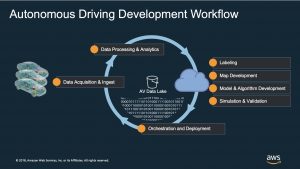
#13: Field Notes: Building an Autonomous Driving and ADAS Data Lake on AWS

by Junjie Tang and Dean Phillips

In this post, Junjie and Dean explain how to build an Autonomous Driving Data Lake using this Reference Architecture. They cover all steps in the workflow from how to ingest the data, to moving it into an organized data lake construct.

Read Junjie’s and Dean’s post.

#12: Building a Self-Service, Secure, & Continually Compliant Environment on AWS

by Japjot Walia and Jonathan Shapiro-Ward

In this post, Jopjot and Jonathan provide a reference architecture for highly regulated Enterprise organizations to help them maintain their security and compliance posture. This blog post provides an overview of a solution in which AWS Professional Services engaged with a major Global systemically important bank (G-SIB) customer to help develop ML capabilities and implement a Defense in Depth (DiD) security strategy.

Read Jopjot’s and Jonathan’s post.

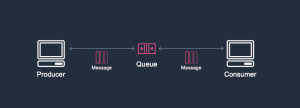
#11: Introduction to Messaging for Modern Cloud Architecture

by Sam Dengler

In this post, Sam focuses on best practices when introducing messaging patterns into your applications. He reviews some core messaging concepts and shows how they can be used to address challenges when designing modern cloud architectures.

Read Sam’s post.

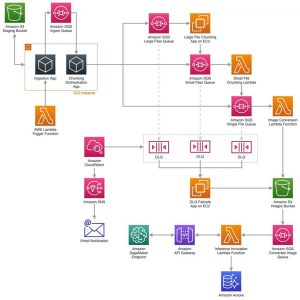
#10: Building a Scalable Document Pre-Processing Pipeline

by Joel Knight

In this post, Joel presents an overview of an architecture built for Quantiphi Inc. This pipeline performs pre-processing of documents, and is reusable for a wide array of document processing workloads.

Read Joel’s post.

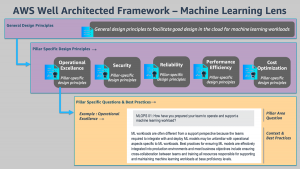
#9: Introducing the Well-Architected Framework for Machine Learning

by by Shelbee Eigenbrode, Bardia Nikpourian, Sireesha Muppala, and Christian Williams

In the Machine Learning Lens whitepaper, the authors focus on how to design, deploy, and architect your machine learning workloads in the AWS Cloud. The whitepaper describes the general design principles and the five pillars of the Framework as they relate to ML workloads.

Read the post.

#8: BBVA: Helping Global Remote Working with Amazon AppStream 2.0

by Jose Luis Prieto

In this post, Jose explains why BBVA chose Amazon AppStream 2.0 to accommodate the remote work experience. BBVA built a global solution reducing implementation time by 90% compared to on-premises projects, and is meeting its operational and security requirements.

Read Jose’s post.

#7: Field Notes: Serverless Container-based APIs with Amazon ECS and Amazon API Gateway

by Simone Pomata

In this post, Simone guides you through the details of the option based on Amazon API Gateway and AWS Cloud Map, and how to implement it. First you learn how the different components (Amazon ECS, AWS Cloud Map, API Gateway, etc.) work together, then you launch and test a sample container-based API.

Read Simone’s post.

#6: Mercado Libre: How to Block Malicious Traffic in a Dynamic Environment

by Gaston Ansaldo and Matias Ezequiel De Santi

In this post, readers will learn how to architect a solution that can ingest, store, analyze, detect and block malicious traffic in an environment that is dynamic and distributed in nature by leveraging various AWS services like Amazon CloudFront, Amazon Athena and AWS WAF.

Read Gaston’s and Matias’ post.

#5: Announcing the New Version of the Well-Architected Framework

by Rodney Lester

In this post, Rodney announces the availability of a new version of the AWS Well-Architected Framework, and focuses on such issues as removing perceived repetition, adding content areas to explicitly call out previously implied best practices, and revising best practices to provide clarity.

Read Rodney’s post.

#4: Serverless Stream-Based Processing for Real-Time Insights

by Justin Pirtle

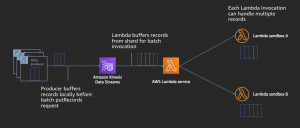
In this post, Justin provides an overview of streaming messaging services and AWS Serverless stream processing capabilities. He shows how it helps you achieve low-latency, near real-time data processing in your applications.

Read Justin’s post.

#3: Field Notes: Working with Route Tables in AWS Transit Gateway

by Prabhakaran Thirumeni

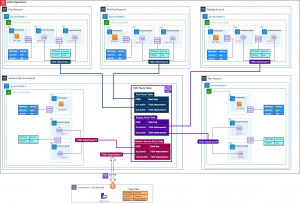
In this post, Prabhakaran explains the packet flow if both source and destination network are associated to the same or different AWS Transit Gateway Route Table. He outlines a scenario with a substantial number of VPCs, and how to make it easier for your network team to manage access for a growing environment.

Read Prabhakaran’s post.

#2: Using VPC Sharing for a Cost-Effective Multi-Account Microservice Architecture

by Anandprasanna Gaitonde and Mohit Malik

Anand and Mohit present a cost-effective approach for microservices that require a high degree of interconnectivity and are within the same trust boundaries. This approach requires less VPC management while still using separate accounts for billing and access control, and does not sacrifice scalability, high availability, fault tolerance, and security.

Read Anand’s and Mohit’s post.

#1: Serverless Architecture for a Web Scraping Solution

by Dzidas Martinaitis

You may wonder whether serverless architectures are cost-effective or expensive. In this post, Dzidas analyzes a web scraping solution. The project can be considered as a standard extract, transform, load process without a user interface and can be packed into a self-containing function or a library.

Read Dzidas’ post.

Thank You

Thanks again to all our readers and blog post writers! We look forward to learning and building amazing things together in 2021.