Tag Archives: Event Processing

Evaluating performance impact of removing Redis-cache from a Scylla-backed service

Post Syndicated from Grab Tech original https://engineering.grab.com/evalutate-performance-remove-redis-from-scylla-service

Introduction

At Grab, we operate a set of services that manage and provide counts of various items. While this may seem straightforward, the scale at which this feature operates—benefiting millions of Grab users daily—introduces complexity. This feature is divided into three microservices: one for “writing” counts, another for handling “read” requests, and a third serving as the backend for a portal used by data scientists and analysts to configure these counters.

This article focuses on the service responsible for handling “read” requests. This service is backed by Scylla storage and a Redis cache. It also connects to a MySQL RDS to retrieve “counter configurations” that are necessary for processing incoming requests. Written in Rust, the service serves tens of thousands of queries per second (QPS) during peak times, with each request typically being a “batch request” requiring multiple lookups (~10) on Scylla.

Recently, the service has encountered performance challenges, causing periodic spikes in Scylla QPS. These spikes occur throughout the day but are particularly evident during peak hours. To understand this better, we’ll first walk you through how this service operates, particularly how it serves incoming requests. We will then explain our proposed solution and the outcomes of our experiment.

Anatomy of a request

Each counter configuration stored in MySQL has a template that dictates the format of incoming queries. For example, this sample counter configuration is used to count the raindrops for a specific city:

{
    "id": 34,
    "name": "count_rain_drops",
    "template": "rain_drops:city:{city_id}"
    ....
    ....
}

An incoming request using this counter might look like this:

{
    "key": "rain_drops:city:111222",
    "fromTime": 1727215430, // 24 September 2024 22:03:50
    "toTime": 1727400000, // 27 September 2024 01:20:00
}

This request seeks the number of raindrops in our imaginary city with city ID: 111222, between 1727215430 (24 September 2024 22:03:50) and 1727400000 (27 September 2024 01:20:00).

Another service keeps track of raindrops by city and writes the minutely (truncated at 15 minutes), hourly, and daily counts to three different Scylla tables:

  • minutely_count_table
  • hourly_count_table
  • daily_count_table

The service processing the request rounds down the time to the nearest 15 minutes. As a result, the request is processed with the following time range:

  • Start time: 24 September 2024 22:00:00
  • End time: 27 September 2024 01:15:00

Let’s assume we have the following data in these three tables for “rain_drops:city:111222”. The datapoints used in the above example request are highlighted in bold.

minutely_count_table:

key minutely_timestamp count
rain_drops:city:111222 2024-09-24T22:00:00Z 3
rain_drops:city:111222 2024-09-24T22:15:00Z 2
rain_drops:city:111222 2024-09-24T22:30:00Z 4
rain_drops:city:111222 2024-09-24T22:45:00Z 1
rain_drops:city:111222 2024-09-27T01:00:00Z 2
rain_drops:city:111222 2024-09-27T01:15:00Z 3

hourly_count_table:

key hourly_timestamp count
rain_drops:city:111222 2024-09-24T22:00:00Z 18
rain_drops:city:111222 2024-09-24T23:00:00Z 22
rain_drops:city:111222 2024-09-25T00:00:00Z 15
rain_drops:city:111222 2024-09-27T00:00:00Z 11
rain_drops:city:111222 2024-09-27T01:00:00Z 9

daily_count_table:

key daily_timestamp count
rain_drops:city:111222 2024-09-24T00:00:00Z 214
rain_drops:city:111222 2024-09-25T00:00:00Z 189
rain_drops:city:111222 2024-09-26T00:00:00Z 245
rain_drops:city:111222 2024-09-27T00:00:00Z 78

Now, let’s see how the service calculates the total count for the incoming request with “rain_drops:city:111222” based on the provided data:

Time range:

  • From: 24 September 2024 22:03:50
  • To: 27 September 2024 01:20:00

For the full days within the range, specifically 25th and 26th September, we can use data from the daily_count_table. However, for the start (24th September) and end (27th September) date of the range, we cannot use data from the daily_count_table as the range only includes portions of these dates. Instead, we will use a combination of data from the hourly_count_table and minutely_count_table to accurately capture the counts for these days.

  1. Query the daily_count_table:

    Sum (full day: 25 and 26th Sep): 189 + 245 = 434

  2. Query the hourly_count_table:
    • For 24th September (from 22:00:00 to 23:59:59):

      Hourly count: 18 + 22 = 40

    • For 27th September (from 00:00:00 to 01:00:00):

      Hourly count: 11

  3. Query the minutely_count_table:

    For 27th September (from 01:00:00 to 01:15:00):

    Minutely count: 2

  4. Total count:

    Total = Daily count (25th and 26th) + Hourly count (24th) + Hourly count (27th) + Minutely count (27th)

    = 434 + 40 + 11 + 2

    = 487

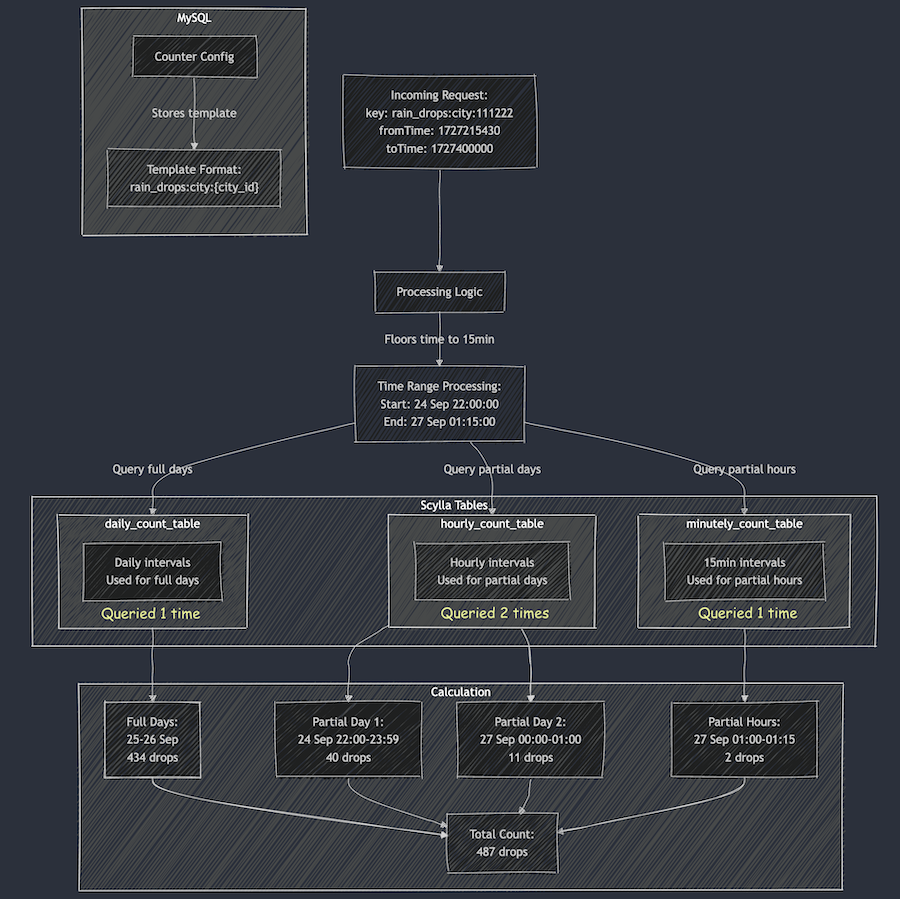
Figure 1: The example request for “rain_drops:city:111222” is handled using data from three different Scylla tables.

As shown in the calculation, when the service receives the request, it comes up with the total count of raindrops by querying three Scylla tables and summing them up using some specific rules within the service itself.

Querying the cache

In the previous section, we explained how Scylla handles a query. If we cached the response for the same request earlier, retrieval from the cache follows a simpler logic. For instance, for the example request, the total count is stored using the floored start and end times (rounded to the nearest 15-minute window within an hour), which was used for the Scylla query instead of the original time in the request. The cache key-value pair would look like this:

  • key: id:34:rain_drops:city:111222:1727215200:1727399700
  • value: 487

Timestamps 1727215200 and 1727399700 represent the adjusted start and end times of 24 September 2024 22:00:00 and 27 September 2024 01:15:00, respectively. It has a Time-To-Live (TTL) of 5 minutes. During this TTL window, any request for the key “rain_drops:city:111222” having the same start and end times (after rounding to the nearest 15 minutes) will be read from the cache instead of querying Scylla.

For example, for the following three start times, although they are different, after flooring the request to the nearest 15 minutes, the start time becomes 24 September 2024 22:00:00 for all of them, which is the same start time as the one in the cache.

  • 24 September 2024 22:01:00
  • 24 September 2024 22:02:00
  • 24 September 2024 22:06:00

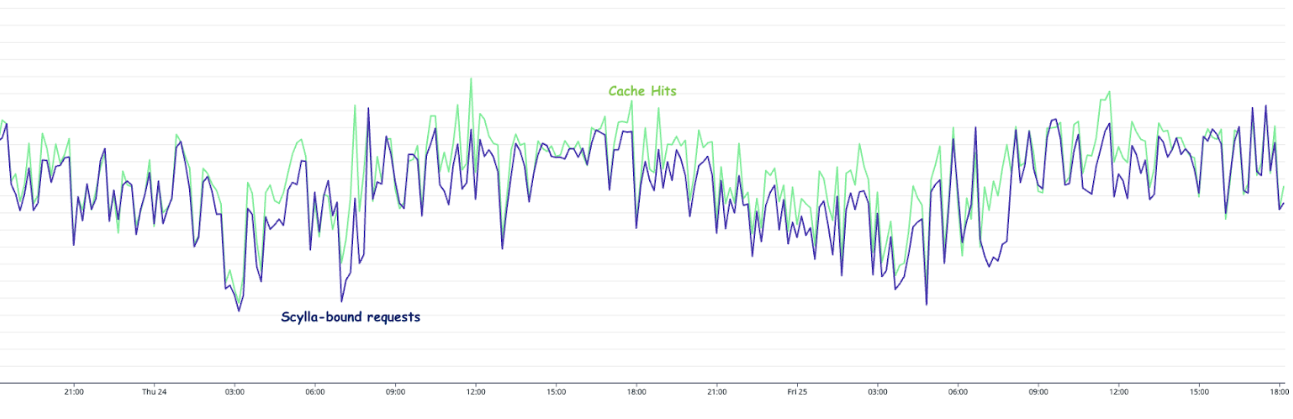
In day-to-day operations, this caching setup allows roughly half of our total production requests to be served by the Redis cache.

Figure 2. The graph visualises the relative quantity of cache hits vs Scylla-bound requests.

Problem statement

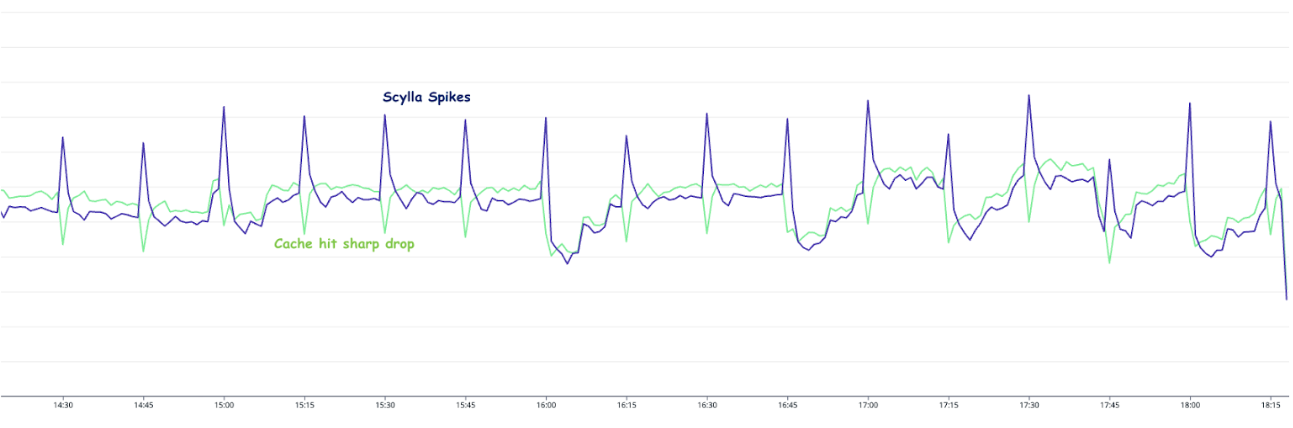
The setup consisting of Scylla and Redis cache works well. Particularly because Scylla-bound queries need to look up 1-3 tables (minutely, hourly, daily, depending on the time range) and perform the summation as explained earlier, whereas a single cache lookup gets the final value for the same query. However, as our cache key pattern follows the 15-minute truncation strategy, along with a 5-minute cache TTL, it leads to an interesting phenomenon – our cache hits plummet and Scylla QPS spikes at the end of every 15 minutes.

Figure 3. Graph showing 15-minute spikes in Scylla-bound requests accompanied by a decline in cache hit rates.

This occurs primarily due to the fact that almost all requests to our service are for recent data. Due to this, at the end of every 15-minute block within an hour (i.e., 00, 15, 30, 45), most of the requests require creating new cache keys for the latest 15-minute block. At this point in time, there may be many unexpired (i.e., have not reached 5 min TTL) cache keys from the previous 15-minutes block, but they become less relevant as most requests are asking for recent data.

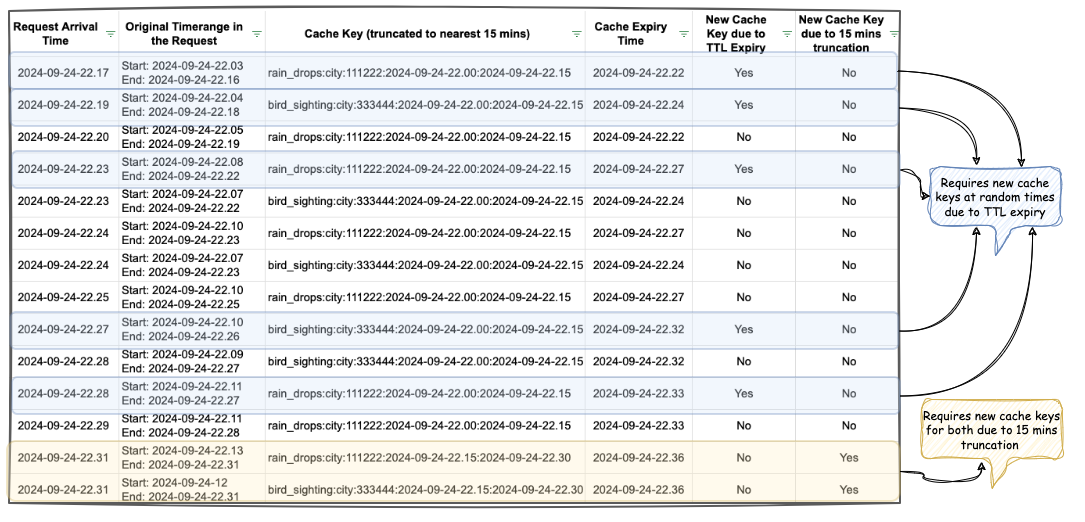
The table in Figure 4 shows example data for configurations “rain_drops:city:111222” and “bird_sighting:city:333444”. For these two configurations, new cache keys are created due to TTL expiry at random times. However, at the end of the 15-minute block, which, in this case is at the end of 22:00-22:15 block, both configurations need new cache keys for the new 15-minute time block that has just started (i.e., start of 22:15-22:30), even though some of their cache keys from the previous 15-minute block are still valid. This requirement of creating new cache keys for most of the requests at the end of a 15-minute block causes spikes in Scylla QPS and a sharp decline in cache hits.

One question that arises is – “Why don’t we see a spike every 5 minutes for cache key TTL expiry?” This is because, within the 15 minutes block, new cache keys are continuously created when a key reaches TTL and a new request for that is received. Since this happens all the time as shown in Figure 4, we do not see a sharp spike. In other words, although Scylla does receive more queries due to cache TTL expiry, it does not lead to a spike in Scylla queries or a sharp drop in cache hits. This is because the cache keys are always being created and invalidated due to TTL expiry instead of following a fixed 5-minute block similar to the 15-minute block we use for our truncation strategy.

Figure 4. This table visualises scenarios when new cache keys are required due to TTL expiry vs due to 15-minute truncation strategy.

These Scylla QPS spikes at the end of every 15-minute block lead to a highly imbalanced Scylla QPS. This often causes high latency in our service during the 15-minute blocks that fall within the peak traffic hours. This further causes more requests to time out, eventually increasing the number of failed requests.

Proposed solution

We propose mitigating this issue by completely removing the Redis-backed caching mechanism from the service. Our observations indicate that the Scylla spikes at the end of 15-minute blocks occur due to cache hit misses. Therefore, removing the caching should eliminate the spikes and provide for a more balanced load.

We acknowledge that this may seem counterintuitive from an overall performance standpoint as removing caching means all queries will be Scylla-bound, potentially impacting the overall performance since caching usually speeds up processes. In addition, caching also comes with an advantage where for cache hits, the service does not need to do the summation on Scylla results from minutely, hourly, and the daily table. Despite these shortcomings, we hypothesise that removing caching should not have an adverse impact on the overall performance. This is based on the fact the Scylla has its own sophisticated caching mechanism. However, our existing setup uses Redis for caching, underutilising Scylla’s cache as the most subsequent queries hit the Redis cache instead.

In summary, we propose eliminating the Redis caching component from our current architecture. This change is expected to resolve the Scylla query spikes observed at the end of every 15-minute block. By relying on Scylla’s native caching mechanism, we anticipate maintaining the service’s overall performance more effectively. The removal of Redis is counterbalanced by the optimised utilisation of Scylla’s built-in caching capabilities.

Experiment

Procedure

The experiment was done on an important live service serving thousands of QPS. To avoid disruptions, we followed a gradual approach. We first turned off caching for a few configurations. If there were no adverse impacts observed, we incrementally disabled cache for more configurations. We controlled the rollout increment by using a mathematical operator on the configuration IDs. This approach is simple and allows us to deterministically disable the cache for specific configurations across all requests, as opposed to using a percentage rollout which randomly disables the cache for different configurations across different requests. This is also due to the fact that the number of configurations is relatively steady and small (less than a thousand). Since these configurations are already fully cached in the service memory from RDS, there will be no performance impact of having a condition that operates on these configurations.

To make sense of the graphs and metrics reported in this section, it is important to understand the traffic pattern of this service. The service usually sees two peaks every day: noon and another around 6-7 PM. On a weekly basis, we usually see the highest traffic on Friday, with the busiest period being from 6-8 PM.

In addition, the timeline of when and how we made various changes to our setup is important to accurately interpret our results.

Experiment timeline: Nov 5 – Nov 13, 2024:

  • Redis cache disabled for ~5% of the counter configurations – Nov 5, 2024, 10.26 AM (Canary started: 10.00 AM)

  • Redis cache disabled for ~25% of the counter configurations – Nov 5, 2024, 12.44 PM (Canary started: 12.20 PM)

  • Redis cache disabled for ~35% of the counter configurations – Nov 6, 2024, 10.50 AM (Canary started: 10.21 AM)

  • Redis cache disabled for ~75% of the counter configurations – Nov 7, 2024, 10.53 AM (Canary started: 10.26 AM) 

  • Experimenting with running a major compaction job during the day time: Tue, Nov 12, 2024, between 2-5 PM (on all nodes)

  • Day time scheduled major compaction job starts from: Tue, Nov 13, 2024, between 2-5 PM (on all nodes)

  • Redis cache disabled for 100% of the counter configs – Wed, 13 Nov 2024, 10:56 AM (Canary started: 10:32 AM)

Unless otherwise specified, the graphs and metrics we report in this article uses this fixed time window: Oct 31 (Thu) 12.00 AM – Nov 15 (Friday) 11.59 PM SGT. This time window covers the entire experiment period with some buffer to observe the experiment’s impact.

Observations

As we progressively disabled read from external Redis cache over the span of 8 days (Nov 5 – Nov 13), we made interesting observations and experimented with some Scylla configuration changes on our end. We describe them in the following sections.

Scylla hit vs. cache hit

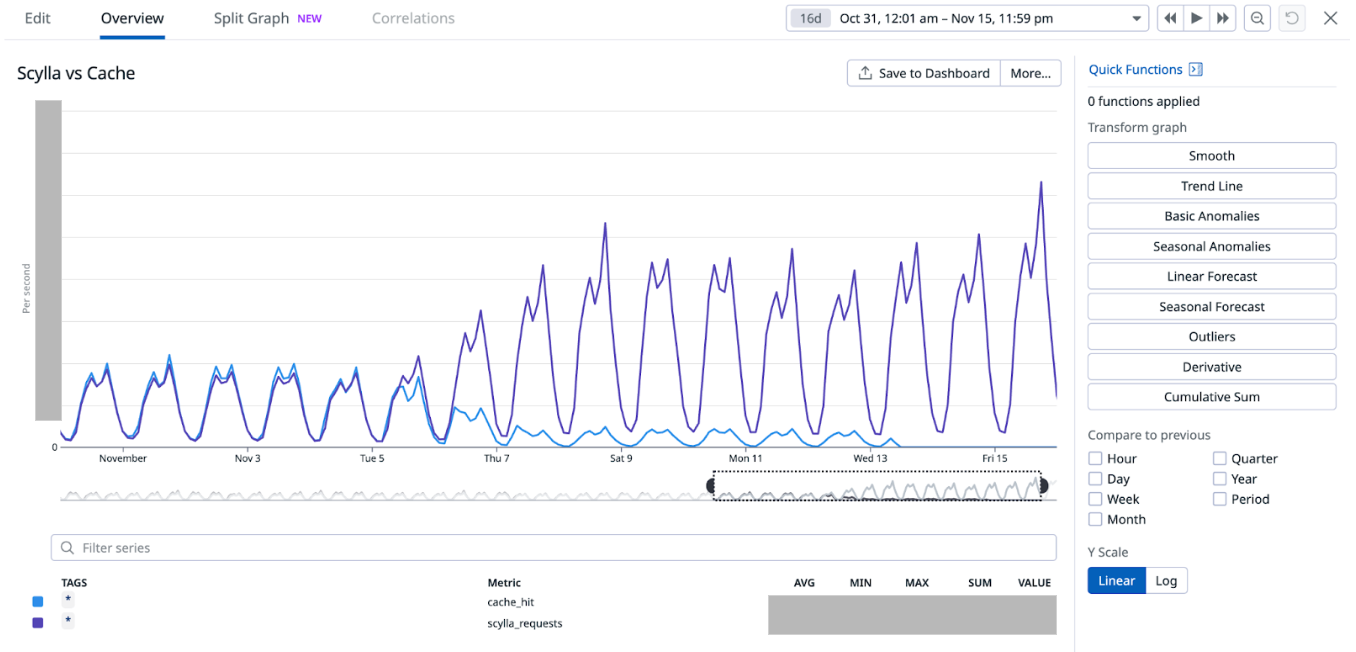
As we progressively disabled Redis cache for most of the counters, one obvious impact was the gradual increase in Scylla-bound QPS and similar decrease in Redis-cache hit. When Redis-cache was enabled for 100% of the configurations, 50% of the requests were bound for Scylla and the other 50% were for Redis. At the end of the experiment, after fully disabling Redis cache, 100% of the requests were Scylla-bound.

Figure 5. Gradual increase in Scylla QPS and simultaneous decrease in Redis cache hit.

15-minutes and hourly spikes

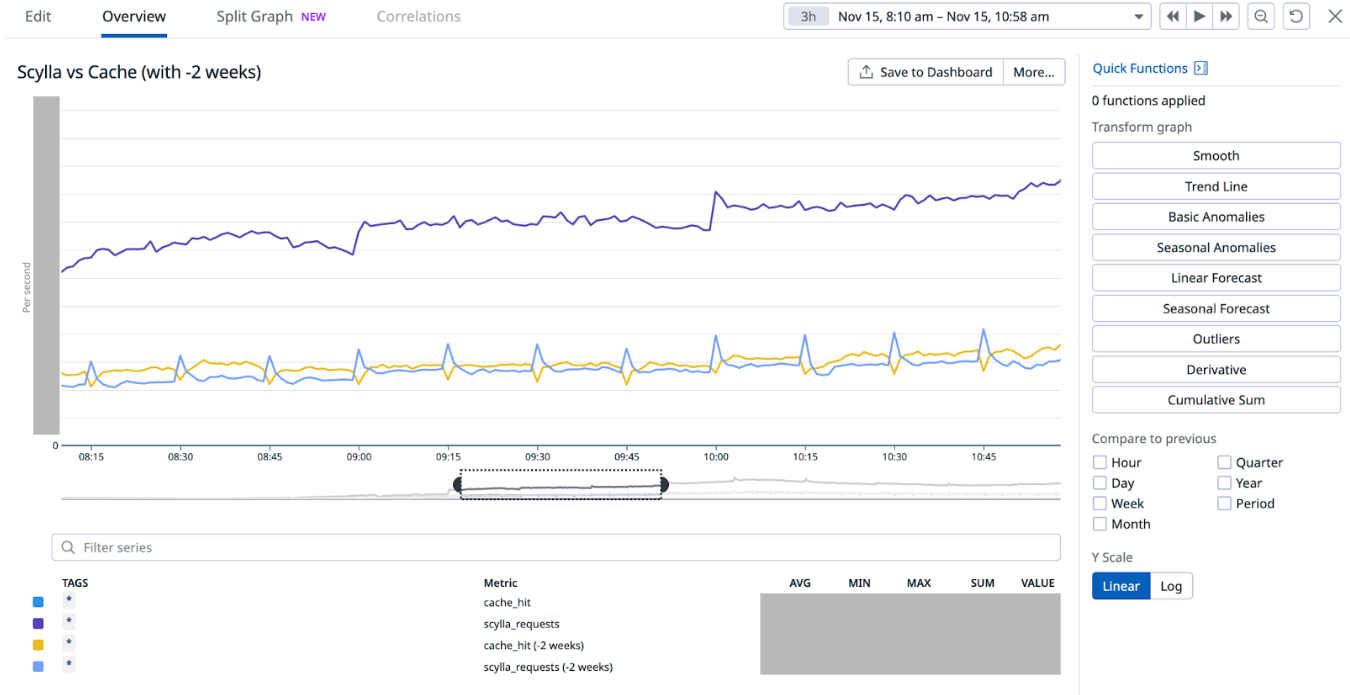
We noticed that the 15-minute spikes in Scylla QPS as well as the associated latency slowly became less prominent and eventually disappeared from the graph after we completely disabled the Redis cache. However, we noticed that the hourly spike still remained. This is attributed to the higher QPS from the clients calling this service at the turn of every hour. As a result, limited optimisation can be done to reduce the hourly spike on this service’s end.

Figure 6. The 15-minute spikes in Scylla QPS disappeared after the external Redis cache was fully disabled. This graph uses a smaller time window to show the earlier spikes. It also shows the persistence of hourly spikes after the experiment which is attributed to the clients of this service sending more requests at the start of every hour.
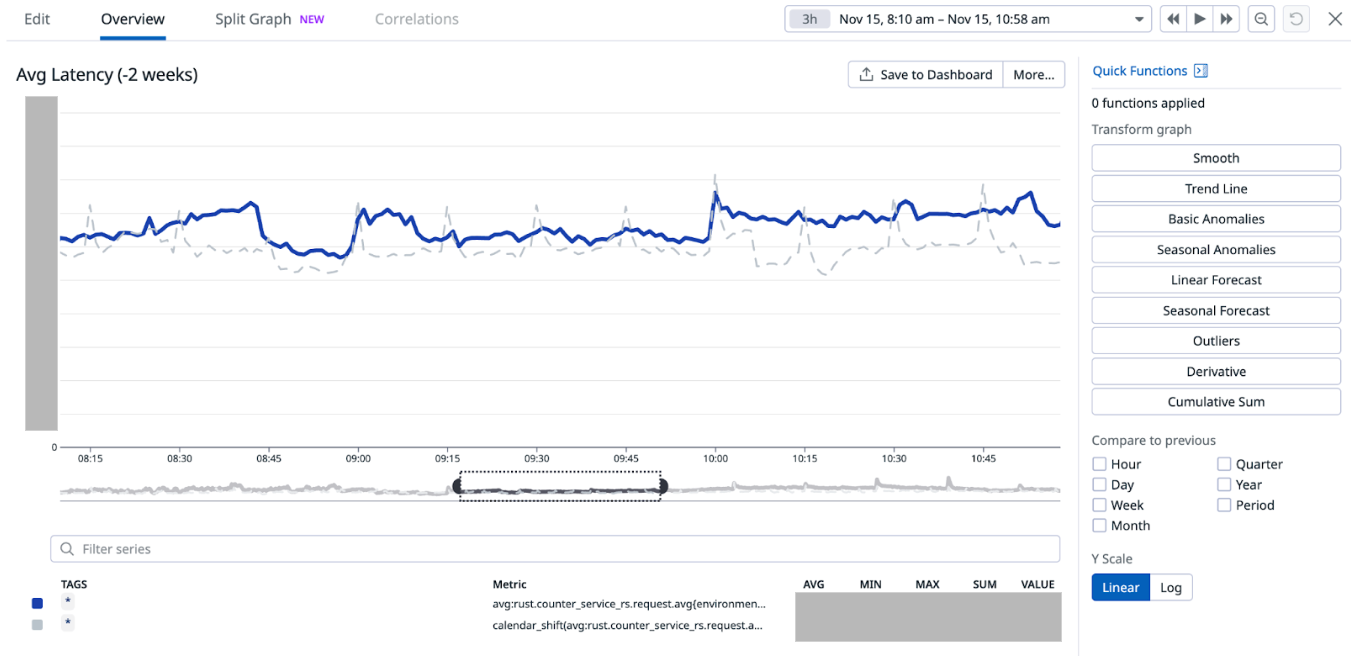
Figure 7. The graph shows that the 15-minute spikes in Scylla’s latency disappeared after the external Redis cache was fully disabled. This graph uses a smaller time window to show the earlier spikes. It also shows the persistence of hourly spikes in latency after the experiment which is attributed to the clients of this service sending more requests at the start of every hour.

Service latency and additional Scylla compaction job

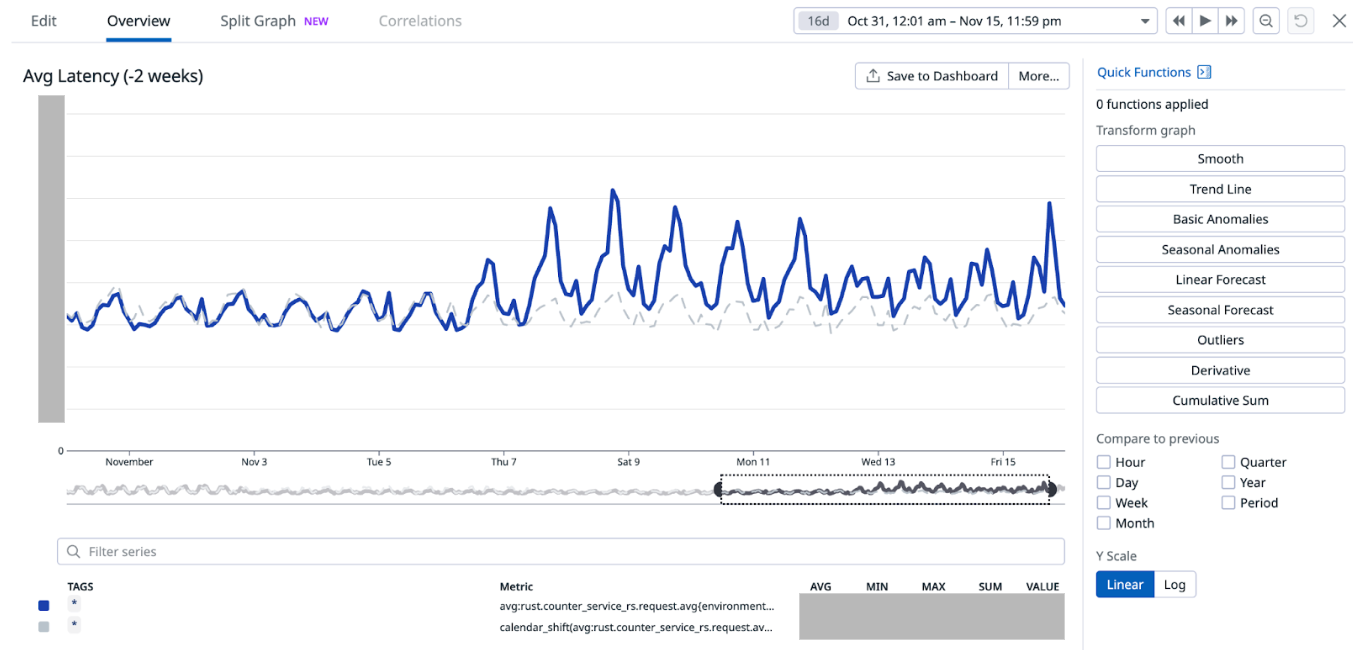
When we disabled Redis cache for about 75% of the counters configurations on Nov 7 (which accounts for about 85% of the overall QPS), we noticed an increase in the overall average service latency, from between 6-8 ms to 7-12 ms (P99 went from ~30-50ms to ~30-70ms). This caused a spike in open circuit breaker (CB) events on Hystrix. At this point, before disabling cache for more counters, on Nov 12, we experimented with running an additional major compaction job on Scylla between 2-5 PM on all our Scylla nodes, progressively on each availability zone (AZ). It is noteworthy that we already have a scheduled major compaction job that runs around 3 AM every day. The outcome of this experiment was quite positive. It brought back the average and P99 latency almost to the prior level when we had Redis cache enabled for 100% of the counters. This also had a similar effect on the Hystrix CB open events. Based on this observation, we made this additional day time major compaction job as a daily scheduled job. We disabled Redis cache for 100% of the counters the next day (Nov 13). This expectedly increased the Scylla QPS, with no noticeable adverse effect on the service latency or Hystrix CB open events.

Figure 8. This graph shows how the average latency changed as a result of the experiment. The higher spikes correspond to the time when Redis cache was being progressively disabled before introducing the day time Scylla compaction job. The spikes lessened after the compaction job was introduced on Nov 12 (Note: Friday spike was due to higher traffic in general).
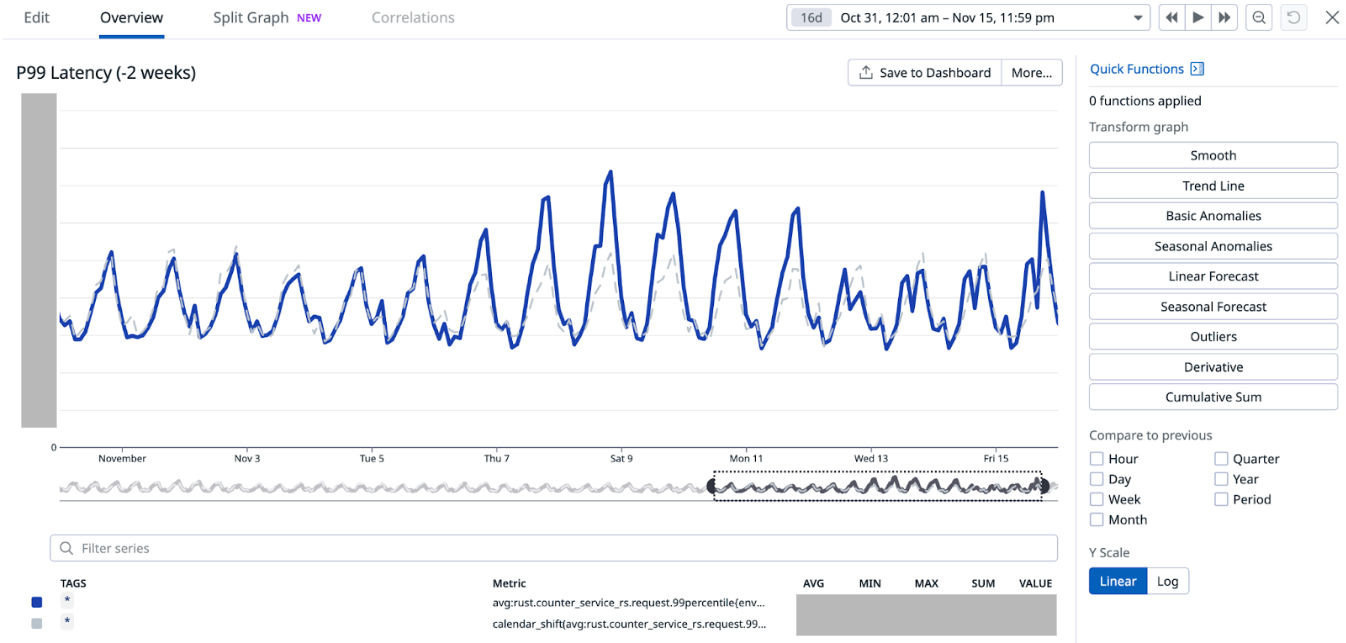
Figure 9. This graph shows how the P99 latency changed as a result of the experiment. The higher spikes correspond to the time when Redis cache was being progressively disabled before introducing the day time Scylla compaction job. The spikes lessened after the compaction job was introduced on Nov 12 (Note: Friday spike was due to higher traffic in general).

Scylla’s own cache

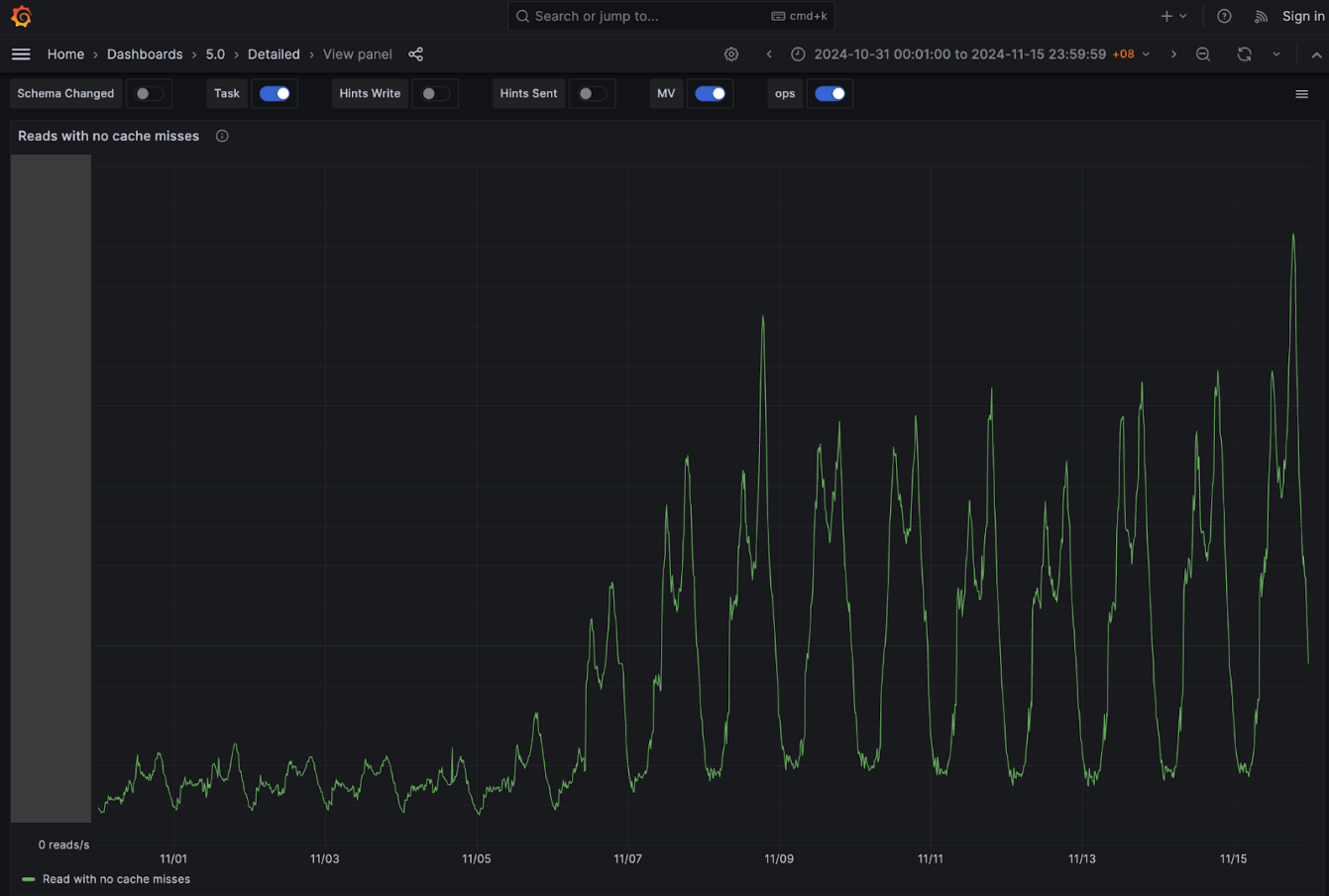
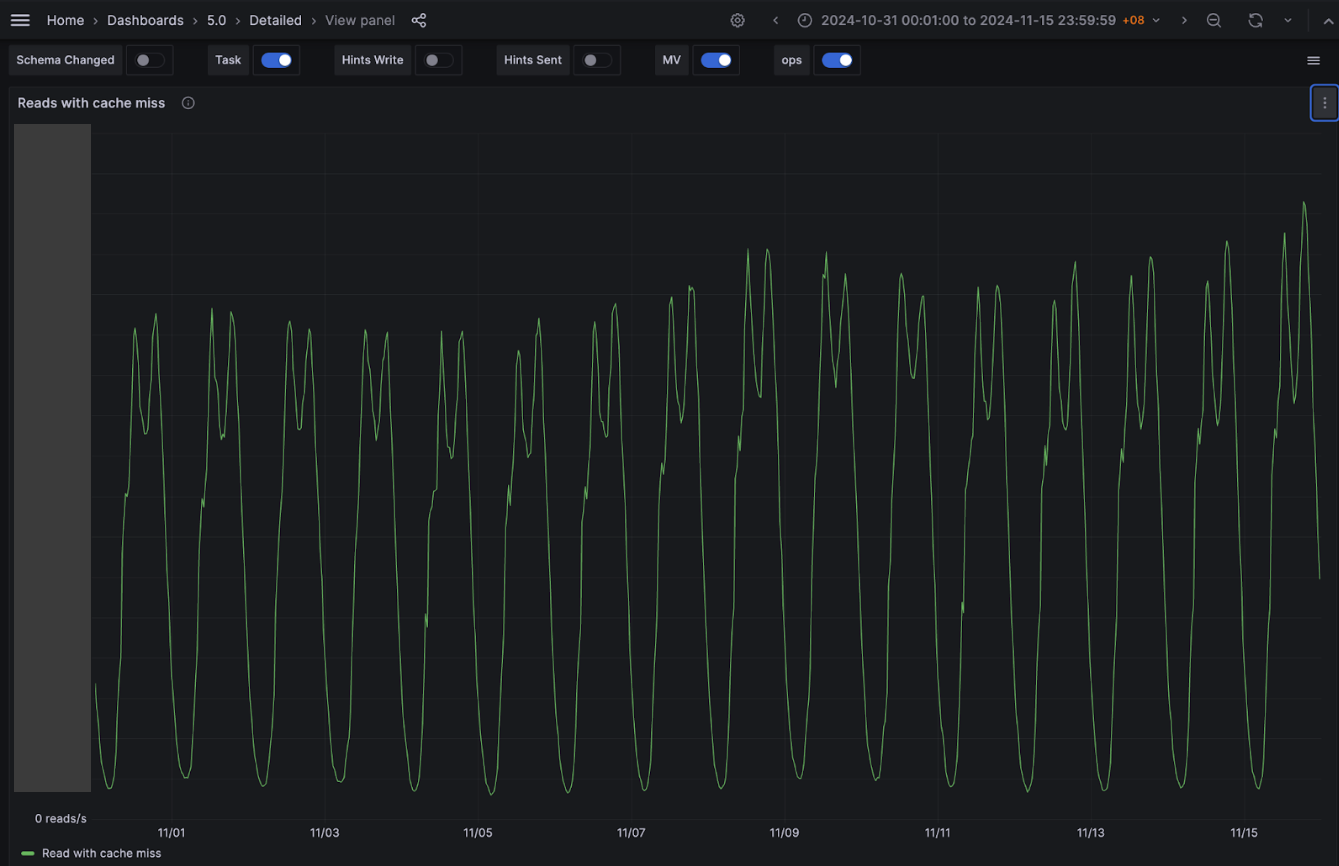
One of our hypotheses was that we were not using Scylla cache due to our system’s design, along with all the service specific characteristics discussed earlier. Our experimental results show that this is indeed the case. We observed a significant increase in Scylla reads with Scylla’s own cache hits, while Scylla reads with Scylla’s own cache misses remained about the same despite our Scylla cluster receiving double the traffic. Percentage-wise, before disabling the external Redis cache, Scylla hit its own cache for ~30% of the total reads, and after we have completely disabled the external Redis cache, Scylla hit its cache for about 70% of the reads. We believe that this largely contributes to the overall performance of the service despite fully decommissioning the expensive Redis cache component from our system architecture.

Figure 10. Significant increase in Scylla reads after disable Redis cache.
Figure 11. No change in Scylla cache miss despite the doubling of Scylla traffic.

Scylla CPU and memory usage

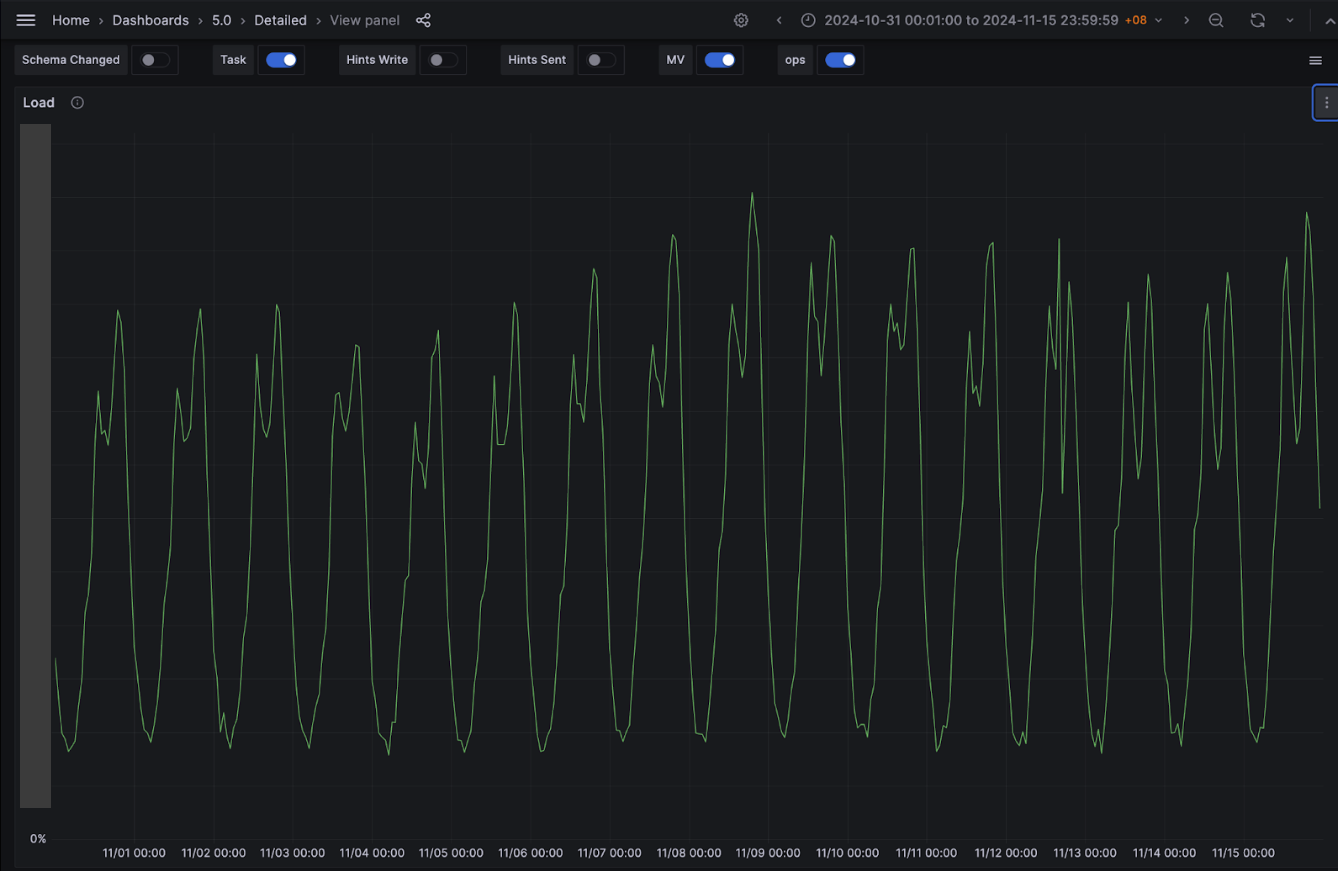
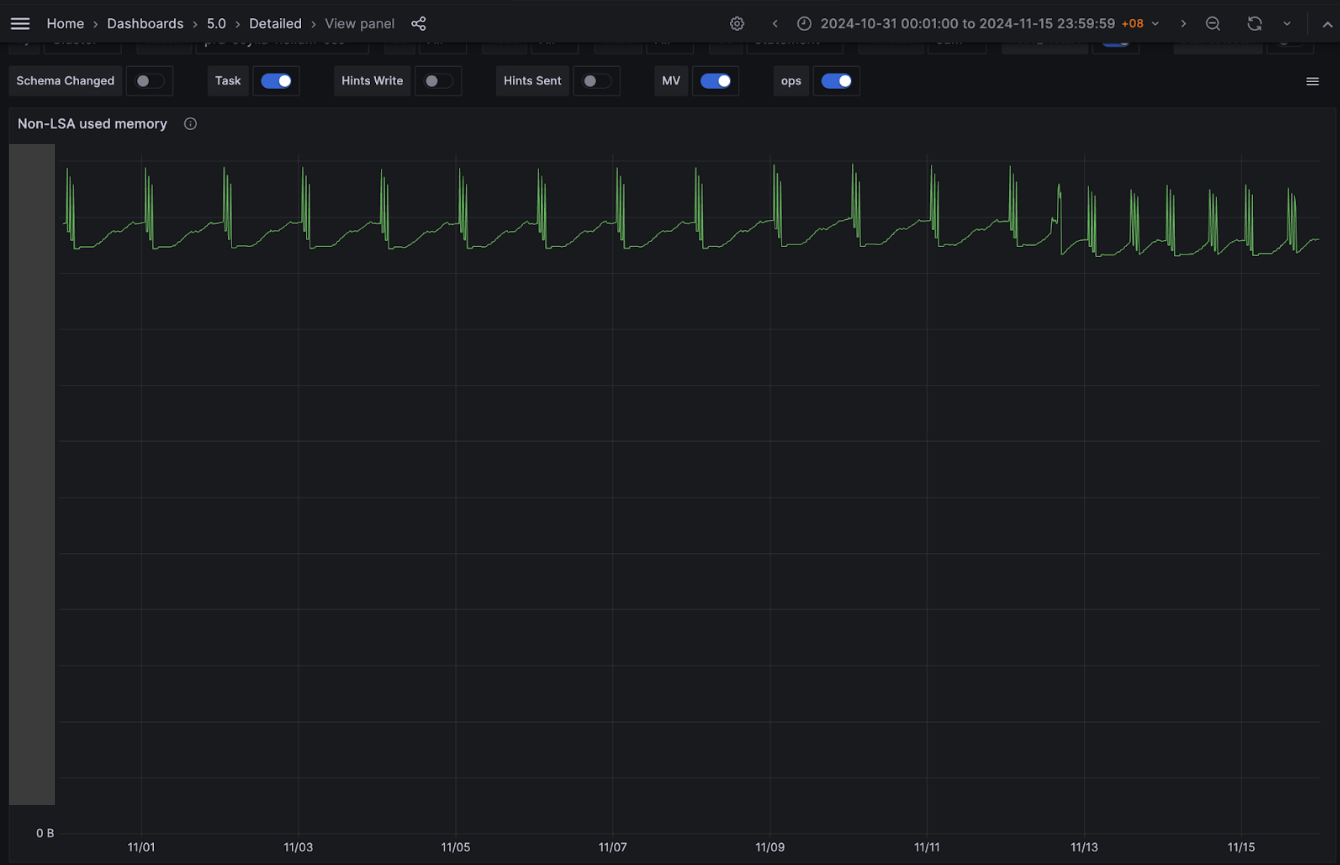
Contrary to our assumption, although the Scylla QPS doubled due to the change done as part of this experiment, there was marginal increase in Scylla CPU usage (from ~50% to ~52% at peak). In terms of memory, Scylla log-structured allocator (LSA) memory usage remains consistent. For Non-LSA memory, the maximum utilisation did not increase. However, we noticed two daily spikes instead of one existed before the experiment. The second spike results from the newly added daily major compaction job. Notably,the overall non-LSA peak has slightly decreased after the introduction of the new compaction job.

Figure 12. Relatively steady Scylla CPU utilisation.
Figure 13. Non-LSA memory usage spikes twice a day after the experiment. The new spike corresponds to the newly added day time compaction job.

Conclusion

In summary, we were able to maintain the same service performance while removing an expensive Redis cache component from our system architecture, which accounted for about 25% of the overall service cost. This has been made possible primarily by significant increase in the utilisation of Scylla’s own cache and adding a daily major compaction job on all our Scylla nodes.

In the future, we plan to further experiment with different Scylla configurations for potential performance gain, specifically to improve the latency.

Join us

Grab is a leading superapp in Southeast Asia, operating across the deliveries, mobility and digital financial services sectors. Serving over 800 cities in eight Southeast Asian countries, Grab enables millions of people everyday to order food or groceries, send packages, hail a ride or taxi, pay for online purchases or access services such as lending and insurance, all through a single app. Grab was founded in 2012 with the mission to drive Southeast Asia forward by creating economic empowerment for everyone. Grab strives to serve a triple bottom line – we aim to simultaneously deliver financial performance for our shareholders and have a positive social impact, which includes economic empowerment for millions of people in the region, while mitigating our environmental footprint.

Powered by technology and driven by heart, our mission is to drive Southeast Asia forward by creating economic empowerment for everyone. If this mission speaks to you, join our team today!
Evaluating performance impact of removing Redis-cache from a Scylla-backed service

Post Syndicated from Grab Tech original https://engineering.grab.com/evaluate-performance-remove-redis-from-scylla-service

Introduction

At Grab, we operate a set of services that manage and provide counts of various items. While this may seem straightforward, the scale at which this feature operates—benefiting millions of Grab users daily—introduces complexity. This feature is divided into three microservices: one for “writing” counts, another for handling “read” requests, and a third serving as the backend for a portal used by data scientists and analysts to configure these counters.

This article focuses on the service responsible for handling “read” requests. This service is backed by Scylla storage and a Redis cache. It also connects to a MySQL RDS to retrieve “counter configurations” that are necessary for processing incoming requests. Written in Rust, the service serves tens of thousands of queries per second (QPS) during peak times, with each request typically being a “batch request” requiring multiple lookups (~10) on Scylla.

Recently, the service has encountered performance challenges, causing periodic spikes in Scylla QPS. These spikes occur throughout the day but are particularly evident during peak hours. To understand this better, we’ll first walk you through how this service operates, particularly how it serves incoming requests. We will then explain our proposed solution and the outcomes of our experiment.

Anatomy of a request

Each counter configuration stored in MySQL has a template that dictates the format of incoming queries. For example, this sample counter configuration is used to count the raindrops for a specific city:

{
    "id": 34,
    "name": "count_rain_drops",
    "template": "rain_drops:city:{city_id}"
    ....
    ....
}

An incoming request using this counter might look like this:

{
    "key": "rain_drops:city:111222",
    "fromTime": 1727215430, // 24 September 2024 22:03:50
    "toTime": 1727400000, // 27 September 2024 01:20:00
}

This request seeks the number of raindrops in our imaginary city with city ID: 111222, between 1727215430 (24 September 2024 22:03:50) and 1727400000 (27 September 2024 01:20:00).

Another service keeps track of raindrops by city and writes the minutely (truncated at 15 minutes), hourly, and daily counts to three different Scylla tables:

  • minutely_count_table
  • hourly_count_table
  • daily_count_table

The service processing the request rounds down the time to the nearest 15 minutes. As a result, the request is processed with the following time range:

  • Start time: 24 September 2024 22:00:00
  • End time: 27 September 2024 01:15:00

Let’s assume we have the following data in these three tables for “rain_drops:city:111222”. The datapoints used in the above example request are highlighted in bold.

minutely_count_table:

key minutely_timestamp count
rain_drops:city:111222 2024-09-24T22:00:00Z 3
rain_drops:city:111222 2024-09-24T22:15:00Z 2
rain_drops:city:111222 2024-09-24T22:30:00Z 4
rain_drops:city:111222 2024-09-24T22:45:00Z 1
rain_drops:city:111222 2024-09-27T01:00:00Z 2
rain_drops:city:111222 2024-09-27T01:15:00Z 3

hourly_count_table:

key hourly_timestamp count
rain_drops:city:111222 2024-09-24T22:00:00Z 18
rain_drops:city:111222 2024-09-24T23:00:00Z 22
rain_drops:city:111222 2024-09-25T00:00:00Z 15
rain_drops:city:111222 2024-09-27T00:00:00Z 11
rain_drops:city:111222 2024-09-27T01:00:00Z 9

daily_count_table:

key daily_timestamp count
rain_drops:city:111222 2024-09-24T00:00:00Z 214
rain_drops:city:111222 2024-09-25T00:00:00Z 189
rain_drops:city:111222 2024-09-26T00:00:00Z 245
rain_drops:city:111222 2024-09-27T00:00:00Z 78

Now, let’s see how the service calculates the total count for the incoming request with “rain_drops:city:111222” based on the provided data:

Time range:

  • From: 24 September 2024 22:03:50
  • To: 27 September 2024 01:20:00

For the full days within the range, specifically 25th and 26th September, we can use data from the daily_count_table. However, for the start (24th September) and end (27th September) date of the range, we cannot use data from the daily_count_table as the range only includes portions of these dates. Instead, we will use a combination of data from the hourly_count_table and minutely_count_table to accurately capture the counts for these days.

  1. Query the daily_count_table:

    Sum (full day: 25 and 26th Sep): 189 + 245 = 434

  2. Query the hourly_count_table:
    • For 24th September (from 22:00:00 to 23:59:59):

      Hourly count: 18 + 22 = 40

    • For 27th September (from 00:00:00 to 01:00:00):

      Hourly count: 11

  3. Query the minutely_count_table:

    For 27th September (from 01:00:00 to 01:15:00):

    Minutely count: 2

  4. Total count:

    Total = Daily count (25th and 26th) + Hourly count (24th) + Hourly count (27th) + Minutely count (27th)

    = 434 + 40 + 11 + 2

    = 487

Figure 1: The example request for “rain_drops:city:111222” is handled using data from three different Scylla tables.

As shown in the calculation, when the service receives the request, it comes up with the total count of raindrops by querying three Scylla tables and summing them up using some specific rules within the service itself.

Querying the cache

In the previous section, we explained how Scylla handles a query. If we cached the response for the same request earlier, retrieval from the cache follows a simpler logic. For instance, for the example request, the total count is stored using the floored start and end times (rounded to the nearest 15-minute window within an hour), which was used for the Scylla query instead of the original time in the request. The cache key-value pair would look like this:

  • key: id:34:rain_drops:city:111222:1727215200:1727399700
  • value: 487

Timestamps 1727215200 and 1727399700 represent the adjusted start and end times of 24 September 2024 22:00:00 and 27 September 2024 01:15:00, respectively. It has a Time-To-Live (TTL) of 5 minutes. During this TTL window, any request for the key “rain_drops:city:111222” having the same start and end times (after rounding to the nearest 15 minutes) will be read from the cache instead of querying Scylla.

For example, for the following three start times, although they are different, after flooring the request to the nearest 15 minutes, the start time becomes 24 September 2024 22:00:00 for all of them, which is the same start time as the one in the cache.

  • 24 September 2024 22:01:00
  • 24 September 2024 22:02:00
  • 24 September 2024 22:06:00

In day-to-day operations, this caching setup allows roughly half of our total production requests to be served by the Redis cache.

Figure 2. The graph visualises the relative quantity of cache hits vs Scylla-bound requests.

Problem statement

The setup consisting of Scylla and Redis cache works well. Particularly because Scylla-bound queries need to look up 1-3 tables (minutely, hourly, daily, depending on the time range) and perform the summation as explained earlier, whereas a single cache lookup gets the final value for the same query. However, as our cache key pattern follows the 15-minute truncation strategy, along with a 5-minute cache TTL, it leads to an interesting phenomenon – our cache hits plummet and Scylla QPS spikes at the end of every 15 minutes.

Figure 3. Graph showing 15-minute spikes in Scylla-bound requests accompanied by a decline in cache hit rates.

This occurs primarily due to the fact that almost all requests to our service are for recent data. Due to this, at the end of every 15-minute block within an hour (i.e., 00, 15, 30, 45), most of the requests require creating new cache keys for the latest 15-minute block. At this point in time, there may be many unexpired (i.e., have not reached 5 min TTL) cache keys from the previous 15-minutes block, but they become less relevant as most requests are asking for recent data.

The table in Figure 4 shows example data for configurations “rain_drops:city:111222” and “bird_sighting:city:333444”. For these two configurations, new cache keys are created due to TTL expiry at random times. However, at the end of the 15-minute block, which, in this case is at the end of 22:00-22:15 block, both configurations need new cache keys for the new 15-minute time block that has just started (i.e., start of 22:15-22:30), even though some of their cache keys from the previous 15-minute block are still valid. This requirement of creating new cache keys for most of the requests at the end of a 15-minute block causes spikes in Scylla QPS and a sharp decline in cache hits.

One question that arises is – “Why don’t we see a spike every 5 minutes for cache key TTL expiry?” This is because, within the 15 minutes block, new cache keys are continuously created when a key reaches TTL and a new request for that is received. Since this happens all the time as shown in Figure 4, we do not see a sharp spike. In other words, although Scylla does receive more queries due to cache TTL expiry, it does not lead to a spike in Scylla queries or a sharp drop in cache hits. This is because the cache keys are always being created and invalidated due to TTL expiry instead of following a fixed 5-minute block similar to the 15-minute block we use for our truncation strategy.

Figure 4. This table visualises scenarios when new cache keys are required due to TTL expiry vs due to 15-minute truncation strategy.

These Scylla QPS spikes at the end of every 15-minute block lead to a highly imbalanced Scylla QPS. This often causes high latency in our service during the 15-minute blocks that fall within the peak traffic hours. This further causes more requests to time out, eventually increasing the number of failed requests.

Proposed solution

We propose mitigating this issue by completely removing the Redis-backed caching mechanism from the service. Our observations indicate that the Scylla spikes at the end of 15-minute blocks occur due to cache hit misses. Therefore, removing the caching should eliminate the spikes and provide for a more balanced load.

We acknowledge that this may seem counterintuitive from an overall performance standpoint as removing caching means all queries will be Scylla-bound, potentially impacting the overall performance since caching usually speeds up processes. In addition, caching also comes with an advantage where for cache hits, the service does not need to do the summation on Scylla results from minutely, hourly, and the daily table. Despite these shortcomings, we hypothesise that removing caching should not have an adverse impact on the overall performance. This is based on the fact the Scylla has its own sophisticated caching mechanism. However, our existing setup uses Redis for caching, underutilising Scylla’s cache as the most subsequent queries hit the Redis cache instead.

In summary, we propose eliminating the Redis caching component from our current architecture. This change is expected to resolve the Scylla query spikes observed at the end of every 15-minute block. By relying on Scylla’s native caching mechanism, we anticipate maintaining the service’s overall performance more effectively. The removal of Redis is counterbalanced by the optimised utilisation of Scylla’s built-in caching capabilities.

Experiment

Procedure

The experiment was done on an important live service serving thousands of QPS. To avoid disruptions, we followed a gradual approach. We first turned off caching for a few configurations. If there were no adverse impacts observed, we incrementally disabled cache for more configurations. We controlled the rollout increment by using a mathematical operator on the configuration IDs. This approach is simple and allows us to deterministically disable the cache for specific configurations across all requests, as opposed to using a percentage rollout which randomly disables the cache for different configurations across different requests. This is also due to the fact that the number of configurations is relatively steady and small (less than a thousand). Since these configurations are already fully cached in the service memory from RDS, there will be no performance impact of having a condition that operates on these configurations.

To make sense of the graphs and metrics reported in this section, it is important to understand the traffic pattern of this service. The service usually sees two peaks every day: noon and another around 6-7 PM. On a weekly basis, we usually see the highest traffic on Friday, with the busiest period being from 6-8 PM.

In addition, the timeline of when and how we made various changes to our setup is important to accurately interpret our results.

Experiment timeline: Nov 5 – Nov 13, 2024:

  • Redis cache disabled for ~5% of the counter configurations – Nov 5, 2024, 10.26 AM (Canary started: 10.00 AM)

  • Redis cache disabled for ~25% of the counter configurations – Nov 5, 2024, 12.44 PM (Canary started: 12.20 PM)

  • Redis cache disabled for ~35% of the counter configurations – Nov 6, 2024, 10.50 AM (Canary started: 10.21 AM)

  • Redis cache disabled for ~75% of the counter configurations – Nov 7, 2024, 10.53 AM (Canary started: 10.26 AM) 

  • Experimenting with running a major compaction job during the day time: Tue, Nov 12, 2024, between 2-5 PM (on all nodes)

  • Day time scheduled major compaction job starts from: Tue, Nov 13, 2024, between 2-5 PM (on all nodes)

  • Redis cache disabled for 100% of the counter configs – Wed, 13 Nov 2024, 10:56 AM (Canary started: 10:32 AM)

Unless otherwise specified, the graphs and metrics we report in this article uses this fixed time window: Oct 31 (Thu) 12.00 AM – Nov 15 (Friday) 11.59 PM SGT. This time window covers the entire experiment period with some buffer to observe the experiment’s impact.

Observations

As we progressively disabled read from external Redis cache over the span of 8 days (Nov 5 – Nov 13), we made interesting observations and experimented with some Scylla configuration changes on our end. We describe them in the following sections.

Scylla hit vs. cache hit

As we progressively disabled Redis cache for most of the counters, one obvious impact was the gradual increase in Scylla-bound QPS and similar decrease in Redis-cache hit. When Redis-cache was enabled for 100% of the configurations, 50% of the requests were bound for Scylla and the other 50% were for Redis. At the end of the experiment, after fully disabling Redis cache, 100% of the requests were Scylla-bound.

Figure 5. Gradual increase in Scylla QPS and simultaneous decrease in Redis cache hit.

15-minutes and hourly spikes

We noticed that the 15-minute spikes in Scylla QPS as well as the associated latency slowly became less prominent and eventually disappeared from the graph after we completely disabled the Redis cache. However, we noticed that the hourly spike still remained. This is attributed to the higher QPS from the clients calling this service at the turn of every hour. As a result, limited optimisation can be done to reduce the hourly spike on this service’s end.

Figure 6. The 15-minute spikes in Scylla QPS disappeared after the external Redis cache was fully disabled. This graph uses a smaller time window to show the earlier spikes. It also shows the persistence of hourly spikes after the experiment which is attributed to the clients of this service sending more requests at the start of every hour.
Figure 7. The graph shows that the 15-minute spikes in Scylla’s latency disappeared after the external Redis cache was fully disabled. This graph uses a smaller time window to show the earlier spikes. It also shows the persistence of hourly spikes in latency after the experiment which is attributed to the clients of this service sending more requests at the start of every hour.

Service latency and additional Scylla compaction job

When we disabled Redis cache for about 75% of the counters configurations on Nov 7 (which accounts for about 85% of the overall QPS), we noticed an increase in the overall average service latency, from between 6-8 ms to 7-12 ms (P99 went from ~30-50ms to ~30-70ms). This caused a spike in open circuit breaker (CB) events on Hystrix. At this point, before disabling cache for more counters, on Nov 12, we experimented with running an additional major compaction job on Scylla between 2-5 PM on all our Scylla nodes, progressively on each availability zone (AZ). It is noteworthy that we already have a scheduled major compaction job that runs around 3 AM every day. The outcome of this experiment was quite positive. It brought back the average and P99 latency almost to the prior level when we had Redis cache enabled for 100% of the counters. This also had a similar effect on the Hystrix CB open events. Based on this observation, we made this additional day time major compaction job as a daily scheduled job. We disabled Redis cache for 100% of the counters the next day (Nov 13). This expectedly increased the Scylla QPS, with no noticeable adverse effect on the service latency or Hystrix CB open events.

Figure 8. This graph shows how the average latency changed as a result of the experiment. The higher spikes correspond to the time when Redis cache was being progressively disabled before introducing the day time Scylla compaction job. The spikes lessened after the compaction job was introduced on Nov 12 (Note: Friday spike was due to higher traffic in general).
Figure 9. This graph shows how the P99 latency changed as a result of the experiment. The higher spikes correspond to the time when Redis cache was being progressively disabled before introducing the day time Scylla compaction job. The spikes lessened after the compaction job was introduced on Nov 12 (Note: Friday spike was due to higher traffic in general).

Scylla’s own cache

One of our hypotheses was that we were not using Scylla cache due to our system’s design, along with all the service specific characteristics discussed earlier. Our experimental results show that this is indeed the case. We observed a significant increase in Scylla reads with Scylla’s own cache hits, while Scylla reads with Scylla’s own cache misses remained about the same despite our Scylla cluster receiving double the traffic. Percentage-wise, before disabling the external Redis cache, Scylla hit its own cache for ~30% of the total reads, and after we have completely disabled the external Redis cache, Scylla hit its cache for about 70% of the reads. We believe that this largely contributes to the overall performance of the service despite fully decommissioning the expensive Redis cache component from our system architecture.

Figure 10. Significant increase in Scylla reads after disable Redis cache.
Figure 11. No change in Scylla cache miss despite the doubling of Scylla traffic.

Scylla CPU and memory usage

Contrary to our assumption, although the Scylla QPS doubled due to the change done as part of this experiment, there was marginal increase in Scylla CPU usage (from ~50% to ~52% at peak). In terms of memory, Scylla log-structured allocator (LSA) memory usage remains consistent. For Non-LSA memory, the maximum utilisation did not increase. However, we noticed two daily spikes instead of one existed before the experiment. The second spike results from the newly added daily major compaction job. Notably,the overall non-LSA peak has slightly decreased after the introduction of the new compaction job.

Figure 12. Relatively steady Scylla CPU utilisation.
Figure 13. Non-LSA memory usage spikes twice a day after the experiment. The new spike corresponds to the newly added day time compaction job.

Conclusion

In summary, we were able to maintain the same service performance while removing an expensive Redis cache component from our system architecture, which accounted for about 25% of the overall service cost. This has been made possible primarily by significant increase in the utilisation of Scylla’s own cache and adding a daily major compaction job on all our Scylla nodes.

In the future, we plan to further experiment with different Scylla configurations for potential performance gain, specifically to improve the latency.

Join us

Grab is a leading superapp in Southeast Asia, operating across the deliveries, mobility and digital financial services sectors. Serving over 800 cities in eight Southeast Asian countries, Grab enables millions of people everyday to order food or groceries, send packages, hail a ride or taxi, pay for online purchases or access services such as lending and insurance, all through a single app. Grab was founded in 2012 with the mission to drive Southeast Asia forward by creating economic empowerment for everyone. Grab strives to serve a triple bottom line – we aim to simultaneously deliver financial performance for our shareholders and have a positive social impact, which includes economic empowerment for millions of people in the region, while mitigating our environmental footprint.

Powered by technology and driven by heart, our mission is to drive Southeast Asia forward by creating economic empowerment for everyone. If this mission speaks to you, join our team today!
Abacus – Issuing points for multiple sources

Post Syndicated from Grab Tech original https://engineering.grab.com/abacus-issuing-points-for-multiple-sources

Introduction

Earlier in 2021 we published an article on Trident, Grab’s in-house real-time if this, then that (IFTTT) engine which manages campaigns for the Grab Loyalty Programme. The Grab Loyalty Programme encourages consumers to make Grab transactions by rewarding points when transactions are made. Grab rewards two types of points namely OVOPoints and GrabRewards Points (GRP). OVOPoints are issued for transactions made in Indonesia and GRP are for the transactions that are made in all other markets. In this article, the term GRP will be used to refer to both OVOPoints and GrabRewards Points.

Rewarding GRP is one of the main components of the Grab Loyalty Programme. By rewarding GRP, our consumers are incentivised to transact within the Grab ecosystem. Consumers can then redeem their GRP for a range of exciting items on the GrabRewards catalogue or to offset the cost of their spendings.

As we continue to grow our consumer base and our product offerings, a more robust platform is needed to ensure successful points transactions. In this post, we will share the challenges in rewarding GRP and how Abacus, our Point Issuance platform helps to overcome these challenges while managing various use cases.

Challenges

Growing number of products

The number of Grab’s product offerings has grown as part of Grab’s goal in becoming a superapp. The demand for rewarding GRP increased as each product team looked for ways to retain consumer loyalty. For this, we needed a platform which could support the different requirements from each product team.

External partnerships

Grab’s external partnerships consist of both one- and two-way point exchanges. With selected partners, Grab users are able to convert their GRP for the partner’s loyalty programme points, and the other way around.

Use cases

Besides the need to cater for the growing number of products and external partnerships, Grab needed a centralised points management system which could cater to various use cases of points rewarding. Let’s take a look at the use cases.

Any product, any points

There are many products in Grab and each product should be able to reward different GRP for different scenarios. Each product rewards GRP based on the goal they are trying to achieve.

The following examples illustrate the different scenarios:

GrabCar: Reward 100 GRP for when a driver cancels a booking as a form of compensation or to reward GRP for every ride a consumer makes.

GrabFood: Reward consumers for each meal order.

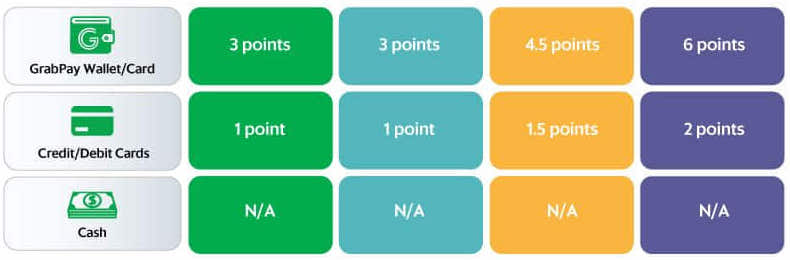
GrabPay: Reward consumers three times the number of GRP for using GrabPay instead of cash as the mode of payment.

More points for loyal consumers

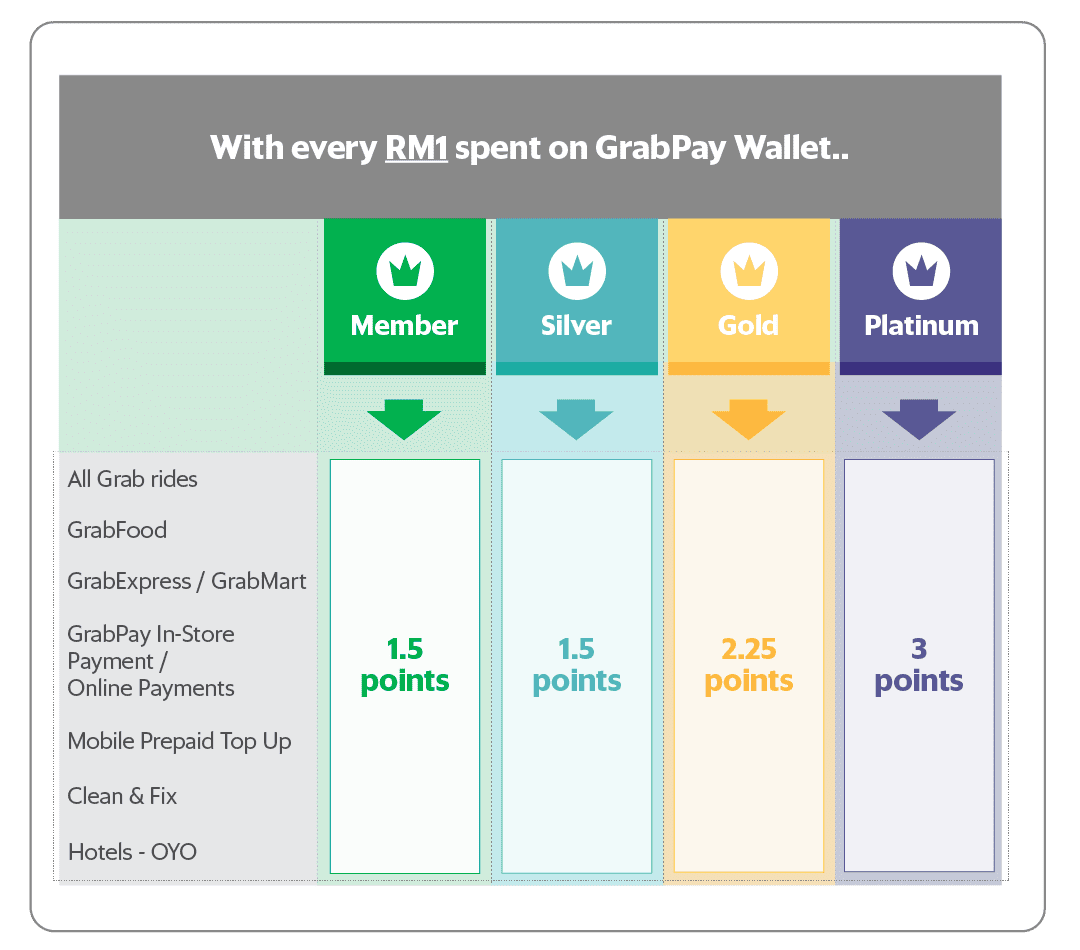
Another use case is to reward loyal consumers with more points. This incentivises consumers to transact within the Grab ecosystem. One example are membership tiers granted based on the number of GRP a consumer has accumulated. There are four membership tiers: Member, Silver, Gold and Platinum.

Point multiplier
Point multiplier

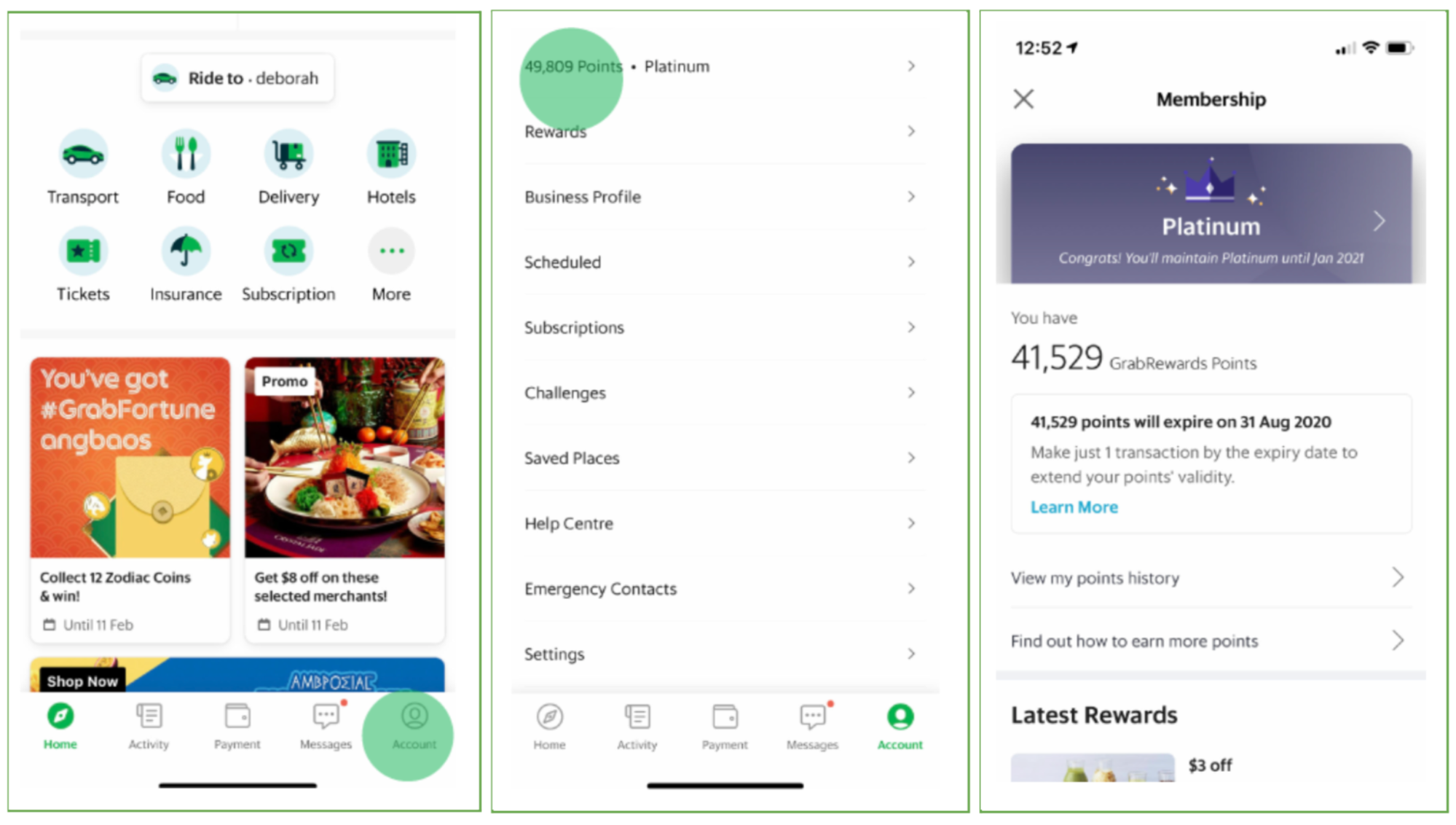
There are different points multipliers for different membership tiers. For example, a Gold member would earn 2.25 GRP for every dollar spent while a Silver member earns only 1.5 GRP for the same amount spent. A consumer can view their membership tier and GRP information from the account page on the Grab app.

GrabRewards Points and membership tier information

Growing number of transactions

Teams within Grab and external partners use GRP in their business. There is a need for a platform that can process millions of transactions every day with high availability rates. Errors can easily impact the issuance of points which may affect our consumers’ trust.

Our solution – Abacus

To overcome the challenges and cater for various use cases, we developed a Points Management System known as Abacus. It offers an interface for external partners with the capability to handle millions of daily transactions without significant downtime.

Points rewarding

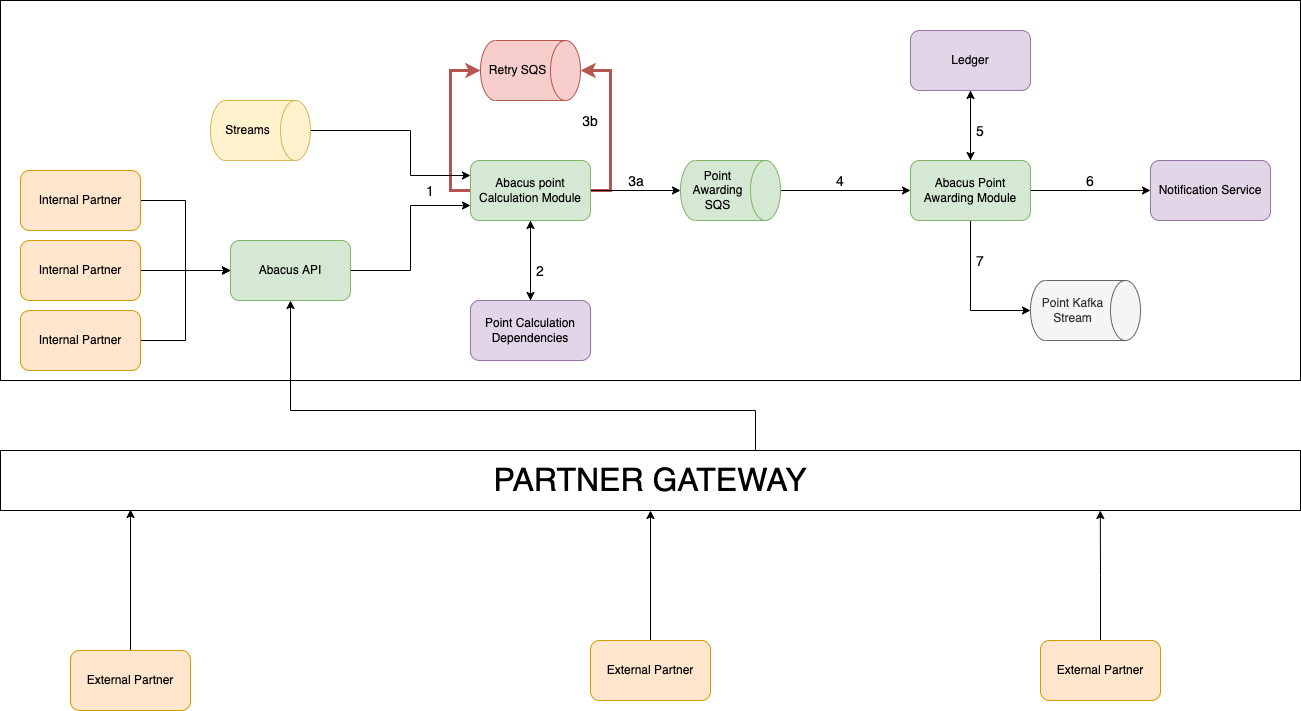
There are seven main components of Abacus as shown in the following architectural diagram. Details of each component are explained in this section.

Abacus architecture
Abacus architecture

Transaction input source

The points rewarding process begins when a transaction is complete. Abacus listens to streams for completed transactions on the Grab platform. Each transaction that abacus receives in the stream carries the data required to calculate the GRP to be rewarded such as country ID, product ID, and payment ID etc.

Apart from computing the number of GRP to be rewarded for a transaction and then rewarding the points, Abacus also allows clients from within the Grab platform and outside of the Grab platform to make an API call to reward GRP to consumers. The client who wants to reward their consumers with GRP will call Abacus with either a specific point value (for example 100 points) or will provide the necessary details like transaction amount and the relevant multipliers for Abacus to compute the points and then reward them.

Point Calculation module

The Point Calculation module calculates the GRP using the data and multipliers that are unique to each transaction.

Point Calculation dependencies for internal services

Point Calculation dependencies are the multipliers needed to calculate the number of points. The Point Calculation module fetches the correct point multipliers for each transaction. The multipliers are configured by specific country teams when the product is launched. They may vary by country to allow country teams the flexibility to achieve their growth and retention targets. There are different types of multipliers.

Vertical multiplier: The multiplier for each vertical. A vertical is a service or product offered by Grab. Examples of verticals are GrabCar and GrabFood. The multiplier can be different for each vertical.

EPPF multiplier: The effective price per fare multiplier. EPPF is the reference conversion rate per point. For example:

  • EPPF = 1.0; if you are issuing X points per SGD1

  • EPPF = 0.1; if you are issuing X points per THB10

  • EPPF = 0.0001; if you are issuing X points per IDR10,000

Payment Type multiplier: The multiplier for different modes of payments.

Tier multiplier: The multiplier for each tier.

Point Calculation formula for internal clients

The Point Calculation module uses a formula to calculate GRP. The formula is the product of all the multipliers and the transaction amount.

GRP = Amount * Vertical multiplier * EPPF multiplier * Cashless multiplier * Tier multiplier

The following are examples for calculating GRP:

Example 1:

Bob is a platinum member of Grab. He orders lunch in Singapore for SGD15 using GrabPay as the payment method. Let’s assume the following:

Vertical multiplier = 2

EPPF multiplier = 1

Cashless multiplier = 2

Tier multiplier = 3

GRP = Amount * Vertical multiplier * EPPF multiplier * Cashless multiplier * Tier multiplier

= 15 * 2 * 1 * 2 * 3

= 180

From this transaction, Bob earns 180 GRP.

Example 2:

Jane is a Gold member of Grab. She orders lunch in Indonesia for Rp150000 using GrabPay as the payment method. Let’s assume the following:

Vertical multiplier = 2

EPPF multiplier = 0.00005

Cashless multiplier = 2

Tier multiplier = 2

GRP = Amount * Vertical multiplier * EPPF multiplier * Cashless multiplier * Tier multiplier

= 150000 * 2 * 0.00005 * 2 * 2

= 60

From this transaction, Jane earns 60 GRP.

Example of multipliers for payment options and tiers

Point Calculation dependencies for external clients

External partners supply the Point Calculation dependencies which are then configured in our backend at the time of integration. These external partners can set their own multipliers instead of using the above mentioned multipliers which are specific to Grab. This document details the APIs which are used to award points for external clients.

Simple Queue Service

Abacus uses Amazon Simple Queue Service (SQS) to ensure that the points system process is robust and fault tolerant.

Point Awarding SQS

If there are no errors during the Point Calculation process, the Point Calculation module will send a message containing the points to be awarded to the Point Awarding SQS.

Retry SQS

The Point Calculation module may not receive the required data when there is a downtime in the Point Calculation dependencies. If this occurs, an error is triggered and the Point Calculation module will send a message to Retry SQS. Messages sent to the Retry SQS will be re-processed by the Point Calculation module. This ensures that the points are properly calculated despite having outages on dependencies. Every message that we push to either the Point Awarding SQS or Retry SQS will have a field called Idempotency key which is used to ensure that we reward the points only once to a particular transaction.

Point Awarding module

The successful calculation of GRP triggers a message to the Point Awarding module via the Point SQS. The Point Awarding module tries to reward GRP to the consumer’s account. Upon successful completion, an ACK is sent back to the Point SQS signalling that the message was successfully processed and triggers deletion of the message. If Point SQS does not receive an ACK, the message is redelivered after an interval. This process ensures that the points system is robust and fault tolerant.

Ledger

GRP is rewarded to the consumer once it is updated in the Ledger. The Ledger tracks how many GRP a consumer has accumulated, what they were earned for, and the running total number of GRP.

Notification service

Once the Ledger is updated, the Notification service sends the consumer a message about the GRP they receive.

Point Kafka stream

For all successful GRP transactions, Abacus sends a message to the Point Kafka stream. Downstream services listen to this stream to identify the consumer’s behaviour and take the appropriate actions. Services of this stream can listen to events they are interested in and execute their business logic accordingly. For example, a service can use the information from the Point Kafka stream to determine a consumer’s membership tier.

Points expiry

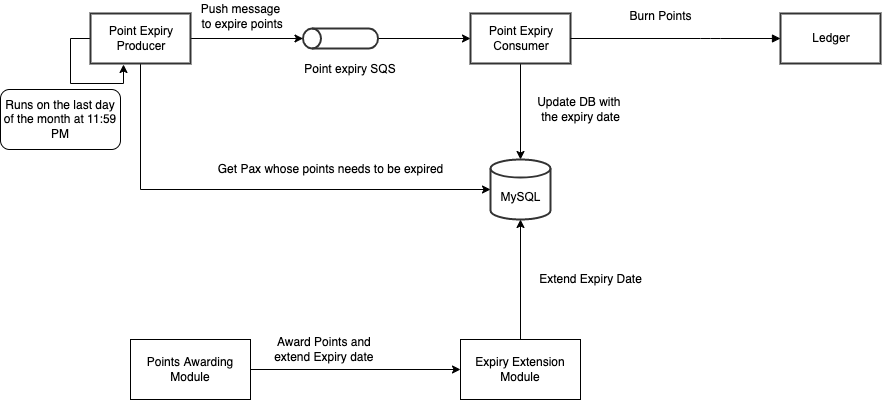
Further addition to Abacus is the handling of points expiry. The Expiry Extension module enables activity-based points expiry. This enables GRP to not expire as long as the consumer makes one Grab transaction within the next three or six months from their last transaction.

The Expiry Extension module updates the point expiry date to the database after successfully rewarding GRP to the consumer. At the end of each month, a process loads all consumers whose points will expire in that particular month and sends it to the Point Expiry SQS. The Point Expiry Consumer will then expire all the points for the consumers and this data is updated in the Ledger. This process repeats on a monthly basis.

Expiry Extension module

Points expiry date is always the last day of the third or sixth month. For example, Adam makes a transaction on 10 January. His points expiry date is 31 July which is six months from the month of his last transaction. Adam then makes a transaction on 28 February. His points expiry period is shifted by one month to 31 August.

Points expiry
Points expiry

Conclusion

The Abacus platform enables us to perform millions of GRP transactions on a daily basis. Being able to curate rewards for consumers increases the value proposition of our products and consumer retention. If you have any comments or questions about Abacus, feel free to leave a comment below.


Special thanks to Arianto Wibowo and Vaughn Friesen.


Join us

Grab is a leading superapp in Southeast Asia, providing everyday services that matter to consumers. More than just a ride-hailing and food delivery app, Grab offers a wide range of on-demand services in the region, including mobility, food, package and grocery delivery services, mobile payments, and financial services across over 400 cities in eight countries.

Powered by technology and driven by heart, our mission is to drive Southeast Asia forward by creating economic empowerment for everyone. If this mission speaks to you, join our team today!
Trident – Real-time event processing at scale

Post Syndicated from Grab Tech original https://engineering.grab.com/trident-real-time-event-processing-at-scale

Ever wondered what goes behind the scenes when you receive advisory messages on a confirmed booking? Or perhaps how you are awarded with rewards or points after completing a GrabPay payment transaction? At Grab, thousands of such campaigns targeting millions of users are operated daily by a backbone service called Trident. In this post, we share how Trident supports Grab’s daily business, the engineering challenges behind it, and how we solved them.

60-minute GrabMart delivery guarantee campaign operated via Trident

What is Trident?

Trident is essentially Grab’s in-house real-time if this, then that (IFTTT) engine, which automates various types of business workflows. The nature of these workflows could either be to create awareness or to incentivize users to use other Grab services.

If you are an active Grab user, you might have noticed new rewards or messages that appear in your Grab account. Most likely, these originate from a Trident campaign. Here are a few examples of types of campaigns that Trident could support:

  • After a user makes a GrabExpress booking, Trident sends the user a message that says something like “Try out GrabMart too”.
  • After a user makes multiple ride bookings in a week, Trident sends the user a food reward as a GrabFood incentive.
  • After a user is dropped off at his office in the morning, Trident awards the user a ride reward to use on the way back home on the same evening.
  • If  a GrabMart order delivery takes over an hour of waiting time, Trident awards the user a free-delivery reward as compensation.
  • If the driver cancels the booking, then Trident awards points to the user as a compensation.
  • With the current COVID pandemic, when a user makes a ride booking, Trident sends a message to both the passenger and driver reminding about COVID protocols.

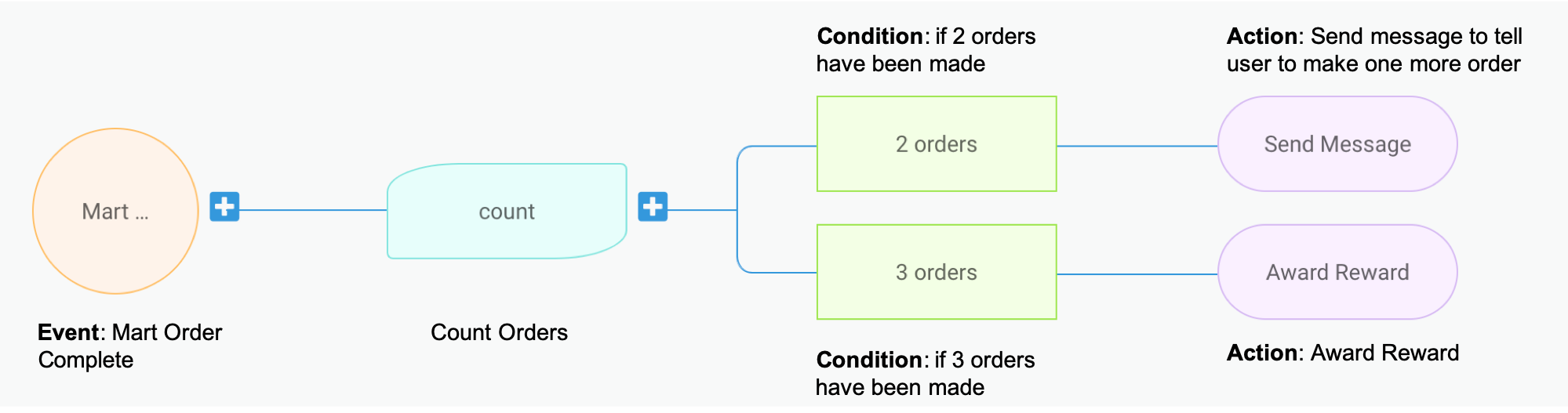
Trident processes events based on campaigns, which are basically a logic configuration on what event should trigger what actions under what conditions. To illustrate this better, let’s take a sample campaign as shown in the image below. This mock campaign setup is taken from the Trident Internal Management portal.

Trident process flow

This sample setup basically translates to: for each user, count his/her number of completed GrabMart orders. Once he/she reaches 2 orders, send him/her a message saying “Make one more order to earn a reward”. And if the user reaches 3 orders, award him/her the reward and send a congratulatory message. 😁

Other than the basic event, condition, and action, Trident also allows more fine-grained configurations such as supporting the overall budget of a campaign, adding limitations to avoid over awarding, experimenting A/B testing, delaying of actions, and so on.

An IFTTT engine is nothing new or fancy, but building a high-throughput real-time IFTTT system poses a challenge due to the scale that Grab operates at. We need to handle billions of events and run thousands of campaigns on an average day. The amount of actions triggered by Trident is also massive.

In the month of October 2020, more than 2,000 events were processed every single second during peak hours. Across the entire month, we awarded nearly half a billion rewards, and sent over 2.5 billion communications to our end-users.

Now that we covered the importance of Trident to the business, let’s drill down on how we designed the Trident system to handle events at a massive scale and overcame the performance hurdles with optimization.

Architecture design

We designed the Trident architecture with the following goals in mind:

  • Independence: It must run independently of other services, and must not bring performance impacts to other services.
  • Robustness: All events must be processed exactly once (i.e. no event missed, no event gets double processed).
  • Scalability: It must be able to scale up processing power when the event volume surges and withstand when popular campaigns run.

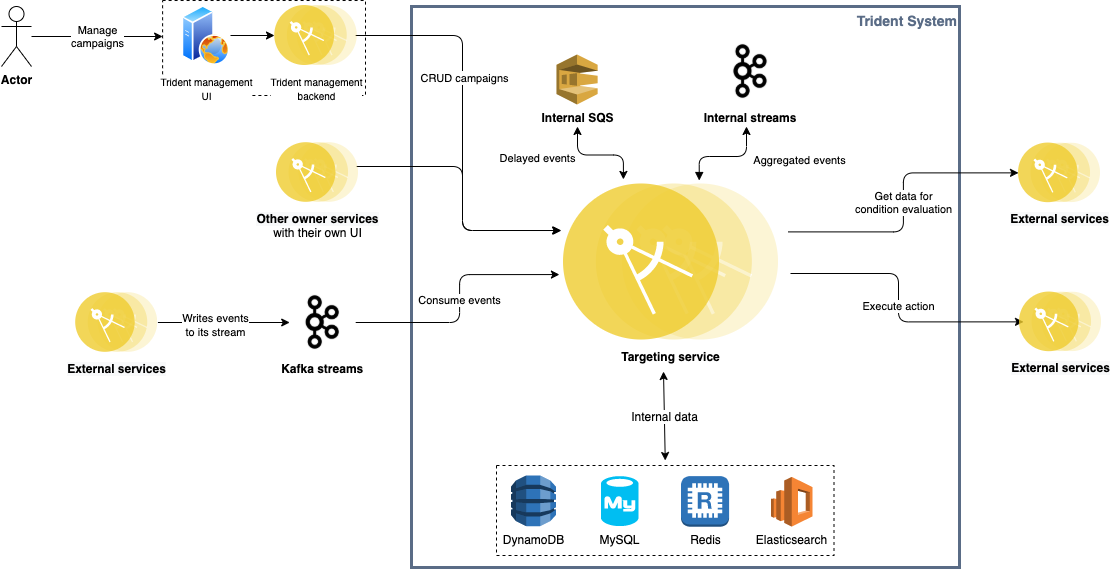
The following diagram depicts how the overall system architecture looks like.

Trident architecture

Trident consumes events from multiple Kafka streams published by various backend services across Grab (e.g. GrabFood orders, Transport rides, GrabPay payment processing, GrabAds events). Given the nature of Kafka streams, Trident is completely decoupled from all other upstream services.

Each processed event is given a unique event key and stored in Redis for 24 hours. For any event that triggers an action, its key is persisted in MySQL as well. Before storing records in both Redis and MySQL, we make sure any duplicate event is filtered out. Together with the at-least-once delivery guaranteed by Kafka, we achieve exactly-once event processing.

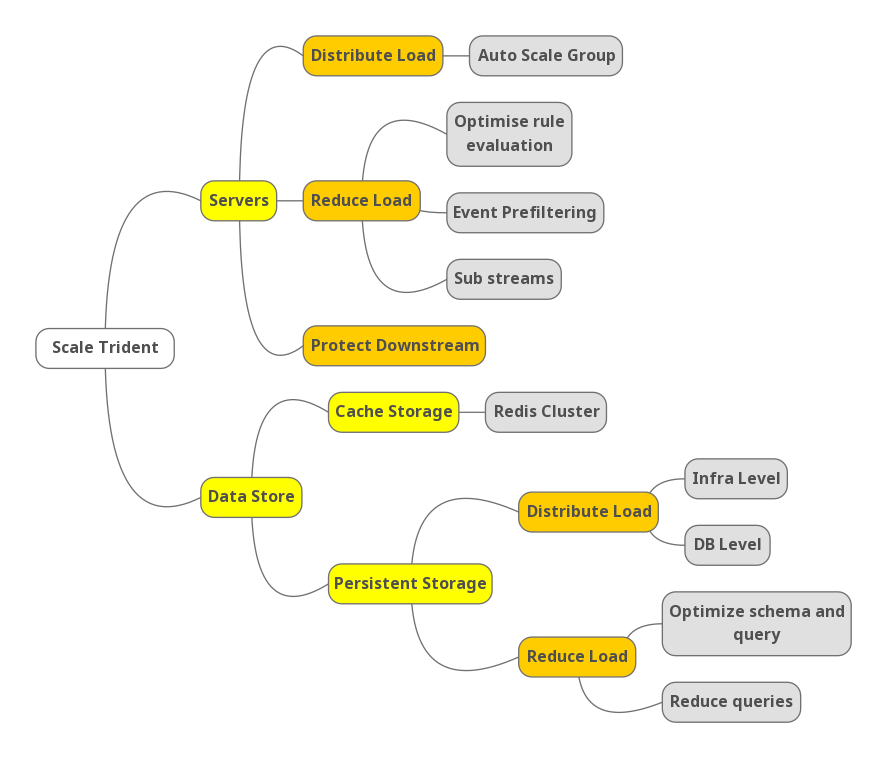
Scalability is a key challenge for Trident. To achieve high performance under massive event volume, we needed to scale on both the server level and data store level. The following mind map shows an outline of our strategies.

Outline of Trident’s scale strategy

Scale servers

Our source of events are Kafka streams. There are mostly two factors that could affect the load on our system:

  1. Number of events produced in the streams (more rides, food orders, etc. results in more events for us to process).
  2. Number of campaigns running.
  3. Nature of campaigns running. The campaigns that trigger actions for more users cause higher load on our system.

There are naturally two types of approaches to scale up server capacity:

  • Distribute workload among server instances.
  • Reduce load (i.e. reduce the amount of work required to process each event).

Distribute load

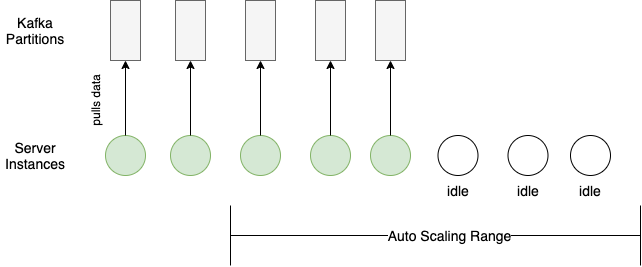
Distributing workload seems trivial with the load balancing and auto-horizontal scaling based on CPU usage that cloud providers offer. However, an additional server sits idle until it can consume from a Kafka partition.

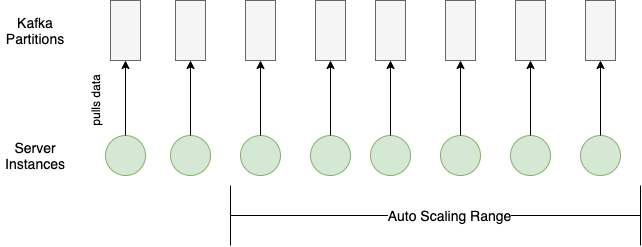
Each Kafka partition can only be consumed by one consumer within the same consumer group (our auto-scaling server group in this case). Therefore, any scaling in or out requires matching the Kafka partition configuration with the server auto-scaling configuration.

Here’s an example of a bad case of load distribution:

Kafka partitions config mismatches server auto-scaling config

And here’s an example of a good load distribution where the configurations for the Kafka partitions and the server auto-scaling match:

Kafka partitions config matches server auto-scaling config

Within each server instance, we also tried to increase processing throughput while keeping the resource utilization rate in check. Each Kafka partition consumer has multiple goroutines processing events, and the number of active goroutines is dynamically adjusted according to the event volume from the partition and time of the day (peak/off-peak).

Reduce load

You may ask how we reduced the amount of processing work for each event. First, we needed to see where we spent most of the processing time. After performing some profiling, we identified that the rule evaluation logic was the major time consumer.

What is rule evaluation?

Recall that Trident needs to operate thousands of campaigns daily. Each campaign has a set of rules defined. When Trident receives an event, it needs to check through the rules for all the campaigns to see whether there is any match. This checking process is called rule evaluation.

More specifically, a rule consists of one or more conditions combined by AND/OR Boolean operators. A condition consists of an operator with a left-hand side (LHS) and a right-hand side (RHS). The left-hand side is the name of a variable, and the right-hand side a value. A sample rule in JSON:

Country is Singapore and taxi type is either JustGrab or GrabCar.
  {
    "operator": "and",
    "conditions": [
    {
      "operator": "eq",
      "lhs": "var.country",
      "rhs": "sg"
      },
      {
        "operator": "or",
        "conditions": [
        {
          "operator": "eq",
          "lhs": "var.taxi",
          "rhs": <taxi-type-id-for-justgrab>
          },
          {
            "operator": "eq",
            "lhs": "var.taxi",
            "rhs": <taxi-type-id-for-grabcard>
          }
        ]
      }
    ]
  }

When evaluating the rule, our system loads the values of the LHS variable, evaluates against the RHS value, and returns as result (true/false) whether the rule evaluation passed or not.

To reduce the resources spent on rule evaluation, there are two types of strategies:

  • Avoid unnecessary rule evaluation
  • Evaluate “cheap” rules first

We implemented these two strategies with event prefiltering and weighted rule evaluation.

Event prefiltering

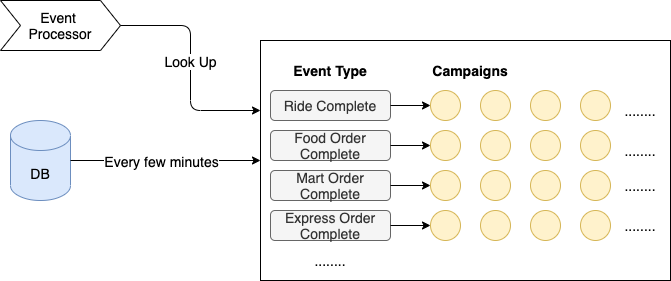
Just like the DB index helps speed up data look-up, having a pre-built map also helped us narrow down the range of campaigns to evaluate. We loaded active campaigns from the DB every few minutes and organized them into an in-memory hash map, with event type as key, and list of corresponding campaigns as the value. The reason we picked event type as the key is that it is very fast to determine (most of the time just a type assertion), and it can distribute events in a reasonably even way.

When processing events, we just looked up the map, and only ran rule evaluation on the campaigns in the matching hash bucket. This saved us at least 90% of the processing time.

Event prefiltering
Event prefiltering
Weighted rule evaluation

Evaluating different rules comes with different costs. This is because different variables (i.e. LHS) in the rule can have different sources of values:

  1. The value is already available in memory (already consumed from the event stream).
  2. The value is the result of a database query.
  3. The value is the result of a call to an external service.

These three sources are ranked by cost:

In-memory < database < external service

We aimed to maximally avoid evaluating expensive rules (i.e. those that require calling external service, or querying a DB) while ensuring the correctness of evaluation results.

First optimization – Lazy loading

Lazy loading is a common performance optimization technique, which literally means “don’t do it until it’s necessary”.

Take the following rule as an example:

A & B

If we load the variable values for both A and B before passing to evaluation, then we are unnecessarily loading B if A is false. Since most of the time the rule evaluation fails early (for example, the transaction amount is less than the given minimum amount), there is no point in loading all the data beforehand. So we do lazy loading ie. load data only when evaluating that part of the rule.

Second optimization – Add weight

Let’s take the same example as above, but in a different order.

B & A
Source of data for A is memory and B is external service

Now even if we are doing lazy loading, in this case, we are loading the external data always even though it potentially may fail at the next condition whose data is in memory.

Since most of our campaigns are targeted, a popular condition is to check if a user is in a certain segment, which is usually the first condition that a campaign creator sets. This data resides in another service. So it becomes quite expensive to evaluate this condition first even though the next condition’s data can be already in memory (e.g. if the taxi type is JustGrab).

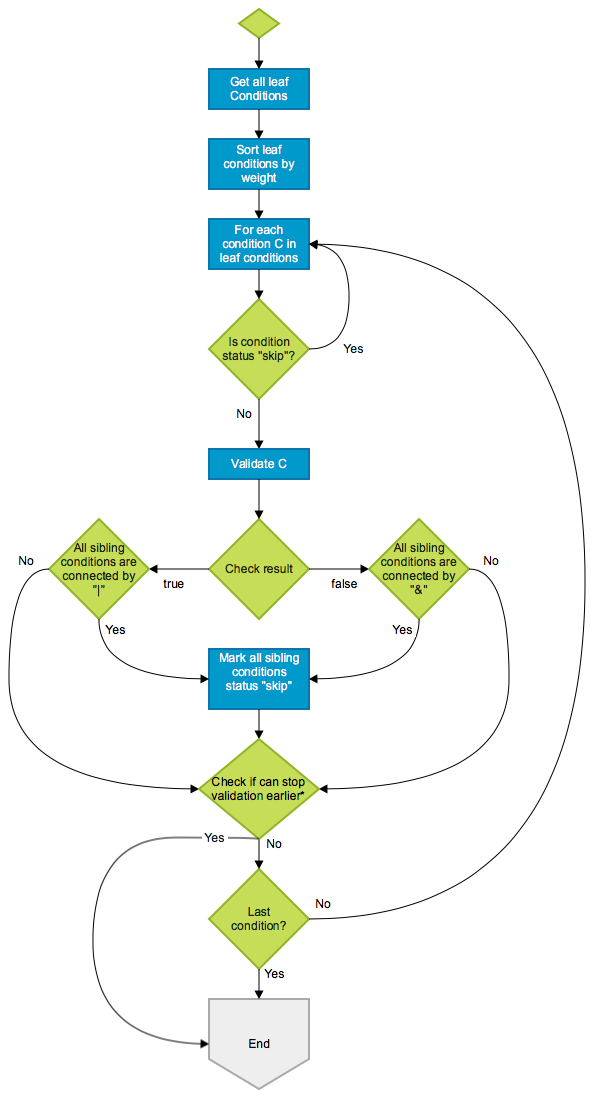
So, we did the next phase of optimization here, by sorting the conditions based on weight of the source of data (low weight if data is in memory, higher if it’s in our database and highest if it’s in an external system). If AND was the only logical operator we supported, then it would have been quite simple. But the presence of OR made it complex. We came up with an algorithm that sorts the evaluation based on weight keeping in mind the AND/OR. Here’s what the flowchart looks like:

Event flowchart
Event flowchart

An example:

Conditions: A & ( B | C ) & ( D | E )

Actual result: true & ( false | false ) & ( true | true ) --> false

Weight: B < D < E < C < A

Expected check order: B, D, C

Firstly, we start validating B which is false. Apparently, we cannot skip the sibling conditions here since B and C are connected by |. Next, we check D. D is true and its only sibling E is connected by | so we can mark E “skip”. Then, we check E but since E has been marked “skip”, we just skip it. Still, we cannot get the final result yet, so we need to continue validating C which is false. Now we know (B | C) is false so the whole condition is false too. We can stop now.

Sub-streams

After investigation, we learned that we consumed a particular stream that produced terabytes of data per hour. It caused our CPU usage to shoot up by 30%. We found out that we process only a handful of event types from that stream. So we introduced a sub-stream in between, which contains the event types we want to support. This stream is populated from the main stream by another server, thereby reducing the load on Trident.

Protect downstream

While we scaled up our servers wildly, we needed to keep in mind that there were many downstream services that received more traffic. For example, we call the GrabRewards service for awarding rewards or the LocaleService for checking the user’s locale. It is crucial for us to have control over our outbound traffic to avoid causing any stability issues in Grab.

Therefore, we implemented rate limiting. There is a total rate limit configured for calling each downstream service, and the limit varies in different time ranges (e.g. tighter limit for calling critical service during peak hour).

Scale data store

We have two types of storage in Trident: cache storage (Redis) and persistent storage (MySQL and others).

Scaling cache storage is straightforward, since Redis Cluster already offers everything we need:

  • High performance: Known to be fast and efficient.
  • Scaling capability: New shards can be added at any time to spread out the load.
  • Fault tolerance: Data replication makes sure that data does not get lost when any single Redis instance fails, and auto election mechanism makes sure the cluster can always auto restore itself in case of any single instance failure.

All we needed to make sure is that our cache keys can be hashed evenly into different shards.

As for scaling persistent data storage, we tackled it in two ways just like we did for servers:

  • Distribute load
  • Reduce load (both overall and per query)

Distribute load

There are two levels of load distribution for persistent storage: infra level and DB level. On the infra level, we split data with different access patterns into different types of storage. Then on the DB level, we further distributed read/write load onto different DB instances.

Infra level

Just like any typical online service, Trident has two types of data in terms of access pattern:

  • Online data: Frequent access. Requires quick access. Medium size.
  • Offline data: Infrequent access. Tolerates slow access. Large size.

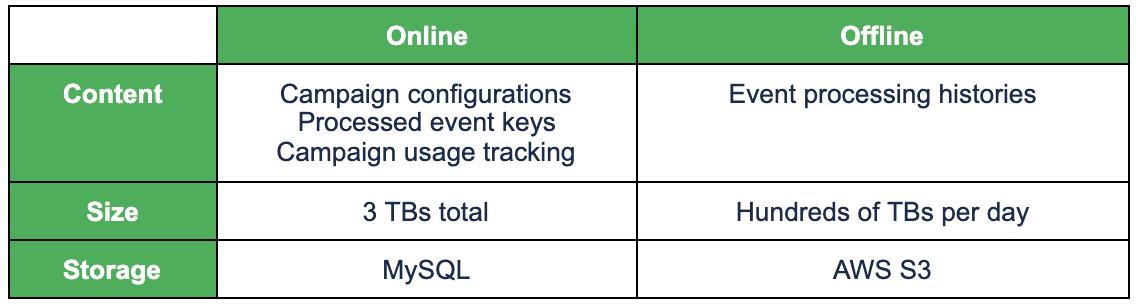
For online data, we need to use a high-performance database, while for offline data, we can  just use cheap storage. The following table shows Trident’s online/offline data and the corresponding storage.

Trident’s online/offline data and storage

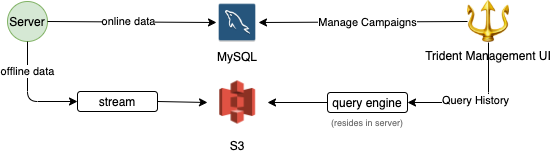
Writing of offline data is done asynchronously to minimize performance impact as shown below.

Online/offline data split

For retrieving data for the users, we have high timeout for such APIs.

DB level

We further distributed load on the MySQL DB level, mainly by introducing replicas, and redirecting all read queries that can tolerate slightly outdated data to the replicas. This relieved more than 30% of the load from the master instance.

Going forward, we plan to segregate the single MySQL database into multiple databases, based on table usage, to further distribute load if necessary.

Reduce load

To reduce the load on the DB, we reduced the overall number of queries and removed unnecessary queries. We also optimized the schema and query, so that query completes faster.

Query reduction

We needed to track usage of a campaign. The tracking is just incrementing the value against a unique key in the MySQL database. For a popular campaign, it’s possible that multiple increment (a write query) queries are made to the database for the same key. If this happens, it can cause an IOPS burst. So we came up with the following algorithm to reduce the number of queries.

  • Have a fixed number of threads per instance that can make such a query to the DB.
  • The increment queries are queued into above threads.
  • If a thread is idle (not busy in querying the database) then proceed to write to the database then itself.
  • If the thread is busy, then increment in memory.
  • When the thread becomes free, increment by the above sum in the database.

To prevent accidental over awarding of benefits (rewards, points, etc), we require campaign creators to set the limits. However, there are some campaigns that don’t need a limit, so the campaign creators just specify a large number. Such popular campaigns can cause very high QPS to our database. We had a brilliant trick to address this issue- we just don’t track if the number is high. Do you think people really want to limit usage when they set the per user limit to 100,000? 😉

Query optimization

One of our requirements was to track the usage of a campaign – overall as well as per user (and more like daily overall, daily per user, etc). We used the following query for this purpose:

INSERT INTO … ON DUPLICATE KEY UPDATE value = value + inc

The table had a unique key index (combining multiple columns) along with a usual auto-increment integer primary key. We encountered performance issues arising from MySQL gap locks when high write QPS hit this table (i.e. when popular campaigns ran). After testing out a few approaches, we ended up making the following changes to solve the problem:

  1. Removed the auto-increment integer primary key.
  2. Converted the secondary unique key to the primary key.

Conclusion

Trident is Grab’s in-house real-time IFTTT engine, which processes events and operates business mechanisms on a massive scale. In this article, we discussed the strategies we implemented to achieve large-scale high-performance event processing. The overall ideas of distributing and reducing load may be straightforward, but there were lots of thoughts and learnings shared in detail. If you have any comments or questions about Trident, feel free to leave a comment below.

All the examples of campaigns given in the article are for demonstration purpose only, they are not real live campaigns.

Join us

Grab is more than just the leading ride-hailing and mobile payments platform in Southeast Asia. We use data and technology to improve everything from transportation to payments and financial services across a region of more than 620 million people. We aspire to unlock the true potential of Southeast Asia and look for like-minded individuals to join us on this ride.

If you share our vision of driving South East Asia forward, apply to join our team today.