Post Syndicated from Dan Fisher original https://www.raspberrypi.org/blog/back-to-school-2022-support-teachers-computing-computer-science/
The summer months are an exciting time at the Foundation: you can feel the buzz of activity as we prepare for the start of a new school year in many parts of the world. Across our range of fantastic (and free) programmes, everyone works hard to create new and improved resources that help teachers and students worldwide.
We’ve asked some of our programme leads to tell you what’s new in their respective areas. We hope that you’ll come away with a good idea of the breadth and depth of teacher support that’s on offer. Is there something we aren’t doing yet that we should be? Tell us in the comments below.

Sway Grantham has been at the forefront of writing resources for our Teach Computing Curriculum over the last three years. The Curriculum is part of the wider National Centre for Computing Education (NCCE) and provides hundreds of free classroom resources for teachers, from Key Stage 1 to 4. Each resource includes lesson plans, slides, activity sheets, homework, and assessments. Since we published the Curriculum in 2020, all lessons have been reviewed and updated at least once. Managing the process of continuously improving these resources is a key part of Sway’s work.
Hi Sway, what updates have you been making to the Teach Computing Curriculum to help teachers this year?
We make changes to the Teach Computing Curriculum all the time! However, specific things we are excited about ahead of the new school year are updates to how our content is presented on the website so that it’s really easy to see which unit you should be teaching in each half term. We’ve also renamed some of the units to make it clearer what they cover. And to help Key Stage 3 teachers launch Computing in secondary school with skills that are foundational for progress through the requirements of the Key Stage 3 curriculum, we’ve updated the first Year 7 unit, now called Clear messaging in digital media.
You recently asked for teachers’ feedback as part of an annual impact survey. What did you find out?
We are still in the process of looking through the feedback in detail, but I can share some high-level insights. 96% of teachers who responded to the survey gave a score between 7 and 10 for recommending that other teachers use the Teach Computing Curriculum. Over 80% reported that the Teach Computing Curriculum has improved their confidence, subject knowledge, and the quality of their teaching ‘a little’ or ‘a lot’. Finally, over 90% of respondents said the Curriculum is effective at supporting teachers, developing teachers’ subject knowledge, and saving teachers’ time.
We are grateful to the 907 people who took part in the survey! You have all helped us to ensure the Curriculum has a positive impact on teachers and learners throughout England and beyond.

James Robinson dedicates his work at the Foundation to creating free pedagogical resources that underpin the classroom practice of computing teachers worldwide. He has led the creation of the Pedagogy Quick Reads and the Research Bytes newsletter for the NCCE, and the development of our 12 principles of computing pedagogy, available as a handy poster. He also works on our Hello World magazine, produces the associated Hello World podcast, and curates Hello World’s special issues, such as The Big Book of Computing Pedagogy.
James, why is it so important for teachers to underpin their classroom practice with best-practice pedagogical approaches?
In order to teach any area of the curriculum effectively, educators need to understand both the content they are teaching and the most effective ways to deliver that content. Computing is a broad discipline made up of lots of inter-connected knowledge. Different areas of the subject benefit from different approaches, and this may vary depending on the experience of the learners and the context within which they are learning. Understanding which approaches are best suited to different content helps educators support learners effectively.
Computing education research related to school-aged learners is still in its early stages compared to other subjects, and new approaches and pedagogies are being developed, tested, and evaluated. Staying aware of these developments is important for educators and that’s why it’s something the Foundation is dedicated to supporting.
What do you have in store for teachers this year?
This year we continue to share best practice and hear from educators applying new ideas in their classroom through Hello World magazine and podcast. Educators should also keep a look out for our second Hello World special edition exploring the breadth and depth of Computing. To get hold of a copy of this later this year, make sure you’re subscribed to Hello World.
Allen Heard and his team have very recently completed a huge project: creating a full curriculum of GCSE topics and associated questions for Isaac Computer Science, our free online learning platform for teachers and students. The new topics cover the entirety of the GCSE exam board specifications for AQA, Edexcel, Eduqas, OCR, and WJEC, and are integrated with our existing A level computer science resources. They are great to pick up and use for classwork, homework, and revision.
Allen, what has gone into the making of these new GCSE resources?
I think one of the biggest and most important things that’s been evident to me while working on this project is the care and thought that our content creators have put into each and every piece they worked on. To the end user it will simply be material on a web page, but sitting behind each page are countless discussions involving the whole team around how to present certain facts, concepts, or processes. Sometimes these discussions have even caused us to reevaluate our own thinking around how we deliver computer science content. We have debated the smallest things such as glossary terms, questioning every word to make sure we are as clear and concise as possible. Hopefully the care, expertise, and dedication of the team shines through in what really is a fantastic source of information for teachers and learners.
What do you have in store for teachers and learners this year?
With 96% of teachers and 88% of students reporting that the content is of high quality and easily accessible, we still need to continue to support them to ultimately enable learners to achieve their potential. Looking ahead, there is still lots of work to do to make sure Isaac offers the best possible user experience. And we plan to add a lot more questions to really bolster the numbers of questions at varying levels of difficulty for learners. This will have the added benefit of being useful for any teachers wanting to up-skill too! A massive strength of the platform is its questions, and we are really keen to give as wide a range of them as possible.
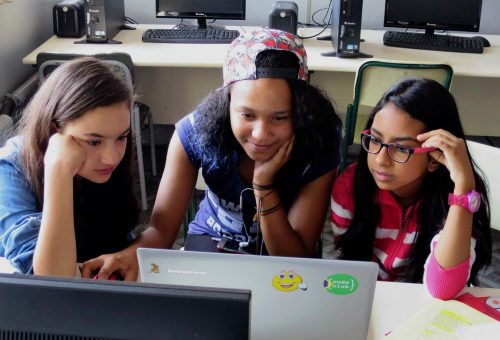
Tamasin Greenough Graham leads the team at Code Club, our global network of free, in-school coding clubs for young people aged 9 to 13. In Code Clubs, participants learn to code while having fun getting creative with their new skills. Clubs can be run by anyone who wants to help young people explore digital technologies — you don’t need coding experience at all. The Code Club team offers everything you need, including coding projects with easy-to-follow, step-by-step instructions, and lots of resources to help you support your club members. They are also on hand to answer your questions.
Tamasin, what kind of support can teachers expect when they decide to set up a Code Club?
Running a Code Club really is simple and a lot of fun! We have free training to suit everyone, including webinars that guide you through getting started, a self-study online course you can take to prepare for running your Code Club, and drop-in online Q&A sessions where you can chat about your questions to our friendly team or to other educators who run clubs.
Once you have registered your Code Club, you’ll get access to an online dashboard packed with useful resources: from guidance on preparing and delivering your first session, to certificates to celebrate your club members’ successes, and unplugged activities for learners to do away from the screen.
What experience do you need to run a Code Club?
You don’t need to have any coding experience to run a club, as we provide a giant range of fun coding projects and support materials that can be easily followed by educators and young people alike. You just need to support and encourage your young coders, and you can get in touch with the Code Club team if you need any help!
The project paths we offer provide a framework for young coders to develop their skills, whatever their starting point is. Each path starts with three Explore projects, where coders learn new coding concepts and skills. The next two Design projects in the path help them practise these skills through creating fun games, animations, or websites. The final Invent project of the path gives a design brief, and based on this learners have the space to use their new skills and their creativity to code something based on their own ideas.
Our project paths start with the basics of Scratch, and work through to creating websites in HTML and CSS, and to text-based coding in Python. For more advanced or adventurous coders, we also offer project paths to make physical projects with Raspberry Pi Pico, create 3D models in Blender, or even build 3D worlds in Unity.
Why is it important to teach coding to primary-aged children?
Lots of primary-aged children use digital technology every day, whether that be a TV, a phone, playing video games, or a computer at school. But they don’t have to be just consumers of technology. Through learning to code, young people become able to create their own technology, and our projects are designed to help them see how these new skills allow them to express themselves and solve problems that matter to them.
What young people do with their new skills is up to them – that’s the exciting part! Computing skills open paths to a wide range of projects and work where digital skills are helpful. And while learning coding is fun and useful, it also helps learners develop a many other important skills to do with problem solving, teamwork, and creativity.

Martin O’Hanlon heads the team that produces our free online courses programme. If you’re looking for continued professional development in computer science, look no further than to our more than 35 courses. (For teachers in England, a large number of the courses count towards the NCCE’s Primary, Secondary, or GCSE certificates.) Curated in 13 curated learning pathways, all of our courses provide high-quality training that you can take at home, at a time that suits you.
Martin, what can learners expect from taking one of our online courses?
Our online computing courses are free and have something for everyone who is interested in computing. We offer pathways for learning to program in Python or Scratch, teaching computing in the classroom, getting started with physical computing, and many more.
We vary the materials and formats used in our courses, including videos, written articles, quizzes, and discussions to help learners get the most out of the experience. You will find a lot of practical activities and opportunities to practice what you learn. There are loads of opportunities to interact with and learn from others who are doing the course at the same time as you. And educators from the Raspberry Pi Foundation join the courses during facilitation periods to give their advice, support, and encouragement.
What is the idea behind the course pathways?
We have a large catalogue of online training courses, and the pathways give learners a starting point. They group the courses into useful collections, offering a recommended path for everyone, whether that’s people who are brand-new to computing or who have identified a gap in their existing computing skills or knowledge.
Our aim is that these pathways help people find the right course at the right point in their computing journey.
Thanks, everyone.
One more thing…
We’re also very excited to work on new research projects this school year, to help deepen the computing education community’s understanding of how to teach the subject in schools. Are you a primary teacher in England who is interested in making computing culturally relevant for your pupils?

We’re currently looking for teachers to take part in our research project around primary school culturally adapted resources, running from October 2022 to July 2023. Find out more about what taking part involves.
The post Back to school 2022: Our support for teachers appeared first on Raspberry Pi.