Tag Archives: Network Services

Removing uncertainty through “what-if” capacity planning

Post Syndicated from Curt Robords original https://blog.cloudflare.com/scenario-planner

Infrastructure planning for a network serving more than 81 million requests at peak and which is globally distributed across more than 330 cities in 120+ countries is complex. The capacity planning team at Cloudflare ensures there is enough capacity in place all over the world so that our customers have one less thing to worry about – our infrastructure, which should just work. Through our processes, the team puts careful consideration into “what-ifs”. What if something unexpected happens and one of our data centers fails? What if one of our largest customers triples, or quadruples their request count?  Across a gamut of scenarios like these, the team works to understand where traffic will be served from and how the Cloudflare customer experience may change.

This blog post gives a look behind the curtain of how these scenarios are modeled at Cloudflare, and why it’s so critical for our customers.

Scenario planning and our customers

Cloudflare customers rely on the data centers that Cloudflare has deployed all over the world, placing us within 50 ms of approximately 95% of the Internet-connected population globally. But round-trip time to our end users means little if those data centers don’t have the capacity to serve requests. Cloudflare has invested deeply into systems that are working around the clock to optimize the requests flowing through our network because we know that failures happen all the time: the Internet can be a volatile place. See our blog post from August 2024 on how we handle this volatility in real time on our backbone, and our blog post from late 2023 about how another system, Traffic Manager, actively works in and between data centers, moving traffic to optimize the customer experience around constraints in our data centers. Both of these systems do a fantastic job in real time, but there is still a gap — what about over the long term?  

Most of the volatility that the above systems are built to manage is resolved within shorter time scales than which we build plans for. (There are, of course, some failures that are exceptions.) Most scenarios we model still need to take into account the state of our data centers in the future, as well as what actions systems like Traffic Manager will take during those periods.  But before getting into those constraints, it’s important to note how capacity planning measures things: in units of CPU Time, defined as the time that each request takes in the CPU.  This is done for the same reasons that Traffic Manager uses CPU Time, in that it enables the team to 1) use a common unit across different types of customer workloads and 2) speak a common language with other teams and systems (like Traffic Manager). The same reasoning the Traffic Manager team cited in their own blog post is equally applicable for capacity planning: 

…using requests per second as a metric isn’t accurate enough when actually moving traffic. The reason for this is that different customers have different resource costs to our service; a website served mainly from cache with the WAF deactivated is much cheaper CPU wise than a site with all WAF rules enabled and caching disabled. So we record the time that each request takes in the CPU. We can then aggregate the CPU time across each plan to find the CPU time usage per plan. We record the CPU time in ms, and take a per second value, resulting in a unit of milliseconds per second.

This is important for customers for the same reason that the Traffic Manager team cited in their blog post as well: we can correlate CPU time to performance, specifically latency.

Now that we know our unit of measurement is CPU time, we need to set up our models with the new constraints associated with the change that we’re trying to model.  Specifically, there are a subset of constraints that we are particularly interested in because we know that they have the ability to impact our customers by impacting the availability of CPU in a data center.  These are split into two main inputs in our models: Supply and Demand.  We can think of these as “what-if” questions, such as the following examples:

Demand what-ifs

  • What if a new customer onboards to Cloudflare with a significant volume of requests and/or bytes?  

  • What if an existing customer increased its volume of requests and/or bytes by some multiplier (i.e. 2x, 3x, nx), at peak, for the next three months?

  • What if the growth rate, in number of requests and bytes, of all of our data centers worldwide increased from X to Y two months from now, indefinitely?

  • What if the growth rate, in number of requests and bytes, of data center facility A increased from X to Y one month from now?

  • What if traffic egressing from Cloudflare to a last-mile network shifted from one location (such as Boston) to another (such as New York City) next week?

Supply what-ifs

  • What if data center facility A lost some or all of its available servers two months from now?

  • What if we added X servers to data center facility A today?

  • What if some or all of our connectivity to other ASNs (12,500 Networks/nearly 300 Tbps) failed now?

Output

For any one of these, or a combination of them, in our model’s output, we aim to provide answers to the following: 

  • What will the overall capacity picture look like over time? 

  • Where will the traffic go? 

  • How will this impact our costs?

  • Will we need to deploy additional servers to handle the increased load?

Given these sets of questions and outputs, manually creating a model to answer each of these questions, or a combination of these questions, quickly becomes an operational burden for any team.  This is what led us to launch “Scenario Planner”.

Scenario Planner

In August 2024, the infrastructure team finished building “Scenario Planner”, a system that enables anyone at Cloudflare to simulate “what-ifs”. This provides our team the opportunity to quickly model hypothetical changes to our demand and supply metrics across time and in any of Cloudflare’s data centers. The core functionality of the system has to do with the same questions we need to answer in the manual models discussed above.  After we enter the changes we want to model, Scenario Planner converts from units that are commonly associated with each question to our common unit of measurement: CPU Time. These inputs are then used to model the updated capacity across all of our data centers, including how demand may be distributed in cases where capacity constraints may start impacting performance in a particular location.  As we know, if that happens then it triggers Traffic Manager to serve some portion of those requests from a nearby location to minimize impact on customers and user experience.

Updated demand questions with inputs

  • Question: What if a new customer onboards to Cloudflare with a significant volume of requests?  

  • Input: The new customer’s expected volume, geographic distribution, and timeframe of requests, converted to a count of virtual CPUs

  • Calculation(s): Scenario Planner converts from server count to CPU Time, and distributes the new demand across the regions selected according to the aggregate distribution of all customer usage.  

  • Question: What if an existing customer increased its volume of requests and/or bytes by some multiplier (i.e. 2x, 3x, nx), at peak, for the next three months?

  • Input: Select the customer name, the multiplier, and the timeframe

  • Calculation(s): Scenario Planner already has how the selected customer’s traffic is distributed across all data centers globally, so this involves simply multiplying that value by the multiplier selected by the user

  • Question: What if the growth rate, in number of requests and bytes, of all of our data centers worldwide increased from X to Y two months from now, indefinitely?

  • Input: Enter a new global growth rate and timeframe

  • Calculation(s): Scenario Planner distributes this growth across all data centers globally according to their current growth rate.  In other words, the global growth is an aggregation of all individual data center’s growth rates, and to apply a new “Global” growth rate, the system scales up each of the individual data center’s growth rates commensurate with the current distribution of growth.

  • Question: What if the growth rate, in number of requests and bytes, of data center facility A increased from X to Y one month from now?

  • Input: Select a data center facility, enter a new growth rate for that data center and the timeframe to apply that change across.

  • Calculation(s): Scenario Planner passes the new growth rate for the data center to the backend simulator, across the timeline specified by the user

Updated supply questions with inputs

  • Question: What if data center facility A lost some or all of its available servers two months from now?

  • Input: Select a data center, and enter the number of servers to remove, or select to remove all servers in that location, as well as the timeframe for when those servers will not be available

  • Calculation(s): Scenario Planner converts the server count entered (including all servers in a given location) to CPU Time before passing to the backend

  • Question: What if we added X servers to data center facility A today?

  • Input: Select a data center, and enter the number of servers to add, as well as the timeline for when those servers will first go live

  • Calculation(s): Scenario Planner converts the server count entered (including all servers in a given location) to CPU Time before passing to the backend

We made it simple for internal users to understand the impact of those changes because Scenario Planner outputs the same views that everyone who has seen our heatmaps and visual representations of our capacity status is familiar with. There are two main outputs the system provides: a heatmap and an “Expected Failovers” view. Below, we explore what these are, with some examples.

Heatmap

Capacity planning evaluates its success on its ability to predict demand: we generally produce a weekly, monthly, and quarterly forecast of 12 months to three years worth of demand, and nearly all of our infrastructure decisions are based on the output of this forecast.  Scenario Planner provides a view of the results of those forecasts that are implemented via a heatmap: it shows our current state, as well as future planned server additions that are scheduled based on the forecast.  

Here is an example of our heatmap, showing some of our largest data centers in Eastern North America (ENAM). Ashburn is showing as yellow, briefly, because our capacity planning threshold for adding more server capacity to our data centers is 65% utilization (based on CPU time supply and demand): this gives the Cloudflare teams time to procure additional servers, ship them, install them, and bring them live before customers will be impacted and systems like Traffic Manager would begin triggering.  The little cloud icons indicate planned upgrades of varying sizes to get ahead of forecasted future demand well ahead of time to avoid customer performance degradation.
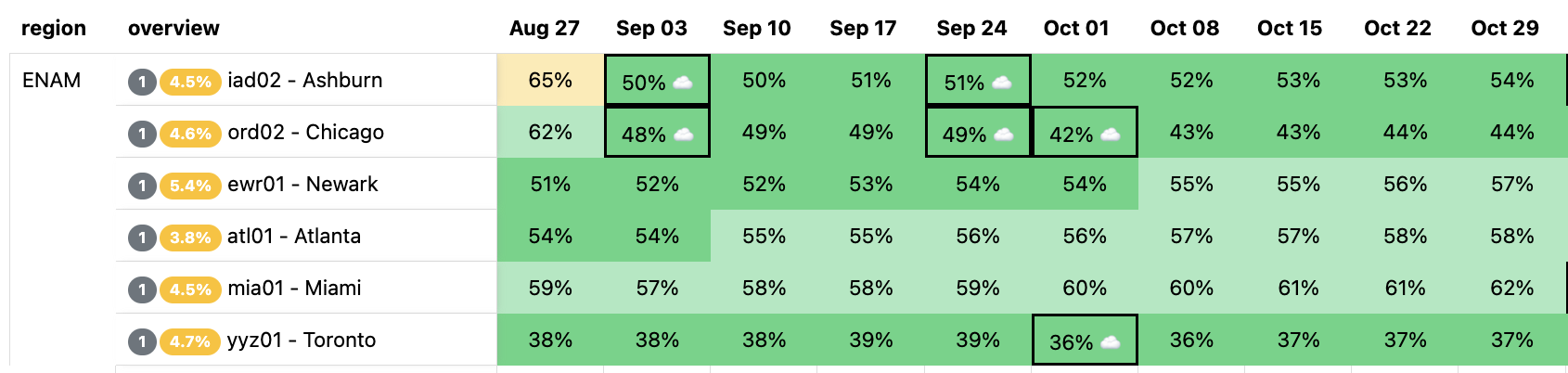

The question Scenario Planner answers then is how this view changes with a hypothetical scenario: What if our Ashburn, Miami, and Atlanta facilities shut down completely?  This is unlikely to happen, but we would expect to see enormous impact on the remaining largest facilities in ENAM. We’ll simulate all three of these failing at the same time, taking them offline indefinitely:
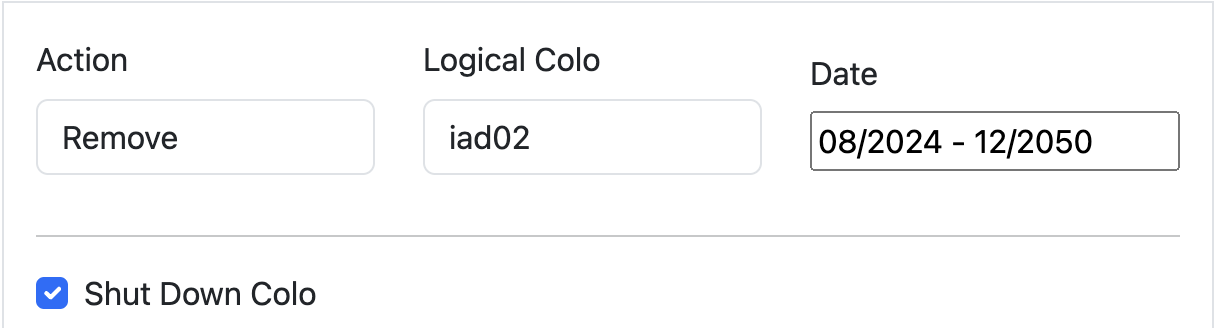
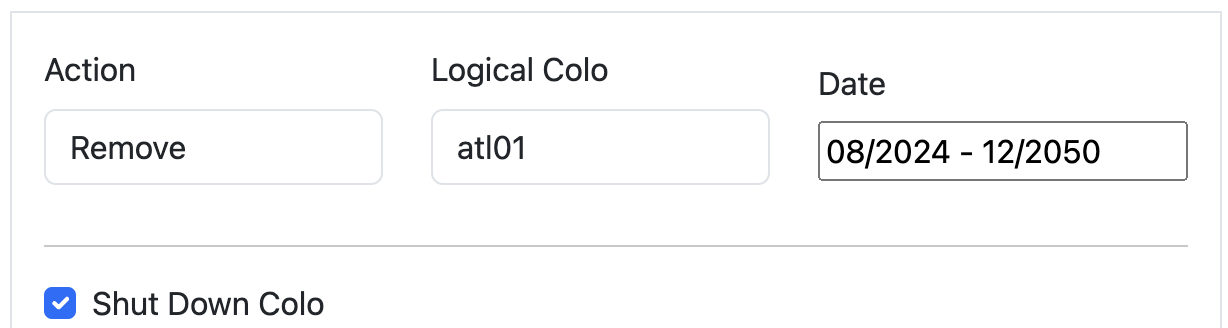
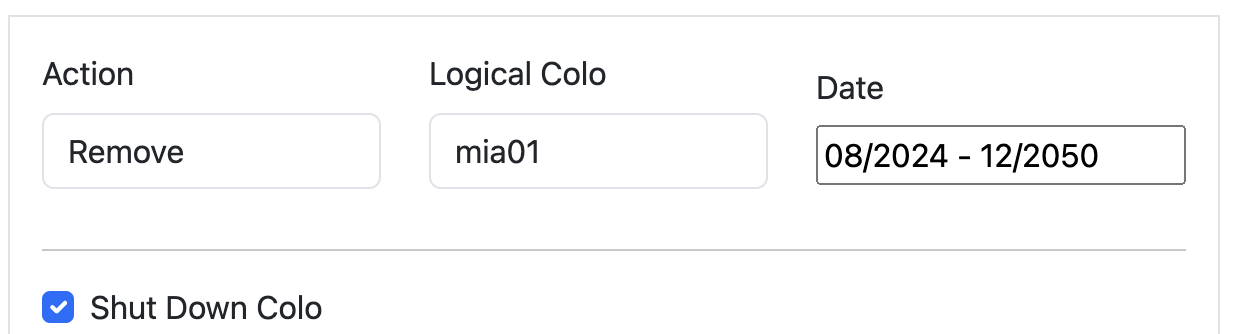

This results in a view of our capacity through the rest of the year in the remaining large data centers in ENAM — capacity is clearly constrained: Traffic Manager will be working hard to mitigate any impact to customer performance if this were to happen. Our capacity view in the heatmap is capped at 75%: this is because Traffic Manager typically engages around this level of CPU utilization. Beyond 75%, Cloudflare customers may begin to experience increased latency, though this is dependent on the product and workload, and is in reality much more dynamic.


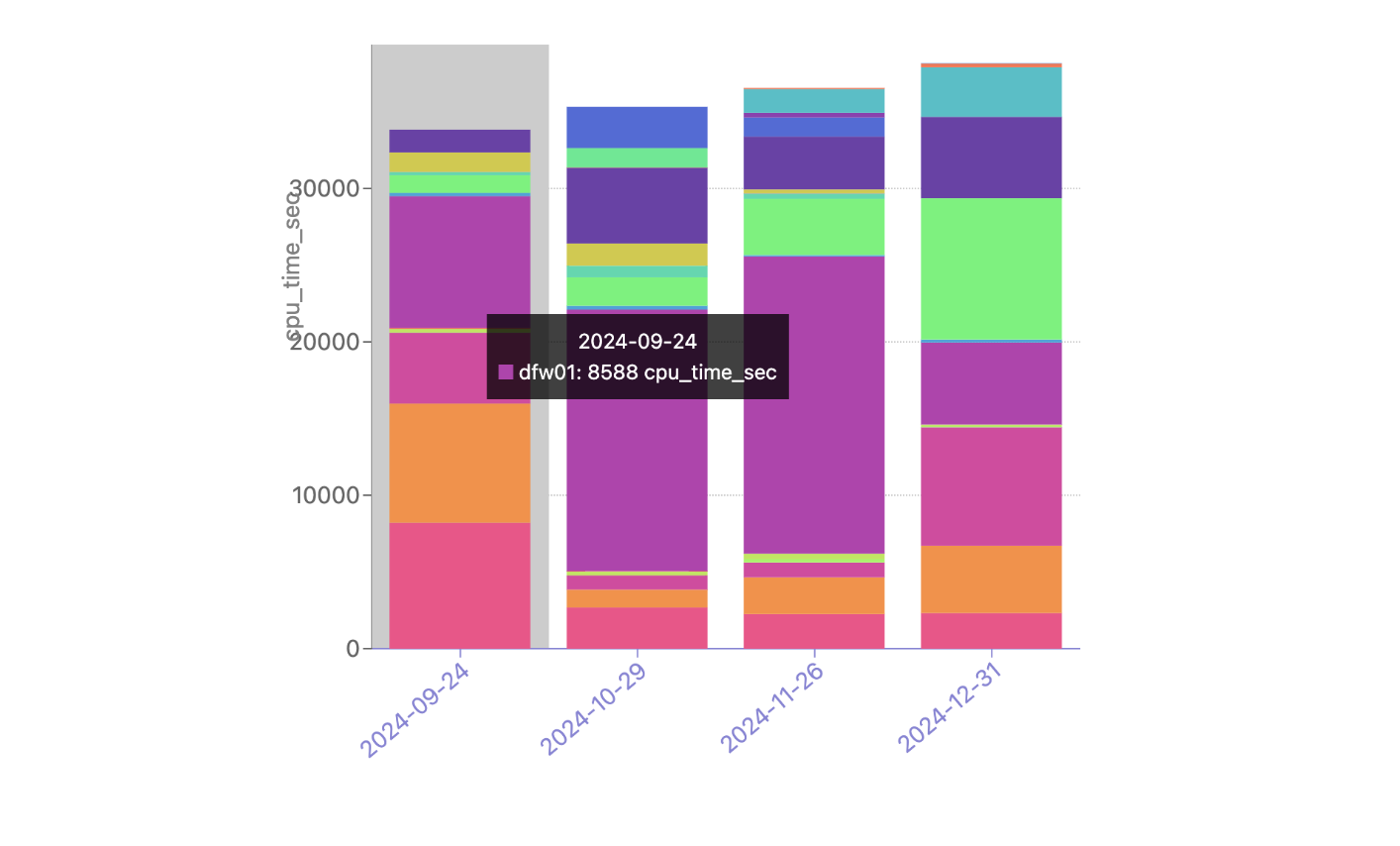
This outcome in the heatmap is not unexpected.  But now we typically get a follow-up question: clearly this traffic won’t fit in just Newark, Chicago, and Toronto, so where do all these requests get served from?  Enter the failover simulator: Capacity Planning has been simulating how Traffic Manager may work in the long term for quite a while, and for Scenario Planner, it was simple to extend this functionality to answer exactly this question.

There is currently no traffic being moved by Traffic Manager from these data centers, but our simulation shows a significant portion of the Atlanta CPU time being served from our DFW/Dallas data center as well as Newark (bottom pink), and Chicago (orange) through the rest of the year, during this hypothetical failure. With Scenario Planner, Capacity Planning can take this information and simulate multiple failures all over the world to understand the impact to customers, taking action to ensure that customers trusting Cloudflare with their web properties can expect high performance even in instances of major data center failures. 

Planning with uncertainty

Capacity planning a large global network comes with plenty of uncertainties. Scenario Planner is one example of the work the Capacity Planning team is doing to ensure that the millions of web properties our customers entrust to Cloudflare can expect consistent, top tier performance all over the world.

The Capacity Planning team is hiring — check out the Cloudflare careers page and search for open roles on the Capacity Planning team.

Introducing Automatic SSL/TLS: securing and simplifying origin connectivity

Post Syndicated from Alex Krivit original https://blog.cloudflare.com/introducing-automatic-ssl-tls-securing-and-simplifying-origin-connectivity


During Birthday Week 2022, we pledged to provide our customers with the most secure connection possible from Cloudflare to their origin servers automatically. I’m thrilled to announce we will begin rolling this experience out to customers who have the SSL/TLS Recommender enabled on August 8, 2024. Following this, remaining Free and Pro customers can use this feature beginning September 16, 2024, with Business and Enterprise customers to follow.

Although it took longer than anticipated to roll out, our priority was to achieve an automatic configuration both transparently and without risking any site downtime. Taking this additional time allowed us to balance enhanced security with seamless site functionality, especially since origin server security configuration and capabilities are beyond Cloudflare’s direct control. The new Automatic SSL/TLS setting will maximize and simplify the encryption modes Cloudflare uses to communicate with origin servers by using the SSL/TLS Recommender.

We first talked about this process in 2014: at that time, securing connections was hard to configure, prohibitively expensive, and required specialized knowledge to set up correctly. To help alleviate these pains, Cloudflare introduced Universal SSL, which allowed web properties to obtain a free SSL/TLS certificate to enhance the security of connections between browsers and Cloudflare.

This worked well and was easy because Cloudflare could manage the certificates and connection security from incoming browsers. As a result of that work, the number of encrypted HTTPS connections on the entire Internet doubled at that time. However, the connections made from Cloudflare to origin servers still required manual configuration of the encryption modes to let Cloudflare know the capabilities of the origin.

Today we’re excited to begin the sequel to Universal SSL and make security between Cloudflare and origins automatic and easy for everyone.

History of securing origin-facing connections

Ensuring that more bytes flowing across the Internet are automatically encrypted strengthens the barrier against interception, throttling, and censorship of Internet traffic by third parties.

Generally, two communicating parties (often a client and server) establish a secure connection using the TLS protocol. For a simplified breakdown:

  • The client advertises the list of encryption parameters it supports (along with some metadata) to the server.
  • The server responds back with its own preference of the chosen encryption parameters. It also sends a digital certificate so that the client can authenticate its identity.
  • The client validates the server identity, confirming that the server is who it says it is.
  • Both sides agree on a symmetric secret key for the session that is used to encrypt and decrypt all transmitted content over the connection.

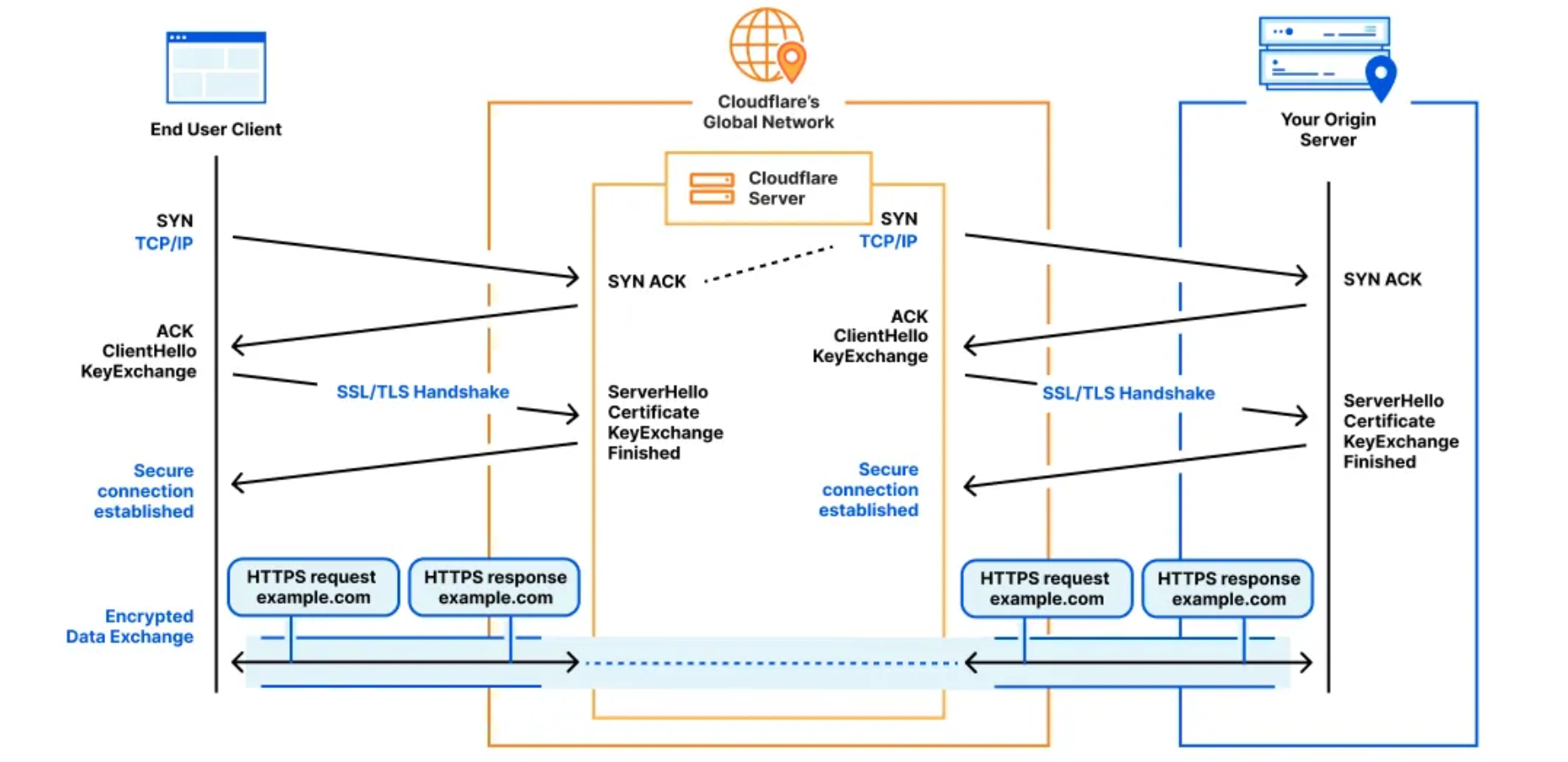
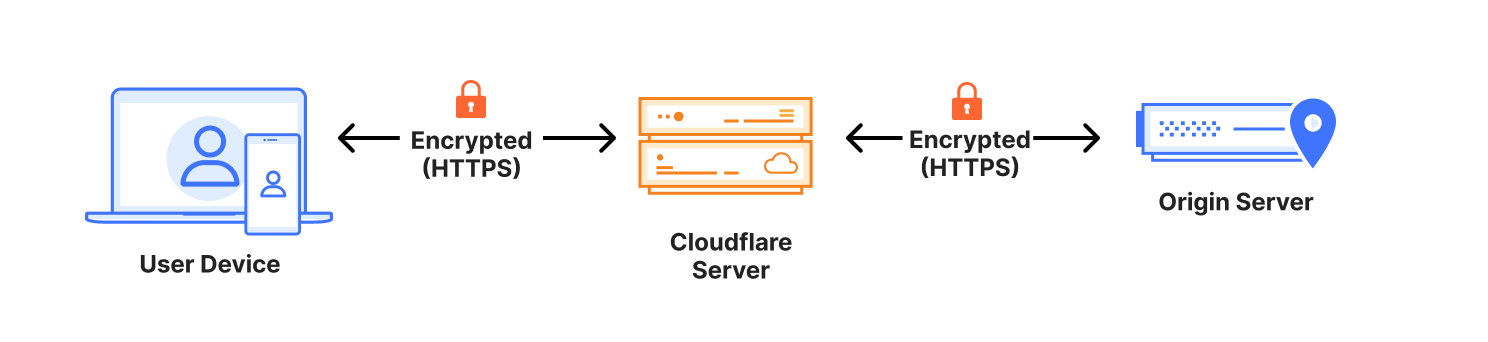
Because Cloudflare acts as an intermediary between the client and our customer’s origin server, two separate TLS connections are established. One between the user’s browser and our network, and the other from our network to the origin server. This allows us to manage and optimize the security and performance of both connections independently.

Unlike securing connections between clients and Cloudflare, the security capabilities of origin servers are not under our direct control. For example, we can manage the certificate (the file used to verify identity and provide context on establishing encrypted connections) between clients and Cloudflare because it’s our job in that connection to provide it to clients, but when talking to origin servers, Cloudflare is the client.

Customers need to acquire and provision an origin certificate on their host. They then have to configure Cloudflare to expect the new certificate from the origin when opening a connection. Needing to manually configure connection security across multiple different places requires effort and is prone to human error.

This issue was discussed in the original Universal SSL blog:

For a site that did not have SSL before, we will default to our Flexible SSL mode, which means traffic from browsers to Cloudflare will be encrypted, but traffic from Cloudflare to a site’s origin server will not. We strongly recommend site owners install a certificate on their web servers so we can encrypt traffic to the origin … Once you’ve installed a certificate on your web server, you can enable the Full or Strict SSL modes which encrypt origin traffic and provide a higher level of security.

Over the years Cloudflare has introduced numerous products to help customers configure how Cloudflare should talk to their origin. These products include a certificate authority to help customers obtain a certificate to verify their origin server’s identity and encryption capabilities, Authenticated Origin Pulls that ensures only HTTPS (encrypted) requests from Cloudflare will receive a response from the origin server, and Cloudflare Tunnels that can be configured to proactively establish secure and private tunnels to the nearest Cloudflare data center. Additionally, the ACME protocol and its corresponding Certbot tooling make it easier than ever to obtain and manage publicly-trusted certificates on customer origins. While these technologies help customers configure how Cloudflare should communicate with their origin server, they still require manual configuration changes on the origin and to Cloudflare settings.

Ensuring certificates are configured appropriately on origin servers and informing Cloudflare about how we should communicate with origins can be anxiety-inducing because misconfiguration can lead to downtime if something isn’t deployed or configured correctly.

To simplify this process and help identify the most secure options that customers could be using without any misconfiguration risk, Cloudflare introduced the SSL/TLS Recommender in 2021. The Recommender works by probing customer origins with different SSL/TLS settings to provide a recommendation whether the SSL/TLS encryption mode for the web property can be improved. The Recommender has been in production for three years and has consistently managed to provide high quality origin-security recommendations for Cloudflare’s customers.

The SSL/TLS Recommender system serves as the brain of the automatic origin connection service that we are announcing today.

How does SSL/TLS Recommendation work?

The Recommender works by actively comparing content on web pages that have been downloaded using different SSL/TLS modes to see if it is safe and risk-free to update the mode Cloudflare uses to connect to origin servers.

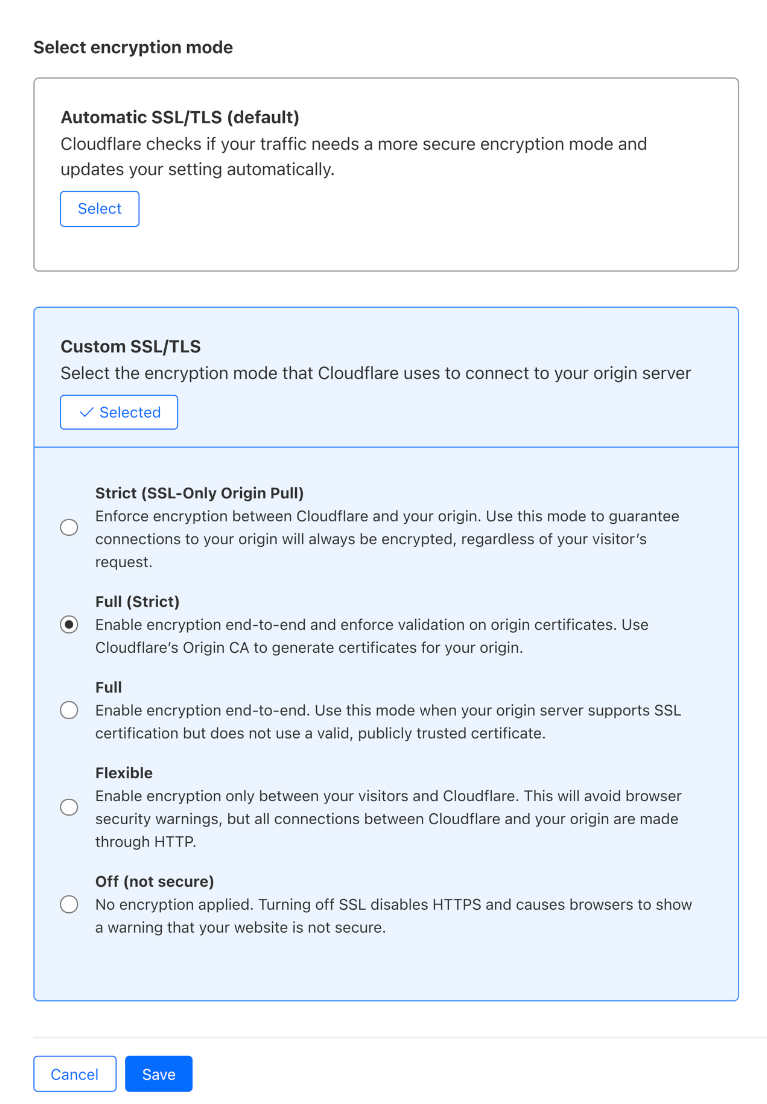
Cloudflare currently offers five SSL/TLS modes:

  1. Off: No encryption is used for traffic between browsers and Cloudflare or between Cloudflare and origins. Everything is cleartext HTTP.
  2. Flexible: Traffic from browsers to Cloudflare can be encrypted via HTTPS, but traffic from Cloudflare to the origin server is not. This mode is common for origins that do not support TLS, though upgrading the origin configuration is recommended whenever possible. A guide for upgrading is available here.
  3. Full: Cloudflare matches the browser request protocol when connecting to the origin. If the browser uses HTTP, Cloudflare connects to the origin via HTTP; if HTTPS, Cloudflare uses HTTPS without validating the origin’s certificate. This mode is common for origins that use self-signed or otherwise invalid certificates.
  4. Full (Strict): Similar to Full Mode, but with added validation of the origin server’s certificate, which can be issued by a public CA like Let’s Encrypt or by Cloudflare Origin CA.
  5. Strict (SSL-only origin pull): Regardless of whether the browser-to-Cloudflare connection uses HTTP or HTTPS, Cloudflare always connects to the origin over HTTPS with certificate validation.

HTTP from visitor

HTTPS from visitor

Off

HTTP to origin

HTTP to origin

Flexible

HTTP to origin

HTTP to origin

Full

HTTP to origin

HTTPS without cert validation to origin

Full (strict)

HTTP to origin

HTTPS with cert validation to origin

Strict (SSL-only origin pull)

HTTPS with cert validation to origin

HTTPS with cert validation to origin

The SSL/TLS Recommender works by crawling customer sites and collecting links on the page (like any web crawler). The Recommender downloads content over both HTTP and HTTPS, making GET requests to avoid modifying server resources. It then uses a content similarity algorithm, adapted from the research paper “A Deeper Look at Web Content Availability and Consistency over HTTP/S” (TMA Conference 2020), to determine if content matches. If the content does match, the Recommender makes a determination for whether the SSL/TLS mode can be increased without misconfiguration risk.

The recommendations are currently delivered to customers via email.

When the Recommender is making security recommendations, it errs on the side of maintaining current site functionality to avoid breakage and usability issues. If a website is non-functional, blocks all bots, or has SSL/TLS-specific Page Rules or Configuration Rules, the Recommender may not complete its scans and provide a recommendation. It was designed to maximize domain security, but will not help resolve website or domain functionality issues.

The crawler uses the user agent “Cloudflare-SSLDetector” and is included in Cloudflare’s list of known good bots. It ignores robots.txt (except for rules specifically targeting its user agent) to ensure accurate recommendations.

When downloading content from your origin server over both HTTP and HTTPS and comparing the content, the Recommender understands the current SSL/TLS encryption mode that your website uses and what risk there might be to the site functionality if the recommendation is followed.

Using SSL/TLS Recommender to automatically manage SSL/TLS settings

Previously, signing up for the SSL/TLS Recommender provided a good experience for customers, but only resulted in an email recommendation in the event that a zone’s current SSL/TLS modes could be updated. To Cloudflare, this was a positive signal that customers wanted their websites to have more secure connections to their origin servers – over 2 million domains have enabled the SSL/TLS Recommender. However, we found that a significant number of users would not complete the next step of pushing the button to inform Cloudflare that we could communicate over the upgraded settings. Only 30% of the recommendations that the system provided were followed.

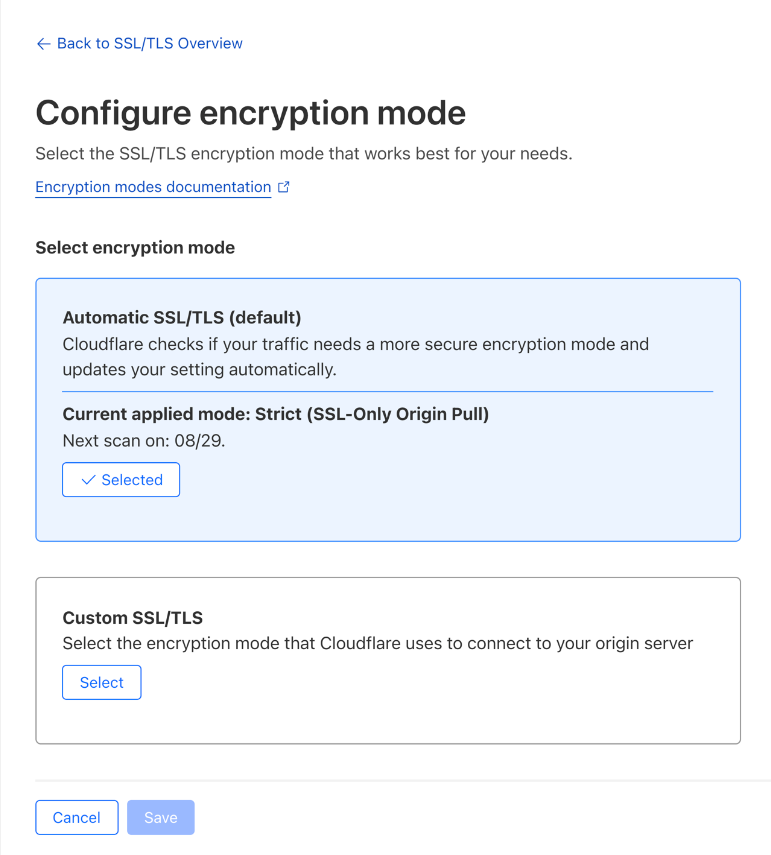
With the system designed to increase security while avoiding any breaking changes, we wanted to provide an option for customers to allow the Recommender to help upgrade their site security, without requiring further manual action from the customer. Therefore, we are introducing a new option for managing SSL/TLS configuration on Cloudflare: Automatic SSL/TLS.

Automatic SSL/TLS uses the SSL/TLS Recommender to make the determination as to what encryption mode is the most secure and safest for a website to be set to. If there is a more secure option for your website (based on your origin certification or capabilities), Automatic SSL/TLS will find it and apply it for your domain. The other option, Custom SSL/TLS, will work exactly like the setting the encryption mode does today. If you know what setting you want, just select it using Custom SSL/TLS, and we’ll use it.

Automatic SSL/TLS is currently meant to service an entire website, which typically works well for those with a single origin. For those concerned that they have more complex setups which use multiple origin servers with different security capabilities, don’t worry. Automatic SSL/TLS will still avoid breaking site functionality by looking for the best setting that works for all origins serving a part of the site’s traffic.

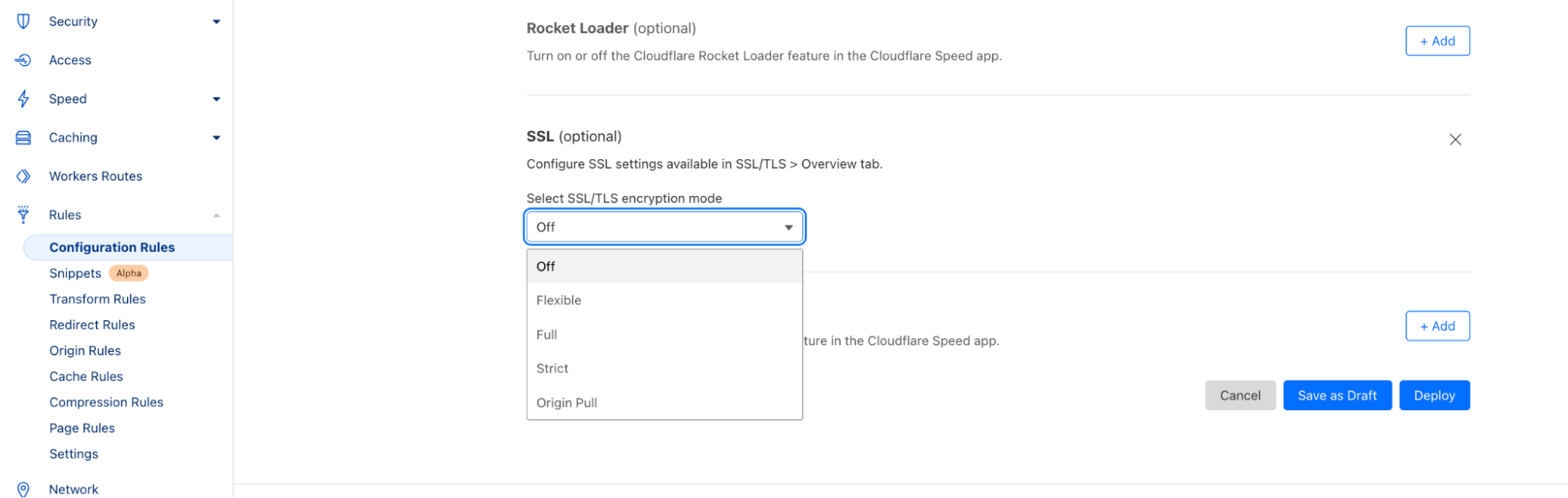
If customers want to segment the SSL/TLS mode used to communicate with the numerous origins that service their domain, they can achieve this by using Configuration Rules. These rules allow you to set more precise modes that Cloudflare should respect (based on path or subdomain or even IP address) to maximize the security of the domain based on your desired Rules criteria. If your site uses SSL/TLS-specific settings in a Configuration Rule or Page rule, those settings will override the zone-wide Automatic and Custom settings.

The goal of Automatic SSL/TLS is to simplify and maximize the origin-facing security for customers on Cloudflare. We want this to be the new default for all websites on Cloudflare, but we understand that not everyone wants this new default, and we will respect your decision for how Cloudflare should communicate with your origin server. If you block the Recommender from completing its crawls, the origin server is non-functional or can’t be crawled, or if you want to opt out of this default and just continue using the same encryption mode you are using today, we will make it easy for you to tell us what you prefer.

How to onboard to Automatic SSL/TLS

To improve the security settings for everyone by default, we are making the following default changes to how Cloudflare configures the SSL/TLS level for all zones:

Starting on August 8, 2024, websites with the SSL/TLS Recommender currently enabled will have the Automatic SSL/TLS setting enabled by default. Enabling does not mean that the Recommender will begin scanning and applying new settings immediately though. There will be a one-month grace period before the first scans begin and the recommended settings are applied. Enterprise (ENT) customers will get a six-week grace period. Origin scans will start getting scheduled by September 9, 2024, for non-Enterprise customers and September 23rd for ENT customers with the SSL Recommender enabled. This will give customers the ability to opt out by removing Automatic SSL/TLS and selecting the Custom mode that they want to use instead.

Further, during the second week of September all new zones signing up for Cloudflare will start seeing the Automatic SSL/TLS setting enabled by default.

Beginning September 16, 2024, remaining Free and Pro customers will start to see the new Automatic SSL/TLS setting. They will also have a one-month grace period to opt out before the scans start taking effect.

Customers in the cohort having the new Automatic SSL/TLS setting applied will receive an email communication regarding the date that they are slated for this migration as well as a banner on the dashboard that mentions this transition as well. If they do not wish for Cloudflare to change anything in their configurations, the process for opt-out of this migration is outlined below.

Following the successful migration of Free and Pro customers, we will proceed to Business and Enterprise customers with a similar cadence. These customers will get email notifications and information in the dashboard when they are in the migration cohort.

The Automatic SSL/TLS setting will not impact users that are already in Strict or Full (strict) mode nor will it impact websites that have opted-out.

Opting out

There are a number of reasons why someone might want to configure a lower-than-optimal security setting for their website. Some may want to set a lower security setting for testing purposes or to debug some behavior. Whatever the reason, the options to opt-out of the Automatic SSL/TLS setting during the migration process are available in the dashboard and API.

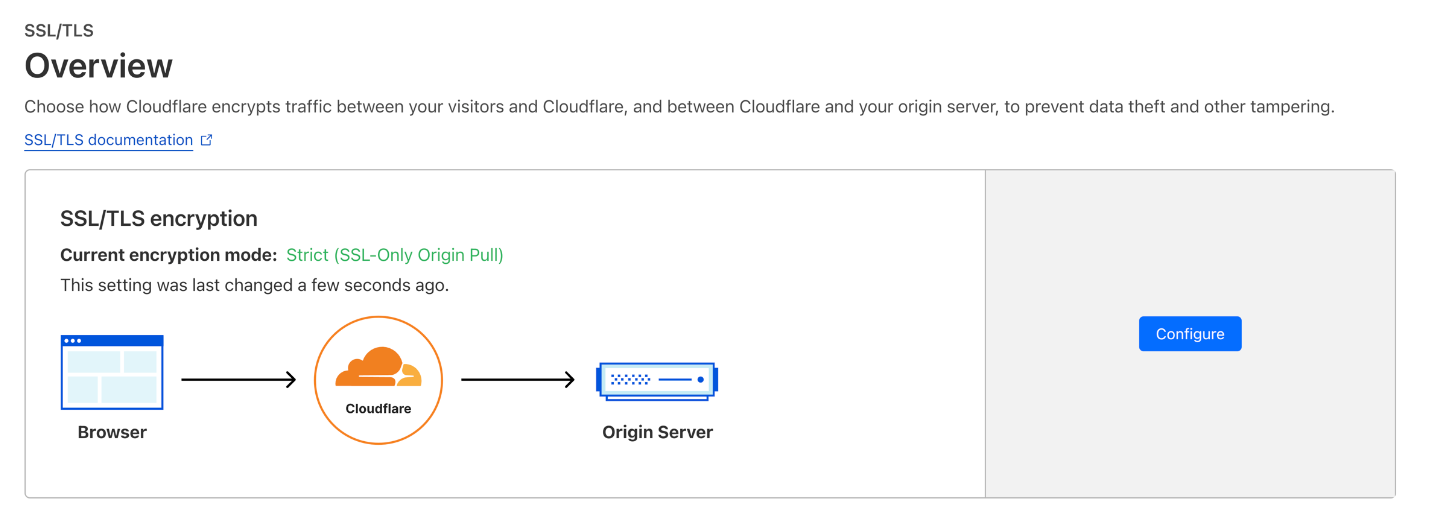
To opt-out, simply select Custom SSL/TLS in the dashboard (instead of the enabled Automatic SSL/TLS) and we will continue to use the previously set encryption mode that you were using prior to the migration. Automatic and Custom SSL/TLS modes can be found in the Overview tab of the SSL/TLS section of the dashboard. To enable your preferred mode, select configure.

If you want to opt out via the API you can make this API call on or before the grace period expiration date.

    curl --request PATCH \
        --url https://api.cloudflare.com/client/v4/zones/<insert_zone_tag_here>/settings/ssl_automatic_mode \
        --header 'Authorization: Bearer <insert_api_token_here>' \
        --header 'Content-Type: application/json' \
        --data '{"value":"custom"}'

If an opt-out is triggered, there will not be a change to the currently configured SSL/TLS setting. You are also able to change the security level at any time by going to the SSL/TLS section of the dashboard and choosing the Custom setting you want (similar to how this is accomplished today).

If at a later point you’d like to opt in to Automatic SSL/TLS, that option is available by changing your setting from Custom to Automatic.

What if I want to be more secure now?

We will begin to roll out this change to customers with the SSL/TLS Recommender enabled on August 8, 2024. If you want to enroll in that group, we recommend enabling the Recommender as soon as possible.

If you read this and want to make sure you’re at the highest level of backend security already, we recommend Full (strict) or Strict mode. Directions on how to make sure you’re correctly configured in either of those settings are available here and here.

If you prefer to wait for us to automatically upgrade your connection to the maximum encryption mode your origin supports, please watch your inbox for the date we will begin rolling out this change for you.

Avoiding downtime: modern alternatives to outdated certificate pinning practices

Post Syndicated from Dina Kozlov original https://blog.cloudflare.com/why-certificate-pinning-is-outdated


In today’s world, technology is quickly evolving and some practices that were once considered the gold standard are quickly becoming outdated. At Cloudflare, we stay close to industry changes to ensure that we can provide the best solutions to our customers. One practice that we’re continuing to see in use that no longer serves its original purpose is certificate pinning. In this post, we’ll dive into certificate pinning, the consequences of using it in today’s Public Key Infrastructure (PKI) world, and alternatives to pinning that offer the same level of security without the management overhead.  

PKI exists to help issue and manage TLS certificates, which are vital to keeping the Internet secure – they ensure that users access the correct applications or servers and that data between two parties stays encrypted. The mis-issuance of a certificate can pose great risk. For example, if a malicious party is able to issue a TLS certificate for your bank’s website, then they can potentially impersonate your bank and intercept that traffic to get access to your bank account. To prevent a mis-issued certificate from intercepting traffic, the server can give a certificate to the client and say “only trust connections if you see this certificate and drop any responses that present a different certificate” – this practice is called certificate pinning.

In the early 2000s, it was common for banks and other organizations that handle sensitive data to pin certificates to clients. However, over the last 20 years, TLS certificate issuance has evolved and changed, and new solutions have been developed to help customers achieve the security benefit they receive through certificate pinning, with simpler management, and without the risk of disruption.

Cloudflare’s mission is to help build a better Internet, which is why our teams are always focused on keeping domains secure and online.

Why certificate pinning is causing more outages now than it did before

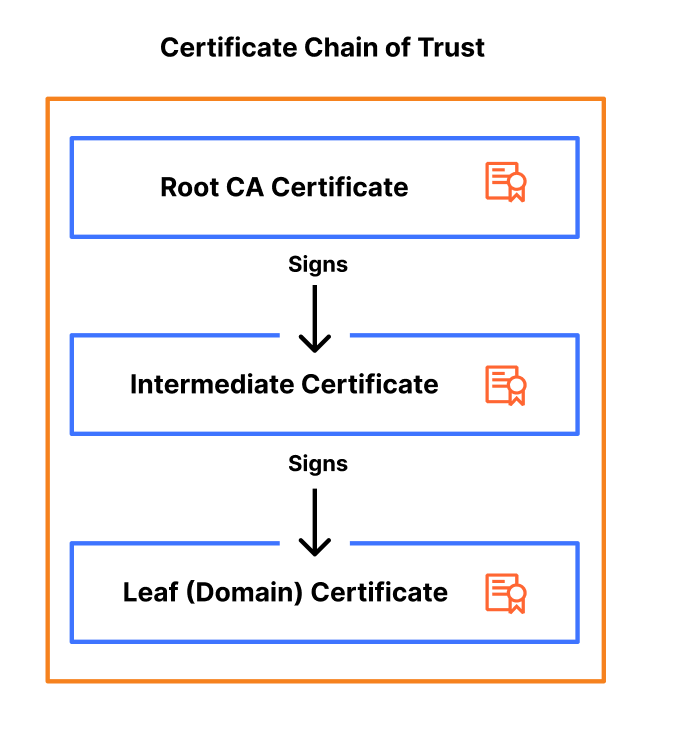
Certificate pinning is not a new practice, so why are we emphasizing the need to stop using it now? The reason is that the PKI ecosystem is moving towards becoming more agile, flexible, and secure. As a part of this change, certificate authorities (CAs) are starting to rotate certificates and their intermediates, certificates that bridge the root certificate and the domain certificate, more frequently to improve security and encourage automation.

These more frequent certificate rotations are problematic from a pinning perspective because certificate pinning relies on the exact matching of certificates. When a certificate is rotated, the new certificate might not match the pinned certificate on the client side. If the pinned certificate is not updated to reflect the contents of the rotated certificate, the client will reject the new certificate, even if it’s valid and issued by the same CA. This mismatch leads to a failure in establishing a secure connection, causing the domain or application to become inaccessible until the pinned certificate is updated.

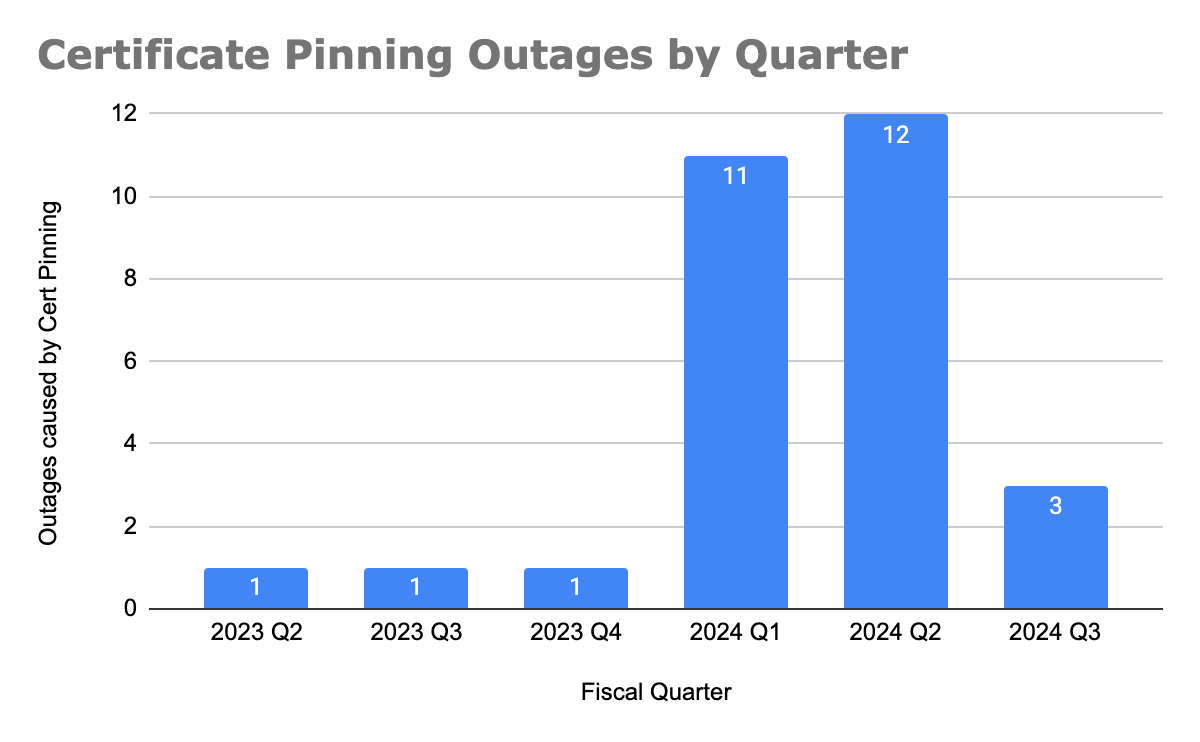
Since the start of 2024, we have seen the number of customer reported outages caused by certificate pinning significantly increase. (As of this writing, we are part way through July and Q3 has already seen as many outages as the last three quarters of 2023 combined.)

We can attribute this rise to two major events: Cloudflare migrating away from using DigiCert as a certificate authority and Google and Let’s Encrypt intermediate CA rotations.

Before migrating customer’s certificates away from using DigiCert as the CA, Cloudflare sent multiple notifications to customers to inform them that they should update or remove their certificate pins, so that the migration does not impact their domain’s availability.

However, what we’ve learned is that almost all customers that were impacted by the change were unaware that they had a certificate pin in place. One of the consequences of using certificate pinning is that the “set and forget” mentality doesn’t work, now that certificates are being rotated more frequently. Instead, changes need to be closely monitored to ensure that a regular certificate renewal doesn’t cause an outage. This goes to show that to implement certificate pinning successfully, customers need a robust system in place to track certificate changes and implement them.

We built our Universal SSL pipeline to be resilient and redundant, ensuring that we can always issue and renew a TLS certificate on behalf of our customers, even in the event of a compromise or revocation. CAs are starting to make changes like more frequent certificate rotations to encourage a move towards a more secure ecosystem. Now, it’s up to domain owners to stop implementing legacy practices like certificate pinning, which cause breaking changes, and instead start adopting modern standards that aim to provide the same level of security, but without the management overhead or risk.

Modern standards & practices are making the need for certificate pinning obsolete

Shorter certificate lifetimes

Over the last few years, we have seen certificate lifetimes quickly decrease. Before 2011, a certificate could be valid for up to 96 months (eight years) and now, in 2024, the maximum validity period for a certificate is 1 year. We’re seeing this trend continue to develop, with Google Chrome pushing for shorter CA, intermediate, and certificate lifetimes, advocating for 3 month certificate validity as the new standard.

This push improves security and redundancy of the entire PKI ecosystem in several ways. First, it reduces the scope of a compromise by limiting the amount of time that a malicious party could control a TLS certificate or private key. Second, it reduces reliance on certificate revocation, a process that lacks standardization and enforcement by clients, browsers, and CAs. Lastly, it encourages automation as a replacement for legacy certificate practices that are time-consuming and error-prone.

Cloudflare is moving towards only using CAs that follow the ACME (Automated Certificate Management Environment) protocol, which by default, issues certificates with 90 day validity periods. We have already started to roll this out to Universal SSL certificates and have removed the ability to issue 1-year certificates as a part of our reduced usage of DigiCert.

Regular rotation of intermediate certificates

The CAs that Cloudflare partners with, Let’s Encrypt and Google Trust Services, are starting to rotate their intermediate CAs more frequently. This increased rotation is beneficial from a security perspective because it limits the lifespan of intermediate certificates, reducing the window of opportunity for attackers to exploit a compromised intermediate. Additionally, regular rotations make it easier to revoke an intermediate certificate if it becomes compromised, enhancing the overall security and resiliency of the PKI ecosystem.

Both Let’s Encrypt and Google Trust Services changed their intermediate chains in June 2024. In addition, Let’s Encrypt has started to balance their certificate issuance across 10 intermediates (5 RSA and 5 ECDSA).

Cloudflare customers using Advanced Certificate Manager have the ability to choose their issuing CA. The issue is that even if Cloudflare uses the same CA for a certificate renewal, there is no guarantee that the same certificate chain (root or intermediate) will be used to issue the renewed certificate. As a result, if pinning is used, a successful renewal could cause a full outage for a domain or application.

This happens because certificate pinning relies on the exact matching of certificates. When an intermediate certificate is rotated or changed, the new certificate might not match the pinned certificate on the client side. As a result, the client will reject the renewed certificate, even if it’s a valid certificate issued by the same CA. This mismatch leads to a failure on the client side, causing the domain to become inaccessible until the pinned certificate is updated to reflect the new intermediate certificate. This risk of an unexpected outage is a major downside of continuing to use certificate pinning, especially as CAs increasingly update their intermediates as a security measure.

Increased use of certificate transparency

Certificate transparency (CT) logs provide a standardized framework for monitoring and auditing the issuance of TLS certificates. CT logs help detect misissued or malicious certificates and Cloudflare customers can set up CT monitoring to receive notifications about any certificates issued for their domain. This provides a better mechanism for detecting certificate mis-issuance, reducing the need for pinning.

Why modern standards make certificate pinning obsolete

Together, these practices – shorter certificate lifetimes, regular rotations of intermediate certificates, and increased use of certificate transparency – address the core security concerns that certificate pinning was initially designed to mitigate. Shorter lifetimes and frequent rotations limit the impact of compromised certificates, while certificate transparency allows for real time monitoring and detection of misissued certificates. These advancements are automated, scalable, and robust and eliminate the need for the manual and error-prone process of certificate pinning. By adopting these modern standards, organizations can achieve a higher level of security and resiliency without the management overhead and risk associated with certificate pinning.

Reasons behind continued use of certificate pinning

Originally, certificate pinning was designed to prevent monster-in-the-middle (MITM) attacks by associating a hostname with a specific TLS certificate, ensuring that a client could only access an application if the server presented a certificate issued by the domain owner.

Certificate pinning was traditionally used to secure IoT (Internet of Things) devices, mobile applications, and APIs. IoT devices are usually equipped with more limited processing power and are oftentimes unable to perform software updates. As a result, they’re less likely to perform things like certificate revocation checks to ensure that they’re using a valid certificate. As a result, it’s common for these devices to come pre-installed with a set of trusted certificate pins to ensure that they can maintain a high level of security. However, the increased frequency of certificate changes poses significant risk, as many devices have immutable software, preventing timely updates to certificate pins during renewals.

Similarly, certificate pinning has been employed to secure Android and iOS applications, ensuring that only the correct certificates are served. Despite this, both Apple and Google warn developers against the use of certificate pinning due to the potential for failures if not implemented correctly.

Understanding the trade-offs of different certificate pinning implementations

While certificate pinning can be applied at various levels of the certificate chain, offering different levels of granularity and security, we don’t recommend it due to the challenges and risks associated with its use.

Pinning certificates at the root certificate

Pinning the root certificate instructs a client to only trust certificates issued by that specific Certificate Authority (CA).

Advantages:

  • Simplified management: Since root certificates have long lifetimes (>10 years) and rarely change, pinning at the root reduces the need to frequently update certificate pins, making this the easiest option in terms of management overhead.

Disadvantages:

  • Broader trust: Most Certificate Authorities (CAs) issue their certificates from one root, so pinning a root CA certificate enables the client to trust every certificate issued from that CA. However, this broader trust can be problematic. If the root CA is compromised, every certificate issued by that CA is also compromised, which significantly increases the potential scope and impact of a security breach. This broad trust can therefore create a single point of failure, making the entire ecosystem more vulnerable to attacks.
  • Neglected Maintenance: Root certificates are infrequently rotated, which can lead to a “set and forget” mentality when pinning them. Although it’s rare, CAs do change their roots and when this happens, a correctly renewed certificate will break the pin, causing an outage. Since these pins are rarely updated, resolving such outages can be time-consuming as engineering teams try to identify and locate where the outdated pins have been set.

Pinning certificates at the intermediate certificate

Pinning an intermediate certificate instructs a client to only trust certificates issued by a specific intermediate CA, issued from a trusted root CA. With lifetimes ranging from 3 to 10 years, intermediate certificates offer a better balance between security and flexibility.

Advantages:

  • Better security: Narrows down the trust to certificates issued by a specific intermediate CA.
  • Simpler management: With intermediate CA lifetimes spanning a few years, certificate pins require less frequent updates, reducing the maintenance burden.

Disadvantages:

  • Broad trust: While pinning on an intermediate certificate is more restrictive than pinning on a root certificate, it still allows for a broad range of certificates to be trusted.
  • Maintenance: Intermediate certificates are rotated more frequently than root certificates, requiring more regular updates to pinned certificates.
  • Less predictability: With CAs like Let’s Encrypt issuing their certificates from varying intermediates, it’s no longer possible to predict which certificate chain will be used during a renewal, making it more likely for a certificate renewal to break a certificate pin and cause an outage.

Pinning certificates at the leaf certificate

Pinning the leaf certificate instructs a client to only trust that specific certificate. Although this option offers the highest level of security, it also poses the greatest risk of causing an outage during a certificate renewal.

Advantages:

  • High security: Provides the highest level of security by ensuring that only a specific certificate is trusted, minimizing the risk of a monster-in-the-middle attack.

Disadvantages:

  • Risky: Requires careful management of certificate renewals to prevent outages.
  • Management burden: Leaf certificates have shorter lifetimes, with 90 days becoming the standard, requiring constant updates to the certificate pin to avoid a breaking change during a renewal.

Alternatives to certificate pinning

Given the risks and challenges associated with certificate pinning, we recommend the following as more effective and modern alternatives to achieve the same level of security (preventing a mis-issued certificate from intercepting traffic) that certificate pinning aims to provide.

Shorter certificate lifetimes

Using shorter certificate lifetimes ensures that certificates are regularly renewed and replaced, reducing the risk of misuse of a compromised certificate by limiting the window of opportunity for attackers.

By default, Cloudflare issues 90-day certificates for customers. Customers using Advanced Certificate Manager can request TLS certificates with lifetimes as short as 14 days.

CAA records to restrict which CAs can issue certificates for a domain

Certification Authority Authorization (CAA) DNS records allow domain owners to specify which CAs are allowed to issue certificates for their domain. This adds an extra layer of security by restricting issuance to trusted authorities, providing a similar benefit as pinning a root CA certificate. For example, if you’re using Google Trust Services as your CA, you can add the following CAA DNS record to ensure that only that CA issues certificates for your domain:

example.com         CAA 0 issue "pki.goog"

By default, Cloudflare sets CAA records on behalf of customers to ensure that certificates can be issued from the CAs that Cloudflare partners with. Customers can choose to further restrict that list of CAs by adding their own CAA records.

Certificate Transparency & monitoring

Certificate Transparency (CT) provides the ability to monitor and audit certificate issuances. By logging certificates in publicly accessible CT logs, organizations are able to monitor, detect, and respond to misissued certificates at the time they are issued.

Cloudflare customers can set up CT Monitoring to receive notifications when certificates are issued in their domain. Today, we notify customers using the product about all certificates issued for their domains. In the future, we will allow customers to filter those notifications, so that they are only notified when an external party that isn’t Cloudflare issues a certificate for the owner’s domain. This product is available to all customers and can be enabled with the click of a button.

Multi-vantage point Domain Control Validation (DCV) checks to prevent mis-issuances

For a CA to issue a certificate, the domain owner needs to prove ownership of the domain by serving Domain Control Validation (DCV) records. While uncommon, one attack vector of DCV validation allows an actor to perform BGP hijacking to spoof the DNS response and trick a CA into mis-issuing a certificate. To prevent this form of attack, CAs have started to perform DCV validation checks from multiple locations to ensure that a certificate is only issued when a full quorum is met.

Cloudflare has developed its own solution that CAs can use to perform multi vantage point DCV checks. In addition, Cloudflare partners with CAs like Let’s Encrypt who continue to develop these checks to support new locations, reducing the risk of a certificate mis-issuance.

Specifying ACME account URI in CAA records

A new enhancement to the ACME protocol allows certificate requesting parties to specify an ACME account URI, the ID of the ACME account that will be requesting the certificates, in CAA records to tighten control over the certificate issuance process. This ensures that only certificates issued through an authorized ACME account are trusted, adding another layer of verification to certificate issuance. Let’s Encrypt supports this extension to CAA records which allows users with a Let’s Encrypt certificate to set a CAA DNS record, such as the following:

example.com         CAA 0 issue "letsencrypt.org;accounturi=https://acme-v02.api.letsencrypt.org/acme/acct/<account_id>"

With this record, Let’s Encrypt subscribers can ensure that only Let’s Encrypt can issue certificates for their domain and that these certificates were only issued through their ACME account.

Cloudflare will look to support this enhancement automatically for customers in the future.

Conclusion

Years ago, certificate pinning was a valuable tool for enhancing security, but over the last 20 years, it has failed to keep up with new advancements in the certificate ecosystem. As a result, instead of providing the intended security benefit, it has increased the number of outages caused during a successful certificate renewal. With new enhancements in certificate issuance standards and certificate transparency, we’re encouraging our customers and the industry to move towards adopting those new standards and deprecating old ones.

If you’re a Cloudflare customer and are required to pin your certificate, the only way to ensure a zero-downtime renewal is to upload your own custom certificates. We recommend using the staging network to test your certificate renewal to ensure you have updated your certificate pin.

Making Magic Transit health checks faster and more responsive

Post Syndicated from Meyer Zinn original https://blog.cloudflare.com/making-magic-transit-health-checks-faster-and-more-responsive/

Making Magic Transit health checks faster and more responsive

Making Magic Transit health checks faster and more responsive

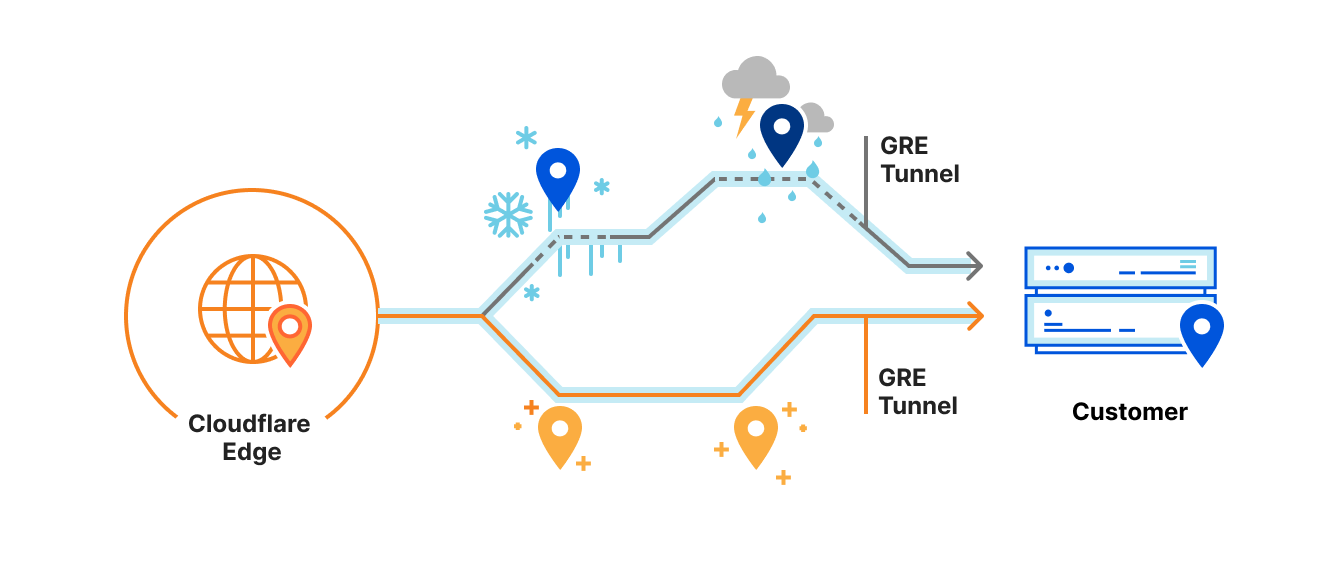
Magic Transit advertises our customer’s IP prefixes directly from our edge network, applying DDoS mitigation and firewall policies to all traffic destined for the customer’s network. After the traffic is scrubbed, we deliver clean traffic to the customer over GRE tunnels (over the public Internet or Cloudflare Network Interconnect). But sometimes, we experience inclement weather on the Internet: network paths between Cloudflare and the customer can become unreliable or go down. Customers often configure multiple tunnels through different network paths and rely on Cloudflare to pick the best tunnel to use if, for example, some router on the Internet is having a stormy day and starts dropping traffic.

Making Magic Transit health checks faster and more responsive

Because we use Anycast GRE, every server across Cloudflare’s 200+ locations globally can send GRE traffic to customers. Every server needs to know the status of every tunnel, and every location has completely different network routes to customers. Where to start?

In this post, I’ll break down my work to improve the Magic Transit GRE tunnel health check system, creating a more stable experience for customers and dramatically reducing CPU and memory usage at Cloudflare’s edge.

Everybody has their own weather station

To decide where to send traffic, Cloudflare edge servers need to periodically send health checks to each customer tunnel endpoint.

When Magic Transit was first launched, every server sent a health check to every tunnel once per minute. This naive, “shared-nothing” approach was simple to implement and served customers well, but would occasionally deliver less than optimal health check behavior in two specific ways.

Way #1: Inconsistent weather reports

Sometimes a server just runs into bad luck, and a check randomly fails. From there, the server would mark the tunnel as degraded and immediately start shifting traffic towards a fallback tunnel. Imagine you and I were standing right next to each other under a clear sky, and I felt a single drop of water and declared, “It’s raining!” whereas you felt no raindrops and declared, “It’s all clear!”

With relatively minimal data per server, it means that health determinations can be imprecise. It also means that individual servers could overreact to individual failures. From a customer’s point of view, it’s like Cloudflare detected a problem with the primary tunnel. But, in reality, the server just got a bad weather forecast and made a different judgement call.

Way #2: Slow to respond to storms

Even when tunnel states are consistent across servers, they can be slow to respond. In this case, if a server runs a health check which succeeds, but a second later the tunnel goes down, the next health check won’t happen for another 59 seconds. Until that next health check fails, the server has no idea anything is wrong, so it keeps sending traffic over unhealthy tunnels, leading to packet loss and latency for the customer.

Much like how a live, up-to-the-minute rain forecast helps you decide when to leave to avoid the rain, servers that send tunnel checks more frequently get a finer view of the Internet weather and can respond faster to localized storms. But if every server across Cloudflare’s edge sent health checks too frequently, we would very quickly start to overwhelm our customers’ networks.

All of the weather stations nearby start sharing observations

Clearly, we needed to hammer out some kinks. We wanted servers in the same location to come to the same conclusions about where to send traffic, and we wanted faster detection of issues without increasing the frequency of tunnel checks.

Health checks sent from servers in the same data center take the same route across the Internet. Why not share the results among them?

Instead of a single raindrop causing me to declare that it’s raining, I’d tell you about the raindrop I felt, and you’d tell me about the clear sky you’re looking at. Together, we come to the same conclusion: there isn’t enough rain to open an umbrella.

There is even a special networking protocol that allows us to easily share information between servers in the same private network. From the makers of Unicast and Anycast, now presenting: Multicast!

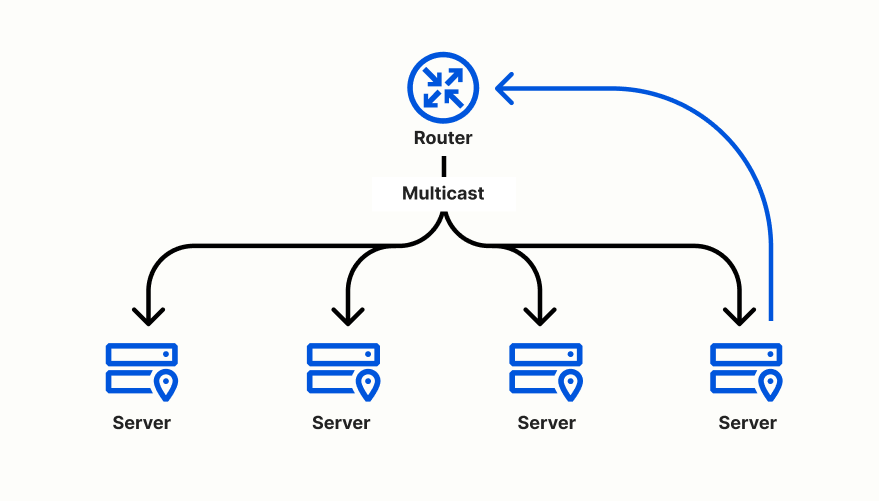
A single IP address does not necessarily represent a single machine in a network. The Internet Protocol specifies a way to send one message that gets delivered to a group of machines, like writing to an email list. Every machine has to opt into the group—we can’t just enroll people at random for our email list—but once a machine joins, it receives a copy of any message sent to the group’s address.

Making Magic Transit health checks faster and more responsive

The servers in a Cloudflare edge data center are part of the same private network, so for “version 2” of our health check system, we had each server in a data center join a multicast group and share their health check results with one another. Each server still made an independent assessment for each tunnel, but that assessment was based on data collected by all servers in the same location.

This second version of tunnel health checks resulted in more consistent  tunnel health determinations by servers in the same data center. It also resulted in faster response times—especially in large data centers where servers receive updates from their peers very rapidly.

However, we started seeing scaling problems. As we added more customers, we added more tunnel endpoints where we need to check the weather. In some of our larger data centers, each server was receiving close to half a billion messages per minute.

Imagine it’s not just you and me telling each other about the weather above us. You’re in a crowd of hundreds of people, and now everyone is shouting the weather updates for thousands of cities around the world!

One weather station to rule them all

As an engineering intern on the Magic Transit team, my project this summer has been developing a third approach. Rather than having every server infrequently check the weather for every tunnel and shouting the observation to everyone else, now every server tunnel can frequently check the weather for a few tunnels. With this new approach, servers would then only tell the others about the overall weather report—not every individual measurement.

That scenario sounds more efficient, but we need to distribute the task of sending tunnel health checks across all the servers in a location so one server doesn’t get an overwhelming amount of work. So how can we assign tunnels to servers in a way that doesn’t require a centralized orchestrator or shared database? Enter consistent hashing, the single coolest distributed computing concept I got to apply this summer.

Every server sends a multicast “heartbeat” every few seconds. Then, by listening for multicast heartbeats, each server can construct a list of the IP addresses of peers known to be alive, including its own address, sorted by taking the hash of each address. Every server in a data center has the same list of peers in the same order.

When a server needs to decide which tunnels it is responsible for sending health checks to, the server simply hashes each tunnel to an integer and searches through the list of peer addresses to find the peer with the smallest hash greater than the tunnel’s hash, wrapping around to the first peer if no peer is found. The server is responsible for sending health checks to the tunnel when the assigned peer’s address equals the server’s address.

If a server stops sending messages for a long enough period of time, the server gets removed from the known peers list. As a consequence, the next time another server tries to hash a tunnel the removed peer was previously assigned, the tunnel simply gets reassigned to the next peer in the list.

And like magic, we have devised a scheme to consistently assign tunnels to servers in a way that is resilient to server failures and does not require any extra coordination between servers beyond heartbeats. Now, the assigned server can send health checks way more frequently, compose more precise weather forecasts, and share those forecasts without being drowned out by the crowd.

Results

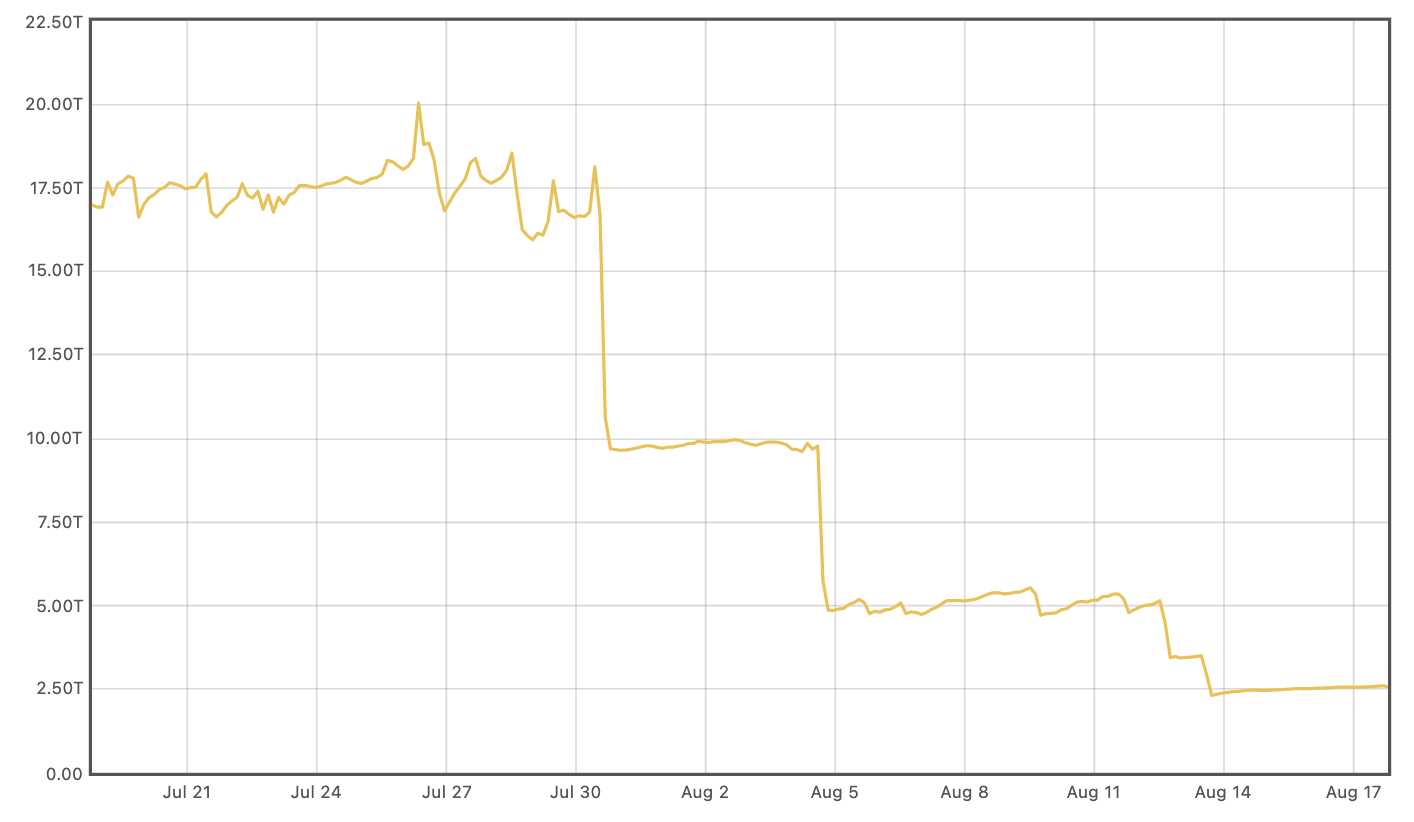
Releasing the new health check system globally reduced Magic Transit’s CPU usage by over 70% and memory usage by nearly 85%.

Memory usage (measured in terabytes):

Making Magic Transit health checks faster and more responsive

CPU usage (measured in CPU-seconds per two minute interval, averaged over two days):

Making Magic Transit health checks faster and more responsive

Reducing the number of multicast messages means that servers can now keep up with the Internet weather, even in the largest data centers. We’re now poised for the next stage of Magic Transit’s growth, just in time for our two-year anniversary.

If you want to help build the future of networking, join our team.