Post Syndicated from Jason Hurst original https://aws.amazon.com/blogs/security/aws-security-incident-response-the-customers-journey-to-accelerating-the-incident-response-lifecycle/
Organizations face mounting challenges in building and maintaining effective security incident response programs. Studies from IBM and Morning Consult show security teams face two major challenges: over 50 percent of security alerts go unaddressed because of resource constraints and alert fatigue, while false positives consume 30 percent of investigation time, delaying responses to true positive threats
According to the 2024 IBM Cost of a Data Breach Report, organizations now take an average of 258 days to identify and contain security events. The report also reveals that nearly half of SOC teams report increased detection and response times over the past two years, with 80 percent indicating that manual threat investigation significantly impacts their response times.
Despite these challenges, according to the 2024 IBM Security Services Benchmark Report, organizations with mature incident response capabilities demonstrate a 50 percent reduction in mean time to resolution (MTTR) and achieve cost savings of up to 58 percent per incident. These improvements are driven by the adoption of automated workflows, integrated tools, and streamlined communication processes that accelerate threat detection and containment.
In this post, we walk you through a real-world scenario to show how AWS Security Incident Response can immediately generate benefits by accelerating every step of your incident response lifecycle, how it integrates with other native AWS services such as Amazon GuardDuty, AWS Security Hub, and AWS Systems Manager, and how to integrate third-party threat detection findings for inclusion in your automated monitoring, triage, and containment capabilities.
How AWS Security Incident Response can help
AWS Security Incident Response is a Tier 1 service that launched in December 2024. The service is an AWS-native, purpose-built security incident response solution for customers that can be used as a better-together experience with other AWS services in the areas of detection and response (GuardDuty and Security Hub), networking and content delivery (AWS WAF and AWS Shield), and management and governance (Systems Manager). AWS Security Incident Response is also integrated across AWS Partners through a service specific Partner Specialization program. More detailed information is available in the AWS Security Incident Response documentation.
AWS Security Incident Response complements existing services by enhancing your security posture through streamlined incident management capabilities before, during, and after security events.
Key challenges
AWS Security Incident Response addresses three common challenges:
- Alert fatigue: It can reduce alert fatigue and accelerate security investigations through automated monitoring and intelligent triage, reducing false positives and helping to prevent security team burnout.
- Fragmented access and communications: By simplifying AWS Management Console permissions management and unifying incident response team communications, it can resolve fragmented access issues.
- Security skills gaps: It can bridge cloud security skills gaps by providing 24/7 access to AWS security experts who support the incidents including credential compromise, data exfiltration, and ransomware. The AWS Security Incident Response service allows security teams to handle immediate security challenges while maintaining focus on strategic long-term preparedness and operational improvements.
Service integration
AWS Security Incident Response complements and integrates with AWS security services to provide comprehensive incident response capabilities. The service works seamlessly with:
This integration helps you build efficient incident response capabilities that can minimize the time, cost, and impact of security events throughout your organization’s cloud journey, while helping to reduce investments in additional staffing, training, and tool maintenance.
Distinct capabilities
The AWS Security Incident Response service offers:
- Expert knowledge from the AWS Customer Incident Response Team (CIRT)
- Tools through APIs and the console
- Streamlined processes for handling security incidents
Prerequisites
Before implementing the capabilities described in this post, make sure that you have:
- Configured the appropriate AWS Identity and Access Management (IAM) permissions
- Established incident response team contacts
- Set up notification channels
- (OPTIONAL) Enabled GuardDuty in your accounts and AWS Regions
- (OPTIONAL) Enabled SecurityHub in your accounts and Regions
- (OPTIONAL) Deployed the required AWS CloudFormation StackSets for automated actions
These prerequisites help make sure that you can fully utilize the service’s automated detection, triage, and response capabilities.
The service provides automated monitoring and analysis capabilities within its own service infrastructure, enabling automatic triage of findings from GuardDuty and Security Hub.
For automated containment actions in your AWS accounts, you must first deploy the required CloudFormation StackSets and configure the appropriate IAM permissions. This helps make sure that you maintain full control over automated actions taken in your environment while benefiting from the service’s detection capabilities. This automation can be customized based on variables you establish, such as known CIDR ranges (specific ranges of IP addresses that define your network) and IP addresses, and you can implement GuardDuty suppression rules to help reduce false positives and alert volumes. As a result, the service can serve as a powerful augmentation to your existing security incident response programs and tools.
Setting up AWS Security Incident Response
Your cloud administrator, with AWSSecurityIncidentResponseFullAccess permissions, has established the incident response team in the service. The service notifies individuals, your partners or managed security service provider (MSSP), and other contacts added to the team, supporting a rapid escalation to alert the required parties and respond to the event.
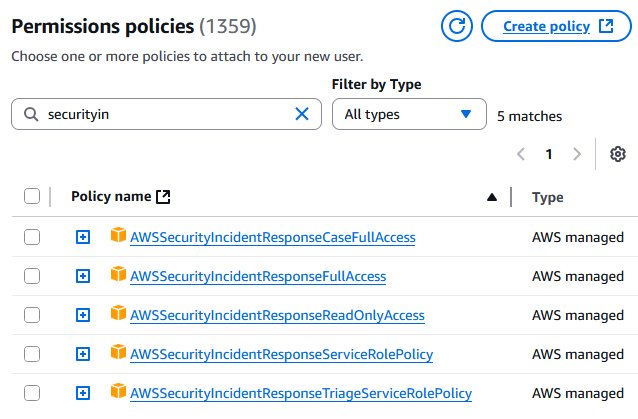
As a best practice, your team establishes minimal privileges for accessing and managing information within AWS Security Incident Response cases. This helps make sure that team members have appropriate access levels to case details, findings, and investigation data while maintaining security and compliance requirements. AWS Security Incident Response provides multiple API actions, such as CreateCaseComment (to add notes to investigations) and GetCase (to retrieve case metadata), to limit whom and which actions can be performed against differing cases. For development and testing environments, AWS provides role-based policies that you can use such as AWSSecurityIncidentResponseCaseFullAccess and AWSSecurityIncidentResponseReadOnlyAccess for role-based access control (as shown in Figure 1). For production environments, we recommend creating custom IAM policies following the principle of least privilege based on your security requirements.

Figure 1: Permissions policies for security incident response
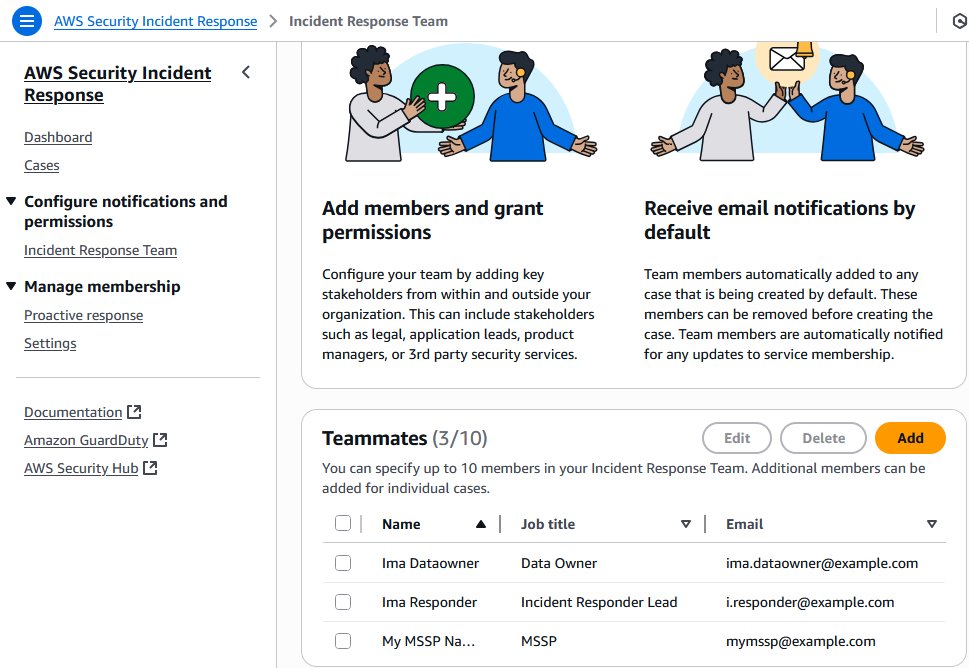
Following your configuration of the AWS Security Incident Response service, your security team reviews the email distribution list or alias for notifications for notifications from the service, as shown in Figure 2. You have developed items in your backlog to take advantage of Amazon EventBridge integrations to add in pager duty, Jira, and other services in the future for additional notification mechanisms.

Figure 2: Use the console to manage your incident response team membership
Detecting and responding to suspicious activity
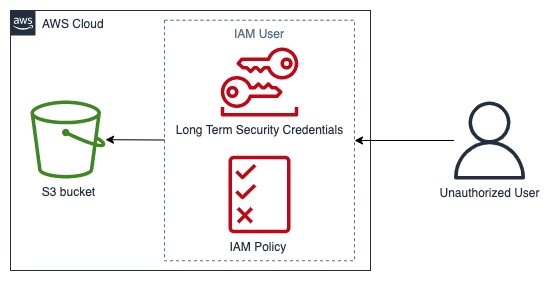
At 2:00 AM, days after AWS Security Incident Response has been set up, the service detects a combination of suspicious activities through GuardDuty findings, including anomalous IAM user behavior (such as shown in Figure 3), unusual API calls from unknown IP addresses, and a surge of Amazon Elastic Compute Cloud (Amazon EC2) instance creations that deviate from your account’s normal baseline. This pattern of activities matches known threat behaviors monitored by GuardDuty Extended Threat Detection. Without the service, security teams would need to manually analyze and correlate these separate findings across accounts and Regions. Instead, the service automatically identifies the pattern of suspicious activities.

Figure 3: Pattern of potentially suspicious activity
One of the anomalous behaviors is a surge of unrecognized EC2 instance creations, complete with SSH keys (secure credentials used for remote access) and security group configurations (firewall rules that control network traffic) allowing internet connectivity. Using this example scenario, let’s walk through how the service’s automated monitoring, triage and containment capabilities, access management, API actions for custom integrations, collaboration tools, and 24/7 AWS security experts work together to help you navigate security incident response challenges across your AWS environment.
Incident Response Timeline
    dateFormat HH:mm
    axisFormat %H:%M

    section Detection
    GuardDuty Alerts          :02:00, 15m
    Automated Analysis        :after Detection, 10m

    section Investigation
    Case Creation             :02:25, 5m
    Team Notification         :02:30, 5m
    Initial Assessment        :02:35, 25m

    section Response
    AWS CIRT Engagement       :03:00, 30m
    Resource Tagging          :03:30, 15m
    Containment Actions       :03:45, 30m

    section Resolution
    Threat Elimination        :04:15, 30m
    Service Restoration       :04:45, 45m
    Documentation             :05:30, 30m
With the initial detection complete, the next phase focuses on centralizing and analyzing the security findings to understand the full scope of the incident.
Centralizing security findings: A systematic approach
GuardDuty begins to generate findings in your enabled Regions.
Note: GuardDuty must be enabled in your accounts and Regions. For setup instructions, see the GuardDuty documentation.
Because AWS Security Incident Response is integrated with GuardDuty, these findings are automatically sent to the service for internal processing, analysis, and auto-triage without manual effort. The service’s proactive response and alert triaging feature analyzes multiple factors, including your account’s historical baseline activity, specific GuardDuty finding types, and correlation patterns across accounts. In this case, it identified anomalous EC2 instance creation activity that deviated significantly from your environment’s normal patterns.
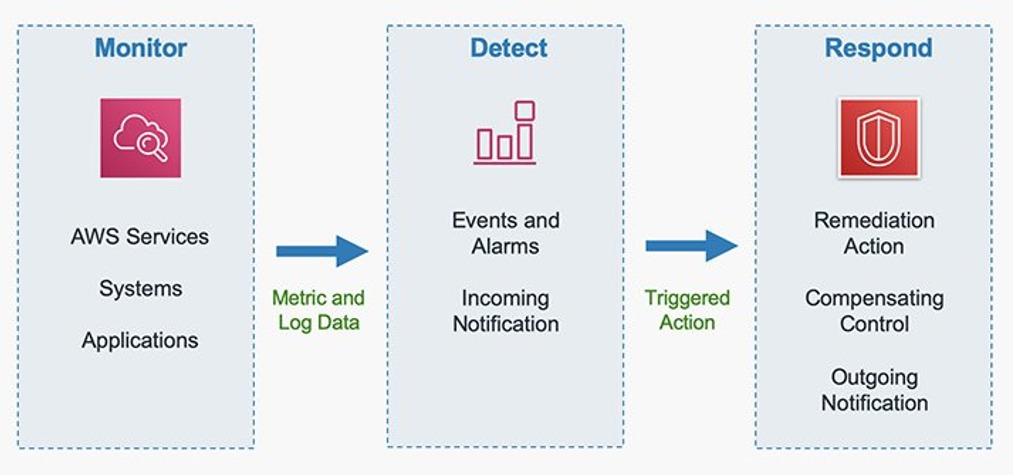
When the service identifies a true positive, an AWS Security Incident Response case is opened automatically (see Figure 4), resulting in a notification to the incident response team you configured earlier. A central benefit is how the service correlates disparate events—connecting the instance creations with the security group modifications—to paint a complete picture of the potential security event.

Figure 4: Automated incident remediation flow
This proactive monitoring and analysis, as documented in your monthly service reports, demonstrates tangible benefits by reducing alert fatigue, and providing intelligent triage capabilities to SOC teams every day. The service’s automated analysis and correlation capabilities set the stage for rapid response when security events occur, which means that your team can focus on strategic security initiatives instead of spending time manually investigating alerts. The service feature helps you maintain strong security in two ways:
- Comprehensive monitoring across configured Regions.
- Integration with third-party security tools. This automated approach reduces the time, cost, and impact of security events.
As the investigation progresses from initial detection to detailed analysis, the GuardDuty integration provides crucial insights into the threat patterns.
From detection to action: The GuardDuty integration story
As your security team responds to the internal detection mechanisms, AWS Security Incident Response processes security findings in three key steps:
- It analyzes GuardDuty alerts to identify genuine security threats
- Using GuardDuty Extended Threat Detection, it correlates related events to identify threat patterns
- It tracks the threat sequence, from initial actions (deleting logs or creating unauthorized access) through to potential data theft attempts
For this event, the sequence started with the deletion of CloudTrail logs, followed by the creation of unauthorized access keys. As the threat progressed, the service identified suspicious Amazon Simple Storage Service (Amazon S3) object access patterns and potential data exfiltration attempts, along with sophisticated evasion techniques and persistence mechanisms. Each of these signals maps directly to specific MITRE ATT&CK® tactics, techniques and procedures (TTPs), revealing the systematic nature of a potential ransomware threat. For detailed mapping of AWS Security Incident Response findings to MITRE ATT&CK® frameworks, see Mapping AWS security services to MITRE frameworks for threat detection and mitigation.
The service assists in correlation and analysis, evaluating patterns such as deletion of CloudTrail trails, creation of new access keys, and suspicious actions targeting S3 objects. When the AI and machine learning (AI/ML) capabilities of GuardDuty detect these concerning patterns over periods of time, the service automatically elevates the situation by creating an AWS Security Incident Response case on your behalf, bringing additional resources and focused attention to the situation. The incident response team defined in the earlier steps are then notified by email or other methods (shown in Figure 5) that a new triaged event has been created and to begin their investigations.
The benefits include the service coordinating communication across your affected accounts. Instead of juggling multiple alerts and trying to piece together the scope of the potential ransomware incident, GuardDuty Extended Threat Detection provides a comprehensive view of the threat sequence, while the AWS Security Incident Response case offers a single, coherent channel for triaging these signals and providing coordination as your global team comes online to join the response effort.

Figure 5: Incident alert message
Additional examples and further information are available in Introducing Amazon GuardDuty Extended Threat Detection: AI/ML attack sequence identification for enhanced cloud security.
Note: For brevity, Security Hub’s workflow details have been omitted because they mirror the monitoring and escalation processes described above for GuardDuty. Both services integrate closely and share similar operational patterns, with GuardDuty findings being sent to Security Hub within five minutes of detection. Security Hub enhances security coverage by aggregating findings from multiple AWS services and third-party partners.
With the threat patterns identified, your team moves to the next phase—engaging AWS CIRT for specialized expertise and advanced investigation capabilities.
Partnering with AWS CIRT through the incident response case
Your team continues investigating the event and discovers that they need additional assistance. An authorized user in your account opens a service supported case to request assistance from AWS.
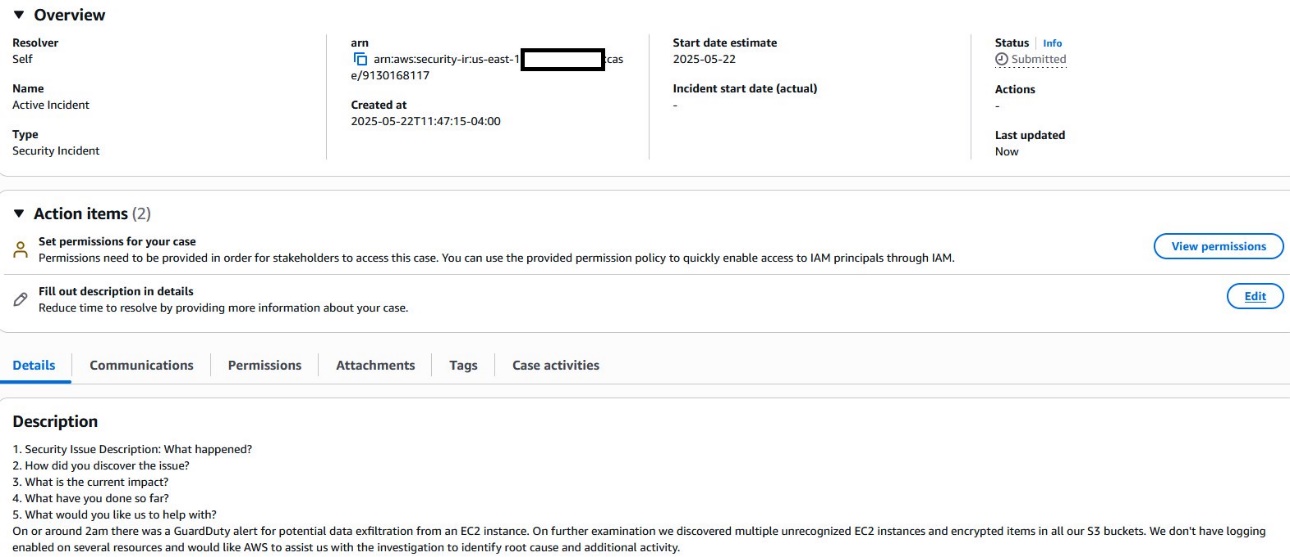
The AWS Security Incident Response case establishes a direct communication channel with AWS CIRT (shown in Figure 6) with a one-click escalation of the case within the console, providing immediate access to specialized expertise. Upon case escalation, AWS CIRT engages through the incident response case with a 15-minute acknowledgement timeframe, bringing their advanced tooling and specialized knowledge to analyze patterns across your accounts—even in environments with limited logging capabilities. This partnership delivers:
- Real-time collaboration through conference bridge video calls
- Advanced artifact analysis and pattern recognition
- Technical guidance for investigation and containment
- Recommendations for improving security posture

Figure 6: Connect with the AWS CIRT
Figure 6 is an example of how this would appear in your account, with the resolver set to Self for a self-managed case.
Returning to the scenario, you discover that multiple accounts have insufficient logging enabled—which limits the available investigation data. While AWS CIRT can provide additional insights through specialized tooling, maintaining comprehensive logging across your accounts remains crucial for security visibility, compliance requirements, and thorough incident investigations. The capabilities of AWS CIRT complement—but do not replace—proper logging practices. This capability provides an understanding of the scope of the incident, as they see patterns and activities otherwise invisible to you.
The collaboration begins with AWS CIRT analyzing your environment using their tooling, looking for anomalous patterns beyond what you see in your immediate logs. Through the incident response case, they help you understand the scope of your situation by:
- Communicating their findings
- Recommending additional investigation paths
- Sharing analysis showing similar EC2 instance creation patterns from other environments
AWS CIRT uses the incident response case to establish a bridge call, bringing together their team and yours for real-time collaboration. During these calls, AWS CIRT shares their ongoing analysis of artifacts and service data, helping you understand what happened, why it happened, and how to prevent similar issues in the future. They also provide guidance on implementing proper logging across your accounts to improve your future security posture.
Managing the incident through intelligent tagging
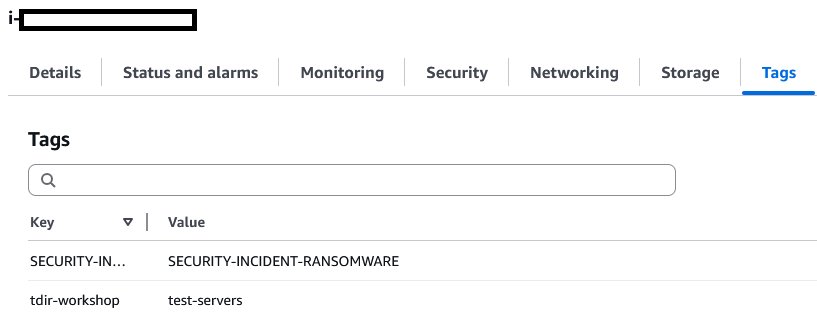
As AWS CIRT begins their analysis, your team implements real-time resource tagging using the incident case ID. This systematic tagging approach proves crucial for tracking and managing the suspicious EC2 instances across your accounts. By using tags, you can quickly implement isolation policies and track costs while maintaining clear documentation of affected resources throughout the investigation.
Your tag-based approach helps track affected resources to implement isolation policies. You used the incident case ID tags to quickly identify resources connected to the incident, which you use to apply targeted access controls and containment measures. The tags also help you track costs associated with the incident, giving your finance team precise visibility into the event’s financial impact.
Working alongside the AWS Security Incident Response service, you find that using the incident case ID as your primary tag key (shown in Figure 7) created a consistent way to correlate resources across affected accounts. This proves especially helpful when coordinating with AWS CIRT, because you can quickly direct them to specific resources requiring investigation. Even after containment, these tags continue to provide value in supporting your post-incident analysis and helping you implement targeted security controls based on what you learn from the incident.

Figure 7: Incident tags
Automated containment options through Systems Manager integration
While working with AWS CIRT to understand the incident scope, you can also use Systems Manager to help automatically contain threats. Your team previously deployed the required CloudFormation StackSets across your organization, enabling Amazon EC2 containment actions through Systems Manager.
The setup process required deploying CloudFormation StackSets with specific IAM roles and Systems Manager configurations across your accounts. This infrastructure allows the AWS Security Incident Response service to make containment actions on your behalf. These actions can be reversed if needed—similar to using an undo function—so that you can restore systems to their previous state.
When authorized through your pre-deployed CloudFormation StackSets, AWS Security Incident Response service can request Systems Manager to implement containment measures. Containment actions require explicit customer authorization and proper IAM permissions to be configured in advance. The service isolates the tagged suspicious instances by modifying their security groups and network access, while preserving their state to maintain forensic integrity for analysis.
The containment process happens in three steps:
- Isolate: Remove compromised instances from security groups
- Preserve: Create backup copies (snapshots) of affected systems
- Investigate: Collect system information using Systems Manager
These actions can be reversed if needed, supporting containment decisions for legitimate workloads.
The automation capabilities help streamline containment procedures across multiple instances, reducing the time taken to contain impacted resources. The service maintains detailed logs of each action in the incident response case, providing your team with clear visibility into the containment efforts.
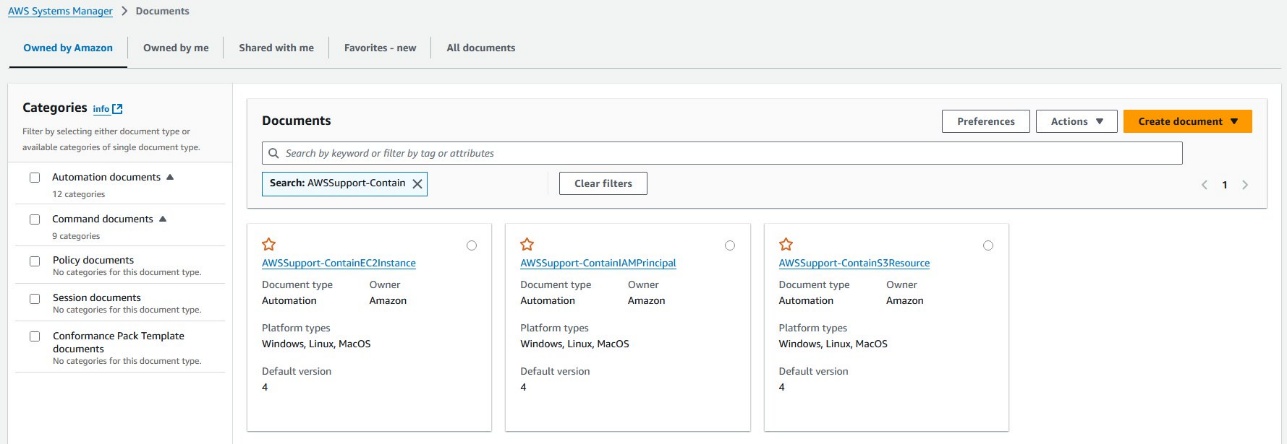
Through this response capability, combined with the guidance from AWS CIRT, you can contain the incident’s spread within minutes rather than hours. The Systems Manager integration provides a reliable way to implement containment actions while preserving evidence for investigation (shown in Figure 8).

Figure 8: Systems Manager documents for containment actions
Resolution and lessons learned
As the incident moves toward resolution, your team works through a systematic process to verify containment, alleviate threats, and restore services. Working alongside AWS CIRT through the AWS Security Incident Response case, you implement a structured approach to make sure that affected resources are secured and normal operations can safely resume. The immediate resolution actions fall into three main categories:
- Containment confirmation through Systems Manager verification
- Verify security group modifications are in place
- Confirm network isolation of affected instances
- Validate that automated containment actions were successful
- Review Systems Manager logs for containment action completion
- Verification of threat alleviation across affected resources
- Analyze GuardDuty findings to confirm that there’s no new suspicious activity
- Review tagged resources for complete containment
- Verify termination of unauthorized access attempts
- Confirm removal of persistence mechanisms
- Check for remaining unauthorized IAM access
- Service restoration and access control normalization
- Restore legitimate workload access based on verified baselines
- Implement updated security group configurations
- Reset affected IAM credentials and access keys
- Re-establish normal network connectivity for verified clean resources
- Update resource tags to reflect post-incident status
Documentation and reporting:
As the incident reaches resolution, AWS Security Incident Response service compiles a comprehensive incident timeline. This documentation accelerates your reporting process, helping you quickly generate required reports for executives, regulators, and cyber insurance providers—all from within the incident response case.
The incident response case captures the complete timeline of events, starting with GuardDuty Extended Threat Detection identifying the initial threat sequences. Each step of the incident response is documented, from the moment suspicious EC2 instance creations were detected, through the MITRE ATT&CK® tactics observed, to the containment actions implemented through Systems Manager integration, and finally to the resolution steps that proved effective.
Long-term Improvements: Through this collaborative post-incident review process, your team:
- Implements enhanced logging based on AWS CIRT recommendations
- Updates security controls to help prevent similar incidents
- Improves incident response processes based on lessons learned
- Strengthens your security posture through targeted improvements
Conclusion
This example illustrates how AWS Security Incident Response service can enhance security operations through automated detection, triage, containment, access, and coordinated response capabilities. The service’s integration with AWS Security Hub and Amazon GuardDuty provides efficient handling of security events, while the optional escalation to the AWS CIRT can provide valuable expertise and specialized tooling to help accelerate every stage of your incident response lifecycle and strengthen your security posture.
AWS Security Incident Response service serves as a critical component of a comprehensive security operations strategy, delivering measurable benefits through:
- Continuous threat monitoring for automated correlation and machine learning to identify high-priority security risks while minimizing false positives.
- Reduced incident response times through automated detection and coordinated response
- Enhanced investigation capabilities through direct AWS CIRT collaboration
- Streamlined, rapid containment
- Comprehensive incident documentation and audit trails to support and accelerate reporting requirements
- Cost savings of up to 58 percent per incident
To prepare for, respond to and recover from security incidents faster and more efficiently today, visit AWS Security Incident Response or contact your AWS account team to schedule a discussion.
Additional resources
Here are some additional AWS resources that your teams can use to further improve your security incident response capabilities:
Before an event:
- AWS Customer Playbook Framework: Publicly available response frameworks that use AWS CIRT lessons learned from security events
- Assisted Log Enabler: A tool that assists customers to enable logs, including the following: Amazon VPC Flow Logs, AWS CloudTrail, Amazon Elastic Kubernetes Service audit and authenticator logs, Amazon Route 53 Resolver Query Logs, Amazon S3 server access logs, and Elastic Load Balancing logs
During an event:
- Athena Security Analytics Bootstrap: A tool for customers who need a quick method to set up Amazon Athena and perform investigations on AWS service logs archived in S3 buckets
Before or following an event: