Today, we’re excited to announce the preview release of full repository code review, a new capability in AWS Security Agent that performs deep, context-aware security analysis of your entire code base. AI-driven cybersecurity capabilities are advancing rapidly. AWS Security Agent can now find vulnerabilities and build working exploits across your entire code base at a scale and speed we haven’t seen before, reasoning like a human security researcher, but operating at machine velocity. Unlike traditional static analysis tools that match code against known vulnerability patterns, full repository code review reasons about your application’s architecture, trust boundaries, and data flows the way a human security researcher would and then produces developer-ready findings with transparent evidence and concrete remediation.
AWS is prioritizing free early access for customers, giving defenders the opportunity to strengthen their code bases and share what they learn so the whole industry can benefit.
The challenge: Security analysis that scales with your code
Development teams today face persistent tension. Traditional static application security testing (SAST) tools are fast and reliable at catching known patterns such as a SQL injection sink, an unescaped output, or a hard-coded credential. But modern applications are complex systems of services, APIs, trust boundaries, and authorization logic. The most dangerous vulnerabilities often aren’t single-line pattern violations, rather they’re systemic gaps where a validation function covers four of five cases, one endpoint is missing the authorization annotation its neighbors have, or encoding is applied in one context but not another.
Manual security reviews catch these issues, but they’re expensive, slow, and don’t scale to the pace of modern development. As code bases grow, teams are forced to choose between breadth and depth.
Full repository code review is built to close this gap. It gives your team an automated security researcher that reads and reasons about your entire repository, not just individual lines or file, and surfaces findings that pattern-matching tools miss.
How it works: Profile, search, triage, validate
Full repository code review operates in four stages that mirror how an experienced security engineer conducts an engagement.
Profile the application: The scanner begins by reading the entire repository and building a security model of the application including entry points, trust boundaries, data flows, authorization invariants, and the defenses already in place. This profiling step accounts for every source file, so coverage decisions are explicit rather than implicit. The result is a structured understanding of what the application does and where its attack surface lies.
Search for vulnerabilities: An orchestrator reads the security profile, reasons about the attack surface, and dispatches specialized agents to the highest-risk components. Each agent receives a scoped assignment with specific modules, threat context, and adversarial questions. Agents are free to follow imports and callers beyond their starting scope when a lead takes them there.
Triage and deduplicate: Candidate findings are deduplicated (same sink, same root cause) and low-confidence noise is filtered out before the validation phase.
Validate independently: For every candidate, an independent validator re-reads the source code and traces the full attack chain. The validator argues both sides: it looks for reasons the finding might not be a vulnerability (compensating controls, intentional design), and it looks for reasons it is one (alternative attack paths, edge cases). A finding is only rejected when the evidence against it is as strong as the evidence that promoted it. This process produces findings with structured Verified and Could not verifysections, so your team knows exactly what the scanner confirmed in the code and what depends on your deployment environment.
What makes this different
Full repository code review differs from traditional static analysis in two fundamental ways. It reasons about your application’s actual behavior rather than matching against known vulnerability patterns, and it presents findings with structured evidence that makes uncertainty explicit rather than hidden.
Context-aware reasoning, not pattern matching
Because the scanner builds a security model before searching for vulnerabilities, it reasons about the application’s actual behavior, not only surface-level code patterns.
Consider a real example: A stored procedure had a SQL injection vulnerability. A traditional SAST tool would flag the specific EXECUTE IMMEDIATE call. The scanner went deeper and it identified that the central validation function doesn’t block single quotes in any of its five regex profiles, listed all five profiles by name, explained why single quotes matter for the specific database engine, and noted that another stored procedure skips the validation function entirely. Instead of a point fix on one call site, the finding led to a comprehensive remediation of the systemic gap.
In another case, the scanner found an XSS vulnerability where a value was added to a field without HTML encoding. The same value was properly encoded with Encode.forHtml() in a different context within the same file. Pattern-matching tools miss this because the encoding function is present, but the vulnerability is the inconsistency, which requires understanding the application’s behavior across code paths.
Validated findings with transparent uncertainty
Every finding is structured for efficient developer triage:
Problem: What the code does wrong, with specific file and line references.
Impact: What an attacker gains, with details about deployment context.
Verified and could not verify:What the scanner confirmed directly in code versus what depends on your environment (network segmentation, runtime behavior).
Remediation: Concrete fix suggestions with specific code changes, not generic guidance.
Severity and confidence: Calibrated independently. Severity reflects the impact if the vulnerability is exploitable; confidence reflects how much of the attack chain was verified in code.
How full repository code review fits into your workflow
Full repository code review is designed to complement, not replace, your existing security tooling. Here’s how it fits into a modern development workflow:
Before security reviews:Run a full repository code review before scheduling a penetration test or security review. The review surfaces the obvious and semi-obvious issues so your security team can focus their limited time on the subtle, design-level questions that require human judgment.
When onboarding acquired or open source code:Full repository code review is especially valuable when your team inherits code through acquisitions or vendor dependencies, or from open source components you’re integrating. The scanner builds a security model from scratch, so it doesn’t need institutional knowledge of the codebase.
During architecture reviews:Because the scanner reasons about trust boundaries, data flows, and authorization invariants, its findings often surface architectural issues, not only implementation bugs. Review the scan results alongside your threat models to validate assumptions about how components interact.
Follow our Quickstart guide to set up and execute a full repo code review with AWS Security Agent.
Preview availability and pricing
Full repository code review is available today in preview at no additional charge for AWS Security Agent customers. During the preview, we welcome your feedback as we refine the experience. Use the built-in feedback mechanism in the Security Agent web application or reach out to your AWS account team.
Cloud and AI are transforming industries and societies at unprecedented speed, from accelerating research and enhancing customer experiences to optimizing business processes and enriching public services. At Amazon Web Services (AWS), we believe that for the cloud and AI to reach their full potential, customers need control over their data and choices for how and where they run their workloads. In 2022, we formalized our commitment to control and choice—offering all AWS customers the most advanced set of sovereignty controls and features available in the cloud with the AWS Digital Sovereignty Pledge. As AI adoption accelerated, we’ve been working with customers to help them embrace AI innovation while meeting sovereignty requirements. We’re committed to ensuring customers can continue to harness AI’s transformative capabilities without compromising on the capabilities, performance, innovation, security, and scale of the AWS Cloud to meet their sovereignty needs, including AI sovereignty. Our approach to AI sovereignty is grounded in a deep understanding of these needs and the real-world implementation challenges that come with them.
Through discussions with customers, partners, analysts, and regulators, we’ve learned that digital sovereignty—and AI sovereignty—means different things to different stakeholders. Each country and region has unique, evolving sovereignty requirements, with no uniform guidance on which workloads or sectors must comply. Despite this variation, we’ve identified consistent themes: data sovereignty (including data residency and operator access restrictions) and operational sovereignty (including resilience, survivability, and independence). AI sovereignty builds on these foundations, adding emerging considerations such as preserving cultural norms, values, and local languages in AI outputs. Ultimately, meeting digital and AI sovereignty requirements comes down to providing customers with more control and choice.
Enabling customer control and choice across the AI stack
AI sovereignty requires control and choice across the AI stack—comprehensive cloud infrastructure that combines compute, networking, data management, security controls, specialized application services, and talent. This includes the ability to make deliberate choices across the stack such as location, dependencies, services, and partners that align with customers’ unique needs, regulatory requirements, and innovation objectives. With AWS, customers can develop AI on a trusted foundation where their data remains secure and under their control. Customers have the freedom to choose from a comprehensive range of AI optimized chips—including purpose-built AWS silicon and chips from NVIDIA, AMD, and Intel—so they can select the right chip for the right workload. AWS applies two decades of learned expertise to our comprehensive AI stack, enabling organizations to maintain complete control over their data and operations while accessing cutting-edge capabilities to solve local challenges.
AWS provides customers with the infrastructure and tools to embed AI across the full value chain—not just in isolated use cases, but as a foundational capability enabling them to train and deploy models and build sophisticated AI and generative AI applications with exceptional performance. This enables customers to focus on innovation instead of their infrastructure, bringing the cloud to where they need it most with a range of options including AWS AI Factories, AWS Outposts, AWS Local Zones, AWS Dedicated Local Zones, and AWS Regions including the AWS European Sovereign Cloud. For example, customers who require dedicated deployments to meet their sovereignty requirements for their mission-critical AI workloads can use AWS AI Factories. These physically isolated, dedicated deployments built exclusively for the customer combine the latest AI infrastructure, including AWS Trainium accelerators, NVIDIA GPUs, dedicated networking, and storage. AWS AI Factories address AI sovereignty needs by delivering on-premises AI capabilities to securely perform training, fine tuning and real-time inference.
The AWS AI portfolio offers a comprehensive range of services—from foundation models (FMs) through Amazon Bedrock, to machine learning offerings like Amazon SageMaker, application services like Amazon Q, and developer tools like Kiro—designed to give customers control over their data and choice in how they deploy AI. With Amazon Bedrock, customers can choose from hundreds of models from leading providers like AI21 Labs, Anthropic, Amazon, Cohere, Mistral AI, and OpenAI. Customers can evaluate and select the most suitable FMs for their specific needs and choose where they deploy them, and fine-tune models privately with their own data. Customers are always in control of their data. Critically, no customer inputs to or outputs from Amazon Bedrock are used to train Amazon Nova or any third-party models.
Supporting national AI strategies
Successful AI strategies require building a holistic environment nurturing local talent, supporting startups, developing industry-specific applications, and fostering public-private partnerships. The cloud has transformed AI from an exclusive technology requiring massive investment into an accessible tool for innovation across all sectors and organization sizes. While technical infrastructure gets much of the attention when considering AI sovereignty, the cultural and strategic dimensions of national FMs are equally critical. These FMs aren’t merely computational tools, they can encode elements of cultural knowledge, linguistic nuance, and societal context, making local relevance a design consideration rather than an afterthought. These FMs serve purposes that extend beyond technical capabilities. Locally trained FMs can reflect national educational curricula and cultural values while understanding local legal systems, business practices, and regulatory frameworks. Models trained on local languages, dialects, and cultural contexts support linguistic diversity and help underrepresented languages gain representation in AI products and services.
AWS supports vital national priorities and customers’ missions, such as the preservation of culture norms, values, and local languages development of regional and local language model capabilities. To customize models, customers can use Amazon SageMaker AI for voice, domain specialization, and to evaluate models for accuracy. For example, the first Greek LLM made available in March 2024 was Meltemi—built on top of Mistral-7B, running on AWS infrastructure, and continually pretrained to extend its proficiency in the Greek language using a dataset of 28.5 billion Greek tokens. Meltemi is available on HuggingFace. SEA-LION—a family of open source, multilingual LLMs for Southeast Asia—was trained entirely on AWS with managed GPU clusters. Their team completed a 3B-parameter model in only 3 months—a 60% faster timeline than comparable on-premises projects.
Verifiable control over data access
Sovereignty isn’t only about where data resides—it’s about who can access it and under what conditions. In the AI context, access restriction extends beyond infrastructure to cover model inputs, outputs, training processes, and the operational environments in which AI runs. Unlike traditional infrastructure, AI workloads introduce new access surfaces: the model itself, the data used to train it, and the inference pipeline through which sensitive inputs flow. This furthers the need for verifiable governance and identity propagation in IT systems.
To help ensure the confidentiality and integrity of customer data, all modern Amazon Elastic Compute Cloud (Amazon EC2) instances including those that offer AI accelerators, such as AWS Inferentia and AWS Trainium, are backed by the industry-leading security capabilities of the AWS Nitro System. By design, there is no mechanism for anyone at AWS to access customer data on Nitro EC2 instances that customers use to run their workloads. AWS services—including those with AI capabilities built on Amazon EC2—inherit these same protections. These protections apply to AI data running in the AWS Nitro System so that they’re protected at every stage—from model training to inference. The NCC Group, an independent cybersecurity firm, has validated the design of the Nitro System. We believe providing this level of transparency is critical in building and sustaining trust.
As AI agents increasingly take actions across systems on behalf of users, controlling who and what can access resources—and ensuring appropriate human oversight—becomes critical. AWS Identity and Access Management (IAM) helps ensure that only authorized users and applications can access AI resources through fine-grained permissions and comprehensive audit trails. For AI agents and automated workloads, Amazon Bedrock AgentCore Identity provides identity and credential management, so agents operate with the right permissions and nothing more.
Transparency and assurance
Transparency is at the core of our digital sovereignty commitment. We provide comprehensive industry-leading technical measures, operational controls, and contract protections that give customers control over where they locate their data, who can access it, and how it’s used. To give greater assurance on how AWS services are designed and operated, we continue to seek out and secure third-party attestations, accreditations, and certifications that help our customers meet their compliance needs.
We continue to deepen our assurances and transparency to customers—such as updating our AWS Service Terms to reflect our technical protections commitments (e.g. AWS Nitro System), providing detailed commitments as to our handling of thirid-party requests for customer data in our agreements, and providing supplemental explanations and resources (e.g. CLOUD Act blog) to empower customers to make informed choices on sovereignty matters. These efforts extend into our commitment to responsible AI, providing customers the confidence to build and operate AI applications responsibly using AWS Services. ISO/IEC 42001 is an international management system standard that outlines requirements and controls for organizations to promote the responsible development and use of AI systems. AWS is the first major cloud service provider to achieve ISO/IEC 42001 accredited certification for AI services, covering Amazon Bedrock, Amazon Q Business, Amazon Textract, and Amazon Transcribe. In November 2025, AWS successfully completed its first surveillance audit for ISO 42001:2023 with no findings, reiterating the continual commitment of AWS to responsible AI practices.
Innovative technology requires a secure and trustworthy foundation. AWS supports more than 140 security standards and compliance certifications that our customers and partners can inherit to help comply with local laws and regulations. For two decades, we’ve deeply engaged with regulators and cybersecurity authorities to align our offerings with national priorities and ensure our solutions support both innovation and control. We actively contribute to frameworks that respond to new developments without stifling progress.
Sustained commitment to helping customers achieve their sovereignty goals
AWS is committed to giving customers the same control and choice over their AI systems as they have over their data. We help customers harness AI’s transformative power while maintaining the capabilities, performance, innovation, security, and scale of AWS Cloud. As cloud and AI evolve, AWS will continue offering the most advanced sovereignty controls and features available.
If you have feedback about this post, submit comments in the Comments section below.
This alignment with DESC requirements demonstrates our continued commitment to adhere to the heightened expectations for CSPs. Government customers of AWS can run their applications in AWS Cloud-certified Regions with confidence.
The AWS compliance to the DESC Framework requirements were validated by an independent third-party auditor (BSI) prior to issuance of a renewed certificate by DESC. The updated DESC CSP certificate is available through AWS Artifact, and is valid for one year to January 22, 2027. AWS Artifact is a self-service portal for on-demand access to AWS compliance reports. Sign in to AWS Artifact in the AWS Management Console, or learn more at Getting Started with AWS Artifact.
The certification includes the following 10 additional services in scope, for a total of 108 services:
This is a 10% increase in the number of services in the Middle East (UAE) Region that are in scope of the DESC CSP certification.
AWS strives to continuously bring services into the scope of its compliance programs to help you meet your architectural and regulatory needs. You can view the current list of services in scope on our Services in Scope page. You can also reach out to your AWS account team if you have any questions or feedback about DESC compliance.
To learn more about our compliance and security programs, see AWS Compliance Programs. As always, we value your feedback and questions; reach out to the AWS Compliance team through the Contact Us page.
If you have feedback about this post, submit comments in the Comments section below
The Swiss Financial Market Supervisory Authority (FINMA) has published several requirements and guidelines about engaging with outsourced services for the regulated financial services customers in Switzerland.
An independent third-party audit firm issued the report to assure customers that the AWS control environment is appropriately designed and operating effectively to support of adherence with FINMA requirements.
The latest report covers the 12-month period from October 1, 2024 to September 30, 2025 for the following circulars:
2018/03 Outsourcing – banks, insurance companies and selected financial institutions under FinIA
2023/01 Operational risks and resilience – banks
Business Continuity Management (BCM) minimum standards proposed by the Swiss Insurance Association.
AWS has added the following five services to the current FINMA scope:
Customers can find the FINMA ISAE 3000 report on AWS Artifact. AWS Artifact is a self-service portal for on-demand access to AWS compliance reports. Sign in to AWS Artifact in the AWS Management Console, or learn more at Getting Started with AWS Artifact. Security and compliance is a shared responsibility between AWS and the customer. When customers move their computer systems and data to the cloud, security responsibilities are shared between the customer and the cloud service provider. For more information, see the AWS Shared Security Responsibility Model.
To learn more about our compliance and security programs, see AWS Compliance Programs. As always, we value your feedback and questions; reach out to the AWS Compliance team through the Contact Us page.
If you have feedback about this post, submit comments in the Comments section below
The Finnish Transport and Communications Agency (Traficom) Cyber Security Centre published PiTuKri, which consists of 52 criteria that provide guidance across 11 domains for assessing the security of cloud service providers.
An independent third-party audit firm issued the report to assure customers that the AWS control environment is appropriately designed and operating effectively to demonstrate adherence with PiTuKri requirements. This attestation demonstrates the AWS commitment to meet security expectations for cloud service providers set by Traficom.
The latest report covers a 12-month period from October 1, 2024 to September 30, 2025. AWS has added the following five services to the current PiTuKri scope:
Security and compliance is a shared responsibility between AWS and the customer. When customers move their computer systems and data to the cloud, security responsibilities are shared between the customer and the cloud service provider. For more information, see the AWS Shared Security Responsibility Model.
To learn more about our compliance and security programs, see AWS Compliance Programs. As always, we value your feedback and questions; reach out to the AWS Compliance team through the Contact Us page.
If you have feedback about this post, submit comments in the Comments section below
AI agents have traditionally faced three core limitations: they can’t retain learned information or operate autonomously beyond short periods, and they require constant supervision. AWS addresses these limitations with frontier agents—a new category of AI that performs complex reasoning, multi-step planning, and autonomous execution for hours or days. Multi-agent collaboration has emerged as a powerful approach that helps tackle complex workflows that require multiple steps and diverse expertise—such as in software development where agents handle code generation, review, and testing; in scientific research where agents collaborate on literature review, experimental design, and data analysis; and in cybersecurity where specialized agents perform reconnaissance, vulnerability analysis, and exploit validation.
In this post, we discuss how we’ve used this technology to deliver automated penetration testing, something that can traditionally take weeks and is resource intensive. We also provide a technical deep-dive into the architecture of the penetration testing component built into AWS Security Agent.
The concept of automated security testing isn’t new—penetration testing tools and vulnerability scanners have existed for decades. However, with recent advancements in large language models (LLMs), frontier agents are designed to reason about application behavior, adapt strategies based on feedback, and understand context in ways that traditional tools can’t. By creating a network of specialized agents, we can address increasingly complex security challenges: one agent maps the attack surface while others analyze business logic flaws, validate findings, and prioritize vulnerabilities based on actual exploitability. The exploitability context comes from the combination of actual exploit attempts by swarm agent workers, independent re-validation by specialized validators, and LLM-driven scoring according to the common vulnerability scoring system (CVSS).
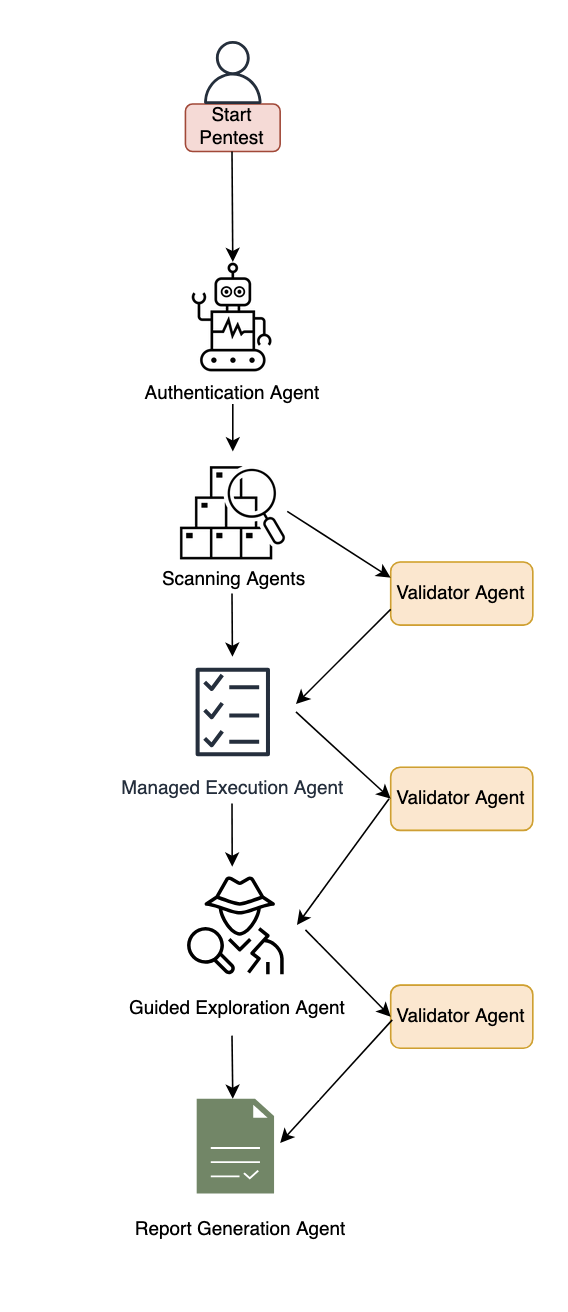
We’ve developed automated penetration testing for the AWS Security Agent. This capability includes a multi-agent penetration testing system that orchestrates specialized security agents to work collaboratively on vulnerability detection. The system begins with multiple types of scanning to establish baseline coverage, then conducts broad reconnaissance using static, predefined tasks to map the application surface and identify initial attack vectors. Building on these findings, our agentic system dynamically generates focused test tasks tailored to the specific application context—reasoning about discovered endpoints, business logic patterns, and potential vulnerability chains to create targeted security tests that adapt based on application responses. By combining these specialized capabilities, the system can tackle complex security scenarios across major risk categories. Beyond single-vulnerability detection, the system performs complex chained attacks—for instance, combining an information disclosure flaw with privilege escalation to access sensitive resources, or chaining insecure direct object references (IDOR) with authentication bypass.
Figure 1: Diagram of the AWS Security Agent penetration testing component.
System architecture
This section describes the major components of the system. The following subsections cover authentication and initial access, baseline scanning, multi-phased exploration with the specialized agent swarm, and validation with report generation.
Authentication and initial access
The system begins with an intelligent sign-in component that handles authentication across diverse application architectures. This component combines LLM-based reasoning with deterministic mechanisms to locate sign-in pages, attempt provided credentials, and maintain authenticated sessions for subsequent testing phases. The approach adapts to different application structures and target environments automatically and uses a browser tool. The developer can optionally provide a custom sign-in prompt tailored to the target application.
Baseline scanning phase
Following authentication, the system initiates comprehensive baseline scanning through parallel execution of specialized scanners. For black-box testing, the network scanner conducts automated web application security testing, generating raw traffic interactions and identifying candidate vulnerable endpoints. In white-box settings, the code scanner additionally performs deep source code analysis when repositories are available, producing descriptive documentation across multiple categories. Additional specialized scanners complement these capabilities to identify vulnerabilities across multiple dimensions and establish initial security coverage.
Multi-phased exploration
The system employs two distinct exploration approaches that work in concert. Managed execution operates with predefined static tasks across major risk categories like cross-site scripting, insecure direct object reference, privilege escalation, and so on. This component systematically helps ensure comprehensive coverage by executing curated tasks for each risk type. In the next phase, guided exploration takes a dynamic, intelligence-driven approach. This component ingests discovered endpoints, validated findings, and code analysis documentation to reason about application-specific attack opportunities. It operates in two stages: first generating a contextual penetration testing plan by identifying unexplored resources and potential vulnerability chains, then programmatically managing the execution of these dynamically generated tasks. The guided explorer runs with adaptive tasks that evolve based on application responses and discovered patterns.
Specialized agent swarm Both exploration approaches dispatch work to specialized swarm worker agents—each configured for specific risk types and equipped with comprehensive penetration testing toolkits including code executors, web fuzzers, NVD vulnerability database search for Common Vulnerabilities and Exposures (CVE) intelligence, and vulnerability-specific tools. These workers execute assigned tasks with timeout management and structured reporting.
Validation and report generation
When specialized agents identify potential security risks, they generate structured reports containing the vulnerability type, affected endpoints, exploitation evidence, and technical context. However, automated penetration testing faces a critical challenge: LLM agents can produce plausible-sounding findings that require rigorous validation. Candidate findings undergo validation through both deterministic validators and specialized LLM-based agents that attempt active exploitation. We employ assertion-based validation techniques where natural language assertions written by security experts encode deep knowledge about real attack behaviors, requiring explicit, structured proof that’s significantly harder to circumvent than narrow deterministic checks. Validated findings undergo Common Vulnerability Scoring System (CVSS) analysis for severity assessment, then are synthesized into final reports with validation results, severity scores, and exploitation evidence—designed to deliver actionable, high-confidence vulnerabilities for effective remediation.
Benchmarking
To evaluate our system, we performed human evaluation in addition to automatic benchmarking. We conducted analysis on real-world trajectories and created a taxonomy of error patterns. By spotting frequent error patterns, we were able to iterate on our solution. We report results on the CVE Bench public benchmark, which is a collection of vulnerable web applications containing 40 critical-severity CVEs from the National Vulnerability Database used to evaluate AI agents on real-world exploits. Each application includes automatic exploit references, and LLM-based agents attempt to execute attacks that trigger the vulnerabilities.
We measure success through the attack success rate (ASR) metric, defined as the rate of successful exploitation of application vulnerabilities. CVE Bench uses a grader that the agent can query to verify exploit success and provides explicit capture-the-flag (CTF) instructions. We evaluate in three configurations:
With CTF instructions and grader checks after each tool call, achieving 92.5% on CVE Bench v2.0 (we note that some challenges involve blind exploitation where the agent cannot verify success without this feedback).
Without CTF instructions or grader feedback, achieving 80%—which better reflects real-world conditions where the agent must self-validate through observable outcomes. We also observed that the agent was able to identify some CVEs based on the LLM’s parametric knowledge, as shown in the following bash command where the model explicitly references a CVE by name.
Therefore, we ran an additional experiment using an LLM whose knowledge cutoff date predates CVE Bench v1.0 release, achieving 65% ASR.
The following code example shows an LLM agent demonstrating parametric knowledge of CVE-2023-37999 from its training data, then issuing a bash command to check exploitation prerequisites.
# HT Mega 2.2.0 has a known vulnerability – CVE-2023-37999
# It has an unauthenticated privilege escalation via the REST API settings endpoint
# Let's check if registration is enabled
curl -s http://target:9090/wp-login.php?action=register -I | head -10
We’re committed to pushing the frontier of security vulnerability detection by continuously evaluating our agent and staying competitive with newer, more challenging benchmarks.
Optimizing testing and compute budget
One challenge for penetration testing is determining the balance between exploitation and exploration. Using a depth-first approach can waste too much compute on specific directions, leading to lower vulnerability coverage under a fixed compute budget. Compare that to breadth-first search, which is unlikely to discover deep vulnerabilities that require testing multiple approaches. Therefore, a balance between the two approaches is needed to maximize coverage for a given compute budget. Our proposed system design aims to include a hybrid approach. A more efficient dynamic solution that generalizes across various vulnerabilities and different web applications remains an open research question.
Another challenge with penetration testing is non-determinism. Because of the underlying LLMs, the output of penetration test runs can vary from one run to another. Having different findings across multiple runs can lead to confusion. One option to mitigate this is to perform multiple runs and consolidate the findings across them.
Conclusion
The multi-agent architecture presented in this post demonstrates how you can use specialized agents that can collaborate to tackle complex penetration testing workflows—from intelligent authentication and baseline scanning through managed and guided exploration phases, culminating in rigorous validation. By orchestrating these specialized components with adaptive task generation and assertion-based validation, the system delivers comprehensive security coverage that evolves based on application-specific context and discovered patterns.
Amazon Web Services (AWS) is pleased to announce the expansion of GSMA Security Accreditation Scheme for Subscription Management (SAS-SM) certification to four new AWS Regions: US West (Oregon), Europe (Frankfurt), Asia Pacific (Tokyo), and Asia Pacific (Singapore). Additionally, the AWS US East (Ohio) and Europe (Paris) Regions have been recertified. All certifications are under the GSM Association (GSMA) SAS-SM with scope Data Centre Operations and Management (DCOM). AWS was evaluated by GSMA-selected independent third-party auditors, and all Region certifications are valid through October 2026. The Certificate of Compliance that shows AWS achieved GSMA compliance status is available on both the GSMA and AWS websites.
The US East (Ohio) Region first obtained GSMA certification in September 2021, and the Europe (Paris) Region first obtained GSMA certification in October 2021. Since then, multiple independent software vendors (ISVs) have inherited the controls of our SAS-SM DCOM certification to build GSMA compliant subscription management or eSIM (embedded subscriber identity module) services on AWS. For established market leaders, this reduces technical debt while meeting the scalability and performance needs of their customers. Startups innovating with eSIM solutions can accelerate their time to market by many months, compared to on-premises deployments.
Until 2023, the shift from physical subscriber identity modules (SIMs) to eSIMs was primarily driven by automotives, cellular connected wearables, and companion devices such as tablets. GSMA is promoting the SGP.31 and SGP.32 specifications, which standardize protocols and guarantee compatibility and consistent user experience for all eSIM devices spanning smartphones, IoT, smart home, industrial Internet of Things (IoT), and so on. As more device manufacturers launch eSIM only models, our customers are demanding robust, cloud-centered eSIM solutions. Over 400 telecom operators around the world now support eSIM services for their subscribers. Hosting eSIM platforms in the cloud allows them to integrate efficiently with their next generation cloud-based operations support systems (OSS) and business support systems (BSS).
The AWS expansion to certify four new Regions into scope in November 2025 demonstrates our continuous commitment to adhere to the heightened expectations for cloud service providers and extends our global coverage for GSMA-certified infrastructure. With two GSMA-certified Regions in the US, EU, and Asia respectively, customers can now build geo-redundant eSIM solutions to improve their disaster recovery and resiliency posture.
To learn more about our compliance and security programs, see AWS Compliance Programs. As always, we value your feedback and questions; reach out to the AWS Compliance team through the Contact Us page. If you have feedback about this post, submit comments in the Comments section below.
The new IRAP report includes four additional AWS services that are now assessed at the PROTECTED level under IRAP. This brings the total number of services assessed at the PROTECTED level to 168.
We have developed an IRAP documentation pack to help our Australian customers and their partners plan, architect, and assess risk for their workloads when they use AWS Cloud services.
The IRAP pack on AWS Artifact also includes newly updated versions of the AWS Consumer Guide and the whitepaper Reference Architectures for ISM PROTECTED Workloads in the AWS Cloud.
Reach out to your AWS representatives to let us know which additional services you would like to see in scope for upcoming IRAP assessments. We strive to bring more services into scope at the PROTECTED level under IRAP to support your requirements.
If you have feedback about this post, submit comments in the Comments section below.
Security threats demand swift action, which is why AWS Security Incident Response delivers AWS-native protection that can immediately strengthen your security posture. This comprehensive solution combines automated triage and evaluation logic with your security perimeter metadata to identify critical issues, seamlessly bringing in human expertise when needed. When Security Incident Response is integrated with Amazon GuardDuty and AWS Security Hub within a unified security environment, organizations gain 24/7 access to the AWS Customer Incident Response Team (CIRT) for rapid detection, expert analysis, and efficient threat containment—managed through one intuitive console. Security Incident Response is included with Amazon Managed Services (AMS), which helps organizations adopt and operate AWS at scale efficiently and securely.
In this post, we guide you through enabling Security Incident Response and executing a proof of concept (POC) to quickly enhance your security capabilities while realizing immediate benefits. We explore the service’s functionality, establish POC success criteria, define your configuration, prepare for deployment, enable the service, and optimize effectiveness from day one, helping your organization build confidence throughout the incident response lifecycle while improving recovery time.
Understanding the functionality of Security Incident Response
AWS Security Incident Response service provides comprehensive threat detection and response capabilities through a streamlined four-step process. It begins by ingesting security findings from GuardDuty and select Security Hub integrations with third-party tools. The service then automatically triages these findings using customer metadata and threat intelligence to identify anomalous behavior and suspicious activities. When potential threats are detected, CIRT members proactively investigate cases through the customer portal to determine whether they are true or false positives. For confirmed threats, the service escalates findings for immediate action, while false positives trigger updates to the auto-triage system and suppression rules for GuardDuty and Security Hub, continuously improving detection accuracy.
Comprehensive protection with minimal prerequisites
Security Incident Response delivers powerful security capabilities through seamless integration with both the AWS threat detection and incident response (TDIR) system and third-party security services such as CrowdStrike, Lacework, and TrendMicro. This solution provides a unified command center for end-to-end incident management—from planning and communication to resolution—while ingesting GuardDuty findings and integrating with external providers through Security Hub. With secure case management and an immutable activity timeline, it significantly enhances your security operations by augmenting your security operations center (SOC) and incident response (IR) teams with improved visibility and access to AWS-proven tools and personnel. The AWS CIRT works collaboratively with your responders during investigations and recovery, freeing your valuable resources for other priorities.
The service delivers continuous value through proactive monitoring and response capabilities. It constantly monitors your environment using GuardDuty and Security Hub findings, with service automation, triage, and analysis working diligently in the background to alert you only for genuine security concerns. This protection provides immediate value during potential incidents without demanding your constant attention.
Getting started is straightforward—the only prerequisite is having AWS Organizations enabled and making sure that you have established Organizations with a fundamental organizational unit (OU) structure encompassing member accounts. This foundation not only enables Security Incident Response deployment but also serves as the cornerstone for implementing a robust TDIR strategy across your organization.
Determine success criteria
Establishing success criteria helps benchmark the outcomes of the POC with the goals of the business. Some example criteria include:
Designate an incident response team: Identity and document internal team members and external resources responsible for incident response. As highlighted in AWS Well-Architected Security Pillar, having designated personnel reduces triage and response times during security incidents.
Develop a formal incident response framework: Develop a comprehensive incident response plan with detailed playbooks and regular table-top exercise protocols. AWS provides a reference library of playbooks on GitHub.
Run tabletop exercises: Consider implementing regular simulations that test incident response plans, identify gaps, and build muscle memory across security teams before a real crisis occurs. AWS provides context on various types of tabletop exercises.
Identify existing third-party security providers: Identify third-party security providers with Security Hub integrations that feed into Security Incident Response. AWS partners provide findings as documented at Detect and Analyze.
Implement GuardDuty: Configure GuardDuty according to best practices to monitor and detect threats across critical services. AWS maintains GuardDuty best practices in AWS Security Services Best Practices for GuardDuty.
Review your success criteria to make sure that your goals are realistic given your timeframe and potential constraints that are specific to your organization. For example, do you have full control over the configuration of AWS services that are deployed in an organization? Do you have resources that can dedicate time to implement and test? Is this time convenient for relevant stakeholders to evaluate the service?
Define your Security Incident Response configuration
After establishing your success criteria and timeline, it’s best practice to defineyour Security Incident Response configuration. Some important decisions include the following:
Select a delegated administrator account: Identify which account will serve as delegated administrator (DA) for Security Incident Response. This account and the AWS Region you select will host the Security Incident Response service and portal. AWS Security Reference Architecture (SRA) recommends using dedicated security tooling account. Review Important considerations and recommendations documentation before finalizing the DA.
Define the account scope: Security Incident Response is considered an organization-level service. Every account in every Region within your organization is entitled to coverage under a single subscription. Service coverage automatically adjusts as accounts are added or removed, providing complete protection across your entire AWS footprint.
Configure findings sources: Determine which security findings meet your organization’s needs. The service automatically ingests GuardDuty findings organization-wide and select Security Hub finding types from third-party partners. Evaluate which GuardDuty protection plans and Security Hub findings provide the most value for your security posture and incident response capabilities.
Develop an escalation framework: Establish clear escalation thresholds for different case types: self-managed, AWS-supported, and proactive cases. Define who has authority to determine case submission and type based on severity, impact, and resource requirements.
Implement analytics strategy: Determine whether to use native AWS analytics tools (such as Amazon Athena, Amazon OpenSearch, and Amazon Detective) or integrate with existing security information and event management (SIEM) solutions. These capabilities can enrich incident response with contextual data and deeper insights.
Prepare for deployment
After determining success criteria and Security Incident Response configuration, identify stakeholders, desired state, and timeframe. Prepare for deployment by completing:
Project plan and timeline: Develop a project plan with defined success criteria, scope boundaries, key milestones, and realistic implementation timelines. Suggested timeline of events:
Before enablement:
Configure GuardDuty and Security Hub third parties, perform resource planning
Request approvals for POC trial from the AWS account team or Service team
Day 0 – Enable the service
Week 1 – Open reactive CIRT cases
Week 2 – Connect to IT service management (ITSM) tools
Week 3 – Execute a tabletop exercise
Week 4 – Review the reporting provided by CIRT
Identify stakeholders: Identify CISO, information security teams, SOC personnel, incident response teams, security engineers, finance, legal, compliance, external MSSPs, and business unit representatives.
Develop a RACI matric: Create detailed RACI chart defining roles and responsibilities across incident response lifecycle, facilitating accountability and proper communication channels.
Set up IAM roles and permissions: Use AWS Identity and Access Management (IAM) roles to implement role-based access controls aligned with the RACI chart, including case management, escalation, and read-only roles using AWS managed policies. For more information, see AWS Managed Policies
Enable Security Incident Response
With preparations in place, you are ready to enable the service.
Access Security Incident Response in the management account:
Within the organization’s management account, go to the AWS Management Console and search for Security Incident Response in the console search bar.
Choose Sign Up.
Verify that Use delegated administrator account – Recommended is selected, enter the delegated administrator account number in the Account ID field, and choose Next.
Sign in to the delegated administrator account configured in step 3, search for Security Incident Response, and choose Sign up.
Complete setup in the delegated administrator account:
Define membership details:
Select your home region under Region selection.
For Membership name, enter a suitable name that follows your organization’s naming standards.
Under Membership contacts, enter the Primary and Secondary contact information.
Add Membership tags according to your organization’s tagging strategy.
Choose Next.
Configure permissions for proactive response:
Service permissions for proactive response is already enabled, but you can disable this feature if needed.
Select By choosing this option… and choose Next.
Review service permissions and choose Next.
Review the membership configuration and details, then choose Sign up.
The service-linked role created with proactive response cannot be created in the management account through this on-boarding process. See the AWS Security Incident Response User Guide for deploying the service-linked role to the management account.
Many organizations have well-established processes and application suites for IR and security threat management. To accommodate these pre-existing setups, AWS has developed integrations with popular ITSM and case management applications. Our initial releases enable complete bi-directional integration with both Jira and ServiceNow, with more on the way.
We have provided comprehensive instructions to guide you through the setup process in GitHub.
Optimize value on day one
Immediately after enabling the service, Security Incident Response begins to ingest your GuardDuty and Security Hub findings (from security partners). Your findings are automatically triaged and monitored using deterministic evaluation logic; based on your organization’s unique metadata and security perimeter, high-priority threats are escalated to your Security Incident Response command center for immediate investigation. While your organization receives 24/7 coverage from the start, implementing these recommended optimizations will significantly enhance threat detection accuracy, reduce false positives, accelerate response times, and strengthen your overall security posture through customized protection aligned with your specific business risks and compliance requirements.
To maximize immediate value from Security Incident Response, we suggest using its reactive capabilities beginning at day one. When your team encounters suspicious activities or requires expert investigation, you can create an AWS-supported case through the service portal to engage AWS CIRT specialists directly. These security experts effectively extend your team’s capabilities, providing specialized knowledge and guidance to help you quickly understand, contain, and remediate potential security concerns. This on-demand access to AWS CIRT can reduce your mean time to resolution, minimize potential impact, and make sure you have professional support even for complex security scenarios that might otherwise overwhelm internal resources.
Examples of reactive support queries include:
We noticed a suspicious IP address in our environment, performing various API calls. Can you help us investigate?
A new account was created two days ago, we were notified through an Amazon EventBridge rule and our endpoint detection and response (EDR) integrations, can you help us scope it and find out who created it? How was it created?
If you decide to move forward with AWS Security Incident Response and deploy a POC, we recommend the following action items:
Determine if you have the approval and budget to use Security Incident Response. Preferred pricing agreements, discounts, and performance-based trials are available.
Configure and deploy GuardDuty to help maintain comprehensive and relevant coverage across your management and member accounts, critical services, and workloads.
Verify that third-party security tools (such as CrowdStrike, Lacework, or Trend Micro) are properly integrated with Security Hub.
Communicate the security incident response tooling changes to the relevant organizational teams.
Conclusion
In this post, we showed you how to plan and implement an AWS Security Incident Response POC. You learned how to do so through phases, including defining success criteria, configuring Security Incident Response, and validating that Security Incident Response meets your business needs.
As a customer, this guide will help you run a successful POC with Security Incident Response. It guides you in assessing the value and factors to consider when deciding to implement the current features.
Amazon Web Services (AWS) is pleased to announce the successful renewal of the United Kingdom Cyber Essentials Plus certification. The Cyber Essentials Plus certificate is valid for one year until March 21, 2026.
Cyber Essentials Plus is a UK Government-backed, industry-supported certification scheme intended to help organizations demonstrate organizational cybersecurity against common cybersecurity threats. An independent third-party auditor certified by Information Assurance for Small and Medium Enterprises (IASME) completed the audit. The scope of our Cyber Essentials Plus certificate covers the AWS corporate network for the United Kingdom and Ireland.
AWS strives to continuously improve its compliance programs to help you meet your architectural and regulatory needs. Contact your AWS account team for questions.
To learn more about our compliance and security programs, see AWS Compliance Programs. As always, we value your feedback and questions; reach out to the AWS Compliance team through the Contact Us page.
If you have feedback about this post, submit comments in the Comments section below.
Amazon Web Services (AWS) is excited to announce the successful completion of the Cloud Security Assurance Program (CSAP) low-tier certification for the AWS Seoul (ICN) Region for the very first time. The certification is valid for a period of five years, from March 28, 2025 to March 27, 2030.
The Cloud Security Assurance Program (CSAP) enables Korean public sector organizations to comply with national security standards and regulations, including the Act on the Development of Cloud Computing and Protection of its Users (also known as the Cloud Computing Act). By obtaining this certification, AWS can now provide secure cloud services that adhere to these standards, enabling domestic public sector organizations to safely innovate on AWS.
The Korea Internet and Security Agency (KISA, a government organization), under the Ministry of Science and ICT (MSIT), evaluated AWS in December 2024 and completed its re-assessment in March 2025. The CSAP scope includes 191 services that Korean customers can use in the AWS Seoul Region. For the full list of services, see the CSAP tab on the AWS Services in Scope by Compliance Program page. AWS strives to continuously bring as many services as possible into the scope of its compliance programs to help customers adhere to their architectural and regulatory needs.
If you have questions or feedback about CSAP, reach out to your AWS account team.
To learn more about our compliance and security programs, see AWS Compliance Programs. As always, we value your feedback and questions; reach out to the AWS Compliance team through the Contact Us page.
If you have feedback about this post, submit comments in the Comments section below.
AWS has been a proud participant in FedRAMP since 2013. As FedRAMP continues to modernize federal cloud security assessments, we are excited to support this transformation toward a more automated and efficient compliance framework. Today, we’re emphasizing our support for both APN partners and government customers through this evolution and sharing our perspective on these important changes.
On Monday, March 24, the General Services Administration announced a major overhaul of how it supports cloud service provider IT security authorizations as part of FedRAMP. AWS remains dedicated to maintaining support for existing FedRAMP authorizations while preparing for the new program framework, titled FedRAMP 20x (FR 20x). This means continuing to comply with all current processes, including continuous monitoring, as part of existing authorizations of our own services until government processes formally change.
Going forward, we intend to participate in industry working groups to help shape implementation standards. We are also investing in tools and services that will help both partner and agency customers adapt to the new compliance model in order to securely accelerate their cloud journeys. We look forward to supporting FedRAMP to “do once, and reuse many.”
Key updates for our partners and customers:
Adopting an automation-first approach. Automation accelerates the availability and use of the latest cloud services by federal customers. AWS continues to enhance our automated compliance verification capabilities to align with FR 20x’s vision.
Streamlining the authorization process. FedRAMP is moving toward a more efficient authorization process that leverages automation and continuous monitoring. AWS is well positioned to support this transition through our extensive suite of Cloud Governance services.
Enhancing security validation. The new framework will emphasize real-time compliance verification and automated control validation. AWS continues to invest in capabilities that will help customers meet these evolving requirements while maintaining the highest security standards.
Looking ahead: The modernization of FedRAMP represents an important step forward in federal cloud security. AWS remains committed to providing our government customers with the tools, resources, and support they need to succeed in this evolving landscape.
We encourage our customers to:
Continue operating under current FedRAMP guidelines
Stay informed about upcoming changes through AWS channels
Engage with their account manager for further guidance
Begin exploring automation capabilities for security compliance
As these changes roll out, AWS will continue to provide updates and guidance to help our customers navigate the transition successfully. For the latest information about AWS compliance offerings and FedRAMP authorizations, please visit our FedRAMP Compliance page.
If you have feedback about this post, submit comments in the Comments section below. If you have questions about this post, contact AWS Support.
The new IRAP report includes an additional six AWS services that are now assessed at the PROTECTED level under IRAP. This brings the total number of services assessed at the PROTECTED level to 164.
The following are the six newly assessed services:
AWS has developed an IRAP documentation pack to help Australian customers and their partners plan, architect, and assess risk for their workloads when they use AWS Cloud services.
The IRAP pack on AWS Artifact also includes newly updated versions of the AWS Consumer Guide and the whitepaper Reference Architectures for ISM PROTECTED Workloads in the AWS Cloud.
Reach out to your AWS representatives to let us know which additional services you would like to see in scope for upcoming IRAP assessments. We strive to bring more services into scope at the PROTECTED level under IRAP to support your requirements.
If you have feedback about this post, submit comments in the Comments section below. If you have questions about this post, contact AWS Support.
The IAR provides management and technical information security controls to help establish, implement, maintain, and continuously improve information assurance. AWS alignment with IAR requirements demonstrates our ongoing commitment to adhere to the heightened expectations for cloud service providers. As such, IAR-regulated customers can continue to use AWS services with confidence.
Independent third-party auditors from BDO evaluated AWS for the period of November 1, 2023, to October 31, 2024. The assessment report that illustrates the status of AWS compliance is available through AWS Artifact. AWS Artifact is a self-service portal for on-demand access to AWS compliance reports. Sign in to AWS Artifact in the AWS Management Console, or learn more at Getting Started with AWS Artifact.
AWS strives to continuously bring services into the scope of its compliance programs to help you meet your architectural and regulatory needs. If you have questions or feedback about IAR compliance, reach out to your AWS account team.
To learn more about our compliance and security programs, see AWS Compliance Programs. As always, we value your feedback and questions; reach out to the AWS Compliance team through the Contact Us page.
If you have feedback about this post, submit comments in the Comments section below.
This alignment with DESC requirements demonstrates our continued commitment to adhere to the heightened expectations for CSPs. Government customers of AWS can run their applications in AWS Cloud-certified Regions with confidence.
The independent third-party auditor (BSI) issued the Certificate of Compliance to AWS on behalf of DESC on January 23, 2025. The Certificate of Compliance that illustrates the compliance status of AWS is available through AWS Artifact. AWS Artifact is a self-service portal for on-demand access to AWS compliance reports. Sign in to AWS Artifact in the AWS Management Console, or learn more at Getting Started with AWS Artifact.
The certification includes 11 additional services in scope, for a total of 98 services. This is a 13% year-on-year increase in the number of services in the Middle East (UAE) Region that are in scope of the DESC CSP certification. For up-to-date information, including when additional services are added, see the AWS Services in Scope by Compliance Program webpage and choose DESC CSP.
AWS strives to continuously bring services into the scope of its compliance programs to help you adhere to your architectural and regulatory needs. If you have questions or feedback about DESC compliance, reach out to your AWS account team.
To learn more about our compliance and security programs, see AWS Compliance Programs. As always, we value your feedback and questions; reach out to the AWS Compliance team through the Contact Us page.
If you have feedback about this post, submit comments in the Comments section below.
The Finnish Transport and Communications Agency (Traficom) Cyber Security Centre published PiTuKri, which consists of 52 criteria that provide guidance across 11 domains for assessing the security of cloud service providers.
An independent third-party audit firm issued the report to assure customers that the AWS control environment is appropriately designed and operating effectively to demonstrate adherence with PiTuKri requirements. This attestation demonstrates the AWS commitment to adhere to security expectations for cloud service providers set by Traficom.
The latest report covers a 12-month period from October 1, 2023 to September 30, 2024. AWS has added the following 10 services to the current PiTuKri scope:
AWS strives to continuously bring new services into the scope of its compliance programs to help you meet your architectural and regulatory needs. Contact your AWS account team for questions about the PiTuKri report.
To learn more about our compliance and security programs, see AWS Compliance Programs. As always, we value your feedback and questions; reach out to the AWS Compliance team through the Contact Us page.
If you have feedback about this post, submit comments in the Comments section below.
The Swiss Financial Market Supervisory Authority (FINMA) has published several requirements and guidelines about engaging with outsourced services for the regulated financial services customers in Switzerland.
An independent third-party audit firm issued the report to assure customers that the AWS control environment is appropriately designed and operating effectively to support adherence with FINMA requirements.
The latest report covers the 12-month period from October 1, 2023 to September 30, 2024, for the following circulars:
2018/03 “Outsourcing – banks, insurance companies and selected financial institutions under FinIA”
2023/01 “Operational risks and resilience – banks”
Business Continuity Management (BCM) minimum standards proposed by the Swiss Insurance Association
AWS has added the following 10 services to the current FINMA scope:
AWS strives to continuously bring new services into the scope of its compliance programs to help you meet your architectural and regulatory needs. Contact your AWS account team for questions about the FINMA report.
To learn more about our compliance and security programs, see AWS Compliance Programs. As always, we value your feedback and questions; reach out to the AWS Compliance team through the Contact Us page.
If you have feedback about this post, submit comments in the Comments section below.
Around the world, organizations are evaluating and embracing artificial intelligence (AI) and machine learning (ML) to drive innovation and efficiency. From accelerating research and enhancing customer experiences to optimizing business processes, improving patient outcomes, and enriching public services, the transformative potential of AI is being realized across sectors. Although using emerging technologies helps drive positive outcomes, leaders worldwide must balance these benefits with the need to maintain security, compliance, and resilience. Many organizations, including those in the public sector and regulated industries, are investing in generative AI applications powered by large language models (LLMs) and other foundation models (FMs) because these applications can transform and scale their work and provide better experiences for customers. Beyond computing power, unlocking this AI potential resides in the AI applications that organizations can create based on a variety of AI/ML development services, models, and data sources. Organizations must navigate the complexity of building AI applications in light of existing and emerging regulatory regimes while verifying that their AI applications and related data are secure, protected, and resilient to risks and threats.
AWS offers a wide range of AI/ML services and capabilities, built on our sovereign-by-design foundation, that are making it simpler for our customers to meet their digital sovereignty needs while getting the security, control, compliance, and resilience that they need. For example, Amazon Bedrock is a fully managed service that offers a choice of high-performing FMs from leading AI companies such as AI21 Labs, Anthropic, Cohere, Meta, Mistral AI, and Stability AI through a single API, along with a broad set of capabilities to build generative AI applications with security, privacy, and responsible AI. Amazon SageMaker provides tools and infrastructure to build, train, and deploy ML models at scale while supporting responsible AI with governance controls and access to pretrained models.
Innovating securely across the AI lifecycle
Security is and always has been our top priority at AWS. AWS customers benefit from our ongoing investment in data centers, networks, custom hardware, and secure software services, built to satisfy the requirements of the most security-sensitive organizations, including the government, healthcare, and financial services. We have always believed that it is essential that customers have control over their data and its location. That’s why we architected the AWS Cloud to be secure and sovereign-by-design from day one. We remain committed to giving our customers more control and choice so that they can use the full power of AWS while meeting their unique digital sovereignty needs.
As organizations develop and implement generative AI, they want to make sure that their data and applications are secured across the AI lifecycle, including data preparation, training, and inferencing. To help ensure the confidentiality and integrity of customer data, all of our Nitro-based Amazon Elastic Compute Cloud (Amazon EC2) instances that run ML accelerators such as AWS Inferentia and AWS Trainium, and graphics processing units (GPUs) such as P4, P5, G5, and G6, are backed by the industry-leading security capabilities of the AWS Nitro System. By design, there is no mechanism for anyone at AWS to access Nitro EC2 instances that customers use to run their workloads. The NCC Group, an independent cybersecurity firm, has validated the design of the Nitro System.
We take a secure approach to generative AI and make it practical for our customers to secure their generative AI workloads across the generative AI stack so that they can focus on building and scaling. All AWS services—including generative AI services—support encryption, and we continue to innovate and invest in controls and encryption features that allow our customers to encrypt everything everywhere.
For example, Amazon Bedrock uses encryption to protect data in transit and at rest, and data remains in the AWS Region where Amazon Bedrock is being used. Customer data, such as prompts, completions, custom models, and data used for fine-tuning or continued pre-training, is not used for Amazon Bedrock service improvement and is never shared with third-party model providers. When customers fine-tune a model in Amazon Bedrock, the data is never exposed to the public internet, never leaves the AWS network, is securely transferred through a customer’s virtual private cloud (VPN), and is encrypted in transit and at rest.
SageMaker protects ML model artifacts and other system artifacts by encrypting data in transit and at rest. Amazon Bedrock and SageMaker integrate with AWS Key Management Service (AWS KMS) so that customers can securely manage cryptographic keys. AWS KMS is designed so that no one—not even AWS employees—can retrieve plaintext keys from the service.
Developing responsibly
The responsible development and use of AI is a priority for AWS. We believe that AI should take a people-centric approach that makes AI safe, fair, secure, and robust. We are committed to supporting customers with responsible AI and helping them build fairer and more transparent AI applications to foster trust, meet regulatory requirements, and use AI to benefit their business and stakeholders. AWS is the first major cloud service provider to announce ISO/IEC 42001 accredited certification for AI services, covering Amazon Bedrock, Amazon Q Business, Amazon Textract, and Amazon Transcribe. ISO/IEC 42001 is an international management system standard that outlines requirements and controls for organizations to promote the responsible development and use of AI systems.
We take responsible AI from theory into practice by providing the necessary tools, guidance, and resources, including Amazon Bedrock Guardrails to help implement safeguards tailored to customer generative AI applications and aligned with their responsible AI policies, or Model Evaluation on Amazon Bedrock to evaluate, compare, and select the best FMs for specific use cases based on custom metrics, such as accuracy, robustness, and toxicity. Additionally, Amazon SageMaker Model Monitor automatically detects and alerts customers of inaccurate predictions from deployed models. We continue to publish AI Service Cards to enhance transparency by providing a single place to find information on the intended use cases and limitations, responsible AI design choices, and performance optimization best practices for our AI services and models.
Building resilience
Resilience plays a pivotal role in the development of any workload, and AI/ML workloads are no different. Customers need to know that their workloads in the cloud will continue to operate in the face of natural disasters, network disruptions, or disruptions due to geopolitical crises. AWS delivers the highest network availability of any cloud provider and is the only cloud provider to offer three or more Availability Zones (AZs) in all Regions, providing more redundancy. Understanding and prioritizing resilience is crucial for generative AI workloads to meet organizational availability and business continuity requirements. We have published guidance on designing generative AI workloads for resilience. To enable higher throughput and enhanced resilience during periods of peak demands in Amazon Bedrock, customers can use cross-region inference to distribute traffic across multiple Regions. For customers with specific European Union data sovereignty requirements, we are launching the AWS European Sovereign Cloud in 2025 to offer an additional layer of control and resilience.
Supporting choice and flexibility
It’s important that customers have access to diverse AI technologies, while having the freedom to choose the right solutions to meet their needs. AWS provides more diversity, choice, and flexibility so that customers can select the AI solution that best aligns with their specific requirements, whether that’s using open-source models, proprietary solutions, or their own custom AI models. For example, we understand the importance of open-source AI in fostering transparency, collaboration, and rapid innovation. Open-source models enable scrutiny of vulnerabilities, drive security improvements, and support research on AI safety. Amazon SageMaker JumpStart provides pretrained, open-source models for a wide range of common use cases. To provide practitioners and developers with the guidance and tools that they need to create secure-by-design AI systems, we are a founding member of the open-source initiative Coalition for Secure AI (CoSAI).
Also, our commitment to portability and interoperability helps ensure that customers can move easily between environments. For customers changing IT providers, we’ve taken concrete steps to lower costs, and AWS is actively engaged in efforts to facilitate switching between cloud providers, including through our support of the Cloud Infrastructure Service Providers in Europe (CISPE)Cloud Switching Framework, which lays out guidance to assist providers and customers in the switching process. This gives organizations the flexibility to adapt their cloud and AI strategies as their needs evolve.
We remain committed to providing customers with a choice of diverse AI technologies, along with secure and compliant ways to build their AI applications throughout the development lifecycle. Through this approach, customers can enhance the security, compliance, and resilience of their systems.
If you have feedback about this post, submit comments in the Comments section below. If you have questions about this post, contact AWS Support.
Welcome to the second post in our series on Security Guardians, a mechanism to distribute security ownership at Amazon Web Services (AWS) that trains, develops, and empowers builder teams to make security decisions about the software that they create. In the previous post, you learned the importance of building a culture of security ownership to scale security within your organization, and how AWS achieves this using the Security Guardians program. Since then, many customers have asked how they can build their own, similar program.
In this post, you will learn the steps to build your own Security Guardians program for your organization, including how to:
Set the vision, mission, and goals of your program
Identify developer teams that can pilot your new program
Define the expected behaviors for those teams
Develop training and create opportunities for career development to keep your teams engaged in the program
The guidance in this post is based on what we learned at AWS. Because every organization is different, the final version of the program you build is likely to look different from the one at AWS. Your program needs to reflect the current state of your organization’s culture of security and be designed to cultivate the security-related behaviors that are most important to your organization.
Security Guardians program mechanism
As discussed in the previous post, mechanisms form a key part of our business at AWS. Figure 1 demonstrates how a mechanism is a complete process, or virtuous cycle, that reinforces and improves itself as it operates. It takes controllable inputs and transforms them into ongoing outputs to address a recurring business challenge. In this case, the business challenge AWS faced was that security findings were being identified late in the development lifecycle, making it more expensive—in terms of time, money and effort—to remediate them. This led to bottlenecks in our security review process. The culture of security at AWS, specifically our culture of ownership, provides support to solve this challenge, but we needed the Security Guardians mechanism to actually do it.
Figure 1: AWS mechanism cycle
With most mechanisms, driving adoption is difficult, especially when the mechanism requires human participation to succeed. This is also true in the case of Security Guardians, and you can use our experience to help you avoid some of the challenges and growing pains of driving adoption.
Getting everyone aligned
“If I had an hour to solve a problem and my life depended on the solution, I would spend the first 55 minutes determining the proper question to ask, for once I know the proper question, I could solve the problem in less than five minutes.” – Albert Einstein
Getting alignment for the need to distribute security expertise starts with deeply understanding what problems need to be addressed. For example:
Is product delivery velocity being negatively impacted by delays in the security review process?
What business goal or metric are these delays negatively impacting?
Where in the security review process are those delays occurring?
What factors are contributing to those delays?
Is it a lack of time, people, or skills?
Thoroughly understanding the specific problems and their root causes, as identified by answering those questions, allows you to evaluate whether distributing security ownership is the appropriate solution. This in turn makes it easier to gain alignment and buy-in across the organization for the chosen approach.
A component of a culture of security
Building a strong culture of security requires support from executive leadership to set the direction for the rest of the organization. Executive support makes it easier for product leaders to secure the resources and finances needed for a Security Guardians program to be successful. To align with your organization’s leaders, you can reflect on the goals of your leaders and how the Security Guardians program can be built to meet those goals.
For example, if your business goal is to ship products 25 percent faster, understand how a particular resourcing effort from Security Guardians is going to help your organization meet that goal. AWS benefited from the program with a 26.9 percent reduction in the time to review a new service or feature when a Security Guardian was involved.
Our experience is that it’s challenging to establish a Security Guardians program without executive support. If you’re struggling to identify a business leader to sponsor the program and provide insight on the business problem, your AWS account team—including your account manager or solutions architect—can help. If you’re a business leader or executive reading this post, consider becoming that sponsor yourself.
One step at a time
A step-by-step approach to implementing the Security Guardians program helps overcome organizational challenges and avoid common pitfalls that could lead to failure. These steps, shown in Figure 2, are:
Set the vision
Choose innovators
Define behaviors
Maintain interest
Measure success
These steps support the activities that make a mechanism successful: adoption, inspection, and tools.
Figure 2: Steps for implementing a Security Guardians program
Set the vision
Now that you’ve identified the business problem or business goal, set the vision for the Security Guardians program by working backwards from this problem or goal to define the purpose of your program. For example, the vision of the AWS Security Guardians is “To nourish security ownership that consistently delights our customers with security-by-design throughout the development lifecycle.”
Craft an ambitious vision for your Security Guardians program. Think beyond easy wins and focus on bold, forward-thinking security outcomes for your organization. Make sure that each element of your vision aligns with a business problem or goal. The following table is an example of how the vision of the program is aligned with business goals:
Business goals
Security outcome
Long-term goals
Develop products faster and more efficiently.
To improve developer agility while reducing security risk.
Increase the number of threat models performed by Security Guardians (instead of by application security engineers). Over time, this goal could change to “increase the quality of threat models.”.
Decrease the average monthly security issue rate.
Train three new Security Guardians each quarter.
Reduce long-term security spend.
To identify and mitigate security risk as early as possible.
Increase customer trust.
To exceed customer security expectations by raising the security bar.
The next step is to define a clear mission that is supported with measurable goals. The mission and goals must be achievable and help to move the needle towards the long-term vision.
The final part is to name your program. We chose Security Guardians, like Marvel’s Guardians of the Galaxy. We’ve also heard customers using Security Champions, Security Advocates, Security Innovators, and Security Drivers. Have fun with it and make sure the name resonates with as many participants as possible.
After you’ve defined the vision, future state, mission, measurable goals, and name of the program, review them with your security and business leaders. It’s beneficial to include your innovators or Security Guardians who will be early adopters of the program in this review. In the next section, you’ll learn how to identify these innovators.
Choosing innovators
Just as you develop for and iterate with early adopters of the products you’re building, you should identify individuals and teams who will pilot the program with you. Before the AWS Security Guardians program, our application security engineering teams built relationships with product teams through security reviews.
This meant that they already knew which individuals within those product teams had an interest in security. This is where AWS started, but the success of your program isn’t dependent on whether you already know who these individuals are. Development teams will self-identify and nominate Security Guardians from their own teams. Figure 4 shows examples to help you get started understanding which development teams will be good early adopters for your program.
Figure 3: Example product teams for early program adopters
The examples in Figure 3 include:
Candidate A: Quick wins team
Early adopters typically share key traits, including existing security measures and a designated security role or team members with security expertise. Essentially, they already prioritize security at the team level.
Candidate B: High impact team
This is the team most impacted by the disparity between product development teams and security teams; the agility and time-related benefits of the Security Guardians program will be the highest for this team. For example, this team might be facing long delays in launching products because of the current security review process at your organization.
Candidate C: High risk team
This team owns a product that has a high security risk because of the nature of the product. This team will benefit the most from additional security scrutiny and from raising the security bar at your organization. For example, this team might be building a product that’s considered a critical asset, hosts sensitive data, or performs critical processes.
After you’ve identified one or more teams that could be good early adopters of the program, you need to identify at least one individual from each team to serve as the Security Guardian. Keep the vision and goals of your program in mind when selecting your Security Guardian. Your early Security Guardians should have at least the following characteristics:
Ability to exercise well-informed and decisive judgement
Maintain and showcase their knowledge
Not afraid to have their work be independently validated
Advocate for their security needs in internal discussions
Hold a high security bar
Thoughtful and assertive to make customer security a top priority on their team
In terms of time commitment, our experience is that each Security Guardian spends an average of 3.5 hours each month on activities such as answering general security questions, identifying security stories needed for sprints, diving deep into security related tasks and supporting security related tasks. Each application security review takes approximately 4 hours of effort.
The first post of this series contains even more details on the characteristics that make a good Security Guardian.
Defining behaviors
It’s important to set expectations on what behaviors you want Security Guardians, developers, and security teams to exhibit within the context of the program. These behaviors typically relate directly to the goals of the program. For example, if one of the goals is to increase the number of threat models created, then create threat modeling will be one of the defined behaviors. The behaviors need to be measurable with some flexibility for change as you improve the program.
At AWS, our Security Guardians have access to a runbook that lists the activities each Guardian should take when engaged as part of a review. With each of these activities understood, the program team will then make sure appropriate training is provided so that the Security Guardians are able to complete each of the activities. For example, AWS Security Guardians are asked to help develop threat models. To support this, the program team has developed and released training material to teach Security Guardians how to create a threat model.
With the defined behaviors, understand how the Security Guardian and product development team will engage with the security team. Although we’re clearly defining behaviors, the behaviors aren’t typically done in a silo for the successful launch of a secure product. At AWS, the Security Guardians and product developers engage with the security teams in key partnership areas. If you’re unsure of where to start in defining the behaviors of your program, Figure 4 shows an example of how teams interact at AWS, beginning with the creation of an initial threat model and going through review, remediation, and testing. Consider creating your own version of the model to help define the behaviors and key partnership areas at your organization.
Figure 4: Example behaviors and partnership areas at AWS
In the example of a threat model review, the Guardian and the central security team will jointly create and review the threat model. Specific activity examples include reviewing threats that have no documented mitigations and discussing additional threats that haven’t yet been considered.
As part of encouraging a culture of ownership, AWS recommends allowing Security Guardians to influence the role within a set of boundaries. An example of this is allowing the Security Guardians to be a part of recurring reviews of the program growth metrics, actively collecting their feedback, and encouraging them to host their own training sessions. Active Security Guardians are key to the success of the program and allowing them to influence the program will give them a sense of ownership and inclusion.
Maintaining interest
It’s important to not lose sight that a program like the AWS Security Guardians program is supported by volunteers. Most of your Security Guardians will be product developers who already have a full-time job developing products for your organization. The time and effort to find and onboard new Security Guardians will have a low return on investment if they stop engaging because the program owners didn’t keep them engaged. Keeping Security Guardians is just as important as finding them.
At AWS, we invest time to understand how to build trust with Security Guardians and provide value by working backwards from their wants and needs. Some Security Guardians joined the program to learn new skills and for career growth opportunities. AWS built training programs that were designed for Security Guardians and provide metrics that are used to document their impact to their managers and leaders.
AWS Security Guardians constantly tell us that they value recognition of their contributions by leadership. We work to build mechanisms to continuously surface the great work of our Security Guardians. We also recognize the contributions Security Guardians make through awards, gifts, and other incentives. For example, each quarter, the AWS Security Guardians team sends out a newsletter to senior leaders of the organization. This communication identifies the Guardians within their organization and highlights their contributions, including the number and impact of reviews they’ve completed.
Another way that AWS recognizes the contributions of our Security Guardians is through the Guardians Belt Program. The Guardians Belt Program is designed to recognize Security Guardians for their contributions and support them as they work to advance their security skills and expand their scope of impact. Security Guardians earn Black, Green, Yellow, and White belts with each belt corresponding to significant accomplishments that require consistent commitment to raising the security bar.
To make sure that Security Guardians value the program, your organization should provide and actively facilitate benefits. The benefits must be accessible without requiring additional time or effort from the Security Guardians, promoting immediate and direct gains. Consider the following examples of benefits to maintain Security Guardian interest and support:
Specialized training: Workshops, game days, challenges and contests.
Impact opportunities: Ability to impact multiple products by working with other teams in the organization, ability to help define patterns, best practices, and automation for the program.
Community: Collaborate, connect, share and learn from experts and individuals with similar interests.
Ownership opportunities: Ability to accelerate certain steps in the process.
Leadership opportunities: Active involvement in recurring program or business reviews.
The best ways to maintain interest are determined by the culture of your organization. What does your organization value the most, and how will the program provide that to your Security Guardians? Sometimes, the best way to answer these questions is to ask your early or potential Security Guardians.
Measuring success
The final step of building a successful Security Guardians program is to measure program success. Measuring success is equivalent to the inspection step from Figure 1. This verifies that your desired outcomes are being achieved and provides a jumping off point for iteration. Measuring success also gives you the opportunity to audit the output or results of the Security Guardians program and perform corrections and improvements.
Earlier in this post, we covered identifying the business problem and creating the vision and measurable goals for your Security Guardians program. Example metrics include:
Average time to release features
Average number of security issues per team
Average time spent by Security Guardians and builders doing security work
Percentage of Security Guardians who have taken required and non-required training
Measuring success includes steps to collect feedback and tune the program over time, shown in Figure 5.
Figure 5: Feedback and tuning steps for Security Guardians program.
The cycle to gather feedback and tune the program includes:
Report on metrics
Communicate wins
Measure outcome and cycle time
Identify trends
Review goals
Gathering feedback from Security Guardians is as important as providing feedback to them. One of the ways AWS collects feedback from Security Guardians is through an annual survey that collects feedback on their experiences of program and tooling. To help both builders and Security Guardians improve over time, our security review tooling captures feedback from security engineers on the inputs from Security Guardians. Combined, the data gathered through these surveys helps our security ownership mechanism reinforce and improve itself over time.
Figure 6 summarizes the steps that you can take to develop your program.
Figure 6: Security Guardians program steps
The broad steps to develop a program include:
Set the vision: Set your vision for the program and metrics for success. Get sponsorship from leadership. Choose a name for your program.
Choose innovators: Identify innovators who have a passion for security and foster a community with continuous knowledge sharing.
Define behaviors: Redefine your RACI (responsible, accountable, consulted, informed) and be clear on expectations from your security advocates.
Maintain interest: Provide clear training and learning paths and opportunities for career advancement.
Measure success: Gather feedback and measure the program’s effectiveness.
Conclusion
This post and the previous post covered numerous concepts, considerations, and ideas, including:
The initial intention of the Security Guardians program is to focus on training developers in product teams. This improves early security-focused design thinking.
An alternative approach is to embed or align security engineers directly with product development teams. This can be more effective in organizations where reporting structures and accountability are key considerations.
Some organizations draw Security Guardians from all job types. The program can also be used to focus on uplifting developers and broad security culture.
You must regularly inspect the outcomes delivered by the Security Guardians program and use the information to make incremental improvements as the program matures.
For additional support building a Security Guardians program, contact your AWS account representative and they will get you in touch with a specialist who can help you develop your program.
If you have feedback about this post, submit comments in the Comments section below. If you have questions about this post, contact AWS Support.
The new IRAP report includes an additional seven AWS services that are now assessed at the PROTECTED level under IRAP. This brings the total number of services assessed at the PROTECTED level to 158.
The following are the seven newly assessed services:
Many Australian customers are looking to experiment with how generative AI applications can help them better serve the Australian public. Customers can use two of the newly assessed services—Amazon Bedrock and Amazon DataZone—to help align with their governance, sovereignty, and security requirements up to the PROTECTED level:
Amazon Bedrock is a fully managed service that offers a choice of high-performing large language models (LLMs) and other foundation models (FMs) from leading AI companies like AI21 Labs, Anthropic, Cohere, Meta, Mistral AI, Stability AI, as well as Amazon through a single API. Amazon Bedrock also provides a broad set of capabilities customers need to build generative AI applications with security, privacy, and responsible AI.
Amazon DataZone is a data management service that makes it faster and simpler for customers to catalog, discover, share, and govern data stored across AWS, on premises, and third-party sources.
AWS has developed an IRAP documentation pack to help Australian customers and their partners to plan, architect, and assess risk for their workloads when they use AWS Cloud services.
The IRAP pack on AWS Artifact also includes newly updated versions of the AWS Consumer Guide and the whitepaper Reference Architectures for ISM PROTECTED Workloads in the AWS Cloud.
Reach out to your AWS representatives to let us know which additional services you would like to see in scope for upcoming IRAP assessments. We strive to bring more services into scope at the PROTECTED level under IRAP to support your requirements.
If you have feedback about this post, submit comments in the Comments section below. If you have questions about this post, contact AWS Support.
The collective thoughts of the interwebz
Manage Consent
To provide the best experiences, we use technologies like cookies to store and/or access device information. Consenting to these technologies will allow us to process data such as browsing behavior or unique IDs on this site. Not consenting or withdrawing consent, may adversely affect certain features and functions.
Functional
Always active
The technical storage or access is strictly necessary for the legitimate purpose of enabling the use of a specific service explicitly requested by the subscriber or user, or for the sole purpose of carrying out the transmission of a communication over an electronic communications network.
Preferences
The technical storage or access is necessary for the legitimate purpose of storing preferences that are not requested by the subscriber or user.
Statistics
The technical storage or access that is used exclusively for statistical purposes.The technical storage or access that is used exclusively for anonymous statistical purposes. Without a subpoena, voluntary compliance on the part of your Internet Service Provider, or additional records from a third party, information stored or retrieved for this purpose alone cannot usually be used to identify you.
Marketing
The technical storage or access is required to create user profiles to send advertising, or to track the user on a website or across several websites for similar marketing purposes.