Tag Archives: ZabbixSummit2020

Managing complexity in Zabbix installations with Splunk

Post Syndicated from Christian Anton original https://blog.zabbix.com/managing-complexity-in-zabbix-installations-with-splunk/13053/

A big data analytics engine can be used to optimize large and complex Zabbix installations: keeping track of the amount and kind of problems over time, top alert producers, and much more. You can employ Splunk to optimize and analyze vital Zabbix runtime parameters, such as ‘unsupported items,’ repeatedly happening host availability issues, misconfigured agents, and Zabbix Queue entries.

Contents

I. Complexity (1:15)
II. Zabbix entity inventory (8:28)
III. Use cases (15:16)
IV. Conclusion (20:09)
V. Questions & Answers (21:41)

secadm GmbH is a service provider located in the south of Germany. The company with a strong background in monitoring and automation, network infrastructure, and security software development supports customers of all sizes to manage their IT infrastructures. secadm GmbH is a Zabbix partner and also a Zabbix training partner.

Complexity

Operating a Zabbix deployment of a specific size comes with some challenges:

  • A huge number of hosts, templates, items, host groups, macros, and configuration elements inside your Zabbix instance.
  • LLD rules/unsupported items — items that are unable to fetch information, for example, a wrong password or a wrong path, in an external check. It is often hard to get a hold of how many of those you have and in which of the various error states. Therefore, it’s also difficult to fix them.
  • Host availability/network issues — errors that you see only in the logs — things going up and down, losing their connectivity, but getting back in time before issuing an alert.
  • Queue entries. In larger Zabbix installations, you might have ten thousand or even more items in this service queue. Zabbix actually tells you that some items do not receive their data in time. Zabbix shows that something is really wrong, though it doesn’t give a hint about what is wrong.
  • Zabbix as a monitoring tool is there to actually generate problems and alerts out of these problems. Many problems often cause ‘alert fatigue’ when people start ignoring monitoring results because of too many alerts.

Therefore, we receive a lot of questions from our customers, such as:

  • Where do all these problems come from?
  • What are the hosts generating most of the problems, at what times, and generated by what templates?
  • Did the latest change/upgrade have any negative impact on our monitoring?
  • Can you get rid of unsupported items?
  • How many hosts have specific problems (for instance, caused by a known bug in an old version of an agent that behaves strangely with a specific version of the Zabbix server), and what would be the effect if we fixed those problems?
  • Where do all these queue entries come from?

Zabbix is a transparent and predictable monitoring tool that offers great ways to organize the monitored elements with templates and macros. Zabbix also offers excellent visualization capabilities. However, Zabbix is not an analytical utility offering a flexible query language to gather the required information in the required format, having on-demand statistical functions, and allowing you to enrich and correlate data with the data from arbitrary sources. So, extra tools will have to do the extra work.

Secadm GmbH being the partner of Zabbix and Splunk, has concluded that it’s obvious to use Splunk for such extra work. Splunk is offering many possibilities to onboard data in the platform far beyond the simple indexing of log data, looking up the Key-Value store, implementing scripts and programs inside the Splunk platform to fetch data in real-time and on-demand out of other systems without having to store and to index any kind of information, as well as performing custom search commands.

Zabbix entity inventory

The most important Zabbix data used for analysis — the inventory of all elements inside Zabbix that do not often change, such as:

  • Hosts,
  • Items,
  • Proxies,
  • Templates,
  • Triggers,
  • Discovery rules (LLD),
  • Item Prototypes, and
  • Trigger Prototypes.

As this data is not changing constantly, we fetch this data from Splunk with the scheduled search and custom search command directly from the API endpoints in Zabbix. Then we can store this information inside the Splunk KV Store, which is, in fact, the MongoDB allowing us to perform searches in milliseconds without having to index any data and quickly get the results.
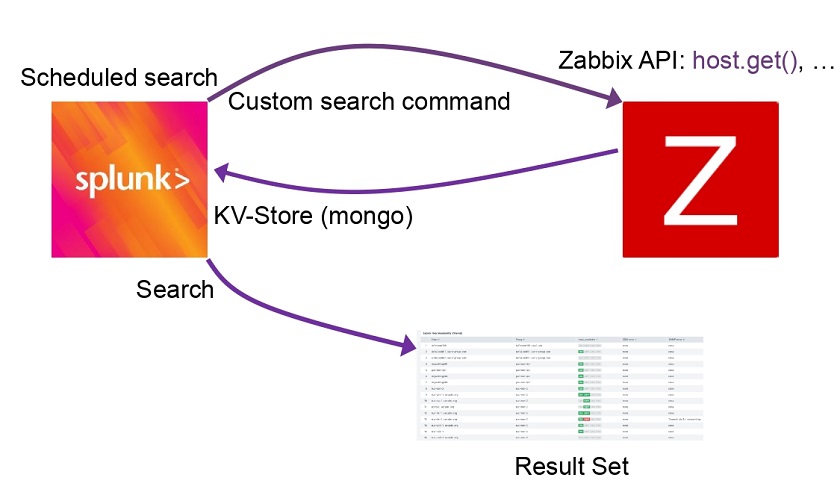
Zabbix entity inventory

So, you can get statistics on status and state to drill down on the unsupported items for a list of all of the items. You can further identify the correlation for the hostnames instead of host IDs, which are not human-readable. The hostnames are available at the KV Store, which stores the hosts with their metadata. You can also identify how many unsupported items there are on each host.

You can also get information on the hostnames, hosts, item names, item types, and errors. You can categorize the problems as SNMP problems, shell problems such as wrong paths, and see how often certain problems happen and what hosts are assigned to what templates and host groups, and so on. This information may also be aggregated or correlated with information from UCMDB.

More data

More fun than having data within a data analytics platform has more data.

  • Indexing the Zabbix Server / Proxy Logs logs, categorizing events to identify availability issues, item problems, preprocessing problems, housekeepers statistics, etc.

  • A module to fetch information from Zabbix (item, host, trigger) in real-time.

  • Gathering metrics (History / Trends data) directly from Zabbix in real-time without the need to store these metrics in any place other than the Zabbix database. We can still use the data for graphing, correlations, calculations, etc.

  • Onboarding the Zabbix problems into Splunk by using the new custom Media types — Webhook.
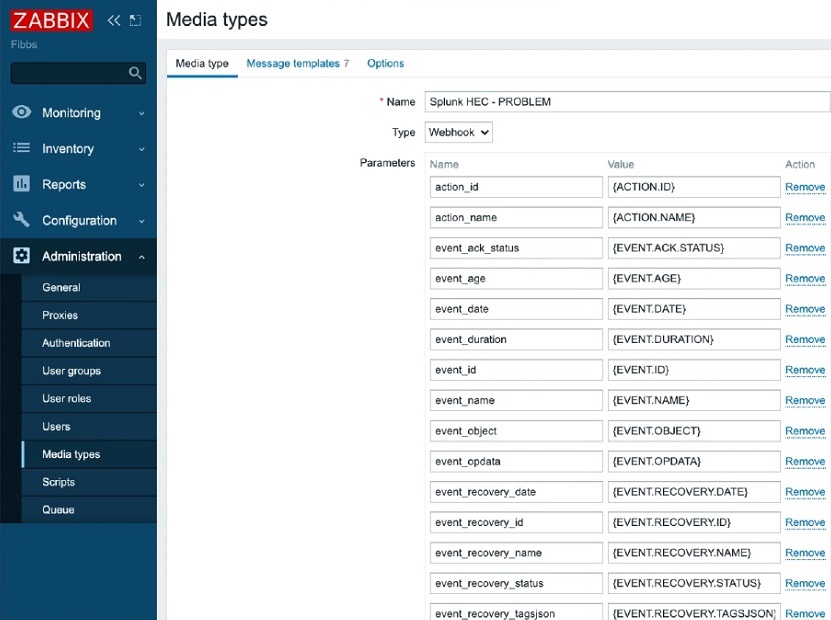
Custom Media type

  • Correlation of the alert logs, which are new and available through the API since Zabbix 5.0.
  • Working on the queue items to solve these questions.

Use cases

Zabbix queue

Zabbix queue may be a real headache as you can wait for a Zabbix installation with 20,000-50,000 items for 5 or 10 minutes or even longer.

In this dashboard, the same view is displayed in Zabbix: items are categorized by overtime, item type, proxy, etc. Splunk here offers what Zabbix fails — the history so that you can see the spikes when things have changed dramatically. For instance, when more significant network changes happen, the network slows down, and the queues grow dramatically. You can see whether these queues have gone back down or remained up. This information is complicated to analyze in Zabbix.

You can also drill down to see the items correlated with their actual status and the host’s status inside Zabbix. So, you can clearly see, for instance, that an item is on the host that is down or in the queue as it’s not supported and doesn’t get any data.

Here, there is also an Ignore list. So you can get statistics for the remaining items and group them, for instance, by Item type. You can go further and analyze and fix the problems.

Zabbix problems analytics

Zabbix problems dashboard

In this dashboard, Zabbix problems are displayed by system categories. For instance, we can see that over the last 24 hours, Windows caused most of the problems.
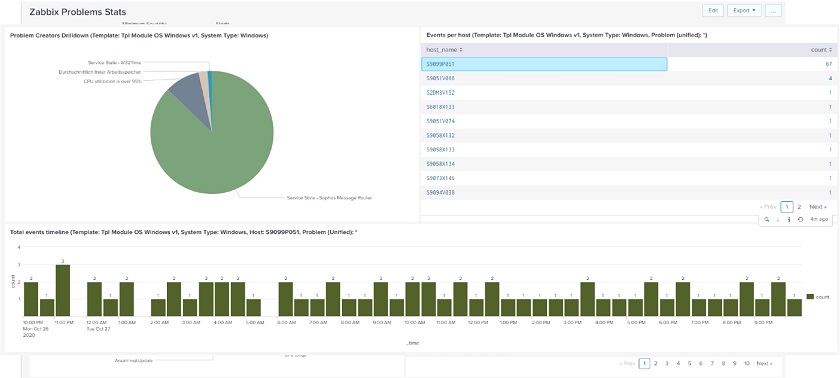
Here, we can also drill down to see, for instance, if there are many similar problems. You can go further to identify a single issue that has caused many alerts or problems. You can see that one host is creating almost all of the problems. So, if you switch this one host off, you would have fewer problems.

Zabbix data for management visibility

We can use Zabbix data for greater management visibility, such as:

  • Correlation of data to generate meaningful dashboards:

— Zabbix (metrics, status, problems, etc.),
— application logs,
— other data sources,
— inventory (CMDB, …)

  • Business-level visualization.

Conclusion

Splunk is open-source software and is distributed for free. We are currently in the process of integrating Splunk with Zabbix.

If you are interested in Splunk, you can send a request to [email protected]  or look for Christian Anton on LinkedIn or Instagram.

Questions & Answers

Question. If we use this kind of integration, are there any performance issues caused by Splunk or some misconfiguration?

Answer. We have been using Splunk for installations with several tens of thousands of monitored hosts and from hundreds of thousands up to millions of items and have not seen any performance implications.

Question. How does this connector work under the hood? Does it use the API or direct queries to the database?

Answer. We rely on the API. Besides, we can fetch the data directly from the database.
 

Supercharge Zabbix with powerful insights

Post Syndicated from alexk original https://blog.zabbix.com/supercharge-zabbix-with-powerful-insights/12841/

A new set of trigger functions for long-term analysis of trend data will allow Zabbix to analyze historical data and generate alerts on detected anomalies.

Contents

I. Types of monitoring (0:39)

II. Zabbix 5.2 new functions (5:34)

III. In a nutshell (13:28)
IV. Questions & Answers (14:17)

Types of monitoring

Let’s start with a philosophical observation. In many cases, configuring monitoring entities is a pretty straightforward exercise. For instance, we know that computers should have some free disk space as applications won’t work otherwise; that CPU should not run at 100oC; that user-facing application should respond in less than a couple of seconds, otherwise, users will notice and complain. To be alerted when any of these expectations fail, we need to use triggers. A trigger can be as simple as {Host:cpu.temp.avg(5m)} > 100.

However, in some situations, it is difficult to decide right from wrong. Some cases can’t be evaluated without a proper context. For instance, is it OK if RAM is 70% full?  The answer is our favorite ‘it depends’. If RAM was just 20% full a week ago, chances are big that some application is leaking and your memory usage will continue growing. But if your RAM usage stays at 70% for three years in a row, there are even better chances that it stays so for another three years.

Another it-depends example is web traffic monitoring. Intuitively, we know that it’s perfectly normal to have uneven traffic distribution across days of week or months. But every website has its usage patterns, so even when we figure out what is normal and what’s not for one specific website, it’s difficult to scale this knowledge to other websites.

Web traffic monitoring

So, in the grand scheme of things, it all boils down to finding a good baseline for parameters we want to monitor. And baselines are usually defined by previous knowledge.

So, in such cases, instead of figuring out a fixed threshold (some fixed value or percentage), we need to figure out data points in the past that we want to compare to our current data points.

  • Compare values to known thresholds.
{Host:cpu.temp.avg(5m)} > 100
  • Baseline — compare to unknown thresholds.

Finding the right points in the past (or rather, finding a good interval to look back to) is still something that the user must supply manually, even though we are also working on automating this in the future. But Zabbix 5.2 gives you some tools to make comparisons to baseline way easier.

Web traffic monitoring example

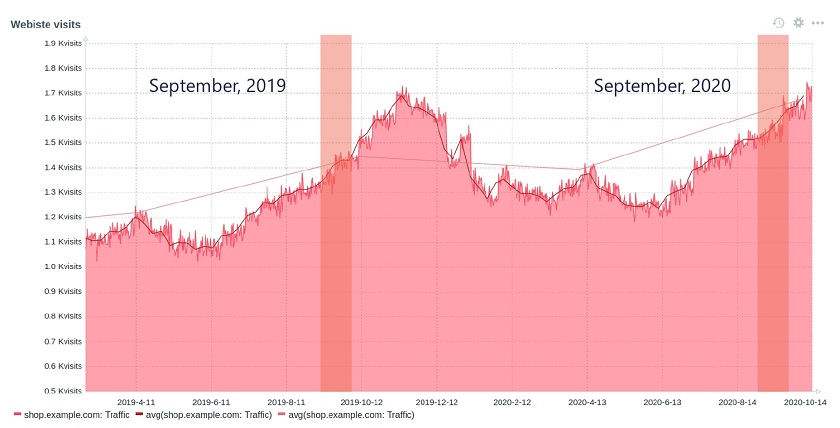
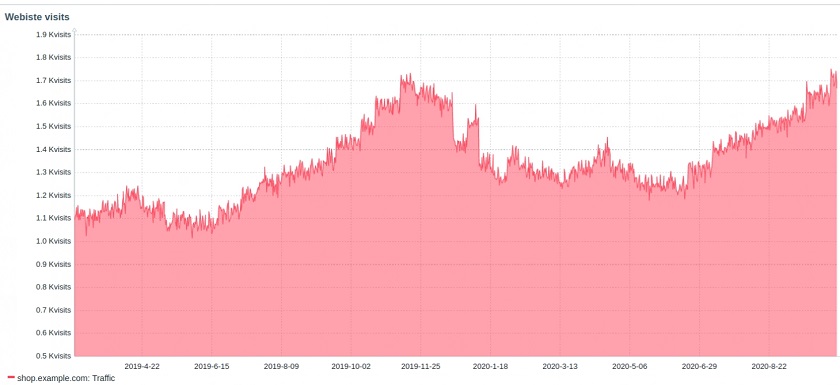
Let’s consider a history of website visits for an imaginary commerce site — shop.example.com.

Commercial site web traffic monitoring

The numbers are different at any given point in time, yet all these are normal in a certain context. Overall, we see a growing trend in 2020 as compared to 2019. But there are seasonal traffic spikes. The biggest ones are around Christmas.

Site administrators like to be informed of any traffic anomalies (such as fraud traffic, for example), but hate false positives caused by seasonal spikes.

If we want to detect anomalies here, we can get an average for some period and compare it to an average for the same period a year before.

If we know that our organic year-to-year growth is not likely to exceed, for instance, 15 %, then it’s seemingly easy to do this in virtually any version of Zabbix: we take the average traffic over 30 days and check if it exceeds the same period a year ago by more than 15 %.

However, there are a few problems with this trigger expression.

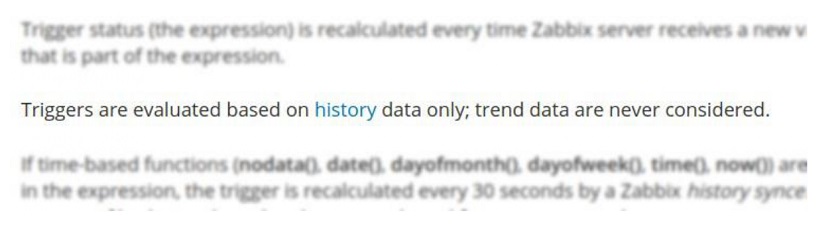
1. First, we look 1 year back in history. But if we look into Zabbix 5.0 documentation about triggers, we see this:

This means that we need to keep a full and detailed history for at least 1 year (13 months, in this specific case). It is a passable solution if we ingest the traffic data daily. But what if we do it every minute? What if we do it every minute for a thousand websites?

2. In Zabbix, we specify time as 30d and 365d. As you may know, in Zabbix, this is just a fancy way to specify 187,200 and 68,328,000 seconds. Zabbix 5.0 doesn’t have the time suffix for a month and a year just because this cannot be simply translated to the number of seconds. Even though 30d is very close to 28d and 31d, it’s still not the same.

3. The result of avg() function with or without the second time shift parameter always depends on the specific time of the calculation. This is because Zabbix calculates time shifts by subtracting the interval from the current time. This makes it impossible to calculate aggregates between, for instance, the first and the last day of a week, a month, or a year.

Zabbix 5.2 new functions

That is why we introduce new trigger functions, which address all the specified issues. We also added few other trigger features, which improve event presentation. These functions are similar to the non-trend counterparts but are optimized for baseline monitoring use cases.

trendavg(period, period_shift)
trendcount(period, period_shift)
trenddelta(period, period_shift)
trendmax(period, period_shift)
trendmin(period, period_shift)
  • The new functions use trends tables instead of history (do not forget to set proper trend storage period):

  • period and period_shift parameters use the Gregorian calendar instead of the number of seconds.

h (hour), d (day), w (week), M (month), and y (year).

  • These functions are easy on system resources because they do calculations only when a period ends.

In addition to the new trigger functions, we also added the ability to set customized event name.

The customized event name lets you fine-tune how the event looks in the Zabbix UI (in screens like problems and problem widget) and include trigger expression calculation results.

This field is optional, you can continue using the trigger Name field instead.

There is also a new macro {? … }. It can be used for expressions inside the event name.

Triggers

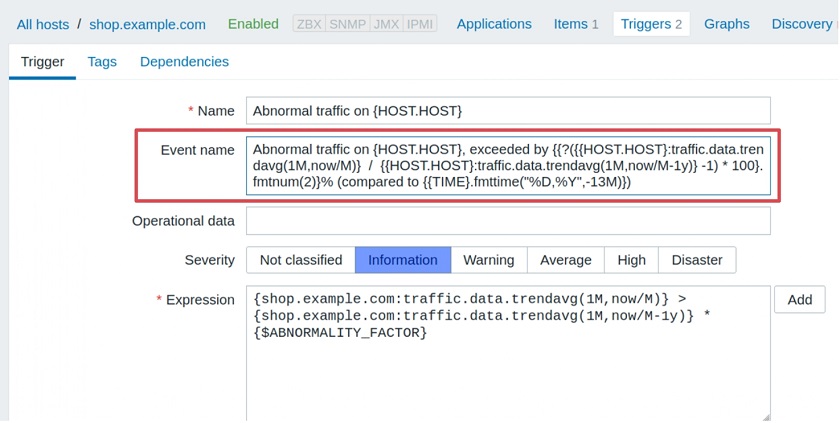
Let’s reconfigure our trigger in the Zabbix 5.2 style.

Zabbix 5.2-style triggers

Let’s see what are the arguments for trendavg() function: 1M and now/M.

  • The first argument means that we use calendar month as an aggregation period. So, depending on the month’s trendavg() will be doing calculations for, it will pick up the first and the last date of the month. The same goes for other possible interval suffixes — h for hour, d for day, w for week, and y for year.
  • The second parameter, as in regular aggregate functions, means a time shift. But to distinguish between old and new types of shifts, we call them period shifts. The period shift denotes the last point in the timeline for our aggregation.

For instance, for October 13, 2020, trendavg(1M) will calculate the value for the period from September 1, 2020, to September 30, 2020, and trendavg(1M, 1M-1y) will calculate the value for the period from September 1, 2019, to September 30, 2019.

Event name field

In Zabbix 5.2, you can continue using the Name field with the content copied to the Event name field. But if you specify the Event name, it will be used for all corresponding events instead.

The Event name supports the new macro {?…}, so you can put another trigger expression inside this macro to show some related calculations. We call it the expression macro. For instance, the Event name will be displayed on the Problem screen as follows:

Formatting functions

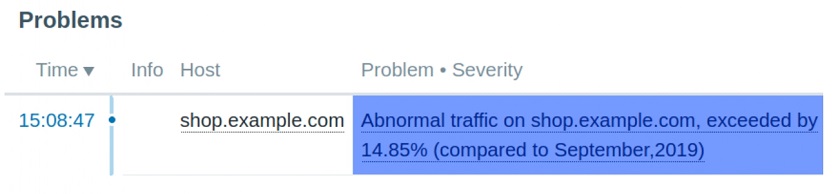
This trigger generates problems like this:

It’s already very useful, but this percentage will look better if we could round it up. It wouldn’t hurt to show what month we compare our traffic against. To do that, we have added two formatting functions:

  • fmtnum(digits)

— applicable to ITEM.VALUE, ITEM.LASTVALUE, and expression macros.
fmtnum(2) gives 14.85 instead of 14.8512345.

  • fmttime(format, time_shift)

— applicable to {TIME}.
— uses strftime format codes.
— formats time, for instance, {TIME}.fmttime(“%B,%Y”) gives October,2020.

Let’s see how we can improve our Event name with new formatting functions:

It looks somewhat scary on the trigger configuration screen, but Zabbix will reward us by generating events like this:

But the new functions are not limited to a single use case of comparing some data from a recent period to some past period.

Cloud budget monitoring example

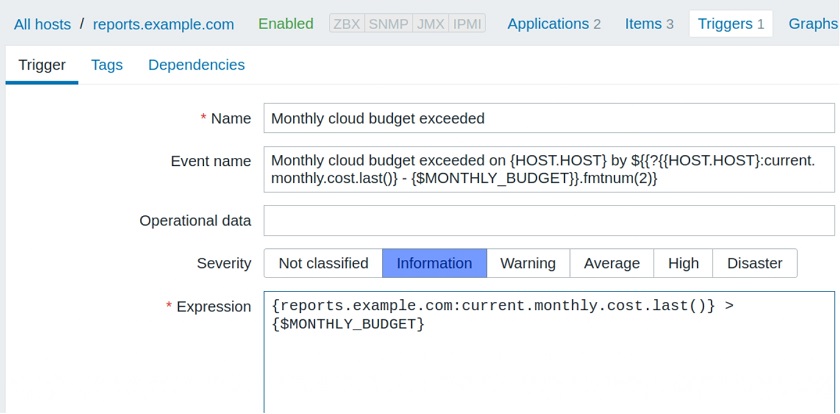
Let’s consider another real-world example. Imagine that your IT department runs some very important services in the Cloud. And, of course, your finance department sends a monthly budget you don’t want to overrun. You receive cloud usage records from one or more cloud providers and ingest this data periodically into monitoring.

You could set up a trigger with a trendsum() by one month to check whether you exceeded your fixed budget in the previous months or not. But you want to know about the budget overrun ASAP. If you exceed your monthly budget in the middle of a month, your quick reaction might save the company money.

In the chart, we see the even distribution of cloud usage costs up to the last dates of September. Then the usage starts going up. When should you start worrying?

Again, the new trend functions come to the rescue.

The solution is to use the period_shift parameter, just not in the past, but rather in the future. For instance, if today’s date is October 22, this expression will calculate the sum() from October 1 to October 31.

  • trendsum(1M,now/M+1M)

There is one problem, though. To save precious computing resources, Zabbix evaluates these functions in triggers only when the period is over. However, these functions are also available in calculated items, and we can use arbitrary calculation intervals there.

So, the solution is to set up a calculated item, use trendsum() in the formula, and specify some reasonable update interval (for instance, one hour or one day).

Here, on the right-hand side of the chart, we see the current period, which is not over yet. Let’s take a look at the item definition.

This is the formula to calculate the current calendar period. Then, we can add a simple trigger referencing this calculated item:

Formula to calculate the current calendar period

You can also use the new expression macro in this trigger. You don’t need to have trend functions anywhere in the formula for this.


Once the trigger fires, you will see the following problem on the Problem screen — a nice and clean message containing all the information we need.

Use cases

There are many more possible applications for the new functions besides the examples above. Generally, these trend functions can be applied not only to IT metrics but also to many other real-world KPIs, for example:

— Business performance (to calculate annual revenue, profitability, etc.).
— Sales and marketing (for instance, monthly average, customer acquisition costs, sales target rate).
— Warehousing (such as weekly shipments, return rates, etc.).
— Human resources (for instance, annual training costs, overtime hours, etc.).
— Customer support (such as average response time or the number of issues per month).

We expect these functions to pave the way for Zabbix to new territories, which have been previously occupied by CRMs and other business analytics systems.

In a nutshell

  • Zabbix trend functions — a new way to analyze history without storing historical data.
  • Zabbix trend functions support calendar hours, days, weeks, months, and years.
  • New trigger field Event name – lets us display events with context.
  • New formatting functions let us present numbers and dates in a flexible manner.
  • Long-term data analysis just got easier and better with the new Zabbix 5.2.

Questions & Answers

Question. What’s the maximum time period for these new trigger functions? For how long can we analyze the data?

Answer. The maximum time period is not limited by any hardcoded values. The only limit you should keep in mind is just the size of your trend data history. But there are no limitations in the code whatsoever that would limit this use. You also should keep in mind that the longer is the period the bigger the database load is. That’s also a factor to consider.

Question. Is this trend data that we’re analyzing also going to be stored in the value cache or some other place?

Answer. it’s not stored in the value cache at the moment. These trigger functions recalculate their values only after the period is over. So it’s not of much use for value cache. But if this is required by some demanding applications, we’ll add this in the later versions.