All posts by Ankush Goyal

Designing centralized and distributed network connectivity patterns for Amazon OpenSearch Serverless

Post Syndicated from Ankush Goyal original https://aws.amazon.com/blogs/big-data/designing-centralized-and-distributed-network-connectivity-patterns-for-amazon-opensearch-serverless/

Amazon OpenSearch Serverless is a fully managed search and analytics service that automatically provisions and scales infrastructure to help you run search and analytics workloads without cluster management. With OpenSearch Serverless, you can quickly build search and analytics capabilities into your applications.

As organizations scale their use of OpenSearch Serverless, understanding network architecture and DNS management becomes increasingly important. Building upon the connectivity patterns discussed in our previous post Network connectivity patterns for Amazon OpenSearch Serverless, this post covers advanced deployment scenarios focused on centralized and distributed access patterns—specifically, how enterprises can simplify network connectivity across multiple AWS accounts and extend access to on-premises environments for their OpenSearch Serverless deployments.

We outline two key deployment patterns:

  • Pattern 1 – A centralized endpoint model where interface virtual private cloud (VPC) endpoints for OpenSearch Serverless are deployed in a shared services VPC, allowing spoke VPCs from other AWS accounts and on premises to access OpenSearch Serverless collections through these consolidated endpoints.
  • Pattern 2 – A distributed endpoint model where interface VPC endpoints are created in individual spoke VPCs, with multiple consumers (central account, on-premises networks, and other spoke accounts) accessing these endpoints through centralized DNS management. This approach provides direct connectivity within each spoke VPC while maintaining centralized DNS control and management across the organization.

Before diving into advanced deployment patterns, let’s review the DNS behavior of OpenSearch Serverless when accessed through an interface VPC endpoint (AWS PrivateLink). Understanding this foundational aspect can help clarify the connectivity patterns we explore in this post.

OpenSearch Serverless interface VPC endpoint DNS resolution

When creating an OpenSearch Serverless interface VPC endpoint, the service automatically provisions three private hosted zones: one visible private hosted zone us-east-1.aoss.amazonaws.com that handles domain resolution for the OpenSearch Serverless collection and dashboard, another visible private hosted zone us-east-1.opensearch.amazonaws.com that manages resolution for the OpenSearch UI (OpenSearch Dashboards), and one hidden internal private hosted zone that manages the final DNS resolution to private IP addresses.

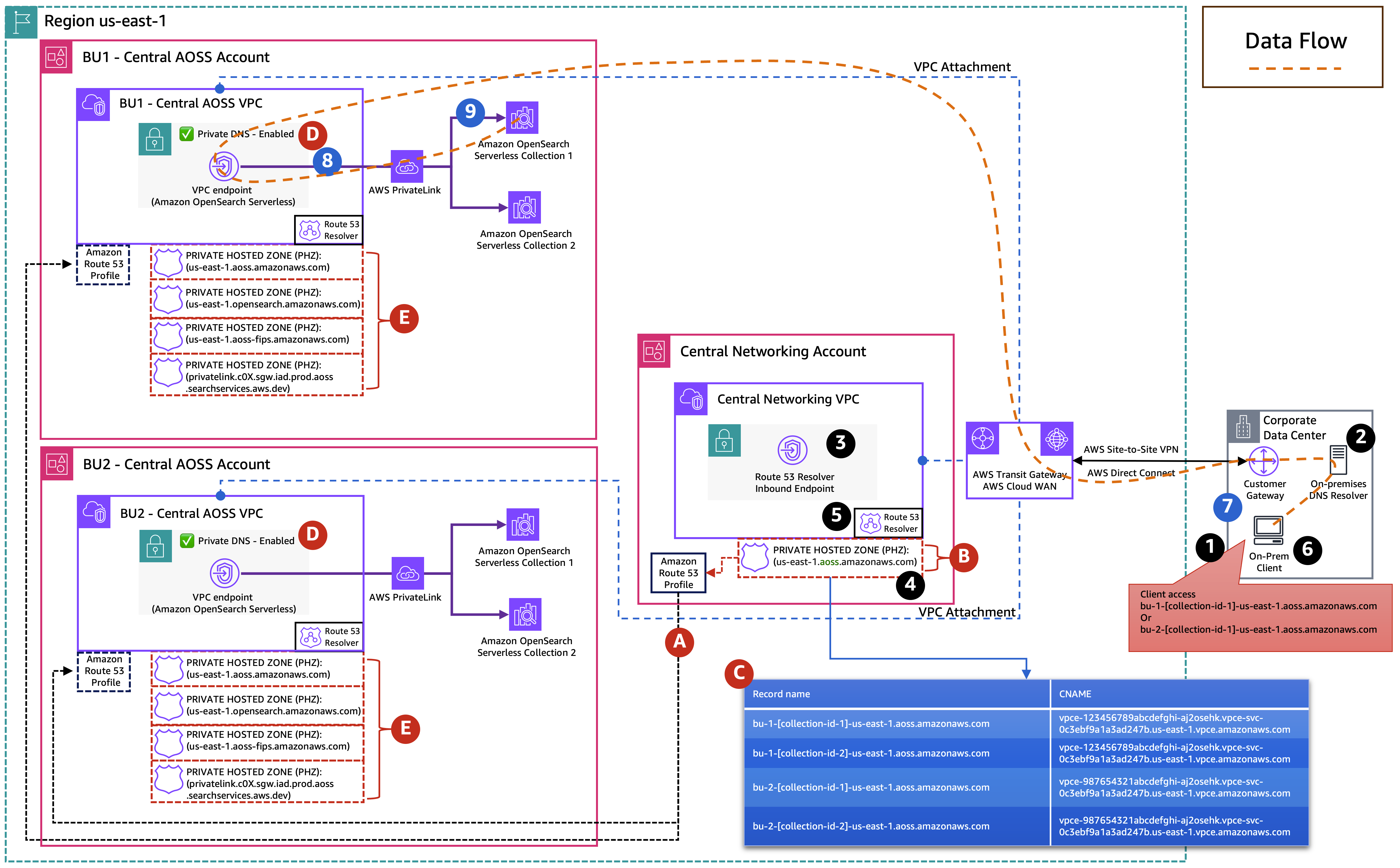
Our objective in this post is to explore how the two private hosted zones for OpenSearch Serverless work together: the visible private hosted zone us-east-1.aoss.amazonaws.com for collections and dashboards, and the hidden private hosted zone for final DNS resolution to private IP addresses. We examine how these private hosted zones enable scalable DNS resolution in both centralized and distributed architectures. The following workflow diagram shows the DNS resolution flow for the us-east-1 AWS Region. The same pattern applies to other Regions, with the Region identifiers in the DNS records changing accordingly.

DNS Workflow Diagram AOSS

The workflow consists of the following steps:

  1. A user requests access to a collection URL (for example, abc.us-east-1.aoss.amazonaws.com).
  2. The DNS request is sent to the Amazon Route 53 Resolver, which checks the visible private hosted zone us-east-1.aoss.amazonaws.com and finds a CNAME record pointing to the endpoint-specific domain.
  3. The Route 53 Resolver uses the hidden internal private hosted zone to resolve this endpoint-specific domain to the VPC endpoint’s private IP address.
  4. Traffic is allowed only if it originates from the interface VPC endpoint approved by OpenSearch Serverless network policies.

Although this DNS Resolution Process provides flexible and secure private access, it becomes complex when you need connectivity from multiple VPCs, different AWS accounts, or on-premises networks. The following patterns address these challenges and outline strategies to simplify network access and DNS management for OpenSearch Serverless in such environments.

Pattern 1: Centralized interface VPC endpoint for OpenSearch Serverless

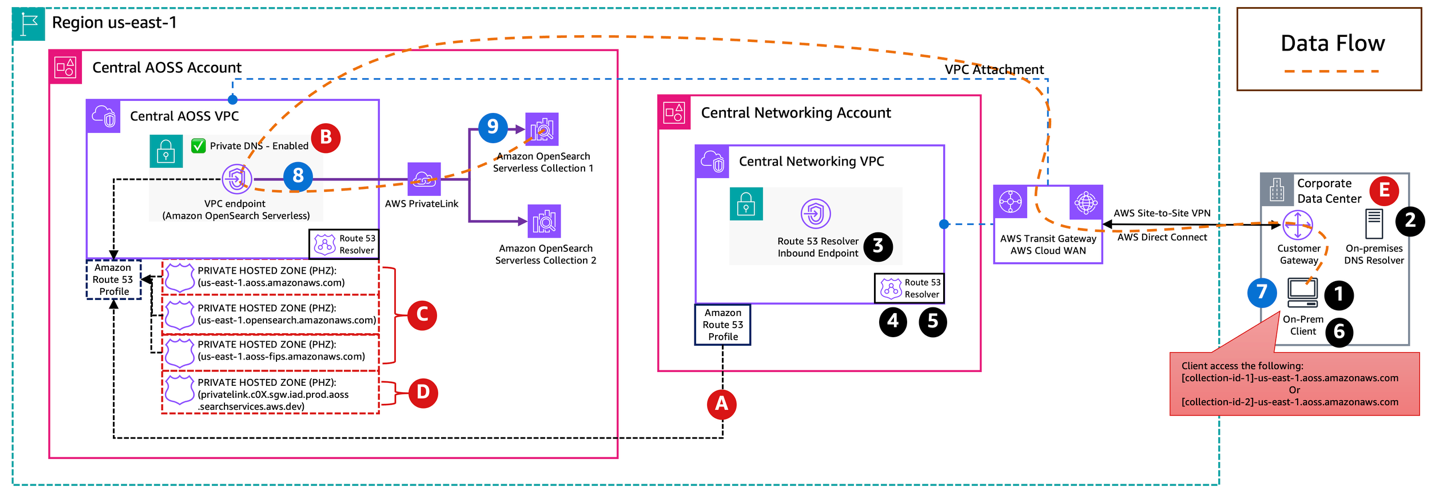
This pattern uses a centralized approach where a shared services AWS account with a shared services VPC hosts the OpenSearch Serverless interface VPC endpoint and OpenSearch Serverless collection. From there, other AWS accounts with Amazon VPCs (spoke VPCs) need to be able to access OpenSearch Serverless collections through this central endpoint. Organizations commonly implement this setup in hub-and-spoke network designs that connect their VPCs using either AWS Transit Gateway or AWS Cloud WAN. The following diagram illustrates this architecture.

AOSS Centralized Account

Challenge

When accessing from on-premises networks, both network access and DNS resolution for the OpenSearch Serverless interface VPC endpoint work successfully. However, although the endpoint is network-accessible from spoke VPCs (for example, through Transit Gateway or AWS Cloud WAN), DNS resolution from these VPCs fail.

This happens because OpenSearch Serverless creates and uses a private hosted zone us-east-1.aoss.amazonaws.com that is only associated with the VPC containing the endpoint, in this case, the Shared Services VPC. Simply sharing this private hosted zone with the spoke VPCs doesn’t solve the problem, because the wildcard CNAME record references a DNS name privatelink.c0X.sgw.iad.prod.aoss.searchservices.aws.dev. This DNS name can’t be resolved from other VPCs without additional configuration, because it belongs to a private hosted zone privatelink.c0X.sgw.iad.prod.aoss.searchservices.aws.dev that is only associated with the shared services VPC. This private hosted zone isn’t visible in your account and is controlled by AWS.

Solution: Use Amazon Route 53 Profiles for cross-VPC DNS resolution

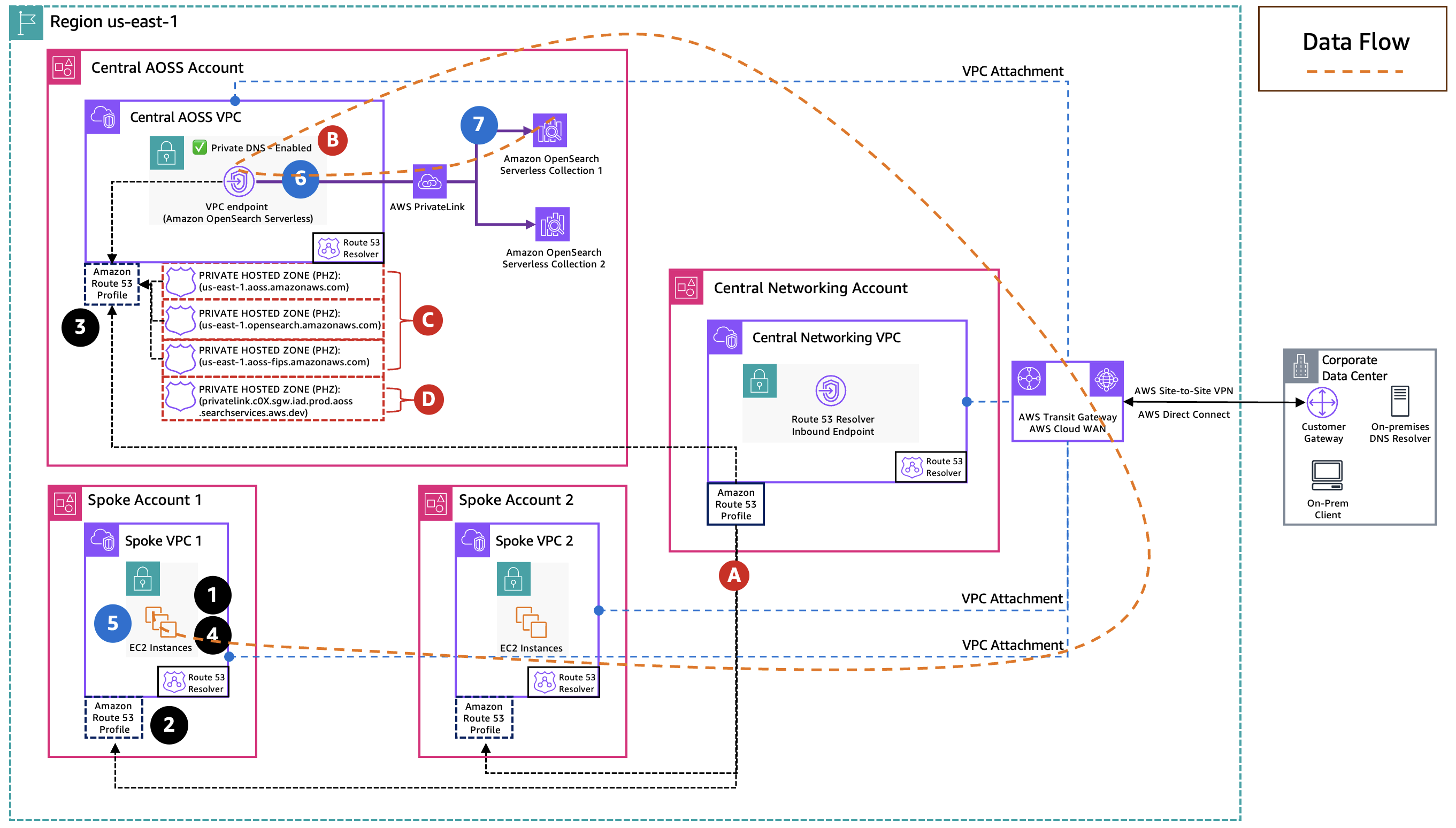
To enable centralized DNS resolution, you can use Amazon Route 53 Profiles. With Route 53 Profiles, you can manage and apply DNS-related Amazon Route 53 configurations across multiple VPCs and AWS accounts. The following diagram illustrates the solution architecture.

AOSS Centralized Account Route53 Profile

The solution consists of the following steps:

  1. Create an OpenSearch Serverless interface VPC endpoint in the shared services VPC. This automatically creates and associates the following:
      1. Two default private hosted zones.
      2. One hidden private hosted zone with this VPC.
  2. Create a Route 53 Profile in the shared services account.
  3. Associate the interface VPC endpoint for OpenSearch Serverless with the Route 53 Profile.
    1. The Route 53 Profile automatically associates the hidden private hosted zone with the profile.
  4. Associate the private hosted zone us-east-1.aoss.amazonaws.com that was automatically created by OpenSearch Serverless with the Route 53 Profile.
  5. Share the Route 53 Profile with your other AWS accounts in your organization using AWS Resource Access Manager (AWS RAM).
  6. Associate the spoke VPCs (located in different accounts) with the Route 53 Profile.

If you have an existing Route 53 Profile in your shared services account that is already associated to spoke VPCs, you can simply associate the OpenSearch Serverless interface VPC endpoint and the private hosted zone us-east-1.aoss.amazonaws.com to this profile.

After completing these steps, the DNS resolution for the OpenSearch Serverless collection and dashboard endpoints works seamlessly from spoke VPCs associated with the Route 53 Profile. Clients in spoke VPCs can resolve and access OpenSearch Serverless collections and dashboards through the centralized VPC endpoint.

Pattern 2: Distributed interface VPC endpoint for OpenSearch Serverless

Each spoke VPC, residing in its respective AWS account, hosts its own OpenSearch Serverless collection and interface VPC endpoint. We now want to achieve the following:

  • Centralize DNS management in a shared services VPC to provide consistent resolution for OpenSearch Serverless collections deployed across multiple spoke accounts
  • Provide on-premises resources with DNS resolution capability for all OpenSearch Serverless collections across the organization through a Route 53 Resolver inbound endpoint in the shared services VPC

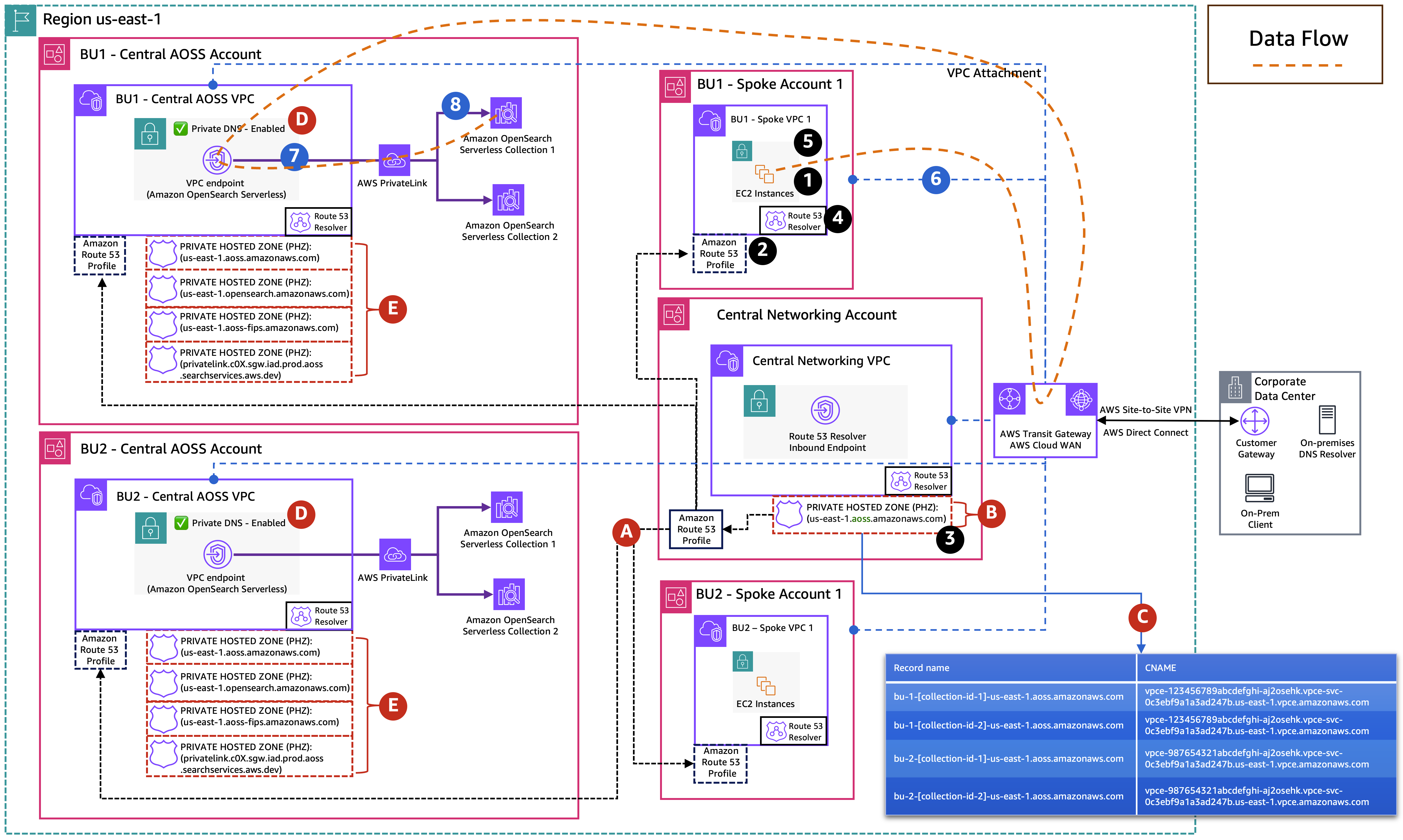
The following diagram illustrates this architecture.

AOSS Distributed

Challenge

Managing DNS resolution for OpenSearch Serverless collections and dashboards becomes complex in this distributed model because each interface VPC endpoint creates its own set of private hosted zones that are only associated with their respective VPCs. This creates a fragmented DNS landscape where the shared services VPC and on-premises networks need a consolidated way to resolve domains of OpenSearch Serverless collections and dashboards across multiple spoke accounts.

Solution: Use a self-managed private hosted zone in the shared services VPC for on-prem DNS resolution

To enable centralized DNS resolution for distributed endpoints, create a self-managed private hosted zone in the shared services account and associate it with the shared services VPC. Within this private hosted zone, you can create CNAME records that map each OpenSearch Serverless collection endpoint to its respective interface VPC endpoint DNS names in the spoke accounts. The following diagram illustrates this architecture.

AOSS Distributed Centralized DNS On Prem and VPC

Implementation consists of the following steps:

  1. Create a self-managed private hosted zone in the shared services account with the domain name us-east-1.aoss.amazonaws.com and associate it with the shared services VPC. For each OpenSearch Serverless collection, create a CNAME record that points to the Regional DNS name of its corresponding interface VPC endpoint.

This configuration enables both on-premises resources and resources in the shared services VPC to resolve OpenSearch Serverless endpoints that are in the spoke accounts.

After you complete these steps, each OpenSearch Serverless interface VPC endpoint remains within its original AWS account, maintaining security boundaries and account-level autonomy. On-premises systems can access OpenSearch Serverless collections and dashboards using original collection DNS names (for example, {collection-name}.us-east-1.aoss.amazonaws.com) through DNS resolution provided by the private hosted zone in the shared services VPC.

Conclusion

As organizations scale their adoption of OpenSearch Serverless, establishing secure and centralized network access becomes increasingly important. In this post, we explored two architectural patterns specifically around DNS management:

  • Centralized endpoint model – This pattern is ideal when a shared services account manages the OpenSearch Serverless interface VPC endpoints, allowing multiple spoke accounts to access OpenSearch Serverless collections and dashboards through a centralized set of network resources.
  • Distributed endpoint model with centralized DNS – This pattern is suitable for organizations that require account-level autonomy, where each AWS account manages its own OpenSearch Serverless interface VPC endpoints, while DNS resolution is centralized through a shared self-managed private hosted zone in a shared services account.

By understanding the DNS architecture of OpenSearch Serverless and using services like Route 53 Profiles and AWS RAM, organizations can build secure and robust access patterns that align with their organizational structure and needs.


About the Authors

Ankush GoyalAnkush Goyal is a Enterprise Support Lead in AWS Enterprise Support who helps customers streamline their cloud operations on AWS. He is a results-driven IT professional with over 20 years of experience.

Anvesh KogantiAnvesh Koganti is a Solutions Architect at AWS specializing in Networking. He focuses on helping customers build networking architectures for highly scalable and resilient AWS environments. Outside of work, Anvesh is passionate about consumer technology and enjoys listening to podcasts on tech and business. When disconnecting from the digital world, Anvesh spends time outdoors hiking and biking.

Salman AhmedSalman Ahmed is a Senior Technical Account Manager in AWS Enterprise Support. He specializes in guiding customers through the design, implementation, and support of AWS solutions. Combining his networking expertise with a drive to explore new technologies, he helps organizations successfully navigate their cloud journey. Outside of work, he enjoys photography, traveling, and watching his favorite sports teams.

Optimizing ODCR usage through AI-powered capacity insights

Post Syndicated from Ankush Goyal original https://aws.amazon.com/blogs/compute/optimizing-odcr-usage-through-ai-powered-capacity-insights/

Efficient resource management is crucial for organizations seeking to optimize cloud costs while making sure of seamless access to compute capacity. Amazon Elastic Compute Cloud (Amazon EC2) On-Demand Capacity Reservations (ODCRs) provide the flexibility to reserve compute capacity within a specific Availability Zone (AZ) for any duration. This makes sure that critical workloads always have the necessary resources available, minimizing the risk of capacity shortages.

However, managing ODCRs across multiple teams and accounts presents several challenges:

  • Limited visibility across teams: In large organizations, tracking ODCR usage across teams and business units can be difficult, often leading to underused or duplicate reservations.
  • Complexity in optimization: Without clear insights, adjusting, releasing, or modifying reservations to align with changing workloads becomes a cumbersome process.
  • Cost management challenges: Unused or oversized ODCRs contribute to unnecessary expenses, making it essential to continuously monitor and optimize usage.

In this post, we demonstrate how Amazon Bedrock Agents can help organizations gain actionable insights into ODCR usage across their Amazon Web Services (AWS) environment. Unlike traditional approaches that rely on predefined patterns or manual tracking, this solution dynamically retrieves the latest ODCR usage data and provides intelligent, query-based recommendations to fulfill the capacity needs. This solution is serverless and pay-per-use and incurs minimal operational cost.

This approach allows IT leaders, cloud architects, and finance teams to optimize reservations, control costs, and enhance overall resource management—without the complexity of traditional analysis methods.

Solution overview

This solution addresses two specific use cases:

  1. The team must create a new ODCR to accommodate an upcoming project.
  2. The team needs to expand the capacity of their existing ODCR.

The system consists of three essential components:

  • ODCRSupervisorAgent: Functions as the main coordinator, handling user inquiries and managing requests to specialized subordinate agents.
  • CapacityPlanningAgent: Reviews existing ODCRs throughout the organization, recommending SPLIT and MOVE operations to optimize capacity allocation for new projects.
  • AugmentationAgent: Identifies opportunities to increase existing ODCR capacity by recommending MOVE operations from other organizational ODCRs.

The following figure shows the high-level architecture for this solution.

The system architecture uses AWS services for comprehensive ODCR management, as shown in the following figure. The platform combines Amazon Cognito for authentication, AWS Amplify for front-end delivery, and AWS Lambda for serverless computing. AWS Resource Explorer enables efficient discovery and tracking of ODCRs across AWS Regions, while Lambda functions periodically query Resource Explorer to retrieve detailed ODCR information and usage metrics. AWS Identity and Access Management (IAM) plays a crucial role in securing the system, managing fine-grained access controls and permissions across all components. Amazon Bedrock Agents and its multi-agent capabilities generate intelligent recommendations through coordinated agent interactions, allowing organizations to optimize ODCR usage and implement data-driven capacity planning strategies.

How the solution functions

At the heart of this system is an Amazon Bedrock Agent powered by Action Groups, which map user queries to backend tasks using Lambda. These Lambda functions act as the system’s intelligence layer: fetching, filtering, and formatting ODCR data for the agent to reason over. The following three Lambda functions are deployed as part of the AWS CloudFormation template:

get_az_mapping_info Lamba function: This Lambda function takes an AWS account ID and Region as input. It returns a mapping of AZ names to their corresponding AZ IDs for that account and AWS Region. This helps the Capacity Planning Agent align AZs across accounts.

find_eligiable_odcrs Lambda function: This Lambda function supports the Capacity Planning Agent by identifying suitable ODCRs that meet the specified instance type and AZ. It uses Resource Explorer to search for ODCRs across the organization. Then, the function assumes cross-account roles to access ODCRs in different AWS accounts to gather detailed information. After retrieving the necessary data, it filters the ODCRs based on instance type, tenancy, and AZ. Finally, it returns a formatted list of eligible ODCRs, which are sourced from either the specified account or an alternative account with adequate capacity.

find_eligible_odcrs_for_move Lambda function: This Lambda function assists the Augmentation Agent by finding all capacity reservations within the same account as the specified ODCR. It uses Resource Explorer to discover ODCRs and, when necessary, assumes cross-account roles to gather ODCR information. The function filters ODCRs based on matching instance type, tenancy, and AZ, then returns a formatted list of eligible ODCRs that can provide more capacity through MOVE operations.

Each Lambda function receives structured inputs from the Amazon Bedrock Agent, executes its designated task, and returns structured responses. Then, these responses are used by the agent to generate intelligent, actionable answers to user queries.

Together, these Lambda functions extend the capabilities of the Amazon Bedrock Agent by integrating with external data sources and automating complex ODCR management logic—allowing the system to deliver accurate, dynamic recommendations.

Prerequisites

You must have the following in place to implement the solution in this post:

Deploy solution resources using CloudFormation

This solution is designed to be deployed in a single Region. If deploying outside us-east-1, then you must modify the CloudFormation parameters to reference the correct FM version and adjust for Regional availability, such as any necessary cross-Region inference profile configurations.

  • Deploy the Cross Account IAM Role template: To access ODCR data across your Organization, deploy a CloudFormation StackSet from your payer account. During deployment, you must provide the account number where you plan to deploy the ODCR solution. This is the same account number that you used as delegate account for Resource Explorer under the prerequisites. This account number is added to the trust policy of the IAM role, allowing the solution in that account to assume the role created by the StackSet. The deployment automatically provisions a standardized IAM role with the necessary permissions (for example ec2:DescribeCapacityReservations and ec2:DescribeAvailabilityZones) in each target account.
  • Deploy the ODCR Solution template: Deploy the provided template in the delegated administrator account that you chose for Resource Explorer. This sets up the core components of the solution and integrates with your payer account for organization-wide ODCR insights.

Resources deployed by the CloudFormation template

After you have deployed the CloudFormation template, the following AWS resources are created in your account.

Cross Account IAM Role template

  • IAM resource
    • CrossAccountODCRAccessRole

ODCR Solution template

  • Amazon Cognito resources:
    • User Pool: ODCRAgentUserPool
    • App Client: ODCRAgentApp
    • Identity Pool: odcr-identity-pool
    • Groups: ODCRAdmins
    • User: ODCR User
  • IAM resources:
    • IAM roles:
      • GetAZMappingFunctionRole
      • LambdaODCRAccessRole
      • BedrockAgentExecutionRole
      • ODCRSupervisorAgentExecutionRole
      • CognitoAuthRole
  • Lambda functions:
    • get_az_mapping_info
    • find_eligible_odcrs
    • find_eligible_odcrs_for_move
  • Amazon Bedrock Agents
    • ODCRSupervisorAgent
    • CapacityPlanningAgent with action groups:
      • get_az_mapping_info
      • find_eligible_odcrs
    • AugmentationAgent with action group:
      • find_eligible_odcrs_for_move

After you deploy the final CloudFormation template, copy the following from the Outputs tab on the CloudFormation console to use during the configuration of your application after it’s deployed in Amplify:

  • AWSRegion
  • BedrockAgentAliasId
  • BedrockAgentId
  • BedrockAgentName
  • IdentityPoolId
  • UserPoolClientId
  • UserPoolId

The following screenshot shows you what the Outputs tab looks like.

Deploy the Amplify application for front-end

You need to manually deploy the Amplify application using the front-end code found on GitHub. Complete the following steps, as shown in the following figure:

  1. Download the front-end code AWS-Amplify-Frontend.zip from GitHub.
  2. Use the .zip file to manually deploy the application in Amplify.
  3. Return to the Amplify page and use the domain that it automatically generated to access the application.

After completing these steps, your environment is ready to analyze ODCR usage and receive recommendations powered by Amazon Bedrock Agents.

Solution walkthrough

After deploying the application in Amplify, return to the Amplify console. Use the auto-generated domain URL shown there to access the front-end. Upon accessing the application URL, you’re prompted to provide information related to Amazon Cognito and Amazon Bedrock Agents. This information is necessary to securely authenticate users and allow the front end to interact with the Amazon Bedrock Agent. It enables the application to manage user sessions and make authorized API calls to AWS services on behalf of the user.

You can enter information with the values that you collected from the CloudFormation stack outputs, as shown in the following screenshot:

A temporary password was automatically generated during deployment and sent to the email address provided when launching the CloudFormation template. At first sign-in, you’re prompted to reset your password.When you’re signed in, you can begin interacting with the application to analyze and manage your ODCR usage. The interface supports natural language queries to streamline capacity planning. The following are some example questions that you can ask:

  • I require [X units] of capacity for the [INSTANCE TYPE] instance type in Availability Zone [AZ ID], within account [ACCOUNT NUMBER]. Could you please advise if there are any existing On-Demand Capacity Reservations (ODCRs) that can fulfill this requirement? Additionally, what operations would be necessary to utilize the available capacity?

  • I have a requirement to add [X additional units] of capacity to an existing On-Demand Capacity Reservation with ID [cr-0012abcd123456789]. Could you please advise on the steps or operations required to fulfill this request?

Cleaning up

If you decide to discontinue using this solution, then you can follow these steps to remove it, its associated resources deployed using CloudFormation, and the Amplify deployment:

  1. Delete the CloudFormation StackSet:
    1. On the CloudFormation console, choose StackSets in the navigation pane.
    2. Locate your StackSet for the Cross-Account IAM Role (you assigned a name to it).
    3. Choose Delete stacks from StackSet to remove all stack instances.
    4. After all instances are deleted, choose StackSet.
    5. Choose Delete StackSet from the Actions menu.
  2. Delete the CloudFormation stack:
    1. On the CloudFormation console, choose Stacks in the navigation pane.
    2. Locate the stack you created during the deployment process (you assigned a name to it).
    3. Choose the stack and choose Delete.
  3. Delete the Amplify application and its resources. For instructions, refer to Clean Up Resources.

Conclusion

In this post, we demonstrated how to use Amazon Bedrock Agents and AWS services to build an intelligent ODCR management solution. Combining AWS Resource Explorer for organization-wide visibility, Amazon Bedrock Agents for intelligent recommendations, and a secure front-end powered by AWS Amplify, organizations can now make data-driven decisions about their capacity reservations. This solution helps teams optimize ODCR usage, reduce costs, and efficiently manage compute capacity across their AWS Organization. The artificial intelligence (AI)-powered approach eliminates manual tracking and analysis, allowing teams to focus on strategic capacity planning rather than operational overhead.

Get started today by deploying this solution in your AWS environment, and unlock the power of AI-driven capacity insights for more efficient ODCR management.

How to use AWS Verified Access logs to write and troubleshoot access policies

Post Syndicated from Ankush Goyal original https://aws.amazon.com/blogs/security/how-to-use-aws-verified-access-logs-to-write-and-troubleshoot-access-policies/

On June 19, 2023, AWS Verified Access introduced improved logging functionality; Verified Access now logs more extensive user context information received from the trust providers. This improved logging feature simplifies administration and troubleshooting of application access policies while adhering to zero-trust principles.

In this blog post, we will show you how to manage the Verified Access logging configuration and how to use Verified Access logs to write and troubleshoot access policies faster. We provide an example showing the user context information that was logged before and after the improved logging functionality and how you can use that information to transform a high-level policy into a fine-grained policy.

Overview of AWS Verified Access

AWS Verified Access helps enterprises to provide secure access to their corporate applications without using a virtual private network (VPN). Using Verified Access, you can configure fine-grained access policies to help limit application access only to users who meet the specified security requirements (for example, user identity and device security status). These policies are written in Cedar, a new policy language developed and open-sourced by AWS.

Verified Access validates each request based on access policies that you set. You can use user context—such as user, group, and device risk score—from your existing third-party identity and device security services to define access policies. In addition, Verified Access provides you an option to log every access attempt to help you respond quickly to security incidents and audit requests. These logs also contain user context sent from your identity and device security services and can help you to match the expected outcomes with the actual outcomes of your policies. To capture these logs, you need to enable logging from the Verified Access console.

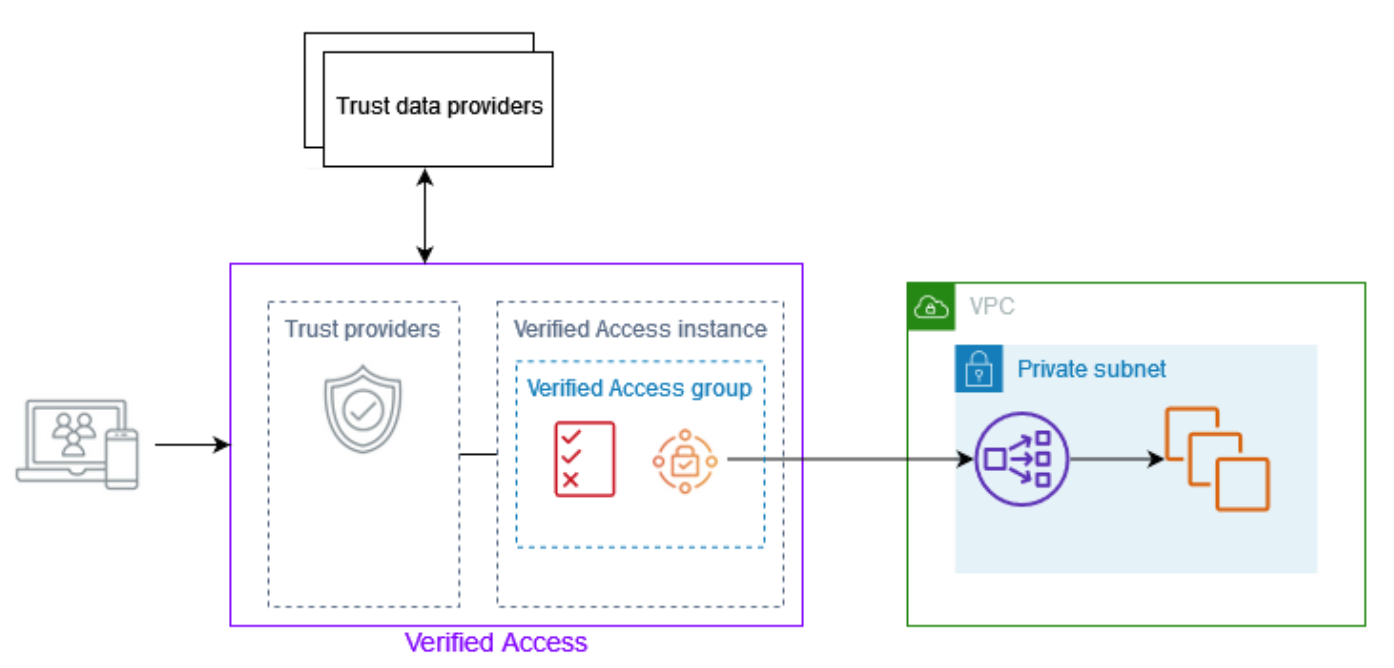
Figure 1: Overview of AWS Verified Access architecture showing Verified Access connected to an application

Figure 1: Overview of AWS Verified Access architecture showing Verified Access connected to an application

After a Verified Access administrator attaches a trust provider to a Verified Access instance, they can write policies using the user context information from the trust provider. This user context information is custom to an organization, and you need to gather it from different sources when writing or troubleshooting policies that require more extensive user context.

Now, with the improved logging functionality, the Verified Access logs record more extensive user context information from the trust providers. This eliminates the need to gather information from different sources. With the detailed context available in the logs, you have more information to help validate and troubleshoot your policies.

Let’s walk through an example of how this detailed context can help you improve your Verified Access policies. For this example, we set up a Verified Access instance using AWS IAM Identity Center (successor to AWS Single Sign-on) and CrowdStrike as trust providers. To learn more about how to set up a Verified Access instance, see Getting started with Verified Access. To learn how to integrate Verified Access with CrowdStrike, see Integrating AWS Verified Access with device trust providers.

Then we wrote the following simple policy, where users are allowed only if their email matches the corporate domain.

permit(principal,action,resource)
when {
    context.sso.user.email.address like "*@example.com"
};

Before improved logging, Verified Access logged basic information only, as shown in the following example log.

    "identity": {
        "authorizations": [
            {
                "decision": "Allow",
                "policy": {
                    "name": "inline"
                }
            }
        ],
        "idp": {
            "name": "user",
            "uid": "vatp-09bc4cbce2EXAMPLE"
        },
        "user": {
            "email_addr": "[email protected]",
            "name": "Test User Display",
            "uid": "[email protected]",
            "uuid": "00u6wj48lbxTAEXAMPLE"
        }
    }

Modify an existing Verified Access instance

To improve the preceding policy and make it more granular, you can include checks for various user and device details. For example, you can check if the user belongs to a particular group, has a verified email, should be logging in from a device with an OS that has an assessment score greater than 50, and has an overall device score greater than 15.

Modify the Verified Access instance logging configuration

You can modify the instance logging configuration of an existing Verified Access instance by using either the AWS Management Console or AWS Command Line Interface (AWS CLI).

  1. Open the Verified Access console and select Verified Access instances.
  2. Select the instance that you want to modify, and then, on the Verified Access instance logging configuration tab, select Modify Verified Access instance logging configuration.
    Figure 2: Modify Verified Access logging configuration

    Figure 2: Modify Verified Access logging configuration

  3. Under Update log version, select ocsf-1.0.0-rc.2, turn on Include trust context, and select where the logs should be delivered.
    Figure 3: Verified Access log version and trust context

    Figure 3: Verified Access log version and trust context

After you’ve completed the preceding steps, Verified Access will start logging more extensive user context information from the trust providers for every request that Verified Access receives. This context information can have sensitive information. To learn more about how to protect this sensitive information, see Protect Sensitive Data with Amazon CloudWatch Logs.

The following example log shows information received from the IAM Identity Center identity provider (IdP) and the device provider CrowdStrike.

"data": {
    "context": {
        "crowdstrike": {
            "assessment": {
                "overall": 21,
                "os": 53,
                "sensor_config": 4,
                "version": "3.6.1"
            },
            "cid": "7545bXXXXXXXXXXXXXXX93cf01a19b",
            "exp": 1692046783,
            "iat": 1690837183,
            "jwk_url": "https://assets-public.falcon.crowdstrike.com/zta/jwk.json",
            "platform": "Windows 11",
            "serial_number": "ec2dXXXXb-XXXX-XXXX-XXXX-XXXXXX059f05",
            "sub": "99c185e69XXXXXXXXXX4c34XXXXXX65a",
            "typ": "crowdstrike-zta+jwt"
        },
        "sso": {
            "user": {
                "user_id": "24a80468-XXXX-XXXX-XXXX-6db32c9f68fc",
                "user_name": "XXXX",
                "email": {
                    "address": "[email protected]",
                    "verified": false
                }
            },
            "groups": {
                "04c8d4d8-e0a1-XXXX-383543e07f11": {
                    "group_name": "XXXX"
                }
            }
        },
        "http_request": {
            "hostname": "sales.example.com",
            "http_method": "GET",
            "x_forwarded_for": "52.XX.XX.XXXX",
            "port": 80,
            "user_agent": "Mozilla/5.0 (Windows NT 10.0; Win64; x64; rv:109.0) Gecko/20100101 Firefox/115.0",
            "client_ip": "52.XX.XX.XXXX"
        }
    }
}

The following example log shows the user context information received from the OpenID Connect (OIDC) trust provider Okta. You can see the difference in the information provided by the two different trust providers: IAM Identity Center and Okta.

"data": {
    "context": {
        "http_request": {
            "hostname": "sales.example.com",
            "http_method": "GET",
            "x_forwarded_for": "99.X.XX.XXX",
            "port": 80,
            "user_agent": "Mozilla/5.0 (Macintosh; Intel Mac OS X 10_15_7) AppleWebKit/605.1.15 (KHTML, like Gecko) Version/16.5 Safari/605.1.15",
            "client_ip": "99.X.XX.XXX"
        },
        "okta": {
            "sub": "00uXXXXXXXJNbWyRI5d7",
            "name": "XXXXXX",
            "locale": "en_US",
            "preferred_username": "[email protected]",
            "given_name": "XXXX",
            "family_name": "XXXX",
            "zoneinfo": "America/Los_Angeles",
            "groups": [
                "Everyone",
                "Sales",
                "Finance",
                "HR"
            ],
            "exp": 1690835175,
            "iss": "https://example.okta.com"
        }
    }
}

The following is a sample policy written using the information received from the trust providers.

permit(principal,action,resource)
when {
  context.idcpolicy.groups has "<hr-group-id>" &&
  context.idcpolicy.user.email.address like "*@example.com" &&
  context.idcpolicy.user.email.verified == true &&
  context has "crdstrikepolicy" &&
  context.crdstrikepolicy.assessment.os > 50 &&
  context.crdstrikepolicy.assessment.overall > 15
};

This policy only grants access to users who belong to a particular group, have a verified email address, and have a corporate email domain. Also, users can only access the application from a device with an OS that has an assessment score greater than 50, and has an overall device score greater than 15.

Conclusion

In this post, you learned how to manage Verified Access logging configuration from the Verified Access console and how to use improved logging information to write AWS Verified Access policies. To get started with Verified Access, see the Amazon VPC console.

 
If you have feedback about this post, submit comments in the Comments section below. If you have questions about this post, contact AWS Support.

Want more AWS Security news? Follow us on Twitter.

Ankush Goyal

Ankush Goyal

Ankush is an Enterprise Support Lead in AWS Enterprise Support who helps Enterprise Support customers streamline their cloud operations on AWS. He enjoys working with customers to help them design, implement, and support cloud infrastructure. He is a results-driven IT professional with over 18 years of experience.

Anbu Kumar Krishnamurthy

Anbu Kumar Krishnamurthy

Anbu is a Technical Account Manager who specializes in helping clients integrate their business processes with the AWS Cloud to achieve operational excellence and efficient resource utilization. Anbu helps customers design and implement solutions, troubleshoot issues, and optimize their AWS environments. He works with customers to architect solutions aimed at achieving their desired business outcomes.