Tag Archives: Amazon Bedrock Agents

Enhance Amazon EMR observability with automated incident mitigation using Amazon Bedrock and Amazon Managed Grafana

Post Syndicated from Yu-Ting Su original https://aws.amazon.com/blogs/big-data/enhance-amazon-emr-observability-with-automated-incident-mitigation-using-amazon-bedrock-and-amazon-managed-grafana/

Maintaining high availability and quick incident response for Amazon EMR clusters is important in data analytics environments. In this post, we show you how to build an automated observability system that combines Amazon Managed Grafana with Amazon Bedrock to detect and remediate EMR cluster issues. We demonstrate how to integrate real-time monitoring with AI-powered remediation suggestions, combining Amazon Managed Grafana for visualization, Amazon Bedrock for intelligent response recommendations, and AWS Systems Manager for automated remediation actions on Amazon Web Services (AWS).

Solution overview

This solution helps you improve EMR cluster observability through a comprehensive four-layer architecture—comprising monitoring, notification, remediation, and knowledge management—to provide the following features:

  • Real-time monitoring of EMR clusters using Amazon Managed Service for Prometheus and Amazon Managed Grafana
  • Automated first-aid remediation through Systems Manager
  • AI-powered incident response suggestions using Amazon Bedrock
  • Integration with the AWS Premium Support knowledge base
  • Historical incident data archival and analysis

The implementation of this architecture delivers the following key benefit:

  • Reduced Mean time to resolution (MTTR)
  • Proactive incident prevention
  • Automated first-response actions
  • Knowledge base enrichment through machine learning

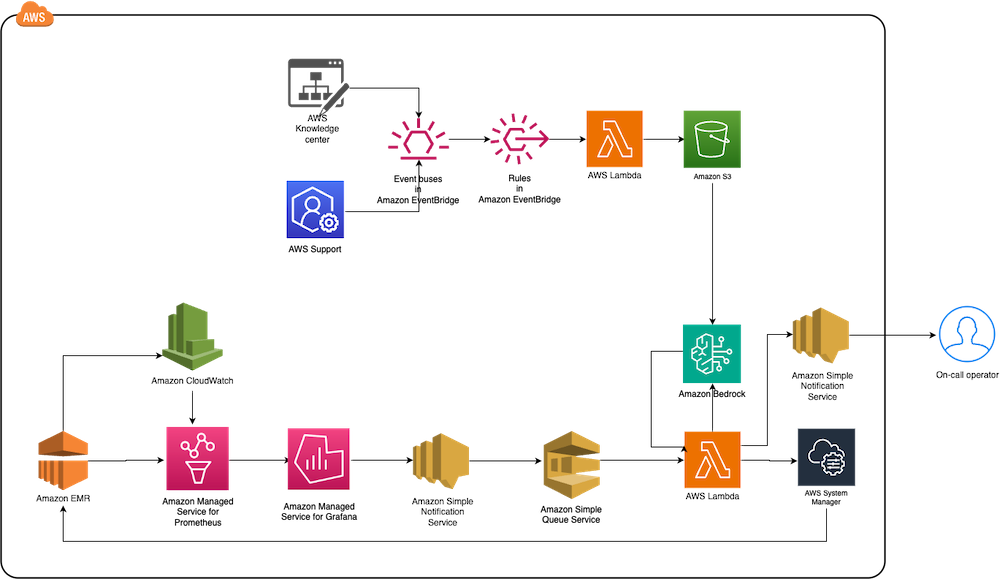
The following diagram illustrates the solution architecture.

End-to-end AWS monitoring solution diagram integrating Knowledge Center, Support, CloudWatch metrics with EventBridge rules and Lambda processing

The architecture comprises the following core components:

  • Monitoring layer – The monitoring layer uses Amazon Managed Service for Prometheus and Amazon CloudWatch to capture real-time metrics from EMR clusters. Amazon Managed Grafana serves as the visualization layer, offering comprehensive dashboards for Apache YARN, HDFS, Apache HBase, and Apache Hudi performance monitoring. Advanced alerting mechanisms trigger notifications based on predefined query results.
  • Notification layer – To provide timely and reliable alert delivery, the notification layer uses Amazon Simple Notification Service (Amazon SNS) for distribution and Amazon Simple Queue Service (Amazon SQS) for message queuing. This architecture prevents message delays and provides a robust trigger mechanism for AWS Lambda functions.
  • Remediation layer – The remediation layer enables automatic issue resolution through:
    • Lambda functions for orchestration
    • Systems Manager for script execution
    • Amazon Bedrock (amazon.nova-lite-v1:0) for generating intelligent response recommendations
  • Knowledge management layer – To maintain an up-to-date knowledge base, the solution:

We provide an AWS CloudFormation template to deploy the solution resources.

Prerequisites

Before starting this walkthrough, make sure you have access to the following AWS resources and configurations:

  • An AWS account
  • Access to the US East (N. Virginia) AWS Region
    • Add access to Amazon Bedrock foundation models (amazon.nova-lite-v1:0)

  • Amazon EMR version 6.15.0 (used in this demo)
  • Archived technical or troubleshooting articles
  • AWS IAM Identity Center enabled with at least one role that can become a Grafana administrator
  • (Optional) AWS Premium Support with a business support plan or higher for enhanced troubleshooting capabilities

Throughout this walkthrough, we provide detailed instructions to set up and configure these prerequisites if you haven’t already done so.

Configure resources using AWS CloudFormation

Complete the following steps to configure your resources:

  1. Launch the CloudFormation stack:

launch stack

  1. Provide emrobservability as the stack name.
  2. Select a virtual private cloud (VPC) and assign a public subnet.
  3. For EMRClusterName, enter a name for your cluster (default: emrObservability).
  4. Enter an existing Amazon S3 location as the Apache HBase root directory location (for example, s3://mybucket/my/hbase/rootdir/).
  5. For MasterInstanceType and CoreInstanceType, enter your instance types (default: m5.xlarge for both).
  6. For CoreInstanceCount, enter your instance count (default: 2).
  7. For SSHIPRange, use CheckIp and enter your IP (for example, 10.1.10/32).
  8. Choose the release label (default: 6.15.0).
  9. For KeyName, enter a key name to SSH to Amazon Elastic Compute Cloud (Amazon EC2) instances.
  10. For LatestAmiId, enter your AMI (default: /aws/service/ami-amazon-linux-latest/amzn2-ami-hvm-x86_64-gp2).
  11. For KBS3Bucket, enter a name for your S3 bucket (for example, mykbbucket).
  12. For SubscriptionEndpoint, enter an email address to receive notifications and responses (for example, [email protected]).

Accept subscription confirmation

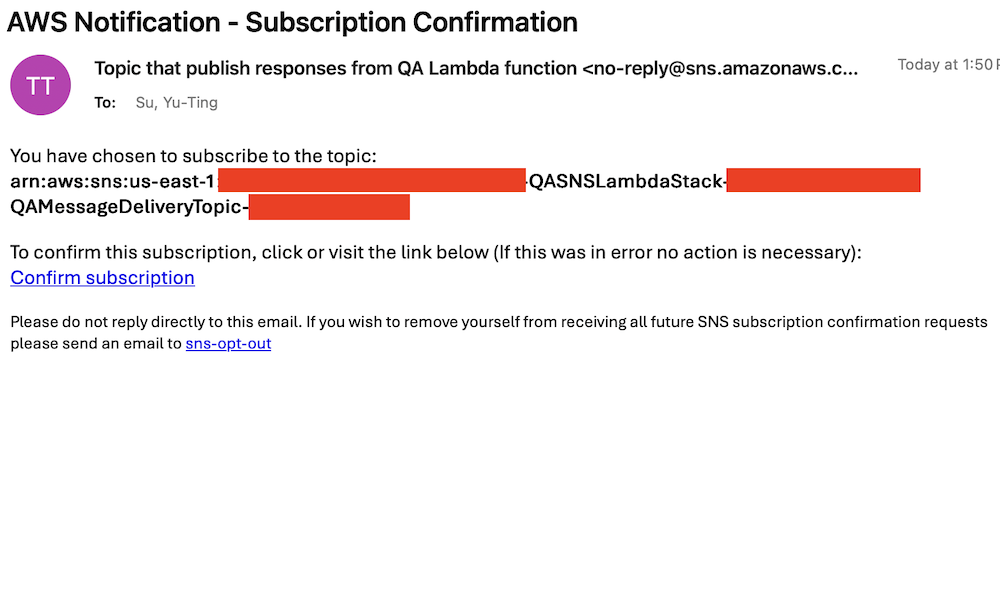
Accept the subscription confirmation sent to the email address you specified in the CloudFormation stack parameters. The following screenshot shows an example of the email you receive.

AWS email confirmation for SNS topic subscription to QA Lambda function responses with opt-out instructions

Prepare the knowledge base

Complete the following steps to populate the S3 bucket with archived technical articles and cases:

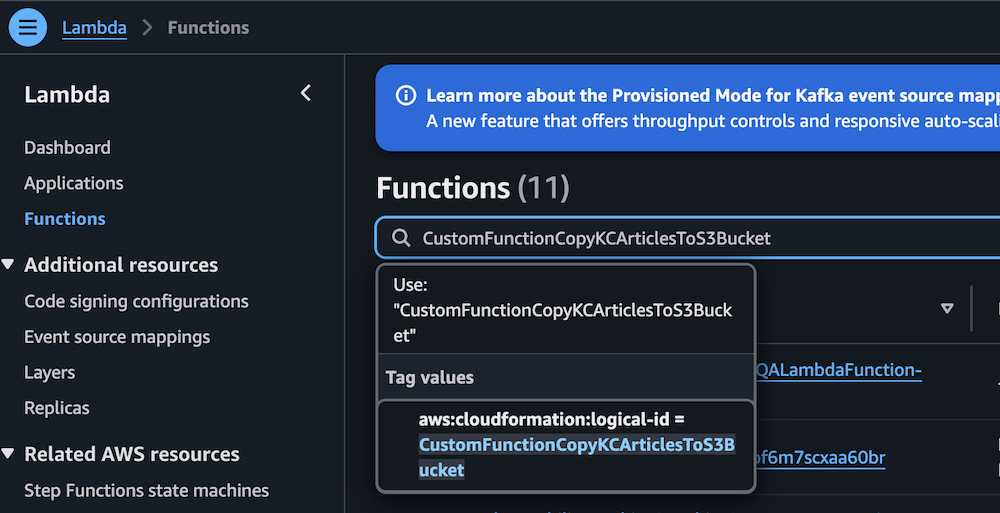
  1. On the Lambda console, choose Functions in the navigation pane.
  2. Choose the function CustomFunctionCopyKCArticlesToS3Bucket.

AWS Lambda console displaying Functions page with CustomFunctionCopyKCArticlesToS3Bucket function details

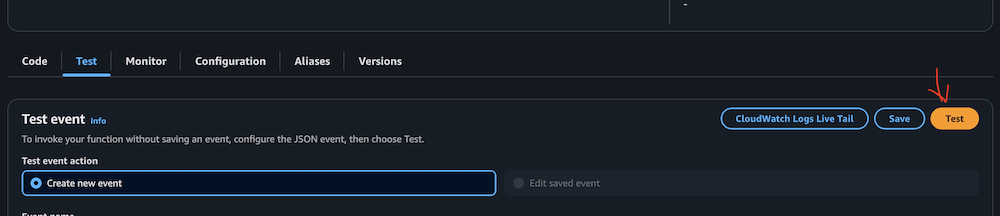
  1. Manually invoke the function by choosing Test on the Test tab.

AWS Lambda Test tab interface with event configuration options

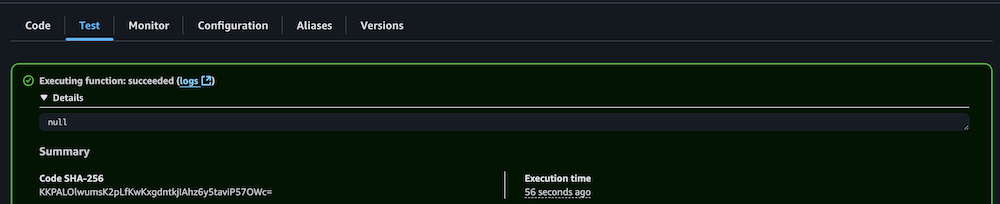
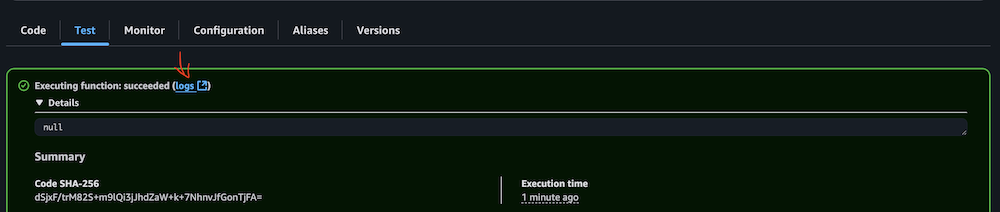
  1. Verify successful execution by checking the CloudWatch logs.

AWS Lambda successful function execution result with null output

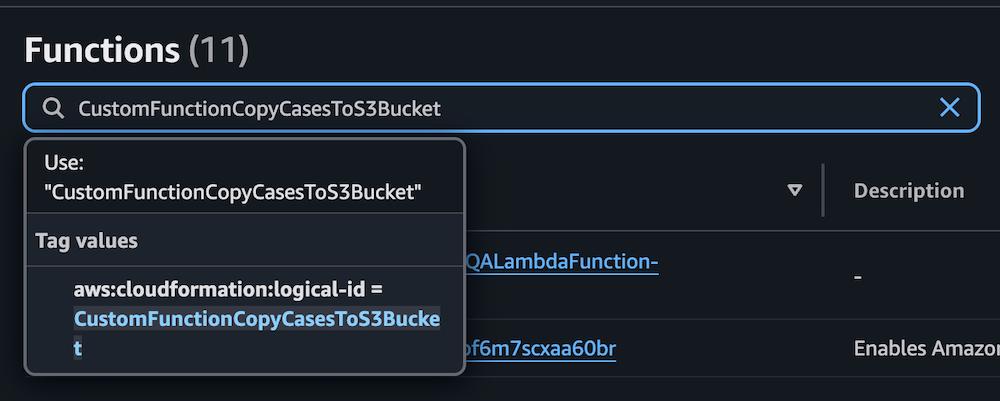
  1. Repeat the process for the Lambda function CustomFunctionCopyCasesToS3Bucket.

Lambda function interface displaying CustomFunctionCopyCasesToS3Bucket configuration with CloudFormation ID and description panel

AWS Lambda test interface showing Test event configuration options and action buttons

AWS Lambda function execution success message with null response and SHA-256 code

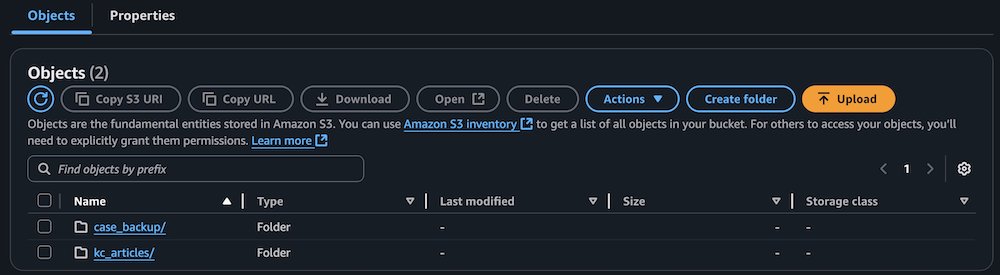
  1. Confirm the S3 bucket has been populated with archived technical articles and cases.

Amazon S3 bucket interface showing two folders with action buttons and search functionality

Sync data to the Amazon Bedrock knowledge base

Complete the following steps to sync the data to your knowledge base:

  1. On the Lambda console, choose Functions in the navigation pane.
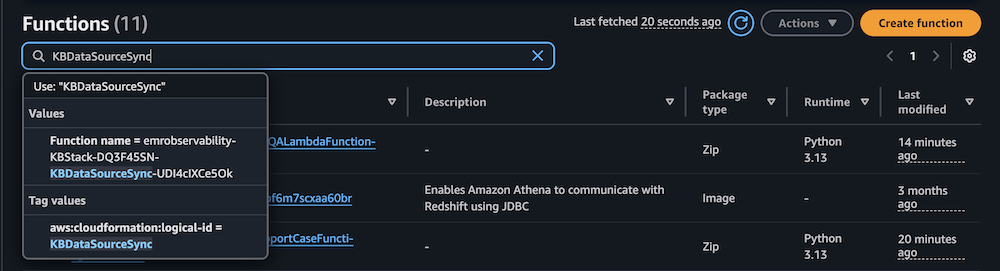
  2. Choose the function KBDataSourceSync.

AWS Lambda console displaying filtered functions with CloudFormation tags, Python runtime versions, and modification timestamps

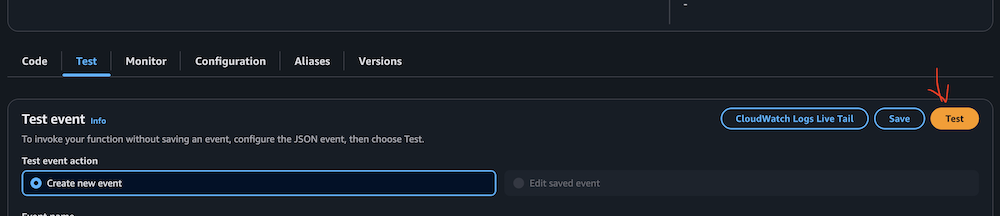
  1. Manually invoke the function by choosing Test on the Test tab.

This task might take 10–15 minutes to complete.

AWS Lambda console test configuration panel with CloudWatch integration and event creation controls

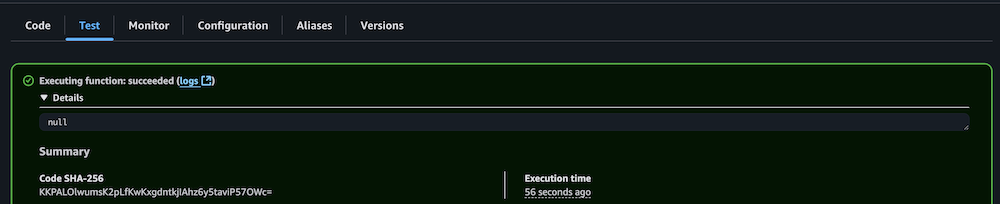
  1. Verify successful execution by checking the CloudWatch logs.

Lambda function execution results showing successful completion status and details

Configure your Amazon Managed Grafana workspace

Complete the following steps to configure your Amazon Managed Grafana workspace:

  1. On the Amazon Managed Grafana console, choose Workspaces in the navigation pane.
  2. Open your workspace.
  3. Choose Assign new user or group.

Amazon Grafana workspace showing IAM configuration notice and user assignment button

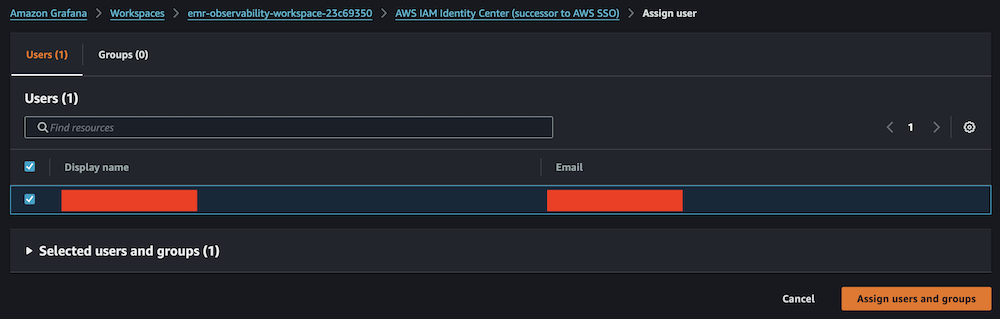
  1. Select your IAM Identity Center role and choose Assign users and groups.

Amazon Grafana IAM Identity Center user assignment panel with search and selection controls

  1. On the Admin dropdown menu, choose Make admin.

Amazon Grafana user list showing assigned viewer with admin action options

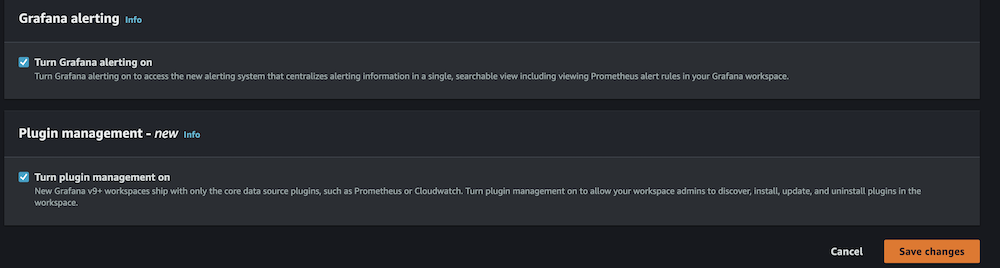
  1. Enable Grafana alerting, then choose Save changes.

Amazon Grafana alerting configuration panel showing disabled status with navigation tabs and edit button

Amazon Grafana configuration panel showing enabled alerting and plugin management settings

  1. Wait 10 minutes for the workspace to become active.
  2. When it’s active, sign in to the Grafana workspace. (For more information, refer to Connect to your workspace.)

Configure data sources

Add and configure the following data sources:

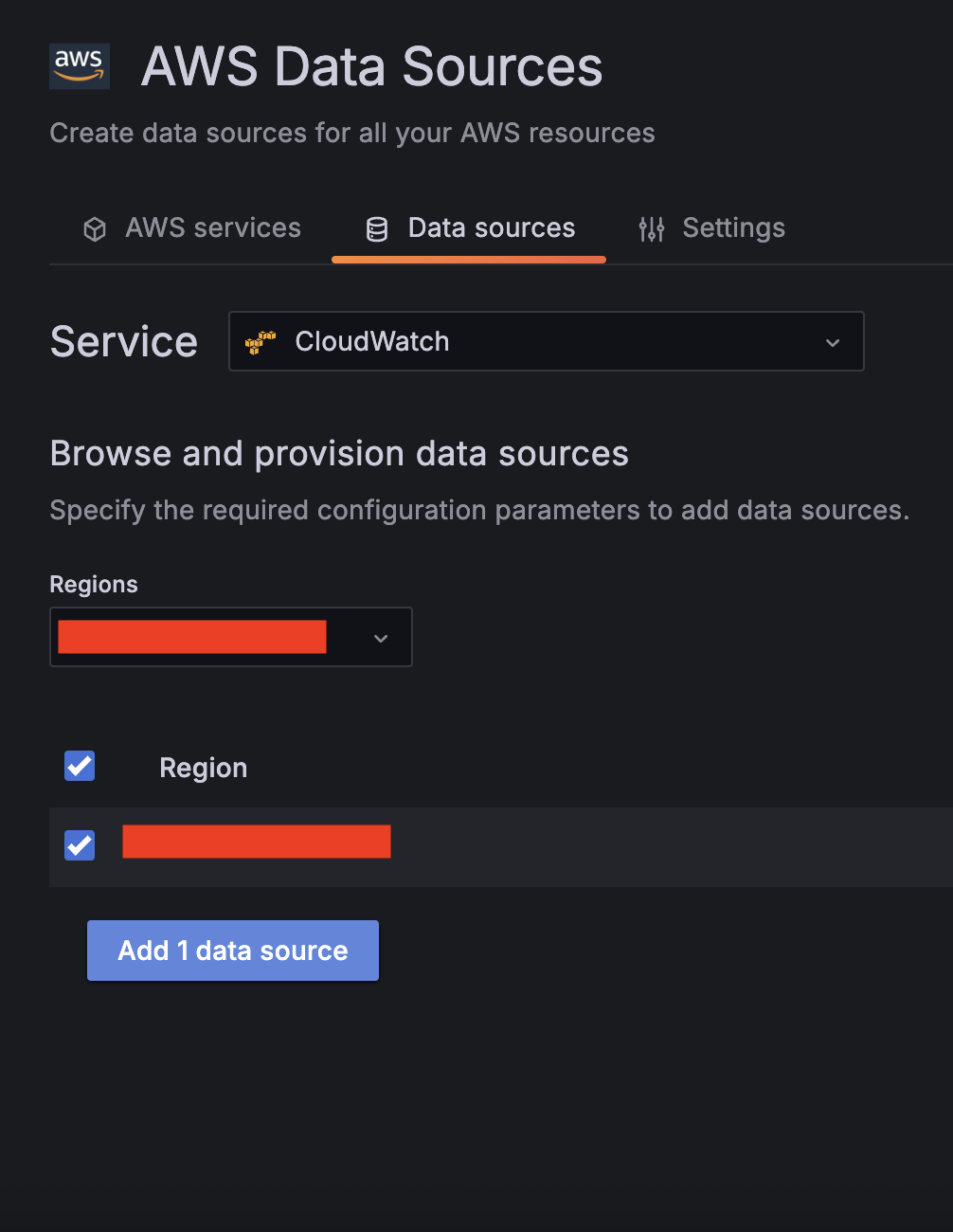
  1. For Service, choose CloudWatch, then select your Region and add CloudWatch as a data source.

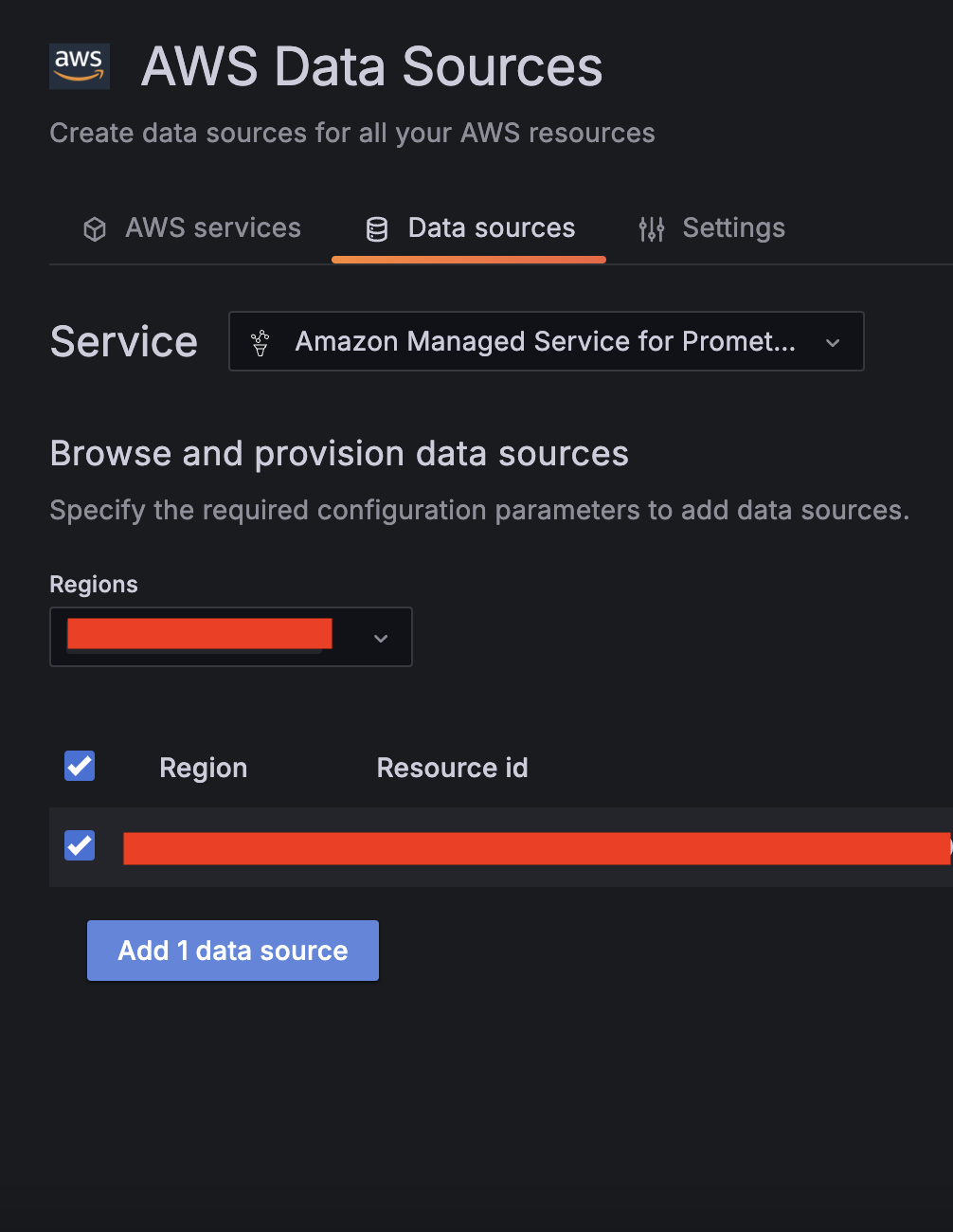
  1. Choose Amazon Managed Service for Prometheus as a second data source and select your Region.

  1. Validate CloudWatch connectivity:
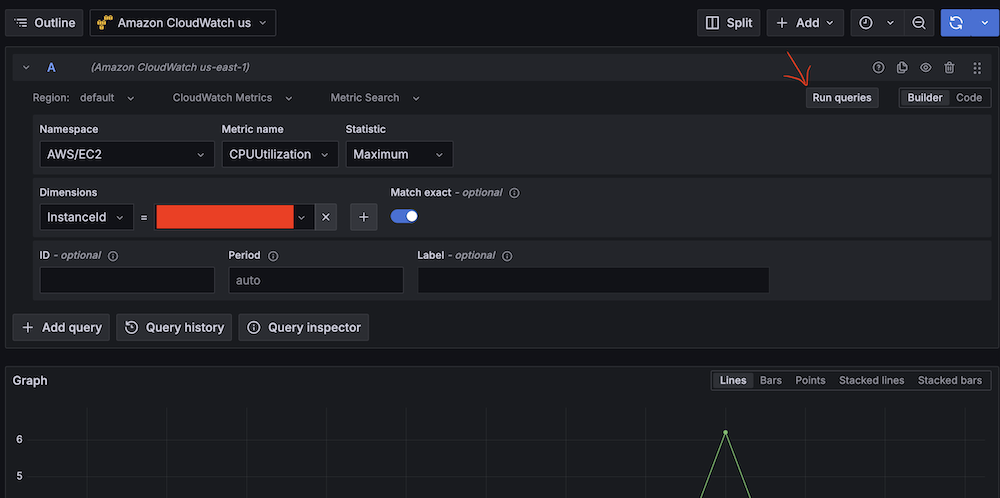
    1. Run test queries (for example, Namespace: AWS/EC2, Metric name: CPUUtilization, Statistic: Maximum).
      Amazon Managed Gragana interface showing CPU utilization query setup for EC2 instance.
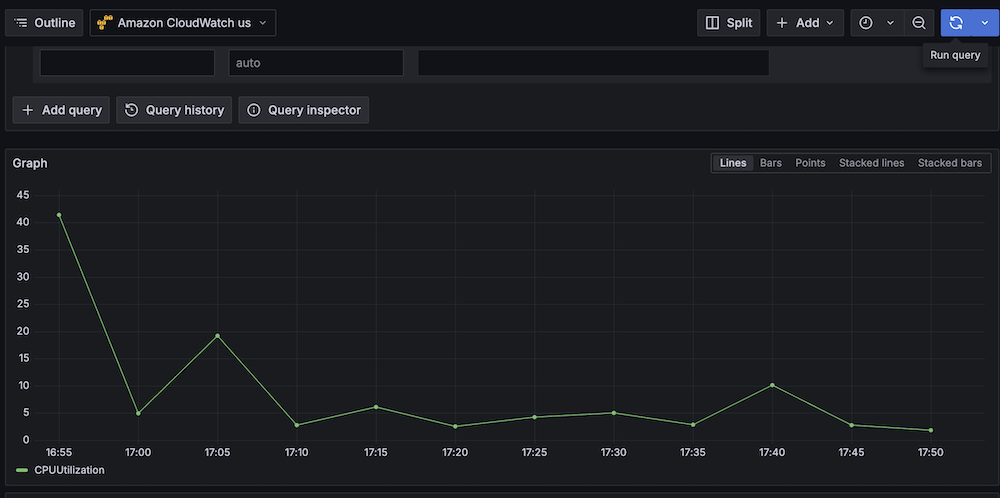
    2. Verify CloudWatch metric retrieval.
      Line graph showing CPU utilization over time with peak at 40%.
  1. Validate Amazon Managed Service for Prometheus connectivity:
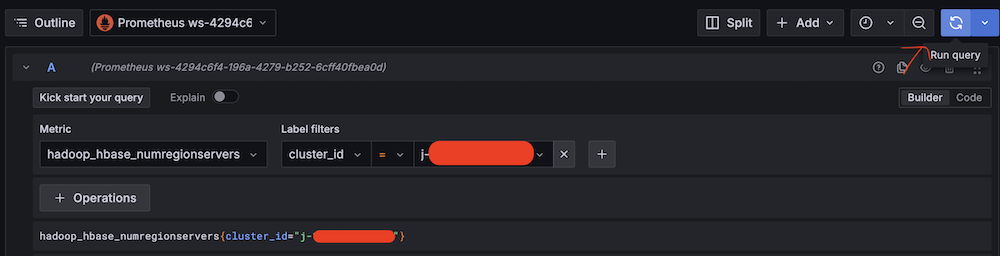
    1. Run test queries (for example, Metric: hadoop_hbase_numregionservers, Label filters: cluster_id = <Amazon EMR cluster ID>).
      Amazon Managed Grafana query interface showing Hadoop HBase metric configuration.
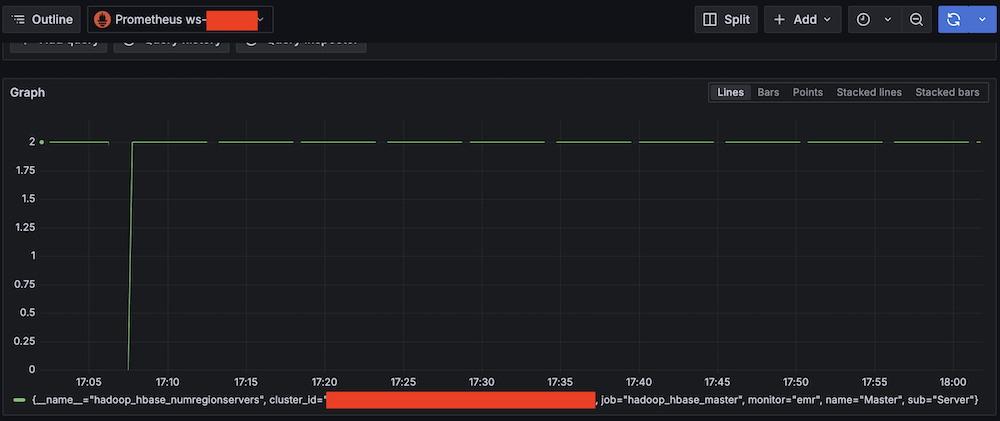
    2. Verify Prometheus metric retrieval.
      Amazon Managed Grafana monitoring dashboard showing a graph with HBase Region Server amount from 0 to 2

Confirm SNS notification channels

Complete the following steps to confirm your SNS notification is set up:

  1. On the Amazon SNS console, choose Topics in the navigation pane.
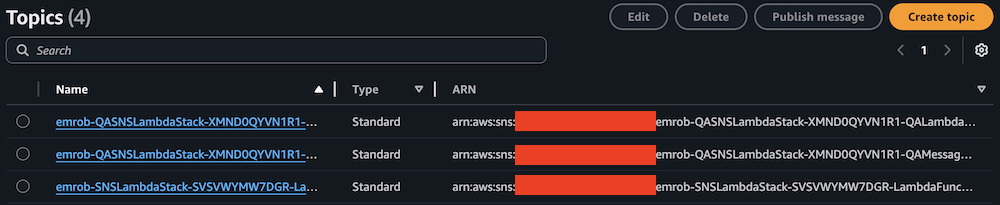
  2. Locate and note the ARNs for -LambdaFunctionTopic and -QALambdaFunctionTopic.

AWS SNS Topics list showing 4 topics with names, types, and ARNs

AWS SNS Topics console showing filtered search results for "LambdaFunctionTopic"

AWS SNS Topics console showing filtered search results for "QALambdaFunctionTopic"

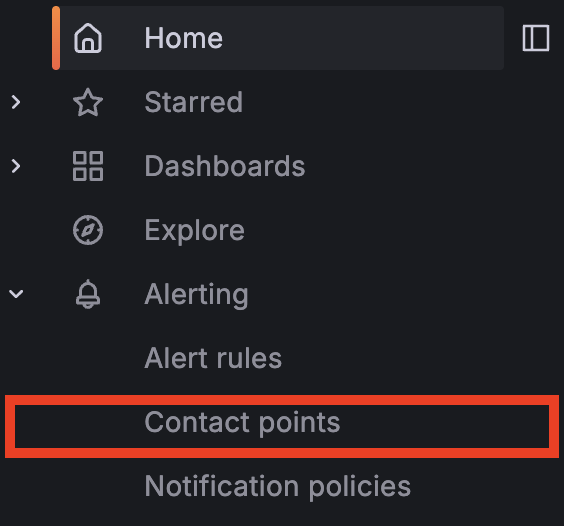
  1. Choose Contact points under Alerting.

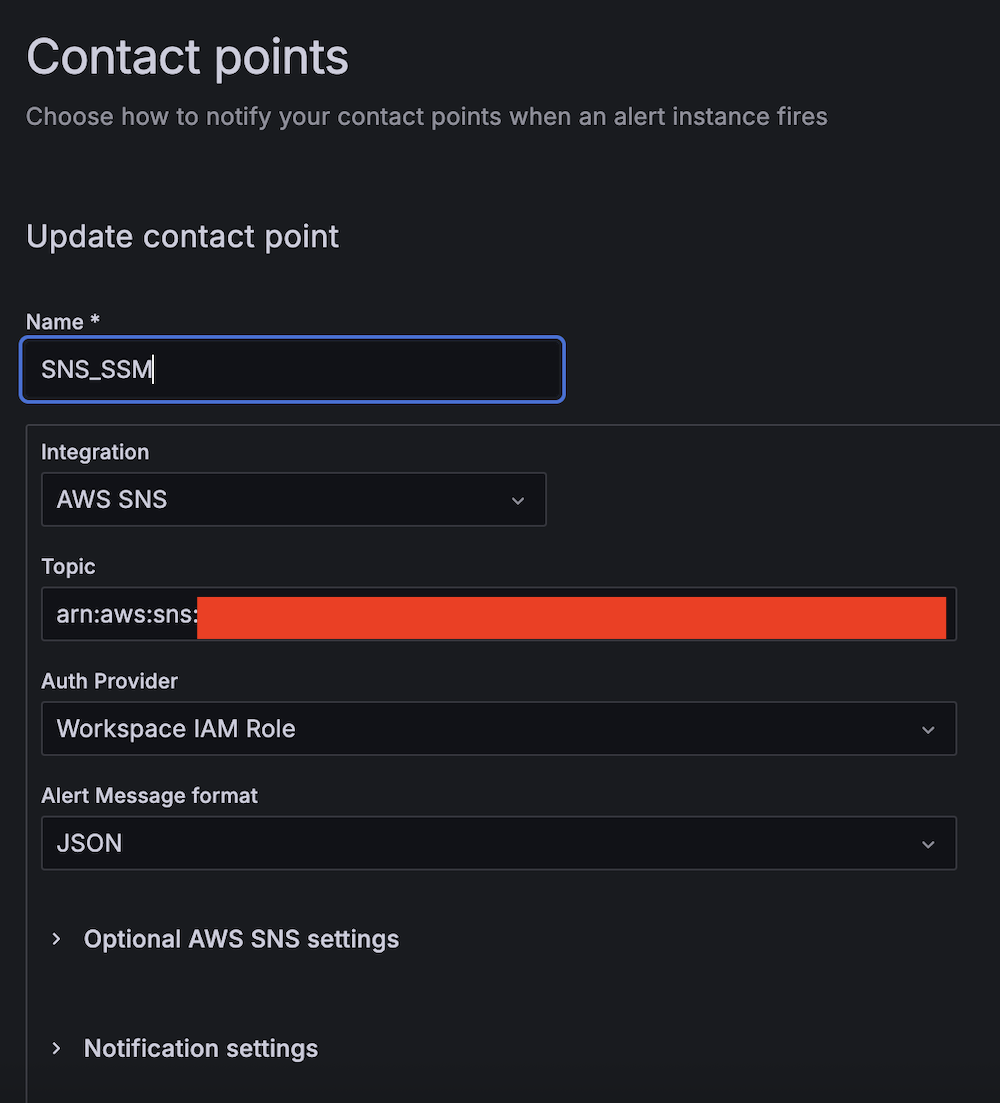
  1. Create the first contact point:
    1. For Name, enter SNS_SSM.
    2. For Integration, choose AWS SNS.
    3. For Topic, enter the ARN for LambdaFunctionTopic.
    4. For Auth Provider, choose Workspace IAM role.
    5. For Alert Message format, choose JSON.

  1. Create the second contact point:
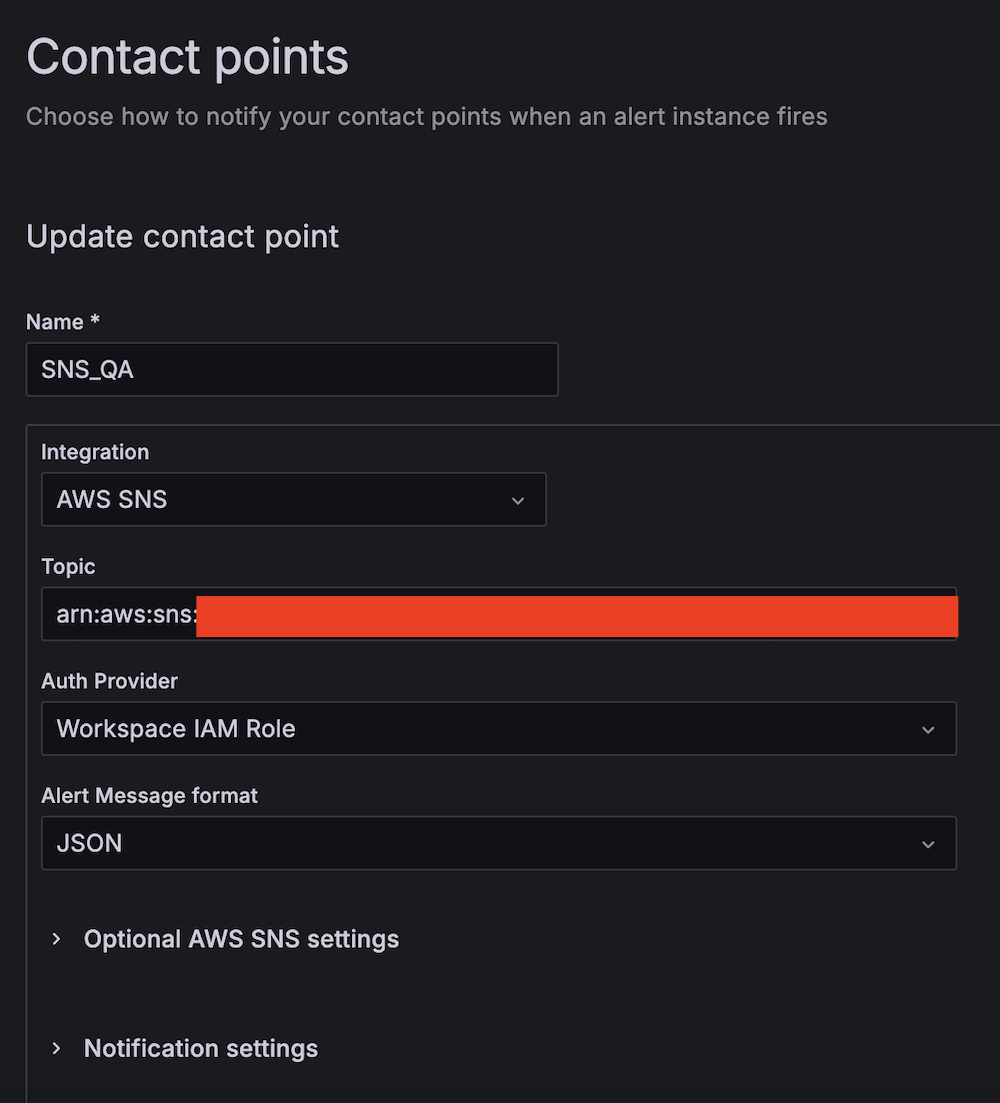
    1. For Name, enter SNS_QA.
    2. For Integration, choose AWS SNS.
    3. For Topic, enter the ARN for QALambdaFunctionTopic.
    4. For Auth Provider, choose Workspace IAM role.
    5. For Alert Message format, choose JSON.

Create alert rules

Complete the following steps to set up two critical alert rules:

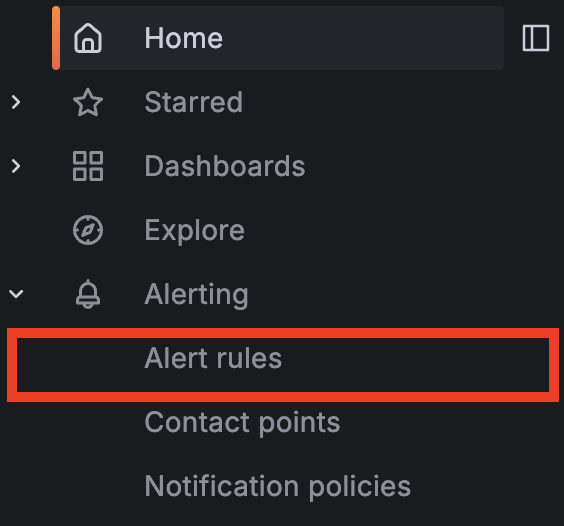
  1. Choose Alert rules under Alerting.

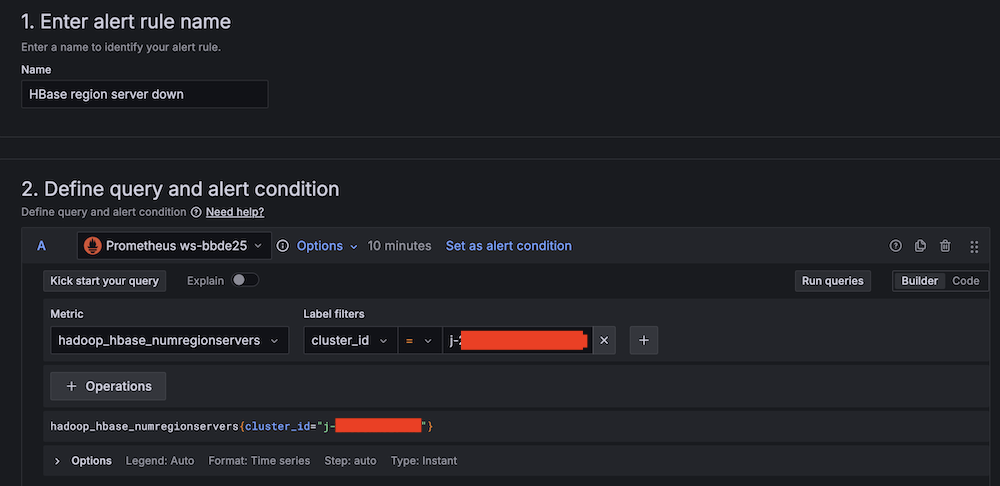
  1. Set up alerting if the Apache HBase region server status is abnormal:
    1. For Alert name, enter HBase region server down.
    2. For Data source, choose Amazon Managed Service for Prometheus.
    3. For Metric, choose hadoop_hbase_numregionservers.
      Alert rule configuration interface for HBase region server monitoring
    4. For Threshold, configure to alert if the region server count is less than 2 for 3 minutes.
      Amazon Managed Grafana alert rule configuration interface with expressions setup
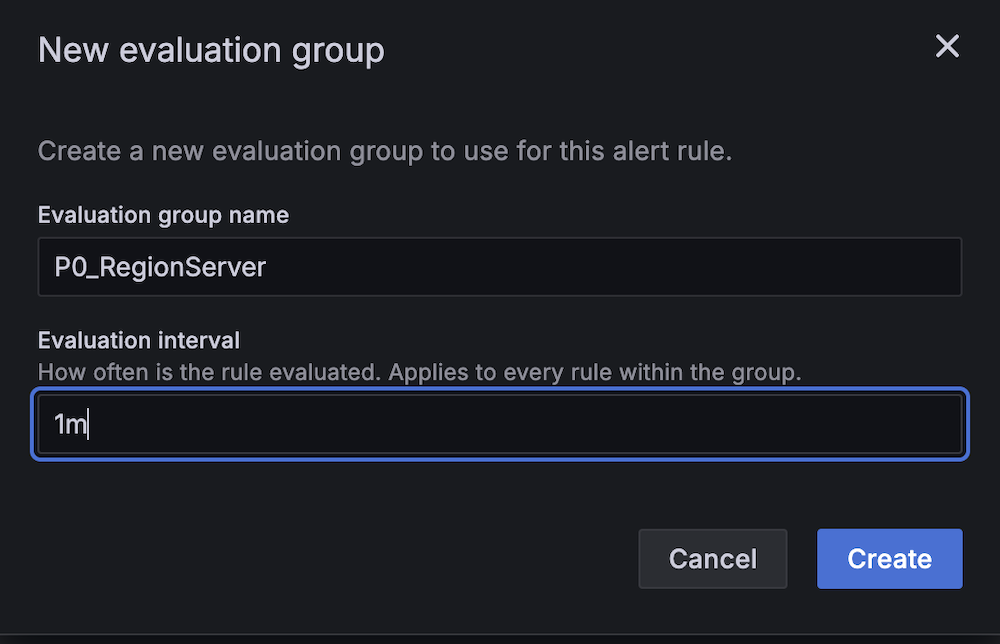
    5. For Evaluation interval, set to 1 minute.
      New evaluation group creation modal showing P0_RegionServer name input and 1m interval settingHBase alert configuration panel showing P0_RegionServer group and 3m pending period
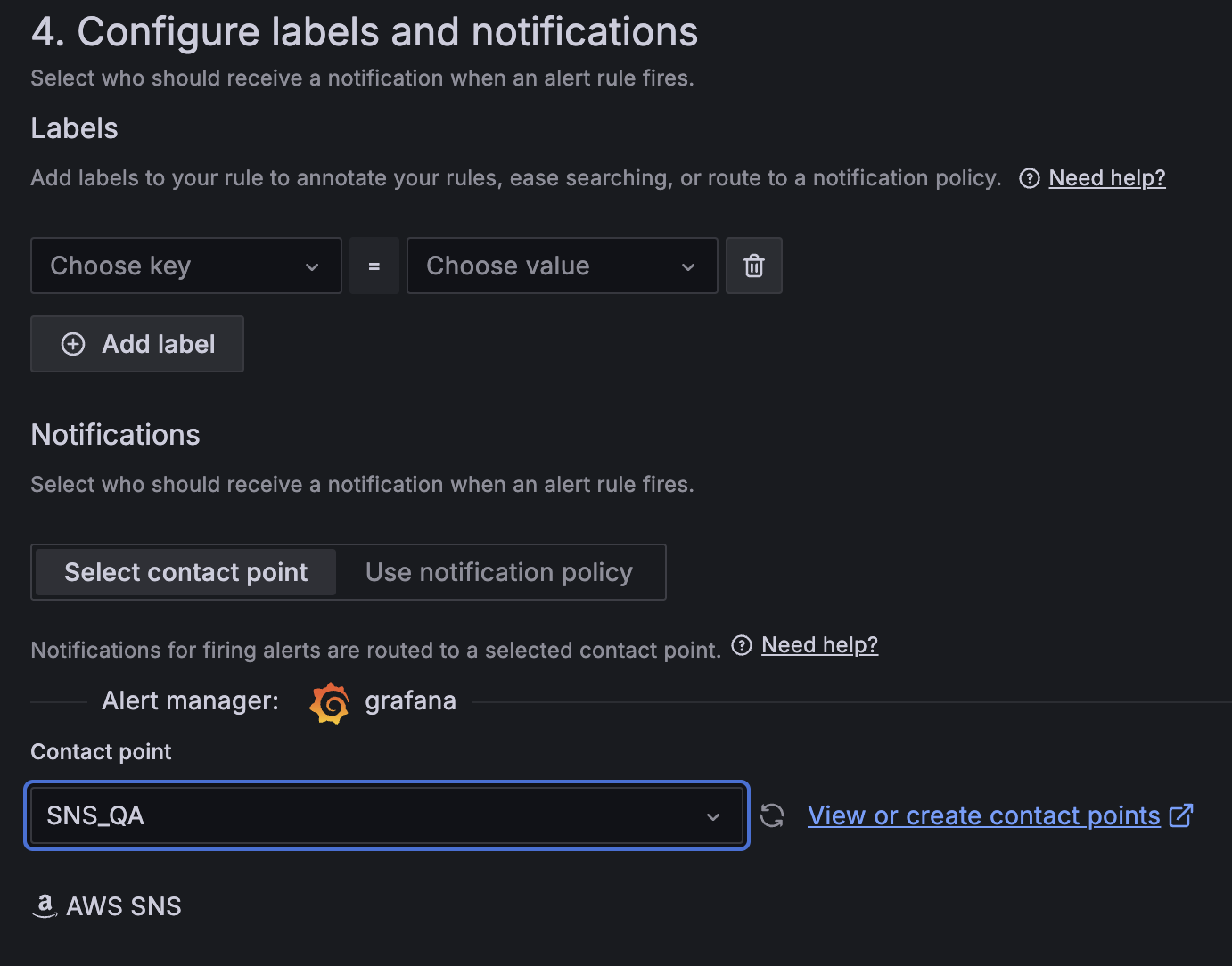
    6. For Contact point, choose SNS_SSM.
      Amazon Managed Grafana alert configuration interface showing labels and notifications setup with AWS SNS integration
  1. Create a second alert for if Amazon EC2 CPU utilization is abnormal:
    1. For Alert name, enter EC2 CPU utilization too high.
    2. For Data source, choose Amazon CloudWatch.
    3. For Namespace, choose AWS/EC2.
    4. For Metric name, choose CPUUtilization
    5. For Statistic, choose Maximum.
      Amazon CloudWatch query interface for setting up EC2 CPU utilization alert conditions
    6. For Threshold, configure to alert if CPU utilization is more than 95% for 3 minutes.
      Amazon Managed Grafana alert interface with Reduce and Threshold expressions for alert condition management
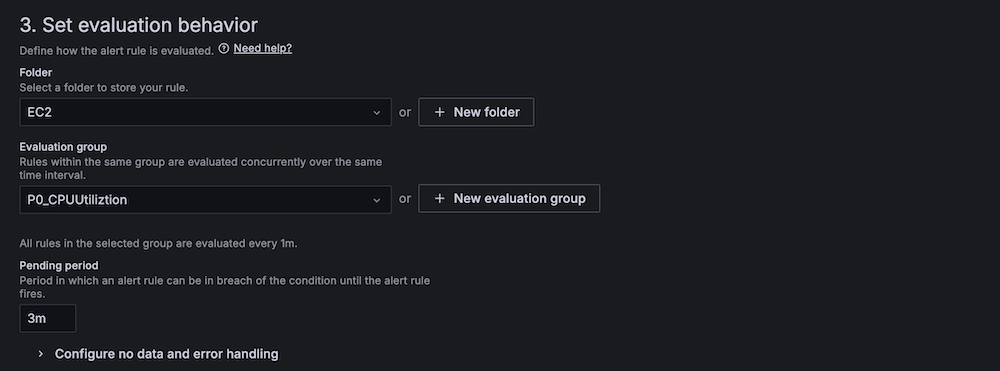
    7. For Evaluation interval, configure to 1 minute.
      New evaluation group configuration modal showing CPU utilization monitoring setup with 1-minute interval
      AWS Managed Grafana alert rule configuration screen showing evaluation behavior settings
    8. For Contact point, choose SNS_QA.Amazon Managed Grafana alert configuration showing customizable labels, contact point selection for SNS_QA integration
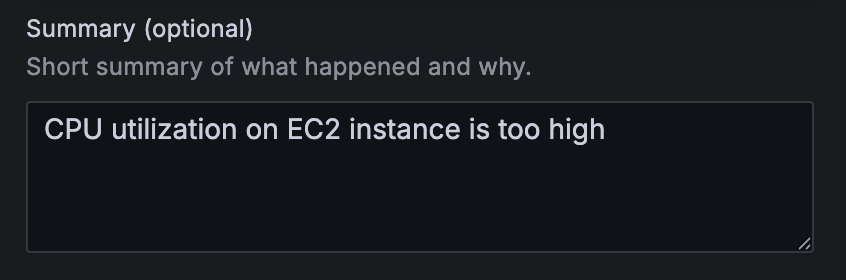
  1. On the alert rule creation page, scroll to 5. Add annotations and for Summary, add a clear description of the alert, for example, CPU utilization on EC2 instance is too high.

Alert configuration summary field with "CPU utilization on EC2 instance is too high" warning message

Apache HBase region server incident test

To confirm the system is working as expected, complete the following Apache HBase region server incident test:

  1. SSH into an EMR core instance.
  2. Stop the Apache HBase region server using systemctl:
 # Stop HBase region server service 
 sudo systemctl stop hbase-regionserver.service 

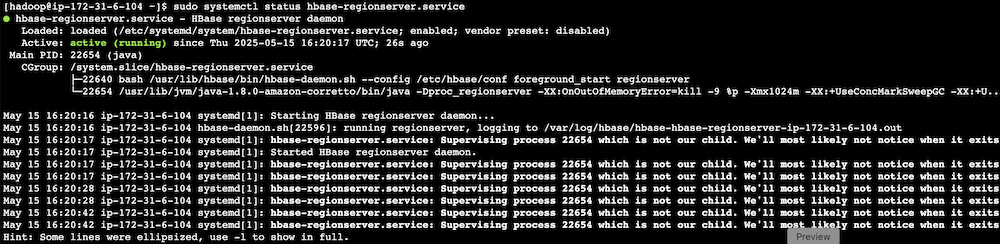
  1. Verify the service status:
 # Check the current state of HBase region server service 
 sudo systemctl status hbase-regionserver.service
  1. Observe Amazon Managed Grafana alert progression:
    1. Monitor alert status changes.
      Alert dashboard showing HBase region server alert status in pending state
      Alert dashboard showing HBase region server alert in firing state
    2. Verify SNS message generation.
    3. Confirm SQS message queuing.
    4. Track the Lambda function triggered for remediation.

Terminal output showing HBase RegionServer service status and daemon processes

HBase monitoring interface displaying region server status with health indicators and action buttons

CPU utilization stress test

Complete the following CPU utilization stress test:

  1. SSH into the EMR primary instance.
  2. Install stress testing tools:
 sudo amazon-linux-extras install epel -y
 sudo yum install stress -y 

  1. Verify the installation:
 stress --version 

  1. Generate high CPU load using the stress command and the following command structure:
 sudo stress [options] 

For our Amazon EMR test, use the following command:

 # For m5.xlarge instances (4 vCPUs) sudo stress --cpu 4 

-c 4 in the command creates 4 CPU-bound processes (one for each vCPU).The following are instance type vCPUs for your reference:

  • m5.xlarge: 4 vCPUs
  • m5.2xlarge: 8 vCPUs
  • m5.4xlarge: 16 vCPUs
  1. Monitor system response:
    1. Observe Amazon Managed Grafana alert status changes.
      Amazon Managed Grafana dashboard header showing rules status
    2. Verify Amazon Bedrock recommendation generation.
    3. Check SNS email notification delivery.
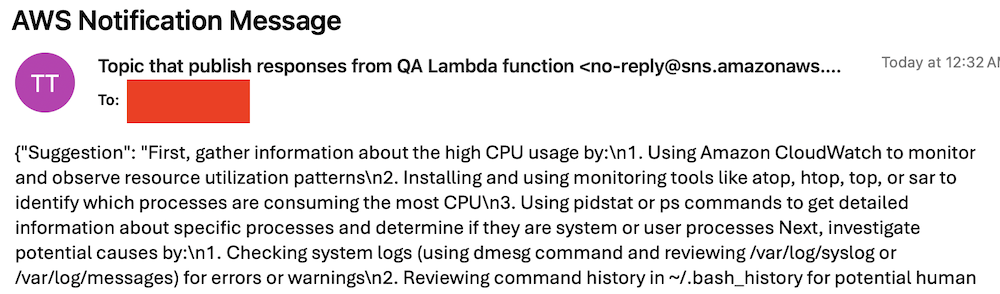
      AWS SNS notification email showing troubleshooting steps for high CPU usageCode snippet showing CPU usage troubleshooting steps in red text

Best practices and considerations

Monitoring infrastructure requires precise alert prioritization and threshold configuration. Alert aggregation techniques prevent notification overload by consolidating event streams and reducing redundant alerts. Operational teams must maintain dashboards through consistent updates and metric integration, providing real-time visibility into system performance and health.

Security implementations focus on least-privilege AWS Identity and Access Management (IAM) roles, restricting access to critical resources and minimizing potential breach vectors. Data protection strategies involve encryption protocols for information at rest and in transit, using AES-256 standards. Automated security audit processes scan automation scripts, identifying potential vulnerabilities through code analysis and runtime inspection.

Performance optimization in serverless architectures uses Lambda extensions to cache knowledge base content, reducing latency and improving response times. Retry mechanisms for API calls implement exponential backoff strategies, mitigating transient network exceptions and enhancing system resilience. Execution time monitoring of Lambda functions enables detection of anomalies through statistical analysis, providing insights into potential system-wide incidents or performance degradations.

Clean up

To avoid incurring future charges, delete the resources by deleting the parent stack on the AWS CloudFormation console.

Conclusion

This solution provides a robust framework for automated EMR cluster monitoring and incident response. By combining real-time monitoring with AI-powered remediation suggestions and automated execution, organizations can significantly reduce MTTR for common Amazon EMR issues while building a knowledge base for future incident response.

Try out this solution for your own use case, and leave your feedback in the comments section.


About the authors

Author Yu-ting Su, Sr. Hadoop System Engineer, AWS Support Engineering. Yu-Ting is a Sr. Hadoop Systems Engineer at Amazon Web Services (AWS). Her expertise is in Amazon EMR and Amazon OpenSearch Service. She’s passionate about distributing computation and helping people to bring their ideas to life.

Introducing Amazon Bedrock AgentCore: Securely deploy and operate AI agents at any scale (preview)

Post Syndicated from Danilo Poccia original https://aws.amazon.com/blogs/aws/introducing-amazon-bedrock-agentcore-securely-deploy-and-operate-ai-agents-at-any-scale/

In just a few years, foundation models (FMs) have evolved from being used directly to create content in response to a user’s prompt, to now powering AI agents, a new class of software applications that use FMs to reason, plan, act, learn, and adapt in pursuit of user-defined goals with limited human oversight. This new wave of agentic AI is enabled by the emergence of standardized protocols such as Model Context Protocol (MCP) and Agent2Agent (A2A) that simplify how agents connect with other tools and systems.

In fact, building AI agents that can reliably perform complex tasks has become increasingly accessible thanks to open source frameworks like CrewAILangGraph, and Strands Agents. However, moving from a promising proof-of-concept to a production-ready agent that can scale to thousands of users presents significant challenges.

Instead of being able to focus on the core features of the agent, developers and AI engineers have to spend months building foundational infrastructure for session management, identity controls, memory systems, and observability—at the same time supporting security and compliance.

Today, we’re excited to announce the preview of Amazon Bedrock AgentCore, a comprehensive set of enterprise-grade services that help developers quickly and securely deploy and operate AI agents at scale using any framework and model, hosted on Amazon Bedrock or elsewhere.

More specifically, we are introducing today:

AgentCore Runtime – Provides sandboxed low-latency serverless environments with session isolation, supporting any agent framework including popular open source frameworks, tools, and models, and handling multimodal workloads and long-running agents.

AgentCore Memory – Manages session and long-term memory, providing relevant context to models while helping agents learn from past interactions.

AgentCore Observability – Offers step-by-step visualization of agent execution with metadata tagging, custom scoring, trajectory inspection, and troubleshooting/debugging filters.

AgentCore Identity – Enables AI agents to securely access AWS services and third-party tools and services such as GitHub, Salesforce, and Slack, either on behalf of users or by themselves with pre-authorized user consent.

AgentCore Gateway – Transforms existing APIs and AWS Lambda functions into agent-ready tools, offering unified access across protocols, including MCP, and runtime discovery.

AgentCore Browser – Provides managed web browser instances to scale your agents’ web automation workflows.

AgentCore Code Interpreter – Offers an isolated environment to run the code your agents generate.

These services can be used individually and are optimized to work together so developers don’t need to spend time piecing together components. AgentCore can work with open source or custom AI agent frameworks, giving teams the flexibility to maintain their preferred tools while gaining enterprise capabilities. To integrate these services into their existing code, developers can use the AgentCore SDK.

You can now discover, buy, and run pre-built agents and agent tools from AWS Marketplace with AgentCore Runtime. With just a few lines of code, your agents can securely connect to API-based agents and tools from AWS Marketplace with AgentCore Gateway to help you run complex workflows while maintaining compliance and control.

AgentCore eliminates tedious infrastructure work and operational complexity so development teams can bring groundbreaking agentic solutions to market faster.

Let’s see how this works in practice. I’ll share more info on the services as we use them.

Deploying a production-ready customer support assistant with Amazon Bedrock AgentCore (Preview)
When customers reach out with an email, it takes time to provide a reply. Customer support needs to check the validity of the email, find who the actual customer is in the customer relationship management (CRM) system, check their orders, and use product-specific knowledge bases to find the information required to prepare an answer.

An AI agent can simplify that by connecting to the internal systems, retrieve contextual information using a semantic data source, and draft a reply for the support team. For this use case, I built a simple prototype using Strands Agents. For simplicity and to validate the scenario, the internal tools are simulated using Python functions.

When I talk to developers, they tell me that similar prototypes, covering different use cases, are being built in many companies. When these prototypes are demonstrated to the company leadership and receive confirmation to proceed, the development team has to define how to go in production and satisfy the usual requirements for security, performance, availability, and scalability. This is where AgentCore can help.

Step 1 – Deploying to the cloud with AgentCore Runtime

AgentCore Runtime is a new service to securely deploy, run, and scale AI agents, providing isolation so that each user session runs in its own protected environment to help prevent data leakage—a critical requirement for applications handling sensitive data.

To match different security postures, agents can use different network configurations:

Sandbox – To only communicate with allowlisted AWS services.

Public – To run with managed internet access.

VPC-only (coming soon) – This option will allow to access resources hosted in a customer’s VPC or connected via AWS PrivateLink endpoints.

To deploy the agent to the cloud and get a secure, serverless endpoint with AgentCore Runtime, I add to the prototype a few lines of code using the AgentCore SDK to:

  • Import the AgentCore SDK.
  • Create the AgentCore app.
  • Specify which function is the entry point to invoke the agent.

Using a different or custom agent framework is a matter of replacing the agent invocation inside the entry point function.

Here’s the code of the prototype. The three lines I added to use AgentCore Runtime are the ones preceded by a comment.

from strands import Agent, tool
from strands_tools import calculator, current_time

# Import the AgentCore SDK
from bedrock_agentcore.runtime import BedrockAgentCoreApp

WELCOME_MESSAGE = """
Welcome to the Customer Support Assistant! How can I help you today?
"""

SYSTEM_PROMPT = """
You are an helpful customer support assistant.
When provided with a customer email, gather all necessary info and prepare the response email.
When asked about an order, look for it and tell the full description and date of the order to the customer.
Don't mention the customer ID in your reply.
"""

@tool
def get_customer_id(email_address: str):
    if email_address == "[email protected]":
        return { "customer_id": 123 }
    else:
        return { "message": "customer not found" }

@tool
def get_orders(customer_id: int):
    if customer_id == 123:
        return [{
            "order_id": 1234,
            "items": [ "smartphone", "smartphone USB-C charger", "smartphone black cover"],
            "date": "20250607"
        }]
    else:
        return { "message": "no order found" }

@tool
def get_knowledge_base_info(topic: str):
    kb_info = []
    if "smartphone" in topic:
        if "cover" in topic:
            kb_info.append("To put on the cover, insert the bottom first, then push from the back up to the top.")
            kb_info.append("To remove the cover, push the top and bottom of the cover at the same time.")
        if "charger" in topic:
            kb_info.append("Input: 100-240V AC, 50/60Hz")
            kb_info.append("Includes US/UK/EU plug adapters")
    if len(kb_info) > 0:
        return kb_info
    else:
        return { "message": "no info found" }

# Create an AgentCore app
app = BedrockAgentCoreApp()

agent = Agent(
    system_prompt=SYSTEM_PROMPT,
    tools=[calculator, current_time, get_customer_id, get_orders, get_knowledge_base_info]
)

# Specify the entrypoint function invoking the agent
@app.entrypoint
def invoke(payload, context: RequestContext):
    """Handler for agent invocation"""
    user_message = payload.get(
        "prompt", "No prompt found in input, please guide customer to create a json payload with prompt key"
    )
    result = agent(user_message)
    return {"result": result.message}

if __name__ == "__main__":
    app.run()

I install the AgentCore SDK and the starter toolkit in the Python virtual environment:

pip install bedrock-agentcore bedrock-agentcore-starter-toolkit

After I activate the virtual environment, I have access to the AgentCore command line interface (CLI) provided by the starter toolkit.

First, I use agentcore configure --entrypoint my_agent.py -er <IAM_ROLE_ARN> to configure the agent, passing the AWS Identity and Access Management (IAM) role that the agent will assume. In this case, the agent needs access to Amazon Bedrock to invoke the model. The role can give access to other AWS resources used by an agent, such as an Amazon Simple Storage Service (Amazon S3) bucket or a Amazon DynamoDB table.

I launch the agent locally with agentcore launch --local. When running locally, I can interact with the agent using agentcore invoke --local <PAYLOAD>. The payload is passed to the entry point function. Note that the JSON syntax of the invocations is defined in the entry point function. In this case, I look for prompt in the JSON payload, but can use a different syntax depending on your use case.

When I am satisfied by local testing, I use agentcore launch to deploy to the cloud.

After the deployment is succesful and an endpoint has been created, I check the status of the endpoint with agentcore status and invoke the endpoint with agentcore invoke <PAYLOAD>. For example, I pass a customer support request in the invocation:

agentcore invoke '{"prompt": "From: [email protected] – Hi, I bought a smartphone from your store. I am traveling to Europe next week, will I be able to use the charger? Also, I struggle to remove the cover. Thanks, Danilo"}'

Step 2 – Enabling memory for context

After an agent has been deployed in the AgentCore Runtime, the context needs to be persisted to be available for a new invocation. I add AgentCore Memory to maintain session context using its short-term memory capabilities.

First, I create a memory client and the memory store for the conversations:

from bedrock_agentcore.memory import MemoryClient

memory_client = MemoryClient(region_name="us-east-1")

memory = memory_client.create_memory_and_wait(
    name="CustomerSupport", 
    description="Customer support conversations"
)

I can now use create_event to stores agent interactions into short-term memory:

memory_client.create_event(
    memory_id=memory.get("id"), # Identifies the memory store
    actor_id="user-123",        # Identifies the user
    session_id="session-456",   # Identifies the session
    messages=[
        ("Hi, ...", "USER"),
        ("I'm sorry to hear that...", "ASSISTANT"),
        ("get_orders(customer_id='123')", "TOOL"),
        . . .
    ]
)

I can load the most recent turns of a conversations from short-term memory using list_events:

conversations = memory_client.list_events(
    memory_id=memory.get("id"), # Identifies the memory store
    actor_id="user-123",        # Identifies the user 
    session_id="session-456",   # Identifies the session
    max_results=5               # Number of most recent turns to retrieve
)

With this capability, the agent can maintain context during long sessions. But when a users come back with a new session, the conversation starts blank. Using long-term memory, the agent can personalize user experiences by retaining insights across multiple interactions.

To extract memories from a conversation, I can use built-in AgentCore Memory policies for user preferences, summarization, and semantic memory (to capture facts) or create custom policies for specialized needs. Data is stored encrypted using a namespace-based storage for data segmentation.

I change the previous code creating the memory store to include long-term capabilities by passing a semantic memory strategy. Note that an existing memory store can be updated to add strategies. In that case, the new strategies are applied to newer events.

memory = memory_client.create_memory_and_wait(
    name="CustomerSupport", 
    description="Customer support conversations",
    strategies=[{
        "semanticMemoryStrategy": {
            "name": "semanticFacts",
            "namespaces": ["/facts/{actorId}"]
        }
    }]
)

After long-term memory has been configured for a memory store, calling create_event will automatically apply those strategies to extract information from the conversations. I can then retrieve memories extracted from the conversation using a semantic query:

memories = memory_client.retrieve_memories(
    memory_id=memory.get("id"),
    namespace="/facts/user-123",
    query="smartphone model"
)

In this way, I can quickly improve the user experience so that the agent remembers customer preferences and facts that are outside of the scope of the CRM and use this information to improve the replies.

Step 3 – Adding identity and access controls

Without proper identity controls, access from the agent to internal tools always uses the same access level. To follow security requirements, I integrate AgentCore Identity so that the agent can use access controls scoped to the user’s or agent’s identity context.

I set up an identity client and create a workload identity, a unique identifier that represents the agent within the AgentCore Identity system:

from bedrock_agentcore.services.identity import IdentityClient

identity_client = IdentityClient("us-east-1")
workload_identity = identity_client.create_workload_identity(name="my-agent")

Then, I configure the credential providers, for example:

google_provider = identity_client.create_oauth2_credential_provider(
    {
        "name": "google-workspace",
        "credentialProviderVendor": "GoogleOauth2",
        "oauth2ProviderConfigInput": {
            "googleOauth2ProviderConfig": {
                "clientId": "your-google-client-id",
                "clientSecret": "your-google-client-secret",
            }
        },
    }
)

perplexity_provider = identity_client.create_api_key_credential_provider(
    {
        "name": "perplexity-ai",
        "apiKey": "perplexity-api-key"
    }
)

I can then add the @requires_access_token Python decorator (passing the provider name, the scope, and so on) to the functions that need an access token to perform their activities.

Using this approach, the agent can verify the identity through the company’s existing identity infrastructure, operate as a distinct, authenticated identity, act with scoped permissions and integrate across multiple identity providers (such as Amazon Cognito, Okta, or Microsoft Entra ID) and service boundaries including AWS and third-party tools and services (such as Slack, GitHub, and Salesforce).

To offer robust and secure access controls while streamlining end-user and agent builder experiences, AgentCore Identity implements a secure token vault that stores users’ tokens and allows agents to retrieve them securely.

For OAuth 2.0 compatible tools and services, when a user first grants consent for an agent to act on their behalf, AgentCore Identity collects and stores the user’s tokens issued by the tool in its vault, along with securely storing the agent’s OAuth client credentials. Agents, operating with their own distinct identity and when invoked by the user, can then access these tokens as needed, reducing the need for frequent user consent.

When the user token expires, AgentCore Identity triggers a new authorization prompt to the user for the agent to obtain updated user tokens. For tools that use API keys, AgentCore Identity also stores these keys securely and gives agents controlled access to retrieve them when needed. This secure storage streamlines the user experience while maintaining robust access controls, enabling agents to operate effectively across various tools and services.

Step 4 – Expanding agent capabilities with AgentCore Gateway

Until now, all internal tools are simulated in the code. Many agent frameworks, including Strands Agents, natively support MCP to connect to remote tools. To have access to internal systems (such as CRM and order management) via an MCP interface, I use AgentCore Gateway.

With AgentCore Gateway, the agent can access AWS services using Smithy models, Lambda functions, and internal APIs and third-party providers using OpenAPI specifications. It employs a dual authentication model to have secure access control for both incoming requests and outbound connections to target resources. Lambda functions can be used to integrate external systems, particularly applications that lack standard APIs or require multiple steps to retrieve information.
AgentCore Gateway facilitates cross-cutting features that most customers would otherwise need to build themselves, including authentication, authorization, throttling, custom request/response transformation (to match underlying API formats), multitenancy, and tool selection.

The tool selection feature helps find the most relevant tools for a specific agent’s task. AgentCore Gateway brings a uniform MCP interface across all these tools, using AgentCore Identity to provide an OAuth interface for tools that do not support OAuth out of the box like AWS services.

Step 5 – Adding capabilities with AgentCore Code Interpreter and Browser tools

To answer to customer requests, the customer support agent needs to perform calculations. To simplify that, I use the AgentCode SDK to add access to the AgentCore Code Interpreter.

Similarly, some of the integrations required by the agent don’t implement a programmatic API but need to be accessed through a web interface. I give access to the AgentCore Browser to let the agent navigate those web sites autonomously.

Step 6 – Gaining visibility with observability

Now that the agent is in production, I need visibility into its activities and performance. AgentCore provides enhanced observability to help developers effectively debug, audit, and monitor their agent performance in production. It comes with built-in dashboards to track essential operational metrics such as session count, latency, duration, token usage, error rates, and component-level latency and error breakdowns. AgentCore also gives visibility into an agent’s behavior by capturing and visualizing both the end-to-end traces, as well as “spans” that capture each step of the agent workflow including tool invocations, memory

The built-in dashboards offered by this service help reveal performance bottlenecks and identify why certain interactions might fail, enabling continuous improvement and reducing the mean time to detect (MTTD) and mean time to repair (MTTR) in case of issues.

AgentCore supports OpenTelemetry to help integrate agent telemetry data with existing observability platforms, including Amazon CloudWatch, Datadog, LangSmith, and Langfuse.

Step 7 – Conclusion

Through this journey, we transformed a local prototype into a production-ready system. Using AgentCore modular approach, we implemented enterprise requirements incrementally—from basic deployment to sophisticated memory, identity management, and tool integration—all while maintaining the existing agent code.

Things to know
Amazon Bedrock AgentCore is available in preview in US East (N. Virginia), US West (Oregon), Asia Pacific (Sydney), and Europe (Frankfurt). You can start using AgentCore services through the AWS Management Console , the AWS Command Line Interface (AWS CLI), the AWS SDKs, or via the AgentCore SDK.

You can try AgentCore services at no charge until September 16, 2025. Standard AWS pricing applies to any additional AWS Services used as part of using AgentCore (for example, CloudWatch pricing will apply for AgentCore Observability). Starting September 17, 2025, AWS will bill you for AgentCore service usage based on this page.

Whether you’re building customer support agents, workflow automation, or innovative AI-powered experiences, AgentCore provides the foundation you need to move from prototype to production with confidence.

To learn more and start deploying production-ready agents, visit the AgentCore documentation. For code examples and integration guides, check out the AgentCore samples GitHub repo.

Join the AgentCore Preview Discord server to provide feedback and discuss use cases. We’d like to hear from you!

Danilo

Creando experiencias de cliente con IA mediante un hub de comunicaciones moderno

Post Syndicated from Bruno Giorgini original https://aws.amazon.com/blogs/messaging-and-targeting/creando-experiencias-de-cliente-con-ia-mediante-un-hub-de-comunicaciones-moderno/

Los clientes de hoy esperan que las organizaciones satisfagan proactivamente sus necesidades con contenido personalizado, entregado en el momento, lugar y forma de su elección. Buscan interacciones dinámicas y conscientes del contexto con conversaciones sofisticadas a través de todos los canales de comunicación. Esta creciente demanda ejerce presión sobre las organizaciones para transformar sus flujos de trabajo de experiencia del cliente para mejorar la lealtad y aumentar la eficiencia operativa. Si bien los avances recientes en Generative AI (GenAI), incluida la hiperpersonalización y Agentic AI, ofrecen posibilidades interesantes, también presentan nuevos desafíos. Las organizaciones necesitan una arquitectura flexible y reutilizable que les permita incorporar GenAI en sus sistemas existentes de participación del cliente sin requerir una revisión completa de sus soluciones dispares actuales.

Esta publicación de blog explora cómo construir un centro de comunicaciones moderno impulsado por IA utilizando ejemplos de GitHub de código abierto que integran servicios de SMS/MMS y WhatsApp con capacidades de GenAI. Las organizaciones pueden crear experiencias innovadoras de cliente impulsadas por IA con una rápida prueba de concepto sin interrumpir los sistemas existentes.

En combinación con Vector Databases y Retrieval Augmented Generation (RAG), GenAI hace posible reorganizar el conocimiento en un solo sistema y consultar desde una única interfaz de usuario a través de conversación en lenguaje natural con un chatbot o asistente virtual. Canalizar las comunicaciones de los clientes a través de un centro de comunicaciones multicanal vinculado con capacidades de GenAI ayuda a unificar los mecanismos de participación del cliente y agiliza la creación de experiencias ricas para el cliente. Los clientes interactúan con agentes de IA y bots de preguntas y respuestas en el canal de comunicación que les resulta conveniente para autogestionar sus necesidades. Las organizaciones pueden construir experiencias de cliente agnósticas al canal de comunicación mientras recopilan eventos de participación del canal y datos conversacionales en un almacén de datos centralizado para obtener información en tiempo real, consultas ad-hoc, análisis y entrenamiento de ML.

Descripción general de la solución

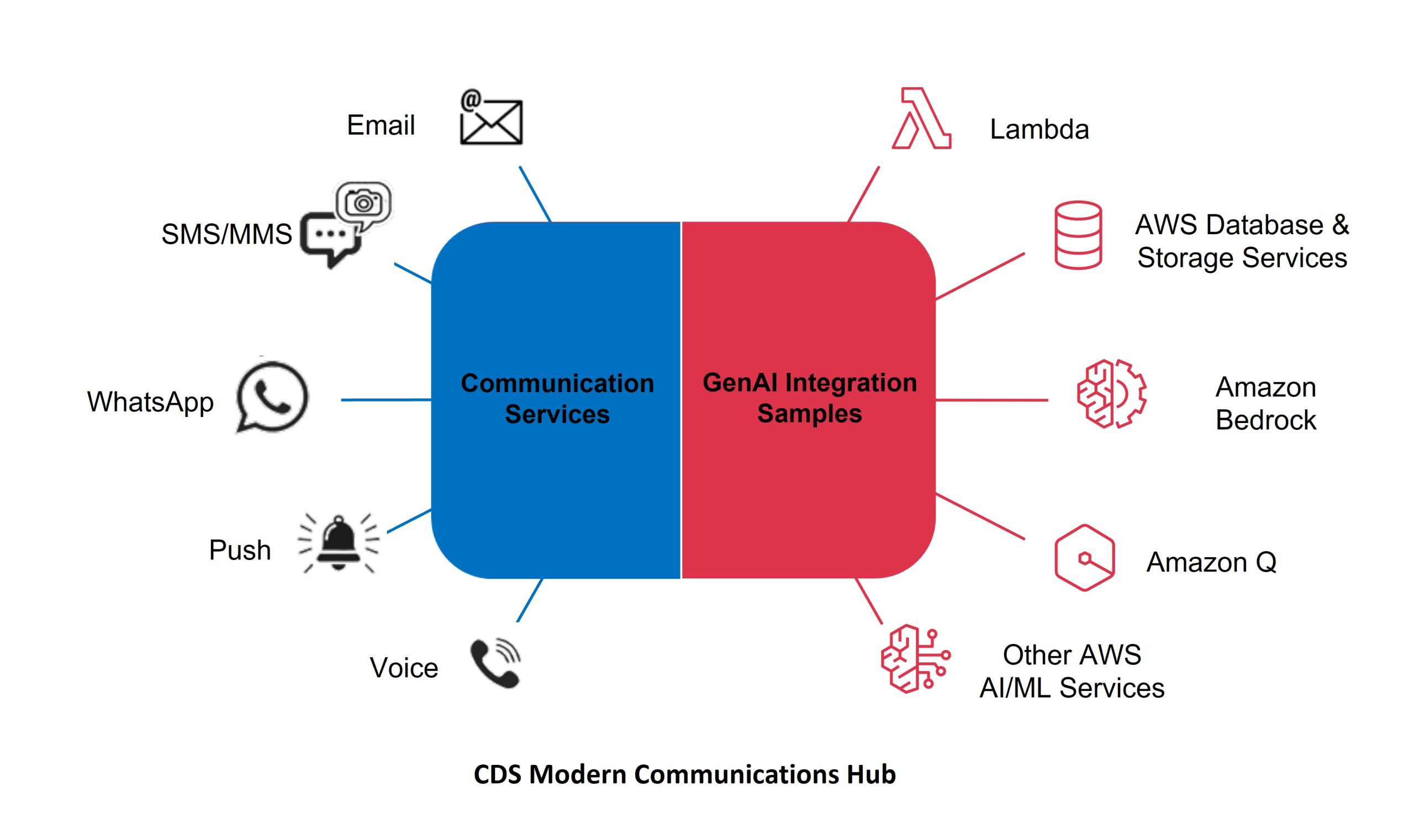
En el núcleo de la solución se encuentra el Centro de Comunicaciones Moderno que conecta los canales de comunicación digital con servicios clave de GenAI, como Amazon Bedrock y Amazon Q, junto con servicios de AWS ML, bases de datos, almacenamiento y computación sin servidor.

Este diagrama muestra la arquitectura de la solución en Nivel 300

AWS End User Messaging y Amazon SES proporcionan acceso a nivel de API a canales de comunicación digital, ofreciendo servicios seguros, escalables, de alto rendimiento y rentables para que las aplicaciones empresariales intercambien SMS/MMS, WhatsApp, notificaciones push y de voz, y correo electrónico con los clientes.

Una colección de código de muestra de código abierto, publicada en el repositorio AWS-samples de GitHub, ilustra cómo facilitar conversaciones generativas en canales SMS/MMS y WhatsApp. Esto se extenderá para incluir servicios de correo electrónico. Dos componentes clave forman la base de las Muestras de Integración de GenAI: el Orquestrador de chat Multicanal con Agentes de IA, y la Base de Datos de Participación y Análisis para End User Messaging y SES. Nos referiremos a estos simplemente como el Procesador de Conversaciones y la Base de Datos de Participación en el diagrama de la solución.

El Procesador de Conversaciones recibe mensajes de clientes a través de AWS End User Messaging y Amazon Simple Email Service (SES), almacena los detalles de la conversación e invoca al Agente de Amazon Bedrock relevante. Los Agentes de Amazon Bedrock utilizan Modelos de Lenguaje Grandes (LLMs) y bases de conocimiento para analizar tareas, dividirlas en pasos accionables, ejecutar esos pasos o buscar en la base de conocimiento, observar resultados y refinar iterativamente su enfoque hasta completar la tarea junto con una respuesta. Alternativamente, el Procesador de Conversaciones puede funcionar como un bot de preguntas y respuestas, en cuyo caso utiliza Amazon Bedrock Knowledge Bases junto con su función RAG para generar una respuesta LLM y enviarla por el mismo canal que el mensaje del cliente.

La Base de Datos de Participación recopila y combina datos de participación del cliente y registros conversacionales de todos los canales de comunicación, almacenando la información en un data lake centralizado en Amazon S3. Al convertir los datos a un formato común y canónico, la solución simplifica la consulta y el análisis de estos eventos entrantes. Una función Lambda Transformer aprovecha las Plantillas Apache Velocity para transformar los datos JSON entrantes, permitiendo obtener información en tiempo real.

Los datos de eventos sin procesar almacenados en el data lake de Amazon S3 pueden luego alimentar otros servicios de AWS para su procesamiento posterior. Por ejemplo, los datos pueden fluir hacia Amazon Connect Customer Data Profiles o Amazon SageMaker para apoyar el entrenamiento de modelos de machine learning. Los analistas de datos pueden usar Amazon Athena para realizar consultas directas para informes detallados ad-hoc, o enviar los datos a Amazon QuickSight para visualizaciones avanzadas y capacidades de consulta en lenguaje natural a través de Amazon Q en QuickSight.

NOTA: Existe la posibilidad de que los usuarios finales envíen Información Personal Identificable (PII) en los mensajes. Para proteger la privacidad del cliente, considere usar Amazon Comprehend para ayudar a redactar PII antes de almacenar mensajes en S3. La siguiente publicación de blog proporciona una buena descripción general de cómo usar Comprehend para redactar PII: Redact sensitive data from streaming data in near-real time using Amazon Comprehend and Amazon Kinesis Data Firehose.

Amazon Bedrock proporciona capacidades centrales de GenAI como LLMs, Knowledge Bases, Retrieval Augmented Generation (RAG), agentes de IA y Guardrails, para comprender las solicitudes de los clientes, determinar qué acción tomar y qué comunicar de vuelta. Amazon Bedrock Knowledge Bases proporciona conocimiento y razonamiento específico de la organización, mientras que los Agentes de Amazon Bedrock automatizan tareas de múltiples pasos conectándose perfectamente con los sistemas, APIs y fuentes de datos de la empresa.

Requisitos previos

Los siguientes requisitos previos son necesarios para construir su centro de comunicaciones moderno:

  • Una cuenta de AWS. Regístrese para obtener una cuenta de AWS en el sitio web de AWS si no tiene una.
  • Roles y permisos apropiados de AWS Identity and Access Management (IAM) para Amazon Bedrock, AWS End User Messaging y Amazon S3. Para más información, consulte Create a service role for model import.
  • Configuración de AWS End User Messaging: Necesitará configurar la identidad de origen necesaria en el servicio AWS End User Messaging para entregar mensajes a través de SMS o WhatsApp. Si configura SMS, se debe aprovisionar un Número de Teléfono de Origen SMS registrado y activo en AWS End User Messaging SMS. (Dentro de Estados Unidos, use 10DLC o Números Gratuitos (TFNs)). Si configura WhatsApp, se debe aprovisionar un número activo que haya sido registrado con Meta/WhatsApp en AWS End User Messaging Social.
  • Modelos de Amazon Bedrock: Bedrock Anthropic Claude 3.0 Sonnet y Titan Text Embeddings V2 habilitados en su región. Tenga en cuenta que estos son los modelos predeterminados utilizados por la solución; sin embargo, puede experimentar con diferentes modelos.
  • Docker instalado y en ejecución – Se utiliza localmente para empaquetar recursos para el despliegue.
  • Node (> v18) y NPM (> v8.19) instalados y configurados en su computadora
  • AWS Command Line Interface (AWS CLI) instalado y configurado
  • AWS CDK (v2) instalado y configurado en su computadora.

Implementación del Procesador de Conversaciones y Base de Datos de Participación

Implemente las siguientes dos soluciones. Si bien no es obligatorio, es mejor implementarlas en este orden, ya que las salidas de la Base de Datos de Participación pueden utilizarse en el ejemplo de Chat Multicanal:

    1. Engagement Database and Analytics for End User Messaging and SES
    2. Orquestrador de chat Multicanal con Agentes de IA

Cada solución contiene instrucciones detalladas para implementar los servicios requeridos usando AWS Cloud Development Kit (CDK). La primera solución de Base de Datos de Participación creará un flujo de Amazon Data Firehose que puede utilizarse como entrada para la segunda aplicación de Chat Multicanal, de modo que los datos puedan almacenarse y consultarse en la Base de Datos de Participación.

Orquestrador de chat Multicanal con Agentes de IA

Esta solución demuestra cómo los usuarios pueden interactuar con tres diferentes fuentes de conocimiento. Puede que no necesite las tres, sin embargo, esto debería servir como un buen ejemplo para construir la fuente de conocimiento adecuada para su caso de uso particular:

Construya sus Bases de Conocimiento en Amazon Bedrock usando Amazon S3. Por defecto, la solución creará Bases de Conocimiento usando un Bucket de Amazon S3 como fuente de datos. Esta solución le permite cargar documentos a un bucket de Amazon S3 para poblar la base de conocimiento.

NOTA: El proyecto inicial crea un bucket S3 para almacenar los documentos utilizados para la Base de Conocimiento de Bedrock. Por favor, considere usar Amazon Macie para ayudar en el descubrimiento de datos potencialmente sensibles en buckets S3. Amazon Macie puede habilitarse en una prueba gratuita durante 30 días, hasta 150GB por cuenta.

Construya su Base de Conocimiento en Amazon Bedrock usando un Web Crawler. Opcionalmente configure su base de conocimiento para escanear o rastrear sitio(s) web para poblar su base de conocimiento.

Agentes de Amazon Bedrock: Opcionalmente permita que sus usuarios chateen con Agentes de Amazon Bedrock. Los agentes tienen el beneficio adicional de soportar bases de conocimiento para responder preguntas y guiar a los usuarios a través de la recopilación de información necesaria para automatizar una tarea como hacer una reserva. Hay agentes de ejemplo disponibles en el repositorio Amazon Bedrock Agent Samples. Tenga en cuenta que necesitará tener un Agente de Amazon Bedrock creado en su región antes de implementar la solución.

Conclusión

Un Centro de Comunicaciones Moderno, acoplado de manera flexible con servicios centrales de Generative AI, establecerá una base componible para construir experiencias de cliente agnósticas al canal de comunicación. Construya uno aprovechando las Muestras de Integración de GenAI, el Procesador de Conversaciones y la Base de Datos de Participación, combinándolos con los servicios de comunicación digital seguros, escalables, de alto rendimiento y rentables de AWS End User Messaging y Amazon SES. Esto proporcionará un único punto de acceso conversacional a bases de conocimiento y capacidades de IA agéntica en Amazon Bedrock. Comience a experimentar con innovaciones de experiencia del cliente impulsadas por IA con una rápida prueba de concepto que no interferirá con su configuración actual de participación del cliente.

Acerca de los Autores

Optimizing ODCR usage through AI-powered capacity insights

Post Syndicated from Ankush Goyal original https://aws.amazon.com/blogs/compute/optimizing-odcr-usage-through-ai-powered-capacity-insights/

Efficient resource management is crucial for organizations seeking to optimize cloud costs while making sure of seamless access to compute capacity. Amazon Elastic Compute Cloud (Amazon EC2) On-Demand Capacity Reservations (ODCRs) provide the flexibility to reserve compute capacity within a specific Availability Zone (AZ) for any duration. This makes sure that critical workloads always have the necessary resources available, minimizing the risk of capacity shortages.

However, managing ODCRs across multiple teams and accounts presents several challenges:

  • Limited visibility across teams: In large organizations, tracking ODCR usage across teams and business units can be difficult, often leading to underused or duplicate reservations.
  • Complexity in optimization: Without clear insights, adjusting, releasing, or modifying reservations to align with changing workloads becomes a cumbersome process.
  • Cost management challenges: Unused or oversized ODCRs contribute to unnecessary expenses, making it essential to continuously monitor and optimize usage.

In this post, we demonstrate how Amazon Bedrock Agents can help organizations gain actionable insights into ODCR usage across their Amazon Web Services (AWS) environment. Unlike traditional approaches that rely on predefined patterns or manual tracking, this solution dynamically retrieves the latest ODCR usage data and provides intelligent, query-based recommendations to fulfill the capacity needs. This solution is serverless and pay-per-use and incurs minimal operational cost.

This approach allows IT leaders, cloud architects, and finance teams to optimize reservations, control costs, and enhance overall resource management—without the complexity of traditional analysis methods.

Solution overview

This solution addresses two specific use cases:

  1. The team must create a new ODCR to accommodate an upcoming project.
  2. The team needs to expand the capacity of their existing ODCR.

The system consists of three essential components:

  • ODCRSupervisorAgent: Functions as the main coordinator, handling user inquiries and managing requests to specialized subordinate agents.
  • CapacityPlanningAgent: Reviews existing ODCRs throughout the organization, recommending SPLIT and MOVE operations to optimize capacity allocation for new projects.
  • AugmentationAgent: Identifies opportunities to increase existing ODCR capacity by recommending MOVE operations from other organizational ODCRs.

The following figure shows the high-level architecture for this solution.

The system architecture uses AWS services for comprehensive ODCR management, as shown in the following figure. The platform combines Amazon Cognito for authentication, AWS Amplify for front-end delivery, and AWS Lambda for serverless computing. AWS Resource Explorer enables efficient discovery and tracking of ODCRs across AWS Regions, while Lambda functions periodically query Resource Explorer to retrieve detailed ODCR information and usage metrics. AWS Identity and Access Management (IAM) plays a crucial role in securing the system, managing fine-grained access controls and permissions across all components. Amazon Bedrock Agents and its multi-agent capabilities generate intelligent recommendations through coordinated agent interactions, allowing organizations to optimize ODCR usage and implement data-driven capacity planning strategies.

How the solution functions

At the heart of this system is an Amazon Bedrock Agent powered by Action Groups, which map user queries to backend tasks using Lambda. These Lambda functions act as the system’s intelligence layer: fetching, filtering, and formatting ODCR data for the agent to reason over. The following three Lambda functions are deployed as part of the AWS CloudFormation template:

get_az_mapping_info Lamba function: This Lambda function takes an AWS account ID and Region as input. It returns a mapping of AZ names to their corresponding AZ IDs for that account and AWS Region. This helps the Capacity Planning Agent align AZs across accounts.

find_eligiable_odcrs Lambda function: This Lambda function supports the Capacity Planning Agent by identifying suitable ODCRs that meet the specified instance type and AZ. It uses Resource Explorer to search for ODCRs across the organization. Then, the function assumes cross-account roles to access ODCRs in different AWS accounts to gather detailed information. After retrieving the necessary data, it filters the ODCRs based on instance type, tenancy, and AZ. Finally, it returns a formatted list of eligible ODCRs, which are sourced from either the specified account or an alternative account with adequate capacity.
find_eligible_odcrs_for_move Lambda function: This Lambda function assists the Augmentation Agent by finding all capacity reservations within the same account as the specified ODCR. It uses Resource Explorer to discover ODCRs and, when necessary, assumes cross-account roles to gather ODCR information. The function filters ODCRs based on matching instance type, tenancy, and AZ, then returns a formatted list of eligible ODCRs that can provide more capacity through MOVE operations.
Each Lambda function receives structured inputs from the Amazon Bedrock Agent, executes its designated task, and returns structured responses. Then, these responses are used by the agent to generate intelligent, actionable answers to user queries.

Together, these Lambda functions extend the capabilities of the Amazon Bedrock Agent by integrating with external data sources and automating complex ODCR management logic—allowing the system to deliver accurate, dynamic recommendations.

Prerequisites

You must have the following in place to implement the solution in this post:

Deploy solution resources using CloudFormation

This solution is designed to be deployed in a single Region. If deploying outside us-east-1, then you must modify the CloudFormation parameters to reference the correct FM version and adjust for Regional availability, such as any necessary cross-Region inference profile configurations.

  • Deploy the Cross Account IAM Role template: To access ODCR data across your Organization, deploy a CloudFormation StackSet from your payer account. During deployment, you must provide the account number where you plan to deploy the ODCR solution. This is the same account number that you used as delegate account for Resource Explorer under the prerequisites. This account number is added to the trust policy of the IAM role, allowing the solution in that account to assume the role created by the StackSet. The deployment automatically provisions a standardized IAM role with the necessary permissions (for example ec2:DescribeCapacityReservations and ec2:DescribeAvailabilityZones) in each target account.
  • Deploy the ODCR Solution template: Deploy the provided template in the delegated administrator account that you chose for Resource Explorer. This sets up the core components of the solution and integrates with your payer account for organization-wide ODCR insights.

Resources deployed by the CloudFormation template

After you have deployed the CloudFormation template, the following AWS resources are created in your account.

Cross Account IAM Role template

  • IAM resource
    • CrossAccountODCRAccessRole

ODCR Solution template

  • Amazon Cognito resources:
    • User Pool: ODCRAgentUserPool
    • App Client: ODCRAgentApp
    • Identity Pool: odcr-identity-pool
    • Groups: ODCRAdmins
    • User: ODCR User
  • IAM resources:
    • IAM roles:
      • GetAZMappingFunctionRole
      • LambdaODCRAccessRole
      • BedrockAgentExecutionRole
      • ODCRSupervisorAgentExecutionRole
      • CognitoAuthRole
  • Lambda functions:
    • get_az_mapping_info
    • find_eligible_odcrs
    • find_eligible_odcrs_for_move
  • Amazon Bedrock Agents
    • ODCRSupervisorAgent
    • CapacityPlanningAgent with action groups:
      • get_az_mapping_info
      • find_eligible_odcrs
    • AugmentationAgent with action group:
      • find_eligible_odcrs_for_move

After you deploy the final CloudFormation template, copy the following from the Outputs tab on the CloudFormation console to use during the configuration of your application after it’s deployed in Amplify:

  • AWSRegion
  • BedrockAgentAliasId
  • BedrockAgentId
  • BedrockAgentName
  • IdentityPoolId
  • UserPoolClientId
  • UserPoolId

The following screenshot shows you what the Outputs tab looks like.

Deploy the Amplify application for front-end

You need to manually deploy the Amplify application using the front-end code found on GitHub. Complete the following steps, as shown in the following figure:

  1. Download the front-end code AWS-Amplify-Frontend.zip from GitHub.
  2. Use the .zip file to manually deploy the application in Amplify.
  3. Return to the Amplify page and use the domain that it automatically generated to access the application.

After completing these steps, your environment is ready to analyze ODCR usage and receive recommendations powered by Amazon Bedrock Agents.

Solution walkthrough

After deploying the application in Amplify, return to the Amplify console. Use the auto-generated domain URL shown there to access the front-end. Upon accessing the application URL, you’re prompted to provide information related to Amazon Cognito and Amazon Bedrock Agents. This information is necessary to securely authenticate users and allow the front end to interact with the Amazon Bedrock Agent. It enables the application to manage user sessions and make authorized API calls to AWS services on behalf of the user.

You can enter information with the values that you collected from the CloudFormation stack outputs, as shown in the following screenshot:

A temporary password was automatically generated during deployment and sent to the email address provided when launching the CloudFormation template. At first sign-in, you’re prompted to reset your password.When you’re signed in, you can begin interacting with the application to analyze and manage your ODCR usage. The interface supports natural language queries to streamline capacity planning. The following are some example questions that you can ask:

  • I require [X units] of capacity for the [INSTANCE TYPE] instance type in Availability Zone [AZ ID], within account [ACCOUNT NUMBER]. Could you please advise if there are any existing On-Demand Capacity Reservations (ODCRs) that can fulfill this requirement? Additionally, what operations would be necessary to utilize the available capacity?

  • I have a requirement to add [X additional units] of capacity to an existing On-Demand Capacity Reservation with ID [cr-0012abcd123456789]. Could you please advise on the steps or operations required to fulfill this request?

Cleaning up

If you decide to discontinue using this solution, then you can follow these steps to remove it, its associated resources deployed using CloudFormation, and the Amplify deployment:

  1. Delete the CloudFormation StackSet:
    1. On the CloudFormation console, choose StackSets in the navigation pane.
    2. Locate your StackSet for the Cross-Account IAM Role (you assigned a name to it).
    3. Choose Delete stacks from StackSet to remove all stack instances.
    4. After all instances are deleted, choose StackSet.
    5. Choose Delete StackSet from the Actions menu.
  2. Delete the CloudFormation stack:
    1. On the CloudFormation console, choose Stacks in the navigation pane.
    2. Locate the stack you created during the deployment process (you assigned a name to it).
    3. Choose the stack and choose Delete.
  3. Delete the Amplify application and its resources. For instructions, refer to Clean Up Resources.

Conclusion

In this post, we demonstrated how to use Amazon Bedrock Agents and AWS services to build an intelligent ODCR management solution. Combining AWS Resource Explorer for organization-wide visibility, Amazon Bedrock Agents for intelligent recommendations, and a secure front-end powered by AWS Amplify, organizations can now make data-driven decisions about their capacity reservations. This solution helps teams optimize ODCR usage, reduce costs, and efficiently manage compute capacity across their AWS Organization. The artificial intelligence (AI)-powered approach eliminates manual tracking and analysis, allowing teams to focus on strategic capacity planning rather than operational overhead.

Get started today by deploying this solution in your AWS environment, and unlock the power of AI-driven capacity insights for more efficient ODCR management.

AWS Weekly Roundup: Claude 4 in Amazon Bedrock, EKS Dashboard, community events, and more (May 26, 2025)

Post Syndicated from Veliswa Boya original https://aws.amazon.com/blogs/aws/aws-weekly-roundup-claude-4-in-amazon-bedrock-eks-dashboard-community-events-and-more-may-26-2025/

As the tech community we continue to have many opportunities to learn and network with other like-minded folks. This past week AWS customers attended the AWS Summit Dubai for an action-packed day featuring live demos, hands-on experiences with cutting-edge AI/ML tools, and more. Right here in South Africa I attended the Data & AI Community in Durban for a day of inspiration and learning from the community. In India, the AWS Community Day Bengaluru brought together hundreds of passionate tech enthusiasts for a day of learning and networking.

Last week’s launches
Here are the launches that got my attention:

For a full list of AWS announcements, be sure to keep an eye on the What’s New with AWS? page.

Additional updates
Here are some additional projects, blog posts, and news items that you might find interesting:

Upcoming AWS events
Check your calendars and sign up for these upcoming AWS events:

  • AWS Summits – Join free online and in-person events that bring the cloud computing community together to connect, collaborate, and learn about AWS. Register in your nearest city: Tel Aviv (May 28), Singapore (May 29), Stockholm (June 4), Sydney (June 4–5), Washington (June 10-11), and Madrid (June 11).
  • AWS re:Inforce – Mark your calendars for AWS re:Inforce (June 16–18) in Philadelphia, PA. AWS re:Inforce is a learning conference focused on AWS security solutions, cloud security, compliance, and identity.
  • AWS Community Days – Join community-led conferences that feature technical discussions, workshops, and hands-on labs led by expert AWS users and industry leaders from around the world: Milwaukee, USA (June 5), and Nairobi, Kenya (June 14).

That’s all for this week. Check back next Monday for another Weekly Roundup!

Veliswa.

AWS Weekly Review: Amazon S3 Express One Zone price cuts, Pixtral Large on Amazon Bedrock, Amazon Nova Sonic, and more (April 14, 2025)

Post Syndicated from Elizabeth Fuentes original https://aws.amazon.com/blogs/aws/aws-weekly-review-amazon-s3-express-one-zone-price-cuts-pixtral-large-on-amazon-bedrock-amazon-nova-sonic-and-more-april-14-2025/

The Amazon Web Services (AWS) Summit 2025 season launched this week, starting with the Paris Summit. These free events bring together the global cloud computing community for learning and collaboration. AWS Community Day Romania, held on April 11th, showcased how the local community creates opportunities for collective growth and inclusion.

Last week’s launches
Announcing up to 85% price reductions for Amazon S3 Express One Zone S3 Express One Zone, a high-performance storage class, now has reduced storage prices by 31 percent, PUT request prices by 55 percent, and GET request prices by 85 percent. In addition, S3 Express One Zone has reduced the per-GB charges for data uploads and retrievals by 60 percent. These charges now apply to all bytes transferred rather than just portions of requests greater than 512 KB.

Here is a price reduction table in the US East (N. Virginia) AWS Region:

Price Previous New Price reduction
Storage
(per GB-Month)
$0.16 $0.11 31%
Writes
(PUT requests)
$0.0025 per 1,000 requests up to 512 KB $0.00113 per 1,000 requests 55%
Reads
(GET requests)
$0.0002 per 1,000 requests up to 512 KB $0.00003 per 1,000 requests 85%
Data upload
(per GB)
$0.008 $0.0032 60%
Data retrievals
(per GB)
$0.0015 $0.0006 60%

AWS announces Pixtral Large 25.02 model in Amazon Bedrock serverless The Pixtral Large 25.02, developed by Mistral AI, combines advanced vision and language understanding, boasting a 128K context window and multilingual capabilities. This agent-centric design simplifies integration with existing systems. Prompt adherence improves reliability when working with Retrieval Augmented Generation (RAG) applications and large context scenarios.

Introducing Amazon Nova Sonic: Human-like voice conversations for generative AI applications Amazon Nova Sonic, the newest addition to the Amazon Nova family of foundation models (FMs) is available in Amazon Bedrock to create human-like voice conversations for applications. It unifies speech and text processing into one model, reducing complexity and enhancing natural interactions. Start today with the Amazon Nova model cookbook repository.

Amazon Bedrock Guardrails enhances generative AI application safety with new capabilitiesAmazon Bedrock Guardrails introduces new capabilities to enhance generative AI application safety, including multimodal toxicity detection, enhanced Personally Identifiable Information (PII) protection, AWS Identity and Access Management (AWS IAM) policy enforcement, selective guardrail application, and monitor mode for pre-deployment analysis.

AWS App Studio introduces a prebuilt solutions catalog and cross-instance Import and Export — This is a prebuilt solutions catalog with ready-to-use applications and patterns and cross-instance Import and Export functionality. These features help you streamline development applications, reducing setup time to under 15 minutes. Learn more about this in AWS App Studio introduces a prebuilt solutions catalog and cross-instance Import and Export blog.

Amazon Nova Reel 1.1: Featuring up to 2-minutes multi-shot videos Amazon Nova Reel 1.1 enhances video generation through Amazon Bedrock with support for 2-minute multi-shot videos. You can now create content using either single prompts for automatic generation or custom prompts for individual shots, offering flexible options for marketing and social media content creation.

AWS IAM Identity Center now offers improved error messages and AWS CloudTrail logging for provisioning issues AWS Identity and Access Management (IAM) Identity Center has enhanced its service with improved error messages and AWS CloudTrail logging capabilities. These updates help users better troubleshoot synchronization issues when managing workforce identities across AWS accounts and applications, while enabling automated monitoring and auditing of provisioning problems.

AWS WAF Console adds new top insights visualizations in additional regionsAWS WAF Console now offers enhanced traffic visualization features in AWS GovCloud (US) Regions. The all traffic dashboard includes new top insights based on Amazon CloudWatch logs, helping customers analyze traffic patterns, identify security threats, and optimize WAF configurations through detailed metrics.

AWS Step Functions expands data source and output options for Distributed MapAWS Step Functions enhances Distributed Map with expanded data source support, including JSONL and various delimited file formats from Amazon Simple Storage Service (Amazon S3). The update also adds new output transformation options, enabling more flexible parallel processing workflows and better integration with downstream systems.

Amazon CloudWatch now provides lock contention diagnostics for Aurora PostgreSQL Amazon CloudWatch Database Insights introduces lock contention diagnostics for Amazon Aurora PostgreSQL in Advanced mode. The feature visualizes blocking and waiting sessions, helping users identify root causes of lock contention issues, with 15-month historical data retention for comprehensive troubleshooting.

Get updated with all the announcements of AWS announcements on the What’s New with AWS? page.

Other AWS blog posts
Reduce ML training costs with Amazon SageMaker HyperPodAmazon SageMaker HyperPod addresses hardware failures in large-scale Machine Learning (ML) model training by automatically detecting and replacing faulty instances. The solution reduces downtime from 280 to 40 minutes per failure, potentially saving 32% of training time for large clusters. For a 10-million GPU-hour training job, this translates to $25.6M in cost savings.

Model customization, RAG, or both: A case study with Amazon Nova — A study comparing model customization with fine-tuning and Retrieval Augmented Generation (RAG) approaches with Amazon Nova models. Key findings show combining both methods yields best results: RAG works well for dynamic data and domain insights, while fine-tuning excels in specialized tasks and latency reduction.

Generate user-personalized communication with Amazon Personalize and Amazon BedrockAmazon Personalize and Amazon Bedrock work together to create personalized marketing emails. Learn how to create personalized user communications by combining Amazon Personalize for movie recommendations with Amazon Bedrock for generating tailored email content based on user preferences and demographics.

Implement human-in-the-loop confirmation with Amazon Bedrock Agents — When implementing human validation in Amazon Bedrock Agents, developers have two primary frameworks at their disposal: user confirmation and return of control (ROC). Using an HR application example, user confirmation allows simple yes/no validation before executing actions, while ROC enables users to modify parameters before execution.

Multi-LLM routing strategies for generative AI applications on AWS — Learn how to implement multi-Large Language Model (LLM) routing strategies for AWS generative AI applications using static routing, dynamic routing with Amazon Bedrock, or custom solutions for optimal model selection and cost efficiency.

Here are my personal favorites posts from community.aws:

Building a RAG System for Video Content Search and Analysis — In this blog, I’ll show you how to build a RAG system that makes video content searchable and analyzable. Unlocking video content has never been more crucial in today’s digital landscape. Whether you’re managing educational materials, corporate training, or entertainment content, the ability to search and analyze video content efficiently can transform how we interact with multimedia resources.

Build Serverless GenAI Apps Faster with Amazon Q Developer CLI AgentAmazon Q Developer CLI Agent enables rapid serverless GenAI app development. With one prompt, it generates infrastructure code, Lambda functions, and integrates with Claude 3 Haiku on Amazon Bedrock.

Speech-to-Speech AI: From Dr. Sbaitso to Amazon Nova Sonic — The evolution of speech-to-speech AI, from Dr. Sbaitso (1990s) to Amazon Nova Sonic. New AWS service enables real-time bidirectional conversations through Amazon Bedrock for more natural applications.

Setup Model Context Protocol (MCP) using Amazon Bedrock — A guide to setting up Model Context Protocol (MCP) desktop client with Amazon Bedrock models, enabling seamless integration between AI applications and external tools using Goose client.

Upcoming AWS events
Check your calendars and sign up for these upcoming AWS events:

AWS GenAI LoftsGenAI Lofts available around the world, offer collaborative spaces and immersive experiences for startups and developers. You can join in-person GenAI Loft San Francisco events such as GenAI in EdTech: A Hands-On Workshop (April 15), and Unstructured Data Meetup SF (April 16). Find your nearest event at GenAI Lofts.

AWS Summits — Join free online and in-person events that bring the cloud computing community together to connect, collaborate, and learn about AWS. Register in your nearest city: Amsterdam (April 16), London (April 30), and Poland (May 5).

AWS re:Inforce — AWS re:Inforce (June 16–18) in Philadelphia, PA, is our annual learning event devoted to all things AWS cloud security. Registration is open. Be ready to join more than 5,000 security builders and leaders.

AWS Community Days — Join community-led conferences featuring technical discussions, workshops, and hands-on labs driven by expert AWS users and industry leaders from around the world. Upcoming AWS Community Days are scheduled for April 19 in Turkey, and on April 29 in Prague with Jeff Barr as Opening Keynote Speaker.

You can browse all upcoming in-person and virtual events.

Create your AWS Builder ID and reserve your alias. Builder ID is a universal login credential that gives you access—beyond the AWS Management Console—to AWS tools and resources, including over 600 free training courses, community features, and developer tools such as Amazon Q Developer.

That’s all for this week. Stay tuned for next week’s Weekly Roundup!

Eli

Thanks to Andra Somesan for the AWS Community Romania photo and Thembile Martis for the AWS Paris Summit photo.

This post is part of our Weekly Roundup series. Check back each week for a quick roundup of interesting news and announcements from AWS!


How is the News Blog doing? Take this 1 minute survey!

(This survey is hosted by an external company. AWS handles your information as described in the AWS Privacy Notice. AWS will own the data gathered via this survey and will not share the information collected with survey respondents.)

Serverless ICYMI 2025 Q1

Post Syndicated from Julian Wood original https://aws.amazon.com/blogs/compute/serverless-icymi-2025-q1/

Welcome to the 28th edition of the AWS Serverless ICYMI (in case you missed it) quarterly recap. At the end of a quarter, we share the most recent product launches, feature enhancements, blog posts, videos, live streams, and other interesting things that you might have missed!

In case you missed our last ICYMI, check out what happened in Q4 2024 here.

Serverless calendar Q1 2025

Serverless calendar Q1 2025

AWS Step Functions

The AWS Step Functions team continues to improve developer experience. Workflow Studio is now available within Visual Studio Code (VS Code) through the AWS Toolkit extension.

AWS Step Functions in IDE

AWS Step Functions in IDE

You can now design, test, and deploy your Step Functions workflows without leaving your IDE. The extension provides a drag-and-drop interface with all the familiar Workflow Studio capabilities, making it even easier to build state machines locally.

To get started, install the AWS Toolkit for Visual Studio Code and visit the user guide on Workflow Studio integration.

Step Functions private integrations now allows you to integrate applications seamlessly across private networks, on-premises infrastructure, and cloud platforms. Learn more in a blog post and explanation video.

AWS Step Functions private integrations video

AWS Step Functions private integrations video

Step Functions now integrates with 36 more AWS services that support user messaging capabilities. You can orchestrate notifications through Amazon SNS, Amazon SQS, Amazon EventBridge, Amazon Pinpoint, and more, all using the optimized integrations you’re familiar with.

Step Functions has increased the default quota for state machines and activities from 10,000 to 100,000 per AWS account. This tenfold increase means you can create more workflows to automate your business processes without worrying about hitting quota limits.

Distributed Map is expanding capabilities by adding support for JSON Lines (JSONL) format. JSONL, a highly efficient text-based format, stores structured data as individual JSON objects separated by newlines, making it particularly suitable for processing large datasets.

AWS Step Functions Distributed Map

AWS Step Functions Distributed Map

Distributed Map can also process data from a broader range of delimited file formats stored in Amazon S3 and offers new output transformations for greater control over result formatting.

Developer Tools

Serverless Land patterns are now available directly within VS Code.

You no longer need to switch between your IDE and external resources when building serverless architectures. Browse, search, and implement pre-built serverless patterns directly in VS Code.

Example Serverless Pattern

Example Serverless Pattern

AWS Lambda

Learn how AWS Lambda handles billions of invocations.

AWS Lambda asynchronous invocations

AWS Lambda asynchronous invocations

This blog post provides recommendations and insights for implementing highly distributed applications based on the Lambda service team’s experience building its robust asynchronous event processing system. It dives into challenges you might face, solution techniques, and best practices for handling noisy neighbors.

A new video walks through using the enhanced local IDE experience for Lambda developers.

AWS Lambda new IDE experience

AWS Lambda new IDE experience

The VS Code extension for Lambda now supports live tailing of CloudWatch Logs directly in your IDE following on from previous support for Live Tail in the Lambda console. Watch logs in real-time as your functions execute, making debugging and troubleshooting more efficient than ever.

You can now enable Application Performance Monitoring (APM) for Java and .NET runtimes using Amazon CloudWatch Application Signals.

Amazon CloudWatch Application Signals for Java and .NET AWS Lambda runtimes

Amazon CloudWatch Application Signals for Java and .NET AWS Lambda runtimes

This provides deep visibility into your function’s performance, including method-level tracing, memory profiling, and automated anomaly detection.

Amazon Bedrock features

Multi-agent collaboration is now available in Bedrock as a preview, enabling you to create systems where multiple AI agents work together to solve complex problems. Agents can specialize in different domains, share context, and coordinate their actions to achieve goals that would be difficult for a single agent.

RAG evaluation is now generally available. This provides metrics to assess and improve your retrieval augmented generation pipelines. GraphRAG for Bedrock Knowledge Bases is now generally available, allowing you to enhance retrievals with graph-based context.

Amazon Bedrock Flows now supports multi-turn conversations, allowing you to build dynamic AI applications that maintain context across multiple user interactions. Bedrock data automation is now generally available, streamlining the process of preparing, ingesting, and maintaining data for your GenAI applications. Bedrock now offers LLM-as-a-judge capability for model evaluation, providing automated assessment of model outputs without requiring human reviewers. Compare different models or prompt strategies against your specific criteria at scale.

Bedrock’s capabilities are now integrated into the Amazon SageMaker Unified Studio, creating a seamless experience for machine learning practitioners who want to incorporate foundation models into their workflows. Access Bedrock models, fine-tuning, and evaluation directly from SageMaker.

Amazon Nova is a new generation of state-of-the-art foundation models that deliver frontier intelligence and industry leading price-performance. Nova has expanded its tool use and converse API capabilities, making it easier for developers to build AI assistants that can use external tools to complete tasks.

Amazon Bedrock Guardrails image content filters are now generally available. Define and enforce boundaries for your AI applications with controls for both text and image content, ensuring outputs align with your organization’s policies.

Bedrock Knowledge Bases now supports using your existing OpenSearch clusters as the vector storage backend. This integration allows you to leverage your investments in OpenSearch while benefiting from the managed RAG capabilities of Bedrock.

New Amazon Bedrock models

  • Anthropic’s Claude 3.7 Sonnet hybrid reasoning allows you to toggle between standard and extended thinking modes. In standard mode, it functions as an upgraded version of Claude 3.5 Sonnet. While in extended thinking mode, it employs self-reflection to achieve improved results across a wide range of tasks.
  • DeepSeek R1, an advanced model specialized in research and scientific reasoning excels at complex problem-solving tasks and technical content generation.
  • Cohere Embed 3 models are now available in both multilingual and English-specific versions. These embedding models support text and images, providing more accurate representation for multimodal content and improving retrieval augmented generation (RAG) applications.
  • Ray2, Luma AI’s new visual AI model is capable of creating realistic visuals with fluid, natural movement. You can use it for image understanding, 3D scene reconstruction, and visual content generation, opening new possibilities for immersive and visual applications.
  • Bedrock now supports fine-tuning of Meta’s latest Llama 3.2 models. These upgraded models deliver improved performance across reasoning, coding, and multilingual tasks while being more efficient with computational resources.

Amazon Q Developer

Amazon Q Developer is now available as a CLI agent, bringing AI-assisted development to the command line. Get contextual recommendations, generate shell commands, and solve coding problems without leaving your terminal.

Amazon Q CLI

Amazon Q CLI

Amazon Q Developer transformation now supports upgrading Java applications using Maven to Java 21. It offers enhanced code suggestions, refactoring, and optimization recommendations for applications using the latest Java features, like virtual threads and pattern matching.

AWS AppSync

AWS AppSync Events now supports events publishing for WebSocket APIs, enabling real-time publish-subscribe functionality. This feature makes it easier to build applications requiring instant updates, like chat applications, collaborative tools, and real-time dashboards.

AWS AppSync Events

AWS AppSync Events

There are new AWS Cloud Development Kit (AWS CDK) L2 constructs for AppSync WebSocket APIs. These make it simpler to define and deploy real-time APIs using infrastructure as code. These high-level constructs handle the details of WebSocket connections, authorization, and messaging patterns.

Amazon SNS

Amazon SNS now supports high throughput mode for SNS FIFO topics, with default throughput matching SNS standard topics. When you enable high-throughput mode, SNS FIFO topics will maintain order within message group, while reducing the de-duplication scope to the message-group level.

Amazon EventBridge

Amazon EventBridge now supports direct delivery to targets across AWS accounts, simplifying multi-account architectures. This reduces latency and improves reliability when routing events between accounts in your organization.

Amazon EventBridge cross account

Amazon EventBridge cross account

The EventBridge console now features event source discovery, making it easier to find and visualize available event sources in your AWS environment. This tool helps you identify potential event producers and understand the event schemas they emit.

AWS Amplify

AWS Amplify now offers a TypeScript data client optimized for server-side Lambda functions, providing type-safe access to your data sources. This client reduces code complexity and improves reliability when working with databases and APIs in server environments.

Serverless compute blog posts

January

February

March

Serverless Office Hours weekly livestream

February

March

Still looking for more?

The Serverless landing page has more information. The Lambda resources page contains case studies, webinars, whitepapers, customer stories, reference architectures, and even more Getting Started tutorials.
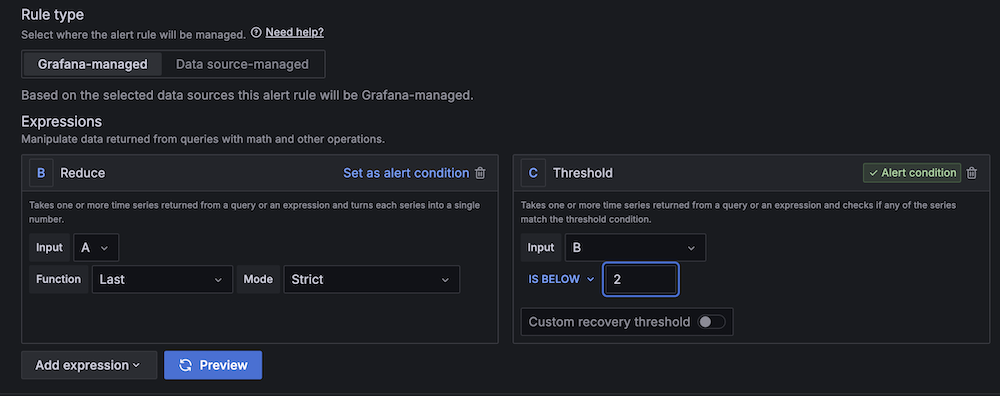
You can also follow the Developer Advocacy team members who work on Serverless to see the latest news, follow conversations, and interact with the team.

And finally, visit the Serverless Land  for all your serverless needs.

AWS Weekly roundup: EventBridge, SNS FIFO, Amazon Corretto, Amazon Connect, Amazon Bedrock, and more

Post Syndicated from Sébastien Stormacq original https://aws.amazon.com/blogs/aws/aws-weekly-roundup-eventbridge-sns-fifo-amazon-corretto-amazon-connect-amazon-bedrock-and-more/

I counted about 40 new launches from AWS since last week – back to our normal rhythm of releases. Services teams are listening to your feedback and developing little (or big) changes that makes your life easier when working with our services. The ability to support multiple sessions in the AWS Console is my favorite one so far in 2025.

But our teams didn’t stop there, let’s look at the last week’s new announcements.

Last week’s launches

Beside the usual Regional expansion (new capabilities that are now available in a new Region), here are the launches that got my attention.
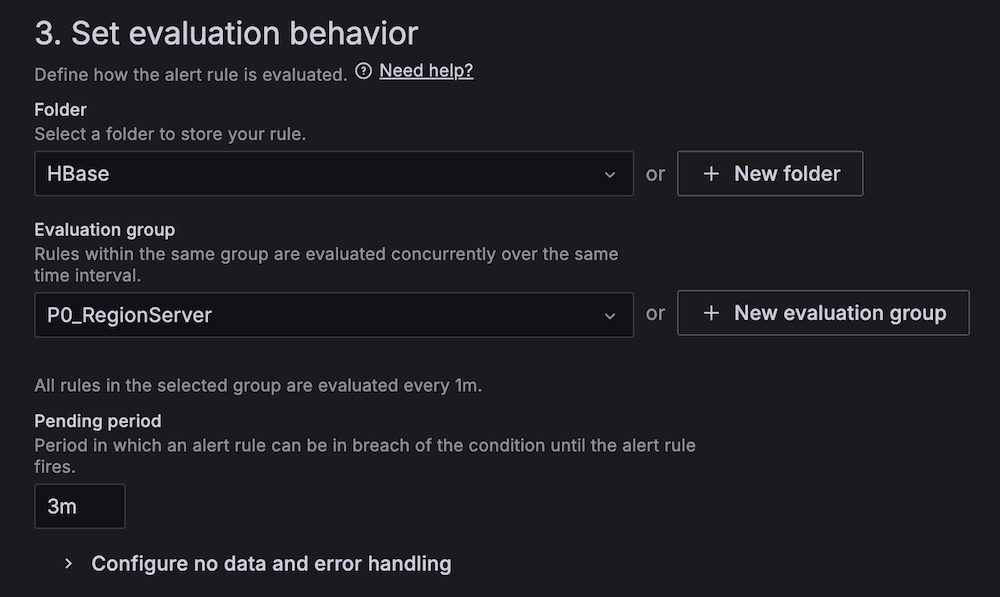
Amazon EventBridge announces direct delivery to cross-account targetsAmazon EventBridge is now able to deliver events to targets in another AWS account directly without having to send them to the default bus in the target account first. This will simplify so many architectures out there! It supports any target that supports resource-based policies, including AWS Lambda, Amazon Simple Queue Service (Amazon SQS), Amazon Simple Notification Service (Amazon SNS), Amazon Kinesis, and Amazon API Gateway.

Amazon Corretto quaterly update – We announced quarterly security and critical updates for Amazon Corretto Long-Term Supported (LTS) and Feature Release (FR) versions of OpenJDK. Corretto 23.0.2, 21.0.6, 17.0.14, 11.0.26, 8u442 are now available for download. Amazon Corretto is a no-cost, multi-platform, production-ready distribution of OpenJDK. You can download the updates from the Corretto home page or just type apt-get or yum update.

High-throughput mode for Amazon SNS FIFO Topics – Amazon SNS now supports high-throughput mode for SNS FIFO topics, with default throughput matching SNS standard topics across all Regions. When you enable high-throughput mode, SNS FIFO topics will maintain order within message group, while reducing the deduplication scope to the message-group level. With this change, you can leverage up to 30K messages per second (MPS) per account by default in US East (N. Virginia) Region, and 9K MPS per account in US West (Oregon) and Europe (Ireland) Regions, and request quota increases for additional throughput in any Region.
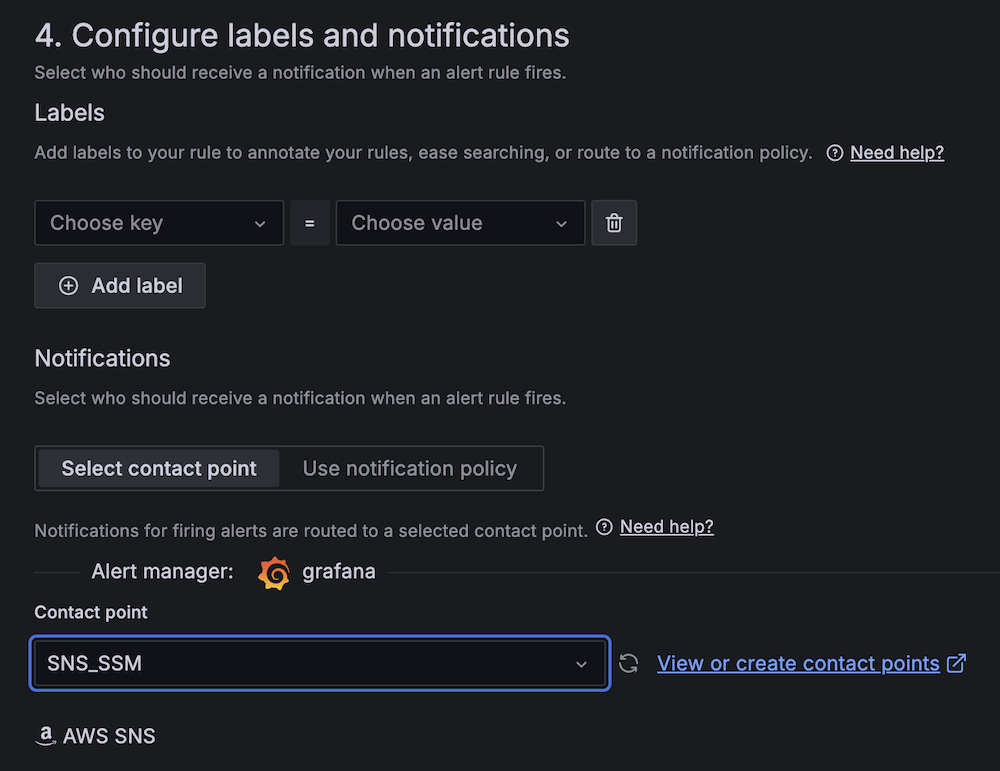
Amazon Connect agent workspace now supports audio optimization for Citrix and Amazon WorkSpaces virtual desktopsAmazon Connect agent workspace now supports the ability to redirect audio from Citrix and Amazon WorkSpaces Virtual Desktop Infrastructure (VDI) environments to a customer service agent’s local device. Audio redirection improves voice quality and reduces latency for voice calls handled on virtual desktops, providing a better experience for both end customers and agents.

Amazon Redshift announces support for History Mode for zero-ETL integrationsThis new capability enables you to build Type 2 Slowly Changing Dimension (SCD 2) tables on your historical data from databases, out-of-the-box in Amazon Redshift, without writing any code. History mode simplifies the process of tracking and analyzing historical data changes, allowing you to gain valuable insights from your data’s evolution over time.

Finally, Amazon Bedrock has its own set of announcements. First, for anyone investing in retrieval-augmented generation, Bedrock now support multimodal content with Cohere Embed 3 Multilingual and Embed 3 English models. This enables you to create embeddings to not only index text, but also images.

Second, read Luma AI’s Ray2 visual AI model now available in Amazon Bedrock. Luma Ray2 is a large-scale video-generation model capable of creating realistic visuals with fluid, natural movement. With Luma Ray2 in Amazon Bedrock, you can generate production-ready video clips with seamless animations, ultrarealistic details, and logical event sequences with natural language prompts, removing the need for technical prompt engineering. Ray2 currently supports 5- and 9-second video generations with 540p and 720p resolution.
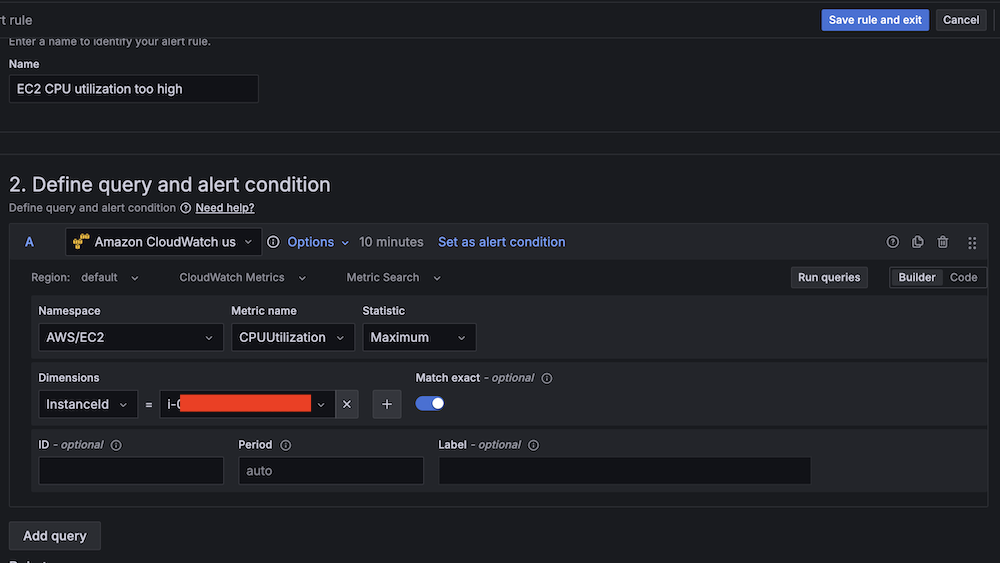
And finally, Amazon Bedrock Flows announces preview of multi-turn conversation support. Amazon Bedrock Flows enables you to link foundation models (FMs), Amazon Bedrock Prompts, Amazon Bedrock Agents, Amazon Bedrock Knowledge Bases, Amazon Bedrock Guardrails and other AWS services together to build and scale pre-defined generative AI workflows. This week, the team announced preview of multi-turn conversation support for agent nodes in Flows. This capability enables dynamic, back-and-forth conversations between users and flows, similar to a natural dialogue.

For a full list of AWS announcements, be sure to keep an eye on the What’s New at AWS page.

Other AWS events
Check your calendar and sign up for upcoming AWS events.

AWS Summits season is starting! I’m already working with the local team to prepare content for the Summits in Paris and London. Summits are free online and in-person events that bring the cloud computing community together to connect, collaborate, and learn about AWS. Stay updated by visiting the official AWS Summit website and sign up for notifications to learn when registration opens for events in your area.
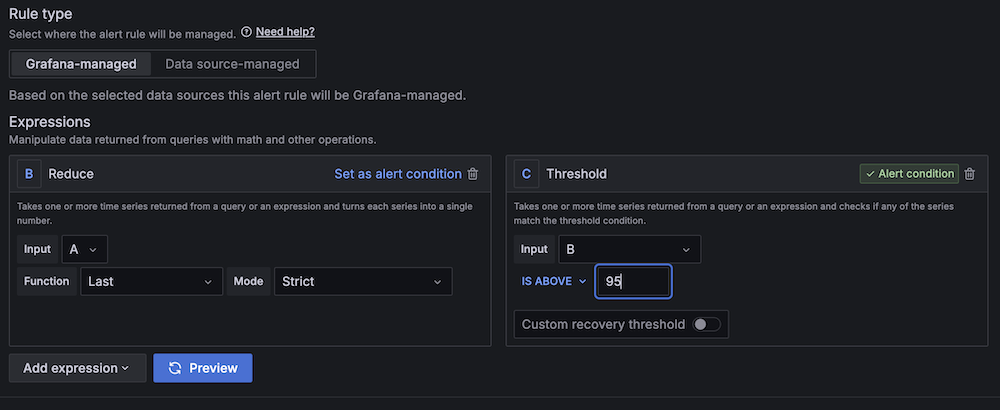
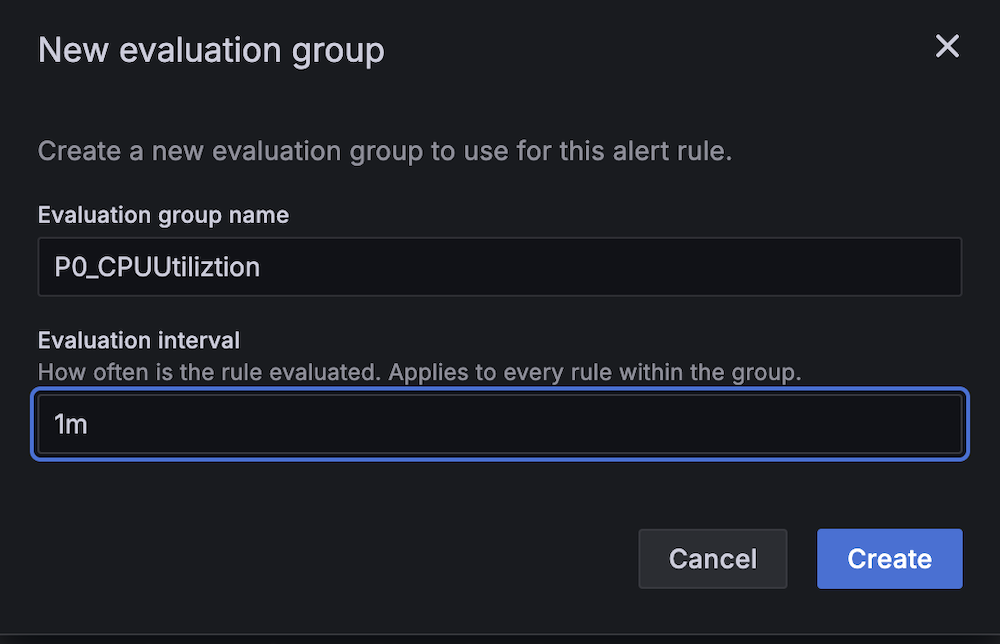
AWS GenAI Lofts are collaborative spaces and immersive experiences that showcase AWS expertise in cloud computing and AI. They provide startups and developers with hands-on access to AI products and services, exclusive sessions with industry leaders, and valuable networking opportunities with investors and peers. Find a GenAI Loft location near you, and don’t forget to register.

Browse all upcoming AWS led in-person and virtual events here.

That’s all for this week. Check back next Monday for another Weekly Roundup!

— seb

This post is part of our Weekly Roundup series. Check back each week for a quick roundup of interesting news and announcements from AWS!