All posts by Ben Freiberg

Validating multi-agent decisions with Step Functions and Bedrock AgentCore

Post Syndicated from Ben Freiberg original https://aws.amazon.com/blogs/compute/validating-multi-agent-decisions-with-step-functions-and-bedrock-agentcore/

For an airline operations team, a single flight cancellation sets off a chain reaction. Hundreds of passengers need new itineraries within minutes, and no two cases are alike. They have different loyalty tiers, sit on different fare rules, and have downstream connections that may not wait. Passengers have varying cabin and seat preferences and might fall under different regulatory entitlements depending on where they booked and where they are flying.

Most airlines handle this with a layered system: rule-based automation covers the simple, one-hop rebooks, and everything else flows to a manual queue staffed by service agents. That works when disruptions are isolated. When they are not, the queue overwhelms, waiting times spike, and passengers booked alternatives themselves that create downstream knock-on disruptions.

This is exactly where AI agents become compelling. An agent can reason across seat availability, fare rules, loyalty entitlements, and connection timing the way an experienced desk agent would, but at machine speed and across hundreds of cases in parallel. Multi-agent collaboration typically lets a supervisor agent route work to collaborator sub-agents, with the model itself deciding which sub-agent runs and in what order. But an unconstrained agent might optimize for the passenger’s preference while ignoring a codeshare restriction, rebook onto a flight that meets minimum connection time on paper but not at that specific airport, or calculate compensation under the wrong regulatory regime because it misread the ticket’s point of sale.

Orchestrating specialized Amazon Bedrock AgentCore agents with AWS Step Functions gives you the reasoning power of generative AI with the guardrails of deterministic validation. Step Functions adds native fan-out across thousands of passengers, a callback pattern that pauses a case for human review at zero compute cost, and a durable execution history that serves as your audit trail. The principle is that agents propose, and deterministic code validates. The pattern is demonstrated here for airline rebooking, but it applies anywhere automated decisions can have real financial or regulatory consequences.

Solution overview

The design is a Step Functions state machine where deterministic steps that map to the business processes wrap each agent’s non-deterministic behavior. The following diagram shows the end-to-end flow. At a high level, the workflow proceeds through these stages:

  1. The workflow starts when a flight-cancellation event arrives, for example through an Amazon EventBridge integration.
  2. An enrichment step pulls additional data such as the passenger manifest, current bookings, loyalty status, and stored preferences.
  3. The workflow fans out to run agents in parallel for each affected passenger.
  4. Two agents then run for each passenger: a find-alternatives agent proposes the top three rebooking options, and a compensation agent determines entitlement based on route, delay duration, and cause.
  5. A deterministic validation step runs after each agent, confirming flights are actually bookable and entitlement rules are followed before either result is used.
  6. The workflow checks whether the case can be auto-confirmed, or needs human review.
  7. Bookings are confirmed, compensation issues, and confirmations are sent. Unresolved cases go to human agents.

The key principle: no agent Task state writes to the reservation system or issues a payment. Only deterministic Task states do that, and only after a deterministic validation step has passed.

Integrating AgentCore harness with Step Functions

AgentCore harness is a managed agent loop. You specify a model, system prompt, and tools, and the harness runs the reasoning cycle (model calls, tool execution, memory management, and response generation) end-to-end in a single API call. It handles the intra-agent orchestration so that Step Functions can focus on inter-agent orchestration: fan-out, sequencing, validation gates, and exception routing. Step Functions provides a native optimized integration for AgentCore harness, which calls InvokeHarness against a target HarnessArn. The optimized integration gives you an extended per-Task timeout of 15 minutes (900 seconds), so agents have enough time to reason through complex proposals. The trade-off is that the agent call is request-response only. There is no .sync and no .waitForTaskToken on the agent step, and only the final assistant message is returned to the state machine.

The following Amazon States Language snippet shows the optimized harness invocation inside a Distributed Map. For the full definition, see the sample on Serverless Land.

{
  "Comment": "Illustrative - per-passenger rebooking fan-out",
  "StartAt": "RebookPassengers",
  "States": {
    "RebookPassengers": {
      "Type": "Map",
      "ItemProcessor": {
        "ProcessorConfig": { "Mode": "DISTRIBUTED", "ExecutionType": "STANDARD" },
        "StartAt": "FindAlternatives",
        "States": {
          "FindAlternatives": {
            "Type": "Task",
            "Resource": "arn:aws:states:::bedrockagentcore:invokeHarness",
            "Parameters": {
              "HarnessArn": "<HARNESS_ARN>",
              "RuntimeSessionId.$": "$.passenger.sessionId",
              "Messages": [{ "Role": "user", "Content": [{ "Text.$": "States.JsonToString($.passenger)" }] }]
            },
            "TimeoutSeconds": 900,
            "ResultPath": "$.proposal",
            "Next": "ValidateRebooking"
          },
          "ValidateRebooking": { "Type": "Task", "Resource": "arn:aws:states:::lambda:invoke", "End": true }
        }
      },
      "MaxConcurrency": 1000,
      "End": true
    }
  }
}

Note: the service name is spelled bedrockagentcore (no hyphen) in the Step Functions resource string, but bedrock-agentcore (with a hyphen) in the AgentCore ARN.

MaxConcurrency is set to 1000 to bound fan-out and protect downstream booking and inventory systems. If you omit it or set it to 0, you get the default behavior, which runs up to 10,000 parallel child executions. The agent Task flows directly into a deterministic validation Task.

How it differs from managed multi-agent collaboration

Multi-agent collaboration typically means that a supervisor agent decides which sub-agent runs and which tools it calls. Step Functions moves those decisions out of the agent layer entirely.

This design puts orchestration, fan-out, validation, routing, retries, and the audit trail into Step Functions instead. Routing is a deterministic state you define and can test in isolation, not a model classification you hope will be consistent. You get a per-state execution history (every transition recorded with input and output), whereas agent-layer traces require opt-in and provide reasoning rationale rather than a durable, always-on event log.

Design walkthrough of the reference app

The following image shows the Step Functions state machine implemented by the sample application.
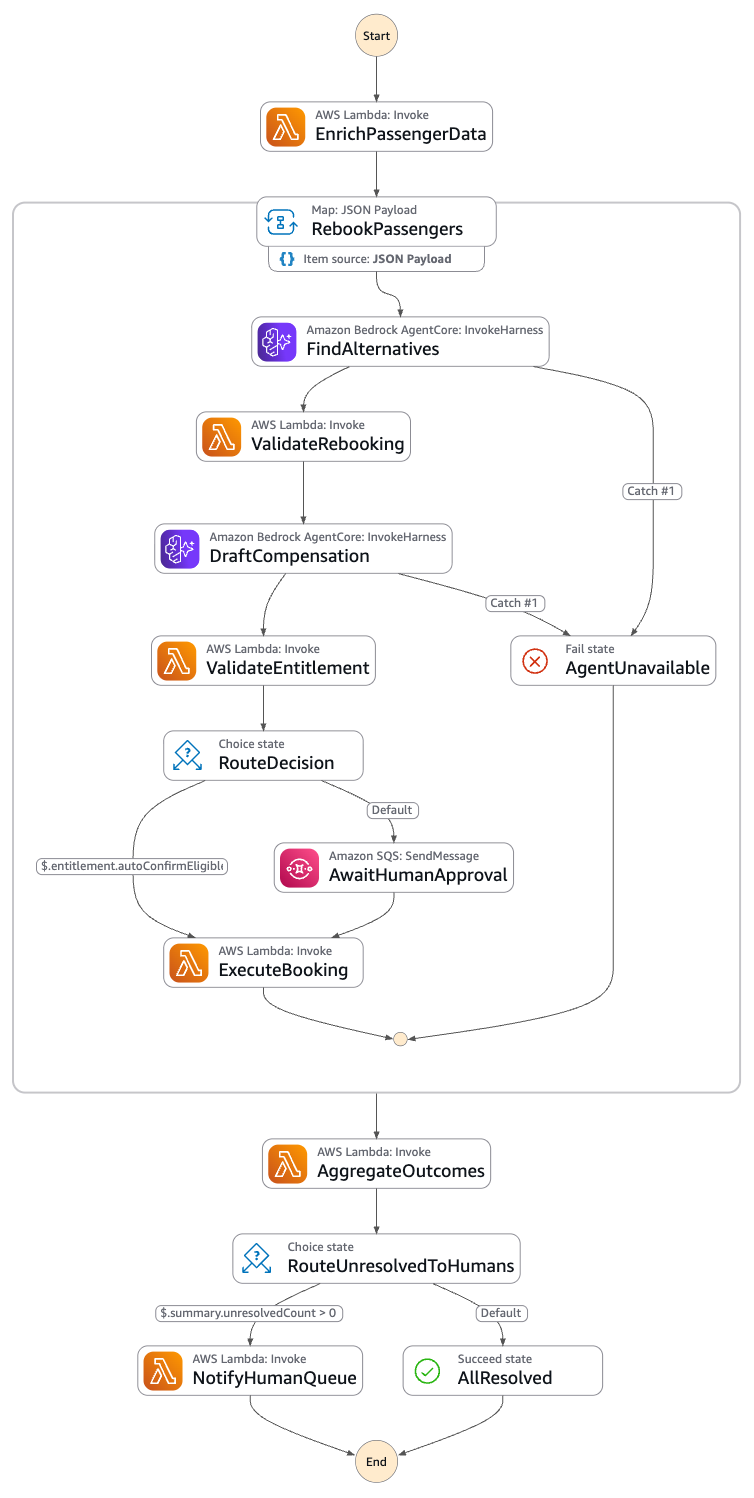
Step Functions state machine showing the rebooking workflow: trigger, enrich, a Distributed Map fan-out with agent and deterministic validation stages, choice routing to human review, and execute stages

Figure 1: The Step Functions state machine for the airline rebooking workflow

Stage 1, Trigger. An Amazon EventBridge rule starts the workflow on a flight-cancellation event.

Stage 2, Enrich. A deterministic Task pulls the passenger manifest, bookings, loyalty status, and preferences into the execution state.

Stage 3, Map fan-out. A Distributed Map iterates affected passengers in parallel. The choice of Map type matters at scale. An inline Map runs up to 40 concurrent iterations, which is the documented threshold for choosing Distributed mode. A Distributed Map runs up to 10,000 parallel child executions by default, the right tool when a hub event affects thousands of passengers.

Stage 4, Agent 1 find alternatives. An AgentCore Task proposes the top three options, reasoning over the passenger’s preferences and constraints.

Stage 5, Deterministic validation of the rebooking proposal. An AWS Lambda Task confirms each proposed flight is bookable by checking live availability, fare rules, and route validity, and it rejects hallucinated options. An agent might confidently propose a flight that does not exist. This stage is where that proposal is caught before it can become a ticket.

Stage 6a, Agent 2 draft compensation. A second AgentCore Task drafts personalized, customer-facing notification text only. It does not compute entitlement and it does not move money.

Stage 6b, Deterministic entitlement check. A Lambda Task computes and validates the entitlement against rule tables before any compensation issues. Consumer-protection frameworks such as EU Regulation 261/2004 (EU261) and US Department of Transportation refund rules are referenced here illustratively, to show why deterministic, auditable computation matters. The specific bands, triggers, and amounts are configuration you own and validate against current legal guidance, not something an agent should infer.

Stage 7, Choice routing and human-in-the-loop. A Choice state auto-confirms rebookings for some passengers and routes the rest to a human. For the cases that need review, the workflow waits on a separate .waitForTaskToken Task, backed by Lambda, Amazon Simple Notification Service (Amazon SNS), or Amazon Simple Queue Service (Amazon SQS), with a 4-hour timeout. The wait happens on this separate callback Task, never on the agent step.

{
  "Comment": "Illustrative - route and wait on a human, not on the agent",
  "RouteDecision": {
    "Type": "Choice",
    "Choices": [
      {
        "Variable": "$.passenger.autoConfirmEligible",
        "BooleanEquals": true,
        "Next": "ExecuteBooking"
      }
    ],
    "Default": "AwaitHumanApproval"
  },
  "AwaitHumanApproval": {
    "Type": "Task",
    "Resource": "arn:aws:states:::sqs:sendMessage.waitForTaskToken",
    "Parameters": {
      "QueueUrl": "https://sqs.us-east-1.amazonaws.com/123456789012/approvals",
      "MessageBody": {
        "taskToken.$": "$$.Task.Token",
        "passengerId.$": "$.passenger.id",
        "options.$": "$.proposal.validatedOptions"
      }
    },
    "TimeoutSeconds": 14400,
    "Next": "ExecuteBooking"
  }
}

Stage 8, Execute. Deterministic Task states confirm the booking, issue compensation, and send confirmation. Each execution Task derives an idempotency token from the passenger ID combined with the decision ID (the child execution name, or a hash of the validated option set) and passes it to the booking and payment APIs, so a retry or redrive is a no-op instead of a duplicate booking or a second payment.

Stage 9, Aggregate and exception routing. The workflow summarizes outcomes and routes any unresolved cases to human agents.

The validation step itself is ordinary deterministic code. A simplified rebooking validator in Python looks like the following.

# Illustrative - reject any option the agent proposed that is not bookable
def handler(event, context):
    passenger = event["passenger"]
    proposed = event["proposal"]["options"]

    validated = []
    for option in proposed:
        flight = lookup_flight(option["flightId"])
        if flight is None:
            continue  # hallucinated or stale flight, reject
        if flight["seatsAvailable"] < 1:
            continue  # no inventory, reject
        if not fare_rules_allow(passenger["fareClass"], flight):
            continue  # fare rule violation, reject
        if not route_is_valid(passenger["origin"], passenger["destination"], flight):
            continue  # invalid route, reject
        validated.append(option)

    return {
        "passengerId": passenger["id"],
        "validatedOptions": validated,
        "autoConfirmEligible": passenger["loyaltyTier"] == "top" and len(validated) > 0,
    }

Best practices and guardrails

Reject hallucinations through validations. No agent proposal is applied without a deterministic validation step passing first. This minimizes the impact of hallucinations, prompt injections, or bugs on your workflow.

Keep a complete audit trail. Step Functions execution history records every state transition, input, and output, and pairing that with durable persistence gives you a per-decision record. You can show exactly which proposal was made, which validation passed or failed, and who approved the exception.

Surface only true exceptions to humans. Humans handle only what validation or the agent cannot resolve. Auto-confirmation handles the clear cases, and people spend their attention on the genuinely ambiguous ones.

Hold executions open cheaply. The .waitForTaskToken callback holds the execution open with no compute charges while the execution is paused. For example, you can cost-efficiently park thousands of pending approvals overnight. Refer to the AWS Step Functions pricing page for current details.

Make execution idempotent. Guard reservation execution and compensation issuance against retries and double-sends, as shown in Stage 8. Derive the idempotency token from the passenger ID and decision ID, and pass it to your booking and payment APIs so that a replay is a no-op.

Respect cost and timeouts. Keep each per-agent Task timeout within the 15-minute quota, bound your Map concurrency to protect downstream systems, and track the token usage returned in the agent response so you can attribute and forecast cost.

Handle errors deliberately. Apply Retry and Catch on the agent Tasks for conditions such as BedrockAgentCore.ThrottlingException and BedrockAgentCore.ResourceNotFoundException, and on the Lambda validation Tasks for their own failure modes. A Catch on an agent Task can route a stuck passenger straight to the human queue rather than failing the whole child execution.

Confirm availability and Region support. Check the current availability status and supported AWS Regions for AgentCore and the Step Functions integration at the AWS Capabilities by Region on Builder Center.

Conclusion

A flight-cancellation event is a challenging test of automated decision-making, because the output can have immediate financial impact. The way to use AI agents safely in that setting is to let them do what they are good at, proposing options and drafting language, while never letting a proposal become an action until deterministic code has approved it. In this design, orchestration, fan-out, validation, routing, and retries are implemented in Step Functions rather than inside an agent’s reasoning. Agents do not make changes directly, and their output is only applied after deterministic validation. You get a per-decision record for review, and you hold exceptions open on a callback that adds no compute or storage cost while it waits.

To get started, deploy the reference pattern from Serverless Land and adapt the validation layer to your own workflow.
Low-latency, high-throughput SQS event processing with AWS Lambda provisioned mode

Post Syndicated from Ben Freiberg original https://aws.amazon.com/blogs/compute/low-latency-high-throughput-sqs-event-processing-with-aws-lambda-provisioned-mode/

Customers building event-driven applications on AWS rely on Amazon Simple Queue Service (Amazon SQS) and AWS Lambda event source mappings (ESMs) to process millions of events every day. The fully managed polling infrastructure of ESMs eliminates the need to write and maintain custom code. You can focus on business logic while Lambda handles scaling, batching, and error handling automatically.

As workloads grow, many customers need to meet demanding requirements for low-latency message processing, high-concurrency execution, and high-throughput event processing. Use cases such as real-time payment processing, fraud detection, IoT telemetry pipelines, and flash-sale order fulfillment require the ESM to scale rapidly and sustain peak performance without queue backlog.

To address these needs, AWS launched provisioned mode for SQS event source mappings. Provisioned mode gives you direct control over the number of event pollers assigned to your ESM for predictable and rapid scaling. With Provisioned mode, you can configure event pollers up to 10,000, supporting concurrency of up to 100,000 concurrent Lambda executions and throughput of 10 GB/s. You can process up to a million events per second.

Provisioned mode is also available for Apache Kafka event source mappings including Amazon Managed Streaming for Apache Kafka (Amazon MSK) and self-managed Kafka.

How SQS event source mappings work

When you configure an SQS queue as an event source for a Lambda function, Lambda automatically creates an ESM resource. The ESM manages a fleet of internal event pollers that continuously poll the SQS queue, retrieve messages, and invoke your Lambda function with batches of events.

In default ESM mode, Lambda automatically manages the number of event pollers based on queue depth and processing throughput. The system starts with five pollers and scales up as the queue backlog builds, supporting up to 1,250 concurrent invocations. This automatic scaling works well for the majority of event processing workloads. However, the scale-up rate in default mode (approximately 300 additional concurrent executions per minute) can leave latency-sensitive workloads with growing queue backlogs during sudden traffic spikes.

What is provisioned mode?

Provisioned mode gives you explicit control over the minimum and maximum number of event pollers assigned to your ESM. Instead of relying solely on automatic scaling, you define:

  • MinimumPollers: the number of event pollers always active and ready to process messages (range: 2–200).
  • MaximumPollers: the upper bound on event pollers the ESM can scale to (range: 2–10,000).

These pollers remain active and continuously poll your SQS queue, eliminating cold-start delays in the polling infrastructure. When traffic spikes arrive, your ESM already has capacity allocated to handle the burst.

Default mode vs. provisioned mode

Attribute Default mode Provisioned mode
Minimum event pollers 2 2
Maximum event pollers 5 10,000
Maximum concurrent executions Up to 1250 Up to 100,000
Maximum throughput N/A 10 GB/s
Scale-up rate ~300 concurrency/min ~1,000 concurrency/min
Poller control Lambda controlled Min/Max configurable by you
Billing Included in Lambda pricing Event poller unit (EPU) hours
Best for Majority of workloads Spiky, latency-sensitive, high-throughput workloads

Activating provisioned mode for ESM

You can configure provisioned mode when creating a new ESM or updating an existing one. The following examples show configuration using the AWS CLI, AWS Serverless Application Model (SAM), and AWS CloudFormation.

AWS CLI

Create a new ESM with provisioned mode:

aws lambda create-event-source-mapping \
  --function-name my-function \
  --event-source-arn arn:aws:sqs:us-east-1:123456789012:my-queue \
  --batch-size 10 \
  --provisioned-poller-config '{"MinimumPollers": 50, "MaximumPollers": 500}'

Update an existing ESM to enable provisioned mode:

aws lambda update-event-source-mapping \
  --uuid "a1b2c3d4-5678-90ab-cdef-EXAMPLE11111" \
  --provisioned-poller-config '{"MinimumPollers": 50, "MaximumPollers": 500}'

AWS SAM template

Resources:
  MyFunction:
    Type: AWS::Serverless::Function
    Properties:
      Handler: index.handler
      Runtime: python3.12
      Events:
        SQSEvent:
          Type: SQS
          Properties:
            Queue: !GetAtt MyQueue.Arn
            BatchSize: 10
            ProvisionedPollerConfig:
              MinimumPollers: 50
              MaximumPollers: 500

  MyQueue:
    Type: AWS::SQS::Queue

AWS CloudFormation

Resources:
  MyEventSourceMapping:
    Type: AWS::Lambda::EventSourceMapping
    Properties:
      FunctionName: !Ref MyFunction
      EventSourceArn: !GetAtt MyQueue.Arn
      BatchSize: 10
      ProvisionedPollerConfig:
        MinimumPollers: 50
        MaximumPollers: 500

Provisioned mode for SQS ESM in action

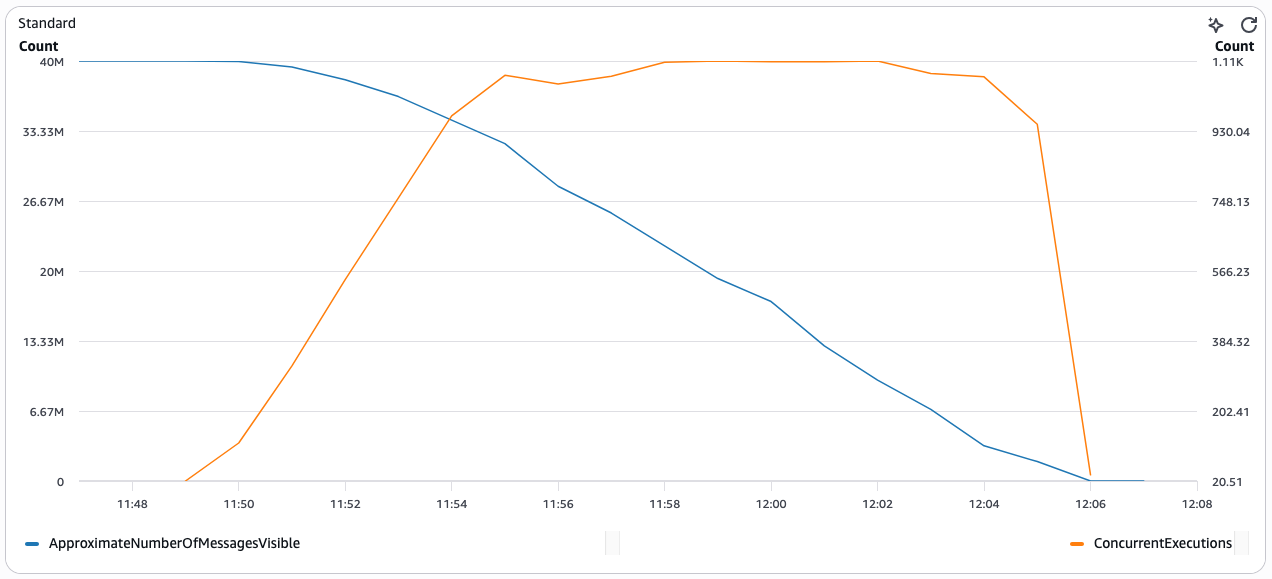
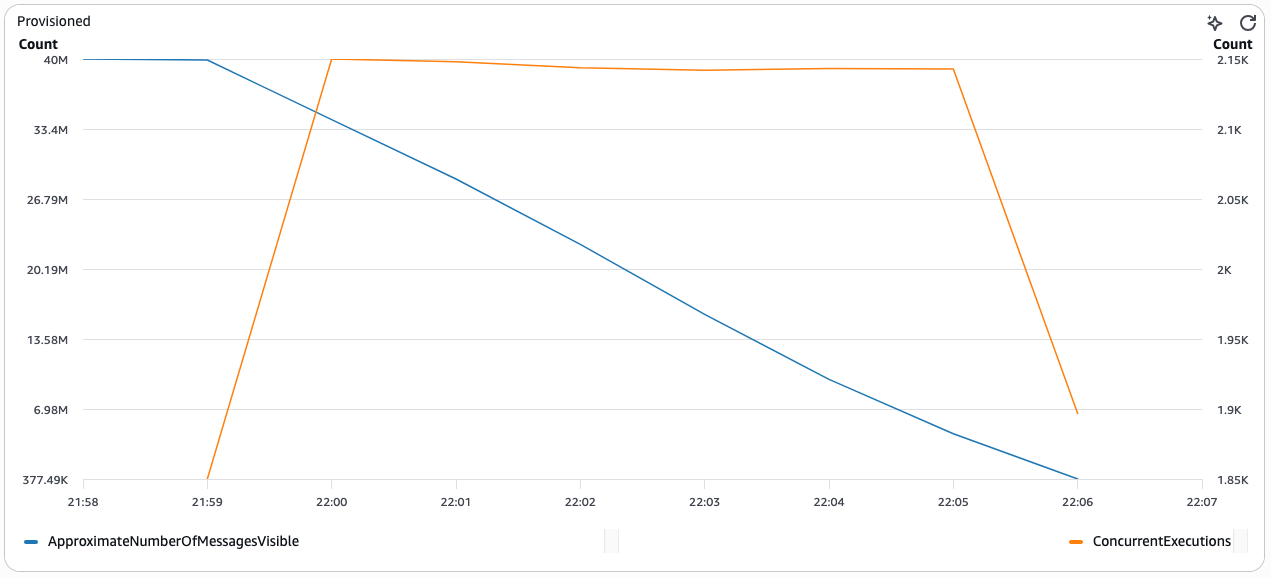
To see the performance profile with provisioned mode for SQS, deploy a Lambda function that has an SQS queue as its trigger. Use the reference pattern on Serverless Land or follow the Creating and configuring an Amazon SQS event source mapping guide to configure provisioned mode for your SQS event source mapping. In the following scenarios, a producer writes 40 million messages, each with a 1 KB payload size, to an SQS queue. Batch size is set to 10, with function duration at about 200 ms.

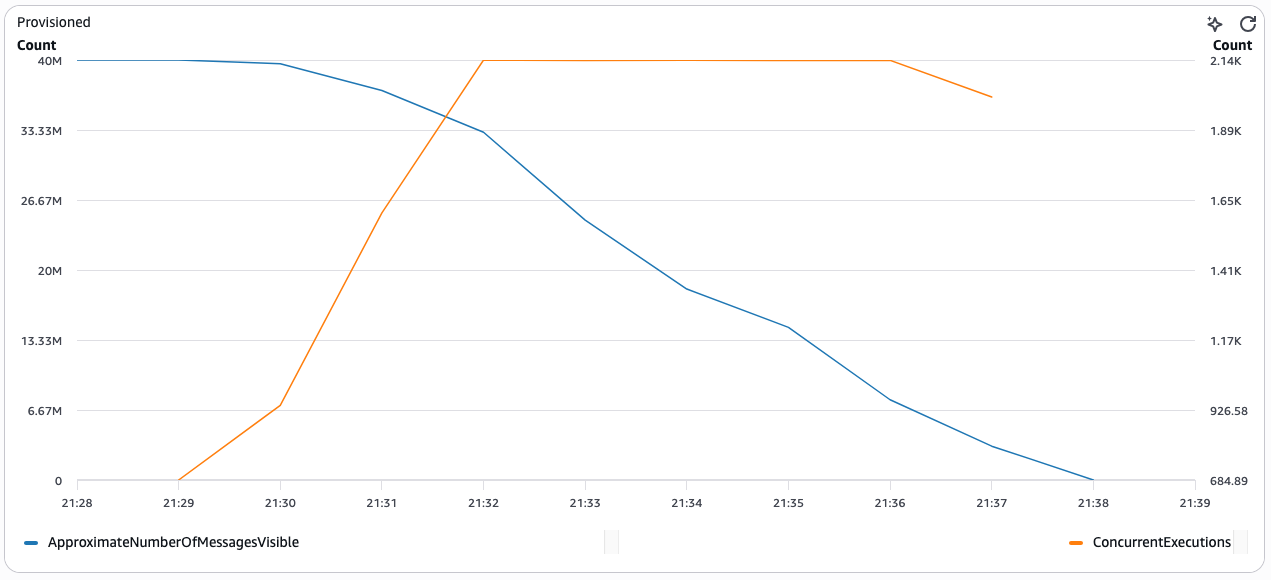
Scenario 1: Baseline (default mode)

The following chart shows the relationship between ApproximateNumberOfMessagesVisible (blue) and ConcurrentExecutions (orange) over time for the baseline scenario using default mode with no provisioned pollers. With provisioned mode disabled, Lambda takes approximately 17 minutes to drain the backlog of 40 million messages. It takes about 6 minutes to reach the maximum concurrent executions.

Chart showing ApproximateNumberOfMessagesVisible and ConcurrentExecutions over time in default mode, with Lambda taking 17 minutes to drain 40 million messages

Scenario 2: Configuring minimum event pollers and auto-scaling

To optimize the ESM throughput for these kinds of workloads and reduce the time to drain the message backlog, set the minimum event pollers to a higher than default value. In this scenario, the minimum pollers are set to 100 and maximum pollers are set to 1000.

Chart showing provisioned mode with minimum pollers set to 100, draining 40 million messages in 7 minutes

Lambda drains the backlog of 40 million messages in approximately 7 minutes. This is more than 55% faster than the baseline without provisioned mode. It takes only about 1 minute to reach maximum concurrent executions.

Scenario 3: Default minimum event pollers and auto-scaling

In some cases, the workload might not be as performance-sensitive. With the same volume of 40M messages in your SQS queue, activate provisioned mode for ESM. Start with the default minimum event pollers (set to 2) and let Lambda automatically scale the event pollers based on incoming traffic.

Chart showing provisioned mode with default minimum pollers, draining 40 million messages in 9 minutes

With this configuration, Lambda drains the backlog in approximately 9 minutes. This is still more than 45% faster than the baseline without provisioned mode. It takes about 3 minutes to reach maximum concurrent executions.

Best practices for configuring provisioned pollers

When configuring provisioned mode, keep the following recommendations in mind:

Right-size your minimum pollers

Each event poller supports up to 10 concurrent Lambda invocations and approximately 1 MB/s throughput. Use this formula to estimate your minimum poller count:

MinimumPollers = max(TargetConcurrency / 10, TargetThroughputMBps / 1)

For example, if your workload requires 500 concurrent executions and 200 MB/s throughput, set MinimumPollers to at least 200. To estimate the number of event pollers required to verify optimal message processing performance when using provisioned mode for SQS ESM, follow the steps described in determining the required event pollers.

Set maximum pollers for burst capacity

Set MaximumPollers to handle your peak traffic scenario. The ESM scales between your minimum and maximum based on queue depth. A good starting point is 2–5x your minimum pollers.

Align with Lambda concurrency limits

Provisioned pollers invoke your Lambda function concurrently. Verify that your account’s concurrent execution quota accommodates the maximum concurrency your pollers can drive:

MaxConcurrency = MaximumPollers × 10

If you set MaximumPollers to 5,000, your account needs at least 50,000 concurrent execution capacity. Request a quota increase through the Lambda quotas page if needed.

Start conservatively and iterate

Begin with a lower MinimumPollers value and monitor the CloudWatch metrics described in the following section. Increase the minimum if you observe queue depth growth during traffic spikes, or decrease it if pollers remain underutilized during off-peak hours.

Use FIFO queues for ordered workloads

When processing order-sensitive workloads, use FIFO queues with high-throughput mode activated. Provisioned mode works with both SQS standard and FIFO queue types.

Set up dead-letter queues

Configure dead-letter queues to manage messages that fail processing after multiple attempts.

Adjust batch size as needed

The batch size parameter remains adjustable, with a default value of 10 messages and a maximum of 10,000 messages for standard queues.

Cost considerations

Provisioned mode billing is based on event poller unit (EPU) hours. You pay for the number of provisioned pollers allocated, regardless of whether they are actively processing messages. See AWS Lambda pricing for details. Key optimization strategies are:

  • Match minimum pollers to your sustained baseline traffic to avoid over-provisioning during low-traffic periods.
  • Use maximum pollers for burst capacity as you only pay for pollers that scale up while they are active.

Monitoring provisioned mode with CloudWatch

Lambda publishes the following CloudWatch metrics for provisioned mode ESMs:

Metric Description
ProvisionedPollers Current number of provisioned event pollers allocated
ConcurrentExecutions Number of concurrent Lambda invocations driven by the ESM
ApproximateNumberOfMessagesVisible SQS queue depth (from SQS metrics)
Duration Function execution time per invocation

Set CloudWatch alarms on ApproximateNumberOfMessagesVisible to detect queue backlogs, and on ProvisionedPollers to track the number of provisioned pollers. To understand how your ESM processes messages at each stage, from polling through invocation to completion, opt in to the EventCount metric group. This provides detailed metrics including PolledEventCount, FilteredOutEventCount, InvokedEventCount, FailedInvokeEventCount, and DeletedEventCount.

Conclusion

Provisioned mode for SQS event source mappings gives you control over scaling behavior for your most demanding workloads. By configuring minimum and maximum event pollers, you achieve predictable low-latency processing, scale to 100,000 concurrent executions, and sustain throughput of up to a million events per second, without waiting for automatic scale-up.

Dedicated pollers deliver predictable, low-latency performance. This makes them well-suited for workloads like real-time financial transactions, high-volume IoT data ingestion, or flash sale order processing. You can achieve 3x faster scaling compared to default mode. Combined with CloudWatch observability and flexible configuration through CLI, SAM, and CloudFormation, provisioned mode integrates into your existing deployment workflows.

To get started, explore the provisioned mode configuration guide for SQS event source mappings. Deploy the sample application from the Serverless Land reference pattern. To request a concurrent execution quota increase for high-throughput workloads, visit the Lambda quotas page.

Lessons learned from scaling to 1 million Lambda functions

Post Syndicated from Ben Freiberg original https://aws.amazon.com/blogs/architecture/lessons-learned-from-scaling-to-1-million-lambda-functions/

In this post, we share our journey and the lessons learned from building and running a fully serverless, multi-account software as a service (SaaS) platform at scale. We’ll explore why true scale-to-zero is critical, how we handle quota management, why engaging AWS service teams early saved us from outages, and which unexpected practices emerged once we scaled from thousands to over a million functions.

At ProGlove, we build smart wearable barcode scanning solutions that connect frontline workers to digital workflows. Our scanners integrate with Insight, our AWS-based SaaS platform, to provide real-time visibility into processes, helping customers in manufacturing, logistics and retail improve productivity, reduce errors and enhance ergonomics on the shop floor.

We chose a one AWS account per tenant architecture to achieve clearer security boundaries, streamlined ownership of services, and more transparent cost. It is important to focus on efficiency with dedicated tenant resources at scale, because resource wastage will also scale. The ability to scale-to-zero removes this concern.

Phase 1: The “simple” origins (0 to 1,000 Lambda functions)

When you first build a serverless system, you think in single digits. A handful of AWS Lambda functions, maybe a few dozen at most. It’s hard to imagine what changes when your platform operates thousands of AWS accounts and deploys over one million Lambda functions into production, each isolated to a single customer’s account.

We followed standard playbooks, where “scale-to-zero” was merely a nice-to-have. We used serverless best practices like Amazon Simple Queue Service (Amazon SQS) for decoupling and long-polling to keep the application responsive and resilient. At this scale, a few idle functions or a handful of accounts were a negligible expense and the benefits of a high-level managed service like AWS Lambda really showed.

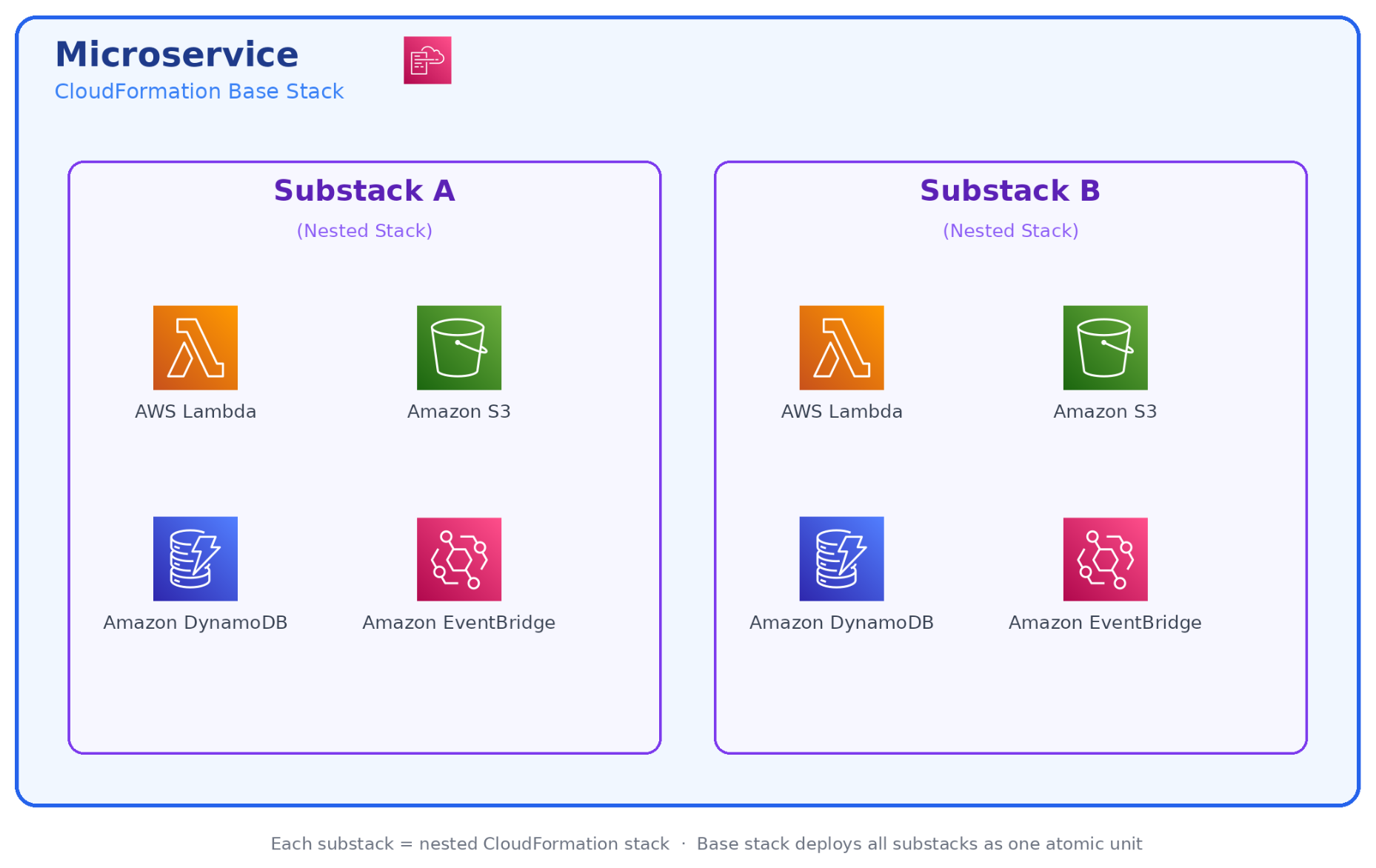
Microservice composition

Each microservice in our platform follows a consistent structure: 5 to 15 Lambda functions coordinated by AWS Step Functions, with Amazon EventBridge handling event routing and Amazon DynamoDB as the primary data store.

Architecture diagram showing a microservice composition with Lambda functions, Step Functions, EventBridge, and DynamoDB

These resources are bundled together into a dedicated AWS CloudFormation stack for deployment.

As we onboarded our first handful of tenants, it quickly became clear that deploying and updating AWS CloudFormation stacks individually per account wouldn’t scale. We adopted AWS CloudFormation StackSets, which let us push infrastructure updates to multiple accounts in parallel from a central management account. At this stage, StackSets felt like a superpower. One deployment operation and many accounts are updated simultaneously. We evaluated building a fully custom replacement later, but ultimately concluded that the maintenance overhead wasn’t worth the marginal control gains and stayed with StackSets as our core mechanism.

Phase 2: The first 50 accounts

Growing to 50 tenant accounts forced us to confront problems that weren’t visible at single-digit scale. Three areas in particular required deliberate architectural decisions: observability, account provisioning, and quota isolation.

Automating account creation

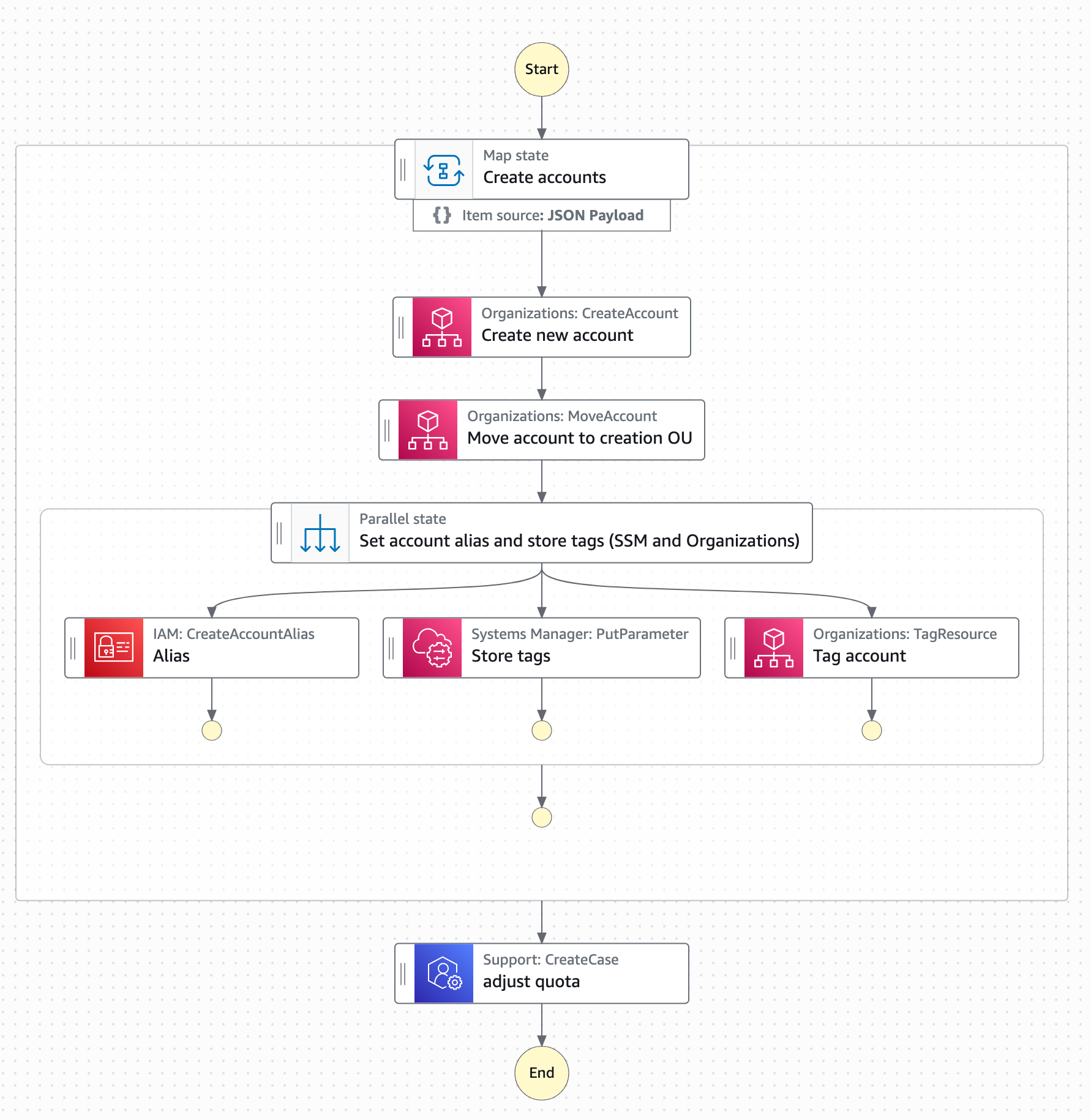
We knew manual provisioning would not scale. Instead we built an automated account factory on top of AWS Organizations: an AWS Step Functions workflow in the management account handles the full provisioning lifecycle: Creating the account, applying baseline service control policies (SCPs), bootstrapping cross-account IAM roles, and triggering the initial CloudFormation StackSet deployment. All done using cross-account AWS Lambda invocations. New tenant accounts go from request to ready in under 15 minutes, at near-zero incremental cost per provisioning run.

Account provisioning workflow using AWS Organizations and Step Functions

The quota isolation benefit

One underappreciated advantage of the account-per-tenant model is quota separation. Each account gets its own Lambda concurrent execution limit, its own Amazon API Gateway throttle, and its own service quotas across the board. In a shared-account SaaS model at this scale, a single noisy tenant could exhaust shared concurrency and cause cascading failures across all other tenants. With account isolation, that class of problem simply doesn’t exist as each tenant’s activity is bound to their own account.

Phase 3: Scaling challenges (the self-DDoS)

As our fleet grew beyond a few hundred accounts, we began to experience the “Physics of Scale”. We discovered that when hundreds of backend service instances simultaneously access other services, the resulting request volume can resemble a coordinated attack, impacting not only our own infrastructure but also AWS.

One time, we faced a massive metric spike where our own functions effectively overwhelmed (similar to a DDoS attack) our internal APIs. The root cause was synchronized schedules: every Lambda was using the same rate(5 minutes) expression, which aligned to the top of the minute across thousands of accounts.

The solution was request scattering. We now use a standardized internal library that enforces jitter, randomized batch offsets, and staggered updates across all scheduled functions.

Rule of Thumb: “Never do the same thing at the same time everywhere”.

Multi-account observability as a cost driver

With several dozen accounts, manual log access per account became unworkable. We adopted a third-party observability platform, forwarding Amazon CloudWatch logs and metrics cross-account to a centralized dashboard. At roughly $3 per account per month, the cost felt insignificant.

That assumption was soon replaced by a very real learning: at thousands of accounts, $3 per account per month becomes an impactful expense that demands active management. We learned to treat per-account observability costs with the same scrutiny you apply to compute costs.

What came as a surprise to us were the actual cost drivers: instead of Lambda compute or storage costs, we found that forwarding all observability data almost doubled our cloud bill. As a result, we had to learn how to differentiate between high and low priority observability data and only move around the priority data.

With all mitigations combined we managed to bring observability costs down to around $0.7 per account. Additionally, we were able to switch accounts to almost 0 after some time of inactivity by only monitoring a small set of very basic metrics.

Phase 4: Rethinking architectural patterns for scale-to-zero

One of the most painful lessons was realizing that traditional Amazon SQS “best practices” increased costs in our use-case and scale.

Replacing SQS and the DLQ dilemma

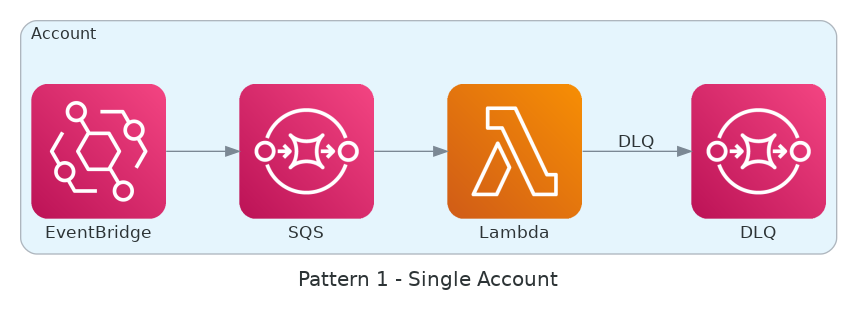
After we scaled to over a thousand AWS accounts, we understood that “idle” doesn’t necessarily mean there are no costs – even when using Serverless. When Lambda functions consume events from EventBridge through an SQS queue to increase resilience, they constantly make requests to the queue even when there are no messages to process.

To eliminate the cost of continuous polling, we removed Amazon SQS from the path between Amazon EventBridge and AWS Lambda.

  • Metric-Driven Safety: Instead of relying on a queue to buffer requests, we monitor AsyncEventsDropped and ConcurrentExecutions to make sure we stay within our quotas without losing events.
  • The Centralized DLQ: Polling individual Dead Letter Queues (DLQs) in every account reintroduced the same polling cost issues. We solved this by routing failures to a centralized DLQ as shown in the following two diagrams.
  • The Isolation Trade-off: This approach requires extreme discipline to make sure we don’t break our data isolation patterns, as events from different tenants converge in a single location for recovery. Because of cost implications at scale, the use of SQS moved from a silo to a bridged model where the AWS account ID can be treated as a tenant ID.

Individual dead letter queue per queue architecture

Individual DLQ per queue

Centralized dead letter queue polling architecture

Centralized DLQ polling

Phase 5: Industrializing the deployment engine

Serverless architectures grow to large numbers of infrastructure components: where a monolith or Amazon Elastic Compute Cloud (Amazon EC2)-based service might be a handful of resources, a single microservice in our stack spans dozens of Lambda functions, EventBridge rules, DynamoDB tables, and Step Functions state machines. Multiplied across thousands of accounts, deployment complexity compounds quickly.

Initially, we used AWS CloudFormation StackSets to roll out updates in parallel. However, at the scale of 1 million Lambda functions, StackSets hit a performance ceiling and occasionally produced errors that added up significantly at our volume.

From custom engines to collaborative roadmaps

The bottlenecks became such a blocker that we began building our own internal serverless deployment system to replace StackSets. This caught the attention of the AWS CloudFormation service team, who committed to supporting our use case at the scale we required and partnered with us closely from that point on.

By engaging early and often, we were able to:

  • Influence the Roadmap: We provided the scale requirements that helped AWS prioritize StackSet stability and performance improvements.
  • Automate Resiliency: We built a deployment tracking service that aggregates StackSet events through Amazon EventBridge. A central AWS Step Functions state machine now acts as our “single-pane-of-glass,” acting on failures and triggering retries for occasional AWS internal errors.

Phase 6: Mature governance and FinOps

Being able to scale a serverless platform with a small team of engineers requires consistent and efficient governance practices. This applies to both cloud governance topics as well as engineering practices. Otherwise it will be next to impossible to keep software delivery and development performance as well as reliability at a high level over time.

Cost optimization also changes at a higher maturity level: once cost control is tightly monitored and automated, the discipline changes from housekeeping tasks to collect easy cost savings towards increasingly complex architectural changes. For example, if a new feature significantly increases the number of Lambda invocations and drives up cost, you will need to re-think the architecture and include the new focus on cost.

The mono-repo strategy

We consolidated 20 microservices into a single mono-repo. This helped us to:

  • Enforce consistent tooling and security scanning across more than a million functions.
  • Coordinate runtime and library upgrades through a single source of truth for configuration.
  • Make sure every change passes through the same CI/CD chain with guaranteed compatibility.

The “Almost-Zero” Reality

Even with a scale-to-zero mandate, we learned that “zero” is often “almost-zero”.

  • The Monitoring Tax: We avoided services like NAT Gateways, but monitoring introduced additional costs such as CloudWatch Alarms. Aggregating metrics in external observability tools added up quickly.
  • The Optimization Payoff: By aggressively optimizing these costs, we reduced our idle cost for inactive accounts to less than $1 per month.

Think beyond the obvious services

One of the most valuable habits we built was resisting the urge to immediately default to a familiar pattern or write custom code. AWS offers a growing catalog of fully managed, event-driven services such as Amazon EventBridge Pipes, AWS AppSync, Amazon SQS FIFO, and others, that can remove entire categories of custom Lambda code. Before writing a function, ask whether a native service integration already solves the problem.

A deliberate research step of exploring native AWS capabilities before opening an editor consistently paid off. It reduces the surface area you own, eliminates maintenance burden, and builds the team’s instinct for choosing the right service over reinventing it. Serverlessland is an excellent starting point for discovering patterns and service combinations you may not have considered.

Conclusion: Scaling efficiency faster than growth

Scaling from 0 to 1M Lambda functions across thousands of AWS accounts is a question of efficiency not of capacity. Every new account, every new customer, adds potential operational load. The only way to stay ahead is to make sure efficiency scales faster than growth. For us, that means true scale-to-zero, proactive and efficient quota management, tight collaboration with AWS service teams, disciplined developer education, and a mono-repo that enforces consistency.

We’ve learned that the difference between success and failure at this scale lies in unexpected aspects like the hard-learned fact that observability becomes an increasingly complex problem the more distributed your platform becomes.

The benefits are substantial. With the right automation and architectural rigor, a lean team can operate a large-scale infrastructure. Using a cloud-native approach based on serverless services is the most important operational advantage in this case.

To apply these lessons to your own workloads, discover event-driven patterns and service combinations on Serverless Land.


About the authors

6,000 AWS accounts, three people, one platform: Lessons learned

Post Syndicated from Ben Freiberg original https://aws.amazon.com/blogs/architecture/6000-aws-accounts-three-people-one-platform-lessons-learned/

This post is cowritten by Julius Blank from ProGlove.

As software-as-a-service (SaaS) platforms grow, balancing speed of innovation with strong security and tenant data isolation becomes critical. While the same AWS Identity and Access Management (IAM) mechanisms secure both shared and dedicated environments, establishing a hard security boundary is often easier in an account-per-tenant model because the account itself becomes the isolation boundary. In shared-account deployments, you instead rely on resource-level boundaries such as tenant-scoped IAM policies and data partitioning. This multi-tenancy increases architectural and operational complexity and can introduce security challenges if safeguard mechanisms are not properly designed and enforced. By adopting an account-per-tenant model on Amazon Web Services (AWS), you can achieve clearer security boundaries, streamlined ownership of services, and more transparent cost attribution, but this comes at the expense of increased investment in platform automation.

At ProGlove, we build smart wearable barcode scanning solutions that connect frontline workers to digital workflows. Our scanners integrate with Insight, our AWS based SaaS platform, to provide real-time process visibility. This helps customers in manufacturing, logistics, and retail improve their productivity, reduce errors, and enhance ergonomics on the shop floor.

This post describes why we chose a account-per-tenant approach for our serverless SaaS architecture and how it changes the operational model. It covers the challenges you need to anticipate around automation, observability and cost. We will also discuss how the approach can affect other operational models in different environments like an enterprise context.

Why multi-account?

Many SaaS providers begin their journey with a straightforward, dedicated deployment model, often with one AWS account per tenant. This approach makes initial implementation straightforward and limits the scope of issues, but as the platform scales, operational overhead and inefficiencies from idle or underutilized resources increase. These inefficiencies can be mitigated with serverless architectures that scale automatically to demand. Over time, providers often look to shared or multi-tenant models to consolidate operations and improve cost efficiency. However, this shift introduces new challenges as the number of tenants and services grows:

  • Blast radius – An accidental misconfiguration or vulnerability could expose multiple tenants.
  • Quota limits – Tenants in a single AWS account share the same quotas.
  • Operational complexity – Shared infrastructure makes it difficult to reason about ownership of resources.
  • Customization limits – Making changes for one tenant risks impacting others.
  • Cost visibility – Attributing resource usage to individual tenants is challenging.

Choosing between a dedicated or shared model is ultimately a trade-off. Dedicated deployments are more straightforward to build but require investment in SaaS operations and orchestration to manage at scale, whereas shared models reduce operational overhead but increase architectural and management complexity.

AWS recommends a multi-account strategy to organizing your AWS environment. At scale, the AWS account boundary is the easiest way to implement isolation. Accounts are fully isolated containers for compute, storage, networking and more, with no shared scope unless you explicitly configure it.

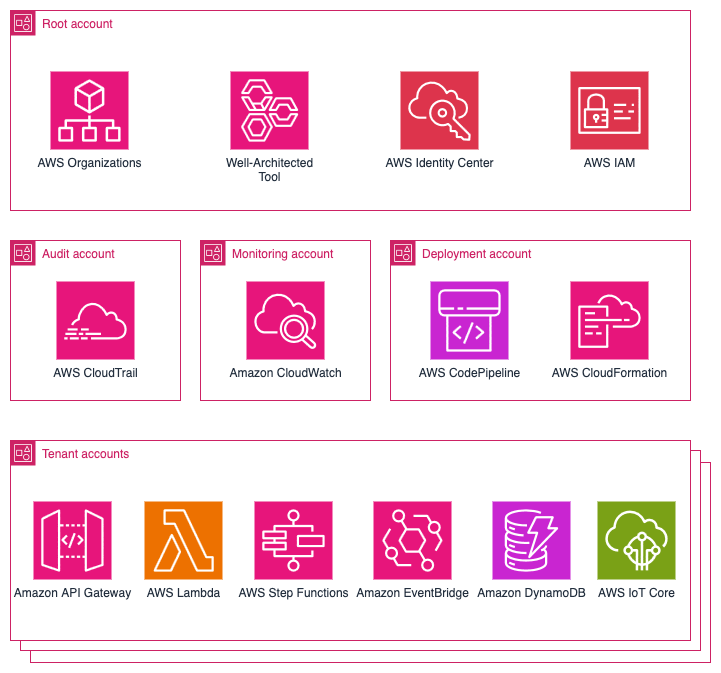
Working backwards from our use case, we decided to take this model to its logical extreme: every tenant gets their own AWS account. The services they consume are deployed directly into that account. In that account, we deploy the full set of microservices that the tenant requires. These services run exclusively with that tenant’s data and configuration. At our current scale, ProGlove manages approximately:

That translates to over 120,000 deployed service instances and roughly 1,000,000 Lambda functions in production. The following diagram shows an overview of the main services used in our platform.

AWS multi-account architecture diagram showing hierarchical organization with Root, Audit, Monitoring, Deployment, and Tenant accounts containing various AWS services

Benefits of the account-per-tenant model

This model brings several benefits that directly support security, agility, and operational clarity, including a strong isolation model, simplified mental model, customization per tenant, and transparent cost attribution. Tenant data is not co-located. Each account has its own storage, compute, and permissions. If a security issue, runaway process, or misconfiguration occurs, the impact is limited to that tenant’s account while other tenants remain unaffected. For developers, they don’t need to think multi-tenancy as a deployed service instance always belongs to exactly one tenant. This reduces cognitive load and simplifies debugging. Developers can easily be provided with isolated, production-like tenant accounts to eliminate the gap between development and production environments. You can modify, test, and migrate individual accounts independently. This helps to create tailored deployments, such as activating premium features for certain tenants, without impacting the overall system.

AWS Cost Explorer and linked accounts make it straightforward to report and charge back costs on a per-tenant basis. For SaaS providers with consumption-based pricing models, this becomes a strong advantage.

When conducting an AWS Well-Architected Framework review together with AWS, we found that many items from the operational excellence as well as the security pillar didn’t even apply to our setup anymore. This made completing those review sections quick and straightforward.

Challenges and trade-offs

The account-per-tenant model, like most architectural choices, involves trade-offs. Although the model provides strong isolation, it introduces challenges in platform operations. The approach shifts complexity away from application development to platform development.

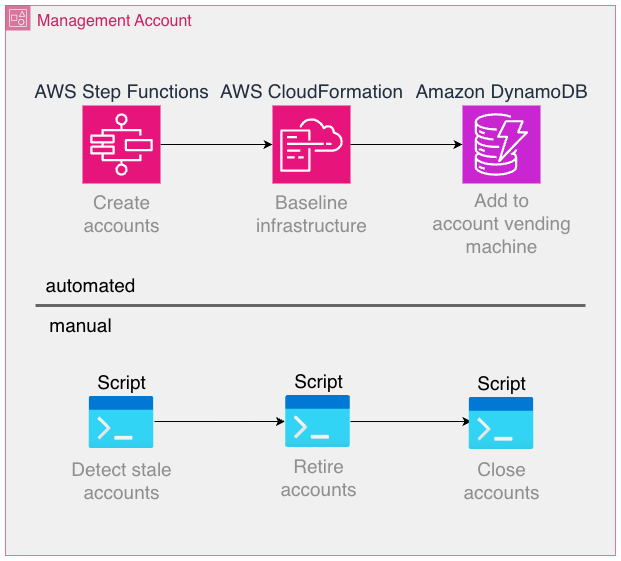
Provisioning, configuring, and managing thousands of accounts isn’t feasible manually. Automation of account creation, baseline setup, IAM roles, guardrails, and service enablement is mandatory. We rely on AWS Organizations, its service control policies (SCPs), and AWS CloudFormation StackSets, as well as custom tooling to handle this.

Some of the involved workflows lend themselves well to automation, whereas others can be implemented more effectively using traditional scripting and manual operations, as long as the overhead introduced is low enough. For example, account creation is a fully automated process using AWS Step Functions, but the retirement and closure of accounts are performed manually through regularly run scripts.

AWS account lifecycle management diagram showing automated provisioning with Step Functions and CloudFormation, plus manual retirement process with scripts

Some AWS services are billed per provisioned resource and independent of utilization as opposed to fully scaling to zero when not used. Prominent examples are Amazon Elastic Compute Cloud (Amazon EC2) or Amazon Relational Database Service (Amazon RDS), where resources need to be provisioned to use the service. Even the smallest EC2 instance type is charged at around USD $3, which adds up to USD $3,000 when deployed into 1,000 accounts. By contrast, serverless offerings such as AWS Lambda or Amazon DynamoDB automatically scale based on actual usage, minimizing idle resource costs. Although the per‑invocation or per‑request pricing for serverless services can seem higher, these models often offset the operational overhead and resource wastage associated with always‑on infrastructure. In any case, costs should be carefully modeled, measured, and optimized.

Monitoring infrastructure across accounts and Regions at scale is significantly harder than monitoring a handful of accounts. Observability tooling should be centralized, but without reintroducing the very risks that accounts are meant to isolate. It’s important to point out that Amazon CloudWatch offers greatly improved cross-account observability features today than when we started, for example, the Observability Access Manager.

Developers, operations teams, and platform services and tools need to operate across accounts on a daily basis. This requires a robust identity model with IAM roles and cross-account trust policies. If not designed carefully, this can become a source of complexity and security risk. Also, make sure to follow the best practice of avoiding long-lived credentials because these introduce a major security threat and monitoring effort if deployed into many accounts. AWS service limits are enforced per account. In a shared-account model, you monitor a single set of quotas. In an account-per-tenant setup, quota management becomes distributed and harder to predict. Proactive quota requests and monitoring are essential. For example, AWS Lambda employs a quota for the number of concurrent executions that functions in a single account share. In case a tenant is under heavier load, it’s likely for the corresponding account to experience throttling errors of Lambda functions, which is why it’s essential to provide a single pane of glass view to keep track of the quota usage and adapt as necessary. Although multi-account strategies are common at the enterprise level, adopting them at the SaaS tenant level is less common. Patterns, tooling, and reference architectures are still evolving, which means building custom solutions becomes necessary. Make sure to research available resources and consult AWS so you don’t reinvent the wheel.

Scaling observability across tenants

Observability can become a challenge in this architecture. If each tenant account emits its own logs, metrics, and traces, operational visibility becomes fragmented. For enhanced cross-account capabilities, we used a third-party observability solution. As an example, we forward telemetry (logs and metrics) to a central application where we can configure multi-alerts that are defined one time and applied to tenant accounts individually. This not only reduces cost but also simplifies the operational experience. Engineers interact with a single view, while underlying telemetry still originates from isolated accounts.

It’s vital to use tags whenever possible to correlate telemetry data as well as to use a consistent tagging and naming convention. Depending on the scale of operations, consider using AWS Organizations tag policies to enforce a consistent scheme. As an example, we include fields for the source AWS account ID in most metrics and logs to make sure we can easily drill down into the data for one particular tenant.

Key takeaways:

  • Don’t replicate per-account alarms blindly. Use streaming and aggregation.
  • Use tags for consistent context across thousands of instances.
  • Stay current with AWS feature releases with the AWS News Blog: metric streams, Amazon EventBridge integrations, Amazon CloudWatch Observability Access Manager, and other offerings can streamline your observability stack.
  • Follow the What’s New with AWS feed.

CI/CD and deployment at scale

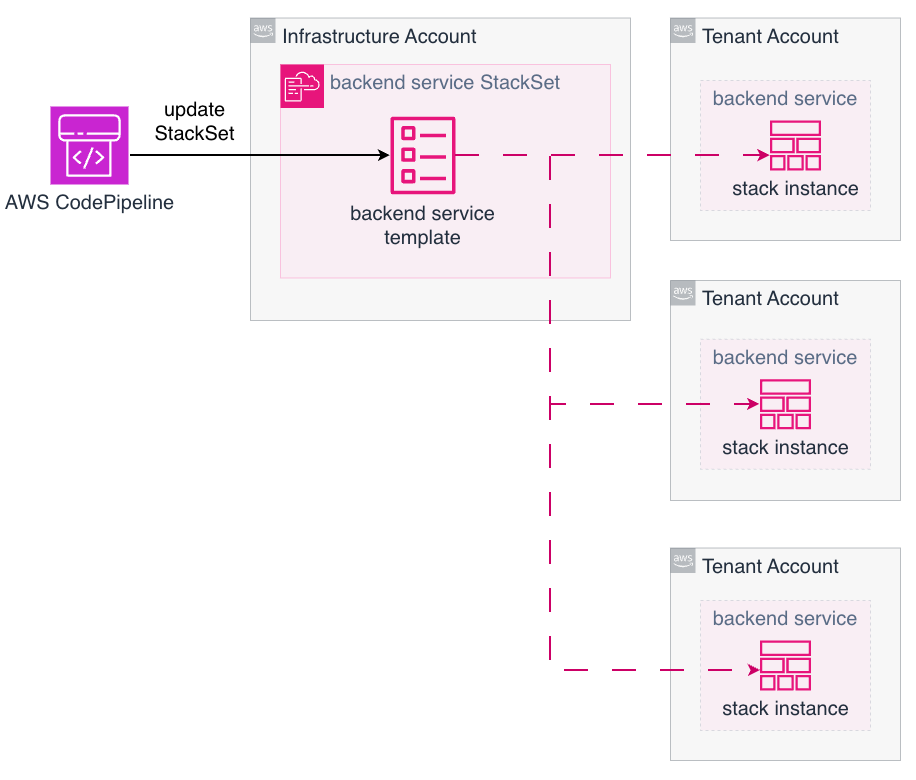
Deploying microservices into one AWS account is straightforward. Deploying the same service into thousands of accounts requires a different approach. Our application code is stored in a monorepo, which helps us to enforce the same version of libraries or Lambda layers among others. The following diagram illustrates how we update many tenant accounts using AWS CodePipeline combined with AWS CloudFormation StackSets to deploy the applications. Each pipeline execution updates many target accounts in parallel, with only a single StackSet update operation in a central account.

AWS CloudFormation StackSet architecture showing centralized deployment from Infrastructure Account to multiple Tenant Accounts via CodePipeline

While this provides the necessary scale, it also introduces new failure modes:

  • Partial rollouts – If one account fails to deploy, rollback or retry strategies need to be defined and tested.
  • Pipeline duration – Large-scale updates can take significant time to propagate.
  • Tooling maturity – StackSets are powerful but still evolving, and operational edge cases are possible.

In practice, this requires investing in platform engineering. A dedicated team builds and maintains internal tools that abstract deployment complexity away from service developers. Developers remain focused on business logic, and the platform team takes care of consistency and reliability across accounts.

Cost management

Cost modeling changes significantly with this architecture. In a shared account, many costs are pooled, making per-tenant attribution difficult. In a account-per-tenant model, costs are naturally segmented by account .On the positive side, tenant-specific cost reporting is trivial. SaaS providers can align billing directly with AWS usage and even get monthly reporting per tenant automatically through AWS billing.

Costs that scale per account needs to be carefully considered. At scale, even small charges per resource become meaningful. For example, collecting metrics from thousands of accounts requires careful planning and the chosen approach has great influence on costs. At this scale, it isn’t feasible to use standard observability tooling out of the box because the volume of collected data can make per‑account costs economically unsustainable. Instead, focus on understanding which metrics you need to monitor and select an observability approach that allows you to implement that. As a recommendation, evaluate cost multipliers early. Services that scale linearly with the number of accounts should be avoided where possible. Make sure to verify your assumptions with actual measurements.

Operational considerations

To succeed with this model, you need to be prepared to invest in platform capabilities:

  • Account management – Automate everything from creation to decommissioning.
  • Baseline guardrails – Enforce compliance and security controls using SCPs and a strict IAM management.
  • Developer training – Make sure teams understand the scope and boundaries of their services.
  • CI/CD investment – Pipelines need to scale to thousands of accounts without blocking innovation.
  • Observability discipline – Monitoring needs to be consistent, centralized, and cost-effective.

Conclusion

In this post, we described how ProGlove implemented a large-scale account-per-tenant model on AWS and how that model shifts complexity from service code to platform operations. This is a trade-off that requires more platform automation, scalable CI/CD pipelines, and disciplined observability practices. The benefits are strong tenant and workload isolation, transparent costs, and severely reduced blast radius. These benefits are key for platform providers operating at scale with a strictly limited operations team size. Managing thousands of AWS accounts with three people might sound impossible. But with the right architectural choices, every new workload adds only marginal operational load while the platform absorbs the exponential scale. The team size stays constant, and efficiency grows with every account added. If security, compliance, and clarity are top priorities, this approach can serve as a strong foundation for your platform. Working backwards from these requirements can help you achieve the same balance: scaling your tenant base drastically, without scaling your operations team at the same rate.

Read more on Best practices for a multi-account environment, Managing stacks across accounts and Regions with StackSets, and the SaaS Lens for the AWS Well-Architected Framework.


About the authors

Introducing AWS Lambda event source mapping tools in the AWS Serverless MCP Server

Post Syndicated from Ben Freiberg original https://aws.amazon.com/blogs/compute/introducing-aws-lambda-event-source-mapping-tools-in-the-aws-serverless-mcp-server/

Modern serverless applications increasingly rely on event-driven architectures, where AWS Lambda functions process events from various sources like Amazon Kinesis, Amazon DynamoDB Streams, Amazon Simple Queue Service (Amazon SQS), Amazon Managed Streaming for Apache Kafka (Amazon MSK), and self-managed Apache Kafka.

Although event source mappings (ESM) offer a powerful mechanism for integrating AWS Lambda with stream and queue-based sources, configuring them to align with high-level architectural goals can sometimes involve navigating a broad set of options and parameters. Achieving an optimal configuration typically requires mapping developer intent to several technical settings, which can introduce inefficiencies or operational overhead.

In May 2025, AWS launched the AWS Serverless MCP Server, which provided AI-powered assistance for serverless application development, including infrastructure provisioning, deployment automation, and architectural guidance. Building on this foundation, AWS is now expanding the Serverless MCP Server to include specialized ESM tools.

These new dedicated tools in the AWS Serverless Model Context Protocol (MCP) Server combine the power of AI assistance with ESM expertise to enhance how developers build and manage event-driven serverless applications using Lambda. The new ESM tools provide contextual guidance specific to ESM configuration that address the challenges of event-driven development.

This post describes how the new tools under Serverless MCP Server work with AI coding assistants to streamline event source mapping management. Learn how to use this solution to accelerate your event-driven development workflow and build robust, high-performing applications more efficiently.

Overview

An event source mapping is a Lambda resource that reads items from stream and queue-based services and invokes a function with batches of records. Within an event source mapping, resources called event pollers actively poll for new messages and invoke functions. Using ESMs, AWS Lambda functions can automatically consume events from various sources without requiring custom polling infrastructure. Lambda handles the complexity of scaling, batching, filtering, and error handling, helping developers focus on business logic.

Navigating ESM configurations

Configuring these mappings optimally, especially for virtual private cloud (VPC)-based sources like Apache Kafka, requires additional understanding of networking, permissions, and performance tuning.

When working with event source mappings, developers need to address several technical considerations. For Kafka Streams using VPC-based Amazon Managed Streaming for Apache Kafka or self-managed Apache Kafka, configurations involve networking setup to enable Lambda access to Kafka topics. Developers must manage bootstrap servers, AWS Identity and Access Management (IAM) permissions, and topic access settings, while also handling authentication including SASL/SCRAM credentials, mTLS certificate management, and Kafka ACL permissions.

Developers need to know how to translate performance requirements, such as processing 1,000 events per second, into specific ESM parameter configurations. Depending on the stream source, this involves determining appropriate batch sizes, parallelization factors, and retry policies while managing iterator age, offset lag and potential timeout issues. Additionally, developers need visibility into configuration effectiveness and other diagnostic information to optimize resource allocation and ensure reliable event processing.

Dedicated event source mapping tools

The new ESM tools in the open source AWS Serverless MCP Server address these challenges by providing AI assistants with proven knowledge of event source mapping patterns and best practices. These tools guide developers through the entire ESM lifecycle, from initial setup to optimization and troubleshooting. They also enhance the event-driven development experience by translating the developers intent into detailed, technical configuration, helping developers express high-level goals such as desired throughput, latency, or reliability requirements. The new tools cover all areas of event source mapping management:

  • Setup and configuration: Developers initialize new event source mapping configurations using AWS Serverless Application Model (AWS SAM) templates, select appropriate event source settings, and configure networking requirements for VPC-based sources like Amazon MSK.
  • Optimization and tuning: As applications evolve, the tools assists with fine-tuning ESM parameters like batch size, batching window, retry policies, and parallelization factors based on performance goals and telemetry data.
  • Troubleshooting and diagnostics: Specialized tools diagnose ESM connectivity issues, analyze Amazon CloudWatch Logs and metrics, and recommend solutions for common problems like VPC misconfigurations or permission errors.

Event source mapping tools in action

This example walks you through a scenario of creating, optimizing, and troubleshooting an event source mapping for Amazon MSK to demonstrate the capabilities of the new ESM tools.

Prerequisites and installation

To get started, download or update the AWS Serverless MCP Server from GitHub or Python Package Index (PyPi) and follow the installation instructions. You can use this MCP server with any AI coding assistant of your choice, such as Amazon Q Developer, Cursor, Cline, Kiro, and more.

Add the following code to your MCP client configuration:

{
  "mcpServers": {
    "awslabs.aws-serverless-mcp-server": {
      "command": "uvx",
      "args": [
        "awslabs.aws-serverless-mcp-server@latest"
      ],
      "env": { 
        "AWS_PROFILE": "your-aws-profile",
        "AWS_REGION": "us-east-1",
        "FASTMCP_LOG_LEVEL": "ERROR"
      }
    }
  }
}

The Serverless MCP Server incorporates built-in guardrails to ensure secure and controlled development. By default, the server operates in a read-only mode, allowing only non-mutating actions. With this safety-first approach, you can explore ESM capabilities and architectural patterns while preventing unintended changes to your applications or infrastructure.

Creating and configuring an event source mapping

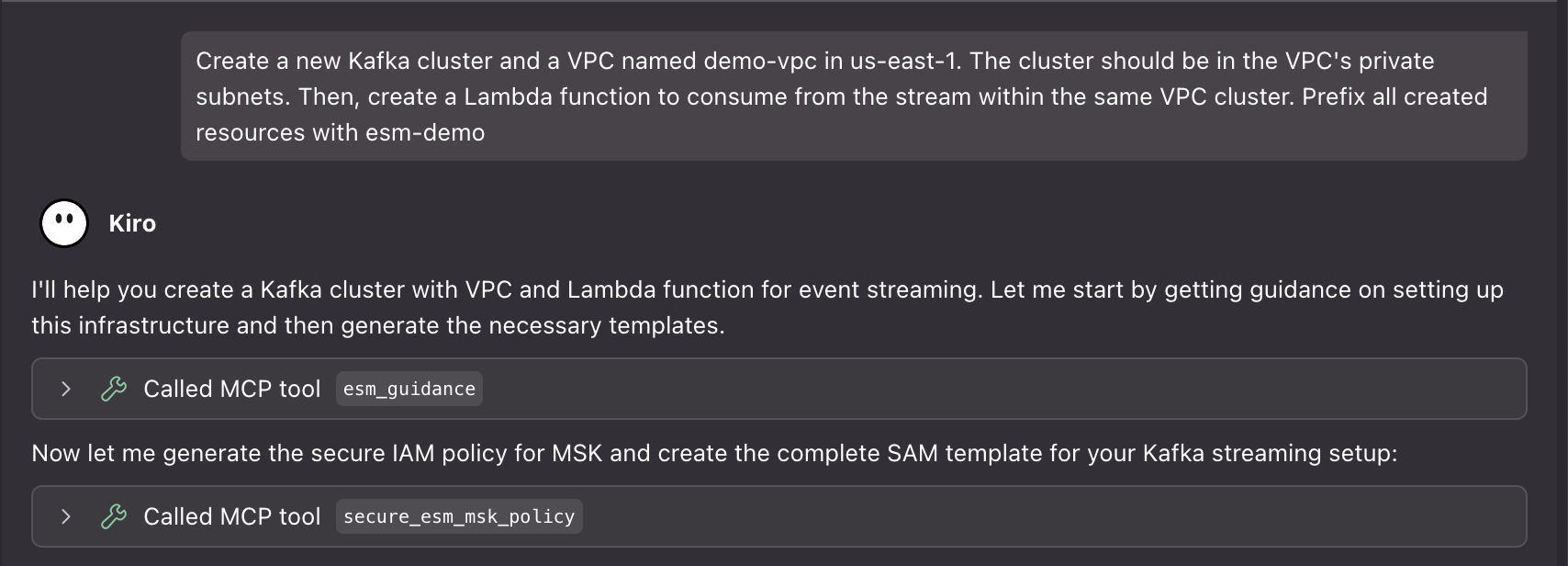
Imagine you want to set up a Lambda function to process events from an Amazon MSK cluster. Start by prompting your AI assistant:

Create a new Kafka cluster and a VPC named <your-vpc-name> in <your-aws-region>. The cluster should be in the VPC’s private subnets. Then, create a Lambda function to consume from the stream within the same VPC cluster. Prefix all created resources with <your-prefix>.

AI prompt to create a new Kafka cluster and ESM

The agent uses the esm_guidance to receive tailored guidance based on your use case and performance requirements. The tool analyzes your intent and provides step-by-step instructions for setting up the ESM with optimal configurations.

Apart from creating deployment and initialization scripts and supporting documentation, properly configured IAM polices and security groups rules to access the cluster are also generated. The assistant then validates the ESM parameters against AWS limits and best practices.

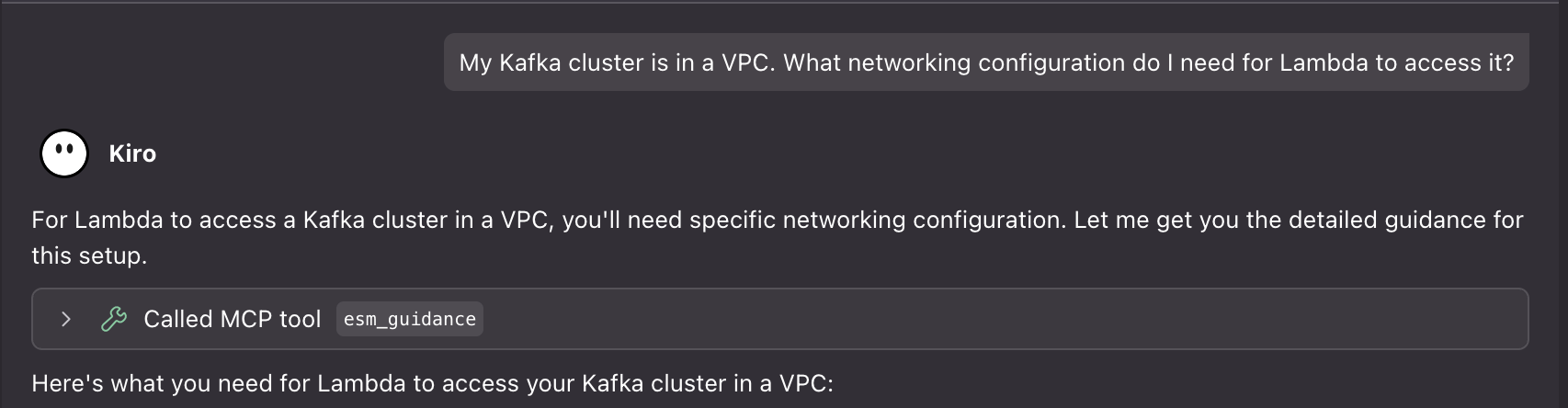
Next, you want to understand the networking requirements:

My Kafka cluster is in a VPC. What networking configuration do I need for Lambda to access it?

AI assistant prompt for setting up Kafka ESM networking connectivity

The Serverless MCP Server provides specialized guidance for VPC-based Kafka configurations using the esm_guidance tool with guidance_type=”networking”. This guidance provides detailed information about subnet requirements, security group rules, and NAT gateway setup, and it validates your network topology for reliable connectivity.

Optimizing event source mapping performance

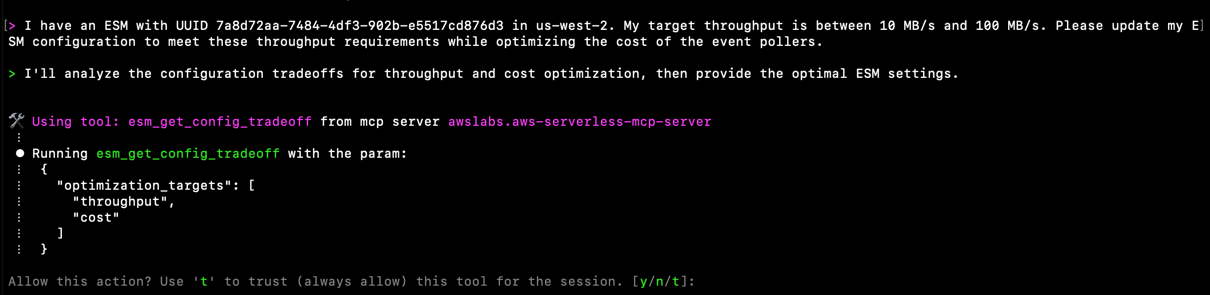
After your ESM is running, you notice that processing latency is higher than expected. You can ask for optimization guidance:

I have an ESM with UUID <your-esm-uuid> in <your-aws-region>. My target throughput is between 10 MB/s and 100 MB/s. Please update my ESM configuration to meet these throughput requirements while optimizing the cost of the event pollers.

AI prompt to optimize Kinesis ESM throughput
The server uses the esm_optimize tool to analyze your current configuration and provide optimization recommendations. The tool supports three main actions:

  • Analysis mode: (action="analyze") Analyzes configuration tradeoffs for your optimization targets (throughput, latency, cost, failure rate)
  • Validation mode: (action="validate") Validates your ESM configuration against AWS limits and event source restrictions
  • Template generation: (action="generate_template") Creates updated AWS SAM templates with optimized configurations

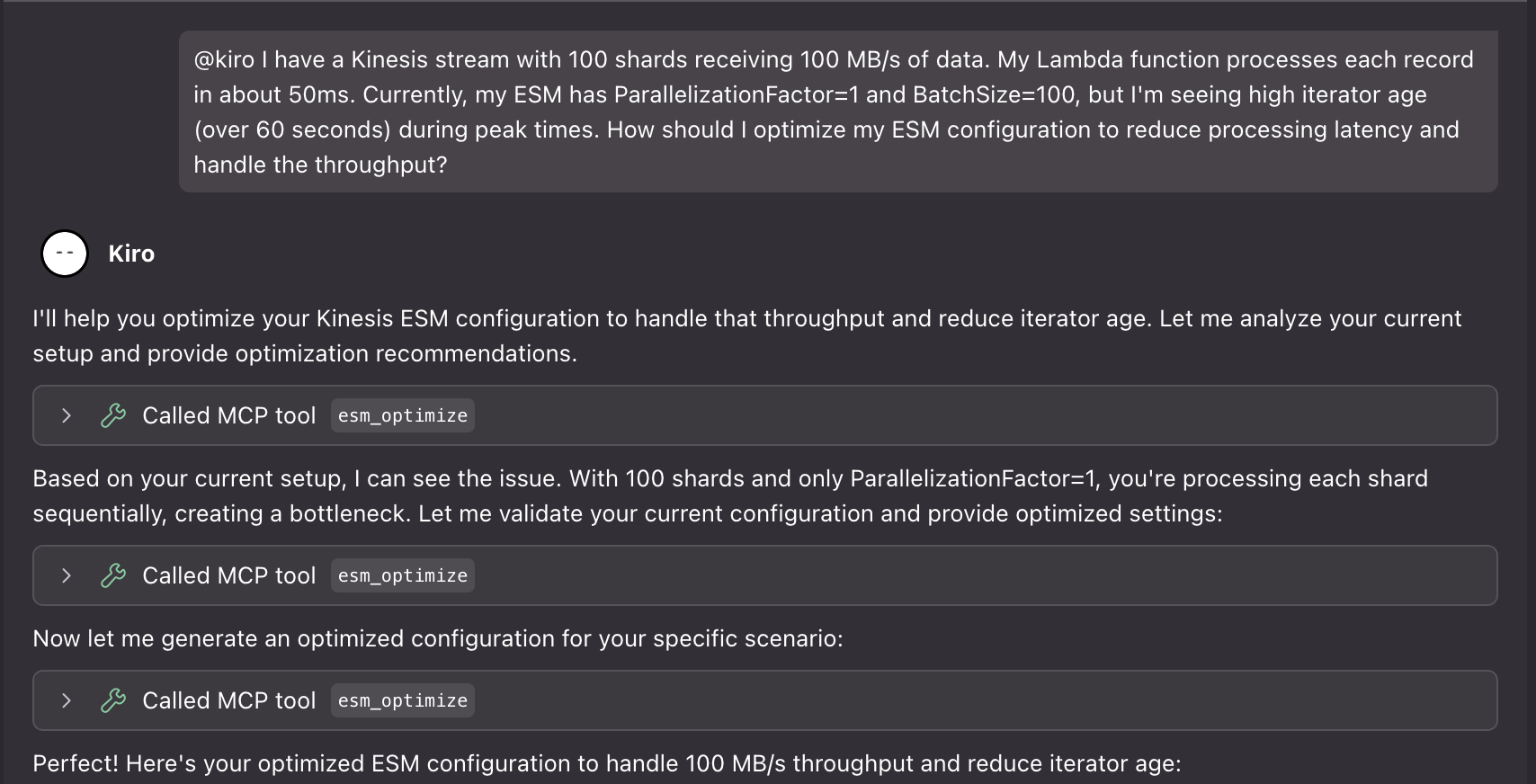
You can use this tool to get guidance on your event source mapping configurations for Amazon SQS, Amazon Kinesis Data Streams, and Amazon DynamoDB Streams. Here are two examples:

I have a Kinesis stream with 100 shards receiving 100 MB/s of data. My Lambda function processes each record in about 50ms. Currently, my ESM has ParallelizationFactor=1 and BatchSize=100, but I’m seeing high iterator age (over 60 seconds) during peak times. How should I optimize my ESM configuration to reduce processing latency and handle the throughput?

AI prompt to optimize Kinesis ESM throughput

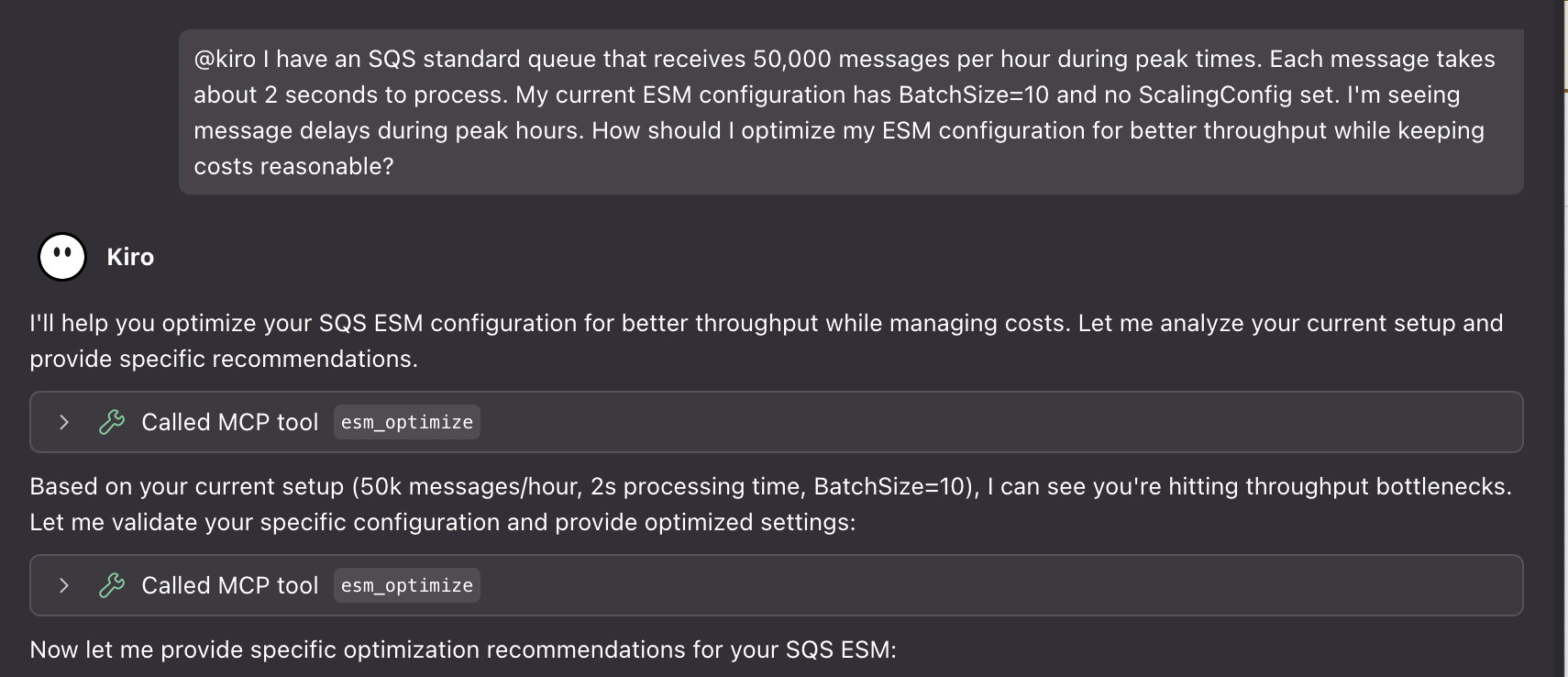
I have an SQS standard queue that receives 50,000 messages per hour during peak times. Each message takes about 2 seconds to process. My current ESM configuration has BatchSize=10 and no ScalingConfig set. I’m seeing message delays during peak hours. How should I optimize my ESM configuration for better throughput while keeping costs reasonable?

The tool generates updated AWS Serverless Application Model (AWS SAM) templates with the recommended configurations, making it easy to apply the changes through your deployment pipeline. However, it always requires explicit user confirmation before any deployment.

Troubleshooting event source mapping issues

When an issue arises, the ESM tools provide diagnostic capabilities. For example, if your ESM stops processing events:

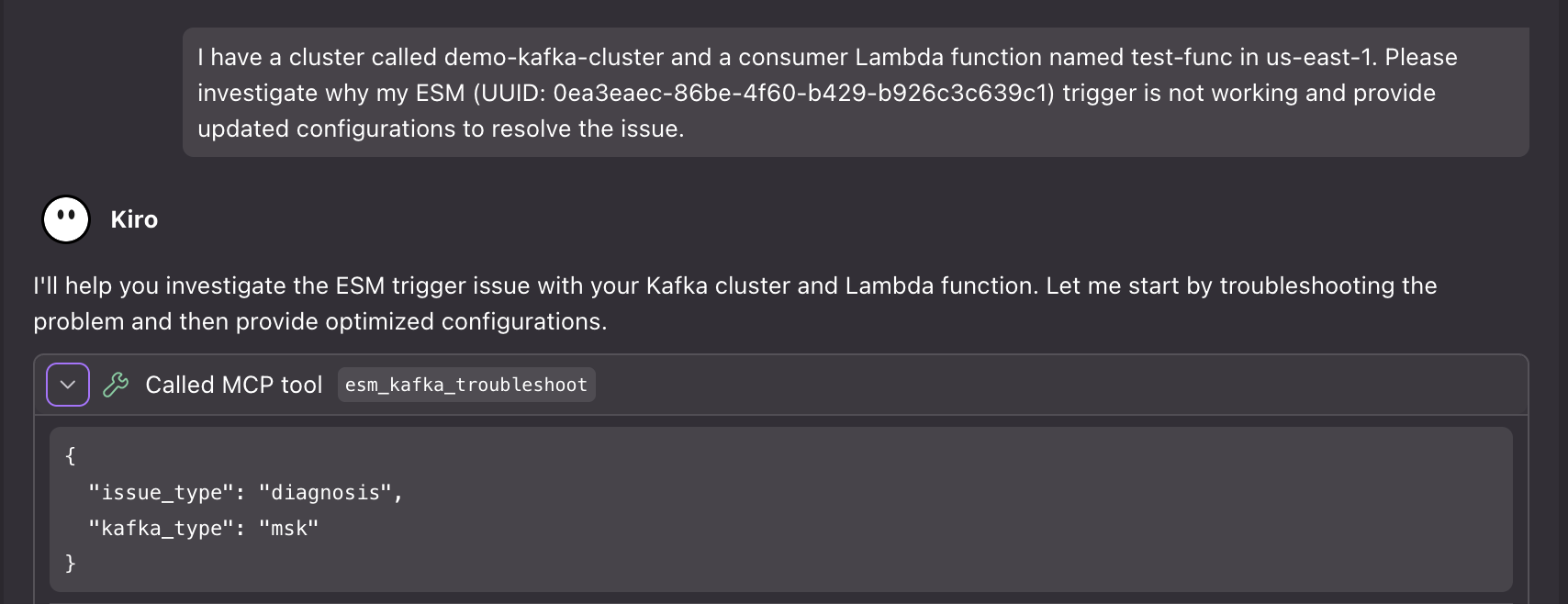
I have a cluster called <your-kafka-cluster-name> and a consumer Lambda function named <your-lambda-function-name>in <your-aws-region>. Please investigate why my ESM (UUID: <your-esm-uuid>) trigger is not working and provide updated configurations to resolve the issue.

AI assistant prompt for investigation an issue with Kafka ESM

The server uses the esm_kafka_troubleshoot tool to provide comprehensive troubleshooting for Apache Kafka clusters. The tool supports two main modes:

  • Diagnostic mode: (issue_type="diagnosis") Analyzes your ESM status and provides diagnostic indicators. This helps identify whether timeouts occur before or after reaching Kafka brokers. It categorizes issues into specific types for targeted resolution.
  • Resolution mode: Provides step-by-step resolution guidance for specific issues.

AI prompt to start debugging an issue with a Kafka ESM

The tool automatically detects your event source type and provides tailored guidance. It validates VPC connectivity, examines IAM permissions, checks security group configurations, and analyzes CloudWatch Logs to provide a detailed diagnosis report with specific remediation steps.

Key benefits

The event source mapping tools in the AWS Serverless MCP Server provide unique advantages over traditional event source mapping configuration approaches:

  • AI-powered configuration translation: The tools translate high-level developer intent (such as process 1,000 events per second) into specific ESM parameters like batch size, parallelization factor, and batching window.
  • Complete infrastructure-as-code generation: Unlike generic AWS CLI tools that provide individual commands, ESM tools generate complete AWS SAM templates, initialization scripts, cleanup scripts, and validation scripts for end-to-end automation.
  • Proactive network validation: For VPC-based event sources like Amazon MSK or self-managed Kafka, the tools validate network topology, security group rules, and connectivity before deployment, preventing common silent failures.
  • Context-aware troubleshooting: The diagnostic tools correlate ESM status, CloudWatch metrics, VPC configuration, and IAM permissions to provide comprehensive root cause analysis with specific remediation steps.

New tools available in the Serverless MCP Server

The event source mapping tools are designed to minimize trust permission prompts by using a small set of primary tools that internally call specialized functions. The tools can be classified into three main categories:

  • esm_guidance: This tool provides comprehensive guidance on creating and configuring event source mappings for all event sources (DynamoDB, Kinesis, Kafka, SQS). It handles setup, networking guidance, and troubleshooting based on the guidance_type parameter. The tool automatically generates AWS SAM templates, IAM policies, and security group configurations.
  • esm_optimize: This advanced optimization tool analyzes configuration tradeoffs, validates ESM settings, and generates AWS SAM templates for performance tuning. It supports three actions:
    • analyze: Provides configuration tradeoff analysis for failure rate, latency, throughput, and cost optimization
    • validate: Validates ESM configurations against AWS limits and event source restrictions
    • generate_template: Creates AWS SAM templates with optimized configurations
  • esm_kafka_troubleshoot: This specialized troubleshooting tool for Kafka ESM issues supports both Amazon MSK and self-managed Apache Kafka clusters. It also provides diagnostic capabilities and step-by-step resolution guidance for connectivity, authentication, and network issues.

The primary tools internally call specialized helper functions to provide comprehensive functionality that help generate IAM polices, security groups, scaling and concurrency configurations, and validate configurations.

Visit the Serverless MCP Server documentation for the full list of tools and resources.

Best practices and considerations

When building event-driven applications with the AWS Serverless MCP Server, start by using its guidance tools for architectural decisions. The server helps you choose appropriate event sources, understand networking requirements, and configure optimal settings based on your performance goals.For Kafka-based ESMs, pay special attention to VPC configuration. Use the server’s network troubleshooting tools to validate connectivity before deployment. The server can detect common issues like missing NAT gateways, incorrect security group rules, or subnet routing problems.Monitor your event source mappings continuously using the server’s diagnostic tools. Set up alerts for key metrics like iterator age, error rates, and throttling. The server can help you interpret these metrics and recommend configuration adjustments to maintain optimal performance.

Conclusion

The new event source mapping tools in the open-source AWS Serverless MCP Server simplify event source mapping management throughout the development lifecycle, from initial setup to ongoing optimization and troubleshooting. By combining AI assistance with ESM expertise, it helps developers build and deploy event-driven applications more efficiently while avoiding common configuration pitfalls.

As organizations continue to adopt event-driven serverless computing, tools that simplify ESM management and accelerate delivery become increasingly valuable.

To get started, visit the GitHub repository and explore the documentation. Share your experiences and suggestions through the GitHub repository to improve the MCP server’s capabilities and help shape the future of AI-assisted event-driven development.

For more serverless learning resources, visit Serverless Land.