All posts by Daniel Begimher

Accelerate investigations with AWS Security Incident Response AI-powered capabilities

Post Syndicated from Daniel Begimher original https://aws.amazon.com/blogs/security/accelerate-investigations-with-aws-security-incident-response-ai-powered-capabilities/

If you’ve ever spent hours manually digging through AWS CloudTrail logs, checking AWS Identity and Access Management (IAM) permissions, and piecing together the timeline of a security event, you understand the time investment required for incident investigation. Today, we’re excited to announce the addition of AI-powered investigation capabilities to AWS Security Incident Response that automate this evidence gathering and analysis work.

AWS Security Incident Response helps you prepare for, respond to, and recover from security events faster and more effectively. The service combines automated security finding monitoring and triage, containment, and now AI-powered investigation capabilities with 24/7 direct access to the AWS Customer Incident Response Team (CIRT).

While investigating a suspicious API call or unusual network activity, scoping and validation require querying multiple data sources, correlating timestamps, identifying related events, and building a complete picture of what happened. Security operations center (SOC) analysts devote a significant amount of time to each investigation, with roughly half of that effort spent manually gathering and piecing together evidence from various tools and complex logs. This manual effort can delay your analysis and response.

AWS is introducing an investigative agent to Security Incident Response, changing this paradigm and adding layers of efficiency. The investigative agent helps you reduce the time required to validate and respond to potential security events. When a case for a security concern is created, either by you or proactively by Security Incident Response, the investigative agent asks clarifying questions to make sure it understands the full context of the potential security event. It then automatically gathers evidence from CloudTrail events, IAM configurations, and Amazon Elastic Compute Cloud (Amazon EC2) instance details and even analyzes cost usage patterns. Within minutes, it correlates the evidence, identifies patterns, and presents you with a clear summary.

How it works in practice

Before diving into an example, let’s paint a clear picture of where the investigative agent lives, how it’s accessed, and its purpose and function. The investigative agent is built directly into Security Incident Response and is automatically available when you create a case. Its purpose is to act as your first responder—gathering evidence, correlating data across AWS services, and building a comprehensive timeline of events so you can quickly move from detection to recovery.

For example: you discover that AWS credentials for an IAM user in your account were exposed in a public GitHub repository. You need to understand what actions were taken with those credentials and properly scope the potential security event, including lateral movement and reconnaissance operations. You need to identify persistence mechanisms that might have been created and determine the appropriate containment steps. To get started, you create a case in the Security Incident Response console and describe the situation.

Here’s where the agent’s approach differs from traditional automation: it asks clarifying questions first. When were the credentials first exposed? What’s the IAM user name? Have you already rotated the credentials? Which AWS account is affected?

This interactive step gathers the appropriate details and metadata before it starts gathering evidence. Specifically, you’re not stuck with generic results—the investigation is tailored to your specific concern.

After the agent has what it needs, it investigates. It looks up CloudTrail events to see what API calls were made using the compromised credentials, pulls IAM user and role details to check what permissions were granted, identifies new IAM users or roles that were created, checks EC2 instance information if compute resources were launched, and analyzes cost and usage patterns for unusual resource consumption. Instead of you querying each AWS service, the agent orchestrates this automatically.

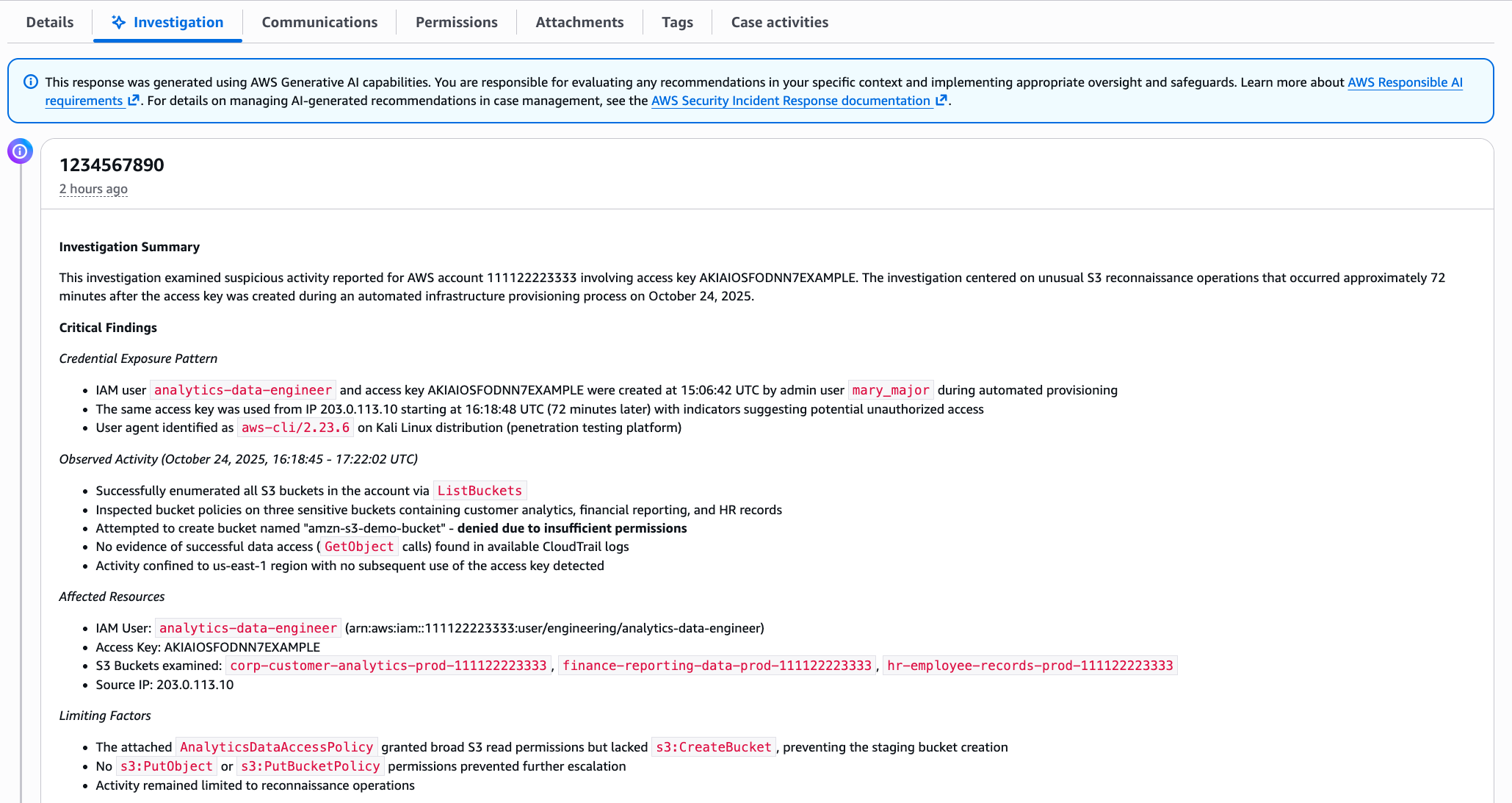
Within minutes, you get a summary, as shown in the following figure. The investigation summary includes a high-level summary and critical findings, which include the credential exposure pattern, observed activity and the timeframe, affected resources, and limiting factors.

This response was generated using AWS Generative AI capabilities. You are responsible for evaluating any recommendations in your specific context and implementing appropriate oversight and safeguards. Learn more about AWS Responsible AI requirements.

Note: The preceding example is representative output. Exact formatting will vary depending on findings.

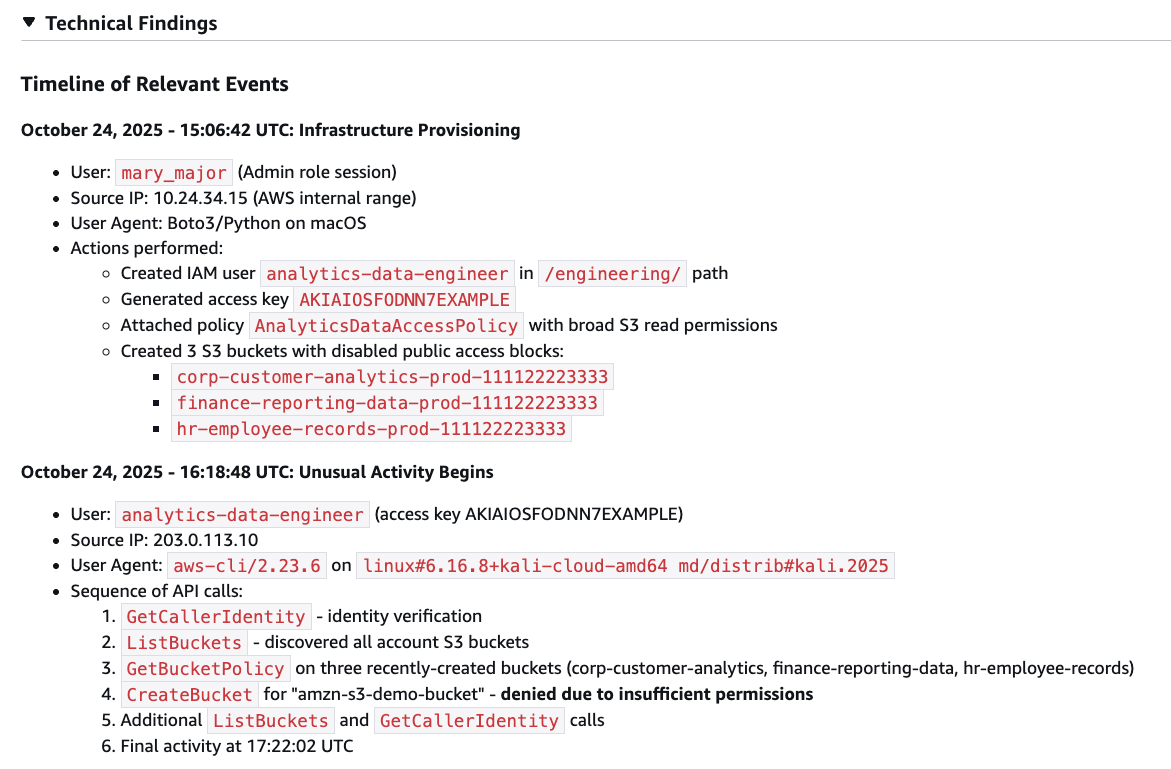
The investigation summary includes various tabs for detailed information, such as technical findings with an events timeline, as shown in the following figure:

Figure 2 – Security event timeline

Figure 2 – Security event timeline

When seconds count, this transparency is paramount to a quick, high-fidelity, and accurate response—especially if you need to escalate to the AWS CIRT, a dedicated group of AWS security experts, or explain your findings to leadership, creating a single lens for stakeholders to view the incident.

When the investigation is complete, you have a high-resolution picture of what happened and can make informed decisions about containment, eradication, and recovery. For the preceding exposed credentials scenario, you might need to:

  • Delete the compromised access keys
  • Remove the newly created IAM role
  • Terminate the unauthorized EC2 instances
  • Review and revert associated IAM policy changes
  • Check for additional access keys created for other users.

When you engage with the CIRT, they can provide additional guidance on containment strategies based on the evidence the agent gathered.

What this means for your security operations

The leaked credentials scenario shows what the agent can do for a single incident. But the bigger impact is on how you operate day-to-day:

  • You spend less time on evidence collection. The investigative agent automates the most time-consuming part of investigations—gathering and correlating evidence from multiple sources. Instead of spending an hour on manual log analysis, you can spend most of that time on making containment decisions and preventing recurrence.
  • You can investigate in plain language. The investigative agent uses natural language processing (NLP), which you can use to describe what you’re investigating in plain language, such as unusual API calls from IP address X or data access from terminated employee’s credentials, and the agent translates that into the technical queries needed. You don’t need to be an expert in AWS log formats or know the exact syntax for querying CloudTrail.
  • You get a foundation for high-fidelity and accurate investigations. The investigative agent handles the initial investigation—gathering evidence, identifying patterns, and providing a comprehensive summary. If your case requires deeper analysis or you need guidance on complex scenarios, you can engage with the AWS CIRT, who can immediately build on the work the agent has already done, speeding up their response time. They see the same evidence and timeline, so they can focus on advanced threat analysis and containment strategies rather than starting from scratch.

Getting started

If you already have Security Incident Response enabled, the AI-powered investigation capabilities are available now—no additional configuration needed. Create your next security case and the agent will start working automatically.

If you’re new to Security Incident Response, here’s how to set it up:

  1. Enable Security Incident Response through your AWS Organizations management account. This takes a few minutes through the AWS Management Console and provides coverage across your accounts.
  2. Create a case. Describe what you’re investigating; you can do this through the Security Incident Response console or an API, or set up automatic case creation from Amazon GuardDuty or AWS Security Hub alerts.
  3. Review the analysis. The agent presents its findings through the Security Incident Response console, or you can access them through your existing ticketing systems such as Jira or ServiceNow.

The investigative agent uses the AWS Support service-linked role to gather information from your AWS resources. This role is automatically created when you set up your AWS account and provides the necessary access for Support tools to query CloudTrail events, IAM configurations, EC2 details, and cost data. Actions taken by the agent are logged in CloudTrail for full auditability.

The investigative agent is included at no additional cost with Security Incident Response, which now offers metered pricing with a free tier covering your first 10,000 findings ingested per month. Beyond that, findings are billed at rates that decrease with volume. With this consumption-based approach, you can scale your security incident response capabilities as your needs grow.

How it fits with existing tools

Security Incident Response cases can be created by customers or proactively by the service. The investigative agent is automatically triggered when a new case is created, and cases can be managed through the console, API, or Amazon EventBridge integrations.

You can use EventBridge to build automated workflows that route security events from GuardDuty, Security Hub, and Security Incident Response itself to create cases and initiate response plans, enabling end-to-end detection-to-investigation pipelines. Before the investigative agent begins its work, the service’s auto-triage system monitors and filters security findings from GuardDuty and third-party security tools through Security Hub. It uses customer-specific information, such as known IP addresses and IAM entities, to filter findings based on expected behavior, reducing alert volume while escalating alerts that require immediate attention. This means the investigative agent focuses on alerts that actually need investigation.

Conclusion

In this post, I showed you how the new investigative agent in AWS Security Incident Response automates evidence gathering and analysis, reducing the time required to investigate security events from hours to minutes. The agent asks clarifying questions to understand your specific concern, automatically queries multiple AWS data sources, correlates evidence, and presents you with a comprehensive timeline and summary while maintaining full transparency and auditability.

With the addition of the investigative agent, Security Incident Response customers now get the speed and efficiency of AI-powered automation, backed by the expertise and oversight of AWS security experts when needed.

The AI-powered investigation capabilities are available today in all commercial AWS Regions where Security Incident Response operates. To learn more about pricing and features, or to get started, visit the AWS Security Incident Response product page.

If you have feedback about this post, submit comments in the Comments section below.
Daniel Begimher

Daniel Begimher

Daniel is a Senior Security Engineer in Global Services Security, specializing in cloud security, application security, and incident response. He co-leads the Application Security focus area within the AWS Security and Compliance Technical Field Community, holds all AWS certifications, and authored Automated Security Helper (ASH), an open source code scanning tool.

Implementing Defense-in-Depth Security for AWS CodeBuild Pipelines

Post Syndicated from Daniel Begimher original https://aws.amazon.com/blogs/security/implementing-defense-security-for-aws-codebuild-pipelines/

Recent security research has highlighted the importance of CI/CD pipeline configurations, as documented in AWS Security Bulletin AWS-2025-016. This post pulls together existing guidance and recommendations into one guide.

Continuous integration and continuous deployment (CI/CD) practices help development teams deliver software efficiently and reliably. AWS CodeBuild provides managed build services that integrate with source code repositories like GitHub, GitLab, and other Source Control Management (SCM) systems. While this guide uses GitHub examples, the security principles and webhook configuration approaches apply to other supported source control systems.

However, certain configurations require careful attention. We strongly recommend that you do not use automatic pull request builds from untrusted repository contributors without proper security controls and a clear understanding of your threat model. This configuration allows untrusted code to execute in your build environment with access to repository credentials and environment variables. Webhook configurations determine which repository events trigger builds and what code gets executed during the build process. Understanding these configurations is essential for maintaining appropriate security boundaries while preserving the automation benefits that make CI/CD valuable.

Security teams and DevOps engineers can use these practical approaches to configure AWS CodeBuild to meet their security goals while maintaining development velocity. We’ll explore webhook configurations, trust boundaries, and implementation strategies that emphasize threat model assessment, least-privilege access, and proactive monitoring of your pipeline configurations.

Security of the pipeline implications

Under the shared responsibility model, while AWS manages the security of the underlying AWS CodeBuild infrastructure, customers are responsible for securing their pipeline configurations, access controls, and the code that runs within their build environments. This shared responsibility is critical when considering the security of the pipeline itself.

When AWS CodeBuild processes pull requests automatically, it builds the code in an environment with access to repository credentials, environment variables, and potentially sensitive information. This creates specific security of the pipeline considerations:

  • Repository access: AWS CodeBuild projects require repository credentials to read source code and create webhooks. These credentials provide specific permissions that vary based on your configuration.
  • Build execution: The build process runs the retrieved source code, which may include build scripts, dependency definitions, or test files from pull requests.
  • Build environment: AWS CodeBuild environments may have access to environment variables, AWS credentials, or other configuration data needed for the build process.

Establishing trust boundaries

Effective security of the pipeline starts with clearly defining trust boundaries for different types of code contributions:

  • Internal contributors: Team members with repository write access who have been verified through your organization’s access management processes.
  • External contributors: Contributors from outside your organization who submit pull requests from forked repositories.
  • Automated processing: Code that runs without manual review as part of the build process.

These trust boundaries form the foundation for threat modeling your specific environment. Internal and trusted environments can often rely more heavily on automation with contributor filtering and least-privilege controls. Public and open source projects require more stringent controls due to the inherent risks of processing untrusted contributions – these environments benefit from stricter webhook filtering, comprehensive approval gates, or the self-hosted GitHub Actions runner approach discussed later.

The key principle is finding the appropriate balance between security controls and development velocity based on your specific risk profile and contributor trust levels. With these considerations in mind, let’s examine how to assess and configure your current AWS CodeBuild webhook settings.

Configuring secure webhooks

Webhooks represent the preferred mechanism by which external events trigger AWS CodeBuild processes. When properly configured, webhooks provide a powerful and efficient way to automate your build processes in response to repository changes. However, improper webhook configuration can create security vulnerabilities by allowing untrusted code to execute in privileged environments.The security of your webhook configuration depends on understanding exactly which events trigger builds, what level of access those builds have, and what code gets executed during the build process. This section provides a comprehensive approach to authoring, assessing, configuring, and maintaining secure webhook configurations.

Assessing current webhook configurations

Begin by reviewing your existing AWS CodeBuild projects to understand their current webhook configurations. The following AWS CLI commands provide a systematic approach to gathering this information:

# List all CodeBuild projects in your region
aws codebuild list-projects --region us-west-2

# Retrieve detailed configuration for analysis
aws codebuild batch-get-projects --region us-west-2 \
  --names $(aws codebuild list-projects --region us-west-2 \
  --query 'projects[*]' --output text | tr '\n' ' ')

When you run these commands, pay particular attention to the webhook section in the output. This section contains the filterGroups configuration, which determines exactly which repository events trigger builds.

Now that you understand how to review your current setup, let’s examine common configuration patterns and their security implications.

Webhook configuration patterns

Understanding common webhook configuration patterns helps you quickly identify potential security concerns and implement appropriate improvements. The following patterns represent different approaches to webhook configuration, each with specific security implications.

Note: These patterns are not recommended for use and are shown here to help you identify configurations that may need attention.

Configuration requiring review – Automatic pull request processing


{
  "webhook": {
    "payloadUrl": "https://codebuild.us-west-2.amazonaws.com/webhooks",
    "filterGroups": [
      [
        {
          "type": "EVENT",
          "pattern": "PULL_REQUEST_CREATED,PULL_REQUEST_UPDATED,PULL_REQUEST_REOPENED",
          "excludeMatchedPattern": false
        }
      ]
    ]
  }
}

This configuration allows contributors who can create a pull request to trigger code execution in your build environment. We strongly recommend that you do not use automatic pull request builds from untrusted repository contributors.

Configuration requiring immediate review – No event filtering


{
  "webhook": {
    "payloadUrl": "https://codebuild.us-west-2.amazonaws.com/webhooks",
    "filterGroups": []
  }
}

Without filtering, this configuration can trigger builds for a wide variety of repository events.

Recommended secure webhook configurations

The following configurations represent security best practices that balance automation benefits with appropriate security controls. These patterns help to reduce security risks while maintaining the development velocity that makes CI/CD valuable.

Push-based builds (Recommended for most use cases)

Push-based builds make sure that only users with repository write access can trigger builds, which means contributors have already been vetted through your repository’s access control mechanisms.


{
  "webhook": {
    "payloadUrl": "https://codebuild.us-west-2.amazonaws.com/webhooks",
    "filterGroups": [
      [
        {
          "type": "EVENT",
          "pattern": "PUSH",
          "excludeMatchedPattern": false
        }
      ]
    ]
  }
}

Organizations that rely heavily on external open-source contributions may find this approach too restrictive. For example, a popular open-source project that receives dozens of pull requests daily from external contributors would need to manually merge each contribution before builds can run, significantly slowing down the contribution review process. In such cases, contributor-filtered builds or the self-hosted GitHub Actions runner approach may be more appropriate.

Contributor-filtered builds (Recommended for trusted contributors only)


{
  "webhook": {
    "payloadUrl": "https://codebuild.us-west-2.amazonaws.com/webhooks",
    "filterGroups": [
      [
        {
          "type": "EVENT",
          "pattern": "PULL_REQUEST_CREATED,PULL_REQUEST_UPDATED",
          "excludeMatchedPattern": false
        },
        {
          "type": "GITHUB_ACTOR_ACCOUNT_ID",
          "pattern": "^(12345678|87654321|11223344)$",
          "excludeMatchedPattern": false
        }
      ]
    ]
  }
}

This configuration allows pull request builds from specific, trusted contributors.

Important: Filtering applies to the GitHub account ID, not repository ownership. Contributors working from forked repositories can still introduce untrusted code that executes in your build environment.

Before implementing these configurations in your environment, consider these key factors that will help facilitate a smooth transition.

Webhook configuration implementation steps

While implementing the webhook security measures below, consider these broader practices:

  • Threat modeling: Assess your specific risk profile before selecting approaches.
  • Infrastructure as code: Use Infrastructure as Code (IaC) tools for production implementations.
  • Gradual implementation: Implement changes incrementally with observation periods.
  • Testing and rollback: Validate changes in non-production environments first.

The following implementation approach moves from most restrictive to more automated configurations. Choose the approach that best fits your organization’s risk tolerance and operational requirements.
This three-step process moves from the most restrictive approach to more automated configurations while maintaining security controls. Each step builds upon the previous one, creating layers of security that work together to protect your pipeline.

Note: The following examples use the AWS CLI for demonstration purposes. Similar configuration steps can be performed using the AWS Management Console through the AWS CodeBuild project settings.

Step 1: Configure push-only builds

Push-based builds help make sure that only verified contributors can trigger builds. This approach is more secure, because contributors must already be vetted through your repository’s access control mechanisms before they can push code.
Configure your webhook to trigger only on push events:

aws codebuild update-webhook \
  --project-name your-project-name \
  --filter-groups '[
    [
      {
        "type": "EVENT",
        "pattern": "PUSH",
        "excludeMatchedPattern": false
      }
    ]
  ]'

Step 2: Implement branch-based filtering

Branch-based filtering adds an additional layer of security by making sure that builds are triggered only for changes to specific branches. This approach recognizes that not all branches in a repository have the same security requirements or risk profiles.

For example, changes to main or production branches typically require more stringent security controls than changes to feature or development branches. By implementing branch-based filtering, you can apply appropriate security measures based on the criticality and exposure of different branches.

Configure filtering for specific branches:

aws codebuild update-webhook \
  --project-name your-project-name \
  --filter-groups '[
    [
      {
        "type": "EVENT",
        "pattern": "PUSH"
      },
      {
        "type": "HEAD_REF",
        "pattern": "^refs/heads/(main|develop|release/.*)$"
      }
    ]
  ]'

Step 3: Configure contributor filtering

Contributor filtering can be used to manage pull request builds by allowing automation for trusted contributors while requiring manual review for others. This approach recognizes that different contributors represent different risk profiles and should be treated accordingly.

The first step in implementing contributor filtering is identifying the GitHub user IDs of your trusted contributors.

Retrieve GitHub user IDs for trusted contributors:

curl -H "Authorization: token YOUR_GITHUB_TOKEN" \
https://api.github.com/users/trusted-username

Once you have the user IDs of your trusted contributors, you can configure webhook filtering to allow automated builds only for these contributors:


aws codebuild update-webhook \
  --project-name your-project-name \
  --filter-groups '[
    [
      {
        "type": "EVENT",
        "pattern": "PULL_REQUEST_CREATED,PULL_REQUEST_UPDATED"
      },
      {
        "type": "GITHUB_ACTOR_ACCOUNT_ID",
        "pattern": "^(1234567|2345678|3456789)$"
      }
    ]
  ]'

Important: Contributor allowlists require ongoing maintenance as team membership changes. Consider using Infrastructure as Code templates like the Cloudformation examples to manage webhook configurations and contributor lists in version control.

Webhook filtering provides the first layer of security by controlling which events trigger builds. However, comprehensive pipeline security requires additional controls around the permissions and credentials available to those builds once they execute. The following section covers how to implement defense-in-depth security through proper access controls and credential management.

Access control and credential management

This section covers specific approaches to limit the permissions available to build processes, scope repository access tokens appropriately, and create isolated environments that help contain potential security issues. These practices work together to implement defense-in-depth security while maintaining the operational benefits of automated CI/CD workflows.

Implementing least-privilege access

AWS CodeBuild projects require IAM service roles to access AWS resources during the build process. The principle of least privilege dictates that each role should have only the minimum permissions necessary to perform its intended function. By creating separate, purpose-built IAM roles for different types of builds, you can help reduce the potential impact of unauthorized access to build environments.

The following examples demonstrate how to structure minimal IAM roles for different build scenarios. These examples serve as starting points that you should customize based on your specific requirements, adding only the permissions your builds actually need.

Service role configuration

Create minimal IAM roles that provide only the permissions required for specific build types:

Test/validation build role
{
	"Version": "2012-10-17",
	"Statement": [
	{
		"Effect": "Allow",
		"Action": [
			"logs:CreateLogGroup",
			"logs:CreateLogStream",
			"logs:PutLogEvents"
		],
		"Resource": "arn:aws:logs:*:*:log-group:/aws/codebuild/test-*"
	},
	{
	"Effect": "Allow",
	"Action": [
		"s3:GetObject"
	],
	"Resource": "arn:aws:s3:::your-test-artifacts-bucket/*"
  }
 ]
}
Release build role (Separate from test)
{
	"Version": "2012-10-17",
	"Statement": [
	  {
		"Effect": "Allow",
		"Action": [
			"s3:PutObject",
			"s3:GetObject"
		],
		"Resource": "arn:aws:s3:::your-production-artifacts-bucket/*"
	  },
	  {
		"Effect": "Allow",
		"Action": [
			"ecr:BatchCheckLayerAvailability",
			"ecr:GetDownloadUrlForLayer",
			"ecr:BatchGetImage",
			"ecr:PutImage"
		],
		"Resource": "arn:aws:ecr:*:*:repository/your-production-repo"
	  }
	]
}

Leveraging IAM Access Analyzer for CodeBuild security

AWS IAM Access Analyzer can generate least-privilege policies for your AWS CodeBuild service roles based on actual CloudTrail activity from your build executions. This eliminates guesswork by analyzing the specific AWS API calls your builds make, rather than requiring you to predict what permissions might be needed.

After running your CodeBuild projects for a representative period, use Access Analyzer’s policy generation feature to create refined policies. This approach proves particularly valuable for complex build processes where the required permissions might not be immediately obvious.

For detailed implementation steps, refer to the IAM Access Analyzer documentation.

Credential scoping and source authentication

When processing external contributions, the principle of least privilege becomes important for repository access tokens. If an unauthorized user gains access to a token through an untrusted build, properly scoped tokens limit the potential impact to only the permissions necessary for the build process.

Configure fine-grained GitHub Personal Access Tokens with minimal permissions to help reduce this risk. Even if accessed inappropriately, a properly scoped token can only read source code (already accessible through the PR) and write status messages – it cannot push code, modify repository settings, or access other repositories.

The following permissions represent the minimum required access for processing external pull requests, demonstrating how to limit token scope to only essential operations:

  • contents:read – Read-only access to repository source code (already accessible through the PR)
  • statuses:write – Write commit status messages only (cannot modify code or settings)
  • metadata:read – Access basic repository information (name, description, public status)

Important: Use fine-grained personal access tokens restricted to the target repository only. Otherwise, this could allow access to other repositories beyond what is necessary for the build process.

This scoped approach ensures that even if a token is accessed inappropriately, the potential impact is limited to reading already-accessible information and writing status messages. The token cannot push code, modify repository settings, create webhooks, or access other repositories.

Credential storage and rotation

The following examples demonstrate how to securely store and reference these tokens using AWS Secrets Manager. AWS Secrets Manager provides automatic rotation capabilities, encryption at rest and in transit, and fine-grained access controls that help prevent tokens from being exposed in build logs or configuration files. This approach also enables centralized token management across multiple CodeBuild projects while maintaining audit trails of token access.

# Store the fine-grained token in AWS Secrets Manager
aws secretsmanager create-secret \
--name "codebuild/github-pat-limited" \
--description "Limited GitHub PAT for external PR processing" \
--secret-string '{"token":"ghp_your_limited_token_here"}'

# Create CodeBuild project with scoped credentials
aws codebuild create-project \
--name external-pr-processor \
--source '{
"type": "GITHUB",
"location": "https://github.com/your-org/your-repo.git",
"sourceCredentialsOverride": {
"serverType": "GITHUB",
"authType": "PERSONAL_ACCESS_TOKEN",
"token": "{{resolve:secretsmanager:codebuild/github-pat-limited:SecretString:token}}"
},
"reportBuildStatus": false
}' \
--service-role arn:aws:iam::account:role/minimal-test-build-role

The centralized storage enables credential rotation capabilities, helping to minimize the window of exposure compared to hardcoded tokens that would require infrastructure updates to rotate.

Build environment isolation

Establishing proper build environment security controls helps maintain pipeline integrity. The foundation of this approach involves implementing separation between test and release builds, which helps prevent credential escalation and limits the scope of potential unauthorized access.

Network isolation represents another layer of protection. Configure VPC settings specifically for builds that process external code by creating dedicated security groups with carefully restricted outbound access. These security groups should permit only necessary connections, such as HTTPS traffic for downloading legitimate dependencies, while blocking unnecessary network access that could be exploited by untrusted code.

Update your AWS CodeBuild projects to leverage this network isolation through proper VPC configuration, including specified subnets and the restricted security groups you’ve established.

Multi-stage pipeline security with human review gates

Implementing security controls across multiple pipeline stages helps provide proper validation and approval processes, especially when processing external contributions. This approach combines automated scanning with human oversight to identify issues before they reach production.

Code inspection integration

Configure your build specification to automatically run security tools like Automated Security Helper during the build process. These tools scan for code security issues and dependency problems, generating detailed reports for review.

Structure the build to continue execution even when issues are found, allowing all scans to complete while automatically failing builds that contain security problems requiring attention. Store all scan artifacts to provide security teams with detailed information for approval decisions.

Manual approval gates

After code passes automated security scans, configure manual approval gates to involve human reviewers for final validation. This helps provide appropriate human review before proceeding to sensitive environments.

The access control and credential management practices outlined in this section provide specific, actionable approaches to implementing defense-in-depth security for AWS CodeBuild pipelines. These controls work together to create multiple layers of protection while maintaining the operational benefits that make CI/CD automation valuable.

Alternative approach – Self-hosted GitHub Actions runners

AWS CodeBuild’s self-hosted GitHub Actions runner capability addresses the configuration issues described in this guide by isolating repository credentials from the build environment and using GitHub Actions’ execution framework instead of AWS CodeBuild webhook processing.

For organizations that need to process external contributions automatically, configure runners with proper access controls, use ephemeral runners to minimize persistent access, and apply standard security practices for runner management.

Configuration details are available in the AWS CodeBuild documentation. For additional implementation guidance, see AWS CodeBuild Managed Self-Hosted GitHub Action Runners blog post.

Monitoring and compliance

The security controls outlined in previous sections provide protection at build time, but comprehensive defense-in-depth security requires ongoing visibility into your pipeline activities and configuration changes. Monitoring and compliance tracking serve as the final layer of your security framework, helping you detect configuration drift, audit access patterns, and maintain security posture over time.

AWS CloudTrail provides detailed logging of API calls made to AWS services, including AWS CodeBuild. Enable CloudTrail logging to create a comprehensive audit trail of all build-related activities in your environment.

AWS Config tracks AWS CodeBuild project configurations over time, providing an inventory of projects and a complete history of configuration changes. This includes webhook modifications, resource relationships, and compliance tracking across your environment. Configure AWS Config to monitor AWS CodeBuild projects and receive notifications when security-critical configurations like webhook filters are modified. For more information, see the AWS Config sample with CodeBuild documentation.

Conclusion

Implementing defense-in-depth security for AWS CodeBuild pipelines requires layered controls that address different security considerations. The most effective approach combines webhook filtering, access controls, credential management, and monitoring to provide comprehensive protection. By implementing these layered practices outlined in this guide, you can maintain development velocity while establishing robust pipeline security.
Key principles to remember:

  • Assess your threat model first – different projects require different security approaches
  • Establish clear trust boundaries between different types of contributors
  • Use webhook filtering to control when builds are triggered
  • Implement least-privilege access for build environments
  • Monitor and audit configurations regularly using AWS Config and CloudTrail
  • Store secrets in AWS Secrets Manager or SSM Parameter Store and enable rotation

AWS CodeBuild provides the flexibility to implement these security measures while maintaining the operational benefits that make pipelines valuable. Apply the configurations and mitigations in this guide based on your specific risk profile and operational requirements. Regular review and updates of your configurations will help your pipelines remain secure as your organization’s needs evolve.


Stay tuned for additional practical guides for implementing CI/CD security best practices. If you have questions or feedback about this post, including suggestions for topics that would help you most, start a new thread on re:Post : Begimher or contact AWS Support.

Daniel Begimher

Daniel Begimher

Daniel is a Senior Security Engineer in the Global Services Security organization, specializing in cloud security, application security, and incident response solutions. He co-leads the Application Security focus area within the AWS Security and Compliance Technical Field Community, holds all AWS certifications, and authored Automated Security Helper (ASH), an open source code scanning tool. In his free time, Daniel enjoys gadgets, video games, and traveling.

Application security at re:Inforce 2025

Post Syndicated from Daniel Begimher original https://aws.amazon.com/blogs/security/application-security-at-reinforce-2025/

AWS re:Inforce 2025: June 16-18 in Philadelphia, PA

A full conference pass is $1,099. Register today with the code flashsale150 to receive a limited time $150 discount, while supplies last.

Join us in Philadelphia on June 16–18, 2025, for AWS re:Inforce, where you can enhance your skills and confidence in cloud security, compliance, identity, and privacy. As an attendee, you will have access to hundreds of technical and non-technical sessions, an Expo featuring Amazon Web Services (AWS) experts and AWS Security Competency Partners, and keynote sessions led by industry leaders. AWS re:Inforce offers a comprehensive focus on key security areas, including application security (AppSec).

Key AppSec themes for 2025

The AppSec track helps you understand and implement best practices for securing your applications throughout the development lifecycle. For 2025, we’re focusing on several key themes:

Organizational strategies to ship quickly and securely

Learn about security ownership, partnerships like DevSecOps, comprehensive application security programs, and scaling application security expertise into workload teams. These sessions explore how organizations can build security into their development processes without sacrificing speed, focusing on practical approaches that distribute security responsibility effectively.

Secure by design

Make embedding security principles into the early stages of software architecture and design to mitigate vulnerabilities early, minimize risks, and recognize security as a core business requirement. Learn how leading organizations implement security as a foundational element rather than an add-on consideration.

Security of the pipeline

Security of the pipeline includes tooling, reference architectures, and best practices for securing the pipeline, including Supply chain Levels for Software Artifacts (SLSA), Supply Chain Integrity, Transparency, and Trust (SCITT), and code signing. Discover how to protect the systems and processes that build and deploy your applications.

Security in the pipeline

Security in the pipeline is achieved in part through testing methodologies including static analysis, dynamic analysis, responsible AI testing, software composition analysis, formal methods (automated reasoning), and dependency tracking. These sessions demonstrate how to integrate comprehensive security testing throughout your development lifecycle.

In the following sections, you’ll find a subset of some of the most exciting sessions happening in our AppSec track this year. For the full list, visit the re:inforce 2025 catalog.

Breakout sessions, chalk talks, lightning talks, and code talks

APS204 | Breakout session | Scaling security with Sportsbet’s Security Guardians program
The Security Guardians program helps scale security across application teams by building and embedding security expertise. We dive deep on Sportsbet’s program where you will learn how to get started, key phases to consider, and the first learning steps for new guardians. Discover lessons learned, common challenges, and how to refine the program for long-term success. By integrating security into application teams early, Sportsbet fosters a culture of shared responsibility, improving security posture without slowing down development. We provide practical insights on launching and evolving a Security Guardians program to drive real impact across your organization.

APS301 | Breakout session | Improve code quality with Amazon Q Developer
Amazon Q Developer is a generative AI assistant that goes beyond writing code—it can also improve documentation, generate unit tests, and automate code reviews. In this session, discover how to integrate Amazon Q Developer into your software development lifecycle to detect security issues using software composition analysis (SCA), static application security testing (SAST), and other code quality checks. Learn how to improve your codebase quality using the capabilities of Amazon Q Developer within the integrated development environment (IDE) and DevSecOps tooling.

APS401 | Breakout session | Build verifiable apps using automated reasoning and generative AI
Large language models (LLMs) excel at generating creative solutions, while automated reasoning tools enable rigorous verification. This session explores methodologies for combining these complementary strengths to create more reliable AI systems. In this session, we introduce automated reasoning and demonstrate how formal methods can guide and constrain generative AI. By combining probabilistic and symbolic approaches, we show you how to build hybrid systems that maintain creative capabilities while ensuring verifiable outputs. We demonstrate how Amazon Q Developer and Amazon Bedrock Guardrails use automated reasoning to generate safe and logically correct output, free from hallucinations.

APS431 | Chalk talk | DevSecOps in action with Visual Studio Code & AWS IAM Access Analyzer
Organizations face a critical balance between developer productivity and security compliance when managing AWS Identity and Access Management (IAM) policies. In this session, discover how integrating AWS IAM Access Analyzer with Visual Studio Code empowers developers to create secure IAM policies during development. Learn to implement automated policy checks that catch overly permissive permissions early, validate against organizational standards, and provide real-time feedback. This proactive approach helps security teams maintain control while giving developers the autonomy they need, ultimately reducing deployment risks and saving valuable development time.

APS341 | Code talk | Move fast and stay secure: Lessons learned from the AWS prototyping team
When building prototypes and applications with technologies such as generative AI and serverless, it’s critical to move quickly and securely. In this code talk, learn how the AWS prototyping team successfully balances these goals. To meet user demand, AWS builds prototypes over a short amount of time while meeting a high bar for security expectations. Learn pointers, tips, and tricks to build quickly and securely, from threat modeling to using AWS Cloud Development Kit (AWS CDK) features, custom constructs, and blueprints to harden the security of your infrastructure and improve productivity.

APS441 | Code talk | Supercharge IaC security with AI: From commit to auto-remediation
Dive deep into building an automated security feedback loop that combines Git commit signatures, static analysis, and generative AI to revolutionize infrastructure as code (IaC) security. Through live coding, we’ll demonstrate how to use Amazon Q Developer and Amazon Bedrock to analyze IaC templates, automatically detect and resolve issues, and generate contextual fix recommendations. Learn how to implement commit-based tracking for security findings, automate issue creation, and integrate with continuous integration and delivery CI/CD pipelines. Watch as we build a complete system that reduces the time from vulnerability detection to remediation from days to minutes.

APS442 | Code talk | Create memory safe applications using open source verification tools
Memory-safety errors pose a significant security risk, enabling various attack vectors. At AWS, we prioritize memory-safety for unmanaged code handling customer data and processes. This talk presents two efforts to reduce memory-safety errors in Rust and C code. Both efforts involve developing verification tools for Rust and C code to check memory safety at scale that you can use. Our first effort verifies the Rust standard library, a core software resource, used by millions of developers. Our second effort uses a C model checker to verify C code for safety and correctness.

APS221 | Lightning talk | Building secure development into Amazon stores
Amazon.com has long been at the forefront of investing in robust security measures to protect customer data. As the digital landscape evolves, so do our strategies. This session explores our journey of continuous improvement in security practices, focusing on integration throughout the software development lifecycle using AWS services. We’ll share the cutting-edge methods used by Amazon.com for embedding security at every development stage and discuss successes and learnings. Join us to discover how we’ve adapted our tactics to meet changing developer and customer needs and to ensure our commitment to protecting customer data remains stronger than ever.

APS222 | Lightning talk | Transform threat modeling using generative AI
Discover how CRED, one of the biggest Fintech companies in India has used generative AI to automate threat modeling across their applications. Learn architectural patterns that enabled CRED to scale security analysis, improve risk identification, and enhance decision-making. See practical examples of integrating AI into security modeling workflows using Amazon Bedrock.

SEC221 | Lightning talk | Raising the tide: How AWS is shaping the future of secure AI for all
AI security is a top priority for AWS. By building AI solutions that are secure by design, AWS helps you innovate quickly with confidence while mitigating emerging threats. But securing AI goes beyond individual organizations—it requires industry-wide standards and best practices. AWS actively contributes to global AI security efforts, including participation in industry standards bodies such as The Coalition for Secure AI (CoSAI), to help ensure that AI technologies are safe, resilient, and trustworthy. This session will explore how AWS is leading AI security innovation, protecting customers, and collaborating to help shape the future of AI security for the entire industry.

Workshops and builders sessions

APS351 | Securing generative AI agents using AWS Well-Architected Framework
Learn hands-on how to build secure generative AI agent solutions following the AWS Well-Architected Framework Generative AI Lens security best practices. Work through practical implementations of endpoint security, prompt engineering guardrails, monitoring systems, and protection against excessive agency while building a production-ready generative AI agent. Through hands-on exercises, build a secure generative AI agent solution incorporating these controls on AWS, using Amazon Bedrock, Amazon CloudWatch, IAM, and more. You must bring your laptop to participate.

APS353 | Red-teaming your LLM security at scale
Step into the shoes of an AI-powered red team adversary in the GenAI Red Team Challenge. In this intensive workshop, you’ll deploy an AI security agent to orchestrate sophisticated attack chains against generative AI applications, systematically discovering and exploiting vulnerabilities from prompt injection to boundary testing while mastering automated security testing workflows. In addition, you’ll learn how to apply countermeasures, from prompt templating to guardrails. This hands-on, gamified experience helps you think like a threat actor and equips you with practical skills in automated vulnerability testing and risk mitigation against common MITRE and OWASP vulnerabilities for LLM-based applications. You must bring your laptop to participate.

APS354 | Secure your application using AWS services and open source tooling
AWS, open source, and partner tooling work together to accelerate your software development lifecycle. Learn how to use the Automated Security Helper (ASH), an open source application security tool, to quickly integrate various security testing tools into your software build and deployment flows. AWS experts guide you through the process of security testing locally on your machines and within a simulated pipeline using a sample generative AI application. Discover how to identify potential security issues in your applications through static analysis, software composition analysis, and infrastructure-as-code testing, and use Amazon Q Developer to review the results and generate remediation. You must bring your laptop to participate.

APS271 | Threat modeling for builders
In this workshop, you will learn threat modeling core concepts and how to apply them through a series of group exercises. Key topics include threat modeling personas, key phases, data flow diagrams, STRIDE (spoofing, tampering, repudiation, information disclosure, denial of service, and elevation of privilege), and risk response strategies. We introduce a threat grammar rule and an associated tool. Exercises will have you identify threats and mitigations through the lens of each of the threat modeling personas. You will assemble in groups and walk through a case study. AWS threat modeling subject matter experts will be on hand to guide you and provide feedback. You must bring your laptop to participate.

APS371 | Securing your generative AI applications on AWS
In this workshop, discover how to secure generative AI applications using AWS services and features. Explore how to deploy a vulnerable sample generative AI application and then layer security controls to protect, detect, and respond to security issues. Learn how to apply similar controls to the generative AI applications in your organization. You must bring your laptop to participate.

APS471 | Boost developer productivity with Amazon Q Developer and Amazon Bedrock
Accelerate development and drive innovation with Amazon Q Developer and Amazon Bedrock. Discover how AI-powered automation and intelligent code assistance can reduce friction, speed up development cycles, and improve code quality. Explore real-world use cases such as AI-driven code reviews, automated testing, and smart documentation generation. Learn how to seamlessly integrate these tools into your workflows to boost efficiency, enhance collaboration, and elevate the developer experience—all while making sure of security and compliance. Whether optimizing existing processes or adopting AI for the first time, this session provides actionable insights to supercharge your development teams. You must bring your laptop to participate.

Conclusion

This post showcases a subset of the exciting AppSec sessions available at the upcoming AWS re:Inforce 2025 conference. If you’re interested in these topics, we encourage you to register for re:Inforce 2025, where you can attend these sessions and many more across the other security domain tracks. To discover the full range of sessions across all security tracks, check out the complete AWS re:Inforce catalog.

If you have feedback about this post, submit comments in the Comments section below.
Daniel Begimher

Daniel Begimher

Daniel is a Senior Security Engineer specializing in cloud security and incident response solutions. He co-leads the Application Security focus area within the AWS Security and Compliance Technical Field Community, holds all AWS certifications, and authored Automated Security Helper (ASH), an open source code scanning tool. In his free time, Daniel enjoys gadgets, video games, and traveling.

Danny Cortegaca

Danny Cortegaca

Danny is a Security Specialist Solutions Architect and co-leads the Application Security focus area within the AWS Security and Compliance Technical Field Community. He joined AWS in 2021 and partners with some of the largest organizations in the world to help them navigate complex security and regulatory environments. He loves talking about application security with customers and has helped many adopt threat modeling into their practices.

Application Security at re:Inforce 2024

Post Syndicated from Daniel Begimher original https://aws.amazon.com/blogs/security/application-security-at-reinforce-2024/

Join us in Philadelphia, Pennsylvania, on June 10–12, 2024, for AWS re:Inforce, a security learning conference where you can enhance your skills and confidence in cloud security, compliance, identity, and privacy. As an attendee, you will have access to hundreds of technical and non-technical sessions, an Expo featuring Amazon Web Services (AWS) experts and AWS Security Competency Partners, and keynote sessions led by industry leaders. AWS re:Inforce offers a comprehensive focus on six key areas, including Application Security.

The Application Security track helps you understand and implement best practices for securing your applications throughout the development lifecycle. This year, we are focusing on several key themes:

  • Building a culture of security – Learn how to define and influence organizational behavior to speed up application development, while reducing overall security risk through implementing best practices, training your internal teams, and defining ownership.
  • Security of the pipeline – Discover how to embed governance and guardrails to allow developer agility, while maintaining security across your continuous integration and delivery (CI/CD) pipelines.
  • Security in the pipeline – Explore tooling and automation to reduce the mean time of security reviews and embed continuous security into each stage of the development pipeline.
  • Supply chain security – Gain improved awareness of how risks are introduced by extension, track dependencies, and identify vulnerabilities used in your software.

Additionally, this year the Application Security track will have sessions focused on generative AI (gen AI), covering how to secure gen AI applications and use gen AI for development. Join these sessions to deepen your knowledge and up-level your skills, so that you can build modern applications that are robust, resilient, and secure.

Breakout sessions, chalk talks, lightning talks, and code talks

APS201 | Breakout session | Accelerate securely: The Generative AI Security Scoping Matrix
As generative AI ignites business innovation, cybersecurity teams need to keep up with the accelerating domain. Security leaders are seeking tools and answers to help drive requirements around governance, compliance, legal, privacy, threat mitigations, resiliency, and more. This session introduces you to the Generative AI Security Scoping Matrix, which is designed to provide a common language and thought model for approaching generative AI security. Leave the session with a framework, techniques, and best practices that you can use to support responsible adoption of generative AI solutions designed to help your business move at an ever-increasing pace.

APS301 | Breakout session | Enhance AppSec: Generative AI integration in AWS testing
This session presents an in-depth look at the AWS Security Testing program, emphasizing its scaling efforts to help ensure new products and services meet a high security bar pre-launch. With a focus on integrating generative AI into its testing framework, the program showcases how AWS anticipates and mitigates complex security threats to maintain cloud security. Learn about AWS’s proactive approaches to collaboration across teams and mitigating vulnerabilities, enriched by case studies that highlight the program’s flexibility and dedication to security excellence. Ideal for security experts and cloud architects, this session offers valuable insights into safeguarding cloud computing technologies.

APS302 | Breakout session | Building a secure MLOps pipeline, featuring PathAI
DevOps and MLOps are both software development strategies that focus on collaboration between developers, operations, and data science teams. In this session, learn how to build modern, secure MLOps using AWS services and tools for infrastructure and network isolation, data protection, authentication and authorization, detective controls, and compliance. Discover how AWS customer PathAI, a leading digital pathology and AI company, uses seamless DevOps and MLOps strategies to run their AISight intelligent image management system and embedded AI products to support anatomic pathology labs and bio-pharma partners globally.

APS401 | Breakout session | Keeping your code secure
Join this session to dive deep into how AWS implemented generative AI tooling in our developer workflows. Learn about the AWS approach to creating the underlying code scanning and remediation engines that AWS uses internally. Also, explore how AWS integrated these tools into the services we offer through reactive and proactive security features. Leave this session with a better understanding of how you can use AWS to secure code and how the code offered to you through AWS generative AI services is designed to be secure.

APS402 | Breakout session | Verifying code using automated reasoning
In this session, AWS principal applied scientists discuss how they use automated reasoning to certify bug-free code mathematically and help secure underlying infrastructure. Explore how to use Kani, an AWS created open source engine that analyzes, verifies, and detects errors in safe and unsafe Rust code. Hear how AWS built and implemented Kani internally with examples taken from real-world AWS open source code. Leave this session with the tools you need to get started using this Rust verification engine for your own workloads.

APS232 | Chalk talk | Successful security team patterns
It’s more common to hear what a security team does than to hear how the security team does it, or with whom the security team works rather than how it was designed to work. Organizational design is often demoted to a secondary consideration behind the goals of a security team, despite intentional design generally being what empowers, or hinders, security teams from achieving their goals. Security must work across the organization, not in isolation. This chalk talk focuses on designing effective security teams for organizations moving to the cloud, which necessitates outlining both what the security team works on and how it achieves that work.

APS331 | Chalk talk | Verifiable and auditable security inside the pipeline
In this chalk talk, explore platform engineering best practices at AWS. AWS deploys more than 150 million times per year while maintaining 143 different compliance framework attestations and certifications. Internally, AWS has learned how to make security easier for builder teams. Learn key risks associated with operating pipelines at scale and Amazonian mechanisms to make security controls inside the pipeline verifiable and auditable so that you can shift compliance and auditing left into the pipeline.

APS233 | Chalk talk | Threat modeling your generative AI workload to evaluate security risk
As the capabilities and possibilities of machine learning continue to expand with advances in generative AI, understanding the security risks introduced by these advances is essential for protecting your valuable AWS workloads. This chalk talk guides you through a practical threat modeling approach, empowering you to create a threat model for your own generative AI applications. Gain confidence to build your next generative AI workload securely on AWS with the help of threat modeling and leave with actionable steps you can take to get started.

APS321 | Lightning talk | Using generative AI to create more secure applications
Generative AI revolutionizes application development by enhancing security and efficiency. This lightning talk explores how Amazon Q, your generative AI assistant, empowers you to build, troubleshoot, and transform applications securely. Discover how its capabilities streamline the process, allowing you to focus on innovation while ensuring robust security measures. Unlock the power of generative AI for helping build secure, cutting-edge applications.

APS341 | Code talk | Shifting left, securing right: Container supply chain security
Supply chain security for containers helps ensure you can detect software security risks in third-party packages and remediate them during the container image build process. This prevents container images with vulnerabilities from being pushed to your container registry and causing potential harm to your production systems. In this code talk, learn how you can apply a shift-left approach to container image security testing in your deployment pipelines.

Hands-on sessions

APS373 | Workshop | Build a more secure generative AI chatbot with security guardrails
Generative AI is an emerging technology that is disrupting multiple industries. An early generative AI use case is interactive chat in customer service applications. As users interact with generative AI chatbots, there are security risks, such as prompt injection and jailbreaking resulting from specially crafted inputs sent to large language models. In this workshop, learn how to build an AI chatbot using Amazon Bedrock and protect it using Guardrails for Amazon Bedrock. You must bring your laptop to participate.

APS351 | Builders’ session | Implement controls for the OWASP Top 10 for LLM applications
In this builders’ session, learn how to implement security controls that address the OWASP Top 10 for LLM applications on AWS. Experts guide you through the use of AWS security tooling to provide practical insights and solutions to mitigate the most critical security risks outlined by OWASP. Discover technical options and choices you can make in cloud infrastructure and large-scale enterprise environments augmented by AWS generative AI technology. You must bring your laptop to participate.

APS271 | Workshop | Threat modeling for builders
In this workshop, learn threat modeling core concepts and how to apply them through a series of group exercises. Key topics include threat modeling personas, key phases, data flow diagrams, STRIDE, and risk response strategies as well as the introduction of a “threat grammar rule” with an associated tool. In exercises, identify threats and mitigations through the lens of each threat modeling persona. Assemble in groups and walk through a case study, with AWS threat modeling experts on hand to guide you and provide feedback. You must bring your laptop to participate.

APS371 | Workshop | Integrating open source security tools with AWS code services
AWS, open source, and partner tooling work together to accelerate your software development lifecycle. In this workshop, learn how to use the Automated Security Helper (ASH), an open source application security tool, to quickly integrate various security testing tools into your software build and deployment flows. AWS experts guide you through the process of security testing locally on your machines and within the AWS CodeCommit, AWS CodeBuild, and AWS CodePipeline services. In addition, discover how to identify potential security issues in your applications through static analysis, software composition analysis, and infrastructure-as-code testing. You must bring your laptop to participate.

This blog post highlighted some of the unique sessions in the Application Security track at the upcoming re:Inforce 2024 conference in Philadelphia. If these sessions pique your interest, register for re:Inforce 2024 to attend them, along with the numerous other Application Security sessions offered at the conference. For a comprehensive overview of sessions across all tracks, explore the AWS re:Inforce catalog preview.

 
If you have feedback about this post, submit comments in the Comments section below. If you have questions about this post, contact AWS Support.

Daniel Begimher

Daniel Begimher
Daniel is a Senior Security Engineer specializing in cloud security and incident response solutions. He holds all AWS certifications and authored the open-source code scanning tool, Automated Security Helper. In his free time, Daniel enjoys gadgets, video games, and traveling.

Ipolitas Dunaravich

Ipolitas Dunaravich
Ipolitas is a technical marketing leader for networking and security services at AWS. With over 15 years of marketing experience and more than 4 years at AWS, Ipolitas is the Head of Marketing for AppSec services and curates the security content for re:Inforce and re:Invent.