All posts by Franco Abregu

Choosing between Amazon ECS Blue/Green Native or AWS CodeDeploy in AWS CDK

Post Syndicated from Franco Abregu original https://aws.amazon.com/blogs/devops/choosing-between-amazon-ecs-blue-green-native-or-aws-codedeploy-in-aws-cdk/

Blue/green deployments on Amazon Elastic Container Service (Amazon ECS) have long been a go-to pattern for shipping zero-downtime deployments. Historically, the recommended approach in the AWS Cloud Development Kit (AWS CDK) was to wire ECS to AWS CodeDeploy for traffic shifting, lifecycle hooks, and tight integration with AWS CodePipeline.

In July 2025, Amazon ECS launched built-in blue/green deployments. This allows you to operate directly within the ECS service, without requiring the use of Amazon CodeDeploy.

This post explains what changed, how the new ECS-native blue/green model compares to CodeDeploy, and how to decide which path to take in your CDK projects.
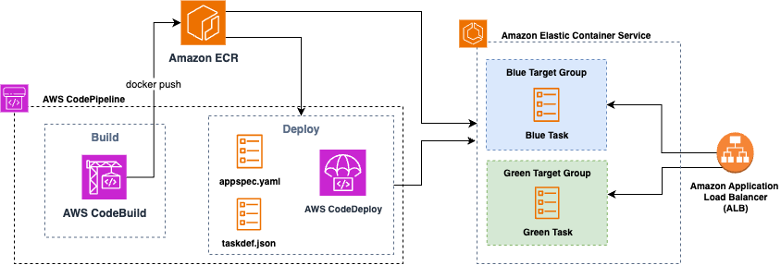
Figure1: Amazon ECS blue/green deployment with AWS CodeDeploy

Figure1: Amazon ECS blue/green deployment with AWS CodeDeploy

Why blue/green on ECS, and what was launched in July 2025

In a blue/green deployment, two production environments are maintained: blue, the current environment, and green, the new environment. This strategy allows you to validate the new version of your environment before it receives production traffic.

The ECS service team saw an opportunity to simplify the deployment process by creating lifecycle hooks, bake time, and managed rollback directly within ECS. With this shift, the complexity of coordinating blue/green deployments through CodeDeploy is consolidated into a single service. This consolidation not only simplifies the deployment pipeline but also reduces the number of moving parts, making it easier to maintain and troubleshoot over time.

Conceptually, ECS-native blue/green provisions a replacement task set registered to a separate target group (blue target group in figure 2) behind your Elastic Load Balancing listener. When you approve the cutover, ECS performs an all-at-once traffic shift to the green revision (green target group in figure 2), then holds both revisions during a configurable bake period before retiring blue or rolling back if alarms or hooks fail.
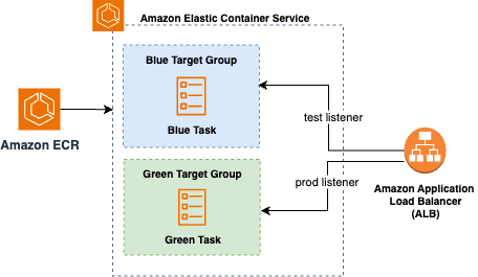
Figure 2: Amazon ECS Native Blue Green DeploymentFigure 2: Amazon ECS Native Blue Green Deployment

Unlike CodeDeploy, which requires fine-grained configuration of traffic shifting strategies, ECS native deployments are intentionally simpler, designed to cover the most common blue/green use cases without the operational overhead of managing a multi-phase canary.

Two paths in CDK: ECS-native blue/green vs. CodeDeploy blue/green

With CDK, you now have two ways to achieve blue/green on ECS. One is the ECS-native path that keeps deployment configuration on the CDK ECS module and its related load balancer resources. You configure lifecycle hooks that invoke AWS Lambda functions at specific deployment stages, you set a bake time, and you optionally use a test listener or Amazon ECS Service Connect header rules to validate traffic to the green revision before production cutover. The CodeDeploy path creates a CodeDeploy application and deployment group bound to your ECS service and Application Load Balancer (ALB), lets you choose canary, linear, or all-at-once policies, and typically plugs into AWS CodePipeline for orchestration.

A key functional difference is how the traffic shifts. ECS-native blue/green performs an immediate all-at-once switch to green, followed by a bake period; CodeDeploy supports canary and linear shifting in addition to all-at-once. If you require progressive exposure by percentage, CodeDeploy remains the way to go. If you want a simpler, service-centric model with fewer moving parts, ECS-native is now the default choice.

Currently, the AWS CDK includes L2 support for ECS-native blue/green so that you can model these settings directly without custom CloudFormation or escape hatches. If your stack already uses the Deployment Controller Type. CODE_DEPLOY path, you can continue to do so; migration options exist (outlined later in this post).
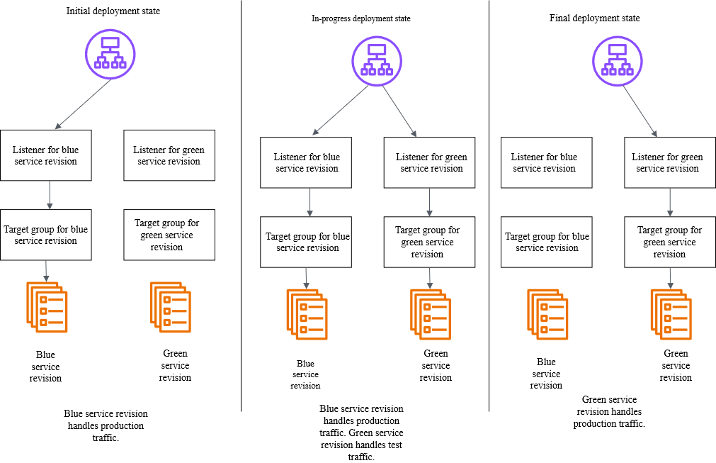
Figure 3: Amazon CodeDeploy blue/green deployment traffic shift

Figure 3: Amazon CodeDeploy blue/green deployment traffic shift

Decision guide: choosing the right path

AWS CodeDeploy offers more refined functionality for managing deployments through its integration with AWS CodePipeline to support multi-stage workflows across services, regions, and accounts, and provides a clear audit trail for change management. AWS CodeDeploy offers policies that can shift traffic in defined increments (for example, 5% or 10%) with automated metric checks and optional approvals. This deployment pattern supports coordinating multiple environments with formal governance, or teams that want data-driven promotions based on alarms and checkpoints. Because of its integration with AWS CodePipeline, you can have several stages for different services for ECS Blue/Green (CodeDeploy) and coordinate the deployment of multiple dependent services in a single release.

Utilize ECS-native to achieve a compact operational footprint by consolidating deployments and operations into a single service. The ECS service supports zero-downtime deployments through Blue/Green deployment (shifting the traffic all at one time) and enables quick rollbacks with configurable settings for minimumHealthyPercent and maximumPercent. Application Load Balancer (ALB) draining and task health checks ensure a balance between speed and safety. Additionally, the built-in deployment circuit breaker automatically halts and reverts problematic rollouts, minimizing operational issues.

How to implement in ECS native in CDK

To utilize ECS-native blue/green in CDK, start with an Amazon ECS service (Fargate or EC2), an Application Load Balancer, and two target groups managed by ECS during deployments. In your service definition, you’ll opt into the blue/green deployment type, set a bake time, and attach lifecycle hooks. Hooks can run Lambda functions at stages such as before scale-up or after production traffic shift, letting you run synthetic tests, warm caches, or gate on external checks. If you’re using Amazon ECS Service Connect, you can route “dark” test traffic to green by sending requests with a specific header during the pre-cutover phase.

const service = new ecs.FargateService(this, "Service", {
      cluster,
      taskDefinition,
      desiredCount: 3,
      securityGroups: [serviceSG],
      vpcSubnets: {
        subnetType: ec2.SubnetType.PRIVATE_WITH_EGRESS,
      },
      deploymentStrategy: ecs.DeploymentStrategy.BLUE_GREEN,
      bakeTime: Duration.minutes(30),
      propagateTags: ecs.PropagatedTagSource.SERVICE,
      deploymentAlarms: {
        alarmNames: [
          this.stackName + "-Http-500-Blue",
          this.stackName + "-Http-500-Green",
          "Synthetics-Alarm-trivia-game-" + props.stage,
        ],
        behavior: ecs.AlarmBehavior.ROLLBACK_ON_ALARM,
      },
      lifecycleHooks: [
        new ecs.DeploymentLifecycleLambdaTarget(
          preTrafficHook,
          "PreTrafficHook",
          {
            lifecycleStages: [
              ecs.DeploymentLifecycleStage.POST_TEST_TRAFFIC_SHIFT,
            ],
          }
        ),
      ],
      minHealthyPercent: 100,
      maxHealthyPercent: 200,
    });

Code Snipped: Amazon ECS service with AWS Fargate and AWS CodeDeploy

Conclusion

Using ECS-native blue/green deployments is now the recommended default for most teams. This approach provides zero-downtime cutovers, lifecycle hooks, bake time, and rollback capabilities without requiring the management of an additional service.

Choose CodeDeploy only if you need advanced traffic shifting options, such as canary or linear deployments, or if you have other dependencies with AWS CodePipeline workflows.

Bring your ECS deployments to the next level by enabling Blue/Green deployment with the strategy that best fits for your use case. For step-by-step instructions for migrating from CodeDeploy to ECS-Native refer to this migration guide.
Franco Abregu

Franco Abregu is a Sr. Delivery Consultant – DevOps at AWS Professional Services based in Argentina. Franco focuses on transforming customers DevOps culture to improve developer productivity, operations, deployments and process standardization. His expertise includes CI/CD, Infrastructure as Code, software development and organizational adoption of DevOps culture.

Chris Renzo

is a Sr. Solution Architect within the AWS Defense and Aerospace organization. Outside of work, he enjoys a balance of warm weather and traveling.

Streamlining Multi-Account Infrastructure with AWS CloudFormation StackSets and AWS CDK

Post Syndicated from Franco Abregu original https://aws.amazon.com/blogs/devops/streamlining-multi-account-infrastructure-with-aws-cloudformation-stacksets-and-aws-cdk/

Introduction

Organizations operating at scale on AWS often need to manage resources across multiple accounts and regions. Whether it’s deploying security controls, compliance configurations, or shared services, maintaining consistency can be challenging.

AWS CloudFormation StackSets (StackSets) has been helping organizations deploy resources across multiple accounts and regions since its launch. While the service is powerful on its own, combining it with Infrastructure as Code (IaC) tools and implementing automated deployments can significantly enhance its capabilities.

In this post, we’ll show you how to leverage AWS CloudFormation StackSets at scale using AWS CDK and implement a robust CI/CD pipeline for automated deployments with AWS CodePipeline.

StackSets key concepts

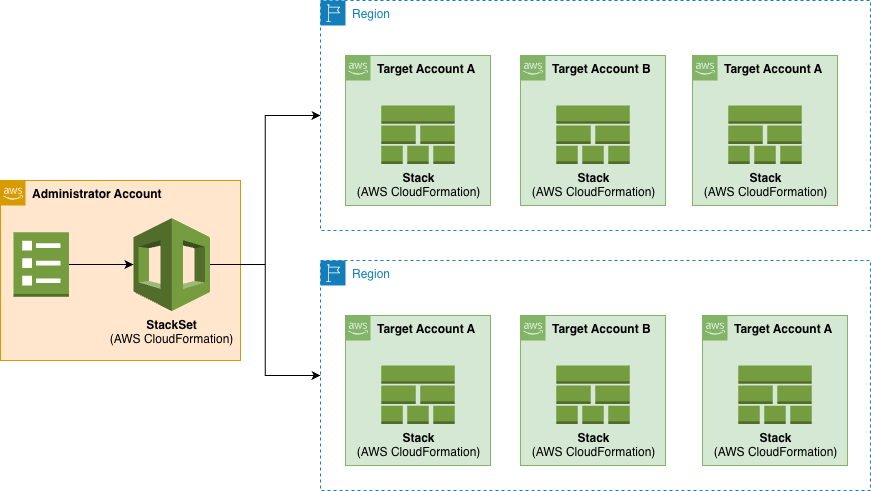
AWS CloudFormation StackSets allows you to create, update, or delete CloudFormation stacks across multiple AWS accounts and regions with a single operation. It’s essentially a way to manage infrastructure at scale across your AWS organization. Using an administrator account, you define and manage a CloudFormation template, and use the template as the basis for provisioning stacks into selected target accounts across specified AWS Regions:

StackSets Overview

Figure 1. StackSets overview.

The Administrator Account is the AWS account where you create and manage StackSets and the Target Accounts are the AWS accounts where the stack instances are deployed.

The Stack Instances are individual stacks created from the StackSet template deployed to specific account-region combinations.

 You can make the following operations using StackSets: Create, update, and delete actions performed on stack instances. These operations can be applied in concurrent or sequential way.

Sequential Deployment:

  • Account-by-account deployment
  • Region-by-region within accounts
  • Configurable failure thresholds

Parallel Deployment:

  • Concurrent account deployments
  • Maximum concurrent account setting
  • Region priority configuration

Hybrid Deployment:

  • Combine sequential and parallel
  • Account group-based deployment
  • Regional deployment strategies

The power of StackSets

The use of StackSets allows us to extend AWS CloudFormation’s capabilities in several important ways:

Governance

It provides you with Centralized Management as a single point of control while including consistent deployment patterns and automated stack instance management across AWS accounts and regions.

With Drift Detection feature, you can identify if any of the stack instances of your StackSet have configuration differences according to its expected configuration. You detect changes made outside CloudFormation and changes made to an instance stack through CloudFormation directly without using the StackSet.

Flexible Deployment

You also have flexible deployment options with controlled rollout. For example, with Concurrent Deployments you can deploy to multiple accounts within each region simultaneously while controlling deployment order. It also includes failure tolerance with automated retry failed operations.

Operational Efficiency

It reduces manual effort in managing multi-account and multi-region environments while minimizes human error in deployments.

Cost Management

It delivers comprehensive resource organization and streamlined tracking of resources across accounts and regions containing instance stacks. Using centralized management, simplifies the resource tracking and organization enabling you you to have:

  • unified visibility: view all related stacks from a single StackSet console (with their deployment status)
  • consistent tagging: apply standardized tags across all stack instances for cost allocation and resource grouping
  • drift detection: run drift detection across all stack instances simultaneously
  • operations tracking: track all operations (create, update and delete) across account/regions from one place

Built-in Safety

You can establish maximum concurrent operation limits, failure tolerance thresholds and automatic retry mechanisms. You also have recovery capabilities through update operations. All these features make a built-in safety mechanisms that prevent widespread failures.

Let’s say you have 100 target accounts, with the maximum concurrent limits, you can for example deploy a change to only 10 accounts. Also, with a failure threshold you can set how many failures do you allow before automatically stopping the process (e.g., stop if more than 5 accounts fail). This way you can gradually deploy and test your templates with a little group, establishing failure thresholds, instead of affecting the stacks preventing mass failures.

When an operation fails, AWS CloudFormation performs a rollback in the stack instances deploying the previous working template. You will still need to correct the template and apply it again in all the stack instances. With StackSets, you can fix the issues in the template and run again an update across all the stacks including the concurrent limit and failure threshold mentioned before to safety test the fix.

Security and Compliance management

This security-focused approach with StackSets helps organizations maintain a strong security posture across their AWS environment while reducing the operational overhead of managing security at scale.

You can use StackSets to deploy standardized security policies across accounts, enforce security baselines automatically and implement security guardrails organization-wide. For example, you can deploy detective control resource and its configuration in all your accounts like Amazon GuardDuty or Amazon Macie. You can also deploy preventive controls like SCPs, AWS Firewall Manager or AWS Shield Advanced. For example you can deploy through StackSets the following CloudFormation template en each target account to block certain actions in a region:

<code>AWSTemplateFormatVersion: '2010-09-09'</code><br /><code>Description: 'Service Control Policy to block access to specific AWS regions'</code><br /><br /><code>Parameters:</code><br /><code>  PolicyName:</code><br /><code>    Type: String</code><br /><code>    Default: 'RegionDenyPolicy'</code><br /><code>    Description: 'Name for the Service Control Policy'</code><br /><code>    </code><br /><code>  PolicyDescription:</code><br /><code>    Type: String</code><br /><code>    Default: 'Blocks access to Singapore region (ap-southeast-1) while allowing global services'</code><br /><code>    Description: 'Description for the Service Control Policy'</code><br /><code>    </code><br /><code>  BlockedRegion:</code><br /><code>    Type: String</code><br /><code>    Default: 'ap-southeast-1'</code><br /><code>    Description: 'AWS Region to block access to'</code><br /><code>    AllowedValues:</code><br /><code>      - 'ap-southeast-1'</code><br /><code>      - 'ap-southeast-2'</code><br /><code>      - 'eu-west-3'</code><br /><code>      - 'us-west-1'</code><br /><code>      - 'ca-central-1'</code><br /><code>    </code><br /><code>  TargetOUId:</code><br /><code>    Type: String</code><br /><code>    Description: 'Organizational Unit ID to attach the policy to (e.g., ou-root-xxxxxxxxxx)'</code><br /><code>    </code><br /><code>Resources:</code><br /><code>  RegionDenySCP:</code><br /><code>    Type: AWS::Organizations::Policy</code><br /><code>    Properties:</code><br /><code>      Name: !Ref PolicyName</code><br /><code>      Description: !Ref PolicyDescription</code><br /><code>      Type: SERVICE_CONTROL_POLICY</code><br /><code>      Content:</code><br /><code>        Version: '2012-10-17'</code><br /><code>        Statement:</code><br /><code>          - Sid: DenyAccessToSpecificRegion</code><br /><code>            Effect: Deny</code><br /><code>            NotAction:</code><br /><code>              - 'route53:*'</code><br /><code>              - 'cloudfront:*'</code><br /><code>              - 'sts:*'</code><br /><code>            Resource: '*'</code><br /><code>            Condition:</code><br /><code>              StringEquals:</code><br /><code>                'aws:RequestedRegion':</code><br /><code>                  - !Ref BlockedRegion</code><br /><code>      TargetIds:</code><br /><code>        - !Ref TargetOUId</code><br /><code>      Tags:</code><br /><code>        - Key: Purpose</code><br /><code>          Value: RegionCompliance</code><br /><code>        - Key: ManagedBy</code><br /><code>          Value: CloudFormation</code><br /><br /><code>Outputs:</code><br /><code>  PolicyId:</code><br /><code>    Description: 'ID of the created Service Control Policy'</code><br /><code>    Value: !Ref RegionDenySCP</code><br /><code>    Export:</code><br /><code>      Name: !Sub '${AWS::StackName}-PolicyId'</code><br /><code>      </code><br /><code>  PolicyArn:</code><br /><code>    Description: 'ARN of the created Service Control Policy'</code><br /><code>    Value: !GetAtt RegionDenySCP.Arn</code><br /><code>    Export:</code><br /><code>      Name: !Sub '${AWS::StackName}-PolicyArn'</code>

Other capabilities include compliance-related resources consistently, maintain audit trails of security configurations and ensure regulatory requirements are met across all accounts. For example, you can enable CouldTrail and deploy AWS Config rules across all the instance stacks managed by the StackSet.

For both Security and Compliance incidents you can use StackSets to deploy automated response workflows, configure event notifications and implement remediation actions across your accounts and regions.

Import existing stacks into StackSets

A stack import operation can import existing stacks into new or existing StackSets, so that you can migrate existing stacks to a StackSet in one operation.

Solution Overview

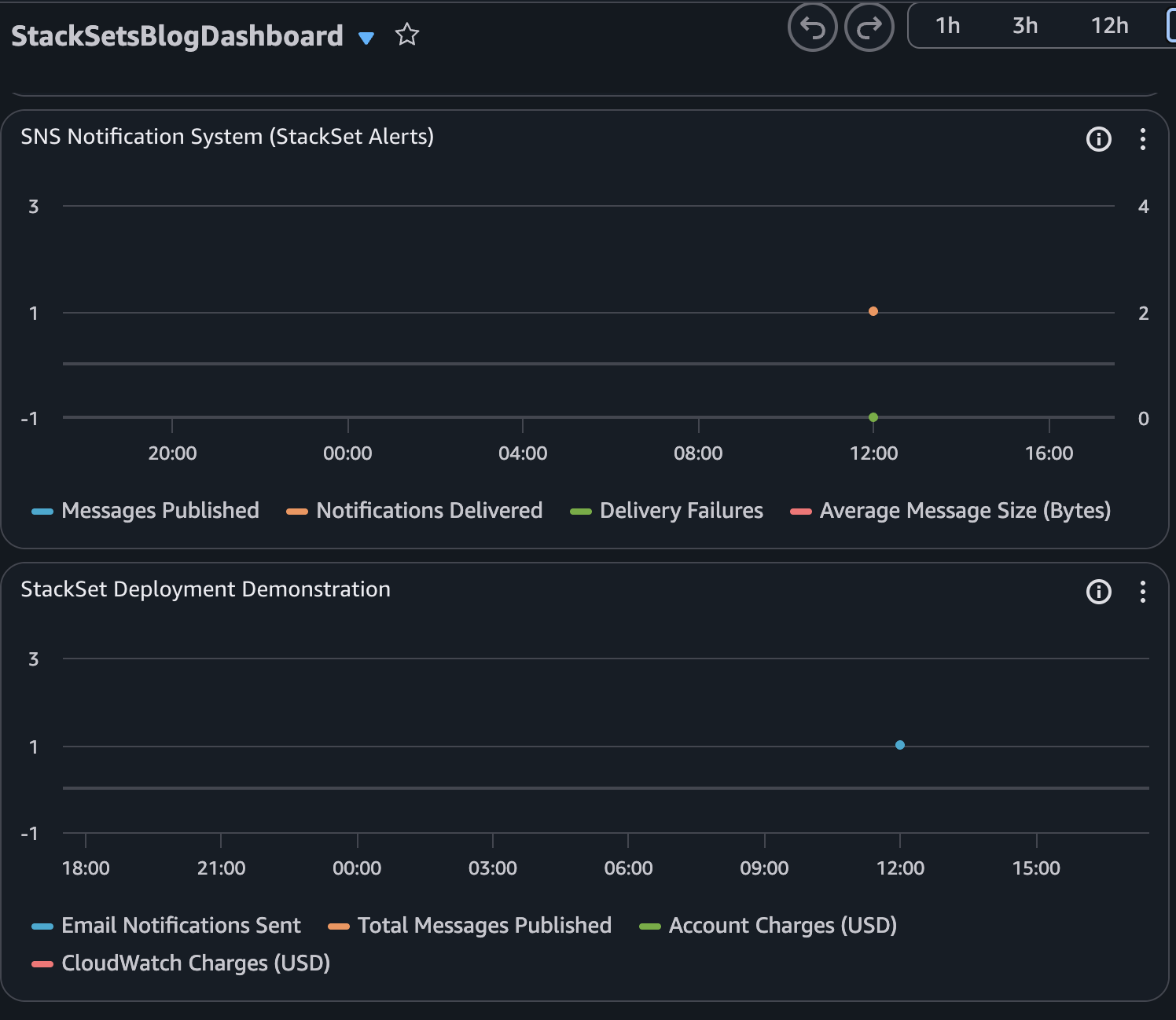
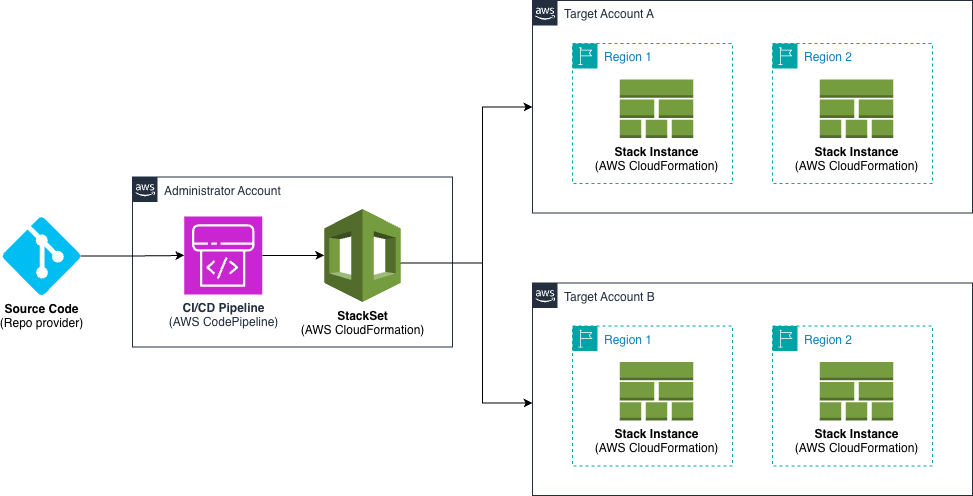
This solution includes an AWS CodePipeline stack that creates a CI/CD pipeline to deploy our StackSet. This pipeline deploys an application stack containing the AWS CloudFormation StackSet with a monitoring dashboard in AWS CloudWatch.

Solution overview

Figure 2. Solution overview

The following Amazon CloudWatch dashboard is an example of what you will in the target accounts after the StackSet is deployed:

Dashboard example

Figure 3. Dashboard example

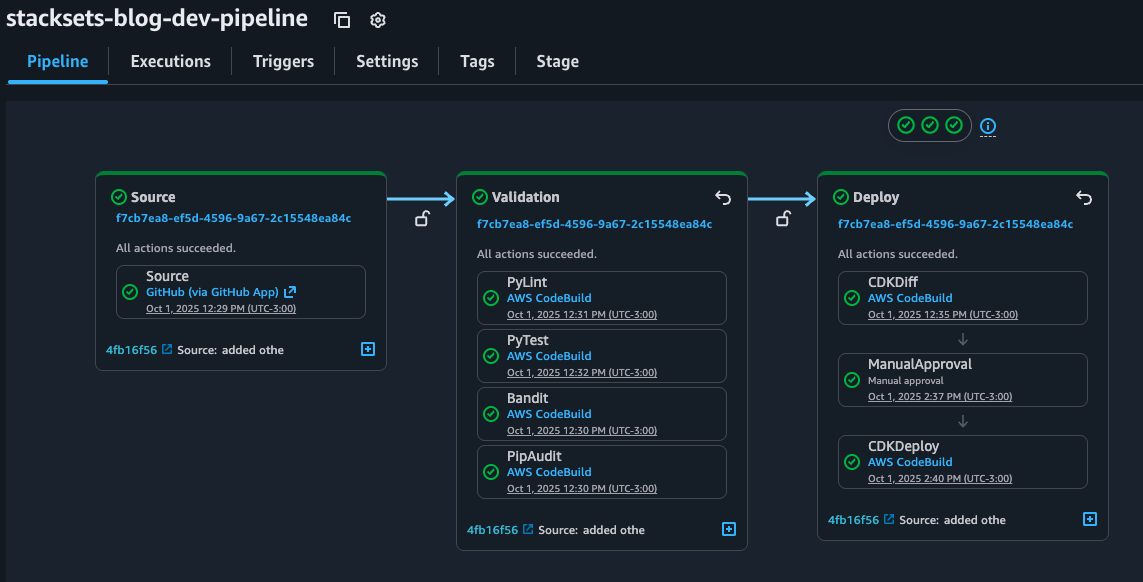
In the CI/CD pipeline, before running the deployment commands, it applies python security and quality code checks to ensure code quality and security and cdk-nag to ensure AWS Well Architected best practices. You can find more details about these checks in the solution repository in README.md file.

The solution includes 2 AWS CloudFormation stacks defined by in the AWS CDK application and a template for the StackSet that will be deployed in the target accounts and regions. This stack contains the monitoring dashboard that will be deployed en the target regions of each target account as a single unit.

The idea of using AWS CodePipeline with IaC is that development teams can define and share “pipelines-as-code” patterns for deploying their applications making it easy to add stages. This way, security and quality code testing can run any time you change the source code.

Pipeline overview

Figure 4. Pipeline overview

The best practice is to ensure shift-left: adding this checks to the earlier stages of the SDLC. You can accomplish this complementing your CI/CD pipeline with githooks or IDE Plugins. For example with Amazon Q Developer IDE extension you can use the review function to analyze the security of your code locally.

Walkthrough

If you’d like to try this solution out yourself, visit the walkthrough in the corresponding GitHub repo: https://github.com/aws-cloudformation/aws-cloudformation-templates/tree/main/CloudFormation/StackSets-CDK

To use the CI/CD pipeline just create a repository using any of the AWS CodeConnection git supported providers and add the contents of the folder. All details are included in the README.md so you can always get the latest version of the code and how it works.

Conclusion

In this post, we showed how to use AWS CDK to deploy AWS CloudFormation StackSets to reduce operational overhead and ensure consistency, compliance and security across multiple regions and accounts. We also learned how to create a CI/CD pipeline to guarantee a robust DevSecOps cycle for our Infrastructure as Code.

Now that we’ve explored the main concepts together, you can clone the example repository from the walkthrough section, follow the setup instructions, and customize the implementation to enhance AWS resources management across accounts and regions. Whether you’re managing a single account or multiple organizations, these practices can be adapted to your specific needs. Now that you learned the main concepts, go ahead and clone the example repository from walkthrough section, follow the setup instructions and customize the implementation to improve the AWS resources management across your accounts and regions.

Franco Abregu

Franco Abregu is a Sr. Delivery Consultant – DevOps at AWS Professional Services based in Argentina. Franco focuses on transforming customers DevOps culture to improve developer productivity, operations, deployments and process standardization. His expertise includes CI/CD, Infrastructure as Code, software development and organizational adoption of DevOps culture.

Idriss Laouali Abdou

Idriss Laouali Abdou is a Sr. Product Manager Technical for AWS Infrastructure-as-Code based in Seattle. He focuses on improving developer productivity through StackSets and CloudFormation Infrastructure provisioning experiences. Outside of work, you can find him creating educational content for thousands of students, cooking, or dancing..