All posts by Joshua Du Lac

Strategies for achieving least privilege at scale – Part 2

Post Syndicated from Joshua Du Lac original https://aws.amazon.com/blogs/security/strategies-for-achieving-least-privilege-at-scale-part-2/

In this post, we continue with our recommendations for achieving least privilege at scale with AWS Identity and Access Management (IAM). In Part 1 of this two-part series, we described the first five of nine strategies for implementing least privilege in IAM at scale. We also looked at a few mental models that can assist you to scale your approach. In this post, Part 2, we’ll continue to look at the remaining four strategies and related mental models for scaling least privilege across your organization.

6. Empower developers to author application policies

If you’re the only developer working in your cloud environment, then you naturally write your own IAM policies. However, a common trend we’ve seen within organizations that are scaling up their cloud usage is that a centralized security, identity, or cloud team administrator will step in to help developers write customized IAM policies on behalf of the development teams. This may be due to variety of reasons, including unfamiliarity with the policy language or a fear of creating potential security risk by granting excess privileges. Centralized creation of IAM policies might work well for a while, but as the team or business grows, this practice often becomes a bottleneck, as indicated in Figure 1.

Figure 1: Bottleneck in a centralized policy authoring process

Figure 1: Bottleneck in a centralized policy authoring process

This mental model is known as the theory of constraints. With this model in mind, you should be keen to search for constraints, or bottlenecks, faced by your team or organization, identify the root cause, and solve for the constraint. That might sound obvious, but when you’re moving at a fast pace, the constraint might not appear until agility is already impaired. As your organization grows, a process that worked years ago might no longer be effective today.

A software developer generally understands the intent of the applications they build, and to some extent the permissions required. At the same time, the centralized cloud, identity, or security teams tend to feel they are the experts at safely authoring policies, but lack a deep knowledge of the application’s code. The goal here is to enable developers to write the policies in order to mitigate bottlenecks.

The question is, how do you equip developers with the right tools and skills to confidently and safely create the required policies for their applications? A simple way to start is by investing in training. AWS offers a variety of formal training options and ramp-up guides that can help your team gain a deeper understanding of AWS services, including IAM. However, even self-hosting a small hackathon or workshop session in your organization can drive improved outcomes. Consider the following four workshops as simple options for self-hosting a learning series with your teams.

As a next step, you can help your teams along the way by setting up processes that foster collaboration and improve quality. For example, peer reviews are highly recommended, and we’ll cover this later. Additionally, administrators can use AWS native tools such as permissions boundaries and IAM Access Analyzer policy generation to help your developers begin to author their own policies more safely.

Let’s look at permissions boundaries first. An IAM permissions boundary should generally be used to delegate the responsibility of policy creation to your development team. You can set up the developer’s IAM role so that they can create new roles only if the new role has a specific permissions boundary attached to it, and that permissions boundary allows you (as an administrator) to set the maximum permissions that can be granted by the developer. This restriction is implemented by a condition on the developer’s identity-based policy, requiring that specific actions—such as iam:CreateRole or iam:CreatePolicy—are allowed only if a specified permissions boundary is attached.

In this way, when a developer creates an IAM role or policy to grant an application some set of required permissions, they are required to add the specified permissions boundary that will “bound” the maximum permissions available to that application. So even if the policy that the developer creates—such as for their AWS Lambda function—is not sufficiently fine-grained, the permissions boundary helps the organization’s cloud administrators make sure that the Lambda function’s policy is not greater than a maximum set of predefined permissions. So with permissions boundaries, your development team can be allowed to create new roles and policies (with constraints) without administrators creating a manual bottleneck.

Another tool developers can use is IAM Access Analyzer policy generation. IAM Access Analyzer reviews your CloudTrail logs and autogenerates an IAM policy based on your access activity over a specified time range. This greatly simplifies the process of writing granular IAM policies that allow end users access to AWS services.

A classic use case for IAM Access Analyzer policy generation is to generate an IAM policy within the test environment. This provides a good starting point to help identify the needed permissions and refine your policy for the production environment. For example, IAM Access Analyzer can’t identify the production resources used, so it adds resource placeholders for you to modify and add the specific Amazon Resource Names (ARNs) your application team needs. However, not every policy needs to be customized, and the next strategy will focus on reusing some policies.

7. Maintain well-written policies

Strategies seven and eight focus on processes. The first process we’ll focus on is to maintain well-written policies. To begin, not every policy needs to be a work of art. There is some wisdom in reusing well-written policies across your accounts, because that can be an effective way to scale permissions management. There are three steps to approach this task:

  1. Identify your use cases
  2. Create policy templates
  3. Maintain repositories of policy templates

For example, if you were new to AWS and using a new account, we would recommend that you use AWS managed policies as a reference to get started. However, the permissions in these policies might not fit how you intend to use the cloud as time progresses. Eventually, you would want to identify the repetitive or common use cases in your own accounts and create common policies or templates for those situations.

When creating templates, you must understand who or what the template is for. One thing to note here is that the developer’s needs tend to be different from the application’s needs. When a developer is working with resources in your accounts, they often need to create or delete resources—for example, creating and deleting Amazon Simple Storage Service (Amazon S3) buckets for the application to use.

Conversely, a software application generally needs to read or write data—in this example, to read and write objects to the S3 bucket that was created by the developer. Notice that the developer’s permissions needs (to create the bucket) are different than the application’s needs (reading objects in the bucket). Because these are different access patterns, you’ll need to create different policy templates tailored to the different use cases and entities.

Figure 2 highlights this issue further. Out of the set of all possible AWS services and API actions, there are a set of permissions that are relevant for your developers (or more likely, their DevOps build and delivery tools) and there’s a set of permissions that are relevant for the software applications that they are building. Those two sets may have some overlap, but they are not identical.

Figure 2: Visualizing intersecting sets of permissions by use case

Figure 2: Visualizing intersecting sets of permissions by use case

When discussing policy reuse, you’re likely already thinking about common policies in your accounts, such as default federation permissions for team members or automation that runs routine security audits across multiple accounts in your organization. Many of these policies could be considered default policies that are common across your accounts and generally do not vary. Likewise, permissions boundary policies (which we discussed earlier) can have commonality across accounts with low amounts of variation. There’s value in reusing both of these sets of policies. However, reusing policies too broadly could cause challenges if variation is needed—to make a change to a “reusable policy,” you would have to modify every instance of that policy, even if it’s only needed by one application.

You might find that you have relatively common resource policies that multiple teams need (such as an S3 bucket policy), but with slight variations. This is where you might find it useful to create a repeatable template that abides by your organization’s security policies, and make it available for your teams to copy. We call it a template here, because the teams might need to change a few elements, such as the Principals that they authorize to access the resource. The policies for the applications (such as the policy a developer creates to attach to an Amazon Elastic Compute Cloud (Amazon EC2) instance role) are generally more bespoke or customized and might not be appropriate in a template.

Figure 3 illustrates that some policies have low amounts of variation while others are more bespoke.

Figure 3: Identifying bespoke versus common policy types

Figure 3: Identifying bespoke versus common policy types

Regardless of whether you choose to reuse a policy or turn it into a template, an important step is to store these reusable policies and templates securely in a repository (in this case, AWS CodeCommit). Many customers use infrastructure-as-code modules to make it simple for development teams to input their customizations and generate IAM policies that fit their security policies in a programmatic way. Some customers document these policies and templates directly in the repository while others use internal wikis accompanied with other relevant information. You’ll need to decide which process works best for your organization. Whatever mechanism you choose, make it accessible and searchable by your teams.

8. Peer review and validate policies

We mentioned in Part 1 that least privilege is a journey and having a feedback loop is a critical part. You can implement feedback through human review, or you can automate the review and validate the findings. This is equally as important for the core default policies as it is for the customized, bespoke policies.

Let’s start with some automated tools you can use. One great tool that we recommend is using AWS IAM Access Analyzer policy validation and custom policy checks. Policy validation helps you while you’re authoring your policy to set secure and functional policies. The feature is available through APIs and the AWS Management Console. IAM Access Analyzer validates your policy against IAM policy grammar and AWS best practices. You can view policy validation check findings that include security warnings, errors, general warnings, and suggestions for your policy.

Let’s review some of the finding categories.

Finding type Description
Security Includes warnings if your policy allows access that AWS considers a security risk because the access is overly permissive.
Errors Includes errors if your policy includes lines that prevent the policy from functioning.
Warning Includes warnings if your policy doesn’t conform to best practices, but the issues are not security risks.
Suggestions Includes suggestions if AWS recommends improvements that don’t impact the permissions of the policy.

Custom policy checks are a new IAM Access Analyzer capability that helps security teams accurately and proactively identify critical permissions in their policies. You can use this to check against a reference policy (that is, determine if an updated policy grants new access compared to an existing version of the policy) or check against a list of IAM actions (that is, verify that specific IAM actions are not allowed by your policy). Custom policy checks use automated reasoning, a form of static analysis, to provide a higher level of security assurance in the cloud.

One technique that can help you with both peer reviews and automation is the use of infrastructure-as-code. By this, we mean you can write and deploy your IAM policies as AWS CloudFormation templates (CFTs) or AWS Cloud Development Kit (AWS CDK) applications. You can use a software version control system with your templates so that you know exactly what changes were made, and then test and deploy your default policies across multiple accounts, such as by using AWS CloudFormation StackSets.

In Figure 4, you’ll see a typical development workflow. This is a simplified version of a CI/CD pipeline with three stages: a commit stage, a validation stage, and a deploy stage. In the diagram, the developer’s code (including IAM policies) is checked across multiple steps.

Figure 4: A pipeline with a policy validation step

Figure 4: A pipeline with a policy validation step

In the commit stage, if your developers are authoring policies, you can quickly incorporate peer reviews at the time they commit to the source code, and this creates some accountability within a team to author least privilege policies. Additionally, you can use automation by introducing IAM Access Analyzer policy validation in a validation stage, so that the work can only proceed if there are no security findings detected. To learn more about how to deploy this architecture in your accounts, see this blog post. For a Terraform version of this process, we encourage you to check out this GitHub repository.

9. Remove excess privileges over time

Our final strategy focuses on existing permissions and how to remove excess privileges over time. You can determine which privileges are excessive by analyzing the data on which permissions are granted and determining what’s used and what’s not used. Even if you’re developing new policies, you might later discover that some permissions that you enabled were unused, and you can remove that access later. This means that you don’t have to be 100% perfect when you create a policy today, but can rather improve your policies over time. To help with this, we’ll quickly review three recommendations:

  1. Restrict unused permissions by using service control policies (SCPs)
  2. Remove unused identities
  3. Remove unused services and actions from policies

First, as discussed in Part 1 of this series, SCPs are a broad guardrail type of control that can deny permissions across your AWS Organizations organization, a set of your AWS accounts, or a single account. You can start by identifying services that are not used by your teams, despite being allowed by these SCPs. You might also want to identify services that your organization doesn’t intend to use. In those cases, you might consider restricting that access, so that you retain access only to the services that are actually required in your accounts. If you’re interested in doing this, we’d recommend that you review the Refining permissions in AWS using last accessed information topic in the IAM documentation to get started.

Second, you can focus your attention more narrowly to identify unused IAM roles, unused access keys for IAM users, and unused passwords for IAM users either at an account-specific level or the organization-wide level. To do this, you can use IAM Access Analyzer’s Unused Access Analyzer capability.

Third, the same Unused Access Analyzer capability also enables you to go a step further to identify permissions that are granted but not actually used, with the goal of removing unused permissions. IAM Access Analyzer creates findings for the unused permissions. If the granted access is required and intentional, then you can archive the finding and create an archive rule to automatically archive similar findings. However, if the granted access is not required, you can modify or remove the policy that grants the unintended access. The following screenshot shows an example of the dashboard for IAM Access Analyzer’s unused access findings.

Figure 5: Screenshot of IAM Access Analyzer dashboard

Figure 5: Screenshot of IAM Access Analyzer dashboard

When we talk to customers, we often hear that the principle of least privilege is great in principle, but they would rather focus on having just enough privilege. One mental model that’s relevant here is the 80/20 rule (also known as the Pareto principle), which states that 80% of your outcome comes from 20% of your input (or effort). The flip side is that the remaining 20% of outcome will require 80% of the effort—which means that there are diminishing returns for additional effort. Figure 6 shows how the Pareto principle relates to the concept of least privilege, on a scale from maximum privilege to perfect least privilege.

Figure 6: Applying the Pareto principle (80/20 rule) to the concept of least privilege

Figure 6: Applying the Pareto principle (80/20 rule) to the concept of least privilege

The application of the 80/20 rule to permissions management—such as refining existing permissions—is to identify what your acceptable risk threshold is and to recognize that as you perform additional effort to eliminate that risk, you might produce only diminishing returns. However, in pursuit of least privilege, you’ll still want to work toward that remaining 20%, while being pragmatic about the remainder of the effort.

Remember that least privilege is a journey. Two ways to be pragmatic along this journey are to use feedback loops as you refine your permissions, and to prioritize. For example, focus on what is sensitive to your accounts and your team. Restrict access to production identities first before moving to environments with less risk, such as development or testing. Prioritize reviewing permissions for roles or resources that enable external, cross-account access before moving to the roles that are used in less sensitive areas. Then move on to the next priority for your organization.

Conclusion

Thank you for taking the time to read this two-part series. In these two blog posts, we described nine strategies for implementing least privilege in IAM at scale. Across these nine strategies, we introduced some mental models, tools, and capabilities that can assist you to scale your approach. Let’s consider some of the key takeaways that you can use in your journey of setting, verifying, and refining permissions.

Cloud administrators and developers will set permissions, and can use identity-based policies or resource-based policies to grant access. Administrators can also use multiple accounts as boundaries, and set additional guardrails by using service control policies, permissions boundaries, block public access, VPC endpoint policies, and data perimeters. When cloud administrators or developers create new policies, they can use IAM Access Analyzer’s policy generation capability to generate new policies to grant permissions.

Cloud administrators and developers will then verify permissions. For this task, they can use both IAM Access Analyzer’s policy validation and peer review to determine if the permissions that were set have issues or security risks. These tools can be leveraged in a CI/CD pipeline too, before the permissions are set. IAM Access Analyzer’s custom policy checks can be used to detect nonconformant updates to policies.

To both verify existing permissions and refine permissions over time, cloud administrators and developers can use IAM Access Analyzer’s external access analyzers to identify resources that were shared with external entities. They can also use either IAM Access Advisor’s last accessed information or IAM Access Analyzer’s unused access analyzer to find unused access. In short, if you’re looking for a next step to streamline your journey toward least privilege, be sure to check out IAM Access Analyzer.

 
If you have feedback about this post, submit comments in the Comments section below. If you have questions about this post, contact AWS Support.

Author photo

Josh Du Lac
Josh leads Security & Networking Solutions Architecture at AWS. He and his team advise hundreds of startup, enterprise, and global organizations how to accelerate their journey to the cloud while improving their security along the way. Josh holds a Masters in Cybersecurity and an MBA. Outside of work, Josh enjoys searching for the best tacos in Texas and practicing his handstands.

Emeka Enekwizu

Emeka Enekwizu
Emeka is a Senior Solutions Architect at AWS. He is dedicated to assisting customers through every phase of their cloud adoption and enjoys unpacking security concepts into practical nuggets. Emeka holds CISSP and CCSP certifications and loves playing soccer in his spare time.

Strategies for achieving least privilege at scale – Part 1

Post Syndicated from Joshua Du Lac original https://aws.amazon.com/blogs/security/strategies-for-achieving-least-privilege-at-scale-part-1/

Least privilege is an important security topic for Amazon Web Services (AWS) customers. In previous blog posts, we’ve provided tactical advice on how to write least privilege policies, which we would encourage you to review. You might feel comfortable writing a few least privilege policies for yourself, but to scale this up to thousands of developers or hundreds of AWS accounts requires strategy to minimize the total effort needed across an organization.

At re:Inforce 2022, we recommended nine strategies for achieving least privilege at scale. Although the strategies we recommend remain the same, this blog series serves as an update, with a deeper discussion of some of the strategies. In this series, we focus only on AWS Identity and Access Management (IAM), not application or infrastructure identities. We’ll review least privilege in AWS, then dive into each of the nine strategies, and finally review some key takeaways. This blog post, Part 1, covers the first five strategies, while Part 2 of the series covers the remaining four.

Overview of least privilege

The principle of least privilege refers to the concept that you should grant users and systems the narrowest set of privileges needed to complete required tasks. This is the ideal, but it’s not so simple when change is constant—your staff or users change, systems change, and new technologies become available. AWS is continually adding new services or features, and individuals on your team might want to adopt them. If the policies assigned to those users were perfectly least privilege, then you would need to update permissions constantly as the users ask for more or different access. For many, applying the narrowest set of permissions could be too restrictive. The irony is that perfect least privilege can cause maximum effort.

We want to find a more pragmatic approach. To start, you should first recognize that there is some tension between two competing goals—between things you don’t want and things you do want, as indicated in Figure 1. For example, you don’t want expensive resources created, but you do want freedom for your builders to choose their own resources.

Figure 1: Tension between two competing goals

Figure 1: Tension between two competing goals

There’s a natural tension between competing goals when you’re thinking about least privilege, and you have a number of controls that you can adjust to securely enable agility. I’ve spoken with hundreds of customers about this topic, and many focus primarily on writing near-perfect permission policies assigned to their builders or machines, attempting to brute force their way to least privilege.

However, that approach isn’t very effective. So where should you start? To answer this, we’re going to break this question down into three components: strategies, tools, and mental models. The first two may be clear to you, but you might be wondering, “What is a mental model”? Mental models help us conceptualize something complex as something relatively simpler, though naturally this leaves some information out of the simpler model.

Teams

Teams generally differ based on the size of the organization. We recognize that each customer is unique, and that customer needs vary across enterprises, government agencies, startups, and so on. If you feel the following example descriptions don’t apply to you today, or that your organization is too small for this many teams to co-exist, then keep in mind that the scenarios might be more applicable in the future as your organization continues to grow. Before we can consider least privilege, let’s consider some common scenarios.

Customers who operate in the cloud tend to have teams that fall into one of two categories: decentralized and centralized. Decentralized teams might be developers or groups of developers, operators, or contractors working in your cloud environment. Centralized teams often consist of administrators. Examples include a cloud environment team, an infrastructure team, the security team, the network team, or the identity team.

Scenarios

To achieve least privilege in an organization effectively, teams must collaborate. Let’s consider three common scenarios:

  1. Creating default roles and policies (for teams and monitoring)
  2. Creating roles and policies for applications
  3. Verifying and refining existing permissions

The first scenario focuses on the baseline set of roles and permissions that are necessary to start using AWS. Centralized teams (such as a cloud environmentteam or identity and access management team) commonly create these initial default roles and policies that you deploy by using your account factory, IAM Identity Center, or through AWS Control Tower. These default permissions typically enable federation for builders or enable some automation, such as tools for monitoring or deployments.

The second scenario is to create roles and policies for applications. After foundational access and permissions are established, the next step is for your builders to use the cloud to build. Decentralized teams (software developers, operators, or contractors) use the roles and policies from the first scenario to then create systems, software, or applications that need their own permissions to perform useful functions. These teams often need to create new roles and policies for their software to interact with databases, Amazon Simple Storage Service (Amazon S3), Amazon Simple Queue Service (Amazon SQS) queues, and other resources.

Lastly, the third scenario is to verify and refine existing permissions, a task that both sets of teams should be responsible for.

Journeys

At AWS, we often say that least privilege is a journey, because change is a constant. Your builders may change, systems may change, you may swap which services you use, and the services you use may add new features that your teams want to adopt, in order to enable faster or more efficient ways of working. Therefore, what you consider least privilege today may be considered insufficient by your users tomorrow.

This journey is made up of a lifecycle of setting, verifying, and refining permissions. Cloud administrators and developers will set permissions, they will then verify permissions, and then they refine those permissions over time, and the cycle repeats as illustrated in Figure 2. This produces feedback loops of continuous improvement, which add up to the journey to least privilege.

Figure 2: Least privilege is a journey

Figure 2: Least privilege is a journey

Strategies for implementing least privilege

The following sections will dive into nine strategies for implementing least privilege at scale:

Part 1 (this post):

  1. (Plan) Begin with coarse-grained controls
  2. (Plan) Use accounts as strong boundaries around resources
  3. (Plan) Prioritize short-term credentials
  4. (Policy) Enforce broad security invariants
  5. (Policy) Identify the right tool for the job

Part 2:

  1. (Policy) Empower developers to author application policies
  2. (Process) Maintain well-written policies
  3. (Process) Peer-review and validate policies
  4. (Process) Remove excess privileges over time

To provide some logical structure, the strategies can be grouped into three categories—plan, policy, and process. Plan is where you consider your goals and the outcomes that you want to achieve and then design your cloud environment to simplify those outcomes. Policy focuses on the fact that you will need to implement some of those goals in either the IAM policy language or as code (such as infrastructure-as-code). The Process category will look at an iterative approach to continuous improvement. Let’s begin.

1. Begin with coarse-grained controls

Most systems have relationships, and these relationships can be visualized. For example, AWS accounts relationships can be visualized as a hierarchy, with an organization’s management account and groups of AWS accounts within that hierarchy, and principals and policies within those accounts, as shown in Figure 3.

Figure 3: Icicle diagram representing an account hierarchy

Figure 3: Icicle diagram representing an account hierarchy

When discussing least privilege, it’s tempting to put excessive focus on the policies at the bottom of the hierarchy, but you should reverse that thinking if you want to implement least privilege at scale. Instead, this strategy focuses on coarse-grained controls, which refer to a top-level, broader set of controls. Examples of these broad controls include multi-account strategy, service control policies, blocking public access, and data perimeters.

Before you implement coarse-grained controls, you must consider which controls will achieve the outcomes you desire. After the relevant coarse-grained controls are in place, you can tailor the permissions down the hierarchy by using more fine-grained controls along the way. The next strategy reviews the first coarse-grained control we recommend.

2. Use accounts as strong boundaries around resources

Although you can start with a single AWS account, we encourage customers to adopt a multi-account strategy. As customers continue to use the cloud, they often need explicit security boundaries, the ability to control limits, and billing separation. The isolation designed into an AWS account can help you meet these needs.

Customers can group individual accounts into different assortments (organizational units) by using AWS Organizations. Some customers might choose to align this grouping by environment (for example: Dev, Pre-Production, Test, Production) or by business units, cost center, or some other option. You can choose how you want to construct your organization, and AWS has provided prescriptive guidance to assist customers when they adopt a multi-account strategy.

Similarly, you can use this approach for grouping security controls. As you layer in preventative or detective controls, you can choose which groups of accounts to apply them to. When you think of how to group these accounts, consider where you want to apply your security controls that could affect permissions.

AWS accounts give you strong boundaries between accounts (and the entities that exist in those accounts). As shown in Figure 4, by default these principals and resources cannot cross their account boundary (represented by the red dotted line on the left).

Figure 4: Account hierarchy and account boundaries

Figure 4: Account hierarchy and account boundaries

In order for these accounts to communicate with each other, you need to explicitly enable access by adding narrow permissions. For use cases such as cross-account resource sharing, or cross-VPC networking, or cross-account role assumptions, you would need to explicitly enable the required access by creating the necessary permissions. Then you could review those permissions by using IAM Access Analyzer.

One type of analyzer within IAM Access Analyzer, external access, helps you identify resources (such as S3 buckets, IAM roles, SQS queues, and more) in your organization or accounts that are shared with an external entity. This helps you identify if there’s potential for unintended access that could be a security risk to your organization. Although you could use IAM Access Analyzer (external access) with a single account, we recommend using it at the organization level. You can configure an access analyzer for your entire organization by setting the organization as the zone of trust, to identify access allowed from outside your organization.

To get started, you create the analyzer and it begins analyzing permissions. The analysis may produce findings, which you can review for intended and unintended access. You can archive the intended access findings, but you’ll want to act quickly on the unintended access to mitigate security risks.

In summary, you should use accounts as strong boundaries around resources, and use IAM Access Analyzer to help validate your assumptions and find unintended access permissions in an automated way across the account boundaries.

3. Prioritize short-term credentials

When it comes to access control, shorter is better. Compared to long-term access keys or passwords that could be stored in plaintext or mistakenly shared, a short-term credential is requested dynamically by using strong identities. Because the credentials are being requested dynamically, they are temporary and automatically expire. Therefore, you don’t have to explicitly revoke or rotate the credentials, nor embed them within your application.

In the context of IAM, when we’re discussing short-term credentials, we’re effectively talking about IAM roles. We can split the applicable use cases of short-term credentials into two categories—short-term credentials for builders and short-term credentials for applications.

Builders (human users) typically interact with the AWS Cloud in one of two ways; either through the AWS Management Console or programmatically through the AWS CLI. For console access, you can use direct federation from your identity provider to individual AWS accounts or something more centralized through IAM Identity Center. For programmatic builder access, you can get short-term credentials into your AWS account through IAM Identity Center using the AWS CLI.

Applications created by builders need their own permissions, too. Typically, when we consider short-term credentials for applications, we’re thinking of capabilities such as IAM roles for Amazon Elastic Compute Cloud (Amazon EC2), IAM roles for Amazon Elastic Container Service (Amazon ECS) tasks, or AWS Lambda execution roles. You can also use IAM Roles Anywhere to obtain temporary security credentials for workloads and applications that run outside of AWS. Use cases that require cross-account access can also use IAM roles for granting short-term credentials.

However, organizations might still have long-term secrets, like database credentials, that need to be stored somewhere. You can store these secrets with AWS Secrets Manager, which will encrypt the secret by using an AWS KMS encryption key. Further, you can configure automatic rotation of that secret to help reduce the risk of those long-term secrets.

4. Enforce broad security invariants

Security invariants are essentially conditions that should always be true. For example, let’s assume an organization has identified some core security conditions that they want enforced:

  1. Block access for the AWS account root user
  2. Disable access to unused AWS Regions
  3. Prevent the disabling of AWS logging and monitoring services (AWS CloudTrail or Amazon CloudWatch)

You can enable these conditions by using service control policies (SCPs) at the organization level for groups of accounts using an organizational unit (OU), or for individual member accounts.

Notice these words—block, disable, and prevent. If you’re considering these actions in the context of all users or all principals except for the administrators, that’s where you’ll begin to implement broad security invariants, generally by using service control policies. However, a common challenge for customers is identifying what conditions to apply and the scope. This depends on what services you use, the size of your organization, the number of teams you have, and how your organization uses the AWS Cloud.

Some actions have inherently greater risk, while others may have nominal risk or are more easily reversible. One mental model that has helped customers to consider these issues is an XY graph, as illustrated in the example in Figure 5.

Figure 5: Using an XY graph for analyzing potential risk versus frequency of use

Figure 5: Using an XY graph for analyzing potential risk versus frequency of use

The X-axis in this graph represents the potential risk associated with using a service functionality within a particular account or environment, while the Y-axis represents the frequency of use of that service functionality. In this representative example, the top-left part of the graph covers actions that occur frequently and are relatively safe—for example, read-only actions.

The functionality in the bottom-right section is where you want to focus your time. Consider this for yourself—if you were to create a similar graph for your environment—what are the actions you would consider to be high-risk, with an expected low or rare usage within your environment? For example, if you enable CloudTrail for logging, you want to make sure that someone doesn’t invoke the CloudTrail StopLogging API operation or delete the CloudTrail logs. Another high-risk, low-usage example could include restricting AWS Direct Connect or network configuration changes to only your network administrators.

Over time, you can use the mental model of the XY graph to decide when to use preventative guardrails for actions that should never happen, versus conditional or alternative guardrails for situational use cases. You could also move from preventative to detective security controls, while accounting for factors such as the user persona and the environment type (production, development, or testing). Finally, you could consider doing this exercise broadly at the service level before thinking of it in a more fine-grained way, feature-by-feature.

However, not all controls need to be custom to your organization. To get started quickly, here are some examples of documented SCPs as well as AWS Control Tower guardrail references. You can adopt those or tailor them to fit your environment as needed.

5. Identify the right tools for the job

You can think of IAM as a toolbox that offers many tools that provide different types of value. We can group these tools into two broad categories: guardrails and grants.

Guardrails are the set of tools that help you restrict or deny access to your accounts. At a high level, they help you figure out the boundary for the set of permissions that you want to retain. SCPs are a great example of guardrails, because they enable you to restrict the scope of actions that principals in your account or your organization can take. Permissions boundaries are another great example, because they enable you to safely delegate the creation of new principals (roles or users) and permissions by setting maximum permissions on the new identity.

Although guardrails help you restrict access, they don’t inherently grant any permissions. To grant permissions, you use either an identity-based policy or resource-based policy. Identity policies are attached to principals (roles or users), while resource-based policies are applied to specific resources, such as an S3 bucket.

A common question is how to decide when to use an identity policy versus a resource policy to grant permissions. IAM, in a nutshell, seeks to answer the question: who can access what? Can you spot the nuance in the following policy examples?

Policies attached to principals

{
      "Effect": "Allow",
      "Action": "x",
      "Resource": "y",
      "Condition": "z"
    }

Policies attached to resources

{
      "Effect": "Allow",
      "Principal": "w",
      "Action": "x",
      "Resource": "y",
      "Condition": "z"
    }

You likely noticed the difference here is that with identity-based (principal) policies, the principal is implicit (that is, the principal of the policy is the entity to which the policy is applied), while in a resource-based policy, the principal must be explicit (that is, the principal has to be specified in the policy). A resource-based policy can enable cross-account access to resources (or even make a resource effectively public), but the identity-based policies likewise need to allow the access to that cross-account resource. Identity-based policies with sufficient permissions can then access resources that are “shared.” In essence, both the principal and the resource need to be granted sufficient permissions.

When thinking about grants, you can address the “who” angle by focusing on the identity-based policies, or the “what” angle by focusing on resource-based policies. For additional reading on this topic, see this blog post. For information about how guardrails and grants are evaluated, review the policy evaluation logic documentation.

Lastly, if you’d like a detailed walkthrough on choosing the right tool for the job, we encourage you to read the IAM policy types: How and when to use them blog post.

Conclusion

This blog post walked through the first five (of nine) strategies for achieving least privilege at scale. For the remaining four strategies, see Part 2 of this series.

 
If you have feedback about this post, submit comments in the Comments section below. If you have questions about this post, contact AWS Support.

Author photo

Josh Du Lac
Josh leads Security & Networking Solutions Architecture at AWS. He and his team advise hundreds of startup, enterprise, and global organizations how to accelerate their journey to the cloud while improving their security along the way. Josh holds a Masters in Cybersecurity and an MBA. Outside of work, Josh enjoys searching for the best tacos in Texas and practicing his handstands.

Emeka Enekwizu

Emeka Enekwizu
Emeka is a Senior Solutions Architect at AWS. He is dedicated to assisting customers through every phase of their cloud adoption and enjoys unpacking security concepts into practical nuggets. Emeka holds CISSP and CCSP certifications and loves playing soccer in his spare time.

Should I use managed login or create a custom UI in Amazon Cognito?

Post Syndicated from Joshua Du Lac original https://aws.amazon.com/blogs/security/use-the-hosted-ui-or-create-a-custom-ui-in-amazon-cognito/

October 8, 2025: This blog post has been updated to include the Amazon Cognito managed login experience. The managed login experience has an updated look, additional features, and enhanced customization options.

September 8, 2023: It’s important to know that if you activate user sign-up in your user pool, anyone on the internet can sign up for an account and sign in to your apps. Don’t enable self-registration in your user pool unless you want to open your app to allow users to sign up.

June 9, 2023: Original publication date.


Amazon Cognito is an authentication, authorization, and user management service for your web and mobile applications. Your users can sign in directly through many different authentication methods, such as user accounts within Amazon Cognito or through social providers such as Facebook, Amazon, Apple, or Google. You can also configure federation through a third-party OpenID Connect (OIDC) or SAML 2.0 identity provider (IdP).

Amazon Cognito user pools are user directories that provide sign-up and sign-in functions for your application users, including federated authentication capabilities. A Cognito user pool has two primary UI options:

  • Managed login: AWS hosts, preconfigures, maintains, and scales the UI—including managed login branding and classic Hosted UI branding—with a set of options that you can customize or configure for sign-up and sign-in for app users.
  • Custom UI: You can configure an Amazon Cognito user pool with a completely custom UI by using the SDK. You’re accountable for hosting, configuring, maintaining, and scaling your custom UI as a part of your responsibility in the AWS Shared Responsibility Model.

In this blog post, we review the benefits of using the managed login or creating a custom UI with the SDK and things to consider in determining which to choose for your application.

Managed login

Managed login provides web interfaces for sign-up, sign-in, multi-factor authentication (MFA), password management, and passwordless and passkey sign-in capabilities in your user pool. The managed login provides an authorization server based on the OAuth 2.0 specification, and has a default implementation of user flows for sign-up and sign-in. Your application can redirect to the managed login, which will handle the user flows through the authorization code grant flow. The managed login also supports sign-in through social providers and federation from OIDC-compliant and SAML 2.0 providers. Amazon Cognito offers two visual modes and branding and customization experiences: managed login branding with branding editor and hosted UI (classic) branding.

Managed login branding with branding editor
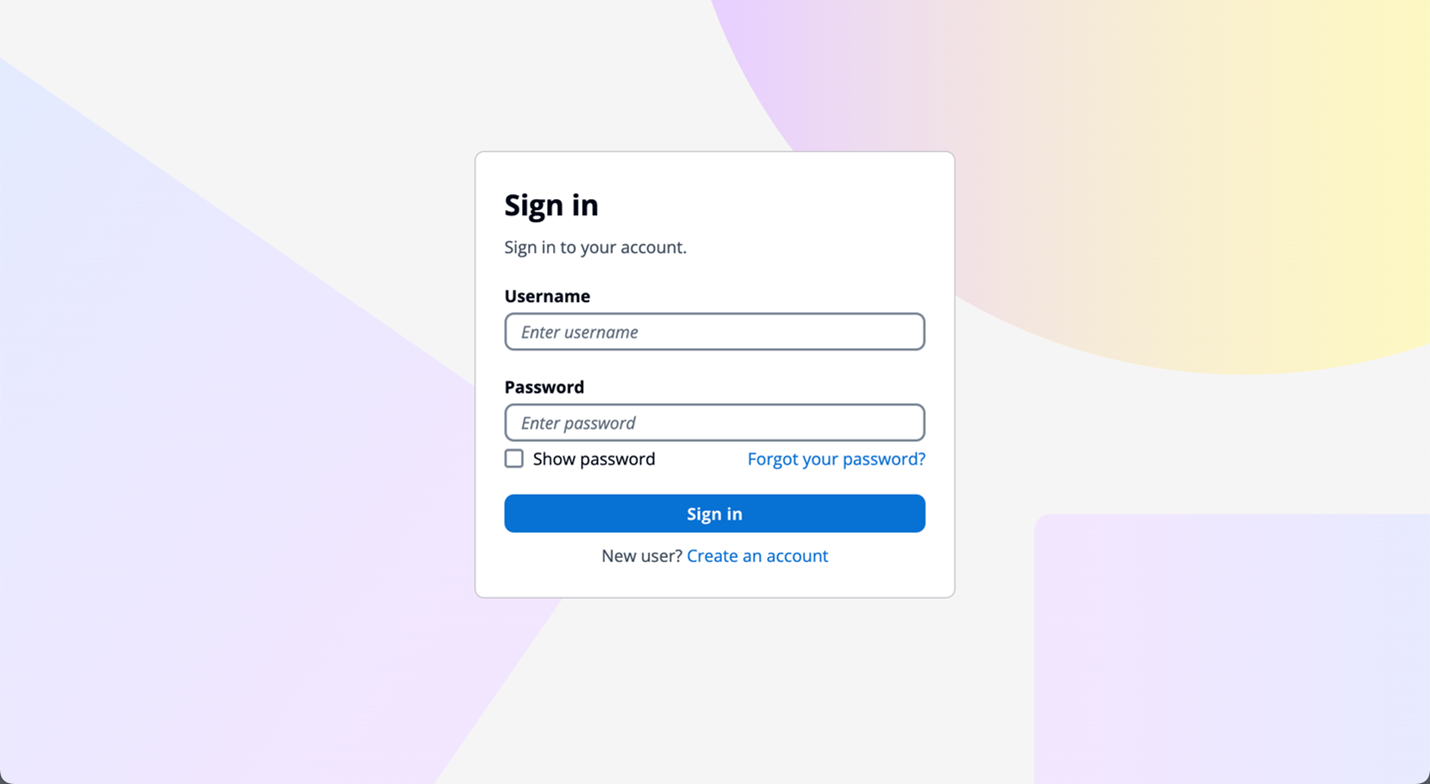
Managed login branding provides an improved user experience with the most up-to-date authentication options for the user pool UI experience. Figure 1 shows managed login using the default branding settings.

Figure 1: Managed login default branding settings

Figure 1: Managed login default branding settings

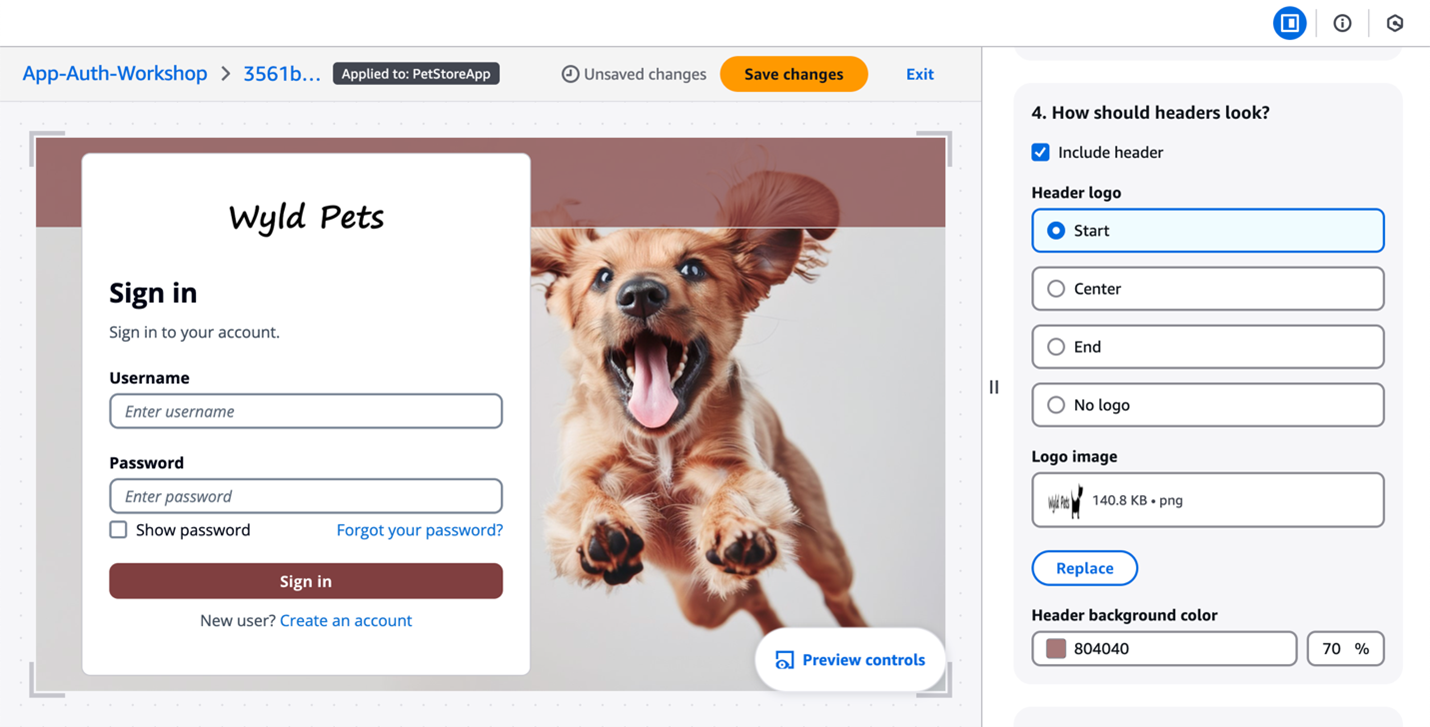
The branding editor is a no-code visual editor that you can use to customize the look and feel of the entire user journey. You can customize each user pool application client individually, and preview screens in real-time with different screen sizes, as shown in Figure 2.

Figure 2: Customization in the Amazon Cognito branding editor (Image credits)

Figure 2: Customization in the Amazon Cognito branding editor (Image credits)

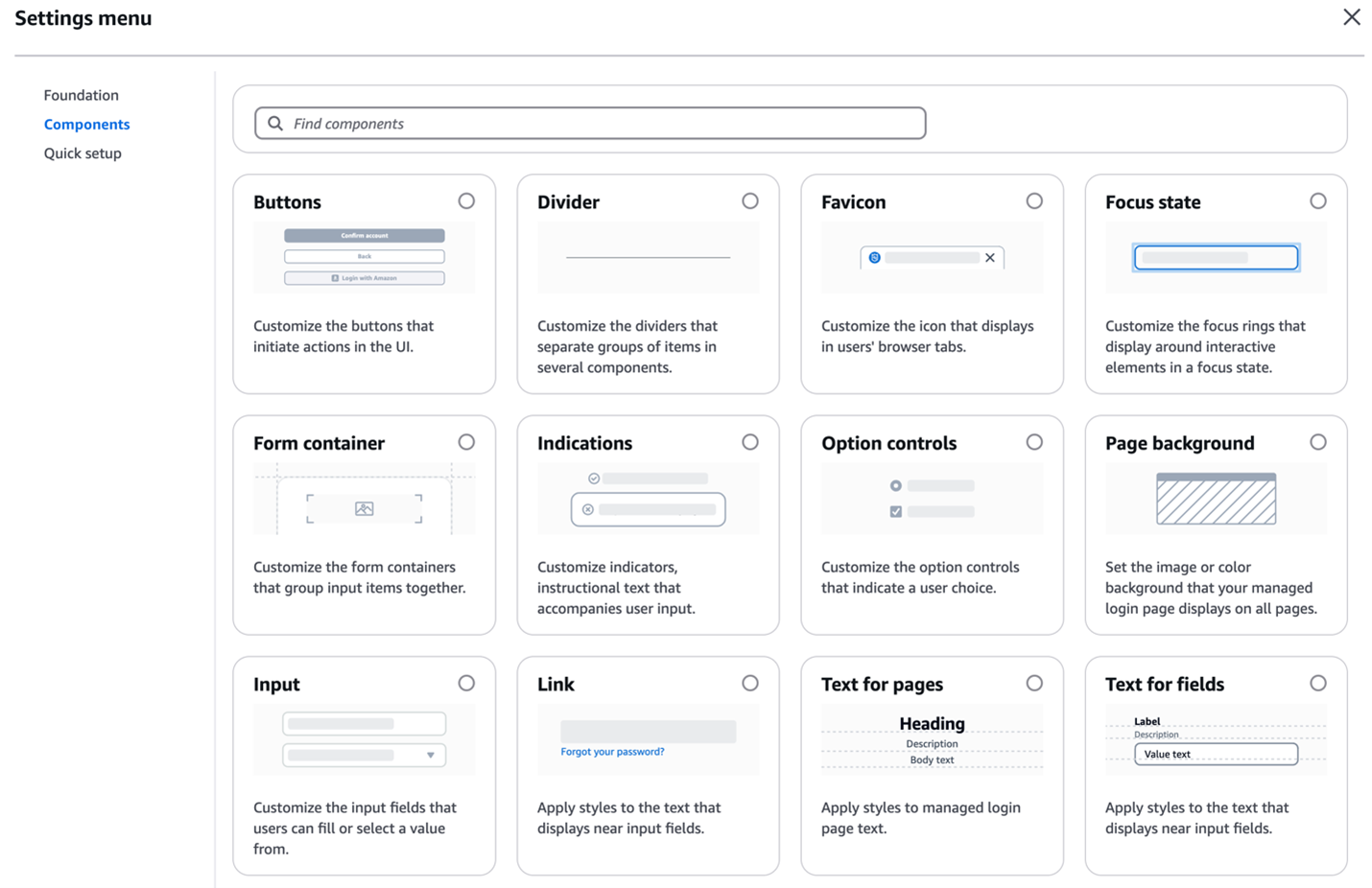
As shown in Figure 3, You can customize various components using the branding editor, including background, header and footer, buttons, focus state, icons, and more.

Figure 3: Various components customization options

Figure 3: Various components customization options

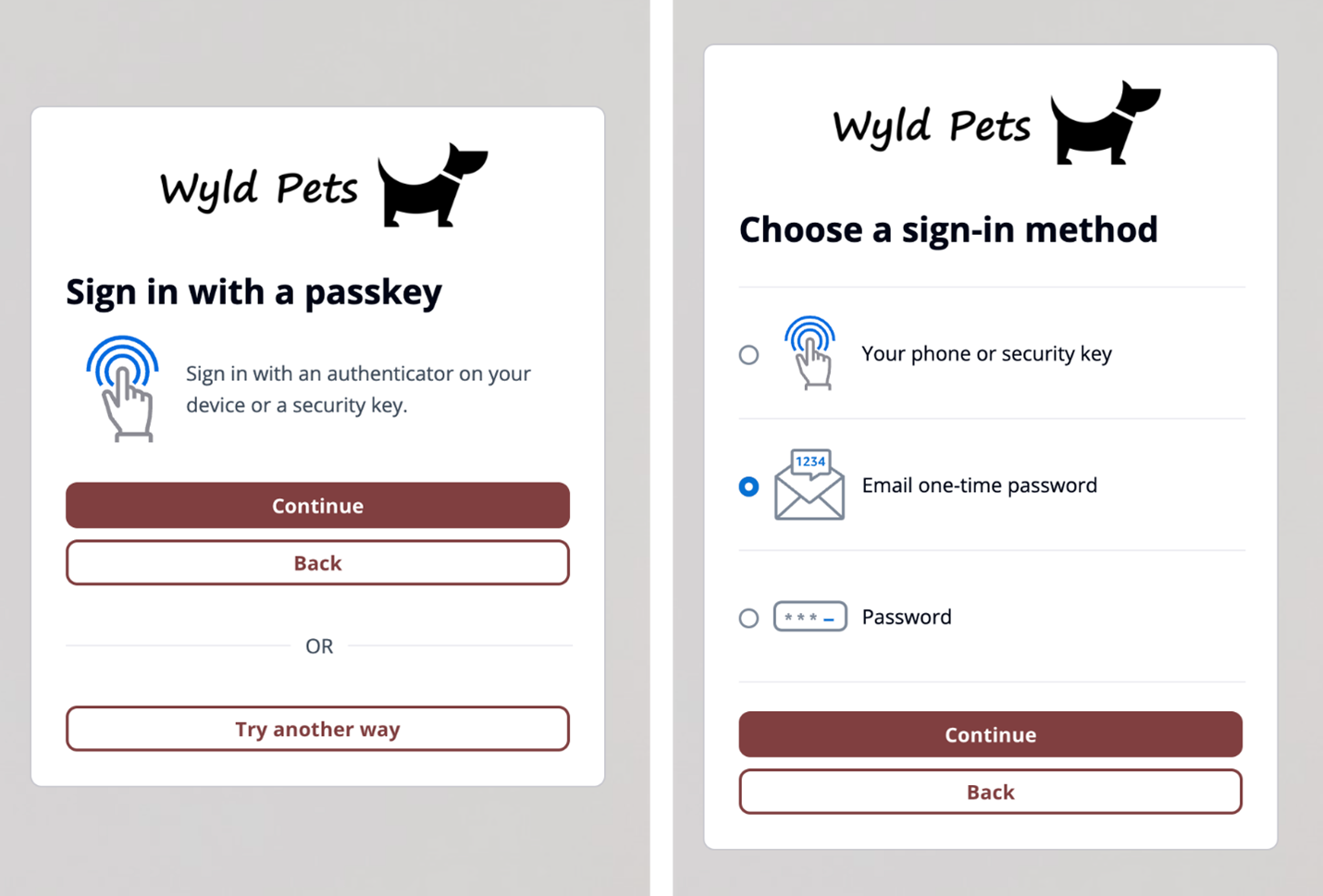
Additionally, managed login branding adds support for passwordless sign-in with passkeys, email one-time-passwords (OTP) and SMS OTPs, as shown in Figure 4. After you enable passwordless login in your user pool, managed login branding adapts to curated user flows with users’ preferred authentication methods.

Figure 4: Sign in with passkey flow (left) and user-selected sign-in method flow (right)

Figure 4: Sign in with passkey flow (left) and user-selected sign-in method flow (right)

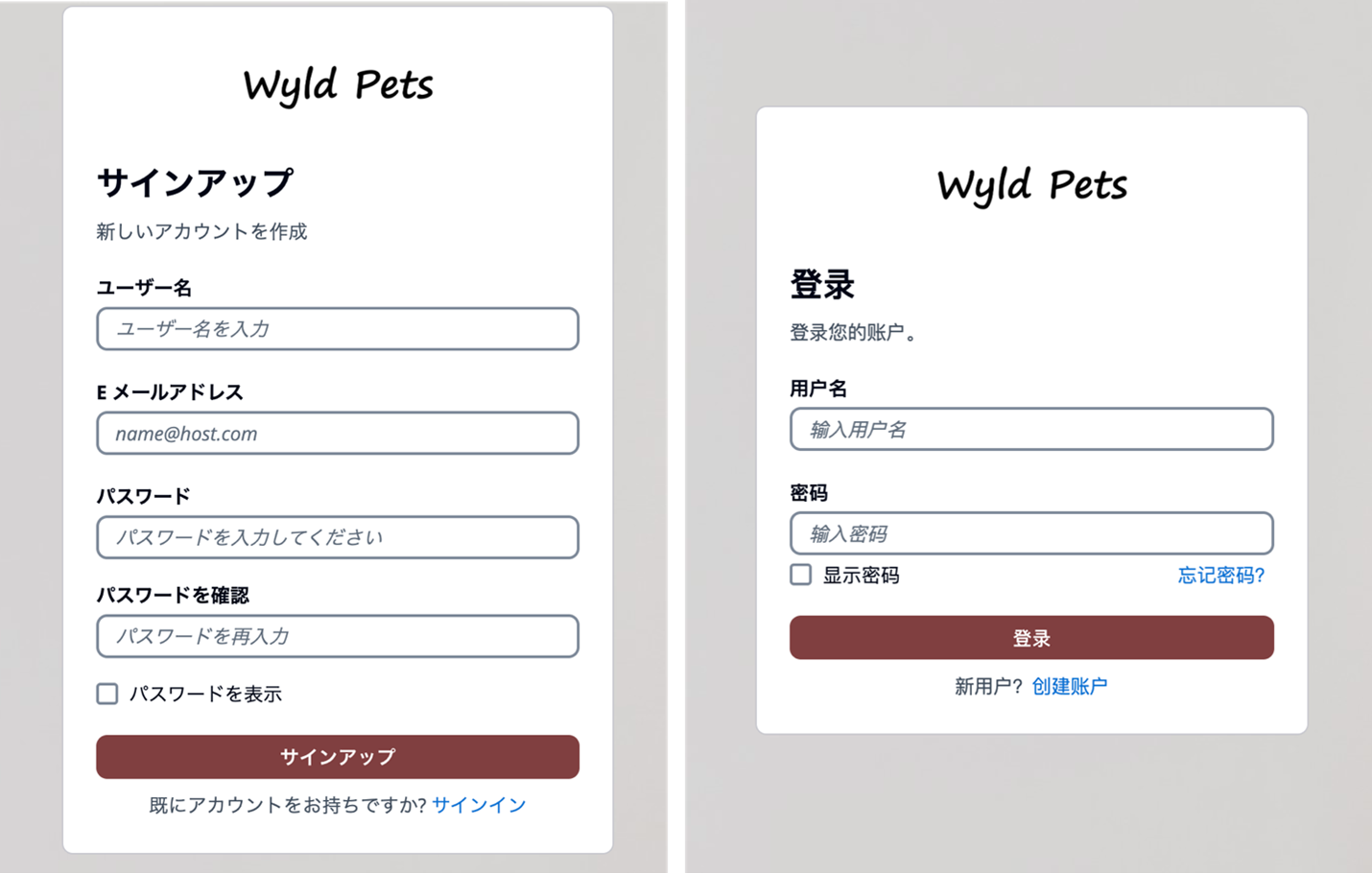
Managed login branding also offers localization options in several languages (two are shown in Figure 5). You can add a lang query parameter in the link you distribute to users, and Amazon Cognito will set a cookie in users’ browsers with their language preference after the initial request.

Figure 5: Cognito user sign up page in Japanese (left) and user sign in page in Simplified Chinese (right)

Figure 5: Cognito user sign up page in Japanese (left) and user sign in page in Simplified Chinese (right)

Hosted UI (classic) branding
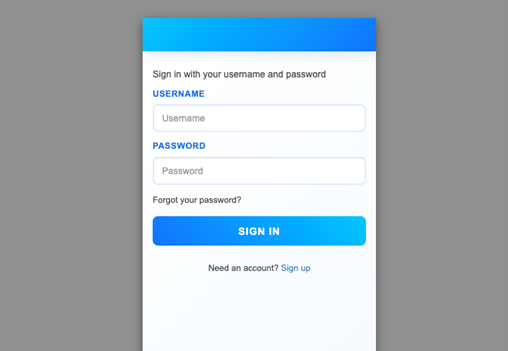
For customers who prefer a traditional approach, Amazon Cognito continues to support the Hosted UI (classic) branding (shown in Figure 6) with basic customization where you can upload a CSS file to design the UI styling and upload a brand-specific logo. Hosted UI (classic) supports standard authentication flows with MFA and self-service sign up.

Figure 6: Hosted UI (classic) branding

Figure 6: Hosted UI (classic) branding

The managed login branding with branding editor is available to Amazon Cognito user pools with Essentials and Plus feature tiers, and Hosted UI (classic) branding is available to most Cognito user pools including Lite tier. To learn more about Cognito feature tiers, visit Amazon Cognito pricing.

Security and compliance capabilities

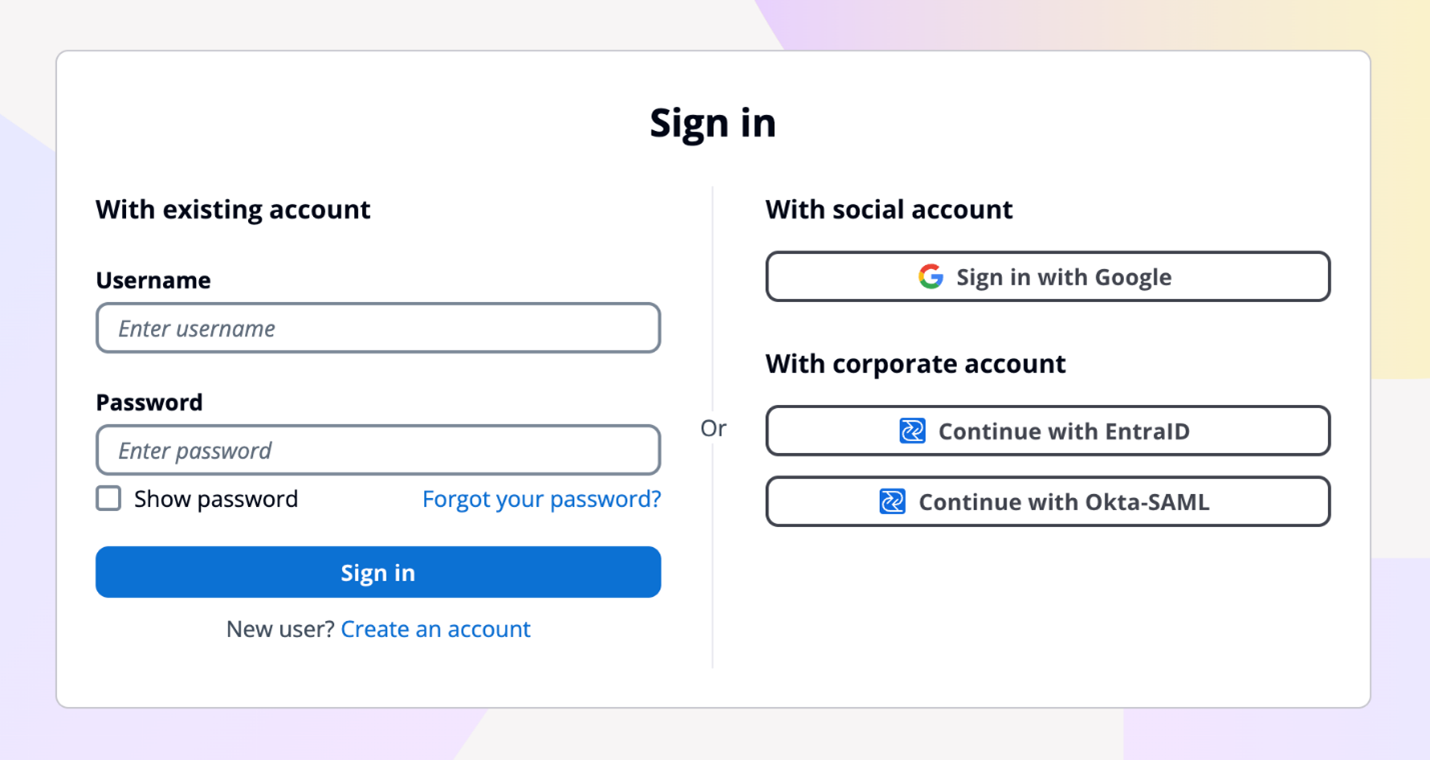
Both managed login branding and Hosted UI (classic) branding are designed to help you meet your compliance and security requirements and your users’ needs. Managed login supports custom OAuth scopes and OAuth 2.0 flows. If you want single sign-on (SSO), you can use managed login to support a single login across many application clients, with browser session cookies for the same domain. Actions are logged in AWS CloudTrail, and you can use the logs for audit and reactionary automation. The managed login experience also supports the full suite of threat protection features for Amazon Cognito. For additional protection, managed login has support for AWS WAF web ACLs and for AWS WAF CAPTCHA, which can help protect your Cognito user pools from web-based exploits and unwanted bots.

Figure 7: Example default managed login with several login providers enabled

Figure 7: Example default managed login with several login providers enabled

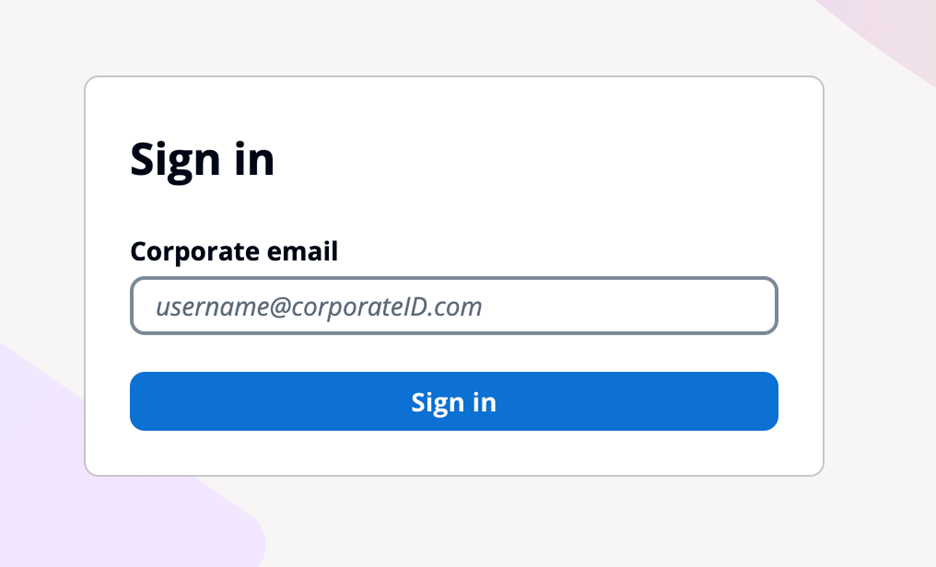
For federation, managed login supports federation with third-party IdPs that support OIDC and SAML 2.0, as well as social IdPs, as shown in Figure 7. Identity providers are connected to your Amazon Cognito user pool. In managed login, users use a button to select the federation source, and redirection is automatic. With SAML and OIDC IdPs, you can also configure mapping by using the domain in the user’s email address. In this case, a single text field is visible to your application users to enter an email address, as shown in Figure 8, and the lookup and redirect to the appropriate SAML IdP is automatic, as described in Choosing SAML identity provider names.

Figure 8: Managed login that links to corporate IdP through an email domain

Figure 8: Managed login that links to corporate IdP through an email domain

Managed login integrates with Application Load Balancer (ALB) for web applications and works with AWS Amplify to enable social identity provider and enterprise federation (SAML and OIDC) capabilities. Beyond these integrations, Amazon Cognito user pools integrate with various AWS services (such as AWS AppSync), that require user authentication and authorization, and Amazon API Gateway through Cognito authorizers to secure your REST and HTTP endpoints.

You might choose to use managed login for many reasons. AWS fully manages the hosting, maintenance, and scaling of the managed login, which can contribute to the speed of go-to-market for customers. If your app requires OAuth 2.0 custom scopes, federation, social login, or native users with basic but customized branding and potentially numerous Amazon Cognito user pools, you might benefit from using managed login.

For more information about how to configure and use the hosted UI, see Using the Amazon Cognito hosted UI for sign-up and sign-in.

Create a custom UI

Creating a custom UI using the SDK for Amazon Cognito provides a host of benefits and features that can help you completely customize the UI for your application users. With a custom UI, you have complete control over the look and feel of the UI that your application users will land on, including designing your app to support multiple languages, and you can build and design custom authentication flows.

There are numerous features that are supported when you build a custom UI. As with the managed login, the APIs invoked from a custom UI using the SDK will create log entries in CloudTrail, and you can use the logs for audit and automation. You can also create a custom authentication flow for your users with a fully custom authentication experience beyond the those available in managed login.

In a custom UI, you can build custom session management and integrate with AWS WAF. A custom UI also works with the threat protection features of Amazon Cognito.

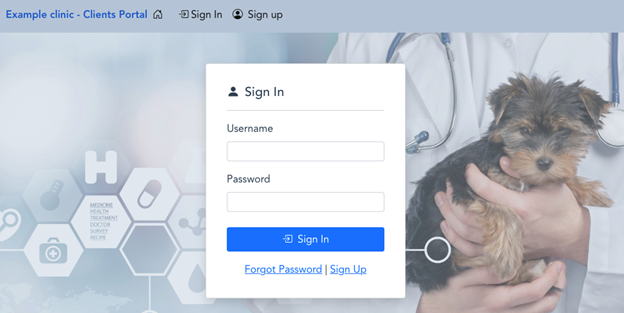
Figure 9: Example of a custom user interface

Figure 9: Example of a custom user interface

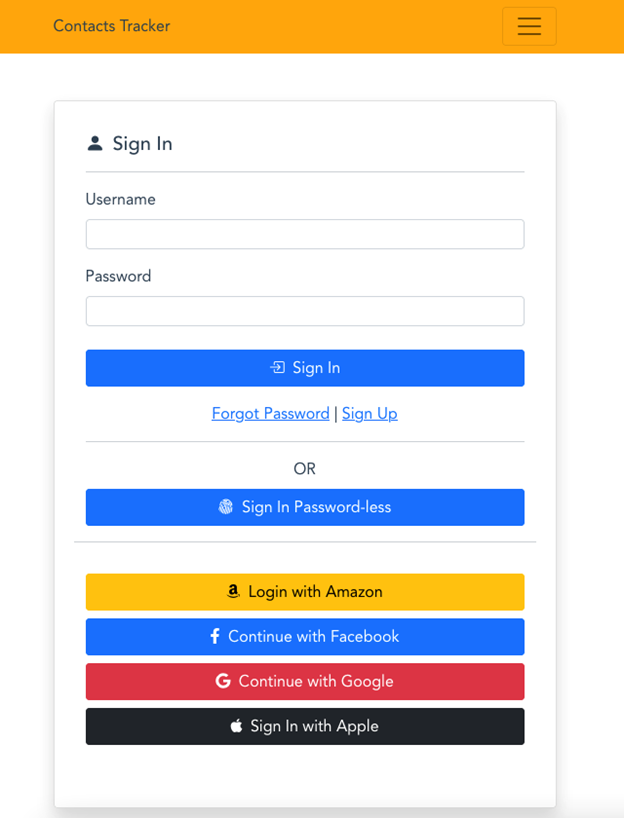
With a custom UI, such as the one shown in Figure 10, you can orchestrate a suite of sign-in options and sign-in flows for your users. For example, you can collect a user or tenant identifier at the beginning of the authentication flow and apply your own logic for user authentication flow, such as redirecting federated users to external IdPs, displaying a password prompt for local users, or directing users to create a new account if they don’t exist. You can also build flows to let a user choose alternative MFA methods if their preferred choices aren’t available.

Figure 10: Custom UI example

Figure 10: Custom UI example

When you build a custom UI, there is support for custom endpoints and proxies so that you have a wider range of options for management and consistency across application development as it relates to authentication. Custom authentication flows are only available in applications with a custom UI, which gives you the ability to make customized challenge prompts and answers to help you meet custom security requirements by using AWS Lambda triggers. For example, you could use it to implement OAuth 2.0 device grant flows. Lastly, a custom UI supports a remember device feature where you can add low-effort sign-in from trusted devices.

You might choose to build a custom UI with an SDK when full customization is a requirement or where you want to incorporate customized authentication flows using the custom authentication challenge Lambda triggers. A custom UI is a great choice if you aren’t required to use OAuth 2.0 flows and you have the resources to develop and implement a unique UI for your application users.

For more information about how to configure and use a custom UI, see Using the Amazon Cognito managed login for sign-up and sign-in. You can also visit the documentation on Building custom UIs with Amplify.

Decision criteria matrix

When deciding between Amazon Cognito managed login branding options and a custom UI, there are some unique differences that can help you determine which UI is best for your application needs. Managed login offers a modern, customizable authentication experience with advanced features like no-code visual customization, dark mode themes, and support for passwordless options. It supports OAuth 2.0 flows, custom OAuth scopes, the ability to sign in one time and access many Cognito application clients (using SSO), and full use of the Cognito threat protection features. For applications requiring complete control over the authentication experience and UX—including custom authentication flows, device fingerprinting, and reduced token expiration—a custom UI is the better choice. This option allows for full UI customization, implementation of custom authentication flows, and integration with specific frameworks or libraries not supported by managed login.

When making your decision, consider factors such as the level of customization required, specific authentication features needed, development resources available, integration requirements with other AWS services, security and compliance needs, and user experience priorities. Remember that your application authentication requirements and customer experience should take precedence over other considerations. You can use the following table to help select the best UI for your requirements.

Requirements

Managed login

Hosted UI (classic)

Custom UI (SDK)

OAuth 2.0 flows

Supported

Supported

Not available

Custom OAuth scopes

Supported

Supported

Supported

Customization of UI

No-code branding designer

Limited CSS customization

Full custom control

Custom user input forms

Not available

Not available

Supported

Custom authentication flow

Not available

Not available

Supported

Passwordless authentication flow

Supported

Not available

Custom implementation available

Localization with multiple languages

Supported

Not available

Supported

Login once across many app clients

Supported

Supported

Not available

Session expiration configurable under 1 hour

Not available

Not available

Supported

Trusted-device authentication

Not available

Not available

Supported

AWS WAF integration

Supported

Supported

Supported

Support for AWS WAF CAPTCHA

Supported

Supported

Not available

Ability to use a custom endpoint or proxy

Not available

Not available

Supported

AWS Application Load Balancer integration

Supported

Supported

Not available

Figure 11: Decision criteria matrix

Conclusion

In this post, you learned about using managed login, including its two branding options and creating a custom UI in Amazon Cognito and the many supported features and benefits of each. Each UI option targets a specific need. Choose from available options based on your list of requirements for authentication and the user sign-up and sign-in experience. You can use the information in this post as a reference as you add Amazon Cognito to your mobile and web applications for authentication.

Have a question? Contact us for general support services.

Author photo

Joshua Du Lac

Josh is a Senior Manager of Security Solutions Architects at AWS. He has advised hundreds of enterprise, global, and financial services customers to accelerate their journey to the cloud while improving their security along the way. Outside of work, Josh enjoys searching for the best tacos in Texas and practicing his handstands.

Jeremy Wave

Jeremy Ware

Jeremy is a Security Specialist Solutions Architect focused on Identity and Access Management. Jeremy and his team enable AWS customers to implement sophisticated, scalable, and secure IAM architecture and Authentication workflows to solve business challenges. With a background in Security Engineering, Jeremy has spent many years working to raise the Security Maturity gap at numerous global enterprises. Outside of work, Jeremy loves to explore the mountainous outdoors, and participate in sports such as snowboarding, wakeboarding, and dirt bike riding.

Edward Sun

Edward Sun

Edward is a Security Specialist Solutions Architect focused on identity and access management. He loves helping customers throughout their cloud transformation journey with architecture design, security best practices, migration, and cost optimizations. Outside of work, Edward enjoys hiking, golfing, and cheering for his alma mater, the Georgia Bulldogs.

Kiran Dongara

Kiran Dongara

Kiran Dongara is a Solutions Architect at Amazon Web Services (AWS) in the Worldwide Public Sector, primarily supporting US state and local government (SLG) customers and partners. His expertise lies in designing scalable and efficient architectures that adhere to well-architected framework practices, maximizing value and return on investment for his customers. When not working, Kiran prioritizes family time, nature walks, and cycling.