All posts by Mac Bowley

Helping young people navigate AI safely

Post Syndicated from Mac Bowley original https://www.raspberrypi.org/blog/helping-young-people-navigate-ai-safely/

AI safety and Experience AI

As our lives become increasingly intertwined with AI-powered tools and systems, it’s more important than ever to equip young people with the skills and knowledge they need to engage with AI safely and responsibly. AI literacy isn’t just about understanding the technology — it’s about fostering critical conversations on how to integrate AI tools into our lives while minimising potential harm — otherwise known as ‘AI safety’.

The UK AI Safety Institute defines AI safety as: “The understanding, prevention, and mitigation of harms from AI. These harms could be deliberate or accidental; caused to individuals, groups, organisations, nations or globally; and of many types, including but not limited to physical, psychological, social, or economic harms.”

As a result of this growing need, we’re thrilled to announce the latest addition to our AI literacy programme, Experience AI —  ‘AI safety: responsibility, privacy, and security’. Co-developed with Google DeepMind, this comprehensive suite of free resources is designed to empower 11- to 14-year-olds to understand and address the challenges of AI technologies. Whether you’re a teacher, youth leader, or parent, these resources provide everything you need to start the conversation.

Linking old and new topics

AI technologies are providing huge benefits to society, but as they become more prevalent we cannot ignore the challenges AI tools bring with them. Many of the challenges aren’t new, such as concerns over data privacy or misinformation, but AI systems have the potential to amplify these issues.

Digital image depicting computer science related elements.

Our resources use familiar online safety themes — like data privacy and media literacy — and apply AI concepts to start the conversation about how AI systems might change the way we approach our digital lives.

Each session explores a specific area:

  • Your data and AI: How data-driven AI systems use data differently to traditional software and why that changes data privacy concerns
  • Media literacy in the age of AI: The ease of creating believable, AI-generated content and the importance of verifying information
  • Using AI tools responsibly: Encouraging critical thinking about how AI is marketed and understanding personal and developer responsibilities

Each topic is designed to engage young people to consider both their own interactions with AI systems and the ethical responsibilities of developers.

Designed to be flexible

Our AI safety resources have flexibility and ease of delivery at their core, and each session is built around three key components:

  1. Animations: Each session begins with a concise, engaging video introducing the key AI concept using sound pedagogy — making it easy to deliver and effective. The video then links the AI concept to the online safety topic and opens threads for thought and conversation, which the learners explore through the rest of the activities. 
  2. Unplugged activities: These hands-on, screen-free activities — ranging from role-playing games to thought-provoking challenges — allow learners to engage directly with the topics.
  3. Discussion questions: Tailored for various settings, these questions help spark meaningful conversations in classrooms, clubs, or at home.

Experience AI has always been about allowing everyone — including those without a technical background or specialism in computer science — to deliver high-quality AI learning experiences, which is why we often use videos to support conceptual learning. 

Digital image featuring two computer screens. One screen seems to represent errors, or misinformation. The other depicts a person potentially plotting something.

In addition, we want these sessions to be impactful in many different contexts, so we included unplugged activities so that you don’t need a computer room to run them! There is also advice on shortening the activities or splitting them so you can deliver them over two sessions if you want. 

The discussion topics provide a time-efficient way of exploring some key implications with learners, which we think will be more effective in smaller groups or more informal settings. They also highlight topics that we feel are important but may not be appropriate for every learner, for example, the rise of inappropriate deepfake images, which you might discuss with a 14-year-old but not an 11-year-old.

A modular approach for all contexts

Our previous resources have all followed a format suitable for delivery in a classroom, but for these resources, we wanted to widen the potential contexts in which they could be used. Instead of prescribing the exact order to deliver them, educators are encouraged to mix and match activities that they feel would be effective for their context. 

Digital image depicting computer science related elements.

We hope this will empower anyone, no matter their surroundings, to have meaningful conversations about AI safety with young people. 

The modular design ensures maximum flexibility. For example:

  • A teacher might combine the video with an unplugged activity and follow-up discussion for a 60-minute lesson
  • A club leader could show the video and run a quick activity in a 30-minute session
  • A parent might watch the video and use the discussion questions during dinner to explore how generative AI shapes the content their children encounter

The importance of AI safety education

With AI becoming a larger part of daily life, young people need the tools to think critically about its use. From understanding how their data is used to spotting misinformation, these resources are designed to build confidence and critical thinking in an AI-powered world.

AI safety is about empowering young people to be informed consumers of AI tools. By using these resources, you’ll help the next generation not only navigate AI, but shape its future. Dive into our materials, start a conversation, and inspire young minds to think critically about the role of AI in their lives.

Ready to get started? Explore our AI safety resources today: rpf.io/aisafetyblog. Together, we can empower every child to thrive in a digital world.

The post Helping young people navigate AI safely appeared first on Raspberry Pi Foundation.

Free online course on understanding AI for educators

Post Syndicated from Mac Bowley original https://www.raspberrypi.org/blog/free-online-course-on-understanding-ai-for-educators/

To empower every educator to confidently bring AI into their classroom, we’ve created a new online training course called ‘Understanding AI for educators’ in collaboration with Google DeepMind. By taking this course, you will gain a practical understanding of the crossover between AI tools and education. The course includes a conceptual look at what AI is, how AI systems are built, different approaches to problem-solving with AI, and how to use current AI tools effectively and ethically.

Image by Mudassar Iqbal from Pixabay

In this post, I will share our approach to designing the course and some of the key considerations behind it — all of which you can apply today to teach your learners about AI systems.

Design decisions: Nurturing knowledge and confidence

We know educators have different levels of confidence with AI tools — we designed this course to help create a level playing field. Our goal is to uplift every educator, regardless of their prior experience, to a point where they feel comfortable discussing AI in the classroom.

Three computer science educators discuss something at a screen.

AI literacy is key to understanding the implications and opportunities of AI in education. The course provides educators with a solid conceptual foundation, enabling them to ask the right questions and form their own perspectives.

As with all our AI learning materials that are part of Experience AI, we’ve used specific design principles for the course:

  • Choosing language carefully: We never anthropomorphise AI systems, replacing phrases like “The model understands” with “The model analyses”. We do this to make it clear that AI is just a computer system, not a sentient being with thoughts or feelings.
  • Accurate terminology: We avoid using AI as a singular noun, opting instead for the more accurate ‘AI tool’ when talking about applications or ‘AI system’ when talking about underlying component parts. 
  • Ethics: The social and ethical impacts of AI are not an afterthought but highlighted throughout the learning materials.

Three main takeaways

The course offers three main takeaways any educator can apply to their teaching about AI systems. 

1. Communicating effectively about AI systems

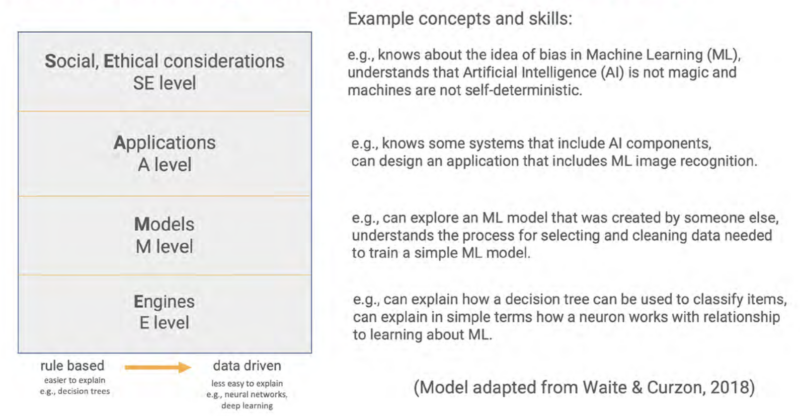
Deciding the level of detail to use when talking about AI systems can be difficult — especially if you’re not very confident about the topic. The SEAME framework offers a solution by breaking down AI into 4 levels: social and ethical, application, model, and engine. Educators can focus on the level most relevant to their lessons and also use the framework as a useful structure for classroom discussions.

The SEAME framework gives you a simple way to group learning objectives and resources related to teaching AI and ML, based on whether they focus on social and ethical aspects (SE), applications (A), models (M), or engines (E, i.e. how AI works).

You might discuss the impact a particular AI system is having on society, without the need to explain to your learners how the model itself has been trained or tested. Equally, you might focus on a specific machine learning model to look at where the data used to create it came from and consider the effect the data source has on the output. 

2. Problem-solving approaches: Predictive vs. generative AI

AI applications can be broadly separated into two categories: predictive and generative. These two types of AI model represent two vastly different approaches to problem-solving

People create predictive AI models to make predictions about the future. For example, you might create a model to make weather forecasts based on previously recorded weather data, or to recommend new movies to you based on your previous viewing history. In developing predictive AI models, the problem is defined first — then a specific dataset is assembled to help solve it. Therefore, each predictive AI model usually is only useful for a small number of applications.

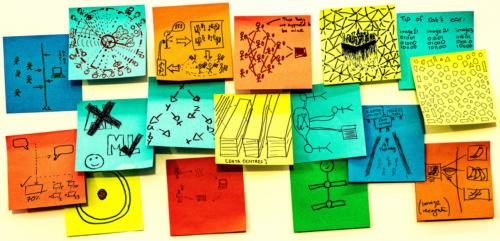
Seventeen multicoloured post-it notes are roughly positioned in a strip shape on a white board. Each one of them has a hand drawn sketch in pen on them, answering the prompt on one of the post-it notes "AI is...." The sketches are all very different, some are patterns representing data, some are cartoons, some show drawings of things like data centres, or stick figure drawings of the people involved.
Rick Payne and team / Better Images of AI / Ai is… Banner / CC-BY 4.0

Generative AI models are used to generate media (such as text, code, images, or audio). The possible applications of these models are much more varied because people can use media in many different kinds of ways. You might say that the outputs of generative AI models could be used to solve — or at least to partially solve — any number of problems, without these problems needing to be defined before the model is created.

3. Using generative AI tools: The OCEAN process

Generative AI systems rely on user prompts to generate outputs. The OCEAN process, outlined in the course, offers a simple yet powerful framework for prompting AI tools like Gemini, Stable Diffusion or ChatGPT. 

Three groups of icons representing people have shapes travelling between them and a page in the middle of the image. The page is a simple rectangle with straight lines representing data. The shapes traveling towards the page are irregular and in squiggly bands.
Yasmine Boudiaf & LOTI / Better Images of AI / Data Processing / CC-BY 4.0

The first three steps of the process help you write better prompts that will result in an output that is as close as possible to what you are looking for, while the last two steps outline how to improve the output:

  1. Objective: Clearly state what you want the model to generate
  2. Context: Provide necessary background information
  3. Examples: Offer specific examples to fine-tune the model’s output
  4. Assess: Evaluate the output 
  5. Negotiate: Refine the prompt to correct any errors in the output

The final step in using any generative AI tool should be to closely review or edit the output yourself. These tools will very quickly get you started but you’ll always have to rely on your own human effort to ensure the quality of your work. 

Helping educators to be critical users

We believe the knowledge and skills our ‘Understanding AI for educators’ course teaches will help any educator determine the right AI tools and concepts to bring into their classroom, regardless of their specialisation. Here’s what one course participant had to say:

“From my inexperienced viewpoint, I kind of viewed AI as a cheat code. I believed that AI in the classroom could possibly be a real detriment to students and eliminate critical thinking skills.

After learning more about AI [on the course] and getting some hands-on experience with it, my viewpoint has certainly taken a 180-degree turn. AI definitely belongs in schools and in the workplace. It will take time to properly integrate it and know how to ethically use it. Our role as educators is to stay ahead of this trend as opposed to denying AI’s benefits and falling behind.” – ‘Understanding AI for educators’ course participant

All our Experience AI resources — including this online course and the teaching materials — are designed to foster a generation of AI-literate educators who can confidently and ethically guide their students in navigating the world of AI.

You can sign up to the course for free here: 

A version of this article also appears in Hello World issue 25, which will be published on Monday 23 September and will focus on all things generative AI and education.

The post Free online course on understanding AI for educators appeared first on Raspberry Pi Foundation.

Teaching about AI explainability

Post Syndicated from Mac Bowley original https://www.raspberrypi.org/blog/teaching-ai-explainability/

In the rapidly evolving digital landscape, students are increasingly interacting with AI-powered applications when listening to music, writing assignments, and shopping online. As educators, it’s our responsibility to equip them with the skills to critically evaluate these technologies.

A woman teacher helps a young person with a coding project.

A key aspect of this is understanding ‘explainability’ in AI and machine learning (ML) systems. The explainability of a model is how easy it is to ‘explain’ how a particular output was generated. Imagine having a job application rejected by an AI model, or facial recognition technology failing to recognise you — you would want to know why.

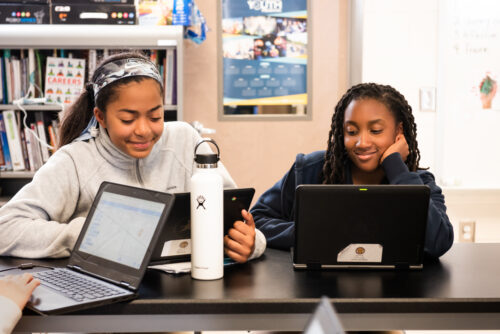
Two teenage girls do coding activities at their laptops in a classroom.

Establishing standards for explainability is crucial. Otherwise we risk creating a world where decisions impacting our lives are made by opaque systems we don’t understand. Learning about explainability is key for students to develop digital literacy, enabling them to navigate the digital world with informed awareness and critical thinking.

Why AI explainability is important

AI models can have a significant impact on people’s lives in various ways. For instance, if a model determines a child’s exam results, parents and teachers would want to understand the reasoning behind it.

Two learners sharing a laptop in a coding session.

Artists might want to know if their creative works have been used to train a model and could be at risk of plagiarism. Likewise, coders will want to know if their code is being generated and used by others without their knowledge or consent. If you came across an AI-generated artwork that features a face resembling yours, it’s natural to want to understand how a photo of you was incorporated into the training data. 

Explainability is about accountability, transparency, and fairness, which are vital lessons for children as they grow up in an increasingly digital world.

There will also be instances where a model seems to be working for some people but is inaccurate for a certain demographic of users. This happened with Twitter’s (now X’s) face detection model in photos; the model didn’t work as well for people with darker skin tones, who found that it could not detect their faces as effectively as their lighter-skinned friends and family. Explainability allows us not only to understand but also to challenge the outputs of a model if they are found to be unfair.

In essence, explainability is about accountability, transparency, and fairness, which are vital lessons for children as they grow up in an increasingly digital world.

Routes to AI explainability

Some models, like decision trees, regression curves, and clustering, have an in-built level of explainability. There is a visual way to represent these models, so we can pretty accurately follow the logic implemented by the model to arrive at a particular output.

By teaching students about AI explainability, we are not only educating them about the workings of these technologies, but also teaching them to expect transparency as they grow to be future consumers or even developers of AI technology.

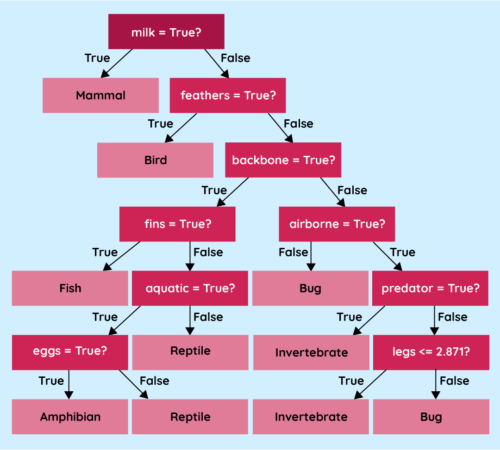
A decision tree works like a flowchart, and you can follow the conditions used to arrive at a prediction. Regression curves can be shown on a graph to understand why a particular piece of data was treated the way it was, although this wouldn’t give us insight into exactly why the curve was placed at that point. Clustering is a way of collecting similar pieces of data together to create groups (or clusters) with which we can interrogate the model to determine which characteristics were used to create the groupings.

A decision tree that classifies animals based on their characteristics; you can follow these models like a flowchart

However, the more powerful the model, the less explainable it tends to be. Neural networks, for instance, are notoriously hard to understand — even for their developers. The networks used to generate images or text can contain millions of nodes spread across thousands of layers. Trying to work out what any individual node or layer is doing to the data is extremely difficult.

Learners in a computing classroom.

Regardless of the complexity, it is still vital that developers find a way of providing essential information to anyone looking to use their models in an application or to a consumer who might be negatively impacted by the use of their model.

Model cards for AI models

One suggested strategy to add transparency to these models is using model cards. When you buy an item of food in a supermarket, you can look at the packaging and find all sorts of nutritional information, such as the ingredients, macronutrients, allergens they may contain, and recommended serving sizes. This information is there to help inform consumers about the choices they are making.

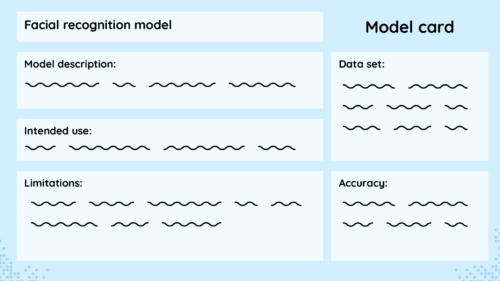
Model cards attempt to do the same thing for ML models, providing essential information to developers and users of a model so they can make informed choices about whether or not they want to use it.

A model card mock-up from the Experience AI Lessons

Model cards include details such as the developer of the model, the training data used, the accuracy across diverse groups of people, and any limitations the developers uncovered in testing.

Model cards should be accessible to as many people as possible.

A real-world example of a model card is Google’s Face Detection model card. This details the model’s purpose, architecture, performance across various demographics, and any known limitations of their model. This information helps developers who might want to use the model to assess whether it is fit for their purpose.

Transparency and accountability in AI

As the world settles into the new reality of having the amazing power of AI models at our disposal for almost any task, we must teach young people about the importance of transparency and responsibility. 

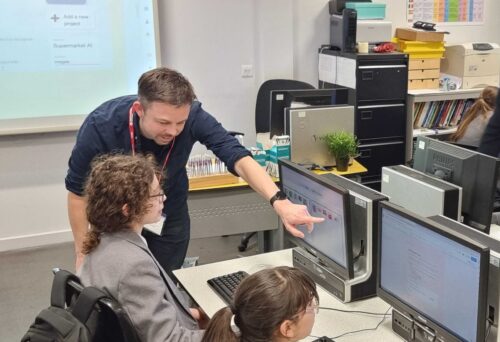
An educator points to an image on a student's computer screen.

As a society, we need to have hard discussions about where and when we are comfortable implementing models and the consequences they might have for different groups of people. By teaching students about explainability, we are not only educating them about the workings of these technologies, but also teaching them to expect transparency as they grow to be future consumers or even developers of AI technology.

Most importantly, model cards should be accessible to as many people as possible — taking this information and presenting it in a clear and understandable way. Model cards are a great way for you to show your students what information is important for people to know about an AI model and why they might want to know it. Model cards can help students understand the importance of transparency and accountability in AI.  


This article also appears in issue 22 of Hello World, which is all about teaching and AI. Download your free PDF copy now.

If you’re an educator, you can use our free Experience AI Lessons to teach your learners the basics of how AI works, whatever your subject area.

The post Teaching about AI explainability appeared first on Raspberry Pi Foundation.