All posts by Venugopalan Vasudevan

Accelerating legacy code modernization: EPAM’s journey with Amazon Q Developer

Post Syndicated from Venugopalan Vasudevan original https://aws.amazon.com/blogs/devops/accelerating-legacy-code-modernization-epams-journey-with-amazon-q-developer/

This post is co-written with Nazariy Popov, Volodymyr Konchuk, and Andrii Davydenko from EPAM

Legacy code modernization presents significant challenges for organizations looking to stay competitive in today’s rapidly evolving digital landscape. Organizations face the dual challenge of maintaining business continuity while modernizing their legacy systems for cloud environments. This transformation requires organizations to carefully navigate between preserving essential business logic and implementing modern architectural patterns. This is where AI-powered development tools can make a transformative impact, as demonstrated in EPAM’s recent legacy modernization project using Amazon Q Developer.

Amazon Q Developer, an AI code assistant, seamlessly integrates into the development pipeline to address these challenges. This innovative AI code assistant helps teams tackle various tasks, from generating new features, automating language upgrades, and refactoring legacy code to fixing bugs and automating deployments. By providing detailed explanations for its code suggestions while maintaining high quality standards, Amazon Q Developer significantly improves developer efficiency across the entire software development lifecycle, resulting in substantial time and effort savings.

EPAM, an AWS Premier Partner, collaborated with one of their customers to modernize their legacy applications to AWS Cloud. The modernization initiative focused on multiple business-critical applications, primarily built in Java 8 with Oracle Database backend.

In this post, you’ll learn how Amazon Q Developer helped EPAM engineers transform these complex legacy systems into modern cloud-native architectures on AWS. The tool enabled the team to autonomously perform a range of tasks—from implementing new microservices and documenting code to testing, reviewing, and refactoring Java code, as well as performing critical platform upgrades.

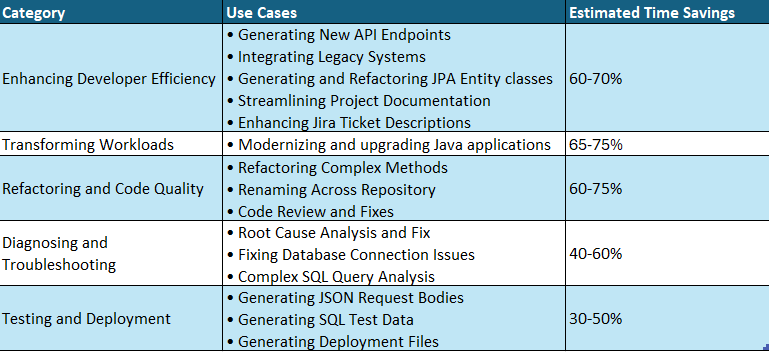
Before diving into the details, here’s an overview of how Amazon Q Developer helped EPAM across various aspects of the modernization project:

Summary of Amazon Q Developer Use Cases in EPAM’s Modernization Journey:

Summary of Amazon Q Developer Use Cases and Savings

Let’s explore each of these areas in detail.

Enhancing developer efficiency (Estimated time savings: 60-70%)

Amazon Q Developer played a crucial role in boosting EPAM’s development productivity. By automating routine tasks and providing intelligent code suggestions, the tool enabled developers to focus on more strategic aspects of the modernization project. Let’s explore how EPAM leveraged these capabilities.

Use Case 1: Generating New API Endpoints

Creating new API endpoints traditionally requires developers to invest 1-2 days per endpoint, involving multiple steps from designing the API contract to writing unit tests and documentation. Using Amazon Q Developer, the team dramatically accelerated this process for three new API endpoints in an existing microservice. Q Developer efficiently generated the initial code implementation along with comprehensive unit test coverage, requiring only minor modifications such as renaming variables, enhancing error handling, and refining test cases. The unit tests generated proved remarkably reliable with minimal adjustments needed. Along with this, Q Developer also generated comprehensive comments/documentation of the code improving the maintainability. This reduced the total development time to just 4 hours for all three endpoints – a 70% time saving compared to the traditional approach, allowing developers to focus on fine-tuning business logic rather than writing boilerplate code.

Use Case 2: Integrating Legacy Systems

Integrating a legacy monolith application with modern microservices traditionally requires developers to manually write extensive integration code, taking 1-2 weeks per integration point. Amazon Q Developer accelerated this process by automatically generating REST API client code in the monolith to consume microservice endpoints, along with data transfer objects (DTOs), error handling, and retry logic with integration test templates. While developers still needed to validate business rules and fine-tune error scenarios, Q Developer’s ability to understand both the legacy monolith’s structure and modern microservice patterns reduced the integration time to 2-3 days per integration point – a 70% time saving. This significantly streamlined the integration process while maintaining the robustness required for production systems.

Use Case 3: Generating and Refactoring JPA Entity Classes

During the modernization effort, new database tables were required to support additional business functionality in both the monolith and microservices. Instead of manually coding the data access layer, Amazon Q Developer automated the process by generating Spring JPA Entity classes from SQL DDL statements. Amazon Q Developer maintained consistency with existing data models by following established naming conventions, applying standard annotations, and implementing required interfaces from the existing codebase. What stood out was Q Developer’s ability to provide detailed explanations for its implementation choices, such as why specific annotations were used or how the new entities aligned with existing persistence patterns, enabling the team to quickly validate the generated code against their architectural standards. Amazon Q Developer generated the complete Java Spring entity class with all the fields. Additionally, Amazon Q Developer refactored the Entity class as well.

Use Case 4: Streamlining Project Documentation

Creating and maintaining up-to-date project documentation is often a time-consuming task for developers. Amazon Q Developer simplified this process by assisting in the generation of README files for the team’s projects. By analyzing the project structure, dependencies, and key components, Q Developer produced initial drafts of README files that included project overviews, setup instructions, and API documentation. This allowed developers to quickly review and refine the documentation, ensuring it met team standards while saving significant time compared to writing everything from scratch.

Use Case 5: Enhancing Jira Ticket Descriptions

Writing detailed, informative Jira ticket descriptions can be a challenge, especially for complex features or bug fixes. Amazon Q Developer aided the team by suggesting detailed descriptions for Jira tickets based on the context of the code changes and related discussions. For example, when creating a ticket for a new feature, Q Developer could propose a description that included the feature’s purpose, key implementation details, and potential impact on other system components. While developers still needed to review and adjust these descriptions, the AI-generated starting point significantly reduced the time spent on ticket management, allowing the team to focus more on actual development work.

Transforming workloads (Estimated time savings: 65-75%)

Moving legacy applications to the cloud requires careful planning and execution. EPAM utilized Amazon Q Developer’s Java upgrade capabilities to streamline the transformation of monolithic applications into modern, cloud-native architectures. Here’s how the Amazon Q Developer facilitated this process.

Use Case 6: Modernizing and upgrading Java applications

Amazon Q Developer assisted in upgrading older Java applications to Java 21 to leverage modern features like Java Streams API and adapting it for Spring Boot tech stack. It not only upgraded the code, but also updated deprecated code components, dependencies and libraries as well. This modernization improved the code’s performance and also aligned it with the current best practices adopted by the development teams. For large monolithic applications, breaking/decomposing the monolith into logical groups while identifying and separating common modules as shared dependencies helped break down the problem into manageable pieces for the agent to do a better job, resulting in a more maintainable and modular structure for the transformation process. This modular approach significantly enhanced Q Developer’s ability to analyze and transform the codebase while reducing the complexity of the modernization effort.

Refactoring Code, Improving Code Quality and Readability (Estimated time savings: 60-75%)

One of the most challenging aspects of modernization is refactoring legacy code and maintaining high code quality standards. Amazon Q Developer assisted EPAM’s team in analyzing complex codebases and suggesting improvements, optimizing the code while preserving business logic and ensuring consistent code quality. The following examples demonstrate this capability in action.

Use Case 7: Refactoring Complex Methods

Legacy code often includes methods with high cyclomatic complexity, making them difficult to maintain. Amazon Q Developer helped the development team refactor large, complex methods into smaller, more readable, and better-structured methods. It also provided a detailed explanation of the changes, highlighting how the refactored code improved maintainability and readability.

Use Case 8: Renaming Across the Repository

When tasked with renaming ‘YTD Tax Report‘ to ‘Withholding Tax Report‘ across the entire repository, Amazon Q Developer demonstrated capabilities beyond simple search and replace functionality found in traditional IDEs. It performed context-aware renaming, distinguishing between instances where ‘YTD Tax Report‘ was part of larger phrases or variable names, while simultaneously updating related components including unit tests, integration tests, and logging statements. The tool intelligently refactored method signatures where the report name was part of method names or parameters, analyzed and updated database queries, and maintained consistency across different file types including Java, XML, and properties files. What set Q Developer apart was its ability to provide detailed change logs explaining each modification and the rationale behind more complex refactoring decisions, significantly reducing the risk of missed references or inconsistencies that often occur with manual search-and-replace operations.

Use Case 9: Code Review and fixes

The code review capabilities of Amazon Q Developer, seamlessly integrated into the IDE, enabled the development team to detect potential issues spanning multiple classes. Beyond merely identifying problems, Q Developer provided actionable fix recommendations that could be easily reviewed and implemented. This proactive approach to code quality allowed the team to address issues during the early stages of development, significantly reducing the likelihood of defects making their way to production environments.

Diagnosing and troubleshooting errors (Estimated time savings: 40-60%)

Quick error resolution is crucial for maintaining development momentum. Amazon Q Developer’s advanced error analysis capabilities helped EPAM’s team identify and fix issues efficiently, reducing debugging time significantly. Here are some examples of how this worked in practice.

Use Case 10: Root Cause Analysis and Fix

During the development phase, the team encountered an unexpected error in one of the Java services: java.lang.IllegalArgumentException: Property 'http://javax.xml.XMLConstants/property/accessExternalDTD' is not recognized. Q Developer conducted a deeper analysis based on the context provided and suggested a more targeted fix and generated the necessary Java code changes, provided unit tests to verify the fix, and outlined potential security implications of the change. This comprehensive solution not only resolved the immediate error but also improved the overall security posture of the XML processing in the application. The team was able to implement and verify the fix within minutes, significantly reducing development.

Use Case 11: Fixing Database Connection Issues

While troubleshooting an issue where the application became unresponsive due to JDBC connection problems, Amazon Q Developer analyzed the project code and identified the missing connection pool configuration. Q Developer suggested implementing essential connection pool parameters like 'maximumPoolSize=20' and 'connectionTimeout=30000' based on the application’s traffic patterns and code. After implementing its suggested configuration, the issue was resolved, significantly improving the application’s stability.

Use Case 12: Complex SQL Query Analysis

Debugging complex SQL queries constructed dynamically in Java code can be challenging. Amazon Q Developer analyzed such queries, broke them down into their component parts, and provided descriptions for query parameters. For instance, when presented with a complex query involving multiple joins and subqueries, Q Developer dissected it into logical blocks, explaining how each part contributed to the overall result set. This made it easier for the team to understand and debug the queries.

Testing and Deployment: Test data generation and Automating Infrastructure Setup (Estimated time savings: 30-50%)

Use Case 13: Generating JSON Request Bodies

When testing new APIs, Amazon Q Developer generated JSON request bodies based on the corresponding Java classes. It provided detailed descriptions of each field and suggested realistic and meaningful default values, making it easier to validate API functionality with real-world scenarios.

Use Case 14: Generating SQL Test Data

Amazon Q Developer generated SQL insert statements with test data based on our existing Java Entity classes. This automation saved us a significant amount of time in creating realistic test data for database validation and integration testing.

Use Case 15: Generating Deployment Files

Amazon Q Developer helped the development team generate essential deployment artifacts, including a Docker file, a startup shell script that was used as an entry point, and a Kubernetes deployment file for a new service. Automating this process not only saves time but also improves consistency across environments.

Ready to transform your developer experience?

EPAM’s experience with Amazon Q Developer has been transformative, significantly accelerating their application modernization efforts while maintaining high code quality. By leveraging Amazon Q Developer, EPAM reduced development time by approximately 70% and improved code quality metrics across the client’s portfolio. This efficiency gains not only accelerated the client’s cloud migration timeline but also resulted in substantial cost savings and faster time-to-market for new features.

Now, it’s your turn to explore Amazon Q Developer:

Schedule a demo: Experience firsthand how Amazon Q Developer can accelerate your development lifecycle. Connect with our team for a personalized demonstration tailored to your specific use case.

Start Your Proof of Concept: Begin your journey with Amazon Q Developer today through a proof of concept. See how it can enhance your team’s productivity and code quality, just as it did for EPAM.

Connect with EPAM: Learn more about EPAM’s success story and best practices for implementing Amazon Q Developer in your organization’s development workflow.

Take the next step in revolutionizing your development process. Visit Amazon Q Developer website or contact your AWS account team to get started.

Authors

EPAM

Nazariy Popov (1) Nazariy Popov, Delivery Head of GenAI Engineering and Modernization Practice Delivery management professional and technology leader with over 15 years of experience in the IT industry. At EPAM, he drives large-scale transformation programs, focusing on enterprise software development, cloud solutions, and AI assisted engineering and modernization.
Volodymyr Konchuk Volodymyr Konchuk, Lead Software Engineer
Java engineer with more than 11 years of production experience in Java-based web and enterprise applications. Has experience in building ecommerce and retail business applications using Java, Spring tech stack, and Amazon Web Services.
Andriy Davydenko

Andrii Davydenko, Delivery Manager
Seasoned delivery lead with over 7 years of experience managing ecommerce modernization projects with a focus on application performance optimization.

AWS

Venugopalan Vasudevan (Venu) is a Senior Specialist Solutions Architect focusing on Next Generation Developer Experience and AWS Generative AI services. In this role, Venu, helps organizations optimize their development processes and accelerate their digital transformation journeys using Amazon Q Developer and other AWS Generative AI Services. Also, Venu partners with enterprises to architect and implement Generative AI solutions while establishing robust development practices.
ArunChandapillai Arun Chandapillai is a Senior Engineering Architect with a strong history of leading cross-functional teams and collaborating with executive stakeholders. He is passionate about helping customers accelerate IT modernization through business-first cloud adoption strategies, with a focus on leveraging generative AI and MLOps. Outside of technology, he is an automotive enthusiast who loves the thrill of the open road, an engaging public speaker, and a philanthropist who lives by the motto ‘you get (back) what you give’.
jasmine Jasmine Rasheed Syed is a Senior Customer Solutions manager, focused in accelerating time to value for the customers in their in cloud journey by adopting best practices and mechanisms to transform their business at scale. Jasmine is a seasoned, result oriented leader with 20+ years of progressive experience in Insurance, Retail & CPG with exemplary track record spanning across Business Development, Cloud/Digital Transformation, Delivery, Operational & Process Excellence and Executive Management.
Oscar Oscar Hernandez is a Senior Account Executive, helping global organizations drive digital and AI transformation at scale. He works closely with executive teams to integrate cloud and AI-driven solutions that address complex business challenges and deliver measurable enterprise-wide impact. With over 15 years of experience across IT, telecom, financial services, retail, and HR technology, he focuses on enabling innovation, optimizing operations, and maximizing the value of emerging technologies.

Amazon Q Developer Java Upgrades: A Deep Dive into the New Selective Transformation Feature

Post Syndicated from Venugopalan Vasudevan original https://aws.amazon.com/blogs/devops/amazon-q-developer-java-upgrades-a-deep-dive-into-new-selective-transformation-feature/

In the ever-evolving landscape of Java development, keeping applications up-to-date while minimizing risk has become increasingly challenging. Amazon Q Developer transformation capabilities now support customization of Java upgrades in Java upgrade transformation CLI (command line interface) with a new selective transformation feature. Selective transformation empowers development teams with greater control over their modernization journey. Instead of risky “big bang” upgrades, teams can now precisely target specific components and libraries for transformation while maintaining application stability. This surgical approach to modernization supports two key scenarios: individual developer-driven upgrades and orchestrated transformation campaigns managed by Center of Excellence (CoE) teams.

Using this feature, you can use natural language chat and/or an input file to tailor transformation plans and exercise greater control over Java upgrades. The following options are supported:

  1. Selection of steps from a transformation plan and breakdown of a transformation job for granular code reviews.
  2. Selection of first-party and third-party dependencies, along with their versions, that should be upgraded during JDK version upgrades.

In this blog post, we’ll explore how Java upgrade transformation CLI’s selective transformation capabilities help development teams efficiently manage Java version upgrades, reduce technical debt, and modernize their applications with minimal disruption. We’ll demonstrate practical examples of various scenarios of upgrading First-Party and Third-Party dependencies and also using an input file or natural language to guide the transformation process.

About Selective Transformation

With introduction of this selective transformation feature, the java upgrades will be completed in two phases:

  • Job 1 – Minimum JDK Upgrade: The first qct transform command will focus on performing the minimum changes necessary to upgrade the project JDK version.
  • Job 2 – Dependency Upgrade: To upgrade the project’s dependencies, run the qct transform command again on the newly upgraded Java 17/21 project. This second job will then handle only the dependency upgrades.

Dependency Upgrade Input file

Dependency upgrade file is an optional input to the qct transform command where the user can specify the versions of first-party and third-party dependencies that needs to be upgraded.

  • Structure the dependency_upgrade.yml (or any other name you prefer) in the following format:
name: dependency-upgrade
description: "Custom dependency version management for Java migration from JDK 8/11/17 to JDK 17/21"

dependencyManagement:
  dependencies:
    - identifier: "groupId:artifactId" # Required
      targetVersion: "2.1.0" # Required
      versionProperty: "library1.version"  # Optional
      originType: "FIRST_PARTY" # or "THIRD_PARTY"  # Required
    - identifier: "com.example:library2" # Required
      targetVersion: "3.0.0" # Required
      originType: "THIRD_PARTY" # Required
  plugins:
    - identifier: "groupId:artifactId"
      targetVersion: "1.2.0"
      originType: "THIRD_PARTY"
      versionProperty: "plugin.version"  # Optional
  • For each dependency or plugin you want to upgrade:
    • Under dependencies or plugins, add a new entry.
    • Specify the identifier
    • Set the targetVersion to the desired version.
    • Specify originType as “FIRST_PARTY” or “THIRD_PARTY”.
    • Optionally, include versionProperty if the version is managed by a property.
  • When running the migration command, include the --dependency_upgrade_file flag followed by the path to your YML file:
qct transform \
--source_folder <path-to-folder>\
--target_version <17 or 21> \
--dependency_upgrade_file <path-to-dependency_upgrade.yml>\
--no-interactive

Interactive and No-Interactive Mode

You can run the selective transformation upgrades in either no-interactive or interactive mode

For no-interactive mode , you need to specify --no-interactive flag , where the transformation will proceed with planning and execution without waiting for any user input in an interactive fashion.

Interactive mode is a new “chat” option in the CLI where once the plan is generated, user can type feedback in natural language and specify to skip steps or specify particular versions of dependencies to be upgraded to guide the transformation process.

Interactive Mode Usage Examples:

  1. Ask to change dependencies “Can you upgrade junit to version 4.15 instead of 4.12?”
  2. Ask to remove steps “Can you skip plan step 3”
  3. Ask to remove certain dependencies “I don’t want my springboot to be upgraded at this time”
  4. Invalid Input (should be thrown away and will prompt again) “What is the capital of France?”
  5. Start message: “The plan looks good” or “Go ahead with transformation” or “Looks Good”
  6. Add first party dependency “Could you help me also upgrade the dependency XXX:XXXX”

Example Transformation

Pre-requisites:

  1. Refer to the link for general instructions on installation of transformation CLI : https://docs.aws.amazon.com/amazonq/latest/qdeveloper-ug/run-CLI-transformations.html
  2. Clone the repo from https://github.com/aws-samples/aws-appconfig-java-sample

Mode 1 : Interactive : Upgrade Java v1.8 to Java v21

We will use interactive mode to transform this 1.8 project to 21 along with a 1P dependency upgrade to 21 as well.

Refer to example 1p dependency upgrade file

Initiate the transformation using command below:

qct transform \
--source_folder /home/ec2-user/qct/aws-appconfig-java-sample\
--target_version 21 \
--dependency_upgrade_file /home/ec2-user/qct/dependency_upgrade_1p.yml\
--no-interactive

Amazon Q performs transformations based on your project's requests, descriptions, and content. To maintain security, avoid including external, unvetted artifacts in your project repository and always validate transformed code for both functionality and security. Do you want to proceed? [Y/N]: Y

Choose Y to proceed with the transformation.

Once the Job is accepted, during the planning phase, agent will display the plan based on the input dependency upgrade file provided to include 1P upgrade as part of the plan. (if no dependency upgrade file is provided, user can still provide feedback on the plan). Here we say Looks good, proceed with the transformation.

For this transformation, I'll make the necessary changes to upgrade your Java 8 application to Java 21.

Here is the transformation plan that includes your first party dependencies:
Step 0: Minimal migration to Java 21
Step 1:

            * Update/Add 1P dependency com.amazonaws.samples:movie-service-utils to version 0.3.0

If you would like to modify the plan, you can ask me to:

    * Add first party dependencies and versions to upgrade to
    * Change the target versions of the first party dependencies

You can enter plan feedback, or let me know if you want to start the transformation now: Looks good, proceed with the transformation

If is there is any user feedback , the agent will display the revised plan for the user to accept, if not it will proceed with the transformation. Upon completion, the agent will display the status, provide the location of the summary file containing the changes, and confirm the creation of a new branch with these changes. You can run git diff mainlineto review the changes and accept.

Fig 1 part of pom.xml changes after transformation from 8 to 21

Fig 1: part of pom.xml changes after transformation from 8 to 21

The transformation agent was able to upgrade Java 8 to Java 21 version along with dependencies minimally required for v21 and also the 1P dependency specified in the upgrade file.

Mode 1 : Interactive : Upgrade dependencies

Initiate the transformation using the same command as seen below:

qct transform \
--source_folder /home/ec2-user/qct/aws-appconfig-java-sample\
--target_version 21 \

Once the Job is accepted, during the planning phase, the transformation agent will display the transformation plan and ask the user input for any feedback to upgrade 3P dependencies to a specified version if needed.

For this transformation, I'll upgrade libraries and other dependencies to modernize your Java 21 application.

Here is the transformation plan:
Step 1:

        * Update javax.validation:javax.validation-api

Step 2:

        * Update org.mockito:*
        * Update org.springframework.boot:spring-boot-starter-parent to version 3.3.4
        * Update org.springframework.boot:spring-boot-starter-test to version 3.3.4

Step 3:

        * Update org.apache.logging.log4j:*

Step 4:

        * Update org.springframework.boot:spring-boot-maven-plugin to version 3.3.4
        * Update org.springframework.boot:spring-boot-starter-web to version 3.3.4

Step 5:

        * Update org.apache.logging.log4j:log4j-api to version 2.24.0
        * Update org.apache.logging.log4j:log4j-core to version 2.24.0

Step 6:

        * Update org.json:json to version 20240303

Step 7:

        * Update software.amazon.awssdk:appconfig to version 2.28.6
        * Update software.amazon.awssdk:bom to version 2.28.6

If you would like to modify the plan, you can ask me to:

* Only upgrade certain libraries
* Change the target version of a library
* Only perform certain steps in the plan

You can enter plan feedback, or let me know if you want to start the transformation now:

For this example,

Let’s say "Skip Step 6, upgrade org.springframework.boot:spring-boot related libraries and plugin to 3.4.5, upgrade software.amazon.awssdk:appconfig to version 2.31.40 and Update software.amazon.awssdk:bom to version to 2.31.40"

Transformation agent will display the revised plan for the user to accept, and ask confirmation to proceed with the transformation.

Here is the updated transformation plan:
Step 1:

        * Update javax.validation:javax.validation-api

Step 2:

        * Update org.mockito:*
        * Update org.springframework.boot:spring-boot-starter-parent to version 3.4.5
        * Update org.springframework.boot:spring-boot-starter-test to version 3.4.5

Step 3:

        * Update org.apache.logging.log4j:*

Step 4:

        * Update org.springframework.boot:spring-boot-maven-plugin to version 3.4.5
        * Update org.springframework.boot:spring-boot-starter-web to version 3.4.5

Step 5:

        * Update org.apache.logging.log4j:log4j-api to version 2.24.0
        * Update org.apache.logging.log4j:log4j-core to version 2.24.0

Step 6:

        * Update software.amazon.awssdk:appconfig to version 2.31.40
        * Update software.amazon.awssdk:bom to version 2.31.40

If you would like to modify the plan, you can ask me to:

* Only upgrade certain libraries
* Change the target version of a library
* Only perform certain steps in the plan

You can modify the plan 4 more time(s) before I start the transformation.

You can enter plan feedback, or let me know if you want to start the transformation now: Looks good

Fig 2 part of pom.xml changes after dependency upgradesFig 2: part of pom.xml changes after dependency upgrades

The transformation agent was able to upgrade 3P dependencies specified via the interactive mode during the planning stage.

Mode 2 : No-Interactive : Java v1.8 to Java v21

We will use no-interactive mode to transform this 1.8 project to 21 along with 1P version upgrades with dependency upgrade

The transformation agent will not wait for any user inputs and directly upgrade the project from Java 1.8 to 21 with along with dependencies minimally required for this upgrade.

Refer to example 1p dependency upgrade file

Initiate the transformation using command below:

qct transform \
--source_folder /home/ec2-user/qct/aws-appconfig-java-sample \
--target_version 21 \
--dependency_upgrade_file /home/ec2-user/qct/dependency_upgrade_1p.yml \
--no-interactive

Fig 3 part of pom.xml changes showing 1P upgrades

Fig 3: part of pom.xml changes showing 1P upgrades

The transformation agent was able to upgrade the Java version along with 1P dependency specified.

Mode 2 : No-Interactive : Upgrade dependencies

We will use no-interactive mode to upgrade the 3P dependencies

Refer to example 3p dependency upgrade file

Initiate the command below:

qct transform \
--source_folder /home/ec2-user/qct/aws-appconfig-java-sample \
--target_version 21 \
--dependency_upgrade_file /home/ec2-user/qct/dependency_upgrade_3p.yml \
--no-interactive

Fig 4 of pom.xml changes showing 3P upgrades

Fig 4: part of pom.xml changes showing 3P upgrades

The transformation agent was able to upgrade 3P dependencies along with the versions provided by the user via the dependency upgrade file.

Conclusion

The introduction of selective transformation in Java upgrade transformation CLI marks a significant evolution in how teams can approach Java modernization. By offering granular control over upgrade paths, supporting natural language interactions, and enabling targeted dependency management, this feature transforms what was once a daunting technical challenge into a manageable, incremental process. As a next step, start by identifying your most critical components that need upgrading, and leverage the selective transformation feature to create a tailored upgrade strategy. Visit the Amazon Q Developer transformation CLI documentation to learn more about implementing these capabilities in your development workflow, and join the growing community of developers who are revolutionizing their approach to Java modernization. The future of efficient, risk-managed Java upgrades is here – it’s time to embrace it.

About the authors

saptob Saptarshi Banerjee serves as a Senior Solutions Architect at AWS, collaborating closely with AWS Partners to design and architect mission-critical solutions. With a specialization in generative AI, AI/ML, serverless architecture, Next-Gen Developer Experience tools and cloud-based solutions, Saptarshi is dedicated to enhancing performance, innovation, scalability, and cost-efficiency for AWS Partners within the cloud ecosystem.
sureshnt Sureshkumar Natarajan is a Senior Technical Account Manager at AWS based in Denver, CO. He specializes in supporting Greenfield and SMB customers on the AWS platform. His expertise includes AWS Generative AI Services, AWS ECS/EKS Container solutions, and helping Enterprise Support customers to build well-architected solutions in AWS
vasudeve Venugopalan is a Senior Specialist Solutions Architect at Amazon Web Services (AWS), where he specializes in AWS Generative AI services. His expertise lies in helping customers leverage cutting-edge services like Amazon Q, and Amazon Bedrock to streamline development processes, accelerate innovation, and drive digital transformation.

Three ways Amazon Q Developer agent for code transformation accelerates Java upgrades

Post Syndicated from Venugopalan Vasudevan original https://aws.amazon.com/blogs/devops/three-ways-amazon-q-developer-agent-for-code-transformation-accelerates-java-upgrades/

When Amazon Web Services (AWS) launched Amazon Q Developer agent for code transformation as a preview last year to upgrade Java applications, we saw many organizations desire to significantly accelerate their Java upgrades. Previously, these upgrades were considered daunting, a time-consuming manual task requiring weeks if not months of effort and with Amazon Q Developer they could significantly reduce that burden. Companies such as Toyota, Novacamp, Pragma and Persistent saw productivity gains not only in reducing the amount of time the upgrades would take, but re-prioritizing that time saved into other business priorities related to the software development lifecycle (SDLC). In addition, a small team of AWS developers upgraded over 1000 carefully chosen applications from multiple independent services. These applications used less than 10 dependencies and required minimal mandatory changes to the application code for the upgrade. While we saw a high degree of upgrade success for simpler applications, we also heard from customers who wanted even more capabilities in the Amazon Q Developer agent for code transformation. They expected the agent to upgrade their libraries to the latest major versions, replace deprecated API calls, and provide more explainability of changes made.

We added these and more capabilities to the agent at General Availability (GA). Today, we’re going into detail on the following four categories for what Amazon Q Developer can do for your Java upgrades: major version upgrades of popular frameworks, directly replacing deprecated API calls on your behalf, clear explainability on code changes, and using some examples of our unprecedented AI technology powered by Amazon Bedrock, that is capable, for example, of correcting more compilation errors that can be encountered when attempting the build in Java 17.

This blog post will dive deeper into these three ways we improved the product experience through an example application. You can download the application from this GitHub repository.

About the application

This is a Java 1.8 based microservice application which displays free list of movies for the month based on configuration stored in AWS AppConfig service using AWS SDK. This application was first open sourced in 2020 and uses legacy versions of libraries such as Spring Boot 2.x, Log4j 2.13.x, Mockito 1.x, Javax and Junit 4. You can download the sample project to try it for yourself.

(1) Popular framework upgrades

While Spring Boot version 2.7 is compatible with Java 17, Amazon Q Developer agent for code transformation can bring your applications up to version 3.2. This has been helpful because it can be time consuming to correct all the changes in annotations and code implementation that are no longer compatible when going into the new major version upgrade. Moreover, this version of Spring Boot provides improved observability, performance improvements, modernized security, and overall enhanced development experience. Let’s dive into some examples of where you see Amazon Q Developer accelerate some of this heavy lifting during the upgrade process.

When working with file uploads in Spring Boot v2, you would typically use the @RequestParam("file") annotation to bind the uploaded file to a method parameter. However, in Spring Boot v3.2, this approach has been updated to better align with the Jakarta EE specifications. Instead of using a plain String parameter, you’ll need to use the MultipartFile class from the org.springframework.web.multipart package. Here is an example before and after code transformation with Amazon Q Developer:

Java 8 code with Spring v2

@RequestMapping(value = "/movies/{movie}/edit", method = POST)
public String processUpdateMovie(@Valid Movie movie, BindingResult result, 
                           @PathVariable("movieId") int movieId) {
   
   ...
} 

Java 17 code upgraded by Amazon Q Developer with Spring v3

@PostMapping("/movies/{movie}/edit")
public String processUpdateMovie(@Valid Movie movie, BindingResult result,
                           @PathVariable int movieId) {

... 
}

Associated dependency updates in pom.xml

<parent>
    <groupId>org.springframework.boot</groupId>
    <artifactId>spring-boot-starter-parent</artifactId>
    <version>2.0.5.RELEASE</version>
</parent>
to
<parent>
    <groupId>org.springframework.boot</groupId>
    <artifactId>spring-boot-starter-parent</artifactId>
    <version>3.2.5</version>
</parent>

The following lists some common libraries we’ve seen you all use, with the corresponding compatible version in Java 8 and what we’re capable of upgrading to using Q Developer. This list isn’t comprehensive of all libraries, the intent is to show some common ones. This could change in the future and is up-to-date as of the time of this publication.

Table-QCT

Let’s review a few examples from the Sample project.

Java 8 code with Junit 4

import org.junit.Test;
import org.junit.runner.RunWith;
import org.springframework.boot.test.context.SpringBootTest;
import org.springframework.test.context.junit4.SpringRunner;
import com.amazonaws.samples.appconfig.movies.MoviesController;

@RunWith(SpringRunner.class)
@SpringBootTest
public class MovieTest {
  ...
}
@Before
public void setUp() {
    MockitoAnnotations.initMocks(this);
    moviesController = new MoviesController();
    moviesController.env = env;
}
<dependency>
    <groupId>junit</groupId>
    <artifactId>junit</artifactId>
    <version>4.13.1</version>
    <scope>test</scope>
</dependency>

Java 17 code upgraded by Amazon Q Developer with Junit 5:

import org.junit.jupiter.api.Test;
import org.springframework.boot.test.context.SpringBootTest;
import com.amazonaws.samples.appconfig.movies.MoviesController;

@SpringBootTest
public class MovieTest {
  ...
}
@BeforeEach
public void setUp() {
    MockitoAnnotations.initMocks(this);
    moviesController = new MoviesController();
    moviesController.env = env;
}
<dependency>
    <groupId>org.junit.jupiter</groupId>
    <artifactId>junit-jupiter</artifactId>
    <scope>test</scope>
</dependency>

(2) Deprecated APIs

One of the biggest challenges organizations face when upgrading to a newer version of Java is dealing with deprecated APIs. As new language features and libraries are introduced, older APIs are often marked as deprecated and eventually removed in subsequent releases. This can lead to compilation errors and compatibility issues, requiring developers to manually identify and replace these deprecated APIs throughout their codebase – a time-consuming and error-prone process.

In our sample application, you will see a variety of deprecated APIs that are addressed by Q Developer as an output of the transformation to Java 17. Here are some examples:

Before:

bd.divide(bd2, BigDecimal.ROUND_DOWN);
bd.divide(bd2, 1, BigDecimal.ROUND_CEILING);     

After:

bd.divide(bd2, RoundingMode.DOWN);
bd.divide(bd2, 1, RoundingMode.CEILING);

Before:

String enc1 = new sun.misc.BASE64Encoder().encode(bytes);

After:

import java.util.Base64;
String enc1 = Base64.getEncoder().encodeToString(bytes);

Before:

import javax.security.cert.*;

After:

import java.security.cert.*;

Before:

import static org.mockito.Matchers.anyInt;
...
when(mocklist.get(anyInt())).thenReturn("Movies");

After:

import static org.mockito.ArgumentMatchers.anyInt;
...
when(mocklist.get(anyInt())).thenReturn("Movies");

Java versions before 15 required explicit line terminators, string concatenations, and delimiters to embed multi-line code snippets. Java 15 introduced text blocks to simplify embedding code snippets and text sequences, particularly useful for literals like HTML, JSON, and SQL. Text blocks are an alternative string representation that can replace traditional double-quoted string literals, allowing multi-line strings without explicit line terminators or concatenations. Amazon Q Developer agent for code transformation will migrate your complex multi-line text which not so readable to text blocks.

Before:

private static String getMovieItemsHtml(Movie[] movies) {
        StringBuilder movieItemsHtml = new StringBuilder();
        for (Movie movie : movies) {
            movieItemsHtml.append("<div class='movie-item'>"
                    + "<p>ID: ").append(movie.getId()).append("</p>"
                    + "<h3>").append(movie.getMovieName()).append("</h3>"
                    + "<hr width=\"100%\" size=\"2\" color=\"blue\" noshade>"
                    + "</div>");
        }
        return movieItemsHtml.toString();
    }

After:

private static String getMovieItemsHtml(Movie[] movies) {
        StringBuilder movieItemsHtml = new StringBuilder();
        for (Movie movie : movies) {
            movieItemsHtml.append("""
                    <div class='movie-item'>\
                    <p>ID: \
                    """).append(movie.getId()).append("""
                    </p>\
                    <h3>\
                    """).append(movie.getMovieName()).append("""
                    </h3>\
                    <hr width="100%" size="2" color="blue" noshade>\
                    </div>\
                    """);
        }
        return movieItemsHtml.toString();
    }

Including these examples above in the sample app, Q Developer supports a wide range of abilities to address deprecated APIs across various domains, including primitive type constructors and conversions, character and string utilities, date and time handling, mathematical operations, networking and sockets, security and cryptography, concurrent programming and atomics, reflection and bytecode generation, as well as a significant number of deprecated methods related to Swing and AWT components. Whether it’s replacing outdated methods for handling dates, encoding URLs, or working with BigDecimal arithmetic, we can automatically update your code to use their modern equivalents. It also addresses deprecations in areas like multicast sockets, atomic variables, and even bytecode generation using ASM.

With the Q Developer agent for code transformation, we’ve made it easier than ever to handle deprecated APIs during your Java 17 migration. Q Developer is capable of automatically detecting and replacing deprecated API calls with their modern equivalents, saving you countless hours of manual effort and reducing the risk of introducing bugs or regressions.

(3) Unprecedented AI technology

Even after addressing deprecated APIs and framework upgrades, the process of migrating to a new Java version can still encounter compilation errors or unexpected behavior. These issues can arise from subtle changes in language semantics, incompatibilities between libraries, or other factors that are difficult to anticipate and diagnose.

To tackle this challenge, the Q Developer agent for code transformation leverages our self-debugging technology powered by Bedrock which analyzes the context of compilation errors and is capable of implementing targeted code modifications to resolve them. Here are some examples.

Java 1.8 with javax.security.X509Certificate:

import javax.security.cert.*;
import java.io.File;
import java.io.FileInputStream;
import java.io.FileNotFoundException;
import java.io.InputStream;
import java.util.Date;

public class Security {
    public Certificate getCertificate(File certFile) throws CertificateExpiredException, CertificateNotYetValidException {
        X509Certificate cert = null;
        try {
            InputStream inStream = new FileInputStream(certFile);
            cert = X509Certificate.getInstance(inStream);
        } catch (CertificateException e) {
            throw new RuntimeException(e);
        } catch (FileNotFoundException e) {
            throw new RuntimeException(e);
        }
        cert.checkValidity(new Date());
        return cert;
    }

}

Amazon Q changing dependency from javax.security to java.security package and fixing compilation errors related to X509Certificate . It modified the code to get the X509Certificate from CertificateFactory instead of directly getting from the X509Certificate.getInstance.

import java.security.cert.*;
import java.io.File;
import java.io.FileInputStream;
import java.io.FileNotFoundException;
import java.io.InputStream;
import java.util.Date;

public class Security {
    public Certificate getCertificate(File certFile) throws CertificateExpiredException, CertificateNotYetValidException {
        X509Certificate cert = null;
        try {
            InputStream inStream = new FileInputStream(certFile);
            CertificateFactory cf = CertificateFactory.getInstance("X.509");
            cert = (X509Certificate) cf.generateCertificate(inStream);
        } catch (CertificateException e) {
            throw new RuntimeException(e);
        } catch (FileNotFoundException e) {
            throw new RuntimeException(e);
        }
        cert.checkValidity(new Date());
        return cert;
    }

}

With Q Developer’s AI technology, it can automatically correct a wider range of issues that would otherwise require manual intervention, further streamlining the upgrade process and reducing the risk of costly delays or regressions.

AI Technology GIF

Conclusion

Throughout this blog post, we explored the three major areas of improvement in the Amazon Q Developer agent for code transformation since its general availability: major version upgrades of popular frameworks, direct replacement of deprecated library calls, and leveraging our AI technology using Amazon Bedrock capabilities to correct compilation errors during Java 17 migration. By addressing these critical aspects, the Q Developer agent has become an even more powerful tool for organizations seeking to unlock the benefits of Java 17 while minimizing the time and effort required for application upgrades. As we continue to enhance the Q Developer agent based on customer feedback, we encourage you to explore the open source example application provided and experience firsthand how this tool can streamline your Java modernization journey. See Getting Started with Amazon Q Developer agent for code transformation for a step by step process to transforming a java application with Q Developer.

About the authors

Jonathan-VogelJonathan Vogel

Jonathan is a Developer Advocate at AWS. He was a DevOps Specialist Solutions Architect at AWS for two years prior to taking on the Developer Advocate role. Prior to AWS, he practiced professional software development for over a decade. Jonathan enjoys music, birding and climbing rocks.


Venugopalan Vasudevan

Venugopalan is a Senior Specialist Solutions Architect at Amazon Web Services (AWS), where he specializes in AWS Generative AI services. His expertise lies in helping customers leverage cutting-edge services like Amazon Q, and Amazon Bedrock to streamline development processes, accelerate innovation, and drive digital transformation.