Post Syndicated from xkcd.com original https://xkcd.com/3295/
Post Syndicated from xkcd.com original https://xkcd.com/3295/
Post Syndicated from Explosm.net original https://explosm.net/comics/ice-bath
New Cyanide and Happiness Comic
Post Syndicated from Ryan Smith original https://www.servethehome.com/qnap-qsw-m2130-2-5gbe-and-10gbe-switches-shown/
At Computex 2026 QNAP was showing off a pair of new managed enterprise switches. The QSW-M2130 and 2130P offer 24x 2.5GbE ports and 6x 10GbE ports with both RJ45 and SFP+ backhaul connectivity
The post QNAP QSW-M2130 2.5GbE and 10GbE Switches Shown appeared first on ServeTheHome.
Post Syndicated from The Atlantic original https://www.youtube.com/watch?v=MPrNaTEzLp4
Post Syndicated from The Atlantic original https://www.youtube.com/shorts/Ht-t4A1Nbzo
Post Syndicated from Oglaf! -- Comics. Often dirty. original https://www.oglaf.com/pinchybouquets/


Post Syndicated from Patrick Kennedy original https://www.servethehome.com/sth-weekly-newsletters-you-want-to-subscribe-in-q3-2026/
Subscribe to our newsletters to stay up to date on the latest reviews and coverage from STH and more delivered to your inbox
The post STH Weekly Newsletters You Want to Subscribe in Q3 2026 appeared first on ServeTheHome.
Post Syndicated from The Atlantic original https://www.youtube.com/shorts/sbTu1pXrUPQ
Post Syndicated from James Wu original https://aws.amazon.com/blogs/big-data/from-silos-to-insights-federated-data-access-patterns-for-ai-agents/
Enterprise data today is scattered across specialized systems, each with its own tools and expertise. Querying a database requires SQL. Accessing batch data on Amazon Simple Storage Service (Amazon S3) requires compute engines such as Amazon Athena and Trino. Consuming real-time streams from Amazon Kinesis requires streaming expertise. Each software as a service (SaaS) application has its own API, authentication model, and query language. Today, only data engineers can navigate this landscape, and business users file tickets, wait for reports, or rely on dashboards that answer yesterday’s questions. When a leader needs a one-time answer spanning multiple systems, they’re back in the ticket queue.
Consider a streaming media company: customer profiles, content catalogs, and ad campaign performance are stored as batch data on Amazon S3. Viewership telemetry such as device type, stream quality, watch duration, and buffering events flows in real time through Amazon Kinesis. Subscriber management and support tickets live in a relational customer relationship management (CRM) database. Leaders routinely ask questions like:
Answering these questions faces two challenges:
The data silo problem. The data lives in multiple places with batch stores on S3, real-time streams in Kinesis, and an online transaction processing (OLTP) database, each with its own access patterns, query language, and authentication model. Organizations traditionally solve this by building data lakes or adopting a data mesh, but both require significant data engineering investment and ongoing maintenance.
The access gap. The expertise to navigate the enterprise systems is concentrated in the hands of few data engineers, creating a bottleneck that no dashboard or business intelligence (BI) tool fully resolves. Every new one-time requirement means more engineering work, and it’s not self-service.
A fundamentally different approach is emerging: instead of moving all data to one place or building bespoke integrations for each source, let AI agents talk directly to the systems where data lives. Model Context Protocol (MCP) makes this possible, an open protocol that standardizes how AI applications connect to external data sources and tools. MCP servers wrap diverse systems behind a uniform interface for tool discovery, invocation, and response handling. Any user can ask a question in natural language and the agent reaches the right data without knowing which system holds it, what API to use, or what query language is required.
In this post, we propose reference architectures for accessing data stored in different systems and datastores using MCP and Amazon Bedrock AgentCore. The patterns apply to enterprises with mixed data sources, but we ground the narrative in our streaming media company example described earlier to make the problem concrete.
Our solution is a federated data foundation for a streaming media company. It supports real-time and batch analytics using MCP servers and Amazon Bedrock AgentCore, and it makes analytics accessible across the organization. The following reference architecture shows the complete picture from data ingestion through governance and compute layers to the generative AI layer where agents orchestrate across MCP servers. The demo uses synthetic data: batch datasets are generated with Python scripts, and streaming telemetry is produced by AWS Lambda. The complete source code is available in the accompanying GitHub repository, so you can deploy and try it yourself.
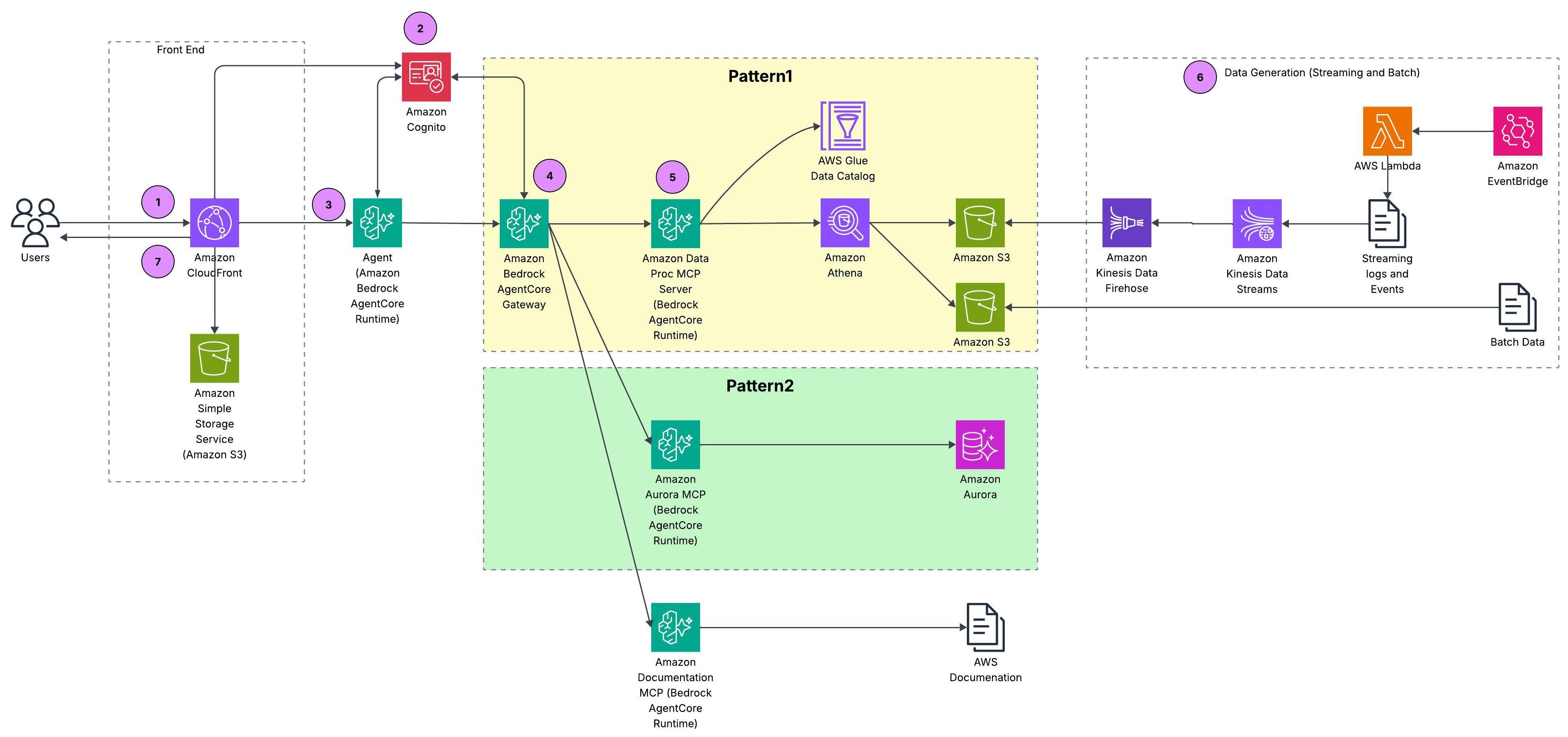
Figure 1: Reference architecture for federated data access across batch, streaming, and relational sources
This section covers the prerequisites and then walks through how a user request flows end to end through the reference architecture.
For deploying our reference architecture, follow the instructions in the code repository.
Within our architecture, we propose three design patterns for federated data access, each on a spectrum between centralized governance and direct access flexibility.
AWS Glue Data Catalog registers all S3 sources under a unified metadata layer: schemas, business context, data quality metrics, and lineage. The AWS Data Processing MCP server, hosted on Amazon Bedrock AgentCore runtime, wraps AWS Glue Catalog metadata and Amazon Athena query capabilities behind standard MCP tool calls. So when a user asks “Which ad campaigns drove the most subscriber activations last quarter?”, the agent discovers tables through catalog tools and resolves business terms from column metadata. It then executes the join through Athena without ever calling a Glue API directly.
The following diagram traces how a single user request flows through the federated data access architecture: from the agent, through the MCP server, and down to the data in Amazon S3.
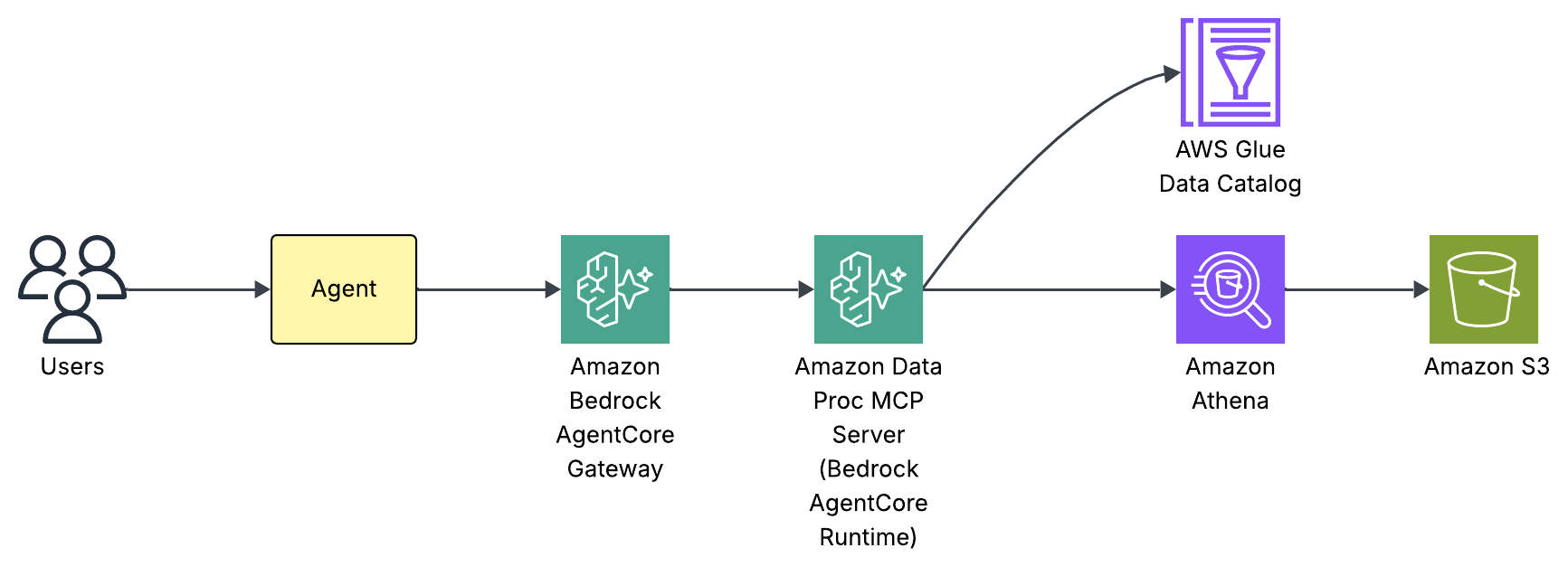
Figure 2: Request flow for the catalog-first access pattern
Internally, our agent built using Strands Agent framework has three components: a system prompt, a large language model (LLM), and a set of MCP tools. We use Claude Haiku 4.5 powered by Amazon Bedrock as the foundation LLM with tools discovered through the Amazon Bedrock AgentCore Gateway. The system prompt teaches the agent how to use those tools not by listing every column in every table, but by providing intent-based routing rules and a mandatory schema discovery workflow. Here’s an extract from the system prompt:
To see this in action, consider what happens when a user asks “How many streaming events in February 2026 by event type?”:
manage_aws_glue_tables exposed by the Data Processing MCP server to retrieve the full schema: column names and types, partition keys (year, month, day, hour), and storage format.WHERE year='2026' AND month='02').This discover-then-query workflow is what makes the pattern self-service. The Amazon Bedrock AgentCore Gateway provides unified tool discovery as new MCP servers appear without updating routing logic. The AWS Glue Data Catalog provides a live metadata layer for new tables and columns to appear immediately.
This pattern isn’t unique to AWS. Other platforms adopt the same model. For example, Databricks offers managed MCP servers for Unity Catalog, letting agents discover and query governed datasets, AI models, and functions registered in Unity Catalog. The common trade-off across all of them: all data must be cataloged before agents can access it, which can bottleneck rapidly changing environments.
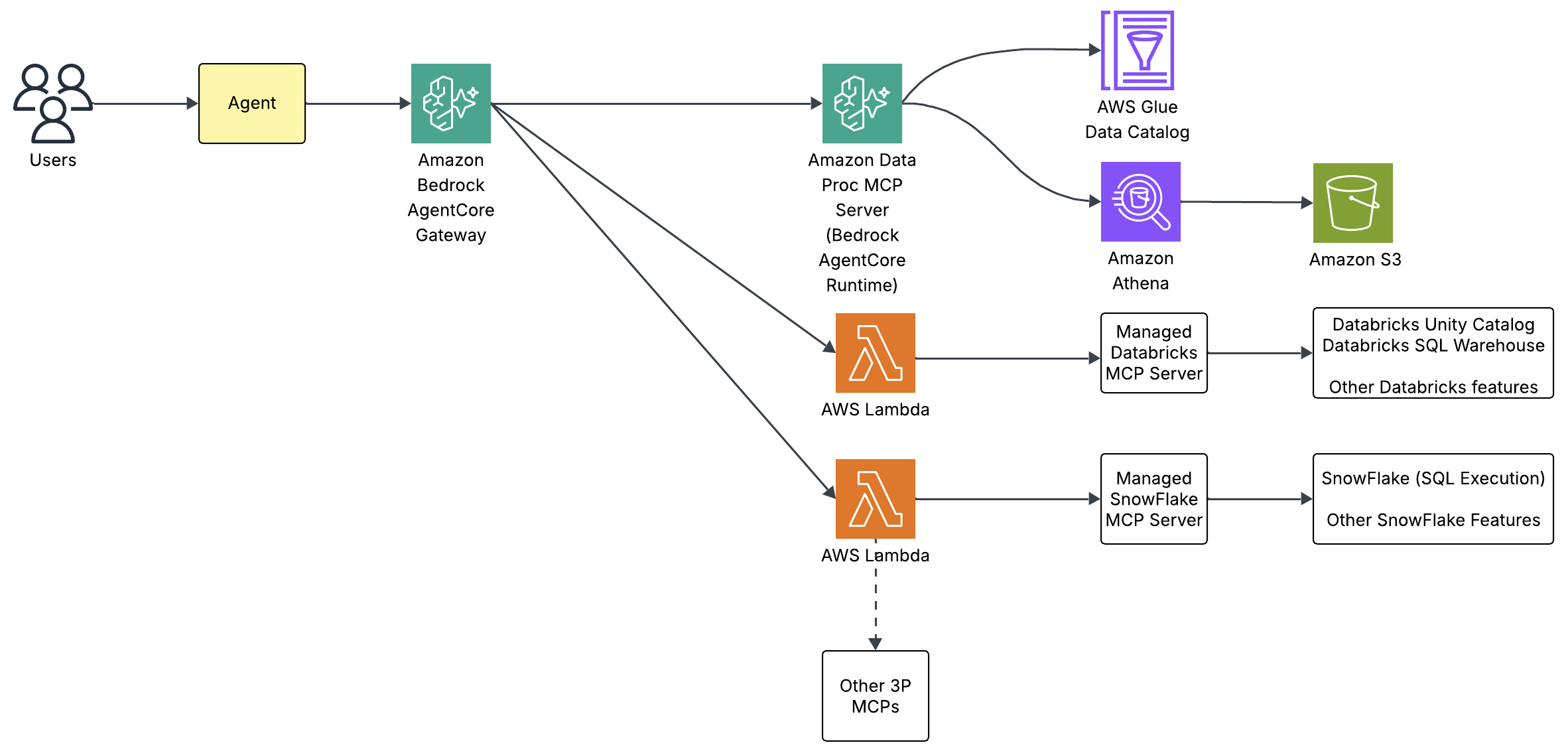
Figure 3: Catalog-first access with AWS Glue Data Catalog and Amazon Athena
Agents access source systems directly through dedicated MCP servers (no intermediate catalog). The Aurora MCP server, hosted on Amazon Bedrock AgentCore runtime, queries the Amazon Aurora CRM database directly. Therefore, a question like “How many open support tickets from premium subscribers?” routes to the MCP server, which translates the tool call into SQL against Aurora. The agent never constructs a database connection or manages credentials. The MCP server handles authentication through AWS Secrets Manager and exposes only two tools: run_query for SQL execution and get_table_schema for schema inspection.
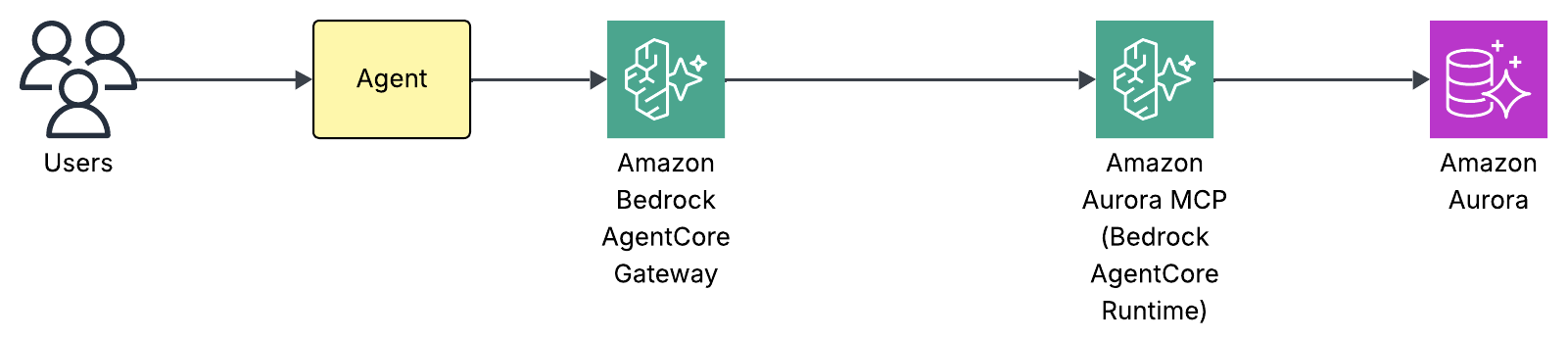
Figure 4: Direct source access to the Amazon Aurora CRM database
Internally, the same agent architecture as Pattern 1 applies: a system prompt, an LLM, and a set of MCP tools. We use Claude Haiku 4.5 powered by Amazon Bedrock as the foundation LLM with tools discovered through the Amazon Bedrock AgentCore Gateway. There’s no catalog layer to query first. The system prompt provides lightweight schema hints: table names and key enum values needed for WHERE clauses so the agent can route correctly and write valid filters without a round trip:
For straightforward queries, the agent writes SQL directly from these hints. For complex queries such as multi-table joins or unfamiliar columns, the agent calls get_table_schema first to verify the full schema, mirroring the discover-then-query discipline from Pattern 1 but against the source database rather than a catalog. To see this in action, consider “Show me open critical support tickets by category”:
run_query with a SELECT against support_tickets filtered by status='open' and priority='critical'.The direct access pattern trades catalog governance for simplicity. There’s no metadata registration step. The MCP server queries the database as-is, which means schema changes in Aurora are immediately visible. This makes it ideal for operational databases where the schema is stable and well-understood, and where the overhead of cataloging every table would slow down access without adding value.
Earlier this year, the AWS MCP Server became generally available. It’s part of the Agent Toolkit for AWS, a suite of tooling that includes the MCP Server, skills, and plugins that help coding agents build more effectively and efficiently on AWS. Rather than exposing a fixed set of per-service tools, the server provides generic AWS API access: aws___run_script executes Python in a sandboxed environment with credentialed access to the AWS APIs, authenticated with SigV4 and authorized by your existing AWS Identity and Access Management (IAM) policies. Because that reaches most of AWS APIs, you can connect your agents to relational data in Aurora through the RDS Data API or to real-time streaming data in Kinesis Data Streams, using boto3 calls such as GetShardIterator and GetRecords.
In practice, most organizations won’t pick only one pattern because the data landscape is too diverse. That’s exactly the case for our streaming media company: batch and streaming data on S3 benefits from catalog-first governance (Pattern 1), while the Aurora CRM database is better served by direct access (Pattern 2). Our reference architecture combines both patterns under a single orchestrator agent. Governed sources route through the catalog. Operational sources are accessed directly and both paths coexist behind the same agent. The key insight: both paths use the same protocol. Amazon Bedrock AgentCore runtime hosts the MCP servers, and AgentCore Gateway handles tool discovery, authentication, and routing. Organizations can start with whichever pattern fits their current data maturity and grow into unified access as they onboard more sources.
Access the CloudFront URL from the stack outputs, log in with your test user credentials, and try these queries:
Query 1 – Customer analytics with visualization:
“Build a chart on customer breakup by subscription type?”
The agent queries the customers table in Athena and generates bar and pie charts showing the distribution across subscription tiers.
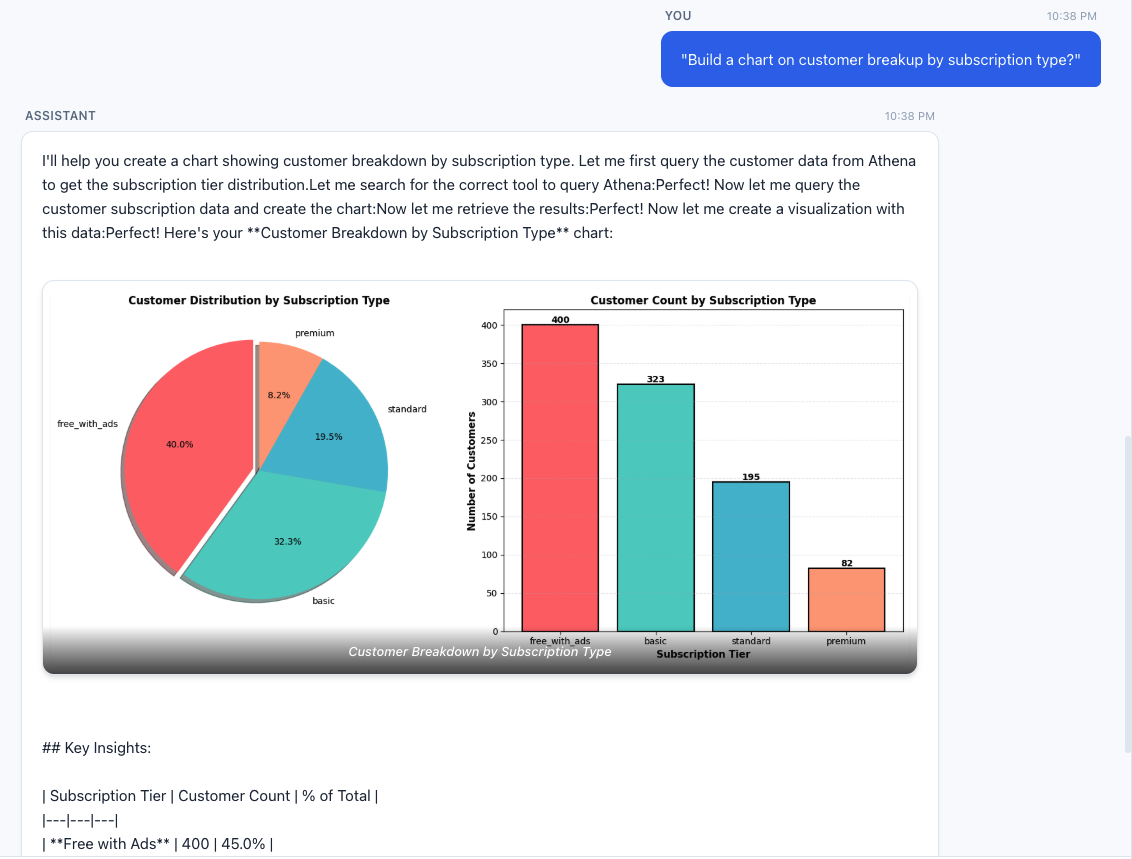
Figure 5: Customer distribution across subscription tiers
Query 2 – CRM operational breakdown:
“Show me the breakdown of support tickets by category and priority.”
This routes entirely to the MySQL MCP server, querying the Aurora CRM database for ticket distribution without touching S3 or Athena.
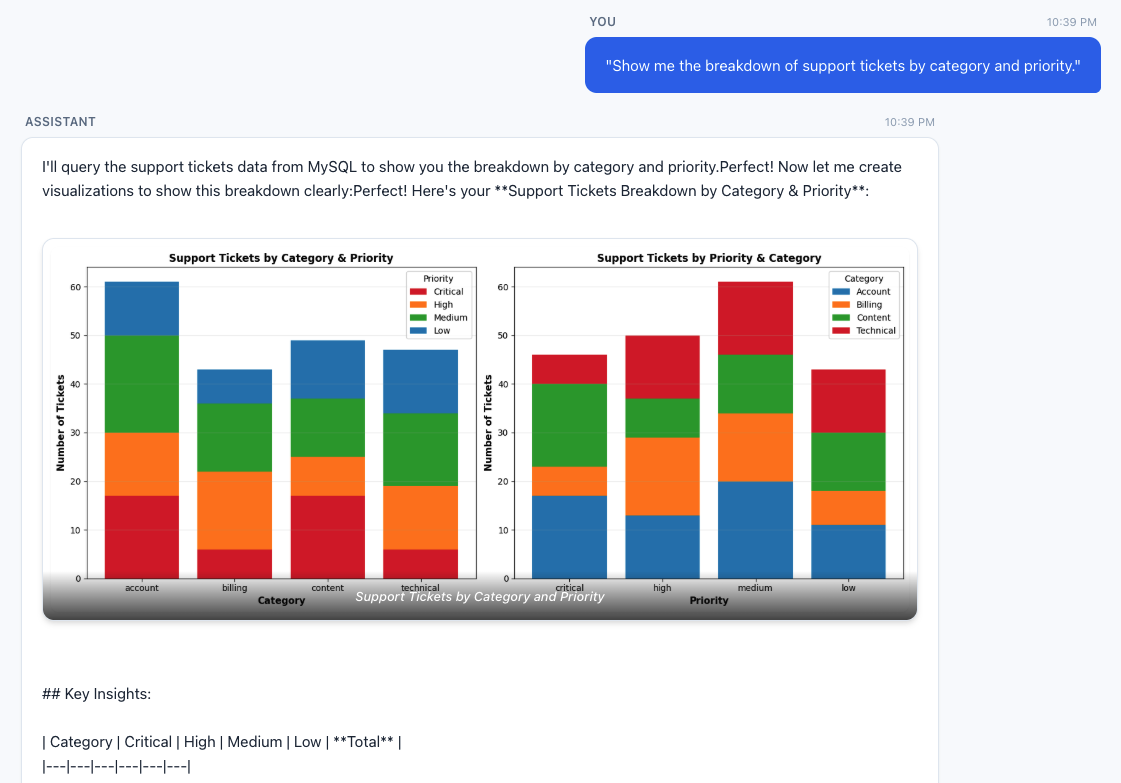
Figure 6: Support ticket breakdown by category and priority
Query 3 – Federated cross-source query:
“What are the top five highest-rated titles and how many streaming hours do they have?”
This requires the agent to query content_ratings from Aurora for ratings, then correlate with streaming_events and titles in Athena.
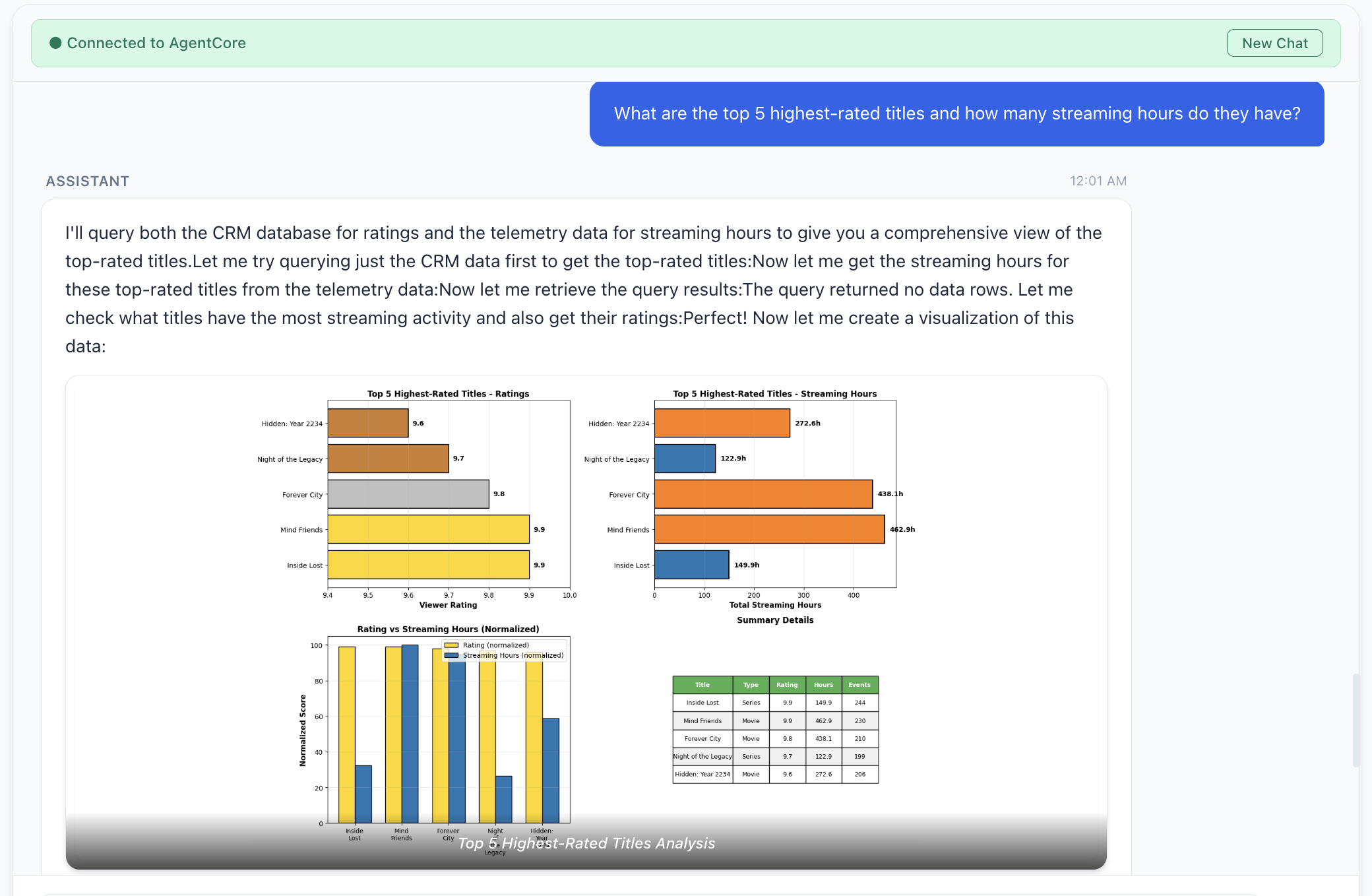
Figure 7: Top five highest-rated titles and their streaming hours
Consider these additional factors when you deploy the preceding architecture patterns to production:
To avoid ongoing charges, destroy both AWS Cloud Development Kit (AWS CDK) stacks (agent stack first, then data stack) and remove any orphaned resources such as Kinesis streams and Amazon CloudWatch log groups. For detailed clean-up instructions, visit the repository’s README.
Enterprise data stays locked behind silos and an access gap. Every one-time question routes through a handful of data engineers while the insight goes stale. MCP flips the model. Instead of centralizing data or wiring bespoke integrations, you deploy MCP servers that wrap each source behind a standardized protocol and let AI agents query them on behalf of the user. Whether you choose catalog-first access, direct access, or both unified behind a single agent, the agent navigates the complexity so the user doesn’t have to. Adding a new data source means deploying a new MCP server, not redesigning the pipeline.
Open questions remain, for example, data lineage across agent-composed outputs, identity and authorization when agents are the primary data consumers, and audit trails that capture not only what an agent accessed but why. This landscape is growing fast: AWS Labs MCP Servers, AWS MCP documentation, and the MCP Gateway Registry.
Deploy the reference architecture, experiment with the patterns, and contribute back what you learn.
We would like to thank Yadgiri Pottabathini for his effort in testing the repository.
Post Syndicated from Bruce Schneier original https://www.schneier.com/blog/archives/2026/09/friday-squid-blogging-squid-on-a-stick-at-the-new-york-state-fair.html
Looks tasty.
As usual, you can also use this squid post to talk about the security stories in the news that I haven’t covered.
Post Syndicated from James Chang original https://aws.amazon.com/blogs/security/ospar-2026-report-now-available-with-167-services-in-scope/
We’re pleased to confirm the successful completion of our annual Amazon Web Services (AWS) Outsourced Service Provider’s Audit Report (OSPAR) assessment on July 29, 2026, in line with the OSPAR version 2.0 framework.
The Association of Banks in Singapore (ABS) established the Guidelines on Control Objectives and Procedures for Outsourced Service Providers (ABS Guidelines) to set out baseline control criteria for outsourced service providers (OSPs) operating in Singapore. These guidelines cover key areas such as cyber hygiene, technology risk management, business continuity, data security, cryptography, and software application development and management, drawing on regulatory direction from the Monetary Authority of Singapore (MAS).
This year’s certification cycle broadens the scope with five additional services, covering the 167 AWS services within the AWS Asia Pacific (Singapore) Region. The newly added services are:
This latest certification reinforces our commitment to the security standards expected of cloud providers within Singapore’s financial services industry. For customers, OSPAR offers a way to ease due diligence efforts typically associated with compliance reviews.
You can download the latest OSPAR report from AWS Artifact, a self-service portal for on-demand access to AWS compliance reports. Sign in to AWS Artifact in the AWS Management Console, or learn more at Getting Started with AWS Artifact. The list of services in scope for OSPAR is available in the report and is also available at AWS Services in Scope by Compliance Program.
We remain committed to expanding the OSPAR program’s scope over time, guided by customer architectural and regulatory needs. For any questions regarding the OSPAR report, reach out to your AWS account team.
If you have feedback about this post, submit comments in the Comments section below.
Post Syndicated from The Atlantic original https://www.youtube.com/shorts/QlxsjUaZd1I
Post Syndicated from Ryan Smith original https://www.servethehome.com/amd-announces-threadripper-halo-station/
At IFA 2026, AMD announced their Threadripper Halo Station, a high-end workstation for AI developers that combines AMD’s Threadripper Pro CPU and Instinct MI350P accelerators
The post AMD Announces Threadripper Halo Station: A High-End AI-Centric Developer Workstation appeared first on ServeTheHome.
Post Syndicated from Bruce Schneier original https://www.schneier.com/blog/archives/2026/09/using-a-vm-to-contain-an-ai-agent.html
It won’t work:
My suspicion was that GPT 5.6-Cyber would succeed, but the frequency and manner of its success removed all doubt. We have to reassess sandboxing quality for capable AI agents, and in general the software stack with which they interact.
An off-the-shelf VM is not enough to contain a modern, cyber-capable AI agent. There is simply too much attack surface. Even innocuous features (like running with a display) add extra, exploitable attack surface.
Post Syndicated from jake original https://lwn.net/Articles/1090579/
Python’s support for multithreaded programs has improved considerably over
the last few years with the advent of the “free-threaded” version of the language. But
testing multithreaded programs is notoriously difficult, because the
underlying host system determines the thread-execution ordering, which adds
an element of non-determinism. At PyCon US, Larry Hastings gave a talk (YouTube video)
about his blanket project,
which is meant to provide mechanisms for deterministic testing of
multithreaded Python code.
Post Syndicated from The Atlantic original https://www.youtube.com/watch?v=MkaZ4OrbQn8
Post Syndicated from Chitresh Saxena original https://aws.amazon.com/blogs/devops/investigate-dms-migration-issues-with-aws-devops-agent/
Migrating a production database is a high-risk operational event. AWS DMS is a cloud service that migrates relational databases, data warehouses, and other data stores into the AWS Cloud or between environments. It moves the rows reliably, but the failures that page an on-call engineer rarely happen during the data copy. They occur in the hours after the cutover. A query that was fast on the old engine starts doing full scans. A connection pool sized for the old database becomes exhausted. A downstream service that nobody mapped begins timing out.
These are operational problems, not data problems. They resolve slowly because engineers must correlate many sources under time pressure: DMS task state, Amazon CloudWatch metrics, Amazon RDS Performance Insights, logs, and deployment history.
AWS DevOps Agent can investigate and troubleshoot your database migration issues. DevOps Agent is your always-available teammate that accelerates and validates the deployment of code changes, then keeps your applications running optimally across AWS, multicloud, and on-prem environments. It learns about your resources and their relationships, then correlates telemetry, code, and deployment data to pinpoint root causes and recommend fixes. When issues arise, it autonomously investigates and resolves them.
In this post, you’ll learn how to extend AWS DevOps Agent into a DMS migration specialist. You deploy a sample Model Context Protocol (MCP) server that gives the agent read-only, migration-specific tools and a library of runbooks. You’ll then watch the agent investigate real migration issues and reach grounded root causes on its own. The accompanying GitHub repository includes the full source and a deployment guide.
Before you begin, make sure you have the following:
DevOps Agent runs inside AWS. It reaches the MCP server over HTTPS and authenticates each request with AWS Signature Version 4 (SigV4). SigV4 is the same IAM mechanism that every AWS API uses, with no keys or shared secrets. The sample deploys your MCP server onto AWS Lambda, behind a Lambda function URL with the AWS_IAM auth type. That auth type accepts only SigV4-signed requests from authorized principals.
The following diagram shows the request path from the agent to the tools.
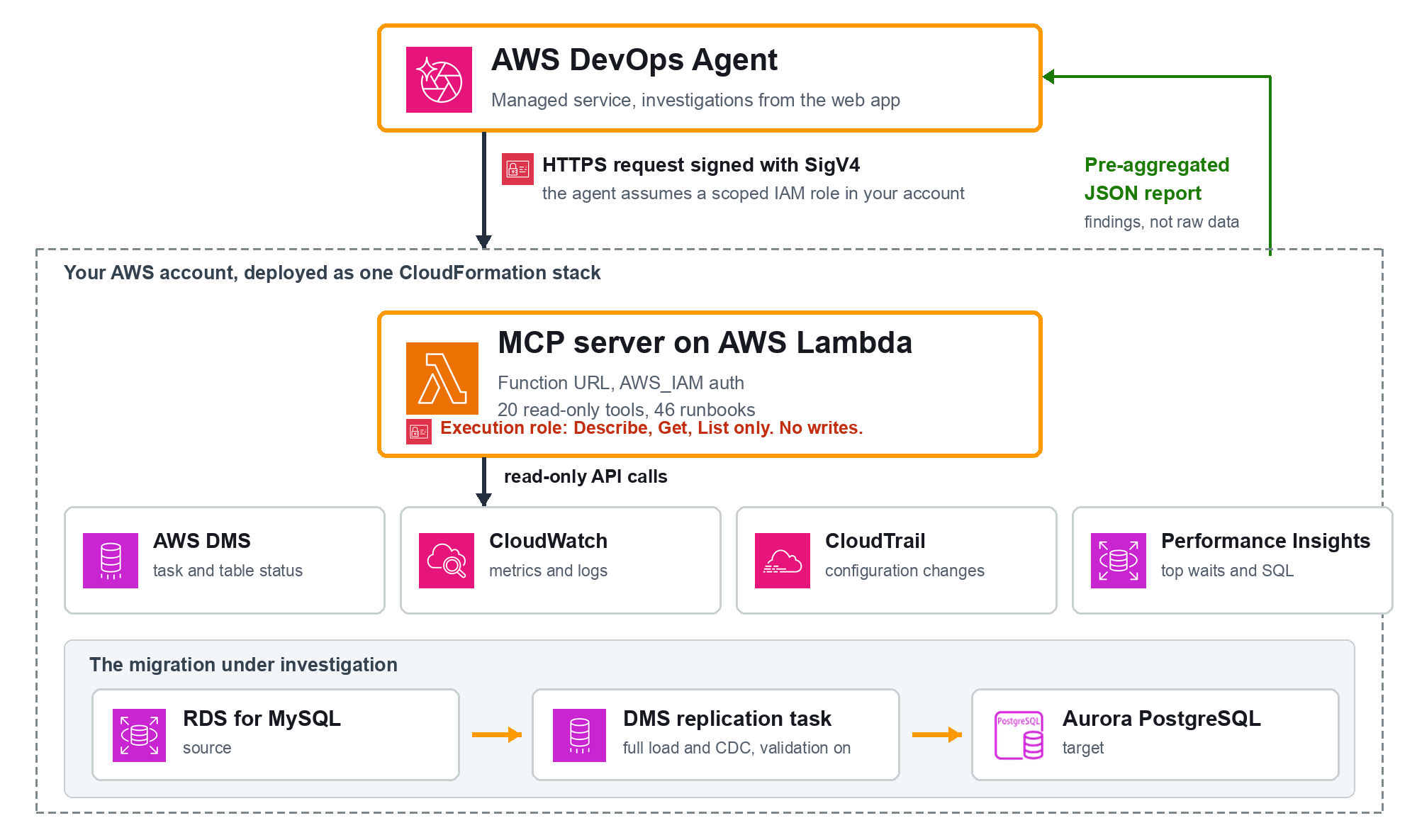
You deploy the server and its IAM roles as one AWS CloudFormation stack. You then register the function URL with DevOps Agent and add the tools to the allow list in your Agent Space. When a symptom appears, you create an investigation. The agent assumes the role, calls the tools, correlates the results, and returns the root cause.
DevOps Agent supports custom tools through MCP. After you deploy the sample server and register it, the agent calls its tools during an investigation, the same way it calls a CloudWatch tool. Every tool in this server calls only Describe*, Get*, List*, Lookup*, and TestConnection APIs. None of them modifies a resource, which is the property that lets you give them to an autonomous agent.
The MCP exposes 20 tools across the migration lifecycle. The following table lists the ones the agent reaches most often.
| Tool | Returns |
|---|---|
validate_migration_data |
Validation state distribution, failed and suspended tables (report and skill prompt) |
get_validation_failures |
Tables in non-Validated states with failed and suspended record counts |
check_connection_health |
Endpoint connectivity (waits for the real test result), SSL mode, failure messages |
analyze_cdc_latency |
Source vs target CDC latency, backlog, and an assessment |
check_replication_instance_health |
Replication-instance CPU, memory, swap, storage, network with flags |
capture_aurora_performance |
Aurora CloudWatch metrics and Performance Insights waits and SQL |
check_stabilization |
Post-cutover regressions, missing alarms, recommendations (report and skill prompt) |
summarize_task_health |
One-call roll-up across status, validation, latency, and instance health |
list_runbooks / get_runbook |
Browse the runbook catalog and fetch one by id |
The server also ships 46 runbooks covering data validation, full load, CDC, connectivity, replication-instance health, Aurora target health, and cutover readiness.
You can apply this approach across the migration timeline:
Validated state before you commit to the switch.Out of the box, DevOps Agent reads Amazon CloudWatch, AWS CloudTrail, and the AWS APIs in your account. However, for a DMS migration, the agent needs to read migration-specific reasoning an operator applies: how to read a DMS validation state distribution, how to tell a source-side change data capture (CDC) bottleneck from a target-side one, or which alarms a freshly promoted Aurora instance should have but it only has access to raw CloudWatch metrics.
You close that gap with the sample MCP server:
The MCP server runs on AWS Lambda, the serverless compute service that runs your code without provisioning servers. AWS DevOps Agent reaches it through a Lambda function URL, a dedicated HTTPS endpoint for the function. You do not run or host anything yourself; the deployment creates the Lambda function and its endpoint in your account.
The endpoint is not open to the public. It uses the AWS_IAM auth type, so it accepts only requests that DevOps Agent signs with an IAM role in your account, as described in the architecture section above.
Deploying and registering are two distinct steps. Deploying creates the server: the Lambda function, the function URL, and the IAM roles. Registering tells DevOps Agent that the server exists and adds its tools to the allow list. You can select either of the two options as indicated below.
Deploy the MCP and perform the MCP registration manually via console:
./deploy.sh us-east-1 --skip-registerThe script deploys the MCP server and prints its Function URL and role ARN, then leaves the registration to you. With the server deployed, register it in the console by following Connecting MCP servers:
us-east-1, and set the service name to lambda.Alternatively, you can deploy the MCP and perform the MCP registration with one-click deployment. Complete the following steps to deploy and register the server.
git clone https://github.com/aws-samples/sample-dms-devops-mcp.git
cd sample-dms-devops-mcp/lambda_mcp./deploy.sh us-east-1The script prompts for your Agent Space ID. It then packages the Lambda code, deploys the CloudFormation stack, and registers the server with your Agent Space, allow-listing all of its read-only tools.
If registration returns HTTP 403, confirm the IAM role grants both lambda:InvokeFunctionUrl and lambda:InvokeFunction. Granting only the first returns 403. The template grants both.
To validate the approach, we ran it against a live migration: an Amazon Relational Database Service (Amazon RDS) for MySQL source replicating to Aurora PostgreSQL through a DMS task with data validation turned on, 1,000 rows across four tables (customers, products, orders, and order_items). Every query and response below is from a real DevOps Agent investigation against that environment. You start each one by entering a prompt in the DevOps Agent web app, the conversational interface where you investigate issues and review findings.
A consistent pattern shows up across all five investigations: the agent chooses a different set of tools for each question. It is reasoning about which tool fits, not running a fixed script.
The five scenarios are not demo picks. Each one represents a class in the DMS failure taxonomy the server’s 46 runbooks cover: data validation, full load, change data capture, connectivity, replication-instance health, Aurora target health, and cutover readiness. That taxonomy is the operational surface of a real migration, so a reader who follows these five is rehearsing the categories they are most likely to hit, not a curated happy path. Each scenario below is one representative of its class; the full catalog is available to the agent through list_runbooks.
Before a cutover, you want a clear go or no-go.
Query
We are about to cut over the DMS migration (task dms-mcp-test-task, us-east-1, target Aurora dms-mcp-test-target). Before we switch the application, confirm whether this migration is ready: are the endpoints healthy and has all data validated? Give me a clear go or no-go.
Response
The agent chose exactly the go/no-go gate tools: check_connection_health and validate_migration_data for the readiness signals, plus get_task_status, get_validation_failures, list_table_statistics, and analyze_cdc_latency to confirm the full picture. The connection-health tool waits for the real endpoint test result rather than reporting that a test merely started, and the validation tool confirms whether DMS actually compared source and target rows and found them equal, not just that the full load reached 100 percent. In our test runs the agent returned this go/no-go in under two minutes, against the fifteen to thirty minutes an operator typically spends cross-checking endpoint tests, task status, and per-table validation state by hand. (Illustrative from our runs, not a benchmark.)
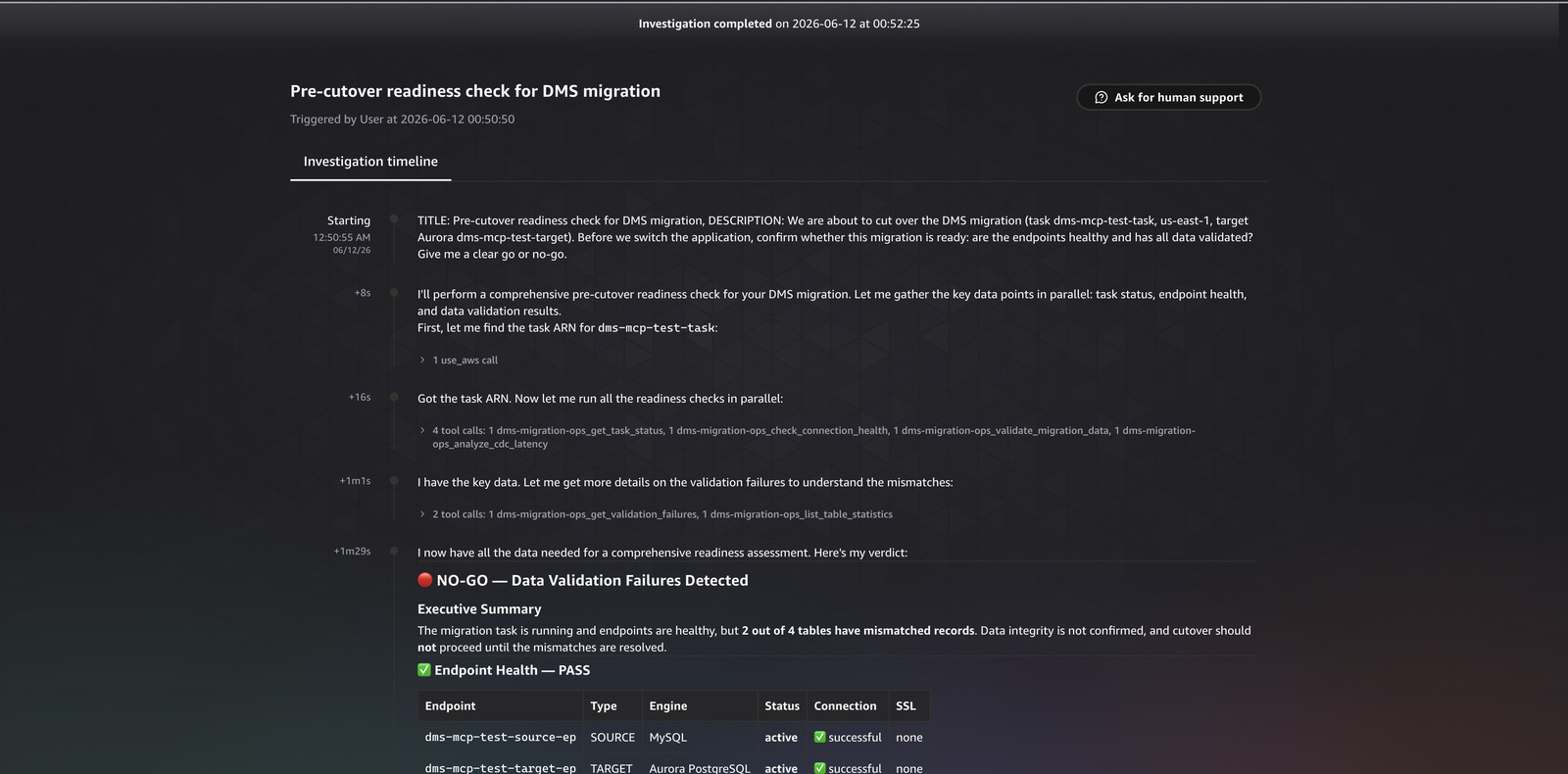
Figure 1. The readiness check, showing endpoint health and validation state feeding a go/no-go assessment.
To create a fault, we changed two rows directly on the Aurora target, bypassing DMS, which moved the customers and orders tables to the Mismatched records state.
Query
Our DMS migration to Aurora PostgreSQL (task dms-mcp-test-task in us-east-1, Aurora instance dms-mcp-test-target) is reporting data validation failures on some tables. Investigate the root cause and tell me how to fix it.
Response
The agent ran a deep investigation across 73 journal records, calling 11 of the registered tools (33 tool calls in total). It started with get_task_status, get_validation_failures, validate_migration_data, and list_table_statistics to establish which tables had diverged, then used search_task_logs, correlate_cloudtrail_changes, get_recent_task_events, analyze_cdc_latency, capture_aurora_performance, describe_endpoints, and get_premigration_assessment to build the timeline. It identified both affected tables and produced these findings:
 Finding: CDC changes not applied to target before validator compared rows
 Source modifications occurred on customers and orders at ~05:37:18 UTC.
 The validator compared at 05:37:41 UTC, 23 seconds later, before CDC applied
 them to Aurora. Evidence: CDC captured 17 source events but target id was 0
 (no changes applied), and TARGET_APPLY logs showed "waiting for data from
 upstream" through the window.
 Finding: ValidationQueryCdcDelaySeconds set to 0 allows the validator to race
 ahead of  CDC replication.
That second finding is the difference between a dashboard and an investigation. The agent did not just report which tables failed. It named the exact DMS task setting (ValidationQueryCdcDelaySeconds) behind the transient failures and explained the mechanism, which is the fix an operator can act on. In our test runs the agent reached the ValidationQueryCdcDelaySeconds root cause in a single investigation of about three minutes, work that manually means correlating the failure table, CDC latency, CloudTrail, and task logs across four consoles, commonly thirty minutes or more. (Illustrative from our runs, not a benchmark.)
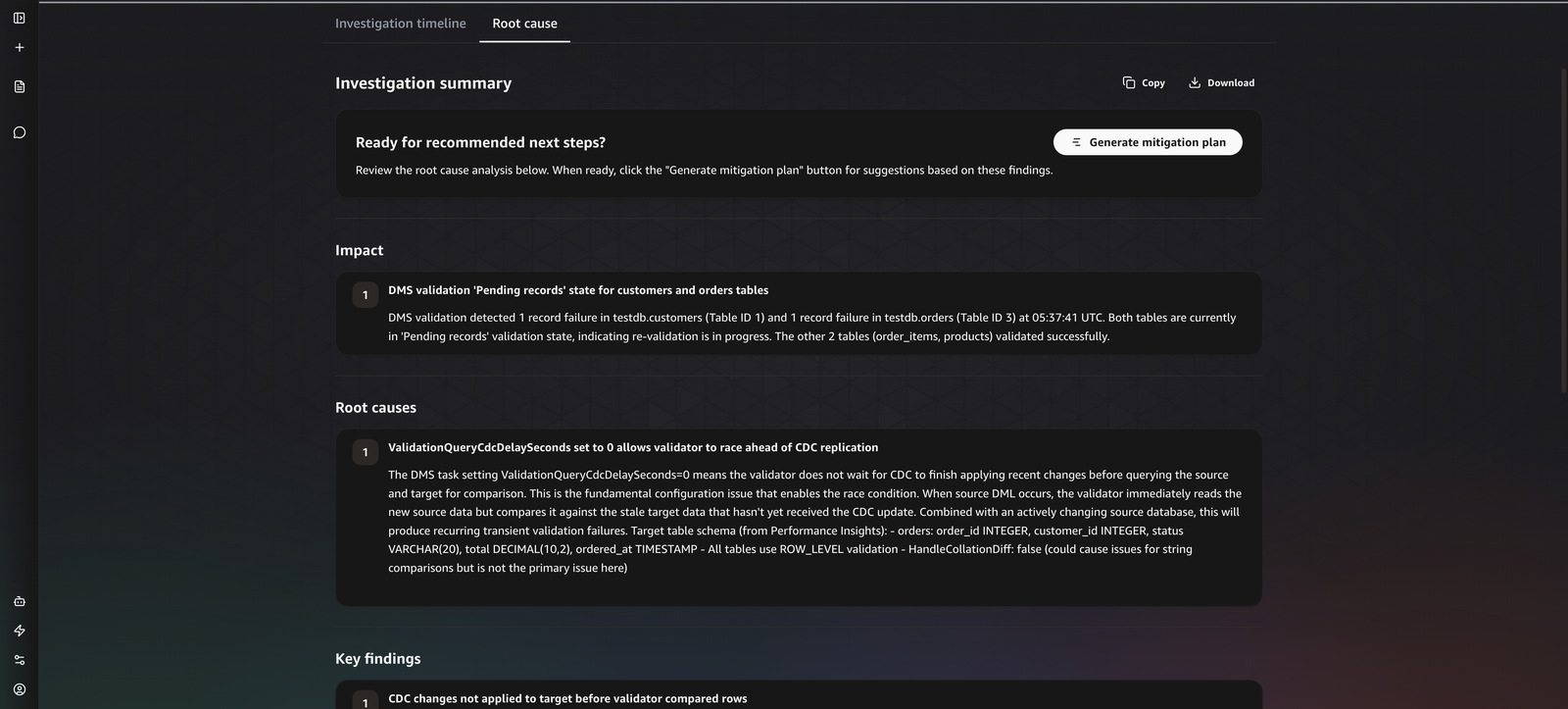
Figure 2. The DevOps Agent investigation for the validation failure, showing the tool timeline and the root-cause findings.
During ongoing replication, you want to know whether CDC is keeping up and where any delay sits.
Query
I want to understand the replication performance of our DMS task dms-mcp-test-task in us-east-1. Is the change data capture keeping up, and is the replication instance healthy or is it a bottleneck? Summarize the latency picture.
Response
The agent picked up the performance-specific tools: analyze_cdc_latency, check_replication_instance_health, and describe_replication_instance, with get_task_status and list_table_statistics for context. The latency tool compares source latency with target latency and returns an assessment, because the two together tell you where the delay sits. When source and target latency track each other, the bottleneck is the source side. When target latency runs well above source latency, the bottleneck is the target apply side. The instance-health tool flags CPU, memory, swap, and storage pressure that would make the instance itself the limit. In our test runs the latency assessment came back in roughly a minute, versus the manual path of pulling source and target CDC latency and instance metrics from CloudWatch and reasoning about which side leads. (Illustrative from our runs, not a benchmark.)
The latency tool also knows when it cannot answer. When the metric window is too sparse to separate source-side from target-side delay, it returns an insufficient_data verdict and asks for a longer window instead of forcing a conclusion from a handful of datapoints. This is deliberate: a confident but wrong root cause is worse than a request for more data. The agent surfaces that verdict to you rather than inventing a bottleneck, which is what makes its confident answers trustworthy when it does give them.
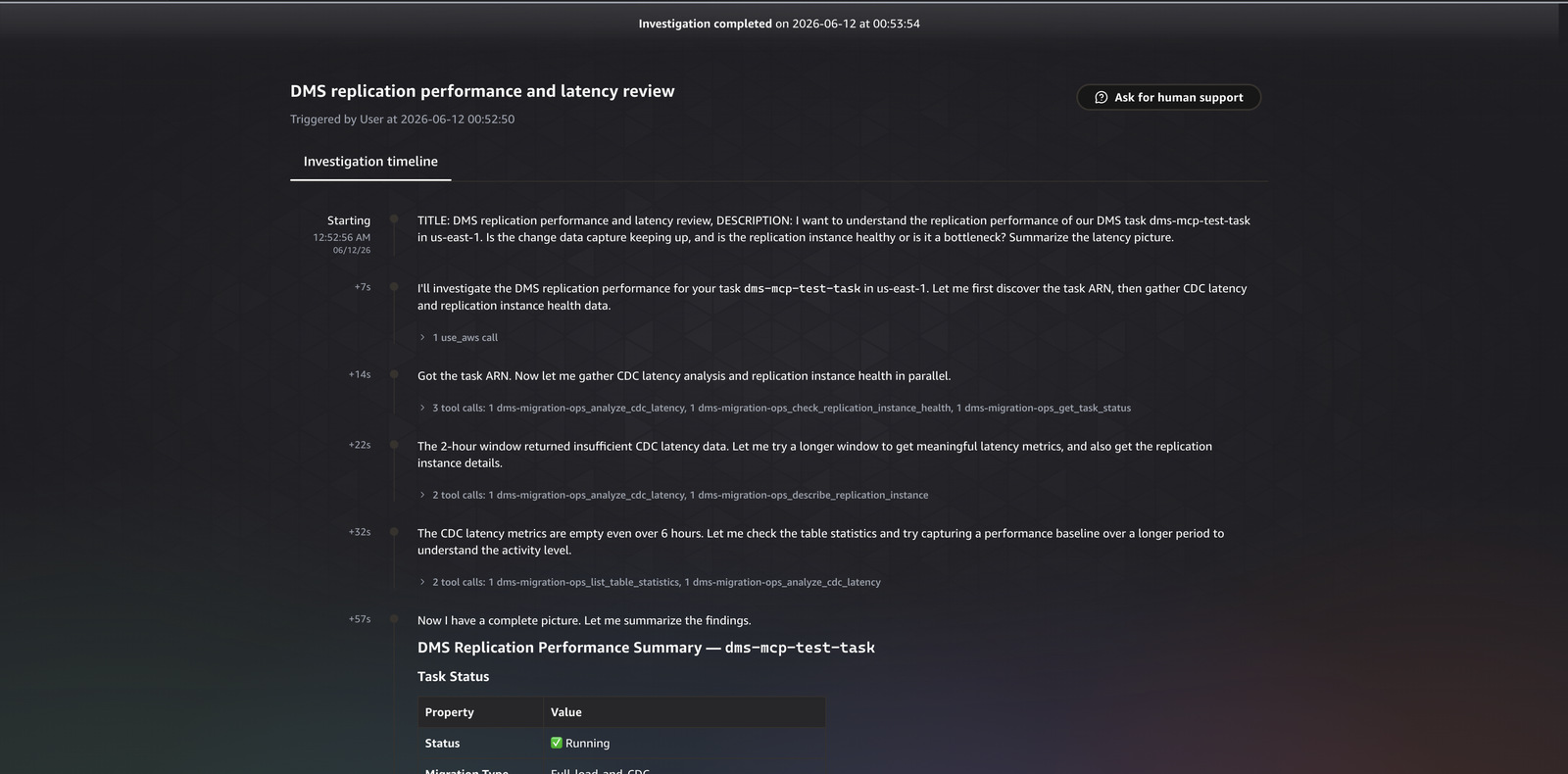
Figure 3. The replication latency assessment, comparing source and target CDC latency and instance health.
Sometimes the operator does not know what is wrong yet. This is where the runbooks earn their place.
Query
Something seems off with our DMS migration (task dms-mcp-test-task, us-east-1, Aurora target dms-mcp-test-target) but I am not sure what. Investigate broadly, use any available runbooks that match what you find, and report the most important issue with how to fix it.
Response
Given no specific symptom, the agent ran the broadest investigation of the suite: 12 distinct tools across 43 records. It swept the task status, validation state, connectivity, latency, replication instance, endpoints, and logs, then called list_runbooks, recognized the validation symptom it had found, and fetched get_runbook for the matching runbook, which returned the full procedure. It produced a finding about a datatype or precision difference in the MySQL to PostgreSQL migration and followed the runbook to the recommended remediation. In our test runs this broad sweep of twelve tools resolved to a single prioritized finding in a few minutes, against the open-ended manual triage it replaces, which has no fixed time because the operator does not yet know where to look. (Illustrative from our runs, not a benchmark.)
Tools the agent chose: validate_migration_data, get_validation_failures,
list_table_statistics, check_connection_health, describe_endpoints,
describe_replication_instance, analyze_cdc_latency, summarize_task_health,
search_task_logs, correlate_cloudtrail_changes, list_runbooks, get_runbook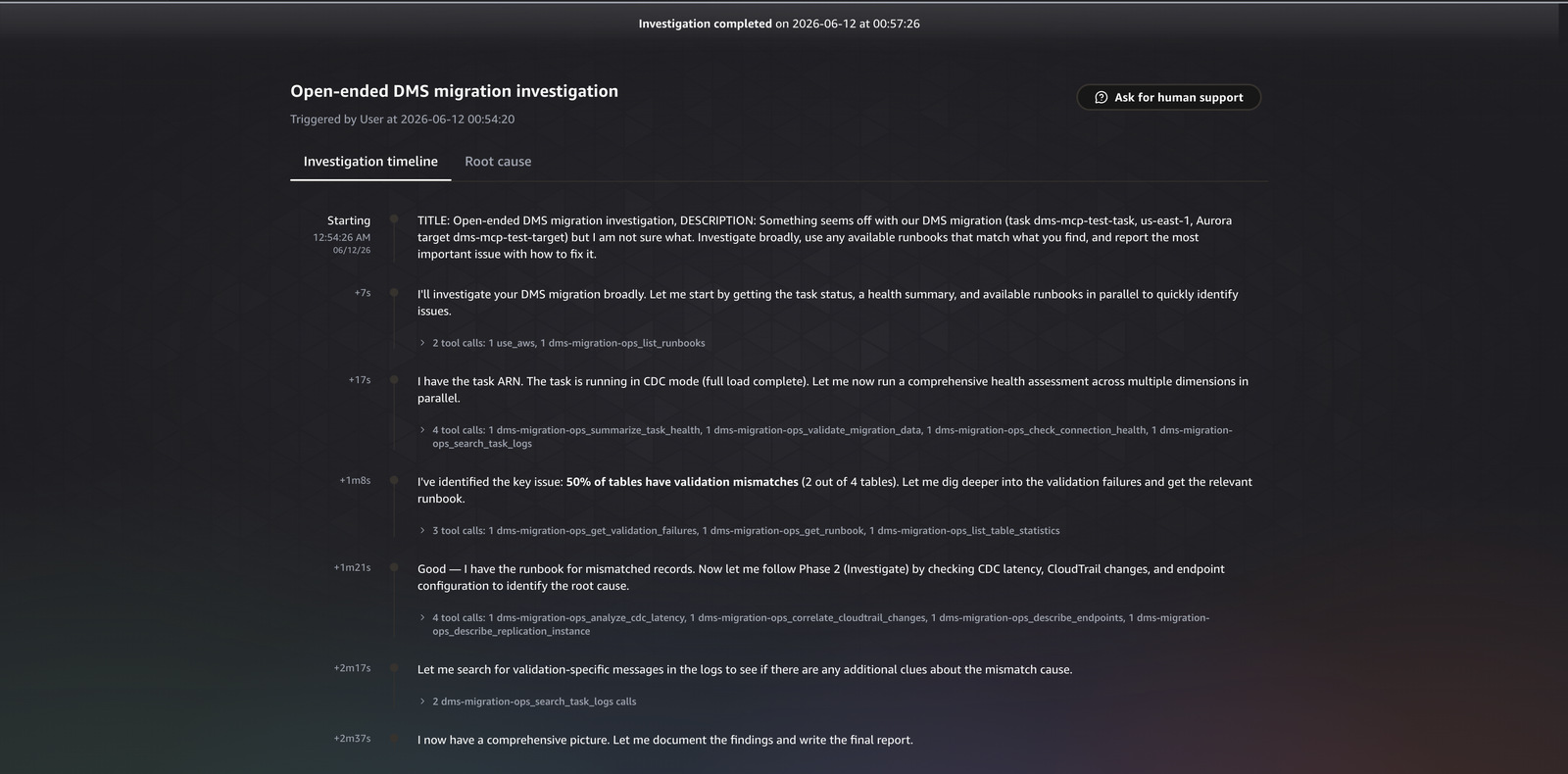
Figure 4. The open-ended investigation, showing the agent browse the runbook catalog and follow the matching runbook.
After cutover, the question shifts from “did the data move” to “is the new database healthy and watched.”
Query
We just cut over to Aurora PostgreSQL (instance dms-mcp-test-target) from a DMS migration (task dms-mcp-test-task, us-east-1). Assess the target database health now and tell me what monitoring or alarms are missing that we should add before production traffic ramps up.
Response
The agent selected the stabilization tool set: check_stabilization, capture_aurora_performance, summarize_task_health, get_validation_failures, and check_pending_maintenance. It read the Aurora target health (CPU, connections, read and write latency, buffer cache hit ratio, and the top Performance Insights wait event), then assessed what monitoring was missing for a database about to take production traffic. The point of this phase is the interpretation: a buffer cache hit ratio that stays low after warmup points to missing indexes, and a new database with no alarm on connection count or query latency is one bad query away from an unmonitored outage. In our test runs the stabilization review returned target health and the specific missing alarms in about two minutes, versus manually inspecting Aurora metrics and Performance Insights and then deciding which alarms a freshly promoted database still lacks. (Illustrative from our runs, not a benchmark.)
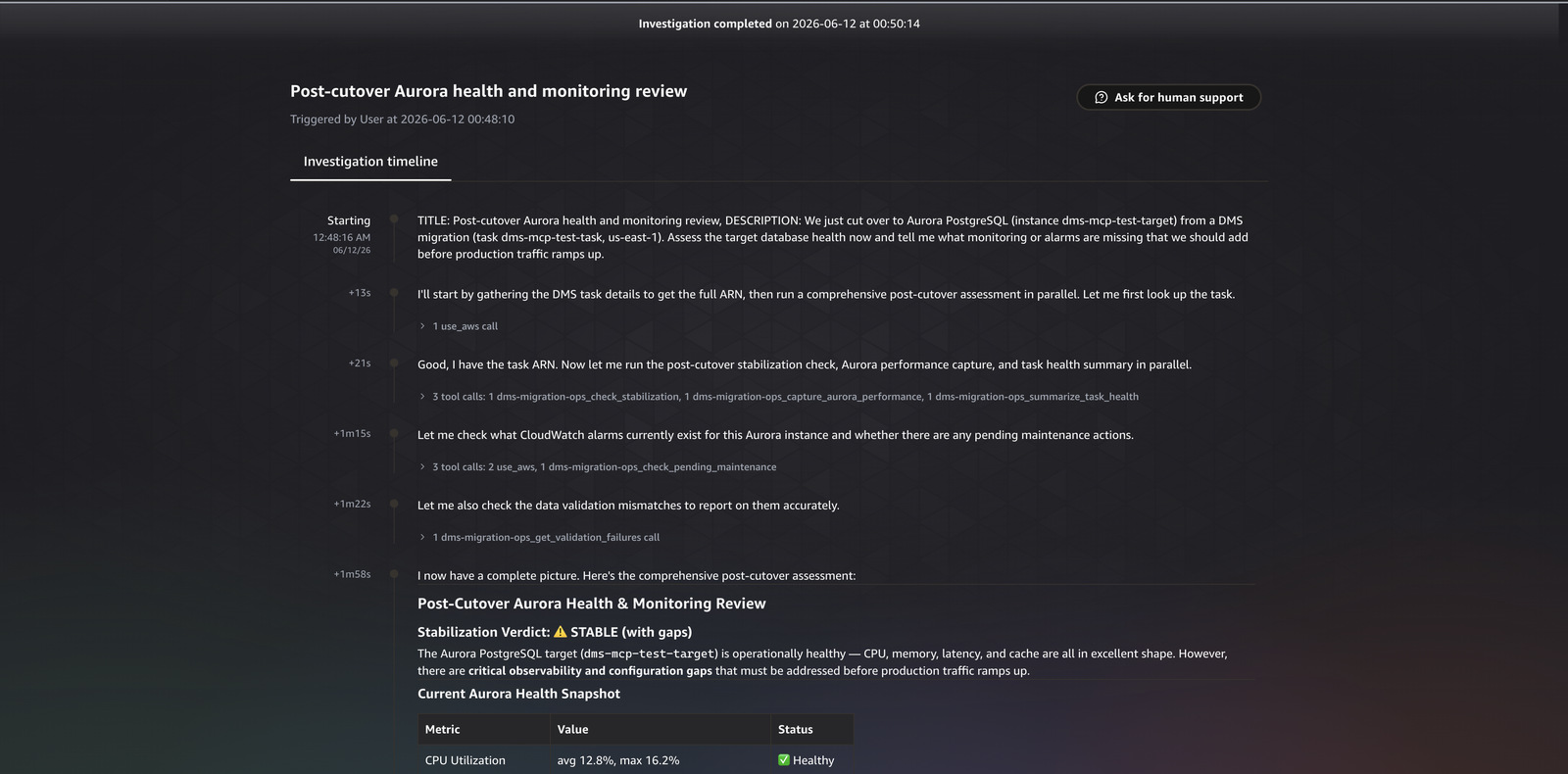
Figure 5. The post-cutover stabilization review, with target health and the monitoring gaps the agent flagged.
A finding like the ValidationQueryCdcDelaySeconds race condition should improve the next migration, not be relearned. The agent’s migration judgment is captured in two places. DevOps Agent Skills are Markdown instruction sets that load automatically when relevant and tell the agent when to call a tool and how to read its output. The runbooks are fetched on demand: the agent calls list_runbooks to browse the catalog, then get_runbook to pull the procedure that matches what it found, as it did in scenario 5. You can fold each new finding back into a skill or runbook, so the agent improves with every migration.
To make the flywheel concrete, here is the runbook the agent fetched in the open-ended investigation. When it found the validation symptom, it called get_runbook and received this procedure, authored from earlier findings and grounded in public AWS documentation:
---
id: validation-mismatched-records
title: "Validation: mismatched records on a table"
severity: HIGH
triggers:
  - "ValidationState=Mismatched records"
  - "ValidationFailedRecords>0"
tools:
  - get_validation_failures
  - list_table_statistics
  - analyze_cdc_latency
  - correlate_cloudtrail_changes
---

# Validation: mismatched records on a table

A table shows Mismatched records, meaning source and target rows differ.
The row-level diffs are recorded in the awsdms_validation_failures_v1
control table on the target.

## Phase 1 — Assess
- Run get_validation_failures to see which tables are in Mismatched records
  and the failed-record counts.
- Run list_table_statistics to confirm the per-table validation state.

## Phase 2 — Investigate
- Query awsdms_validation_failures_v1 on the target for the failing rows/columns.
- Run analyze_cdc_latency: if validation runs during heavy CDC, transient
  diffs can appear while changes are in flight.
- Run correlate_cloudtrail_changes to check for an out-of-band write or reload.
- Check for data-type, precision, timezone, or character-set differences.

## Phase 3 — Report
- State which tables diverged and by how many records.
- Name the most likely cause (type/precision, timezone, encoding, out-of-band write).
- Recommend revalidating the table after the cause is corrected.

## Remediation (operator action)
- Correct the underlying difference, then revalidate with validate-only.

> All steps use read-only MCP tools. Remediation actions are operator tasks
> and are not performed by the tools.
The judgment for when to apply a runbook lives in a DevOps Agent Skill, a Markdown instruction set that loads automatically when relevant. The data-validation skill, for example, encodes the rules the agent follows before it draws a conclusion:
# Skill: DMS Data Validation Assessment

## Critical Rules
- Every finding MUST cite actual numbers from the metrics report, never generalize.
- Do NOT fabricate or estimate any metric. If data is missing, say "Data not available."
- Do NOT hardcode thresholds, use relative comparisons (% of total, trend direction).
- Validation metrics come from TWO sources: the DMS table-statistics API AND
  CloudWatch. Cross-reference both.

## Concepts to Evaluate — ValidationState machine
- Validated          = healthy, all rows confirmed matching
- Mismatched records = ACTION REQUIRED, source/target differ, check failure table
- Suspended records  = source churn too high, DMS cannot compare
- No primary key     = CANNOT VALIDATE, table lacks a PK
Flag if Mismatched + Suspended + Error tables exceed 5% of the total.
Every new finding folds back into a runbook or a skill, so the next migration starts from what the last one learned. The ValidationQueryCdcDelaySeconds race condition from scenario 2 becomes a trigger the agent recognizes on sight, rather than something it has to rediscover.
This pattern fits issue investigation, pre-cutover readiness gates, and post-cutover stabilization reviews, where an operator hands the agent a symptom and wants a grounded root cause from read-only tools. It is not a replacement for continuous monitoring or alarms, and it does not ship logs for long-term retention. Use it alongside your existing CloudWatch alarms and dashboards, not instead of them.
To avoid ongoing charges, delete the resources you created. Delete the CloudFormation stack with aws cloudformation delete-stack --stack-name dms-mcp-test-mcp-server. Remove the MCP server from your Agent Space and deregister it. If you provisioned a test migration with the repository scripts, run the included cleanup script.
Migration issues usually stem from operational problems, not data problems, and AWS DMS does not catch them. In this post, you saw how to extend AWS DevOps Agent to investigate them autonomously, using a sample MCP server that exposes read-only, migration-specific tools and runbooks. Across five real investigations, the agent chose the right tools for each question, found the affected tables, named the exact task setting behind a validation race condition, and followed a runbook to a fix. Because the tools are read-only and access is least-privilege IAM, you can give them to an autonomous agent without widening your operational scope.
To get started, deploy the MCP server from the GitHub repository, register it with your Agent Space, and turn on DMS data validation before your next cutover.
|
|
Chitresh Saxena Chitresh Saxena is a Senior AI/ML Specialist, specializing in generative AI solutions and dedicated to helping customers successfully adopt AI/ML on AWS. He excels at understanding customer needs and provides technical guidance to build, launch, and scale AI solutions that solve complex business problems. |
|
|
Neel Sendas Neel Sendas is a Principal Technical Account Manager at AWS, leading Cloud Operations for some of AWS’s largest enterprise customers across ML governance, cloud finance, and operational resilience at scale. He is also a core member of AWS’s Machine Learning Technical Field Community, helping shape the roadmap for AWS AI/ML services. |
|
|
Tipu Qureshi Tipu Qureshi is a Senior Principal Technologist in AWS Agentic AI, focusing on operational excellence and incident response automation. He works with AWS customers to design resilient, observable cloud applications and autonomous operational systems. |
Post Syndicated from jzb original https://lwn.net/Articles/1092660/
Version
2026.09, code-named
“Hättiwaritätti”, of the Debian-based Grml live Linux distribution for system
administrators has been released. It is based on packages from the upcoming
Debian 14 (“forky”) release. Notable changes include an update to the Linux
7.1.8 kernel, support for booting from exfat-formatted USB devices, and an
update to GNU Screen 5.0.1.
Post Syndicated from jzb original https://lwn.net/Articles/1092659/
Security updates have been issued by Debian (chromium, firefox-esr, and pcre2), Fedora (cockpit, expat, freeipa, kbd, kernel, mrtg, python-pip, and valkey), Mageia (libopenmpt and python-gitpython), Oracle (dbus-broker, freerdp, gegl, gegl04, gimp:2.8, go-fdo-client, go-fdo-server, golang-github-openprinting-ipp-usb, grafana, gzip, image-builder, iperf3, kernel, libssh, libxml2, microcode_ctl, nodejs:22, nodejs:24, openssl-fips-provider, pam, php:7.4, php:8.2, tar, and wget), SUSE (apache2-mod_auth_openidc, apptainer, busybox, cpio, cups-filters, curl, dracut, ffmpeg, file-roller, glibc, grafana, kubevirt, virt-pr-helper-container, lcms2, libtree-sitter0_26, libvirt, postgresql14, postgresql15, postgresql16, postgresql18, suseconnect-ng, terraform-provider-susepubliccloud, and yast2-users), and Ubuntu (FFmpeg, gnupg2, librabbitmq, libssh2, openssh, and spice-vdagent).
Post Syndicated from The History Guy: History Deserves to Be Remembered original https://www.youtube.com/watch?v=3d15TJKGMUs