Bringing insights into TCP resets and timeouts to Cloudflare Radar

Post Syndicated from Luke Valenta original https://blog.cloudflare.com/tcp-resets-timeouts

Cloudflare handles over 60 million HTTP requests per second globally, with approximately 70% received over TCP connections (the remaining are QUIC/UDP). Ideally, every new TCP connection to Cloudflare would carry at least one request that results in a successful data exchange, but that is far from the truth. In reality, we find that, globally, approximately 20% of new TCP connections to Cloudflare’s servers time out or are closed with a TCP “abort” message either before any request can be completed or immediately after an initial request.

This post explores those connections that, for various reasons, appear to our servers to have been halted unexpectedly before any useful data exchange occurs. Our work reveals that while connections are normally ended by clients, they can also be closed due to third-party interference. Today we’re excited to launch a new dashboard and API endpoint on Cloudflare Radar that shows a near real-time view of TCP connections to Cloudflare’s network that terminate within the first 10 ingress packets due to resets or timeouts, which we’ll refer to as anomalous TCP connections in this post. Analyzing this anomalous behavior provides insights into scanning, connection tampering, DoS attacks, connectivity issues, and other behaviors.

Our ability to generate and share this data via Radar follows from a global investigation into connection tampering. Readers are invited to read the technical details in the peer-review study, or see its corresponding presentation. Read on for a primer on how to use and interpret the data, as well as how we designed and deployed our detection mechanisms so that others might replicate our approach.

To begin, let’s discuss our classification of normal vs anomalous TCP connections.

TCP connections from establishment to close

The Transmission Control Protocol (TCP) is a protocol for reliably transmitting data between two hosts on the Internet (RFC 9293). A TCP connection passes through several distinct stages, from connection establishment, to data transfer, to connection close.

A TCP connection is established with a 3-way handshake. The handshake begins when one party, called the client, sends a packet marked with the ‘SYN’ flag to initialize the connection process. The server responds with a “SYN+ACK” packet where the ‘ACK’ flag acknowledges the client’s initialization ‘SYN’. Additional synchronization information is included in both the initialization packet and its acknowledgement. . Finally, the client acknowledges the server’s SYN+ACK packet with a final ACK packet to complete the handshake.

The connection is then ready for data transmission. Typically, the client will set the PSH flag on the first data-containing packet to signal to the server’s TCP stack to forward the data immediately up to the application. Both parties continue to transfer data and acknowledge received data until the connection is no longer needed, at which point the connection is closed.

RFC 9293 describes two ways in which a TCP connection may be closed:

  • The normal and graceful TCP close sequence uses a FIN exchange. Either party can send a packet with the FIN flag set to indicate that they have no more data to transmit. Once the other party acknowledges that FIN packet, that direction of the connection is closed. When the acknowledging party is finished transmitting data, it transmits its own FIN packet to close, since each direction of the connection must be closed independently.

  • An abort or “reset” signal in which one party transmits RST packets, instructing the other party to immediately close and discard any connection state. Resets are generally sent when some unrecoverable error has occurred.

The full lifetime of a connection that closes gracefully with a FIN is captured in the following sequence diagram.
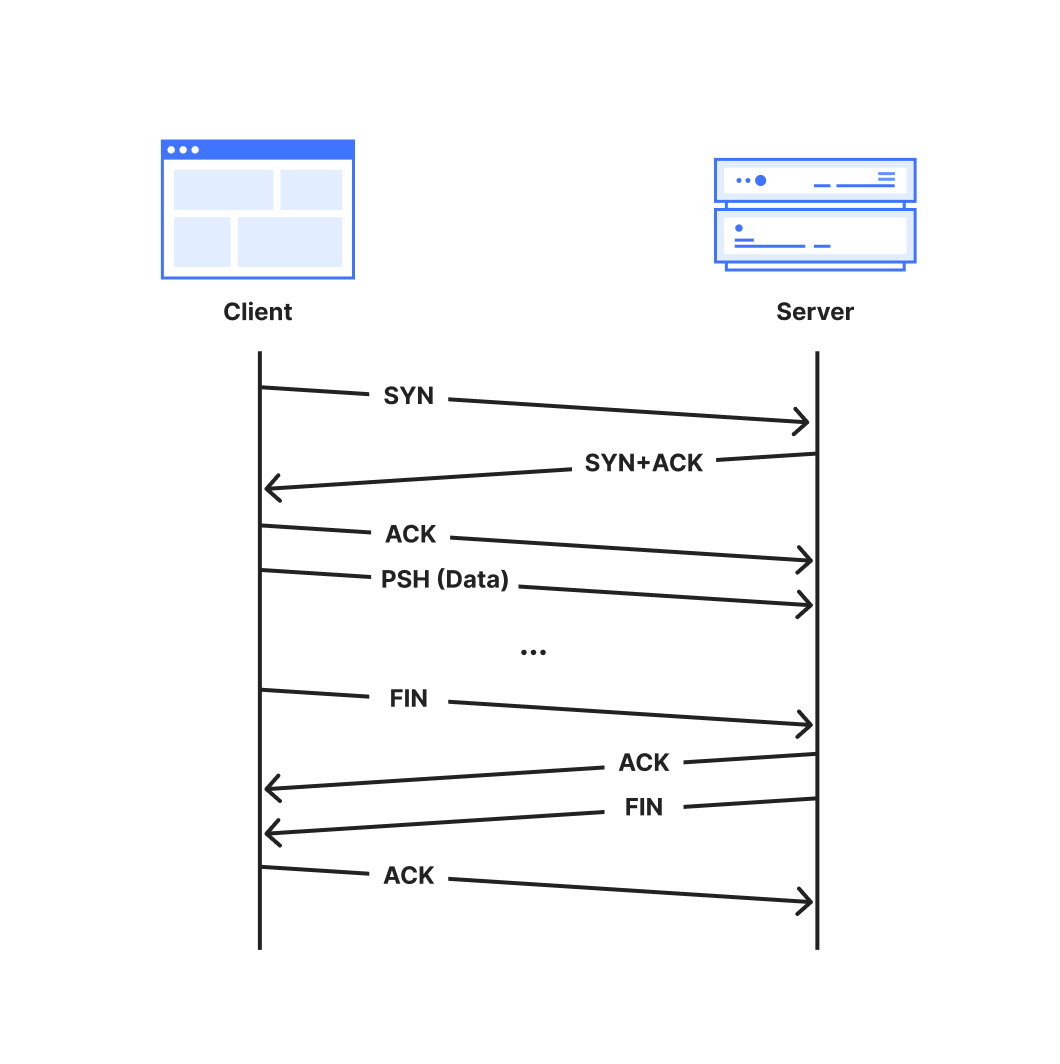
A normal TCP connection starts with a 3-way handshake and ends with a FIN handshake

Additionally, a TCP connection may be terminated by a timeout which specifies the maximum duration that a connection can be active without receiving data or acknowledgements. An inactive connection, for example, can be kept open with keepalive messages. Unless overridden, the global default duration specified in RFC 9293 is five minutes.

We consider TCP connections anomalous when they close via either a reset or timeout from the client side.

Sources of anomalous connections

Anomalous TCP connections may not themselves be problematic but they can be a symptom of larger issues, especially when occurring at early (pre-data) stages of TCP connections. Below is a non-exhaustive list of potential reasons that we might observe resets or timeouts:

  • Scanners: Internet scanners may send a SYN packet to probe if a server responds on a given port, but otherwise fail to clean up a connection once the probe has elicited a response from the server.

  • Sudden Application Shutdowns: Applications might abruptly close open connections if they are no longer required. For example, web browsers may send RSTs to terminate connections after a tab is closed, or connections can time out if devices lose power or connectivity.

  • Network Errors: Unstable network conditions (e.g., a severed cable connection could result in connection timeouts)

  • Attacks: A malicious client may send attack traffic that appears as anomalous connections. For instance, in a SYN flood (half-open) attack, an attacker repeatedly sends SYN packets to a target server in an attempt to overwhelm resources as it maintains these half-opened connections.

  • Tampering: Firewalls or other middleboxes capable of intercepting packets between a client and server may drop packets, causing timeouts at the communicating parties. Middleboxes capable of deep packet inspection (DPI) might also leverage the fact that the TCP protocol is unauthenticated and unencrypted to inject packets to disrupt the connection state. See our accompanying blog post for more details on connection tampering.

Understanding the scale and underlying reasons for anomalous connections can help us to mitigate failures and build a more robust and reliable network. We hope that sharing these insights publicly will help to improve transparency and accountability for networks worldwide.

How to use the dataset

In this section, we provide guidance and examples of how to interpret the TCP resets and timeouts dataset by broadly describing three use cases: confirming previously-known behaviors, exploring new targets for followup study, and longitudinal studies to capture changes in network behavior over time.

In each example, the plot lines correspond to the stage of the connection in which the anomalous connection closed, which provides valuable clues into what might have caused the anomaly. We place each incoming connection into one of the following stages:

Post-SYN (mid-handshake): Connection resets or timeouts after the server received a client’s SYN packet. Our servers will have replied, but no acknowledgement ACK packet has come back from the client before the reset or timeout. Packet spoofing is common at this connection stage, so geolocation information is especially unreliable.

Post-ACK (immediately post-handshake): Connection resets or timeouts after the handshake completes and the connection is established successfully. Any subsequent data, that may have been transmitted, never reached our servers.

Post-PSH (after first data packet): Connection resets or timeouts after the server received a packet with the PSH flag set. The PSH flag indicates that the TCP packet contains data (such as a TLS Client Hello message) that is ready to be delivered to the application.

Later (after multiple data packets): Connection resets within the first 10 packets from the client, but after the server has received multiple data packets.

None: All other connections.

To keep focus on legitimate connections, the dataset is constructed after connections are processed and filtered by Cloudflare’s attack mitigation systems.  For more details on how we construct the dataset, see below.

Start with a self-evaluation

To start, we encourage readers to visit the dashboard on Radar to view the results worldwide, and for their own country and ISP.

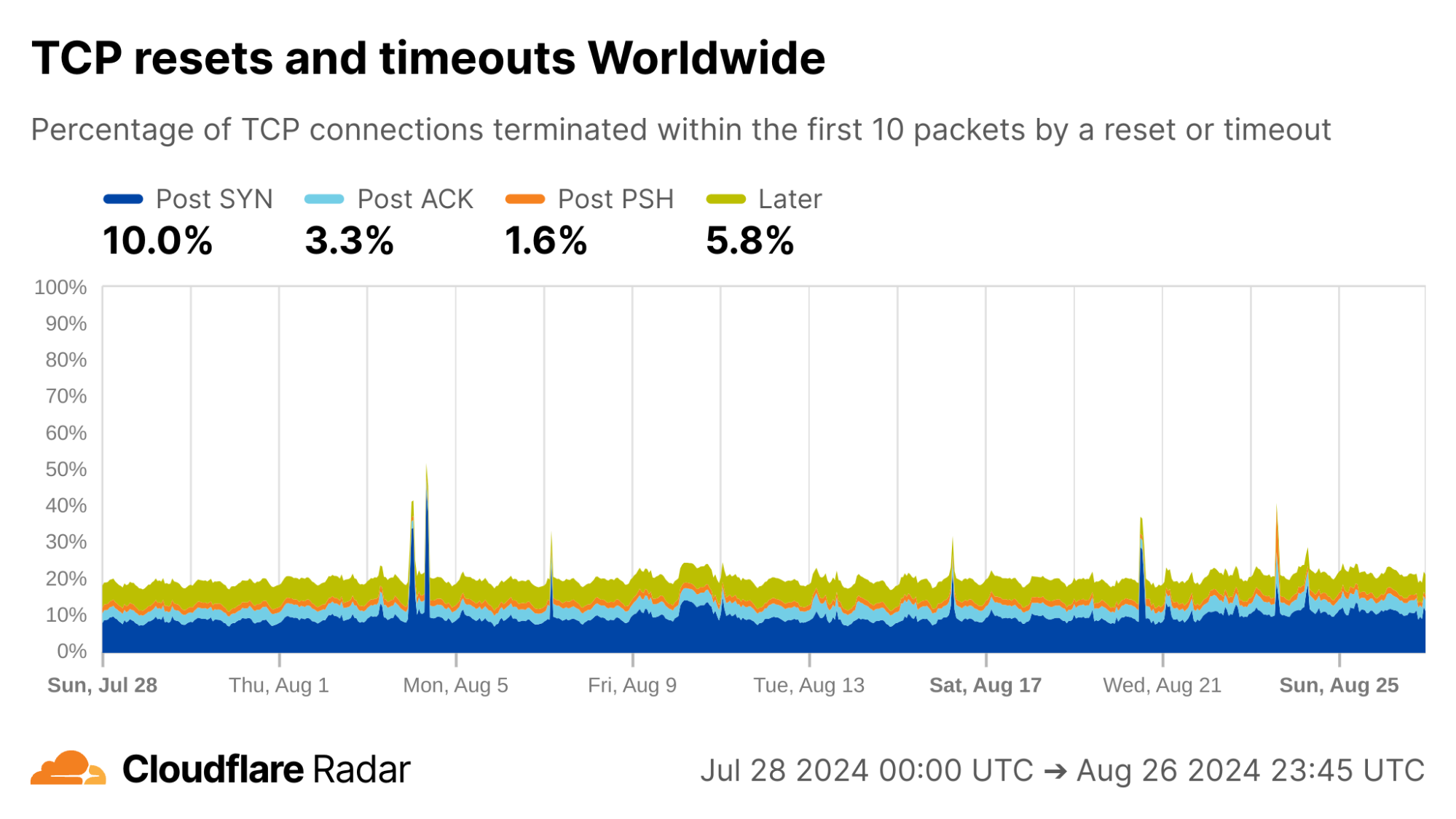
Globally, as shown below, about 20% of new TCP connections to Cloudflare’s network are closed by a reset or timeout within the first 10 packets from the client. While this number seems astonishingly high, it is in-line with prior studies. As we’ll see, rates of resets and timeouts vary widely by country and network, and this variation is lost in the global averages.
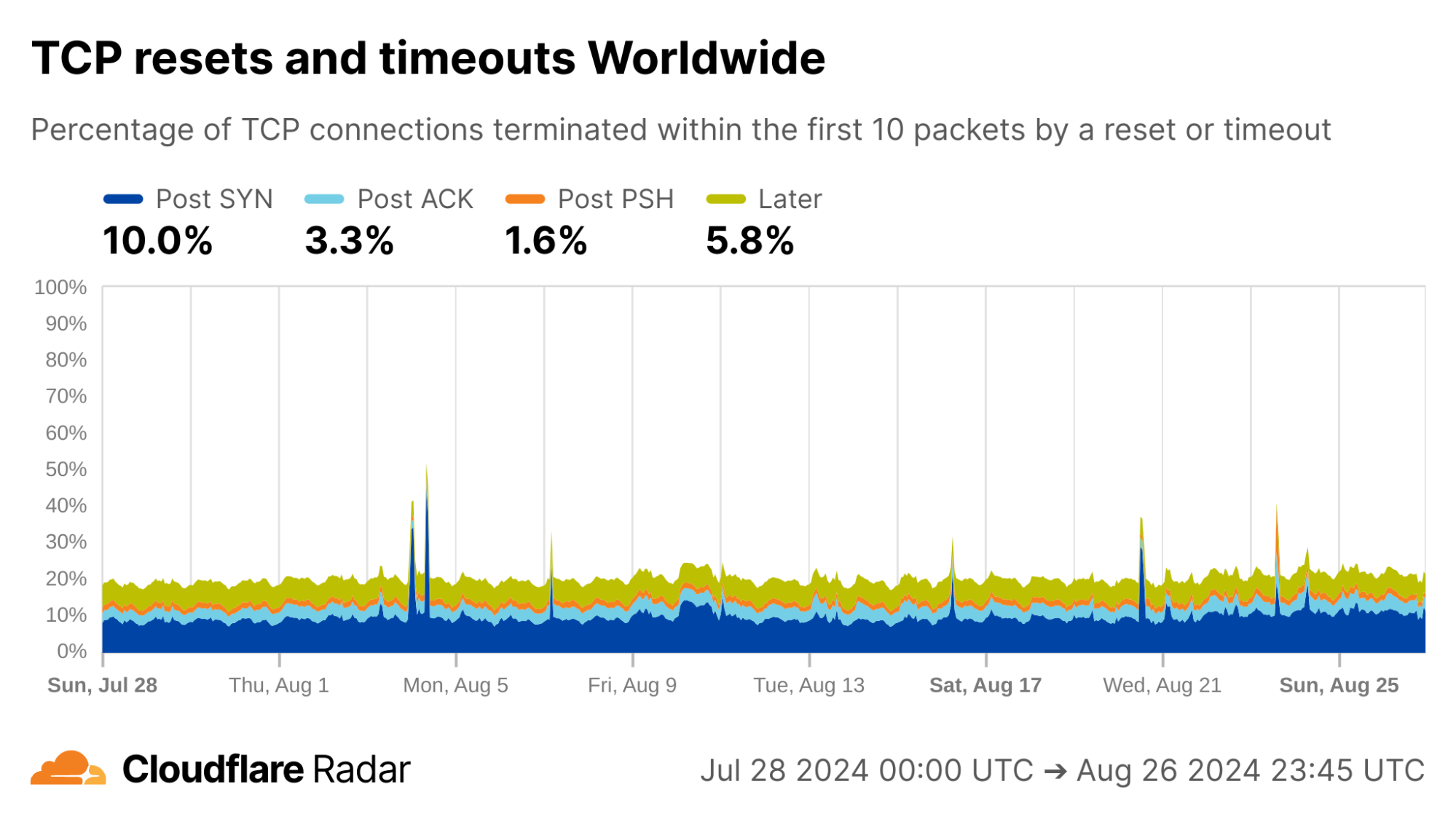

via Cloudflare Radar

The United States, my home country, shows anomalous connection rates slightly lower than the worldwide averages, largely due to lower rates for connections closing in the Post-ACK and Post-PSH stages (those stages are more reflective of middlebox tampering behavior). The elevated rates of Post-SYN are typical in most networks due to scanning, but may include packets that spoof the true client’s IP address. Similarly, high rates of connection resets in the Later connection stage (after the initial data exchange, but still within the first 10 packets) might be applications responding to human actions, such as browsers using RSTs to close unwanted TCP connections after a tab is closed.
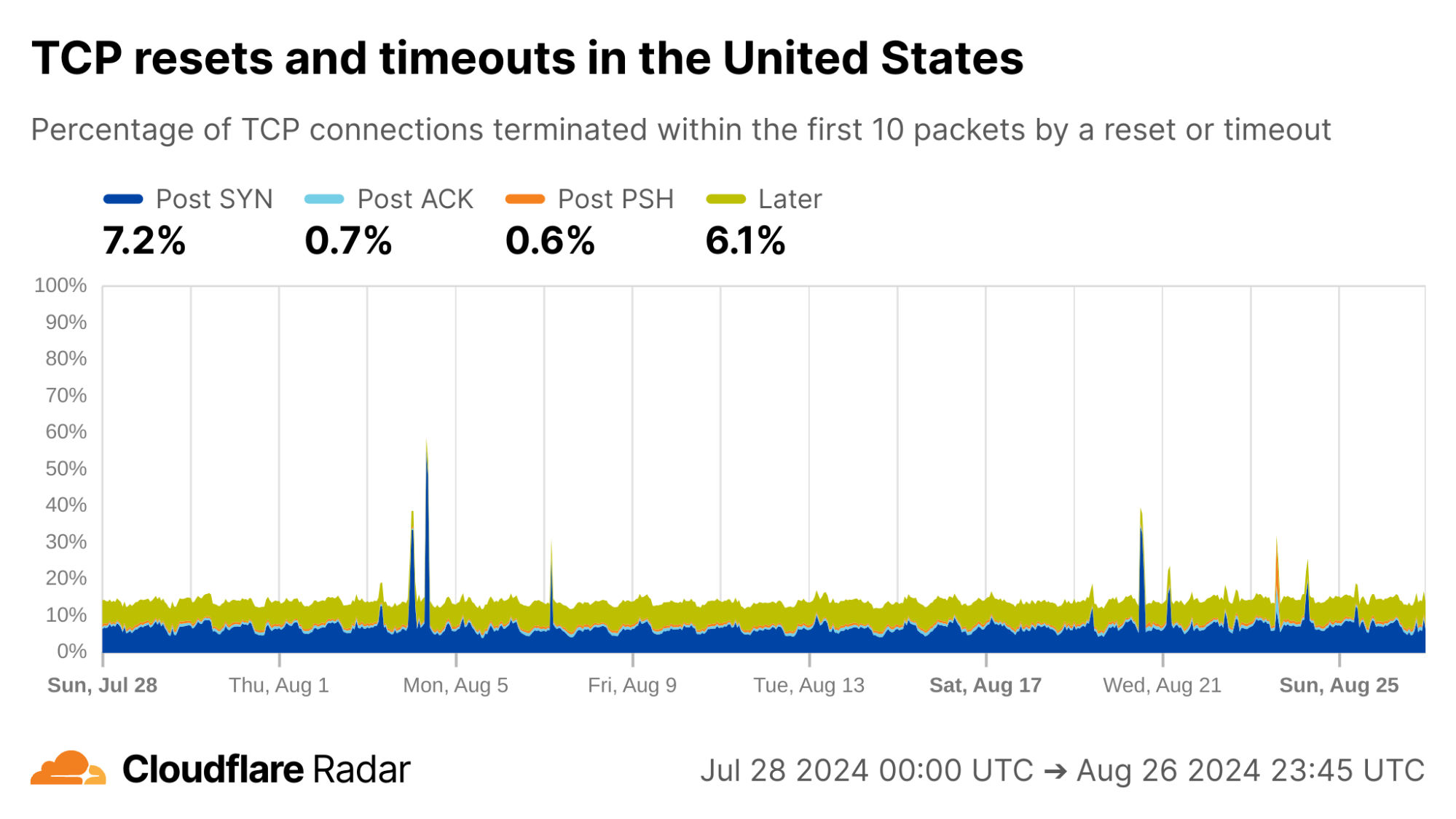

via Cloudflare Radar

My home ISP AS22773 (Cox Communications) shows rates comparable to the US as a whole. This is typical of most residential ISPs operating in the United States.
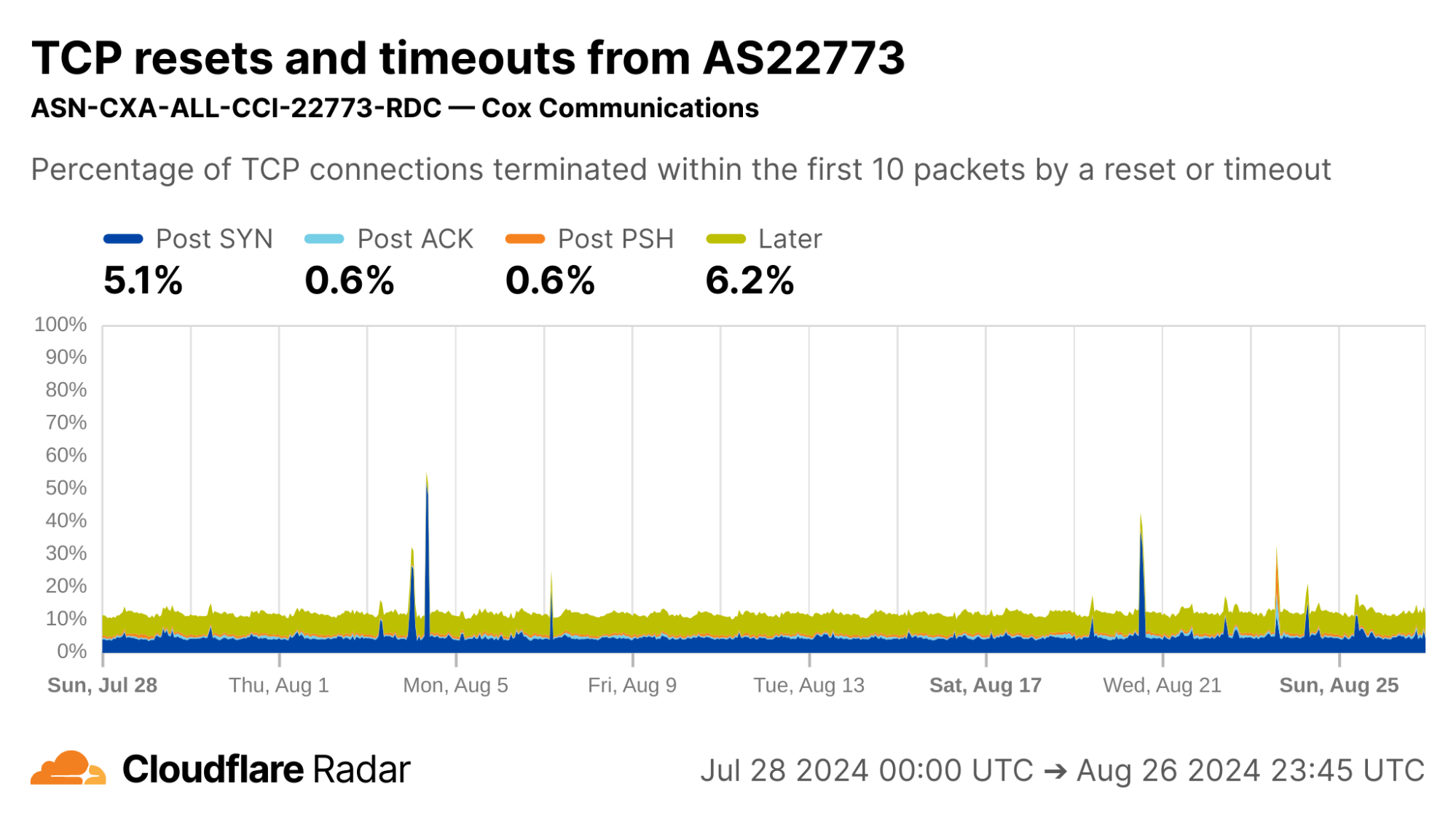
via Cloudflare Radar

Contrast this against AS15169 (Google LLC), which originates many of Google’s crawlers and fetchers. This network shows significantly lower rates of resets in the “Later” connection stage, which may be explained by the larger proportion of automated traffic, not driven by human user actions (such as closing browser tabs).
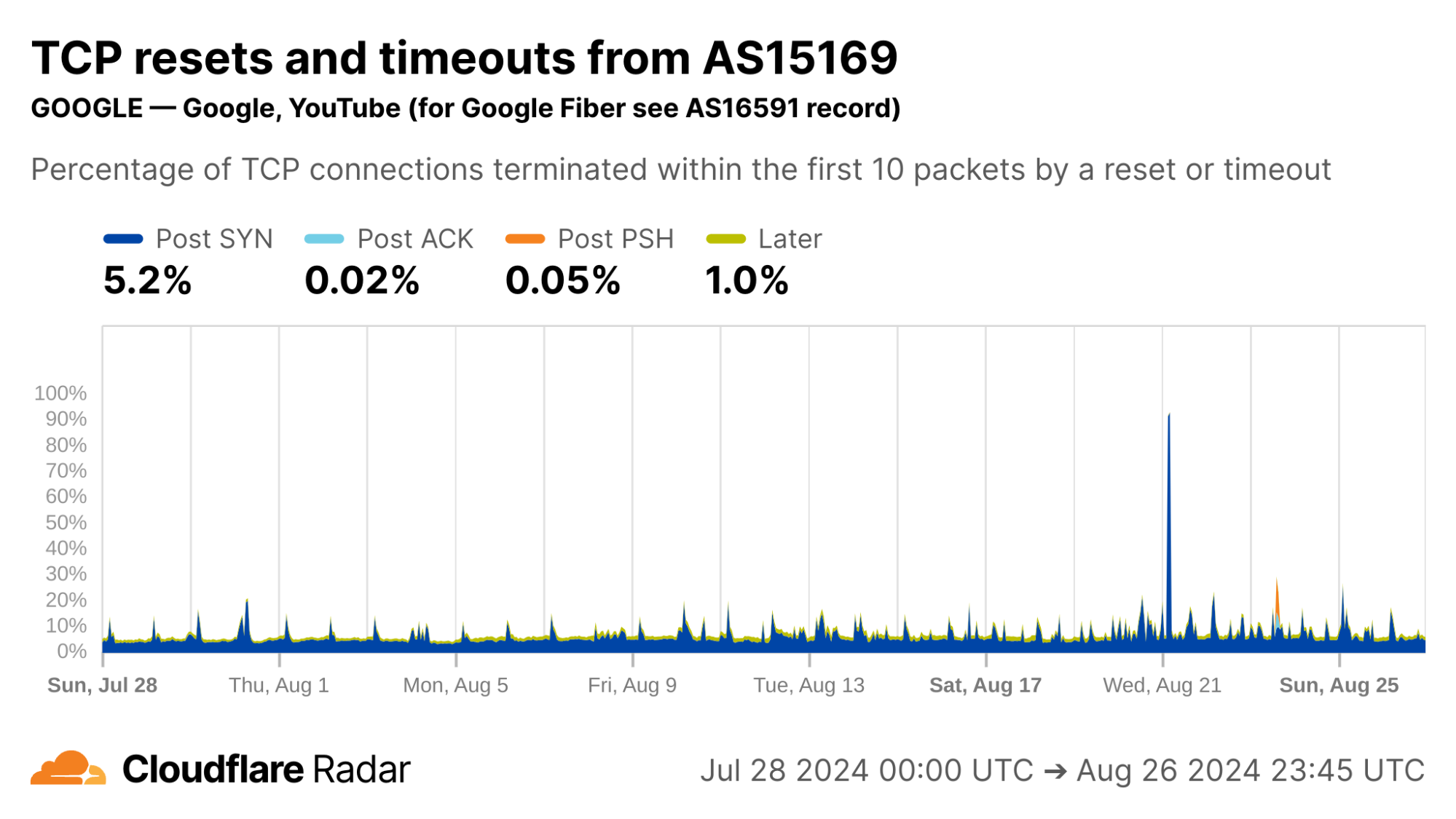
via Cloudflare Radar

Indeed, our bot detection system classifies over 99% of HTTP requests from AS15169 as automated. This shows the value of collating different types of data on Radar.
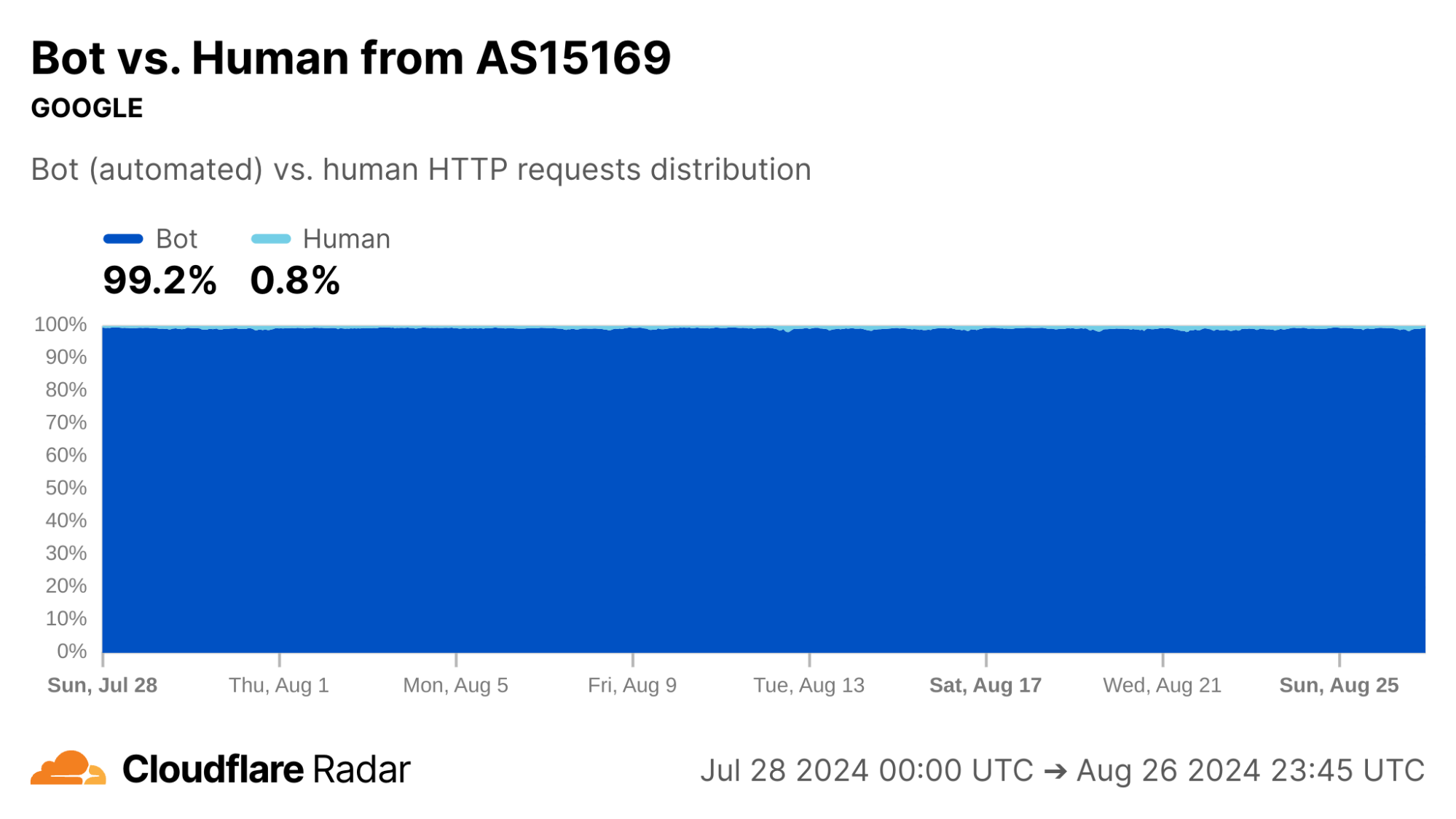
via Cloudflare Radar

The new anomalous connections dataset, like most that appear on Radar, is passive – it only reports on observable events, not what causes them. In this spirit, the graphs above for Google’s network reinforce the reason for corroborating observations, as we discuss next.

One view for a signal, more views for corroboration

Our passive measurement approach works at Cloudflare scale. However, it does not identify root causes or ground truth on its own. There are many plausible explanations for why a connection closed in a particular stage, especially when the closure is due to reset packets and timeouts. Attempts to explain by relying solely on this data source can only lead to speculation. 

However, this limitation can be overcome by combining with other data sources such as active measurements. For example, corroborating with reports from OONI or Censored Planet, or with on-the-ground reports, can give a more complete story. Thus, one of the major use cases for the TCP resets and timeouts dataset is to understand the scale and impact of previously-documented phenomena.

Corroborating Internet-scale measurement projects

Looking at AS398324 would suggest something terribly wrong, with more than half of connections showing up as anomalous in the Post-SYN stage. However, this network turns out to be CENSYS-ARIN-01, from Internet scanning company Censys. Post-SYN anomalies can be the result of network-layer scanning, where the scanner sends a single SYN packet to probe the server, but does not complete the TCP handshake. There are also high rates of Later anomalies, which could be indicative of application-layer scanning, as indicated by the near 100% proportion of connections being classified as automated.
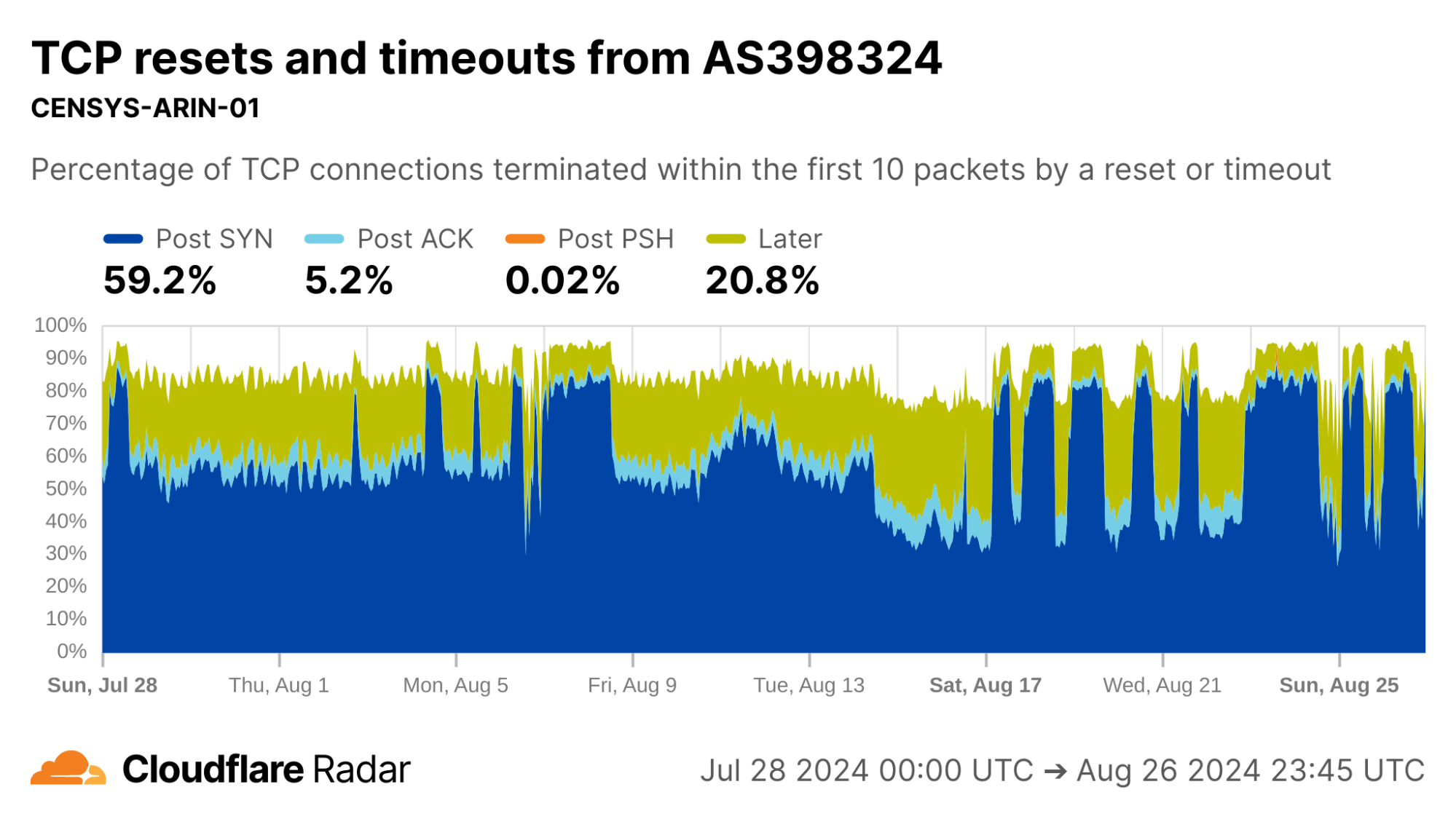
via Cloudflare Radar

Indeed, similar to AS15169, we classify over 99% of requests from AS398324 as automated.
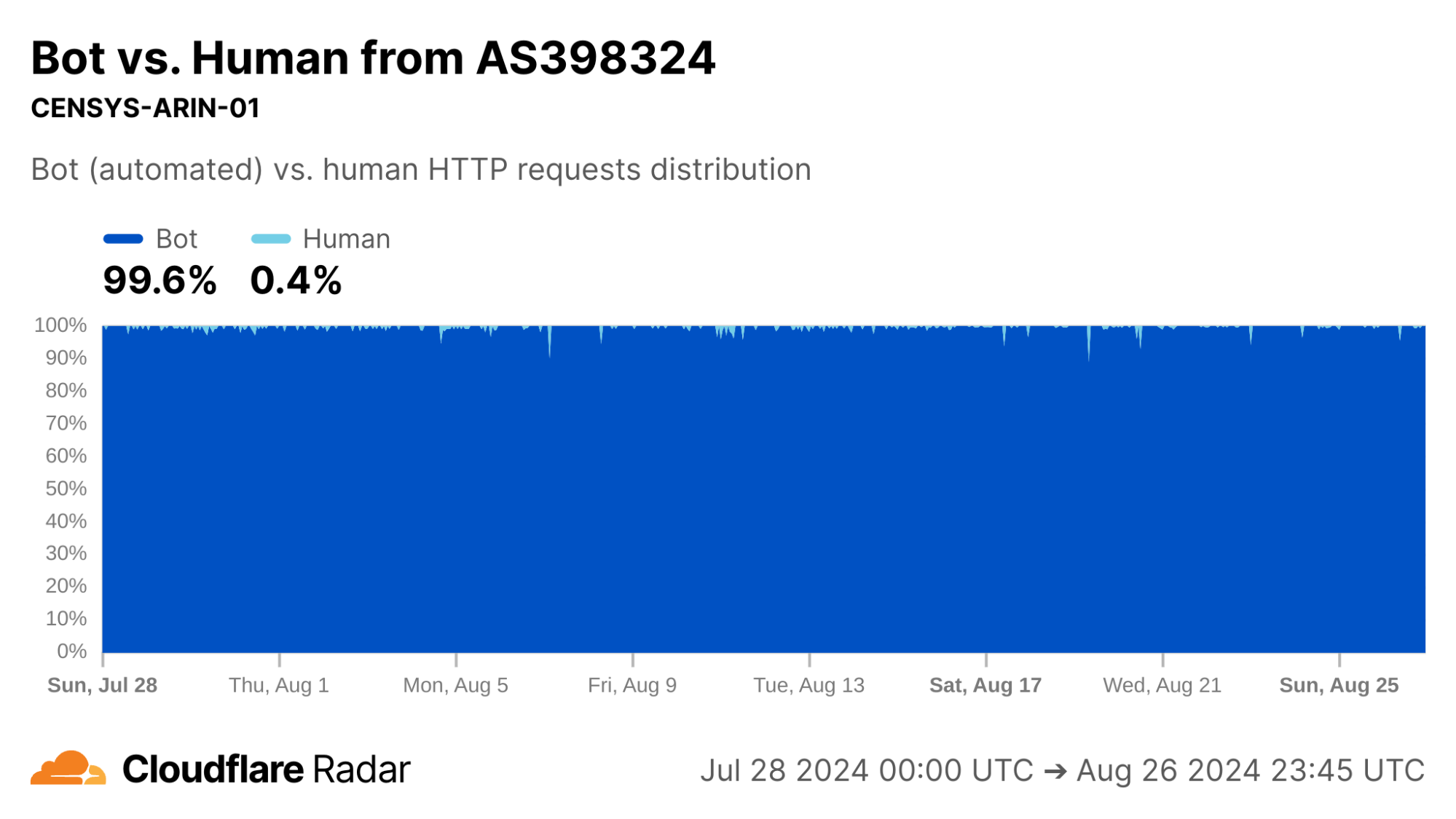
via Cloudflare Radar

So far, we’ve looked at networks that generate high volumes of scripted or automated traffic. It’s time to look further afield.

Corroborating connection tampering

The starting point of this dataset was a research project to understand and detect active connection tampering, in a similar spirit to our work on HTTPS interception. The reasons we set out to do are explained in detail in our accompanying blog post.

A well-documented technique in the wild to force connections to close is reset injection. With reset injection, middleboxes on the path to the destination inspect data portions of packets. When the middlebox sees a packet to a forbidden domain name, it injects forged TCP Reset (RST) packets to one or both communicating parties to cause them to abort the connection. If the middlebox did not drop the forbidden packet first, then the server will receive both the client packet that triggered the middlebox tampering – perhaps containing a TLS Client Hello message with a Server Name Indication (SNI) field – followed soon afterwards by the forged RST packet.

In the TCP resets and timeouts dataset, a connection disrupted via reset injection would typically appear as a Post-ACK, Post-PSH, or Later anomaly (but, as a reminder, not all anomalies are due to reset injection).

As an example, the reset injection technique is known and commonly associated with the so-called Great Firewall of China (GFW). Indeed, looking at Post-PSH anomalies in connections originating from IPs geolocated to China, we see higher rates than the worldwide average. However, looking at individual networks in China, the Post-PSH rates vary widely, perhaps due to the types of traffic carried or different implementations of the technique. In contrast, rates of Post-SYN anomalies are consistently high across most major Chinese ASes; this may be scanners, spoofed SYN flood attacks, or residual blocking with collateral impact. 
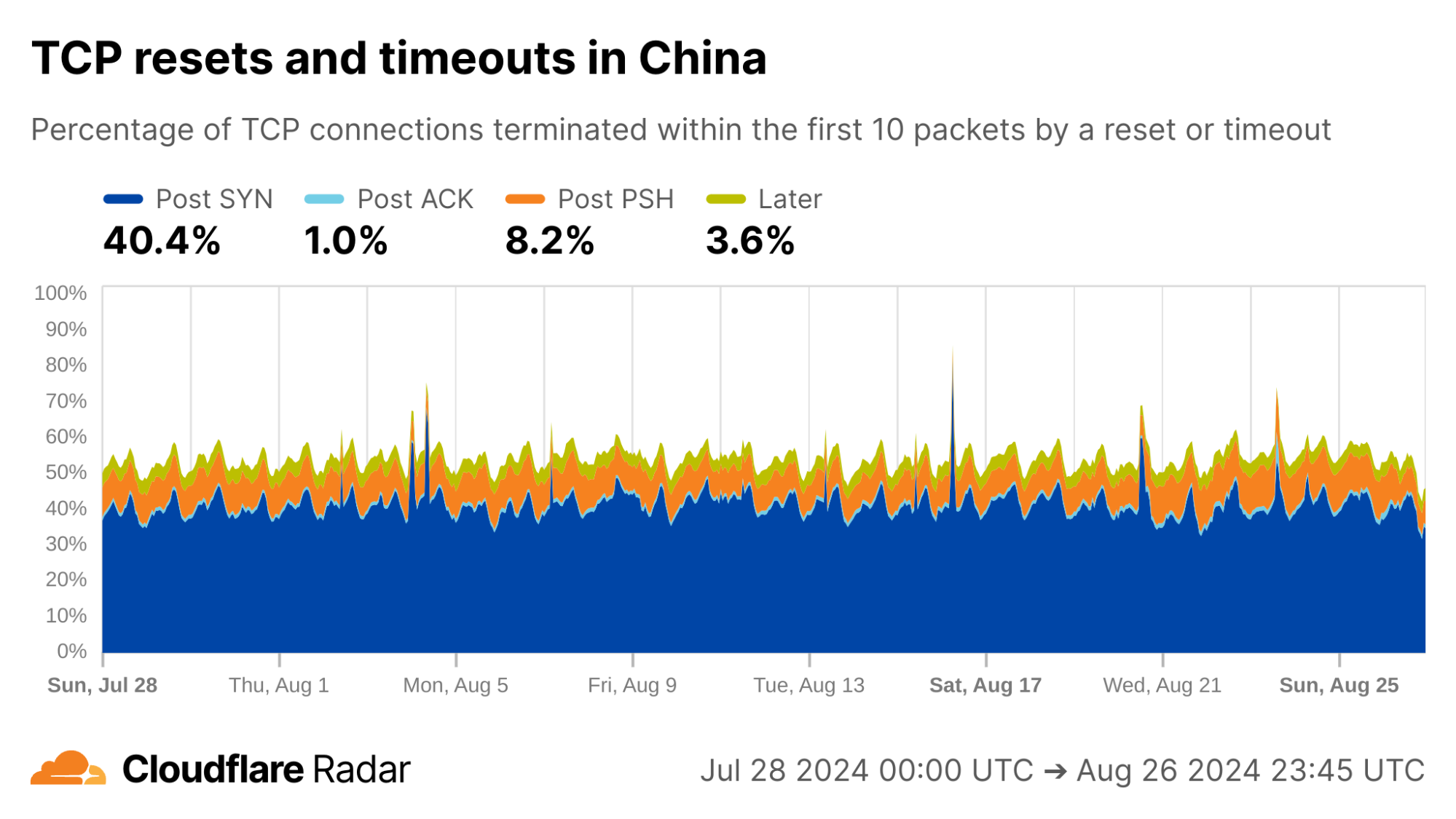
via Cloudflare Radar

AS4134 (CHINANET-BACKBONE) shows lower rates of Post-PSH anomalies than other Chinese ASes, but still well above the worldwide average.
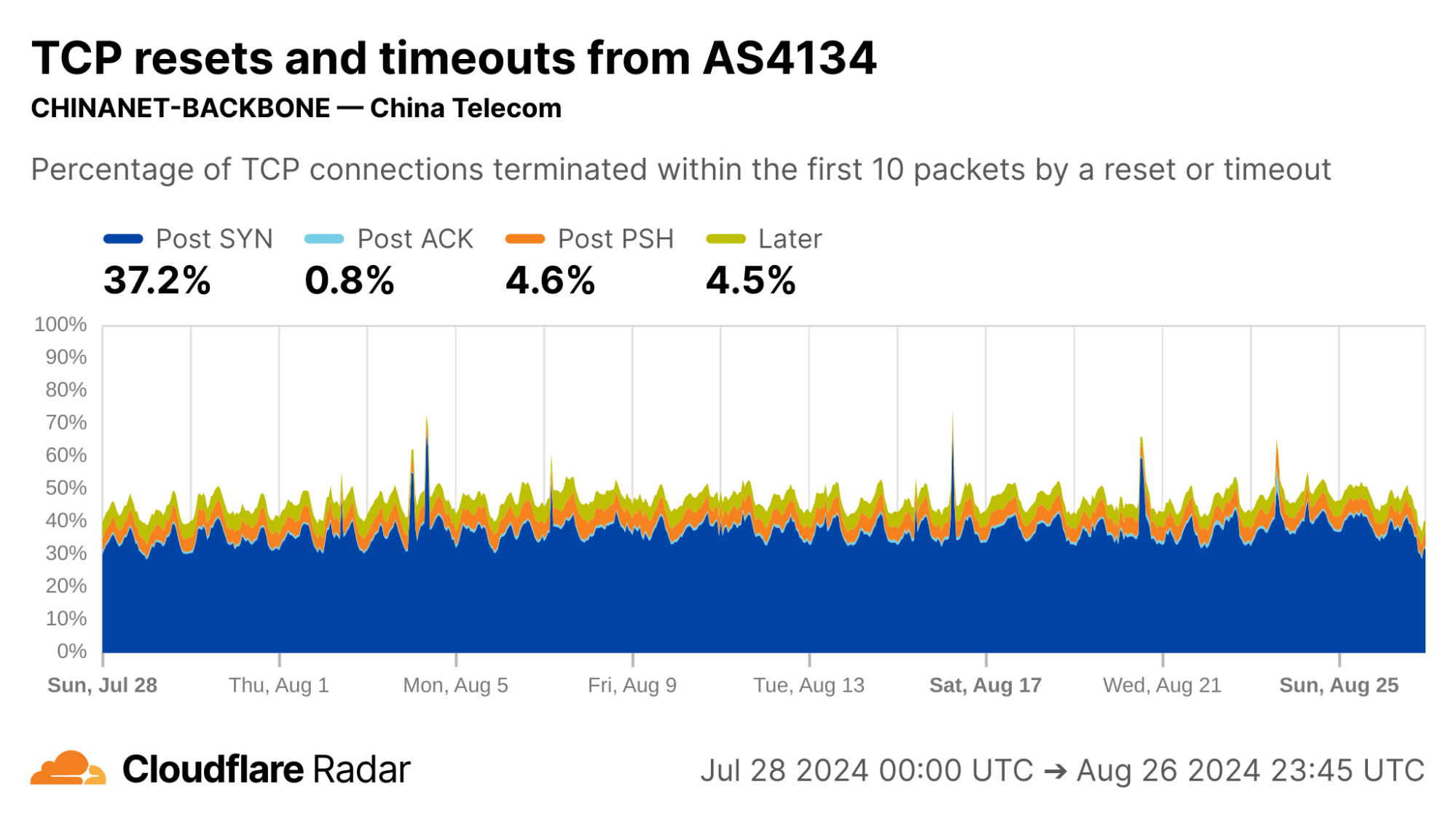
via Cloudflare Radar

Networks AS9808 (CHINAMOBILE-CN) and AS56046 (CMNET-Jiangsu-AP) both show double-digit percentages of connections matching Post-PSH anomalies.
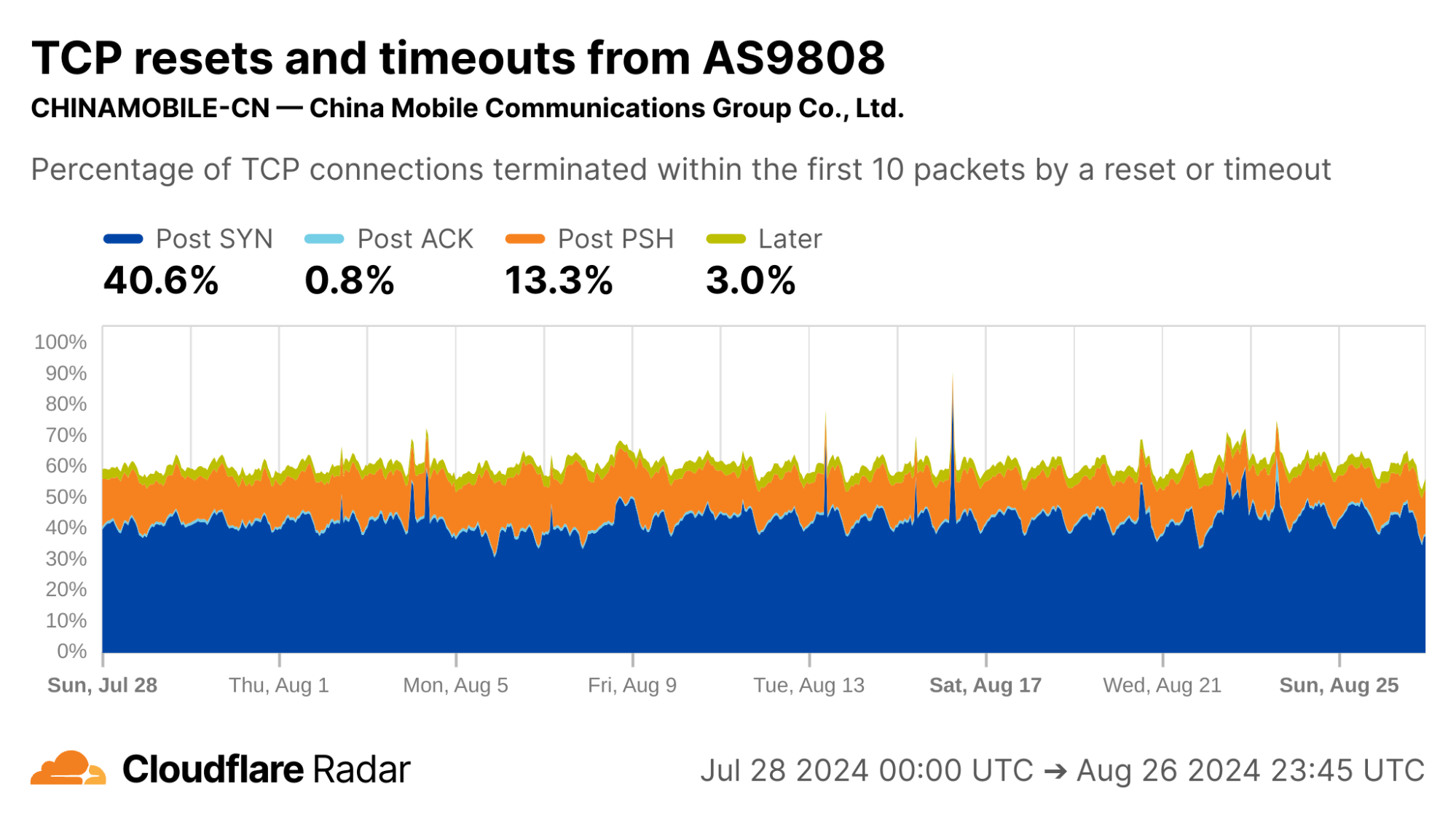
via Cloudflare Radar
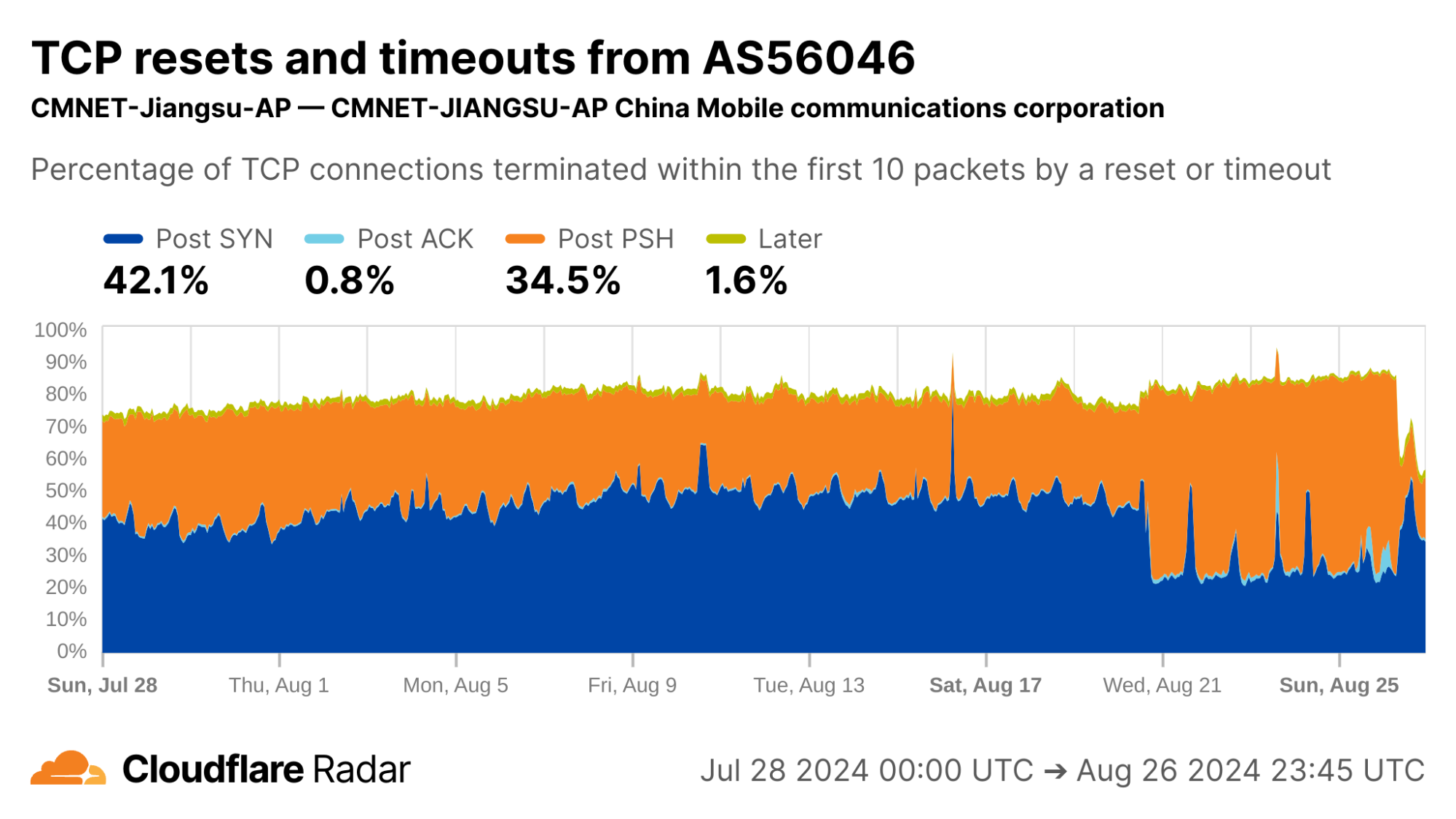
via Cloudflare Radar

See our deep-dive blog post for more information about connection tampering.

Sourcing new insights and targets for followup study

TCP resets and timeouts dataset may also be a source for identifying new or previously understudied network behaviors, by helping to find networks that “stick out” and merit further investigation.

Unattributable ZMap scanning

Here is one we’re unable to explain: Every day during the same 18-hour interval, over 10% of connections from UK clients never progress past the initial SYN packets, and just time out.
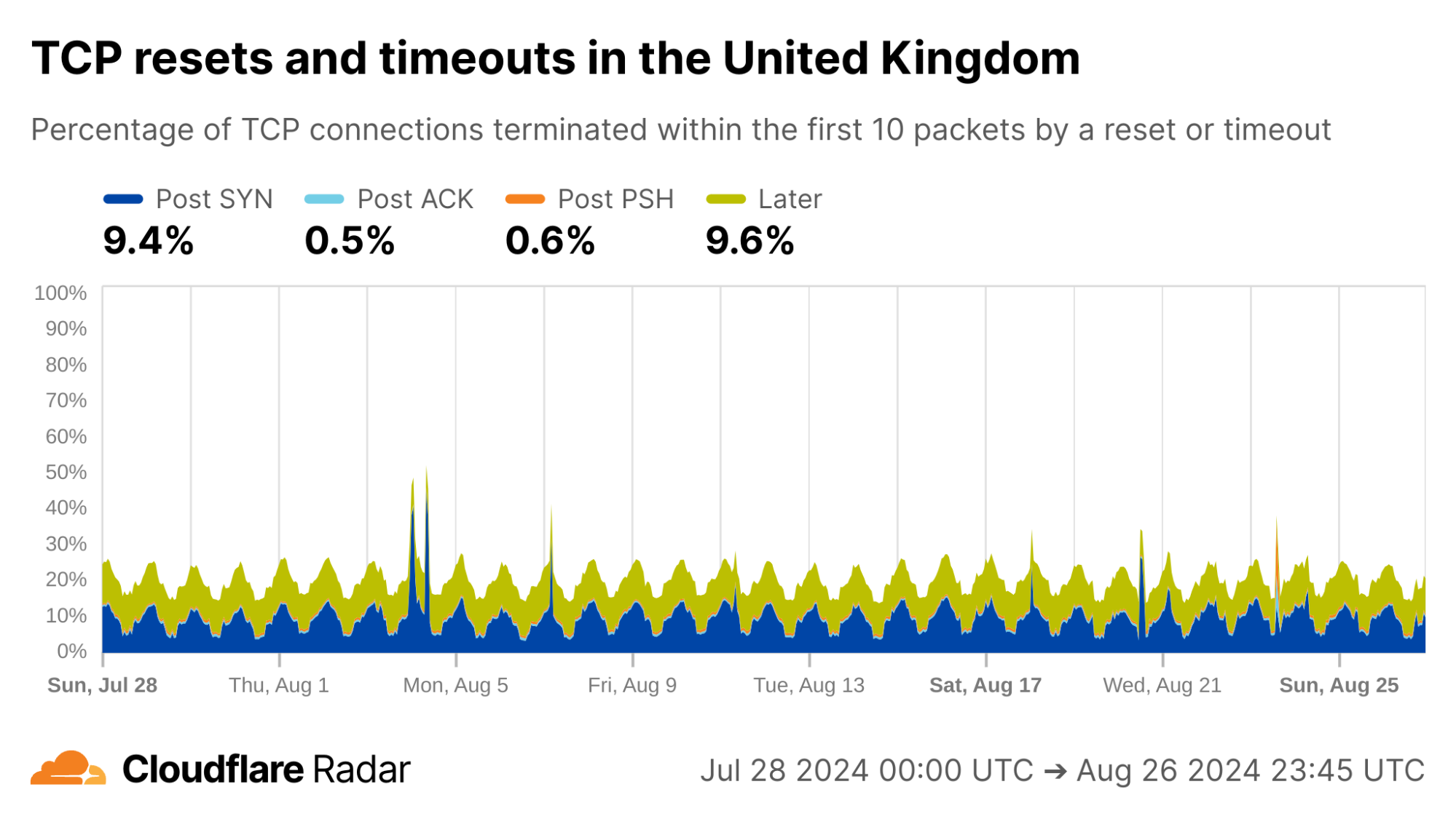
via Cloudflare Radar

Internal inspection revealed that almost all of the Post-SYN anomalies come from a scanner using ZMap at AS396982 (GOOGLE-CLOUD-PLATFORM), in what appears to be a full port scan across all IP address ranges. (The ZMap client responsibly self-identifies, based on ZMap’s responsible self-identification as discussed later.) We see a similar level of scan traffic from IP prefixes in AS396982 geolocated to the United States.
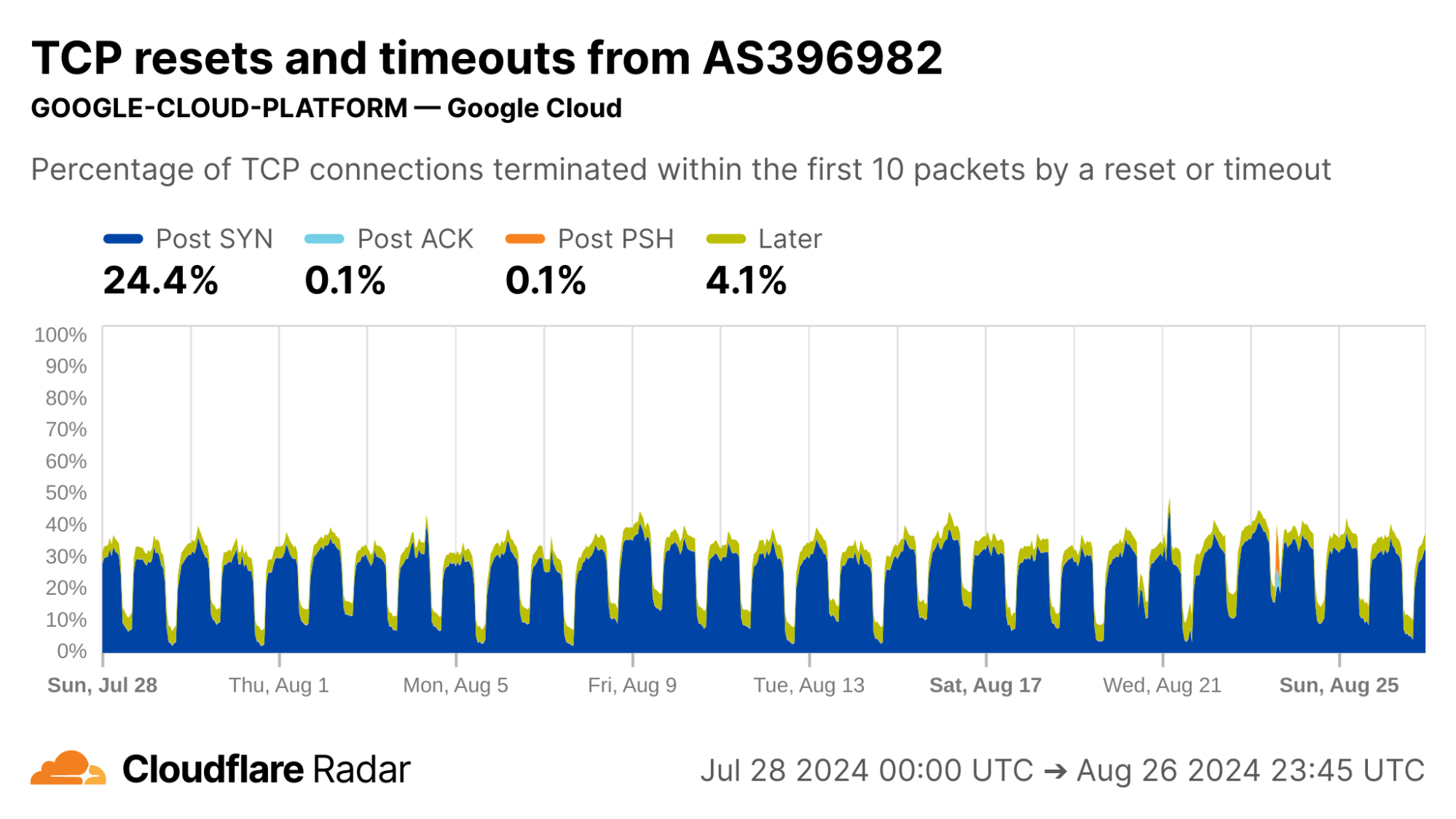
via Cloudflare Radar

Zero-rating in mobile networks

A cursory look at anomaly rates at the country level reveals some interesting findings. For instance, looking at connections from Mexico, the rates of Post-ACK and Post-PSH anomalies often associated with connection tampering are higher than the global average. The profile for Mexico connections is also similar to others in the region. However, Mexico is a country with “no documented evidence that the government or other actors block or filter internet content.”
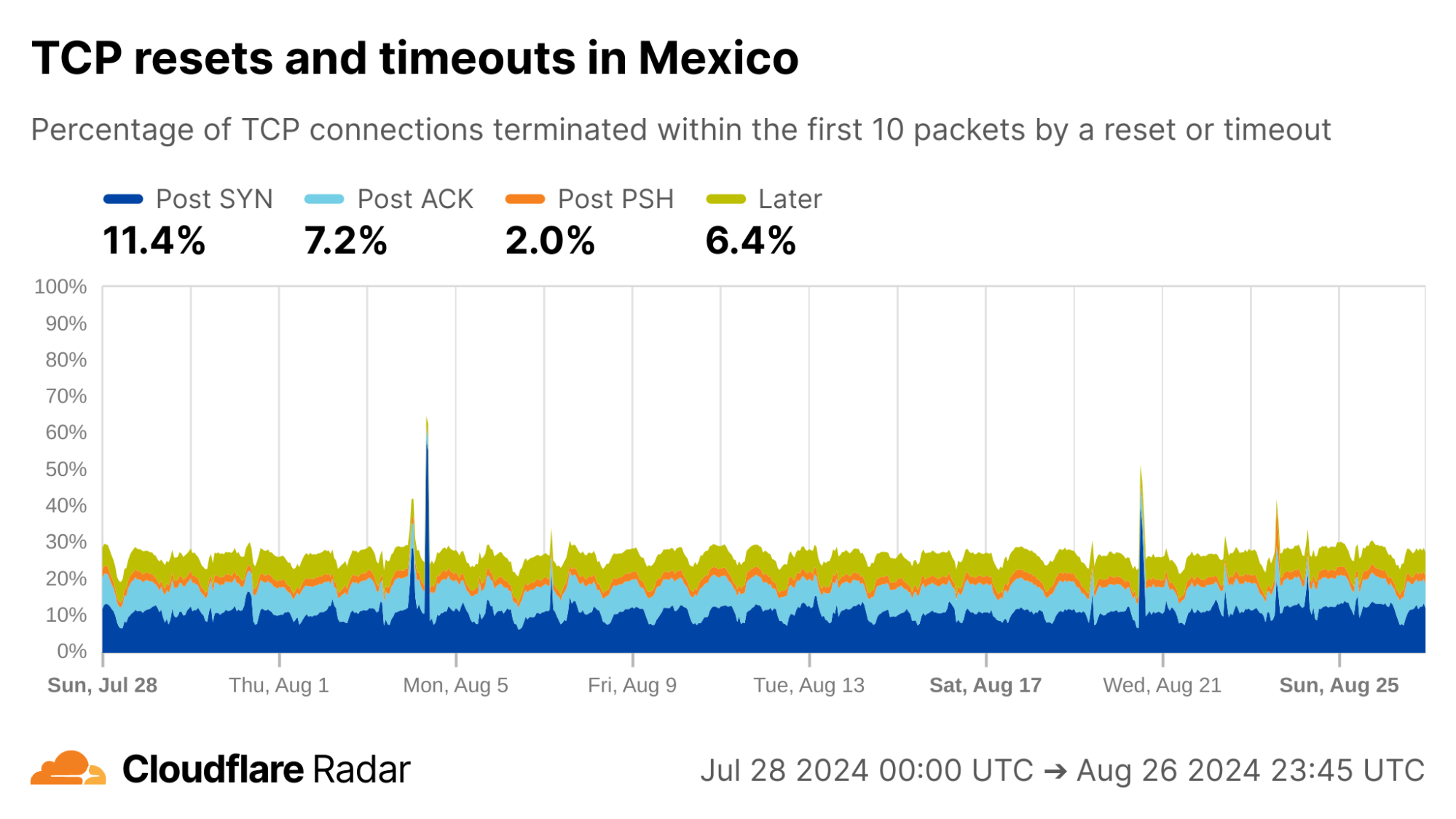
via Cloudflare Radar

Looking at each of the top ASes by HTTP traffic volume in Mexico, we find that close to 50% of connections from AS28403 (RadioMovil Dipsa, S.A. de C.V., operating as Telcel) are terminated via a reset or timeout directly after the completion of the TCP handshake (Post-ACK connection stage). In this stage, it’s possible a middlebox has seen and dropped a data packet before it gets to Cloudflare.

One explanation for this behavior may be zero-rating, in which a cellular network provider allows access to certain resources (such as messaging or social media apps) at no cost. When users exceed their data transfer limits on their account, the provider might still allow traffic to zero-rated destinations while blocking connections to other resources.

To enforce a zero-rating policy, an ISP might use the TLS Server Name Indication (SNI) to determine whether to block or allow connections. The SNI is sent in a data-containing packet immediately following the TCP handshake. Thus, if an ISP drops the packet containing the SNI, the server would still see the SYN and ACK packets from the client but no subsequent packets, which is consistent with a Post-ACK connection anomaly.
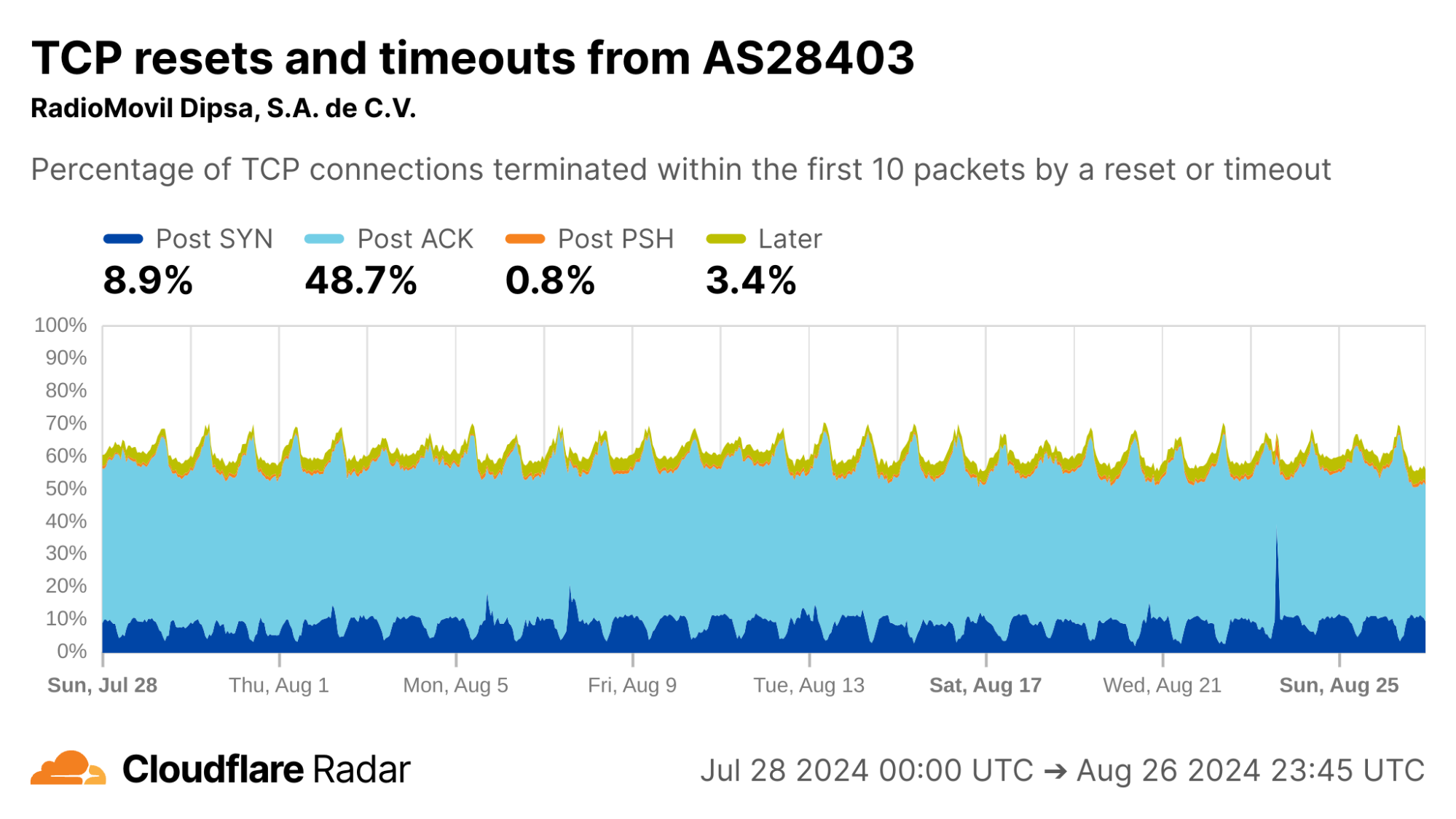
via Cloudflare Radar

Turning to Peru, another country with a similar profile in the dataset, there are even higher rates of Post-ACK and Post-PSH anomalies compared to Mexico.
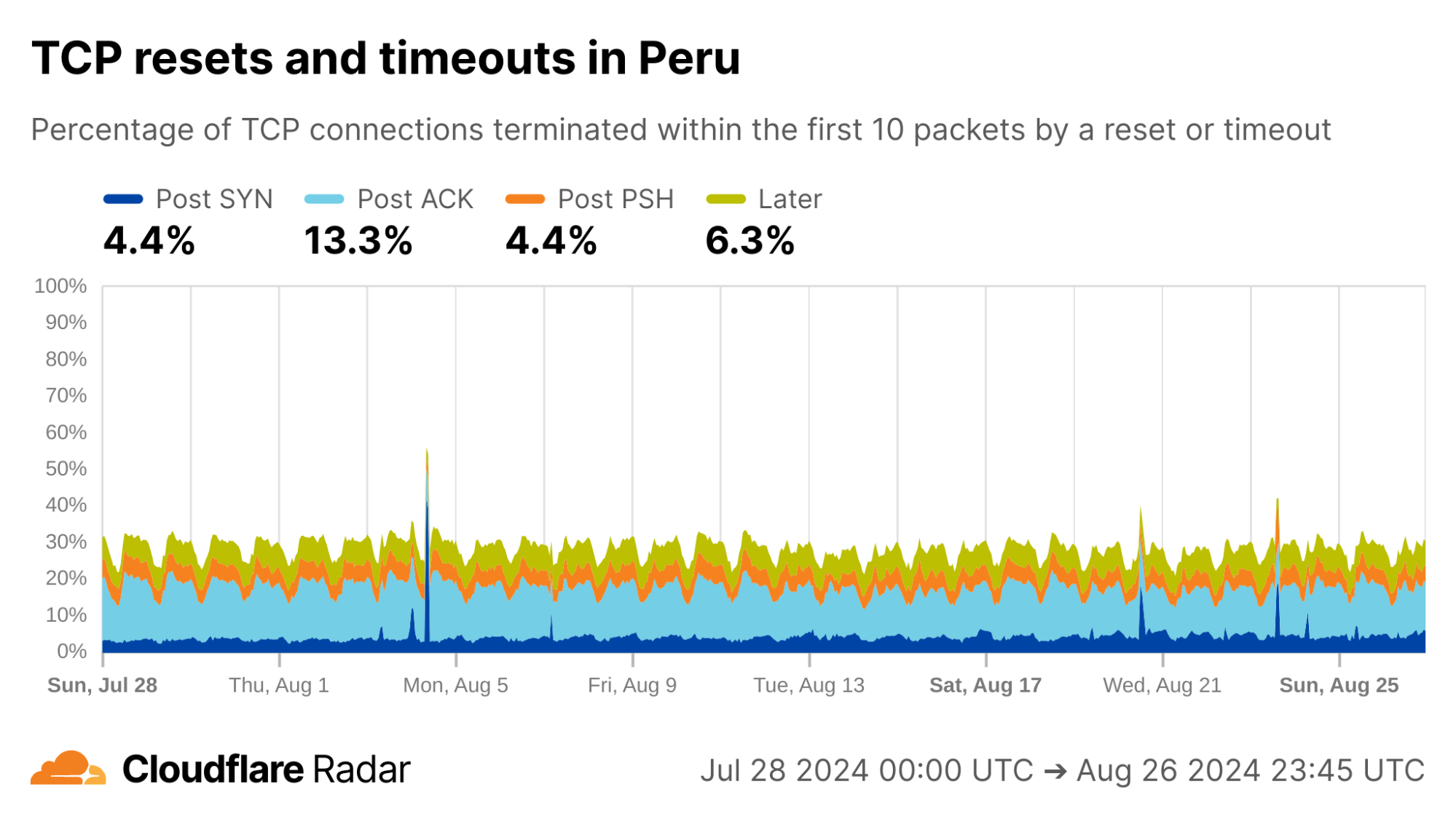
via Cloudflare Radar

Focusing on specific ASes, we see that AS12252 (Claro Peru) shows high rates of Post-ACK anomalies similar to AS28403 in Mexico. Both networks are operated by the same parent company, América Móvil, so one might expect similar network policies and network management techniques to be employed.
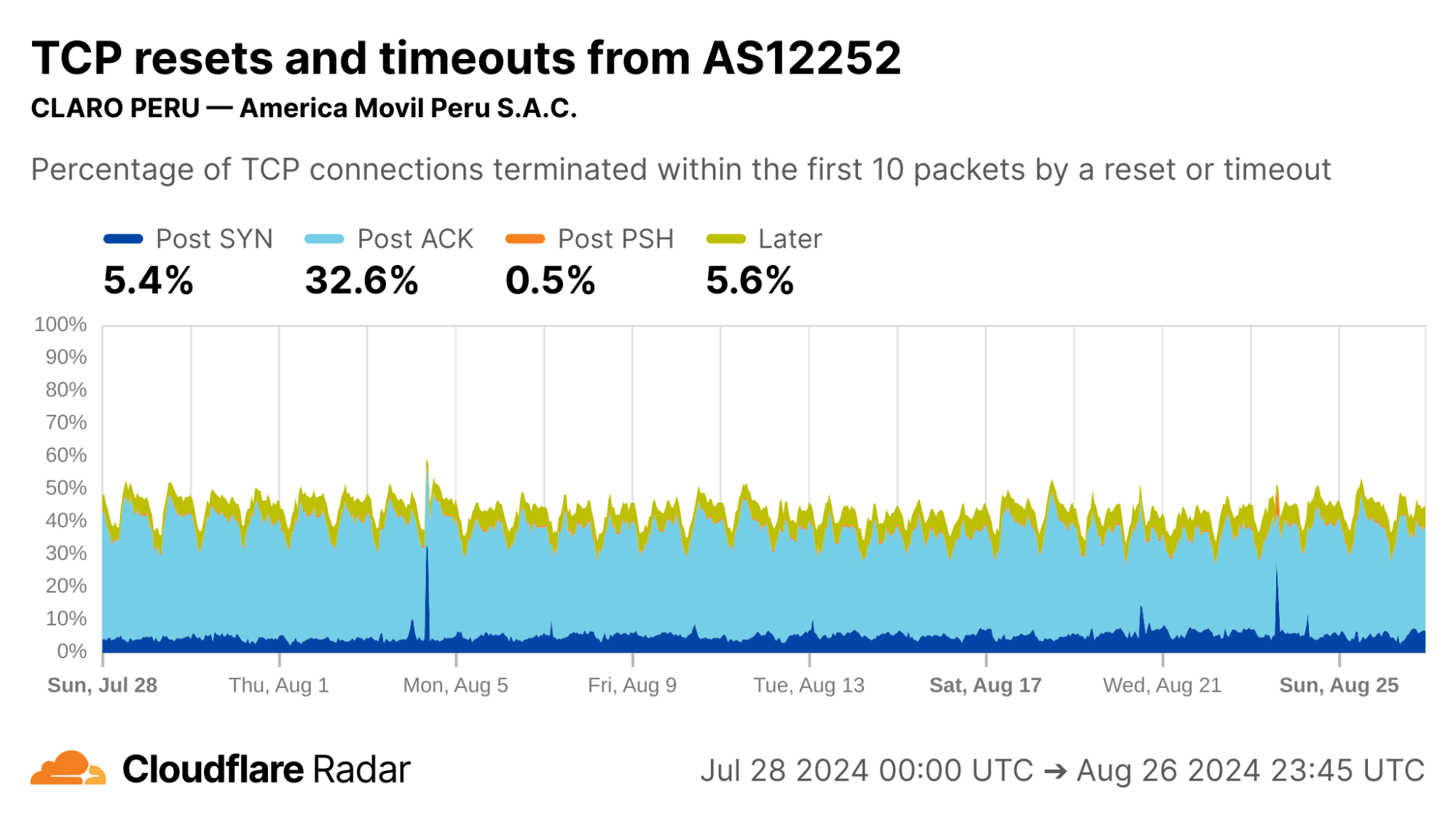
via Cloudflare Radar

Interestingly, AS6147 (Telefónica Del Perú) instead shows high rates of Post-PSH connection anomalies. This could indicate that this network uses different techniques at the network layer to enforce its policies.
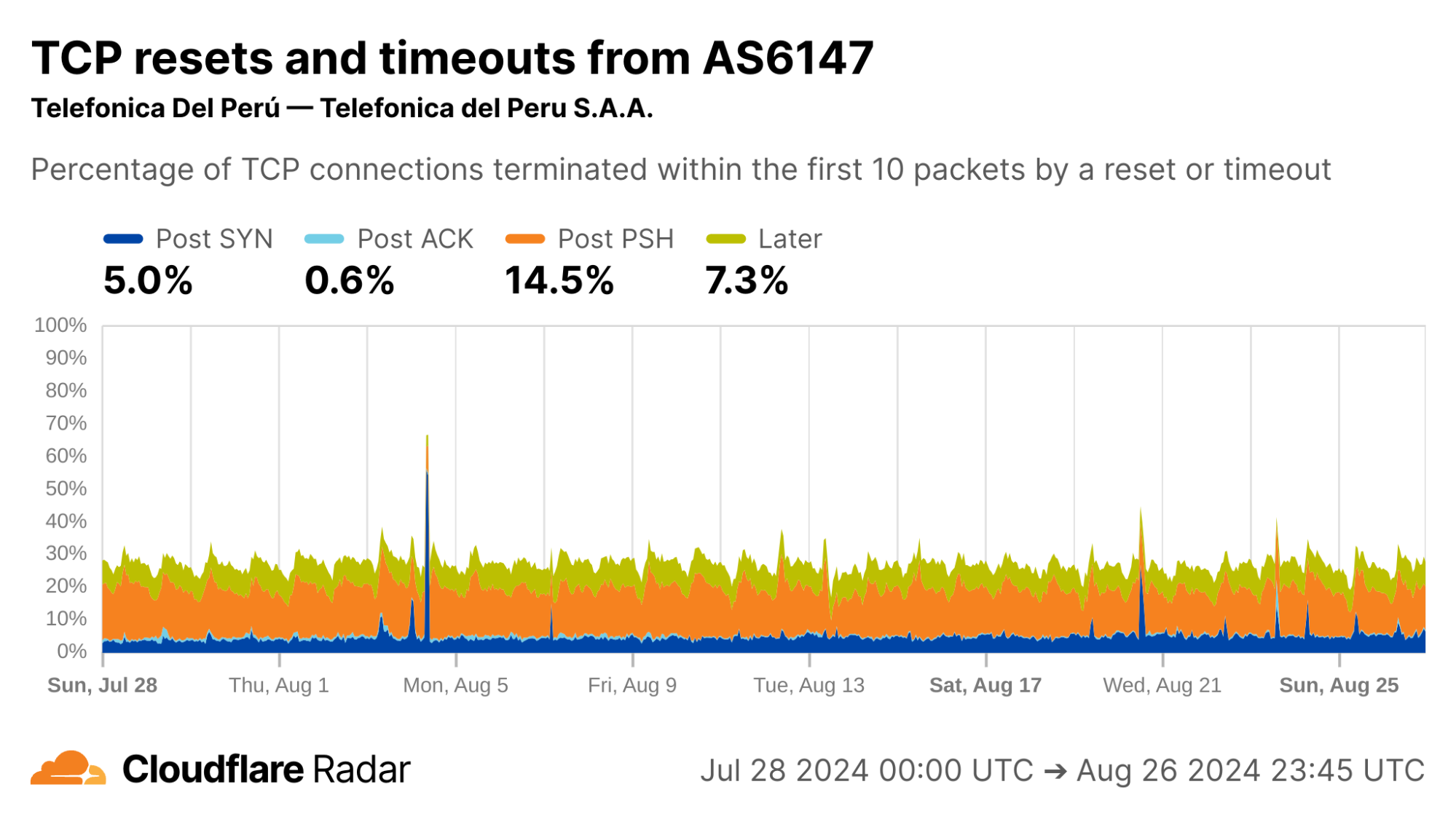
via Cloudflare Radar

Changes over time, a longitudinal view

One of the most powerful aspects of our continuous passive measurement is the ability to measure networks over longer periods of time.

Internet shutdowns

In our June 2024 blog post “Examining recent Internet shutdowns in Syria, Iraq, and Algeria”, we shared the view of exam-related nationwide Internet shutdowns from the perspective of Cloudflare’s network. At that time we were preparing the TCP resets and timeouts dataset, which was helpful to confirm outside reports and get some insight into the specific techniques used for the shutdowns.

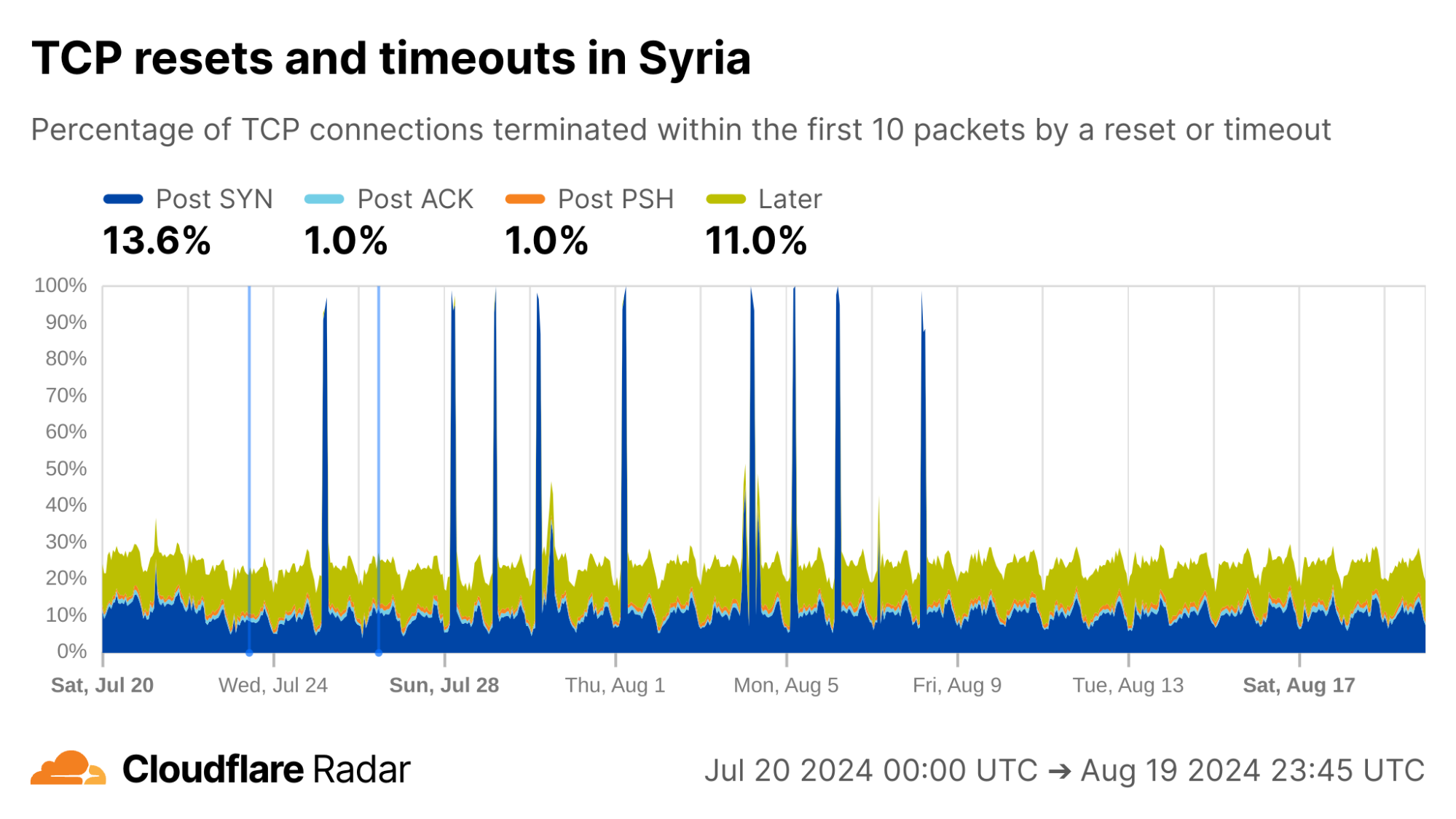
As examples of changing behavior, we can go “back in time” to observe exam-related blocking as it happened. In Syria, during the exam-related shutdowns we see spikes in the rate of Post-SYN anomalies. In reality, we see a near-total drop in traffic (including SYN packets) during these periods.
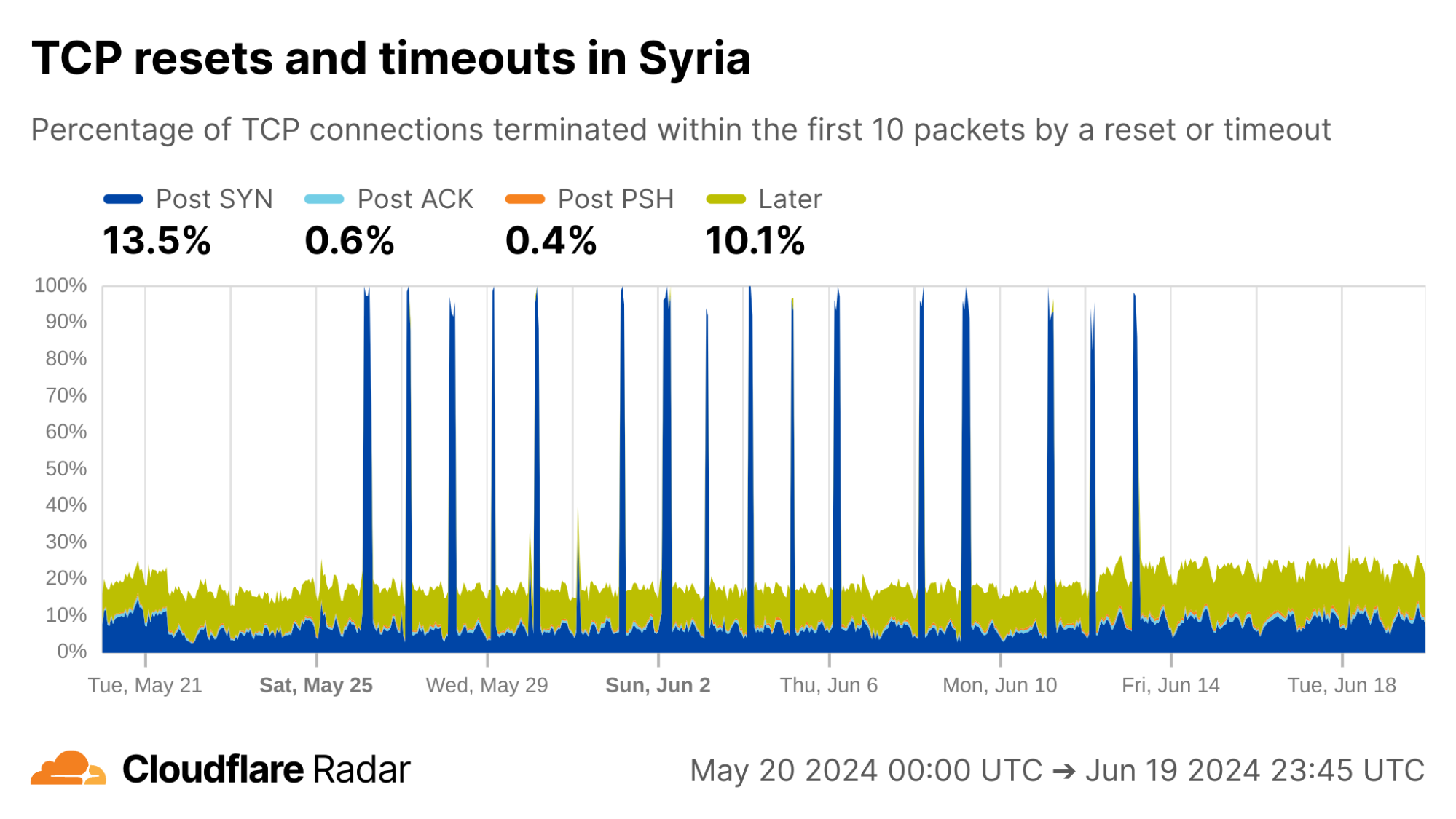
via Cloudflare Radar

A second round of shutdowns starting the last week of July are quite prominent as well.
via Cloudflare Radar

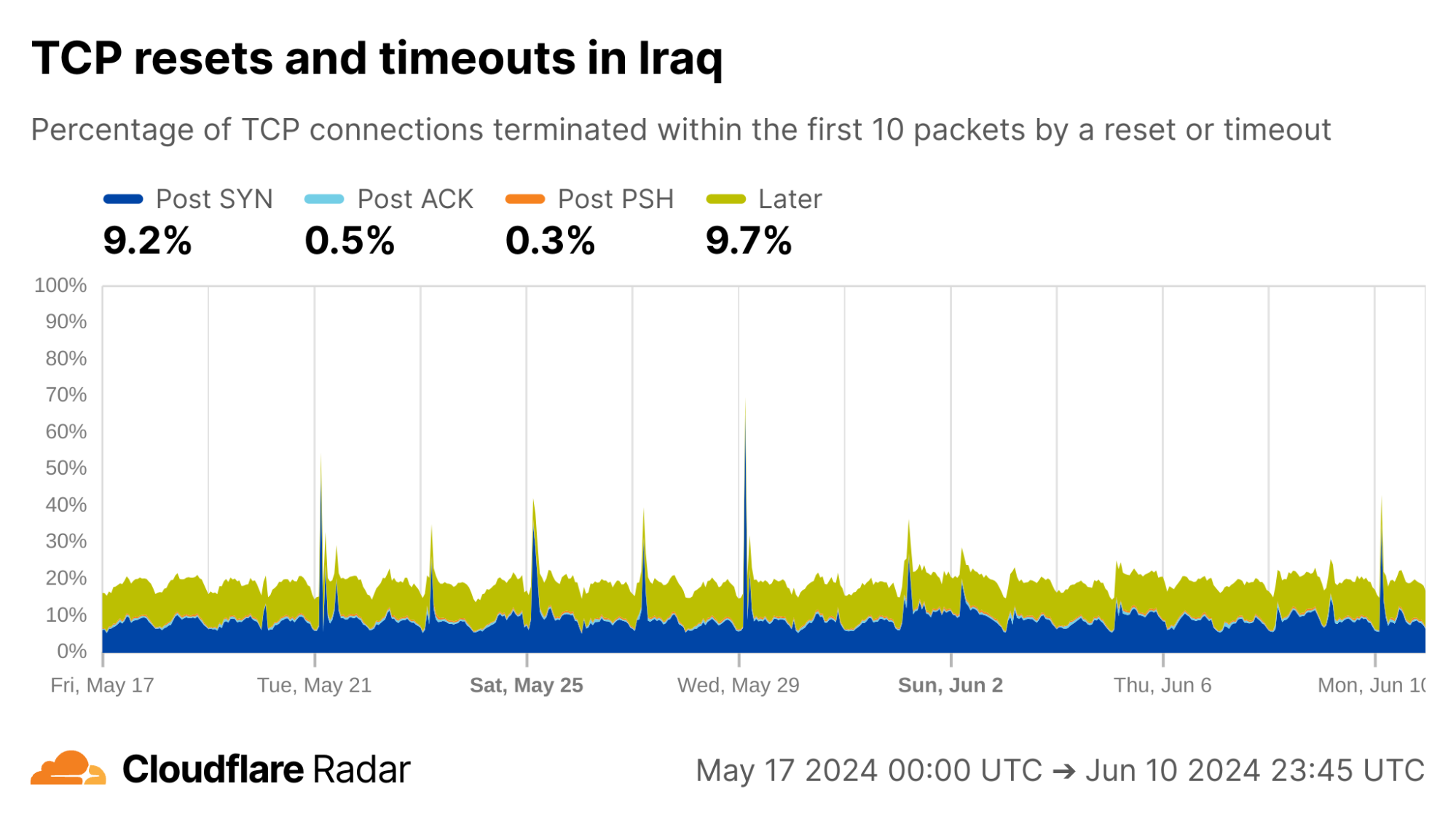
Looking at connections from Iraq, Cloudflare’s view of exam-related shutdowns appears similar to those in Syria, with multiple Post-SYN spikes, albeit much less pronounced.
via Cloudflare Radar

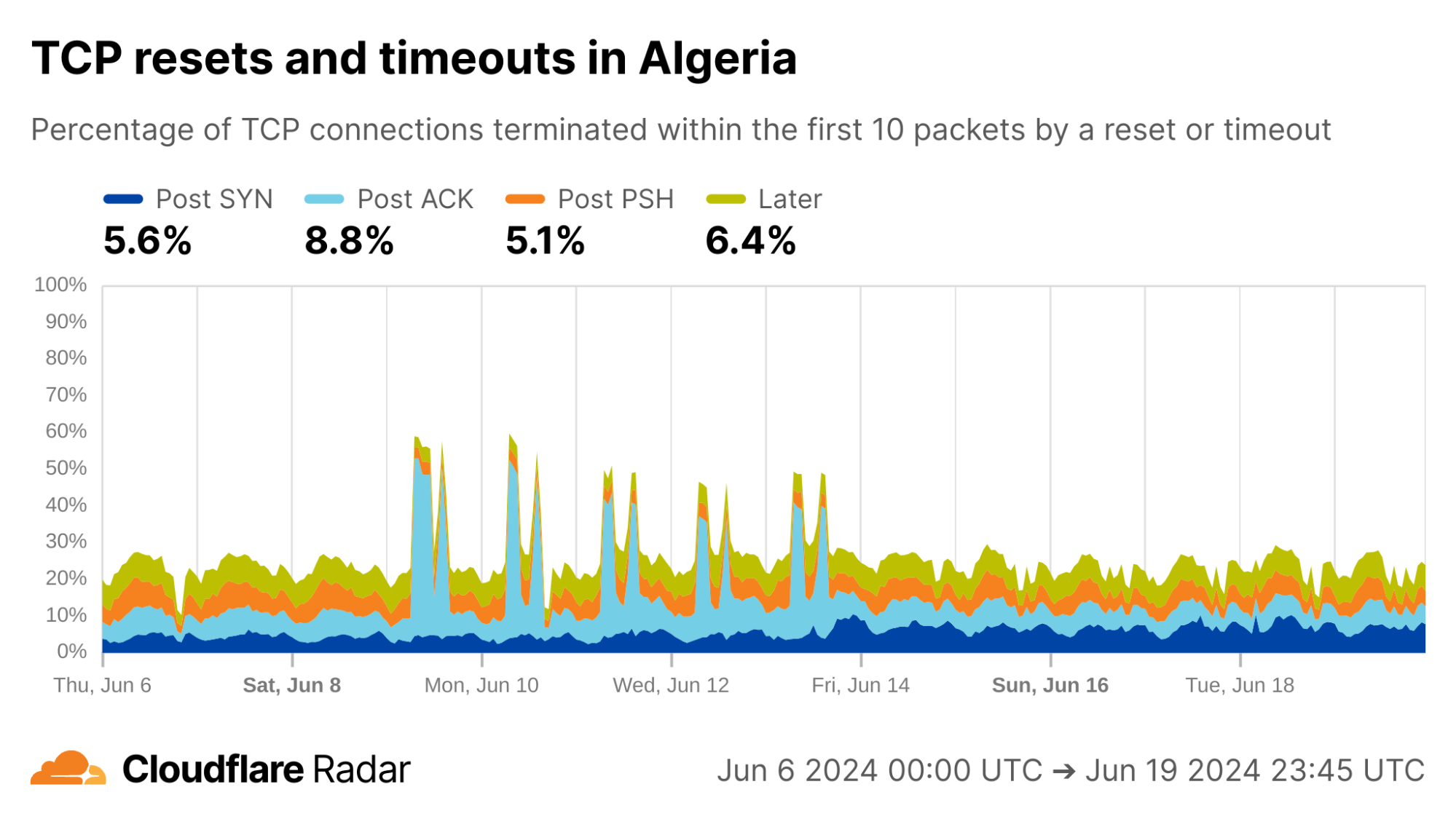
The exams shutdown blog also describes how Algeria took a more nuanced approach for restricting access to content during exam times: instead of full Internet shutdowns, evidence suggests that Algeria instead targeted specific connections. Indeed, during exam periods we see an increase in Post-ACK connection anomalies. This behavior would be expected if a middlebox selectively drops packets that contain forbidden content, while leaving other packets alone (like the initial SYN and ACK).
via Cloudflare Radar

The examples above reinforce that this data is most useful when correlated with other signals. The data is also available via the API, so others can dive in more deeply. Our detection techniques are also transferable to other servers and operators, as described next.

How to detect anomalous TCP connections at scale

In this section, we discuss how we constructed the TCP resets and timeouts dataset. The scale of Cloudflare’s global network presents unique challenges for data processing and analysis. We share our techniques to help readers to understand our methodology, interpret the dataset, and replicate the mechanisms in other networks or servers.

Our methodology can be summarized as follows:

  1. Log a sample of connections arriving at our client-facing servers. This sampling system is completely passive, meaning that it has no ability to decrypt traffic and only has access to existing packets sent over the network. 

  2. Reconstruct connections from the captured packets. A novel aspect of our design is that only one direction needs to be observed, from client to server.

  3. Match reconstructed connections against a set of signatures for anomalous connections terminated by resets or timeouts. These signatures consist of two parts: a connection stage, and a set of tags that indicate specific behaviors derived from the literature and our own observations.

These design choices keep encrypted packets safe and can be replicated anywhere, without needing access to the destination server.

First, sample connections

Our main goal was to design a mechanism that scales, and gives us broad visibility into all connections arriving at Cloudflare’s network. Running traffic captures on each client-facing server works, but does not scale. We would also need to know exactly where and when to look, making continuous insights hard to capture. Instead, we sample connections from all of Cloudflare’s servers and log them to a central location where we could perform offline analysis.

This is where we hit the first roadblock: existing packet logging pipelines used by Cloudflare’s analytics systems log individual packets, but a connection consists of many packets. To detect connection anomalies we needed to see all, or at least enough, packets in a given connection. Fortunately, we were able to leverage a flexible logging system built by Cloudflare’s DoS team for analyzing packets involved in DDoS attacks in conjunction with a carefully crafted invocation of two iptables rules to achieve our goal.

The first iptables rule randomly selects and marks new connections for sampling. In our case, we settled on sampling one in every 10,000 ingress TCP connections. There’s nothing magical about this number, but at Cloudflare’s scale it strikes a balance between capturing enough without straining our data processing and analytics pipelines. The iptables rules only apply to packets after they have passed the DDoS mitigation system. As TCP connections can be long-lived, we sample only new TCP connections. Here is the iptables rule for marking connections to be sampled:

-t mangle -A PREROUTING -p tcp --syn -m state 
--state NEW -m statistic --mode random 
--probability 0.0001 -m connlabel --label  
--set -m comment --comment "Label a sample of ingress TCP connections"

Breaking this down, the rule is installed in the mangle table (for modifying packets) in the chain that handles incoming packets (-A PREROUTING). Only TCP packets with the SYN flag set are considered (-p tcp --syn) where there is no prior state for the connection (--state NEW). The filter selects one in every 10,000 SYN packets (-m statistic –mode random --probability 0.0001) and applies a label to the connection (-m connlabel --label <label> --set).

The second iptables rule logs subsequent packets in the connection, to a maximum of 10 packets. Again, there’s nothing magic about the number 10 other than that it’s generally enough to capture the connection establishment, subsequent request packets, and resets on connections that close before expected.

-t mangle -A PREROUTING -m connlabel --label 
 -m connbytes ! --connbytes 11 
--connbytes-dir original --connbytes-mode packets 
-j NFLOG --nflog-prefix "" -m 
comment --comment "Log the first 10 incoming packets of each sampled ingress connection"

This rule is installed in the same chain as the previous rule. It matches only packets from sampled connections (-m connlabel --label <label>), and only the first 10 packets from each connection (-m connbytes ! --connbytes 11 --connbytes-dir original --connbytes-mode packets). Matched packets are sent to NFLOG (-j NFLOG --nflog-prefix "<logging flags>") where they’re picked up by the logging system and saved to a centralized location for offline analysis.

Reconstructing connections from sampled packets

Packets logged on our servers are inserted into ClickHouse tables as part of our analytics pipeline. Each logged packet is stored in its own row in the database. The next challenge is to reassemble packets into the corresponding connections for further analysis. Before we go further, we need to define what a “connection” is for the purpose of this analysis.

We use the standard definition of a connection defined by the network 5-tuple of protocol, source IP address, source port, destination IP address, destination port with the following tweaks:

  • We only sample packets on the ingress (client-to-server) half of a connection, so do not see the corresponding response packets from server to client. In most cases, we can infer what the server response will be based on our knowledge of how our servers are configured. Ultimately, the ingress packets are sufficient to learn anomalous TCP connection behaviors.

  • We query the ClickHouse dataset in 15-minute intervals, and group together packets sharing the same network 5-tuple within that interval. This means that connections may be truncated towards the end of the query interval. When analyzing connection timeouts, we exclude incomplete flows where the latest packet timestamp is within 10 seconds of the query cutoff.

  • Since resets and timeouts are most likely to affect new connections, we only consider sequences of packets starting with a SYN packet marking the beginning of a new TCP handshake. Thus, existing long-lived connections are excluded.

  • The logging system does not guarantee precise packet interarrival timestamps, so we consider only the set of packets that arrive, not ordered by their arrival time. In some cases, we can determine packet ordering based on TCP sequence numbers but it turns out not to significantly impact the results.

  • We filter out a small fraction of connections with multiple SYN packets to reduce noise in the analysis.

With the above conditions for how we define a connection, we’re now ready to describe our analysis pipeline in more detail.

Mapping connection close events to stages

TCP connections transition through a series of stages from connection establishment through eventual close. The stage at which an anomalous connection closes provides clues as to why the anomaly occurred. Based on the packets that we receive at our servers, we place each incoming connection into one of four stages (Post-SYN, Post-ACK, Post-PSH, Later), described in more detail above.

The connection close stage alone provides useful insights into anomalous TCP connections from various networks, and this is what is shown today on Cloudflare Radar. However, in some cases we can provide deeper insights by matching connections against more specific signatures.

Applying tags to describe more specific connection behaviors

The grouping of connections into stages as described above is done solely based on the TCP flags of packets in the connection. Considering other factors such as packet inter-arrival timing, exact combinations of TCP flags, and other packet fields (IP identification, IP TTL, TCP sequence and acknowledgement numbers, TCP window size, etc.) can allow for more fine-grained matching to specific behaviors.

For example, the popular ZMap scanner software fixes the IP identification field to 54321 and the TCP window size to 65535 in SYN packets that it generates (source code). When we see packets arriving to our network that have these exact fields set, it is likely that the packet was generated by a scanner using ZMap.

Tags can also be used to match connections against known signatures of tampering middleboxes. A large body of active measurements work (for instance, Weaver, Sommer, and Paxson) has found that some middleboxes deployments exhibit consistent behaviors when disrupting connections via reset injection, such as setting an IP TTL field that differs from other packets sent by the client, or sending both a RST packet and a RST+ACK packet. For more details on specific connection tampering signatures, see the blog post and the peer-reviewed paper.

Currently, we define the following tags, which we intend to refine and expand over time. Some tags only apply if another tag is also set, as indicated by the hierarchical presentation below (e.g., the fin tag can only apply when the reset tag is also set).

  • timeout: terminated due to a timeout

  • reset: terminated due to a reset (packet with RST flag set)

    • fin: at least one FIN packet was received alongside one or more RST packets

    • single_rst: terminated with a single RST packet

    • multiple_rsts: terminated with multiple RST packets

      • acknumsame: the acknowledgement numbers in the RST packets were all the same and non-zero

      • acknumsame0: the acknowledgement numbers in the RST packets were all zero

      • acknumdiff: the acknowledgement numbers in the RST packets were different and all non-zero

      • acknumdiff0: the acknowledgement numbers in the RST packets were different and one was zero

    • single_rstack: terminated with a single RST+ACK packet (both RST and ACK flags set)

    • multiple_rstacks: terminated with a multiple RST+ACK packets

    • rst_and_rstacks: terminated with a combination of RST and RST+ACK packets

  • zmap: SYN packet matches those generated by the ZMap scanner

Connection tags are not currently visible in the Radar dashboard and API, but we plan to release this additional functionality in the future.

What’s next?

Cloudflare’s mission is to help build a better Internet, and we consider transparency and accountability to be a critical part of that mission. We hope that the insights and tools we are sharing help to shed light on anomalous network behaviors around the world.

While the current TCP resets and timeouts dataset should immediately prove useful to network operators, researchers, and Internet citizens as a whole, we’re not stopping here. There are several improvements we’d like to add in the future:

  • Expand the set of tags for capturing specific network behaviors and expose them in the API and dashboard.

  • Extend insights to connections from Cloudflare to customer origin servers.

  • Add support for QUIC, which is currently used for over 30% of HTTP requests to Cloudflare worldwide.

If you’ve found this blog interesting, we encourage you to read the accompanying blog post and paper for a deep dive on connection tampering, and to explore the TCP resets and timeouts dashboard and API on Cloudflare Radar. We welcome you to reach out to us with your own questions and observations at [email protected].
A global assessment of third-party connection tampering

Post Syndicated from Ram Sundara Raman original https://blog.cloudflare.com/connection-tampering

Have you ever made a phone call, only to have the call cut as soon as it is answered, with no obvious reason or explanation? This analogy is the starting point for understanding connection tampering on the Internet and its impact. 

We have found that 20 percent of all Internet connections are abruptly closed before any useful data can be exchanged. Essentially, every fifth call is cut before being used. As with a phone call, it can be challenging for one or both parties to know what happened. Was it a faulty connection? Did the person on the other end of the line hang up? Did a third party intervene to stop the call?  

On the Internet, Cloudflare is in a unique position to help figure out when a third party may have played a role. Our global network allows us to identify patterns that suggest that an external party may have intentionally tampered with a connection to prevent content from being accessed. Although they are often hard to decipher, the ways connections are abruptly closed give clues to what might have happened. Sources of tampering generally do not try to hide their actions, which leaves hints of their existence that we can use to identify detectable ‘signatures’ in the connection protocol. As we explain below, there are other protocol features that are less likely to be spoofed and that point to third party actions. We can use these hints to build signature patterns of connection tampering that can be recognized.

To be clear, there are many reasons a third party might tamper with a connection. Enterprises may tamper with outbound connections from their networks to prevent users from interacting with spam or phishing sites. ISPs may use connection tampering to enforce court or regulatory orders that demand website blocking to address copyright infringement or for other legal purposes. Governments may mandate large-scale censorship and information control. 

Despite the fact that everyone knows it happens, no other large operation has previously looked at the use of connection tampering at scale and across jurisdictions. We think that creates a notable gap in understanding what is happening in the Internet ecosystem, and that shedding light on these practices is important for transparency and the long-term health of the Internet. So today, we’re proud to share a view of global connection tampering practices.

The full technical details were recently peer-reviewed and published in “Global, Passive Detection of Connection Tampering” at ACM SIGCOMM, with its public presentation. We’re also announcing a new dashboard and API on Cloudflare Radar that shows a near real-time view of specific connection timeout and reset events – the two mechanisms dominant in tampering experienced by users connecting to Cloudflare’s network globally.

To better understand our perspective, it helps to understand the nature of connection tampering and reasons we’re talking about it.

Global insights for a global audience

Evidence of connection tampering is visible in networks all around the world. We were initially shocked that, globally, about 20% of all connections to Cloudflare close unexpectedly before any useful data exchange occurs — consistent with connection tampering. Here is a snapshot of these anomalous connections seen by Cloudflare that, as of today, we’re sharing on Radar.


via Cloudflare Radar

It’s not all tampering, but some of it clearly is, as we describe in more detail below. The challenge is filtering through the noise to determine which anomalous connections can confidently be attributed to tampering.

Macro-level analysis and validation

In our work we identified 19 patterns of anomalous connections as being candidate signatures for connection tampering. From those, we found that 14 had been previously reported by active “on the ground” measurement efforts, which presented an opportunity for validation at macro-level: If we observe our tampering signatures from Cloudflare’s network in the same places others observe them from the ground, we could have greater confidence that the signatures capture true cases of connection tampering when observed elsewhere, where there has been no prior reporting. To mitigate the risk of confirmation bias from looking where tampering is known to exist, we decided to look everywhere at the same time.

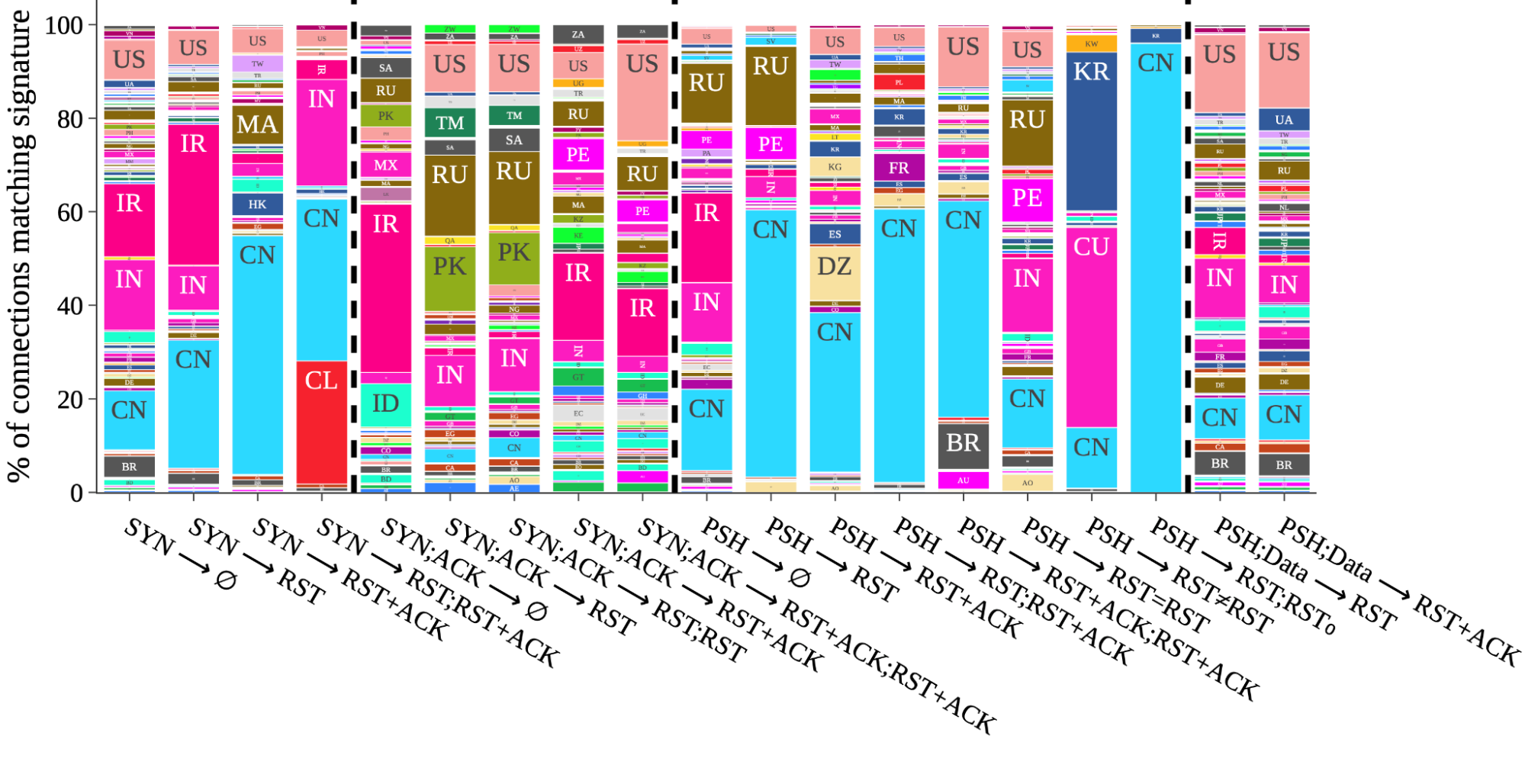
Taking that approach, the figure below, taken from our peer-review study, is a visual side-by-side comparison of each of the 19 signatures. The data is taken from a two-week interval starting January 26, 2023. Within each signature column is the proportion of matching connections broken down by the country where the connection originated. For example, the column third from the right labeled with ⟨PSH → RST;RST0⟩ indicates that we almost exclusively observed that signature on connections from China. Overall, what we find is a mirror of known cases from public and prior reports, which is an indication that our methodology works.

Figure 1: Signature matching across countries: Each column is the total global number of connections matching a specific signature. Within each column is the proportion of connections initiations from individual countries matching that signature.

Interestingly, by honing in on prevalence, and setting aside the raw number of signature matches, interesting patterns emerge. As a result of this data-driven perspective, unexpected macro-insights also emerge. If we focus on the three most populous countries in the world ranked by number of Internet users, connections from China contribute a substantial portion of matches across no fewer than 9 of the signatures. This is perhaps unsurprising, but reinforces prior studies that find evidence of the Great Firewall (GFW) being made of many different deployments and implementations of blocking mandates. Next, matches on connections from India also contribute substantially to nine 9 different signatures, five of which are in common with signatures where China matches feature highly. Looking at the third most populous, the United States, a visible if not substantial proportion of matches appear on all but two of the signatures.

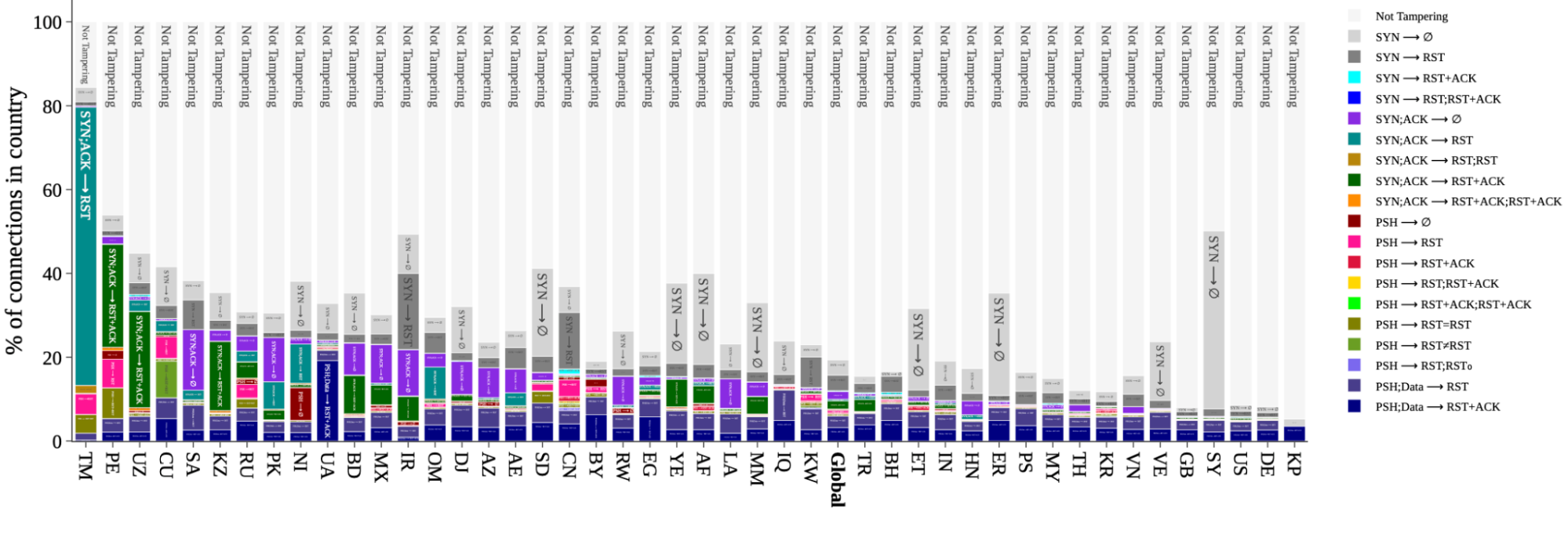
A snapshot of signature distributions per-country, also taken from the peer-review study, appears below for a select set of countries. The global distribution is included for comparison. The dark gray portions marked ⟨SYN → ∅⟩ are included for completeness, but have more non-tampering alternative explanations than the others (for example, as result of a low-rate SYN flood).

Figure 4: Signature distribution per country: The percentage of connections originating from select countries (and globally) that match a particular signature, or are not tampered with.

From this perspective we again observe patterns that match prior studies. We focus first on rates above the global average, and ignore the noisiest signature ⟨SYN → ∅⟩ in medium-gray; there are simply too many other explanations for a signature match at this earliest possible stage. Among all connections from Turkmenistan (TM), Russia (RU), Iran (IR), and China (CN), roughly 80%, 30%, 40%, and 30%, respectively, of those connections match a tampering signature. The data also reveals high signature match rates where no prior reports exist. For example, connections from Peru (PE) and Mexico (MX), match roughly 50% and 25%, respectively; analysis of individual networks in these countries suggests a likely explanation is zero-rating in mobile and cellular networks, where an ISP allows access to certain resources (but not others) at no cost. If we look below the global average, Great Britain (GB), the United States (US), and Germany (DE), each match a signature on about 10% of connections.

The data makes clear that connection tampering is widespread, and close to many users, if not most. In many ways, it’s closer than most know. To explain why, we explain connection tampering with a very familiar communication tool, the telephone.

Explaining tampering with telephone calls

Connection tampering is a way for a third party to block access to particular content. However, it’s not enough for the third party to know the type of content it wants to block. The third party can only block an identity by name. 

Ultimately, connection tampering is possible only by accident – an unintended side effect of protocol design. On the Internet, the most common identity is the domain name. In a communication on the Internet, the domain name is most often transmitted in the “server name indication (SNI)” field in TLS – exposed in cleartext for all to see.

To understand why this matters, it helps to understand what connection tampering looks like in human-to-human communications without the Internet. The Internet itself looks and operates much like the postal system, which relies only on addresses and never on names. However, the way most people use the Internet is much more like the “plain old telephone system,” which requires names to succeed.

In the telephone system, a person first dials a phone number, not a name. The call is connected and usable only after the other side answers, and the caller hears a voice.  The caller asks for a name only after the call is connected. The call manifests in the system as energy signals that do not identify the communicating parties. Finally, after the call ends, a new call is required to communicate again.

On the Internet, a client such as a browser “establishes a connection.” Much like a telephone caller, it initiates a connection request to a server’s number, which is an IP address. The longest-standing “connection-oriented” protocol to connect two devices is called the Transmission Control Protocol, or TCP. The domain name is transmitted in isolation from the connection establishment, much like asking for a name once the phone is answered. The connections are “logical” identified by metadata that does not identify communicating parties. Finally, a new connection is established with each new visit to a website.


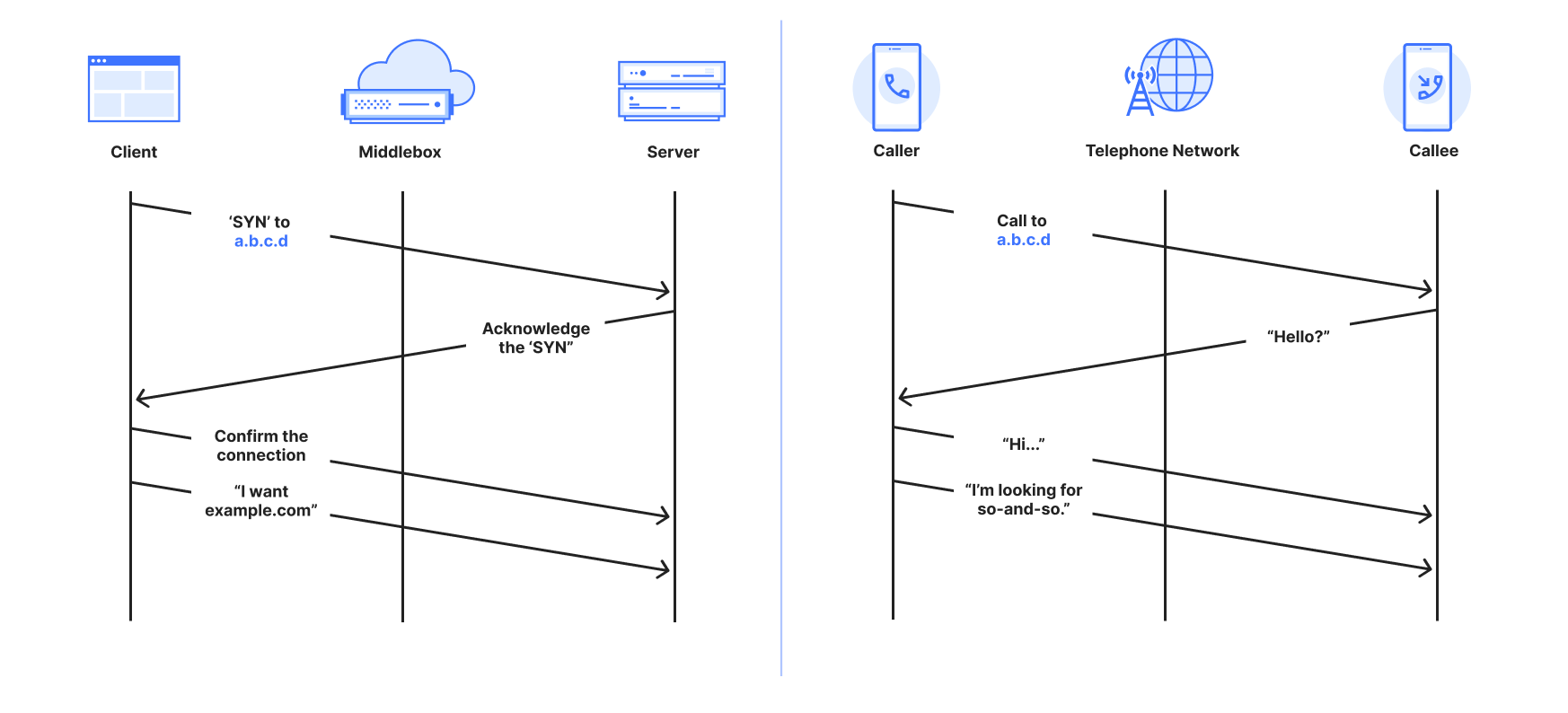
Comparison between a TCP connection and a telephone call

What happens if a telephone company is required to prevent a call to some party? One option is to modify or manipulate phone directories so a caller can’t get the phone number they need to dial the phone that makes the call; this is the essence of DNS filtering. A second option is to block all calls to the phone number, but this inadvertently affects others, just like IP blocking does.

Once a phone call is initiated, the only way for the telephone company to know who is being called is to listen in on the call and wait for the caller to say, “is so-and-so there?” or “can I speak with so-and-so?” Mobile and cellular calls are no exception. The idea that the number we call is the person who will answer is just an expectation – it has never been the reality. For example, a parent could get a number to give to their child, or a taxi company could leave the mobile phone with whomever is on-shift at the time. As a result, the telephone company must listen in. Once it hears a certain name it can cut the call; neither side would have any idea what has happened – this is the very definition of connection tampering on the Internet. 

For the purpose of establishing a communication channel, phone calls and TCP connections are at least comparable, and arguably exactly the same – not least because the domain name is transmitted separately from establishing a connection.

Similarly, on the Internet, the only way for a third party to know the intended recipient of a connection is to “look inside” of packets as they are transmitted. Where a telephone company would have to listen for a name, a third party on the Internet waits to see something it does not like, most often a forbidden name. Recall from above the unintended side-effect of the protocol: the name is visible in the SNI, which is required to help encrypt the data communication. When that happens, the third party causes one or both devices to close the connection by either dropping messages or injecting specially-crafted messages that cause the communicating parties to abort the connection.

The mechanisms to trigger tampering begin with deep packet inspection (DPI), which means looking into the data portions that lie beyond the address and other metadata belonging to the connection. It’s safe to say that this functionality does not come for free; whether it’s an ISP’s router or a parental proxy, DPI is an expensive operation that gets more expensive at large scale or high speed. 

One last point worth mentioning is that weaknesses in telephone tampering similarly appear in connection tampering. For example, the sound of Jean and Gene are indistinguishable to any ear, despite being different names. Similarly, tampering with connections to Twitter’s short-form name “t.co” would also affect “microsoft.com” – and has.

A live view of tampering during Mahsa Amini protests

Before we delve deeply into the technical, there is one more motivation that is personal to many at Cloudflare. Transparency is important and the reason we started this work, but it was after seeing the data during the Mahsa Amini protests in Iran in 2022 that we committed internally to share the data on Radar. 


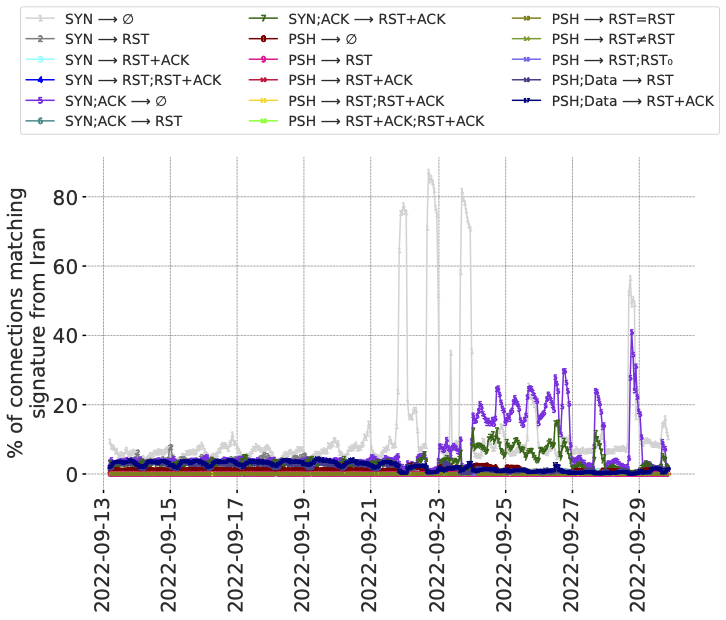
Figure 8: Signature match rates longitudinally in Iran during a period of nation-wide protests. (𝑥-axis is local time.)

The figure below is for connections from Iran during 17 days overlapping the protests. The plot-lines track individual signals of anomalous connections, including signatures of different types of connection tampering. This data pre-dates the Radar service, so we have elected to share this representation from the peer-reviewed paper. It was also the first visual example of the value of the data if it could be shared via Radar. 

From the data there are two observations that stick out. First is the way that the lines appear stable before the protests, then increase after the protests began. Second is the variation between the lines over time, in particular the lines in light gray, dark purple, and dark green. Recall that each line is a different tampering signature, so the variation between lines suggests changes in the underlying causes – either the mechanisms at work, or the traffic that invokes them.

We emphasize that a signature match, alone, does not in itself mean there is tampering. However, in the case of Iran in 2022 there were public reports of blocking of various forms. The methods in use at the time, specifically Server Name Indication (SNI)-based blocking of access to content, had also previously been well-documented, and matched with our observations represented by the figure above.

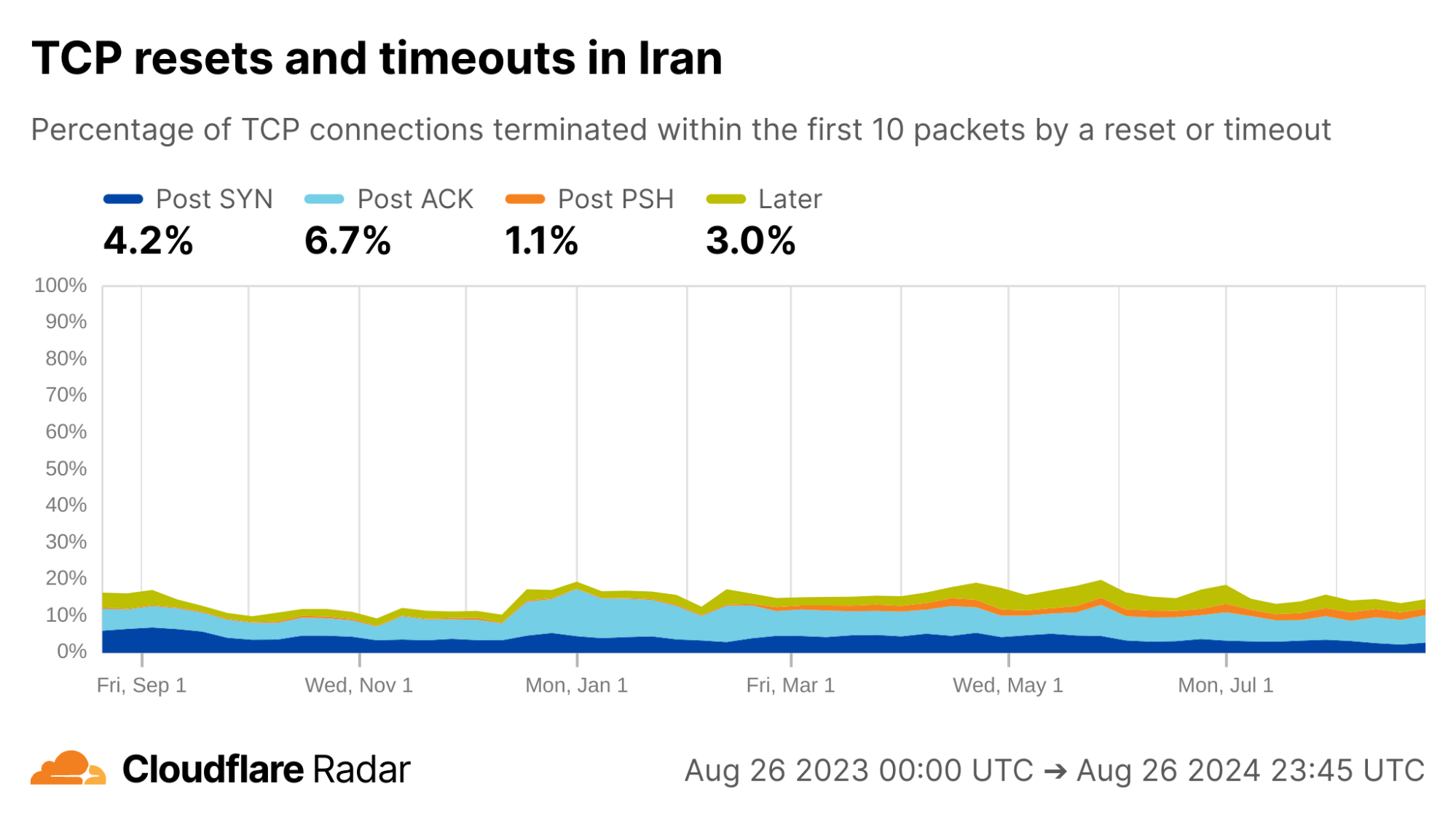
What about today? Below we see the Radar view of the twelve months from August 2023 to August 2024. Each color represents a different stage of the connection where tampering might happen. In the previous 12 months, TCP connection anomalies in Iran are lower than the worldwide averages, overall, but appear significantly higher in the portion of anomalies represented by the light-blue region. This “Post ACK” phase of communication is often associated with SNI-based blocking. (In the graph above, the relevant signatures are represented by the dark purple and dark green lines.) Alongside, the changing proportions of the different plot-lines since mid-December 2023 suggest that techniques have been changing over time.


via Cloudflare Radar

The importance of an open network measurement community

As a testament to the importance of open measurement and research communities, this work very literally “builds on the shoulders of giants.” It was produced in collaboration with researchers at the University of Maryland, École Polytechnique Fédérale de Lausanne, and the University of Michigan, but does not exist in isolation. There have been extensive efforts to measure connection tampering, most of which comes from the censorship measurement community. The bulk of that work consists of active measurements, in which researchers craft and transmit probes in or along networks and regions to identify blocking behavior. Unsurprisingly, active measurement has both strengths and weaknesses, as described in Section 2 in the paper). 

The counterpart to active measurement, and the focus of our project, is passive measurement, which takes an “observe and do nothing” approach. Passive measurement comes with its own strengths and weaknesses but, crucially, it relies on having a good vantage point such as a large network operator. Each of active and passive measurements are most effective when working in conjunction, in this case helping to paint a more complete picture of the impact of connection tampering on users.

Most importantly, when embarking upon any type of measurement, great care must be taken to understand and evaluate the safety of the measurement since the risk imposed on people and networks are often indirect, or hidden from view.

Limitations of our data

We have no doubt about the importance of being transparent with connection tampering, but we also need to be explicit about the limits on the insights that can be gleaned from the data. As passive observers of connections to the Cloudflare network – and only the Cloudflare network – we are only able to see or infer the following:

  1. Signs of connection tampering, but not where it happened. Any software or device between the client’s application and the server systems can tamper with a connection. The list ranges from purpose-built systems, to firewalls in the enterprise or home broadband router, and protection software installed on home or school computers. All we can infer is where the connection started (albeit at the limits of geolocation inaccuracies inherent in the Internet’s design).

  2. (Often, but not always) What triggered the tampering, but not why. Typically, tampering systems are triggered by domain names, keywords, or regular expressions. With enough repetition, and manual inspection, it may be possible to identify the likely cause of tampering, but not the reasons. Many tampering system designs are prone to unintended consequences, among them the t.co example mentioned above.

  3. Who and what is affected, but not who or what could be affected. As passive observers, there are limits on the kinds of inferences we can make. For example, observable tampering on 1000 out of 1001 connections to example.com suggests that tampering is likely on the next connection attempt. However, that says nothing about connections to another-example.com. 

Data, data, data: Extracting signals from the noise

If you just want to get and use the data on Radar, see our “how to” guide. Otherwise, let’s understand the data itself.

The focus of this work is TCP. In our data there are two mechanisms available to a third-party to force a connection to close: dropping packets to induce timeouts or injecting forged TCP RST packets, each with various deployment choices. Individual tampering signatures may be reflections of those choices. For comparison, a graceful TCP close is initiated with a FIN packet. 

Connection tampering signatures

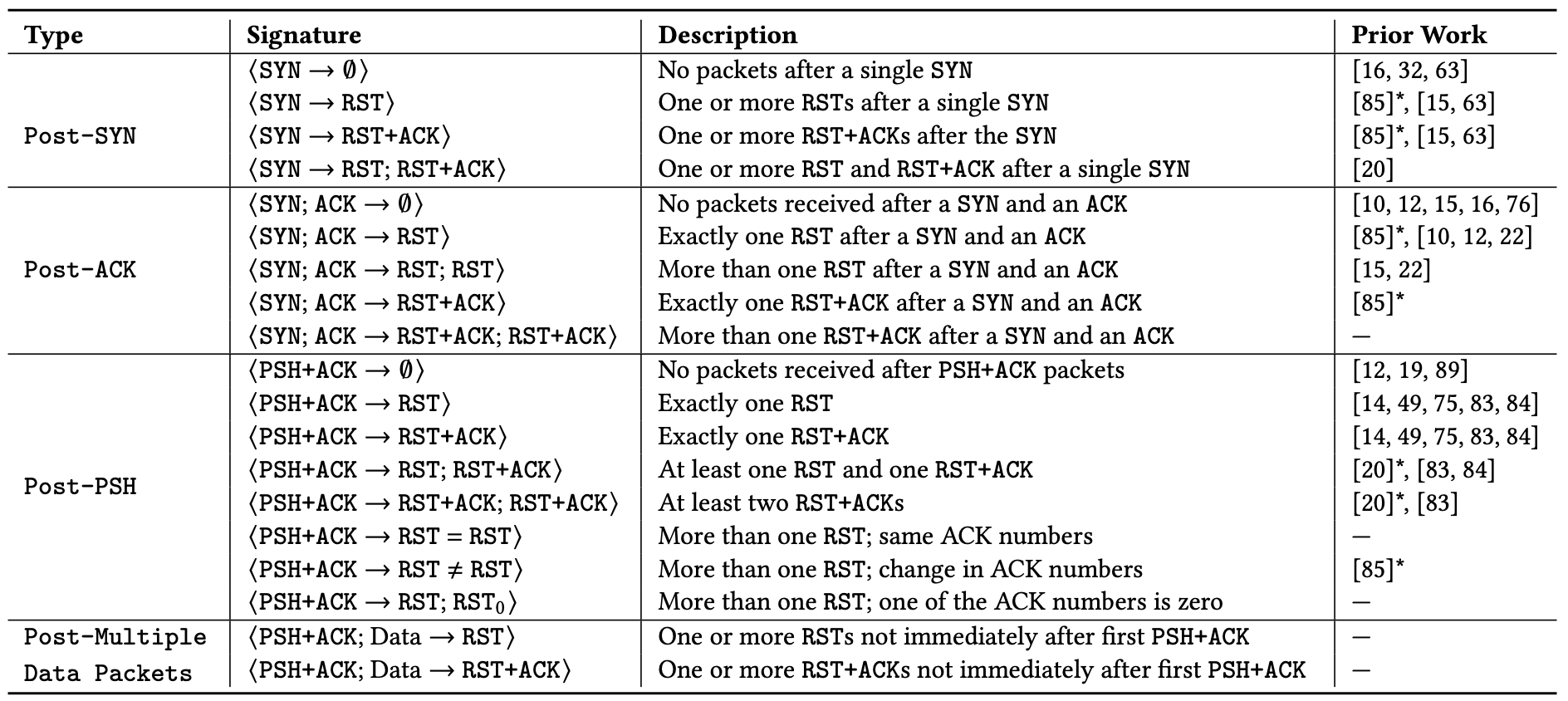
Our detection mechanism evaluates sets of packets in a connection against a set of signatures for connection tampering. The signatures are hand-crafted from signatures identified in prior work, and by analyzing samples of connections to Cloudflare’s network that we classify as anomalous – connections that close early, and ungracefully by way of a RST packet or timeout within the first 10 packets from the client. We analyzed the samples and found that 19 patterns accounted for 86.9% of all possibly tampered connections in the samples, shown in the table below.


Table 1: The comprehensive set of tampering signatures we identify through global passive measurements.

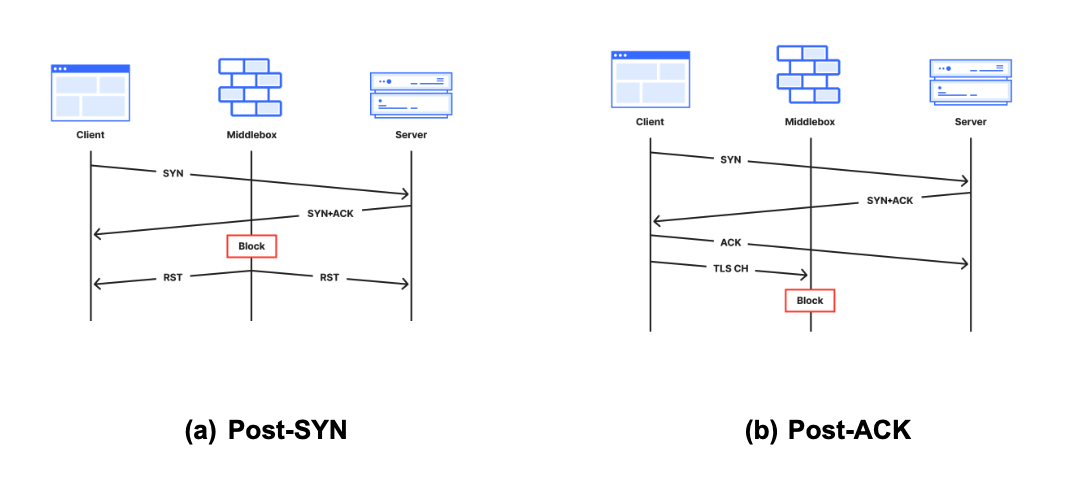
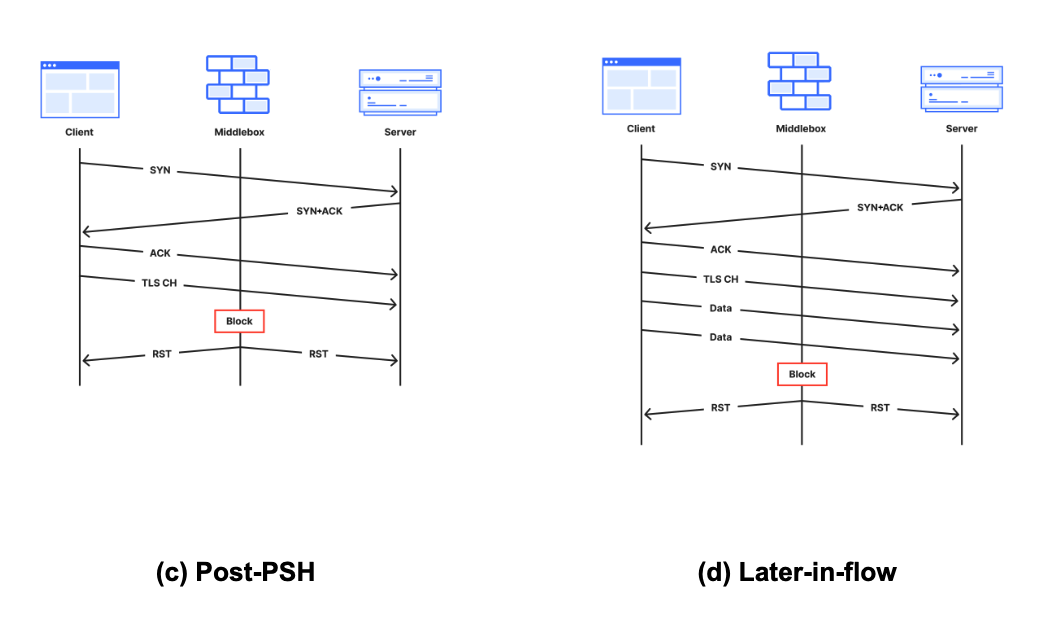
To help reason about tampering, we also classed the 19 signatures above according to the stage of the connection lifetime in which they appear. Each stage implies something about the middlebox, as described below alongside corresponding sequence diagrams:


  • (a) Post-SYN (mid-handshake): Tampering is likely triggered by the destination IP address because the middlebox has likely not seen application data, which is typically transmitted after the handshake completes.

  • (b) Post-ACK (immediately after handshake): The connection is established and immediately forced to close before seeing any data. It is possible, even likely, that the middlebox has likely seen a data packet; for example, the host header in HTTP or SNI field in TLS. 

  • (c) Post-PSH (after first data packet): The middlebox has definitely seen the first data packet because the server has received it. The middlebox may have been waiting for a packet with a PSH flag, typically set to indicate data in the packet should be delivered to the application on receipt, without delay. The likely middlebox is likely a monster-on-the-side because it permits the offending packet to reach the destination.

  • (d) Later-in-flow (after multiple data packets): Tampering at later stages in the connection (not immediately after the first data packet, but still within the first 10 packets). The prevalence of encrypted data in TLS makes this the least likely stage for tampering to occur. The likely triggers are keywords appearing in cleartext later in (HTTP) connections, or by the likes of enterprise proxies and parental protection software that has visibility into encrypted traffic and can reset connections when certain keywords are encountered. 

Accounting for alternative explanations

How can we be confident that the signatures above detect middlebox tampering, and not just atypical client behavior? One of the challenges of passive measurement is that we do not have full visibility into the clients connecting to our network, so absolute positives are hard if not impossible. Instead, we look for strong positive evidence of tampering, that must first begin by identifying false positives. 

We are aware of the following sources of false positives that can be hard to disambiguate from true sources of tampering. All but the last occur in the first two stages of the connection, before data packets are received. 

  • Scanners are client-side applications that probe servers to elicit responses. Some scanner software uses fixed bits in the header to self-identify, which helps us filter. For example, we found that Zmap accounts for approximately 1% of all ⟨SYN → RST⟩ signature matches.

  • SYN flood attacks are another likely source of false positives, especially for signatures in the Post-SYN connection stage like the ⟨SYN → ∅⟩ and ⟨SYN → RST⟩ signatures. These are less likely to appear in our dataset collection, which happens after the DDoS protection systems.

  • Happy Eyeballs is a common technique used by dual-stack clients in which the client initiates an IPv6 connection to the server and, with some delay to favor IPv6, also makes an IPv4 connection. The client keeps the connection that succeeds first and drops the other. Clients that cease transmission or close the connection with a RST instead of a FIN would show up in the data, matching the ⟨SYN → RST⟩ signature. 

  • Browser-triggered RSTs may appear at any stage of the connection, but especially for signatures that match later in a connection (after multiple data packets). It might be triggered, for example, by a user closing a browser tab. Unlike targeted tampering, however, RSTs originating from browsers are unlikely to be biased towards specific services or websites. 

How can we separate legitimate client-initiated false positives from third-party tampering? We seek an evidence-based approach to distinguish tampering signatures from other signals within the dataset. For this we turn to individual bits in the packet headers.

Signature validation – letting the data speak

Signature matches in isolation are insufficient to make good determinations. Alongside, we can find further supporting evidence of their accuracy by examining connections in aggregate – if the cause is tampering, and tampering is targeted, then there must be other patterns or markers in common. For example, we expect browser behavior to appear worldwide; however, as we showed above, signatures that match on connections in only some places or some time intervals stick out. 

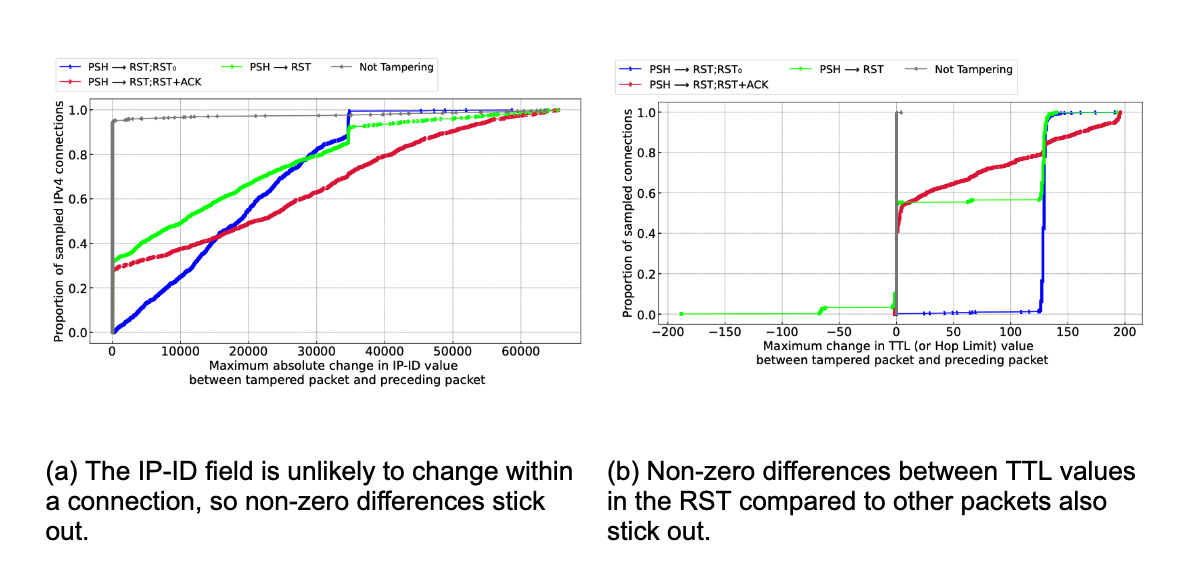
Similarly, we expect certain characteristics in contiguous packets within a connection to also stick out, and indeed they do, namely in the IP-ID and TTL fields in the IP header.


The IP-ID (IP identification) field in the IPv4 packet header is usually a fixed per-connection value, often incremented by the client for each subsequent packet it sends. In other words, we expect the change in IP-ID value in subsequent packets sent from the same client to be small. Thus, large changes in IP-ID value between subsequent packets are unexpected in normal connections, and could be used as an indicator of packet injection. This is exactly what we see in the figure above, marked (a), for a select set of signatures.

The Time-to-Live (TTL) field offers another clue for detecting injected packets. Here, too, most client implementations use the same TTL for each packet sent on a connection, usually set initially to either 64 or 128 and decremented by every router along the packet’s route. If a RST packet does not have the same TTL as other packets in a connection, it’s a strong signal that it was injected. Looking at the figure above, marked (b), we can see marked differences in TTLs, indicating the presence of a third party. 

We strongly encourage readers to read the underlying details of how and why these make sense.  Connections with high maximum IP-ID and TTL differences give positive evidence for traffic tampering, but the absence of these signals does not necessarily mean that tampering did not occur, as some middleboxes are known to copy IP header values including the IP-ID and TTL from the original packets in the connection. Our interest is in responsibly ensuring our dataset has indicative value.

There is one last caveat: While our tampering signatures capture many forms of tampering, there is still potential for false negatives for connections that were tampered with but escaped our detection. Some examples are connections terminated after the first 10 packets (since we don’t sample that far), FIN injection (a less common alternative to RST injection), or connections where all packets are dropped before reaching Cloudflare’s servers. Our signatures also do not apply to UDP-based protocols such as QUIC. We hope to expand the scope of our connection tampering signatures in the future.

Case studies

To get a sense of how this looks on the Cloudflare network, below we provide further examples of TCP connection anomalies that are consistent with OONI reports of connection tampering.

For additional insights from this specific study, see the full technical paper and presentation. For other regions and networks not listed below, please see the new data on Radar.

Pakistan

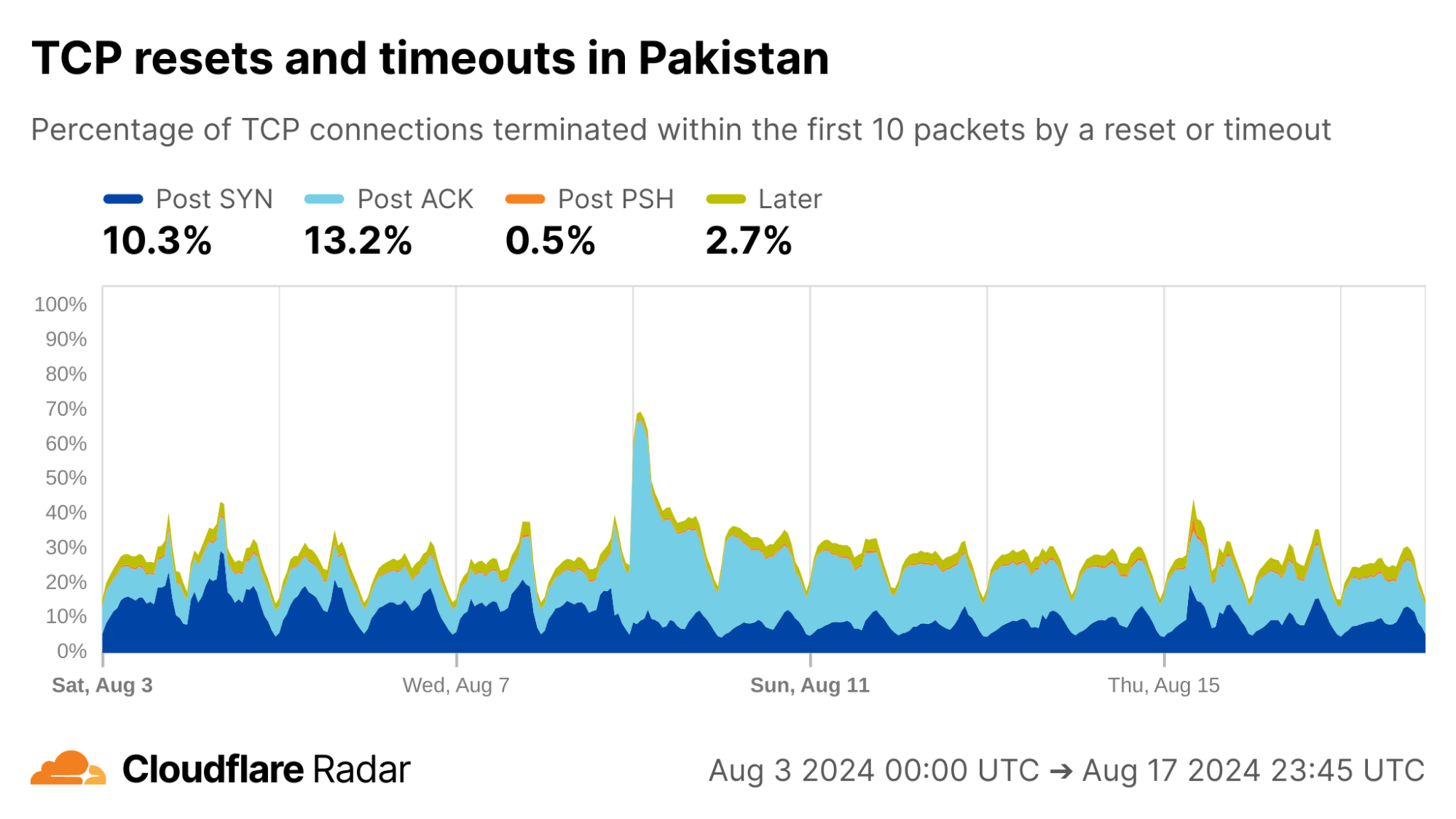
Reporting from inside Pakistan suggests changes in users’ Internet experience throughout August 2024. Taking a look at a two-week interval in early August, there is a significant shift in Post-ACK connection anomalies starting on August 9, 2024.


via Cloudflare Radar

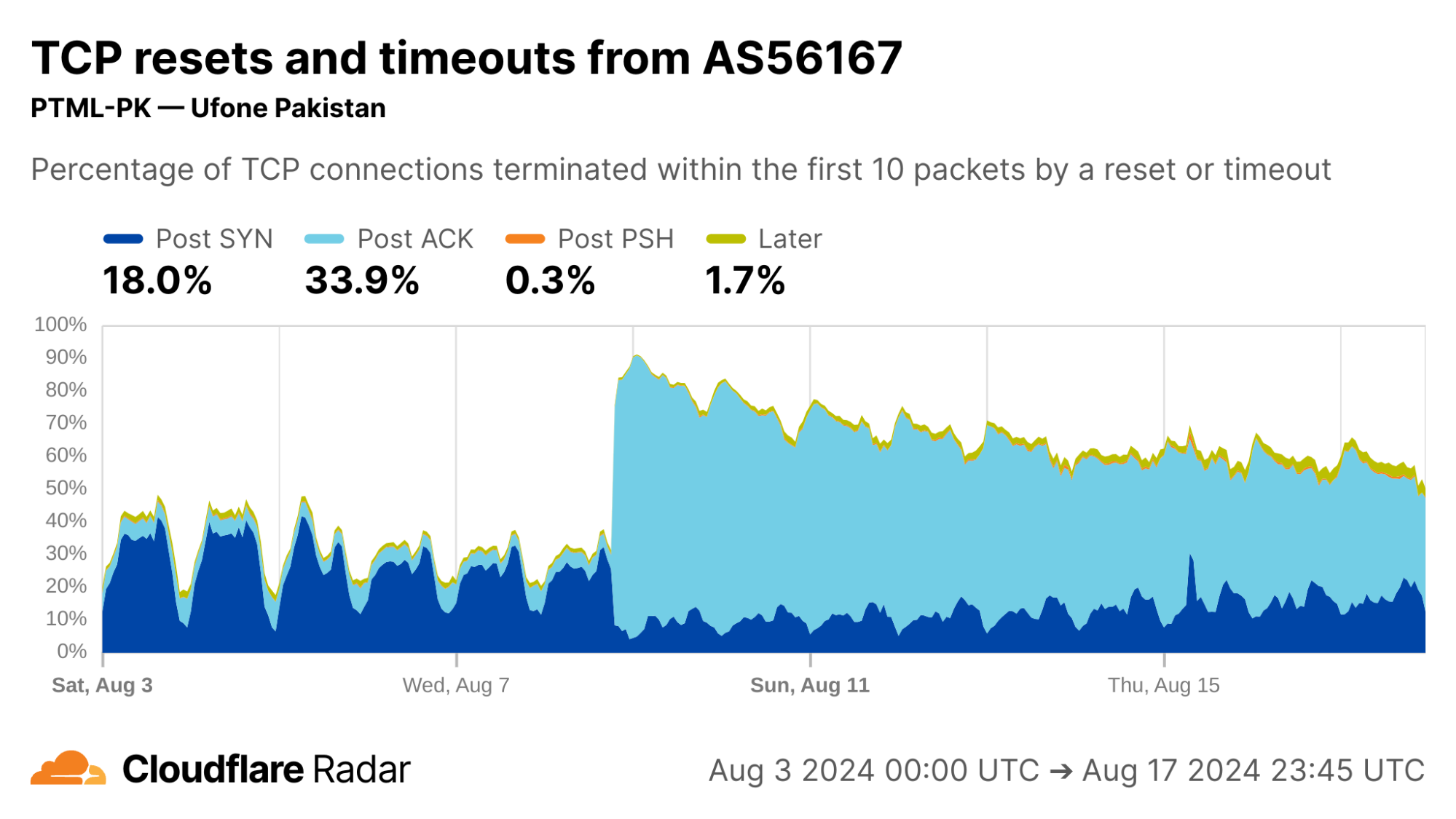
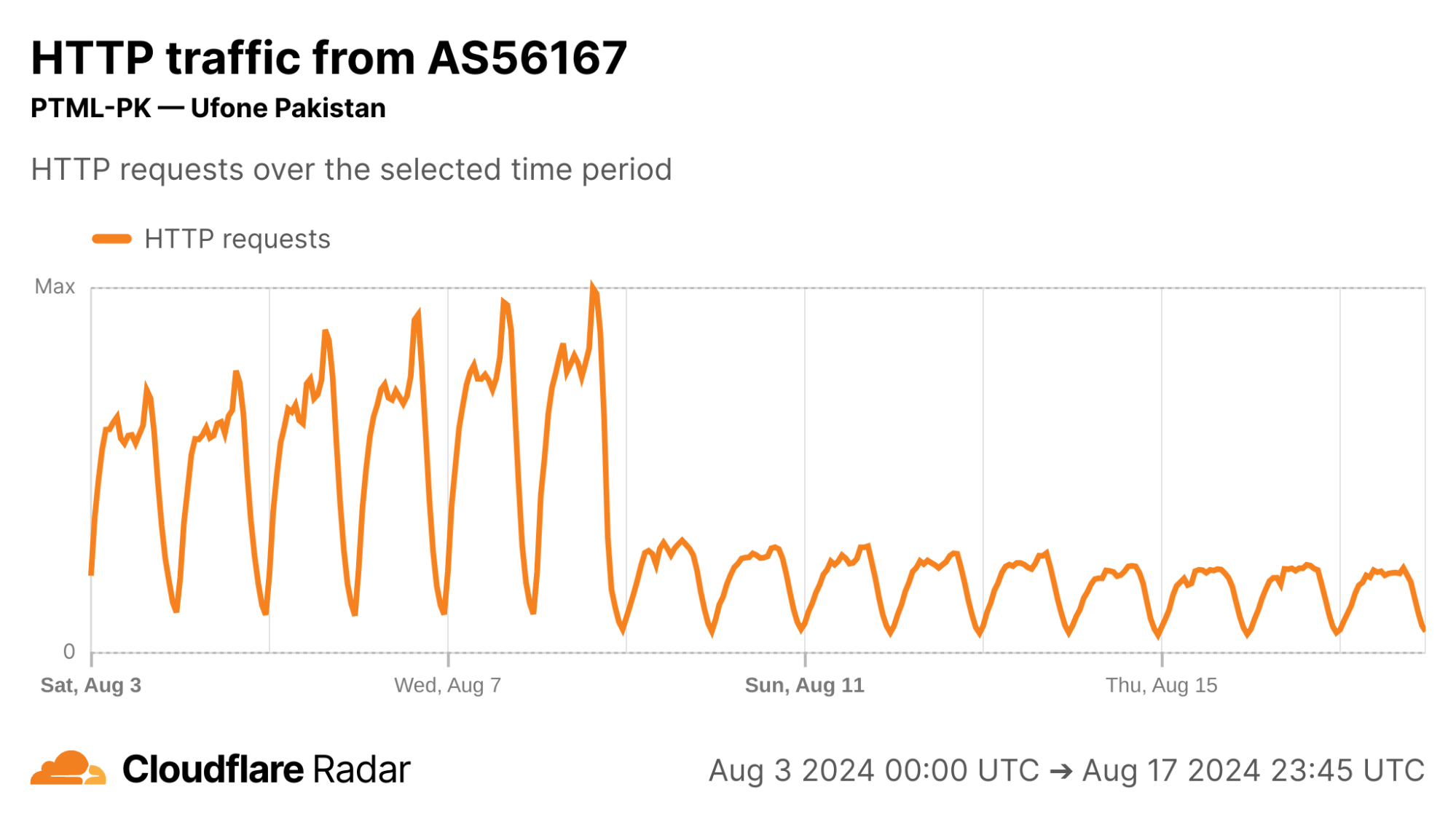
The August 9 Post-ACK spike can be almost entirely attributed to AS56167 (Pak Telecom Mobile Limited), shown below in the first image, where Post-ACK anomalies jumped from under 5% to upwards of 70% of all connections, and has remained high since. Correspondingly, we see a significant reduction in the number of successful HTTP requests reaching Cloudflare’s network from clients in AS56167, below in the second image, which provides evidence that connections are being disrupted. This Pakistan example reinforces the importance of corroborating reports and observations, discussed in more detail in the Radar dataset release.


via Cloudflare Radar


via Cloudflare Radar

Tanzania

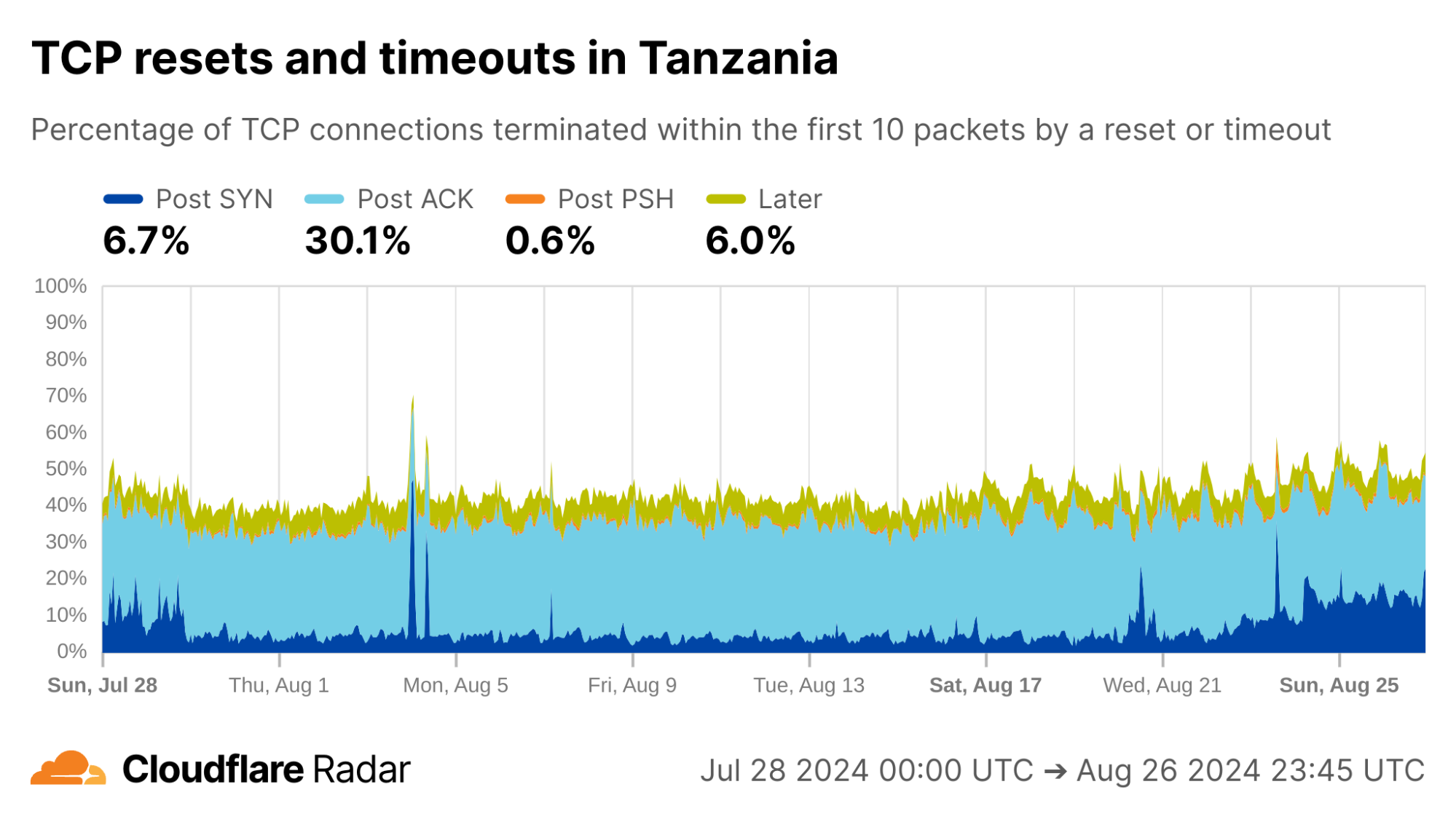
A OONI report from April 2024 discusses targeted connection tampering in Tanzania. The report states that this blocking is observed on the client side as connection timeouts after the Client Hello message during the TLS handshake, indicating that a middlebox is dropping the packet containing the Client Hello message. On the server side, connections tampered with in this way would appear as Post-ACK timeouts as the PSH packet containing the Client Hello message never reaches the server.

Looking at the Post-ACK data represented in the light-blue portion, below, we find matching evidence: close to 30% of all new TCP connections from Tanzania appear as Post-ACK anomalies. Breaking this down further (not shown in the plots below), approximately one third is due to timeouts, consistent with the OONI report above. The remainder is due to RSTs.


via Cloudflare Radar

Ethiopia

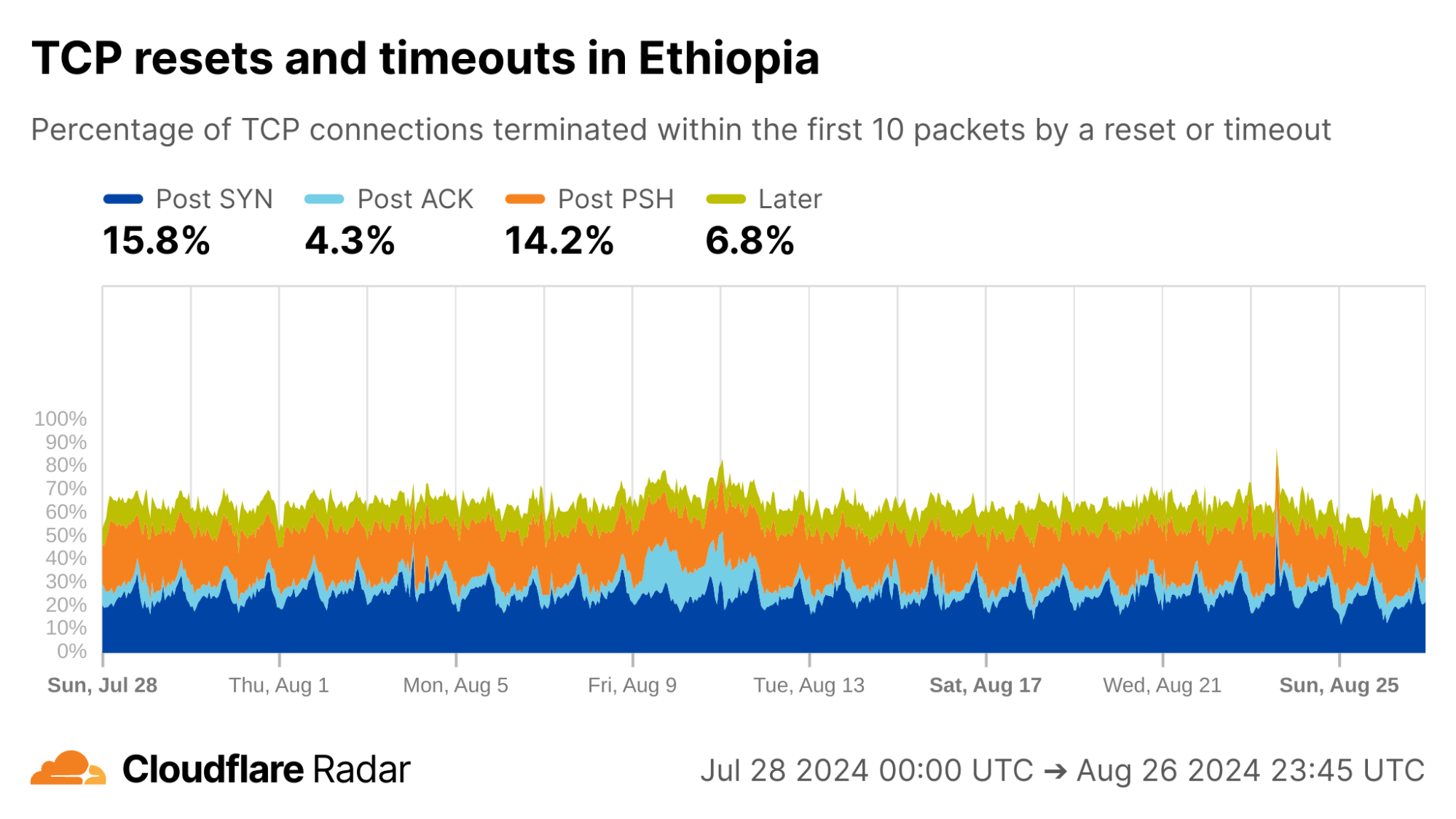
Ethiopia is another location with previously-reported connection tampering. Consistent with this, we see elevated rates of Post-PSH TCP anomalies across networks in Ethiopia. Our internal data shows that the majority of Post-PSH anomalies in this case are due to RSTs, although timeouts are also prevalent.


via Cloudflare Radar

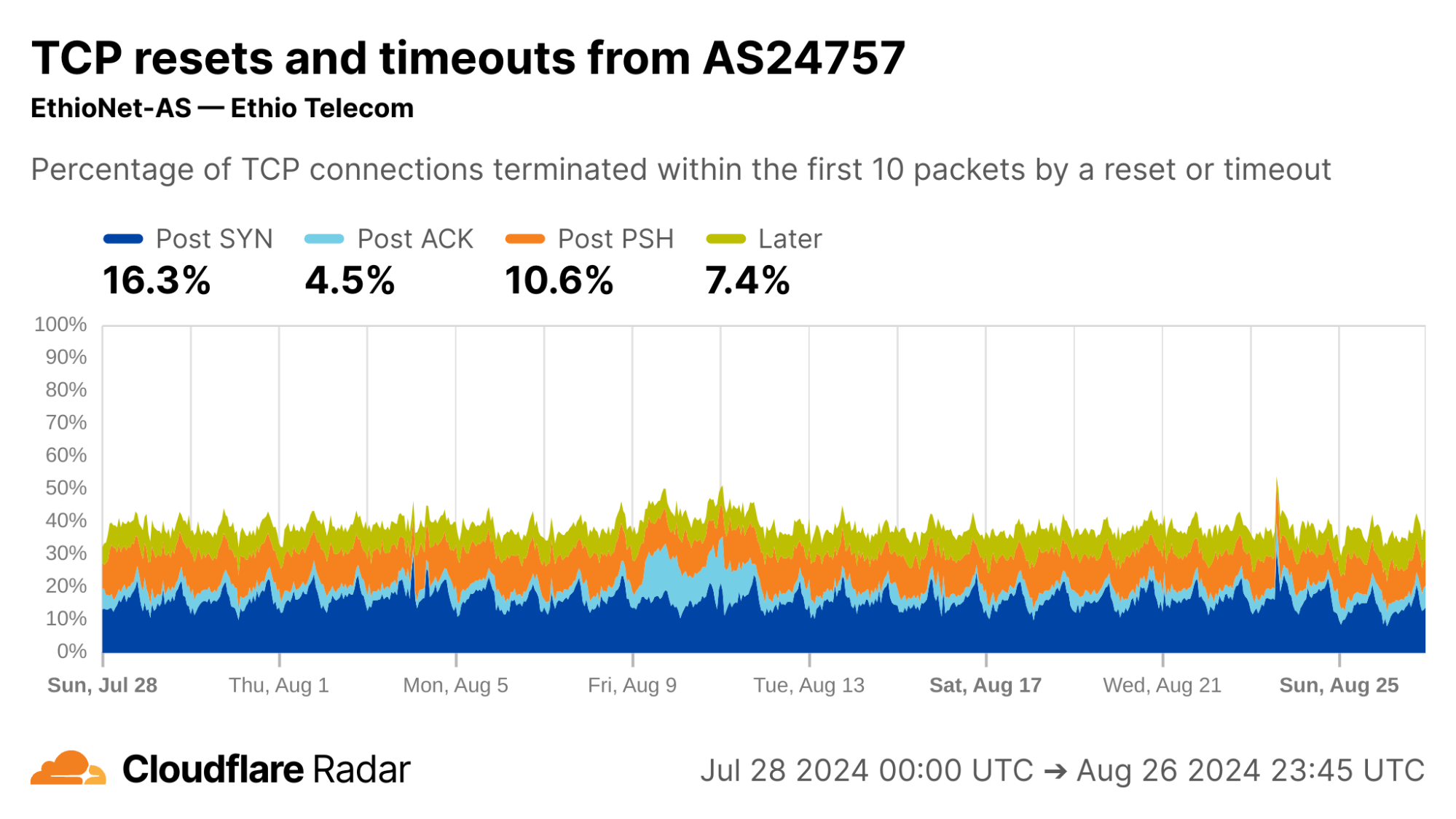
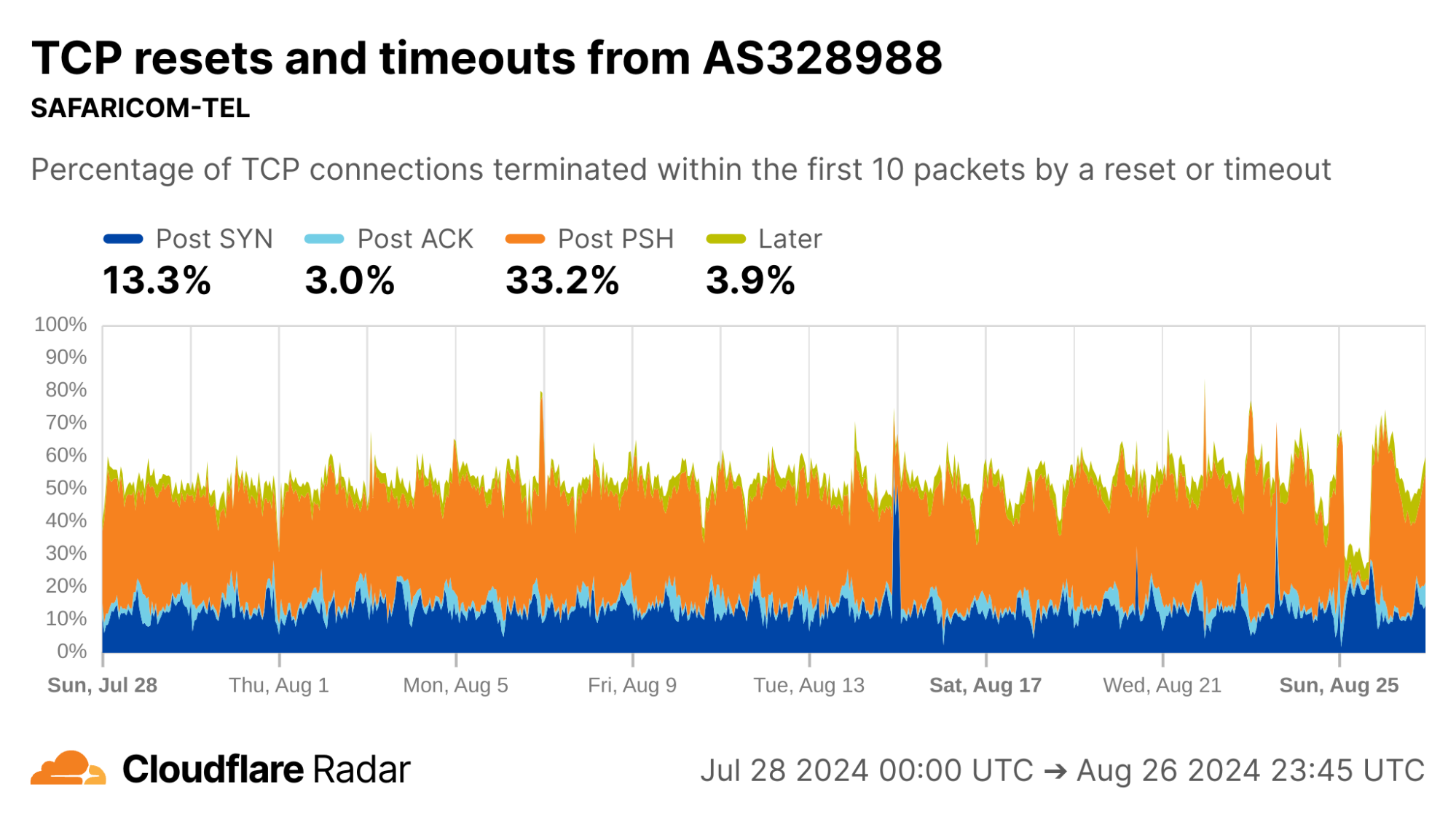
The majority of traffic arriving to Cloudflare’s servers from IP addresses geolocated in Ethiopia is from AS24757 (Ethio Telecom), shown below in the first image, so it is perhaps unsurprising that its data closely matches the country-wide distribution of connection anomalies. The number of Post-PSH connections originating from AS328988 (SAFARICOM TELECOMMUNICATIONS ETHIOPIA PLC), shown below in the second image, are higher in proportion and account for over 33% of all connections from that network.


via Cloudflare Radar


via Cloudflare Radar

Reflecting on the present to promote a resilient future

Connection tampering is a blocking mechanism that is deployed in various forms throughout the Internet. Although we have developed ways to help detect and understand it globally, the experience is just as individual as an interrupted phone call.

Connection tampering is also made possible by accident. It works because domain names are visible in cleartext. But it may not always be this way. For example, Encrypted Client Hello (ECH) is an emerging building block that encrypts the SNI field. 

We’ll continue to look for ways to talk about network activity and disruption, all to foster wider conversations. Check out the newest additions about connection anomalies on Cloudflare Radar and the corresponding blog post, as well as the peer-reviewed technical paper and its 15-minute summary talk.

Measuring Amazon MQ throughput using Maven 2 benchmark and AWS CDK

Post Syndicated from Chris Munns original https://aws.amazon.com/blogs/compute/measuring-amazon-mq-throughput-using-maven-2-benchmark-and-aws-cdk/

This post is written by Olajide Enigbokan, Senior Solutions Architect and Mohammed Atiq, Solutions Architect

In this post you will learn how to evaluate the throughput for Amazon MQ, a managed message broker service for ActiveMQ, by using the ActiveMQ Classic Maven Performance test plugin. This post will provide recommendations for configuring Amazon MQ to optimize throughput when leveraging ActiveMQ as a broker engine.

Overview on benchmarking throughput for Amazon MQ for ActiveMQ

To get a good balance of cost and performance while leveraging ActiveMQ on Amazon MQ, AWS recommends that customers benchmark during migration, instance type/size upgrade, or downgrade. Benchmarking can help you choose the correct instance type and size for your workload requirements. For common benchmark scenarios and benchmark figures for different instances types and sizes, see AmazonMQ for ActiveMQ Throughput benchmarks.

Performance of your ActiveMQ workload depends on the specifics of your use-case. For example, if you have a workload where durability is extremely important (meaning that messages cannot be lost), enabling persistence mode ensures that messages are persisted to disk before the broker informs the client that the message send action has completed. The faster the disk I/O capacity and the smaller the message size during these writes, the better the message throughput. For this reason, AWS recommends the mq.m5.* instance types for regular development, testing, and production workloads as described in Amazon MQ for ActiveMQ instance types. The mq.t2.micro and mq.t3.micro instance types are intended for product evaluation and are subject to burst CPU credits and baseline performance. Hence, they are not suitable for applications that require fixed performance. In the situation where a larger broker instance type is selected, AWS also recommends batching transactions for persistent store which allows you to send multiple messages per transaction while achieving an overall higher message throughput.

The next section describes the details of setting up your own benchmark for Amazon MQ using the open-source benchmarking tool: ActiveMQ Classic Maven Performance test plugin. The ActiveMQ Classic Maven Performance test plugin benchmark suite is highly recommended due to the ease in setup and deployment process.

Getting started

This walkthrough guides you through the steps for benchmarking your Amazon MQ brokers:

Step 1 – Build and push container image to Amazon ECR

Clone the mq-benchmarking-container-image-sample repository and follow the steps in the README file to build and push your image to an Amazon Elastic Container Registry (Amazon ECR) public repository. You will need this container image for Step 2.

Step 2 – Automate Your Benchmarking Setup with AWS CDK

Architecture of CDK deployment

Architecture of CDK deployment

To streamline the deployment of an active/standby ActiveMQ broker alongside Amazon Elastic Container Service (Amazon ECS) tasks for this walk-through, follow these steps below to set up the environment leveraging AWS Cloud Development Kit (AWS CDK). This will deploy the resources shown in the architecture diagram above.

2.1. Prerequisites:

Ensure the following packages are installed:

2.2 Repository Setup:

Clone the mq-benchmarking-sample repository. This repository contains all the necessary code and instructions to automate the benchmarking process using the AWS CDK.

2.3 Create a Virtual Environment:

Change directory (cd) to the cloned repository directory and create a Python virtual environment by running the following command:

cd mq-benchmarking-sample

python -m venv .venv

2.4 Activate Virtual Environment:

Run the following commands to activate your virtual environment:

# Linux
source .venv/bin/activate

# Windows
.\.venv\Scripts\activate

2.5 Install Dependencies:

Install the required Python packages using:

pip install -r requirements.txt

2.6 Customize and Deploy:

In this step, deploy the necessary stacks and their resources for benchmarking in your AWS account. The command ‘cdk deploy’ below deploys three stacks with resources for Amazon ECS, MQ and VPC. Deploy your application with AWS CDK using the command:

cdk deploy "*" -c container_repo_url=<YOUR CONTAINER REPO URL> -c container_repo_tag=<YOUR CONTAINER REPO TAG>

This command deploys your application with the specified Docker image. Replace <YOUR CONTAINER REPO URL> and <YOUR CONTAINER REPO TAG> with your specific Docker repo image details from Step 1. An example container repo URL would look like this: public.ecr.aws/xxxxxxxxx/xxxxxxxxxx.

The deployment of the stacks and their resources happen in three stages. Please select “yes” at each stage to deploy the stated changes as shown below:

First stage of the deploy

Select yes to deploy these changes

Deployed stacks and their resources

Deployed stacks and their resources

Optionally, you can include additional context variables in your command as seen below:

cdk deploy "*" -c vpc_cidr=10.0.0.0/16 -c mq_cidr=10.0.0.0/16 -c broker_instance_type=mq.m5.large -c mq_username=testuser -c tasks=2 -c container_repo_url=<YOUR CONTAINER REPO URL> -c container_repo_tag=<YOUR CONTAINER REPO TAG>

Note: In the example command above, the vpc_cidr specified is the same as mq_cidr. If you decide to use the above command, you will need to ensure that your vpc_cidr range is the same as your mq_cidr range. AWS recommends this as security best practice to ensure that your broker endpoint is only accessible from recognized IP ranges, see Security best practices for Amazon MQ.

More details on the above context variables:

  • broker_instance_type: Represents the instance type for the Amazon MQ Broker. You can start with the instance type mq.m5.large.
  • vpc_cidr: Allows you to customize the VPC’s CIDR block. The default CIDR is set to 10.42.0.0/16.
  • mq_cidr: Allows you set a specific security group CIDR range for the broker. This must be set to the vpc_cidr. From the sample command above, this is set to 10.0.0.0/16. For more flexibility with source IP ranges, you can edit the broker security group of your CDK deployment.
  • mq_username: Allows you to specify a username to access the ActiveMQ web console access and broker.
  • tasks: Determines the number of ECS tasks (1 or more) to run your Docker image. Since the OpenWire configuration file for both consumers and producers allow you to specify the number of clients that you want, all the clients in one ECS task will share the CPU and memory allocation for that task. You have the option to run multiple ECS tasks (with multiple clients) running the benchmark in parallel.

These adjustments allow for a more customized deployment to fit specific benchmarking needs and scenarios.

2.7 Benchmarking Execution

After deployment, you should see an output similar to the following:

Successful deployment of CDK application with output

Successful deployment of CDK application with output

1. Retrieve the TASK-ARN and access the Container

The above exec command in “outputs:” requires that you supply a <TASK-ARN> before the command can be run. To retrieve the <TASK-ARN> via the AWS CLI, you will need to do the following:

  • Run the below command and note down the Task ARN (needed later):
aws ecs list-tasks --cluster <cluster-name> --region <region>

You can also retrieve this value via the Amazon ECS console by going to your ECS Cluster and choosing Tasks.

  • Access the running ECS task using the ECS Exec feature with the command that is output from the CDK deployment. The command should look like the following:
aws ecs execute-command --region eu-central-1 --cluster arn:aws:ecs:eu-central-1:XXXXXXXX:cluster/ECS-Stack-ClusterEB0386A7-gRmSxC06y4ay --task <TASK-ARN> --container Benchmarking-Container --command "/bin/bash" --interactive

Before running the above command, replace the placeholder value of <TASK-ARN> with the value of the actual Task ARN noted earlier.

After retrieving the <TASK-ARN>, and running the exec command, you should have a directory structure as follows:

Directory Structure within ECS Task using ECS Exec

Directory Structure within ECS Task using ECS Exec

2. Configure the openwire-producer.properties and openwire-consumer.properties files.

Open both files. Shown below is the content of the openwire-producer.properties and openwire-consumer.properties files.

openwire-producer.properties:

sysTest.reportDir=./reports/
sysTest.samplers=tp
sysTest.spiClass=org.apache.activemq.tool.spi.ActiveMQReflectionSPI
sysTest.clientPrefix=JmsProducer
sysTest.numClients=25


producer.destName=queue://PERF.TEST
producer.deliveryMode=persistent
producer.messageSize=1024
producer.sendDuration=300000

factory.brokerURL=
factory.userName=
factory.password=

openwire-consumer.properties:

sysTest.reportDir=./reports/
sysTest.samplers=tp
sysTest.spiClass=org.apache.activemq.tool.spi.ActiveMQReflectionSPI
sysTest.destDistro=equal
sysTest.clientPrefix=JmsConsumer
sysTest.numClients=25

consumer.destName=queue://PERF.TEST

factory.brokerURL=
factory.userName=
factory.password=

In both files, provide the brokerURL, username and password as they are required before starting the benchmarking process. The brokerURL and username can be obtained from the Amazon MQ console

Amazon MQ broker

Amazon MQ broker

Once you click into the deployed broker, you will find the brokerURL under the Endpoints section for OpenWire.

Endpoints in Amazon MQ console

Endpoints in Amazon MQ console

The endpoint URL for OpenWire should be in this format:

failover:(ssl://b-xxxxxxxx-xxxx-xxxx-xxxx-xxxxxxxxxxxx-1.mq.<aws region>.amazonaws.com:61617,ssl://b-xxxxxxxx-xxxx-xxxx-xxxx-xxxxxxxxxxxx -2.mq.<aws region>.amazonaws.com:61617)
Retrieve username from Amazon MQ console

Retrieve username from Amazon MQ console

Since you are using an active/standby broker, the test would only leverage the active broker URL and not both. The failover protocol automatically manages this exchange. The password can be retrieved from the AWS Secrets Manager console or via the CLI.

The following parameters and values can be adjusted in both producer and consumer properties file to suite your use case:

  • sendDuration: The sendDuration which represents the time taken for the producer/consumer test to run. Default value is set to 300000ms.
  • messageSize: The messageSize which adjusts the size of messages sent is set to 1024KB by default.
  • deliveryMode: The deliveryMode is set to persistent by default.
  • numClients: numClients sets the number of concurrent consumers, influencing message processing speed. It is set to 25 by default.
  • destName: destName represents the name of your destination queue or topic. You can change the name to your preference.

For a more comprehensive guide, refer to the mq-benchmarking-sample documentation.

2.8 Benchmark Results

After populating both producer and consumer files with the required parameters, run the following maven commands (one after the other) in separate terminals to start the test:

Maven producer command:

mvn activemq-perf:producer -DsysTest.propsConfigFile=openwire-producer.properties

Maven consumer command:

mvn activemq-perf:consumer -DsysTest.propsConfigFile=openwire-consumer.properties

Once each of the above tests complete, they provide a summary of the tests in stdout as shown below:

#########################################
####    SYSTEM THROUGHPUT SUMMARY    ####
#########################################
System Total Throughput: 562020
System Total Clients: 25
System Average Throughput: 1873.4000000000003
System Average Throughput Excluding Min/Max: 1860.8333333333333
System Average Client Throughput: 74.936
System Average Client Throughput Excluding Min/Max: 74.43333333333334
Min Client Throughput Per Sample: clientName=JmsProducer19, value=2
Max Client Throughput Per Sample: clientName=JmsProducer13, value=169
Min Client Total Throughput: clientName=JmsProducer0, value=20224
Max Client Total Throughput: clientName=JmsProducer5, value=23917
Min Average Client Throughput: clientName=JmsProducer0, value=67.41333333333333
Max Average Client Throughput: clientName=JmsProducer5, value=79.72333333333333
Min Average Client Throughput Excluding Min/Max: clientName=JmsProducer0, value=67.04333333333334
Max Average Client Throughput Excluding Min/Max: clientName=JmsProducer8, value=78.91
[main] INFO org.apache.activemq.tool.reports.XmlFilePerfReportWriter - Created performance report: /app/activemq-perftest/./reports/JmsProducer_numClients25_numDests1_all.xml
[INFO] ------------------------------------------------------------------------
[INFO] BUILD SUCCESS
[INFO] ------------------------------------------------------------------------
[INFO] Total time: 5:05.052s
[INFO] Finished at: Mon Apr 29 10:22:01 UTC 2024
[INFO] Final Memory: 15M/60M
[INFO] ------------------------------------------------------------------------
#########################################
####    SYSTEM THROUGHPUT SUMMARY    ####
#########################################
System Total Throughput: 562023
System Total Clients: 25
System Average Throughput: 1873.4100000000005
System Average Throughput Excluding Min/Max: 1864.6599999999996
System Average Client Throughput: 74.93640000000002
System Average Client Throughput Excluding Min/Max: 74.58639999999998
Min Client Throughput Per Sample: clientName=JmsConsumer13, value=0
Max Client Throughput Per Sample: clientName=JmsConsumer13, value=105
Min Client Total Throughput: clientName=JmsConsumer13, value=22475
Max Client Total Throughput: clientName=JmsConsumer14, value=22495
Min Average Client Throughput: clientName=JmsConsumer13, value=74.91666666666667
Max Average Client Throughput: clientName=JmsConsumer14, value=74.98333333333333
Min Average Client Throughput Excluding Min/Max: clientName=JmsConsumer13, value=74.56666666666666
Max Average Client Throughput Excluding Min/Max: clientName=JmsConsumer14, value=74.63333333333334
[main] INFO org.apache.activemq.tool.reports.XmlFilePerfReportWriter - Created performance report: /app/activemq-perftest/./reports/JmsConsumer_numClients25_numDests1_equal.xml
[INFO] ------------------------------------------------------------------------
[INFO] BUILD SUCCESS
[INFO] ------------------------------------------------------------------------
[INFO] Total time: 5:02.434s
[INFO] Finished at: Mon Apr 29 10:22:02 UTC 2024
[INFO] Final Memory: 14M/68M
[INFO] ------------------------------------------------------------------------

The above output is from a test performed and shown as sample output.

System Average Throughput and System Total Clients are the most useful metrics.

In the reports directory look for two xml files with more detailed throughput metrics. In the JmsProducer_numClients25_numDests1_all.xml file for example, jmsClientSettings and jmsFactorySettings captures different broker switches.

Each of the report files captures exact test and broker environment. Keeping these files around will allow you to compare performance between different test cases and analyze how a set of configurations have impacted performance.

For this test, the average throughput for a producer is around 1873 messages per second for 25 clients. Keep in mind that the broker instance is an mq.m5.large. You can get higher throughput with more clients and a larger broker instance. This test demonstrates the concept of running fast consumers while producing messages.

More comprehensive information on the test output can be found in performance testing.

By following these guidelines and leveraging ECS Exec for direct access, you can deploy the ActiveMQ Classic Maven Performance test plugin, using AWS CDK. This setup allows you to customize and execute benchmark tests on Amazon MQ within an ECS task, facilitating an automated and efficient deployment and testing workflow.

Amazon MQ benchmarking architecture

Amazon MQ for ActiveMQ brokers can be deployed as a single-instance broker or as an active/standby broker. Amazon MQ is architected for high availability (HA) and durability. For HA and broker benchmarking, AWS recommends using the active/standby deployment. After a message is sent to Amazon MQ in persistent mode, the message is written to the highly durable message store which replicates the data across multiple nodes and Availability Zones.

Cleanup

To avoid incurring future charges for the resources deployed in this walkthrough, run the following command and follow the prompts to delete the CloudFormation stacks launched in 2.6 Customize and Deploy:

cdk destroy "*"

Conclusion

This post provides a detailed guide on performing benchmarking for Amazon MQ for ActiveMQ brokers leveraging the ActiveMQ Classic Maven Performance test plugin. Benchmarking plays a crucial role for customers migrating to Amazon MQ, as it offers insights into the broker’s performance under conditions that mirror their existing setup. This process enables customers to fine-tune their configurations and choose the appropriate instance type that aligns with their specific use case, ensuring optimal handling of their workloads’ throughput.

Get started with Amazon MQ by using the AWS Management Console, AWS CLI, AWS Software Development Kit (SDK), or AWS CloudFormation. For information on cost, see Amazon MQ pricing.

AWS achieves HDS certification in four additional AWS Regions

Post Syndicated from Janice Leung original https://aws.amazon.com/blogs/security/aws-achieves-hds-certification-in-four-additional-aws-regions/

Amazon Web Services (AWS) is pleased to announce that four additional AWS Regions—Asia Pacific (Hong Kong), Asia Pacific (Osaka), Asia Pacific (Hyderabad), and Israel (Tel Aviv)—have been granted the Health Data Hosting (Hébergeur de Données de Santé, HDS) certification, increasing the scope to 24 global AWS Regions.

The Agence du Numérique en Santé (ANS), the French governmental agency for health, introduced the HDS certification to strengthen the security and protection of personal health data. By achieving this certification, AWS demonstrates our continuous commitment to adhere to the heightened expectations for cloud service providers.

The following 24 Regions are in scope for this certification:

  • US East (N. Virginia)
  • US East (Ohio)
  • US West (N. California)
  • US West (Oregon)
  • Asia Pacific (Hong Kong)
  • Asia Pacific (Hyderabad)
  • Asia Pacific (Jakarta)
  • Asia Pacific (Mumbai)
  • Asia Pacific (Osaka)
  • Asia Pacific (Seoul)
  • Asia Pacific (Singapore)
  • Asia Pacific (Sydney)
  • Asia Pacific (Tokyo)
  • Canada (Central)
  • Europe (Frankfurt)
  • Europe (Ireland)
  • Europe (London)
  • Europe (Milan)
  • Europe (Paris)
  • Europe (Stockholm)
  • Europe (Zurich)
  • Middle East (UAE)
  • Israel (Tel Aviv)
  • South America (São Paulo)

The HDS certification demonstrates that AWS provides a framework for technical and governance measures to secure and protect personal health data according to HDS requirements. Our customers who handle personal health data can continue to manage their workloads in HDS-certified Regions with confidence.

Independent third-party auditors evaluated and certified AWS on September 3, 2024. The HDS Certificate of Compliance demonstrating AWS compliance status is available on the Agence du Numérique en Santé (ANS) website and AWS Artifact. AWS Artifact is a self-service portal for on-demand access to AWS compliance reports. Sign in to AWS Artifact in the AWS Management Console, or learn more at Getting Started with AWS Artifact.

For up-to-date information, including when additional Regions are added, visit the AWS Compliance Programs page and choose HDS.

AWS strives to continuously meet your architectural and regulatory needs. If you have questions or feedback about HDS compliance, reach out to your AWS account team.

To learn more about our compliance and security programs, see AWS Compliance Programs. As always, we value your feedback and questions; reach out to the AWS Compliance team through the Contact Us page.

If you have feedback about this post, submit comments in the Comments section below.

Author

Janice Leung
Janice is a Security Assurance Program Manager at AWS based in New York. She leads various commercial security certifications, within the automobile, healthcare, and telecommunications sectors across Europe. In addition, she leads the AWS infrastructure security program worldwide. Janice has over 10 years of experience in technology risk management and audit at leading financial services and consulting company.

Tea Jioshvili

Tea Jioshvili
Tea is a Security Assurance Manager at AWS, based in Berlin, Germany. She leads various third-party audit programs across Europe. She previously worked in security assurance and compliance, business continuity, and operational risk management in the financial industry for multiple years.

Call for candidates for the 2024 Linux Foundation TAB election

Post Syndicated from corbet original https://lwn.net/Articles/988862/

The call for candidates
has gone out for the 2024 election of members of the Linux Foundation
Technical Advisory Board:

The TAB exists to provide advice from the kernel community to the
Linux Foundation and holds a seat on the LF’s board of directors;
it also serves to facilitate interactions both within the community
and with outside entities. Over the last year, the TAB has
overseen the organization of the Linux Plumbers Conference, advised
on the setup of the kernel CVE numbering authority, worked behind
the scenes to help resolve a number of contentious community
discussions, worked with the Linux Foundation on community
conference planning, and more.

Nominations are due by September 20.

Tellico 4.0 released

Post Syndicated from jzb original https://lwn.net/Articles/988837/

Version 4.0 of the Tellico collection management
software has been released. This is the first release to use the
KDE Frameworks 6 and Qt6 libraries, with a fallback
available for Frameworks 5 and Qt5. Other notable changes in 4.0
include importing video collections from file metadata and correctly
importing multi-disc album data from Discogs, MusicBrainz, and iTunes. Users
of prior versions are advised to make a backup of their data before upgrading.

Build a mobile driver’s license solution based on ISO/IEC 18013-5 using AWS Private CA and AWS KMS

Post Syndicated from Ram Ramani original https://aws.amazon.com/blogs/security/build-a-mobile-drivers-license-solution-based-on-iso-iec-18013-5-using-aws-private-ca-and-aws-kms/

A mobile driver’s license (mDL) is a digital representation of a physical driver’s license that’s stored on a mobile device. An mDL is a significant improvement over physical credentials, which can be lost, stolen, counterfeited, damaged, or contain outdated information, and can expose unconsented personally identifiable information (PII). Organizations are working together to use mDLs across various situations, ranging from validating identity during airplane boarding to sharing information for age-restricted activities.

The trust in the mDL system is based on public-private key cryptography where mDLs are signed by issuing authorities using their private key and verified using the issuing authority’s public key. In this blog post, we show you how to build an mDL issuing authority in Amazon Web Services (AWS) using AWS Private Certificate Authority and AWS Key Management Service (AWS KMS) according to mDL specification ISO/IEC 18013-5:2021. These AWS services align with the cryptographic requirements placed on the issuing authorities by ISO/IEC 18013-5. While we have tailored this post to an mDL use case, the sign and verify mechanism using AWS Private CA and AWS KMS can be used for multiple kinds of digital identity verification.

Solution overview

AWS Private CA provides you with a highly available private certificate authority (CA) service without the initial investment and ongoing maintenance costs of operating your own private CA. CA administrators can use AWS Private CA to create a complete CA hierarchy, including online root and subordinate CAs, without needing external CAs. You can issue, rotate, and revoke certificates that are trusted within your organization using AWS Private CA.

AWS Private CA can issue certificates formatted as required by ISO/IEC 18013-5. You can build a certificate authority (CA) in AWS Private CA—referred to as the issuing authority certificate authority (IACA) in ISO/IEC 18013-5. We create an IACA self-signed root certificate and an mDL document signing certificate in AWS Private CA.

AWS KMS is a managed service that you can use to create and control the cryptographic keys that are used to protect your data. AWS KMS uses FIPS 140-2 Level 3 validated hardware security modules (HSMs) to protect AWS KMS keys, which is a requirement for building an issuing authority as described in ISO/IEC 18013-5. We create an asymmetric key pair in AWS KMS for signing and verification of the mDL document. We programmatically create a certificate signing request (CSR) that’s signed by the asymmetric key pair stored in AWS KMS. The CSR is sent to the AWS Private CA service for issuing the mDL document signing certificate that matches the certificate profile requirement specified for the document signing certificate in ISO/IEC 18013-5.

We sign an mDL document using the private key of the asymmetric key pair created in AWS KMS with a KeyUsage value of SIGN_VERIFY. The signed mDL document is delivered to a mobile device where it’s stored in a digital wallet and produced for verification by mDL readers. The mDL readers are configured with IACA certificates from various issuing authorities that allow them to verify the mDL documents signed by respective issuing authorities. An example of an issuing authority could be a state government agency that issues driver’s licenses.

Least privilege

The solution in this post uses AWS KMS and AWS Private CA services. Before you implement the process described in this post, ensure that the AWS Identity and Access Management (IAM) principal you choose follows the principle of least privilege and that permissions are scoped to the minimum required permissions required. See Security best practices in IAM to learn more.

Solution architecture

A sample solution architecture for building an mDL issuing authority in AWS is shown in Figure 1. The figure shows the step-by-step process starting from setting up a private CA and issuing an mDL document signing certificate to mDL issuance and verification. The infrastructure that’s built using this architecture includes a root certificate authority, which issues a document signer certificate. You can find the certificate requirements in section B.1 Certificate Profile of ISO/IEC 18013-5.

Figure 1: mDL issuing authority architecture and process flow in AWS

Figure 1: mDL issuing authority architecture and process flow in AWS

In this post, we use AWS Command Line Interface (AWS CLI) commands, but these can be replaced by AWS SDK API calls if needed. Along with the AWS CLI steps, a GitHub sample is provided that’s used to programmatically create and sign an mDL document signing CSR using AWS KMS.

See the AWS CLI commands documentation for AWS Private CA and AWS KMS for detailed information on the commands used in this solution.

Solution walkthrough

Use the following steps to create the infrastructure needed for mDL signing and verification.

Step 1: Create IACA CA in AWS Private CA

In this step, the root of trust IACA (issuing authority CA) will be created. The IACA root CA is the root of trust that will be used for verification of the mDL.

  1. Create a local ca_config.txt file with the following content. The contents of this file are derived from the Certificate profiles section (Annex B) within ISO/IEC 18013-5. You can change the Country and CommonName values in the file as needed for your requirements.
    {
      "KeyAlgorithm": "EC_prime256v1",
      "SigningAlgorithm": "SHA256WITHECDSA",
      "Subject": {
        "Country": "US",
        "CommonName": "mDL IACA Root"
      }
    }

  2. The IACA root certificate will be paired with a certificate revocation list (CRL). See Planning a certificate revocation list (CRL) for information about configuring CRLs. Create a local file called revocation_config.txt with the following information to configure a CRL. The values for CustomCname and S3BucketName are examples, update them with the values that you have created within your AWS account. Update ExpirationInDays to fit your requirements. We recommend configuring encryption on the Amazon Simple Storage Service (Amazon S3) bucket containing your CRLs.
    {
      "CrlConfiguration": {
        "CustomCname": "example.com",
        "Enabled": true,
        "S3BucketName": "crlmdlbucket",
        "ExpirationInDays": 5000,  
      }
    }

  3. Invoke an AWS CLI command to create a private certificate authority. Replace the region parameter as needed. Update the file:// paths in the following command to the locations where you’ve stored the ca_config.txt and revocation_config.txt files.
    aws acm-pca create-certificate-authority \ 
        --region us-west-1 \
        --certificate-authority-configuration file://ca_config.txt \
        --revocation-configuration file://revocation_config.txt \
        —-certificate-authority-type "ROOT"

  4. The command should produce the following output. The output contains the Amazon Resource Name (ARN) of the created CA. You will need this ARN in subsequent steps.
    {
        "CertificateAuthorityArn": "arn:aws:acm-pca:us-west-1:123412345678:certificate-authority/0116z123-dv7a-59b1-x7be-1231v7257113"
    }

Step 2: Retrieve the CSR for IACA root certificate

You’ll create an IACA root certificate, which starts with retrieving a CSR. This step retrieves the CSR for the IACA root certificate. The certificate-authority-arn parameter carries the CA ARN that was generated in Step 1.

  1. The following command will output a Privacy-Enhanced Mail (PEM) formatted CSR.
    aws acm-pca get-certificate-authority-csr \
        --region us-west-1 \
        --output text \
        --certificate-authority-arn arn:aws:acm-pca:us-west-1:123412345678:certificate-authority/0116z123-dv7a-59b1-x7be-1231v7257113

  2. The following is the format of the output CSR:
    -----BEGIN CERTIFICATE REQUEST-----
    ..
    -----END CERTIFICATE REQUEST-----

  3. Store the output text in a file called IACA.csr.

Step 3: Generate root certificate

  1. This step issues the IACA root certificate. Create a file named extensions.txt using the following contents, which are derived from the Certificate profiles section of ISO/IEC 18013-5.

    The KeyUsage extension with KeyCertSign and CRLSign should be set to true. A custom extension for the CRL distribution point is set and the validity of the certificate should be set to 9 years or 3285 days (set in the next step). Because the IACA root certificate is only used to issued mDLs, a maximum validity period of 9 years is sufficient, as indicated in Table B.1 of ISO/IEC 18013-5. Additionally, a CRL distribution point extension must be present. In the following example, the CRL URL encoded in the CDP extension is http://example.com/crl/0116z123-dv7a-59b1-x7be-1231v72571136.crl, aligning with both the CA CRL configuration applied to the CA at creation and to the CA ID. For base-64 encoding of the CDP extension, you can refer to this java sample.

    {
      "Extensions": {
        "KeyUsage": {
          "KeyCertSign": true,
          "CRLSign": true
        },
        "CustomExtensions": [
          {
            "ObjectIdentifier": "2.5.29.31",
            "Value": "MEgwRqBEoEKGQGh0dHA6Ly9leGFtcGxlLmNvbS9jcmwvMDExNnoxMjMtZHY3YS01OWIxLXg3YmUtMTIzMXY3MjU3MTEzNi5jcmw="
           }
        ]
      }
    }

  2. Issue the following command to AWS Private CA to create the certificate.
    aws acm-pca issue-certificate \
        --region us-west-1 \
        --certificate-authority-arn arn:aws:acm-pca:us-west-1:123412345678:certificate-authority/0116z123-dv7a-59b1-x7be-1231v7257113 \
        --template-arn "arn:aws:acm-pca:::template/BlankRootCACertificate_PathLen0_APIPassthrough/V1" \
        --signing-algorithm "SHA256WITHECDSA" \
        --csr fileb://IACA.csr \
        --validity Value=3285,Type="DAYS" \
        --api-passthrough file://extensions.txt

  3. The preceding command will produce the following output:
    {
      "CertificateArn": "arn:aws:acm-pca:us-west-1:123412345678:certificate-authority/0116z123-dv7a-59b1-x7be-1231v7257113/certificate/34a1dab03117f0e89c54b1234fe13318"
    }

Note that the IACA root CA created with AWS Private CA currently doesn’t have a CRL distribution point (CDP) extension by default. However, that is a mandatory extension according to the IACA root certificate profile in ISO/IEC 18013-5. To implement this, we use a custom extension passed in using API passthrough, which embeds the CDP extension. The distribution point specified in that extension must be based on the CA ID, which is 0116z123-dv7a-59b1-x7be-1231v7257113 derived from the CA ARN that was created in Step 1.

Step 4: Retrieve root certificate

This step retrieves the IACA root certificate in PEM format.

  1. Use the following code to retrieve the IACA root certificate:
    aws acm-pca get-certificate \
        --region us-west-1 \
        --certificate-authority-arn arn:aws:acm-pca:us-west-1:123412345678:certificate-authority/0116z123-dv7a-59b1-x7be-1231v7257113 \
        --certificate-arn arn:aws:acm-pca:us-west-1:123412345678:certificate-authority/0116z123-dv7a-59b1-x7be-1231v7257113/certificate/34a1dab03117f0e89c54b1234fe13318 \
        --output text

  2. The command output will be a PEM formatted certificate similar to the following:
    -----BEGIN CERTIFICATE-----
    ..
    -----END CERTIFICATE-----

  3. Store the output text in a file named IACA-Root-CA-Cert.pem.

Step 5: Import root certificate

Use the following code to import the root certificate into AWS Private CA and make the certificate authority active and ready to issue certificates.

aws acm-pca import-certificate-authority-certificate \
    --region us-west-1 \
    --certificate-authority-arn arn:aws:acm-pca:us-west-1:123412345678:certificate-authority/0116z123-dv7a-59b1-x7be-1231v7257113 \
    --certificate fileb://IACA-Root-CA-Cert.pem

You should see success after running the command.

Step 6: Create an asymmetric key in AWS KMS

In this step, create an asymmetric signing key in AWS KMS which will be used to sign the mDL document signing CSR.

  1. Use the following command to create an asymmetric key:
    aws kms create-key \
        --region us-west-1 \
        --key-spec ECC_NIST_P256 \
        --key-usage SIGN_VERIFY

  2. The command should produce the following output:
    {
      "KeyMetadata": {
        "AWSAccountId": "123412345678",
        "KeyId": "3ab87971-1fe2-45d9-955a-5dc7f65558zf",
        "Arn": "arn:aws:kms:us-west-1:123412345678:key/3ab87971-1fe2-45d8-955c-5dc7f65558ef",
        "CreationDate": "2024-05-18T19:53:27.318000+00:00",
        "Enabled": true,
        "Description": "",
        "KeyUsage": "SIGN_VERIFY",
        "KeyState": "Enabled",
        "Origin": "AWS_KMS",
        "KeyManager": "CUSTOMER",
        "CustomerMasterKeySpec": "ECC_NIST_P256",
        "KeySpec": "ECC_NIST_P256",
        "SigningAlgorithms": [
          "ECDSA_SHA_256"
        ],
        "MultiRegion": false
      }
    }

  3. Note the Arn value from the output. You will use it in Step 7 to configure the CSR creation utility for the mDL document signing certificate.

Step 7: Use the CSR creation utility to generate the document signing CSR

We published a sample utility in GitHub that creates a CSR signed by an AWS asymmetric key.

  1. Clone the GitHub repository and then follow the instructions in the README file from the repository to configure and run it.
  2. This program will output a PEM formatted CSR similar to the following:
    -----BEGIN CERTIFICATE REQUEST-----
    ..
    -----END CERTIFICATE REQUEST-----

  3. Copy the output and store it in a file named document-signing-kms.csr. You will use the file in Step 8 to create the mDL document signing certificate based on this CSR.

Step 8: Generate an mDL document signing certificate

This step creates the document signing certificate from the CSR that’s signed using the AWS KMS asymmetric key.

  1. Create a file named extensionSigner.txt with the following contents. The contents of this file are derived from the Certificate profiles section of ISO/IEC 18013-5. The JSON snippet that follows shows the extension structure containing the KeyUsage extension with DigitalSignature field set to true.
    {
         "Extensions": {
             "KeyUsage": {
                 "DigitalSignature": true
             },
             "ExtendedKeyUsage": [
                 {
                     "ExtendedKeyUsageObjectIdentifier": "1.0.18013.5.1.2"
                 }
             ]
         }
    }

  2. Use the following AWS CLI command to create the certificate.
    aws acm-pca issue-certificate \
        --region us-west-1 \
        --certificate-authority-arn arn:aws:acm-pca:us-west-1:123412345678:certificate-authority/0116z123-dv7a-59b1-x7be-1231v7257113 \
        --template-arn "arn:aws:acm-pca:::template/BlankEndEntityCertificate_APIPassthrough/V1" \
        --signing-algorithm "SHA256WITHECDSA" \
        --csr fileb://document-signing-kms.csr \
        --validity Value=1825,Type="DAYS" \
        --api-passthrough file://extensionSigner.txt

  3. Output:
    {
        "CertificateArn": "arn:aws:acm-pca:us-west-1:123412345678:certificate-authority/0116z123-dv7a-59b1-x7be-1231v7257113/certificate/d462fcd3b9h3beb45c7c312241d42fba"
    }

  4. You will use the CertificateArn from the output in Step 9 to retrieve the mDL document signing certificate.

Step 9: Retrieve the mDL document signing certificate

This step retrieves the document signing certificate in PEM format from AWS Private CA.

  1. Use the following command to retrieve the document signing certificate:
    aws acm-pca get-certificate \
        --region us-west-1 \
        --certificate-authority-arn arn:aws:acm-pca:us-west-1:123412345678:certificate-authority/0116z123-dv7a-59b1-x7be-1231v7257113 \
        --certificate-arn arn:aws:acm-pca:us-west-1:123412345678:certificate-authority/0116z123-dv7a-59b1-x7be-1231v7257113/certificate/d462fcd3b9h3beb45c7c312241d42fba \
        --output text

  2. Store the output text in document_signing_cert.pem.

You now have the mDL document signing certificate for packaging later with the Concise Binary Object Representation (CBOR) structure required by ISO/IEC 18013-5.

Step 10: mDL reader ingests issuing authority’s mDL signing certificate chain

An mDL reader can trust the mDL presented by a user after cryptographically verifying the mDL. This verification requires the reader to possess the mDL signing certificate chain of the issuing authority that issued the user the mDL. As required by the decentralized public key infrastructure (PKI) trust model specified in ISO/IEC 18013-5, the mDL reader will ingest the mDL signing certificate chain of the issuing authority.

Step 11: User makes an mDL signing request to the issuing authority

The user makes a request to the issuing authority to sign the mDL.

Step 12: Issuing authority issues signed mDL to the user

The issuing authority will authenticate the user’s identity and issue a signed mDL. The issuing authority provisions mDL data to the user’s device along with a CBOR encoded object known as a mobile security object (MSO). MSOs contain a digest algorithm, individual digests of mDL data elements, and a validity period. After this MSO has been generated and encoded as required by ISO/IEC 18013-5:2021 section 9.1.2.4, the MSO can be signed by the issuing authority. This signature can be generated in AWS KMS as shown in the following command. Generating the encoded MSO is out of scope for this post.

  1. Use the following command to produce the SHA-256 digest of encoded MSO object using the sha256sum utility.
    sha256sum < EncodedMSO > EncodedMSODigest

  2. Sign the digest using the AWS KMS asymmetric key created in Step 6.
    aws kms sign \
     --region us-west-1 \
     --key-id 3ab87971-1fe2-45d8-955c-5dc7f65558ef \
     --message fileb://EncodedMSODigest \
     --message-type DIGEST \
     --signing-algorithm ECDSA_SHA_256 \
     --output text \
     --query Signature | base64 --decode

  3. This signature will be combined with the issuing authority certificate and the MSO to form a CBOR Object Signing and Encryption (COSE) signed message and will be presented with the mDL data elements to readers. Readers can validate this signature to confirm the integrity of the MSO.

Step 13: User presents their mDL to an mDL reader

The user presents their mDL to the mDL reader for identity verification, such as at an airport. This process is called mDL Initialization in ISO/IEC 18013-5:2021 section 6.3.2.2. The mDL is activated during this initialization step.

Step 14: An mDL reader requests mDL data from a user’s mobile device

The mDL reader issues an mDL retrieval request to the user’s mobile device. A key feature of mDLs is that they allow mDL holders to present a subset of their PII. An mDL reader will request specific attributes such as name and date of birth, requiring the mDL holder to consent to the release of this information. The mDL reader’s request contains the list of PII data element identifiers that it is requesting the mDL holder to share.

Step 15: User consents to share their mDL data

The user receives a prompt notifying them of mDL sharing request. This prompt shows the user the list of PII data elements that are being requested. The user consents to the request and the mDL data that includes the MSO is shared with the reader.

Step 16: Reader validates mDL integrity

The reader receives the mDL data and validates it for integrity. The inclusion of the MSO with the mDL data elements provides mDL readers with a mechanism for validating the integrity of the data they’ve received. The mDL reader can then hash and verify individual mDL data elements presented by the device. If all data elements match their corresponding entries in the MSO, the mDL device reader can attest that the data hasn’t been tampered with.

As an example, assume that the mDL contains the following data elements:

24(<<
  {
    "digestID": 0,
    "random": h'BBA394B98088CAE238D35979F7210E18DFAF70354524D86149CA20046E4321B1',
    "elementIdentifer": "given_name",
    "elementValue": "John"
  }
>>),
24(<<
  {
    "digestID": 1,
    "random": h'901F63FD880A15B30EDCEEFA857201C52FB9EAD1D39C15BB592829D16CB8A368',
    "elementIdentifer": "family_name",
    "elementValue": "Doe"
  }
>>)

And a Mobile Security Object containing the following data element digests:

24(<<
  {
    "version": "1.0",
    "digestAlgorithm": "SHA-256",
    "valueDigests":
    {
      "org.iso.18013.5.1":
      {
        0: h’D6AA81E454036313A9A681809151DDDBDF702289094F18286DDC591C41C6434E',
        1: h'4C3D83940CA8C5DE8060A23EB649C175E79B745B6A7D9939B4D16B3E46BB14D5'
      }
    }
  }
>>)

The MSO’s integrity would first confirm that the validity period of the MSO (not shown) has not expired. It can then verify the signature (not shown) with the issuing authority’s public key. After this has been established, both data elements need to be verified. The CBOR representation of each element (digestID, random, elementIdentifier, and elementValue) is encoded as bytes and then hashed using SHA-256. For example, the following should equal D6AA81E454036313A9A681809151DDDBDF702289094F18286DDC591C41C6434E.

SHA256(CBOR byte representation of 24(<<
    {
      "digestID": 0,
      "random": h'BBA394B98088CAE238D35979F7210E18DFAF70354524D86149CA20046E4321B1',
      "elementIdentifer": "given_name",
      "elementValue": "John"
    }
  >>))
)

Likewise, the following example should equal
4C3D83940CA8C5DE8060A23EB649C175E79B745B6A7D9939B4D16B3E46BB14D5.

SHA256(CBOR byte representation of 24(<<
    {
      "digestID": 1,
      "random": h'901F63FD880A15B30EDCEEFA857201C52FB9EAD1D39C15BB592829D16CB8A368',
      "elementIdentifer": "family_name",
      "elementValue": "Doe"
    }
  >>)))

If all data elements pass this hash verification check, then the presented mDL contents can be trusted by the mDL reader.

Summary

As you saw in this solution, mobile driver’s licenses (mDLs) provide increased security and flexible consent management to preserve privacy for individuals. The principles of cryptographic signing and verification aren’t new and both AWS KMS and AWS Private CA are well suited for supporting digital identity applications, whether it’s a driver’s license or some other kind of identification. To learn more about AWS KMS asymmetric keys and AWS Private CA, see Digital signing with the new asymmetric keys feature of AWS KMS and How to host and manage an entire private certificate infrastructure in AWS.

If you have feedback about this post, submit comments in the Comments section below. If you have questions about this post, start a new thread on the AWS Certificate Manager re:Post and AWS AWS Key Management Service re:Post, or contact AWS Support.

Ram Ramani
Ram Ramani

Ram is a Principal Security architect in AWS, responsible for leading the data protection and privacy focus areas. Prior to this role, Ram held software developer positions at various organizations with a focus on applied math and machine learning.
Raj Jain
Raj Jain

Raj is a Senior Software Engineer in the Amazon FinTech organization, responsible for developing security and compliance services that underlie the AWS and broader Amazon infrastructure. Raj is a published author in the Bell Labs Technical Journal, has authored IETF standards, AWS security blogs, and holds twelve patents.
Kyle Schultheiss
Kyle Schultheiss

Kyle is a Senior Software Engineer on the AWS Cryptography team. He has been working on the ACM Private Certificate Authority service since its inception in 2018. In prior roles, he contributed to other AWS services such as Amazon Virtual Private Cloud, Amazon EC2, and Amazon Route 53.

Stability AI’s best image generating models now in Amazon Bedrock

Post Syndicated from Danilo Poccia original https://aws.amazon.com/blogs/aws/stability-ais-best-image-generating-models-now-in-amazon-bedrock/

Starting today, you can use three new text-to-image models from Stability AI in Amazon Bedrock: Stable Image Ultra, Stable Diffusion 3 Large, and Stable Image Core. These models greatly improve performance in multi-subject prompts, image quality, and typography and can be used to rapidly generate high-quality visuals for a wide range of use cases across marketing, advertising, media, entertainment, retail, and more.

These models excel in producing images with stunning photorealism, boasting exceptional detail, color, and lighting, addressing common challenges like rendering realistic hands and faces. The models’ advanced prompt understanding allows it to interpret complex instructions involving spatial reasoning, composition, and style.

The three new Stability AI models available in Amazon Bedrock cover different use cases:

Stable Image Ultra – Produces the highest quality, photorealistic outputs perfect for professional print media and large format applications. Stable Image Ultra excels at rendering exceptional detail and realism.

Stable Diffusion 3 Large – Strikes a balance between generation speed and output quality. Ideal for creating high-volume, high-quality digital assets like websites, newsletters, and marketing materials.

Stable Image Core – Optimized for fast and affordable image generation, great for rapidly iterating on concepts during ideation.

This table summarizes the model’s key features:

Features Stable Image Ultra Stable Diffusion 3 Large Stable Image Core
Parameters 16 billion 8 billion 2.6 billion
Input Text Text or image Text
Typography Tailored for
large-scale display
Tailored for
large-scale display
Versatility and readability across
different sizes and applications
Visual
aesthetics
Photorealistic
image output
Highly realistic with
finer attention to detail
Good rendering;
not as detail-oriented

One of the key improvements of Stable Image Ultra and Stable Diffusion 3 Large compared to Stable Diffusion XL (SDXL) is text quality in generated images, with fewer errors in spelling and typography thanks to its innovative Diffusion Transformer architecture, which implements two separate sets of weights for image and text but enables information flow between the two modalities.

Here are a few images created with these models.

Stable Image Ultra – Prompt: photo, realistic, a woman sitting in a field watching a kite fly in the sky, stormy sky, highly detailed, concept art, intricate, professional composition.

Stable Diffusion 3 Ultra – Prompt: photo, realistic, a woman sitting in a field watching a kite fly in the sky, stormy sky, highly detailed, concept art, intricate, professional composition.

Stable Diffusion 3 Large – Prompt: comic-style illustration, male detective standing under a streetlamp, noir city, wearing a trench coat, fedora, dark and rainy, neon signs, reflections on wet pavement, detailed, moody lighting.

Stable Diffusion 3 Large – Prompt: comic-style illustration, male detective standing under a streetlamp, noir city, wearing a trench coat, fedora, dark and rainy, neon signs, reflections on wet pavement, detailed, moody lighting.

Stable Image Core – Prompt: professional 3d render of a white and orange sneaker, floating in center, hovering, floating, high quality, photorealistic.

Stable Image Core – Prompt: Professional 3d render of a white and orange sneaker, floating in center, hovering, floating, high quality, photorealistic

Use cases for the new Stability AI models in Amazon Bedrock
Text-to-image models offer transformative potential for businesses across various industries and can significantly streamline creative workflows in marketing and advertising departments, enabling rapid generation of high-quality visuals for campaigns, social media content, and product mockups. By expediting the creative process, companies can respond more quickly to market trends and reduce time-to-market for new initiatives. Additionally, these models can enhance brainstorming sessions, providing instant visual representations of concepts that can spark further innovation.

For e-commerce businesses, AI-generated images can help create diverse product showcases and personalized marketing materials at scale. In the realm of user experience and interface design, these tools can quickly produce wireframes and prototypes, accelerating the design iteration process. The adoption of text-to-image models can lead to significant cost savings, increased productivity, and a competitive edge in visual communication across various business functions.

Here are some example use cases across different industries:

Advertising and Marketing

  • Stable Image Ultra for luxury brand advertising and photorealistic product showcases
  • Stable Diffusion 3 Large for high-quality product marketing images and print campaigns
  • Use Stable Image Core for rapid A/B testing of visual concepts for social media ads

E-commerce

  • Stable Image Ultra for high-end product customization and made-to-order items
  • Stable Diffusion 3 Large for most product visuals across an e-commerce site
  • Stable Image Core to quickly generate product images and keep listings up-to-date

Media and Entertainment

  • Stable Image Ultra for ultra-realistic key art, marketing materials, and game visuals
  • Stable Diffusion 3 Large for environment textures, character art, and in-game assets
  • Stable Image Core for rapid prototyping and concept art exploration

Now, let’s see these new models in action, first using the AWS Management Console, then with the AWS Command Line Interface (AWS CLI) and AWS SDKs.

Using the new Stability AI models in the Amazon Bedrock console
In the Amazon Bedrock console, I choose Model access from the navigation pane to enable access the three new models in the Stability AI section.

Now that I have access, I choose Image in the Playgrounds section of the navigation pane. For the model, I choose Stability AI and Stable Image Ultra.

As prompt, I type:

A stylized picture of a cute old steampunk robot with in its hands a sign written in chalk that says "Stable Image Ultra in Amazon Bedrock".

I leave all other options to their default values and choose Run. After a few seconds, I get what I asked. Here’s the image:

A stylized picture of a cute old steampunk robot with in its hands a sign written in chalk that says "Stable Image Ultra in Amazon Bedrock".

Using Stable Image Ultra with the AWS CLI
While I am still in the console Image playground, I choose the three small dots in the corner of the playground window and then View API request. In this way, I can see the AWS Command Line Interface (AWS CLI) command equivalent to what I just did in the console:

aws bedrock-runtime invoke-model \
--model-id stability.stable-image-ultra-v1:0 \
--body "{\"prompt\":\"A stylized picture of a cute old steampunk robot with in its hands a sign written in chalk that says \\\"Stable Image Ultra in Amazon Bedrock\\\".\",\"mode\":\"text-to-image\",\"aspect_ratio\":\"1:1\",\"output_format\":\"jpeg\"}" \
--cli-binary-format raw-in-base64-out \
--region us-west-2 \
invoke-model-output.txt

To use Stable Image Core or Stable Diffusion 3 Large, I can replace the model ID.

The previous command outputs the image in Base64 format inside a JSON object in a text file.

To get the image with a single command, I write the output JSON file to standard output and use the jq tool to extract the encoded image so that it can be decoded on the fly. The output is written in the img.png file. Here’s the full command:

aws bedrock-runtime invoke-model \
--model-id stability.stable-image-ultra-v1:0 \
--body "{\"prompt\":\"A stylized picture of a cute old steampunk robot with in its hands a sign written in chalk that says \\\"Stable Image Ultra in Amazon Bedrock\\\".\",\"mode\":\"text-to-image\",\"aspect_ratio\":\"1:1\",\"output_format\":\"jpeg\"}" \
--cli-binary-format raw-in-base64-out \
--region us-west-2 \
/dev/stdout | jq -r '.images[0]' | base64 --decode > img.png

Using Stable Image Ultra with AWS SDKs
Here’s how you can use Stable Image Ultra with the AWS SDK for Python (Boto3). This simple application interactively asks for a text-to-image prompt and then calls Amazon Bedrock to generate the image.

import base64
import boto3
import json
import os

MODEL_ID = "stability.stable-image-ultra-v1:0"

bedrock_runtime = boto3.client("bedrock-runtime", region_name="us-west-2")

print("Enter a prompt for the text-to-image model:")
prompt = input()

body = {
    "prompt": prompt,
    "mode": "text-to-image"
}
response = bedrock_runtime.invoke_model(modelId=MODEL_ID, body=json.dumps(body))

model_response = json.loads(response["body"].read())

base64_image_data = model_response["images"][0]

i, output_dir = 1, "output"
if not os.path.exists(output_dir):
    os.makedirs(output_dir)
while os.path.exists(os.path.join(output_dir, f"img_{i}.png")):
    i += 1

image_data = base64.b64decode(base64_image_data)

image_path = os.path.join(output_dir, f"img_{i}.png")
with open(image_path, "wb") as file:
    file.write(image_data)

print(f"The generated image has been saved to {image_path}")

The application writes the resulting image in an output directory that is created if not present. To not overwrite existing files, the code checks for existing files to find the first file name available with the img_<number>.png format.

More examples of how to use Stable Diffusion models are available in the Code Library of the AWS Documentation.

Customer voices
Learn from Ken Hoge, Global Alliance Director, Stability AI, how Stable Diffusion models are reshaping the industry from text-to-image to video, audio, and 3D, and how Amazon Bedrock empowers customers with an all-in-one, secure, and scalable solution.

Step into a world where reading comes alive with Nicolette Han, Product Owner, Stride Learning. With support from Amazon Bedrock and AWS, Stride Learning’s Legend Library is transforming how young minds engage with and comprehend literature using AI to create stunning, safe illustrations for children stories.

Things to know
The new Stability AI models – Stable Image Ultra,  Stable Diffusion 3 Large, and Stable Image Core – are available today in Amazon Bedrock in the US West (Oregon) AWS Region. With this launch, Amazon Bedrock offers a broader set of solutions to boost your creativity and accelerate content generation workflows. See the Amazon Bedrock pricing page to understand costs for your use case.

You can find more information on Stable Diffusion 3 in the research paper that describes in detail the underlying technology.

To start, see the Stability AI’s models section of the Amazon Bedrock User Guide. To discover how others are using generative AI in their solutions and learn with deep-dive technical content, visit community.aws.

— Danilo

The latest AWS Heroes have arrived – September 2024

Post Syndicated from Taylor Jacobsen original https://aws.amazon.com/blogs/aws/the-latest-aws-heroes-have-arrived-september-2024/

The AWS Heroes program recognizes outstanding individuals who are making meaningful contributions within the AWS community. These technical experts generously share their insights, best practices, and innovative solutions to help others create efficiencies and build faster on AWS. Heroes are thought leaders who have demonstrated a commitment to empowering the broader AWS community through their significant contributions and leadership.

Meet our newest cohort of AWS Heroes!

Faye Ellis – London, United Kingdom

Community Hero Faye Ellis is a Principal Training Architect at Pluralsight, where she specializes in helping organizations and individuals to develop their AWS skills, and has taught AWS to millions of people worldwide. She is also committed to make a rewarding cloud career achievable for people all around the world. With over a decade of experience in the IT industry, she uses her expertise in designing and supporting mission critical systems to help explain cloud technology in a way that is accessible and easy to understand.

Ilanchezhian Ganesamurthy – Chennai, India

Community Hero Ilanchezhian Ganesamurthy is currently the Director – Generative AI (GenAI) and Conversational AI (CAI) at Tietoevry, a leading Nordic IT services company. Since 2015, he has been actively involved with the AWS User Group India, and in 2018, he took on the role of co-organizer for the AWS User Group Chennai, which has grown to 4,800 members. Ilan champions diversity and inclusion, recognizing the importance of fostering the next generation of cloud experts. He is a strong supporter of AWS Cloud Clubs, leveraging his industry connections to help the Chennai chapter organize events and networking to empower aspiring cloud professionals.

Jaehyun Shin – Seoul, Korea

Community Hero Jaehyun Shin is a Site Reliability Engineer at MUSINSA, a Korean online fashion retailer. In 2017, he joined the AWS Korea User Group (AWSKRUG), where he has since served as a co-owner of the AWSKRUG Serverless and Seongsu Groups. During this time, Jaehyun was an AWS Community Builder, leveraging his expertise to mentor and nurture new Korea User Group leaders. He has also been an active event organizer for AWS Community Days and hands-on labs, further strengthening the AWS community in Korea.

Jimmy Dahlqvist – Malmö, Sweden

Serverless Hero Jimmy Dahlqvist is a Lead Cloud Architect and Advisor at Sigma Technology Cloud, an AWS Advanced Tier Services Partner and one of Sweden’s major consulting companies. In 2024, he started Serverless-Handbook as the home base of all his serverless adventures. Jimmy is also an AWS Certification Subject Matter Expert, and regularly participates in workshops ensuring AWS Certifications are fair for everyone.

Lee Gilmore – Newcastle, United Kingdom

Serverless Hero Lee Gilmore is a Principal Solutions Architect at Leighton, an AWS Consulting Partner based in Newcastle, North East England. With over two decades of experience in the tech industry, he has spent the past ten years specializing in serverless and cloud-native technologies. Lee is passionate about domain-driven design and event-driven architectures, which are central to his work. Additionally, he regularly authors in-depth articles on serverlessadvocate.com, shares open-source full solutions on GitHub, and frequently speaks at both local and international events.

Maciej Walkowiak – Berlin, Germany

DevTools Hero Maciej Walkowiak is an independent Java consultant based in Berlin, Germany. For nearly two decades, he has been helping companies ranging from startups to enterprises in architecting and developing fast, scalable, and easy-to-maintain Java applications. The great majority of these applications are based on the Spring Framework and Spring Boot, which are his favorite tools for building software. Since 2015, he has been deeply involved in the Spring ecosystem, and leads the Spring Cloud AWS project on GitHub—the bridge between AWS APIs and the Spring programming model.

Minoru Onda – Tokyo, Japan

Community Hero Minoru Onda is a Technology Evangelist at KDDI Agile Development Center Corporation (KAG). He joined the Japan AWS User Group (JAWS-UG) in 2021 and now leads the operations of three communities: the Tokyo chapter, the SRE chapter, and NW-JAWS. In recent years, he has been focusing on utilizing Generative AI on AWS, and co-authored an introductory technical book on Amazon Bedrock with community members, which was published in Japan.

Learn More

Visit the AWS Heroes website if you’d like to learn more about the AWS Heroes program or to connect with a Hero near you.

— Taylor

Use the AWS CDK with the Data Solutions Framework to provision and manage Amazon Redshift Serverless

Post Syndicated from Jan Michael Go Tan original https://aws.amazon.com/blogs/big-data/use-the-aws-cdk-with-the-data-solutions-framework-to-provision-and-manage-amazon-redshift-serverless/

In February 2024, we announced the release of the Data Solutions Framework (DSF), an opinionated open source framework for building data solutions on AWS. DSF is built using the AWS Cloud Development Kit (AWS CDK) to package infrastructure components into L3 AWS CDK constructs on top of AWS services. L3 constructs are implementations of common technical patterns and create multiple resources that are configured to work with each other.

In this post, we demonstrate how to use the AWS CDK and DSF to create a multi-data warehouse platform based on Amazon Redshift Serverless. DSF simplifies the provisioning of Redshift Serverless, initialization and cataloging of data, and data sharing between different data warehouse deployments. Using a programmatic approach with the AWS CDK and DSF allows you to apply GitOps principles to your analytics workloads and realize the following benefits:

  • You can deploy using continuous integration and delivery (CI/CD) pipelines, including the definitions of Redshift objects (databases, tables, shares, and so on)
  • You can roll out changes consistently across multiple environments
  • You can bootstrap data warehouses (table creation, ingestion of data, and so on) using code and use version control to simplify the setup of testing environments
  • You can test changes before deployment using AWS CDK built-in testing capabilities

In addition, DSF’s Redshift Serverless L3 constructs provide a number of built-in capabilities that can accelerate development while helping you follow best practices. For example:

  • Running extract, transform, and load (ETL) jobs to and from Amazon Redshift is more straightforward because an AWS Glue connection resource is automatically created and configured. This means data engineers don’t have to configure this resource and can use it right away with their AWS Glue ETL jobs.
  • Similarly, with discovery of data inside Amazon Redshift, DSF provides a convenient method to configure an AWS Glue crawler to populate the AWS Glue Data Catalog for ease of discovery as well as ease of referencing tables when creating ETL jobs. The configured AWS Glue crawler uses an AWS Identity and Access Management (IAM) role that follows least privilege.
  • Sharing data between Redshift data warehouses is a common approach to improve collaboration between lines of business without duplicating data. DSF provides convenient methods for the end-to-end flow for both data producer and consumer.

Solution overview

The solution demonstrates a common pattern where a data warehouse is used as a serving layer for business intelligence (BI) workloads on top of data lake data. The source data is stored in Amazon Simple Storage Service (Amazon S3) buckets, then ingested into a Redshift producer data warehouse to create materialized views and aggregate data, and finally shared with a Redshift consumer running BI queries from the end-users. The following diagram illustrates the high-level architecture.

Solution Overview

In the post, we use Python for the example code. DSF also supports TypeScript.

Prerequisites

Because we’re using the AWS CDK, complete the steps in Getting Started with the AWS CDK before you implement the solution.

Initialize the project and provision a Redshift Serverless namespace and workgroup

Let’s start with initializing the project and including DSF as a dependency. You can run this code in your local terminal, or you can use AWS Cloud9:

mkdir dsf-redshift-blog && cd dsf-redshift-blog
cdk init --language python

Open the project folder in your IDE and complete the following steps:

  1. Open the app.py file.
  2. In this file, make sure to uncomment the first env This configures the AWS CDK environment depending on the AWS profile used during the deployment.
  3. Add a configuration flag in the cdk.context.json file at the root of the project (if it doesn’t exist, create the file):
    {  
        "@data-solutions-framework-on-aws/removeDataOnDestroy": true 
    }

Setting the @data-solutions-framework-on-aws/removeDataOnDestroy configuration flag to true makes sure resources that have the removal_policy parameter set to RemovalPolicy.DESTROY are destroyed when the AWS CDK stack is deleted. This is a guardrail DSF uses to prevent accidentally deleting data.

Now that the project is configured, you can start adding resources to the stack.

  1. Navigate to the dsf_redshift_blog folder and open the dsf_redshift_blog_stack.py file.

This is where we configure the resources to be deployed.

  1. To get started building the end-to-end demo, add the following import statements at the top of the file, which allows you to start defining the resources from both the AWS CDK core library as well as DSF:
    from aws_cdk import (
        RemovalPolicy,
        Stack
    )
    
    from aws_cdk.aws_s3 import Bucket
    from aws_cdk.aws_iam import Role, ServicePrincipal
    from constructs import Construct
    from cdklabs import aws_data_solutions_framework as dsf

We use several DSF-specific constructs to build the demo:

  • DataLakeStorage – This creates three S3 buckets, named Bronze, Silver, and Gold, to represent the different data layers.
  • S3DataCopy – This manages the copying of data from one bucket to another bucket.
  • RedshiftServerlessNamespace – This creates a Redshift Serverless namespace where database objects and users are stored.
  • RedshiftServerlessWorkgroup – This creates a Redshift Serverless workgroup that contains compute- and network-related configurations for the data warehouse. This is also the entry point for several convenient functionalities that DSF provides, such as cataloging of Redshift tables, running SQL statements as part of the AWS CDK (such as creating tables, data ingestion, merging of tables, and more), and sharing datasets across different Redshift clusters without moving data.
  1. Now that you have imported the libraries, create a set of S3 buckets following the medallion architecture best practices with bronze, silver, and gold data layers.

The high-level definitions of each layer are as follows:

  • Bronze represents raw data; this is where data from various source systems lands. No schema is needed.
  • Silver is cleaned and potentially augmented data. The schema is enforced in this layer.
  • Gold is data that’s further refined and aggregated to serve a specific business need.

Using the DataLakeStorage construct, you can create these three S3 buckets with the following best practices:

  • Encryption at rest through AWS Key Management Service (AWS KMS) is turned on
  • SSL is enforced
  • The use of S3 bucket keys is turned on
  • There’s a default S3 lifecycle rule defined to delete incomplete multipart uploads after 1 day
    data_lake = dsf.storage.DataLakeStorage(self,
        'DataLake',
        removal_policy=RemovalPolicy.DESTROY)

  1. After you create the S3 buckets, copy over the data using the S3DataCopy For this demo, we land the data in the Silver bucket because it’s already cleaned:
    source_bucket = Bucket.from_bucket_name(self, 
        'SourceBucket', 
        bucket_name='redshift-immersionday-labs')
    
    data_copy = dsf.utils.S3DataCopy(self,
        'SourceData', 
        source_bucket=source_bucket, 
        source_bucket_prefix='data/amazon-reviews/', 
        source_bucket_region='us-west-2', 
        target_bucket=data_lake.silver_bucket, 
        target_bucket_prefix='silver/amazon-reviews/')

  2. In order for Amazon Redshift to ingest the data in Amazon S3, it needs an IAM role with the right permissions. This role will be associated with the Redshift Serverless namespace that you create next.
    lake_role = Role(self, 
        'LakeRole', 
        assumed_by=ServicePrincipal('redshift.amazonaws.com'))
    
    data_lake.silver_bucket.grant_read(lake_role)

  3. To provision Redshift Serverless, configure two resources: a namespace and a workgroup. DSF provides L3 constructs for both:
    1. RedshiftServerlessNamespace
    2. RedshiftServerlessWorkgroup

    Both constructs follow security best practices, including:

    • The default virtual private cloud (VPC) uses private subnets (with public access disabled).
    • Data is encrypted at rest through AWS KMS with automatic key rotation.
    • Admin credentials are stored in AWS Secrets Manager with automatic rotation managed by Amazon Redshift.
    • A default AWS Glue connection is automatically created using private connectivity. This can be used by AWS Glue crawlers as well as AWS Glue ETL jobs to connect to Amazon Redshift.

    The RedshiftServerlessWorkgroup construct is the main entry point for other capabilities, such as integration with the AWS Glue Data Catalog, Redshift Data API, and Data Sharing API.

    1. In the following example, use the defaults provided by the construct and associate the IAM role that you created earlier to give Amazon Redshift access to the data lake for data ingestion:
      namespace = dsf.consumption.RedshiftServerlessNamespace(self, 
          'Namespace', 
          db_name='defaultdb', 
          name='producer', 
          removal_policy=RemovalPolicy.DESTROY, 
          default_iam_role=lake_role)
      
      workgroup = dsf.consumption.RedshiftServerlessWorkgroup(self, 
          'Workgroup', 
          name='producer', 
          namespace=namespace, 
          removal_policy=RemovalPolicy.DESTROY)

Create tables and ingest data

To create a table, you can use the runCustomSQL method in the RedshiftServerlessWorkgroup construct. This method allows you to run arbitrary SQL statements when the resource is being created (such as create table or create materialized view) and when it’s being deleted (such as drop table or drop materialized view).

Add the following code after the RedshiftServerlessWorkgroup instantiation:

create_amazon_reviews_table = workgroup.run_custom_sql('CreateAmazonReviewsTable', 
    database_name='defaultdb', 
    sql='CREATE TABLE amazon_reviews (marketplace character varying(16383) ENCODE lzo, customer_id character varying(16383) ENCODE lzo, review_id character varying(16383) ENCODE lzo, product_id character varying(16383) ENCODE lzo, product_parent character varying(16383) ENCODE lzo, product_title character varying(16383) ENCODE lzo, star_rating integer ENCODE az64, helpful_votes integer ENCODE az64, total_votes integer ENCODE az64, vine character varying(16383) ENCODE lzo, verified_purchase character varying(16383) ENCODE lzo, review_headline character varying(max) ENCODE lzo, review_body character varying(max) ENCODE lzo, review_date date ENCODE az64, year integer ENCODE az64) DISTSTYLE AUTO;', 
    delete_sql='drop table amazon_reviews')

load_amazon_reviews_data = workgroup.ingest_data('amazon_reviews_ingest_data', 
    'defaultdb', 
    'amazon_reviews', 
    data_lake.silver_bucket, 
    'silver/amazon-reviews/', 
    'FORMAT parquet')

load_amazon_reviews_data.node.add_dependency(create_amazon_reviews_table)
load_amazon_reviews_data.node.add_dependency(data_copy)

Given the asynchronous nature of some of the resource creation, we also enforce dependencies between some resources; otherwise, the AWS CDK would try to create them in parallel to accelerate the deployment. The preceding dependency statements establish the following:

  • Before you load the data, the S3 data copy is complete, so the data exists in the source bucket of the ingestion
  • Before you load the data, the target table has been created in the Redshift namespace

Bootstrapping example (materialized views)

The workgroup.run_custom_sql() method provides flexibility in how you can bootstrap your Redshift data warehouse using the AWS CDK. For example, you can create a materialized view to improve the queries’ performance by pre-aggregating data from the Amazon reviews:

materialized_view = workgroup.run_custom_sql('MvProductAnalysis',
    database_name='defaultdb',
    sql=f'''CREATE MATERIALIZED VIEW mv_product_analysis AS SELECT review_date, product_title, COUNT(1) AS review_total, SUM(star_rating) AS rating FROM amazon_reviews WHERE marketplace = 'US' GROUP BY 1,2;''',
    delete_sql='drop materialized view mv_product_analysis')

materialized_view.node.add_dependency(load_amazon_reviews_data)

Catalog tables in Amazon Redshift

The deployment of RedshiftServerlessWorkgroup automatically creates an AWS Glue connection resource that can be used by AWS Glue crawlers and AWS Glue ETL jobs. This is directly exposed from the workgroup construct through the glue_connection property. Using this connection, the workgroup construct exposes a convenient method to catalog the tables inside the associated Redshift Serverless namespace. The following an example code:

workgroup.catalog_tables('DefaultDBCatalog', 'mv_product_analysis')

This single line of code creates a database in the Data Catalog named mv_product_analysis and the associated crawler with the IAM role and network configuration already configured. By default, it crawls all the tables inside the public schema in the default database indicated when the Redshift Serverless namespace was created. To override this, the third parameter in the catalogTables method allows you to define a pattern on what to crawl (see the JDBC data store in the include path).

You can run the crawler using the AWS Glue console or invoke it using the SDK, AWS Command Line Interface (AWS CLI), or AWS CDK using AwsCustomResource.

Data sharing

DSF supports Redshift data sharing for both sides (producers and consumers) as well as same account and cross-account scenarios. Let’s create another Redshift Serverless namespace and workgroup to demonstrate the interaction:

namespace2 = dsf.consumption.RedshiftServerlessNamespace(self, 
    "Namespace2", 
    db_name="defaultdb", 
    name="consumer", 
    default_iam_role=lake_role, 
    removal_policy=RemovalPolicy.DESTROY)

workgroup2 = dsf.consumption.RedshiftServerlessWorkgroup(self, 
    "Workgroup2", 
    name="consumer", 
    namespace=namespace2, 
    removal_policy=RemovalPolicy.DESTROY)

For producers

For producers, complete the following steps:

  1. Create the new share and populate the share with the schema or tables:
    data_share = workgroup.create_share('DataSharing', 
        'defaultdb', 
        'defaultdbshare', 
        'public', ['mv_product_analysis'])
    
    data_share.new_share_custom_resource.node.add_dependency(materialized_view)
  2. Create access grants:
    • To grant to a cluster in the same account:
      share_grant = workgroup.grant_access_to_share("GrantToSameAccount", 
          data_share, 
          namespace2.namespace_id)
      
      share_grant.resource.node.add_dependency(data_share.new_share_custom_resource)
      share_grant.resource.node.add_dependency(namespace2)
    • To grant to a different account:
      workgroup.grant_access_to_share('GrantToDifferentAccount', 
          tpcdsShare, 
          undefined, 
          '<ACCOUNT_ID_OF_CONSUMER>', 
          true)

The last parameter in the grant_access_to_share method allows to automatically authorize the cross-account access on the data share. Omitting this parameter would default to no authorization; which means a Redshift administrator needs to authorize the cross-account share either using the AWS CLI, SDK, or Amazon Redshift console.

For consumers

For the same account share, to create the database from the share, use the following code:

create_db_from_share = workgroup2.create_database_from_share("CreateDatabaseFromShare", 
    "marketing", 
    data_share.data_share_name, 
    data_share.producer_namespace)

create_db_from_share.resource.node.add_dependency(share_grant.resource)
create_db_from_share.resource.node.add_dependency(workgroup2)

For cross-account grants, the syntax is similar, but you need to indicate the producer account ID:

consumerWorkgroup.create_database_from_share('CreateCrossAccountDatabaseFromShare', 
    'tpcds', 
    <PRODUCER_SHARE_NAME>, 
    <PRODUCER_NAMESPACE_ID>, 
    <PRODUCER_ACCOUNT_ID>)

To see the full working example, follow the instructions in the accompanying GitHub repository.

Deploy the resources using the AWS CDK

To deploy the resources, run the following code:

cdk deploy

You can review the resources created, as shown in the following screenshot.

Confirm the changes for the deployment to start. Wait a few minutes for the project to be deployed; you can keep track of the deployment using the AWS CLI or the AWS CloudFormation console.

When the deployment is complete, you should see two Redshift workgroups (one producer and one consumer).

Using Amazon Redshift Query Editor v2, you can log in to the producer Redshift workgroup using Secrets Manager, as shown in the following screenshot.

Producer QEV2 Login

After you log in, you can see the tables and views that you created using DSF in the defaultdb database.

QEv2 Tables

Log in to the consumer Redshift workgroup to see the shared dataset from the producer Redshift workgroup under the marketing database.

Clean up

You can run cdk destroy in your local terminal to delete the stack. Because you marked the constructs with a RemovalPolicy.DESTROY and configured DSF to remove data on destroy, running cdk destroy or deleting the stack from the AWS CloudFormation console will clean up the provisioned resources.

Conclusion

In this post, we demonstrated how to use the AWS CDK along with the DSF to manage Redshift Serverless as code. Codifying the deployment of resources helps provide consistency across multiple environments. Aside from infrastructure, DSF also provides capabilities to bootstrap (table creation, ingestion of data, and more) Amazon Redshift and manage objects, all from the AWS CDK. This means that changes can be version controlled, reviewed, and even unit tested.

In addition to Redshift Serverless, DSF supports other AWS services, such as Amazon Athena, Amazon EMR, and many more. Our roadmap is publicly available, and we look forward to your feature requests, contributions, and feedback.

You can get started using DSF by following our quick start guide.


About the authors


Jan Michael Go Tan is a Principal Solutions Architect for Amazon Web Services. He helps customers design scalable and innovative solutions with the AWS Cloud.
Vincent Gromakowski is an Analytics Specialist Solutions Architect at AWS where he enjoys solving customers’ analytics, NoSQL, and streaming challenges. He has a strong expertise on distributed data processing engines and resource orchestration platform.

Accelerate data integration with Salesforce and AWS using AWS Glue

Post Syndicated from Ramakant Joshi original https://aws.amazon.com/blogs/big-data/accelerate-data-integration-with-salesforce-and-aws-using-aws-glue/

The rapid adoption of software as a service (SaaS) solutions has led to data silos across various platforms, presenting challenges in consolidating insights from diverse sources. Effective data analytics relies on seamlessly integrating data from disparate systems through identifying, gathering, cleansing, and combining relevant data into a unified format. AWS Glue, a serverless data integration service, has simplified this process by offering scalable, efficient, and cost-effective solutions for integrating data from various sources. With AWS Glue, you can streamline data integration, reduce data silos and complexities, and gain agility in managing data pipelines, ultimately unlocking the true potential of your data assets for analytics, data-driven decision-making, and innovation.

This post explores the new Salesforce connector for AWS Glue and demonstrates how to build a modern extract, transform, and load (ETL) pipeline with AWS Glue ETL scripts.

Introducing the Salesforce connector for AWS Glue

To meet the demands of diverse data integration use cases, AWS Glue now supports SaaS connectivity for Salesforce. This enables users to quickly preview and transfer their customer relationship management (CRM) data, fetch the schema dynamically on request, and query the data. With the AWS Glue Salesforce connector, you can ingest and transform your CRM data to any of the AWS Glue supported destinations, including Amazon Simple Storage Service (Amazon S3), in your preferred format, including Apache Iceberg, Apache Hudi, and Linux Foundation Delta Lake; data warehouses such as Amazon Redshift and Snowflake; and many more. Reverse ETL use cases are also supported, allowing you to write data back to Salesforce.

The following are key benefits of the Salesforce connector for AWS Glue:

  •  You can use AWS Glue native capabilities
  •  It is well tested with AWS Glue capabilities and is production ready for any data integration workload
  •  It works seamlessly on top of AWS Glue and Apache Spark in a distributed fashion for efficient data processing

Solution overview

For our use case, we want to retrieve the full load of a Salesforce account object in a data lake on Amazon S3 and capture the incremental changes. This solution also allows you to update certain fields of the account object in the data lake and push it back to Salesforce. To achieve this, you create two ETL jobs using AWS Glue with the Salesforce connector, and create a transactional data lake on Amazon S3 using Apache Iceberg.

In the first job, you configure AWS Glue to ingest the account object from Salesforce and save it into a transactional data lake on Amazon S3 in Apache Iceberg format. Then you update the account object data that is extracted from the first job in the transactional data lake in Amazon S3. Lastly, you run the second job to send that change back to Salesforce.

Prerequisites

Complete the following prerequisite steps:

  1. Create an S3 bucket to store the results.
  2. Sign up for a Salesforce account, if you don’t already have one.
  3. Create an AWS Identity and Access Management (IAM) role for the AWS Glue ETL job to use. The role must grant access to all resources used by the job, including Amazon S3 and AWS Secrets Manager. For this post, we name the role AWSGlueServiceRole-SalesforceConnectorJob. Use the following policies:
    • AWS managed policies:
    • Inline policy:
      {
             "Version": "2012-10-17",
             "Statement": [
                    {
                            "Sid": "VisualEditor0",
                            "Effect": "Allow",
                            "Action": [
                                   "s3:PutObject",
                                   "s3:GetObjectAcl",
                                   "s3:GetObject",
                                   "s3:GetObjectAttributes",
                                   "s3:ListBucket",
                                   "s3:DeleteObject",
                                   "s3:PutObjectAcl"],
                            "Resource": [
                                   "arn:aws:s3:::<S3-BUCKET-NAME>",
                                   "arn:aws:s3:::<S3-BUCKET-NAME>/*"
                            ]
                    }
             ]
      }

  1. Create the AWS Glue connection for Salesforce:
    1. The Salesforce connector supports two OAuth2 grant types: JWT_BEARER and AUTHORIZATION_CODE. For this post, we use the AUTHORIZATION_CODE grant type.
    2. On the Secrets Manager console, create a new secret. Add two keys, ACCESS_TOKEN and REFRESH_TOKEN, and keep their values blank. These will be populated after you enter your Salesforce credentials.
    3. Configure the Salesforce connection in AWS Glue. Use AWSGlueServiceRole-SalesforceConnectorJob while creating the Salesforce connection. For this post, we name the connection Salesforce_Connection.
    4. In the Authorization section, choose Authorization Code and the secret you created in the previous step.
    5. Provide your Salesforce credentials when prompted. The ACCESS_TOKEN and REFRESH_TOKEN keys will be populated after you enter your Salesforce credentials.
  2. Create an AWS Glue database. For this post, we name it glue_etl_salesforce_db.

Create an ETL job to ingest the account object from Salesforce

Complete the following steps to create a new ETL job in AWS Glue Studio to transfer data from Salesforce to Amazon S3:

  1. On the AWS Glue console, create a new job (with the Script editor option). For this post, we name the job Salesforce_to_S3_Account_Ingestion.
  2. On the Script tab, enter the Salesforce_to_S3_Account_Ingestion script.

Make sure that the name, which you used to create the Salesforce connection, is passed as the connectionName parameter value in the script, as shown in the following code example:

# Script generated for node Salesforce

input_Salesforce_Dyf = glueContext.create_dynamic_frame.from_options(connection_type="salesforce", connection_options={"entityName": "Account", "apiVersion": "v60.0", "connectionName": "Salesforce_Connection"}, transformation_ctx="inputSalesforceDyf")

The script fetches records from the Salesforce account object. Then it checks if the account table exists in the transactional data lake. If the table doesn’t exist, it creates a new table and inserts the records. If the table exists, it performs an upsert operation.

  1. On the Job details tab, for IAM role, choose AWSGlueServiceRole-SalesforceConnectorJob.
  2. Under Advanced properties, for Additional network connection, choose the Salesforce connection.
  3. Set up the job parameters:
    1. --conf: spark.sql.extensions=org.apache.iceberg.spark.extensions.IcebergSparkSessionExtensions --conf spark.sql.catalog.glue_catalog=org.apache.iceberg.spark.SparkCatalog --conf spark.sql.catalog.glue_catalog.catalog-impl=org.apache.iceberg.aws.glue.GlueCatalog --conf spark.sql.catalog.glue_catalog.io-impl=org.apache.iceberg.aws.s3.S3FileIO --conf spark.sql.catalog.glue_catalog.warehouse=file:///tmp/spark-warehouse
    2. --datalake-formats: iceberg
    3. --db_name: glue_etl_salesforce_db
    4. --s3_bucket_name: your S3 bucket
    5. --table_name: account

  4. Save the job and run it.

Depending on the size of the data in your account object in Salesforce, the job will take a few minutes to complete. After a successful job run, a new table called account is created and populated with Salesforce account information.

  1. You can use Amazon Athena to query the data:
    SELECT id, name, type, active__c, upsellopportunity__c, lastmodifieddate
    
    FROM "glue_etl_salesforce_db"."account"

Validate transactional capabilities

You can validate the transactional capabilities supported by Apache Iceberg. For testing, try three operations: insert, update, and delete:

  1. Create a new account object in Salesforce, rerun the AWS Glue job, then run the query in Athena to validate the new account is created.
  2. Delete an account in Salesforce, rerun the AWS Glue job, and validate the deletion using Athena.
  3. Update an account in Salesforce, rerun the AWS Glue job, and validate the update operation using Athena.

Create an ETL job to send updates back to Salesforce

AWS Glue also allows you to write data back to Salesforce. Complete the following steps to create an ETL job in AWS Glue to get updates from the transactional data lake and write them to Salesforce. In this scenario, you update an account record and push it back to Salesforce.

  1. On the AWS Glue console, create a new job (with the Script editor option). For this post, we name the job S3_to_Salesforce_Account_Writeback.
  2. On the Script tab, enter the S3_to_Salesforce_Account_Writeback script.

Make sure that the name, which you used to create the Salesforce connection, is passed as the connectionName parameter value in the script:

# Script generated for node Salesforce

Salesforce_node = glueContext.write_dynamic_frame.from_options(frame=SelectFields_dyf, connection_type="salesforce", connection_options={"apiVersion": "v60.0", "connectionName": "Salesforce_Connection", "entityName": "Account", "writeOperation": "UPDATE", "idFieldNames": "Id"}, transformation_ctx="Salesforce_node")
  1. On the Job details tab, for IAM role, choose AWSGlueServiceRole-SalesforceConnectorJob.
  2. Configure the job parameters:
    1. --conf:
      spark.sql.extensions=org.apache.iceberg.spark.extensions.IcebergSparkSessionExtensions --conf spark.sql.catalog.glue_catalog=org.apache.iceberg.spark.SparkCatalog --conf spark.sql.catalog.glue_catalog.catalog-impl=org.apache.iceberg.aws.glue.GlueCatalog --conf spark.sql.catalog.glue_catalog.io-impl=org.apache.iceberg.aws.s3.S3FileIO --conf spark.sql.catalog.glue_catalog.warehouse=file:///tmp/spark-warehouse
    2. --datalake-formats: iceberg
    3. --db_name: glue_etl_salesforce_db
    4. --table_name: account

  3. Run the update query in Athena to change the value of UpsellOpportunity__c for a Salesforce account to “Yes”:
    update “glue_etl_salesforce_db”.”account”
    set upsellopportunity__c = ‘Yes’
    where name = ‘<SF Account>’

  4. Run the S3_to_Salesforce_Account_Writeback AWS Glue job.

Depending on the size of the data in your account object in Salesforce, the job will take a few minutes to complete.

  1. Validate the object in Salesforce. The value of UpsellOpportunity should change.

You have now successfully validated the Salesforce connector.

Considerations

You can set up AWS Glue job triggers to run the ETL jobs on a schedule, so that the data is regularly synchronized between Salesforce and Amazon S3. You can also integrate the ETL jobs with other AWS services, such as AWS Step Functions, Amazon Managed Workflows for Apache Airflow (Amazon MWAA), AWS Lambda, or Amazon EventBridge, to create a more advanced data processing pipeline.

By default, the Salesforce connector doesn’t import deleted records from Salesforce objects. However, you can set the IMPORT_DELETED_RECORDS option to “true” to import all records, including the deleted ones. Refer to Salesforce connection options for different Salesforce connection options.

# Script generated for node Salesforce

input_Salesforce_Dyf = glueContext.create_dynamic_frame.from_options(connection_type = "salesforce", connection_options = {"entityName": "Account", "apiVersion": "v60.0", "connectionName": " Salesforce_Connection", "IMPORT_DELETED_RECORDS": "true"},  transformation_ctx="inputSalesforceDyf")

Clean up

To avoid incurring charges, clean up the resources used in this post from your AWS account, including the AWS Glue jobs, Salesforce connection, Secrets Manager secret, IAM role, and S3 bucket.

Conclusion

The AWS Glue connector for Salesforce simplifies the analytics pipeline, reduces time to insights, and facilitates data-driven decision-making. It empowers organizations to streamline data integration and analytics. The serverless nature of AWS Glue means there is no infrastructure management, and you pay only for the resources consumed while your jobs are running. As organizations increasingly rely on data for decision-making, this Salesforce connector provides an efficient, cost-effective, and agile solution to swiftly meet data analytics needs.

To learn more about the AWS Glue connector for Salesforce, refer to Connecting to Salesforce in AWS Glue Studio. In this user guide, we walk through the entire process, from setting up the connection to running the data transfer flow. For more information on AWS Glue, visit AWS Glue.


About the authors

Ramakant Joshi is an AWS Solutions Architect, specializing in the analytics and serverless domain. He has a background in software development and hybrid architectures, and is passionate about helping customers modernize their cloud architecture.

BDB-4354-awskamenKamen Sharlandjiev is a Sr. Big Data and ETL Solutions Architect, Amazon MWAA and AWS Glue ETL expert. He’s on a mission to make life easier for customers who are facing complex data integration and orchestration challenges. His secret weapon? Fully managed AWS services that can get the job done with minimal effort. Follow Kamen on LinkedIn to keep up to date with the latest Amazon MWAA and AWS Glue features and news!

Debaprasun Chakraborty is an AWS Solutions Architect, specializing in the analytics domain. He has around 20 years of software development and architecture experience. He is passionate about helping customers in cloud adoption, migration and strategy.

[$] Whither the Apple AGX graphics driver?

Post Syndicated from corbet original https://lwn.net/Articles/988438/

Much of the early Rust code for the kernel has taken the form of
reimplementations of existing drivers as a proof of concept. One project,
though, is entirely new: the driver for Apple GPUs written by Asahi Lina.
This driver has shipped with Asahi
Linux
for some time and, by many accounts, is stable, usable, and a
shining example of how Rust can be used in a complex kernel subsystem.
That driver remains outside of the mainline kernel, though, and merging
currently looks like a distant prospect. The reasons for that state of
affairs highlight some of the difficulties inherent in integrating a new
language (and its associated development style) into the Linux kernel.

The collective thoughts of the interwebz