Tag Archives: Amazon Elastic Block Store (Amazon EBS)

New – Recycle Bin for EBS Snapshots

Post Syndicated from Jeff Barr original https://aws.amazon.com/blogs/aws/new-recycle-bin-for-ebs-snapshots/

It is easy to create EBS Snapshots, and just as easy to either delete them manually or to use the Data Lifecycle Manager to delete them automatically in accord with your organization’s retention model. Sometimes, as it turns out, it is a bit too easy to delete snapshots, and a well-intended cleanup effort or a wayward script can sometimes go a bit overboard!

New Recycle Bin
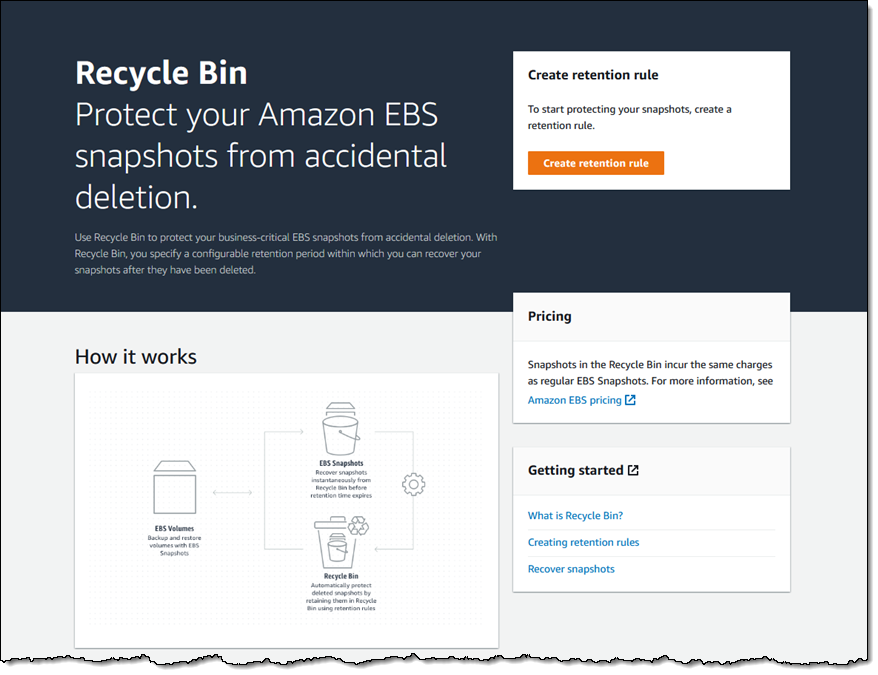
In order to give you more control over the deletion process, we are launching a Recycle Bin for EBS Snapshots. As you will see in a moment, you can now set up rules to retain deleted snapshots so that you can recover them after an accidental deletion. You can think of this as a two-level model, where individual AWS users are responsible for the initial deletion, and then a designated “Recycle Bin Administrator” (as specified by an IAM role) manages retention and recovery.

Rules can apply to all snapshots, or to snapshots that include a specified set of tag/value pairs. Each rule specifies a retention period (between one day and one year), after which the snapshot is permanently deleted.

Let’s Recycle!
I open the Recycle Bin Console, select the region of interest, and click Create retention rule to begin:

I call my first rule KeepAll, and set it to retain all deleted EBS snapshots for 4 days:

I add a tag (User) to the rule, and click Create retention rule:
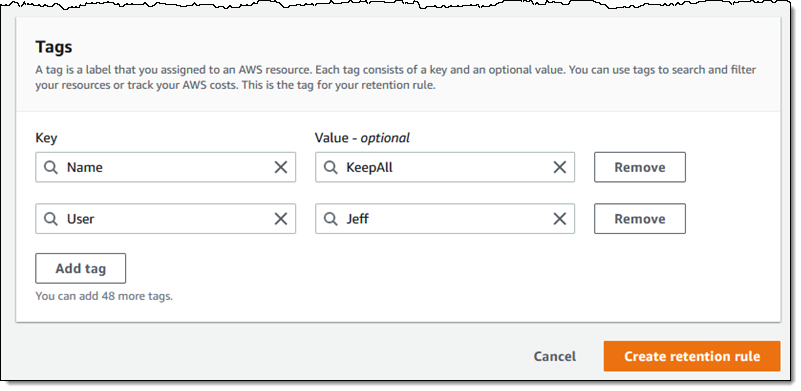
Because Apply to all resources is checked, this is a general rule that applies when there are no applicable rules that specify one or more tags.

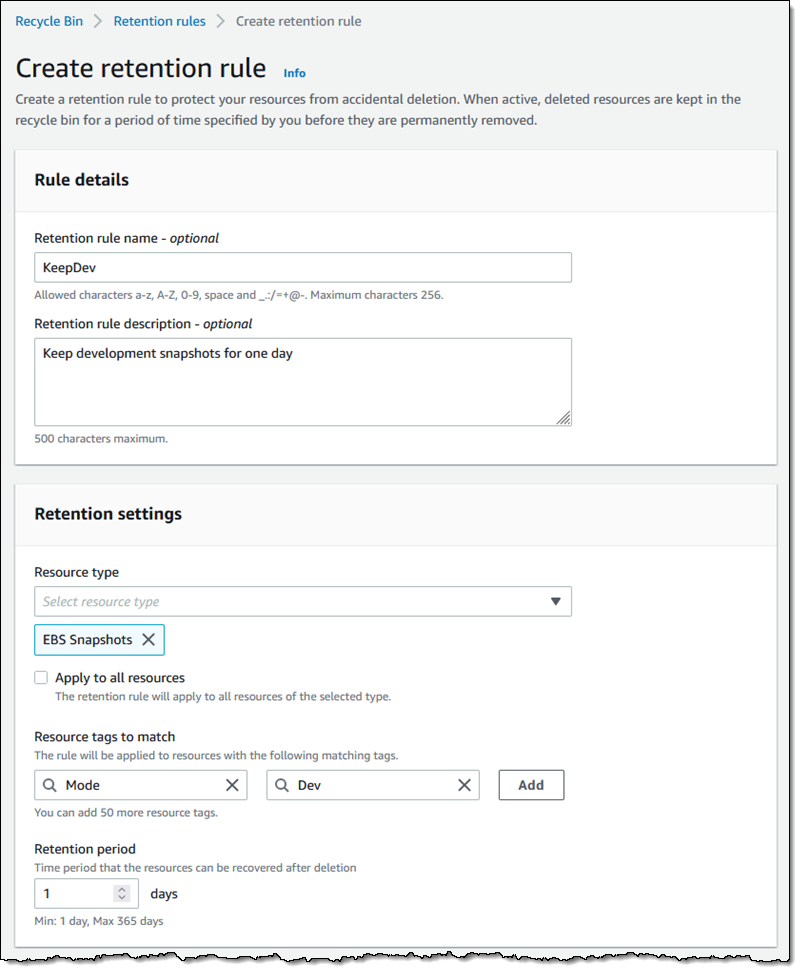
Then I create a second rule (KeepDev) that retains snapshots tagged with a Mode of Dev for just one day:

If two different tag-based rules match the same resource, then the one with the longer retention period applies.

Here are my retention rules:

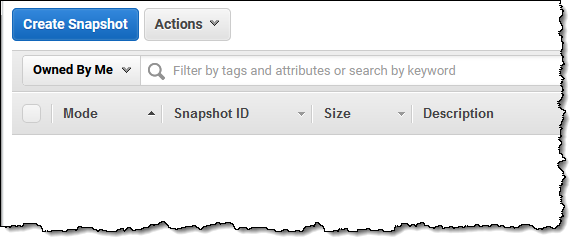
Here are my EBS snapshots. As you can see, the first three are tagged with a Mode of Dev:

In an effort to save several cents per month, I impulsively delete them all:

And they are gone:

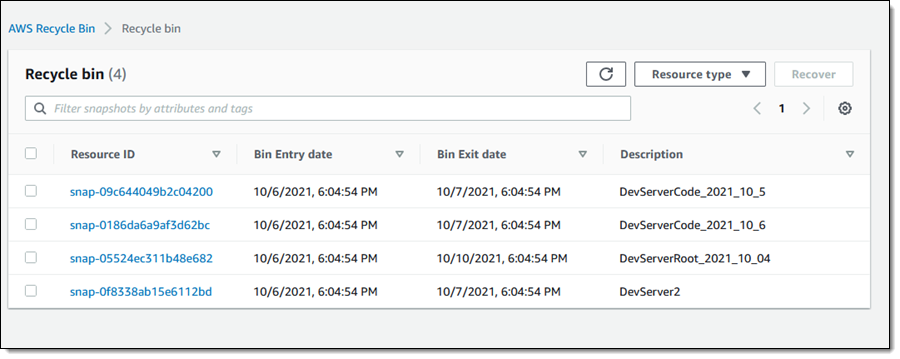
Later in the day, a member of my developer team messages me in a panic and lets me know that they desperately need the latest snapshot of the development server’s code. I open the Recycle Bin and I locate the snapshot (DevServer_2021_10_6):

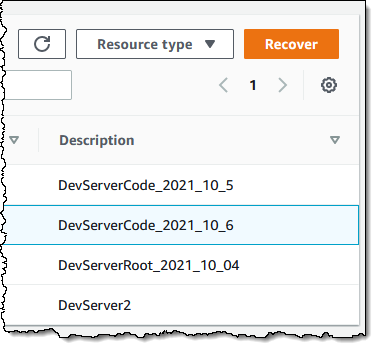
I select the snapshot and click Recover:

Then I confirm my intent:

And the snapshot is available once again:

As has always been the case, Fast Snapshot Restore is disabled when a snapshot is deleted. With this launch, it will remain disabled when a snapshot is restored.

All of this functionality (creating rules, listing resources in the Recycle Bin, and restoring them) is also available from the CLI and via the Recycle Bin APIs.

Things to Know
Here are a couple of things to know about the new Recycle Bin:

IAM Support – As I mentioned earlier, you can use AWS Identity and Access Management (IAM) to grant access to this feature, and should consider creating an empowered user known as the Recycle Bin Administrator.

Rule Changes – You can make changes to your retention rules at any time, but be aware that the rules are evaluated (and the retention period is set) when you delete a snapshot. Changing a rule after an item has been deleted will not alter the retention period for the item.

Pricing – Resources that are in the Recycle Bin are charged the usual price, but be aware that creating rules with long retention periods could increase your AWS bill. On a related note, be sure that keeping deleted snapshots around does not violate your organization’s data retention policies. There is no charge for deleting or recovering a resource.

In the Bin – Resources in the Recycle Bin are immutable. If a resource is recovered, all of its existing metadata (tags and so forth) is also recovered intact.

Recycling  – We will do our best to recycle all of the zeroes and all of the ones once when a resource in your Recycle Bin reaches the end of its retention period!

Jeff;

New for AWS Compute Optimizer – Resource Efficiency Metrics to Estimate Savings Opportunities and Performance Risks

Post Syndicated from Danilo Poccia original https://aws.amazon.com/blogs/aws/new-for-aws-compute-optimizer-resource-efficiency-metrics-to-estimate-savings-opportunities-and-performance-risks/

By applying the knowledge drawn from Amazon’s experience running diverse workloads in the cloud, AWS Compute Optimizer identifies workload patterns and recommends optimal AWS resources.

Today, I am happy to share that AWS Compute Optimizer now delivers resource efficiency metrics alongside its recommendations to help you assess how efficiently you are using AWS resources:

  • A dashboard shows you savings and performance improvement opportunities at the account level. You can dive into resource types and individual resources from the dashboard.
  • The Estimated monthly savings (On-Demand) and Savings opportunity (%) columns estimate the possible savings for over-provisioned resources. You can sort your recommendations using these two columns to quickly find the resources on which to focus your optimization efforts.
  • The Current performance risk column estimates the bottleneck risk with the current configuration for under-provisioned resources.

These efficiency metrics are available for Amazon Elastic Compute Cloud (Amazon EC2), AWS Lambda, and Amazon Elastic Block Store (EBS) at the resource and AWS account levels.

For multi-account environments, Compute Optimizer continuously calculates resource efficiency metrics at individual account level in an AWS organization to help identify teams with low cost-efficiency or possible performance risks. This lets you to create goals and track progress over time. You can quickly understand just how resource-efficient teams and applications are, easily prioritize recommendation evaluation and adoption by engineering team, and establish a mechanism that drives a cost-aware culture and accountability across engineering teams.

Using Resource Efficiency Metrics in AWS Compute Optimizer
You can opt in using the AWS Management Console or the AWS Command Line Interface (CLI) to start using Compute Optimizer. You can enroll the account that you’re currently signed in to or all of the accounts within your organization. Depending on your choice, Compute Optimizer analyzes resources that are in your individual account or for each account in your organization, and then generates optimization recommendations for those resources.

To see your savings opportunity in Compute Optimizer, you should also opt in to AWS Cost Explorer and enable the rightsizing recommendations in the AWS Cost Explorer preferences page. For more details, see Getting started with rightsizing recommendations.

I already enrolled some time ago, and in the Compute Optimizer console I see the overall savings opportunity for my account.

Console screenshot.

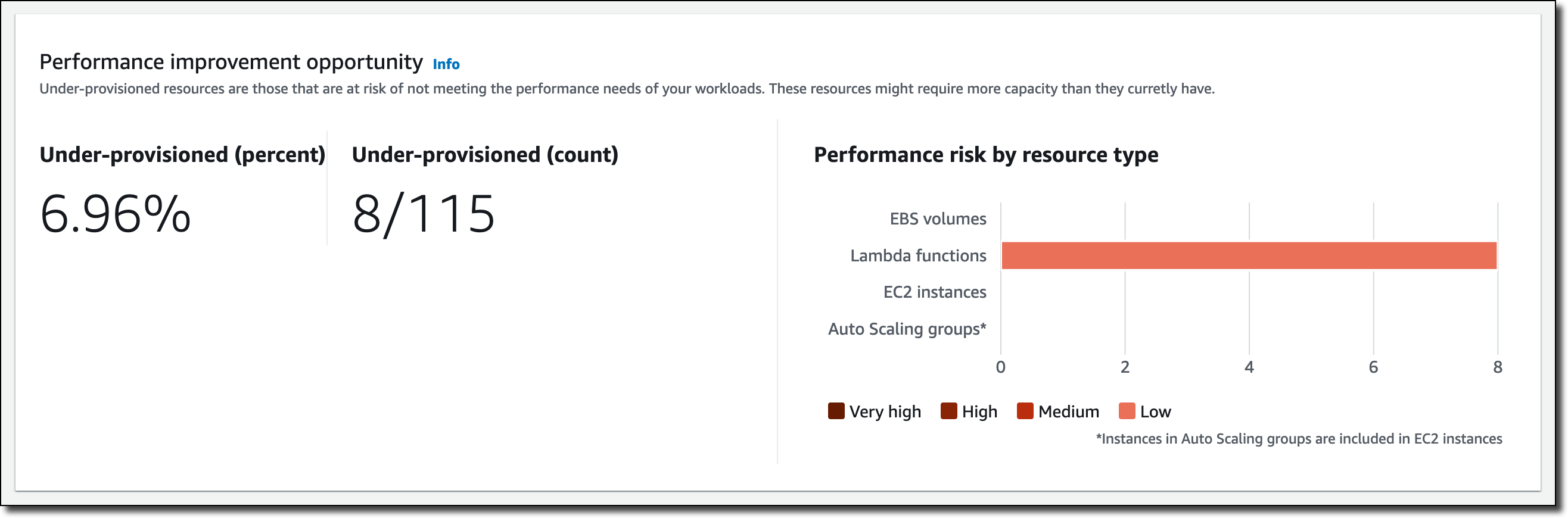
Below that, I have a recap of the performance improvement opportunity. This includes an overview of the under-provisioned resources, as well as the performance risks that they pose by resource type.

Console screenshot.

Let’s dive into some of those savings. In the EC2 instances section, Compute Optimizer found 37 over-provisioned instances.

Console screenshot.

I follow the 37 instances link to get recommendations for those resources, and then sort the table by Estimated monthly savings (On-Demand) descending.

Console screenshot.

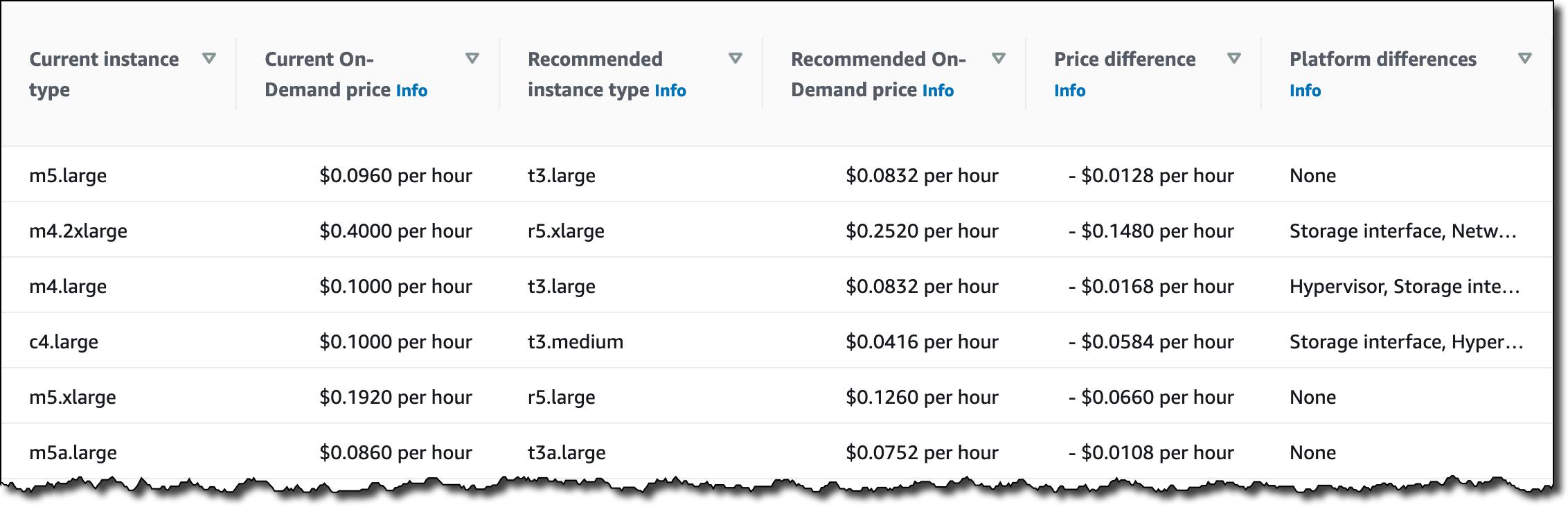
On the right, in the same table, I see which is the current instance type, the recommended instance type based on Computer Optimizer estimates, the difference in pricing, and if there are platform differences between the current and recommended instance types.

Console screenshot.

I can select each instance to further drill down into the metrics collected, as well as the other possible instance types suggested by Computer Optimizer.

Back to the Compute Optimizer Dashboard, in the Lambda functions section, I see that eight functions have under-provisioned memory.

Console screenshot.

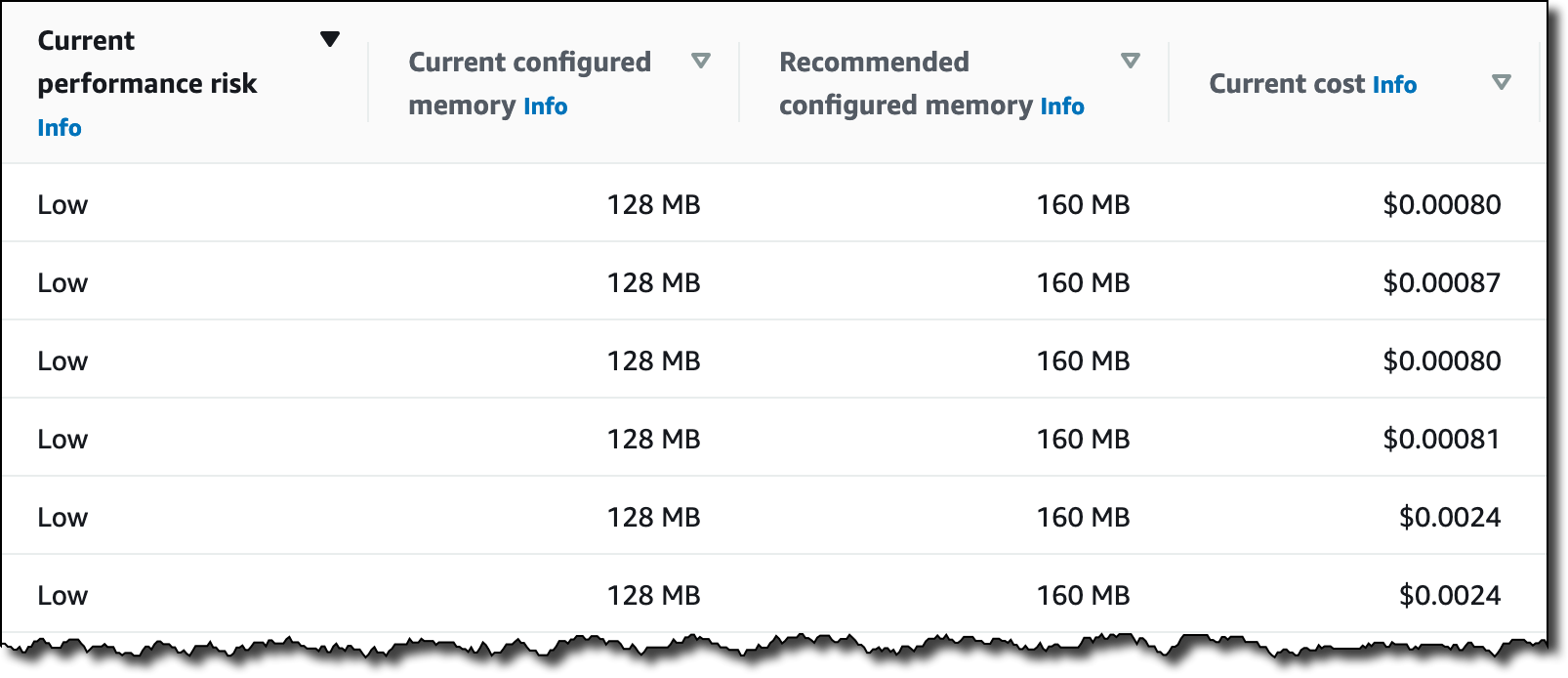
Again, I follow the 8 functions link to get recommendations for those resources, and then sort the table by Current performance risk. In my case, the risk is always low, but different values can help prioritize your activities.

Console screenshot.

Here, I see the current and recommended configured memory for those Lambda functions. I can select each function to get a view of the metrics collected. Choosing the memory allocated to Lambda functions is an optimization process that balances speed (duration) and cost. See Profiling functions with AWS Lambda Power Tuning in the documentation for more information.

Availability and Pricing
You can use resource efficiency metrics with AWS Compute Optimizer in any AWS Region where it is offered. For more information, see the AWS Regional Services List. There is no additional charge for this new capability. See the AWS Compute Optimizer pricing page for more information.

This new feature lets you implement a periodic workflow to optimize your costs:

  • You can start by reviewing savings opportunities for all of your accounts to identify which accounts have the highest savings opportunity.
  • Then, you can drill into those accounts with the highest savings opportunity. You can refer to the estimated monthly savings to see which recommendations can drive the largest absolute cost impact.
  • Finally, you can communicate optimization opportunities and priority order to the teams using those accounts.

Start using AWS Compute Optimizer today to find and prioritize savings opportunities in your AWS account or organization.

Danilo

Happy 15th Birthday Amazon EC2

Post Syndicated from Jeff Barr original https://aws.amazon.com/blogs/aws/happy-15th-birthday-amazon-ec2/

Fifteen years ago today I wrote the blog post that launched the Amazon EC2 Beta. As I recall, the launch was imminent for quite some time as we worked to finalize the feature set, the pricing model, and innumerable other details. The launch date was finally chosen and it happened to fall in the middle of a long-planned family vacation to Cabo San Lucas, Mexico. Undaunted, I brought my laptop along on vacation, and had to cover it with a towel so that I could see the screen as I wrote. I am not 100% sure, but I believe that I actually clicked Publish while sitting on a lounge chair near the pool! I spent the remainder of the week offline, totally unaware of just how much excitement had been created by this launch.

Preparing for the Launch
When Andy Jassy formed the AWS group and began writing his narrative, he showed me a document that proposed the construction of something called the Amazon Execution Service and asked me if developers would find it useful, and if they would pay to use it. I read the document with great interest and responded with an enthusiastic “yes” to both of his questions. Earlier in my career I had built and run several projects hosted at various colo sites, and was all too familiar with the inflexible long-term commitments and the difficulties of scaling on demand; the proposed service would address both of these fundamental issues and make it easier for developers like me to address widely fluctuating changes in demand.

The EC2 team had to make a lot of decisions in order to build a service to meet the needs of developers, entrepreneurs, and larger organizations. While I was not part of the decision-making process, it seems to me that they had to make decisions in at least three principal areas: features, pricing, and level of detail.

Features – Let’s start by reviewing the features that EC2 launched with. There was one instance type, one region (US East (N. Virginia)), and we had not yet exposed the concept of Availability Zones. There was a small selection of prebuilt Linux kernels to choose from, and IP addresses were allocated as instances were launched. All storage was transient and had the same lifetime as the instance. There was no block storage and the root disk image (AMI) was stored in an S3 bundle. It would be easy to make the case that any or all of these features were must-haves for the launch, but none of them were, and our customers started to put EC2 to use right away. Over the years I have seen that this strategy of creating services that are minimal-yet-useful allows us to launch quickly and to iterate (and add new features) rapidly in response to customer feedback.

Pricing – While it was always obvious that we would charge for the use of EC2, we had to decide on the units that we would charge for, and ultimately settled on instance hours. This was a huge step forward when compared to the old model of buying a server outright and depreciating it over a 3 or 5 year term, or paying monthly as part of an annual commitment. Even so, our customers had use cases that could benefit from more fine-grained billing, and we launched per-second billing for EC2 and EBS back in 2017. Behind the scenes, the AWS team also had to build the infrastructure to measure, track, tabulate, and bill our customers for their usage.

Level of Detail – This might not be as obvious as the first two, but it is something that I regularly think about when I write my posts. At launch time I shared the fact that the EC2 instance (which we later called the m1.small) provided compute power equivalent to a 1.7 GHz Intel Xeon processor, but I did not share the actual model number or other details. I did share the fact that we built EC2 on Xen. Over the years, customers told us that they wanted to take advantage of specialized processor features and we began to share that information.

Some Memorable EC2 Launches
Looking back on the last 15 years, I think we got a lot of things right, and we also left a lot of room for the service to grow. While I don’t have one favorite launch, here are some of the more memorable ones:

EC2 Launch (2006) – This was the launch that started it all. One of our more notable early scaling successes took place in early 2008, when Animoto scaled their usage from less than 100 instances all the way up to 3400 in the course of a week (read Animoto – Scaling Through Viral Growth for the full story).

Amazon Elastic Block Store (2008) – This launch allowed our customers to make use of persistent block storage with EC2. If you take a look at the post, you can see some historic screen shots of the once-popular ElasticFox extension for Firefox.

Elastic Load Balancing / Auto Scaling / CloudWatch (2009) – This launch made it easier for our customers to build applications that were scalable and highly available. To quote myself, “Amazon CloudWatch monitors your Amazon EC2 capacity, Auto Scaling dynamically scales it based on demand, and Elastic Load Balancing distributes load across multiple instances in one or more Availability Zones.”

Virtual Private Cloud / VPC (2009) – This launch gave our customers the ability to create logically isolated sets of EC2 instances and to connect them to existing networks via an IPsec VPN connection. It gave our customers additional control over network addressing and routing, and opened the door to many additional networking features over the coming years.

Nitro System (2017) – This launch represented the culmination of many years of work to reimagine and rebuild our virtualization infrastructure in pursuit of higher performance and enhanced security (read more).

Graviton (2018) -This launch marked the launch of Amazon-built custom CPUs that were designed for cost-sensitive scale-out workloads. Since that launch we have continued this evolutionary line, launching general purpose, compute-optimized, memory-optimized, and burstable instances powered by Graviton2 processors.

Instance Types (2006 – Present) -We launched with one instance type and now have over four hundred, each one designed to empower our customers to address a particular use case.

Celebrate with Us
To celebrate the incredible innovation we’ve seen from our customers over the last 15 years, we’re hosting a 2-day live event on August 23rd and 24th covering a range of topics. We kick off the event with today at 9am PDT with Vice President of Amazon EC2 Dave Brown’s keynote “Lessons from 15 Years of Innovation.

Event Agenda

August 23 August 24
Lessons from 15 Years of Innovation AWS Everywhere: A Fireside Chat on Hybrid Cloud
15 Years of AWS Silicon Innovation Deep Dive on Real-World AWS Hybrid Examples
Choose the Right Instance for the Right Workload AWS Outposts: Extending AWS On-Premises for a Truly Consistent Hybrid Experience
Optimize Compute for Cost and Capacity Connect Your Network to AWS with Hybrid Connectivity Solutions
The Evolution of Amazon Virtual Private Cloud Accelerating ADAS and Autonomous Vehicle Development on AWS
Accelerating AI/ML Innovation with AWS ML Infrastructure Services Accelerate AI/ML Adoption with AWS ML Silicon
Using Machine Learning and HPC to Accelerate Product Design Digital Twins: Connecting the Physical to the Digital World

Register here and join us starting at 9 AM PT to learn more about EC2 and to celebrate along with us!

Jeff;