We recently spoke with Kristian Kielhofner, a developer and entrepreneur who’s on his third go-round as a startup founder and CEO after two very successful exits. He’s built a next-gen, crypto-centric media asset management platform, Tovera, which launched two days ago.
Developer customers are regularly choosing Backblaze B2 as the cloud storage platform that sits under their products and services. We feel lucky to learn about the innovations they are bringing to this world. Kristian found a clearer path to setting up CORS for B2 Cloud Storage and Cloudflare, so we asked him to share why he started Tovera, how he thought through his cloud storage options, and the exact steps he took to go live with his solution.
—Backblaze
The Tovera Backstory: Fighting Deepfakes
One morning, this story really caught my attention.
Like many technology enthusiasts, I’m familiar with deepfakes. That said, the “Pennsylvania Cheerleading Mom” story told me something: As we’ve seen time and time again, technology rapidly evolves beyond its original intended use. Sometimes for our benefit, and (unfortunately) sometimes not so much…
I realized it would only be a matter of time before this incredibly powerful technology would be in the hands of everyone—for uses good or evil. With more research, I found that (not surprisingly) the current approach to stopping misuse of the technology utilizes the same fundamental machine learning approaches powering the deepfakes themselves. It seems that what we now have is a machine learning arms race: a new model to generate deepfakes, a new model to detect them. Around and around we go.
I began thinking of approaching the deepfake problem from the other side of the coin. What if, instead of using machine learning to guess what is fake, we prove what is real? Deepfake detection models can’t provide 100% certainty today (or ever), but cryptographic authentication can. This simple idea was the genesis for Tovera.
What Does Tovera Do?
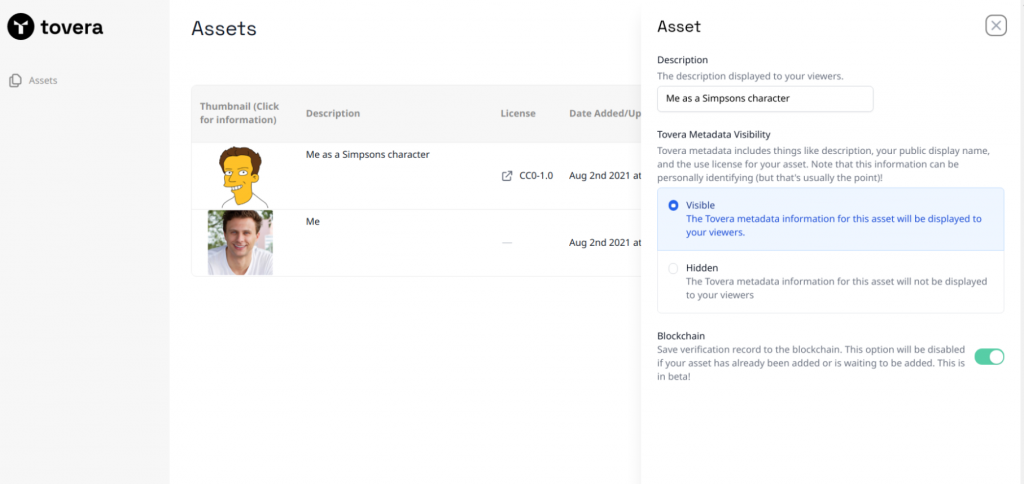
Tovera takes digital media you upload and uses existing cryptography and emerging blockchain technology to create a 100% secure validation record. When published on our platform, we can confirm (with 100% certainty) that your digital media assets are yours and haven’t been tampered with.
Tovera asset upload and management page.
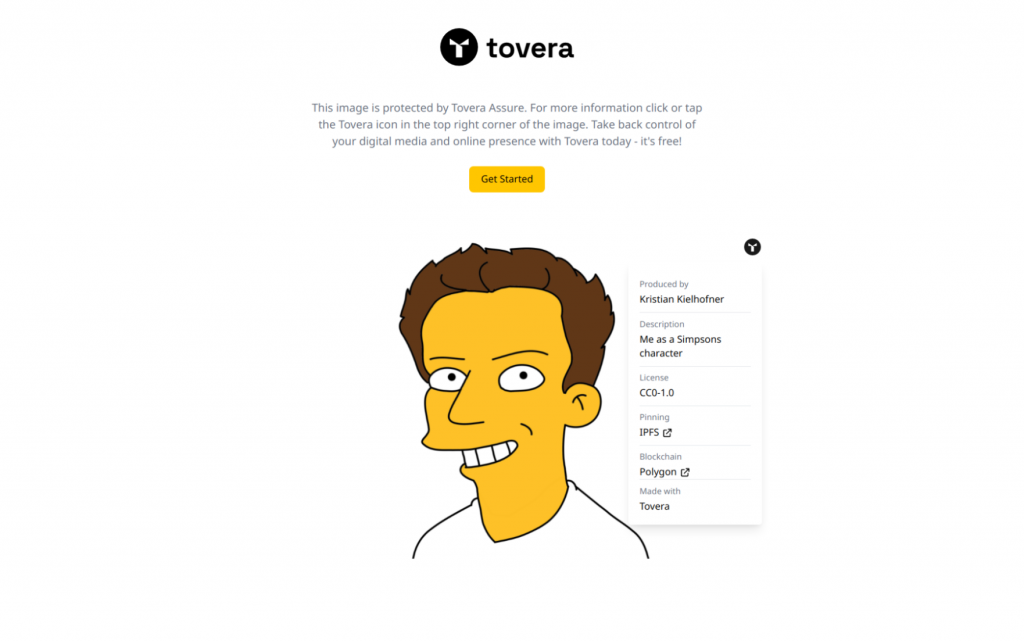
After working through the initial proof of concept, I had another revelation: “Hey, while we’re hitting our API whenever and wherever digital media is viewed, why don’t we return some extra stuff?” Now, not only can our users validate that their content is really theirs and hasn’t been modified, they can use the features provided by Tovera Publish to dynamically update their released digital content from our dashboard. With Tovera, any changes you make to your digital media and online presence are updated across social media platforms, websites, and devices globally—instantly.
An image served via Tovera, with authentication dropdown.
In keeping with our mission of ensuring everyone can protect, validate, and control their online presence, we provide this technology for free with a simple sign up and onboarding process.
The Tovera Storage Journey
To provide this service, we needed to host the digital media files somewhere. Of course, you have your go-to juggernauts—Amazon, Google, and Microsoft. The problem is Tovera is a tiny startup. Having some prior startup experience, I know that spending your money and time wisely from the beginning is one of the most important things you can do.
I took one look at pricing from the “big three” cloud providers through the lens of someone who has experience buying bandwidth and storage (long story) and I thought, “Wow, this is a good business.” As has been covered on this blog and elsewhere, the storage and (especially) bandwidth markups from the big providers is, to put it mildly, significant.
Like some of you, I’ve also been a fan of Backblaze for a long time. Since it was announced, I’ve kept an eye on their B2 Cloud Storage product. So, one morning I took it upon myself to give Backblaze B2 a try.
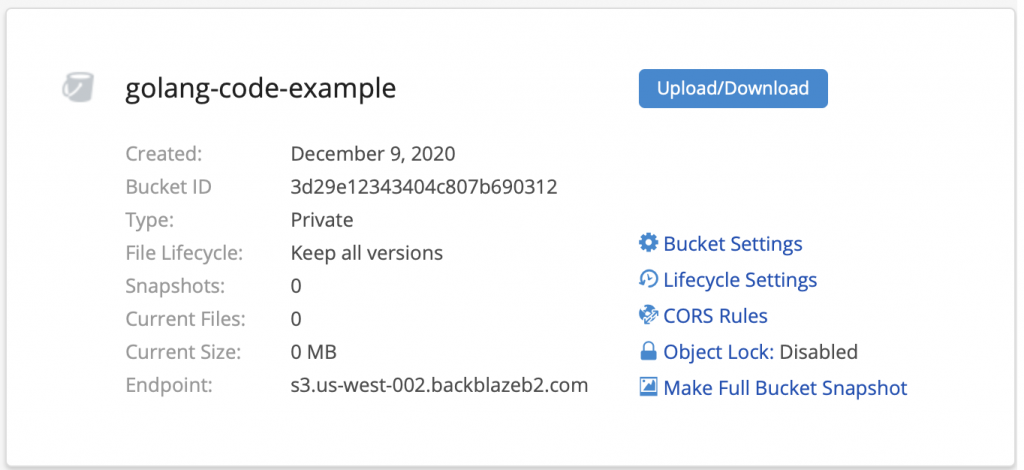
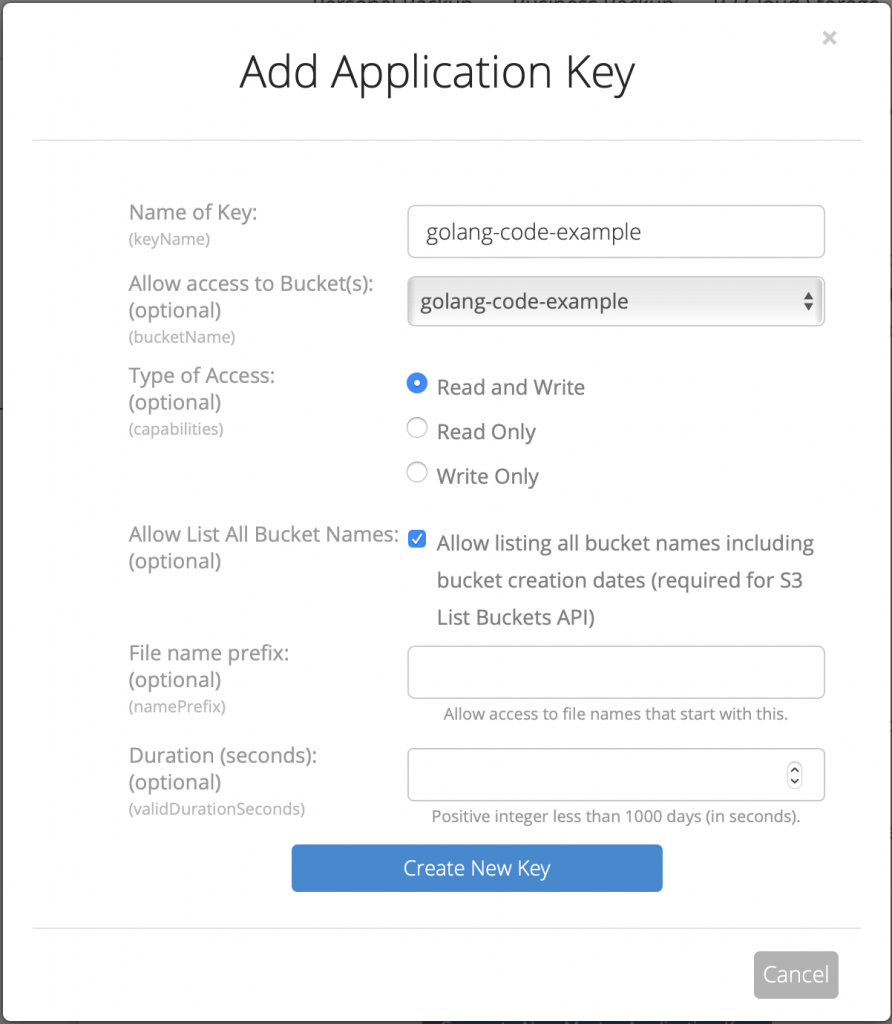
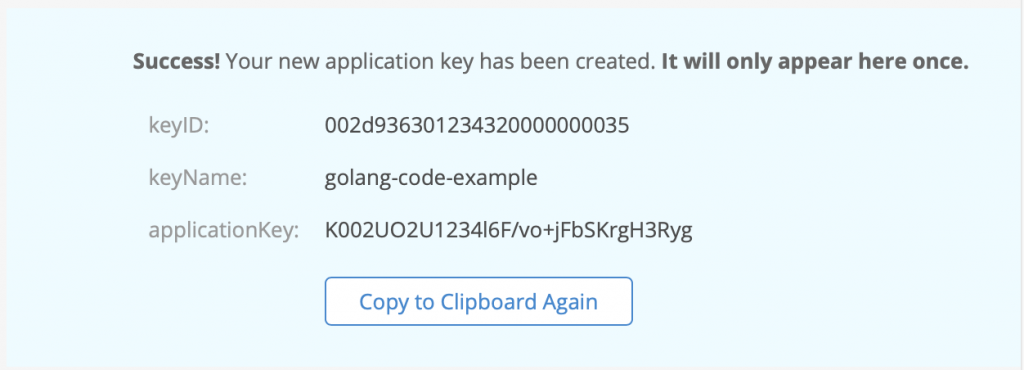
Sign up and initial onboarding couldn’t have been easier. I found myself in the Backblaze B2 user dashboard up and running in no time. Creating application keys for my purposes was also extremely easy.
After deciding B2 Cloud Storage would work in theory, I decided to try it out in practice. As I integrated the service into Tovera, I ran into a few different vexing issues. I thought other devs might be able to benefit from my CORS troubleshooting, and so I’m outlining my experience here.
Checking the Backblaze S3 Compatible API
We make it simple for our users to upload their assets directly to our cloud storage provider. Because B2 Cloud Storage has the Backblaze S3 Compatible API, the use of presigned URLs fits the bill. This way, Tovera users can upload their digital media assets directly to Backblaze, securely, and make them available to the world via our platform.
In case you’re not familiar with the presigned URL process, the overall flow looks something like the structure laid out in this blog post.
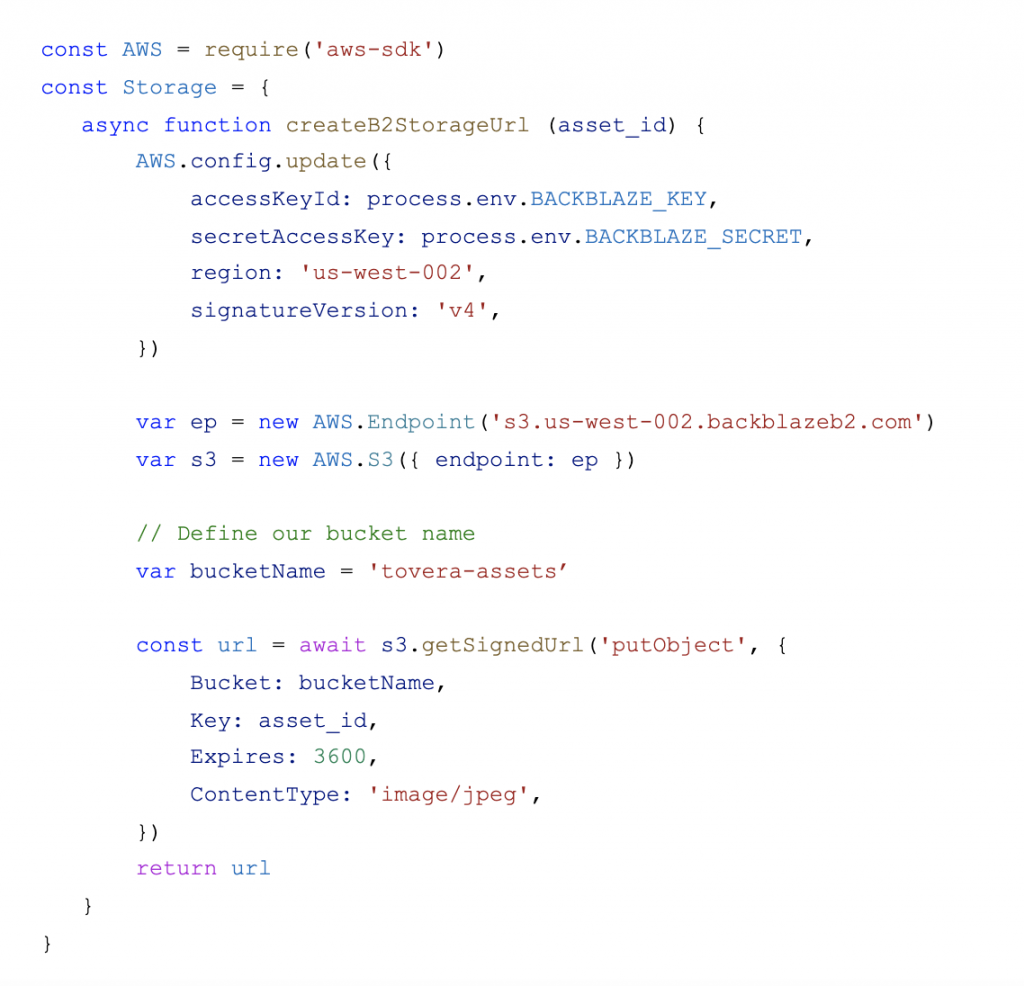
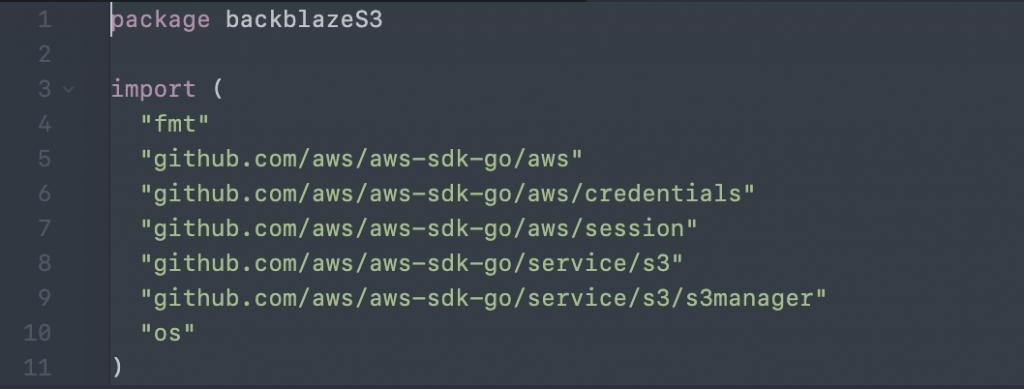
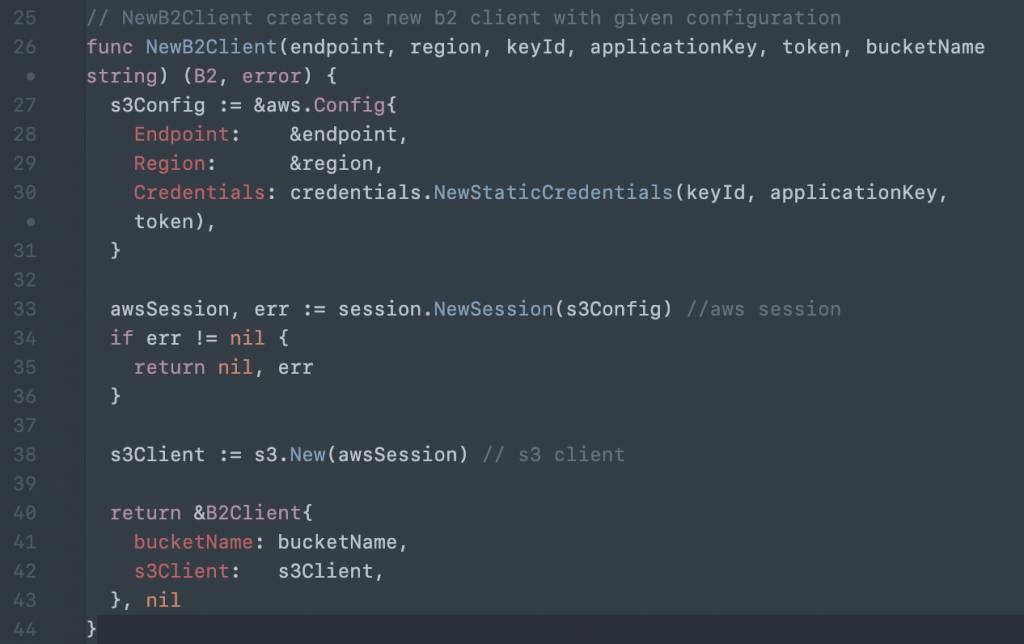
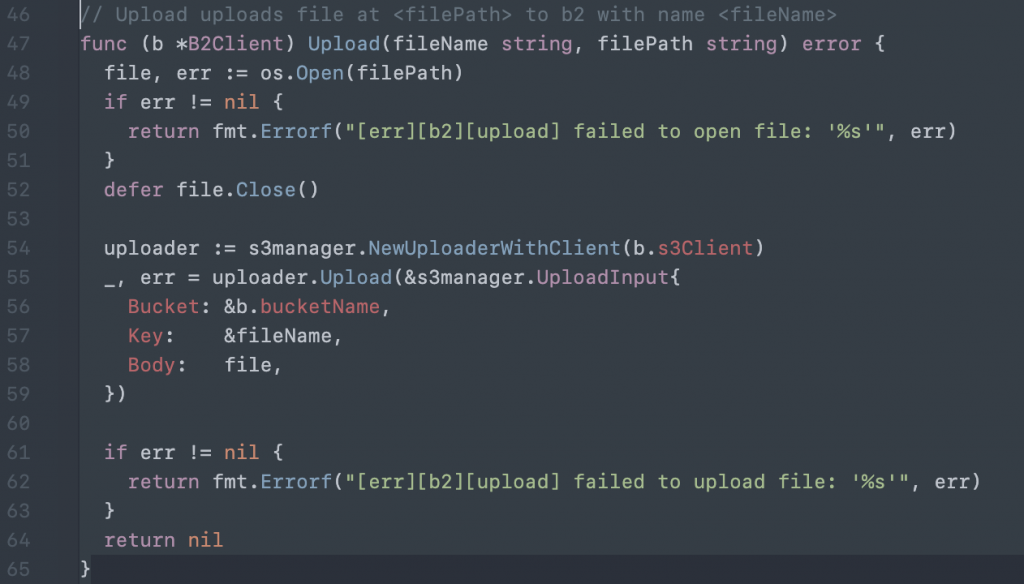
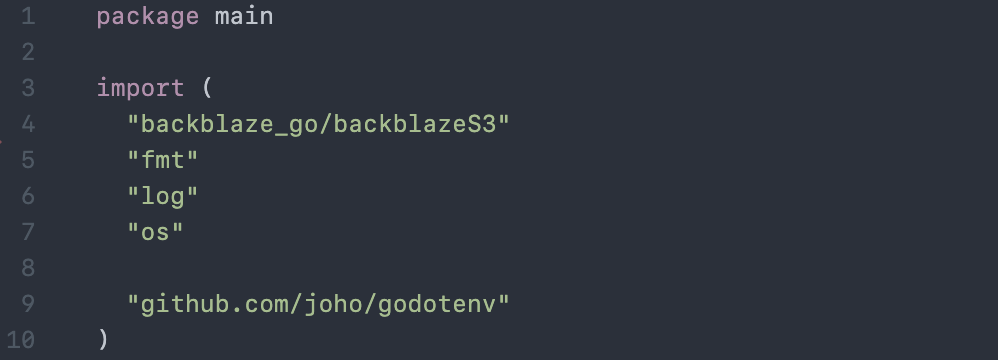
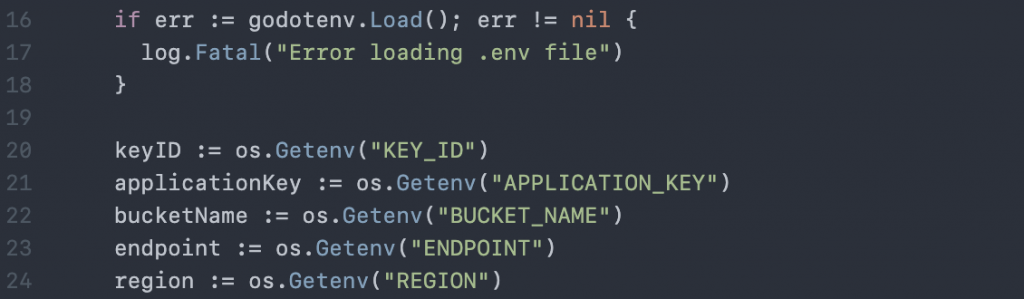
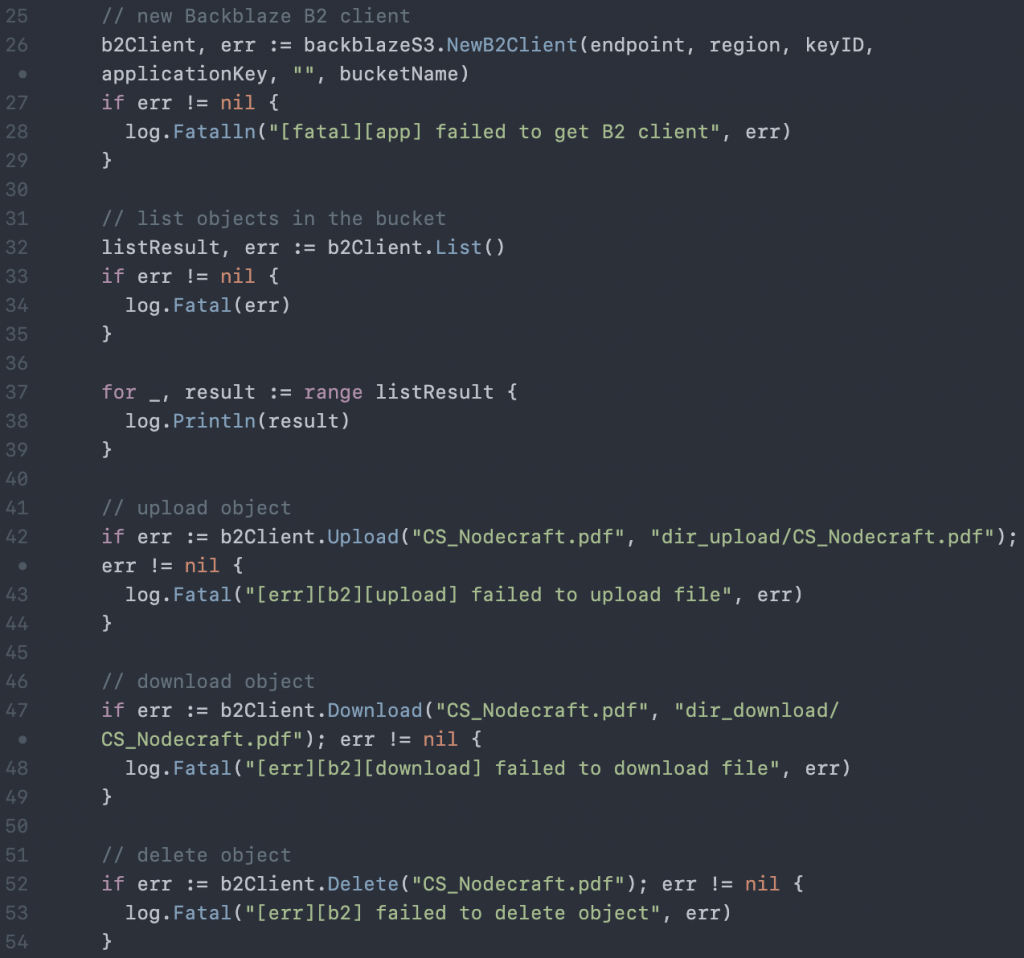
After perusing the available documentation, I started off with the following Node.js Javascript code:
With this Javascript function, Tovera API services provide a URL for our user dashboard to instantly (and securely) upload their assets to our Backblaze account. I had read Backblaze B2 has a 100% Amazon S3 Compatible API but I was a little skeptical. Is this really going to work? Sure enough, it worked on the first attempt!
Integrating Cloudflare and Setting Up CORS
Between the Bandwidth Alliance and having dealt with DDoS attacks and shady internet stuff in general before, I’m also a big fan of Cloudflare. Fortunately, Backblaze provides guidance on how to best use B2 Cloud Storage with Cloudflare to make use of their combined power.
Once I set up Cloudflare to work with B2 Cloud Storage and the Tovera API services were returning valid, presigned URLs for clients to do a direct HTTP PUT, I tried it out in our Next.js-powered user dashboard.
Uh-oh. Dreaded CORS errors. I’ll spare you the details, but here’s where things get interesting… I don’t know about you, but CORS can be a little frustrating. LONG story short, I dug in deep, feeling a little like I was wandering around a dark room looking for the light switch.
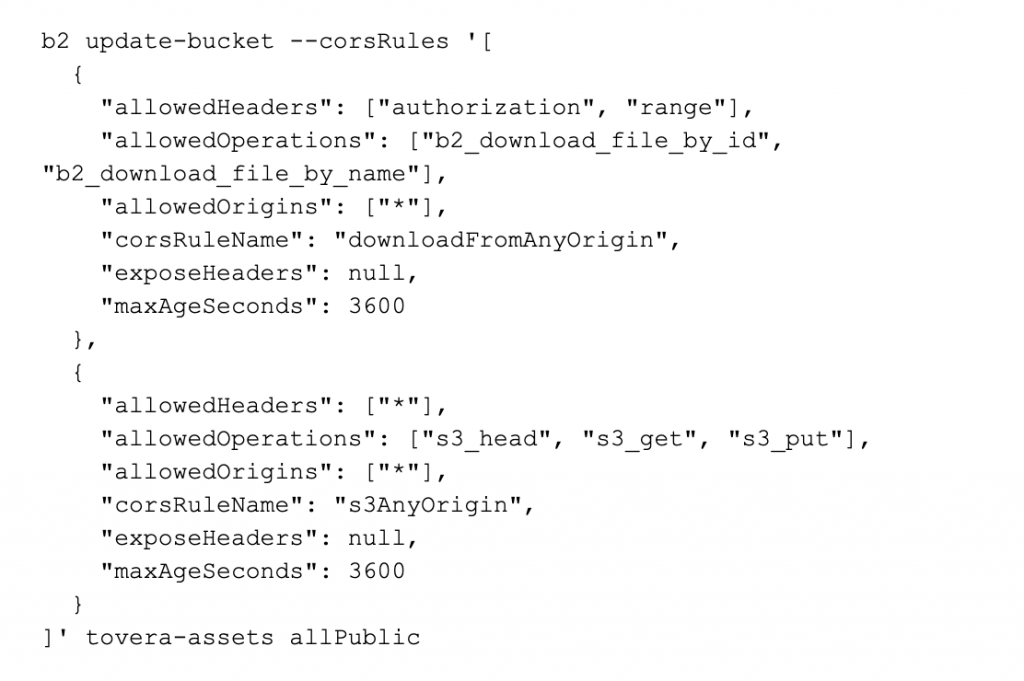
With this usage of the Backblaze B2 command line utility, we’re setting the following CORS rules on our bucket:
Allow users to download Backblaze B2 files from anywhere using the native B2 Cloud Storage interfaces.
Allow users to use the Backblaze S3 Compatible API to download and upload their files from anywhere with the authenticated presigned URL provided by the server side Javascript function above.
With these rules, Tovera users can use our embeddable verification links across any site they provide them to—existing websites, social media networks, and more. In other applications you may want to limit these CORS rules to what makes sense for your use case.
Focusing on What’s Important
With Backblaze B2, we at Tovera can focus on our mission of putting our digital media security, validation, and publishing functionality in the hands of as many people as possible. Tovera users can take back control of their online presence and address the many threats posed by deepfake technologies that threaten their likeness, reputation, and brand.
Kristian Kielhofner works on overall technical architecture, vision, and strategy for Tovera when he’s not out buying yet another whiteboard to scribble on. Kristian previously built, grew, and exited Star2Star Communications—a leading provider of business productivity solutions.
As of June 30, 2021, Backblaze had 181,464 drives spread across four data centers on two continents. Of that number, there were 3,298 boot drives and 178,166 data drives. The boot drives consisted of 1,607 hard drives and 1,691 SSDs. This report will review the quarterly and lifetime failure rates for our data drives, and we’ll compare the failure rates of our HDD and SSD boot drives. Along the way, we’ll share our observations of and insights into the data presented and, as always, we look forward to your comments below.
Q2 2021 Hard Drive Failure Rates
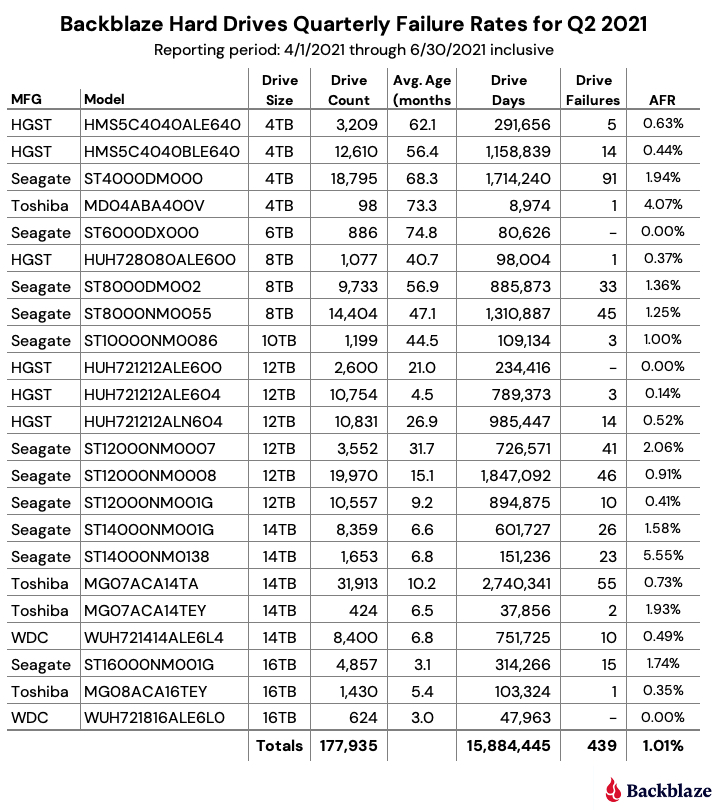
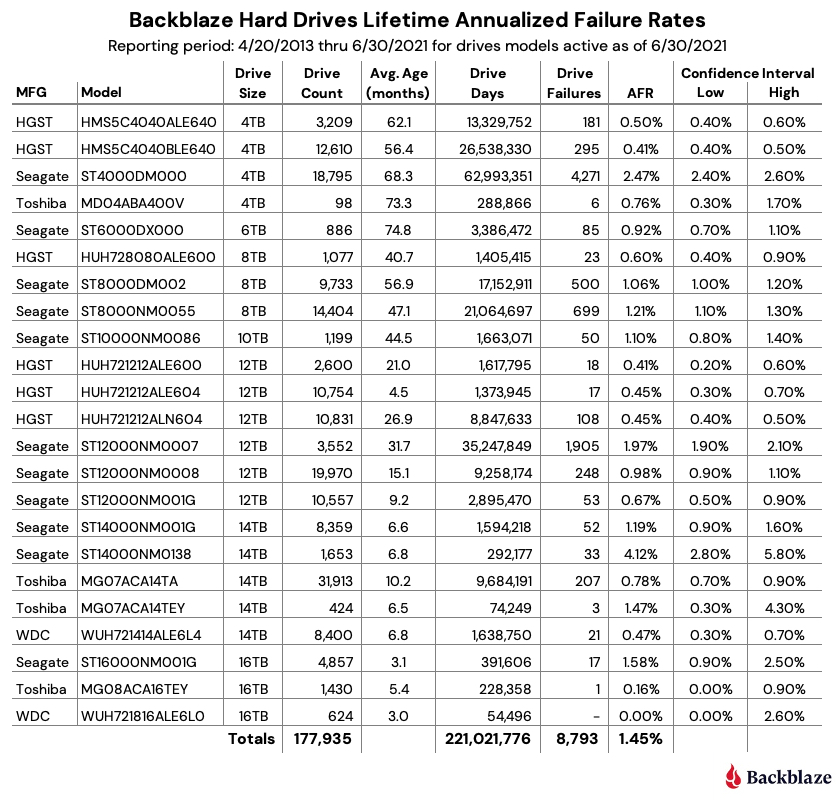
At the end of June 2021, Backblaze was monitoring 178,166 hard drives used to store data. For our evaluation, we removed from consideration 231 drives which were used for either testing purposes or as drive models for which we did not have at least 60 drives. This leaves us with 177,935 hard drives for the Q2 2021 quarterly report, as shown below.
Notes and Observations on the Q2 2021 Stats
The data for all of the drives in our data centers, including the 231 drives not included in the list above, is available for download on the Hard Drive Test Data webpage.
Zero Failures
Three drive models recorded zero failures during Q2, let’s take a look at each.
6TB Seagate (ST6000DX000): The average age of these drives is over six years (74 months) and with one failure over the last year, this drive is aging quite well. The low number of drives (886) and drive days (80,626) means there is some variability in the failure rate, but the lifetime failure rate of 0.92% is solid.
12TB HGST (HUH721212ALE600): These drives reside in our Dell storage servers in our Amsterdam data center. After recording a quarterly high of five failures last quarter, they are back on track with zero failures this quarter and a lifetime failure rate of 0.41%.
16TB Western Digital (WUH721816ALE6L0): These drives have only been installed for three months, but no failures in 624 drives is a great start.
Honorable Mention
Three drive models recorded one drive failure during the quarter. They vary widely in age.
On the young side, with an average age of five months, the 16TB Toshiba (MG08ACA16TEY) had its first drive failure out of 1,430 drives installed.
At the other end of the age spectrum, one of our 4TB Toshiba (MD04ABA400V) drives finally failed, the first failure since Q4 of 2018.
In the middle of the age spectrum with an average of 40.7 months, the 8TB HGST drives (HUH728080ALE600) also had just one failure this past quarter.
Outliers
Two drive models had an annualized failure rate (AFR) above 4%, let’s take a closer look.
The 4TB Toshiba (MD04ABA400V) had an AFR of 4.07% for Q2 2021, but as noted above, that was with one drive failure. Drive models with low drive days in a given period are subject to wide swings in the AFR. In this case, one less failure during the quarter would result in an AFR of 0% and one more failure would result in an AFR of over 8.1%.
The 14TB Seagate (ST14000NM0138) drives have an AFR of 5.55% for Q2 2021. These Seagate drives along with 14TB Toshiba drives (MG07ACA14TEY) were installed in Dell storage servers deployed in our U.S. West region about six months ago. We are actively working with Dell to determine the root cause of this elevated failure rate and expect to follow up on this topic in the next quarterly drive stats report.
Overall AFR
The quarterly AFR for all the drives jumped up to 1.01% from 0.85% in Q1 2021 and 0.81% one year ago in Q2 2020. This jump ended a downward trend over the past year. The increase is within our confidence interval, but bears watching going forward.
HDDs vs. SSDs, a Follow-up
In our Q1 2021 report, we took an initial look at comparing our HDD and SSD boot drives, both for Q1 and lifetime timeframes. As we stated at the time, a numbers-to-numbers comparison was suspect as each type of drive was at a different point in its life cycle. The average age of the HDD drives was 49.63 months while the SSDs average age was 12.66 months. As a reminder, the HDD and SSD boot drives perform the same functions which include booting the storage servers and performing reads, writes, and deletes of daily log files and other temporary files.
To create a more accurate comparison, we took the HDD boot drives that were in use at the end of Q4 2020 and went back in time to see where their average age and cumulative drive days would be similar to those same attributes for the SDDs at the end of Q4 2020. We found that at the end of Q4 2015 the attributes were the closest.
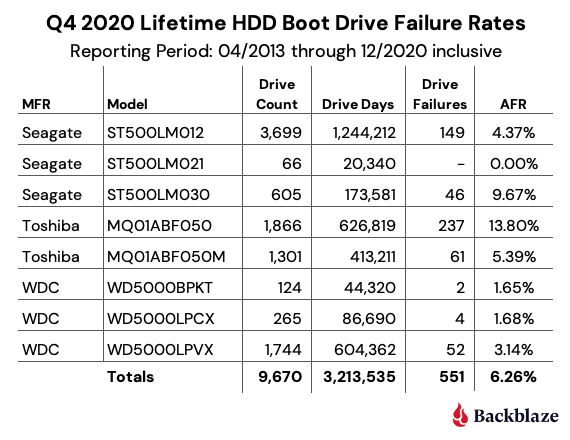
Let’s start with the HDD boot drives that were active at the end of Q4 2020.
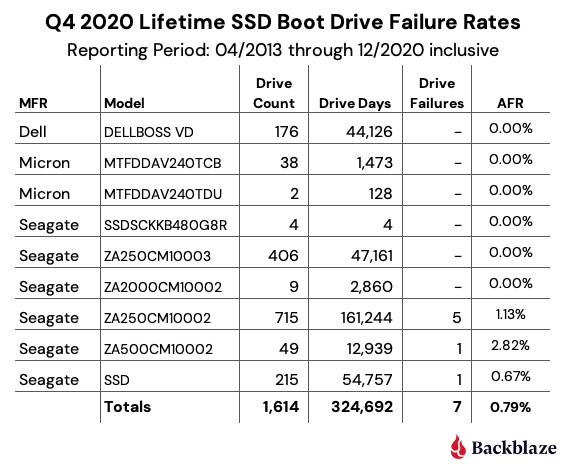
Next, we’ll look at the SSD boot drives that were active at the end of Q4 2020.
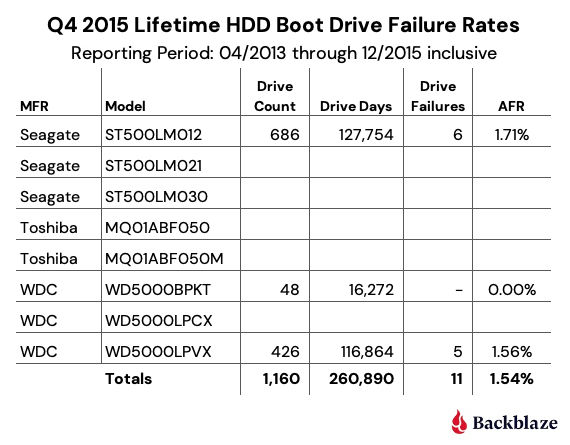
Finally, let’s look at the lifetime attributes of the HDD drives active in Q4 2020 as they were back in Q4 2015.
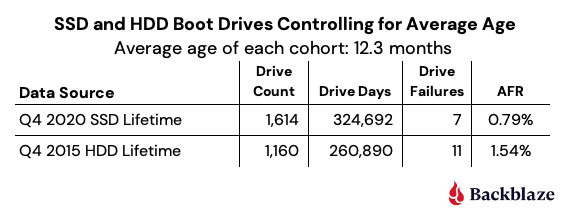
To summarize, when we control using the same drive models, the same average drive age, and a similar number of drive days, HDD and SSD drives failure rates compare as follows:
While the failure rate for our HDD boot drives is nearly two times higher than the SSD boot drives, it is not the nearly 10 times failure rate we saw in the Q1 2021 report when we compared the two types of drives at different points in their lifecycle.
Predicting the Future?
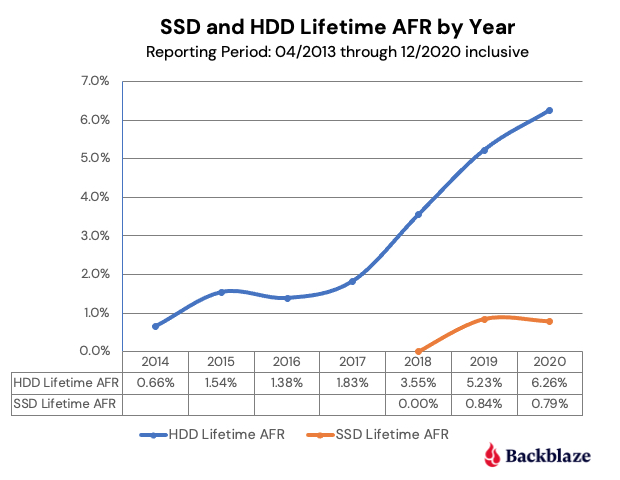
What happened to the HDD boot drives from 2016 to 2020 as their lifetime AFR rose from 1.54% in Q4 2015 to 6.26% in Q4 2020? The chart below shows the lifetime AFR for the HDD boot drives from 2014 through 2020.
As the graph shows, beginning in 2018 the HDD boot drive failures accelerated. This continued in 2019 and 2020 even as the number of HDD boot drives started to decrease when failed HDD boot drives were replaced with SSD boot drives. As the average age of the HDD boot drive fleet increased, so did the failure rate. This makes sense and is borne out by the data. This raises a couple of questions:
Will the SSD drives begin failing at higher rates as they get older?
How will the SSD failure rates going forward compare to what we have observed with the HDD boot drives?
We’ll continue to track and report on SSDs versus HDDs based on our data.
Lifetime Hard Drive Stats
The chart below shows the lifetime AFR of all the hard drive models in production as of June 30, 2021.
Notes and Observations on the Lifetime Stats
The lifetime AFR for all of the drives in our farm continues to decrease. The 1.45% AFR is the lowest recorded value since we started back in 2013. The drive population spans drive models from 4TB to 16TB and varies in average age from three months (WDC 16TB) to over six years (Seagate 6TB).
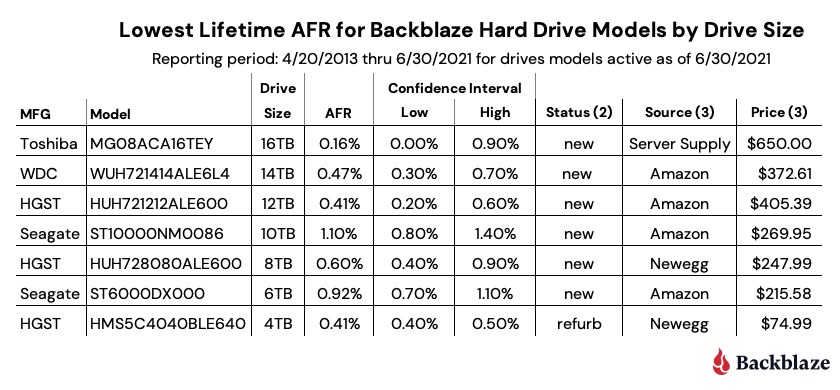
Our best performing drive models in our environment by drive size are listed in the table below.
Notes:
The WDC 16TB drive, model: WUH721816ALE6L0, does not appear to be available in the U.S. through retail channels at this time.
Status is based on what is stated on the website. Further investigation may be required to ensure you are purchasing a new drive versus a refurbished drive marked as new.
The source and price were as of 7/30/2021.
In searching for the Toshiba 16TB drive, model: MG08ACA16TEY, you may find model: MG08ACA16TE for much less ($399.00 or less). These are not the same drive and we have no information on the latter model. The MG08ACA16TEY includes the Sanitize Instant Erase feature.
The Drive Stats Data
The complete data set used to create the information used in this review is available on our Hard Drive Test Data page. You can download and use this data for free for your own purpose. All we ask are three things: 1) you cite Backblaze as the source if you use the data, 2) you accept that you are solely responsible for how you use the data, and 3) you do not sell this data to anyone; it is free.
In an era when ransomware and cybersecurity attacks on K-12 schools have nearly quadrupled, backups are critical. Today, advances in cloud backup technology like immutability and Object Lock allow school districts to take advantage of the benefits of cloud infrastructure while easing security concerns about sensitive data.
School districts have increasingly adopted cloud-based software as a service applications like video conferencing, collaboration, and learning management solutions, but many continue to operate with legacy on-premises solutions for backup and disaster recovery. If your district is ready to move your backup and recovery infrastructure to the cloud, how do you choose the right cloud partners and protect your school district’s data?
This post explains the benefits school districts can realize from moving infrastructure to the cloud, considerations to evaluate when choosing a cloud provider, and steps for preparing for a cloud migration at your district.
The Benefits of Moving to the Cloud for School Districts
Replacing legacy on-premises tape backup systems or expensive infrastructure results in a number of benefits for school districts, including:
Reduced Capital Expenditure (CapEx): Avoid major investments in new infrastructure.
Budget Predictability: Easily plan for predictable, recurring monthly expenses.
Cost Savings: Pay as you go rather than paying for unused infrastructure.
Elasticity: Scale up or down as seasonal demand fluctuates.
Workload Efficiencies: Refocus IT staff on other priorities rather than managing hardware.
Centralized Backup Management: Manage your backups in a one-stop shop.
Ransomware Protection: Stay one step ahead of hackers with data immutability.
Reduced CapEx. On-premises infrastructure can cost hundreds of thousands of dollars or more, and that infrastructure will need to be replaced or upgraded at some point. Rather than recurring CapEx, the cloud shifts IT budgets to a predictable, monthly operating expenses (OpEx) model. You no longer have to compete with other departments for a share of the capital projects budget to upgrade or replace expensive equipment.
Cloud Migration 101: Kings County
John Devlin, CIO of Kings County, was facing an $80,000 bill to replace all of the physical tapes they used for backups as well as an out-of-warranty tape drive all at once. He was able to avoid the bill by moving backup infrastructure to the cloud.
Costs are down, budgets are predictable, and the move freed up his staff to focus on bigger priorities. He noted, “Now the staff is helping customers instead of playing with tapes.”
Budget Predictability. With cloud storage, if you can accurately anticipate data usage, you can easily forecast your cloud storage budget. Since equipment is managed by the cloud provider, you won’t face a surprise bill when something breaks.
Cost Savings. Even when on-premises infrastructure sits idle, you still pay for its maintenance, upkeep, and power usage. With pay-as-you-go pricing, you only pay for the cloud storage you use rather than paying up front for infrastructure and equipment you may or may not end up needing.
Elasticity. Avoid potentially over-buying on-premises equipment since the cloud provides the ability to scale up or down on demand. If you create less data when school is out of session, you’re not paying for empty storage servers to sit there and draw down power.
Workload Efficiencies. Rather than provisioning and maintaining on-premises hardware or managing a legacy tape backup system, moving infrastructure to the cloud frees up IT staff to focus on bigger priorities. All of the equipment is managed by the cloud provider.
Centralized Backup Management. Managing backups in-house across multiple campuses and systems for staff, faculty, and students can quickly become a huge burden, so many school districts opt for a backup software solution that’s integrated with cloud storage. The integration allows them to easily tier backups to object storage in the cloud. Veeam is one of the most common providers of backup and replication solutions. They provide a one-stop shop for managing backups—including reporting, monitoring, and capacity planning—freeing up district IT staff from hours of manual intervention.
Ransomware Protection.With schools being targeted more than ever, the ransomware protection provided by some public clouds couldn’t be more important. Tools like Object Lock allow you to recreate the “air gap” protection that tape provides, but it’s all in the cloud. With Object Lock enabled, no one can modify, delete, encrypt, or tamper with data for a specific amount of time. Any attempts by a hacker to compromise backups will fail in that time. Object Lock works with offerings like immutability from Veeam so schools can better protect backups from ransomware.
An Important Distinction: Sync vs. Backup
Keep in mind, solutions like Microsoft OneDrive, DropBox, and Google Drive, while enabling collaboration for remote learning, are not the same as a true backup. Sync services allow multiple users across multiple devices to access the same file—which is great for remote learning, but if someone accidentally deletes a file from a sync service, it’s gone. Backup stores a copy of those files somewhere remote from your work environment, oftentimes in an off-site server—like cloud storage. It’s important to know that a “sync” is not a backup, but they can work well together when properly coordinated. You can read more about the differences here.
Considerations for Choosing a Cloud Provider for Your District
Moving to the cloud to manage backups or replace on-premises infrastructure can provide significant benefits for K-12 school districts, but administrators should carefully consider different providers before selecting one to trust with their data. Consider the following factors in an evaluation of any cloud provider:
Security: What are the provider’s ransomware protection capabilities? Does the provider include features like Object Lock to make data immutable? Only a few providers offer Object Lock, but it should be a requirement on any school district’s cloud checklist considering the rising threat of ransomware attacks on school districts. During 2020, the K-12 Cybersecurity Resource Center cataloged 408 publicly-disclosed school incidents versus 122 in 2018.
Compliance: Districts are subject to local, state, and federal laws including HIPAA, so it’s important to ensure a cloud storage provider will be able to comply with all pertinent rules and regulations. Can you easily set lifecycle rules to retain data for specific retention periods to comply with regulatory requirements? How does the provider handle encryption keys, and will that method meet regulations?
Ease of Use: Moving to the cloud means many staff who once kept all of your on-premises infrastructure up and running will instead be managing and provisioning infrastructure in the cloud. Will your IT team face a steep learning curve in implementing a new storage cloud? Test out the system to evaluate ease of use.
Pricing Transparency: With varying data retention requirements, transparent pricing tiers will help you budget more easily. Understand how the provider prices their service including fees for things like egress, required minimums, and other fine print. And seek backup providers that offer pricing sensitive to educational institutions’ needs. Veeam, for example, offers discounted public sector pricing allowing districts to achieve enterprise-level backup that fits within their budgets.
Integrations/Partner Network: One of the risks of moving to the cloud is vendor lock-in. Avoid getting stuck in one cloud ecosystem by researching the providers’ partner network and integrations. Does the provider already work with software you have in place? Will it be easy to change vendors should you need to?
Support: Does your team need access to support services? Understand if your provider offers support and if that support structure will fit your team’s needs.
As you research and evaluate potential cloud providers, create a checklist of the considerations that apply to you and make sure to clearly understand how the provider meets each requirement.
Preparing for a Cloud Migration at Your School District
Even when you know a cloud migration will benefit your district, moving your precious data from one place to another can be daunting at the least. Even figuring out how much data you have can be a challenge, let alone trying to shift a culture that’s accustomed to having hardware on-premises. Having a solid migration plan helps to ensure a successful transition. Before you move your infrastructure to the cloud, take the time to consider the following:
Conduct a thorough data inventory: Make a list of all applications with metadata including the size of the data sets, where they’re located, and any existing security protocols. Are there any data sets that can’t be moved? Will the data need to be moved in phases to avoid disruption? Understanding what and how much data you have to move will help you determine the best approach.
Consider a hybrid approach: Many school districts have already invested in on-premises systems, but still want to modernize their infrastructure. Implementing a hybrid model with some data on-premises and some in the cloud allows districts to take advantage of modern cloud infrastructure without totally abandoning systems they’ve customized and integrated.
Test a proof of concept with your new provider: Migrate a portion of your data while continuing to run legacy systems and test to compare latency, interoperability, and performance.
Plan for the transfer: Armed with your data inventory, work with your new provider to plan the transfer and determine how you’ll move the data. Does the provider have data transfer partners or offer a data migration service above a certain threshold? Make sure you take advantage of any offers to manage data transfer costs.
Execute the migration and verify results: Schedule the migration, configure your transfer solution appropriately, and run checks to ensure the data migration was successful.
An Education in Safe, Reliable Cloud Backups
Like a K-12 school district, Coast Community College District (CCCD) manages data for multiple schools and 60,000+ students. With a legacy on-premises tape backup system, data recovery often took days and all too often failed at that. Meanwhile, staff had to chauffeur tapes from campus to campus for off-site backup data protection. They needed a safer, more reliable solution and wanted to replace tapes with cloud storage.
CCCD implemented Cohesity backup solutions to serve as a NAS device, which will eventually replace 30+ Windows file servers, and eliminated tapes with Backblaze B2 Cloud Storage, safeguarding off-site backups by moving the data farther away. Now, restoring data takes seconds instead of days, and staff no longer physically transfer tapes—it all happens in the cloud.
How Cloud Storage Can Protect School District Data
Cloud-based solutions are integral to successful remote or hybrid learning environments. School districts have already made huge progress in moving to the cloud to enable remote learning. Now, they have the opportunity to capitalize on the benefits of cloud storage to modernize infrastructure as ransomware attacks become all the more prevalent. To summarize, here are a few things to remember when considering a cloud storage solution:
Using cloud storage with Object Lock to store an off-site backup of your data means hackers can’t encrypt, modify, or delete backups within a set timeframe, and schools can more easily restore backups in the event of a disaster or ransomware attack.
Increased ransomware protections allow districts to access the benefits of moving to the cloud like reduced CapEx, workflow efficiencies, and cost savings without sacrificing the security of air gapped backups.
Evaluate a provider’s security offerings, compliance capability, ease of use, pricing tiers, partner network, and support structure before committing to a cloud migration.
Take the time to plan your migration to ensure a successful transition.
Have more questions about cloud storage or how to implement cloud backups in your environment? Let us know in the comments. Ready to get started?
I am a sucker for a factory tour. I marvel with wide-eyed wonder as I watch how pieces and parts get created, assembled, and tested into something you can recognize and use. Whether it’s making beer or cars—sign me up. So, when Seagate Technology offered me a chance to tour their hard drive prototyping facility in Longmont, Colorado, I was powerless to resist. After all, I’d get to see how they prototype the process for building hard drives before they scale to full production. As a bonus, I also got to see their reliability lab and to talk with them about how they perform fault analysis on failed drives, but I’ll save those topics for a future post. For now, put on your lab coat and follow me to Longmont, the tour is starting.
Welcome to Longmont
Over the past 40 years, Longmont, Colorado has been home to multiple hard drive manufacturers. This accounts for the hard drive-related talent that lives in this pastoral community where such skills might otherwise be hard to find. Longmont has also come a long way from the brick shipping days of MiniScribe in the 80s to today’s ultra-sophisticated factories like the Seagate facility I have been invited to tour.
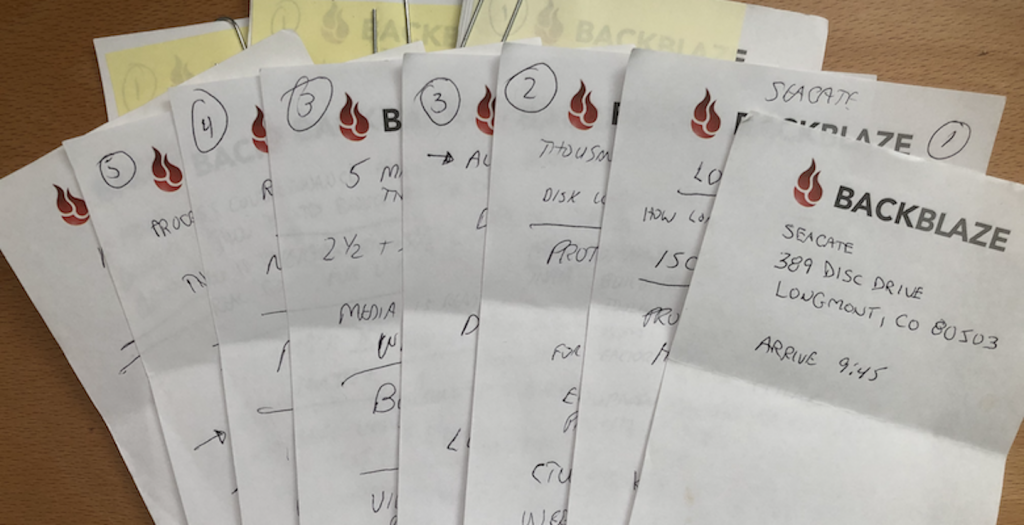
I arrive at the front desk with appointment confirmation in hand—you can’t just show up. I present appropriate credentials, electronically sign a non-disclosure agreement, get my picture taken, receive my badge—escort only—and wait for the host to arrive. I’m joined by my Backblaze colleague, Ariel, our senior director of supply chain, and a few minutes later our host arrives. Before we start, we get the rules: No pictures, in fact devices such as cell phones and tablets have to be put away. I’ll take notes, which I’ll do on my 3×5 Backblaze notepad.
My notes (as such) from the tour. Yes, there are two page three’s…
The Prototyping Line
The primary functions of the prototyping line are to define, optimize, and standardize the build processes, tooling, and bill of materials needed for the mass production of hard drives by various Seagate manufacturing facilities around the globe. In addition, the prototyping line is sometimes used to test the design and assembly of new hard drive components.
The components of a typical hard drive are:
The casing.
The platter (for storing data).
The spindle (for spinning the platters).
The head stack assembly comprised of:
The read/write arm and heads (to read and write data).
The actuator (for controlling the actions of the read/write arm).
Circuit board(s) and related electronics.
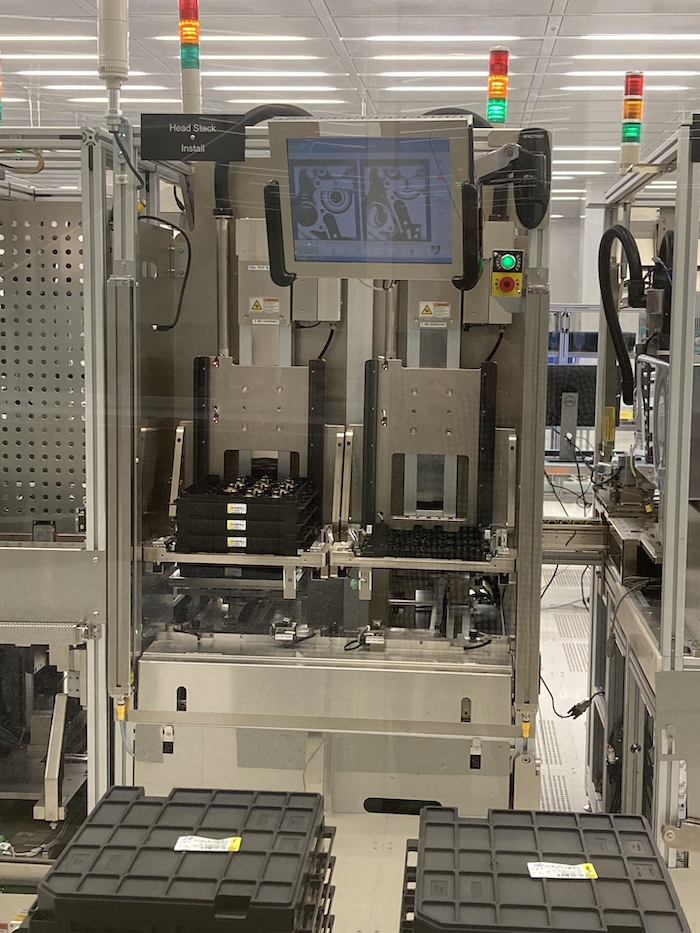
The prototyping line is a single assembly line comprised of stations that perform the various functions needed to build a hard drive—actually, many different models of 3.5in hard drives. Individual stations decide whether or not to operate on the drive based on the routing assigned to the drive. A given station can be used all of the time to do the same thing, used all the time to do a variation of the task, or used some of the time. For example, installing a serial number is done for every drive; installing drive platters is done for every drive, but can vary by the number of platters to be installed; and installing a second actuator is only required for those drives with dual actuators.
A Seagate employee likened the process to a one-way salad bar: All salads being made pass through the same sequence of steps, but not every salad gets every ingredient. As you travel down the salad bar line, you will always get several common ingredients such as a tray, a plate, a fork, lettuce, and so on. And while you always get salad dressing, you may get a different one each time. Finally, there are some ingredients like garbanzo beans or broccoli that you will never get, but the person behind you making their own salad will.
Just like a salad bar line, the prototyping line is designed to be configured to handle a large number of permutations when building a hard drive. This flexibility is important as Seagate introduces new technologies which may require changes to stations or even new stations to be created and integrated into the line.
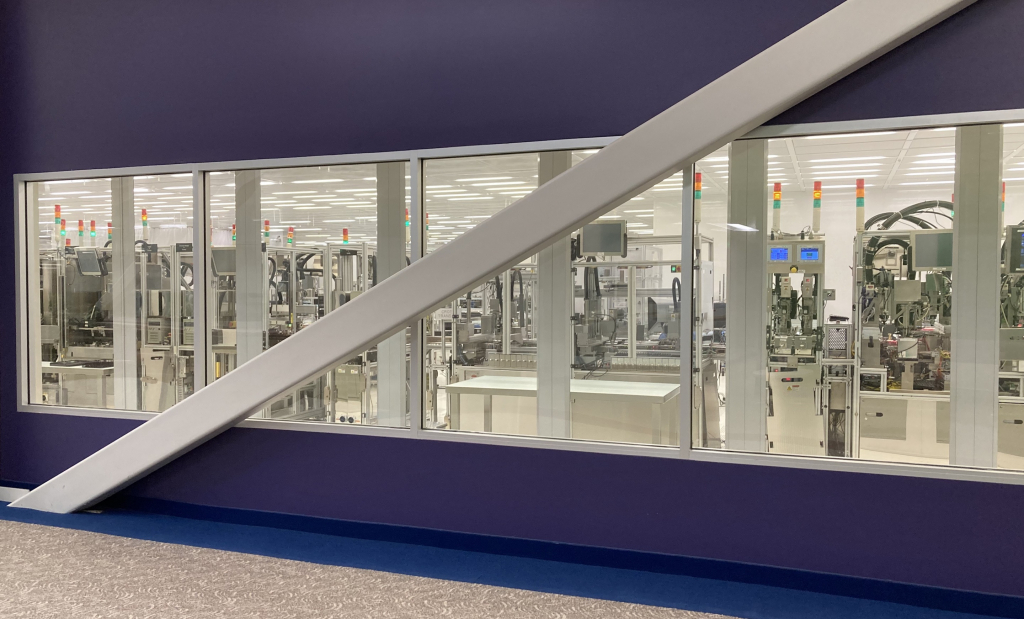
At first blush, assembling a hard drive is nothing more than a series of incremental steps accomplished in a precise order. But there are multiple layers at work here. At the first station, we can see the simple task of picking up a motor base assembly (aka a baseplate) from a storage bin and placing it correctly on the conveyor belt to the next station. We can see the station perform perhaps 20 visibly discrete operations to accomplish this task: Move the pickup arm to the left, open the pickup mechanism, lower the arm, close the pickup mechanism around the baseplate, and so on. Beyond what we can see, for each movement of the station, there are electro-mechanical components driving those observable operations, and many operations we don’t readily see. And beyond that, controlling the components, are layers of firmware, software, and machine code orchestrating the 20 or so simple movements we do see. As we slowly shuffle from window to window gawking at each station performing its specific task, a hard drive of amazing complexity emerges in front of our eyes.
Finally, the prototyping line is used from time-to-time to assist in and validate design and build decisions. For example, the assembly line could be used to inform on the specific torque used on a fastener to determine torque retention over thermal/altitude cycles. In another example, the prototyping line could be used to assess cleanliness and manufacturability as a function of the material selected for a particular component.
Facts About the Longmont Line
The Longmont prototyping line is the longest Seagate assembly line. This is because the line needs to be able to assemble a variety of different drive models whereas a factory-based assembly line only needs to assemble one or two models at a time.
The Longmont prototyping line assembles 3.5in hard drives. The prototyping line for their 2.5in drives is in their Minnesota facility.
All of the stations on the line are designed by Seagate.
All of the software used to control the stations is designed and built by Seagate.
All of the stations in the cleanroom are modular and can be pulled from the line or moved to a different position in the assembly sequence if needed.
On average, it takes about five minutes for a drive to make its way through the entire line.
The floor is built upon a unique pier design to help minimize the transfer of vibrations from machine to machine and from people to machines.
Beyond the Line
As we reach the end of windows and the cleanroom, you might assume our tour is done. Au contraire, there’s another door. A badge swipe and we enter into a large room located just after the cleanroom. We are in the testing room. To understand what happens here, let’s take a step back in the process.
One of the primary functions of the prototyping line is to define the build process for use by factories around the world. Let’s say the line is prototyping the build of 500 drives of model XYZ. One of the last steps in the assembly process is to attach the process drive cover to enclose the drive components, and in our example, our model XYZ drives are filled with helium and sealed. Once the assembly process is complete, the drives are moved from the cleanroom to the testing room.
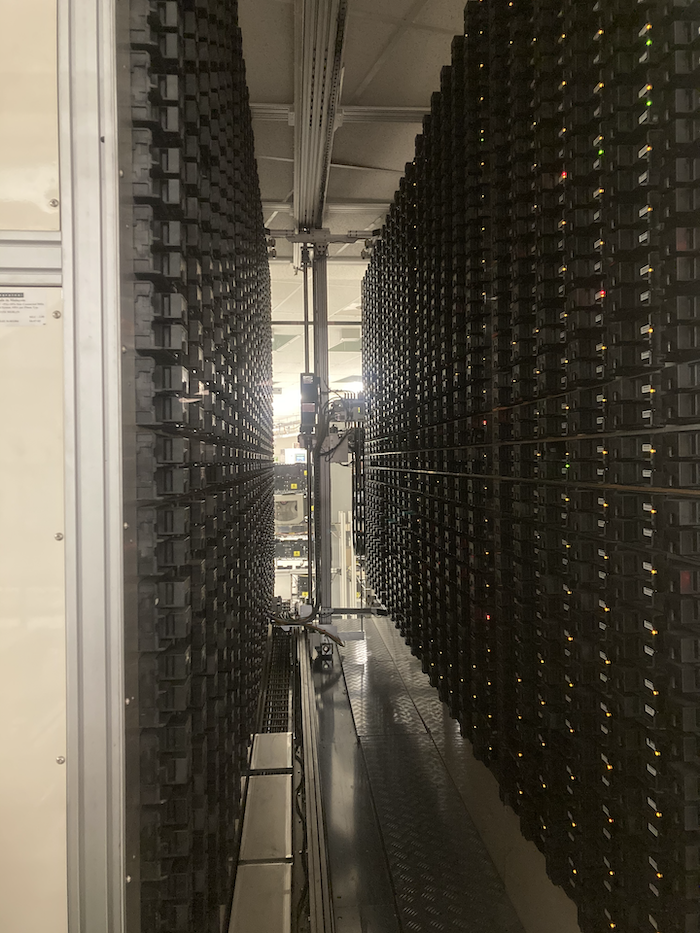
The most striking feature of the testing room is that it contains row after row of what appear to be little black boxes, stacked 40 to 50 high. Visually, each row looks like a giant wall of post office boxes.
Each post office box is a testing unit and holds one 3.5in hard drive. Inside each box are connections for a given drive model which, once connected, can run predefined test scenarios to exercise the drive inside. Load the firmware, write some data, read some data, delete some data, repeat, all while the drives are monitored to see if they are performing as expected. Easy enough, but there’s more. Each testing box can also control the temperature inside. Based on the testing plan, the temperature and test duration are dialed-in by the testing operator and testing begins. Testing in this manner typically runs for a couple of weeks and thousands of drives can be tested during this time with different tests being done on different groups of drives.
Once this first round of testing is complete on our model XYZ drives, a review is done to determine if they qualify to move on—too many failures during testing and it’s back to the proverbial drawing board, or at least the prototyping stage. Assuming our model XYZ drives pass the muster, they move on. At that point, the final cover is installed over the top of the process cover and the drives which contain helium are leak tested. All drives are then returned to the post office boxes for a quick round of testing. If everything goes according to plan, then model XYZ is ready for production—well, maybe not. The entire process, from assembly to testing, is repeated multiple times with each round being compared to the previous rounds to ensure consistency.
What happens to all the drives that Longmont produces? Good question. If they fail during the assembly process, the process engineer in charge of the product, who is usually on the cleanroom floor during the assembly process, steps in. Many issues can be fixed on the spot and the assembly process continues, but for some failures a design issue is the culprit. In that case the assembly process is stopped, and the feedback is passed back to the designers so they can correct the flaw. The same is basically true for drives which fail the testing process, the design engineers are informed of the results and can review the analytics compiled from the testing boxes.
If a given cohort of drives is successfully assembled and passes their testing plan, they could be sent to specific customers as testing units, or used for firmware testing, or be sent to the reliability lab, or they could just be recycled. The hard drives produced on the Longmont prototyping line are not production units, that’s where the factories come in.
Mass Quantities
Once Seagate is satisfied that the prototyping line can consistently produce hard drives which meet their qualifications, it is time to roll out the line to its factories. More accurately, a given factory will convert one or more of its lines to build the new product (model). To do this, they incorporate the processes developed and tested on the Longmont prototyping line, including any physical, firmware, and software changes to the various stations in the factory which will assemble the new product. On rare occasions, new stations are introduced and others are removed, but a majority of the time the factory is updating existing equipment as noted. Depending on the amount of change to the factory line, it can take anywhere from a couple of days to a couple of weeks to get the line up and running to produce drives which meet the standards defined by the prototyping line we just toured in Longmont. To make sure those standards are met, each factory has thousands upon thousands of testing boxes to test each drive coming off the factory assembly line. Only after they pass the predefined testing protocol are they shipped to distribution centers and, eventually, customers.
Next Up: The Reliability Lab
That’s the end of the tour today, next time we’ll wander through the Seagate reliability lab also at Longmont to see what happens when you heat, drop, fling, vibrate, and otherwise torture a hard drive. Good times.
Author’s Note: I wish to thank Robert who made this tour happen in the first place, Kent, Gregory, Jason, and Jen who were instrumental in reviewing this material to make sure I had it right, and the other unnamed Seagate folks who helped along the way. Thank you all.
The arrival of Chia on the mainstream media radar brought with it some challenging and interesting questions here at Backblaze. As close followers of the hard drive market, we were at times intrigued, optimistic, cautious, concerned, and skeptical—often all at once. But, our curiosity won out. Chia is storage-heavy. We are a storage company. What does this mean for us? It was something we couldn’t ignore.
Backblaze has over an exabyte of data under management, and we typically maintain around three to four months worth of buffer space. We wondered—with this storage capacity and our expertise, should Backblaze farm Chia?
For customers who are ready to farm, we recently open-sourced software to store Chia plots using our cloud storage service, Backblaze B2. But deciding whether we should hop on a tractor and start plotting ourselves required a bunch of analysis, experimentation, and data crunching—in short, we went down the rabbit hole.
After proving out if this could work for our business, we wanted to share what we learned along the way in case it was useful to other teams pondering data-heavy cloud workloads like Chia.
Grab your gardening gloves, and we’ll get into the weeds.
Here’s a table of contents for those who want to go straight to the analysis:
If you’re new to the conversation, here’s a description of what Chia is and how it works. Feel free to skip if you’re already in the know.
Chia is a cryptocurrency that employs a proof of space and time algorithm that is billed as a greener alternative to coins like Bitcoin or Ethereum—it’s storage-intensive rather than energy-intensive. There are two ways to play the Chia market: speculating on the coin or farming plots (the equivalent of “mining” other cryptocurrencies). Plots can be thought of as big bingo cards with a bunch of numbers. The Chia Network issues match challenges, and if your plot has the right numbers, you win a block reward worth two Chia coins.
Folks interested in participating need to be able to generate plots (plotting) and store them somewhere so that the Chia blockchain software can issue match challenges (farming). The requirements are pretty simple:
A computer running Windows, MacOS, or Linux with an SSD to generate plots.
HDD storage to store the plots.
Chia blockchain software.
But, as we’ll get into, things can get complicated, fast.
Should Backblaze Support and Farm Chia?
The way we saw it, we had two options for the role we wanted to play in the Chia market, if at all. We could:
Enable customers to farm Chia.
Farm it ourselves using our B2 Native API or by writing directly to our hard drives.
Helping Backblaze Customers Farm
We didn’t see it as an either/or, and so, early on we decided to find a way to enable customers to farm Chia on Backblaze B2. There were a few reasons for this choice:
We’re always looking for ways to make it easy for customers to use our storage platform.
With Chia’s rapid rise in popularity causing a worldwide shortage of hard drives, we figured people would be anxious for ways to farm plots without forking out for hard drives that had jumped up $300 or more in price.
Once you create a plot, you want to hang onto it, so customer retention looked promising.
The Backblaze Storage Cloud provides the keys for successful Chia farming: There is no provisioning necessary, so Chia farmers can upload new plots at speed and scale.
However, Chia software was not designed to allow farming with public cloud object storage. On a local storage solution, Chia’s quality check reads, which must be completed in under 28 seconds, can be cached by the kernel. Without caching optimizations and a way to read plots concurrently, cloud storage doesn’t serve the Chia use case. Our early tests confirmed this, taking longer than the required 28 seconds.
So our team built an experimental workaround to parallelize operations and speed up the process, which you can read more about here. Short story: The experiment has worked, so far, but we’re still in a learning mode about this use case.
Should Backblaze Farm?
Enabling customers to farm Chia was a fun experiment for our Engineering team, but deciding whether we could or should farm Chia ourselves took some more thinking. First, the pros:
We maintain a certain amount of buffer space. It’s an important asset to ensure we can scale with our customer’s needs. Rather than farming in a speculative fashion and hoping to recoup an investment in farming infrastructure, we could utilize the infrastructure we already have, which we could reclaim at any point. Doing so would allow us to farm Chia in a non-speculative fashion more efficiently than most Chia farmers.
Farming Chia could make our buffer space profitable when it would otherwise be sitting on the shelves or drawing down power in the live buffer.
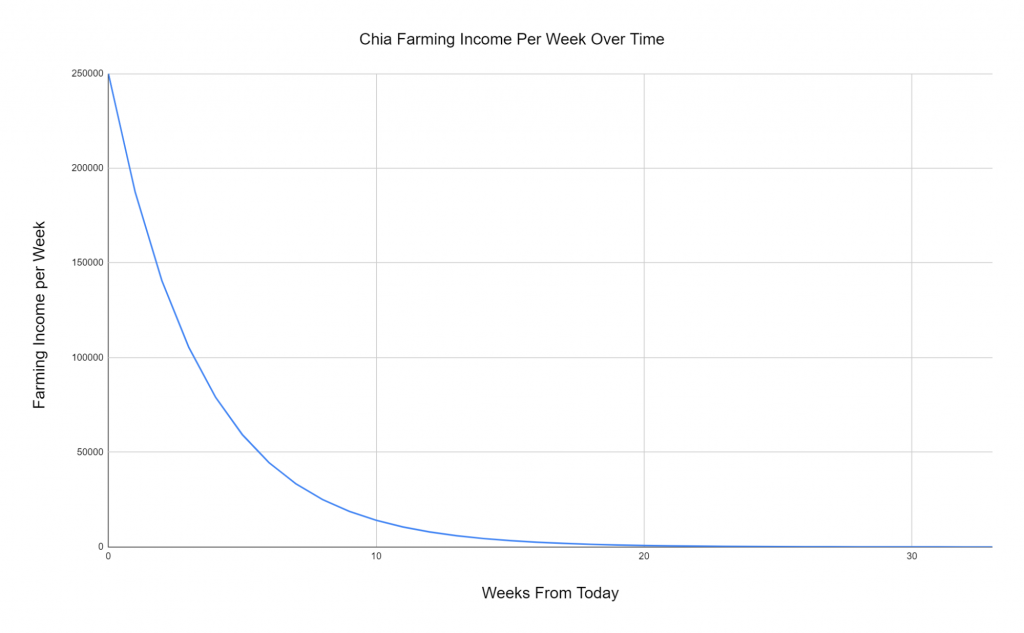
When we started investigating Chia, the Chia Calculator said we could potentially make $250,000 per week before expenses.
These were enticing enough prospects to generate significant debate on our leadership team. But, we might be putting the cart before the horse here… While we have loads of HDDs sitting around where we could farm Chia plots, we first needed a way to create Chia plots (plotting).
The Challenges of Plotting
Generating plots at speed and scale introduces a number of issues:
It requires a lot of system resources: You need a multi-core processor with fast cores so you can make multiple plots at once (parallel plotting) and a high amount of RAM.
It quickly wears out expensive SSDs: Plotting requires at least 256.6GB of temporary storage, and that temporary storage does a lot of work—about 1.8TB of reading and writing. An HDD can only read/write at 120 MB/s. So, people typically use SSDs to plot, and particularly NVMe drives which are much faster than HDD, often over 3000 MB/s. While SSD drives are fast, they wear out like tires. They’re not defective, reading and writing at the pace it takes to plot Chia just burns them out. Some reports estimate four weeks of useful farming life, and it’s not advisable to use consumer SSDs for that reason.
At Backblaze, we have plenty of HDDs, but not many free SSDs. Thus, we’d need to either buy (and wear out) a bunch of SSDs, or use a cloud compute provider to generate the plots for us.
The first option would take time and resources to build enough plotters in each of our data centers across the country and in Europe, and we could potentially be left with excess SSDs at the end. The second would still render a bunch of SSDs useless, albeit not ours, and it would be costly.
Still, we wondered if it would be worth it given the Chia Calculator’s forecasts.
The Challenges of Farming
Once we figured out a way to plot Chia, we then had a few options to consider for farming Chia: Should we farm by writing directly to the extra hard drives we had on the shelves, or by using our B2 Native API to fill the live storage buffer?
Writing directly to our hard drives posed some challenges. The buffer drives on the shelf eventually do need to go into production. If we chose this path, we would need a plan to continually migrate the data off of drives destined for production to new drives as they come in. And we’d need to dedicate staff resources to manage the process of farming on the drives without affecting core operations. Reallocating staff resources to a farming venture could be seen as a distraction, but a worthy one if it panned out. We once thought of developing B2 Cloud Storage as a distraction when it was first suggested, and today, it’s integral to our business. That’s why it’s always worth considering these sorts of questions.
Farming Chia using the B2 Native API to write to the live storage buffer would pull fewer staff resources away from other projects, at least once we figured out our plotting infrastructure. But we would need a way to overwrite the plots with customer data if demand suddenly spiked.
And the Final Question: Can We Make Money?
Even with the operational challenges above and the time it would take to work through solutions, we still wondered if it would all be worth it. We like finding novel solutions to interesting problems, so understanding the financial side of the equation was the last step of our evaluation. Would Chia farming make financial sense for Backblaze?
Farming Seemed Like It Could Be Lucrative…
The prospect of over $1M/month in income certainly caught our attention, especially because we thought we could feasibly do it “for free,” or at least without the kind of upfront investment in HDDs a typical Chia farmer would have to lay out to farm at scale. But then we came to our analysis of monetization.
Our Monetization and Cost Analysis for Farming Chia
Colin Weld, one of our software engineers, had done some analysis on his own when Chia first gained attention. He built on that analysis to calculate the amount of farming income we could make per week over time with a fixed amount of storage.
Our assumptions for the purposes of this analysis:
150PB of the buffer would be utilized.
The value of the coin is constant. (In reality, the value of the coin opened at $584.60 on June 8, 2021, when we ran the experiments. In the time since, it has dipped as low as $205.73 before increasing to $278.59 at the time of publishing.)
When we ran the calculations, the total Network space appeared to increase at a rate of 33% every week.
We estimated income in week one was 75% of the week before, with the percentage decreasing exponentially over time.
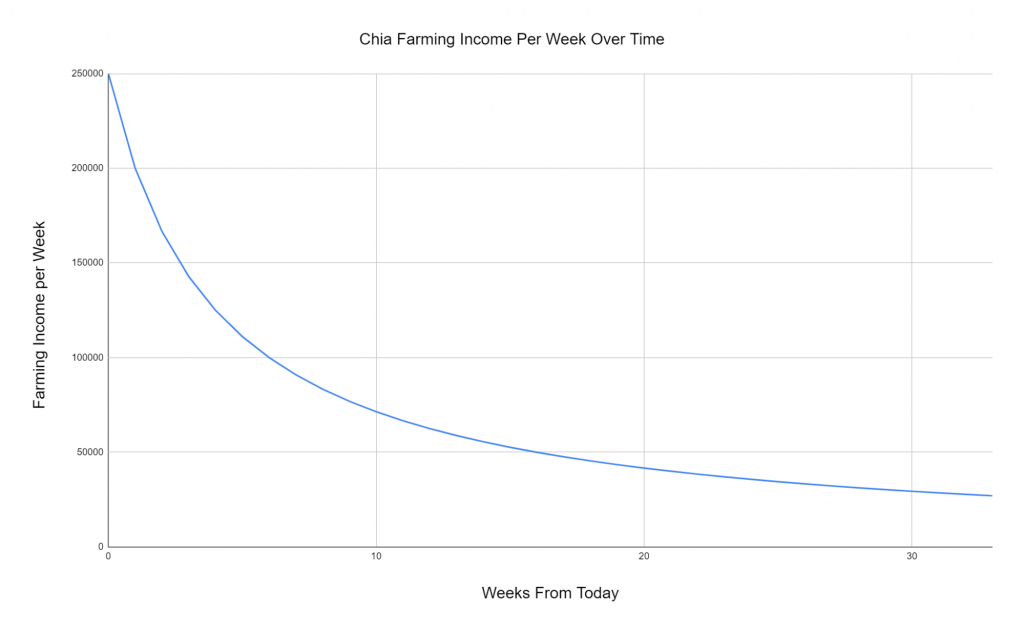
When we ran the calculations, the income per week on 150PB of storage was $250,000.
We assumed zero costs for the purposes of this experiment.
Assuming Exponential Growth of the Chia Netspace
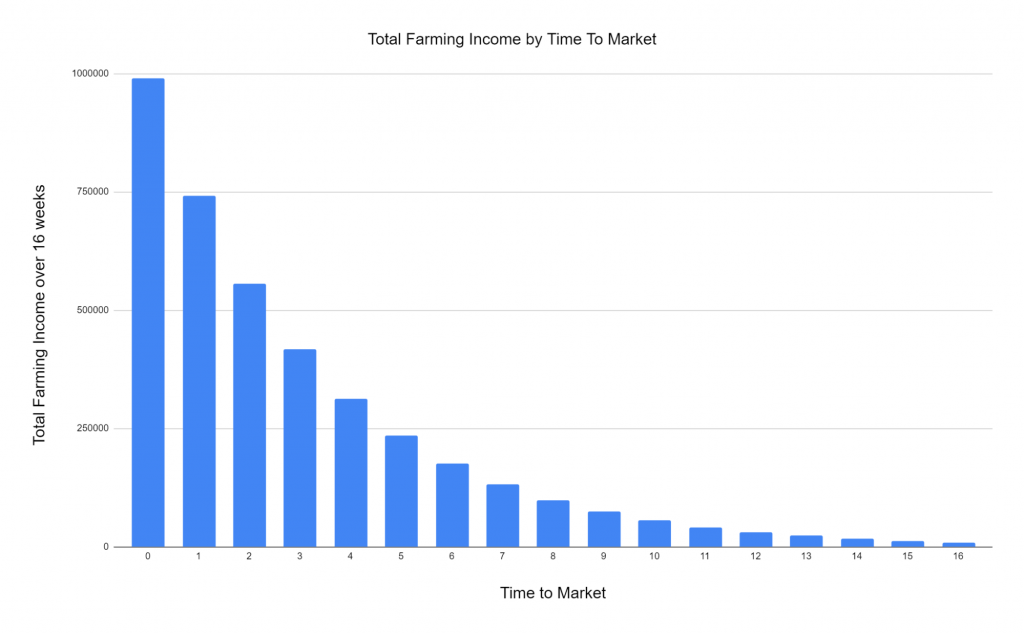
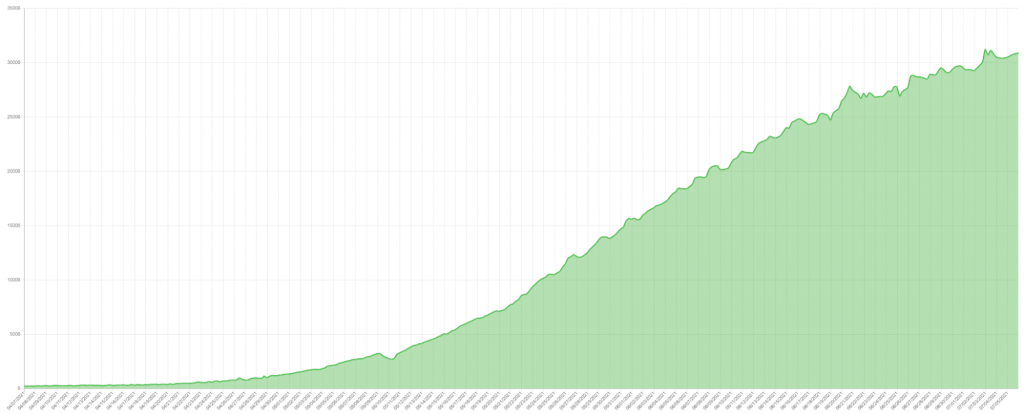
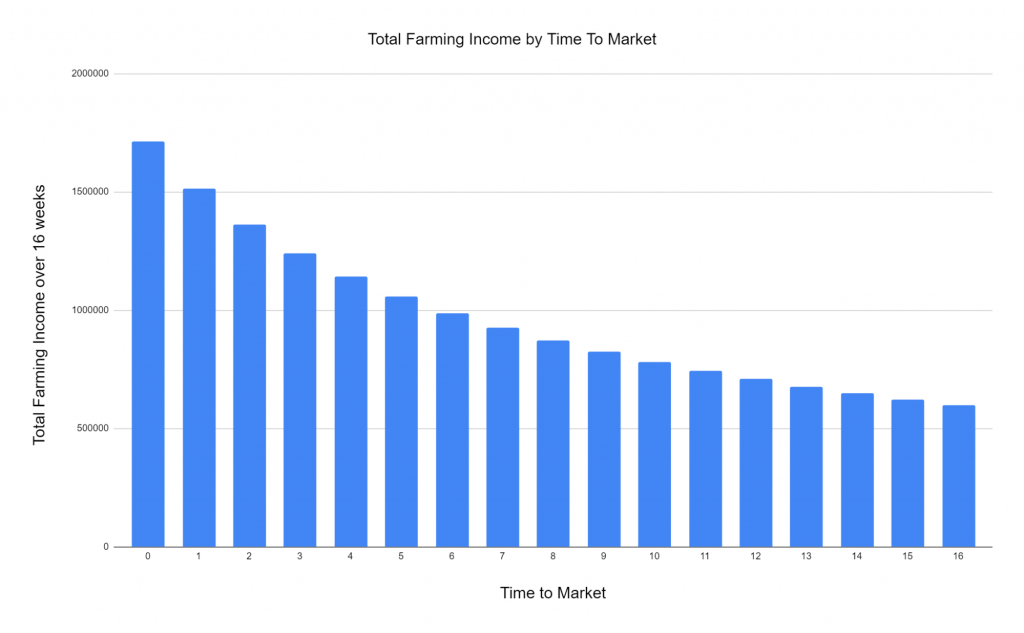
If the Chia Netspace continued to grow at an exponential rate, our farming income per week would be effectively zero after 16 weeks. In the time since we ran the experiment, the total Chia netspace has continued to grow, but at a slightly slower rate.
Total Chia Netspace April 7, 2021–July 5, 2021
Source: Chiaexplorer.com.
For kicks, we also ran the analysis assuming a constant rate of growth. In this model, we assume a constant growth rate of five exabytes each week.
Assuming Constant Growth of the Chia Netspace
Even assuming constant growth, our farming income per week would continue to decrease, and this doesn’t account for our costs.
And Farming Wasn’t Going to Be Free
To quickly understand what costs would look like, we used our standard pricing of $5/TB/month as our effective “cost” as it factors in our cost of goods sold, overheard, and the additional work this effort would require. At $5/TB/month, 150PB costs $175,000 per week. Assuming exponential growth, our costs would exceed total expected income if we started farming any later than seven weeks out from when we ran the analysis. Assuming constant growth, costs would exceed total expected income around week 28.
A Word on the Network Price
In our experiments, we assumed the value of the coin was constant, which is obviously false. There’s certainly a point where the value of the coin would make farming theoretically profitable, but the volatility of the market means we can’t predict if it will stay profitable. The value of the coin and thus the profitability of farming could change arbitrarily from day to day. It’s also unlikely that the coin would increase in value without the triggering simultaneous growth of the Netspace, thus negating any gains from the increase in value given our fixed farming capacity. From the beginning, we never intended to farm Chia in a speculative fashion, so we never considered a possible value of the coin that would make it worth it to farm temporarily and ignore the volatility.
Chia Network Price May 3, 2021–July 5, 2021
Source: Coinmarketcap.com.
Should We Farm Chia? Our Decision and Why
Ultimately, we decided not to farm Chia. The cons outweighed the pros for us:
We wouldn’t reap the rewards the calculators told us we could because the calculators give a point-in-time prediction. The amount per week you could stand to make is true—for that week. Today, the Chia Calculator predicts we would only make around $400 per month.
While it would have been a fun experiment, figuring out how to plot Chia at speed and scale would have taken time we didn’t have if we expected it to be profitable.
We assume the total Chia Netspace will continue to grow even if it grows at a slower rate. As the Netspace grows, your chances of winning go down unless you can keep growing your plots as fast as the whole Network is growing. Even if we dedicated our whole business to it, there would come a point where we would not keep up because we have a fixed amount of storage to dedicate to farming while maintaining a non-speculative position.
It would usurp resources we didn’t want to devote. We’d have to dedicate part of our operation to manage the process of farming on the drives without affecting core operations.
If we farmed it using our B2 Native API to write to our live buffer, we’d risk losing plots if we had to overwrite them when demand spiked.
Finally, cryptocurrency is a polarizing topic. The lively debate among our team members sparked the idea for this post. Our team holds strong opinions about the direction we take, and rightfully so—we value open communication as well as unconventional opinions both for and against proposed directions. Some brought strong arguments against participation in the cryptocurrency market even as they indulged in the analysis along the way. In the end, along with the operational challenges and disappointing financials, farming Chia was not the right choice for us.
The experiment wasn’t all for nothing though. We still think it would be great to find a way to make our storage buffer more profitable, and this exercise sparked some other interesting ideas for doing that in a more sustainable way that we’re excited to explore.
Our Chia Conclusion… For Now
For now, our buffer will remain a buffer—our metaphorical fields devoid of rows upon rows of Chia. Farming Chia didn’t make sense for us, but we love watching people experiment with storage. We’re excited to see what folks do with our experimental solution for farming Chia on Backblaze B2 and to watch what happens in the market. If the value of Chia coin spikes and farming plots on B2 Cloud Storage allows farmers to scale their plots infinitely, all the better. In the meantime, we’ll put our farming tools away and focus on making that storage astonishingly easy.
Afterword: The Future of Chia
This exercise begs the question: Should anyone farm Chia? That’s a decision everyone has to make for themselves. But, as our analysis suggests, unless you can continue to grow your plots, there will come a time when it’s no longer profitable. That may not matter to some—if you believe in Chia and think it will increase in value and be profitable again at some point in the future, holding on to your plots may be worth it.
How Pooling Could Help
On the plus side, pooling technology could be a boon for smaller farmers. The Chia Network recently announced pooling functionality for all farmers. Much like the office lottery, farmers group their plots for a share of challenge rewards. For folks who missed the first wave of plotting, this approach offers a way to greatly increase their chances of winning a challenge, even if it does mean a diminished share of the winnings.
The Wastefulness Questions
Profitability aside, cryptocurrency coins are a massive drain on the environment. Coins that use proof of space and time like Chia are billed as a greener alternative. There’s an argument to be made that Chia could drive greater utilization of otherwise unused HDD space, but it still leads to an increase of e-waste in the form of burned out SSD drives.
Coins based on different algorithms might hold some promise for being more environmentally friendly—for example, proof of stake algorithms. You don’t need proof of space (lots or storage) or proof of work (lots of power), you just need a portion of money (a stake) in the system. Ethereum has been working on a transition to proof of stake, but it will take more time and testing—something to keep an eye on if you’re interested in the crypto market. As in everything crypto, we’re in the early days and the only thing we can count on is change, unpredictability, and the monetary value of anything Elon Musk Tweets about.
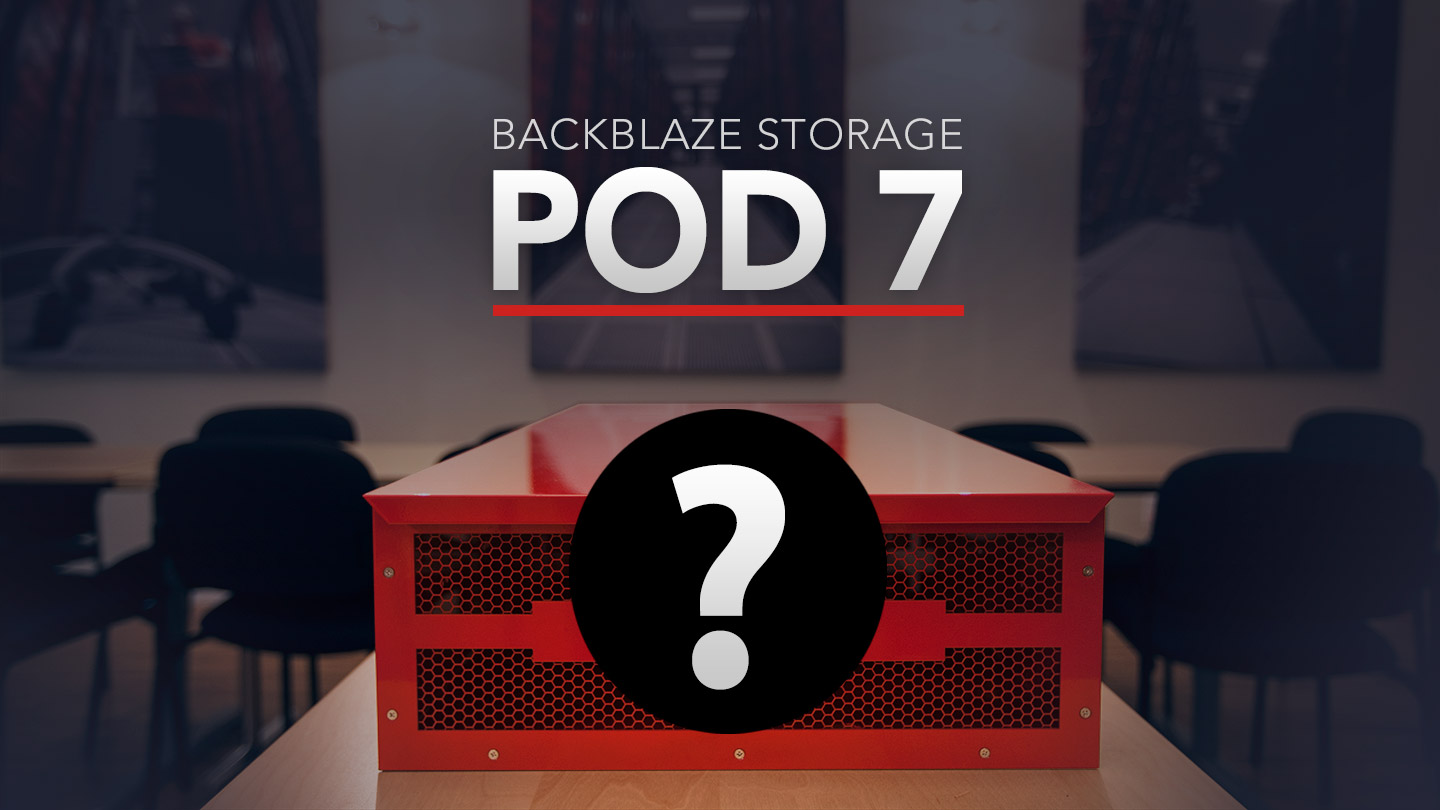
In September of 2019, we celebrated the 10-year anniversary of open-sourcing the design of our beloved Storage Pods. In that post, we contemplated the next generation Backblaze Storage Pod and outlined some of the criteria we’d be considering as we moved forward with Storage Pod 7.0 or perhaps a third-party vendor.
Since that time, the supply chain for the commodity parts we use continues to reinvent itself, the practice of just-in-time inventory is being questioned, the marketplace for high-density storage servers continues to mature, and the continuing cost effectiveness of scaling the manufacturing and assembly of Storage Pods has proved elusive. A lot has changed.
The Next Storage Pod
As we plan for the next 10 years of providing our customers with astonishingly easy to use cloud storage at a fair price, we need to consider all of these points and more. Follow along as we step through our thought process and let you know what we’re thinking—after all, it’s your data we are storing, and you have every right to know how we plan to do it.
Storage Pod Realities
You just have to look at the bill of materials for Storage Pod 6.0 to know that we use commercially available parts wherever possible. Each Storage Pod has 25 different parts from 15 different manufacturers/vendors, plus the red chassis, and, of course, the hard drives. That’s a trivial number of parts and vendors for a hardware company, but stating the obvious, Backblaze is a software company.
Still, each month we currently build 60 or so new Storage Pods. So, each month we’d need 60 CPUs, 720 SATA cables, 120 power supplies, and so on. Depending on the part, we could order it online or from a distributor or directly from the manufacturer. Even before COVID-19 we found ourselves dealing with parts that would stock out or be discontinued. For example, since Storage Pod 6.0 was introduced, we’ve had three different power supply models be discontinued.
For most of the parts, we actively try to qualify multiple vendors/models whenever we can. But this can lead to building Storage Pods that have different performance characteristics (e.g. different CPUs, different motherboards, and even different hard drives). When you arrange 20 Storage Pods into a Backblaze Vault, you’d like to have 20 systems that are the same to optimize performance. For standard parts like screws, you can typically find multiple sources, but for a unique part like the chassis, you have to arrange an alternate manufacturer.
With COVID-19, the supply chain was very hard to navigate to procure the various components of a Storage Pod. It was normal for purchase orders to be cancelled, items to stock out, shipping dates to slip, and even prices to be renegotiated on the fly. Our procurement team was on top of this from the beginning, and we got the parts we needed. Still, it was a challenge as many sources were limiting capacity and shipping nearly everything they had to their larger customers like Dell and Supermicro, who were first in line.
Supply chain logistics aren’t getting less interesting.
Getting Storage Pods Built
When we first introduced Storage Pods, we were the only ones who built them. We would have the chassis constructed and painted, then we’d order all the parts and assemble the units at our data center. We built the first 20 or so this way. At that point, we decided to outsource the assembly process to a contract manufacturer. They would have a sheet metal fabricator construct and paint the chassis, and the contract manufacturer would order and install all the parts. The complete Storage Pod was then shipped to us for testing.
Over the course of the last 12 years, we’ve had multiple contract manufacturers. Why? There are several reasons, but they start with the fact that building 20, 40, or even 60 Storage Pods a month is not a lot of work for most contract manufacturers—perhaps five days a month at most. If they dedicate a line to Storage Pods, that’s a lot of dead time for the line. Yet, Storage Pod assembly doesn’t lend itself to being flexed into a line very well, as the Storage Pods are bulky and the assembly process is fairly linear versus modular.
In addition, we asked the contract manufacturers to acquire and manage the Storage Pod parts. For a five-day-a-month project, their preferred process is to have enough parts on hand for each monthly run. But we liked to buy in bulk to lower our cost, and some parts like backplanes had high minimum order quantities. This meant someone had to hold inventory. Over time, we took on more and more of this process, until we were ordering all the parts and having them shipped to the contract manufacturer monthly to be assembled. It didn’t end there.
As noted above, when the COVID-19 lockdown started, supply chain and assembly processes were hard to navigate. As a consequence, we started directing some of the fabricated Storage Pod chassis to be sent to us for assembly and testing. This hybrid assembly model got us back in the game of assembling Storage Pods—we had gone full circle. Yes, we are control freaks when it comes to our Storage Pods. That was a good thing when we were the only game in town, but a lot has changed.
The Marketplace Catches Up
As we pointed out in the 10-year anniversary Storage Pod post, there are plenty of other companies that are making high-density storage servers like our Storage Pod. At the time of that post, the per unit cost was still too high. That’s changed, and today high-density storage servers are generally cost competitive. But unit cost is only part of the picture as some of the manufacturers love to bundle services into the final storage server you receive. Some services are expected, like maintenance coverage, while others—like the requirement to only buy hard drives from them at a substantial markup—are non-starters. Still, over the next 10 years, we need to ensure we have the ability to scale our data centers worldwide and to be able to maintain the systems within. At the same time, we need to ensure that the systems are operational and available to meet or exceed our expectations and those of our customers, as well.
The Amsterdam Data Center
As we contemplated opening our data center in Amsterdam, we had a choice to make: use Storage Pods or use storage servers from another vendor. We considered shipping the 150-pound Storage Pods to Amsterdam or building them there as options. Both were possible, but each had their own huge set of financial and logistical hurdles along the way. The most straightforward path to get storage servers to the Amsterdam data center turned out to be Dell.
The process started by testing out multiple storage server vendors in our Phoenix data center. There is an entire testing process we have in place, which we’ll cover in another post, but we can summarize by saying the winning platform needed to be at least as performant and stable as our Storage Pods. Dell was the winner and from there we ordered two Backblaze Vaults worth of Dell servers for the Amsterdam data center.
The servers were installed, our data center techs were trained, repair metrics were established and tracked, and the systems went live. Since that time, we added another six Backblaze Vaults worth of servers. Overall, it has been a positive experience for everyone involved—not perfect, but filled with learnings we can apply going forward.
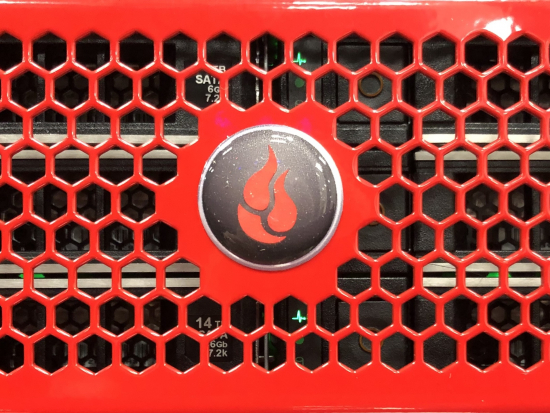
By the way, Dell was kind enough to make red Backblaze bezels for us, which we install on each of the quasi-Storage Pods. They charge us extra for them, of course, but some things are just worth it.
Faceplate on the quasi-Storage Pod.
Lessons Learned
The past couple of years, including COVID, have taught us a number of lessons we can take forward:
We can use third-party storage servers to reliably deliver our cloud storage services to our customers.
We don’t have to do everything. We can work with those vendors to ensure the equipment is maintained and serviced in a timely manner.
We deepened our appreciation of having multiple sources/vendors for the hardware we use.
We can use multiple third-party vendors to scale quickly, even if storage demand temporarily outpaces our forecasts.
Those points, taken together, have opened the door to using storage servers from multiple vendors. When we built our own Storage Pods, we achieved our cost savings from innovation and the use of commodity parts. We were competing against ourselves to lower costs. By moving forward with non-Backblaze storage servers, we will have the opportunity for the marketplace to compete for our business.
Are Storage Pods Dead?
Right after we introduced Storage Pod 1.0 to the world, we had to make a decision as to whether or not to make and sell Storage Pods in addition to our cloud-based services. We did make and sell a few Storage Pods—we needed the money—but we eventually chose software. We also decided to make our software hardware-agnostic. We could run on any reasonably standard storage server, so now that storage server vendors are delivering cost-competitive systems, we can use them with little worry.
So the question is: Will there ever be a Storage Pod 7.0 and beyond? We want to say yes. We’re still control freaks at heart, meaning we’ll want to make sure we can make our own storage servers so we are not at the mercy of “Big Server Inc.” In addition, we do see ourselves continuing to invest in the platform so we can take advantage of and potentially create new, yet practical ideas in the space (Storage Pod X anyone?). So, no, we don’t think Storage Pods are dead, they’ll just have a diverse group of storage server friends to work with.
Storage Pod Fun
Over the years we had some fun with our Storage Pods. Here are a few of our favorites.
Last week—in response to the hard drive shortage driven by Chia’s astronomical netspace growth—Backblaze introduced an experimental solution to allow farming of Chia plots stored in B2 Cloud Storage. Lots of folks have been reading it, and we remain fascinated by the up-and-down prospects of Chia.
Today’s post digs into the story behind one cryptocurrency startup that also aims to help Chia farmers enter this emerging market at scale: Plottair.
Crypto-entrepreneurs and Plottair Co-founders Maran Hidskes and Sinisa Stjepanovic approached us about building a SaaS service with a storage-heavy use case. Specifically, they wanted to use Backblaze B2 as part of a new Chia farming venture. They agreed to share their take on this latest trend in crypto and offer some insight into how they intend to use B2 Cloud Storage for their startup—we’re sharing some of what they told us here.
The conversation started with a bit of context around Chia’s roots (if you’ll excuse the pun) to set the stage for what Plottair is doing and why.
Ch- Ch- Ch- Ching:
A Greener Blockchain Transaction Platform
The Chia project was founded in August 2017 by Bram Cohen, the inventor of the BitTorrent protocol. Cohen was frustrated by the environmental impact of existing cryptocurrencies, so he developed a less wasteful scheme.1 Rather than using energy-intensive compute resources, with Chia, customers use free disk space to store calculations and use this data on the network to obtain a chance to win block rewards.
“This wasn’t an original idea,” Sinisa explained to us. “There were earlier coins that used proof of space—for example, Burstcoin—but Cohen improved it. He added proof of time and corrected issues with the consensus mechanism.”
The Basics of How Chia Works
In Chia, “farmers” create plots much like bingo cards with millions of digits, and the cards are stored locally, using around 110GB each. The network will occasionally ask a farmer whether their plots contain a certain number on their bingo cards, and if they possess it, they win a block reward: Chia coins.
There are two ways to play the Chia market:
Currency speculation similar to Bitcoin and others.
Farming plots, which could result in block rewards. Chia is trading at $416.79 as of this posting, and a block reward consists of two Chia coins.
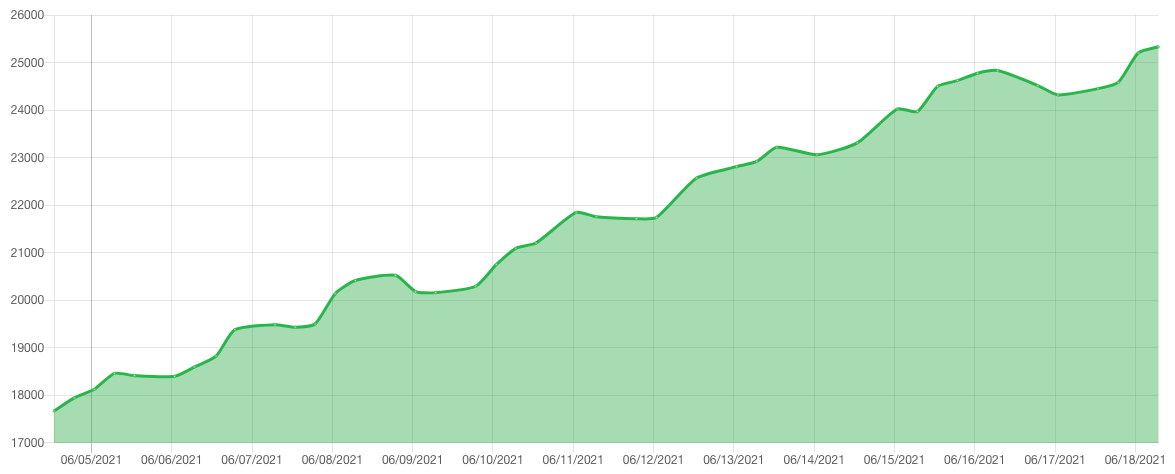
While Chia has worked around the CPU intensive proof of work required for Bitcoin, it is very storage intensive (the data storage capacity for Chia in network space is already closing in on 25EiB), as farmers need to harvest many plots to win rewards. Rather than mining coins by dedicating large amounts of parallel processing power to the task, Chia simply requires storage—a lot of it, if you want the best chance of winning.
Total Chia netspace as of posting. That’s a lot of plots. Credit: Chia Explorer.
Plottair Finds a Market in Chia Farmers
Maran and Sinisa recognized that Chia farmers face two key challenges:
Obtaining and maintaining the computing power to generate plots.
Buying and managing the capacity to store the plots in secure, durable, highly available storage systems.
Fast processing power and low latency, high throughput NVMe storage is needed to generate plots, and most Chia farmers don’t have that kind of hardware. Sinisa had experimented with farming plots himself, and Maran owned a Plex hosting service—Bytesized Hosting. So Maran had the kind of hardware needed to speed up the process.
The two friends realized there would be plenty of other farmers looking for the same capability, and Plottair was born: A fully automated plotting service with optional cloud harvesting and multi-region download locations, aiming to provide the best support and download retention in the business.
And yet, while Maran’s servers were ideal for generating the plots quickly, they needed storage to house the plots between generation and download. With their plotting capacity at 50TB per day and a 30-day download window for customers, this was not a small issue.
Plottair began by hosting the plots in its own data centers, but identified three challenges:
1. They couldn’t scale fast enough.2. Managing a rapidly growing data center—racking up servers, ensuring connectivity, and having enough switches—was going to get in the way of their product focus.3. They needed to provide farmers with an easy way to download plots.
For all these needs, they sought out a cloud storage provider to partner with for holding plots.
Growing Plottair With Backblaze B2 Cloud Storage
Prior to finding Backblaze, Plottair engaged another cloud provider to host plots. After getting started, Plottair experienced some anomalies with users behavior in terms of downloads, and the provider froze the customer data without sharing any information that would have enabled a root cause analysis.
“They froze hundreds and hundreds of terabytes of my customers’ data, and then stonewalled me,” Maran complained. “They weren’t willing to share what caused the event.”
It was a real horror story—before the company would build with another partner, they needed to know they had support through the inevitable hiccups of launching a new business in uncharted territory. After the debacle, they reached out. “We were super happy to be able to see and speak to real humans when we reached out to Backblaze,” Maran said. Sinisa added, “We were looking for a partnership where both parties respect each other’s business. Calling off the entire service when something goes wrong? That’s a very bad look to our customers.”
Where Backblaze B2 Fits in Plottair’s Workflow
When purchasing plots, farmers give their farming keys to Plottair and select a location where the plots should be stored—in the Backblaze U.S. West or European regions. A call goes out to one of Plottair’s plotting servers that has free availability, and it starts plotting. This takes about six to eight hours per plot.
When the plot is finished, it gets uploaded from the plotting server to the appropriate Backblaze location, and the customer is notified that the plot is ready to download via Plottair’s customer portal. In the portal, farmers can view all plot orders and their statuses, so they know when they can start downloading. Plottair optionally allows customers to farm these plots in the cloud.
How Backblaze B2 Meets the Needs of Blockchain Workloads
In addition to gaining a working partnership, the biggest strength Backblaze B2 brings to the Plottair venture is the ability to scale up to any size. “I don’t have to worry if I’ll have enough storage if I get a petabyte order,” Maran said.
Plottair has the ability to upload vast amounts of data at scale and let their users directly access it and use it in real-time. This enables Plottair to use the space they need to serve the Chia farming market if it booms and, with a pay-as-you-go model, scale back if it busts. “That’s the dream,” Maran said. “To have something that scales on every facet. Right now, Backblaze is there for us for our storage needs.”
Backblaze B2: Storage for Emerging Services
Whatever happens with cryptocurrencies, storage-intensive cloud services are becoming more and more common. Many new SaaS applications with storage-heavy workloads—companies like streaming media services or gaming platforms—are either migrating over from AWS or other legacy providers, or building their infrastructure with Backblaze B2.
Maran is also considering Backblaze B2 for other blockchain oriented workloads. In the near term, Maran and his team are looking to “harvest” the Chia plots as a service using Backblaze B2. Harvesting involves reading the large number sequences for a match. This will enable Chia farmers to download only a fraction of the plot data, significantly improving their experience.
As Plottair grows its product offerings in cryptocurrencies and other blockchain-oriented use cases and considers many additional functions, we’ll be excited to report on new development. For now, we’ll simply focus on how the Chia market and their “acreage” might grow.
Blockchain and Cryptocurrency: A Short History
Financial institutions and a growing number of firms across industries are using distributed ledger technology based on blockchain as a secure and transparent way to digitally track the ownership of assets. Bitcoin was one of the first applications built on top of blockchain. Bitcoin and its underlying blockchain technology are viewed by many as the leading edge of a transformative evolution of money, finance, commerce, and society itself. The total value of all Bitcoin now in existence is over half a trillion dollars.
Bitcoin and most other cryptocurrencies use a system in which currency is created or “mined” using computers to solve mathematical puzzles. These are known as “proof of work” systems—solving the puzzle is proof that your computer has done a certain amount of work to provide network authentication.
One of Bitcoin’s core tenets is decentralization, but specialized hardware and cheap electricity have become far better at proof of work calculations than general purpose CPUs. This development has weakened decentralization as the specialized “mining” hardware is increasingly owned and operated by just a few large entities in huge, purpose-built data centers located near inexpensive electricity. This centralization has served to lower trust and raise difficult issues regarding electricity consumption, e-waste, carbon generation, and global warming. By some estimates, Bitcoin consumes more electricity than whole countries. In response, new blockchain currencies have emerged that seek to be more sustainable.
1Editor’s note: At this point, it’s unclear whether Chia is on the whole greener than “proof of work” cryptos. Some are looking into it, and we’ll be exploring the question too, but we would be interested to learn anything else our community has learned. When the energy and physical waste that goes into manufacturing hard drives is factored into the overall equation, given the exceptional amount of demand that Chia has created for drives, will it still be able to claim the “green crypto” name?
In most industries, one lost file isn’t a big deal. If you have good backups, you just have to find it, restore it, and move on—business as usual. But in the business of streaming media, one lost file can cause playback issues, compromising the customer experience.
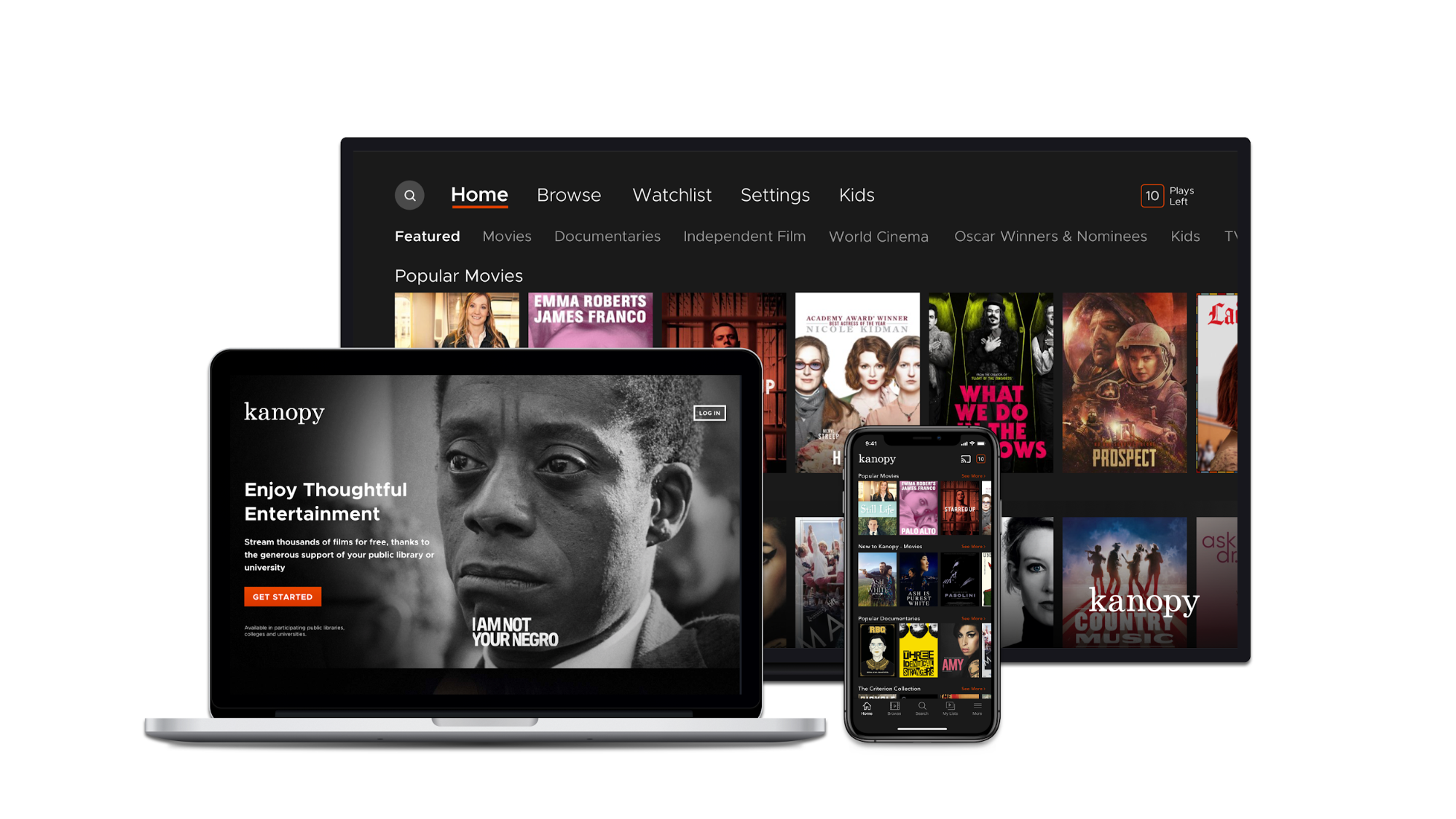
Kanopy, a video streaming platform serving more than 4,000 libraries and 45 million library patrons worldwide, previously used an all-in-one video processing, storage, and delivery provider to manage their media, but reliability became an issue after missing files led to service disruptions.
We spoke with Kanopy’s Chief Technology Officer, Dave Barney, and Lead Video Software Engineer, Pierre-Antoine Tible, to understand how they restructured their tech stack to achieve reliability and three times more redundancy with no increase in cost.
Kanopy: Like Netflix for Libraries
Describing Kanopy as “Netflix for libraries” is an accurate comparison until you consider the number of videos they offer: Kanopy has 25,000+ titles under management, many thousands more than Netflix. Founded in 2008, Kanopy pursued a blue ocean market in academic and, later, public libraries rather than competing with Netflix. The libraries pay for the service, offering patrons free access to films that can’t be found anywhere else in the world.
Kanopy provides thoughtful entertainment that bridges cultural boundaries, sparks discussion, and expands worldviews.
Streaming Media Demands Reliability
In order for a film to be streamed without delays or buffering, it must first be transcoded—broken up into smaller, compressed files known as “chunks.” A feature-length film may translate to thousands of five to 10-second chunks, and losing just one can cause playback issues that disrupt the viewing experience. Pierre-Antoine described a number of reliability obstacles Kanopy faced with their legacy provider:
The provider lost chunks, disabling HD streaming.
The CDN said the data was there—but user complaints made it clear it wasn’t.
Finding source files and re-transcoding them was costly in both time and resources.
The provider didn’t back up data. If the file couldn’t be located in primary storage, it was gone.
Preparing for a Cloud to Cloud Migration
For a video streaming service of Kanopy’s scale, a poor user experience was not acceptable. Nor was operating without a solid plan for backups. To increase reliability and redundancy, they took steps to restructure their tech stack:
First, Kanopy moved their data out of their legacy provider and made it S3 compatible. Their legacy provider used its own storage type, so Pierre-Antoine and Kanopy’s development team wrote a script themselves to move the data to AWS, where they planned to set up their video processing infrastructure.
Next, they researched a few solutions for origin storage, including Backblaze B2 Cloud Storage and IBM. Kanopy streams out 15,000+ titles each month, which would incur massive egress fees through Amazon S3, so it was never an option. Both Backblaze B2 and IBM offered an S3 compatible API, so the data would have been easy to move, but using IBM for storage meant implementing a CDN Kanopy didn’t have experience with.
Then, they ran a proof of concept. Backblaze proved more reliable and gave them the ability to use their preferred CDN, Cloudflare, to continue delivering content around the globe.
Finally, they completed the migration of production data. They moved data from Amazon S3 to Backblaze B2 using Backblaze’s Cloud to Cloud Migration service, moving 150TB in less than three days.
Where’s the popcorn? The Kanopy team takes a break.
Building a Tech Stack for Streaming Media
Kanopy’s vendor-agnostic, multi-cloud tech stack provides them the flexibility to use integrated, best-of-breed providers. Their new stack includes:
IBM Aspera to receive videos from contract suppliers like Paramount or HBO.
AWS for transcoding and encryption and Deep Glacier for redundant backups.
Flexify.IO for ongoing data transfer.
Backblaze B2 for origin storage.
Cloudflare for CDN and edge computing.
The Benefits of a Multi-cloud, Vendor-agnostic Tech Stack
The new stack offers Kanopy a number of benefits versus their all-in-one provider:
Since Backblaze is already configured with Cloudflare, data stored on Backblaze B2 automatically feeds into Cloudflare’s CDN. This allows content to live in Backblaze B2, yet be delivered with Cloudflare’s low latency and high speed.
Benefitting from the Bandwidth Alliance, Kanopy pays $0 in egress fees to transfer data from Backblaze to Cloudflare. The Bandwidth Alliance is a group of cloud and networking companies that discount or waive data transfer fees for shared customers.
Egress savings coupled with Backblaze B2’s transparent pricing allowed Kanopy to achieve redundancy at the same cost as their legacy provider.
Scaling a Streaming Media Platform With Backblaze B2
Though reliability was a main driver in Kanopy’s efforts to overhaul their tech stack, looking forward, Dave sees their new system enabling Kanopy to scale even further. “We’re rapidly accelerating the amount of content we onboard. Had reliability not become an issue, cost containment very quickly would have. Backblaze and the Bandwidth Alliance helped us attain both,” Dave attested.
“We’re rapidly accelerating the amount of content we onboard. Had reliability not become an issue, cost containment very quickly would have. Backblaze and the Bandwidth Alliance helped us attain both.” —Dave Barney, Chief Technology Officer, Kanopy
Anyone that pays attention to the hard drive market as closely as Backblaze does already knows all about the rapid rise in popularity of Chia—the “green” alternative to Bitcoin—and the effect it’s having on global drive supplies. If you haven’t heard about Chia, check out the short note below for more info. But this post is geared for the many Chia farmers out there who’ve already delved into farming and are now facing empty shelves as they seek out storage solutions for their plots.
With this shortage in mind, our team set out to explore an experimental solution that would allow for farming of Chia plots stored in B2 Cloud Storage. We’re happy to announce that it is now possible for Chia farmers to store and farm their plots in Backblaze B2.
So if you’re looking to participate in the Chia sensation without spending a lot on hard-to-find, high-capacity hard drives, there is now an innovative way to get started with an affordable, scalable cloud solution.
Chia vs. Bitcoin: Chia is a new cryptocurrency that employs a proof-of-space algorithm. As opposed to the proof-of-work algorithm supporting Bitcoin—which is both CPU and energy intensive—Chia was developed to minimize energy consumption. The result is a storage intensive form of blockchain. If you’d like to learn more, we recommend going to the source.
The Keys to Winning Chia Challenges
Chia plots are not just lying idle. The Chia network regularly issues matching challenges and quality checks. The quality checks are important to succeed at, but the challenges—where one of every 512 plots is challenged every 10 minutes—are why you’re farming.
If one of your plots is selected for a match challenge, you need to fetch a “full proof” to collect a reward, which requires around 64 hard drive seeks and delivery of the full proof to the rest of the peer-to-peer network in less than 30 seconds, before Chia “time lords” move the blockchain further along.
This presents two problems that might keep you up at night if you’re trying to farm Chia:
Problem 1: Where to store plots at scale.
Given that the current estimated network space occupied by Chia plots is 20 exabytes (and growing exponentially!), chance dictates that just one of your plots will emerge as the winner once in about 96 years. It’s like waiting a lifetime for an ear of corn—not fun. So you want to have a lot of plots to improve your odds—but you need somewhere to keep them that you can afford and that can grow with your farming.
Problem 2: Administering the complexity of scaling storage.
If you solve the storage problem, then you also need a way to quickly and reliably make all of the plots available to be read and quickly presented to the network when you win a challenge. You’ll need to be able to administer that complexity every second of every day for as long as you want to be a farmer. If you wait 96 years for a single ear of corn, it would be a bummer to miss harvest day.
These are the keys to winning the match challenge: Attaining scale and capably administering it.
The Status Quo: Individual Chia Farmers Using HDDs for Storage
For a 7200 RPM HDD with an approximately 10ms read latency, getting a quality check or a full proof takes around 70ms per qualifying plot. Because the Chia kernel caches the first seven reads, the HDD only must perform the 64 seeks when issued a challenge.
If an 18TB drive—which can hold 166 plots at 108GB per plot (using k=32)—is lucky enough to contain a plot that is that magical “one in 512,” the HDD is reasonably fast in performing the necessary read operations, because Chia was designed to use HDDs for Plot Farming. But HDDs can only perform one of those operations at a time, so a desktop must perform the operations sequentially. Even if you’re using an SSD, you still must perform the operations in series. Again, this isn’t an issue for individual drives since HDDs and SSDs are able to perform the operations very quickly within the allotted time frame.
But, even for those lucky enough to find a supply of readily available 18TB drives that haven’t been marked up twice, providing storage for the number of plots a Chia Farmer needs to ensure a reasonable chance for success is going to be labor and capital intensive.
How to Use Cloud Storage to Scale Your Plots
Chia software was not designed to allow farming with public cloud object storage, and the first tests we ran on Chia plots stored in B2 Cloud Storage proved this out: taking minutes, not the 30 seconds necessary to pass the quality check in time. Unlike with a local storage solution, where quality check reads can be cached by the kernel, performance is degraded in a cloud storage setup to an extent that it affects users’ success rate of winning challenges.
Backblaze B2 Cloud Storage provides object storage, which stores data in discrete objects, negating the need for any nested or hierarchical file structure. This makes B2 Cloud Storage ideal for scaling and use as an origin store, but as a standalone product, object storage is not suited for storing Chia plots. Without caching optimizations to improve performance and a way to read plots concurrently, B2 Cloud Storage would not effectively serve the Chia farming use case. But B2 Cloud Storage is designed to take advantage of parallel operations, or threads, offering some advantages over a standard physical drive if set up correctly for this use case (cough* I wrote about threads here!cough*).
Our team thought it would be interesting to build a tool providing a Chia use case workaround for four compelling reasons:
First: Because the Backblaze Storage Cloud provides both of the keys for successful Chia farming: There is no provisioning necessary and Chia Farmers can upload new plots at speed and scale. The Backblaze Storage Cloud cares for nearly 500 billion files with exceptional durability and availability.
Second: The cost of storing Chia plots in Backblaze B2 is financially compelling at $5/TB/month. According to Chia Calculator, using B2 Cloud Storage to store plots would be profitable, depending on the network space growth rate and the current price of Chia coin.
Third: A Tiger Team of SEs and engineers, including myself, thought it would make for an interesting and useful (and fun) experiment.
Finally: The same team believed we could enable Chia farming of plots stored in B2 Cloud Storage by cracking the code of how to parallelize operations in Chia.
With this in mind, our Tiger Team set out to get to work. A tool to mount Backblaze B2 as a filesystem was necessary since Chia doesn’t natively support the Backblaze B2 Native or S3 Compatible APIs. After some testing, our team settled on B2_fuse since our engineers who would be working on this already had some familiarity with the source code.
After deciding on B2_fuse, our engineers added a prefetch algorithm to cache the reads to address the kernel issue mentioned above. This would aid performance, but with reads still carried out one at a time on HDD, there was room for additional improvement. Obviously performing operations in parallel would greatly grow the success rate, and after doing some digging one of our engineers found a PR (pull request) that added parallelized reads and had not yet been merged into the Chia project.
With the caching optimizations in B2_fuse and the added functionality of parallelized reads, the proof time for a Chia plot stored in B2 Cloud Storage was reduced to seconds. This provides for uploading Chia plots to Backblaze B2 and presenting them to the Chia network for farming without the need for an expensive server in a datacenter.
Our successful tests were carried out using a compute instance running in a US West region with a Backblaze B2 account that is also in the US West region. Give it a shot and you could be staring at a whole field of metaphorical crops—all ready for whenever the “one in 512” challenge arrives.
Because this support is experimental and the Backblaze team knows a lot of Chia Farmers will be excited to try it out, we ask that farmers limit their storage of Chia plots to 100 TB at this time, or contact our sales team to discuss anything larger.
Recently, we announced that Backblaze B2 Cloud Storage published a provider to the Terraform registry to support developers in their infrastructure as code (IaC) efforts. With the Backblaze Terraform provider, you can provision and manage B2 Cloud Storage resources directly from a Terraform configuration file.
Today’s post grew from a comment in our GitHub repository from Gert-Jan van de Streek, Co-founder of Avisi, a Netherlands-based software development company. That comment sparked a conversation that turned into a bigger story. We spoke with Gert-Jan to find out how the Avisi team practices IaC processes and uses the Backblaze Terraform provider to increase efficiency, accuracy, and speed through the DevOps lifecycle. We hoped it might be useful for other developers considering IaC for their operations.
What Is Infrastructure as Code?
IaC emerged in the late 2000s as a response to the increasing complexity of scaling software developments. Rather than provisioning infrastructure via a provider’s user interface, developers can design, implement, and deploy infrastructure for applications using the same tools and best practices they use to write software.
Provisioning Storage for “Apps That Fill Gaps”
The team at Avisi likes to think about software development as a sport. And their long-term vision is just as big and audacious as an Olympic contender’s—to be the best software development company in their country.
Gert-Jan co-founded Avisi in 2000 with two college friends. They specialize in custom project management, process optimization, and ERP software solutions, providing implementation, installation and configuration support, integration and customization, and training and plugin development. They built the company by focusing on security, privacy, and quality, which helped them to take on projects with public utilities, healthcare providers, and organizations like the Dutch Royal Notarial Professional Organization—entities that demand stable, secure, and private production environments.
They bring the same focus to product development, a business line Gert-Jan leads where they create “apps that fill gaps.” He coined the tagline to describe the apps they publish on the Atlassian and monday.com marketplaces. “We know that a lot of stuff is missing from the Atlassian and monday.com tooling because we use it in our everyday life. Our goal in life is to provide that missing functionality—apps to fill gaps,” he explained.
Avisi’s applications fill the gaps in popular project management solutions.
With multiple development environments for each application, managing storage becomes a maintenance problem for sophisticated DevOps teams like Avisi’s. For example, let’s say Gert-Jan has 10 apps to deploy. Each app has test, staging, and production environments, and each has to be deployed in three different regions. That’s 90 individual storage configurations, 90 opportunities to make a mistake, and 90 times the labor it takes to provision one bucket.
Infrastructure in Sophisticated DevOps Environments: An Example
10 apps x three environments x three regions = 90 storage configurations
Following DevOps best practices means Avisi writes reusable code, eliminating much of the manual labor and room for error. “It was really important for us to have IaC so we’re not clicking around in user interfaces. We need to have stable test, staging, and production environments where we don’t have any surprises,” Gert-Jan explained.
Terraform vs. CloudFormation
Gert-Jan had already been experimenting with Terraform, an open-source IaC tool developed by HashiCorp, when the company decided to move some of their infrastructure from Amazon Web Services (AWS) to Google Cloud Platform (GCP). The Avisi team uses Google apps for business, so the move made configuring access permissions easier.
Of course, Amazon and Google don’t always play nice—CloudFormation, AWS’s proprietary IaC tool, isn’t supported across the platforms. Since Terraform is open-source, it allowed Avisi to implement IaC with GCP and a wide range of third-party integrations like StatusCake, a tool they use for URL monitoring.
Backblaze B2 + Terraform
Simultaneously, when Avisi moved some of their infrastructure from AWS to GCP, they resolved to stand up an additional public cloud provider to serve as off-site storage as part of a 3-2-1 strategy (three copies of data on two different media, with one off-site). Gert-Jan implemented Backblaze B2, citing positive reviews, affordability, and the Backblaze European data center as key decision factors. Many of Avisi’s customers reside in the European Union and are often subject to data residency requirements that stipulate data must remain in specific geographic locations. Backblaze allowed Gert-Jan to achieve a 3-2-1 strategy for customers where data residency in the EU is top of mind.
When Backblaze published a provider to the Terraform registry, Avisi started provisioning Backblaze B2 storage buckets using Terraform immediately. “The Backblaze module on Terraform is pure gold,” Gert-Jan said. “It’s about five lines of code that I copy from another project. I configure it, rename a couple variables, and that’s it.”
Real-time Storage Sync With Terraform
Gert-Jan wrote the cloud function to sync between GCP and Backblaze B2 in Clojure, a functional programming language, running on top of Node.js. Clojure compiles to Javascript, so it runs in Java environments as well as Node.js or browser environments, for example. That means the language is available on the server side as well as the client side for Avisi.
The cloud function allowed off-site tiering to be almost instantaneous. Now, every time a file is written, it gets picked up by the cloud function and transferred to Backblaze in real time. “You need to feel comfortable about what you deploy and where you deploy it. Because it is code, the Backblaze Terraform provider does the work for me. I trust that everything is in place,” Gert-Jan said.
The Avisi team at work.
Easier Lifecycle Rules and Code Reviews
In addition to reducing manual labor and increasing accuracy, the Backblaze Terraform provider makes setting lifecycle rules to comply with control frameworks like the General Data Protection Regulations (GDPR) and SOC 2 requirements much simpler. Gert-Jan configured one reusable module that meets the regulations and can apply the same configurations to each project. In a SOC 2 audit or when savvy customers want to know how their data is being handled, he can simply provide the code for the Backblaze B2 configuration as proof that Avisi is retaining and adequately encrypting backups rather than sending screenshots of various UIs.
Using Backblaze via the Terraform provider also streamlined code reviews. Prior to the Backblaze Terraform provider, Gert-Jan’s team members had less visibility into the storage set up and struggled with ecosystem naming. “With the Backblaze Terraform provider, my code is fully reviewable, which is a big plus,” he explained.
Simplifying Storage Management
Embracing IaC practices and using the Backblaze Terraform provider specifically means Gert-Jan can focus on growing the business rather than setting up hundreds of storage buckets by hand. He saves about eight hours per environment. Based on the example above, that equates to 720 hours saved all told. “Terraform and the Backblaze module reduced the time I spend on DevOps by 75% to just a couple of hours per app we deploy, so I can take care of the company while I’m at it,” he said.
If you’re interested in stepping up your DevOps game with IaC, set up a bucket in Backblaze B2 for free and start experimenting with the Backblaze Terraform provider.
IT departments are tasked with managing an ever-expanding suite of services and vendors. With all that, a solution that offers a “single pane of glass” can sound like sweet relief. Everything in one place! Think of the time savings! Easy access. Consolidated user management. Centralized reporting. In short, one solution to rule them all.
But solutions that wrangle your tech stack into one comprehensive dashboard risk adding unnecessary levels of complexity in the name of convenience and adding fees for functions you don’t need. That “single pane of glass” might have you reaching for the Windex come implementation day.
While it feels counterintuitive, pairing two different services that each do one thing and do it very well can offer an easier, low-touch solution in the long term. This post highlights how one managed service provider (MSP) configured a multi-pane solution to manage backups for 6,000+ endpoints on 500+ servers at more than 450 dental and doctor’s offices in the mid-Atlantic region.
The Trouble With a “Single Pane of Glass”
Nate Smith, Technical Project Manager, DTC.
Nate Smith, Technical Project Manager for DTC, formerly known as Dental Technology Center, had a data dilemma on his hands. From 2016 to 2020, DTC almost doubled their client base, and the expense of storing all their customers’ data was cutting into their budget for improvements.
“If we want to become more profitable, let’s cut down this $8,000 per month AWS S3 bill,” Nate reasoned.
In researching AWS alternatives, Nate thought he found the golden ticket—a provider offering both object and compute storage in that proverbial “single pane of glass.” At $0.01/GB, it was more expensive than standard object storage, but the anticipated time savings of managing resources with a single vendor was worth the extra cost for Nate—until it wasn’t.
DTC successfully tested the integrated service with a small number of endpoints, but the trouble started when they attempted migrating more than 75-80 endpoints. Then, the failures began rolling in every night—backups would time out, jobs would retry and fail. There were time sync issues, foreign key errors, remote socket errors, and not enough spindles—a whole host of problems.
How to Recover When the “Single Pane of Glass” Shatters
Nate worked with the provider’s support team, but after much back and forth, it turned out the solution he needed would take a year and a half of development. He gave the service one more shot with the same result. After spending 75 hours trying to make it work, he decided to start looking for another option.
Evaluate Your Cloud Landscape and Needs
Nate and the DTC team decided to keep the integrated provider for compute storage. “We’re happy to use them for infrastructure as a service over something like AWS or Azure. They’re very cost-effective in that regard,” he explained. He just needed object storage that would work with MSP360—their preferred backup software—and help them increase margins.
Knowing he might need an out should the integrated provider fail, he had two alternatives in his back pocket—Backblaze and Wasabi.
Do the Math to Compare Cloud Providers
At first glance, Wasabi looked more economical based on the pricing they highlight, but after some intense number crunching, Nate estimated that Wasabi’s 90-day minimum storage retention policy potentially added up to $0.015/GB given DTC’s 30-day retention policy.
Egress wasn’t the only scenario Nate tested. He also ran total loss scenarios for 10 clients comparing AWS, Backblaze B2 Cloud Storage, and Wasabi. He even doubled the biggest average data set size to 4TB just to overestimate. “Backblaze B2 won out every single time,” he said.
Fully loaded costs from AWS totalled nearly $100,000 per year. With Backblaze B2, their yearly spend looked more like $32,000. “I highly recommend anyone choosing a provider get detailed in the math,” he advised—sage words from someone who’s seen it all when it comes to finding reliable object storage.
Try Cloud Storage Before You Buy (to Your Best Ability)
Building the infrastructure for testing in a local environment can be costly and time-consuming. Nate noted that DTC tested 10 endpoints simultaneously back when they were trying out the integrated provider’s solution, and it worked well. The trouble started when they reached higher volumes.
Another option would have been running tests in a virtual environment. Testing in the cloud gives you the ability to scale up resources when needed without investing in the infrastructure to simulate thousands of users. If you have more than 10GB, we can work with you to test a proof of concept.
For Nate, because MSP360 easily integrates with Backblaze B2, he “didn’t have to change a thing” to get it up and running.
Phase Your Data Migration
Nate planned on phasing from the beginning. Working with Backblaze, he developed a region-by-region schedule, splitting any region with more than 250TB into smaller portions. The reason? “You’re going to hit a point where there’s so much data that incremental backups are going to take longer than a day, which is a problem for a 24/7 operation. I would parse it out around 125TB per batch if anyone is doing a massive migration,” he explained.
DTC migrated all its 450 clients—nearly 575TB of data—over the course of four weeks using Backblaze’s high speed data transfer solution. According to Nate, it sped up the project tenfold.
An Easy Multi-Pane Approach to Cloud Storage
Using Backblaze B2 for object storage, MSP360 for backup management, and another provider for compute storage means Nate lost his “single pane” but killed a lot of pain in the process. He’s not just confident in Backblaze B2’s reliability, he can prove it with MSP360’s consistency checks. The results? Zero failures.
The benefits of an “out of the box” solution that requires little to no interfacing with the provider, is easy to deploy, and just plain works can outweigh the efficiencies a “single pane of glass” might offer:
No need to reconfigure infrastructure. As Nate attested, “If a provider can’t handle the volume, it’s a problem. My lesson learned is that I’m not going to spend 75 hours again trying to reconfigure our entire platform to meet the object storage needs.”
No lengthy issue resolution with support to configure systems.
No need to learn a complicated new interface. When comparing Backblaze’s interface to AWS, Nate noted that “Backblaze just tells you how many objects you have and how much data is there. Simplicity is a time saver, and time is money.”
Many MSPs and small to medium-sized IT teams are giving up on the idea of a “single pane of glass” altogether. Read more about how DTC saved $68,000 per year and sped up implementation time by 55% by prioritizing effective, simple, user-friendly solutions.
The world looks a lot different than it did when we published our last Media Stats Takeaways, which covered iconik’s business intelligence report from the beginning of last year. It’s likely no big surprise that the use of media management tech has changed right along with other industries that saw massive disruption since the arrival of COVID-19. But iconik’s 2021 Media Stats Report digs deeper into the story, and the detail here is interesting. Short story? The shift to remote work drove an increase in cloud-based solutions for businesses using iconik for smart media management.
Always game to geek out over the numbers, we’re again sharing our top takeaways and highlighting key lessons we drew from the data.
iconik is a cloud-based content management and collaboration app and Backblaze integration partner. Their Media Stats Report series gathers data on how customers store and use data in iconik and what that customer base looks like.
Takeaway 1: Remote Collaboration Is Here to Stay
In 2020, iconik added 12.1PB of data to cloud storage—up 490%. Interestingly, while there was an 11.6% increase in cloud data year-over-year (from 53% cloud/47% on-premises in 2019, to 65% cloud/35% on-premises in 2020), it was down from a peak of 70%/30% mid-year. Does this represent a subtle pendulum swing back towards the office for some businesses and industries?
Either way, the shift to remote work likely changed the way data is handled for the long term no matter where teams are working. Tools like iconik help companies bridge on-premises and cloud storage, putting the focus on workflows and allowing companies to reap the benefits of both kinds of storage based on their needs—whether they need fast access to local shared storage, affordable scalability and collaboration in the cloud, or both.
Takeaway 2: Smaller Teams Took the Lead in Cloud Adoption
Teams of six to 19 people were iconik’s fastest growing segment in 2020 in terms of size, increasing 171% year-over-year. Small teams of one to five came in at a close second, growing 167%.
Adjusting to remote collaboration likely disrupted the inertia of on-premises process and culture in teams of this size, removing any lingering fear around adopting new technologies like iconik. Whether it was the shift to remote work or just increased comfort and familiarity with cloud-based solutions, this data seems to suggest smaller teams are capitalizing on the benefits of scalable solutions in the cloud.
Takeaway 3: Collaboration Happens When Collaborating Is Easy
iconik noted that many small teams of one to five people added users organically in 2020, graduating to the next tier of six to 19 users.
This kind of organic growth indicates small teams are adding users they may have hesitated to include with previous solutions whether due to cost, licensing, or complicated onboarding. Because iconik is delivered via an internet portal, there’s no upfront investment in software or a server to run it—teams just pay for the users and storage they need. They can start small and add or remove users as the team evolves, and they don’t pay for inactive users or unused storage.
We also believe efficient workflows are fueling new business, and small teams are happily adding headcount. Bigger picture, it shows that when adding team members is easy, teams are more likely to collaborate and share content in the production process.
Takeaway 4: Public Sector and Nonprofit Entities Are Massive Content Producers
Last year, we surmised that “every company is a media company.” This year showed the same to be true. Public/nonprofit was the second largest customer segment behind media and entertainment, comprising 14.5% of iconik’s customer base. The segment includes organizations like houses of worship (6.4%), colleges and universities (4%), and social advocacy nonprofits (3.4%).
With organizations generating more content from video to graphics to hundreds of thousands of images, wrangling that content and making it accessible has become ever more important. Today, budget-constrained organizations need the same capabilities of an ad agency or small film production studio. Fortunately, they can deploy solutions like iconik with cloud storage tapping into sophisticated workflow collaboration without investing in expensive hardware or dealing with complicated software licensing.
Takeaway 5: Customers Have the Benefit of Choice for Pairing Cloud Storage With iconik
In 2020, we shared a number of stories of customers adopting iconik with Backblaze B2 Cloud Storage with notable success. Complex Networks, for example, reduced asset retrieval delays by 100%. It seems like these stories did reflect a trend, as iconik flagged that data stored by Backblaze B2 grew by 933%, right behind AWS at 1009% and well ahead of Google Cloud Platform at 429%.
We’re happy to be in good company when it comes to serving the storage needs of iconik users who are faced with an abundance of choice for where to store the assets managed by iconik. And even happier to be part of the customer wins in implementing robust cloud-based solutions to solve production workflow issues.
2020 Was a Year
This year brought changes in almost every aspect of business and…well, life. iconik’s Media Stats Report confirmed some trends we all experienced over the past year as well as the benefits many companies are realizing by adopting cloud-based solutions, including:
The prevalence of remote work and remote-friendly workflows.
The adoption of cloud-based solutions by smaller teams.
Growth among teams resulting from easy cloud collaboration.
The emergence of sophisticated media capabilities in more traditional industries.
The prevalence of choice among cloud storage providers.
As fellow data obsessives, we’re proud to call iconik a partner and curious to see what learnings we can gain from their continued reporting on media tech trends. Jump in the comments to let us know what conclusions you drew from the stats.
This post was originally published on February 18, 2021 and has been updated to reflect the newest functionality releases for Backblaze Mobile users on both iOS and Android.
Ready to update now? Go to Google Play or the App Store to run updates or download the Backblaze app.
December 20, 2022: Mobile 6.0 Is Available
Today, we’re announcing the arrival of Backblaze Mobile 6.0 featuring an enhanced visual experience, authentication improvements, bug fixes, and many design updates. Check out the specifics below.
What’s New in Backblaze Mobile 6.0?
Backblaze Mobile 6.0 features an overhauled visual experience (so fresh, so clean!).
Before: Android login screen
After: Android login screen
The update also features authentication enhancements for both iOS and Android. We’ve made it easier to log in and opt to see your password in plain text as you enter it. We’ve also optimized the stability of our mobile login flow.
Before: iOS login screen
After: iOS login screen
iOS Updates
Design updates: Redesigned login and settings screens, updated icons, and improved upload/download progress animations.
Login updates: Email and password now appear on the same screen when logging in, and you can choose to see your password in plain text as you enter it.
Viewing and previewing files: You can now view downloaded files in full-screen mode on iPhones as well as iPads.
SwiftUI is here: Much of the iOS code has been migrated to use SwiftUI and The Composable Architecture.
Bug fixes and performance improvements: A lot has been tightened up under the hood, including fixing a file download timeout issue and progress messaging display issues.
Before
After
Android Updates
Design updates: A fresh UI and navigation experience comes courtesy of updated material libraries.
Navigation and controls: We’ve also advanced the Android navigation bar, scrollable header and footers, and updated gesture controls for a better Android experience. You can now also see the file path for any file uploaded to Computer Backup or B2 Cloud Storage files.
Edit mode and selection capabilities: Navigation and maneuvering inside of edit mode for files, buckets, folders, and downloads has also been improved. We’ve also added multiselection capabilities and swipe-to-delete functionality.
Before
After
Before
After
Backblaze Mobile 6.0 Available Now: Download Today
To get the latest and greatest Backblaze Mobile experience, update your apps or download them today on Google Play or the App Store.
March 28, 2022: Added Folder Creation
Backblaze Mobile users on iOS and Android devices can now create folders directly on their devices with our latest app update. The update is generally available the week of March 27, 2022 for both iOS and Android platforms.
The functionality expands on previous releases to allow users to more easily work from their mobile devices.
November 30, 2021: Added Bucket Creation and Bucket, Folder, and File Deletion
With this update, Backblaze Mobile users on iOS and Android devices can create buckets and delete buckets, folders, and files directly on their devices.
If you routinely work from your mobile device, this means you’ll be able to better manage your cloud storage while you’re away from your workstation. For media and entertainment pros who regularly shoot images and footage on powerful smart devices, for example, this functionality allows you to create buckets for new projects from the field. And if you need to delete a bucket, file, or folder, you can do that on the go, too. With this functionality at your fingertips, you can focus on shooting, producing, and doing more with ease rather than waiting until you’re back at your desktop or laptop to handle organizational tasks.
The update also included bug fixes and an upgrade to Android 11.
Older Releases
In case you missed the last few releases, Backblaze Mobile allows iOS and Android users to preview and download content through the app and upload files directly to Backblaze B2 Cloud Storage buckets.
Much like gaming, starting a business means a lot of trial and error. In the beginning, you’re just trying to get your bearings and figure out which enemy to fend off first. After a few hours (or a few years on the market), it’s time to level up.
SIMMER.io, a community site that makes sharing Unity WebGL games easy for indie game developers, leveled up in a big way to make their business sustainable for the long haul.
When the site was founded in September 2017, the development team focused on getting the platform built and out the door, not on what egress costs would look like down the road. As it grew into a home for 80,000+ developers and 30,000+ games, though, those costs started to encroach on their ability to sustain and grow the business.
After rolling the dice in “A Hexagon’s Adventures” a few times (check it out below), we spoke with the SIMMER.io development team about their experience setting up a multi-cloud solution—including their use of the Bandwidth Alliance between Cloudflare and Backblaze B2 Cloud Storage to reduce egress to $0—to prepare the site for continued growth.
How to Employ a Multi-cloud Approach for Scaling a Web Application
In 2017, sharing games online with static hosting through a service like AWS S3 was possible but certainly not easy. As one SIMMER.io team member put it, “No developer in the world would want to go through that.” The team saw a clear market opportunity. If developers had a simple, drag-and-drop way to share games that worked for them, the site would get increased traffic that could be monetized through ad revenue. Further out, they envisioned a premium membership offering game developers unbranded sharing and higher bandwidth. They got to work building the infrastructure for the site.
Prioritizing Speed and Ease of Use
Starting a web application, your first priority is planning for speed and ease of use—both for whatever you’re developing but also from the apps and services you use to develop it.
The team at SIMMER.io first tried setting up their infrastructure in AWS. They found it to be powerful, but not very developer-friendly. After a week spent trying to figure out how to implement single sign-on using Amazon Cognito, they searched for something easier and found it in Firebase—Google’s all-in-one development environment. It had most of the tools a developer might need baked in, including single sign-on.
Firebase was already within the Google suite of products, so they used Google Cloud Platform (GCP) for their storage needs as well. It all came packaged together, and the team was moving fast. Opting into GCP made sense in the moment.
“The Impossible Glide,” E&T Studios. Trust us, it does feel a little impossible.
When Egress Costs Boil Over
Next, the team implemented Cloudflare, a content delivery network, to ensure availability and performance no matter where users access the site. When developers uploaded a game, it landed in GCP, which served as SIMMER.io’s origin store. When a user in Colombia wanted to play a game, for example, Cloudflare would call the game from GCP to a server node that’s geographically closer to the user. But each time that happened, GCP charged egress fees for data transfer out.
Even though popular content was cached on the Cloudflare nodes, egress costs from GCP still added up, comprising two-thirds of total egress. At one point, a “Cards Against Humanity”-style game caught on like wildfire in France, spiking egress costs to more than double their average. The popularity was great for attracting new SIMMER.io business but tough on the bottom line.
These costs increasingly ate into SIMMER.io’s margins until the development team learned of the Bandwidth Alliance, a group of cloud and networking companies that discount or waive data transfer fees for shared customers, of which Backblaze and Cloudflare are both members.
“Dragon Spirit Remake,” by Jin Seo, one of 30K+ games available on SIMMER.io.
Testing a Multi-cloud Approach
Before they could access Bandwidth Alliance savings, the team needed to make sure the data could be moved safely and easily and that the existing infrastructure would still function with the game data living in Backblaze B2.
The SIMMER.io team set up a test bucket for free, integrated it with Cloudflare, and tested one game—Connected Towers. The Backblaze B2 test bucket allows for free self-serve testing up to 10GB, and Backblaze offers a free proof of concept working with our solutions engineers for larger tests. When one game worked, the team decided to try it with all games uploaded to date. This would allow them to cash in on Bandwidth Alliance savings between Cloudflare and Backblaze B2 right away while giving them time to rewrite the code that governs uploads to GCP later.
“Connected Towers,” NanningsGames. The first game tested on Backblaze B2.
Choose Your Own Adventure: Migrate Yourself or With Support
Getting 30,000+ games from one cloud provider to another seemed daunting, especially given that games are accessed constantly on the site. They wanted to ensure any downtime was minimal. So the team worked with Backblaze to plan out the process. Backblaze solution engineers recommended using rclone, an open-source command line program that manages files on cloud storage, and the SIMMER.io team took it from there.
With rclone running on a Google Cloud server, the team copied game data uploaded prior to January 1, 2021 to Backblaze B2 over the course of about a day and a half. Since the games were copied rather than moved, there was no downtime at all. The SIMMER.io team just pointed Cloudflare to Backblaze B2 once the copy job finished.
Combining Microservices Translates to Ease and Affordability
Now, Cloudflare pulls games on-demand from Backblaze B2 rather than GCP, bringing egress costs to $0 thanks to the Bandwidth Alliance. SIMMER.io only pays for Backblaze B2 storage costs at $5/TB.
For the time being, developers still upload games to GCP, but Backblaze B2 functions as the origin store. The games are mirrored between GCP and Backblaze B2, and to ensure fidelity between the two copies, the SIMMER.io team periodically runs an rclone sync. It performs a hash check on each file to look for changes and only uploads files that have been changed so SIMMER.io avoids paying any more egress than they have to from GCP. For users, there’s no difference, and the redundancy gives SIMMER.io peace of mind while they finish the transition process.
Moving forward, SIMMER.io has the opportunity to rewrite code so game uploads go directly to Backblaze B2. Because Backblaze offers S3 Compatible APIs, the SIMMER.io team can use existing documentation to accomplish the code rework, which they’ve already started testing. Redirecting uploads would further reduce their costs by eliminating duplicate storage, but mirroring the data using rclone was the first step towards that end.
Managing everything in one platform might make sense starting out—everything lives in one place. But, like SIMMER.io, more and more developers are finding a combination of microservices to be better for their business, and not just based on affordability. With a vendor-agnostic environment, they achieve redundancy, capitalize on new functionality, and avoid vendor lock-in.
“AmongDots,” RETRO2029. For the retro game enthusiasts among us.
A Cloud to Cloud Migration Pays Off
For now, by reclaiming their margins through reducing egress costs to $0, SIMMER.io can grow their site without having to worry about increasing egress costs over time or usage spikes when games go viral. By minimizing that threat to their business, they can continue to offer a low-cost subscription and operate a sustainable site that gives developers an easy way to publish their creative work. Even better, they can use savings to invest in the SIMMER.io community, hiring more community managers to support developers. And they also realized a welcome payoff in the process—finally earning some profits after many years of operating on low margins.
Leveling up, indeed.
Check out our Cloud to Cloud Migration offer and other transfer partners—we’ll pay for your data transfer if you need to move more than 50TB.
Bonus Points: Roll the Dice for Yourself
The version of “A Hexagon’s Adventures” below is hosted on B2 Cloud Storage, served up to you via Cloudflare, and delivered easily by virtue of SIMMER.io’s functionality. See how it all works for yourself, and test your typing survival skills.
We’re determined to make moving data into cloud storage as easy as possible for you, so today we are releasing the latest improvement to our data migration pathways: a bigger, faster Backblaze Fireball.
The new Fireball increases capacity for the rapid ingest service from 70TB to 96TB and connectivity speed from 1 Gb/s to 10 Gb/s so that businesses can move larger data sets and media libraries from on-premises to the Backblaze Storage Cloud faster than before.
What Hasn’t Changed
The service is still drop-dead simple. Data is secure and encrypted during the transfer process, and you gain the benefits of the cloud without having to navigate the constraints (and sluggishness) of internet bandwidth. We’re still happy to send you two, or three, or more Fireballs as needed—you can order whatever you need right from your Backblaze B2 Cloud Storage account. Easy.
How It Works
The customer favorite (of folks like Austin City Limits and Yoga International) service works like this: We ship you the Fireball, you copy on-premises data to it directly or through the transfer tool of your choice, you send the Fireball back to us, and we quickly upload your data into your B2 Cloud Storage account.
The Fireball is not right for everyone—organizations already storing to public clouds now frequently use our cloud to cloud migration solution, while those with small, local data sets often find internet transfer tools more than sufficient. For a refresher, definitely check out this “Pathways to the Cloud” guide.
Don’t Be Afraid to Ask
However you’d like to join us, we’re here to help. So—shameless plug alert—please don’t hesitate to contact our Sales team to talk about how to best start saving with B2 Cloud Storage.
For people in the early stages of development, a cloud storage provider that offers free credits might seem like a great deal. And diversified cloud providers do offer these kinds of promotions to help people get started with storing data: Google Cloud Free Tier and AWS Free Tier offer credits and services for a limited time, and both providers also have incentive funds for startups which can be unlocked through incubators that grant additional credits of up to tens of thousands of dollars.
Before you run off to give them a try though, it’s important to consider the long-term realities that await you on the far side of these promotions.
The reality is that once they’re used up, budget items that were zeros yesterday can become massive problems tomorrow. Twitter is littered with countless experiences of developers finding themselves surprised with an unexpected bill and the realization that they need to figure out how to navigate the complexities of their cloud provider—fast.
we made the unfortunate mistake (and I'm sure this is how they get you) of not watching our cloud costs so when the generous credits ran out we were hit with big bills until we did major refactoring. Lessons learned early on
What to Do When You Run Out of Free Cloud Storage Credits
So, what do you do once you’re out of credits? You could try signing up with different emails to game the system, or look into getting into a different incubator for more free credits. If you plan on your app being around for a few years and succeeding, the solution of finding more credits isn’t scalable, and the process of applying to another incubator would take too long. You can always switch from Google Cloud Platform to AWS to get free credits elsewhere, but transferring data between providers almost always incurs painful egress charges.
If you’re already sure about taking your data out of your current provider, read ahead to the section titled “Cloud to Cloud Migration” to learn how transferring your data can be easier and faster than you think.
Because chasing free credits won’t work forever, this post offers three paths for navigating your cloud bills after free tiers expire. It covers:
Staying with the same provider. Once you run out of free credits, you can optimize your storage instances and continue using (and paying) for the same provider.
Exploring multi-cloud options. You can port some of your data to another solution and take advantage of the freedom of a multi-cloud strategy.
Choosing another provider. You can transfer all of your data to a different cloud that better suits your needs.
Path 1: Stick With Your Current Cloud Provider
If you’re running out of promotional credits with your current provider, your first path is to just continue using their storage services. Many people see this as your only option because of the frighteningly high egress fees you’d face if you try to leave. If you choose to stay with the same provider, be sure to review and account for all of the instances you’ve spun up.
Here’s an example of a bill that one developer faced after their credits expired: This user found themselves locked into an unexpected $2,700 bill because of egress costs. Looking closer at their experience, the spike in charges was due to a data transfer of 30TB of data. The first 1GB of data transferred out is free, followed by egress costing $0.09 per gigabyte for the first 10TB and $0.085 per gigabyte for the next 40TB. Doing the math, that’s:
$0.085/GB x 20,414 GB = $1735, $0.090/GB x 10,239 GB = $921
Choosing to stay with your current cloud provider is a straightforward path, but it’s not necessarily the easiest or least expensive option, which is why it’s important to conduct a thorough audit of the current cloud services you have in use to optimize your cloud spend.
Optimizing Your Current Cloud Storage Solution
Over time, cloud infrastructure tends to become more complex and varied, and your cloud storage bills follow the same pattern. Cloud pricing transparency in general is an issue with most diversified providers—in short: It’s hard to understand what you’re paying for, and when. If you haven’t seen a comparison yet, a breakdown contrasting storage providers is shared in this post.
Many users find that AWS and Google Cloud are so complex that they turn to services that can help them monitor and optimize their cloud spend. These cost management services charge based on a percentage of your AWS spend. For a startup with limited resources, paying for these professional services can be challenging, but manually predicting cloud costs and optimizing spending is also difficult, as well as time consuming.
The takeaway for sticking with your current provider: Be a budget hawk for every fee you may be at risk of incurring, and ensure your development keeps you from unwittingly racking up heavy fees.
Path 2: Take a Multi-cloud Approach
For some developers, although you may want to switch to a different cloud after your free credits expire, your code can’t be easily separated from your cloud provider. In this case, a multi-cloud approach can achieve the necessary price point while maintaining the required level of service.
Short term, you can mitigate your cloud bill by immediately beginning to port any data you generate going forward to a more affordable solution. Even if the process of migrating your existing data is challenging, this move will stop your current bill from ballooning.
Beyond mitigation, there are multiple benefits to using a multi-cloud solution. A multi-cloud strategy gives companies the freedom to use the best possible cloud service for each workload. There are other benefits to taking a multi-cloud approach:
Redundancy: Some major providers have faced outages recently. A multi-cloud strategy allows you to have a backup of your data to continue serving your customers even if your primary cloud provider goes down.
Functionality: With so many providers introducing new features and services, it’s unlikely that a single cloud provider will meet all of your needs. With a multi-cloud approach, you can pick and choose the best services from each provider. Multinational companies can also optimize for their particular geographical regions.
Flexibility: Avoid vendor lock-in if you outgrow a single cloud provider with a diverse cloud infrastructure.
Cost: You may find that one cloud provider offers a lower price for compute and another for storage. A multi-cloud strategy allows you to pick and choose which works best for your budget.
The takeaway for pursuing multi-cloud: It might not solve your existing bill, but it will mitigate your exposure to additional fees going forward. And it offers the side benefit of providing a best-of-breed approach to your development tech stack.
Path 3: Find a New Cloud Provider
Finally, you can choose to move all of your data to a different cloud storage provider. We recommend taking a long-term approach: Look for cloud storage that allows you to scale with the least amount of friction while continuing to support everything you need for a good customer experience in your app. You’ll want to consider cost, usability, and solutions when looking for a new provider.
Cost
Many cloud providers use a multi-tier approach, which can become complex as your business starts to scale its cloud infrastructure. Switching to a provider that has single-tier pricing helps businesses planning for growth predict their cloud storage cost and optimize its spend, saving time and money for use on future opportunities. You can use this pricing calculator to check storage costs of Backblaze B2 Cloud Storage against AWS, Azure, and Google Cloud.
One example of a startup that saved money and was able to grow their business by switching to another storage provider is CloudSpot, a SaaS photography platform. They had initially gotten their business off the ground with the help of a startup incubator. Then in 2019, their AWS storage costs skyrocketed, but their team felt locked in to using Amazon.
When they looked at other cloud providers and eventually transferred their data out of AWS, they were able to save on storage costs that allowed them to reintroduce services they had previously been forced to shut down due to their AWS bill. Reviving these services made an immediate impact on customer acquisition and recurring revenue.
Usability
Time spent trying to navigate a complicated platform is a significant cost to business. Aiden Korotkin of AK Productions, a full-service video production company based in Washington, D.C., experienced this first hand. Korotkin initially stored his client data in Google Cloud because the platform had offered him a promotional credit. When the credits ran out in about a year, he found himself frustrated with the inefficiency, privacy concerns, and overall complexity of Google Cloud.
Korotkin chose to switch to Backblaze B2 Cloud Storage with the help of solution engineers that helped him figure out the best storage solution for his business. After quickly and seamlessly transferring his first 12TB in less than a day, he noticed a significant difference from using Google Cloud. “If I had to estimate, I was spending between 30 minutes to an hour trying to figure out simple tasks on Google (e.g. setting up a new application key, or syncing to a third-party source). On Backblaze it literally takes me five minutes,” he emphasized.
Integrations
Workflow integrations can make cloud storage easier to use and provide additional features. By selecting multiple best-of-breed providers, you can achieve better functionality with significantly reduced price and complexity.
Content delivery network (CDN) partnerships with Cloudflare and Fastly allow developers using services like Backblaze B2 to take advantage of free egress between the two services. Game developers can serve their games to users without paying egress between their origin source and their CDN, and media management solutions that can integrate directly with cloud storage to make media assets easy to find, sort, and pull into a new project or editing tool. Take a look at other solutions integrated with cloud storage that can support your workflows.
Cloud to Cloud Migration
After choosing a new cloud provider, you can plan your data migration. Your data may be spread out across multiple buckets, service providers, or different storage tiers—so your first task is discovering where your data is and what can and can’t move. Once you’re ready, there is a range of solutions for moving your data, but when it comes to moving between cloud services, a data migration tool like Flexify.IO can help make things a lot easier and faster.
Instead of manually offloading static and production data from your current cloud storage provider and reuploading it into your new provider, Flexify.IO reads the data from the source storage and writes it to the destination storage via inter-cloud bandwidth. Flexify.IO achieves fast and secure data migration at cloud-native speeds because the data transfer happens within the cloud environment.
For developers with customer-facing applications, it’s especially important that customers still retain access to data during the migration from one cloud provider to another. When CloudSpot moved about 700TB of data from AWS to Backblaze B2 in just six days with help from Flexify.IO, customers were actually still uploading images to their Amazon S3 buckets. The migration process was able to support both environments and allowed them to ensure everything worked properly. It was also necessary because downtime was out of the question—customers access their data so frequently that one of CloudSpot’s galleries is accessed every one or two seconds.
If you’re interested in exploring a different cloud storage service for your solution, you can easily sign up today, or contact us for more information on how to run a free POC or just to begin transferring your data out of your current cloud provider.
As network attached storage (NAS) devices have become more advanced, NAS have large storage capacities, include advanced features for virtualization and application hosting, and are one of the more scalable and cost-effective storage options for businesses of all sizes and in a variety of industries.
NAS devices are popular for many types of workflows, including media, enterprise, and backup and archive. Whether you’re a long-time user or first-time buyer, the number of choices and features NAS systems offer today are overwhelming, especially when you’re trying to buy something that will work now and in the future.
This post aims to make your process a little easier. The following content will help you:
Review the benefits of a NAS system.
Navigate the options you’ll need to choose from.
Understand the reason to pair your NAS with cloud storage.
How Can NAS Benefit Your Business?
There are multiple benefits that a NAS system can provide to users on your network, but we’ll recap a few of the key advantages here.
More Storage: It’s a tad obvious, but the primary benefit of a NAS system is that it will provide a significant addition to your storage capacity if you’re relying on workstations and hard drives. NAS systems create a single storage volume from several drives (often arranged in a RAID scheme).
Data Redundancy: Many NAS systems are equipped with RAID (Redundant Array of Independent Disks) configurations, which provide redundancy. This means that even if one or more hard drives fail, the data remains accessible and the system continues to function. While RAID provides protection against physical disk failures, it does not protect against the broader range of events that could result in data loss, including natural disasters, theft, or ransomware attacks. Learn more about RAID configurations in our NAS RAID guide.
Security and Speed: Beyond protection from drive failure, NAS also provides security for your data from outside actors as it is only accessible on your local office network and to user accounts which you can control. Not only that, but it generally works as fast as your local office network speeds. And, there are several ways to optimize NAS performance over time, which gives them a longer shelf life than other types of hardware.
Better Data Management Tools. Fully automated backups, deduplication, compression, and encryption are just a handful of the functions you can put to work on a NAS system—all of which make your data storage more efficient and secure. You can also configure sync workflows to ease collaboration for your team, enable services to manage your users and groups with directory services, and even add services like photo or media management.
If this all sounds useful for your business, read on to learn more about bringing these benefits in-house.
The Network Attached Storage (NAS) Buyer’s Guide
How do you evaluate the differences between different NAS vendors? Or even within a single company’s product line? We’re here to help. This tour of the major components of a NAS system will help you to develop a list for the sizing and features of a system that will fit your needs.
Choosing a NAS: The Components
How your NAS performs is dictated by the components that make up the system, and capability of future upgrades. Let’s walk through the different options.
NAS Storage Capacity: How Many Bays Do You Need?
One of the first ways to distinguish between different NAS systems is the number of drive bays a given system offers, as this determines how many disks the system can hold. Generally speaking, the larger the number of drive bays, the more storage you can provide to your users and the more flexibility you have around protecting your data from disk failure.
In a NAS system, storage is defined by the number of drives, the shared volume they create, and their striping scheme (e.g. RAID 0, 1, 5, 6, etc.). For example, a single drive gives no additional performance or protection.
Two (or more) drives allow the option of simple mirroring. Mirroring is also referred to as RAID 1, when one volume is built from two drives, allowing for the failure of one of those drives without data loss.
Mirroring: Data is written simultaneously to two disks, providing redundancy by having two copies of the data. But, mirroring also requires twice as many disks for the same total storage capacity.
Mirroring: Data is written simultaneously to two disks, providing redundancy by having two copies of the data. But, mirroring also requires twice as many disks for the same total storage capacity.
Mirroring: Data is written simultaneously to two disks, providing redundancy by having two copies of the data. But, mirroring also requires twice as many disks for the same total storage capacity.
More than two drives also allow for striping—referred to as RAID 0—when one volume is “stretched” across two drives, making a single, larger drive that also gives some performance improvement, but increases risk because the loss of one drive means that the entire volume will be unavailable.
Striping distributes your data over multiple drives. However, striping doesn’t provide any redundancy, and usually is used in combination with other storage techniques.
Striping distributes your data over multiple drives. However, striping doesn’t provide any redundancy, and usually is used in combination with other storage techniques.
Striping distributes your data over multiple drives. However, striping doesn’t provide any redundancy, and usually is used in combination with other storage techniques.
Refresher: How Does RAID Work Again?
A redundant array of independent disks, or RAID, combines multiple hard drives into one or more storage volumes. RAID distributes data and parity (drive recovery information) across the drives in different ways, and each layout provides different degrees of data protection. Learn more about different RAID levels and how to choose the right RAID level in our NAS RAID guide.
Three drives are the minimum for RAID 5, which can survive the loss of one drive, though four drives are a more common NAS system configuration. Five drives allow for RAID 6, which can survive the loss of two drives. Six to eight drives are very common NAS configurations that allow more storage, space, performance, and even drive sparing—the ability to designate a stand-by drive to immediately rebuild a failed drive.
Many believe that, if you’re in the market for a NAS system with multiple bays, you should opt for capacity that allows for RAID 6 if possible. RAID 6 can survive the loss of two drives, and delivers performance nearly equal to RAID 5 with better protection.
It’s understandable to think, “Why do I need to prepare in case two drives fail?” Well, when a drive fails and you replace it with a fresh drive, the rebuilding process to restore that drive’s data and parity information can take a long time. Though it’s rare, it’s possible to have another drive fail during the rebuilding process. In that scenario, if you have RAID 6, you’re likely going to be okay. On the other hand, if you have RAID 5, you may have just lost data.
NAS Drives: Should I Buy a NAS that Includes Drives?
Buyer’s Note: Some systems are sold without drives. Should you buy NAS with or without drives? That decision usually boils down to the size and type of drives you’d like to have.
When buying a NAS system with drives provided:
The drives are usually covered by the manufacturer’s warranty as part of the complete system.
The drives are typically bought directly from the manufacturer’s supply chain and shipped directly from the hard drive manufacturer.
If you choose to buy drives separately from your NAS:
The drives may be a mix of drive production runs, and have been in the supply chain longer. Match the drive capacities and models for the most predictable performance across the RAID volume.
Choose drives rated for NAS systems—NAS vendors publish lists of supported drive types. Here’s a list from QNAP, for example.
Check the warranty and return procedures, and if you are moving a collection of older drives into your NAS, you may also consider how much of the warranty has already run out.
Buyer Takeaway: Choose a system that can support RAID 5 or RAID 6 to allow a combination of more storage space, performance, and drive failure protection. But be sure to check whether the NAS system is sold with or without drives.
Choosing the Right Drive for Your NAS: Hard Disk Drives (HDD) vs. Solid State Drives (SSD)
While most default to using HDDs in NAS drive bays, as NAS have gotten more advanced and the prices of SSDs have dropped, many NAS are compatible with SSDs as well. Some models, like the Synology DiskStation DS923+ can even support both HDDs and SSDs in the same NAS device, giving you maximum flexibility to manage your data.
There are benefits to each drive type, and which one you’d choose depends on your standard workflows. Here’s a breakdown of when you’d choose an HDD vs. an SSD for your NAS device:
Feature
HDD
SSD
Cost per Gigabyte
Lower
Higher
Capacity
Higher (up to 20TB+ per drive)
Lower (typically up to 8TB per drive)
Speed
Slower read/write speeds
Faster read/write speeds
Durability (Moving Parts)
Less durable due to spinning disks
More durable from a hardware perspective; however, limited write cycles can decrease longevity
Noise Level
Can generate noticeable noise due to spinning disks
Silent operation
Power Consumption
(Idle) 2–5 watts
(Active) 2–6 watts
(Idle) 0.5–1 watt
(Active) 2–3 watts
Ideal Use Cases
– Bulk data storage (e.g., media, library, backups)
– Archival storage
– Applications with frequent data access
– Performance-critical applications (e.g., video editing, databases)
– Frequently accessed files
– Applications requiring fast loading times
For cost-effective bulk storage and archival needs, HDDs are the clear choice. Their high capacity per gigabyte makes them ideal for storing large media files, backups, and infrequently accessed data. On the other hand, if you prioritize speed and performance for applications like video editing, databases, or frequently accessed files, SSDs are a better option. They offer significantly faster read/write speeds, resulting in quicker loading times and a smoother overall user experience.
And, you can always have your cake and eat it, too. A hybrid approach lets you leverage the strengths of both technologies: HDDs for bulk storage and SSDs for performance-critical tasks. As we mentioned above, some devices support both drive types, or you can create separate storage and processing pools within your storage architecture.
Buyer takeaway: Ultimately, choosing the right option comes down to budget and use case.
Selecting Drive Capacity for NAS: What Size of Drives Should You Buy?
You can quickly estimate how much storage you’ll need by adding up the hard drives and external drives of all the systems you’ll be backing up in your office, adding the amount of shared storage you’ll want to provide to your users, and factor in any growing demand you project for shared storage.
If you have any historical data under management from previous years, you can calculate a simple growth rate. Generally, plan for systems that are two to four times your current data capacity. For example, if your total storage needs (including hard drives, external drives, and shared storage) amount to 20TB, double that to 40TB to account for growth. Then, divide by a common hard drive size, such as 10TB, indicating that you’ll need at least a four-bay NAS system. With that in mind, you can start shopping for four bay systems and larger.
Formula 1:
((Number of NAS Users x Hard Drive Size ) + Shared Storage) * Growth Factor = NAS Storage Needed
Example: There are six users in an office that will each be backing up their 2TB workstations and laptops. The team will want to use another 6TB of shared storage for documents, images, and videos for everyone to use. Multiplied times a growth factor of two, you’d start shopping for NAS systems that offer at least 36TB of storage.
Example: Continuing the example above, when looking for a new NAS system using 12TB drives, accounting for two additional drives for RAID 6, you’d look for NAS systems that can support five or more drive bays of 12TB hard drives.
(( 36TB / 12TB ) + 2 additional drives ) = 5 drive bays and up
If your budget allows, opting for larger drives and more drive bays will give you more storage overhead that you’ll surely grow into over time. Factor in, however, that if you go too big, you’re paying for unused storage space for a longer period of time. And if you use GAAP accounting, you’ll need to capitalize that investment over the same time window as a smaller NAS system which will hit your bottom line on an annual basis. This is the classic CapEx vs. Opex dilemma you can learn more about here.
If your cash budget is tight you can always purchase a NAS system with more bays but smaller drives, which will significantly reduce your upfront pricing. You can then replace those drives in the future with larger ones when you need them. Hard drive prices generally fall over time, so they will likely be less expensive in the future. You’ll end up purchasing two sets of drives over time, which will be less cash-intensive at the outset, but likely more expensive in the long run.
Similarly, you can partially fill the drive bays. If you want to get an eight bay system, but only have the budget for six drives, just add the other drives later. One of the best parts of NAS systems is the flexibility they allow you for right-sizing your shared storage approach.
Buyer Takeaway: Estimate how much storage you’ll need, add the amount of shared storage you’ll want to provide to your users, and factor in growing demand for shared storage—then balance long term growth potential against cash flow.
Processor, Controllers, and Memory: What Performance Levels Do You Require?
Is it better to have big onboard processors or controllers? Smaller, embedded chips common in smaller NAS systems provide basic functionality, but might bog down when serving many users or crunching through deduplication and encryption tasks, which are options with many backup solutions. Larger NAS systems typically stored in IT data center racks usually offer multiple storage controllers that can deliver the fastest performance and even failover capability.
Processor: Provides compute power for the system operation, services, and applications.
Controller: Manages the storage volume presentation and health.
Memory: Improves speed of applications and file serving performance.
ARM and Intel Atom chips are suitable for basic systems. For more demanding tasks such as encryption, deduplication, and running on-board applications, processors such as the Intel Corei3 and Corei5 remain reliable options. Additionally, the latest intel Corei7 and i9 processors offer even greater performance for these tasks. Many rack-mounted NAS systems feature Intel Xeon or AMD EPYC server-class processors, providing robust capabilities for enterprise level storage solutions.
So if you’re just looking for basic storage expansion, the entry-level systems with more modest, basic chips will likely suit you just fine. If deduplication, encryption, sync, and other functions many NAS systems offer as optional tools are part of your future workflow, this is one area where you shouldn’t cut corners.
Adding memory modules to your NAS can be a simple performance upgrade.
Adding memory modules to your NAS can be a simple performance upgrade.
Adding memory modules to your NAS can be a simple performance upgrade.
If you have the option to expand the system memory, this can be an easy performance upgrade. Generally, the higher the ratio of memory to drives will benefit the performance of reading and writing to disk and the speed of on-board applications.
Buyer Takeaway: Entry-level NAS systems provide good basic functionality, but you should ensure your components are up to the challenge if you plan to make heavy use of deduplication, encryption, compression, and other functions.
Network and Connections: What Capacity for Speed Do You Need?
A basic NAS typically includes a Gigabit Ethernet connection (1GigE), which provides a throughput of 1 Gb/s, equivalent to 125 MB/s from your storage system. This bandwidth is usually sufficient for serving a few users. However, with increasing data demands, many modern NAS systems now come with built-in 2.5GigE or even 10GigE connections, offering higher throughput to support more users and faster data access. Additionally, most systems include expansion ports, allowing you to upgrade to 10GigE or higher network cards as your needs grow.
An example of a small 10GigE add-in card that can boost your NAS network performance.
An example of a small 10GigE add-in card that can boost your NAS network performance.
An example of a small 10GigE add-in card that can boost your NAS network performance.
While modern NAS systems offer 2.5 Gb/s, 5 Gb/s, or even 10Gb/s connections on their systems for significantly better performance than 1GigE connections, you’d require a compatible network switch, and possibly, USB adapters or expansion cards for every system that will connect to that NAS via the switch. If your office is already wired for 10GigE, make sure your NAS is also 10GigE. Otherwise, the more network ports in the back of the system, the better. If you aren’t ready to get a 10GigE capable system now, but you think you might be in the future, select a system that has expansion capability.
Some systems provide another option of Thunderbolt connections in addition to Ethernet connections. These allow laptops and workstations with Thunderbolt ports to directly connect to the NAS and offer much higher bandwidth—up to 40GigE (5 GB/s)—and are good for systems that need to edit large files directly on the NAS, such as is often the case in video editing. If you’ll be directly connecting systems that need the fastest possible speeds, select a system with Thunderbolt ports, one per Thunderbolt-connected user.
Some NAS systems offer not only multiple network ports, but faster connections as well, such as Thunderbolt.
Some NAS systems offer not only multiple network ports, but faster connections as well, such as Thunderbolt.
Some NAS systems offer not only multiple network ports, but faster connections as well, such as Thunderbolt.
Buyer Takeaway: It’s best to have more network ports in the back of your system. Or, select a system with network expansion card capability.
Caching and Hybrid Drive Features: How Fast Do You Need to Serve Files?
Many of the higher-end NAS systems can complement standard 3.5” hard drives with higher performing, smaller form factor SSD or M.2 drives. These smaller, faster drives can dramatically improve the NAS file serving performance by caching files in most recent, or most frequently requested files. By combining these different types of drives, the NAS can deliver both improved file serving performance, and large capacity.
As the number of users you support in each office grows, these capabilities will become more important as a relatively simple way to boost performance. Like we mentioned earlier, you can purchase a system with these slots unpopulated and add them in later.
Buyer Takeaway: Combine different types of drives, like smaller form factor SSD or M.2 storage with 3.5” hard drives to gain improved file serving performance.
Operating System: What Kind of Management Features Do You Require?
The NAS operating systems of the major vendors generally provide the same services in an operating system (OS)-like interface delivered via an on-board web server. By simply typing in your NAS’s IP address, you can sign in and manage your system’s settings, create and manage the storage volumes, set up groups of users on your network who have access, configure and monitor backup and sync tasks, and more.
Synology Diskstation Manager
Synology Diskstation Manager
Synology Diskstation Manager
If there are specific user management features in your IT environment that you need, or want to test how the NAS OS works, you can test them by spinning up a demonstration virtual machine offered by some NAS vendors. You can test service configuration and get a feel for the interface and tools, but obviously as a virtual environment you won’t be able to manage hardware directly. Here are some options:
Buyer Takeaway: The on-board NAS OS looks similar to a Mac or PC OS to make it easy to navigate system setup and maintenance and allows you to manage settings, storage, and tasks.
Solutions: What Added Services Do You Require?
While the onboard processor and memory on your NAS are primarily for file service, backup, and sync tasks, you can also install other solutions directly onto it. For instance, QNAP and Synology—two popular NAS providers—have app stores accessible from their management software where you can select applications to download and install on your NAS. You might be interested in a backup and sync solution such as Archiware, or integrating with CMS solutions like Joomla or WordPress.
Synology add-on packages.
Synology add-on packages.
Synology add-on packages.
However, beyond backup solutions, you’d benefit from installing mission-critical apps onto a dedicated system rather than on your NAS. For a small number of users, running applications directly on the NAS can be a good temporary use or a pathway to testing something out. But if the application becomes very busy, it could impact the other services of the NAS. Big picture, native apps on your NAS can be useful, but don’t overdo it.
Buyer Takeaway: The main backup and sync apps from the major NAS vendors are excellent—give them a good test drive, but know that there are many excellent backup and sync solutions available as well.
Why Adding Cloud Storage to Your NAS Offers Additional Benefits
When you pair cloud storage with your NAS, you gain access to features that complement the security of your data and your ability to share files both locally and remotely.
To start with, cloud storage provides off-site backup protection. This aligns your NAS setup with the industry standard for data protection: a 3-2-1 backup strategy—which ensures that you have three copies of your data, the source data and two backups. One backup copy is stored on your NAS, and the second backup copy is stored off-site, such as in the cloud. And in the event of data loss, you can restore your systems directly from the cloud even if all the systems in your office are knocked out or destroyed.
While data sent to the cloud is encrypted in-flight via SSL, you can also encrypt your backups so that they are only openable with your team’s encryption key. The cloud can also give you advanced storage options for your backup files like WORM (Write Once, Read Many) or immutability—making your data immutable for a defined period of time—or set custom data lifecycle rules at the bucket level to help match your ideal backup workflow.
Additionally, cloud storage provides valuable access to your data and documents from your NAS through sync capabilities. In case anyone on your team needs to access a file when they are away from the office, or as is more common now, in case your entire team is working from home, they’ll be able to access the files that have been synced to the cloud through your NAS’s secure sync program. You can even sync across multiple locations using the cloud as a two-way sync to quickly replicate data across locations. For employees collaborating across great distances, this helps to ensure they’re not waiting on the internet to deliver critical files—they’re already on-site. The only caveat: It’s important to remember that sync is not backup and to incorporate that into your overall data management strategy.
Refresher: What’s the Difference Between Cloud Sync, Cloud Backup, and Cloud Storage?
Sync services allow multiple users across multiple devices to access the same file. Backup stores a copy of those files somewhere remote from your work environment, oftentimes in an off-site server like cloud storage. While they serve different purposes, they can work well together when properly coordinated. You can read more about the differences in this blog post.
Ready to Set Up Your NAS with Cloud Storage?
To summarize, here are a few things to remember when shopping for a NAS system:
Consider how much storage you’ll need for both local backup and for shared user storage.
Look for a system with three to five drive bays at minimum.
Check that the NAS system is sold with drives—if not, you’ll have to source enough of the same size drives.
Opt for a system that lets you upgrade the memory and network options.
Choose a system that meets your needs today; you can always upgrade in the future.
Coupled with cloud storage like Backblaze B2 Cloud Storage, which works with a wide range of NAS systems including Synology, QNAP, TrueNAS, OWC Jellyfish, and more, you gain necessary backup protection and restoration from the cloud, as well as the capability to sync across locations.
Have more questions about NAS features or how to implement a NAS system in your environment? Ask away in the comments.
In 2020, Backblaze added 39,792 hard drives and as of December 31, 2020 we had 165,530 drives under management. Of that number, there were 3,000 boot drives and 162,530 data drives. We will discuss the boot drives later in this report, but first we’ll focus on the hard drive failure rates for the data drive models in operation in our data centers as of the end of December. In addition, we’ll welcome back Western Digital to the farm and get a look at our nascent 16TB and 18TB drives. Along the way, we’ll share observations and insights on the data presented and as always, we look forward to you doing the same in the comments.
2020 Hard Drive Failure Rates
At the end of 2020, Backblaze was monitoring 162,530 hard drives used to store data. For our evaluation, we remove from consideration 231 drives which were used for testing purposes and those drive models for which we did not have at least 60 drives. This leaves us with 162,299 hard drives in 2020, as listed below.
Observations
The 231 drives not included in the list above were either used for testing or did not have at least 60 drives of the same model at any time during the year. The data for all drives, data drives, boot drives, etc., is available for download on the Hard Drive Test Data webpage.
For drives which have less than 250,000 drive days, any conclusions about drive failure rates are not justified. There is not enough data over the year-long period to reach any conclusions. We present the models with less than 250,000 drive days for completeness only.
For drive models with over 250,000 drive days over the course of 2020, the Seagate 6TB drive (model: ST6000DX000) leads the way with a 0.23% annualized failure rate (AFR). This model was also the oldest, in average age, of all the drives listed. The 6TB Seagate model was followed closely by the perennial contenders from HGST: the 4TB drive (model: HMS5C4040ALE640) at 0.27%, the 4TB drive (model: HMS5C4040BLE640), at 0.27%, the 8TB drive (model: HUH728080ALE600) at 0.29%, and the 12TB drive (model: HUH721212ALE600) at 0.31%.
The AFR for 2020 for all drive models was 0.93%, which was less than half the AFR for 2019. We’ll discuss that later in this report.
What’s New for 2020
We had a goal at the beginning of 2020 to diversify the number of drive models we qualified for use in our data centers. To that end, we qualified nine new drives models during the year, as shown below.
Actually, there were two additional hard drive models which were new to our farm in 2020: the 16TB Seagate drive (model: ST16000NM005G) with 26 drives, and the 16TB Toshiba drive (model: MG08ACA16TA) with 40 drives. Each fell below our 60-drive threshold and were not listed.
Drive Diversity
The goal of qualifying additional drive models proved to be prophetic in 2020, as the effects of Covid-19 began to creep into the world economy in March 2020. By that time we were well on our way towards our goal and while being less of a creative solution than drive farming, drive model diversification was one of the tactics we used to manage our supply chain through the manufacturing and shipping delays prevalent in the first several months of the pandemic.
Western Digital Returns
The last time a Western Digital (WDC) drive model was listed in our report was Q2 2019. There are still three 6TB WDC drives in service and 261 WDC boot drives, but neither are listed in our reports, so no WDC drives—until now. In Q4 a total of 6,002 of these 14TB drives (model: WUH721414ALE6L4) were installed and were operational as of December 31st.
These drives obviously share their lineage with the HGST drives, but they report their manufacturer as WDC versus HGST. The model numbers are similar with the first three characters changing from HUH to WUH and the last three characters changing from 604, for example, to 6L4. We don’t know the significance of that change, perhaps it is the factory location, a firmware version, or some other designation. If you know, let everyone know in the comments. As with all of the major drive manufacturers, the model number carries patterned information relating to each drive model and is not randomly generated, so the 6L4 string would appear to mean something useful.
WDC is back with a splash, as the AFR for this drive model is just 0.16%—that’s with 6,002 drives installed, but only for 1.7 months on average. Still, with only one failure during that time, they are off to a great start. We are looking forward to seeing how they perform over the coming months.
New Models From Seagate
There are six Seagate drive models that were new to our farm in 2020. Five of these models are listed in the table above and one model had only 26 drives, so it was not listed. These drives ranged in size from 12TB to 18TB and were used for both migration replacements as well as new storage. As a group, they totaled 13,596 drives and amassed 1,783,166 drive days with just 46 failures for an AFR of 0.94%.
Toshiba Delivers More Zeros
The new Toshiba 14TB drive (model: MG07ACA14TA) and the new Toshiba 16TB (model: MG08ACA16TEY) were introduced to our data centers in 2020 and they are putting up zeros, as in zero failures. While each drive model has only been installed for about two months, they are off to a great start.
Comparing Hard Drive Stats for 2018, 2019, and 2020
The chart below compares the AFR for each of the last three years. The data for each year is inclusive of that year only and for the drive models present at the end of each year.
The Annualized Failure Rate for 2020 Is Way Down
The AFR for 2020 dropped below 1% down to 0.93%. In 2019, it stood at 1.89%. That’s over a 50% drop year over year. So why was the 2020 AFR so low? The answer: It was a group effort. To start, the older drives: 4TB, 6TB, 8TB, and 10TB drives as a group were significantly better in 2020, decreasing from a 1.35% AFR in 2019 to a 0.96% AFR in 2020. At the other end of the size spectrum, we added over 30,000 larger drives: 14TB, 16TB, and 18TB, which as a group recorded an AFR of 0.89% for 2020. Finally, the 12TB drives as a group had a 2020 AFR of 0.98%. In other words, whether a drive was old or new, or big or small, they performed well in our environment in 2020.
Lifetime Hard Drive Stats
The chart below shows the lifetime annualized failure rates of all of the drives models in production as of December 31, 2020.
AFR and Confidence Intervals
Confidence intervals give you a sense of the usefulness of the corresponding AFR value. A narrow confidence interval range is better than a wider range, with a very wide range meaning the corresponding AFR value is not statistically useful. For example, the confidence interval for the 18TB Seagate drives (model: ST18000NM000J) ranges from 1.5% to 45.8%. This is very wide and one should conclude that the corresponding 12.54% AFR is not a true measure of the failure rate of this drive model. More data is needed. On the other hand, when we look at the 14TB Toshiba drive (model: MG07ACA14TA), the range is from 0.7% to 1.1% which is fairly narrow, and our confidence in the 0.9% AFR is much more reasonable.
3,000 Boot Drives
We always exclude boot drives from our reports as their function is very different from a data drive. While it may not seem obvious, having 3,000 boot drives is a bit of a milestone. It means we have 3,000 Backblaze Storage Pods in operation as of December 31st. All of these Storage Pods are organized into Backblaze Vaults of 20 Storage Pods each or 150 Backblaze Vaults.
Over the last year or so, we moved from using hard drives to SSDs as boot drives. We have a little over 1,200 SSDs acting as boot drives today. We are validating the SMART and failure data we are collecting on these SSD boot drives. We’ll keep you posted if we have anything worth publishing.
The complete data set used to create the information used in this review is available on our Hard Drive Test Data page. You can download and use this data for free for your own purpose. All we ask are three things: 1) you cite Backblaze as the source if you use the data, 2) you accept that you are solely responsible for how you use the data, and 3) you do not sell this data to anyone; it is free.
If you just want the summarized data used to create the tables and charts in this blog post you can download the ZIP file containing the CSV files for each chart.
Good luck and let us know if you find anything interesting.
We spoke with Umar Mustafa, the Facebook Partner Engineer who led the project, about his team’s role in the Data Transfer Project (DTP) and the development process in configuring the data portability feature for Backblaze B2 Cloud Storage using open-source code. Read on to learn about the challenges of developing data portability including security and privacy practices, coding with APIs, and the technical design of the project.
Q: Can you tell us about the origin of Facebook’s data portability project?
A: Over a decade ago, Facebook launched a portability tool that allowed people to download their information. Since then, we have been adding functionality for people to have more control over their data.
In 2018, we joined the Data Transfer Project (DTP), which is an open-source effort by various companies, like Google, Microsoft, Twitter, and Apple, that aims to build products to allow people to easily transfer a copy of their data between services. The DTP tackles common problems like security, bandwidth limitations, and just the sheer inconvenience when it comes to moving large amounts of data.
And so in connection with this project, we launched a tool in 2019 that lets people port their photos and videos. Google was the first destination and we have partnered with more companies since then, with Backblaze being the most recent one.
Q: As you worked on this tool, did you have a sense for the type of Facebook customer that chooses to copy or transfer their photos and videos over to cloud storage?
A: Yes, we thought of various ways that people could use the tool. Someone might want to try out a new app that manages photos or they might want to archive all the photos and videos they’ve posted over the years in a private cloud storage service.
Q: Would you walk us through the choice to develop it using the open-source DTP code?
A: In order to transfer data between two services, you’d typically use the API from the first service to read data, then transform it if necessary for the second service, and finally use the API from the second service to upload it. While this approach works, you can imagine that it requires a lot of effort every time you need to add a new source or destination. And an API change by any one service would force all its collaborators to make updates.
The DTP solves these problems by offering an open-source data portability platform. It consists of standard data models and a set of service adapters. Companies can create their import and export adapters, or for services with a public API, anyone can contribute the adapters to the project. As long as two services have adapters available for a specific data type (e.g. photos), that data can be transferred between them.
Being open-source also means anyone can try it out. It can be run locally using Docker, and can also be deployed easily in enterprise or cloud-based environments. At Facebook, we have a team that contributes to the project, and we encourage more people from the open-source community to join the effort. More details can be found about the project on GitHub.
Integrating a new service as a destination or a source for an existing data type normally requires adding two types of extensions, an auth extension and a transfer extension. The open-source code is well organized, so you can find all available auth extensions under the extensions/auth module and all transfer extensions under the extensions/data-transfer module, which you can refer to for guidance.
The auth extension only needs to be written once for a service and can be reused for each different data type that the service supports. Some common auth extensions, like OAuth, are already available in the project’s libraries folder and can be extended with very minimal code (mostly config). Alternatively, you can add your own auth extension as long as it implements the AuthServiceExtension interface.
A transfer extension consists of import adapters and export adapters for a service, and each of them is for a single data type. You’ll find them organized by service and data type in the extensions/data-transfer module. In order to add one, you’ll have to add a similar package structure, and write your adapter by implementing the Importer<a extends AuthData, T extends DataModel> interface using the respective AuthData and DataModel classes for the adapter.
For example, in Backblaze we created two import adapters, one for photos and one for videos. Each of them uses the TokenSecretAuthData containing the application key and secret. The photos importer uses the PhotosContainerResource as the DataModel and the videos importer uses the VideosContainerResource. Once you have the boilerplate code in place for the importer or exporter, you have to implement the required methods from the interface to get it working, using any relevant SDKs as you need. As Backblaze offers the Backblaze S3 Compatible APIs, we were able to use the AWS S3 SDK to implement the Backblaze adapters.
Q: Why did you choose Backblaze as a storage endpoint?
A: We want people to be able to choose where they want to take their data. Backblaze B2 is a cloud storage of choice for many people and offers Backblaze S3 Compatible APIs for easy integration. We’re happy to see people using Backblaze to save a copy of their photos and videos.
Q: Can you tell us about the comprehensive security and compliance review you conducted before locking in on Backblaze?
A: Privacy and security is of utmost importance for us at Facebook. When engaging with any partner, we check that they comply with certain standards. Some of the things that help us evaluate a partner include:
Information security policies.
Privacy policies.
Third-party security certifications, as available.
Q: Describe the process of coding to Backblaze, anything you particularly enjoyed? Anything you found different or challenging? Anything surprising?
A: The integration for the data itself was easy to build. The Backblaze S3 Compatible APIs make coding the adapters pretty straightforward, and Backblaze has good documentation around that.
The only difference between Backblaze and our other existing destinations was with authentication. Most adapters in the DTP use OAuth for authentication, where users log in to each service before initiating a transfer. Backblaze is different as it uses API keys-based authentication. This meant that we had to extend the UI in our tool to allow users to enter their application key details and wire that up as TokenSecretAuthData to the import adapters to transfer jobs securely.
Q: What interested you in data portability?
A: The concept of data portability sparked my interest once I began working at Facebook. Coincidentally, I had recently wondered if it would be possible to move my photos from one cloud backup service to another, and I was glad to discover a project at Facebook addressing the issue. More importantly, I felt that the problem it solves is important.
Facebook is always looking for new ways to innovate, so it comes with an opportunity to potentially influence how data portability will be commonly used and perceived in the future.
Q: What are the biggest challenges for DTP? It seems to be a pretty active project three years after launch. Given all the focus on it, what is it that keeps the challenge alive? What areas are particularly vexing for the project overall?
One major challenge we’ve faced is around technical design—currently the tool has to be deployed and run independently as a single instance to be able to make transfers. This has its advantages and disadvantages. On one hand, any entity or individual can run the project completely and enable transfers to any of the available services as long as the respective credentials are available. On the other hand, in order to integrate a new service, you need to redeploy all the instances where you need that service.
At the moment, Google has their own instance of the project deployed on their infrastructure, and at Facebook we have done the same, as well. This means that a well-working partnership model is required between services to offer the service to their respective users. As one of the maintainers of the project, we try to make this process as swift and hassle-free as possible for new partners.
With more companies investing time in data portability, we’ve started to see increased improvements over the past few months. I’m sure we’ll see more destinations and data types offered soon.
If you build apps, you’ve probably considered working in Go. After all, the open-source language has become more popular with developers every year since its introduction. With a reputation for simplicity in meeting modern programming needs, it’s no surprise that GitHub lists it as the 10th most popular coding language out there. Docker, Kubernetes, rclone—all developed in Go.
If you’re not using Go, this post will suggest a few reasons you might give it a shot in your next application, with a specific focus on another reason for its popularity: its ease of use in connecting to cloud storage—an increasingly important requirement as data storage and delivery becomes central to wide swaths of app development. With this in mind, the following content will also outline some basic and relatively straightforward steps to follow for building an app in Go and connecting it to cloud storage.
But first, if you’re not at all familiar with this programming language, here’s a little more background to get you started.
What Is Go?
Go (sometimes referred to as Golang) is a modern coding language that can perform as well as low-level languages like C, yet is simpler to program and takes full advantage of modern processors. Similar to Python, it can meet many common programming needs and is extensible with a growing number of libraries. However, these advantages don’t mean it’s necessarily slower—in fact, applications written in Go compile to a binary that runs nearly as fast as programs written in C. It’s also designed to take advantage of multiple cores and concurrency routines, compiles to machine code, and is generally regarded as being faster than Java.
Why Use Go With Cloud Storage?
No matter how fast or efficient your app is, how it interacts with storage is crucial. Every app needs to store content on some level. And even if you keep some of the data your app needs closer to your CPU operations, or on other storage temporarily, it still benefits you to use economical, active storage.
Here are a few of the primary reasons why:
Massive amounts of user data. If your application allows users to upload data or documents, your eventual success will mean that storage requirements for the app will grow exponentially.
Application data. If your app generates data as a part of its operation, such as log files, or needs to store both large data sets and the results of compute runs on that data, connecting directly to cloud storage helps you to manage that flow over the long run.
Large data sets. Any app that needs to make sense of giant pools of unstructured data, like an app utilizing machine learning, will operate faster if the storage for those data sets is close to the application and readily available for retrieval.
Generally speaking, active cloud storage is a key part of delivering ideal OpEx as your app scales. You’re able to ensure that as you grow, and your user or app data grows along with you, your need to invest in storage capacity won’t hamper your scale. You pay for exactly what you use as you use it.
Whether you buy the argument here, or you’re just curious, it’s easy and free to test out adding this power and performance to your next project. Follow along below for a simple approach to get you started, then tell us what you think.
How to Connect an App Written in Go With Cloud Storage
Once you have your Go environment set up, you’re ready to start building code in your main Gopath’s directory ($GOPATH). This example builds a Go app that connects to Backblaze B2 Cloud Storage using the AWS S3 SDK.
Next, create a bucket to store content in. You can create buckets programmatically in your app later, but for now, create a bucket in the Backblaze B2 web interface, and make note of the associated server endpoint.
Now, generate an application key for the tool, scope bucket access to the the new bucket only, and make sure that “Allow listing all bucket names” is selected:
Make note of the bucket server connection and app key details. Use a Go module—for instance, this popular one, called godotenv—to make the configuration available to the app that will look in the app root for a .env (hidden) file.
Create the .env file in the app root with your credentials:
With configuration complete, build a package that connects to Backblaze B2 using the S3 API and S3 Go packages.
First, import the needed modules:
Then create a new client and session that uses those credentials:
And then write functions to upload, download, and delete files:
Now, put it all to work to make sure everything performs.
In the main test app, first import the modules, including godotenv and the functions you wrote:
Read in and reference your configuration:
And now, time to exercise those functions and see files upload and download.
For example, this extraordinarily compact chunk of code is all you need to list, upload, download, and delete objects to and from local folders:
If you haven’t already, run go mod init to initialize the module dependencies, and run the app itself with go run backblaze_example_app.go.
Here, a listResult has been thrown in after each step with comments so that you can follow the progress as the app lists the number of objects in the bucket (in this case, zero), upload your specified file from the dir_upload folder, then download it back down again to dir_download:
Use another tool like rclone to list the bucket contents independently and verify the file was uploaded:
Or, of course, look in the Backblaze B2 web admin:
And finally, looking in the local system’s dir_download folder, see the file you downloaded:
With that—and code at https://github.com/GiantRavens/backblazeS3—you have enough to explore further, connect to Backblaze B2 buckets with the S3 API, list objects, pass in file names to upload, and more.
Get Started With Go and Cloud Storage
With your app written in Go and connected to cloud storage, you’re able to grow at hyperscale. Happy hunting!
If you’ve already built an app with Go and have some feedback for us, we’d love to hear from you in the comments. And if it’s your first time writing in Go, let us know what you’d like to learn more about!
To provide the best experiences, we use technologies like cookies to store and/or access device information. Consenting to these technologies will allow us to process data such as browsing behavior or unique IDs on this site. Not consenting or withdrawing consent, may adversely affect certain features and functions.
Functional
Always active
The technical storage or access is strictly necessary for the legitimate purpose of enabling the use of a specific service explicitly requested by the subscriber or user, or for the sole purpose of carrying out the transmission of a communication over an electronic communications network.
Preferences
The technical storage or access is necessary for the legitimate purpose of storing preferences that are not requested by the subscriber or user.
Statistics
The technical storage or access that is used exclusively for statistical purposes.The technical storage or access that is used exclusively for anonymous statistical purposes. Without a subpoena, voluntary compliance on the part of your Internet Service Provider, or additional records from a third party, information stored or retrieved for this purpose alone cannot usually be used to identify you.
Marketing
The technical storage or access is required to create user profiles to send advertising, or to track the user on a website or across several websites for similar marketing purposes.