Tag Archives: CodeQL

How GitHub uses CodeQL to secure GitHub

Post Syndicated from Brandon Stewart original https://github.blog/engineering/how-github-uses-codeql-to-secure-github/


GitHub’s Product Security Engineering team writes code and implements tools that help secure the code that powers GitHub. We use GitHub Advanced Security (GHAS) to discover, track, and remediate vulnerabilities and enforce secure coding standards at scale. One tool we rely heavily on to analyze our code at scale is CodeQL.

CodeQL is GitHub’s static analysis engine that powers automated security analyses. You can use it to query code in much the same way you would query a database. It provides a much more robust way to analyze code and uncover problems than an old-fashioned text search through a codebase.

The following post will detail how we use CodeQL to keep GitHub secure and how you can apply these lessons to your own organization. You will learn why and how we use:

  • Custom query packs (and how we create and manage them).
  • Custom queries.
  • Variant analysis to uncover potentially insecure programming practices.

Enabling CodeQL at scale

We employ CodeQL in a variety of ways at GitHub.

  1. Default setup with the default and security-extended query suites
    Default setup with the default and security-extended query suites meets the needs of the vast majority of our over 10,000 repositories. With these settings, pull requests automatically get a security review from CodeQL.
  2. Advanced setup with a custom query pack
    A few repositories, like our large Ruby monolith, need extra special attention, so we use advanced setup with a query pack containing custom queries to really tailor to our needs.
  3. Multi-repository variant analysis (MRVA)
    To conduct variant analysis and quick auditing, we use MRVA. We also write custom CodeQL queries to detect code patterns that are either specific to GitHub’s codebases or patterns we want a security engineer to manually review.

The specific custom Actions workflow step we use on our monolith is pretty simple. It looks like this:

- name: Initialize CodeQL
    uses: github/codeql-action/init@v3
    with:
      languages: ${{ matrix.language }}
      config-file: ./.github/codeql/${{ matrix.language }}/codeql-config.yml

Our Ruby configuration is pretty standard, but advanced setup offers a variety of configuration options using custom configuration files. The interesting part is the packs option, which is how we enable our custom query pack as part of the CodeQL analysis. This pack contains a collection of CodeQL queries we have written for Ruby, specifically for the GitHub codebase.

So, let’s dive deeper into why we did that—and how!

Publishing our CodeQL query pack

Initially, we published CodeQL query files directly to the GitHub monolith repository, but we moved away from this approach for several reasons:

  • It required going through the production deployment process for each new or updated query.
  • Queries not included in a query pack were not pre-compiled, which slowed down CodeQL analysis in CI.
  • Our test suite for CodeQL queries ran as part of the monolith’s CI jobs. When a new version of the CodeQL CLI was released, it sometimes caused the query tests to fail because of changes in the query output, even when there were no changes to the code in the pull request. This often led to confusion and frustration among engineers, as the failure wasn’t related to their pull request changes.

By switching to publishing a query pack to GitHub Container Registry (GCR), we’ve simplified our process and eliminated many of these pain points, making it easier to ship and maintain our CodeQL queries. So while it’s possible to deploy custom CodeQL query files directly to a repository, we recommend publishing CodeQL queries as a query pack to the GCR for easier deployment and faster iteration.

Creating our query pack

When setting up our custom query pack, we faced several considerations, particularly around managing dependencies like the ruby-all package.

To ensure our custom queries remain maintainable and concise, we extend classes from the default query suite, such as the ruby-all library. This allows us to leverage existing functionality rather than reinventing the wheel, keeping our queries concise and maintainable. However, changes to the CodeQL library API can introduce breaking changes, potentially deprecating our queries or causing errors. Since CodeQL runs as part of our CI, we wanted to minimize the chance of this happening, as this can lead to frustration and loss of trust from developers.

We develop our queries against the latest version of the ruby-all package, ensuring we’re always working with the most up-to-date functionality. To mitigate the risk of breaking changes affecting CI, we pin the ruby-all version when we’re ready to release, locking it in the codeql-pack.lock.yml file. This guarantees that when our queries are deployed, they will run with the specific version of ruby-all we’ve tested, avoiding potential issues from unintentional updates.

Here’s how we manage this setup:

  • In our qlpack.yml, we set the dependency to use the latest version of ruby-all
  • During development, this configuration pulls in the latest version) of ruby-all when running codeql pack init, ensuring we’re always up to date.
    // Our custom query pack's qlpack.yml
    
    library: false
    name: github/internal-ruby-codeql
    version: 0.2.3
    extractor: 'ruby'
    dependencies:
      codeql/ruby-all: "*"
    tests: 'test'
    description: "Ruby CodeQL queries used internally at GitHub"
    
  • Before releasing, we lock the version in the codeql-pack.lock.yml file, specifying the exact version to ensure stability and prevent issues in CI.
    // Our custom query pack's codeql-pack.lock.yml
    
    lockVersion: 1.0.0
    dependencies:
     ...
     codeql/ruby-all:
       version: 1.0.6
    

This approach allows us to balance developing against the latest features of the ruby-all package while ensuring stability when we release.

We also have a set of CodeQL unit tests that exercise our queries against sample code snippets, which helps us quickly determine if any query will cause errors before we publish our pack. These tests are run as part of the CI process in our query pack repository, providing an early check for issues. We strongly recommend writing unit tests for your custom CodeQL queries to ensure stability and reliability.

Altogether, the basic flow for releasing new CodeQL queries via our pack is as follows:

  • Open a pull request with the new query.
  • Write unit tests for the new query.
  • Merge the pull request.
  • Increment the pack version in a new pull request.
  • Run codeql pack init to resolve dependencies.
  • Correct unit tests as needed.
  • Publish the query pack to the GitHub Container Registry (GCR).
  • Repositories with the query pack in their config will start using the updated queries.

We have found this flow balances our team’s development experience while ensuring stability in our published query pack.

Configuring our repository to use our custom query pack

We won’t provide a general recommendation on configuration here, given that it ultimately depends on how your organization deploys code. We opted against locking our pack to a particular version in our CodeQL configuration file (see above). Instead, we chose to manage our versioning by publishing the CodeQL package in GCR. This results in the GitHub monolith retrieving the latest published version of the query pack. To roll back changes, we simply have to republish the package. In one instance, we released a query that had a high number of false positives and we were able to publish a new version of the pack that removed that query in less than 15 minutes. This is faster than the time it would have taken us to merge a pull request on the monolith repository to roll back the version in the CodeQL configuration file.

One of the problems we encountered with publishing the query pack in GCR was how to easily make the package available to multiple repositories within our enterprise. There are several approaches we explored.

  • Grant access permissions for individual repositories. On the package management page, you can grant permissions for individual repositories to access your package. This was not a good solution for us since we have too many repositories for it to be feasible to do manually, yet there is not currently a way to configure programmatically using an API.
  • Mint a personal access token for the CodeQL action runner. We could have minted a personal access token (PAT) that has access to read all packages for our organization and added that to the CodeQL action runner. However, this would have required managing a new token, and it seemed a bit more permissive than we wanted because it could read all of our private packages rather than ones we explicitly allow it to have access to.
  • Provide access permissions via a linked repository. We ended up implementing the third solution that we explored. We link a repository to the package and allow the package to inherit access permissions from the linked repository.

CodeQL query pack queries

We write a variety of custom queries to be used in our custom query packs. These cover GitHub-specific patterns that aren’t included in the default CodeQL query pack. This allows us to tailor the analysis to patterns and preferences that are specific to our company and codebase. Some of the types of things we alert on using our custom query pack include:

  • High-risk APIs specific to GitHub’s code that can be dangerous if they receive unsanitized user input.
  • Use of specific built-in Rails methods for which we have safer, custom methods or functions.
  • Required authorization methods not being used in our REST API endpoint definitions and GraphQL object/mutation definitions.
  • REST API endpoints and GraphQL mutations that require engineers to define access control methods to determine which actors can access them. (Specifically, the query detects the absence of this method definition to ensure that the actors’ permissions are being checked for these endpoints.)
  • Use of signed tokens so we can nudge engineers to include Product Security as a reviewer when using them.

Custom queries can be used more for educational purposes rather than being blockers to shipping code. For example, we want to alert engineers when they use the ActiveRecord::decrypt method. This method should generally not be used in production code, as it will cause an encrypted column to become decrypted. We use the recommendation severity in the query metadata so these alerts are treated as more of an informational alert. That means this may trigger an alert in a pull request, but it won’t cause the CodeQL CI job to fail. We use this lower severity level to allow engineers to assess the impact of new queries without immediate blocking. Additionally, this alert level isn’t tracked through our Fundamentals program, meaning it doesn’t require immediate action, reflecting the query’s maturity as we continue to refine its relevance and risk assessment.

/**
 * @id rb/github/use-of-activerecord-decrypt
 * @description Do not use the .decrypt method on AR models, this will decrypt all encrypted attributes and save
 * them unencrypted, effectively undoing encryption and possibly making the attributes inaccessible.
 * If you need to access the unencrypted value of any attribute, you can do so by calling my_model.attribute_name.
 * @kind problem
 * @severity recommendation
 * @name Use of ActiveRecord decrypt method
 * @tags security
 *      github-internal
 */

import ruby
import DataFlow
import codeql.ruby.DataFlow
import codeql.ruby.frameworks.ActiveRecord

/** Match against .decrypt method calls where the receiver may be an ActiveRecord object */
class ActiveRecordDecryptMethodCall extends ActiveRecordInstanceMethodCall {
  ActiveRecordDecryptMethodCall() { this.getMethodName() = "decrypt" }
}

from ActiveRecordDecryptMethodCall call
select call,
  "Do not use the .decrypt method on AR models, this will decrypt all encrypted attributes and save them unencrypted.

Another educational query is the one mentioned above in which we detect the absence of the `control_access` method in a class that defines a REST API endpoint. If a pull request introduces a new endpoint without `control_access`, a comment will appear on the pull request saying that the `control_access` method wasn’t found and it’s a requirement for REST API endpoints. This will notify the reviewer of a potential issue and prompt the developer to fix it.

/**
 * @id rb/github/api-control-access
 * @name Rest API Without 'control_access'
 * @description All REST API endpoints must call the 'control_access' method, to ensure that only specified actor types are able to access the given endpoint.
 * @kind problem
 * @tags security
 * github-internal
 * @precision high
 * @problem.severity recommendation
 */

import codeql.ruby.AST
import codeql.ruby.DataFlow
import codeql.ruby.TaintTracking
import codeql.ruby.ApiGraphs

// Api::App REST API endpoints should generally call the control_access method
private DataFlow::ModuleNode appModule() {
  result = API::getTopLevelMember("Api").getMember("App").getADescendentModule() and
  not result = protectedApiModule() and
  not result = staffAppApiModule()
}

// Api::Admin, Api::Staff, Api::Internal, and Api::ThirdParty REST API endpoints do not need to call the control_access method
private DataFlow::ModuleNode protectedApiModule() {
  result =
    API::getTopLevelMember(["Api"])
        .getMember(["Admin", "Staff", "Internal", "ThirdParty"])
        .getADescendentModule()
}

// Api::Staff::App REST API endpoints do not need to call the control_access method
private DataFlow::ModuleNode staffAppApiModule() {
  result =
    API::getTopLevelMember(["Api"]).getMember("Staff").getMember("App").getADescendentModule()
}

private class ApiRouteWithoutControlAccess extends DataFlow::CallNode {
  ApiRouteWithoutControlAccess() {
    this = appModule().getAModuleLevelCall(["get", "post", "delete", "patch", "put"]) and
    not performsAccessControl(this.getBlock())
  }
}

predicate performsAccessControl(DataFlow::BlockNode blocknode) {
  accessControlCalled(blocknode.asExpr().getExpr())
}

predicate accessControlCalled(Block block) {
  // the method `control_access` is called somewhere inside `block`
  block.getAStmt().getAChild*().(MethodCall).getMethodName() = "control_access"
}

from ApiRouteWithoutControlAccess api
select api.getLocation(),
  "The control_access method was not detected in this REST API endpoint. All REST API endpoints must call this method to ensure that the endpoint is only accessible to the specified actor types."

Variant analysis

Variant analysis (VA) refers to the process of searching for variants of security vulnerabilities. This is particularly useful when we’re responding to a bug bounty submission or a security incident. We use a combination of tools to do this, including GitHub’s code search functionality, custom scripts, and CodeQL. We will often start by using code search to find patterns similar to the one that caused a particular vulnerability across numerous repositories. This is sometimes not good enough, as code search is not semantically aware, meaning that it cannot determine whether a given variable is an Active Record object or whether it is being used in an `if` expression. To answer those types of questions we turn to CodeQL.

When we write CodeQL queries for variant analysis we are much less concerned about false positives, since the goal is to provide results for security engineers to analyze. The quality of the code is also not quite as important, as these queries will only be used for the duration of the VA effort. Some of the types of things we use CodeQL for during VAs are:

  • Where are we using SHA1 hashes?
  • One of our internal API endpoints was vulnerable to SQLi according to a recent bug bounty report. Where are we passing user input to that API endpoint?
  • There is a problem with how some HTTP request libraries in Ruby handle the proxy setting. Can we look at places we are instantiating our HTTP request libraries with a proxy setting?

One recent example involved a subtle vulnerability in Rails. We wanted to detect when the following condition was present in our code:

  • A parameter was used to look up an Active Record object.
  • That parameter is later reused after the Active Record object is looked up.

The concern with this condition is that it could lead to an insecure direct object reference (IDOR) vulnerability because Active Record finder methods can accept an array. If the code looks up an Active Record object in one call to determine if a given entity has access to a resource, but later uses a different element from that array to find an object reference, that can lead to an IDOR vulnerability. It would be difficult to write a query to detect all vulnerable instances of this pattern, but we were able to write a query that found potential vulnerabilities that gave us a list of code paths to manually analyze. We ran the query against a large number of our Ruby codebases using CodeQL’s MRVA.

The query, which is a bit hacky and not quite production grade, is below:

/**
 * @name wip array query
 * @description an array is passed to an AR finder object
 */

import ruby
import codeql.ruby.AST
import codeql.ruby.ApiGraphs
import codeql.ruby.frameworks.Rails
import codeql.ruby.frameworks.ActiveRecord
import codeql.ruby.frameworks.ActionController
import codeql.ruby.DataFlow
import codeql.ruby.Frameworks
import codeql.ruby.TaintTracking

// Gets the "final" receiver in a chain of method calls.
// For example, in `Foo.bar`, this would give the `Foo` access, and in
// `foo.bar.baz("arg")` it would give the `foo` variable access
private Expr getUltimateReceiver(MethodCall call) {
  exists(Expr recv |
    recv = call.getReceiver() and
    (
      result = getUltimateReceiver(recv)
      or
      not recv instanceof MethodCall and result = recv
    )
  )
}

// Names of class methods on ActiveRecord models that may return one or more
// instances of that model. This also includes the `initialize` method.
// See https://api.rubyonrails.org/classes/ActiveRecord/FinderMethods.html
private string staticFinderMethodName() {
  exists(string baseName |
    baseName = ["find_by", "find_or_create_by", "find_or_initialize_by", "where"] and
    result = baseName + ["", "!"]
  )
  // or
  // result = ["new", "create"]
}

private class ActiveRecordModelFinderCall extends ActiveRecordModelInstantiation, DataFlow::CallNode
{
  private ActiveRecordModelClass cls;

  ActiveRecordModelFinderCall() {
    exists(MethodCall call, Expr recv |
      call = this.asExpr().getExpr() and
      recv = getUltimateReceiver(call) and
      (
        // The receiver refers to an `ActiveRecordModelClass` by name
        recv.(ConstantReadAccess).getAQualifiedName() = cls.getAQualifiedName()
        or
        // The receiver is self, and the call is within a singleton method of
        // the `ActiveRecordModelClass`
        recv instanceof SelfVariableAccess and
        exists(SingletonMethod callScope |
          callScope = call.getCfgScope() and
          callScope = cls.getAMethod()
        )
      ) and
      (
        call.getMethodName() = staticFinderMethodName()
        or
        // dynamically generated finder methods
        call.getMethodName().indexOf("find_by_") = 0
      )
    )
  }

  final override ActiveRecordModelClass getClass() { result = cls }
}

class FinderCallArgument extends DataFlow::Node {
  private ActiveRecordModelFinderCall finderCallNode;

  FinderCallArgument() { this = finderCallNode.getArgument(_) }
}

class ParamsHashReference extends DataFlow::CallNode {
  private Rails::ParamsCall params;

  // TODO: only direct element references against `params` calls are considered
  ParamsHashReference() { this.getReceiver().asExpr().getExpr() = params }

  string getArgString() {
    result = this.getArgument(0).asExpr().getConstantValue().getStringlikeValue()
  }
}

class ArrayPassedToActiveRecordFinder extends TaintTracking::Configuration {
  ArrayPassedToActiveRecordFinder() { this = "ArrayPassedToActiveRecordFinder" }

  override predicate isSource(DataFlow::Node source) { source instanceof ParamsHashReference }

  override predicate isSink(DataFlow::Node sink) {
    sink instanceof FinderCallArgument
  }

  string getParamsArg(DataFlow::CallNode paramsCall) {
    result = paramsCall.getArgument(0).asExpr().getConstantValue().getStringlikeValue()
  }

  // this doesn't check for anything fancy like whether it's reuse in a if/else
  // only intended for quick manual audit filtering of interesting candidates
  // so remains fairly broad to not induce false negatives
  predicate paramsUsedAfterLookups(DataFlow::Node source) {
    exists(DataFlow::CallNode y | y instanceof ParamsHashReference
    and source.getEnclosingMethod() = y.getEnclosingMethod()
    and source != y
    and getParamsArg(source) = getParamsArg(y)
    // we only care if it's used again AFTER an object lookup
    and y.getLocation().getStartLine() > source.getLocation().getStartLine())
  }
}

from ArrayPassedToActiveRecordFinder config, DataFlow::Node source, DataFlow::Node sink
where config.hasFlow(source, sink) and config.paramsUsedAfterLookups(source)
select source, sink.getLocation()

Conclusion

CodeQL can be very useful for product security engineering teams to detect and prevent vulnerabilities at scale. We use a combination of queries that run in CI using our query pack and one-off queries run through MRVA to find potential vulnerabilities and communicate them to engineers. CodeQL isn’t only useful for finding security vulnerabilities, though; it is also useful for detecting the presence or absence of security controls that are defined in code. This saves our security team time by surfacing certain security problems automatically, and saves our engineers time by detecting them earlier in the development process.

Writing custom CodeQL queries

Tips for getting started

We have a large number of articles and resources for writing custom CodeQL queries. If you haven’t written custom CodeQL queries before, here are some resources to help get you started:

Improve the security of your applications today by enabling CodeQL for free on your public repositories, or try GitHub Advanced Security for your organization.

Michael Recachinas, GitHub Staff Security Engineer, also contributed to this blog post.

The post How GitHub uses CodeQL to secure GitHub appeared first on The GitHub Blog.

Fixing security vulnerabilities with AI

Post Syndicated from Tiferet Gazit original https://github.blog/2024-02-14-fixing-security-vulnerabilities-with-ai/


In November 2023, we announced the launch of code scanning autofix, leveraging AI to suggest fixes for security vulnerabilities in users’ codebases. This post describes how autofix works under the hood, as well as the evaluation framework we use for testing and iteration.

What is code scanning autofix?

GitHub code scanning analyzes the code in a repository to find security vulnerabilities and other errors. Scans can be triggered on a schedule or upon specified events, such as pushing to a branch or opening a pull request. When a problem is identified, an alert is presented to the user. Code scanning can be used with first- or third-party alerting tools, including open source and private tools. GitHub provides a first party alerting tool powered by CodeQL, our semantic code analysis engine, which allows querying of a codebase as though it were data. Our in-house security experts have developed a rich set of queries to detect security vulnerabilities across a host of popular languages and frameworks. Building on top of this detection capability, code scanning autofix takes security a step further, by suggesting AI-generated fixes for alerts. In its first iteration, autofix is enabled for CodeQL alerts detected in a pull request, beginning with JavaScript and TypeScript alerts. It explains the problem and its fix strategy in natural language, displays the suggested fix directly in the pull request page, and allows the developer to commit, dismiss, or edit the suggestion.

The basic idea behind autofix is simple: when a code analysis tool such as CodeQL detects a problem, we send the affected code and a description of the problem to a large language model (LLM), asking it to suggest code edits that will fix the problem without changing the functionality of the code. The following sections delve into some of the details and subtleties of constructing the LLM prompt, processing the model’s response, evaluating the quality of the feature, and serving it to our users.

The autofix prompt

At the core of our technology lies a request to an LLM, expressed through an LLM prompt. CodeQL static analysis detects a vulnerability, generating an alert that references the problematic code location as well as any other relevant locations. For example, for a SQL-injection vulnerability, the alert flags the location where tainted data is used to build a database query, and also includes one or more flow paths showing how untrusted data may reach this location without sanitization. We extract information from the alert to construct an LLM prompt consisting of:

  • General information about this type of vulnerability, typically including a general example of the vulnerability and how to fix it, extracted from the CodeQL query help.
  • The source-code location and content of the alert message.
  • Relevant code snippets from the locations all along the flow path and any code locations referenced in the alert message.
  • Specification of the response we expect.

We then ask the model to show us how to edit the code to fix the vulnerability.

We describe a strict format for the model output, to allow for automated processing. The model outputs Markdown consisting of the following sections:

  1. Detailed natural language instructions for fixing the vulnerability.
  2. A full specification of the needed code edits, following the format defined in the prompt.
  3. A list of dependencies that should be added to the project, if applicable. This is needed, for example, if the fix makes use of a third-party sanitization library on which the project does not already depend.

We surface the natural language explanation to users together with the code scanning alert, followed by a diff patch constructed from the code edits and added dependencies. Users can review the suggested fix, edit and adjust it if necessary, and apply it as a commit in their pull request.

Pre- and post-processing

If our goal were to produce a nice demo, this simple setup would suffice. Supporting real-world complexity and overcoming LLM limitations, however, requires a combination of careful prompt crafting and post-processing heuristics. A full description of our approach is beyond the scope of this post, but we outline some of the more impactful aspects below.

Selecting code to show the model

CodeQL alerts include location information for the alert and sometimes steps along the data flow path from the source to the sink. Sometimes additional source-code locations are referenced in the alert message. Any of these locations may require edits to fix the vulnerability. Further parts of the codebase, such as the test suite, may also need edits, but we focus on the most likely candidates due to prompt length constraints.

For each of these code locations, we use a set of heuristics to select a surrounding region that provides the needed context while minimizing lines of code, eliding less relevant parts as needed to achieve the target length. The region is designed to include the imports and definitions at the top of the file, as these often need to be augmented in the fix suggestion. When multiple locations from the CodeQL alert reside in the same file, we structure a combined code snippet that gives the needed context for all of them.

The result is a set of one or more code snippets, potentially from multiple source-code files, showing the model the parts of the project where edits are most likely to be needed, with line numbers added so as to allow reference to specific lines both in the model prompt and in the model response. To prevent fabrications, we explicitly constrain the model to make edits only to the code included in the prompt.

Adding dependencies

Some fixes require adding a new project dependency, such as a data sanitation library. To do so, we need to find the configuration file(s) that list project dependencies, determine whether the needed packages are already included, and if not make the needed additions. We could use an LLM for all these steps, but this would require showing the LLM the list of files in the codebase as well as the contents of the relevant ones. This would increase both the number of model calls and the number of prompt tokens. Instead, we simply ask the model to list external dependencies used in its fix. We implement language-specific heuristics to locate the relevant configuration file, parse it to determine whether the needed dependencies already exist, and if not add the needed edits to the diff patch we produce.

Specifying a format for code edits

We need a compact format for the model to specify code edits. The most obvious choice would be asking the model to output a standard diff patch directly. Unfortunately, experimentation shows that this approach exacerbates the model’s known difficulties with arithmetic, often yielding incorrect line number computations without enough code context to make heuristic corrections. We experimented with several alternatives, including defining a fixed set of line edit commands the model can use. The approach that yielded the best results in practice involves allowing the model to provide “before” and “after” code blocks, demonstrating the snippets that require changes (including some surrounding context lines) and the edits to be made.

Overcoming model errors

We employ a variety of post-processing heuristics to detect and correct small errors in the model output. For example, “before” code blocks might not exactly match the original source-code, and line numbers may be slightly off. We implement a fuzzy search to match the original code, overcoming and correcting errors in indentation, semicolons, code comments, and the like. We use a parser to check for syntax errors in the edited code. We also implement semantic checks such as name-resolution checks and type checks. If we detect errors we are unable to fix heuristically, we flag the suggested edit as (partially) incorrect. In cases where the model suggests new dependencies to add to the project, we verify that these packages exist in the ecosystem’s package registry and check for known security vulnerabilities or malicious packages.

Evaluation and iteration

To make iterative improvements to our prompts and heuristics while at the same time minimizing LLM compute costs, we need to evaluate fix suggestions at scale. In taking autofix from demo quality to production quality, we relied on an extensive automated test harness to enable fast evaluation and iteration.

The first component of the test harness is a data collection pipeline that processes open source repositories with code scanning alerts, collecting alerts that have test coverage for the alert location. For JavaScript / TypeScript, the first supported languages, we collected over 1,400 alerts with test coverage from 63 CodeQL queries.

The second component of the test harness is a GitHub Actions workflow that runs autofix on each alert in the evaluation set. After committing the generated fix in a fork, the workflow runs both CodeQL and the repository’s test suite to evaluate the validity of the fix. In particular, a fix is considered successful only if:

  • It removes the CodeQL alert.
  • It introduces no new CodeQL alerts.
  • It produces no syntax errors.
  • It does not change the outcome of any of the repository tests.

As we iterated on the prompt, the code edit format, and various post-processing heuristics, we made use of this test harness to ensure that our changes were improving our success rate. We coupled the automated evaluations with periodic manual triage, to focus our efforts on the most prevalent problems, as well as to validate the accuracy of the automated framework. This rigorous approach to data-driven development allowed us to triple our success rate while at the same time reducing LLM compute requirements by a factor of six.

Architecture, infrastructure, and user experience

Generating useful fixes is a first step, but surfacing them to our users requires further front- and back-end modifications. Designing for simplicity, we’ve built autofix on top of existing functionality wherever possible. The user experience enhances the code scanning pull request experience. Along with a code scanning alert, users can now see a suggested fix, which may include suggested changes in multiple files, optionally outside the scope of the pull request diff. A natural language explanation of the fix is also displayed. Users can commit the suggested fixes directly to the pull request, or edit the suggestions in their local IDE or in a GitHub Codespace.

The backend, too, is built on top of existing code scanning infrastructure, making it seamless for our users. Customers do not need to make any changes to their code scanning workflows to see fix suggestions for supported CodeQL queries.

Diagram outlining the code scanning pull request workflow.

The user opens a pull request or pushes a commit. Code scanning runs as usual, as part of an actions workflow or workflow in a third-party CI system, uploading the results in the SARIF format to the code scanning API. The code scanning backend service checks whether the results are for a supported language. If so, it runs the fix generator as a CLI tool. The fix generator leverages the SARIF alert data, augmented with relevant pieces of source-code from the repository, to craft a prompt for the LLM. It calls the LLM via an authenticated API call to an internally-deployed API running LLMs on Azure. The LLM response is run through a filtering system which helps prevent certain classes of harmful responses. The fix generator then post-processes the LLM response to produce a fix suggestion. The code scanning backend stores the resulting suggestion, making it available for rendering alongside the alert in pull request views. Suggestions are cached for reuse where possible, reducing LLM compute requirements.

As with all GitHub products, we followed standard and internal security procedures, and put our architectural design through a rigorous security and privacy review process to safeguard our users. We also took precautions against AI-specific risks such as prompt injection attacks. While software security can never be fully guaranteed, we conducted red team testing to stress-test our model response filters and other safety mechanisms, assessing risks related to security, harmful content, and model bias.

Telemetry and monitoring

Before launching autofix, we wanted to ensure that we could monitor performance and measure its impact in the wild. We don’t collect the prompt or the model responses because these may contain private user code. Instead, we collect anonymized, aggregated telemetry on user interactions with suggested fixes, such as the percentage of alerts for which a fix suggestion was generated, the percentage of suggestions that were committed as-is to the branch, the percentage of suggestions that were applied through the GitHub CLI or Codespace, the percentage of suggestions that were dismissed, and the fix rate for alerts with suggestions versus alerts without. As we onboard more users onto the beta program, we’ll look at this telemetry to understand the usefulness of our suggestions.

Additionally, we’re monitoring the service for errors, such as overloading of the Azure model API or triggering of the filters that block harmful content. Before expanding autofix to unlimited public beta and eventually general availability, we want to ensure a consistent, stable user experience.

What’s next?

As we roll out the code scanning autofix beta to an increasing number of users, we’re collecting feedback, fixing papercuts, and monitoring metrics to ensure that our suggestions are in fact useful for security vulnerabilities in the wild. In parallel, we’re expanding autofix to more languages and use cases, and improving the user experience. If you want to join the public beta, sign up here. Keep an eye out for more updates soon!

Harness the power of CodeQL. Get started now.

The post Fixing security vulnerabilities with AI appeared first on The GitHub Blog.
Sharing security expertise through CodeQL packs (Part I)

Post Syndicated from Andrew Eisenberg original https://github.blog/2022-04-19-sharing-security-expertise-through-codeql-packs-part-i/

Congratulations! You’ve discovered a security bug in your own code before anyone has exploited it. It’s a big relief. You’ve created a CodeQL query to find other places where this happens and ensure this will never happen again, and you’ve deployed your new query to be run on every pull request in your repo to prevent similar mistakes from ever being made again.

What’s the best way to share this knowledge with the community to help protect the open source ecosystem by making sure that the same vulnerability is never introduced into anyone’s codebase, ever?

The short answer: produce a CodeQL pack containing your queries, and publish them to GitHub. CodeQL packaging is a beta feature in the CodeQL ecosystem. With CodeQL packaging, your expertise is documented, concise, executable, and easily shareable.

This is the first post of a two-part series on CodeQL packaging. In this post, we show how to use CodeQL packs to share security expertise. In the next post, we will discuss some of our implementation and design decisions.

Modeling a vulnerability in CodeQL

CodeQL’s customizability makes it great for detecting vulnerabilities in your code. Let’s use the Exec call vulnerable to binary planting query as an example. This query was developed by our team in response to discovering a real vulnerability in one of our open source repositories.

The purpose of this query is to detect executables that are potentially vulnerable to Windows binary planting, an exploit where an attacker could inject a malicious executable into a pull request. This query is meant to be evaluated on JavaScript code that is run inside of a GitHub Action. It matches all arguments to calls to the ToolRunner (a GitHub Action API) where the argument has not been sanitized (that is, ensured to be safe) by having been wrapped in a call to safeWhich. The implementation details of this query are not relevant to this post, but you can explore this query and other domain-specific queries like it in the repository.

This query is currently protecting us on every pull request, but in its current form, it is not easily available for others to use. Even though this vulnerability is relatively difficult to attack, the surface area is large, and it could affect any GitHub Action running on Windows in public repositories that accept pull requests. You could write a stern blog post on the dangers of invoking unqualified Windows executables in untrusted pull requests (maybe you’re even reading such a post right now!), but your impact will be much higher if you could share the query to help anyone find the bug in their code. This is where CodeQL packaging comes in. Using CodeQL packaging, not only can developers easily learn about the binary planting pattern, but they can also automatically apply the pattern to find the bug in their own code.

Sharing queries through CodeQL packs

If you think that your query is general purpose and applicable to all repositories in all situations, then it is best to contribute it to our open source CodeQL query repository (and collect a bounty in the process!). That way, your query will be run on every pull request on every repository that has GitHub code scanning enabled.

However, many (if not most) queries are domain specific and not applicable to all repositories. For example, this particular binary planting query is only applicable to GitHub Actions implemented in JavaScript. The best way to share such queries query is by creating a CodeQL pack and publishing it to the CodeQL package registry to make it available to the world. Once published, CodeQL packs are easily shared with others and executed in their CI/CD pipeline.

There are two kinds of CodeQL packs:

  • Query packs, which contain a set of pre-compiled queries that can be easily evaluated on a CodeQL database.
  • Library packs, which contain CodeQL libraries (*.qll files), but do not contain any runnable queries. Library packs are meant to be used as building blocks to produce other query packs or library packs.

In the rest of this post, we will show you how to create, share, and consume a CodeQL query pack. Library packs will be introduced in a future blog post.

To create a CodeQL pack, you’ll need to make sure that you’ve installed and set up the CodeQL CLI. You can follow the instructions here.

The next step is to create a qlpack.yml file. This file declares the CodeQL pack and information about it. Any *.ql files in the same directory (or sub-directory) as a qlpack.yml file are considered part of the package. In this case, you can place binary-planting.ql next to the qlpack.yml file.

Here is the qlpack.yml from our example:

name: aeisenberg/codeql-actions-queries
version: 1.0.1
dependencies:
 codeql/javascript-all: ~0.0.10

All CodeQL packs must have a name property. If they are going to be published to the CodeQL registry, then they must have a scope as part of the name. The scope is the part of the package name before the slash (in this example: aeisenberg). It should be the username or organization on github.com that will own this package. Anyone publishing a package must have the proper privileges to do so for that scope. The name part of the package name must be unique within the scope. Additionally, a version, following standard semver rules, is required for publishing.

The dependencies block lists all of the dependencies of this package and their compatible version ranges. Each dependency is referenced as the scope/name of a CodeQL library pack, and each library pack may in turn depend on other library packs declared in their qlpack.yml files. Each query pack must (transitively) depend on exactly one of the core language packs (for example, JavaScript, C#, Ruby, etc.), which determines the language your query can analyze.

In this query pack, the standard JavaScript libraries, codeql/javascript-all, is the only dependency and the semver range ~0.0.10 means any version >= 0.0.10 and < 0.1.0 suffices.

With the qlpack.yml defined, you can now install all of your declared dependencies. Run the codeql pack install command in the root directory of the CodeQL pack:

$ codeql pack install
Dependencies resolved. Installing packages...
Install location: /Users/andrew.eisenberg/.codeql/packages
Installed fresh codeql/[email protected]

After making any changes to the query, you can then publish the query to the GitHub registry. You do this by running the codeql pack publish command in the root of the CodeQL pack.

Here is the output of the command:

$ codeql pack publish
Running on packs: aeisenberg/codeql-actions-queries.
Bundling and then publishing qlpack located at '/Users/andrew.eisenberg/git-repos/codeql-actions-queries'.
Bundled qlpack created at '/var/folders/41/kxmfbgxj40dd2l_x63x9fw7c0000gn/T/codeql-docker17755193287422157173/.Docker Package Manager/codeql-actions-queries.1.0.1.tgz'.
Packaging> Package 'aeisenberg/codeql-actions-queries' will be published to registry 'https://ghcr.io/v2/' as 'aeisenberg/codeql-actions-queries'.
Packaging> Package 'aeisenberg/[email protected]' will be published locally to /Users/andrew.eisenberg/.codeql/packages/aeisenberg/codeql-actions-queries/1.0.1
Publish successful.

You have successfully published your first CodeQL pack! It is now available in the registry on GitHub.com for anyone else to run using the CodeQL CLI. You can view your newly-published package on github.com:

CodeQL pack on github.com

At the time of this writing, packages are initially uploaded as private packages. If you want to make it public, you must explicitly change the permissions. To do this, go to the package page, click on package settings, then scroll down to the Danger Zone:

Danger Zone!

And click Change visibility.

Running queries from CodeQL packs using the CodeQL CLI

Running the queries in a CodeQL pack is simple using the CodeQL CLI. If you already have a database created, just call the codeql database analyze command with the --download option, passing a reference to the package you want to use in your analysis:

$ codeql database analyze --format=sarif-latest --output=out.sarif --download my-db aeisenberg/codeql-actions-queries@^1.0.1

The --download option asks CodeQL to download any CodeQL packs that aren’t already available. The ^1.0,0 is optional and specifies that you want to run the latest version of the package that is compatible with ^1.0.1. If no version range is specified, then the latest version is always used. You can also pass a list of packages to evaluate. The CodeQL CLI will download and cache each specified package and then run all queries in their default query suite.

To run a subset of queries in a pack, add a : and a path after it:

aeisenberg/codeql-actions-queries@^1.0.1:binary-planting.ql

Everything after the : is interpreted as a path relative to the root of the pack, and you can specify a single query, a query directory, or a query suite (.qls file).

Evaluating CodeQL packs from code scanning

Run the queries from your CodeQL pack in GitHub code scanning is easy! In your code scanning workflow, in the github/codeql-action/init step, add packs entry to list the packs you want to run:

- uses: github/codeql-action/init@v1
  with:
    packs:
      - aeisenberg/[email protected]
    languages: javascript

Note that specifying a path after a colon is not yet supported in the codeql-action, so using this approach, you can only run the default query suite of a pack in this manner.

Conclusion

We’ve shown how easy it is to share your CodeQL queries with the world using two CLI commands: the first resolves and retrieves your dependencies and the second compiles, bundles, and publishes your package.

To recap:

Publishing a CodeQL query pack consists of:

  1. Create the qlpack.yml file.
  2. Run codeql pack install to download dependencies.
  3. Write and test your queries.
  4. Run codeql pack publish to share your package in GHCR.

Using a CodeQL query pack from GHCR on the command line consists of:

  1. codeql database analyze --download path/to/my-db aeisenberg/[email protected]

Using a CodeQL query pack from GHCR in code-scanning consists of:

  1. Adding a config-file input to the github/codeql-action/init action
  2. Adding a packs block in the config file

The CodeQL Team has already published all of our standard queries as query packs, and all of our core libraries as library packs. Any pack named {*}-queries is a query pack and contains queries that can be used to scan your code. Any pack named {*}-all is a library pack and contains CodeQL libraries (*.qll files) that can be used as the building blocks for your queries. When you are creating your own query packs, you should be adding as a dependency the library pack for the language that your query will scan.

If you are interested in understanding more about how we’ve implemented packaging and some of our design decisions, please check out our second post in this series. Also, if you are interested in learning more or contributing to CodeQL, get involved with the Security Lab.

Sharing your security expertise has never been easier!

Leveraging machine learning to find security vulnerabilities

Post Syndicated from Tiferet Gazit original https://github.blog/2022-02-17-leveraging-machine-learning-find-security-vulnerabilities/

GitHub code scanning now uses machine learning (ML) to alert developers to potential security vulnerabilities in their code.

If you want to set up your repositories to surface more alerts using our new ML technology, get started here. Read on for a behind-the-scenes peek into the ML framework powering this new technology!

Detecting vulnerable code

Code security vulnerabilities can allow malicious actors to manipulate software into behaving in unintended and harmful ways. The best way to prevent such attacks is to detect and fix vulnerable code before it can be exploited. GitHub’s code scanning capabilities leverage the CodeQL analysis engine to find security vulnerabilities in source code and surface alerts in pull requests – before the vulnerable code gets merged and released.

To detect vulnerabilities in a repository, the CodeQL engine first builds a database that encodes a special relational representation of the code. On that database we can then execute a series of CodeQL queries, each of which is designed to find a particular type of security problem.

Many vulnerabilities are caused by a single repeating pattern: untrusted user data is not sanitized and is subsequently accidentally used in an unsafe way. For example, SQL injection is caused by using untrusted user data in a SQL query, and cross-site scripting occurs as a result of untrusted user data being written to a web page. To detect situations in which unsafe user data ends up in a dangerous place, CodeQL queries encapsulate knowledge of a large number of potential sources of user data (for example, web frameworks), as well as potentially risky sinks (such as libraries for executing SQL queries). Members of the security community, alongside security experts at GitHub, continually expand and improve these queries to model additional common libraries and known patterns. Manual modeling, however, can be time-consuming, and there will always be a long tail of less-common libraries and private code that we won’t be able to model manually. This is where machine learning comes in.

We use examples surfaced by the manual models to train deep learning neural networks that can determine whether a code snippet comprises a potentially risky sink.

As a result, we can uncover security vulnerabilities even when they arise from the use of a library we have never seen before. For example, we can detect SQL injection vulnerabilities in the context of lesser-known or closed-source database abstraction libraries.

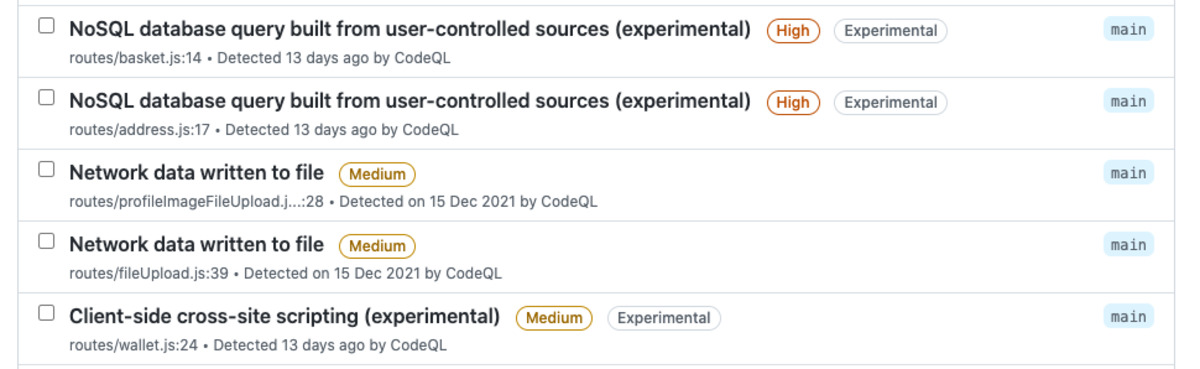
Screenshot of alerts with "experimental" label
ML-powered queries generate alerts that are marked with the “Experimental” label

Building a training set

We need to train ML models to recognize vulnerable code. While we have experimented some with unsupervised learning, unsurprisingly we found that supervised learning works better. But it comes at a cost! Asking code security experts to manually label millions of code snippets as safe or vulnerable is clearly untenable. So where do we get the data?

The manually written CodeQL queries already embody the expertise of the many security experts who wrote and refined them. We leverage these manual queries as ground-truth oracles, to label examples we then use to train our models. Each sink detected by such a query serves as a positive example in the training set. Since the vast majority of code snippets do not contain vulnerabilities, snippets not detected by the manual models can be regarded as negative examples. We make up for the inherent noise in this inferred labeling with volume. We extract tens of millions of snippets from over a hundred thousand public repositories, run the CodeQL queries on them, and label each as a positive or negative example for each query. This becomes the training set for a machine learning model that can classify code snippets as vulnerable or not.

Of course, we don’t want to train a model that will simply reproduce the manual modeling; we want to train a model that will predict new vulnerabilities that weren’t captured by manual modeling. In effect, we want the ML algorithm to improve on the current version of the manual query in much the same way that the current version improves on older, less-comprehensive versions. To see if we can do this, we actually construct all our training data from an older version of the query that detects fewer vulnerabilities. We then apply the trained model to new repositories it wasn’t trained on. We measure how well we recover the alerts detected by the latest manual query but missed by the older version of the query. This allows us to simulate the ability of a model trained with the current version of the query to recover alerts missed by this current manual model.

Features and modeling

Given a large training set of code snippets labeled as positive or negative examples for each query, we extract features for each snippet and train a deep learning model to classify new examples.

Rather than treating each code snippet simply as a string of words or characters and applying standard natural language processing (NLP) techniques naively to classify these strings, we leverage the power of CodeQL to access a wealth of information about the underlying source code. We use this information to produce a rich set of highly informative features for each code snippet.

One of the main advantages of deep learning models is their ability to combine information from a large set of features to create higher-level features and discover patterns that aren’t obvious to humans. In partnership with security and programming-language experts at GitHub, we use CodeQL to extract the information an expert might examine to inform a decision, such as the entire enclosing function body for a snippet that sits within a function, or the access path and API name. We don’t have to limit ourselves to features a human would find informative, however. We can include features whose usefulness is unknown, or features that can be useful in some instances but not all, such as the argument index for a code snippet that’s an argument to a function. Such features may contain patterns that aren’t apparent to humans, but that the neural network can detect. We therefore let the machine learning model decide whether or how to use all these features, and how to combine them to make the best decision for each snippet.

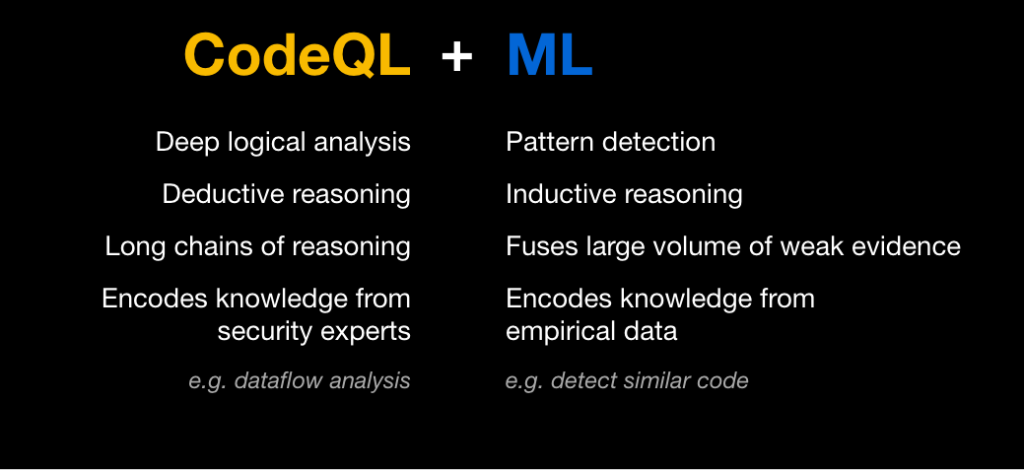
Slide with text: CodeQL: Deep logical analysis, Deductive reasoning Long chains of reasoning, Encodes knowledge from security experts ML: Pattern detection, Inductive reasoning, Fuses large volume of weak evidence, Encodes knowledge from empirical data.

Once we’ve extracted a rich set of potentially interesting features for each example, we tokenize and sub-tokenize them as is commonly done in NLP applications, with some modifications to capture characteristics specific to code syntax. We generate a vocabulary from the training data and feed lists of indices into the vocabulary into a fairly simple deep learning classifier, with a few layers of feature-by-feature processing followed by concatenation across features and a few layers of combined processing. The output is the probability that the current sample is a vulnerability for each query type.

Due to the scale of our offline data labeling, feature extraction, and training pipelines, we leverage cloud compute, including GPUs for model training. At inference time, however, no GPU is needed.

Inference on a repository

Once we have our trained machine learning model, we use it to classify new code snippets and detect likely vulnerabilities for each query. When ML-generated alerts are enabled by repository owners, CodeQL computes the source code features for the code snippets in that codebase and feeds them into the classifier model. The framework gets back the probability that a given code snippet represents a vulnerability, and uses this probability to surface likely new alerts.

Diagram showing how code snippets feed into CodeQL and the classifier model.

The full process runs on the same standard GitHub Action runners that are used by code scanning more generally, and it’s transparent to the user other than some increased runtime on large repositories. When the code scanning is complete, users can see the ML-generated alerts along with the alerts surfaced by the manual queries, with the “Experimental” label allowing them to filter ML-generated alerts in or out.

Does it work?

When evaluating ML-generated alerts, we consider only new alerts that were not flagged by the manual queries. True positives are the correct alerts that were missed by the manual queries; false positives are the incorrect new alerts generated by the ML model.

To measure metrics at scale, we use the experimental setup described above, in which the labels in the training set are determined using an older version of each manual query. We then test the model on repositories that were not included in the training set, and we measure its ability to recover the alerts detected by the current manual query but missed by the older one. Our metrics vary by query, but on average we measure a recall of approximately 80% with a precision of approximately 60%.

We’re currently extending ML-generated alerts to more JavaScript and Typescript security queries, as well as working to improve both their performance and their runtime. Our future plans include expansion to more programming languages, as well as generalizations that will allow us to capture even more vulnerabilities.

Run the “Experimental” queries if you want to uncover more potential security vulnerabilities in your codebase. The more the community engages with our alerts and provides feedback, the better we can make our algorithms, so please consider giving them a try!

Increasing developer happiness with GitHub code scanning

Post Syndicated from Sam Partington original https://github.blog/2021-09-07-increasing-developer-happiness-github-code-scanning/

You probably already know about using GitHub code scanning to secure your code. But how about using it to make your day-to-day coding easier? We’ve been making internal use of CodeQL, our code analysis engine for code scanning, to keep code quality high by protecting ourselves from those annoying coding mistakes that are easy to make but hard to spot! Read on for some examples of what we’ve done so far and how you can make the most of CodeQL for yourself.

Plugging a memory leak

Go’s defer statement defers the execution of a function until the surrounding function returns. This is useful for cleaning up: For example, closing resources like file handles or completing database transactions.

When changing existing code, you can end up moving a defer statement inside a loop. If you do so, you’ll still have to wait until the end of the function for cleanup; it won’t happen at the end of the iteration. We’ve seen this mistake lead to memory leaks in production.

Wouldn’t it be great if this mistake could be pointed out to you? We wanted to live in that happy world, and all it took was four lines of CodeQL.

A nice postscript to this story is that seeing this query led another team at GitHub to add CodeQL to their repository. They’d been bitten by a defer-in-loop memory leak before and didn’t want it to happen again. Once code scanning was set up for them, CodeQL discovered another problem in their codebase, which was similar to the one we’ll discuss next.

The error you can’t ignore

We use GORM, a Go Object Relational Mapper, in some of our codebases. Error handling in GORM is different than in idiomatic Go code, because it has a chainable API. Here’s an example:

if err := db.Where("name = ?", "jinzhu").First(&user).Error; err !=
nil {
 // error handling...
}

As you can imagine, it’s easy to write code like db.Where("name = ?", "jinzhu").First(&user) and not check that Error field.

At least it used to be easy to do that. We’ve now created a CodeQL query which detects GORM calls that don’t check the associated Error field and flags these calls in pull requests. You’ll also find a similar query for error checking functions which return pointers in the security-and-quality query suite for CodeQL.

Loopy performance problems

In addition to protecting against missing error checking, we also want to keep our database-querying code performant. “N+1 queries” are a common performance issue. This is where some expensive operation is performed once for every member of a set, so the code will get slower as the number of items increases. Database calls in a loop are often the culprit here; typically, you’ll get better performance from a batch query outside of the loop instead.

We created a custom CodeQL query, which looks for calls to any of the GORM methods that actually result in a query being performed. We filter that list of calls down to those that happen within a loop and fail CI if any are encountered. What’s nice about CodeQL is that we’re not limited to database calls directly within the body of a loop―calls within functions called directly or indirectly from the loop are caught too.

Using these queries

These queries are experimental, so we’ve not included them in our standard suites. However, you can use them by referencing a special query suite we’ve created.

First, create a file .github/codeql/go-developer-happiness.qls in the repository you would like to analyze:

- import: codeql-suites/go-developer-happiness.qls
  from: codeql-go

Next, set up a CodeQL workflow (or edit an existing one) and amend the “Initialize CodeQL” section of the template as follows:

- name: Initialize CodeQL
  uses: github/codeql-action/init@v1
  with:
    languages: go
    queries: ./.github/codeql/go-developer-happiness.qls

For more information and configuration examples, please refer to the documentation for running custom CodeQL queries in GitHub code scanning.

Making your own

Are there common “gotchas” in your codebase? Why not ease developer friction with some custom CodeQL queries of your own? You can learn more about writing CodeQL with our documentation and discussions―and also find out more about contributing queries back to the community―in the CodeQL repository at https://github.com/github/codeql. We look forward to seeing what you come up with!