Tag Archives: Internship Experience

Extract audio from your videos with Cloudflare Stream

Post Syndicated from Pakhi Sinha original https://blog.cloudflare.com/extract-audio-from-your-videos-with-cloudflare-stream/

Cloudflare Stream loves video. But we know not every workflow needs the full picture, and the popularity of podcasts highlights how compelling stand-alone audio can be. For developers, processing a video just to access audio is slow, costly, and complex. 

What makes video so expensive? A video file is a dense stack of high-resolution images, stitched together over time. As such, it is not just “one file” —  it’s a container of high-dimensional data such as frames per second, resolution, codecs. Analyzing video means traversing time resolution frame rate.

Why audio extraction

By comparison, an audio file is far simpler. If an audio file consists of only one channel, it is defined as a single waveform. The technical characteristics of this waveform are defined by the sample rate (the number of audio samples taken per second), and the bit depth (the precision of each sample).

With the rise of computationally intensive AI inference pipelines, many of our customers want to perform downstream workflows that require only analyzing the audio. For example:

  • Power AI and Machine Learning: In addition to translation and transcription, you can feed the audio into Voice-to-Text models for speech recognition or analysis, or AI-powered summaries.

  • Improve content moderation: Analyze the audio within your videos to ensure the content is safe and compliant.

Using video data in such cases is expensive and unnecessary. 

That’s why we’re introducing audio extraction. Through this feature, with just a single API call or click in the dashboard, you can now extract a lightweight M4A audio track from any video.

We’re introducing two flexible methods to extract audio from your videos. 

1. On-the-Fly audio extraction through Media Transformations

Media Transformations is perfect for processing and transforming short-form videos, like social media clips, that you store anywhere you’d like. It works by fetching your media directly from its source, optimizing it at our edge, and delivering it efficiently.

We extended this workflow to include audio. By simply adding mode=audio to the transformation URL, you can now extract audio on-the-fly from a video file stored anywhere.

Once Media Transformations is enabled for your domain, you can extract audio from any source video. You can even clip specific sections by specifying time and duration.

For example:

https://example.com/cdn-cgi/media/mode=audio,time=5s,duration=10s/<SOURCE-VIDEO>

The above request generates a 10 second M4A audio clip from the source video, beginning at the 5-second mark. You can learn more about setup and other options in the Media Transformations documentation

2. Audio downloads

You can now download the audio track directly for any content that you manage within Stream. Alongside the ability to generate a downloadable MP4 for offline viewing, you can also now create and store a persistent M4A audio file.

Workers AI demo

Here, you can see a sample piece of code that demonstrates how to use Media Transformations with one of Cloudflare’s own products —  Workers AI. The following code creates a two-step process: first transcribing the video’s audio to English, then translating it into Spanish.

export default {
 async fetch(request, env, ctx) {


   // 1. Use Media Transformations to fetch only the audio track
   const res = await fetch( "https://blog.cloudflare.com/cdn-cgi/media/mode=audio/https://pub-d9fcbc1abcd244c1821f38b99017347f.r2.dev/announcing-audio-mode.mp4" );
   const blob = await res.arrayBuffer();


   // 2. Transcribe the audio to text using Whisper
   const transcript_response = await env.AI.run(
     "@cf/openai/whisper-large-v3-turbo",
     {
       audio: base64Encode(blob), // A base64 encoded string is required by @cf/openai/whisper-large-v3-turbo
     }
   );


   // Check if transcription was successful and text exists
   if (!transcript_response.text) {
       return Response.json({ error: "Failed to transcribe audio." }, { status: 500 });
   }


   // 3. Translate the transcribed text using the M2M100 model
   const translation_response = await env.AI.run(
     '@cf/meta/m2m100-1.2b',
     {
       text: transcript_response.text,
       source_lang: 'en', // The source language (English)
       target_lang: 'es'  // The target language (Spanish)
     }
   );


   // 4. Return both the original transcription and the translation
    return Response.json({
        transcription: transcript_response.text,
        translation: translation_response.translated_text
    });


 }
};


export function base64Encode(buf) {
 let string = '';
 (new Uint8Array(buf)).forEach(
   (byte) => { string += String.fromCharCode(byte) }
 )
 return btoa(string)
}

After running, the worker returns a clean JSON response. Shown below is a snippet of the transcribed and then translated response the worker returned.

Transcription:

{
  "transcription": "I'm excited to announce that Media Transformations from Cloudflare has added audio-only mode. Now you can quickly extract and deliver just the audio from your short form video. And from there, you can transcribe it or summarize it on Worker's AI or run moderation or inference tasks easily.",
  "translation": "Estoy encantado de anunciar que Media Transformations de Cloudflare ha añadido el modo solo de audio. Ahora puede extraer y entregar rápidamente sólo el audio de su vídeo de forma corta. Y desde allí, puede transcribirlo o resumirlo en la IA de Worker o ejecutar tareas de moderación o inferencia fácilmente."
}

Technical details

As a summer intern on the Stream team, I worked on shipping this long-requested feature. My first step was to understand the complex architecture of Stream’s media pipelines.

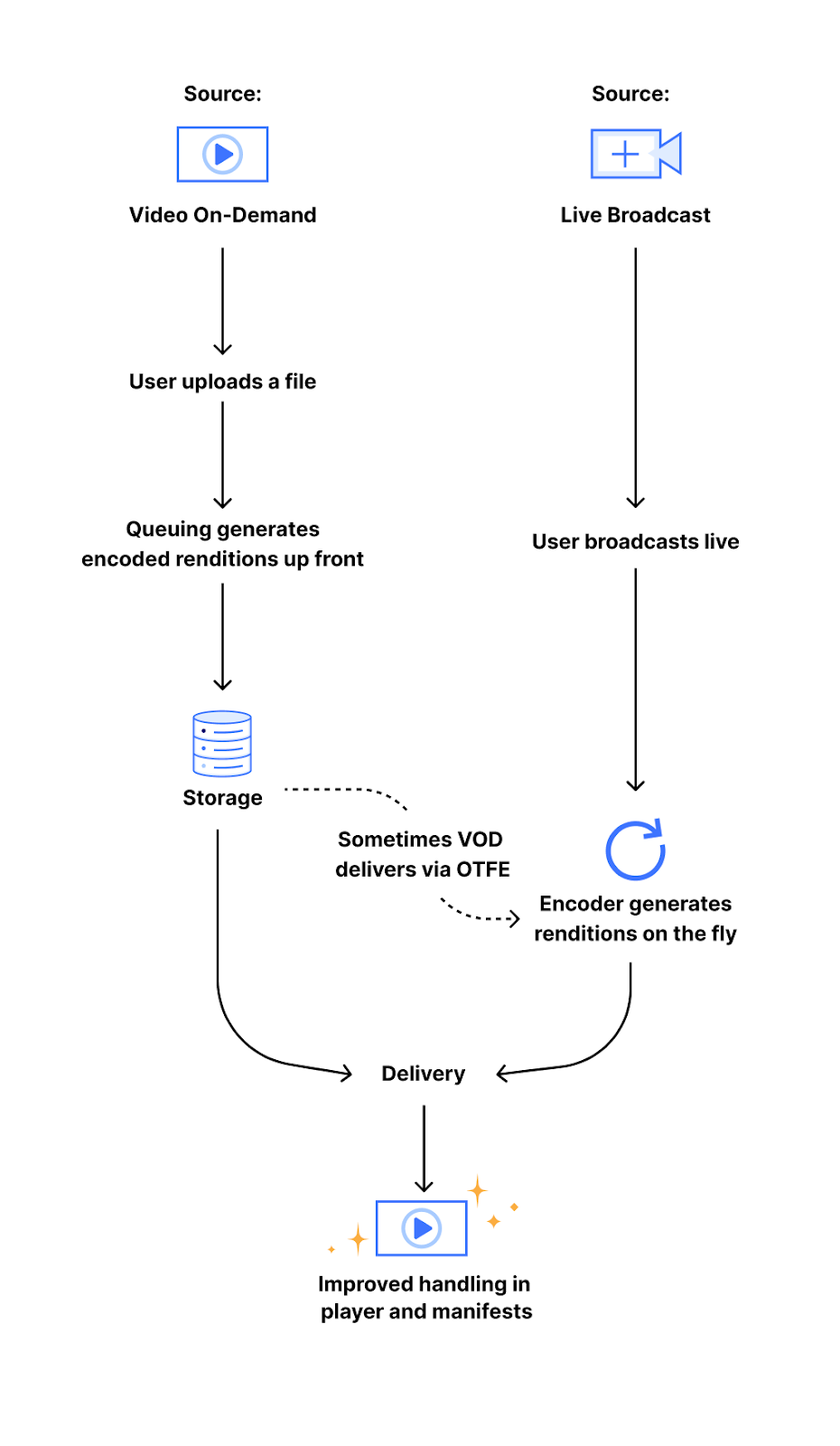
When a video is processed by Stream, it can follow one of two paths. The first is our video-on-demand (VOD) pipeline, which handles videos directly uploaded to Stream. It generates and stores a set of encoded video segments for adaptive bitrate streaming that can be streamed via HLS/DASH. The other path is our on-the-fly-encoding (or OTFE) pipeline, that drives the Stream Live and Media Transformations service. Instead of pre-processing and storing files, OTFE fetches media from a customer’s own website and performs transformations at the edge.

My project involved extending both of these pipelines to support audio extraction.

OTFE pipeline

The OTFE pipeline is designed for real-time operations. The existing flow was engineered for visual tasks. When a customer with Media Transformations enabled makes a request on their own website, it’s routed to our edge servers, which acts as the entry point. The request is then validated, and per the user’s request, OTFE would fetch the video and generate a resized version or a still-frame thumbnail.

In order to support audio-only extraction, I built upon our existing workflow to add a new mode. This involved:

  1. Extending the validation logic: Specifically for audio, a crucial validation step was to verify that the source video contained an audio track before attempting extraction. This was in addition to pre-existing validation steps that ensure the requested URL was correctly formatted. 

  2. Building a new transformation handler: This was the core of my project. I built a new handler within the OTFE platform that specifically discarded the visual tracks in order to deliver a high-quality M4A file.

VOD pipeline

Similar to my work on OTFE, this project involved extending our current MP4 downloads workflow to audio-only, M4A downloads. This presented a series of interesting technical decisions. 

The typical flow for creating a video download begins with a POST request to our main API layer, which handles authentication and validation, and creates a corresponding database record. Which then enqueues a job in our asynchronous queue where workers perform the processing task. To enable audio downloads for VOD, I introduced new, type-specific API endpoints (POST /downloads/{type}) while preserving the legacy POST /downloads route as an alias for creating downloads of the default, or video, download type. This ensured full backward compatibility.

The core work, of creating a download, is performed by our asynchronous queue. Which included:

  • Adding logic to the consumer to detect the new audio download type

  • Pulling the ffmpeg template we define in our API layer to properly encode the audio stream into a high-quality M4A container

By extending each component of this pipeline– from the API routes to the media processing commands– I was able to deliver a new, highly-requested feature that unlocks audio-centric workflows for our customers!

Dash screenshots

We’re excited to announce that this feature is also available in the Stream dashboard. Simply navigate to any of your videos, and you’ll find the option to download the video or just the audio.


Once the download is ready, you will see the URL for the file, along with the option to disable it.


That’s a wrap

This project addressed a long-standing customer need, providing a simpler way to work with audio from video. I’m truly grateful for this entire journey, from understanding the problem to shipping the solution, and especially for the mentorship and guidance I received from my team along the way. We are excited to see how developers use this new capability to build more efficient and exciting applications on Cloudflare Stream.

You can try the audio extraction feature by uploading a video to Stream or using the API! If you’re interested in tackling these kinds of technical challenges yourself, explore our internship and early talent programs to start your own journey.

Building a better testing experience for Workflows, our durable execution engine for multi-step applications

Post Syndicated from Olga Silva original https://blog.cloudflare.com/better-testing-for-workflows/

Cloudflare Workflows is our take on “Durable Execution.” They provide a serverless engine, powered by the Cloudflare Developer Platform, for building long-running, multi-step applications that persist through failures. When Workflows became generally available earlier this year, they allowed developers to orchestrate complex processes that would be difficult or impossible to manage with traditional stateless functions. Workflows handle state, retries, and long waits, allowing you to focus on your business logic.

However, complex orchestrations require robust testing to be reliable. To date, testing Workflows was a black-box process. Although you could test if a Workflow instance reached completion through an await to its status, there was no visibility into the intermediate steps. This made debugging really difficult. Did the payment processing step succeed? Did the confirmation email step receive the correct data? You couldn’t be sure without inspecting external systems or logs. 

Why was this necessary?

As developers ourselves, we understand the need to ensure reliable code, and we heard your feedback loud and clear: the developer experience for testing Workflows needed to be better.

The black box nature of testing was one part of the problem. Beyond that, though, the limited testing offered came at a high cost. If you added a workflow to your project, even if you weren’t testing the workflow directly, you were required to disable isolated storage because we couldn’t guarantee isolation between tests. Isolated storage is a vitest-pool-workers feature to guarantee that each test runs in a clean, predictable environment, free from the side effects of other tests. Being forced to have it disabled meant that state could leak between tests, leading to flaky, unpredictable, and hard-to-debug failures.

This created a difficult choice for developers building complex applications. If your project used Workers, Durable Objects, and R2 alongside Workflows, you had to either abandon isolated testing for your entire project or skip testing. This friction resulted in a poor testing experience, which in turn discouraged the adoption of Workflows. Solving this wasn’t just an improvement, it was a critical step in making Workflows part of any well-tested Cloudflare application.

Introducing isolated testing for Workflows

We’re introducing a new set of APIs that enable comprehensive, granular, and isolated testing for your Workflows, all running locally and offline with vitest-pool-workers, our testing framework that supports running tests in the Workers runtime workerd. This enables fast, reliable, and cheap test runs that don’t depend on a network connection.

They are available through the cloudflare:test module, with @cloudflare/vitest-pool-workers version 0.9.0 and above. The new test module provides two primary functions to introspect your Workflows:

  • introspectWorkflowInstance: useful for unit tests with known instance IDs

  • introspectWorkflow: useful for integration tests where IDs are typically generated dynamically.

Let’s walk through a practical example.

A practical example: testing a blog moderation workflow

Imagine a simple Workflow for moderating a blog. When a user submits a comment, the Workflow requests a review from workers-ai. Based on the violation score returned, it then waits for a moderator to approve or deny the comment. If approved, it calls a step.do to publish the comment via an external API.

Testing this without our new APIs would be impossible. You’d have no direct way to simulate the step’s outcomes and simulate the moderator’s approval. Now, you can mock everything.

Here’s the test code using introspectWorkflowInstance with a known instance ID:

import { env, introspectWorkflowInstance } from "cloudflare:test";

it("should mock a an ambiguous score, approve comment and complete", async () => {
   // CONFIG
   await using instance = await introspectWorkflowInstance(
       env.MODERATOR,
       "my-workflow-instance-id-123"
   );
   await instance.modify(async (m) => {
       await m.mockStepResult({ name: "AI content scan" }, { violationScore: 50 });
       await m.mockEvent({ 
           type: "moderation-approval", 
           payload: { action: "approved" },
       });
       await m.mockStepResult({ name: "publish comment" }, { status: "published" });
   });

   await env.MODERATOR.create({ id: "my-workflow-instance-id-123" });
   
   // ASSERTIONS
   expect(await instance.waitForStepResult({ name: "AI content scan" })).toEqual(
       { violationScore: 50 }
   );
   expect(
       await instance.waitForStepResult({ name: "publish comment" })
   ).toEqual({ status: "published" });

   await expect(instance.waitForStatus("complete")).resolves.not.toThrow();
});

This test mocks the outcomes of steps that require external API calls, such as the ‘AI content scan’, which calls Workers AI, and the ‘publish comment’ step, which calls an external blog API.

If the instance ID is not known, because you are either making a worker request that starts one/multiple Workflow instances with random generated ids, you can call introspectWorkflow(env.MY_WORKFLOW). Here’s the test code for that scenario, where only one Workflow instance is created:

it("workflow mock a non-violation score and be successful", async () => {
   // CONFIG
   await using introspector = await introspectWorkflow(env.MODERATOR);
   await introspector.modifyAll(async (m) => {
       await m.disableSleeps();
       await m.mockStepResult({ name: "AI content scan" }, { violationScore: 0 });
   });

   await SELF.fetch(`https://mock-worker.local/moderate`);

   const instances = introspector.get();
   expect(instances.length).toBe(1);

   // ASSERTIONS
   const instance = instances[0];
   expect(await instance.waitForStepResult({ name: "AI content scan"  })).toEqual({ violationScore: 0 });
   await expect(instance.waitForStatus("complete")).resolves.not.toThrow();
});

Notice how in both examples we’re calling the introspectors with await using – this is the Explicit Resource Management syntax from modern JavaScript. It is crucial here because when the introspector objects go out of scope at the end of the test, its disposal method is automatically called. This is how we ensure each test works with its own isolated storage.

The modify and modifyAll functions are the gateway to controlling instances. Inside its callback, you get access to a modifier object with methods to inject behavior such as mocking step outcomes, events and disabling sleeps.

You can find detailed documentation on the Workers Cloudflare Docs.

How we connected Vitest to the Workflows Engine

To understand the solution, you first need to understand the local architecture. When you run wrangler dev, your Workflows are powered by Miniflare, a simulator for testing Cloudflare Workers, and workerd. Each running workflow instance is backed by its own SQLite Durable Object, which we call the “Engine DO”. This Engine DO is responsible for executing steps, persisting state, and managing the instance’s lifecycle. It lives inside the local isolated Workers runtime.

Meanwhile, the Vitest test runner is a separate Node.js process living outside of workerd. This is why we have a Vitest custom pool that allows tests to run inside workerd called vitest-pool-workers. Vitest-pool-workers has a Runner Worker, which is a worker to run the tests with bindings to everything specified in the user wrangler.json file. This worker has access to the APIs under the “cloudflare:test” module. It communicates with Node.js through a special DO called Runner Object via WebSocket/RPC.

The first approach we considered was to use the test runner worker. In its current state, Runner worker has access to Workflow bindings from Workflows defined on the wrangler file. We considered also binding each Workflow’s Engine DO namespace to this runner worker. This would give vitest-pool-workers direct access to the Engine DOs where it would be possible to directly call Engine methods. 


While promising, this approach would have required undesirable changes to the core of Miniflare and vitest-pool-workers, making it too invasive for this single feature. 

Firstly, we would have needed to add a new unsafe field to Miniflare’s Durable Objects. Its sole purpose would be to specify the service name of our Engines, preventing Miniflare from applying its default user prefix which would otherwise prevent the Durable Objects from being found.

Secondly, vitest-pool-workers would have been forced to bind every Engine DO from the Workflows in the project to its runner, even those not being tested. This would introduce unwanted bindings into the test environment, requiring an additional cleanup to ensure they were not exposed to the user’s tests env.

The breakthrough

The solution is a combination of privileged local-only APIs and Remote Procedure Calls (RPC).

First, we added a set of unsafe functions to the local implementation of the Workflows binding, functions that are not available in the production environment. They act as a controlled access point, accessible from the test environment, allowing the test runner to get a stub to a specific Engine DO by providing its instance ID.

Once the test runner has this stub, it uses RPC to call specific, trusted methods on the Engine DO via a special RpcTarget called WorkflowInstanceModifier. Any class that extends RpcTarget has its objects replaced by a stub. Calling a method on this stub, in turn, makes an RPC back to the original object.


This simpler approach is far less invasive because it’s confined to the Workflows environment, which also ensures any future feature changes are safely isolated.

Introspecting Workflows with unknown IDs

When creating Workflows instances (either by create() or createBatch()) developers can provide a specific ID or have it automatically generated for them. This ID identifies the Workflow instance and is then used to create the associated Engine DO ID.

The logical starting point for implementation was introspectWorkflowInstance(binding, instanceID), as the instance ID is known in advance. This allows us to generate the Engine DO ID required to identify the engine associated with that Workflow instance.

But often, one part of your application (like an HTTP endpoint) will create a Workflow instance with a randomly generated ID. How can we introspect an instance when we don’t know its ID until after it’s created?

The answer was to use a powerful feature of JavaScript: Proxy objects.

When you use introspectWorkflow(binding), we wrap the Workflow binding in a Proxy. This proxy non-destructively intercepts all calls to the binding, specifically looking for .create() and .createBatch(). When your test triggers a workflow creation, the proxy inspects the call. It captures the instance ID — either one you provided or the random one generated — and immediately sets up the introspection on that ID, applying all the modifications you defined in the modifyAll call. The original creation call then proceeds as normal.

env[workflow] = new Proxy(env[workflow], {
  get(target, prop) {
    if (prop === "create") {
      return new Proxy(target.create, {
        async apply(_fn, _this, [opts = {}]) {

          // 1. Ensure an ID exists 
          const optsWithId = "id" in opts ? opts : { id: crypto.randomUUID(), ...opts };

          // 2. Apply test modifications before creation
          await introspectAndModifyInstance(optsWithId.id);

          // 3. Call the original 'create' method 
          return target.create(optsWithId);
        },
      });
    }

    // Same logic for createBatch()
  }
}

When the await using block from introspectWorkflow() finishes, or the dispose() method is called at the end of the test, the introspector is disposed of, and the proxy is removed, leaving the binding in its original state. It’s a low-impact approach that prioritizes developer experience and long-term maintainability.

Get started with testing Workflows

Ready to add tests to your Workflows? Here’s how to get started:

  1. Update your dependencies: Make sure you are using @cloudflare/vitest-pool-workers version 0.9.0 or newer. Run the following command in your project: npm install @cloudflare/vitest-pool-workers@latest

  2. Configure your test environment: If you’re new to testing on Workers, follow our guide to write your first test.

Start writing tests: Import introspectWorkflowInstance or introspectWorkflow from cloudflare:test in your test files and use the patterns shown in this post to mock, control, and assert on your Workflow’s behavior. Also check out the official API reference.

Help build the future: announcing Cloudflare’s goal to hire 1,111 interns in 2026

Post Syndicated from Kelly Russell original https://blog.cloudflare.com/cloudflare-1111-intern-program/

At Cloudflare, our mission is to help build a better Internet. That mission is ambitious, long-term, and requires constant innovation. But building for the future isn’t just about the technology we create — it’s also about investing in the people who will create it. That’s why today, we are incredibly excited to announce our most ambitious intern program yet: Cloudflare aims to hire as many as 1,111 interns over the course of 2026. This effort to grow our number of interns next year will happen in hub locations around the world. 

Why is Cloudflare doing this? 

We view internships as a vital pipeline for talent and a source of new energy and ideas. The number of our intern goal, a nod to our 1.1.1.1 public DNS resolver, is intentional. It represents our deep technical roots and our focus on building foundational infrastructure for the Internet. Now, we stand at the cusp of a new technological revolution: the age of AI.

To win in this new era, we can’t just rely on established methods. We need new ways of thinking, unconstrained by the “way things have always been done.” That’s why this significantly increased class of interns will have a special focus: to ramp up the creative and widespread application of AI with a fresh approach.

We want this group to challenge our assumptions. They will be tasked with looking at our customers’ needs, our products and features, our network, and our operations to find novel ways to utilize AI. How can AI make our network even smarter? How can it help our customers be more secure and efficient? How can it transform our own business processes? We believe that by empowering a large, diverse cohort of bright minds who have grown up as digital and now AI natives, we will unlock innovations we haven’t even imagined yet.

This is the exact right time to expand our intern program 

Like you, we have seen numerous reports that more and more firms are capping their total headcount in favor of leaning on more AI tools, leading to downsizing their intern and new-graduate hiring. This is resulting in increased sidelining of new college graduates. But we think this misreads the moment completely, so we’re heading in the opposite direction. 

While we are excited about what AI tools can help do, we have a different philosophy about their role. AI tools make great team members even better, and allow firms to set more ambitious goals. They are not replacements for new hires — but ways to multiply how new hires can contribute to a team.

The next phase of Cloudflare’s success will be driven by considerable change in almost everything we do. And although we have an amazing team, we are humble enough to realize that we don’t possess everything we need to envision and implement that radical change. We need the innovation and fresh approach of a talented new generation of leaders. And we can’t press “pause” on bringing aboard that talent. 

This isn’t the first time we’ve made a counter-cultural commitment to interns. Back in the 2020, as the world faced unprecedented uncertainty, many companies made the difficult decision to scale back or cancel their internship programs. We went in the opposite direction. Believing that investing in talent was more critical than ever, we doubled the size of our intern class. We knew that these students represented the future, and abandoning them was not an option. That decision reinforced our culture of long-term thinking and our responsibility to foster emerging talent, especially during the toughest of times. And we’ve benefitted from it — some of our most promising young employees emerged from this batch.

Interns ship at Cloudflare

Interns at Cloudflare do real, meaningful work — they ship. They join active teams, and are expected to contribute to the problems that we solve everyday. Our interns don’t merely get a feel for the place and fetch coffee. This isn’t a “test drive.” We want every member of our intern program to take ownership of and conclude their time being able to point to a concrete deliverable that solved a real customer or internal problem at Cloudflare. 

From day one, interns are embedded in teams across the company — from engineering and product to marketing, legal, and finance. They work alongside seasoned experts on critical projects, contributing code that ships to millions, launching marketing campaigns, and helping to shape the policies that govern the Internet. Our goal is not just to provide an internship experience; it’s to provide the foundation for a career. We are committed to training the people who will one day lead our company, our industry, and the future of the Internet.

The challenges we address will vary by intern and by team. You can review examples of intern projects from last year in this post here and real, dedicated, announcements from interns who launched new technologies here and here. Some of our interns operate as if they were just one more engineer or staff member on an existing team, helping contribute to its mission. Others are tasked with more exploratory projects where we ask them to go research and prototype new ideas.

Aside from impactful project work, our internship program offers a deep dive into our culture, while providing interns with practical experience and leadership skills. They’ll build a valuable professional network, from engaging in social events and coffee chats to gaining direct access to executives through exclusive Q&A sessions. Every intern is paired with a dedicated mentor, and they’ll get the chance to present their final work to the entire company. By the end of the program, interns will not only have enhanced their skills but also built lasting relationships to benefit their future careers.

What do we look for in an intern?

We are looking for talented, curious, empathetic, and hard working team members who are inspired by our mission to help build a better Internet. Come with the attitude to learn, and we will handle the rest. We do not expect interns to be immediate experts in the fields they are joining. The Internet is full of enough jokes about companies posting a job for an internship and asking for ten years of work experience.

We do try to match opportunities with the applicant’s study areas and relevant skills. We want to equip our interns for success and prefer, for example, finding software engineering opportunities for computer science students or accounting opportunities for finance majors. Each internship role posted will specify any specific preferences we have for areas of study. We recognize that many students have robust portfolios, GitHub projects, or open-source contributions. We’ll optimize our matching process to connect you with a relevant team where you can immediately apply your skills and elevate your work.

Thousands of candidates apply for our internships each year. We expect this expansion to increase that level of interest significantly. To help identify the kinds of builders we want to recruit, we are going to fast track engineering and other candidates who complete an assignment to build a type of AI-powered application on Cloudflare (more details on that below).


How does the internship program work?

Working in Hub Offices

As part of this program, we will only be hiring interns who can be present multiple days each week in one of our hub offices (generally 3-4 days depending on the team). Cloudflare has adopted a hybrid approach to work centered in “hub” locations around the world. The various hybrid approaches adopted by different teams are based on experimentation and their unique functions. For interns, we think it is important for new and early career team members here for a brief tenure to connect with each other as well as more senior leaders in our organization. We believe that mentorship and coaching is best done in person. 

We expect to post internship opportunities in the following Cloudflare office locations:

  • Austin, USA

  • New York City, USA

  • San Francisco, USA

  • Bengaluru, India

  • Lisbon, Portugal

  • London, UK

Year Round

Our internships generally last for 12 weeks. While we plan to prioritize summer internships, we expect to hire significant numbers of interns in the spring and fall of 2026 as well.

Summer internships give students an opportunity to get experience without interrupting a school semester. The seasonal approach also makes it possible for us to create cohorts of interns who support each other on projects. That said, we know that education has changed a bit since we were in school. An increasing number of universities have developed programs for students to work with companies as part of a normal school semester, and others are more flexible in their approach to letting students choose to reduce hours or take a semester away from classwork to support an internship. 

Real pay for real work

We pay our interns. This means a competitive rate that is generally akin to the prorated salary of an entry-level position. And if you have to relocate temporarily to a city where we have an office, we will give you a stipend to support your travel and housing needs. Since we expect interns at Cloudflare to contribute immediately to real problem solving, it’s only fair to pay them accordingly. 

And we believe it’s incredibly important to pay interns. Many long-term employment opportunities arise through internship programs, so it’s unfair to limit those programs to those who can afford to relocate and work full time for little or no pay. 

How to apply

  1. Keep an eye on our career site, and specifically our internship opportunities listed here. We will start posting more internship opportunities for 2026 starting on October 15th. 

  2. The intern opportunities page will link to our internship application portal that will streamline the application process. We plan to review applications in batches until all positions are filled. Our interview process will take 3-4 weeks.

  3. Want a leg up? For the Software Engineering internship, we plan to fast track review of candidates who complete an assignment to build a type of AI-powered application on Cloudflare. Submit directly with your application.

We look forward to hearing from you.

Summer 2024 weather report: Cloudflare with a chance of Intern-ets

Post Syndicated from Aaron Snell original https://blog.cloudflare.com/2024-interns


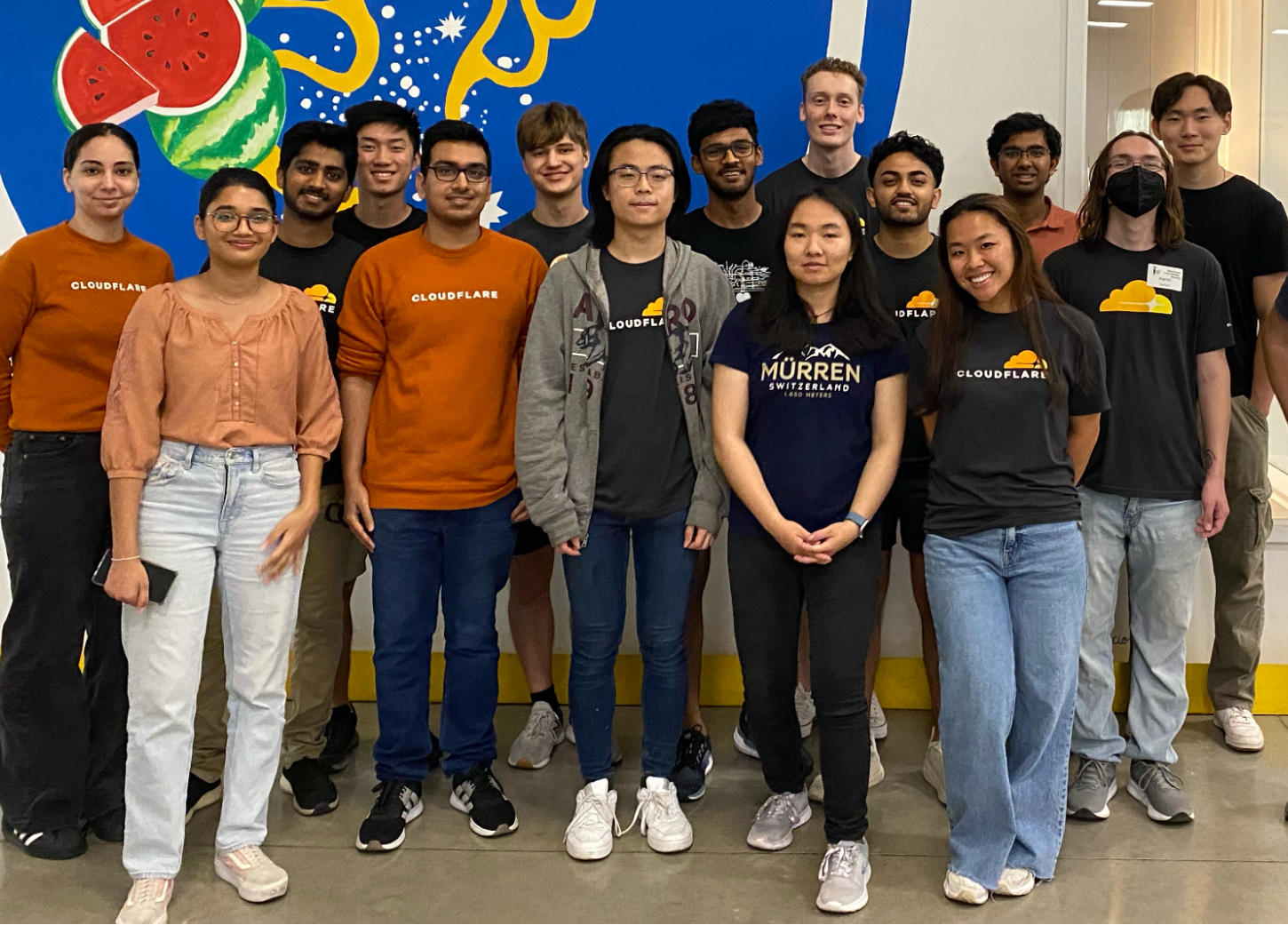
During the summer of 2024, Cloudflare welcomed approximately 60 Intern-ets from all around the globe on a mission to #HelpBuildABetterInternet. Over the course of their internships, our wonderful interns tackled real-world challenges from different teams all over the company and contributed to cutting-edge projects. As returning interns, we – Shaheen, Aaron, and Jada – would like to show off the great work our cohort has done and experiences we’ve had throughout our time here.

Austin Interns after volunteering at the Central Texas Food Bank.

Putting the SHIP in internSHIP

Cloudflare interns take pride in driving high-impact initiatives, playing a vital role in advancing Cloudflare’s mission. With our diverse roles and projects this summer, we’d love to highlight some of the exciting work we’ve been involved in:

Rahul, a Software Engineer intern, built a system to autograde intern application assignments for future students looking to join Cloudflare. It was built entirely on the Cloudflare Developer Platform, using Cloudflare Access, Browser Rendering, D1, Durable Objects, R2, and Workers!

Jessica, a Software Engineer intern, created a new threads api for the Workers AI team that automatically recalls past messages when running inference, helping developers to generate chat sessions when building personalized chatbots.

Anshika, an Internal Audit intern, worked on SOX & ISO testing for the first quarter of 2024, a data center audit, and is helping to roll out the automation of SOC 2 testing.

Jake, a Business Development Relations intern, led the creation and launch of an outbound BDR campaign that generated new pipeline for Cloudflare involving tailored messaging, account criteria, and enablement materials.

Utkarsh, a Software Engineer intern, built an internal tool for the Capacity Planning team to simulate unforeseen scenarios and changes within the Cloudflare network infrastructure, to help them provision new servers more efficiently.

Shaheen, a Product Management intern, and Anantharaman, a Software Engineer Intern, collaboratively enhanced Cloudflare D1 with improvements in billing observability, the dashboard, and Wrangler commands while also launching billing alerts and audit logs.

Jada, a Software Engineer intern, developed a Policy Tester feature for the Zero Trust Access Policies page to enable Cloudflare customers to view policy update statistics, using Cloudflare Durable Objects for the RESTful API.

Dhravya, a Software Engineer intern, helped launch function calling in Workers AI, a feature that enables LLMs to dynamically perform actions or retrieve data.

Prajjwal, a Research intern, focused on personalizing the WAF attack score and enhancing the overall user experience while experimenting with zero-shot learning techniques to detect new and evolving attacks.

Megan, a Security Analytics intern, ensured a smooth transition to an in-house security access tool by managing internal user access, aligning group rules, and addressing missing or duplicated groups/users during system migrations.

Intern events

In-person

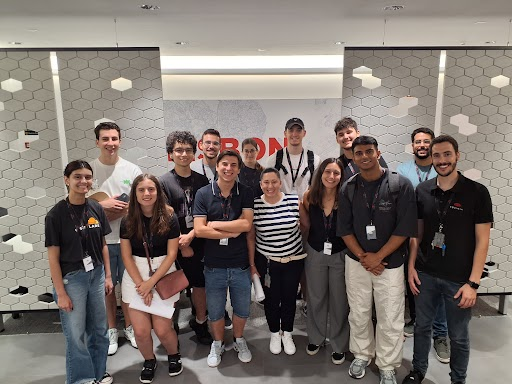
For the first time since the pandemic, Cloudflare had over half of our interns in-person in our Austin, Lisbon and London offices. As the saying goes, everything is bigger in Texas and our new Austin office intern class shows it, with over 20 interns working in-person throughout the summer! Some of our favorite events were…

Intern ping-pong tournament
After weeks of ping-pong classes, our interns got to put their skills to the test with a ping-pong tournament! The competition was fierce, with paddles flying and cheers echoing throughout the office as everyone battled for the title of Ping-Pong Champion. In the end, Josh, a PM intern on Workers, stole the show and was crowned as the 2024 Ping-Pong Champion.

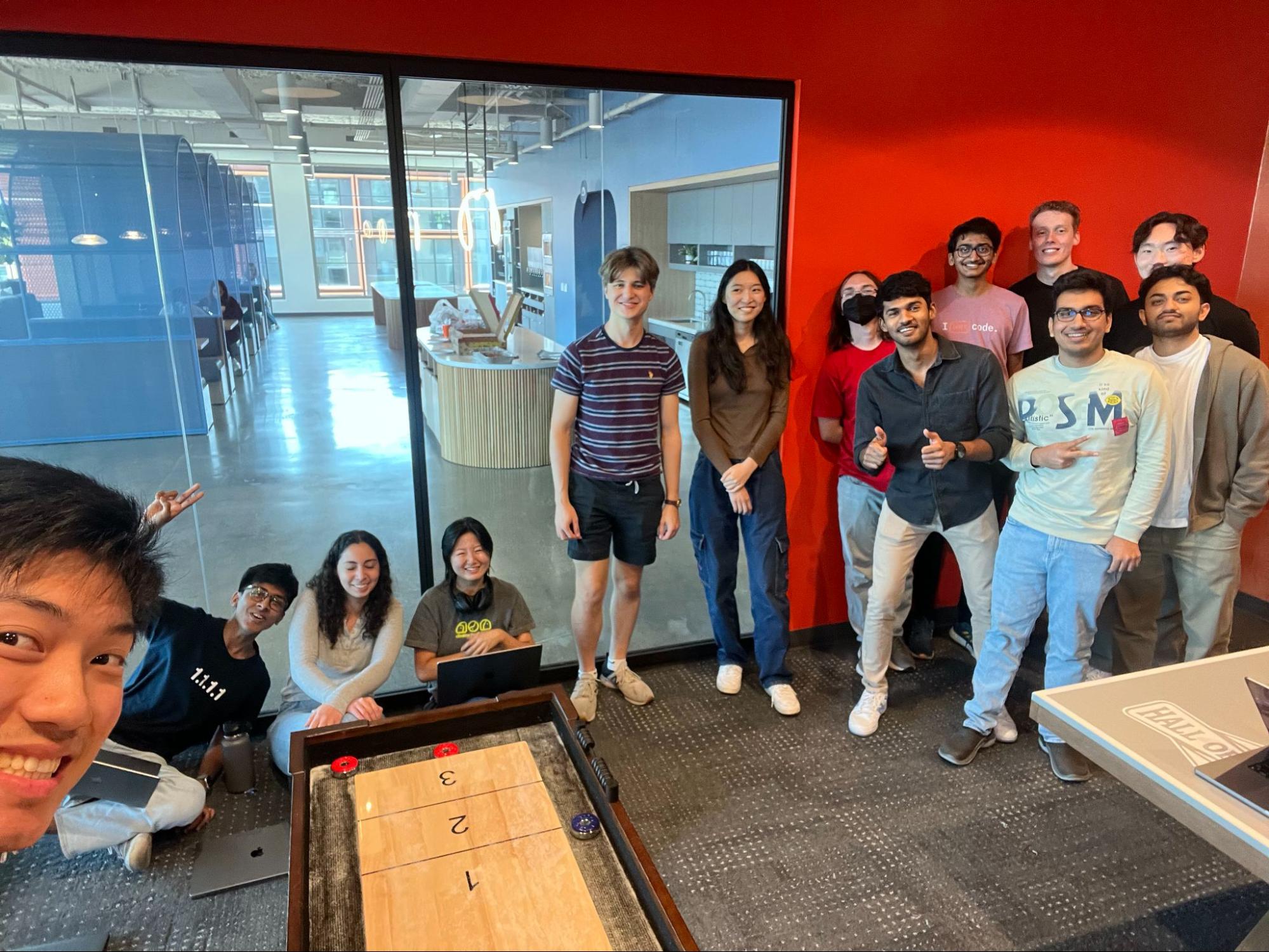
Interns in the Austin office participating in the Ping-Pong tournament.

Food Bank Volunteering
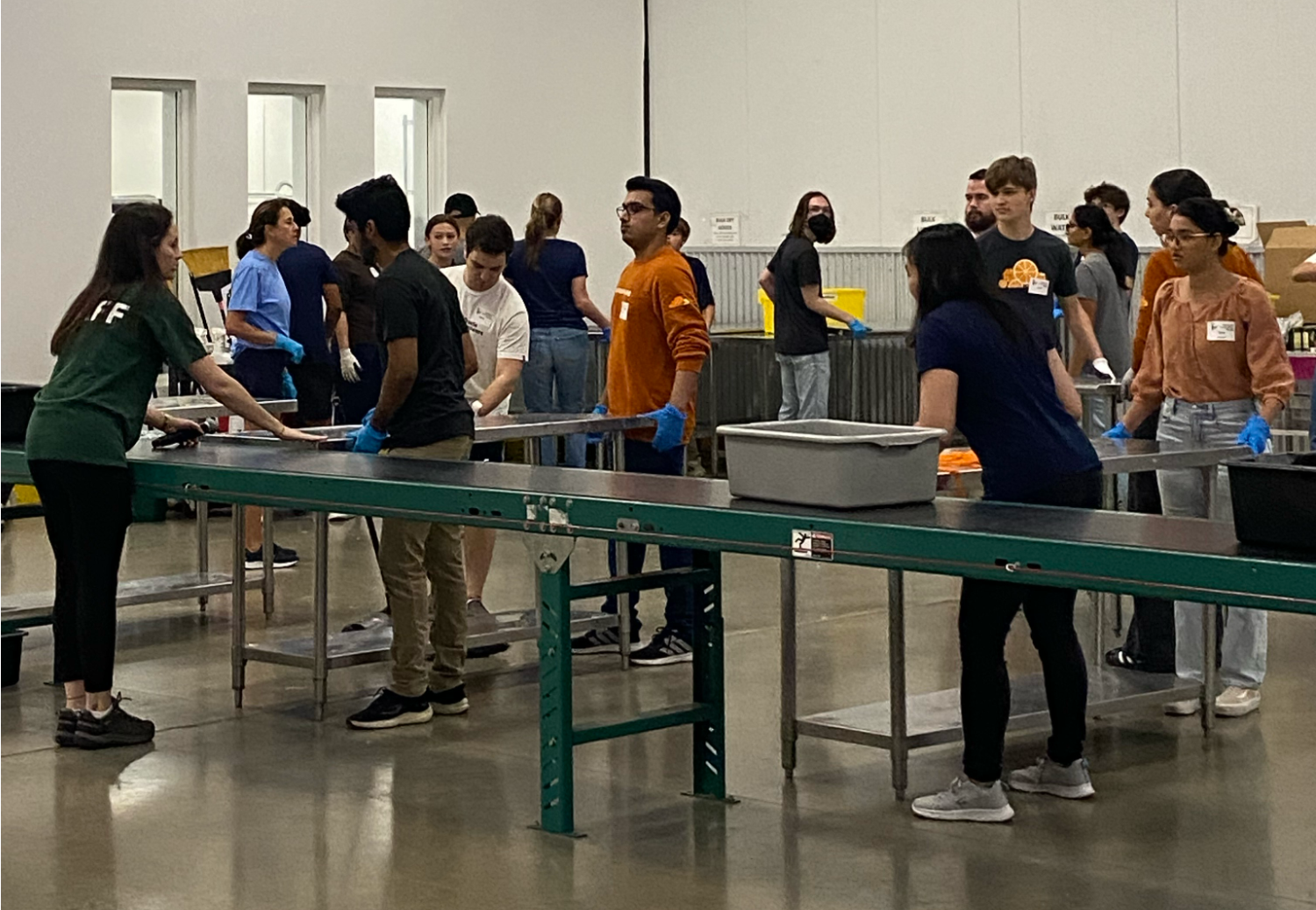
The Austin interns got the opportunity to give back to the community this summer at the Central Texas Food Bank. With the help of our full-timers the team got to work instantly, from packing food boxes to helping organize donations. Thanks to all the hard work, the team was able to feed a total of 9,000 people!

Austin Interns volunteering at the Central Texas Food Bank.

Austin Game Show
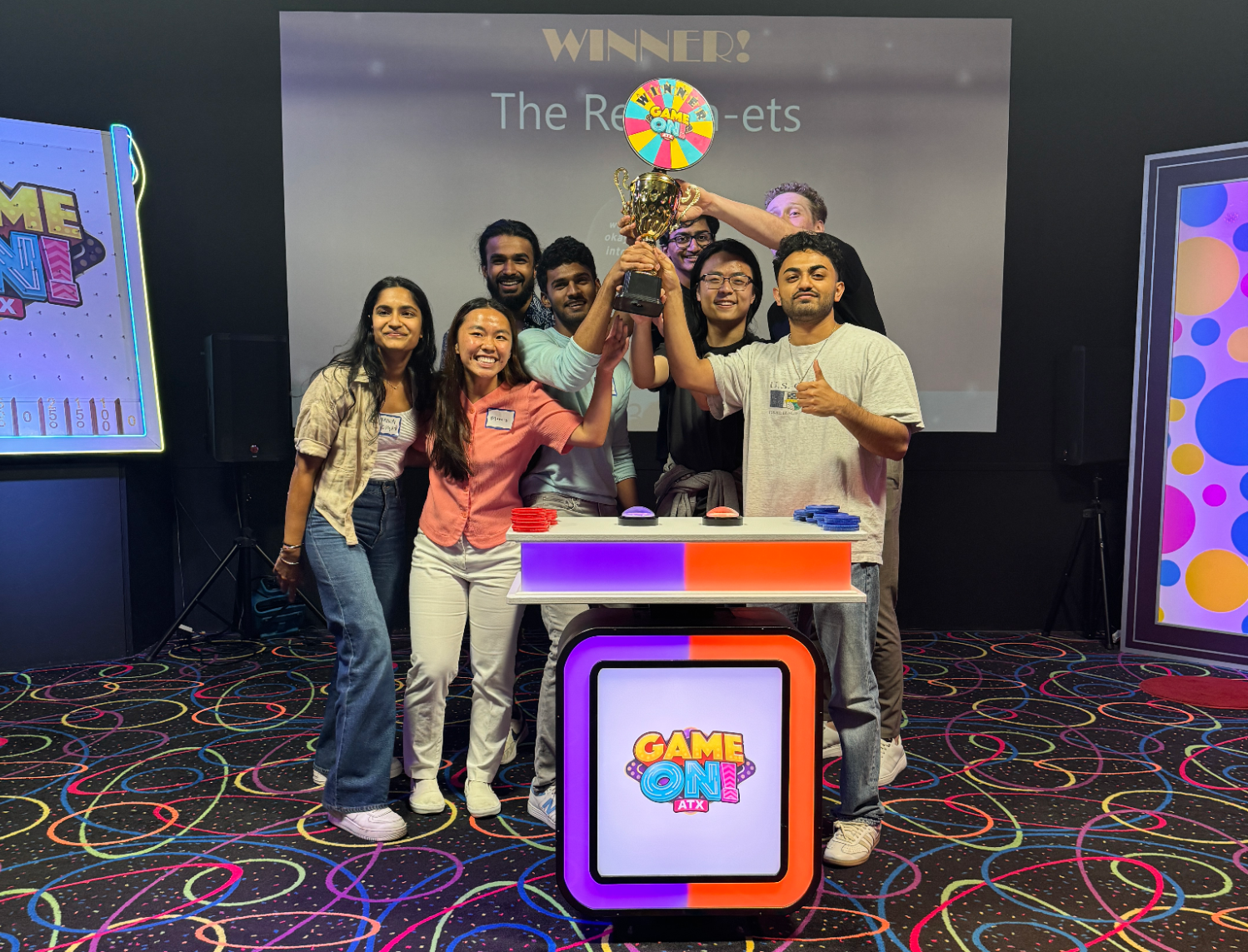
The Austin interns had the exciting opportunity to participate in an exciting game show with their wonderful recruiters. This competitive showdown saw the “Winter-nets” face off against the “Return-ets” in a series of fun and challenging activities, including Family Feud and Wheel of Fortune. In the end, the Return-ets took the victory, with perhaps one too many pictures to prove it. Events like this are among the best, fostering bonding and friendly competition that bring everyone closer together.

“Return-ets” posing with the trophy they won.

Our Lisbon office also had 10 interns join Cloudflare and spend time doing some awesome things, including…

Visiting the Lisbon Data Center
One of the most impressive parts of Cloudflare is its infrastructure, which spans hundreds of data centers worldwide. This summer, our interns were able to get up close and personal with our Lisbon data center where they ventured through Cloudflare’s state-of-the-art server rooms. They witnessed the security measures that are in place to ensure the safety of our data and the support systems that ensure that the facility is able to run nonstop.

Interns and Cloudflarians taking a photo in the Lisbon data center.

Remote

Our remote interns got to take on some virtual adventures throughout the summer,

building friendships and memories from all around the globe! Some of the highlights were…

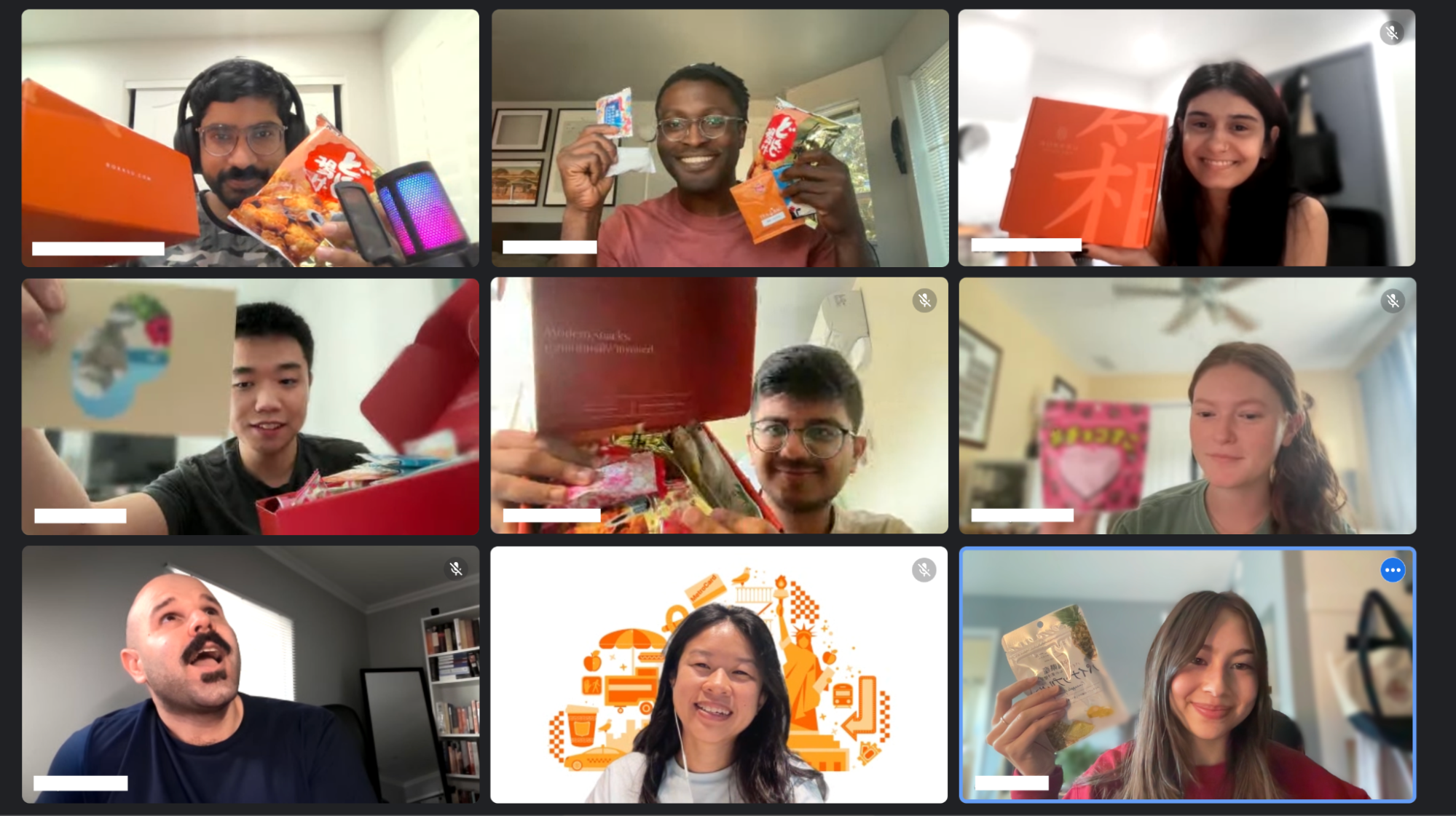
Snack time

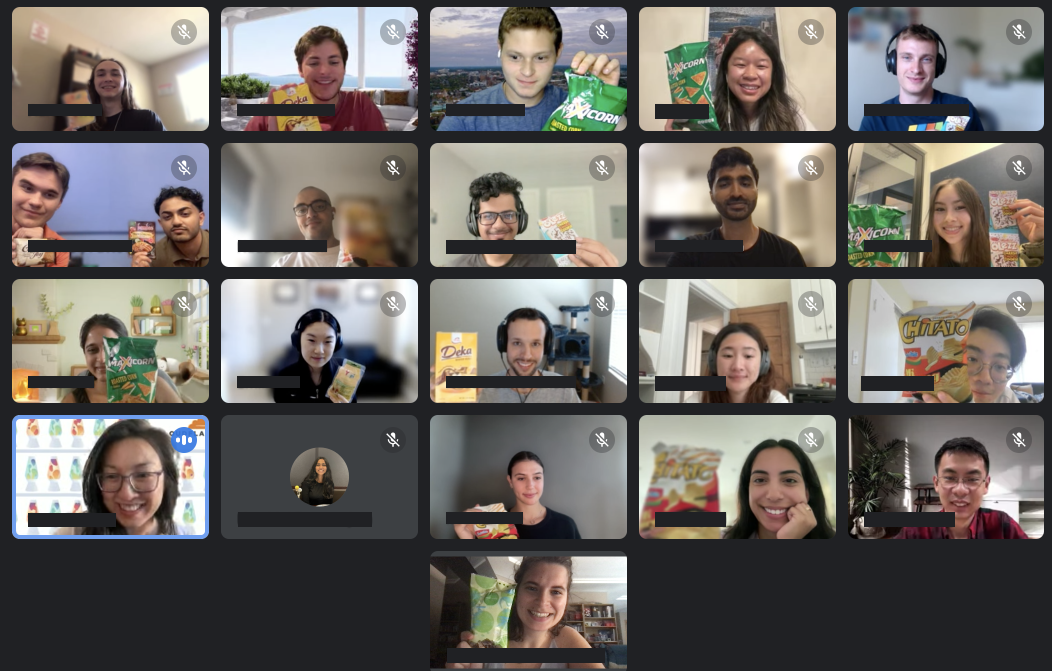
Interns all over the globe were shipped a box filled with an assortment of Japanese snacks and got to spend time together snacking on unique and new foods. This event not only satisfied our snack cravings but also strengthened our global connections with a fun, shared experience.

Remote interns showing their favorite snacks from the snack boxes we received.
Mingling meetups

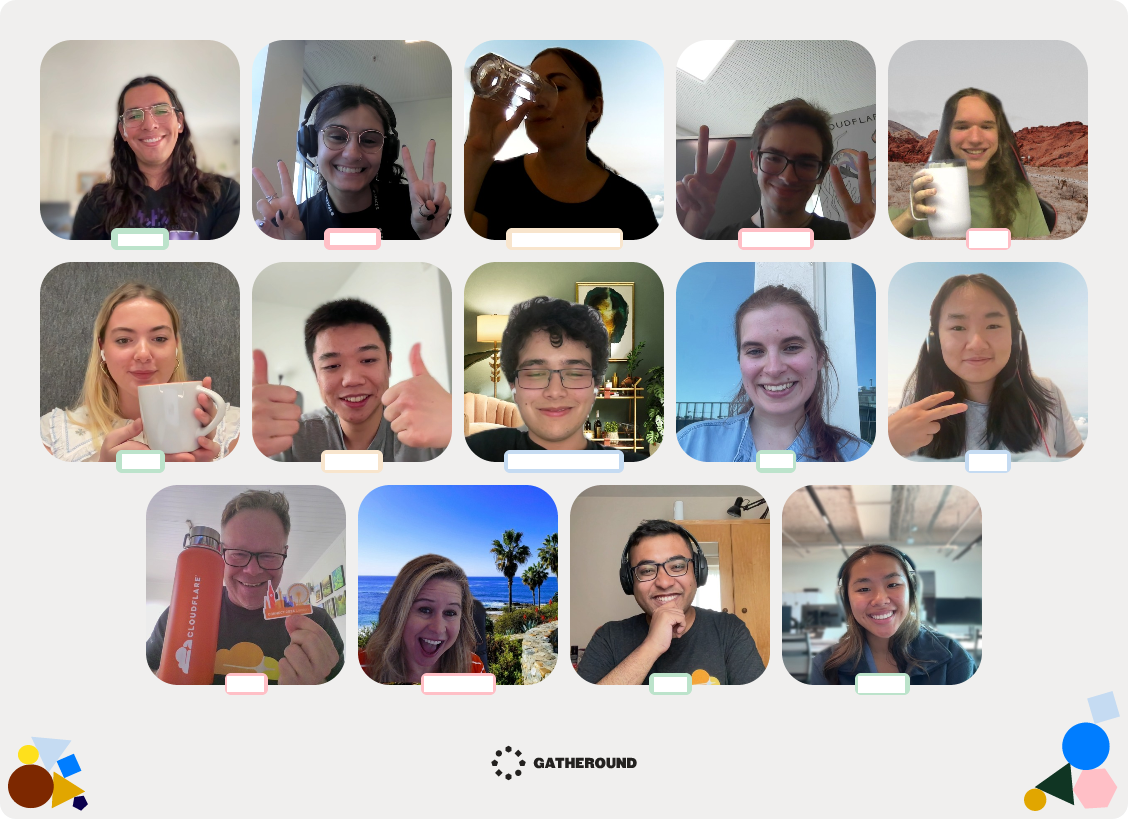
Throughout the summer, interns got the chance to mingle with one another as well as the rest of the company. For a break from project work and a time to socialize, interns looked forward to Virtual Intern Game Days and Gatheround meetups. These designated online hangout blocks made for a more fun and inclusive experience for the remote interns. Along with that, remote interns near Cloudflare offices were welcome to join in-person events throughout the summer: from team lunches to arts & crafts and social mixers, visiting the office is always worth the trip!

Group photo of a Gatherround session with the interns and Cloudfriends.

Executive chats

Executive chats have been a key part of ensuring our interns get to truly know our top leaders and ask them questions 1-on-1. This summer was no exception, with interns hosting over eight executive chats filled with inspiring stories, valuable knowledge, and meaningful connections. Here’s what our interns had to say about it…

Alex enjoyed talking with Matthew Prince, Chief Executive Officer: “It was so heartfelt and emotional. I had heard the story of Lee Holloway before, but hearing it from Matthew himself was really impactful.”

Chantal loved the talk with Michele Yetman, Chief People Officer: “I enjoyed hearing about her job history and how she carefully adapted skill sets from her previous jobs to craft her career. Also, she was curious to hear our perspective and answered our questions in honest detail.”

Anantharaman liked the talk with Dane Knecht, SVP of Emerging Technology and Innovation: “Learning about the growth of ETI, the Austin office and the mission to move fast and break things within ETI to nurture a startup-y culture was very interesting.”

Matilde valued the talk with Nitin Rao, Interim Chief Product Officer: “I didn’t know much about him beforehand, but I found it fascinating to learn about his role at the company and the great impact of his contributions to Cloudflare’s current infrastructure.”

Company-wide intern presentations

Each summer, Cloudflare Intern-ets have the opportunity to showcase their work during the annual Intern Presentations series. Hundreds of Cloudflarians join in to support and celebrate the interns including Matthew Prince and Michelle Zatlyn. As Jake, a BDR Operations Intern, puts it, “The opportunity to present in front of the founders and the rest of the company speaks volumes about how much Cloudflare values its interns’ projects.”

Cloudfriends

Cloudfriends is a program specifically for interns to socialize with people throughout Cloudflare. Cloudflare employees from various departments signed up, and we were able to schedule meetings with all of them. These meetings let us get to know more people, share experiences, and keep in touch (even after our internships have ended). On a similar note, Cloudflare has a program for Random Employee Chats that interns can also take part in. These chats randomly pair you with another Cloudflare employee once a week and allow you to do even more socializing.

Unforgettable memories

Throughout our time here at Cloudflare, we formed numerous unforgettable memories that truly made our internship experience one of a kind.

The people

Cloudflare is filled with the most driven, passionate, and all around amazing people, so it’s no wonder that we all had a spectacular time interacting with everyone!

Ananya took networking to the next level by engaging with 49 people throughout her internship, forging valuable connections across the company. Meanwhile, Yomna wasted no time setting up 25 1:1s by the end of her second week, meeting a bunch of awesome people along the way.

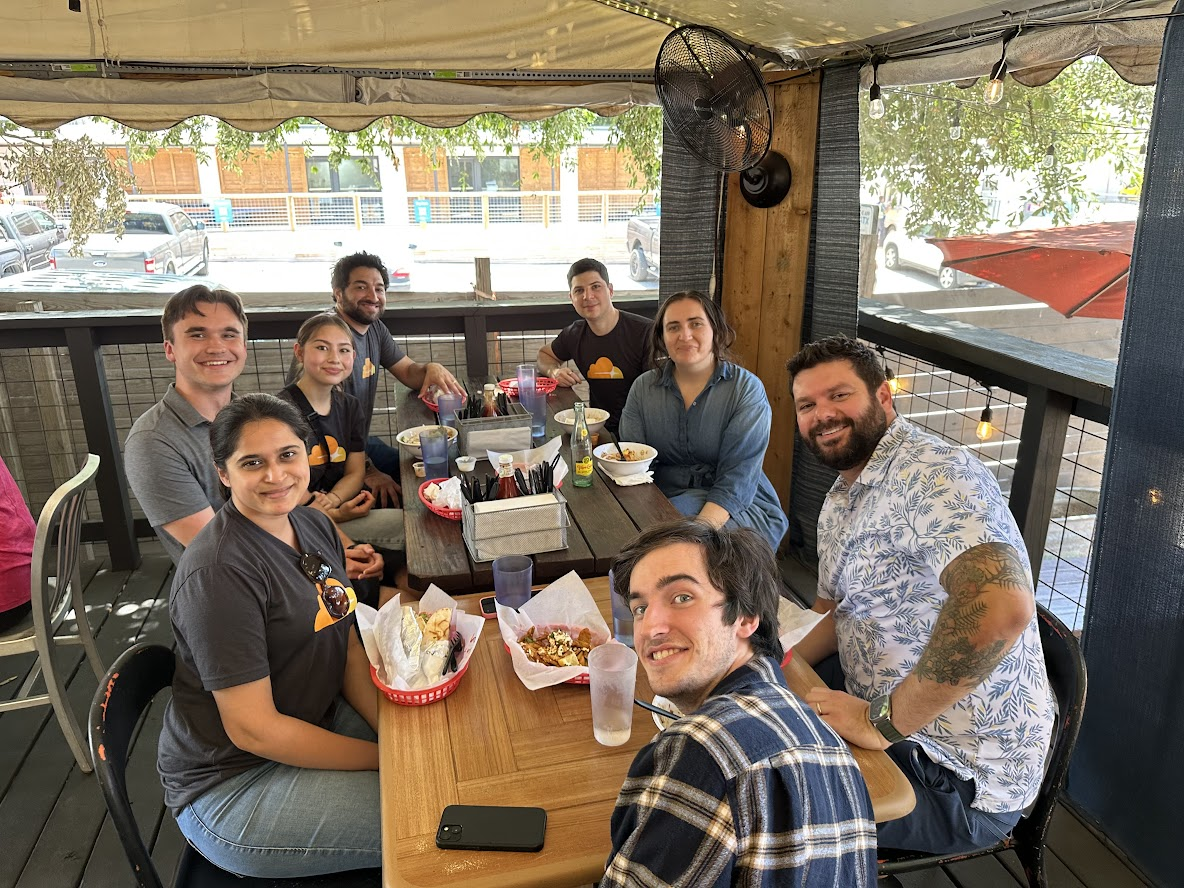
Alex, Shaheen, Jack, Jake, Jaden, and Josh hit up a local Austin restaurant and spent SIX hours bonding over laughs, talks, and good vibes. From strangers to friends, this was a moment that will last well beyond their internships.

Carol and Jessica enjoyed their teams’ on-site events in the Austin office. They were able to meet all of their team members face-to-face and work and have fun together. The numerous on-site events that took place over the summer let the Austin Intern-ets connect with people from all over the company, including other Intern-ets that were remote or working out of another office.

Dhanush and Utkarsh gathered the interns to enjoy the Olympics in the Austin office. They all sat in the same area, talked with each other, and while watching the intense competition.

The activities

Aaron, Carol, and Tara enjoyed all the game nights the R2 team hosted. They played a variety of board and card games from For Sale to Brass: Birmingham that everyone enjoyed, and they even did some late-night karaoke. Anshika also enjoyed the games that the Internal Audit team played before their all-hands meetings, such as skribbl.io. These events let everyone on the team be more connected and overall just have fun.

The Austin interns filled their time with loads of different activities. From a dinner with Matthew, to visiting Barton Springs, to hosting a 4th of July barbecue party on top of a high-rise and overlooking Austin’s skyline, they certainly didn’t miss an opportunity to get out and have fun.

Meanwhile, in Europe, the London interns enjoyed their lunches on the beach. They were able to talk, swim, and get to know each other. The Lisbon office also hosted a bunch of team lunches that allowed everyone to work together and enjoy the sun.

Summer shenanigans

Dhravya’s caffeine fix: Dhravya drank around 250 cups of coffee over the course of his 12-week internship.

Matilde the bus marathoner: Every week, Matilde traveled 740 km from Braga to the Lisbon office by bus. By the end of her internship, she had accumulated 108 hours and 8880 km.

Anantharaman’s epic commute: Anantharaman chose to turn his daily commute into a marathon, walking over 100 miles during his 14-week internship.

Jack the Linux legend: Jack was the second most active Linux-based developer for dash.cloudflare.com.

Josh the Ping-Pong prodigy: Josh started his internship as a ping-pong newbie but after daily break-time practice, he smashed his way to win the intern ping-pong tournament.

Wing night warriors: The Austin interns PROUDLY placed 24th in the Pluckers Wing night trivia.

Byte-sized intern advice

Wondering how to get the most out of your time as an intern? We surveyed the Intern-ets for some insider hints…

Be curious and don’t be afraid to ask questions: An overwhelming number of Intern-ets and executives alike emphasized the importance of staying curious and keeping an open mind. Aside from that, asking questions can make a huge difference to get unstuck or even think ahead on problems; As Nikhil, a SWE Intern, points out, “Cloudflare is vast, and people are super friendly + eager to help.”

The importance of introductions: PM Intern Yomna notes how “cross-functional work…always works best when you are able to establish proper connections, a unified voice, and an open space that is dedicated to tackling the problem/situation at hand” and BDR Operations Intern Blaise recommends that interns “…make meetings with everyone on your team just to understand what each person is working on, and where you may be able to slot in”

Data on data: Marketing Analytics Intern Tanuj provides some insight, highlighting how “In analytics, it’s crucial to be data-informed rather than just data-driven. For instance, data might suggest cutting a high-spend marketing campaign due to low short-term ROI. However, understanding the business context – such as the campaign’s role in building brand loyalty can reveal its long-term value. Always consider the broader picture for more impactful insights.”

Want to become an Intern-et or Cloudflarian?

Sign up here to be notified of new graduate and internship opportunities for 2025. Cloudflare is also hiring for full-time opportunities: check out open positions and apply today!

Introducing high-definition portrait video support for Cloudflare Stream

Post Syndicated from Alex Huang original https://blog.cloudflare.com/introducing-high-definition-portrait-video-support-for-cloudflare-stream


Cloudflare Stream is an end-to-end solution for video encoding, storage, delivery, and playback. Our focus has always been on simplifying all aspects of video for developers. This goal continues to motivate us as we introduce first-class portrait (vertical) video support today. Newly uploaded or ingested portrait videos will now automatically be processed in full HD quality.

Why portrait video

In the past few years, the popularity of portrait video has exploded, motivated by short-form video content applications such as TikTok or YouTube Shorts.  However, Cloudflare customers have been confused as to why their portrait videos appear to be lower quality when viewed on portrait-first devices such as smartphones. This is because our video encoding pipeline previously did not support high-quality portrait videos, leading them to be grainy and lower quality. This pain point has now been addressed with the introduction of high-definition portrait video.

The current stream pipeline

When you upload a video to Stream, it is first encoded into several different “renditions” (sizes or resolutions) before delivery. This is done in order to enable playback in a wide variety of network conditions, as well as to standardize the way a video is experienced. By using these adaptive bitrate renditions, we are able to offer viewers the highest quality streaming experience which fits their network bandwidth, meaning someone watching a video with a slow mobile connection would be served a 240p video (a resolution of 320×240 pixels) and receive the 1080p (a resolution of 1920×1080 pixels) version when they are watching at home on their fiber Internet connection. This encoding pipeline follows one of two different paths:

The first path is our video on-demand (VOD) encoding pipeline, which generates and stores a set of encoded video segments at each of our standard video resolutions. The other path is our on-the-fly encoding (OTFE) pipeline, which uses the same process as Stream Live to generate resolutions upon user request. Both pipelines work with the set of standard resolutions, which are identified through a constrained target (output) height. This means that we encode every rendition to heights of 240 pixels, 360 pixels, etc. up to 1080 pixels.

When originally conceived, this encoding pipeline was not designed with portrait video in mind because portrait video was less common. As a result, portrait videos were encoded with lower quality dimensions that were consistent with landscape video encoding. For example, a portrait HD video would have the dimensions 1920×1080 — scaling that down to the height of a landscape HD video would result in the much smaller output of 1080×606. However, current smartphones all have HD displays, making the discrepancy clear when a portrait video is viewed in portrait mode on a phone. With this new change to our encoding pipeline, all newly uploaded portrait videos will now be automatically encoded with constrained target width, using a new set of standard resolutions for portrait video. These resolutions are the same as the current set of landscape resolutions, but with the dimensions reversed: 240×426 up to 1080×1920.

Technical details

As the Stream intern this summer, I was tasked with this project, as well as the expectation of shipping a long-requested change, by the end of my internship. The first step in implementing this change was to familiarize myself with the complex architecture of Stream’s internal systems. After this, I began brainstorming a few different implementation decisions, like how to consistently track orientation through various stages of the pipeline. Following a group discussion to decide which choices would be the most scalable, least complex, and best for users, it was time to write the technical specification.
Due to the implementation method we chose, making this change involved tracing the life of a video from upload to delivery through both of our encoding pipelines and applying different logic for portrait videos. Previously, all video renditions were identified by their height at each stage of the pipeline, making certain parts of the pipeline completely agnostic to the orientation of a video. With the proposed changes, we would now be using the constraining dimension and orientation to identify a video rendition. Therefore, much of the work involved modifying the different portions of the pipeline to use these new parameters.

The first area of the pipeline to be modified was the Stream API service, which is the process which handles all Stream API calls. The API service enqueues the rendition encoding jobs for a video after it is uploaded, so it was necessary to introduce a new set of renditions designed for portrait videos, and enqueue the corresponding encoding jobs. The queuing system is handled by our in-house queue management system, which handles jobs generically and therefore did not require any changes.

Following this, I tackled the on-the-fly encoding pipeline. The area of interest here was the delivery portion of our pipeline, which generated the set of encoding resolutions to pass on to our on-the-fly encoder. Here I also introduced a new set of portrait renditions and the corresponding logic to encode them for portrait videos. This part of the backend is written and hosted on Cloudflare Workers, which made it very easy and quick to deploy and test changes.

Finally, we wanted to change how we presented these quality levels to users in the Stream built-in player and thought that using the new constrained dimension rather than always showing the height would feel more familiar. For portrait videos, we now display the size of the constraining dimension, which also means quality selection for portrait videos encoded under our old system now more accurately reflects their quality, too. As an example, a 9:16 portrait video would have been encoded to a maximum size of 608×1080 by the previous pipeline. Now, such a rendition will be marked as 608p rather than the full-quality 1080p, which would be a 1080×1920 rendition.

Stream as a whole is built on many of our own Developer Platform products, such as Workers for handling delivery, R2 for rendition storage, Workers AI for automatic captioning, and Durable Objects for bitrate observation, all of which enhance our ability to deploy and ship new updates quickly. Throughout my work on this project, I was able to see all of these pieces in action, as well as gain a new understanding of the powerful tools Cloudflare offers for developers.

Results and findings

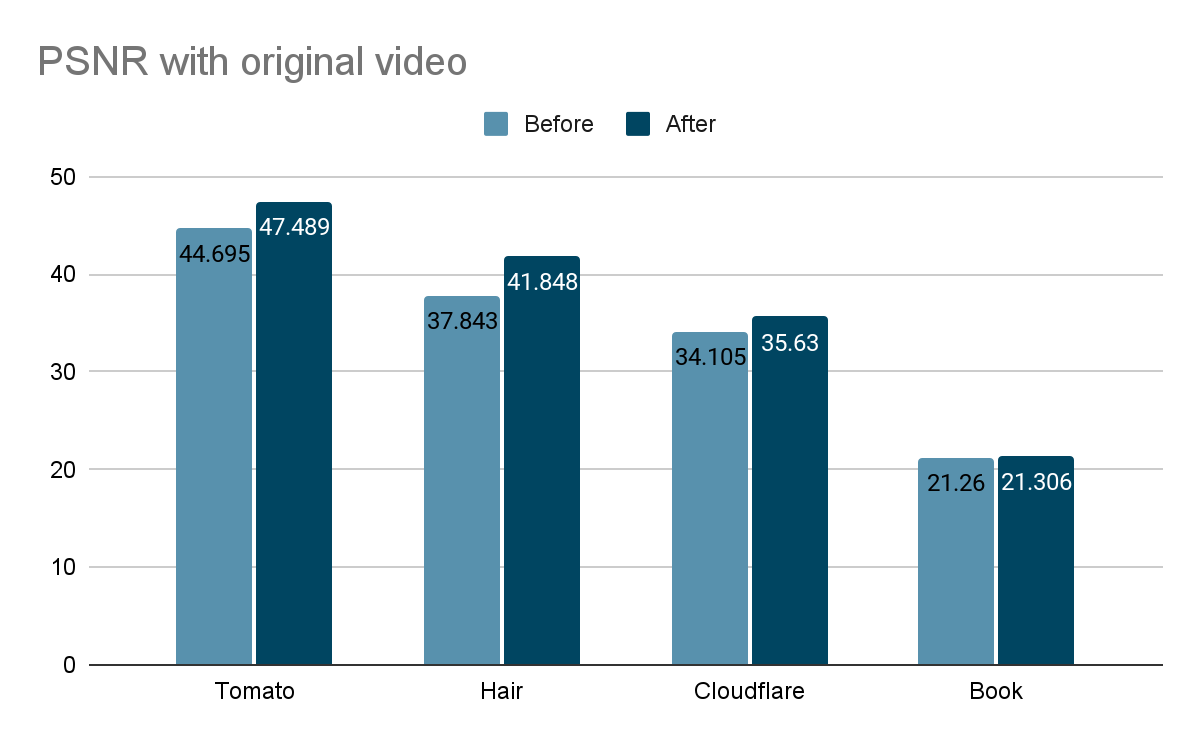
After the change, portrait videos are now encoded to higher resolutions and visibly appear to be higher quality. To confirm these differences, I analyzed the effect of the pipeline change on four different sample videos using the peak-signal-to-noise ratio (PSNR, a mathematical representation of image quality). Since the old pipeline produced lower resolution videos, the comparison here is between an upscaled version of the old pipeline rendition and the current pipeline rendition. In the graph below, higher values reflect higher quality relative to the unencoded original video.

According to this metric, we see an increase in quality from the pipeline changes as high as 8%. However, the quality increase is most noticeable to the human eye in videos that feature fine details or a high amount of movement, which is not always captured in the PSNR. For example, compare a side-by-side of a frame from the book sample video encoded both ways:

The difference between the old and new encodings is most clear when zoomed in:

Here’s another example (sourced from Mixkit):

Magnified:

Of course, watching these example clips is the clearest way to see:

Maximize the Stream player and look at the quality selector (in the gear menu) to see the new quality level labels – select the highest option to compare. Note the improved sharpness of the text in the book sample as well as the improved detail in the hair and eye shadow of the hair and makeup sample.

Implementation challenges

Due to the complex nature of our encoding pipelines, there were several technical challenges to making a large change like this. Aside from simply uploading videos, many of the features we offer, like downloads or clipping, require tweaking to produce the correct video renditions. This involved modifying many parts of the encoding pipeline to ensure that portrait video logic was handled.

There were also some edge cases which were not caught until after release. One release of this feature contained a bug in the on-the-fly encoding logic which caused a subset of new portrait livestream renditions to have negative bitrates, making them unusable. This was due to an internal representation of video renditions’ constraining dimensions being mistakenly used for bitrate observation. We remedied this by increasing the scope of our end-to-end testing to include more portrait video tests and live recording interaction tests.

Another small bug caused downloading very small videos to sometimes fail. This was because for videos under 240p, our smallest encoding resolution, the non-constraining dimension was not being properly scaled to match the aspect ratio of the video, causing some specific combinations of dimensions to be interpreted as portrait when they should have been landscape, and vice versa. This bug was fixed quickly, but was not initially caught after the release since it required a very specific set of conditions to activate. After this experience, I added a few more unit tests involving small videos.

That’s a wrap

As my internship comes to a close, reflecting on the experience makes me grateful for all the team members who have helped me throughout this time. I am very glad to have shipped this project which addresses a long-standing concern and will have real-world customer impact. Support for high-definition portrait video is now available, and we will continue to make improvements to our video solutions suite. You can see the difference yourself by uploading a portrait video to Stream! Or, perhaps you’d like to help build a better Internet, too — our internship and early talent programs are a great way to jumpstart your own journey.

Sample video acknowledgements: The sample video of the book was created by the Stream Product Manager and shows the opening page of The Strange Wonder of Roots by Evan Griffith (HarperCollins). The hair and makeup fashion video was sourced from Mixkit, a great source of free media for video projects.

Connection coalescing with ORIGIN Frames: fewer DNS queries, fewer connections

Post Syndicated from Suleman Ahmad original http://blog.cloudflare.com/connection-coalescing-with-origin-frames-fewer-dns-queries-fewer-connections/

Connection coalescing with ORIGIN Frames: fewer DNS queries, fewer connections

This blog reports and summarizes the contents of a Cloudflare research paper which appeared at the ACM Internet Measurement Conference, that measures and prototypes connection coalescing with ORIGIN Frames.

Connection coalescing with ORIGIN Frames: fewer DNS queries, fewer connections

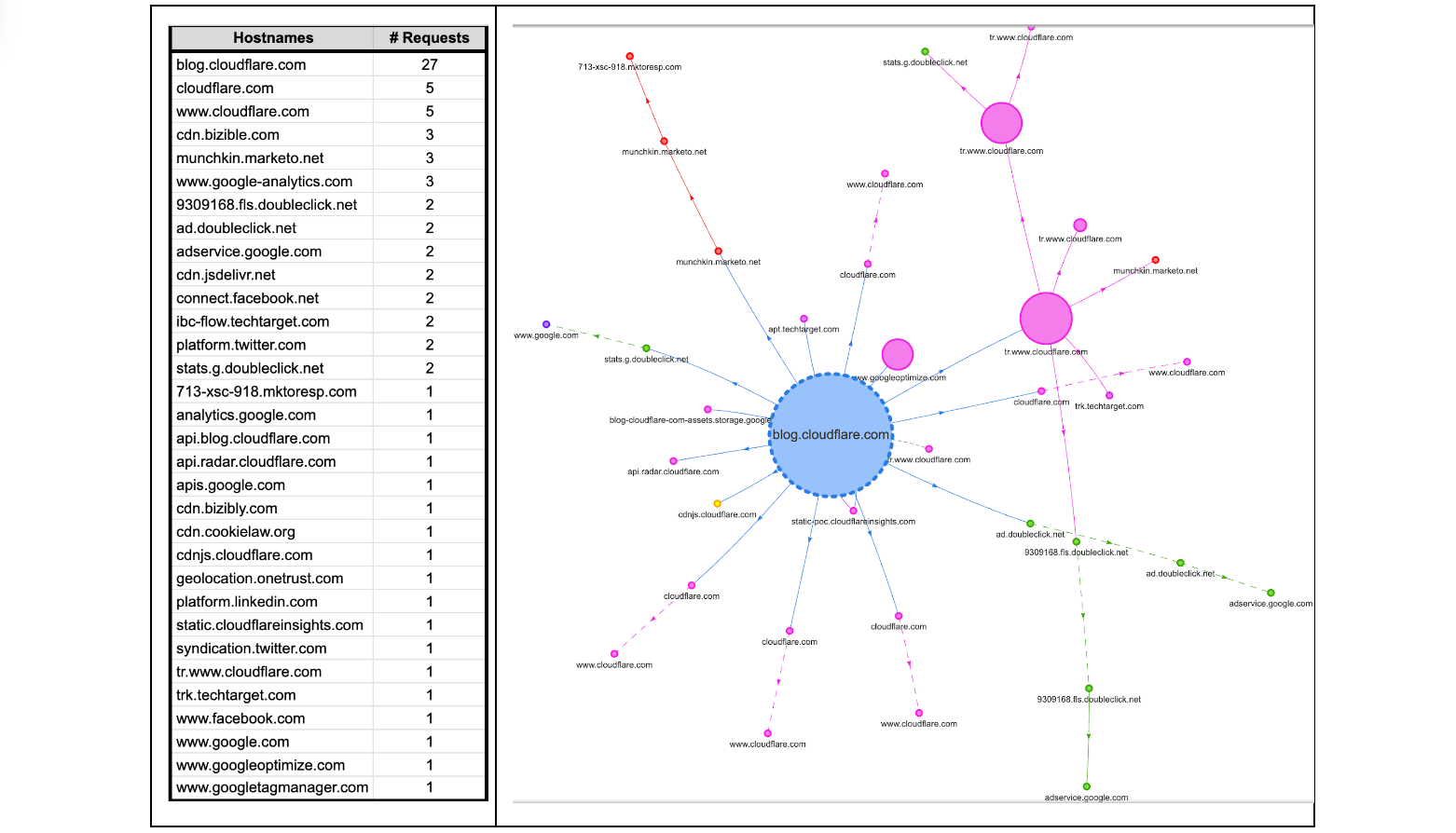
Some readers might be surprised to hear that a single visit to a web page can cause a browser to make tens, sometimes even hundreds, of web connections. Take this very blog as an example. If it is your first visit to the Cloudflare blog, or it has been a while since your last visit, your browser will make multiple connections to render the page. The browser will make DNS queries to find IP addresses corresponding to blog.cloudflare.com and then subsequent requests to retrieve any necessary subresources on the web page needed to successfully render the complete page. How many? Looking below, at the time of writing, there are 32 different hostnames used to load the Cloudflare Blog. That means 32 DNS queries and at least 32 TCP (or QUIC) connections, unless the client is able to reuse (or coalesce) some of those connections.

Connection coalescing with ORIGIN Frames: fewer DNS queries, fewer connections

Each new web connection not only introduces additional load on a server's processing capabilities – potentially leading to scalability challenges during peak usage hours – but also exposes client metadata to the network, such as the plaintext hostnames being accessed by an individual. Such meta information can potentially reveal a user’s online activities and browsing behaviors to on-path network adversaries and eavesdroppers!

In this blog we’re going to take a closer look at “connection coalescing”. Since our initial look at IP-based coalescing in 2021, we have done further large-scale measurements and modeling across the Internet, to understand and predict if and where coalescing would work best. Since IP coalescing is difficult to manage at large scale, last year we implemented and experimented with a promising standard called the HTTP/2 ORIGIN Frame extension that we leveraged to coalesce connections to our edge without worrying about managing IP addresses.

All told, there are opportunities being missed by many large providers. We hope that this blog (and our publication at ACM IMC 2022 with full details) offers a first step that helps servers and clients take advantage of the ORIGIN Frame standard.

Setting the stage

At a high level, as a user navigates the web, the browser renders web pages by retrieving dependent subresources to construct the complete web page. This process bears a striking resemblance to the way physical products are assembled in a factory. In this sense, a modern web page can be considered like an assembly plant. It relies on a ‘supply chain’ of resources that are needed to produce the final product.

An assembly plant in the physical world can place a single order for different parts and get a single shipment from the supplier (similar to the kitting process for maximizing value and minimizing response time); no matter the manufacturer of those parts or where they are made — one ‘connection’ to the supplier is all that is needed. Any single truck from a supplier to an assembly plant can be filled with parts from multiple manufacturers.

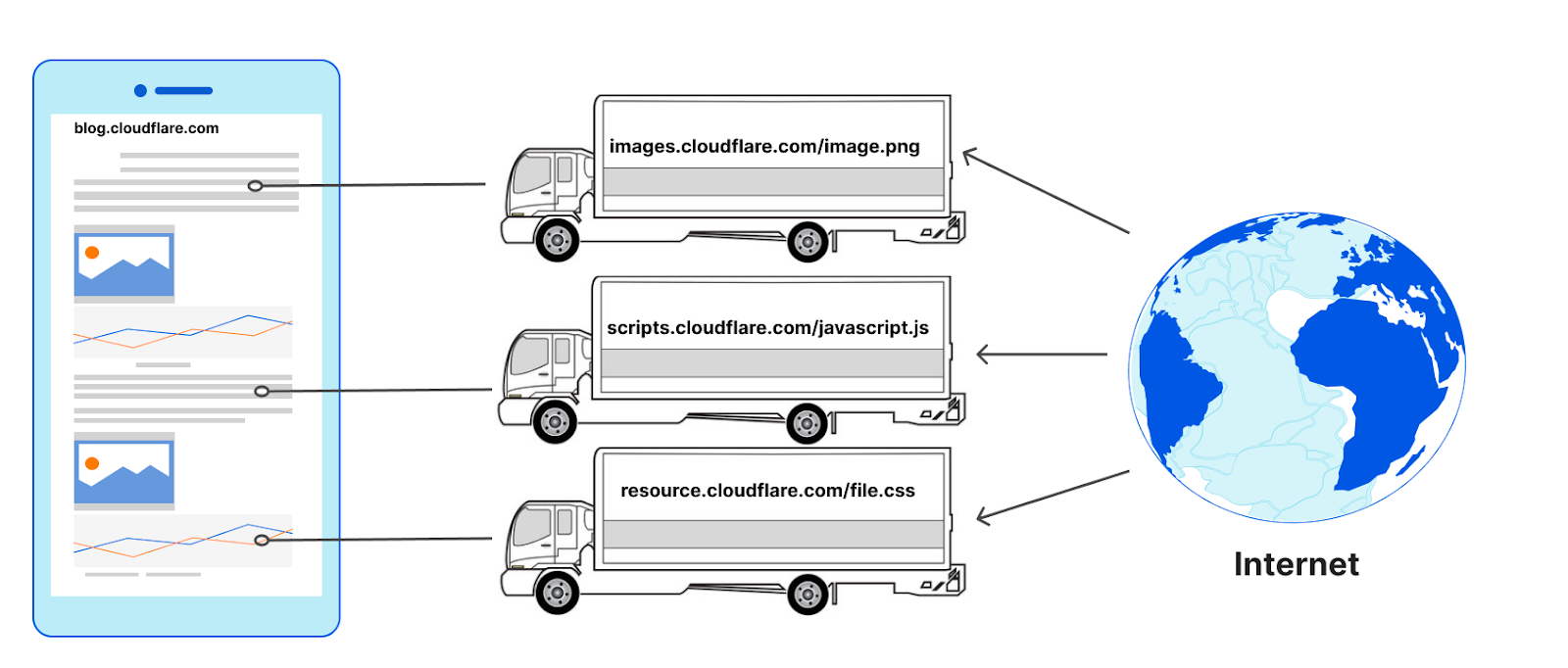
The design of the web causes browsers to typically do the opposite in nature. To retrieve the images, JavaScript, and other resources on a web page (the parts), web clients (assembly plants) have to make at least one connection to every hostname (the manufacturers) defined in the HTML that is returned by the server (the supplier). It makes no difference if the connections to those hostnames go to the same server or not, for example they could go to a reverse proxy like Cloudflare. For each manufacturer a ‘new’ truck would be needed to transfer the materials to the assembly plant from the same supplier, or more formally, a new connection would need to be made to request a subresource from a hostname on the same web page.

Connection coalescing with ORIGIN Frames: fewer DNS queries, fewer connections
Without connection coalescing

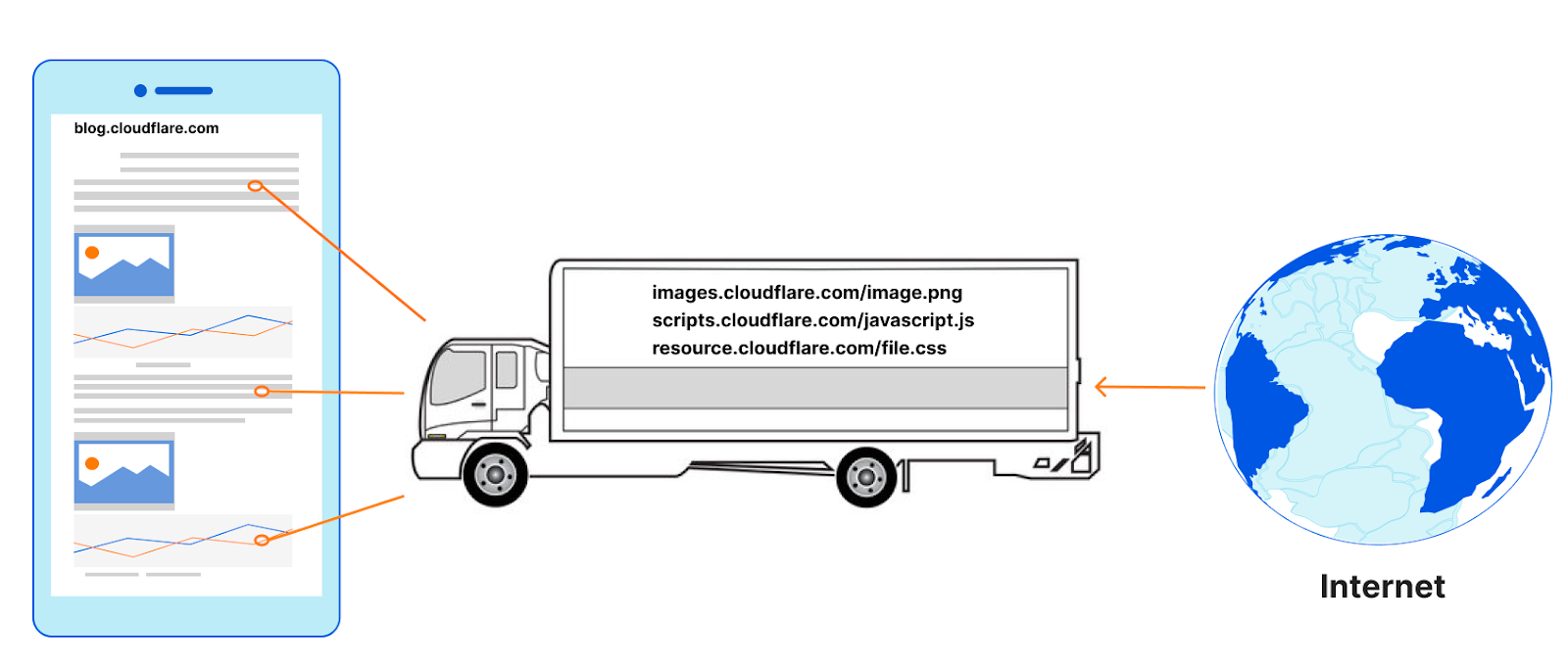
The number of connections used to load a web page can be surprisingly high. It is also common for the subresources to need yet other sub-subresources, and so new connections emerge as a result of earlier ones. Remember, too, that HTTP connections to hostnames are often preceded by DNS queries! Connection coalescing allows us to use fewer connections, or ‘reuse’ the same set of trucks to carry parts from multiple manufacturers from a single supplier.

Connection coalescing with ORIGIN Frames: fewer DNS queries, fewer connections
With connection coalescing 

Connection coalescing in principle

Connection coalescing was introduced in HTTP/2, and carried over into HTTP/3. We’ve blogged about connection coalescing previously (for a detailed primer we encourage going over that blog). While the idea is simple, implementing it can present a number of engineering challenges. For example, recall from above that there are 32 hostnames (at the time of writing) to load the web page you are reading right now. Among the 32 hostnames are 16 unique domains (defined as “Effective TLD+1”). Can we create fewer connections or ‘coalesce’ existing connections for each unique domain? The answer is ‘Yes, but it depends’.

The exact number of connections to load the blog page is not at all obvious, and hard to know. There may be 32 hostnames attached to 16 domains but, counter-intuitively, this does not mean the answer to “how many unique connections?” is 16. The true answer could be as few as one connection if all the hostnames are reachable at a single server; or as many as 32 independent connections if a different and distinct server is needed to access each individual hostname.

Connection reuse comes in many forms, so it’s important to define “connection coalescing” in the HTTP space. For example, the reuse of an existing TCP or TLS connection to a hostname to make multiple requests for subresources from that same hostname is connection reuse, but not coalescing.

Coalescing occurs when an existing TLS channel for some hostname can be repurposed or used for connecting to a different hostname. For example, upon visiting blog.cloudflare.com, the HTML points to subresources at cdnjs.cloudflare.com. To reuse the same TLS connection for the subresources, it is necessary for both hostnames to appear together in the TLS certificate's “Server Alternative Name (SAN)” list, but this step alone is not sufficient to convince browsers to coalesce. After all, the cdnjs.cloudflare.com service may or may not be reachable at the same server as blog.cloudflare.com, despite being on the same certificate. So how can the browser know? Coalescing only works if servers set up the right conditions, but clients have to decide whether to coalesce or not – thus, browsers require a signal to coalesce beyond the SANs list on the certificate. Revisiting our analogy, the assembly plant may order a part from a manufacturer directly, not knowing that the supplier already has the same part in its warehouse.

There are two explicit signals a browser can use to decide whether connections can be coalesced: one is IP-based, the other ORIGIN Frame-based. The former requires the server operators to tightly bind DNS records to the HTTP resources available on the server. This is difficult to manage and deploy, and actually creates a risky dependency, because you have to place all the resources behind a specific set or a single IP address. The way IP addresses influence coalescing decisions varies among browsers, with some choosing to be more conservative and others more permissive. Alternatively, the HTTP ORIGIN Frame is an easier signal for the servers to orchestrate; it’s also flexible and has graceful failure with no interruption to service (for a specification compliant implementation).

A foundational difference between both these coalescing signals is: IP-based coalescing signals are implicit, even accidental, and force clients to infer coalescing possibilities that may exist, or not. None of this is surprising since IP addresses are designed to have no real relationship with names! In contrast, ORIGIN Frame is an explicit signal from servers to clients that coalescing is available no matter what DNS says for any particular hostname.

We have experimented with IP-based coalescing previously; for the purpose of this blog we will take a deeper look at ORIGIN Frame-based coalescing.

What is the ORIGIN Frame standard?

The ORIGIN Frame is an extension to the HTTP/2 and HTTP/3 specification, a special Frame sent on stream 0 or the control stream of the connection respectively. The Frame allows the servers to send an ‘origin-set’ to the clients on an existing established TLS connection, which includes hostnames that it is authorized for and will not incur any HTTP 421 errors. Hostnames in the origin-set MUST also appear in the certificate SAN list for the server, even if those hostnames are announced on different IP addresses via DNS.

Specifically, two different steps are required:

  1. Web servers must send a list enumerating the Origin Set (the hostnames that a given connection might be used for) in the ORIGIN Frame extension.
  2. The TLS certificate returned by the web server must cover the additional hostnames being returned in the ORIGIN Frame in the DNS names SAN entries.

At a high-level ORIGIN Frames are a supplement to the TLS certificate that operators can attach to say, “Psst! Hey, client, here are the names in the SANs that are available on this connection — you can coalesce!” Since the ORIGIN Frame is not part of the certificate itself, its contents can be made to change independently. No new certificate is required. There is also no dependency on IP addresses. For a coalesceable hostname, existing TCP/QUIC+TLS connections can be reused without requiring new connections or DNS queries.

Many websites today rely on content which is served by CDNs, like Cloudflare CDN service. The practice of using external CDN services offers websites the advantages of speed, reliability, and reduces the load of content served by their origin servers. When both the website, and the resources are served by the same CDN, despite being different hostnames, owned by different entities, it opens up some very interesting opportunities for CDN operators to allow connections to be reused and coalesced since they can control both the certificate management and connection requests for sending ORIGIN frames on behalf of the real origin server.

Unfortunately, there has been no way to turn the possibilities enabled by ORIGIN Frame into practice. To the best of our knowledge, until today, there has been no server implementation that supports ORIGIN Frames. Among browsers, only Firefox supports ORIGIN Frames. Since IP coalescing is challenging and ORIGIN Frame has no deployed support, is the engineering time and energy to better support coalescing worth the investment? We decided to find out with a large-scale Internet-wide measurement to understand the opportunities and predict the possibilities, and then implemented the ORIGIN Frame to experiment on production traffic.

Experiment #1: What is the scale of required changes?

In February 2021, we collected data for 500K of the most popular websites on the Internet, using a modified Web Page Test on 100 virtual machines. An automated Chrome (v88) browser instance was launched for every visit to a web page to eliminate caching effects (because we wanted to understand coalescing, not caching). On successful completion of each session, Chrome developer tools were used to retrieve and write the page load data as an HTTP Archive format (HAR) file with a full timeline of events, as well as additional information about certificates and their validation. Additionally, we parsed the certificate chains for the root web page and new TLS connections triggered by subresource requests to (i) identify certificate issuers for the hostnames, (ii) inspect the presence of the Subject Alternative Name (SAN) extension, and (iii) validate that DNS names resolve to the IP address used. Further details about our methodology and results can be found in the technical paper.

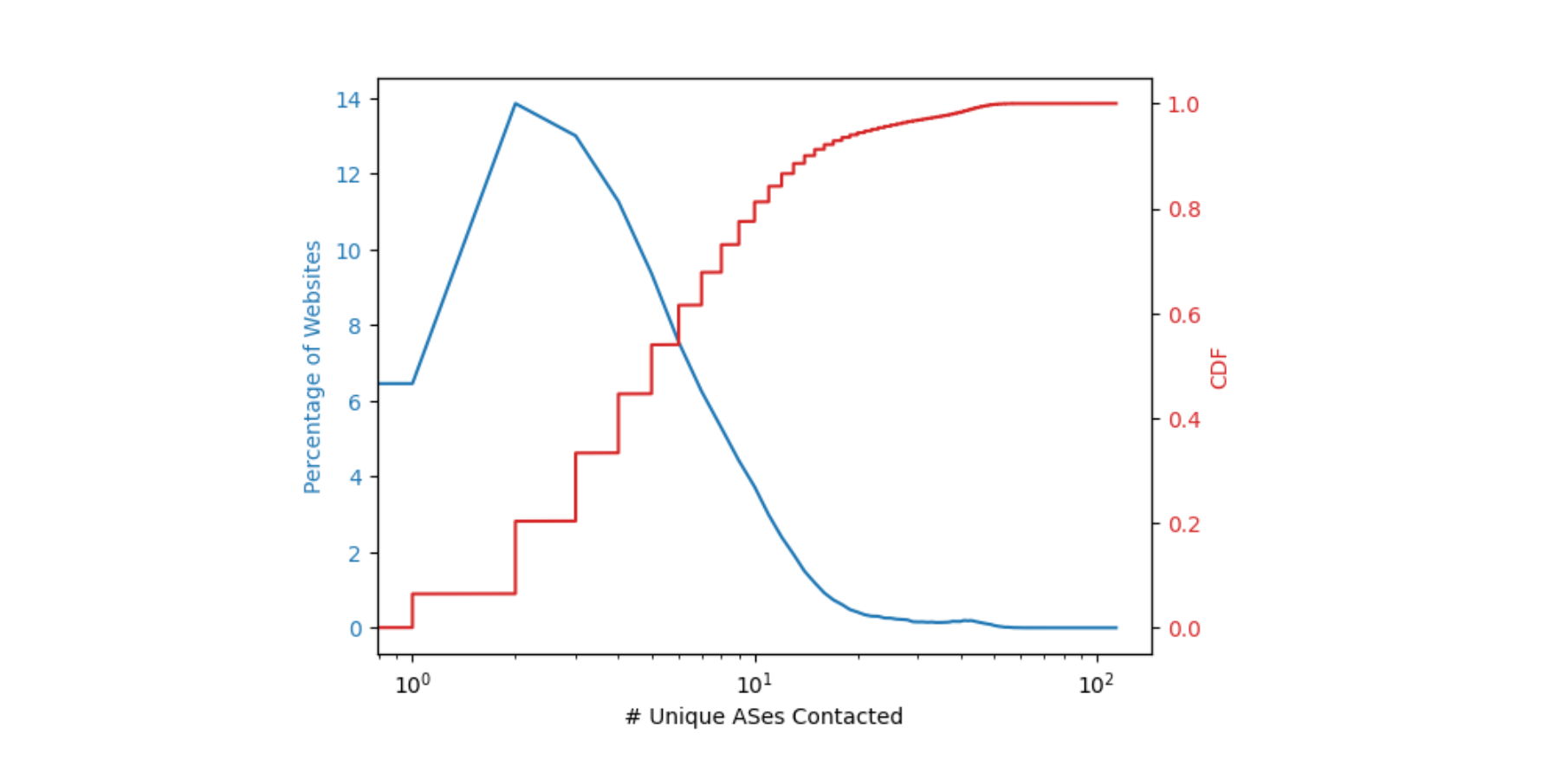
The first step was to understand what resources are requested by web pages to successfully render the page contents, and where these resources were present on the Internet. Connection coalescing becomes possible when subresource domains are ideally co-located. We approximated the location of a domain by finding its corresponding autonomous system (AS). For example, the domain attached to cdnjs is reachable via AS 13335 in the BGP routing table, and that AS number belongs to Cloudflare. The figure below describes the percentage of web pages and the number of unique ASes needed to fully load a web page.

Connection coalescing with ORIGIN Frames: fewer DNS queries, fewer connections

Around 14% of the web pages need two ASes to fully load i.e. pages that have a dependency on one additional AS for subresources. More than 50% of the web pages need to contact no more than six ASes to obtain all the necessary subresources. This finding as shown in the plot above implies that a relatively small number of operators serve the sub-resource content necessary for a majority (~50%) of the websites, and any usage of ORIGIN Frames would need only a few changes to have its intended impact. The potential for connection coalescing can therefore be optimistically approximated to the number of unique ASes needed to retrieve all subresources in a web page. In practice however, this may be superseded by operational factors such as SLAs or helped by flexible mappings between sockets, names, and IP addresses which we worked on previously at Cloudflare.

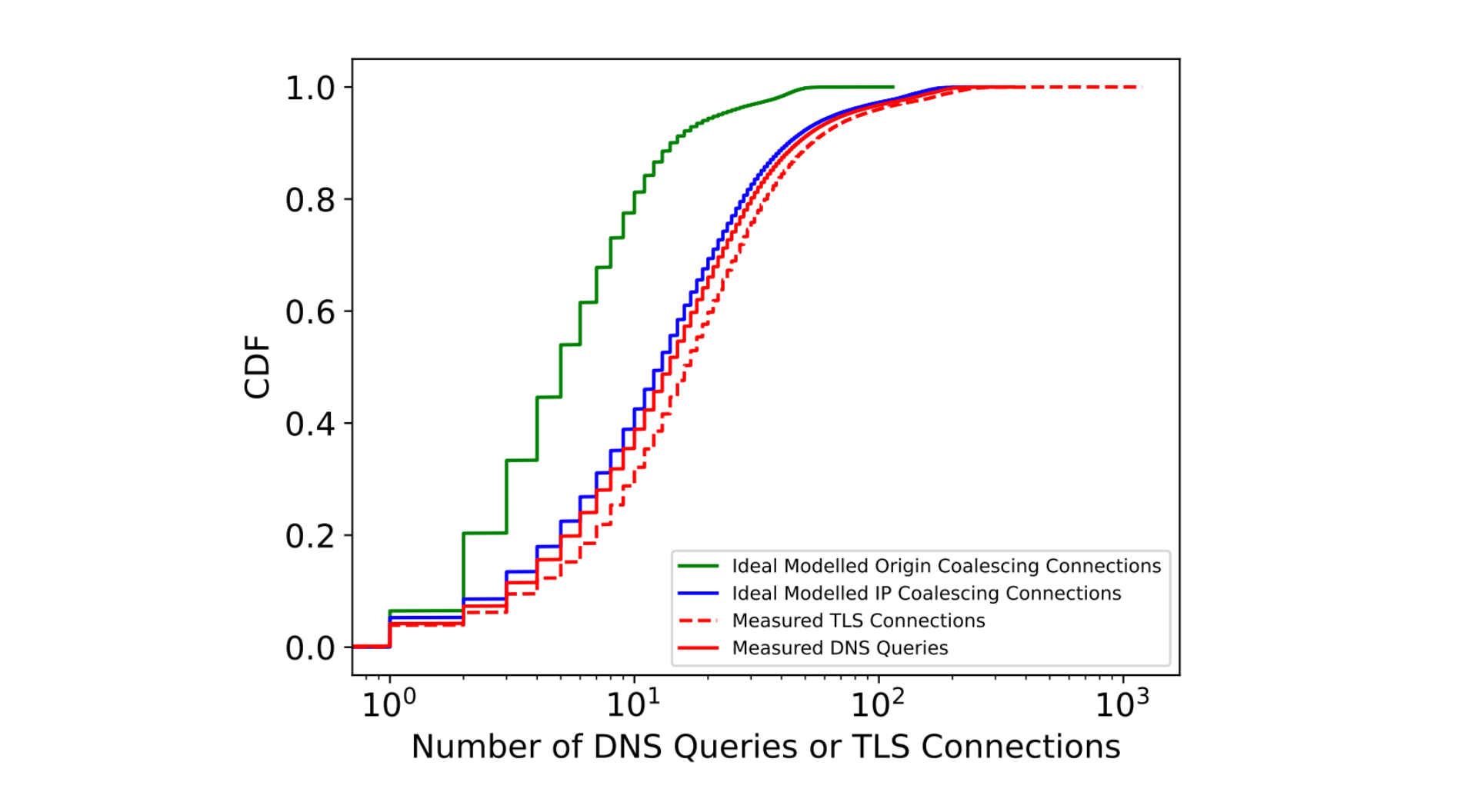
We then tried to understand the impact of coalescing on connection metrics. The measured and ideal number of DNS queries and TLS connections needed to load a web page are summarized by their CDFs in the figure below.

Connection coalescing with ORIGIN Frames: fewer DNS queries, fewer connections

Through modeling and extensive analysis, we identify that connection coalescing through ORIGIN Frames could reduce the number of DNS and TLS connections made by browsers by over 60% at the median. We performed this modeling by identifying the number of times the clients requested DNS records, and combined them with the ideal ORIGIN Frames to serve.

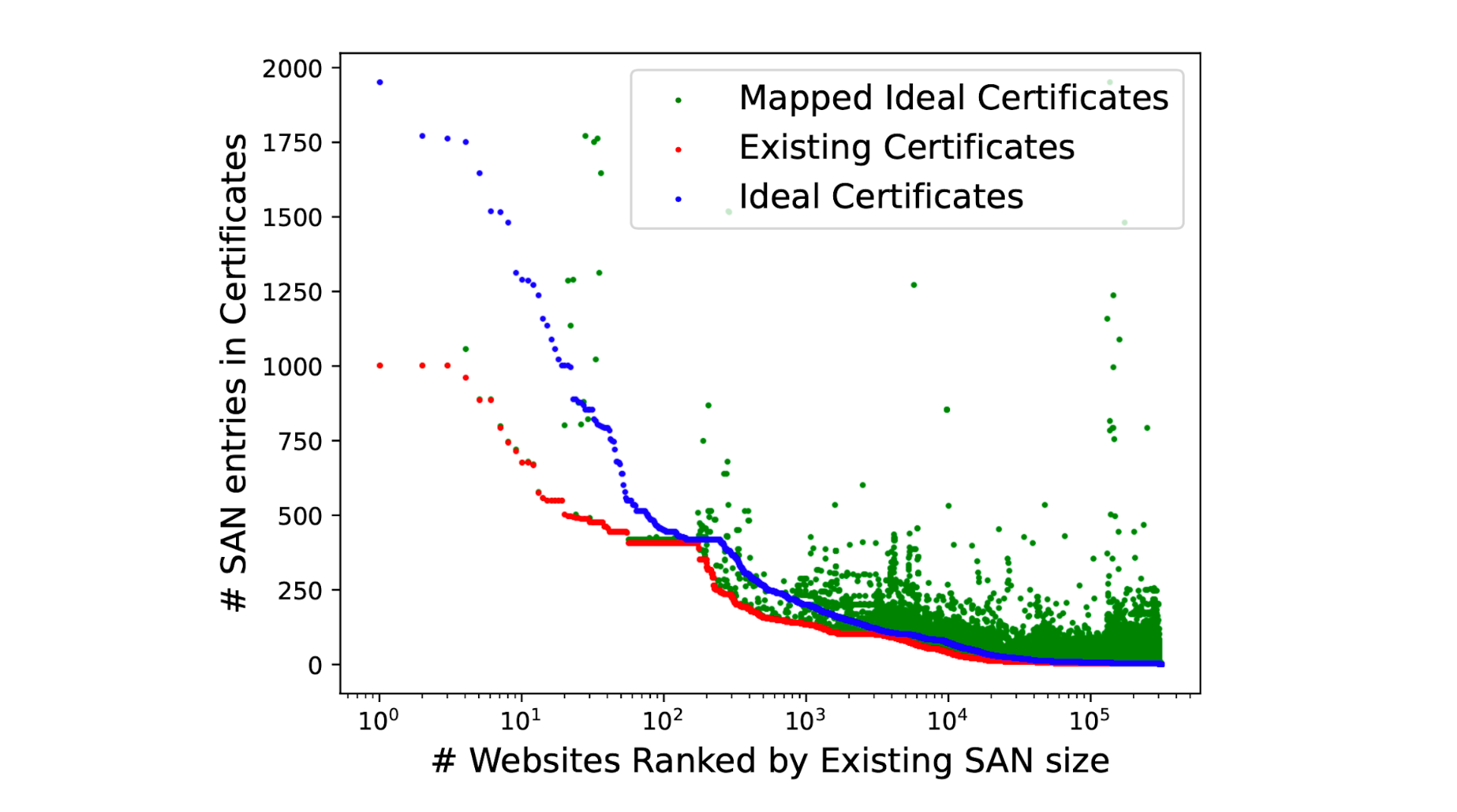
Many multi-origin servers such as those operated by CDNs tend to reuse certificates and serve the same certificate with multiple DNS SAN entries. This allows the operators to manage fewer certificates through their creation and renewal cycles. While theoretically one can have millions of names in the certificate, creating such certificates is unreasonable and a challenge to manage effectively. By continuing to rely on existing certificates, our modeling measurements bring to light the volume of changes required to enable perfect coalescing, while presenting information about the scale of changes needed, as highlighted in the figure below.

Connection coalescing with ORIGIN Frames: fewer DNS queries, fewer connections

We identify that over 60% of the certificates served by websites do not need any modifications and could benefit from ORIGIN Frames, while with no more than 10 additions to the DNS SAN names in certificates we’re able to successfully coalesce connections to over 92% of the websites in our measurement. The most effective changes could be made by CDN providers by adding three or four of their most popular requested hostnames into each certificate.

Experiment #2: ORIGIN Frames in action

In order to validate our modeling expectations, we then took a more active approach in early 2022. Our next experiment focused on 5,000 websites that make extensive use of cdnjs.cloudflare.com as a subresource. By modifying our experimental TLS termination endpoint we deployed HTTP/2 ORIGIN Frame support as defined in the RFC standard. This involved changing the internal fork of net and http dependency modules of Golang which we have open sourced (see here, and here).

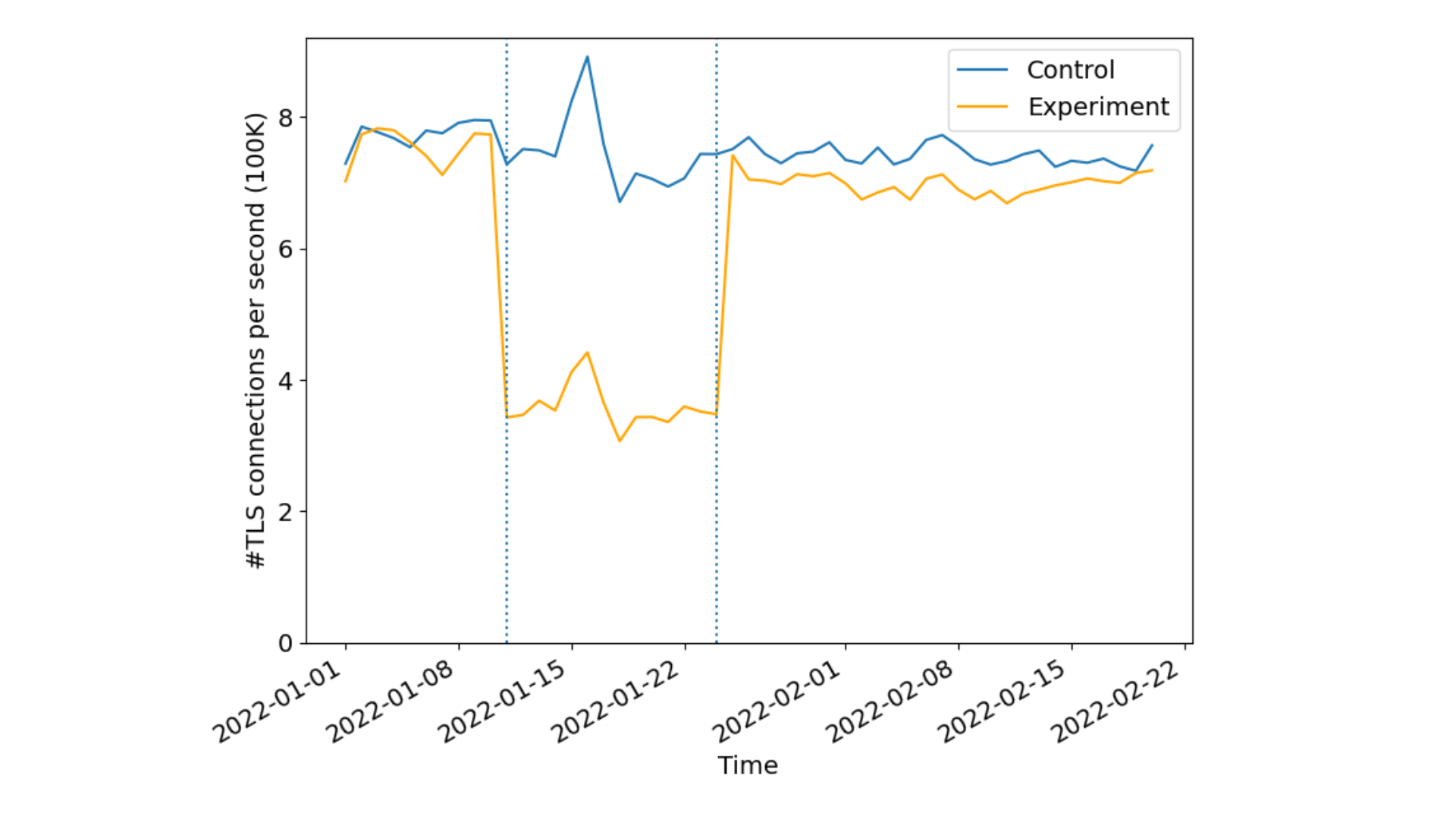
During the experiments, connecting to a website in the experiment set would return cdnjs.cloudflare.com in the ORIGIN frame, while the control set returned an arbitrary (unused) hostname. All existing edge certificates for the 5000 websites were also modified. For the experimental group, the corresponding certificates were renewed with cdnjs.cloudflare.com added to the SAN. To ensure integrity between control and experimental sets, control group domains certificates were also renewed with a valid and identical size third party domain used by none of the control domains. This is done to ensure that the relative size changes to the certificates is kept constant avoiding potential biases due to different certificate sizes. Our results were striking!

Connection coalescing with ORIGIN Frames: fewer DNS queries, fewer connections

Sampling 1% of the requests we received from Firefox to the websites in the experiment, we identified over 50% reduction in new TLS connections per second indicating a lesser number of cryptographic verification operations done by both the client and reduced server compute overheads. As expected there were no differences in the control set indicating the effectiveness of connection re-use as seen by the CDN or server operators.

Discussion and insights

While our modeling measurements indicated that we could anticipate some performance improvements, in practice it was not significantly better suggesting that ‘no-worse’ is the appropriate mental model regarding performance. The subtle interplay between resource object sizes, competing connections, and congestion control is subject to network conditions. Bottleneck-share capacity, for example, diminishes as fewer connections compete for bottleneck resources on network links. It would be interesting to revisit these measurements as more operators deploy support on their servers for ORIGIN Frames.

Apart from performance, one major benefit of ORIGIN frames is in terms of privacy. How? Well, each coalesced connection hides client metadata that is otherwise leaked from non-coalesced connections. Certain resources on a web page are loaded depending on how one is interacting with the website. This means for every new connection for retrieving some resource from the server, TLS plaintext metadata like SNI (in the absence of Encrypted Client Hello) and at least one plaintext DNS query, if transmitted over UDP or TCP on port 53, is exposed to the network. Coalescing connections helps remove the need for browsers to open new TLS connections, and the need to do extra DNS queries. This prevents metadata leakage from anyone listening on the network. ORIGIN Frames help minimize those signals from the network path, improving privacy by reducing the amount of cleartext information leaked on path to network eavesdroppers.

While the browsers benefit from reduced cryptographic computations needed to verify multiple certificates, a major advantage comes from the fact that it opens up very interesting future opportunities for resource scheduling at the endpoints (the browsers, and the origin servers) such as prioritization, or recent proposals like HTTP early hints to provide clients experiences where connections are not overloaded or competing for those resources. When coupled with CERTIFICATE Frames IETF draft, we can further eliminate the need for manual certificate modifications as a server can prove its authority of hostnames after connection establishment without any additional SAN entries on the website’s TLS certificate.

Conclusion and call to action

In summary, the current Internet ecosystem has a lot of opportunities for connection coalescing with only a few changes to certificates and their server infrastructure. Servers can significantly reduce the number of TLS handshakes by roughly 50%, while reducing the number of render blocking DNS queries by over 60%. Clients additionally reap these benefits in privacy by reducing cleartext DNS exposure to network on-lookers.

To help make this a reality we are currently planning to add support for both HTTP/2 and HTTP/3 ORIGIN Frames for our customers. We also encourage other operators that manage third party resources to adopt support of ORIGIN Frame to improve the Internet ecosystem.
Our paper submission was accepted to the ACM Internet Measurement Conference 2022 and is available for download. If you’d like to work on projects like this, where you get to see the rubber meet the road for new standards, visit our careers page!

Introducing the 2023 Intern-ets!

Post Syndicated from Emilie Ma original http://blog.cloudflare.com/introducing-the-2023-intern-ets/

Introducing the 2023 Intern-ets!

Introducing the 2023 Intern-ets!

This year, Cloudflare welcomed a class of approximately 40 interns, hailing from five different countries for an unforgettable summer. As we joined both remotely and in-person across Cloudflare’s global offices, our experiences spanned a variety of roles from engineering, product management to internal auditing and marketing. Through invaluable mentorship, continuous learning, and the chance to make a real-world impact, our summer was truly enriched at every step. Join us, Anni and Emilie, as we provide an insider's perspective on a summer at Cloudflare, sharing snippets and quotes from our intern cohort.

printf(“Hello Intern-ets!”)

You might have noticed that we have a new name for the interns: the Intern-ets! Our fresh intern nickname was born from a brainstorm between us and our recruiter, Judy. While “Cloudies”, “Cloudterns”, and “Flaries” made the shortlist, a company-wide vote crowned "Intern-ets" as the favorite. And just like that, we've made Cloudflare history!

git commit -m “Innovation!”

We're all incredibly proud to have gotten the opportunity to tackle interesting and highly impactful projects throughout the duration of our internships. To give you a glimpse of our summer, here are a few that showcase the breadth and depth of our experiences.

Mia M., Product Manager intern, worked on the Cloudflare Secrets Store, which is a new product that will allow Cloudflare customers to store, encrypt, and deploy sensitive data across the product suite. She focused on creating requirements for the core platform and tackling the first milestone, bringing secrets and environment variables from the per-Worker level to the account level in the Workers platform.

Pierre, Research intern, focused on integrating differential privacy—a layer of protection with formal privacy guarantees—into distributed aggregation protocols. This privacy layer is imperative for user trust and data security as these protocols are commonly used for collecting sensitive information, such as browser telemetry or health data.

Johnny, Software Engineer intern, worked on a new feature for API Shield called Object-Level Access Policies as a first step in a solution to combat Broken Object-Level Authorization, which has been ranked as the #1 API Security flaw by OWASP. This feature will enable customers to specify explicit allowlists and blocklists for API traffic per object.

Olivia, Project Manager intern, led the Dissatisfied (DSAT) Customer Outreach Project and JIRA Automations for the Customer Support team. The DSAT project involves reaching out to Premium customers who express dissatisfaction with the goal of providing personalized contact to ensure they feel valued. The JIRA Automation project aims to create zero-touch tickets, removing Customer Support as the middle man.

Also don’t forget to check out the amazing intern projects that got featured in a blog post!

Emilie, Software Engineering intern introduced a debugging feature for Cloudflare Queues.

Joaquin, Software Engineer intern added a new Workers Database integration.

Austin, Software Engineer intern created scheduled deletion for Cloudflare Stream.

Introducing the 2023 Intern-ets!

No null days here!

Beyond our projects, we had tons of fun getting to meet other Cloudflarians and experience the vibrant Cloudflare culture. Let's dive into some of the standout moments that made our internships truly special!

Remote, office, hybrid

This summer, the interns dotted the globe, working from cozy home setups to bustling offices in cities. Regardless of where we worked, we had a blast. Here's what some fellow interns have to say about their work experiences:

Austin office: Jada loved her colleagues at the Austin office as they were “warm and open to exploring the city, […], and hanging out outside of work”. Anni and Maximo loved attending the Austin-based team summit where they attended strategy sessions and met the team in-person.

San Francisco office: Emmanuel F. enjoyed getting to interact with other engineers during SF Team Lunches. Matthew enjoyed working on the rooftop to a view of the city skyline. Jonathan appreciated the hybrid work model enjoyed by SF employees.

Remote work: Johnny liked the distributed and flexible work style that the company embraces. Daniël, also working remotely and found it amusing how “[s]everal people have noticed the Feynman Lectures on Physics on the shelf behind me in my home and have asked about it.”

Remote intern events: Emmanuel G., Aaron, and Feiyu enjoyed the intern calls that were held on GatherRound as “it was a fun, quick way to get to meet everyone.” Pradyumna particularly liked it when we played skribbl.io.

Introducing the 2023 Intern-ets! Introducing the 2023 Intern-ets!

Mentorship

With so many exceptional minds at Cloudflare, every interaction became a chance for us to learn and grow. Here are some awe-inspiring individuals who have made our internships unforgettable:

Harshal, Systems Engineer: Aaron is grateful for his mentor Harshall. “I always left our conversations knowing more than I did coming into them”.

Revathy, Systems Engineer: Harshini is thankful to her mentor Revathy for “how she helps me to learn […] the best way possible to do something and ultimately achieve my goals”.

Nevi, Product Manager: Anni admires her manager Nevi who is always thinking about the team and our customers and has invested in the personal growth and mentorship of interns.

Conner, Systems Engineer: Jonathan is grateful that he was always able to count on Conner for great engineering tips, guidance, and NeoVim wizardry.

Malgorzata, Data Scientist: Jada looks up to Malgorzata for being so welcoming, kind, and funny. She has a great attitude and besides being super knowledgeable, she is also willing to share her expertise and support others!

Introducing the 2023 Intern-ets!

Executive chats

During our internships, we engaged in Executive fireside chats, diving deep with Cloudflare's top leaders. Each chat was insightful and surprising in a different way, and some of our favorite takeaways were…

John, CTO: Shaheen valued John’s humility in emphasizing daily learning from others at work, stating, “As I grow in my career, I intend to keep a similar attitude and try to learn from those around me by keeping myself grounded.”

Doug Kramer, General Counsel: Emilie valued Doug Kramer's advice on identifying a career "north star" to guide intentions while also recognizing "exit-ramps" or alternative paths that may offer unexpected fulfillment.

Matthew Prince, Co-founder and CEO: Yunfan loved hearing “the story about how Cloudflare developed from a start-up till today”.

Michelle Zatlyn, Co-founder and COO: Harsh learned from Michelle about “how they moved across the country, against everyone's advice, to start Cloudflare”, and Mia C. enjoyed learning that “Cloudflare started as a business school project”.

Snack bytes

A bonding point for the Intern-ets was our love for snacks! In July, we gathered the Intern-ets together for a virtual snack break. The University team sent out a box featuring snacks from Indonesia, a country none of us had visited (or tried goodies from… yet!). Below you can see us holding up our favorite snacks from the box!

Introducing the 2023 Intern-ets!

Meanwhile, the on-site interns couldn't get enough of the office snacks. Favorites? Pita chips, Lucky Charms, chocolate almonds, coconut chocolate bars and coconut water. Plus, the Austin and San Francisco offices even have a Sour Patch Kids dispenser! Snack on!

Surprises

Every day at Cloudflare presented unexpected joys and challenges. Here's what the interns found most surprising:

High Impact: Simon, Emmanuel F. and Maximo were surprised to “[do] such visible and important work as an intern”. Austin agreed, noting “I was treated like any other member of the team […] It felt like I was working on something important and not just a typical intern project!” Harshini added, “when [colleagues] hear what I am working on they go – ‘that is really cool, I can't wait to see that happen – we need it.’”

Support: Eames “was worried that it would feel like my achievements were the only thing that mattered. But my colleagues always showed concern for how I was feeling and how things were going, and I couldn't be more grateful for that.”

Industry vs Academia: Johnny mentioned “coming from academia, I was amazed by the amount of effort that has been, and is continuing to be, put into the products to really productionize what I have only before seen in research. It is another reminder of the scale in which we work!”

By the numbers

Here are some fun stats from our internship…

  • Johnny drove 30 hours from New York to Colorado
  • Maximo missed 0 days of going to the Austin office
  • Anni drank 86 matcha lattes this summer
  • Emilie participated in 38 Cloudfriends calls and coffee chats
  • Simon has waited around one week cumulatively for builds to finish

exit(0)

At Cloudflare, our internships aren’t just about work—they're about growth, mentorship, and real impact. We've built more than projects; we've forged lasting relationships. It’s been an unforgettable summer of challenges, bonding, and authentic experiences. For more about our journey this summer, check out our Cloudflare TV segment with Michelle Zatlyn, Co-founder and COO.

Finally, we would love to give a huge thanks to our university recruiters Judy, Trang, and Dani for creating such an amazing internship experience for us this summer!

Want to become an Intern-et or Cloudflarian?

Sign up here to be notified of new grad and internship opportunities for 2024. Cloudflare is also hiring for full-time opportunities: check out open positions and apply today!

Introducing the 2023 Intern-ets!

Debug Queues from the dash: send, list, and ack messages

Post Syndicated from Emilie Ma original http://blog.cloudflare.com/debug-queues-from-dash/

Debug Queues from the dash: send, list, and ack messages

Debug Queues from the dash: send, list, and ack messages

Today, August 11, 2023, we are excited to announce a new debugging workflow for Cloudflare Queues. Customers using Cloudflare Queues can now send, list, and acknowledge messages directly from the Cloudflare dashboard, enabling a more user-friendly way to interact with Queues. Though it can be difficult to debug asynchronous systems, it’s now easy to examine a queue’s state and test the full flow of information through a queue.

With guaranteed delivery, message batching, consumer concurrency, and more, Cloudflare Queues is a powerful tool to connect services reliably and efficiently. Queues integrate deeply with the existing Cloudflare Workers ecosystem, so developers can also leverage our many other products and services. Queues can be bound to producer Workers, which allow Workers to send messages to a queue, and to consumer Workers, which pull messages from the queue.

We’ve received feedback that while Queues are effective and performant, customers find it hard to debug them. After a message is sent to a queue from a producer worker, there’s no way to inspect the queue’s contents without a consumer worker. The limited transparency was frustrating, and the need to write a skeleton worker just to debug a queue was high-friction.

Debug Queues from the dash: send, list, and ack messages

Now, with the addition of new features to send, list, and acknowledge messages in the Cloudflare dashboard, we’ve unlocked a much simpler debugging workflow. You can send messages from the Cloudflare dashboard to check if their consumer worker is processing messages as expected, and verify their producer worker’s output by previewing messages from the Cloudflare dashboard.

The pipeline of messages through a queue is now more open and easily examined. Users just getting started with Cloudflare Queues also no longer have to write code to send their first message: it’s as easy as clicking a button in the Cloudflare dashboard.

Debug Queues from the dash: send, list, and ack messages

Sending messages

Both features are located in a new Messages tab on any queue’s page. Scroll to Send message to open the message editor.

Debug Queues from the dash: send, list, and ack messages

From here, you can write a message and click Send message to send it to your queue. You can also choose to send JSON, which opens a JSON editor with syntax highlighting and formatting. If you’ve saved your message as a file locally, you can drag-and-drop the file over the textbox or click Upload a file to send it as well.

This feature makes testing changes in a queue’s consumer worker much easier. Instead of modifying an existing producer worker or creating a new one, you can send one-off messages. You can also easily verify if your queue consumer settings are behaving as expected: send a few messages from the Cloudflare dashboard to check that messages are batched as desired.

Behind the scenes, this feature leverages the same pipeline that Cloudflare Workers uses to send messages, so you can be confident that your message will be processed as if sent via a Worker.

Listing messages

On the same page, you can also inspect the messages you just sent from the Cloudflare dashboard. On any queue’s page, open the Messages tab and scroll to Queued messages.

If you have a consumer attached to your queue, you’ll fetch a batch of messages of the same size as configured in your queue consumer settings by default, to provide a realistic view of what would be sent to your consumer worker. You can change this value to preview messages one-at-a-time or even in much larger batches than would be normally sent to your consumer.

After fetching a batch of messages, you can preview the message’s body, even if you’ve sent raw bytes or a JavaScript object supported by the structured clone algorithm. You can also check the message’s timestamp; number of retries; producer source, such as a Worker or the Cloudflare dashboard; and type, such as text or JSON. This information can help you debug the queue’s current state and inspect where and when messages originated from.

Debug Queues from the dash: send, list, and ack messages

The batch of messages that’s returned is the same batch that would be sent to your consumer Worker on its next run. Messages are even guaranteed to be in the same order on the UI as sent to your consumer. This feature grants you a looking glass view into your queue, matching the exact behavior of a consumer worker. This works especially well for debugging messages sent by producer workers and verifying queue consumer settings.

Listing messages from the Cloudflare dashboard also doesn’t interfere with an existing connected consumer. Messages that are previewed from the Cloudflare dashboard stay in the queue and do not have their number of retries affected.

This ‘peek’ functionality is unique to Cloudflare Queues: Amazon SQS bumps the number of retries when a message is viewed, and RabbitMQ retries the message, forcing it to the back of the queue. Cloudflare Queues’ approach means that previewing messages does not have any unintended side effects on your queue and your consumer. If you ever need to debug queues used in production, don’t worry – listing messages is entirely safe.

As well, you can now remove messages from your queue from the Cloudflare dashboard. If you’d like to remove a message or clear the full batch from the queue, you can select messages to acknowledge. This is useful for preventing buggy messages from being repeatedly retried without having to write a dummy consumer.

Debug Queues from the dash: send, list, and ack messages

You might have noticed that this message preview feature operates similarly to another popular feature request for an HTTP API to pull batches of messages from a queue. Customers will be able to make a request to the API endpoint to receive a batch of messages, then acknowledge the batch to remove the messages from the queue. Under the hood, both listing messages from the Cloudflare dashboard and HTTP Pull/Ack use a common infrastructure, and HTTP Pull/Ack is coming very soon!

These debugging features have already been invaluable for testing example applications we’ve built on Cloudflare Queues. At an internal hack week event, we built a web crawler with Queues as an example use-case (check out the tutorial here!). During development, we took advantage of this user-friendly way to send messages to quickly iterate on a consumer worker before we built a producer worker. As well, when we encountered bugs in our consumer worker, the message previews were handy to realize we were sending malformed messages, and the message acknowledgement feature gave us an easy way to remove them from the queue.

New Queues debugging features — available today!

The Cloudflare dashboard features announced today provide more transparency into your application and enable more user-friendly debugging.

All Cloudflare Queues customers now have access to these new debugging tools. And if you’re not already using Queues, you can join the Queues Open Beta by enabling Cloudflare Queues here.
Get started on Cloudflare Queues with our guide and create your next app with us today! Your first message is a single click away.