All posts by Suleman Ahmad

Measuring characteristics of TCP connections at Internet scale

Post Syndicated from Suleman Ahmad original https://blog.cloudflare.com/measuring-network-connections-at-scale/

Every interaction on the Internet—including loading a web page, streaming a video, or making an API call—starts with a connection. These fundamental logical connections consist of a stream of packets flowing back and forth between devices.

Various aspects of these network connections have captured the attention of researchers and practitioners for as long as the Internet has existed. The interest in connections even predates the label, as can be seen in the seminal 1991 paper, “Characteristics of wide-area TCP/IP conversations.” By any name, the Internet measurement community has been steeped in characterizations of Internet communication for decades, asking everything from “how long?” and “how big?” to “how often?” – and those are just to start.

Surprisingly, connection characteristics on the wider Internet are largely unavailable. While anyone can  use tools (e.g., Wireshark) to capture data locally, it’s virtually impossible to measure connections globally because of access and scale. Moreover, network operators generally do not share the characteristics they observe — assuming that non-trivial time and energy is taken to observe them.

In this blog post, we move in another direction by sharing aggregate insights about connections established through our global CDN. We present characteristics of TCP connections—which account for about 70% of HTTP requests to Cloudflare—providing empirical insights that are difficult to obtain from client-side measurements alone.

Why connection characteristics matter

Characterizing system behavior helps us predict the impact of changes. In the context of networks, consider a new routing algorithm or transport protocol: how can you measure its effects? One option is to deploy the change directly on live networks, but this is risky. Unexpected consequences could disrupt users or other parts of the network, making a “deploy-first” approach potentially unsafe or ethically questionable.

A safer alternative to live deployment as a first step is simulation. Using simulation, a designer can get important insights about their scheme without having to build a full version. But simulating the whole Internet is challenging, as described by another highly seminal work, “Why we don’t know how to simulate the Internet”.

To run a useful simulation, we need it to behave like the real system we’re studying. That means generating synthetic data that mimics real-world behavior. Often, we do this by using statistical distributions — mathematical descriptions of how the real data behaves. But before we can create those distributions, we first need to characterize the data — to measure and understand its key properties. Only then can our simulation produce realistic results.

Unpacking the dataset

The value of any data depends on its collection mechanism. Every dataset has blind spots, biases, and limitations, and ignoring these can lead to misleading conclusions. By examining the finer details — how the data was gathered, what it represents, and what it excludes — we can better understand its reliability and make informed decisions about how to use it. Let’s take a closer look at our collected telemetry.


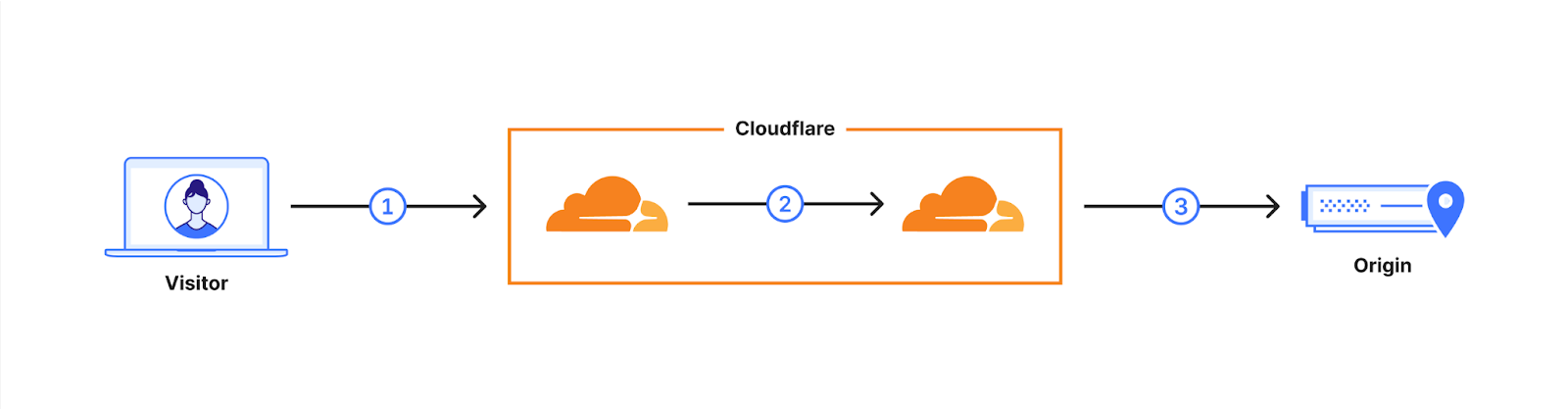
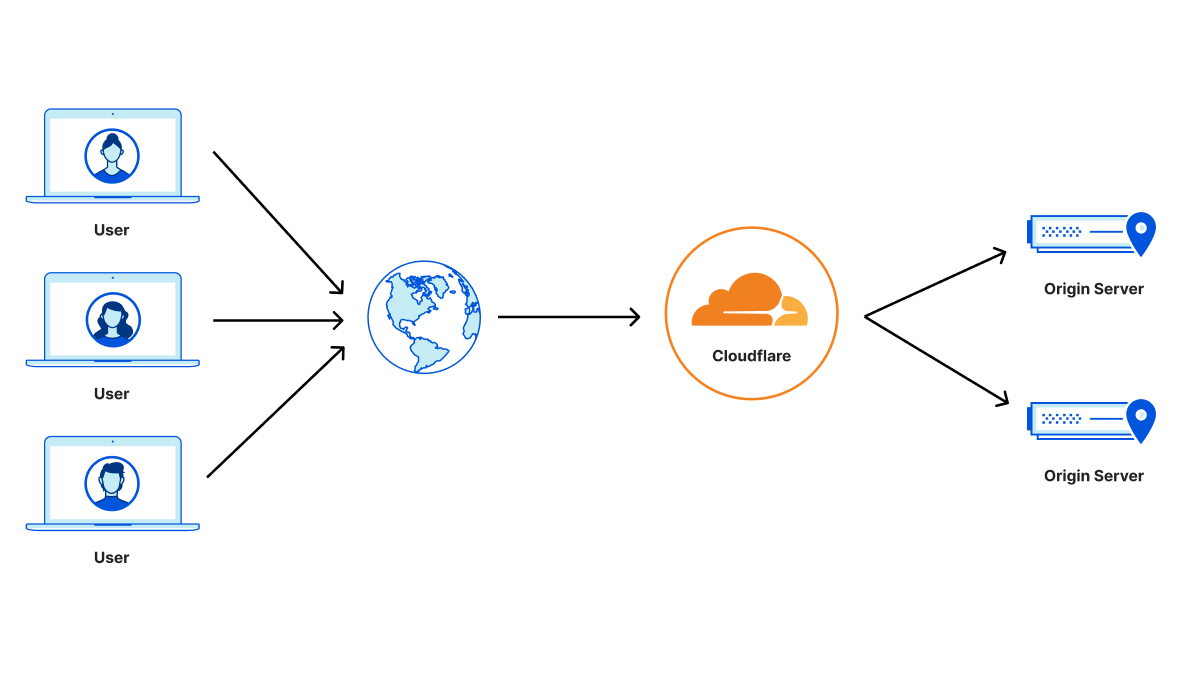
Dataset Overview. The data describes TCP connections, labeled Visitor to Cloudflare in the above diagram, which serve requests via HTTP 1.0, 1.1, and 2.0 that make up about 70% of all 84 million HTTP requests per second, on average, received at our global CDN servers.

Sampling. The passively collected snapshot of data is drawn from a uniformly sampled 1% of all TCP connections to Cloudflare between October 7 and October 15, 2025. Sampling takes place at each individual client-facing server to mitigate biases that may appear by sampling at the datacenter level.

Diversity. Unlike many large operators, whose traffic is primarily their own and dominated by a few services such as search, social media, or streaming video, the vast majority of Cloudflare’s workload comes from our customers, who choose to put Cloudflare in front of their websites to help protect, improve performance, and reduce costs. This diversity of customers brings a wide variety of web applications, services, and users from around the world. As a result, the connections we observe are shaped by a broad range of client devices and application-specific behaviors that are constantly evolving.

What we log. Each entry in the log consists of socket-level metadata captured via the Linux kernel’s TCP_INFO struct, alongside the SNI and the number of requests made during the connection. The logs exclude individual HTTP requests, transactions, and details. We restrict our use of the logs to connection metadata statistics such as duration and number of packets transmitted, as well as the number of HTTP requests processed.

Data capture. We have elected to represent ‘useful’ connections in our dataset that have been fully processed, by characterizing only those connections that close gracefully with a FIN packet. This excludes connections intercepted by attack mitigations, or that timeout, or that abort because of a RST packet.

Since a graceful close does not in itself indicate a ‘useful’ connection, we additionally require at least one successful HTTP request during the connection to filter out idle or non-HTTP connections from this analysis — interestingly, these make up 11% of all TCP connections to Cloudflare that close with a FIN packet.

If you’re curious, we’ve also previously blogged about the details of Cloudflare’s overall logging mechanism and post-processing pipeline.  

Visualizing connection characteristics

Although networks are inherently dynamic and trends can change over time, the large-scale patterns we observe across our global infrastructure remain remarkably consistent over time. While our data offers a global view of connection characteristics, distributions can still vary according to regional traffic patterns.

In our visualizations we represent characteristics with cumulative distribution function (CDF) graphs, specifically their empirical equivalents. CDFs are particularly useful for gaining a macroscopic view of the distribution. They give a clear picture of both common and extreme cases in a single view. We use them in the illustrations below to make sense of large-scale patterns. To better interpret the distributions, we also employ log-scaled axes to account for the presence of extreme values common to networking data.

A long-standing question about Internet connections relates to “Elephants and Mice”; practitioners and researchers are entirely aware that most flows are small and some are huge, yet little data exists to inform the lines that divide them. This is where our presentation begins.

Packet Counts

Let’s start by taking a look at the distribution of the number of response packets sent in connections by Cloudflare servers back to the clients.


On the graph, the x-axis represents the number of response packets sent in log-scale, while the y-axis shows the cumulative fraction of connections below each packet count. The average response consists of roughly 240 packets, but the distribution is highly skewed. The median is 12 packets, which indicates that 50% of Internet connections consist of very few packets. Extending further to the 90th percentile, connections carry only 107 packets.

This stark contrast highlights the heavy-tailed nature of Internet traffic: while a few connections transport massive amounts of data—like video streams or large file transfers—most interactions are tiny, delivering small web objects, microservice traffic, or API responses.


The above plot breaks down the packet count distribution by HTTP protocol version. For HTTP/1.X (both HTTP 1.0 and 1.1 combined) connections, the median response consists of just 10 packets, and 90% of connections carry fewer than 63 response packets. In contrast, HTTP/2 connections show larger responses, with a median of 16 packets and a 90th percentile of 170 packets. This difference likely reflects how HTTP/2 multiplexes multiple streams over a single connection, often consolidating more requests and responses into fewer connections, which increases the total number of packets exchanged per connection. HTTP/2 connections also have additional control-plane frames and flow-control messages that increase response packet counts.

Despite these differences, the combined view displays the same heavy-tailed pattern: a small fraction of connections carry enormous volumes of data (elephant flows), extending to millions of packets, while most remain lightweight (mice flows).

So far, we’ve focused on the total number of packets sent from our servers to clients, but another important dimension of connection behavior is the balance between packets sent and received, illustrated below.


The x-axis shows the ratio of packets sent by our servers to packets received from clients, visualized as a CDF. Across all connections, the median ratio is 0.91, meaning that in half of connections, clients send slightly more packets than the server responds with. This excess of client-side packets primarily reflects TLS handshake initiation (ClientHello), HTTP control request headers, and data acknowledgements (ACKs), causing the client to typically transmit more packets than the server returns with the content payload — particularly for low-volume connections that dominate the distribution.

The mean ratio is higher, at 1.28, due to a long tail of client-heavy connections, such as large downloads typical of CDN workloads. Most connections fall within a relatively narrow range: 10% of connections have a ratio below 0.67, and 90% are below 1.85. However, the long-tailed behavior highlights the diversity of Internet traffic: extreme values arise from both upload-heavy and download-heavy connections. The variance of 3.71 reflects these asymmetric flows, while the bulk of connections maintain a roughly balanced upload-to-download exchange.

Bytes sent

Another dimension to look at the data is using bytes sent by our servers to clients, which captures the actual volume of data delivered over each connection. This metric is derived from tcpi_bytes_sent, also covering (re)transmitted segment payloads while excluding the TCP header, as defined in linux/tcp.h and aligned with RFC 4898 (TCP Extended Statistics MIB).


The plots above break down bytes sent by HTTP protocol version. The x-axis represents the total bytes sent by our servers over each connection. The patterns are generally consistent with what we observed in the packet count distributions.

For HTTP/1.X, the median response delivers 4.8 KB, and 90% of connections send fewer than 51 KB. In contrast, HTTP/2 connections show slightly larger responses, with a median of 6 KB and a 90th percentile of 146 KB. The mean is much higher—224 KB for HTTP/1.x and 390 KB for HTTP/2—reflecting a small number of very large transfers. These long-tailed extreme flows can reach tens of gigabytes per connection, while some very lightweight connections carry minimal payloads: the minimum for HTTP/1.X is 115 bytes and for HTTP/2 it is 202 bytes.


By making use of the tcpi_bytes_received metric, we can now look at the ratio of bytes sent to bytes received per connection to better understand the balance of data exchange. This ratio captures how asymmetric each connection is — essentially, how much data our servers send compared to what they receive from clients. Across all connections, the median ratio is 3.78, meaning that in half of all cases, servers send nearly four times more data than they receive. The average is far higher at 81.06, showing a strong long tail driven by download-heavy flows. Again we see the heavy long-tailed distribution, a small fraction of extreme cases push the ratio into the millions, with more extreme values of data transfers towards clients.

Connection duration

While packet and byte counts capture how much data is exchanged, connection duration provides insight into how that exchange unfolds over time.


The CDF above shows the distribution of connection durations (lifetimes) in seconds. A reminder that the x-axis is log-scale. Across all connections, the median duration is just 4.7 seconds, meaning half of connections complete in under five seconds. The mean is much higher at 96 seconds, reflecting a small number of long-lived connections that skew the average. Most connections fall within a window of 0.1 seconds (10th percentile) to 300 seconds (90th percentile). We also observe some extremely long-lived connections lasting multiple days, possibly maintained via keep-alives for connection reuse without hitting our default idle timeout limits. These long-lived connections typically represent persistent sessions or multimedia traffic, while the majority of web traffic remains short, bursty, and transient.

Request counts

A single connection can carry multiple HTTP requests for web traffic. This reveals patterns about connection multiplexing.


The above shows the number of HTTP requests (in log-scale) that we see on a single connection, broken down by HTTP protocol version. Right away, we can see that for both HTTP/1.X (mean 3 requests) and HTTP/2 (mean 8 requests) connections, the median number of requests is just 1, reinforcing the prevalence of limited connection reuse. However, because HTTP/2 supports multiplexing multiple streams over a single connection, the 90th percentile rises to 10 requests, with occasional extreme cases carrying thousands of requests, which can be amplified due to connection coalescing. In contrast, HTTP/1.X connections have much lower request counts. This aligns with protocol design: HTTP/1.0 followed a “one request per connection” philosophy, while HTTP/1.1 introduced persistent connections — even combining both versions, it’s rare to see HTTP/1.X connections carrying more than two requests at the 90th percentile.

The prevalence of short-lived connections can be partly explained by automated clients or scripts that tend to open new connections rather than maintaining long-lived sessions. To explore this intuition, we split the data between traffic originating from data centers (likely automated) and typical user traffic (user-driven), using client ASNs as a proxy.


The plot above shows that non-DC (user-driven) traffic has slightly higher request counts per connection, consistent with browsers or apps fetching multiple resources over a single persistent connection, with a mean of 5 requests and a 90th percentile of 5 requests per connection. In contrast, DC-originated traffic has a mean of roughly 3 requests and a 90th percentile of 2, validating our expectation. Despite these differences, the median number of requests remains 1 for both groups highlighting that, regardless of origin of connections, most are genuinely brief.

Inferring path characteristics from connection-level data

Connection-level measurements can also provide insights into underlying path characteristics. Let’s examine this in more detail.

Path MTU

The maximum transmission unit (MTU) along the network path is often referred to as the Path MTU (PMTU). PMTU determines the largest packet size that can traverse a connection without fragmentation or packet drop, affecting throughput, efficiency, and latency. The Linux TCP stack on our servers tracks the largest segment size that can be sent without fragmentation along the path for a connection, as part of Path MTU discovery.

From that data we saw that the median (and the 90th percentile!) PMTU was 1500 bytes, which aligns with the typical Ethernet MTU and is considered standard for most Internet paths. Interestingly, the 10th percentile sits at 1,420 bytes, reflecting cases where paths include network links with slightly smaller MTUs—common in some VPNs, IPv6tov4 tunnels, or older networking equipment that impose stricter limits to avoid fragmentation. At the extreme, we have seen MTU as small as 552 bytes for IPv4 connections which relates to the minimum allowed PMTU value by the Linux kernel.

Initial congestion window

A key parameter in transport protocols is the congestion window (CWND), which is the number of packets that can be transmitted without waiting for an acknowledgement from the receiver. We call these packets or bytes “in-flight.” During a connection, the congestion window evolves dynamically throughout a connection.

However, the initial congestion window (ICWND) at the start of a data transfer can have an outsized impact, especially for short-lived connections, which dominate Internet traffic as we’ve seen above. If the ICWND is set too low, small and medium transfers take additional round-trip times to reach bottleneck bandwidth, slowing delivery. Conversely, if it’s too high, the sender risks overwhelming the network, causing unnecessary packet loss and retransmissions — potentially for all connections that share the bottleneck link.

A reasonable estimate of the ICWND can be taken as the congestion window size at the instant the TCP sender transitions out of slow start. This transition marks the point at which the sender shifts from exponential growth to congestion-avoidance, having inferred that further growth may risk congestion. The figure below shows the distribution of congestion window sizes at the moment slow start exits — as calculated by BBR. The median is roughly 464 KB, which corresponds to about 310 packets per connection with a typical 1,500-byte MTU, while extreme flows carry tens of megabytes in flight. This variance reflects the diversity of TCP connections and the dynamically evolving nature of the networks carrying traffic.


It’s important to emphasize that these values reflect a mix of network paths, including not only paths between Cloudflare and end users, but also between Cloudflare and neighboring datacenters, which are typically well provisioned and offer higher bandwidth.

Our initial inspection of the above distribution left us doubtful, because the values seem very high. We then realized the numbers are an artifact of behaviour specific to BBR, in which it sets the congestion window higher than its estimate of the path’s available capacity, bandwidth delay product (BDP). The inflated value is by design. To prove the hypothesis, we re-plot the distribution from above in the figure below alongside BBR’s estimate of BDP. The difference is clear between BBR’s congestion window of unacknowledged packets and its BDP estimate.


The above plot adds the computed BDP values in context with connection telemetry. The median BDP comes out to be roughly 77 KB, which is roughly 50 packets. If we compare this to the congestion window distribution taken from above, we see BDP estimations from recently closed connections are much more stable.

We are using these insights to help identify reasonable initial congestion window sizes and the circumstances for them. Our own experiments internally make clear that ICWND sizes can affect performance by as much as 30-40% for smaller connections. Such insights will potentially help to revisit efforts to find better initial congestion window values, which has been a default of 10 packets for more than a decade.

Deeper understanding, better performance

We observed that Internet connections are highly heterogeneous, confirming decades-long observations of strong heavy-tail characteristics consistent with “elephants and mice” phenomenon. Ratios of upload to download bytes are unsurprising for larger flows, but surprisingly small for short flows, highlighting the asymmetric nature of Internet traffic. Understanding these connection characteristics continues to inform ways to improve connection performance, reliability, and user experience.

We will continue to build on this work, and plan to publish connection-level statistics on Cloudflare Radar so that others can similarly benefit.

Our work on improving our network is ongoing, and we welcome researchers, academics, interns, and anyone interested in this space to reach out at [email protected]. By sharing knowledge and working together, we all can continue to make the Internet faster, safer, and more reliable for everyone.

HTTPS-only for Cloudflare APIs: shutting the door on cleartext traffic

Post Syndicated from Suleman Ahmad original https://blog.cloudflare.com/https-only-for-cloudflare-apis-shutting-the-door-on-cleartext-traffic/

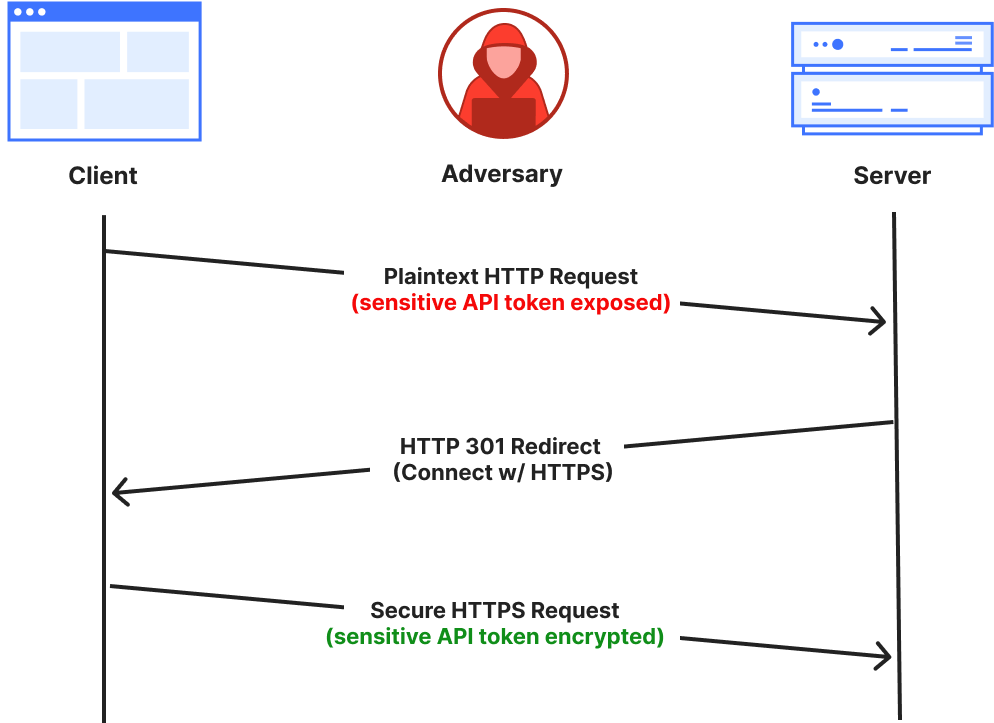
Connections made over cleartext HTTP ports risk exposing sensitive information because the data is transmitted unencrypted and can be intercepted by network intermediaries, such as ISPs, Wi-Fi hotspot providers, or malicious actors on the same network. It’s common for servers to either redirect or return a 403 (Forbidden) response to close the HTTP connection and enforce the use of HTTPS by clients. However, by the time this occurs, it may be too late, because sensitive information, such as an API token, may have already been transmitted in cleartext in the initial client request. This data is exposed before the server has a chance to redirect the client or reject the connection.

A better approach is to refuse the underlying cleartext connection by closing the network ports used for plaintext HTTP, and that’s exactly what we’re going to do for our customers.

Today we’re announcing that we’re closing all of the HTTP ports on api.cloudflare.com. We’re also making changes so that api.cloudflare.com can change IP addresses dynamically, in line with on-going efforts to decouple names from IP addresses, and reliably managing addresses in our authoritative DNS. This will enhance the agility and flexibility of our API endpoint management. Customers relying on static IP addresses for our API endpoints will be notified in advance to prevent any potential availability issues.

In addition to taking this first step to secure Cloudflare API traffic, we’ll release the ability for customers to opt-in to safely disabling all HTTP port traffic for their websites on Cloudflare. We expect to make this free security feature available in the last quarter of 2025.

We have consistently advocated for strong encryption standards to safeguard users’ data and privacy online. As part of our ongoing commitment to enhancing Internet security, this blog post details our efforts to enforce HTTPS-only connections across our global network. 

Understanding the problem

We already provide an “Always Use HTTPS” setting that can be used to redirect all visitor traffic on our customers’ domains (and subdomains) from HTTP (plaintext) to HTTPS (encrypted). For instance, when a user clicks on an HTTP version of the URL on the site (http://www.example.com), we issue an HTTP 3XX redirection status code to immediately redirect the request to the corresponding HTTPS version (https://www.example.com) of the page. While this works well for most scenarios, there’s a subtle but important risk factor: What happens if the initial plaintext HTTP request (before the redirection) contains sensitive user information?


Initial plaintext HTTP request is exposed to the network before the server can redirect to the secure HTTPS connection.

Third parties or intermediaries on shared networks could intercept sensitive data from the first plaintext HTTP request, or even carry out a Monster-in-the-Middle (MITM) attack by impersonating the web server.

One may ask if HTTP Strict Transport Security (HSTS) would partially alleviate this concern by ensuring that, after the first request, visitors can only access the website over HTTPS without needing a redirect. While this does reduce the window of opportunity for an adversary, the first request still remains exposed. Additionally, HSTS is not applicable by default for most non-user-facing use cases, such as API traffic from stateless clients. Many API clients don’t retain browser-like state or remember HSTS headers they’ve encountered. It is quite common practice for API calls to be redirected from HTTP to HTTPS, and hence have their initial request exposed to the network.

Therefore, in line with our culture of dogfooding, we evaluated the accessibility of the Cloudflare API (api.cloudflare.com) over HTTP ports (80, and others). In that regard, imagine a client making an initial request to our API endpoint that includes their secret API key. While we outright reject all plaintext connections with a 403 Forbidden response instead of redirecting for API traffic — clearly indicating that “Cloudflare API is only accessible over TLS” — this rejection still happens at the application layer. By that point, the API key may have already been exposed over the network before we can even reject the request. We do have a notification mechanism in place to alert customers and rotate their API keys accordingly, but a stronger approach would be to eliminate the exposure entirely. We have an opportunity to improve!
A better approach to API security

Any API key or token exposed in plaintext on the public Internet should be considered compromised. We can either address exposure after it occurs or prevent it entirely. The reactive approach involves continuously tracking and revoking compromised credentials, requiring active management to rotate each one. For example, when a plaintext HTTP request is made to our API endpoints, we detect exposed tokens by scanning for ‘Authorization’ header values.

In contrast, a preventive approach is stronger and more effective, stopping exposure before it happens. Instead of relying on the API service application to react after receiving potentially sensitive cleartext data, we can preemptively refuse the underlying connection at the transport layer, before any HTTP or application-layer data is exchanged. The preventative approach can be achieved by closing all plaintext HTTP ports for API traffic on our global network. The added benefit is that this is operationally much simpler: by eliminating cleartext traffic, there’s no need for key rotation.


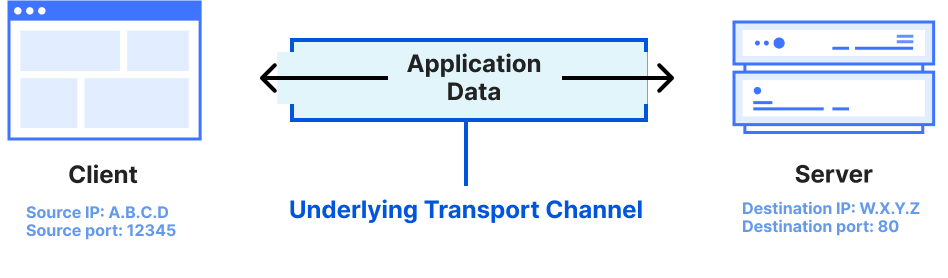
The transport layer carries the application layer data on top.

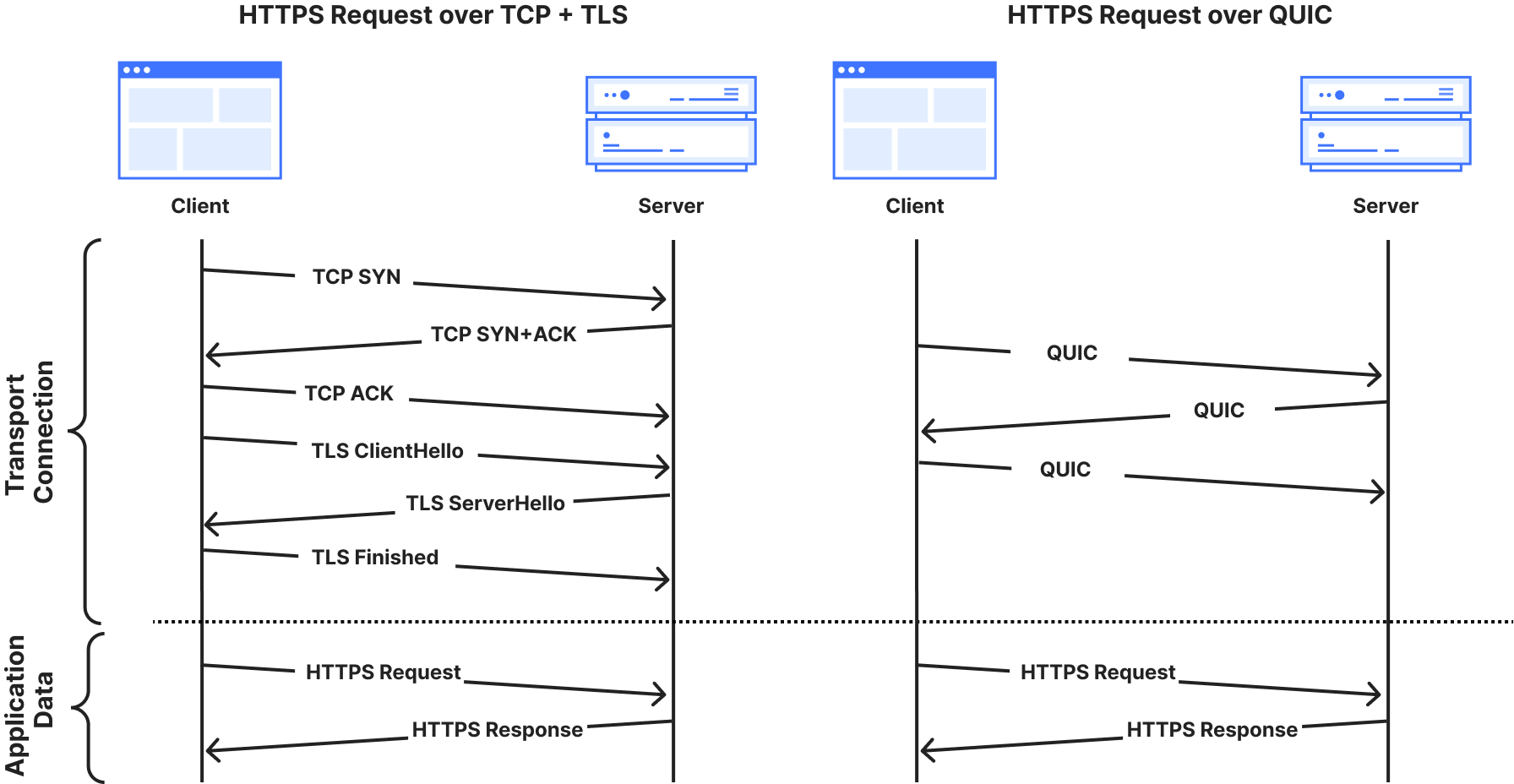
To explain why this works: an application-layer request requires an underlying transport connection, like TCP or QUIC, to be established first. The combination of a port number and an IP address serves as a transport layer identifier for creating the underlying transport channel. Ports direct network traffic to the correct application-layer process — for example, port 80 is designated for plaintext HTTP, while port 443 is used for encrypted HTTPS. By disabling the HTTP cleartext server-side port, we prevent that transport channel from being established during the initial “handshake” phase of the connection — before any application data, such as a secret API key, leaves the client’s machine.


Both TCP and QUIC transport layer handshakes are a pre-requisite for HTTPS application data exchange on the web.

Therefore, closing the HTTP interface entirely for API traffic gives a strong and visible fast-failure signal to developers that might be mistakenly accessing http://… instead of https://… with their secret API keys in the first request — a simple one-letter omission, but one with serious implications.

In theory, this is a simple change, but at Cloudflare’s global scale, implementing it required careful planning and execution. We’d like to share the steps we took to make this transition.

Understanding the scope

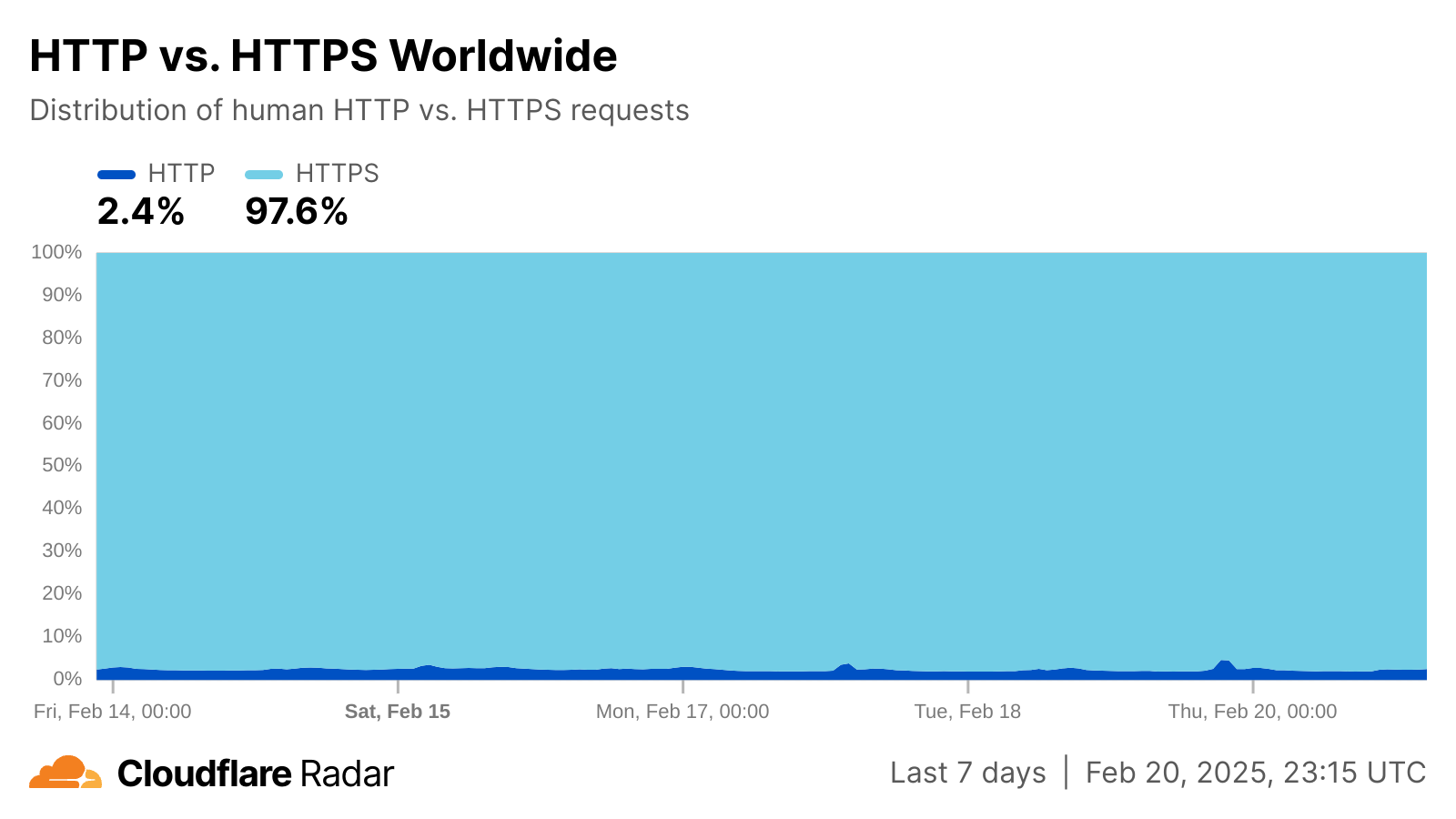
In an ideal scenario, we could simply close all cleartext HTTP ports on our network. However, two key challenges prevent this. First, as shown in the Cloudflare Radar figure below, about 2-3% of requests from “likely human” clients to our global network are over plaintext HTTP. While modern browsers prominently warn users about insecure HTTP connections and offer features to silently upgrade to HTTPS, this protection doesn’t extend to the broader ecosystem of connected devices. IoT devices with limited processing power, automated API clients, or legacy software stacks often lack such safeguards entirely. In fact, when filtering on plaintext HTTP traffic that is “likely automated”, the share rises to over 16%! We continue to see a wide variety of legacy clients accessing resources over plaintext connections. This trend is not confined to specific networks, but is observable globally.

Closing HTTP ports, like port 80, across our entire IP address space would block such clients entirely, causing a major disruption in services. While we plan to cautiously start by implementing the change on Cloudflare’s API IP addresses, it’s not enough. Therefore, our goal is to ensure all of our customers’ API traffic benefits from this change as well.


Breakdown of HTTP and HTTPS for ‘human’ connections

The second challenge relates to limitations posed by the longstanding BSD Sockets API at the server-side, which we have addressed using Tubular, a tool that inspects every connection terminated by a server and decides which application should receive it. Operators historically have faced a challenging dilemma: either listen to the same ports across many IP addresses using a single socket (scalable but inflexible), or maintain individual sockets for each IP address (flexible but unscalable). Luckily, Tubular has allowed us to resolve this using ‘bindings’, which decouples sockets from specific IP:port pairs. This creates efficient pathways for managing endpoints throughout our systems at scale, enabling us to handle both HTTP and HTTPS traffic intelligently without the traditional limitations of socket architecture.

Step 0, then, is about provisioning both IPv4 and IPv6 address space on our network that by default has all HTTP ports closed. Tubular enables us to configure and manage these IP addresses differently than others for our endpoints. Additionally, Addressing Agility and Topaz enable us to assign these addresses dynamically, and safely, for opted-in domains.

Moving from strategy to execution

In the past, our legacy stack would have made this transition challenging, but today’s Cloudflare possesses the appropriate tools to deliver a scalable solution, rather than addressing it on a domain-by-domain basis.

Using Tubular, we were able to bind our new set of anycast IP prefixes to our TLS-terminating proxies across the globe. To ensure that no plaintext HTTP traffic is served on these IP addresses, we extended our global iptables firewall configuration to reject any inbound packets on HTTP ports.

iptables -A INPUT -p tcp -d <IP_ADDRESS_BLOCK> --dport <HTTP_PORT> -j REJECT 
--reject-with tcp-reset

iptables -A INPUT -p udp -d <IP_ADDRESS_BLOCK> --dport <HTTP_PORT> -j REJECT 
--reject-with icmp-port-unreachable

As a result, any connections to these IP addresses on HTTP ports are filtered and rejected at the transport layer, eliminating the need for state management at the application layer by our web proxies.

The next logical step is to update the DNS assignments so that API traffic is routed over the correct IP addresses. In our case, we encoded a new DNS policy for API traffic for the HTTPS-only interface as a declarative Topaz program in our authoritative DNS server:

- name: https_only
 exclusive: true 
 config: |
    (config
      ([traffic_class "API"]
       [ipv4 (ipv4_address “192.0.2.1”)] # Example IPv4 address
       [ipv6 (ipv6_address “2001:DB8::1:1”)] # Example IPv6 address
       [t (ttl 300]))
  match: |
    (= query_domain_class traffic_class)
  response: |
    (response (list ipv4) (list ipv6) t)

The above policy encodes that for any DNS query targeting the ‘API traffic’ class, we return the respective HTTPS-only interface IP addresses. Topaz’s safety guarantees ensure exclusivity, preventing other DNS policies from inadvertently matching the same queries and misrouting plaintext HTTP expected domains to HTTPS-only IPs

api.cloudflare.com is the first domain to be added to our HTTPS-only API traffic class, with other applicable endpoints to follow.

Opting-in your API endpoints

As we said above, we’ve started with api.cloudflare.com and our internal API endpoints to thoroughly monitor any side effects on our own systems before extending this feature to customer domains. We have deployed these changes gradually across all data centers, leveraging Topaz’s flexibility to target subsets of traffic, minimizing disruptions, and ensuring a smooth transition.

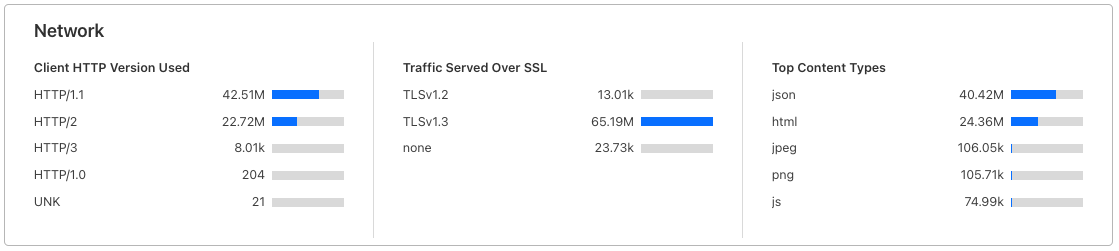
To monitor unencrypted connections for your domains, before blocking access using the feature, you can review the relevant analytics on the Cloudflare dashboard. Log in, select your account and domain, and navigate to the “Analytics & Logs” section. There, under the “Traffic Served Over SSL” subsection, you will find a breakdown of encrypted and unencrypted traffic for your site. That data can help provide a baseline for assessing the volume of plaintext HTTP connections for your site that will be blocked when you opt in. After opting in, you would expect no traffic for your site will be served over plaintext HTTP, and therefore that number should go down to zero.


Snapshot of ‘Traffic Served Over SSL’ section on Cloudflare dashboard

Towards the last quarter of 2025, we will provide customers the ability to opt in their domains using the dashboard or API (similar to enabling the Always Use HTTPS feature). Stay tuned!

Wrapping up

Starting today, any unencrypted connection to api.cloudflare.com will be completely rejected. Developers should not expect a 403 Forbidden response any longer for HTTP connections, as we will prevent the underlying connection to be established by closing the HTTP interface entirely. Only secure HTTPS connections will be allowed to be established.

We are also making updates to transition api.cloudflare.com away from its static IP addresses in the future. As part of that change, we will be discontinuing support for non-SNI legacy clients for Cloudflare API specifically — currently, an average of just 0.55% of TLS connections to the Cloudflare API do not include an SNI value. These non-SNI connections are initiated by a small number of accounts. We are committed to coordinating this transition and will work closely with the affected customers before implementing the change. This initiative aligns with our goal of enhancing the agility and reliability of our API endpoints.

Beyond the Cloudflare API use case, we’re also exploring other areas where it’s safe to close plaintext traffic ports. While the long tail of unencrypted traffic may persist for a while, it shouldn’t be forced on every site.

In the meantime, a small step like this can allow us to have a big impact in helping make a better Internet, and we are working hard to reliably bring this feature to your domains. We believe security should be free for all!

Cloudflare now uses post-quantum cryptography to talk to your origin server

Post Syndicated from Suleman Ahmad original http://blog.cloudflare.com/post-quantum-to-origins/

Cloudflare now uses post-quantum cryptography to talk to your origin server

Cloudflare now uses post-quantum cryptography to talk to your origin server

Quantum computers pose a serious threat to security and privacy of the Internet: encrypted communication intercepted today can be decrypted in the future by a sufficiently advanced quantum computer. To counter this store-now/decrypt-later threat, cryptographers have been hard at work over the last decades proposing and vetting post-quantum cryptography (PQC), cryptography that’s designed to withstand attacks of quantum computers. After a six-year public competition, in July 2022, the US National Institute of Standards and Technology (NIST), known for standardizing AES and SHA, announced Kyber as their pick for post-quantum key agreement. Now the baton has been handed to Industry to deploy post-quantum key agreement to protect today’s communications from the threat of future decryption by a quantum computer.

Cloudflare operates as a reverse proxy between clients (“visitors”) and customers’ web servers (“origins”), so that we can protect origin sites from attacks and improve site performance. In this post we explain how we secure the connection from Cloudflare to origin servers. To put that in context, let’s have a look at the connection involved when visiting an uncached page on a website served through Cloudflare.

Cloudflare now uses post-quantum cryptography to talk to your origin server

The first connection is from the visitor’s browser to Cloudflare. In October 2022, we enabled X25519+Kyber as a beta for all websites and APIs served through Cloudflare. However, it takes two to tango: the connection is only secured if the browser also supports post-quantum cryptography. As of August 2023, Chrome is slowly enabling X25519+Kyber by default.

The visitor’s request is routed through Cloudflare’s network (2). We have upgraded many of these internal connections to use post-quantum cryptography, and expect to be done upgrading all of our internal connections by the end of 2024. That leaves as the final link the connection (3) between us and the origin server.

We are happy to announce that we are rolling out support for X25519+Kyber for most outbound connections, including origin servers and Cloudflare Workers fetch() calls.

Plan Support for post-quantum outbound connections
Free Started roll-out. Aiming for 100% by the end of the October.
Pro and Business Started roll-out. Aiming for 100% by the end of year.
Enterprise Start roll-out February 2024. 100% by March 2024.

You can skip the roll-out and opt-in your zone today, or opt-out ahead of time, using an API described below. Before rolling out this support for enterprise customers in February 2024, we will add a toggle on the dashboard to opt out.

In this post we will dive into the nitty-gritty of what we enabled; how we have to be a bit subtle to prevent breaking connections to origins that are not ready yet, and how you can add support to your (origin) server.

But before we dive in, for the impatient:

Quick start

To enable a post-quantum connection between Cloudflare and your origin server today, opt-in your zone to skip the gradual roll-out:

curl --request PUT \
  --url https://api.cloudflare.com/client/v4/zones/(zone_id)/cache/origin_post_quantum_encryption \
  --header 'Content-Type: application/json' \
  --header 'Authorization: Bearer (API token)' \
  --data '{"value": "preferred"}'

Then, make sure your server supports TLS 1.3; enable and prefer the key agreement X25519Kyber768Draft00; and ensure it’s configured with server cipher preference. For example, to configure nginx (compiled with a recent BoringSSL) like this, use

ssl_ecdh_curve X25519Kyber768Draft00:X25519;
ssl_prefer_server_ciphers on;
ssl_protocols TLSv1.3;

Replace (zone_id) and (API token) appropriately. Then, make sure your server supports TLS 1.3; enable and prefer the key agreement X25519Kyber768Draft00; and ensure it’s configured with server cipher preference. For example, to configure nginx (compiled with a recent BoringSSL) like this, use

	ssl_ecdh_curve X25519Kyber768Draft00:X25519;
	ssl_prefer_server_ciphers on;
	ssl_protocols TLSv1.3;

To check your server is properly configured, you can use the bssl tool of BoringSSL:

	$ bssl client -connect (your server):443 -curves X25519:X25519Kyber768Draft00
[...]
	  ECDHE curve: X25519Kyber768Draft00
[...]

We’re looking for X25519Kyber768Draft00 for a post-quantum connection as shown above instead of merely X25519.
For more client and server support, check out pq.cloudflareresearch.com. Now, let’s dive in.

Overview of a TLS 1.3 handshake

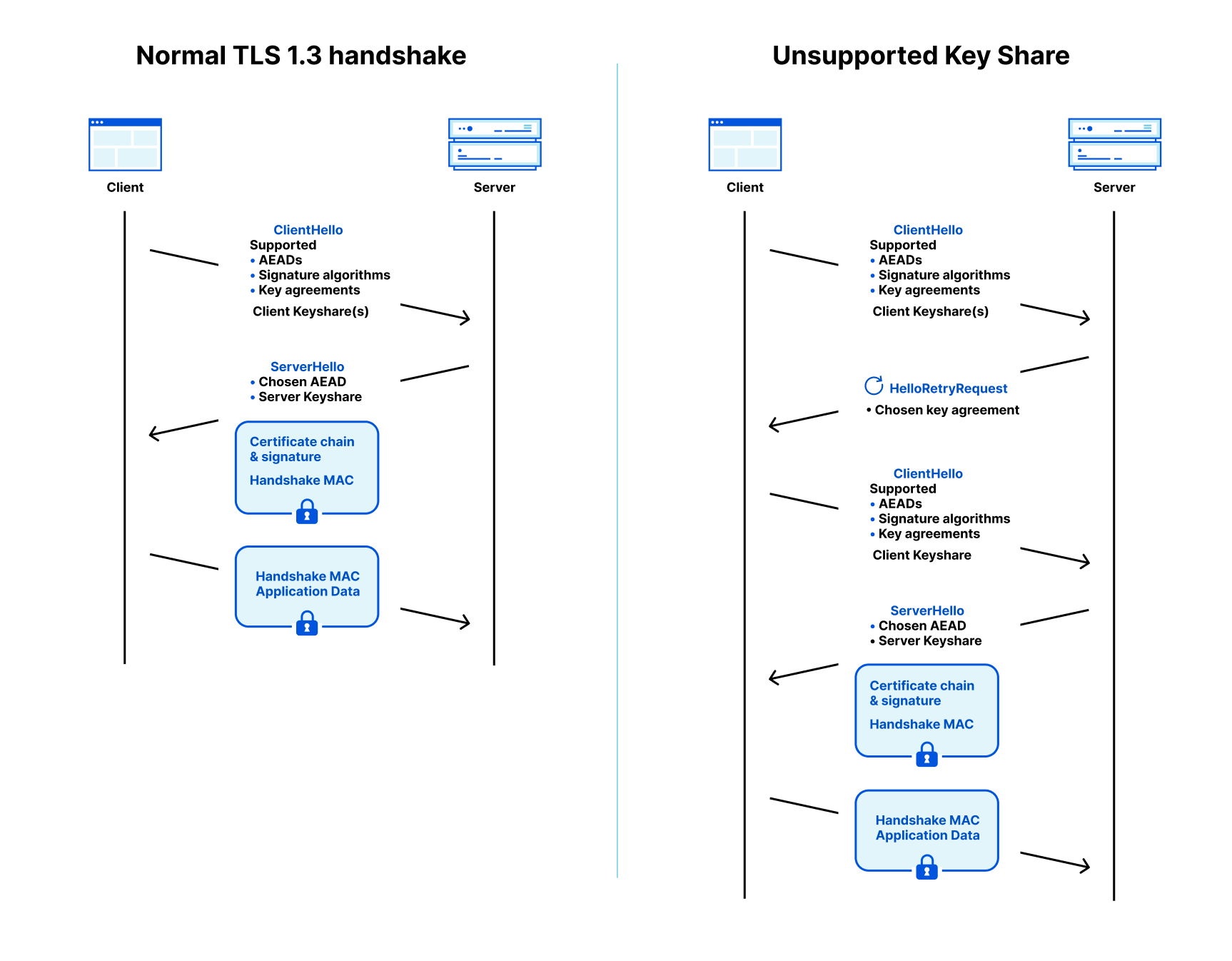
To understand how a smooth upgrade is possible, and where it might go wrong, we need to understand a few basics of the TLS 1.3 protocol, which is used to protect traffic on the Internet. A TLS connection starts with a handshake which is used to authenticate the server and derive a shared key. The browser (client) starts by sending a ClientHello message that contains among other things, the hostname (SNI) and the list of key agreement methods it supports.

To remove a round trip, the client is allowed to make a guess of what the server supports and start the key agreement by sending one or more client keyshares. That guess might be correct (on the left in the diagram below) or the client has to retry (on the right). By the way, this guessing of keyshares is a new feature of TLS 1.3, and it is the main reason why it’s faster than TLS 1.2.

Cloudflare now uses post-quantum cryptography to talk to your origin server
Protocol flow for server-authenticated TLS 1.3 with a supported client keyshare on the left and a HelloRetryRequest on the right.

In both cases the client sends a client keyshare to the server. From this client keyshare the server generates the shared key. The server then returns a server keyshare with which the client can also compute the shared key. This shared key is used to protect the rest of the connection using symmetric cryptography, such as AES.

Today X25519 is used as the key agreement in the vast majority of connections. To secure the connection against store-now/decrypt-later in the post-quantum world, a client can simply send a X25519+Kyber keyshare.

Hello! Retry Request? (HRR)

What we just described is the happy flow, where the client guessed correctly which key agreement the server supports. If the server does not support the keyshare that the client sent, then the server picks one of the supported key agreements that the client advertised, and asks for it in a HelloRetryRequest message.

This is not the only case where a server can use a HelloRetryRequest: even if the client sent keyshares that the server supports, the server is allowed to prefer a different key agreement the client advertised, and ask for it with a HelloRetryRequest. This will turn out to be very useful.

HelloRetryRequests are mostly undesirable: they add an extra round trip, and bring us back to the performance of TLS 1.2. We already had a transition of key agreement methods: back in the day P-256 was the de facto standard. When browsers couldn’t assume support for the newer X25519, some would send two keyshares, both X25519 and P-256 to prevent a HelloRetryRequest.

Also today, when enabling Kyber in Chrome, Chrome will send two keyshares: X25519 and X25519+Kyber to prevent a HelloRetryRequest. Sending two keyshares is not ideal: it requires the client to compute more, and it takes more space on the wire. This becomes more problematic when we want to send two post-quantum keyshares, as post-quantum keyshares are much larger. Talking about post-quantum keyshares, let’s have a look at X25519+Kyber.

The nitty-gritty of X25519+Kyber

The full name of the post-quantum key agreement we have enabled is X25519Kyber768Draft00, which has become the industry standard for early deployment. It is the combination (a so-called hybrid, more about that later) of two key agreements: X25519 and a preliminary version of NIST’s pick Kyber. Preliminary, because standardization of Kyber is not complete: NIST has released a draft standard for which it has requested public input. The final standard might change a little, but we do not expect any radical changes in security or performance. One notable change is the name: the NIST standard is set to be called ML-KEM. Once ML-KEM is released in 2024, we will promptly adopt support for the corresponding hybrid, and deprecate support for X25519Kyber768Draft00. We will announce deprecation on this blog and pq.cloudflareresearch.com.

Picking security level: 512 vs 768

Back in 2022, for incoming connections, we enabled hybrids with both Kyber512 and Kyber768. The difference is target security level: Kyber512 aims for the same security as AES-128, whereas Kyber768 matches up with AES-192. Contrary to popular belief, AES-128 is not broken in practice by quantum computers.

So why go with Kyber768? After years of analysis, there is no indication that Kyber512 fails to live up to its target security level. The designers of Kyber feel more comfortable, though, with the wider security margin of Kyber768, and we follow their advice.

Hybrid

It is not inconceivable though, that an unexpected improvement in cryptanalysis will completely break Kyber768. Notably Rainbow, GeMMS and SIDH survived several rounds of public review before being broken. We do have to add nuance here. For a big break you need some mathematical trick, and compared to other schemes, SIDH had a lot of mathematical attack surface. Secondly, even though a scheme participated in many rounds of review doesn’t mean it saw a lot of attention. Because of their performance characteristics, these three schemes have more niche applications, and therefore received much less scrutiny from cryptanalysts. In contrast, Kyber is the big prize: breaking it will ensure fame.

Notwithstanding, for the moment, we feel it’s wiser to stick with hybrid key agreement. We combine Kyber together with X25519, which is currently the de facto standard key agreement, so that if Kyber turns out to be broken, we retain the non-post quantum security of X25519.

Performance

Kyber is fast. Very fast. It easily beats X25519, which is already known for its speed:

Size keyshares(in bytes) Ops/sec (higher is better)
Algorithm PQ Client Server Client Server
X25519 32 32 17,000 17,000
Kyber768 1,184 1,088 31,000 70,000
X25519Kyber768Draft00 1,216 1,120 11,000 14,000

Combined X25519Kyber768Draft00 is slower than X25519, but not by much. The big difference is its size: when connecting the client has to send 1,184 extra bytes for Kyber in the first message. That brings us to the next topic.

When things break, and how to move forward

Split ClientHello

As we saw, the ClientHello is the first message that is sent by the client when setting up a TLS connection. With X25519, the ClientHello almost always fits within one network packet. With Kyber, the ClientHello doesn’t fit anymore with typical packet sizes and needs to be split over two network packets.

The TLS standard allows for the ClientHello to be split in this way. However, it used to be so exceedingly rare to see a split ClientHello that there is plenty of software and hardware out there that falsely assumes it never happens.

This so-called protocol ossification is the major challenge rolling out post-quantum key agreement. Back in 2019, during earlier post-quantum experiments, middleboxes of a particular vendor dropped connections with a split ClientHello. Chrome is currently slowly ramping up the number of post-quantum connections to catch these issues early. Several reports are listed here, and luckily most vendors seem to fix issues promptly.

Over time, with the slow ramp up of browsers, many of these implementation bugs will be found and corrected. However, we cannot completely rely on this for our outbound connections since in many cases Cloudflare is the sole client to connect directly to the origin server. Thus, we must exercise caution when deploying post-quantum cryptography to ensure that we are still able to reach origin servers even in the presence of buggy implementations.

HelloRetryRequest to the rescue

To enable support for post-quantum key agreement on all outbound connections, without risking issues with split ClientHello for those servers that are not ready yet, we make clever use of HelloRetryRequest. Instead of sending a X25519+Kyber keyshare, we will only advertise support for it, and send a non-post quantum secure X25519 keyshare in the first ClientHello.

If the origin does not support X25519+Kyber, then nothing changes. One might wonder: could merely advertising support for it trip up any origins? This used to be a real concern in the past, but luckily browsers have adopted a clever mechanism called GREASE: they will send codepoints selected from unpredictable regions to make it hard to implement any software that could trip up on unknown codepoints.

If the origin does support X25519+Kyber, then it can use the HelloRetryRequest to request a post-quantum key agreement from us.

Things might still break then: for instance a malfunctioning middlebox, load-balancer, or the server software itself might still trip over the large ClientHello with X25519+Kyber sent in response to the HelloRetryRequest.

If we’re frank, the HRR trick kicks the can down the road: we as an industry will need to fix broken hardware and software before we can enable post-quantum on every last connection. The important thing though is that those past mistakes will not hold us back from securing the majority of connections. Luckily, from our experience, breakage will not be common.

So, when you have flipped the switch on your origin server, and things do break against expectation, what could be the root cause?

Debugging and examples

It’s impossible to exhaustively list all bugs that could interfere with the post-quantum connection, but we like to share a few we’ve seen.

The first step is to figure out what pieces of hardware and software are involved in the connection. Rarely it’s just the server: there could be a load-balancer, and even a humble router could be at fault.

One straightforward mistake is to conveniently assume the ClientHello is small by reserving only a small, say 1000 byte, buffer.

A variation of this is where a server uses a single call to recv() to read the ClientHello from the TCP connection. This works perfectly fine if it fits within one packet, but when split over multiple, it might require more calls.

Not all issues that we encountered relate directly to split ClientHello. For instance, servers using the Rust TLS library rustls did not implement HelloRetryRequest correctly before 0.21.7.

If you turned on post-quantum support for your origin, and hit issues, please do reach out: email [email protected].

Opting in and opting out

Now that you know what might lie in wait for you, let’s cover how to configure the outbound connections of your zone. There are three settings. The setting affects all outbound connections for your zone: to the origin server, but also for fetch() requests made by Workers on your zone.

Setting Meaning
supported Advertise support for post-quantum key agreement, but send a classical keyshare in the first ClientHello.When the origin supports and prefers X25519+Kyber, a post-quantum connection will be established, but it incurs an extra roundtrip.This is the most compatible way to enable post-quantum.
preferred Send a post-quantum keyshare in the first ClientHello.When the origin supports X25519+Kyber, a post-quantum connection will be established without an extra roundtrip.This is the most performant way to enable post-quantum.
off Do not send or advertise support for post-quantum key agreement to the origin.
(default) Allow us to determine the best behavior for your zone. (More about that later.)

The setting can be adjusted using the following API call:

curl --request PUT \
  --url https://api.cloudflare.com/client/v4/zones/(zone_id)/cache/origin_post_quantum_encryption \
  --header 'Content-Type: application/json' \
  --header 'Authorization: Bearer (API token)' \
  --data '{"value": "(setting)"}'

Here, the parameters are as follows.

Parameter Value
setting supported, preferred, or off, with meaning as described above
zone_id Identifier of the zone to control. You can look up the zone_id in the dashboard.
API token Token used to authenticate you. You can create one in the dashboard. Use create custom token and under permissions select zone → zone settings → edit.

Testing whether your origin server is configured correctly

If you set your zone to preferred mode, you only need to check support for the proper post-quantum key agreement with your origin server. This can be done with the bssl tool of BoringSSL:

	$ bssl client -connect (your server):443 -curves X25519:X25519Kyber768Draft00
[...]
	  ECDHE curve: X25519Kyber768Draft00
[...]

If you set your zone to supported mode, or if you wait for the gradual roll-out, you will need to make sure that your origin server prefers post-quantum key agreement even if we sent a classical keyshare in the initial ClientHello. This can be done with our fork of BoringSSL:

	$ git clone https://github.com/cloudflare/boringssl-pq
	[...]
	$ cd boringssl-pq && cmake -B build && make -C build
$ build/bssl client -connect (your server):443 -curves X25519:X25519Kyber768Draft00 -disable-second-keyshare
[...]
	  ECDHE curve: X25519Kyber768Draft00
[...]

Scanning ahead to remove the extra roundtrip

With the HelloRetryRequest trick today, we can safely advertise support for post-quantum key agreement to all origins. The downside is that for those origins that do support post-quantum key agreement, we’re incurring an extra roundtrip for the HelloRetryRequest, which hurts performance.

You can remove the roundtrip by configuring your zone as preferred, but we can do better: the best setting is the one you shouldn’t have to touch.

We have started scanning all active origins for support of post-quantum key agreement. Roughly every 24 hours, we will attempt a series of about ten TLS connections to your origin, to test support and preferences for the various key agreements.

Our preliminary results show that 0.5% of origins support a post-quantum connection. As expected, we found that a small fraction (<0.34%) of all origins do not properly establish a connection, when we send a post-quantum keyshare in the first ClientHello, which corresponds to the preferred setting. Unexpectedly the vast majority of these origins do return a HelloRetryRequest, but fail after receiving the second ClientHello with a classical keyshare. We are investigating the exact causes of these failures, and will reach out to vendors to help resolve them.

Later this year, we will start using these scan results to determine the best setting for zones that haven’t been configured yet. That means that for those zones whose origins support it reliably, we will send a post-quantum keyshare directly without extra roundtrip.

Also speeding up non post-quantum origins

The scanner pipeline we built will not just benefit post-quantum origins. By default we send X25519, but not every origin supports or prefers X25519. We find that 4% of origin servers will send us a HelloRetryRequest for other key agreements such as P-384.

Key agreement Fraction supported Fraction preferred
X25519 96% 96%
P-256 97% 0.6%
P-384 89% 2.3%
P-521 82% 0.1%
X25519Kyber768Draft00 0.5% 0.5%

Also, later this year, we will use these scan results to directly send the most preferred keyshare to your origin removing the need for an extra roundtrip caused by HRR.

Wrapping up

To mitigate the store-now/decrypt-later threat, and ensure the Internet stays encrypted, the IT industry needs to work together to roll out post-quantum cryptography. We’re excited that today we’re rolling out support for post-quantum secure outbound connections: connections between Cloudflare and the origins.

We would love it if you would try and enable post-quantum key agreement on your origin. Please, do share your experiences, or reach out for any questions: [email protected].

To follow the latest developments of our deployment of post-quantum cryptography, and client/server support, check out pq.cloudflareresearch.com and keep an eye on this blog.

Connection coalescing with ORIGIN Frames: fewer DNS queries, fewer connections

Post Syndicated from Suleman Ahmad original http://blog.cloudflare.com/connection-coalescing-with-origin-frames-fewer-dns-queries-fewer-connections/

Connection coalescing with ORIGIN Frames: fewer DNS queries, fewer connections

This blog reports and summarizes the contents of a Cloudflare research paper which appeared at the ACM Internet Measurement Conference, that measures and prototypes connection coalescing with ORIGIN Frames.

Connection coalescing with ORIGIN Frames: fewer DNS queries, fewer connections

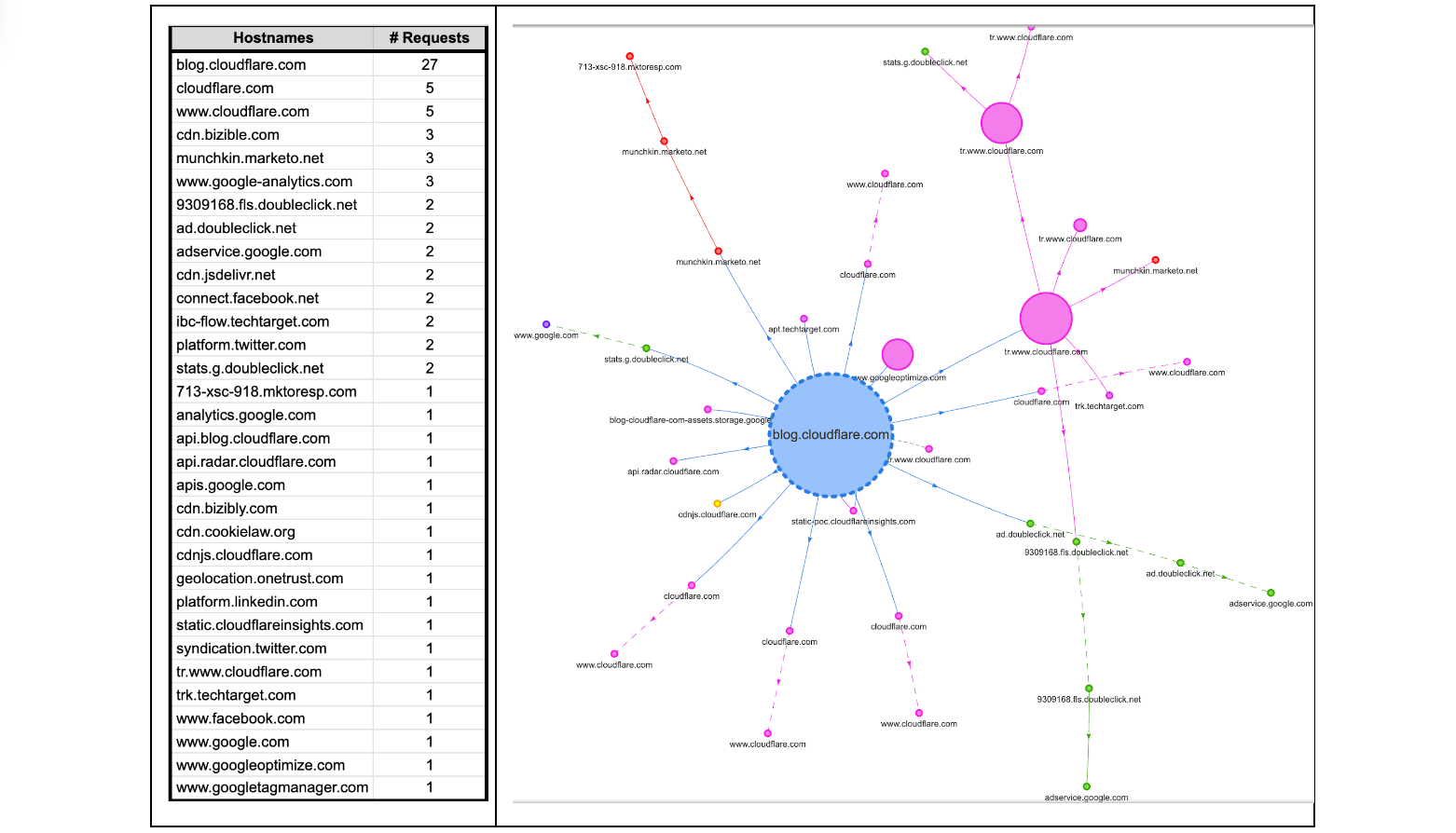
Some readers might be surprised to hear that a single visit to a web page can cause a browser to make tens, sometimes even hundreds, of web connections. Take this very blog as an example. If it is your first visit to the Cloudflare blog, or it has been a while since your last visit, your browser will make multiple connections to render the page. The browser will make DNS queries to find IP addresses corresponding to blog.cloudflare.com and then subsequent requests to retrieve any necessary subresources on the web page needed to successfully render the complete page. How many? Looking below, at the time of writing, there are 32 different hostnames used to load the Cloudflare Blog. That means 32 DNS queries and at least 32 TCP (or QUIC) connections, unless the client is able to reuse (or coalesce) some of those connections.

Connection coalescing with ORIGIN Frames: fewer DNS queries, fewer connections

Each new web connection not only introduces additional load on a server's processing capabilities – potentially leading to scalability challenges during peak usage hours – but also exposes client metadata to the network, such as the plaintext hostnames being accessed by an individual. Such meta information can potentially reveal a user’s online activities and browsing behaviors to on-path network adversaries and eavesdroppers!

In this blog we’re going to take a closer look at “connection coalescing”. Since our initial look at IP-based coalescing in 2021, we have done further large-scale measurements and modeling across the Internet, to understand and predict if and where coalescing would work best. Since IP coalescing is difficult to manage at large scale, last year we implemented and experimented with a promising standard called the HTTP/2 ORIGIN Frame extension that we leveraged to coalesce connections to our edge without worrying about managing IP addresses.

All told, there are opportunities being missed by many large providers. We hope that this blog (and our publication at ACM IMC 2022 with full details) offers a first step that helps servers and clients take advantage of the ORIGIN Frame standard.

Setting the stage

At a high level, as a user navigates the web, the browser renders web pages by retrieving dependent subresources to construct the complete web page. This process bears a striking resemblance to the way physical products are assembled in a factory. In this sense, a modern web page can be considered like an assembly plant. It relies on a ‘supply chain’ of resources that are needed to produce the final product.

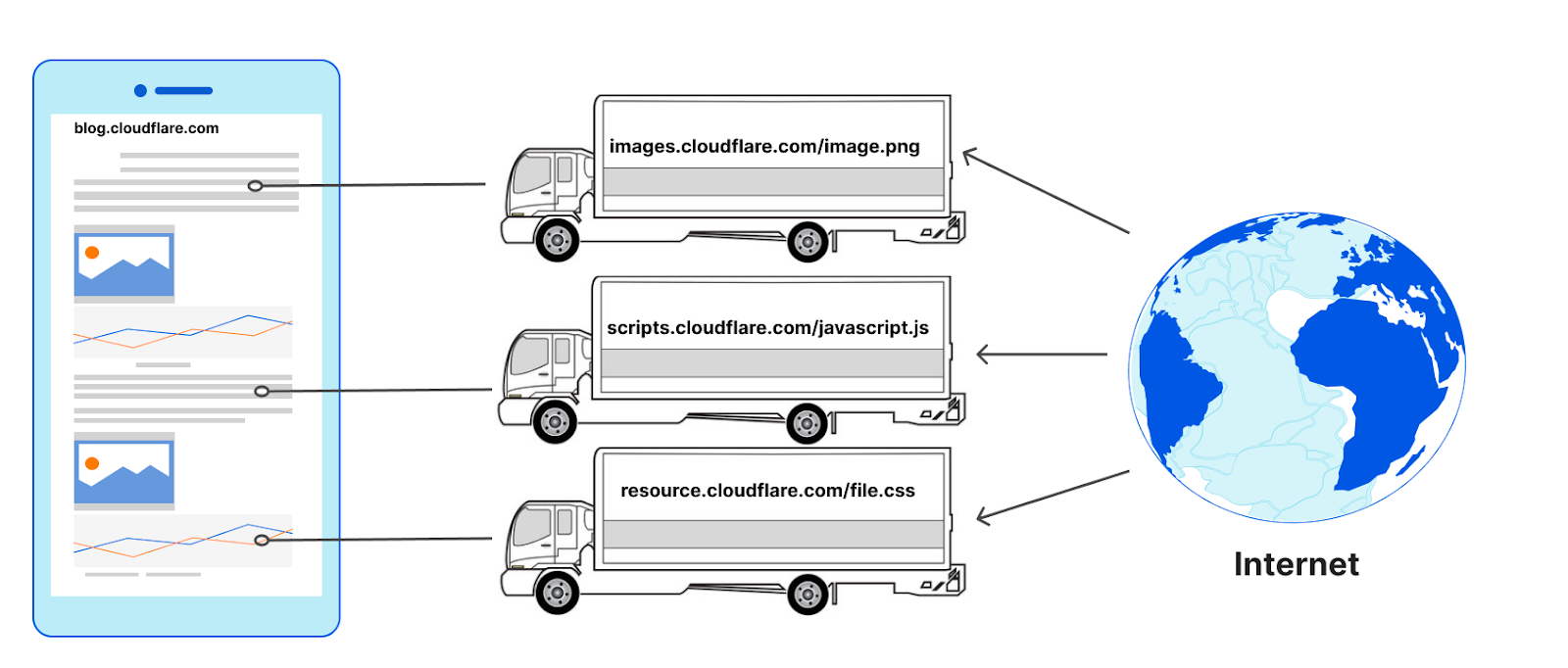
An assembly plant in the physical world can place a single order for different parts and get a single shipment from the supplier (similar to the kitting process for maximizing value and minimizing response time); no matter the manufacturer of those parts or where they are made — one ‘connection’ to the supplier is all that is needed. Any single truck from a supplier to an assembly plant can be filled with parts from multiple manufacturers.

The design of the web causes browsers to typically do the opposite in nature. To retrieve the images, JavaScript, and other resources on a web page (the parts), web clients (assembly plants) have to make at least one connection to every hostname (the manufacturers) defined in the HTML that is returned by the server (the supplier). It makes no difference if the connections to those hostnames go to the same server or not, for example they could go to a reverse proxy like Cloudflare. For each manufacturer a ‘new’ truck would be needed to transfer the materials to the assembly plant from the same supplier, or more formally, a new connection would need to be made to request a subresource from a hostname on the same web page.

Connection coalescing with ORIGIN Frames: fewer DNS queries, fewer connections
Without connection coalescing

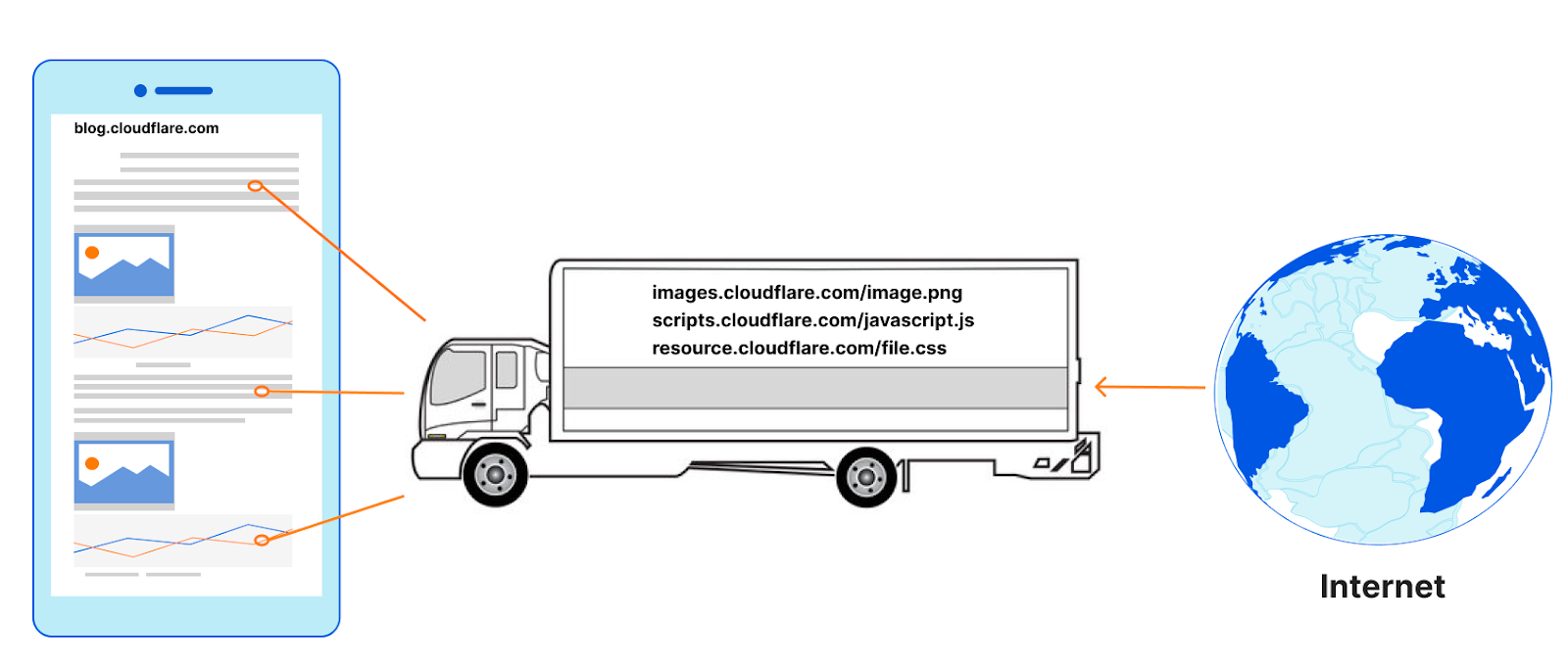
The number of connections used to load a web page can be surprisingly high. It is also common for the subresources to need yet other sub-subresources, and so new connections emerge as a result of earlier ones. Remember, too, that HTTP connections to hostnames are often preceded by DNS queries! Connection coalescing allows us to use fewer connections, or ‘reuse’ the same set of trucks to carry parts from multiple manufacturers from a single supplier.

Connection coalescing with ORIGIN Frames: fewer DNS queries, fewer connections
With connection coalescing 

Connection coalescing in principle

Connection coalescing was introduced in HTTP/2, and carried over into HTTP/3. We’ve blogged about connection coalescing previously (for a detailed primer we encourage going over that blog). While the idea is simple, implementing it can present a number of engineering challenges. For example, recall from above that there are 32 hostnames (at the time of writing) to load the web page you are reading right now. Among the 32 hostnames are 16 unique domains (defined as “Effective TLD+1”). Can we create fewer connections or ‘coalesce’ existing connections for each unique domain? The answer is ‘Yes, but it depends’.

The exact number of connections to load the blog page is not at all obvious, and hard to know. There may be 32 hostnames attached to 16 domains but, counter-intuitively, this does not mean the answer to “how many unique connections?” is 16. The true answer could be as few as one connection if all the hostnames are reachable at a single server; or as many as 32 independent connections if a different and distinct server is needed to access each individual hostname.

Connection reuse comes in many forms, so it’s important to define “connection coalescing” in the HTTP space. For example, the reuse of an existing TCP or TLS connection to a hostname to make multiple requests for subresources from that same hostname is connection reuse, but not coalescing.

Coalescing occurs when an existing TLS channel for some hostname can be repurposed or used for connecting to a different hostname. For example, upon visiting blog.cloudflare.com, the HTML points to subresources at cdnjs.cloudflare.com. To reuse the same TLS connection for the subresources, it is necessary for both hostnames to appear together in the TLS certificate's “Server Alternative Name (SAN)” list, but this step alone is not sufficient to convince browsers to coalesce. After all, the cdnjs.cloudflare.com service may or may not be reachable at the same server as blog.cloudflare.com, despite being on the same certificate. So how can the browser know? Coalescing only works if servers set up the right conditions, but clients have to decide whether to coalesce or not – thus, browsers require a signal to coalesce beyond the SANs list on the certificate. Revisiting our analogy, the assembly plant may order a part from a manufacturer directly, not knowing that the supplier already has the same part in its warehouse.

There are two explicit signals a browser can use to decide whether connections can be coalesced: one is IP-based, the other ORIGIN Frame-based. The former requires the server operators to tightly bind DNS records to the HTTP resources available on the server. This is difficult to manage and deploy, and actually creates a risky dependency, because you have to place all the resources behind a specific set or a single IP address. The way IP addresses influence coalescing decisions varies among browsers, with some choosing to be more conservative and others more permissive. Alternatively, the HTTP ORIGIN Frame is an easier signal for the servers to orchestrate; it’s also flexible and has graceful failure with no interruption to service (for a specification compliant implementation).

A foundational difference between both these coalescing signals is: IP-based coalescing signals are implicit, even accidental, and force clients to infer coalescing possibilities that may exist, or not. None of this is surprising since IP addresses are designed to have no real relationship with names! In contrast, ORIGIN Frame is an explicit signal from servers to clients that coalescing is available no matter what DNS says for any particular hostname.

We have experimented with IP-based coalescing previously; for the purpose of this blog we will take a deeper look at ORIGIN Frame-based coalescing.

What is the ORIGIN Frame standard?

The ORIGIN Frame is an extension to the HTTP/2 and HTTP/3 specification, a special Frame sent on stream 0 or the control stream of the connection respectively. The Frame allows the servers to send an ‘origin-set’ to the clients on an existing established TLS connection, which includes hostnames that it is authorized for and will not incur any HTTP 421 errors. Hostnames in the origin-set MUST also appear in the certificate SAN list for the server, even if those hostnames are announced on different IP addresses via DNS.

Specifically, two different steps are required:

  1. Web servers must send a list enumerating the Origin Set (the hostnames that a given connection might be used for) in the ORIGIN Frame extension.
  2. The TLS certificate returned by the web server must cover the additional hostnames being returned in the ORIGIN Frame in the DNS names SAN entries.

At a high-level ORIGIN Frames are a supplement to the TLS certificate that operators can attach to say, “Psst! Hey, client, here are the names in the SANs that are available on this connection — you can coalesce!” Since the ORIGIN Frame is not part of the certificate itself, its contents can be made to change independently. No new certificate is required. There is also no dependency on IP addresses. For a coalesceable hostname, existing TCP/QUIC+TLS connections can be reused without requiring new connections or DNS queries.

Many websites today rely on content which is served by CDNs, like Cloudflare CDN service. The practice of using external CDN services offers websites the advantages of speed, reliability, and reduces the load of content served by their origin servers. When both the website, and the resources are served by the same CDN, despite being different hostnames, owned by different entities, it opens up some very interesting opportunities for CDN operators to allow connections to be reused and coalesced since they can control both the certificate management and connection requests for sending ORIGIN frames on behalf of the real origin server.

Unfortunately, there has been no way to turn the possibilities enabled by ORIGIN Frame into practice. To the best of our knowledge, until today, there has been no server implementation that supports ORIGIN Frames. Among browsers, only Firefox supports ORIGIN Frames. Since IP coalescing is challenging and ORIGIN Frame has no deployed support, is the engineering time and energy to better support coalescing worth the investment? We decided to find out with a large-scale Internet-wide measurement to understand the opportunities and predict the possibilities, and then implemented the ORIGIN Frame to experiment on production traffic.

Experiment #1: What is the scale of required changes?

In February 2021, we collected data for 500K of the most popular websites on the Internet, using a modified Web Page Test on 100 virtual machines. An automated Chrome (v88) browser instance was launched for every visit to a web page to eliminate caching effects (because we wanted to understand coalescing, not caching). On successful completion of each session, Chrome developer tools were used to retrieve and write the page load data as an HTTP Archive format (HAR) file with a full timeline of events, as well as additional information about certificates and their validation. Additionally, we parsed the certificate chains for the root web page and new TLS connections triggered by subresource requests to (i) identify certificate issuers for the hostnames, (ii) inspect the presence of the Subject Alternative Name (SAN) extension, and (iii) validate that DNS names resolve to the IP address used. Further details about our methodology and results can be found in the technical paper.

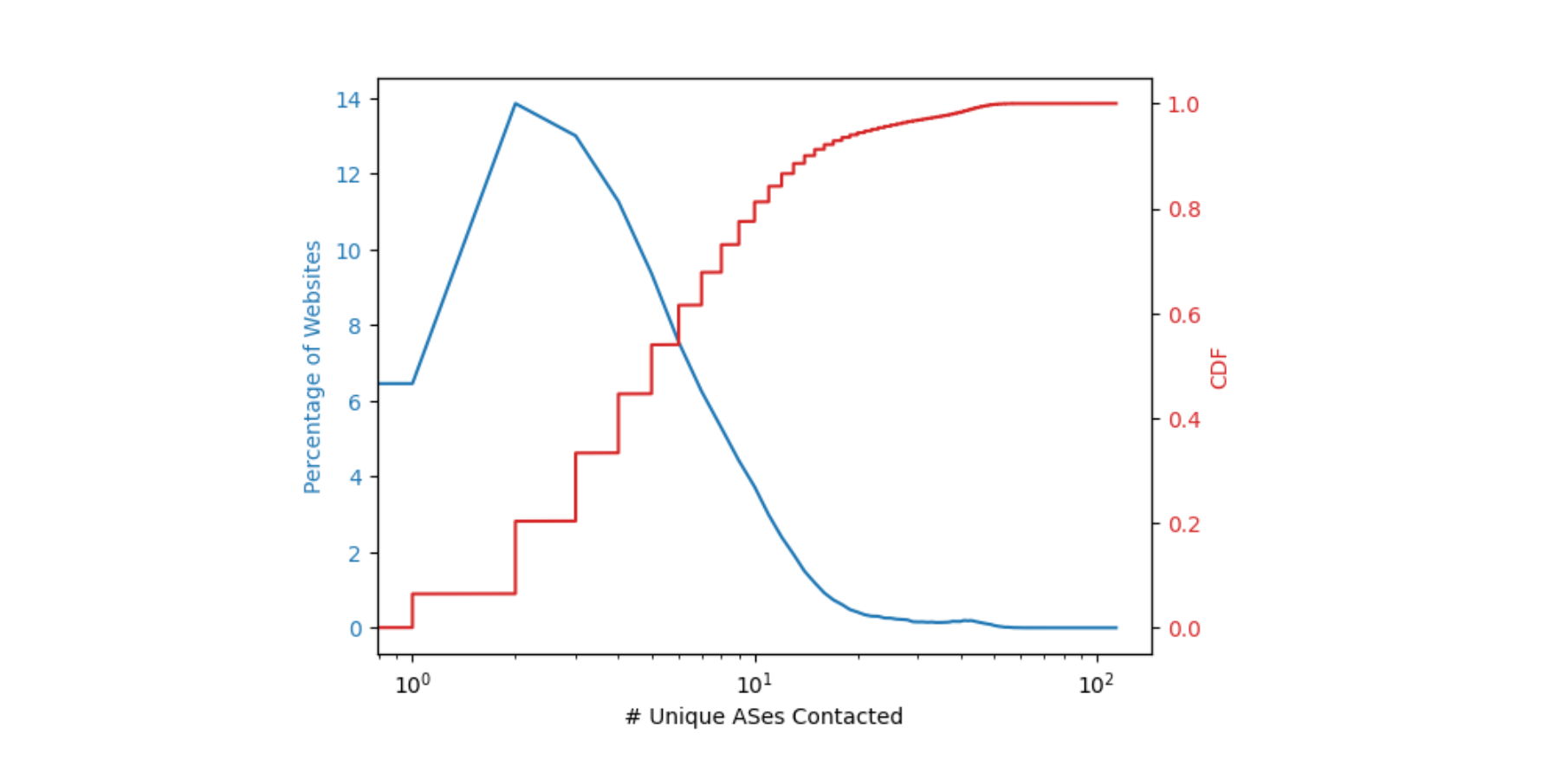
The first step was to understand what resources are requested by web pages to successfully render the page contents, and where these resources were present on the Internet. Connection coalescing becomes possible when subresource domains are ideally co-located. We approximated the location of a domain by finding its corresponding autonomous system (AS). For example, the domain attached to cdnjs is reachable via AS 13335 in the BGP routing table, and that AS number belongs to Cloudflare. The figure below describes the percentage of web pages and the number of unique ASes needed to fully load a web page.

Connection coalescing with ORIGIN Frames: fewer DNS queries, fewer connections

Around 14% of the web pages need two ASes to fully load i.e. pages that have a dependency on one additional AS for subresources. More than 50% of the web pages need to contact no more than six ASes to obtain all the necessary subresources. This finding as shown in the plot above implies that a relatively small number of operators serve the sub-resource content necessary for a majority (~50%) of the websites, and any usage of ORIGIN Frames would need only a few changes to have its intended impact. The potential for connection coalescing can therefore be optimistically approximated to the number of unique ASes needed to retrieve all subresources in a web page. In practice however, this may be superseded by operational factors such as SLAs or helped by flexible mappings between sockets, names, and IP addresses which we worked on previously at Cloudflare.

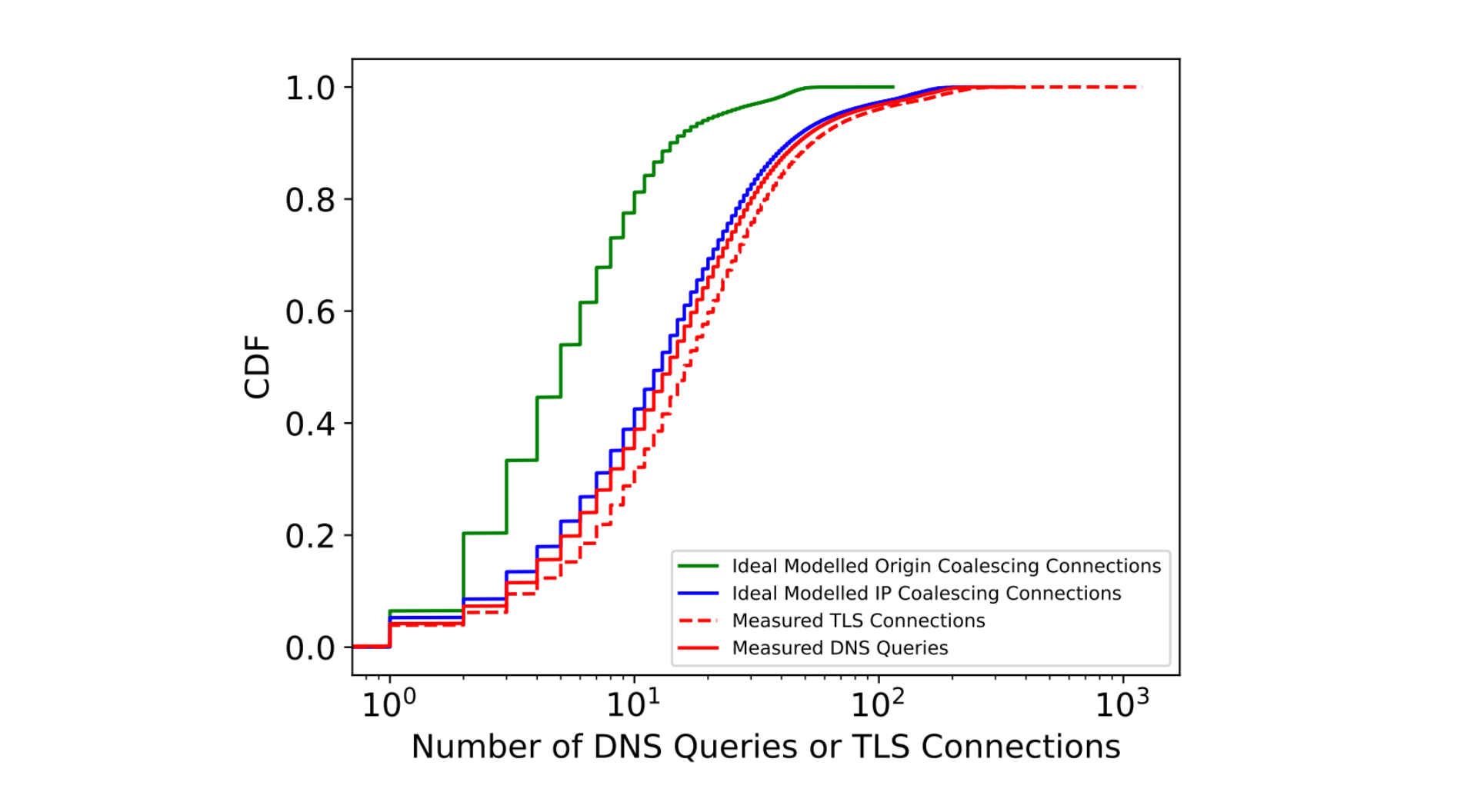
We then tried to understand the impact of coalescing on connection metrics. The measured and ideal number of DNS queries and TLS connections needed to load a web page are summarized by their CDFs in the figure below.

Connection coalescing with ORIGIN Frames: fewer DNS queries, fewer connections

Through modeling and extensive analysis, we identify that connection coalescing through ORIGIN Frames could reduce the number of DNS and TLS connections made by browsers by over 60% at the median. We performed this modeling by identifying the number of times the clients requested DNS records, and combined them with the ideal ORIGIN Frames to serve.

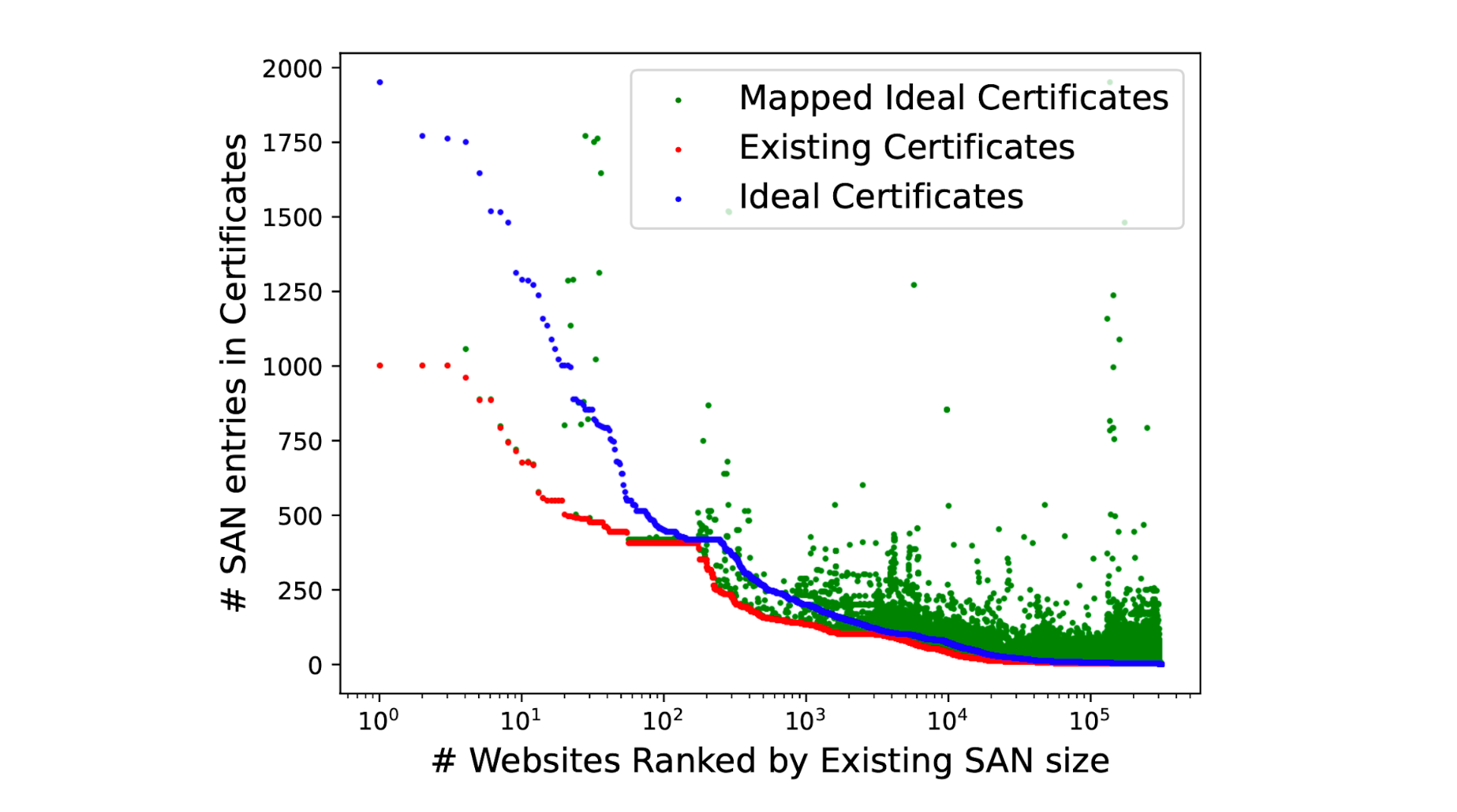
Many multi-origin servers such as those operated by CDNs tend to reuse certificates and serve the same certificate with multiple DNS SAN entries. This allows the operators to manage fewer certificates through their creation and renewal cycles. While theoretically one can have millions of names in the certificate, creating such certificates is unreasonable and a challenge to manage effectively. By continuing to rely on existing certificates, our modeling measurements bring to light the volume of changes required to enable perfect coalescing, while presenting information about the scale of changes needed, as highlighted in the figure below.

Connection coalescing with ORIGIN Frames: fewer DNS queries, fewer connections

We identify that over 60% of the certificates served by websites do not need any modifications and could benefit from ORIGIN Frames, while with no more than 10 additions to the DNS SAN names in certificates we’re able to successfully coalesce connections to over 92% of the websites in our measurement. The most effective changes could be made by CDN providers by adding three or four of their most popular requested hostnames into each certificate.

Experiment #2: ORIGIN Frames in action

In order to validate our modeling expectations, we then took a more active approach in early 2022. Our next experiment focused on 5,000 websites that make extensive use of cdnjs.cloudflare.com as a subresource. By modifying our experimental TLS termination endpoint we deployed HTTP/2 ORIGIN Frame support as defined in the RFC standard. This involved changing the internal fork of net and http dependency modules of Golang which we have open sourced (see here, and here).

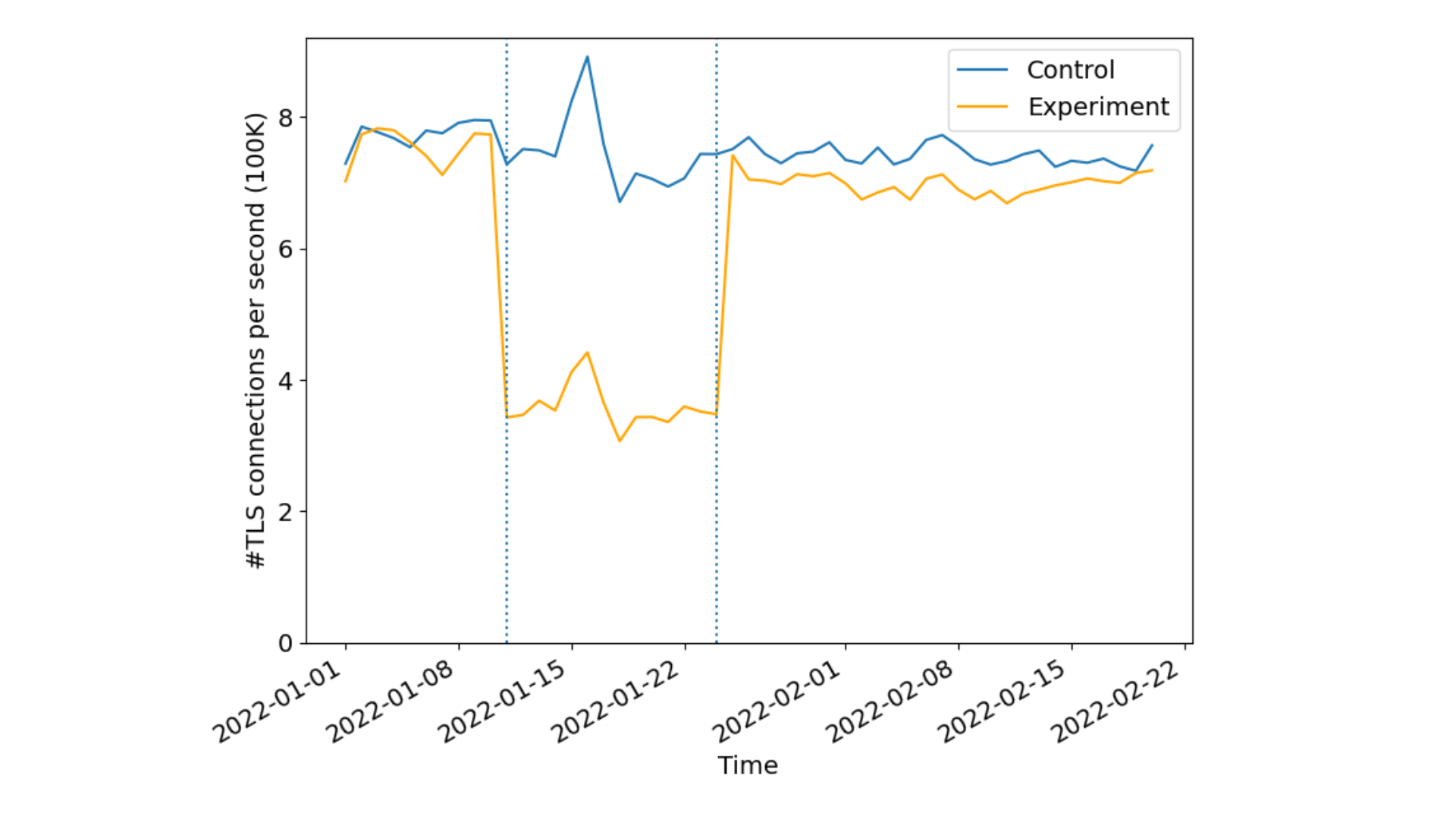
During the experiments, connecting to a website in the experiment set would return cdnjs.cloudflare.com in the ORIGIN frame, while the control set returned an arbitrary (unused) hostname. All existing edge certificates for the 5000 websites were also modified. For the experimental group, the corresponding certificates were renewed with cdnjs.cloudflare.com added to the SAN. To ensure integrity between control and experimental sets, control group domains certificates were also renewed with a valid and identical size third party domain used by none of the control domains. This is done to ensure that the relative size changes to the certificates is kept constant avoiding potential biases due to different certificate sizes. Our results were striking!

Connection coalescing with ORIGIN Frames: fewer DNS queries, fewer connections

Sampling 1% of the requests we received from Firefox to the websites in the experiment, we identified over 50% reduction in new TLS connections per second indicating a lesser number of cryptographic verification operations done by both the client and reduced server compute overheads. As expected there were no differences in the control set indicating the effectiveness of connection re-use as seen by the CDN or server operators.

Discussion and insights

While our modeling measurements indicated that we could anticipate some performance improvements, in practice it was not significantly better suggesting that ‘no-worse’ is the appropriate mental model regarding performance. The subtle interplay between resource object sizes, competing connections, and congestion control is subject to network conditions. Bottleneck-share capacity, for example, diminishes as fewer connections compete for bottleneck resources on network links. It would be interesting to revisit these measurements as more operators deploy support on their servers for ORIGIN Frames.

Apart from performance, one major benefit of ORIGIN frames is in terms of privacy. How? Well, each coalesced connection hides client metadata that is otherwise leaked from non-coalesced connections. Certain resources on a web page are loaded depending on how one is interacting with the website. This means for every new connection for retrieving some resource from the server, TLS plaintext metadata like SNI (in the absence of Encrypted Client Hello) and at least one plaintext DNS query, if transmitted over UDP or TCP on port 53, is exposed to the network. Coalescing connections helps remove the need for browsers to open new TLS connections, and the need to do extra DNS queries. This prevents metadata leakage from anyone listening on the network. ORIGIN Frames help minimize those signals from the network path, improving privacy by reducing the amount of cleartext information leaked on path to network eavesdroppers.

While the browsers benefit from reduced cryptographic computations needed to verify multiple certificates, a major advantage comes from the fact that it opens up very interesting future opportunities for resource scheduling at the endpoints (the browsers, and the origin servers) such as prioritization, or recent proposals like HTTP early hints to provide clients experiences where connections are not overloaded or competing for those resources. When coupled with CERTIFICATE Frames IETF draft, we can further eliminate the need for manual certificate modifications as a server can prove its authority of hostnames after connection establishment without any additional SAN entries on the website’s TLS certificate.

Conclusion and call to action

In summary, the current Internet ecosystem has a lot of opportunities for connection coalescing with only a few changes to certificates and their server infrastructure. Servers can significantly reduce the number of TLS handshakes by roughly 50%, while reducing the number of render blocking DNS queries by over 60%. Clients additionally reap these benefits in privacy by reducing cleartext DNS exposure to network on-lookers.

To help make this a reality we are currently planning to add support for both HTTP/2 and HTTP/3 ORIGIN Frames for our customers. We also encourage other operators that manage third party resources to adopt support of ORIGIN Frame to improve the Internet ecosystem.
Our paper submission was accepted to the ACM Internet Measurement Conference 2022 and is available for download. If you’d like to work on projects like this, where you get to see the rubber meet the road for new standards, visit our careers page!

Introducing SSL/TLS Recommender

Post Syndicated from Suleman Ahmad original https://blog.cloudflare.com/ssl-tls-recommender/

Introducing SSL/TLS Recommender

Introducing SSL/TLS Recommender

Seven years ago, Cloudflare made HTTPS availability for any Internet property easy and free with Universal SSL. At the time, few websites — other than those that processed sensitive data like passwords and credit card information — were using HTTPS because of how difficult it was to set up.

However, as we all started using the Internet for more and more private purposes (communication with loved ones, financial transactions, shopping, healthcare, etc.) the need for encryption became apparent. Tools like Firesheep demonstrated how easily attackers could snoop on people using public Wi-Fi networks at coffee shops and airports. The Snowden revelations showed the ease with which governments could listen in on unencrypted communications at scale. We have seen attempts by browser vendors to increase HTTPS adoption such as the recent announcement by Chromium for loading websites on HTTPS by default. Encryption has become a vital part of the modern Internet, not just to keep your information safe, but to keep you safe.

When it was launched, Universal SSL doubled the number of sites on the Internet using HTTPS. We are building on that with SSL/TLS Recommender, a tool that guides you to stronger configurations for the backend connection from Cloudflare to origin servers. Recommender has been available in the SSL/TLS tab of the Cloudflare dashboard since August 2020 for self-serve customers. Over 500,000 zones are currently signed up. As of today, it is available for all customers!

How Cloudflare connects to origin servers

Cloudflare operates as a reverse proxy between clients (“visitors”) and customers’ web servers (“origins”), so that Cloudflare can protect origin sites from attacks and improve site performance. This happens, in part, because visitor requests to websites proxied by Cloudflare are processed by an “edge” server located in a data center close to the client. The edge server either responds directly back to the visitor, if the requested content is cached, or creates a new request to the origin server to retrieve the content.

Introducing SSL/TLS Recommender

The backend connection to the origin can be made with an unencrypted HTTP connection or with an HTTPS connection where requests and responses are encrypted using the TLS protocol (historically known as SSL). HTTPS is the secured form of HTTP and should be used whenever possible to avoid leaking information or allowing content tampering by third-party entities. The origin server can further authenticate itself by presenting a valid TLS certificate to prevent active monster-in-the-middle attacks. Such a certificate can be obtained from a certificate authority such as Let’s Encrypt or Cloudflare’s Origin CA. Origins can also set up authenticated origin pull, which ensures that any HTTPS requests outside of Cloudflare will not receive a response from your origin.

Cloudflare Tunnel provides an even more secure option for the connection between Cloudflare and origins. With Tunnel, users run a lightweight daemon on their origin servers that proactively establishes secure and private tunnels to the nearest Cloudflare data centers. With this configuration, users can completely lock down their origin servers to only receive requests routed through Cloudflare. While we encourage customers to set up tunnels if feasible, it’s important to encourage origins with more traditional configurations to adopt the strongest possible security posture.

Detecting HTTPS support

You might wonder, why doesn’t Cloudflare always connect to origin servers with a secure TLS connection? To start, some origin servers have no TLS support at all (for example, certain shared hosting providers and even government sites have been slow adopters) and rely on Cloudflare to ensure that the client request is at least encrypted over the Internet from the browser to Cloudflare’s edge.

Then why don’t we simply probe the origin to determine if TLS is supported? It turns out that many sites only partially support HTTPS, making the problem non-trivial. A single customer site can be served from multiple separate origin servers with differing levels of TLS support. For instance, some sites support HTTPS on their landing page but serve certain resources only over unencrypted HTTP. Further, site content can differ when accessed over HTTP versus HTTPS (for example, http://example.com and https://example.com can return different results).

Such content differences can arise due to misconfiguration on the origin server, accidental mistakes by developers when migrating their servers to HTTPS, or can even be intentional depending on the use case.

A study by researchers at Northeastern University, the Max Planck Institute for Informatics, and the University of Maryland highlights reasons for some of these inconsistencies. They found that 1.5% of surveyed sites had at least one page that was unavailable over HTTPS — despite the protocol being supported on other pages — and 3.7% of sites served different content over HTTP versus HTTPS for at least one page. Thus, always using the most secure TLS setting detected on a particular resource could result in unforeseen side effects and usability issues for the entire site.

We wanted to tackle all such issues and maximize the number of TLS connections to origin servers, but without compromising a website’s functionality and performance.

Introducing SSL/TLS Recommender
Content differences on sites when loaded over HTTPS vs HTTP; images taken from https://www.cs.umd.edu/~dml/papers/https_tma20.pdf with author permission

Configuring the SSL/TLS encryption mode

Cloudflare relies on customers to indicate the level of TLS support at their origins via the zone’s SSL/TLS encryption mode. The following SSL/TLS encryption modes can be configured from the Cloudflare dashboard:

  • Off indicates that client requests reaching Cloudflare as well as Cloudflare’s requests to the origin server should only use unencrypted HTTP. This option is never recommended, but is still in use by a handful of customers for legacy reasons or testing.
  • Flexible allows clients to connect to Cloudflare’s edge via HTTPS, but requests to the origin are over HTTP only. This is the most common option for origins that do not support TLS. However, we encourage customers to upgrade their origins to support TLS whenever possible and only use Flexible as a last resort.
  • Full enables encryption for requests to the origin when clients connect via HTTPS, but Cloudflare does not attempt to validate the certificate. This is useful for origins that have a self-signed or otherwise invalid certificate at the origin, but leaves open the possibility for an active attacker to impersonate the origin server with a fake certificate. Client HTTP requests result in HTTP requests to the origin.
  • Full (strict) indicates that Cloudflare should validate the origin certificate to fully secure the connection. The origin certificate can either be issued by a public CA or by Cloudflare Origin CA. HTTP requests from clients result in HTTP requests to the origin, exactly the same as in Full mode. We strongly recommend Full (strict) over weaker options if supported by the origin.
  • Strict (SSL-Only Origin Pull) causes all traffic to the origin to go over HTTPS, even if the client request was HTTP. This differs from Full (strict) in that HTTP client requests will result in an HTTPS request to the origin, not HTTP. Most customers do not need to use this option, and it is available only to Enterprise customers. The preferred way to ensure that no HTTP requests reach your origin is to enable Always Use HTTPS in conjunction with Full or Full (strict) to redirect visitor HTTP requests to the HTTPS version of the content.
Introducing SSL/TLS Recommender
SSL/TLS encryption modes determine how Cloudflare connects to origins

The SSL/TLS encryption mode is a zone-wide setting, meaning that Cloudflare applies the same policy to all subdomains and resources. If required, you can configure this setting more granularly via Page Rules. Misconfiguring this setting can make site resources unavailable. For instance, suppose your website loads certain assets from an HTTP-only subdomain. If you set your zone to Full or Full (strict), you might make these assets unavailable for visitors that request the content over HTTPS, since the HTTP-only subdomain lacks HTTPS support.

Importance of secure origin connections

When an end-user visits a site proxied by Cloudflare, there are two connections to consider: the front-end connection between the visitor and Cloudflare and the back-end connection between Cloudflare and the customer origin server. The front-end connection typically presents the largest attack surface (for example, think of the classic example of an attacker snooping on a coffee shop’s Wi-Fi network), but securing the back-end connection is equally important. While all SSL/TLS encryption modes (except Off) secure the front-end connection, less secure modes leave open the possibility of malicious activity on the backend.

Consider a zone set to Flexible where the origin is connected to the Internet via an untrustworthy ISP. In this case, spyware deployed by the customer’s ISP in an on-path middlebox could inspect the plaintext traffic from Cloudflare to the origin server, potentially resulting in privacy violations or leaks of confidential information. Upgrading the zone to Full or a stronger mode to encrypt traffic to the ISP would help prevent this basic form of snooping.

Similarly, consider a zone set to Full where the origin server is hosted in a shared hosting provider facility. An attacker colocated in the same facility could generate a fake certificate for the origin (since the certificate isn’t validated for Full) and deploy an attack technique such as ARP spoofing to direct traffic intended for the origin server to an attacker-owned machine instead. The attacker could then leverage this setup to inspect and filter traffic intended for the origin, resulting in site breakage or content unavailability. The attacker could even inject malicious JavaScript into the response served to the visitor to carry out other nefarious goals. Deploying a valid Cloudflare-trusted certificate on the origin and configuring the zone to use Full (strict) would prevent Cloudflare from trusting the attacker’s fake certificate in this scenario, preventing the hijack.

Since a secure backend only improves your website security, we strongly encourage setting your zone to the highest possible SSL/TLS encryption mode whenever possible.

Balancing functionality and security

When Universal SSL was launched, Cloudflare’s goal was to get as many sites away from the status quo of HTTP as possible. To accomplish this, Cloudflare provisioned TLS certificates for all customer domains to secure the connection between the browser and the edge. Customer sites that did not already have TLS support were defaulted to Flexible, to preserve existing site functionality. Although Flexible is not recommended for most zones, we continue to support this option as some Cloudflare customers still rely on it for origins that do not yet support TLS. Disabling this option would make these sites unavailable. Currently, the default option for newly onboarded zones is Full if we detect a TLS certificate on the origin zone, and Flexible otherwise.

Further, the SSL/TLS encryption mode configured at the time of zone sign-up can become suboptimal as a site evolves. For example, a zone might switch to a hosting provider that supports origin certificate installation. An origin server that is able to serve all content over TLS should at least be on Full. An origin server that has a valid TLS certificate installed should use Full (strict) to ensure that communication between Cloudflare and the origin server is not susceptible to monster-in-the-middle attacks.

The Research team combined lessons from academia and our engineering efforts to make encryption easy, while ensuring the highest level of security possible for our customers. Because of that goal, we’re proud to introduce SSL/TLS Recommender.

SSL/TLS Recommender

Cloudflare’s mission is to help build a better Internet, and that includes ensuring that requests from visitors to our customers’ sites are as secure as possible. To that end, we began by asking ourselves the following question: how can we detect when a customer is able to use a more secure SSL/TLS encryption mode without impacting site functionality?

To answer this question, we built the SSL/TLS Recommender. Customers can enable Recommender for a zone via the SSL/TLS tab of the Cloudflare dashboard. Using a zone’s currently configured SSL/TLS option as the baseline for expected site functionality, the Recommender performs a series of checks to determine if an upgrade is possible. If so, we email the zone owner with the recommendation. If a zone is currently misconfigured — for example, an HTTP-only origin configured on Full — Recommender will not recommend a downgrade.

Introducing SSL/TLS Recommender

The checks that Recommender runs are determined by the site’s currently configured SSL/TLS option.

The simplest check is to determine if a customer can upgrade from Full to Full (strict). In this case, all site resources are already served over HTTPS, so the check comprises a few simple tests of the validity of the TLS certificate for the domain and all subdomains (which can be on separate origin servers).

The check to determine if a customer can upgrade from Off or Flexible to Full is more complex. A site can be upgraded if all resources on the site are available over HTTPS and the content matches when served over HTTP versus HTTPS. Recommender carries out this check as follows:

  • Crawl customer sites to collect links. For large sites where it is impractical to scan every link, Recommender tests only a subset of links (up to some threshold), leading to a trade-off between performance and potential false positives. Similarly, for sites where the crawl turns up an insufficient number of links, we augment our results with a sample of links from recent visitors requests to the zone to provide a high-confidence recommendation. The crawler uses the user agent Cloudflare-SSLDetector and has been added to Cloudflare’s list of known good bots. Similar to other Cloudflare crawlers, Recommender ignores robots.txt (except for rules explicitly targeting the crawler’s user agent) to avoid negatively impacting the accuracy of the recommendation.
  • Download the content of each link over both HTTP and HTTPS. Recommender makes only idempotent GET requests when scanning origin servers to avoid modifying server resource state.
  • Run a content similarity algorithm to determine if the content matches. The algorithm is adapted from a research paper called “A Deeper Look at Web Content Availability and Consistency over HTTP/S” (TMA Conference 2020) and is designed to provide an accurate similarity score even for sites with dynamic content.

Recommender is conservative with recommendations, erring on the side of maintaining current site functionality rather than risking breakage and usability issues. If a zone is non-functional, the zone owner blocks all types of bots, or if misconfigured SSL-specific Page Rules are applied to the zone, then Recommender will not be able to complete its scans and provide a recommendation. Therefore, it is not intended to resolve issues with website or domain functionality, but rather maximize your zone’s security when possible.

Please send questions and feedback to [email protected]. We’re excited to continue this line of work to improve the security of customer origins!

Mentions

While this work is led by the Research team, we have been extremely privileged to get support from all across the company!

Special thanks to the incredible team of interns that contributed to SSL/TLS Recommender. Suleman Ahmad (now full-time), Talha Paracha, and Ananya Ghose built the current iteration of the project and Matthew Bernhard helped to lay the groundwork in a previous iteration of the project.