Hugo plays a pivotal role in enabling data ingestion for Grab’s data lake, managing over 4,000 pipelines onboarded by users. The stability of Hugo pipelines is contingent upon the health of both the data sources and various Hugo components. Given the complexity of this system, pipeline failures occasionally occur, necessitating user intervention when retry mechanisms prove insufficient. These incidents present challenges such as:
Limited user visibility into pipeline issues.
Uncertainty about resolution steps due to extensive documentation.
An overwhelmed Hugo on-call team dealing with ad-hoc requests and growing infrastructure dependencies.
Raised Data Production Issues (DPIs) lacking clear Root Cause Analysis (RCA), hindering effective management.
Such challenges ultimately increase data downtime due to prolonged issue triage and resolution times.
To address these problems, we conducted a thorough analysis of failure modes and the efforts required to resolve them. Based on our findings, we propose a comprehensive automation solution.
This blog outlines the architecture and implementation of our proposed solution, consisting of modules like Signal, Diagnosis, RCA Table, Auto-resolution, Data Health API, and Data Health WorkBench, each with a specific function to enhance Hugo’s monitoring, diagnosis, and resolution capabilities.
The blog further details the impact of these automated features, such as enhanced data visibility, reduced on-call workload, and concludes with our next steps, which focus on advancing auto-resolution strategies, enriching the Data Health Workbench, and broadening diagnostics to include more infrastructure components, like Flink, for comprehensive coverage.
Architecture details
We designed the solution based on these principles:
Identify different failure modes based on past issues and analysis from first principles.
Analyse temporal relationships of pipeline execution steps to diagnose issues to failure modes.
Focus on auto-resolution, and add additional features to cover gaps which can’t be immediately addressed by auto-resolution or diagnosis.
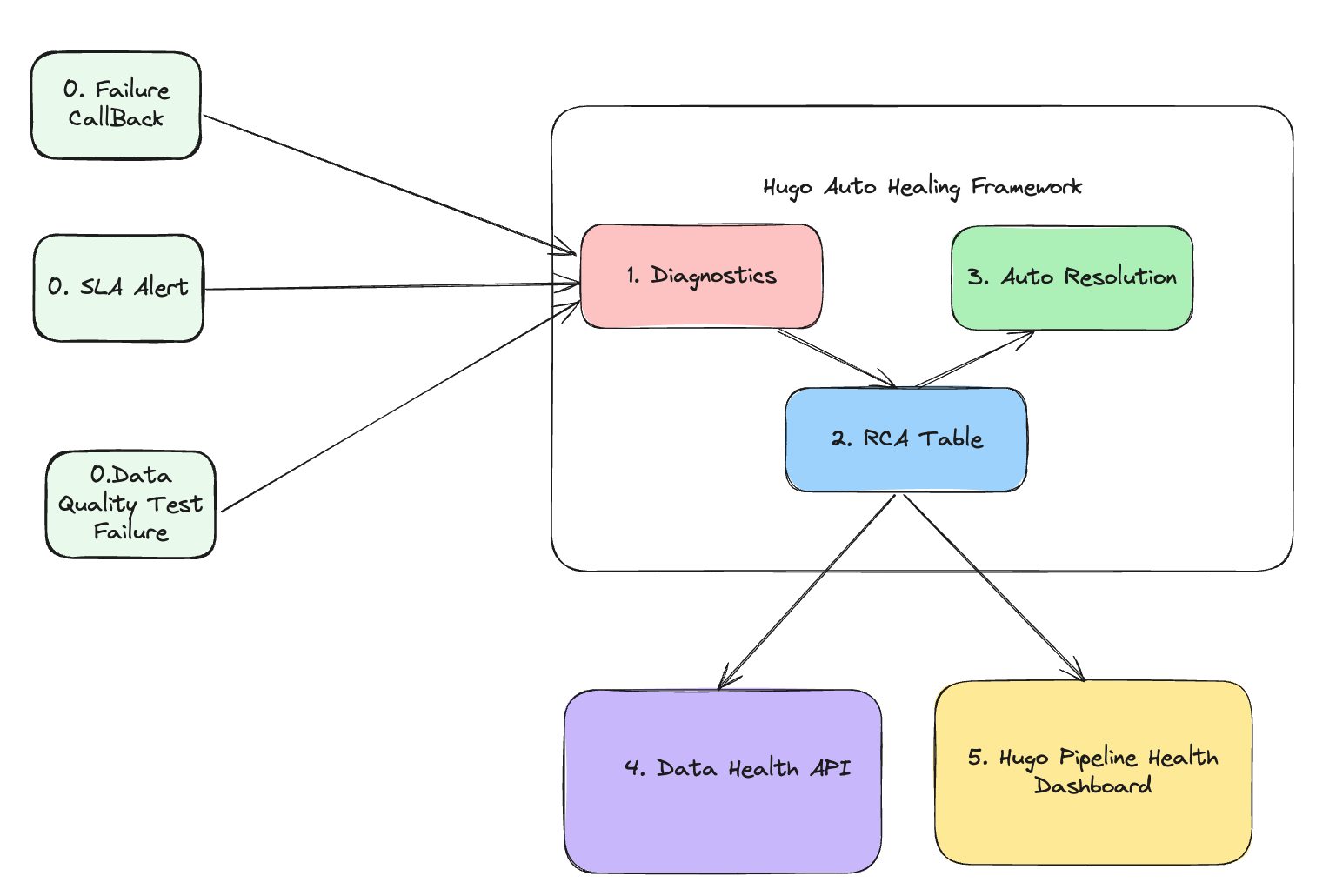
The following diagram shows the solution we proposed.
Figure 1. Architecture
The architecture consists of five core modules, each with a specific function:
Signal module: This module is responsible for collecting signals. It gathers three different types of signals that collectively define the health status of the data lake table. The signals include:
Failure callback signal: This indicates whether the pipeline runs involving this data lake table are successful or not.
SLA alert signal: This indicates whether the pipeline execution involving this data lake table meets the Service Level Agreement (SLA). For an hourly batch job, the expectation is to complete within one hour.
Data quality test failure signal: This represents various types of completeness checks to ensure that data lake tables are consistent with the source tables based on their pipeline strategies.
Diagnosis module: This is the core module responsible for diagnosing the root cause of 3 types of failures collected in the Signal module. It determines:
The root cause of the failure.
The assignee responsible for fixing the error.
The auto-resolution method to fix the issue.
Manual resolution steps if the auto-resolution fails.
RCA table: This module stores the following information:
Signals
Assignee information
Diagnosis results
Auto-resolution methods
Manual resolution steps
Auto-resolution module: This module executes the auto-resolution methods to resolve issues automatically.
Data health API: This module provides API access to other platforms. External platforms or pipelines that rely on Hugo onboarded tables can subscribe to the health status and investigate the root cause when a table is deemed unhealthy.
Hugo pipeline health dashboard: A centralised dashboard for Hugo users to visualise the health status of tables, auto resolution status, and manual fix button.
By leveraging these modules, the architecture ensures robust monitoring, diagnosis, and resolution of issues, leading to improved data health and operational efficiency.
Implementation
Signal module
There are two methods for generating these three signals. The failure signal is generated through an airflow callback, while the SLA miss and data completeness test signals are produced by Genchi. Genchi is a data quality observability platform at Grab that performs data quality checks and acts as a crucial enabler for the enforcement of data contracts.
Diagnosis module
As soon as an alert is created, the diagnosis begins. To avoid lengthy diagnosis times, Hugo has developed an innovative approach that eliminates the requirement for parsing extensive logs, such as Spark executor logs or Airflow logs. Instead, it gathers signals transmitted by the computation engine or Grab’s internal platforms.
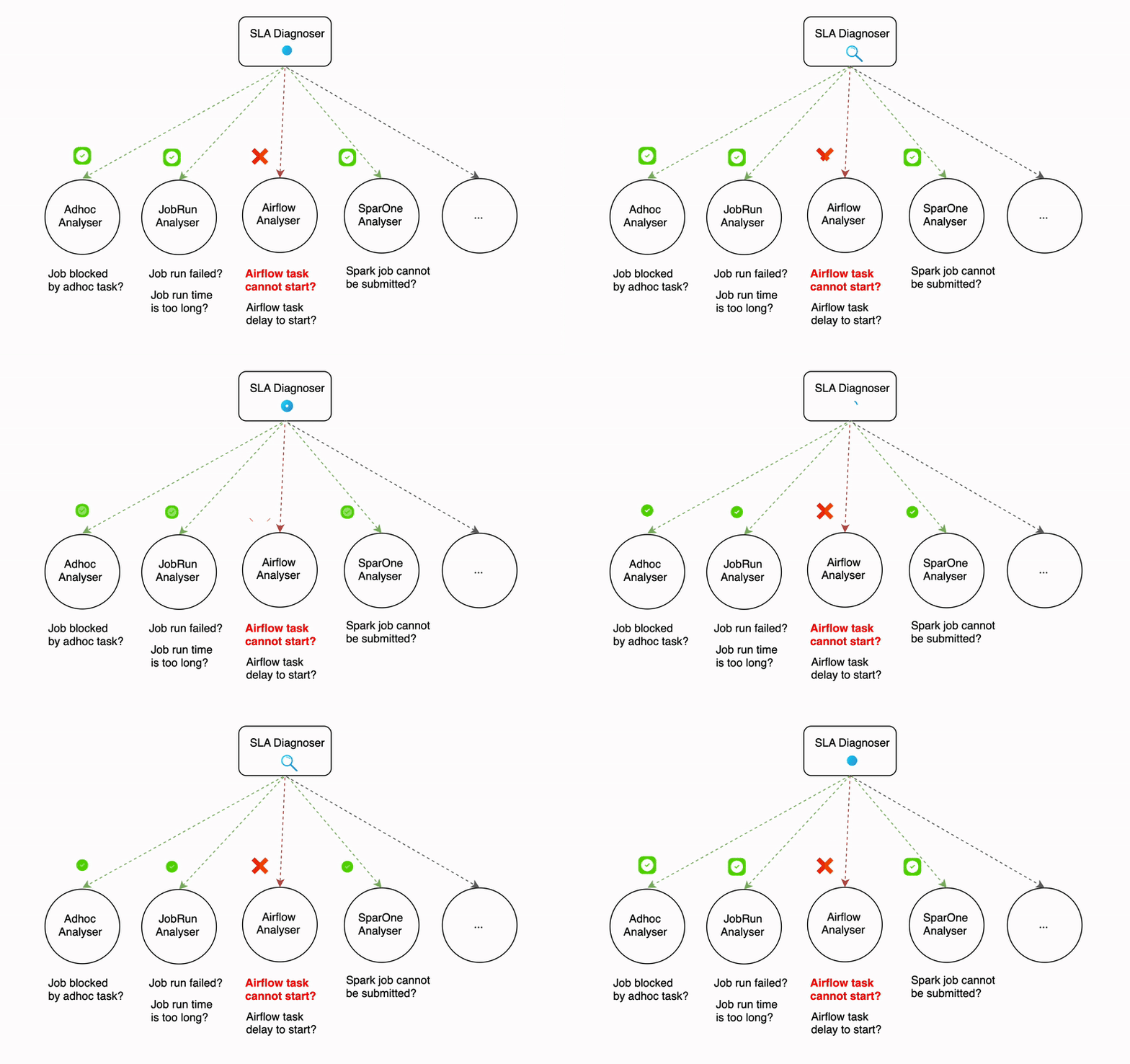
The diagnosis process can be time-consuming, even with efforts to reduce the time it takes. For example, the SLA diagnoser uses multiple analysers that run sequentially, and some of these analysers (like the Airflow analyser) make API calls that can take a significant amount of time. The more analysers that are involved in the diagnosis process, the longer it can take.
Figure 2. Diagnosis process
Parallelism in diagnosis serves as a solution to lower the overall latency when there is a surge in error traffic. The degree of parallelism differs based on the type of signal. For example, the failure signal diagnosis can be executed in thousands of processes at once, while for SLA miss and data quality test failures signals, the parallelism is determined by the number of partitions in the Kafka topic since these signals are received from Kafka.
Auto-resolution module
Auto-resolution is a flexible framework that enables the implementation of custom handlers for various types of failures. One of the common handlers employs a retry mechanism with backoff for transient errors. For instance, if Hugo receives a failure callback indicating that the root cause is a database replica lag, it would wait for an hour before re-triggering the job. This auto-resolution process runs asynchronously with the diagnosis process.
Data health API
The data health information includes a unique identifier, current status, error details, and the time of the last health check, providing a comprehensive snapshot of the dataset’s health.
Hugo converts the detailed information available in its internal data health API to the data health API specification format to be consumed by Kinabalu, our internal system designed to automate and streamline incident management processes by integrating with multiple systems such as Slack, Jira, Splunk on-call, and Datadog.
Hugo pipeline health dashboard
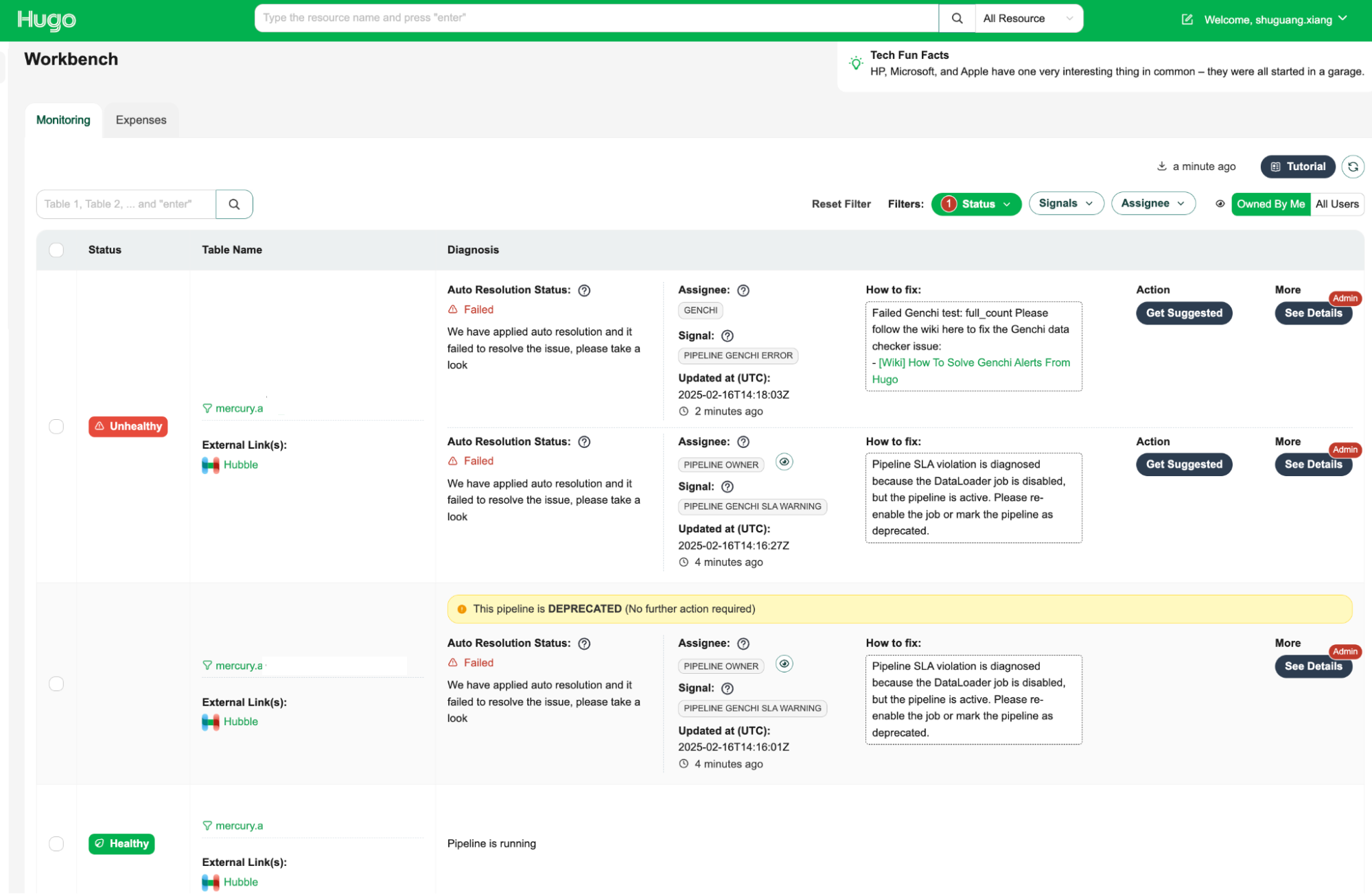
The Data Health Workbench is a centralised dashboard for Hugo users to visualise the health status of tables, auto-resolution status, and manual fix buttons. It provides a comprehensive view of data health and facilitates efficient issue resolution.
The key features are as follows:
Health status visualisation: Displays the current health status of tables, making it easy to identify unhealthy tables.
Assignee information: Indicates the assignee responsible for fixing the issue, ensuring clear accountability.
How-to-fix guide: Provides step-by-step instructions on how to resolve the issue, empowering users to take immediate action.
Action: Offers an action button to initiate the resolution process with a single click, streamlining issue resolution.
Admin feature with detailed diagnosis information: Provides admins supplementary information, including the reasoning behind the root cause identification and assignee determination, which allows for a deeper understanding of the root cause of issues.
By leveraging the Data Health Workbench, Hugo users can efficiently monitor and manage data health, ensuring data integrity and operational efficiency.
Figure 3. Data Health Workbench
Impact
The implementation of Hugo’s auto-healing and diagnosis features has resulted in significant improvements in stability and operational efficiency for our data pipelines. Here are some key outcomes:
Enhanced data visibility: We’ve improved the visibility into the health of datasets, allowing for quick identification of issues and more informed decision-making.
Timely resolution of data issues: With automated diagnostic and resolution processes, we ensure that data issues are addressed promptly, minimising data downtime and enhancing overall data availability.
Reduced on-call workload: By automating many of the common failure resolutions, the workload on Hugo on-call teams has been significantly reduced. This allows teams to focus on more complex and impactful tasks.
Scalable solution for managing complexity: The auto-resolution framework is well-equipped to handle the increasing complexity of data infrastructure, offering scalable solutions for transient errors through custom handlers and retry mechanisms.
Improved data contract management: By providing detailed pipeline health information via the Data Health API, we enable precise and accurate DPIs, complete with root cause analysis and assignee information, enhancing the management and resolution of data contract breaches.
Valuable reference for other platforms: The insights and methodologies developed through this initiative provide a valuable reference for other platform teams at Grab looking to implement similar automation and diagnostic capabilities.
Support for Grab’s success: These enhancements support Grabbers by ensuring easy access to the datasets they need and contribute to the overall success of Grab through reliable data availability.
Next steps
Our next steps involve advancing auto-resolution strategies by focusing on complex solutions like pipeline runtime optimisation to boost efficiency and minimise processing delays. We will enrich the Data Health Workbench with detailed information, enabling users to visualise and understand pipeline health more effectively and make informed corrective actions. Additionally, we plan to broaden our diagnosis capabilities by integrating more infrastructure components, such as Flink health information, to ensure a comprehensive and holistic monitoring approach for all engines within Hugo.
Join us
Grab is a leading superapp in Southeast Asia, operating across the deliveries, mobility and digital financial services sectors. Serving over 800 cities in eight Southeast Asian countries, Grab enables millions of people everyday to order food or groceries, send packages, hail a ride or taxi, pay for online purchases or access services such as lending and insurance, all through a single app. Grab was founded in 2012 with the mission to drive Southeast Asia forward by creating economic empowerment for everyone. Grab strives to serve a triple bottom line – we aim to simultaneously deliver financial performance for our shareholders and have a positive social impact, which includes economic empowerment for millions of people in the region, while mitigating our environmental footprint.
Powered by technology and driven by heart, our mission is to drive Southeast Asia forward by creating economic empowerment for everyone. If this mission speaks to you, join our team today!
At Grab, we’ve been working to perfect our Spark observability tools. Our initial solution, Iris, was developed to provide a custom, in-depth observability tool for Spark jobs. As described in our previous blog post, Iris collects and analyses metrics and metadata at the job level, providing insights into resource usage, performance, and query patterns across our Spark clusters.
Iris addresses a critical gap in Spark observability by providing real-time performance metrics at the Spark application level. Unlike traditional monitoring tools that typically provide metrics only at the EC2 instance level, Iris dives deeper into the Spark ecosystem. It bridges the observability gap by making Spark metrics accessible through a tabular dataset, enabling real-time monitoring and historical analysis. This approach eliminates the need to parse complex Spark event log JSON files, which users are often unable to access when they need immediate insights. Iris empowers users with on-demand access to comprehensive Spark performance data, facilitating quicker decision-making and more efficient resource management.
Iris served us well, offering basic dashboards and charts that helped our teams understand trends, discover issues, and debug their Spark jobs. However, as our needs evolved and usage grew, we began to encounter limitations:
Fragmented user experience and access control: Observability data is split between Grafana (real-time) and Superset (historical), forcing users to switch platforms for a complete view. The complex Grafana dashboards, while powerful, were challenging for non-technical users. The lack of granular permissions hindered wider adoption. We needed a unified, user-friendly interface with role-based access to serve all Grabbers effectively.
Operational overhead: Our data pipeline for offline analytics includes multiple hops and complex transformations.
Data management: We faced challenges managing real-time data in InfluxDB alongside offline data in our data lake, particularly with string-type metadata.
These challenges and the need for a centralised, user-friendly web application prompted us to seek a more robust solution. Enter StarRocks – a modern analytical database that addresses many of our pain points:
Pain points with InfluxDB
StarRocks solution
Limited SQL compatibility: Requires use of Flux query language instead of full SQL
Full MySQL-compatible SQL support, enabling seamless integration with existing tools and skills
Complex data ingestion pipeline: Requires external agents like Telegraf to consume Kafka and insert into InfluxDB
Direct Kafka ingestion, eliminating the need for intermediate agents and simplifying the data pipeline
Limited pre-aggregation capabilities: Aggregation is limited to time windows and indexed columns, not string columns
Flexible materialised views supporting complex aggregations on any column type, improving query performance
Poor support for metadata and joins: Designed primarily for numerical time series data, with slow performance on string data and joins
Efficient handling of both time-series and string-type metadata in a single system, with optimised join performance
Difficult integration with data lake: There is no official way to backup or stream data directly to the datalake, requiring separate pipelines
Native S3 integration for easy backup and direct data lake accessibility, eliminating the need for separate ingestion pipelines
Performance issues with high cardinality data: Indexing unique identifiers (like app\_id) causes huge indexes and slow queries
Optimised for high cardinality data, allowing efficient querying on unique identifiers without performance degradation
In this blog post, we will dive into leveraging StarRocks to build the next generation of the Spark observability platform. We will explore the architecture, data model, and key features that are helping us overcome previous limitations and provide more value to Spark users at Grab.
System architecture overview
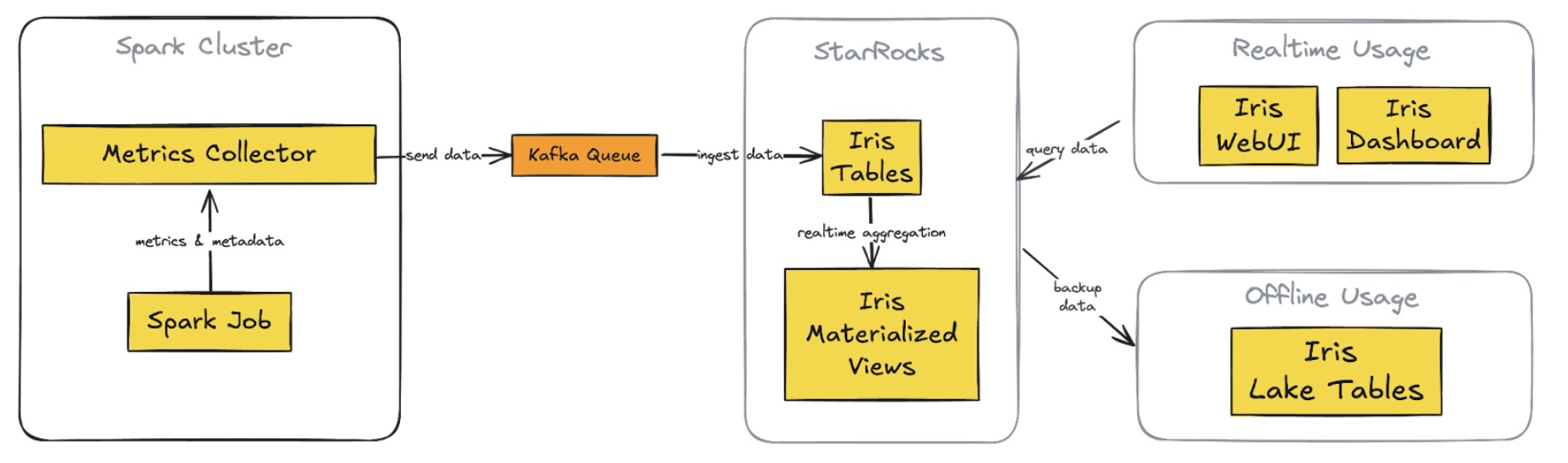
In the journey to enhance user experience, we’ve made substantial changes to the architecture, moving from the Telegraf/InfluxDB/Grafana (TIG) stack to a more streamlined and powerful setup centered around StarRocks. This new architecture addresses the previous challenges and provides a more unified, flexible, and efficient solution.
Figure 1. New Iris architecture with StarRocks integration
Key Components of the new architecture:
1. StarRocks database
Replaces InfluxDB for both real-time and historical data storage
Supports complex queries on metrics and metadata tables
2. Direct Kafka ingestion
StarRocks ingests data directly from Kafka, eliminating Telegraf
3. Custom web application (Iris UI)
Replaces Grafana dashboards
Centralised, flexible interface with custom API
4. Superset integration
Maintained and now connected directly to StarRocks
Provides real-time data access, consistent with the custom web app
5. Simplified offline data process
Scheduled backups from StarRocks to S3 directly
Replaces previous complex data lake pipelines
Key improvements:
1. Unified data store: Single source for real-time and historical data
2. Streamlined data flow: A simplified pipeline reduces latency and failure points
3. Flexible visualisation: Custom web app with intuitive, role-specific interfaces
4. Consistent real-time access: Across both custom app and Superset
5. Simplified backup and data lake integration: Direct S3 backups
Data model and ingestion
The Iris observability system is designed to monitor both job executions and ad-hoc cluster usage, encompassing what we call “cluster observation”. This model accounts for two scenarios:
Adhoc use: Pre-created clusters shared among team users
Job execution: New clusters are created for each job submission
Key design points
For each cluster, we capture both metadata and metrics:
Key point
Description
Linkage
We use worker\_uuid to link metadata with worker metrics app\_id to link metadata with Spark event metrics.
Granularity
Worker metrics are captured every 5 seconds, linked by worker\_uuid. Spark events are captured as they occur, linked by app\_id. Metadata can be captured multiple times.
Flexibility
This schema allows for queries at various levels: Individual worker level, job level, cluster level.
Historical analysis
The design enables insights from historical runs, such as: Auto-scaling behaviour, maximum worker count per job, maximum or average memory usage over time.
We use StarRocks’ routine load feature to ingest data directly from Kafka into our tables. Refer to the StarRocks documentation: Load data using routine load.
Here is a simple example of creating a routine load job for cluster worker metrics:
This configuration sets up continuous data ingestion from the specified Kafka topic into our cluster_worker_metrics table, with JSON parsing.
For monitoring the routine, StarRocks provides built-in tools to monitor the status/error log of routine load jobs. Example query to check load:
    C/C++
    SHOW ROUTINE LOAD WHERE NAME = "iris.routetine_cluster_worker_metrics_raw";
Handle both real-time and historical data in the unified system
The new Iris system uses StarRocks to efficiently manage both real-time and historical data. We have implemented three key features to achieve this:
StarRocks’ routine load enables near real-time data ingestion from Kafka. Multiple load tasks concurrently consume messages from different topic partitions, resulting in data appearing in Iris tables within seconds of collection. This quick ingestion keeps our monitoring capabilities current, providing users with up-to-date information about their Spark jobs.
For historical analysis, StarRocks serves as a persistent dataset, storing metadata and job metrics with a time-to-live of over 30 days. This allows us to perform analysis based on the last 30 days of job runs directly in StarRocks, which is significantly faster than using offline data in our data lake.
We’ve also implemented materialised views in StarRocks to pre-calculate and aggregate data for each job run. These views combine information from metadata, worker metrics, and Spark metrics, creating ready-to-use summary data. This approach eliminates the need for complex join operations when users access the job run summary screen in the UI, improving response times for both SQL queries and API access.
This setup offers substantial improvements over our previous InfluxDB-based system. As a time-series database, InfluxDB makes complex queries and joins challenging. It also lacked support for materialised views, making it difficult to create pre-built job-run summaries. Previously, we had to query our data lake using Spark and Presto to view historical runs for a particular job over the last 30 days, which was slower than directly querying in StarRocks.
By combining real-time ingestion, persistent storage, and materialised views, Iris now provides a unified, efficient platform for both immediate monitoring and in-depth historical analysis of Spark jobs.
Query performance and optimisation
StarRocks has significantly improved our query performance for Spark observability. Here are some key aspects of our optimisation strategy.
Materialised views
As mentioned, we leverage StarRocks’ materialised views to pre-aggregate job run summaries. This approach significantly reduces query complexity and improves response times for common UI operations. Materialised views combine data from metadata, worker metrics, and Spark metrics tables, thus eliminating the need for complex joins during query execution. This is particularly beneficial for our job-run summary screen, where pre-calculated aggregations can be retrieved instantly, improving both speed and user experience.
Here’s an example
    C/C++
    CREATE MATERIALIZED VIEW job_runs_001
    PARTITION BY (`report_date`)
    DISTRIBUTED BY HASH(`report_date`,`platform`)
    REFRESH ASYNC
    PROPERTIES (
        "auto_refresh_partitions_limit" = "3",
        "partition_ttl" = "33 DAY"
    )
    AS
    select m.report_date                                                                     as report_date,
        m.platform,
        m.job_id,
        m.run_id,
        m.app_id,
        m.app_attempt_id,
        ANY_VALUE(COALESCE(m.cluster_id, m.cluster_name))                                 as cluster_id,
        ANY_VALUE(m.cluster_name)                                                         as cluster_name,
        ANY_VALUE(m.job_name)                                                             as job_name,
        ANY_VALUE(m.job_owner)                                                            as job_owner,
        ANY_VALUE(m.job_client)                                                           as job_client,
        ANY_VALUE(CASE WHEN m.worker_role = 'driver' THEN m.spark_ui_url END)             as spark_ui_url,
        ANY_VALUE(CASE WHEN m.worker_role = 'driver' THEN m.spark_history_url END)        as spark_history_url,
        ANY_VALUE(CASE WHEN m.worker_role = 'driver' THEN m.driver_log_location END)      as driver_log_location,
        COUNT(d.worker_uuid)                                                              as total_instances,
        from_unixtime(MIN(d.start_time) / 1000, 'yyyy-MM-dd HH:mm:ss')                    as start_time,
        from_unixtime(MAX(d.end_time) / 1000, 'yyyy-MM-dd HH:mm:ss')                      as end_time,
        COALESCE((((MAX(d.end_time) - MIN(d.start_time)) + 120000) / (1000 * 3600)), 0)   as job_hour,
        SUM(COALESCE(d.machine_hour, 0))                                                  as machine_hour,
        SUM(COALESCE(d.cpu_hour, 0))                                                      as cpu_hour,
        MAX(COALESCE(CASE WHEN d.worker_role = 'driver' THEN d.cpu_utilization END, 0))   as driver_cpu_utilization,
        MAX(COALESCE(CASE WHEN d.worker_role = 'driver' THEN d.memory_utilization END,
                        0))                                                                  as driver_memory_utilization,
        MAX(COALESCE(CASE WHEN d.worker_role = 'executor' THEN d.cpu_utilization END, 0)) as worker_cpu_utilization,
        MAX(COALESCE(CASE WHEN d.worker_role = 'executor' THEN d.memory_utilization END,
                        0))                                                                  as worker_memory_utilization,
        -- other relevant metrics fields
    from iris.cluster_worker_metadata_view_001 m
            left join iris.cluster_worker_metrics_view_006 d
                    on d.report_date >= m.report_date and d.platform = m.platform and d.worker_uuid = m.worker_uuid and
                        d.worker_role = m.worker_role
    where m.job_id is not null
    group by m.report_date,
            m.platform,
            m.job_id,
            m.run_id,
            m.app_id,
            m.app_attempt_id;
StarRocks offers powerful and flexible materialised view capabilities that significantly enhance our query performance and data management in Iris. Here are three key features we leverage:
SYNC and ASYNC
StarRocks supports both SYNC and ASYNC materialised views. We primarily use ASYNC views as they allow us to join multiple underlying tables, which is crucial for our job-run summaries. We can configure these views to refresh:
Immediately when downstream tables are updated.
At set intervals (e.g., every 1 minute). This flexibility allows us to balance data freshness with system performance.
Example setting:
    C/C++
    REFRESH ASYNC START('2022-09-01 10:00:00') EVERY (interval 1 day)
For more details on supported features and settings, refer to the StarRocks documentation: Materialised view.
Partition TTL
We utilise the partition Time To Live (TTL) feature for materialised views. This allows us to control the amount of historical data stored in the views, typically setting it to 33 days. This ensures that the views remain performant and do not consume excessive storage while still providing quick access to recent historical data.
    C/C++
    PROPERTIES (
        "partition_ttl" = "33 DAY"
    )
Selective partition refresh
StarRocks allows us to refresh only specific partitions of a materialised view instead of the entire dataset. We take advantage of this by configuring our views to refresh only the most recent partitions (e.g., the last few days) where new data is typically added. This approach significantly reduces the computational overhead of keeping our materialised views up-to-date, especially for large historical datasets.
Our tables are partitioned by date, allowing for efficient pruning of historical data. This partitioning strategy is crucial for queries that focus on recent job runs or specific time ranges. By quickly eliminating irrelevant partitions, we significantly reduce the amount of data scanned for each query, leading to faster execution times.
    C/C++
    PARTITION BY RANGE(`report_date`)()
    DISTRIBUTED BY HASH(`report_date`,`platform`)
Dynamic partitioning
We utilise StarRocks’ dynamic partitioning feature to automatically manage our partitions. This ensures that new partitions are created as fresh data arrives and old partitions are dropped when data expires. Dynamic partitioning helps maintain optimal query performance over time without manual intervention, which is especially important for our continuous data ingestion process.
Here’s an example of how we configure dynamic partitioning for a 33-day retention period:
To verify that dynamic partitioning is working correctly and to monitor the state of your partitions, you can use the following SQL command:
    C/C++
    SHOW PARTITIONS FROM iris.cluster_worker_metrics_raw;
This command provides a summary of all partitions for the specified table (in this case, iris.cluster_worker_metrics_raw). The output includes valuable information such as:
The total number of partitions
The date range covered by each partition
Row count per partition
Size of each partition
While dynamic partitioning keeps the most recent 33 days of data readily available in StarRocks for fast querying, we’ve implemented a strategy to retain older data for long-term analysis.
We use a daily cron job to back up data older than 30 days to Amazon S3. This ensures we maintain historical data without impacting the performance of our primary StarRocks cluster.
Here’s an example of the backup query we use:
    Python
    INSERT INTO
        FILES(
            "path" = "{s3backUpPath}/{table_name}/",
            "format" = "parquet",
            "compression" = "zstd",
            "partition_by" = "report_date",
            "aws.s3.region" = "ap-southeast-1"
        )
        SELECT * FROM iris.{table_name} WHERE report_date between '{start_date}' and '{end_date}';
After backing up to S3, we map this data to a data lake table, enabling us to query historical data beyond the 33-day window in StarRocks when needed, without affecting the performance of our primary observability system.
    Python
    df_snapshot = spark.read.parquet(f"{s3backUpPath}/{table_name}")

    # do the transformation if needed here

    df_snapshot.write.format("delta").mode("overwrite").option("partitionOverwriteMode", "dynamic").option("mergeSchema", "true").partitionBy("report_date").save(f"{s3SinkPath}/{table_name}")

    %sql
    CREATE TABLE IF NOT EXISTS iris.{table_name}
    USING DELTA
    LOCATION '{s3SinkPath}/{table_name}'
Data replication
StarRocks uses data replication across multiple nodes, which is crucial for both fault tolerance and query performance. This strategy allows parallel query execution speeding up data retrieval. It’s particularly beneficial for our front-end queries, where low latency is crucial for user experience. This approach aligns with best practices seen in other distributed database systems like Cassandra, DynamoDB, and MySQL’s master-slave architecture.
    C/C++
    PROPERTIES (
        "replication_num" = "3",
    );
Unified web application
We’ve developed a comprehensive web application for Iris, consisting of both backend and frontend components. This unified interface offers users a seamless experience for monitoring and analysing Spark jobs.
Backend
Built using Golang, our backend service connects directly to the StarRocks database.
It queries data from both raw tables and materialised views, leveraging the optimised data structures we’ve set up in StarRocks.
The backend handles authentication and authorisation, ensuring that users have appropriate access to job data.
Frontend
The frontend offers several key screens to show:
List of job runs
Job status
Job metadata
Driver log
Spark UI
Statistics on resource usage and cost
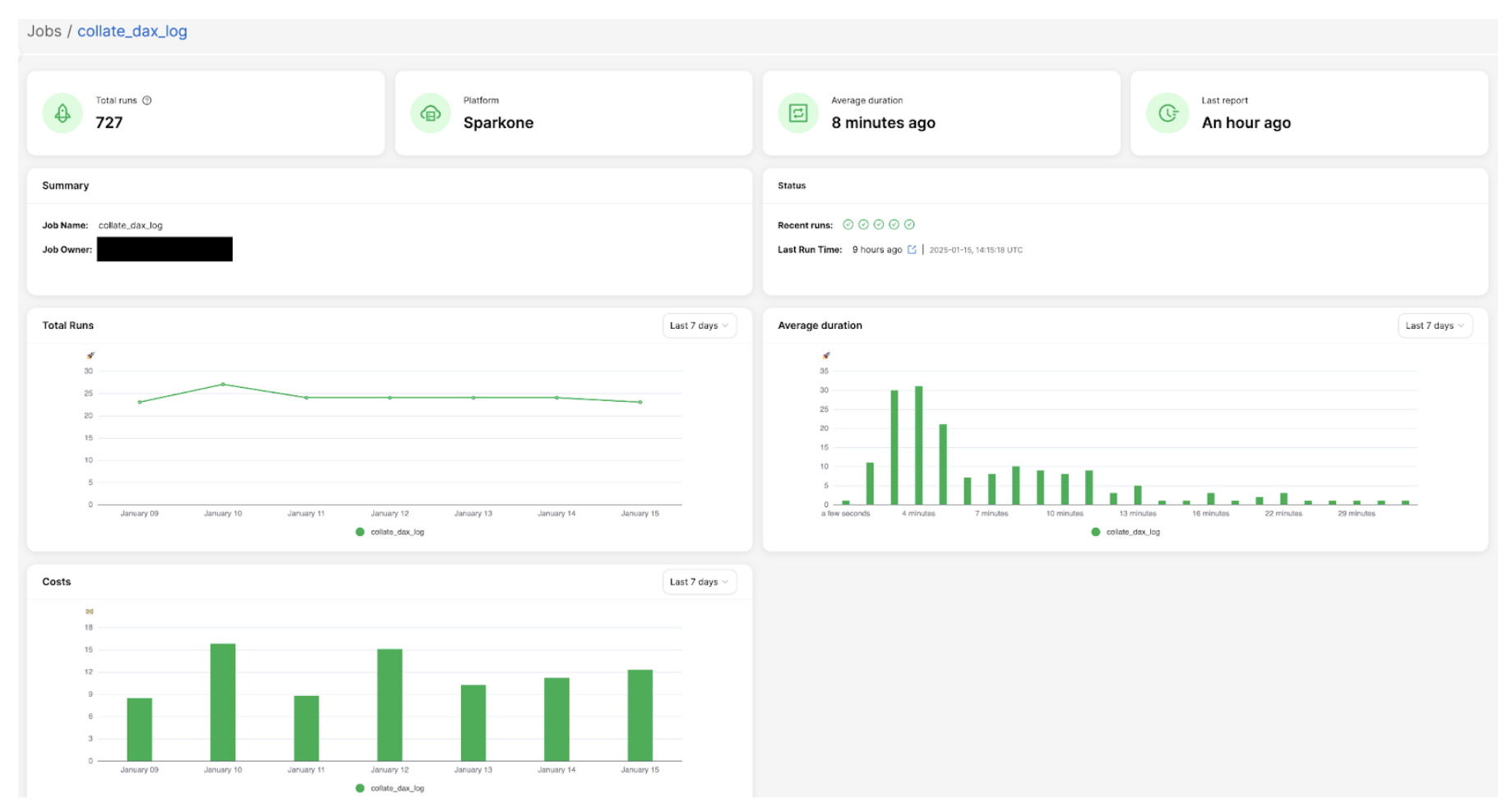
Here is an example of the job overview screen, which displays key summary information: total number of runs, job owner details, performance trends, and cost analysis charts. This comprehensive view provides users with a quick snapshot of their Spark job’s overall health and resource utilisation.
Figure 2: Example of job overview screen
Advanced analytics and insights
One of the key features we’ve implemented in Iris is the ability to perform analytics on historical job runs to capture trends. This feature leverages the power of StarRocks and our data model to provide users with valuable insights and recommendations. Here’s how we’ve implemented it:
Historical run analysis
We’ve created a materialised view that aggregates job run data over the last 30 days. This view likely includes metrics such as count of runs, p95 values for various resource utilisation, etc.
    C/C++
    CREATE MATERIALIZED VIEW job_run_summaries_001
    REFRESH ASYNC EVERY(INTERVAL 1 DAY)
    AS
    select platform,
        job_id,
        count(distinct run_id)                                as count_run,
        ceil(percentile_approx(total_instances, 0.95))        as p95_total_instances,
        ceil(percentile_approx(worker_instances, 0.95))       as p95_worker_instances,
        percentile_approx(job_hour, 0.95)                     as p95_job_hour,
        percentile_approx(machine_hour, 0.95)                 as p95_machine_hour,
        percentile_approx(cpu_hour, 0.95)                     as p95_cpu_hour,
        percentile_approx(worker_gc_hour, 0.95)               as p95_worker_gc_hour,
        ceil(percentile_approx(driver_cpus, 0.95))            as p95_driver_cpus,
        ceil(percentile_approx(worker_cpus, 0.95))            as p95_worker_cpus,
        ceil(percentile_approx(driver_memory_gb, 0.95))       as p95_driver_memory_gb,
        ceil(percentile_approx(worker_memory_gb, 0.95))       as p95_worker_memory_gb,
        percentile_approx(driver_cpu_utilization, 0.95)       as p95_driver_cpu_utilization,
        percentile_approx(worker_cpu_utilization, 0.95)       as p95_worker_cpu_utilization,
        percentile_approx(driver_memory_utilization, 0.95)    as p95_driver_memory_utilization,
        percentile_approx(worker_memory_utilization, 0.95)    as p95_worker_memory_utilization,
        percentile_approx(total_gb_read, 0.95)                as p95_gb_read,
        percentile_approx(total_gb_written, 0.95)             as p95_gb_written,
        percentile_approx(total_memory_gb_spilled, 0.95)      as p95_memory_gb_spilled,
        percentile_approx(disk_spilled_rate, 0.95)            as p95_disk_spilled_rate
    from iris.job_runs
    where report_date >= current_date - interval 30 day
    group by platform, job_id;
Using this aggregated data, we can identify trends in job performance and resource usage over time, such as increasing run times or spikes in resource consumption.
Recommendation API
Based on trend analysis insights, we’ve built a recommendation API that suggests optimizations, such as adjusting resource allocations, identifying potential bottlenecks, or proposing schedule changes to optimise cost and performance.
Frontend integration
The recommendations generated by our API are integrated into the Iris front end. Users can view these recommendations directly in the job overview or details screens, offering actionable insights to improve Spark jobs.
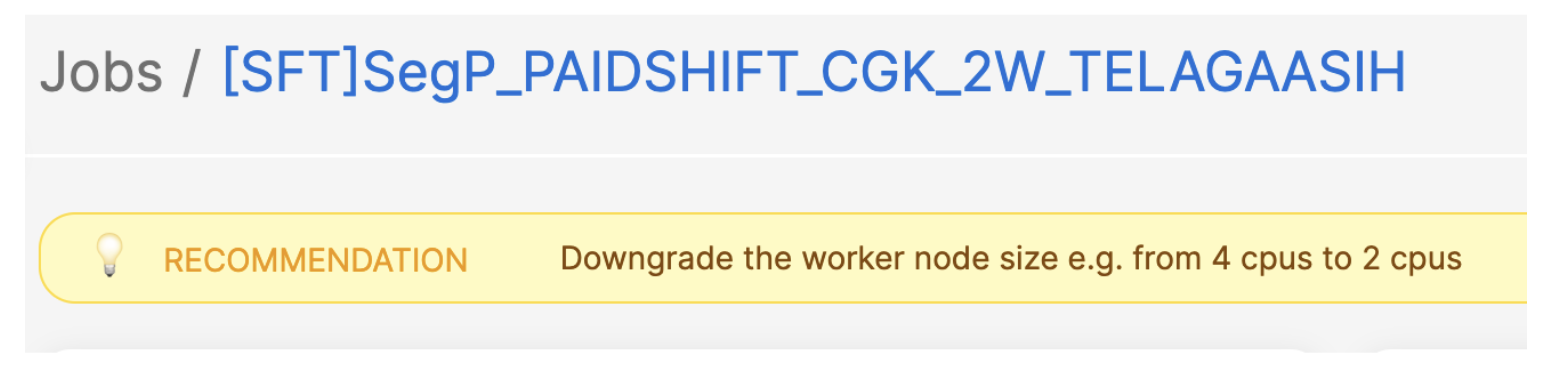
Here is an example: in a job with consistently low resource utilisation (less than 25% over time), our system suggests reducing the worker size by half to optimise costs.
Figure 3. Example of job with low resource utilisation.
Slackbot integration
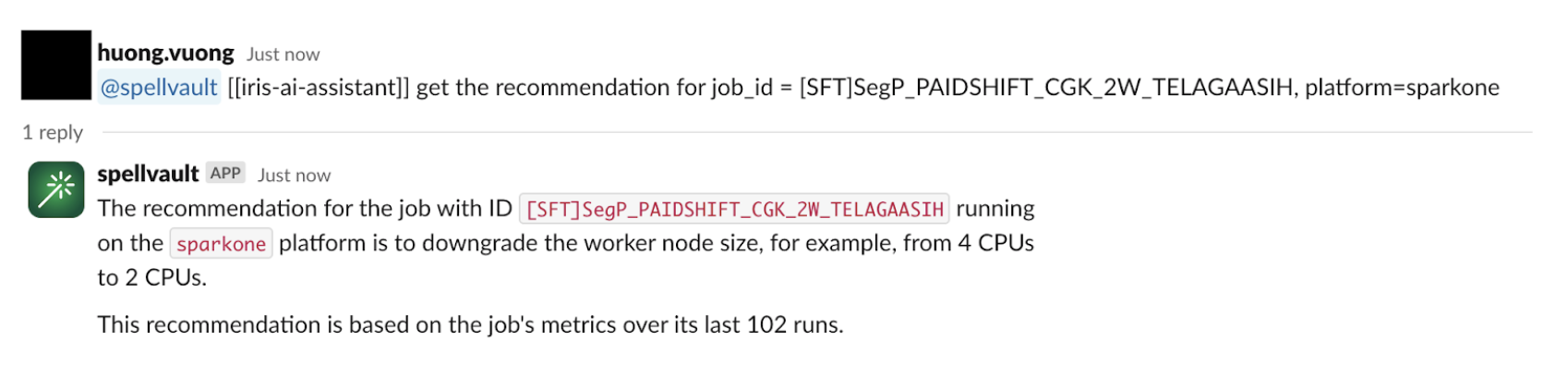
To make these insights more accessible, we’ve integrated the recommendation system with a SpellVault app (a GenAI platform at Grab). This allows users to interact with the recommendation system directly from Slack, allowing them to stay informed about job performance and potential optimisations without constantly checking the Iris web interface.
Figure 4. Example of integration with SpellVault.
Migration and adoption
Migration strategy
Fully migrating real-time CPU/Memory charts from Grafana to the new Iris UI
Will deprecate the Grafana dashboard after migration
Retaining Superset for platform metrics and specific BI needs
User onboarding and feedback
Iris deployed within the One DE app, centralising access to data engineering tools. The feedback button in the UI allows users to submit comments easily.
Lessons learned and future roadmap
Lessons learned
Unified data store: Using StarRocks as a single source for both real-time and historical data has significantly improved query performance and streamlined our architecture.
Materialised views: Leveraging StarRocks’ materialised views for pre-aggregations has significantly enhanced query response times, especially for common UI operations.
Dynamic partitioning: Implementing dynamic partitioning has helped in maintaining optimal performance as data volumes grow, automatically managing data retention.
Direct Kafka ingestion: StarRocks’ ability to ingest data directly from Kafka has streamlined our data pipeline, reducing latency and complexity.
Flexible data model: Compared to the previous time-series-focused InfluxDB, the StarRocks relational model enables more complex queries and simplifies metadata handling.
Future roadmap
Enhanced recommendations: Expand the recommendation system to include more in-depth suggestions, such as identifying potential bottlenecks and recommending Spark configurations to add or remove from jobs. These recommendations, aimed at improving runtime and cost performance, will leverage the detailed Spark metrics and event data we’re already collecting.
Advanced analytics: Leverage the comprehensive Spark metrics data to provide deeper insights into job performance and resource utilisation.
Integration expansion: Enhance Iris integration with other internal tools and platforms to increase adoption and ensure a seamless experience across the data engineering ecosystem.
Machine learning integration: Explore the possibility of incorporating machine learning models for predictive analytics on Spark performance.
Scalability improvements: Continue to optimise the system to handle increasing data volumes and user loads as adoption grows.
User experience enhancements: Continuously improve the Iris application’s UI/UX based on user feedback to make it more intuitive and informative.
Conclusion
The journey of building the Iris web application, powered by StarRocks, has been transformative for our Spark observability capabilities at Grab. This evolution was driven by the need for a user-friendly, centralised platform for Spark monitoring and logging.
By leveraging StarRocks’ capabilities, we’ve created a unified interface that seamlessly handles both real-time and historical data. This has allowed us to consolidate previously fragmented tools like Grafana and Superset into a single, cohesive platform. The ability to capture and analyse job metadata and metrics in one place has been crucial, enabling us to implement effective showback/chargeback mechanisms at the job level.
Looking ahead, we’re excited about the potential for more advanced analytics and machine learning-driven insights. The lessons learned from this project will guide our approach to building robust, scalable, and user-friendly data tools at Grab.
Join us
Grab is a leading superapp in Southeast Asia, operating across the deliveries, mobility and digital financial services sectors. Serving over 800 cities in eight Southeast Asian countries, Grab enables millions of people everyday to order food or groceries, send packages, hail a ride or taxi, pay for online purchases or access services such as lending and insurance, all through a single app. Grab was founded in 2012 with the mission to drive Southeast Asia forward by creating economic empowerment for everyone. Grab strives to serve a triple bottom line – we aim to simultaneously deliver financial performance for our shareholders and have a positive social impact, which includes economic empowerment for millions of people in the region, while mitigating our environmental footprint.
Powered by technology and driven by heart, our mission is to drive Southeast Asia forward by creating economic empowerment for everyone. If this mission speaks to you, join our team today!
The collective thoughts of the interwebz
Manage Consent
To provide the best experiences, we use technologies like cookies to store and/or access device information. Consenting to these technologies will allow us to process data such as browsing behavior or unique IDs on this site. Not consenting or withdrawing consent, may adversely affect certain features and functions.
Functional
Always active
The technical storage or access is strictly necessary for the legitimate purpose of enabling the use of a specific service explicitly requested by the subscriber or user, or for the sole purpose of carrying out the transmission of a communication over an electronic communications network.
Preferences
The technical storage or access is necessary for the legitimate purpose of storing preferences that are not requested by the subscriber or user.
Statistics
The technical storage or access that is used exclusively for statistical purposes.The technical storage or access that is used exclusively for anonymous statistical purposes. Without a subpoena, voluntary compliance on the part of your Internet Service Provider, or additional records from a third party, information stored or retrieved for this purpose alone cannot usually be used to identify you.
Marketing
The technical storage or access is required to create user profiles to send advertising, or to track the user on a website or across several websites for similar marketing purposes.