We are moving toward a world in which you can store, build, test, and deploy your code fully on Cloudflare. We built the first piece with Artifacts, versioned code storage that scales to millions of repos.
We have stitched the store, build, and deploy steps together with the CI SDK, built on Cloudflare Workflows, so that you can run your continuous integration (CI) pipeline on Cloudflare. You can send artifact push events directly to your Workflow, triggering an instance of its execution — a CI job, essentially — through a new events field in your wrangler configuration file.
Then, directly from the Workflow with @cloudflare/ci installed, you can:
Automate builds: compile code from your Artifacts repo in a safe, isolated environment
Run linters and typechecks: enforce code style, catch type errors, and flag any potential issues
Cache dependencies: run your install once and cache dependencies across steps in the CI job
Execute unit tests: verify that each piece of your code works as expected
Self-heal: integrate an AI review agent to catch broken steps in your build and push commits to fix
Deploy conditionally: automatically deploy your code, only if your build step is successful
Today, everyone is building a platform, whether it’s an internal vibe coding platform or an extension of your customer-facing product via customization through code. Platforms are now using millions of repos on Artifacts to store their code, and their customers’ code, and version control across the two. But every team has their own needs for a continuous integration and deployment pipeline. For platforms, they might want to define a CI job for their own code differently from that of their customers.
Many of the end customers building on these platforms don’t want the extra headache of managing their continuous integration and continuous deployment (CI/CD) pipeline. Instead, the platform can manage the build process on their customers’ behalf: write the CI/CD pipeline once and share it across all the applications that their customers are building. Some of the platform’s customers might want to define their own CI; if so, they can write their own Workflow and run custom CI jobs on just their repo, facilitated by dynamic workflows. The beauty is, you don’t have to pick and choose: both platform-managed and custom CI can run at the same time, in the same namespace.
A CI/CD pipeline is just a Workflow
Before today, we had all the pieces to allow platforms to wire their CI/CD pipeline together on Cloudflare. Now, we’re bringing a better developer experience to make it simple.
A CI/CD pipeline — commonly orchestrated with GitHub Actions — is a series of steps that run in a specific order where, if any step fails, you stop running the pipeline and report the error. In essence, a CI/CD pipeline is just a Workflow. CI/CD, when defined by a YAML file, can get complicated quickly, given the constraints that so often lead to YAML fatigue. But each step in a CI/CD pipeline can translate simply to a Workflow step.do(). Instead of YAML, you can define your CI/CD pipeline in Typescript for greater customization and configurability.
We are launching new tools in the CI SDK that allow you to run each step in your CI pipeline (e.g. build, lint, and typecheck) in a safe, isolated environment, built directly on Cloudflare’s developer platform via Workflows and the Sandbox SDK. Plus, you can now kick off a CI job directly on push instead of configuring an event subscription, a queue, and a queue consumer.
Previously, you’d have to call the Sandbox API directly and manage state yourself across different steps in the CI pipeline. The SDK allows you to run each sandboxed command in its own Workflow step, providing the retries and timeouts built into Cloudflare Workflows.
You can also speed up your CI pipeline by caching step results — for example, your install step — so that you don’t need to reinstall for all subsequent operations. Dependency caching reduces the latency of your CI/CD pipeline since every CI step won’t need to rerun the install.
To define your CI job, all you need to do is:
Define your install step for any dependencies (external packages or tools that your CI job needs), such as bundlers (e.g. esbuild), linters (e.g. eslint), or test runners (e.g. vitest).
Specify the command for each step in the CI job (e.g. bun run build, bun run test, bun run lint). With your dependencies cached, each CI step can execute in parallel, reducing the latency of the overall run.
Pass wranglerdeploy in a deploy step. Your Worker will automatically deploy when the CI pipeline passes.
Writing your own CI pipeline in a Workflow allows you to customize as much as you want. For example, you could call an agent from your CI Workflow to give your CI jobs self-healing functionality: if a step in your build errors, the agent can fix it automatically, and push a commit for your approval.
To write your own CI Workflow, get started with import { CIWorkflow } from@cloudflare/ci. Start with an install step:
Download your dependencies, including any external tools or libraries that your CI steps will need (e.g. vite, react).
Specify your lockfile, which tracks whether your dependencies have changed.
Cache your dependencies via a sandbox snapshot so that all subsequent steps have access. The snapshot will be stored in an R2 bucket on your account.
Then define steps for the build and checks, each executed in its own safe, isolated sandbox environment.
By default, each step in a Workflow starts independently, meaning the steps will execute concurrently unless otherwise specified. Running each step in parallel reduces the latency of your CI run. To ensure that all checks complete before the CI pipeline continues (for example, finish build, lint, test, and typecheck before the deploy step starts), wrap in a Promise.all():
Now, to actually trigger your CI Workflow, add an events field to your Worker’s wrangler configuration, alongside your Workflow and Artifact bindings. The events field is a new field supported within your triggers field.
You could already subscribe to Artifacts through Cloudflare Queues via event subscriptions and kick off a build pipeline every time there’s a push event. But that requires setting up the event subscription, Queue, consumer, and queue handler. Now, you can target a Workflow with that event — every time that event fires, it will trigger an instance of the Workflow.
Specify the CI Workflow as your artifact push trigger’s target to automatically trigger a Workflow instance on every cf.artifacts.repo.pushed event. Each CI run surfaces as a Workflow instance so you can view its step-by-step execution and observability directly in the Workflows dashboard. This is an Artifacts-first integration; coming soon, the types will support events from sources across your Cloudflare account to allow for programmatic consumption across the product suite.
If you want to run the CI Workflow on every repo in your namespace — for example, if you are a platform running CI on all of your customers’ repositories — omit repoName and only specify the namespace in filter.
To fully configure your CI Workflow, add bindings to each piece of the infrastructure which powers the pipeline: artifacts, workflows, containers and durable_objects (+ exports config) bindings (to access your sandboxes), plus an r2 binding if you are using cache. The R2 binding is required as the snapshot of your install step sandbox is stored in a bucket.
Self-healing CI runs
To allow your CI job to self-heal, you’ll need two pieces: the LLM and its agent harness. In the example above, we included a Think agent using Workers AI to catch errors in your pipeline and run the fixes on your behalf. Your CI job can be run and re-run remotely — no need to watch with your laptop open or check back every few minutes. Instead, Cloudflare handles it in the cloud, running your healer agent alongside the CI steps in a container. Instead of babysitting the CI job, making a manual fix, and re-running the pipeline, you’ll just need to merge the commit after your agent has made the fix.
To set up an agent that self-heals your CI pipeline, add a Durable Object binding for your Think agent:
Create your Think agent — Healer — by extending the HealingAgent class, which includes a heal method for you to call on failure. Pass whichever model you’d like to use:
Then, wrap your steps in a try/catch block where a failure triggers the healing agent:
This example demonstrates a self-healing CI pipeline, but really, the Bring Your Own Workflow model allows you to customize the CI job however you want. This can be a place to add security rules, filters, or conditional CI steps. Using the BYO-W model, platforms can configure their CI/CD pipelines across different teams, customers, or applications according to each individual use case.
The benefits of using a Workflow
By running your CI pipeline on a Cloudflare Workflow, you automatically inherit:
Resilient retries (durable execution): if any step in your CI job fails, it will automatically retry with state persisted, meaning that no progress is lost. Every step supports custom retry and timeout behavior, so you can define different failure logic for each one. Plus, you can restart from a specific step, so if just lint fails, for example, you don’t have to rerun the entire CI pipeline.
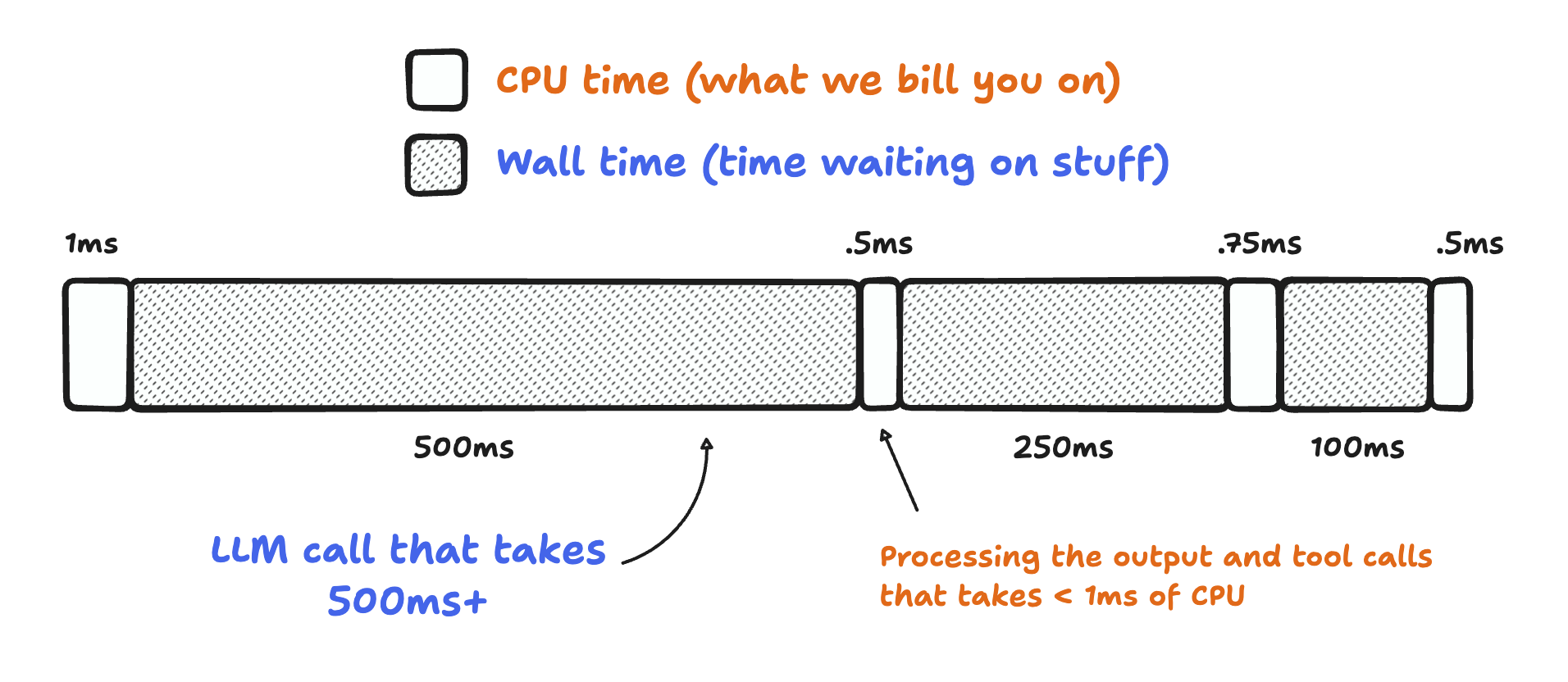
Workflows observability: inspect your CI job step-by-step in the Workflows dashboard, where each instance surfaces the steps with their inputs, outputs, and wall and CPU time.You can visualize your CI job through Workflows diagrams in the dashboard, allowing you to easily see which steps run concurrently versus sequentially. You can also inspect Workflows logs through Workers Observability and GraphQL to understand more about runs of your CI job.
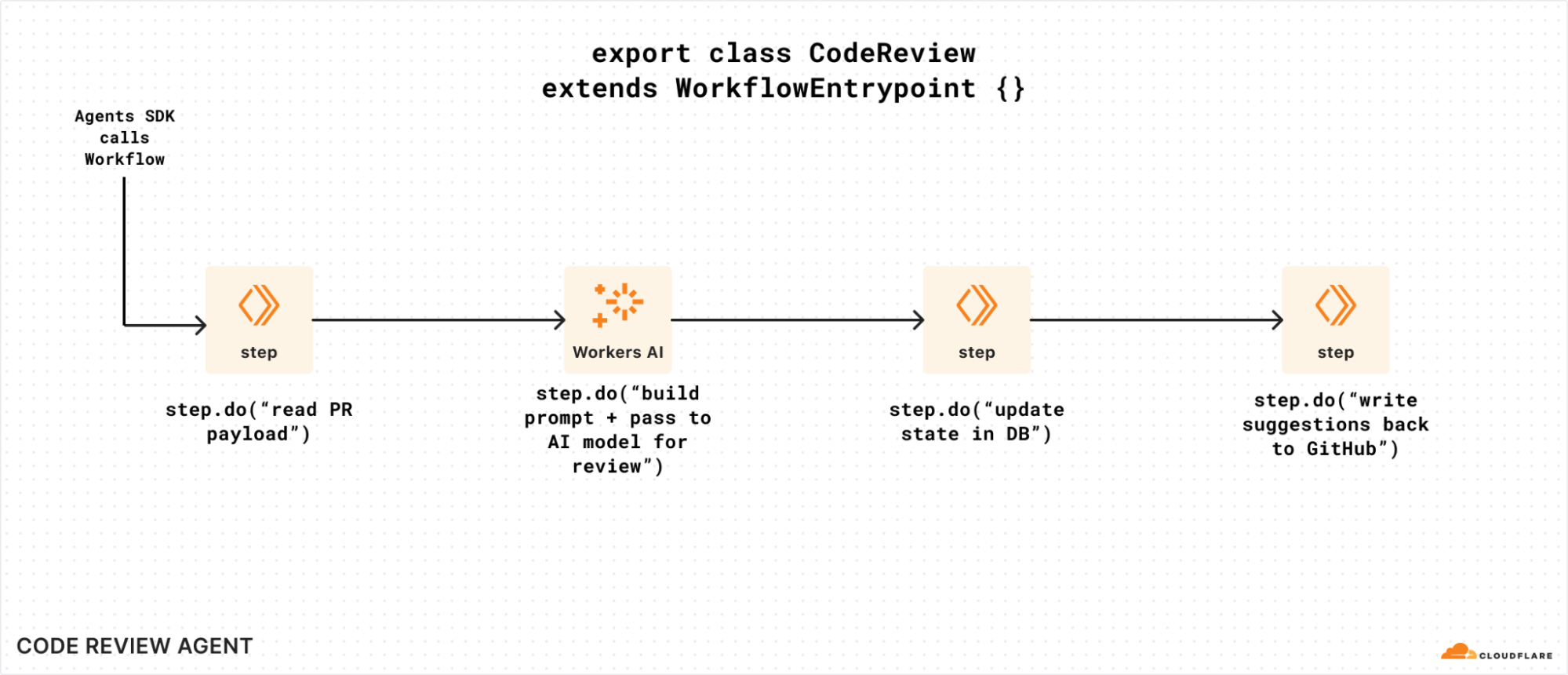
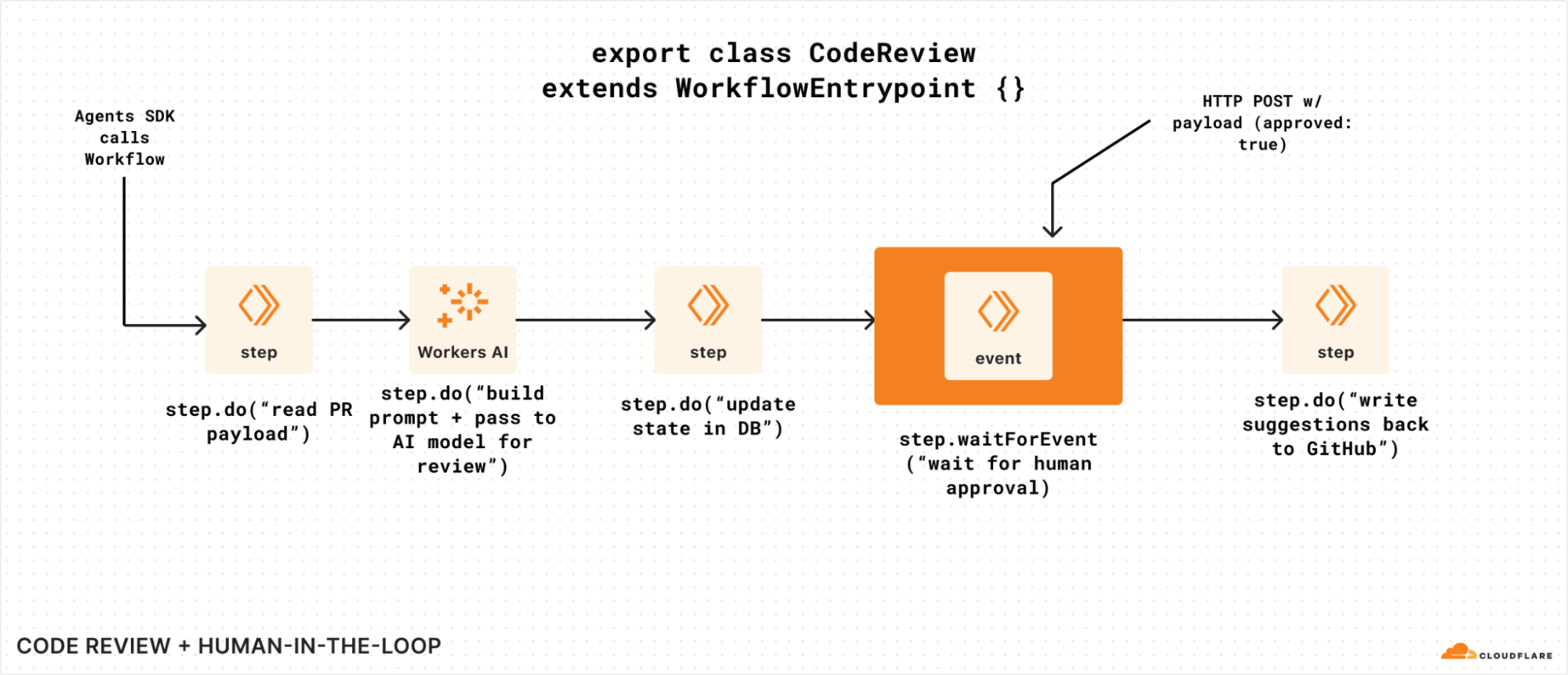
The power of code: by running CI in a Workflow, you can write a step for anything you want. For example, you might want to run an AI code reviewer as part of your CI/CD pipeline. You can make a call to your code review agent — or handle any custom logic you can put into code — with Workflows step.do(). Other examples might include writing build artifacts to R2 and sending an email when CI fails, completes, or merges to main.
What’s next
A CI/CD pipeline is just a Workflow — and with the CI SDK, you can define your CI across your code, and that of your customers, in simple Typescript rather than inflexible YAML. Building off the Cloudflare Workflows primitives, you can define whatever logic you’d like, whether that’s a healing agent, like our Think example, or writing build artifacts to R2. Running CI on Workflows helps bridge the gap between storage (via Artifacts), builds, and deployments. As a platform, this allows you to easily manage each step on your own code and on behalf of your customers.
Direct integrations for Workers & Workers for Platforms: build.preview() and build.deploy() primitives to automatically deploy on push to main and create previews on push to non-default branches
Gradual deployments: manage percentage-based rollouts via Workflows to customize your deployment progression and rollback logic
Monorepos: simplified management for multi-Worker deployments using one CI pipeline
Triggers: send push events from different sources to run CI jobs on a repo from any version control system, not just Artifacts
Engineering managers spent the past few decades figuring out ways for many programmers to work together on a shared codebase. This work dates all the way back to the “Systems Development Lifecycle” (RAND, 1975) – today commonly referred to as the “Software Development Lifecycle” (SDLC), which defines the following phases:
Plan
Design
Implement
Test
Deploy
Maintain
Retire
AI has made the step that was previously the slowest and most expensive — implementation — the fastest and cheapest. That, in turn, has had an impact downstream: overwhelming the people responsible for all the other steps in the SDLC. This ranges from open-source maintainers bombarded with thousands of pull requests and issues, to production engineers trying to save production from falling over as the rate of software delivery increases orders of magnitude.
We are all trying to save our systems, our customers, and ourselves from slop.
The answer — paradoxically — is to empower agents to do more. It’s only fair! You’d never let an engineer on your team write code, expect someone else to validate it, merge it, deploy it, hold the pager in production, and triage incoming bugs. But that’s what most companies are doing right now with agents. Models have improved remarkably, and agents are running over longer time horizons, able to take on much larger tasks. But they are not yet used evenly across the SDLC.
Cloudflare treats agents as our customers. They can buy domains, create temporary accounts and use the entire Cloudflare API. We know that agents need APIs and tools to be able to manage the full SDLC on behalf of our customers — not just the start of it.
And so today we’re introducing the start of a new set of tools that let agents step beyond just generating code and take on more of the SDLC. We’re sharing what we’ve built and learned trying to solve this for ourselves:
@cloudflare/ci — a new way to run CI/CD across millions of repos, that can self-heal and spawn agents to do much more complex tasks, build on Cloudflare Workflows.
OpenTelemetry traces in local dev — giving agents the same observability they have in production, built into Wrangler and the Cloudflare Vite plugin.
There’s something bigger here though. When we look at the SDLC, even with the best automation, its assumptions do not scale for the volume of code agents can write and the pace at which software teams must move to compete. We think it’s time to replace the SDLC with the ADLC — the Agent Development Lifecycle.
The SDLC is for software teams. The ADLC is for software factories.
Right now, everyoneistalkingaboutbuilding “software factories” — agent-driven systems that take input and autonomously build, improve, deploy and manage software. Take an input, whether it’s a production error, a bug report from a customer, or an idea for a new feature, and delegate it entirely to an agent.
Even with agents, most software projects are constrained by human-in-the-loop steps. Humans prompting agents, telling them to keep going, instructing agents to apply feedback from a code review, constantly babysitting many agents and giving them instruction. On most software teams, the human still manages each step in the SDLC model — the only change is that they delegate tasks within each step to an agent.
And so the dream behind software factories is: what if you reimagined this approach and built a factory for the entire process of building software? How can we shift more human time towards the things that truly require human inspiration, taste, and judgement? It would leave us more time to design, to talk to customers, and to dream bigger.
A software factory has to manage the same steps in the SDLC, but it demands much more from the platform it is built on. Because when you hand over the keys and let the agent drive, every manual step that previously relied on a human must be adapted to be:
Programmatic — ”ClickOps” was bad practice for humans, but it’s a non-starter for agents. Every last operation needs APIs that agents can call, debug, and rely on.
Horizontally scalable — preview deployments were a nice-to-have when humans stared at the screen while building or manually took over a staging server to catch issues before production. For agents to drive, every agent must have its own preview that matches production.
Reproducible — what happens if there’s a bug that you can only reproduce when simulating 4G on an iPhone 15? Or from an IP in a certain country? Typical unit testing and integration testing tools aren’t going to help here.
Real-time, push based — relying on humans to look at the right dashboard has always been a bad way to know if things are working, but it completely breaks down with agents. You need an event that triggers an agent to do work.
Atomic — every change needs to be independently testable, releasable, observable, and reversible without affecting unrelated behavior.
Permissioned — you know you probably shouldn’t, but today you give a few trusted engineers the keys to SSH into prod in case things really go haywire. There’s no way you let an agent do that — but without the ability to escalate and get more permissions, how can it do its job?
Self-improving — people learn from experience. The first week ship or the first on-call rotation, humans are slow and need to shadow someone else, but then get better and faster. Agents, too, need ways to learn from experience.
We need something new if we are going to make software factories safe to use for real production software. Software factories face the same challenge that other autonomous systems like self-driving cars do — the challenge of going from working successfully 80% of the time, to some number of nines past 99%.
To give agents the keys to drive the SDLC, you can’t give them a car designed for humans
An autonomous vehicle is loaded with sensors and technology that a regular car doesn’t have. Lidar sensors, cameras, powerful compute to run inference, and connectivity to a central command system that can take over remotely if needed.
For an autonomous vehicle to be 80% as good as a human at driving, we probably don’t need all of this. Self-driving got to around 80% as good as humans 10 years ago. But that’s not the bar to clear — the bar is to be much better and safer than a human driver. That’s what we expect when we hand over the keys to a machine, in order to feel safe taking a nap driving down the 101 at 60 mph. And that’s why autonomous vehicles have technology that is purpose-built for self-driving — it’s what builds trust and handles the edge cases that cannot be designed for upfront.
The same is true of self-driving software. Ask yourself — why haven’t you yet just let your agent auto-approve and merge its own PRs to your production services? The higher the stakes of what you build, the longer your list of reasons almost surely is.
When you start to unpack not only all the things that can go catastrophically wrong in this process, but also that are necessary to building the right thing for customers, it is remarkably complex. It doesn’t fit into a linear set of steps in a GitHub Actions YAML file, and it goes way beyond running traditional automated tests. Even a small change to a dashboard can span roles, specializations and org structures, and subjective changes are the hardest to test and to delegate. Most of these things are probably not part of your CI/CD pipeline at all today. But they will need to be, if you want them to still happen, while giving full control to the agents running the software factory.
To let agents drive the whole process, we need a better way to orchestrate these dynamic series of steps. We think that is a Workflow, with the capability to spawn containers, agents and browsers. A Workflow that can set feature flags and enable them for a test user, investigate logs and traces, observe production metrics as a change gradually rolls out, and do everything else that is needed in order to ship safely.
A CI/CD pipeline is just a Workflow. But a Workflow can be so much more than a CI/CD pipeline.
Cloudflare Workflows let you chain together multiple steps, automatically retry failed tasks, and persist state for minutes, hours, or even weeks. They are designed to encode complex and dynamic business processes in a logical and well-understood program. This blog post breaks down why Workflows, in tandem with Artifacts, make defining and triggering CI/CD pipelines fundamentally simpler. For example:
Workflows go beyond a series of linear steps though. They can be defined dynamically, and they can spawn agents or other Workflows. This example shows a Workflow that reviews new data from the past day. The Workflow has full control over when and how the agent is prompted, and can pass along context between steps:
Once you see this pattern, and are “Workflow-pilled” as Cloudflare is, you start to ask: what else could I have a Workflow handle for me? What other human-bottlenecked steps could I delegate to this combination of Workflow + Flue agents?
The full ADLC, on the Cloudflare stack
With Workflows able to orchestrate complex steps, and Artifacts as the storage layer for code, when you look at the SDLC stages, everything an agent needs to own the whole process of building, shipping, and maintaining software is on Cloudflare:
Primitives to build your software factory
Right now, the people on the bleeding edge are building the software factories of the future. Eventually software factories will become, just like agents and AI, the normal way people build software. But for most people and most organizations, we’re not there yet.
We want to change that.
In order to do so, the questions we’ve asked ourselves are: how can we make things simple and accessible so that everyone on the Internet can benefit from a paradigm shift like this? And what are the base layer primitives that we can open up to everyone, from the smallest startup to the largest platforms in the world?
In this case, we think the primitives are here. There’s more to do to connect them, to keep building our own software factory and learn from it, but right now, today, we’re ready for you to build your machine that builds the machine, on Cloudflare. Get started with @cloudflare/ci, build an agent, and see how much of the SDLC you can make autonomous.
Cloudflare Workflows allows you to build durable, multi-step applications with built-in retries and state persistence across long-running processes. When a Workflow executes, each step can call external systems, retry failures, and persist state across restarts. But if one step fails, it may leave earlier work from completed steps in an inconsistent or partial state.
Today we’re shipping saga rollbacks for Workflows, allowing you to declare rollback logic within the step itself, in case of failure.
For example, consider a workflow for transferring funds between accounts at two different banks:
Debit from account at Bank A
Credit to account at Bank B
Send email confirmation to both account owners
What happens if Step 2, the credit to account at Bank B, fails? Once the debit succeeds at Bank A, the transaction is committed and the money has left its system. As the orchestrator of the transaction, you cannot simply “undo” the operation in Bank A’s system. Instead, the money must be credited back to the account at Bank A through a new operation that semantically reverses the first one.
This pairing of an operation and its compensation logic is called the saga pattern.
Before today, developers had to implement their own compensation logic to track what succeeded, what failed, and what actions should be taken upon failure, outside of the steps’ direct definitions. Now, you can define compensation logic for each step.do() as an argument within the steps themselves, maintaining your workflow’s durability for the rollback as well.
// track what completed so we know what to undo
let debitA;
let creditB;
try {
  debitA = await step.do("debit-bank-a", () => bankA.debit(from, amount));
  creditB = await step.do("credit-bank-b", () => bankB.credit(to, amount));
  await step.do("notify", () => notifyBoth(from, to, amount));
} catch (error) {
  // unwind in reverse. each undo is its own durable step,
  // must be idempotent, and must keep going if one fails.
  if (creditB) {
    try {
      await step.do("reverse-credit-b", () => bankB.debit(to, amount, creditB.id));
    } catch (e) {
      await alertOnCall("reverse-credit-b failed", e);
    }
  }
  if (debitA) {
    try {
      await step.do("refund-debit-a", () => bankA.credit(from, amount, debitA.id));
    } catch (e) {
      await alertOnCall("refund-debit-a failed", e);
    }
  }
  throw error;
}
Without rollbacks
// each step ships with its own undo. add a step,
// add its rollback right here. no growing catch
// block, no manual ordering, no replay logic.
await step.do("debit-bank-a", () => bankA.debit(from, amount), {
  rollback: async ({ output }) => bankA.credit(from, amount, output.id),
});
await step.do("credit-bank-b", () => bankB.credit(to, amount), {
  rollback: async ({ output }) => bankB.debit(to, amount, output.id),
});
await step.do("notify", () => notifyBoth(from, to, amount));
With rollbacks
Try it out
To use rollbacks, just pass an options object containing a rollback function as the last argument to step.do().
const debit = await step.do(
  "debit-account-a",
  async () => {
    return await bankA.debit({
      accountId: fromAccountId,
      amount,
      idempotencyKey: `${transferId}:debit-account-a`,
    });
  },
  {
    rollback: async () => {
      await bankA.credit({
        accountId: fromAccountId,
        amount,
        idempotencyKey: `${transferId}:rollback-debit-account-a`,
      });
    },
  }
);

// The idempotency keys make both the forward operations and rollback operations safe to retry without duplicating the transfer

const credit = await step.do(
  "credit-account-b",
  async () => {
    return await bankB.credit({
      accountId: toAccountId,
      amount,
      idempotencyKey: `${transferId}:credit-account-b`,
    });
  },
  {
    rollback: async ({ output }) => {
      if (output === undefined) {
        return;
      }

      await bankB.debit({
        accountId: toAccountId,
        amount,
        idempotencyKey: `${transferId}:rollback-credit-account-b`,
      });
    },
  }
);


// If we fail here, we may want to revert all previous payments. Users should not have to wrap their code in complex try-catch logic just to revert two small payments (see below)

await step.do("send-confirmation", async () => {
  await sendTransferConfirmation({ ... });
});
Rollback functions should be idempotent, just like regular Workflow steps. If you refund a charge, use the payment provider’s idempotency key. If you release inventory, make the release safe to call more than once.
If any step fails, the rollback handlers will execute in reverse step-start order. It sounds simple: run the undo steps when something fails. In practice, there are a few details that make the API and execution model important.
1. The failed step may still need rollback. A failed step.do() can still be rollback-eligible if it registered a rollback handler.
The rollback will not start if user code catches an error and the Workflow continues, but if a step error is caught and the Workflow later fails for another reason, rollback can still run for previously registered handlers, which execute in reverse step-start order.
Why? The step may have partially interacted with an external system before failing. For example, a payment provider may capture a charge, but the step may fail before returning the chargeId to Workflows. That is why rollback handlers receive output, but must handle output === undefined.
2. Rollback only starts when the Workflow fails. Adding a rollback handler does not mean every step error triggers rollback. If user code catches an error and continues, the Workflow continues. Rollback starts when the Workflow itself is about to fail terminally.
When rollback starts, Workflows finds eligible step.do() calls, runs their rollback handlers, then records the final Workflow failure.
3. Ordering has to be predictable. For sequential Workflows, rollback order feels obvious:
Reserve inventory.
Charge card.
Create shipment.
If shipment fails, refund the card and release the inventory.
Parallel steps make this more subtle. Completion order can differ from start order, so Workflows uses reverse step-start order instead of reverse completion order.
The practical rules are:
Any started or completed steps with rollback handlers are eligible.
The failing step.do() is also eligible if it registered a rollback handler.
Handlers run in reverse step-start order, not completion order.
How we designed the API
Once we had the expected behavior in mind, we had to add this new pattern into the Workflows API. Rollbacks went through a few iterations before we landed on rollback options.
Why not a fluent or builder API?
The first approach was a fluent form: step.do(...).rollback(...) It reads well. The forward action and the compensation sit next to each other, and the call site looks like ordinary JavaScript chaining.
The problem is that step.do() already has an important meaning: it starts a durable step and returns a Promise for the step output. In Workers, promise-like values are especially meaningful because Workers RPC supports promise pipelining, a pattern inherited from systems like Cap’n Proto.
Promise pipelining lets code call a method on a future value before that value has fully returned to the caller. For example:
const session = api.authenticate(apiKey);
const name = await session.whoami();
Here, session is not the real session object yet. It is more like a handle to the session that will exist soon. When you call session.whoami(), Workers can send that call to the remote side early and say: “once authentication creates the session, call whoami() on it.”
That saves a round trip. The caller does not need to wait for authenticate() to fully finish before asking for whoami().
To a reader, that can look like “call .rollback() on the result of charge-card.” But rollback is not part of the step’s output. It is part of the step.do() options, registered before the step starts, so Workflows knows how to compensate the step if a later step fails.
A fluent API also makes step timing harder to reason about. Today, step.do() starts the step when it is called, so developers can start a step, do other work, and await the first step later:
With today’s execution model, first starts immediately, before second. A fluent API would complicate that. Workflows would need to wait and see whether .rollback() gets attached before it knows the full step definition. That could delay when the step is sent to the engine.
In the earlier example, first could start at await first instead of at step.do("first", ...), after second has already completed.
That makes concurrent Workflows harder to reason about: step timing would depend on when the returned Promise is consumed, not just where step.do() is called.
A builder API avoids the Promise ambiguity. It also gives us an obvious place for future step-level options, and makes it clear that the forward action and rollback action belong to the same saga step.
But it adds ceremony. Every step needs a final .run(), forgetting .run() would be easy and hard to spot without tooling, and simple one-step cases start to look like configuration chains. It also introduces a new step.saga() builder, breaking from the existing step.<action> pattern. Most importantly, it makes step.do() feel like an older API rather than the primary Workflows primitive. The goal of rollback was to extend step.do(), not replace it.
Rollback as step metadata
step.do(..., { rollback })
Ultimately, we chose the explicit form where rollback is metadata on the step.
This way, each rollback is defined within the forward step itself. Each handler receives the error that caused the rollback to start, the step context, and the output, which is either the persisted value returned by the forward step (which can be undefined) or undefined if the step failed before persisting a value.
Rollbacks emit lifecycle events, so you can tell whether compensation started, which rollback handler failed, and whether rollback completed successfully.
Crucially, the original Workflow failure remains separate: rollback is what Workflows does after the failure, not the reason the Workflow failed.
Just as you can define custom retry and timeout behavior in thestep configuration via WorkflowStepConfig, you add rollback-specific values in rollbackConfig.
This matches the lifecycle-event mental model we wanted. A step.do() already describes a durable unit of work that Workflows records, retries, and later shows in logs. Rollback is another lifecycle behavior for that same unit of work. It should travel with the step definition, not live in a separate wrapper or builder.
The step still starts when step.do() normally starts.
The returned promise still represents the step output.
Concurrent Workflow code keeps the same execution model.
Retry and timeout options for rollback live next to the rollback handler.
Existing step.do() calls keep working exactly as they do today.
This shape is slightly more explicit than the fluent API, but that explicitness is useful. The operation and its compensation are still in one place, and the API does not introduce a new step builder or a new kind of promise. Developers who already understand step.do() only need to learn one additional options object.
This is less magical, but it is simpler to adopt, and clearer to understand.
How it works under the hood
Rollback feels like a small API addition, but it changes what Workflows needs to record about each step.
A regular step.do() already has a durable record. Workflows records that the step started, whether it completed, what it returned, and whether it should be skipped instead of repeated if the Workflow resumes later.
Rollbacks add one more thing to that record: whether the step registered compensation logic.
This means Workflows has two pieces of information to bring together if the Workflow fails.
The first is durable step history. The Workflow engine stores data to know what ran, what completed, what output was saved, and whether rollback was registered.
The second is the rollback handler itself, which is the function written to compensate for that step. Workflows does not save the text of that function as data. Instead, it keeps a callable reference to the handler while the Workflow is running.
In Workers RPC, this kind of callable reference is called a stub. A stub lets one part of the system call code that is running somewhere else. Stubs also have lifetimes such that they can be disposed when a call or execution context ends. If you need to keep a stub past that point, Workers RPC provides a dup() method, which creates another handle to the same target.
For rollback, that model is useful. The durable step history records what needs compensation. The rollback stub gives Workflows a way to invoke the compensation code. And because rollback handlers may need to outlive the immediate step.do() call that registered them, Workflows keeps its own callable reference to the handler for the rollback phase.
In the common case, when a Workflow enters rollback in the same engine lifetime, Workflows already has the rollback stubs it needs. It can use the durable step history to find eligible steps, then invoke the rollback stubs that were registered during forward execution.
This gets more subtle when Workflows has to recover after a restart.
If the engine is evicted, crashes, or restarts while rollback is needed, Workflows still has the durable step history, but it may no longer have the in-memory rollback stubs. To recover, Workflows uses replay: a recovery mode where it can re-run the Workflow code without re-executing completed forward step bodies.
When replay reaches a completed step.do(), Workflows reads the persisted result instead of running the step body again. For rollback recovery, Workflows only needs to rebuild handlers for steps that had rollback attached and are eligible for rollback. As those step.do() calls are encountered, their rollback options can register the callable stubs again
That lets Workflows recover the rollback handlers it needs without duplicating the original external side effects.
With those pieces in place, rollback can work whether the handler is still available in memory or has to be rebuilt during recovery.
When the workflow is about to fail, Workflows does not ask your application to reconstruct what happened. It already has the step history. It can look at the persisted record and answer the important questions:
Which steps started?
Which steps finished?
Which failed step may still need cleanup?
Which steps registered rollback handlers?
What output should each rollback handler receive?
What order should compensation run in?
Then Workflows invokes each rollback stub with a rollback context: the original error, the step context, and the step output, if one was persisted.
The ordering detail matters. In normal JavaScript, especially with Promise.all(), completion order is not always the same as start order. If step A starts first and step B starts second, step B might finish first. For rollback, Workflows uses the persisted start order as the stable source of truth, then unwinds it in reverse.
Rollback handlers also run through Workflows’ normal step machinery. That means compensation gets the same operational properties you expect from Workflows: retries, timeouts, lifecycle events, logs, and a final recorded outcome. If a rollback handler keeps failing after its configured retries, Workflows records the rollback outcome as failed, stops running the remaining rollback handlers, and the Workflow instance ultimately ends in the Errored state.
This is the main difference between saga rollbacks and a catch block. A catch block only knows what is still in memory at its exact point in your JavaScript execution. Workflows rollback uses persisted step history to decide what already happened, invokes the stubs it already has in the common case, and safely rebuilds missing stubs during recovery when it needs to.
That is also why the API puts rollback on step.do() itself. Rollback is not a separate global error handler — it is metadata attached to the durable unit of work Workflows already understands.
When a multi-step application fails halfway through, the hardest part is often not knowing that it failed. It is knowing what already happened, and what needs to happen next.
Saga rollbacks let you put that answer directly beside each step. If you are building multi-step applications with Workflows, try saga rollbacks and tell us what compensation patterns you want next. Get started with the Workflows documentation and share feedback in the Cloudflare Community.
When we first launched Workers eight years ago, it was a direct-to-developers platform. Over the years, we have expanded and scaled the ecosystem so that platforms could not only build on Workers directly, but they could also enable their customers to ship code to us through many multi-tenant applications. We now see on Workers: Applications where users describe what they want, and the AI writes the implementation. Multi-tenant SaaS where every customer’s business logic is, at runtime, some TypeScript the platform has never seen before. Agents that write and run their own tools. CI/CD products where every repo defines its own pipeline.
Last month, when we shipped the Dynamic Workers open beta, we gave those platforms a clean primitive for the compute side: hand the Workers runtime some code at runtime, get back an isolated, sandboxed Worker, on the same machine, in single-digit milliseconds. Durable Object Facets extended the same idea to storage — each dynamically-loaded app can have its own SQLite database, spun up on demand, with the platform sitting in front, as a supervisor. Artifacts did the same for source control: a Git-native, versioned filesystem you can create by the tens of millions, one per agent, one per session, one per tenant. So, we have dynamic deployment for storage and source control. What’s next?
Today, we are bridging durable execution and dynamic deployment with Dynamic Workflows.
The gap between durable and dynamic execution
Cloudflare Workflows is our durable execution engine. It turns a run(event, step) function into a program where every step survives failures, can sleep for hours or days, can wait for external events, and resumes exactly where it left off when the isolate is recycled. It’s the right primitive for anything that has to “keep going” past a single request: onboarding flows, video transcoding pipelines, multi-stage billing, long-running agent loops, and — as of Workflows V2 — up to 50,000 concurrent instances and 300 new instances per second per account, redesigned for the agentic era.
But Workflows has always had one assumption baked in: the workflow code is part of your deployment. Your wrangler.jsonc has a block that says “when the engine calls into WORKFLOWS, run the class called MyWorkflow.” One binding, one class. Per deploy.
That works fine if you own all the code. It’s fine if you’re running a traditional application.
It stops working the moment you want to let your customer ship their workflow.
Say you’re building an app platform where the AI writes TypeScript for every tenant. Say you’re running a CI/CD product where each repository has its own pipeline. Say you’re using an agents SDK where each agent writes its own durable plan. In every one of these cases, the workflow is different for every tenant, every agent, every request. There is no single class to bind.
This is the same shape of problem that Dynamic Workers solved for compute and that Durable Object Facets solved for storage. We just hadn’t solved it for durable execution yet.
Dynamic Workflows
@cloudflare/dynamic-workflows is a small library. Roughly 300 lines of TypeScript. It lets a single Worker — the Worker Loader — route every create() call to a different tenant’s code, and, critically, have the Workflows engine dispatch run(event, step) back to that same code when the workflow actually executes, seconds or hours or days later.
Here’s the whole pattern. A Worker Loader:
import {
  createDynamicWorkflowEntrypoint,
  DynamicWorkflowBinding,
  wrapWorkflowBinding,
} from '@cloudflare/dynamic-workflows';

// The library looks this class up on cloudflare:workers exports.
export { DynamicWorkflowBinding };

function loadTenant(env, tenantId) {
  return env.LOADER.get(tenantId, async () => ({
    compatibilityDate: '2026-01-01',
    mainModule: 'index.js',
    modules: { 'index.js': await fetchTenantCode(tenantId) },
    // The tenant sees this as a normal Workflow binding.
    env: { WORKFLOWS: wrapWorkflowBinding({ tenantId }) },
  }));
}

// Register this as class_name in wrangler.jsonc.
export const DynamicWorkflow = createDynamicWorkflowEntrypoint<Env>(
  async ({ env, metadata }) => {
    const stub = loadTenant(env, metadata.tenantId);
    return stub.getEntrypoint('TenantWorkflow');
  }
);

export default {
  fetch(request, env) {
    const tenantId = request.headers.get('x-tenant-id');
    return loadTenant(env, tenantId).getEntrypoint().fetch(request);
  },
};
That’s it. The tenant calls env.WORKFLOWS.create(...) against what looks like a perfectly normal Workflow binding. Workflow IDs, .status(), .pause(), retries, hibernation, durable steps, step.sleep('24 hours'), step.waitForEvent() — everything works the way it always has.
The library handles one thing: making sure that when the Workflows engine eventually wakes up and calls run(event, step), it ends up inside the right tenant’s code.
How it works
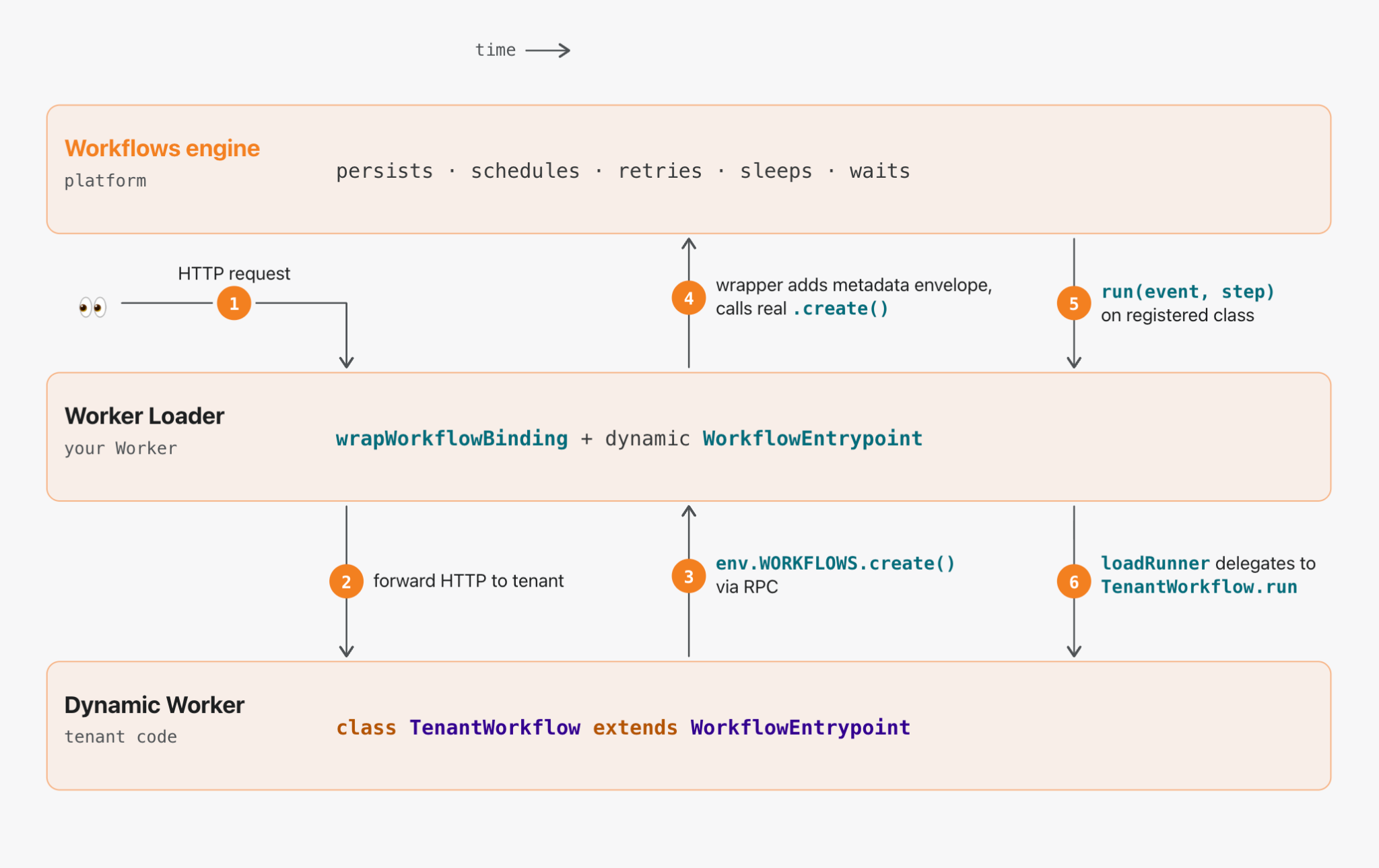
Three layers: the Workflows engine (platform) on top, your Worker Loader in the middle, your tenant’s code (a Dynamic Worker) on the bottom.
When a request reaches the Worker Loader, it routes the execution to the correct dynamic code on the fly. The rest of the execution is a handoff between these three layers, left-to-right in time: the request enters, bounces up to the engine, is persisted, and later bounces back down again.
Walking the flow:
① → ② Entering the tenant’s code. The Worker Loader receives an HTTP request, figures out which tenant it’s for, loads that tenant’s code via the Worker Loader, and forwards the request to its default.fetch. The env it hands the tenant contains WORKFLOWS: wrapWorkflowBinding({ tenantId }). As far as the tenant is concerned, that looks and acts like a real Workflow binding.
③ Up to the Worker Loader. When the tenant calls env.WORKFLOWS.create({ params }), it’s actually making a Remote Procedure Call (RPC) into the Worker Loader — the wrapped binding is a WorkerEntrypoint subclass (DynamicWorkflowBinding) that the runtime specialized with the tenant’s metadata at load time. That’s why you have to export { DynamicWorkflowBinding } from your Worker Loader: the runtime builds per-tenant stubs by looking the class up in cloudflare:workers exports. Bindings that cross the Dynamic Worker boundary have to be RPC stubs — a plain { create, get } object can’t be structured-cloned, and the raw Workflow binding isn’t serializable either.
Inside the Worker Loader, the wrapped binding transparently rewrites the payload:
④ Up to the engine. The Worker Loader then calls .create() on the realWORKFLOWS binding with the envelope as the params. From here the Workflows engine takes over. It persists event.payload — which now includes the envelope — and schedules the run. Every time the engine later wakes up the workflow (whether that’s after a 24-hour sleep, a crash, or a deploy), the metadata rides along with the payload, waiting to route the run.
One implication: treat the metadata as a routing hint, not as authorization. The tenant can read it back via instance.status(). Don’t put secrets in there.
⑤ → ⑥ The engine comes back down. When the engine is ready to run a step, it calls .run(event, step) on the class you registered in wrangler.jsonc — the one createDynamicWorkflowEntrypoint gave you. That class unwraps the envelope, hands the metadata to the loadRunner callback you wrote, and forwards the unwrapped event through to whatever runner the callback returns.
The callback is where everything interesting happens, and it’s entirely yours. Fetch the tenant’s latest source from R2. Check their plan tier and pick a region. Attach a tail Worker for per-tenant logging. Bundle TypeScript on the fly with @cloudflare/worker-bundler. In the common case, you just hand off to the Worker Loader:
The Worker Loader caches by ID, so a workflow that runs many steps over many hours reuses the same dynamic Worker across them. When the isolate eventually gets evicted, the next step.do() pulls the code again and keeps going — the tenant’s workflow has no idea anything happened. A Dynamic Worker boots in single-digit milliseconds using a few megabytes of memory, so the dispatch overhead is essentially free. You can have a million tenants, each with their own distinct workflow code, each spun up lazily on the step boundary where it’s needed, and none of them cost anything while idle.
The escape hatch
If you want to subclass WorkflowEntrypoint yourself — to add logging around run(), wire up per-tenant observability, or thread custom state through — the library exposes the lower-level dispatchWorkflow primitive that createDynamicWorkflowEntrypoint is built on:
Everything else — IDs, pause/resume, sendEvent, retries — falls through to the real Workflows engine untouched.
Dynamic Workers are the primitive
Step back from the specifics for a second. Every interesting line of this library is either a wrapper around .create() on the outbound side or a wrapper around WorkflowEntrypoint on the inbound side. The actual work — spinning up the tenant’s code, sandboxing it, routing RPC across the boundary, caching the isolate, hibernating between steps — is all done by Dynamic Workers underneath.
That’s the real story, and it’s a lot bigger than Workflows
Dynamic Workers is the primitive that swallows everything. Durable Object Facets is the same pattern applied to Durable Objects. Dynamic Workflows is that same pattern applied to WorkflowEntrypoint. Each one is the same small amount of envelope-and-unwrap glue between the static binding you’ve always had and the dynamic version you can now hand to your customers.
And we’re not stopping at Workflows. Every binding that Workers currently exposes is heading for a dynamic counterpart — queues where each producer ships its own handler, caches, databases, object stores, AI bindings, and MCP servers where every tenant brings their own tools. Whatever you bind to a Worker today, you will soon be able to bind dynamically: dispatched per tenant, per agent, per request, at zero idle cost.
The unit economics of running a platform like this are, frankly, absurd. Shipping a multi-tenant product used to mean giving every customer their own container, their own database, their own disk, their own scheduler, and stitching it together with orchestration glue, service meshes, and hair-pulling billing math. Many of these applications have to support thousands of customers at the very least; millions, at the most. On Dynamic Workers and everything composing on top of them, idle tenants cost approximately nothing and active tenants share the same hardware through isolate-level multi-tenancy. The floor drops several orders of magnitude. A platform that used to cap out at thousands of paying customers can now reasonably serve tens of millions.
What this unlocks
Agent platforms that plan like engineers
Coding agents — OpenCode, Claude Code, Codex, Pi — have been proving for the past year that LLMs are far better at writing code than at making sequential tool calls. The Cloudflare Agents SDK and Project Think extend that insight into durable execution: with primitives like fibers and sub-agents, an agent’s long-running plan can survive crashes, hibernation, and redeploys without the user noticing.
Dynamic Workflows is the piece that lets that plan be a first-class Cloudflare Workflow — something the agent literally writes and the platform literally runs, with the full durability machinery behind it. A run(event, step) function the model wrote a minute ago, where every step.do(...) is independently retryable, every step.sleep('24 hours') hibernates for free, and every step.waitForEvent(...) waits indefinitely for the human to approve the next action. The agent writes the workflow; the platform runs it; neither has to know ahead of time what the plan looks like.
SDKs and frameworks where the user brings the logic
If you’re shipping a framework where your customer writes the run(event, step) function — a workflow builder UI, a visual automation tool, a per-tenant extension system, a low-code tool for non-developers — Dynamic Workflows is now the primitive that makes it work without compromise. You call wrapWorkflowBinding({ tenantId }) once, hand the result to their code as WORKFLOWS, and every workflow instance they create is automatically tagged, routed back, and executed in their sandbox. The framework owns the Worker Loader; the user owns the workflow; neither has to care about the other.
CI/CD at primitive speed
Here’s the use case that’s been getting us most excited.
Every CI/CD platform in existence is, underneath, a dispatcher of per-repo configuration files: “run these steps, in this order, with these secrets, cache these directories, upload these artifacts.” Each repo has its own pipeline. Each branch might have its own variant. Each pull request spawns an instance of that pipeline that has to run to completion, survive a machine crash, retry a flaky step, stream logs, pause for approvals, and persist results.
That’s exactly the shape of a durable workflow. The reason CI hasn’t been built that way until now is that nobody had a cloud primitive where the workflow itself is different for every repo, dispatched at runtime, at zero provisioning cost. Now you do.
Here’s what a CI pipeline looks like when it’s just code your customer ships with their repo — say, in .cloudflare/ci.ts. The workflow itself is real; the runInSandbox() / summarise() / GitHub binding helpers below are platform-provided glue, the kind of thing you’d ship once in your dispatcher:
import { WorkflowEntrypoint } from 'cloudflare:workers';

export class CIPipeline extends WorkflowEntrypoint {
  async run(event, step) {
    const { repo, sha, branch, pr } = event.payload;

    // Fork an isolated copy of the repo at this commit. Seconds, not minutes.
    const workspace = await step.do('checkout', () =>
      this.env.ARTIFACTS.fork(repo, { sha })
    );

    await step.do('install', () => runInSandbox(workspace, ['pnpm', 'install']));

    // Each parallel step is independently retryable.
    const [lint, test, build] = await Promise.all([
      step.do('lint',  () => runInSandbox(workspace, ['pnpm', 'lint'])),
      step.do('test',  () => runInSandbox(workspace, ['pnpm', 'test'])),
      step.do('build', () => runInSandbox(workspace, ['pnpm', 'build'])),
    ]);

    if (pr) {
      await step.do('comment', () =>
        this.env.GITHUB.commentOnPR(repo, pr, summarise({ lint, test, build }))
      );
    }

    // Workflow hibernates until approval arrives. No VM held open.
    if (branch === 'main') {
      await step.waitForEvent('approval', { type: 'deploy-approval', timeout: '24 hours' });
      await step.do('deploy', () => runInSandbox(workspace, ['pnpm', 'deploy']));
    }
  }
}
The platform owns the dispatcher. It ingests a webhook, figures out which repo it came from, loads that repo’sCIPipeline class as a Dynamic Worker, and hands the run-off to Dynamic Workflows. The platform doesn’t know what’s in the pipeline. It doesn’t need to. It’s running a durable function that happens to live in the customer’s repo.
Now line up what each step actually does:
Artifacts gives every repo a Git-native, versioned filesystem that lives on Cloudflare’s globally distributed network. ArtifactFS hydrates the tree lazily, so even a multi-GB repo is ready to work within single-digit seconds — and fork() gives each CI run its own isolated copy, with no git clone tax.
Dynamic Workers run each lightweight step (lint, format, typecheck, bundle) in a sandboxed isolate that boots in milliseconds, on the same machine as the repo’s data. No VM provisioning, no image pull, no cold start.
Dynamic Workflows holds the whole run together. Steps are retryable and durable. The run hibernates for free while waiting on approvals. State and progress survive deploys, evictions, and crashes.
Sandboxes handle the heavy corners — the step that needs docker build, the integration suite that needs Postgres running, the Rust compile that needs 8 cores. Snapshots to R2 mean even those warm-start in a couple of seconds.
A traditional CI run for a mid-sized JS repo looks something like: allocate VM (15-30s) → pull base image (10s) → git clone (10s) → npm ci (30-60s) → run tests (actual work) → tear down. Several minutes of ceremony before the first test runs, and you pay for the whole VM the whole time.
The same pipeline on this stack looks like: edge fork of the repo (seconds) → each step boots a fresh isolate or snapshot-restored sandbox in milliseconds → runs the actual work → hibernates. Nothing has to cold-start. Nothing has to be provisioned ahead of time. Nothing has to be kept warm. The repo doesn’t move — the compute comes to it.
CI has never been this fast, and the reason it hasn’t is that none of these primitives have existed together in one place. Now they do.
Try it
@cloudflare/dynamic-workflows is MIT-licensed and on npm today:
npm install @cloudflare/dynamic-workflows
It runs on top of Dynamic Workers, which is in open beta on the Workers Paid plan. The repo includes a working example — an interactive browser playground where you write a TenantWorkflow class, hit Run, and watch the steps execute with live-streaming logs and a per-step checklist that lights up as each step.do() commits. Clone it, deploy it, show it to a coworker.
If you’re a platform, an SDK, a framework, or a CI/CD product, and you want to give your customers their own workflows without running their code in your own process: this is the primitive we built for you. If you’re building agents that write durable plans, this is the primitive that makes those plans real Workflows. If you’re just watching all of this, and it looks fun to build on top of: we’d love to see what you make.
Cloudflare Workflows is a durable execution engine that lets you chain steps, retry on failure, and persist state across long-running processes. Developers use Workflows to power background agents, manage data pipelines, build human-in-the-loop approval systems, and more.
Last month, we announced that every workflow deployed to Cloudflare now has a complete visual diagram in the dashboard.
We built this because being able to visualize your applications is more important now than ever before. Coding agents are writing code that you may or may not be reading. However, the shape of what gets built still matters: how the steps connect, where they branch, and what’s actually happening.
If you’ve seen diagrams from visual workflow builders before, those are usually working from something declarative: JSON configs, YAML, drag-and-drop. However, Cloudflare Workflows are just code. They can include Promises, Promise.all, loops, conditionals, and/or be nested in functions or classes. This dynamic execution model makes rendering a diagram a bit more complicated.
We use Abstract Syntax Trees (ASTs) to statically derive the graph, tracking Promise and await relationships to understand what runs in parallel, what blocks, and how the pieces connect.
Keep reading to learn how we built these diagrams, or deploy your first workflow and see the diagram for yourself.
Here’s an example of a diagram generated from Cloudflare Workflows code:
Dynamic workflow execution
Generally, workflow engines can execute according to either dynamic or sequential (static) execution order. Sequential execution might seem like the more intuitive solution: trigger workflow → step A → step B → step C, where step B starts executing immediately after the engine completes Step A, and so forth.
Cloudflare Workflows follow the dynamic execution model. Since workflows are just code, the steps execute as the runtime encounters them. When the runtime discovers a step, that step gets passed over to the workflow engine, which manages its execution. The steps are not inherently sequential unless awaited — the engine executes all unawaited steps in parallel. This way, you can write your workflow code as flow control without additional wrappers or directives. Here’s how the handoff works:
An engine, which is a “supervisor” Durable Object for that instance, spins up. The engine is responsible for the logic of the actual workflow execution.
When Runtime encounters a step.do, it passes the execution back to the engine.
The engine executes the step, persists the result (or throws an error, if applicable) and triggers the user Worker again.
With this architecture, the engine does not inherently “know” the order of the steps that it is executing — but for a diagram, the order of steps becomes crucial information. The challenge here lies in getting the vast majority of workflows translated accurately into a diagnostically helpful graph; with the diagrams in beta, we will continue to iterate and improve on these representations.
Parsing the code
Fetching the script at deploy time, instead of run time, allows us to parse the workflow in its entirety to statically generate the diagram.
Taking a step back, here is the life of a workflow deployment:
To create the diagram, we fetch the script after it has been bundled by the internal configuration service which deploys Workers (step 2 under Workflow deployment). Then, we use a parser to create an abstract syntax tree (AST) representing the workflow, and our internal service generates and traverses an intermediate graph with all WorkflowEntrypoints and calls to workflows steps. We render the diagram based on the final result on our API.
When a Worker is deployed, the configuration service bundles (using esbuild by default) and minifies the code unless specified otherwise. This presents another challenge — while Workflows in TypeScript follow an intuitive pattern, their minified Javascript (JS) can be dense and indigestible. There are also different ways that code can be minified, depending on the bundler.
Here’s an example of Workflow code that shows agents executing in parallel:
Bundling with rspack, a snippet of the minified code looks like this:
class pe extends e{async run(e,t){de("workflow.run.start",{instanceId:e.instanceId});const r=await t.do("validate payload",async()=>{if(!e.payload.r2Key)throw new Error("r2Key is required");if(!e.payload.telegramChatId)throw new Error("telegramChatId is required");return{r2Key:e.payload.r2Key,telegramChatId:e.payload.telegramChatId,context:e.payload.context?.trim()}}),s=await t.do("load source document from r2",async()=>{const e=await this.env.REVIEW_DOCUMENTS.get(r.r2Key);if(!e)throw new Error(`R2 object not found: ${r.r2Key}`);const t=(await e.text()).trim();if(!t)throw new Error("R2 object is empty");return t}),n=Number(this.env.MAX_REVIEW_LOOPS??"5"),o=this.env.RESPONSE_TIMEOUT??"7 days",a=async(s,i,c)=>{if(s>n)return le("workflow.loop.max_reached",{instanceId:e.instanceId,maxLoops:n}),await t.do("notify max loop reached",async()=>{await se(this.env,r.telegramChatId,`Review stopped after ${n} loops for ${e.instanceId}. Start again if you still need revisions.`)}),{approved:!1,loops:n,finalText:i};const h=t.do(`summary agent (loop ${s})`,async()=>te(this.env,"You summarize documents. Keep the output short, concrete, and factual.",ue("Summarize this text in 5 bullet points.",i,r.context)))...
Or, bundling with vite, here is a minified snippet:
class ht extends pe {
  async run(e, r) {
    b("workflow.run.start", { instanceId: e.instanceId });
    const s = await r.do("validate payload", async () => {
      if (!e.payload.r2Key)
        throw new Error("r2Key is required");
      if (!e.payload.telegramChatId)
        throw new Error("telegramChatId is required");
      return {
        r2Key: e.payload.r2Key,
        telegramChatId: e.payload.telegramChatId,
        context: e.payload.context?.trim()
      };
    }), n = await r.do(
      "load source document from r2",
      async () => {
        const i = await this.env.REVIEW_DOCUMENTS.get(s.r2Key);
        if (!i)
          throw new Error(`R2 object not found: ${s.r2Key}`);
        const c = (await i.text()).trim();
        if (!c)
          throw new Error("R2 object is empty");
        return c;
      }
    ), o = Number(this.env.MAX_REVIEW_LOOPS ?? "5"), l = this.env.RESPONSE_TIMEOUT ?? "7 days", a = async (i, c, u) => {
      if (i > o)
        return H("workflow.loop.max_reached", {
          instanceId: e.instanceId,
          maxLoops: o
        }), await r.do("notify max loop reached", async () => {
          await J(
            this.env,
            s.telegramChatId,
            `Review stopped after ${o} loops for ${e.instanceId}. Start again if you still need revisions.`
          );
        }), {
          approved: !1,
          loops: o,
          finalText: c
        };
      const h = r.do(
        `summary agent (loop ${i})`,
        async () => _(
          this.env,
          et,
          K(
            "Summarize this text in 5 bullet points.",
            c,
            s.context
          )
        )
      )...
Minified code can get pretty gnarly — and depending on the bundler, it can get gnarly in a bunch of different directions.
We needed a way to parse the various forms of minified code quickly and precisely. We decided oxc-parser from the JavaScript Oxidation Compiler (OXC) was perfect for the job. We first tested this idea by having a container running Rust. Every script ID was sent to a Cloudflare Queue, after which messages were popped and sent to the container to process. Once we confirmed this approach worked, we moved to a Worker written in Rust. Workers supports running Rust via WebAssembly, and the package was small enough to make this straightforward.
The Rust Worker is responsible for first converting the minified JS into AST node types, then converting the AST node types into the graphical version of the workflow that is rendered on the dashboard. To do this, we generate a graph of pre-defined node types for each workflow and translate into our graph representation through a series of node mappings.
Rendering the diagram
There were two challenges to rendering a diagram version of the workflow: how to track step and function relationships correctly, and how to define the workflow node types as simply as possible while covering all the surface area.
To guarantee that step and function relationships are tracked correctly, we needed to collect both the function and step names. As we discussed earlier, the engine only has information about the steps, but a step may be dependent on a function, or vice versa. For example, developers might wrap steps in functions or define functions as steps. They could also call steps within a function that come from different modules or rename steps.
Although the library passes the initial hurdle by giving us the AST, we still have to decide how to parse it. Some code patterns require additional creativity. For example, functions — within a WorkflowEntrypoint, there can be functions that call steps directly, indirectly, or not at all. Consider functionA, which contains console.log(await functionB(), await functionC()) where functionB calls a step.do(). In that case, both functionA and functionB should be included on the workflow diagram; however, functionC should not. To catch all functions which include direct and indirect step calls, we create a subgraph for each function and check whether it contains a step call itself or whether it calls another function which might. Those subgraphs are represented by a function node, which contains all of its relevant nodes. If a function node is a leaf of the graph, meaning it has no direct or indirect workflow steps within it, it is trimmed from the final output.
We check for other patterns as well, including a list of static steps from which we can infer the workflow diagram or variables, defined in up to ten different ways. If your script contains multiple workflows, we follow a similar pattern to the subgraphs created for functions, abstracted one level higher.
For every AST node type, we had to consider every way they could be used inside of a workflow: loops, branches, promises, parallels, awaits, arrow functions… the list goes on. Even within these paths, there are dozens of possibilities. Consider just a few of the possible ways to loop:
Our goal was to create a concise API that communicated what developers need to know without overcomplicating it. But converting a workflow into a diagram meant accounting for every pattern (whether it follows best practices, or not) and edge case possible. As we discussed earlier, each step is not explicitly sequential, by default, to any other step. If a workflow does not utilize await and Promise.all(), we assume that the steps will execute in the order in which they are encountered. But if a workflow included await, Promise or Promise.all(), we needed a way to track those relationships.
We decided on tracking execution order, where each node has a starts: and resolves: field. The starts and resolves indices tell us when a promise started executing and when it ends relative to the first promise that started without an immediate, subsequent conclusion. This correlates to vertical positioning in the diagram UI (i.e., all steps with starts:1 will be inline). If steps are awaited when they are declared, then starts and resolves will be undefined, and the workflow will execute in the order of the steps’ appearance to the runtime.
While parsing, when we encounter an unawaited Promise or Promise.all(), that node (or nodes) are marked with an entry number, surfaced in the starts field. If we encounter an await on that promise, the entry number is incremented by one and saved as the exit number (which is the value in resolves). This allows us to know which promises run at the same time and when they’ll complete in relation to each other.
Developers can already use Cloudflare Workflows to build long-running, multi-step applications on Workers. Now, Python Workflows are here, meaning you can use your language of choice to orchestrate multi-step applications.
With Workflows, you can automate a sequence of idempotent steps in your application with built-in error handling and retry behavior. But Workflows were originally supported only in TypeScript. Since Python is the de facto language of choice for data pipelines, artificial intelligence/machine learning, and task automation – all of which heavily rely on orchestration – this created friction for many developers.
Over the years, we’ve been giving developers the tools to build these applications in Python, on Cloudflare. In 2020, we brought Python to Workers via Transcrypt before directly integrating Python into workerd in 2024. Earlier this year, we built support for CPython along with any packages built in Pyodide, like matplotlib and pandas, in Workers. Now, Python Workflows are supported as well, so developers can create robust applications using the language they know best.
Why Python for Workflows?
Imagine you’re training an LLM. You need to label the dataset, feed data, wait for the model to run, evaluate the loss, adjust the model, and repeat. Without automation, you’d need to start each step, monitor manually until completion, and then start the next one. Instead, you could use a workflow to orchestrate the training of the model, triggering each step pending the completion of its predecessor. For any manual adjustments needed, like evaluating the loss and adjusting the model accordingly, you can implement a step that notifies you and waits for the necessary input.
Consider data pipelines, which are a top Python use case for ingesting and processing data. By automating the data pipeline through a defined set of idempotent steps, developers can deploy a workflow that handles the entire data pipeline for them.
Take another example: building AI agents, such as an agent to manage your groceries. Each week, you input your list of recipes, and the agent (1) compiles the list of necessary ingredients, (2) checks what ingredients you have left over from previous weeks, and (3) orders the differential for pickup from your local grocery store. Using a Workflow, this could look like:
await step.wait_for_event() the user inputs the grocery list
step.do() compile list of necessary ingredients
step.do() check list of necessary ingredients against left over ingredients
step.do() make an API call to place the order
step.do() proceed with payment
Using workflows as a tool to build agents on Cloudflare can simplify agents’ architecture and improve their odds for reaching completion through individual step retries and state persistence. Support for Python Workflows means building agents with Python is easier than ever.
How Python Workflows work
Cloudflare Workflows uses the underlying infrastructure that we created for durable execution, while providing an idiomatic way for Python users to write their workflows. In addition, we aimed for complete feature parity between the Javascript and the Python SDK. This is possible because Cloudflare Workers support Python directly in the runtime itself.
Creating a Python Workflow
Cloudflare Workflows are fully built on top of Workers and Durable Objects. Each element plays a part in storing Workflow metadata, and instance level information. For more detail on how the Workflows platform works, check out this blog post.
At the very bottom of the Workflows control plane sits the user Worker, which is the WorkflowEntrypoint. When the Workflow instance is ready to run, the Workflow engine will call into the run method of the user worker via RPC, which in this case will be a Python Worker.
This is an example skeleton for a Workflow declaration, provided by the official documentation:
export class MyWorkflow extends WorkflowEntrypoint<Env, Params> {
  async run(event: WorkflowEvent<Params>, step: WorkflowStep) {
    // Steps here
  }
}
The run method, as illustrated above, provides a WorkflowStep parameter that implements the durable execution APIs. This is what users rely on for at-most-once execution. These APIs are implemented in JavaScript and need to be accessed in the context of the Python Worker.
A WorkflowStep must cross the RPC barrier, meaning the engine (caller) exposes it as an RpcTarget. This setup allows the user’s Workflow (callee) to substitute the parameter with a stub. This stub then enables the use of durable execution APIs for Workflows by RPCing back to the engine. To read more about RPC serialization and how functions can be passed from caller and callee, read the Remote-Procedure call documentation.
All of this is true for both Python and JavaScript Workflows, since we don’t really change how the user Worker is called from the Workflows side. However, in the Python case, there is another barrier – language bridging between Python and the JavaScript module. When an RPC request targets a Python Worker, there is a Javascript entrypoint module responsible for proxying the request to be handled by the Python script, and then returned to the caller. This process typically involves type translation before and after handling the request.
Overcoming the language barrier
Python workers rely on Pyodide, which is a port of CPython to WebAssembly. Pyodide provides a foreign function interface (FFI) to JavaScript which allows for calling into JavaScript methods from Python. This is the mechanism that allows other bindings and Python packages to work within the Workers platform. Therefore, we use this FFI layer not only to allow using the Workflow binding directly, but also to provide WorkflowStep methods in Python. In other words, by considering that WorkflowEntrypoint is a special class for the runtime, the run method is manually wrapped so that WorkflowStep is exposed as a JsProxy instead of being type translated like other JavaScript objects. Moreover, by wrapping the APIs from the perspective of the user Worker, we allow ourselves to make some adjustments to the overall development experience, instead of simply exposing a JavaScript SDK to a different language with different semantics.
Making the Python Workflows SDK Pythonic
A big part of porting Workflows to Python includes exposing an interface that Python users will be familiar with and have no problems using, similarly to what happens with our JavaScript APIs. Let’s take a step back and look at a snippet for a Workflow (written in Typescript) definition.
import { WorkflowEntrypoint, WorkflowStep, WorkflowEvent} from 'cloudflare:workers';

export class MyWorkflow extends WorkflowEntrypoint {
    async run(event: WorkflowEvent<YourEventType>, step: WorkflowStep) {
        let state = step.do("my first step", async () => {
          // Access your properties via event.payload
          let userEmail = event.payload.userEmail
          let createdTimestamp = event.payload.createdTimestamp
          return {"userEmail": userEmail, "createdTimestamp": createdTimestamp}
	    })

        step.sleep("my first sleep", "30 minutes");

        await step.waitForEvent<EventType>("receive example event", { type: "simple-event", timeout: "1 hour" })

   	 const developerWeek = Date.parse("22 Sept 2025 13:00:00 UTC");
        await step.sleepUntil("sleep until X times out", developerWeek)
    }
}
The Python implementation of the workflows API requires modification of the do method. Unlike other languages, Python does not easily support anonymous callbacks. This behavior is typically achieved through the use of decorators, which in this case allow us to intercept the method and expose it idiomatically. In other words, all parameters maintain their original order, with the decorated method serving as the callback.
The methods waitForEvent, sleep, and sleepUntil can retain their original signatures, as long as their names are converted to snake case.
Here’s the corresponding Python version for the same workflow, achieving similar behavior:
from workers import WorkflowEntrypoint

class MyWorkflow(WorkflowEntrypoint):
    async def run(self, event, step):
        @step.do("my first step")
        async def my_first_step():
            user_email = event["payload"]["userEmail"]
            created_timestamp = event["payload"]["createdTimestamp"]
            return {
                "userEmail": user_email,
                "createdTimestamp": created_timestamp,
            }

        await my_first_step()

        step.sleep("my first sleep", "30 minutes")

         await step.wait_for_event(
            "receive example event",
            "simple-event",
            timeout="1 hour",
        )

        developer_week = datetime(2024, 10, 24, 13, 0, 0, tzinfo=timezone.utc)
        await step.sleep_until("sleep until X times out", developer_week)
DAG Workflows
When designing Workflows, we’re often managing dependencies between steps even when some of these tasks can be handled concurrently. Even though we’re not thinking about it, many Workflows have a directed acyclic graph (DAG) execution flow. Concurrency is achievable in the first iteration of Python Workflows (i.e.: minimal port to Python Workers) because Pyodide captures Javascript thenables and proxies them into Python awaitables.
Consequently, asyncio.gather works as a counterpart to Promise.all. Although this is perfectly fine and ready to be used in the SDK, we also support a declarative approach.
One of the advantages of decorating the do method is that we can essentially provide further abstractions on the original API, and have them work on the entrypoint wrapper. Here’s an example of a Python API making use of the DAG capabilities introduced:
from workers import Response, WorkflowEntrypoint

class PythonWorkflowDAG(WorkflowEntrypoint):
    async def run(self, event, step):

        @step.do('dependency 1')
        async def dep_1():
            # does stuff
            print('executing dep1')

        @step.do('dependency 2')
        async def dep_2():
            # does stuff
            print('executing dep2')

        @step.do('demo do', depends=[dep_1, dep_2], concurrent=True)
        async def final_step(res1=None, res2=None):
            # does stuff
            print('something')

        await final_step()
This kind of approach makes the Workflow declaration much cleaner, leaving state management to the Workflows engine data plane, as well as the Python workers Workflow wrapper. Note that even though multiple steps can run with the same name, the engine will slightly modify the name of each step to ensure uniqueness. In Python Workflows, a dependency is considered resolved once the initial step involving it has been successfully completed.
Cloudflare Workflows is our take on “Durable Execution.” They provide a serverless engine, powered by the Cloudflare Developer Platform, for building long-running, multi-step applications that persist through failures. When Workflows became generally available earlier this year, they allowed developers to orchestrate complex processes that would be difficult or impossible to manage with traditional stateless functions. Workflows handle state, retries, and long waits, allowing you to focus on your business logic.
However, complex orchestrations require robust testing to be reliable. To date, testing Workflows was a black-box process. Although you could test if a Workflow instance reached completion through an await to its status, there was no visibility into the intermediate steps. This made debugging really difficult. Did the payment processing step succeed? Did the confirmation email step receive the correct data? You couldn’t be sure without inspecting external systems or logs.
Why was this necessary?
As developers ourselves, we understand the need to ensure reliable code, and we heard your feedback loud and clear: the developer experience for testing Workflows needed to be better.
The black box nature of testing was one part of the problem. Beyond that, though, the limited testing offered came at a high cost. If you added a workflow to your project, even if you weren’t testing the workflow directly, you were required to disable isolated storage because we couldn’t guarantee isolation between tests. Isolated storage is a vitest-pool-workers feature to guarantee that each test runs in a clean, predictable environment, free from the side effects of other tests. Being forced to have it disabled meant that state could leak between tests, leading to flaky, unpredictable, and hard-to-debug failures.
This created a difficult choice for developers building complex applications. If your project used Workers, Durable Objects, and R2 alongside Workflows, you had to either abandon isolated testing for your entire project or skip testing. This friction resulted in a poor testing experience, which in turn discouraged the adoption of Workflows. Solving this wasn’t just an improvement, it was a critical step in making Workflows part of any well-tested Cloudflare application.
Introducing isolated testing for Workflows
We’re introducing a new set of APIs that enable comprehensive, granular, and isolated testing for your Workflows, all running locally and offline with vitest-pool-workers, our testing framework that supports running tests in the Workers runtime workerd. This enables fast, reliable, and cheap test runs that don’t depend on a network connection.
They are available through the cloudflare:test module, with @cloudflare/vitest-pool-workers version 0.9.0 and above. The new test module provides two primary functions to introspect your Workflows:
introspectWorkflowInstance: useful for unit tests with known instance IDs
introspectWorkflow: useful for integration tests where IDs are typically generated dynamically.
Let’s walk through a practical example.
A practical example: testing a blog moderation workflow
Imagine a simple Workflow for moderating a blog. When a user submits a comment, the Workflow requests a review from workers-ai. Based on the violation score returned, it then waits for a moderator to approve or deny the comment. If approved, it calls a step.do to publish the comment via an external API.
Testing this without our new APIs would be impossible. You’d have no direct way to simulate the step’s outcomes and simulate the moderator’s approval. Now, you can mock everything.
Here’s the test code using introspectWorkflowInstance with a known instance ID:
This test mocks the outcomes of steps that require external API calls, such as the ‘AI content scan’, which calls Workers AI, and the ‘publish comment’ step, which calls an external blog API.
If the instance ID is not known, because you are either making a worker request that starts one/multiple Workflow instances with random generated ids, you can call introspectWorkflow(env.MY_WORKFLOW). Here’s the test code for that scenario, where only one Workflow instance is created:
Notice how in both examples we’re calling the introspectors with await using – this is the Explicit Resource Management syntax from modern JavaScript. It is crucial here because when the introspector objects go out of scope at the end of the test, its disposal method is automatically called. This is how we ensure each test works with its own isolated storage.
The modify and modifyAll functions are the gateway to controlling instances. Inside its callback, you get access to a modifier object with methods to inject behavior such as mocking step outcomes, events and disabling sleeps.
To understand the solution, you first need to understand the local architecture. When you run wrangler dev, your Workflows are powered by Miniflare, a simulator for testing Cloudflare Workers, and workerd. Each running workflow instance is backed by its own SQLite Durable Object, which we call the “Engine DO”. This Engine DO is responsible for executing steps, persisting state, and managing the instance’s lifecycle. It lives inside the local isolated Workers runtime.
Meanwhile, the Vitest test runner is a separate Node.js process living outside of workerd. This is why we have a Vitest custom pool that allows tests to run inside workerd called vitest-pool-workers. Vitest-pool-workers has a Runner Worker, which is a worker to run the tests with bindings to everything specified in the user wrangler.json file. This worker has access to the APIs under the “cloudflare:test” module. It communicates with Node.js through a special DO called Runner Object via WebSocket/RPC.
The first approach we considered was to use the test runner worker. In its current state, Runner worker has access to Workflow bindings from Workflows defined on the wrangler file. We considered also binding each Workflow’s Engine DO namespace to this runner worker. This would give vitest-pool-workers direct access to the Engine DOs where it would be possible to directly call Engine methods.
While promising, this approach would have required undesirable changes to the core of Miniflare and vitest-pool-workers, making it too invasive for this single feature.
Firstly, we would have needed to add a new unsafe field to Miniflare’s Durable Objects. Its sole purpose would be to specify the service name of our Engines, preventing Miniflare from applying its default user prefix which would otherwise prevent the Durable Objects from being found.
Secondly, vitest-pool-workers would have been forced to bind every Engine DO from the Workflows in the project to its runner, even those not being tested. This would introduce unwanted bindings into the test environment, requiring an additional cleanup to ensure they were not exposed to the user’s tests env.
The breakthrough
The solution is a combination of privileged local-only APIs and Remote Procedure Calls (RPC).
First, we added a set of unsafe functions to the local implementation of the Workflows binding, functions that are not available in the production environment. They act as a controlled access point, accessible from the test environment, allowing the test runner to get a stub to a specific Engine DO by providing its instance ID.
Once the test runner has this stub, it uses RPC to call specific, trusted methods on the Engine DO via a special RpcTarget called WorkflowInstanceModifier. Any class that extends RpcTarget has its objects replaced by a stub. Calling a method on this stub, in turn, makes an RPC back to the original object.
This simpler approach is far less invasive because it’s confined to the Workflows environment, which also ensures any future feature changes are safely isolated.
Introspecting Workflows with unknown IDs
When creating Workflows instances (either by create() or createBatch()) developers can provide a specific ID or have it automatically generated for them. This ID identifies the Workflow instance and is then used to create the associated Engine DO ID.
The logical starting point for implementation was introspectWorkflowInstance(binding, instanceID), as the instance ID is known in advance. This allows us to generate the Engine DO ID required to identify the engine associated with that Workflow instance.
But often, one part of your application (like an HTTP endpoint) will create a Workflow instance with a randomly generated ID. How can we introspect an instance when we don’t know its ID until after it’s created?
The answer was to use a powerful feature of JavaScript: Proxy objects.
When you use introspectWorkflow(binding), we wrap the Workflow binding in a Proxy. This proxy non-destructively intercepts all calls to the binding, specifically looking for .create() and .createBatch(). When your test triggers a workflow creation, the proxy inspects the call. It captures the instance ID — either one you provided or the random one generated — and immediately sets up the introspection on that ID, applying all the modifications you defined in the modifyAll call. The original creation call then proceeds as normal.
env[workflow] = new Proxy(env[workflow], {
  get(target, prop) {
    if (prop === "create") {
      return new Proxy(target.create, {
        async apply(_fn, _this, [opts = {}]) {

          // 1. Ensure an ID exists
          const optsWithId = "id" in opts ? opts : { id: crypto.randomUUID(), ...opts };

          // 2. Apply test modifications before creation
          await introspectAndModifyInstance(optsWithId.id);

          // 3. Call the original 'create' method
          return target.create(optsWithId);
        },
      });
    }

    // Same logic for createBatch()
  }
}
When the await using block from introspectWorkflow() finishes, or the dispose() method is called at the end of the test, the introspector is disposed of, and the proxy is removed, leaving the binding in its original state. It’s a low-impact approach that prioritizes developer experience and long-term maintainability.
Get started with testing Workflows
Ready to add tests to your Workflows? Here’s how to get started:
Update your dependencies: Make sure you are using @cloudflare/vitest-pool-workers version 0.9.0 or newer. Run the following command in your project: npm install @cloudflare/vitest-pool-workers@latest
Start writing tests: Import introspectWorkflowInstance or introspectWorkflow from cloudflare:test in your test files and use the patterns shown in this post to mock, control, and assert on your Workflow’s behavior. Also check out the official API reference.
Cloudflare plays a significant role in supporting the Internet’s infrastructure. As a reverse proxy by approximately 20% of all websites, we sit directly in the request path between users and the origin, helping to improve performance, security, and reliability at scale. Beyond that, our global network powers services like delivery, Workers, and R2 — making Cloudflare not just a passive intermediary, but an active platform for delivering and hosting content across the Internet.
Since Cloudflare’s launch in 2010, we have collaborated with the National Center for Missing and Exploited Children (NCMEC), a US-based clearinghouse for reporting child sexual abuse material (CSAM), and are committed to doing what we can to support identification and removal of CSAM content.
Members of the public, customers, and trusted organizations can submit reports of abuse observed on Cloudflare’s network. A minority of these reports relate to CSAM, which are triaged with the highest priority by Cloudflare’s Trust & Safety team. We will also forward details of the report, along with relevant files (where applicable) and supplemental information to NCMEC.
The process to generate and submit reports to NCMEC involves multiple steps, dependencies, and error handling, which quickly became complex under our original queue-based architecture. In this blog post, we discuss how Cloudflare Workflows helped streamline this process and simplify the code behind it.
Life before Cloudflare Workflows
When we designed our latest NCMEC reporting system in early 2024, Cloudflare Workflows did not exist yet. We used the Workers platform Queues as a solution for managing asynchronous tasks, and structured our system around them.
Our goal was to ensure reliability, fault tolerance, and automatic retries. However, without an orchestrator, we had to manually handle state, retries, and inter-queue messaging. While Queues worked, we needed something more explicit to help debug and observe the more complex asynchronous workflows we were building on top of the messaging system that Queues gave us.
In our queue-based architecture each report would go through multiple steps:
Validate input: Ensure the report has all necessary details.
Initiate report: Call the NCMEC API to create a report.
Fetch impounded files (if applicable): Retrieve files stored in R2.
Upload files: Send files to NCMEC via API.
Finalize report: Mark the report as completed.
A diagram of our queue-based architecture
Each of these steps was handled by a separate queue, and if an error occurred, the system would retry the message several times before marking the report as failed. But errors weren’t always straightforward — for instance, if an external API call consistently failed due to bad input or returned an unexpected response shape, retries wouldn’t help. In those cases, the report could get stuck in an intermediate state, and we’d often have to manually dig through logs across different queues to figure out what went wrong.
Even more frustrating, when handling failed reports, we relied on a “Reaper” — a cron job that ran every hour to resubmit failed reports. Since a report could fail at any step, the Reaper had to deduce which queue failed and send a message to begin reprocessing. This meant:
Debugging was a nightmare: Tracing the journey of a single report meant jumping between logs for multiple queues.
Retries were unreliable: Some queues had retry logic, while others relied on the Reaper, leading to inconsistencies.
State management was painful: We had no clear way to track whether a report was halfway through the pipeline or completely lost, except by looking through the logs.
Operational overhead was high: Developers frequently had to manually inspect failed reports and resubmit them.
Queues gave us a solid foundation for moving messages around, but it wasn’t meant to handle orchestration. What we’d really done was build a bunch of loosely connected steps on top of a message bus and hoped it would all hold together. It worked, for the most part, but it was clunky, hard to reason about, and easy to break. Just understanding how a single report moved through the system meant tracing messages across multiple queues and digging through logs.
We knew we needed something better: a way to define workflows explicitly, with clear visibility into where things were and what had failed. But back then, we didn’t have a good way to do that without bringing in heavyweight tools or writing a bunch of glue code ourselves. When Cloudflare Workflows came along, it felt like the missing piece, finally giving us a simple, reliable way to orchestrate everything without duct tape.
The solution: Cloudflare Workflows
Once Cloudflare Workflows was announced, we saw an immediate opportunity to replace our queue-based architecture with a more structured, observable, and retryable system. Instead of relying on a web of multiple queues passing messages to each other, we now have a single workflow that orchestrates the entire process from start to finish. Critically, if any step failed, the Workflow could pick back up from where it left off, without having to repeat earlier processing steps, re-parsing files, or duplicating uploads.
With Cloudflare Workflows, each report follows a clear sequence of steps:
Creating the report: The system validates the incoming report and initiates it with NCMEC.
Checking for impounded files: If there are impounded files associated with the report, the workflow proceeds to file collection.
Gathering files: The system retrieves impounded files stored in R2 and prepares them for upload.
Uploading files to NCMEC: Each file is uploaded to NCMEC using their API, ensuring all relevant evidence is submitted.
Adding file metadata: Metadata about the uploaded files (hashes, timestamps, etc.) is attached to the report.
Finalizing the report: Once all files are processed, the report is finalized and marked as complete.
Here’s a simplified version of the orchestrator:
import { WorkflowEntrypoint, WorkflowEvent, WorkflowStep } from 'cloudflare:workers';


export class ReportWorkflow extends WorkflowEntrypoint<Env, ReportType> {
  async run(event: WorkflowEvent<ReportType>, step: WorkflowStep) {
    const reportToCreate: ReportType = event.payload;
    let reportId: number | undefined;


    try {
      await step.do('Create Report', async () => {
        const createdReport = await createReportStep(reportToCreate, this.env);
        reportId = createdReport?.id;
      });


      if (reportToCreate.hasImpoundedFiles) {
        await step.do('Gather Files', async () => {
          if (!reportId) throw new Error('Report ID is undefined.');
          await gatherFilesStep(reportId, this.env);
        });


        await step.do('Upload Files', async () => {
          if (!reportId) throw new Error('Report ID is undefined.');
          await uploadFilesStep(reportId, this.env);
        });


        await step.do('Add File Metadata', async () => {
          if (!reportId) throw new Error('Report ID is undefined.');
          await addFilesInfoStep(reportId, this.env);
        });
      }


      await step.do('Finalize Report', async () => {
        if (!reportId) throw new Error('Report ID is undefined.');
        await finalizeReportStep(reportId, this.env);
      });
    } catch (error) {
      console.error(error);
      throw error;
    }
  }
}
Not only can tasks be broken into discrete steps, but the Workflows dashboard gives us real-time visibility into each report processed and the status of each step in the workflow!
This allows us to easily see active and completed workflows, identify which steps failed and where, and retry failed steps or terminate workflows. These features revolutionize how we troubleshoot issues, providing us with a tool to deep dive into any issues that arise and retry steps with a click of a button.
Below are two dashboard screenshots, one of our running workflows and the second of an inspection of the success and failures of each step in the workflow. Some workflows look slower or “stuck” — that’s because failed steps are retried with exponential backoff. This helps smooth over transient issues like flaky APIs without manual intervention.
Cloudflare Workflows Dashboard for our NCMEC Workflow
Cloudflare Workflows Dashboard containing a breakout of the NCMEC Workflow Steps
Cloudflare Workflows transformed how we handle NCMEC incident reports. What was once a complex, queue-based architecture is now a structured, retryable, and observable process. Debugging is easier, error handling is more robust, and monitoring is seamless.
Deploy your own Workflows
If you’re also building larger, multi-step applications, or have an existing Workers application that has started to approach what we ended up with for our incident reporting process, then you can typically wrap that code within a Workflow with minimal changes. Workflows can read from R2, write to KV, query D1 and call other APIs just like any other Worker, but are designed to help orchestrate asynchronous, long-running tasks.
To get started with Workflows, you can head to the Workflows developer documentation and/or pull down the starter project and dive into the code immediately:
Betas are useful for feedback and iteration, but at the end of the day, not everyone is willing to be a guinea pig or can tolerate the occasional sharp edge that comes along with beta software. Sometimes you need that big, shiny “Generally Available” label (or blog post), and now it’s Workflows’ turn.
Workflows, our serverless durable execution engine that allows you to build long-running, multi-step applications (some call them “step functions”) on Workers, is now GA.
In short, that means it’s production ready — but it also doesn’t mean Workflows is going to ossify. We’re continuing to scale Workflows (including more concurrent instances), bring new capabilities (like the new waitForEvent API), and make it easier to build AI agents with our Agents SDK and Workflows.
If you prefer code to prose, you can quickly install the Workflows starter project and start exploring the code and the API with a single command:
How does Workflows work? What can I build with it? How do I think about building AI agents with Workflows and the Agents SDK? Well, read on.
Building with Workflows
Workflows is a durable execution engine built on Cloudflare Workers that allows you to build resilient, multi-step applications.
At its core, Workflows implements a step-based architecture where each step in your application is independently retriable, with state automatically persisted between steps. This means that even if a step fails due to a transient error or network issue, Workflows can retry just that step without needing to restart your entire application from the beginning.
When you define a Workflow, you break your application into logical steps.
Each step can either execute code (step.do), put your Workflow to sleep (step.sleep or step.sleepUntil), or wait on an event (step.waitForEvent).
As your Workflow executes, it automatically persists the state returned from each step, ensuring that your application can continue exactly where it left off, even after failures or hibernation periods.
This durable execution model is particularly powerful for applications that coordinate between multiple systems, process data in sequence, or need to handle long-running tasks that might span minutes, hours, or even days.
Workflows are particularly useful at handling complex business processes that traditional stateless functions struggle with.
For example, an e-commerce order processing workflow might check inventory, charge a payment method, send an email confirmation, and update a database — all as separate steps. If the payment processing step fails due to a temporary outage, Workflows will automatically retry just that step when the payment service is available again, without duplicating the inventory check or restarting the entire process.
You can see how this works below: each call to a service can be modelled as a step, independently retried, and if needed, recovered from that step onwards:
import { WorkflowEntrypoint, WorkflowStep, WorkflowEvent } from 'cloudflare:workers';

// The params we expect when triggering this Workflow
type OrderParams = {
	orderId: string;
	customerId: string;
	items: Array<{ productId: string; quantity: number }>;
	paymentMethod: {
		type: string;
		id: string;
	};
};

// Our Workflow definition
export class OrderProcessingWorkflow extends WorkflowEntrypoint<Env, OrderParams> {
	async run(event: WorkflowEvent<OrderParams>, step: WorkflowStep) {
		// Step 1: Check inventory
		const inventoryResult = await step.do('check-inventory', async () => {
			console.log(`Checking inventory for order ${event.payload.orderId}`);

			// Mock: In a real workflow, you'd query your inventory system
			const inventoryCheck = await this.env.INVENTORY_SERVICE.checkAvailability(event.payload.items);

			// Return inventory status as state for the next step
			return {
				inStock: true,
				reservationId: 'inv-123456',
				itemsChecked: event.payload.items.length,
			};
		});

		// Exit workflow if items aren't in stock
		if (!inventoryResult.inStock) {
			return { status: 'failed', reason: 'out-of-stock' };
		}

		// Step 2: Process payment
		// Configure specific retry logic for payment processing
		const paymentResult = await step.do(
			'process-payment',
			{
				retries: {
					limit: 3,
					delay: '30 seconds',
					backoff: 'exponential',
				},
				timeout: '2 minutes',
			},
			async () => {
				console.log(`Processing payment for order ${event.payload.orderId}`);

				// Mock: In a real workflow, you'd call your payment processor
				const paymentResponse = await this.env.PAYMENT_SERVICE.processPayment({
					customerId: event.payload.customerId,
					orderId: event.payload.orderId,
					amount: calculateTotal(event.payload.items),
					paymentMethodId: event.payload.paymentMethod.id,
				});

				// If payment failed, throw an error that will trigger retry logic
				if (paymentResponse.status !== 'success') {
					throw new Error(`Payment failed: ${paymentResponse.message}`);
				}

				// Return payment info as state for the next step
				return {
					transactionId: 'txn-789012',
					amount: 129.99,
					timestamp: new Date().toISOString(),
				};
			},
		);

		// Step 3: Send email confirmation
		await step.do('send-confirmation-email', async () => {
			console.log(`Sending confirmation email for order ${event.payload.orderId}`);
			console.log(`Including payment confirmation ${paymentResult.transactionId}`);
			return await this.env.EMAIL_SERVICE.sendOrderConfirmation({ ... })
		});

		// Step 4: Update database
		const dbResult = await step.do('update-database', async () => {
			console.log(`Updating database for order ${event.payload.orderId}`);
			await this.updateOrderStatus(...)

			return { dbUpdated: true };
		});

		// Return final workflow state
		return {
			orderId: event.payload.orderId,
			processedAt: new Date().toISOString(),
		};
	}
}
This combination of durability, automatic retries, and state persistence makes Workflows ideal for building reliable distributed applications that can handle real-world failures gracefully.
Human-in-the-loop
Workflows are just code, and that makes them extremely powerful: you can define steps dynamically and on-the-fly, conditionally branch, and make API calls to any system you need. But sometimes you also need a Workflow to wait for something to happen in the real world.
For example:
Approval from a human to progress.
An incoming webhook, like from a Stripe payment or a GitHub event.
A state change, such as a file upload to R2 that triggers an Event Notification, and then pushes a reference to the file to the Workflow, so it can process the file (or run it through an AI model).
The new waitForEvent API in Workflows allows you to do just that:
let event = await step.waitForEvent<IncomingStripeWebhook>("receive invoice paid webhook from Stripe", { type: "stripe-webhook", timeout: "1 hour" })
You can then send an event to a specific instance from any external service that can make a HTTP request:
interface Env {
  MY_WORKFLOW: Workflow;
}

interface Payload {
  transaction: string;
  id: string;
}

export default {
  async fetch(req: Request, env: Env) {
    const instanceId = new URL(req.url).searchParams.get("instanceId")
    const webhookPayload = await req.json<Payload>()

    let instance = await env.MY_WORKFLOW.get(instanceId);
    // Send our event, with `type` matching the event type defined in
    // our step.waitForEvent call
    await instance.sendEvent({type: "stripe-webhook", payload: webhookPayload})

    return Response.json({
      status: await instance.status(),
    });
  },
};
You can even wait for multiple events, using the type parameter, and/or race multiple events using Promise.race to continue on depending on which event was received first:
export class MyWorkflow extends WorkflowEntrypoint<Env, Params> {
	async run(event: WorkflowEvent<Params>, step: WorkflowStep) {
		let state = await step.do("get some data", () => { /* step call here /* })
		// Race the events, resolving the Promise based on which event
// we receive first
		let value = Promise.race([
step.waitForEvent("payment success", { type: "payment-success-webhook", timeout: "4 hours" ),
step.waitForEvent("payment failure", { type: "payment-failure-webhook", timeout: "4 hours" ),
])
// Continue on based on the value and event received
	}
}
To visualize waitForEvent in a bit more detail, let’s assume we have a Workflow that is triggered by a code review agent that watches a GitHub repository.
Without the ability to wait on events, our Workflow can’t easily get human approval to write suggestions back (or even submit a PR of its own). It could potentially poll for some state that was updated, but that means we have to call step.sleep for arbitrary periods of time, poll a storage service for an updated value, and repeat if it’s not there. That’s a lot of code and room for error:
Without waitForEvent, it’s harder to send data to a Workflow instance that’s running
If we modified that same example to incorporate the new waitForEvent API, we could use it to wait for human approval before making a mutating change:
Adding waitForEvent to our code review Workflow, so it can seek explicit approval.
You could even imagine an AI agent itself sending and/or acting on behalf of a human here: waitForEvent simply exposes a way for a Workflow to retrieve and pause on something in the world to change before it continues (or not).
Critically, you can call waitForEvent just like any other step in Workflows: you can call it conditionally, and/or multiple times, and/or in a loop. Workflows are just Workers: you have the full power of a programming language and are not restricted by a domain specific language (DSL) or config language.
Pricing
Good news: we haven’t changed much since our original beta announcement! We’re adding storage pricing for state stored by your Workflows, and retaining our CPU-based and request (invocation) based pricing as follows:
Because the storage pricing is new, we will not actively bill for storage until September 15, 2025. We will notify users above the included 1 GB limit ahead of charging for storage, and by default, Workflows will expire stored state after three (3) days (Free plan) or thirty (30) days (Paid plan).
If you’re wondering what “CPU time” is here: it’s the time your Workflow is actively consuming compute resources. It doesn’t include time spent waiting on API calls, reasoning LLMs, or other I/O (like writing to a database). That might seem like a small thing, but in practice, it adds up: most applications have single digit milliseconds of CPU time, and multiple seconds of wall time: an API or two taking 100 – 250 ms to respond adds up!
Bill for CPU, not for time spent when a Workflow is idle or waiting.
Workflow engines, especially, tend to spend a lot of time waiting: reading data from object storage (like Cloudflare R2), calling third-party APIs or LLMs like o3-mini or Claude 3.7, even querying databases like D1, Postgres, or MySQL. With Workflows, just like Workers: you don’t pay for time your application is just waiting.
Start building
So you’ve got a good handle on Workflows, how it works, and want to get building. What next?
Workflows, Cloudflare’s durable execution engine that allows you to build reliable, repeatable multi-step applications that scale for you, is now in open beta. Any developer with a free or paid Workers plan can build and deploy a Workflow right now: no waitlist, no sign-up form, no fake line around-the-block.
Open the src/index.ts file, poke around, start extending it, and deploy it with a quick wrangler deploy.
If you want to learn more about how Workflows works, how you can use it to build applications, and how we built it, read on.
Workflows? Durable Execution?
Workflows—which we announced back during Developer Week earlier this year—is our take on the concept of “Durable Execution”: the ability to build and execute applications that are durable in the face of errors, network issues, upstream API outages, rate limits, and (most importantly) infrastructure failure.
As over 2.4 million developers continue to build applications on top of Cloudflare Workers, R2, and Workers AI, we’ve noticed more developers building multi-step applications and workflows that process user data, transform unstructured data into structured, export metrics, persist state as they progress, and automatically retry & restart. But writing any non-trivial application and making it durable in the face of failure is hard: this is where Workflows comes in. Workflows manages the retries, emitting the metrics, and durably storing the state (without you having to stand up your own database) as the Workflow progresses.
What makes Workflows different from other takes on “Durable Execution” is that we manage the underlying compute and storage infrastructure for you. You’re not left managing a compute cluster and hoping it scales both up (on a Monday morning) and down (during quieter periods) to manage costs, or ensuring that you have compute running in the right locations. Workflows is built on Cloudflare Workers — our job is to run your code and operate the infrastructure for you.
As an example of how Workflows can help you build durable applications, assume you want to post-process file uploads from your users that were uploaded to an R2 bucket directly via a pre-signed URL. That post-processing could involve multiple actions: text extraction via a Workers AI model, calls to a third-party API to validate data, updating or querying rows in a database once the file has been processed… the list goes on.
But what each of these actions has in common is that it could fail. Maybe that upstream API is unavailable, maybe you get rate-limited, maybe your database is down. Having to write extensive retry logic around each action, manage backoffs, and (importantly) ensure your application doesn’t have to start from scratch when a later step fails is more boilerplate to write and more code to test and debug.
What’s a step, you ask? The core building block of every Workflow is the step: an individually retriable component of your application that can optionally emit state. That state is then persisted, even if subsequent steps were to fail. This means that your application doesn’t have to restart, allowing it to not only recover more quickly from failure scenarios, but it can also avoid doing redundant work. You don’t want your application hammering an expensive third-party API (or getting you rate limited) because it’s naively retrying an API call that you don’t have to.
Notably, a Workflow can have hundreds of steps: one of the Rules of Workflows is to encapsulate every API call or stateful action within your application into its own step. Each step can also define its own retry strategy, automatically backing off, adding a delay and/or (eventually) giving up after a set number of attempts.
await step.do(
	'make a call to write that could maybe, just might, fail',
	// Define a retry strategy
	{
		retries: {
			limit: 5,
			delay: '5 seconds',
			backoff: 'exponential',
		},
		timeout: '15 minutes',
	},
	async () => {
		// Do stuff here, with access to the state from our previous steps
		if (Math.random() > 0.5) {
			throw new Error('API call to $STORAGE_SYSTEM failed');
		}
	},
);
To illustrate this further, imagine you have an application that reads text files from an R2 storage bucket, pre-processes the text into chunks, generates text embeddings using Workers AI, and then inserts those into a vector database (like Vectorize) for semantic search.
In the Workflows programming model, each of those is a discrete step, and each can emit state. For example, each of the four actions below can be a discrete step.do call in a Workflow:
Reading the files from storage and emitting the list of filenames
Chunking the text and emitting the results
Generating text embeddings
Upserting them into Vectorize and capturing the result of a test query
You can also start to imagine that some steps, such as chunking text or generating text embeddings, can be broken down into even more steps — a step per file that we chunk, or a step per API call to our text embedding model, so that our application is even more resilient to failure.
Steps can be created programmatically or conditionally based on input, allowing you to dynamically create steps based on the number of inputs your application needs to process. You do not need to define all steps ahead of time, and each instance of a Workflow may choose to conditionally create steps on the fly.
Building Cloudflare on Cloudflare
As the Cloudflare Developer platform continues to grow, almost all of our own products are built on top of it. Workflows is yet another example of how we built a new product from scratch using nothing but Workers and its vast catalog of features and APIs. This section of the blog has two goals: to explain how we built it, and to demonstrate that anyone can create a complex application or platform with demanding requirements and multiple architectural layers on our stack, too.
To understand how Workflows uses Workers & Durable Objects, here’s the high-level overview of our architecture:
There are three main blocks in this diagram:
The user-facing APIs are where the user interacts with the platform, creating and deploying new workflows or instances, controlling them, and accessing their state and activity logs. These operations can be executed through our public API gateway using REST calls, a Worker script using bindings, Wrangler (Cloudflare’s developer platform command line tool), or via the Dashboard user interface.
The managed platform holds the internal configuration APIs running on a Worker implementing a catalog of REST endpoints, the binding shim, which is supported by another dedicated Worker, every account controller, and their correspondent workflow engines, all powered by SQLite-backed Durable Objects. This is where all the magic happens and what we are sharing more details about in this technical blog.
Finally, there are the workflow instances, essentially independent clones of the workflow application. Instances are user account-owned and have a one-to-one relationship with a managed engine that powers them. You can run as many instances and engines as you want concurrently.
Let’s get into more detail…
Configuration API and Binding Shim
The Configuration API and the Binding Shim are two stateless Workers; one receives REST API calls from clients calling our API Gateway directly, using Wrangler, or navigating the Dashboard UI, and the other is the endpoint for the Workflows binding, an efficient and authenticated interface to interact with the Cloudflare Developer Platform resources from a Workers script.
The configuration API worker uses HonoJS and Zod to implement the REST endpoints, which are declared in an OpenAPI schema and exported to our API Gateway, thus adding our methods to the Cloudflare API catalog.
import { swaggerUI } from '@hono/swagger-ui';
import { createRoute, OpenAPIHono, z } from '@hono/zod-openapi';
import { Hono } from 'hono';
...
api.openapi(
createRoute({
method: 'get',
path: '/',
request: {
query: PaginationParams,
},
responses: {
200: {
content: {
'application/json': {
schema: APISchemaSuccess(z.array(WorkflowWithInstancesCountSchema)),
},
},
description: 'List of all Workflows belonging to a account.',
},
},
}),
async (ctx) => {
...
},
);
...
api.route('/:workflow_name', routes.workflows);
api.route('/:workflow_name/instances', routes.instances);
api.route('/:workflow_name/versions', routes.versions);
These Workers perform two different functions, but they share a large portion of their code and implement similar logic; once the request is authenticated and ready to travel to the next stage, they use the account ID to delegate the operation to a Durable Object called Account Controller.
// env.ACCOUNTS is the Account Controllers Durable Objects namespace
const accountStubId = c.env.ACCOUNTS.idFromName(accountId.toString());
const accountStub = c.env.ACCOUNTS.get(accountStubId);
As you can see, every account has its own Account Controller Durable Object.
Account Controllers
The Account Controller is a dedicated persisted database that stores the list of all the account’s workflows, versions, and instances. We scale to millions of account controllers, one per every Cloudflare account using Workflows, by leveraging the power of Durable Objects with SQLite backend.
Durable Objects (DOs) are single-threaded singletons that run in our data centers and are bound to a stateful storage API, in this case, SQLite. They are also Workers, just a special kind, and have access to all of our other APIs. This makes it easy to build consistent, highly available distributed applications with them.
Here’s what we get for free by using one Durable Object per Workflows account:
Sharding based on account boundaries aligns perfectly with the way we manage resources at Cloudflare internally. Also, due to the nature of DOs, there are other things that this model gets us for free: Not that we expect them, but eventual bugs or state inconsistencies during beta are confined to the affected account, and don’t impact everyone.
DO instances run close to the end user; Alice is in London and will call the config API through our LHR data center, while Bob is in Lisbon and will connect to LIS.
Because every account is a Worker, we can gradually upgrade them to new versions, starting with the internal users, thus derisking real customers.
Before SQLite, our only option was to use the Durable Object’s key-value storage API, but having a relational database at our fingertips and being able to create tables and do complex queries is a significant enabler. For example, take a look at how we implement the internal method getWorkflow():
async function getWorkflow(accountId: number, workflowName: string) {
  try {
    const res = this.ctx.storage.transactionSync(() => {
      const cursor = Array.from(
        this.ctx.storage.sql.exec(
          `
                    SELECT *,
                    (SELECT class_name
                        FROM   versions
                        WHERE  workflow_id = w.id
                        ORDER  BY created_on DESC
                        LIMIT  1) AS class_name
                    FROM   workflows w
                    WHERE  w.name = ?
                    `,
          workflowName
        )
      )[0] as Workflow;

      return cursor;
    });

    this.sendAnalytics(accountId, begin, "getWorkflow");
    return res as Workflow | undefined;
  } catch (err) {
    this.sendErrorAnalytics(accountId, begin, "getWorkflow");
    throw err;
  }
}
The other thing we take advantage of in Workflows is using the recently announced JavaScript-native RPC feature when communicating between components.
Before RPC, we had to fetch() between components, make HTTP requests, and serialize and deserialize the parameters and the payload. Now, we can async call the remote object’s method as if it was local. Not only does this feel more natural and simplify our logic, but it’s also more efficient, and we can take advantage of TypeScript type-checking when writing code.
This is how the Configuration API would call the Account Controller’s countWorkflows() method before:
The other powerful feature of our RPC system is that it supports passing not only Structured Cloneable objects back and forth but also entire classes. More on this later.
Let’s move on to Engine.
Engine and instance
Every instance of a workflow runs alongside an Engine instance. The Engine is responsible for starting up the user’s workflow entry point, executing the steps on behalf of the user, handling their results, and tracking the workflow state until completion.
When we started thinking about the Engine, we thought about modeling it after a state machine, and that was what our initial prototypes looked like. However, state machines require an ahead-of-time understanding of the userland code, which implies having a build step before running them. This is costly at scale and introduces additional complexity.
A few iterations later, we had another idea. What if we could model the engine as a game loop?
Unlike other computer programs, games operate regardless of a user’s input. The game loop is essentially a sequence of tasks that implement the game’s logic and update the display, typically one loop per video frame. Here’s an example of a game loop in pseudo-code:
while (game in running)
    check for user input
    move graphics
    play sounds
end while
Well, an oversimplified version of our Workflow engine would look like this:
while (last step not completed)
    iterate every step
       use memoized cache as response if the step has run already
       continue running step or timer if it hasn't finished yet
end while
A workflow is indeed a loop that keeps on going, performing the same sequence of logical tasks until the last step completes.
The Engine and the instance run hand-in-hand in a one-to-one relationship. The first is managed, and part of the platform. It uses SQLite and other platform APIs internally, and we can constantly add new features, fix bugs, and deploy new versions, while keeping everything transparent to the end user. The second is the actual account-owned Worker script that declares the Workflow steps.
For example, when someone passes a callback into step.do():
We switch execution over to the Engine. Again, this is possible because of the power of JS RPC. Besides passing Structured Cloneable objects back and forth, JS RPC allows us to create and pass entire application-defined classes that extend the built-in RpcTarget. So this is what happens behind the scenes when your Instance calls step.do() (simplified):
export class Context extends RpcTarget {

  async do<T>(name: string, callback: () => Promise<T>): Promise<T> {

    // First we check we have a cache of this step.do() already
    const maybeResult = await this.#state.storage.get(name);

    // We return the cache if it exists
    if (maybeValue) { return maybeValue; }

    // Else we run the user callback
    return doWrapper(callback);
  }

}
Here’s a more complete diagram of the Engine’s step.do() lifecycle:
Again, this diagram only partially represents everything we do in the Engine; things like logging for observability or handling exceptions are missing, and we don’t get into the details of how queuing is implemented. However, it gives you a good idea of how the Engine abstracts and handles all the complexities of completing a step under the hood, allowing us to expose a simple-to-use API to end users.
Also, it’s worth reiterating that every workflow instance is an Engine behind the scenes, and every Engine is an SQLite-backed Durable Object. This ensures that every instance runtime and state are isolated and independent of each other and that we can effortlessly scale to run billions of workflow instances, a solved problem for Durable Objects.
Durability
Durable Execution is all the rage now when we talk about workflow engines, and ours is no exception. Workflows are typically long-lived processes that run multiple functions in sequence where anything can happen. Those functions can time out or fail because of a remote server error or a network issue and need to be retried. A workflow engine ensures that your application runs smoothly and completes regardless of the problems it encounters.
Durability means that if and when a workflow fails, the Engine can re-run it, resume from the last recorded step, and deterministically re-calculate the state from all the successful steps’ cached responses. This is possible because steps are stateful and idempotent; they produce the same result no matter how many times we run them, thus not causing unintended duplicate effects like sending the same invoice to a customer multiple times.
We ensure durability and handle failures and retries by sharing the same technique we use for a step.sleep() that requires sleeping for days or months: a combination of using scheduler.wait(), a method of the upcoming WICG Scheduling API that we already support, and Durable Objects alarms, which allow you to schedule the Durable Object to be woken up at a time in the future.
These two APIs allow us to overcome the lack of guarantees that a Durable Object runs forever, giving us complete control of its lifecycle. Since every state transition through userland code persists in the Engine’s strongly consistent SQLite, we track timestamps when a step begins execution, its attempts (if it needs retries), and its completion.
This means that steps pending if a Durable Object is evicted — perhaps due to a two-month-long timer — get rerun on the next lifetime of the Engine (with its cache from the previous lifetime hydrated) that is triggered by an alarm set with the timestamp of the next expected state transition.
Real-life workflow, step by step
Let’s walk through an example of a real-life application. You run an e-commerce website and would like to send email reminders to your customers for forgotten carts that haven’t been checked out in a few days.
What would typically have to be a combination of a queue, a cron job, and querying a database table periodically can now simply be a Workflow that we start on every new cart:
import {
  WorkflowEntrypoint,
  WorkflowEvent,
  WorkflowStep,
} from "cloudflare:workers";
import { sendEmail } from "./legacy-email-provider";

type Params = {
  cartId: string;
};

type Env = {
  DB: D1Database;
};

export class Purchase extends WorkflowEntrypoint<Env, Params> {
  async run(
    event: WorkflowEvent<Params>,
    step: WorkflowStep
  ): Promise<unknown> {
    await step.sleep("wait for three days", "3 days");

    // Retrieve cart from D1
    const cart = await step.do("retrieve cart from database", async () => {
      const { results } = await this.env.DB.prepare(`SELECT * FROM cart WHERE id = ?`)
        .bind(event.payload.cartId)
        .all();
      return results[0];
    });

    if (!cart.checkedOut) {
      await step.do("send an email", async () => {
        await sendEmail("reminder", cart);
      });
    }
  }
}
This works great. However, sometimes the sendEmail function fails due to an upstream provider erroring out. While step.do automatically retries with a reasonable default configuration, we can define our settings:
The HTTP API makes it easy to trigger new instances of workflows from any system, even if it isn’t on Cloudflare, or from the command line. For example:
Wrangler goes one step further and gives us a friendlier set of commands to interact with workflows with fancy formatted outputs without needing to authenticate with tokens. Type npx wrangler workflows for help, or:
Furthermore, Workflows has first-party support in wrangler, and you can test your instances locally. A Workflow is similar to a regular WorkerEntrypoint in your Worker, which means that wrangler dev just naturally works.
❯ npx wrangler dev

 ⛅️ wrangler 3.82.0
----------------------------

Your worker has access to the following bindings:
- Workflows:
  - CART_WORKFLOW: EcommerceCartWorkflow
⎔ Starting local server...
[wrangler:inf] Ready on http://localhost:8787
╭───────────────────────────────────────────────╮
│  [b] open a browser, [d] open devtools        │
╰───────────────────────────────────────────────╯
Workflow APIs are also available as a Worker binding. You can interact with the platform programmatically from another Worker script in the same account without worrying about permissions or authentication. You can even have workflows that call and interact with other workflows.
import { WorkerEntrypoint } from "cloudflare:workers";

type Env = { DEMO_WORKFLOW: Workflow };
export default class extends WorkerEntrypoint<Env> {
  async fetch() {
    // Pass in a user defined name for this instance
    // In this case, we use the same as the cartId
    const instance = await this.env.DEMO_WORKFLOW.create({
      id: "f3bcc11b-2833-41fb-847f-1b19469139d1",
      params: {
          cartId: "f3bcc11b-2833-41fb-847f-1b19469139d1",
      }
    });
  }
  async scheduled() {
    // Restart errored out instances in a cron
    const instance = await this.env.DEMO_WORKFLOW.get(
      "f3bcc11b-2833-41fb-847f-1b19469139d1"
    );
    const status = await instance.status();
    if (status.error) {
      await instance.restart();
    }
  }
}
Observability
Having good observability and data on often long-lived asynchronous tasks is crucial to understanding how we’re doing under normal operation and, more importantly, when things go south, and we need to troubleshoot problems or when we are iterating on code changes.
We designed Workflows around the philosophy that there is no such thing as too much logging. You can get all the SQLite data for your workflow and its instances by calling the REST APIs. Here is the output of an instance:
As you can see, this is essentially a dump of the instance engine SQLite in JSON. You have the errors, messages, current status, and what happened with every step, all time stamped to the millisecond.
It’s one thing to get data about a specific workflow instance, but it’s another to zoom out and look at aggregated statistics of all your workflows and instances over time. Workflows data is available through our GraphQL Analytics API, so you can query it in aggregate and generate valuable insights and reports. In this example we ask for aggregated analytics about the wall time of all the instances of the “e-commerce-carts” workflow:
For convenience, you can evidently also use Wrangler to describe a workflow or an instance and get an instant and beautifully formatted response:
sid ~ npx wrangler workflows instances describe purchase-workflow latest

 ⛅️ wrangler 3.80.4

Workflow Name:         purchase-workflow
Instance Id:           d4280218-7756-41d2-bccd-8d647b82d7ce
Version Id:            0c07dbc4-aaf3-44a9-9fd0-29437ed11ff6
Status:                ✅ Completed
Trigger:               🌎 API
Queued:                14/10/2024, 16:25:17
Success:               ✅ Yes
Start:                 14/10/2024, 16:25:17
End:                   14/10/2024, 16:26:17
Duration:              1 minute
Last Successful Step:  wait for three days
Output:                false
Steps:

  Name:      wait for three days
  Type:      💤 Sleeping
  Start:     14/10/2024, 16:25:17
  End:       17/10/2024, 16:25:17
  Duration:  3 day
And finally, we worked really hard to get you the best dashboard UI experience when navigating Workflows data.
So, how much does it cost?
It’d be painful if we introduced a powerful new way to build Workers applications but made it cost prohibitive.
Workflows is priced just like Cloudflare Workers, where we introduced CPU-based pricing: only on active CPU time and requests, not duration (aka: wall time).
Workers Standard pricing model
This is especially advantageous when building the long-running, multi-step applications that Workflows enables: if you had to pay while your Workflow was sleeping, waiting on an event, or making a network call to an API, writing the “right” code would be at odds with writing affordable code.
There’s also no need to keep a Kubernetes cluster or a group of virtual machines running (and burning a hole in your wallet): we manage the infrastructure, and you only pay for the compute your Workflows consume.
What’s next?
Today, after months of developing the platform, we are announcing the open beta program, and we couldn’t be more excited to see how you will be using Workflows. Looking forward, we want to do things like triggering instances from queue messages and have other ideas, but at the same time, we are certain that your feedback will help us shape the roadmap ahead.
We hope that this blog post gets you thinking about how to use Workflows for your next application, but also that it inspires you on what you can build on top of Workers. Workflows as a platform is entirely built on top of Workers, its resources, and APIs. Anyone can do it, too.
If you’re an engineer, look for opportunities to work with us and help us improve Workflows or build other products.
The collective thoughts of the interwebz
Manage Consent
To provide the best experiences, we use technologies like cookies to store and/or access device information. Consenting to these technologies will allow us to process data such as browsing behavior or unique IDs on this site. Not consenting or withdrawing consent, may adversely affect certain features and functions.
Functional
Always active
The technical storage or access is strictly necessary for the legitimate purpose of enabling the use of a specific service explicitly requested by the subscriber or user, or for the sole purpose of carrying out the transmission of a communication over an electronic communications network.
Preferences
The technical storage or access is necessary for the legitimate purpose of storing preferences that are not requested by the subscriber or user.
Statistics
The technical storage or access that is used exclusively for statistical purposes.The technical storage or access that is used exclusively for anonymous statistical purposes. Without a subpoena, voluntary compliance on the part of your Internet Service Provider, or additional records from a third party, information stored or retrieved for this purpose alone cannot usually be used to identify you.
Marketing
The technical storage or access is required to create user profiles to send advertising, or to track the user on a website or across several websites for similar marketing purposes.