Post Syndicated from The History Guy: History Deserves to Be Remembered original https://www.youtube.com/watch?v=GY86Fgpmt1w
Yearly Archives: 2024
Comic for 2024.08.18 – Brother Died
Post Syndicated from Explosm.net original https://explosm.net/comics/32277
New Cyanide and Happiness Comic
Biological Weapons
Post Syndicated from Oglaf! -- Comics. Often dirty. original https://www.oglaf.com/bioweapons/


Nicgiga S25-0501-M Managed Switch Review 5-port 2.5GbE and 10G
Post Syndicated from Rohit Kumar original https://www.servethehome.com/nicgiga-s25-0501-m-managed-switch-review-5-port-2-5gbe-and-sfp-realtek/
Today we are taking a look at the Nicgiga S25-0501-M. This is a managed switch with five 2.5GbE ports and one SFP+ port for 10G. While we have seen this format of switch before, this is a version that adds some basic management features. While this switch has a list price of $59.99, it often […]
The post Nicgiga S25-0501-M Managed Switch Review 5-port 2.5GbE and 10G appeared first on ServeTheHome.
Nutmeg and New York City
Post Syndicated from The History Guy: History Deserves to Be Remembered original https://www.youtube.com/watch?v=puTNZh7qrTk
PERSONAL AIRCON – Ranvoo Aice Lite Review
Post Syndicated from Techmoan original https://www.youtube.com/watch?v=6kw4B-8ez1M
The Tulip Mania of 1637
Post Syndicated from The History Guy: History Deserves to Be Remembered original https://www.youtube.com/watch?v=uNZxF49xGww
Comic for 2024.08.16 – Life Free Of Regret
Post Syndicated from Explosm.net original https://explosm.net/comics/life-free-of-regret
New Cyanide and Happiness Comic
Friday Squid Blog: The Market for Squid Oil Is Growing
Post Syndicated from Bruce Schneier original https://www.schneier.com/blog/archives/2024/08/friday-squid-blog-the-market-for-squid-oil-is-growing.html
How did I not know before now that there was a market for squid oil?
The squid oil market has experienced robust growth in recent years, expanding from $4.56 billion in 2023 to $4.94 billion in 2024 at a compound annual growth rate (CAGR) of 8.5%. The growth in the historic period can be attributed to global market growth, alternative to fish oil, cosmetics and skincare industry, sustainability practices, regulatory influence.
Apollos Most Critical Rocket Engine
Post Syndicated from Curious Droid original https://www.youtube.com/watch?v=KnvpIcRXFkY
How to DIY Dream TV Setup – Gaming & Security w/ HDMI Orei Matrix Magic
Post Syndicated from digiblur DIY original https://www.youtube.com/watch?v=nhvmuarL_Vs
Using Amazon GuardDuty Malware Protection to scan uploads to Amazon S3
Post Syndicated from Luke Notley original https://aws.amazon.com/blogs/security/using-amazon-guardduty-malware-protection-to-scan-uploads-to-amazon-s3/
Amazon Simple Storage Service (Amazon S3) is a widely used object storage service known for its scalability, availability, durability, security, and performance. When sharing data between organizations, customers need to treat incoming data as untrusted and assess it for malicious files before ingesting it into their downstream processes. This traditionally requires setting up secure staging buckets, deploying third-party anti-virus and anti-malware scanning software, and managing a complex data pipeline and processing architecture.
To address the need for malware protection in Amazon S3, Amazon Web Services (AWS) has launched Amazon GuardDuty Malware Protection for Amazon S3. This new feature provides malicious object scanning for objects uploaded to S3 buckets, using multiple AWS-developed and industry-leading third-party malware scanning engines. It eliminates the need for customers to manage their own isolated data pipelines, compute infrastructure, and anti-virus software across accounts and AWS Regions, providing malware detection without compromising the scale, latency, and resiliency of S3 usage.
In this blog post, we share a solution that uses Amazon EventBridge, AWS Lambda, and Amazon S3 to copy scanned S3 objects to a destination S3 bucket. EventBridge is a serverless event bus that you can use to build event-driven architectures and automate your business workflows. In this solution, we allow events to be invoked from an object that is being placed in an S3 bucket. The events can be processed by a serverless function in Lambda to invoke a malware scan. We then show you how to extend this solution for other use cases specific to your organization.
Feature overview
GuardDuty Malware Protection for Amazon S3 provides a malware and anti-virus detection service for new objects uploaded to an S3 bucket. Malware Protection for S3 is enabled from within the AWS Management Console for GuardDuty and GuardDuty threat detection is not required to be enabled to use this feature. If GuardDuty threat detection is enabled, security findings for detected malware are also sent to GuardDuty. This allows customer development or application teams and security teams to work together and oversee malware protection for S3 buckets throughout the organization.
When your AWS account has GuardDuty enabled in an AWS Region, your account is associated to a unique regional entity called a detector ID. All findings that GuardDuty generates and API operations that are performed are associated with this detector ID. If you don’t want to use GuardDuty with your AWS account, Malware Protection for S3 is available as an independent feature. Used independently, Malware Protection for S3 will not create an associated detector ID.
When a malware scan identifies a potentially malicious object and you don’t have a detector ID, no GuardDuty finding will be generated in your AWS account. GuardDuty will publish the malware scan results to your default EventBridge event bus and metrics to an Amazon CloudWatch namespace for you to use for automating additional tasks.
GuardDuty manages error handling and reprocessing of event creation and publication as needed to make sure that each object is properly evaluated before being accessed by downstream resources. GuardDuty supports configuring Amazon S3 object tagging actions to be performed throughout the process.
Figure 1 shows the high-level overview of the S3 object scanning process.

Figure 1: S3 object scanning process
The object scanning process is the following:
- An object is uploaded to an S3 bucket that has been configured for malware detection. If the object is uploaded as a multi-part upload, then a new object notification will be generated on completion of the upload.
- The malware scan service receives a notification that a new object has been detected in the bucket.
- The malware scan service downloads the object by using AWS PrivateLink. This will be automatically created when malware detection is enabled on an S3 bucket. No additional configuration is required.
- The malware detection service then reads, decrypts, and scans this object in an isolated VPC with no internet access within the GuardDuty service account. Encryption at rest is used for customer data that is scanned during this process. After the malware detection scan is complete, the object is deleted from the malware scanning environment.
- The malware scan result event is sent to the EventBridge default event bus in your AWS account and Region where malware detection has been enabled. When malware is detected, an EventBridge notification is generated that includes details of which S3 object was flagged as malicious and supporting information such as the malware variant and known use cases for the malicious software.
- Scan metrics such as number of objects scanned and bytes scanned are sent to Amazon CloudWatch.
- If malware is detected, the service sends a finding to the GuardDuty detector ID in the current Region.
- If you have configured object tagging, GuardDuty adds a predefined tag with key
GuardDutyMalwareScanStatusand a potential scan result value of your scanned S3 object.
IAM permissions
Enabling and using GuardDuty Malware Protection for S3 requires you to add AWS Identity and Access Manager (IAM) role permissions and a specific trust policy for GuardDuty to perform the malware scan on your behalf. GuardDuty provides you flexibility to enable this feature for your entire bucket, or limit the scope of the malware scan to specific object prefixes where GuardDuty scans each uploaded object that starts with up to five selected prefixes.
To allow GuardDuty Malware Protection for S3 to scan and add tags to your S3 objects, you need an IAM role that includes permissions to perform the following tasks:
- A trust policy to allow Malware Protection to assume the IAM role.
- Allow EventBridge actions to create and manage the EventBridge managed rule to allow Malware Protection for S3 to listen to your S3 object notifications.
- Allow Amazon S3 and EventBridge actions to send notification to EventBridge for events in the S3 bucket.
- Allow Amazon S3 actions to access the uploaded S3 object and add a predefined tag
GuardDutyMalwareScanStatusto the scanned S3 object. - If you’re encrypting S3 buckets with AWS Key Management System (AWS KMS) keys, you must allow AWS KMS key actions to access the object before scanning and putting a test object in S3 buckets with the supported encryption.
This IAM policy is required each time you enable Malware Protection for S3 for a new bucket in your account. Alternatively, update an existing IAM PassRole policy to include the details of another S3 bucket resource each time you enable Malware Protection. See the AWS documentation for example policies and permissions required.
S3 object tagging and access control
When you enable S3 object tagging, GuardDuty adds a predefined tag with key GuardDutyMalwareScanStatus and a potential scan result value of your scanned S3 object. These tags enable the implementation of a tag-based access control (TBAC) policy for the objects, halting access to an S3 object until a malware scan has been completed.
The example S3 bucket policy in the AWS GuardDuty user guide stops anyone other than the GuardDuty Malware scan service principal from reading objects from the specific S3 bucket that aren’t tagged GuardDutyMalwareScanStatus with a value NO_THREATS_FOUND. The policy also helps prevent other roles or users other than GuardDuty from adding the GuardDutyMalwareScanStatus tag.
Configure optional access for other IAM roles that are allowed to override the GuardDutyMalwareScanStatus tag after an object is tagged. Achieve this by replacing <IAM-role-name> in the following example S3 bucket policy.
Change the policy if you are required to allow certain principals or roles to read failed or skipped objects. You can permit a special role to read the malicious object if needed as part of your existing incident response process. Do this by adding an additional statement into the S3 bucket policy and replacing the <IAM-role-name>value in the following example.
Solution overview
This solution is designed to streamline the deployment of GuardDuty Malware Protection for S3, helping you to maintain a secure and reliable S3 storage environment while minimizing the risk of malware infections and their potential consequences. The solution provides several configuration options, allowing you to create a new S3 bucket or use an existing one, enable encryption with a new or existing AWS KMS key, and optionally set up a function to copy objects with a defined tag to a destination S3 bucket. The copy function feature offers an additional layer of protection by separating potentially malicious files from clean ones, allowing you to maintain a separate repository of safe data for continued business operations or further analysis.
Figure 2 shows the solution architecture.

Figure 2: Amazon GuardDuty copy S3 object solution overview
The high-level workflow of the solution is as follows:
- An object is uploaded to an S3 bucket that has been configured for malware detection.
- The malware scan service receives a notification that a new object has been detected in the bucket and then GuardDuty reads, decrypts, and scans the object in an isolated environment.
- An EventBridge rule is configured to listen for events that match the pattern of completed scans for the monitored bucket that have a scan result of NO_THREATS_FOUND.
- When the matched event pattern occurs, the copy object Lambda function is invoked.
- The Lambda copy object function copies the object from the monitored S3 bucket to the target bucket.
In this solution, you will use the follow AWS services and features:
- Event tracking: This solution uses an EventBridge rule to listen for completed malware scan result events for a specific S3 bucket, which has been enabled for malware scanning. When the EventBridge rule finds a matched event, the rule passes the required parameters and invokes the Lambda function required to copy the S3 object from the source malware protected bucket to a destination clean bucket. The event pattern used in this solution uses the following format:
Note: Replace the value of the
bucketNameattribute with the bucket in your account. - Task orchestration: A Lambda function handles the logic for copying the S3 object from the source bucket to the destination bucket which has just been scanned by GuardDuty. If the object was created within a new S3 prefix, the prefix and the object will be copied. If the object was tagged by GuardDuty, then the object tag will be copied.
Deploy the solution
The solution CloudFormation template provides you with multiple deployment scenarios so you can choose which best applies to your use case.
Deploy the CloudFormation template
For this next step, make sure that you deploy the CloudFormation template provided in the AWS account and Region where you want to test this solution.
To deploy the CloudFormation template
- Choose the Launch Stack button to launch a CloudFormation stack in your account. Note that the stack will launch in the N. Virginia (us-east-1) Region. To deploy this solution in other Regions, download the solution’s CloudFormation template, modify it, and deploy it to the selected Regions.

- Choose the appropriate scenario and complete the parameters information questions as shown in Figure 3.

Figure 3: CloudFormation template parameters
Each of the following scenarios and their parameter information (from Figure 3) can be evaluated to make sure that the CloudFormation template deploys successfully:
Deployment scenario
- Create a new bucket or use an existing bucket?
- If ”new”, should a KMS key be created for the new bucket?
- Would you like to create the copy function to a destination bucket? Create the Lambda copy function from the protected bucket to the clean bucket.
Post scan file copy function
- This will be used as the basis for the copy function and EventBridge rule to invoke the function: Copy files to the clean bucket with either the THREATS or NO_THREATS_FOUND tagged value.
Existing S3 bucket configuration – not used for new S3 buckets
- Enter the bucket name that you would like to be your scanned bucket: Enter the existing S3 bucket name that will be enabled for GuardDuty Malware Protection for S3.
- Enter the bucket name that you would like to be your scanned bucket: Enter the S3 bucket name to be used as the copy destination for S3 objects.
- Is the existing bucket using a KMS key? Is the existing S3 bucket encrypted with an existing KMS key?
- ARN of the existing KMS key to be used: Provide the existing KMS key Amazon Resource Name (ARN) to be used for KMS encryption. IAM policies will be configured for this KMS key name.
- Lambda Copy Function clean bucket: Create a new S3 bucket with the Lambda copy function from the protected bucket to the clean bucket.
- Review the stack name and the parameters for the template.
- On the Quick create stack screen, scroll to the bottom and select I acknowledge that AWS CloudFormation will create IAM resources.
- Choose Create stack. The deployment of the CloudFormation stack will take 3–4 minutes.


After the CloudFormation stack has deployed successfully, the solution will be available for use in the same Region where you deployed the CloudFormation stack. The solution deploys a specific Lambda function and EventBridge rule to match the name of the source S3 bucket.
Deploy the AWS CDK template
Alternatively if you prefer to use AWS CDK, download the CDK code from the GitHub repository.
Follow the readme contained within the repository to deploy the solution or individual components depending your requirements.
Extend the solution
In this section, you’ll find options for extending the solution.
Copy alternative status results
The solution can be extended to copy S3 objects with a scan result status that you define. To change the scan result used to invoke the copy function, update the scanresultstatus in the event pattern defined in EventBridge rule created as part of the solution named S3Malware-CopyS3Object-<DOC-EXAMPLE-BUCKET-111122223333>.
Delete source S3 objects
To delete the object from the source after the copy was successful, you will need to update the Lambda function code and the IAM role used by the Lambda function.
The IAM role used by the Lambda function requires a new statement added to the existing role. The JSON formatted statement is provided in the following example.
The copy Lambda function requires the following lines to be added at the end of the function code to delete the object:
Scan existing S3 objects
When GuardDuty Malware Protection for S3 is enabled, it scans only new objects put into the bucket. To scan existing objects in a S3 bucket for malware, set up bucket replication to replicate all objects from a source bucket to a destination bucket with Malware Protection enabled.
Automate tagged object deletion
To remove malicious objects from the S3 bucket to help prevent accidental download or access, implement a tag-based lifecycle rule to delete the object after a specific number of days. To achieve this follow the steps in Setting a lifecycle configuration on a bucket to configure a lifecycle rule and make sure the tag key is GuardDutyMalwareScanStatus and value is THREATS_FOUND.

Figure 4: Tag based S3 lifecycle rule
Align the lifecycle policy with your organization’s current S3 object malware investigation procedures. Deleting objects prematurely might hinder security teams’ ability to analyze potentially malicious content. When using bucket versioning instead of permanently deleting the object, Amazon S3 inserts a delete marker that becomes the current version of the object.
AWS Transfer Family integration
If you’re using the AWS Transfer Family service with Secure File Transfer Protocol (SFTP) connector for S3, it’s recommended to scan external uploads for malware before using the received files. This helps ensure the security and integrity of data transferred into your S3 buckets using SFTP.

Figure 5: AWS Transfer Family S3 workflow
To implement malware scanning, configure a file processing workflow configuration to copy the uploaded objects into an S3 bucket that has GuardDuty Malware Protection for S3 enabled.

Figure 6: Transfer Family configuration workflow
Summary
Amazon GuardDuty Malware Protection for S3 is now available to assess untrusted objects for malicious files before being ingested by downstream processes within your organization. Customers can automatically scan their S3 objects for malware and take appropriate actions, such as quarantining or remediating infected files. This proactive approach helps mitigate the risks associated with malware infections, data breaches, and potential financial losses. The solution provided offers an additional layer of protection by separating potentially malicious files from clean ones, allowing customers to maintain a separate repository of safe data for continued business operations or further analysis. Visit the 2024 re:Inforce session or the what’s new blog post to understand additional service details.
If you have feedback about this post, submit comments in the Comments section below. If you have questions about this post, contact AWS Support.
A wild week in phishing, and what it means for you
Post Syndicated from Pete Pang original https://blog.cloudflare.com/a-wild-week-in-phishing-and-what-it-means-for-you
Being a bad guy on the Internet is a really good business. In more than 90% of cybersecurity incidents, phishing is the root cause of the attack, and during this third week of August phishing attacks were reported against the U.S. elections, in the geopolitical conflict between the U.S., Israel, and Iran, and to cause $60M in corporate losses.
You might think that after 30 years of email being the top vector for attack and risk we are helpless to do anything about it, but that would be giving too much credit to bad actors, and a misunderstanding of how defenders focused on detections can take control and win.
Phishing isn’t about email exclusively, or any specific protocol for that matter. Simply put, it is an attempt to get a person, like you or me, to take an action that unwittingly leads to damages. These attacks work because they appear to be authentic, visually or organizationally, such as pretending to be the CEO or CFO of your company, and when you break it down they are three main attack vectors that Cloudflare has seen most impactful from the bad emails we protect our customers from: 1. Clicking links (deceptive links are 35.6% of threat indicators) 2. Downloading files or malware (malicious attachments are 1.9% of threat indicators) 3. Business email compromise (BEC) phishing that elicits money or intellectual property with no links or files (0.5% of threat indicators).
Today, we at Cloudflare see an increase in what we’ve termed multi-channel phishing. What other channels are there to send links, files and elicit BEC actions? There’s SMS (text messaging) and public and private messaging applications, which are increasingly common attack vectors that take advantage of the ability to send links over those channels, and also how people consume information and work. There’s cloud collaboration, where attackers rely on links, files, and BEC phishing on commonly used collaboration tools like Google Workspace, Atlassian, and Microsoft Office 365. And finally, there’s web and social phishing targeting people on LinkedIn and X. Ultimately, any attempt to stop phishing needs to be comprehensive enough to detect and protect against these different vectors.
Learn more about these technologies and products here
A real example
It’s one thing to tell you this, but we’d love to give you an example of how a multi-channel phish plays out with a sophisticated attacker.
Here’s an email message that an executive notices is in their junk folder. That’s because our Email Security product noticed there’s something off about it and moved it there, but it relates to a project the executive is working on, so the executive thinks it’s legitimate. There’s a request for a company org chart, and the attacker knows that this is the kind of thing that’s going to be caught if they continue on email, so they include a link to a real Google form:
-
The executive clicks the link, and because it is a legitimate Google form, it displays the following:
-
There’s a request to upload the org chart here, and that’s what they try to do:
-
The executive drags it in, but it doesn’t finish uploading because in the document there is an “internal only” watermark that our Gateway and digital loss prevention (DLP) engine detected, which in turn prevented the upload.
-
Sophisticated attackers use urgency to drive better outcomes. Here, the attackers know the executive has an upcoming deadline for the consultant to report back to the CEO. Unable to upload the document, they respond back to the attacker. The attacker suggests that they try another method of upload or, in the worst case scenario, send the document on WhatsApp.
-
The executive attempts to upload the org chart to the website they were provided in the second email, not knowing that this site would have loaded malware, but because it was loaded in Cloudflare’s Browser Isolation, it kept the executive’s device safe. Most importantly, when trying to upload sensitive company documents, the action is stopped again:
-
Finally they try WhatsApp, and again, we block it:
Ease of use
Setting up a security solution and maintaining it is critical to long term protection. However, having IT administration teams constantly tweak each product, configuration, and monitor each users’ needs is not only costly but risky as well, as it puts a large amount of overhead on these teams.
Protecting the executive in the example above required just four steps:
-
Install and login to Cloudflare’s device agent for protection
With just a few clicks, anyone with the device agent client can be protected against multi-channel phish, making it easy for end users and administrators. For organizations that don’t allow clients to be installed, an agentless deployment is also available.
-
Configure policies that apply to all your user traffic routed through our secure web gateway. These policies can block access outright to high risk sites, such as those known to participate in phishing campaigns. For sites that may be suspicious, such as newly registered domains, isolated browser access allows users to access the website, but limits their interaction.
The executive was also unable to upload the org chart to a free cloud storage service because their organization is using Cloudflare One’s Gateway and Browser Isolation solutions that were configured to load any free cloud storage websites in a remote isolated environment, which not only prevented the upload but also removed the ability to copy and paste information as well.
Also, while the executive was able to converse with the bad actor over WhatsApp, their files were blocked because of Cloudflare One’s Gateway solution, configured by the administrator to block all uploads and downloads on WhatsApp.
-
Set up DLP policies based on what shouldn’t be uploaded, typed, or copied and pasted.
The executive was unable to upload the org chart to the Google form because the organization is using Cloudflare One’s Gateway and DLP solutions. This protection is implemented by configuring Gateway to block any DLP infraction, even on a valid website like Google.
-
Deploy Email Security and set up auto-move rules based on the types of emails detected.
In the example above, the executive never received any of the multiple malicious emails that were sent to them because Cloudflare’s Email Security was protecting their inbox. The phishing emails that did arrive were put into their Junk folder because the email was impersonating someone that didn’t match the signature in the email, and the configuration in Email Security automatically moved it there because of a one-click configuration set by the executive’s IT administrator.
But even with best-in-class detections, it goes without saying that it is important to have the ability to drill down on any metric to learn about individual users that are being impacted by an ongoing attack. Below is a mockup of our upcoming improved email security monitoring dashboard.
What’s next
While phishing, despite being around for three decades, continues to be a clear and present danger, effective detections in a seamless and comprehensive solution are really the only way to stay protected these days.
If you’re simply thinking about purchasing email security by itself, you can see why that just isn’t enough. Multi-layered protection is absolutely necessary to protect modern workforces, because work and data don’t just sit in email. They’re everywhere and on every device. Your phishing protection needs to be as well.
While you can do this by stitching together multiple vendors, it just won’t all work together. And besides the cost, a multi-vendor approach also usually increases overhead for investigation, maintenance, and uniformity for IT teams that are already stretched thin.
Whether or not you are at the start of your journey with Cloudflare, you can see how getting different parts of the Cloudflare One product suite can help holistically with phishing. And if you are already deep in your journey with Cloudflare, and are looking for 99.99% effective email detections trusted by the Fortune 500, global organizations, and even government entities, you can see how our Email Security helps.
If you’re running Office 365, and you’d like to see what we can catch that your current provider cannot, you can start right now with Retro Scan.
And if you are using our Email Security solution already, you can learn more about our comprehensive protection here.
Metasploit Weekly Wrap-Up 08/16/2024
Post Syndicated from Christopher Granleese original https://blog.rapid7.com/2024/08/16/metasploit-weekly-wrap-up-08-16-2014/
New module content (3)
Apache HugeGraph Gremlin RCE

Authors: 6right and jheysel-r7
Type: Exploit
Pull request: #19348 contributed by jheysel-r7
Path: linux/http/apache_hugegraph_gremlin_rce
AttackerKB reference: CVE-2024-27348
Description: Adds an Apache HugeGraph Server exploit for GHSA-29rc-vq7f-x335, which is a Remote Code Execution (RCE) vulnerability that exists in Apache HugeGraph Server in versions before 1.3.0. An attacker can bypass the sandbox restrictions and achieve RCE through Gremlin, resulting in complete control over the server.
OpenMetadata authentication bypass and SpEL injection exploit chain
Authors: Alvaro Muñoz alias pwntester (https://github.com/pwntester) and h00die-gr3y [email protected]
Type: Exploit
Pull request: #19347 contributed by h00die-gr3y
Path: linux/http/openmetadata_auth_bypass_rce
AttackerKB reference: CVE-2024-28254
Description: This module chains two vulnerabilities that exist in the OpenMetadata application. The first vulnerability, CVE-2024-28255, bypasses the API authentication using JWT tokens. It misuses the JwtFilter that checks the path of the URL endpoint against a list of excluded endpoints that does not require authentication. By chaining this vulnerability with CVE-2024-28254, that allows for arbitrary SpEL injection at the endpoint.
LG Simple Editor Command Injection (CVE-2023-40504)
Authors: Michael Heinzl and rgod
Type: Exploit
Pull request: #19370 contributed by h4x-x0r
Path: windows/http/lg_simple_editor_rce_uploadvideo
CVE reference: ZDI-23-1208
Description: This adds an exploit module for CVE-2023-40504, a command injection vulnerability in LG Simple Editor application allowing the execution of arbitrary commands as NT AUTHORITY\SYSTEM.
Documentation
You can find the latest Metasploit documentation on our docsite at docs.metasploit.com.
Get it
As always, you can update to the latest Metasploit Framework with msfupdate
and you can get more details on the changes since the last blog post from
GitHub:
If you are a git user, you can clone the Metasploit Framework repo (master branch) for the latest.
To install fresh without using git, you can use the open-source-only Nightly Installers or the
commercial edition Metasploit Pro

Intel Core i3-N305 and N100 2-port 10G 2-port 2.5GbE Appliance
Post Syndicated from Patrick Kennedy original https://www.servethehome.com/intel-core-i3-n305-and-n100-2-port-10g-2-port-2-5gbe-appliance/
We test a $200 Intel N100 and $290 Intel Core i3-N305 router and firewall appliance with 10G and 2.5GbE ports
The post Intel Core i3-N305 and N100 2-port 10G 2-port 2.5GbE Appliance appeared first on ServeTheHome.
A wild week in phishing, and what it means for you
Post Syndicated from Pete Pang original https://blog.cloudflare.com/a-wild-week-in-phishing-and-what-it-means-for-you

Being a bad guy on the Internet is a really good business. In more than 90% of cybersecurity incidents, phishing is the root cause of the attack, and during this third week of August phishing attacks were reported against the U.S. elections, in the geopolitical conflict between the U.S., Israel, and Iran, and to cause $60M in corporate losses.
You might think that after 30 years of email being the top vector for attack and risk we are helpless to do anything about it, but that would be giving too much credit to bad actors, and a misunderstanding of how defenders focused on detections can take control and win.
Phishing isn’t about email exclusively, or any specific protocol for that matter. Simply put, it is an attempt to get a person, like you or me, to take an action that unwittingly leads to damages. These attacks work because they appear to be authentic, visually or organizationally, such as pretending to be the CEO or CFO of your company, and when you break it down they are three main attack vectors that Cloudflare has seen most impactful from the bad emails we protect our customers from: 1. Clicking links (deceptive links are 35.6% of threat indicators) 2. Downloading files or malware (malicious attachments are 1.9% of threat indicators) 3. Business email compromise (BEC) phishing that elicits money or intellectual property with no links or files (0.5% of threat indicators).
Today, we at Cloudflare see an increase in what we’ve termed multi-channel phishing. What other channels are there to send links, files and elicit BEC actions? There’s SMS (text messaging) and public and private messaging applications, which are increasingly common attack vectors that take advantage of the ability to send links over those channels, and also how people consume information and work. There’s cloud collaboration, where attackers rely on links, files, and BEC phishing on commonly used collaboration tools like Google Workspace, Atlassian, and Microsoft Office 365. And finally, there’s web and social phishing targeting people on LinkedIn and X. Ultimately, any attempt to stop phishing needs to be comprehensive enough to detect and protect against these different vectors.
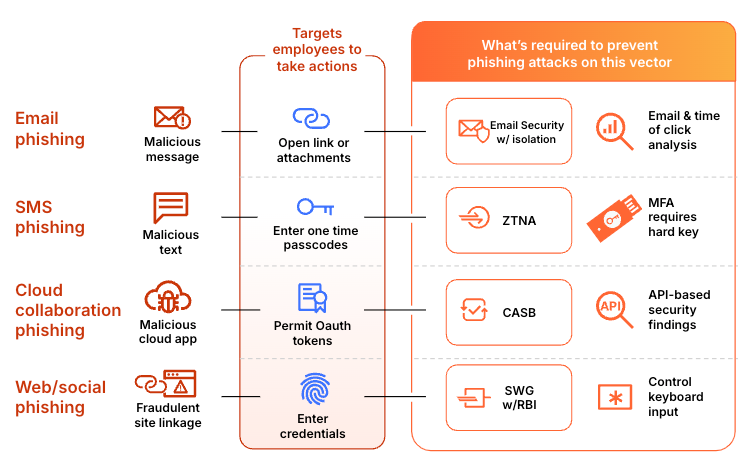
A real example
It’s one thing to tell you this, but we’d love to give you an example of how a multi-channel phish plays out with a sophisticated attacker.
Here’s an email message that an executive notices is in their junk folder. That’s because our Email Security product noticed there’s something off about it and moved it there, but it relates to a project the executive is working on, so the executive thinks it’s legitimate. There’s a request for a company org chart, and the attacker knows that this is the kind of thing that’s going to be caught if they continue on email, so they include a link to a real Google form:
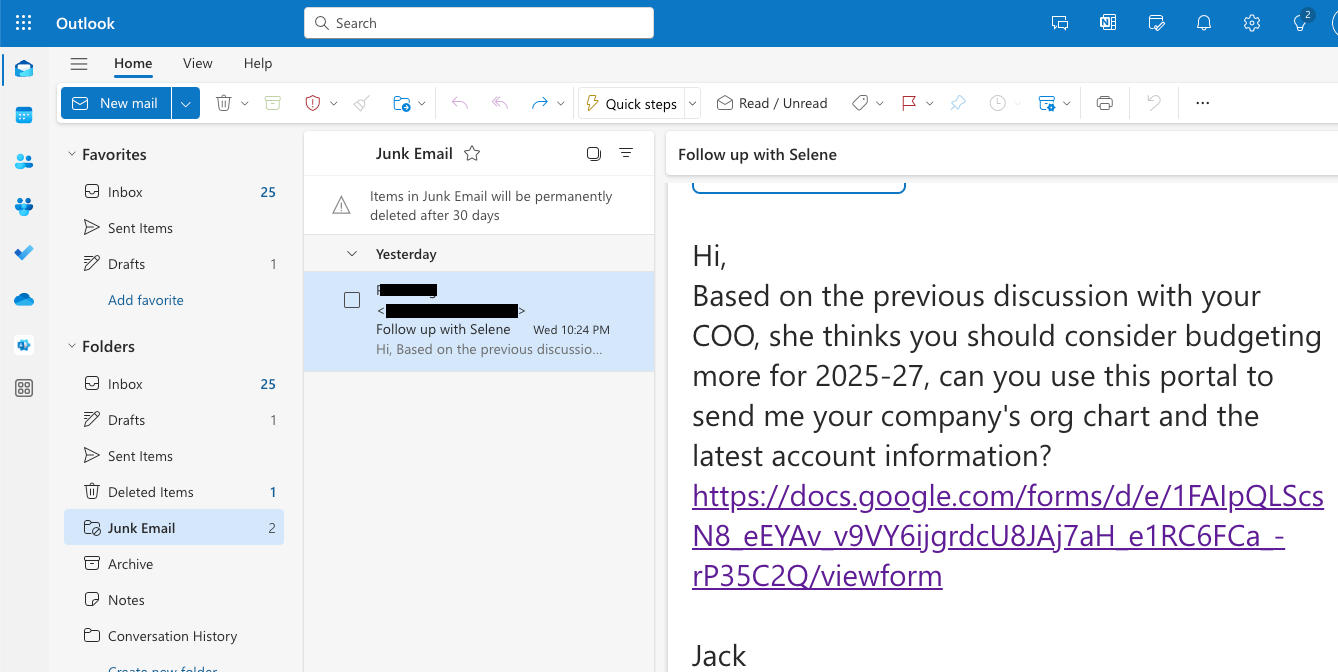
- The executive clicks the link, and because it is a legitimate Google form, it displays the following:
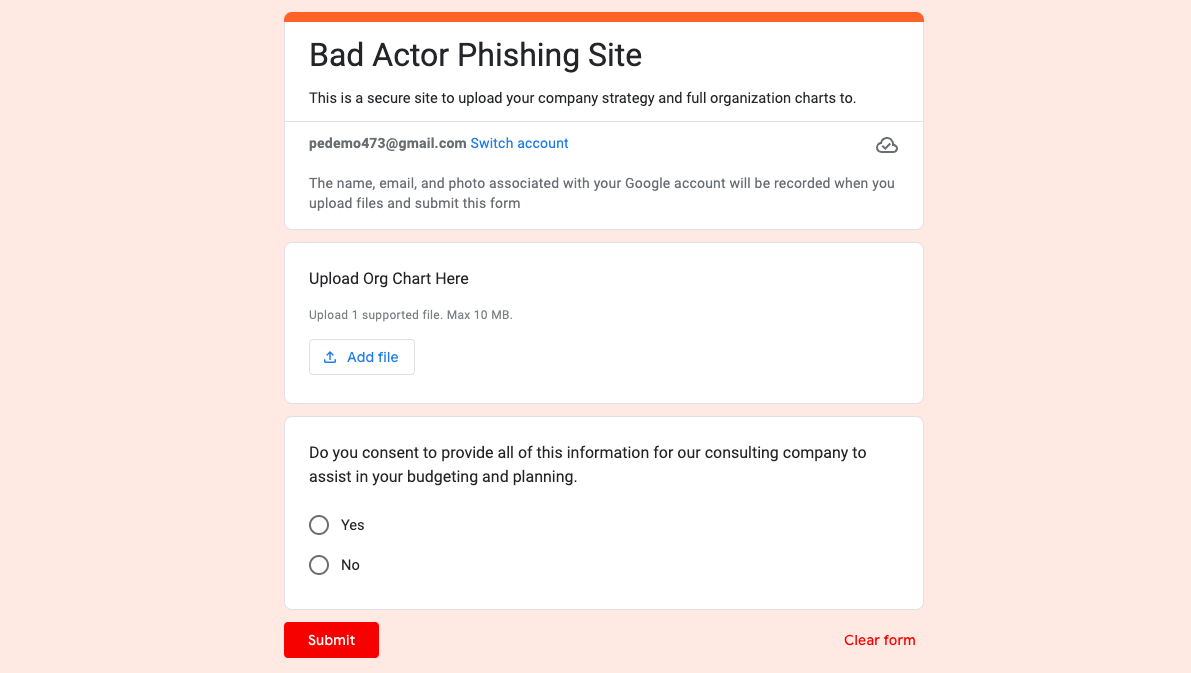
- There’s a request to upload the org chart here, and that’s what they try to do:
- The executive drags it in, but it doesn’t finish uploading because in the document there is an “internal only” watermark that our Gateway and digital loss prevention (DLP) engine detected, which in turn prevented the upload.
- Sophisticated attackers use urgency to drive better outcomes. Here, the attackers know the executive has an upcoming deadline for the consultant to report back to the CEO. Unable to upload the document, they respond back to the attacker. The attacker suggests that they try another method of upload or, in the worst case scenario, send the document on WhatsApp.
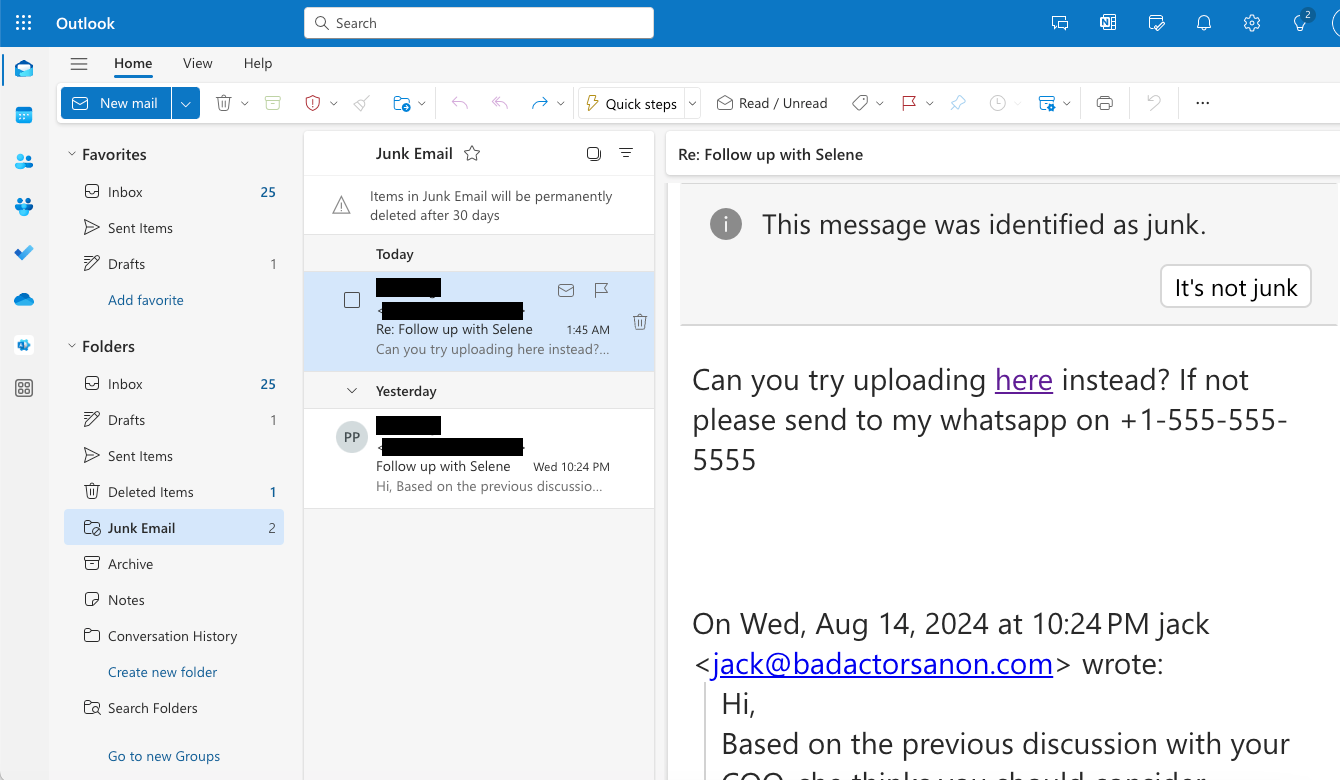
- The executive attempts to upload the org chart to the website they were provided in the second email, not knowing that this site would have loaded malware, but because it was loaded in Cloudflare’s Browser Isolation, it kept the executive’s device safe. Most importantly, when trying to upload sensitive company documents, the action is stopped again:
- Finally they try WhatsApp, and again, we block it:
Ease of use
Setting up a security solution and maintaining it is critical to long term protection. However, having IT administration teams constantly tweak each product, configuration, and monitor each users’ needs is not only costly but risky as well, as it puts a large amount of overhead on these teams.
Protecting the executive in the example above required just four steps:
- Install and login to Cloudflare’s device agent for protection
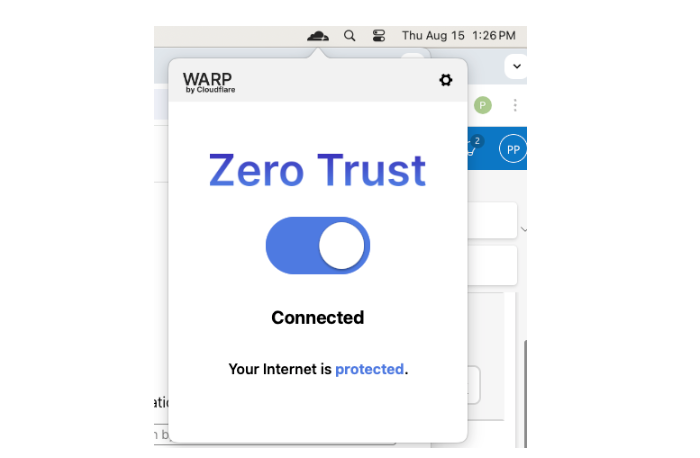
With just a few clicks, anyone with the device agent client can be protected against multi-channel phish, making it easy for end users and administrators. For organizations that don’t allow clients to be installed, an agentless deployment is also available.
2. Configure policies that apply to all your user traffic routed through our secure web gateway. These policies can block access outright to high risk sites, such as those known to participate in phishing campaigns. For sites that may be suspicious, such as newly registered domains, isolated browser access allows users to access the website, but limits their interaction.
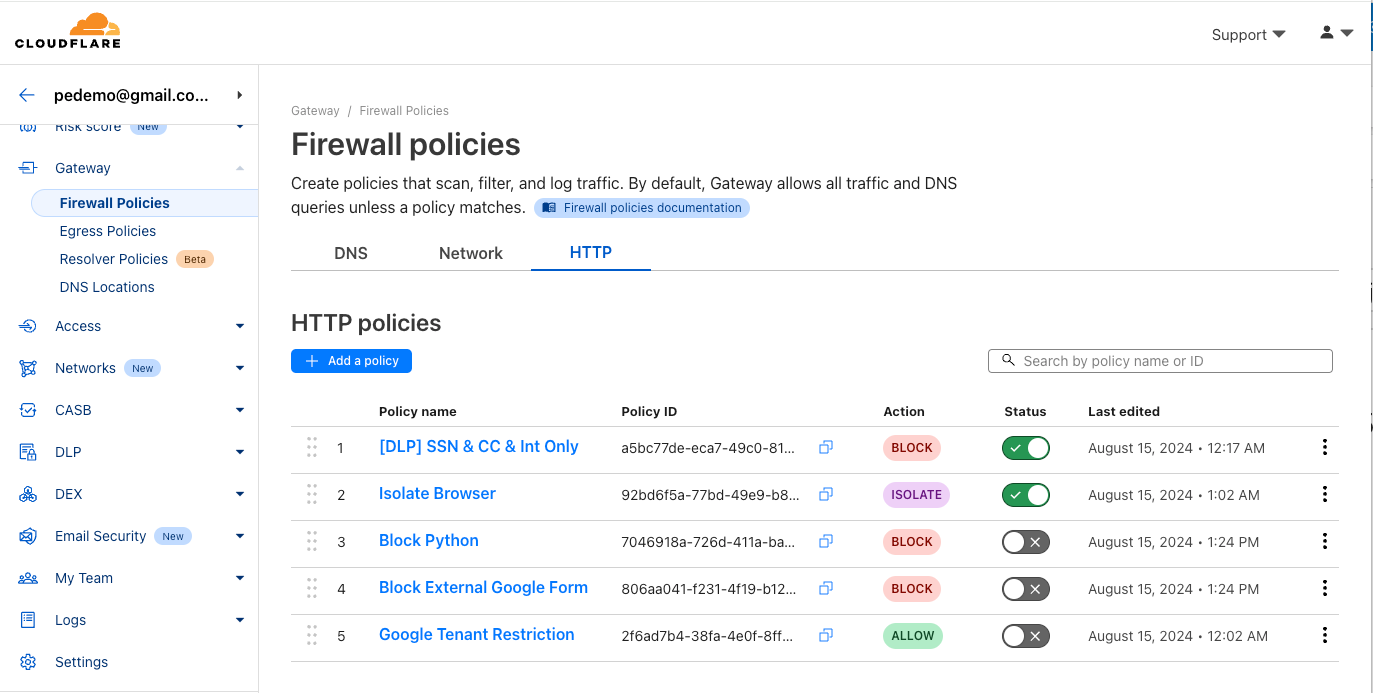
The executive was also unable to upload the org chart to a free cloud storage service because their organization is using Cloudflare One’s Gateway and Browser Isolation solutions that were configured to load any free cloud storage websites in a remote isolated environment, which not only prevented the upload but also removed the ability to copy and paste information as well.
Also, while the executive was able to converse with the bad actor over WhatsApp, their files were blocked because of Cloudflare One’s Gateway solution, configured by the administrator to block all uploads and downloads on WhatsApp.
3. Set up DLP policies based on what shouldn’t be uploaded, typed, or copied and pasted.
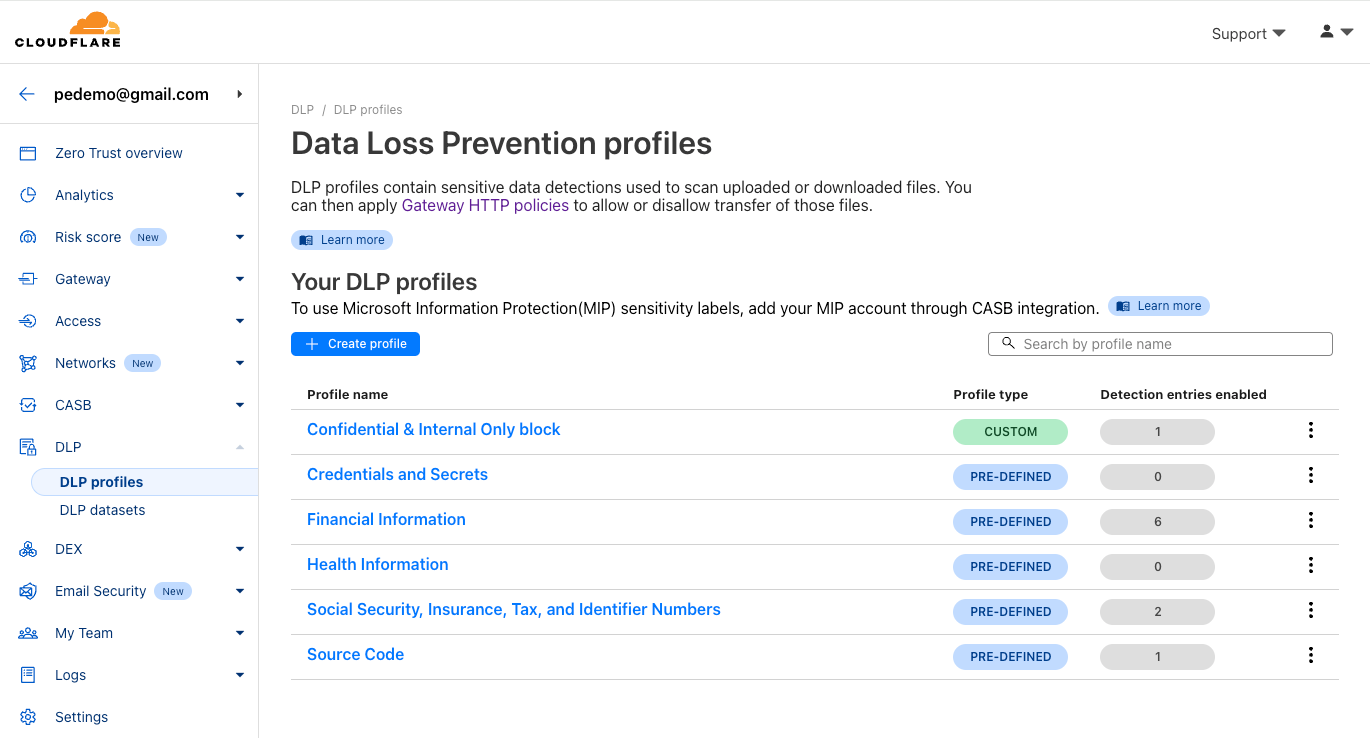
The executive was unable to upload the org chart to the Google form because the organization is using Cloudflare One’s Gateway and DLP solutions. This protection is implemented by configuring Gateway to block any DLP infraction, even on a valid website like Google.
4. Deploy Email Security and set up auto-move rules based on the types of emails detected.
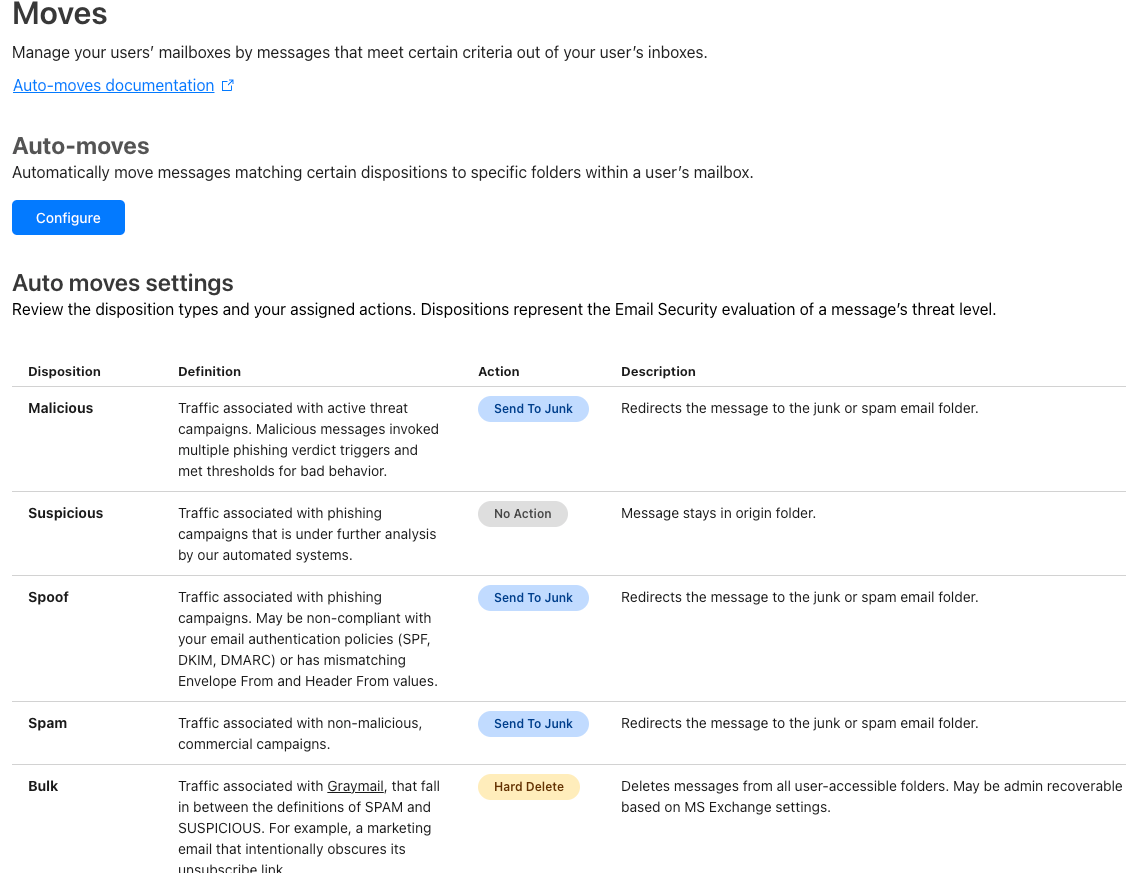
In the example above, the executive never received any of the multiple malicious emails that were sent to them because Cloudflare’s Email Security was protecting their inbox. The phishing emails that did arrive were put into their Junk folder because the email was impersonating someone that didn’t match the signature in the email, and the configuration in Email Security automatically moved it there because of a one-click configuration set by the executive’s IT administrator.
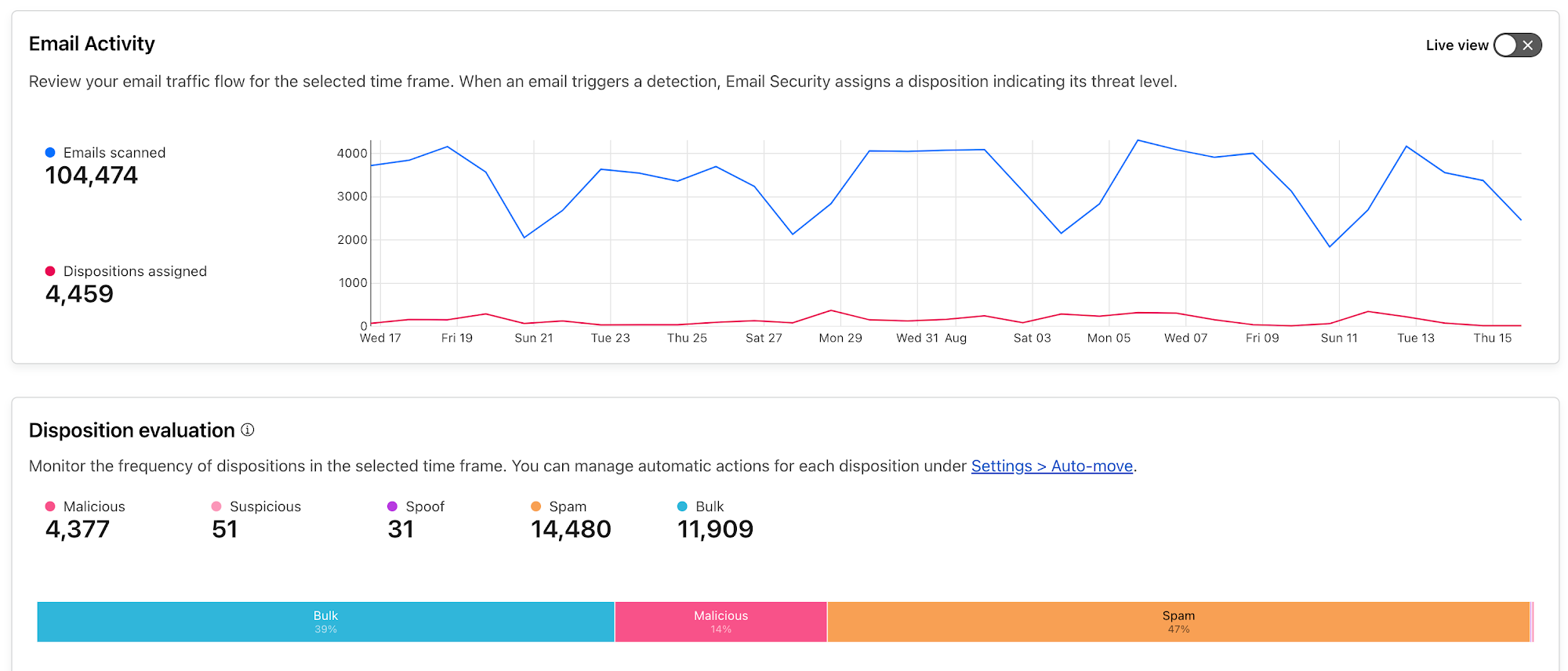
But even with best-in-class detections, it goes without saying that it is important to have the ability to drill down on any metric to learn about individual users that are being impacted by an ongoing attack. Below is a mockup of our upcoming improved email security monitoring dashboard.
What’s next
While phishing, despite being around for three decades, continues to be a clear and present danger, effective detections in a seamless and comprehensive solution are really the only way to stay protected these days.
If you’re simply thinking about purchasing email security by itself, you can see why that just isn’t enough. Multi-layered protection is absolutely necessary to protect modern workforces, because work and data don’t just sit in email. They’re everywhere and on every device. Your phishing protection needs to be as well.
While you can do this by stitching together multiple vendors, it just won’t all work together. And besides the cost, a multi-vendor approach also usually increases overhead for investigation, maintenance, and uniformity for IT teams that are already stretched thin.
Whether or not you are at the start of your journey with Cloudflare, you can see how getting different parts of the Cloudflare One product suite can help holistically with phishing. And if you are already deep in your journey with Cloudflare, and are looking for 99.99% effective email detections trusted by the Fortune 500, global organizations, and even government entities, you can see how our Email Security helps.
If you’re running Office 365, and you’d like to see what we can catch that your current provider cannot, you can start right now with Retro Scan.
And if you are using our Email Security solution already, you can learn more about our comprehensive protection here.
Gentoo Linux drops IA-64 (Itanium) support
Post Syndicated from jzb original https://lwn.net/Articles/986030/
The Gentoo Linux project has
announced
that it is dropping support for Itanium:
Following the removal of IA-64 (Itanium)
support in the Linux kernel
and glibc,
and subsequent discussions on our mailing list, as well as
a vote by the Gentoo Council, Gentoo will discontinue all ia64
profiles and keywords. The primary reason for this decision is the
inability of the Gentoo IA-64 team to support this architecture
without kernel support, glibc support, and a functional development
box (or even a well-established emulator). In addition, there have
been only very few users interested in this type of hardware.
Stop Emailing Passwords! Easy and Secure Password Sharing
Post Syndicated from Crosstalk Solutions original https://www.youtube.com/watch?v=J-mtnlf4G3I
[$] Custom string formatters in Python
Post Syndicated from daroc original https://lwn.net/Articles/985346/
Python has had
formatted string literals
(f-strings), a syntactic shorthand for building
strings, since 2015. Recently, Jim Baker, Guido van Rossum, and Paul Everitt have
proposed
PEP 750 (“Tag Strings For Writing Domain-Specific Languages”) which would
generalize and expand that mechanism to provide Python library writers with additional
flexibility. Reactions to the proposed change were somewhat positive, although
there was a good deal of discussion of (and opposition to)
the PEP’s inclusion of lazy evaluation of template parameters.
Introducing Autocracy in America
Post Syndicated from The Atlantic original https://www.youtube.com/watch?v=hF__qvCeliI