Post Syndicated from Biff Gaut original https://aws.amazon.com/blogs/devops/build-apis-using-openapi-the-aws-cdk-and-aws-solutions-constructs/
Introduction
APIs are the key to implementing microservices that are the building blocks of modern distributed applications. Launching a new API involves defining the behavior, implementing the business logic, and configuring the infrastructure to enforce the behavior and expose the business logic. Using OpenAPI, the AWS Cloud Development Kit (AWS CDK), and AWS Solutions Constructs to build your API lets you focus on each of these tasks in isolation, using a technology specific to each for efficiency and clarity.
The OpenAPI specification is a declarative language that allows you to fully define a REST API in a document completely decoupled from the implementation. The specification defines all resources, methods, query strings, request and response bodies, authorization methods and any data structures passed in and out of the API. Since it is decoupled from the implementation and coded in an easy-to-understand format, this specification can be socialized with stakeholders and developers to generate buy-in before development has started. Even better, since this specification is in a machine-readable syntax (JSON or YAML), it can be used to generate documentation, client code libraries, or mock APIs that mimic an actual API implementation. An OpenAPI specification can be used to fully configure an Amazon API Gateway REST API with custom AWS Lambda integration. Defining the API in this way automates the complex task of configuring the API, and it offloads all enforcement of the API details to API Gateway and out of your business logic.
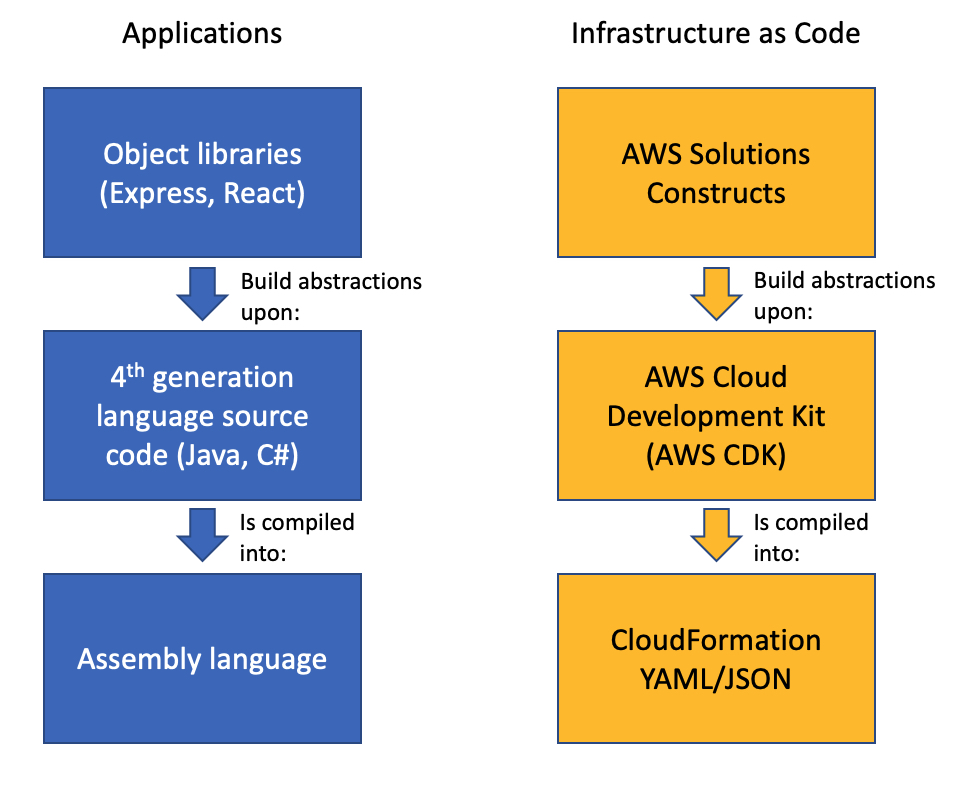
The AWS CDK provides a programming model above the static AWS CloudFormation template, representing all AWS resources with instantiated objects in a high-level programming language. When you instantiate CDK objects in your Typescript (or other language) code, the CDK “compiles” those objects into a JSON template, then deploys that template with CloudFormation. I’m not going to spend a lot of time extolling the many virtues of the AWS CDK here, suffice it to say that the use of programming languages such as Typescript or Python rather than the declarative YAML or JSON allows much more flexibility in defining your infrastructure.
AWS Solutions Constructs is a library of common architectural patterns built on top of the AWS CDK. These multi-service patterns allow you to deploy multiple resources with a single CDK Construct. Solutions Constructs follow best practices by default – both for the configuration of the individual resources as well as their interaction. While each Solutions Construct implements a very small architectural pattern, they are designed so that multiple constructs can be combined by sharing a common resource. For instance, a Solutions Construct that implements an Amazon Simple Storage Service (Amazon S3) bucket invoking a Lambda function can be deployed with a second Solutions Construct that deploys a Lambda function that writes to an Amazon Simple Queue Service (Amazon SQS) queue by sharing the same Lambda function between the two constructs. You can compose complex architectures by connecting multiple Solutions Constructs together, as you will see in this example.

Infrastructure as Code Abstraction Layers
In this article, you will build a robust, functional REST API based on an OpenAPI specification using the AWS CDK and AWS Solutions Constructs.
How it Works
This example is a microservice that saves and retrieves product orders. The behavior will be fully defined by an OpenAPI specification and will include the following methods:
| Method |
Functionality |
Authorization |
| POST /order |
Accepts order attributes included in the request body.
Returns the orderId assigned to the new order. |
AWS Identity and Access Management (IAM) |
| GET /order/$(orderId} |
Accepts an orderId as a path parameter.
Returns the fully populated order object. |
IAM |
The architecture implementing the service is shown in the diagram below. Each method will integrate with a Lambda function that implements the interactions with an Amazon DynamoDB table. The API will be protected by IAM authorization and all input and output data will be verified by API Gateway. All of this will be fully defined in an OpenAPI specification that is used to configure the REST API.

The Two Solutions Constructs Making up the Service Architecture
Infrastructure as code will be implemented with the AWS CDK and AWS Solutions Constructs. This example uses 2 Solutions Constructs:
aws-lambda-dynamodb – This construct “connects” a Lambda function and a DynamoDB table. This entails giving the Lambda function the minimum IAM privileges to read and write from the table and providing the DynamoDB table name to the Lambda function code with an environment variable. A Solutions Constructs pattern will create its resources based on best practices by default, but a client can also provide construct properties to override the default behaviors. A client can also choose not to have the pattern create a new resource by providing a resource that already exists.
aws-openapigateway-lambda – This construct deploys a REST API on API Gateway configured by the OpenAPI specification, integrating each method of the API with a Lambda function. The OpenAPI specification is stored as an asset in S3 and referenced by the CloudFormation template rather than embedded in the template. When the Lambda functions in the stack have been created, a custom resource processes the OpenAPI asset and updates all the method specifications with the arn of the associated Lambda function. An API can point to multiple Lambda functions, or a Lambda function can provide the implementation for multiple methods.
In this example you will create the aws-lambda-dynamodb construct first. This construct will create your Lambda function, which you then supply as an existing resource to the aws-openapigateway-lambda constructor. Sharing this function between the constructs will unite the two small patterns into a complete architecture.
Prerequisites
To deploy this example, you will need the following in your development environment:
- Node.js 18.0.0 or later
- Typescript 3.8 or later (
npm -g install typescript)
- AWS CDK 2.82.0 or later (
npm install -g aws-cdk && cdk bootstrap)
The cdk bootstrap command will launch an S3 bucket and other resources that the CDK requires into your default region. You will need to bootstrap your account using a role with sufficient privileges – you may require an account administrator to complete that command.
Tip – While AWS CDK. 2.82.0 is the minimum required to make this example work, AWS recommends regularly updating your apps to use the latest CDK version.
To deploy the example stack, you will need to be running under an IAM role with the following privileges:
- Create API Gateway APIs
- Create IAM roles/policies
- Create Lambda Functions
- Create DynamoDB tables
- GET/POST methods on API Gateway
- AWSCloudFormationFullAccess (managed policy)
Build the App
- Somewhere on your workstation, create an empty folder named openapi-blog with these commands:
mkdir openapi-blog && cd openapi-blog
- Now create an empty CDK application using this command:
cdk init -l=typescript
- The application is going to be built using two Solutions Constructs, aws-openapigateway-lambda and aws-lambda-dynamodb. Install them in your application using these commands:
npm install @aws-solutions-constructs/aws-openapigateway-lambda
npm install @aws-solutions-constructs/aws-lambda-dynamodb
Tip – if you get an error along the lines of npm ERR! Could not resolve dependency and npm ERR! peer aws-cdk-lib@"^2.130.0", then you’ve installed a version of Solutions Constructs that depends on a newer version of the CDK. In package.json, update the aws-cdk-lib and aws-cdk dependencies to be the version in the peer error and run npm install. Now try the above npm install commands again.
The OpenAPI REST API specification will be in the api/openapi-blog.yml file. It defines the POST and GET methods, the format of incoming and outgoing data and the IAM Authorization for all HTTP calls.
- Create a folder named
api under openapi-blog.
- Within the
api folder, create a file called openapi-blog.yml with the following contents:
---
openapi: 3.0.2
info:
  title: openapi-blog example
  version: '1.0'
  description: 'defines an API with POST and GET methods for an order resource'
# x-amazon-* values are OpenAPI extensions to define API Gateway specific configurations
# This section sets up 2 types of validation and defines params-only validation
# as the default.
x-amazon-apigateway-request-validators:
  all:
    validateRequestBody: true
    validateRequestParameters: true
  params-only:
    validateRequestBody: false
    validateRequestParameters: true
x-amazon-apigateway-request-validator: params-only
paths:
  "/order":
    post:
      x-amazon-apigateway-auth:
        type: AWS_IAM
      x-amazon-apigateway-request-validator: all
      summary: Create a new order
      description: Create a new order
      x-amazon-apigateway-integration:
        httpMethod: POST
        # "OrderHandler" is a placeholder that aws-openapigateway-lambda will
        # replace with the Lambda function when it is available
        uri: OrderHandler
        passthroughBehavior: when_no_match
        type: aws_proxy
      requestBody:
        description: Create a new order
        content:
          application/json:
            schema:
              "$ref": "#/components/schemas/OrderAttributes"
        required: true
      responses:
        '200':
          description: Successful operation
          content:
            application/json:
              schema:
                "$ref": "#/components/schemas/OrderObject"
  "/order/{orderId}":
    get:
      x-amazon-apigateway-auth:
        type: AWS_IAM
      summary: Get Order by ID
      description: Returns order data for the provided ID
      x-amazon-apigateway-integration:
        httpMethod: POST
        # "OrderHandler" is a placeholder that aws-openapigateway-lambda will
        # replace with the Lambda function when it is available
        uri: OrderHandler
        passthroughBehavior: when_no_match
        type: aws_proxy
      parameters:
      - name: orderId
        in: path
        required: true
        schema:
          type: integer
          format: int64
      responses:
        '200':
          description: successful operation
          content:
            application/json:
              schema:
                "$ref": "#/components/schemas/OrderObject"
        '400':
          description: Bad order ID
        '404':
          description: Order ID not found
components:
  schemas:
    OrderAttributes:
      type: object
      additionalProperties: false
      required:
      - productId
      - quantity
      - customerId
      properties:
        productId:
          type: string
        quantity:
          type: integer
          format: int32
          example: 7
        customerId:
          type: string
    OrderObject:
      allOf:
      - "$ref": "#/components/schemas/OrderAttributes"
      - type: object
        additionalProperties: false
        required:
        - id
        properties:
          id:
            type: string
Most of the fields in this OpenAPI definition are explained in the OpenAPI specification, but the fields starting with x-amazon- are unique extensions for configuring API Gateway. In this case x-apigateway-auth values stipulate that the methods be protected with IAM authorization; the x-amazon-request-validator values tell the API to validate the request parameters by default and the parameters and request body when appropriate; and the x-amazon-apigateway-integration section defines the custom integration of the method with a Lambda function. When using the Solutions Construct, this field does not identify the specific Lambda function, but instead has a placeholder string (“OrderHandler”) that will be replaced with the correct function name during the launch.
While the API will accept and validate requests, you’ll need some business logic to actually implement the functionality. Let’s create a Lambda function with some rudimentary business logic:
- Create a folder structure
lambda/order under openapi-blog.
- Within the
order folder, create a file called index.js . Paste the code from this file into your index.js file.
Our Lambda function is very simple, consisting of some relatively generic SDK calls to Dynamodb. Depending upon the HTTP method passed in the event, it either creates a new order or retrieves (and returns) an existing order. Once the stack loads, you can check out the IAM role associated with the Lambda function and see that the construct also created a least privilege policy for accessing the table. When the code is written, the DynamoDB table name is not known, but the aws-lambda-dynamodb construct creates an environment variable with the table name that will do nicely:
// Excerpt from index.js
// Get the table name from the Environment Variable set by aws-lambda-dynamodb
const orderTableName = process.env.DDB_TABLE_NAME;
Now that the business logic and API definition are included in the project, it’s time to add the AWS CDK code that will launch the application resources. Since the API definition and your business logic are the differentiated aspects of your application, it would be ideal if the infrastructure to host your application could deployed with a minimal amount of code. This is where Solutions Constructs help – perform the following steps:
- Open the
lib/openapi-blog-stack.ts file.
- Replace the contents with the following:
import * as cdk from 'aws-cdk-lib';
import { Construct } from 'constructs';
import { OpenApiGatewayToLambda } from '@aws-solutions-constructs/aws-openapigateway-lambda';
import { LambdaToDynamoDB } from '@aws-solutions-constructs/aws-lambda-dynamodb';
import { Asset } from 'aws-cdk-lib/aws-s3-assets';
import * as path from 'path';
import * as lambda from 'aws-cdk-lib/aws-lambda';
import * as ddb from 'aws-cdk-lib/aws-dynamodb';

export class OpenapiBlogStack extends cdk.Stack {
  constructor(scope: Construct, id: string, props?: cdk.StackProps) {
    super(scope, id, props);

    // This application is going to use a very simple DynamoDB table
    const simpleTableProps = {
      partitionKey: {
        name: "Id",
        type: ddb.AttributeType.STRING,
      },
      // Not appropriate for production, this setting is to ensure the demo can be easily removed
      removalPolicy: cdk.RemovalPolicy.DESTROY
    };

    // This Solutions Construct creates the Orders Lambda function
    // and configures the IAM policy and environment variables "connecting"
    // it to a new Dynamodb table
    const orderApparatus = new LambdaToDynamoDB(this, 'Orders', {
      lambdaFunctionProps: {
        runtime: lambda.Runtime.NODEJS_18_X,
        handler: 'index.handler',
        code: lambda.Code.fromAsset(`lambda/order`),
      },
      dynamoTableProps: simpleTableProps
    });

    // This Solutions Construct creates and configures the REST API,
    // integrating it with the new order Lambda function created by the
    // LambdaToDynamomDB construct above
    const newApi = new OpenApiGatewayToLambda(this, 'OpenApiGatewayToLambda', {
      // The OpenAPI is stored as an S3 asset where it can be accessed during the
      // CloudFormation Create Stack command
      apiDefinitionAsset: new Asset(this, 'ApiDefinitionAsset', {
        path: path.join(`api`, 'openapi-blog.yml')
      }),
      // The construct uses these records to integrate the methods in the OpenAPI spec
      // to Lambda functions in the CDK stack
      apiIntegrations: [
        {
          // These ids correspond to the placeholder values for uri in the OpenAPI spec
          id: 'OrderHandler',
          existingLambdaObj: orderApparatus.lambdaFunction
        }
      ]
    });

    // We output the URL of the resource for convenience here
    new cdk.CfnOutput(this, 'OrderUrl', {
      value: newApi.apiGateway.url + 'order',
    });
  }
}
Notice that the above code to create the infrastructure is only about two dozen lines. The constructs provide best practice defaults for all the resources they create, you just need to provide information unique to the use case (and any values that must override the defaults). For instance, while the LambdaToDynamoDB construct defines best practice default properties for the table, the client needs to provide at least the partition key. So that the demo cleans up completely when we’re done, there’s a removalPolicy property that instructs CloudFormation to delete the table when the stack is deleted. These minimal table properties and the location of the Lambda function code are all you need to provide to launch the LambdaToDynamoDB construct.
The OpenApiGatewayToLambda construct must be told where to find the OpenAPI specification and how to integrate with the Lambda function(s). The apiIntegrations property is a mapping of the placeholder strings used in the OpenAPI spec to the Lambda functions in the CDK stack. This code maps OrderHandler to the Lambda function created by the LambdaToDynamoDB construct. APIs integrating with more than one function can easily do this by creating more placeholder strings.
- Ensure all files are saved and build the application:
npm run build
- Launch the CDK stack:
cdk deploy
You may see some AWS_SOLUTIONS_CONSTRUCTS_WARNING:‘s here, you can safely ignore them in this case. The CDK will display any IAM changes before continuing – allowing you to review any IAM policies created in the stack before actually deploying. Enter ‘Y’ [Enter] to continue deploying the stack. When the deployment concludes successfully, you should see something similar to the following output:
...
OpenapiBlogStack: deploying... [1/1]
OpenapiBlogStack: creating CloudFormation changeset...
 OpenapiBlogStack
Deployment time: 97.78s
Outputs:
OpenapiBlogStack.OpenApiGatewayToLambdaSpecRestApiEndpointD1FA5E3A = https://b73nx617gl.execute-api.us-east-1.amazonaws.com/prod/
OpenapiBlogStack.OrderUrl = https://b73nx617gl.execute-api.us-east-1.amazonaws.com/prod/order
Stack ARN:
arn:aws:cloudformation:us-east-1:123456789012:stack/OpenapiBlogStack/01df6970-dc05-11ee-a0eb-0a97cfc33817
Total time: 100.07s
OpenapiBlogStack
Deployment time: 97.78s
Outputs:
OpenapiBlogStack.OpenApiGatewayToLambdaSpecRestApiEndpointD1FA5E3A = https://b73nx617gl.execute-api.us-east-1.amazonaws.com/prod/
OpenapiBlogStack.OrderUrl = https://b73nx617gl.execute-api.us-east-1.amazonaws.com/prod/order
Stack ARN:
arn:aws:cloudformation:us-east-1:123456789012:stack/OpenapiBlogStack/01df6970-dc05-11ee-a0eb-0a97cfc33817
Total time: 100.07s
Test the App
Let’s test the new REST API using the API Gateway management console to confirm it’s working as expected. We’ll create a new order, then retrieve it.
- Open the API Gateway management console and click on APIs in the left side menu
- Find the new REST API in the list of APIs, it will begin with OpenApiGatewayToLambda and have a Created date of today. Click on it to open it.
- On the Resources page that appears, click on
POST under /order.
- In the lower, right-hand panel, select the Test tab (if the Test tab is not shown, click the arrow to shift the displayed tabs).
- The POST must include order data in the request body that matches the OrderAttributes schema defined by the OpenAPI spec. Enter the following data in the Request body field:
{
"productId": "prod234232",
"customerId": "cust203439",
"quantity": 5
 }
- Click the orange Test button at the bottom of the page.
The API Gateway console will display the results of the REST API call. Key things to look for are a Status of 200 and a Response Body resembling “{\"id\":\"ord1712062412777\"}" (this is the id of the new order created in the system, your value will differ).
You could go to the DynamoDB console to confirm that the new order exists in the table, but it will be more fun to check by querying the API. Use the GET method to confirm the new order was persisted:
- Copy the id value from the Response body of the POST call –
"{\"id\":\"ord1712062412777\"}"
Tip – select just the text between the \” patterns (don’t select the backslash or quotation marks).
- Select the
GET method under /{orderId} in the resource list. Paste the orderId you copied earlier into the orderId field under Path.
- Click Test – this will execute the GET method and return the order you just created.
You should see a Status of 200 and a Response body with the full data from the Order you created in the previous step:
"{\"id\":\"ord1712062412777\",\"productId\":\"prod234232\",\"quantity\":\"5\",\"customerId\":\"cust203439\"}"
Let’s see how API Gateway is enforcing the inputs of the API. Let’s go back to the POST method and intentionally send an incorrect set of Order attributes.
- Click on
POST under /order
- In the lower, right-hand panel, select the Test tab.
- Enter the following data in the Request body field:
{
"productId": "prod234232",
"customerId": "cust203439",
"quality": 5
}
- Click the orange Test button at the bottom of the page.
Now you should see an HTTP error status of 400, and a Response body of {"message": "Invalid request body"}.
Note that API Gateway caught the error, not any code in your Lambda function. In fact, the Lambda function was never invoked (you can take my word for it, or you can check for yourself on the Lambda management console).
Because you’re invoking the methods directly from the console, you are circumventing the IAM authorization. If you would like to test the API with an IAM authorized call from a client, this video includes excellent instruction on how to accomplish this from Postman.
Cleanup
To clean up the resources in the stack, run this command:
cdk destroy
In response to Are you sure you want to delete: OpenApiBlogStack (y/n)? you can type y (once again you can safely ignore the warnings here).
Conclusion
Defining your API in a standalone definition file decouples it from your implementation, provides documentation and client benefits, and leads to more clarity for all stakeholders. Using that definition to configure your REST API in API Gateway creates a robust API that offloads enforcement of the API from your business logic to your tooling.
Configuring a REST API that fully utilizes the functionality of API Gateway can be a daunting challenge. Defining the API behavior with an OpenAPI specification, then implementing that API using the AWS CDK and AWS Solutions Constructs, accelerates and simplifies that effort. The CloudFormation template that eventually launched this API is over 1200 lines long – yet with AWS CDK and AWS Solutions Constructs you were able generate this template with ~25 lines of Typescript.
This is just one example of how Solutions Constructs enable developers to rapidly produce high quality architectures with the AWS CDK. At this writing there are 72 Solutions Constructs covering 29 AWS services – take a moment to browse through what’s available on the Solutions Constructs site. Introducing these in your CDK stacks accelerates your development, jump starts your journey towards being well-architected, and helps keep you well-architected as best practices and technologies evolve in the future.


 OpenapiBlogStack
 Deployment time: 97.78s
Outputs:
OpenapiBlogStack.OpenApiGatewayToLambdaSpecRestApiEndpointD1FA5E3A = https://b73nx617gl.execute-api.us-east-1.amazonaws.com/prod/
OpenapiBlogStack.OrderUrl = https://b73nx617gl.execute-api.us-east-1.amazonaws.com/prod/order
Stack ARN:
arn:aws:cloudformation:us-east-1:123456789012:stack/OpenapiBlogStack/01df6970-dc05-11ee-a0eb-0a97cfc33817
Deployment time: 97.78s
Outputs:
OpenapiBlogStack.OpenApiGatewayToLambdaSpecRestApiEndpointD1FA5E3A = https://b73nx617gl.execute-api.us-east-1.amazonaws.com/prod/
OpenapiBlogStack.OrderUrl = https://b73nx617gl.execute-api.us-east-1.amazonaws.com/prod/order
Stack ARN:
arn:aws:cloudformation:us-east-1:123456789012:stack/OpenapiBlogStack/01df6970-dc05-11ee-a0eb-0a97cfc33817


 Biff Gaut has been shipping software since 1983, from small startups to large IT shops. Along the way he has contributed to 2 books, spoken at several conferences and written many blog posts. He is now a Principal Solutions Architect at AWS working on the AWS Solutions Constructs team, helping customers deploy better architectures more quickly.