All posts by Brett Ezell

A Guide to Sending International SMS with US Toll-Free Numbers and AWS End User Messaging

Post Syndicated from Brett Ezell original https://aws.amazon.com/blogs/messaging-and-targeting/a-guide-to-sending-international-sms-with-us-toll-free-numbers-and-aws-end-user-messaging/

AWS End User Messaging now supports international SMS capabilities for US Toll-Free Numbers (TFNs). This new feature allows businesses to use a single US TFN to send SMS messages to over 150 countries, simplifying global outreach. It primarily benefits customers who need to send one-way transactional alerts—like one-time passwords (OTPs) or shipping notifications—and businesses that want to rapidly prototype and test their messaging strategy in new international markets without the overhead of procuring country-specific numbers.

This guide will walk you through the pros and cons of this feature and show you how to enable it and when to use it versus traditional, country-specific sending methods.

What Are International US Toll-Free Numbers?

An International US Toll-Free Number is a standard US TFN that has been enabled with the capability to send SMS messages to destinations outside of the United States. This feature is backward compatible, meaning you can enable it on any new or existing US TFNs in your account.

How to Enable International Sending

There are three primary ways to enable this feature for your US Toll-Free Numbers:

  • Enable international sending when registering a new number in the console.
  • Enable international sending for an existing number in the console.
  • Enable international sending for an existing number via the AWS CLI.

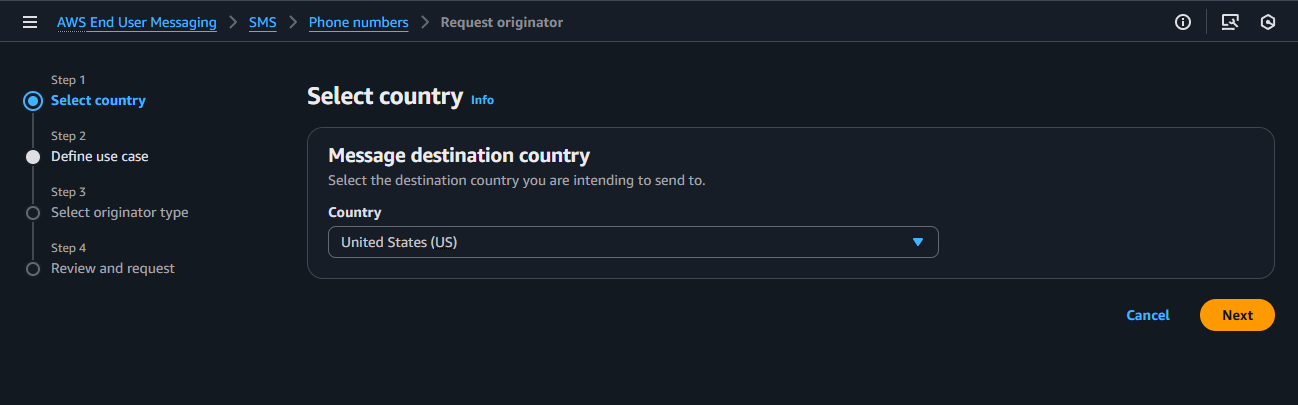
1. Enable When Registering a New US Toll-Free Number (Console)

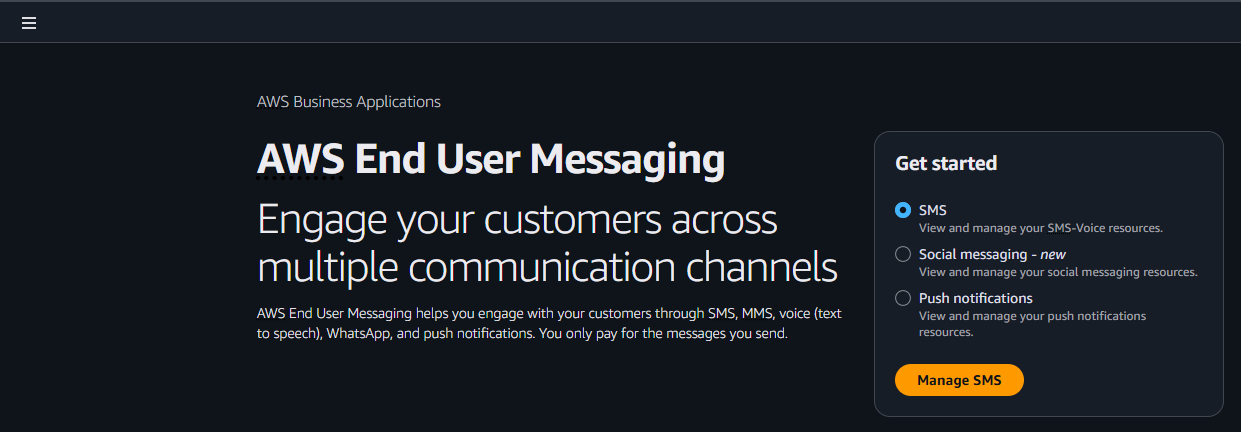
  • From the AWS End User Messaging console, navigate to Manage SMS
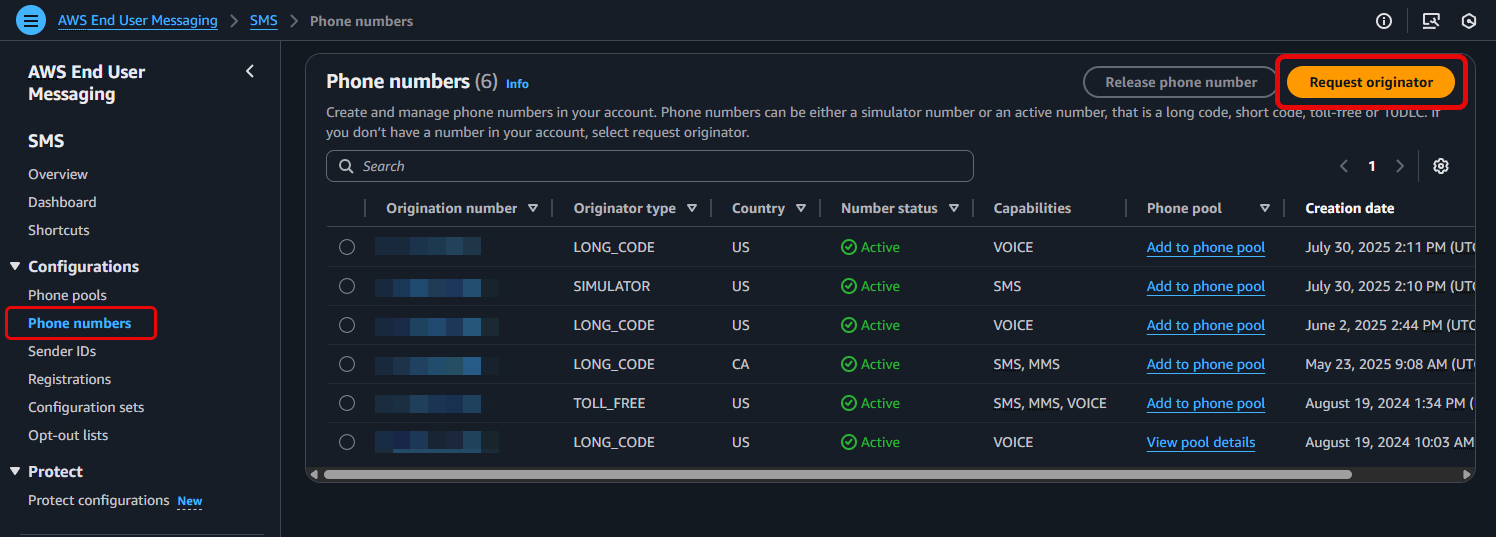
  • From the AWS End User Messaging console, navigate to Configurations > Phone numbers > and select Request originator
  • Step 1: Select country, select the United States (US) as your destination country
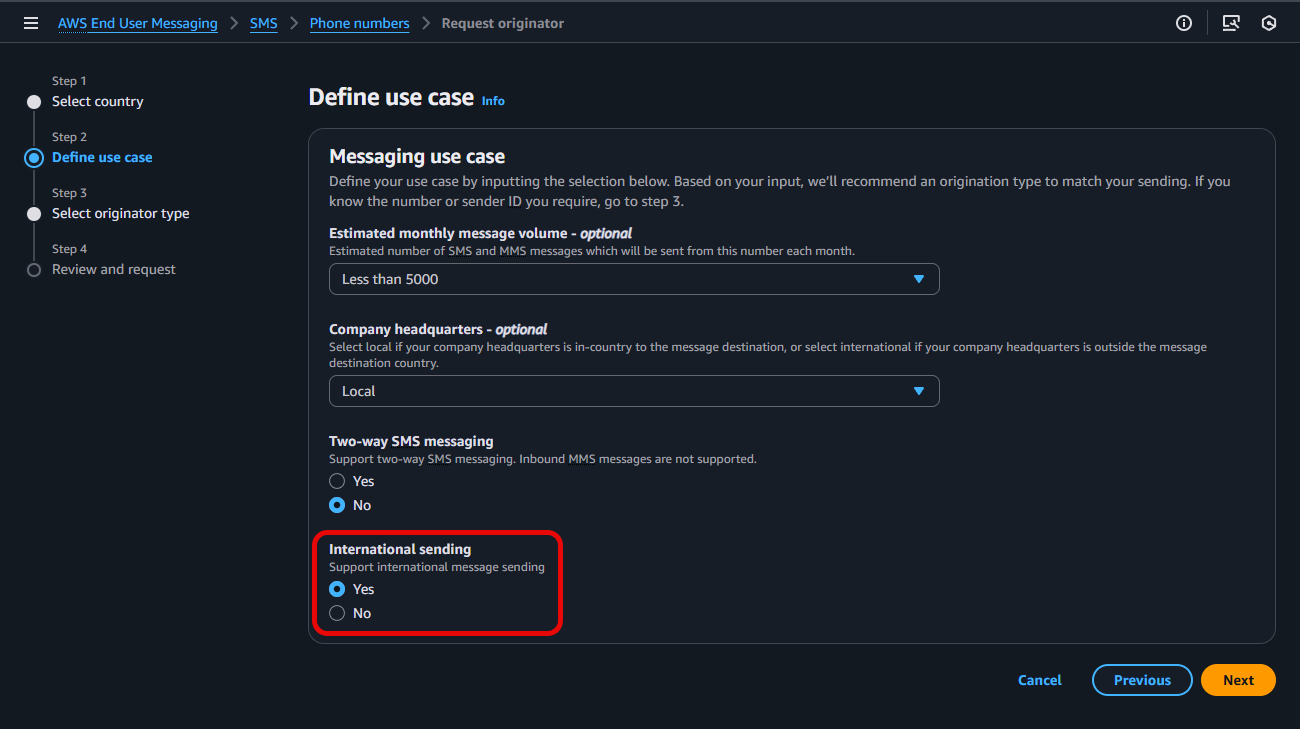
  • Under Step 2: Define use case, configure the various options listed for your intended Messaging use case, and select Yes to enable International sending, prior to clicking Next
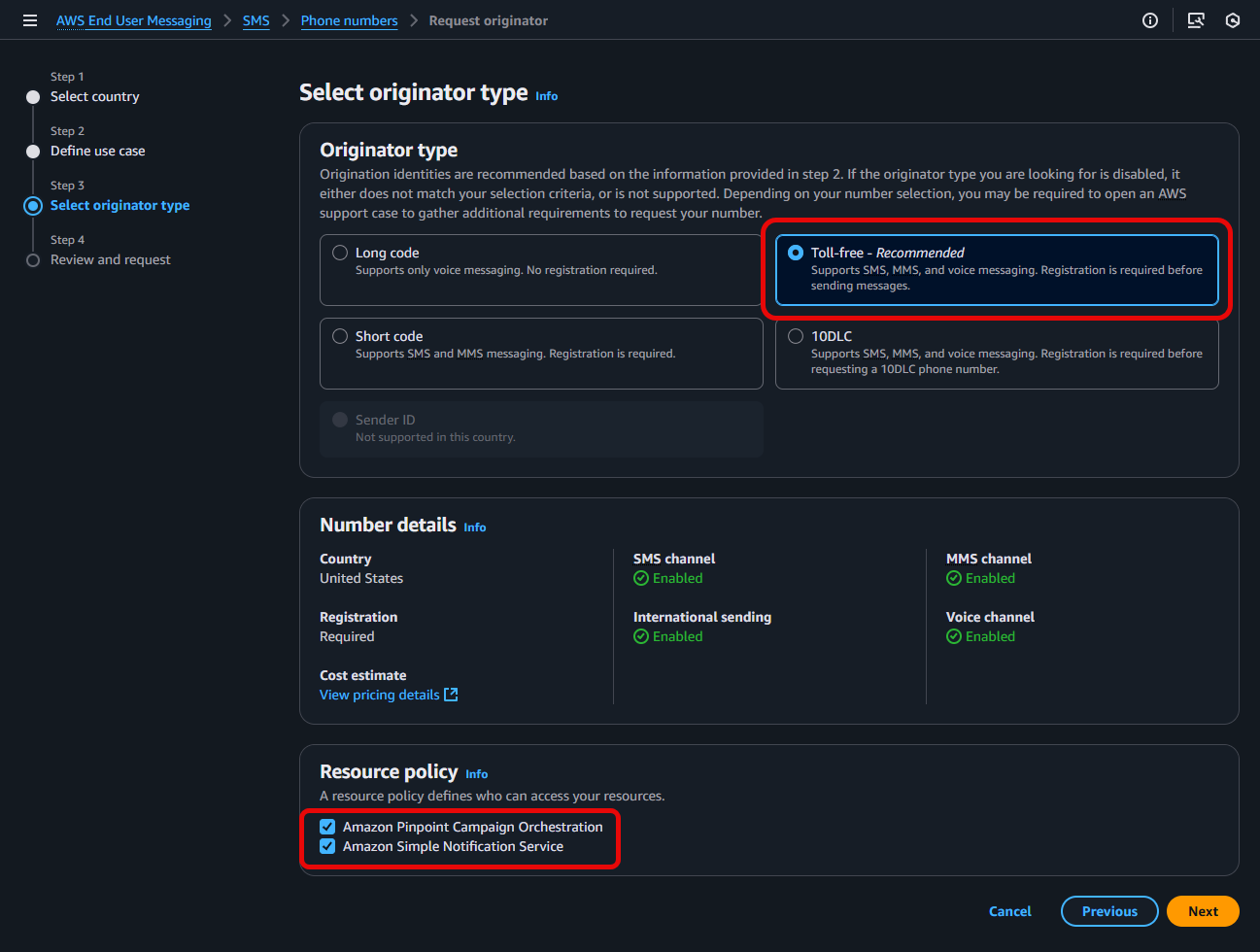
  • For Step 3: Select originator type, select Toll-free, validate your Resource policy choices, select Next
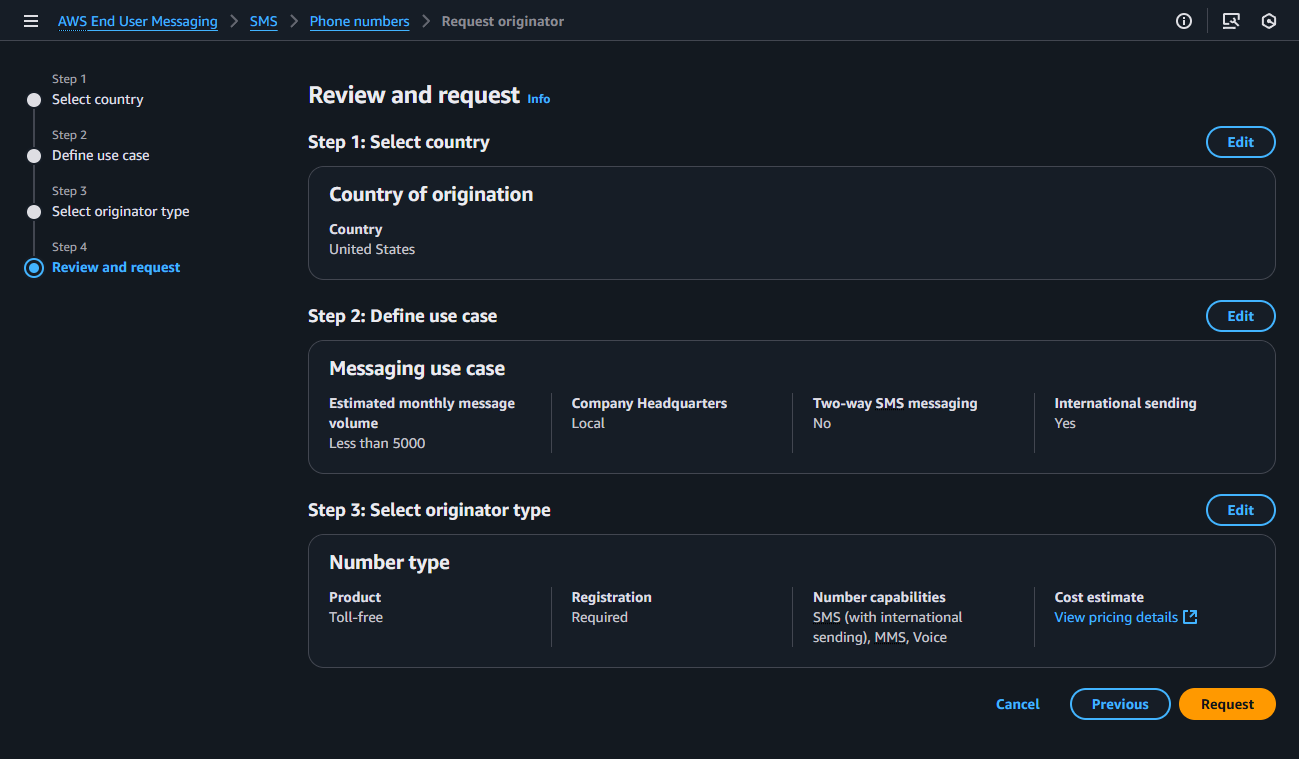
  • In Step 4: Review and request: Verify the information you entered is correct and select Request. Please note: US Toll-Free Number registration requests can take approximately 15 business days to be approved.

For more information, see Request a phone number in AWS End User Messaging SMS

2. Enable for an Existing US Toll-Free Number (Console or CLI)

If you have already acquired a TFN, you can enable the international sending feature at any time.

Using the AWS Management Console:

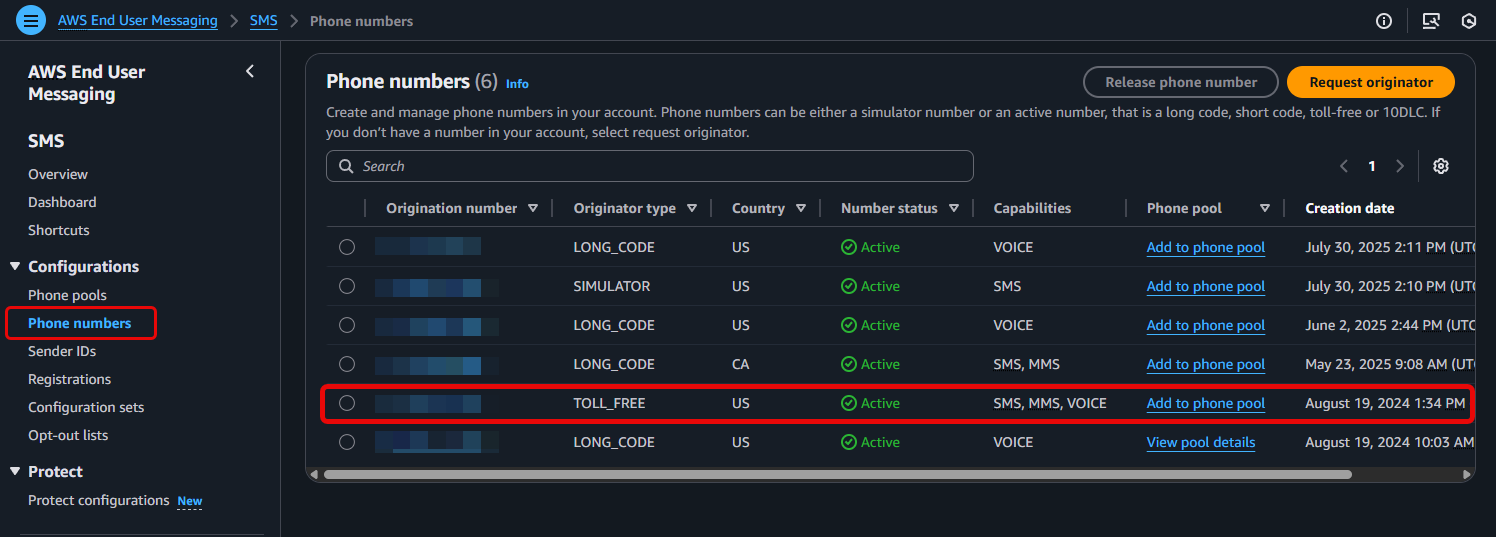
  • Navigate to Configurations > Phone numbers > and select an existing Toll-free number
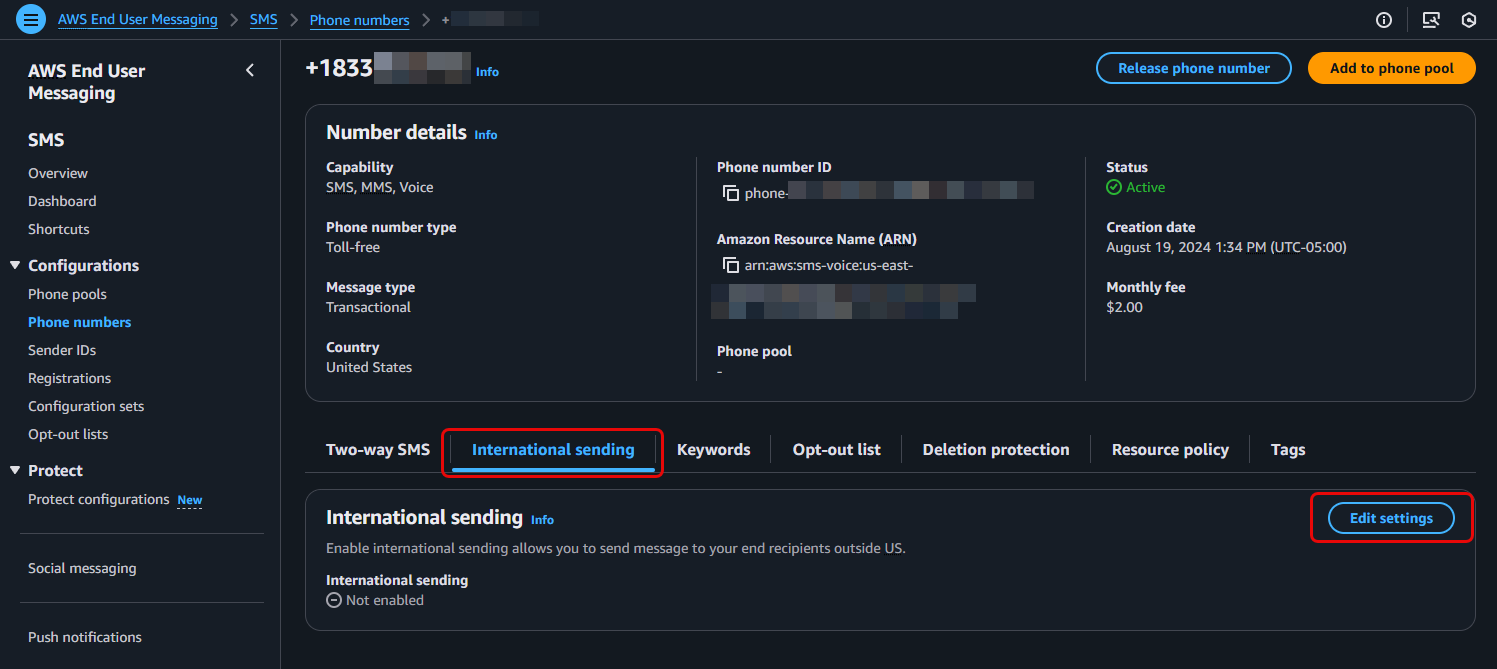
  • Locate the International sending tab and choose Edit settings
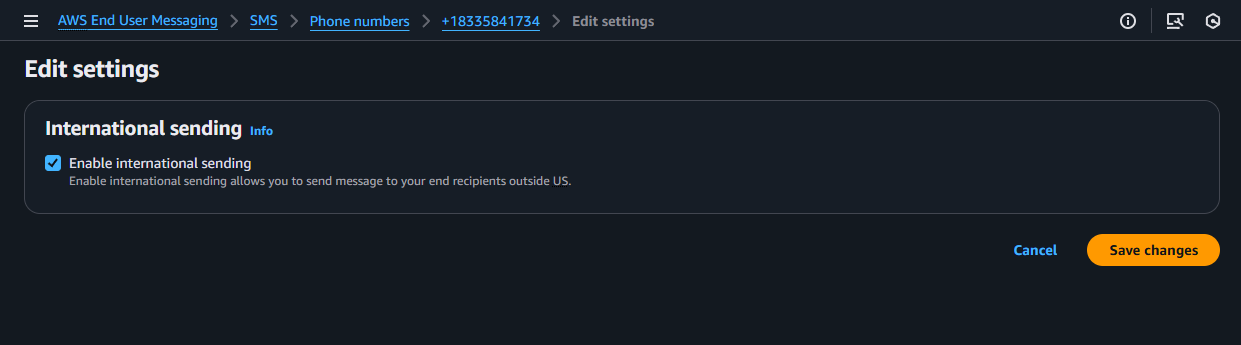
  • Check the Enable international sending capability box in your phone number details
    • Save Changes

Using the AWS CLI

The update-phone-number command allows you to modify a phone number’s capabilities, while the describe-phone-numbers command allows you to verify its status.

1. To Enable International Sending:

Use the --international-sending-enabled flag

aws pinpoint-sms-voice-v2 update-phone-number \
    --phone-number-id "phone-a1b2c3d4e5f67890" \
    --international-sending-enabled \
    --region us-east-1

Note: Replace "phone-a1b2c3d4e5f67890" with your actual phone number’s ID

2. To Disable International Sending:

Use the --no-international-sending-enabled flag

aws pinpoint-sms-voice-v2 update-phone-number \
    --phone-number-id "phone-a1b2c3d4e5f67890" \
    --no-international-sending-enabled \
    --region us-east-1

Expected Response (for update-phone-number):

A successful command returns the full JSON object for the phone number. Confirm the change by checking that the InternationalSendingEnabled value is true

{
    "PhoneNumberArn": "arn:aws:sms-voice:us-east-1:111122223333:phone-number/phone-a1b2c3d4e5f67890",
    "PhoneNumberId": "phone-a1b2c3d4e5f67890",
    "PhoneNumber": "+18005550199",
    "Status": "ACTIVE",
    "IsoCountryCode": "US",
    "MessageType": "TRANSACTIONAL",
    "NumberCapabilities": [
        "SMS"
    ],
    "NumberType": "TOLL_FREE",
    "MonthlyLeasingPrice": "2.00",
    "TwoWayEnabled": true,
    "InternationalSendingEnabled": true,
    "CreatedTimestamp": "2025-08-15T10:30:00.123Z"
}

3. To Verify the Current Status:

Use the describe-phone-numbers command with your Phone Number ID to check its current configuration at any time.

aws pinpoint-sms-voice-v2 describe-phone-numbers \
    --phone-number-ids "phone-a1b2c3d4e5f67890" \
    --region us-east-1

Benefits and Limitations

This feature offers a powerful new way to reach a global audience, but it’s important to understand where it shines and what its limitations are.

Benefits (Advantages)

  • Global Reach with a Single Number: Send SMS to over 150 countries using a single, existing US TFN.
  • Simplified Management: Avoid the operational overhead and cost of purchasing and managing a fleet of country-specific phone numbers.
  • Rapid Prototyping and Testing: Quickly test messaging campaigns in new international markets before committing to the best practice approach of acquiring dedicated in-country numbers.
  • Cost Optimization for One-Way Alerts: Provides a cost-effective method for sending high-volume, one-way transactional messages like OTPs, appointment reminders, and shipping notifications globally.

Limitations & Technical Considerations

  • Two-Way SMS is Limited to the US and Canada: Reliable, two-way SMS conversations are only supported for recipients in the United States and Canada.
  • One-Way Only for All Other Countries: For all other destinations, this is a one-way only.
  • Best-Effort Deliverability: Sending outside of the US and Canada is on a “best-effort” basis. The phone number that appears on the recipient’s device may be replaced with a local number or Sender ID, which is why two-way messaging will not work for these destinations. For more details on maximizing delivery, please read A Guide to Optimizing SMS Delivery and Best Practices.
  • Managed Opt-Out is Not Guaranteed Internationally: The automatic STOP reply functionality does not work for destinations outside of the US and Canada. For international recipients, you must provide an alternative opt-out method.
  • Standard Throughput (3 MPS): International TFNs have a default throughput of 3 Message Parts Per Second (MPS). For high-volume, high-throughput campaigns, dedicated country-specific numbers (like short codes) are the recommended best practice.

Understanding the Cost

The pricing for this feature is straightforward:

  • No Additional Monthly Fees: There is no extra charge to enable the international sending capability on your US TFN. You only pay the standard monthly lease for the number itself.
  • Pay-Per-Use Messaging: You are billed for each outbound SMS message at the standard, per-message rate for the destination country.

For a complete and up-to-date list of prices by country, please visit the AWS End User Messaging Pricing page.

When to Use This vs. Country-Specific Numbers

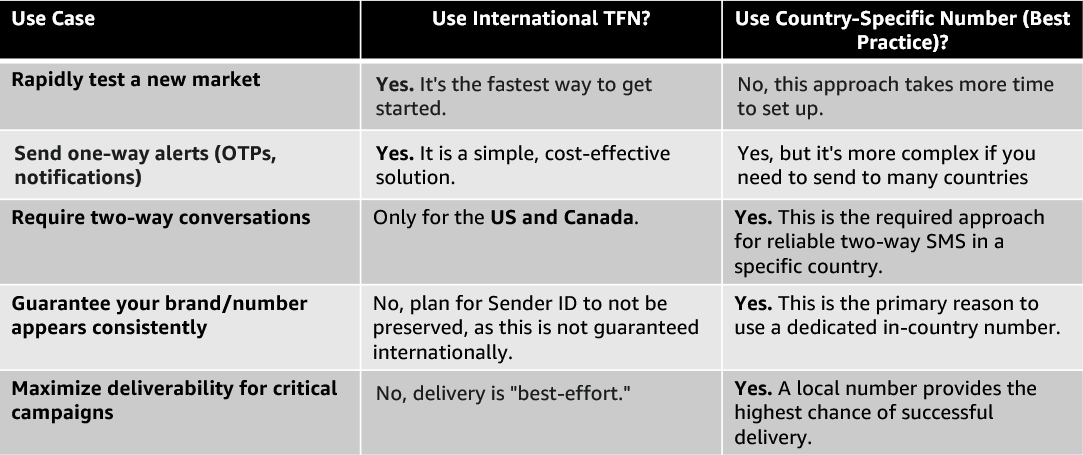
Choosing the right tool depends on your use case. Here’s a simple comparison:

Considerations and Next Steps

Once you have enabled your international sending over US Toll-Free Numbers, you can enhance your messaging strategy by considering resilience, monitoring, and scalability. The following resources provide best practices for enhancing your sending.

Conclusion

International SMS for US Toll-Free Numbers is a powerful strategic tool for businesses looking to simplify their global messaging. It excels at enabling rapid testing in new markets and efficiently delivering one-way transactional alerts across the globe from a single number.

However, it is not a replacement for the best practice of using dedicated, in-country phone numbers when reliable two-way conversations and guaranteed branding are critical to your campaign’s success. By understanding its benefits and limitations, you can strategically use this feature to get going quickly while planning a long-term move towards country-specific codes for your most important markets.

A Complete Guide to Resource Sharing for AWS End User Messaging

Post Syndicated from Brett Ezell original https://aws.amazon.com/blogs/messaging-and-targeting/a-complete-guide-to-resource-sharing-for-aws-end-user-messaging/

Introduction

Do you need to send SMS across multiple AWS accounts? Or have you ever wanted to use the same specific 10DLC phone number or branded Sender ID across those accounts? Perhaps your development team needs to test an application in a sandbox account using a production-ready number, or you’re migrating a workload to a new account and need to ensure your customer communications aren’t disrupted. Centralizing your messaging resources across accounts improves efficiency and branding, while lowering the risk in compliance gaps..

In this step-by-step guide, we will show how to solve this challenge by sharing your AWS End User Messaging resources across multiple AWS accounts using AWS Resource Access Manager (AWS RAM). By creating a single sharing account for your messaging resources—like phone numbers, Sender IDs, and opt-out lists—and securely sharing them with your other “consuming” accounts, you can build a more efficient, secure, and scalable communication platform.

Common Use Cases for Resource Sharing

Important: resource sharing with AWS RAM is a regional feature. You can only share resources with accounts within the same AWS Region where those resources are located.

Centralizing and sharing resources is a powerful pattern that addresses several common customer needs:

  • Testing in a Sandbox Environment: Allows development teams to test applications using production-ready phone numbers or Sender IDs in an isolated sandbox account, without giving them access to production configurations.
  • Simplified Registration and Onboarding: Share an existing pre-registered 10DLC number or Sender ID with a new account that has not yet completed its own registration process, enabling it to start sending messages more quickly.
  • Seamless Account Transitions: When migrating an application or workload to a new AWS account, you can share the existing origination identities. This makes certain that your phone numbers and Sender IDs remain consistent during the transition, preventing any disruption to your customer-facing communications.

This guide will walk you through the step-by-step process of sharing your AWS End User Messaging resources.

Shareable AWS End User Messaging Resources

You can share the following AWS End User Messaging resources using AWS RAM:

  • Phone Numbers: Share your dedicated short codes, 10DLCs, long codes, and toll-free numbers. This allows different accounts to send messages using a centralized pool of numbers.
  • Sender IDs: Share alphanumeric sender IDs to maintain consistent branding in one-way SMS messages across your accounts.
  • Opt-out Lists: Centralize your opt-out management to ensure regulatory compliance. When a user opts out of messaging from one account, they are opted out across all accounts using that shared list. This is especially powerful when used with pools, as you can associate a pool with a specific opt-out list, ensuring all numbers in that pool adhere to the same primary list. As a best practice, you should create and share a dedicated opt-out list rather than relying on the default list for each account.
  • Pools: Share your pools of phone numbers and sender IDs to manage origination identities at scale. Pools provide benefits like automatic failover and apply settings like opt-out lists or two-way SMS configurations to the entire pool.
    • Important: for a shared Opt-out list or pool to be functional, all of its member resources (the phone numbers and/or Sender IDs within it) must also be included in the same AWS RAM resource share.

Understanding AWS RAM Fundamentals

Before sharing your End User Messaging resources, it’s essential to understand the core concepts of AWS RAM.

  • Resource Share: This is the central component in AWS RAM. A resource share consists of three elements:
    • The resources to be shared (such as phone numbers, or opt-out lists).
    • The principals (AWS accounts, OUs, or an entire organization) with whom you are sharing.
    • The managed permissions that define what actions the principals can perform on the shared resources.

Important: The supported resources of AWS End User Messaging are shareable with AWS accounts, Organizations, and OUs, but not with individual AWS Identity and Access Management (IAM) roles or users. This restriction ensures that resource sharing remains at the account level, maintaining clear boundaries and simplifying access management for your End User Messaging infrastructure.

  • Sharing Account vs. Consuming Account:
    • The sharing account (or owner account) is the AWS account that owns the resources and creates the resource share.
    • When a principal (such as an AWS account) is granted access to a resource share, it becomes a consuming account. It can use the shared resources according to the permissions granted and pays for its own usage of those resources, not for the resources themselves. For example: The consuming account pays for the volume of SMS sent by a shared number but the sharing account pays for any fees associated with owning that actual number.
  • AWS Organizations Integration: While you can share resources with individual AWS accounts, the most powerful way to use AWS RAM is in conjunction with AWS Organizations. This service allows you to centrally manage and govern multiple AWS accounts under a single umbrella. When you enable sharing within your organization, you can share resources with all accounts in the organization, or with specific Organizational Units (OUs), seamlessly and without needing to send and accept individual invitations. This sharing is only possible between accounts that reside in the same AWS Region.
  • Managed Permissions: AWS RAM uses managed permissions to control access.
    • AWS managed permissions are predefined permission sets created and maintained by AWS for common use cases. For AWS End User Messaging, the key permission is AWSRAMDefaultPermissionSmsVoice, which allows consumers to use the resources for sending messages but not for deleting or modifying them.
    • Customer managed permissions can be created for more granular control over shared resources.
  • Resource-Based Policies: Behind the scenes, AWS RAM works by creating and managing resource-based policies for you. These policies are what actually grant the consuming accounts access to the shared resources.

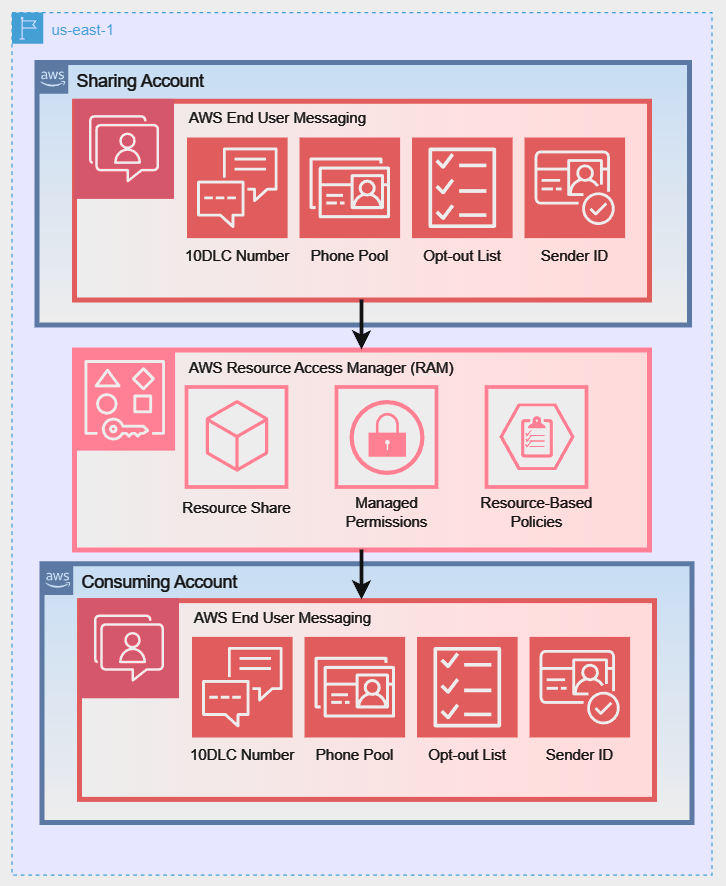
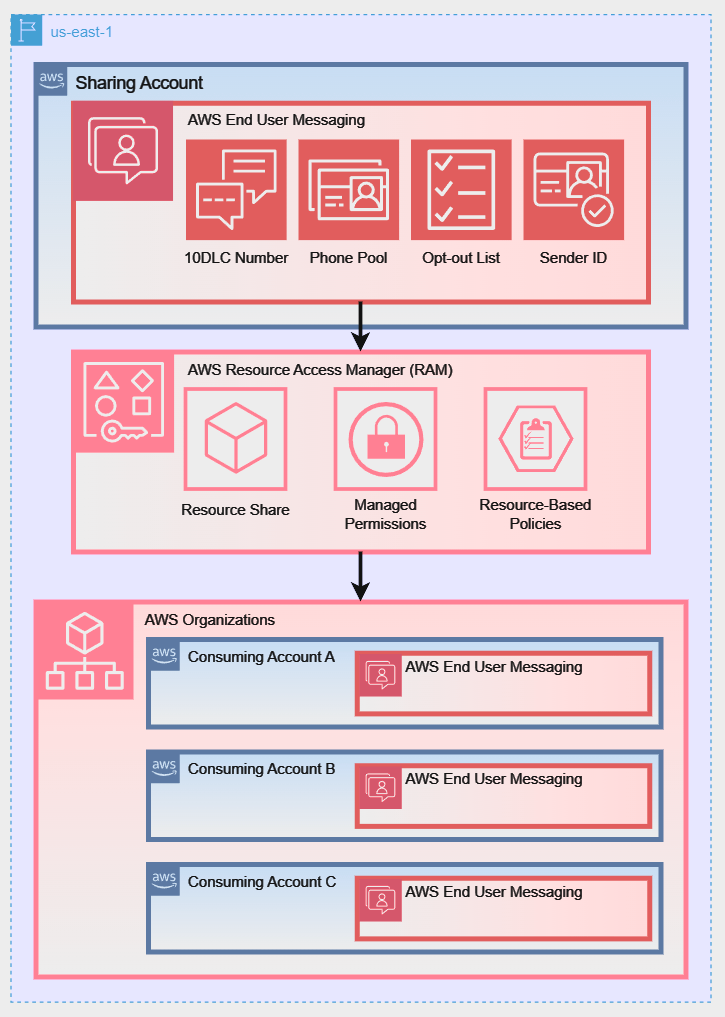
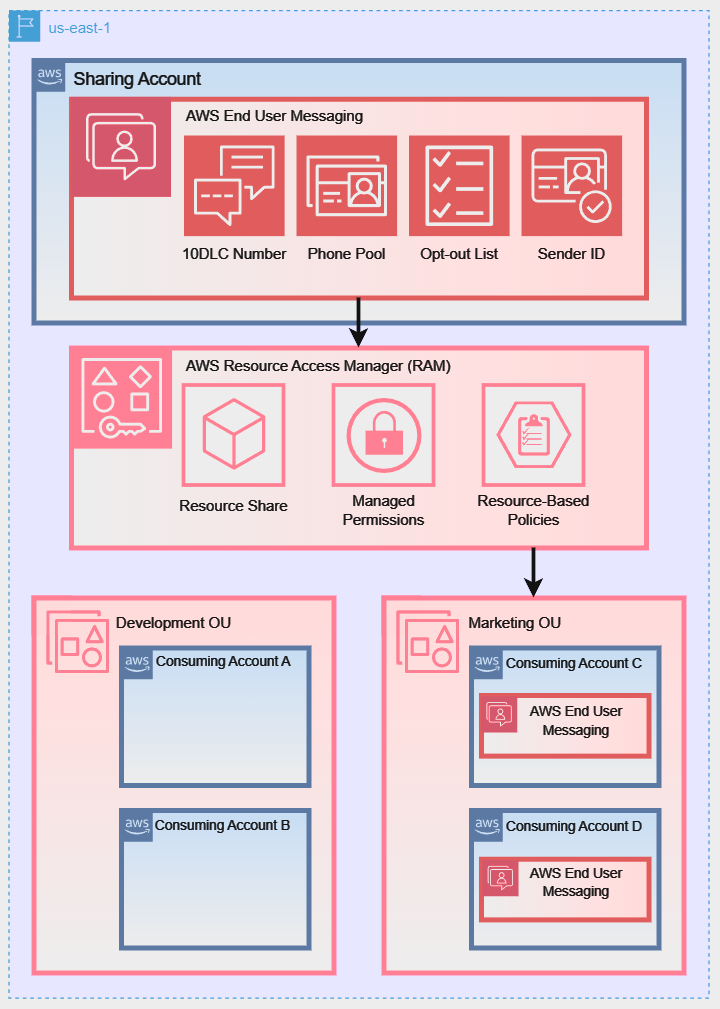
To better illustrate these sharing models, the following diagrams show how a Sharing Account can share its AWS End User Messaging resources using different strategies:

Diagram 1: Direct Account-to-Account Sharing:

Diagram 2: Sharing with an Entire AWS Organization:

Diagram 3: Sharing with a Specific Organizational Unit (OU):

Prerequisites and Setup

For the following walkthrough, we will demonstrate how to configure the setup for Diagram 1: Direct Account-to-Account Sharing. However, the steps for managing and using the resource share are similar for all three scenarios. Before you begin, ensure your environment is set up correctly.

Note for AWS Organizations Users: When your account is managed by AWS Organizations, you can take advantage of that to share resources more easily. With or without Organizations, a user can share with individual accounts. However, if your account is in an organization, then you can share with individual accounts, or with all accounts in the organization or in an OU without having to enumerate each account.

If you plan to share resources using AWS Organizations (as shown in Diagram 2 or Diagram 3), you must complete the following prerequisite steps from your organization’s management account before creating a resource share:

1. Enable all features in your organization:

aws organizations enable-all-features

2. Enable resource sharing with AWS RAM: This creates the necessary service-linked role.

aws ram enable-sharing-with-aws-organization

1. Required IAM Permissions

The IAM user or role performing these actions needs permissions for both AWS RAM and AWS End User Messaging. The following policy grants the necessary permissions to manage resource shares.

{
    "Version": "2012-10-17",
    "Statement": [
        {
            "Sid": "RAMResourceShareManagement",
            "Effect": "Allow",
            "Action": [
                "ram:UpdateResourceShare",
                "ram:DeleteResourceShare",
                "ram:AssociateResourceShare",
                "ram:DisassociateResourceShare"
            ],
            "Resource": "arn:aws:ram:*:*:resource-share/*"
        },
        {
            "Sid": "DiscoveryAndCreationPermissions",
            "Effect": "Allow",
            "Action": [
                "ram:CreateResourceShare",
                "ram:GetResourceShares",
                "ram:ListResources",
                "organizations:ListAccounts",
                "organizations:DescribeOrganization",
                "pinpoint-sms-voice-v2:DescribePhoneNumbers",
                "pinpoint-sms-voice-v2:DescribeSenderIds",
                "pinpoint-sms-voice-v2:DescribeOptOutLists",
                "pinpoint-sms-voice-v2:DescribePools"
            ],
            "Resource": "*"
        }
    ]
}

Note on Least Privilege: This policy follows the security best practice of granting least privilege. The first statement scopes modification permissions to only AWS RAM resource shares. The second statement grants permissions for discovery actions (like Describe* and List*) and the ram:CreateResourceShare action, which require "Resource": "*" as they do not operate on a specific, pre-existing resource.

2. Regionality Requirement

Important Reminder: resource sharing with AWS RAM is a regional feature. You can only share resources with accounts within the same AWS Region where those resources are located.

For example, a resource in us-east-1 can only be shared with other accounts in us-east-1, regardless of where those accounts operate other resources. Ensure that the resources you intend to share and the accounts that you anticipate sharing with are each considering the same Region for this process.

Creating and Managing Resource Shares (Sharing Account Actions)

This section provides a step-by-step guide to sharing your resources using the AWS CLI. We will walk through creating a resource share, associating and disassociating resources, and checking the status of your shares.

Step 1: Create an Empty Resource Share

First, create the resource share. Think of this as an empty container. You will associate principals (the consuming accounts) and resources (the phone numbers, etc.) with this share.

In the command below, we will create a share named EUM-Shared-Resources for an external account.

# Create a resource share and grant default End User Messaging permissions # Replace 123456789012 with the consuming account's ID
aws ram create-resource-share \
    --name "EUM-Shared-Resources" \
    --principals "123456789012" \
    --permission-arns "arn:aws:ram::aws:permission/AWSRAMDefaultPermissionSmsVoice" \
    --allow-external-principals \
    --region us-east-1
  • --principals: Specify one or more AWS account IDs.
  • --allow-external-principals: This flag is required when sharing with accounts that are not part of your AWS Organization.

Expected Response: A successful command returns a JSON object describing the new resource share. Note that allowExternalPrincipals is now true.

{
    "resourceShare": {
        "resourceShareArn": "arn:aws:ram:us-east-1:111122223333:resource-share/a1b2c3d4-5678-90ab-cdef-example11111",
        "name": "EUM-Shared-Resources",
        "owningAccountId": "111122223333",
        "allowExternalPrincipals": false,
        "status": "ACTIVE",
        "tags": [],
        "featureSet": "STANDARD"
    }
}

For the following sections and when specifying resource ARNs, ensure you’re using the correct format for AWS End User Messaging resources:

  • Phone numbers: arn:aws:sms-voice:region:account-id:phone-number/phonenumber-id
  • Sender IDs: arn:aws:sms-voice:region:account-id:sender-id/senderid
  • Opt-out lists: arn:aws:sms-voice:region:account-id:opt-out-list/optoutlist-id
  • Pools: arn:aws:sms-voice:region:account-id:pool/pool-id

Replace ‘region‘, ‘account-id‘, and the specific resource IDs with your actual values.

Step 2: Associate Resources with the Share

Now that you have your “container,” you can add resources to it. The associate-resource-share command links one or more of your End User Messaging resources to the share you just created, making them available to the principals.

# Define the ARN of the resource share from the previous step
RESOURCE_SHARE_ARN="arn:aws:ram:us-east-1:111122223333:resource-share/a1b2c3d4-5678-90ab-cdef-111111111111"

# Associate a phone number and a pool with the share # Replace the resource-arns with your actual resource ARNs
aws ram associate-resource-share \
    --resource-share-arn "$RESOURCE_SHARE_ARN" \
    --resource-arns \
        "arn:aws:sms-voice:us-east-1:111122223333:phone-number/phonenumber-a1b2c3d4" \
        "arn:aws:sms-voice:us-east-1:111122223333:pool/pool-b2c3d4e5" \
    --region us-east-1

Expected Response: A successful association returns a JSON object confirming the association and showing its status. The status will initially be ASSOCIATING and will transition to ASSOCIATED once complete.

Note: The association process is asynchronous. We’ll show you how to verify the completion status in the next step using the get-resource-shares and list-resources commands. It’s important to confirm the status has changed to ASSOCIATED before attempting to use the shared resources.

Step 3: Verify the Status and contents of the Share

Before making changes, it’s good practice to verify what’s in the share. Use get-resource-shares to check the status and list-resources to see the contents. This process helps ensure that all intended resources are properly associated and accessible to the principals you’ve designated.

# Verify the association status is ASSOCIATED
aws ram get-resource-shares \
    --resource-owner SELF \
    --name "EUM-Shared-Resources" \
    --association-status ASSOCIATED \
    --region us-east-1

Expected Response: If the command returns no results, wait a few moments and try again. The association process is typically quick but can sometimes take up to a few minutes.

{
    "resourceShares": [
        {
            "resourceShareArn": "arn:aws:ram:us-east-1:111122223333:resource-share/12345678-abcd-1234-efgh-111122223333",
            "name": "EUM-Shared-Resources",
            "owningAccountId": "111122223333",
            "allowExternalPrincipals": true,
            "status": "ACTIVE",
            "creationTime": "2023-07-01T12:00:00.000Z",
            "lastUpdatedTime": "2023-07-01T12:00:00.000Z",
            "featureSet": "STANDARD"
        }
    ]
}

Review the output carefully to ensure all intended resources are listed. If any resources are missing, you may need to reassociate them using the associate-resource-share command.

Expected Response (list-resources): This command will return a list of JSON objects, each representing a resource in the share.

# List the ARNs of all resources currently in the share
aws ram list-resources \
    --resource-owner SELF \
    --resource-share-arns "$RESOURCE_SHARE_ARN" \
    --region us-east-1

Review the output carefully to ensure all intended resources are listed. If any resources are missing, you may need to reassociate them using the associate-resource-share command.

# List the ARNs of all resources currently in the share
aws ram list-resources \
    --resource-owner SELF \
    --resource-share-arns "$RESOURCE_SHARE_ARN" \
    --region us-east-1

Expected Response (list-resources): This command will return a list of JSON objects, each representing a resource in the share.

{
    "resources": [
        {
            "arn": "arn:aws:sms-voice:us-east-1:111122223333:phone-number/phonenumber-a1b2c3d4",
            "type": "sms-voice:PhoneNumber",
            "resourceShareArn": "arn:aws:ram:us-east-1:111122223333:resource-share/a1b2c3d4-5678-90ab-cdef-example11111",
            "status": "AVAILABLE"
        },
        {
            "arn": "arn:aws:sms-voice:us-east-1:111122223333:pool/pool-b2c3d4e5",
            "type": "sms-voice:Pool",
            "resourceShareArn": "arn:aws:ram:us-east-1:111122223333:resource-share/a1b2c3d4-5678-90ab-cdef-example11111",
            "status": "AVAILABLE"
        }
    ]
}

Step 4: Disassociate Specific Resources from the Share

To stop sharing a specific resource, you use the disassociate-resource-share command. You must provide the ARN of the resource you wish to remove. This gives you granular control, allowing you to remove one resource while continuing to share others.

# Disassociate only the phone number from the share
aws ram disassociate-resource-share \
    --resource-share-arn "$RESOURCE_SHARE_ARN" \
    --resource-arns "arn:aws:sms-voice:us-east-1:111122223333:phone-number/phonenumber-a1b2c3d4" \
    --region us-east-1

Expected Response: The response will be nearly identical to the associate response, confirming the disassociation request. The status will be DISASSOCIATING.

{
    "resourceShareAssociations": [
        {
            "resourceShareArn": "arn:aws:ram:us-east-1:111122223333:resource-share/a1b2c3d4-5678-90ab-cdef-example11111",
            "associatedEntity": "arn:aws:sms-voice:us-east-1:111122223333:phone-number/phonenumber-a1b2c3d4",
            "associationType": "RESOURCE",
            "status": "DISASSOCIATING",
            "external": false
        }
    ]
}

How to Use Shared Resources

Once resources are shared, users in the consuming accounts can discover and use them for sending messages.

Step 1: Discovering Shared Resources

From a consuming account, you can list resources that have been shared with you by using the --filters parameter in the describe-* commands.

Note: Shared resources are discoverable via the AWS CLI and SDKs but will not appear in the AWS Management Console of the consuming account. This is expected behavior, as the resources are owned by the sharing account.

# List phone numbers shared with your account
aws pinpoint-sms-voice-v2 describe-phone-numbers \
    --filters Name=shared-with-me,Values=true \
    --region us-east-1
# List sender IDs shared with your account
aws pinpoint-sms-voice-v2 describe-sender-ids \
--filters Name=shared-with-me,Values=true \
--region us-east-1

# List pools shared with your account
aws pinpoint-sms-voice-v2 describe-pools \
--filters Name=shared-with-me,Values=true \
--region us-east-1

# List shared opt-out lists with region specification
aws pinpoint-sms-voice-v2 describe-opt-out-lists \
--filters Name=shared-with-me,Values=true \
--region us-east-1

Expected Response: The command returns a JSON object listing the shared resources, including their ARNs, which you will need for sending messages.

{
    "PhoneNumbers": [
        {
            "PhoneNumberArn": "arn:aws:sms-voice:us-east-1:111122223333:phone-number/phonenumber-a1b2c3d4",
            "PhoneNumberId": "phonenumber-a1b2c3d4",
            "PhoneNumber": "+12065550100",
            "Status": "ACTIVE",
            "MessageType": "TRANSACTIONAL",
            "TwoWayEnabled": true,
            "CreatedTimestamp": "2023-10-26T14:34:56.123Z"
        }
    ]
}

Step 2: Sending Messages with Shared Resources

Important: When using shared resources, consuming accounts must specify the full ARN of the shared resource in API calls. This differs from resource owners, who can use either the resource ID, ARN, or the number directly. You can specify the ARN of an individual phone number or a pool as the origination-identity.

# Send an SMS using a shared Phone Number ARN (consuming account MUST use ARN)
aws pinpoint-sms-voice-v2 send-text-message \
    --destination-phone-number "+12065550199" \
    --origination-identity "arn:aws:sms-voice:us-east-1:111122223333:phone-number/phonenumber-a1b2c3d4" \
    --message-body "Hello from a shared number!" \
    --region us-east-1

# Send an SMS using a shared Pool ARN (consuming account MUST use ARN)
aws pinpoint-sms-voice-v2 send-text-message \
    --destination-phone-number "+12065550199" \
    --origination-identity "arn:aws:sms-voice:us-east-1:111122223333:pool/pool-b2c3d4e5" \
    --message-body "Hello from a shared pool!" \
    --region us-east-1

Expected Response: A successful send-text-message call will return a MessageId, which confirms that the service has accepted the message for delivery.

{
    "MessageId": "a1b2c3d4-5678-90ab-cdef-example22222"
}

Message Delivery Reporting:

Once a message is sent, understanding its delivery status is crucial for ensuring your communications are effective. AWS End User Messaging provides several mechanisms for tracking message delivery, giving you a multi-layered approach to reporting.

Delivery Receipts (DLRs):

For traditional, carrier-provided Delivery Receipts (DLRs), which can sometimes take up to 72 hours to be returned, you must configure an event destination. This is the most common method for confirming that a message has reached the recipient’s handset, and is achieved through a Configuration Set.

For shared resources:

  • The configuration set must be created and managed in the sharing account.
  • The consuming account must then reference the ARN of the configuration set when sending messages.
# Example for consuming account
aws pinpoint-sms-voice-v2 send-text-message 
    --destination-phone-number "+12065550199" 
    --origination-identity "arn:aws:sms-voice:us-east-1:111122223333:phone-number/phonenumber-a1b2c3d4" 
    --message-body "Hello from a shared number!" 
    --configuration-set-name "arn:aws:sms-voice:us-east-1:111122223333:configuration-set/MyConfigSet" 
    --region us-east-1

For a detailed walkthrough, see our companion blog post, How to Send SMS Using Configuration Sets with AWS End User Messaging.

Message Feedback:

For more immediate, application-driven insights, you can use the Message Feedback feature. This allows you to programmatically mark messages as “delivered” based on a user’s action, such as using a one-time password (OTP) or clicking a link in the message. This provides a real-time confirmation loop that is independent of carrier DLRs.

Amazon CloudWatch:

To monitor these events at scale, you can stream them to Amazon CloudWatch Logs to track key performance indicators like the number of messages sent and delivered, and to set up alerts based on your specific business needs.

To set up comprehensive reporting:

  1. Configure an event destination for DLRs and detailed status events.
  2. Set up CloudWatch dashboards and alerts for ongoing monitoring.

This multi-layered approach provides both immediate feedback and long-term delivery insights, allowing you to optimize your messaging strategy and quickly identify potential delivery issues.

Troubleshooting Common Issues

  • Permission Denied Errors: If a consuming account cannot access a shared resource, verify that the consuming account’s IAM policies include the necessary permissions. Here’s an example policy:
{
    "Version": "2012-10-17",
    "Statement": [
        {
            "Effect": "Allow",
            "Action": [
                "pinpoint-sms-voice-v2:SendTextMessage",
                "pinpoint-sms-voice-v2:SendVoiceMessage",
                "pinpoint-sms-voice-v2:DescribePhoneNumbers",
                "pinpoint-sms-voice-v2:DescribeSenderIds",
                "pinpoint-sms-voice-v2:DescribeOptOutLists",
                "pinpoint-sms-voice-v2:DescribePools"
            ],
            "Resource": "*"
        }
    ]
}
  • Resource Not Visible: Remember that shared resources do not appear in the consuming account’s AWS Management Console. If the describe-* commands with the shared-with-me filter return no results, ensure the resource share status is ACTIVE in the sharing account.
    • If sharing via AWS Organizations, confirm the consuming account is correctly placed in the specified OU. You can find more information on managing OUs in the AWS Organizations User Guide.
  • CLI Command Fails: If a command fails with a “not found” or “invalid parameter” error, it is often due to an incorrect ARN. Double-check that the ARNs for resources, principals, and the resource share itself are correct. A Permission Denied error, on the other hand, points to an IAM policy issue..

Best Practices and Considerations

  • Security: Always follow the principle of least privilege. Use AWS managed permissions like AWSRAMDefaultPermissionSmsVoice where possible and create customer-managed permissions only for specific, granular requirements.
  • Cost: The sharing account is billed for provisioning the resources (e.g., the monthly cost of a phone number). Consuming accounts are billed for their usage of those shared resources (e.g., the cost per message sent). There are no additional costs for using AWS RAM.
  • Throughput and Quotas: Resource throughput quotas (e.g., messages per second) are shared along with the resource. High volume sending from multiple consuming accounts using the same shared number or pool, could collectively hit the service quota, which may result in throttling. Plan your usage accordingly or request quota increases if necessary.

Conclusion

This guide has equipped you to centralize your AWS End User Messaging resources using AWS Resource Access Manager. By implementing this strategy, you can directly address the common challenges of a multi-account environment: maintaining consistent branding with shared Sender IDs, ensuring comprehensive compliance with centralized opt-out lists, and reducing operational overhead by managing resources in one place.

We have walked through the entire lifecycle, from the initial prerequisites in AWS Organizations and IAM, to the step-by-step CLI commands for creating shares, associating resources, and enabling consuming accounts to use them. By applying these techniques and keeping the best practices for security and throughput in mind, you are now able to build a more efficient, secure, and scalable communication platform across your entire AWS ecosystem.

AWS End User Messaging SMS & Voice v2 API: A Migration Guide from v1

Post Syndicated from Brett Ezell original https://aws.amazon.com/blogs/messaging-and-targeting/aws-end-user-messaging-sms-and-voice-v2-api-a-migration-guide-from-v1/

This blog covers the steps on how to upgrade to the latest APIs offered by AWS for SMS messaging.

IMPORTANT: Understanding this Migration in Context of Amazon Pinpoint’s End of Support

Amazon Pinpoint announced its end of support (EOS) on October 2026. However, if you are an existing customer using Amazon Pinpoint for SMS, your current SMS operations are not impacted by the EOS, and you are not required to migrate to the v2 API at this time.

This blog post details an optional upgrade path from the Amazon Pinpoint v1 SendMessages API to the AWS End User Messaging SMS and Voice v2 SendTextMessage API. Transitioning allows you to leverage enhanced capabilities and new features available exclusively in the v2 API.

Regarding your existing resources: Your SMS phone numbers and sender ID resources are already stored in AWS End User Messaging. There is no need to register new numbers (originators) or configure new Sender IDs if you choose to migrate your API usage as described here.

AWS End User Messaging provides developers with a scalable and cost-effective messaging infrastructure without compromising the safety, security, or results of their communications. Developers can integrate messaging over channels such as SMS, MMS, voice text-to-speech, WhatsApp and mobile push to support use cases such as one-time passwords (OTP) at sign-ups, account updates, appointment reminders, delivery notifications, promotions and more. AWS End User Messaging was renamed in 2024 as the new name for Amazon Pinpoint’s communication capabilities. For the SMS protocol, the service includes two sets of APIs, including SMS and Voice, version 2 API (v2 API), which provides enhanced capabilities and flexibility for customer communications and the original Amazon Pinpoint v1 API.

The End User Messaging SMS service provides core building blocks and is the core service in charge of SMS delivery for other AWS services, including Amazon Simple Notification Service (SNS), Amazon Cognito, and Amazon Connect. Transitioning to the v2 API allows customers using the older Amazon Pinpoint v1 API to access enhanced capabilities available now—like improved control via Configuration Sets, Phone Pools, Protect Configurations, and Registrations—as well as ensuring access to future features developed exclusively in the V2 APIs.

In this post, we will focus on why transitioning is beneficial and how developers can transition from Amazon Pinpoint’s v1 SendMessages API to the AWS End User Messaging SMS and Voice, version 2 (SendTextMessage) API. This move offers more functionality for creating custom messaging solutions and integrating seamlessly with third-party applications. Consolidating management and messaging into AWS End User Messaging provides customers with greater control and access to the features and capabilities described below.

What Are the Changes and Benefits of Migrating?

Migrating from the Pinpoint v1 SendMessages API to the AWS End User Messaging v2 SendTextMessage API offers several key advantages in plain language:

  • Simpler Code: The new SendTextMessage API has a flatter, more straightforward structure compared to the nested configuration required by the old SendMessages API. This makes your code easier to write, read, and maintain.
  • More Control Over Delivery: AWS End User Messaging introduces new tools that give you fine-grained control:
    • Configuration Sets: Apply specific rules for logging via Event Destinations, routing (using specific number pools), and opt-out management per message.
    • Phone Pools: Group your sending phone numbers or sender IDs to manage sender reputation, improve reliability with failover, and handle different use cases more effectively.
    • Protect Configurations: Set account-level safety rules, like blocking messages to certain countries, or filtering messages suspected to be Artificially Inflated Traffic (AIT), enhancing security and compliance.
    • Message Feedback: Enable detailed feedback mechanisms and track message conversion data like one time passcode conversions.
  • Better Monitoring & Troubleshooting: With Configuration Sets and Event Destinations, you retain detailed delivery logs, Delivery Receipts (DLRs), and event tracking, similar to Pinpoint’s event streaming. This allows comprehensive monitoring via Amazon EventBridge, Amazon CloudWatch, Amazon Data Firehose, or Amazon SNS.
  • Expanded Capabilities: The AWS End User Messaging v2 API exclusively supports Media Messaging Service (MMS) and includes integrated tools for managing control plane activities, such as sender registrations required in many countries.
  • Future-Proofing: AWS is actively developing new features exclusively for the AWS End User Messaging v2 API. Migrating ensures you can leverage the latest advancements in messaging technology.

Understanding Key AWS End User Messaging Components

Migration involves understanding and utilizing several core AWS End User Messaging components:

Phone Pools

  • What they are: A Phone Pool is a collection of your origination identities (phone numbers, Sender IDs) that share common settings. When you send a message using a pool, AWS End User Messaging can automatically select an appropriate identity from that pool.
  • Benefits:
    • Improved Reliability: Pools provide automatic failover; if one number in the pool fails, another can be used.
    • Reputation Management: You can create separate pools for different use-cases, or types of messages (e.g., transactional vs. promotional) to isolate sender reputations.
    • Simplified Configuration: Apply settings like opt-out lists or two-way SMS configurations to the entire pool.
  • When to Use: Pools are highly recommended for managing multiple origination identities, ensuring high availability, or separating traffic. However, they are optional. If you only use a single phone number or Sender ID for a specific use case, you can continue to specify that single identity directly in your SendTextMessage API calls.

Protect Configurations

  • What they are: Protect Configurations allow you to define account-wide or configuration-set-level rules that safeguard against unwanted traffic, including Artificially Inflated Traffic (AIT) and messages to specific destinations. They operate using rules applied per country, which can be set to different modes: Block (prevent sending to specified countries), Monitor (analyze traffic for AIT risk without blocking, providing visibility), or Filter (automatically block messages suspected of being AIT based on risk analysis, in addition to blocking specified countries).
  • Benefits:
    • Enhanced Security: Prevent accidental or malicious sending to unintended destinations by explicitly blocking specific countries.
    • Proactive AIT Defense (Filter): Automatically block suspected fraudulent SMS pumping traffic based on risk analysis before messages are sent, reducing exposure to financial costs and potential reputation damage associated with AIT.
    • Risk Visibility (Monitor): Gain insights into potential AIT patterns targeting your account and understand the likely impact of Filter rules without disrupting legitimate message delivery. Recommendations are provided via event destinations.
    • Compliance: Helps enforce geographic sending restrictions required by regulations or internal policies.
    • Cost Control: Avoid unexpected charges from sending to blocked/filtered destinations.
    • Granular Application: Apply different rules (Block/Monitor/Filter) per country and use multiple Protect Configurations tailored to different workflows (e.g., stricter filtering for public-facing forms vs. internal notifications).
  • Note: Protect Configurations, including the Monitor and Filter modes for AIT, are features unique to the AWS End User Messaging v2 API and are not available in the Pinpoint v1 API. Check out Defending Against SMS Pumping: New AWS Features to Help Combat Artificially Inflated Traffic to learn more.

Configuration Sets

  • What they are: Configuration Sets are collections of rules applied to messages when you send them. You specify which Configuration Set to use in your SendTextMessage API call.
  • Benefits:
    • Essential for Monitoring: Configuration Sets are required to receive message event data (including Delivery Receipts – DLRs). They replace the automatic event streaming provided by Pinpoint v1. You must associate an Event Destination (EventBridge, CloudWatch Logs, Amazon Data Firehose, or SNS) with your Configuration Set to capture delivery status, failures, and other events.
    • Granular Control: Apply specific settings per message, such as routing messages through specific Phone Pools, using different default Sender IDs, or associating different opt-out lists.
    • Message Feedback: Enable detailed feedback mechanisms.
  • Key Takeaway: Migrating users must create and use Configuration Sets with associated Event Destinations if they need to monitor message delivery status, replicating the functionality previously provided by Pinpoint event streams.

Registrations

  • What they are: In many countries and regions, regulations require businesses to register their Sender IDs or phone numbers (like US 10DLC numbers) before sending A2P (Application-to-Person) messages. Some regions (like India or China) may also require pre-registering message templates.
  • Benefits:
    • Compliance: Ensures adherence to local telecommunication laws and carrier requirements.
    • Improved Deliverability: Registered traffic is often treated with higher priority and is less likely to be filtered as spam by carriers.
  • When Needed: Registration requirements — or lack thereof — vary significantly by country (e.g., US 10DLC, UK Sender IDs, India Sender IDs) and the type of number/Sender ID used. While some origination identities in certain regions may not require pre-registration, the landscape is complex and evolving. Always check the AWS documentation for the specific, current requirements of the countries you send messages to. AWS End User Messaging provides tools within the console and API to help manage any necessary registrations.

Additional Key Differences & Benefits

  • MMS Support: The AWS End User Messaging v2 API provides clear, first-class support for sending Multimedia Messaging Service (MMS) messages via the SendMediaMessage API call, offering richer media possibilities than typically available via the older Pinpoint API.
  • API Simplicity: The SendTextMessage API call is significantly less nested and complex than the SendMessages API structure, making integration and maintenance easier.
    • Example Comparison:
    • # Pinpoint v1 SendMessages (Nested Structure)
      response = pinpoint_client.send_messages(
          ApplicationId='YOUR_PINPOINT_PROJECT_ID',
          MessageRequest={
              'Addresses': {
                  '+12065550100': { # Destination Address
                      'ChannelType': 'SMS'
                  }
              },
              'MessageConfiguration': {
                  'SMSMessage': {
                      'Body': 'Your message content',
                      'MessageType': 'TRANSACTIONAL',
                      'OriginationNumber': '+12065550199' # Origination Number
                  }
              }
          }
      )
      
      # AWS End User Messaging v2 SendTextMessage (Flatter Structure)
      response = end_user_messaging_client.send_text_message(
          DestinationPhoneNumber='+12065550100',
          OriginationIdentity='+12065550199', # Can be Number, SenderID, Pool ARN/ID
          MessageBody='Your message content',
          MessageType='TRANSACTIONAL'
          # Optional: ConfigurationSetName='MyConfigSet'
      )

      This side-by-side comparison clearly shows the reduced nesting and more direct parameter usage in the AWS End User Messaging SendTextMessage API call.

  • Broader Regional Availability: The AWS End User Messaging v2 API offers significantly broader regional availability compared to the older Pinpoint v1 API (currently supported in over 30 regions versus 13). AWS also plans to expand this support to an additional 4 regions soon (reaching 34 total), further improving global reach and potentially reducing latency.

How to Use AWS End User Messaging Features Functionally (API Examples)

Here’s how you use the SendTextMessage API (using AWS SDK for Python Boto3 as an example) to leverage these features:

import boto3
import logging

logger = logging.getLogger()
logger.setLevel(logging.INFO)

# Initialize the AWS End User Messaging v2 client
# Note the client name change from 'pinpoint'
end_user_messaging_client = boto3.client('pinpoint-sms-voice-v2')

# --- Basic SMS Send ---
try:
    response = end_user_messaging_client.send_text_message(
        DestinationPhoneNumber='+12065550100',
        OriginationIdentity='+12065550199', # Your AWS End User Messaging registered Phone Number, Sender ID, or Pool ARN/ID
        MessageBody='Hello from AWS End User Messaging!',
        MessageType='TRANSACTIONAL' # Or 'PROMOTIONAL'
    )
    logger.info(f"Basic Send - Message ID: {response.get('MessageId')}")
except Exception as e:
    logger.error(f"Basic Send Failed: {e}")

# --- Send with a Configuration Set (for DLRs/Events) ---
try:
    response = end_user_messaging_client.send_text_message(
        DestinationPhoneNumber='+12065550101',
        OriginationIdentity='+12065550199',
        MessageBody='This message uses a configuration set.',
        MessageType='TRANSACTIONAL',
        ConfigurationSetName='MyConfigSet' # Specify your Configuration Set
    )
    logger.info(f"Config Set Send - Message ID: {response.get('MessageId')}")
except Exception as e:
    logger.error(f"Config Set Send Failed: {e}")

# --- Send using a Phone Pool ---
try:
    response = end_user_messaging_client.send_text_message(
        DestinationPhoneNumber='+12065550102',
        OriginationIdentity='arn:aws:sms-voice:us-east-1:111122223333:pool/MyPhonePool', # Use Pool ARN or ID
        MessageBody='This message is sent via a phone pool.',
        MessageType='TRANSACTIONAL',
        ConfigurationSetName='MyConfigSet' # Still need a Config Set for events
    )
    logger.info(f"Pool Send - Message ID: {response.get('MessageId')}")
except Exception as e:
    logger.error(f"Pool Send Failed: {e}")

# --- Send with a Protect Configuration (via Config Set or directly) ---
# Option 1: Protect Config applied via Configuration Set
# (Configure association in the AWS End User Messaging console or via AssociateProtectConfiguration API)
# No change needed in SendTextMessage call beyond specifying the ConfigurationSetName

# Option 2: Protect Config applied directly per message
try:
    response = end_user_messaging_client.send_text_message(
        DestinationPhoneNumber='+12065550103',
        OriginationIdentity='+12065550199',
        MessageBody='This message has direct protect config applied.',
        MessageType='TRANSACTIONAL',
        ProtectConfigurationId='MyProtectConfig' # Specify Protect Configuration ID or ARN
        # ConfigurationSetName='MyConfigSet' # Can also be used if needed for other rules like events
    )
    logger.info(f"Protect Config Send - Message ID: {response.get('MessageId')}")
except Exception as e:
    logger.error(f"Protect Config Send Failed: {e}")

# --- Standard Exception Handling ---
try:
    response = end_user_messaging_client.send_text_message(
        DestinationPhoneNumber='+12065550104',
        OriginationIdentity='+12065550199',
        MessageBody='Testing exception handling.',
        MessageType='TRANSACTIONAL',
        ConfigurationSetName='MyConfigSet'
    )
    logger.info(f"Exception Test Send - Message ID: {response.get('MessageId')}")
except end_user_messaging_client.exceptions.ThrottlingException:
    logger.error("Rate limit exceeded. Implementing backoff.")
except end_user_messaging_client.exceptions.ValidationException as e:
    logger.error(f"Validation error: {str(e)}")
except Exception as e:
     logger.error(f"Generic error sending message: {e}")

How to Migrate SDKs

Migrating your application code involves updating your AWS SDK initialization:

  1. Identify SDK Usage: Locate where your code uses the AWS SDK to interact with the Pinpoint v1 API, specifically for sending SMS (likely using client.send_messages(...)).
  2. Update Client Initialization: Change the service client you initialize.
    • Python (Boto3): Change boto3.client('pinpoint') to boto3.client('pinpoint-sms-voice-v2').
    • Other SDKs: Consult the specific AWS SDK documentation for the equivalent change. The service identifier will typically change from pinpoint or similar to pinpoint-sms-voice-v2 or equivalent.
  3. Update API Calls: Replace calls to the Pinpoint v1 SendMessages operation with calls to the AWS End User Messaging v2 SendTextMessage operation, adjusting the parameter structure as shown in the examples above.
  4. Dependencies: Ensure your application deployment includes the necessary updated SDK libraries.

Data Migration Considerations

Endpoint Contextual Data: Pinpoint allows associating rich attributes and user data with endpoints, often used in campaigns. If your application logic for sending direct SMS via the Pinpoint SendMessages API previously relied on accessing these Pinpoint endpoint attributes at the time of sending (e.g., for personalization), note that the AWS End User Messaging SendTextMessage API operates independently of the Pinpoint endpoint data model. Your application will now need to fetch any required contextual data (user attributes, preferences, etc.) itself before calling SendTextMessage if that information is needed for message construction or logic.

Opt-Out Lists (Optional):

IMPORTANT: End User Messaging has automatically been adding opt-outs to a “default optout list” for all SMS you have sent out unless you have been self managing opt-outs. Check to see if you have numbers in the “default” list in the console or by using DescribeOptedOutNumbers and using “default” as the OptOutListName.

If you are managing opt-outs at the endpoint level, managing them within your application, or only have opt-outs in the “default” list, it’s recommended that you export those numbers into a new End User Messaging Opt-Out List.

  1. Extract from Pinpoint: Identify and extract the phone numbers opted out of SMS within your Pinpoint project. This typically involves exporting endpoint data (using the Pinpoint API, like GetEndPoints, or GetSegmentExportJobs) and filtering for endpoints associated with the SMS channel that have an OptOut status set (e.g., ALL). You may need custom processing to isolate the correct phone numbers.
  2. Create AWS End User Messaging List: Create a new opt-out list in AWS End User Messaging using the CreateOptOutList API operation (e.g., name it MigratedPinpointOptOuts).
  3. Import Numbers: Add the phone numbers extracted from Pinpoint into the newly created AWS End User Messaging opt-out list using the PutOptedOutNumber API operation for each number.
  4. Associate List: Associate your new AWS End User Messaging Opt-Out List with the relevant Phone Pool(s) or individual origination phone number(s)/Sender ID(s) using the appropriate AWS End User Messaging API calls (e.g., SetDefaultPoolOptOutList, SetPhoneNumberOptedOut). This ensures AWS End User Messaging automatically blocks sends to these numbers when using those specific origination identities. Note: Opt-out lists are associated with origination identities, not directly with Configuration Sets.

Here’s an accurate AWS SDK for Python (Boto3) example that demonstrates this process:

import boto3

# Initialize clients
pinpoint = boto3.client('pinpoint')
eum = boto3.client('pinpoint-sms-voice-v2')

# Step 1: Extract opted-out numbers from Pinpoint
def get_opted_out_numbers(project_id):
    opted_out_numbers = set()
    paginator = pinpoint.get_paginator('get_endpoints')
    
    for page in paginator.paginate(ApplicationId=project_id):
        for item in page['ItemResponse'].values():
            if item['ChannelType'] == 'SMS' and item.get('OptOut') == 'ALL':
                opted_out_numbers.add(item['Address'])
    
    return opted_out_numbers

# Example usage
project_id = 'YOUR_PINPOINT_PROJECT_ID'
opted_out_numbers = get_opted_out_numbers(project_id)

# Step 2: Create AWS End User Messaging Opt-Out List
opt_out_list_name = 'MigratedPinpointOptOuts'
eum.create_opt_out_list(OptOutListName=opt_out_list_name)

# Step 3: Import Numbers to the new Opt-Out List
for number in opted_out_numbers:
    eum.put_opted_out_number(
        OptOutListName=opt_out_list_name,
        OptedOutNumber=number
    )

# Step 4: Associate the Opt-Out List with a Phone Pool
phone_pool_id = 'YOUR_PHONE_POOL_ID'
eum.set_default_pool_opt_out_list(
    PhonePoolId=phone_pool_id,
    OptOutListName=opt_out_list_name
)

# If you're using individual numbers not in a pool:
# phone_number = 'YOUR_PHONE_NUMBER'
# eum.set_phone_number_opted_out(
#     PhoneNumber=phone_number,
#     OptOutListName=opt_out_list_name
# )

print(f"Migration complete. {len(opted_out_numbers)} numbers added to the opt-out list.")

Conclusion

Migrating from the legacy Amazon Pinpoint v1 SendMessages API to the modern AWS End User Messaging v2 SendTextMessage API aligns strategically with End User Messaging, the focus of AWS’s ongoing messaging development and advancements. As we’ve explored, this transition is driven by tangible benefits and enhanced capabilities designed for contemporary communication needs.

This guide detailed the key advantages, including a significantly simplified API structure that streamlines development and maintenance. We also covered the core components that provide enhanced control and functionality: Configuration Sets, which are crucial for enabling detailed monitoring and delivery reporting (DLRs); Phone Pools for flexible and reliable sender identity management; Protect Configurations for improved security and compliance; and Registrations for adhering to regional requirements and maximizing deliverability.

This post also outlined the practical steps involved in this migration, from updating your SDK client initialization and adapting your code to use the SendTextMessage API with its new features, to the critical process of migrating existing opt-out lists to ensure continuity and compliance.

By understanding these components, leveraging the new features, and executing the necessary technical and data migration steps, you can successfully transition your SMS operations. This move not only modernizes your infrastructure but also positions you to take full advantage of future advancements on the AWS End User Messaging platform, enabling you to build more robust, scalable, and sophisticated messaging solutions.

Lower Your Risk of SMS Fraud with Country Level Blocking and Amazon Pinpoint

Post Syndicated from Brett Ezell original https://aws.amazon.com/blogs/messaging-and-targeting/lower-your-risk-of-sms-fraud-with-country-level-blocking-and-amazon-pinpoint/

As a developer, marketing professional, or someone in the communications space, you’re likely familiar with the importance of SMS messaging in engaging customers and driving valuable interactions. However, you may have also encountered the growing challenge of artificially inflated traffic (AIT), also known as SMS pumping. A new report co-authored by
Enea revealed that AIT is so widespread within the SMS ecosystem that 19.8B-35.7B fraudulent messages were sent by bad actors in 2023, incurring substantial costs of over $1 billion. In this blog post, we’ll explore how you can use
Protect configurations, a powerful set of capabilities within
Amazon Pinpoint SMS, that provides granular control over which destination countries your SMS, MMS, and voice messages can be sent to.
<img decoding=” width=”1252″ height=”889″>

What is SMS Pumping, aka Artificially Inflated Traffic (AIT)?

AIT, or SMS pumping, is a type of fraud where bad actors use bots to generate large volumes of fake SMS traffic. These bots target businesses’ whose websites, apps, and other assets have forms or other mechanisms that trigger SMS being sent out. Common use cases for SMS such as one-time passwords (OTPs), app download links, promotion signups, etc. are all targets for these bad actors to “pump” SMS and send out fraudulent messages. The goal is to artificially inflate the number of SMS messages a business sends, resulting in increased costs and a negative impact on the sender’s reputation. In the realm of SMS-based artificially inflated traffic (AIT), the prevalent method for bad actors to profit involves colluding with parties in the SMS delivery chain to receive a portion of the revenue generated from each fraudulent message sent.

<img decoding=” width=”1280″ height=”720″>

AIT poses several challenges for businesses:

  1. Overspending: The fake SMS traffic generated by AIT bots results in businesses paying for messages that yield no actual results.

  2. Interrupted service: Large volumes of AIT can force businesses to temporarily halt SMS services, disrupting legitimate customer communications.

  3. Diverted focus: Dealing with AIT can shift businesses’ attention away from core operations and priorities.

  4. Reduced deliverability rates due to the messages never being interacted with and/or large volumes of SMS being sent quickly.

How does Protect mitigate AIT?

Amazon Pinpoint’s Protect feature allows you to control which countries you can send messages to. This is beneficial if your customers are located in specific countries.

With Protect, you can create a list of country rules that either allow or block messages to each destination country. These country rules can be applied to SMS, MMS, and voice messages sent from your AWS account. The Protect configurations you create enable precise control over which destination countries your messages can be sent to. This helps mitigate the impact of AIT by allowing you to tailor where you do or do not send.

Protect offers flexibility in how the country rules are applied. You can apply them at the account level, the configuration set level, or the individual message level. This enables you to customize your AIT mitigation strategy to best fit your business needs and messaging patterns.

By leveraging Protect within Amazon Pinpoint, you can help ensure the integrity and cost-effectiveness of your SMS, MMS, and voice communications.

Account-level Protect Configuration

The simplest approach is to create a Protect configuration and associate it as the account default. This means the allow/block rules defined in that configuration will be applied across all messages sent from your account, unless overridden. This is an effective option if you only need one set of country rules applied universally.

Configuration set-specific Protect configuration

You can associate a Protect configuration with one or more of your Pinpoint SMS configuration sets. This allows you to apply different country rules to distinct messaging flows or use cases within your application without changing your existing code if you are already using Config Sets. It also enables more detailed logging and monitoring of the Protect configuration’s impact, such as:

  1. Error Logs: Logging of any errors or issues encountered when messages are sent, providing insights into how the Protect configuration is affecting message delivery.
  2. Audit Logs: Records of all configuration changes, access attempts, and other relevant activities related to the Protect configuration, allowing for comprehensive auditing and monitoring.
  3. Usage Metrics: Tracking of usage statistics, such as the number of messages sent to different countries, the impact of the Protect configuration on message volumes, and other usage-related data.
  4. Compliance and Policy Enforcement Logs: Documentation of how the Protect configuration is enforcing compliance with messaging policies and regulations, including any instances where messages are blocked or allowed based on the configuration rules.

Dynamic Protect configuration per message

If your needs are even more specific, you can create a Protect configuration without any association, and then specify its ID when sending messages via the Pinpoint APIs (e.g. SendMediaMessage, SendTextMessage, SendVoiceMessage). This gives you the ability to dynamically choose the Protect configuration to apply for each individual message, providing the ultimate flexibility.

Regardless of the approach, the core benefit of Protect configurations is the ability to precisely control which destination countries your messages may be sent to. Blocking countries where you don’t have a presence or where SMS pricing is high eliminates your exposure to fraudulent AIT traffic originating from those regions. This helps protect your messaging budget, maintain service continuity, and focus your efforts on legitimate customer interactions.

Who should use Protect configurations?

Protect configurations are designed to benefit a wide range of AWS customers, particularly those who:

  1. Send SMS messages to a limited number of countries: If your business primarily operates in a few specific countries, Protect configurations can help you easily block SMS messages to countries where you don’t have a presence, reducing the risk of AIT.
  2. Have experienced AIT issues in the past: If your business has been a target of SMS pumping, Protect configurations can help you regain control over your SMS communications and prevent future AIT attacks.
  3. Want to proactively protect their SMS messaging: Even if you haven’t encountered AIT issues yet, Protect configurations can help you stay ahead of the curve and maintain the integrity of your SMS communications.

How to create a country rules list with Protect configuration

To begin building a list of country rules that allow or block messages to specific destination countries, you start by creating a new Protect configuration. There are two ways to accomplish this, either by using the console, or the API.

Option 1 – Using the AWS Console

Console Scenario: My account is out of the sandbox and I only want to send to 1 country – United Kingdom (iso:GB) using the SenderID “DEMOTP”.

At a high level, we will follow the three steps outlined below for each method. In our examples, we used a SenderID as our Originator. However, it should be noted that the same process can be achieved using any originator you’d like. i.e. SenderID, Phone pool, Phone number, 10DLC, short code, etc.

  1. Create SenderID (Optional if you already have one)
  2. Create Protect Configuration
  3. Send Test Message via console

Using the AWS Console

1) Create SenderID for United Kingdom (GB)

  • Pinpoint SMS Console – Request Originator
    • Select United Kingdom (GB) and follow the prompts for a SenderID. DO NOT select Two-way SMS Messaging
    • Enter Sender ID – Example: DEMOTP
    • Confirm and Request

2) Create default Protect Configuration

<img decoding=” width=”863″ height=”521″>

    • Search for Country=United Kingdom then deselect United Kingdom

<img decoding=” width=”865″ height=”582″>

    • Set as Account Default and select Create protect configuration

<img decoding=” width=”1497″ height=”1173″>

3) Send a test message with SMS simulator

Note: The Pinpoint SMS Simulator provides special phone numbers you can use to send test text messages and receive realistic event records, all within the confines of the Amazon Pinpoint service. These simulator phone numbers are designed to stay entirely within the Pinpoint SMS ecosystem, ensuring your test messages don’t get sent over the carrier network.

You can use these simulator phone numbers to send both SMS and MMS messages, allowing you to thoroughly validate your message content, workflow, and event handling. The responses you receive back will mimic either success or fail depending on which destination simulator number you send to.

  • From the Pinpoint SMS Console SMS Simulator page,
    • For Originator, Choose Sender ID, and select your Sender ID created from earlier.
    • Under Destination number, select Simulator numbers and choose United Kingdom (GB). Enter a test message in the Message body.
    • Finally, choose send test message. This should prompt a green “Success” banner at the top of your page.

<img decoding=” width=”1336″ height=”1313″>

    • Conversely, follow the previous test message steps, and instead attempt to send to anywhere other than the United Kingdom (GB). In this example, Australia (AU) 
    • As shown below in the screenshot this one is blocked since you have configured to only send to GB.

<img decoding=” width=”1333″ height=”1364″>

Option 2 – Using the V2 API and CLI

V2 API Scenario: 
My account is out of the sandbox and I want to BLOCK only 1 country – Australia (AU) while using the SenderID “DEMOTP”.

1) Create SenderID for GB

Note: before using the CLI remember to configure your access and secret key using

aws configure

Windows users should use PowerShell over cmd to test

  • Use RequestSenderId to create the same Sender Id as previously made via the console.
aws pinpoint-sms-voice-v2 request-sender-id --iso-country-code "GB" --sender-id "DEMOTP"

Response:

{
   "DeletionProtectionEnabled": False,
   "IsoCountryCode": "GB",
   "MessageTypes": [ "TRANSACTIONAL" ],
   "MonthlyLeasingPrice": "0.00",
   "Registered": False,
   "SenderId": "DEMOTP",
   "SenderIdArn": "string"
}

2) Create default Protect Configuration

aws pinpoint-sms-voice-v2 create-protect-configuration --tags Key=Name,Value=CLITESTING

Response:

{
   "AccountDefault": False,
   "CreatedTimestamp": number,
   "DeletionProtectionEnabled": False,
   "ProtectConfigurationArn": "string",
   "ProtectConfigurationId":  "string",
   "Tags": [ 
      { 
         "Key": "Name",
         "Value": "CLITESTING"
      }
   ]
}

  • Add AU as BLOCKED on protect configuration.
aws pinpoint-sms-voice-v2 update-protect-configuration-country-rule-set --protect-configuration-id protect-string --number-capability 'SMS' --country-rule-set-updates '{\"AU\":{\"ProtectStatus\":\"BLOCK\"}}'

Response:

{
   "CountryRuleSet": { 
      "string" : { 
         "ProtectStatus": "ALLOW | BLOCK"
      }
   },
   "NumberCapability": "SMS",
   "ProtectConfigurationArn": "string",
   "ProtectConfigurationId": "string"
}

  • Set as account default configuration.
aws pinpoint-sms-voice-v2 set-account-default-protect-configuration --protect-configuration-id protect-string

Response:

{
   "DefaultProtectConfigurationArn": "string",
   "DefaultProtectConfigurationId": "string"
}

3) Send test message

  • Use SendTextMessage to test your Protect Configuration via the V2 API.
  • Test sending to GB Simulator Number should be successful.
aws pinpoint-sms-voice-v2 send-text-message --destination-phone-number "string" --message-body "string"

Response:

{
   "MessageId": "string"
}

  • Test sending to AU Simulator Number should be blocked.
aws pinpoint-sms-voice-v2 send-text-message --destination-phone-number "string" --message-body "string"

Response – (ConflictException):

{
An error occurred (ConflictException) when calling the 
SendTextMessage operation: Conflict Occurred - 
Reason="DESTINATION_COUNTRY_BLOCKED_BY_PROTECT_CONFIGURATION" ResourceType="protect-configuration" ResourceId="string"
}

Conclusion

As SMS messaging continues to play a crucial role in customer engagement and authentication, protecting your communications from AIT is more important than ever. Amazon Pinpoint Protect provides a powerful and user-friendly solution to help you mitigate the impact of SMS pumping, ensuring the integrity of your SMS channels and preserving your business’ reputation and resources. Whether you’re a small business or a large enterprise, Pinpoint Protect is a valuable tool to have in your arsenal as you navigate the evolving landscape of SMS messaging.

To get started with Pinpoint SMS Protect, visit the Amazon Pinpoint SMS documentation or reach out to your AWS account team. And don’t forget to let us know in the comments how Protect configurations has helped you combat AIT and strengthen your SMS communications.

A few resources to help you plan for your SMS program:

About the Author

Brett Ezell

Brett Ezell is your friendly neighborhood Solutions Architect at AWS, where he specializes in helping customers optimize their SMS and email campaigns using Amazon Pinpoint and Amazon Simple Email Service. As a former US Navy veteran, Brett brings a unique perspective to his work, ensuring customers receive tailored solutions to meet their needs. In his free time, Brett enjoys live music, collecting vinyl, and the challenges of a good workout. And, as a self-proclaimed comic book aficionado, he can often be found combing through his local shop for new books to add to his collection.