All posts by Damian Brady

How generative AI is changing the way developers work

Post Syndicated from Damian Brady original https://github.blog/2023-04-14-how-generative-ai-is-changing-the-way-developers-work/

During a time when computers were solely used for computation, the engineer, Douglas Engelbart, gave the “mother of all demos,” where he reframed the computer as a collaboration tool capable of solving humanity’s most complex problems. At the start of his demo, he asked audience members how much value they would derive from a computer that could instantly respond to their actions.

You can ask the same question of generative AI models. If you had a highly responsive generative AI coding tool to brainstorm new ideas, break big ideas into smaller tasks, and suggest new solutions to problems, how much more creative and productive could you be?

This isn’t a hypothetical question. AI-assisted engineering workflows are quickly emerging with new generative AI coding tools that offer code suggestions and entire functions in response to natural language prompts and existing code. These tools, and what they can help developers accomplish, are changing fast. That makes it important for every developer to understand what’s happening now—and the implications for how software is and will be built.

In this article, we’ll give a rundown of what generative AI in software development looks like today by exploring:

The unique value generative AI brings to the developer workflow

AI and automation have been a part of the developer workflow for some time now. From machine learning-powered security checks to CI/CD pipelines, developers already use a variety of automation and AI tools, like CodeQL on GitHub, for example.

While there’s overlap between all of these categories, here’s what makes generative AI distinct from automation and other AI coding tools:

Automation: 🛤
You know what needs to be done, and you know of a reliable way to get there every time.
Rules-based logic: 🔎
You know the end goal, but there’s more than one way to achieve it.
Machine learning: 🧠
You know the end goal, but the amount of ways to achieve it scales exponentially.
Generative AI: 🌐
You have big coding dreams, and want the freedom to bring them to life.
You want to make sure that any new code pushed to your repository follows formatting specifications before it’s merged to the main branch. Instead of manually validating the code, you use a CI/CD tool like GitHub Actions to trigger an automated workflow on the event of your choosing (like a commit or pull request). You know some patterns of SQL injections, but it’s time consuming to manually scan for them in your code. A tool like Code QL uses a system of rules to sort through your code and find those patterns, so you don’t have to do it by hand. You want to stay on top of security vulnerabilities, but the list of SQL injections continues to grow. A coding tool that uses a machine learning (ML) model, like Code QL, is trained to not only detect known injections, but also patterns similar to those injections in data it hasn’t seen before. This can help you increase recognition of confirmed vulnerabilities and predict new ones. Generative AI coding tools leverage ML to generate novel answers and predict coding sequences. A tool like GitHub Copilot can reduce the amount of times you switch out of your IDE to look up boilerplate code or help you brainstorm coding solutions. Shifting your role from rote writing to strategic decision making, generative AI can help you reflect on your code at a higher, more abstract level—so you can focus more on what you want to build and spend less time worrying about how.

How are generative AI coding tools designed and built?

Building a generative AI coding tool requires training AI models on large amounts of code across programming languages via deep learning. (Deep learning is a way to train computers to process data like we do—by recognizing patterns, making connections, and drawing inferences with limited guidance.)

To emulate the way humans learn patterns, these AI models use vast networks of nodes, which process and weigh input data, and are designed to function like neurons. Once trained on large amounts of data and able to produce useful code, they’re built into tools and applications. The models can then be plugged into coding editors and IDEs where they respond to natural language prompts or code to suggest new code, functions, and phrases.

Before we talk about how generative AI coding tools are made, let’s define what they are first. It starts with LLMs, or large language models, which are sets of algorithms trained on large amounts of code and human language. Like we mentioned above, they can predict coding sequences and generate novel content using existing code or natural language prompts.

Today’s state-of-the-art LLMs are transformers. That means they use something called an attention mechanism to make flexible connections between different tokens in a user’s input and the output that the model has already generated. This allows them to provide responses that are more contextually relevant than previous AI models because they’re good at connecting the dots and big-picture thinking.

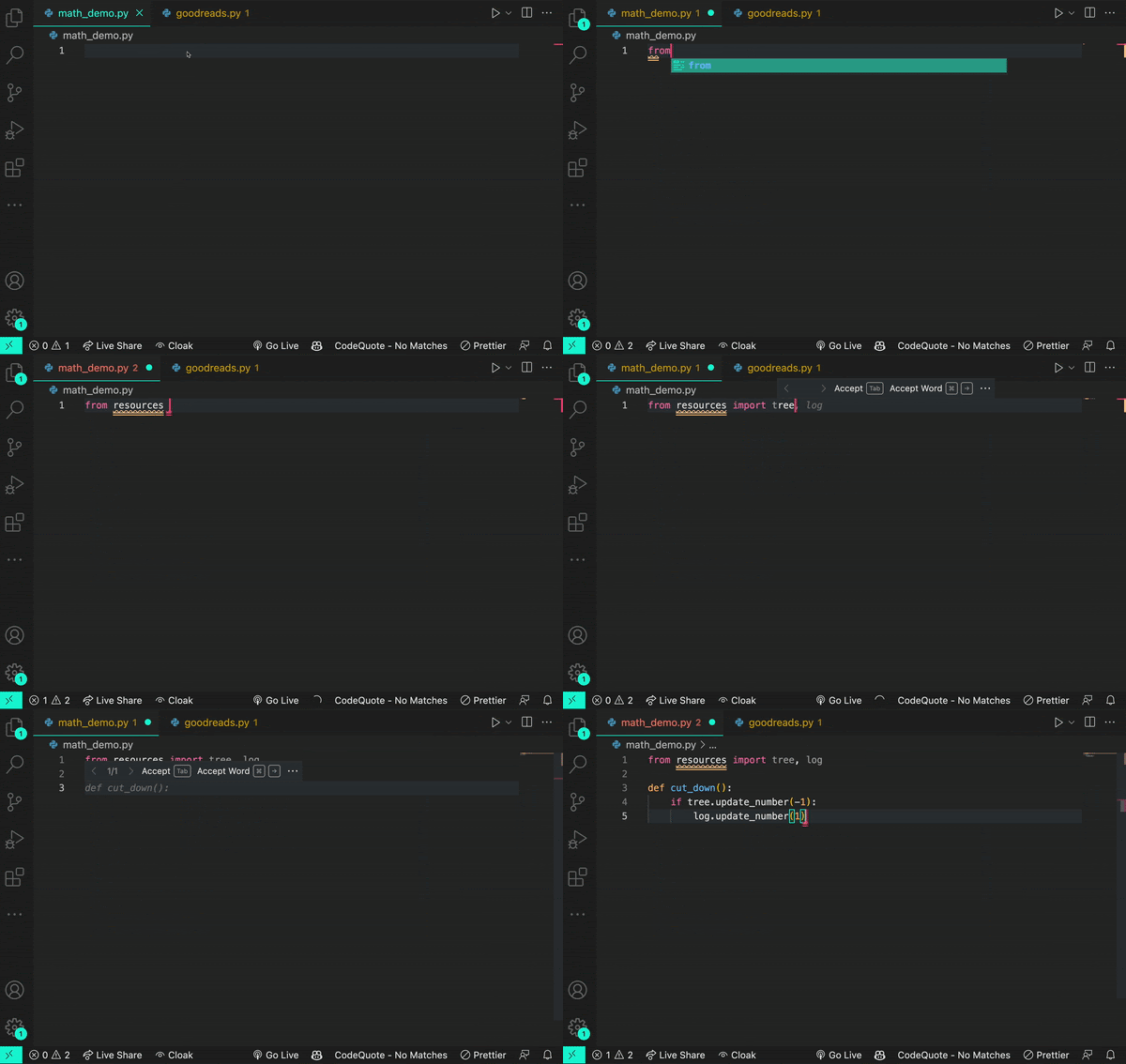
Here’s an example of how a transformer works. Let’s say you encounter the word log in your code. The transformer node at that place would use the attention mechanism to contextually predict what kind of log would come next in the sequence.

Let’s say, in the example below, you input the statement from math import log. A generative AI model would then infer you mean a logarithmic function.

And if you add the prompt from logging import log, it would infer that you’re using a logging function.
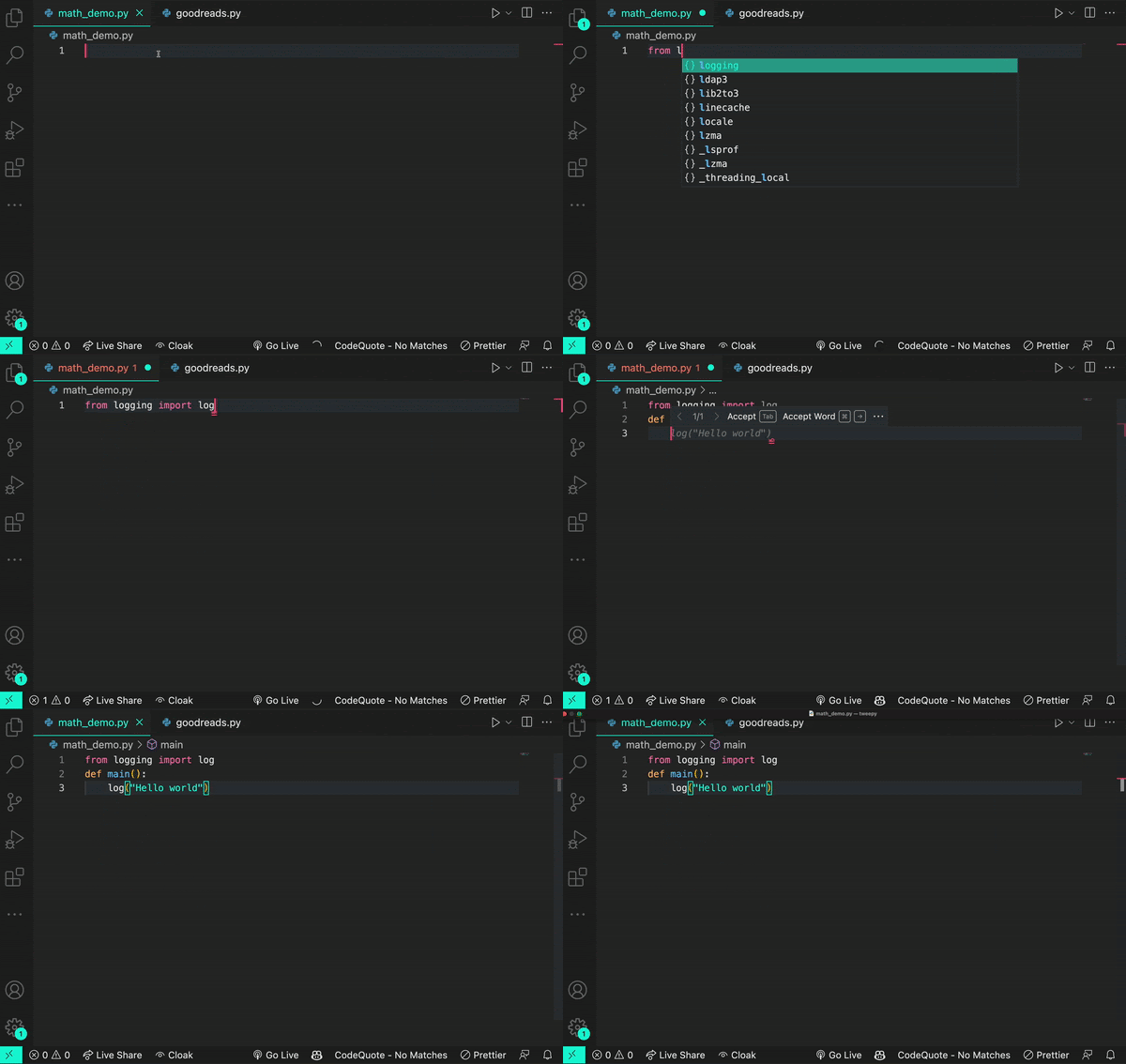
Though sometimes a log is just a log.
LLMs can be built using frameworks besides transformers. But LLMs using frameworks, like a recurrent neural network or long short-term memory, struggle with processing long sentences and paragraphs. They also typically require training on labeled data (making training a labor-intensive process). This limits the complexity and relevance of their outputs, and the data they can learn from.

Transformer LLMs, on the other hand, can train themselves on unlabeled data. Once they’re given basic learning objectives, LLMs take a part of the new input data and use it to practice their learning goals. Once they’ve achieved these goals on that portion of the input, they apply what they’ve learned to understand the rest of the input. This self-supervised learning process is what allows transformer LLMs to analyze massive amounts of unlabeled data—and the larger the dataset an LLM is trained on, the more they scale by processing that data.

Why should developers care about transformers and LLMs?

LLMs like OpenAI’s GPT-3, GPT-4, and Codex models are trained on an enormous amount of natural language data and publicly available source code. This is part of the reason why tools like ChatGPT and GitHub Copilot, which are built on these models, can produce contextually accurate outputs.

Here’s how GitHub Copilot produces coding suggestions:

  • All of the code you’ve written so far, or the code that comes before the cursor in an IDE, is fed to a series of algorithms that decide what parts of the code will be processed by GitHub Copilot.
  • Since it’s powered by a transformer-based LLM, GitHub Copilot will apply the patterns it’s abstracted from training data and apply those patterns to your input code.
  • The result: contextually relevant, original coding suggestions. GitHub Copilot will even filter out known security vulnerabilities, vulnerable code patterns, and code that matches other projects.

Keep in mind: creating new content such as text, code, and images is at the heart of generative AI. LLMs are adept at abstracting patterns from their training data, applying those patterns to existing language, and then producing language or a line of code that follows those patterns. Given the sheer scale of LLMs, they might generate a language or code sequence that doesn’t even exist yet. Just as you would review a colleague’s code, you should assess and validate AI-generated code, too.

Why context matters for AI coding tools

Developing good prompt crafting techniques is important because input code passes through something called a context window, which is present in all transformer-based LLMs. The context window represents the capacity of data an LLM can process. Though it can’t process an infinite amount of data, it can grow larger. Right now, the Codex model has a context window that allows it to process a couple of hundred lines of code, which has already advanced and accelerated coding tasks like code completion and code change summarization.

Developers use details from pull requests, a folder in a project, open issues—and the list goes on—to contextualize their code. So, when it comes to a coding tool with a limited context window, the challenge is to figure out what data, in addition to code, will lead to the best suggestions.

The order of the data also impacts a model’s contextual understanding. Recently, GitHub made updates to its pair programmer so that it considers not only the code immediately before the cursor, but also some of the code after the cursor. The paradigm—which is called Fill-In-the-Middle (FIM)—leaves a gap in the middle of the code for GitHub Copilot to fill, providing the tool with more context about the developer’s intended code and how it should align with the rest of the program. This helps produce higher quality code suggestions without any added latency.

Visuals can also contextualize code. Multimodal LLMs (MMLLMs) scale transformer LLMs so they process images and videos, as well as text. OpenAI recently released its new GPT-4 model—and Microsoft revealed its own MMLLM called Kosmos-1. These models are designed to respond to natural language and images, like alternating text and images, image-caption pairs, and text data.

GitHub’s senior developer advocate Christina Warren shares the latest on GPT-4 and the creative potential it holds for developers:

Our R&D team at GitHub Next has been working to move AI past the editor with GitHub Copilot X. With this new vision for the future of AI-powered software development, we’re not only adopting OpenAI’s new GPT-4 model, but also introducing chat and voice, and bringing GitHub Copilot to pull requests, the command line, and docs. See how we’re investigating the future of AI-powered software development >

How developers are using generative AI coding tools

The field of generative AI is filled with experiments and explorations to uncover the technology’s full capabilities—and how they can enable effective developer workflows. Generative AI tools are already changing how developers write code and build software, from improving productivity to helping developers focus on bigger problems.

While generative AI applications in software development are still being actively defined, today, developers are using generative AI coding tools to:

  • Get a head start on complex code translation tasks. A study presented at the 2021 International Conference on Intelligent User Interfaces found that generative AI provided developers with a skeletal framework to translate legacy source code into Python. Even if the suggestions weren’t always correct, developers found it easier to assess and fix those mistakes than manually translate the source code from scratch. They also noted that this process of reviewing and correcting was similar to what they already do when working with code produced by their colleagues.

With GitHub Copilot Labs, developers can use the companion VS Code extension (that’s separate from but dependent on the GitHub Copilot extension) to translate code into different programming languages. Watch how GitHub Developer Advocate, Michelle Mannering, uses GitHub Copilot Labs to translate her Python code into Ruby in just a few steps.

Our own research supports these findings, too. As we mentioned earlier, we found that developers who used GitHub Copilot coded up to 55% faster than those who didn’t. But productivity gains went beyond speed with 74% of developers reporting that they felt less frustrated when coding and were able to focus on more satisfying work.

  • Tackle new problems and get creative. The PACMPL study also found that developers used GitHub Copilot to find creative solutions when they were unsure of how to move forward. These developers searched for next possible steps and relied on the generative AI coding tool to assist with unfamiliar syntax, look up the right API, or discover the correct algorithm.

I was one of the developers who wrote GitHub Copilot, but prior to that work, I had never written a single line of TypeScript. That wasn’t a problem because I used the first prototype of GitHub Copilot to learn the language and, eventually, help ship the world’s first at-scale generative AI coding tool.

– Albert Ziegler, Principal Machine Learning Engineer // GitHub
  • Find answers without leaving their IDEs. Some participants in the PACMPL study also treated GitHub Copilot’s multi-suggestion pane like StackOverflow. Since they were able to describe their goals in natural language, participants could directly prompt GitHub Copilot to generate ideas for implementing their goals, and press Ctrl/Cmd + Enter to see a list of 10 suggestions. Even though this kind of exploration didn’t lead to deep knowledge, it helped one developer to effectively use an unfamiliar API.

A 2023 study published by GitHub in the Association for Computing Machinery’s Queue magazine also found that generative AI coding tools save developers the effort of searching for answers online. This provides them with more straightful forward answers, reduces context switching, and conserves mental energy.

Part of GitHub’s new vision for the future of AI-powered software development is a ChatGPT-like experience directly in your editor. Watch how Martin Woodward, GitHub’s Vice President of Developer Relations, uses GitHub Copilot Chat to find and fix bugs in his code.

  • Build better test coverage. Some generative AI coding tools excel in pattern recognition and completion. Developers are using these tools to build unit and functional tests—and even security tests—via natural language prompts. Some tools also offer security vulnerability filtering, so a developer will be alerted if they unknowingly introduce a vulnerability in their code.

Want to see some examples in action? Check out how Rizel Scarlett, a developer advocate at GitHub, uses GitHub Copilot to develop tests for her codebase:

  • Discover tricks and solutions they didn’t know they needed. Scarlett also wrote about eight unexpected ways developers can use GitHub Copilot—from prompting it to create a dictionary of two-letter ISO country codes and their contributing country name, to helping developers exit Vim, an editor with a sometimes finicky closing process. Want to learn more? Check out the full guide >

The bottom line

Generative AI provides humans with a new mode of interaction—and it doesn’t just alleviate the tedious parts of software development. It also inspires developers to be more creative, feel empowered to tackle big problems, and model large, complex solutions in ways they couldn’t before. From increasing productivity and offering alternative solutions, to helping you build new skills—like learning a new language or framework, or even writing clear comments and documentation—there are so many reasons to be excited about the next wave of software development. This is only the beginning.

Additional resources

What developers need to know about generative AI

Post Syndicated from Damian Brady original https://github.blog/2023-04-07-what-developers-need-to-know-about-generative-ai/

By now, you’ve heard of generative artificial intelligence (AI) tools like ChatGPT, DALL-E, and GitHub Copilot, among others. They’re gaining widespread interest thanks to the fact that they allow anyone to create content from email subject lines to code functions to artwork in a matter of moments.

This potential to revolutionize content creation across various industries makes it important to understand what generative AI is, how it’s being used, and who it’s being used by. In this article, we’ll explore what generative AI is, how it works, some real-world applications, and how it’s already changing the way people (and developers) work.

What is generative AI used for?

You may have heard the buzz around new generative AI tools like ChatGPT or the new Bing, but there’s a lot more to generative AI than any one single framework, project, or application.

Traditional AI systems are trained on large amounts of data to identify patterns, and they’re capable of performing specific tasks that can help people and organizations. But generative AI goes one step further by using complex systems and models to generate new, or novel, outputs in the form of an image, text, or audio based on natural language prompts.

Generative AI models and applications can, for example, be used for:

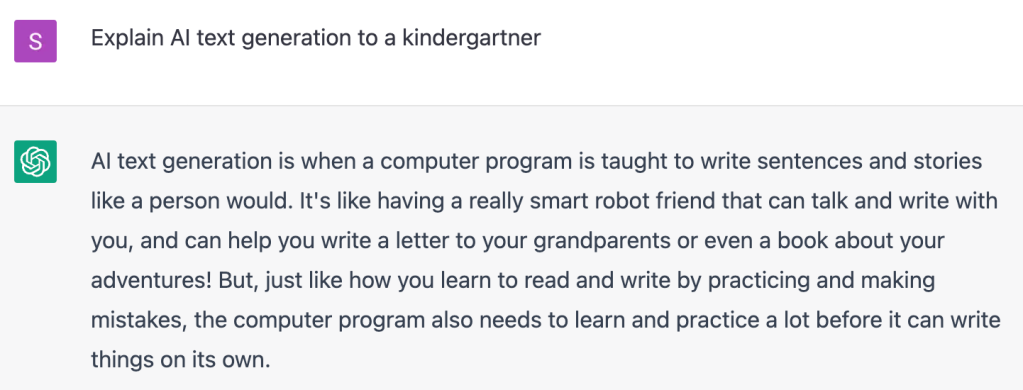
  • Text generation. Text generation, as a field, with AI tools has been in development since the 1970s—but more recently, AI researchers have been able to train generative adversarial networks (GANs) to produce text that models human-like speech. A prime example is OpenAI’s application ChatGPT, which has been trained on thousands of texts, books, articles, and code repositories, and can respond with full answers to natural language prompts and questions.
An example of text generation in ChatGPT
  • Image generation. Generative AI models can be used to create new images with natural language prompts, which is one of the most popular techniques with current tools and applications. The goal with text-to-image generation is to create an image that accurately represents the content of a given prompt. For example, when we give the text prompt, “impressionist style oil painting of a Shiba Inu dog giving a tarot card reading,” to the popular AI image generator DALL-E 2 we get something that looks like this (and yes, it’s a gem):
An AI-generated image from DALL-E 2 of a Shiba Inu dog giving a tarot card reading

An example of a video created with a text prompt using diffusion models from [Imagen Video](https://imagen.research.google/).

  • Programming code generation. Rather than scouring the internet or developer community groups for help with code examples, generative AI models can be used to help generate new programming code with natural language prompts, complete partially written code with suggestions, or even translate code from one programming language to another. This is how, at a simple level, GitHub Copilot works: it uses OpenAI’sCodex model to offer code suggestions right from a developer’s editor. However, as you would with any software development tool, we encourage you to review generated code before merging into production.

  • Data generation. Creating new data—which is called synthetic data—and augmenting existing data sets is another common use case for generative AI. This involves generating new samples from an existing dataset to increase the dataset’s size and improve machine learning models trained on it, all while providing a layer of privacy since real user data is not being utilized to power models. Synthetic data generation provides a way to create useful, meaningful data for more than just ML training though—a number of self-driving car companies like Cruise and Waymo utilize AI-generated synthetic data for training perception systems to prepare vehicles for real-world situations while in operation.

  • Language translation. Natural-language understanding (NLU) models combined with generative AI have become increasingly popular to provide language translations on-the-fly. These types of tools help companies break language barriers and increase their scope of accessibility for customer bases by being able to provide things like support or documentation in their native language. Through complex, deep learning algorithms, generative AI is able to understand the context of a source text and linguistically construct those sentences in another language. This practice can also apply to coding languages, for example, translating a desired function from Python to Java.

The bottom line: Even though generative AI is a relatively new technology, it’s already being used in consumer and business applications. The use cases, as well as the quantity of applications created with it, will continue evolving to meet more distinct and specific needs.

How does generative AI work?

Generative AI models work by using neural networks to identify patterns from large sets of data, then generate new and original data or content.

But what are neural networks? In simple terms, they use interconnected nodes that are inspired by neurons in the human brain. These networks are the foundation of machine learning and deep learning models, which use a complex structure of algorithms to process large amounts of data such as text, code, or images. Training these neural networks involves adjusting the weights or parameters of the connections between neurons to minimize the difference between predicted and desired outputs, which allows the network to learn from mistakes and make more accurate predictions based on the data.

Algorithms are a key component of machine learning and generative AI models. But beyond helping machines learn from data, algorithms are also used to optimize accuracy of outputs and make decisions, or recommendations, based on input data.

While algorithms help automate these processes, building a generative AI model is incredibly complex due to the massive amounts of data and compute resources they require. People and organizations need large datasets to train these models, and generating high-quality data can be time-consuming and expensive.

To restate the obvious, these models are complicated. Need proof? Here are some common generative AI models and how they work:

  • Large language models (LLM): LLMs are a type of machine learning model that process and generate natural language text. One of the most significant advancements in the development of large language models has been the availability of vast amounts of text data, such as books, websites, and social media posts. This data can be used to train models that are capable of predicting and generating natural language responses in a variety of contexts. As a result, large language models have multiple practical applications, such as virtual assistants, chatbots, or text generators, like ChatGPT.

  • Generative adversarial networks (GAN): GANs are one of the most used models for generative AI, and they employ two different neural networks. GANs consist of two different types of neural networks: a generator and a discriminator. The generator network generates new data, such as images or audio, from a random noise signal while the discriminator is trained to distinguish between real data from the training set and the data produced by the generator.

During training, the generator tries to create data that can trick the discriminator network into thinking it’s real. This “adversarial” process will continue until the generator can produce data that is totally indistinguishable from real data in the training set. This process helps both networks improve at their respective tasks, which ultimately results in more realistic and higher-quality generated data.

A diagram illustrating how a generative adversarial network works. Image [CC BY-SA 4.0](https://creativecommons.org/licenses/by-sa/4.0/deed.en) האדם-החושב on wikipedia
  • Transformer-based models: A transformer-based model’s neural networks operate by learning context and meaning through tracking relationships of sequential data, which means these models are really good at natural language processing tasks like machine translation, language modeling, and answering questions. These models have been used in popular language models, such as GPT-4 (which stands for Generative Pre-trained Transformer 4), and have also been adapted for other such tasks that require the modeling of sequential data such as image recognition.
  • Variational autoencoder models (VAEs): These models are similar to GANs in that they work with two different neural networks: encoders and decoders. VAEs can take a large amount of data and compress it into a smaller representation, which can be used to create new data that is similar to the original data. VAEs are often used in image, video, and audio generation—and here’s a fun fact: you can train a VAE on datasets like CelebA, which contains over 200,000 images of celebrities, to create completely new portraits of people that don’t exist.
 The smile vector, a concept vector discovered by [Tom White](https://aiartists.org/tom-white) using VAEs trained on the CelebA dataset.
The smile vector, a concept vector discovered by Tom White using VAEs trained on the CelebA dataset.

The real-world applications of generative AI

The impact of generative AI is quickly becoming apparent—but it’s still in its early days. Despite this, we’re already seeing a proliferation of applications, products, and open source projects that are using generative AI models to achieve specific outcomes for people and organizations (and yes, developers, too).

Though generative AI is constantly evolving, it already has some solid real world applications. Here’s just a few of them:

Coding

New and seasoned developers alike can utilize generative AI to improve their coding processes. Generative AI coding tools can help automate some of the more repetitive tasks, like testing, as well as complete code or even generate brand new code. GitHub has its own AI-powered pair programmer, GitHub Copilot, which uses generative AI to provide developers with code suggestions. And GitHub also has announced GitHub Copilot X, which brings generative AI to more of the developer experience across the editor, pull requests, documentation, CLI, and more.

Accessibility

Generative AI has the potential to greatly impact and improve accessibility for folks with disabilities through a variety of modalities, such as speech-to-text transcription, text-to-speech audio generation, or assistive technologies. One of the most exciting facets of our GitHub Copilot tool is its voice-activated capabilities that allow developers with difficulties using a keyboard to code with their voice. By leveraging the power of generative AI, these types of tools are paving the way for a more inclusive and accessible future in technology.

Gaming

Generative AI can take gaming to the next level (get it? 😉) by generating new characters, storylines, design components, and more. Case in point: The developer behind the game, This Girl Does Not Exist, has said that every component of the game—from the storyline to the art and even the music—was generated entirely by AI. This use of generative AI can enable gaming studios to create new and exciting content for their users, all without increasing the developer workload, which frees them up to work on other aspects of the game, such as story development.

Web design

Designers can utilize generative AI tools to automate the design process and save significant time and resources, which allows for a more streamlined and efficient workflow. Additionally, incorporating these tools into the development process can lead to the creation of highly customized designs and logos, enhancing the overall user experience and engagement with the website or application. Generative AI tools can also be used to do some of the more tedious work, such as creating design layouts that are optimized and adaptable across devices. For example, designers can use tools like designs.ai to quickly generate logos, banners, or mockups for their websites.

Microsoft and other industry players are increasingly utilizing generative AI models in search to create more personalized experiences. This includes query expansion, which generates relevant keywords to reduce the number of searches. So, rather than the search engine returning a list of links, generative AI can help these new and improved models return search results in the form of natural language responses. Bing now includes AI-powered features in partnership with OpenAI that provide answers to complex questions and allow users to ask follow-up questions in a chatbox for more refined responses.

Healthcare

Interest has emerged around the potential applications of generative AI in the healthcare field to improve disease detection and diagnosis, advance medical research, and accelerate progress in the pharmaceutical space. Potentially, generative AI could be used to analyze large amounts of data to simulate chemical structures and predict new compounds will be the most effective for new drug discoveries. NVIDIA Clara is one example of a generative AI model specifically designed for medical imaging and healthcare research. (Plus, Gartner suggests more than 30 percent of new pharmaceutical drugs and materials will be discovered via generative AI models by 2025.)

Fun fact: Did you know that ChatGPT recently passed the US Medical Licensing exam without any intervention from clinicians?

Marketing and advertising

In marketing, content is king—and generative AI is making it easier than ever to quickly create large amounts of it. A number of companies, agencies, and creators are already turning to generative AI tools to create images for social posts or write captions, product descriptions, blog posts, email subject lines, and more. Generative AI can also help companies personalize ad experiences by creating custom, engaging content for individuals at speed. Writers, marketers, and creators can leverage tools like Jasper to generate copy, Surfer SEO to optimize organic search, or albert.ai to personalize digital advertising content.

Art and design

As we’ve seen above, the power of AI can be harnessed to create some incredible portraits in a matter of moments (re: the future-telling Shiba 🐕). Artists and designers alike are using these AI tools as a source of inspiration. For example, architects can quickly create 3D models of objects or environments and artists can breathe new life into their portraits by using AI to apply different styles, like adding a Cubist style to their original image. Need proof? Designers are already starting to use AI image generators, such as Midjourney and Microsoft Designer, to create high-quality images by simply typing out Discord commands.
Finance

In a recent discussion about tech trends and how they’ll affect the finance sector, Michael Schrage, a research fellow at the MIT Sloan School Initiative on the Digital Economy, said, “I think, increasingly, we’re going to be seeing generative AI used for financial forecasts and scenario generation.” This is a likely path forward—generative AI can be used to analyze large amounts of data to detect fraud, manage risk, and inform decision making. And that has obvious applications in the financial services industry.

Manufacturing

Manufacturers are starting to turn to generative AI solutions to help with product design, quality control, and predictive maintenance. Generative AI can be used to analyze historical data to improve machine failure predictions and help manufacturers with maintenance planning. According to research conducted by Capgemini, more than half of European manufacturers are implementing some AI solutions (although so far, these aren’t generative AI solutions). This is largely because the sheer amount of manufacturing data is easier for machines to analyze at speed than humans.

AI as a partner: Generative AI models and tools are narrow in focus, and work best at generating content, code, and images. In research at GitHub, we’ve found that GitHub Copilot helps developers code up to 55% faster, underscoring how generative AI models and tools can improve overall productivity and boost efficiency. Metrics like these show how generative AI tools are already changing how people and teams work—but they also underscore how these tools act as complement to human efforts.

Take this with you

Whether it’s creating visual assets for an ad campaign or augmenting medical images to help diagnose diseases, generative AI is helping us solve complex problems at speed. And the emergence of generative AI-based programming tools has revolutionized the way developers approach writing code.

We know that developers want to design and write software quickly, and tools like GitHub Copilot are enabling them to access large datasets to write more efficient code and boost productivity. In fact, 96% of developers surveyed reported spending less time on repetitive tasks using GitHub Copilot, which in turn allowed 74% of them to focus on more rewarding work.

While these models aren’t perfect yet, they’re getting better by the day—and that’s creating an exciting immediate future for developers and generative AI.

6 strategic ways to level up your CI/CD pipeline

Post Syndicated from Damian Brady original https://github.blog/2022-07-19-6-strategic-ways-to-level-up-your-ci-cd-pipeline/

In today’s world, a well-tuned CI/CD pipeline is a critical component for any development team looking to build and ship high-quality software fast. But here’s the thing: It’s rare you’ll find two CI/CD pipelines that are exactly the same. And that’s by design. Every CI/CD pipeline should be built to meet a team’s specific needs.

Despite this, there are levels of maturity when building a CI/CD pipeline that range from basic implementations to more advanced automation workflows. But wherever you are on your CI/CD journey, there are a few things you can do to level up your CI/CD pipeline.

With that, here are six strategic things I often see missing from CI/CD pipelines that can help any developer or team advance and improve their workflows.

Need a primer on how to build a CI/CD pipeline on GitHub? Check out our guide

1. Add performance, device compatibility, and accessibility testing

Performance, device compatibility, and accessibility testing are often a manual exercise—and something that some teams are only partially doing. Manually testing for these things can slow down your delivery cycle, so many teams either eat the costs or just don’t do it.

But if these things are important to you—and they should be—there are tools that can be included in your CI/CD pipeline to automate the testing for and discovery of any issues.

Performance and device compatibility testing

One tool, for example, is Playwright which can do end-to-end testing, automated testing, and everything in between. You can also use it to do UI testing so you can catch issues in your product.

Visual regression testing

There’s another class of tools that can help you automate visual regression testing to make sure you haven’t changed the UI when you weren’t intending to do so. That means you haven’t introduced any unexpected UI changes. This can be super useful for device compatibility testing too. If something looks bad on one device, you can quickly correct it.

Accessibility testing

This is another incredibly impactful class of automated tests to add to your CI/CD pipeline. Why? Because every one of your customers should be valuable to you—and if even just a fraction of your customers have trouble using your product, that matters.

There are a ton of accessibility testing tools that can tell you things like if you have appropriate content for screen readers or if the colors on your website make sense to someone with color blindness. A great example is Pa11y, an open source tool you can use to run automated accessibility tests via the command line or Node.js.

2. Incorporate more automated security testing

Security should always be part of your software delivery pipeline, and it’s incredibly vital in today’s environments. Even still, I’ve seen a number of teams and companies who aren’t incorporating automated security tests in their CI/CD pipelines and instead treat security as something that happens after the DevOps process takes place.

Here’s the good news: There are a lot of tools that can help you do this without too much effort—including GitHub-native tools like Dependabot, code scanning, secret scanning, and if you’re a GitHub Enterprise user, you can bundle all the security functionality GitHub offers and more with GitHub Advanced Security. But even with a free GitHub account, you still can use Dependabot on any public or private repository, and code scanning and secret scanning are available on all public repositories, too.

Dependabot, for example, can help you mitigate any potential issues in your dependencies by scanning them for outdated packages and automatically creating pull requests for teams to fix them. It can also be configured to automatically update any project dependencies, too.

This is super impactful. Developers and teams often don’t update their dependencies because of the time it takes—or, sometimes they even just forget to update their dependencies. Dependencies are a legitimate source of vulnerabilities that are all too often overlooked.

Additionally, code scanning and secret scanning are offered on the GitHub platform and can be built into your CI/CD pipeline to improve your security profile. Where code scanning offers SAST capabilities that show if your code itself contains any known vulnerabilities, secret scanning makes sure you’re not leaking any credentials to your repositories. It can also be used to prevent any pushes to your repository if there are any exposed credentials.

The biggest thing is that teams should treat security as something you do throughout the SDLC—and, not just before and after something goes to production. You should, of course, always be checking for security issues. But the earlier you can catch issues, the better (hello DevSecOps). So including security testing within your CI/CD pipeline is an essential practice.

A screenshot of automated security testing workflows on GitHub.

3. Build a phased testing strategy

Phased testing is a great strategy for making sure you’re able to deliver secure software fast and at scale. But it’s also something that takes time to build. And consequently, a lot of teams just aren’t doing it.

Often, developers will put all or most of their automated testing at the build phase in their CI/CD pipelines. That means the build can take a long time to execute. And while there’s nothing necessarily wrong with this, you may find that it takes longer to get feedback on your code.

With phased testing, you can catch the big things early and get faster feedback on your codebase. The goal is to have a quick build that rapidly tests the fundamentals with simpler tests such as unit tests. After this, you may then perhaps deploy your build to a test environment to execute additional tests such as some accessibility testing, user testing, and other things that may take longer to execute. This means you’re working your way through a number of possible issues starting with the most critical elements first.

As you get closer to production in a phased testing model, you’ll want to test more and more things. This will likely include key items such as regression testing to make sure previous bugs aren’t reappearing in your codebase. At this stage, things are less likely to go wrong. But you’ll want to effectively catch the big things early and then narrow your testing down to ensure you’re shipping a very high-quality application.

Oh, and of course, there’s also testing in production, which is its own thing. But you can incorporate post-deployment tests into your production environment. You may have a hypothesis you want to test about if something works in production and execute tests to find out. At GitHub, we do this a lot by releasing new features behind feature flags and then enabling that flag for a subset of our user base to collect feedback.

4. Invest in blue-green deployments for easier rollouts

When it comes to releasing a new version of an application, what’s one word you think of? For me, the big word is “stress” (although “excitement” and “relief” are a close second and third). Blue-green deployments are one way to improve how you roll out a new version of an application in your CI/CD pipeline, but it can also be a bit more complex, too.

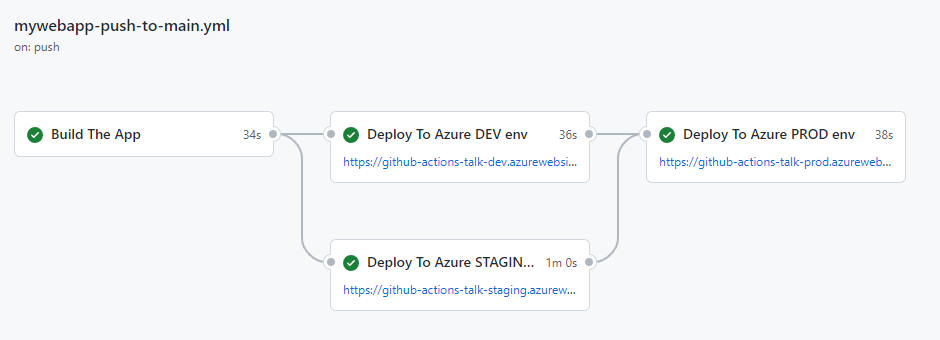
In the simplest terms, a blue-green deployment involves having two or more versions of your application in production and slowly moving your users from an older version to a newer one. This means that when you need to update or deploy a new version of an application, it goes to an “unused” production environment, and you can slowly move your users across safely.

The benefit of this is you can quickly roll back any changes by redirecting users to another prod environment. It also leads to drastically reduced downtime while you’re deploying a new application version. You can get everything set up in the environment and then just point people to a new one.

Blue-green deployments are perfect when you have two environments that are interchangeable. In reality with larger systems, you may have a suite of web servers or a number of serverless applications running. In practice, this means you might be using a load balancer that can distribute traffic across multiple locations. The canonical example of a load balancer is nginx—but every cloud has its own offerings (like Azure Front Door or Elastic Load Balancing on AWS).

This kind of strategy is common among organizations using Kubernetes. You may have a number of pods that are running and when you do a deployment, Kubernetes will deploy updates to new instances and redirects traffic. The management of which ones are up and running operates under the same principles as blue-green deployments—but you’re also navigating a far more complex architecture.

5. Adopt infrastructure-as-code for greater flexibility

Infrastructure provisioning is the practice of building IT infrastructure as you need it—and some teams will adopt infrastructure-as-code (IaC) in their CI/CD pipelines to provision resources automatically at specific points in the pipeline.

I strongly recommend doing this. The goal of IaC is that when you’re deploying your application, you’re also deploying your infrastructure. That means you always know what your infrastructure looks like in production, and your testing environment is also replicable to what’s in production.

There are two benefits to building IaC into your CI/CD pipeline:

  1. It helps you make sure that your application and the infrastructure it runs on are routinely being tested in tandem. The old school way of doing things was to say that this is a production machine and it looks like this—and this is our testing machine and we want it to be as close to production as possible. But almost always, you’ll find that production environments change over time—and it makes it harder to know what your production environment is.

  2. It helps you mitigate any real-time issues with your infrastructure. That means if your production server goes down, it’s not a disaster—you can just re-deploy it (and even automate your redeployment at that).

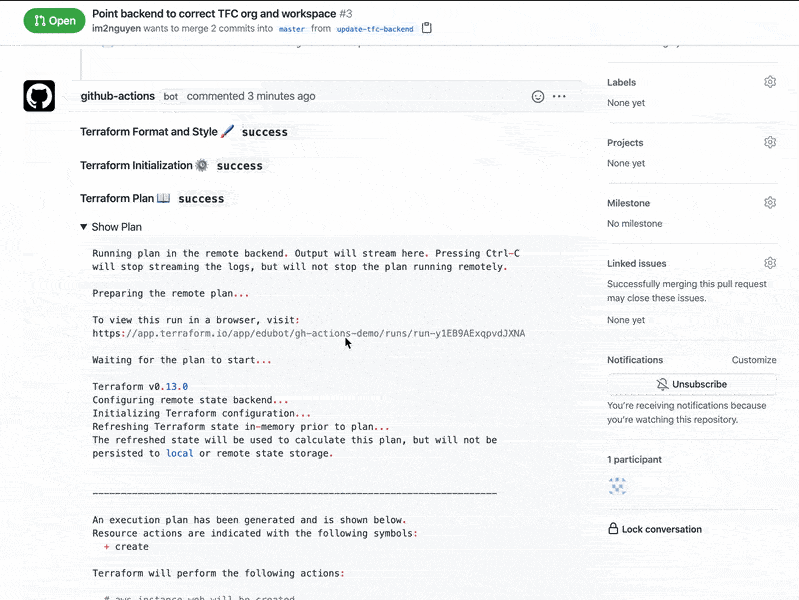
Last but not least: building IaC into your CI/CD pipeline means you can more effectively do things like blue-green deployments. You can deploy a new version of an application—code and infrastructure included—and reroute your DNS to go to that version. If it doesn’t work, that’s fine—you can quickly roll back to your previous version.

A screenshot of a GitHub Actions Terraform workflow.

6. Create checkpoints for automated rollbacks

Ideally, you want to avoid ever having to roll back a software release. But let’s be honest. We all make mistakes and sometimes code that worked in your development or test environment doesn’t work perfectly in production.

When you need to roll back a release to a previous application version, automation makes it much easier to do so quickly. I think of a rollback as a general term for mitigating production problems by reverting to a previous version, whether that’s redeploying or restoring from backup. If you have a great CI/CD pipeline, you can ideally fix a problem and roll out an update immediately—so you can avoid having to go to a previous app version.

Looking for more ways to improve your CI/CD pipeline?

Try exploring the GitHub Marketplace for CI/CD and automation workflow templates. At the time I’m writing this, there are more than 14,000 pre-built, community-developed CI/CD and automation actions in the GitHub Marketplace. And, of course, you can always build your own custom workflows with GitHub Actions.

Explore the GitHub Marketplace

Additional resources

5 DevOps tips to speed up your developer workflow

Post Syndicated from Damian Brady original https://github.blog/2021-11-30-5-devops-tips-to-speed-up-your-developer-workflow/

TL;DR: From learning YAML to scripting with Bash, here are a few simple tips for developers who want to speed up their workflows.

From CI/CD to containerization management and server provisioning, DevOps gets a lot of buzz in tech today. You could even say that it’s a buzz … word.

As a developer, you might be part of a DevOps team, but you’re focused on building great software, not necessarily provisioning servers and managing containers.

Even still, a lot of what developers, DevOps engineers, and IT teams handle in today’s software development life cycle is focused on tools, testing, automations, and server orchestration. And, that’s even more true if you’re a team of one or engaging in a big open source project.

Here are five DevOps tips for any developer looking to work smarter and faster.

Tip #1: A little YAML can make frontend work easier

Initially released in 2001, YAML has become one of the defacto languages for a lot of declarative automation—and it’s commonly used in DevOps and development work for an array of frontend configurations, automations, and more.

YAML, which stands for Yet Another Markup Language, is a superset of JSON and is notable for being a human readable language. That means it focuses less on characters, like brackets, braces, and quotes ({}, [], “).

Here’s why this matters: Learning YAML (or even stepping up your YAML skills) makes it easier to store configurations for your own applications, like your settings in an easy-to-write and easy-to-read language.

For this reason, you’re likely to come across YAML files anywhere from enterprise development workflows to open source projects—and yes, you’ll see plenty of YAML files on GitHub (it powers a product we’re pretty fond of: GitHub Actions, but more on this later).

Whether you can apply YAML directly to your day-to-day dev workflows or leverage different tools that use YAML, there are some pretty big benefits to getting started with this language—or stepping up your YAML skills.

Looking to learn more about YAML? Try the Learn YAML in Y Minutes guide.

Tip #2: A few DevOps tools to keep you moving fast

Let’s clear up one thing first: “DevOps tools” is an umbrella term that covers everything from cloud platforms, server orchestration tools, code management, version control, and dozens of other things.

So when we talk about “DevOps tools,” we’re really talking about technologies that make it easier to write, test, host, and release software, as well as reduce any worries around unexpected failures.

Here are three “DevOps tools” that can speed up your workflows and let you focus on building great software.

Git

You’re on the GitHub Blog, so we’re pretty sure you’re familiar with Git as a version control system and distributed source code management tool. It’s a mainstay of developers and a popular DevOps tool.

Here’s why: Git makes version control easy and gives teams a straightforward way to collaborate, experiment with different branches, and merge new features into the main software branch.

Learn how Git works >

Cloud-hosted integrated development environments (IDE)

I know, I know, saying cloud-hosted integrated development environments, or cloud IDEs, out loud is a bit of a mouthful (thank you, marketing). But these platforms are something you should start exploring immediately, if you haven’t already.

Here’s why: Cloud IDEs are fully hosted developer environments that let you write, run, and debug code—and they make spinning up new, preconfigured environments fast. Do you need proof? We launched our own cloud IDE called Codespaces earlier this year and started using it internally to build GitHub. It used to take us up to 45 minutes to spin up new developer environments—now it takes 10 seconds :mindblown:.

Cloud IDEs give you a super simple way to quickly spin up new, pre-configured development environments (and disposable development environments). Also, since they’re hosted in the cloud, you don’t need to worry about how powerful the computer you’re coding on is (friendly shout out here goes to the intrepid folks who have started coding on tablets).

Picture this: Your laptop fries itself (which has happened to me once or twice). You might have versions of npm, tools for connecting to your cloud provider, and any number of other configurations that you just lost. If you use a cloud IDE, you can spin up an environment in the cloud with all of your configurations, and that’s a magical thing to see.

Learn how cloud IDEs work >

Containers

If you don’t want to use a cloud IDE, dev containers are something you can use locally or in the cloud. Containers have exploded in popularity over the past decade for their utility in microservices architectures, CI/CD, and cloud-native application development, among other things. By nature, containers are lightweight and efficient making it easy to build, test, stage, and deploy software.

Learning the basics of containerization can be really handy—especially when it comes to testing your code in a lightweight environment that imitates your production environment. If you need to upgrade a library or try using an application on the next version of Node, you can do that really easily with containers before you hit production.

This can be especially useful for ”shifting left,” which is an important DevOps strategy. Catching issues or problems before you ever hit production can save a lot of headaches. If you can find those issues while you’re writing the code, that’s even better. Any problems will eventually mean more work, so the earlier you can catch them the better. After all, catching a problem before you get to the compiling stage can save you a headache or two.

Learn how containers work >

Tip #3: Automated testing and continuous integration (CI) to stay one step ahead

In any conversation around DevOps, you’ll probably hear about automated testing and continuous integration (CI). Yet while automated testing is typically part of a good CI development practice, it’s not strictly a requirement (but it should be … or at least part of your continuous delivery phase).

Most teams have some basic unit testing as part of their CI process, but stop short of testing for security vulnerabilities, automated UI testing, integration testing, etc.

Even still, these are two things that can help you step up your workflows by: (A) making sure your code works with the main branch; and (B) catching things like security vulnerabilities and other problems, so you can lessen your DevOps team’s workload.

Here’s how:

Using GitHub Actions to run automated tests

From ordering pizza to triggering an alarm, there’s a lot you can do with GitHub Actions. It all comes down to workflow automations.When it comes to setting up automated tests with GitHub Actions, you can either build your own action or leverage pre-built actions in the GitHub Marketplace.

[Learn how to build your own GitHub Actions workflow automations.]> Pro tip: Using Actions workflows that run on pull requests is a great way to check for security vulnerabilities, problems in your code, or anything else before you merge to the main branch. Doing this means you’re one step ahead and helps keep your main branch clean.

[Want to learn more about GitHub Actions? Check out our guide.]You can also configure your workflows to deploy to ephemeral testing environments. This means you can run your tests and deploy your changes to an environment where you can test your application. You can even configure your workflow to automatically tear these testing environments down after you’re finished.

All this means you’re testing things as much as possible before it’s time to go to production.

Using GitHub Actions to create CI pipelines

CI, or continuous integration, is the process of automatically integrating code from multiple people for a given project. A good CI practice means you can work faster, make sure your code compiles correctly, merge code changes more efficiently, and be sure your code plays nice with everyone else’s work.

The most powerful CI workflows are the ones that test all of the things you care about every single time you push your code to the server.

If you’re working on GitHub, GitHub Actions can do this for you, too. There are plenty of pre-built CI workflows in the GitHub Marketplace (and you can always build your own), but there are a few things to keep in mind when you start incorporating CI into your development flow. These include:

  • Run the necessary tests: Think about what build, integration, and testing automations you ideally need. You’ll want to consider things that may have gone wrong with releases in the past, and see if you can add a test for that in your CI.
  • Balance the time it takes to test your code with how fast you’re pushing new code: Let’s say you have teams pushing new code every five minutes (hypothetically), but the tests you’re running take 10 minutes to execute … that’s not great. It’s always best to balance what you’re checking and when with how long it takes, which might mean trimming your ideal list of tests down to a more realistic number, at least for your CI builds.

Get a tutorial on creating a CI pipeline with GitHub Actions >

Tip #4: Server orchestration tips for flexibility and speed

If you’re building a cloud-native application (or really even just using a few different servers, VMs, containers, or hosting services), you’re probably dealing with a few environments. Being able to make sure your application and infrastructure play well together means you can rely a little less on an operations team trying to get your software to run on existing infrastructure at the last minute.

That’s where server orchestration comes in. Server orchestration—or infrastructure orchestration—is often the job of IT and DevOps teams and includes configuring, managing, provisioning, and coordinating systems, applications, and core infrastructure needed to run software.

Pro tip: There’s a suite of tools that allow you to define and update the infrastructure you need to use.

A big advantage of infrastructure automation is improved scalability—and defined environments means it’s easier to tear down and rebuild an environment when something goes wrong (instead of starting from scratch, but we’ve all been there).

There’s another big advantage: If you want to test something, you don’t have to worry about asking the operations team to go and set up a server for you. You can instead do that as part of a workflow. You don’t have to worry about manually provisioning hardware or system requirements.

How to get started: Don’t try to replace everything in your environment with automated infrastructure automation. Instead, look for a part that might be easy to automate and start there—then the next piece and the next piece after that.

And definitely never start in production. Instead, begin with your testing environment. Once that works, move to your staging environment (and if that works, you can trust it’s good for production).

Tip #5: Repeatable tasks? Try scripting them with Bash or PowerShell

Picture this: You have a bunch of repeatable tasks that you’re executing on a local basis, and you’re spending way too much time working through them every week. There’s a better—and more efficient—way to handle this. How? Scripting with either Bash or PowerShell.

Bash has deep roots in the Unix world, and it’s a mainstay of IT and DevOps teams, and more than a few developers too. PowerShell is comparatively newer. Designed by Microsoft and launched in 2006, PowerShell replaced the command shell and earlier scripting languages for task automation and configuration management in Windows environments.

Today, both Bash and PowerShell are cross-platform (though most people with a Windows background will use PowerShell, and most people familiar with Linux or macOS will use Bash out of habit).

Pro tip: Bash and PowerShell have different ways of working. Where PowerShell works with objects, Bash passes information around as strings. Even still, whatever you choose is largely up to personal preference.

One of the more useful things I’ve done with Bash and PowerShell, for example, is building a script that pulls down the latest version of the code, creates a new branch, switches to that branch, pushes a draft pull request up to GitHub, and then opens VSCode (sub in your editor of choice here) in that branch.

It’s a series of small steps to make your life much easier. It’s something you might do once or twice a week, and if you can script that—it gives you more time to focus on what matters: writing great code.

The bottom line

There’s a big difference between an IT pro, a DevOps engineer, and a developer. But in today’s world of software development, a lot of core DevOps practices are becoming everyone’s job. Plus, any developer that can learn a few DevOps tricks can have an easier time working independently (and more efficiently at that), and continue to focus on what matters most: building great software. That’s something we can all get behind.

Additional resources