All posts by Francisco Morillo

Build up-to-date generative AI applications with real-time vector embedding blueprints for Amazon MSK

Post Syndicated from Francisco Morillo original https://aws.amazon.com/blogs/big-data/build-up-to-date-generative-ai-applications-with-real-time-vector-embedding-blueprints-for-amazon-msk/

Businesses today heavily rely on advanced technology to boost customer engagement and streamline operations. Generative AI, particularly through the use of large language models (LLMs), has become a focal point for creating intelligent applications that deliver personalized experiences. However, static pre-trained models often struggle to provide accurate and up-to-date responses without real-time data.

To help address this, we’re introducing a real-time vector embedding blueprint, which simplifies building real-time AI applications by automatically generating vector embeddings using Amazon Bedrock from streaming data in Amazon Managed Streaming for Apache Kafka (Amazon MSK) and indexing them in Amazon OpenSearch Service.

In this post, we discuss the importance of real-time data for generative AI applications, typical architectural patterns for building Retrieval Augmented Generation (RAG) capabilities, and how to use real-time vector embedding blueprints for Amazon MSK to simplify your RAG architecture. We cover the key components required to ingest streaming data, generate vector embeddings, and store them in a vector database. This will enable RAG capabilities for your generative AI models.

The importance of real-time data with generative AI

The potential applications of generative AI extend well beyond chatbots, encompassing various scenarios such as content generation, personalized marketing, and data analysis. For example, businesses can use generative AI for sentiment analysis of customer reviews, transforming vast amounts of feedback into actionable insights. In a world where businesses continuously generate data—from Internet of Things (IoT) devices to application logs—the ability to process this data swiftly and accurately is paramount.

Traditional large language models (LLMs) are trained on vast datasets but are often limited by their reliance on static information. As a result, they can generate outdated or irrelevant responses, leading to user frustration. This limitation highlights the importance of integrating real-time data streams into AI applications. Generative AI applications need contextually rich, up-to-date information to make sure they provide accurate, reliable, and meaningful responses to end users. Without access to the latest data, these models risk delivering suboptimal outputs that fail to meet user needs. Using real-time data streams is crucial for powering next-generation generative AI applications.

Retrieval Augmented Generation

Retrieval Augmented Generation (RAG) is the process of optimizing the output of an LLM so it references an authoritative knowledge base outside of its training data sources before generating a response. LLMs are trained on vast volumes of data and use billions of parameters to generate original output for tasks such as answering questions, translating languages, and completing sentences. RAG extends the already powerful capabilities of LLMs to specific domains or an organization’s internal knowledge base, all without the need to retrain the model. It’s a cost-effective approach to improving LLM output so it remains relevant, accurate, and useful in various contexts.

At the core of RAG is the ability to fetch the most relevant information from a continuously updated vector database. Vector embeddings are numerical representations that capture the relationships and meanings of words, sentences, and other data types. They enable more nuanced and effective semantic searches than traditional keyword-based systems. By converting data into vector embeddings, organizations can build robust retrieval mechanisms that enhance the output of LLMs.

At the time of writing, many processes for creating and managing vector embeddings occur in batch mode. This approach can lead to stale data in the vector database, diminishing the effectiveness of RAG applications and the responses that AI applications generate. A streaming engine capable of invoking embedding models and writing directly to a vector database can help maintain an up-to-date RAG vector database. This helps make sure generative AI models can fetch the more relevant information in real time, providing timely and more contextually accurate outputs.

Solution overview

To build an efficient real-time generative AI application, we can divide the flow of the application into two main parts:

  • Data ingestion – This involves ingesting data from streaming sources, converting it to vector embeddings, and storing them in a vector database
  • Insights retrieval – This involves invoking an LLM with user queries to retrieve insights, employing the RAG technique

Data ingestion

The following diagram outlines the data ingestion flow.

The workflow includes the following steps:

  1. The application processes feeds from streaming sources such as social media platforms, Amazon Kinesis Data Streams, or Amazon MSK.
  2. The incoming data is converted to vector embeddings in real time.
  3. The vector embeddings are stored in a vector database for subsequent retrieval.

Data is ingested from a streaming source (for example, social media feeds) and processed using an Amazon Managed Service for Apache Flink application. Apache Flink is an open source stream processing framework that provides powerful streaming capabilities, enabling real-time processing, stateful computations, fault tolerance, high throughput, and low latency. It processes the streaming data, performs deduplication, and invokes an embedding model to create vector embeddings.

After the text data is converted into vectors, these embeddings are persisted in an OpenSearch Service domain, serving as a vector database. Unlike traditional relational databases, where data is organized in rows and columns, vector databases represent data points as vectors with a fixed number of dimensions. These vectors are clustered based on similarity, allowing for efficient retrieval.

OpenSearch Service offers scalable and efficient similarity search capabilities tailored for handling large volumes of dense vector data. With features like approximate k-Nearest Neighbor (k-NN) search algorithms, dense vector support, and robust monitoring through Amazon CloudWatch, OpenSearch Service alleviates the operational overhead of managing infrastructure. This makes it a suitable solution for applications requiring fast and accurate similarity-based retrieval tasks using vector embeddings.

Insights retrieval

The following diagram illustrates the flow from the user side, where the user submits a query through the frontend and receives a response from the LLM model using the retrieved vector database documents as context.

The workflow includes the following steps:

  1. A user submits a text query.
  2. The text query is converted into vector embeddings using the same model used for data ingestion.
  3. The vector embeddings are used to perform a semantic search in the vector database, retrieving related vectors and associated text.
  4. The retrieved information, along with any previous conversation history, and the user prompt are compiled into a single prompt for the LLM.
  5. The LLM is invoked to generate a response based on the enriched prompt.

This process helps make sure the generative AI application can use the most up-to-date context when responding to user queries, providing relevant and timely insights.

Real-time vector embedding blueprints for generative applications

To facilitate the adoption of real-time generative AI applications, we are excited to introduce real-time vector embedding blueprints. This new blueprint includes a Managed Service for Apache Flink application that receives events from an MSK cluster, processes the events, and calls Amazon Bedrock using your embedding model of choice, while storing the vectors in an OpenSearch Service cluster. This new blueprint simplifies the data ingestion piece of the architecture with a low-code approach to integrate MSK streams with OpenSearch Service and Amazon Bedrock.

Implement the solution

To use real-time data from Amazon MSK as an input for generative AI applications, you need to set up several components:

  • An MSK stream to provide the real-time data source
  • An Amazon Bedrock vector embedding model to generate embeddings from the data
  • An OpenSearch Service vector data store to store the generated embeddings
  • An application to orchestrate the data flow between these components

The real-time vector embedding blueprint packages all these components into a preconfigured solution that’s straightforward to deploy. This blueprint will generate embeddings for your real-time data, store the embeddings in an OpenSearch Service vector index, and make the data available for your generative AI applications to query and process. You can access this blueprint using either the Managed Service for Apache Flink or Amazon MSK console. To get started with this blueprint, complete the following steps:

  1. Use an existing MSK cluster or create a new one.
  2. Choose your preferred Amazon Bedrock embedding model and make sure you have access to the model.
  3. Choose an existing OpenSearch Service vector index to store all embeddings or create a new vector index.
  4. Choose Deploy blueprint.

After the Managed Service for Apache Flink blueprint is up and running, all real-time data is automatically vectorized and available for generative AI applications to process.

For the detailed setup steps, see real-time vector embedding blueprint documentation

If you want to include additional data processing steps before the creation of vector embeddings, you can use the GitHub source code for this blueprint.

The real-time vector embedding blueprint reduces the time required and the level of expertise needed to set up this data integration, so you can focus on building and improving your generative AI application.

Conclusion

By integrating streaming data ingestion, vector embeddings, and RAG techniques, organizations can enhance the capabilities of their generative AI applications. Using Amazon MSK, Managed Service for Apache Flink, and Amazon Bedrock provides a solid foundation for building applications that deliver real-time insights. The introduction of the real-time vector embedding blueprint further simplifies the development process, allowing teams to focus on innovation rather than writing custom code for integration. With just a few clicks, you can configure the blueprint to continuously generate vector embeddings using Amazon Bedrock embedding models, then index those embeddings in OpenSearch Service for your MSK data streams. This allows you to combine the context from real-time data with the powerful LLMs on Amazon Bedrock to generate accurate, up-to-date AI responses without writing custom code. You can also improve the efficiency of data retrieval using built-in support for data chunking techniques from LangChain, an open source library, supporting high-quality inputs for model ingestion.

As businesses continue to generate vast amounts of data, the ability to process this information in real time will be a crucial differentiator in today’s competitive landscape. Embracing this technology allows organizations to stay agile, responsive, and innovative, ultimately driving better customer engagement and operational efficiency. Real-time vector embedding blueprint is generally available in the US East (N. Virginia), US East (Ohio), US West (Oregon), Europe (Paris), Europe (London), Europe (Ireland) and South America (Sao Paulo) AWS Regions. Visit the Amazon MSK documentation for the list of additional Regions, which will be supported over the next few weeks.


About the authors

Francisco MorilloFrancisco Morillo is a Streaming Solutions Architect at AWS. Francisco works with AWS customers, helping them design real-time analytics architectures using AWS services, supporting Amazon Managed Streaming for Apache Kafka (Amazon MSK) and Amazon Managed Service for Apache Flink.

Anusha Dasarakothapalli is a Principal Software Engineer for Amazon Managed Streaming for Apache Kafka (Amazon MSK) at AWS. She started her software engineering career with Amazon in 2015 and worked on products such as S3-Glacier and S3 Glacier Deep Archive, before transitioning to MSK in 2022. Her primary areas of focus lie in streaming technology, distributed systems, and storage.

Shakhi Hali is a Principal Product Manager for Amazon Managed Streaming for Apache Kafka (Amazon MSK) at AWS. She is passionate about helping customers generate business value from real-time data. Before joining MSK, Shakhi was a PM with Amazon S3. In her free time, Shakhi enjoys traveling, cooking, and spending time with family.

Digish Reshamwala is a Software Development Manager for Amazon Managed Streaming for Apache Kafka (Amazon MSK) at AWS. He started his career with Amazon in 2022 and worked on product such as AWS Fargate, before transitioning to MSK in 2024. Before joining AWS, Digish worked at NortonLifelLock and Symantec in engineering roles. He holds an MS degree from University of Southern California. His primary areas of focus lie in streaming technology and distributed computing.

Amazon Managed Service for Apache Flink now supports Apache Flink version 1.19

Post Syndicated from Francisco Morillo original https://aws.amazon.com/blogs/big-data/amazon-managed-service-for-apache-flink-now-supports-apache-flink-version-1-19/

Apache Flink is an open source distributed processing engine, offering powerful programming interfaces for both stream and batch processing, with first-class support for stateful processing and event time semantics. Apache Flink supports multiple programming languages, Java, Python, Scala, SQL, and multiple APIs with different level of abstraction, which can be used interchangeably in the same application.

Amazon Managed Service for Apache Flink offers a fully managed, serverless experience in running Apache Flink applications and now supports Apache Flink 1.19.1, the latest stable version of Apache Flink at the time of writing. AWS led the community release of the version 1.19.1, which introduces a number of bug fixes over version 1.19.0, released in March 2024.

In this post, we discuss some of the interesting new features and configuration changes available for Managed Service for Apache Flink introduced with this new release. In every Apache Flink release, there are exciting new experimental features. However, in this post, we are going to focus on the features most accessible to the user with this release.

Connectors

With the release of version 1.19.1, the Apache Flink community also released new connector versions for the 1.19 runtime. Starting from 1.16, Apache Flink introduced a new connector version numbering, following the pattern <connector-version>-<flink-version>. It’s recommended to use connectors for the runtime version you are using. Refer to Using Apache Flink connectors to stay updated on any future changes regarding connector versions and compatibility.

SQL

Apache Flink 1.19 brings new features and improvements, particularly in the SQL API. These enhancements are designed to provide more flexibility, better performance, and ease of use for developers working with Flink’s SQL API. In this section, we delve into some of the most notable SQL enhancements introduced in this release.

State TTL per operator

Configuring state TTL at the operator level was introduced in Apache Flink 1.18 but wasn’t easily accessible to the end-user. To modify an operator TTL, you had to export the plan at development time, modify it manually, and force Apache Flink to use the edited plan instead of generating a new one when the application starts. The new features added to Flink SQL in 1.19 simplify this process by allowing TTL configurations directly through SQL hints, eliminating the need for JSON plan manipulation.

The following code shows examples of how to use SQL hints to set state TTL:

-- State TTL for Joins
SELECT /*+ STATE_TTL('Orders' = '1d', 'Customers' = '20d') */ 
  *
FROM Orders 
LEFT OUTER JOIN Customers 
  ON Orders.o_custkey = Customers.c_custkey;

-- State TTL for Aggregations
SELECT /*+ STATE_TTL('o' = '1d') */ 
  o_orderkey, SUM(o_totalprice) AS revenue 
FROM Orders AS o 
GROUP BY o_orderkey;

Session window table-valued functions

Windows are at the heart of processing infinite streams in Apache Flink, splitting the stream into finite buckets for computations. Before 1.19, Apache Flink provided the following types of window table-value functions (TVFs):

  • Tumble windows – Fixed-size, non-overlapping windows
  • Hop windows – Fixed-size, overlapping windows with a specified hop interval
  • Cumulate windows – Increasingly larger windows that start at the same point but grow over time

With the Apache Flink 1.19 release, it has enhanced its SQL capabilities by supporting session window TVFs in streaming mode, allowing for more sophisticated and flexible windowing operations directly within SQL queries. Applications can create dynamic windows that group elements based on session gaps, now supported in streaming mode. The following code shows an example:

-- Session window with partition keys
SELECT 
  * 
FROM TABLE(
  SESSION(TABLE Bid PARTITION BY item, DESCRIPTOR(bidtime), INTERVAL '5' MINUTES));

-- Apply aggregation on the session windowed table with partition keys
SELECT 
  window_start, window_end, item, SUM(price) AS total_price
FROM TABLE(
  SESSION(TABLE Bid PARTITION BY item, DESCRIPTOR(bidtime), INTERVAL '5' MINUTES))
GROUP BY item, window_start, window_end;

Mini-batch optimization for regular joins

When using the Table API or SQL, regular joins—standard equi-joins like a table SQL join, where time is not a factor—may induce a considerable overhead for the state backend, especially when using RocksDB.

Normally, Apache Flink processes standard joins one record at a time, looking up the state for a matching record in the other side of the join, updating the state with the input record, and emitting the resulting record. This may add considerable pressure on RocksDB, with multiple reads and writes for each record.

Apache Flink 1.19 introduces the ability to use mini-batch processing with equi-joins (FLIP-415). When enabled, Apache Flink will process regular joins not one record at a time, but in small batches, substantially reducing the pressure on the RocksDB state backend. Mini-batching adds some latency, which is controllable by the user. See, for example, the following SQL code (embedded in Java):

TableConfig tableConfig = tableEnv.getConfig();
tableConfig.set("table.exec.mini-batch.enabled", "true");
tableConfig.set("table.exec.mini-batch.allow-latency", "5s");
tableConfig.set("table.exec.mini-batch.size", "5000");

tableEnv.executeSql("CREATE TEMPORARY VIEW ab AS " +
  "SELECT a.id as a_id, a.a_content, b.id as b_id, b.b_content " +
  "FROM a LEFT JOIN b ON a.id = b.id";

With this configuration, Apache Flink will buffer up to 5,000 records or up to 5 seconds, whichever comes first, before processing the join for the entire mini-batch.

In Apache Flink 1.19, mini-batching only works for regular joins, not windowed or temporal joins. Mini-batching is disabled by default, and you have to explicitly enable it and set the batch size and latency for Flink to use it. Also, mini-batch settings are global, applied to all regular join of your application. At the time of writing, it’s not possible to set mini-batching per join statement.

AsyncScalarFunction

Before version 1.19, an important limitation of SQL and the Table API, compared to the Java DataStream API, was the lack of asynchronous I/O support. Any request to an external system, for example a database or a REST API, or even any AWS API call, using the AWS SDK, is synchronous and blocking. An Apache Flink’s subtask waits for the response before completing the processing of a record and proceeding to the next one. Practically, the roundtrip latency of each request was added to the processing latency for each processed record. Apache Flink’s Async I/O API removes this limitation, but it’s only available for the DataStream API and Java. Until version 1.19, there was no simple efficient workaround in SQL, the Table API, or Python.

Apache Flink 1.19 introduces the new AsyncScalarFunction, a user-defined function (UDF) that can be implemented using non-blocking calls to the external system, to support use cases similar to asynchronous I/O in SQL and the Table API.

This new type of UDF is only available in streaming mode. At the moment, it only supports ordered output. DataStream Async I/O also supports unordered output, which may further reduce latency when strict ordering isn’t required.

Python 3.11 support

Python 3.11 is now supported, and Python 3.7 support has been completely removed (FLINK-33029). Managed Service for Apache Flink currently uses the Python 3.11 runtime to run PyFlink applications. Python 3.11 is a bugfix only version of the runtime. Python 3.11 introduced several performance improvements and bug fixes, but no API breaking changes.

Performance improvements: Dynamic checkpoint interval

In the latest release of Apache Flink 1.19, significant enhancements have been made to improve checkpoint behavior. With this new release, it gives the application the capability to adjust checkpointing intervals dynamically based on whether the source is processing backlog data (FLIP-309).

In Apache Flink 1.19, you can now specify different checkpointing intervals based on whether a source operator is processing backlog data. This flexibility optimizes job performance by reducing checkpoint frequency during backlog phases, enhancing overall throughput. Extending checkpoint intervals allows Apache Flink to prioritize processing throughput over frequent state snapshots, thereby improving efficiency and performance.

To enable it, you need to define the execution.checkpointing.interval parameter for regular intervals and execution.checkpointing.interval-during-backlog to specify a longer interval when sources report processing backlog.

For example, if you want to run checkpoints every 60 seconds during normal processing, but extend to 10 minutes during the processing of backlogs, you can set the following:

  • execution.checkpointing.interval = 60s
  • execution.checkpointing.interval-during-backlog = 10m

In Amazon Managed Service for Apache Flink, the default checkpointing interval is configured by the application configuration (60 seconds by default). You don’t need to set the configuration parameter. To set a longer checkpointing interval during backlog processing, you can raise a support case to modify execution.checkpointing.interval-during-backlog. See Modifiable Flink configuration properties for further details about modifying Apache Flink configurations.

At the time of writing, dynamic checkpointing intervals are only supported by Apache Kafka source and FileSystem source connectors. If you use any other source connector, intervals during backlog are ignored, and Apache Flink runs a checkpoint at the default interval during backlog processing.

In Apache Flink, checkpoints are always injected in the flow from the sources. This feature only involves source connectors. The sink connectors you use in your application don’t affect this feature. For a deep dive into the Apache Flink checkpoint mechanism, see Optimize checkpointing in your Amazon Managed Service for Apache Flink applications with buffer debloating and unaligned checkpoints.

More troubleshooting information: Job initialization and checkpoint traces

With FLIP-384, Apache Flink 1.19 introduces trace reporters, which show checkpointing and job initialization traces. As of 1.19, this trace information can be sent to the logs using Slf4j. In Managed Service for Apache Flink, this is now enabled by default. You can find checkpoint and job initialization details in Amazon CloudWatch Logs, with the other logs from the application.

Checkpoint traces contain valuable information about each checkpoint. You can find similar information on the Apache Flink Dashboard, but only for the latest checkpoints and only while the application is running. Conversely, in the logs, you can find the full history of checkpoints. The following is an example of a checkpoint trace:

SimpleSpan{
  scope=org.apache.flink.runtime.checkpoint.CheckpointStatsTracker, 
  name=Checkpoint, 
  startTsMillis=1718779769305, 
  endTsMillis=1718779769542, 
  attributes={
    jobId=1b418a2404cbcf47ef89071f83f2dff9, 
    checkpointId=9774, 
    checkpointStatus=COMPLETED, 
    fullSize=9585, 
    checkpointedSize=9585
  }
}

Job initialization traces are generated when the job starts and recovers the state from a checkpoint or savepoint. You can find valuable statistics you can’t normally find elsewhere, including the Apache Flink Dashboard. The following is an example of a job initialization trace:

SimpleSpan{
  scope=org.apache.flink.runtime.checkpoint.CheckpointStatsTracker,
  name=JobInitialization,
  startTsMillis=1718781201463,
  endTsMillis=1718781409657,
  attributes={
    maxReadOutputDataDurationMs=89,
    initializationStatus=COMPLETED,
    fullSize=26167879378,
    sumMailboxStartDurationMs=621,
    sumGateRestoreDurationMs=29,
    sumDownloadStateDurationMs=199482,
    sumRestoredStateSizeBytes.LOCAL_MEMORY=46764,
    checkpointId=270,
    sumRestoredStateSizeBytes.REMOTE=26167832614,
    maxDownloadStateDurationMs=199482,
    sumReadOutputDataDurationMs=90,
    maxRestoredStateSizeBytes.REMOTE=26167832614,
    maxInitializeStateDurationMs=201122,
    sumInitializeStateDurationMs=201241,
    jobId=8edb291c9f1c91c088db51b48de42308,
    maxGateRestoreDurationMs=22,
    maxMailboxStartDurationMs=391,
    maxRestoredStateSizeBytes.LOCAL_MEMORY=46764
  }
}

Checkpoint and job initialization traces are logged at INFO level. You can find them in CloudWatch Logs only if you configure a logging level of INFO or DEBUG in your Managed Service for Apache Flink application.

Managed Service for Apache Flink behavior change

As a fully managed service, Managed Service for Apache Flink controls some runtime configuration parameters to guarantee the stability of your application. For details about the Apache Flink settings that can be modified, see Apache Flink settings.

With the 1.19 runtime, if you programmatically modify a configuration parameter that is directly controlled by Managed Service for Apache Flink, you receive an explicit ProgramInvocationException when the application starts, explaining what parameter is causing the problem and preventing the application from starting. With runtime 1.18 or earlier, changes to parameters controlled by the managed service were silently ignored.

To learn more about how Managed Service for Apache Flink handles configuration changes in runtime 1.19 or later, refer to FlinkRuntimeException: “Not allowed configuration change(s) were detected”.

Conclusion

In this post, we explored some of the new relevant features and configuration changes introduced with Apache Flink 1.19, now supported by Managed Service for Apache Flink. This latest version brings numerous enhancements aimed at improving performance, flexibility, and usability for developers working with Apache Flink.

With the support of Apache Flink 1.19, Managed Service for Apache Flink now supports the latest released Apache Flink version. We have seen some of the interesting new features available for Flink SQL and PyFlink.

You can find more details about recent releases from the Apache Flink blog and release notes:

If you’re new to Apache Flink, we recommend our guide to choosing the right API and language and following the getting started guide to start using Managed Service for Apache Flink.

If you’re already running an application in Managed Service for Apache Flink, you can safely upgrade it in-place to the new 1.19 runtime.


About the Authors

Francisco Morillo is a Streaming Solutions Architect at AWS, specializing in real-time analytics architectures. With over five years in the streaming data space, Francisco has worked as a data analyst for startups and as a big data engineer for consultancies, building streaming data pipelines. He has deep expertise in Amazon Managed Streaming for Apache Kafka (Amazon MSK) and Amazon Managed Service for Apache Flink. Francisco collaborates closely with AWS customers to build scalable streaming data solutions and advanced streaming data lakes, ensuring seamless data processing and real-time insights.

Lorenzo Nicora works as Senior Streaming Solution Architect at AWS, helping customers across EMEA. He has been building cloud-centered, data-intensive systems for over 25 years, working in the finance industry both through consultancies and for FinTech product companies. He has leveraged open-source technologies extensively and contributed to several projects, including Apache Flink.

Uncover social media insights in real time using Amazon Managed Service for Apache Flink and Amazon Bedrock

Post Syndicated from Francisco Morillo original https://aws.amazon.com/blogs/big-data/uncover-social-media-insights-in-real-time-using-amazon-managed-service-for-apache-flink-and-amazon-bedrock/

With over 550 million active users, X (formerly known as Twitter) has become a useful tool for understanding public opinion, identifying sentiment, and spotting emerging trends. In an environment where over 500 million tweets are sent each day, it’s crucial for brands to effectively analyze and interpret the data to maximize their return on investment (ROI), which is where real-time insights play an essential role.

Amazon Managed Service for Apache Flink helps you to transform and analyze streaming data in real time with Apache Flink. Apache Flink supports stateful computation over a large volume of data in real time with exactly-once consistency guarantees. Moreover, Apache Flink’s support for fine-grained control of time with highly customizable window logic enables the implementation of the advanced business logic required for building a streaming data platform. Stream processing and generative artificial intelligence (AI) have emerged as powerful tools to harness the potential of real time data. Amazon Bedrock, along with foundation models (FMs) such as Anthropic Claude on Amazon Bedrock, empowers a new wave of AI adoption by enabling natural language conversational experiences.

In this post, we explore how to combine real-time analytics with the capabilities of generative AI and use state-of-the-art natural language processing (NLP) models to analyze tweets through queries related to your brand, product, or topic of choice. It goes beyond basic sentiment analysis and allows companies to provide actionable insights that can be used immediately to enhance customer experience. These include:

  • Identifying rising trends and discussion topics related to your brand
  • Conducting granular sentiment analysis to truly understand customers’ opinions
  • Detecting nuances such as emojis, acronyms, sarcasm, and irony
  • Spotting and addressing concerns proactively before they spread
  • Guiding product development based on feature requests and feedback
  • Creating targeted customer segments for information campaigns

This post takes a step-by-step approach to showcase how you can use Retrieval Augmented Generation (RAG) to reference real-time tweets as a context for large language models (LLMs). RAG is the process of optimizing the output of an LLM so it references an authoritative knowledge base outside of its training data sources before generating a response. LLMs are trained on vast volumes of data and use billions of parameters to generate original output for tasks such as answering questions, translating languages, and completing sentences. RAG extends the already powerful capabilities of LLMs to specific domains or an organization’s internal knowledge base, all without the need to retrain the model. It’s a cost-effective approach to improving LLM output so it remains relevant, accurate, and useful in various contexts.

Solution overview

In this section, we explain the flow and architecture of the application. We divide the flow of the application into two parts:

  • Data ingestion – Ingest data from streaming sources, convert it to vector embeddings, and then store them in a vector database
  • Insights retrieval – Invoke an LLM with the user queries to retrieve insights on tweets using the RAG technique

Data ingestion

The following diagram describes the data ingestion flow:

  1. Process feeds from streaming sources, such as social media feeds, Amazon Kinesis Data Streams, or Amazon Managed Service for Apache Kafka (Amazon MSK).
  2. Convert streaming data to vector embeddings in real time.
  3. Store them in a vector database.

Data is ingested from a streaming source (for example, X) and processed using an Apache Flink application. Apache Flink is an open source stream processing framework. It provides powerful streaming capabilities, enabling real-time processing, stateful computations, fault tolerance, high throughput, and low latency. Apache Flink is used to process the streaming data, perform deduplication, and invoke an embedding model to create vector embeddings.

Vector embeddings are numerical representations that capture the relationships and meaning of words, sentences, and other data types. These vector embeddings will be used for semantic search or neural search to retrieve relevant information that will be used as context for the LLM to evaluate the response. After the text data is converted into vectors, the vectors are persisted in an Amazon OpenSearch Service domain, which will be used as a vector database. Unlike traditional relational databases with rows and columns, data points in a vector database are represented by vectors with a fixed number of dimensions, which are clustered based on similarity.

OpenSearch Service offers scalable and efficient similarity search capabilities tailored for handling large volumes of dense vector data. OpenSearch Service seamlessly integrates with other AWS services, enabling you to build robust data pipelines within AWS. As a fully managed service, OpenSearch Service alleviates the operational overhead of managing the underlying infrastructure, while providing essential features like approximate k-Nearest Neighbor (k-NN) search algorithms, dense vector support, and robust monitoring and logging tools through Amazon CloudWatch. These capabilities make OpenSearch Service a suitable solution for applications that require fast and accurate similarity-based retrieval tasks using vector embeddings.

This design enables real-time vector embedding, making it ideal for AI-driven applications.

Insights retrieval

The following diagram shows the flow from the user side, where the user places a query through the frontend and gets a response from the LLM model using the retrieved vector database documents as the context provided in the prompt.

As shown in the preceding figure, to retrieve insights from the LLM, first you need to receive a query from the user. The text query is then converted into vector embeddings using the same model that was used before for the tweets. It’s important to make sure the same embedding model is used for both ingestion and search. The vector embeddings are then used to perform a semantic search in the vector database to obtain the related vectors and associated text. This serves as the context for the prompt. Next, the previous conversation history (if any) is added to the prompt. This serves as the conversation history for the model. Finally, the user’s question is also included in the prompt and the LLM is invoked to get the response.

For the purpose of this post, we don’t take into consideration the conversation history or store it for later use.

Solution architecture

Now that you understand the overall process flow, let’s analyze the following architecture using AWS services step by step.

The first part of the preceding figure shows the data ingestion process:

  1. A user authenticates with Amazon Cognito.
  2. The user connects to the Streamlit frontend and configures the following parameters: query terms, API bearer token, and frequency to retrieve tweets.
  3. Managed Service for Apache Flink is used to consume and process the tweets in real time and stores in Apache Flink’s state the parameters for making the API requests received from the frontend application.
  4. The streaming application uses Apache Flink’s async I/O to invoke the Amazon Titan Embeddings model through the Amazon Bedrock API.
  5. Amazon Bedrock returns a vector embedding for each tweet.
  6. The Apache Flink application then writes the vector embedding with the original text of the tweet into an OpenSearch Service k-NN index.

The remainder of the architecture diagram shows the insights retrieval process:

  1. A user sends a query through the Streamlit frontend application.
  2. An AWS Lambda function is invoked by Amazon API Gateway, passing the user query as input.
  3. The Lambda function uses LangChain to orchestrate the RAG process. As a first step, the function invokes the Amazon Titan Embeddings model on Amazon Bedrock to create a vector embedding for the question.
  4. Amazon Bedrock returns the vector embedding for the question.
  5. As a second step in the RAG orchestration process, the Lambda function performs a semantic search in OpenSearch Service and retrieves the relevant documents related to the question.
  6. OpenSearch Service returns the relevant documents containing the tweet text to the Lambda function.
  7. As a last step in the LangChain orchestration process, the Lambda function augments the prompt, adding the context and using few-shot prompting. The augmented prompt, including instructions, examples, context, and query, is sent to the Anthropic Claude model through the Amazon Bedrock API.
  8. Amazon Bedrock returns the answer to the question in natural language to the Lambda function.
  9. The response is sent back to the user through API Gateway.
  10. API Gateway provides the response to the user question in the Streamlit application.

The solution is available in the GitHub repo. Follow the README file to deploy the solution.

Now that you understand the overall flow and architecture, let’s dive deeper into some of the key steps to understand how it works.

Amazon Bedrock chatbot UI

The Amazon Bedrock chatbot Streamlit application is designed to provide insights from tweets, whether they are real tweets ingested from the X API or simulated tweets or messages from the My Social Media application.

In the Streamlit application, we can provide the parameters that will be used to make the API requests to the X Developer API and pull the data from X. We developed an Apache Flink application that adjusts the API requests based on the provided parameters.

As parameters, you need to provide the following:

  • Bearer token for API authorization – This is obtained from the X Developer platform when you sign up to use the APIs.
  • Query terms to be used to filter the tweets consumed – You can use the search operators available in the X documentation.
  • Frequency of the request – The X basic API only allows you to make a request every 15 seconds. If a lower interval is set, the application won’t pull data.

The parameters are sent to Kinesis Data Streams through API Gateway and are consumed by the Apache Flink application.

My Social Media UI

The My Social Media application is a Streamlit application that serves as an additional UI. Through this application, users can compose and send messages, simulating the experience of posting on a social media site. These messages are then ingested into an AWS data pipeline consisting of API Gateway, Kinesis Data Streams, and an Apache Flink application. The Apache Flink application processes the incoming messages, invokes an Amazon Bedrock embedding model, and stores the data in an OpenSearch Service cluster.

To accommodate both real X data and simulated data from the My Social Media application, we’ve set up separate indexes within the OpenSearch Service cluster. This separation allows users to choose which data source they want to analyze or query. The Streamlit application features a sidebar option called Use X Index that acts as a toggle. When this option is enabled, the application queries and analyzes data from the index containing real tweets ingested from the X API. If the option is disabled, the application queries and displays data from the index containing messages sent through the My Social Media application.

Apache Flink is used because of its ability to scale with the increasing volume of tweets. The Apache Flink application is responsible for performing data ingestion as explained previously. Let’s dive into the details of the flow.

Consume data from X

We use Apache Flink to process the API parameters sent from the Streamlit UI. We store the parameters in Apache Flink’s state, which allows us to modify and update the parameters without having to restart the application. We use the ProcessFunction to use Apache Flink’s internal timers to schedule the frequency of requests to fetch tweets. In this post, we use X’s Recent search API, which allows us to access filtered public tweets posted over the last 7 days. The API response is paginated and returns a maximum of 100 tweets on each request in reverse chronological order. If there are more tweets to be consumed, the response of the previous request will return a token, which needs to be used in the next API call. After we receive the tweets from the API, we apply the following transformations:

  • Filter out the empty tweets (tweets without any text).
  • Partition the set of tweets by author ID. This helps distribute the processing to multiple subtasks in Apache Flink.
  • Apply a deduplication logic to only process tweets that haven’t been processed. For this, we store the already processed tweet ID in Apache Flink’s state and match and filter out the tweets that have already been processed. We store the tweets’ ID grouped by author ID, which can cause the state size of the application to increase. Because the API only provides tweets from the last 7 days when invoked, we have introduced a time-to-live (TTL) of 7 days so we don’t grow the application’s state indefinitely. You can modify this based on your requirements.
  • Convert tweets into JSON objects for a later Amazon Bedrock API invocation.

Create vector embeddings

The vector embeddings are created by invoking the Amazon Titan Embeddings model through the Amazon Bedrock API. Asynchronous invocations of external APIs are important performance considerations when building a stream processing architecture. Synchronous calls increase latency, reduce throughput, and can be a bottleneck for overall processing.

To invoke the Amazon Bedrock API, you will use the Amazon Bedrock Runtime dependency in Java, which provides an asynchronous client that allows us invoke Amazon Bedrock models asynchronously through the BedrockRuntimeAsyncClient. This is invoked to create the embeddings. For this we use Apache Flink’s async I/O to make asynchronous requests to external APIs. Apache Flink’s async I/O is a library within Apache Flink that allows you to write asynchronous, non-blocking operators for stream processing applications, enabling better utilization of resources and higher throughput. We provide the asynchronous function to be called, the timeout duration that determines how long an asynchronous operation can take before it’s considered failed, and the maximum number of requests that should be in progress at any point in time. Limiting the number of concurrent requests makes sure that the operator won’t accumulate an ever-growing backlog of pending requests. However, this can cause backpressure after the capacity is exhausted. Because we use the timestamp of creation when we ingest into OpenSearch Service and so order won’t affect our results, we can use Apache Flink’s async I/O unordered function, allowing us to have better throughput and performance. See the following code:

DataStream<JSONObject> resultStream = AsyncDataStream

.unorderedWait(inputJSON, new BedRockEmbeddingModelAsyncTweetFunction(), 15000, TimeUnit.MILLISECONDS, 1000)
.uid("tweet-async-function");

Let’s have a closer look into the Apache Flink async I/O function. The following is within the CompletableFuture Java class:

  1. First, we create the Amazon Bedrock Runtime async client:
BedrockRuntimeAsyncClient runtime = BedrockRuntimeAsyncClient.builder()
.region(Region.of(region))  // Use the specified AWS region 
.build();
  1. We then extract the tweet for the event and build the payload that we will send to Amazon Bedrock:
String stringBody = jsonObject.getString("tweet");

ArrayList<String> stringList = new ArrayList<>();


stringList.add(stringBody);


JSONObject jsonBody = new JSONObject()
.put("inputText", stringBody);


SdkBytes body = SdkBytes.fromUtf8String(jsonBody.toString());
  1. After we have the payload, we can call the InvokeModel API and invoke Amazon Titan to create the vector embeddings for the tweets:
InvokeModelRequest request = InvokeModelRequest.builder()
        
.modelId("amazon.titan-embed-text-v1")
        
.contentType("application/json")
        
.accept("*/*")
        
.body(body)
        
.build();

CompletableFuture<InvokeModelResponse> futureResponse = runtime.invokeModel(request);
  1. After receiving the vector, we append the following fields to the output JSONObject:
    1. Cleaned tweet
    2. Tweet creation timestamp
    3. Number of likes of the tweet
    4. Number of retweets
    5. Number of views from the tweet (impressions)
    6. Tweet ID
// Extract and process the response when it is available
JSONObject response = new JSONObject(
        futureResponse.join().body().asString(StandardCharsets.UTF_8)
);

// Add additional fields related to tweet data to the response
response.put("tweet", jsonObject.get("tweet"));
response.put("@timestamp", jsonObject.get("created_at"));
response.put("likes", jsonObject.get("likes"));
response.put("retweet_count", jsonObject.get("retweet_count"));
response.put("impression_count", jsonObject.get("impression_count"));
response.put("_id", jsonObject.get("_id"));

return response;

This will return the embeddings, original text, additional fields, and the number of tokens used for the embedding. In our connector, we are only consuming messages in English, as well as ignoring messages that are retweets from other tweets.

The same processing steps are replicated for messages coming from the My Social Media application (manually ingested).

Store vector embeddings in OpenSearch Service

We use OpenSearch Service as a vector database for semantic search. Before we can write the data into OpenSearch Service, we need to create an index that supports semantic search. We are using the k-NN plugin. The vector database index mapping should have the following properties for storing vectors for similarity search:

"embeddings": {
        "type": "knn_vector",
        "dimension": 1536,
        "method": {
          "name": "hnsw",
          "space_type": "l2",
          "engine": "nmslib",
          "parameters": {
            "ef_construction": 128,
            "m": 24
          }
        }
      }

The key parameters are as follows:

  • type – This specifies that the field will hold vector data for a k-NN similarity search. The value should be knn_vector.
  • dimension – The number of dimensions for each vector. This must match the model dimension. In this case we use 1,536 dimensions, the same as the Amazon Titan Text Embeddings v1 model.
  • method – Defines the algorithm and parameters for indexing and searching the vectors:
    • name – The identifier for the nearest neighbor method. We use hierarchical navigable small worlds (HNSW)—a hierarchical proximity graph approach—to run a approximate k-NN (A-NN) search because standard k-NN is not a scalable approach.
    • space_type – The vector space used to calculate the distance between vectors. It supports multiple space type. The default value is 12.
    • engine – The approximate k-NN library to use for indexing and search. The available libraries are faiss, nmslib, and Lucene.
    • ef_construction – The size of the dynamic list used during k-NN graph creation. Higher values result in a more accurate graph but slower indexing speed.
    • m – The number of bidirectional links that the plugin creates for each new element. Increasing and decreasing this value can have a large impact on memory consumption. Keep this value between 2–100.

Standard k-NN search methods compute similarity using a brute-force approach that measures the nearest distance between a query and a number of points, which produces exact results. This works well for most applications. However, in the case of extremely large datasets with high dimensionality, this creates a scaling problem that reduces the efficiency of the search. The approximate k-NN search methods used by OpenSearch Service use approximate nearest neighbor (ANN) algorithms from the nmslib, faiss, and Lucene libraries to power k-NN search. These search methods employ ANN to improve search latency for large datasets. Of the three search methods the k-NN plugin provides, this method offers the best search scalability for large datasets. This approach is the preferred method when a dataset reaches hundreds of thousands of vectors. For more information about the different methods and their trade-offs, refer to Comprehensive Guide To Approximate Nearest Neighbors Algorithms.

To use the k-NN plugin’s approximate search functionality, we must first create a k-NN index with index.knn set to true:

    "settings" : {
      "index" : {
        "knn": true,
        "number_of_shards" : "5",
        "number_of_replicas" : "1"
      }
    }

After we have our indexes created, we can sink the data from our Apache Flink application into OpenSearch.

RetrievalQA using Lambda and LangChain implementation

For this part, we take an input question from the user and invoke a Lambda function. The Lambda function retrieves relevant tweets from OpenSearch Service as context and generates an answer using the LangChain RAG chain RetrievalQA. LangChain is a framework for developing applications powered by language models.

First, some setup. We instantiate the bedrock-runtime client that will allow the Lambda function to invoke the models:

bedrock_runtime = boto3.client("bedrock-runtime", "us-east-1")

embeddings = BedrockEmbeddings(model_id="amazon.titan-embed-text-v1", client=bedrock_runtime)

The BedrockEmbeddings class uses the Amazon Bedrock API to generate embeddings for the user’s input question. It strips new line characters from the text. Notice that we need to pass as an argument the instantiation of the bedrock_runtime client and the model ID for the Amazon Titan Text Embeddings v1 model.

Next, we instantiate the client for the OpenSearchVectorSeach LangChain class that will allow the Lambda function to connect to the OpenSearch Service domain and perform the semantic search against the previously indexed X embeddings. For the embedding function, we’re passing the embeddings model that we defined previously. This will be used during the LangChain orchestration process:

os_client = OpenSearchVectorSearch(
        index_name=aos_index,
        embedding_function=embeddings,
        http_auth=(os.environ['aosUser'], os.environ['aosPassword']),
        opensearch_url=os.environ['aosDomain'],
        timeout=300,
        use_ssl=True,
        verify_certs=True,
        connection_class=RequestsHttpConnection,
        )

We need to define the LLM model from Amazon Bedrock to use for text generation. The temperature is set to 0 to reduce hallucinations:

model_kwargs={"temperature": 0, "max_tokens": 4096}

llm = BedrockChat(
    model_id="anthropic.claude-3-haiku-20240307-v1:0",
    client=bedrock_runtime,
    model_kwargs=model_kwargs
)

Next, in our Lambda function, we create the prompt to instruct the model on the specific task of analyzing hundreds of tweets in the context. To normalize the output, we use a prompt engineering technique called few-shot prompting. Few-shot prompting allows language models to learn and generate responses based on a small number of examples or demonstrations provided in the prompt itself. In this approach, instead of training the model on a large dataset, we provide a few examples of the desired task or output within the prompt. These examples serve as a guide or conditioning for the model, enabling it to understand the context and the desired format or pattern of the response. When presented with a new input after the examples, the model can then generate an appropriate response by following the patterns and context established by the few-shot demonstrations in the prompt.

As part of the prompt, we then provide examples of questions and answers, so the chatbot can follow the same pattern when used (see the Lambda function to view the complete prompt):

template = """As a helpful agent that is an expert analysing tweets, please answer the question using only the provided tweets from the context in <context></context> tags. If you don't see valuable information on the tweets provided in the context in <context></context> tags, say you don't have enough tweets related to the question. Cite the relevant context you used to build your answer. Print in a bullet point list the top most influential tweets from the context at the end of the response.
    
    Find below some examples:
    <example1>
    question: 
    What are the main challenges or concerns mentioned in tweets about using Bedrock as a generative AI service on AWS, and how can they be addressed?
    
    answer:
    Based on the tweets provided in the context, the main challenges or concerns mentioned about using Bedrock as a generative AI service on AWS are:

1.	...
2.	...
3.	...
4.	...
...
    
    To address these concerns:

1.	...
2.	...
3.	...
4.	...
...

    Top tweets from context:

    [1] ...
    [2] ...
    [3] ...
    [4] ...

    </example1>
    
    <example2>
    ...
    </example2>
    
    Human: 
    
    question: {question}
    
    <context>
    {context}
    </context>
    
    Assistant:"""

    prompt = PromptTemplate(input_variables=["context","question"], template=template)

We then create the RetrievalQA LangChain chain using the prompt template, Anthropic Claude on Amazon Bedrock, and the OpenSearch Service retriever configured previously. The RetrievalQA LangChain chain will orchestrate the following RAG steps:

  • Invoke the text embedding model to create a vector for the user’s question
  • Perform a semantic search on OpenSearch Service using the vector to retrieve the relevant tweets to the user’s question (k=200)
  • Invoke the LLM model using the augmented prompt containing the prompt template, context (stuffed retrieved tweets) and question
chain = RetrievalQA.from_chain_type(
    llm=llm,
    verbose=True,
    chain_type="stuff",
    retriever=os_client.as_retriever(
        search_type="similarity",
        search_kwargs={
            "k": 200, 
            "space_type": "l2", 
            "vector_field": "embeddings", 
            "text_field": text_field
        }
    ),
    chain_type_kwargs = {"prompt": prompt}
)

Finally, we run the chain:

answer = chain.invoke({"query": message})

The response from the LLM is sent back to the user application. As shown in the following screenshot:

Considerations

You can extend the solution provided in this post. When you do, consider the following suggestions:

  • Configure index retention and rollover in OpenSearch Service to manage index lifecycle and data retention effectively
  • Incorporate chat history into the chatbot to provide richer context and improve the relevance of LLM responses
  • Add filters and hybrid search with the possibility to modify the weight given to the keyword and semantic search to enhance search on RAG
  • Modify the TTL for Apache Flink’s state to match your requirements (the solution in this post uses 7 days)
  • Enable logging to API Gateway and in the Streamlit application.

Summary

This post demonstrates how to combine real-time analytics with generative AI capabilities to analyze tweets related to a brand, product, or topic of interest. It uses Amazon Managed Service for Apache Flink to process tweets from the X API, create vector embeddings using the Amazon Titan Embeddings model on Amazon Bedrock, and store the embeddings in an OpenSearch Service index configured for vector similarity search—all these steps happen in real time.

The post also explains how users can input queries through a Streamlit frontend application, which invokes a Lambda function. This Lambda function retrieves relevant tweets from OpenSearch Service by performing semantic search on the stored embeddings using the LangChain RetrievalQA chain. As a result, it generates insightful answers using the Anthropic Claude LLM on Amazon Bedrock.

The solution enables identifying trends, conducting sentiment analysis, detecting nuances, addressing concerns, guiding product development, and creating targeted customer segments based on real-time X data.

To get started with generative AI, visit Generative AI on AWS for information about industry use cases, tools to build and scale generative AI applications, as well as the post Exploring real-time streaming for generative AI Applications for other use cases for streaming with generative AI.


About the Authors

Francisco Morillo is a Streaming Solutions Architect at AWS, specializing in real-time analytics architectures. With over five years in the streaming data space, Francisco has worked as a data analyst for startups and as a big data engineer for consultancies, building streaming data pipelines. He has deep expertise in Amazon Managed Streaming for Apache Kafka (Amazon MSK) and Amazon Managed Service for Apache Flink. Francisco collaborates closely with AWS customers to build scalable streaming data solutions and advanced streaming data lakes, ensuring seamless data processing and real-time insights.

Sergio Garcés Vitale is a Senior Solutions Architect at AWS, passionate about generative AI. With over 10 years of experience in the telecommunications industry, where he helped build data and observability platforms, Sergio now focuses on guiding Retail and CPG customers in their cloud adoption, as well as customers across all industries and sizes in implementing Artificial Intelligence use cases.

Subham Rakshit is a Streaming Specialist Solutions Architect for Analytics at AWS based in the UK. He works with customers to design and build search and streaming data platforms that help them achieve their business objective. Outside of work, he enjoys spending time solving jigsaw puzzles with his daughter.
Enable metric-based and scheduled scaling for Amazon Managed Service for Apache Flink

Post Syndicated from Francisco Morillo original https://aws.amazon.com/blogs/big-data/enable-metric-based-and-scheduled-scaling-for-amazon-managed-service-for-apache-flink/

Thousands of developers use Apache Flink to build streaming applications to transform and analyze data in real time. Apache Flink is an open source framework and engine for processing data streams. It’s highly available and scalable, delivering high throughput and low latency for the most demanding stream-processing applications. Monitoring and scaling your applications is critical to keep your applications running successfully in a production environment.

Amazon Managed Service for Apache Flink is a fully managed service that reduces the complexity of building and managing Apache Flink applications. Amazon Managed Service for Apache Flink manages the underlying Apache Flink components that provide durable application state, metrics, logs, and more.

In this post, we show a simplified way to automatically scale up and down the number of KPUs (Kinesis Processing Units; 1 KPU is 1 vCPU and 4 GB of memory) of your Apache Flink applications with Amazon Managed Service for Apache Flink. We show you how to scale by using metrics such as CPU, memory, backpressure, or any custom metric of your choice. Additionally, we show how to perform scheduled scaling, allowing you to adjust your application’s capacity at specific times, particularly when dealing with predictable workloads. We also share an AWS CloudFormation utility to help you implement auto scaling quickly with your Amazon Managed Service for Apache Flink applications.

Metric-based scaling

This section describes how to implement a scaling solution for Amazon Managed Service for Apache Flink based on Amazon CloudWatch metrics. Amazon Managed Service for Apache Flink comes with an auto scaling option out of the box that scales out when container CPU utilization is above 75% for 15 minutes. This works well for many use cases; however, for some applications, you may need to scale based on a different metric, or trigger the scaling action at a certain point in time or by a different factor. You can customize your scaling policies and save costs by right-sizing your Amazon Managed Apache Flink applications the deploying this solution.

To perform metric-based scaling, we use CloudWatch alarms, Amazon EventBridge, AWS Step Functions, and AWS Lambda. You can choose from metrics coming from the source such as Amazon Kinesis Data Streams or Amazon Managed Streaming for Apache Kafka (Amazon MSK), or metrics from the Amazon Managed Service for Apache Flink application. You can find these components in the CloudFormation template in the GitHub repo.

The following diagram shows how to scale an Amazon Managed Service for Apache Flink application in response to a CloudWatch alarm.

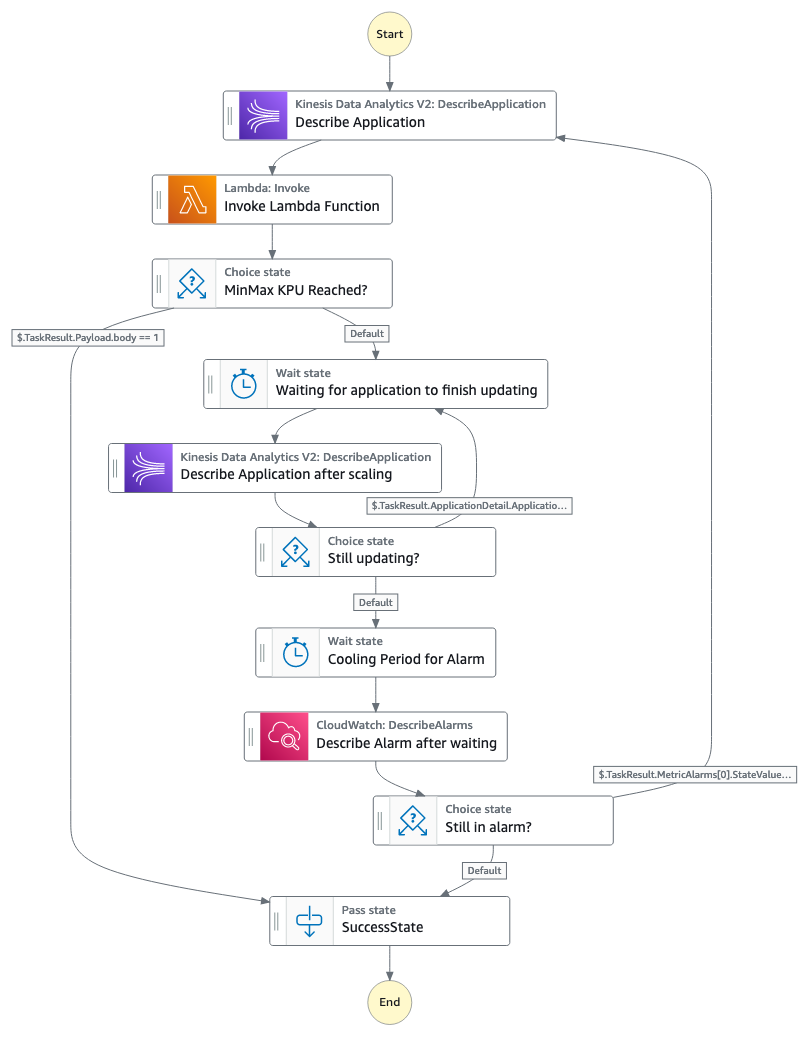
This solution uses the metric selected and creates two CloudWatch alarms that, depending on the threshold you use, trigger a rule in EventBridge to start running a Step Functions state machine. The following diagram illustrates the state machine workflow.

Note: Amazon Kinesis Data Analytics was renamed to Amazon Managed Service for Apache Flink August 2023

The Step Functions workflow consists of the following steps:

  1. The state machine describes the Amazon Managed Service for Apache Flink application, which will provide information related to the current number of KPUs in the application, as well if the application is being updated or is it running.
  2. The state machine invokes a Lambda function that, depending on which alarm was triggered, will scale the application up or down, following the parameters set in the CloudFormation template. When scaling the application, it will use the increase factor (either add/subtract or multiple/divide based on that factor) defined in the CloudFormation template. You can have different factors for scaling in or out. If you want to take a more cautious approach to scaling, you can use add/subtract and use an increase factor for scaling in/out of 1.
  3. If the application has reached the maximum or minimum number of KPUs set in the parameters of the CloudFormation template, the workflow stops. Keep in mind that Amazon Managed Service for Apache Flink applications have a default maximum of 64 KPUs (you can request to increase this limit). Do not specify a maximum value above 64 KPUs if you have not requested to increase the quota, because the scaling solution will get stuck by failing to update.
  4. If the workflow continues, because the allocated KPUs haven’t reached the maximum or minimum values, the workflow will wait for a period of time you specify, and then describe the application and see if it has finished updating.
  5. The workflow will continue to wait until the application has finished updating. When the application is updated, the workflow will wait for a period of time you specify in the CloudFormation template, to allow the metric to fall within the threshold and have the CloudWatch rule change from ALARM state to OK.
  6. If the metric is still in ALARM state, the workflow will start again and continue to scale the application either up or down. If the metric is in OK state, the workflow will stop.

For applications that read from a Kinesis Data Streams source, you can use the metric millisBehindLatest. If using a Kafka source, you can use records lag max for scaling events. These metrics capture how far behind your application is from the head of the stream. You can also use a custom metric that you have registered in your Apache Flink applications.

The sample CloudFormation template allows you to select one of the following metrics:

  • Amazon Managed Service for Apache Flink application metrics – Requires an application name:
    • ContainerCPUUtilization – Overall percentage of CPU utilization across task manager containers in the Flink application cluster.
    • ContainerMemoryUtilization – Overall percentage of memory utilization across task manager containers in the Flink application cluster.
    • BusyTimeMsPerSecond – Time in milliseconds the application is busy (neither idle nor back pressured) per second.
    • BackPressuredTimeMsPerSecond – Time in milliseconds the application is back pressured per second.
    • LastCheckpointDuration – Time in milliseconds it took to complete the last checkpoint.
  • Kinesis Data Streams metrics – Requires the data stream name:
    • MillisBehindLatest – The number of milliseconds the consumer is behind the head of the stream, indicating how far behind the current time the consumer is.
    • IncomingRecords – The number of records successfully put to the Kinesis data stream over the specified time period. If no records are coming, this metric will be null and you won’t be able to scale down.
  • Amazon MSK metrics – Requires the cluster name, topic name, and consumer group name):
    • MaxOffsetLag – The maximum offset lag across all partitions in a topic.
    • SumOffsetLag – The aggregated offset lag for all the partitions in a topic.
    • EstimatedMaxTimeLag – The time estimate (in seconds) to drain MaxOffsetLag.
  • Custom metrics – Metrics you can define as part of your Apache Flink applications. Most common metrics are counters (continuously increase) or gauges (can be updated with last value). For this solution, you need to add the kinesisAnalytics dimension to the metric group. You also need to provide the custom metric name as a parameter in the CloudFormation template. If you need to use more dimensions in your custom metric, you need to modify the CloudWatch alarm so it’s able to use your specific metric. For more information on custom metrics, see Using Custom Metrics with Amazon Managed Service for Apache Flink.

The CloudFormation template deploys the resources as well as the auto scaling code. You only need to specify the name of the Amazon Managed Service for Apache Flink application, the metric to which you want to scale your application in or out, and the thresholds for triggering an alarm. The solution by default will use the average aggregation for metrics and a period duration of 60 seconds for each data point. You can configure the evaluation periods and data points to alarm when defining the CloudFormation template.

Scheduled scaling

This section describes how to implement a scaling solution for Amazon Managed Service for Apache Flink based on a schedule. To perform scheduled scaling, we use EventBridge and Lambda, as illustrated in the following figure.

These components are available in the CloudFormation template in the GitHub repo.

The EventBridge scheduler is triggered based on the parameters set when deploying the CloudFormation template. You define the KPU of the applications when running at peak times, as well as the KPU for non-peak times. The application runs with those KPU parameters depending on the time of day.

As with the previous example for metric-based scaling, the CloudFormation template deploys the resources and scaling code required. You only need to specify the name of the Amazon Managed Service for Apache Flink application and the schedule for the scaler to modify the application to the set number of KPUs.

Considerations for scaling Flink applications using metric-based or scheduled scaling

Be aware of the following when considering these solutions:

  • When scaling Amazon Managed Service for Apache Flink applications in or out, you can choose to either increase the overall application parallelism or modify the parallelism per KPU. The latter allows you to set the number of parallel tasks that can be scheduled per KPU. This sample only updates the overall parallelism, not the parallelism per KPU.
  • If SnapshotsEnabled is set to true in ApplicationSnapshotConfiguration, Amazon Managed Service for Apache Flink will automatically pause the application, take a snapshot, and then restore the application with the updated configuration whenever it is updated or scaled. This process may result in downtime for the application, depending on the state size, but there will be no data loss. When using metric-based scaling, you have to choose a minimum and a maximum threshold of KPU the application can have. Depending on by how much you perform the scaling, if the new desired KPU is bigger or lower than your thresholds, the solution will update the KPUs to be equal to your thresholds.
  • When using metric-based scaling, you also have to choose a cooling down period. This is the amount of time you want your application to wait after being updated, to see if the metric has gone from ALARM status to OK status. This value depends on how long are you willing to wait before another scaling event to occur.
  • With the metric-based scaling solution, you are limited to choosing the metrics that are listed in the CloudFormation template. However, you can modify the alarms to use any available metric in CloudWatch.
  • If your application is required to run without interruptions for periods of time, we recommend using scheduled scaling, to limit scaling to non-critical times.

Summary

In this post, we covered how you can enable custom scaling for Amazon Managed Service for Apache Flink applications using enhanced monitoring features from CloudWatch integrated with Step Functions and Lambda. We also showed how you can configure a schedule to scale an application using EventBridge. Both of these samples and many more can be found in the GitHub repo.


About the Authors

Deepthi Mohan is a Principal PMT on the Amazon Managed Service for Apache Flink team.

Francisco Morillo is a Streaming Solutions Architect at AWS. Francisco works with AWS customers, helping them design real-time analytics architectures using AWS services, supporting Amazon Managed Streaming for Apache Kafka (Amazon MSK) and Amazon Managed Service for Apache Flink.