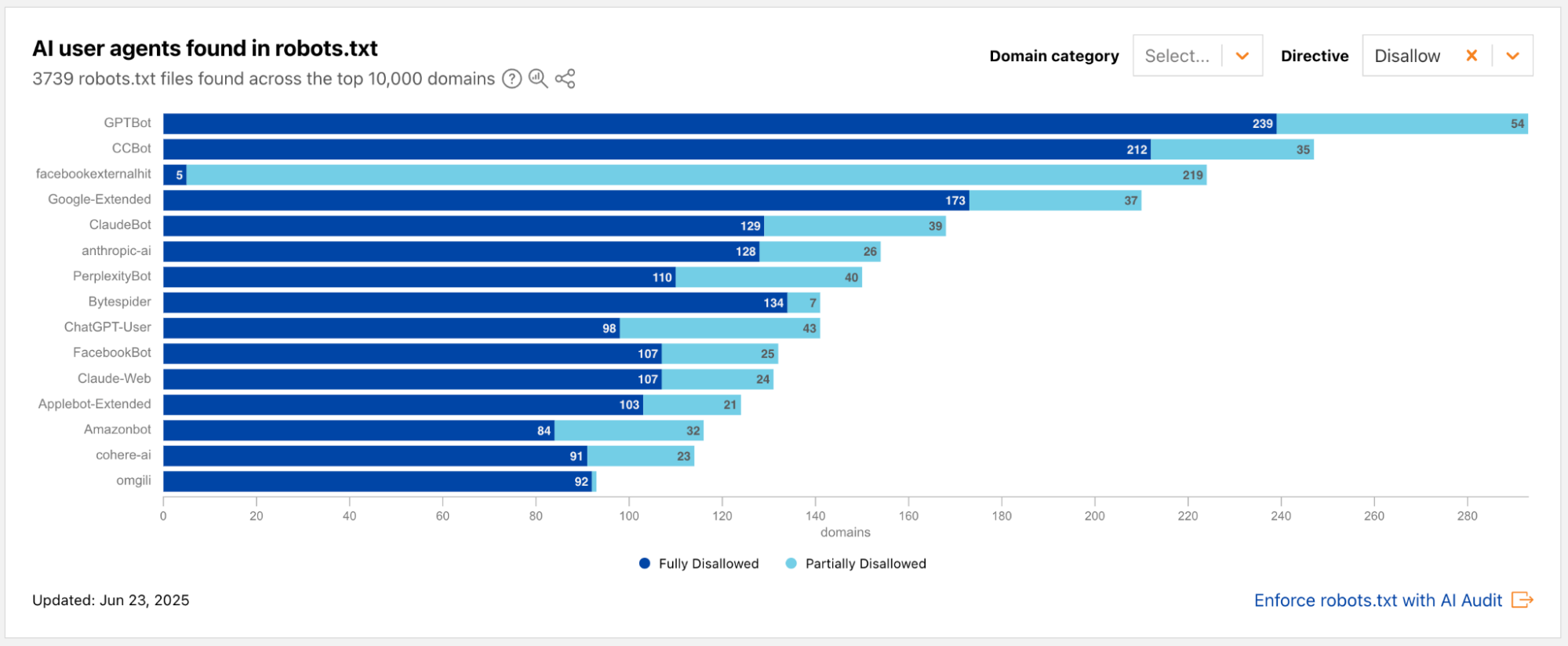
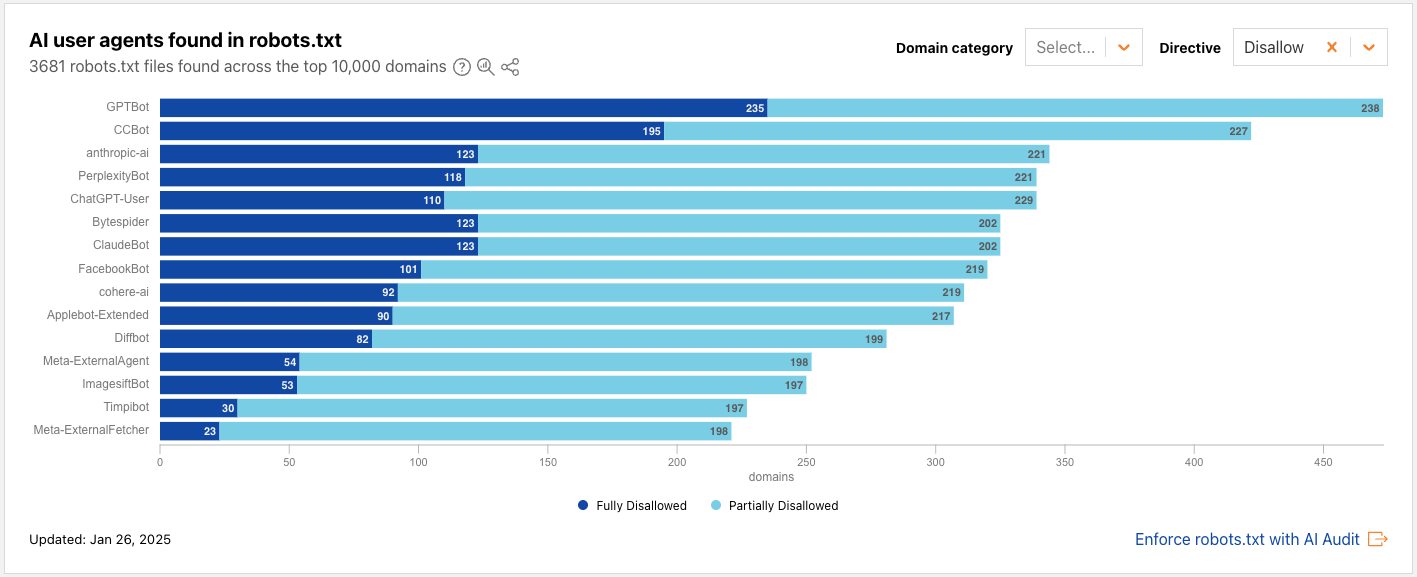
We’re constantly building for the different goals of our customers. Some customers want to optimize for discovery, while others want to protect their content with the strictest security policy. Among these differing policies, there are multiple ways to mitigate bot traffic. Some mechanisms simply state your preference, assuming best intent from crawlers, and other approaches actually lock down content by outright blocking with a Bot Management solution.
We recognize that it's cumbersome to maintain multiple layers of protection on your website. For example, there are cases in which your robots.txt states that a crawler is Disallowed from accessing your website, while your enforcement rules actually don’t block that crawler. When your stated preferences and your enforced rules disagree, some crawlers treat it as a basis to disregard your preferences or try to bypass your enforced rules.
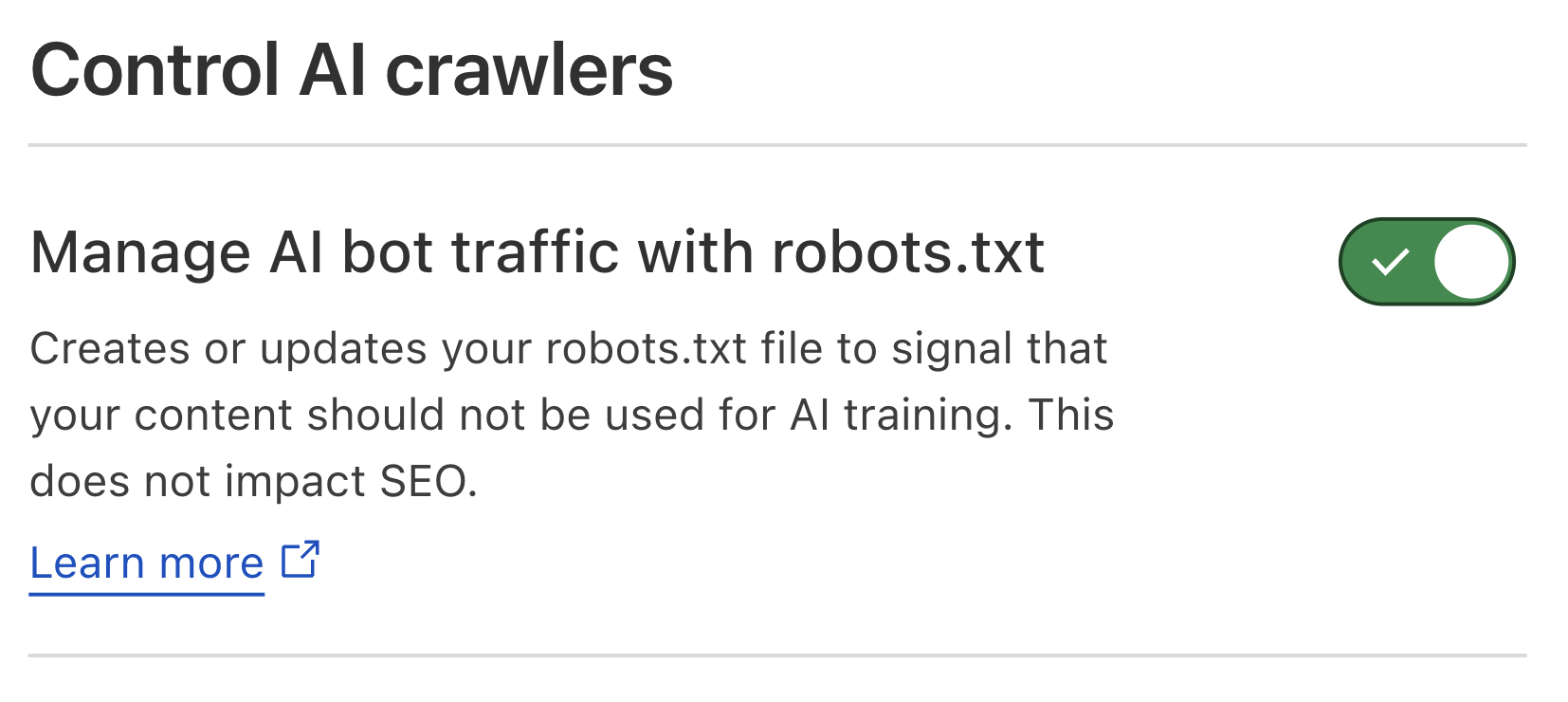
A couple of years ago, Cloudflare announced an easier way to disallow AI training on your website by tackling two of these layers: a managed value of robots.txt that told a fixed list of major Training crawlers not to train on your content, along with edge-enforced blocks to Training crawlers. On July 1, 2026, we launched easier options to manage different kinds of AI traffic use cases. You can say what you want to do about Search, Agent, and Training traffic on your website.
We're announcing Bot Preference Sync, available to all customers from the Free tier to Enterprise. Bot Preference Sync reflects what you've set in your AI bot configuration by updating corresponding preferences to your robots.txt, and it can be turned on or off at any time. No more static file for one use case: we'll help you tailor your robots.txt to reflect what you’ve already configured for different AI bot categories.
New questions facing the Internet
For years, the most pressing question in this space was: "Is my content being used to train AI models without my permission?" It's an important question, and it isn't going away. Alongside this, the questions we increasingly hear are about discoverability and engagement. How do I show up when someone asks an AI assistant something my site can answer? How much of my traffic is coming from AI crawlers versus real people? What content is actually driving referrals, and what is it worth?
The answers differ by business model. Discoverability and engagement are key, top-of-mind issues for any businesses trying to thrive on the modern web, but the funnels for these are different: an e-commerce store may want everything crawled and trained on, so its products surface when a shopper asks a chatbot for "the best sofa for a small apartment." A publisher that monetizes pages with ads may want the opposite: stay in the search index that sends readers to the page, but keep its articles out of model training and, crucially, be able to verify that its content really wasn't used without permission.
There's no single right answer, which is exactly the point. Your controls should reflect your strategy, which is why we've been building tools to give you visibility and choice at every layer. Bot Preference Sync ties these together, so the preference you set is the preference you publish.
The call for Transparency
On July 1, 2026, we made the case that mixed-use crawlers, or “bots that blend search, agent use, and training behind a single user agent,” put site owners at a disadvantage precisely because they make it hard to separate what you want from what you don't. That's still true, and our position on Transparency for site owners hasn't changed.
But there’s more than one way to approach Transparency. We want to reward the operators who are clear about their identity and how they are using the data they crawl. For purposes of bot Verification, the owners of bots that perform both Search and Training will need to provide additional information in order to not be blocked when “Disallow Training” is set. Those requirements are:
The bot must respect, via any mechanism, a “no training” preference in robots.txt
They give site owners a way to opt out of AI summaries.
They provide URL-level visibility into which pages were made available for training, as well metrics on search results, so you can see how your content was used for search and for training.
They can show publicly that Disallowing Training does not hurt your traditional search results.
Bots of leading AI models and service providers that meet these criteria are tracked publicly in the AI bot transparency section in Cloudflare Radar, which includes examples in which best practices are honored, as well as when they are not. Crawlers that don't provide Transparency will not get the benefit of the doubt — they're still blocked when you disallow training. In other words, this is a way of making Transparency the price of admission.
Introducing Bot Preference Sync
Bot Preference Sync is a new feature that keeps your robots.txt reflecting the AI bot preferences you've already set for Search, Agent, and Training on the Cloudflare zone-level dashboard. If a site owner already has a robots.txt file, the contents added by Bot Preference Sync will be prepended to the existing material, so any existing Disallow directives are maintained.
Instead of a site owner maintaining a separate static file, Cloudflare generates or updates your robots.txt based on your configuration, so what you say to the world and what you enforce at the edge are kept in sync.
For Search and Agent, the three options we announced on July 1 remain: Allow, Block on pages that serve ads, or Block everywhere. For Training, we’re refining the option to stop your content being used for training models with the Disallow option:
Disallow: a "no training" preference is written to your robots.txt, so that cooperating mixed-use crawlers who take the extra Transparency step can still access your content for search indexing, since they’re allowing site owners to directly verify how their data is used. Cooperating crawlers honor the preferences in robots.txt, and your Search visibility for cooperating crawlers is unaffected.
Let’s take the example below, in which someone has configured their AI bot policy to say “Allow Search, Allow Agents, Disallow Training.”
Since this example site has Bot Preference Sync on, their robots.txt would prepend something like the following (which has been shortened and anonymized for the sake of the example):
We’ll use bots that we track in BotBase to periodically update the list of bots that is added to robots.txt when you choose to Block or Disallow a given category. The Verified bots that are classified as Search, Agent, and Training can be viewed at any time in our public bots directory.
For all new customers, Bot Preference Sync will be on by default, to make it easier to manage blocks and preferences that reflect the same policy. For existing customers who are using the legacy managed robots.txt feature, we'll prompt you to review and confirm your preferences to transition to the new Bot Preference Sync upon its upcoming launch.
Some customers may want or need to be more hands-on in stating their preferences, for example, if they have a special arrangement with a given company to which they want to grant an exception. Because Bot Preference Sync is designed to tackle policy decisions made category-wide rather than case-by-case, it will not directly read from individual custom rules with more complex logic. Customers with a more fine-tuned security policy always have the option to turn off the sync that sets group policies, and tailor their file to match their custom policy.
We’re also making a change that allows publishers or ad-supported sites to have a different default from other site owners. We’ve created a default to make it easier for publishing sites that rely on ads and expect them to be reserved for human visitors. At the time of onboarding, such customers can select the option, “I monetize from pages with ads on this domain", which will set Training to Disallow as the default. (Customers have the choice to change this setting at any time.) This way, you stay in search while keeping your content out of model training.
For the non-publisher case, new customers will not have any blocks or disallows added by default when they onboard a domain: the choice is up to the customer. You can choose if you want to block Search or Agent or Training at any point, but the starting point will not add any blocks on your behalf.
What's next?
Bot Preference Sync will be available to all customers, on every plan, in the coming week. Keep an eye on our changelog for availability, and watch your dashboard (and inbox) for the prompt to confirm your preferences!
This is one step in a longer effort. We'll keep working with the large bot operators to make sure we're not compromising on familiar challenges (like training without consent) nor emerging questions (like discoverability and engagement). Beneath it all is our effort to promote greater Transparency and control for site owners.
The Internet isn’t a single lane of traffic. For a long time, the rule of thumb in web security was that bots are bad, while humans are good. Of course, we’re far past this generalization. Humans can be fraudulent, and bots can be helpful at different levels. Site owners actively want some automated traffic to interact with our sites to make the Internet functional and discoverable.
To complicate things further, the line between "human" and "bot" is blurring more and more. Now, we have a type of “hybrid” traffic where a single session shifts from human to agentic and back again. (Think of a user browsing a store, and then handing off the checkout process to an automated shopping assistant.)
So, how do website owners manage this kind of complexity? What matters here is assessing behaviors. Is this behavior abusive? Malicious? What’s the risk presented here, and can I trust this visitor based on their actions? Solving this requires moving beyond static, point-in-time checks. It requires analyzing continuous behaviors to evaluate Trust.
In this post, we’ll share an inside look into the strategy of the Web Integrity & Trust team (covering the bots and fraud problem spaces) around detecting and analyzing good and bad behaviors, providing tools to help site owners tackle emerging challenges in the shifting Agentic Internet. We’ll also share findings around agentic traffic since the launch of Precursor, and a simulation where you can see how your own cursor movements would be assessed as human or bot — plus some exciting launch updates to expect in the near future.
Defining Risk and Trust
Let’s talk about the distinction between Risk and Trust, the way we discuss it within the teams at Cloudflare who work in bot detection. These are often viewed as polar opposites of a continuum. At Cloudflare, we look at them as independent, but reciprocal, values. Trust is the essential ingredient in making informed decisions on what to do about your traffic.
Risk is how likely something like a request or action is to be harmful, and it’s often ephemeral. Trust, however, is built up over time, and it’s based on reputation.
We can illustrate this with an example from real life: say that you’re enjoying some evening television at home, when suddenly, you hear the doorbell being rung repeatedly. Besides being annoying, this behavior is strange. Frantic doorbell rings late at night are alarming.
You check through your door camera and see that the person ringing your doorbell is your best friend who lives next door. Of course, you trust your best friend, and we’d bet you would let them in.
In this example, it wouldn’t be enough for you to say, “Reject anyone who rings my doorbell at night” or “Reject anyone who rings my doorbell more than 10 times.” Again, Trust is the essential ingredient.
Going back to traffic on the Internet, the strategy as we build products in the bots and fraud space focuses on building an entire ecosystem based on Trust. And our goal is to provide the incentives and primitives for site owners to use to incentivize behavior that makes the Internet safer for everyone: starting with blocking malicious activity at the bottom, to encouraging participation in a safer Internet at the top.
Good behaviors, rooted in transparency
Starting at the top: what counts as good behavior? We can draw clear examples from the Verified bots and agents within BotBase. Last month, we announced an updated pragmatic taxonomy for the good bots we track in our system, boiling down the definition of “Verified” to two things: 1) you declare yourself honestly, and 2) you don’t abuse the trust you’ve earned.
Transparency between a site owner and a bot operator allows for a symbiotic relationship: site owners can note what behaviors and data uses they want to allow on their websites, and bot operators can be granted access more easily. The transparency allows for Trust in the relationship; if you have nothing to hide, declaring who you are should reduce friction from the sites who want to allow your behaviors.
BotBase is not meant to only make declarations of “who is good”. It is intended to be a directory of all known bots and agents, and provide the facts. Compared to our previous Bots Directory, which only included known good bots, BotBase is also capable of tracking less-than-good bots and agents. Why? Because our systems track and validate behavior for known good actors, meaning we have the tools to identify when these expectations aren’t met. If you abuse trust on the Cloudflare network, you should not be easily allowed, so you will be unverified.
Bad behaviors: blatant, stealthy, and everything in between
A few weeks ago, we announced Precursor, a continuous client-side system to detect even subtly inhuman bot traffic that can fly under the radar when assessing network signals alone. When a customer enables Precursor, the JavaScript detection is CDN-injected, so it doesn’t require sitting at the computer and figuring out where or how to rerun these detections. What's more, Precursor evaluates user behavior continuously throughout the session, so no more free hall passes for abusive traffic that found a way to pass client and browser-side checks just once.
Applying our Risk and Trust framework to these client-side detections, we can point out that CAPTCHAs or one-time hurdles are Risk-based, meaning they lack context. On the other hand, verification using behavioral tells is Trust-based, since it can capture more context clues from the full user session. Precursor is the tool for us to analyze this behavior. To sum it up, Precursor is so powerful because it:
Provides Trust-based detection over the entire user session.
Drives up the cost for bot developers to replicate human behavior over a multipage timeline.
By making it economically disadvantageous for bot developers to outrun these detections, we win the adversarial game.
Now, what have we learned since we’ve launched? Looking at just a 24-hour period at the time of writing this blog, we can see 206 million Precursor evaluation events, across 73,438 zones on the Cloudflare network.
We can see patterns in the data that reveal things that we had suspected when launching the detection, but can now validate across tens of thousands of domains:
Suspicious behavior often happens mid-session, which point-in-time detection wouldn’t catch.
Behavior often shifts from human to agentic and back over a session. In these cases, it’s important to understand the intent so that site owners don’t block user flows that they actually want.
This highlights the importance of a bot classification system that allows website owners to handle traffic by use case, purpose, and data use. This is precisely why we prioritized taxonomy updates for BotBase.
For those curious to learn more on how Precursor actually works, we shared a sneak peek — how the signals we analyze showed us that to err is human — in our announcement blog post. Today, we’re going a step further: giving anyone on the Internet an interactive demo simulating how Precursor would trace your cursor movements.
Precursor Traceis live now, sharing how we’d assess your cursor movements using (part of) Precursor’s detection mechanism. Here, you can see whether you’re accelerating or correcting yourself, the rhythm and texture of your cursor movement, and more — all things you’ve probably never thought about as a real human being interacting with a computer. Try it out!
Adaptive Intelligence is coming soon
Cloudflare’s bot detection engines can produce different outcomes when assessing if a given request is automated or not. For requests that are deemed to be automated, the assessment can be 1) definitely automated, based on proven, deterministic methods or fingerprints of bots, or 2) likely automated, based on predictive scoring from Cloudflare’s Bots ML.
Historically, Bots ML has been updated in versions, meaning we announced each new model version as a product launch. This pacing doesn’t work when bots adapt on the scale of hours or even minutes.
Adaptive Intelligence, a completely new detection engine, is different from anything we’ve built before in the Bots ML space. The model itself is adaptive. It has learned from everything we’ve seen in the past, but more importantly, it will continue to learn and self-adjust based on what it sees. Adaptive Intelligence will upgrade itself based on a wide range of traffic patterns we identify, from good to bad behaviors, and customers will no longer need to upgrade to a formal new model version to have the latest predictive bot detections working for them.
All Bot Management customers will have access to Adaptive Intelligence in the near future — stay tuned for the launch announcement coming soon.
Moving beyond determinism to influence bot behavior
So far, we’ve focused on Cloudflare’s side of things: strategy, detection, and taxonomy. All of this allows Cloudflare to equip website owners with the tools they need to set the traffic policies they want on their sites. Zooming in on the website owner side, we want to take this chance to discuss some advanced mitigations that allow website owners themselves to influence bot behavior.
With more blatant mitigation techniques, we face something that we’ve nicknamed the “Bot Antibiotic Problem.” Always sending bots a deterministic response (like a 403 block) makes it easy for a malicious developer bot to probe, observe, and reverse-engineer your defenses.
We know this, so we’re designing mitigations specifically made for throttling bots — with different approaches for malicious bots vs. benign bots. We can break them down into three approaches:
Approach 1: Unpredictability and Random Actions. Applying random responses (between block, challenge, or allow) to suspected automated traffic breaks a bot's automated retry logic and fingerprinting.
Approach 2: AI Labyrinth, a defensive response that traps unauthorized bots in an endless maze of AI-generated web pages. You can waste malicious bots' compute and crawl budgets by using misdirection. Site owners will be given three options within AI Labyrinth, depending on their preference:
Maze: Generates an endless web of linked pages for bots to follow.
Summary: Feeds crawlers an LLM-generated summary of a page that looks real but is entirely useless as AI training data.
Poison: Serves deliberately fake content (like fake prices or inventory) to a bot, polluting the data it collects for AI training.
Approach 3: Queuing for Good Bots. Not all agentic traffic is bad; queuing manages throughput for legitimate automated traffic (like user-directed shopping agents) without denying them service entirely.
These advanced, bot-specific mitigations are set to roll out closer towards the end of the year, and will be available for the website owner to choose how strict they want their mitigations to be.
We also know that a great defense is a predictive one — one that self-learns and course-corrects without needing multiple security experts on a call to reactively set a fix that accounts for the latest stealth attack. This might look like having a system of “disposable” rules, in which the ruleset is dynamic in nature. This is by design: if attacks constantly evolve, the defenses should, too. That’s why we’re working to keep both detections and mitigations a step ahead.
Establish the Trust ecosystem that works for you
Anyone and everyone can take steps to define how automated agents interact with their infrastructure.
By moving away from static, point-in-time checks and embracing continuous trust evaluation, we reduce the game of whack-a-mole with bot operators. If you’re not already using Cloudflare’s bot detection, check it out and establish the Trust ecosystem that works for you.
One year ago, we declared the first Content Independence Day, and we gave website owners the means to take back control of their content. The deal between crawlers and website owners that had held up for 30 years — we crawl you, and you get referrals — was no longer true. AI was taking everything and sending back nothing, presenting an existential threat to website owners. And so we launched a one-click “Block AI Bots” option, along with a Pay-Per-Crawl marketplace.
A lot has changed in a year. Last July, conversations around “AI bots” centered around blocking AI training without compensation, pointing to the win–lose deal where content was used for model training with no value driven back to the website owner. But a desire for more nuance has emerged: Content owners still want to be able to protect their content, and they should be compensated for the original content that they work hard to create, curate, and share. We also know that locking down content isn’t a one-size-fits-all solution; website owners want more options than resorting to “block all automation, every time.”
If you run a small site, the problem isn’t just that someone could train models on your content — it’s that nobody can find you in the first place. So you have to make a Faustian bargain: either show up in search and let AI train on you, or risk losing discoverability. This unfairly advantages incumbent search providers if they use the same bots for both search and training; and this unfair advantage incentivizes new players to be evasive as they try to close the competitive gap.
Now, AI can be anything
Today, AI can be in anything. Google search has changed from being sorted by AI to being a full answer engine that answers your question directly on the results page. And Google is not unique in this position — this is the direction in which “search” is moving.
We could debate the cutoff for what qualifies as “AI” today, just to find that the standard changes tomorrow. So, instead of defining a bot primarily as “AI” or not, our updated approach to classification will ask deeper questions about bot or agent behavior: What are they doing on my site? What are they storing? And how will they reshare my content?
A pragmatic taxonomy
To address these questions, we need a more nuanced view — a pragmatic taxonomy that aligns with the AI use cases our customers care about. So we are opening the discussion beyond AI training alone and focusing on three AI use cases that we want all customers to be able to manage:
Search: any behavior that collects or indexes your content, so it can answer questions about it later. The key is that Search is proactively building a database of your site to later respond to queries with. Site owners should expect to get referral traffic or other equitable compensation as a result.
Agent: automatedbehavior that is acting, usually in real time, on a person’s behalf, to get something done right now. This includes chat fetch bots (e.g., ChatGPT-User) and browser-use agents (e.g., Gemini or Claude driving Chrome). The key is that it visits your web application in order to complete a job, and often there’s a human waiting on the other end.
Training: a crawler taking your content to train or fine-tune a model. The key is that your data is permanently absorbed into the underlying architecture of the AI to improve its capabilities.
Many popular crawlers on the web fall into one of the classifications above; some fall into multiple. We classify plenty of other behaviors beyond the three above — including ads verification, feed fetching, and agentic transactions (more on this below). But we believe it should be simple for all website owners to manage access for these three AI-centered use cases. We believe that bot operators should separate their crawlers because that creates more transparency for website owners: allowing them to better understand why a given crawler is visiting them, as well as to better manage the access they extend to that crawler. If a company runs automation that builds Search indexes, acts as an Agent, and collects data to Train their models, then we strongly encourage that company to separate the automation into three separate crawlers.
We want a classification system that is scalable and representative of the world of automated traffic as it evolves. Tracking a bot’s purposes is nothing new, but our new taxonomy involves a few updates that better represent the state of bot traffic today. Most notably, we want to recognize that bots that have multiple purposes should be tracked with all purposes, not just one of them.
New options to manage AI traffic
We want to provide more options for managing different kinds of AI traffic, to all website owners on the Cloudflare network.
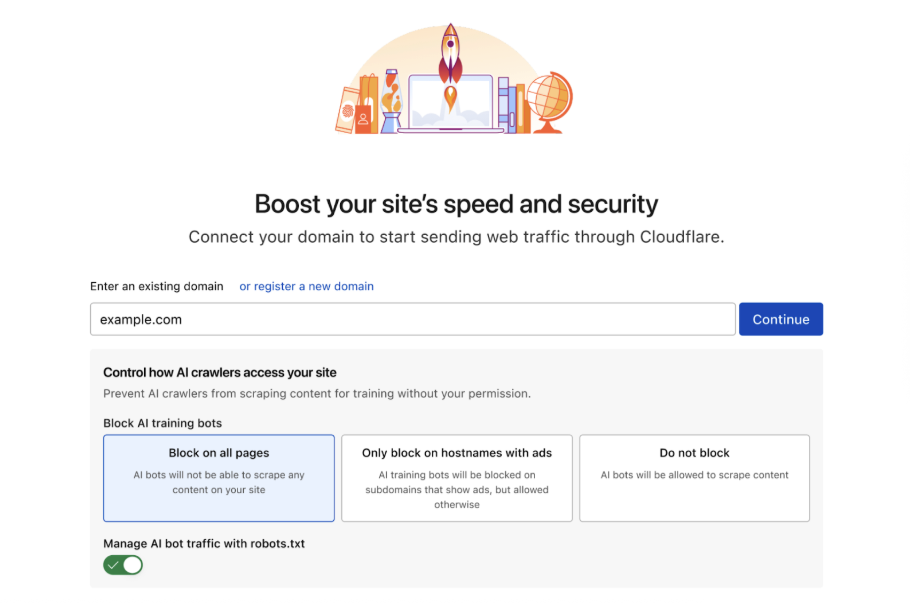
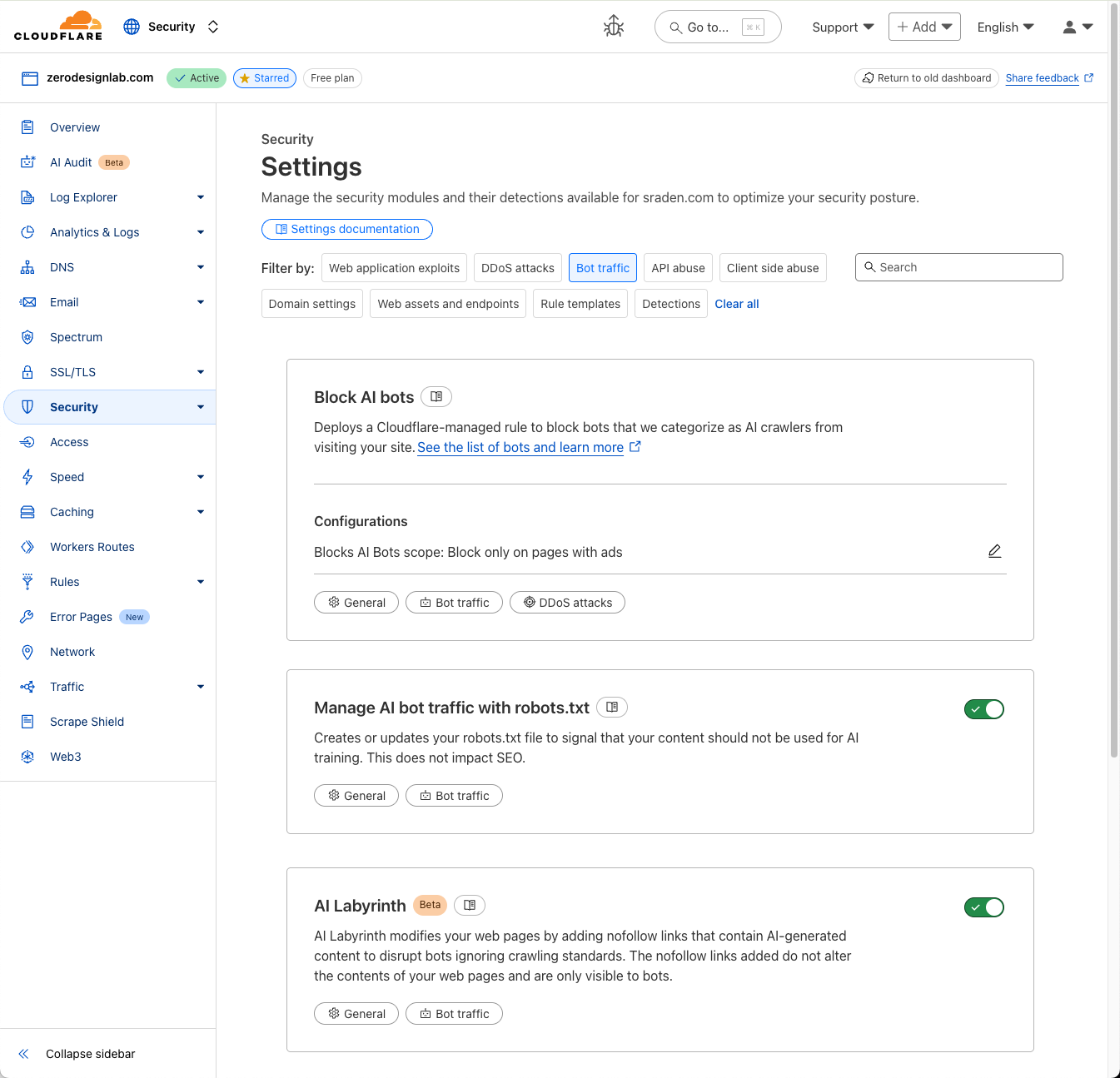
The managed preset to “Block AI bots” that we’ve announced in the past included single-purpose bots that crawled data for model training, as shown below:
Screenshot of the existing setting to manage AI bot traffic on July 1, 2025.
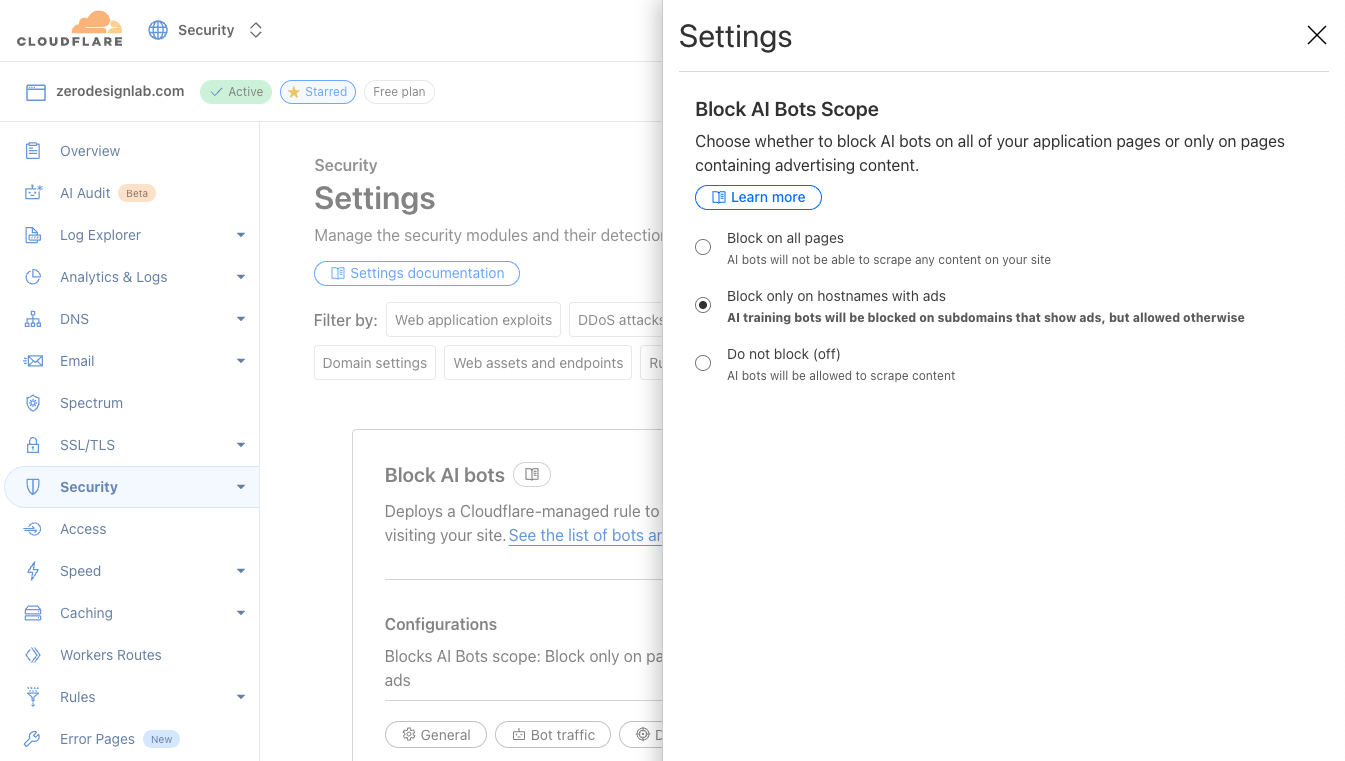
But not all AI use is the same, and we want our customers to have the controls they need. So, we’re launching the ability to manage AI traffic based on three major use cases: Search, Agent, and Training crawlers. With these new options, our customers can more finely tune how they manage AI bot traffic — including customers on our Free tier.
Screenshot of the new options to manage AI bot traffic on July 1, 2026.
Setting new defaults
On September 15, 2026, we’ll be setting new defaultsfor each of these three classifications. For all new domains onboarding to Cloudflare, the categories of Training and Agent will be blocked by default on the pages that display ads, while Search will remain allowed by default.
An ad is a signal that a website owner meant for a person to land there and see it — something monetizable that fuels the business. So, on those pages, we treat human attention as the end goal, and keep away the bots that may prevent this attention (i.e., Training and Agent bots). On the other hand, Search is the behavior that most naturally funnels back visitors, and we believe it’s in the interest of most site owners to allow this.
Another change that will apply on September 15 is that multi-purpose crawlers (specifically those that combine Search with Training) will be allowed/blocked according to all of their behaviors, in line with our call for transparency for website owners. Since the defaults will be enforced by the most restrictive applicable rules, multi-purpose crawlers such as Googlebot, Applebot, and BingBot will be blocked by customers who have selected to block Training (either through the new options to manage AI traffic, or through the legacy Block AI bots service).
Of course, customer choice is paramount: if a website owner wants to opt out of these new default configurations, they can easily mark this in their Security settings any time leading up to September 15, which will confirm that they want no changes on Training crawlers that also crawl for Search purposes. We’ll also continue to notify customers of the upcoming change to defaults as we approach September 15 to ensure that customers who want to choose settings different from the defaults have the opportunity to do so.
BotBase: a new visibility plane for Enterprise customers
We’re also excited to launch a major visibility update as a new feature of Enterprise Bot Management. As Cloudflare’s directory of tracked bots has grown, so has the desire to manage these bots in sensible groupings and to understand more detail about a particular bot.
Introducing BotBase. BotBase is our new database tracking all known bots, including Verified bots and agents. This database provides a comprehensive, searchable view of our entire directory of bots, directly on the Cloudflare dashboard. We’re tackling visibility first, but, later this year, we’ll expand BotBase to provide a direct control center for known automated content on your website.
With this new view, Enterprise Bot Management customers can see the full catalogue of all Verified bots/agents and where they are classified in this updated taxonomy — a view we’ve never shown dynamically on the Cloudflare dashboard before. Customers who want to precisely target a specific bot can also easily filter for all traffic from this bot, plus copy the detection ID to use in Security rules. All of this is now live within a dedicated page, which can be accessed through the Bot Management configuration card.
As we built BotBase, we wanted to account for all of the pieces of information that would allow us to build scalable, powerful insights from bot to bot. One of these pieces is a cornerstone for our updated taxonomy, which is based on what a bot may do on your site — its behavior. We separate these classifications as shared below, and each bot is classified with one or more of these behaviors.
Bot classification
Behaviors and uses
Search
Crawling to scan your site to help it appear in search engine results
Agent
User-directed agents visiting a page on behalf of a human
Training
Crawling to train or fine-tune models
Transact
Checkout actions on behalf of users
Data Collection
Includes price scraping, competitive intelligence gathering, and third-party analytics
Security Testing
Includes vulnerability scanning and penetration testing
SEO
SEO crawling, site auditing, accessibility checks
Ads Verification
Ad placement verification, ad fraud detection
Social / Link Preview
Link previews for social platforms and messaging apps
Feed Fetching
Includes RSS readers, podcast aggregators, and news feed bots
Monitoring & Operations
Includes uptime monitoring, webhooks, and health checks
Bold italicized rows indicate the new configurable options that are available to all customers.
How does a crawler use my content?
Another piece of information we’ve heard is important to our customers is a bot’s content use — what a bot may keep and reshare after it has crawled your content. To address this, we are building capabilities for Bot Management customers to select and block based on the “content use.” This setting can be set to one of three levels, from least to most permissive:
immediate — interact, but store and reuse nothing
reference (default) — index, excerpt, and link back
full — summarize and reproduce
These values can be combined with bot classifications to express nuanced rules, such as “allow all bots that are used for Search, SEO, and Ads Verification, but only up to the reference use level.” This allows website owners to make decisions in sensible groupings rather than manage individual bot-by-bot rules.
To further support this, starting today, we’re testing a new signal, use, that extends Content Signals and lives in your robots.txt. This extends the three fields of the first version of Content Signals with a fourth, optional field that expresses the same preference as above:
use=immediate
use=reference
use=full
As with all other items listed in the robots.txt file, the values of content use signal a website owner’s preference, rather than issuing blocks directly. We’re now adding support for this extension: all customers who have already enabled managed robots.txt — which prepends the preference to robots.txt that crawling for search is okay, but that crawling for training is not — will now have the additional preference of use=reference added to their robots.txt.
# Cloudflare Managed content with original Content Signals

User-agent: *
Content-Signal: search=yes,ai-train=no
Allow: /
The contents of Cloudflare managed robots.txt with the original Content Signals values.
# Cloudflare Managed content with the new content-use signal

User-agent: *
Content-Signal: search=yes,ai-train=no,use=reference
Allow: /
The contents of Cloudflare managed robots.txt with the added parameter.
We’re also starting to track content uses for every bot in BotBase, and when we discover a bot abusing these signals, it will lose the “Verified” status, resulting in it no longer being allowed. Today, bots that reproduce in full cannot have the Verified status.
What does it mean for a bot to be Verified?
Speaking of “Verified,” the definition of Verified is being updated to reflect the upcoming changes to default allow and block baselines. Previously, all Verified bots were allowed by default, which was reflected in our basic Bot Fight Mode offering to block unwanted automatic traffic and in our rule templates for Enterprise Bot Management customers.
Starting today, we’re adjusting this to add nuance: non-verified bots are still default blocked, but we are no longer viewing Verified as “default allowed.” Now, the Verified label makes a bot allowable with its relevant category, meaning the allowed category (e.g., allowing Search) will determine what is allowed to access a website.
To balance this change, we’re opening up the process of becoming a Verified bot, and making it more transparent, too. To “Verify” a bot, a bot operator needs to show two things: that you represent yourself honestly, and you don’t abuse the access that honesty earns. And to make this easier on bot operators, we’re currently building management tools for bot operators to better ensure they are accurately represented by Cloudflare’s classification system (to be announced in the near future).
A preview screenshot of the upcoming platform built directly for bot operators who are part of or want to be a part of BotBase, the next generation of the Cloudflare Bots Directory.
Experimenting with transitive trust
One more piece: The bot (or agent) at your door increasingly isn’t run by the company that built it. A platform like Cloudflare’s Developer Platform runs automations for thousands of different operators at once, ranging from enterprises to a developer you’ve never heard of. You might trust Stripe, but you don’t necessarily trust everyone who wired Stripe’s tools into a weekend project.
We call the case of (site owner → bot owning company → end user) a matter of transitive trust, and we’re proposing to utilize the existing Forwarded header as defined in RFC 7239 that rides along with the request and allows “proxy components to disclose information lost in the proxying process.”
This is similar to what X-Forwarded-For does for IP addresses, or X-Forwarded-Host does to preserve the original Host header. So when a website owner says, “Allow this operator,” that preference will hold, whether the operator comes to you directly or through three layers of intermediaries that are trusted. More details can be found in our documentation, with a brief example to show the format below.
Forwarded: for="openai"
Adding the extension with content-use discussed above, the header addition would look something like the below, specifying how the operator says they will use the content they access:
Forwarded: for="openai";use="reference"
This also lines up the incentive model we want to foster. Losing trusted status across the more than 20% of web domains that sit behind Cloudflare is a deterrent with teeth. Trust becomes something you can carry with you, and something you can lose.
However, as bot traffic blends with human traffic, it’s possible that this system of transitive trust doesn’t carry beyond the users who can afford to be identifiable. The measures we are proposing today help to convey trust, but they won’t fit the entire web for all time. Small sources of traffic need privacy, and companies that want to preserve their own privacy commitments should be able to explore fair building blocks for the future of an agentic Internet, such as private rate limiting.
Set your terms today
These are small changes that move in the same direction: site owners get more control over who uses their content, and how. We believe the new defaults we discussed today and will soon implement are ones that encourage transparency and are more reflective of where the world is going.
Of course, the ebbs and flows of the web will continue shifting under us, and we’ll keep adjusting with it. But the direction won’t change, because it’s the one Cloudflare started with: a web ecosystem built around trust. Where the people who make things can decide how they’re used — and one where being honest about what you do earns you more access, not less.
These new options to manage AI traffic are live now, and can be configured by all existing customers in their zone Settings. Not on Cloudflare yet? Start for free to set the traffic controls that you want today.
Original content is the lifeblood of conversations and curiosities. Imagine a world without it: we could find a thousand ways to regurgitate the same material that’s already been created, but we would witness the decline of fresh ideas and arguments.
Website owners fuel the ecosystem of ideas, news, and interesting tidbits, but they face the increasingly complex challenge of managing traffic to their websites and being paid for their content. While some bot traffic is clearly malicious, it isn’t always obvious when a particular AI crawler is helping or harming your business. To answer this, site owners need granular, reliable data to differentiate between traffic that provides value, and traffic that strains resources while eroding the foundation of their business model: actual humans consuming their content.
At Cloudflare, we hold a core belief: website owners have the right to control access to their content. We want to help website owners maintain their high-quality content and regulate AI traffic.
To provide much-needed clarity and help website owners take control, we’re excited to announce the new Attribution Business Insights dashboard — designed with business decision-makers and publishers in mind.
The new economics of the Internet
For decades, the business model of the Internet relied on a straightforward, unspoken agreement: website owners allowed search engines to crawl their content and, in return, search engines sent readers back to their pages. This symbiotic relationship, where traditional search engines operated with a balanced “crawl-to-referral” ratio, generated the pageviews needed to sustain advertising, affiliate revenue, and subscriptions. Search index crawlers would scan your content a couple of times for each referral sent, so making your website available to crawlers had a clear pipeline to additional revenue. We can think of this as the SEO (Search Engine Optimization) era.
Today, the explosive rise of AI crawlers and agents has broken this contract, plunging the digital publishing industry into an unprecedented crisis. The Internet is risking a transition into a “zero-click” ecosystem where AI chatbots scrape original content to synthesize instant answers — completely bypassing the original sources. We’ve already seen a marked shift from the SEO-only world into an AEO (Answer Engine Optimization) world, and now conversations around GEO (Generative Engine Optimization) are taking center stage.
The imbalance of this new reality is made clear by the crawl-to-referral ratios we see across the Internet today. While traditional search engines had a more balanced ratio of crawls to legitimate visitors referred, major AI crawlers operate on a drastically different, extractive scale. Bots from leading AI companies have been observed with a range of crawl-to-referral ratios: we noted ratios of 118:1 up to nearly 50,000:1 around the time of our Content Independence Day in 2025. In other words, an AI crawler might have crawled your premium content tens of thousands of times just to send back a single visitor. This ratio is fundamentally unfair.
For publishers, this creates a double hit: first, they’re losing out on the crucial referral traffic, ad impressions, and direct audience relationships that fund content creation and journalism. Second, they’re forced to bear the rising infrastructure costs of hosting and serving content to automated bots that offer no commercial value in return. The era in which it makes sense to allow all crawlers in the hopes of being discovered is over.
Introducing Attribution Business Insights
We want website owners to have the facts — the cold, hard numbers to understand which bots are helping their business and which bots are harming it. We also want to make this analysis easier than ever, which is why we’ve designed Attribution Business Insights to cut the noise, focusing on the details that our customers have told us are most important.
Today, the Attribution Business Insights dashboard is available to all Cloudflare Bot Management customers. The new dashboard is designed to deliver a targeted view of bot traffic flowing to your website; unlike traditional analytics tools that may require extensive manual filtering, this dashboard provides you with key insights right away.
We set out to answer the most pressing questions for site owners today: How should you think about AI traffic on your websites? What is the value of different audiences — including humans, non-AI bots, and AI bots? And most importantly, what is your data being used for?
The new Attribution Business Insights dashboard view, which includes insights about bot traffic overall, a site-wide crawl-to-referral ratio, and the distribution of AI bot traffic vs. organic traffic.
To answer these questions, the dashboard displays a powerful array of data and insights:
Bot traffic to content pages: View your overall bot vs. human traffic, as well as the volume of all bots successfully accessing content.
Crawl-to-referral ratios: See your site-wide crawl-to-referral ratio on the scale of 24 hours, seven days, or 30 days. You can also see crawl-to-referral ratios per bot operator (per company that owns one or more bots).
Top bots breakdown: A list of top bots by volume, including their country of origin, bandwidth they take up on your website, and whether you’re currently blocking or allowing them.
You shouldn’t have to be a security expert to understand how AI crawlers affect your business. If website owners want to spend just a few minutes ingesting the high-level insights, they can walk away with a clear temperature check of the effectiveness of their content security policy.
For those who want to do a little more digging to understand how AI companies are making use of their content — or collect information to guide how they want their relationships with AI companies to develop — we show a more granular view organized by bot operator.
Breakdown of bot activity on a website, with important details for each bot such as type, crawl-to-referral ratio, and current action.
By having a consolidated view of companies seeking to access content on your website, you can develop a better baseline of crawler activity. We want this data to equip our customers to step into any business conversation with the facts on their side. Tell Company1 that their crawl volume is twenty times that of Company4’s, and that Company4 is already compensating you for content. Revisit the way that Company2 licenses your content based on their recent activity. This new dashboard propels business conversations to move forward.
How does this new layer of visibility tie into the existing tools you have to protect your website from abuse? In line with other features of Bot Management, the action step still happens in Security rules. To avoid adding noise to the control plane, Attribution Business Insights is intended to be a hub for thoughtful, filtered analytics, rather than another place to take action. This dashboard serves as a central source of information, allowing you to investigate before then taking an action in the same rule engine that governs other abuse mitigations. We also want to be loud and clear about inviting business decision-makers into this dashboard, acknowledging that conversations around AI traffic have a wider set of stakeholders than only security-specialized users.
What’s next
The Attribution Business Insights dashboard is the next critical step in providing website owners with the transparency and control they need to manage evolving AI bot threats, and more broadly, shape the new dynamics of the Internet. We’re already investigating the next iteration with close publishing partners to create a visibility plane that covers security from the perspective of the website owner with valuable, original content to share.
A sneak preview below includes a new view to dissect crawler activity per-article to reveal the appetite that AI companies have for different pieces of content, different campaigns, and so on.
Breakdown of most popular articles, according to traffic volume. Shows key metrics such as AI bot traffic vs. other bot traffic vs. human traffic, both direct and from a referral.
Visibility is the first piece, and there’s more to come to empower website owners to take control of their content in this new age. We encourage all customers of Cloudflare Bot Management — especially those driving business conversations — to access this today for a fresh take on analytics.
Today, Cloudflare is introducing a new suite of fraud prevention capabilities designed to stop account abuse before it starts. We’ve spent years empowering Cloudflare customers to protect their applications from automated attacks, but the threat landscape has evolved. The industrialization of hybrid automated-and-human abuse presents a complex security challenge to website owners. Consider, for instance, a single account that’s accessed from New York, London, and San Francisco in the same five minutes. The core question in this case is not “Is this automated?” but rather “Is this authentic?”
Website owners need the tools to stop abuse on their website, no matter who it’s coming from.
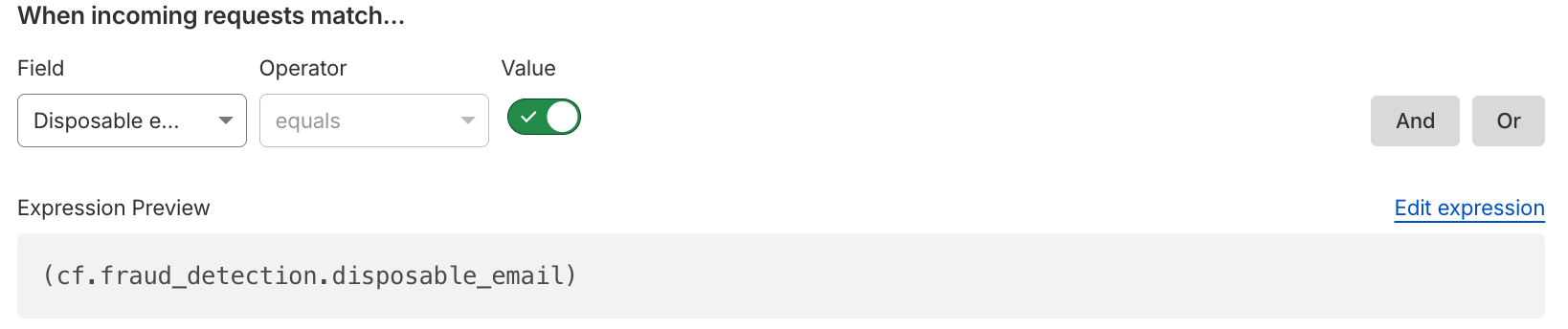
Now, we’re combining these powerful tools with new ones. Disposable email check and email risk help you enforce security preferences for users who sign up with throwaway email addresses, a common tactic for fake account creation and promotion abuse, or whose emails are deemed risky based on email patterns and infrastructure. We’re also thrilled to introduce Hashed User IDs — per-domain identifiers generated by cryptographically hashing usernames — that give customers better insight into suspicious account activity and greater ability to mitigate potentially fraudulent traffic, without compromising end user privacy.
The new capabilities we’re announcing today go beyond automation, identifying abusive behavior and risky identities among human users and bots. Account Abuse Protection is available in Early Access, and any Bot Management Enterprise customer can use these features at no additional cost for a limited period, until the general availability of Cloudflare Fraud Prevention later this year. If you want to learn more about this Early Access capability, sign up here.
Leaked credentials make logins all too vulnerable
The barrier to entry for fraudulent behavior is dangerously low, especially with the availability of massive datasets and access to automated tools that commit account fraud at scale. Website owners aren’t just dealing with individual hackers, but industrialized fraud. Last year, we highlighted how 41% of logins across our network use leaked credentials. This number has only grown following the exposure of a database holding 16 billion records, and multiple high-profile breaches have since come to light.
Access to a large database of leaked credentials is only useful if an attacker can cycle through them quickly across many sites to identify which accounts are still vulnerable due to password reuse. In our Black Friday analysis in 2024, we observed that more than 60% of traffic to login pages across our network was automated. That’s a lot of bots trying to break in.
To help customers protect their login endpoints from constant bombardment, we added account takeover(ATO)-specific detections to highlight suspicious traffic patterns. This is part of our recent focus on per-customer detections, in which we provide behavioral anomaly detection unique to each bot management customer. Today, bot management customers can see and mitigate attempted ATO attacks in their login requests directly on the Security analytics dashboard.
In the card on the left within the Security analytics dashboard, you can view and address attempted account takeover attacks.
In the last week, our ATO detections combined caught an average of 6.9 billion suspicious login attempts daily, across our network. These ATO detections, along with the many other detection mechanisms in our bot management solution, create a layered defense against ATO and other malicious automated attacks.
From automation to intent and identity
To discern automation, or to discern intent and identity? That is the question. Our answer: yes and yes, as both are critical layers of a robust security posture. Attackers now operate at a scale previously reserved for enterprise services: they leverage massive credential leaks, use human-powered fraud farms to spoof devices and locations, and create synthetic identities to maintain thousands — even millions — of fake accounts for promotion and platform abuse. A human being with automated tools could be draining accounts, abusing promotions, committing payment fraud, or all of the above.
Beyond that, automation is accessible like never before, particularly as users become better acquainted with using AI agents and even long-standing, “traditional” browsers move toward having agentic capabilities by default. Whether it’s a lone actor using an AI agent or a coordinated fraud campaign, the threat isn’t as simple as a single script — it can involve human intent, with automated execution.
Consider the following scenarios we’ve heard from our customers:
We have 1,000 new users this month, but more than half of them are fake identities who benefit from a free trial, then disappear.
The attacker logged in with the correct password, so how do I know that it isn’t the real user?
This entity is acting at human pace, and they are draining accounts.
These problems can’t be solved by only assessing automation; they require checking for authenticity and integrity. This is the gap that our dedicated fraud prevention capabilities address.
Assessing suspicious emails
Let’s start by assessing the earliest point of potential account abuse: account creation. Fake or bulk account creation is one of the biggest topics in conversations about website fraud, as it can open the door for attackers to access an application — or even an entire business model.
Cloudflare is giving customers the tools to assess suspicious account creation at the source in two ways:
Disposable email check: Detect when users sign up with disposable, or throwaway, email addresses commonly used for promotion abuse and fake account creation. These disposable email services allow attackers to spin up thousands of “unique” accounts without maintaining real infrastructure, particularly unauthenticated disposable emails that provide instant access without account creation or free unlimited email aliases. Customers can use this binary field as they build rules to enforce security preferences, choosing to block all disposable emails outright, or perhaps issuing a challenge to anyone attempting to create an account with a disposable email.
Email risk: Cloudflare analyzes email patterns and infrastructure to provide risk tiers (low, medium, high) that customers can use in security rules. We know that not all email addresses are created equal; an address with the format [email protected] carries different risk characteristics than [email protected]. Email risk tiers allow customers to express their tolerance for risk and friction at the point of account creation.
Both disposable email check and email risk are now available in security analytics and security rules, equipping website owners to protect their account creation flow. These detections address a fundamental problem: by the time an account is committing abuse, it’s already too late. The website owner has already paid acquisition costs, the fraudulent user has consumed promotional credits, and remediation requires manual review. Mitigating suspicious emails means adding the appropriate friction at signup — the moment it matters most.
Introducing Hashed User IDs
Understanding patterns of abuse requires visibility: not only into the network, but of account activity. Traditionally, security has meant looking through the lens of IPs and isolated HTTP requests to spot automated activity, but website owners aren’t just thinking in terms of network signals; they are also considering their users and known accounts. That’s why we’re expanding our mitigation toolbox to match the way applications are actually structured, focusing on user-based detection of fraudulent activity.
Attackers can effortlessly rotate IPs to hide their tracks. But forcing them to repeatedly generate new, credible accounts introduces massive friction, especially when combined with account creation protections. When we look past the network layer and map fraudulent actions to a given compromised or abusive account, we can spot targeted behavior tied to a single, persistent actor and put a stop to the abuse. In this way, we’re shifting the defense strategy to the account level, instead of playing whack-a-mole with rotating IP addresses and residential proxies. This means that our customers can mitigate abusive behavior based on the way their applications separate identity.
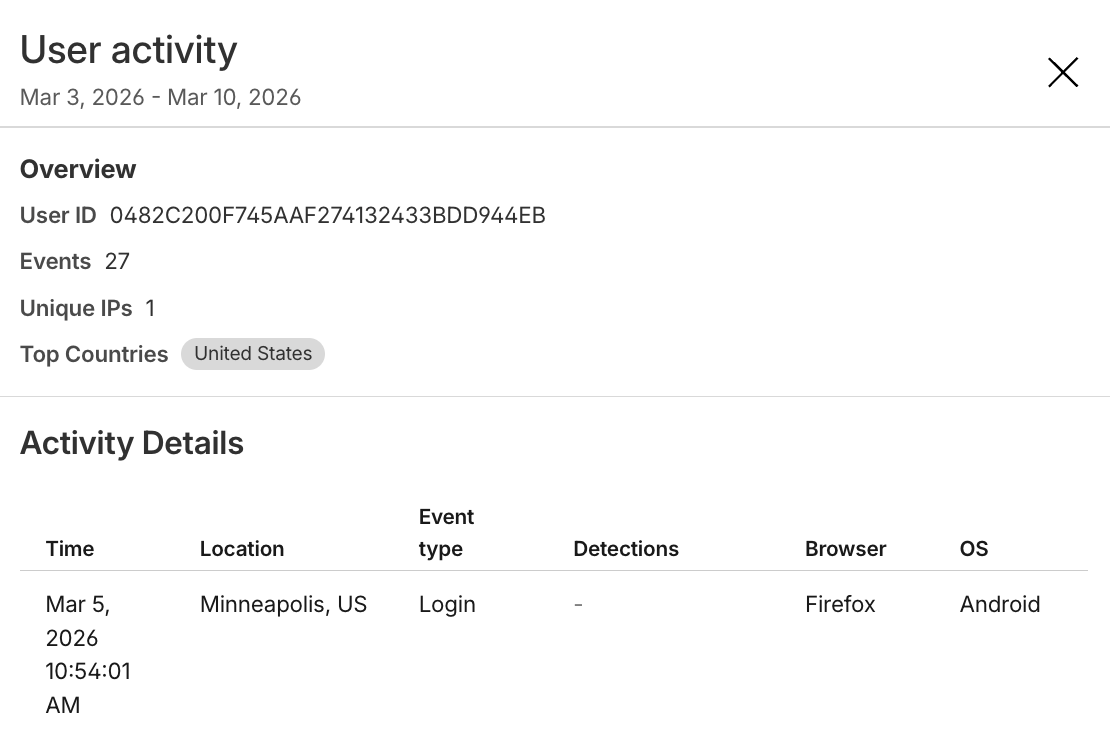
To arm website owners with this capability, Cloudflare is releasing a Hashed User ID that customers can use in Security analytics, Security rules, and Managed Transforms. User IDs are per-domain, cryptographically hashed versions of the values in the username field, and each user ID is an encrypted, unique, and stable identifier generated for a given username on a customer application. Importantly, the actual username is not logged or stored by Cloudflare as part of this service. As with leaked credentials check and ATO detections, which identify login traffic and then encrypt credentials for comparison, we are prioritizing end user privacy while empowering our customers to take action against fraudulent behavior.
With access to Hashed User IDs, website owners can:
See top users: Which accounts have the most activity?
See when a unique user logs in from a country they usually don’t — or multiple countries in one day!
Mitigate traffic based on unique user, such as blocking a user with historically suspicious activity.
Combine fields to see when accounts are being targeted with leaked credentials.
See what network patterns or signals are associated with unique users.
The expanded view of a single Hashed User ID within the Security analytics dashboard, showing the activity details of that unique user, including their login location and their browser.
This user-level visibility transforms how website owners can investigate and mitigate traffic. Instead of examining individual requests in isolation, our customers can see the full picture of how attackers are targeting and hiding among legitimate users.
Take the next step in account protection today
If you want to learn more about this Early Access capability, sign up here. All Bot Management Enterprise customers are eligible to add these new Account Abuse Protection features today, and we’d love to open the conversation with any and all prospective Bot Management customers.
While bot detections will continue to answer the question of automation and intent, fraud detections delve into the question of authenticity. Together, they give website owners comprehensive tools to fight against the full spectrum of account abuse. This suite is one step in our ongoing investment to protect the entire user journey — from account creation and login to secure checkouts and the integrity of every interaction.
Today, we are announcing a new approach to catching bots: using models to provide behavioral anomaly detection unique to each bot management customer and stop sophisticated bot attacks.
With this per-customer approach, we’re giving every bot management customer hyper-personalized security capabilities to stop even the sneakiest bots. We’re doing this by not only making a first-request judgement call, but also by tracking behavior of bots who play the long-game and continuously execute unwanted behavior on our customers’ websites. We want to share how this service works, and where we’re focused. Our new platform has the power to fuel hundreds of thousands of unique detection suites, and we’ve heard our first target loud and clear from site owners: protect websites from the explosion of sophisticated, AI-driven web scraping.
The new arms race: the rise of AI-driven scraping
The battle against malicious bots used to be a simpler affair. Attackers used scripts that were fairly easy to identify through static, predictable signals: a request with a missing User-Agent header, a malformed method name, or traffic from a non-standard port was a clear indicator of malicious intent. However, the Internet is always evolving. As websites became more dynamic to create rich user experiences, attackers evolved their tools in response. The simple scripts of yesterday were replaced by headless browsers and automation frameworks, capable of rendering pages and mimicking human interaction with far greater fidelity.
AI has made this even trickier. The rise of Generative AI has fundamentally changed the capabilities and the motivations of attackers. The web scraping of today isn’t limited to competitive price intelligence or content aggregation, but driven by the voracious appetite of Large Language Models (LLMs) for training data.
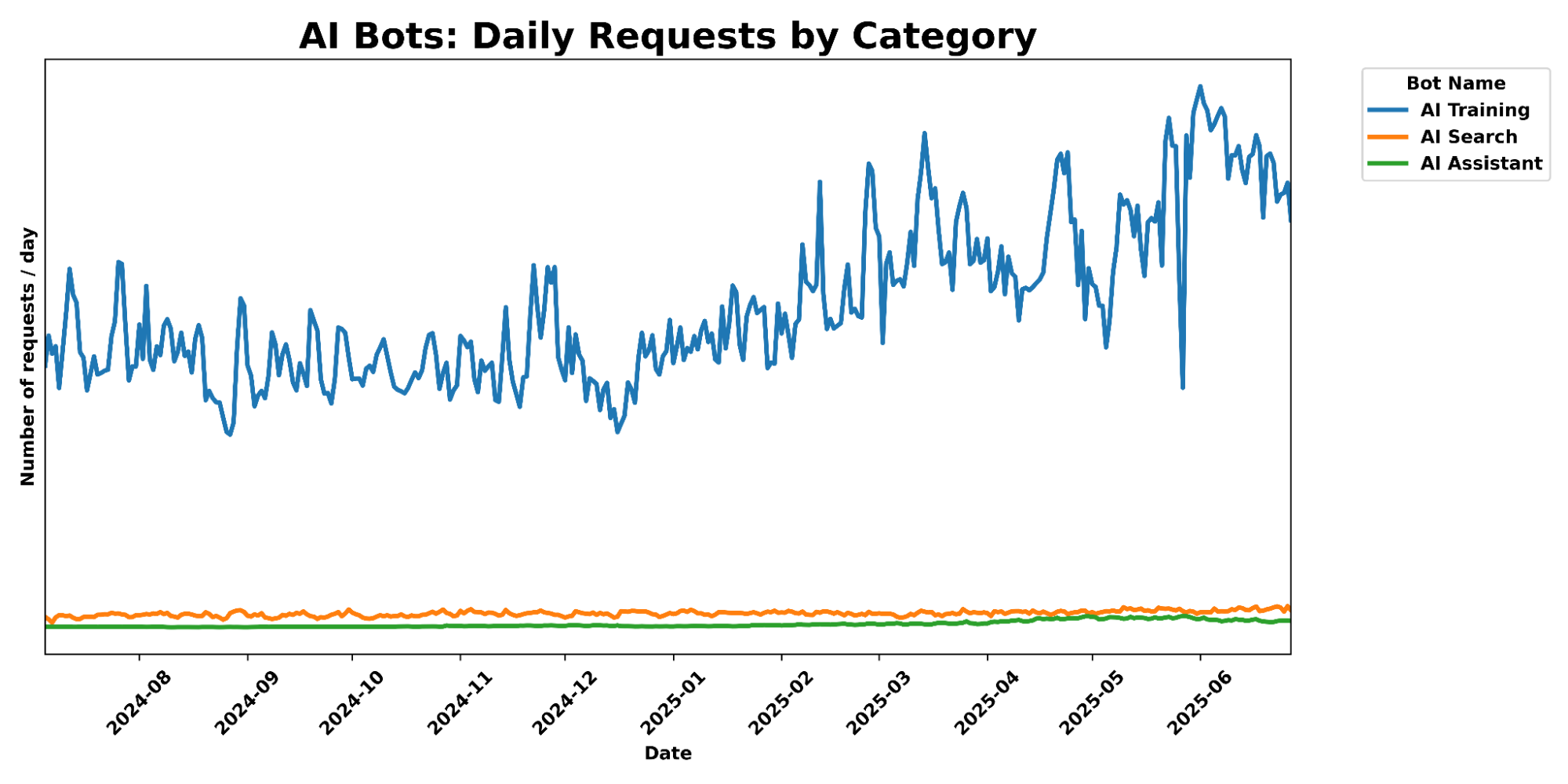
Cloudflare’s data shows this shift in stark terms. In mid-2025, crawling for the purpose of AI model training accounted for nearly 80% of all AI bot activity on our network, a significant increase from the year prior. Modern scraping tools are now AI-powered themselves. They leverage LLMs for semantic understanding of page content, use computer vision to solve visual challenges, and employ reinforcement learning to navigate complex websites they’ve never seen before. The evolution of these bots exposes critical vulnerability in the traditional, one-size-fits-all approach to security. While global threat intelligence is immensely powerful for stopping widespread attacks, these new AI-powered scrapers are designed to blend in. They can rotate IP addresses through residential proxies, generate human-like user agents, and mimic plausible browsing patterns. A request from one of these bots might not look anomalous when compared to the trillions of requests we see across the Cloudflare network, but would appear anomalous when compared to the established patterns of legitimate users on a specific website. This means we need to build defenses against these bots from every angle we have — from the global view to specific behavior on a single application.
Globally scalable bot fingerprinting
To target specific well-known bots or bot actors, we leverage the Cloudflare network to fingerprint bots that we see behave similarly across millions of websites. Since June, Cloudflare’s bot detection security analysts have written 50 heuristics to catch bots using a variety of signals, including but not limited to HTTP/2 fingerprints and Client Hello extensions. By observing traffic on millions of websites, we establish a baseline of legitimate fingerprints of common browsers and benign devices. When a new, unique fingerprint suddenly appears across many different sites, it’s a tell-tale sign of a distributed botnet or a new automation tool, allowing our analysts to block the bot’s signature itself and neutralize the entire campaign, regardless of the thousands of different IP addresses it might use.
Recently, we also introduced detection improvements to tackle residential proxy networks and similar commercial proxies, which are used by attackers to make their bots appear as thousands of distinct real visitors, allowing them to bypass traditional security measures. The superpower of this detection improvement? Combining the vast amount of network data we see with particular client-side fingerprints obtained through the millions of challenge solves that happen across the Internet daily. Challenges have always served as an ideal mitigation action for customers who want to protect their applications without compromising real-user experience, but now they also serve as a gift that keeps on giving: in this case, feeding the Cloudflare threat detection teams a constant stream of client-side information that allows us to pattern match to determine IP addresses that are used by residential proxy networks.
This detection improvement is already ingesting data from the entire Cloudflare network, automatically catching more malicious traffic for all customers using Super Bot Fight Mode (bot protection included for Pro, Business, and all Enterprise customers) and Enterprise Bot Management. Examining 7 days of data from the time of authoring this post, we’ve observed 11 billion requests from millions of unique IP addresses that we’ve identified as connected to residential or commercial proxy networks. This is just one piece of the global detection puzzle; the existing residential proxy detection features in our MLalready catch tens of millions of requests every hour.
Hyper-personalized security: learning what’s normal for you
The new arms race against AI-powered bots necessitates a closer look — something more precise. For instance, a script that systematically scrapes every user profile on a social media site, or every product listing on an e-commerce platform, is exhibiting behavior that is fundamentally abnormal for that application, even if a standalone request appears benign. This realization is at the heart of our new strategy: to win this new arms race, defenses must become as bespoke and adaptive as the attacks they face.
To meet this challenge, we built a new, foundational platform engineered to deploy custom machine learning models for every bot management customer. We’re creating a unique defense for every application. Because each website has different traffic, the traffic that we flag as anomalous will, of course, be different for each zone — for this system, we want to be clear that data from one customer’s zone won’t be used to train the model for another customer’s use.
Announcing this as a new platform capability, rather than a single feature, is a deliberate choice. It aligns with how we’ve approached our most significant innovations, from Cloudflare Workers changing how developers build applications, to AI Gateway creating a single control plane for AI observability and security. By focusing on the platform, we tackle the scraping problems our customers are seeing today and power future detections as bot attacks become increasingly sophisticated.
Our new generation of per-customer anomaly detection is a three-step process, designed to identify malicious behavior by first understanding what constitutes legitimate traffic for each individual website and API.
Step 1: Establishing a dynamic baseline
For each customer zone, our behavioral detections ingest traffic data to build a baseline of normal activity. Rather than taking a static snapshot, our new platform ingests data to make living, continuously updated calculations of what “normal” looks like on a specific website. This approach understands seasonality, recognizes traffic spikes from legitimate marketing campaigns, and maps the typical pathways users take through a site. This approach evolves the concept of Anomaly Detection already present in our Enterprise Bot Management suite, but applies it at a far more granular and dynamic per-customer level.
Step 2: Identifying the anomalies
Once the baseline of “normal” is established, we begin the true work — identifying deviations. Because the baseline is specific to each website, the anomalies detected are highly contextual, perhaps even invisible to a global system. We can examine a few different types of websites to unpack this:
For a gaming company: A normal traffic baseline might show millions of users making frequent, rapid API calls to a matchmaking service or an in-game inventory system. A behavioral detection model trained on this baseline would immediately flag a single user making slow, methodical, sequential API calls to scrape the entire player leaderboard. This behavior, while low in volume, is a clear anomaly against the backdrop of normal gameplay patterns.
For a retail website: The normal baseline is a complex funnel of users browsing categories, viewing products, adding items to a cart, and proceeding to checkout. These detections would identify an actor that systematically visits every single product page in alphabetical order at a machine-like pace, without ever interacting with the cart or session cookies, as a significant anomaly indicative of content scraping.
For a media publisher: Normal user behavior involves reading a few articles, following internal links, and spending a measurable amount of time on each page. An anomaly would be a script that hits thousands of article URLs per minute, spending less than a second on each, purely to extract the text content for AI model training.
In each case, the malicious activity is defined not by a universal signature, but by its deviation from the application’s unique, established norm.
Step 3: Generating actionable findings
Detecting an anomaly is only half the battle. The power of bot management comes from its seamless integration into the Cloudflare security ecosystem you already use, turning detection into immediate, actionable findings. Customers can benefit from these behavioral detection improvements in two ways:
New Bot Detection IDs: For our Enterprise customers, we’re introducing a new set of Bot Detection IDs. Website owners and security teams can write WAF security rules to challenge, rate-limit, or block traffic based on the specific anomalies flagged by these detections. Since each detection type is tied to a unique ID, customers can see exactly what kind of behavior caused a request to be flagged as anomalous, offering a detailed, per-request view into stealthy malicious traffic. And for a wider view, customers can filter by Detection ID from their Security Analytics, to see the bigger picture of all traffic captured by that detection type.
Improving Bot Score: Another key output from these new, per-customer models will be to directly influence the Bot Score of a request. A request flagged as anomalous will have its score lowered, moving it into the “Likely Automated” (scores 2-29) or “Automated” (score 1) categories. This means that existing WAF custom rules based on Bot Score will automatically see impact and become more effective against bespoke attacks, with no changes required. This functionality update is available today for our latest account takeover detection, residential proxy detections and our recent enhancements, and will be implemented in the future for our behavioral scraping detection.
This three-step process is already in action with our behavioral detections to catch account takeover attacks. Taking bot detection ID 201326598 as an example: it (1) establishes a zone-level baseline that understands what normal traffic patterns look like for a specific website, (2) examines anomalous login failures to identify brute force and credential stuffing attacks, then (3) allows customers to mitigate these attacks by automatically influencing bot score and offering more visibility with the detection ID’s analytics.
This integration strategy creates a flywheel effect: the new intelligence from these improved detections immediately enhances the value of existing products like Super Bot Fight Mode, Bot Management, and the WAF, making the entire Cloudflare platform stronger for you.
Taking on sophisticated scrapers
The first challenge we’re tackling is sophisticated scraping. AI-driven scraping is one of the most pressing and rapidly evolving threats facing website owners today, and its adaptive nature makes it an ideal adversary for a system designed to fight an enemy that constantly changes its tactics.
The first generation of our improved behavioral detections are tuned specifically to detect scraping by analyzing signals that go beyond simple request headers. These include:
Behavioral Analysis: Looking at session traversal paths, the sequence of requests, and interaction (or lack thereof) with dynamic page elements.
Client Fingerprinting: Analyzing subtle signals from the client to identify signs of automation such as JA4 fingerprints in the context of the customer’s specific traffic baseline.
Content-Agnostic Detection: These models do not need to understand the content of a page, only the patterns of how it is being accessed. This makes them highly scalable and efficient, without actually using the unique content on a website to make judgement calls.
How do these scraping detections look, in practice? We validated our logic for detecting scraping with early adopters in a closed beta, in order to receive ground-truth feedback and tune our detections. As with any ideal detection, our goal is to capture as much malicious traffic as possible, without compromising the experience of legitimate website visitors. Looking at just a 24-hour period, our new scraping detections have caught hundreds of millions of requests, flagging 138 million scraping requests on just 5 of our early beta zones.
Naturally, we see an overlap with our existing system of bot scoring, but the numbers here show us concretely that our new method of behavioral detections have a completely new value add: 34% of the requests flagged by our new scraping detections would not have been detected by our existing bot score system, making us all the more eager to use these novel detections to inform the way we score automation.
A birthday gift for the Internet
Our mission to help build a better Internet means that when we develop powerful new defenses, we believe in democratizing access to them. Protecting the entire Internet from new and evolving threats requires raising the baseline of security for everyone.
In that spirit, we’re excited to announce that our enhanced behavioral detections will not only roll out to bot management customers, but will also benefit Cloudflare customers using our global Super Bot Fight Modesystem. For our Enterprise Bot Management customers, we automatically tune our detections based on the exact traffic for each zone. Because these advanced models are trained on your zone’s specific traffic, they detect even the most evasive attacks: from account takeovers to web scraping to other attacks executed through residential proxy networks — and we consider this only the tip of the iceberg of behavioral bot profiling.
The road ahead
Our initial focus on scraping is just the beginning of a new wave of behavioral bot detections. The infrastructure we’ve built is a flexible, powerful foundation for tackling a wide range of malicious behavior on your websites; the same principles of establishing a per-customer baseline and detecting anomalies can be applied to other critical threats that are unique to an application’s logic, such as credential stuffing, inventory hoarding, carding attacks, and API abuse.
We are moving into an era where generic defenses are no longer enough. As threats become more personal, so must the defenses against them, and paving this path of behavioral detections is our latest gift to the Internet. Our first offering of scraping behavioral detections is just around the corner: customers will be able to turn on this new detection from the Security Overview page in their dashboard.
(We’re always looking for enthusiastic humans to help us in our mission against bots! If you’re interested in helping us build a better Internet, check out our open positions.)
On the surface, the goal of handling bot traffic is clear: keep malicious bots away, while letting through the helpful ones. Some bots are evidently malicious — such as mass price scrapers or those testing stolen credit cards. Others are helpful, like the bots that index your website. Cloudflare has segmented this second category of helpful bot traffic through our verified bots program, vetting and validating bots that are transparent about who they are and what they do.
Today, the rise of agents has transformed how we interact with the Internet, often blurring the distinctions between benign and malicious bot actors. Bots are no longer directed only by the bot owners, but also by individual end users to act on their behalf. These bots directed by end users are often working in ways that website owners want to allow, such as planning a trip, ordering food, or making a purchase.
Our customers have asked us for easier, more granular ways to ensure specific bots, crawlers, and agents can reach their websites, while continuing to block bad actors. That’s why we’re excited to introduce signed agents, an extension of our verified bots program that gives a new bot classification in our security rules and in Radar. Cloudflare has long recognized agents — but we’re now endowing them with their own classification to make it even easier for our customers to set the traffic lanes they want for their website.
But the bot landscape is constantly evolving. Let’s unpack a common type of verified AI bot — an AI crawler such as GPTBot. Even though the bot performs an array of tasks, the bot’s ultimate purpose is a singular, repetitive task on behalf of the operator of that bot: fetch and index information. Its intelligence is applied to performing that singular job on behalf of that bot owner.
Agents, though, are different. Think about an AI agent tasked by a user to “Book the best deal for a round-trip flight to New York City next month.” These agents sometimes use remote browsing products like Cloudflare’s Browser Rendering and similar products from companies like Browserbase and Anchor Browser. And here is the key distinction: this particular type of bot isn’t operating on behalf of a single company, like OpenAI in the prior example, but rather the end users themselves.
Introducing signed agents
In May, we announced Web Bot Auth, a new method of using cryptography to verify bot and agent traffic. HTTP message signatures allow bots to authenticate themselves and allow customer origins to identify them. This is one of the authentication methods we use today for our verified bots program.
What, exactly, is a signed agent? First, they are agents that are generally directed by an end user instead of a single company or entity. Second, the infrastructure or remote browsing platform the agents use is signing their HTTP requests via Web Both Auth, with Cloudflare validating these message signatures. And last, they comply with our signed agent policy.
The signed agents classification improves on our existing frameworks in a couple of ways:
Increased precision and visibility: we’ve updated the Cloudflare bots and agents directory to include signed agents in addition to verified bots. This allows us to verify the cryptographic signatures of a much wider set of automated traffic, and our customers to granularly apply their security preferences more easily. Bot operators can now submit signed agent applications from the Cloudflare dashboard, allowing bot owners to specify to us how they think we should segment their automated traffic.
Easier controls from security rules: similar to how they can take action on verified bots as a group, our Enterprise customers will be able to take action on signed agents as a group when configuring their security rules. This new field will be available in the Cloudflare dashboard under security rules soon.
To apply to have an agent added to Cloudflare’s directory of bots and agents, customers should complete the Bot Submission Form in the Cloudflare dashboard. Here, they can specify whether the submission should be considered for the signed agents list or the verified bots list. All signed agents will be recognized by their cryptographic signatures through Web Bot Auth validation.
The Bot Submission Form, available in the Cloudflare dashboard for bot owners to submit both verified bot and signed agent applications.
We want to be clear: our verified bots program isn’t going anywhere. In fact, well-behaved and transparent applications that make use of signed agents can further qualify to be a verified bot, if their specific service adheres to our policy. For instance,Cloudflare Radar’s URL Scanner, which relies on Browser Rendering as a service to scan URLs, is a verified bot. While Browser Rendering itself does not qualify to be a verified bot, URL Scanner does, since the bot owner (in this case, Cloudflare Radar) directs the traffic sent by the bot and always identifies itself with a unique Web Bot Auth signature — distinct from Browser Rendering’s signature.
From an agent’s perspective…
Since the launch of Web Bot Auth, our own Browser Rendering product has been sending signed Web Bot Auth HTTP headers, and is always given a bot score of 1 for our Bot Management customers. As of today, Browser Rendering will now show up in this new signed agent category.
We’re also excited to announce the first cohort of agents that we’re partnering with and will be classifying as signed agents: ChatGPT agent, Goose from Block, Browserbase, and Anchor Browser. They are perfect examples of this new classification because their remote browsers are used by their end customers, not necessarily the companies themselves. We’re thrilled to partner with these teams to take this critical step for the AI ecosystem:
“When we built Goose as an open source tool, we designed it to run locally with an extensible architecture that lets developers automate complex workflows. As Goose has evolved to interact with external services and third-party sites on users’ behalf, Web Bot Auth enables those sites to trust Goose while preserving what makes it unique. This authentication breakthrough unlocks entirely new possibilities for autonomous agents.” – Douwe Osinga, Staff Software Engineer, Block
“At Browserbase, we provide web browsing capabilities for some of the largest AI applications. We’re excited to partner with Cloudflare to support the adoption of Web Bot Auth, a critical layer of identity for agents. For AI to thrive, agents need reliable, responsible web access.“ – Paul Klein, CEO, Browserbase
“Anchor Browser has partnered with Cloudflare to let developers ship verified browser agents. This way trustworthy bots get reliable access while sites stay protected.” – Idan Raman, CEO, Anchor Browser
Updated visibility on Radar
We want everyone to be in the know about our bot classifications. Cloudflare began publishing verified bots on our Radar page back in 2022, meaning anyone on the Internet — Cloudflare customer or not — can see all of our verified bots on Radar. We dynamically update the list of bots, but show more than just a list: we announced on Content Independence Day that every verified bot would get its own page in our public-facing directory on Radar, which includes the traffic patterns that we see for each bot.
Our directory has been updated to include both signed agents and verified bots — we share exactly how Cloudflare classifies the bots that it recognizes, plus we surface all of the traffic that Cloudflare observes from these many recognized agents and bots. Through this updated directory, we’re not only giving better visibility to our customers, but also striving to set a higher standard for transparency of bot traffic on the Internet.
Cloudflare Radar’s Bots Directory, which lists verified bots and signed agents. This view is filtered to view only agent entries.
Cloudflare Radar’s signed agent page for ChatGPT agent, which includes its traffic patterns for the last 7 days, from August 21, 2025 to August 27, 2025.
What’s now, what’s next
As of today, the Cloudflare bot directory supports both bots and agents in a more clear-cut way, and customers or agent creators can submit agents to be signed and recognized through their account dashboard. In addition, anyone can see our signed agents and their traffic patterns on Radar. Soon, customers will be able to take action on signed agents as a group within their firewall rules, the same way you can take action on our verified bots.
Agents are changing the way that humans interact with the Internet. Websites need to know what tools are interacting with them, and for the builders of those tools to be able to easily scale. Message signatures help achieve both of these goals, but this is only step one. Cloudflare will continue to make it easier for agents and websites to interact (or not!) at scale, in a seamless way.
On July 19, 2025,Microsoft disclosed CVE-2025-53770, a critical zero-day Remote Code Execution (RCE) vulnerability. Assigned a CVSS 3.1 base score of 9.8 (Critical), the vulnerability affects SharePoint Server 2016, 2019, and the Subscription Edition, along with unsupported 2010 and 2013 versions. Cloudflare’s WAF Managed Rules now includes 2 emergency releases that mitigate these vulnerabilities for WAF customers.
Unpacking CVE-2025-53770
The vulnerability’s root cause is improper deserialization of untrusted data, which allows a remote, unauthenticated attacker to execute arbitrary code over the network without any user interaction. Moreover, what makes CVE-2025-53770 uniquely threatening is its methodology – the exploit chain, labeled “ToolShell.” ToolShell is engineered to play the long-game: attackers are not only gaining temporary access, but also taking the server’s cryptographic machine keys, specifically the ValidationKey and DecryptionKey. Possessing these keys allows threat actors to independently forge authentication tokens and __VIEWSTATE payloads, granting them persistent access that can survive standard mitigation strategies such as a server reboot or removing web shells.
In response to the active nature of these attacks, the U.S. Cybersecurity and Infrastructure Security Agency (CISA) added CVE-2025-53770 to itsKnown Exploited Vulnerabilities (KEV) catalog with an emergency remediation deadline. The security community’s consensus is clear: any organization with an on-premise SharePoint server on the Internet should assume it has been compromised and take immediate action to fully address this vulnerability.
Since releasing our vulnerability patch in Cloudflare’s WAF Managed Ruleset, we’ve tracked the number of HTTP request matches for the vulnerability, which you can see in the graph below. Notably, we observed a significant peak around 11AM UTC, the morning of July 22, at around 300,000 hits at one point in time.
How does the ToolShell exploit chain work?
The ToolShell exploit chain was first demonstrated at the Pwn2Own hacking competition in May 2025, where researchers chained an authentication bypass (CVE-2025-49706) with a deserialization RCE (CVE-2025-49704). Unfortunately, this was not the end of ToolShell’s lifespan. Threat actors evidently analyzed the patches to find weaknesses and exploit them in the wild, forcing Microsoft to assign new identifiers and call out CVE-2025-53771 for the authentication bypass. This rapid exploit → patch → bypass cycle shows that threat actors are not merely discovering vulnerabilities, but also systematically reverse-engineering patches to weaponize bypasses. For responders, this closes the window – or hides it altogether – to respond and put up defenses, highlighting the need for evolving, proactive security postures.
The ToolShell exploit works in 3 stages:
Authentication Bypass, leveraging CVE-2025-53771: The attack begins with a POST request sent to the /_layouts/15/ToolPane.aspx endpoint, a legacy component of SharePoint. The crutch of this authentication bypass happens by setting the Referer header to /_layouts/SignOut.aspx, which tricks the SharePoint server into trusting the attacker. With trust in hand, the attacker is able to skip authentication checks and move forward with authenticated access.
Remote Code Execution via Deserialization, CVE-2025-53770: With privileged access, the attacker can interact with the ToolPane.aspx endpoint. The attacker submits a malicious payload in the body of the POST request, triggering the core vulnerability: a deserialization flaw in which the SharePoint application deserializes the object into executable code on the server. At this point, the attacker can execute commands as they wish.
The Long-Game: Possessing Cryptographic Keys: Finally, to play the long-game and maintain continued access, the attacker will use a specific web shell to steal the server’s cryptographic machine keys. By taking the ValidationKey and the DecryptionKey, the attacker obtains the state information used by SharePoint. Possessing these keys allows the attacker to operate independently, long after the original exploit; this means they can continue to execute new malicious payloads on the exploited server. This permanent backdoor makes this attack method uniquely dangerous.
Cloudflare’s new WAF Managed Rules for CVE-2025-53770, CVE-2025-53771
CVE-2025-53770 is a clear example of how modern cyber threats are two-sided, combining an initial breach vector with a mechanism for long-term persistence. This means that a successful defense will address both the immediate RCE vulnerability and the subsequent threat of unwelcome access.
Once a public proof-of-concept became available for this exploit, Cloudflare’s security analysts crafted and tested new patches, ensuring that they would address not only the initial attack, but also the longer-term threat.
The team began researching the exploit the evening of July 20, and on July 21, 2025, Cloudflare deployed our emergency WAF Managed Rules to patch the vulnerability, meaning every customer using the Cloudflare Managed Ruleset will automatically be protected from this critical SharePoint vulnerability. These rules have been announced on the WAF changelog and will take effect immediately.
Cloudflare is giving all website owners two new tools to easily control whether AI bots are allowed to access their content for model training. First, customers can let Cloudflare create and manage a robots.txt file, creating the appropriate entries to let crawlers know not to access their site for AI training. Second, all customers can choose a new option to block AI bots only on portions of their site that are monetized through ads.
The new generation of AI crawlers
Creators that monetize their content by showing ads depend on traffic volume. Their livelihood is directly linked to the number of views their content receives. These creators have allowed crawlers on their sites for decades, for a simple reason: search crawlers such as Googlebot made their sites more discoverable, and drove more traffic to their content. Google benefitted from delivering better search results to their customers, and the site owners also benefitted through increased views, and therefore increased revenues.
But recently, a new generation of crawlers has appeared: bots that crawl sites to gather data for training AI models. While these crawlers operate in the same technical way as search crawlers, the relationship is no longer symbiotic. AI training crawlers use the data they ingest from content sites to answer questions for their own customers directly, within their own apps. They typically send much less traffic back to the site they crawled. Our Radar team did an analysis of crawls and referrals for sites behind Cloudflare. As HTML pages are arguably the most valuable content for these crawlers, we calculated crawl ratios by dividing the total number of requests from relevant user agents associated with a given search or AI platform where the response was of Content-type: text/html by the total number of requests for HTML content where the Referer: header contained a hostname associated with a given search or AI platform. As of June 2025, we find that Google crawls websites about 14 times for every referral. But for AI companies, the crawl-to-refer ratio is orders of magnitude greater. In June 2025, OpenAI’s crawl-to-referral ratio was 1,700:1, Anthropic’s 73,000:1. This clearly breaks the “crawl in exchange for traffic” relationship that previously existed between search crawlers and publishers. (Please note that this calculation reflects our best estimate, recognizing that traffic referred by native apps may not always be attributed to a provider due to a lack of a Referer: header, which may affect the ratio.)
And while sites can use robots.txt to tell these bots not to crawl their site, most don’t take this first step. We found that only about 37% of the top 10,000 domains currently have a robots.txt file, showing that robots.txt is underutilized in this age of evolving crawlers.
That’s where Cloudflare comes in. Our mission is to help build a better Internet, and a better Internet is one with a huge thriving ecosystem of independent publishers. So, we’re taking action to keep that ecosystem alive.
Giving ALL customers full control
Protecting content creators isn’t new for Cloudflare. In July 2024, we gave everyone on the Cloudflare network a simple way to block all AI scrapers with a single click for free. We’ve already seen more than 1 million customers enable this feature, which has given us some interesting data.
Since our last update, we can see that Bytespider, our previous top bot, has seen traffic volume decline 71.45% since the first week of July 2024. During the same time, we saw an increased number of Bytespider requests that customers chose to specifically block. In contrast, GPTBot traffic volume has grown significantly as it has become more popular, now even surpassing traffic we see from big traditional tech players like Amazon and ByteDance.
The share of sites accessed by particular crawlers has gone down across the board since our last update. Previously, Bytespider accessed >40% of websites protected by Cloudflare, but that number has dropped to only 9.37%. GPTBot has taken the top spot for most sites accessed, but while its request volume has grown significantly (noted above), the share of sites it crawls has actually decreased since last year from 35.46% to 28.97%, with an increase in customers blocking.
AI Bot
Share of Websites Accessed
GPTBot
28.97%
Meta-ExternalAgent
22.16%
ClaudeBot
18.80%
Amazonbot
14.56%
Bytespider
9.37%
GoogleOther
9.31%
ImageSiftBot
4.45%
Applebot
3.77%
OAI-SearchBot
1.66%
ChatGPT-User
1.06%
And while AI Search and AI Assistant crawling related activity has exploded in popularity in the last 6 months, we still see their total traffic pale in comparison to AI training crawl activity, which has seen a 65% increase in traffic over the past 6 months.
To this end, we launched free granular auditing in September 2024 to help customers understand which crawlers were accessing their content most often, and created simple templates to block all or specific crawlers. And in December 2024, we made it easy for publishers to automatically block crawlers that weren’t respecting robots.txt. But we realized many sites didn’t have the time to create or manage their own robots.txt file. Today, we’re going two steps further.
Step 1: fully managed robots.txt
When it comes to managing your website’s visibility to search engine crawlers and other bots, the robots.txt file is a key player. This simple text file acts like a traffic controller, signaling to bots which parts of the website they should or should not access. We can think of robots.txt as a “Code of Conduct” sign posted at a community pool, listing general dos and don’ts, according to the pool owner’s wishes. While the sign itself does not enforce the listed directives, well-behaved visitors will still read the sign and follow the instructions they see. On the other hand, poorly-behaved visitors who break the rules risk getting themselves banned.
What do these files actually look like? Take Google’s as an example, visible to anyone at https://www.google.com/robots.txt. Parsing its contents, you’ll notice four directives in the set of instructions: User-agent, Disallow, Allow, and Sitemap. In a robots.txt file, the User-agent directive specifies which bots the rules apply to. The Disallow directive tells those bots which parts of the website they should avoid. In contrast, the Allow directive grants specific bots permission to access certain areas. Finally, theSitemap directive shows a bot which pages it can reach, so that it won’t miss any important pages. The Internet Engineering Task Force (IETF) formalized the definition and language for the Robots Exclusion Protocol in RFC 9309, specifying the exact syntax and precedence of these directives. It also outlines how crawlers should handle errors or redirects while stressing that compliance is voluntary and does not constitute access control.
Website owners should have agency over AI bot activity on their websites. We mentioned that only 37% of the top 10,000 domains on Cloudflare even have a robots.txt file. Of those robots files that do exist, few include Disallow directives for the top AI Bots that we see on a daily basis. For instance, as of publication, GPTBot is only disallowed in 7.8% of the robots.txt files found for the top domains; Google-Extended only shows up in 5.6%; anthropic-ai, PerplexityBot, ClaudeBot, and Bytespider each show up in under 5%. Furthermore, the difference between the 7.8% of Disallow directives for GPTBot and the ~5% of Disallow directives for other major AI crawlers suggests a gap between the desire to prevent your content from being used for AI model training and the proper configuration that accomplishes this by calling out bots like Google-Extended. (After all, there’s more to stopping AI crawlers than disallowing GPTBot.)
Along with viewing the most active bots and crawlers, Cloudflare Radar also shares weekly updates on how websites are handling AI bots in their robots.txt files. We can examine two snapshots below, one from June 2025 and the other from January 2025:
Radar snapshot from the week of June 23, 2025, showing the top AI user agents mentioned in the Disallow directive in robots.txt files across the top 10,000 domains. The 3 bots with the highest number of Disallows are GPTBot, CCBot, and facebookexternalhit.
Radar snapshot from the week of January 26, 2025, showing the top AI user agents mentioned in the Disallow directive in robots.txt files across the top 10,000 domains. The 3 bots with the highest number of Disallows are GPTBot, CCBot, and anthropic-ai.
From the above data, we also observe that fewer than 100 new robots.txt files have been added among the top domains between January and June. One visually striking change is the ratio of dark blue to light blue: compared to January, there is a steep decrease in “Partially Disallowed” permissions; websites are now flat-out choosing “Fully Disallowed” for the top AI crawlers, including GPTBot, CCBot, and Google-Extended. This underscores the changing landscape of web crawling, particularly the relationship of trust between website owners and AI crawlers.
Putting up a guardrail with Cloudflare’s managed robots.txt
Many website owners have told us they’re in a tricky spot in this new era of AI crawlers. They’ve poured time and effort into creating original content, have published it on their own sites, and naturally want it to reach as many people as possible. To do that, website owners make their sites accessible to search engine crawlers, which index the content and make it discoverable in search results. But with the rise of AI-powered crawlers, that same content is now being scraped not just for indexing, but also to train AI models, often without the creator’s explicit consent. Take Googlebot, for example: it’s an absolute requirement for most website owners to allow for SEO. But Google crawls with user agent Googlebot for both SEO and AI training purposes. Specifically disallowing Google-Extended (but not Googlebot) in your robots.txt file is what communicates to Google that you do not want your content to be crawled to feed AI training.
So, what if you don’t want your content to serve as training data for the next AI model, but don’t have the time to manually maintain an up-to-date robots.txt file? Enter Cloudflare’s new managed robots.txt offering. Once enabled, Cloudflare will automatically update your existing robots.txt or create a robots.txt file on your site that includes directives asking popular AI bot operators to not use your content for AI model training. For instance, Cloudflare’s managed robots.txt signals your preference to Google-Extended and Applebot-Extended, amongst others, that they should not crawl your site for AI training, while keeping your domain(s) SEO-friendly.
Cloudflare dashboard snapshot of the new managed robots.txt activation toggle
This feature is available to all customers, meaning anyone can enable this today from the Cloudflare dashboard. Once enabled, website owners who previously had no robots.txt file will now have Cloudflare’s managed bot directives live on their website. What about website owners who already have a robots.txt file? The contents of Cloudflare’s managed robots.txt will be prepended to site owners’ existing file. This way, their existing Block directives – and the time and rationale put into customizing this file – are honored, while still ensuring the website has AI crawler guardrails managed by Cloudflare.
As the AI bot landscape changes with new bots on the rise, Cloudflare will keep our customers a step ahead by updating the directives on our managed robots.txt, so they don’t have to worry about maintaining things on their own. Once enabled, customers won’t need to take any action in order for any updates of the managed robots.txt content to go live on their site.
We believe that managing crawling is key to protecting the open Internet, so we’ll also be encouraging every new site that onboards to Cloudflare to enable our managed robots.txt. When you onboard a new site, you’ll see the following options for managing AI crawlers:
This makes it effortless to ensure that every new customer or domain onboarded to Cloudflare gives clear directives to how they want their content used.
Under the hood: technical implementation
To implement this feature, we developed a new module that intercepts all inbound HTTP requests for /robots.txt. For all such requests, we’ll check whether the zone has opted in to use Cloudflare’s managed robots.txt by reading a value from our distributed key-value store. If they have, the module then responds with the Cloudflare’s managed robots.txt directives, prepended to the origin’s robot.txt if there is an existing file. We prepend so we can add a generalized header that instructs all bots on the customers preferences for data use, as defined in the IETF AI preferences proposal. Note that in robots.txt, the most specific matchmust always be used, and since our disallow expressions are scoped to cover everything, we can ensure a directive we prepend will never conflict with a more targeted customer directive. If the customer has not enabled this feature, the request is forwarded to the origin server as usual, using whatever the customer has written in their own robots.txt file. (While caching origin’s robots.txt could reduce latency by eliminating a round trip to the origin, the impact on overall page load times would be minimal, as robots.txt requests comprise a small fraction of total traffic. Adding cache update/invalidation would introduce complexity with limited benefit, so we prioritized functionality and reliability in our implementation.)
Step 2: block, but only where you show ads
Adding an entry to your robots.txt file is the first step to telling AI bots not to crawl you. But robots.txt is an honor system. Nothing forces bots to follow it. That’s why we introduced our one-click managed rule to block all AI bots across your zone. However, some customers want AI bots to visit certain pages, like developer or support documentation. For customers who are hesitant to block everywhere, we have a brand-new option: let us detect when ads are shown on a hostname, and we will block AI bots ONLY on that hostname. Here’s how we do it.
First, we use multiple techniques to identify if a request is coming from an AI bot. The easiest technique is to identify well-behaved crawlers that publicly declare their user agent, and use dedicated IP ranges. Often we work directly with these bot makers to add them to our Verified Bot list.
Many bot operators act in good faith by publicly publishing their user agents, or even cryptographically verifying their bot requests directly with Cloudflare. Unfortunately, some attempt to appear like a real browser by using a spoofed user agent. It’s not new for our global machine learning models to recognize this activity as a bot, even when operators lie about their user agent. When bad actors attempt to crawl websites at scale, they generally use tools and frameworks that we’re able to fingerprint, and we use Cloudflare’s network of over 57 million requests per second on average, to understand how much we should trust the fingerprint. We compute global aggregates across many signals, and based on these signals, our models are able to consistently and appropriately flag traffic from evasive AI bots.
When we see a request from an AI bot, our system checks if we have previously identified ads in the response served by the target page. To do this, we inspect the “response body” — the raw HTML code of the web page being sent back. After parsing the HTML document, we perform a comprehensive scan for code patterns commonly found in ad units, which signals to us that the page is serving an ad. Examples of such code would be:
Here, the div-container has the ui-advert class commonly used for advertising. Similarly, links to commonly used ad servers like Google Syndication are a good signal as well, such as the following:
By streaming and directly parsing small chunks of the response using our ultra-fast LOL HTML parser, we can perform scans without adding any latency to the inspected response.
So as not to reinvent the wheel, we are adopting techniques similar to those that ad blockers have been using for years. Ad blockers fundamentally perform two separate tasks to block advertisements in a browser. The first is to block the browser from fetching resources from ad servers, and the second is to suppress displaying HTML elements that contain ads. For this, ad blockers rely on large filter lists such as EasyList that contain both so-called URL block filters that match outgoing request URLs against a set of patterns, and block them if they match one of the filters, and CSS selectors that are designed to match HTML ad elements.
We can use both of these techniques to detect if an HTML response contains ads by checking external resources (e.g. content referenced by HREF or SCRIPT tags) against URL block filters, and the HTML elements themselves against CSS selectors. Because we do not actually need to block every single advertisement on a site, but rather detect the overall presence of ads on a site, we can achieve the same detection efficacy when shrinking the number of CSS and URL filters down from more than 40,000 in EasyList to the 400 most commonly seen ones to increase our computational efficiency.
Because some sites load ads dynamically rather than directly in the returned HTML (partially to avoid ad blocking), we enrich this first information source with data from Content Security Policy (CSP) reports. The Content Security Policy standard is a security mechanism that helps web developers control the resources (like scripts, stylesheets, and images) a browser is allowed to load for a specific web page, and browsers send reports about loaded resources to a CSP management system, which for many sites is Cloudflare’s Page Shield product. These reports allow us to relate scripts loaded from ad servers directly with page URLs. Both of these information sources are consumed by our endpoint management service, which then matches incoming requests against hostnames that we already know are serving ads.
We do all of this on every request for any customer who opts in, even free customers.
To enable this feature, simply navigate to the Security > Settings > Bots section of the Cloudflare dashboard, and choose either Block on pages with Ads or Block Everywhere.
The AI bot hunt: finding and identifying bots
The AI bot landscape has exploded and continues to grow with an exponential trajectory as more and more operators come online. At Cloudflare, our team of security researchers are constantly identifying and classifying different AI-related crawlers and scrapers across our network.
There are two major ways in which we track AI bots and identify those that are poorly behaved:
1. Our customers play a crucial role by directly submitting reports of misbehaved AI bots that may not yet be classified by Cloudflare. (If you have an AI bot that comes to mind here, we’d love for you to let us know through our bots submission form today.) Once such a bot comes to our attention, our security analysts investigate to determine how it should be categorized.
2. We’re able to derive insights through analysis of the massive scale of our customers’ traffic that we observe. Specifically, we can see which AI agents visit which websites and when, drawing out trends or patterns that might make a website owner want to disallow a given AI bot. This bird’s-eye view on abusive AI bot behavior was paramount as we started to determine the content of a managed robots.txt.
What’s next?
Our new managed robots.txt and blocking AI bots on pages with ads features are available to all Cloudflare customers, including everyone on a Free plan. We encourage customers to start using them today – to take control over how the content on your website gets used. Looking ahead, Cloudflare will monitor the IETF’s pending proposal allowing website publishers to control how automated systems use their content and update our managed robots.txt accordingly. We will also continue to provide more granular control around AI bot management and investigate new distinguishing signals as AI bots become more and more precise. And if you’ve seen suspicious behavior from an AI scraper, contribute to the Internet ecosystem by letting us know!
The Internet is an endless flow of conversations between computers. These conversations, the constant exchange of information from one computer to another, are what allow us to interact with the Internet as we know it. Application Programming Interfaces (APIs) are the vital channels that carry these conversations, and their usage is quickly growing: in fact, more than half of the traffic handled by Cloudflare is for APIs, and this is increasing twice as fast as traditional web traffic.
In March, we announced that we’re expanding our API Shield into a full API Gateway to make it easy for our customers to protect and manage those conversations. We already offer several features that allow you to secure your endpoints, but there’s more to endpoints than their security. It can be difficult to keep track of many endpoints over time and understand how they’re performing. Customers deserve to see what’s going on with their API-driven domains and have the ability to manage their endpoints.
Today, we’re excited to announce that the ability to save, update, and monitor the performance of all your API endpoints is now generally available to API Shield customers. This includes key performance metrics like latency, error rate, and response size that give you insights into the overall health of your API endpoints.
A Refresher on APIs
The bar for what we expect an application to do for us has risen tremendously over the past few years. When we open a browser, app, or IoT device, we expect to be able to connect to data instantly, compare dozens of flights within seconds, choose a menu item from a food delivery app, or see the weather for ten locations at once.
How are applications able to provide this kind of dynamic engagement for their users? They rely on APIs, which provide access to data and services—either from the application developer or from another company. APIs are fundamental in how computers (or services) talk to each other and exchange information.
You can think of an API as a waiter: say a customer orders a delicious bowl of Mac n Cheese. The waiter accepts this order from the customer, communicates the request to the chef in a format the chef can understand, and then delivers the Mac n Cheese back to the customer (assuming the chef has the ingredients in stock). The waiter is the crucial channel of communication, which is exactly what the API does.
Managing API Endpoints
The first step in managing APIs is to get a complete list of all the endpoints exposed to the internet. API Discovery automatically does this for any traffic flowing through Cloudflare. Undiscovered APIs can’t be monitored by security teams (since they don’t know about them) and they’re thus less likely to have proper security policies and best practices applied. However, customers have told us they also want the ability to manually add and manage APIs that are not yet deployed, or they want to ignore certain endpoints (for example those in the process of deprecation). Now, API Shield customers can choose to save endpoints found by Discovery or manually add endpoints to API Shield.
But security vulnerabilities aren’t the only risk or area of concern with APIs – they can be painfully slow or connections can be unsuccessful. We heard questions from our customers such as: what are my most popular endpoints? Is this endpoint significantly slower than it was yesterday? Are any endpoints returning errors that may indicate a problem with the application?
That’s why we built Performance Metrics into API Shield, which allows our customers to quickly answer these questions themselves with real-time data.
Prioritizing Performance
Once you’ve discovered, saved, or removed endpoints, you want to know what’s going well and what’s not. To end-users, a huge part of what defines the experience as “going well” is good performance. Poor performance can lead to a frustrating experience: when you’re shopping online and press a button to check out, you don’t want to wait around for minutes for the page to load. And you certainly never want to see a dreaded error symbol telling you that you can’t get what you came for.
Exposing performance metrics of API endpoints puts concrete numerical data into your developers’ hands to tell you how things are going. When things are going poorly, these dashboard metrics will point out exactly which aspect of performance is causing concern: maybe you expected to see a spike in requests, but find out that request count is normal and latency is just higher than usual.
Empowering our customers to make data-driven decisions to better manage their APIs ends up being a win for our customers and our customers’ customers, who expect to seamlessly engage with the domain’s APIs and get exactly what they came for.
Management and Performance Metrics in the Dashboard
So, what’s available today? Log onto your Cloudflare dashboard, go to the domain-level Security tab, and open up the API Shield page. Here, you’ll see the Endpoint Management tab, which shows you all the API endpoints that you’ve saved, alongside placeholders for metrics that will soon be gathered.
Here you can easily delete endpoints you no longer want to track, or click manually add additional endpoints. You can also export schemas for each host to share internally or externally.
Once you’ve saved the endpoints that you want to keep tabs on, Cloudflare will start collecting data on its performance and make it available to you as soon as possible.
In Endpoint Management, you can see a few summary metrics in the collapsed view of each endpoint, including recommended rate limits, average latency, and error rate. It can be difficult to tell whether things are going well or not just from seeing a value alone, so we added sparklines that show relative performance, comparing an endpoint’s current metrics with its usual or previous data.
If you want to view further details about a given endpoint, you can expand it for additional metrics such as response size and errors separated by 4xx and 5xx. The expanded view also allows you to view all metrics at a single timestamp by hovering over the charts.
For each saved endpoint, customers can see the following metrics:
Request count: total number of requests to the endpoint over time.
Rate limiting recommendation per 10 minutes, which is guided by the request count.
Latency: average origin response time, in milliseconds (ms). How long does it take from the moment a visitor makes a request to the moment the visitor gets a response back from the origin?
Error rate vs. overall traffic: grouped by 4xx, 5xx, and their sum.
Response size: average size of the response (in bytes) returned to the request.
You can toggle between viewing these metrics on a 24-hour period or a 7-day period, depending on the scale on which you’d like to view your data. And in the expanded view, we provide a percentage difference between the averages of the current vs. the previous period. For example, say I’m viewing my metrics on a 24-hour timeline. My average latency yesterday was 10 ms, and my average latency today is 30 ms, so the dashboard shows a 200% increase. We also use anomaly detection to bring attention to endpoints that have concerning performance changes.
Additional improvements to Discovery and Schema Validation
As part of making endpoint management GA, we’re also adding two additional enhancements to API Shield.
First, API Discovery now accepts cookies — in addition to authorization headers — to discover endpoints and suggest rate limiting thresholds. Previously, you could only identify an API session with HTTP headers, which didn’t allow customers to protect endpoints that use cookies as session identifiers. Now these endpoints can be protected as well. Simply go to the API Shield tab in the dashboard, choose edit session identifiers, and either change the type, or click Add additional identifier.
Second, we added the ability to validate the body of requests via Schema Validation for all customers. Schema Validation allows you to provide an OpenAPI schema (a template for your API traffic) and have Cloudflare block non-conformant requests as they arrive at our edge. Previously, you provided specific headers, cookies, and other features to validate. Now that we can validate the body of requests, you can use Schema Validation to confirm every element of a request matches what is expected. If a request contains strange information in the payload, we’ll notice. Note: customers who have already uploaded schemas will need to re-upload to take advantage of body validation.
Endpoint Management, performance metrics, schema exporting, discovery via cookies, and schema body validation are all available now for all API Shield customers. To use them, log into the Cloudflare dashboard, click on Security in the navigation bar, and choose API Shield. Once API Shield is enabled, you’ll be able to start discovering endpoints immediately. You can also use all features through our API.
If you aren’t yet protecting a website with Cloudflare, it only takes a few minutes to sign up.
The collective thoughts of the interwebz
Manage Consent
To provide the best experiences, we use technologies like cookies to store and/or access device information. Consenting to these technologies will allow us to process data such as browsing behavior or unique IDs on this site. Not consenting or withdrawing consent, may adversely affect certain features and functions.
Functional
Always active
The technical storage or access is strictly necessary for the legitimate purpose of enabling the use of a specific service explicitly requested by the subscriber or user, or for the sole purpose of carrying out the transmission of a communication over an electronic communications network.
Preferences
The technical storage or access is necessary for the legitimate purpose of storing preferences that are not requested by the subscriber or user.
Statistics
The technical storage or access that is used exclusively for statistical purposes.The technical storage or access that is used exclusively for anonymous statistical purposes. Without a subpoena, voluntary compliance on the part of your Internet Service Provider, or additional records from a third party, information stored or retrieved for this purpose alone cannot usually be used to identify you.
Marketing
The technical storage or access is required to create user profiles to send advertising, or to track the user on a website or across several websites for similar marketing purposes.