All posts by Luis Pastor

Operationalizing least privilege: Automate IAM remediation through your CI/CD pipeline

Post Syndicated from Luis Pastor original https://aws.amazon.com/blogs/security/operationalizing-least-privilege-automate-iam-remediation-through-your-ci-cd-pipeline/

The principle of least privilege is straightforward to articulate but challenging to maintain at scale. When teams first deploy applications to AWS, they often grant broader permissions than strictly necessary; it’s faster to get things working, and the plan is always to tighten permissions later. But later rarely comes. Permissions accumulate, AWS Identity and Access Management (IAM) principals that once needed broad access for initial deployment retain those permissions long after they’re necessary, and some principals stop being used entirely. Even small teams face this challenge—permission reviews aren’t a one-time task but an ongoing operational burden that demands automation.

AWS IAM Access Analyzer addresses detection and recommendation. It identifies unused permissions across IAM roles and users: actions that haven’t been exercised, services that haven’t been accessed, and principals that aren’t being assumed at all. For each finding, it generates a recommended policy with the excess permissions removed. Security teams can see exactly what to fix, but manual remediation doesn’t persist. A security engineer can right-size a role today, but if that role is defined in an AWS CloudFormation template or AWS Cloud Development Kit (AWS CDK) stack, the next deployment restores the original permissions. The fix must live where the role is defined, and not every role starts in the same place. Some are managed through infrastructure-as-code (IaC), where remediation means updating source code and deploying through a pipeline. Others were created manually through the AWS Management Console and have no code representation. And some principals aren’t being used at all and need a controlled decommission path. Each scenario requires a different remediation strategy.

This post walks through an automated remediation workflow that bridges the gap between detection and action. Instead of findings accumulating in a dashboard waiting for someone to investigate, the automation classifies each role by how it was created and produces a ready-to-review remediation artifact: a pull request with production-ready CDK code and a plain-English explanation for IaC-managed roles, an issue with the recommended policy and step-by-step IaC migration guidance for manually created roles, or a soft-disable issue with a monitored decommission plan for unused principals. Each output flows through your existing code review and issue tracking processes—the same workflows your teams already follow. By the end of this post, you’ll have a pattern that converts IAM Access Analyzer findings into tested, deployable code changes rather than a growing backlog of security tickets.

Understanding the problem

Unused IAM permissions increase the attack surface. Removing unused permissions limits the actions available to any compromised credentials, reducing potential impact. Roles that aren’t being assumed represent unused resources; removing them simplifies your IAM inventory and reduces potential access paths that aren’t actively monitored.

The challenge isn’t knowing what to fix. As we said earlier, Access Analyzer provides both the findings and the recommended policies. The challenge is acting on that knowledge consistently across your environment. Each finding requires context:

  • What the role does
  • Who created the role
  • Determining if the permission is unused or used infrequently
  • If the role is managed in a CloudFormation stack, or was created through the console

Multiply this by hundreds of roles and security teams face a backlog that grows faster than they can address it.

Manual remediation compounds the problem. A security engineer can right-size a role directly in the console, but that fix is fragile. If the role is defined in an IaC template, the next deployment restores the original permissions. If it was created manually, there’s no record of what changed or why, and no easy way to revert if the change causes issues.

This is where IaC changes the equation. When roles are defined in code, remediation means updating that code. Changes flow through pull requests, are reviewed by the team that owns the role, and deploy consistently across environments. The fix becomes permanent, not a point-in-time correction that drifts back on the next deployment. And because every change is tracked in version control, teams can confidently remove permissions knowing they can revert if something breaks. That safety net matters; it’s often the difference between a team acting on a finding and leaving it in the backlog.

Solution overview

The solution automates remediation by connecting four capabilities: IAM Access Analyzer for detection and policy recommendations, CloudTrail for role attribution, Amazon Bedrock for CDK code generation and plain-English explanations, and your existing continuous integration and delivery (CI/CD) pipeline for remediation execution. The workflow operates on a core principle: every IAM role has an origin, and that origin determines the remediation path.

Figure 1 shows the solution architecture: Amazon EventBridge triggers an AWS Lambda orchestrator on a daily schedule. The Lambda orchestrator integrates with IAM Access Analyzer, CloudTrail, Amazon Bedrock, and Amazon CloudWatch. Each finding is routed to one of three remediation paths: a pull request for IaC-managed roles, an issue for manually created roles, and a soft-disable issue for unused roles.
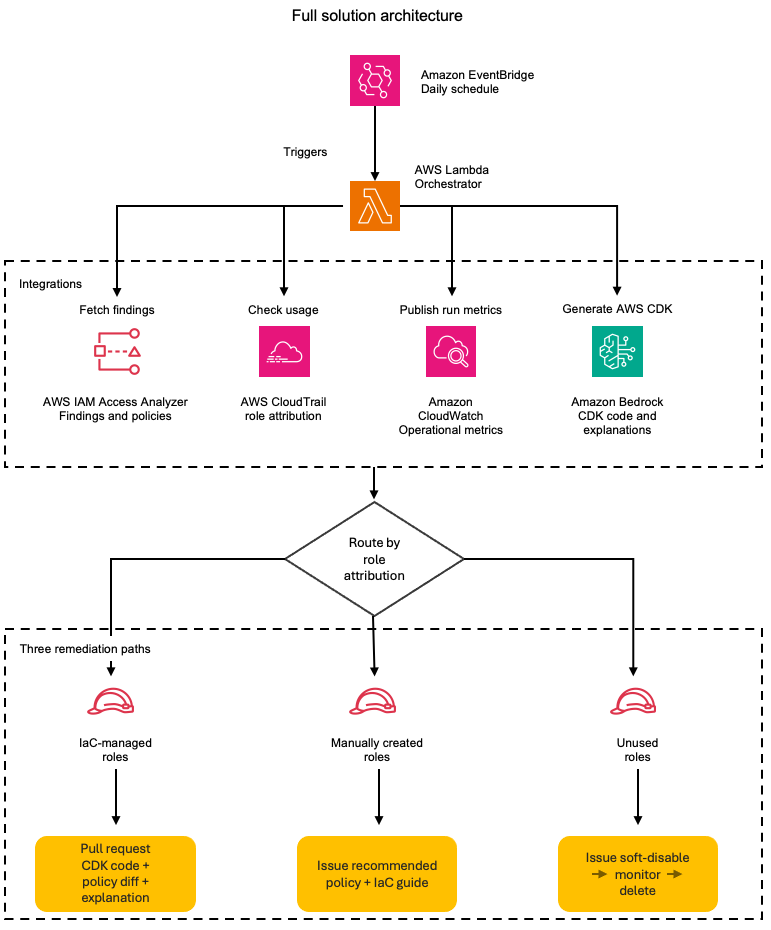
Figure 1: The daily remediation workflow; from scheduled trigger to the three role-based remediation paths

Figure 1: The daily remediation workflow; from scheduled trigger to the three role-based remediation paths

On each scheduled run, the automation retrieves active findings from IAM Access Analyzer and queries CloudTrail to determine how each role was created. Roles created through CloudFormation or AWS CDK have a traceable origin: the service principal, stack name, and originating repository. Roles created manually through the console have a different origin: the IAM user who created them and the timestamp. This distinction drives the remediation strategy.

For IaC-managed roles, the automation retrieves the IAM Access Analyzer-recommended policy and uses Amazon Bedrock to wrap it in production-ready CDK code that includes the role definition and policy statements and imports what your CI/CD pipeline needs to deploy the update. It then creates a pull request in the originating repository. The pull request (PR) includes the updated CDK code, a policy diff showing exactly which permissions are being removed, and a plain-English explanation of the changes, for example, “This change removes write access to S3, keeping only read and list permissions.” Your existing code review process evaluates the change, and after being merged, the fix deploys consistently across environments.

For manually created roles, the automation creates an issue that includes the IAM Access Analyzer-recommended policy with unused permissions removed, a diff highlighting the changes, and an Amazon Bedrock-generated explanation of what the permission changes accomplish. The issue also provides guidance on importing the role into your IaC codebase. This gives teams an immediate remediation path while encouraging long-term governance through IaC adoption.

For roles that aren’t being assumed at all, the automation takes a more cautious approach. Instead of taking direct action, it creates an issue recommending a soft-disable workflow: attach a deny-all policy to the role, monitor for 30 days to confirm no workload depends on it, then delete. The issue provides the steps and context, the team executes the decommission through their preferred process, whether that’s a console change, an AWS Command Line Interface (AWS CLI) script, or a PR removing the role from the IaC. This controlled decommission path reduces the risk of removing a role that’s used infrequently or seasonally.

The solution supports both single-account and organization-wide deployment. In single-account mode, it uses an ACCOUNT_UNUSED_ACCESS analyzer to process findings for one account. In organization mode, it uses an ORGANIZATION_UNUSED_ACCESS analyzer deployed in a delegated administrator account, which generates findings across all member accounts from a single vantage point. The Lambda function automatically detects which analyzer type is available and extracts the account ID from each finding’s resource Amazon Resource Name (ARN), so role attribution and remediation routing work the same way regardless of scope.

This three-path strategy acknowledges operational reality. Not all roles start in IaC, not all unused roles are safe to delete immediately, and forcing immediate migration isn’t always practical. The solution provides a clear path forward for each scenario: remediate IaC roles through code, give teams actionable recommendations for manually created roles, and safely decommission what’s no longer needed. Over time, your infrastructure becomes increasingly code-driven, and remediation becomes a routine part of your CI/CD process rather than a manual security task.

Technical details

Consider a company—call them AnyCompany—running 200 IAM roles across three AWS accounts. Some roles were created through AWS CDK stacks during initial deployment. Others were created manually through the console by engineers who needed quick access during incident response or prototyping. A handful haven’t been assumed in over 6 months. AnyCompany’s security team wants to act on their IAM Access Analyzer findings, but each role requires different handling. The solution’s architecture addresses this by routing each finding through a classification and remediation pipeline.

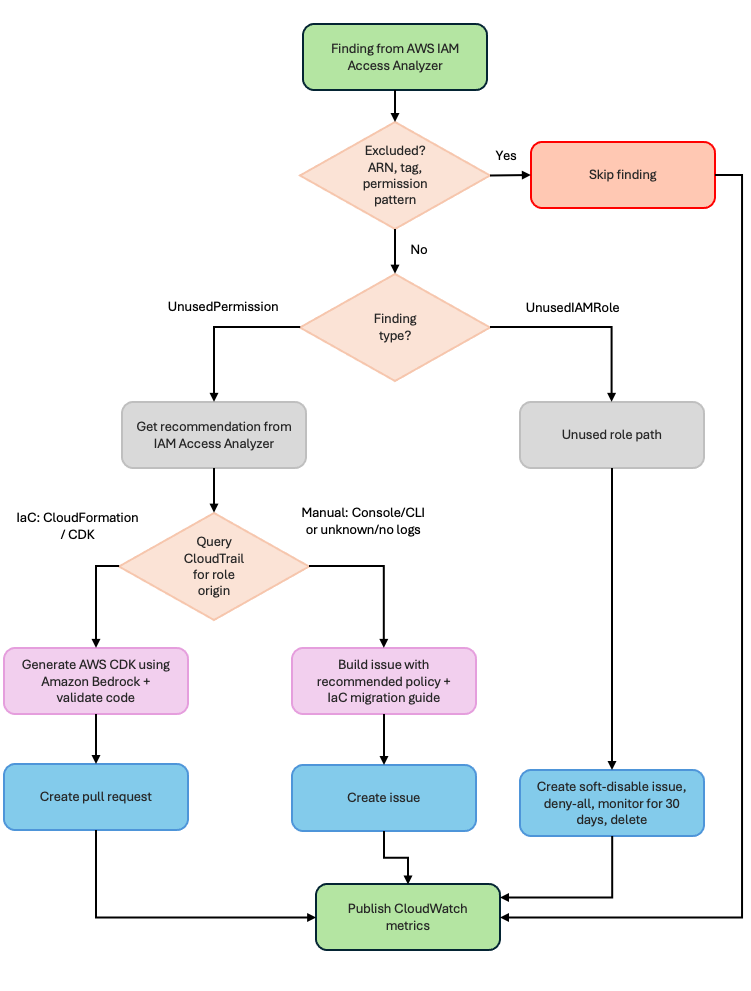
Figure 2 shows how each IAM Access Analyzer finding is processed:

  1. The finding is first checked against exclusions and excluded findings are skipped.
  2. Remaining findings are split by type: UnusedPermission findings retrieve a recommended policy from IAM Access Analyzer and then query CloudTrail for role origin, while UnusedIAMRole findings follow the unused role path.
  3. By origin, IaC-managed roles generate AWS CDK code using Amazon Bedrock and create a pull request.
  4. Manually created or unknown-origin roles create an issue with the recommended policy and IaC migration guidance.
  5. Unused roles create a soft-disable issue to deny-all, monitor for 30 days, then delete.
  6. All paths publish CloudWatch metrics.
Figure 2: Detailed component interactions—the orchestrator’s five steps, its four service integrations, and the three remediation paths

Figure 2: Detailed component interactions—the orchestrator’s five steps, its four service integrations, and the three remediation paths

The rest of this section walks through each component using AnyCompany’s roles as examples.

Exclusion filtering

Before processing any finding, the Lambda function loads an exclusion configuration and checks whether the role should be skipped. This prevents the automation from creating remediation items for roles that legitimately need broad permissions.

{
  "excluded_roles": [
    "arn:aws:iam::123456789012:role/BreakGlassRole",
    "arn:aws:iam::123456789012:role/ServiceLinkedRole"
  ],
  "excluded_permissions": [
    "iam:*",
    "sts:AssumeRole"
  ],
  "excluded_by_tag": {
    "NoRemediation": ["true"],
    "CriticalService": ["true"]
  },
  "min_unused_days": 30
}

AnyCompany excludes their break-glass role (used only during incidents), any service-linked roles, and roles tagged CriticalService. The min_unused_days threshold prevents false positives from seasonal workloads; a role that ran a quarterly batch job 25 days ago won’t generate a finding.

Detection and analysis

IAM Access Analyzer generates two types of findings relevant to this solution. UnusedPermission findings identify roles with permissions that haven’t been exercised within the analysis period. UnusedIAMRole findings identify roles that haven’t been assumed at all. The Lambda function queries both finding types separately because they follow different remediation paths.

The Lambda function auto-detects the analyzer type at startup. When ANALYZER_SCOPE is set to organization, it checks for an ORGANIZATION_UNUSED_ACCESS analyzer first and falls back to ACCOUNT_UNUSED_ACCESS if none exists. If multiple analyzers of the same type exist in the account, the Lambda function selects the first active analyzer returned by the API. To target a specific analyzer, set the ANALYZER_ARN environment variable explicitly. With an organization-level analyzer, findings include roles from all member accounts. The Lambda function extracts the account ID from each finding’s resource ARN (for example, account 111122223333 from arn:aws:iam::111122223333:role/MyRole) and carries that context through the entire pipeline: attribution, remediation, and issue or PR creation all include the originating account.

For UnusedPermission findings, the Lambda function calls GenerateFindingRecommendation to initiate policy generation, then retrieves the IAM Access Analyzer-recommended policy through the GetFindingRecommendation API. This is a key integration point: IAM Access Analyzer provides the right-sized policy with unused permissions removed, so the automation doesn’t need to generate policies itself.

Here’s what a typical finding looks like for one of AnyCompany’s application roles:

{
  "id": "a1b2c3d4-5678-90ab-cdef-example11111",
  "resource": "arn:aws:iam::123456789012:role/AnyCompanyOrderProcessorRole",
  "findingType": "UnusedPermission",
  "analyzedAt": "2026-03-01T00:00:00Z",
  "unusedPermissions": [
    { "action": "s3:PutObject", "lastAccessed": null },
    { "action": "s3:DeleteObject", "lastAccessed": null },
    { "action": "s3:PutBucketPolicy", "lastAccessed": null },
    { "action": "dynamodb:DeleteItem", "lastAccessed": null }
  ],
  "activePermissions": [
    { "action": "s3:GetObject", "lastAccessed": "2026-02-28T14:30:00Z" },
    { "action": "s3:ListBucket", "lastAccessed": "2026-02-28T14:30:00Z" },
    { "action": "dynamodb:Query", "lastAccessed": "2026-02-28T12:00:00Z" }
  ]
}

The OrderProcessorRole has write and delete permissions for Amazon Simple Storage Service (Amazon S3) and Amazon DynamoDB, but only uses read operations. The IAM Access Analyzer recommendation removes the four unused actions while preserving the three active ones.

For UnusedIAMRole findings, no recommendation is needed: the role isn’t being assumed at all, so the remediation is to disable or delete it. The Lambda function caps the number of unused role issues per run (configurable using MAX_UNUSED_ROLE_ISSUES, default 10) to avoid overwhelming teams with a flood of issues on the first execution.

Role attribution using CloudTrail

For each finding, the Lambda function queries CloudTrail to determine how the role was created. The CreateRole event contains the information needed to classify the role’s origin.

An IaC-created role looks like this in CloudTrail:

{
  "eventName": "CreateRole",
  "userIdentity": {
    "type": "AWSService",
    "invokedBy": "cloudformation.amazonaws.com"
  },
  "requestParameters": {
    "roleName": "AnyCompanyOrderProcessorRole"
  },
  "userAgent": "cloudformation.amazonaws.com"
}

The cloudformation.amazonaws.com service principal and user agent tell the automation this role was created through a CloudFormation or AWS CDK deployment. The Lambda function then looks up the role’s tags to find the originating repository (stored in a Repository tag set during deployment).

A manually-created role looks different:

{
  "eventName": "CreateRole",
  "userIdentity": {
    "type": "IAMUser",
    "userName": "jstiles"
  },
  "requestParameters": {
    "roleName": "AnyCompanyIncidentResponseRole"
  },
  "userAgent": "console.amazonaws.com"
}

Here, the IAMUser type and console.amazonaws.com user agent indicate someone created this role through the console. Roles created through the AWS CLI show a similar pattern: the IAMUser type with a user agent like aws-cli/2.x.x. The automation classifies both console and AWS CLI-created roles as manually created, because neither has an IaC origin that can be updated programmatically. The automation captures the username and timestamp for the remediation issue.

Cross-account role attribution

When the Lambda function processes findings from an organization-level analyzer, the role might live in a different account than the one running the function. The automation handles this by assuming a cross-account role (configurable using CROSS_ACCOUNT_ROLE_NAME, defaulting to OrganizationAccountAccessRole) in the member account, then querying that account’s CloudTrail and IAM APIs for the CreateRole event. If the cross-account assume fails—because the role doesn’t exist in that account or permissions aren’t configured—the automation falls back gracefully, classifying the role as unknown origin and creating an issue with the account ID and available context. This approach helps the automation produce an actionable output for findings even when attribution is incomplete.

Policy recommendations and AWS CDK code generation

For IaC-managed roles with UnusedPermission findings, the Lambda function retrieves the IAM Access Analyzer-recommended policy and sends it to Amazon Bedrock to generate production-ready AWS CDK code. This is an important distinction: IAM Access Analyzer decides what the policy should be, and Amazon Bedrock wraps that policy in the AWS CDK constructs, imports, and resource definitions that the CI/CD pipeline needs to deploy the update.

The prompt instructs Amazon Bedrock to convert the recommended policy to AWS CDK code exactly as provided, with no modifications:

Generate Python CDK code that creates/updates the role with the
RECOMMENDED policy exactly as provided. Include proper imports
(aws_cdk, aws_iam), use CDK best practices (PolicyStatement,
proper resource ARNs), and add tags: ManagedBy=CDK,
RemediatedBy=AccessAnalyzer.

IAM Access Analyzer generates recommendations for both inline policies and customer managed policies. When a managed policy has partially unused permissions, the recommendation contains the full right-sized policy. The automation wraps this in AWS CDK code as an iam.ManagedPolicy construct. Note that if a managed policy is shared across multiple roles, the recommendation applies to the specific role’s usage pattern. In this case, the automation generates an issue for manual review rather than a PR, because modifying a shared policy could affect other roles.

The generated code goes through a validation step before inclusion in any PR. The Lambda function compiles the Python code to check for syntax errors and verifies that required AWS CDK patterns (iam, PolicyStatement) are present. If validation fails, the finding is logged as an error rather than creating a broken PR.

The solution doesn’t currently invoke the IAM Access Analyzer ValidatePolicy API to check the generated policy for errors or overly permissive statements. However, this is a natural extension point. Teams can add a validation step that calls ValidatePolicy on the Amazon Bedrock-generated policy before including it in a PR, detecting issues like missing resource constraints or invalid action names.

Amazon Bedrock also generates a plain-English explanation of the policy changes. For AnyCompany’s OrderProcessorRole, the explanation might read:

“The role currently has full S3 write access and DynamoDB delete permissions, but only uses read operations. Removing s3:PutObject, s3:DeleteObject, s3:PutBucketPolicy, and dynamodb:DeleteItem reduces the scope of impact if credentials are compromised, while preserving the s3:GetObject, s3:ListBucket, and dynamodb:Query permissions the application needs.”

The solution uses the Anthropic Claude Sonnet model on Amazon Bedrock for CDK code generation (where accuracy matters) and Claude Haiku on Amazon Bedrock for explanations (where speed and cost efficiency matter more).

Three-path remediation

The Lambda function evaluates each finding’s origin and routes it to one of three remediation paths.

Path 1: IaC-managed roles (pull request) – For AnyCompany’s OrderProcessorRole, the automation creates a PR in the originating repository. The PR includes:

  • The Amazon Bedrock-generated AWS CDK code implementing the IAM Access Analyzer-recommended policy
  • A policy diff showing exactly which permissions are being removed
  • The plain-English explanation of what the changes accomplish
  • Labels (security, iam-remediation, automated) for filtering and tracking

The team that owns the role reviews the PR through their normal code review process. Once merged, the fix deploys consistently across environments through the existing CI/CD pipeline.

Path 2: Manually-created roles (issue) – For AnyCompany’s IncidentResponseRole, the automation creates an issue that includes the Access Analyzer-recommended policy with unused permissions removed, a diff highlighting the changes, an Amazon Bedrock-generated explanation, and step-by-step guidance on importing the role into IaC. This gives the team an immediate remediation path (apply the recommended policy) while encouraging long-term governance through IaC adoption.

Path 3: Unused roles (soft-disable issue) – For roles that haven’t been assumed at all, the automation creates an issue recommending a three-stage decommission workflow: attach a deny-all policy to the role, monitor for 30 days to confirm no workload depends on it, then delete. This controlled approach reduces the risk of removing a role that’s used infrequently or seasonally – if something breaks during the monitoring period, removing the deny-all policy restores access immediately.

Dry-run mode

Before creating real PRs and issues, you can run the automation in dry-run mode by setting “dry_run": true in the CI/CD configuration or setting the CI_CD_PLATFORM environment variable to dryrun. In this mode, the Lambda function processes findings, classifies roles, and generates remediation data, but logs what it would create instead of making actual API calls to your repository platform. You can use the log to validate the automation’s behavior, review the classification accuracy, and tune exclusions before going live.

Operational metrics

The Lambda function publishes CloudWatch metrics after each run:

findings_processed Total UnusedPermission findings evaluated
iac_roles_found Roles classified as IaC-managed
manual_roles_found Roles classified as manually created
unused_roles_found Roles with no assume activity (UnusedIAMRole findings)
prs_created Pull requests created for IaC roles
issues_created Issues created (manual roles and unused roles)
errors Processing errors (failed classifications, API failures)

These metrics feed into dashboards and alarms. AnyCompany sets an alarm on errors > 5 to catch API throttling or configuration issues, and tracks prs_created + issues_created over time to measure remediation velocity.

Implementation

The solution ships as two AWS CDK stacks and deploys in minutes. The accompanying GitHub repository contains the complete source code, AWS CDK stacks, configuration templates, and step-by-step deployment instructions.

At a high level, deployment involves:

  1. Prerequisites: An AWS account with an ACCOUNT_UNUSED_ACCESS or ORGANIZATION_UNUSED_ACCESS analyzer enabled, Python 3.11 or later, AWS CDK v2, a CI/CD platform API token stored in AWS Secrets Manager, and Amazon Bedrock model access for the Anthropic Claude models you plan to use. The model IDs are configurable environment variables (BEDROCK_CODEGEN_MODEL and BEDROCK_EXPLANATION_MODEL); Amazon Bedrock retires older foundation models over time, so if the shipped defaults stop working, set these variables to current models you have enabled and redeploy. The repository README documents this.
  2. Configuration: Two files in the config/ directory control behavior. exclusions.json defines which roles and permissions to skip (break-glass roles, service-linked roles, tagged exceptions), and ci_cd_config.json configures your repository platform integration (GitLab or GitHub), labels, and throttling limits.
  3. Deploy: Run cdk deploy --all to create the Lambda function, EventBridge schedule, IAM roles, and CloudWatch alarms.
  4. Validate in dry-run mode: Start with “dry_run": true to see how the automation classifies your roles without creating real PRs or issues. Review the CloudWatch logs to confirm attribution accuracy and tune exclusions.
  5. Go live: Set “dry_run": false and redeploy. The Lambda function runs on schedule (daily by default) and begins creating PRs and issues.

The repository README covers each step in detail, including organization-wide deployment, cross-account configuration, and platform-specific setup for GitLab and GitHub.

Operational considerations

Deploying the automation is only the starting point. Running it in production means making decisions about how roles are retired, how the volume of findings is managed at scale, which roles warrant human review before any change is proposed, and how you measure the automation’s impact over time. The following practices keep remediation sustainable as your IAM footprint grows, so the automation reduces operational burden rather than adding to it.

Unused role lifecycle

Unused roles follow a three-stage decommission workflow. When the automation identifies a role that hasn’t been assumed within the analysis period, it creates an issue with the recommended decommission steps; the automation doesn’t modify the role directly. The team then follows the soft-disable approach:

  1. Attach a deny-all inline policy to the role. This blocks all actions without deleting the role or its existing policies.
  2. Monitor for 30 days. If a workload depends on the role (seasonal jobs, infrequent batch processes), the deny-all policy surfaces the dependency quickly. Removing the deny-all policy restores full access immediately; no need to recreate the role or reattach policies.
  3. Delete the role after the monitoring period confirms no impact.

This approach is deliberately conservative. Deleting a role is irreversible; you lose the trust policy, attached policies, and any resource-based policies that reference it. The soft-disable step gives teams a safety net while still making progress on reducing their unused role inventory.

Scaling and throttling

On AnyCompany’s first run, the automation found 47 unused permission findings and 4 unused roles. That’s manageable. But organizations with hundreds of accounts and thousands of roles might see significantly more findings on initial deployment.

This is especially true with an organization-level analyzer. A single-account deployment might surface dozens of findings; an organization-level analyzer across multiple accounts could surface hundreds or thousands on the first run. The throttling controls become critical at this scale.

Two throttling controls prevent the automation from overwhelming teams:

  • max_findings_per_run (default 50): Caps the total UnusedPermission findings processed per Lambda function execution. Remaining findings are picked up on the next scheduled run.
  • MAX_UNUSED_ROLE_ISSUES (default 10): Caps unused role issues per run. This is especially important during initial deployment when you might have a large backlog of roles that haven’t been assumed in months.

Start with conservative limits and increase them as your team builds confidence in the review process. A team that can review 10 PRs per week shouldn’t receive 50 on Monday morning.

Approval workflows for sensitive roles

Not every role should receive automated PRs. Roles with administrative permissions or access to sensitive data might warrant manual review before any remediation is created. The exclusion configuration supports this through the approval_required_for_tags field:

{
  "approval_required_for_tags": {
    "Sensitive": ["true"],
    "Admin": ["true"]
  }
}

Roles matching these tags generate issues for manual review instead of automated PRs, regardless of whether they’re IaC-managed. This gives security teams a checkpoint for high-risk roles while still automating remediation for standard application roles.

Monitoring and alerting

The metrics published after each Lambda function run (covered in the Technical details section) feed into CloudWatch dashboards and alarms. A few patterns worth setting up:

  • Alert on errors > 5 per run to catch API throttling, expired CI/CD tokens, or Amazon Bedrock availability issues.
  • Track prs_created + issues_created over time. A healthy trend shows this number decreasing as your environment converges toward least privilege.
  • Monitor unused_roles_found as a leading indicator. A sudden increase might signal a team spinning up roles for a project and not cleaning up afterward.
  • Compare iac_roles_found to manual_roles_found over time. As teams adopt IaC, the ratio should shift toward IaC-managed roles, which means more automated remediation and less manual work.

Cost

The solution uses Lambda (minimal cost at daily execution), CloudTrail (typically already enabled), IAM Access Analyzer (charges per IAM role or user analyzed per month for the unused access analyzer), and Amazon Bedrock (pay-per-token for AWS CDK code generation and explanations). For most organizations the ongoing cost is low, and Amazon Bedrock token usage is the largest variable, scaling with the number of findings processed per day and the complexity of each policy. Review the pricing pages for each service for current rates.

For organization-level deployments, the IAM Access Analyzer cost scales with the number of IAM roles analyzed across all member accounts. The ORGANIZATION_UNUSED_ACCESS analyzer charges per role per month across the organization, so an organization with 500 roles across 20 accounts will see higher analyzer costs than a single account with 50 roles. Review the IAM Access Analyzer pricing page for current rates.

Cleanup

To remove the solution, run cdk destroy --all from the infrastructure/ directory. This removes the Lambda function, EventBridge rule, CloudWatch alarms, and IAM roles created by the stacks.

If you stored a CI/CD platform API token in Secrets Manager as part of deployment, delete it with aws secretsmanager delete-secret --secret-id <your-secret-name> --recovery-window-in-days 7. The 7-day recovery window lets you restore the secret if the deletion was accidental. After 7 days, the secret is permanently deleted and can’t be recovered. To delete immediately without a recovery window, add --force-delete-without-recovery.

Lambda automatically creates a CloudWatch Logs log group at /aws/lambda/<function-name> that persists after cdk destroy --all and continues to incur log storage charges. To remove it, run aws logs delete-log-group --log-group-name /aws/lambda/<function-name>. WARNING: This permanently deletes all execution logs.

The IAM Access Analyzer isn’t created by the AWS CDK stacks. WARNING: Deleting the analyzer permanently removes all findings, analysis history, and unused permission data. Export any findings you need to retain before deletion. After exporting, run aws accessanalyzer delete-analyzer --analyzer-name <your-analyzer-name> to delete it. The ACCOUNT_UNUSED_ACCESS and ORGANIZATION_UNUSED_ACCESS analyzer types incur charges based on the number of IAM roles and users analyzed per month.

If you deployed in organization mode and created cross-account roles (default name: OrganizationAccountAccessRole) in member accounts solely for this solution, remove them from those accounts.

Any PRs or issues already created in your CI/CD platform remain after stack deletion; they’re artifacts in your repository, not AWS resources. See the repository README for detailed cleanup instructions.,

Conclusion

Automating IAM permission remediation turns least privilege from a periodic compliance exercise into an operational practice. By connecting IAM Access Analyzer findings and recommendations to your CI/CD pipeline, remediation shifts from manual security tasks to code review processes that your teams already follow.

The three-path strategy acknowledges how infrastructure evolves. IaC-managed roles receive pull requests with production-ready AWS CDK code and plain-English explanations. Manually created roles receive actionable issues with recommended policies and IaC migration guidance. Unused roles are put on a controlled decommission path that protects against accidental disruption. Over time, the manual role count decreases as teams adopt IaC, and remediation becomes a routine part of your deployment pipeline.

Start with a pilot. Choose 10–20 non-production roles, deploy in dry-run mode, and review the classification results. Tune your exclusions, confirm the CloudTrail attribution is accurate for your environment, and then enable live remediation. Expand to production roles after your team is comfortable with the review cadence.

When you’re ready to scale beyond a single account, switch to an organization-level analyzer and the same Lambda function will process findings across all member accounts with no architectural changes required, only a configuration toggle.

The complete source code, AWS CDK stacks, and configuration templates are available in the accompanying GitHub repository.

If you have feedback about this post, submit comments in the Comments section below.


Luis Pastor

Luis E Pastor

Luis is a Senior Security Solutions Architect at AWS specializing in infrastructure security, compliance, and generative AI security. He leads technical field communities focused on security and compliance while contributing to AWS Well-Architected Framework guidance. Before AWS, he helped clients across financial services, healthcare, and retail industries improve their security posture in hybrid environments. Outside of work, Luis enjoys staying active and culinary adventures.

Rodolfo Brenes

Rodolfo Brenes

Rodolfo is a Principal Solutions Architect focused on Cloud Governance and Compliance. With over 18 years of experience, he currently leads a technical field community in AWS helping customers scale and improve their security and governance frameworks. Besides work, Rodolfo enjoys video games, playing with his four cats, and won’t say no to a good outdoor adventure.

Sowjanya Rajavaram

Sowjanya Rajavaram

Sowjanya is a Sr Solution Architect who specializes in Identity and Security in AWS. Her entire career has been focused on helping customers of all sizes solve their identity and access management problems. She enjoys traveling and experiencing new cultures and food.

Satish Uppalapati

Satish is an Associate Assurance Consultant with AWS Security Assurance Services (SAS) and has more than 8 years of experience in IT risk, governance, and regulatory assurance. He works with AWS customers to align cloud environments with multiple frameworks. Satish helps organizations build security and governance programs that meet regulatory objectives while supporting business operations. He also focuses on advancing governance for AI systems, including emerging standards.

Minimize risk through defense in depth: Building a comprehensive AWS control framework

Post Syndicated from Luis Pastor original https://aws.amazon.com/blogs/security/minimize-risk-through-defense-in-depth-building-a-comprehensive-aws-control-framework/

Security and governance teams across all environments face a common challenge: translating abstract security and governance requirements into a concrete, integrated control framework. AWS services provide capabilities that organizations can use to implement controls across multiple layers of their architecture—from infrastructure provisioning to runtime monitoring. Many organizations deploy multi-account environments with AWS Control Tower, or Landing Zone Accelerator to implement a foundational baseline of controls and security architecture. Once their environment is provisioned, organizations typically look to add additional detective controls from services such as AWS Security Hub and AWS Config based on security, compliance, and operational requirements. While this sequence is a great start, there are more opportunities during this time to implement layered defense-in-depth coverage to enhance your security posture.

Highly regulated industries such as fintech and financial services are often viewed as the gold standard for governance and security controls. While these sectors have established robust frameworks, there’s consistently room for improvement and valuable lessons for other industries looking to enhance their control environments. However, many organizations struggle to move beyond a basic compliance-focused approach. In our experience working with customers across various sectors, this limited perspective often stems from multiple factors, including:

  • Immediate compliance pressures
  • Resource constraints
  • Limited understanding of control maturity pathways
  • Focus on detection rather than prevention
  • A tendency to prioritize technology-agnostic controls over bult-in AWS capabilities, leading to unnecessarily complex implementations

The good news? A more comprehensive approach that uses AWS preventative, proactive, detective, and responsive controls can significantly reduce risk while decreasing operational overhead through automation.

In this post, we outline a practical framework that you can adopt to evolve your security and governance controls strategy. We explore how your organization can mature from a detection-focused security posture to a multi-layered control framework, using real-world examples across the resource lifecycle, including infrastructure-as-code testing and preventative controls such as service control policies (SCPs), resource control policies (RCPs), and declarative policies (DPs).

Drawing from best practices in highly regulated industries while incorporating modern cloud capabilities through services such as AWS Organizations and AWS Control Tower, we provide a structured framework that you can use to elevate your organization’s control environment beyond basic compliance requirements.

Customer challenges in implementing controls

Organizations face several significant challenges when attempting to implement a comprehensive control framework in AWS. Let’s explore the main obstacles:

Resource constraints and expertise gaps

Security teams often find themselves caught between limited resources and expanding responsibilities in the cloud. With constrained budgets and personnel, teams typically gravitate toward quick wins through detective controls, which appear straightforward to implement initially. While this provides immediate visibility, it can leave critical gaps in security posture. Many teams lack comprehensive expertise across all control types, particularly in implementing preventative, proactive, and responsive controls effectively. The pressure to demonstrate immediate security improvements, combined with day-to-day operational demands, frequently results in tactical solutions rather than strategic, layered security approaches.

Analysis paralysis

Deciding which tools to prioritize can be a challenge; the breadth of options and extensive capabilities available across AWS security services and third-party tools can feel overwhelming at times. Security teams struggle to determine the optimal mix of controls for their environment and where to begin implementation. This challenge is compounded by the complexity of mapping technical compliance requirements to cloud-focused capabilities and maintaining visibility into emerging threats as the security landscape evolves. The layers of abstraction created by proliferating security controls can further obscure clear decision-making, leading teams to delay critical security improvements while seeking perfect solutions.

Misunderstanding of defense in depth

Defense in depth as a concept is good, but it can be misunderstood and difficult to achieve, leading to vulnerabilities in the security architecture. A common misconception is that a single strong control, separation of duties in AWS Identity and Access Management (IAM) roles, least permission in IAM policies, and so on, provide sufficient protection. This overlooks the crucial value of implementing controls at multiple points and how different control types can be combined to create a robust security posture. Teams often miss how organizational controls like SCPs can work in harmony with workload-specific controls to achieve greater protection. The role of preventative controls in guiding technical implementations is frequently under appreciated.

Maturity journey challenges

The path to security maturity presents numerous obstacles. Many organizations remain stuck in the early stages, implementing detective controls but never progressing to preventative measures. Security controls are often implemented in isolation, without consideration for the broader security landscape. Organizations struggle to create and follow a clear roadmap for evolving their security posture, and measuring improvement over time proves challenging.

Scale and consistency issues

As AWS environments grow, maintaining consistent governance and security becomes increasingly complex. Organizations face mounting challenges in managing exceptions and special cases across their expanding infrastructure. These interrelated challenges often result in controls implementations that fail to achieve their intended risk reduction goals. You need a structured approach to overcome these obstacles and implement comprehensive security controls, which we explore in the following sections.

Strategic investment in security

While implementing comprehensive controls requires an initial investment in time and resources, the long-term benefits fundamentally transform how organizations operate.

The foundation for this transformation begins with establishing baseline controls through proven starting points such as AWS Control Tower and its customization options. AWS Control Tower provides building blocks for secure multi-account architectures with hundreds of security capabilities and proactive controls already built in. Rather than trying to create baselines from scratch by wrangling vast amounts of account-level or resource-specific controls, you can use these accelerators to rapidly establish a strong security foundation. With these baseline controls in place, this transformation extends beyond security teams to enable the entire organization to operate more efficiently. Development and operations teams can deploy faster with confidence when security guardrails are in place. Security becomes an enabler rather than a bottleneck, so that teams across the organization can innovate while maintaining a strong security posture.

As you mature your organization’s control framework through automation and layered defenses, a security transformation occurs. Security teams shift from constant firefighting to proactive risk management. Automated policy enforcement replaces manual reviews, and the time previously spent on routine tasks can be redirected to strategic initiatives.

Understanding control types and their interplay

AWS defines distinct types of controls to build a comprehensive security framework. Let’s examine each type and how they work together, using a common scenario: preventing public Amazon Simple Storage Service (Amazon S3) bucket exposure.

Preventative controls

Preventative controls establish the foundation of a secure environment by defining the policies, standards, and requirements that guide security implementations. At their core, these controls encompass corporate security policies that outline acceptable resource configurations across the organization. They work in conjunction with compliance requirements and frameworks to help maintain regulatory alignment, while architectural standards and guidelines provide technical direction for implementations. Data classification policies play a crucial role by determining specific security requirements based on data sensitivity.

To illustrate how preventative controls work in practice, consider a common S3 bucket security requirement. A typical preventative control might establish a corporate policy stating All S3 buckets must be private by default, with public access granted only through an approved exception process. This simple but effective policy sets clear expectations and requirements before a technical implementation begins.

  • Organization level: SCPs blocking public S3 bucket creation.
  • Resource level:
    • RCPs enforcing network access controls, such as requiring authenticated access or limiting requests to your organization’s network range.
    • SCPs to stop malicious overwrites of S3 objects using SSE-C encryption by blocking s3:PutObject requests with customer-provided keys unless explicitly allowed, paired with AWS IAM Roles Anywhere for short-term credential enforcement.
```json
// SCP to block SSE-C unless explicitly allowed 
{
  "Version": "2012-10-17",
  "Statement": [
 {
     "Sid": "DenySSECEncryption",
     "Effect": "Deny",
     "Action": "s3:PutObject",
     "Resource": "*",
     "Condition": {
         "Null": {
               "s3:x-amz-server-side-encryption-customer-algorithm": "false"}
            } }
  ]}

Proactive controls

Proactive controls act as an early warning system, identifying and addressing potential security issues before they manifest in your environment. These controls work by validating configurations and changes against established security requirements during the development and deployment phases. Through automated validation and policy enforcement at build and deploy time, proactive controls help prevent misconfigurations from reaching production environments, reducing the operational overhead of fixing security issues after the fact. Think of proactive controls as your first line of defense in maintaining a secure cloud environment. In AWS, these can be implemented at multiple levels:

  • Amazon S3 Block Public Access settings at the account level.
  • Policy-as-code checks in continuous integration and delivery (CI/CD) pipelines (such as CFN-Nag, or AWS Config proactive rules).
  • AWS CloudFormation hooks for pre-deployment validation and policy enforcement.
  • AWS Config rules in proactive mode to evaluate resources before creation.
  • At the resource level, you can use:
    • IAM policies restricting bucket policy modifications
    • CloudFormation Guard rules

#####################################
##           Gherkin               ##
#####################################
# Rule Identifier:
#    S3_BUCKET_SERVER_SIDE_ENCRYPTION_ENABLED
# Description:
#   Checks if your Amazon S3 bucket either has the Amazon S3 default encryption enabled or that the Amazon S3 bucket policy
#   explicitly denies put-object requests without server side encryption that uses AES-256 or AWS Key Management Service.
# Reports on:
#    AWS::S3::Bucket
# Evaluates:
#    AWS CloudFormation
# Rule Parameters:
#    NA
# Scenarios:
# a) SKIP: when there are no S3 resource present
# b) PASS: when all S3 resources Bucket Encryption ServerSideEncryptionByDefault is set to either "aws:kms" or "AES256"
# c) FAIL: when all S3 resources have Bucket Encryption ServerSideEncryptionByDefault is not set or does not have "aws:kms" or "AES256" configurations
# d) SKIP: when metadata includes the suppression for rule S3_BUCKET_SERVER_SIDE_ENCRYPTION_ENABLED
#
# Select all S3 resources from incoming template (payload)
#
let s3_buckets_server_side_encryption = Resources.*[ Type == 'AWS::S3::Bucket'
  Metadata.cfn_nag.rules_to_suppress not exists or 
  Metadata.cfn_nag.rules_to_suppress.*.id != "W41"
  Metadata.guard.SuppressedRules not exists or
  Metadata.guard.SuppressedRules.* != "S3_BUCKET_SERVER_SIDE_ENCRYPTION_ENABLED"
]
rule S3_BUCKET_SERVER_SIDE_ENCRYPTION_ENABLED when %s3_buckets_server_side_encryption !empty {
  %s3_buckets_server_side_encryption.Properties.BucketEncryption exists
  %s3_buckets_server_side_encryption.Properties.BucketEncryption.ServerSideEncryptionConfiguration[*].ServerSideEncryptionByDefault.SSEAlgorithm in ["aws:kms","AES256"]
  <<
    Violation: S3 Bucket must enable server-side encryption.
    Fix: Set the S3 Bucket property BucketEncryption.ServerSideEncryptionConfiguration.ServerSideEncryptionByDefault.SSEAlgorithm to either "aws:kms" or "AES256"
  >>
}

Source: aws-guard-rules-registry

Detective controls

Detective controls provide continuous visibility into your security posture by monitoring for and identifying potential security violations or unauthorized changes within your environment. While preventative controls aim to stop issues before they occur, detective controls help you maintain awareness of your security state and can identify when preventative controls have been bypassed or failed. These controls form a critical layer of defense by enabling rapid identification of security issues and providing the visibility needed for effective incident response and compliance reporting. While many organizations start and stop here, detective controls are only part of the solution:

  • AWS Config rules monitoring for public buckets
  • Security Hub findings to flag non-compliant resources
  • AWS IAM Access Analyzer evaluations

Responsive controls

Responsive controls complete the security lifecycle by providing automated and manual mechanisms to address security issues after they’re detected. These controls define and implement the actions taken when security violations are identified, ranging from automated remediation of common misconfigurations to coordinated incident response procedures for complex security events. By establishing clear response patterns and using automation where appropriate, responsive controls help facilitate consistent and timely handling of security issues while reducing the mean time to remediation. Responsive controls address violations when they occur:

The power comes not from implementing these controls in isolation, but from using them together in a coordinated way. This layered approach begins with preventative controls to establish the requirements, followed by proactive controls to block most potential violations at the source. Issues that manage to slip through are caught by detective controls, while responsive controls automatically remediate identified problems. Throughout this process, comprehensive documentation tracks issues, remediation plans, and progress, such as through a plan of action and milestones (POAM), helping to make sure that compliance requirements are met and improvements can be measured over time.

Implementation lifecycles: Ideal compared to reality

You can follow one of two paths when implementing security controls: starting fresh with a comprehensive approach or evolving from an existing detective-focused implementation. Let’s examine both scenarios.

Starting fresh: The ideal approach

When starting from scratch, you have a unique opportunity to build your security and governance following an ideal approach. Your team can take advantage of this clean slate to architect controls and processes methodically, free from legacy constraints. The following steps offer guidance though establishing a strong foundation while maintaining the flexibility you need as your business grows.

  • Rationalize controls against requirements and risk profile:
    • Choose appropriate security frameworks (for example, CIS and NIST).
    • Map compliance, regulatory, legal, and contractual requirements to your base framework.
    • Define clear security objectives and success criteria for your security and compliance program.
  • Design a comprehensive control strategy:
    • Document control requirements across all four types (preventive, proactive, detective, and responsive controls). You can use the framework to decide which controls are best for each type of requirement.
    • Plan implementation phases and priorities.
    • Define metrics for measuring effectiveness.
  • Implement controls in layers:
    • Start with AWS Control Tower, which gives you foundational controls to mature from. You can add customizations if required.
    • Think about additional preventative controls that can help establish a stronger security and compliance posture.
    • Deploy proactive controls to stop violations.
    • Add detective controls as safeguards.
    • Implement responsive controls for automated or manual remediation.
  • Monitor and assess effectiveness
    • Evaluate control performance against defined metrics.
    • Identify gaps and areas for improvement.
    • Adjust controls based on emerging threats and changing requirements.
    • Implement continuous improvement feedback loop.

Evolution from detective controls: The common path

Most organizations find themselves starting with detective controls and face challenges in maturing from there:

  • Initial state:
    • Baseline detective controls through Security Hub and AWS Config
    • Manual remediation processes
    • Limited visibility into security posture
  • Maturation steps:
    • Analyze findings to identify patterns
    • Implement automated remediation for common issues
    • Add preventative and proactive controls based on recurring events
    • Periodically refine and update policies
  • Optimization:
    • Review control effectiveness
    • Identify gaps in coverage
    • Implement additional preventative, proactive, detective, and responsive measures
    • Automate processes where possible

The goal: Comprehensive and layered security controls

The goal of implementing security controls across multiple layers isn’t just about compliance or following best practices—it’s about creating a robust, resilient security posture that can effectively help prevent, detect, and respond to security issues. Let’s explore why this approach is crucial:

Why multiple control layers matter

Security controls shouldn’t exist in isolation. When implementing a security requirement, you should consider:

  • How can we prevent this issue from occurring?
  • How will we detect if our preventative controls fail?
  • What should happen when we detect a violation?
  • What policies and standards guide these decisions?

Moving beyond detection

While detective controls are important, they signal that a security violation has already occurred. A mature security posture requires:

  • Strong preventative controls to stop violations before they happen
  • Detective controls as a safety net if there is drift or a violation
  • Automated remediation where possible, to reduce exposure time
  • Clear policies to guide implementation and decisions
  • Measuring success

You should measure the effectiveness of your control framework through several key performance indicators. Success can be seen in the steady reduction of security findings over time, coupled with decreasing time-to-remediation metrics. The maturity of the framework becomes evident through an increasing percentage of automated remediation activities and a declining number of recurring issues. These improvements manifest in better audit outcomes, providing tangible evidence that the control framework is delivering its intended results.

Practical implementation: From theory to practice

Let’s examine how to implement a comprehensive control framework using a common security requirement: preventing exposure of sensitive data through public S3 buckets. This example demonstrates how different control types work together to create defense in depth. While not every control might be necessary for every situation, each should be carefully considered and evaluated based on various factors including system criticality, data sensitivity, operational overhead, and organizational risk tolerance. The decision to implement or omit specific controls should be deliberate and documented, rather than occurring by default.

The architecture will have layers and components like the following.

  • Preventative layer:
    • Service control policies (SCPs) or resource control policies (RCPs)
    • S3 Block Public Access
    • IAM policies
  • Detective layer:
  • Responsive layer:
    • AWS Config auto-remediation
    • Lambda functions
    • Systems Manager automation

Building controls at each layer

An effective security and compliance strategy includes all four types of security controls. While preventative controls are a first line of defense to help prevent unauthorized access or unwanted changes to your network, it’s important to make sure that you establish detective and responsive controls so that you know when an event occurs and can take immediate and appropriate action to remediate it. Using proactive controls adds another layer of security because it complements preventative controls, which are generally stricter in nature.

Begin by defining your security objectives, then establish clear policies to meet those objectives:

  • Define organizational and business objectives:
    • Identify data protection goals
    • Determine acceptable risk levels
    • Align with compliance requirements
  • Establish clear policies:
    • For example, document business requirements for external data sharing and access controls in security policies. These requirements will drive technical decisions around AWS storage configurations such as S3 bucket policies and public access settings.
    • Define permitted use cases for public access.
    • Establish exception processes.
    • Set clear ownership and responsibilities.

Deploy preventative guardrails:

  • Organization level:
    • SCPs to block public bucket creation at the organization level
    • Account-level S3 Block Public Access settings to enforce account-level restrictions
  • Resource level:
    • IAM policies restricting bucket policy modifications
    • S3 bucket policy templates with controlled deployment
    • RCPs to enforce rules on specific resource types across your organization

Deploy proactive guardrails:

  • Infrastructure as code:
    • Implement policy-as-code checks in CI/CD pipelines using:
      • CloudFormation Guard
      • cfn-nag
      • AWS Config proactive rules
    • Integrate with pull request workflows
  • AWS Control Tower proactive controls:
    • Enable relevant optional AWS Control Tower guardrails

Add detective controls by creating a monitoring framework:

  • AWS CloudTrail for comprehensive API activity logging and auditing to enable investigation of unauthorized access attempts and configuration changes.
  • AWS Config rules for bucket configuration. AWS Config rules or AWS Config conformance packs deployed for the entire organization can monitor S3 bucket configurations for compliance.
  • Security Hub findings for continuous assessment by aggregating findings and flagging non-compliant resources.
  • Amazon EventBridge rules for policy changes to detect and route S3 bucket policy modifications.
  • IAM Access Analyzer for external access review.
  • Regular compliance reporting, which can be automated through AWS Audit Manager.

Implement responsive controls by automating remediation where possible:

  • Security Hub and Systems Manager integration to automate incident response workflows.
  • Custom Lambda functions for specific use cases.
  • Integration with ITSM for human review when needed.
  • AWS Config remediation rules For example, the AWSConfigRemediation-ConfigureS3PublicAccessBlock runbook configures an AWS account’s S3 Block Public Access settings based on the values you specify in the runbook parameters.

The following table describes control types, what a basic implementation includes, and the services and methods used for advanced implementation.

Control type Basic implementation Advanced implementation
Preventative Documentation, peer reviews SCPs, RCPs, DPs, IAM policies, and S3 Block Public Access
Detective Security Hub, AWS Config rules Security Hub, AWS Config, and CloudWatch alerts
Responsive Manual remediation Auto-remediation through AWS Config, Systems Manager, EventBridge, and Lambda
Compliance One-time checks CIS/NIST mapping with Security Hub and automation of evidence collection and reporting using AWS Audit Manager
Automation Limited Full CI/CD Integration (for example, using CloudFormation or Terraform)
Cost optimization effort High (manual effort) Low (automation reduces overhead)

Scaling and management considerations

As your security and governance program matures, scaling these controls across a growing organization requires thoughtful management and automation. This section explores key considerations for effectively managing your security posture at scale, optimizing costs, and maintaining consistency across your AWS environment. Whether you’re expanding across multiple accounts, business units, or AWS Regions, these practices help you balance security requirements with operational efficiency and cost management.

Use AWS services effectively:

  • Consider deploying AWS Control Tower for consistent account setup and centrally deploying and managing controls at scale across multiple use cases and organizational units.
  • AWS Organizations can aid hierarchical policy management and the implementation of:
    • IAM policies for identity-based guardrails and permissions
    • SCPs for access guardrails
    • RCPs define permissions based on resource attributes
    • DPs to help facilitate consistent resource configurations across your organization
    • Tag policies for consistent resource categorization
    • Backup policies for data protection standards
    • AI service opt-out policies for data privacy requirements
    • Cost allocation tag policies to standardize cost attribution
    • Data residency policies to enforce regional restrictions
  • Implement resource governance through policy integration
    • For example, use Organizations tag policies to enforce a Confidential tag on S3 buckets storing personally identifiable information (PII). Combine this with SCPs that mandate AES-256 encryption for tagged buckets, overriding developer attempts to disable it.
    • Using backup policies to enforce retention rules (for example, Retention=7 years).
    • Use DPs to help maintain consistent security configurations across resources, such as enforcing encryption settings on Amazon Elastic Block Store (Amazon EBS) volumes or requiring specific security group rules.
  • Centralize logging and monitoring

Manage compliance exceptions:

  • Implement clear exception processes
  • Document and track approved exceptions
  • Establish regular periodic reviews of exceptions
  • Use time-bound approvals with automated expiration

Optimize costs:

  • Use periodic instead of continuous checking where appropriate
  • Implement targeted monitoring based on resource criticality
  • Use AWS Config recordings effectively
  • Balance automation costs against manual effort

Conclusion: Moving forward with control maturity

Implementing a comprehensive control framework is a journey, not a destination. Start from your organization’s current position, whether that’s with basic detective controls or a fresh implementation, and focus on progressive improvement rather than attempting to implement everything at once. Success comes from carefully documenting decisions about control implementation, regularly reviewing them, and using automation to reduce operational overhead while improving consistency. Progress can be measured through concrete metrics: reduced findings, faster remediation times, and increased automation.

Remember that the goal extends beyond better security—it’s about transforming security and governance from a reactive operation to a strategic enabler that provides real business value. This transformation manifests through reduced risk from systematic controls, improved operational efficiency through automation, and enhanced visibility and governance. Perhaps most importantly, it frees security teams to focus on strategic initiatives rather than routine operational tasks.

By following this approach, you can build a robust security and governance posture that not only protects your organization’s AWS environment but also supports business innovation and growth. The result is a security program that evolves alongside the business, enabling rather than hindering progress, while maintaining a strong approach that can scale with your organization’s needs.


If you have feedback about this post, submit comments in the Comments section below. If you have questions about this post, contact AWS Support.

Luis Pastor

Luis Pastor

Luis is a Senior Security Solutions Architect at AWS specializing in infrastructure security and compliance. He leads Technical Field Communities focused on security and compliance while contributing to AWS Well-Architected guidance. Before AWS, he helped clients across financial services, healthcare, and retail industries improve their security posture in hybrid environments. Outside of work, Luis enjoys staying active and culinary adventures.

Rodolfo Brenes

Rodolfo Brenes

Rodolfo is a Principal Solutions Architect focused on Cloud Governance and Compliance. With over 18 years of experience, he currently leads a technical field community in AWS helping customers scale and improve their security and governance frameworks. Besides work, Rodolfo enjoys video games, playing with his four cats, and won’t say no to a good outdoor adventure.

George'son Tib.

George’son Tib.

George’son is a Solutions Architect focused on Infrastructure Security at AWS, working with Enterprise customers in the Auto and Manufacturing Industry. He specializes in helping organizations build robust, automated control frameworks that enhance their security posture and drive operational efficiency.