Object Lock is a powerful backup protection tool that makes data immutable. It allows you to store objects using a Write Once, Read Many (WORM) model, meaning after it’s written, data cannot be modified or deleted for a defined period of time. Any attempts to manipulate, copy, encrypt, change, or delete the file will fail during that time. The files may be accessed, but no one can change them, including the file owner or whoever set the Object Lock.
This makes Object Lock a great tool as part of a robust cybersecurity program. However, when Object Lock is used inconsistently, it can consume unnecessary storage resources. For example, if you set a retention period of one year, but you don’t end up needing to keep the data that long, you’re out of luck. Once the file is locked, it cannot be deleted. That’s why it’s important to develop a consistent approach.
In this post, we’ll outline five different use cases for Object Lock and explain how to add Object Lock to your IT security policies to ensure your company gets all the protection Object Lock offers while managing your storage footprint.
When to Use Object Lock: Five Use Cases
There are at least five situations where Object Lock is helpful. Keep in mind that these requirements may change over time. Compliance requirements, for example, might be relatively simple today. However, those requirements may become more complex if your company onboards customers in a highly regulated sector like finance or health care.
1. Reducing Cybersecurity Risk
Cybersecurity threats are increasing. In 2015, there were approximately 1,000 ransomware attacks per day, but this figure has increased to more than 4,000 per day since 2016, according to the U.S. government. To be clear, using Object Lock does not prevent a ransomware attack. Instead, data protected by Object Lock is immutable. In the event of a ransomware attack, it cannot be altered by malicious software. Ultimately, your organization may be able to recover from a cyber attack more quickly by restoring data protected by Object Lock.
2. Meet Compliance Requirements With Object Lock
Some industries have extensive record retention requirements. Preserving digital records with Object Lock is one way to fulfill those expectations. Several regulatory and legal requirements direct companies to retain records for a certain period of time.
Banks insured by FDIC generally must retain account records for five years after the “account is closed or becomes dormant.” Beyond FDIC, there are many other state and federal compliance requirements on the financial industry. Preserving data with Object Lock can be helpful in these situations.
In the health care field, requirements vary across the country. The American Health Information Management Association points out that retaining health records for up to 10 years or longer may be needed.
You may also have to retain data for tax purposes. The IRS generally suggests keeping tax-related records for up to seven years. However, there are nuances to these requirements (i.e., shorter retention periods in some cases and potentially longer retention periods for property records).
3. Fulfilling a Legal Hold
When a company is sued, preserving all relevant records is wise. An article published by the American Bar Association points out that failing to preserve records may “undermine a litigant’s claims and defenses.” Given that many companies keep many (if not all) of their records in digital form, preserving digital records is essential. In this situation, using Object Lock to preserve records may be beneficial.
4. Meeting a Retention Period for Other Needs
Higher-risk business activities may benefit from preserving data with Object Lock. For example, an engineering company working on designing a bridge might use Object Lock to maintain records during the project. In software development, new versions of software may become unstable. Restoring to a previous version of the software, preserved from tampering or accidental deletion with Object Lock, can be valuable.
5. Replacing an LTO Tape System
In an LTO tape system, data immutability is conferred by a physical “air gap,” meaning there’s a literal gap of air between production data and backups stored on tape—the two are not physically connected in any way. Object Lock creates a virtual air gap, replacing the need for expensive physical infrastructure.
How to Add Object Lock to Your Security Policy
No matter the reason for implementing Object Lock, consistent usage is key. To encourage consistent usage, consider adding Object Lock as an option in your company’s security policy. Use the following tips as a guide on when and how to use Object Lock.
Set Up Object Lock Governance: Assign responsibility to a single manager in IT or IT security to develop Object Lock governance policies. Then, periodically review Object Lock governance and update retention policies as necessary as the security landscape evolves.
Evaluate the Application of Object Lock in Your Context: Are you subject to retention regulations? Do you have certain data you need to keep for an extended period of time? Take an inventory of your data and any specific retention considerations you may want to keep in mind when implementing Object Lock.
Document Object Lock Requirements: There are different ways to explain and communicate Object Lock guidelines. If your IT security policy focuses on high-level principles, consider adding Object Lock to a data management procedure instead.
Add Object Lock to Your Policy for Cloud Tools: Review your cloud solutions to see which providers support Object Lock. Only a few storage platforms currently offer the feature, but if your provider is one of them, you can enable Object Lock and specify the length of time an object should be locked in the storage provider’s user interface, via your backup software, or by using API calls.
Use Change Management to Promote the Change to the Policy Internally: Writing Object Lock into your policy is a good step, but it is not the end of the process. You also need to communicate the change internally and ensure employees who need to use Object Lock are trained on the Object Lock policies and procedures.
Testing and Monitoring: Periodically review if Object Lock is being used per the established policies and if data is being properly protected as outlined. As a starting point, review Object Lock usage quarterly and spot check data to ensure it’s locked.
Adding Object Lock to Your Security Tool Kit
Object Lock is a helpful way to protect data from being changed. It can help your organization meet records retention requirements and make it easier to recover from a cyber attack. It’s one tool that can strengthen a robust IT security practice, but you first need a well-developed backup program to keep your company operating in the event of a disruption. To find out more about emerging backup strategies, check out our explainer, “What’s the Diff: 3-2-1 vs. 4-3-2-1-0 vs. 4-3-2” to keep your valuable company data safe. And, for a comprehensive ransomware prevention playbook, check out our Complete Guide to Ransomware.
The dreaded CORS error is the bane of many a web developer’s day-to-day life. Even for experts, it can be eternally frustrating. Today, we’re digging into CORS, starting with the basics and working up to sharing specific code samples to help you enable CORS for your web development project. What is CORS? Why do you need it? And how can you enable it to save time and resources?
We’ll answer those questions so you can put the CORS bane behind you.
What Is CORS?
CORS stands for cross-origin resource sharing. To define CORS, we first need to explain its counterpoint—the same-origin policy, or SOP. The SOP is a policy that all modern web browsers use for security purposes, and it dictates that a web address with a given origin can only request data from the same origin. CORS is a mechanism that allows you to bypass the SOP so you can request data from websites with different origins.
Let’s break that down piece by piece, then we’ll get into why you’d want to bypass the same-origin policy in the first place.
What Is an Origin?
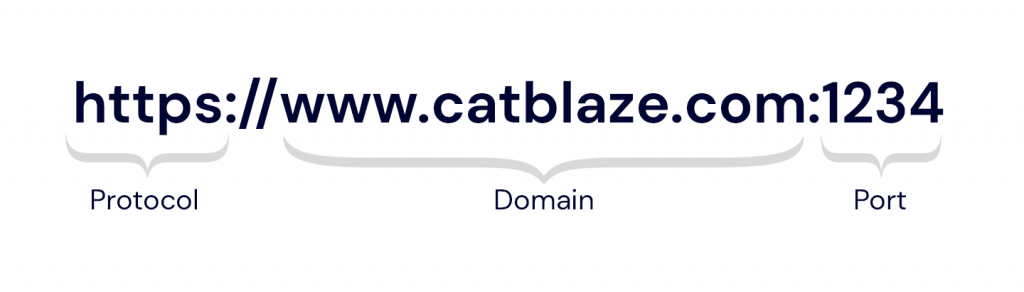
All websites have an origin, and it is defined by the protocol, domain, and port of its URL.
You’re probably familiar with the working parts of a URL, but they each have a different function. The protocol, also known as the scheme, identifies the method for exchanging data. Typical protocols are http, https, or mailto. The domain, also known as the hostname, is a specific webpage’s unique identifier. You may not be as familiar with the port as it’s not normally visible in a typical web address. Just like a port on the water, it’s the connection point where information comes in and out of a server. Different port numbers specify the types of information the port handles.
When you understand what an origin is, the “cross-origin” part of CORS makes a bit more sense. It simply means web addresses with different origins. In web addresses with the same origin, the protocol, domain, and port all match.
What Is the Same-origin Policy?
The same-origin policy was developed and implemented as a security measure against a specific website vulnerability that was discovered and exploited in the 2000s. Before the same-origin policy was in place, bad actors could use cookies stored in people’s browsers to make requests to other websites illicitly. This is known as cross-site request forgery, or CSRF, pronounced “sea surf.” It’s also known as “session riding.” Tubular.
Let’s say you log in to Netflix on your laptop to add Ridley Scott’s 1982 classic, “Blade Runner” to your queue, as one does. You click “Remember Me” so you don’t have to log in every time, and your browser keeps your credentials stored in a cookie so that the Netflix site knows you are logged in no matter where you navigate within their site.
Afterwards, you’re bored, so you fall down an internet rabbit hole wondering why “Blade Runner” is called “Blade Runner” when there are few blades and little running. You end up on a site about samurai swords that happens to be malicious—it has a script in its code that uses your authentication credentials stored in that cookie to make a request to Netflix that can change your address and add a bunch of DVDs to your queue (also, it’s 2006, and this actually happened). You’ve become a victim of cross-site request forgery.
To thwart this threat, browsers enabled the same-origin policy to prohibit requests from one origin to another.
Why Do You Need CORS?
While the same-origin policy helped stop bad actors from nefariously accessing websites, it posed a problem—sometimes you need or want assets and data from different origins. This is where the “resource sharing” part of cross-origin resource sharing comes in.
CORS allows you to set rules governing which origins are allowed to bypass the same-origin policy so you can share resources from those origins.
For example, you might host your website’s front end at www.catblaze.com, but you host your back-end API at api.catblaze.com. Or, you might need to display a bunch of cat videos stored in Backblaze B2 Cloud Storage on your website, www.catblaze.com (more on that below).
Do I Need CORS?
Let’s say you have a website, and you dabble in some coding. You’re probably thinking, “I can already use images and stuff from other websites. Do I need CORS?” And you’re right to ask. Most browsers allow simple http requests like get, head, and post without requiring CORS rules to be set in advance. Embedding images from other sites, for example, typically requires a get request to grab that data from a different origin. If that’s all you need, you’re good to go. You can use simple requests to embed images and other data from other websites without worrying about CORS.
But some assets, like fonts or iframes, might not work—then, you can use CORS—but if you’re a casual user, you can probably stop here.
Coding Explainer: What Is an http Request?
An http request is the way you, the client, use code to talk to a server. A complete http request includes a request line, request headers, and a message body if necessary. The request line specifies the method of the request. There are generally eight types:
get: “I want something from the server.”
head: “I want something from the server, but only give me the headers, not the content.”
post: “I want to send something to the server.”
put: “I want to send something to the server that replaces something else.”
delete: …self-explanatory.
patch: “I want to change something on the server.”
options: “Is this request going to go through?” (This one is important for CORS!)
trace: “Show me what you just did.” Useful for debugging.
After the method, the request line also specifies the path of the URL the method applies to as well as the http version.
The request headers communicate some specifics around how you want to receive the information. There are usually a whole bunch of these. (Wikipedia has a good list.) They’re typically formatted thusly: name:value. For example:
accept:text/plain means you want the response to be in text format.
Finally, the message body contains anything you might want to send. For example, if you use the method post, the message body would contain what you want to post.
Do I Need CORS With Cloud Storage?
People use cloud storage for all manner of data storage purposes, and most do not need to use CORS to access resources stored in a cloud instance. For example, you can make API calls to Backblaze B2 from any computer to use the resources you have stored in your storage buckets. If you’re running a mobile application and transferring data back and forth to Backblaze B2, for instance, you don’t need CORS. The mobile application doesn’t rely on a web browser.
You only need CORS if you’re specifically running code inside of a web browser and you need to make API calls from the browser to Backblaze B2. For example, if you’re using an in-browser video player and want to play videos stored in Backblaze B2.
Fortunately, if you do need CORS, Backblaze B2 allows you to configure CORS to your exact specifications while other cloud providers may have completely open CORS policies. Why is that important? An open CORS policy makes you vulnerable to CSRF attacks. To continue with the video example, let’s say you’re storing a bunch of videos that you want to make available on your website. If they’re stored with a cloud provider that has an open CORS policy, you have two choices—open or closed. You pick open so that your website visitors can call up those videos on demand, but that leaves you vulnerable to a CSRF that could allow a bad actor to download your videos. With Backblaze, you can specify the exact CORS rules you need.
If you are using Backblaze B2 to store data that will be displayed in a browser, or you’re just curious, read on to learn more about using CORS. CORS has saved developers lots of time and money by reducing maintenance effort and code complexity.
How Does CORS Work?
Unlike simple get, head, and post requests, some types of requests can alter the origin’s data. These include requests like delete, put, and patch. Any type of request that could alter the origin’s data will trigger CORS, as will simple requests that have non-standard http headers or requests in certain programming languages like AJAX. When CORS is triggered, the browser sends what’s called a preflight request to see if the CORS rules allow the request.
What Is a Preflight Request?
A preflight request, also known as an options request, asks the server if it’s okay to make the CORS request. If the preflight request comes back successfully, then the browser will complete the actual request. Few other systems in computing do this by default, so it’s important to understand when using CORS.
A preflight request has the following headers:
origin: Identifies the origin from which the CORS request originates.
access-control-request-method: Identifies the method of the CORS request.
access-control-request-headers: Lists the headers that will be included in the CORS request.
The web server then responds with the following headers:
access-control-allow-origin: Confirms the origin is allowed.
access-control-allow-method: Confirms the methods are allowed.
access-control-allow-headers: Confirms the headers are allowed.
The values that follow these headers must match the values specified in the preflight request. If so, the browser will permit the actual CORS request to come through.
Setting CORS Up: An Example
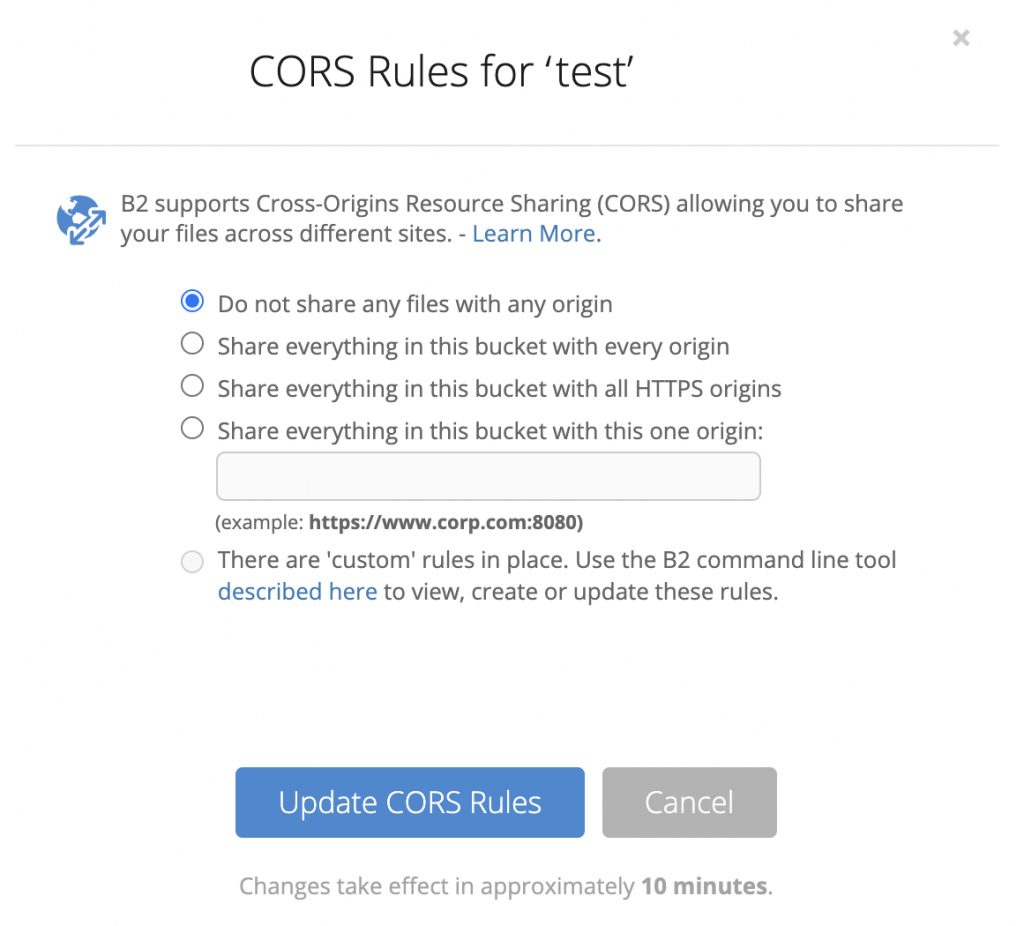
To provide an example for setting CORS up, we’ll use Backblaze B2. By default, the Backblaze B2 servers will say “no” to preflight requests. Adding CORS rules to your bucket tells Backblaze B2 which preflight requests to approve. You can enable CORS in the Backblaze B2 UI if you only need to allow one, specific origin or if you want to be able to share the bucket with all origins.
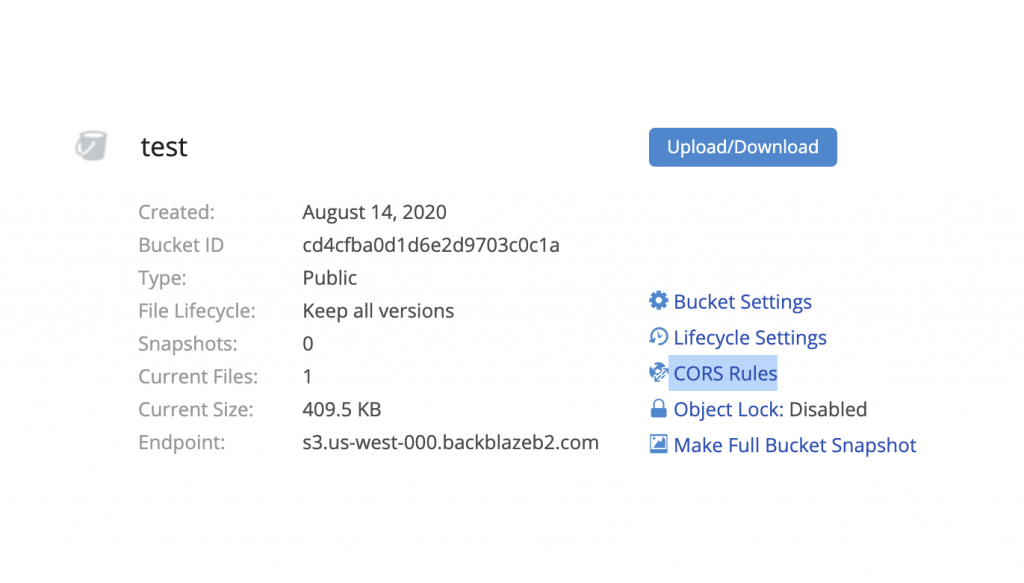
Click the CORS rules link to configure CORS.In the CORS rules pop-up, you can choose how you want to configure CORS rules.
If you need more specificity than that, you can select the option for custom rules and use the Backblaze B2 command line tool.
When a CORS preflight or cross-origin download is requested, Backblaze B2 evaluates the CORS rules on the file’s bucket. Rules may be set at the time you create the bucket with b2_create_bucket or updated on an existing bucket using b2_update_bucket.
CORS rules only affect Backblaze B2 operations in their “allowedOperations” list. Every rule must specify at least one in their allowedOperations.
CORS Rule Structure
Each CORS rule may have the following parameters:
Required:
corsRuleName: A name that humans can recognize to identify the rule.
allowedOrigins: A list of the origins you want to allow.
allowedOperations: A list that specifies the operations you want to allow, including:
B2 Native API Operations:
B2_download_file_by_name
B2_download_file_by_id
B2_upload_file
B2_upload_part
S3 Compatible Operations:
S3_delete
S3_get
S3_head
S3_post
S3_put
Optional:
allowedHeaders: A list of headers that are allowed in a preflight request’s Access-Control-Request-Headers value.
exposeHeaders: A list of headers that may be exposed to an application inside the client.
maxAgeSeconds: The maximum number of seconds that a browser can cache the response to a preflight request.
The following sample configuration allows downloads, including range requests, from any https origin and will tell browsers that it’s okay to expose the ‘x-bz-content-sha1’ header to the web page.
You may add up to 100 CORS rules to each of your buckets. Backblaze B2 uses the first rule that matches the request. A CORS preflight request matches a rule if the origin header matches one of the rule’s allowedOrigins, if the operation is in the rule’s allowedOperations, and if every value in the Access-Control-Request-Headers is in the rule’s allowedHeaders.
Using CORS: Examples in Action
Using your browser’s console, you can copy and paste the following examples to see CORS requests succeed or fail. As a handy guide for you, the text files we’ll be requesting include the bucket configuration of the Backblaze B2 buckets we’re calling.
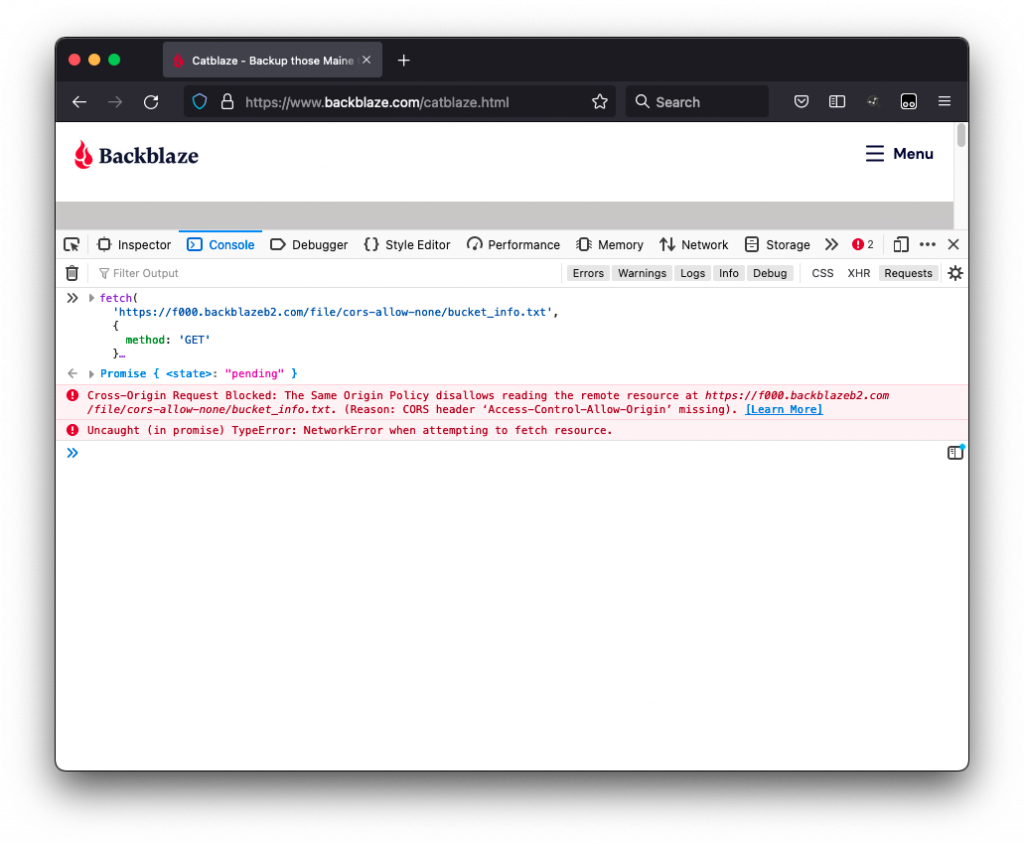
In the first example, we’ll make a request to get the text file bucket_info.txt from a bucket named “cors-allow-none” that does not allow CORS requests:
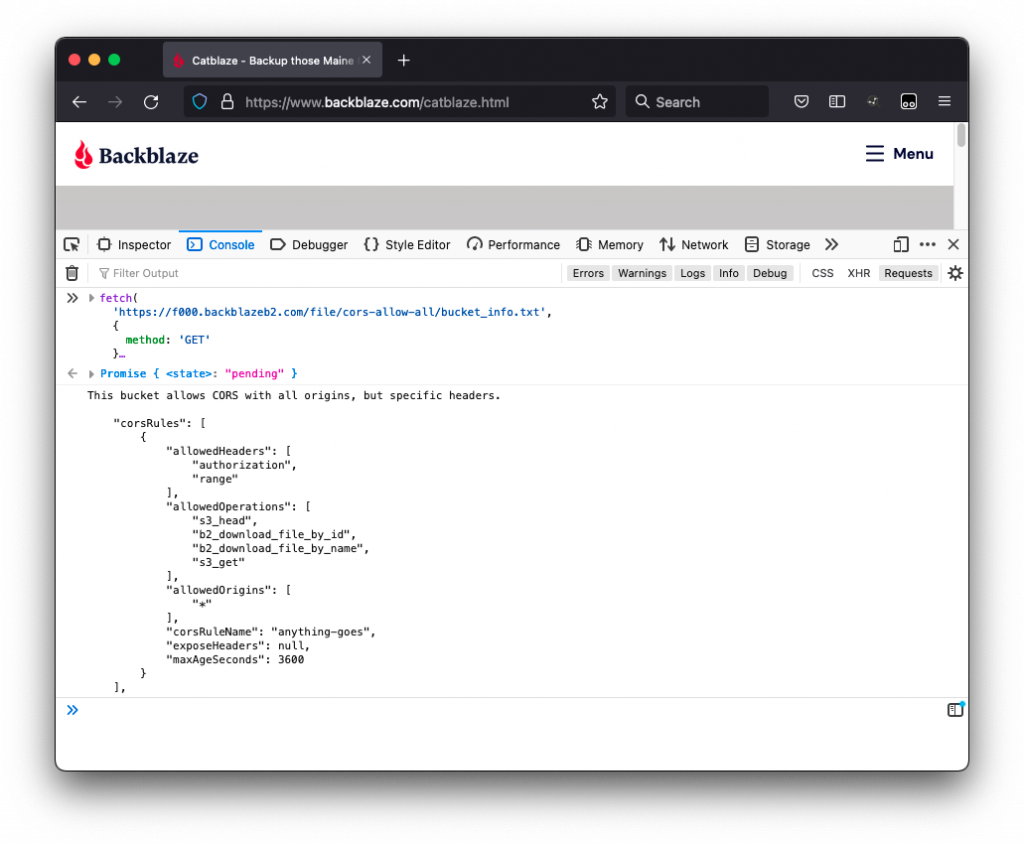
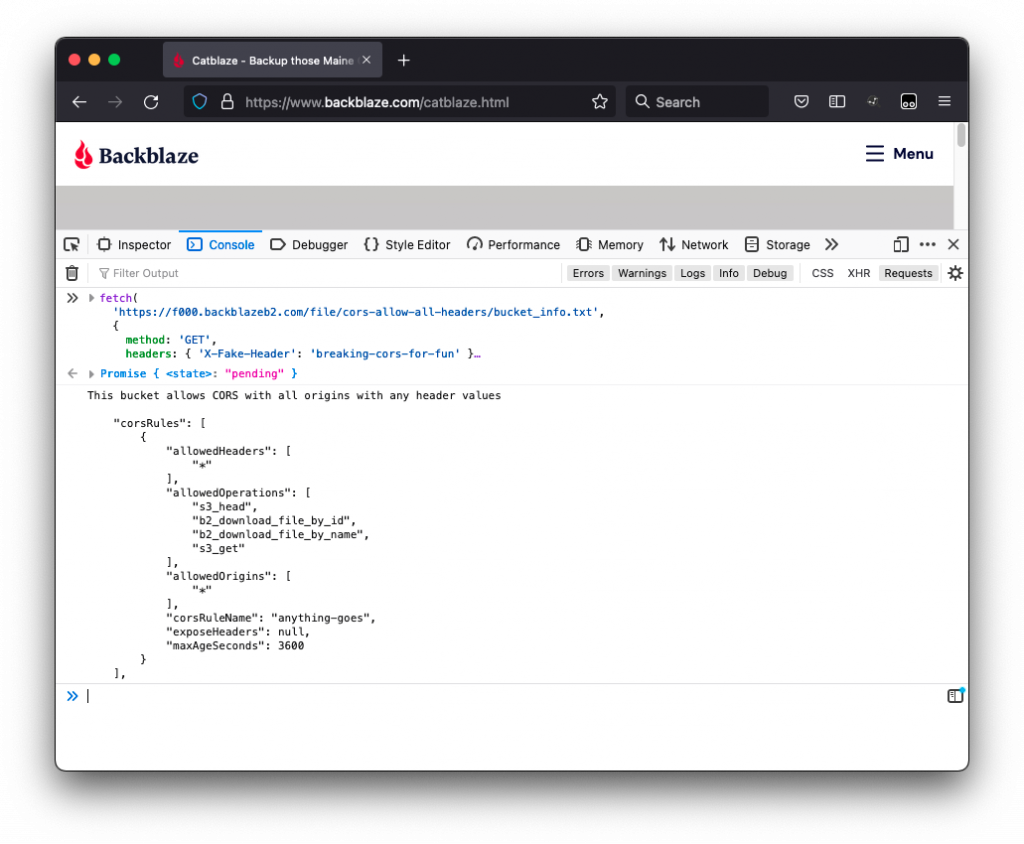
When you run the code, you will see some text output to the console indicating that, indeed, the bucket allows CORS with all origins, but specific headers:
We didn’t include any headers in our request, so the request was successful and the text file we wanted—bucket_info.txt—appears below the text output in the console. As you can see in the text output, the bucket is configured with an asterisk “*,” also known as a “wildcard,” to allow all origins (more on that later).
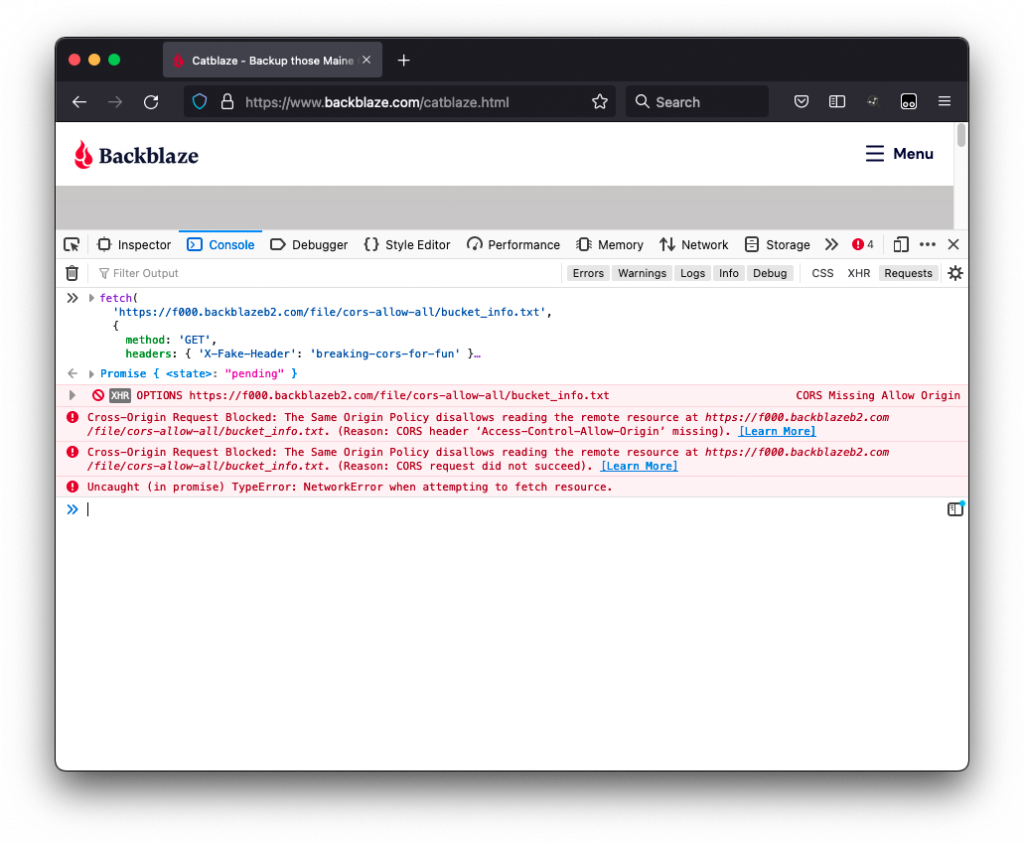
Next, we’ll try the same thing on the bucket that allows CORS with all origins, but this time triggers a pre-flight check for a header that is not allowed:
Our bucket is configured to only allow the headers authorization and range, but we’ve included the header X-Fake-Header with the value breaking-cors-for-fun—definitely not allowed—in the request.
When we run this request, we can see another type of failure:
Below the request, but above the CORS errors, you’ll see that the browser sent an options request. As we mentioned earlier, this is the pre-flight request that asks the server if it’s okay to make the get request. In this case, the pre-flight request failed.
However, this request will succeed if we change our bucket settings to allow all headers.
Below, you can see the text output “This bucket allows CORS with all origins and any header values.”
The request was successful, and the text file we requested appears in the console.
At this point, it’s important to note that when configuring your own buckets, you should use caution when using the wildcard “*” to allow any origin or header. It’s probably best to avoid the wildcard if possible. It’s okay to allow any origin to access your bucket, but, if so, you’ll probably want to enumerate the headers that matter to avoid CSRF attacks.
For more information on using CORS with Backblaze B2, including some tips on using CORS with the Backblaze S3 Compatible API, check out our documentation here.
Stay on CORS
Ah, another inevitable CORS pun. Did you see it coming? I hope so. In conclusion, here are a few things to remember about CORS and how you can use it to avoid CORS errors in the future:
The same-origin policy was developed to make websites less vulnerable to threats, and it prevents requests between websites with different origins.
CORS bypasses the same-origin policy so that you can share and use data from different origins.
You only need to configure CORS rules for your Backblaze B2 data if you are making calls to Backblaze B2 from code within a web browser.
By setting CORS rules, you can specify which origins are allowed to request data from your Backblaze B2 buckets.
Are you using CORS? Do you have any other questions? Let us know in the comments.
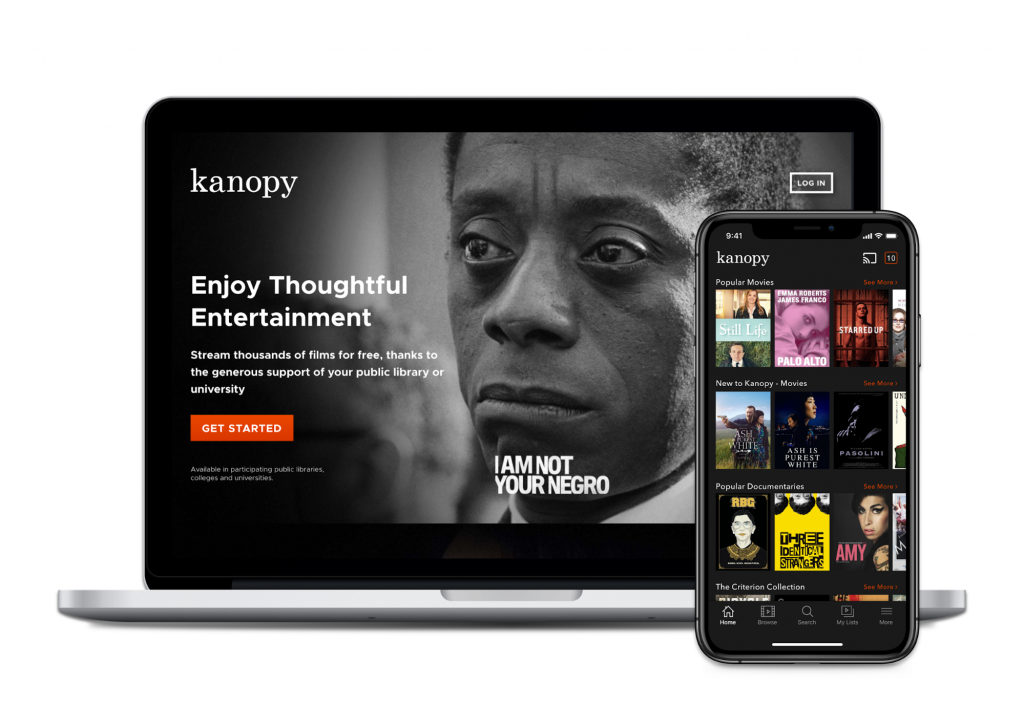
Backblaze B2 Cloud Storage enables thousands of developers—from video streaming applications like Kanopy to gaming platforms like Nodecraft—to easily store and use data in the cloud. Those files are always available for download either through a browser-compatible URL or APIs.
Backblaze supports two different suites of APIs—the Backblaze B2 Native API and the Backblaze S3 Compatible API. Sometimes, folks come to our platform knowing exactly which API they need to use, but the differences between the two are not always immediately apparent. If you’re not sure which API is best for you and your project, we’re explaining the difference today.
B2 Native API vs. S3 Compatible API: What’s the Diff?
Put simply, an application programming interface, or API, is a set of protocols that lets one application or service talk to another. They typically include a list of operations or calls developers can use to interact with said application (inputs) and a description of what happens when those calls are used (outputs). Both the B2 Native and S3 Compatible APIs handle the same basic functions:
Bucket Management: Creating and managing the buckets that hold files.
Upload: Sending files to the cloud.
Download: Retrieving files from the cloud.
List: Data checking/selection/comparison.
The main difference between the two APIs is that they use different syntax for the various calls. We’ll dig into other key differences in more detail below.
The Backblaze B2 Native API
The B2 Native API is Backblaze’s custom API that enables you to interact with Backblaze B2 Cloud Storage. We’ve written in detail about why we developed our own custom API instead of just implementing an S3-compatible interface from the beginning. In a nutshell, we developed it so our customers could easily interact with our cloud while enabling Backblaze to offer cloud storage at a quarter of the price of S3.
To get started, simply create a Backblaze account and enable Backblaze B2. You’ll then get access to your Application Key and Application Key ID. These let you call the B2 Native API.
The Backblaze S3 Compatible API
Over the years since we launched Backblaze B2 and the B2 Native API, S3 compatibility was one of our most requested features. When S3 launched in 2006, it solved a persistent problem for developers—provisioning and maintaining storage hardware. Prior to S3, developers had to estimate how much storage hardware they would need for their applications very accurately or risk crashes from having too little or, on the flip side, paying too much as a result of over-provisioning storage for their needs. S3 gave them unlimited, scalable storage that eliminated the need to provision and buy hardware. For developers, the service was a game-changer, and in the years that followed, the S3 API essentially became industry standard for object storage.
In those years as well, other brands (That’s us!) entered the market. AWS was no longer the only game in town. Many customers wanted to move from Amazon S3 to Backblaze B2, but didn’t want to rewrite code that already worked with the S3 API.
The Backblaze S3 Compatible API does the same thing as the B2 Native API—it allows you to interact with B2 Cloud Storage—but it follows the S3 syntax. With the S3 Compatible API, if your application is already written to use the S3 API, B2 Cloud Storage will just work, with minimal code changes on your end. The launch of the S3 Compatible API provides developers with a number of benefits:
You don’t have to learn a new API.
You can use your existing tools that are written to the S3 API.
Performance will be just as good and you’ll get all the benefits of B2 Cloud Storage.
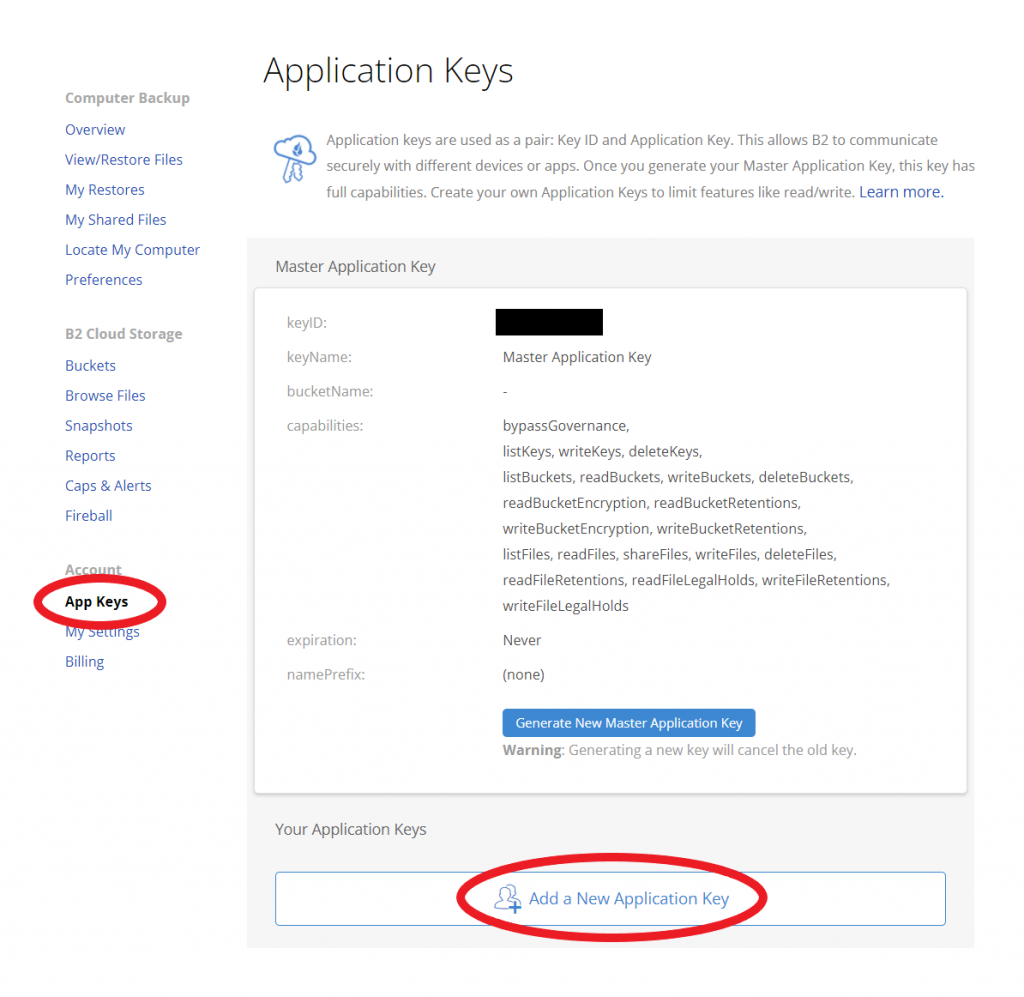
To get started, create a Backblaze account and head to the App Keys page. The Master Application Key will not be S3 compatible, so you’ll want to create a new key and key ID by clicking the “Add a New Application Key” button. Your new key and key ID will work with both the B2 Native API and S3 Compatible API. Just plug this information into your application to connect it to Backblaze B2.
Find the App Keys page in your Backblaze account to create your S3-compatible key and key ID.
If your existing tools are written to the S3 API—for example, tools like Cohesity, rclone, and Veeam—they’ll work automatically once you enter this information. Additionally, many tools—like Arq, Synology, and MSP360—were already integrated with Backblaze B2 via the B2 Native API, but now customers can choose to connect with them via either API suite.
B2 Native and S3 Compatible APIs: How Do They Compare?
Beyond the syntax, there are a few key differences between the B2 Native and Backblaze S3 Compatible APIs, including:
Key management.
SDKs.
Pre-signed URLs.
File uploads.
Key Management
Key management is unique to the B2 Native API. The S3 Compatible API does not support key management. With key management, you can create, delete, and list keys using the following calls:
b2_create_key
b2_delete_key
b2_list_keys
SDKs
Some of our Alliance Partners asked us if we had an SDK they could use. To answer that request, we developed an official Java SDK and Python SDK on GitHub so you can manage and configure your cloud resources via the B2 Native API.
Meanwhile, long-standing, open-sourced SDKs for S3 Compatible APIs are available in any language including Go, PHP, Javascript, Ruby, etc. These SDKs make it easy to integrate your application no matter what language it’s written in.
What Is an SDK?
SDK stands for software development kit. It is a set of software development tools, documentation, libraries, code snippets, and guides that come in one package developers can install. Developers use SDKs to build applications for the specific platform, programming language, or system the SDK serves.
Pre-signed URLs
By default, access to private buckets is restricted to the account owner. If you want to grant access to a specific object in that bucket to anyone else—for example, a user or a different application or service—they need proper authorization. The S3 Compatible API and the B2 Native API handle access to private buckets differently.
The S3 Compatible API handles authorization using pre-signed URLs. It requires the user to calculate a signature (code that says you are who you say you are) before sending the request. Using the URL, a user can either read an object, write an object, or update an existing object. The URL also contains specific parameters like limitations or expiration dates to manage their usage.
The S3 Compatible API supports pre-signed URLs for downloading and uploading. Pre-signed URLs are built into AWS SDKs. They can also be generated in a number of other ways including the AWS CLI and AWS Tools for PowerShell. You can find guides for configuring those tools here. Many integrations, for example, Cyberduck, also offer a simple share functionality that makes providing temporary access possible utilizing the underlying pre-signed URL.
The B2 Native API figures out the signature for you. Instead of a pre-signed URL, the B2 Native API requires an authorization token to be part of the API request itself. The b2_authorize_account request gets the authorization token that you can then use for account-level operations. If you only want to authorize downloads instead of all account-level operations, you can use the request b2_get_download_authorization to generate an authorization token, which can then be used in the URL to authenticate the request.
Uploading Files
With the S3 Compatible API, you upload files to a static URL that never changes. Our servers automatically pick the best route for you that delivers the best possible performance on our backend.
The B2 Native API requires a separate call to get an upload URL. This URL can be used until it goes stale (i.e. returns a 50X error), at which point another upload URL must be requested. In the event of a 50X error, you simply need to retry the request with the new URL. The S3 Compatible API does this for you in the background on our servers, which makes the experience of using the S3 Compatible API smoother.
This difference in the upload process is what enabled Backblaze B2 to offer substantially lower prices at the expense of a little bit more complexity. You can read more about that here.
Try It Out for Yourself
So, which API should you use? In a nutshell, if your app is already written to work with S3, if you’re using tools that are written to S3, or if you’re just unsure, the S3 Compatible API is a good choice. If you’re looking for more control over access and key management, the B2 Native API is the way to go. Either way, now that you understand the differences between the two APIs you can use to work with B2 Cloud Storage, you can align your use cases to the functionality that best suits them and get started with the API that works best for you.
If you’re ready to try out the B2 Native or S3 Compatible APIs for yourself, check out our documentation:
Of course, if you have any questions, fire away in the comments or reach out to our Sales team. And if you’re interested in trying Backblaze, get started today and your first 10GB of storage are free.
For as often as the terms multi-cloud and hybrid cloud get misused, it’s no wonder the concepts put a lot of very smart heads in a spin. The differences between a hybrid cloud and a multi-cloud strategy are simple, but choosing between the two models can have big implications for your business.
In this post, we’ll explain the difference between hybrid cloud and multi-cloud, describe some common use cases, and walk through some ways to get the most out of your cloud deployment.
What’s the Diff: Hybrid Cloud vs. Multi-cloud
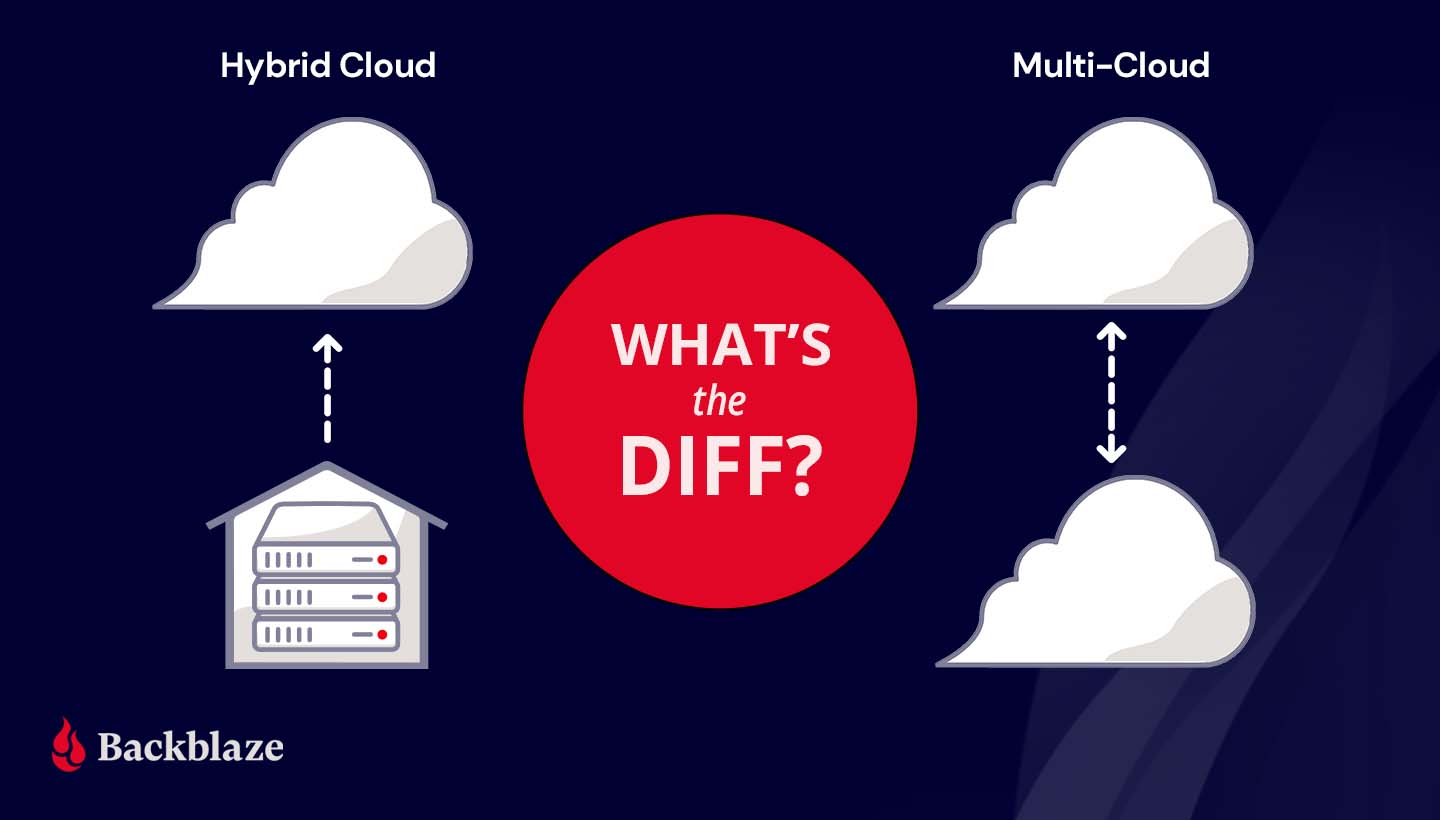
Both hybrid cloud and multi-cloud strategies spread data over, you guessed it, multiple clouds. The difference lies in the type of cloud environments—public or private—used to do so. To understand the difference between hybrid cloud and multi-cloud, you first need to understand the differences between the two types of cloud environments.
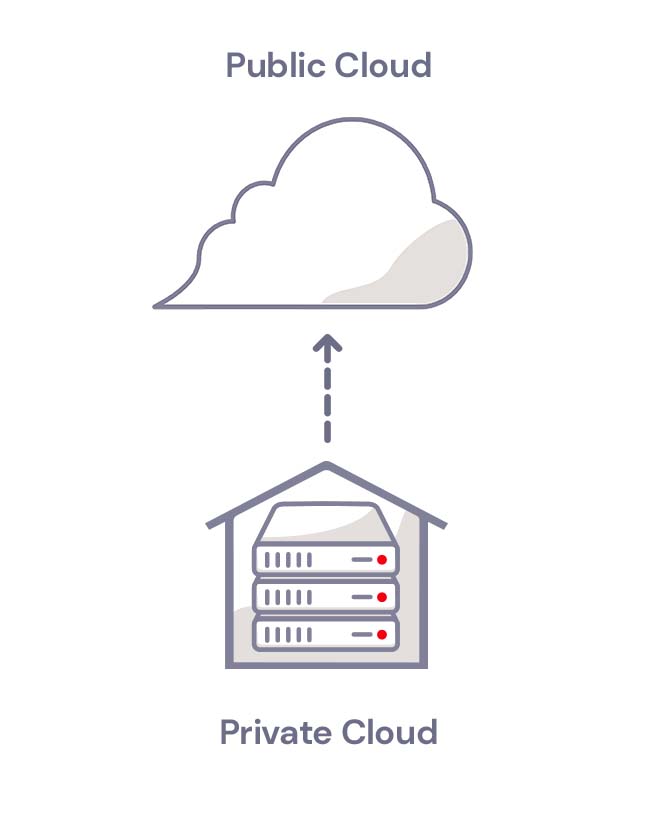
A public cloud is operated by a third party vendor that sells data center resources to multiple customers over the internet. Much like renting an apartment in a high rise, tenants rent computing space and benefit from not having to worry about upkeep and maintenance of computing infrastructure. In a public cloud, your data may be on the same server as another customer, but it’s virtually separated from other customers’ data by the public cloud’s software layer. Companies like Amazon, Microsoft, Google, and us here at Backblaze are considered public cloud providers.
A private cloud, on the other hand, is akin to buying a house. In a private cloud environment, a business or organization typically owns and maintains all the infrastructure, hardware, and software to run a cloud on a private network.
Private clouds are usually built on-premises, but can be maintained off-site at a shared data center. You may be thinking, “Wait a second, that sounds a lot like a public cloud.” You’re not wrong. The key difference is that, even if your private cloud infrastructure is physically located off-site in a data center, the infrastructure is dedicated solely to you and typically protected behind your company’s firewall.
What Is Hybrid Cloud Storage?
A hybrid cloud strategy uses a private cloud and public cloud in combination. Most organizations that want to move to the cloud get started with a hybrid cloud deployment. They can move some data to the cloud without abandoning on-premises infrastructure right away.
A hybrid cloud deployment also works well for companies in industries where data security is governed by industry regulations. For example, the banking and financial industry has specific requirements for network controls, audits, retention, and oversight. A bank may keep sensitive, regulated data on a private cloud and low-risk data on a public cloud environment in a hybrid cloud strategy. Like financial services, health care providers also handle significant amounts of sensitive data and are subject to regulations like the Health Insurance Portability and Accountability Act (HIPAA), which requires various security safeguards where a hybrid cloud is ideal.
A hybrid cloud model also suits companies or departments with data-heavy workloads like media and entertainment. They can take advantage of high-speed, on-premises infrastructure to get fast access to large media files and store data that doesn’t need to be accessed as frequently—archives and backups, for example—with a scalable, low-cost public cloud provider.
Hybrid Cloud
What Is Multi-cloud Storage?
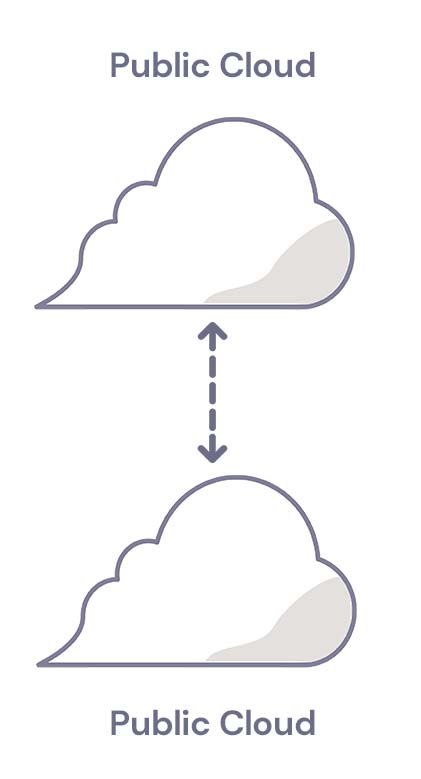
A multi-cloud strategy uses two or more public clouds in combination. A multi-cloud strategy works well for companies that want to avoid vendor lock-in or achieve data redundancy in a failover scenario. If one cloud provider experiences an outage, they can fall back on a second cloud provider.
Companies with operations in countries that have data residency laws also use multi-cloud strategies to meet regulatory requirements. They can run applications and store data in clouds that are located in specific geographic regions.
Whether you use hybrid cloud storage or multi-cloud storage, it’s vital to manage your cloud deployment efficiently and manage costs. To get the most out of your cloud strategy, we recommend the following:
Know your cost drivers. Cost management is one of the biggest challenges to a successful cloud strategy. Start by understanding the critical elements of your cloud bill. Track cloud usage from the beginning to validate costs against cloud invoices. And look for exceptions to historical trends (e.g., identify departments with a sudden spike in cloud storage usage and find out why they are creating and storing more data).
Identify low-latency requirements. Cloud data storage requires transmitting data between your location and the cloud provider. While cloud storage has come a long way in terms of speed, the physical distance can still lead to latency. The average professional who relies on email, spreadsheets, and presentations may never notice high latency. However, a few groups in your company may require low latency data storage (e.g., HD video editing). For those groups, it may be helpful to use a hybrid cloud approach.
Optimize your storage. If you use cloud storage for backup and records retention, your data consumption may rise significantly over time. Create a plan to regularly clean your data to make sure data is being correctly deleted when it is no longer needed.
Prioritize security. Investing up-front time and effort in a cloud security configuration pays off. At a minimum, review cloud provider-specific training resources. In addition, make sure you apply traditional access management principles (e.g., deleting inactive user accounts after a defined period) to manage your risks.
How to Choose a Cloud Strategy
To decide between hybrid cloud storage and multi-cloud storage, consider the following questions:
Low latency needs. Does your business need low latency capabilities? If so, a hybrid cloud solution may be best.
Geographical considerations. Does your company have offices in multiple locations and countries with data residency regulations? In that case, a multi-cloud storage strategy with data centers in several countries may be helpful.
Regulatory concerns. If there are industry-specific requirements for data retention and storage, these requirements may not be fulfilled equally by all cloud providers. Ask the provider how exactly they help you meet these requirements.
Cost management. Pay close attention to pricing tiers at the outset, and ask the provider what tools, reports, and other resources they provide to keep costs well managed.
Still wondering what type of cloud strategy is right for you? Ask away in the comments.
Cloud technology has revolutionized IT operations over the past decade and a half. According to the Flexera 2024 State of the Cloud Report, 89% of respondents reported having a multi-cloud strategy in 2024, up slightly from 87% in 2023. Businesses are steadily relying on multi-cloud environments to enhance flexibility, optimize costs, and keep up with hardware improvements.
A multi-cloud approach leverages the strengths of multiple cloud providers to meet diverse business needs. Rather than relying on a single cloud provider or on-premises infrastructure, organizations distribute workloads across various platforms.
For those not yet utilizing a multi-cloud strategy or seeking to maximize their current approach, this guide explains the essentials of multi-cloud architecture. It covers the benefits of a multi-cloud environment, how to implement it effectively, and critical considerations to keep in mind for a successful deployment.
First, some multi-cloud history
The shift to multi-cloud infrastructure over the past decade and a half can be traced to two trends in the cloud computing landscape. First, AWS, Google, and Microsoft—otherwise known as the “Big Three” and sometimes called hyperscalers—are no longer the only options for IT departments looking to move to the cloud. Since AWS launched in 2006, specialized infrastructure as a service (IaaS) providers, such as CoreWeave, DigitalOcean, and, well, us, have emerged to challenge the Big Three, giving companies more options for cloud deployments. Many challengers focus on specialized cloud functions—CoreWeave, for example, is a primarily GPU provider, though it also has its own storage cloud—who enhance their core functionality with partnerships. (What we like to call the open cloud.)
Second, many companies spent the decade after AWS’s launch making the transition from on-premises to the cloud, and dealing with complicated and expensive hyperscaler pricing structures that were the only option at the time. Now, new companies are built to be cloud native and existing companies are poised to optimize their cloud deployments. They’ve crossed the hurdle of moving or connecting on-premises infrastructure to the cloud and can focus on how to architect their cloud environments to maximize the advantages of multi-cloud.
What is multi-cloud?
Nearly every software as a service (SaaS) platform is hosted in the cloud. So, if your company uses a tool like Microsoft 365 for Business or Google Workspace along with any other cloud service or platform, you’re technically operating in a multi-cloud environment. But, using more than one SaaS platform does not constitute a true multi-cloud strategy.
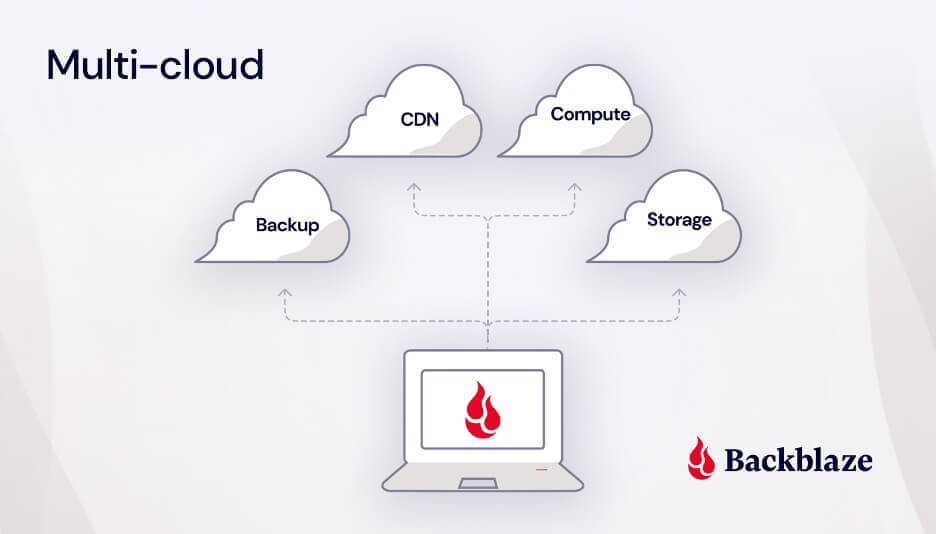
In the cloud services industry, when we talk about “multi-cloud,” we’re referring to the use of multiple public cloud platforms to build your company’s infrastructure. This includes all aspects of your tech stack such as storage, networking, computing power, and more.
Essentially, it means not putting all your eggs in one basket (or in one cloud provider like AWS, Google, or even on-premises infrastructure), but instead leveraging the strengths of different cloud providers to meet your specific needs.
Multi-cloud vs. hybrid cloud: what’s the diff?
To be more precise, multi-cloud refers to the use of more than one public cloud platform. This strategy allows businesses to leverage the unique strengths and services of different providers, optimizing for performance and cost.
On the other hand, a hybrid cloud combines a private cloud with a public cloud. A private cloud is typically hosted on-premises, but it can also be hosted in a colocation data center. The key difference between private and public clouds is that a private cloud’s infrastructure, hardware, and software are maintained and used exclusively by your business.
Things can get even more interesting when a company uses a private cloud along with multiple public clouds. This approach, known as a hybrid multi-cloud strategy, maximizes flexibility and resilience, though it can be complex to manage.
Did you know?
The International Data Corporation (IDC) is forecasting cloud infrastructure spending to jump to $129.9 billion in 2024. That’s up almost 20% compared to 2023.
How to implement multi-cloud: use cases
As multi-cloud deployments have become integral to operations, IT teams have incorporated them into an overall enterprise cloud strategy. And, as multi-cloud infrastructure has become more common, leading tools like Veeam, Commvault, Kubernetes, iconik, and rclone have been built to integrate with specific storage targets and complex storage infrastructure.
So, how do you actually use a multi-cloud strategy, and what is a multi-cloud strategy good for? Multi-cloud has a number of compelling use cases and rationales, including:
Disaster recovery
Failover
Cost optimization
Avoiding vendor lock-in
Data sovereignty
Access to specialized services
Disaster recovery
One of the key advantages of a multi-cloud environment is enhanced disaster recovery through redundancy. By leveraging multiple cloud providers, IT departments can easily implement the modern 3-2-1 backup strategy: three copies of data, stored on two different types of media, with one copy stored off-site or in the cloud. As cloud services have advanced, the primacy of on-premises backups has diminished, with data recovery from the cloud now almost as fast as from on-premises infrastructure and protected by regional separation in case of natural disaster.
Failover
Similarly, some cloud-native companies utilize multiple cloud providers to host mirrored copies of their active production data. If one of their public clouds suffers an outage, they have mechanisms in place to direct their applications to failover to a second public cloud.
E-commerce company, Big Cartel, pursued this strategy after AWS suffered a number of outages in past years that gave Big Cartel cause for concern. They host more than one million websites on behalf of their clients, and an outage would take them all down. “Having a single storage provider was a single point of failure that we grew less and less comfortable with over time,” Big Cartel Technical Director, Lee Jensen, acknowledged. Now, their data is stored in two public clouds—Amazon S3 and Backblaze B2 Cloud Storage. Their content delivery network (CDN), Fastly, preferentially pulls data from Backblaze B2 with Amazon S3 as failover.
Matter Matters: A Big Cartel customer site.
Cost optimization
Challenger companies can offer incentives that compete with the Big Three and pricing structures that suit specialized data use cases. For example, some cloud providers offer free egress but put limits on how much data can be downloaded, while others charge nominal egress fees, but don’t cap downloads. Or, you might see things like minimum storage duration fees, which means that you get charged for your data being stored even after deletion. Savvy companies employ multiple clouds for different types of data depending on how much data they have and how often it needs to be accessed.
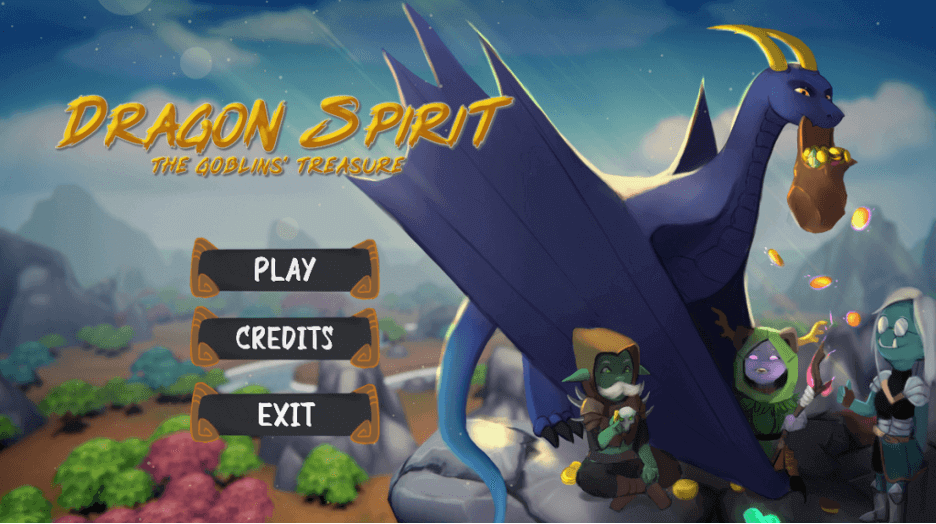
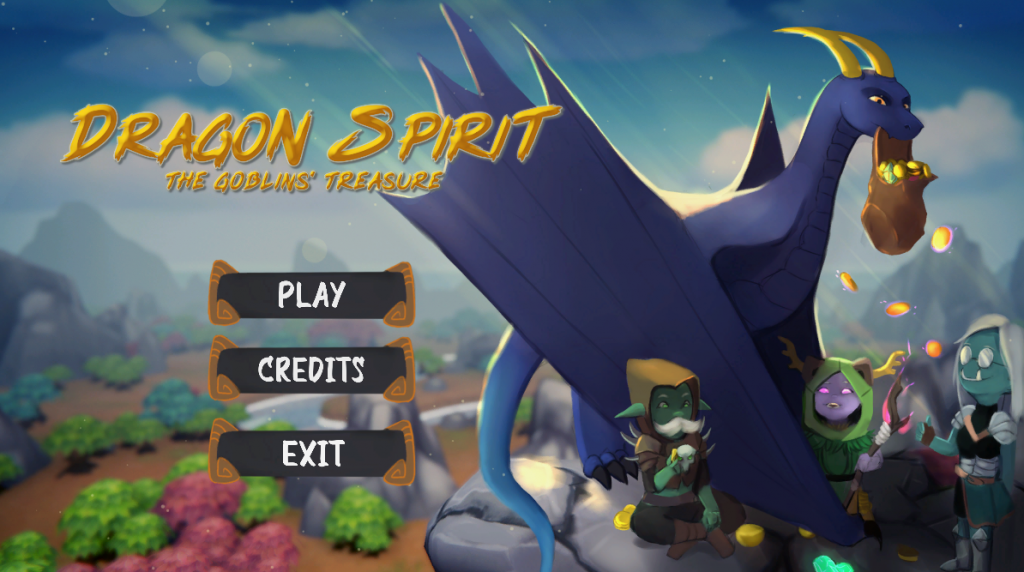
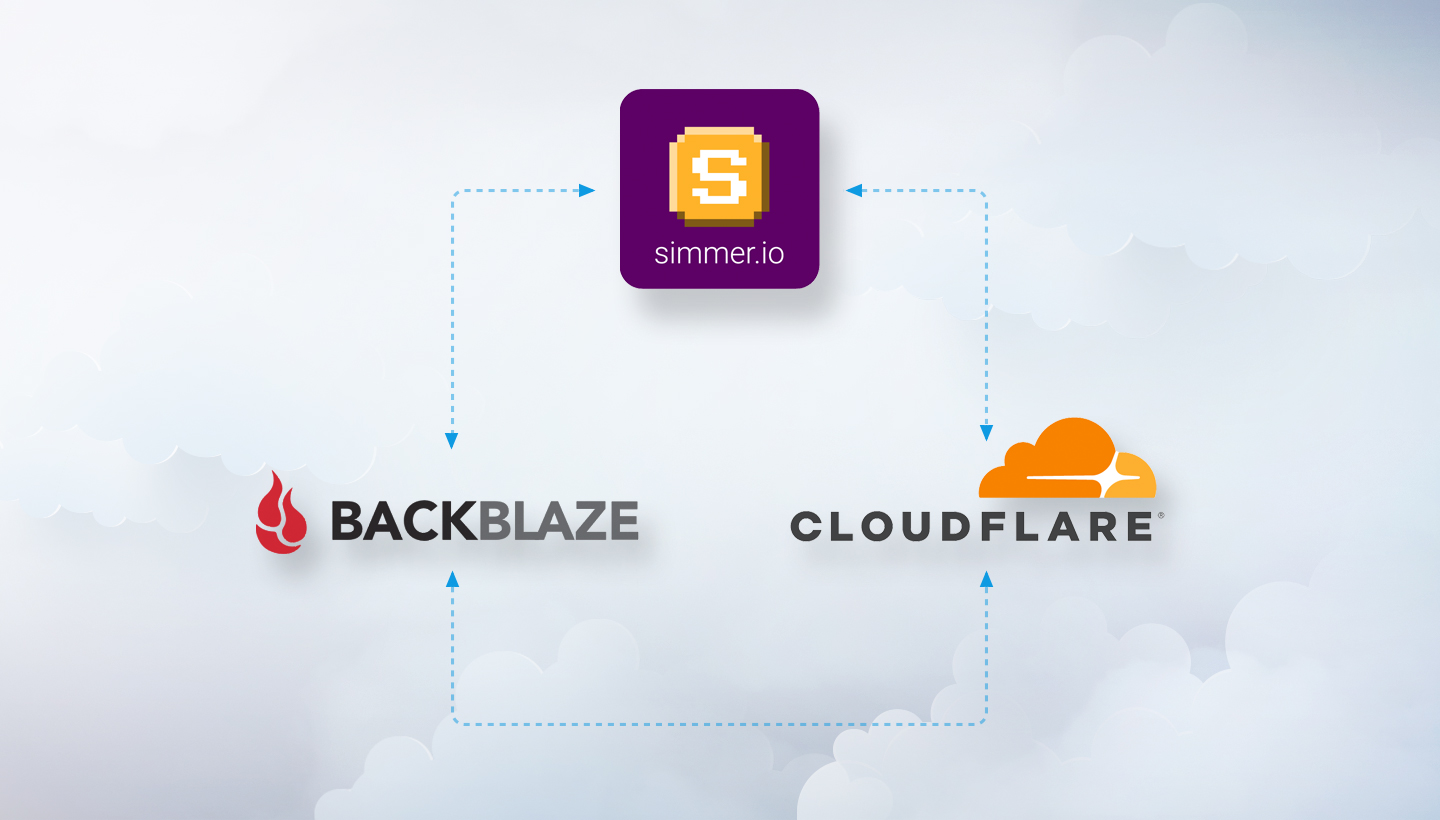
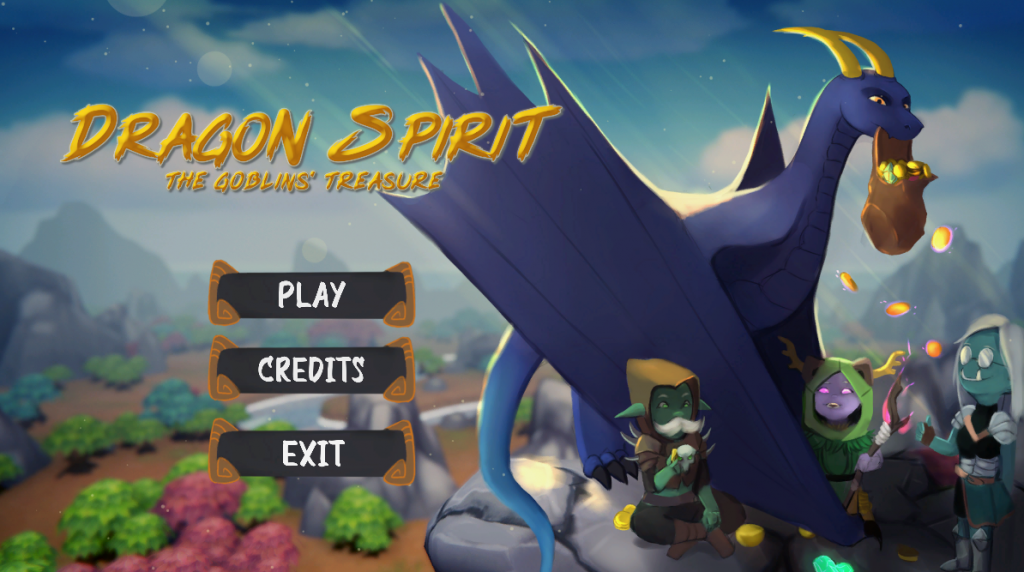
simmer.io, a community site that makes sharing Unity WebGL games easy for indie game developers, would get hit with egress spikes from Amazon S3 whenever one of their hosted games went viral. The fees turned their success into a growth inhibitor. simmer.io mirrored their data to Backblaze B2 Cloud Storage and reduced egress to $0 as a result of the partnership between Backblaze and Cloudflare. They can grow their site without having to worry about increasing egress costs over time or usage spikes when games go viral, and they doubled redundancy in the process.
Dragon Spirit: A simmer.io hosted game.
Avoiding vendor lock-in
Many companies initially adopted one of the Big Three because they were the only game in town, but later felt restricted by their closed systems. Companies like Amazon and Google don’t play nice with each other and both seek to lock customers in with proprietary services. Adopting a multi-cloud infrastructure with interoperable providers gives these companies more negotiating power and control over their cloud deployments.
For example, Gideo, a connected TV app platform, initially used an all-in-one cloud provider for compute, storage, and content delivery, but felt they had no leverage to reduce their bills or improve the service they were receiving. They adopted a multi-cloud approach, building a tech stack with a mix of unconflicted partners where they no longer feel beholden to one provider.
Data sovereignty
Many countries, including those in the European Union (EU), have enacted stringent laws regulating where and how data can be stored, often referred to as data sovereignty or data residency requirements. These regulations ensure that sensitive data remains within specific geographical boundaries to protect privacy and maintain national security.
For companies subject to these data residency standards, employing a multi-cloud approach is a strategic way to meet regulatory requirements. By using multiple public cloud providers with diverse geographic footprints, organizations can store data in the required regions. This approach not only ensures compliance with local laws but also enhances data security and accessibility.
Access to specialized services
Organizations may use different cloud providers to access specialized or complimentary services. For example, a company may use a public cloud like DigitalOcean or Vultr for access to compute resources or bare metal servers, but store their data with a different, interoperable public cloud that specializes in storage (aka Backblaze!). Or, a company may use a cloud storage provider in combination with a cloud CDN to distribute content faster to end users.
The advantages of multi-cloud infrastructure
No matter the use case or rationale, companies achieve a number of advantages from deploying a multi-cloud infrastructure, including:
Better reliability and lower latency: In a failover scenario, if one cloud goes down, companies with a multi-cloud strategy have others to fall back on. If a company uses multiple clouds for data sovereignty or in combination with a CDN, they see reduced latency as their clouds are located closer to end users.
Redundancy: With data in multiple, isolated clouds, companies are better protected from threats. If cybercriminals are able to access one set of data, companies are more likely to recover if they can restore from a second cloud environment that operates on a separate network.
More freedom and flexibility: With a multi-cloud system, if something’s not working or if costs start to become unmanageable, companies have more leverage to influence changes and the ability to leave if another vendor offers better features or more affordable pricing. Businesses can also take advantage of industry partnerships to build flexible, cloud-agnostic tech stacks using best-of-breed providers.
Affordability: It may seem counterintuitive that using more clouds would cost less, but it’s true. Diversified cloud providers like AWS make their services hard to quit for a reason—when you can’t leave, they can charge you whatever they want. A multi-cloud system allows you to take advantage of competitive pricing among platforms.
Best-of-breed services: Adopting a multi-cloud strategy means you can work with providers who specialize in doing one thing really well, rather than trying to be everything to everyone. Cloud platforms specialize to offer customers top-of-the-line service, features, and support rather than providing a one-size-fits all solution.
The challenges of multi-cloud infrastructure
The advantages of a multi-cloud system have attracted an increasing number of companies, but it’s not without challenges. According to a 2024 IDC Tracker, managing costs is complex due to different pricing models and billing structures across cloud providers, necessitating real-time cost monitoring and predictive analytics from any cloud integration. Additionally, Gartner highlights the shortage of skilled professionals to manage multi-cloud environments, requiring continuous upskilling and training investments. Basically, a good IT team is worth its weight in… cloud storage savings.
Despite these challenges plus performance management, security concerns, compliance requirements, and others, multi-cloud strategies offer improved flexibility and resilience, making them a valuable approach for medium to large enterprises.
Overcome multi-cloud challenges with multi-cloud best practices.
Multi-cloud best practices
As you plan your multi-cloud strategy, keep the following considerations in mind:
Deployment strategies
Cost management
Data security
Governance
Multi-cloud deployment strategies
There are likely as many ways to deploy a multi-cloud strategy as there are companies using a multi-cloud strategy. But, they generally fall into two broader categories—redundant or distributed.
In a redundant deployment, data is mirrored in more than one cloud environment, for example, for failover or disaster recovery. Companies that use a multi-cloud approach rather than a hybrid approach to store backup data are using a redundant multi-cloud deployment strategy. Most IT teams looking to use a multi-cloud approach to back up company data or environments will fall into this category.
A distributed deployment model more often applies to software development teams. In a distributed deployment, different workloads, or different components of the same application are spread across multiple cloud computing environments based on the best fit. For example, a DevOps team might host their compute infrastructure in one public cloud and storage in another.
Your business requirements will dictate which type of deployment you should use. Knowing your deployment approach from the outset can help you pick providers with the right mix of services and billing structures for your multi-cloud strategy.
Multi-cloud cost management
Managing costs in a multi-cloud environment is a challenge that every company faces. Effective cost management requires robust monitoring tools to track cloud utilization and spending, providing visibility into usage and identifying areas for optimization. Choosing cloud providers with straightforward, transparent pricing is essential to avoid unexpected costs and simplify budgeting.
Multi-cloud data security
Security risks increase as your cloud environment becomes more complex. There are more attack targets, and you’ll want to plan security measures accordingly. To take advantage of multi-cloud benefits while reducing risk, follow multi-cloud security best practices:
Ensure you have controls in place for authentication across platforms. Your different cloud providers likely have different authentication protocols, and you need a framework and security protocols that work across providers. Hint: Use a password management tool or a single-sign on (SSO) login methods.
Train your team appropriately to identify cybersecurity risks.
Stay up-to-date on security patches. Each cloud provider will publish their own upgrades and patches. Make sure to automate upgrades as much as possible.
Consider using a tool like Object Lock to protect backups with immutability. Object Lock allows you to store objects using a write once, read many (WORM) model, meaning after it’s written, data cannot be modified or deleted for a defined period of time. Any attempts to manipulate, copy, encrypt, change, or delete the file will fail during that time. The files may be accessed, but no one can change them, including the file owner or whoever set the Object Lock.
Multi-cloud governance
As cloud adoption grows across your company, you’ll need to have clear protocols for how your infrastructure is managed. Consider creating standard operating procedures for cloud platform management and provisioning to avoid shadow IT proliferation, where teams may adopt tools (in the cloud or not) that IT has not approved and isn’t managing. And, set up policies for centralized security monitoring.
Ready for multi-cloud? Here are some migration strategies
If you’re ready to go multi-cloud, you’re probably wondering how to get your data from your on-premises infrastructure to the cloud or from one cloud to another. After choosing a provider that fits your needs, you can start planning your data migration. There are a range of tools for moving your data, but when it comes to moving between cloud services, a tool like our Universal Data Migration can help make things a lot easier and faster.
How Backblaze fits into a multi-cloud strategy
Backblaze B2 enhances versatile and secure backup solutions with features like Object Lock for immutable data storage and 3x free egress for when you need to recover data. In partnership with backup solutions like Veeam and disaster recovery services like Cloud Instant Backup Recovery, businesses can utilize Backblaze in a multi-cloud architecture to ensure continuous operation during ransomware attacks, hardware failures, or even force majeure. Backblaze also integrates into your multi-cloud tech stack so you can build applications and safeguard datasets on S3 compatible cloud object infrastructure with connected compute and integrated CDNs.
Have any more questions about multi-cloud or cloud migration? Let us know in the comments.
FAQs about multi-cloud architecture guide
What is multi-cloud storage?
Multi-cloud storage is a term for the use of multiple cloud providers within one organization. For example, if your organization uses one cloud storage provider for sensitive medical documents to comply with HIPAA and another cloud storage provider for non-sensitive day-to-day documents, you’re using multi-cloud storage.
What is the difference between multi-cloud and hybrid cloud?
Multi-cloud refers to the process of using multiple clouds within the same cloud storage system. Hybrid cloud, on the other hand, refers to using two different kinds of cloud storage systems—private clouds and public clouds. They are both options that can be incredibly beneficial for many people and organizations, but they’re different methods of approaching cloud storage.
When should I use multi-cloud?
Multi-cloud is a common cloud storage strategy, and most organizations should consider its value for their operations. Multi-cloud has a number of compelling use cases and rationales, including disaster recovery, failover, cost optimization, avoiding vendor lock-in, data sovereignty, and access to specialized services.
What are the benefits of multi-cloud?
Multi-cloud storage strategies offer many benefits depending on how you employ them. They provide more flexibility to meet or exceed regulatory and compliance requirements depending on your industry. They provide greater resilience and protection for your backup and recovery systems. And they provide you with greater flexibility to find the storage solutions that work best for your operations and your budget. Adding cloud providers can increase complexity in billing and administration, but properly managed, it provides your business the ability to better protect and use your data.
This article has been updated since it was originally published in 2021.
When we first published this article, a $70 million ransom demand was unprecedented. Today, demands have reached as high as $240 million, a sum that the Hive ransomware group opened negotiations with in an attack on MediaMarkt, Europe’s largest consumer electronics retailer.
But then, as now, the ransoms themselves are just a portion, and often a small portion, of the overall cost of ransomware. Ransomware attacks are crimes of opportunity, and there’s a lot more opportunity in the mid-market, where the odd $1 million demand doesn’t make headlines and the victims are less likely to be adequately prepared to recover. And, the cost of those recoveries is what we’ll get into today.
In this post, we’re breaking down the true cost of ransomware and the drivers of those costs.
Read More About Ransomware
This post is a part of our ongoing series on ransomware. Take a look at our other posts for more information on how businesses can defend themselves against a ransomware attack, important industry trends, and more.
Ransom Payments Are the First Line Item
The Sophos State of Ransomware 2023 report, a survey of 3,000 IT decision makers from mid-sized organizations in 14 countries, found the average ransom payment was $1.54 million. This is almost double the 2022 figure of $812,380, and almost 10 times the 2020 average of $170,404, when we last published this article. Coveware, a security consulting firm, found that the average ransom payment for Q2 2023 was $740,144, also representing a big spike over previous quarters. While the specific numbers vary depending on sampling, both reports point to ransoms going up and up.
Sophos found that the mean recovery cost excluding the ransom payment was $2.6 million when the targeted organization paid the ransom and got their data back. And, that cost was still $1.6 million when businesses used backups to restore data.
The cost of recovery comes from a wide range of factors, including:
Downtime.
People hours.
Investment in stronger cybersecurity protections.
Repeat attacks.
Higher insurance premiums.
Legal defense and settlements.
Lost reputation.
Lost business.
Downtime
When a company’s systems and data are compromised and operations come to a halt, the consequences are felt across the organization. Financially, downtime results in immediate revenue loss. And, productivity takes a significant hit as employees are unable to access critical resources, leading to missed deadlines and disrupted workflows. According to Coveware, the average downtime in Q2 2022 (the last quarter they collected data on downtime) amounted to over three weeks (24 days). And according to Sophos, 53% of survey respondents took more than one month to recover from the attack. This time should be factored in when calculating the true cost of ransomware.
People Hours
In the aftermath of a ransomware attack, a significant portion, if not all, of a company’s resources will be channeled towards the recovery process. The IT department will be at the forefront, working around the clock to restore systems to full functionality. The marketing and communications teams will shoulder the responsibility of managing crisis communications, while the finance team may find themselves in negotiations with the ransomware perpetrators. Meanwhile, human resources will be addressing employee inquiries and concerns stemming from the incident. Calculating the total hours spent on recovery may not be possible, but it’s a factor to consider in planning.
After recovery, the long term effects of a cybersecurity breach can still be felt in the workforce. In a study of the mental health impacts of cybersecurity on employees, Northwave found that physical and mental health symptoms were still existent up to a year after the cybersecurity attack, and affected both employee morale and business goals.
Investment in Stronger Cybersecurity Protections
It is highly probable that a company will allocate a greater portion of its budget towards bolstering its cybersecurity measures after being attacked by ransomware, and rightfully so. It’s a prudent and necessary response. As attacks continue to increase in frequency, cyber insurance providers will continue to tighten requirements for coverage. In order to maintain coverage, companies will need to bring systems up to speed.
Repeat Attacks
One of the cruel realities of being attacked by ransomware is that it makes businesses a target for repeat attacks. Unsurprisingly, cybercriminals don’t always keep their promises when companies pay ransoms. In fact, paying ransoms lets cybercriminals know you’re an easy future mark. They know you’re willing to pay.
Repeat attacks happen when the vulnerability that allowed cybercriminals access to systems remained susceptible to exploitation. Copycat ransomware operators can easily exploit vulnerabilities that go unaddressed even for a few days.
Higher Insurance Premiums
As more and more companies file claims for ransomware attacks and recoveries and ransom demands continue to increase, insurers are upping their premiums. In essence, insurers have been confronted with the stark reality that the financial toll exacted by ransomware incidents far exceeds what was once anticipated. In response to this growing financial strain, insurance providers are left with little choice but to raise their premiums. This uptick in premiums reflects the increasing risk landscape of the digital age, where the ever-evolving tactics and sophistication of cybercriminals necessitate a recalibration of risk assessment models and pricing structures within the insurance industry.
Legal Defense and Settlements
When attacks affect consumers or customers, victims can expect to hear from the lawyers. After a 2021 ransomware attack, payroll services provider UKG agreed to a $6 million settlement. And, big box stores like Target and Home Depot both paid settlements in the tens of millions of dollars following breaches. Even if your information security practices would hold up in court, for most companies, it’s cheaper to settle than to suffer a protracted legal battle.
Lost Reputation and Lost Business
When ransomware attacks make headlines and draw public attention, they can erode trust among customers, partners, and stakeholders. The perception that a company’s cybersecurity measures were insufficient to protect sensitive data and systems can lead to a loss of credibility. Customers may question the safety of their personal information.
Rebuilding a damaged reputation is a challenging and time-consuming process, requiring transparent communication, proactive security improvements, and a commitment to regaining trust. Ultimately, the impact of reputation loss goes beyond financial losses, as it can significantly affect an organization’s long-term viability and competitiveness in the market.
What You Can Do About It: Defending Against Ransomware
The business of ransomware is booming with no signs of slowing down, and the cost of recovery is enough to put some ill-prepared companies out of business. If it feels like the cost of a ransomware recovery is out of reach, that’s all the more reason to invest in harder security protocols and disaster recovery planning sooner rather than later.
For more information on the ransomware economy, the threat small to mid-sized businesses (SMBs) are facing, and steps you can take to protect your business, download The Complete Guide to Ransomware.
Cost of Ransomware FAQs
1. What is the highest ransomware ransom ever demanded?
Today, ransom demands have reached as high as $240 million, a sum demanded by the Hive ransomware group in an attack on MediaMarkt, Europe’s largest consumer electronics retailer.
2. What is the average ransom payment in 2023?
Average ransom payments vary depending on how reporting entities sample data. Some estimates put the average ransom payment in 2023 in the hundreds of thousands of dollars up to over half a million dollars.
3. How much does ransomware recovery cost?
Ransomware recovery can easily cost in the multiple millions of dollars. The cost of recovery comes from a wide range of factors, including downtime, people hours, investment in stronger cybersecurity protections, repeat attacks, higher insurance premiums, legal defense, lost reputation, and lost business.
4. How long does ransomware recovery take?
When a company’s systems and data are compromised, and operations come to a halt, the consequences are felt across the organization. Ransomware recovery can take anywhere from a few days, if you’re well prepared, or up to six months or longer.
Ransomware continues to proliferate for a simple reason—it’s profitable. And it’s profitable not just for the ransomware developers themselves—they’re just one part of the equation—but for a whole ecosystem of players who make up the ransomware economy. To understand the threats to small and medium-sized businesses (SMBs) and organizations today, it’s important to understand the scope and scale of what you’re up against.
Today, we’re digging into how the ransomware economy operates, including the broader ecosystem and the players involved, emerging threats to SMBs, and the overall financial footprint of ransomware worldwide.
This post is a part of our ongoing series on ransomware. Take a look at our other posts for more information on how businesses can defend themselves against a ransomware attack, and more.
Cybercriminals have long been described as operating in “gangs.” The label conjures images of hackers furiously tapping away at glowing workstations in a shadowy warehouse. But the work of the ransomware economy today is more likely to take place in a boardroom than a back alley. Cybercriminals have graduated from gangs to highly complex organized crime syndicates that operate ransomware brands as part of a sophisticated business model.
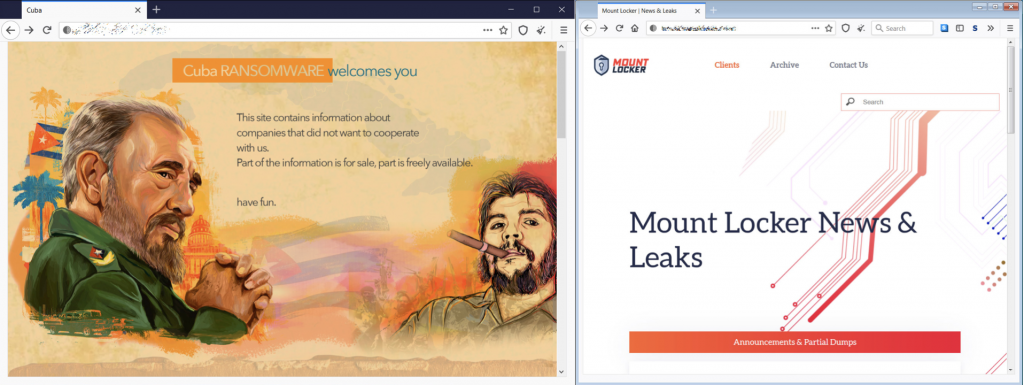
Operators of these syndicates are just as likely to be worrying about user experience and customer service as they are with building malicious code. A look at the branding on display on some syndicates’ leak sites makes the case plain that these groups are more than a collective of expert coders—they’re savvy businesspeople.
Source: Bleepingcomputer.com.
Ransomware operators are often synonymous with the software variant they brand, deploy, and sell. Many have rebranded over the years or splintered into affiliated organizations. Some of the top ransomware brands operating today, along with high profile attacks they have carried out, are shown in the infographic below:
The groups shown above do not constitute an exhaustive list. In June 2021, FBI Director Christopher Wray stated that the FBI was investigating 100 different ransomware variants and new ones pop up everyday. While some brands have existed for years (Ryuk, for example), the list is also likely obsolete as soon as it’s published. Ransomware brands bubble up, go bust, and reorganize, changing with the cybersecurity tides.
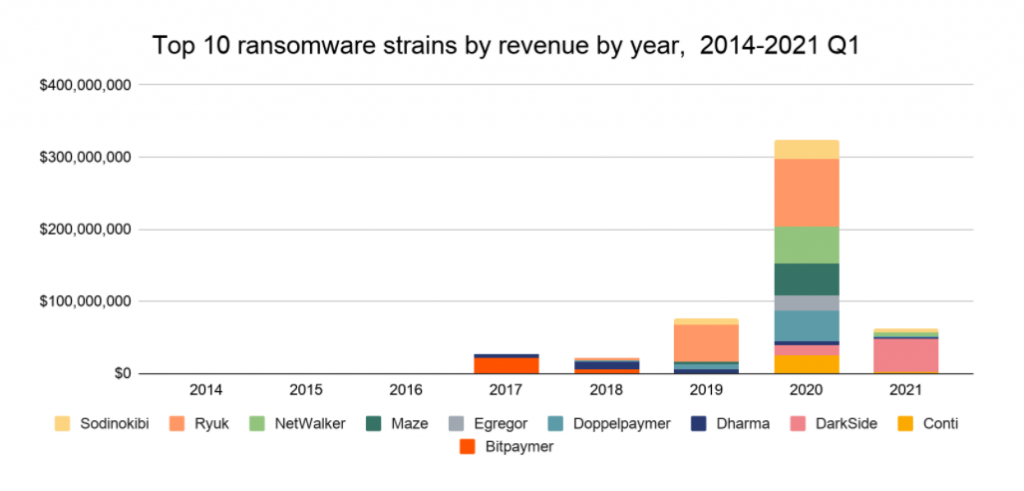
Chainalysis, a blockchain data platform, published their Ransomware 2021: Critical Mid-year Update that shows just how much brands fluctuate year to year and, they note, even month to month:
Ransomware operators may appear to be single entities, but there is a complex ecosystem of suppliers and ancillary providers behind them that exchange services with each other on the dark web. The flowchart below illustrates all the players and how they interact:
Dark Web Service Providers
Cybercrime “gangs” could once be tracked down and caught like the David Levi Phishing Gang that was investigated and prosecuted in 2005. Today’s decentralized ecosystem, however, makes going after ransomware operators all the more difficult. These independent entities may never interact with each other outside of the dark web where they exchange services for cryptocurrency:
Botmasters: Create networks of infected computers and sell access to those compromised devices to threat actors.
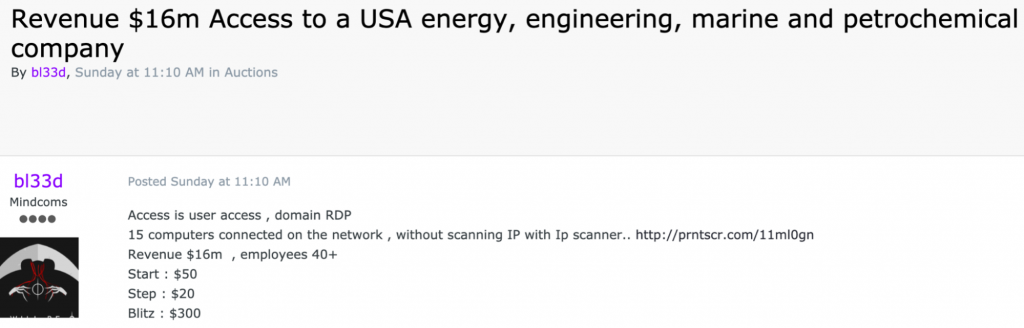
Access Sellers: Take advantage of publicly disclosed vulnerabilities to infect servers before the vulnerabilities are remedied, then advertise and sell that access to threat actors.
Advertisement from an access seller for access to an organization’s RDP. Source: Threatpost.
Operators: The entity that actually carries out the attack with access purchased from botmasters or access sellers and software purchased from developers or developed in-house. May employ a full staff, including customer service, IT support, marketing, etc. depending on how sophisticated the syndicate is.
Developers: Write the ransomware software and sell it to threat actors for a cut of the ransom.
Packer Developers: Add protection layers to the software, making it harder to detect.
Analysts: Evaluate the victim’s financial health to advise on ransom amounts that they’re most likely to pay.
Affiliates: Purchase ransomware as a service from operators/developers who get a cut of the ransom.
Negotiating Agents: Handle interactions with victims.
Laundering Services: Exchange cryptocurrency for fiat currency on exchanges or otherwise transform ransom payments into usable assets.
Victim-side Service Providers
Beyond the collection of entities directly involved in the deployment of ransomware, the broader ecosystem includes other players on the victim’s side, who, for better or worse, stand to profit off of ransomware attacks. These include:
Incident response firms: Consultants who assist victims in response and recovery.
Ransomware brokers: Brought in to negotiate and handle payment on behalf of the victim and act as intermediaries between the victim and operators.
Insurance providers: Cover victims’ damages in the event of an attack.
Legal counsel: Often manage the relationship between the broker, insurance provider, and victim, and advise on ransom payment decision-making.
Are Victim-side Providers Complicit?
While these providers work on behalf of victims, they also perpetuate the cycle of ransomware. For example, insurance providers that cover businesses in the event of a ransomware attack often advise their customers to pay the ransom if they think it will minimize downtime as the cost of extended downtime can far exceed the cost of a ransom payment. This becomes problematic for a few reasons:
First, paying the ransom incentivizes cybercriminals to continue plying their trade.
Second, as Colonial Pipeline discovered, the decryption tools provided by cybercriminals in exchange for ransom payments aren’t to be trusted. More than a month after Colonial paid the $4.4 million ransom and received a decryption tool from the hackers, CEO Joseph Blount testified before Congress that recovery from the attack was still not complete. After all that, they had to rely on recovering from their backups anyway.
The Emergence of Ransomware as a Service
In the ransomware economy, operators and their affiliates are the threat actors that carry out attacks. This affiliate model where operators sell ransomware as a service (RaaS) represents one of the biggest threats to SMBs and organizations today.
Cybercrime syndicates realized they could essentially license and sell their tech to affiliates who then carry out their own misdeeds empowered by another criminal’s software. The syndicates, affiliates, and other entities each take a portion of the ransom.
Operators advertise these partner programs on the dark web and thoroughly vet affiliates before bringing them on to filter out law enforcement posing as low-level criminals. One advertisement by the REvil syndicate noted, “No doubt, in the FBI and other special services, there are people who speak Russian perfectly, but their level is certainly not the one native speakers have. Check these people by asking them questions about the history of Ukraine, Belarus, Kazakhstan or Russia, which cannot be googled. Authentic proverbs, expressions, etc.”
Advertisement for ransomware affiliates. Source: Kaspersky.
Though less sophisticated than some of the more notorious viruses, these “as a service” variants enable even amateur cybercriminals to carry out attacks. And they’re likely to carry those attacks out on the easiest prey—small businesses who don’t have the resources to implement adequate protections or weather extended downtime.
Hoping to increase their chances of being paid, low-level threat actors using RaaS typically demanded smaller ransoms, under $100,000, but that trend is changing. Coveware reported in August 2020 that affiliates are getting bolder in their demands. They reported the first six-figure payments to the Dharma ransomware group, an affiliate syndicate, in Q2 2020.
The one advantage savvy business owners have when it comes to RaaS: attacks are high volume (carried out against many thousands of targets) but low quality and easily identifiable by the time they are widely distributed. By staying on top of antivirus protections and detection, business owners can increase their chances of catching the attacks before it’s too late.
The Financial Side of the Ransomware Economy
So, how much money do ransomware crime syndicates actually make? The short answer is that it’s difficult to know because so many ransomware attacks go unreported. To get some idea of the size of the ransomware economy, analysts have to do some sleuthing.
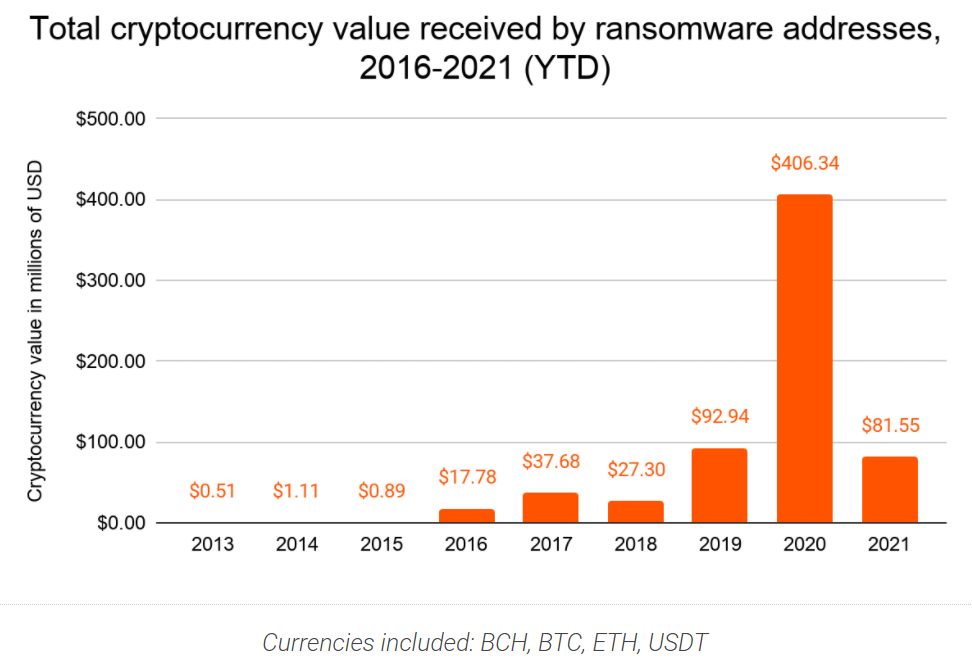
Chainalysis tracks transactions to blockchain addresses linked to ransomware attacks in order to capture the size of ransomware revenues. In their regular reporting on the cybercrime cryptocurrency landscape, they showed that the total amount paid by ransomware victims increased by 311% in 2020 to reach nearly $350 million worth of cryptocurrency. In May, they published an update after identifying new ransomware addresses that put the number over $406 million. They expect the number will only continue to grow.
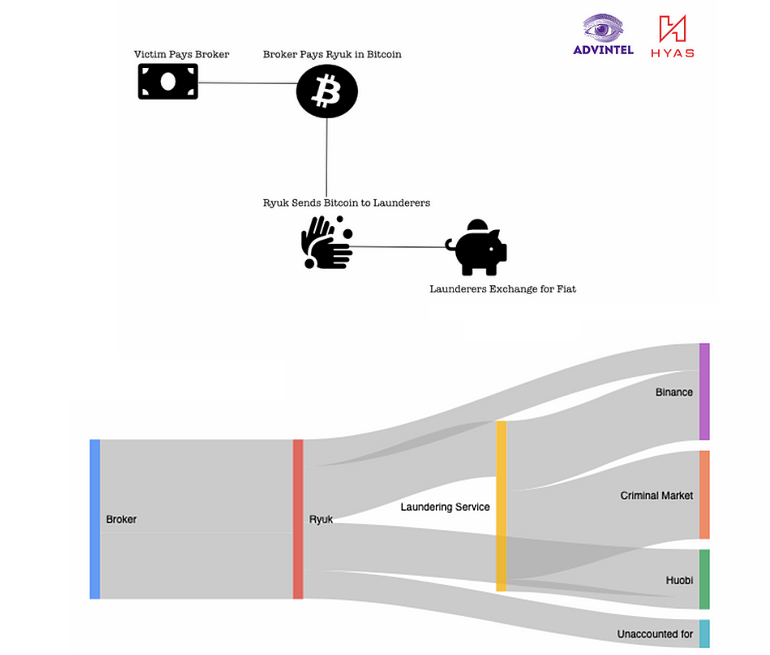
Similarly, threat intel company, Advanced Intelligence, and cybersecurity firm, HYAS, tracked Bitcoin transactions to 61 addresses associated with the Ryuk syndicate. They estimate that the operator may be worth upwards of $150 million alone. Their analysis sheds some light on how ransomware operators turn their exploits and the ransoms paid into usable cash.
Extorted funds are gathered in holding accounts, passed to money laundering services, then either funneled back into the criminal market and used to pay for other criminal services or cashed out at real cryptocurrency exchanges. The process follows these steps, as illustrated below:
The victim pays a broker.
The broker converts the cash into cryptocurrency.
The broker pays the ransomware operator in cryptocurrency.
The ransomware operator sends the cryptocurrency to a laundering service.
The laundering service exchanges the coins for fiat currency on cryptocurrency exchanges like Binance and Huobi.
In an interesting development, the report found that Ryuk actually bypassed laundering services and cashed out some of their own cryptocurrency directly on exchanges using stolen identities—a brash move for any organized crime operation.
Protecting Your Company From Ransomware
Even though the ransomware economy is ever-changing, having an awareness of where attacks come and the threats you’re facing can prepare you if you ever face one yourself. To summarize:
Ransomware operators may seem to be single entities, but there’s a broad ecosystem of players behind them that trade services on the dark web.
Ransomware operators are sophisticated business entities.
RaaS enables even low-level criminals to get in the game.
Ransomware operators raked in at least $406 million in 2020, and likely more than that, as many ransomware attacks and payments go unreported.
We put this post together not to trade in fear, but to prepare SMBs and organizations with information in the fight against ransomware. And, you don’t have to fight it alone. Download our Complete Guide to Ransomware E-book and Guide for even more intel on ransomware today, plus steps to take to defend against ransomware, and how to respond if you do fall victim to an attack.
If you’ve ever wondered how a content delivery network (CDN) works, here’s a decent analogy… For most of the year, I keep one, maybe two boxes of tissues in the house. But, during allergy season, there’s a box in every room. When pollen counts are up, you need zero latency between sneeze and tissue deployment.
Instead of tissues in every room of the house, a CDN has servers in every corner of the globe, and they help reduce latency between a user’s request and when the website loads. If you want to make sure your website loads quickly no matter who accesses it, a CDN can help. Today, we’ll dig into the benefits of CDNs, how they work, and some common use cases with real-world examples.
What Is a CDN?
According to Cloudflare, one of the market leaders in CDN services, a CDN is “a geographically distributed group of servers which work together to provide fast delivery of internet content.” A CDN speeds up your website performance by temporarily keeping your website content on servers that are closer to end users. This is known as caching.
When someone in Australia visits your website that’s hosted in New York City, instead of fetching content like images, video, HTML pages, javascript files, etc. all the way from the the “origin store” (the server where the main, original website lives in the Big Apple), the CDN fetches content from an “edge server” that’s geographically closer to the end user at the edge of the network. Your website loads much faster when the content doesn’t have to travel halfway around the world to reach your website visitors.
How Do CDNs Work?
While a CDN does consist of servers that host website content, a CDN cannot serve as a web host itself一you still need traditional web hosting to operate your website. The CDN just holds your website content on servers closer to your end users. It refers back to the main, original website content that’s stored on your origin store in case you make any changes or updates.
Your origin store could be an actual, on-premises server located wherever your business is headquartered, but many growing businesses opt to use cloud storage providers to serve as their origin store. With cloud storage, they can scale up or down as website content grows and only pay for what they need rather than investing in expensive on-premises servers and networking equipment.
The CDN provider sets up their edge servers at internet exchange points, or IXPs. IXPs are points where traffic flows between different internet service providers like a highway interchange so your data can get to end users faster.
Source: Cloudflare.
Not all of your website content will be stored on IXPs all of the time. A user must first request that website content. After the CDN retrieves it from the origin store to whatever server is nearest to the end user, it keeps it on that server as long as the content continues to be requested. The content has a specific “time to live,” or TTL, on the server. The TTL specifies how long the edge server keeps the content. At a certain point, if the content has not been requested within the TTL, the server will stop storing the content.
When a user pulls up website content from the cache on the edge server, it’s known as a cache hit. When the content is not in the cache and must be fetched from the origin store, it’s known as a cache miss. The ratio of hits to misses is known as the cache hit ratio, and it’s an important metric for website owners who use cloud storage as their origin and are trying to optimize their egress fees (the fees cloud storage providers charge to send data out of their systems). The better the cache hit ratio, the less they’ll be charged for egress out of their origin store.
Another important metric for CDN users is round trip time, or RTT. RTT is the time it takes for a request from a user to travel to its destination and back again. RTT metrics help website owners understand the health of a network and the speed of network connections. A CDN’s primary purpose is to reduce RTT as much as possible.
Key Terms: Demystifying Acronym Soup
Origin Store: The main server or cloud storage provider where your website content lives.
CDN: Content delivery network, a geographically distributed group of servers that work to deliver internet content fast.
Edge Server: Servers in a CDN network that are located at the edge of the network.
IXP: Internet exchange point, a point where traffic flows between different internet service providers.
TTL: Time to live, the time content has to live on edge servers.
RTT: Round trip time, the time it takes for a request from a user to travel to its destination and back.
Cache Hit Ratio: The ratio of times content is retrieved from edge servers in the CDN network vs. the times content must be retrieved from the origin store.
Do I Need a CDN?
CDNs are a necessity for companies with a global presence or with particularly complex websites that deliver a lot of content, but you don’t have to be a huge enterprise to benefit from a CDN. You might be surprised to know that more than half of the world’s website content is delivered by CDN, according to Akamai, one of the first providers to offer CDN services.
What Are the Benefits of a CDN?
A CDN offers a few specific benefits for companies, including:
Faster website load times.
Lower bandwidth costs.
Redundancy and scalability during high traffic times.
Improved security.
Faster website load times: Content is distributed closer to visitors, which is incredibly important for improving bounce rates. Website visitors are orders of magnitude more likely to click away from a site the longer it takes to load. The probability of a bounce increases 90% as the page load time goes from one second to five on mobile devices, and website conversion rates drop by an average of 4.42% with each additional second of load time. If an e-commerce company makes $50 per conversion and does about $150,000 per month in business, a drop in conversion of 4.42% would equate to a loss of almost $80,000 per year.
If you still think seconds can’t make that much of a difference, think again. Amazon calculated that a page load slowdown of just one second could cost it $1.6 billion in sales each year. With website content distributed closer to website users via a CDN, pages load faster, reducing bounce rates.
Lower bandwidth costs: Bandwidth costs are the costs companies and website owners pay to move their data around telecommunications networks. The farther your data has to go and the faster it needs to get there, the more you’re going to pay in bandwidth costs. The caching that a CDN provides reduces the need for content to travel as far, thus reducing bandwidth costs.
Redundancy and scalability during high traffic times: With multiple servers, a CDN can handle hardware failures better than relying on one origin server alone. If one goes down, another server can pick up the slack. Also, when traffic spikes, a single origin server may not be able to handle the load. Since CDNs are geographically distributed, they spread traffic out over more servers during high traffic times and can handle more traffic than just an origin server.
Improved security: In a DDoS, or distributed denial-of-service attack, malicious actors will try to flood a server or network with traffic to overwhelm it. Most CDNs offer security measures like DDoS mitigation, the ability to block content at the edge, and other enhanced security features.
CDN Cost and Complexity
CDN costs vary by the use case, but getting started can be relatively low or no-cost. Some CDN providers like Cloudflare offer a free tier if you’re just starting a business or for personal or hobby projects, and upgrading to Cloudflare’s Pro tier is just $20 a month for added security features and accelerated mobile load speeds. Other providers, like Fastly, offer a free trial.
Beyond the free tier or trial, pricing for most CDN providers is dynamic. For Amazon CloudFront, for example, you’ll pay different rates for different volumes of data in different regions. It can get complicated quickly, and some CDNs will want to work directly with you on a quote.
At an enterprise scale, understanding if CDN pricing is worth it is a matter of comparing the cost of the CDN to the cost of what you would have paid in egress fees. Some cloud providers and CDNs like those in the Bandwidth Alliance have also teamed up to pass egress savings on to shared users, which can substantially reduce costs related to content storage and delivery. Look into discounts like this when searching for a CDN.
Another way to evaluate if a CDN is right for your business is to look at the opportunity cost of not having one. Using the example above, an e-commerce company that makes $50 per conversion and does $150,000 of business per month stands to lose $80,000 per year due to latency issues. While CDN costs can reach into the thousands per month, the exercise of researching CDN providers and pricing out what your particular spend might be is definitely worth it when you stand to save that much in lost opportunities.
Setting up a CDN is relatively easy. You just need to create an account and connect it to your origin server. Each provider will have documentation to walk you through how to configure their service. Beyond the basic setup, CDNs offer additional features and services like health checks, streaming logs, and security features you can configure to get the most out of your CDN instance. Fastly, for example, allows you to create custom configurations using their Varnish Configuration Language, or VCL. If you’re just starting out, setting up a CDN can be very simple, but if you need or want more bells and whistles, the capabilities are definitely out there.
Who Benefits Most From a CDN?
While a CDN is beneficial for any company with broad geographic reach or a content-heavy site, some specific industries see more benefits from a CDN than others, including e-commerce, streaming media, and gaming.
E-commerce and CDN: Most e-commerce companies also host lots of images and videos to best display their products to customers, so they have lots of content that needs to be delivered. They also stand to lose the most business from slow loading websites, so implementing a CDN is a natural fit for them.
E-commerce Hosting Provider Delivers One Million Websites
Big Cartel is an e-commerce platform that makes it easy for artists, musicians, and independent business owners to build unique online stores. They’ve long used a CDN to make sure they can deliver more than one million websites around the globe at speed on behalf of their customers.
They switched from Amazon’s Cloudfront to Fastly in 2015. As an API-first, edge cloud platform designed for programmability, the team felt Fastly gave Big Cartel more functionality and control than CloudFront. With the Fastly VCL, Big Cartel can detect patterns of abusive behavior, block content at the edge, and optimize images for different browsers on the fly. “Fastly has really been a force multiplier for us. They came into the space with published, open, transparent pricing and the configurability of VCL won us over,” said Lee Jensen, Big Cartel’s Technical Director.
Streaming Media and CDN: Like e-commerce sites, streaming media sites host a lot of content, and need to deliver that content with speed and reliability. Anyone who’s lost service in the middle of a Netflix binge knows: buffering and dropped shows won’t cut it.
Movie Streaming Platform Triples Redundancy
Kanopy is a video streaming platform serving more than 4,000 libraries and 45 million patrons worldwide. In order for a film to be streamed without delays or buffering, it must first be transcoded, or broken up into smaller, compressed files known as “chunks.” A feature-length film may translate to thousands of five to 10-second chunks, and losing just one can cause playback issues that disrupt the customer viewing experience.
Kanopy used a provider that offered a CDN, origin storage, and transcoding all in one, but the provider lost chunks, disrupting the viewing experience. One thing their legacy CDN didn’t provide was backups. If the file couldn’t be located in their primary storage, it was gone.
They switched to a multi-cloud stack, engaging Cloudflare as a CDN and tripled their redundancy by using a cold archive, an origin store, and backup storage.
Gaming and CDN: Gaming platforms, too, have a heavy burden of graphics, images, and video to manage. They also need to deliver content fast and at speed or they risk games glitching up in the middle of a deciding moment.
Gaming Platform Wins When Games Go Viral
SIMMER.io is a community site that makes sharing Unity WebGL games easy for indie game developers. Whenever a game would go viral, their egress costs boiled over, hindering growth. SIMMER.io mirrored their data from Amazon S3 to Backblaze B2 and reduced egress to $0 as a result of the Bandwidth Alliance. They can now grow their site without having to worry about increasing egress costs over time or usage spikes when games go viral.
In addition to the types of companies listed above, financial institutions, media properties, mobile apps, and government entities can benefit from a CDN as well. However, a CDN is not going to be right for everyone. If your audience is hyper-targeted in a specific geographic location, you likely don’t need a CDN and can simply use a geolocated web host.
Pairing CDN With Cloud Storage
A CDN doesn’t cache every single piece of data一there will be times when a user’s request will be pulled directly from the origin store. Reliable, affordable, and performant origin storage becomes critical when the cache misses content. By pairing a CDN with origin storage in the cloud, companies can benefit from the elasticity and scalability of the cloud and the performance and speed of a CDN’s edge network.
Still wondering if a CDN is right for you? Let us know your questions in the comments.
A few weeks ago we published a post about why Backblaze chose not to farm Chia in our storage buffer. Our explanation was pretty simple: We agreed we weren’t in the game of currency speculation, so we just took the value and Netspace at the time and ran some math. In the end, it didn’t work for us, but our analysis isn’t the last word—we’re as curious as the next person as to what happens next with Chia.
The Chia Netspace slowed its exponential climb since we ran the post. At the time, it was increasing by about 33% each week. It’s now hovering between 31 and 33 exabytes, leaving us, and we presume a lot of other people, wondering what the future looks like for this cryptocurrency.
Jonmichael Hands, the VP of storage business development at Chia, reached out offering to discuss our post, and we figured he’d be a good guy to ask. So we gathered a few questions and sat down with him to learn more about what he sees on the horizon and what a wild ride it’s been so far.
Editor’s Note: This interview has been edited for length and clarity.
Q: What brought you to the Chia project?
I was involved in the beta about a year ago. It was right in the middle of COVID, so instead of traveling for work frequently, I built Chia farms in my garage and talked to a bunch of strangers on Keybase all night. At that time, the alpha version of the Chia plotter wrote six times more data than it writes today. I messaged the Chia president, saying, “You can’t release this software now. It’s going to obliterate consumer SSDs.” Prior to joining Chia, when I was at Intel, I did a lot of work on SSD endurance, so I helped Chia understand the software and how to optimize it for SSD endurance over the course of the year. Chia is an intersection of my primary expertise of storage, data centers, and cryptocurrencies—it was a natural fit, and I joined the team in May 2021.
Q: What was the outcome of that work to optimize the software?
Over the year, we got it down to about 1.3TB of writes, which is what it takes today. It’s still not a very friendly workload for consumer SSDs, and we definitely did not want people buying consumer SSDs and accidentally wearing them out for Chia. There has been a ton of community development in Chia plotters since the launch to further improve the performance and efficiency.
Q: That was a question we had, because Chia got a lot of backlash about people burning out consumer SSDs. What is your response to that criticism?
We did a lot of internal analysis to see if that was true, because we take it very seriously. So, how many SSDs are we burning out? I erred on the side of caution and assumed that 50% of the Netspace was farmed using consumer SSDs. I used the endurance calculator that I wrote for Chia on the wiki, which estimates how many plots you can write until the drive wears out. With 32 exabytes of Netspace, my math shows Chia wore out about 44,000 drives.
That seems high to me because I think consumers are smart. For the most part, I expect people have been doing their own research and buying the appropriate drives. We’ve also seen people plot on a consumer drive until it reaches a percentage of its useful life and then use it for something else. That’s a smart way to use new SSD drives—you get maximum use out of the hardware.
Companies are also offering plotting as a service. There are 50 or 60 providers who will just plot for you, likely using enterprise SSDs. So, I think 44,000 drives is a high estimate.
In 2021, there were 435 million SSD units shipped. With that many drives, how many SSD failures should we expect per year in total? We know the annualized failure rates, so it’s easy to figure out. Even in a best case scenario, I calculated there were probably 2.5 million SSD failures in 2021. If we created 44,000 extra failures, and that’s the high end, we’d only be contributing 1.5% of total failures.
Q: So, do you believe the e-waste argument is misplaced?
I’ve learned a lot about e-waste in the last few weeks. I talked to some e-waste facilities, and the amount of e-waste that SSDs create is small compared to other component parts, which is why SSD companies haven’t been attacked for e-waste before. They’re light and they don’t contain too many hazardous materials, comparatively. Most of them last five to 10 years as well. So we don’t believe there’s a large contribution from us in that area.
On the other hand, millions of hard drives get shredded each year, mostly by hyperscale data centers because end customers don’t want their data “getting out,” which is silly. I’ve talked to experts in the field, and I’ve done a lot of work myself on sanitization and secure erase and self-encrypting drives. With self-encrypting drives, you can basically instantly wipe the data and repurpose the drive for something else.
The data is erasure coded and encrypted before it hits the drive, then you can securely wipe the crypto key on the drive, making the data unreadable. Even then, tens of millions of drives are crushed every year, many of them for security reasons well before the end of their useful life. We think there’s an opportunity among those wasted drives.
Our team has a lot of ideas for how we could use Chia to accelerate markets for third-party recycled and renewed drives to get them back in the hands of Chia farmers and create a whole circular economy. If we’re successful in unlocking that storage, that will bring the cost of storage down. It will be a huge win for us and put us solidly on the right side of the e-waste issue.
Q: Did you expect the boom that happened earlier this summer and the spikes it created in the hard drive market?
Everybody at the company had their own Netspace model. My model was based off of the hard drive supply-demand sufficiency curve. If the market is undersupplied, prices go up. If the market’s vastly undersupplied, prices go up exponentially.
IDC says 1.2 zettabytes of hard drives are shipped every year, but the retail supply of HDDs is not very big. My model said when we hit 1% of the total hard drive supply for the year, prices are going to go up about 15%. If we hit 2% or 3%, prices will go up 30% to 40%. It turns out I was right that hard drive prices would go up, but I was wrong about the profitability.
It was the perfect black swan event. We launched the network on March 19 at 120 petabytes. Bitcoin was at an all-time high in April. We had this very low Netspace and this very high price. It created insane profitability for early farmers. Small farms were making $150,000 a day. People were treating it like the next Bitcoin, which we didn’t expect.
We went from 120 petabytes when we launched the network to 30 exabytes three months later. You can imagine I was a very popular guy in May. I was on the phone with analysts at Western Digital and Seagate almost every day talking about what was going to happen. When is it going to stop? Is it just going to keep growing forever?
It’s not shocking that it didn’t last long. At some point profitability gets impacted, and it starts slowing down.
Q: Where do you see hard drive demand going from here?
If the price doubles or triples in a very short amount of time, we might see a rush to go buy new hardware in the short term, but it will self-correct quickly. We’ll see Netspace acceleration in proportion. We predict the next wave of growth will come from smaller farmers and pools.
Bram [Cohen, the founder of Chia] hypothesized that underutilized storage space is ubiquitous. The majority of people aren’t using all of their hard drive space. IDC believes there’s about 500 exabytes of underutilized storage space sitting out in the world, so people have this equipment already. They don’t have to rush out and buy new hardware. That will largely be true for the next six months of growth. The first wave of growth was driven by new purchases. The next wave, and probably for the long term for Chia, will largely be driven by people who already have storage because the marginal cost is basically zero.
The demand for storage, overall, is increasing 20% to 30% every year, and hard drives are not getting 20% to 30% bigger every year. At some point, this inevitable squeeze was always going to happen where demand for storage exceeds supply. We want to figure out how we can grow sustainably and not impact that.
We have an interesting use case for old used drives, so we’re trying to figure out what the model is. There are certainly people who want to farm Chia on the enterprise scale, but it’s just not going to be cost-competitive to buy new drives long-term.
Q: Between the big enterprise farmers and the folks just happy to farm a few plots, do you have a preference?
Today, 37% of people are farming 10-50TB and 26% are farming 50-150TB. The remaining are big farmers. Technically, the smaller the farmer, the better. That means that we’re more decentralized. Our phase one was to build out the protocol and the framework for the most decentralized, secure blockchain in the world. In under three months, we’ve actually done that. One of the metrics of decentralization is how many full nodes you have. We’re approaching 350,000 full nodes. Just by pure metrics of decentralization we believe we are the most decentralized blockchain on the planet today.
Note: As of August 12, 2021, peak Bitcoin had 220K validators and now has about 65K. Chia’s peak was about 750K and it hovers around 450K.
In that respect, farming is actually one of the least interesting things we’re doing. It is a way to secure the network, and that’s been very novel. Today, if you want to launch a 51% attack, you have to buy 15 exabytes and get them up on the network. We think there’s definitely less than 100 data centers in the world that can host that many exabytes. Basically, the network has to be big enough where it can’t be attacked, and we think it’s there now. It’s very hard to attack a 30 exabyte network.
Q: We know you can’t speculate on future performance, but what does the future look like for Chia?
Our vision is to basically flip Ethereum within three years. Part of the business model will be having the support teams in place to help big financial institutions utilize Chia. We also think having a dedicated engineering team who are paid salaries is a good thing.
Our president thinks we’ll be known for Chialisp, which is the smart on-chain programming model. In the same way that everything’s a file in Linux, everything’s a coin in Chia. You can create what we call “Coloured Coins” or assets on the blockchain. So, you could tokenize a carbon credit. You could tokenize a Tesla stock. You can put those on the Chia blockchain and it just lives as a coin. Because it’s a coin, it natively swaps and is compatible with everything else on the blockchain. There’s no special software needed. Somebody could send it to another person with the standard Chia wallet because everything’s already integrated into the software. It’s very powerful for decentralized exchanges for some of this assetization and tokenization of different types of collateral on the blockchain.
Large financial institutions want to get involved with cryptocurrency, but there’s no play for them. All the financial institutions we’ve talked to have looked at Ethereum, but there are too many hacks. The code is too hard to audit. You need too much expertise to write it. And it consumes way too much energy. They’re not going to use a blockchain that’s not sustainable.
We are going to try to bridge that gap between traditional finance and the new world of cryptocurrency and decentralized finance. We think Chia can do that.
Do you have an old PC lying around that you’d love to throw away or donate? Before you take it to the recycling center, you definitely want to scrub it of all your data. And there’s a bit more to it than just deleting your files and emptying the recycle bin.
This guide will help you make sure all of your personal data is wiped from the machine so you can be confident it’s all gone before you give it away or recycle it.
First things first: Back up your computer
Before you do anything, make sure your data is backed up. You want to be able to load it all on to a new computer, or at least keep it in an archive, so you can access it after you dispose of your old machine. The best plan for backing anything up is the 3-2-1 backup strategy where you keep three copies of your data on two types of media with one copy off-site. Your first copy is the one on your computer. Your second copy can be kept on an external hard drive or other external media. And, your third copy should be kept in an off-site location like the cloud. If you’re not backing up an off-site copy, now is a great time to get started.
You can easily create a backup using Windows Backup on Windows 7, 8, 8.1, 10, and 11. If you save that to an external hard drive, you can then move your files to a new computer or just keep it as a local backup. Once you’re backed up, you’re ready to wipe your PC’s internal hard drive.
How to completely wipe a PC
In most cases, wiping a PC involves simply reformatting the disk and reinstalling Windows using the Reset function. If you are recycling, donating, or selling your PC, the Reset function makes data recovery sufficiently difficult, especially if your data is encrypted (more on that later). This process is straightforward in Windows versions 8, 8.1, 10, and 11, and works for both hard disk drives (HDDs) and solid state drives (SSDs).
How to reset Windows 10 and 11
Follow these instructions for different versions of Windows to reset your PC:
Go to Settings → System (In Windows 10: Update & Security) → Recovery.
Under Reset this PC, click ResetPC. (In Windows 10: Click Get Started.)
Choose Remove everything. If you’re not getting rid of your PC, you can use Keep my files to give your computer a good cleaning to improve performance.
You will be prompted to choose to reinstall Windows via Cloud download or Local reinstall. If you’re feeling generous and want to give your PC’s next owner a fresh version of Windows, choose Cloud download. This will use internet data. If you’re planning to recycle your PC, Local reinstall works just fine.
In Additional settings, click Change settings and toggle Clean data to on. This takes longer, but it’s the most secure option.
Click Reset to start the process.
How to reset Windows 8 and 8.1
Go to Settings → Change PC Settings → Update and Recovery → Recovery.
Under Remove everything and reinstall Windows, click Get started, then click Next.
Select Fully clean the drive. This takes longer, but it’s the most secure option.
Click Reset to start the process.
Secure erase using third-party tools
If the reset option doesn’t totally put your mind at ease, or if you have a PC running Windows 7 or older, you have another option—third-party tools. There are a number of good third-party tools you can use to securely erase your disk, which we’ll get into below. These are different depending on whether you have an internal HDD or an SSD.
How do I find out I have an HDD or SSD in my Windows laptop?
Most desktops and laptops sold in the last few years will have an SSD, but you can easily check to be sure:
Open Settings.
Type “Defragment” in the search bar.
Click on Defragment and Optimize Your Drives.
Check the media type of your drive.
How to securely erase your Windows drive using third-party tools
Now that you know what kind of drive you have, here are your options for wiping your Windows drive:
Securely erase an HDD
The process for erasing an HDD involves overwriting the data, and there are many utilities out there to do it yourself:
DBAN: Short for Darik’s Boot and Nuke, DBAN has been around for years and is a well-known and trusted drive wipe utility for HDDs. It does multiple pass rewrites (binary ones and zeros) on the disk. You’ll need to download it to a USB drive and run it from there.
Disk Wipe: Disk Wipe is another free utility that does multiple rewrites of binary data. You can choose from a number of different methods for overwriting your disk. Disk Wipe is also portable, so you don’t need to install it to use it.
Eraser: Eraser is also free to use. It gives you the most control over how you erase your disk. Like Disk Wipe, you can choose from different methods that include varying numbers of rewrites, or you can define your own.
Keep in mind, any disk erase utility that does multiple rewrites is going to take quite a while to complete.
If you’re using Windows 7 or older and you’re just looking to recycle your PC, you can stop here. If you intend to sell or donate your PC, you’ll need the original installation discs (yes, that’s discs with a “c”…remember? Those round shiny things?) to reinstall a fresh version of Windows.
Don’t worry. You can still make use of those discs.
Securely erase an SSD
You have a few options for securely erasing an SSD. These third-party tools will do the trick:
Parted Magic: Parted Magic is the most regularly recommended third-party erase tool for SSDs, but it does cost $11. It’s a bootable tool like some of the HDD erase tools—you have to download it to a USB drive and run it from there.
ATA Secure Erase: ATA Secure Erase is a command that basically shocks your SSD. It uses a voltage spike to flush stored electrons. While this sounds damaging (and it does cause some wear), it’s perfectly safe. It doesn’t overwrite the data like other secure erase tools, so there’s actually less damage done to the SSD.
Encrypting data on a Windows PC
Even if you’re not getting rid of your computer, encrypting your data is a good idea. If your laptop falls into the wrong hands, encryption makes it that much harder for criminals to access your personal information. But, if you have an SSD, encrypting your data is even more important, both before you get rid of it and just in general. Why? The way SSDs store and retrieve data is different from HDDs.
HDDs store data at specific physical locations on the drive platter. In contrast, SSDs use electronic circuits and memory cells, which are organized into pages and blocks, to store data. Constant writing and rewriting to the same blocks can wear out an SSD over time. To mitigate this, SSDs employ a technique called “wear leveling,” which distributes data across the entire drive, preventing it from being stored in just one physical location.
When you tell an SSD to erase data, it doesn’t overwrite the existing data. Instead, it writes new data to a different block. Consequently, some of your old data may remain on the SSD until the wear leveling process eventually overwrites those cells. So, it’s smart to encrypt your data before erasing it from an SSD. This ensures that any residual data is protected. If any data is left lurking, at least no one will be able to read it without an encryption key.
Encrypting your data first isn’t necessarily a requirement, but if Windows Reset is not enough for you and you’ve come this far, we figure it’s a step you’d want to take. The process isn’t complicated, but not every Windows machine is the same. First, check to see if your device is encrypted by default:
Open the Start menu.
Scroll to the Windows Administrative Tools dropdown menu.
Select System Information. You can also search for “system information” in the taskbar.
If the Device Encryption Support value is “Meets prerequisites,” you’re good to go—encryption is enabled on your device.
If not, your next step is to check if your device has BitLocker built in:
Open Settings.
Type “BitLocker” in the search bar.
Click Manage BitLocker.
Click Turn on BitLocker and follow the prompts.
If neither of those options are available, you can use third-party software to encrypt your internal SSD. VeraCrypt and AxCrypt are both good options. Just remember to record the encryption passcode somewhere and also the operating system (OS), OS version, and the encryption tool you used so you can recover the files later on if desired.
The nuclear option
Encrypting, resetting, and/or wiping your drive with a third-party tool should be more than enough to make sure your data is protected and your laptop or desktop is clean before you donate or recycle it. But maybe you’re still feeling wary about it. In that case, you always have the option to destroy the drive yourself.
When nothing less than total destruction will do, just make sure you do it safely. The safest and most secure way to destroy an HDD, and the only way we’d recommend physically destroying an SSD, is to shred it. Check with your local electronics recycling center to see if they have a shredder you can use. (And, you absolutely want to ask if you can watch as giant metal gears chomp down on your drive. Metal.) Shredding it should be a last resort though. Drives typically last five to 10 years, and millions get shredded every year before the end of their useful life.
If you have a megabot ready to go, you should first crush, then shred your drives.
Still have questions about how to securely erase or destroy your hard drives? Let us know in the comments. And if you’re curious about how to erase a Mac HDD or SSD, read our guide here.
FAQs
How do I wipe a PC?
In most cases, wiping a PC involves simply reformatting the disk and reinstalling Windows using the Reset function. If you are recycling, donating, or selling your PC, the Reset function makes data recovery sufficiently difficult, especially if your data is encrypted. You can also use third-party tools to securely wipe a PC drive.
How do I encrypt data on a PC drive?
First, check to see if your device is encrypted by default. You can search “system information” in the search bar. If the Device Encryption Support value is “Meets prerequisites,” you’re good to go—encryption is enabled on your device. If not, your next step is to check if your device has BitLocker built in. Type “BitLocker” in the search bar, click Manage BitLocker, then click Turn on BitLocker and follow the prompts. If neither of those options are available, you can use third-party software to encrypt your internal SSD. VeraCrypt and AxCrypt are both good options.
How do I safely dispose of an SSD or HDD myself?
The safest and most secure way to destroy an HDD, and the only way we’d recommend physically destroying an SSD, is to shred it. Check with your local electronics recycling center to see if they have a shredder you can use (or if they’ll at least let you watch as giant metal gears chomp down on your drive). Shredding it should be a last resort though. Drives typically last five to 10 years, and millions get shredded every year before the end of their useful life.
In early startup stages, you’re developing the product, testing market fit, and refining your go-to-market strategy. Long-term infrastructure decisions may not even be on your radar, but if you want to scale beyond Series B, it pays to be planful before you’re locked in with a cloud services provider and storage costs are holding you back.
How will you manage your data? How much storage will you need to meet demand? Will your current provider continue to serve your use case? In this post, we’ll talk about how infrastructure decisions come into play in early startup development, the advantages of multi-cloud infrastructure, and best practices for implementing a multi-cloud system.
Infrastructure Planning: A Startup Timeline
Infrastructure planning becomes critical at three key points in early startup development:
In the pre-seed and seed stages.
When demand spikes.
When cloud credits run out.
Pre-seed and Seed Stages
Utilizing free cloud credits through a startup incubator like AWS Activate or the Google Cloud Startup Program at this stage of the game makes sense—you can build a minimum viable product without burning through outside investment. But you can’t rely on free credits forever. As you discover your market fit, you need to look for ways of sustaining growth and ensuring operating costs don’t get out of control later. You have three options:
Accept that you’ll stay with one provider, and manage the associated risks—including potentially high operating costs, lack of leverage, and high barriers to exit.
Plan for a migration when credits expire. This means setting up your systems with portability in mind.
Leverage free credits and use the savings to adopt a multi-cloud approach from the start with integrated providers.
Any of these options can work. What you choose is less important than the exercise of making a thoughtful choice and planning as though you’re going to be successful rather than relying on free credits and hoping for the best.
What Is Multi-cloud?
By the simplest definition, every company is probably a “multi-cloud” company. If you use Gmail for your business and literally any other service, you’re technically multi-cloud. But, for our purposes, we’re talking about the public cloud platforms you use to build your startup’s infrastructure—storage, compute, and networking. In this sense, multi-cloud means using two or more infrastructure as a service (IaaS) providers that complement each other rather than relying on AWS or Google to source all of the infrastructure and services you need in your tech stack.
Waiting Until Demand Spikes
Let’s say you decide to take full advantage of free credits, and the best possible outcome happens—your product takes off like wildfire. That’s great, right? Yes, until you realize you’re burning through your credits faster than expected and you have to scramble to figure out if your infrastructure can handle the demand while simultaneously optimizing spend. Especially for startups with a heavy data component like media, games, and analytics, increased traffic can be especially problematic—storage racks up, but more often, it’s egress fees that are the killer when data is being accessed frequently.
It’s not hard to find evidence of the damage that can occur when you don’t keep an eye on these costs:
The moment you’re successful can also be the moment you realize you’re stuck with an unexpected bill. Demand spikes, and cloud storage or egress overwhelms your budget. Consider the opposite scenario as well: What if your business experiences a downturn? Can you still afford to operate when cash flow takes a hit?
Waiting Until Cloud Credits Run Out
Sooner or later, free cloud credits run out. It’s extremely important to understand how the pricing model, pricing tiers, and egress costs will factor into your product offering when you get past “free.” For a lot of startups, these realities hit hard and fast—leaving developers seeking a quick exit.
Stay with your existing provider. This approach involves conducting a thorough audit of your cloud usage and potentially bringing in outside help to manage your spend.
Switch cloud providers completely. Weigh the cost of moving your data altogether versus the long-term costs of staying with your current provider. The barrier to exit may be high, but breakeven may be closer than you think.
Adopt an agnostic, multi-cloud approach. Determine the feasibility of moving parts of your infrastructure to different cloud providers to optimize your spend.
The Multi-cloud Guide for Startups
More companies have adopted a multi-cloud strategy in recent years. A 2020 survey by IDG found that 55% of organizations currently use multiple public clouds. The shift comes on the heels of two trends. First, AWS, Google, and Microsoft are no longer the only game in town. Innovative, specialized IaaS providers have emerged over the past decade and a half to challenge the incumbents. Second, after a period where many companies had to transition to the cloud, companies launching today are built to be cloud native. Without the burden of figuring out how to move to the cloud, they can focus on how best to structure their cloud-only environments to take advantage of the benefits multi-cloud infrastructure has to offer.
The Advantages of Multi-cloud
Improved Reliability: When your data is replicated in more than one cloud, you have the advantage of redundancy. If one cloud goes down, you can fall back to a second.
Disaster Recovery: With data in multiple, isolated clouds, you’re better protected from threats. If cybercriminals are able to access one set of your data, you’re more likely to recover if you can restore from a second cloud environment.
Greater Flexibility and Freedom: With a multi-cloud system, if something’s not working, you have more leverage to influence changes and the ability to leave if another vendor offers better features or more affordable pricing.
Affordability: It may seem counterintuitive that using more clouds would cost less, but it’s true. Vendors like AWS make their services hard to quit for a reason—when you can’t leave, they can charge you whatever they want. A multi-cloud system allows you to take advantage of industry partnerships and competitive pricing among vendors.
Best-of-breed Providers: Adopting a multi-cloud strategy means you can work with providers who specialize in doing one thing really well rather than doing all things just…kind of okay.
The advantages of a multi-cloud system have attracted an increasing number of companies and startups, but it’s not without challenges. Controlling costs, data security, and governance were named in the top five challenges in the IDG study. That’s why it’s all the more important to consider your cloud infrastructure early on, follow best practices, and plan ways to manage eventualities.
Multi-cloud Best Practices
As you plan your multi-cloud strategy, keep the following considerations in mind:
Cost Management: Cost management of cloud environments is a challenge every startup will face even if you choose to stay with one provider—so much so that companies make cloud optimization their whole business model. Set up a process to track your cloud utilization and spend early on, and seek out cloud providers that offer straightforward, transparent pricing to make budgeting simpler.
Data Security: Security risks increase as your cloud environment becomes more complex, and you’ll want to plan security measures accordingly. Ensure you have controls in place for access across platforms. Train your team appropriately. And utilize cloud functions like encryption and Object Lock to protect your data.
Governance: In an early stage startup, governance is going to be relatively simple. But as your team grows, you’ll need to have clear protocols for how your infrastructure is managed. Consider creating standard operating procedures for cloud platform management and provisioning now, when it’s still just one hat your CTO is wearing.
SIMMER.io: A Multi-cloud Use Case
SIMMER.io is a community site that makes sharing Unity WebGL games easy for indie game developers. Whenever games went viral, egress costs from Amazon S3 spiked—they couldn’t grow their platform without making a change. SIMMER.io mirrored their data to Backblaze B2 Cloud Storage and reduced egress to $0 as a result of the Bandwidth Alliance partnership between Backblaze and Cloudflare. They can grow their site without having to worry about increasing egress costs over time or usage spikes when games go viral, and they doubled redundancy in the process.
To learn more about how they configured their multi-cloud infrastructure to take advantage of $0 egress, download the SIMMER.io use case.
By making thoughtful choices about your cloud infrastructure and following some basic multi-cloud best practices, you plan as though you’re going to win from the start. That means deciding early on as to whether you’ll take cloud credits and stay with one provider, plan for multi-cloud, or some mix of the two along the way.
In an era when ransomware and cybersecurity attacks on K-12 schools have nearly quadrupled, backups are critical. Today, advances in cloud backup technology like immutability and Object Lock allow school districts to take advantage of the benefits of cloud infrastructure while easing security concerns about sensitive data.
School districts have increasingly adopted cloud-based software as a service applications like video conferencing, collaboration, and learning management solutions, but many continue to operate with legacy on-premises solutions for backup and disaster recovery. If your district is ready to move your backup and recovery infrastructure to the cloud, how do you choose the right cloud partners and protect your school district’s data?
This post explains the benefits school districts can realize from moving infrastructure to the cloud, considerations to evaluate when choosing a cloud provider, and steps for preparing for a cloud migration at your district.
The Benefits of Moving to the Cloud for School Districts
Replacing legacy on-premises tape backup systems or expensive infrastructure results in a number of benefits for school districts, including:
Reduced Capital Expenditure (CapEx): Avoid major investments in new infrastructure.
Budget Predictability: Easily plan for predictable, recurring monthly expenses.
Cost Savings: Pay as you go rather than paying for unused infrastructure.
Elasticity: Scale up or down as seasonal demand fluctuates.
Workload Efficiencies: Refocus IT staff on other priorities rather than managing hardware.
Centralized Backup Management: Manage your backups in a one-stop shop.
Ransomware Protection: Stay one step ahead of hackers with data immutability.
Reduced CapEx. On-premises infrastructure can cost hundreds of thousands of dollars or more, and that infrastructure will need to be replaced or upgraded at some point. Rather than recurring CapEx, the cloud shifts IT budgets to a predictable, monthly operating expenses (OpEx) model. You no longer have to compete with other departments for a share of the capital projects budget to upgrade or replace expensive equipment.
Cloud Migration 101: Kings County
John Devlin, CIO of Kings County, was facing an $80,000 bill to replace all of the physical tapes they used for backups as well as an out-of-warranty tape drive all at once. He was able to avoid the bill by moving backup infrastructure to the cloud.
Costs are down, budgets are predictable, and the move freed up his staff to focus on bigger priorities. He noted, “Now the staff is helping customers instead of playing with tapes.”
Budget Predictability. With cloud storage, if you can accurately anticipate data usage, you can easily forecast your cloud storage budget. Since equipment is managed by the cloud provider, you won’t face a surprise bill when something breaks.
Cost Savings. Even when on-premises infrastructure sits idle, you still pay for its maintenance, upkeep, and power usage. With pay-as-you-go pricing, you only pay for the cloud storage you use rather than paying up front for infrastructure and equipment you may or may not end up needing.
Elasticity. Avoid potentially over-buying on-premises equipment since the cloud provides the ability to scale up or down on demand. If you create less data when school is out of session, you’re not paying for empty storage servers to sit there and draw down power.
Workload Efficiencies. Rather than provisioning and maintaining on-premises hardware or managing a legacy tape backup system, moving infrastructure to the cloud frees up IT staff to focus on bigger priorities. All of the equipment is managed by the cloud provider.
Centralized Backup Management. Managing backups in-house across multiple campuses and systems for staff, faculty, and students can quickly become a huge burden, so many school districts opt for a backup software solution that’s integrated with cloud storage. The integration allows them to easily tier backups to object storage in the cloud. Veeam is one of the most common providers of backup and replication solutions. They provide a one-stop shop for managing backups—including reporting, monitoring, and capacity planning—freeing up district IT staff from hours of manual intervention.
Ransomware Protection.With schools being targeted more than ever, the ransomware protection provided by some public clouds couldn’t be more important. Tools like Object Lock allow you to recreate the “air gap” protection that tape provides, but it’s all in the cloud. With Object Lock enabled, no one can modify, delete, encrypt, or tamper with data for a specific amount of time. Any attempts by a hacker to compromise backups will fail in that time. Object Lock works with offerings like immutability from Veeam so schools can better protect backups from ransomware.
An Important Distinction: Sync vs. Backup
Keep in mind, solutions like Microsoft OneDrive, DropBox, and Google Drive, while enabling collaboration for remote learning, are not the same as a true backup. Sync services allow multiple users across multiple devices to access the same file—which is great for remote learning, but if someone accidentally deletes a file from a sync service, it’s gone. Backup stores a copy of those files somewhere remote from your work environment, oftentimes in an off-site server—like cloud storage. It’s important to know that a “sync” is not a backup, but they can work well together when properly coordinated. You can read more about the differences here.
Considerations for Choosing a Cloud Provider for Your District
Moving to the cloud to manage backups or replace on-premises infrastructure can provide significant benefits for K-12 school districts, but administrators should carefully consider different providers before selecting one to trust with their data. Consider the following factors in an evaluation of any cloud provider:
Security: What are the provider’s ransomware protection capabilities? Does the provider include features like Object Lock to make data immutable? Only a few providers offer Object Lock, but it should be a requirement on any school district’s cloud checklist considering the rising threat of ransomware attacks on school districts. During 2020, the K-12 Cybersecurity Resource Center cataloged 408 publicly-disclosed school incidents versus 122 in 2018.
Compliance: Districts are subject to local, state, and federal laws including HIPAA, so it’s important to ensure a cloud storage provider will be able to comply with all pertinent rules and regulations. Can you easily set lifecycle rules to retain data for specific retention periods to comply with regulatory requirements? How does the provider handle encryption keys, and will that method meet regulations?
Ease of Use: Moving to the cloud means many staff who once kept all of your on-premises infrastructure up and running will instead be managing and provisioning infrastructure in the cloud. Will your IT team face a steep learning curve in implementing a new storage cloud? Test out the system to evaluate ease of use.
Pricing Transparency: With varying data retention requirements, transparent pricing tiers will help you budget more easily. Understand how the provider prices their service including fees for things like egress, required minimums, and other fine print. And seek backup providers that offer pricing sensitive to educational institutions’ needs. Veeam, for example, offers discounted public sector pricing allowing districts to achieve enterprise-level backup that fits within their budgets.
Integrations/Partner Network: One of the risks of moving to the cloud is vendor lock-in. Avoid getting stuck in one cloud ecosystem by researching the providers’ partner network and integrations. Does the provider already work with software you have in place? Will it be easy to change vendors should you need to?
Support: Does your team need access to support services? Understand if your provider offers support and if that support structure will fit your team’s needs.
As you research and evaluate potential cloud providers, create a checklist of the considerations that apply to you and make sure to clearly understand how the provider meets each requirement.
Preparing for a Cloud Migration at Your School District
Even when you know a cloud migration will benefit your district, moving your precious data from one place to another can be daunting at the least. Even figuring out how much data you have can be a challenge, let alone trying to shift a culture that’s accustomed to having hardware on-premises. Having a solid migration plan helps to ensure a successful transition. Before you move your infrastructure to the cloud, take the time to consider the following:
Conduct a thorough data inventory: Make a list of all applications with metadata including the size of the data sets, where they’re located, and any existing security protocols. Are there any data sets that can’t be moved? Will the data need to be moved in phases to avoid disruption? Understanding what and how much data you have to move will help you determine the best approach.
Consider a hybrid approach: Many school districts have already invested in on-premises systems, but still want to modernize their infrastructure. Implementing a hybrid model with some data on-premises and some in the cloud allows districts to take advantage of modern cloud infrastructure without totally abandoning systems they’ve customized and integrated.
Test a proof of concept with your new provider: Migrate a portion of your data while continuing to run legacy systems and test to compare latency, interoperability, and performance.
Plan for the transfer: Armed with your data inventory, work with your new provider to plan the transfer and determine how you’ll move the data. Does the provider have data transfer partners or offer a data migration service above a certain threshold? Make sure you take advantage of any offers to manage data transfer costs.
Execute the migration and verify results: Schedule the migration, configure your transfer solution appropriately, and run checks to ensure the data migration was successful.
An Education in Safe, Reliable Cloud Backups
Like a K-12 school district, Coast Community College District (CCCD) manages data for multiple schools and 60,000+ students. With a legacy on-premises tape backup system, data recovery often took days and all too often failed at that. Meanwhile, staff had to chauffeur tapes from campus to campus for off-site backup data protection. They needed a safer, more reliable solution and wanted to replace tapes with cloud storage.
CCCD implemented Cohesity backup solutions to serve as a NAS device, which will eventually replace 30+ Windows file servers, and eliminated tapes with Backblaze B2 Cloud Storage, safeguarding off-site backups by moving the data farther away. Now, restoring data takes seconds instead of days, and staff no longer physically transfer tapes—it all happens in the cloud.
How Cloud Storage Can Protect School District Data
Cloud-based solutions are integral to successful remote or hybrid learning environments. School districts have already made huge progress in moving to the cloud to enable remote learning. Now, they have the opportunity to capitalize on the benefits of cloud storage to modernize infrastructure as ransomware attacks become all the more prevalent. To summarize, here are a few things to remember when considering a cloud storage solution:
Using cloud storage with Object Lock to store an off-site backup of your data means hackers can’t encrypt, modify, or delete backups within a set timeframe, and schools can more easily restore backups in the event of a disaster or ransomware attack.
Increased ransomware protections allow districts to access the benefits of moving to the cloud like reduced CapEx, workflow efficiencies, and cost savings without sacrificing the security of air gapped backups.
Evaluate a provider’s security offerings, compliance capability, ease of use, pricing tiers, partner network, and support structure before committing to a cloud migration.
Take the time to plan your migration to ensure a successful transition.
Have more questions about cloud storage or how to implement cloud backups in your environment? Let us know in the comments. Ready to get started?
The arrival of Chia on the mainstream media radar brought with it some challenging and interesting questions here at Backblaze. As close followers of the hard drive market, we were at times intrigued, optimistic, cautious, concerned, and skeptical—often all at once. But, our curiosity won out. Chia is storage-heavy. We are a storage company. What does this mean for us? It was something we couldn’t ignore.
Backblaze has over an exabyte of data under management, and we typically maintain around three to four months worth of buffer space. We wondered—with this storage capacity and our expertise, should Backblaze farm Chia?
For customers who are ready to farm, we recently open-sourced software to store Chia plots using our cloud storage service, Backblaze B2. But deciding whether we should hop on a tractor and start plotting ourselves required a bunch of analysis, experimentation, and data crunching—in short, we went down the rabbit hole.
After proving out if this could work for our business, we wanted to share what we learned along the way in case it was useful to other teams pondering data-heavy cloud workloads like Chia.
Grab your gardening gloves, and we’ll get into the weeds.
Here’s a table of contents for those who want to go straight to the analysis:
If you’re new to the conversation, here’s a description of what Chia is and how it works. Feel free to skip if you’re already in the know.
Chia is a cryptocurrency that employs a proof of space and time algorithm that is billed as a greener alternative to coins like Bitcoin or Ethereum—it’s storage-intensive rather than energy-intensive. There are two ways to play the Chia market: speculating on the coin or farming plots (the equivalent of “mining” other cryptocurrencies). Plots can be thought of as big bingo cards with a bunch of numbers. The Chia Network issues match challenges, and if your plot has the right numbers, you win a block reward worth two Chia coins.
Folks interested in participating need to be able to generate plots (plotting) and store them somewhere so that the Chia blockchain software can issue match challenges (farming). The requirements are pretty simple:
A computer running Windows, MacOS, or Linux with an SSD to generate plots.
HDD storage to store the plots.
Chia blockchain software.
But, as we’ll get into, things can get complicated, fast.
Should Backblaze Support and Farm Chia?
The way we saw it, we had two options for the role we wanted to play in the Chia market, if at all. We could:
Enable customers to farm Chia.
Farm it ourselves using our B2 Native API or by writing directly to our hard drives.
Helping Backblaze Customers Farm
We didn’t see it as an either/or, and so, early on we decided to find a way to enable customers to farm Chia on Backblaze B2. There were a few reasons for this choice:
We’re always looking for ways to make it easy for customers to use our storage platform.
With Chia’s rapid rise in popularity causing a worldwide shortage of hard drives, we figured people would be anxious for ways to farm plots without forking out for hard drives that had jumped up $300 or more in price.
Once you create a plot, you want to hang onto it, so customer retention looked promising.
The Backblaze Storage Cloud provides the keys for successful Chia farming: There is no provisioning necessary, so Chia farmers can upload new plots at speed and scale.
However, Chia software was not designed to allow farming with public cloud object storage. On a local storage solution, Chia’s quality check reads, which must be completed in under 28 seconds, can be cached by the kernel. Without caching optimizations and a way to read plots concurrently, cloud storage doesn’t serve the Chia use case. Our early tests confirmed this, taking longer than the required 28 seconds.
So our team built an experimental workaround to parallelize operations and speed up the process, which you can read more about here. Short story: The experiment has worked, so far, but we’re still in a learning mode about this use case.
Should Backblaze Farm?
Enabling customers to farm Chia was a fun experiment for our Engineering team, but deciding whether we could or should farm Chia ourselves took some more thinking. First, the pros:
We maintain a certain amount of buffer space. It’s an important asset to ensure we can scale with our customer’s needs. Rather than farming in a speculative fashion and hoping to recoup an investment in farming infrastructure, we could utilize the infrastructure we already have, which we could reclaim at any point. Doing so would allow us to farm Chia in a non-speculative fashion more efficiently than most Chia farmers.
Farming Chia could make our buffer space profitable when it would otherwise be sitting on the shelves or drawing down power in the live buffer.
When we started investigating Chia, the Chia Calculator said we could potentially make $250,000 per week before expenses.
These were enticing enough prospects to generate significant debate on our leadership team. But, we might be putting the cart before the horse here… While we have loads of HDDs sitting around where we could farm Chia plots, we first needed a way to create Chia plots (plotting).
The Challenges of Plotting
Generating plots at speed and scale introduces a number of issues:
It requires a lot of system resources: You need a multi-core processor with fast cores so you can make multiple plots at once (parallel plotting) and a high amount of RAM.
It quickly wears out expensive SSDs: Plotting requires at least 256.6GB of temporary storage, and that temporary storage does a lot of work—about 1.8TB of reading and writing. An HDD can only read/write at 120 MB/s. So, people typically use SSDs to plot, and particularly NVMe drives which are much faster than HDD, often over 3000 MB/s. While SSD drives are fast, they wear out like tires. They’re not defective, reading and writing at the pace it takes to plot Chia just burns them out. Some reports estimate four weeks of useful farming life, and it’s not advisable to use consumer SSDs for that reason.
At Backblaze, we have plenty of HDDs, but not many free SSDs. Thus, we’d need to either buy (and wear out) a bunch of SSDs, or use a cloud compute provider to generate the plots for us.
The first option would take time and resources to build enough plotters in each of our data centers across the country and in Europe, and we could potentially be left with excess SSDs at the end. The second would still render a bunch of SSDs useless, albeit not ours, and it would be costly.
Still, we wondered if it would be worth it given the Chia Calculator’s forecasts.
The Challenges of Farming
Once we figured out a way to plot Chia, we then had a few options to consider for farming Chia: Should we farm by writing directly to the extra hard drives we had on the shelves, or by using our B2 Native API to fill the live storage buffer?
Writing directly to our hard drives posed some challenges. The buffer drives on the shelf eventually do need to go into production. If we chose this path, we would need a plan to continually migrate the data off of drives destined for production to new drives as they come in. And we’d need to dedicate staff resources to manage the process of farming on the drives without affecting core operations. Reallocating staff resources to a farming venture could be seen as a distraction, but a worthy one if it panned out. We once thought of developing B2 Cloud Storage as a distraction when it was first suggested, and today, it’s integral to our business. That’s why it’s always worth considering these sorts of questions.
Farming Chia using the B2 Native API to write to the live storage buffer would pull fewer staff resources away from other projects, at least once we figured out our plotting infrastructure. But we would need a way to overwrite the plots with customer data if demand suddenly spiked.
And the Final Question: Can We Make Money?
Even with the operational challenges above and the time it would take to work through solutions, we still wondered if it would all be worth it. We like finding novel solutions to interesting problems, so understanding the financial side of the equation was the last step of our evaluation. Would Chia farming make financial sense for Backblaze?
Farming Seemed Like It Could Be Lucrative…
The prospect of over $1M/month in income certainly caught our attention, especially because we thought we could feasibly do it “for free,” or at least without the kind of upfront investment in HDDs a typical Chia farmer would have to lay out to farm at scale. But then we came to our analysis of monetization.
Our Monetization and Cost Analysis for Farming Chia
Colin Weld, one of our software engineers, had done some analysis on his own when Chia first gained attention. He built on that analysis to calculate the amount of farming income we could make per week over time with a fixed amount of storage.
Our assumptions for the purposes of this analysis:
150PB of the buffer would be utilized.
The value of the coin is constant. (In reality, the value of the coin opened at $584.60 on June 8, 2021, when we ran the experiments. In the time since, it has dipped as low as $205.73 before increasing to $278.59 at the time of publishing.)
When we ran the calculations, the total Network space appeared to increase at a rate of 33% every week.
We estimated income in week one was 75% of the week before, with the percentage decreasing exponentially over time.
When we ran the calculations, the income per week on 150PB of storage was $250,000.
We assumed zero costs for the purposes of this experiment.
Assuming Exponential Growth of the Chia Netspace
If the Chia Netspace continued to grow at an exponential rate, our farming income per week would be effectively zero after 16 weeks. In the time since we ran the experiment, the total Chia netspace has continued to grow, but at a slightly slower rate.
Total Chia Netspace April 7, 2021–July 5, 2021
Source: Chiaexplorer.com.
For kicks, we also ran the analysis assuming a constant rate of growth. In this model, we assume a constant growth rate of five exabytes each week.
Assuming Constant Growth of the Chia Netspace
Even assuming constant growth, our farming income per week would continue to decrease, and this doesn’t account for our costs.
And Farming Wasn’t Going to Be Free
To quickly understand what costs would look like, we used our standard pricing of $5/TB/month as our effective “cost” as it factors in our cost of goods sold, overheard, and the additional work this effort would require. At $5/TB/month, 150PB costs $175,000 per week. Assuming exponential growth, our costs would exceed total expected income if we started farming any later than seven weeks out from when we ran the analysis. Assuming constant growth, costs would exceed total expected income around week 28.
A Word on the Network Price
In our experiments, we assumed the value of the coin was constant, which is obviously false. There’s certainly a point where the value of the coin would make farming theoretically profitable, but the volatility of the market means we can’t predict if it will stay profitable. The value of the coin and thus the profitability of farming could change arbitrarily from day to day. It’s also unlikely that the coin would increase in value without the triggering simultaneous growth of the Netspace, thus negating any gains from the increase in value given our fixed farming capacity. From the beginning, we never intended to farm Chia in a speculative fashion, so we never considered a possible value of the coin that would make it worth it to farm temporarily and ignore the volatility.
Chia Network Price May 3, 2021–July 5, 2021
Source: Coinmarketcap.com.
Should We Farm Chia? Our Decision and Why
Ultimately, we decided not to farm Chia. The cons outweighed the pros for us:
We wouldn’t reap the rewards the calculators told us we could because the calculators give a point-in-time prediction. The amount per week you could stand to make is true—for that week. Today, the Chia Calculator predicts we would only make around $400 per month.
While it would have been a fun experiment, figuring out how to plot Chia at speed and scale would have taken time we didn’t have if we expected it to be profitable.
We assume the total Chia Netspace will continue to grow even if it grows at a slower rate. As the Netspace grows, your chances of winning go down unless you can keep growing your plots as fast as the whole Network is growing. Even if we dedicated our whole business to it, there would come a point where we would not keep up because we have a fixed amount of storage to dedicate to farming while maintaining a non-speculative position.
It would usurp resources we didn’t want to devote. We’d have to dedicate part of our operation to manage the process of farming on the drives without affecting core operations.
If we farmed it using our B2 Native API to write to our live buffer, we’d risk losing plots if we had to overwrite them when demand spiked.
Finally, cryptocurrency is a polarizing topic. The lively debate among our team members sparked the idea for this post. Our team holds strong opinions about the direction we take, and rightfully so—we value open communication as well as unconventional opinions both for and against proposed directions. Some brought strong arguments against participation in the cryptocurrency market even as they indulged in the analysis along the way. In the end, along with the operational challenges and disappointing financials, farming Chia was not the right choice for us.
The experiment wasn’t all for nothing though. We still think it would be great to find a way to make our storage buffer more profitable, and this exercise sparked some other interesting ideas for doing that in a more sustainable way that we’re excited to explore.
Our Chia Conclusion… For Now
For now, our buffer will remain a buffer—our metaphorical fields devoid of rows upon rows of Chia. Farming Chia didn’t make sense for us, but we love watching people experiment with storage. We’re excited to see what folks do with our experimental solution for farming Chia on Backblaze B2 and to watch what happens in the market. If the value of Chia coin spikes and farming plots on B2 Cloud Storage allows farmers to scale their plots infinitely, all the better. In the meantime, we’ll put our farming tools away and focus on making that storage astonishingly easy.
Afterword: The Future of Chia
This exercise begs the question: Should anyone farm Chia? That’s a decision everyone has to make for themselves. But, as our analysis suggests, unless you can continue to grow your plots, there will come a time when it’s no longer profitable. That may not matter to some—if you believe in Chia and think it will increase in value and be profitable again at some point in the future, holding on to your plots may be worth it.
How Pooling Could Help
On the plus side, pooling technology could be a boon for smaller farmers. The Chia Network recently announced pooling functionality for all farmers. Much like the office lottery, farmers group their plots for a share of challenge rewards. For folks who missed the first wave of plotting, this approach offers a way to greatly increase their chances of winning a challenge, even if it does mean a diminished share of the winnings.
The Wastefulness Questions
Profitability aside, cryptocurrency coins are a massive drain on the environment. Coins that use proof of space and time like Chia are billed as a greener alternative. There’s an argument to be made that Chia could drive greater utilization of otherwise unused HDD space, but it still leads to an increase of e-waste in the form of burned out SSD drives.
Coins based on different algorithms might hold some promise for being more environmentally friendly—for example, proof of stake algorithms. You don’t need proof of space (lots or storage) or proof of work (lots of power), you just need a portion of money (a stake) in the system. Ethereum has been working on a transition to proof of stake, but it will take more time and testing—something to keep an eye on if you’re interested in the crypto market. As in everything crypto, we’re in the early days and the only thing we can count on is change, unpredictability, and the monetary value of anything Elon Musk Tweets about.
Last week—in response to the hard drive shortage driven by Chia’s astronomical netspace growth—Backblaze introduced an experimental solution to allow farming of Chia plots stored in B2 Cloud Storage. Lots of folks have been reading it, and we remain fascinated by the up-and-down prospects of Chia.
Today’s post digs into the story behind one cryptocurrency startup that also aims to help Chia farmers enter this emerging market at scale: Plottair.
Crypto-entrepreneurs and Plottair Co-founders Maran Hidskes and Sinisa Stjepanovic approached us about building a SaaS service with a storage-heavy use case. Specifically, they wanted to use Backblaze B2 as part of a new Chia farming venture. They agreed to share their take on this latest trend in crypto and offer some insight into how they intend to use B2 Cloud Storage for their startup—we’re sharing some of what they told us here.
The conversation started with a bit of context around Chia’s roots (if you’ll excuse the pun) to set the stage for what Plottair is doing and why.
Ch- Ch- Ch- Ching:
A Greener Blockchain Transaction Platform
The Chia project was founded in August 2017 by Bram Cohen, the inventor of the BitTorrent protocol. Cohen was frustrated by the environmental impact of existing cryptocurrencies, so he developed a less wasteful scheme.1 Rather than using energy-intensive compute resources, with Chia, customers use free disk space to store calculations and use this data on the network to obtain a chance to win block rewards.
“This wasn’t an original idea,” Sinisa explained to us. “There were earlier coins that used proof of space—for example, Burstcoin—but Cohen improved it. He added proof of time and corrected issues with the consensus mechanism.”
The Basics of How Chia Works
In Chia, “farmers” create plots much like bingo cards with millions of digits, and the cards are stored locally, using around 110GB each. The network will occasionally ask a farmer whether their plots contain a certain number on their bingo cards, and if they possess it, they win a block reward: Chia coins.
There are two ways to play the Chia market:
Currency speculation similar to Bitcoin and others.
Farming plots, which could result in block rewards. Chia is trading at $416.79 as of this posting, and a block reward consists of two Chia coins.
While Chia has worked around the CPU intensive proof of work required for Bitcoin, it is very storage intensive (the data storage capacity for Chia in network space is already closing in on 25EiB), as farmers need to harvest many plots to win rewards. Rather than mining coins by dedicating large amounts of parallel processing power to the task, Chia simply requires storage—a lot of it, if you want the best chance of winning.
Total Chia netspace as of posting. That’s a lot of plots. Credit: Chia Explorer.
Plottair Finds a Market in Chia Farmers
Maran and Sinisa recognized that Chia farmers face two key challenges:
Obtaining and maintaining the computing power to generate plots.
Buying and managing the capacity to store the plots in secure, durable, highly available storage systems.
Fast processing power and low latency, high throughput NVMe storage is needed to generate plots, and most Chia farmers don’t have that kind of hardware. Sinisa had experimented with farming plots himself, and Maran owned a Plex hosting service—Bytesized Hosting. So Maran had the kind of hardware needed to speed up the process.
The two friends realized there would be plenty of other farmers looking for the same capability, and Plottair was born: A fully automated plotting service with optional cloud harvesting and multi-region download locations, aiming to provide the best support and download retention in the business.
And yet, while Maran’s servers were ideal for generating the plots quickly, they needed storage to house the plots between generation and download. With their plotting capacity at 50TB per day and a 30-day download window for customers, this was not a small issue.
Plottair began by hosting the plots in its own data centers, but identified three challenges:
1. They couldn’t scale fast enough.2. Managing a rapidly growing data center—racking up servers, ensuring connectivity, and having enough switches—was going to get in the way of their product focus.3. They needed to provide farmers with an easy way to download plots.
For all these needs, they sought out a cloud storage provider to partner with for holding plots.
Growing Plottair With Backblaze B2 Cloud Storage
Prior to finding Backblaze, Plottair engaged another cloud provider to host plots. After getting started, Plottair experienced some anomalies with users behavior in terms of downloads, and the provider froze the customer data without sharing any information that would have enabled a root cause analysis.
“They froze hundreds and hundreds of terabytes of my customers’ data, and then stonewalled me,” Maran complained. “They weren’t willing to share what caused the event.”
It was a real horror story—before the company would build with another partner, they needed to know they had support through the inevitable hiccups of launching a new business in uncharted territory. After the debacle, they reached out. “We were super happy to be able to see and speak to real humans when we reached out to Backblaze,” Maran said. Sinisa added, “We were looking for a partnership where both parties respect each other’s business. Calling off the entire service when something goes wrong? That’s a very bad look to our customers.”
Where Backblaze B2 Fits in Plottair’s Workflow
When purchasing plots, farmers give their farming keys to Plottair and select a location where the plots should be stored—in the Backblaze U.S. West or European regions. A call goes out to one of Plottair’s plotting servers that has free availability, and it starts plotting. This takes about six to eight hours per plot.
When the plot is finished, it gets uploaded from the plotting server to the appropriate Backblaze location, and the customer is notified that the plot is ready to download via Plottair’s customer portal. In the portal, farmers can view all plot orders and their statuses, so they know when they can start downloading. Plottair optionally allows customers to farm these plots in the cloud.
How Backblaze B2 Meets the Needs of Blockchain Workloads
In addition to gaining a working partnership, the biggest strength Backblaze B2 brings to the Plottair venture is the ability to scale up to any size. “I don’t have to worry if I’ll have enough storage if I get a petabyte order,” Maran said.
Plottair has the ability to upload vast amounts of data at scale and let their users directly access it and use it in real-time. This enables Plottair to use the space they need to serve the Chia farming market if it booms and, with a pay-as-you-go model, scale back if it busts. “That’s the dream,” Maran said. “To have something that scales on every facet. Right now, Backblaze is there for us for our storage needs.”
Backblaze B2: Storage for Emerging Services
Whatever happens with cryptocurrencies, storage-intensive cloud services are becoming more and more common. Many new SaaS applications with storage-heavy workloads—companies like streaming media services or gaming platforms—are either migrating over from AWS or other legacy providers, or building their infrastructure with Backblaze B2.
Maran is also considering Backblaze B2 for other blockchain oriented workloads. In the near term, Maran and his team are looking to “harvest” the Chia plots as a service using Backblaze B2. Harvesting involves reading the large number sequences for a match. This will enable Chia farmers to download only a fraction of the plot data, significantly improving their experience.
As Plottair grows its product offerings in cryptocurrencies and other blockchain-oriented use cases and considers many additional functions, we’ll be excited to report on new development. For now, we’ll simply focus on how the Chia market and their “acreage” might grow.
Blockchain and Cryptocurrency: A Short History
Financial institutions and a growing number of firms across industries are using distributed ledger technology based on blockchain as a secure and transparent way to digitally track the ownership of assets. Bitcoin was one of the first applications built on top of blockchain. Bitcoin and its underlying blockchain technology are viewed by many as the leading edge of a transformative evolution of money, finance, commerce, and society itself. The total value of all Bitcoin now in existence is over half a trillion dollars.
Bitcoin and most other cryptocurrencies use a system in which currency is created or “mined” using computers to solve mathematical puzzles. These are known as “proof of work” systems—solving the puzzle is proof that your computer has done a certain amount of work to provide network authentication.
One of Bitcoin’s core tenets is decentralization, but specialized hardware and cheap electricity have become far better at proof of work calculations than general purpose CPUs. This development has weakened decentralization as the specialized “mining” hardware is increasingly owned and operated by just a few large entities in huge, purpose-built data centers located near inexpensive electricity. This centralization has served to lower trust and raise difficult issues regarding electricity consumption, e-waste, carbon generation, and global warming. By some estimates, Bitcoin consumes more electricity than whole countries. In response, new blockchain currencies have emerged that seek to be more sustainable.
1Editor’s note: At this point, it’s unclear whether Chia is on the whole greener than “proof of work” cryptos. Some are looking into it, and we’ll be exploring the question too, but we would be interested to learn anything else our community has learned. When the energy and physical waste that goes into manufacturing hard drives is factored into the overall equation, given the exceptional amount of demand that Chia has created for drives, will it still be able to claim the “green crypto” name?
In most industries, one lost file isn’t a big deal. If you have good backups, you just have to find it, restore it, and move on—business as usual. But in the business of streaming media, one lost file can cause playback issues, compromising the customer experience.
Kanopy, a video streaming platform serving more than 4,000 libraries and 45 million library patrons worldwide, previously used an all-in-one video processing, storage, and delivery provider to manage their media, but reliability became an issue after missing files led to service disruptions.
We spoke with Kanopy’s Chief Technology Officer, Dave Barney, and Lead Video Software Engineer, Pierre-Antoine Tible, to understand how they restructured their tech stack to achieve reliability and three times more redundancy with no increase in cost.
Kanopy: Like Netflix for Libraries
Describing Kanopy as “Netflix for libraries” is an accurate comparison until you consider the number of videos they offer: Kanopy has 25,000+ titles under management, many thousands more than Netflix. Founded in 2008, Kanopy pursued a blue ocean market in academic and, later, public libraries rather than competing with Netflix. The libraries pay for the service, offering patrons free access to films that can’t be found anywhere else in the world.
Kanopy provides thoughtful entertainment that bridges cultural boundaries, sparks discussion, and expands worldviews.
Streaming Media Demands Reliability
In order for a film to be streamed without delays or buffering, it must first be transcoded—broken up into smaller, compressed files known as “chunks.” A feature-length film may translate to thousands of five to 10-second chunks, and losing just one can cause playback issues that disrupt the viewing experience. Pierre-Antoine described a number of reliability obstacles Kanopy faced with their legacy provider:
The provider lost chunks, disabling HD streaming.
The CDN said the data was there—but user complaints made it clear it wasn’t.
Finding source files and re-transcoding them was costly in both time and resources.
The provider didn’t back up data. If the file couldn’t be located in primary storage, it was gone.
Preparing for a Cloud to Cloud Migration
For a video streaming service of Kanopy’s scale, a poor user experience was not acceptable. Nor was operating without a solid plan for backups. To increase reliability and redundancy, they took steps to restructure their tech stack:
First, Kanopy moved their data out of their legacy provider and made it S3 compatible. Their legacy provider used its own storage type, so Pierre-Antoine and Kanopy’s development team wrote a script themselves to move the data to AWS, where they planned to set up their video processing infrastructure.
Next, they researched a few solutions for origin storage, including Backblaze B2 Cloud Storage and IBM. Kanopy streams out 15,000+ titles each month, which would incur massive egress fees through Amazon S3, so it was never an option. Both Backblaze B2 and IBM offered an S3 compatible API, so the data would have been easy to move, but using IBM for storage meant implementing a CDN Kanopy didn’t have experience with.
Then, they ran a proof of concept. Backblaze proved more reliable and gave them the ability to use their preferred CDN, Cloudflare, to continue delivering content around the globe.
Finally, they completed the migration of production data. They moved data from Amazon S3 to Backblaze B2 using Backblaze’s Cloud to Cloud Migration service, moving 150TB in less than three days.
Where’s the popcorn? The Kanopy team takes a break.
Building a Tech Stack for Streaming Media
Kanopy’s vendor-agnostic, multi-cloud tech stack provides them the flexibility to use integrated, best-of-breed providers. Their new stack includes:
IBM Aspera to receive videos from contract suppliers like Paramount or HBO.
AWS for transcoding and encryption and Deep Glacier for redundant backups.
Flexify.IO for ongoing data transfer.
Backblaze B2 for origin storage.
Cloudflare for CDN and edge computing.
The Benefits of a Multi-cloud, Vendor-agnostic Tech Stack
The new stack offers Kanopy a number of benefits versus their all-in-one provider:
Since Backblaze is already configured with Cloudflare, data stored on Backblaze B2 automatically feeds into Cloudflare’s CDN. This allows content to live in Backblaze B2, yet be delivered with Cloudflare’s low latency and high speed.
Benefitting from the Bandwidth Alliance, Kanopy pays $0 in egress fees to transfer data from Backblaze to Cloudflare. The Bandwidth Alliance is a group of cloud and networking companies that discount or waive data transfer fees for shared customers.
Egress savings coupled with Backblaze B2’s transparent pricing allowed Kanopy to achieve redundancy at the same cost as their legacy provider.
Scaling a Streaming Media Platform With Backblaze B2
Though reliability was a main driver in Kanopy’s efforts to overhaul their tech stack, looking forward, Dave sees their new system enabling Kanopy to scale even further. “We’re rapidly accelerating the amount of content we onboard. Had reliability not become an issue, cost containment very quickly would have. Backblaze and the Bandwidth Alliance helped us attain both,” Dave attested.
“We’re rapidly accelerating the amount of content we onboard. Had reliability not become an issue, cost containment very quickly would have. Backblaze and the Bandwidth Alliance helped us attain both.” —Dave Barney, Chief Technology Officer, Kanopy
Recently, we announced that Backblaze B2 Cloud Storage published a provider to the Terraform registry to support developers in their infrastructure as code (IaC) efforts. With the Backblaze Terraform provider, you can provision and manage B2 Cloud Storage resources directly from a Terraform configuration file.
Today’s post grew from a comment in our GitHub repository from Gert-Jan van de Streek, Co-founder of Avisi, a Netherlands-based software development company. That comment sparked a conversation that turned into a bigger story. We spoke with Gert-Jan to find out how the Avisi team practices IaC processes and uses the Backblaze Terraform provider to increase efficiency, accuracy, and speed through the DevOps lifecycle. We hoped it might be useful for other developers considering IaC for their operations.
What Is Infrastructure as Code?
IaC emerged in the late 2000s as a response to the increasing complexity of scaling software developments. Rather than provisioning infrastructure via a provider’s user interface, developers can design, implement, and deploy infrastructure for applications using the same tools and best practices they use to write software.
Provisioning Storage for “Apps That Fill Gaps”
The team at Avisi likes to think about software development as a sport. And their long-term vision is just as big and audacious as an Olympic contender’s—to be the best software development company in their country.
Gert-Jan co-founded Avisi in 2000 with two college friends. They specialize in custom project management, process optimization, and ERP software solutions, providing implementation, installation and configuration support, integration and customization, and training and plugin development. They built the company by focusing on security, privacy, and quality, which helped them to take on projects with public utilities, healthcare providers, and organizations like the Dutch Royal Notarial Professional Organization—entities that demand stable, secure, and private production environments.
They bring the same focus to product development, a business line Gert-Jan leads where they create “apps that fill gaps.” He coined the tagline to describe the apps they publish on the Atlassian and monday.com marketplaces. “We know that a lot of stuff is missing from the Atlassian and monday.com tooling because we use it in our everyday life. Our goal in life is to provide that missing functionality—apps to fill gaps,” he explained.
Avisi’s applications fill the gaps in popular project management solutions.
With multiple development environments for each application, managing storage becomes a maintenance problem for sophisticated DevOps teams like Avisi’s. For example, let’s say Gert-Jan has 10 apps to deploy. Each app has test, staging, and production environments, and each has to be deployed in three different regions. That’s 90 individual storage configurations, 90 opportunities to make a mistake, and 90 times the labor it takes to provision one bucket.
Infrastructure in Sophisticated DevOps Environments: An Example
10 apps x three environments x three regions = 90 storage configurations
Following DevOps best practices means Avisi writes reusable code, eliminating much of the manual labor and room for error. “It was really important for us to have IaC so we’re not clicking around in user interfaces. We need to have stable test, staging, and production environments where we don’t have any surprises,” Gert-Jan explained.
Terraform vs. CloudFormation
Gert-Jan had already been experimenting with Terraform, an open-source IaC tool developed by HashiCorp, when the company decided to move some of their infrastructure from Amazon Web Services (AWS) to Google Cloud Platform (GCP). The Avisi team uses Google apps for business, so the move made configuring access permissions easier.
Of course, Amazon and Google don’t always play nice—CloudFormation, AWS’s proprietary IaC tool, isn’t supported across the platforms. Since Terraform is open-source, it allowed Avisi to implement IaC with GCP and a wide range of third-party integrations like StatusCake, a tool they use for URL monitoring.
Backblaze B2 + Terraform
Simultaneously, when Avisi moved some of their infrastructure from AWS to GCP, they resolved to stand up an additional public cloud provider to serve as off-site storage as part of a 3-2-1 strategy (three copies of data on two different media, with one off-site). Gert-Jan implemented Backblaze B2, citing positive reviews, affordability, and the Backblaze European data center as key decision factors. Many of Avisi’s customers reside in the European Union and are often subject to data residency requirements that stipulate data must remain in specific geographic locations. Backblaze allowed Gert-Jan to achieve a 3-2-1 strategy for customers where data residency in the EU is top of mind.
When Backblaze published a provider to the Terraform registry, Avisi started provisioning Backblaze B2 storage buckets using Terraform immediately. “The Backblaze module on Terraform is pure gold,” Gert-Jan said. “It’s about five lines of code that I copy from another project. I configure it, rename a couple variables, and that’s it.”
Real-time Storage Sync With Terraform
Gert-Jan wrote the cloud function to sync between GCP and Backblaze B2 in Clojure, a functional programming language, running on top of Node.js. Clojure compiles to Javascript, so it runs in Java environments as well as Node.js or browser environments, for example. That means the language is available on the server side as well as the client side for Avisi.
The cloud function allowed off-site tiering to be almost instantaneous. Now, every time a file is written, it gets picked up by the cloud function and transferred to Backblaze in real time. “You need to feel comfortable about what you deploy and where you deploy it. Because it is code, the Backblaze Terraform provider does the work for me. I trust that everything is in place,” Gert-Jan said.
The Avisi team at work.
Easier Lifecycle Rules and Code Reviews
In addition to reducing manual labor and increasing accuracy, the Backblaze Terraform provider makes setting lifecycle rules to comply with control frameworks like the General Data Protection Regulations (GDPR) and SOC 2 requirements much simpler. Gert-Jan configured one reusable module that meets the regulations and can apply the same configurations to each project. In a SOC 2 audit or when savvy customers want to know how their data is being handled, he can simply provide the code for the Backblaze B2 configuration as proof that Avisi is retaining and adequately encrypting backups rather than sending screenshots of various UIs.
Using Backblaze via the Terraform provider also streamlined code reviews. Prior to the Backblaze Terraform provider, Gert-Jan’s team members had less visibility into the storage set up and struggled with ecosystem naming. “With the Backblaze Terraform provider, my code is fully reviewable, which is a big plus,” he explained.
Simplifying Storage Management
Embracing IaC practices and using the Backblaze Terraform provider specifically means Gert-Jan can focus on growing the business rather than setting up hundreds of storage buckets by hand. He saves about eight hours per environment. Based on the example above, that equates to 720 hours saved all told. “Terraform and the Backblaze module reduced the time I spend on DevOps by 75% to just a couple of hours per app we deploy, so I can take care of the company while I’m at it,” he said.
If you’re interested in stepping up your DevOps game with IaC, set up a bucket in Backblaze B2 for free and start experimenting with the Backblaze Terraform provider.
We announced that Backblaze earned a Veeam Ready-Object with Immutability qualification in October of 2020, and just yesterday we shared that Object Lock is now available for anyone using the Backblaze S3 Compatible API. After a big announcement, it’s easy to forget about the hard work that went into it. With that in mind, we’ve asked our Senior Java Engineer, Fabian Morgan, who focuses on the Backblaze B2 Cloud Storage product, to explain some of the challenges he found intriguing in the process of developing Object Lock functionality to support both Veeam users and Backblaze B2 customers in general. Read on if you’re interested in using Object Lock (via the Backblaze S3 Compatible API) or File Lock (via the B2 Native API) to protect your data, or if you’re just curious about how we develop new features.
We were proud to be the first public cloud storage alternative to Amazon S3 to earn the Veeam Ready-Object with Immutability qualification, but the work started well before that. In this post, I’ll walk you through how we approached development, sifted through discrepancies between AWS documentation and S3 API behavior, solved for problematic retention scenarios, and tested the solutions.
What Are Object Lock and File Lock? Are They the Same Thing?
Object Lock and File Lock both allow you to store objects using a Write Once, Read Many (WORM) model, meaning after it’s written, data cannot be modified or deleted for a defined period of time or indefinitely. Object Lock and File Lock are the same thing, but Object Lock is the terminology used in the S3 Compatible API documentation, and File Lock is the terminology used in the B2 Native API documentation.
How We Developed Object Lock and File Lock
Big picture, we wanted to offer our customers the ability to lock their data, but achieving that functionality for all customers involved a few different development objectives:
First, we wanted to answer the call for immutability support from Veeam + Backblaze B2 customers via the Backblaze S3 Compatible API, but we knew that Veeam was only part of the answer.
We also wanted to offer the ability to lock objects via the S3 Compatible API for non-Veeam customers.
And we wanted to offer the ability to lock files via the B2 Native API.
To avoid overlapping work and achieve priority objectives first, we took a phased approach. Within each phase, we identified tasks that had dependencies and tasks that could be completed in parallel. First, we focused on S3 Compatible API support and the subset of APIs that Veeam used to achieve the Veeam Ready-Object with Immutability qualification. Phase two brought the remainder of the S3 Compatible API as well as File Lock capabilities for the B2 Native API. Phasing development allowed us to be efficient and minimize rework for the B2 Native API after the S3 Compatible API was completed, in keeping with general good software principles of code reuse. For organizations that don’t use Veeam, our S3 Compatible API and B2 Native API solutions have been exactly what they needed to lock their files in a cost effective, easy to use way.
AWS Documentation Challenges: Solving for Unexpected Behavior
At the start of the project, we spent a lot of time testing various documented and undocumented scenarios in AWS. For example, the AWS documentation at that point did not specify what happens if you attempt to switch from governance mode to compliance mode and vice versa, so we issued API calls to find out. Moreover, if we saw inconsistencies between the final outputs of the AWS Command Line Interface and the Java SDK library, we would take the raw XML response from the AWS S3 server as the basis for our implementation.
Compliance Mode vs. Governance Mode: What’s the Diff?
In compliance mode, users can extend the retention period, but they cannot shorten it under any circumstances. In governance mode, users can alter the retention period to be shorter or longer, remove it altogether, or even remove the file itself if they have an enhanced application key capability along with the standard read and write capabilities. Without the enhanced application key capability, governance mode behaves similarly to compliance mode.
Not only did the AWS documentation fail to account for some scenarios, there were instances when the AWS documentation didn’t match up with the actual system behavior. We utilized an existing AWS S3 service to test the API responses with Postman, an API development platform, and compared them to the documentation. We made the decision to mimic the behavior rather than what the documentation said in order to maximize compatibility. We resolved the inconsistencies by making the same feature API invocation against the AWS S3 service and our server, then verified that our server brought back similar XML as the AWS S3 service.
Retention Challenges: What If a Customer Wants to Close Their Account?
Our team raised an intriguing question in the development process: What if a customer accidentally sets the retention term far in the future, and then they want to close their account?
Originally, we required customers to delete the buckets and files they created or uploaded before closing their account. If, for example, they enabled Object Lock on any files in compliance mode, and had not yet reached the retention expiration date when they wanted to close their account, they couldn’t delete those files. A good thing for data protection. A bad thing for customers who want to leave (even though we hate to see them go, we still want to make it as easy as possible).
The question spawned a separate project that allowed customers to close their account without deleting files and buckets. After the account was closed, the system would asynchronously delete the files even if they were under retention and the associated buckets afterward. However, this led to another problem: If we actually allow files with retention to be deleted asynchronously for this scenario, how do we ensure that no other files with retention would be mistakenly deleted?
The tedious but truthful answer is that we added extensive checks and tests to ensure that the system would only delete files under retention in two scenarios (assuming the retention date had not already expired):
If a customer closed an account.
If the file was retained under governance mode, and the customer had the appropriate application key capability when submitting the delete request.
Testing, Testing: Out-thinking Threats
Features like Object Lock or File Lock have to be bulletproof. As such, testing different scenarios, like the retention example above and many others, posed the most interesting challenges. One critical example: We had to ensure that we protected locked files such that there was no back door or sequence of API calls that would allow someone to delete a file with Object Lock or File Lock enabled. Not only that, we also had to prevent the metadata of the lock properties from being changed.
We approached this problem like a bank teller approaches counterfeit bill identification. They don’t study the counterfeits, they study the real thing to know the difference. What does that mean for us? There are an infinite number of ways a nefarious actor could try to game the system, just like there are an infinite number of counterfeits out there. Instead of thinking of every possible scenario, we identified the handful of ways a user could delete a file, then solved for how to reject anything outside of those strict parameters.
Looking Back
Developing and testing Object Lock and File Lock was truly a team effort, and making sure we had everything accounted for and covered was an exercise that we all welcomed. We expected challenges along the way, and thanks to our great team members, both on the Engineering team and in Compliance, TechOps, and QA, we were able to meet them. When all was said and done, it felt great to be able to work on a much sought-after feature and deliver even more data protection to our customers.
“The immutability support from Backblaze made the decision to tier our Veeam backups to Backblaze B2 easy. Immutability has given us one more level of protection against the hackers. That’s why that was so important to us and most importantly, to our customers.”
—Gregory Tellone, CEO, Continuity Centers
This post was written in collaboration by Fabian Morgan and Molly Clancy.
IT departments are tasked with managing an ever-expanding suite of services and vendors. With all that, a solution that offers a “single pane of glass” can sound like sweet relief. Everything in one place! Think of the time savings! Easy access. Consolidated user management. Centralized reporting. In short, one solution to rule them all.
But solutions that wrangle your tech stack into one comprehensive dashboard risk adding unnecessary levels of complexity in the name of convenience and adding fees for functions you don’t need. That “single pane of glass” might have you reaching for the Windex come implementation day.
While it feels counterintuitive, pairing two different services that each do one thing and do it very well can offer an easier, low-touch solution in the long term. This post highlights how one managed service provider (MSP) configured a multi-pane solution to manage backups for 6,000+ endpoints on 500+ servers at more than 450 dental and doctor’s offices in the mid-Atlantic region.
The Trouble With a “Single Pane of Glass”
Nate Smith, Technical Project Manager, DTC.
Nate Smith, Technical Project Manager for DTC, formerly known as Dental Technology Center, had a data dilemma on his hands. From 2016 to 2020, DTC almost doubled their client base, and the expense of storing all their customers’ data was cutting into their budget for improvements.
“If we want to become more profitable, let’s cut down this $8,000 per month AWS S3 bill,” Nate reasoned.
In researching AWS alternatives, Nate thought he found the golden ticket—a provider offering both object and compute storage in that proverbial “single pane of glass.” At $0.01/GB, it was more expensive than standard object storage, but the anticipated time savings of managing resources with a single vendor was worth the extra cost for Nate—until it wasn’t.
DTC successfully tested the integrated service with a small number of endpoints, but the trouble started when they attempted migrating more than 75-80 endpoints. Then, the failures began rolling in every night—backups would time out, jobs would retry and fail. There were time sync issues, foreign key errors, remote socket errors, and not enough spindles—a whole host of problems.
How to Recover When the “Single Pane of Glass” Shatters
Nate worked with the provider’s support team, but after much back and forth, it turned out the solution he needed would take a year and a half of development. He gave the service one more shot with the same result. After spending 75 hours trying to make it work, he decided to start looking for another option.
Evaluate Your Cloud Landscape and Needs
Nate and the DTC team decided to keep the integrated provider for compute storage. “We’re happy to use them for infrastructure as a service over something like AWS or Azure. They’re very cost-effective in that regard,” he explained. He just needed object storage that would work with MSP360—their preferred backup software—and help them increase margins.
Knowing he might need an out should the integrated provider fail, he had two alternatives in his back pocket—Backblaze and Wasabi.
Do the Math to Compare Cloud Providers
At first glance, Wasabi looked more economical based on the pricing they highlight, but after some intense number crunching, Nate estimated that Wasabi’s 90-day minimum storage retention policy potentially added up to $0.015/GB given DTC’s 30-day retention policy.
Egress wasn’t the only scenario Nate tested. He also ran total loss scenarios for 10 clients comparing AWS, Backblaze B2 Cloud Storage, and Wasabi. He even doubled the biggest average data set size to 4TB just to overestimate. “Backblaze B2 won out every single time,” he said.
Fully loaded costs from AWS totalled nearly $100,000 per year. With Backblaze B2, their yearly spend looked more like $32,000. “I highly recommend anyone choosing a provider get detailed in the math,” he advised—sage words from someone who’s seen it all when it comes to finding reliable object storage.
Try Cloud Storage Before You Buy (to Your Best Ability)
Building the infrastructure for testing in a local environment can be costly and time-consuming. Nate noted that DTC tested 10 endpoints simultaneously back when they were trying out the integrated provider’s solution, and it worked well. The trouble started when they reached higher volumes.
Another option would have been running tests in a virtual environment. Testing in the cloud gives you the ability to scale up resources when needed without investing in the infrastructure to simulate thousands of users. If you have more than 10GB, we can work with you to test a proof of concept.
For Nate, because MSP360 easily integrates with Backblaze B2, he “didn’t have to change a thing” to get it up and running.
Phase Your Data Migration
Nate planned on phasing from the beginning. Working with Backblaze, he developed a region-by-region schedule, splitting any region with more than 250TB into smaller portions. The reason? “You’re going to hit a point where there’s so much data that incremental backups are going to take longer than a day, which is a problem for a 24/7 operation. I would parse it out around 125TB per batch if anyone is doing a massive migration,” he explained.
DTC migrated all its 450 clients—nearly 575TB of data—over the course of four weeks using Backblaze’s high speed data transfer solution. According to Nate, it sped up the project tenfold.
An Easy Multi-Pane Approach to Cloud Storage
Using Backblaze B2 for object storage, MSP360 for backup management, and another provider for compute storage means Nate lost his “single pane” but killed a lot of pain in the process. He’s not just confident in Backblaze B2’s reliability, he can prove it with MSP360’s consistency checks. The results? Zero failures.
The benefits of an “out of the box” solution that requires little to no interfacing with the provider, is easy to deploy, and just plain works can outweigh the efficiencies a “single pane of glass” might offer:
No need to reconfigure infrastructure. As Nate attested, “If a provider can’t handle the volume, it’s a problem. My lesson learned is that I’m not going to spend 75 hours again trying to reconfigure our entire platform to meet the object storage needs.”
No lengthy issue resolution with support to configure systems.
No need to learn a complicated new interface. When comparing Backblaze’s interface to AWS, Nate noted that “Backblaze just tells you how many objects you have and how much data is there. Simplicity is a time saver, and time is money.”
Many MSPs and small to medium-sized IT teams are giving up on the idea of a “single pane of glass” altogether. Read more about how DTC saved $68,000 per year and sped up implementation time by 55% by prioritizing effective, simple, user-friendly solutions.
The world looks a lot different than it did when we published our last Media Stats Takeaways, which covered iconik’s business intelligence report from the beginning of last year. It’s likely no big surprise that the use of media management tech has changed right along with other industries that saw massive disruption since the arrival of COVID-19. But iconik’s 2021 Media Stats Report digs deeper into the story, and the detail here is interesting. Short story? The shift to remote work drove an increase in cloud-based solutions for businesses using iconik for smart media management.
Always game to geek out over the numbers, we’re again sharing our top takeaways and highlighting key lessons we drew from the data.
iconik is a cloud-based content management and collaboration app and Backblaze integration partner. Their Media Stats Report series gathers data on how customers store and use data in iconik and what that customer base looks like.
Takeaway 1: Remote Collaboration Is Here to Stay
In 2020, iconik added 12.1PB of data to cloud storage—up 490%. Interestingly, while there was an 11.6% increase in cloud data year-over-year (from 53% cloud/47% on-premises in 2019, to 65% cloud/35% on-premises in 2020), it was down from a peak of 70%/30% mid-year. Does this represent a subtle pendulum swing back towards the office for some businesses and industries?
Either way, the shift to remote work likely changed the way data is handled for the long term no matter where teams are working. Tools like iconik help companies bridge on-premises and cloud storage, putting the focus on workflows and allowing companies to reap the benefits of both kinds of storage based on their needs—whether they need fast access to local shared storage, affordable scalability and collaboration in the cloud, or both.
Takeaway 2: Smaller Teams Took the Lead in Cloud Adoption
Teams of six to 19 people were iconik’s fastest growing segment in 2020 in terms of size, increasing 171% year-over-year. Small teams of one to five came in at a close second, growing 167%.
Adjusting to remote collaboration likely disrupted the inertia of on-premises process and culture in teams of this size, removing any lingering fear around adopting new technologies like iconik. Whether it was the shift to remote work or just increased comfort and familiarity with cloud-based solutions, this data seems to suggest smaller teams are capitalizing on the benefits of scalable solutions in the cloud.
Takeaway 3: Collaboration Happens When Collaborating Is Easy
iconik noted that many small teams of one to five people added users organically in 2020, graduating to the next tier of six to 19 users.
This kind of organic growth indicates small teams are adding users they may have hesitated to include with previous solutions whether due to cost, licensing, or complicated onboarding. Because iconik is delivered via an internet portal, there’s no upfront investment in software or a server to run it—teams just pay for the users and storage they need. They can start small and add or remove users as the team evolves, and they don’t pay for inactive users or unused storage.
We also believe efficient workflows are fueling new business, and small teams are happily adding headcount. Bigger picture, it shows that when adding team members is easy, teams are more likely to collaborate and share content in the production process.
Takeaway 4: Public Sector and Nonprofit Entities Are Massive Content Producers
Last year, we surmised that “every company is a media company.” This year showed the same to be true. Public/nonprofit was the second largest customer segment behind media and entertainment, comprising 14.5% of iconik’s customer base. The segment includes organizations like houses of worship (6.4%), colleges and universities (4%), and social advocacy nonprofits (3.4%).
With organizations generating more content from video to graphics to hundreds of thousands of images, wrangling that content and making it accessible has become ever more important. Today, budget-constrained organizations need the same capabilities of an ad agency or small film production studio. Fortunately, they can deploy solutions like iconik with cloud storage tapping into sophisticated workflow collaboration without investing in expensive hardware or dealing with complicated software licensing.
Takeaway 5: Customers Have the Benefit of Choice for Pairing Cloud Storage With iconik
In 2020, we shared a number of stories of customers adopting iconik with Backblaze B2 Cloud Storage with notable success. Complex Networks, for example, reduced asset retrieval delays by 100%. It seems like these stories did reflect a trend, as iconik flagged that data stored by Backblaze B2 grew by 933%, right behind AWS at 1009% and well ahead of Google Cloud Platform at 429%.
We’re happy to be in good company when it comes to serving the storage needs of iconik users who are faced with an abundance of choice for where to store the assets managed by iconik. And even happier to be part of the customer wins in implementing robust cloud-based solutions to solve production workflow issues.
2020 Was a Year
This year brought changes in almost every aspect of business and…well, life. iconik’s Media Stats Report confirmed some trends we all experienced over the past year as well as the benefits many companies are realizing by adopting cloud-based solutions, including:
The prevalence of remote work and remote-friendly workflows.
The adoption of cloud-based solutions by smaller teams.
Growth among teams resulting from easy cloud collaboration.
The emergence of sophisticated media capabilities in more traditional industries.
The prevalence of choice among cloud storage providers.
As fellow data obsessives, we’re proud to call iconik a partner and curious to see what learnings we can gain from their continued reporting on media tech trends. Jump in the comments to let us know what conclusions you drew from the stats.
Much like gaming, starting a business means a lot of trial and error. In the beginning, you’re just trying to get your bearings and figure out which enemy to fend off first. After a few hours (or a few years on the market), it’s time to level up.
SIMMER.io, a community site that makes sharing Unity WebGL games easy for indie game developers, leveled up in a big way to make their business sustainable for the long haul.
When the site was founded in September 2017, the development team focused on getting the platform built and out the door, not on what egress costs would look like down the road. As it grew into a home for 80,000+ developers and 30,000+ games, though, those costs started to encroach on their ability to sustain and grow the business.
After rolling the dice in “A Hexagon’s Adventures” a few times (check it out below), we spoke with the SIMMER.io development team about their experience setting up a multi-cloud solution—including their use of the Bandwidth Alliance between Cloudflare and Backblaze B2 Cloud Storage to reduce egress to $0—to prepare the site for continued growth.
How to Employ a Multi-cloud Approach for Scaling a Web Application
In 2017, sharing games online with static hosting through a service like AWS S3 was possible but certainly not easy. As one SIMMER.io team member put it, “No developer in the world would want to go through that.” The team saw a clear market opportunity. If developers had a simple, drag-and-drop way to share games that worked for them, the site would get increased traffic that could be monetized through ad revenue. Further out, they envisioned a premium membership offering game developers unbranded sharing and higher bandwidth. They got to work building the infrastructure for the site.
Prioritizing Speed and Ease of Use
Starting a web application, your first priority is planning for speed and ease of use—both for whatever you’re developing but also from the apps and services you use to develop it.
The team at SIMMER.io first tried setting up their infrastructure in AWS. They found it to be powerful, but not very developer-friendly. After a week spent trying to figure out how to implement single sign-on using Amazon Cognito, they searched for something easier and found it in Firebase—Google’s all-in-one development environment. It had most of the tools a developer might need baked in, including single sign-on.
Firebase was already within the Google suite of products, so they used Google Cloud Platform (GCP) for their storage needs as well. It all came packaged together, and the team was moving fast. Opting into GCP made sense in the moment.
“The Impossible Glide,” E&T Studios. Trust us, it does feel a little impossible.
When Egress Costs Boil Over
Next, the team implemented Cloudflare, a content delivery network, to ensure availability and performance no matter where users access the site. When developers uploaded a game, it landed in GCP, which served as SIMMER.io’s origin store. When a user in Colombia wanted to play a game, for example, Cloudflare would call the game from GCP to a server node that’s geographically closer to the user. But each time that happened, GCP charged egress fees for data transfer out.
Even though popular content was cached on the Cloudflare nodes, egress costs from GCP still added up, comprising two-thirds of total egress. At one point, a “Cards Against Humanity”-style game caught on like wildfire in France, spiking egress costs to more than double their average. The popularity was great for attracting new SIMMER.io business but tough on the bottom line.
These costs increasingly ate into SIMMER.io’s margins until the development team learned of the Bandwidth Alliance, a group of cloud and networking companies that discount or waive data transfer fees for shared customers, of which Backblaze and Cloudflare are both members.
“Dragon Spirit Remake,” by Jin Seo, one of 30K+ games available on SIMMER.io.
Testing a Multi-cloud Approach
Before they could access Bandwidth Alliance savings, the team needed to make sure the data could be moved safely and easily and that the existing infrastructure would still function with the game data living in Backblaze B2.
The SIMMER.io team set up a test bucket for free, integrated it with Cloudflare, and tested one game—Connected Towers. The Backblaze B2 test bucket allows for free self-serve testing up to 10GB, and Backblaze offers a free proof of concept working with our solutions engineers for larger tests. When one game worked, the team decided to try it with all games uploaded to date. This would allow them to cash in on Bandwidth Alliance savings between Cloudflare and Backblaze B2 right away while giving them time to rewrite the code that governs uploads to GCP later.
“Connected Towers,” NanningsGames. The first game tested on Backblaze B2.
Choose Your Own Adventure: Migrate Yourself or With Support
Getting 30,000+ games from one cloud provider to another seemed daunting, especially given that games are accessed constantly on the site. They wanted to ensure any downtime was minimal. So the team worked with Backblaze to plan out the process. Backblaze solution engineers recommended using rclone, an open-source command line program that manages files on cloud storage, and the SIMMER.io team took it from there.
With rclone running on a Google Cloud server, the team copied game data uploaded prior to January 1, 2021 to Backblaze B2 over the course of about a day and a half. Since the games were copied rather than moved, there was no downtime at all. The SIMMER.io team just pointed Cloudflare to Backblaze B2 once the copy job finished.
Combining Microservices Translates to Ease and Affordability
Now, Cloudflare pulls games on-demand from Backblaze B2 rather than GCP, bringing egress costs to $0 thanks to the Bandwidth Alliance. SIMMER.io only pays for Backblaze B2 storage costs at $5/TB.
For the time being, developers still upload games to GCP, but Backblaze B2 functions as the origin store. The games are mirrored between GCP and Backblaze B2, and to ensure fidelity between the two copies, the SIMMER.io team periodically runs an rclone sync. It performs a hash check on each file to look for changes and only uploads files that have been changed so SIMMER.io avoids paying any more egress than they have to from GCP. For users, there’s no difference, and the redundancy gives SIMMER.io peace of mind while they finish the transition process.
Moving forward, SIMMER.io has the opportunity to rewrite code so game uploads go directly to Backblaze B2. Because Backblaze offers S3 Compatible APIs, the SIMMER.io team can use existing documentation to accomplish the code rework, which they’ve already started testing. Redirecting uploads would further reduce their costs by eliminating duplicate storage, but mirroring the data using rclone was the first step towards that end.
Managing everything in one platform might make sense starting out—everything lives in one place. But, like SIMMER.io, more and more developers are finding a combination of microservices to be better for their business, and not just based on affordability. With a vendor-agnostic environment, they achieve redundancy, capitalize on new functionality, and avoid vendor lock-in.
“AmongDots,” RETRO2029. For the retro game enthusiasts among us.
A Cloud to Cloud Migration Pays Off
For now, by reclaiming their margins through reducing egress costs to $0, SIMMER.io can grow their site without having to worry about increasing egress costs over time or usage spikes when games go viral. By minimizing that threat to their business, they can continue to offer a low-cost subscription and operate a sustainable site that gives developers an easy way to publish their creative work. Even better, they can use savings to invest in the SIMMER.io community, hiring more community managers to support developers. And they also realized a welcome payoff in the process—finally earning some profits after many years of operating on low margins.
Leveling up, indeed.
Check out our Cloud to Cloud Migration offer and other transfer partners—we’ll pay for your data transfer if you need to move more than 50TB.
Bonus Points: Roll the Dice for Yourself
The version of “A Hexagon’s Adventures” below is hosted on B2 Cloud Storage, served up to you via Cloudflare, and delivered easily by virtue of SIMMER.io’s functionality. See how it all works for yourself, and test your typing survival skills.
To provide the best experiences, we use technologies like cookies to store and/or access device information. Consenting to these technologies will allow us to process data such as browsing behavior or unique IDs on this site. Not consenting or withdrawing consent, may adversely affect certain features and functions.
Functional
Always active
The technical storage or access is strictly necessary for the legitimate purpose of enabling the use of a specific service explicitly requested by the subscriber or user, or for the sole purpose of carrying out the transmission of a communication over an electronic communications network.
Preferences
The technical storage or access is necessary for the legitimate purpose of storing preferences that are not requested by the subscriber or user.
Statistics
The technical storage or access that is used exclusively for statistical purposes.The technical storage or access that is used exclusively for anonymous statistical purposes. Without a subpoena, voluntary compliance on the part of your Internet Service Provider, or additional records from a third party, information stored or retrieved for this purpose alone cannot usually be used to identify you.
Marketing
The technical storage or access is required to create user profiles to send advertising, or to track the user on a website or across several websites for similar marketing purposes.