Post Syndicated from Oglaf! -- Comics. Often dirty. original https://www.oglaf.com/spatchcock/


Post Syndicated from Oglaf! -- Comics. Often dirty. original https://www.oglaf.com/spatchcock/
Post Syndicated from digiblurDIY original https://www.youtube.com/watch?v=-1vjxu9PHaY
Post Syndicated from Patrick Kennedy original https://www.servethehome.com/nvidia-announces-a-new-nvidia-h100-144gb-hbm3e-model-and-an-anticipated-business-model-shift/
NVIDIA announced a new H100 144GB HBM3e model this week while signaling a major business model shift to the industry
The post NVIDIA Announces a New NVIDIA H100 144GB HBM3e Model and an Anticipated Business Model Shift appeared first on ServeTheHome.
Post Syndicated from Techmoan original https://www.youtube.com/watch?v=YzMTmAHx_MA
Post Syndicated from Explosm.net original https://explosm.net/comics/butt-tattoo
New Cyanide and Happiness Comic
Post Syndicated from Bryan Young original https://www.servethehome.com/nicgiga-s25-0801-8x-2-5gbe-1x-10gbe-switch-review/
We take a look at the NICGIGA S25-0801 which is the fourth unmanaged 8-port 2.5GbE and single 10GbE SFP+ switch we have seen in this series
The post NICGIGA S25-0801 8x 2.5GbE 1x 10GbE Switch Review appeared first on ServeTheHome.
Post Syndicated from Bruce Schneier original https://www.schneier.com/blog/archives/2023/08/friday-squid-blogging-niwa-annual-squid-survey.html
Results from the National Institute of Water and Atmospheric Research Limited annual squid survey:
This year, the team unearthed spectacular large hooked squids, weighing about 15kg and sitting at 2m long, a Taningia—which has the largest known light organs in the animal kingdom—and a few species that remain very rare in collections worldwide, such as the “scaled” squid Lepidoteuthis and the Batoteuthis skolops.
As usual, you can also use this squid post to talk about the security stories in the news that I haven’t covered.
Read my blog posting guidelines here.
Post Syndicated from Crosstalk Solutions original https://www.youtube.com/watch?v=POouOlZwlAk
Post Syndicated from Explosm.net original https://explosm.net/comics/toilet
New Cyanide and Happiness Comic
Post Syndicated from Ashutosh Dubey original https://aws.amazon.com/blogs/architecture/use-a-reusable-etl-framework-in-your-aws-lake-house-architecture/
Data lakes and lake house architectures have become an integral part of a data platform for any organization. However, you may face multiple challenges while developing a lake house platform and integrating with various source systems. In this blog, we will address these challenges and show how our framework can help mitigate these issues.
Figure 1 shows a typical lake house implementation in an Amazon Web Services (AWS) environment.

Figure 1. Typical lake house implementation in AWS
In this diagram we have five layers. The number of layers and names can vary per environmental requirements, so check recommended data layers for more details.
The data lake house architecture shows two types of data ingestion patterns, push and pull. In the pull-based ingestion, services like AWS Glue or AWS Lambda are used to pull data from sources like databases, APIs, or flat files into the data lake. In the push-based pattern, third-party sources can directly upload files into a landing Amazon S3 bucket in the data lake. Amazon Managed Workflows for Apache Airflow (Amazon MWAA) is used to orchestrate data pipelines that move data from the source systems into a data warehouse. Amazon EventBridge is used to schedule the Airflow directed acyclic graph (DAG) data pipelines. Amazon RDS for PostgreSQL is used to store metadata for configuration of the data pipelines. A data lake architecture with these capabilities provides a scalable, reliable, and efficient solution for data pipelines.
Maintaining data pipelines in a large lake house environment can be quite challenging. There are a number of hurdles one faces regularly. Creating individual AWS Glue jobs for each task in every Airflow DAG can lead to hundreds of AWS Glue jobs to manage. Error handling and job restarting gets increasingly more complex as the number of pipelines grows. Developing a new data pipeline from scratch takes time, due to the boilerplate code involved. The production support team can find it challenging to monitor and support such a large number of data pipelines. Data platform monitoring becomes arduous at that scale. Ensuring overall maintainability, robustness, and governability of data pipelines in a lake house is a constant struggle.
Having a data pipeline framework can significantly reduce the effort required to build data pipelines. This framework should be able to create a lake house environment that is easy to maintain and manage. It should also increase the reusability of code across data pipelines. Effective error handling and recovery mechanisms in the framework should make the data pipelines robust. Support for various data ingestion patterns like batch, micro batch, and streaming should make the framework versatile. A framework with such capabilities will help you build scalable, reliable, and flexible data pipelines, with reduced time and effort.
In a metadata-driven reusable framework, we have pre-created templates for different purposes. Metadata tables are used to configure the data pipelines.
Figure 2 shows the architecture of this framework:

Figure 2. Reusable ETL framework architecture
In this framework, there are pre-created AWS Glue templates for different purposes, like copying files from SFTP to landing bucket, fetching rows from a database, converting file formats in landing to parquet in the raw layer, writing to Hudi tables, copying parquet files to Redshift tables, and more.
These templates are stored in a template bucket, and details of all templates are maintained in a template config table with a template_id in Amazon Relational Database Service (Amazon RDS). Each data pipeline (Airflow DAG) is represented as a flow_id in the main job config table. Each flow_id can have one or more tasks, and each task refers to a template_id. This framework can support both the type of ingestions—pull-based (scheduled pipelines) and push-based (initiated pipelines). The following steps show the detailed flow of the pipeline in Figure 2.
For developing any new pipeline, the developer must identify the number of tasks that need to be created for the DAG. Identify which template can be used for which task, and insert configuration entries to the metadata tables accordingly. If there is no template available, create a new template to reuse later. Finally, create the Airflow DAG script and place it in the DAG location.
The proposed framework leverages AWS native services to provide a scalable and cost-effective solution. It allows faster development due to reusable components. You can dynamically generate and delete AWS Glue jobs as needed. This framework enables jobs tracking by configuration tables, supports error handling, and provides email notification. You can create scheduled and event-driven data pipelines to ingest data from various sources in different formats. And you can tune the performance and cost of AWS Glue jobs, by updating configuration parameters without changing any code.
A reusable framework is a great practice for any development project, as it improves time to market and standardizes development patterns in a team. This framework can be used in any AWS data lake or lake house environments with any number of data layers. This makes pipeline development faster, and error handing and support easier. You can enhance and customize even further to have more features like data reconciliation, micro-batch pipelines, and more.
Further reading:
Post Syndicated from Christopher Granleese original https://blog.rapid7.com/2023/08/11/metasploit-weekly-wrapup-8/
Authors: Maxwell Garrett, Shubham Shah, and h00die
Type: Exploit
Pull request: #18232 contributed by h00die
Path: exploits/linux/http/metabase_setup_token_rce
AttackerKB reference: CVE-2023-38646
Description: This adds a module for an unauthenticated RCE against Metabase. Metabase versions before 0.46.6.1 contain a bug where an unauthenticated user can retrieve a setup-token. With this, they can query an API endpoint to setup a new database, then inject an H2 connection string RCE.
Modules which have either been enhanced, or renamed:
exploits/freebsd/http/citrix_formssso_target_rce module for CVE-2023-3519 to include two new targets, Citrix ADC (NetScaler) 12.1-65.25, and 12.1-64.17. This module now supports automatic targeting based on the Last-Modified header of the logon/fonts/citrix-fonts.css resource.exploits/solaris/ssh/pam_username_bof docs.EC2_ID module option is validated.You can find the latest Metasploit documentation on our docsite at docs.metasploit.com.
As always, you can update to the latest Metasploit Framework with msfupdate
and you can get more details on the changes since the last blog post from
GitHub:
If you are a git user, you can clone the Metasploit Framework repo (master branch) for the latest.
To install fresh without using git, you can use the open-source-only Nightly Installers or the
binary installers (which also include the commercial edition).
Post Syndicated from Elijah Ball original https://aws.amazon.com/blogs/big-data/how-ontraport-reduced-data-processing-cost-by-80-with-aws-glue/
This post is written in collaboration with Elijah Ball from Ontraport.
Customers are implementing data and analytics workloads in the AWS Cloud to optimize cost. When implementing data processing workloads in AWS, you have the option to use technologies like Amazon EMR or serverless technologies like AWS Glue. Both options minimize the undifferentiated heavy lifting activities like managing servers, performing upgrades, and deploying security patches and allow you to focus on what is important: meeting core business objectives. The difference between both approaches can play a critical role in enabling your organization to be more productive and innovative, while also saving money and resources.
Services like Amazon EMR focus on offering you flexibility to support data processing workloads at scale using frameworks you’re accustomed to. For example, with Amazon EMR, you can choose from multiple open-source data processing frameworks such as Apache Spark, Apache Hive, and Presto, and fine-tune workloads by customizing things such as cluster instance types on Amazon Elastic Compute Cloud (Amazon EC2) or use containerized environments running on Amazon Elastic Kubernetes Service (Amazon EKS). This option is best suited when migrating workloads from big data environments like Apache Hadoop or Spark, or when used by teams that are familiar with open-source frameworks supported on Amazon EMR.
Serverless services like AWS Glue minimize the need to think about servers and focus on offering additional productivity and DataOps tooling for accelerating data pipeline development. AWS Glue is a serverless data integration service that helps analytics users discover, prepare, move, and integrate data from multiple sources via a low-code or no-code approach. This option is best suited when organizations are resource-constrained and need to build data processing workloads at scale with limited expertise, allowing them to expedite development and reduced Total Cost of Ownership (TCO).
In this post, we show how our AWS customer Ontraport evaluated the use of AWS Glue and Amazon EMR to reduce TCO, and how they reduced their storage cost by 92% and their processing cost by 80% with only one full-time developer.
Ontraport is a CRM and automation service that powers businesses’ marketing, sales and operations all in one place—empowering businesses to grow faster and deliver more value to their customers.
Log processing and analysis is critical to Ontraport. It allows them to provide better services and insight to customers such as email campaign optimization. For example, email logs alone record 3–4 events for every one of the 15–20 million messages Ontraport sends on behalf of their clients each day. Analysis of email transactions with providers such as Google and Microsoft allow Ontraport’s delivery team to optimize open rates for the campaigns of clients with big contact lists.
Some of the big log contributors are web server and CDN events, email transaction records, and custom event logs within Ontraport’s proprietary applications. The following is a sample breakdown of their daily log contributions:
| Cloudflare request logs | 75 million records |
| CloudFront request logs | 2 million records |
| Nginx/Apache logs | 20 million records |
| Email logs | 50 million records |
| General server logs | 50 million records |
| Ontraport app logs | 6 million records |
Ontraport’s solution uses Amazon Kinesis and Amazon Kinesis Data Firehose to ingest log data and write recent records into an Amazon OpenSearch Service database, from where analysts and administrators can analyze the last 3 months of data. Custom application logs record interactions with the Ontraport CRM so client accounts can be audited or recovered by the customer support team. Originally, all logs were retained back to 2018. Retention is multi-leveled by age:
The following diagram shows the architecture of their log processing and analytics data pipeline.
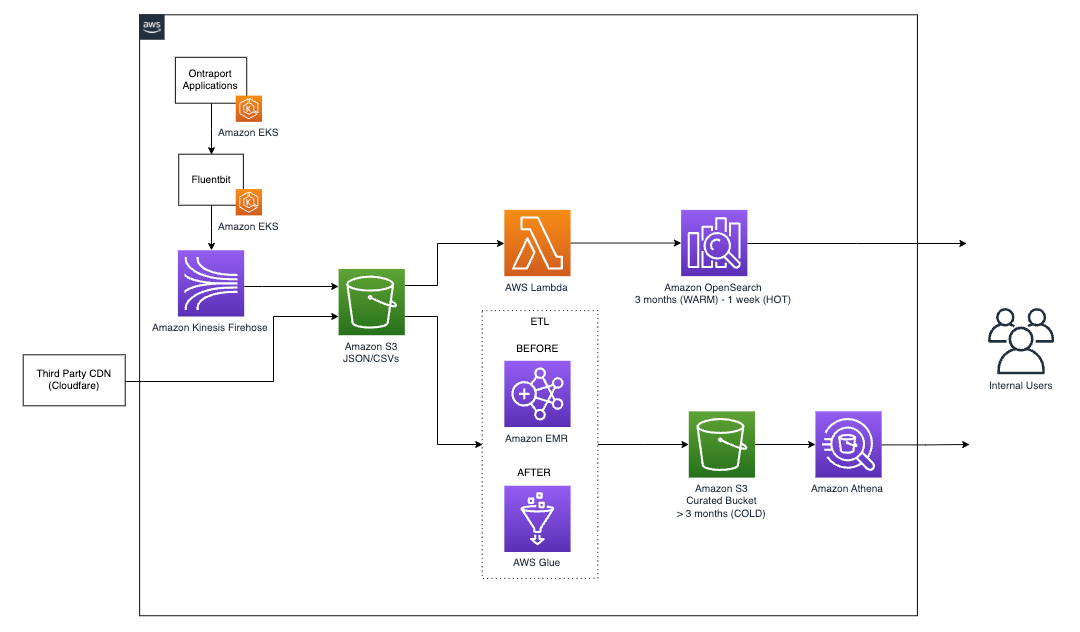
In order to optimize storage and analysis of their historical records in Amazon S3, Ontraport implemented an ETL process to transform and compress TSV and JSON files into Parquet files with partitioning by the hour. The compression and transformation helped Ontraport reduce their S3 storage costs by 92%.
In phase 1, Ontraport implemented an ETL workload with Amazon EMR. Given the scale of their data (hundreds of billions of rows) and only one developer, Ontraport’s first attempt at the Apache Spark application required a 16-node EMR cluster with r5.12xlarge core and task nodes. The configuration allowed the developer to process 1 year of data and minimize out-of-memory issues with a rough version of the Spark ETL application.
To help optimize the workload, Ontraport reached out to AWS for optimization recommendations. There were a considerable number of options to optimize the workload within Amazon EMR, such as right-sizing Amazon Elastic Compute Cloud (Amazon EC2) instance type based on workload profile, modifying Spark YARN memory configuration, and rewriting portions of the Spark code. Considering the resource constraints (only one full-time developer), the AWS team recommended exploring similar logic with AWS Glue Studio.
Some of the initial benefits with using AWS Glue for this workload include the following:
Ontraport had to process 100 terabytes of log data. The cost of processing each terabyte with the initial configuration was approximately $500. That cost came down to approximately $100 per terabyte after using AWS Glue. By using AWS Glue and AWS Glue Studio, Ontraport’s cost of processing the jobs was reduced by 80%.
Ontraport’s first AWS Glue application was a PySpark workload that ingested data from TSV and JSON files in Amazon S3, performed basic transformations on timestamp fields, and converted the data types of a couple fields. Finally, it writes output data into a curated S3 bucket as compressed Parquet files of approximately 1 GB in size and partitioned in 1-hour intervals to optimize for queries with Athena.
With an AWS Glue job configured with 10 workers of the type G.2x configuration, Ontraport was able to process approximately 500 million records in less than 60 minutes. When processing 10 billion records, they were able to increase the job configuration to a maximum of 100 workers with auto scaling enabled to complete the job within 1 hour.
Ontraport has been able to process logs as early as 2018. The team is updating the processing code to allow for scenarios of schema evolution (such as new fields) and parameterized some components to fully automate the batch processing. They are also looking to fine-tune the number of provisioned AWS Glue workers to obtain optimal price-performance.
In this post, we showed you how Ontraport used AWS Glue to help reduce development overhead and simplify development efforts for their ETL workloads with only one full-time developer. Although services like Amazon EMR offer great flexibility and optimization, the ease of use and simplification in AWS Glue often offer a faster path for cost-optimization and innovation for small and medium businesses. For more information about AWS Glue, check out Getting Started with AWS Glue.
 Elijah Ball has been a Sys Admin at Ontraport for 12 years. He is currently working to move Ontraport’s production workloads to AWS and develop data analysis strategies for Ontraport.
 Pablo Redondo is a Principal Solutions Architect at Amazon Web Services. He is a data enthusiast with over 16 years of FinTech and healthcare industry experience and is a member of the AWS Analytics Technical Field Community (TFC). Pablo has been leading the AWS Gain Insights Program to help AWS customers achieve better insights and tangible business value from their data analytics initiatives.
 Vikram Honmurgi is a Customer Solutions Manager at Amazon Web Services. With over 15 years of software delivery experience, Vikram is passionate about assisting customers and accelerating their cloud journey, delivering frictionless migrations, and ensuring our customers capture the full potential and sustainable business advantages of migrating to the AWS Cloud.
Post Syndicated from corbet original https://lwn.net/Articles/940808/
LWN recently covered a discussion on
file-position locking that demonstrated the hazards that can result
from unexpected concurrency. It turns out that this discussion had not yet
fully run its course. Since that article was written, additional changes
intended to address a performance regression evolved into a core virtual
filesystem (VFS) layer API change to carry out some much-delayed housecleaning.
Post Syndicated from jake original https://lwn.net/Articles/941273/
Greg Kroah-Hartman has announced the release of the
6.4.10, 6.1.45,
5.10.190, 5.4.253, 4.19.291, and 4.14.322 stable kernels. Note that 5.15.126
was also in
the review process for this batch, but has not (yet) been
released. Meanwhile, the rest of the batch all have important fixes throughout
the kernel tree, as usual.
Post Syndicated from jake original https://lwn.net/Articles/941271/
Security updates have been issued by Debian (intel-microcode, kernel, and php-dompdf), Fedora (linux-firmware, OpenImageIO, and php), Oracle (aardvark-dns, kernel, linux-firmware, python-flask, and python-werkzeug), SUSE (container-suseconnect, go1.19, gstreamer-plugins-bad, gstreamer-plugins-base, gstreamer-plugins-good, java-11-openjdk, kernel-firmware, kubernetes1.24, openssl-1_1, poppler, python-scipy, qatengine, ucode-intel, util-linux, and vim), and Ubuntu (dotnet6, dotnet7, php-dompdf, and velocity-tools).
Post Syndicated from LGR original https://www.youtube.com/watch?v=0UrUr9P21nQ
Post Syndicated from Emilie Ma original http://blog.cloudflare.com/debug-queues-from-dash/


Today, August 11, 2023, we are excited to announce a new debugging workflow for Cloudflare Queues. Customers using Cloudflare Queues can now send, list, and acknowledge messages directly from the Cloudflare dashboard, enabling a more user-friendly way to interact with Queues. Though it can be difficult to debug asynchronous systems, it’s now easy to examine a queue’s state and test the full flow of information through a queue.
With guaranteed delivery, message batching, consumer concurrency, and more, Cloudflare Queues is a powerful tool to connect services reliably and efficiently. Queues integrate deeply with the existing Cloudflare Workers ecosystem, so developers can also leverage our many other products and services. Queues can be bound to producer Workers, which allow Workers to send messages to a queue, and to consumer Workers, which pull messages from the queue.
We’ve received feedback that while Queues are effective and performant, customers find it hard to debug them. After a message is sent to a queue from a producer worker, there’s no way to inspect the queue’s contents without a consumer worker. The limited transparency was frustrating, and the need to write a skeleton worker just to debug a queue was high-friction.

Now, with the addition of new features to send, list, and acknowledge messages in the Cloudflare dashboard, we’ve unlocked a much simpler debugging workflow. You can send messages from the Cloudflare dashboard to check if their consumer worker is processing messages as expected, and verify their producer worker’s output by previewing messages from the Cloudflare dashboard.
The pipeline of messages through a queue is now more open and easily examined. Users just getting started with Cloudflare Queues also no longer have to write code to send their first message: it’s as easy as clicking a button in the Cloudflare dashboard.
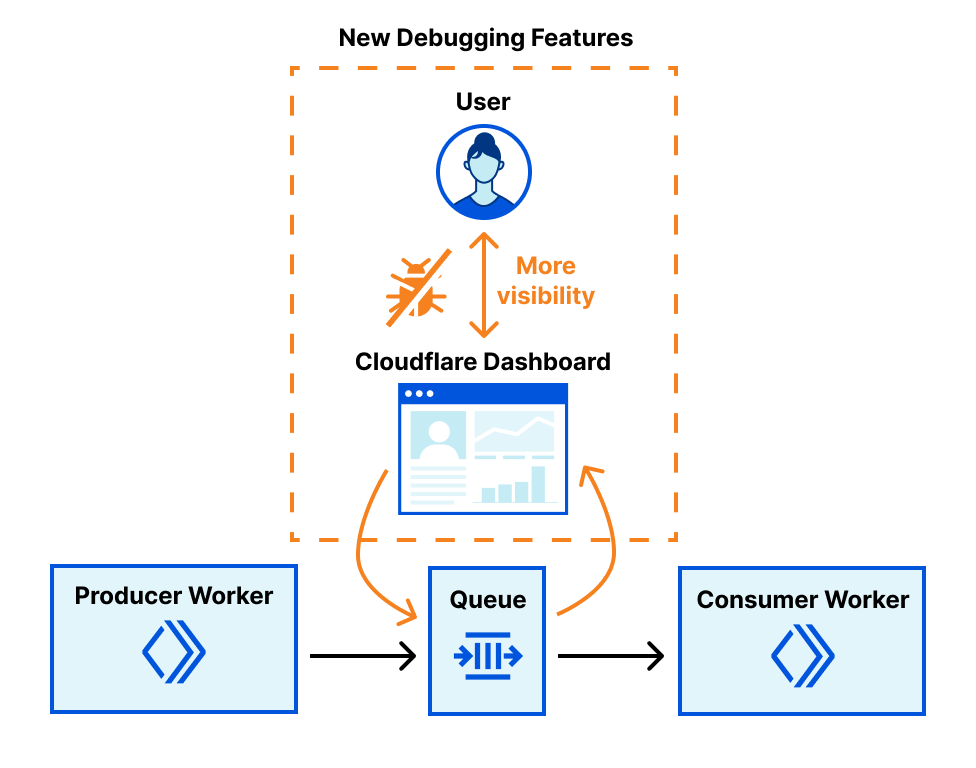
Both features are located in a new Messages tab on any queue’s page. Scroll to Send message to open the message editor.
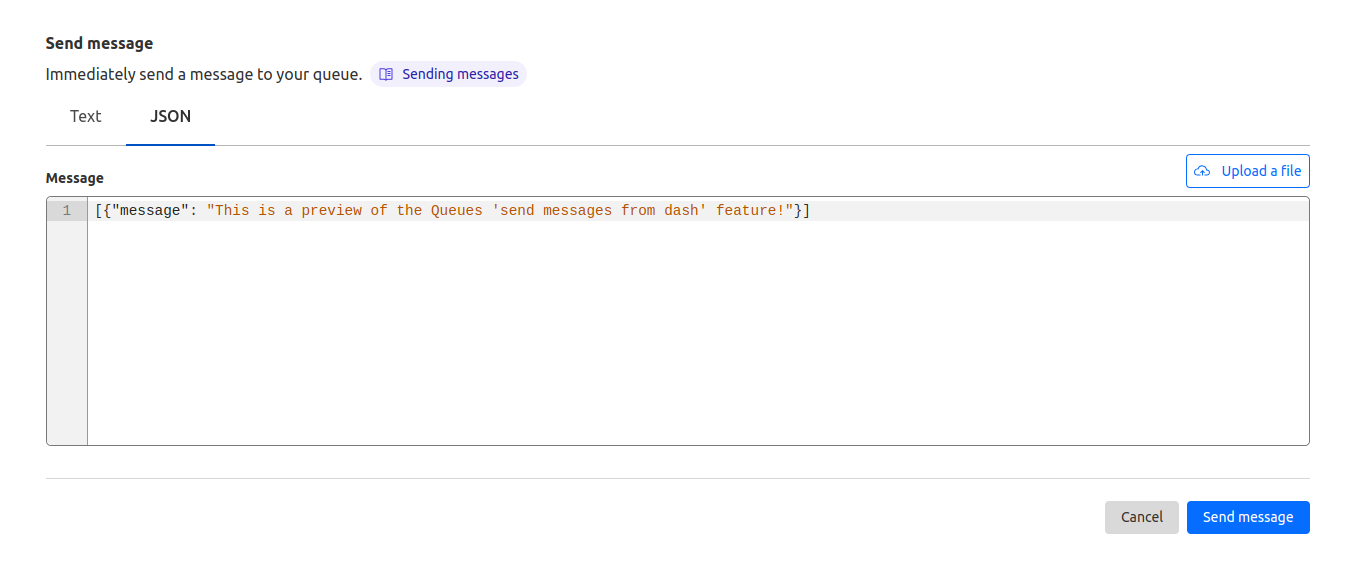
From here, you can write a message and click Send message to send it to your queue. You can also choose to send JSON, which opens a JSON editor with syntax highlighting and formatting. If you’ve saved your message as a file locally, you can drag-and-drop the file over the textbox or click Upload a file to send it as well.
This feature makes testing changes in a queue’s consumer worker much easier. Instead of modifying an existing producer worker or creating a new one, you can send one-off messages. You can also easily verify if your queue consumer settings are behaving as expected: send a few messages from the Cloudflare dashboard to check that messages are batched as desired.
Behind the scenes, this feature leverages the same pipeline that Cloudflare Workers uses to send messages, so you can be confident that your message will be processed as if sent via a Worker.
On the same page, you can also inspect the messages you just sent from the Cloudflare dashboard. On any queue’s page, open the Messages tab and scroll to Queued messages.
If you have a consumer attached to your queue, you’ll fetch a batch of messages of the same size as configured in your queue consumer settings by default, to provide a realistic view of what would be sent to your consumer worker. You can change this value to preview messages one-at-a-time or even in much larger batches than would be normally sent to your consumer.
After fetching a batch of messages, you can preview the message’s body, even if you’ve sent raw bytes or a JavaScript object supported by the structured clone algorithm. You can also check the message’s timestamp; number of retries; producer source, such as a Worker or the Cloudflare dashboard; and type, such as text or JSON. This information can help you debug the queue’s current state and inspect where and when messages originated from.
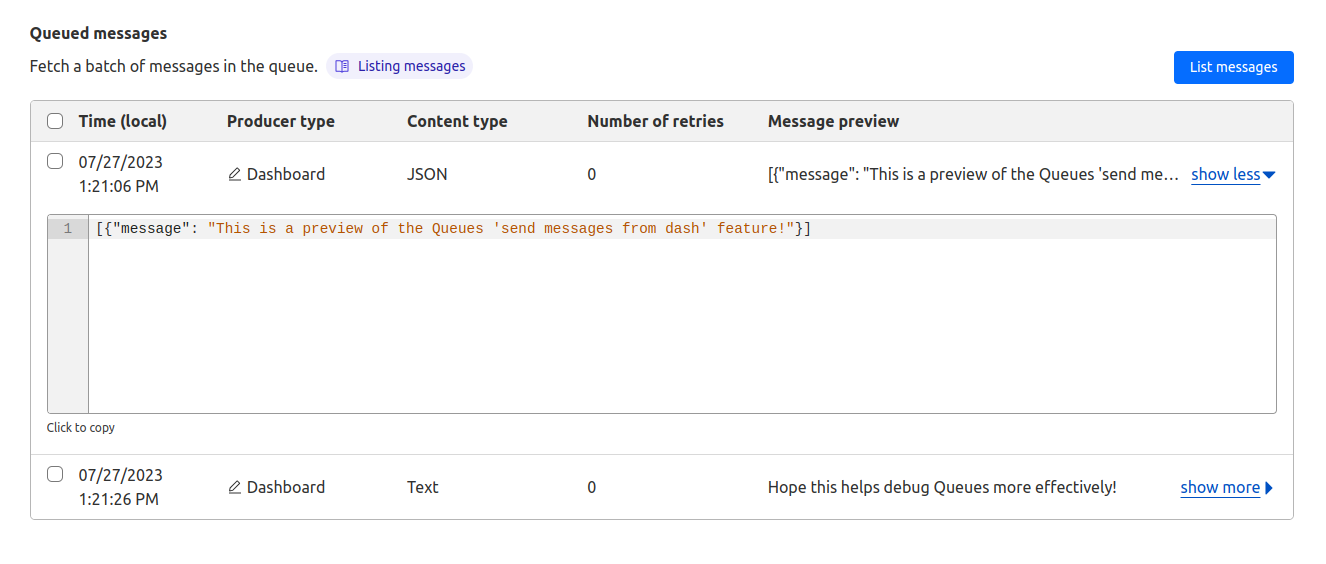
The batch of messages that’s returned is the same batch that would be sent to your consumer Worker on its next run. Messages are even guaranteed to be in the same order on the UI as sent to your consumer. This feature grants you a looking glass view into your queue, matching the exact behavior of a consumer worker. This works especially well for debugging messages sent by producer workers and verifying queue consumer settings.
Listing messages from the Cloudflare dashboard also doesn’t interfere with an existing connected consumer. Messages that are previewed from the Cloudflare dashboard stay in the queue and do not have their number of retries affected.
This ‘peek’ functionality is unique to Cloudflare Queues: Amazon SQS bumps the number of retries when a message is viewed, and RabbitMQ retries the message, forcing it to the back of the queue. Cloudflare Queues’ approach means that previewing messages does not have any unintended side effects on your queue and your consumer. If you ever need to debug queues used in production, don’t worry – listing messages is entirely safe.
As well, you can now remove messages from your queue from the Cloudflare dashboard. If you’d like to remove a message or clear the full batch from the queue, you can select messages to acknowledge. This is useful for preventing buggy messages from being repeatedly retried without having to write a dummy consumer.
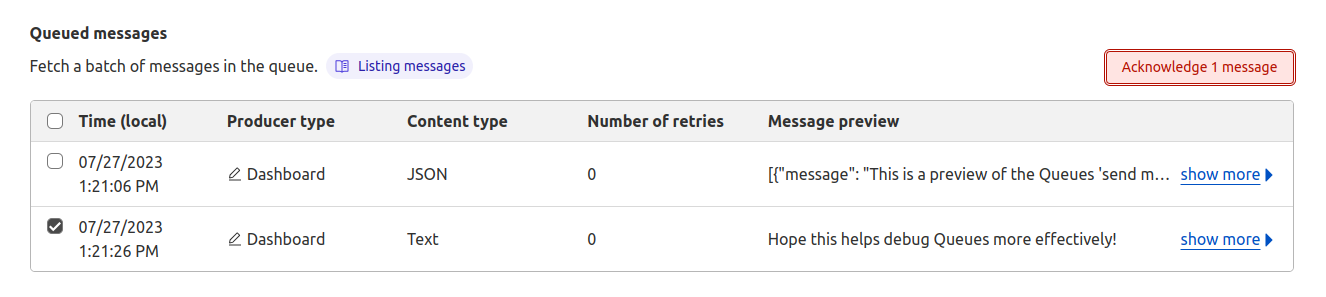
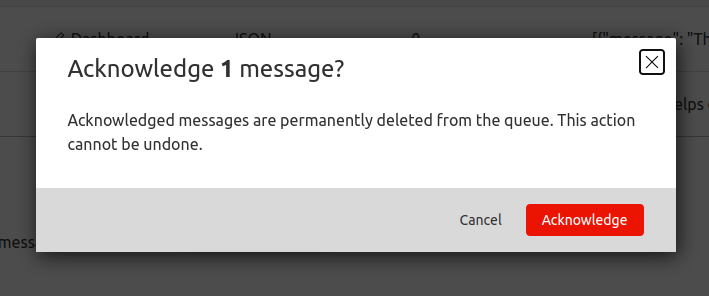
You might have noticed that this message preview feature operates similarly to another popular feature request for an HTTP API to pull batches of messages from a queue. Customers will be able to make a request to the API endpoint to receive a batch of messages, then acknowledge the batch to remove the messages from the queue. Under the hood, both listing messages from the Cloudflare dashboard and HTTP Pull/Ack use a common infrastructure, and HTTP Pull/Ack is coming very soon!
These debugging features have already been invaluable for testing example applications we’ve built on Cloudflare Queues. At an internal hack week event, we built a web crawler with Queues as an example use-case (check out the tutorial here!). During development, we took advantage of this user-friendly way to send messages to quickly iterate on a consumer worker before we built a producer worker. As well, when we encountered bugs in our consumer worker, the message previews were handy to realize we were sending malformed messages, and the message acknowledgement feature gave us an easy way to remove them from the queue.
The Cloudflare dashboard features announced today provide more transparency into your application and enable more user-friendly debugging.
All Cloudflare Queues customers now have access to these new debugging tools. And if you’re not already using Queues, you can join the Queues Open Beta by enabling Cloudflare Queues here.
Get started on Cloudflare Queues with our guide and create your next app with us today! Your first message is a single click away.
Post Syndicated from Austin Christiansen original http://blog.cloudflare.com/introducing-scheduled-deletion-for-cloudflare-stream/


Designed with developers in mind, Cloudflare Stream provides a seamless, integrated workflow that simplifies video streaming for creators and platforms alike. With features like Stream Live and creator management, customers have been looking for ways to streamline storage management.
Today, August 11, 2023, Cloudflare Stream is introducing scheduled deletion to easily manage video lifecycles from the Stream dashboard or our API, saving time and reducing storage-related costs. Whether you need to retain recordings from a live stream for only a limited time, or preserve direct creator videos for a set duration, scheduled deletion will simplify storage management and reduce costs.
Scheduled deletion allows developers to automatically remove on-demand videos and live recordings from their library at a specified time. Live inputs can be set up with a deletion rule, ensuring that all recordings from the input will have a scheduled deletion date upon completion of the stream.
Let’s see how it works in those two configurations.
Whether you run a learning platform where students can upload videos for review, a platform that allows gamers to share clips of their gameplay, or anything in between, scheduled deletion can help manage storage and ensure you only keep the videos that you need. Scheduled deletion can be applied to both new and existing on-demand videos, as well as recordings from completed live streams. This feature lets you specify a specific date and time at which the video will be deleted. These dates can be applied in the Cloudflare dashboard or via the Cloudflare API.
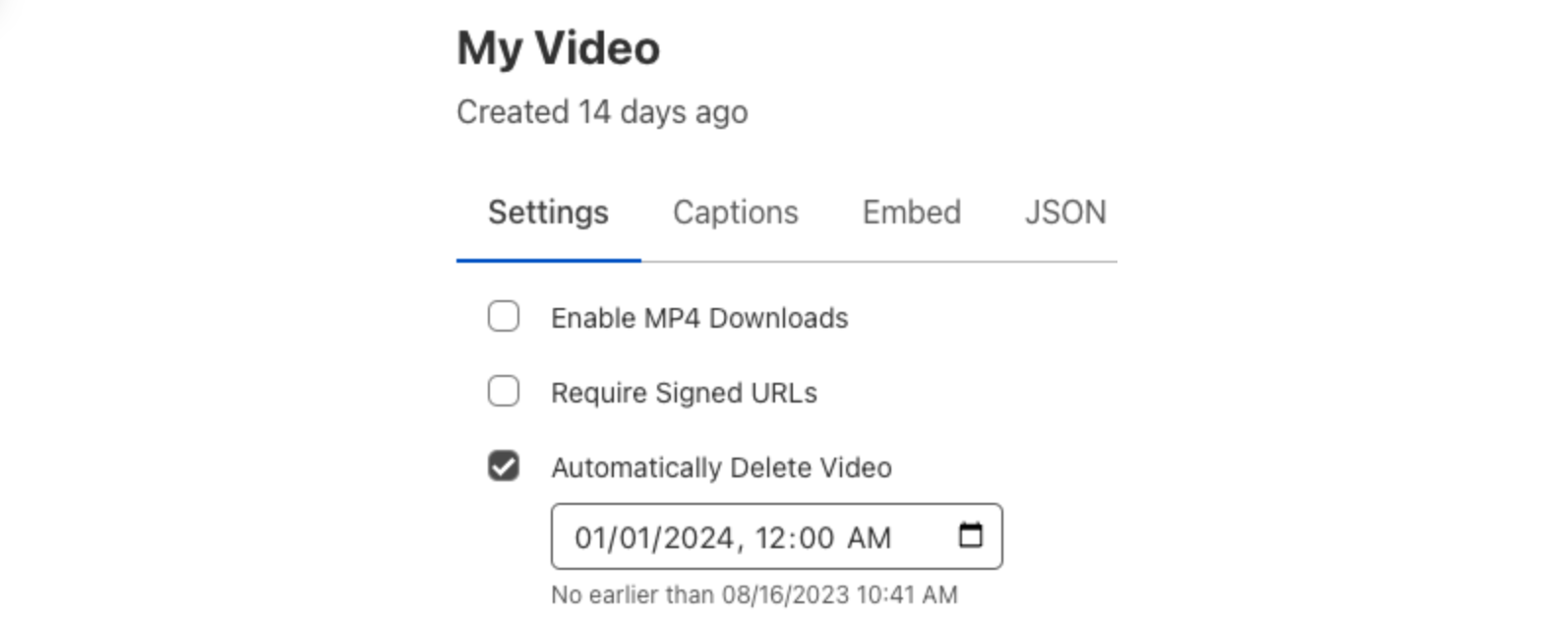
The Stream API can also be used to set the scheduled deletion property on new or existing videos. In this example, we’ll create a direct creator upload that will be deleted on December 31, 2023:
curl -X POST \
-H 'Authorization: Bearer <BEARER_TOKEN>' \
-d '{ "maxDurationSeconds": 10, "scheduledDeletion": "2023-12-31T12:34:56Z" }' \
https://api.cloudflare.com/client/v4/accounts/<ACCOUNT_ID>/stream/direct_upload
For more information on live inputs and how to configure deletion policies in our API, refer to the documentation.
We love how recordings from live streams allow those who may have missed the stream to catch up, but these recordings aren’t always needed forever. Scheduled recording deletion is a policy that can be configured for new or existing live inputs. Once configured, the recordings of all future streams on that input will have a scheduled deletion date calculated when the recording is available. Setting this retention policy can be done from the Cloudflare dashboard or via API operations to create or edit Live Inputs:
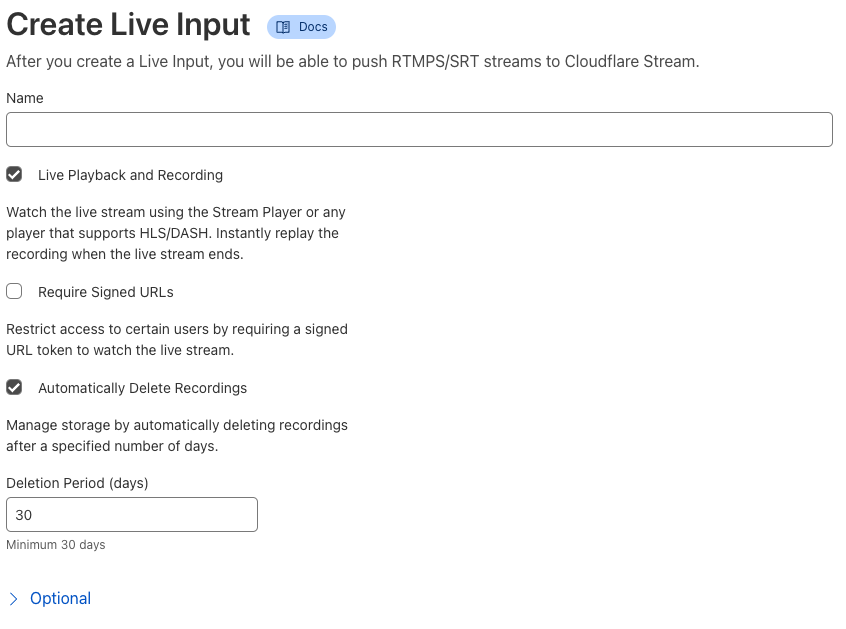
The Stream API makes it easy to add a deletion policy to new or existing inputs. Here is an example API request to create a live input with recordings that will expire after 30 days:
curl -X POST \
-H 'Authorization: Bearer <BEARER_TOKEN>' \
-H 'Content-Type: application/json' \
-d '{ "recording": {"mode": "automatic"}, "deleteRecordingAfterDays": 30 }' \
https://api.staging.cloudflare.com/client/v4/accounts/<ACCOUNT_ID>/stream/live_inputs/
For more information on live inputs and how to configure deletion policies in our API, refer to the documentation.
Scheduled deletion is now available to all Cloudflare Stream customers. Try it out now and join our Discord community to let us know what you think! To learn more, check out our developer docs. Stay tuned for more exciting Cloudflare Stream updates in the future.
Post Syndicated from The History Guy: History Deserves to Be Remembered original https://www.youtube.com/watch?v=dC9PCeX5-L8
Post Syndicated from Bruce Schneier original https://www.schneier.com/blog/archives/2023/08/the-inability-to-simultaneously-verify-sentience-location-and-identity.html
Really interesting “systematization of knowledge” paper:
“SoK: The Ghost Trilemma”
Abstract: Trolls, bots, and sybils distort online discourse and compromise the security of networked platforms. User identity is central to the vectors of attack and manipulation employed in these contexts. However it has long seemed that, try as it might, the security community has been unable to stem the rising tide of such problems. We posit the Ghost Trilemma, that there are three key properties of identity—sentience, location, and uniqueness—that cannot be simultaneously verified in a fully-decentralized setting. Many fully-decentralized systems—whether for communication or social coordination—grapple with this trilemma in some way, perhaps unknowingly. In this Systematization of Knowledge (SoK) paper, we examine the design space, use cases, problems with prior approaches, and possible paths forward. We sketch a proof of this trilemma and outline options for practical, incrementally deployable schemes to achieve an acceptable tradeoff of trust in centralized trust anchors, decentralized operation, and an ability to withstand a range of attacks, while protecting user privacy.
I think this conceptualization makes sense, and explains a lot.