Post Syndicated from xkcd.com original https://xkcd.com/2814/

Post Syndicated from xkcd.com original https://xkcd.com/2814/
Post Syndicated from Cliff Robinson original https://www.servethehome.com/kioxia-cxl-and-bics-flash-ssd-shown-at-fms-2023/
At FMS 2023, we saw the Kioxia CXL + BiCS Flash line bringing NAND to CXL interfaces in a product we can show our readers
The post Kioxia CXL and BiCS Flash SSD Shown at FMS 2023 appeared first on ServeTheHome.
Post Syndicated from Maddie Bacon original https://aws.amazon.com/blogs/security/aws-security-profile-get-to-know-the-aws-identity-solutions-team/

Remek Hetman, Principal Solutions Architect on the Identity Solutions team
In this profile, I met with Ilya Epshteyn, Senior Manager of the AWS Identity Solutions team, to chat about his team and what they’re working on.
Let’s start with the basics. What does the Identity Solutions team do?
We are a team of specialist solutions architects (SAs) who are in the AWS Identity organization. At AWS, we have SAs who directly support customers, and we have SAs who are embedded in internal engineering teams—we are the latter. As SAs, we work on complex customer scenarios, build solutions, and create deep technical content on identity topics, including identity and access management—like blog posts, workshops, and sessions at our global events. A significant portion of our time is spent working internally with AWS product and engineering teams to help bring the customer experience perspective. Identity touches everything — it’s the fabric of every AWS service — and we want to help achieve a consistent identity experience for customers. To help do this, we use different tooling to proactively identify challenges in customers’ experience with identity across AWS.
What is the mission of the Identity Solutions team?
Our mission is to make it easier for customers to implement access controls that protect their data in a straightforward and consistent manner across AWS services. A consistent experience simplifies the implementation and validation of security controls. We help identify customer’s pain points and work with our service teams to improve their experiences. We also provide highly prescriptive guidance to customers around identity. We don’t want to just say, “here’s an option.” Our guidance comes from a place of knowing how it will be operationalized and implemented. We won’t recommend something to customers unless we’ve tried it ourselves.
In order to literally “try it ourselves,” we built and operate a large-scale AWS environment called Mirror World, in which we use AWS services from the perspective of an AWS customer. The environment allows us to create different controls and use them in conjunction with other tools and services, truly putting ourselves in the shoes of the customer. This is in line with our mission of “active empathy,” our #1 team tenet.
Interesting! Tell us more about Mirror World.
There are three main use cases for Mirror World:
What are your other major focus areas right now?
Data perimeters — set of preventive guardrails in your AWS environment to help ensure that only your trusted identities are accessing trusted resources from expected networks — are a big focus for us. Because data perimeters touch so many different aspects of identity and access management, our team is helping to organize what the user experience will look like, and helping to define the future state of data perimeters. Team members Tatyana Yatskevich and Matt Luttrell went into more detail about this in their profiles.
What are some of the common questions you hear from customers?
Customers who have already been operating in the cloud for several years often tell us that they’re looking for opportunities to optimize their environment at scale. They’re maturing and managing hundreds or even thousands of accounts, so they commonly ask us for ways to simplify and scale their environment. For customers earlier in their journey, a common question is what lessons we have learned while working with more experienced customers so that they can benefit from their journey. Like Andy Jassy says, “There is no compression algorithm for experience.”
What do you wish customers would ask about more?
How to get rid of their long-term credentials to significantly reduce the chances of credentials becoming compromised. We realize that for some customers it’s an effort to move away from IAM users and long-term credentials. We’d love to hear from more customers how they’re moving away from them or what’s stopping them from doing so. We’ve done a better job setting newer customers on the right path with short-term credentials and IAM roles instead of users, but for more tenured customers, there’s still an opportunity to improve in this area.
Looking ahead, what are your goals for the team?
We’re lucky that our team has individuals with diverse backgrounds and skillsets that have enabled us to deliver on our mission. But if we want to make a bigger impact, we need to scale. We will continue to utilize Mirror World, do more with automation, and expand our team collaboration to further the consistent identity experience for our customers. We also recently launched a repo containing recommended service control policies, which we plan to continue expanding. And we’re going to continue to build end-to-end solutions for identity use cases, such as IAM Policy Validator for AWS CloudFormation. We will also continue identity enablement on complex topics, such as the data perimeter blog series and workshop, so that we can reach even more customers with prescriptive guidance. Stay tuned for more blog posts from our team coming soon here! If you’re interested in any of the topics mentioned in this post and would like to start a conversation, please reach out to your account team.
If you have feedback about this post, submit comments in the Comments section below. If you have questions about this post, contact AWS Support.
Want more AWS Security news? Follow us on Twitter.
Post Syndicated from Hernan Garcia original https://aws.amazon.com/blogs/big-data/introducing-apache-airflow-version-2-6-3-support-on-amazon-mwaa/
Amazon Managed Workflows for Apache Airflow (Amazon MWAA) is a managed orchestration service for Apache Airflow that makes it simple to set up and operate end-to-end data pipelines in the cloud. Trusted across various industries, Amazon MWAA helps organizations like Siemens, ENGIE, and Choice Hotels International enhance and scale their business workflows, while significantly improving security and reducing infrastructure management overhead.
Today, we are announcing the availability of Apache Airflow version 2.6.3 environments. If you’re currently running Apache Airflow version 2.x, you can seamlessly upgrade to v2.6.3 using in-place version upgrades, thereby retaining your workflow run history and environment configurations.
In this post, we delve into some of the new features and capabilities of Apache Airflow v2.6.3 and how you can set up or upgrade your Amazon MWAA environment to accommodate this version as you orchestrate your workflows in the cloud at scale.
Airflow now gives you an efficient way to create reusable and standardized notifications to handle systemic errors and failures. Notifiers introduce a new object in Airflow, designed to be an extensible layer for adding notifications to DAGs. This framework can send messages to external systems when a task instance or an individual DAG run changes its state. You can build notification logic from a new base object and call it directly from your DAG files. The BaseNotifier is an abstract class that provides a basic structure for sending notifications in Airflow using the various on_*__callback. It is intended for providers to extend and customize this for their specific needs.
Using this framework, you can build custom notification logic directly within your DAG files. For instance, notifications can be sent through email, Slack, or Amazon Simple Notification Service (Amazon SNS) based on the state of a DAG (on_failure, on_success, and so on). You can also create your own custom notifier that updates an API or posts a file to your storage system of choice.
For details on how to create and use a notifier, refer to Creating a notifier.
Apache Airflow v2.6.3 brings a significant improvement to address the long-standing issue of tasks getting stuck in the queued state when using the CeleryExecutor. In a typical Apache Airflow workflow, tasks progress through a lifecycle, moving from the scheduled state to the queued state, and eventually to the running state. However, tasks can occasionally remain in the queued state longer than expected due to communication issues among the scheduler, the executor, and the worker. In Amazon MWAA, customers have experienced such tasks being queued for up to 12 hours due to how it utilizes the native integration of Amazon Simple Queue Service (Amazon SQS) with CeleryExecutor.
To mitigate this issue, Apache Airflow v2.6.3 introduced a mechanism that checks the Airflow database for tasks that have remained in the queued state beyond a specified timeout, defaulting to 600 seconds. This default can be modified using the environment configuration parameter scheduler.task_queued_timeout. The system then retries such tasks if retries are still available or fails them otherwise, ensuring that your data pipelines continue to function smoothly.
Notably, this update deprecates the previously used celery.stalled_task_timeout and celery.task_adoption_timeout settings, and consolidates their functionalities into a single configuration, scheduler.task_queued_timeout. This enables more effective management of tasks that remain in the queued state. Operators can also configure scheduler.task_queued_timeout_check_interval, which controls how frequently the system checks for tasks that have stayed in the queued state beyond the defined timeout.
For details on how to use task_queued_timeout, refer to the official Airflow documentation.
With prior versions of Airflow, to run a DAG continuously in a loop, you had to use the TriggerDagRunOperator to rerun the DAG after the last task is finished. With Apache Airflow v2.6.3, you can now run a DAG continuously with a predefined timetable. The simplifies scheduling for continual DAG runs. The new ContinuousTimetable construct will create one continuous DAG run, respecting start_date and end_date, with the new run starting as soon as the previous run has completed, regardless of whether the previous run has succeeded or failed. Using a continuous timetable is especially useful when sensors are used to wait for highly irregular events from external data tools.
You can bound the degree of parallelism to ensure that only one DAG is running at any given time with the max_active_runs parameter:
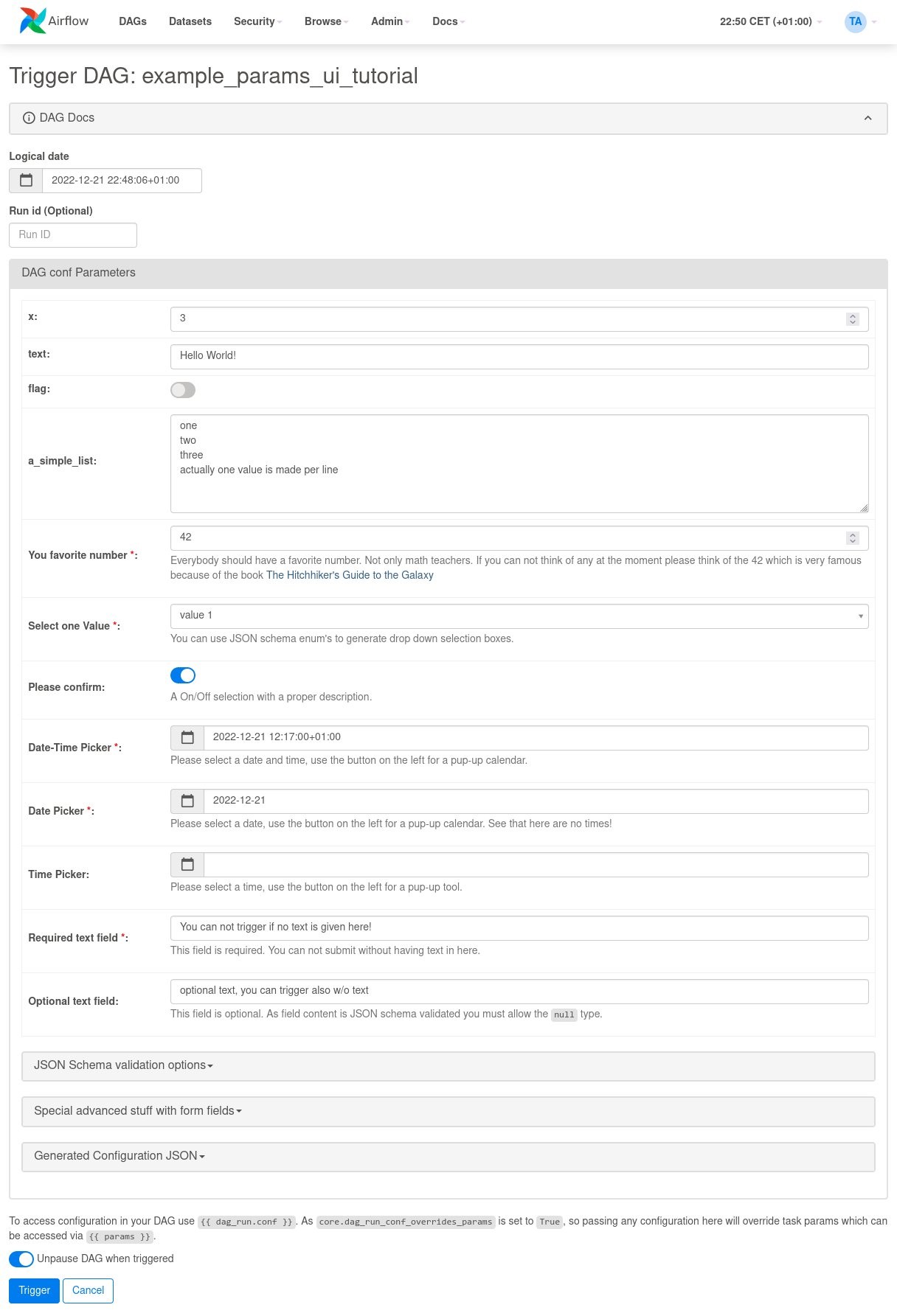
Prior to Apache Airflow v2.6.3, you could provide parameters in JSON structure through the Airflow UI for custom workflow runs. You had to model, check, and understand the JSON and enter parameters manually without the option to validate them before triggering a workflow. With Apache Airflow v2.6.3, when you choose Trigger DAG w/ config, a trigger UI form is rendered based on the predefined DAG Params. For your ad hoc, testing, or custom runs, this simplifies the DAG’s parameter entry. If the DAG has no parameters defined, a JSON entry mask is shown. The form elements can be defined with the Param class and attributes define how a form field is displayed.
For an example DAG the following form is generated by DAG Params.
You can set up a new Apache Airflow v2.6.3 environment in your account and preferred Region using the AWS Management Console, API, or AWS Command Line Interface (AWS CLI). If you’re adopting infrastructure as code (IaC), you can automate the setup using either AWS CloudFormation, the AWS Cloud Development Kit (AWS CDK), or Terraform scripts.
When you have successfully created an Apache Airflow v2.6.3 environment in Amazon MWAA, the following packages are automatically installed on the scheduler and worker nodes along with other provider packages:
For a complete list of provider packages installed, refer to Apache Airflow provider packages installed on Amazon MWAA environments.
You can perform in-place version upgrades of your existing Amazon MWAA environments to update your older Apache Airflow v2.x-based environments to v2.6.3. To learn more about in-place version upgrades, refer to Upgrading the Apache Airflow version or Introducing in-place version upgrades with Amazon MWAA.
In this post, we talked about some of the new features of Apache Airflow v2.6.3 and how you can get started using them in Amazon MWAA. Try out these new features like notifiers and continuous timetables, and other enhancements to improve your data orchestration pipelines.
For additional details and code examples on Amazon MWAA, visit the Amazon MWAA User Guide and the Amazon MWAA examples GitHub repo.
Apache, Apache Airflow, and Airflow are either registered trademarks or trademarks of the Apache Software Foundation in the United States and/or other countries.
 Hernan Garcia is a Senior Solutions Architect at AWS, based out of Amsterdam, working in the Financial Services Industry since 2018. He specializes in application modernization and supports his customers in the adoption of cloud operating models and serverless technologies.
 Parnab Basak is a Solutions Architect and a Serverless Specialist at AWS. He specializes in creating new solutions that are cloud native using modern software development practices like serverless, DevOps, and analytics. Parnab works closely in the analytics and integration services space helping customers adopt AWS services for their workflow orchestration needs.
 Shubham Mehta is an experienced product manager with over eight years of experience and a proven track record of delivering successful products. In his current role as a Senior Product Manager at AWS, he oversees Amazon Managed Workflows for Apache Airflow (Amazon MWAA) and spearheads the Apache Airflow open-source contributions to further enhance the product’s functionality.
Post Syndicated from Molly Clancy original https://www.backblaze.com/blog/whats-the-diff-hot-and-cold-data-storage/

This post was originally published in 2017 and updated in 2019 and 2023 to share the latest information on cloud storage tiering.
Temperature, specifically a range from cold to hot, is a common way to describe different levels of data storage. It’s possible these terms originated based on where data was historically stored. Hot data was stored close to the heat of the spinning drives and CPUs. Cold data was stored on drives or tape away from the warmer data center, likely tucked away on a shelf somewhere.
Today, they’re used to describe how easily you can access your data. Hot storage is for data you need fast or access frequently. Cold storage is typically used for data you rarely need. The terms are used by most data storage providers to describe their tiered storage plans. However, there are no industry standard definitions for what hot and cold mean, which makes comparing services across different storage providers challenging.
It’s a common misconception that hot storage means expensive storage and that cold storage means slower, less expensive storage. Today, we’ll explain why these terms may no longer be serving you when it comes to anticipating storage cost and performance.
Hot storage serves as the go-to destination for frequently accessed and mission-critical data that demands swift retrieval. Think of it as the fast lane of data storage, tailored for scenarios where time is of the essence. Industries relying on real-time data processing and rapid response times, such as video editing, web content, and application development, find hot storage to be indispensable.
To achieve the necessary rapid data access, hot storage is often housed in hybrid or tiered storage environments. The hotter the service, the more it embraces cutting-edge technologies, including the latest drives, fastest transport protocols, and geographical proximity to clients or multiple regions. However, the resource-intensive nature of hot storage warrants a premium, and leading cloud data storage providers like Microsoft’s Azure Hot Blobs and AWS S3 reflect this reality.
Data stored in the hottest tier might use solid-state drives (SSDs), which are optimized for lower latency and higher transactional rates compared to traditional hard drives. In other cases, hard disk drives are more suitable for environments where the drives are heavily accessed due to their higher durability standing up to intensive read/write cycles.
Regardless of the storage medium, hot data workloads necessitate fast and consistent response times, making them ideal for tasks like capturing telemetry data, messaging, and data transformation.
On the opposite end of the data storage spectrum lies cold storage, catering to information accessed infrequently and without the urgency of hot data. Cold storage houses data that might remain dormant for extended periods, months, years, decades, or maybe forever. Practical examples might include old projects or records mandated for financial, legal, HR, or other business record-keeping requirements.
Cold cloud storage systems prioritize durability and cost-effectiveness over real-time data manipulation capabilities. Services like Amazon Glacier and Google Coldline take this approach, offering slower retrieval and response times than their hot storage counterparts. Lower performing and less expensive storage environments, both on-premises and in the cloud, commonly host cold data.
Linear Tape Open (LTO or Tape) has historically been a popular storage medium for cold data, though manual retrieval from storage racks renders it relatively slow. To access data from LTO, the tapes must be physically retrieved from storage racks and mounted in a tape reading machine, making it one of the slowest, therefore coldest, methods of storing data.
While cold cloud storage systems generally boast lower overall costs than warm or hot storage, they may incur higher per-operation expenses. Accessing data from cold storage demands patience and thoughtful planning, as the response times are intentionally sluggish.
With the landscape of data storage continually evolving, the definition of cold storage has also expanded. In modern contexts, cold storage might describe completely offline data storage, wherein information resides outside the cloud and remains disconnected from any network. This isolation, also described as air gapped, is crucial for safeguarding sensitive data. However, today, data can be virtually air-gapped using technology like Object Lock.
| Cold | Hot | |
|---|---|---|
| Access Speed | Slow | Fast |
| Access Frequency | Seldom or Never | Frequent |
| Data Volume | Low | High |
| Storage Media | Slower drives, LTO, offline | Faster drives, durable drives, SSDs |
| Cost | Lower | Higher |
Today there are new players in data storage, who, through innovation and efficiency, are able to offer cloud storage at the cost of cold storage, but with the performance and availability of hot storage.
The concept of organizing data by temperature has long been employed by diversified cloud providers like Amazon, Microsoft, and Google to describe their tiered storage services and set pricing accordingly. But, today, in a cloud landscape defined by the open, multi-cloud internet, customers have come to realize the value and benefits they can get from moving away from those diversified providers.
A wave of independent cloud providers are disrupting the traditional notions of cloud storage temperatures, offering cloud storage that’s as cost-effective as cold storage, yet delivering the speed and availability associated with hot storage. If you’re familiar with Backblaze B2 Cloud Storage, you know where we’re going with this.
Backblaze B2 falls into this category. We can compete on price with LTO and other traditionally cold storage services, but can be used for applications that are usually reserved for hot storage, such as media management, workflow collaboration, websites, and data retrieval.
The newfound efficiency of this model has prompted customers to rethink their storage strategies, opting to migrate entirely from cumbersome cold storage and archival systems.
When it comes to choosing the right storage temperature for your cloud data, organizations must carefully consider their unique needs. Ensuring that storage costs align with actual requirements is key to maintaining a healthy bottom line. The ongoing evolution of cloud storage services, driven by efficiency, technology, and innovation, further amplifies the need for tailored storage solutions.
Still have questions that aren’t answered here? Join the discussion in the comments.
The post What’s the Diff: Hot and Cold Data Storage appeared first on Backblaze Blog | Cloud Storage & Cloud Backup.
Post Syndicated from corbet original https://lwn.net/Articles/941091/
The Open Enterprise Linux Association
has announced its
existence. It is a collaboration between CIQ (Rocky Linux), Oracle,
and SUSE to provide an RHEL-compatible distribution.
Starting later this year, OpenELA will provide sources necessary
for downstreams compatible with RHEL to exist, with initial focus
on RHEL versions EL8, EL9 and possibly EL7. The project is
committed to ensuring the continued availability of OpenELA sources
to the community indefinitely.OpenELA’s core tenets, reflecting the spirit of the project,
include full compliance with this existing standard, swift updates
and secure fixes, transparency, community, and ensuring the
resource remains free and redistributable for all.
Post Syndicated from Luis Morales original https://aws.amazon.com/blogs/big-data/perform-amazon-kinesis-load-testing-with-locust/
Building a streaming data solution requires thorough testing at the scale it will operate in a production environment. Streaming applications operating at scale often handle large volumes of up to GBs per second, and it’s challenging for developers to simulate high-traffic Amazon Kinesis-based applications to generate such load easily.
Amazon Kinesis Data Streams and Amazon Kinesis Data Firehose are capable of capturing and storing terabytes of data per hour from numerous sources. Creating Kinesis data streams or Firehose delivery streams is straightforward through the AWS Management Console, AWS Command Line Interface (AWS CLI), or Kinesis API. However, generating a continuous stream of test data requires a custom process or script to run continuously. Although the Amazon Kinesis Data Generator (KDG) provides a user-friendly UI for this purpose, it has some limitations, such as bandwidth constraints and increased round trip latency. (For more information on the KDG, refer to Test Your Streaming Data Solution with the New Amazon Kinesis Data Generator.)
To overcome these limitations, this post describes how to use Locust, a modern load testing framework, to conduct large-scale load testing for a more comprehensive evaluation of the streaming data solution.
This project emits temperature sensor readings via Locust to Kinesis. We set up the Amazon Elastic Compute Cloud (Amazon EC2) Locust instance via the AWS Cloud Development Kit (AWS CDK) to load test Kinesis-based applications. You can access the Locust dashboard to perform and observe the load test and connect via Session Manager, a capability of AWS Systems Manager, for configuration changes. The following diagram illustrates this architecture.

In our testing with the largest recommended instance (c7g.16xlarge), the setup was capable of emitting over 1 million events per second to Kinesis data streams in on-demand capacity mode, with a batch size (simulated users per Locust user) of 500. You can find more details on what this means and how to configure the load test later in this post.
Locust is an open-source, scriptable, and scalable performance testing tool that allows you to define user behavior using Python code. It offers an easy-to-use interface, making it developer-friendly and highly expandable. With its distributed and scalable design, Locust can simulate millions of simultaneous users to mimic real user behavior during a performance test.
Each Locust user represents a scenario or a specific set of actions that a real user might perform on your system. When you run a performance test with Locust, you can specify the number of concurrent Locust users you want to simulate, and Locust will create an instance for each user, allowing you to assess the performance and behavior of your system under different user loads.
For more information on Locust, refer to the Locust documentation.
To get started, clone or download the code from the GitHub repository.
To test Locust out locally first before deploying it to the cloud, you have to install the necessary Python dependencies. If you’re new to Python, refer the README for more information on getting started.
Navigate to the load-test directory and run the following code:
To send events to a Kinesis data stream from your local machine, you will need to have AWS credentials. For more information, refer to Configuration and credential file settings.
To perform the test locally, stay in the load-test directory and run the following code:
You can now access the Locust dashboard via http://0.0.0.0:8089/. Enter the number of Locust users, the spawn rate (users added per second), and the target Amazon Kinesis data stream name for Host. By default, it deploys the Kinesis data stream DemoStream that you can use for testing.

To see the generated events logged, run the following command, which filters only Locust and root logs (for example, no Botocore logs):
The GitHub repository contains the AWS CDK code to create all the necessary resources for the load test. This removes opportunities for manual error, increases efficiency, and ensures consistent configurations over time. To deploy the resources, complete the following steps:
To learn more about the bootstrapping process, refer to Bootstrapping.
The template sets up the Locust EC2 test instance, which is by default a c7g.xlarge instance, which at the time of publishing costs approximately $0.145 per hour in us-east-1. To find the most accurate pricing information, see Amazon EC2 On-Demand Pricing. You can find more details on how to change your instance size according to your scale of load testing later in this post.
It’s crucial to consider that the expenses incurred during load testing are not solely attributed to EC2 instance costs, but also heavily influenced by data transfer costs.
You can access the dashboard by using the AWS CDK output KinesisLocustLoadTestingStack.locustdashboardurl to open the dashboard, for example http://1.2.3.4:8089.
The Locust dashboard is password protected. By default, it’s set to user name locust-user and password locust-dashboard-pwd.
With the default configuration, you can achieve up to 15,000 emitted events per second. Enter the number of Locust users (times the batch size), the spawn rate (users added per second), and the target Kinesis data stream name for Host.

After you have started the load test, you can look at the load test on the Charts tab.

You can also monitor the load test on the Kinesis Data Streams console by navigating to the stream that you are load testing. If you used the default settings, navigate to DemoStream. On the detail page, choose the Monitoring tab to see the ingested load.

By default, this project generates random temperature sensor readings for every sensor with the following format:
The project comes packaged with Faker, which you can use to adapt the payload to your needs. You just have to update the generate_sensor_reading function in the locust-load-test.py file:
After the initial deployment of the load testing tool, you can change configuration in two ways:
cdk deployThe first option helps you iterate more quickly on the remote instance without a need to redeploy. The latter uses the infrastructure as code (IaC) approach and makes sure that your configuration changes can be committed to your source control system. For a fast development cycle, it’s recommended to test your load test configuration locally first, connect to your instance to apply the changes, and after successful implementation, codify it as part of your IaC repository and then redeploy.
Locust is created on the EC2 instance as a systemd service and can therefore be controlled with systemctl. If you want to change the configuration of Locust as needed without redeploying the stack, you can connect to the instance via Systems Manager, navigate to the project directory on /usr/local/load-test, change the locust.env file, and restart the service by running sudo systemctl restart locust.
This setup is capable of emitting over 1 million events per second to Kinesis data stream, with a batch size of 500 and 64 secondaries on a c7g.16xlarge.
To achieve peak performance with Locust and Kinesis, keep the following in mind:
This setup is capable of emitting over 1 million events per second to the Kinesis data stream, with a batch size of 500 and 64 secondaries on a c7g.16xlarge instance.

You can observe this on the Monitoring tab for the Kinesis data stream as well.

In order to not incur any unnecessary costs, delete the stack by running the following code:
Kinesis is already popular for its ease of use among users building streaming applications. With this load testing capability using Locust, you can now test your workloads in a more straightforward and faster way. Visit the GitHub repo to embark on your testing journey.
The project is licensed under the Apache 2.0 license, providing the freedom to clone and modify it according to your needs. Furthermore, you can contribute to the project by submitting issues or pull requests via GitHub, fostering collaboration and improvement in the testing ecosystem.

Luis Morales works as Senior Solutions Architect with digital native businesses to support them in constantly reinventing themselves in the cloud. He is passionate about software engineering, cloud-native distributed systems, test-driven development, and all things code and security
Post Syndicated from corbet original https://lwn.net/Articles/940704/
It is the kernel’s business to know when a process’s memory has been
written to; among other things, this knowledge is needed to determine which
pages can
be immediately reclaimed or to properly write dirty pages to backing store.
Sometimes, though, user space also needs access to this information in a
reliable and fast manner. This
patch series from Muhammad Usama Anjum adds a new ioctl() call
for this purpose; using it requires repurposing an existing system call in
an unusual way, though.
Post Syndicated from corbet original https://lwn.net/Articles/941083/
OpenSSH 9.4 has been released. Changes this time include the ability to
forward Unix-domain sockets, a tags mechanism for more flexible
configuration, and more.
Post Syndicated from jake original https://lwn.net/Articles/941082/
Security updates have been issued by Debian (firefox-esr), Fedora (chromium, kernel, krb5, and rust), and Ubuntu (graphite-web and velocity).
Post Syndicated from Bruce Schneier original https://www.schneier.com/blog/archives/2023/08/cryptographic-flaw-in-libbitcoin-explorer-cryptocurrency-wallet.html
Cryptographic flaws still matter. Here’s a flaw in the random-number generator used to create private keys. The seed has only 32 bits of entropy.
Seems like this flaw is being exploited in the wild.
EDITED TO ADD (8/14): A good explainer.
Post Syndicated from corbet original https://lwn.net/Articles/940290/
The LWN.net Weekly Edition for August 10, 2023 is available.
Post Syndicated from jake original https://lwn.net/Articles/940780/
The global interpreter lock (GIL) has been a part of CPython since the
beginning—nearly—but
that seems likely to change over the next five or so
years. As we described last week, the
Python steering council has announced
its intention to start moving toward a no-GIL
CPython, potentially as soon as Python 3.13 in October 2024
for the preliminaries. The no-GIL version of CPython comes from Sam
Gross, who introduced
it as a proof-of-concept nearly two years
ago; now, the idea has been formalized in a Python Enhancement Proposal
(PEP) that describes no-GIL mode and how it interacts with the rest of the
Python ecosystem.
Post Syndicated from Talks at Google original https://www.youtube.com/watch?v=fJcTWXMmsxc
Post Syndicated from Jakub Oleksy original https://github.blog/2023-08-09-github-availability-report-july-2023/
In July, we experienced one incident that resulted in degraded performance across GitHub services.
July 21 13:07 UTC (lasting 59 minutes)
On July 21 at 13:07 UTC, GitHub experienced a partial power outage in one of our redundant data centers, which resulted in a loss of compute capacity. GitHub updated the status of six services to yellow at 13:12 UTC. The vast majority of customer impact occurred in the first 10 minutes up to 13:17 UTC as requests were internally rerouted to other nodes in the data center, but we elected to keep status at yellow until full capacity was restored out of an abundance of caution. As a result of this incident, we are conducting reviews of all power feeds with each of our datacenter partners. We have also identified improvements to reduce recovery time after power was restored and are evaluating ways to reduce the time to fail over all traffic.
Please follow our status page for real-time updates on status changes. To learn more about what we’re working on, check out the GitHub Engineering Blog.
The post GitHub Availability Report: July 2023 appeared first on The GitHub Blog.
Post Syndicated from Veliswa Boya original https://aws.amazon.com/blogs/aws/new-file-release-for-amazon-fsx-for-lustre/
Amazon FSx for Lustre provides fully managed shared storage with the scalability and high performance of the open-source Lustre file systems to support your Linux-based workloads. FSx for Lustre is for workloads where storage speed and throughput matter. This is because FSx for Lustre helps you avoid storage bottlenecks, increase utilization of compute resources, and decrease time to value for workloads that include artificial intelligence (AI) and machine learning (ML), high performance computing (HPC), financial modeling, and media processing. FSx for Lustre integrates natively with Amazon Simple Storage Service (Amazon S3), synchronizing changes in both directions with automatic import and export, so that you can access your Amazon S3 data lakes through a high-performance POSIX-compliant file system on demand.
Today, I’m excited to announce file release for FSx for Lustre. This feature helps you manage your data lifecycle by releasing file data that has been synchronized with Amazon S3. File release frees up storage space so that you can continue writing new data to the file system while retaining on-demand access to released files through the FSx for Lustre lazy loading from Amazon S3. You specify a directory to release from, and optionally a minimum amount of time since last access, so that only data from the specified directory, and the minimum amount of time since last access (if specified), is released. File release helps you with data lifecycle management by moving colder file data to S3 enabling you to take advantage of S3 tiering.
File release tasks are initiated using the AWS Management Console, or by making an API call using the AWS CLI, AWS SDK, or Amazon EventBridge Scheduler to schedule release tasks at regular intervals. You can choose to receive completion reports at the end of your release task if so desired.
Initiating a Release Task
As an example, let’s look at how to use the console to initiate a release task. To specify criteria for files to release (for example, directories or time since last access), we define release data repository tasks (DRTs). DRTs release all files that are synchronized with Amazon S3 and that meet the specified criteria. It’s worth noting that release DRTs are processed in sequence. This means that if you submit a release DRT while another DRT (for example, import or export) is in progress, the release DRT will be queued but not processed until after the import or export DRT has completed.
Note: For the data repository association to work, automatic backups for the file system must be disabled (use the Backups tab to do this). Secondly, ensure that the file system and the associated S3 bucket are in the same AWS Region.
I already have an FSx for Lustre file system my-fsx-test.
 I create a data repository association, which is a link between a directory on the file system and an S3 bucket or prefix.

I specify the name of the S3 bucket or an S3 prefix to be associated with the file system.
 After the data repository association has been created, I select Create release task.


The release task will release directories or files that you want to release based on your specific criteria (again, important to remember that these files or directories must be synchronized with an S3 bucket in order for the release to work). If you specified the minimum last access for release (in addition to the directory), files that have not been accessed more recently than that will be released.
In my example, I chose to Disable completion reports. However, if you choose to Enable completion reports, the release task will produce a report at the end of the release task.
Files that have been released can still be accessed using existing FSx for Lustre functionality to automatically retrieve data from Amazon S3 back to the file system on demand. This is because, although released, their metadata stays on the file system.
File release won’t automatically prevent your file system from becoming full. It remains important to ensure that you don’t write more data than the available storage capacity before you run the next release task.
Now Available
File release on FSx for Lustre is available today in all AWS Regions where FSx for Lustre is supported, on all new or existing S3-linked file systems running Lustre version 2.12 or later. With file release on FSx for Lustre, there is no additional cost. However, if you release files that you later access again from the file system, you will incur normal Amazon S3 request and data retrieval costs where applicable when those files are read back into the file system.
To learn more, visit the Amazon FSx for Lustre Page, and please send feedback to AWS re:Post for Amazon FSx for Lustre or through your usual AWS support contacts.
– Veliswa
Post Syndicated from Matt Granger original https://www.youtube.com/watch?v=XmhD2sm6ClA
Post Syndicated from Virendhar Sivaraman original https://aws.amazon.com/blogs/big-data/monitor-data-pipelines-in-a-serverless-data-lake/
AWS serverless services, including but not limited to AWS Lambda, AWS Glue, AWS Fargate, Amazon EventBridge, Amazon Athena, Amazon Simple Notification Service (Amazon SNS), Amazon Simple Queue Service (Amazon SQS), and Amazon Simple Storage Service (Amazon S3), have become the building blocks for any serverless data lake, providing key mechanisms to ingest and transform data without fixed provisioning and the persistent need to patch the underlying servers. The combination of a data lake in a serverless paradigm brings significant cost and performance benefits. The advent of rapid adoption of serverless data lake architectures—with ever-growing datasets that need to be ingested from a variety of sources, followed by complex data transformation and machine learning (ML) pipelines—can present a challenge. Similarly, in a serverless paradigm, application logs in Amazon CloudWatch are sourced from a variety of participating services, and traversing the lineage across logs can also present challenges. To successfully manage a serverless data lake, you require mechanisms to perform the following actions:
In this post, we will walk you through a solution to efficiently track and analyze ETL jobs in a serverless data lake environment. By monitoring application logs, you can gain insights into job execution, troubleshoot issues promptly to ensure the overall health and reliability of data pipelines.
The serverless monitoring solution focuses on achieving the following goals:
To illustrate the solution, we create a serverless data lake with a monitoring solution. For simplicity, we create a serverless data lake with the following components:
The serverless monitoring solution is devised to be loosely coupled as plug-and-play components that complement an existing data lake. The Lambda-based ETL tasks state changes are tracked using AWS Lambda Destinations. We have used an SNS topic for routing both success and failure states for the Lambda-based tasks. In the case of AWS Glue-based tasks, we have configured EventBridge rules to capture state changes. These event changes are also routed to the same SNS topic. For demonstration purposes, this post only provides state monitoring for Lambda and AWS Glue, but you can extend the solution to other AWS services.
The following figure illustrates the architecture of the solution.

The architecture contains the following components:
The source code to implement this solution uses AWS Cloud Development Kit (AWS CDK) and is available on the GitHub repo monitor-serverless-datalake. This AWS CDK stack provisions required network components and the following:
You can also follow the instructions in the GitHub repo to deploy the serverless monitoring solution. It takes about 10 minutes to deploy this solution.
We still need a Slack channel to which the alerts are delivered. Complete the following steps:
The following screenshot shows the field names to use.

The following is a sample message for the preceding template.

datalake-monitoring secret.slack_webhook secret.
The next step is to load some sample data. Copy the sample data files to the landing bucket using the following command:
In the next sections, we show how Lambda functions, AWS Glue crawlers, and AWS Glue jobs work for data ingestion.
On the EventBridge console, enable the rules that trigger the lambda-success and lambda-fail functions every 5 minutes:

After a few minutes, the failure events are relayed to the Slack channel. The following screenshot shows an example message.

Disable the rules after testing to avoid repeated messages.
On the AWS Glue console, navigate to the Crawlers page. Here you can start the following crawlers:
In a minute, the glue-crawler-fail crawler’s status changes to Failed, which triggers a notification in Slack in near-real time.

On the AWS Glue console, navigate to the Jobs page, where you can start the following jobs:
In a few minutes, the glue-job-fail job status changes to Failed, which triggers a notification in Slack in near-real time.

The monitoring metrics are persisted in Amazon S3 for analysis and can be used of historical analysis.
On the Athena console, navigate to the monitor database and run the following query to find the service that failed the most often:

Over time with rich observability data – time series based monitoring data analysis will yield interesting findings.
The overall cost of the solution is less than one dollar but to avoid future costs, make sure to clean up the resources created as part of this post.
The post provided an overview of a serverless data lake monitoring solution that you can configure and deploy to integrate with enterprise serverless data lakes in just a few hours. With this solution, you can monitor a serverless data lake, send alerts in near-real time, and analyze performance metrics for all ETL tasks operating in the data lake. The design was intentionally kept simple to demonstrate the idea; you can further extend this solution with Athena and Amazon QuickSight to generate custom visuals and reporting. Check out the GitHub repo for a sample solution and further customize it for your monitoring needs.
 Virendhar (Viru) Sivaraman is a strategic Senior Big Data & Analytics Architect with Amazon Web Services. He is passionate about building scalable big data and analytics solutions in the cloud. Besides work, he enjoys spending time with family, hiking & mountain biking.
 Vivek Shrivastava is a Principal Data Architect, Data Lake in AWS Professional Services. He is a Bigdata enthusiast and holds 14 AWS Certifications. He is passionate about helping customers build scalable and high-performance data analytics solutions in the cloud. In his spare time, he loves reading and finds areas for home automation.
Post Syndicated from Veliswa Boya original https://aws.amazon.com/blogs/aws/welcome-to-aws-storage-day-2023/
Welcome to the fifth annual AWS Storage Day! This virtual event is happening today starting at 9:00 AM Pacific Time (12:00 PM Eastern Time) and is available for you to watch on the AWS On Air Twitch channel. The first AWS Storage Day was hosted in 2019, and this event has grown into an innovation day that we look forward to delivering to you every year. In last year’s Storage Day post, I wrote about the constant innovations in AWS Storage aimed at helping you put your data to work while keeping it secure and protected. This year, Storage Day is focused on storage for AI/ML, data protection and resiliency, and the benefits of moving to the cloud.
AWS Storage Day Key Themes
When it comes to storage for AI/ML, data volumes are increasing at an unprecedented rate, exploding from terabytes to petabytes and even to exabytes. With a modern data architecture on AWS, you can rapidly build scalable data lakes, use a broad and deep collection of purpose-built data services, scale your systems at a low cost without compromising performance, share data across organizational boundaries, and manage compliance, security, and governance, allowing you to make decisions with speed and agility at scale.
To train machine learning models and build Generative AI applications, you must have the right data strategy in place. So, I’m happy to see that, among the list of sessions to look forward to at the live event, the Optimize generative AI and ML with AWS Infrastructure session will discuss how you can transform your data into meaningful insights.
Whether you’re just getting started with the cloud, planning to migrate applications to AWS, or already building applications on AWS, we have resources to help you protect your data and meet your business continuity objectives. Our data protection and resiliency features and solutions can help you meet your business continuity goals and deliver disaster recovery during data loss events, across recovery point and time objectives (RPO and RTO). With the unprecedented data growth happening in the world today, determining where your data is stored, how it’s secured, and who has access to it is a higher priority than ever. Be sure to join the Protect data in AWS amid a rapidly evolving cyber landscape session to learn more.
When moving data to the cloud, you need to understand where you’re moving it for different use cases, the types of data you’re moving, and the network resources available, among other considerations. There are many reasons to move to the cloud, recently, Enterprise Strategy Group (ESG) validated that organizations reduced compute, networking, and storage costs by up to 66 percent by migrating on-premises workloads to AWS Cloud infrastructure. ESG confirmed that migrating on-premises workloads to AWS provides organizations with reduced costs, increased performance, improved operational efficiency, faster time to value, and improved business agility.
We have a number of sessions that discuss how to move to the cloud, based on your use case. I’m most looking forward to the Hybrid cloud storage and edge compute: AWS, where you need it session, which will discuss considerations for workloads that can’t fully move to the cloud.
Tune in to learn from experts about new announcements, leadership insights, and educational content related to the broad portfolio of AWS Storage services and features that address all these themes and more. Today, we have announcements related to Amazon Simple Storage Service (Amazon S3), Amazon FSx for Windows File Server, Amazon Elastic File System (Amazon EFS), Amazon FSx for OpenZFS, and more.
Let’s get into it.

15 Years of Amazon EBS
Not long ago, I was reading Jeff Barr’s post titled 15 Years of AWS Blogging! In this post, Jeff mentioned a few posts he wrote for the earliest AWS services and features. Amazon Elastic Block Store (Amazon EBS) is on this list as a service that simplifies the use of Amazon EC2.
Well, it’s been 15 years since the launch of Amazon EBS was announced, and today we celebrate 15 years of this service. If you were one of the original users who put Amazon EBS to good use and provided us with the very helpful feedback that helped us invent and simplify, iterate and improve, I’m sure you can’t believe how time flies. Today, Amazon EBS handles more than 100 trillion I/O operations daily, and over 390 million EBS volumes are created every day.
If you’re new to Amazon EBS, join us for a fireside chat with Matt Garman, Senior Vice President, Sales, Marketing, and Global Services at AWS, and learn the strategy and customer challenges behind the launch of the service in 2008. You’ll also hear from long-term EBS customer, Stripe, about its growth with EBS since Stripe was launched 12 years ago.
Amazon EBS has continuously improved its scalability and performance to support more customer workloads as the direct storage attachment for Amazon EC2 instances. With the launch of Amazon EC2 M7i instances, powered by custom 4th Generation Intel Xeon Scalable processors, on August 2, you can attach up to 128 Amazon EBS volumes, an increase from 28 on a previous generation M6i instance. The higher number of volume attachments means you can increase storage density per instance and improve resource utilization, reducing total compute cost.
You can host up to 127 containers per instance for larger database applications and scale them more cost effectively before needing to provision more instances and only pay for resources you need. With a higher number of volume attachments, you can fully utilize the memory and vCPU available on these powerful M7i instances as your database storage footprint grows. EBS is also increasing the number of multi-volume snapshots you can create, for up to 128 EBS volumes attached to an instance, enabling you to create crash-consistent backups of all volumes attached to an instance.
Join the 15 years of innovations with Amazon EBS session for a discussion about how the original vision for Amazon EBS has evolved to meet your growing demands for cloud infrastructure.
Mountpoint for Amazon S3
Now generally available, Mountpoint for Amazon S3 is a new open source file client that delivers high throughput access, lowering compute costs for data lakes on Amazon S3. Mountpoint for Amazon S3 is a file client that translates local file system API calls to S3 object API calls. Using Mountpoint for Amazon S3, you can mount an Amazon S3 bucket as a local file system on your compute instance, to access your objects through a file interface with the elastic storage and throughput of Amazon S3. Mountpoint for Amazon S3 supports sequential and random read operations on existing files, and sequential write operations for creating new files.
The Deep dive and demo of Mountpoint for Amazon S3 session demonstrates how to use the file client to access objects in Amazon S3 using file APIs, making it easier to store data at scale and maximize the value of your data with analytics and machine learning workloads. Read this blog post to learn more about Mountpoint for Amazon S3 and how to get started, including a demo.
Put Cold Storage to Work Faster with Amazon S3 Glacier Flexible Retrieval
Amazon S3 Glacier Flexible Retrieval improves data restore time by up to 85 percent, at no additional cost. Faster data restores automatically apply to the Standard retrieval tier when using Amazon S3 Batch Operations. These restores begin to return objects within minutes, so you can process restored data faster. Processing restored data in parallel with ongoing restores helps you accelerate data workflows and quickly respond to business needs. Now, whether you’re transcoding media, restoring operational backups, training machine learning models, or analyzing historical data, you can speed up your data restores from archive.
Coupled with the S3 Glacier improvements to restore throughput by up to 10 times for millions of objects announced in 2022, S3 Glacier data restores of all sizes now benefit from both faster starts and shorter completion times.

Join the Maximize the value of cold data with Amazon S3 Glacier session to learn how Amazon S3 Glacier is helping organizations of all sizes and from all industries transform their data archiving to unlock business value, increase agility, and save on storage costs. Read this blog post to learn more about the Amazon S3 Glacier Flexible Retrieval performance improvements and follow step-by-step guidance on how to get started with faster standard retrievals from S3 Glacier Flexible Retrieval.
Supporting a Broad Spectrum of File Workloads
To serve a broad spectrum of use cases that rely on file systems, we offer a portfolio of file system services, each targeting a different set of needs. Amazon EFS is a serverless file system built to deliver an elastic experience for sharing data across compute resources. Amazon FSx makes it easier and cost-effective for you to launch, run, and scale feature-rich, high-performance file systems in the cloud, enabling you to move to the cloud with no changes to your code, processes, or how you manage your data.
Power ML research and big data analytics with Amazon EFS
Amazon EFS offers serverless and fully scalable file storage, designed for high scalability in both storage capacity and throughput performance. Just last week, we announced enhanced support for faster read and write IOPS, making it easier to power more demanding workloads. We’ve improved the performance capabilities of Amazon EFS by adding support for up to 55,000 read IOPS and up to 25,000 write IOPS per file system. These performance enhancements help you to run more demanding workflows, such as machine learning (ML) research with KubeFlow, financial simulations with IBM Symphony, and big data processing with Domino Data Lab, Hadoop, and Spark.
Join the Build and run analytics and SaaS applications at scale session to hear how recent Amazon EFS performance improvements can help power more workloads.
Multi-AZ file systems on Amazon FSx for OpenZFS
You can now use a multi-AZ deployment option when creating file systems on Amazon FSx for OpenZFS, making it easier to deploy file storage that spans multiple AWS Availability Zones to provide multi-AZ resilience for business-critical workloads. With this launch, you can take advantage of the power, agility, and simplicity of Amazon FSx for OpenZFS for a broader set of workloads, including business-critical workloads like database, line-of-business, and web-serving applications that require highly available shared storage that spans multiple AZs.
The new multi-AZ file systems are designed to deliver high levels of performance to serve a broad variety of workloads, including performance-intensive workloads such as financial services analytics, media and entertainment workflows, semiconductor chip design, and game development and streaming, up to 21 GB per second of throughput and over 1 million IOPS for frequently accessed cached data, and up to 10 GB per second and 350,000 IOPS for data accessed from persistent disk storage.
Join the Migrate NAS to AWS to reduce TCO and gain agility session to learn more about multi-AZs with Amazon FSx for OpenZFS.
New, Higher Throughput Capacity Levels on Amazon FSx for Windows File Server
Performance improvements for Amazon FSx for Windows File Server help you accelerate time-to-results for performance-intensive workloads such as SQL Server databases, media processing, cloud video editing, and virtual desktop infrastructure (VDI).
We’re adding four new, higher throughput capacity levels to increase the maximum I/O available up to 12 GB per second from the previous I/O of 2 GB per second. These throughput improvements come with correspondingly higher levels of disk IOPS, designed to deliver an increase up to 350,000 IOPS.
In addition, by using FSx for Windows File Server, you can provision IOPS higher than the default 3 IOPS per GiB for your SSD file system. This allows you to scale SSD IOPS independently from storage capacity, allowing you to optimize costs for performance-sensitive workloads.
Join the Migrate NAS to AWS to reduce TCO and gain agility session to learn more about the performance improvements for Amazon FSx for Windows File Server.
Logically Air-Gapped Vault for AWS Backup
AWS Backup is a fully managed, policy-based data protection solution that enables customers to centralize and automate backup restores across 19 AWS services (spanning compute, storage, and databases) and third-party applications such as VMware Cloud on AWS and on-premises, as well as SAP HANA on Amazon EC2.
Today, we’re announcing the preview of logically air-gapped vault as a new type of AWS Backup Vault that acts as an additional layer of protection to mitigate against malware events. With logically air-gapped vault, customers can recover their application data through a different trusted account.
Join the Deep dive on data recovery for ransomware events session to learn more about logically air-gapped vault for AWS Backup.
Copy Data to and from Other Clouds with AWS DataSync
AWS DataSync is an online data movement and discovery service that simplifies data migration and helps you quickly, easily, and securely transfer your file or object data to, from, and between AWS storage services. In addition to support of data migration to and from AWS storage services, DataSync supports copying to and from other clouds such as Google Cloud Storage, Azure Files, and Azure Blob Storage. Using DataSync, you can move your object data at scale between Amazon S3 compatible storage on other clouds and AWS storage services such as Amazon S3. We’re now expanding the support of DataSync for copying data to and from other clouds to include DigitalOcean Spaces, Wasabi Cloud Storage, Backblaze B2 Cloud Storage, Cloudflare R2 Storage, and Oracle Cloud Storage.
Join the Identify and accelerate data migrations at scale session to learn more about this expanded support for DataSync.
Join Us Online
Join us today for the AWS Storage Day virtual event on the AWS On Air channel on Twitch. The event will be live starting at 9:00 AM Pacific Time (12:00 PM Eastern Time) on August 9. All sessions will be available on demand approximately two days after Storage Day.
We look forward to seeing you on Twitch!
– Veliswa
Post Syndicated from Cliff Robinson original https://www.servethehome.com/sk-hynix-sampling-321-layer-1tb-nand-for-denser-ssds/
SK hynix is now sampling 321-layer 1Tb NAND to enable even denser SSDs than its previous generation 238-layer 512Gb NAND
The post SK hynix Sampling 321-Layer 1Tb NAND For Denser SSDs appeared first on ServeTheHome.