Post Syndicated from Explosm.net original https://explosm.net/comics/ready-for-kids
New Cyanide and Happiness Comic
Post Syndicated from Explosm.net original https://explosm.net/comics/ready-for-kids
New Cyanide and Happiness Comic
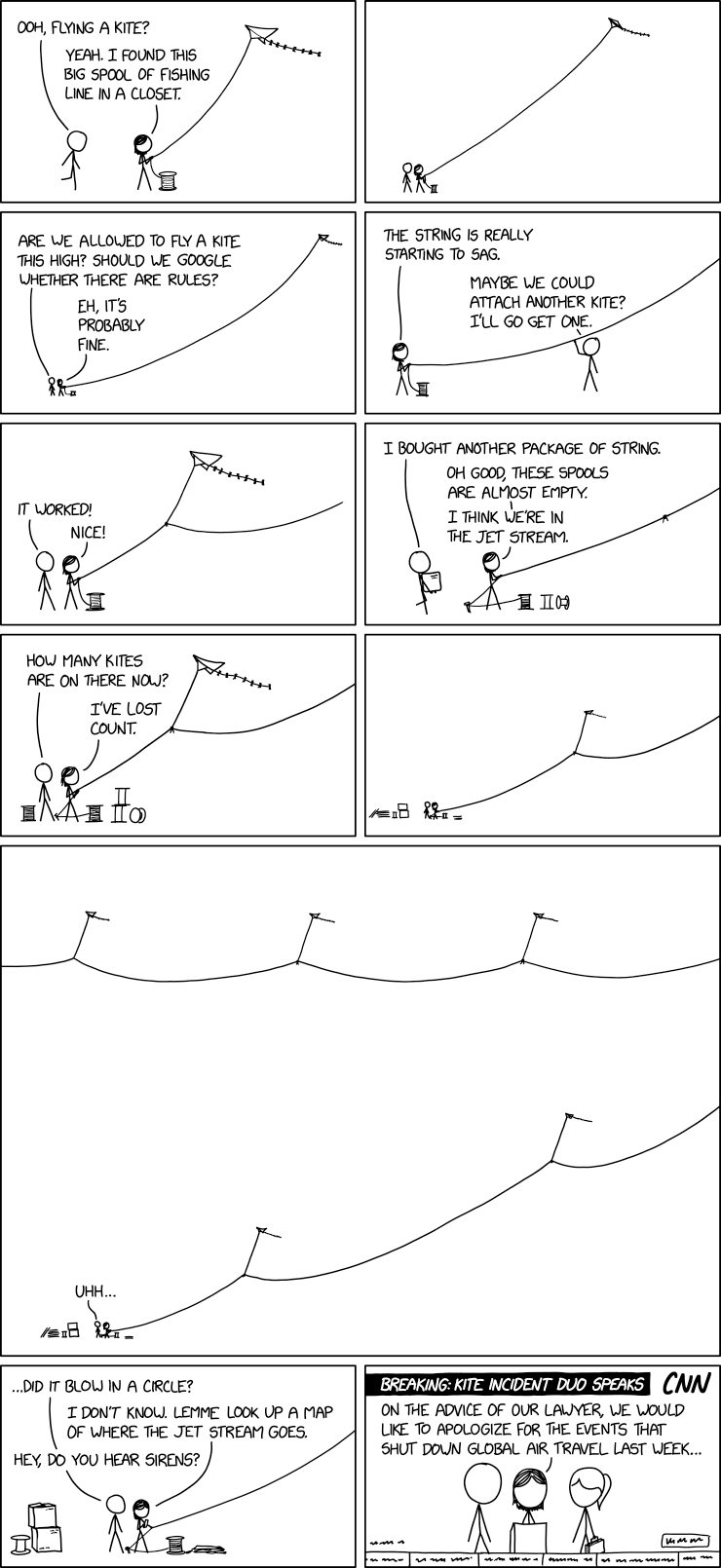
Post Syndicated from xkcd.com original https://xkcd.com/3121/
Post Syndicated from LGR original https://www.youtube.com/watch?v=YXFa1HD4PKs
Post Syndicated from digiblur DIY original https://www.youtube.com/watch?v=Gxng9kYCty0
Post Syndicated from Matt Granger original https://www.youtube.com/shorts/xtqB4_5RoA0
Post Syndicated from Geographics original https://www.youtube.com/watch?v=uewc22E1eCk
Post Syndicated from The History Guy: History Deserves to Be Remembered original https://www.youtube.com/shorts/z3vj5glFI2E
Post Syndicated from Explosm.net original https://explosm.net/comics/the-internet-2
New Cyanide and Happiness Comic
Post Syndicated from Oglaf! -- Comics. Often dirty. original https://www.oglaf.com/thybounty/


Post Syndicated from Cliff Robinson original https://www.servethehome.com/qct-quantaedge-egx88d-1u-intel-xeon-6-soc-xeon-d-server-shown/
The QCT QuantaEdge EGX88D-1U is an Intel Xeon 6 SoC system (new Xeon D) with up to 24 ports of 25GbE and more
The post QCT QuantaEdge EGX88D-1U Intel Xeon 6 SoC Xeon D Server Shown appeared first on ServeTheHome.
Post Syndicated from Explosm.net original https://explosm.net/comics/physical-therapist
New Cyanide and Happiness Comic
Post Syndicated from Techmoan original https://www.youtube.com/watch?v=hdoCz1Fw9-M
Post Syndicated from Matt Granger original https://www.youtube.com/watch?v=q-ENSkUvfUE
Post Syndicated from Patrick Kennedy original https://www.servethehome.com/intel-looking-to-spin-and-sell-its-networking-and-edge-business/
It was reported that Intel is looking to spin and sell a stake in its NEX business, as CRN’s Dylan Martin confirmed an Intel internal memo
The post Intel Looking to Spin and Sell its Networking and Edge Business appeared first on ServeTheHome.
Post Syndicated from Надежда Радулова original https://www.toest.bg/sedmitsata-21-26-yuli/

Живеем в най-добрия от всички възможни светове,
не смятате ли? Казвам го не защото съм фен на Лайбниц (или на учителя Панглос), а заради невероятния късмет да обитаваме най-прекрасната на света държава, да сме оглавявани от най-достойния възможен президент, да сме управлявани от най-честните и най-способни политици и депутати, да сме напътствани и информирани от най-интелигентните и най-безпристрастни медийни магнати, да сме пазени от най-смелата и най-неподкупна полиция, да сме защитавани от най-справедливия и най-некорумпиран съд, алелуя във висините, gloria in excelsis и пр.!
Ами ето така трябва да се пише… А не като колегата ни Борис Митов, който е плюл на огромния си късмет да живее в рая на земята, изнасяйки факти срещу един възможно най-честен и безскандален съдия, причинявайки му по този начин фамилни тегоби и стомашно-чревен дискомфорт. И сега ще си плаща колегата – и той, и медията, публикувала тези безрадостни и неблагодарни писания. Ще плаща, ще чете „Кандид“ и ще се превъзпитава в граждански оптизимъм.
Дотук с шегичките! През изминалата седмица натискът върху независимата журналистика достигна нови върхове чрез това показно дело. Ако по някаква причина (покрай пуми и пожари, планини и морета, сватби и погребения) новината ви е подминала, прочетете призива на АЕЖ за подкрепа на Борис Митов и „Медиапул“ – там целият случай е подробно описан*. А ако в близост до вас се организира протест в тази или в друга връзка, засягаща безчинствата в съдебната власт и изобщо в съдебната система, излезте и протестирайте! И без това вече е късно, а съвсем скоро ще стане не просто безнадеждно късно, а изобщо безнадеждно.
Това тревожно усещане, породено от сянката, която се е проснала върху близкото и по-далечното бъдеще, е уловено в тазседмичното есе на Светла Енчева. Защо след падането на желязната завеса надеждите за утрешния ден постепенно бяха пронизани от все по-близкия и апокалиптичен хоризонт, допълнително скъсен и от технологичния бум, на който сме свидетели в момента? И защо миналото подмолно овладява контрола над настоящото ни биографично време? Четете повече за това в „Сбогом, бъдеще. Здравей, минало“.
Съществува съвсем реален риск покрай основателните тревоги за бъдещето и захласа по миналото да проспим някои възможности, които единствено настоящият момент предоставя. „Някой чу ли Иван Костов?“ – пита Емилия Милчева във връзка с интервюто на бившия премиер по bTV и анализира ситуацията, в която все още е възможна обща президентска кандидатура на т.нар. демократична общност. Но част от тази общност ли е ГЕРБ? И могат ли ПП–ДБ да преглътнат такъв компромис в името на европейското бъдеще на България?
Докато подобни въпроси и перспективи допълнително нажежават и без това жежките юлски дни, на Е.Т. ѝ е топло. Ама много топло. Направо ѝ прекипява от жега. Може би затова седмичната ѝ видеосводка преминава през няколко агрегатни състояния: Е.Т. ту вземе, че втвърди тона, ту плесне с ръце, па прегърне целия свят, в който „с чуден марш пристига векът на любовта“, ту се тръшне за остров. Изобщо… хормонът на лятото не прощава на никого.
Като казах „хормон“, нека плавно преминем към рубриката на Надежда Цекулова за женското здраве. Този път темата ѝ е „Истинският живот на женското либидо“, а героини на текста са няколко жени на различна възраст, които споделят с читателите на „Тоест“ мисли за секса, породени от собствения им сексуален опит. А Надежда обяснява казаното от тях през някои хормонални процеси, протичащи в женския организъм.
И нека сега от телата и техните проблеми се прехвърлим към местата, които обитаваме – градовете. Анета Василева се завръща с поредните новини от света на архитектурата. В този случай те са в жанра на добрите стари ненаучени уроци. И ако в момента актуалната дума, която предизвиква ожесточени он- и офлайн спорове, е геноцид, то не по-малко актуална е думата урбицид – „унищожаване на градове“. Газа и Бахмут са новите Варшава и Сараево. А често пъти бляскави архитекти, движени от инстинкта на лешояда, връхлитат върху руините и ги превръщат в екран, на който прожектират собственото си его. Повече за границите на цинизма и отговорността в тази професия четете в „Урбицид. Руините на войната и провалите на архитектурата“.
И така, новите варвари разрушават градените тухла по тухла човешки светове. На съвременните архитекти се полага да възкресят съсипаните от войните градове. А междувременно екип от учени генетици, генеалози, археолози и изкуствоведи от години работи по смайващ проект за пълна реконструкция на генетичния код на Леонардо да Винчи, като за целта са издирени 35 живи роднини на художника. Повече за проекта четете в разказа на Анастасия Орманджиева „Дешифриране на гениалността на Леонардо да Винчи“.
Още една седмица остава до августовската ни ваканция, но вече я предвкусваме със стихотворението „от високото капе мед“ на Владислав Христов, в което – за разлика от прозата – пушката не гръмва, макар да е налице през цялото време.
Вие обаче не гледайте на нашия бутон за подкрепа (по-долу) като на пушка в стихотворение. (Все пак живеем в гъста и задушлива проза.) Та спомнете си какво казва Чехов и бързо натиснете спусъка. Бум!
Приятно четене и гледане!
* Докато пишех този текст, средствата за покриване на обезщетенията по делото срещу Борис Митов и „Медиапул“ бяха събрани. За по-малко от 24 часа.
Post Syndicated from Crosstalk Solutions original https://www.youtube.com/watch?v=k8igfc-QEf8
Post Syndicated from Bruce Schneier original https://www.schneier.com/blog/archives/2025/07/friday-squid-blogging-stable-quasi-isodynamic-designs.html
Yet another SQUID acronym: “Stable Quasi-Isodynamic Design.” It’s a stellarator for a fusion nuclear power plant.
Post Syndicated from Mohammad Sabeel original https://aws.amazon.com/blogs/big-data/build-an-analytics-pipeline-that-is-resilient-to-avro-schema-changes-using-amazon-athena/
As technology progresses, the Internet of Things (IoT) expands to encompass more and more things. As a result, organizations collect vast amounts of data from diverse sensor devices monitoring everything from industrial equipment to smart buildings. These sensor devices frequently undergo firmware updates, software modifications, or configuration changes that introduce new monitoring capabilities or retire obsolete metrics. As a result, the data structure (schema) of the information transmitted by these devices evolves continuously.
Organizations commonly choose Apache Avro as their data serialization format for IoT data due to its compact binary format, built-in schema evolution support, and compatibility with big data processing frameworks. This becomes crucial when sensor manufacturers release updates that add new metrics or deprecate old ones, allowing for seamless data processing. For example, when a sensor manufacturer releases a firmware update that adds new temperature precision metrics or deprecates legacy vibration measurements, Avro’s schema evolution capabilities allow for seamless handling of these changes without breaking existing data processing pipelines.
However, managing schema evolution at scale presents significant challenges. For example, organizations need to store and process data from thousands of sensors and update their schemas independently, handle schema changes occurring as frequently as every hour due to rolling device updates, maintain historical data compatibility while accommodating new schema versions, query data across multiple time periods with different schemas for temporal analysis, and ensure minimal query failures due to schema mismatches.
To address this challenge, this post demonstrates how to build such a solution by combining Amazon Simple Storage Service (Amazon S3) for data storage, AWS Glue Data Catalog for schema management, and Amazon Athena for one-time querying. We’ll focus specifically on handling Avro-formatted data in partitioned S3 buckets, where schemas can change frequently while providing consistent query capabilities across all data regardless of schema versions.
This solution is specifically designed for Hive-based tables, such as those in the AWS Glue Data Catalog, and is not applicable for Iceberg tables. By implementing this approach, organizations can build a highly adaptive and resilient analytics pipeline capable of handling extremely frequent Avro schema changes in partitioned S3 environments.
In this post as an example, we’re simulating a real-world IoT data pipeline with the following requirements:
To achieve these requirements, we demonstrate the solution using automated schema detection. We use AWS Command Line Interface (AWS CLI) and AWS SDK for Python (Boto3) scripts to simulate an automated mechanism that continually monitors the S3 bucket for new data, detects schema changes in incoming Avro files, and triggers necessary updates to the AWS Glue Data Catalog.
For schema evolution handling, our solution will demonstrate how to create and update table definitions in the AWS Glue Data Catalog, incorporate Avro schema literals to handle schema changes, and use the Athena partition projection for efficient querying across schema versions. The data steward or admin needs to know when and how the schema is updated so that the admin can manually change the columns in the UpdateTable API call. For validation and querying, we use Amazon Athena queries to verify table definitions and partition details and demonstrate successful querying of data across different schema versions. By simulating these components, our solution addresses the key requirements outlined in the introduction:
Although in a production environment this would be integrated into a sophisticated IoT data processing application, our simulation using AWS CLI and Boto3 scripts effectively demonstrates the principles and techniques for managing schema evolution in large-scale IoT deployments.
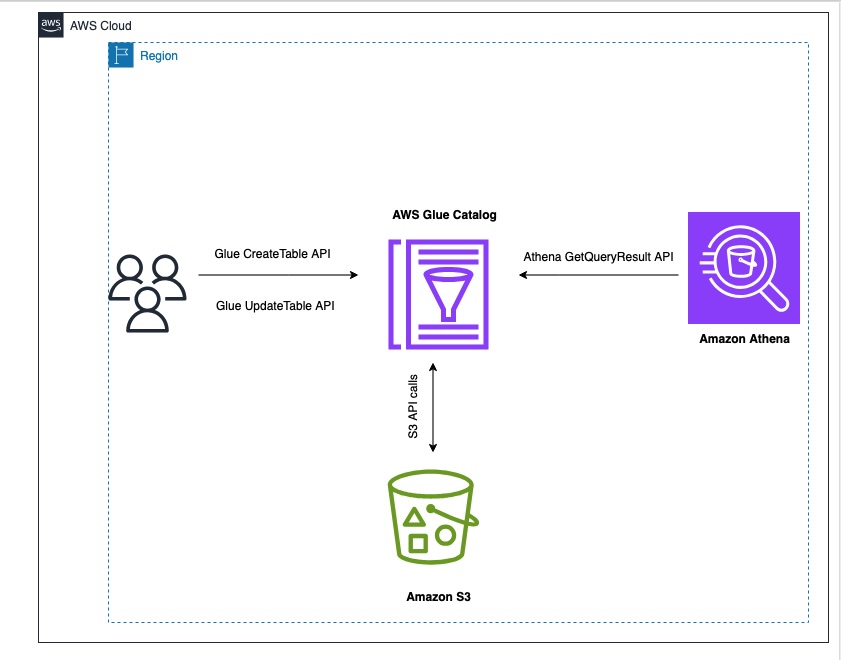
The following diagram illustrates the solution architecture.
To perform the solution, you need to have the following prerequisites:
In this section, we simulate the initial setup of a data pipeline for IoT sensor data. This step is crucial because it establishes the foundation for our schema evolution demonstration. This initial table serves as the starting point from which our schema will evolve. It allows us to demonstrate how to handle schema changes over time. In this scenario, the base table contains three key fields: customerID (bigint), sentiment (a struct containing customerrating), and dt (string) as a partition column. And Avro schema literal (‘avro.schema.literal’)along with other configurations. Follow these steps:
`CreateTableAPI.py` with the following content. Replace 'Location': 's3://amzn-s3-demo-bucket/' with your S3 bucket details and <AWS Account ID> with your AWS account ID:The schema literal serves as a form of metadata, providing a clear description of your data structure. In Amazon Athena, Avro table schema Serializer/Deserializer (SerDe) properties are essential for schema is compatible with the data stored in files, facilitating accurate translation for query engines. These properties enable the precise interpretation of Avro-formatted data, allowing query engines to correctly read and process the information during execution.
The Avro schema literal provides a detailed description of the data structure at the partition level. It defines the fields, their data types, and any nested structures within the Avro data. Amazon Athena uses this schema to correctly interpret the Avro data stored in Amazon S3. It makes sure that each field in the Avro file is mapped to the correct column in the Athena table.
The schema information helps Athena optimize query run by understanding the data structure in advance. It can make informed decisions about how to process and retrieve data efficiently. When the Avro schema changes (for example, when new fields are added), updating the schema literal allows Athena to recognize and work with the new structure. This is crucial for maintaining query compatibility as your data evolves over time. The schema literal provides explicit type information, which is essential for Avro’s type system. This provides accurate data type conversion between Avro and Athena SQL types.
For complex Avro schemas with nested structures, the schema literal informs Athena how to navigate and query these nested elements. The Avro schema can specify default values for fields, which Athena can use when querying data where certain fields might be missing. Athena can use the schema to perform compatibility checks between the table definition and the actual data, helping to identify potential issues. In the SerDe properties, the schema literal tells the Avro SerDe how to deserialize the data when reading it from Amazon S3.
It’s crucial for the SerDe to correctly interpret the binary Avro format into a form Athena can query. The detailed schema information aids in query planning, allowing Athena to make informed decisions about how to execute queries efficiently. The Avro schema literal specified in the table’s SerDe properties provides Athena with the exact field mappings, data types, and physical structure of the Avro file. This enables Athena to perform column pruning by calculating precise byte offsets for required fields, reading only those specific portions of the Avro file from S3 rather than retrieving the entire record.
SHOW CREATE TABLE command in Athena:Note that the table is created with the initial schema as described below:
With the table structure in place, you can load the first set of IoT sensor data and establish the initial partition. This step is crucial for setting up the data pipeline that will handle incoming sensor data.
Download initial schema from the first partition
Download second schema from the second partition
Download third schema from the third partition
amzn-s3-demo-bucket with your S3 bucket name and add a partitioned folder for the dt field.The following screenshot shows the query results.
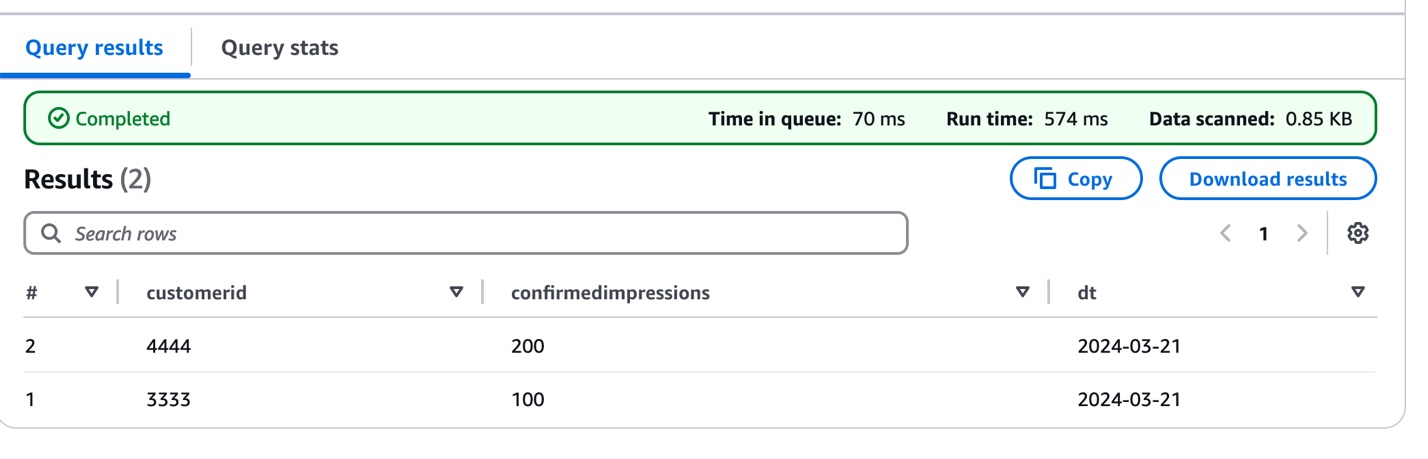
This initial data load establishes the foundation for the IoT data pipeline, which means you can begin tracking sensor measurements while preparing for future schema evolution as sensor capabilities expand or change.
Now, we demonstrate how the IoT data pipeline handles evolving sensor capabilities by introducing a schema change in the second data batch. As sensors receive firmware updates or new monitoring features, their data structure needs to adapt accordingly. To show this evolution, we add data from sensors that now include visibility measurements:
Note the addition of the visibility field within the sentiment structure, representing the sensor’s enhanced monitoring capability.
This demonstrates how the pipeline can handle sensor upgrades while maintaining compatibility with historical data. In the next section, we explore how to update the table definition to properly manage this schema evolution, providing seamless querying across all sensor data regardless of when the sensors were upgraded. This approach is particularly valuable in IoT environments where sensor capabilities frequently evolve, which means you can maintain historical data while accommodating new monitoring features.
To accommodate evolving sensor capabilities, you need to update the AWS Glue table schema. Although traditional methods such as MSCK REPAIR TABLE or ALTER TABLE ADD PARTITION work for small datasets for updating partition information, you can use an alternate method to handle tables with more than 100K partitions efficiently.
We use the Athena partition projection, which eliminates the need to process extensive partition metadata, which can be time-consuming for large datasets. Instead, it dynamically infers partition existence and location, allowing for more efficient data management. This method also speeds up query planning by quickly identifying relevant partitions, leading to faster query execution. Additionally, it reduces the number of API calls to the metadata store, potentially lowering costs associated with these operations. Perhaps most importantly, this solution maintains performance as the number of partitions grows, prodicing scalability for evolving datasets. These benefits combine to create a more efficient and cost-effective way of handling schema evolution in large-scale data environments.
To update your table schema to handle the new sensor data, follow these steps:
UpdateTableAPI.py file:This Python script demonstrates how to update an AWS Glue table to accommodate schema evolution and enable partition projection:
'sentiment' column structure to include new fields.dt
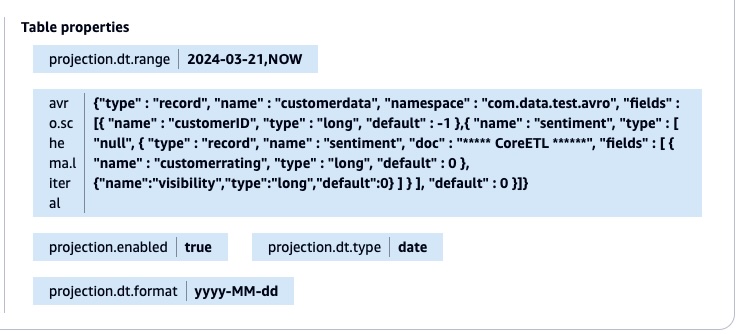
'date''yyyy-MM-dd''2024-03-21' to 'NOW'The script applies all changes back to the AWS Glue table using the UpdateTable API call. The following screenshot shows the table property with the new Avro schema literal and the partition projection.
After the table property is updated, you don’t need to add the partitions manually using the MSCK REPAIR TABLE or ALTER TABLE command. You can validate the result by running the query in the Athena console.
The following screenshot shows the query results.

This schema evolution strategy efficiently handles new data fields across different time periods. Consider the 'visibility' field introduced on 2024-03-22. For data from 2024-03-21, where this field doesn’t exist, the solution automatically returns a default value of 0. This approach makes the query consistent across all partitions, regardless of their schema version.
Here’s the Avro schema configuration that enables this flexibility:
Using this configuration, you can run queries across all partitions without modifications, maintain backward compatibility without data migration, and support gradual schema evolution without breaking existing queries.
Building on the schema evolution example, we now introduce a third enhancement to the sensor data structure. This new iteration adds a text-based classification capability through a 'category' field (string type) to the sentiment structure. This represents a real-world scenario where sensors receive updates that add new classification capabilities, requiring the data pipeline to handle both numeric measurements and textual categorizations.
The following is the enhanced schema structure:
This evolution demonstrates how the solution flexibly accommodates different data types as sensor capabilities expand while maintaining compatibility with historical data.
To implement this latest schema evolution for the new partition (dt=2024-03-23), we update the table definition to include the ‘category’ field. Here’s the modified UpdateTableAPI.py script that handles this change:
UpdateTableAPI.py:The following screenshot shows the query results.
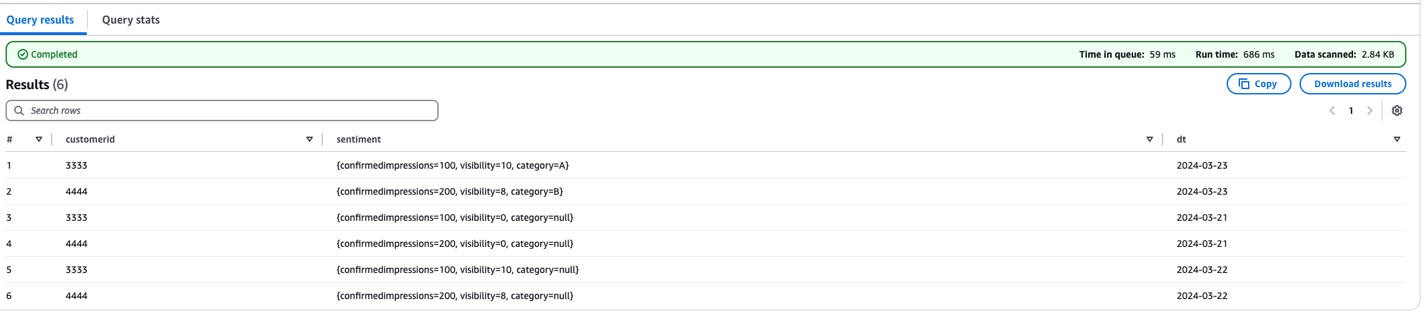
There are three key changes in this update:
'category' field (string type) to the sentiment structure"null" for the category fieldTo support that latest sensor data enhancement, we updated the table definition to include a new text-based 'category' field in the sentiment structure. The modified UpdateTableAPI script adds this capability while maintaining the established schema evolution patterns. It achieves this by updating both the AWS Glue table schema and the Avro schema literal, setting a default value of "null" for the category field.
This provides backward compatibility. Older data (before 2024-03-23) shows "null" for the category field, and new data includes actual category values. The script maintains the partition projection settings, enabling efficient querying across all time periods.
You can verify this update by querying the table in Athena, which will now show the complete data structure, including numeric measurements (customerrating, visibility) and text categorization (category) across all partitions. This enhancement demonstrates how the solution can seamlessly incorporate different data types while preserving historical data integrity and query performance.
To avoid incurring future costs, delete your Amazon S3 data if you no longer need it.
By combining Avro’s schema evolution capabilities with the power of AWS Glue APIs, we’ve created a robust framework for managing diverse, evolving datasets. This approach not only simplifies data integration but also enhances the agility and effectiveness of your analytics pipeline, paving the way for more sophisticated predictive and prescriptive analytics.
This solution offers several key advantages. It’s flexible, adapting to changing data structures without disrupting existing analytics processes. It’s scalable, able to handle growing volumes of data and evolving schemas efficiently. You can automate it and reduce the manual overhead in schema management and updates. Finally, because it minimizes data movement and transformation costs, it’s cost-effective.
 Mohammad Sabeel Mohammad Sabeel is a Senior Cloud Support Engineer at Amazon Web Services (AWS) with over 14 years of experience in Information Technology (IT). As a member of the Technical Field Community (TFC) Analytics team, he is a Subject matter expert in Analytics services AWS Glue, Amazon Managed Workflows for Apache Airflow (MWAA), and Amazon Athena services. Sabeel provides expert guidance and technical support to enterprise and strategic customers, helping them optimize their data analytics solutions and overcome complex challenges. With deep subject matter expertise he enables organizations to build scalable, efficient, and cost-effective data processing pipelines.
 Indira Balakrishnan Indira Balakrishnan is a Principal Solutions Architect in the Amazon Web Services (AWS) Analytics Specialist Solutions Architect (SA) Team. She helps customers build cloud-based Data and AI/ML solutions to address business challenges. With over 25 years of experience in Information Technology (IT), Indira actively contributes to the AWS Analytics Technical Field community, supporting customers across various Domains and Industries. Indira participates in Women in Engineering and Women at Amazon tech groups to encourage girls to pursue STEM path to enter careers in IT. She also volunteers in early career mentoring circles.
Post Syndicated from Julian Busic original https://aws.amazon.com/blogs/security/new-aws-whitepaper-aws-user-guide-to-financial-services-regulations-and-guidelines-in-australia/
Amazon Web Services (AWS) has released substantial updates to its AWS User Guide to Financial Services Regulations and Guidelines in Australia to help financial services customers in Australia accelerate their use of AWS.
The updates reflect the Australian Prudential Regulation Authority’s (APRA) publication of the Prudential Standard CPS 230 Operational Risk Management (CPS 230), which became effective from July 1, 2025. It also reflects that APRA rescinded its 2018 information paper “Outsourcing Involving Cloud Computing Services” in February 2025.
The updated whitepaper continues our efforts to help AWS customers navigate APRA’s regulatory expectations in a shared responsibility environment. It is intended for APRA-regulated institutions that are looking to run workloads on AWS and is particularly useful for leadership, governance, security, risk, and compliance teams that need to understand APRA requirements and guidance.
The whitepaper summarizes APRA’s requirements and guidance related to operational risk management and information security. It also gives APRA-regulated institutions information they can use to commence their due diligence and assess how to implement the appropriate programs for their use of AWS.
As the regulatory environment continues to evolve, we’ll provide further updates through the AWS Security Blog and the AWS Compliance page. You can find more information on cloud-related regulatory compliance at the AWS Compliance Center. You can also reach out to your AWS account manager for help finding the resources you need.
If you have feedback about this post, submit comments in the Comments section below. If you have questions about this post, contact AWS Support.
Post Syndicated from Gregory Knowles original https://aws.amazon.com/blogs/big-data/secure-generative-sql-with-amazon-q/
Amazon Q generative SQL brings generative AI capabilities to help speed up deriving insights from your Amazon Redshift data warehouses and AWS Glue Data Catalog, generating SQL for Amazon Redshift or Amazon Athena. With Amazon Q, you get SQL commands generated with your context. This means you can focus on deriving insights faster, rather than having to first learn potentially complex schemas. Without generative SQL, your data analysts might have to frequently switch between different types of SQL, which can further slow analysis down. Amazon Q generative SQL can help by generating SQL statements from natural language and speeding up development. This can help onboard analysts faster and improve analyst productivity. The generative SQL experience is available through Amazon SageMaker Unified Studio and Amazon Redshift Query Editor v2.
To scale the use of generative SQL in production scenarios, you need to consider how relevant and accurate SQL is generated. In doing so, it’s important to understand what data is used and how your information is protected. Amazon Q generative SQL is designed to keep your data secure and private. Your queries, data, and database schemas are not used to train generative AI foundation models (FMs). For more information, see Considerations when interacting with Amazon Q generative SQL.
In the post Write queries faster with Amazon Q generative SQL for Amazon Redshift, we provided general advice around getting started with generative SQL. In this post, we discuss the design and security controls in place when using generative SQL and its use in both SageMaker Unified Studio and Amazon Redshift Query Editor v2.
Generating relevant SQL requires context from your data warehouse or data catalog schemas. Your analysts can ask free text or natural language questions in the Amazon Q chat window and have SQL statements returned that reference your tables and columns. It’s important that the generated SQL is consistent with your schema so that it can find the most relevant fields to answer questions and generate queries that accurately reference data. In SageMaker Unified Studio or Amazon Redshift Query Editor v2, when the Amazon Q chat window is open, database metadata that is viewable under the connection context is made available to Amazon Q for SQL generation. This means that only the schema information that the connecting user can access is used. Tables or database objects the user doesn’t have access to are excluded.
When a user submits questions in the Amazon Q chat window, a search algorithm is used to find the most relevant context from the available database schema metadata information. This context is combined with the user’s question and used as a prompt to a large language model (LLM) to generate a SQL statement. The supporting information is cached so that your data source doesn’t need to be queried every time a user initiates SQL generation. Instead, data source metadata will be periodically refreshed if it remains in use, or you can trigger a manual refresh. If the data is not being used, Amazon Q will automatically delete it. Where applicable, the information used to support SQL generation is encrypted with an AWS Key Management Service (AWS KMS) customer managed KMS key where one has been specified in the SageMaker Unified Studio or Amazon Redshift Query Editor v2 settings. Otherwise, an AWS managed key is used. Your information is encrypted in transit and at rest.
The following diagram shows the process flow for SQL generation when using SageMaker Unified Studio or the Amazon Redshift Query Editor and using Amazon Redshift or Data Catalog source data.
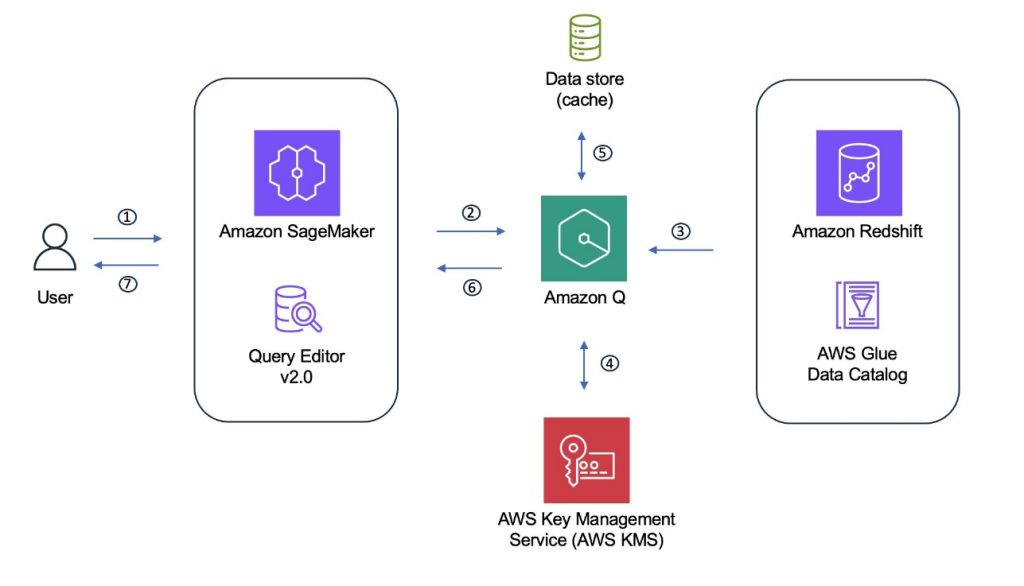
The Amazon Q generative SQL process can be summarized as the following steps:
You can provide further context to supplement the database schema information, which can help improve the accuracy and relevancy of the generated SQL.
One option is to provide custom context. Custom context gives the option to specify instructions and extra information, such as descriptions of tables and columns. These descriptions can then be used to help the selection of relevant tables and attributes when generating SQL statements. This is particularly relevant when your schema uses more obscure naming that might not directly relate to business terms or uses non-standard abbreviations. For example, consider a table called sls_r1_2024. With custom context, you can add a table description specifying that, for example, the table includes sales information across stores in the US region for the calendar year 2024. This information can help the LLM generate SQL referencing the correct tables. The same approach can be applied to columns within the table. Your custom context is encrypted using a customer managed KMS key if one has been specified (during Amazon Redshift Query Editor account creation or SageMaker Unified Studio project creation) or an AWS managed key otherwise.
You can also introduce constraints using custom context. For example, you can explicitly include or exclude specific schemas, tables, or columns from SQL query generation. Similarly, specific topics can also be disallowed, such as not generating SQL statements to support financial reporting. For more details about the information that can be supplied, refer to Custom context.
Another option is to grant SQL query history access to the user establishing the connection. This information is then also made available to enhance SQL generation and to provide the LLM with examples of relevant queries. Be aware that granting wider SQL query history access to the connecting user, and therefore also the generative SQL workflow, allows viewing of queries over tables or objects the user might not have access to. Furthermore, string literals might be present in historic statements that might contain sensitive information. To help mitigate this risk, you could instead use the CuratedQueries section of custom context to provide predefined question and answer examples, without exposing all user queries.
Before a SQL statement is returned to the user, Amazon Q tries to detect syntax issues. This step helps improve the likelihood that only valid SQL syntax is returned. Amazon Q will use the available information for the user to return statements that align with user permissions, to reduce scenarios where users can’t run generated statements. For example, if you have given access to SQL query history information, then the SQL generation step might produce a query statement referencing a table that the user asking the question doesn’t have access to. Amazon Q minimizes the occurrence of this scenario by assessing if the generated SQL aligns with user permissions and updating the statement if not. User permissions are not bypassed through the use of Amazon Q generative SQL. If a statement was returned referencing a table the user doesn’t have access to, the authorization applied to the user will enforce access control when the statement is executed.
Statements generated by Amazon Q that could potentially change your database, such as DML or DDL statements, are returned with a warning. The warning highlights to the user that running the statement could potentially modify the database. Again, these statements are only executable if the user has the required permissions.
Amazon Q generative SQL works with your Redshift data warehouses and Data Catalog tables. To get started, you should have data available in either or both of these environments. To use Amazon Q generative SQL with your AWS Glue tables, you need a SageMaker Unified Studio domain. Within your domain, you can use the Amazon Q chat integration to ask questions of your data and have SQL generated. This also works for Amazon Redshift data sources available in the domain. You can use Amazon Q generative SQL without a SageMaker Unified Studio domain using the Amazon Redshift Query Editor. Access to the editor enables Amazon Q chat integration against your Amazon Redshift data sources.
You can control access to generative SQL at the account-Region level in the Amazon Redshift Query Editor or at the SageMaker Unified Studio domain level. To enable this feature, an account admin must explicitly turn on Amazon Q generative SQL. By default, the feature is not accessible to your users. Administrators that have permission for the sqlworkbench:UpdateAccountQSqlSettings AWS Identity and Access Management (IAM) action can turn the Amazon Q generation SQL feature on or off through the admin window, as illustrated in the following sections. When turned off, this will restrict users from opening the Amazon Q chat pane and help prevent interaction with generative SQL.
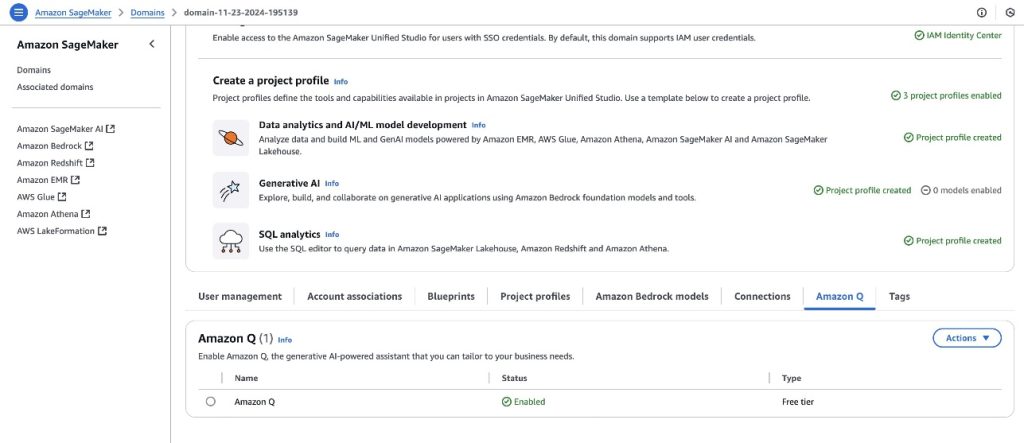
To enable Amazon Q in your SageMaker domain, you can navigate to the Amazon Q tab on the domain settings page and choose to enable the service. For more information, see Amazon Q in Amazon SageMaker Unified Studio.
To enable Amazon Q generative SQL from the Amazon Redshift Query Editor, access the Amazon Q generative SQL settings. This requires the administrator to have the sqlworkbench:UpdateAccountQSqlSettings permission in their IAM policy. For more information, see Updating generative SQL settings as an administrator.
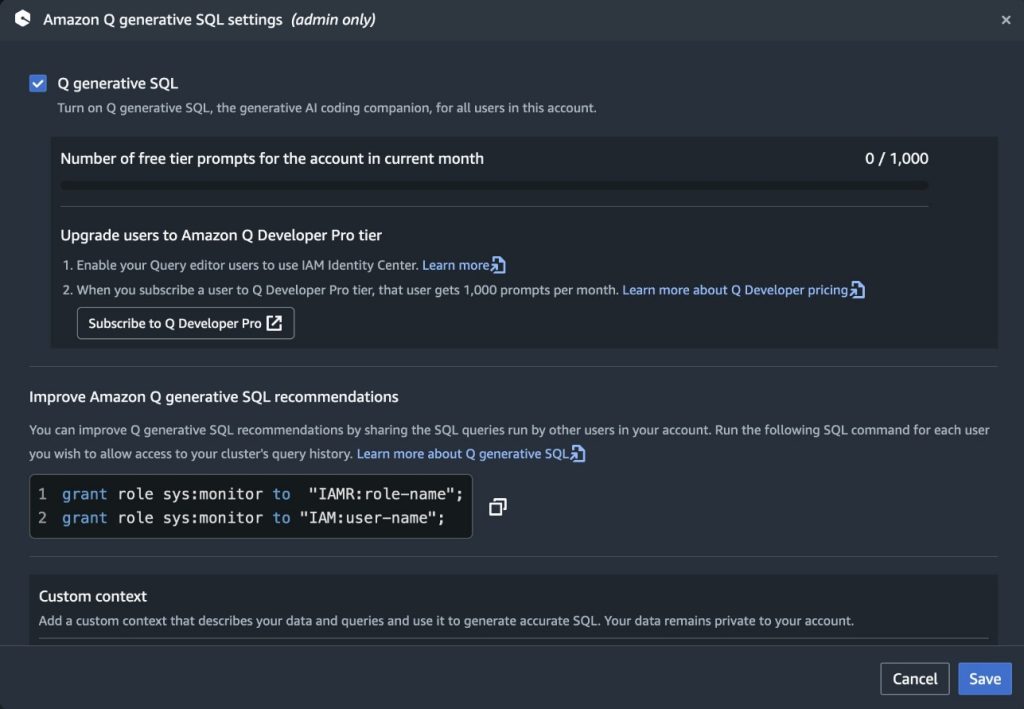
With generative SQL enabled at the account-Region level, you can restrict access to specific users with IAM controls. IAM administrators can build IAM policies that allow or deny access to the action sqlworkbench:GetQSqlRecommendations. For more information, refer to Actions, resources, and condition keys for AWS SQL Workbench. Policies can then be associated with IAM users or roles to control access to SQL generation at a more granular level. An appropriately scoped service control policy (SCP) can be used to limit access to SQL generation to specific accounts within your organization if required.
The following is an example policy denying access to use SQL generation:
Amazon Q Developer uses cross-Region inference to distribute traffic across different AWS Regions, which provides increased throughput and resilience during high demand periods, improved performance, and access to the latest Amazon Q Developer capabilities.
When a request is made from an Amazon Q Developer profile, it is kept within the Regions in the same geography as the original data. Although this doesn’t change where the data is stored, the requests and output results might move across Regions during the inference process. Data is encrypted when transmitted across Amazon’s network. For more information on cross-Region inference, see Cross-region processing in Amazon Q Developer.
To monitor which IAM users or roles are interacting with generative SQL, you can use AWS CloudTrail. CloudTrail monitors API calls and logs which identities have performed particular actions. When a user first asks a question, a CloudTrail event is emitted called IngestQSqlMetadata. This is a result of Amazon Q starting the metadata ingest process. Ingestion is an asynchronous operation, so there might be a series of GetQSqlMetadataStatus events. This is due to the workflow checking the ingestion process status.
After the workflow has completed successfully, each question sees a GetQSqlRecommendation event. This is the result of users submitting questions and triggering generation of SQL statements. The following is an example CloudTrail event for GetQSqlRecommendation. In this example, Amazon Q emits detailed CloudTrail events highlighting the warehouse being queried, IAM principal calling Amazon Q, and the entire response structure from Amazon Q in responseElements:
In this post, we discussed the Amazon Q generative SQL workflow. We highlighted the process around using your schema context alongside metadata such as historic SQL queries and custom context. Using this metadata allows the generation of relevant SQL that helps accelerate your analyst’s productivity. Although it’s important to assist analysts, it’s also imperative to make sure data remains secure and protected. To support this, generative SQL uses only the data the connected user has access to. This helps prevent exposure to information beyond their authorization.When you’re looking to increase the relevance of generated SQL through sharing additional query history, it’s important to consider the trade-off of exposing additional information to the user. Deciding your approach here should take into account the domain context of the data and the possible exposure of metadata the user doesn’t have access to, or potentially sensitive information that might appear in query strings. Keeping these considerations in mind can help you achieve the appropriate security posture for your workloads.
To get started with Amazon Q generative SQL, see Write queries faster with Amazon Q generative SQL for Amazon Redshift and Interacting with Amazon Q generative SQL.
 Gregory Knowles is a data and AI specialist solution architect at AWS, focusing on the UK public sector. With extensive experience in cloud-based architectures, Greg guides public sector customers in implementing modern data solutions. His expertise spans governance, analytics, and AI/ML. Greg’s passion lies in accelerating transformation and innovation to improve productivity and outcomes. He has successfully led projects that moved data systems into the cloud, adopted new data architectures, and implemented AI at scale in production.
 Abhinav Tripathy is a Software Engineer and Security Guardian at AWS, where he develops Amazon Q generative SQL by combining machine learning, databases, and web systems. Abhinav is passionate about building scalable web systems from scratch that solve real customer challenges. Outside of work, he enjoys traveling, watching soccer, and playing badminton.
 Erol Murtezaoglu is a Technical Product Manager at AWS, is an inquisitive and enthusiastic thinker with a drive for self-improvement and learning. He has a strong and proven technical background in software development and architecture, balanced with a drive to deliver commercially successful products. Erol highly values the process of understanding customer needs and problems, in order to deliver solutions that exceed expectations.